1. Overview
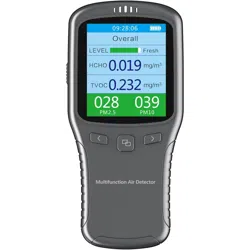
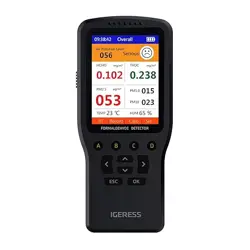
The IGERESS Indoor Air Quality Monitor is a portable device designed to measure key air quality parameters in your home or office. It provides real-time readings to help you understand your indoor environment.

The monitor detects Formaldehyde (HCHO), Total Volatile Organic Compounds (TVOC), and particulate matter (PM1.0, PM2.5, PM10). It also measures temperature and humidity.
2. Product Specifications
Physical Specifications
- Brand: IGERESS
- Model Number: WP6912
- Color: Gray
- Product Dimensions: 1.2"D x 2.6"W x 6.8"H (150 x 70.8 x 43.6 mm)
- Item Weight: 10.4 ounces (approx. 295 grams)
- Display: 7-inch LCD screen
Technical Specifications
- Power Source: 2200mAh lithium battery, rechargeable via USB.
- Sensor Type: Electrochemical (DART sensor for formaldehyde).
- Sampling Method: Diffusion Sampling.
- Operating Environment: -10℃ to 45℃, less than 85% Relative Humidity.
- Storage Environment: 0℃ to 50℃, less than 90% Relative Humidity.
Detection Ranges
- Formaldehyde (HCHO): 0 ~ 999 μg/m³
- TVOC: 0 ~ 999 μg/m³ (Effectors include Benzene, hydrocarbons, alkanes, alkenes, ketones, etc.)
- PM2.5 / PM10: 0.000 ~ 1.999 mg/m³
- Temperature: 0 ~ 50 °C
- Humidity: 20% to 90% RH
3. Features and Indicators

Display Screen
The 7-inch LCD screen shows real-time numerical values and status indicators for all measured parameters.
Alarm System
- Visual Alarm: The interface color changes when a measured value exceeds the safe range.
- Audible Alarm: The device emits a sound when a measured value exceeds the safe range.
Function Keys
The device is operated using four function keys. Their specific functions (e.g., power, mode selection, menu navigation) are detailed in the device's on-screen prompts or the printed manual included in the box.
Data Logging
The device features a 24-hour memory and can display an air quality curve log over time.
4. Use Guide
Initial Setup and Charging
- Fully charge the device using the provided USB charging cable and a 5V/1A power adapter before first use.
- Press and hold the power button to turn on the device.
Taking a Measurement
- Place the monitor in the area you wish to test, on a stable, flat surface.
- For the most accurate formaldehyde and TVOC readings, close all doors and windows in the room.
- Allow the device to sample the air for at least 15 minutes. The sensors require this time to stabilize and provide an accurate reading.
- Observe the real-time readings on the LCD screen. The current values for HCHO, TVOC, PM2.5, PM10, temperature, and humidity will be displayed.
Interpreting the Readings
- Refer to the user manual included in the package for specific reference ranges and what the numerical values indicate for air quality levels (e.g., Good, Moderate, Poor).
- Pay attention to the screen color and any audible alarms, which indicate when a parameter has exceeded a safe threshold.
Using the Data Log
Use the function keys to navigate the menu and access the 24-hour memory or air quality curve feature to review historical data trends.
5. Care and Maintenance
- Keep the sensor inlets free from dust and obstructions. Wipe the exterior with a soft, dry cloth.
- Do not use the device in environments with extreme temperature or humidity outside its specified operating range.
- Avoid exposing the sensors to high concentrations of chemical vapors for prolonged periods, outside of normal detection use.
- Store the device in a cool, dry place when not in use for extended periods.
- Recharge the battery when the low battery indicator appears on the screen.
6. Troubleshooting
- Device won't turn on: Ensure the battery is charged. Connect to a USB power source.
- Readings seem inaccurate or unstable: Ensure the device has been sampling in a closed room for over 15 minutes. Check that the sensor inlets are not blocked.
- Alarm is sounding: Check the display to see which parameter (HCHO, TVOC, PM2.5/PM10) is in a warning state. Increase ventilation in the room.
- Screen is unresponsive: Restart the device by holding the power button.
7. Compliance and Disposal
This device complies with relevant standards for electronic measurement equipment. At the end of its life, do not dispose of this product with household waste. Please recycle or dispose of it according to your local regulations for electronic waste.