1. Overview
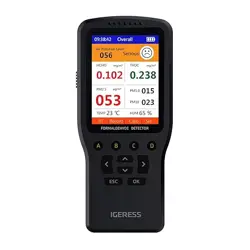
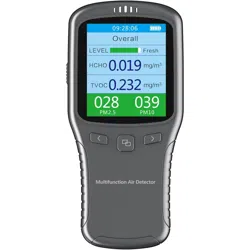
The IGERESS Air Quality Monitor is a portable device designed to measure key indoor air quality parameters. It provides real-time readings on a color LCD screen.

The device monitors the following seven parameters:
- Formaldehyde (HCHO)
- Volatile Organic Compounds (TVOC)
- Particulate Matter (PM2.5, PM1.0, PM10)
- Temperature
- Humidity
2. Features
2.1 Multifunctional Detection
The device integrates sensors for seven different air quality and environmental metrics, eliminating the need for multiple separate devices.
2.2 Colorful LCD Screen
A color LCD screen clearly displays all test results simultaneously for easy reading and interpretation.

2.3 Portability and Power
- Dimensions: Approximately 15 cm x 6.5 cm x 3.5 cm.
- Weight: 170 grams.
- Power Source: Rechargeable lithium polymer battery (included).
- Charging: Via the included USB cable.
2.4 Alarm Function
The device features an alarm to alert you when detected levels exceed certain thresholds.
2.5 Data Charting
The device can monitor environmental changes over a selected period and form a data chart for parameters like HCHO, TVOC, Temperature, and PM2.5.
3. Use Guide
3.1 Package Contents
- 1 x Air Quality Monitor
- 1 x USB Cable
- 1 x User Manual (this document)
3.2 Initial Setup and Calibration
When to Calibrate:
- The first time you use the device.
- If the results appear inaccurate.
- When reusing the device after storage for more than three months.
Calibration Procedure:
- Take the device to an outdoor location with fresh, circulating air.
- Turn on the device and navigate to the calibration interface using the device keys.
- Start the auto-calibration process.
- The calibration will finish after 300 seconds (5 minutes). The device will then return to the main measurement interface.

3.3 Taking Measurements
- Preheat: Turn on the device and allow it to preheat for 3 minutes before starting detection for stable readings.
- Operation: Use the 10 keys on the device to navigate menus, start/stop measurements, and view charts.
- Reading the Screen: Observe the real-time values for all seven parameters on the LCD screen.
3.4 Understanding Readings
- PM2.5 and PM10: Display real, absolute values.
- HCHO and TVOC: Display relative values based on the air quality during the last calibration. Fresh outdoor air is used as a baseline (approximately zero).
4. Care and Maintenance
Important Notes
- Preheat: Always allow the 3-minute preheat for accurate sensor operation.
- Noise: A faint noise is normal during operation due to the internal fan required for real-time air sampling.
- Environment: Do not use the device in environments with high temperature and high humidity. Avoid dropping the device.
- Storage: If storing for extended periods (over 3 months), recalibrate before next use.
5. Technical Specifications
- Manufacturer: VSON
- Model Number: WP6930S
- Style: 7-in-1 Air Quality Monitor
- Product Dimensions: 15 x 6.75 x 3.74 cm
- Item Weight: 170 g
- Battery: 1 x Lithium Polymer (Included)
- Power Source: Corded Electric (for charging)