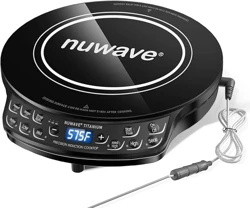
Overview

The Inalsa Magnum is a counter-top induction cooktop with a toughened glass surface. It operates on a 230V AC power supply with a maximum power consumption of 1800 Watts. This manual provides instructions for its safe operation, features, and maintenance.
Model: Magnum
Colour: Black
Included Components: 1 induction cooker, Instruction Manual cum Warranty Card.
Safety Information
Important: Please read all instructions before use.
- Use only with induction-compatible cookware made of iron or magnetic stainless steel.
- Cookware must have a flat bottom with a diameter between 12 cm and 20 cm for proper function.
- Do not use pots made of ceramic, aluminum, copper, or heat-resistant glass.
- Ensure the power cord is not damaged and the plug is properly inserted into a grounded socket.
- The glass surface can remain hot after use. Use the cool surface indicator as a guide.
- Keep the appliance and its cord away from heat, water, and other liquids.
- This appliance is not intended for use by persons with reduced physical, sensory or mental capabilities, unless they have been given supervision or instruction.

Product Features

Control Panel and Display
- 4-Digit Digital Display: Shows power level, temperature, timer, and error codes.
- Touch Control Buttons: For power, menu selection, timer, and temperature/power adjustment.
- 7 Preset Cooking Modes: One-touch buttons for specific cooking tasks.
Technical Specifications
- Power Source: Electric, 230-240V AC
- Power Consumption: 1800 Watts (variable from 400W to 1800W)
- Temperature Range: 80°C to 270°C
- Timer: Off timer adjustable from 0 to 3 hours.
- Cord: 3-pin plug, 1.4 meters in length.
- Surface Material: Toughened Glass
- Installation Type: Counter-Top
- Item Weight: 2000 grams
Special Features
- Automatic Shut-Off: Switches off when cooking is complete or if no pan is detected.
- Overheat Protection: Protects internal components during excessive use.
- Safety Lock: Prevents accidental activation of controls.
- Cool Surface Indicator: Alerts when the cooking surface is hot.
- Anti-Magnetic Wall Technology: Designed to reduce magnetic radiation around the unit.
- Power Saving Technology: Adjusts power based on vessel size and temperature.

Use Guide
Initial Setup
- Place the induction cooktop on a stable, flat, heat-resistant, and dry surface.
- Ensure there is adequate ventilation around the unit.
- Plug the 3-pin power cord into a properly grounded 230V AC electrical outlet.
Using Preset Cooking Modes
The cooktop has 7 preset menus optimized for common tasks:
- Pressure Cooker
- Soup
- Curry
- Milk
- Dosa/Chapati
- Deep Fry
- Water (Boil)
To use a preset mode:
- Place compatible cookware on the center of the glass cooking zone.
- Press the Power button.
- Press the button corresponding to your desired cooking mode (e.g., Milk, Deep Fry).
- The cooktop will automatically set the power and temperature. You can adjust the timer if needed.
Manual Cooking
- Place compatible cookware on the cooking zone.
- Press the Power button.
- Use the + and - buttons to manually set your desired power level (400W-1800W) or temperature (80°C-270°C).
- To set a timer, press the Timer button and use +/- to set the duration (0-3 hrs). The unit will shut off automatically when the timer ends.
Safety Lock
To activate the safety lock (child lock), press and hold the Power button for 3-5 seconds. An indicator will show. To deactivate, press and hold the Power button again.
After Use
- Press the Power button to turn the unit off. Unplug the cord from the wall outlet.
- Allow the cooktop to cool completely.
- Clean the glass surface as described in the Care & Maintenance section.

Video available: The video showcases the product in use and guides you through product setup.
Care & Maintenance
- Cleaning: Always unplug the unit and let it cool completely before cleaning.
- Wipe the glass surface with a soft, damp cloth. Use a mild detergent if necessary.
- Do not use abrasive cleaners, scouring pads, or steel wool, as they can scratch the glass.
- Do not immerse the induction cooktop in water or any other liquid.
- Storage: Store in a cool, dry place. Ensure the power cord is loosely coiled and not pinched.
Troubleshooting
| Problem | Possible Cause | Solution |
|---|---|---|
| Unit does not turn on. | Not plugged in. Power outlet issue. Safety lock is active. | Check power connection. Try a different outlet. Deactivate safety lock. |
| Display shows an error code or beeps. | No cookware detected. Cookware is not compatible. Overheating. | Use induction-compatible cookware with a flat bottom (12-20 cm). Let the unit cool down. |
| Heating is uneven or stops intermittently. | Cookware bottom is not flat or is warped. Cookware diameter is incorrect. | Use cookware with a perfectly flat, magnetic base of the correct size. |
| The automatic shut-off activates too soon. | Preset timer has ended. Cookware was removed. | Check and adjust the timer setting. Ensure cookware remains centered on the cooking zone. |
Warranty & Support
This product is covered by a 1-year warranty provided by the manufacturer from the date of purchase.
Manufacturer / Importer / Packer Contact Information:
Tuareg Marketing Pvt. Ltd.
KHASRA NO.154,1092,1189, BHALSWA VILLAGE, BHALSWA, North West Delhi, Delhi, 110033.
Contact No: 9773982065 / 66 / 67 / 68 / 69 / 70
For warranty service or support, please contact the manufacturer at the address or phone number above. Retain your purchase invoice and warranty card.

Regulatory Compliance
To know if this product requires Bureau of Indian Standards (BIS) Marking, please refer to the official "Mandatory certifications in India" website or search using "Know your standards".