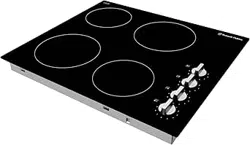
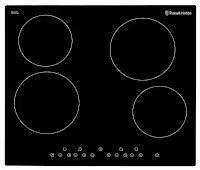
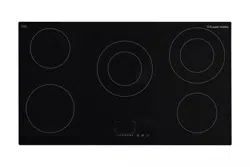
4. Zone indicator controls & power level indicator
5. Controls
6. 4 x Brackets
7. 4 x Screws
Unit & Spare Parts
If any of the above parts are missing please contact the customer service team on 0345 208 8750 or visit
Positioning
This appliance is to be installed in a counter top.
Avoid damaging the product during installation.
The appliance can only be used safely if it is correctly installed according to the safety instructions. The installer is responsible for ensuring that the appliance works correct when installed.
Electric ovens and hobs must be hard-wired to a suitably rated electrical cooker power point – it is recommended that you consult a qualified electrician. Failure to do so will invalidate your guarantee, liability claims and could lead to criminal prosecution.
The edges of the hob must be a minimum of 60mm from a side or rear wall. The highest point of the hob must be a minimum of 760mm from the underside of any surface directly above it.
The highest point of the hob must be a minimum of 400mm from the underside of any surface either sideof the hob. If any surface either sideof the hob is lower than 400mm, then it must be at least 50mm from the outer edges of the hob.
There must be a minimum of 50mm of clearance around the hob and any combustible materials.
Be sure the thickness of the work surface is at least 30mm
You must have a gap of a minimum gap of 25mm between the underside of the appliance and any surface below it.
Note:
Select heat-resistant work surface material to avoid larger deformation caused by the heat radiation from the appliance.
To install a hob above an oven, the oven must have forced ventilation. Check the dimensions of the oven when being installed with the hob
Installation
Preparation & installation
Ensure that there are no electric wires, gas or water pipes in the area where holes are to be made.
Components of the appliance may have sharp edges. Wear protective gloves.
1. Ensure that there is an electrical connection within adequate distance of the hob after it has been installed.
2. Cut out the aperture that measure 750mm by 495mm deep, in accordance with the positioning instructions detailed on the previous page. 3. Carefully and gently lower the hob into the aperture hole that you have cut out.
4. Fix the hob on the work surface by screwing the 4 brackets on to the underside of hob after installation:
5. The brackets position can be adjusted to suit different thickness of work surfaces:
Electrical connection
WARNING- THIS APPLIANCE MUST BE EARTHED
This appliance is designed to be connected to a 220-240V~50Hz/60Hz AC electricity supply.
Before proceeding with the electrical connection, verify that the current carrying capacity of the system and the isolator / main switch is adequate for the maximum power rating of the hob.
Electrical installation of the residence and of the appliance’s isolator must be earthed and conform with the required safety regulations.
If there is no suitable circuit and a fused switch, they must be installed by a qualified electrician before the hob is connected.
An isolator switch must be easily accessible once the hob has been installed. Do not use adaptors, multiple sockets and/or extension leads. A circuit breaker with a contact opening of at least 3 mm, rated 32A and
delayed functioning type must be installed inside the supply circuit. During installation, please ensure that insulated cables are used. An incorrect connection might damage your appliance and will void the manufacturer’s guarantee.
All repairs must be carried out by an authorised service personal or a qualified electrician.
Switch off/isolate your appliance before each maintenance.
Wiring diagram is below:
Usage
Controls
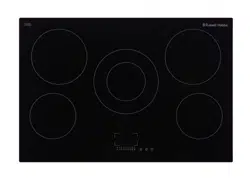
The appliance has 5 cooking zones and these are controlled by the touch controls at the bottom of the hob. Just above the cooking zone power controls there are the cooking zone selection controls and to the left of the cooking zone controls is the timer indicator:
The function of each touch control and the meaning of each icon is explained below:
1 - Cooking zone selection controls and power level indicator
2 - Power level adjustment down and up
- Minimum power level: 0
- Maximum power level: 9
3 - Dual ring control
4 - Child lock
5 - Power on/off
6 - Timer indicator & control
Using the touch controls
The controls respond to touch, so you don’t need to apply pressure to them. Below are tips on how to use the controls:
Use the ball of your finger, not its tip.
You will hear a beep each time a touch is registered.
Make sure the controls are always clean, dry, and that there is no object (e.g. a utensil or a cloth) covering them. Even a thin film of water may make the controls difficult to operate.
Indicators
Cooking zone indicators
The cooking zone indicators are above the cooking zone
controls. The indicator will show the power level of the
zone, if a zone has any residual heat after operation and
if it is being used with the timer.
Timer indicator
The timer indicator is located between to the left of the
power level controls. It will show the time that has been
set for the minute minder and if one cooking zone is to be
turned off after a period of time (maximum of 99 minutes).
Power levels
The settings below are guidelines only, the exact setting you will require will depend on several factors, including your cookware and the amount you are cooking. Experiment with the hob to find the settings that best suit you.
Heat setting
Suitability
1-2
Delicate warming for small amounts of food
Melting chocolate, butter, and foods that burn quickly
Gentle simmering
Slow warming
3-4
Reheating
Rapid simmering
Cooking rice
5-6
Pancakes
7-8
Sautéing
Cooking pasta
9
Stir-frying
Searing
Bringing soup to the boil
Boiling water
To use a cooking zone
Note:
When you touch a symbol, the respective function is activated.
Always keep the controls dry. Moisture reduces their effectiveness.
Do not pull pans close to the displays and sensors. The electronics could overheat.
Warnings:
When it is first used, it is normal for the cooking zone to give off odours; this does not pose any risk and does not indicate a malfunction; they will disappear in time.
The kitchen will become hot and humid when this appliance is used. You must therefore ensure that the kitchen is well ventilated: either keep the natural ventilation apertures open, or install a ventilation system (extractor hood).
If using the appliance intensively for prolonged periods, you may require additional ventilation (e.g. by opening a window) or more effective ventilation (e.g. by increasing the hob's ventilation, if possible).
1. Turn on the appliance at the circuit, the appliance will beep and all indication lights will flash and then go out.
2. Place a suitable pan on the zone you wish to use. Make sure the bottom of the pan and the surface of the pan support are clean and dry.
3. Touch the power on/off control , all indicators will display a ‘-’ symbol.
4. Set the power level of the required cooking zone by touching the required cooking zone control and the indicator of the zone you have selected will flash.
5. Use the power level controls to select the required power, this will be shown on the cooking zone indicator of the cooking zone that is being used.
6. You can modify the power setting of a cooking zone at any time during cooking. Please note that if a power level is not selected within 1 minute of powering on the hob, the hob will automatically switch off. If this happens then you will need to start again from step 3.
7. To switch the cooking zone off, you can either touch the 0 power level indicator line and ensure ‘0’ is shown in the cooking zone indicator. Alternatively you touch the power control and turn the hob off completely.
8. The ‘H’ symbol will be shown on the indicator of the cooking zone that have just been used to show that there is residual heat on that cooking zone. The ‘H’ symbol will stay lit until the cooking zone has cooled down sufficiently. It can also be used as an energy saving function if you want to heat an additional pan or keep the contents of a pan warm, use the zone that is still hot.
Dual ring function
The function is only available on cooking zone B
The dual ring has two cooking areas that you can use, a central section and an outer section. You can use the central section (A) independently or both sections (B) at once.
1. Follow steps 1 – 5 from pages 14 and 15.
2. Press the cooking zone selection control of the dual ring cooking zone (zone B) and the power level indicator will flash.
3. Press the dual ring control ‘ ‘ , after 5 seconds the indicator will stop flashing and the dual ring function will activate. The power level indicator will flash and the selected power level and an “=” symbol alternately.
3. To deactivate the dual, press the cooking zone selection control of the dual ring cooking zone (zone B) and the power level indicator will flash.
4. Press the dual ring control ‘ ‘ , dual ring function will be de-activate. The power level indicator will return to 6.
Locking the controls
You can lock the controls to prevent unintended use (for example children accidentally turning the cooking zones on).
To lock the controls touch the child lock control, the timer indicator will show ‘Lo’.
Note: When the controls are locked, all the controls except the Power on/off control are disabled. If the hob is turned off when the controls have been locked you will have to unlock the controls when the hob is powered on.
To unlock the controls touch and hold the control for at least 3 seconds. All controls can now be unlocked and can be used.
Using the Timer
You can use the timer in two different ways:
1. As a minute minder - in this case, the timer will not turn any cooking zone off when the set time is up.
2. To turn one cooking zone off after the set time is up.
Note: You can set the timer for up to 99 minutes.
Using the Timer as a Minute Minder
Make sure the hob is turned on and note that you can use the minute minder even if you’re not selecting any cooking zone.
1. Touch the timer controls/indicator, “- -” will show on the indicator and the second “-” will flash.
2. Set the time by touching power controls.
3. Touch the timer controls/indicator again, a “0” will appear on the timer indicator and will flash.
4. Set the time by touching power controls.
5. When the time is set, it will begin to count down immediately. The display will show the remaining time and the timer indicator will flash for 5 seconds.
6. When the time has counted down the hob will beep for 30 seconds and the timer indicator will show ‘- -’. Please note if you want to change the time after the timer is set, you have to cancel the timer function and start from step 1.
7. If you want to cancel the timer at any point you can do this by touching the power control. The timer will be cancelled.
Setting the timer to turn one cooking zone off
Make sure the hob is turned on and that a suitable pan has been placed on the zone you wish to use. Make sure the bottom of the pan and the surface of the pan support are clean and dry.
1. Set the power level of the required cooking zone by touching the required cooking zone control and the indicator of the zone you have selected will flash.
2. Use the power level controls to select the required power, this will be shown on the cooking zone indicator of the cooking zone that is being used.
3. Touch the timer controls/indicator, “10” will show on the indicator and the “0” will flash.
4. Set the time by touching the power controls.
5. Touch the timer controls/indicator again, the “1” on the timer indicator will flash.
6. Set the time by touching power controls.
7. When the time is set, it will begin to count down immediately. The display will show the remaining time and the timer indicator will flash for 5 seconds.
8. When the time has counted down the hob will beep once, the timer indicator will show ‘- -’ and the cooking zone will turn off. Please note if you want to change the time after the timer is set, you have to cancel the timer function and start from step 1.
9. Please note that the red dot next to power level indicator will illuminate indicating that zone is selected.
10. If you want to cancel the timer at any point you can do this by touching the power control. The timer will be cancelled.
Residual heat warning
When the hob has been operated there will be some residual heat. The display of controls of which ever cooking zone has been used will show a ‘H’ symbol to warn you of the residual heat and to keep away from it.
The ‘H’ symbol will stay lit until the cooking zone has cooled down sufficiently. Over heat protection
The hob is fitted with a temperature sensor which can monitor the temperature inside the ceramic hob. If an excessive temperature is detected then the hob will stop operation automatically and switch itself off.
Auto shutdown
Another safety feature of the hob is an auto shutdown, this occurs if you ever forget to switch off a cooking zone and certain time has passed. The shutdown times are shown in the table below:
Power level
1
2
3
4
5
6
7
8
9
Default working timer (hour)
8
8
8
4
4
4
2
2
2
Pans & energy saving
The following advice is to prevent damage to pans and help you save energy:
Zones
Suitable pan sizes (diameter)
1000W (max)
140mm
1200W (max)
160mm
1800W (max)
200mm
2200W (max)
240mm
X
a
Do not use small pans on large zones
Always use pans that are the right size for each zone
Do not cook without a lid or with the lid half off, as this wastes energy
Place a lid on pans
Do not use damaged pans, which do not sit evenly on the hob: pans may tip over.
Only use pans with a thick, flat bottom
Do not use large pans on zones near the controls, as they may be damaged by the high temperatures
Always place pans centrally over the burners not to one side
Do not slide, or they may scratch the glass
Always lift pans off the hob
Do not use excessive weight or strike the hob with heavy objects
Be careful when handling pans when they are on the hob or have just be taken away from the burner
Cooking recommendations:
The following advice is to help you get the best cooking performance/results:
Zone
Very high, High
Medium
Low
1800W (max) - 2200W (max)
Boiling, steaming, griddling, toasting, paellas, Asian food (wok).
Reheating and keeping things hot: cooked and pre-cooked dishes.
Escalopes, steaks, omelettes, frying.
Rice, white
sauce and
ragout.
Steaming: fish, vegetables.
1000W (max) - 1200W (max)
Steamed potatoes, fresh vegetables, stews, pasta, etc.
Reheating and keeping things hot: pre-cooked dishes and delicate casseroles.
Casseroles, rice pudding and caramels.
Defrosting and slow cooking: vegetables,
fruits and frozen products.
Melting: butter, chocolate,
gelatine
Cleaning and Maintenance:
Important notes:
The appliance will become hot during operation, allow the appliance to cool down before cleaning.
Do not use any high-pressure cleaners or steam cleaners.
Wash new sponge cloths thoroughly before use.
Follow all instructions and warnings included with the cleaning agents.
How to clean
Observe the information in the table below to ensure the surfaces is not damaged by using the wrong type of cleaning agent. Do not use:
Harsh or abrasive cleaning agents,
Cleaning agents with a high concentration of alcohol,
Hard scouring pads or sponges,
High-pressure cleaners or steam cleaners.
Surface type
How to clean
Glass
Glass cleaner: Clean with a soft cloth. Do not use a glass scraper.
How to clean:
After each use, clean the surface of each zone once they have cooled down. If any residue is left (baked-on food, drops of grease etc.), however little, it will become stuck to the surface and more difficult to remove later.
Always clean off any liquid as soon as it is spilt: you will save yourself any unnecessary effort.
Do not leave acidic liquids (e.g. lemon juice, vinegar, etc.) on the hob. Where possible, do not allow salt to come into contact with the surface of the electric hob.
Causes of damage:
Rough pot and pan bases scratch the ceramic.
Avoid boiling pots dry. This may cause damage.
Sugar can cause the surface to blister if not removed immediately Never place hot pots or pans on the control panel, the display area or the surround. This may cause damage.
Damage can occur if hard or pointed objects fall on the hob.
Aluminium foil and plastic containers melt on hot hotplates. Oven protective foil is not suitable for your hob.
Unsuitable cleaning agents can cause discolouration and/or stains.
Spillages can cause discolouration if not removed/cleaned immediately.
Dragging or scraping pans across the hob can cause discolouration, pans should lifted when moving them
Trouble Shooting:
Problem
Solution
No power
The circuit breaker is defective or turned off
check circuit breaker is in working order and that it is not switched off.
Power cut or faulty fuse
Check whether other kitchen appliances are working or check in the fuse box to make sure that the fuse for the appliance is working
#1 Is the 77cm width the size of the glass or size of the hole in the worktop?
Yes the glass is 770mm x 520mm. The hole should be 750mm x 495mm. The instructions say that you should have a minimum of 50mm from any side or rear wall, but I ended up with about 40mm space at the front and back, but hadn't figured for the upstand at the back, so I am down to 20mm. I do find that the upstand gets hot when the ring nearest it is on.. Just so you are aware beforehand. Other than that, I am happy with the extra room on the hob
#2 Do the elements heat up quickly. Many other makes I'm looking at say they are really slow, my current one is quite fast (though now broken)
yes, the rings heat up almost instantly. A couple of seconds after switching on, the ring glows bright red, like a radiated heat, you can feel it straight away. The trick is, as with any electric ring is to turn it on full at the start, then turn it down to the desired level. This is because the ring switches itself on and off to regulate the heat, and keep it at the desired level. I have had the product for around a year now, and find it very good.
No. It is purely a timer. When the set time elapses, a beeper sounds. Beeper is not very loud either, you wouldn't hear it from the next room. In saying that, very satisfied with the hob itself. I tend to use the minute minder on my oven instead, or timer on my phone.


 1 - Cooking zone selection controls and power level indicator
 2 - Power level adjustment down and up
 4 - Child lock
 5 - Power on/off
 6 - Timer indicator & control


 ‘ , after 5 seconds the indicator will stop flashing and the dual ring function will activate. The power level indicator will flash and the selected power level and an “=” symbol alternately.


 control, the timer indicator will show ‘Lo’.


 control. The timer will be cancelled.