

3
Table of contents
[en]Instruction manual
Important safety information.....................................................4
Causes of damage .............................................................................6
Your new appliance ....................................................................7
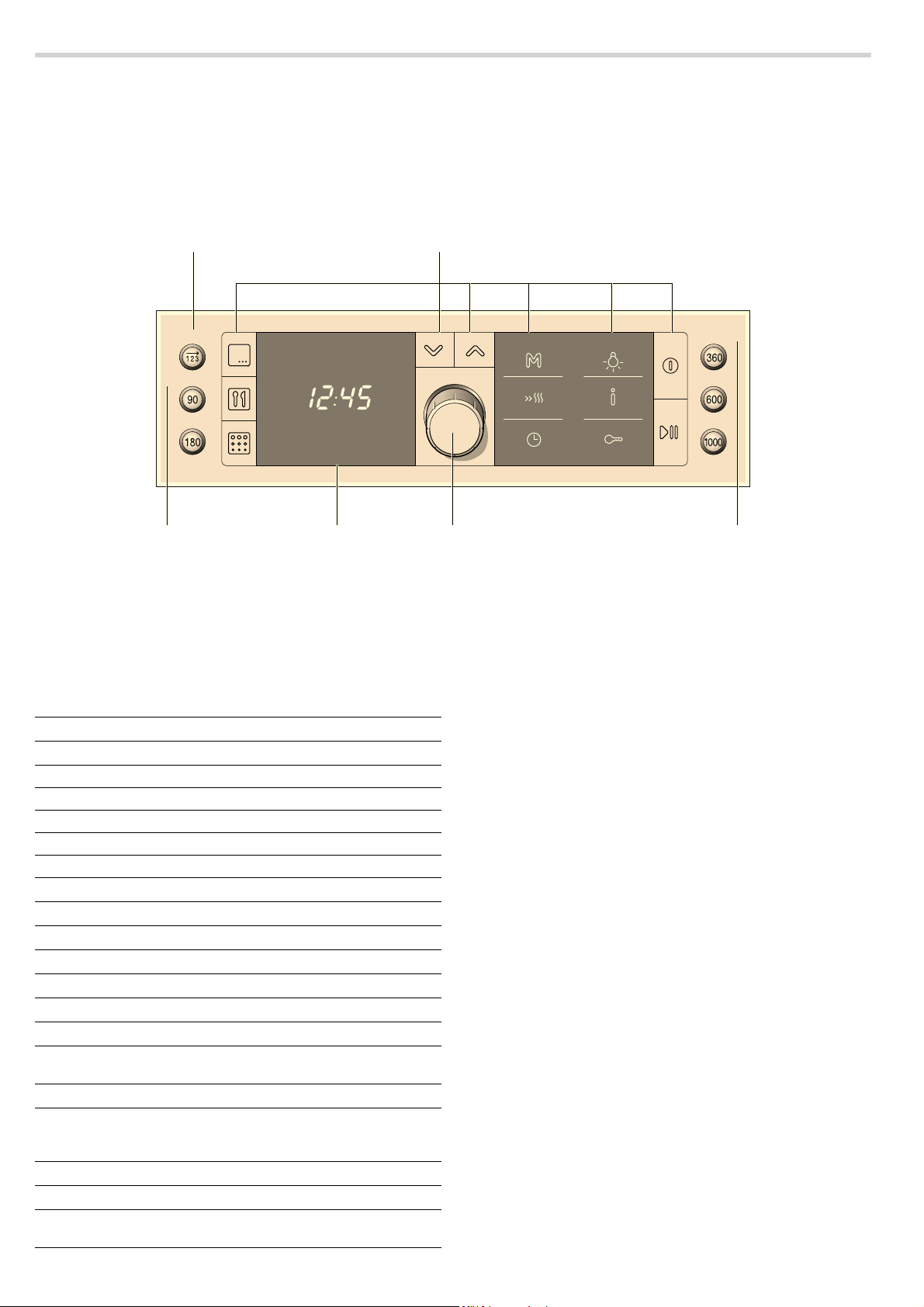
Control panel .......................................................................................7
Buttons..................................................................................................7
Rotary selector ....................................................................................7
Display ..................................................................................................7
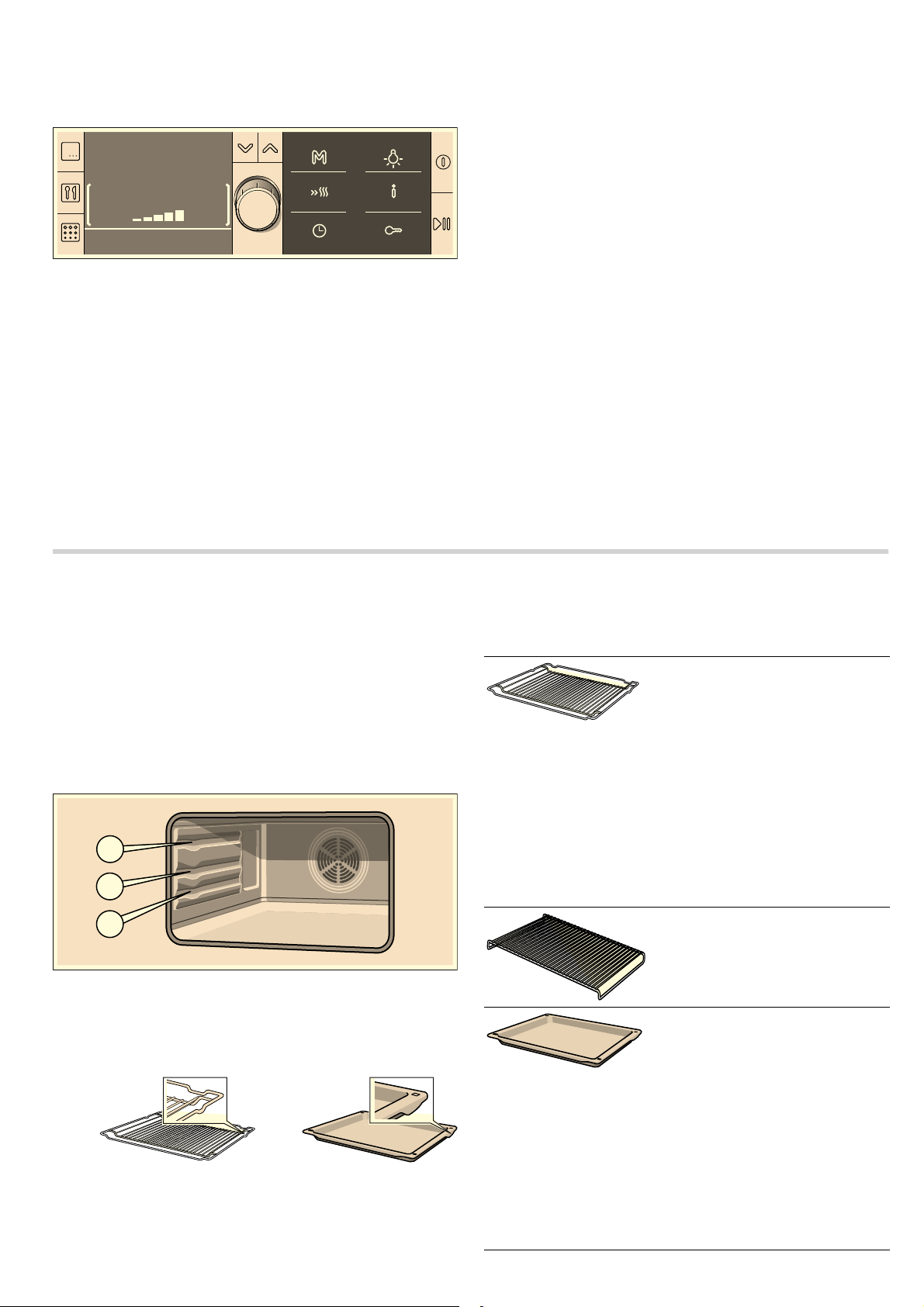
Temperature indicator........................................................................7
Cooking compartment .......................................................................8
Your accessories ........................................................................8
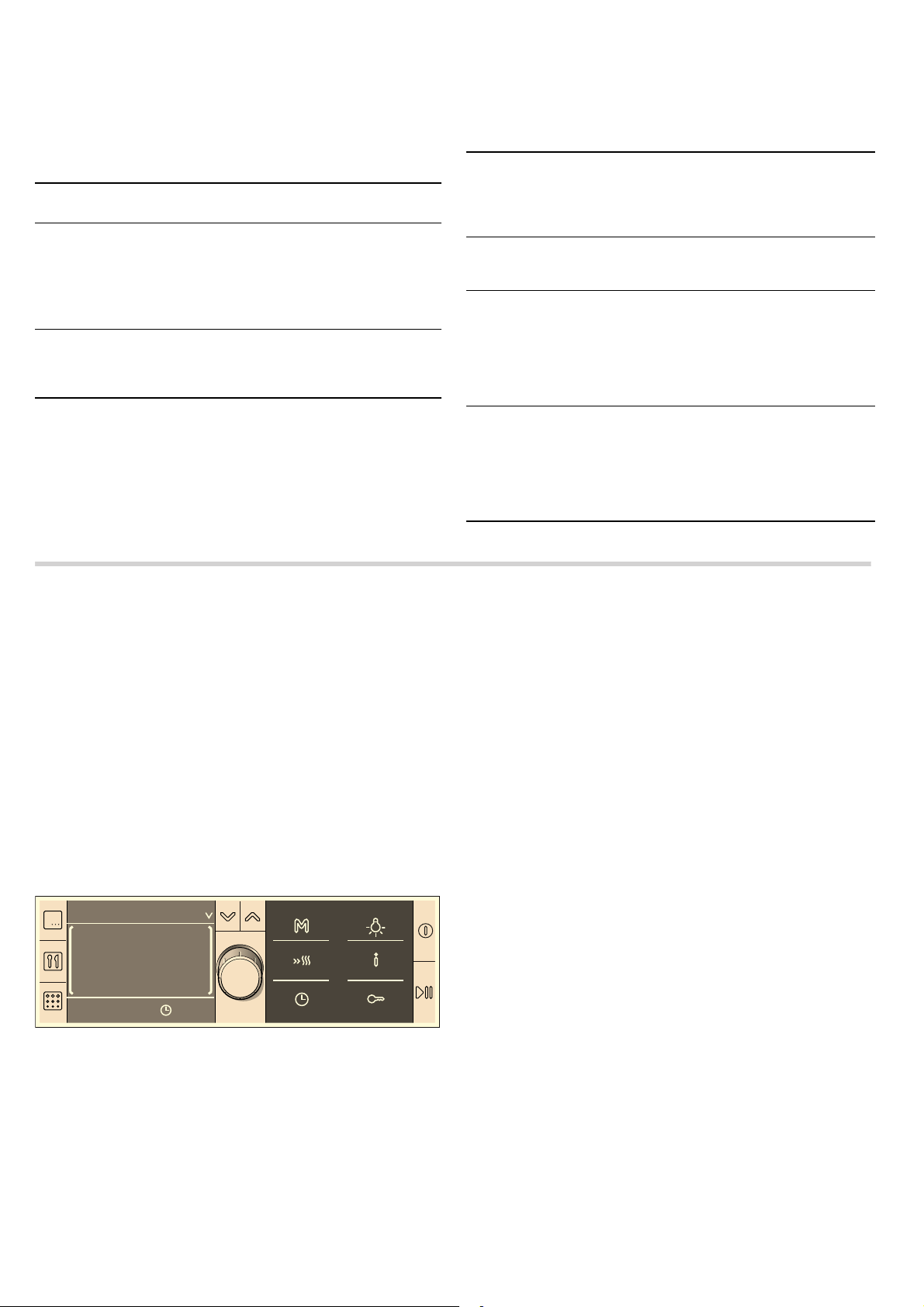
Inserting accessories .........................................................................8
Optional accessories .........................................................................9
After-sales service products .............................................................9
Before using the appliance for the first time ...........................9
Initial setup ...........................................................................................9
Heating up the cooking compartment ............................................9
Cleaning the accessories..................................................................9
Switching the oven on and off ................................................10
Switching on ..................................................................................... 10
Switching off...................................................................................... 10
Setting the oven........................................................................10
Types of heating............................................................................... 10
Setting the type of heating and temperature.............................. 10
MicroCombi, gentle / MicroCombi, intensive............................. 11
Recommended settings.................................................................. 11
Setting rapid heating ....................................................................... 12
The microwave..........................................................................12
Notes regarding ovenware............................................................. 12
Microwave power settings.............................................................. 12
Setting the microwave..................................................................... 12
Combination .............................................................................13
Suitable microwave power settings.............................................. 13
Setting a combination ..................................................................... 13
Series of operations.................................................................14
Ovenware ......................................................................................... 14
Setting a series of operations ....................................................... 14
Time-setting options ................................................................14
Setting the time-setting options in brief..................................... 14
Setting the cooking time.................................................................14
Setting a later end time .................................................................. 15
Setting the timer ............................................................................... 15
Setting the clock .............................................................................. 16
Memory......................................................................................16
Storing settings in the memory ..................................................... 16
Starting the memory........................................................................ 16
Sabbath mode...........................................................................16
Starting Sabbath mode................................................................... 16
The cooking time has elapsed...................................................... 16
Setting a later end time .................................................................. 16
Cancelling Sabbath mode.............................................................. 16
Childproof lock .........................................................................17
Basic settings ...........................................................................17
Changing the basic settings .......................................................... 18
Automatic switch-off................................................................18
Self-cleaning .............................................................................18
Preparation........................................................................................ 18
Setting the self-cleaning ................................................................. 19
After self-cleaning ............................................................................ 19
Care and cleaning ....................................................................19
Cleaning agents ............................................................................... 19
Cleaning the glass panels.............................................................. 19
Malfunction table......................................................................21
Malfunction table.............................................................................. 21
Replacing the oven light bulb........................................................ 21
Replacing the door seal ................................................................. 22
After-sales service ...................................................................22
E number and FD number ............................................................. 22
Automatic programmes ...........................................................22
Ovenware .......................................................................................... 22
Selecting a programme .................................................................. 23
Individually adjusting the cooking result: .................................... 23
Defrosting and cooking with the automatic programmes........ 23
Energy and environment tips..................................................28
Saving energy................................................................................... 28
Environmentally-friendly disposal.................................................. 28
Tested for you in our cooking studio .....................................28
Defrosting, heating up and cooking with the microwave......... 28
Microwave tips.................................................................................. 31
Cakes and pastries ......................................................................... 31
Baking tips ........................................................................................ 33
Roasting and grilling ....................................................................... 33
Tips for roasting and grilling.......................................................... 36
Bakes, gratins, toast with toppings .............................................. 37
Convenience products.................................................................... 37
Slow cooking ............................................................................ 38
Setting the Slow cook option......................................................... 38
Tips for slow cooking...................................................................... 38
Test dishes ................................................................................39
Baking ................................................................................................39
Grilling................................................................................................ 40
Acrylamide in foodstuffs .........................................................40
Produktinfo
Additional information on products, accessories, replacement
parts and services can be found at www.bosch-home.com and
in the online shop www.bosch-eshop.com

4
: Important safety information
Read these instructions carefully. Only then
will you be able to operate your appliance
safely and correctly. Retain the instruction
manual and installation instructions for
future use or for subsequent owners.
This appliance is only intended to be fully
fitted in a kitchen. Observe the special
installation instructions.
Check the appliance for damage after
unpacking it. Do not connect the appliance
if it has been damaged in transport.
Only a licensed professional may connect
appliances without plugs. Damage caused
by incorrect connection is not covered
under warranty.
This appliance is intended for domestic use
only. The appliance must only be used for
the preparation of food and drink. The
appliance must be supervised during
operation. Only use this appliance indoors.
This appliance may be used by children
over the age of 8 years old and by persons
with reduced physical, sensory or mental
capabilities or by persons with a lack of
experience or knowledge if they are
supervised or are instructed by a person
responsible for their safety how to use the
appliance safely and have understood the
associated hazards.
Children must not play with, on, or around
the appliance. Children must not clean the
appliance or carry out general maintenance
unless they are at least 8 years old and are
being supervised.
Keep children below the age of 8 years old
at a safe distance from the appliance and
power cable.
Always slide accessories into the cooking
compartment correctly. See "Description of
accessories in the instruction manual.
Risk of fire!
■
Combustible items stored in the cooking
compartment may catch fire. Never store
combustible items in the cooking
compartment. Never open the appliance
door if there is smoke inside. Switch off
the appliance and unplug it from the
mains or switch off the circuit breaker in
the fuse box.
Risk of fire!
■
A draught is created when the appliance
door is opened. Greaseproof paper may
come into contact with the heating
element and catch fire. Do not place
greaseproof paper loosely over
accessories during preheating. Always
weight down the greaseproof paper with a
dish or a baking tin. Only cover the
surface required with greaseproof paper.
Greaseproof paper must not protrude over
the accessories.
Risk of fire!
■
Using the appliance for anything other
than its intended purpose is dangerous
and may cause damage.
The following is not permitted: drying out
food or clothing, heating slippers, grain or
cereal pillows, sponges, damp cleaning
cloths or similar.
For example, heated slippers and grain or
cereal pillows may catch fire, even several
hours after they have been heated.The
appliance must only be used for the
preparation of food and drinks.
Risk of fire!
■
Food may catch fire. Never heat food in
heat-retaining packages.
Do not leave food heating unattended in
containers made of plastic, paper or other
combustible materials.
Do not select a microwave power or time
setting that is higher than necessary.
Follow the information provided in this
instruction manual.
Never use the microwave to dry food.
Never defrost or heat food with a low
water content, e.g. bread, at too high a
microwave power or for too long.
Risk of fire!
■
Cooking oil may catch fire. Never use the
microwave to heat cooking oil on its own.
Risk of fire!
■
Loose food residues, grease and meat
juices may catch fire during the Self-
cleaning cycle. Remove coarse dirt from
the cooking compartment before every
Self-cleaning cycle.
Risk of fire!
■
The appliance will become very hot on the
outside during the Self-cleaning cycle.
Never hang combustible objects, e.g. tea
towels, on the door handle. Do not place
anything against the front of the oven.
Keep children at a safe distance.
Risk of explosion!
Liquids and other food may explode when
in containers that have been tightly sealed.
Never heat liquids or other food in
containers that have been tightly sealed.

5
Risk of serious damage to health!
■
The surface of the appliance may become
damaged if it is not cleaned properly.
Microwave energy may escape. Clean the
appliance on a regular basis, and remove
any food residue immediately. Always
keep the cooking compartment, door seal,
door and door stop clean; see also
section Care and cleaning.
Risk of serious damage to health!
■
Microwave energy may escape if the
cooking compartment door or the door
seal is damaged. Never use the appliance
if the cooking compartment door or the
door seal is damaged. Contact the after-
sales service.
Risk of serious damage to health!
■
Microwave energy will escape from
appliances that do not have any casing.
Never remove the casing. For any
maintenance or repair work, contact the
after-sales service.
Risk of serious damage to health!
■
The appliance will become very hot during
the Self-cleaning cycle. The non-stick
coating on baking trays and tins is
destroyed and noxious gases are
released. Never let non-stick baking trays
and tins go through the Self-cleaning
cycle.
Risk of serious damage to health.!
■
Preparing dishes in the microwave without
using a wire rack leads to overloading of
the appliance. The ceramic plate in the top
of the appliance may break. Always use a
wire rack and appropriate accessories to
prepare dishes.
Risk of electric shock!
■
Incorrect repairs are dangerous. Repairs
may only be carried out and damaged
power cables replaced by one of our
trained after-sales technicians. If the
appliance is defective, unplug the
appliance from the mains or switch off the
circuit breaker in the fuse box. Contact the
after-sales service.
Risk of electric shock and serious injury!
■
The cable insulation on electrical
appliances may melt when touching hot
parts of the appliance. Never bring
electrical appliance cables into contact
with hot parts of the appliance.
Risk of electric shock!
■
Do not use any high-pressure cleaners or
steam cleaners, which can result in an
electric shock.
Risk of electric shock!
■
When replacing the cooking compartment
bulb, the bulb socket contacts are live.
Before replacing the bulb, unplug the
appliance from the mains or switch off the
circuit breaker in the fuse box.
Risk of electric shock!
■
A defective appliance may cause electric
shock. Never switch on a defective
appliance. Unplug the appliance from the
mains or switch off the circuit breaker in
the fuse box. Contact the after-sales
service.
Risk of electric shock!
■
The appliance is a high-voltage appliance.
Never remove the casing.
Risk of electric shock!
■
The insulation of an incompatible meat
thermometer may be damaged. Only use
the meat thermometer which is
recommended for this appliance.
Risk of burns!
■
The appliance becomes very hot. Never
touch the interior surfaces of the cooking
compartment or the heating elements.
Always allow the appliance to cool down.
Keep children at a safe distance.
Risk of serious burns!
■
Accessories and ovenware become very
hot. Always use oven gloves to remove
accessories or ovenware from the cooking
compartment.
Risk of burns!
■
Alcoholic vapours may catch fire in the hot
cooking compartment. Never prepare food
containing large quantities of drinks with a
high alcohol content. Only use small
quantities of drinks with a high alcohol
content. Open the appliance door with
care.
Risk of burns!
■
Foods with peel or skin may burst or
explode during, or even after, heating.
Never cook eggs in their shells or reheat
hard-boiled eggs. Never cook shellfish or
crustaceans. Always prick the yolk when
baking or poaching eggs. The skin of
foods that have a peel or skin, such as
apples, tomatoes, potatoes and sausages,
may burst. Before heating, prick the peel
or skin.
Risk of burns!
■
Heat is not distributed evenly through
baby food. Never heat baby food in closed
containers. Always remove the lid or teat.
Stir or shake well after the food has been
heated. Check the temperature of the food
before it is given to the child.
Risk of burns!
■
Heated food gives off heat. The ovenware
may become hot. Always use oven gloves
to remove ovenware or accessories from
the cooking compartment.
Risk of burns!
■
Airtight packaging may burst when food is
heated. Always observe the instructions
on the packaging. Always use oven gloves

6
to remove dishes from the cooking
compartment.
Risk of burns!
■
The cooking compartment will become
very hot during the Self-cleaning cycle.
Never open the appliance door or move
the locking latch by hand. Allow the
appliance to cool down. Keep children at
a safe distance.
Risk of burns!
■
; The appliance will become very hot on
the outside during the Self-cleaning cycle.
Never touch the appliance door. Allow the
appliance to cool down. Keep children at
a safe distance.
Risk of scalding!
■
When you open the appliance door, hot
steam may escape. Open the appliance
door with care. Keep children at a safe
distance.
Risk of scalding!
■
Water in a hot cooking compartment may
create hot steam. Never pour water into
the hot cooking compartment.
Risk of scalding!
■
There is a possibility of delayed boiling
when a liquid is heated. This means that
the liquid reaches boiling temperature
without the usual steam bubbles rising to
the surface. Even if the container only
vibrates a little, the hot liquid may
suddenly boil over and spatter. When
heating, always place a spoon in the
container. This will prevent delayed
boiling.
Risk of injury!
■
Scratched glass in the appliance door
may develop into a crack. Do not use a
glass scraper, sharp or abrasive cleaning
aids or detergents.
Risk of injury!
■
Unsuitable ovenware may crack. Porcelain
or ceramic ovenware can have small
perforations in the handles or lids. These
perforations conceal a cavity below. Any
moisture that penetrates this cavity could
cause the ovenware to crack. Only use
microwave-safe ovenware.
Causes of damage
Caution!
■ Creation of sparks: Metal e.g. a spoon in a glass must be
kept at least 2 cm from the oven walls and the inside of the
door. Sparks could irreparably damage the glass on the
inside of the door.
■ Baking tray, greaseproof paper, aluminium foil or ovenware
on the cooking compartment floor: Do not place baking trays
or ovenware on the cooking compartment floor. Do not line
the cooking compartment floor with aluminium foil. This will
cause heat accumulation. The baking and roasting times will
no longer be correct and the enamel will be damaged.
■ Foil containers: Do not use foil containers in the appliance.
They damage the appliance by producing sparks.
■ Water in the hot cooking compartment: Never pour water into
the hot cooking compartment. This will cause steam. The
temperature change can cause damage to the enamel.
■ Moist food: Do not store moist food in the closed cooking
compartment for long periods. This will damage the enamel.
Do not use the appliance to store food. This can lead to
corrosion.
■ Fruit juice: When cooking very moist fruit flans, do not fill the
universal pan too generously. Fruit juice which runs out of the
universal pan leaves behind stains which cannot be removed.
■ Cooling with the appliance door open: Only leave the
cooking compartment to cool with the door closed. Do not
trap anything in the appliance door. Even if the door is only
slightly ajar, the fronts of adjacent units may be damaged
over time.
■ Condensation in the cooking compartment: Condensation
may appear on the door window, interior walls and floor. This
is normal and does not adversely affect microwave operation.
To prevent corrosion, wipe off the condensation every time
you cook.
■ Heavily soiled seal: If the seal is very dirty, the appliance door
will no longer close properly during operation. The fronts of
adjacent units could be damaged. Always keep the seal
clean.
■ Using the appliance door for standing on or placing objects
on: Do not stand or place anything on the open appliance
door. Do not place ovenware or accessories on the appliance
door.
■ Transporting the appliance: Do not carry or hold the
appliance by the door handle. The door handle cannot
support the weight of the appliance and could break.
■ Operating the microwave without food: Operating the
appliance without food in the cooking compartment may lead
to overloading. Never switch on the appliance unless there is
food in the cooking compartment. An exception to this rule is
a short crockery test (see the section "Microwave, suitable
crockery").
■ Microwave popcorn: Never set the microwave power too
high. Use a power setting no higher than 600 watts. Always
place the popcorn bag on a glass plate. The disc may jump if
overloaded.
7
Your new appliance
Use this section to familiarise yourself with your new appliance.
The control panel and the individual operating controls are
explained. You will find information on the cooking
compartment and the accessories.
Control panel
Here, you will see an overview of the control panel. Depending
on the appliance model, there may be differences in the
particular details.
Buttons
The sensors are located under the individual buttons. They
must not be pressed too firmly. Only touch the corresponding
symbol.
Exception: the button for the series of operations and the
buttons for the microwave power settings are normal push
buttons.
Buttons
Rotary selector
[The rotary selector is used to alter the default values and
setting values.
The rotary selector is retractable. Press on the rotary selector to
pop it in or out.
Display
The display is divided into different sections:
■ Heading, only appears prior to starting
■ Settings area
■ Status bar
Heading
The function selected is shown in the top line, e.g. types of
heating, programmes, time-setting options, etc..To the right of
this, arrows indicate the direction in which you can navigate
using the X and Y buttons. The heading disappears after
starting.
Settings area
Suggested values appear in the settings range, which you can
change. You can change from one line to the next using the
X
and
Y navigation buttons. Brackets are displayed around the
line you are currently in. You can use the rotary selector to
change the value in the brackets.
Status bar
The status bar is at the bottom of the display. It displays the
current time, time-setting options which are running down or the
childproof lock setting. You are given short instruction texts on
setting if required.
Temperature indicator
The temperature indicator bars show the heating phases or
residual heat in the cooking compartment.
%XWWRQV
5RWDU\VHOHFWRU
'LVSOD\
0LFURZDYH
SRZHUVHWWLQJV
0LFURZDYH
SRZHUVHWWLQ
J
V
%XWWRQIRUDVHULHVRIRSHUDWLRQV
Symbol/button Button function
2
Selects a series of operations
90 Selects 90 watt microwave power
180 Selects 180 watt microwave power
360 Selects 360 watt microwave power
600 Selects 600 watt microwave power
1000 Selects 1000 watt microwave power
!
Selects the type of heating
`
Selects automatic programmes
q
Selects automatic self-cleaning
X
Moves one line down in the display
Y
Moves one line up in the display
f
Selects the memory
c
Switches on rapid heating
0
Opens and closes the time-setting options
menu
B
Switches the oven light on and off
°
Press briefly = calls up information Press
and hold = opens and closes the basic
settings menu
D
Activates/deactivates the childproof lock
%
Switches the oven on and off
n
Press briefly = starts/pauses operation
Press and hold = cancels operation
8
Heating indicator
The heating indicator displays the rising temperature in the
cooking compartment. When all bars are filled, the optimum
time for placing the dish in the oven has been reached.
The bars do not appear when grill settings, self-cleaning or the
microwave are used.
You can use the
° button to check the current heating
temperature while the oven is heating up. Due to thermal
inertia, the temperature displayed may differ slightly from the
actual temperature in the cooking compartment.
Residual heat
The temperature indicator shows the residual heat in the
cooking compartment when the appliance is switched off. The
cooking compartment has reached the maximum temperature
when the last bar is full. Once the temperature has dropped to
approximately 60 °C, the display goes out.
Cooking compartment
Your appliance has a cooling fan.
Cooling fan
The cooling fan switches on and off as required. The hot air
escapes above the door.
Caution!
do not cover the ventilation slots. Otherwise the oven will
overheat.
Notes
■ The cooling fan continues to run for a certain time after
operation.
■ The appliance remains cool during microwave operation. The
cooling fan will still switch on. The fan may run on even when
microwave operation has ended.
■ Condensation may appear on the door window, interior walls
and floor. This is normal and does not adversely affect
microwave operation. Wipe away the condensation after
cooking.
Oven light
During operation, the oven light in the cooking compartment is
on.
The oven light switches on when you open the oven door.
You can use the
B button to switch the light on and off.
Your accessories
The accessories supplied with your appliance are suitable for
making many meals. Ensure that you always insert the
accessories into the cooking compartment the right way round.
There is also a selection of optional accessories, with which
you can improve on some of your favourite dishes, or simply to
make working with your oven more convenient.
Inserting accessories
You can insert the accessories into the cooking compartment
at 3 different positions.
Notes
■ The accessories can be pulled out approximately halfway
without tipping. This allows dishes to be removed easily.
■ When sliding in the accessories, ensure that the projection on
the wire rack and on the universal pan is at the back.
■ The accessories can become deformed when they become
hot. As soon as they have cooled down, the deformation
disappears with no effect on the function.
You can buy accessories from the after-sales service, from
specialist retailers or online. Please specify the HEZ number.
([LWZLWK
7RS
ERWWRPKHDWLQJ
&
Wire rack
For cookware made from glass, por-
celain or microwave-safe plastic,
cake tins, roasts and grilled food.
Notes
■ Insert the wire rack into the cook-
ing compartment with the projec-
tion at the back.
■ Insert the wire rack with the open
side facing the cooking compart-
ment door and the elbow rail
pointing downwards
¾.
■ Always insert the wire rack at level
1 for cooking in microwave mode.
Wire rack
For grilled meals. Always place the
wire rack in the universal pan. This
ensures that dripping fat and meat
juices are collected.
Universal pan HEZ862000
For large joints, dry and moist
cakes, bakes and gratins. It can
also act as a splash guard if you are
grilling meat directly on the wire
rack. For this, slide the universal
pan in at position 1.
Notes
■ Insert the universal pan into the
cooking compartment with the
projection at the back.
■ Slide the universal pan into the
oven with the tapered edge facing
the cooking compartment door.
9
Optional accessories
You can purchase optional accessories from the after-sales
service or specialist retailers. You will find a comprehensive
range of products for your oven in our brochures and on the
Internet. The availability of optional accessories and the option
for ordering these online varies from country to country. Please
check the sales brochures.
After-sales service products
You can obtain suitable care and cleaning agents and other
accessories for your domestic appliances from the after-sales
service, specialist retailers or (in some countries) online via the
eShop. Please specify the relevant product number.
Before using the appliance for the first time
This section tells you everything you need to do before using
the appliance for the first time.
■ Set the clock
■ Change the language for the text display if required
■ Heat up the cooking compartment
■ Clean the accessories
■ Read the safety information at the start of the instructions for
use. This is very important.
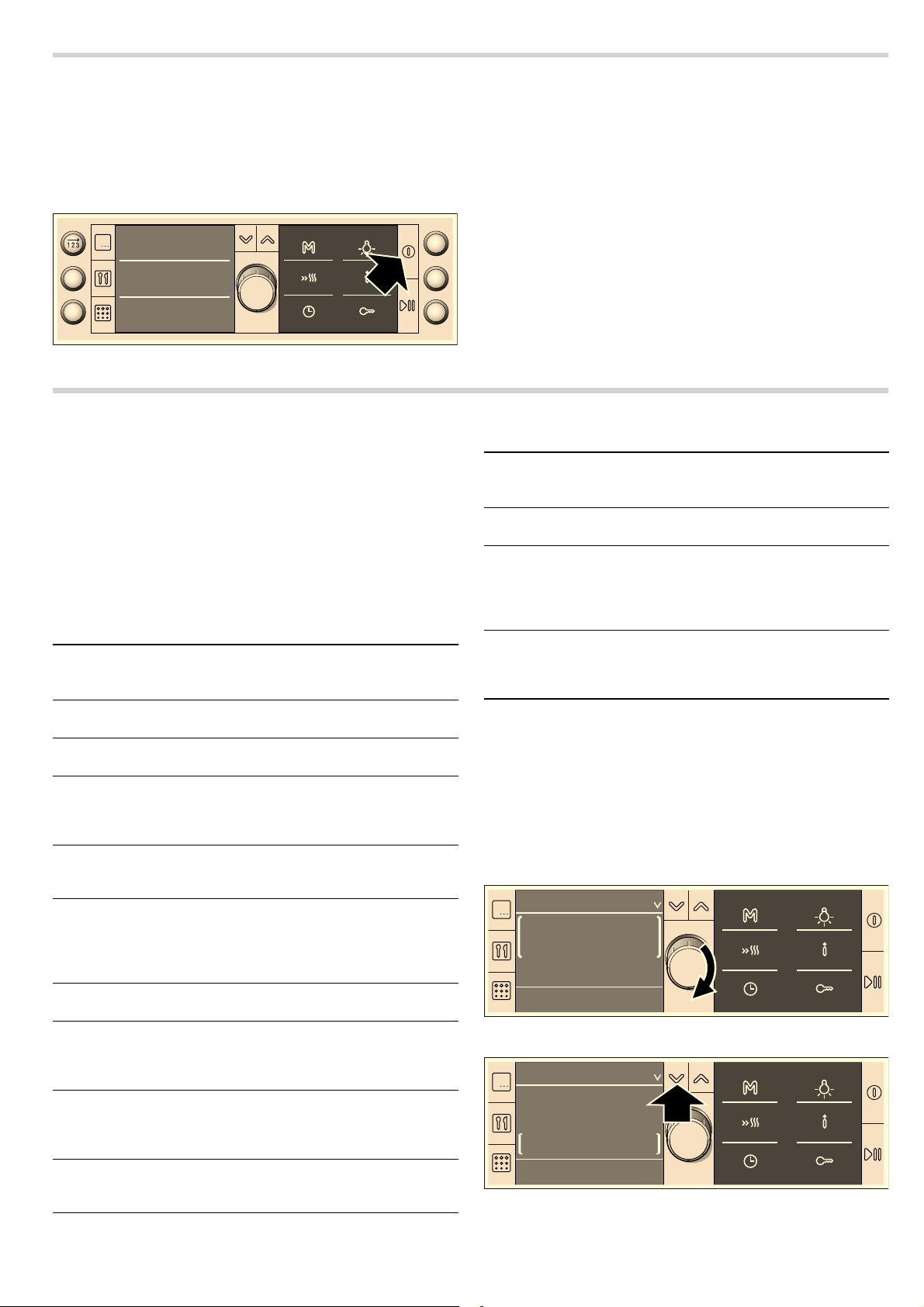
Initial setup
Once your new appliance has been connected to the power
supply, the "Basic settings" heading appears in the top line of
the display. Set the time, and also the text display language, if
required. German is the default language.
Setting the clock and changing the language
1. Turn the rotary selector to set the current time.
2. Press the X button.
"Sprache wählen: deutsch" appears.
3. Select the desired language using the rotary selector.
30 different languages are available.
4. Press the 0 button.
The language and time are applied. The current time is shown
in the display.
Note: You can change the language at any time. See the Basic
settings section.
Heating up the cooking compartment
To get rid of the new appliance smell, heat up the cooking
compartment when it is empty and the oven door closed.
Make sure that the cooking compartment contains no leftover
packaging, e.g. polystyrene pellets.
Keep the kitchen ventilated the whole time the oven is on.
Heat up the cooking compartment to 240 °C using Top/bottom
heating.
1. Press the % button.
The initial display including descriptions of the buttons
appears.
2. Immediately press the ! button.
The heading "Types of heating" appears in the top line. 3D
hot air and a temperature of 160 °C are suggested in the
settings area. Brackets appear around the type of heating.
3. Turn the rotary selector to change the type of heating to Top/
bottom heating.
4. Press the X button to switch to the temperature.
The brackets now appear around the temperature.
5. Use the rotary selector to set 240 °C.
6. Press the n button.
Operation starts. The "Types of heating" heading disappears.
7. Switch the oven off after 60 minutes using the % button.
The temperature indicator bars show the residual heat in the
cooking compartment.
Cleaning the accessories
Before you use the accessories for the first time, clean them
thoroughly with hot soapy water and a soft dish cloth.
Optional acces-
sories
HEZ number Use
Enamel baking
tray
HEZ861000 For cakes and biscuits.
Slide the baking tray as far
as possible into the oven
with the tapered edge fac-
ing the cooking compart-
ment door.
Glass roasting
dish
HEZ915001 For stews and bakes that
you prepare in the oven. It is
particularly suitable for the
automatic programmes.
Cleaning cloths for
stainless-steel sur-
faces
Product
no.
311134
Reduces the build-up of dirt.
Impregnated with a special oil
for perfect maintenance of
your appliance's stainless-
steel surfaces.
Oven and grill
cleaning gel
Product
no.
463582
For cleaning the cooking
compartment. The gel is
odourless.
Microfibre cloth with
honeycomb struc-
ture
Product
no.
460770
Especially suitable for clean-
ing delicate surfaces, such
as glass, glass ceramic, stain-
less steel or aluminium. The
microfibre cloth removes liq-
uid and grease deposits in
one go.
Door lock Product
no.
612594
To prevent children from
opening the oven door. The
locks on different types of
appliance door are screwed
in differently. See the informa-
tion sheet supplied with the
door lock.
([LWZLWK
%DVLFVHWWLQJ
7LPHRIGD\
10
Switching the oven on and off
You can switch the oven on and off with the % button.
Switching on
Press the % button. The initial display with the description of
the buttons appears.
Select the function you require:
■ 90, 180, 360, 600 or 1000 W button = microwave
■ ! button = types of heating
■ ` button = programmes
■ q button = self-cleaning
■ 2 button = series of operations
■ f button = saved memory settings
Switching off
Press the % button. The oven switches off.
Setting the oven
In this section, you will find information about
■ which types of heating are available in your oven
■ how you set a type of heating and a temperature
■ how you select a dish from the recommended settings
■ and how you set rapid heating
Types of heating
A large number of types of heating are available for your oven.
You can therefore select the best method for cooking any dish.
Setting the type of heating and temperature
Switch on the oven with the % button or press the ! button.
3D hot air and 160 °C are suggested in the display.
You can apply this setting immediately with the
n button.
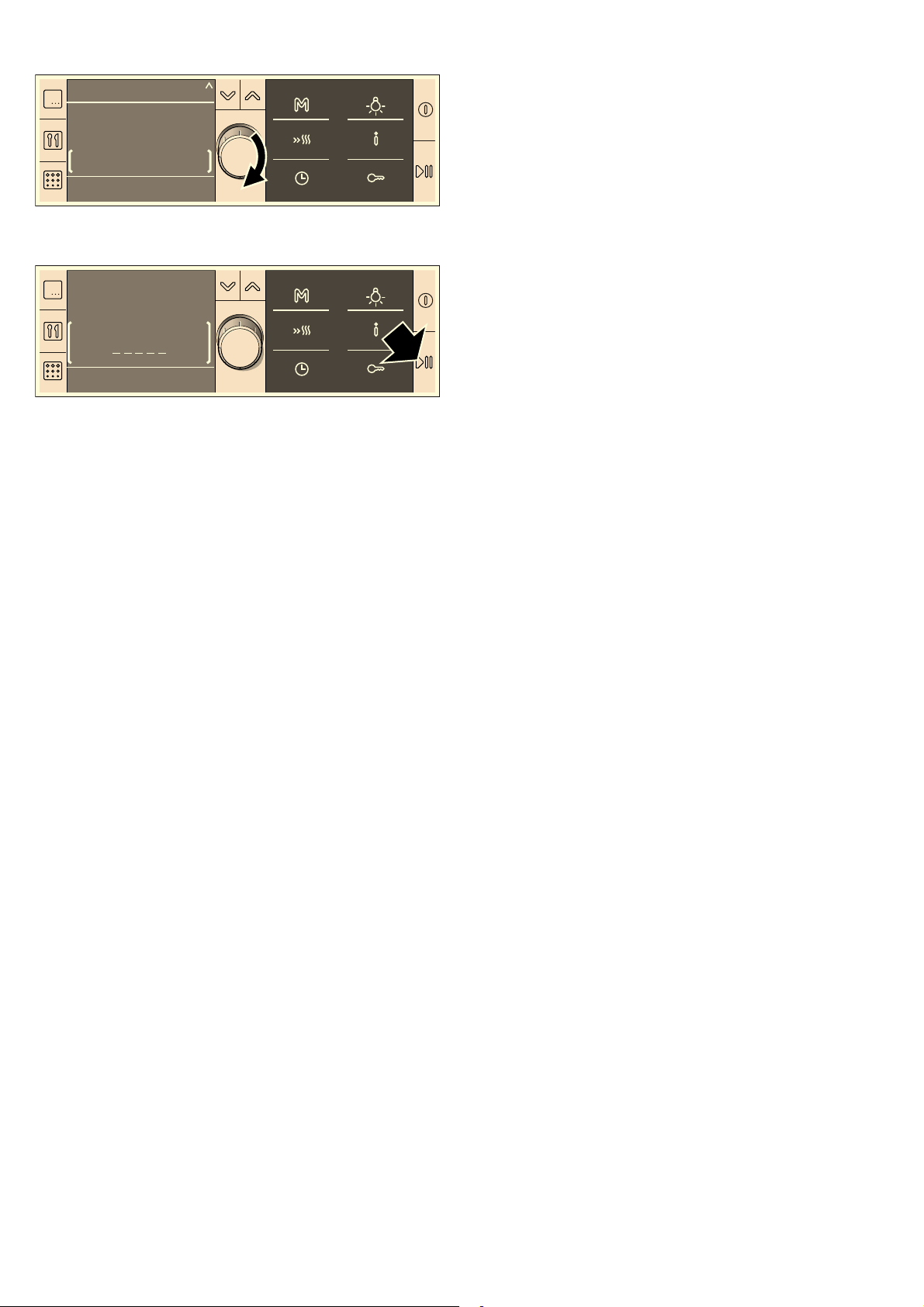
Example in diagram: Top/bottom heating set at 200 °C.
If you would like to set a different type of heating and
temperature, proceed as follows:
1. Set the required heating type using the rotary selector.
2. Press the X button to switch to the temperature.
7\SHVRIKHDWLQJ
3URJUDPPHV
6HOIFOHDQLQJ
Types of heating
and temperature
ranges
Application
3D hot air
30-250 °C
For baking cakes and small baked
items on two levels.
Hot air
30-250 °C
For baking sponge cakes in baking tins
on one level.
Top/bottom heating
30-270 °C
For baking and roasting on one level.
Especially suitable for cakes with moist
toppings (e.g. cheesecake) or for cakes
on a baking sheet.
Intensive heat
100-270 °C
For dishes with a crispy base
(e.g. quiche). The heat is emitted from
above and more intensively from below.
Bottom heating
30-200 °C
For food and baked goods which
should form a crust or need more
browning on the underside. Only acti-
vate bottom heating for a short while at
the end of the baking time.
Hot air grilling
100-250 °C
For poultry and larger pieces of meat.
Grill, large area
low (1)
medium (2)
high (3)
For grilling steaks, sausages, bread or
fish in large quantities.
Grill, small area
low (1)
medium (2)
high (3)
For grilling steaks, sausages, bread or
fish in small quantities.
Slow cooking
70-100 °C
For tender pieces of meat, that are to be
cooked medium, medium rare or “à
point”.
Plate warming
30-70 °C
For warming porcelain tableware.
Keep warm
60-100 °C
For keeping food warm.
MicroCombi, gentle
30-250 °C
For sponge in tins, shortcrust pastry with
runny fillings and cakes made from
cake mix. For oven operation, a lower
microwave power setting is switched on
automatically.
MicroCombi, inten-
sive
30-250 °C
For poultry, fish and casseroles. When
the oven is operating, a medium micro-
wave power setting is automatically acti-
vated.
Types of heating
and temperature
ranges
Application
7\SHVRIKHDWLQJ
&
7RS
ERWWRPKHDWLQJ
7\SHVRIKHDWLQJ
&
7RS
ERWWRPKHDWLQJ
11
3. Turn the rotary selector to set the desired temperature.
4. Press the n button.
Appliance operation begins.
When the food is ready, switch the oven off with the
% button
or select and apply a new operating mode.
Opening the oven door during cooking
Operation is suspended. The oven is paused. The
n symbol
flashes on the status bar. Close the door and press the
n
button again. The programme will then continue.
Pausing operation
Press the
n button briefly. The oven is paused. The symboln
flashes. Press the
n button again, operation continues.
Changing the temperature or grill setting
This can be done at any time. Turn the rotary selector to
change the temperature or grill setting.
Cancelling operation
Press and hold the
n button until the intervention display
appears. You can now change the settings.
Calling up information
Press the
° button briefly. The first item of information appears.
Check each further item of information using the
[ rotary
selector. You will find information on the heating temperature,
types of heating, shelf position and accessories.
Setting the cooking time
See section Time-setting options, setting the cooking time.
Setting a later end time
See the section entitled Time-setting options, Setting a later end
time.
MicroCombi, gentle / MicroCombi, intensive
For these types of heating, a microwave power setting is
automatically switched on. You simply need to set the
temperature specified in the recipe and halve the cooking time.
MicroCombi, gentle
MicroCombi, gentle is suitable for cakes in tins, such as
■ Sponge cake, e.g. marble cake, fruit loaf, fruit flan
■ Short-crust pastry with moist filling, e.g. apple pie,
cheesecake
■ Cakes made from baking mixtures
■ Yeast cake, e.g. with currants
■ For roasting, the cooking time can also be halved with this
type of heating.
Note: Use dark metal baking tins or else plastic "FlexiForm"
bakeware. For joints, a heat-resistant glass dish with or without
a lid is suitable.
MicroCombi, intensive
This type of heating is suitable for
■ poultry, e.g. chicken
■ baked casseroles, e.g. pasta bake
■ gratins, e.g. potato gratin
■ grilled fish, fresh and frozen
Note: Use heat-resistant containers made of glass or ceramic.
Setting procedure
If there is information in the recipe for different types of heating,
take the setting for Top/bottom heating. The cooking time
specified in the recipe should not be less than 30 minutes.
Place your dish in the cold cooking compartment. Place the
ovenware in the centre of the wire rack at level 1.
1. Press the ! button.
3D hot air and 160 °C are suggested in the display.
2. Using the rotary selector, set the “MicroCombi, gentle” or
“MicroCombi, intensive” heating type.
3. Use the X button to switch to the temperature and set the
temperature using the rotary selector.
4. Press the 0 button and set a cooking time using the rotary
selector.
5. Press the 0 button.
6. Start with the n button.
You can see the cooking time counting down in the status bar.
The cooking time has elapsed
A signal sounds. Operation has finished. The status bar shows
00:00:00. You can cancel the signal before it has finished
sounding by pressing the
0 button.
Recommended settings
If you choose a dish from the recommended settings, the ideal
setting values are already specified. You can choose from
many different categories. You will find recommended settings
for a large number of dishes – from cake, bread, poultry, fish,
meat and game through to bakes and pre-prepared products.
You can change the temperature and cooking time. The type of
heating is fixed.
You can access the various dishes by navigating through
several selection levels. Try it out and see the range of dishes
for yourself.
Selecting a dish
1. Press the ! button.
3D hot air, 160 °C are suggested in the display.
2. Turn the rotary selector anticlockwise to Recommended
settings.
The first food category appears.
3. Press the X button to switch to the food category and select
the required category by turning the rotary selector.
Use the
X button to switch successively to the next level.
Turn the rotary selector to find the next selection.
The setting for the selected dish now appears. You can
change the temperature, but not the type of heating.
4. Press the n button.
Operation starts. The cooking time is shown counting down in
the status bar.
7\SHVRIKHDWLQJ
7RS
ERWWRPKHDWLQJ
&
7RS
ERWWRPKHDWLQJ
&

12
The cooking time has elapsed
A signal sounds. The oven stops heating. The status bar shows
00:00:00. You can cancel the signal early by pressing the
0
button.
Changing the temperature or grill setting
Turn the rotary selector to change the temperature or grill
setting.
Changing the cooking time
Press the
0 button and turn the rotary selector to change the
cooking time. Press the
0 button.
Calling up information
Press the
° button and check the information using the rotary
selector.
Setting a later end time
See the section entitled Time-setting options, Setting a later end
time.
Setting rapid heating
Rapid heating is not suitable for all types of heating.
Suitable types of heating
■ 3D hot air
■ Hot air
■ Top/bottom heating
■ Intensive heat
Suitable temperatures
Rapid heating will not work if the temperature is set to less than
100 °C. If the temperature in the cooking compartment is only
slightly less than the temperature you have set, rapid heating is
not necessary. It will not switch on.
Setting rapid heating
Press the
c button to activate rapid heating. The c symbol
appears next to the temperature you have set. The temperature
indicator bars start filling in.
Once all the bars are filled, rapid heating is complete. You will
hear a short signal. The
c symbol goes out. Place your dish
in the cooking compartment.
Notes
■ Rapid heating is cancelled if you change the type of heating.
■ If a cooking time has been set, this runs independently of
rapid heating and counts down immediately when operation
is started.
■ You can use the ° button to check the current cooking
compartment temperature during rapid heating.
■ To ensure an even cooking result, do not place your dish in
the cooking compartment until rapid heating is complete.
Cancelling rapid heating
Press the
c button. The symbol goes out.
The microwave
Microwaves are converted to heat in food. The microwave can
be used solo, i.e. on its own, or in combination with a different
type of heating. Here you will find information about cookware
and how to set the microwave.
Notes
■ In the Tested for you in our cooking studio section, you will
find examples for defrosting, heating and cooking with the
microwave.
■ Always use a wire rack and appropriate accessories to
prepare dishes.
Notes regarding ovenware
Suitable ovenware
Suitable dishes are heat-resistant ovenware made of glass,
glass ceramic, porcelain, ceramic or heat-resistant plastic.
These materials allow microwaves to pass through.
You can also use serving dishes. This saves you having to
transfer food from one dish to another. You should only use
ovenware with decorative gold or silver trim if the manufacturer
guarantees that they are suitable for use in microwaves.
Unsuitable ovenware
Metal ovenware is unsuitable. Metal does not allow microwaves
to pass through. Food in covered metal containers will remain
cold.
Caution!
Creation of sparks: metal – e.g. a spoon in a glass – must be
kept at least 2 cm from the oven walls and the inside of the
door. Sparks could destroy the glass on the inside of the door.
Cookware test
Do not switch on the microwave unless there is food inside. The
following cookware test is the only exception to this rule.
Perform the following test if you are unsure whether your
cookware is suitable for use in the microwave:
1. Heat the empty cookware at maximum power for ½ to 1
minute on the wire rack at level 1.
2. Check the temperature during that time.
The cookware should be cold or warm to the touch.
The cookware is unsuitable if it becomes hot or sparks are
generated.
Microwave power settings
Use the button to set the desired microwave power.
Notes
■ When you press a button, the selected power lights up.
■ The microwave power can be set to 1000 watts for a
maximum of 30 minutes. With all other power settings a
maximum cooking time of 1 hour 30 minutes is possible.
Setting the microwave
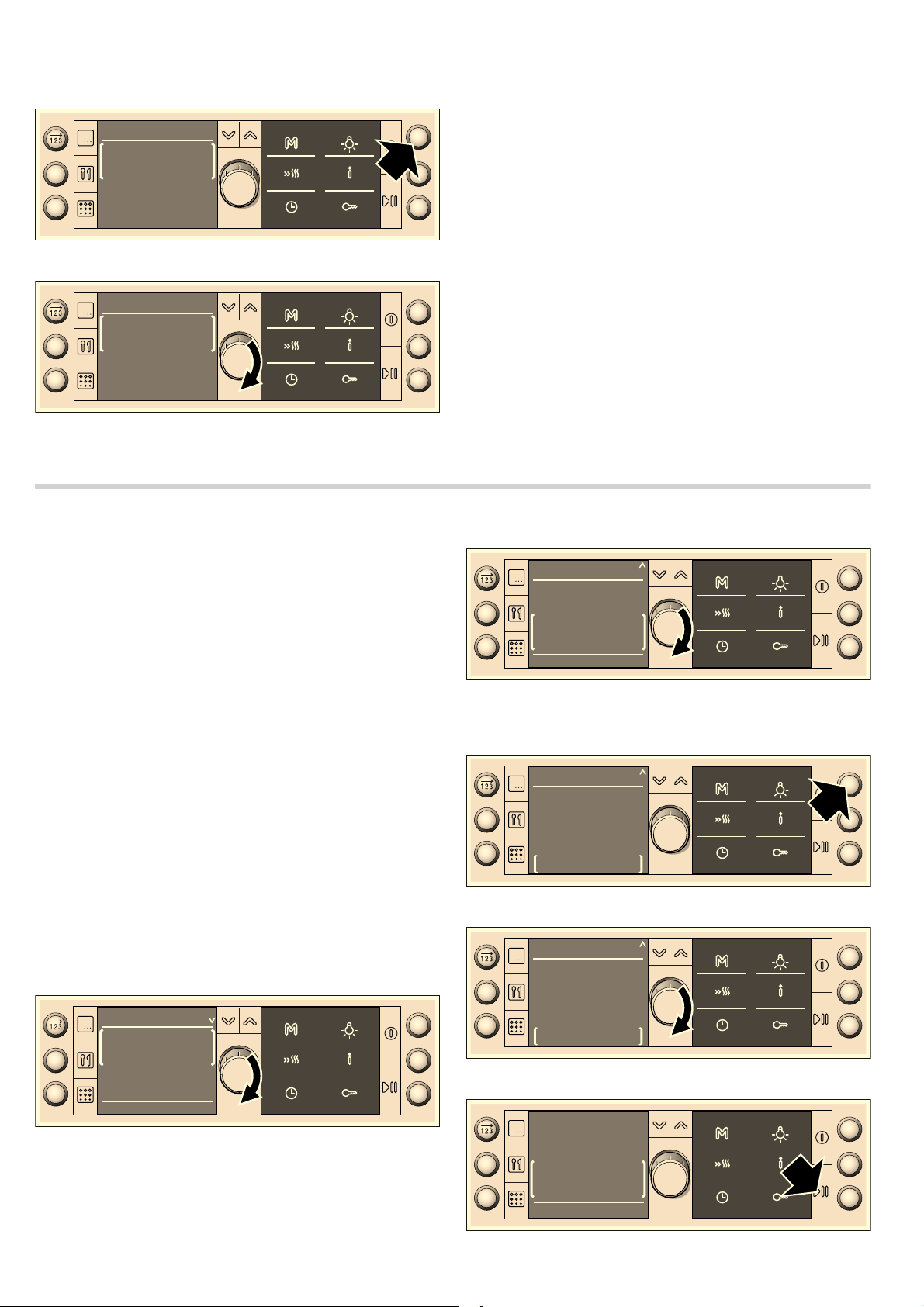
Example in diagram: microwave power setting 360 W, cooking
time 17 minutes.
90 W for defrosting delicate foods
180 W for defrosting and continued cooking
360 W for cooking meat and heating delicate foods
600 W for heating and cooking food
1000 W for heating liquids
13
1. Press the button for the microwave power setting you require.
The button lights up. The heading “Microwave” appears in
the display. A suggested cooking time is displayed.
2. Set the cooking time using the rotary selector.
3. Press the n button.
Appliance operation begins. The cooking time starts counting
down.
The cooking time has elapsed
A signal sounds. Microwave operation has finished. The
cooking time shows 00:00 min:sec. You can cancel the audible
signal before it finishes sounding by pressing the
0 button.
Opening the oven door during cooking
Operation is suspended. After closing the door, press the
n
button briefly. The programme will then continue.
Pausing operation
Press the
n button briefly. The oven is paused. The symboln
flashes. Press the
n button again, operation continues.
Changing the cooking time
This can be done at any time. Change the cooking time using
the rotary selector.
Cancelling operation
Press and hold the
n button until the intervention display
appears. You can now change the settings.
Combination
This involves the simultaneous operation of one type of heating
with the microwave. Using the microwave makes your meals
ready more quickly, and they are still nicely browned. You can
set a cooking time of up to 1 hour 30 minutes.
Suitable types of heating
■ 3D hot air
■ Hot air
■ Top/bottom heating
■ Hot air grilling
■ Grill, large area
■ Grill, small area
Suitable microwave power settings
Except for 1000 watts, you can combine any microwave power
setting with a heating type.
Setting a combination
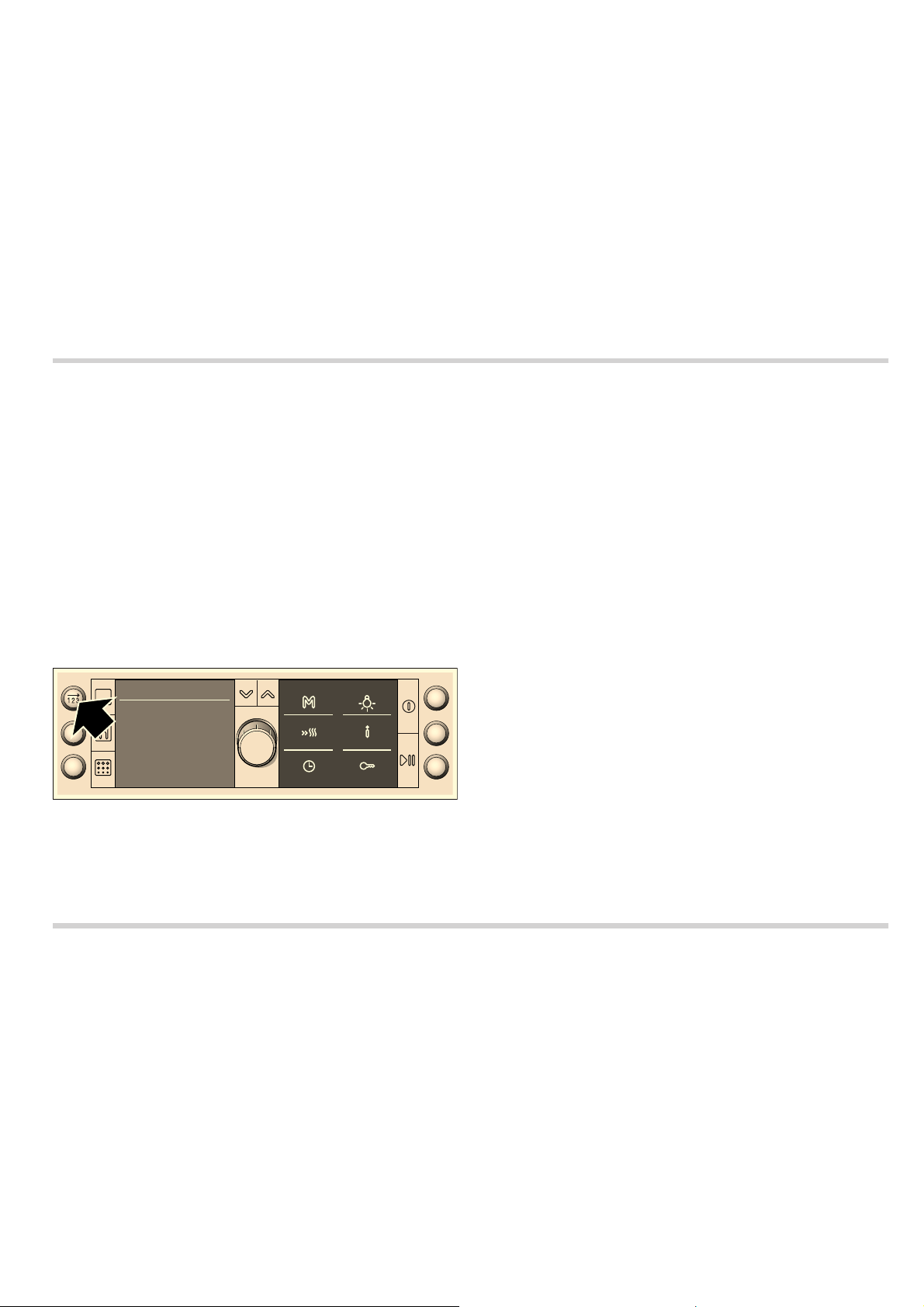
Example in diagram: Top/bottom heating setting 200 °C and
microwave setting 360 W, 17 minutes.
1. Press the ! button.
“Types of heating” appears as the heading. 3D hot air and
160 °C are suggested in the display.
2. Turn the rotary selector to set the desired type of heating.
3. Press the X button to switch to the temperature.
4. Use the rotary selector to change the temperature.
5. Press the button for the microwave power setting you require.
The selected button lights up. The heading changes to
“Combination”.
6. Set the cooking time using the rotary selector.
7. Press the n button.
PLWVFKOLHHQ
PLQVHF
0LFURZDYH
PLWVFKOLHHQ
PLQVHF
0LNURZDYH
&
7\SHVRIKHDWLQJ
7RS
ERWWRPKHDWLQJ
&
7\SHVRIKHDWLQJ
7RS
ERWWRPKHDWLQJ
&RPELQDWLRQ
7RS
ERWWRPKHDWLQJ
&
PLQVHF
&
PLQVHF
&RPELQDWLRQ
7RS
ERWWRPKHDWLQJ
&
7RS
ERWWRPKHDWLQJ
14
Appliance operation begins. You can see the cooking time
counting down in the status bar.
The cooking time has elapsed
A signal sounds. Operation has finished. The status bar shows
00:00:00. You can cancel the signal before it has finished
sounding by pressing the
0 button.
Changing the temperature or grill setting
This can be done at any time. Turn the rotary selector to
change the temperature or grill setting.
Changing the cooking time
Press the
0 button and turn the rotary selector to change the
cooking time. Press the
0 button.
Opening the oven door during cooking
Operation is suspended. The oven is paused. The n symbol
flashes on the status bar. Close the door and press the
n
button again. The programme will then continue.
Pausing operation
Press the
n button briefly. The oven is paused. Press the n
button again to continue operation.
Cancelling operation
Press and hold the
n button until the intervention display
appears. You can now change the settings.
Setting a later end time
See the section entitled Time-setting options, Setting a later end
time.
Series of operations
You can use the SeriesOperations function to set up to three
operating modes and then start.
Requirement: you must set a cooking time for each step.
Ovenware
Always use microwave-safe, heat-resistant ovenware.
Setting a series of operations
Note: Always set a cooking time for each step in the series of
operations.
1. Press the 2 button.
The button lights up. "SeriesOperations 1" appears in the
display as the heading.
2. Select and set the desired operating mode.
3. Press the 2 button again in order to select the second
operation in the series.
4. Select and set the desired operating mode.
5. Press the 2 button again in order to select the third
operation in the series.
6. Select and set the desired operating mode.
7. Press the n button.
Appliance operation begins.
The first operation in the series is shown in the display. The
cooking time starts counting down.
The cooking time has elapsed
A signal sounds. The series of operations is finished. You can
stop the audible signal by pressing the
0 button.
Changing the setting
Note: Changes can only be made before operation begins.
1. Press the 2 button until operation 1, 2 or 3 in the series
appears in the displays
2. Set the desired operation in the series with the rotary
selector.
3. Press the n button.
Appliance operation begins.
Cancelling operation
Press and hold the
n button until the intervention display
appears. You can now change the settings.
Time-setting options
You can call up the time-setting options menu by pressing
the
0 button. The following functions are available:
If the oven is switched off:
■ Setting the timer
■ Setting the clock
If the oven is switched on:
■ Setting the cooking time
■ Setting a later end time
■ Setting the timer
Setting the time-setting options in brief
1. Press the 0 button to open the menu.
2. Use the X or Y button to switch to another line and set the
time or cooking time with the rotary selector.
3. Press the 0 button to close the menu.
A detailed description of how to adjust each individual function
is provided below.
Setting the cooking time
If you set the cooking time for your dish, operation stops
automatically once this time has elapsed. The oven stops
heating.
Prerequisite: The type of heating and temperature must be set.
Note: You can only set hours and minutes.
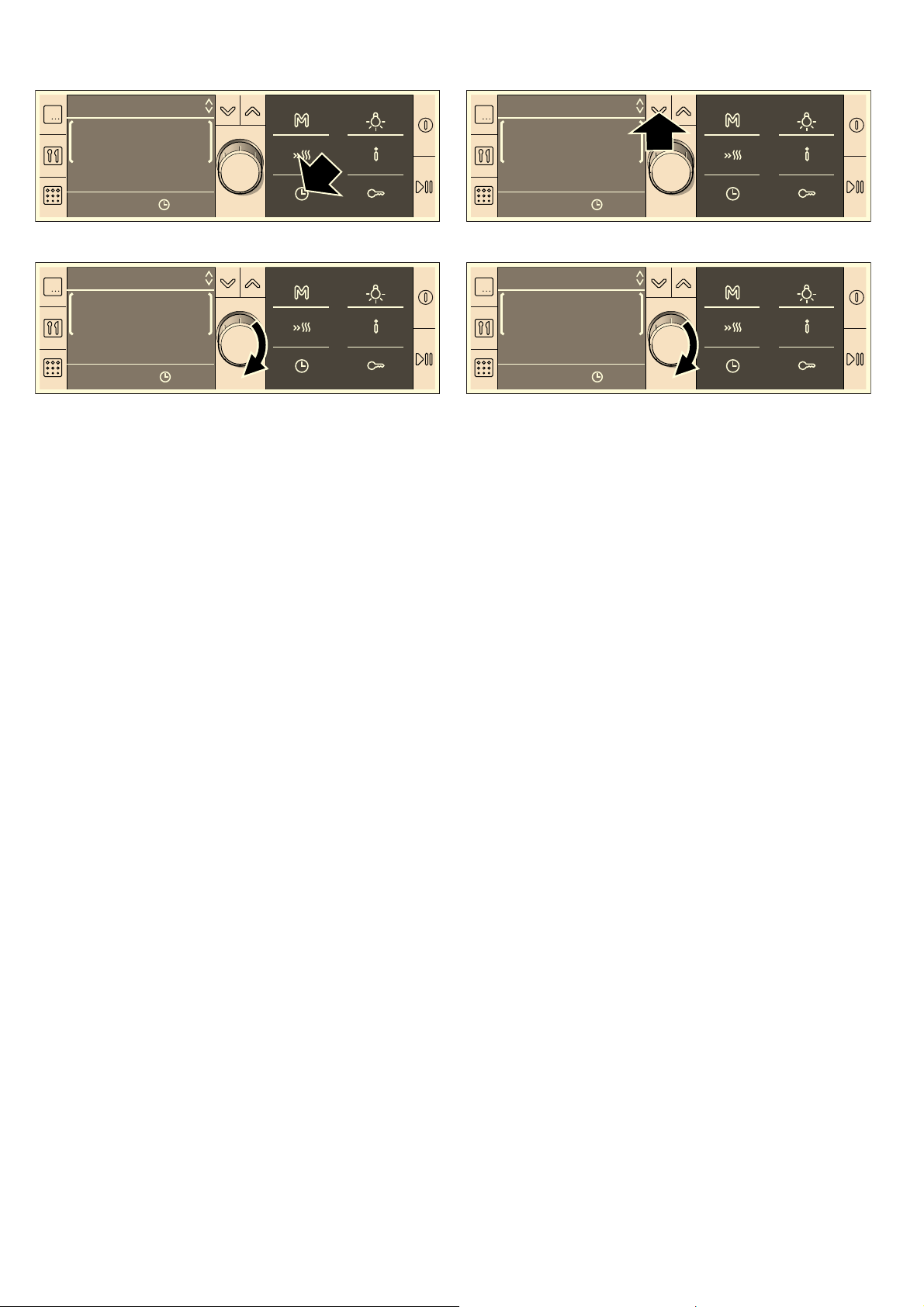
Example in the picture: top/bottom heating setting, 180 °C,
cooking time of 45 minutes
PLWVFKOLHHQ
6HULHV2SHUDWLRQV
15
1. Press the 0 button.
The Time-setting options menu appears.
2. Turn the rotary selector to set the cooking time.
3. Press the 0 button.
The Time-setting options menu closes.
4. If the operation has not yet started, press the n button. You
can see the cooking time counting down in the status bar.
The cooking time has elapsed
A signal sounds. The oven stops heating. The status bar shows
the cooking time as 00:00:00. You can cancel the signal early
by pressing the 0 button.
Cancelling the cooking time
Press the
0 button to open the menu. Set the cooking time
to 00:00:00 using the rotary selector. Press the
0 button to
close the menu.
Changing the cooking time
Press the
0 button to open the menu. Change the cooking
time using the rotary selector. Press the
0 button to close the
menu.
Setting a later end time
Please remember that easily spoiled foods must not be allowed
to remain in the cooking compartment for too long.
A later end time can be set for
■ all types of heating and all dishes from the recommended
settings
■ a variety of programmes
■ and for self-cleaning
Example: you put the dish in the cooking compartment at 9.30 .
It takes 45 minutes to cook and will be ready at 10.15, but you
would like it to be ready at 12.45 instead.
Change the end time from 10.15 to 12.45. The oven goes into
standby. Cooking starts at 12.00 and finishes at 12.45.
This function is also available for self-cleaning. You can shift the
time of the cleaning operation so it is carried out at night, which
means that the oven is available at all times during the day.
Setting a later end time
Precondition: The selected operation has not already begun
and a cooking time has been set. The time-setting options
menu
0 is open.
1. Switch to "End" using the X button. The end time of the
operation is displayed in the second line.
2. Set a later end time by turning the rotary selector.
3. Press the 0 button to close the Time-setting options menu.
4. Confirm by pressing the n button.
The setting is adopted. The oven is in
0... standby. The end
time is displayed in the status bar. When cooking starts, the
cooking time is shown counting down in the status bar.
The cooking time has elapsed
A signal sounds. The oven stops heating. The status bar shows
the cooking time as 00:00:00. You can cancel the signal early
by pressing the
0 button.
Correcting the end time
This is possible while the oven is in standby. Press the
0
button to open the menu. Press the
X button and correct the
End time using the rotary selector. Press the
0 button to close
the menu.
Cancelling the end time
This is possible while the oven is in standby. Press the
0
button to open the menu. Press the
X button and reset the
End time using the rotary selector. Press the
0 button to close
the menu.
Setting the timer
The timer runs independently of the oven. You can use it as a
kitchen timer and set it at any time.
1. Press the 0 button.
The time-setting options menu appears.
2. Set the running time for the timer using the rotary selector.
3. Press the 0 button to close the Time-setting options menu.
The display returns to its previous state. The
U symbol for the
timer appears, and the time can be seen counting down.
When the time has elapsed
A signal sounds. The time has elapsed. The display shows
U 00:00. You can cancel the signal earlier by pressing the 0
button.
Cancelling the timer time
Press the
0 button to open the time-setting options menu.
Using the rotary selector, turn the time back to 00:00. Press
the
0 button to close the menu.
Changing the timer time
Press the
0 button to open the time-setting options menu. Use
the rotary selector within the next few seconds to change the
time on the timer. Press the
0 button to close the menu.
([LWZLWK
7LPHVHWWLQJRSWLRQV
&RRNLQJWLPH
(QG
([LWZLWK
7LPHVHWWLQJRSWLRQV
&RRNLQJWLPH
(QG
([LWZLWK
7LPHVHWWLQJRSWLRQV
(QG
7LPHU
([LWZLWK
7LPHVHWWLQJRSWLRQV
(QG
7LPHU

16
Setting the clock
The oven must be switched off before you can set or change
the clock.
Following a power cut
Following a power cut, the "Basic settings" heading appears in
the display.
1. Set the right time using the rotary selector.
2. Press the 0 button.
The time is applied.
Changing the clock
Example: changing from summer to winter time.
1. Press the 0 button.
The time-setting options menu appears.
2. Use the X button to switch to the clock.
3. Change the time using the rotary selector.
4. Press the 0 button.
The Time-setting options menu closes. The time is changed.
Hiding the clock
The current time appears in the display when the oven is
switched off. You can hide the clock. For more information,
refer to the Basic settings section.
Memory
Memory gives you the option to store your own settings and
call them up again at the press of a button. There are six
memory locations available. The memory function is useful for
recipes which you prepare particularly frequently.
Storing settings in the memory
You cannot store self-cleaning.
1. Set the required operating mode. Do not start.
2. Press and release the f button and use the rotary selector to
select one of the six memory locations.
3. Press and hold the f button until "Memory saved" is
displayed.
The setting is saved and can be started at any time.
Reallocating a memory location
Make the settings, select the memory location and save the
new settings using the
f button. The old settings are
overwritten.
Starting the memory
You can start the saved settings at any time.
1. Press and release the f button and use the rotary selector to
select the memory location.
The stored settings are displayed. If “Memory location empty”
appears, this means that there are no settings stored as yet
in this memory location.
2. Press the n button.
The memory function starts.
Changing the memory location
Once operation has started, you can no longer change the
memory location.
Changing the settings
This can be done at any time. The setting you originally saved
appears the next time you start the memory.
Sabbath mode
When this setting is used, the temperature of the oven remains
at between 85 °C and 140 °C with Top/bottom heating. You
can set a time between 24 and 73 hours.
You can keep dishes in the cooking compartment hot for this
time without having to switch the oven on or off.
Starting Sabbath mode
Prerequisite: "Sabbath mode, yes" is activated in the basic
settings. See the Basic settings section.
1. Press the ! button.
3D hot air and 160 °C are suggested in the display.
2. Turn the rotary selector anti-clockwise to Sabbath mode.
3. Use the X button to switch to the temperature and set the
desired temperature using the rotary selector.
4. Press the 0 button to open the time-setting options menu.
27:00 hours are suggested.
5. Turn the rotary selector to set the required cooking time.
6. Press the n button.
The Sabbath mode starts. You can see the cooking time
counting down in the status bar.
The cooking time has elapsed
The oven stops heating.
Setting a later end time
It is not possible to set a later end time.
Cancelling Sabbath mode
Press and hold the n button until the intervention display
appears. You can make new settings.
17
Childproof lock
The oven has a childproof lock to prevent children from
switching it on or changing a setting by accident.
Activating the childproof lock
Press and hold the
D key button until the D symbol appears.
This takes about 4 seconds.
The control panel is locked.
Releasing the lock
Press and hold the
D button until the symbol disappears. You
can make settings again.
Note: You can still switch the oven off, set the timer and switch
the audible signal off when the childproof lock is active by
pressing
% or by pressing and holding the n button.
Basic settings
Your appliance has various basic settings, which you can
adjust to suit your needs at any time.
Note: In the table, you will find all the basic settings and options
for changing them. Only the basic settings that correspond to
the features of your specific appliance are displayed.
Basic setting Options Explanation
Select language:
English
29 additional languages are available Language for display texts.
Signal duration:
medium
medium = 2 minutes
short = 10 seconds
long = 5 minutes
Duration of the audible signal once a cooking
time has elapsed.
Button tone*:
off
on
off
Confirmation tone when a button is pressed.
*Exception: A signal always sounds when you
switch the oven on and off.
Display brightness:
medium
day
medium
night
Display lighting
Contrast:
-
ÛÛÛÚÛÛÛ +
e.g. greater
- ÛÛÛÛÛÚÛ +
Display contrast
Clock display:
on
on
off*
How the clock is displayed when the oven is
switched off
*The time appears as long as the residual heat
will be displayed.
Continue when door shut:
Continue with
n
automatic Way in which operation is continued when the
oven door is opened and closed again
Adjust individually:
-
ÛÛÛÚÛÛÛ +
e.g. increasingly well done cooking result
- ÛÛÛÛÛÚÛ +
Change the cooking result for all automatic
programmes
to the right = more intensive
to the left = less intensive
Display button description:
on
on
off
The initial display appears when the oven is
switched on.
3D hot air
Suggestion: 160 °C
from 30 to max. 250 °C Permanently change default temperature for
the type of heating.
Hot air
Suggestion: 160 °C
from 30 to max. 250 °C Permanently change default temperature for
the type of heating.
Top/bottom heating
Suggestion: 180 °C
from 30 to max. 270 °C Permanently change default temperature for
the type of heating.
HydroBaking
Suggestion: 160 °C
from 30 to max. 270 °C Permanently change default temperature for
the type of heating.
Intensive heat
Suggestion: 190 °C
from 100 to max. 270 °C Permanently change default temperature for
the type of heating.
Bottom heating
Suggestion: 180 °C
from 30 to max. 200 °C Permanently change default temperature for
the type of heating.
Hot air grilling
Suggestion: 190 °C
from 100 to max. 250 °C Permanently change default temperature for
the type of heating.
Grill, large area
Suggestion: 3
3 (high)
2 (medium)
1 (low)
Permanently change default setting for the
type of heating.
Grill, small area
Suggestion: 3
3 (high)
2 (medium)
1 (low)
Permanently change default setting for the
type of heating.
18
Changing the basic settings
Prerequisite: The oven must be switched off.
Example: Changing the acoustic signal duration basic setting
from medium to short.
1. Press and hold the ° button for approx. 4 seconds until the
"Basic settings" heading and the first basic setting "Select
language: English" appears.
2. Turn the X button to select the required basic setting.
3. You can change the basic setting by turning the rotary
selector.
4. You can now make further changes to the basic settings To
do so, use the
Y or X button to switch to the desired
setting. Change the basic setting by turning the rotary
selector.
5. Press and hold the ° button until the clock appears. This
takes about four seconds. All changes are saved.
Cancelling
Press the
% button. The changes are not applied.
Automatic switch-off
Your oven has an automatic switch-off function. It is activated if
no cooking time is set and the settings have not been changed
for a long time. The point at which this occurs depends on the
temperature or grill setting that has been set.
Switch-off activated
“Automatic switch-off" appears in the display. Operation is
interrupted. Press any button to clear the text. You can make
new settings.
Note: If a cooking time is set, the oven stops heating once the
cooking time has elapsed. The automatic switch-off function is
not necessary.
Self-cleaning
During self-cleaning, the cooking compartment is heated to
approx. 480 °C. Any food residues from roasting, grilling and
baking are burnt to ash. Self-cleaning takes approx. 2 hours,
including the heating up and cooling down times.
Notes
■ For safety reasons, the oven door locks automatically. You
cannot open the oven door again until the cooking
compartment has cooled slightly and the padlock symbol for
the locking mechanism disappears. Do not attempt to push in
the latch by hand.
■ Do not attempt to open the appliance door while self-cleaning
is in operation. The cleaning process may be cancelled.
■ The cooking compartment light remains off during self-
cleaning. The temperature control bars do not appear.
: Risk of fire!
■ The outside of the appliance becomes very hot. Make sure
that nothing is placed against the front of the appliance.
Small children must be kept at a safe distance from the
appliance.
■ Never hang combustible objects, e.g. tea towels, on the door
handle.
Preparation
Take all accessories and ovenware out of the oven.
: Risk of serious damage to health.!
Never use pyrolytic cleaning for cleaning non-stick baking trays
and baking tins. High temperatures damage the non-stick
coating and poisonous gases are released.
: Risk of fire!
Loose food residues, grease and meat juices may catch fire.
Wipe the oven floor, the inside of the oven door and the edges
around the front of the oven with a damp cloth. Do not scour
the oven seal.
Note: It is sufficient to clean the cooking compartment every
two to three months. If requiered, you can clean the oven more
frequently than this. Cleaning only requires approximately
3.8 kilowatt hours.
Slow cooking
Suggestion: 80 °C
from 70 to max. 100 °C Permanently change default temperature for
the type of heating.
Plate warming
Suggestion: 50 °C
from 30 to max. 70 °C Permanently change default temperature for
the type of heating.
Keep warm
Suggestion: 70 °C
from 60 to max. 100 °C Permanently change default temperature for
the type of heating.
Sabbath mode:
no
no
yes
See the section Sabbath mode
Operating voltage
220-230V
220-230V
230-240V
Adjusting the operating voltage
Restore factory settings:
no
no
yes
Reverse all changes and restore basic set-
tings.
Basic setting Options Explanation

19
Setting the self-cleaning
1. Press the q button.
2. Start the cleaning operation with n.
The oven door locks shortly after starting. The
H symbol
lights up to indicate that the lock has been activated.
Once cleaning has finished
The oven stops heating. The cleaning time is shown in the
status bar as 00:00:00. You will not be able to open the oven
door until the H symbol goes out.
Cancelling cleaning
Switch off the oven with
%. The oven door remains locked
while the
H symbol is lit.
Setting cleaning to run overnight
So that you can use your oven throughout the day, delay the
end of the cleaning process to during the night. See the Time-
setting options section, setting a later end time.
After self-cleaning
Once the cooking compartment has cooled down, wipe out the
ash that has been left behind in the cooking compartment with
a damp cloth.
Care and cleaning
With careful care and cleaning your microwave oven will retain
its looks and remain good order. We will explain here how you
should care for and clean your appliance correctly.
: Risk of electric shock!
Do not use any high-pressure cleaners or steam cleaners,
which can result in an electric shock.
: Risk of burns!
The appliance becomes very hot. Never touch the interior
surfaces of the cooking compartment or the heating elements.
Always allow the appliance to cool down. Keep children at a
safe distance.
Notes
■ Slight differences in colour on the front of the appliance are
caused by the use of different materials, such as glass,
plastic and metal.
■ Shadows on the door panel which look like streaks, are
caused by reflections made by the oven light.
■ Enamel is baked on at very high temperatures. This can
cause some slight colour variations. This is normal and does
not affect their function. The edges of thin trays cannot be
completely enamelled. As a result, these edges can be
rough. This will not impair the anti-corrosion protection.
■ Unpleasant odours, e.g. after fish has been prepared, can be
removed very easily. Add a few drops of lemon juice to a cup
of water. Place a spoon into the container as well, to prevent
delayed boiling. Heat the water for 1 to 2 minutes at
maximum microwave power.
Cleaning agents
To ensure that the different surfaces are not damaged by using
the wrong cleaning agent, observe the information in the table.
Do not use
■ sharp or abrasive cleaning agents,
■ metal or glass scrapers to clean the glass in the appliance
door,
■ metal or glass scrapers to clean the door seal,
■ hard scouring pads and sponges,
■ cleaning agents with high concentrations of alcohol.
Wash new sponge cloths thoroughly before use.
Cleaning the glass panels
The glass panels can be removed from the oven door for
cleaning.
: Risk of burns!
The appliance becomes very hot. Never touch the interior
surfaces of the cooking compartment or the heating elements.
Always allow the appliance to cool down. Keep children at a
safe distance.
Removal
1. Open the oven door.
2. Undo the two screws on the door using a TORX screwdriver
(TORX 20). Hold the door panel firmly while doing this
(Fig. A).
Area Cleaning agents
Control panel Hot soapy water:
Clean with a dish cloth and dry with a
soft cloth. Do not use glass cleaners or
metal or glass scrapers for cleaning.
Stainless steel Hot soapy water:
Clean with a dish cloth and dry with a
soft cloth. Remove flecks of limescale,
grease, starch and albumin (e.g. egg
white) immediately. Corrosion can form
under such residues. Special stainless
steel cleaning agents can be obtained
from the after-sales service or from spe-
cialist shops.
Oven Hot soapy water or a vinegar solution:
Clean with a dish cloth and dry with a
soft cloth.
If oven is very dirty: use oven cleaner,
but only when oven is cold. It is best to
use a stainless-steel sponge.
Glass cover for the
oven light
Hot soapy water:
Clean with a dish cloth.
Outer door panel Glass cleaner:
Wipe dry immediately using a soft cloth.
Do not use a glass scraper.
Inner door glass Glass cleaner:
Wipe dry with a soft cloth. Do not use a
glass scraper.
Seal Hot soapy water:
Clean with a dish cloth, do not scour.
Do not use a metal or glass scraper for
cleaning.
Accessories Hot soapy water:
Soak and clean with a dish cloth or a
brush.
Area Cleaning agents
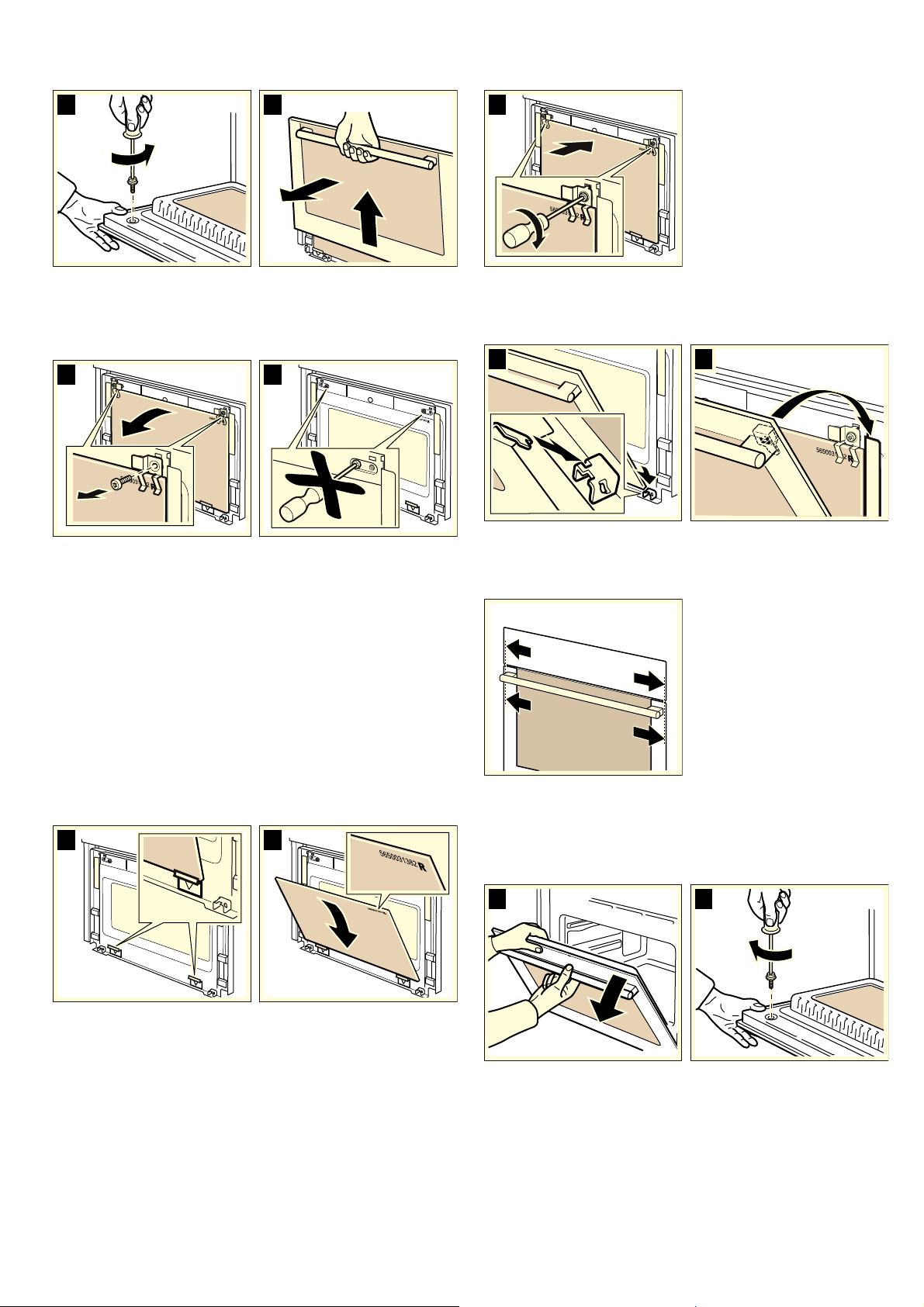
20
3. Close the door slowly and pull out the panel upwards by the
door handle. (Fig. B)
4. Hold the intermediate panel firmly and unscrew the retaining
clips on the door. Slide the panel upwards and out. (Fig. C).
5. Do NOT unscrew the left and right-hand screws from the
sheet metal part (Fig. D).
Note: Clean the glass panels with glass cleaner and a soft
cloth.
: Risk of injury!
Scratched glass in the appliance door may develop into a
crack. Do not use a glass scraper, sharp or abrasive cleaning
aids or detergents.
Refitting
1. Grip the upper section of the intermediate panel with both
hands and insert it into the guide at the bottom. (Fig. A).
Caution!
Make sure that the panel is aligned evenly at the bottom.
2. The lettering must be positioned in the top right corner, so
that it can be easily read. (Fig. B).
3. Tighten the retaining clips on the right and left of the panel
using a TORX screwdriver (TORX 20). (Fig. C)
4. Insert the door panel into the guide with both hands. (Fig. D).
5. Push the door panel downwards, lift it slightly and hook it in
at the top (Fig. E).
Caution!
Make sure that the door panel is sitting flush with the control
panel.
6. Fully open the door, while holding the panels firmly with one
hand (Fig. F).
7. Push the door downwards again and tighten the screws
hand-tight using a TORX screwdriver (TORX 20) and close
the door. (Fig. G).
Caution!
The oven may only be used again when the panels are
correctly installed.
$
%
&
'
$
%
&
'
(
)
*

21
Malfunction table
Malfunctions often have simple explanations. Please refer to the
malfunction table before calling the after-sales service.
If a meal does not turn out exactly as you wanted, refer to the
Tested for you in our cooking studio section, where you will
find plenty of cooking tips and tricks.
: Risk of electric shock!
Incorrect repairs are dangerous. Repairs may only be carried
out by one of our trained after-sales engineers.
Malfunction table
Error messages with E
If an error message with E is shown in the display, press the
0
button. Then reset the clock. This cancels the error message. If
the error is shown again, call the after-sales service. With error
message E106, you can still operate the microwave.
If error message E011 is displayed, a button may have become
stuck. Press each button individually and check that they are all
clean. If the error message remains, please contact the after-
sales service.
Replacing the oven light bulb
It is possible to replace the oven light. Heat-resistant 12 V,
20 W halogen bulbs can be obtained from After-sales Service
or a specialist retailer.
: Risk of electric shock!
Never replace the oven light when the appliance is switched on.
Pull out the mains plug or switch off the appliance at the circuit
breaker in the fuse box.
Note: Always remove the new halogen bulb from the packaging
using a dry cloth. This increases the service life of the bulb.
Method
1. Switch off the circuit breaker in the fuse box.
2. Place a tea towel in the cold oven to prevent damage.
3. Remove the glass cover. To do so, prise open the glass
cover at the bottom by hand.
Should you experience difficulties removing the glass cover,
use a spoon to help. (Fig. A)
Problem Possible cause Remedy/information
The appliance does not work. Faulty circuit breaker Look in the fuse box and check that the circuit
breaker is in working order.
Plug not plugged in Plug it in.
Power cut Check whether the kitchen light works.
"Basic setting Clock 00:00" appears in
the display. The time displayed is not
the current time.
Power cut Turn the rotary selector to set the correct time,
then press the
0 button.
The oven door cannot be opened. The
text "Time 00:00" is shown in the dis-
play. The time displayed is not the cur-
rent time.
Power cut during self-cleaning operation Turn the rotary selector to set the correct time
then press the
0 button. Wait until the cook-
ing compartment has cooled down. The
H
symbol goes out. You can now open the oven
door.
The oven does not heat up. When the
appliance is switched on, "Demo" is
displayed briefly.
The oven is in demo mode Switch off the circuit breaker in the fuse box
and then switch back on after approx.
20 seconds. In the next 2 minutes, press and
hold the
D button for 4 seconds.
"Automatic switch-off" appears in the
display.
The automatic switch-off has been acti-
vated. The oven stops heating.
Press any button. The text disappears. You
can make settings again.
The microwave does not switch on. Door not fully closed. Check whether food remains or foreign mate-
rial is trapped in the door. Make sure that the
sealing surfaces are clean. Check whether the
door seal is twisted.
The microwave was not started.
Press the
n button.
The appliance does not heat up to the
temperature which has been set.
The
n button was not pressed. Press the n button.
Microwave operation has been can-
celled for no apparent reason.
The microwave has a fault. If this fault occurs repeatedly, please call the
after-sales service. Oven operation without
microwave is possible.
With microwave operation, the food
takes longer to heat up than before.
The microwave power setting is too low. Select a higher power setting.
A larger amount than usual has been
placed in the appliance.
Double the amount = almost double the time
The food was colder than usual. Stir or turn the food during cooking
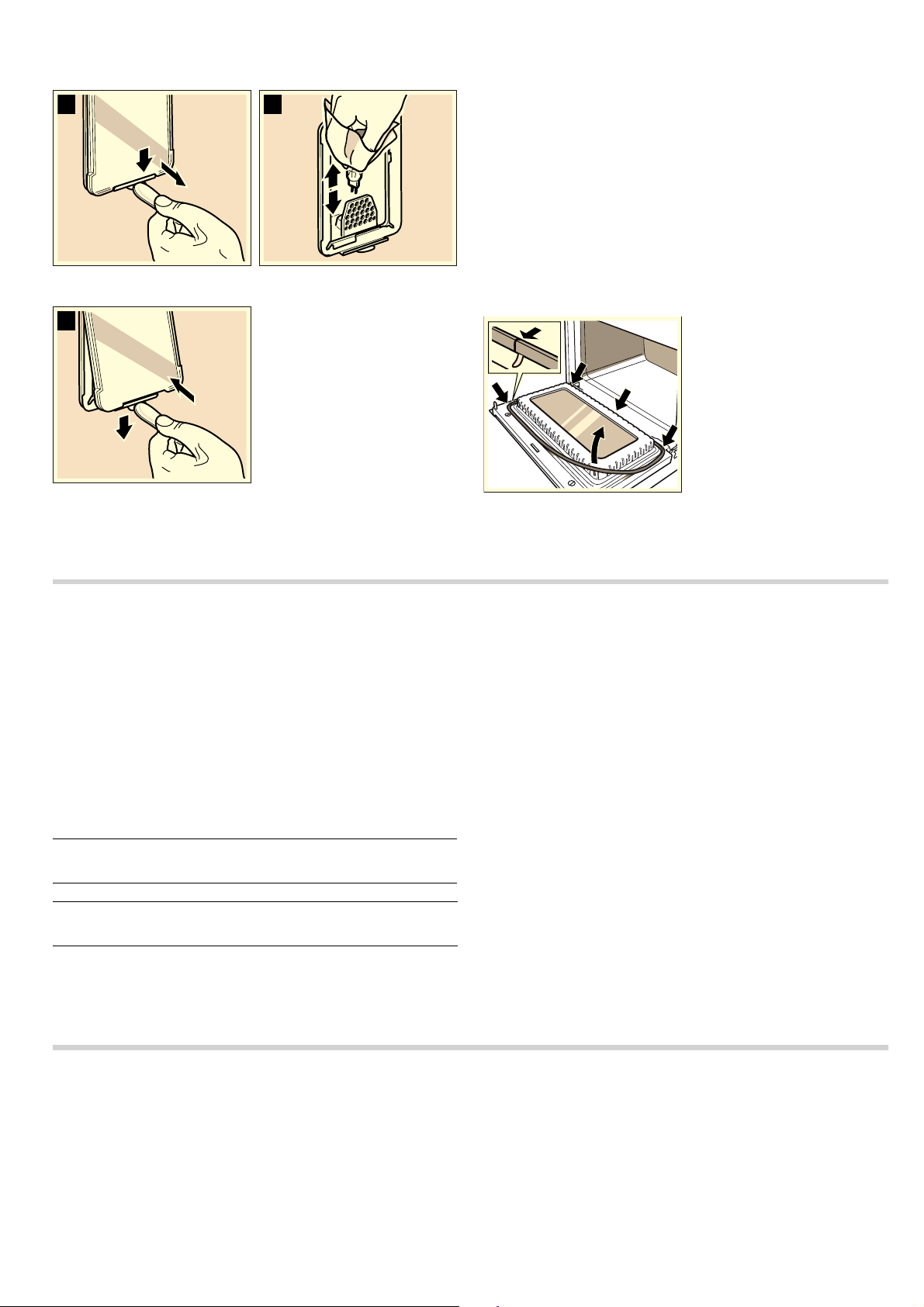
22
4. Remove the bulb and replace with a bulb of the same type.
(Fig. B)
5. Refit the glass cover. (Fig. C)
6. Remove the tea towel. Switch the circuit breaker in the fuse
box back on or plug in the mains plug.
Replacing the door seal
If the door seal is defective, it must be replaced. Replacement
seals for your appliance can be obtained from the after-sales
service. Please supply your appliance's E number and FD
number.
: Risk of serious damage to health.!
Never use the appliance if the door seal is damaged.
Microwave energy may escape. Do not use the appliance again
until it has been repaired.
1. Open the oven door.
2. Remove the old door seal.
3. There are 5 hooks attached to the door seal. Use these
hooks to attach the new seal to the oven door.
Note: The presence of the join at the bottom of the door seal in
the centre is technically required.
After-sales service
Our after-sales service is there for you if your appliance needs
to be repaired. We will always find the right solution in order to
avoid unnecessary visits from a service technician.
E number and FD number
When calling us, please give the product number (E no.) and
the production number (FD no.) so that we can provide you with
the correct advice. The rating plate bearing these numbers can
be found in the oven. You can make a note of the number of
your appliance and the telephone number of the after-sales
service in the space below to save time should it be required.
Please note that there will be a fee for a visit by a service
technician in the event of a malfunction, even during the
warranty period.
Please find the contact data of all countries in the enclosed
customer service list.
To book an engineer visit and product advice
Rely on the professionalism of the manufacturer. You can
therefore be sure that the repair is carried out by trained service
technicians who carry original spare parts for your appliances.
This appliance corresponds to the standards EN 55011 and
CISPR 11. It is a Group 2, Class B product.
Group 2 means that microwaves are produced for the purpose
of heating food. Class B states that the appliance is suitable for
private households.
Automatic programmes
The automatic programmes enable you to prepare food very
easily. You select the programme and enter the weight of your
food. The automatic programme makes the optimum setting.
Ovenware
The automatic programmes are only intended for roasting in
ovenware with a lid. For all programmes, use deep ovenware
with lid. Place the ovenware on the wire rack at level 1.
Suitable cookware
Heat-resistant (up to 300 °C) glass or glass ceramic ovenware,
for example, is suitable.
Unsuitable cookware
Cookware made of unglazed clay and plastic cookware or
cookware with plastic handles is not suitable.
$
%
&
E no.
FD no.
After-sales service
O
GB 0844 8928979
Calls from a BT landline will be charged at up to
3 pence per minute. A call set-up fee of up to 6 pence
may apply.
IE 01450 2655
0.03 € per minute at peak. Off peak 0.0088 € per
minute.
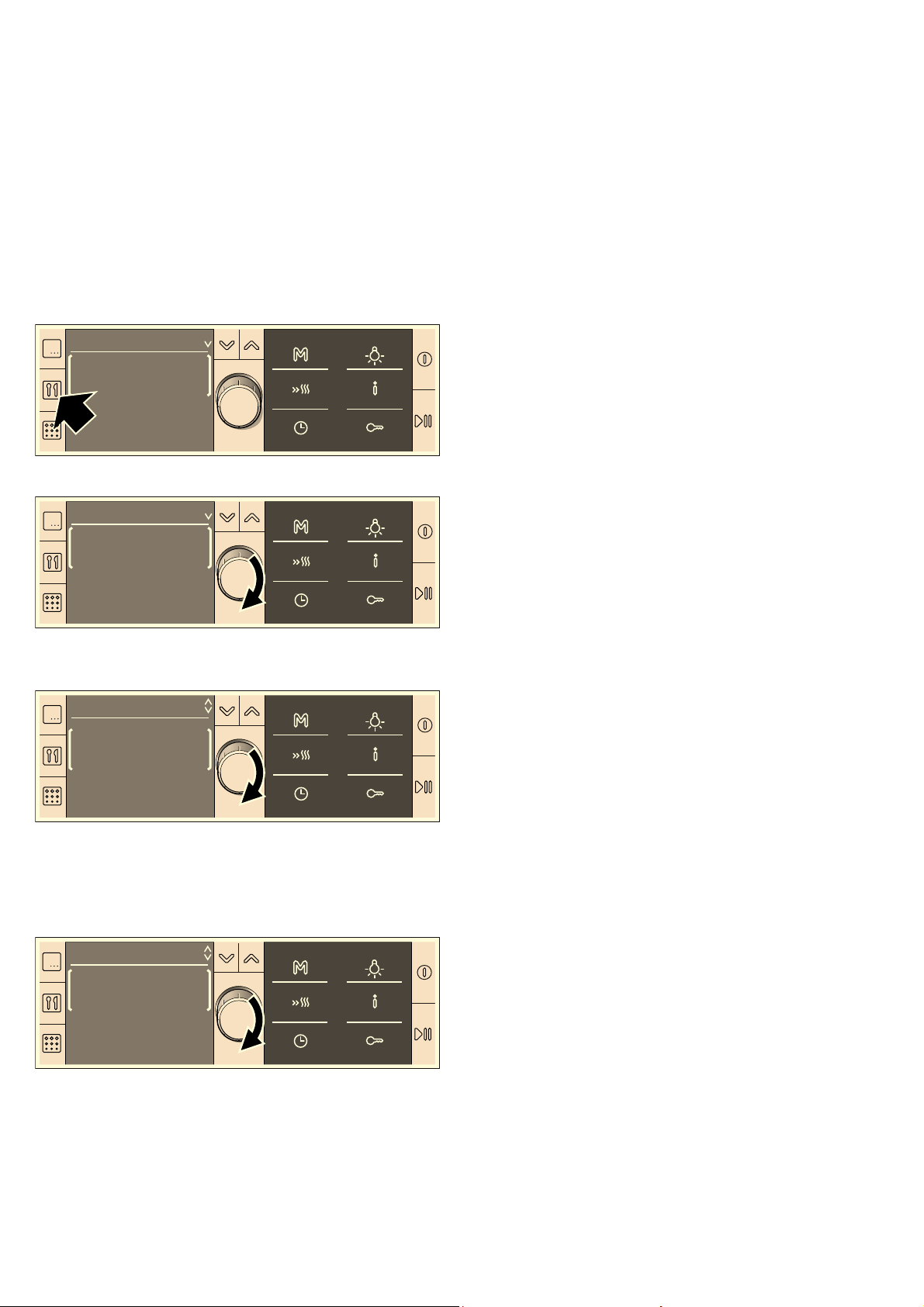
23
Metal cookware is not suitable.
The microwave is used for some programmes. Metal does not
allow microwaves to pass through. The food will not brown as
much and the meat will not be as well cooked.
Size of the ovenware
The meat should cover about two thirds of the ovenware base.
This will ensure that you get good meat juices.
The distance between the meat and the lid must be at least
3 cm. The meat may expand during the roasting process.
Selecting a programme
Example in diagram: settings for 1 kg of fresh chicken portions
1. Press the ` button.
The first programme group and first programme appear.
2. Select the programme group by turning the rotary selector.
3. Press the X button to change the line.
4. Use the rotary selector to select the programme.
A suggested weight appears for the programme selected.
5. Press the X button.
6. Turn the rotary selector to specify the weight of the dish.
If you switch to the lower bar, you can alter the cooking result
(see Adjust cooking result individually).
7. Press the n button.
The programme starts. The cooking time appears in the status
bar and starts to count down.
The programme has ended
A signal sounds. The oven stops heating. You can cancel the
signal earlier by pressing the
0button. The elapsed cooking
time in the status bar is 00:00:00.
Cancelling the programme
Press and hold the
n button until the intervention display
appears. You can make new settings.
Setting a later end time
See the section entitled Time-setting options - Setting a later
end time.
Individually adjusting the cooking result:
If the cooking result of a programme does not meet your
expectations, you can change it the next time.
Make the settings as described in steps 1 to 6.
Press the
X button and move the illuminated field using the
rotary selector.
-
ÛÛÛÚÛÛÛ +
To the left = cooking result less well done
To the right = cooking result more well done.
Press the
n button to start the programme.
Defrosting and cooking with the automatic
programmes
Notes
■ Take the food out of its packaging and weigh it. If it is not
possible to enter the exact weight, you should round it up or
down.
■ Always use microwaveable ovenware, e.g. made of glass,
ceramic or the universal pan. Observe the accessories tips in
the programme table.
■ Place the food in the cold cooking compartment.
■ A table of suitable types of food with appropriate weight
ranges and the accessories required can be found in the
section after the tips.
■ It is not possible to set a weight outside the weight range.
■ With many dishes, a signal sounds after a certain time. Turn
or stir the food.
Defrost
Notes
■ If possible, freeze and store food flat and in portions at -
18 °C.
■ Put the frozen food on shallow tableware, e.g. a glass or
porcelain plate.
Place bread rolls directly on the wire rack.
■ Cover thin and protruding parts with small pieces of
aluminium foil. This prevents these parts from cooking
prematurely. Ensure that the aluminium foil does not touch
the walls of the cooking compartment.
■ After defrosting, allow the food to defrost for a further 10 to
90 minutes so that it acquires an even temperature.
■ Liquid will be produced when defrosting meat, poultry or fish.
Drain off this liquid when you turn the food. Under no
circumstances should it be used for other purposes or be
allowed to come into contact with other foods.
■ Place beef, lamb and pork on the ovenware fatty-side down
first.
■ Bread should only be defrosted in the required amounts, as it
quickly becomes stale.
■ After turning, remove any minced meat that has already
defrosted.
■ Whole poultry should be placed in the ovenware breast-side
down and poultry portions skin-side down. Cover legs and
wings with small pieces of aluminium foil.
■ For whole fish, cover the tail with aluminium foil, for fish fillets
cover the edges and for fish steaks cover the protruding
ends.
'HIURVW
%UHDG
3URJUDPPHV
3RXOWU\
&KLFNHQIUHVK
3URJUDPPHV
J
&KLFNHQSRUWLRQV
IUHVK
3URJUDPPHV
J
ÃÃÃÂÃÃÃ
3URJUDPPHV

24
Cooking
Vegetables
Notes
■ Fresh vegetables: cut into pieces of equal size. Add
2 tablespoons of water for every 100 g of vegetables.
■ Frozen vegetables: this programme is only suitable for
blanched, not pre-cooked vegetables. It is not suitable for
frozen vegetables in cream sauce. Add 1 to 2 tablespoons of
water per 100 g. Do not add water to spinach or red
cabbage.
■ After the programme has ended, leave the vegetables to
stand for approx. a further 5 minutes.
Potatoes
Notes
■ Boiled potatoes: cut into pieces of equal size. Add 2
tablespoons of water per 100 g of potatoes, and salt to taste.
■ Unpeeled boiled potatoes: use potatoes of the same size.
Wash the potatoes and prick the skin several times. Place
them in ovenware while still wet. Do not add water.
■ After the programme has ended, leave the potatoes to stand
for approx. a further 5 minutes. Strain away the remaining
water beforehand.
■ For potato gratin, layer the potatoes in shallow ovenware 3 to
4 cm deep.
■ After the programme has ended, leave the bake to stand in
the appliance for an additional 5 to 10 minutes.
■ Chips, croquettes and röstis must be suitable for preparation
in the oven.
Programme group
Programme
Suitable food Weight range
in kg
Ovenware/accessories, shelf height
Defrost
Wheat bread 0.10 - 0.60 Shallow ovenware without lid, wire rack, level 1
Wholemeal bread*** 0.20 - 1.50 Shallow ovenware without lid, wire rack, level 1
Bread rolls 0.05 - 0.45 Wire rack, level 1
Cakes, dry* Sponge cake without glaze or icing,
plaited yeast cake
0.20 - 1.50 Shallow ovenware without lid, wire rack, level 1
Cake, moist Sponge cake with fruit without icing,
glaze or gelatine, with no crème pâtis-
sière or cream
0.20 - 1.20 Shallow ovenware without lid, wire rack, level 1
Minced meat* Minced beef, lamb, or pork 0.20 - 1.00 Shallow ovenware without lid, wire rack, level 1
Beef** Joint of beef, joint of veal, steak 0.20 - 2.00 Shallow ovenware without lid, wire rack, level 1
Pork** Boned pork neck joint, rolled roasting
joint, schnitzel, goulash
0.20 - 2.00 Shallow ovenware without lid, wire rack, level 1
Lamb** Leg of lamb, lamb shoulder, rolled roast-
ing joint of lamb
0.20 - 2.00 Shallow ovenware without lid, wire rack, level 1
Whole poultry** Chicken, duck 0.70 - 2.00 Shallow ovenware without lid, wire rack, level 1
Poultry portions** Chicken thigh, half chicken, leg of goose,
goose breast, duck breast
0.20 - 1.20 Shallow ovenware without lid, wire rack, level 1
Whole fish** Trout, haddock, cod 0.20 - 1.20 Shallow ovenware without lid, wire rack, level 1
Fish fillet** Fillet of pike, cod, salmon, rosefish, pol-
lock, pike-perch
0.20 - 1.00 Shallow ovenware without lid, wire rack, level 1
Fish steak** Cod, pike, haddock, salmon steak 0.20 - 1.00 Shallow ovenware without lid, wire rack, level 1
* Signal to turn after the cooking time is approximately halfway through.
** Signal to turn after
Y and Z of the cooking time has elapsed.
***Signal to turn after
Z of the cooking time has elapsed.
Programme group
Programme
Suitable food Weight range in kg Ovenware/accessories, shelf height
Vegetables
Cook fresh vegetables* Cauliflower, broccoli, carrots, kohl-
rabi, leeks, peppers, courgettes
0.20 - 1.00 Ovenware with lid, wire rack, level 1
Cook frozen vegetables* Cauliflower, broccoli, carrots, kohl-
rabi, red cabbage, spinach
0.20 - 1.00 Ovenware with lid, wire rack, level 1
* Signal to stir halfway through the cooking time.
Programme group
Programme
Suitable food Weight range in kg Ovenware/accessories, shelf height
Potatoes
* Signal to stir halfway through the cooking time.
** Signal to turn after
Z of the cooking time has elapsed.

25
Cereal products
Notes
■ Cereal products foam a lot during cooking. Therefore, use a
deep dish with a lid for all cereal products. Enter the weight
of the uncooked cereal product (without liquid).
■ Rice:
Do not use boil-in-the-bag rice. Add two to two and a half
times the amount of liquid to the rice.
■ Polenta:
For polenta, add two to three times the amount of water
depending on the degree of grinding.
■ Couscous:
Add two times the amount of liquid.
■ Millet:
Add two to two and a half times the amount of liquid.
■ After the programme has ended, leave the cereal to stand for
approx. a further 5 to 10 minutes.
Bake
Notes
■ Place the meal in microwaveable ovenware on the wire rack.
■ Layer sweet and savoury bakes in shallow ovenware
approx. 5 cm deep.
■ For potato gratin, layer the potatoes in shallow ovenware 3 to
4 cm deep.
■ After the programme has ended, leave the potato gratin to
stand in the appliance for an additional 5 to 10 minutes.
Frozen products
Notes
■ Use prebaked, frozen pizza and pizza baguettes.
■ Chips, croquettes and röstis must be suitable for preparation
in the oven.
■ Spring rolls and mini spring rolls must be suitable for
preparation in the oven.
■ Make sure that frozen food is placed in a single layer.
Boiled potatoes* Waxy potatoes, quite waxy pota-
toes, floury potatoes
0.20 - 1.00 Ovenware with lid, wire rack, level 1
Unpeeled boiled potatoes* Waxy potatoes, quite waxy pota-
toes, floury potatoes
0.20 - 1.00 Ovenware with lid, wire rack, level 1
Potato gratin, fresh 0.50 - 3.00 Shallow ovenware without lid, wire rack,
level 2
Chips, frozen** 0.20 - 0.60 Universal pan, level 2
Croquettes, frozen** 0.20 - 0.70 Universal pan, level 2
Röstis, frozen** 0.20 - 0.80 Universal pan, level 2
Programme group
Programme
Suitable food Weight range in kg Ovenware/accessories, shelf height
* Signal to stir halfway through the cooking time.
** Signal to turn after
Z of the cooking time has elapsed.
Programme group
Programme
Weight range in kg Ovenware/accessories, shelf height
Cereal products
Long grain rice* 0.10 - 0.50 Deep ovenware with lid, wire rack,level 1
Basmati rice* 0.10 - 0.50 Deep ovenware with lid, wire rack,level 1
Brown rice* 0.10 - 0.50 Deep ovenware with lid, wire rack,level 1
Polenta*** 0.10 - 0.50 Deep ovenware with lid, wire rack,level 1
Couscous** 0.10 - 0.50 Deep ovenware with lid, wire rack,level 1
Millet* 0.10 - 0.50 Deep ovenware with lid, wire rack,level 1
* Signal to stir after approx. 2 - 14 minutes depending on weight.
** Signal to stir after 1-2 minutes.
*** Signal to stir halfway through the cooking time.
Programme group
Programme
Weight range in kg Ovenware/accessories, shelf height
Bake
Lasagne bolognese, frozen 0.40 - 1.00 Ovenware without lid, wire rack, level 1
Cannelloni, frozen 0.40 - 1.00 Ovenware without lid, wire rack, level 1
Macaroni bake, frozen 0.40 - 1.00 Ovenware without lid, wire rack, level 1
Bake, savoury, cooked ingredients 0.40 - 3.00 Shallow ovenware without lid, wire rack, level 2
Bake, sweet 0.50 - 1.80 Shallow ovenware without lid, wire rack, level 1
Potato gratin, fresh 0.50 - 3.00 Shallow ovenware without lid, wire rack, level 2

26
Poultry
Notes
■ Place chicken or poulard in the ovenware breast-side down.
■ Place chicken portions in the ovenware skin-side up.
■ Cook turkey breast without the skin. Add 100 to 150 ml of
liquid to the turkey breast. Add another 50 to 100 ml of liquid
after turning if necessary.
■ After the programme has ended, leave the turkey breast to
stand for a further 10 minutes.
Meat
Notes
■ Cook sirloin fatty-side down first.
■ Joint of beef, joint of veal, knuckle of veal, leg of lamb and
joint of pork:
The joint should cover two thirds of the ovenware base. Add
50 to 100 ml of liquid to the roast. Add another 50 to 100 ml
of liquid after turning if necessary.
■ Add 50 to 100 ml of liquid to the meat loaf.
■ After the programme has ended, leave the roast to stand for
another 10 minutes.
Programme group
Programme
Weight range in kg Ovenware/accessories, shelf height
Pizza, thin base 0.30 - 0.50 Universal pan, level 1
Pizza, deep-pan 0.40 - 0.60 Universal pan, level 1
Mini pizza 0.10 - 0.60 Universal pan, level 1
Pizza baguettes, prebaked 0.10 - 0.75 Universal pan, level 1
Chips* 0.20 - 0.60 Universal pan, level 2
Croquettes* 0.20 - 0.70 Universal pan, level 2
Röstis* 0.20 - 0.80 Universal pan, level 2
Lasagne bolognese 0.40 - 1.00 Ovenware without lid wire rack, level 1
Cannelloni 0.40 - 1.00 Ovenware without lid wire rack, level 1
Macaroni bake 0.40 - 1.00 Ovenware without lid wire rack, level 1
Spring rolls** 0.10 - 1.00 Universal pan, level 2
Mini spring rolls** 0.10 - 0.60 Universal pan, level 2
Fish fingers* 0.20 - 0.90 Universal pan, level 2
Breaded squid rings* 0.20 - 0.50 Universal pan, level 2
* Signal to turn after
Z of the cooking time has elapsed.
** Signal to turn after the cooking time is halfway through.
Programme group
Programme
Suitable food Weight range in kg Ovenware/accessories, shelf
height
Poultry
Chicken, fresh* Whole chicken 0.80 - 1.80 Deep ovenware with lid, wire
rack,level 1
Chicken portions, fresh Chicken thigh, half chicken 0.40 - 1.20 Deep ovenware with lid, wire
rack,level 1
Poulard, fresh* 1.50 - 3.00 Deep ovenware with lid, wire
rack,level 1
Turkey breast, fresh** Skinless turkey breast 0.80 - 2.00 Deep ovenware with lid, wire
rack,level 1
* Signal to turn whole chicken after
Z of the cooking time has elapsed.
** Signal to turn after the cooking time is halfway through.
Programme group
Programme
Suitable food Weight range
in kg
Ovenware/accessories, shelf height
Beef
Pot roast, fresh** 0.80 - 2.00 Deep ovenware with lid, wire rack,level 1
Sirloin, medium* Thick piece of sirloin, 5 - 6 cm 0.80 - 2.00 Ovenware without lid, wire rack, level 1
Sirloin, rare* Thick piece of sirloin, 5 - 6 cm 0.80 - 2.00 Ovenware without lid, wire rack, level 1
Meat loaf approx. 8 cm deep 0.80 - 1.50 Ovenware with lid, wire rack, level 1
Roulades 0.50 - 3.00 Deep ovenware with lid, wire rack,level 1
Veal
* Signal to turn after the cooking time is halfway through
** Signal to turn after
Y and Z of the cooking time has elapsed.
***Signal to turn after
Z of the cooking time has elapsed.

27
Fish
Notes
■ Whole fish, fresh:
Add 1 to 3 tablespoons of water or lemon juice.
Fish fillet, fresh
Add 1 to 3 tablespoons of water or lemon juice.
■ Breaded squid rings, frozen:
They must be suitable for cooking in the oven.
Meat loaf and stew
Note: Add 50 to 100 ml of liquid to the meat loaf.
Joint, fresh* Rump, flank 0.80 - 2.00 Ovenware with lid, wire rack, level 1
Knuckle on the bone, fresh 0.80 - 3.00 Ovenware with lid, wire rack, level 1
Osso buco 0.80 - 3.00 Ovenware with lid, wire rack, level 1
Pork
Pork neck joint, fresh, boned*** 0.80 - 2.00 Ovenware with lid, wire rack, level 1
Neck joint, fresh, on the bone* 0.80 - 2.50 Ovenware with lid, wire rack, level 1
Joint with crust, fresh 0.80 - 2.00 Ovenware with lid, wire rack, level 1
Meat loaf approx. 8 cm deep 0.80 - 1.50 Ovenware with lid, wire rack, level 1
Rolled roasting joint, fresh* 1.00 - 3.00 Ovenware with lid, wire rack, level 1
Lamb
Leg, fresh, boned, medium* 0.80 - 2.00 Ovenware with lid, wire rack, level 1
Leg, fresh, on the bone, well-done* 0.80 - 2.00 Ovenware with lid, wire rack, level 1
Meat loaf approx. 8 cm deep 0.80 - 1.50 Ovenware with lid, wire rack, level 1
Game
Joint of venison, fresh* 0.50 - 3.00 Deep ovenware with lid, wire rack,level 1
Leg of roe venison, boned, fresh*** 0.50 - 2.50 Deep ovenware with lid, wire rack,level 1
Haunch of hare, on the bone,
fresh***
0.50 - 1.50 Deep ovenware with lid, wire rack,level 1
Wild boar joint, fresh*** 0.50 - 2.50 Deep ovenware with lid, wire rack, level 1
Rabbit, fresh 0.50 - 2.00 Deep ovenware with lid, wire rack,level 1
Programme group
Programme
Suitable food Weight range
in kg
Ovenware/accessories, shelf height
* Signal to turn after the cooking time is halfway through
** Signal to turn after
Y and Z of the cooking time has elapsed.
***Signal to turn after
Z of the cooking time has elapsed.
Programme group
Programme
Weight range in kg Ovenware/accessories, shelf height
Braise whole fresh fish 0.30 - 1.10 Ovenware with lid, wire rack, level 1
Steam fresh fish fillet 0.20 - 1.00 Ovenware with lid, wire rack, level 1
Fish fingers* 0.20 - 0.90 Universal pan, level 2
Squid rings, frozen* 0.20 - 0.50 Universal pan, level 2
* Signal to turn after
Z of the cooking time has elapsed.
Programme group
Programme
Suitable food Weight range in kg Ovenware/accessories, shelf height
Meat loaf
Made from fresh beef approx. 8 cm deep 0.80 - 1.50 Ovenware with lid, wire rack, level 1
Made from fresh pork approx. 8 cm deep 0.80 - 1.50 Ovenware with lid, wire rack, level 1
Made from fresh, mixed meat approx. 8 cm deep 0.80 - 1.50 Ovenware with lid, wire rack, level 1
Made from fresh lamb approx. 8 cm deep 0.80 - 1.50 Ovenware with lid, wire rack, level 1
Stew*
Goulash 0.30 - 2.00 Deep ovenware with lid, wire rack,level 1
Roulades 0.50 - 3.00 Deep ovenware with lid, wire rack,level 1
* Set the weight of the meat

28
Energy and environment tips
Here you can find tips on how to save energy when baking and
roasting and how to dispose of your appliance properly.
Saving energy
Only preheat the oven if this is specified in the recipe or in the
operating instruction tables.
Use dark, black lacquered or enamelled baking tins. They
absorb the heat particularly well.
Open the appliance door as little as possible during cooking,
baking or roasting.
It is best to bake several cakes one after the other. The cooking
compartment is still warm. This may reduce the baking time for
the second cake.
For longer cooking times, you can switch the oven off
10 minutes before the end of the cooking time and use the
residual heat to finish cooking.
Environmentally-friendly disposal
Dispose of packaging in an environmentally-friendly manner.
Tested for you in our cooking studio
You will find a selection of dishes and the ideal settings for
them. We will show you which type of heating and which
temperature or microwave power setting is best for your meal.
You can find information about suitable accessories and the
height at which they should be inserted. There are also tips
about cookware and preparation methods.
Notes
■ The values in the table always apply to food placed in the
cooking compartment when it is cold and empty. Only
preheat the appliance if the table specifies that you should do
so. Before using the appliance, remove all accessories from
the cooking compartment that you will not be using.
■ Do not line the accessories with greaseproof paper until after
they have been preheated.
■ The times specified in the tables are only guidelines. They will
depend on the quality and composition of the food.
■ Use the accessories provided. Additional accessories may
be obtained as optional accessories from specialist retailers
or from the after-sales service.
■ Always use an oven cloth or oven gloves when taking hot
accessories or cookware out of the cooking compartment.
■ When using the microwave solo, i.e. on its own without any
type of heating, always use the wire rack at level 1.
Defrosting, heating up and cooking with the
microwave
The following tables provide you with numerous options and
settings for the microwave.
The times specified in the tables are only guidelines. They may
vary according to the ovenware used, the quality, temperature
and consistency of the food.
Time ranges are often specified in the tables. Set the shortest
time first and then extend the time if necessary.
It may be that you have different quantities from those specified
in the tables. A rule of thumb can be applied:
Double the amount - almost twice the cooking time,
Half the amount - half the cooking time.
Insert the wire rack at level 1. Place the ovenware in the centre.
The food will then absorb the microwaves from all sides.
Defrosting
Notes
■ Place the frozen food in an open container on the wire rack.
■ Delicate parts such as the legs and wings of chicken or fatty
outer layers of roasts can be covered with small pieces of
aluminium foil. The foil must not touch the cooking
compartment walls. You can remove the foil half way through
the defrosting time.
■ Turn or stir the food once or twice during the defrosting time.
Large pieces of food should be turned several times. When
turning, remove any liquid that has resulted from defrosting.
■ Leave defrosted items to stand at room temperature for a
further 10 to 60 minutes so that the temperature can
stabilise. The giblets can be removed from poultry at this
point.
This appliance is labelled in accordance with
European Directive 2012/19/EU concerning used
electrical and electronic appliances (waste electrical
and electronic equipment - WEEE). The guideline
determines the framework for the return and recycling
of used appliances as applicable throughout the EU.
Defrost Weight Microwave power setting in watts,
cooking time in minutes
Notes
Whole pieces of beef, veal or
pork (on the bone or boned)
800 g 180 W, 15 mins + 90 W, 10-15 mins Turn several times
1 kg 180 W, 15 mins + 90 W, 2030 mins
1.5 kg 180 W, 25 mins + 90 W, 25-35 mins
Meat in pieces or slices of beef,
veal or pork
200 g 180 W, 5 mins + 90 W, 4-6 mins Separate any defrosted parts when
turning
500 g 180 W, 8 mins + 90 W, 5-10 mins
800 g 180 W, 10 mins + 90 W, 10-15 mins
Minced meat, mixed 200 g 90 W, 8-15 mins Turn several times, remove any
defrosted meat
500 g 180 W, 5 mins + 90 W, 10-15 mins
800 g 180 W, 10 mins + 90 W, 15-20 mins
1 kg 180 W, 10 mins + 90 W, 20-25 mins

29
Defrosting, heating up or cooking frozen food
Notes
■ Take ready meals out of the packaging. They will heat up
more quickly and evenly in microwaveable ovenware. The
different components of the meal may not require the same
amount of time to heat up .
■ Food which lies flat will cook more quickly than food which is
piled high. You should therefore distribute the food so that it
is as flat as possible in the ovenware. Different foodstuffs
should not be placed in layers on top of one another.
■ Always cover the food. If you do not have a suitable cover for
your ovenware, use a plate or special microwave foil.
■ Stir or turn the food 2 or 3 times during cooking.
■ After heating, allow the food to stand for a further 2 to
5 minutes so that it can achieve an even temperature.
■ Always use an oven cloth or oven gloves when removing
plates from the oven.
■ This will help the food retain its own distinct taste, so it will
require less seasoning.
Heating food
: Risk of scalding!
There is a possibility of delayed boiling when a liquid is heated.
This means that the liquid reaches boiling temperature without
the usual steam bubbles rising to the surface. Even if the
container only moves a little, the hot liquid can suddenly boil
over and spatter. When heating liquids, always place a spoon in
the container. This will prevent delayed boiling.
Poultry or poultry portions 600 g 180 W, 5 mins + 90 W, 13-18 mins Turn during cooking.
1.2 kg 180 W, 10 mins + 90 W, 10-15 mins
Duck 2 kg 180 W, 10 mins + 90 W, 30-40 mins Turn several times
Goose 4.5 kg 180 W, 20 mins + 90 W, 60-80 mins Turn every 20 minutes, remove liquid
that escapes during defrosting
Fish fillet, fish steak or slices 400 g 180 W, 5 mins + 90 W, 10-15 mins Separate any defrosted parts.
Whole fish 300 g 180 W, 3 mins + 90 W, 10-15 mins Turn during cooking.
600 g 180 W, 8 mins + 90 W, 10-15 mins
Vegetables, e.g. peas 300 g 180 W, 5-15 mins Stir carefully during defrosting.
600 g 180 W, 10 mins + 90 W, 8-13 mins
Fruit, e.g. raspberries 300 g 180 W, 5-10 mins Stir carefully during defrosting and sep-
arate any defrosted parts.
500 g 180 W, 8 mins + 90 W, 5-10 mins
Butter, defrosting 125 g 90 W, 7-9 mins Remove all packaging.
250 g 180 W, 2 mins + 90 W, 3-5 mins
Loaf of bread 500 g 180 W, 3 mins + 90 W, 10-15 mins Turn during cooking.
1 kg 180 W, 3 mins + 90 W, 15-25 mins
Cakes, dry, e.g. sponge cake 500 g 90 W, 10-15 mins Only for cakes without icing, cream or
crème pâtissière, separate the pieces
of cake.
750 g 180 W, 2 mins + 90 W, 10-15 mins
Cakes, moist, e.g. fruit flan,
cheesecake
500 g 180 W, 5 mins + 90 W, 15-20 mins Only for cakes without icing, cream or
crème pâtissière
750 g 180 W, 10 mins + 90 W, 15-20 mins
Defrost Weight Microwave power setting in watts,
cooking time in minutes
Notes
Defrosting, heating up or cooking
frozen food
Weight Microwave power setting in
watts, cooking time in minutes
Notes
Menu, plated meal, ready meal 300-400 g 600 W, 11-15 mins Take meal out of packaging; cover food
before heating
Soup 400-500 g 600 W, 8-13 mins Ovenware with lid
Stew 500 g 600 W, 10-15 mins Ovenware with lid
1 kg 600 W, 20-25 mins
Slices or pieces of meat in sauce,
e.g. goulash
500 g 600 W, 12-17 mins Ovenware with lid
1 kg 600 W, 25-30 mins
Fish, e.g. fillets 400 g 600 W, 10-15 mins Covered
800 g 600 W, 18-23 mins
Side dishes, e.g. rice, pasta 250 g 600 W, 2-5 mins Ovenware with lid; add liquid
500 g 600 W, 7-10 mins
Vegetables, e.g. peas, broccoli, car-
rots
300 g 600 W, 8-12 mins Ovenware with lid; add 1 tbsp of water
600 g 600 W, 13-18 mins
Creamed spinach 450 g 600 W, 11-16 mins Cook without additional water

30
Caution!
Metal e.g. a spoon in a glass must be kept at least 2 cm
from the oven walls and the inside of the door. Sparks could
irreparably damage the glass on the inside of the door.
Notes
■ Take ready meals out of the packaging. They will heat up
more quickly and evenly in microwaveable ovenware. The
different components of the meal may not require the same
amount of time to heat up .
■ Always cover the food. If you do not have a suitable cover for
your container, use a plate or special microwave foil.
■ Stir or turn the food several times during the heating time.
Check the temperature.
■ After heating, allow the food to stand for a further 2 to
5 minutes so that it can achieve an even temperature.
■ Always use an oven cloth or oven gloves when removing
plates from the oven.
Cooking food
Notes
■ Food which lies flat will cook more quickly than food which is
piled high. You should therefore distribute the food so that it
is as flat as possible in the ovenware. Different foodstuffs
should not be placed in layers on top of one another.
■ Cook the food in ovenware with a lid. If you do not have a
suitable lid for your ovenware, use a plate or special
microwave foil.
■ This will help the food retain its own distinct taste, so it will
require less seasoning.
■ After cooking, allow the food to stand for a further 2 to
5 minutes so that it can achieve an even temperature.
■ Always use an oven cloth or oven gloves when removing
plates from the oven.
Heating food Weight Microwave power setting in
watts, cooking time in minutes
Notes
Menu, plated meal, ready meal 350-500 g 600 W, 4-8 mins Take meal out of packaging, cover food
before heating
Drinks 150 ml 1000 W, 1-3 mins Caution!
Place a spoon in the glass. Do not over-
heat alcoholic drinks. Check during heat-
ing
300 ml 1000 W, 3-4 mins
500 ml 1000 W, 4-5 mins
Baby food, e.g. baby bottle 50 ml 360 W, ½-1 min Place baby bottles on the cooking com-
partment floor without the teat or lid.
Shake or stir well after heating. You must
check the temperature
100 ml 360 W, 1-1½ mins
200 ml 360 W, 1-2 mins
Soup 1 cup 175 g 1000 W, 1½-2 mins -
Soup 2 cups 175 g each 1000 W, 2-4 mins
Soup 4 cups 175 g each 1000 W, 4-6 mins
Slices or pieces of meat in sauce,
e.g. goulash
500 g 600 W, 7-10 mins Covered
Stew 400 g 600 W, 5-7 mins Ovenware with lid
800 g 600 W, 7-10 mins
Vegetables 150 g 600 W, 2-3 mins Add a little liquid
300 g 600 W, 3-5 mins
Cooking food Weight Microwave power in watts,
Cooking time in minutes
Notes
Whole chicken, fresh, no
giblets
1.5 kg 600 W, 25-30 mins Turn halfway through the cooking time
Fish fillet, fresh 400 g 600 W, 8-13 mins -
Fresh vegetables 250 g 600 W, 6-10 mins Cut into equal-sized pieces; add 1 to 2 tbsp
water per 100 g; stir during cooking
500 g 600 W, 10-15 mins
Potatoes 250 g 600 W, 8-11 mins Cut into equal-sized pieces; add 1 to 2 tbsp
water per 100 g; stir during cooking
500 g 600 W, 12-15 mins
750 g 600 W, 15-22 mins
Rice 125 g 600 W, 4-6 mins+ 180 W, 12-15 mins Add double the quantity of liquid and use
deep ovenware with a lid
250 g 600 W, 7-9 mins+ 180 W, 15-20 mins
Sweet foods, e.g. blanc-
mange (instant)
500 ml 600 W, 5-8 mins Stir 2 to 3 times with an egg whisk while
heating
Fruit, compote 500 g 600 W, 9-12 mins -

31
Popcorn for the microwave
Notes
■ Use heat-resistant, flat glass ovenware, e.g. the lid of an
ovenproof dish, a glass plate or a glass tray (Pyrex)
■ Always place the ovenware on the wire rack at level 1.
■ Do not use porcelain or extremely curved plates.
■ Make the settings as described in the table. You can adjust
the timings according to product and amount.
■ So that the popcorn doesn't burn, briefly take the popcorn
bag out of the oven after 1 minute and 30 seconds and
shake it. Take care as the bag will be hot!
: Risk of scalding!
■ Open the popcorn bag carefully as hot steam may be
released.
■ Never set the microwave to full power.
Microwave tips
Cakes and pastries
About the tables
Notes
■ The times given apply to food placed in a cold oven.
■ The temperature and baking time depend on the consistency
and amount of the mixture. This is why temperature ranges
are given in the tables. Begin with the lower temperature and,
if necessary, use a higher setting the next time, since a lower
temperature results in more even browning.
■ Additional information can be found in the Baking tips section
following the tables.
■ Always place the cake tin in the centre of the wire rack.
Baking tins
Note: It is best to use dark-coloured metal baking tins.
■ 3 Hot air
■ % Top/bottom heating
■ & Intensive heat
Weight Accessories Level Microwave power in watts,
Cooking time in minutes
Popcorn for the microwave 1 bag, 100 g Ovenware, wire rack 1 600 W, 4 mins
You cannot find any information about the settings for the
quantity of food you have prepared.
Increase or reduce the cooking times using the following rule of
thumb:
Double the amount = almost double the cooking time
Half the amount = half the cooking time
The food has become too dry. Next time, set a shorter cooking time or select a lower microwave
power setting. Cover the food and add more liquid.
When the time has elapsed, the food is not defrosted, hot or
cooked.
Set a longer time. Large quantities and food which is piled high
require longer times.
When the time has elapsed, the food is overheated at the
edge but not done in the middle.
Stir it during the cooking time and next time, select a lower micro-
wave power setting and a longer cooking time.
After defrosting, the poultry or meat is defrosted on the out-
side but not defrosted in the middle.
Next time, select a lower microwave power setting. If you are
defrosting a large quantity, turn it several times.
Cakes in tins Accessories Level Type of
heating
Temperature °C Microwave
power in watts
Cooking time
in minutes
Sponge cake, simple Ring tin/round tin 1
3
160-180 90 W 30-40
Sponge cake, delicate (e.g.
pound cake)
Ring tin/round tin 1
%
150-170 - 60-80
Sponge flan base Flan tin 2
3
160-180 - 25-35
Delicate fruit flan, sponge Springform/ring tin 1
3
160-180 90 W 30-40
Sponge base, 2 eggs Flan tin 1
%
150-160 - 20-25
Sponge flan, 6 eggs** Dark springform cake tin 1
%
170-180 - 30-40
Shortcrust pastry base with
crust
Dark springform cake tin 1
&
170-190 - 30-40
Fruit tart/cheesecake with pas-
try base*
Dark springform cake tin 2
3
160-170 180 W 30-40
Swiss flan Dark springform cake tin 1
&
190-200 - 40-50
Ring cake Ring cake tin 1
3
160-180 90 W 30-40
Nut cake Dark springform cake tin 1
3
170-180 90 W 35-45
Pizza, thin base, light topping** Round pizza tray 1
%
220-240 - 15-20
Savoury cakes Dark springform cake tin 1
&
180-200 - 50-60
* Allow cake to cool in the oven for approx. 20 minutes.
** Preheat the cooking compartment

32
■ % Top/bottom heating
■ : 3D hot air
■ 3 Hot air
■ & Intensive heat
■ % Top/bottom heating ■ : 3D hot air
■ % Top/bottom heating
■ 3 Hot air
Always preheat the oven.
Cakes on trays Accessories Level Type of
heating
Temperature °C Microwave power
in watts
Cooking time
in minutes
Sponge with dry topping Universal pan 2
%
160-180 - 25-35
Sponge with dry topping Universal pan +
Enamel baking tray*
1
3
:
150-170 - 40-50
Sponge with moist topping (fruit) Universal pan 1
3
160-180 90 W 30-40
Yeast dough with dry topping Universal pan 2
%
170-190 - 35-45
Yeast dough with dry topping Universal pan +
Enamel baking tray
1
3
:
160-180 - 50-60
Yeast dough with moist topping
(fruit)
Universal pan 2
%
170-190 - 45-55
Yeast dough with moist topping
(fruit)
Universal pan +
Enamel baking tray*
1
3
:
160-180 - 50-60
Shortcrust pastry with dry topping Universal pan 2
%
160-180 - 25-35
Shortcrust pastry with dry topping Universal pan +
Enamel baking tray*
1
3
:
160-180 - 30-40
Shortcrust pastry with moist top-
ping (fruit)
Universal pan 1
%
160-180 - 50-60
Swiss flan Universal pan 1
&
190-200 - 40-50
Swiss roll (preheat) Universal pan 2
%
170-190 - 10-20
Plaited loaf with 500 g flour Universal pan 2
%
160-180 - 40-50
Stollen with 500 g flour Universal pan 2
%
150-170 - 60-70
Stollen with 1 kg flour Universal pan 2
3
140-150 - 65-75
Strudel, sweet Universal pan 1
3
190-210 180 W 30-40
Pizza Universal pan 1
%
210-230 - 25-35
Pizza Universal pan +
Enamel baking tray*
1
3
:
180-200 - 40-50
Tarte flambée, preheat Universal pan 2
&
220-240 - 15-20
* Enamel baking trays can be obtained as an optional accessory from specialist retailers.
Small baked items Accessories Level Type of heating Temperature in °C Cooking time in minutes
Biscuits Universal pan 2
%
150-170 20-30
Biscuits Universal pan +
Enamel baking tray*
1
3
:
140-160 30-40
Macaroons Universal pan 2
%
120-140 35-45
Macaroons Universal pan +
Enamel baking tray*
1
3
:
110-130 40-50
Meringue Universal pan 2
%
80-100 90-110
Muffins Muffin tray on wire rack 2
%
160-180 35-45
Muffins 1 muffin tray each on
universal pan &
Wire rack
1
3
:
140-160
50-60
Choux pastry Universal pan 2
%
200-220 30-40
Puff pastry Universal pan 2
%
170-190 25-35
Puff pastry Universal pan +
Enamel baking tray*
1
3
:
170-190 30-40
Leavened cake Universal pan 2
%
200-220 20-30
* Enamel baking trays can be obtained as optional accessories from specialist retailers.
33
Baking tips
Roasting and grilling
About the tables
The temperature and roasting time depend on the type and
amount of food being cooked. This is why temperature ranges
are given in the tables. Begin with the lower temperature and, if
necessary, use a higher setting the next time,
For more information, see the section entitled Tips for grilling
and roasting which follows the tables.
Ovenware
You may use any heatresistant ovenware which is suitable for
use in a microwave. Metal roasting dishes are not suitable for
roasting with microwaves.
The ovenware can become very hot. Use oven gloves to take
the ovenware out of the oven.
Place hot glass ovenware on a dry kitchen towel after they have
been removed from the oven. The glass could crack if placed
on a cold or wet surface.
Tips for roasting
Use a deep roasting dish for roasting meat and poultry.
Check that your ovenware fits in the cooking compartment. It
should not be too big.
Meat:
Cover approx. two thirds of the ovenware base with liquid. Add
a little more liquid for pot roasts. Turn pieces of meat halfway
through the cooking time. When the roast is ready, turn off the
oven and allow it to rest for an additional 10 minutes. This
allows better distribution of the meat juices.
Poultry:
Turn the pieces of meat after
Z of the cooking time has
elapsed.
Tips for grilling
Notes
■ Always keep the oven door closed when grilling and do not
preheat.
■ As far as possible, the pieces of food you are grilling should
be of equal thickness. Steaks should be at least 2 to 3 cm
thick. This will allow them to brown evenly and remain
succulent and juicy. Do not add salt to steaks until they have
been grilled.
Bread and rolls Accessories Level Type of
heating
Temperature °C Cooking time in
minutes
Yeast bread with 1 kg of flour Universal pan 2
%
270
+ 170
10
15-25
Sourdough bread with 1.2 kg flour Universal pan 2
%
270
+ 170
10
40-50
Flatbread Universal pan 2
3
220-240 15-20
Bread rolls Universal pan 2
%
200-220 20-30
Rolls made with sweet yeast dough Universal pan 2
%
190-210 15-25
You want to bake according to your own
recipe.
Use similar items in the baking tables as a guide.
Use baking tins made of silicone, glass,
plastic or ceramic materials.
The baking tin must be heat-resistant up to 250 °C. Cakes in these baking tins will be
less brown. When using the microwave, the cooking time will be shorter than the time
shown in the table.
How to establish whether sponge cake is
baked through.
Approximately 10 minutes before the end of the baking time specified in the recipe,
poke the cake with a cocktail stick at its highest point. If the cocktail stick comes out
clean, the cake is ready.
The cake collapses. Use less liquid next time or set the oven temperature 10 degrees lower and extend
the baking time. Observe the specified mixing times in the recipe.
The cake has risen in the middle but is
lower around the edge.
Only grease the base of the springform cake tin. After baking, loosen the cake care-
fully with a knife.
The cake is too dark. Select a lower temperature and bake the cake for a little longer.
The cake is too dry. When it is done, make small holes in the cake using a toothpick. Then drizzle fruit
juice or an alcoholic beverage over it. Next time, select a temperature 10 degrees
higher and reduce the baking time.
The bread or cake (e.g. cheesecake) looks
good, but is soggy on the inside (sticky,
streaked with water).
Use slightly less fluid next time and bake for slightly longer at a lower temperature.
When baking cakes with a moist topping, bake the base first, cover with almonds or
bread crumbs and then add the topping. Please follow the recipe and follow the bak-
ing times.
The cake cannot be turned out of the dish
when it is turned upside down.
After baking, allow the cake to cool for a further 5 to 10 minutes, then it will be easier
to turn out of the tin. If it still sticks, carefully loosen the cake around the edges using
a knife. Turn the cake tin upside down again and cover it several times with a cold,
wet cloth. Next time, grease the tin well and sprinkle some bread crumbs into it.
You have measured the temperature of the
oven using your own meat thermometer
and found there is a discrepancy.
The oven temperature is measured by the manufacturer after a specified period of
time using a test rack in the centre of the cooking compartment. Ovenware and
accessories affect the temperature measurement, so there will always be some dis-
crepancy when you measure the temperature yourself.
Sparks are generated between the tin and
the wire rack.
Check that the tin is clean on the outside. Change the position of the tin in the cook-
ing compartment. If this does not help, continue baking but without the microwave.
The baking time will then be longer.
34
■ Use tongs to turn the pieces of food you are grilling. If you
pierce the meat with a fork, the juices will run out and it will
become dry.
■ Dark meat, e.g. beef, browns more quickly than lighter-
coloured meat such as veal or pork. When grilling light-
coloured meat or fish, these often only brown slightly on the
surface, although they are cooked and juicy on the inside.
■ The grill element switches off and on again automatically.
This is normal. The grill setting determines how frequently this
will happen.
Tips for braising
Use ovenware with a lid for braising fish.
Add two to three tablespoons of liquid and a little lemon juice
or vinegar into the ovenware.
Beef
Notes
■ Turn pot-roasted beef after Y and Z of the cooking time.
Finally, allow to stand for approx. a further 10 minutes.
■ Turn fillet of beef and sirloin halfway through the cooking
time. Finally, allow to stand for approx. a further 10 minutes.
■ Turn steaks after Z of the cooking time.
■ % Top/bottom heating
■ ( Grill, large area
Veal
Note: Turn joints and knuckle of veal halfway through the
cooking time. Finally, allow to stand for approx. a further
10 minutes.
■ 3 Hot air
■ 4 Hot air grilling
Pork
Notes
■ Turn lean joints of pork and rindless joints halfway through
the cooking time. Finally, allow to stand for approx. a further
10 minutes.
■ Place the joint in the ovenware rind-side up. Cut into the rind.
Do not turn the joint. Finally, allow to stand for approx. a
further 10 minutes.
■ Do not turn fillet of pork or smoke-cured pork chops. Finally,
allow to stand for approx. a further 5 minutes.
Turn the neck of pork after
Z of the cooking time.
■ 4 Hot air grilling
■ ( Grill, large area
Beef Accessories Level Type of
heating
Temperature
in °C, grill
setting
Micro-
wave
power in
watts
Cooking time in min-
utes
Pot-roasted beef, approx. 1 kg Ovenware with lid,
wire rack
1
%
190-210 - 120-140
Pot-roasted beef, approx. 1.5 kg Ovenware with lid,
wire rack
1
%
180-200 - 140-160
Pot-roasted beef, approx. 2 kg Ovenware with lid,
wire rack
1
%
170-190 - 160-180
Fillet of beef, medium, approx. 1 kg Ovenware with lid,
wire rack
1
%
180-200 90 W 30-40
Fillet of beef, medium, approx. 1.5 kg Ovenware with lid,
wire rack
1
%
200-220 90 W 45-55
Sirloin, medium, approx. 1 kg Ovenware without
lid, wire rack
1
%
240-260 180 W 30-40
Steaks, medium, 3 cm thick Universal pan +
Wire rack
1
3
(
3 - 1st side: approx. 10-15
2nd side: approx. 5-10
Veal Accessories Level Type of
heating
Temperature in
°C, grill setting
Microwave power in
watts
Cooking time
in minutes
Joint of veal, approx. 1 kg Ovenware with lid,
wire rack
1
3
210-220 90 W 60-70
Joint of veal, approx. 1.5 kg Ovenware with lid,
wire rack
1
3
200-210 90 W 70-80
Joint of veal, approx. 2 kg Ovenware with lid,
wire rack
1
3
190-200 90 W 80-100
Knuckle of veal, approx.
1.5 kg
Ovenware with lid,
wire rack
1
4
190-200 - 120-130
Pork Accessories Level Type of
heating
Temperature in
°C, grill setting
Microwave power
in watts
Cooking time in min-
utes
Joint without rind
(e.g. neck),
approx. 750 g
Ovenware with lid,
wire rack
1
4
220-240 180 W 40-50

35
Lamb and game
Note: Turn lamb and game halfway through the cooking time. ■ 4 Hot air grilling
■ % Top/bottom heating
Miscellaneous
Notes
■ Finally, allow the meat loaf to stand for approx. a further
10 minutes.
■ Turn the sausages after Z of the cooking time.
■ 4 Hot air grilling
■ ( Grill, large area
Poultry
Notes
■ Place whole chickens, chicken breasts and small turkeys
breast-side down. Turn after
Z of the cooking time.
■ Place poulard breast-side down. Turn after Z of the cooking
time and set the microwave power to 180 watts.
■ Place half chickens and chicken portions skin-side up. Do not
turn.
■ Turn duck and goose after Y and Z of the cooking time.
■ Place duck and goose breast skin-side down. Turn halfway
through the cooking time.
■ Turn goose legs halfway through the cooking time. Prick the
skin.
■ Turn rolled turkey joints after Z of the cooking time.
■ Place turkey breast and thighs skin-side down. Turn after Z
of the cooking time.
Joint with rind
(e.g. shoulder)
approx. 1.5 kg
Ovenware without lid,
wire rack
1
4
180-200 - 150
Joint with rind
(e.g shoulder),
approx. 2 kg
Ovenware without lid,
wire rack
1
4
170-190 - 180
Pork fillet,
approx. 500 g
Ovenware with lid,
wire rack
1
4
210-230 90 W 20-25
Joint of pork, lean,
approx. 1 kg
Ovenware with lid,
wire rack
1
4
210-230 90 W 50-60
Joint of pork, lean,
approx. 1.5 kg
Ovenware with lid,
wire rack
1
4
200-220 90 W 70-80
Joint of pork, lean,
approx. 2 kg
Ovenware with lid,
wire rack
1
4
190-210 180 W, 10 min. +
90 W, 75-85 min.
85-95
Smoked pork on the
bone, approx. 1 kg
Ovenware without lid,
wire rack
1 - - 360 W 45-50
Neck of pork 2 cm
thick
Universal pan +
Wire rack
1
3
(
2 - 1st side: approx. 15-20
2nd side: approx. 10-15
Pork Accessories Level Type of
heating
Temperature in
°C, grill setting
Microwave power
in watts
Cooking time in min-
utes
Lamb and game Accessories Level Type of
heating
Temperature °C Microwave power
in watts
Cooking time
in minutes
Saddle of lamb on the bone,
approx. 1 kg
Ovenware without lid,
Wire rack
1
4
190-210 - 40-50
Leg of lamb, boned, medium,
approx. 1.5 kg
Ovenware with lid,
Wire rack
1
%
180-200 - 90-100
Saddle of venison on the bone,
approx. 1 kg
Ovenware with lid,
Wire rack
1
%
210-220 - 40-50
Boned leg of roe venison,
approx. 1.5 kg
Ovenware with lid,
Wire rack
1
%
180-190 - 105-120
Wild boar joint, approx. 1.5 kg Ovenware with lid,
Wire rack
1
%
200-220 - 100-110
Joint of venison, approx. 1.5 kg Ovenware with lid,
Wire rack
1
%
200-220 - 90-100
Rabbit, approx. 1.5 kg Ovenware with lid,
Wire rack
1
%
200-220 90 W 25-35
Miscellaneous Accessories Level Type of
heating
Temperature in
°C, grill setting
Microwave power
in watts
Cooking time in min-
utes
Meat loaf made from
approx. 1 kg of meat
Ovenware without
lid, wire rack
1
4
170-190 600 W +
180 W
10 mins +
40-50 mins
4 to 6 grilled sausages,
approx. 150 g each
Universal pan +
Wire rack
1
3
(
3 - 1st side: approx. 10-15
2nd side: approx. 5-10

36
■ 4 Hot air grilling
■ ( Grill, large area
■ 3 Hot air
■ % Top/bottom heating
Fish
Notes
■ For grilling, place the whole fish, e.g. trout, onto the middle of
the wire rack.
■ For braised fish, cook the whole fish in its swimming position.
■ * Grill, small area
■ ( Grill, large area
Tips for roasting and grilling
Poultry Accessories Level Type of
heating
Temperature in
°C, grill setting
Microwave
power in watts
Cooking time in
minutes
Chicken, whole,
approx. 1.2 kg
Ovenware with lid, wire rack 1
4
230-250 360 W 25-35
Poulard, whole Ovenware with lid, wire rack 1
4
200-220 360 W
180 W
30
15-25
Chicken halves, 500 g each Ovenware without lid, wire rack 1
4
180-200 360 W 30-35
Chicken portions,
approx. 800 g
Ovenware without lid, wire rack 1
4
190-210 360 W 30-35
Chicken portions,
approx. 1.5 kg
Ovenware without lid, wire rack 1
4
190-210 360 W 35-40
Chicken breast
approx. 500 g
Ovenware without lid, wire rack 1
4
190-210 180 W 25-30
Duck, whole, 1.5 to 1.7 kg Universal pan 1
4
170-190 180 W 60-80
Duck breast, whole,
2 pieces, 300 to 400 g each
Wire rack +
Universal pan*
2
1
(
3 90 W 18-22
Goose, whole, 3 to 3.5 kg Universal pan 1
4
170-190 180 W 80-90
Goose breast, 2 pieces,
500 g each
Wire rack +
Universal pan*
2
1
4
210-230 90 W 20-25
4 goose legs, approx. 1.5 kg Wire rack +
Universal pan*
2
1
4
170-190 180 W 30-40
Small turkey, whole,
approx. 3 kg
Universal pan 1
3
170-180 180 W 60-70
Rolled turkey joint,
approx. 1.5 kg
Ovenware with lid, wire rack 1
4
190-200 180 W 60-70
Turkey breast, approx. 1 kg Ovenware with lid, wire rack 1
%
200-210 - 80-90
Turkey drumsticks,
approx. 1.3 kg
Ovenware with lid, wire rack 1
4
210-230 360 W 45-50
* Add 50 ml of water to the universal pan.
Fish Accessories Level Type of
heating
Grill setting Microwave power
in watts
Cooking time in min-
utes
Whole fish, e.g. trout
approx. 300 g, grilled
Universal pan +
Wire rack*
1
3
*
2 - 1st side: approx. 10-15
2nd side: approx. 8-12
Fish steak, e.g. salmon 3 cm
thick, grilled
Universal pan +
Wire rack*
1
3
(
3 - 1st side: approx. 10-12
2nd side: approx. 8-12
2 or 3 whole fish, 300 g each,
grilled
Universal pan +
Wire rack*
1
3
(
2 - 1st side: approx. 10-15
2nd side: approx. 10-15
Whole fish, approx. 1 kg,
braised
Ovenware with lid,
wire rack
1 - - 600 W 10-15
Whole fish, approx. 1.5 kg,
braised
Ovenware with lid,
wire rack
1 - - 600 W
360 W
10-15
5-10
Whole fish, approx. 2 kg,
braised
Ovenware with lid,
wire rack
1 - - 600 W
360 W
15-20
10-15
Fish fillet, e.g. pollock,
approx. 800 g, braised
Ovenware with lid,
wire rack
1 - - 600 W 9-14
* Grease the wire rack first with oil.
The table does not contain information for the
weight of the joint.
For small roasts, select a higher temperature and a shorter cooking time. For
larger roasts, select a lower temperature and a longer cooking time.

37
Bakes, gratins, toast with toppings
Notes
■ The values in the table apply to food placed in a cold oven.
■ Use large flat ovenware for bakes and gratins. Food takes
longer to cook in narrow, deep containers and browns more
on top.
■ Place the bake in microwaveable ovenware on the wire rack.
■ Leave bakes and gratins to cook in the oven for a further
5 minutes after switching off.
■ Use a 4 to 5 cm deep ovenproof dish for bakes, potato
gratins and lasagne.
■ Place soufflés in individual moulds or in a deep ovenproof
dish. Preheat the cooking compartment.
■ Toast with topping: lay 4 slices next to each other in the
centre of the universal pan. Distribute 12 slices evenly over
the universal pan.
■ 4 Hot air grilling
■ 3 Hot air
■ % Top/bottom heating
■ * Grill, small area
■ ( Grill, large area
Convenience products
Notes
■ Please observe the instructions on the packaging.
■ The values in the table apply to food placed in a cold oven.
■ Do not lay chips, croquettes or potato röstis on top of each
other.
■ Turn fish fingers, chicken goujons, nuggets and veggie
burgers halfway through the cooking time.
■ Place cream gateau on the oven floor without accessories,
level 0.
■ % Top/bottom heating
■ 3 Hot air
■ 4 Hot air grilling
How to tell when the roast is ready. Use a meat thermometer (available from specialist shops) or carry out a “spoon
test”. Press down on the roast with a spoon. If it feels firm, it is ready. If the spoon
can be pressed in, it needs to be cooked for a little longer.
The roast looks good but the juices are burnt. Next time, use a smaller roasting dish or add more liquid.
The roast looks good but the juices are too
clear and watery.
Next time, use a larger roasting dish and add less liquid.
The roast is not well-done enough. Carve the roast. Prepare the gravy in the roasting dish and place the slices of roast
meat in the gravy. Finish cooking the meat using the microwave only.
Bakes, gratins, toast with
toppings
Accessories Level Type of
heating
Temperature in
°C, grill setting
Microwave power in
watts
Cooking time
in minutes
Bake, sweet, approx. 1.5 kg Ovenware with lid,
Wire rack
1
4
140-160 360 W 25-35
Soufflé Ovenware without lid,
Wire rack
1
3
160-180 - 40-45
Soufflé in individual moulds Wire rack 1
%
200-210 - 12-17
Pasta bake, approx. 1 kg Ovenware without lid,
Wire rack
1
4
140-160 600 W 20-30
Lasagne, approx. 2 kg Ovenware without lid,
Wire rack
2
%
180-200 600 W 20-30
Potato gratin made from raw
ingredients, approx. 1.1 kg
Ovenware without lid,
Wire rack
1
4
170-190 600 W 20-25
Toast with topping, 4 slices Universal pan 2
*
3 - 8-13
Toast with topping, 12 slices Universal pan 2
(
3 - 9-14
Convenience products Accessories Level Type of
heating
Temperature
°C
Microwave power
in watts
Cooking time in
minutes
Pizza with thin base Universal pan 1
%
210-230 - 20-25
Pizza with deep-pan base Universal pan 2
%
200-220 90 W 15-25
Mini pizza Universal pan 2
%
210-230 - 15-20
Pizza baguette Universal pan 2
3
180-190 - 15-20
Chips Universal pan 2
%
220-230 - 20-25
Croquettes Universal pan 2
%
200-220 - 25-35
Rösti, stuffed potato pockets Universal pan 2
%
200-220 - 25-35
Bread rolls, baguette Wire rack 2
%
200-220 - 15-20
* Line the universal pan with greaseproof paper.
The greaseproof paper must be suitable for these temperatures.

38
Slow cooking
Slow cooking, also known as low-temperature cooking, is the
ideal cooking method for all tender pieces of meat which are to
be cooked medium rare or "à point". Meat remains very
succulent and tender. The benefit of this cooking method is that
it allows lots of scope for menu planning because slow-cooked
meat is easy to keep warm.
Setting the Slow cook option
Use shallow ovenware, e.g. a serving dish made out of
porcelain or a glass roasting dish with a lid. Always place the
ovenware with lid on the wire rack at level 1.
1. Select . Slow cook and a temperature between 70 and
100 °C. Preheat the cooking compartment, thus warming the
ovenware at the same time.
2. Rapidly heat a little fat in a pan. Sear the meat on all sides,
even on the ends, and place immediately on the preheated
ovenware.
3. Place the ovenware in the cooking compartment and restart
the appliance.
Notes
■ Only use fresh, good-quality meat Carefully remove sinews
and fat from around the edge. Fat develops a strong, distinct
taste during slow cooking.
■ All tender joints of poultry, beef, veal, pork and lamb are
suitable for slow cooking. Searing and cooking times depend
on the size of the piece of meat.
■ Sear the meat at a very high heat and for a sufficiently long
time on all sides, even on the ends.
■ In order to check whether the meat is cooked, use a meat
thermometer. A core temperature of 60 °C should be
maintained for at least 30 minutes.
■ You can also slow cook your meat in ovenware without a lid.
The cooking times will be increased.
■ Even large joints of meat do not need to be turned.
■ You can cut the meat immediately after slow cooking. No
standing time is required.
■ Due to the special cooking method, the meat always looks
pink on the inside. This does not mean, however, that it is raw
or not well done enough.
Slow cooking
Note: Use ovenware with a properly fitting, matching lid, e.g. a
glass roasting dish. Place the roasting dish on the wire rack.
. Slow cook
Tips for slow cooking
Pretzels, dough Universal pan* 2
%
190-210 - 20-25
Part-cooked rolls or baguette Wire rack 2
3
140-150 - 12-15
Fish fingers Universal pan 2
4
190-210 180 W 10-15
Chicken goujons, nuggets Universal pan 2
4
190-210 360 W 15-20
Veggie burgers Universal pan 2
4
200-220 180 W 15-25
Strudel Universal pan 2
3
200-220 90 W 20-25
Lasagne Wire rack 2
%
200-210 180 W 18-23
Cream gateau - 0
%
30 - 120-150
Convenience products Accessories Level Type of
heating
Temperature
°C
Microwave power
in watts
Cooking time in
minutes
* Line the universal pan with greaseproof paper.
The greaseproof paper must be suitable for these temperatures.
Slow cooking Level Type of
heating
Tempera-
ture °C
Cooking time
in minutes
Poultry
Turkey breast 1
.
80 240-270
Skinless duck
breast
1
.
80 110-140
Beef
Beef joint (e.g.
rump)
1
.
80 270-300
Fillet of beef 1
.
80 150-180
Sirloin 1
.
80 180-220
Beef steaks, 3 cm
thick
1
.
80 70-100
Veal
Joint of veal (e.g.
veal olive)
1
.
80 180-220
Fillet of veal 1
.
80 80-100
Pork
Joint of pork (e.g.
loin)
1
.
80 180-210
Pork fillet 1
.
80 140-170
Lamb
Lamb fillet 1
.
80 40-70
Slow-cooked meat is not
as hot as conventionally
roasted meat.
So that the roasted meat does not
cool too fast, warm the plates and
serve the gravy very hot.
If you wish to keep slow-
cooked meat warm.
After slow cooking, turn the temper-
ature down to 70 °C. Small pieces
of meat can be kept warm for up to
45 minutes, larger pieces for up to
2 hours.

39
Test dishes
The quality and function of microwave combination appliances
are tested by testing institutes using the following dishes.
According to the standards EN 60705, IEC 60705/DIN 44547
and EN 60350 (2009)
Defrosting with the microwave
Microwave cooking
■ 4Hot air grilling ■ % Top/bottom heating
Combined microwave cooking
Baking
Notes
■ The values in the table apply to food placed in a cold oven.
■ Apple pie: place the dark springform cake tins diagonally
alongside one another.
■ % Top/bottom heating
■ 3 Hot air
■ : 3D hot air
■ & Intensive heat
Dish Microwave power setting in watts, cooking time in minutes Note
Meat 180 W, 5 mins + 90 W, 10-15 mins Place 22 cm Pyrex dish on the wire rack at level 1. After
approx. 10 minutes, remove the defrosted meat.
Dish Microwave power setting in watts, cooking time in minutes Note
Custard 360 W, 10 mins + 180 W, 20-25 mins Place Pyrex dish on the wire rack at level 1.
Sponge 600 W, 8-10 mins Place 22 cm Pyrex dish on the wire rack at level 1.
Meat loaf 600 W, 20-25 mins Place Pyrex dish on the wire rack at level 1.
Dish Microwave power setting in watts,
cooking time in minutes
Type of
heating
Temperature
°C
Note
Potato gratin 600 W, 20-25 mins
4
170-190 Place 22 cm Pyrex dish on the wire rack at level 1.
Cake 180 W, 15-20 mins
%
180-200 Place 22 cm pyrex dish on the wire rack at level 1.
Chicken* 360 W, 30-35 mins
4
200-220 Turn after 15 minutes.
* Slide the wire rack in at level 2 and the universal pan in at level 1.
Ovenware Level Type of heating Temperature °C Baking time in minutes
Viennese whirls Universal pan 2
%
160-180 20-30
Universal pan 2
3
150-170 20-30
Universal pan* +
Enamel baking tray**
1
3
:
140-150 30-40
Small cakes Universal pan 2
%
160-180 25-35
Universal pan 2
3
140-160 25-35
Small cakes Universal pan* +
Enamel baking tray**
1
3
:
150-170 35-45
Hot water sponge cake Springform cake tin on the
wire rack
1
%
160-170 30-40
Yeast cakes on a baking tray Universal pan 2
%
170-190 45-55
Universal pan* +
Enamel baking tray**
1
3
:
160-180 50-60
Apple pie 2 x 20 cm springform
cake tins on the wire rack
2
&
170-190 70-90
* When baking on two levels, always slide in the enamel baking tray above the universal pan.
** Enamel baking trays can be obtained as an optional accessory from specialist retailers.

40
Grilling
( Grill, large area
Acrylamide in foodstuffs
Which foods are affected?
Acrylamide is mainly produced in grain and potato products
that are heated to high temperatures, such as potato crisps,
chips, toast, bread rolls, bread, fine baked goods (biscuits,
gingerbread, cookies).
Dish Accessories Level Type of heating Grill setting Cooking time in minutes
Toasting bread* Wire rack 3
(
3 1-2
12 beefburgers** Wire rack and
Universal pan
3
1
(
330
* Preheat for 5 minutes.
** Turn halfway through the cooking time.
Tips for keeping acrylamide to a minimum when preparing food
General Keep cooking times to a minimum. Cook meals until they are golden brown, but not
too dark. Large, thick pieces of food contain less acrylamide.
Baking biscuits Max. 200 °C in Top/bottom heating or max. 180 °C in 3D hot air or hot air mode.
Max. 190° C in Top/bottom heating or max. 170 °C in 3D hot air or hot air mode. Egg
white and egg yolk reduce the formation of acrylamide.
Oven chips Distribute thinly and evenly over the baking tray. Cook at least 400 g at once on a bak-
ing tray so that the chips do not dry out.




45
(03) 940328
*9000728116*
9000728116
Robert Bosch Hausgeräte GmbH
Carl-Wery-Straße 34
81739 München
Germany
www.bosch-home.com