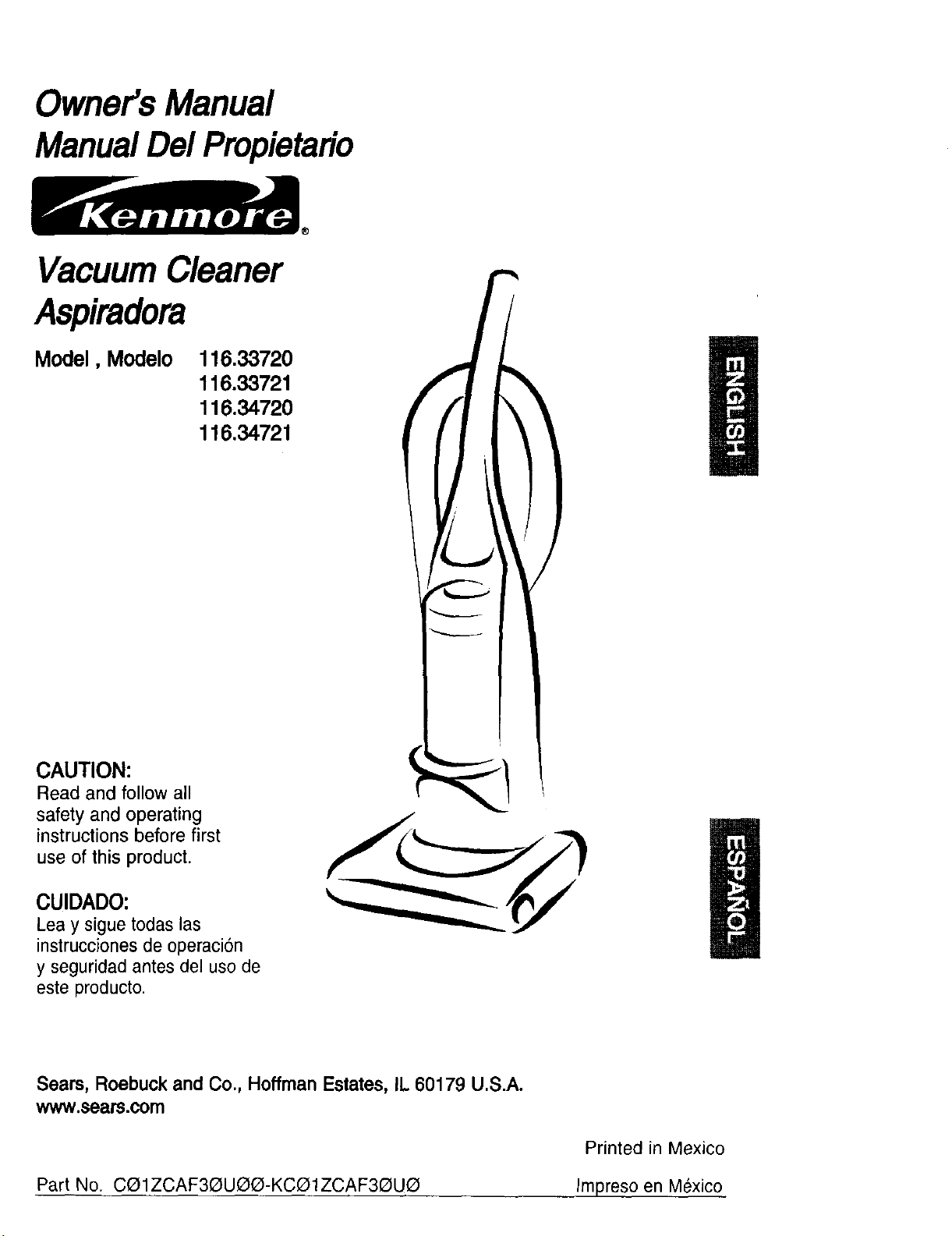
Owner'sManual
ManualDelPropietario
VacuumCleaner
Aspiradora
Model, Modelo
116,33720
116.33721
116.3472O
116.34721
CAUTION:
Read and follow all
safety and operating
instructions before first
use of this product.
CUIDADO:
Lea y sigue todas las
instrucciones de operaci6n
y seguridad antes del uso de
este producto.
Sears, Roebuck and Co., Hoffman Estates, IL 60179 U.S.A.
www.sears.com
Part No. CQ1ZCAF3QUQG-KCO1ZCAF3QUQ
Printed in Mexico
Impreso en M_xico
Before UsingYour New Vacuum ........ 2
KenmoraVacuum Cleaner Warranty .... 2
ImportantSafety Instructions ........... 3
Parts and Features ................... 4
Assembly Instructions ............... 5-6
Operating Instructions ................. 7
Pile HeightSelection and Setting ........ 7
Releasingthe Handle ................. 8
ON/OFF Switch ..................... 8
Attachments ..................... 9-10
AttachmentUse Chart ............... 10
VacuumingTips .................... 11
PerformanceFeatures ............... 11
Vacuum Cleaner Care ............... 12
Vacuum Storage ................... 12
Cleaning Exteriorand Attachments ..... 12
Dust Bin Cleaning ................ 13-14
Secondary FilterCleaning ............ 14
FilterChanging/Cleaning ............. 15
BeltChangingand AgitatorCleaning.. 16-17
Clog Removat ..................... 18
Motor Protector ..................... 18
AgitatorServicing................... 19
AgitatorAssembly .................. 19
LightBulb Changing ................. 20
Troubleshooting ..................... 21
Notes ............................... 22
Please read this guide. It will help you assemble and operate your new Kenmore vacuum in
the safest and most effective way.
For more information about vacuum cleaner care and operation, call your nearest Sears store.
You will need the complete model and serial numbers when requesting information. Your vacu-
um's model and serial numbers are located on the Model and Serial Number Plate.
Use the space below to record the model number and serial number of your new Kenmore
vacuum.
Model No.
Serial No.
Date of Purchase
Keep this book and your sales check (receipt) in a safe place for future reference.
LIMITED ONE YEAR WARRANTY ON KENMORE VACUUM CLEANER
This warranty is for one year from the date of purchase, and includes only private household
vacuum cleaner use. During the warranty year, when this vacuum cleaner is operated and
maintained according to the owner's manual instructions, Sears will repair any defects in
materiar or workmanship free of charge.
This warranty excludes vacuum bags, belts, light bulbs, and filters, which are expendable parts
and become worn during normal use.
For warrantyservice, retum this vacuum cleaner to the nearest Sears Service Center in the
UnitedStates.
This warranty applies only while this product is in use in the United States. This warranty gives
you specific legal rights, and you may also have other rights which vary from state to state.
Seam, Roebuck and Co., D/817 WA, Hoffman Estates, IL 60179
2
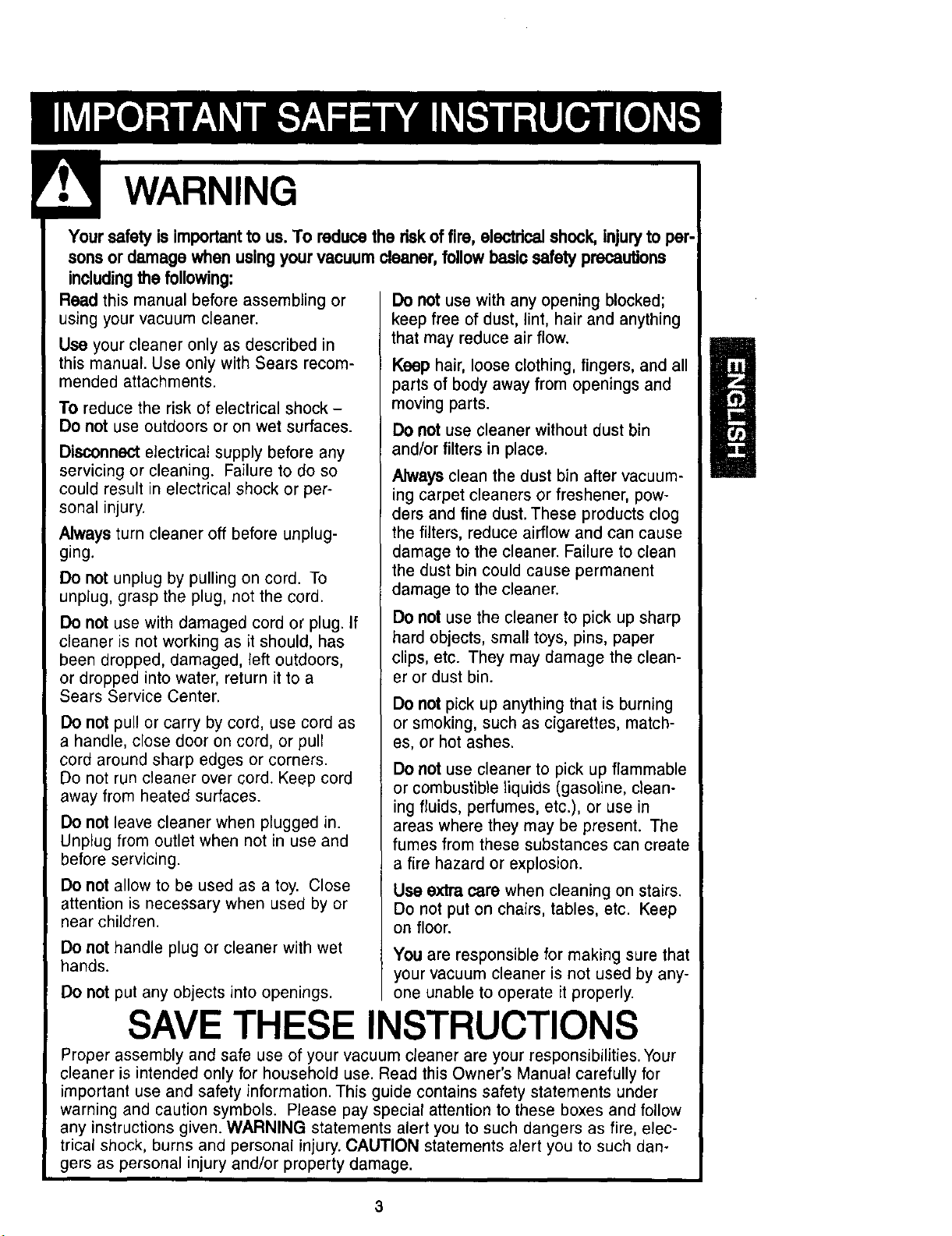
Your safety is importantto us. To reduce the riskof fire, electricalshock, injuryto per-
sons or damage when usingyour vacuum cleaner, follow basic safety precautions
including the following:
Reed this manual before assembling or
using your vacuum cleaner.
Use your cleaner only as described in
this manual. Use only with Sears recom-
mended attachments.
To reduce the risk of electrical shock -
Do not use outdoors or on wet surfaces.
Disconnect electrical supply before any
servicing or cleaning. Failure to do so
could result in electrical shock or per-
sonal injury.
Always turn cleaner off before unplug-
ging.
Do not unplug by pulling on cord. To
unplug, grasp the plug, not the cord.
Do not use with damaged cord or plug. If
cleaner is not working as it should, has
been dropped, damaged, left outdoors,
or dropped into water, return it to a
Sears Service Center.
Do not pull or carry by cord, use cord as
a handle, close door on cord, or pull
cord around sharp edges or corners.
Do not run cleaner over cord. Keep cord
away from heated surfaces.
Do not leave cleaner when plugged in.
Unplug from outlet when not in use and
before servicing.
Do not allow to be used as a toy. Close
attention is necessary when used by or
near children.
Do not handle plug or cleaner with wet
hands.
Do not put any objects into openings.
Do not use with any opening blocked;
keep free of dust, lint, hair and anything
that may reduce air flow.
Keep hair, loose clothing, fingers, and all
parts of body away from openings and
moving parts.
Do not use cleaner without dust bin
and/or filters in place.
Always clean the dust bin after vacuum-
ing carpet cleaners or freshener, pow-
ders and fine dust. These products clog
the filters, reduce airflow and can cause
damage to the cleaner. Failure to clean
the dust bin could cause permanent
damage to the cleaner.
Do not use the cleaner to pick up sharp
hard objects, small toys, pins, paper
clips, etc. They may damage the clean-
er or dust bin.
Do not pick up anything that is burning
or smoking, such as cigarettes, match-
es, or hot ashes.
Do not use cleaner to pick up flammable
or combustible liquids (gasoline, clean-
ing fluids, perfumes, etc.), or use in
areas where they may be present. The
fumes from these substances can create
a fire hazard or explosion.
Use extra care when cleaning on stairs.
Do not put on chairs, tables, etc. Keep
on floor.
You are responsible for making sure that
your vacuum cleaner is not used by any-
one unable to operate it properly.
SAVE THESE INSTRUCTIONS
Proper assembly and safe use of your vacuum cleaner are your responsibilities. Your
cleaner is intended only for household use. Read this Owner's Manual carefully for
important use and safety information. This guide contains safety statements under
warning and caution symbols. Please pay special attention to these boxes and follow
any instructions given. WARNING statements alert you to such dangers as fire, elec-
trical shock, burns and personal injury. CAUTION statements alert you to such dan-
gers as personal injury and/or property damage.
3
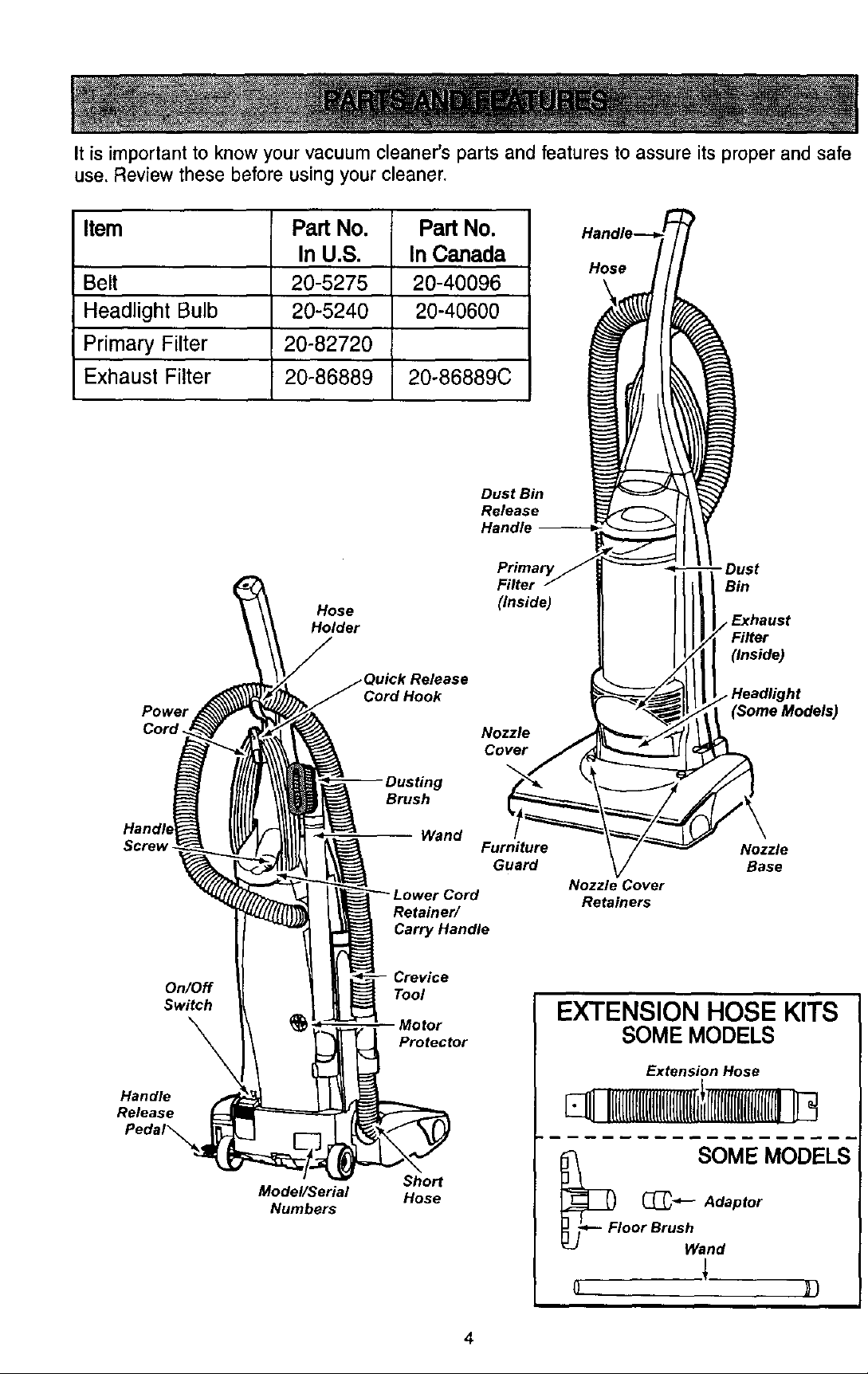
It is important to know your vacuum cleaner's parts and features to assure its proper and safe
use. Review these before using your cleaner.
Item Part No. Part No.
In U.S. In Canada
Belt 20-5275 20-40096
Headlight Bulb 20-5240 20-40600
Primary Filter 20-82720
Exhaust Filter 20-86889 20o86889C
Hose
Dust Bin
Release
Handle --
Power
Cord.
Screw
Filter
Hose (Inside)
Holder
Cord Hook
Nozzle
Cover
Brush
Wand
Furniture
Guard
Retainer/
Carry Handle
- Dust
Bin
Exhaust
(Inside)
(Some Models)
Nozzle
Base
Nozzle Cover
Retainers
On/Off
Switch
Handle
Release
Model/Serial
Numbers
Tool
Motor
Protector
Sho_
Hose
EXTENSION HOSE KITS
SOME MODELS
Extension Hose
SOM E NI()[)_ELS-
_FI _Adaptor
oor Brush
Wand
4
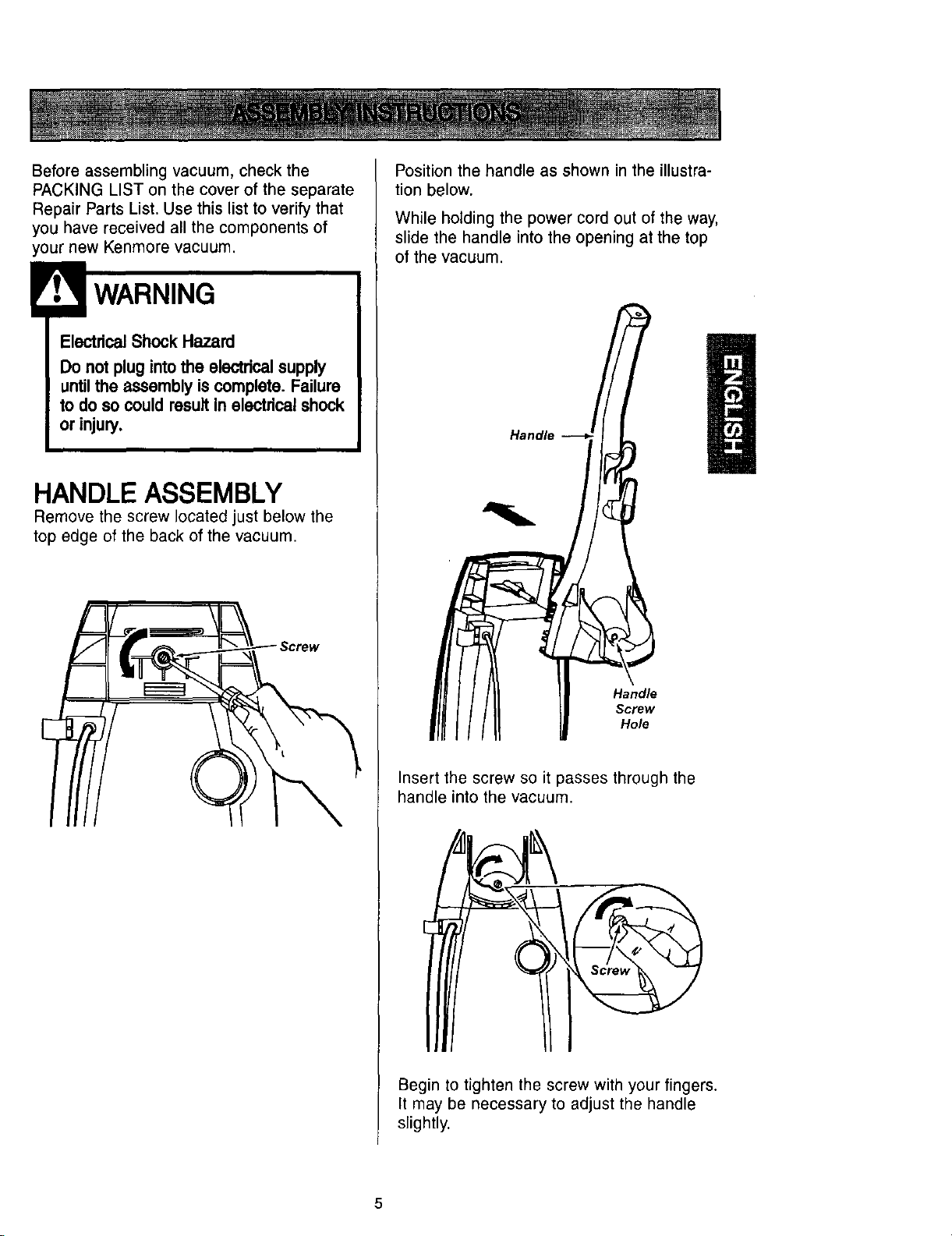
Before assembling vacuum, check the
PACKING LIST on the cover of the separate
Repair Parts List. Use this list to verify that
you have received all the components of
your new Kenmore vacuum.
ElectricalShock Hazard
Do not plug intothe electricalsupply
untilthe assembly iscomplete. Failure
to do so could result in electdcal shock
or injury.
HANDLE ASSEMBLY
Remove the screw located just below the
top edge of the back of the vacuum.
Position the handle as shown in the illustra-
tion below.
While holding the power cord out of the way,
slide the handle into the opening at the top
of the vacuum.
Handle
Handle
Screw
Hole
Insert the screw so it passes through the
handle into the vacuum.
Begin to tighten the screw with your fingers.
It may be necessary to adjust the handle
slightly.
5
CAUTION
Do notovertighten.
Overtighteningcould stdp the screw
holes.
Do notoperate the cleaner withoutthe
screw in place.
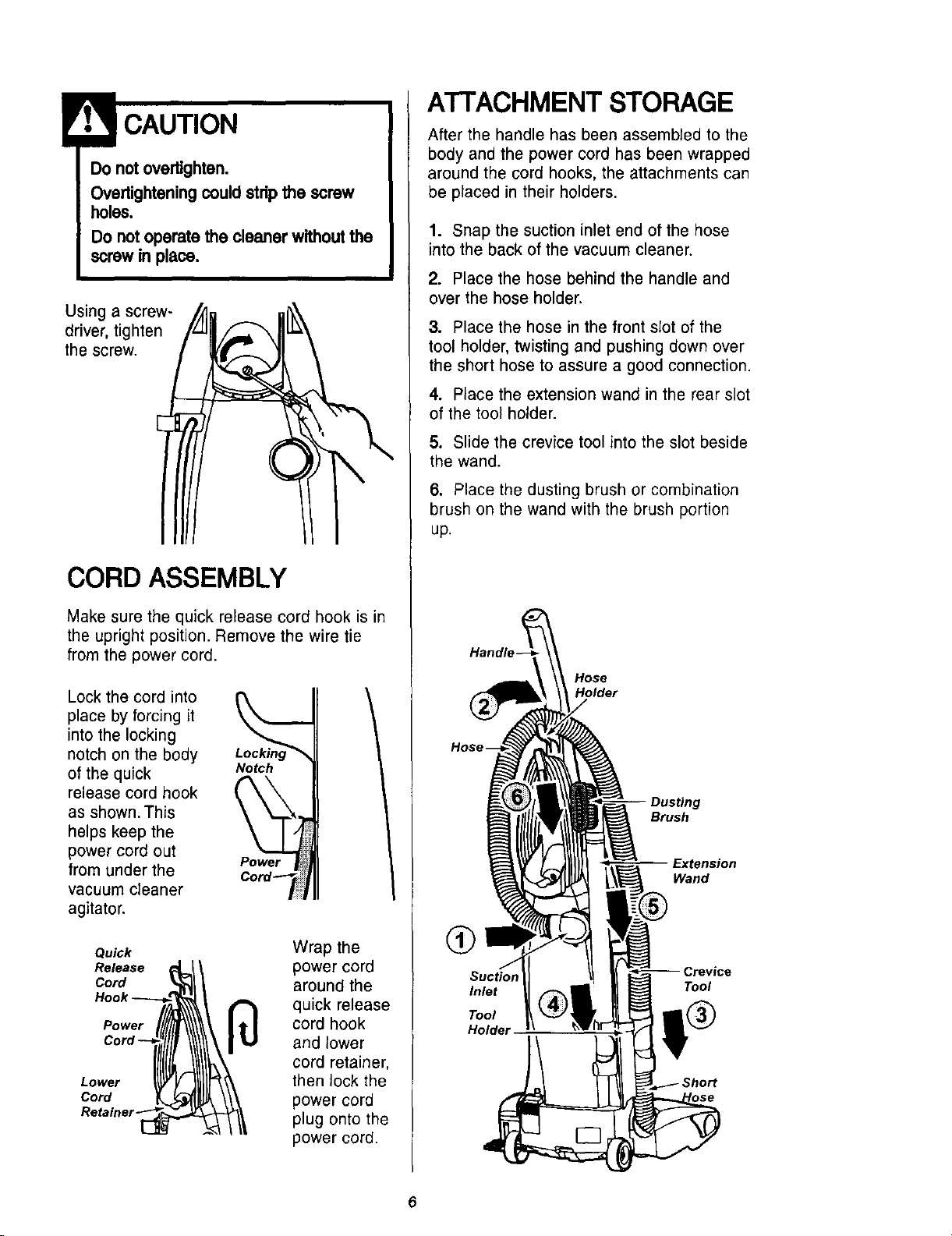
Using a screw-
driver, tighten
the screw.
CORD ASSEMBLY
Make sure the quick release cord hook is in
the upright position. Remove the wire tie
from the power cord.
Lock the cord into
place by forcing it
into the locking
notch on the body Lockin
of the quick Notch
release cord hook
as shown. This
helps keep the
power cord out
from under the Power
vacuum cleaner
agitator.
Quick
Release
Curd
Power
Lower
Cord
Wrap the
power cord
around the
quick release
cord hook
and lower
cord retainer,
then lock the
power cord
plug onto the
power cord.
ATTACHMENT STORAGE
After the handle has been assembled to the
body and the power cord has been wrapped
around the cord hooks, the attachments can
be placed in their holders.
1. Snap the suction inlet end of the hose
into the back of the vacuum cleaner.
2. Place the hose behind the handle and
over the hose holder.
3. Place the hose in the front slot of the
tool holder, twisting and pushing down over
the short hose to assure a good connection.
4. Place the extension wand in the rear slot
of the tool holder.
5. Slide the crevice tool into the slot beside
the wand.
6. Place the dusting brush or combination
brush on the wand with the brush portion
up.
Handle-
Hose
Dusting
Brush
Extension
Wand
Q
Inlet
Tool
Holder
Tool
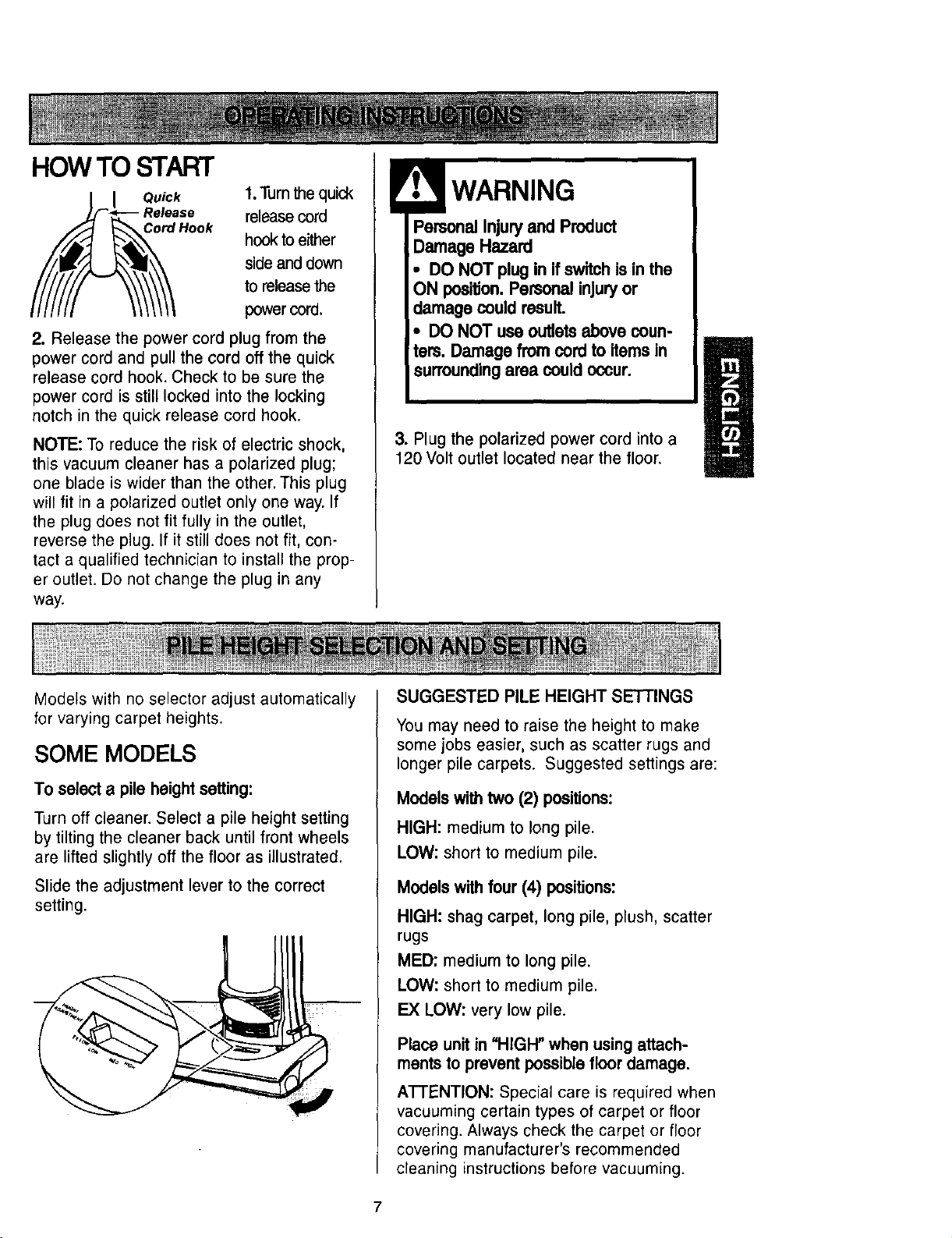
HOWTO START
Quick
Release
Hook
1.Turn the quick
release cord
hook to either
side and down
to release the
power cord.
2. Release the power cord plug from the
power cord and pull the cord off the quick
release cord hook. Check to be sure the
power cord is still locked into the locking
notch in the quick release cord hook.
NOTE: To reduce the risk of electric shock,
this vacuum cleaner has a polarized plug;
one blade is wider than the other. This plug
will fit in a polarized outlet only one way. If
the plug does not fit fully in the outlet,
reverse the plug. If it still does not fit, con-
tact a qualified technician to install the prop-
er outlet. Do not change the plug in any
way.
Personal Injury and Product
Damage Hazard
• DO NOT plug in if switchis in the
ON position.Personal injuryor
damage couldresult.
• DO NOT use outletsabove coun-
ters. Damage from cordto items in
surroundingarea couldoccur.
3. Plug the polarized power cord into a
120 Volt outlet located near the floor.
Models with no selector adjust automatically
for varying carpet heights.
SOME MODELS
To select a pile height setting:
Turn off cleaner. Select a pile height setting
by tilting the cleaner back until front wheels
are lifted slightly off the floor as illustrated.
Slide the adjustment lever to the correct
setting.
SUGGESTED PILE HEIGHT SETTINGS
You may need to raise the height to make
some jobs easier, such as scatter rugs and
longer pile carpets. Suggested settings are:
Models withtwo (2) positions:
HIGH: medium to long pile.
LOW: short to medium pile.
Models with four (4) positions:
HIGH: shag carpet, long pile, plush, scatter
rugs
MED: medium to long pile.
LOW: short to medium pile.
EX LOW: very low pile.
Place unit in "HIGH" when usingattach-
ments to prevent possiblefloor damage.
AI-I'ENTION: Special care is required when
vacuuming certain types of carpet or floor
covering. Always check the carpet or floor
covering manufacturer's recommended
cleaning instructions before vacuuming.
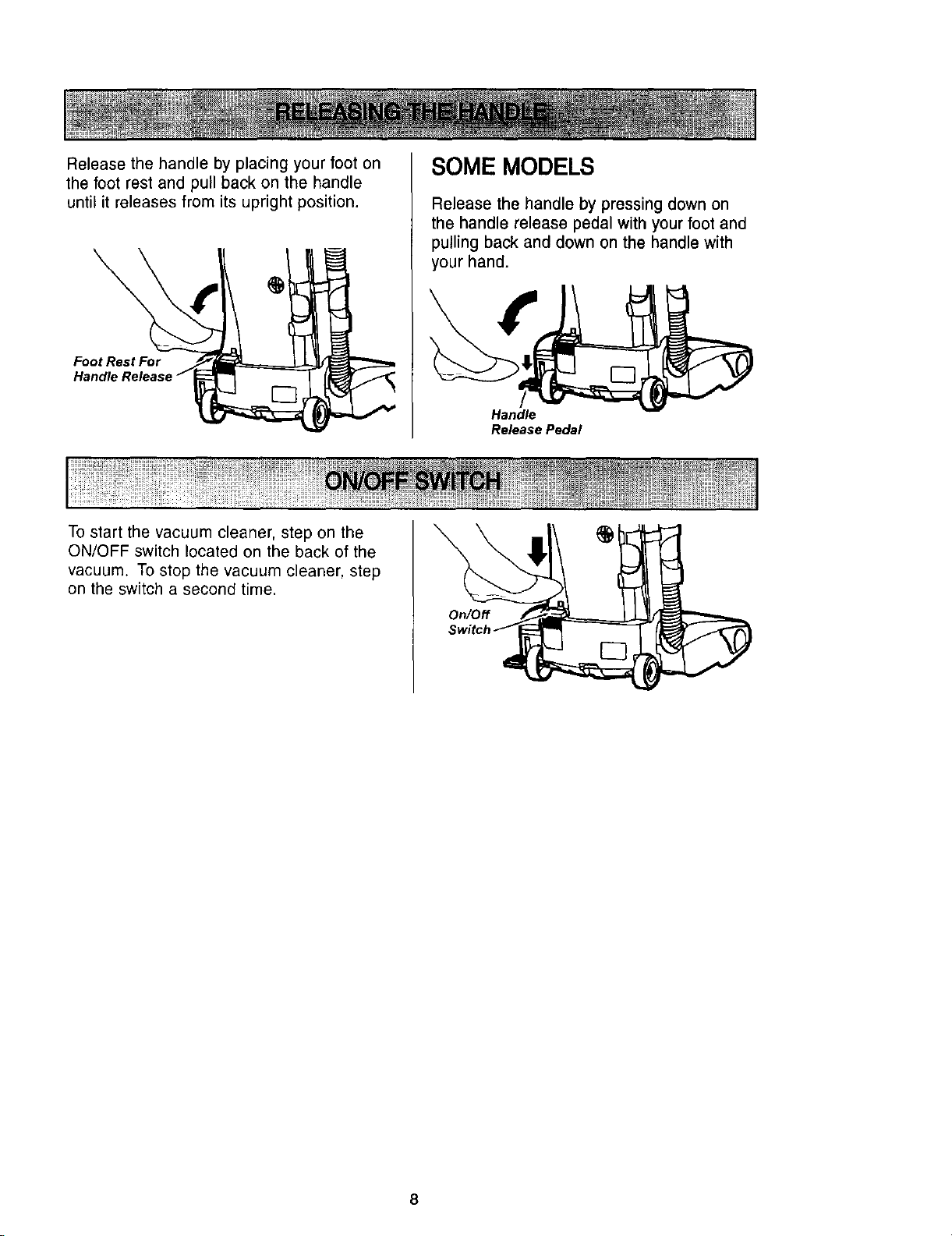
Releasethehandlebyplacingyourfooton
thefootrestandpullbackonthe handle
untilit releasesfromits uprightposition.
Foot Rest For
Handlq
SOME MODELS
Release the handle by pressing down on
the handle release pedal with your foot and
pulling back and down on the handle with
your hand.
r-7
Handle
Release Pedal
To start the vacuum cleaner, step on the
ON/OFF switch located on the back of the
vacuum. To stop the vacuum cleaner, step
on the switch a second time.
On/Off
8
Personal Injury Hazard and Property
Hazard
DO NOT place hands or feet under-
neath the unit at any time. When using
attachments,the agitatorcontinues
rotating. Do notallow the cleaner to
remain in just one place for a periodof
time as the agitatormay damage the
floor surface. Avoid placingthe cleaner
on furniture, the fdnged area of rugs,
deep pile carpeting,or carpeted stairs.
The ideal positionforthe cleaner when
usingattachments is for the unit to be
on a level area with the handle in the
f_ position.
TO USE ATrACHMENTS
I CAUTION
DO NOT tip vacuum cleaner forwards or
sideways when using attachments.
The attachments will fit on the hose or the
wand. In addition, the dusting brush or
combination brush will also fit on the crevice
tool.
The hose and wand can be pulled off the
short hose by grasping the cuff and twisting
while pulling up.
! CAUTION
DO NOT pull the vacuum cleaner
around the room by the hose.
Property damage could result.
The attachments can be added to the hose
if the item to be cleaned is not far from the
creaner. The hose on some moders will
expand.
NOTE: When cleaner is turned on, the hose
on some models will have a tendency to
collapse due to suction of the cleaner.
if more reach is needed, the wand can be
attached to the hose and the attachments
can be added to the wand.
When using attachments, be careful
not to overextend the hose length
when reaching. Trying to reach
beyond the hose reach could cause
the cleaner to tip over.
SOME MODELS
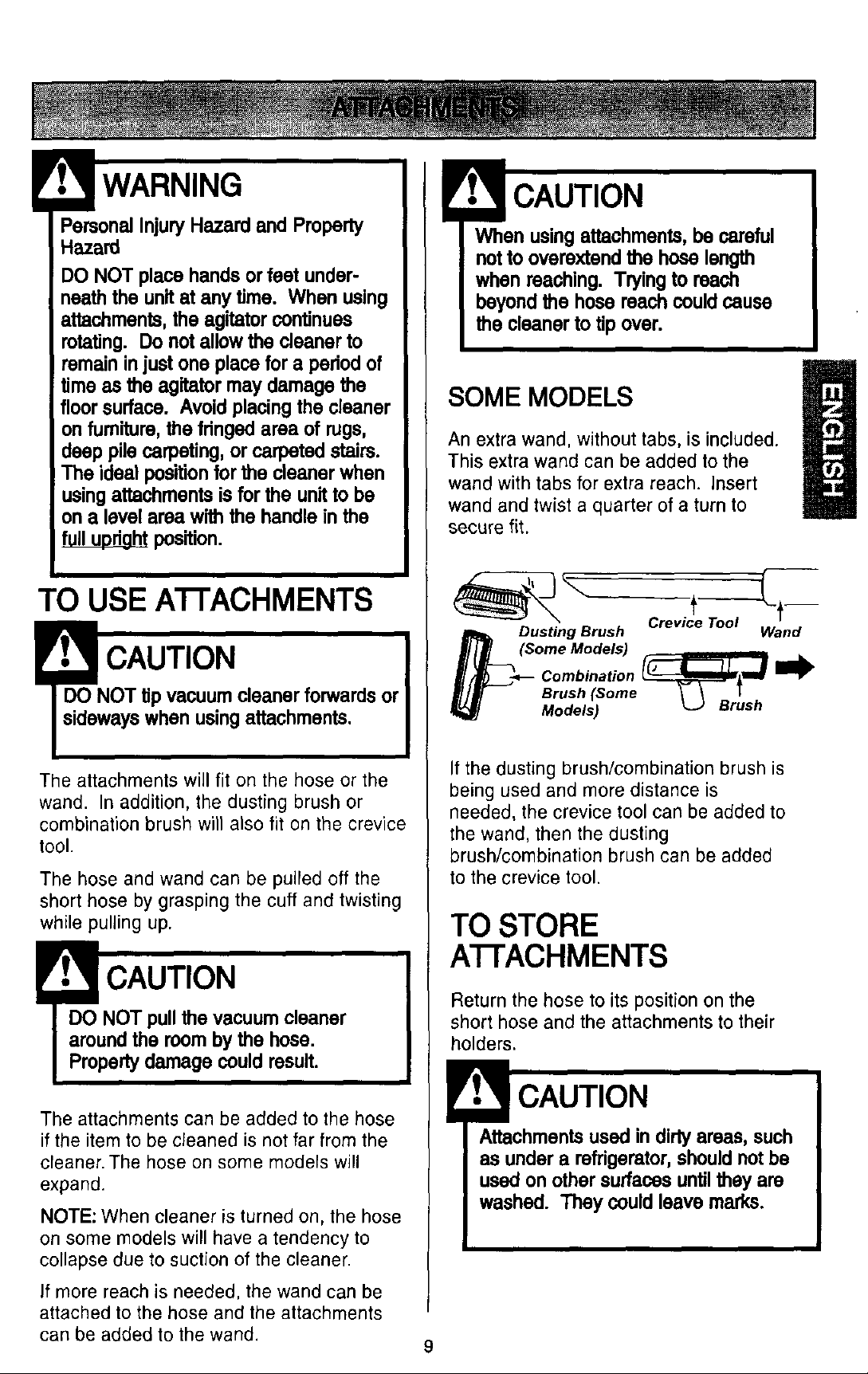
An extra wand, without tabs, is included.
This extra wand can be added to the
wand with tabs for extra reach. Insert
wand and twist a quarter of a turn to
secure fit.
Crov, o,-- o,-
_Dusting Brush Wand
(Some Models) _
Combination
Brush (Some
Models)
If the dusting brush/combination brush is
being used and more distance is
needed, the crevice tool can be added to
the wand, then the dusting
brush/combination brush can be added
to the crevice tool.
TO STORE
A'I-FACHMENTS
Return the hose to its position on the
short hose and the attachments to their
holders.
Attachmentsused in dirtyareas, such
as under a refrigerator,shouldnot be
used on other surfaces untilthey are
washed. They could leave marks.
9
When using the regular hose or with
the extension hose attached, the
cleaner should be on a solid surface
on the same level or below the level of
the user's feet. DO NOT use the hoses
when the cleaner Is above the level of
I the user's feet.
I
EXTENSION HOSE
SOME MODELS
Some models include an extra hose which
connects to the stretch hose on the vacuum
for a longer cleaning reach.
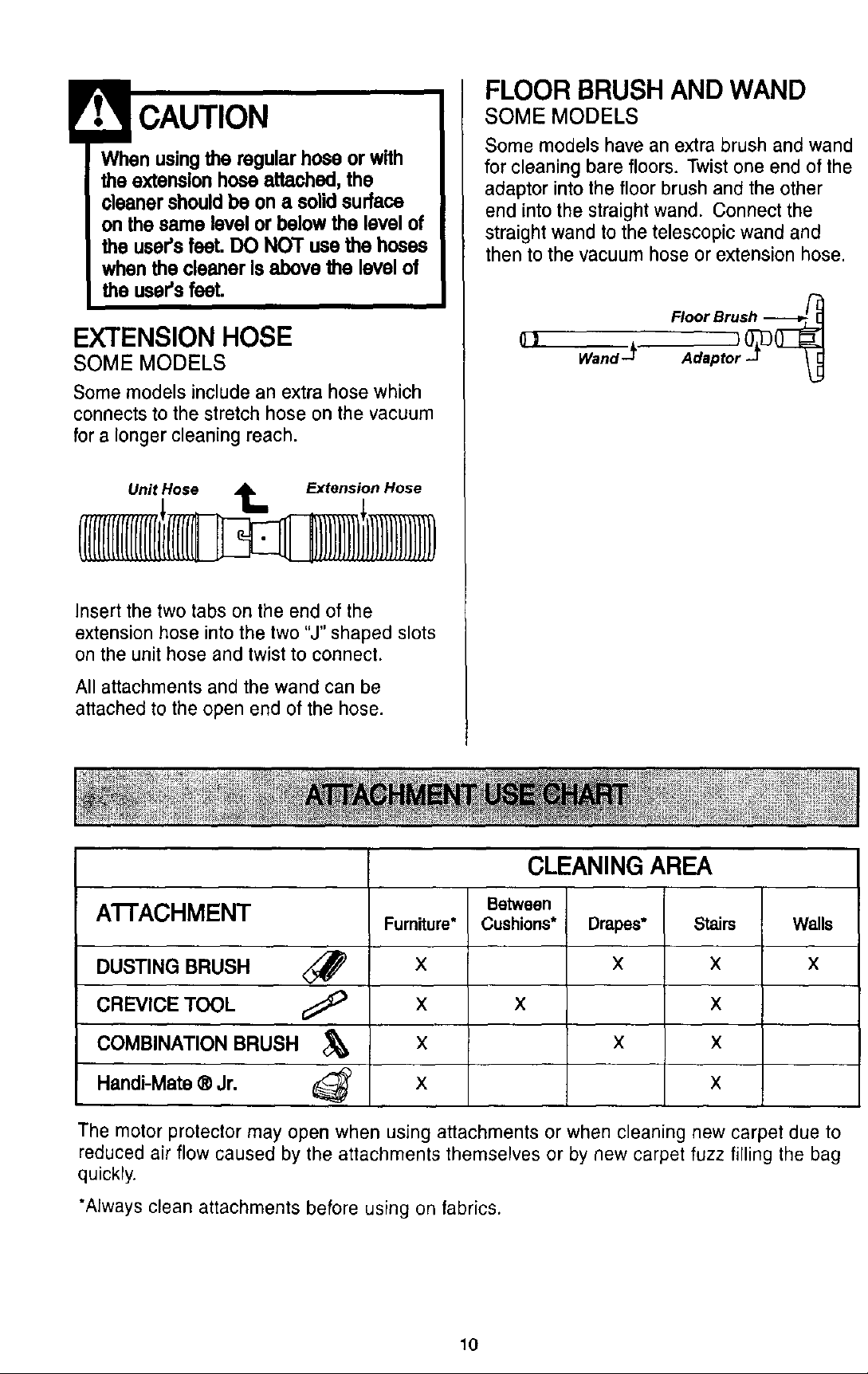
Unit Hose _ Extension Hose
Insert the two tabs on the end of the
extension hose into the two "J" shaped slots
on the unit hose and twist to connect.
All attachments and the wand can be
attached to the open end of the hose.
FLOOR BRUSH AND WAND
SOME MODELS
Some models have an extra brush and wand
for cleaning bare floors. Twist one end of the
adaptor into the floor brush and the other
end into the straight wand. Connect the
straight wand to the telescopic wand and
then to the vacuum hose or extension hose.
(}J
A'I-FACHMENT
DUSTING BRUSH <_
CREVICE TOOL ¢_ _
COMBINATION BRUSH
Handi-Mate ® Jr.
Fumiture*
X
X
X
X
CLEANING AREA
Between
Cushions*
X
Drapes* Stairs
X X
X
X X
X
Walls
X
The motor protector may open when using attachments or when cleaning new carpet due to
reduced air flow caused by the attachments themselves or by new carpet fuzz filling the bag
quickly.
*Always clean attachments before using on fabrics.
10
Personal Injury Hazard
Use care If vacuum cleaner Is placed
on stairs.If it falls, personal injuryor
propertydamage couldresult.
Carpet edges
Guide either side or the front of the nozzle
along a baseboard. The full length brushes
help remove trapped dirt at carpet edges.
Stairs
Put handle in ful! upright position. Use the
crevice tool or dusting brush. Set the On/Off
switch to ON.
MOTOR PROTECTION
SYSTEM
Thermal Protector
This vacuum has a thermal protector which
automatically trips to protect the vacuum
from overheating. If a clog prevents the
normal flow of air to the motor, the thermal
protector turns the motor off automatically to
allow the motor to cool in order to prevent
possible damage to the vacuum.
To correct problem: Ifthis occurs, turn the
vacuum off and unplug the power cord from
the outlet to allow the vacuum to cool and
the thermal protector to reset. Check for
and removeclogs, if necessary. Alsocheck
and clean/replace any cloggedfilters. Wait
approximatelythirty (30) minutesand plug
the vacuum in and turn back on to see ifthe
motorprotectorhas reset.The motor
protectorwill not reset if the vacuum is not
tumed offeven if the vacuum has cooled
down.
PERFORMANCE
INDICATOR
SOME MODELS
When the unit is running with normal air
flow, the light on the performance indicator
is off. The light comes on whenever the
airflow becomes blocked. If that occurs,
check the dust bin, clean/replace clogged
filters, and check other possible clog
locations shown in CLOG REMOVAL.
To correct problem: See the TROUBLE-
SHOOTING chart.
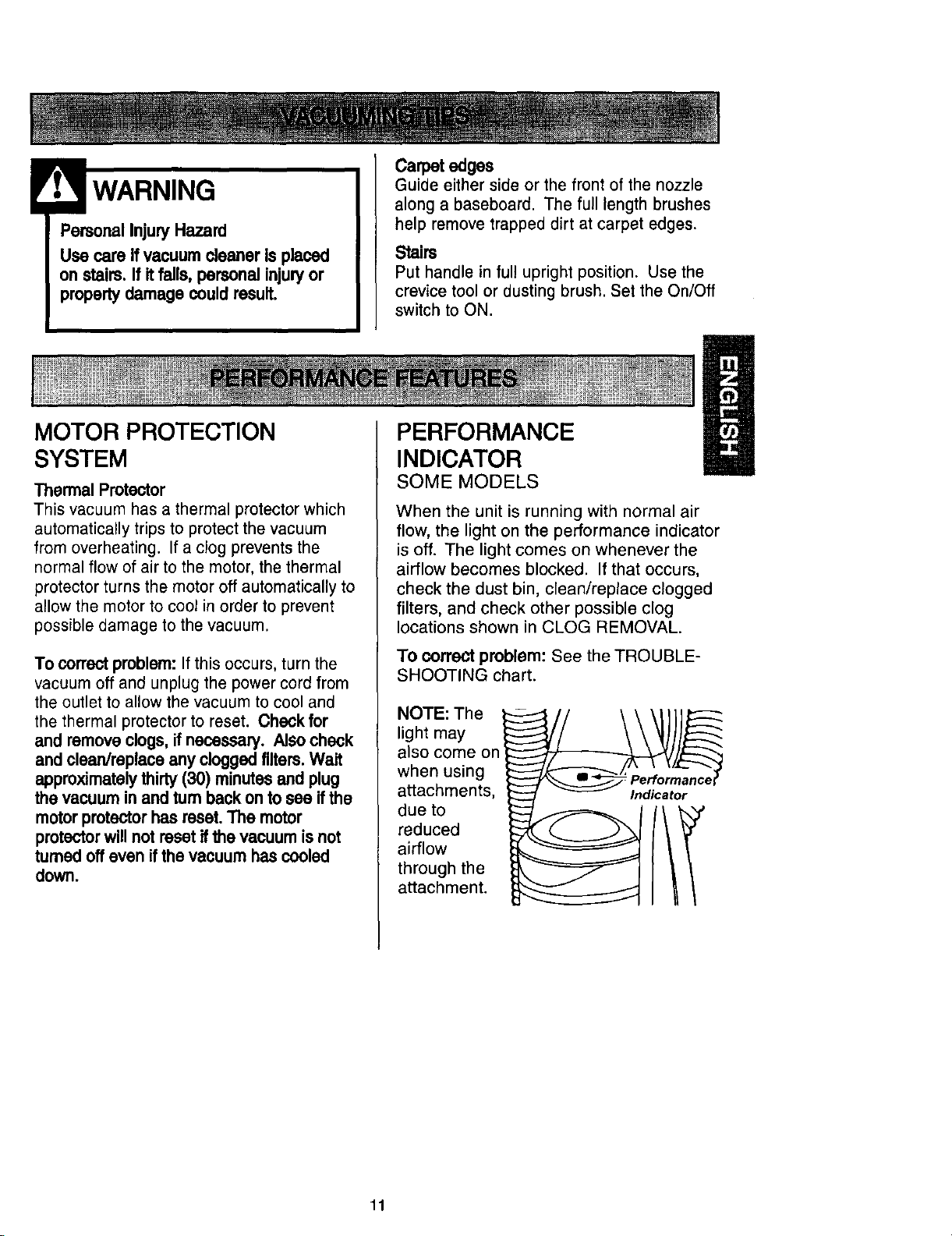
NOT,Te f
light may
also come on
when using
attachments,
due to
reduced
airflow
through the
attachment.
11
Alwaysfollowall safetyprecautionswhen
cleaningandservicingthevacuum
cleaner.
ElectricalShockAndPersonalInjury
Hazard
Disconnectelectrical supply before
servicingor cleaningthe unit. Failure
to do so could resuRin electricalshock
or personal injuryfrom cleaner sud-
denly starUng.
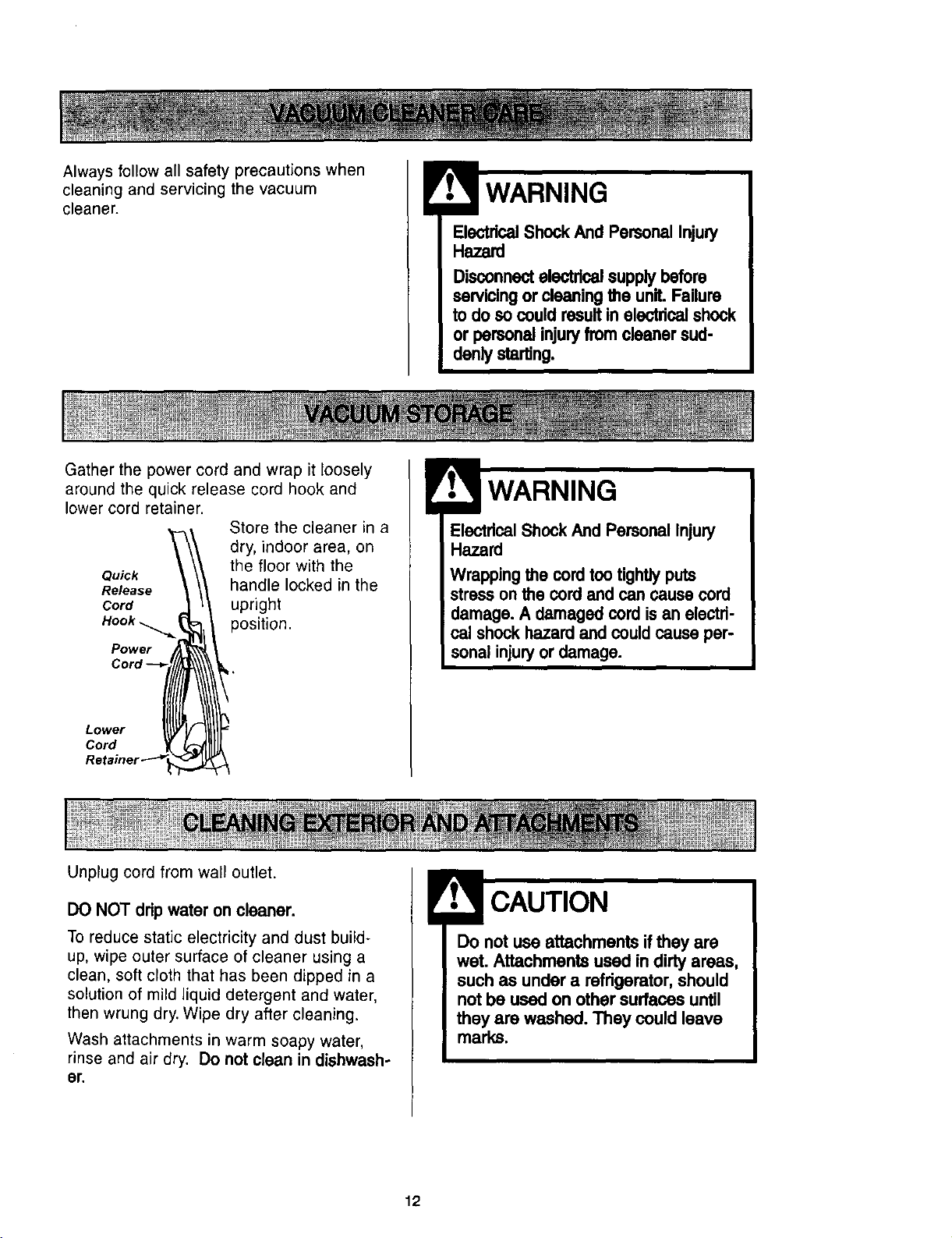
Gather the power cord and wrap it loosely
around the quick release cord hook and
lower cord retainer.
Store the cleaner in a
dry, indoor area, on
the floor with the
Quick
Release handle locked in the
Cord upright
Hook _ position.
Power
Lower
Cord
Unplug cord from wail outlet.
WARNING
dcal Shock And Personal Injury
Hazard
Wrapping the cord too tightly puts
stresson the cord and can cause cord
damage. A damaged cord is an electri-
cal shockhazard and could cause per-
sonal injuryor damage.
DO NOT ddp water on cleaner.
To reduce static electricity and dust build-
up, wipe outer surface of cleaner using a
clean, soft cloth that has been dipped in a
solution of mild liquid detergent and water,
then wrung dry. Wipe dry after cleaning.
Wash attachments in warm soapy water,
rinse and air dry. Do not clean in dishwash-
or.
Do not use attachments if they are
wet. Attachments used in dirty areas,
such as under a refrigerator, should
not be used on other surfaces until
they are washed. They could leave
marks.
12
Alwaysempty the dust binwhen dirt level
reachesthe "MAX FILL" line.
TO REMOVE DUST BIN
! WARNING
Always unplugpower cord from electri-
cal outlet before performingany ser-
vice on vacuum.
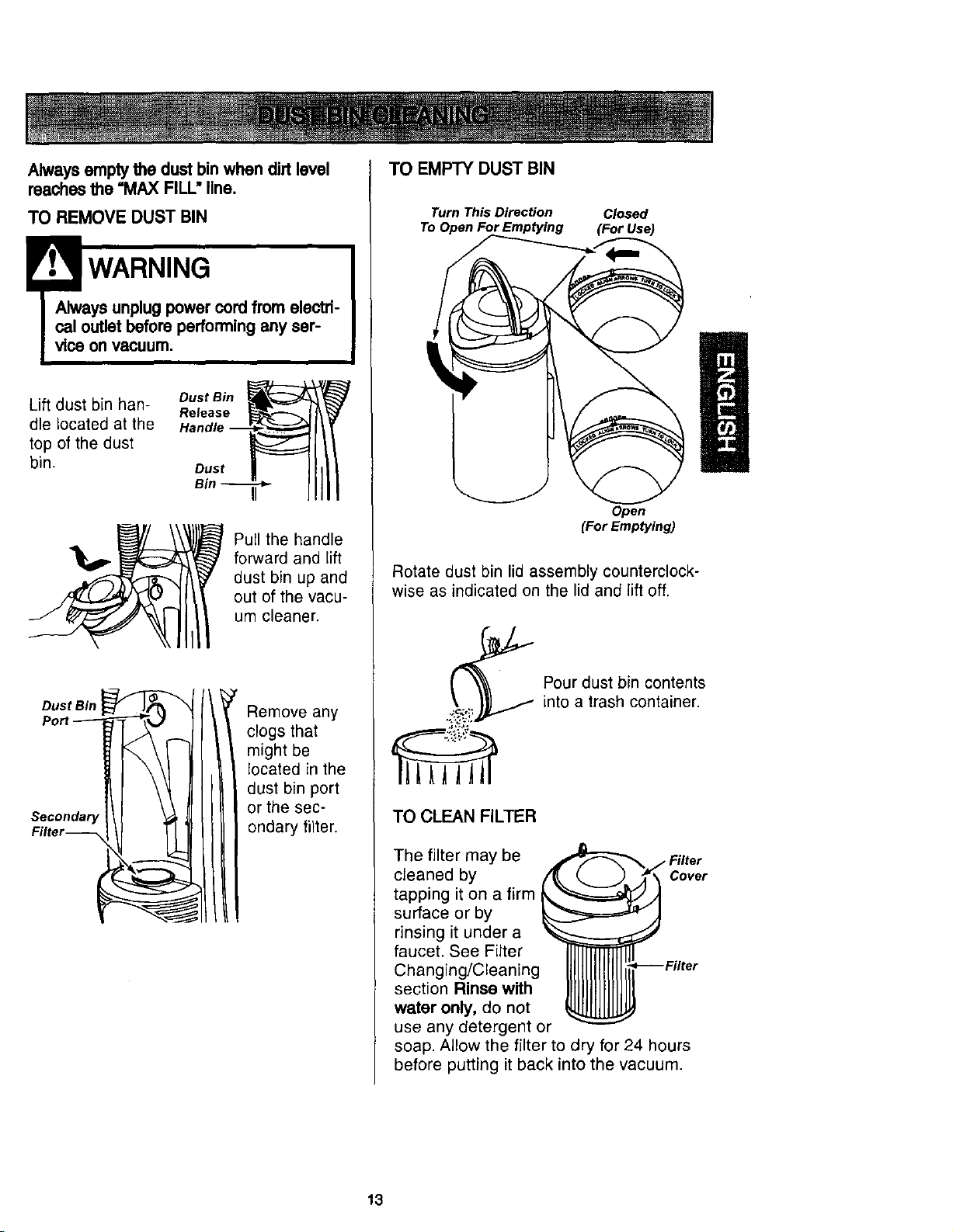
Lift dust bin han- DustBin _h_
Release
die located at the Handle --
top of the dust
bin. Dust
Bin --
J
Pull the handle
forward and lift
dust bin up and
out of the vacu-
um cleaner.
Seoondar,I
Remove any
clogs that
might be
located in the
dust bin port
or the sec-
ondary filter.
TO EMPTY DUST BIN
Turn This Direction Closed
To Open For Emptying (for Use)
Open
(For Emptying)
Rotate dust bin lid assembly counterclock-
wise as indicated on the lid and lift off.
Pour dust bin contents
into a trash container.
TO CLEAN FILTER
The filter may be
cleaned by
tapping it on a firm
surface or by
rinsing it under a
faucet. See Filter
Changing/Cleaning
section Rinse with
water only, do not
use any detergent or
_ Filter
Cover
soap. Allow the filter to dry for 24 hours
before putting it back into the vacuum.
13
TO REPLACEDUSTBIN
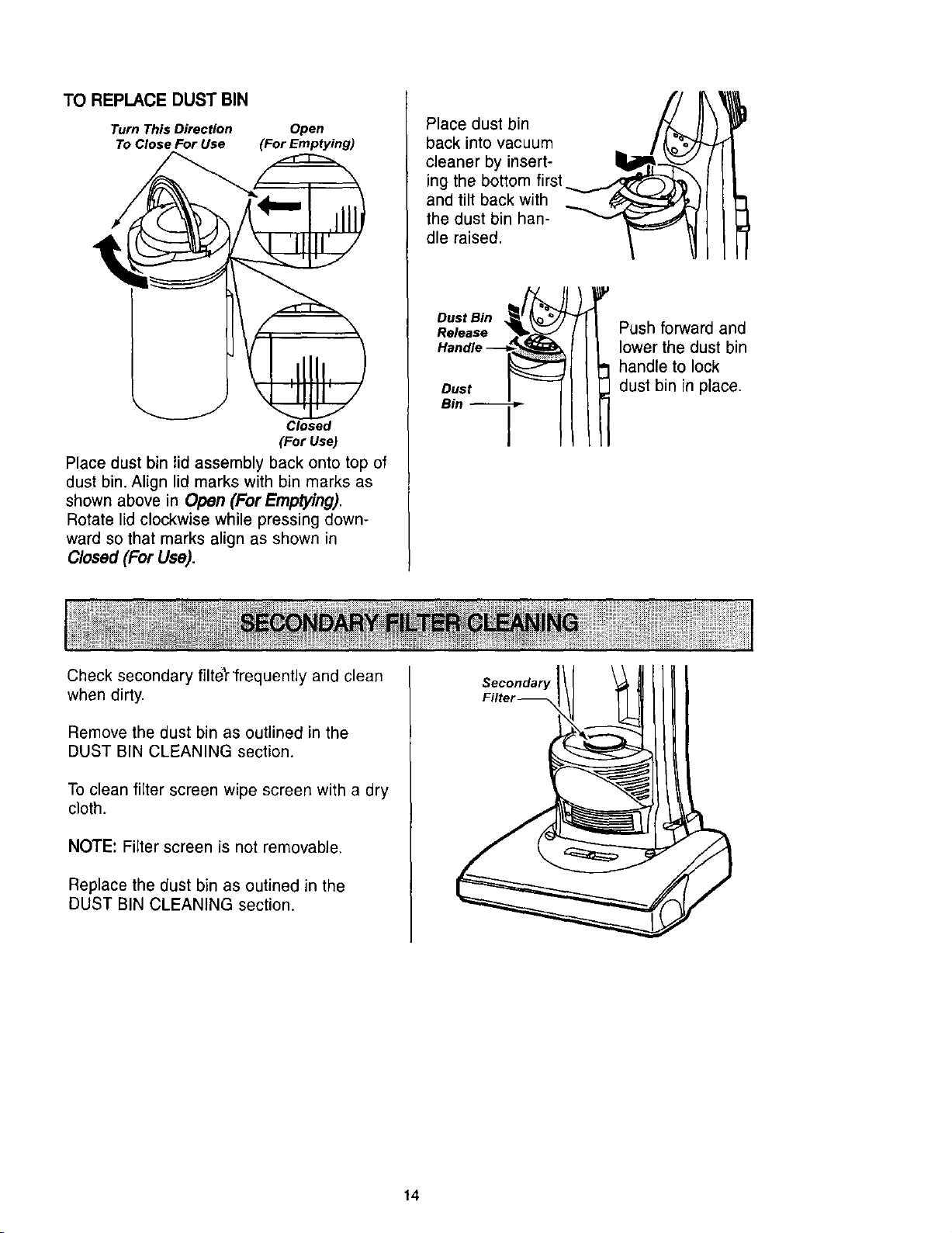
Turn This Direction Open
TO Close For Use (For Emptying)
Closed
(For Use)
Place dust bin lid assembly back onto top of
dust bin. Align lid marks with bin marks as
shown above in Open (For Emptying).
Rotate lid clockwise while pressing down-
ward so that marks align as shown in
Closed (For Use).
Place dust bin
back into vacuum
cleaner by insert-
ing the bottom first
and tilt back with
the dust bin han-
dle raised.
Dust Bin
Release
Dust
Bin
Push forward and
lower the dust bin
handle to lock
dust bin in place.
Check secondary filter 'frequently and clean
when dirty.
Remove the dust bin as outlined in the
DUST BIN CLEANING section.
To clean filter screen wipe screen with a dry
cloth.
NOTE: Filter screen is not removable.
Replace the dust bin as outined in the
DUST BIN CLEANING section.
Secondary
14
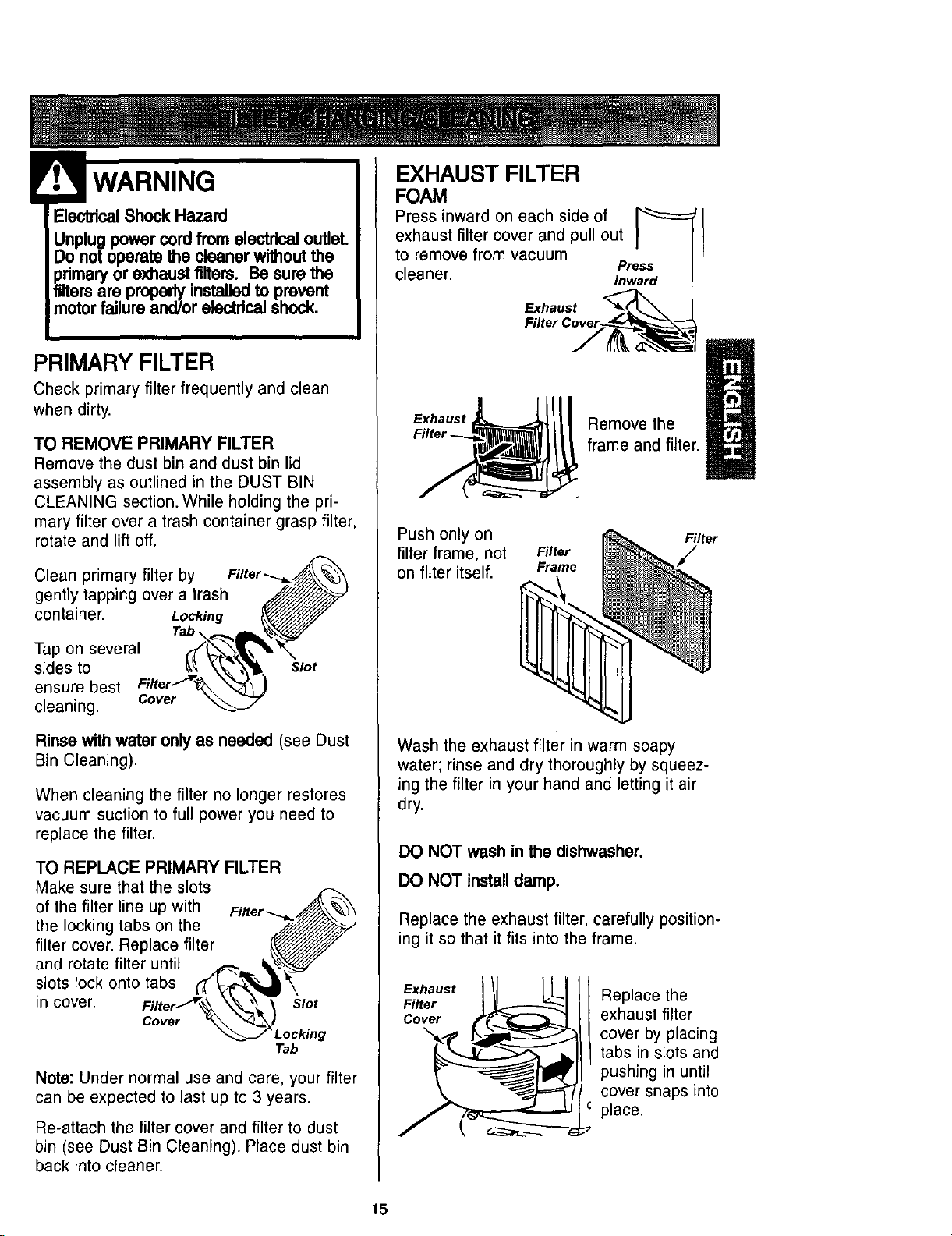
WARNING
PRIMARY FILTER
Check primary filter frequently and clean
when dirty.
TO REMOVE PRIMARY FILTER
Remove the dust bin and dust bin lid
assembly as outlined in the DUST BIN
CLEANING section. While holding the pri-
mary filter over a trash container grasp filter,
rotate and lift off.
Clean primary filter by
gently tapping over a trash
container. Locking
Tap on several
sides to
ensure best
cleaning. Cover
Slot
Rinse with water onlyas needed (see Dust
Bin Cleaning).
When cleaning the filter no longer restores
vacuum suction to full power you need to
replace the filter.
TO REPLACE PRIMARY FILTER
Make sure that the slots
of the filter line up with
the locking tabs on the
filter cover. Replace filter
and rotate filter until
slots lock onto tabs
in cover.
Cover
Slot
Tab
Note: Under normal use and care, your filter
can be expected to last up to 3 years.
Re-attach the filter cover and filter to dust
bin (see Dust Bin Cleaning). Place dust bin
back into cleaner.
EXHAUST FILTER
FOAM
Press inward on each side of
exhaust filter cover and pull out
to remove from vacuum
Press
cleaner. Inward
Exhaust
Exhaust
Remove the
frame and filter.
Push only on
filter frame, not
on filter itself.
Filter
Frame
Filter
Wash the exhaust filter in warm soapy
water; rinse and dry thoroughly by squeez-
ing the filter in your hand and letting it air
dry.
DO NOT wash in the dishwasher.
DO NOT installdamp.
Replace the exhaust filter, carefully position-
ing it so that it fits into the frame.
Exhaust
Filter
Cover
\
Replace the
exhaust filter
cover by placing
tabs in slots and
pushing in until
cover snaps into
place.
15

WARNING
ElectricalShock Or Personal Injury
Hazard
Disconnectelectrical supply before
servicingor cleaningthe unit. Failure
to do so couldresult in electricalshock
or personal injuryfrom cleaner sud-
denly starting.
Frequently check and remove hair, string
and lint build-up in the brush area. If build-
up becomes excessive, follow the steps
below. Should the belt become loose or
should it break, follow the Belt Removal
Instructions.
TO REMOVE NOZZLE COVER
Disconnect electrical supply.
To protect the floor surface, always place
paper under the nozzle any time the nozzle
cover is removed.
Release the nozzle c_)ver by rotating the
nozzle cover retainerg to the UNLOCK
position. Grasp back of nozzle on each side
and lift up to remove it from nozzle cover.
Nozzle
Cover
Carefully remove any residue that may exist
in the belt area.
Personal InjuryHazard
Always unplugthe vacuum cleaner
before cleaningthe brusharea as agi-
tator may suddenlyrestart. Failureto
do so can result in personal injury.
TO REMOVE BELT/CLEAN
AGITATOR
Agitator
Position hands on the agitator. If the belt is
still attached to the agitator, there will be
tension on it.
Carefully lift the right end of the agitator and
then lift the left end.
Remove the worn or broken belt from the
motor drive shaft.
Personal Injury Hazard
Be careful when removingthe agitator
as the belt tensionis high. Failure to
do so could result in personalinjury
from the agitator releasingquicklyand
snappingaway.
16
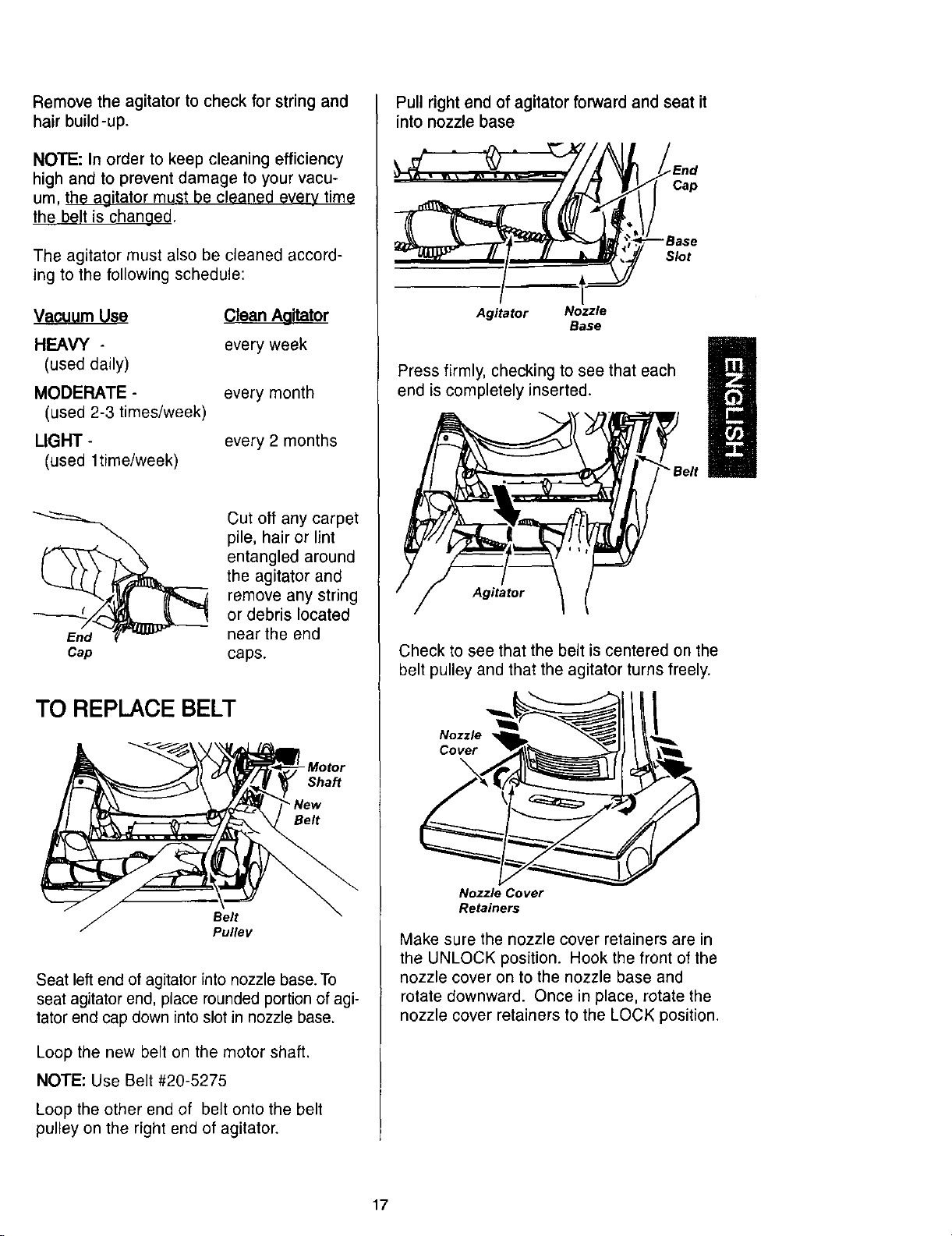
Remove the agitator to check for string and
hair build-up.
NOTE: In order to keep cleaning efficiency
high and to prevent damage to your vacu-
um, the agitator must be cleaned every time
the belt is changed,
The agitator must also be cleaned accord-
ing to the following schedule:
Vacuum Use
HEAVY -
(used daily)
MODERATE-
(used 2-3 times/week)
LIGHT-
(used 1time/week)
Clean Aaitator
every week
every month
every 2months
Cap
Cut oft any carpet
pile, hair or lint
entangled around
the agitator and
remove any string
or debris located
near the end
caps.
TO REPLACE BELT
Shaft
_"New
Belt
Belt
Pulley
Seat left end of agitator into nozzle base. To
seat agitator end, place rounded portion of agi-
tator end cap down into slot in nozzle base.
Loop the new belt on the motor shaft.
NOTE: Use Belt #20-5275
Loop the other end of belt onto the belt
pulley on the right end of agitator.
Pull right end of agitator forward and seat it
into nozzle base
Agitator Nozzle
Base
End
Cap
--Base
Slot
Press firmly, checking to see that each
end is completely inserted.
Agitator
Check to see that the belt is centered on the
belt pulley and that the agitator turns freely.
Nozzle I
Cover
\
Nozzle Cover
Retainers
Make sure the nozzle cover retainers are in
the UNLOCK position. Hook the front of the
nozzle cover on to the nozzle base and
rotate downward. Once in place, rotate the
nozzle cover retainers to the LOCK position.
17
Electrical Shock Or Personal Injury
Hazard
Disconnectelectdcal supply before
servicingor cleaningthe unit, Failure
to do so couldresult in electrical shock
or personal injuryfrom cleaner sud-
denly starUng.
Always follow all safety precautions when
cleaning and servicing the vacuum cleaner.
If the cleaner does not seem to have ade-
quate suction, first check if the dust bin is
full or if a filter is clogged. See DUST BIN
CLEANING and FILTER CLEANING /
CHANGING.
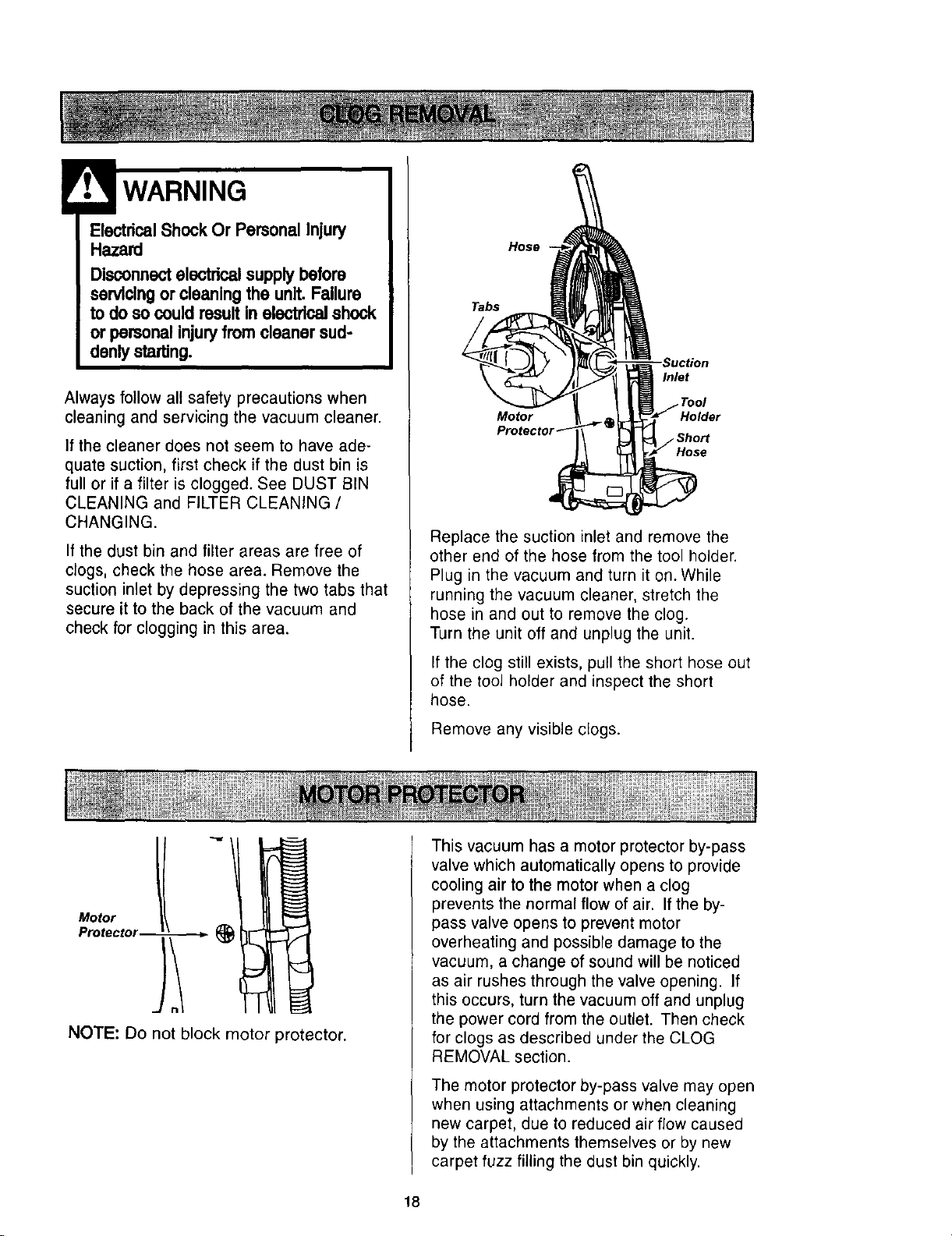
If the dust bin and filter areas are free of
clogs, check the hose area. Remove the
suction inlet by depressing the two tabs that
secure it to the back of the vacuum and
check for clogging in this area.
Hose
Tabs
Inlet
Tool
Motor
Hose
Replace the suction inlet and remove the
other end of the hose from the tool holder.
Plug in the vacuum and turn it on. While
running the vacuum cleaner, stretch the
hose in and out to remove the clog.
Turn the unit off and unplug the unit.
If the clog still exists, pull the short hose out
of the tool holder and inspect the short
hose.
Remove any visible clogs.
Motor _-_ 1
Protector _ ;___
NOTE: Do not block motor protector.
This vacuum has a motor protector by-pass
valve which automatically opens to provide
cooling air to the motor when a clog
prevents the normal flow of air. If the by-
pass valve opens to prevent motor
overheating and possible damage to the
vacuum, a change of sound will be noticed
as air rushes through the valve opening. If
this occurs, turn the vacuum off and unplug
the power cord from the outlet. Then check
for clogs as described under the CLOG
REMOVAL section.
The motor protector by-pass valve may open
when using attachments or when cleaning
new carpet, due to reduced air flow caused
by the attachments themselves or by new
carpet fuzz filling the dust bin quickly.
18
ElectricalShockOr Personal Injury
Hazard
Disconnectelectricalsupplybeforeser-
vicingor cleaningthe unit. Failureto do
socould result in electricalshockor
personalinjuryfromcleaner suddenly
starting,
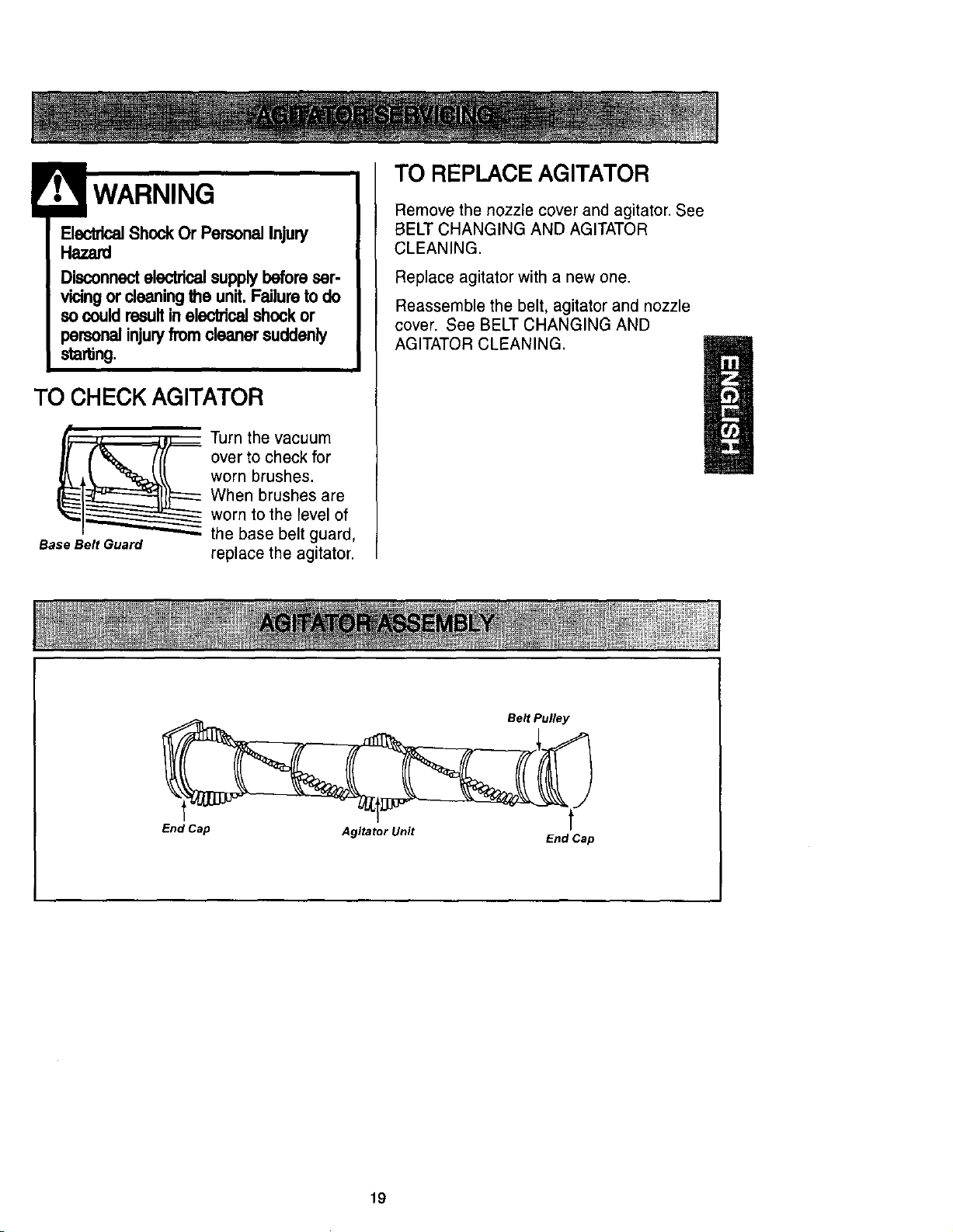
TO CHECK AGITATOR
Base Belt Guard
Turn the vacuum
over to check for
worn brushes.
When brushes are
worn to the level of
the base belt guard,
replace the agitator.
TO REPLACE AGITATOR
Remove the nozzle cover and agitator. See
BELT CHANGING AND AGITATOR
CLEANING.
Replace agitator with a new one.
Reassemble the belt, agitator and nozzle
cover. See BELT CHANGING AND
AGITATOR CLEANING.
Belt Pulley
t
End Cap
Agitator Unit
End Cap
19
SOME MODELS
CAUTION
ElectricalShock Or Personal Injury
Hazard
Disconnectelectrical supplybefore
servicingor cleaningthe unit. Failure
to do so couldresult in electricalshock
or personal injuryfrom cleaner sud-
denly starting.
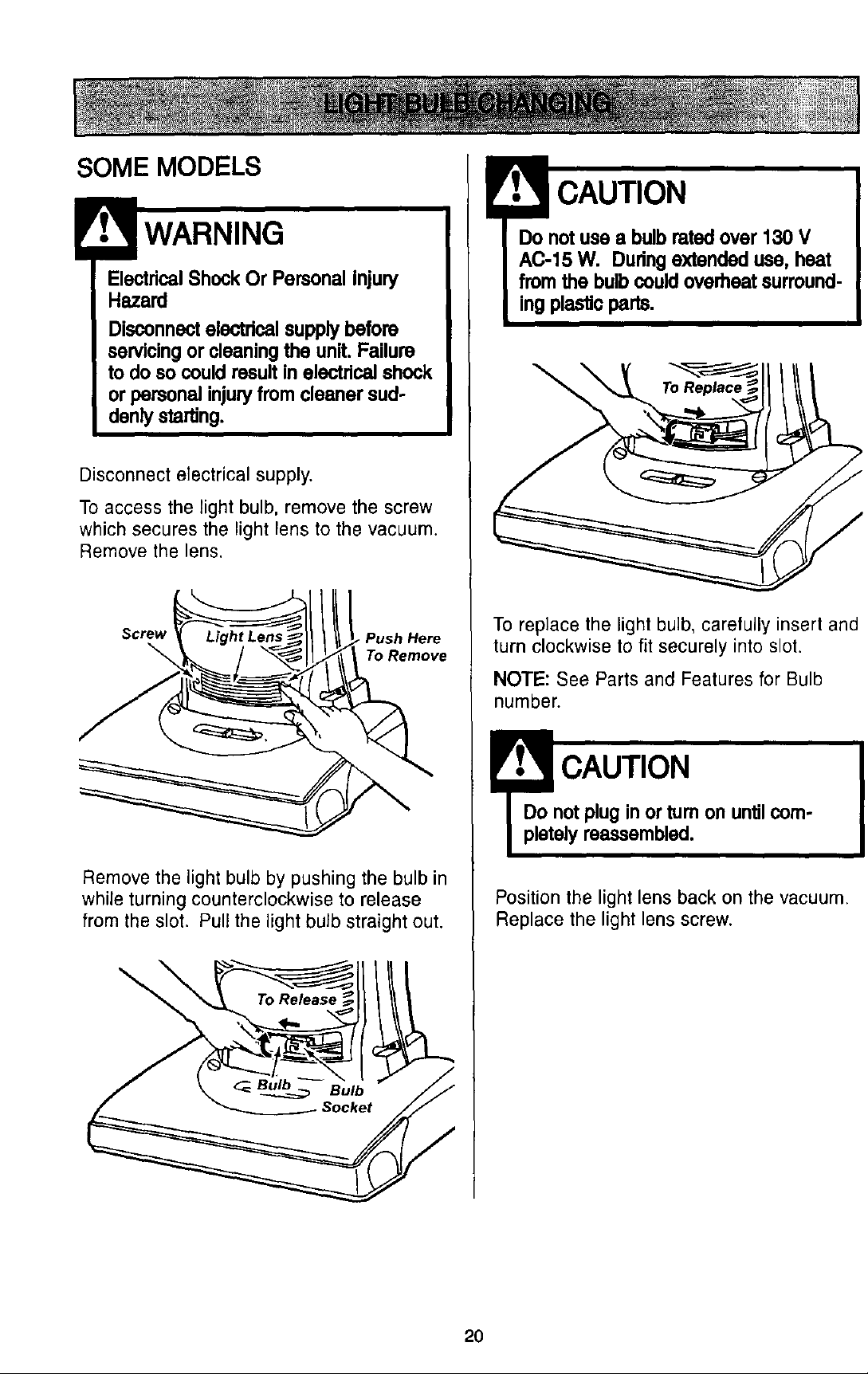
Disconnect electrical supply.
To access the light bulb, remove the screw
which secures the light lens to the vacuum.
Remove the lens.
Screw Push Here
To Remove
Remove the light bulb by pushing the bulb in
while turning counterclockwise to release
from the slot. Pull the light bulb straight out.
\
Do notuse e bulb rated over 130 V
AC-15 W. Duringextended use, heat
from the bulb couldoverheat surround-
ing plasticparts.
To replace the light bulb, carefully insert and
turn clockwise to fit securely into slot.
NOTE: See Parts and Features for Bulb
number.
I CAUTION
Do not plug in or turn on until corn-
pletely reassembled.
Position the light lens back on the vacuum.
Replace the light lens screw.
20
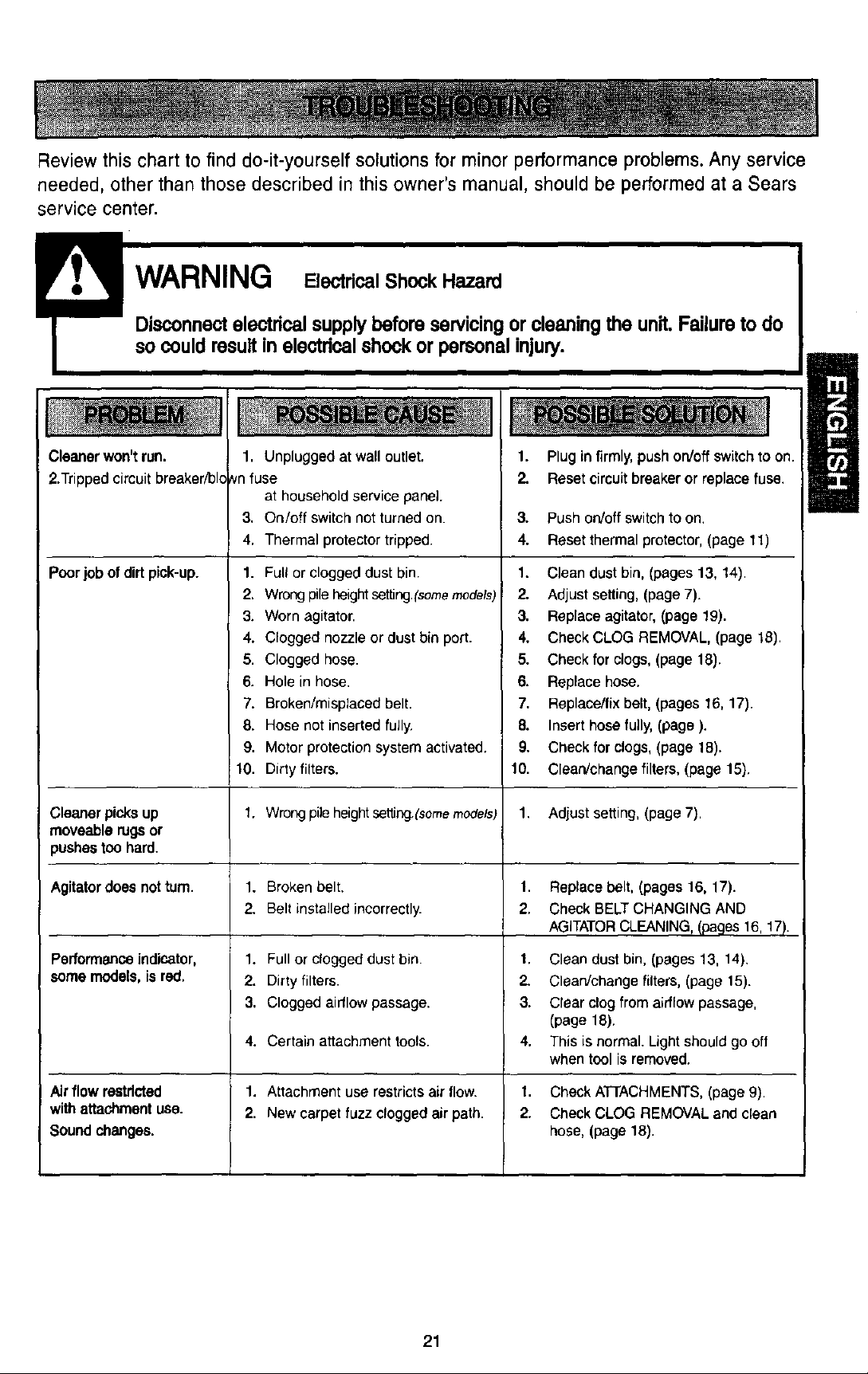
Reviewthischartto finddo-it-yourselfsolutionsfor minorperformanceproblems.Anyservice
needed,otherthanthosedescribedin thisowner'smanual,shouldbe performedat a Sears
servicecenter.
WARNING EZ ,calShoCkHazard
Disconnectelectrical supplybefore servicingor cleaning the unit. Failure to do
so could result in electrical shock or personal injury.
Cleaner won't run.
2.Trippedcircuit breaker/bk
Poorjob of dirt pick-up.
Cleaner picksup
moveable rugsor
pushes too hard.
Agitatordoes notturn.
Performanceindicator,
some models,isred.
Airflow restricted
withattachmentuse.
Soundchanges.
1. Unplugged at wall outlet.
vnfuse
at household service panel.
3. On/off switch not turned on.
4. Thermal protector tripped.
1. Full or clogged dust bin.
2. Wrong pile heightset[Irlg.(somemodels)
3. Worn agitator.
4. Clogged nozzle or dust bin port.
5. Clogged hose.
6. Hole in hose.
7. Broken/misplaced belt.
8. Hose not inserted fully.
S. Motor protection system activated.
10. Dirty filters.
1. Wrongpileheightset_ng,(somemodels)
1. Broken belt.
2. Belt installedincorrectly.
1. Full or clogged dust bin.
2. Dirty filters.
3. Clogged aidlow passage.
4. Certain attachment tools.
1. Attachment use restricts air flow.
2. New carpet fuzz clogged air path.
1. Plug infirmly, pushon/offswitch to on.
2. Reset circuitbreakeror replacefuse.
3. Push on/off switch to on,
4. Reset thermalprotector,(page 11)
1. Clean dust bin, (pages 13, 14).
2. Adjust setting, (page 7).
3. Replace agitator, (page 19).
4. Check CLOG REMOVAL, (page 18).
5. Check for clogs, (page 18).
6. Replace hose.
7. Replace/fix belt, (pages 16, 17).
8. Inserthose fully, (page).
9. Check for clogs,(page 18).
10. Clean/change filters,(page 15).
1. Adjust setting, (page 7).
1. Replace belt, (pages 16, 17).
2. Check BELT CHANGING AND
AGITATORCLEANING,(pages 16, 17).
1. Clean dust bin, (pages 13, 14),
2. Clean/change filters, (page 15).
3. Clear clog from airflow passage,
(page 18).
4. This is normal. Light should go off
when tool is removed.
1. Check ATTACHMENTS, (page 9).
2. Check CLOG REMOVAL and clean
hose, (page 18).
21

22
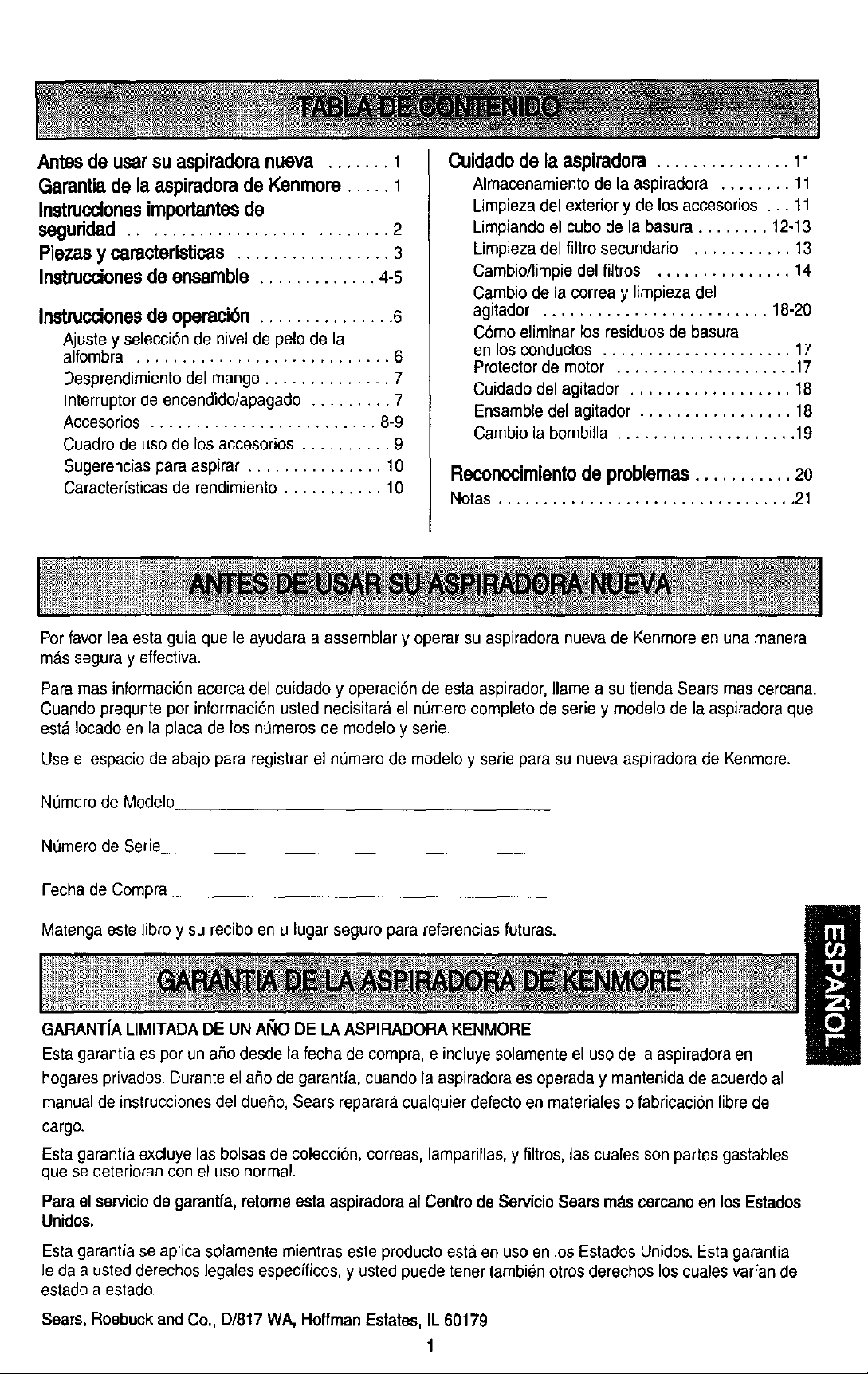
Antesde usarsu aspiradoranueva ....... 1
GaranUade la aspiradorade Kenmore..... 1
Instrucclonesimportantesde
seguddad ............................. 2
Piezasy caracterfsticas................. 3
Instruccionesde ensamble ............. 4-8
Instruccionesde operaci6n ............... 6
Ajuste y selecciSnde nivelde pelo de la
alfombra ............................ 6
Desprendimientodel mango .............. 7
]nterruptor de encendido/apagado......... 7
Acoesorios ......................... 8-9
Cuadro de uso de losaccesorios.......... 9
Sugerenciaspara aspirar ............... 10
Caracteristicas de rendimiento ........... 10
Cuidado de la aspimdora ............... 11
Almacenamientode la aspiradora ........ 11
Limpiezadelexteriory de los accesorios... 11
Limpiandoel cubode la basura ........ 12-13
Limpiezadel filtro secundafio ........... 13
Cambio/limpiedelfiltros ............... 14
Cambiode lacorreay limpiezadel
agitador ......................... 18-20
C6moeliminarlosresiduosde basura
en losconductos..................... 17
Protectorde motor .................... 17
Cuidadodelagitador .................. 18
Ensambledel agitador ................. 18
Cambiolabombilla .................... 19
Reconocimiento de pmblemas ........... 2o
Notas ................................. 21
Porfavor lea esta guia que le ayudara a assemblar y operar su aspiradora nueva de Kenmore en una manera
mas segura y effectiva.
Para mas informacion acerca del cuidado y operacionde esta aspirador, Ilame a su tienda Sears mas cercana.
Cuando prequnte por informaci6n usted necisitara el n,',merocompleto de serie y modelo de la aspiradora que
est& Iocado en la placa de los n0meros de modelo y serie.
Use el espacio de abajo para registrar el nOmerode modelo y serie para su nueva aspiradora de Kenmore.
N0merode Modelo
N0mero de Serie
Fecha de Compra
Malenga este libro y su recibo en u lugar seguro para referencias futuras.
GARANT[ALIMITADADE UN AI_IODE LA ASPIRADORAKENMORE
Esta garantia es pot un afio desde la fecha de compra, e incluyesolamente el uso de la aspiradora en
hogares privados. Duranteel aflo de garantia, cuando la aspiradora es operada y mantenida de acoerdo al
manual de instrucciones del duefio, Sears reparara cualquier defecto en materiales o fabricaciSn librede
cargo.
Esta garantia excluye las bolsas de coleccisn, correas, lamparillas,y filtros, lascuales son partes gastables
que se deterioran con el uso normal.
Para el servicio de garantfa, retome esta aspiradora al Centro de Servicio Sears mztscercano en los Estados
Unidos.
Estagarantia se aplica solamente mientras este producto esta en uso en los EstaclosUnidos. Esta garantia
le da a usted derechos legales especfficos, y usted puede tenet tambien otros derechos los cuales varian de
estado a estado.
Sears, Roebuck andCo., D/817WA, Hoffman Estates, IL 60179
1
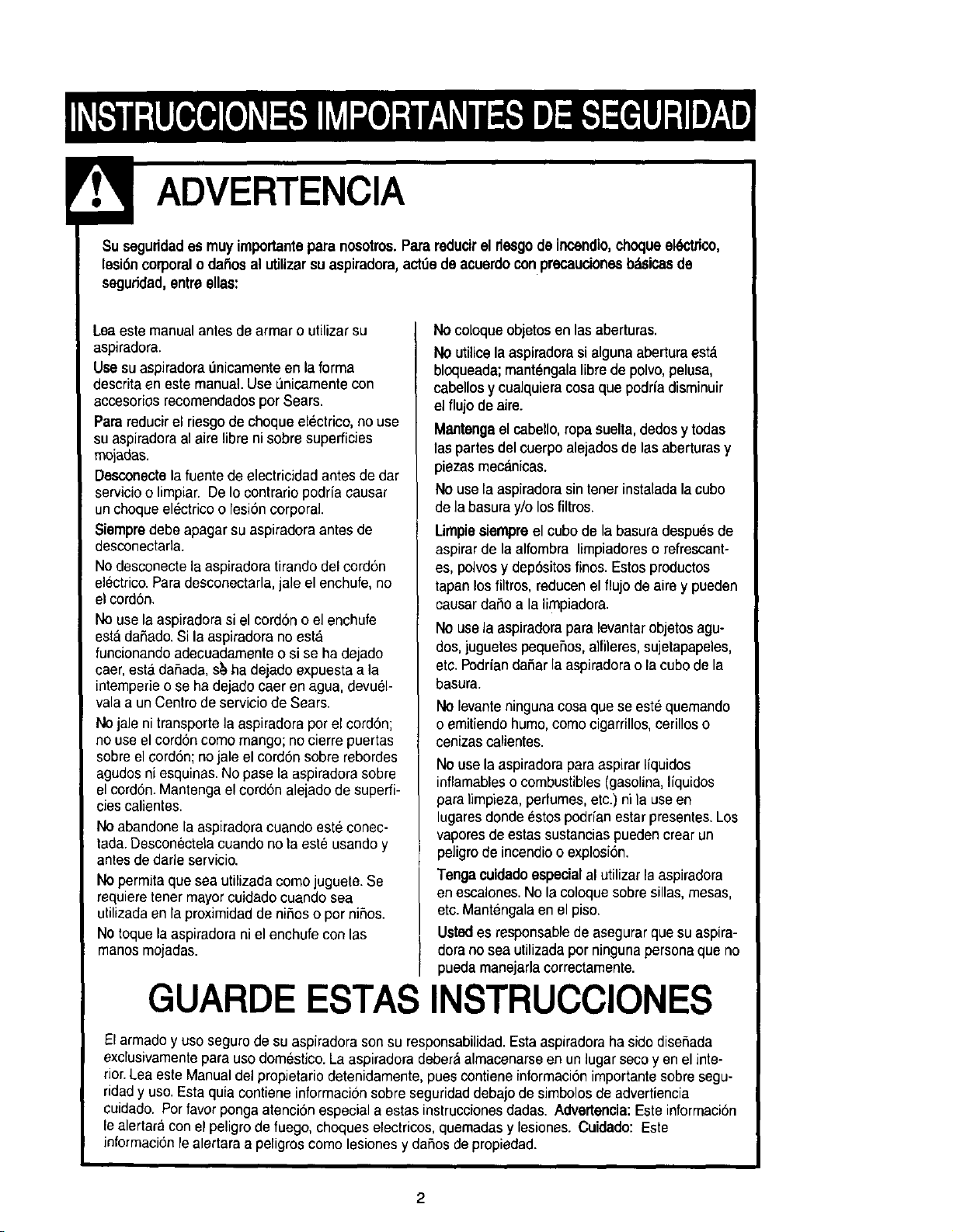
Su seguridades muy importanteparanosotros.Para reducirel riesgode incendio,choqueeldctdco,
lesi6ncorporalo dailos al utilizar su aspiradora,act_e de acuerdoconprecaucionesb_icas de
seguridad,entreelias:
Leaeste manual antes de armar o utilizarsu
aspiradora.
Use su aspiradora 0nicamente en la forma
descrita en este manual. Use L_nicamentecon
accesorios recomendados pot Sears.
Para reducir el riesgode choque electrico, no use
su aspiradora al aire libre ni sobre superficies
rnojadas.
Desconecte la fuente de electricidad antes de dar
servicio o limpiar. De Io contrario podrfa causar
un choque el_ctrico o lesi6n corporal.
Siempre debe apagar su aspiradora antes de
desconectarla.
No desconecte la aspiradora tiraedo del cord6n
electrico.Paradesconectarla, jale el enchufe, no
el cord6n.
No use la aspiradora si el cordon o el enchufe
est&daSado.Si la aspiradora no esta
funcionando adecuadamente o si se ha dejado
caer, esta daSada, s_ ha dejado expuesta a la
intemperie o se ha dejado caer en agua, devuel-
vala a un Centro de servicio de Sears.
No jale ni transporte la aspiradora por el cord6n;
no use el cord6n como mango; no cierre puertas
sobre el cord6n; no jale el cord6n sobre rebordes
agudos ni esquinas. No pasela aspiradora sobre
el cord6n.Mantenga el cord6n alejado de superfi-
cies calientes.
No abandone la aspiradora cuando este conec-
tada.Desconectela cuando no la este usando y
antes de dade servicio.
NOpermita que sea utilizada como juguete. Se
requiere tener mayorcuidado cuando sea
utilizadaen la proximidad de niSos o per niSos.
No toque la aspiradora ni el enchufe con las
manes mojadas.
No coloque objetosen las aberturas.
NOutilice la aspiradora si alguna abertura esta
bloqueada; mant_ngala libre de polvo,pelusa,
cabellosy cualquiera cosa que podrfadisminuir
el flujo de aire.
Mantengael cabello,ropa suelta, dedos y todas
las partesdel cuerpoalejadosde las aberturas y
piezasmecanicas.
No use la aspiradorasintenet instaladalacubo
dela basura y/olosfiltros.
Lirnpiesiempreel cubo de la basura despu_s de
aspirar de la alfombra limpiadores o refrescant-
es, polvos y dep6sitos finos. Estos productos
tapan los filtros, reducen el flujo de aire y pueden
causar dane a la limpiadora.
NOuse la aspiraclorapara levantarobjetosagu-
dos, juguetespequeSos,alfileres, sujetapapeles,
etc. Podrfan daSarla aspiradora o la cube de la
basura.
NOlevanteninguna cosa que se est_ quemando
oemitiendo humo,come cigarrillos, cerillos o
cenizas calientes.
No use la aspiradora para aspirar Ifquidos
inflamableso combustibles (gasolina, Ifquidos
paralimpieza,perfumes, etc.) ni la use en
lugares donde estos podrfan estar presentes.Los
vapores de estas sustancias pueden crear un
peligro de incendio o explosi6n.
Tenga cuidadoespecialal utilizar la aspiradora
en escalones. No la coloque sobre sillas, mesas,
etc. Mantengalaen el piso.
Usted es responsablede asegurar que su aspira-
dora no sea utilizada por ninguna persona que no
pueda manejarla correctamente.
GUARDE ESTAS INSTRUCClONES
El armado y use seguro de su aspiradora son su responsabilidad.Esta aspiradora ha sido disefiada
exclusivamentepara uso domestico. La aspiradora debera almacenarse en un lugar seco yen el inte-
rior. Lea este Manual del propietario cletenidamente,pues contiene informaci6n importante sobre segu-
ridad y uso. Esta quia contiene informacion sobre seguridaddebajo de simbolos de advertiencia
cuidado. Porfavor ponga atencion especial a estas instrucciones dadas. Adverteneia:Este informaci6n
le alertara con el peligro de fuego, choques electricos, quemadas y lesiones. Cuidado: Este
informaci6n le alertara a peligros como lesiones y dafios de propiedad.
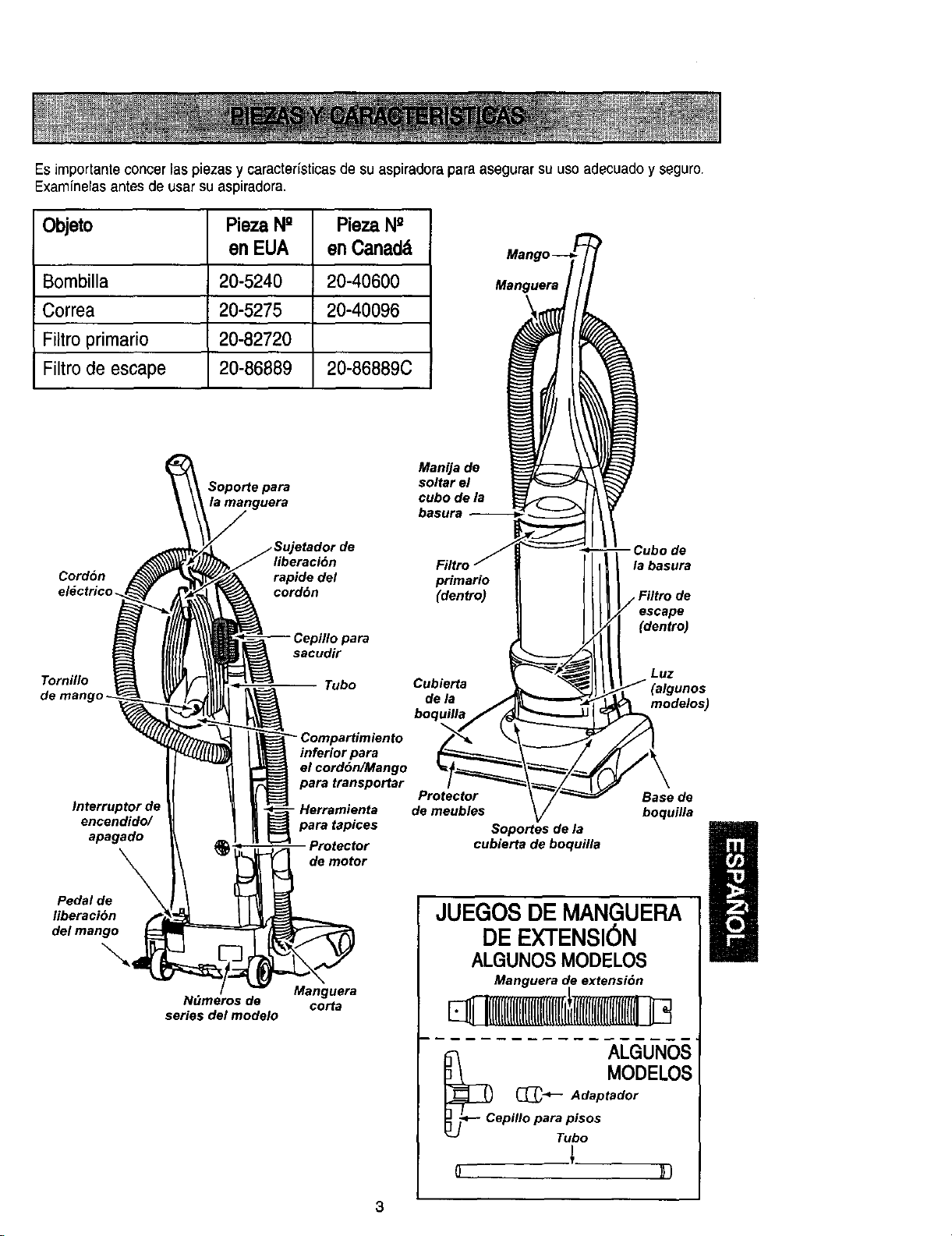
Es importante concer las piezas y caracter[sticas de su aspiradora para asegurar su uso adecuado y seguro.
Examinerasantes de usar su aspiradora.
Objeto Pieza N° Pieza N"
en EUA en Canadd
Bombilla 20-5240 20-40600
Correa 20-5275 20-40096
Filtro primario 20-82720
Filtro de escape 20-86889 20-86889C
Manguera
Soporte para
Manija de
soltar el
cubo de la
basura
liberaci6n
Cordon rapide del primario
el_ctrioo _ cordbn (dentro)
Tornillo
de mango -
sacudir
Tubo
la basura
escape
(dentro)
Luz
Cubierta (algunos
de la modelos)
boquilla
Interruptor d( - Herramienta
encendido/ para tapices
apagado Protector
de motor
Pedal de
liberaci6n
del mango
..,.
N_meros de
series del modelo
inferior para
el cord6n/Mango
para transportar
Protector Base de
de meubles boquilla
Manguera
oorta
Soportes de la ] I
cubierta de boquilla
JUE NGUERA
DE EX'I'ENSI6N
ALGUNOS MODELOS
Manguera de extensi6n
_ I
I([l([l(ll(ll(lll[llll([l[r
ALGUNOS
MODELOS
_ Adaptador
epillo paraTPi::s
o )})
3
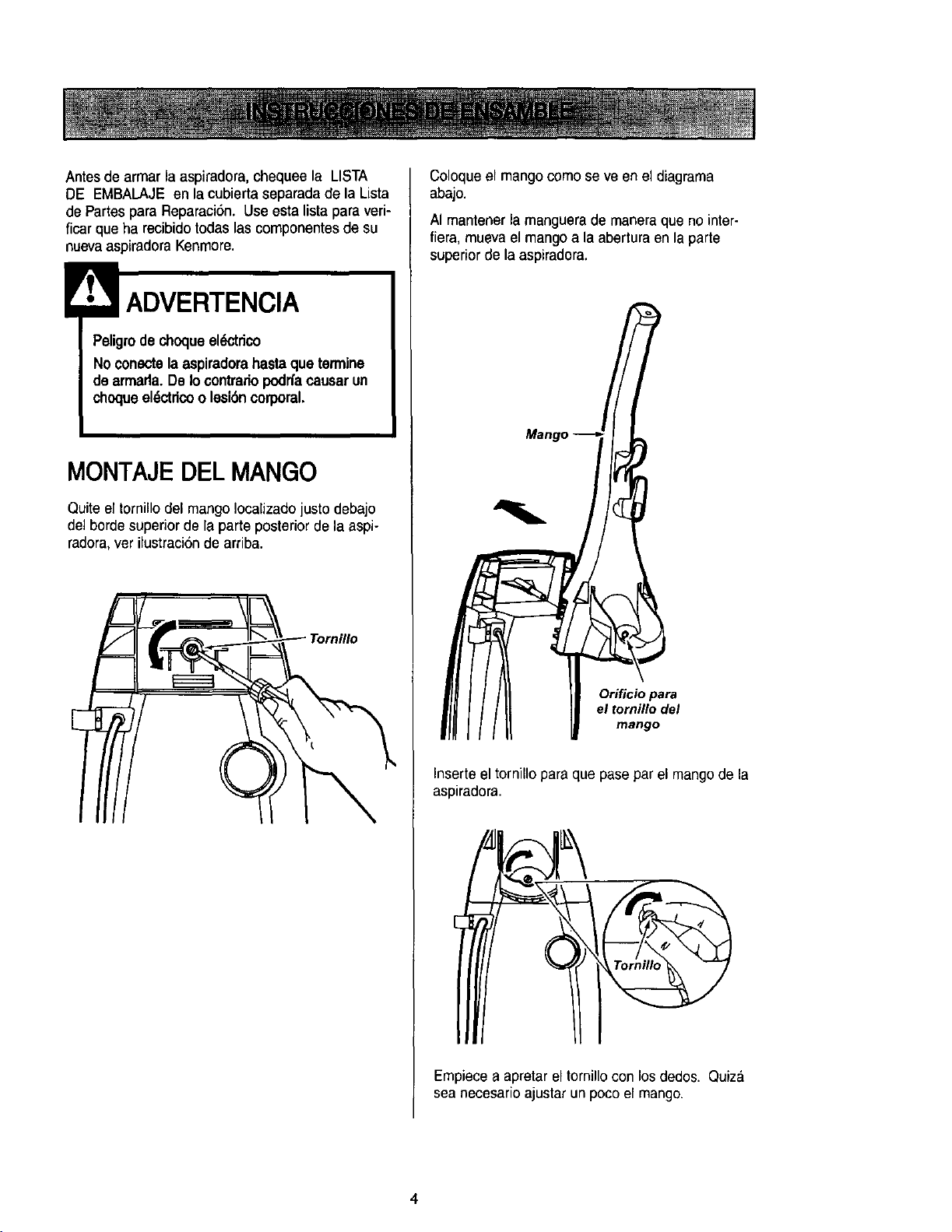
Antesde armar la aspiradora, chequee la LISTA
DE EMBALAJE en la cubierta separada de la Lista
de Partes para Reparaci6n. Use esta lista para veri-
ficar que ha recibido todas las cornponentes de su
nueva aspiradora Kenmore.
Peligrode choqueel(_tdco
Noconectela aspiradorahastaque termine
de armada.De Io contrario podffacausarun
choqueeldctricoo lesi6ncorporal.
MONTAJEDEL MANGO
Quite el tornillo del mango Iocalizado justo debajo
del borde superior de la parte posterior de la aspi-
radora, ver ilustraci6n de arriba.
Coloque el mango come se ve en el diagrama
abajo.
AI mantener la manguera de manera que no inter-
fiera, mueva el mango a la abertura en la parte
superior de la aspiradora.
Inserte el tornillo para que pase par el mango de la
aspiradora.
Empiece a apretar el tornillo con los dedos. Quiz&
sea necesario ajustar un poco el mango.
4
No apfietedemasiadoeltomillo.
SiIo aprietademasiadopodrfaarruinarlosori-
ficios para eltomillo.
No operela aspiradorasintener instaladoel
tomillo.
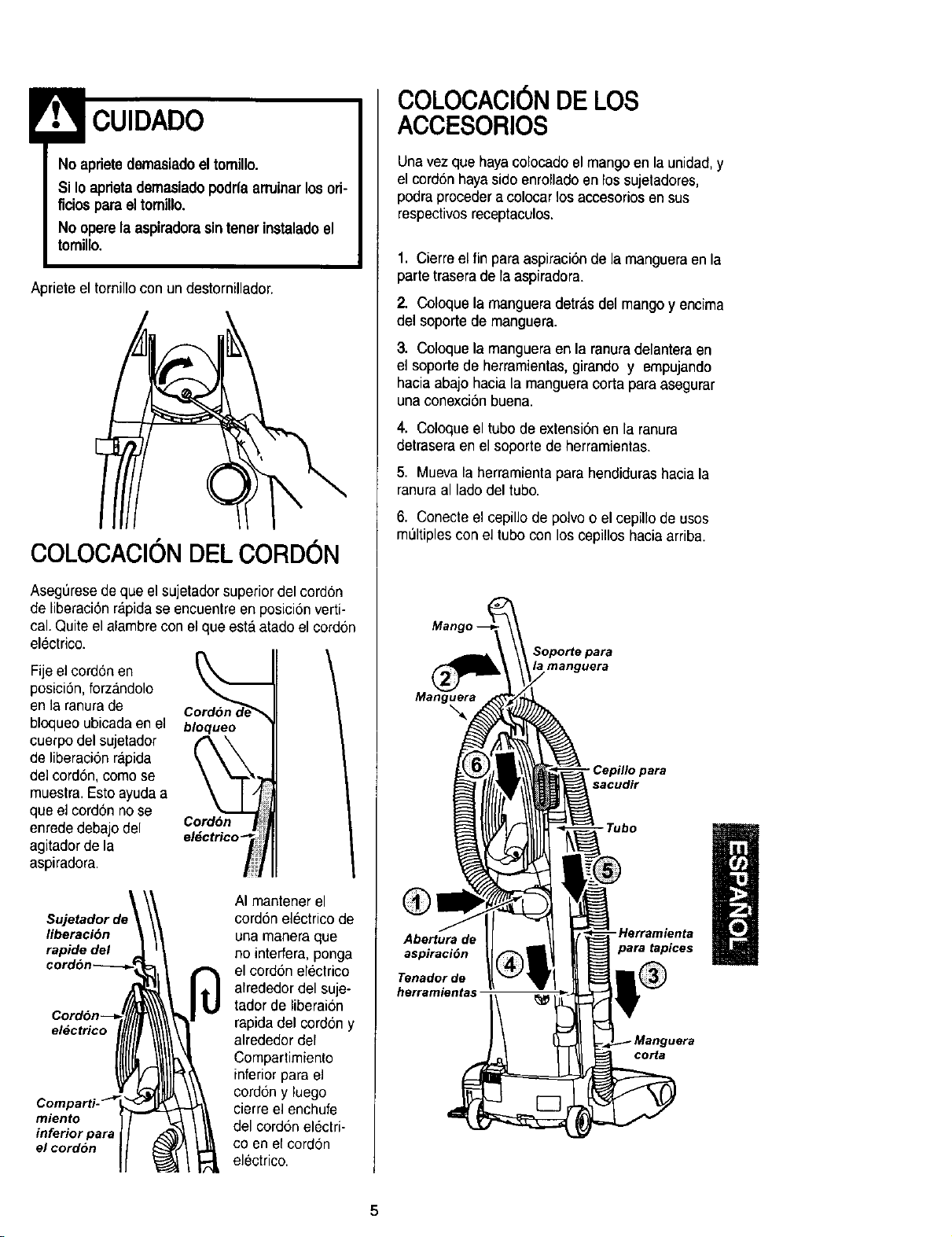
Apriete el tornillo con un destornillador.
COLOCAClON DEL CORDON
Asegurese de que el sujetador superior del cord6n
de liberaciOnr_lpidase encuentre en posiciOnverti-
cal. Quite el alambre con el que esta atado el cordon
electrico.
Fije eJcord6n en
posiciOn,forzandolo
en la ranurade
bloqueo ubicada en el
cuerpo del sujetador
de liberaciOnrapida
del cordSn,como se
muestra.Esto ayuda a
que e] cordon no se
enrededebajo del
agitador de la
aspiradora.
bloqueo
el_ctrico _
Sujetador de
liberaciOn
rapide del
eldctrico
miento
inferior para
el cordon
AI mantener el
cordon el_ctrico de
una manera que
no interfera, ponga
el cordon electrico
alrededor del suje-
tador de liberai6n
rapida del cord6n y
alrededor del
Compartimiento
inferior para eJ
cord6n y luego
cierre el enchufe
del cord6n electri-
co en ef cord6n
electrico.
COLOCACl0N DE LOS
ACCESORIOS
Una vez que haya colocado el mango en la unidad, y
el cordon hayasido enrollacloen los sujetadores,
podra proceder a colocar los accesorios en sus
respectivosreceptaculos.
1. Cierre el fin para aspiraciOnde la manguera en la
parte trasera de la aspiradora.
2. Coloque la manguera detr_lsdel mango y encima
del soporte de manguera.
3. Coloque la manguera en la ranura delantera en
el soporte de herramientas,girando y empujando
hacia abajo hacia la manguera corta para asegurar
una conexci6n buena.
4. Coloque el tubo de extension en la ranura
detrasera en el soporte de herramientas.
5. Mueva la herramientapara hendiduras hacia la
ranura al lado del tubo.
6. Conecte el cepillo de polvo o el cepillo de usos
multiples con el tubo con los cepillos hacia arriba.
Man
Soporte para
manguera
Manguera
- Cepillo para
sacudir
®
Abertura de
aspiraciOn
Tenador de
herramientas
-Tube
-Herramienta
para tapices
corta
5
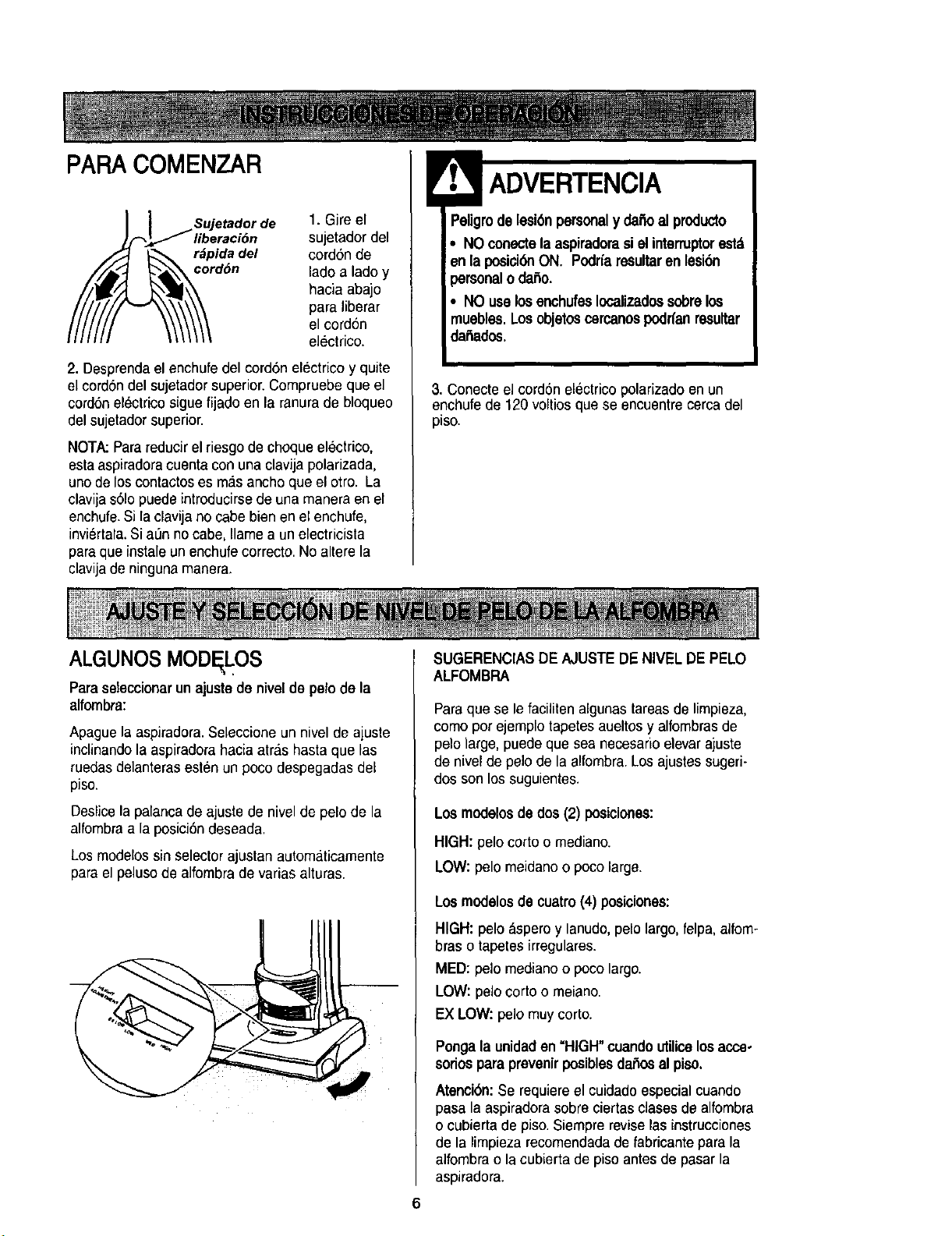
PARA COMENZAR
] Sujetador de 1. Gire el
)_liberaci6n sujetador del
._-_ r_pida del cordon de
/__c°////__c°_ d6n lado a Iadoy
hacia abajo
para liberar
el cord6n
electrico.
2. Desprenda el enchufe del cord6n electrico y quite
el cord6n del sujetador superior. Compruebe que el
cord6n electrico sigue fijado en la ranura de bloqueo
del sujetador superior.
NOTA: Parareducir el riesgo de choqueelectrico,
esta aspiradoracuenta con una clavija polarizada,
uno de los contaotos es mas ancho que el otto. La
clavija s61opuede introducirse de una manera en el
enchufe.Si la clavija no cabe bien en el enchufe,
inviertala.Si alanno cabe, Ilame a un electricista
para que instale un enchufe correcto. No altere la
clavijade ninguna manera.
ADVERTENCIA
'eligrode lesion personaly da_oal producto
• NO conectela aspiradoraai el interruptorest_
enla posid6nON. Podrfaresultaren lesi6n
_ersonalo daSo.
, NO uselosenchufesIocalizadossobrelos
nuebles.Los objetoscercanospodffanresultar
dailados.
3. Conecte el cord6n electrico polarizado enun
enchufe de 120 voltiosque se encuentre cerca del
piso.
ALGUNOS MODF LOS
Paraseteccionar un ajuste de nivel de pelo de la
alfombra:
Apague la aspiradora.Seleccione un nivel de ajuste
inclinando la aspiradora hacia atras hasta que las
ruedas delanteras est6n un poco despegadas dee
piso.
Deslice lapalanca de ajuste de nivel de pelo de la
alfombraa la posici6ndeseada.
Los modelos sin selector ajustan automaticamente
para el peluso de alfombra de varias alturas.
SUGERENCIASDE AJUSTEDE NIVEL DE PELO
ALFOMBRA
Paraque se le faciliten algunas tareasde limpieza,
como por ejemplo tapetes aueltos y alfombras de
pelo large, puede que sea necesario elevar ajuste
de nivel de pelo de la alfombra. Los ajustessugeri-
dos son los suguientes.
Los modelosde dos (2) posiciones:
HIGH:pelocorto o mediano.
LOW: pelo meidano o poco large.
Los modalosde cuatro(4) posiciones:
HIGH: peloaspero y lanudo,pelo largo,felpa, alfom-
bras o tapetes irregulares.
MED: pelo mediano o poco largo.
LOW: pelo corto o meiano.
EX LOW:pelo muy corto.
6
Pongala unidaden =HIGH"cuando utilice los acce-
soriosparaprevenirposibles da_osal piso,
Atenci6n:Se requiere el cuidado especial cuando
pasa la aspiradora sobre ciertas clases de alfombra
o cubierta de piso.Siempre revise las instrucciones
de la limpieza recomendada de fabricante para la
alfombra o la cubierta de piso antes de pasar la
aspiradora.
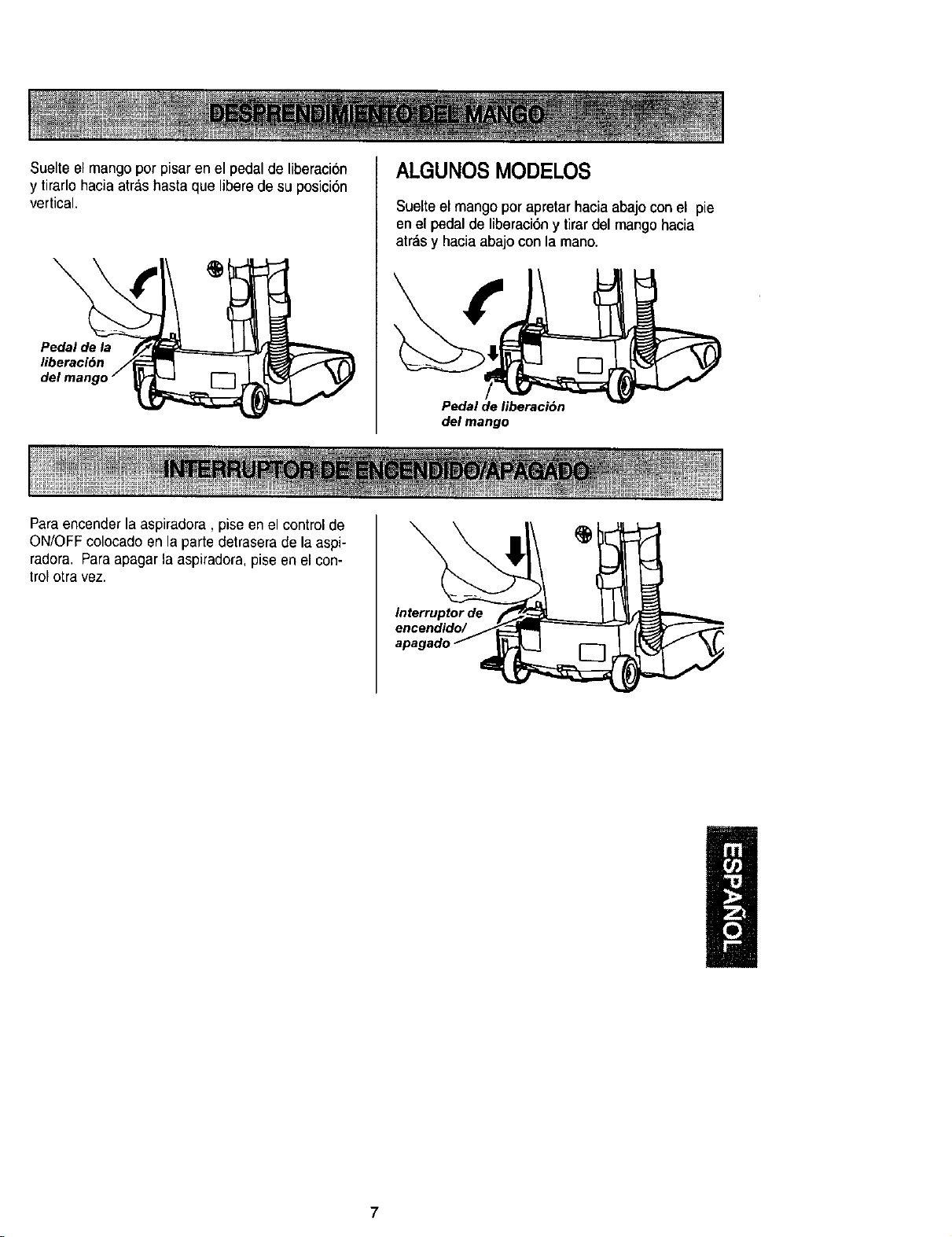
Suelteelmangoporpisarenelpedaldeliberaci6n
ytirarlohaciaatrashastaqueliberedesuposici6n
vertical.
Pedal de la
liberaci6n
ALGUNOS MODELOS
Suelte el mango por apretar hacia abajo con el pie
en el pedal de liberaci6n y tirar del mango hacia
atr&sy hacia abajo con la mano.
Pedal de liberaci6n
del mango
Paraencender la aspiradora, pise en el control de
ON/OFF colocado en la parte detrasera de la aspi-
radora. Paraapagar la aspiradora, pise en el con-
trolotra vez.
Interruptor de
encendido/
7
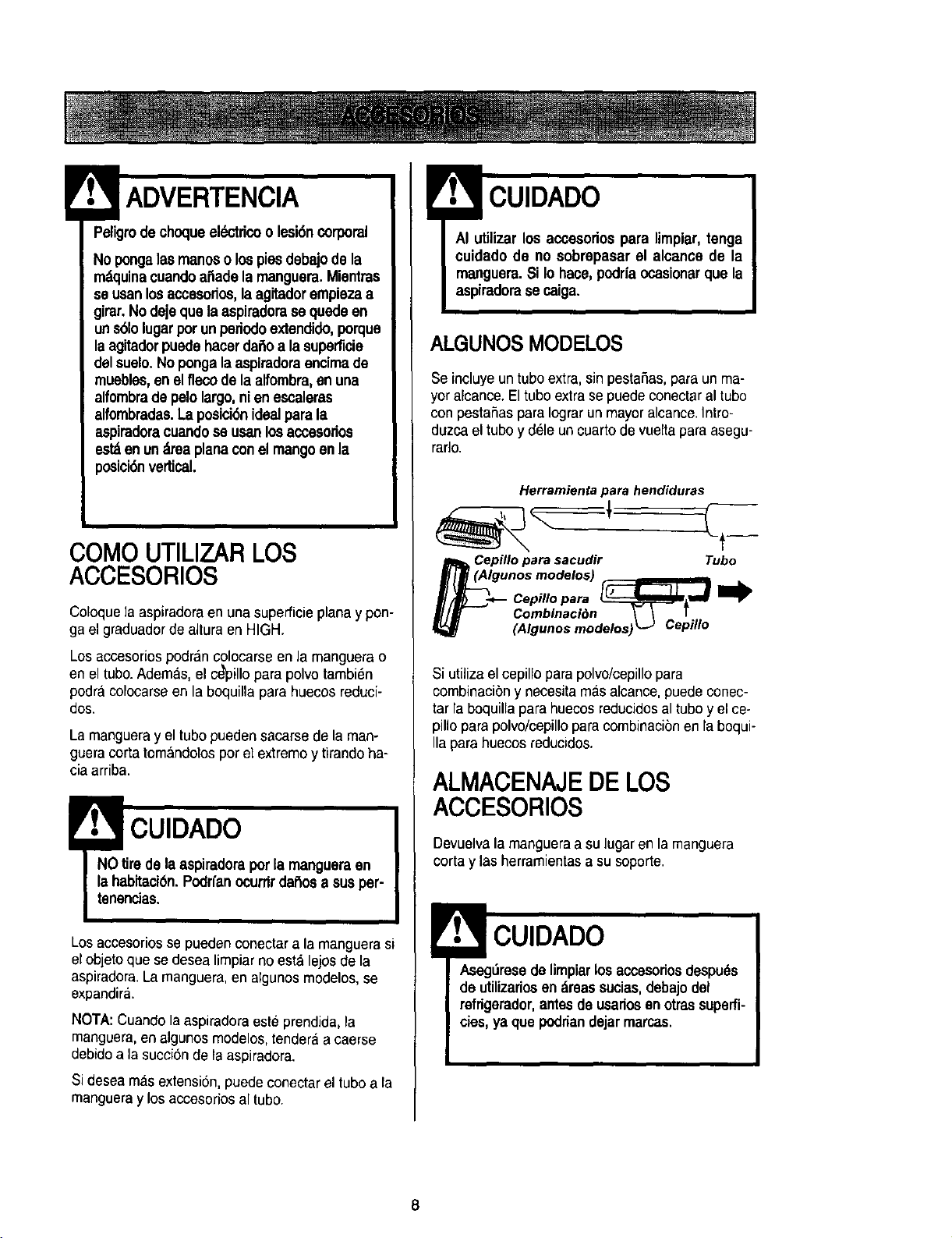
v
Paligrodechoqueel_ctdcoo lesi6ncorporal
Nopongalasmanoso lospiesdebajode la
mdquinacuandoar3adela manguera.Mientras
se osan losaccesodos,la agitadorempiezaa
girar.No dejequa la aspiradorase quede en
uns61olugarporun periodoextendido,porque
laagitadorpuedehacerdaito a la superficie
delsualo.No pongalaaspiradoraencimado
muebles,en el fiecodo laalfombra, an una
alfombradepelo largo,ni en escaleras
alfombradas. La posici6nidealpara la
aspiradoracuandose usanlosaccesorios
estdan undrea planacon el mangoen la
posici6nvertical.
COMOUTILIZARLOS
ACCESORIOS
Coloquela aspiradora en una superficie plana y pon-
ga el graduadorde altura en HIGH.
Los accesorios podr&ncolocarse en la manguera o
en el tuba.Adem&s, el ce_illo para polvo tambi_n
podracolocarse en la boquilla para huecos reduci-
dos.
Lamanguera y el tubopueden sacarse de la man-
gueracortatomandotosporel extremoy tirandoha-
ciaarriba.
! CUIDADO
NO tire dela aspiradora porla mangueraan
la habitaci6n.Podrfanocurrirdal_osa sue per-
tanancias.
Los accesoriosse pueden conectar a la manguera si
el objeto que se desea limpiar no esta lejos de la
aspiradora.La manguera,en algunos modelos, se
expandir._.
NOTA: Cuando la aspiradora este prendida, la
manguera,en algunos modelos, tenderaa caerse
debidoa la succionde la aspiradora.
Si desea mas extensi6n, puede conectar el tube a la
mangueray los accesorios al tubo.
CUIDADO
AI utilizar los accesodos para limpiar, tenga
cuidado de no sobrepasar el alcance de la
manguera.Si Iohace, podrfaocasionarque la
aspiradoraae caiga.
ALGUNOS MODELOS
Se incluye untubeextra, sin pestaSas,para un ma-
yor alcance. El tubo extra se puede conectar al tubo
con pestaSaspara Iograrun mayoralcance. Intro-
duzca el tubo y d_leun cuarto de vueltapara asegu-
rarlo.
Herramientapara hendiduras
Cepillo para sacudir Tubo
m/m (Algunos modetos) , i
(Algunos modelos) L-J Cepillo
Si utiliza el cepillo para polvo/cepillopara
combinaci6n y necesita mas alcance, puedeconec-
tar la boquilla para huecos reducidosal tubo y el ce-
pillo para polvo/cepillo para combinaci6nen la boqui-
Ila parahuecos reducidos.
ALMACENAJEDE LOS
ACCESORIOS
Devuelva la manguera a su lugar en la manguera
corta y las herramientas a su soporte.
CUIDADO
Asegt_resede limpiarlos accesodosdespuds
do utilizados en dreassucias,debajo del
refrigerador, antes de usariosen otras superfi-
cies, ya qua podrian dejar marcas.
8
Cuandouse la mangueraenformanormalo
conla manguerade extensi6n instalada, la
espiradora debemantenersesobre unasuperfi-
de firmeal mismonivelo a un nivelinfedor
que lospiesdelusuario.NO use lesmangue-
ms cuandola espiradora estd a un nivelm_
altoque Io6 piesdelusuario.
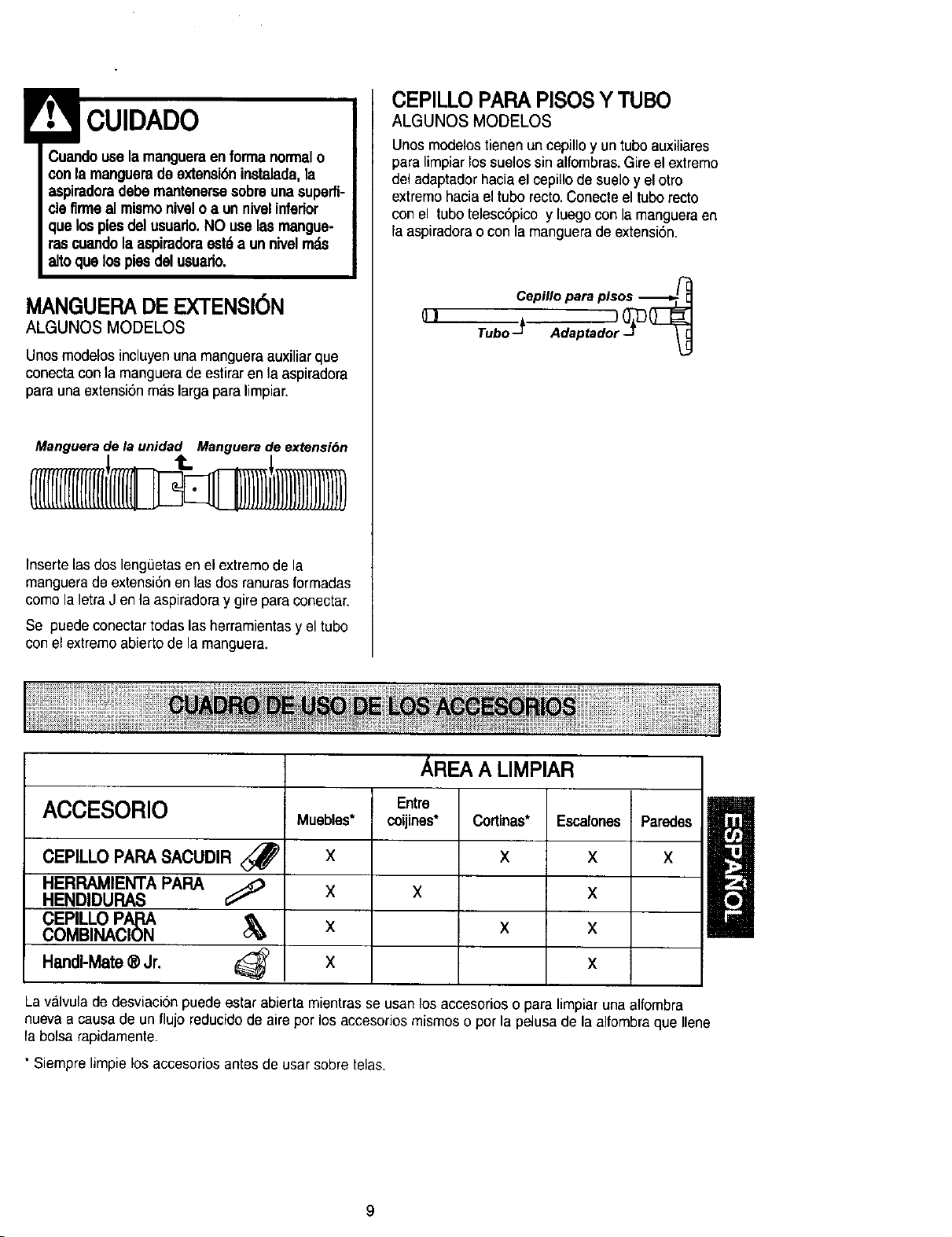
MANGUERA DE EXTENSI6N
ALGUNOS MODELOS
Unos modelos incluyen una manguera auxiliar que
conecta con la manguera de estirar en la aspiradora
para una extensiSnmas larga para limpiar.
Manguerade la unidad Manguerade extensibn
Inserte las dos leng0etas en el extremo de la
manguera de extensi6n en las dos ranuras formadas
como la letra J en la aspiradora y gire para conectar.
Se puede conectar todas las herramientas y el tubo
con el extremo abierto de la manguera.
CEPILLO PAPA PISOS Y TUBO
ALGUNOS MODELOS
Unos modelos tienenun cepillo y untubeauxiliares
para limpiar los suelos sin alfombras.Gire el exlremo
del adaptador hacia el cepillo de suelo y el otto
extremo hacia el tubo recto. Conecte el tubo recto
con el tubo telesc6pico y luego con la manguera en
la aspiradora o con la manguera de extensi6n.
01
AREA A LIMPIAR
Entre
ACCESORIO Muebies* coijines* Cortinas* Escalones Paredes
CEPILLOPAPA SACUDIR <_ X X X X
HERRAMIENTA PAPA
HENDIDURAS _ X X X
CEPILLOPApA
COMBINACION _ X X X
HandI-Mate® Jr. 1_ x x
Lavalvula de desviacion puede estar abierta mientras se usan los accesorios o para limpiar una alfombra
nueva a causa de un flujo reduciclode aire por los accesorios mismos o pot la pelusa de la alfombraque Ilene
la bolsa rapidamente.
• Siempre limpie los accesorios antes de usar sobre telas.
9
ADVERTENCIA
Peligrode lesi6npersonal
AcbJeconprecauci6nsi colocala aspiradora
sobreesca]ones.Si se cae, podr|acausar
lesi6npersonalo da_o a laproptedad.
Orillasde alfombras.
Gule uno de los costadoso laparte antertor de la
boquilla a Io largo del borde de la pared Los cept-
Ilos largos ayudan a aspirar la tterraatrapada en las
onllas de las alfombras
Escalones.
Coloque el mango en la postctonverttcal Use la
herram=entapara hendtduraso el cepdlo para
sacudJr Coloque el tnterruptorde encendtdo/apaga-
do en ON
I
CARACTER|SITCAS DE P No !MI
SISTEMA DE PROTECTION
DE MOTOR
ProtectorTermal
Estaasptradoratteneun protector termal que se
ajusta automattcamentepara proteger ala
asptradoradel sobrecalentam_entoSt una
obstrucc=Sn_mptdeel flulOnormal de alre al motor, el
protectorterma] apaga el motor automahcamente
para permthrque el motor se enfrre a fin de ewtar
posJblesdaSos ala asptradora
Pareoorregirel problema: St esto ocurre, apague la
asp_radoray desenchufe_1cord6n del tomacomente
para perm_hrque la asp=radorase enfne y que el
protector termal se reajuste Busque y saque las
obstrucciones,si es necesario. Examinetambidn y
reemplace/llmpiecualquier filtro obstruido. Espere
aproximadamentetreinta (30) minutos y enehufe la
espiradora y voltdela para ver st el protector del
motor se ha reajustado. El protector del motorno se
reajustardsi no se ha apagado la aspiradora aun
cuandola aspiradora se haya enfriado.
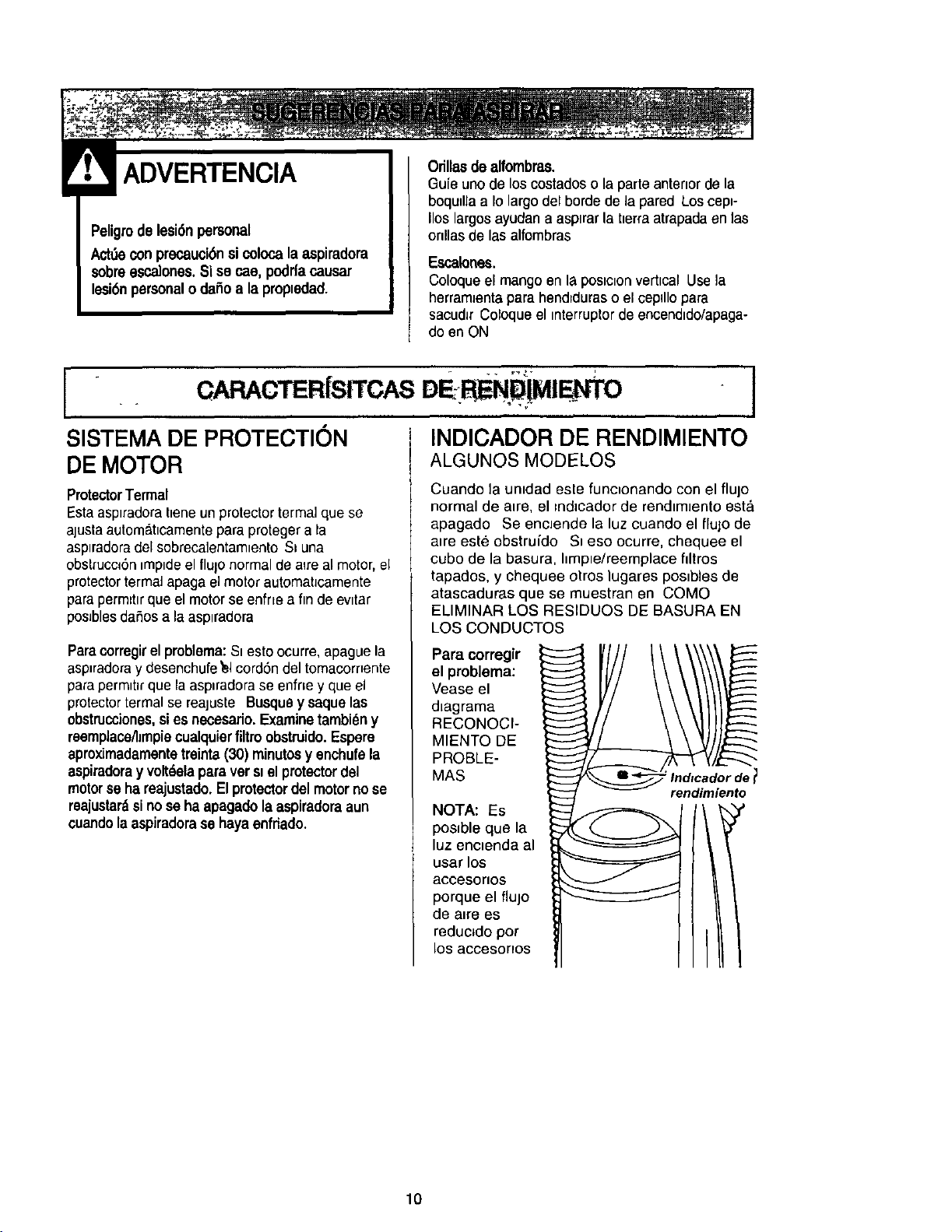
INDICADOR DE RENDIMIENTO
ALGUNOS MODELOS
Cuando la untdad este func=onando con el flujo
normal de atre, el tnd_cador de rendtmJento est_
apagado Se encJende la luz cuando el flujo de
aire este obstruido St eso ocurre, chequee el
cubo de la basura, hmpte/reemplace flltros
tapados, y chequee otros lugares postbtes de
atascaduras que se muestran en COMO
ELIMINAR LOS RESIDUOS DE BASURA EN
LOS CONDUCTOS
Para corregir
el problema:
Vease el
d_agrama
RECONOCI-
MIENTO DE
PROBLE-
MAS
NOTA: Es
poslble que la
luz enctenda al
usar los
aocesorlos
porque el fluJo
de alre es
reduc_do pot
los accesonos
10
÷
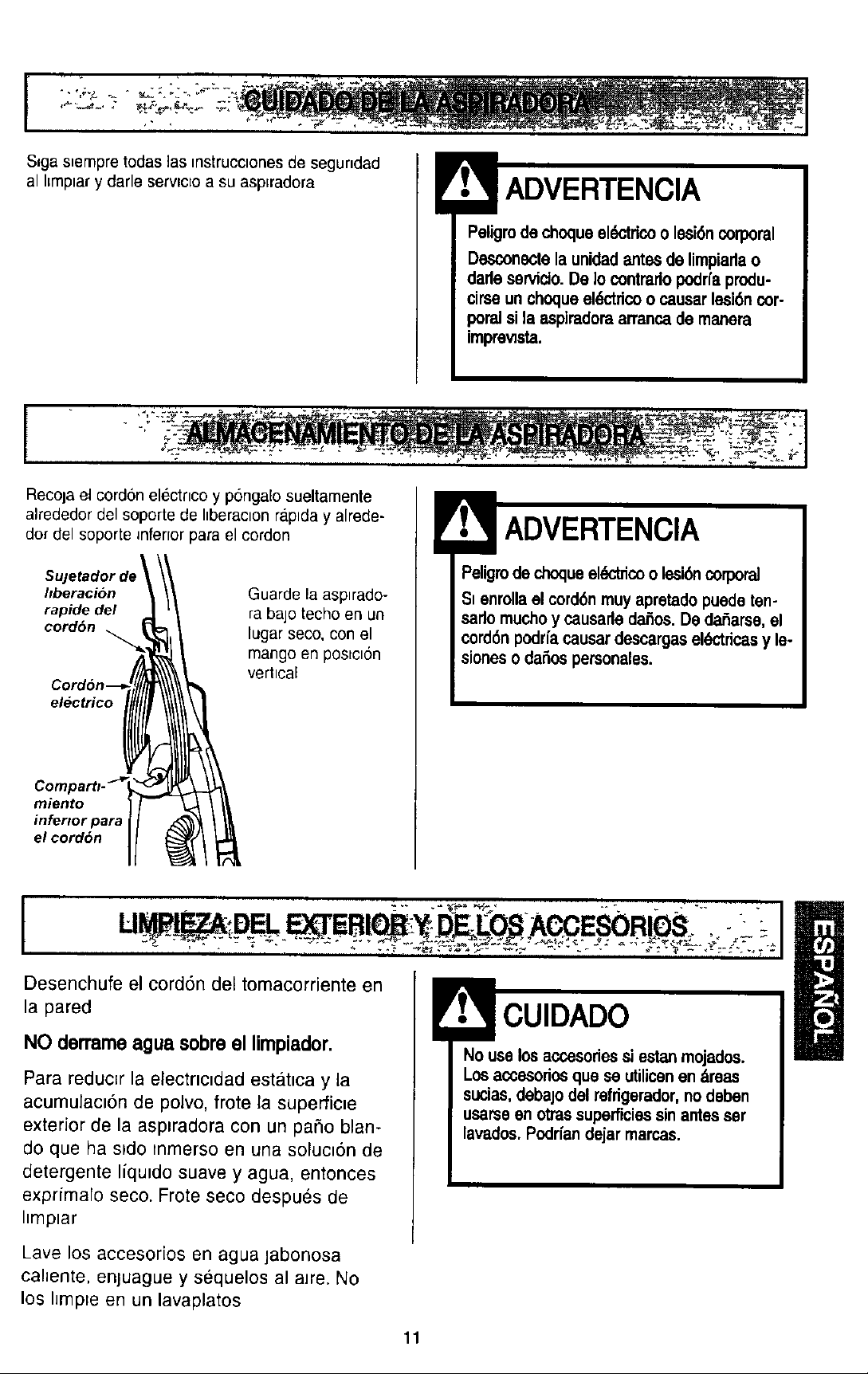
S_gas=empretodas ]as mstrucclonesde segundad
al I[mplar y darle serv_cloa su asplradora
Peligrode choqueeldctdco o lesi6n corporal
Desconectela unidadantesde limpiarlao
darleservicto.De 1ocontrarlopodrfaprodu-
cirseunchoqueeldctdcoo causarlesi6ncor-
poraJ sJla aspiradomarranca de manera
imprewsta.
r
Recoja el cordon electrlco y pbngaEosueltamente
alrededor del soporte de hberaclon ra.plday alrede-
dot del soporte _nferlorpara el cordon
Su]etador de !
hberacion
rapide del
cordbn
Guarde la asp_rado-
ra bajo techo en un
lugar seco, con el
mango en postc=6n
vertical
electrico
miento
inferior para
el cordon
Peligrode choqueel_trico o lesi_ corporal
Si enrollael cord6nmuyapretadopuede ten-
sadomuchoy causarleda_os.De daSarse,el
cord6npodrfa causardescargasel_tdcas y le-
sioneso daSospersonales.
t
Desenchufe el cord6n del tomacorriente en
la pared
NO derrame agua sobre el limpiador.
Para reducer la electric=dad estatica y la
acumulaciSn de poivo, frote la superfic_e
exterior de la asptradora con un pa5o blan-
do que ha sldo mmerso en una soluc_6n de
detergente liquido suave y agua, entonces
exprimalo seco. Frote seco despues de
hmplar
No use losaccesoriessiestanmojados.
Losaccesodosquese utilicenen dreas
sucias,debajodel refrigerador,nodeben
usarseenotrassuperficiessinantesser
lavados.Podr[andejarmarcas.
Lave los accesor[os en agua jabonosa
cahente, enjuague y sequelos al aJre. No
los IJmp=e en un lavaplatos
11
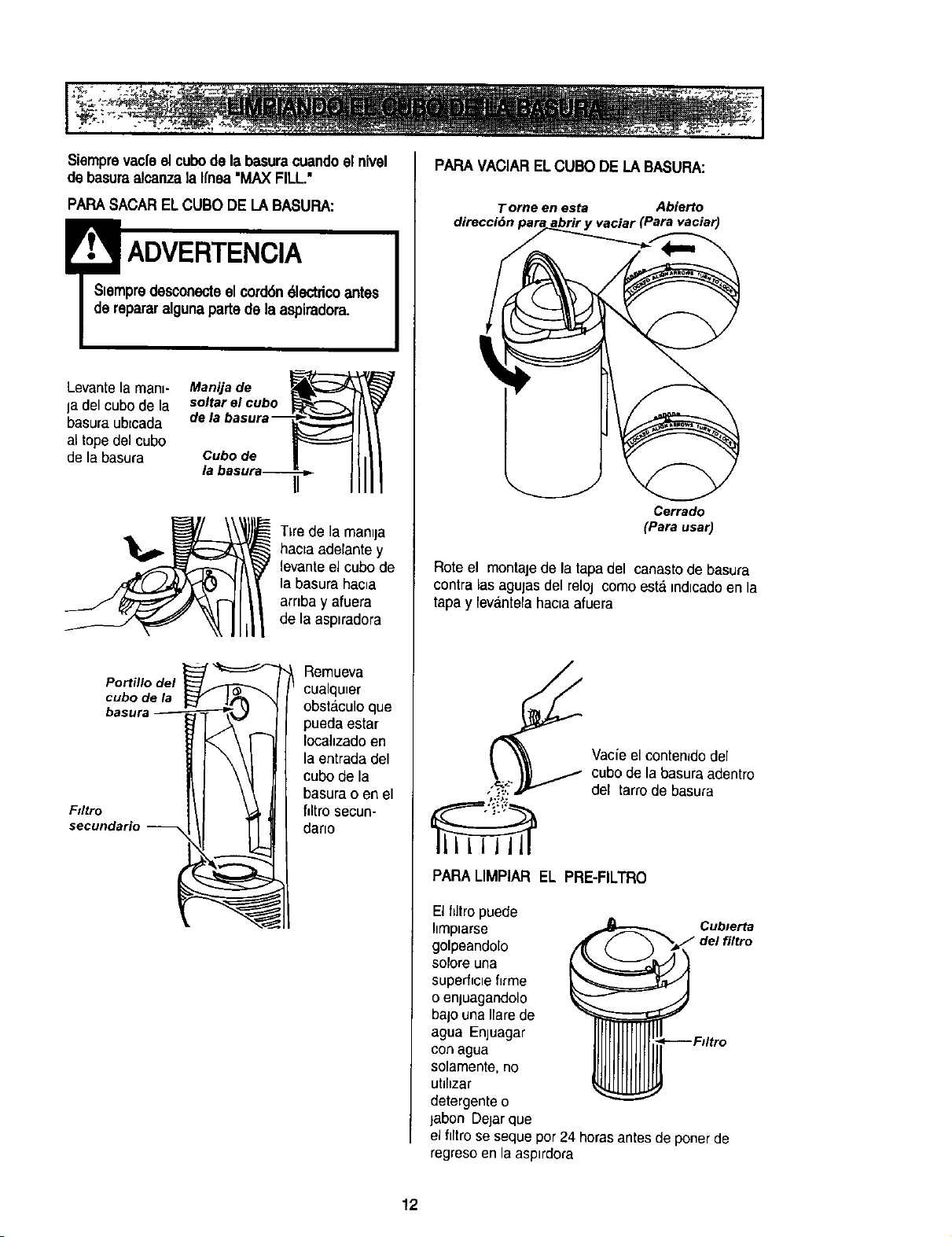
Siemprevac[eel cubode la basuracuandoel nivel
de basuraalcanzala I[nea"MAX FILL."
PAPASACARELCUBO DE LA BASURA:
Siempredesconecteel cord6n61ectricoantes
de repararalgunapartede laaspiradora.
Levante la man_- Manija de
Ia del cubo de la soltar el cubo
basura ubtcada dela basur,
al tope del cubo
de la basura Cubo de
/a
Po_#_ del
cubo de
basura_
Fdtro
secundario --
T_rede la man=ja
hacta ade[ante y
levante el cubo de
la basura hac_a
arr=bay afuera
de la asp_radora
Remueva
cualqu_er
obstEiculoque
pueda estar
Iocahzadoen
la entrada del
cubo de la
basura o en el
flltro secun-
dano
l
PAPA VACIAR ELCUBO DE LABASUFIA:
Torne en esta Abierto
direcci6n para abrir y vaciar (Para vaciar)
Cerrado
(Parausar)
Rote el montaje de la tapadel canasto de basura
contra las agujas del reloj comoesta =ndlcadoen la
tapay [evantelahaoa afuera
Vacie el contenidodel
cubo de la basura adentro
del tarro de basura
PAPA LIMPIAR EL PRE-FILTRO
Elflltropuede
Ilmplarse Cublerta
golpeandolo
solore una
superficle flrme
o enjuagandolo
bajo una Harede
agua Enjuagar
con agua
solamente, no
uhhzar
detergente o
jabon Dejar que
el filtro se seque por 24 horas antes de ponerde
regreso en la asp=rdora
12
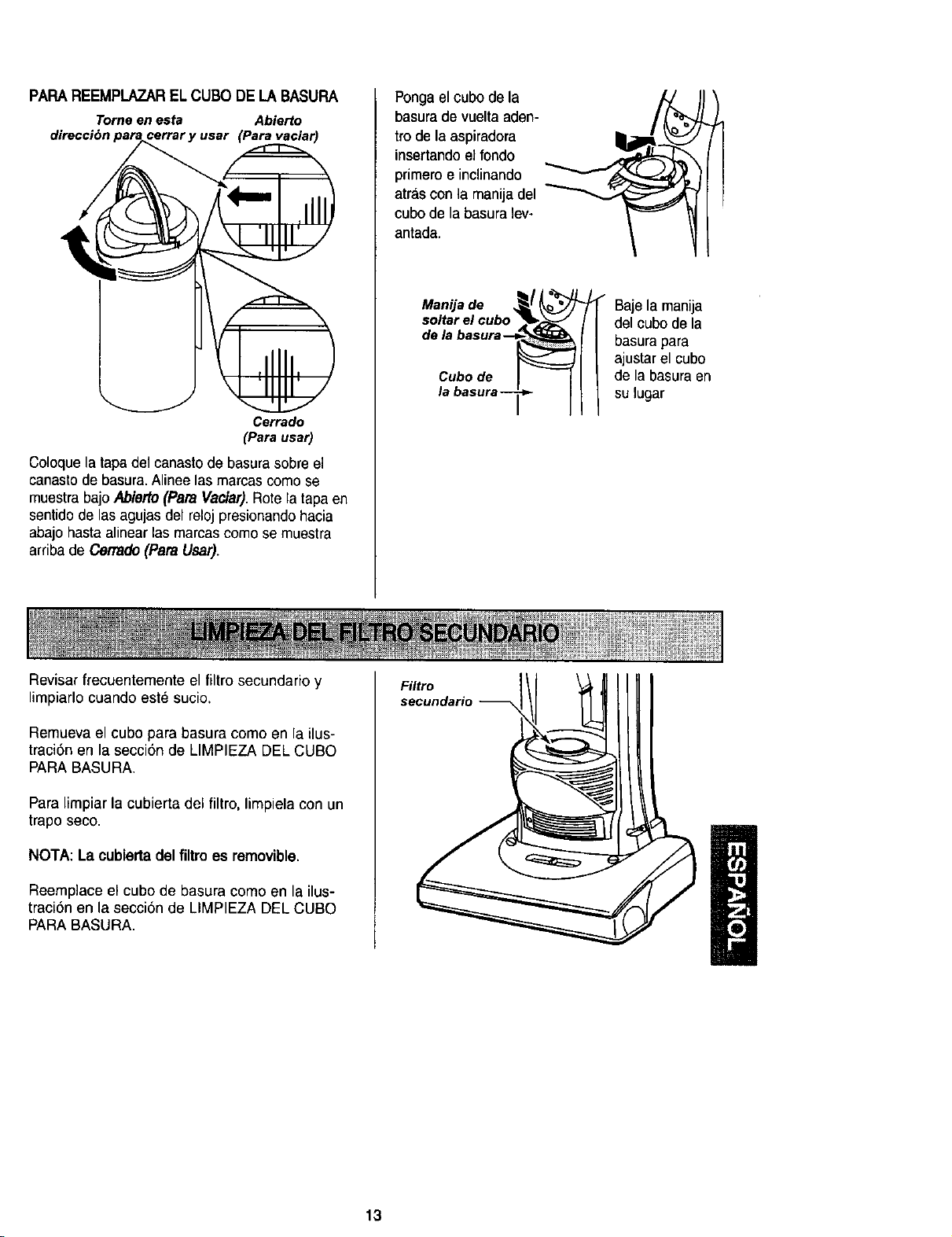
PAPA REEMPLAZARELCUBO DE LA BASURA
Tomeen esta Abierto
direcci6n (Para vaciar)
Cerrado
(Para usar)
Coloque la tapa del canasto de basura sobre el
canasto de basura. Alinee las marcas como se
muestra bajo ,4bietto (Para Vaclar).Rote la tapa en
sentido de las agujas del reloj presionando hacia
abajo hasta alinear las marcas como se muestra
arriba de Cerrado (Para Usar).
Ponga el cubo de la
basura de vuelta aden-
tro de la aspiradora
insertando el fondo
primero e inclinando
atr_lscon la manija del
cubo de la basura lev-
antada.
Manija de _/ _j
Sd:l_ar_JCUrbaW _
Cubo de
la basura --_
Baje la manija
del cubo de la
basura para
ajustar el cubo
de la basura en
su lugar
Revisar frecuentemente el filtro secundario y
limpiarlo cuando este sucio.
Remueva el cubo para basura como en la ilus-
traci6n en la secci6n de LIMPIEZA DEL CUBO
PARA BASURA.
Para limpiar la cubierta del filtro, limpiela con un
trapo seco.
NOTA: La cubierta delfiltro es removible.
Reemp]ace el cubo de basura como en la ilus-
traci6n en la secci6n de LIMPIEZA DEL CUBO
PARA BASURA.
Filtro
secundario
13
Peligrode choqueek_tdco
Desenchufeel cablede poderdel tomacorri-
ente. No operela limpiadorasmel filt_opn-
marioo el filtro de escape. Est6seguroque el
filtrosest6instaladopropiamenteparaprevanir
_la delmotory/o sacudidaal_ctnca.
FILTRO PRIMARIO
Examtneel hltropr=manode vez en cuando y hmpte
cuando este suc=o
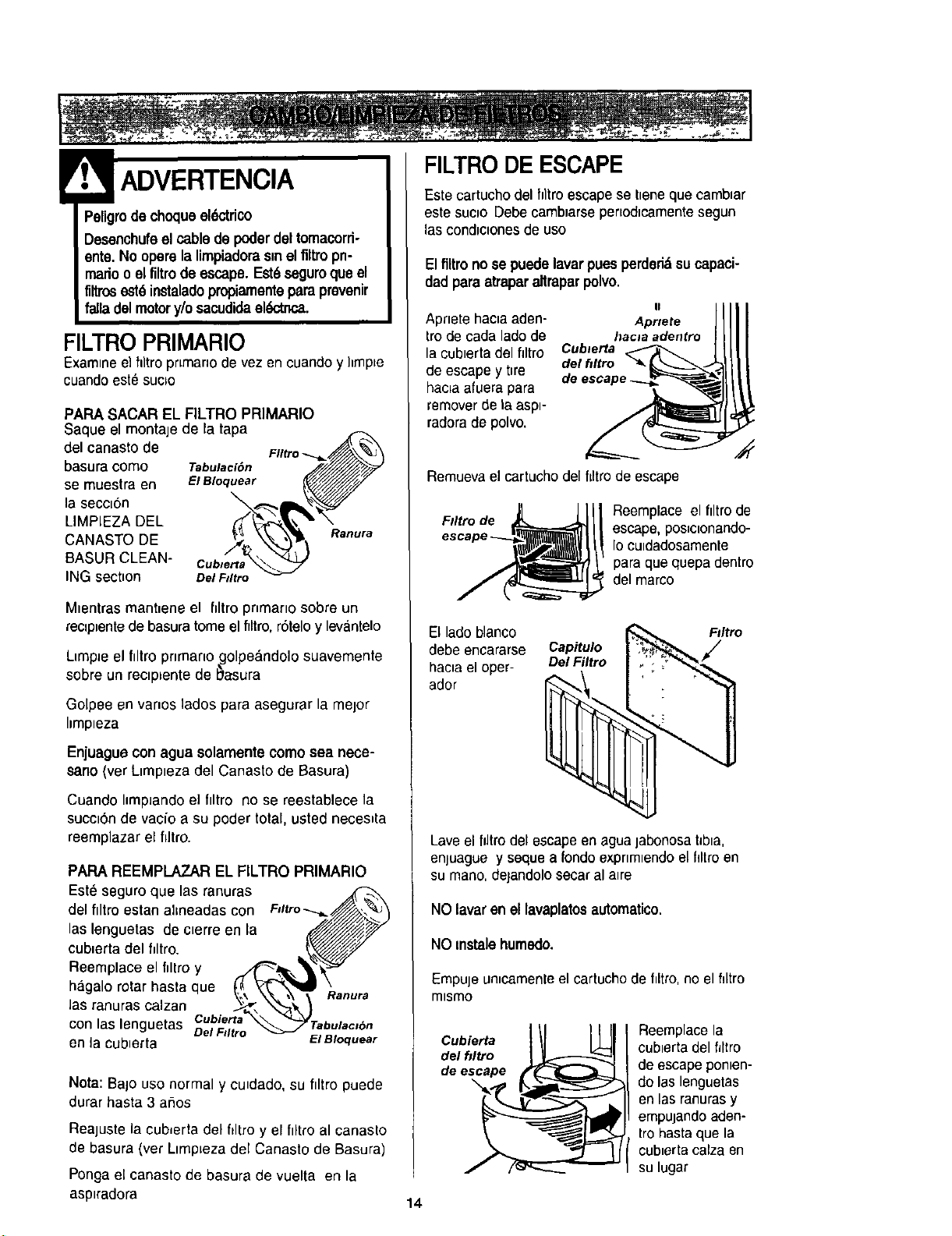
PARA SACAR EL FILTRO PRIMARIO
Saque el montaje de la tapa
del canastode
basura corno Tabulaci6n
se muestra en E/Bloquear
la secc=6n
LIMPIEZA DEL
CANASTO DE
BASUR CLEAN- Cublerta
ING section oarF#/tro
Ranura
Mtentras mant_ene el hltropnmarto sobre un
reclptentede basura tome el filtro, r6telo y levEintelo
LtmpJeel ftltro pnmano golpeandolo suavemente
sobre un rectp=entede b_asura
Golpee en vanos lados para asegurar la melor
Itmp=eza
Enjuagua con agua solamente como sea nece-
sano (ver Ltmpteza del Canasto de Basura)
Cuando I=mpJandoe] filtro no se reestablece la
succt6n de vaeio a su poder totaL, usted necestta
reemplazar el filtro.
PAPA REEMPLAZAR EL FILTRO PRIMARIO
Est_ seguroque las ranuras
del flltro estan almeadas con Fslrro--_.._
las lenguetas de c,erre en la _/_//f_
cublerta del filtro. _.////z_./J7
Reemplace el f,ltro y .r4_._,_ _¢_"
hagalo rotar hasta que t_ "Y_"_X'_B _..
ranuras calzan _ .'_\ '_
P_anura
las
con las lencluetas Cuble.na_'*'._'Taburac,6n
DeÁ Ftltro
en la cubterta ElBloquear
Nota: Bajo uso normal y cu_dado, su filtro puede
durar hasta 3 aifios
Reajuste la cub_erta del filtro y el filtro al canasto
de basura (ver Ltmp=ezadel Canasto de Basura)
Ponga el canasto de basura de vuelta en la
asptradora
FILTRO DE ESCAPE
Este cartucho del hltroescape se tteneque camb_ar
este suc_o Debe camb=arsepertod=camentesegun
lascond_c=onesde uso
El filtro no se puedelavarpuesperded&su capaci-
dad para atraparaltraparpolvo.
Aprlete hac_aaden- Aprtete
frode cada lado de hacla adentro
la cubtertadel filtro Cub_erta
de escape y t=re del f#ltro
hac=aafuera para
remover de ta asp=-
radora de polvo.
Remueva el cartucho del flltro de escape
F#ltro de
Reemplace el ftltro de
escape, pos=clonando-
Io cutdadosamente
para que quepa dentro
del marco
El lado blanco
debe encararse Capitulo
hac_ael oper- DelFiltro
ador
F#ltro
Lave el _tro del escapeen agua jabonosa tJbta,
enjuague y seque a rondoexpnmlendo el filtro en
su mano, dejandolo secar al a=re
NO lavar en ellavaplatos automatico.
NO mstale humedo.
Empuje un_camenleel cartucho de filtro, no el hltro
mlsmo
Cubierta
del hltro
de escape
\
Reemplace la
cublerta del filtro
de escape pon_en-
do las lenguetas
en las ranuras y
empujando aden-
frohastaque la
cub_ertacalza en
su lugar
14
Peligrode choqueel(_tdcoo lesi6ncorporal
Desconectela unidadantesde limpiarlao
darleservicio.De Iocontrariopodrfaprodu-
cirseunchoqueel_'tricoo causarlesi_ cor-
poralsila aspiradoraarrancade manera
imprevista.
Frecuentemente reviseel area del cepillo y quite
todo pelo, cord6n o pelusa que se haya acumulado.
Di la acumulaci6n es excesiva,siga las instruc-
clones a continuaci6n. Si la correa se aflojara o
rompiera, siga las instrucciones para quitar la cor-
rea.
PARA QUITAR LA CUBIERTA DE LA
BOQUILLA
Desenchufela unidad de la corriente electrica.
Paraprotegerla superficie del suelo, siempre ponga
papeEdebajo de la boca de la m&quina cuando se
saca la cubierta de la boquilla.
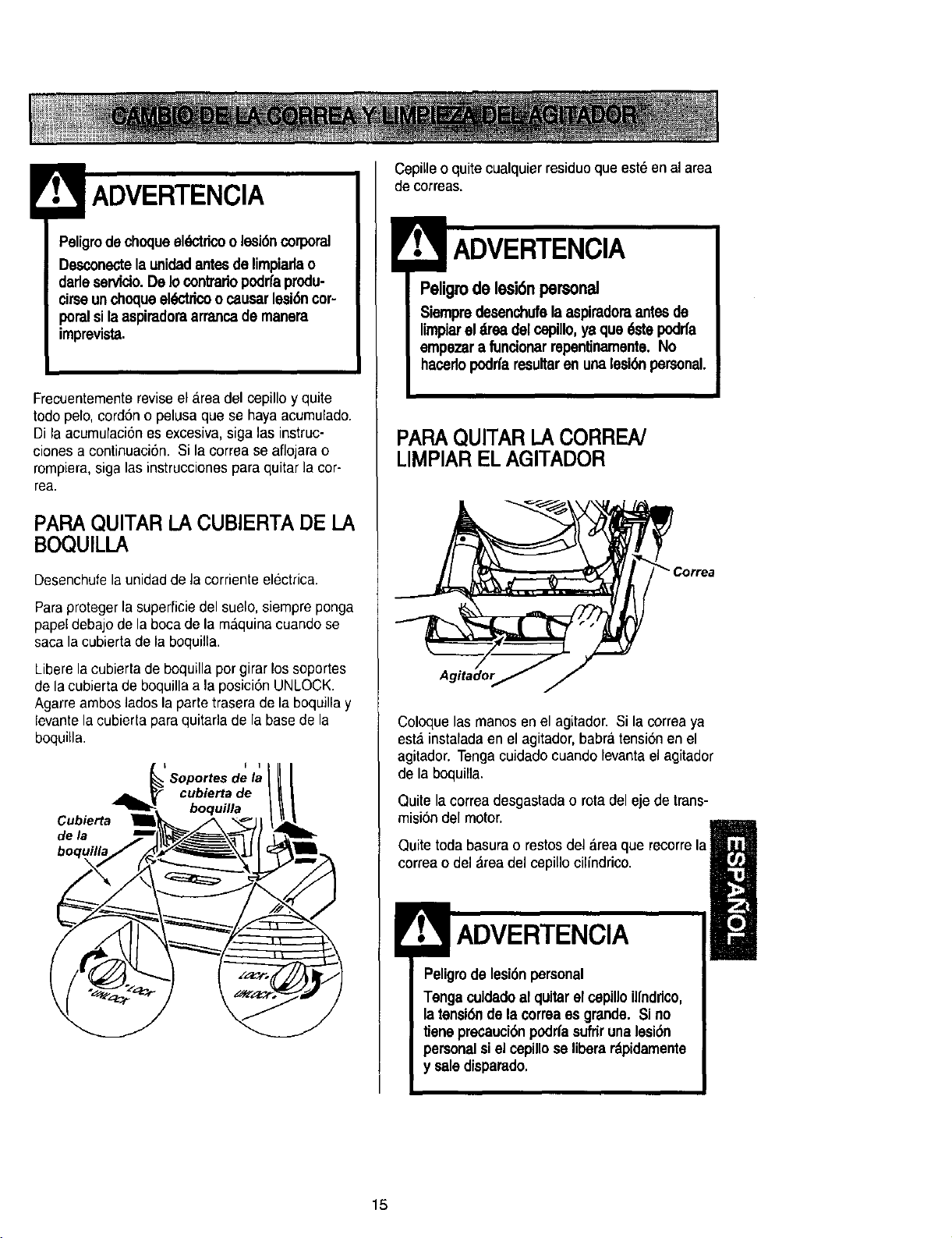
Libere la cubierta de boquilla pot girar los soportes
de la cubierta de boquilla a la posici6n UNLOCK,
Agarre ambos lados la parte trasera de la boquilla y
levante la cubierta para quitarla de la base de la
boquiila.
I I
Soportes de la
cubiertade
boquilla
Cubierta
de/a
Cepille o quite cualquier residue que esteen al area
de correas.
Peligro de lesi6n personal
Siempredesenchufela aspimdomantesde
limpiarel drea delcepillo,ya que dstepodrfa
empezara funcionarrepentinamente.No
hacedopodrfaresultaren unalesi6npersonal.
PARAQUITARI.A CORREN
LIMPIARELAGITADOR
Coloque lasmanes en el agitador. Si la correa ya
esta instafadaen el agitador, babra tensi6nen el
agitador. Tenga cuidado cuando levantael agitador
de la boquilla.
Quite lacorrea desgastada o rota del eje de trans-
misi6n del motor.
Quite toda basura o restos del area que recorre la
correa o del _rea del cepillo cilindrico.
ADVERTENCIA
Peligrode lesi6n personal
Tengacuidadoal quitarel cepilloillnddco,
latensi6nde la correaes grande. Si no
tieneprecauck_npodrfasufdrunalesi6n
personalsiel cepillose liberardpidamente
y saledisparado.
15
Concuidadoquitelaagitadorparaversisehan
acumuladohilosy pelo.
NOTA: Para mantener una alta eficiencia de
limpiezay evitar el dafio a la aspiradora,
limoiar el agitador cada vez oue se cambi_,la
correa.
Tambienhay que limpiar el agitador seg_n el sigu-
iente horatio:
Elusode la
Frecuente - cadasemana
(usadadirariamente)
Moderado - cada mes
(usada 2 o 3 veces
por semana)
Ugero - cada 2 meses
(usada 1 vez por semana)
extremo
Corte pelusa, el
pelo o la borra
enredados en el
agitador y guite el
hilo o los restos
ubicacados en las
tapas del extremo.
PARA CAMBIAR t=.ACORREA
Eje de
transmisi6n
del motor
rrea
Polea para
correa
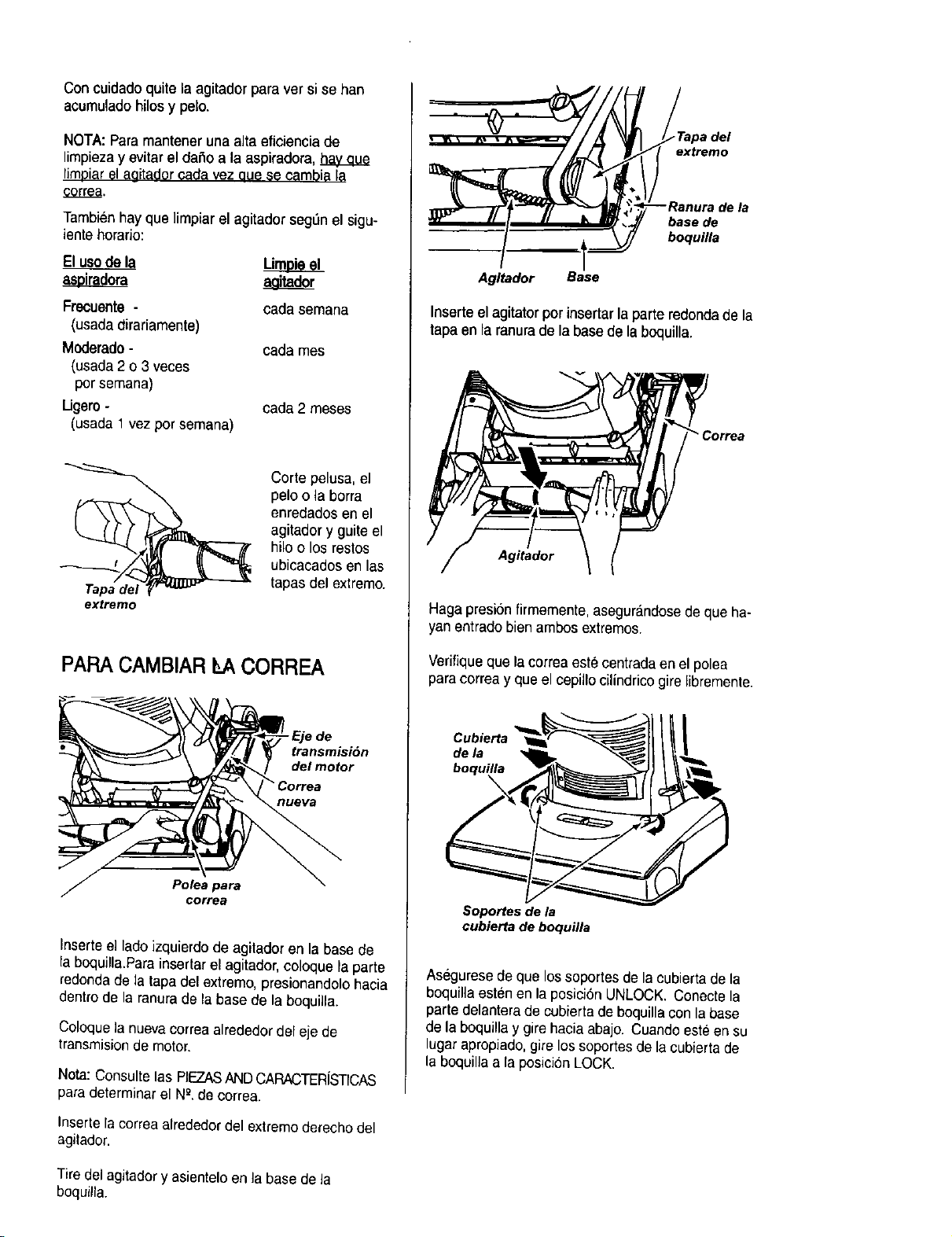
Inserte el lado izquierdo de agitador en la base de
la boquilla.Para insertar el agitador, coloque la parte
redondade la tapa del extremo, presionandolo hacia
dentro de la ranura de la base de la boquilla.
Coloque la nueva correa alrededor del eje de
transmisionde motor.
Nota: Consulte las REZASANDCARACTER[STICAS
paradeterminar el N_.de correa.
Inserte la correa alrededordel extremo derecho del
agitador.
__ iiiurTiI de la
Agltador Base
Inserte el agitator por insertar la parte redondade la
tapa en la ranurade la base de la boquilla.
Correa
Agitador
Haga presion firmemente, asegurandosede que ha-
yan entrado bien ambos extremos.
Verifique que la correa este centrada en el polea
para correa y que el cepillo cilindrico gire libremente.
Cubierta
dela
boquilla
X
Soportes de la
cubierta de boquilla
Asegurese de que los soportes de la cubierta de la
boquilla esten en la posici6n UNLOCK. Conecte la
parte delantera de cubierta de boquilla con la base
de la boquilla y gire hacia abajo. Cuando este en su
lugar apropiado,gire los soportes de la cubierta de
la boquilla a la posicion LOCK.
Tiredel agitador y asientelo en la base de la
boquilla.
Peligrode choqueel_ctdcoo lesidncorporal
Desconectela unidadantesde limpiarlao
darleservicio.De Iocontrafiopodrfaprodu-
clrseunchoqueeldctdcoocausarlesi_ cop
poralsila aspiradoraarrancademanera
Imprevista.
Proceda siempre con precaucionesde seguridad al
limpiary dar servicio la aspiradora.
Si consideraque la aspiradora no aspira bien
aseg_rese primero de que la bolsa no este Ilena y
dequeel filtro noesteatascado.Consulte lasins-
truecionessobreLIMPIANDOEL CUBO DE LA
BASURA y CAMBIO/LIMPIE DES FILTROS.
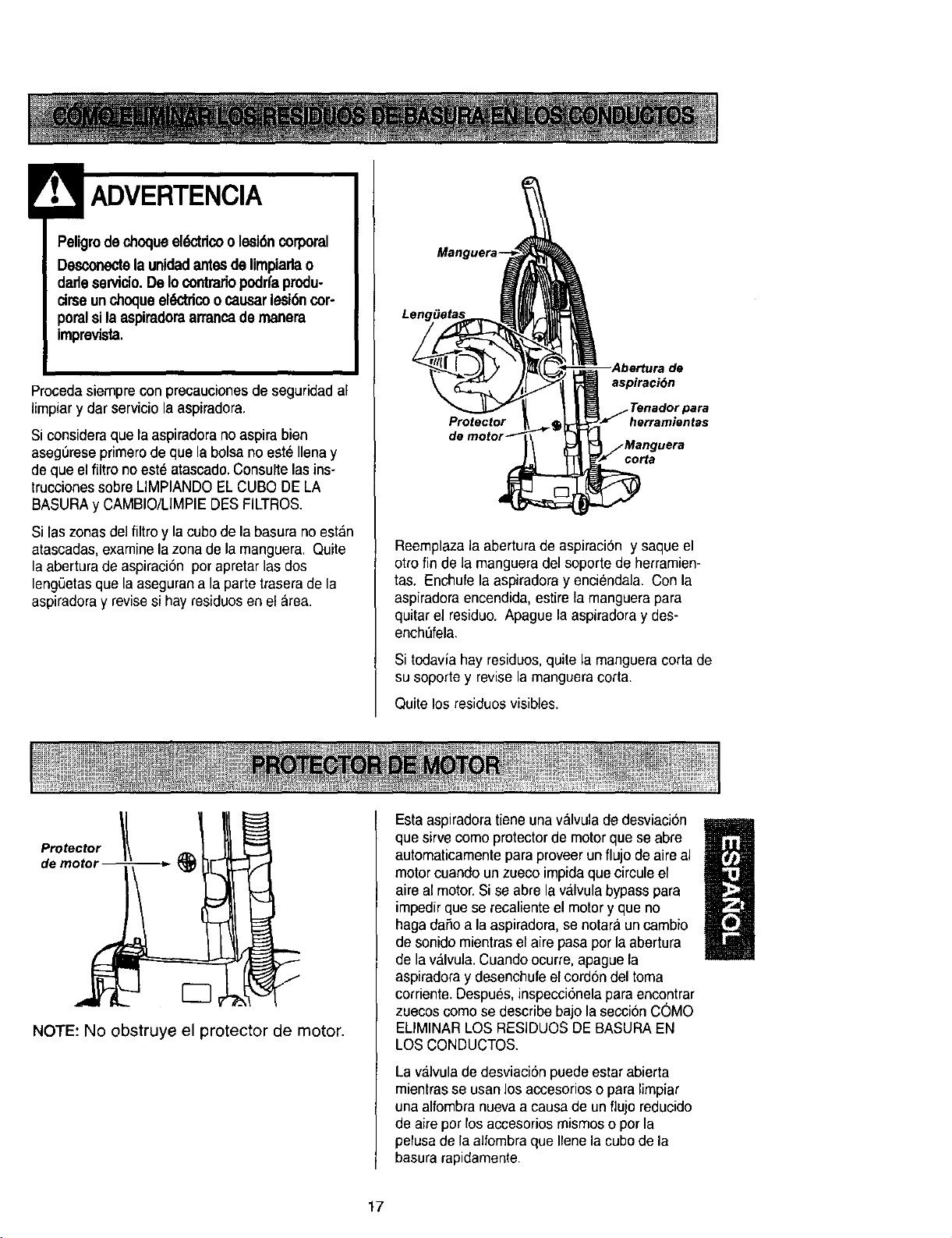
Si las zonasdelfiltro y la cubo de la basura no est&n
atascadas,examine la zona de la manguera. Quile
la abertura de aspiraci6n por apretar las dos
lengSetasque la aseguran a la parte trasera de la
aspiradora y revisesi hay residuos en el area.
de
aspiraci6n
Protector herramientas
corta
Reemplaza la abertura de aspiraci6n y saque el
otro fin de la manguera del soporte de herramien-
tas. Enchufe la aspiradora y enciendala. Con la
aspiradora encendida, est[re la manguera para
quitar el residuo. Apague la aspiradora y des-
enchLifela.
Si todavla hay residuos, quite la manguera corta de
su soporte y revisela manguera corta.
Quite los residuos visibles.
de motor _-
NOTE: No obstruye el protector de motor.
Estaaspiradora tiene unavalvula de desviaci6n
que sirve como protector de motor que se abre
M
automaticamente para proveer un flujo de aire al
motor cuando un zueco impida que circule el
aire al motor. Si se abre la v_,lvulabypass para
impedir que se recaliente el motory que no
haga dafio a la aspiradora, se notara uncambio
de sonido mientras el aire pasa pot la abertura
de la valvula. Cuando ocurre, apague la
aspiradora y desenchufe ef cord6n del toma
corriente. Despues,inspecci6nela para encontrar
zuecos como se describe bajo la seccibn COMO
ELIMINAR LOS RESIDUOS DE BASURA EN
LOSCONDUCTOS.
La valvula de desviaci6n puede estar abierta
mientrasse usanlos accesorios o para limpiar
una alfombranueva a causa de un flujo reducido
de aire pot los accesorios mismos o por la
pelusa de la alfombra que Ilene la cubo de la
basura rapidamente.
17
Peligrodechoqueeldctricoolesi6n corporal
Desconectela unidadantesde limpiadao
darleservicio.De Iocontrariopodrl'aprodu-
cirseunchoqueel_'tricoo causarlesi6ncor-
poralsila asptradoraarrancade manera
imprevista.
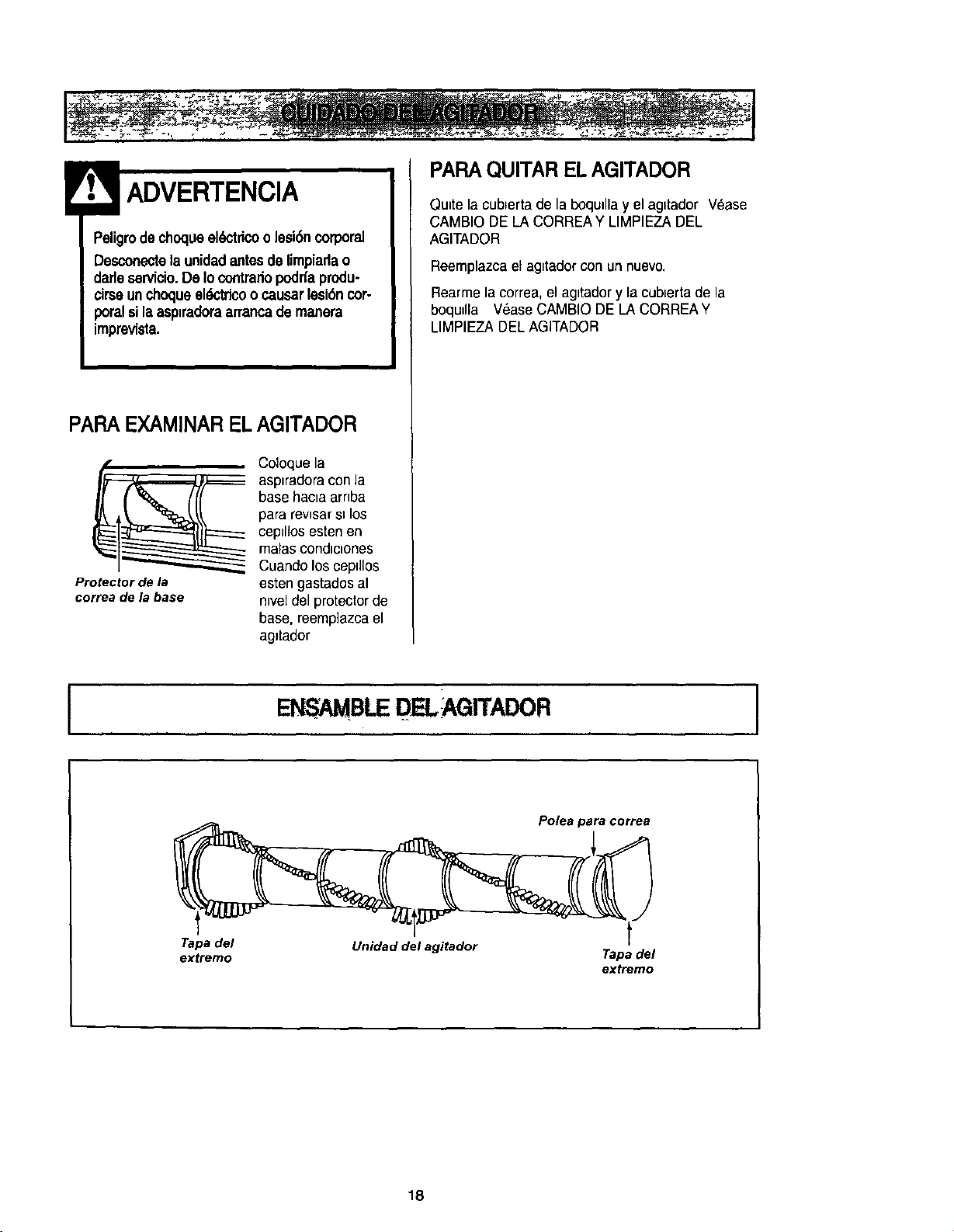
PAPA EXAMINAREL AGITADOR
Protector de la
correa de la base
Coloque la
-- asplradora conla
base haota arrtba
para revtsar sl los
ceptlios esten en
malas condlctones
Cuando los ceptllos
esten gastados al
ntveldel protector de
base, reemp]azca el
agltador
PAPA QUITAR EL AGITADOR
Ou=tela cubterta de la boqu=llay el agitador Vease
CAMBIO DE LACORREA Y LIMPIEZADEL
AGITADOR
Reemplazca el agttadorcon un nuevo.
Rearme la correa, el agttador y la cubLertade la
boqudla Vease CAMBIO DE LA CORREAY
LIMPIEZA DEL AGITADOR
ENSAMBLEDELAGITADOR
Polea para correa
Tapa del
extremo
Unidad del agitador
t
Tapa del
extremo
18

ALGUNOS MODELOS
Peligrodechoqueel_'trico o lesi6n corporal
Desconectela unidadantes de limpiarla o
dadeservicio.DeIo contradopodrfaprodu-
cirseunchoqueek_tdco o causarlesi6ncop
poralsila aspiradoraarrancade manera
imprevista.
Desenchufela unidad de la corriente el6ctrica.
Para alzar la bombilla, quite el tornillo que asegura el
lente a la aspiradora. Quite el rente.
Tornillo , Empuje aqui
para sacar
Remueva la bombilla empujandola y valla dandola
vuelta para la izquierda para sacarla de la abertura.
Despues saque la bombilla para afuera.
\
CUIDADO
No useuna ampolletade mdsde 130 V AC-
15 W. Duranteusoextendido,el calorde la
ampolletapuedesobrecalentarlas partesde
pldstJcocercanas.
Parareemplazar la bombilla, cuidadosamente
inserte y de vuelta hacia la derecha hasta aseguaria
en la abertura.
Nota:Mire PIEZASY CARACTERISTICASpara el
numero de la bombilla.
! CUIDADO
No laenchufeni la prendasinohastaque
la haya vueltoa armarpor
completo.
Coloque otra vez el lenteen la aspiradora.
Coloque otra vez el tornillo.
19
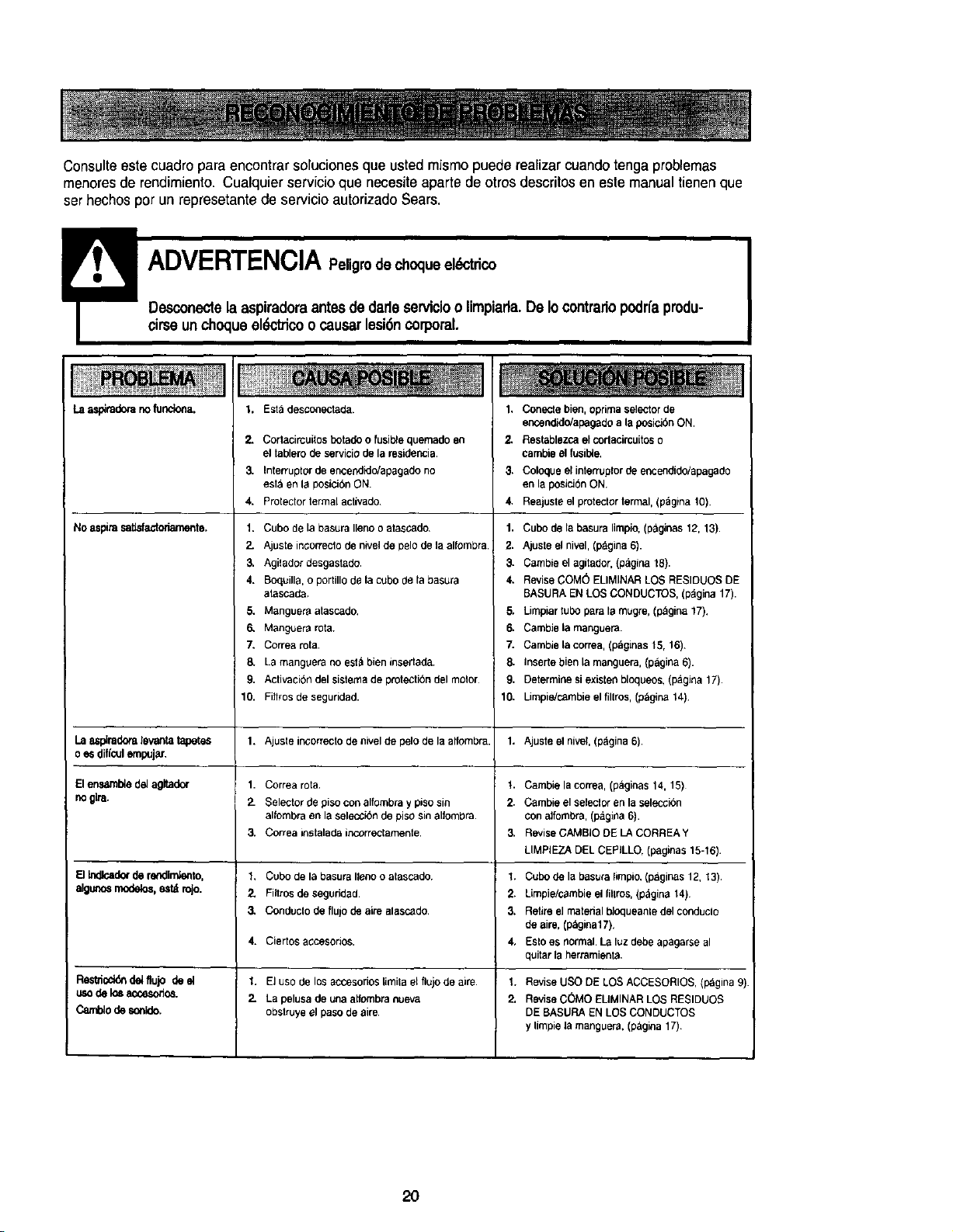
Consulteestecuadroparaencontrarsolucionesqueustedmismopuederealizercuandotengaproblemas
menoresderendimiento.Cualquierservicioquenecesiteapartedeotrosdescritosenestemanualtienenque
serhechospotunrepresetantedeservicioautorizadoSears.
!
Desconectela aspiradoraantes dedadeservicioo limpiarla. De Io contrariopodr{aprodu-
cirseunchoqueel_trico o causerlesi6n corporal.
as_m_'a no_nc_a.
Noaspiresatislactonarnonte.
1. Est_ desconectada.
2.
3.
4.
Cortacircuitosdetado ofusiblequemadeen
eltablerodeserviciode la residenoia.
Interruptor de encen@d_apagado no
esla en la posici6n ON.
Protector termal activado
1. Cubo de la basura Ileno o atascado
2. Ajuste in¢orreclo de nivel de pelo de la alfombra.
3. Agilador desgastado.
4. Boquilla, o portillo de la cubo de la basura
atascada
5. Manguere atascado,
6. Manguera rota.
7. Correa rota.
8. La manguera no est_ bien insertada.
9. Activacion del sistema de protectibn del molor
10. Fitlros de seguridad.
1, Conecte bien, oprima selector de
encendido/apagado ala posJcibnON.
2. Restablezca el corlaeircudes o
earnble el fusible,
3. Coloque el interruplor tie encendido/apagade
en la posicibn ON.
4. Reajusle el protector termal, (pagina 10).
1. Cubo de la basuralimpio,(paginas 12, 13).
2. Ajuste elnivel,(pagina 6).
3. Cambleel agitador,(p_igina18).
4. ReviseCOM_ ELIMINARLOSRESIDUOSDE
BASURAEN LOS CONDUCTOS,(pagina17).
5. Limpiar rudeparela mugre,(p&gina17),
6. Cambiela manguera.
7. Cambiela correa,(p&ginas15, 16).
5. Inserte bienla manguera,(pagina6).
9, Determinesiexistenbloqueos,(pagina 17).
10. Limpie]cambieel fillros, (p_gina14)
La _piradera levanta _ 1. Ajuste ir_orrecto de nivel de pelo de la alfombra. 1. Ajuste el nivel, (pdgina 6).
o eS diflcul empujar,
El ensa,mble del agitador 1. Correa rota t. Cambie la correa, (p_ginas 14, 15)
no gira. 2- Selector de piso con alfombra y piso sin 2. Cambie el seleclor en la selecci6n
alfombra en la selecc_bn de piso sin alfombra con alfombra, (paglna 6).
3. Correainstaladeincorreclamente. 3. ReviseCAMBIODELACORREAY
LIMPiEZA DEL CEPILLO. (paginas 15-16).
FIb_lcedorderefldimlento. 1. Cubodelabasurallenooalascado 1, Cubodelabasura{impio,(p&ginas12, 13)
elgunos modelos, esl,_ rojo. 2. Filtros de segurided. 2, Limpie/cambie el fillros, (p&gina 14)
3, Conduclo de flujo de aire alascado. 3, Retire el material bloqueanle del conduclo
de aire, (p_gina17),
4. Ciertos a¢cesonos, 4, Eslo es normal. La luz debe apagarse al
quitar la herramienta,
Restticbldn del flujo de el 1. El uso de los accesorios Limila el flujo de aire. 1. Revise USO DE LOS ACCESORIOS, (pagina 9)
uso de Io8 accesodos. 2. La pelusa de una atfombra nueva 2. Revise C(_)MO EUMINAR LOS RESIDUOS
Camblo de so_ldo, obstruye el paso de aire DE BASURA EN LOS CONDUCTOS
y limpie la manguera, (p_gina 17)
2O

21

Get it fixed, at your home or ours!
Your Home
For repair - in your home - of all major brand appliances,
lawn and garden equipment, or heating and cooling systems,
no matter who made it, no matter who sold it!
For the replacement parts, accessories and
owner's manuals that you need to do-it-yourself.
For Sears professional installation of home appliances
and items like garage door openers and water heaters.
1-800-4-MY-HOME ® Anytime,day or n_ght
(1-800-469-4663) (U S A and Canada)
www.sears.com www.sears.ca
Our Home
For repair of carry-_n products hke vacuums, lawn equipment,
_nd electronics, call or go on-line for the nearest
Sears Parts and Repair Center.
1-800-488-1222 Anytime, day or night (U S A only)
www.sears.com
To purchase a protection agreement (U.S.A)
or maintenance agreement (Canada) on a product serviced by Sears:
1-800-827-6655 (u s A ) 1-800-361-6665 (Canada)
Para pealerserv_c_ode reparaclen
a domlclho, y para ordenar plezas
1-888-SU-HOGAR sM
(1-888-784-6427)
Au Canada pour service en fran_ats
1-80O-LE-FOYERuc
(1-800-533-6937)
www sears ca
SEARS
© Sears, Roebuck and Co
® Reglslered Trademark / TMTrademark / s_ Service Mark ol Sears, Roebuck and Co
® Marca Reg=strada / TMMarca de Fabrlca / SMMarca de ServlclO de Sears Roebuck and Co
MCMarque de commerce / uo Marque deposee de Sears, Roebuck and Co