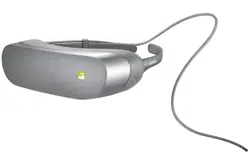
User Guide
360 VR
LG-R100
MFL69562201 (1.0)

ENGLISH
User Guide
360 VR
LG-R100

2
Contents
Product Overview .......................................................................................................................................................................... 3
Precautions
.......................................................................................................................................................................................4
Product Components
..................................................................................................................................................................7
Product Description
.....................................................................................................................................................................8
Connections
..................................................................................................................................................................................10
Features and Usage
..................................................................................................................................................................13
Important Safety Information
.............................................................................................................................................14
Specications and Features
..................................................................................................................................................18
Limited Warranty Statement
...............................................................................................................................................19
© 2016 LG Electronics Inc. ALL RIGHTS RESERVED. LG, LG Life’s Good, and the LG logo are
registered trademarks of LG Corp. All other trademarks and trade names are property of
their respective owners. Design, features, functionality, and other product specications are
subject to change without notice.
3
The LG 360 VR is a smart device that uses virtual reality (VR) technology to enjoy VR content.
• When playing VR content with the LG 360 VR, you can enjoy the images as if you were in
them by turning your head in any direction.
• You can use the LG 360 CAM (sold separately) to take photos and videos of VR content
and view them on the LG 360 VR.
• This device is not compatible with the LG G5
SE
.
Product Overview
Note: Please read all information carefully prior to using the LG 360 VR in order to enjoy the
best performance and prevent damage to the product.
4
• This product is for viewing VR content. To prevent injury, take frequent rests when using
the product.
• Before connecting the product to your phone, be sure to check if your phone is compatible
with the LG 360 VR. The LG 360 VR may not operate if incompatible with the phone.
• When playing content not supported by the product, the screen may icker or not be
shown.
• Children under 15 years of age should not use this product to watch videos or play video
games. The LG 360 VR may affect the vision development of children.
• If you have diseases, such as strabismus or amblyopia, do not use this product. The use of
this product may aggravate these symptoms.
• If you often feel motion sickness, you may experience discomfort while using this product.
If you feel any discomfort, immediately stop using it and take a rest.
• Pregnant women, senior citizens, mental patients, patients with heart disease or any
other serious diseases should consult their physician before using this product.
• Stop using the product if it or the phone becomes hot. It may cause burns.
• Use it in a comfortable position while the device is horizontal. If you wear the product
tilted to one side, you may become uncomfortable.
• It is recommended to use the product while sitting in a chair, if possible. If you use it while
moving around, you may trip or fall down and become seriously injured.
• The experience of virtual reality may cause certain symptoms, like motion sickness.
Besides motion sickness, it may cause excessive drowsiness and interfere with your ability
to multitask. As it may pose a risk to your health, if you used the product, make sure to
take a rest before resuming any other physical activities.
• If you are using a medical device, consult your doctor before using the product.
• If you use the LG 360 VR for a long time, it may irritate your skin or leave an indentation
on your face.
Precautions

5
• This product is a device to magnify the display screen through a high-magnication lens.
When viewing content, foreign particles smaller than pixels inside the display screen may
be seen.
• Clean the lens before using it.
• Removing the lens may cause the display to be contaminated by foreign substances.
• People with astigmatism should wear contact lenses to correct their vision.
• Whenever carrying or storing it, make sure to keep it in the case. Even in the case, the
LG 360 VR may become worn or damaged by shock and vibration.
Part15.19 statement
This device complies with part 15 of the FCC Rules. Operation is subject to the following
two conditions:
(1) This device may not cause harmful interference, and
(2) this device must accept any interference received, including interference that may cause
undesired operation.
Part15.21 statement
Changes or modications not expressly approved by the manufacturer (or party responsible)
for compliance could void the user’s authority to operate the equipment.

6
Part15.105 statement
This equipment has been tested and found to comply with the limits for a Class B digital
device, pursuant to part 15 of the FCC Rules. These limits are designed to provide reasonable
protection against harmful interference in a residential installation. This equipment
generates, uses and can radiate radio frequency energy and, if not installed and used in
accordance with the instructions, may cause harmful interference to radio communications.
However, there is no guarantee that interference will not occur in a particular installation. If
this equipment does cause harmful interference to radio or television reception, which can
be determined by turning the equipment off and on, the user is encouraged to try to correct
the interference by one or more of the following measures:
- Reorient or relocate the receiving antenna.
- Increase the separation between the equipment and receiver.
- Connect the equipment into an outlet on a circuit different from that to which the receiver
is connected.
- Consult the dealer or an experienced radio/TV technician for help.
7
Product Components
• If there are any missing components, contact the retailer where you purchased the product.
• Some items are subject to change without prior notice depending on the circumstances.
• The appearance and specications of the product are subject to change without prior
notice to improve performance.
• Always use genuine products. Using or connecting products that are not genuine may
damage the product and thereby void the service warranty.
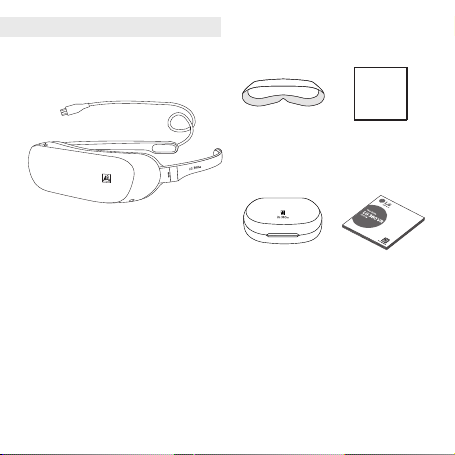
LG 360 VR
Lens Cleaner
User GuideCarrying Case
Light Blocker
8
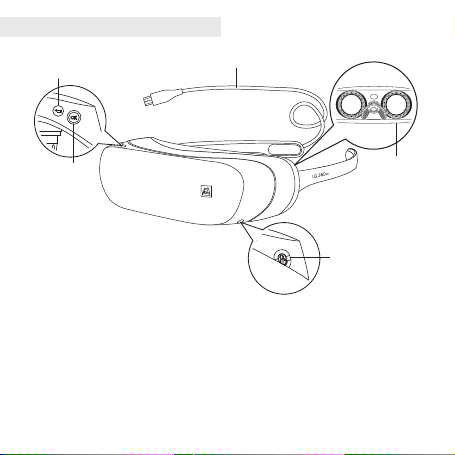
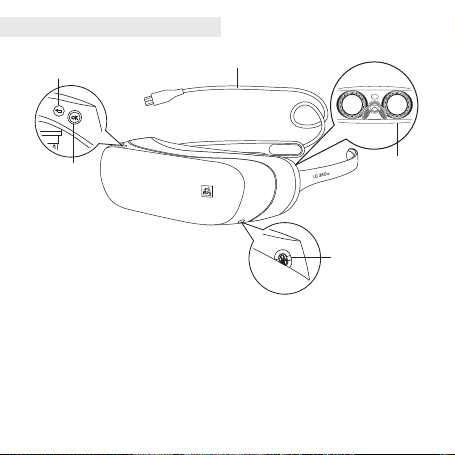
How to Use the Keys
1. Select Key
Press: Select your content or a menu item focused in the center of the screen.
Press and hold: Enter the Settings screen.
2. Back Key
Press: Move to the previous screen or cancel.
Press and hold: Move to the home screen of the LG 360 VR app.
Product Description
USB Cable
Back Key
Select Key
Lens
Earphone Jack
9
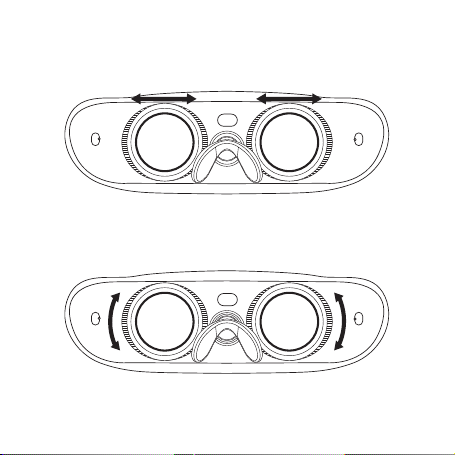
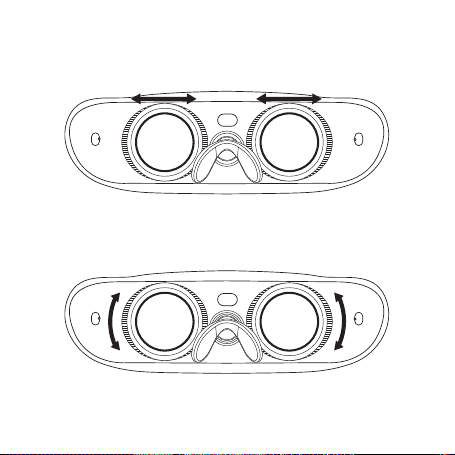
Adjusting the Position of the Lens
You can move the lens to the left or right to adjust it.
Adjusting the Focus of the Lens
You can turn the lens to focus it to better suit your vision.
When adjusting the lens, take the lens cap off.
10
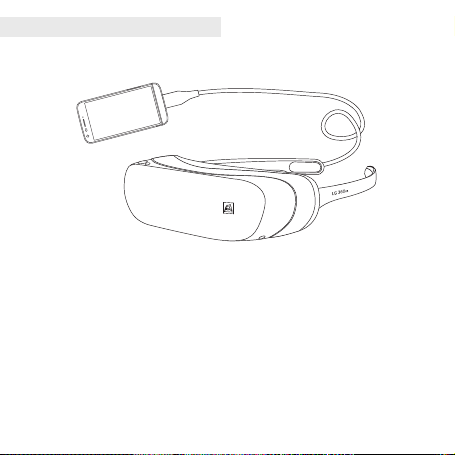
Connections
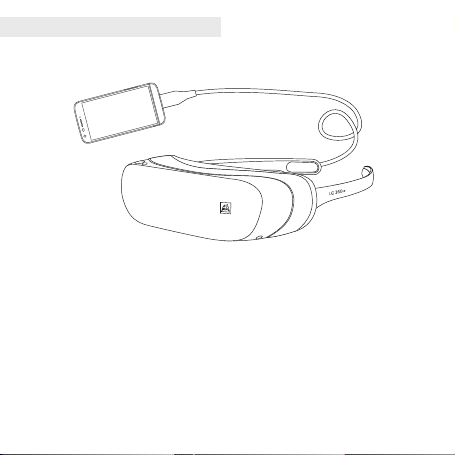
Connect the USB cable of the LG 360 VR to the USB port on your phone. It may take a while.
• With the LG 360 VR on, the screen of your phone will turned off. You can use your phone
as a touch pad.
• This product will not operate normally when connected to an LG G5 if the LG CAM Plus,
LG Hi-Fi Plus with B&O PLAY, or any other devices that are not LG G5 modules, are
attached to the LG G5.
• When your LG 360 VR is idle for at least 15 minutes with its USB cable still connected,
your LG 360 VR is automatically disconnected to prevent battery usage.
• There will be restrictions on connecting your LG 360 VR if your phone is low on battery
or too hot.
11
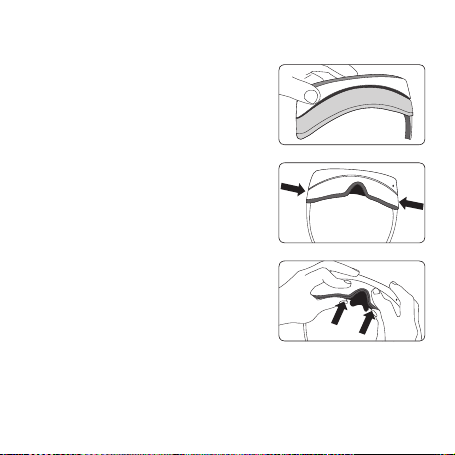
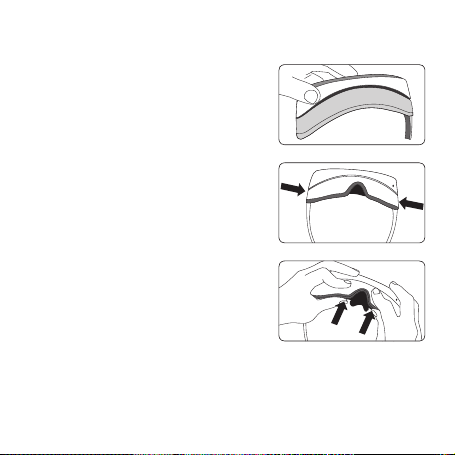
1 Attaching the Light Blocker to the LG 360 VR.
2 Open the temples of the LG 360 VR, fit the Light
Blocker in place, and then push on the sides to attach
both of the side hooks.
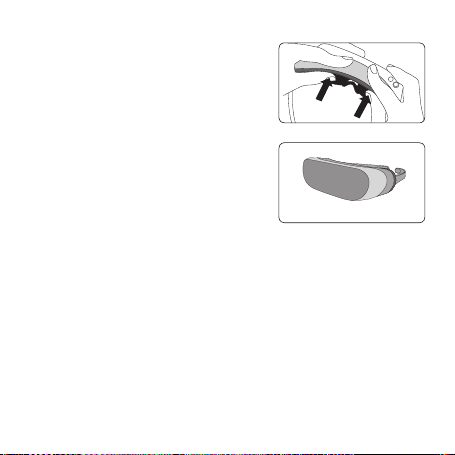
3 Fit the bottom of the Light Blocker to the LG 360 VR.
Hold the Light Blocker with your index fingers and
then push on it with your thumbs to attach it.
Press on it again firmly.
Attaching the Light Blocker
12
4 Fit the top of the Light Blocker to the LG 360 VR.
Hold the Light Blocker with your index fingers and
then push on it with your thumbs to attach it.
Press on it again firmly.
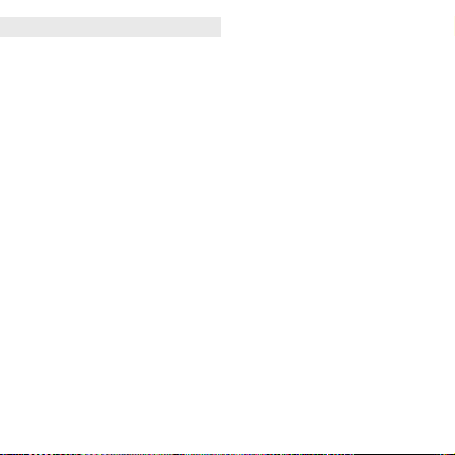
5 The Light Blocker is now attached.
If the hooks are not fastened completely, press on
them again.
13
Select Content or a Menu Item
To select content or a menu item, focus it in the center of the screen, and then press the
Select Key of the LG 360 VR or tap the screen of your phone.
Screen Drag
If you want to select a lot of content, you can drag the screen of your phone up, down, left,
or right to move the screen.
Screen Reorientation
You can reorient the screen by pressing and holding the screen with two ngers. The center of
the screen moves to your current perspective.
Move to the Previous Screen
Press the Back Key on the LG 360 VR or press and hold the screen of your phone to move
to the previous screen.
Move to the Home Screen
Press and hold the Back Key on the LG 360 VR to move to the home screen.
Settings
Press and hold the Select Key on the LG 360 VR to go to Settings. You can adjust the screen
orientation, brightness and notication settings in the related screen.
Call-related Features
You can press the button to answer the phone or end the call.
• When the phone is ringing:
- Press the Select Key to answer the call.
- Press the Back button once to hold the incoming call. Press the button twice to reject
the call.
• When you are talking on the phone:
- Press the Select Key or the Back Key to end the call.
Features and Usage
14
Thunder and Lightning
• During severe thunder or lightning storms, refrain from using the product. Lightning can
cause serious injury or re.
Water
• When the product is exposed to water, do not use a hot-air blower, hair dryer, or put it
into a microwave oven or stove to dry it out. Doing so may cause the product to explode
or cause it to deform or fail.
• If the product is wet, the color of the label inside the product will change. In that case, you
cannot receive free service if the product fails. Please be careful.
• Do not use the product when it’s wet. Doing so may cause re, excess heat, explosion,
or leakage.
Usage Environments
• Do not use it in dangerous places such as on a slope, cliff, or waterside.
• If the cable gets stuck in the doors of a subway train or vehicle, it is very dangerous.
Please be careful.
• When you use the product in public places, be considerate of other people around you.
Disassembling the Product
• Do not disassemble the product and protect it from sudden impacts. There is a risk of
electrical shock, short circuit, or re.
• Do not use the product if it is damaged. Doing so may cause re, burns, injury, or electric
shock.
Important Safety Information

15
Light and Sound
• Do not use the product for too long. Doing so may cause visual impairment.
• Do not use it for a long time with the volume turned up too high. Doing so may damage
your hearing.
Only use Genuine Products
• Always use genuine products. Do not use this product for any unintended purposes.
Using the Product While Moving
• Do not use the product while you are moving around as it could be very dangerous. Doing
so may also cause a trafc or safety accident.
High Temperature and Humidity
• Do not leave the product exposed to direct sunlight, on a blanket, an electric blanket, or a
carpet for long periods of time, or in a hot and humid place, such as a sauna. Doing so may
cause the product to deform, fail, or explode.
Chemicals
• Do not use alcohol, benzene, thinners, or detergents to clean the product. Doing so may
cause a re.
• Use a soft cloth to wipe the product.
Children and Pets
• Keep the product out of the reach of children and away from pets. Do not put the product
in your mouth or subject it to a severe shock. There is also a risk of an electric shock,
explosion, or suffocation.

16
Fire
• Do not connect or insert conductive materials (metal pieces, pencil leads, etc.) into the
external connectors.
• Do not cover or wrap the product with a blanket while using it.
• Do not dispose of the product as household waste. Doing so may cause a re or
environmental damage.
Skin Damage
• If you are using the product for a long time, the temperature of your phone may rise when
it is connected to the product. Avoid touching the product when it becomes hot as it may
cause a low-temperature burn.
Magnetism
• Place the product away from magnetic objects, such as credit cards, phone cards, bank
books, and travel passes. Magnetism may damage the product.
Painting
• If you paint the product, it may damage the exterior or cause a malfunction.
• If the exterior paint is peeling off, or you show an allergic reaction to a certain material in
the product, stop using it and consult your doctor.
Connecting to Other Equipment
• Do not connect the product to any other equipment in a way that is not indicated in the
detailed user guide.
• Make sure that your arm or any loose objects do not get entangled in the cable or cord.
• You must make sure that your phone is securely fastened while using the product.
Otherwise, your phone may fall, and you will not be able to use the LG 360 VR.

17
Product Damage
• In order to prevent any damage, be careful not to drop the product on a hard surface or
subject it to a severe shock.
• Some of the functions or the display may become damaged, or its appearance may be
altered or impaired if it is bent or crushed and not repaired right away.
Temperature
• Use and store your phone in temperatures between 32°F and 104°F (0°C and 40°C),
if possible. Exposing your phone to extremely low or high temperatures may result in
damage, malfunction, or even explosion.
18
Form Factor Glasses Type Display
Size
164.1 x 185.6 x 45.9 mm (Temple Open)
Weight
4.7 oz (without the Light blocker 4 oz)
Angle of View
80°
Display 1.88", 960 x 720 (639 PPI) IPS LCD
Input 2 Keys (Back, Select)
Audio
3.5Φ, 3-pole Earphone Jack
Sensor 6-axis (acceleration, Gyro), proximity sensor
Working Voltage 5 V USB OTG from Phone
Operating Temperature -15 °C to + 55 °C
Storage Temperature -40 °C to + 85 °C
Operating Humidity 80%
Current Consumption 280 mA or less (for 5.0 V)
Battery Life
2.0 H or less
(for Airplane Mode+LG 360 VR Connection and 2800 mAh)
Specications and Features
19
1. WHAT THIS WARRANTY COVERS:
LG offers you a limited warranty that the enclosed subscriber unit and its enclosed accessories will be free from
defects in material and workmanship, according to the following terms and conditions:
(1) The limited warranty for the product extends for ONE (1) year beginning on the date of purchase of the
product by the original end user.
(2) The limited warranty extends only to the original end user of the product and is not assignable or transferable
to any subsequent purchaser/end user.
(3) This warranty is good only to the original end user of the product during the warranty period as long as it is
in Canada.
(4) Upon request from LG, the consumer must provide information to reasonably prove the date of purchase.
(5) During the applicable warranty period, LG will repair or replace at LG’s sole option, without charge to the
original end user, any defective component part of the phone or accessory.
(6) LG may use rebuilt, reconditioned or new parts or components when repairing any product or replace a
product with a rebuilt, reconditioned or new product.
2. WHAT THIS WARRANTY DOES NOT COVER:
(1) Defects or damages resulting from use of the product in other than its normal and customary manner.
(2) Defects or damages from abnormal use, abnormal conditions, improper storage, exposure to moisture or
dampness, unauthorized modications, unauthorized connections, unauthorized repair, misuse, neglect, abuse,
accident, alteration, improper installation or other acts which are not the fault of LG, including damage caused
by spills of food or liquids.
(3) Breakage or damage to antennas unless caused directly by defects in material or workmanship.
(4) The fact that the Customer Service Department at LG was not notied by the original end user of the alleged
defect or malfunction of the product, during the warranty period.
(5) Products which have had their serial numbers removed or made illegible.
(6) Damage resulting from use of non-LG approved accessories.
(7) All plastic surfaces and all other externally exposed parts that are scratched or damaged due to normal
customer use.
(8) Products serviced by non-authorized persons or companies.
Limited Warranty Statement

20
Notes:
(1) This limited warranty supersedes all other warranties, expressed or implied either in fact or by operations of
law, statutory or otherwise, including, but not limited to any implied warranty of merchantability or tness
for a particular purpose.
(2) Shipping damage is the sole responsibility of the shipping company.
3. EXCLUSION OF LIABILITY:
No other express warranty is applicable to this product.
THE DURATION OF ANY IMPLIED WARRANTIES, INCLUDING THE IMPLIED WARRANTY OF MARKETABILITY, IS
LIMITED TO THE DURATION OF THE EXPRESS WARRANTY HEREIN.
LG ELECTRONICS CANADA, INC. SHALL NOT BE LIABLE FOR THE LOSS OF THE USE OF THE PRODUCT,
INCONVENIENCE, LOSS OR ANY OTHER DAMAGES, DIRECT OR CONSEQUENTIAL, ARISING OUT OF THE USE
OF, OR INABILITY TO USE, THIS PRODUCT OR FOR ANY BREACH OF ANY EXPRESS OR IMPLIED WARRANTY,
INCLUDING THE IMPLIED WARRANTY OF MARKETABILITY APPLICABLE TO THIS PRODUCT.
4. HOW TO GET WARRANTY SERVICE:
To obtain warranty service, please call the following telephone number from anywhere in Canada:
LG Electronics Canada, Inc.
Tel. 1-888-LG-Canada (1-888-542-2623)
http://www.lg.com/ca_en (see links to “Support > Mobile phone support”)
FRANÇAIS
Guide de l’utilisateur
360 VR
LG-R100
2
Sommaire
Présentation du produit .............................................................................................................................................................3
Précautions
.......................................................................................................................................................................................4
Composants du produit
.............................................................................................................................................................6
Description du produit
................................................................................................................................................................7
Connexions
.......................................................................................................................................................................................9
Fonctionnalités et utilisation
...............................................................................................................................................12
Consignes de sécurité importantes
..................................................................................................................................13
Fonctions et caractéristiques
..............................................................................................................................................17
Garantie Limitée..........................................................................................................................................................................18
© 2016 LG Electronics Inc. Tous droits réservés.
3
Le LG 360 VR est un dispositif intelligent qui utilise la technologie de réalité virtuelle pour
lire ce type de contenu.
• Lors de la lecture de contenu de réalité virtuelle sur le LG 360 VR, tournez la tête dans
n’importe quel sens pour proter des images comme si vous y étiez.
• Vous pouvez utiliser le LG 360 CAM (vendu séparément) pour prendre des photos et
capturer des vidéos de contenu de réalité virtuelle, que vous pourrez ensuite consulter
sur le LG 360 VR.
• Cet appareil n’est pas compatible avec le G5
SE
de LG.
Présentation du produit
Remarque : An de proter de performances optimales et d’éviter d’endommager le module
LG 360 VR, lisez attentivement toute la documentation avant de l’utiliser.
4
• Ce produit est conçu pour le visionnement de contenu de réalité virtuelle. Pour prévenir
toute blessure, faites des pauses fréquentes lors de l’usage du produit.
• Avant de connecter le produit à votre téléphone, vériez si votre téléphone est compatible
avec le LG 360 VR. Le LG 360 VR pourrait ne pas fonctionner selon sa compatibilité avec
le téléphone.
• Si vous choisissez de lire du contenu non pris en charge par le produit, l'écran pourrait
clignoter ou ne pas s'afcher.
• Les enfants de moins de 15 ans ne devraient pas utiliser ce produit pour regarder des
vidéos ou jouer à des jeux vidéo. Le LG 360 VR peut nuire au développement des facultés
visuelles des enfants.
• Si vous avez des maladies, comme le strabisme ou l’amblyopie, n’utilisez pas ce produit.
L’utilisation de ce produit peut aggraver ces symptômes.
• Si vous êtes sensible au mal des transports, il est possible que vous ressentiez un
inconfort pendant l’utilisation de ce produit. Si vous ressentez un malaise, arrêtez
immédiatement d’utiliser le produit et faites une pause.
• Les femmes enceintes, les personnes âgées, les malades mentaux, les patients souffrant
de maladie cardiovasculaire ou de toute autre maladie grave doivent consulter leur
médecin avant d’utiliser ce produit.
• Cessez d’utiliser le produit si le téléphone ou le produit devient très chaud. Cela pourrait
causer des brûlures.
• Utilisez-le dans une position confortable et tenez-le à l’horizontale. Vous pourriez
connaître un certain inconfort si vous portez le produit incliné d’un côté.
• Il est recommandé d’utiliser le produit en étant assis sur une chaise, si possible. Si vous
l’utilisez tout en vous déplaçant, vous pourriez trébucher ou tomber et vous blesser
gravement.
Précautions

5
• L’expérience de réalité virtuelle peut provoquer certains symptômes, comme le mal des
transports. En plus du mal des transports, cela pourrait causer une somnolence excessive
et nuire à votre capacité de mener plusieurs tâches à la fois. Étant donné que le produit
pourrait poser un risque pour votre santé, si vous l’avez utilisé, assurez-vous de prendre
une pause avant de reprendre n’importe quelle autre activité physique.
• Si vous avez un appareil médical, consultez votre médecin avant d’utiliser le produit.
• Si vous utilisez le LG 360 VR pendant une période prolongée, il pourrait irriter votre peau
ou former une empreinte sur votre visage.
• Ce produit permet d’agrandir l'écran d'afchage au moyen d'une lentille à fort
grossissement. Lorsque vous visualisez le contenu, il est possible que vous voyiez des
particules étrangères plus petites que des pixels à l'intérieur de l'écran d'afchage.
• Nettoyez les oculaires avant de vous en servir.
• Le fait de retirer l'objectif peut entraîner la contamination de l'écran par des particules
étrangères.
• Les personnes souffrant d’astigmatisme doivent porter des verres de contact pour
corriger leur vision.
• Chaque fois que vous transportez ou remisez le produit, assurez-vous de le conserver dans
son étui. Même dans l'étui, les chocs et les vibrations pourraient user ou endommager le
LG 360 VR.
6
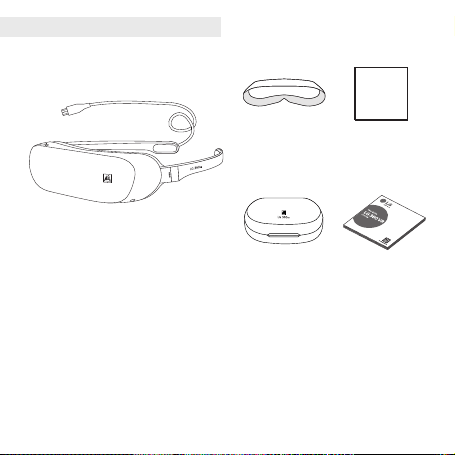
Composants du produit
• Si vous constatez qu’il manque des composants, communiquez avec le détaillant où vous
avez acheté le produit.
• Certains articles peuvent changer sans préavis, selon les circonstances.
• L’apparence et les caractéristiques du produit peuvent être modiées sans préavis an d’en
améliorer le rendement.
• Utilisez toujours des produits authentiques. L’utilisation ou la connexion de produits qui
ne sont pas authentiques pourrait endommager le produit et, par conséquent, annuler la
garantie de service.
LG 360 VR
Chiffon pour
oculaire
Guide de l’utilisateurÉtui de transport
Pare-lumière
7
Utilisation des touches
1. Touche de sélection
Appuyer sur cette touche : permet de sélectionner le contenu ou le menu mis en évidence
au centre de l'écran.
Tenir la touche enfoncée : permet d’accéder à l’écran des paramètres.
2. Touche de retour
Appuyer sur cette touche : permet de retourner à l'écran précédent ou d’annuler une fonction.
Tenir la touche enfoncée : permet de retourner à l’écran d’accueil du LG 360 VR.
Description du produit
Câble
Touche de retour
Touche de sélection
Oculaire
Prise pour les écouteurs
8
Réglage de la position des oculaires
Vous pouvez déplacer les oculaires vers la gauche ou vers la droite pour les ajuster.
Réglage de la mise au point des oculaires
Vous pouvez tourner les oculaires pour que la mise au point convienne mieux à votre vision.
Enlevez le pare-lumière pour effectuer l’ajustement des oculaires.
9
Enlevez le pare-lumière pour effectuer l’ajustement des oculaires.
Connexions
Branchez le câble USB du LG 360 VR dans la prise USB de votre téléphone.
• Établir la connexion pourrait prendre un certain temps. Avec le LG 360 VR connecté,
l’écran de votre téléphone est éteint. Vous pouvez utiliser votre téléphone comme pavé
tactile.
• Ce produit ne fonctionnera pas normalement une fois connecté à un G5 si le LG CAM Plus,
le Hi-Fi Plus with B&O PLAY (Hi-Fi Plus avec B&O PLAY) ou tout autre appareil ne faisant
pas partie des modules du G5 est connecté au téléphone.
• Lorsque le LG 360 VR est inactif pendant 15 minutes ou plus alors que le câble USB est
branché, votre LG 360 VR est automatiquement déconnecté an que la batterie ne se
décharge pas.
• Il sera impossible de brancher le LG 360 VR si la batterie de votre téléphone est faible ou
que ce dernier est trop chaud.
10
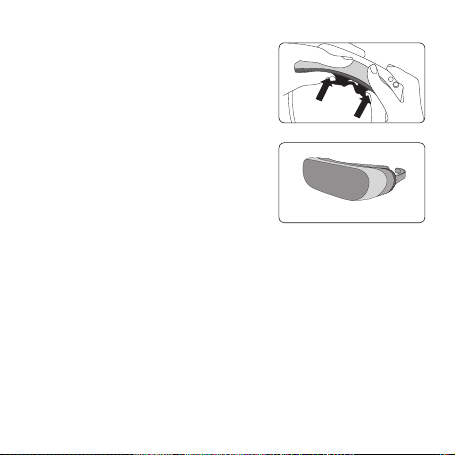
1 Fixation du bloqueur de lumière au LG 360 VR.
2 Ouvrez les temples du LG 360 VR, mettez le bloqueur
de lumière en place, puis appuyez sur les côtés pour
fixer les deux crochets latéraux.
3 Placez le bas du bloqueur de lumière sur le LG 360 VR.
Maintenez le bloqueur de lumière avec vos index, puis
appuyez dessus avec vos pouces pour le fixer. Appuyez
une nouvelle fois fermement.
Fixation du bloqueur de lumière
11
4 Placez le haut du bloqueur de lumière sur le
LG 360 VR. Maintenez le bloqueur de lumière avec vos
index, puis appuyez dessus avec vos pouces pour le
fixer. Appuyez une nouvelle fois fermement.
5 Le bloqueur de lumière est maintenant fixé. Si les
crochets ne sont pas bien attachés, appuyez à
nouveau dessus.
12
Sélectionner un contenu ou une option de menu
Placez le contenu ou l’option de menu dans le centre de l’écran pour le sélectionner, puis
appuyez sur la touche de sélection du LG 360 VR ou tapotez l’écran de votre téléphone.
Faire glisser l’écran
Si vous voulez sélectionner beaucoup de contenu, vous pouvez faire glisser l’écran de votre
téléphone vers le haut, le bas, la gauche ou la droite pour déplacer l’écran.
Réorientation de l’écran
Maintenez deux doigts sur l’écran pour le réorienter.
Le centre de l’écran se déplace an de
correspondre à la perspective en cours.
Réorienter l’écran
Vous pouvez réorienter l’écran en tenant deux doigts appuyés contre l’écran.
Retourner à l’écran précédent
Appuyez sur la touche de retour du LG 360 VR ou appuyez de manière prolongée sur l’écran
de votre téléphone pour retourner à l’écran précédent.
Retourner à l’écran d’accueil
Tenez la touche de retour enfoncée sur le LG 360 VR pour retourner à l’écran d’accueil.
Paramètres
Tenez la touche Sélection enfoncée sur le LG 360 VR pour accéder aux paramètres. Vous
pouvez ajuster l’orientation de l’écran, la luminosité et les paramètres de notication dans
l’écran pertinent.
Fonctions liées aux appels
Vous pouvez appuyer sur la touche pour prendre ou mettre n à un appel.
• Lorsque le téléphone sonne:
- Appuyez sur la touche Sélection pour prendre l’appel.
- Appuyez une fois sur le bouton Précédent pour mettre l’appel entrant en attente.
Appuyez deux fois sur le bouton Précédent pour rejeter l’appel.
• En cours de conversation:
- Appuyez sur la touche Sélection ou sur la touche de retour pour mettre n à l’appel.
Fonctionnalités et utilisation
13
Orage et foudre
• Évitez d’utiliser le produit lors d’orages violents accompagnés de foudre. La foudre peut
causer des blessures graves ou un incendie.
Eau
• Si le produit a été exposé à de l’eau, n’utilisez pas un ventilateur à air chaud, un
sèche-cheveux, un four à micro-ondes ou un poêle pour le sécher. Vous risqueriez de
provoquer une explosion ou de déformer le produit.
• Si le produit est mouillé, la couleur de l’étiquette à l’intérieur du produit va changer. Dans
un tel cas, vous ne pourrez pas recevoir un service gratuit si le produit fait défaut. Veuillez
procéder avec soin.
• N’utilisez pas le produit s’il est mouillé. Cela pourrait causer un incendie, une chaleur
excessive, une explosion ou une fuite.
Environnements d’utilisation
• Ne l’utilisez pas dans des lieux dangereux, comme sur une pente, une falaise ou au bord
de l’eau.
• Si le câble est pris dans la porte d’un métro, d’un train ou d’un véhicule, cette situation
sera très dangereuse. Veuillez procéder avec soin.
• Lorsque vous utilisez le produit dans un endroit public, soyez attentif aux autres
personnes autour de vous.
Démontage du produit
• Ne démontez pas le produit et protégez-le des chocs soudains. Cela présente un risque de
décharge électrique, de court-circuit ou d’incendie.
• N’utilisez pas le produit s’il est endommagé. Vous risqueriez de provoquer un incendie, de
vous brûler, de vous blesser ou de recevoir une décharge électrique.
Consignes de sécurité importantes

14
Lumière et son
• N’utilisez pas le produit trop longtemps. Cela pourrait provoquer un trouble visuel.
• N’utilisez pas le produit pendant une longue période à intensité sonore élevée. Vous
risqueriez d’endommager votre ouïe.
N’utiliser que des produits authentiques
• Utilisez toujours des produits authentiques. N’utilisez pas ce produit à des ns non
prévues.
Utilisation du produit pendant que vous vous déplacez
• N’utilisez pas le produit lorsque vous vous déplacez, car cela peut être très dangereux.
Cela pourrait aussi provoquer un accident de la circulation ou lié à la sécurité.
Température et taux d’humidité élevés
• Ne laissez pas le produit exposé à la lumière directe du soleil, sur une couverture, sur une
couverture électrique ou sur un tapis pendant de longues périodes, ou dans un endroit
chaud et humide, comme dans un sauna. Vous risqueriez de déformer le produit, de le
rendre défectueux ou de provoquer une explosion.
Produits chimiques
• N’utilisez pas d’alcool, de benzène, de diluants ou de détergents pour nettoyer le produit.
Cela pourrait provoquer un incendie.
• Essuyez simplement le produit avec un chiffon doux.
Enfants et animaux
• Gardez le produit hors de la portée des jeunes enfants et des animaux de compagnie. Ne
placez pas le produit dans votre bouche et ne le soumettez pas à des chocs violents. Cela
présente aussi un risque de décharge électrique, d’explosion ou de suffocation.

15
Incendie
• N’introduisez aucun matériau conducteur (pièce de métal, mine de crayon, etc.) dans les
connecteurs externes.
• Ne couvrez ni n’enveloppez le produit dans une couverture pendant son utilisation.
• Ne jetez pas le produit avec les ordures ménagères. Cela pourrait provoquer un incendie
ou causer des dommages à l’environnement.
Dommages à la peau
• Si vous utilisez le produit pendant une longue période, la température de votre téléphone
lorsqu’il y est branché pourrait augmenter. Évitez de toucher le produit lorsqu’il devient
chaud, car cela pourrait causer une brûlure à basse température.
Magnétisme
• Gardez le produit loin des objets magnétiques, comme les cartes de crédit, les cartes de
téléphone, les livrets bancaires et les laissez-passer. Le magnétisme peut endommager
le produit.
Peinture
• Si vous peinturez le produit, cela pourrait endommager l’extérieur ou causer un
dysfonctionnement.
• Si la peinture extérieure se décolle ou si vous connaissez une réaction allergique à un
matériel du produit, cessez de l’utiliser et consultez un médecin.

16
Connexion à d’autres équipements
• Ne branchez pas le produit à d’autres équipements d’une manière qui n’est pas indiquée
dans le guide détaillé de l’utilisateur.
• Assurez-vous que le câble ou le cordon d’alimentation ne s’emmêle pas à votre bras ou un
objet quelconque.
• Vous devez vous assurer que votre téléphone est bien raccordé au produit pendant son
utilisation. Sinon, votre téléphone pourrait tomber et vous ne pourrez alors pas utiliser
le LG 360 VR.
Dommages au produit
• Pour éviter d’endommager le produit, assurez-vous de ne pas le laisser tomber sur une
surface dure et ne le soumettez pas à des chocs violents.
• L’écran et certaines fonctions du produit pourraient devenir endommagés ou leur
apparence modiée ou déformée si le produit est plié ou écrasé et n’est pas réparé sans
délai.
Température
• Utilisez et rangez votre téléphone à une température entre 0 °C et 40 °C, si possible.
L’exposition de votre téléphone à des températures extrêmement faibles ou élevées peut
causer des dommages, un mauvais fonctionnement ou même une explosion.
17
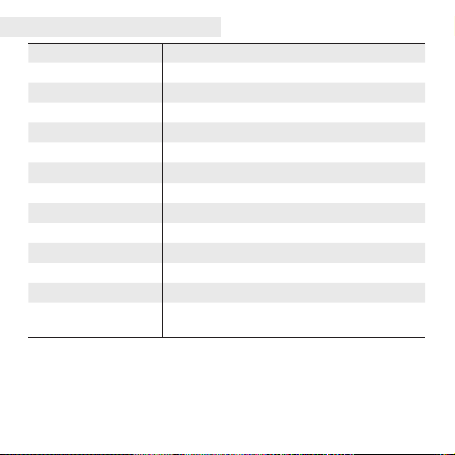
Facteur de forme Afchage de type lunettes
Taille
164,1 x 185,6 x 45,9 mm (branche ouverte)
Poids
134,3 g (sans le pare-lumière, 113 g)
Angle de vue
80°
Afchage ACL de 4,8 cm, 960 x 720 po/s (639 ppp)
Entrée
2 touches (retour, sélection)
Audio
3,5 Φ, prise de casque d’écoute tripolaire
Capteur 6 axes (accélération, gyroscope), capteur de proximité
Tension de service 5 V USB OTG à partir du téléphone
Température de service -15 °C à + 55 °C
Température en rangement
-40 °C à + 85 °C
Taux d’humidité en service
80 %
Consommation de courant 280 mA ou moins (pour 5,0 V)
Autonomie de la batterie
2 h ou moins
(pour le mode Avion+connexion LG-R100 et 2 800 mAh)
Fonctions et caractéristiques
18
Garantie Limitée
1. CE QUI EST COUVERT PAR CETTE GARANTIE:
LG garantit que l’unité et les accessoires inclus sont exempts de toute défectuosité de matériel et de fabrication,
conformément aux modalités suivantes:
(1) Cette garantie limitée est valable pendant UN (1) an à partir de la date d’achat de ce produit par l’utilisateur
initial.
(2) Cette garantie limitée s’adresse à l’utilisateur initial du produit et ne peut être cédée ou transmise aux
acheteurs/utilisateurs subséquents.
(3) Cette garantie n’est valable que pour l’utilisateur initial du produit pendant la période de garantie, pour autant
que l’appareil soit utilisé au Canada.
(4) Sur demande de LG, le consommateur doit fournir une preuve de la date d’achat.
(5) Pendant la période de garantie applicable, LG réparera ou remplacera, à sa seule discrétion, sans frais pour
l’utilisateur initial, toutes pièces du téléphone et tous accessoires défectueux.
(6) LG peut utiliser des pièces ou composantes remises à neuf ou neuves pour réparer le produit, ou décider de
remplacer le produit par un produit remis à neuf ou neuf.
2. CE QUI N’EST PAS COUVERT PAR CETTE GARANTIE:
(1) Les défectuosités ou les dommages résultant de l’utilisation anormale ou inhabituelle du produit.
(2) Les défectuosités ou les dommages provenant d’un usage anormal, de conditions anormales, d’un
entreposage inapproprié, d’une exposition à l’humidité ou d’un contact avec l’eau, de modications non
autorisées, de connexions non autorisées, de réparations non autorisées, d’un mauvais usage, de négligence,
d’abus, d’un accident, d’altérations, d’une installation inappropriée ou de tout autre acte dont la faute ne peut
être attribuée à LG, y compris les dommages causés par un contact avec de la nourriture ou des liquides.
(3) Les bris ou dommages à l’antenne, à moins qu’ils ne soient directement causés par des défectuosités de
matériel ou de fabrication.
(4) Les défectuosités ou anomalies présumées si le Service à la clientèle chez LG n’a pas été avisé par l’utilisateur
initial durant la période de la garantie limitée en vigueur.
(5) Les produits dont le numéro de série aurait été retiré ou rendu illisible.
(6) Les dommages résultant de l’usage d’accessoires non approuvés par LG.
(7) Toutes les surfaces en plastique et toutes les autres pièces extérieures exposées qui sont griffées ou
endommagées suite à un usage normal.
(8) Les produits réparés par du personnel ou une entreprise non autorisés.

19
Remarques:
(1) Cette garantie limitée remplace toutes les autres garanties, expresses et implicites au sens le plus large
autorisé par la loi, des actes législatifs ou autres, y compris, mais sans s’y limiter, toute garantie implicite de
qualité marchande et d’adaptation à un usage particulier.
(2) Le transporteur est responsable des dommages que peuvent subir les marchandises en cours d’expédition.
3. EXCLUSION DE RESPONSABILITÉ:
Aucune autre garantie expresse n’est offerte avec ce produit. LA DURÉE DE TOUTE GARANTIE IMPLICITE, Y
COMPRIS LA GARANTIE IMPLICITE DE VENDABILITÉ, SE LIMITE À LA DURÉE DE LA PRÉSENTE GARANTIE
EXPRESSE. LG ELECTRONICS CANADA, INC. NE SERA PAS TENU RESPONSABLE DE LA PERTE D’USAGE
DE CE PRODUIT, DE TOUS INCONVÉNIENTS, PERTES OU AUTRES DOMMAGES, DIRECTS OU CONSÉCUTIFS,
SURVENANT DE L’UTILISATION OU DE L’INAPTITUDE À UTILISER CE PRODUIT, AINSI QUE DE TOUTE AUTRE
VIOLATION D’UNE GARANTIE EXPRESSE OU IMPLICITE QUELLE QU’ELLE SOIT, Y COMPRIS LA GARANTIE
IMPLICITE DE VENDABILITÉ APPLICABLE À CE PRODUIT.
4. POUR OBTENIR UN SERVICE SOUS GARANTIE:
Pour obtenir un service sous garantie, composez le numéro de téléphone suivant à partir de n’importe quel
endroit au Canada:
LG Electronics Canada, Inc.
Tél. 1-888-LG-Canada (1-888-542-2623)
http://www.lg.com/ca_fr (voir les liens à « Assistance > Assistance téléphone portable »)


www.lg.com
Any modications or changes to this manual due to typographical errors or inaccuracies
of stated information shall only be made by LG Electronics Inc.
Printed in XXXXX

