Drawn Approved
Signature
Jinkyung Kim Jongok.kim
MMM/DD/YYYY
Feb/14/2014 Feb/14/2014
50PB56-ZA LG MFL68044904
EK PB56 (1402-REV00)
:LGEAK :LGEKR :LGERS
:LGEAZ :LGEMA :LGESY
:LGEEG :LGEMX :LGETH
:LGEIL :LGEND :LGEVN
:LGEIN :LGERA :LGEWR
Printed in Vietnam
N
O
T
E
“This part contains Eco-hazardous substances (Pb, Cd, Hg, Cr6+, PBB, PBDE, etc.) within LG standard level,
Details should be followed Eco-SCM management standard[LG(56)-A-2524].
Especially, Part should be followed and controlled the following specification.
(1) Eco-hazardous substances test report should be submitted when Part certification test and First Mass Production.
Printed in Russia
Printed in China
Printed in China
Printed in Poland
Signature Change ContentsECO NumberRev. Number MMM/DD/YYYY
3. Origin Notification
4. Changes
Printed in MexicoPrinted in Egypt
2. Printing colors
ENG-UK (1)
Printed in Thailand
: • Cover
Printed in Mexico
Printed in Poland
Printed in Kazakhstan
Printed in Brazil
Uncoated, wood-free paper 60 g/
Uncoated, wood-free paper 60 g/
32
: • Cover
: • Inside
Printed in India
Printed in Indonesia
Printed in Korea
: • Inside
3. Stock (Paper)
1 Color (Black)
1 Color (Black)
(2) Especially, Don’t use or contain lead(Pb) and cadmium(Cd) in ink.
Saddle stitching:4. Bindery
:5. Language
:6. Number of pages
2. Printing Specification
:2nd, 3rd Suffix :Product name
:1. Trim size (Format)
Checked
:Brand name
148 mm x 210 mm (A5)
:Part number
1. Model Description
Printing specification
:Model name
(Revision number)
Feb/14/2014
Mira.woo
1
10
9
8
7
6
5
4
3
2

Front Back
(Eng) Cover
P/No. 2 … … … … 31 (Eng)
:Total pages 32 pages
:Part number MFL68044904
Pagination sheet

OWNER’S MANUAL
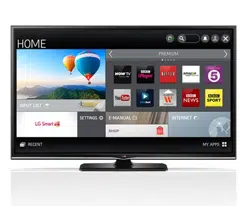
PLASMA TV
Please read this manual carefully before operating
your set and retain it for future reference.
www.lg.com
P/NO : MFL68044904 (1402-REV00)
Printed in Korea
*MFL68044904*
PB56**

2
ENGLISH
LICENSES/OPENSOURCESOFTWARENOTICE
LICENSES
Supportedlicensesmaydifferbymodel.Formoreinformationaboutlicenses,visitwww.lg.com.
ManufacturedunderlicensefromDolbyLaboratories.“Dolby”andthedouble-Dsymbol
aretrademarksofDolbyLaboratories.
ThetermsHDMIandHDMIHigh-De�nitionMultimediaInterface,andtheHDMIlogoare
trademarksorregisteredtrademarksofHDMILicensingLLCintheUnitedStatesand
othercountries.
ABOUTDIVXVIDEO:DivX
®
isadigitalvideoformatcreatedbyDivX,LLC,asubsidiaryof
RoviCorporation.Thisisanof�cialDivXCerti�ed
®
devicethathaspassedrigoroustesting
toverifythatitplaysDivXvideo.Visitdivx.comformoreinformationandsoftwaretoolsto
convertyour�lesintoDivXvideos.
ABOUTDIVXVIDEO-ON-DEMAND:ThisDivXCerti�ed
®
devicemustberegisteredin
ordertoplaypurchasedDivXVideo-on-Demand(VOD)movies.
Toobtainyourregistrationcode,locatetheDivXVODsectioninyourdevicesetupmenu.
Gotovod.divx.comformoreinformationonhowtocompleteyourregistration.
“DivXCerti�ed
®
toplayDivX
®
videouptoHD1080p,includingpremiumcontent.”
“DivX
®
,DivXCerti�ed
®
andassociatedlogosaretrademarksofRoviCorporationorits
subsidiariesandareusedunderlicense.”
“CoveredbyoneormoreofthefollowingU.S.patents:
7,295,673;7,460,668;7,515,710;7,519,274”
OPENSOURCESOFTWARENOTICE
ToobtainthesourcecodeunderGPL,LGPL,MPLandotheropensourcelicenses,thatiscontainedinthisproduct,
pleasevisithttp://opensource.lge.com.
Inadditiontothesourcecode,allreferredlicenseterms,warrantydisclaimersandcopyrightnoticesareavailablefor
download.
LGElectronicswillalsoprovideopensourcecodetoyouonCD-ROMforachargecoveringthecostofperforming
suchdistribution(suchasthecostofmedia,shippingandhandling)uponemailrequestto[email protected].
Thisofferisvalidforthree(3)yearsfromthedateonwhichyoupurchasedtheproduct.
3
ENGLISH
SAFETYINSTRUCTIONS
SAFETYINSTRUCTIONS
Pleasereadthesesafetyprecautionscarefullybeforeusingtheproduct.
WARNING
y
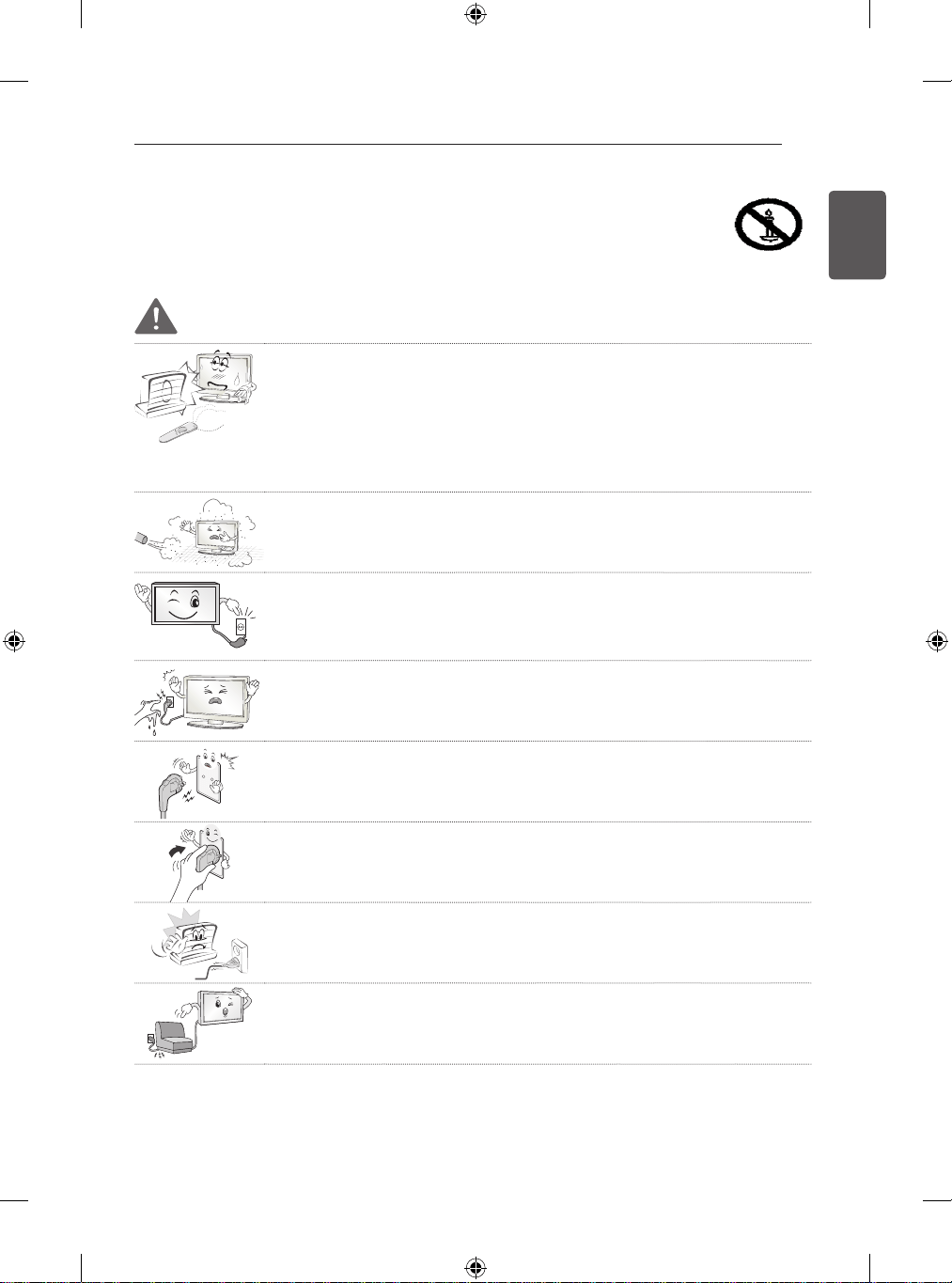
DonotplacetheTVand/orremotecontrolinthefollowingenvironments:
y
- Alocationexposedtodirectsunlight
y
- Anareawithhighhumiditysuchasabathroom
y
- Nearanyheatsourcesuchasstovesandotherdevicesthatproduceheat
y
- Nearkitchencountersorhumidifierswheretheycaneasilybeexposedtosteam
oroil
y
- Anareaexposedtorainorwind
y
- Nearcontainersofwatersuchasvases
Otherwise,thismayresultinfire,electricshock,malfunctionorproductdeformation.
y
Donotplacetheproductwhereitmightbeexposedtodust.
Thismaycauseafirehazard.
y
MainsPlugistheTVconnecting/disconnectingdevicetoACmainselectricsupply.
ThisplugmustremainreadilyattachedandoperablewhenTVisinuse.
y
Donottouchthepowerplugwithwethands.Additionally,ifthecordpiniswetor
coveredwithdust,drythepowerplugcompletelyorwipedustoff.
Youmaybeelectrocutedduetoexcessmoisture.
y
MakesuretoconnectMainscabletocompliantACmainssocketwithGrounded
earthpin.(Exceptfordeviceswhicharenotgroundedonearth.)
Otherwisepossibilityyoumaybeelectrocutedorinjured.
y
Insertpowercableplugcompletelyintowallsocketotherwiseifnotsecured
completelyintosocket,fireignitionmaybreakout.
y
Ensurethepowercorddoesnotcomeintocontactwithhotobjectssuchasaheater.
Thismaycauseafireoranelectricshockhazard.
y
Donotplaceaheavyobject,ortheproductitself,onpowercables.
Otherwise,thismayresultinfireorelectricshock.
4
ENGLISH
SAFETYINSTRUCTIONS
y
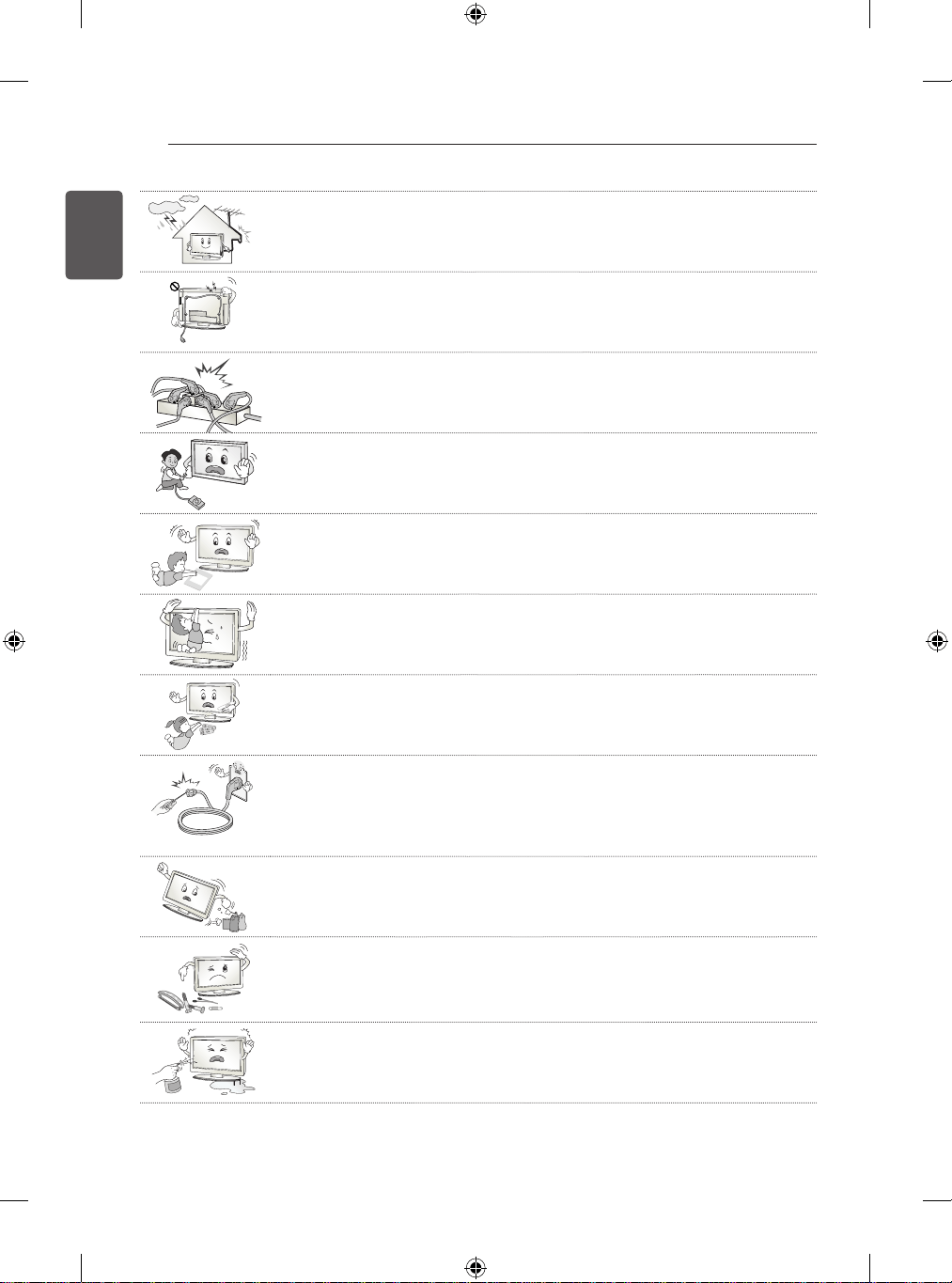
Bendantennacablebetweeninsideandoutsidebuildingtopreventrainfromflowing
in.
ThismaycausewaterdamagedinsidetheProductandcouldgiveanelectricshock.
y
WhenmountingTVontowallmakesuretoneatlyinstallandisolatecablingfromrear
ofTVastonotcreatepossibilityofelectricshock/firehazard.
y
Donotplugtoomanyelectricaldevicesintoasinglemultipleelectricaloutlet.
Otherwise,thismayresultinfireduetoover-heating.
y
Donotdroptheproductorletitfalloverwhenconnectingexternaldevices.
Otherwise,thismayresultininjuryordamagetotheproduct.
De
s
i
cc
a
n
t
y
Keeptheanti-moisturepackingmaterialorvinylpackingoutofthereachofchildren.
Anti-moisturematerialisharmfulifswallowed.Ifswallowedbymistake,forcethe
patienttovomitandvisitthenearesthospital.Additionally,vinylpackingcancause
suffocation.Keepitoutofthereachofchildren.
y
DonotletyourchildrenclimborclingontotheTV.
Otherwise,theTVmayfallover,whichmaycauseseriousinjury.
y
Disposeofusedbatteriescarefullytoensurethatasmallchilddoesnotconsume
them.
PleaseseekDoctor-MedicalAttentionimmediatelyifchildconsumesbatteries.
y
Donotinsertanymetalobjects/conductors(likeametalchopstick/cutlery/
screwdriver)betweenpowercableplugandinputWallSocketwhileitisconnected
totheinputterminalonthewall.Additionally,donottouchthepowercablerightafter
pluggingintothewallinputterminal.
Youmaybeelectrocuted.
(Dependingonmodel)
y
Donotputorstoreinflammablesubstancesneartheproduct.
Thereisadangerofcombustion/explosionorfireduetocarelesshandlingofthe
inflammablesubstances.
y
Donotdropmetallicobjectssuchascoins,hairpins,chopsticksorwireintothe
product,orinflammableobjectssuchaspaperandmatches.Childrenmustpay
particularattention.
Electricalshock,fireorinjurycanoccur.Ifaforeignobjectisdroppedintothe
product,unplugthepowercordandcontacttheservicecentre.
y
Donotspraywaterontheproductorscrubwithaninflammablesubstance(thinner
orbenzene).Fireorelectricshockaccidentcanoccur.
5
ENGLISH
SAFETYINSTRUCTIONS
y
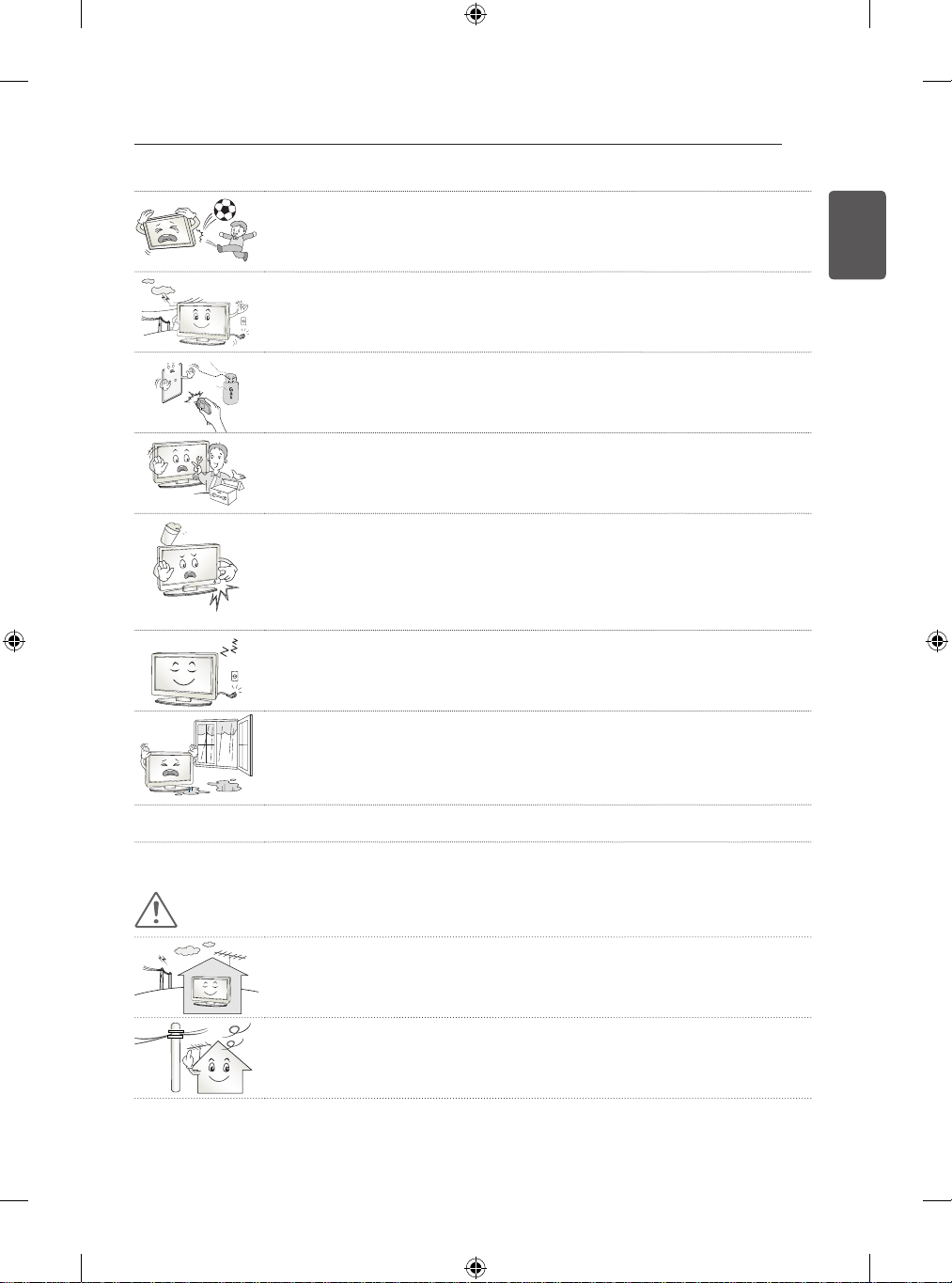
Donotallowanyimpact,shockoranyobjectstofallintotheunit,anddonotdrop
anythingontothescreen.
Youmaybeinjuredortheproductcanbedamaged.
y
Nevertouchthisproductorantennaduringathunderorlightingstorm.
Youmaybeelectrocuted.
y
Nevertouchthewalloutletwhenthereisleakageofgas,openthewindowsand
ventilate.
Itmaycauseafireoraburnbyaspark.
y
Donotdisassemble,repairormodifytheproductatyourowndiscretion.
Fireorelectricshockaccidentcanoccur.
Contacttheservicecentreforcheck,calibrationorrepair.
y
Ifanyofthefollowingoccur,unplugtheproductimmediatelyandcontactyourlocal
servicecentre.
y
- Theproducthasbeenimpactedbyshock
y
- Theproducthasbeendamaged
y
- Foreignobjectshaveenteredtheproduct
y
- Theproductproducedsmokeorastrangesmell
Thismayresultinfireorelectricshock.
y
UnplugtheTVfromACmainswallsocketifyoudonotintendtousetheTVfora
longperiodoftime.
Accumulateddustcancausefirehazardandinsulationdeteriorationcancause
electricleakage/shock/fire.
y
Apparatusshallnotbeexposedtodrippingorsplashingandnoobjectsfilledwith
liquids,suchasvases,shallbeplacedontheapparatus.
y
Donotinstallthisproductonawallifitcouldbeexposedtooiloroilmist.
Thismaydamagetheproductandcauseittofall.
CAUTION
y
Installtheproductwherenoradiowaveoccurs.
y
Thereshouldbeenoughdistancebetweenanoutsideantennaandpowerlinesto
keeptheformerfromtouchingthelatterevenwhentheantennafalls.
Thismaycauseanelectricshock.
6
ENGLISH
SAFETYINSTRUCTIONS
y
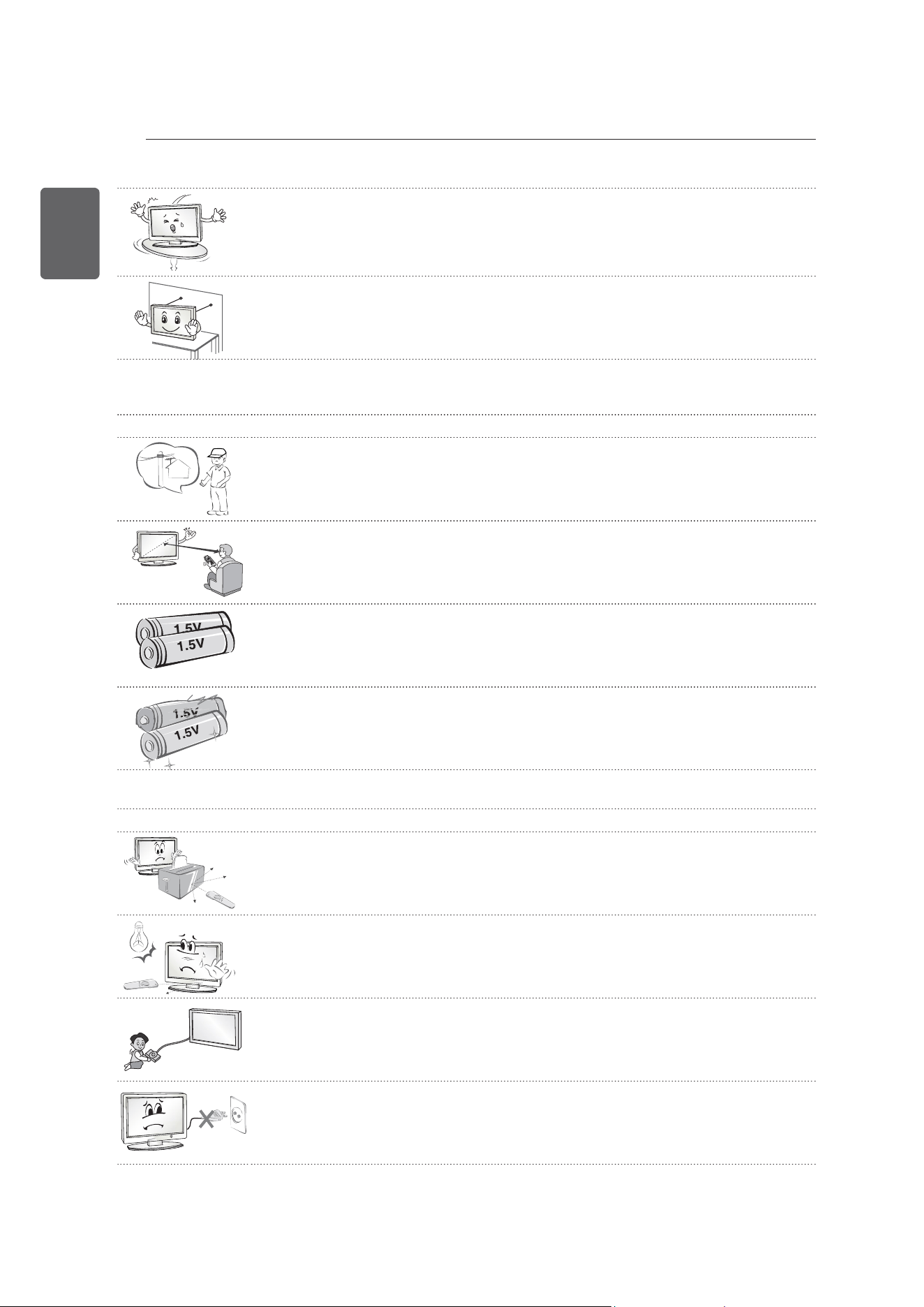
Donotinstalltheproductonplacessuchasunstableshelvesorinclinedsurfaces.
Alsoavoidplaceswherethereisvibrationorwheretheproductcannotbefully
supported.
Otherwise,theproductmayfallorflipover,whichmaycauseinjuryordamagetothe
product.
y
IfyouinstalltheTVonastand,youneedtotakeactionstopreventtheproductfrom
overturning.Otherwise,theproductmayfallover,whichmaycauseinjury.
y
Ifyouintendtomounttheproducttoawall,attachVESAstandardmountinginterface(optionalparts)to
thebackoftheproduct.Whenyouinstallthesettousethewallmountingbracket(optionalparts),fixit
carefullysoasnottodrop.
y
Onlyusetheattachments/accessoriesspecifiedbythemanufacturer.
y
Wheninstallingtheantenna,consultwithaqualifiedservicetechnician.Ifnot
installedbyaqualifiedtechnician,thismaycreateafirehazardoranelectricshock
hazard.
y
Werecommendthatyoumaintainadistanceofatleast2to7timesthediagonal
screensizewhenwatchingTV.
IfyouwatchTVforalongperiodoftime,thismaycauseblurredvision.
y
Onlyusethespecifiedtypeofbattery.
Thiscouldcausedamagetotheremotecontrol.
y
Donotmixnewbatterieswitholdbatteries.
Thismaycausethebatteriestooverheatandleak.
y
Batteriesshouldnotbeexposedtoexcessiveheat.Forexample,keepawayfromdirectsunlight,open
fireplaceandelectricheaters.
y
Donotplacenon-rechargeablebatteriesinchargingdevice.
y
Makesuretherearenoobjectsbetweentheremotecontrolanditssensor.
y
SignalfromRemoteControlcanbeinterruptedduetoexternal/internallightingeg
Sunlight,fluorescentlighting.
Ifthisoccursturnofflightingordarkenviewingarea.
y
Whenconnectingexternaldevicessuchasvideogameconsoles,makesurethe
connectingcablesarelongenough.
Otherwise,theproductmayfallover,whichmaycauseinjuryordamagetheproduct.
y
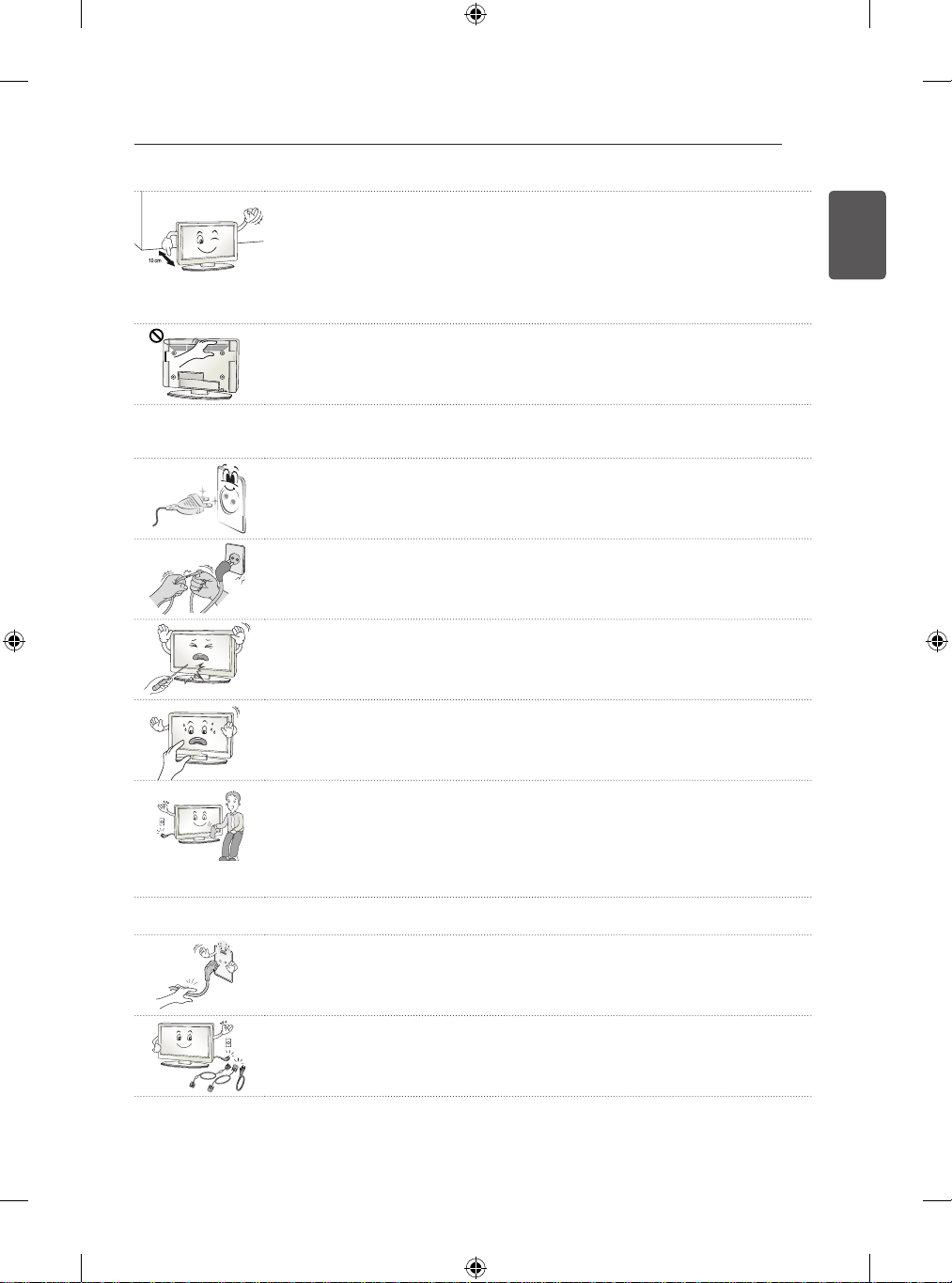
DonotturntheproductOn/Offbyplugging-inorunpluggingthepowerplugtothe
walloutlet.(Donotusethepowerplugforswitch.)
Itmaycausemechanicalfailureorcouldgiveanelectricshock.
7
ENGLISH
SAFETYINSTRUCTIONS
y
Pleasefollowtheinstallationinstructionsbelowtopreventtheproductfrom
overheating.
y
- Thedistancebetweentheproductandthewallshouldbemorethan10cm.
y
- Donotinstalltheproductinaplacewithnoventilation(e.g.,onabookshelforina
cupboard).
y
- Donotinstalltheproductonacarpetorcushion.
y
- Makesuretheairventisnotblockedbyatableclothorcurtain.
Otherwise,thismayresultinfire.
y
TakecarenottotouchtheventilationopeningswhenwatchingtheTVforlong
periodsastheventilationopeningsmaybecomehot.Thisdoesnotaffectthe
operationorperformanceoftheproduct.
y
Periodicallyexaminethecordofyourappliance,andifitsappearanceindicatesdamageordeterioration,
unplugit,discontinueuseoftheappliance,andhavethecordreplacedwithanexactreplacementpartby
anauthorizedservicer.
y
Preventdustcollectingonthepowerplugpinsoroutlet.
Thismaycauseafirehazard.
y
Protectthepowercordfromphysicalormechanicalabuse,suchasbeingtwisted,
kinked,pinched,closedinadoor,orwalkedupon.Payparticularattentiontoplugs,
walloutlets,andthepointwherethecordexitstheappliance.
y
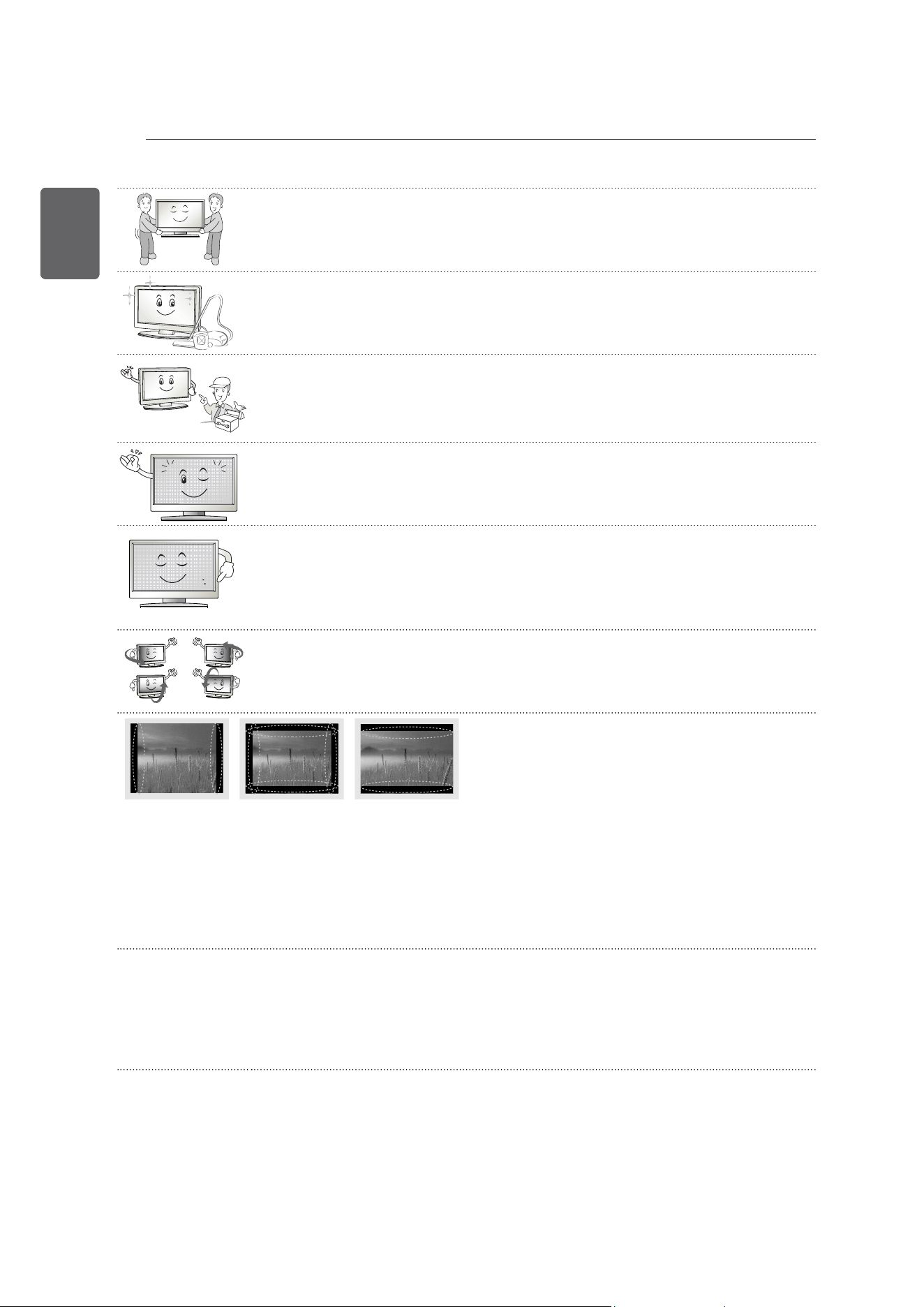
Donotpressstronglyuponthepanelwithahandorsharpobjectsuchasnail,pencil
orpen,ormakeascratchonit,asitmaycausedamagetoscreen.
y
Avoidtouchingthescreenorholdingyourfinger(s)againstitforlongperiodsoftime.
Doingsomayproducesometemporaryorpermanentdistortion/damagetoscreen.
y
Whencleaningtheproductanditscomponents,unplugthepowerfirstandwipeit
withasoftcloth.Applyingexcessiveforcemaycausescratchesordiscolouration.
Donotspraywithwaterorwipewithawetcloth.Neveruseglasscleaner,caror
industrialshiner,abrasivesorwax,benzene,alcoholetc.,whichcandamagethe
productanditspanel.
Otherwise,thismayresultinfire,electricshockorproductdamage(deformation,
corrosionorbreakage).
y
AslongasthisunitisconnectedtotheACwalloutlet,itisnotdisconnectedfromtheACpowersource
evenifyouturnoffthisunitbySWITCH.
y
Whenunpluggingthecable,grabtheplugandunplugit,bypullingattheplug.Don’t
pullatthecordtounplugthepowercordfromthepowerboard,asthiscouldbe
hazardous.
y
Whenmovingtheproduct,makesureyouturnthepowerofffirst.Then,unplugthe
powercables,antennacablesandallconnectingcables.
TheTVsetorpowercordmaybedamaged,whichmaycreateafirehazardorcause
electricshock.
8
ENGLISH
SAFETYINSTRUCTIONS
y
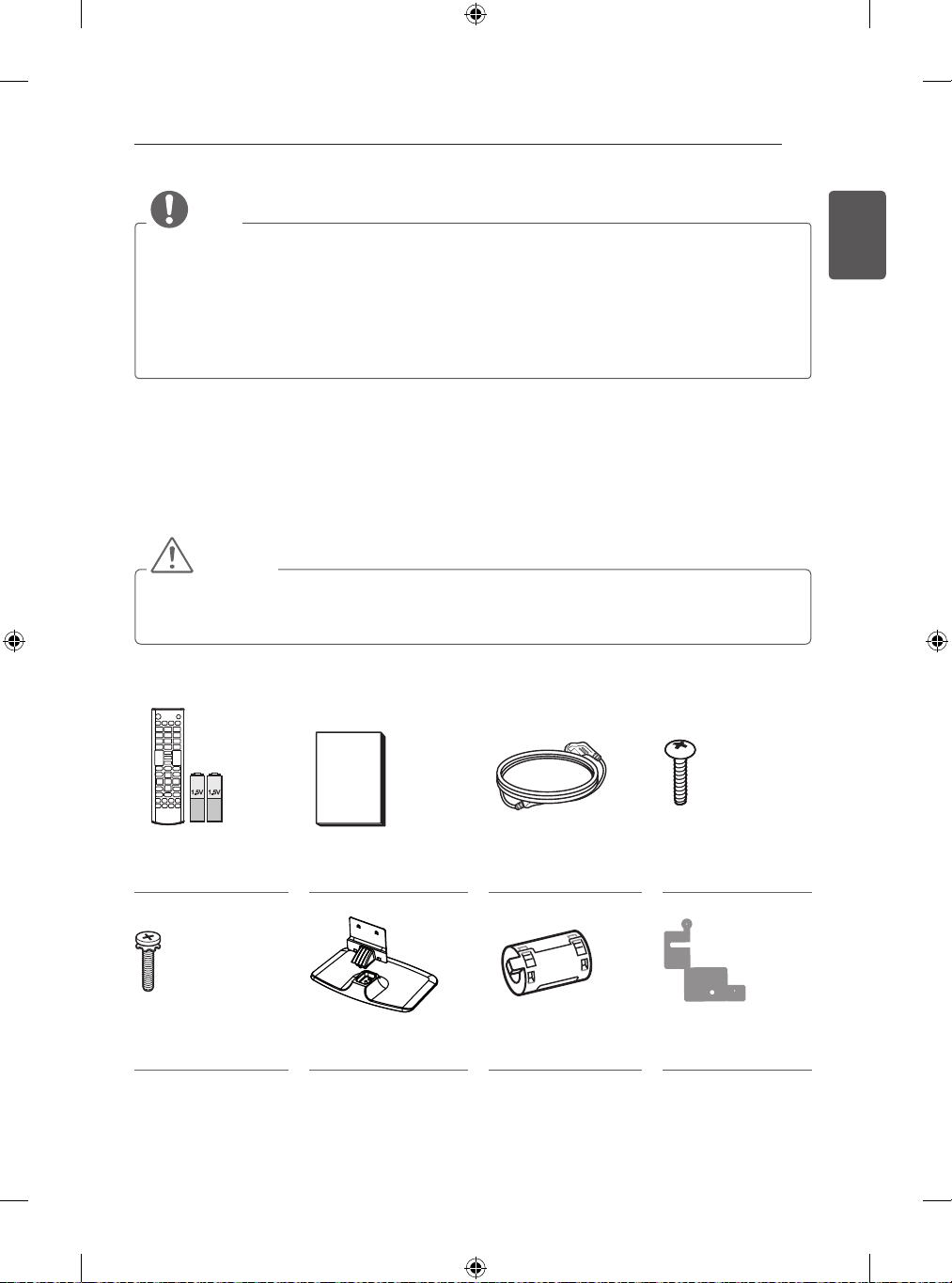
Whenmovingorunpackingtheproduct,workinpairsbecausetheproductisheavy.
Otherwise,thismayresultininjury.
y
Contacttheservicecentreonceayeartocleantheinternalpartsoftheproduct.
Accumulateddustcancausemechanicalfailure.
y
Referallservicingtoqualifiedservicepersonnel.Servicingisrequiredwhenthe
apparatushasbeendamagedinanyway,suchaspowersupplycordorplugis
damaged,liquidhasbeenspilledorobjectshavefallenintotheapparatus,the
apparatushasbeenexposedtorainormoisture,doesnotoperatenormally,orhas
beendropped.
y
Iftheproductfeelscoldtothetouch,theremaybeasmall“flicker”whenitisturned
on.Thisisnormal,thereisnothingwrongwithproduct.
y
Thepanelisahightechnologydisplayproductwithresolutionoftwomilliontosix
millionpixels.Youmayseetinyblackdotsand/orbrightlycoloureddots(red,blue
orgreen)atasizeof1ppmonthepanel.Thisdoesnotindicateamalfunctionand
doesnotaffecttheperformanceandreliabilityoftheproduct.
Thisphenomenonalsooccursinthird-partyproductsandisnotsubjecttoexchange
orrefund.
y
Youmayfinddifferentbrightnessandcolourofthepaneldependingonyourviewing
position(left/right/top/down).
Thisphenomenonoccursduetothecharacteristicofthepanel.Itisnotrelatedwith
theproductperformance,anditisnotmalfunction.
y
Displayingastillimage(e.g.,broadcastingchannellogo,on-screenmenu,scenefromavideogame)for
aprolongedtimemaycausedamagetothescreen,resultinginretentionoftheimage,whichisknownas
imagesticking.Thewarrantydoesnotcovertheproductforimagesticking.
Avoiddisplayingafixedimageonyourtelevision’sscreenforaprolongedperiod(2ormorehoursforLCD,
1ormorehoursforPlasma).
Also,ifyouwatchtheTVataratioof4:3foralongtime,imagestickingmayoccuronthebordersofthe
panel.
Thisphenomenonalsooccursinthird-partyproductsandisnotsubjecttoexchangeorrefund.
y
GeneratedSound
“Cracking”noise:AcrackingnoisethatoccurswhenwatchingorturningofftheTVisgeneratedbyplastic
thermalcontractionduetotempera-tureandhumidity.Thisnoiseiscommonforproductswherethermal
deformationisrequired.Electricalcircuithumming/panelbuzzing:Alowlevelnoiseisgeneratedfrom
ahigh-speedswitchingcircuit,whichsuppliesalargeamountofcurrenttooperateaproduct.Itvaries
dependingontheproduct.
Thisgeneratedsounddoesnotaffecttheperformanceandreliabilityoftheproduct.
9
ENGLISH
ASSEMBLINGANDPREPARING
NOTE
ImageshownmaydifferfromyourTV.
YourTV’sOSD(OnScreenDisplay)maydifferslightlyfromthatshowninthismanual.
Theavailablemenusandoptionsmaydifferfromtheinputsourceorproductmodelthatyouareusing.
NewfeaturesmaybeaddedtothisTVinthefuture.
TheTVcanbeplacedinstandbymodeinordertoreducethepowerconsumption.AndtheTVshouldbe
turnedoffifitwillnotbewatchedforsometime,asthiswillreduceenergyconsumption.
Theenergyconsumedduringusecanbesignificantlyreducedifthelevelofbrightnessofthepictureis
reduced,andthiswillreducetheoverallrunningcost.
ASSEMBLINGANDPREPARING
Unpacking
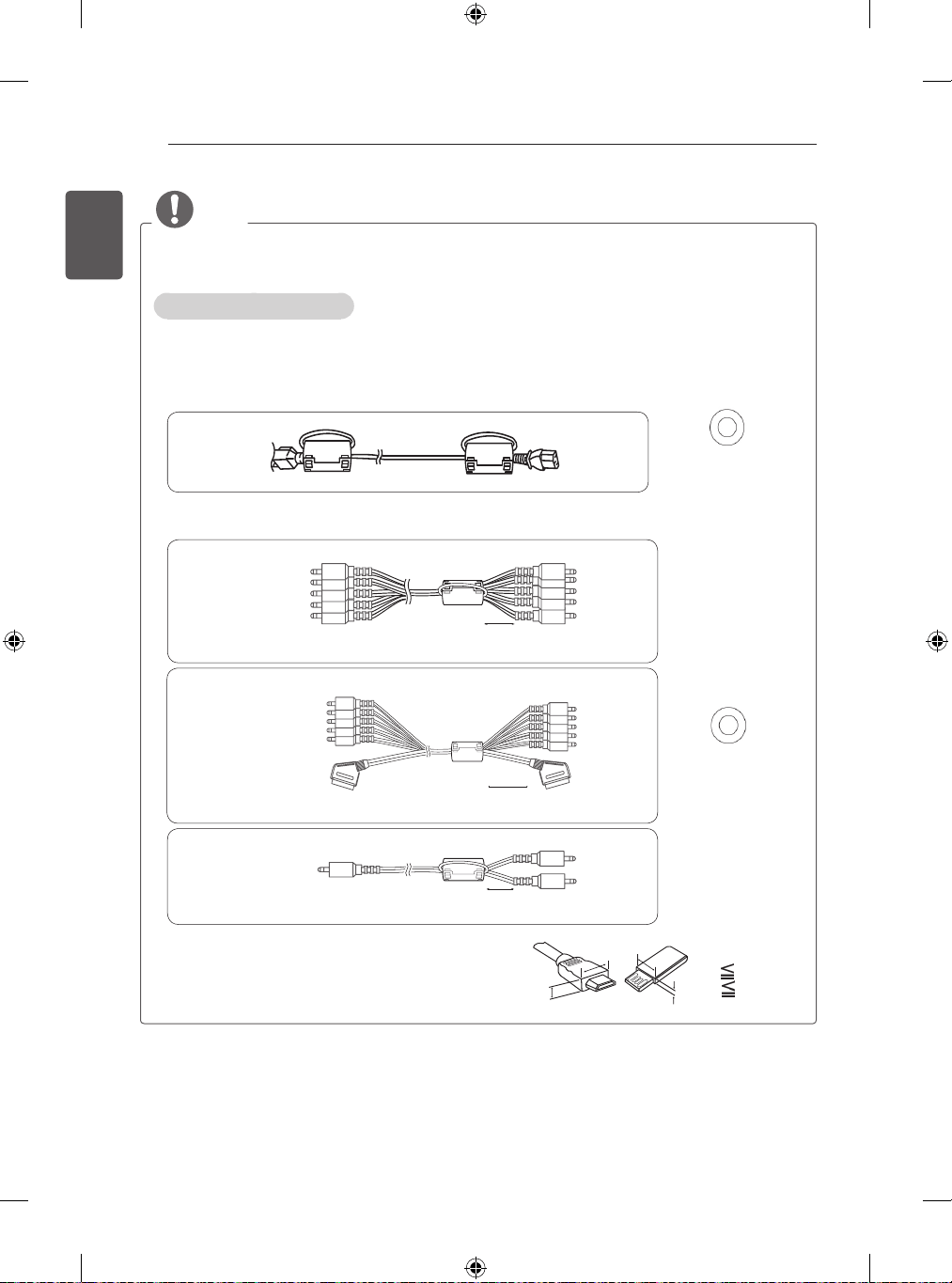
Checkyourproductboxforthefollowingitems.Ifthereareanymissingaccessories,contactthelocaldealerwhere
youpurchasedyourproduct.Theillustrationsinthismanualmaydifferfromtheactualproductanditem.
CAUTION
Donotuseanyunapproveditemstoensurethesafetyandproductlifespan.
Anydamageorinjuriescausedbyusingunapproveditemsarenotcoveredbythewarranty.
Somemodelshaveathinfilmattachedontothescreenandthismustnotberemoved.
RemoteControl,
Batteries(AAA)
Owner’smanual PowerCord
StandScrews
3EA,M5xL25
StandScrews
4EA,M4xL14
StandBody/Stand
Base
Ferritecore
(Dependingonmodel)
StandSticker
(Dependingonmodel)
10
ENGLISH
ASSEMBLINGANDPREPARING
NOTE
1Usetheferritecoretoreducetheelectromagneticinterferenceinthepowercable.
Windthepowercableontheferritecoreonce.
2Usetheferritecoretoreducetheelectromagneticinterferenceinthecable.
PlacetheferritecoreclosetotheTV.
-Iftherearetwoferritecores,followasshowninFigures1.
-Iftherearethreeferritecores,followasshowninFigures1and2.
y
Foranoptimalconnection,HDMIcablesandUSBdevices
shouldhavebezelslessthan10mmthickand18mm
width.UseanextensioncablethatsupportsUSB2.0ifthe
USBcableorUSBmemorystickdoesnotfitintoyourTV’s
USBport.
A
B
B
A
*A 10mm
*B 18mm
y
Theitemssuppliedwithyourproductmayvarydependingonthemodel.
y
Productspecificationsorcontentsofthismanualmaybechangedwithoutpriornoticeduetoupgradeof
productfunctions.
Howtousetheferritecore
[toanExternaldevice]
[Figure2-1]
[totheTV]
10mm(+/-5mm)
Windthe
componentY,Pb,Pr,L,Rcable
ontheferritecoreonce.
(Black)
[CrossSectionof
FerriteCore]
[toanExternaldevice]
[Figure2-2]
[totheTV]
10mm(+/-5mm)
Gatherandbindthe
componentY,Pb,Pr,L,R
andscartcablewiththeferritecore.
10mm(+/-5mm)
[toanExternaldevice]
[Figure2-3]
[totheTV]
WindthePCaudiocableontheferritecoreonce.
[toawallplug]
[totheTV]
[Figure1]
PlacetheferritecoreclosetotheTVandawallplug.
[CrossSectionof
FerriteCore]
(Black)
11
ENGLISH
ASSEMBLINGANDPREPARING
Separatepurchase
Separatepurchaseitemscanbechangedormodi�edforqualityimprovementwithoutanynoti�cation.
Contactyourdealertobuytheseitems.
Thesedevicesonlyworkwithcertainmodels.
Themodelnameordesignmaybechangeddependingontheupgradeofproductfunctions,manufacturer’s
circumstancesorpolicies.
LGAudioDevice
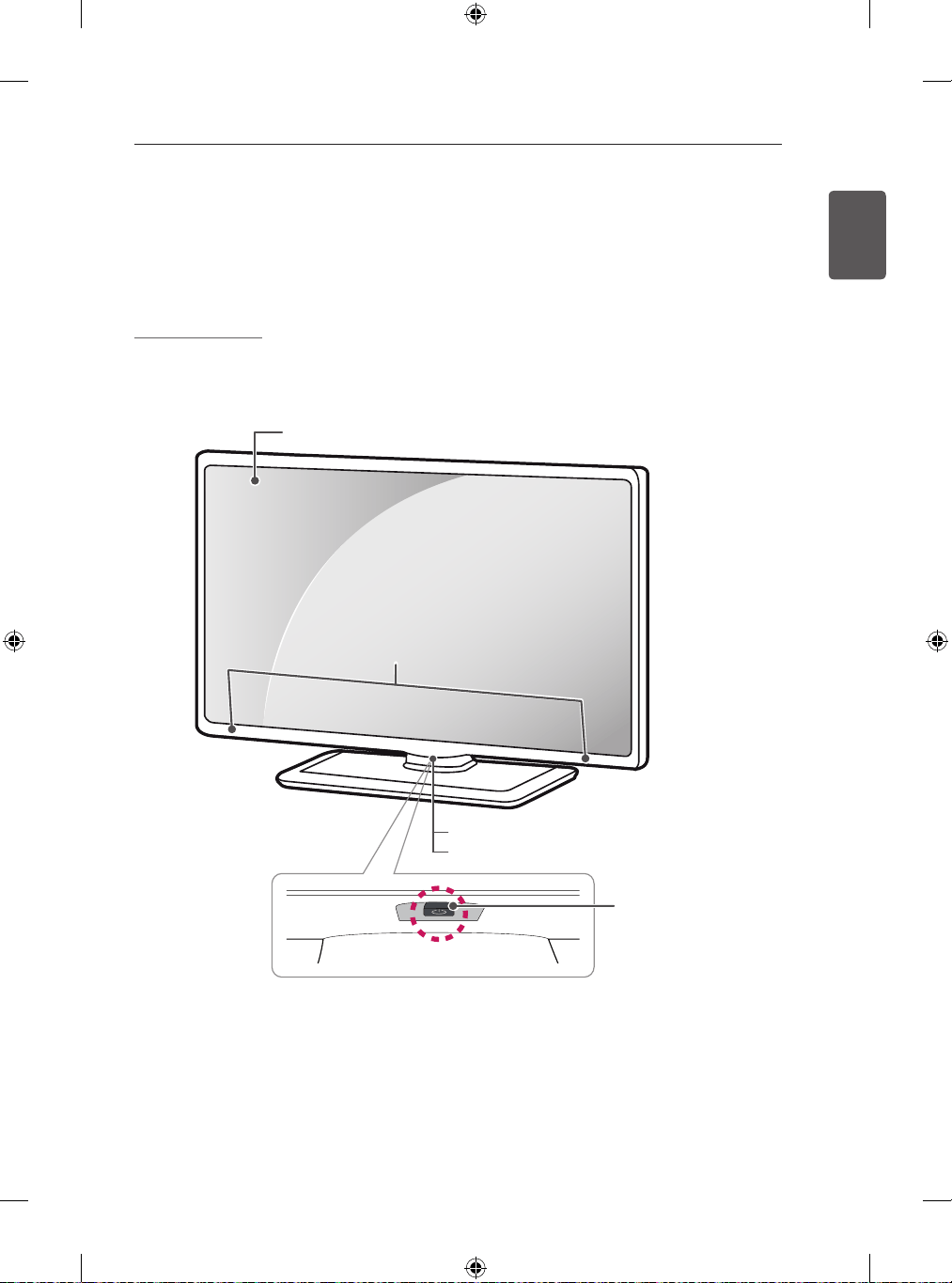
Partsandbuttons
Screen
PowerIndicator
RemoteControlSensor
JoystickButton
(*Thisbuttonislocated
belowtheTVscreen.)
S
p
ea
k
e
rs
12
ENGLISH
ASSEMBLINGANDPREPARING
Usingthejoystickbutton
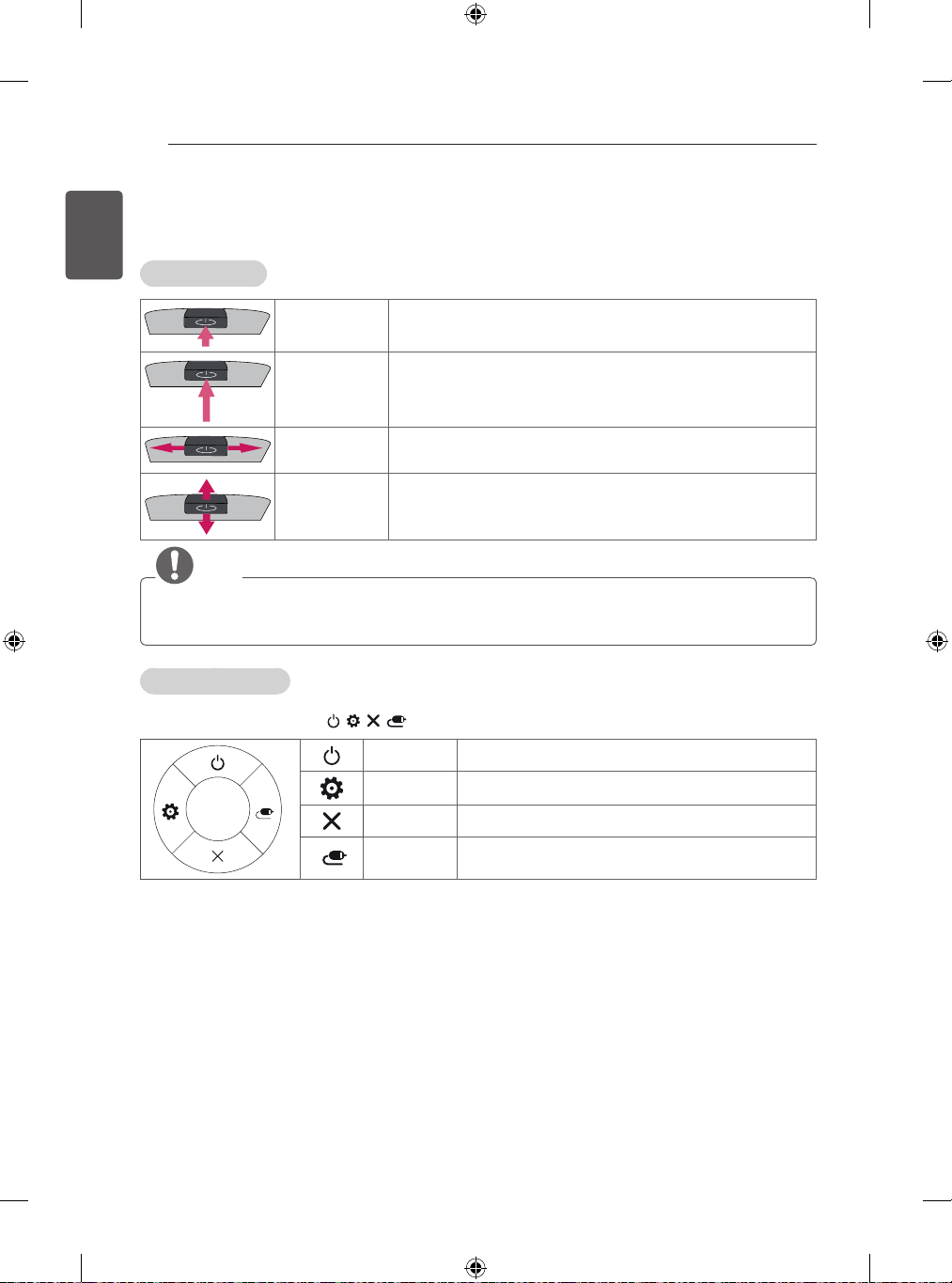
YoucanoperatetheTVbypressingthebuttonormovingthejoystickleft,right,up,ordown.
BasicFunctions
PowerOn
WhentheTVisturnedoff,placeyourfingeronthejoystickbuttonand
pressitonceandreleaseit.
PowerOff
WhentheTVisturnedon,placeyourfingeronthejoystickbuttonand
pressitonceforafewsecondsandreleaseit.
(However,iftheMenubuttonisonthescreen,pressingandholdingthe
joystickbuttonwillletyouexittheMenu.)
VolumeControl
Ifyouplaceyourfingeroverthejoystickbuttonandmoveitleftorright,
youcanadjustthevolumelevelyouwant.
Programmes
Control
Ifyouplaceyourfingeroverthejoystickbuttonandmoveitupordown,
youcanscrollsthroughthesavedprogrammeswhatyouwant.
NOTE
Whenyourfingeroverthejoystickbuttonandpushittotheup,down,leftorright,becarefulnottopress
thejoystickbutton.Ifyoupressthejoystickbuttonfirst,youcannotadjustthevolumelevelandsaved
programmes.
AdjustingtheMenu
WhentheTVisturnedon,pressthejoystickbuttononetime.
YoucanadjusttheMenuitems( , , , )movingthejoystickbuttonup,down,leftorright.
TVOff Turnsthepoweroff.
Settings Accessesthemainmenu.
Close Clearson-screendisplaysandreturnstoTVviewing.
InputList Changestheinputsource.
13
ENGLISH
ASSEMBLINGANDPREPARING
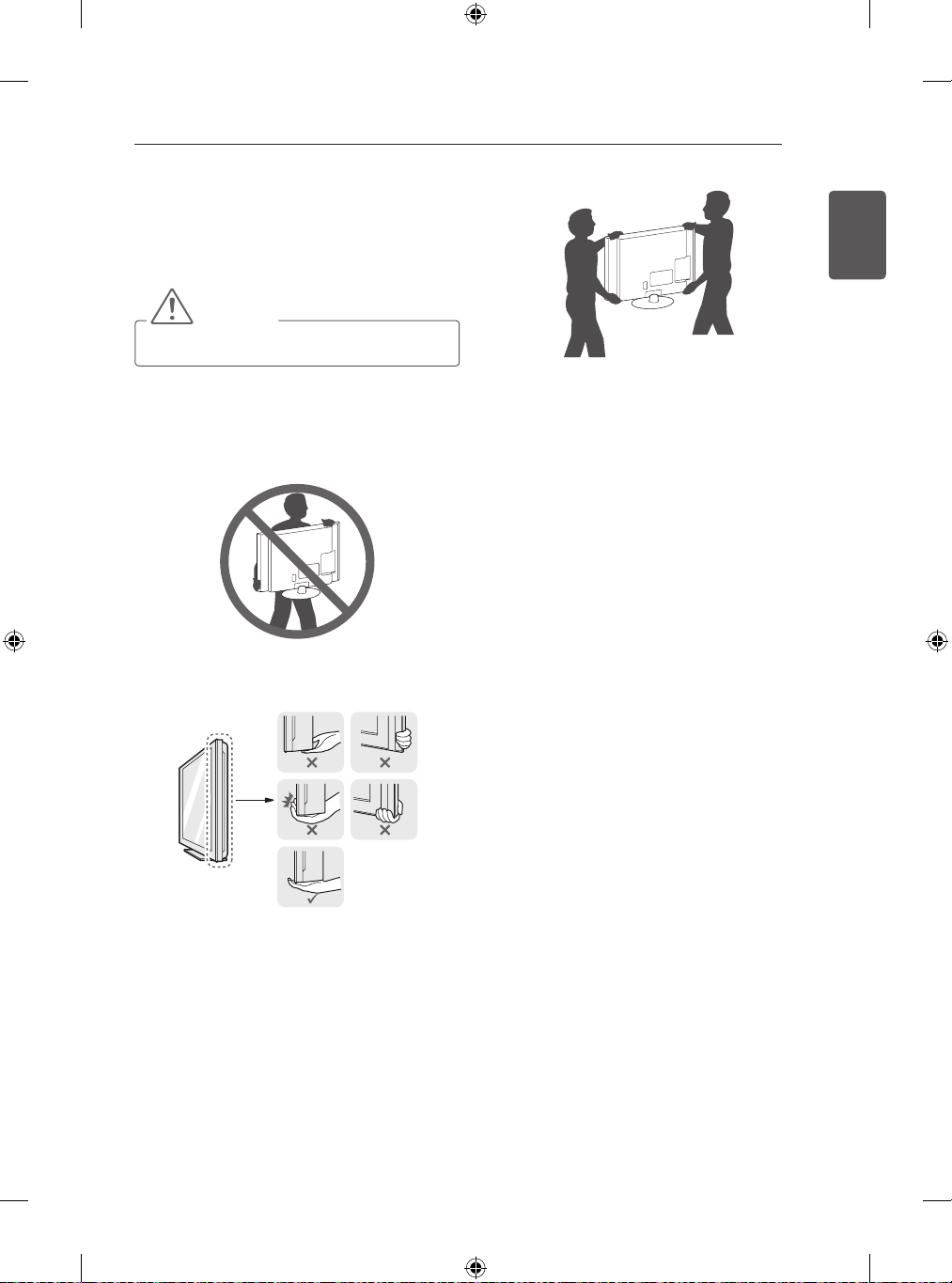
LiftingandmovingtheTV
PleasenotethefollowingadvicetopreventtheTVfrom
beingscratchedordamagedandforsafetransportation
regardlessofitstypeandsize.
CAUTION
Avoidtouchingthescreenatalltimes,asthis
mayresultindamagetothescreen.
ItisrecommendedtomovetheTVintheboxor
packingmaterialthattheTVoriginallycamein.
BeforemovingorliftingtheTV,disconnectthe
powercordandallcables.
WhenholdingtheTV,thescreenshouldfaceaway
fromyoutoavoiddamage.
HoldthetopandbottomoftheTVframe�rmly.
Makesurenottoholdthetransparentpart,
speaker,orspeakergrillarea.
WhentransportingalargeTV,thereshouldbeat
least2people.
WhentransportingtheTVbyhand,holdtheTVas
showninthefollowingillustration.
WhentransportingtheTV,donotexposetheTVto
joltsorexcessivevibration.
WhentransportingtheTV,keeptheTVupright,never
turntheTVonitssideortilttowardstheleftorright.
Donotapplyexcessivepressuretocauseexing/
bendingofframechassisasitmaydamagescreen.
14
ENGLISH
ASSEMBLINGANDPREPARING
2
3EA
M5xL25
CAUTION
Tightenthescrewfully,otherwisethesetmay
leanorfall.
3
4EA
M4xL14
CAUTION
WhenattachingthestandtotheTVset,place
thescreenfacingdownonacushionedtable
orflatsurfacetoprotectthescreenfrom
scratches.
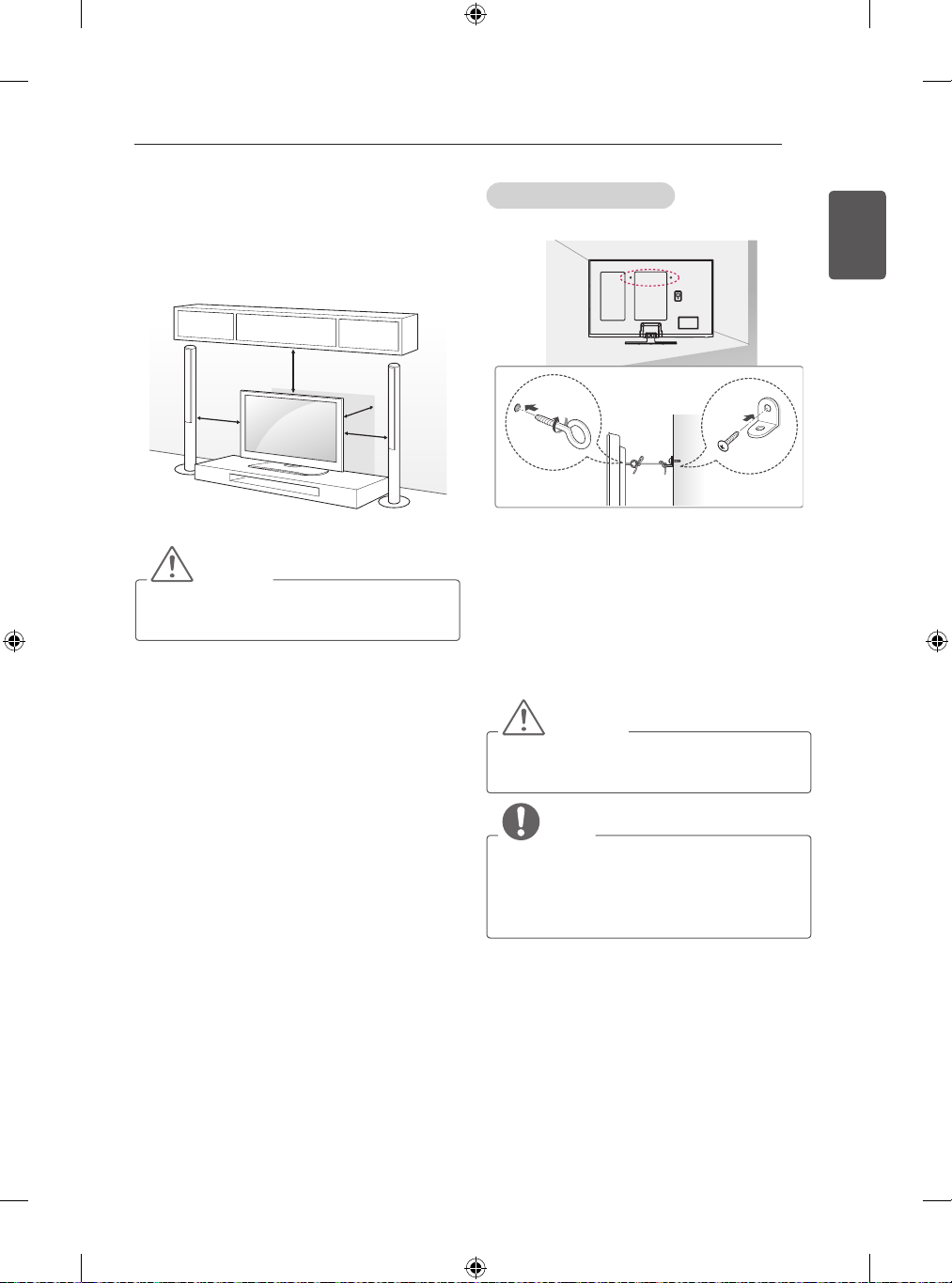
SettinguptheTV
ImageshownmaydifferfromyourTV.
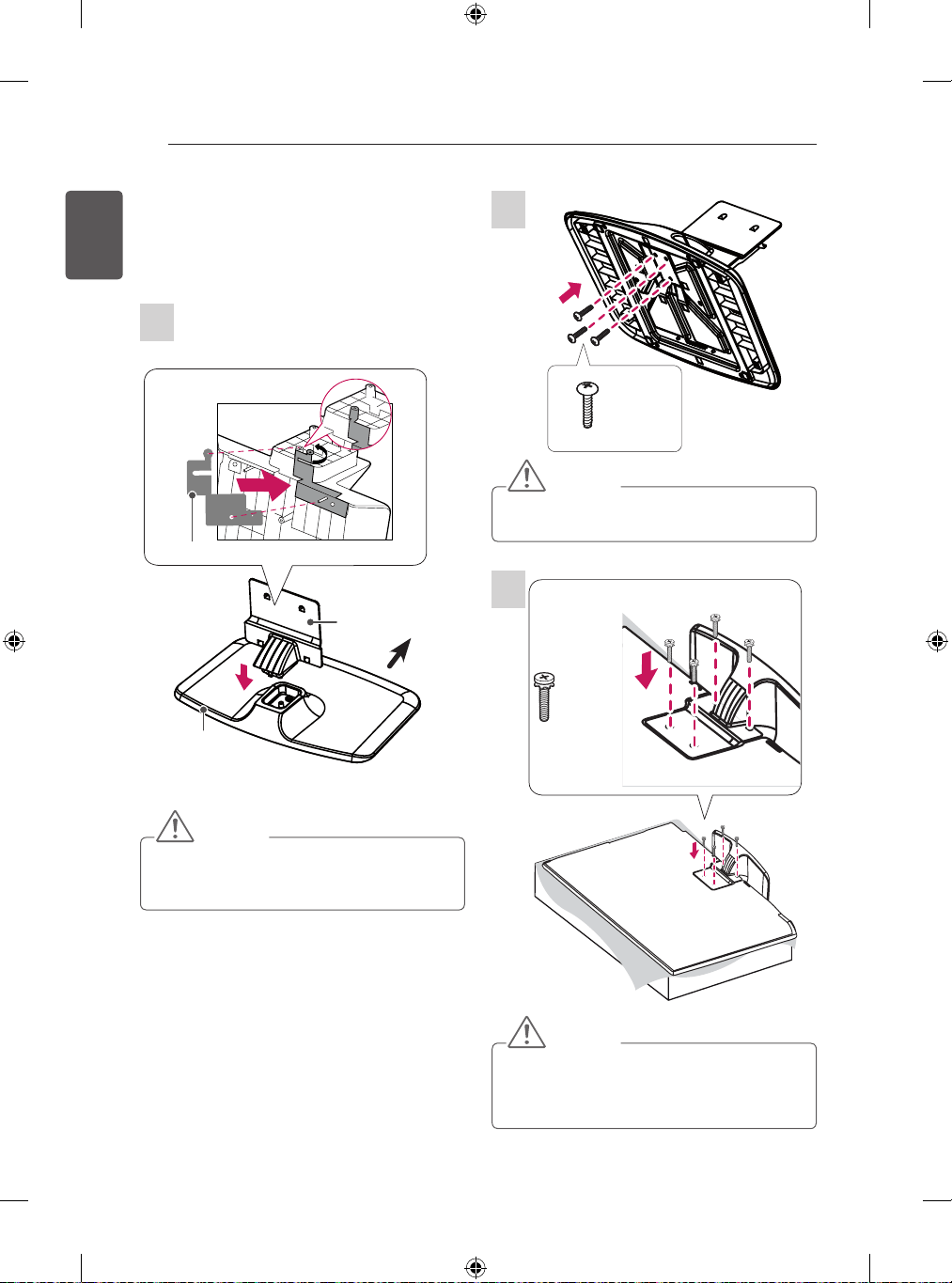
Attachingthestand
Beforeassembling,pleaseattachtheStand
StickerundertheStandBodytoreducethe
electromagneticinterferenceasshownbelow.
(Dependingonmodel)
StandBody
StandBase
Front
StandSticker
CAUTION
Whenassemblingthestandbaseandthestand
body,pressthestandbodyuntilyoucanheara
clickingsoundinthehook.
1
15
ENGLISH
ASSEMBLINGANDPREPARING
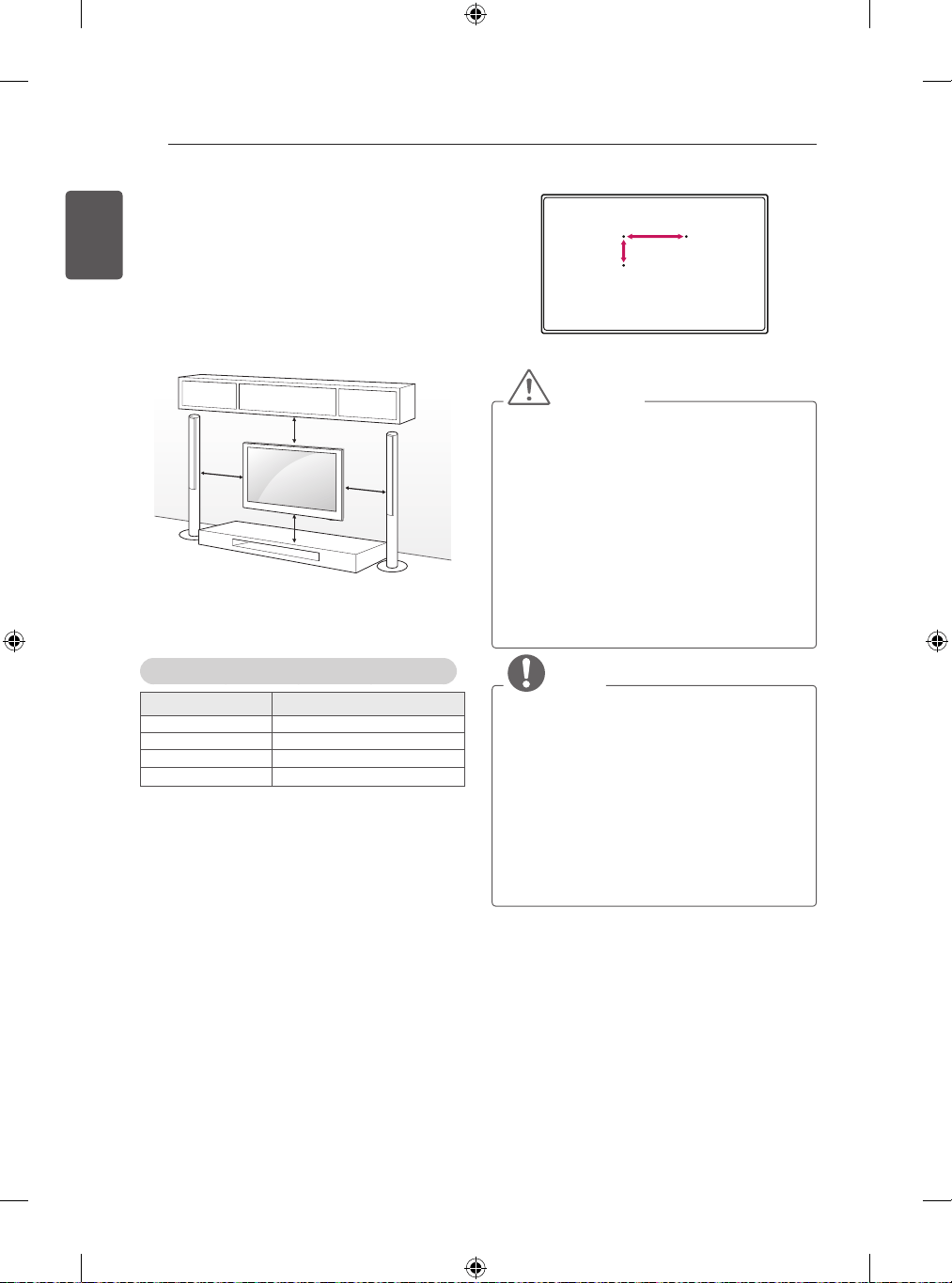
Mountingonatable
1 LiftandtilttheTVintoitsuprightpositiononatable.
- Leavea10cm(minimum)spacefromthe
wallforproperventilation.
10
cm
10cm
10
cm
1
0
c
m
2 Connectthepowercordtoawalloutlet.
CAUTION
DonotplacetheTVnearoronsourcesofheat,
asthismayresultinfireorotherdamage.
SecuringtheTVtoawall
(Thisfeatureisnotavailableforallmodels.)
1 Insertandtightentheeye-bolts,orTVbracketsand
boltsonthebackoftheTV.
- Ifthereareboltsinsertedattheeye-bolts
position,removetheboltsfirst.
2 Mountthewallbracketswiththeboltstothewall.
Matchthelocationofthewallbracketandtheeye-
boltsontherearoftheTV.
3 Connecttheeye-boltsandwallbracketstightlywitha
sturdyrope.
Makesuretokeeptheropehorizontalwiththeat
surface.
CAUTION
Makesurethatchildrendonotclimbonorhang
ontheTV.
NOTE
Useaplatformorcabinetthatisstrongand
largeenoughtosupporttheTVsecurely.
Brackets,boltsandropesarenotprovided.You
canobtainadditionalaccessoriesfromyour
localdealer.
16
ENGLISH
ASSEMBLINGANDPREPARING
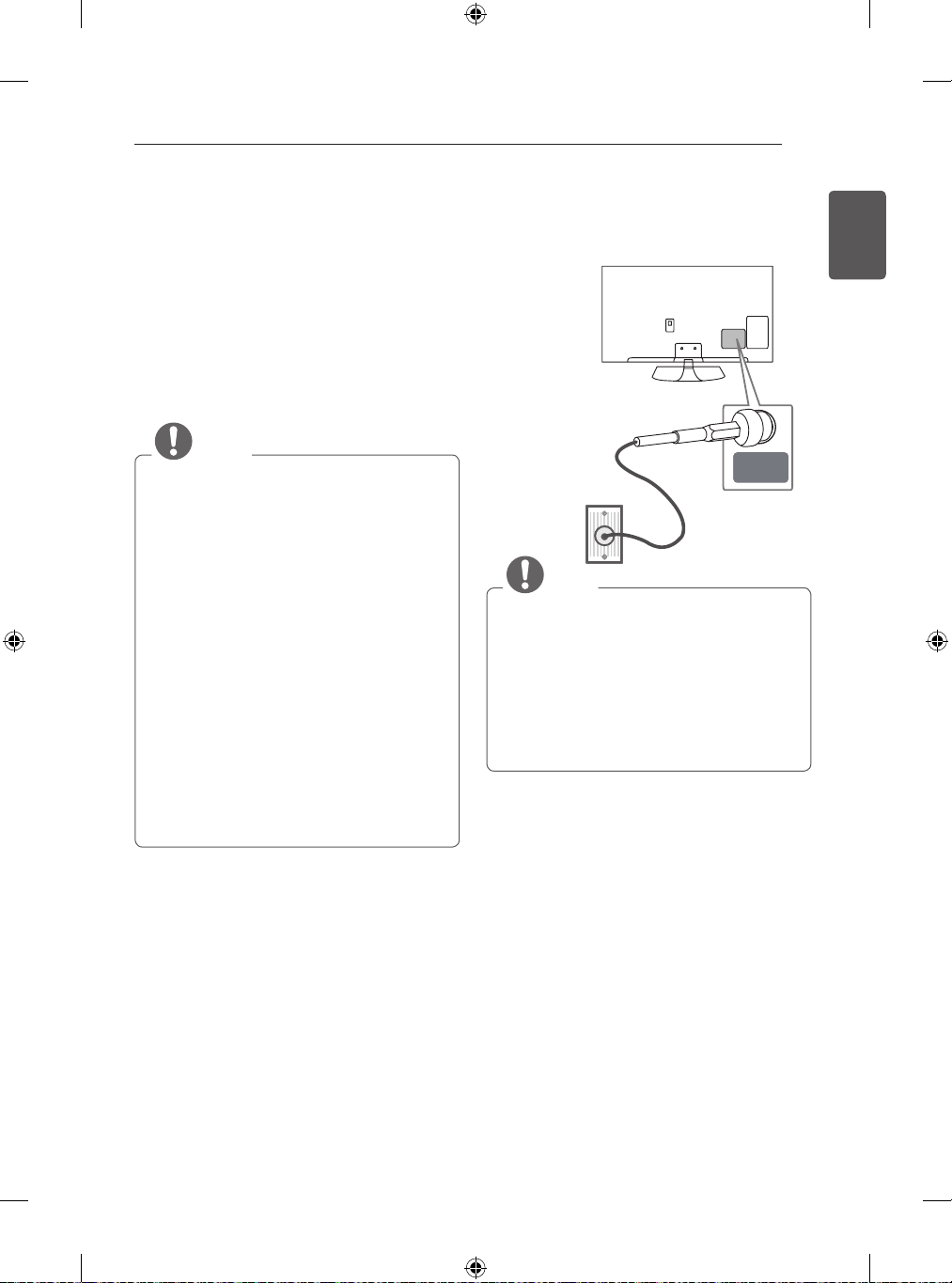
Mountingonawall
Attachanoptionalwallmountbracketattherearofthe
TVcarefullyandinstallthewallmountbracketona
solidwallperpendiculartothefloor.Whenyouattach
theTVtootherbuildingmaterials,pleasecontact
qualifiedpersonnel.
LGrecommendsthatwallmountingbeperformedbya
qualifiedprofessionalinstaller.
1
0
cm
10cm
10
c
m
1
0
cm
Makesuretousescrewsandwallmountbracketthat
meettheVESAstandard.Standarddimensionsforthe
wallmountkitsaredescribedinthefollowingtable.
Separatepurchase(WallMountingBracket)
Model 50/60PB56**
VESA(AxB) 400x400
Standardscrew M6
Numberofscrews 4
Wallmountbracket PSW420BX
A
B
CAUTION
Disconnectthepowerfirst,andthenmoveor
installtheTV.Otherwiseelectricshockmay
occur.
IfyouinstalltheTVonaceilingorslantedwall,
itmayfallandresultinsevereinjury.
UseanauthorisedLGwallmountandcontact
thelocaldealerorqualifiedpersonnel.
Donotovertightenthescrewsasthismay
causedamagetotheTVandvoidyour
warranty.
Usethescrewsandwallmountsthatmeetthe
VESAstandard.Anydamagesorinjuriesby
misuseorusinganimproperaccessoryarenot
coveredbythewarranty.
NOTE
UsethescrewsthatarelistedontheVESA
standardscrewspecifications.
Thewallmountkitincludesaninstallation
manualandnecessaryparts.
Thewallmountbracketisnotprovided.You
canobtainadditionalaccessoriesfromyour
localdealer.
Thelengthofscrewsmaydifferdependingon
thewallmount.Makesuretousetheproper
length.
Formoreinformation,refertothemanual
suppliedwiththewallmount.
17
ENGLISH
MAKINGCONNECTIONS
MAKINGCONNECTIONS
ThissectiononMAKINGCONNECTIONSmainlyuses
diagramsforthePB56**models.
ConnectvariousexternaldevicestotheTVandswitch
inputmodestoselectanexternaldevice.Formore
informationofexternaldevice’sconnection,refertothe
manualprovidedwitheachdevice.
Availableexternaldevicesare:HDreceivers,DVD
players,VCRs,audiosystems,USBstoragedevices,
PC,gamingdevices,andotherexternaldevices.
NOTE
Theexternaldeviceconnectionmaydifferfrom
themodel.
ConnectexternaldevicestotheTVregardless
oftheorderoftheTVport.
IfyourecordaTVprogramonaDVDrecorder
orVCR,makesuretoconnecttheTVsignal
inputcabletotheTVthroughaDVDrecorder
orVCR.Formoreinformationofrecording,
refertothemanualprovidedwiththeconnected
device.
Refertotheexternalequipment’smanualfor
operatinginstructions.
IfyouconnectagamingdevicetotheTV,use
thecablesuppliedwiththegamingdevice.
InPCmode,theremaybenoiseassociated
withtheresolution,verticalpattern,contrastor
brightness.Ifnoiseispresent,changethePC
outputtoanotherresolution,changetherefresh
ratetoanotherrateoradjustthebrightnessand
contrastonthePICTUREmenuuntilthepicture
isclear.
InPCmode,someresolutionsettingsmaynot
workproperlydependingonthegraphicscard.
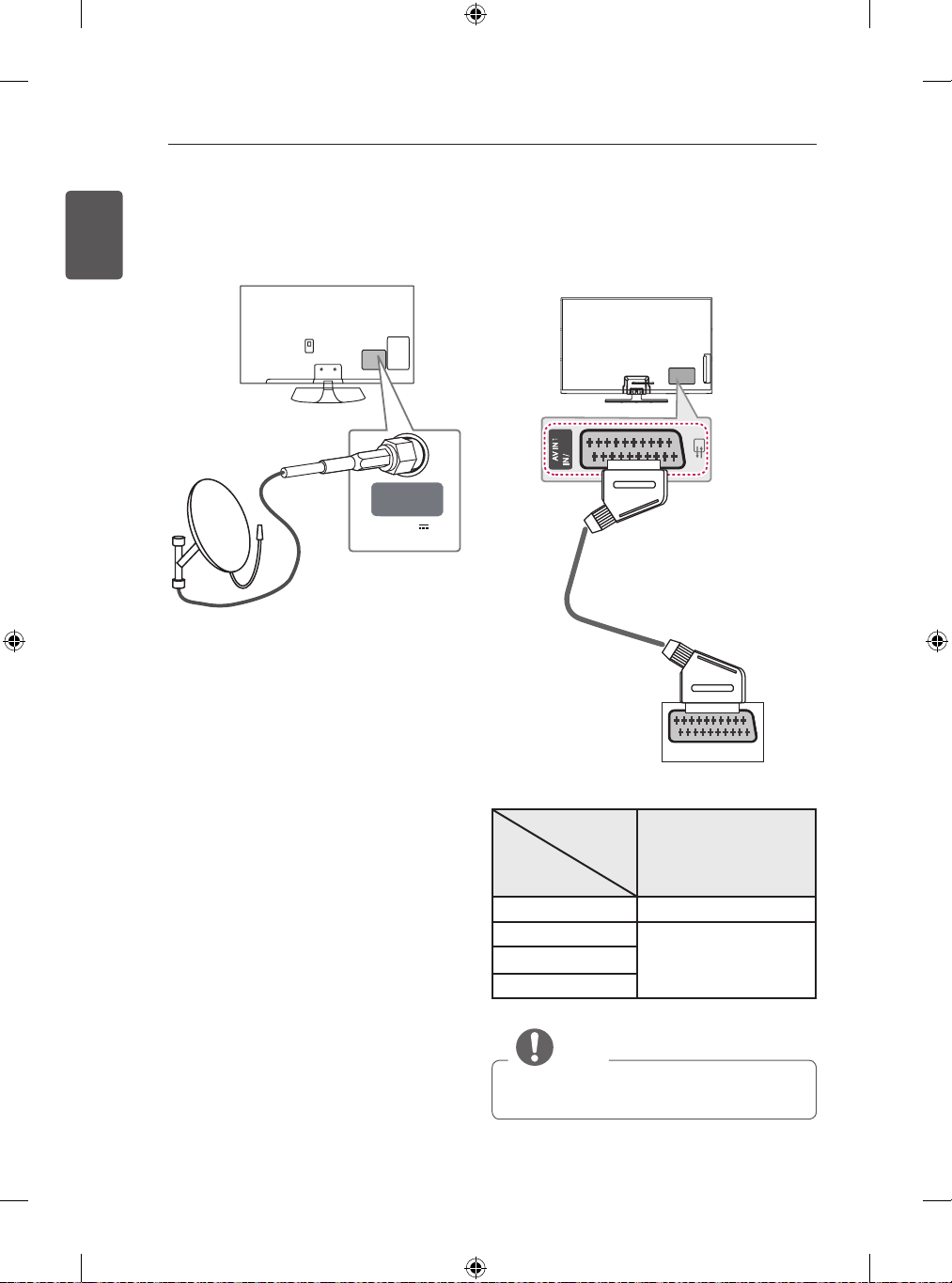
AntennaConnection
ConnecttheTVtoawallantennasocketwithanRF
cable(75Ω).
ANTENNA/
CABLE IN
WallAntenna
Socket
NOTE
Useasignalsplittertousemorethan2TVs.
Iftheimagequalityispoor,installasignal
amplifierproperlytoimprovetheimagequality.
Iftheimagequalityispoorwithanantenna
connected,trytorealigntheantennainthe
correctdirection.
Anantennacableandconverterarenot
supplied.
SupportedDTVAudio:MPEG,DolbyDigital,
DolbyDigitalPlus,HE-AAC
(*NotProvided)
18
ENGLISH
MAKINGCONNECTIONS
EuroScartConnection
Transmitsthevideoandaudiosignalsfromanexternal
devicetotheTVset.Connecttheexternaldeviceand
theTVsetwiththeeuroscartcableasshown.
OUT
AUDIO / VIDEO
(*NotProvided)
Output
Type
Current
inputmode
AV1
(TVOut
1
)
DigitalTV DigitalTV
AnalogueTV,AV
AnalogueTV
Component
HDMI
1 TVOut:OutputsAnalogueTVorDigitalTVsignals.
NOTE
AnyEuroscartcableusedmustbesignal
shielded.
SatellitedishConnection
(Onlysatellitemodels)
ConnecttheTVtoasatellitedishtoasatellitesocket
withasatelliteRFcable(75Ω).
LNB IN
Satellite
13/18V
700mA Max
SatelliteDish
(*NotProvided)
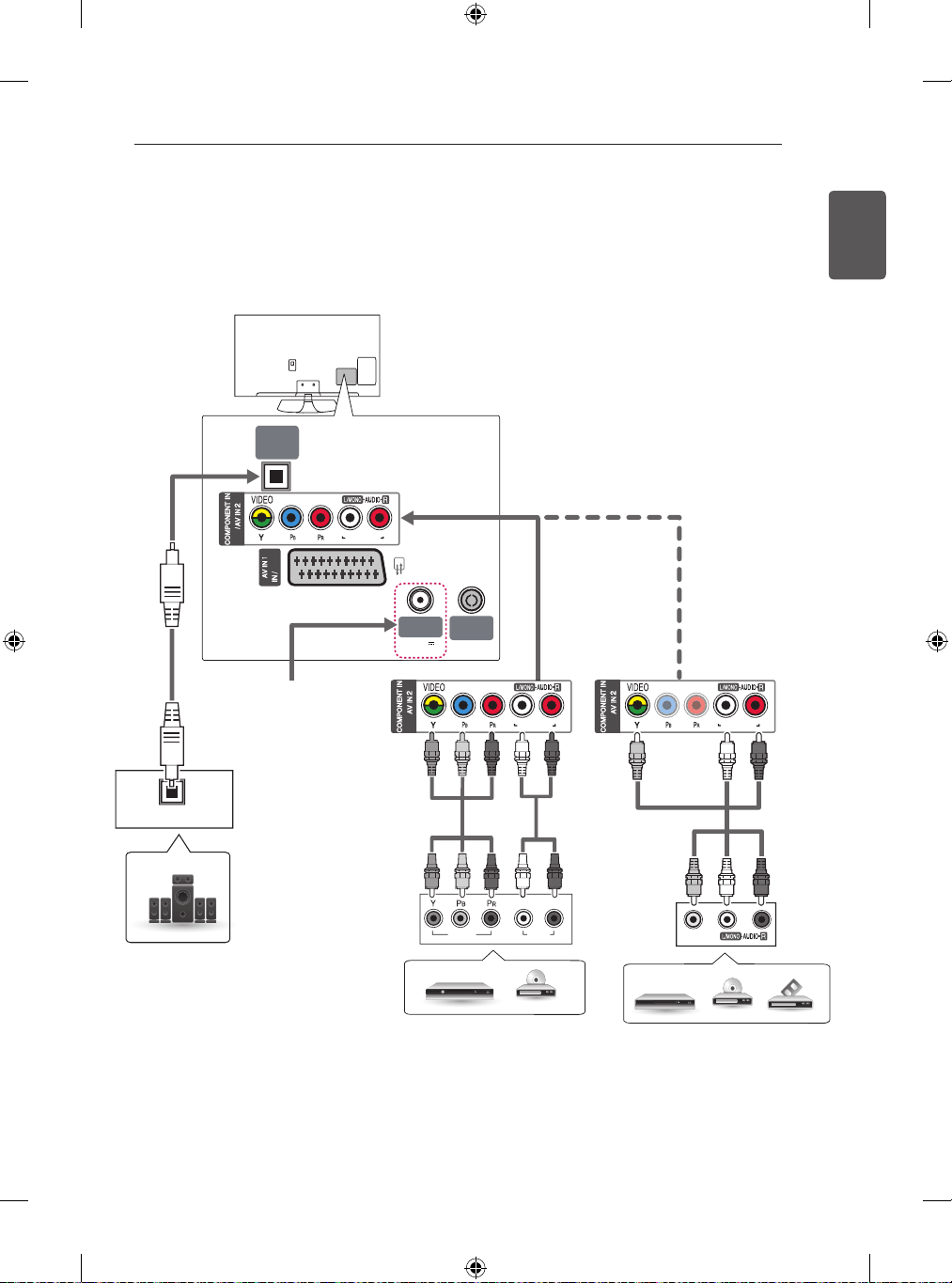
19
ENGLISH
MAKINGCONNECTIONS
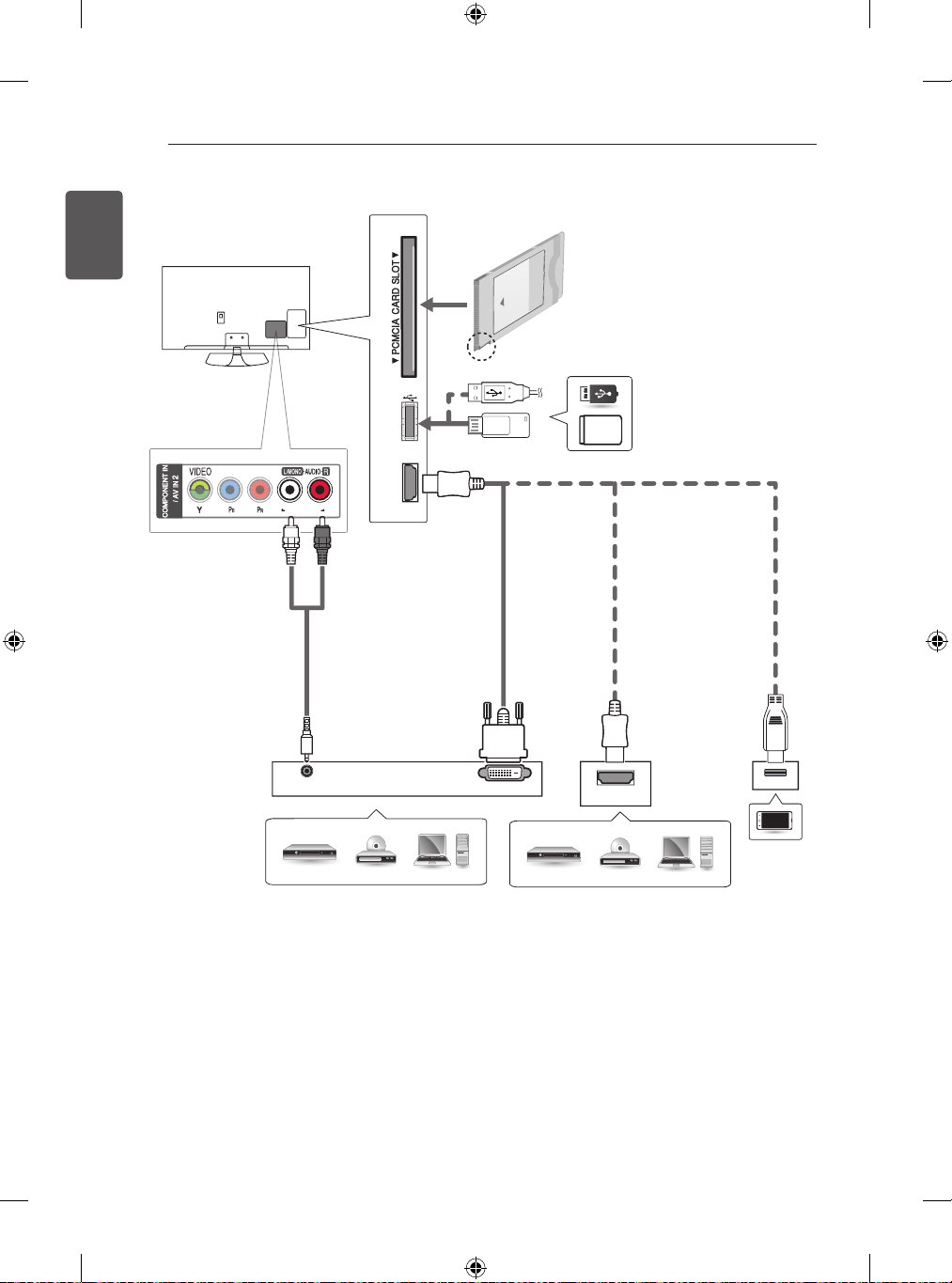
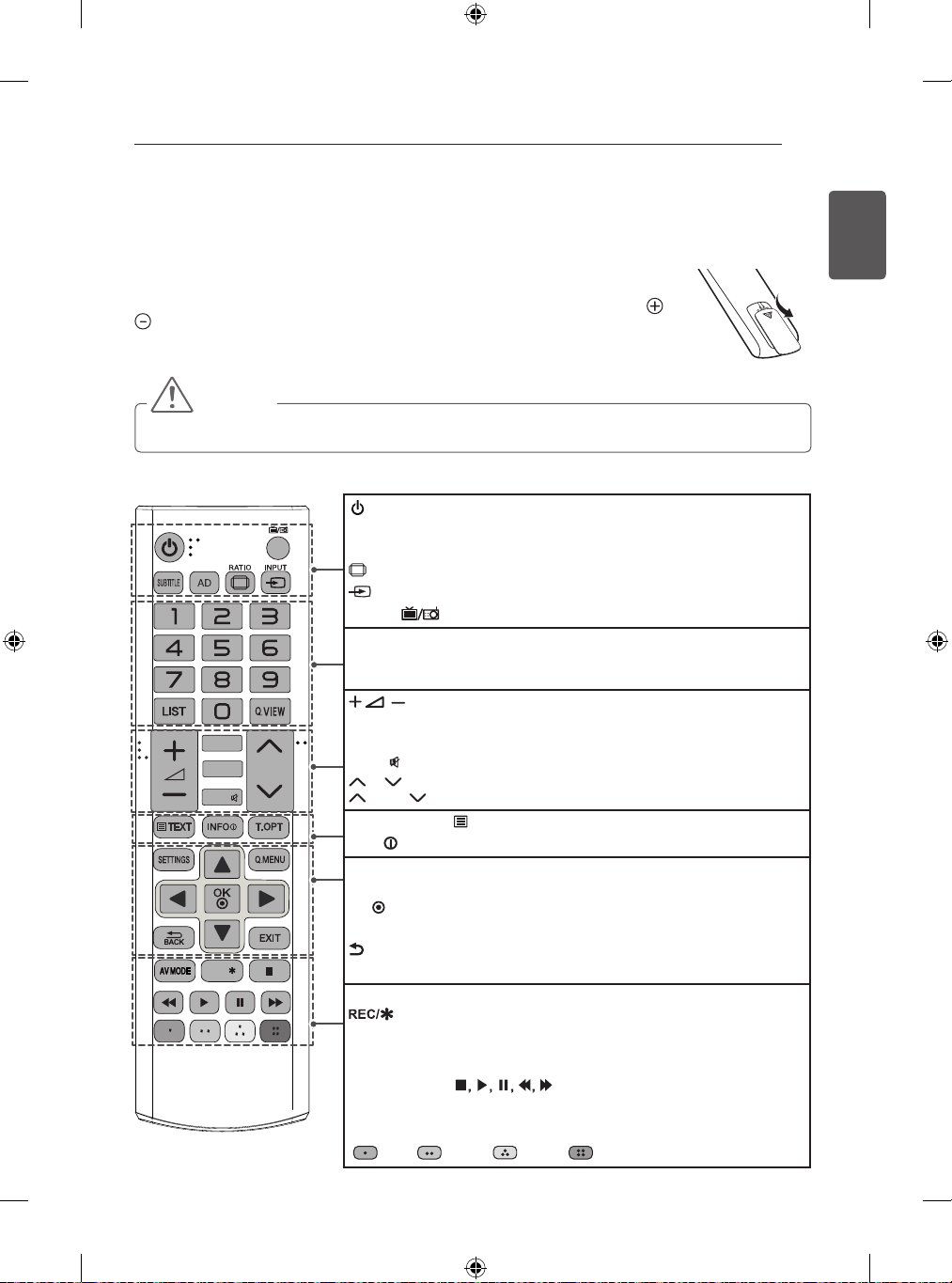
OtherConnections
ConnectyourTVtoexternaldevices.Forthebestpictureandaudioquality,connecttheexternaldeviceandtheTV
withtheHDMIcableasshown.Someseparatecableisnotprovided.
PC-AUDIO IN PC-AUDIO IN
PC-AUDIO IN
OUT
LNB IN
Satellite
13/18V
700mA Max
ANTENNA/
CABLE IN
OPTICAL
DIGITAL
AUDIO OUT
VIDEO
OPTICAL AUDIO IN
AUDIOVIDEO
L R
(Onlysatellitlemodels)
DigitalAudioSystem
DVD/Blu-Ray/HDCableBox
VCR/DVD/Blu-Ray/HDCableBox
RED
RED
RED
RED
WHITE
WHITE
BLUE
GREEN
BLUE
GREEN
YELLOW
WHITE
RED
RED
WHITE
YELLOW
20
ENGLISH
MAKINGCONNECTIONS
DVI OUT
AUDIO OUT
USB IN
HDMI IN (MHL/PC)
HDMI
PC-AUDIO IN
Mobilephone
MHLpassiveCable
USB/HDD
DVD/Blu-Ray/PC/
HDCableBox/HDSTB
RED
WHITE
DVD/Blu-Ray/PC/HDCableBox
21
ENGLISH
REMOTECONTROL
TV/
RAD
GUIDE
MUTE
FAV
P
PAGE
REC/
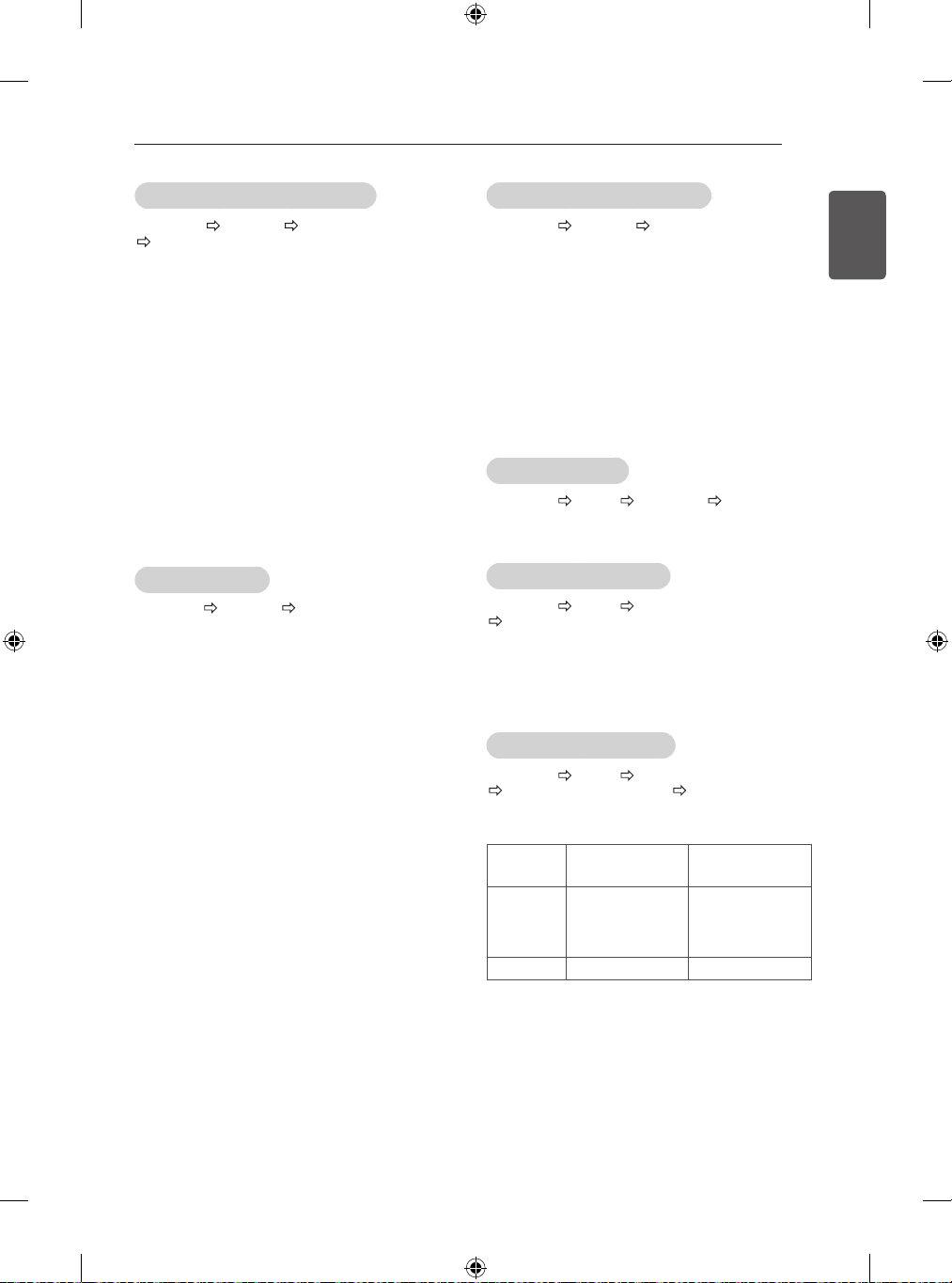
REMOTECONTROL
Thedescriptionsinthismanualarebasedonthebuttonsontheremotecontrol.
PleasereadthismanualcarefullyandusetheTVcorrectly.
Toreplacebatteries,openthebatterycover,replacebatteries(1.5VAAA)matchingthe and
endstothelabelinsidethecompartment,andclosethebatterycover.
Toremovethebatteries,performtheinstallationactionsinreverse.
CAUTION
Donotmixoldandnewbatteries,asthismaydamagetheremotecontrol.
MakesuretopointtheremotecontroltowardtheremotecontrolsensorontheTV.
(POWER)TurnstheTVonoroff.
SUBTITLERecallsyourpreferredsubtitleindigitalmode.
ADBypressingtheADbutton,audiodescriptionsfunctionwillbeenabled.
RATIOResizesanimage.
INPUTChangestheinputsource.
TV/RAD SelectsRadio,TVandDTVprogramme.
NumberbuttonsEntersnumbers.
LISTAccessesthesavedprogrammelist.
Q.VIEWReturnstothepreviouslyviewedprogramme.
Adjuststhevolumelevel.
FAVAccessesyourfavouriteprogrammelist.
GUIDEShowsprogrammeguide.
MUTE
Mutesallsounds.
P
Scrollsthroughthesavedprogrammes.
PAGE Movestothepreviousornextscreen.
Teletextbuttons( TEXT/T.OPT)Thesebuttonsareusedforteletext.
INFO
Viewstheinformationofthecurrentprogrammeandscreen.
SETTINGSAccessesthemainmenus.
Q.MENUAccessesthequickmenus.
OK Selectsmenusoroptionsandconfirmsyourinput.
Navigationbuttons(up/down/left/right)Scrollsthroughmenusoroptions.
BACKReturnstothepreviouslevel.
EXITClearsallon-screendisplaysandreturnstoTVviewing.
AVMODESelectsanAVmode.
Startstorecordanddisplayrecordmenu.(onlyTimeMachine
Ready
supportedmodel)
ꕘ
(FREEZE)FreezesthecurrentframewhileusingtheTV,AV,Component,or
HDMIinputsource.
Controlbuttons( )ControlstheMYMEDIAmenus,Time
Machine
Ready
controlortheSIMPLINKcompatibledevices
(USB,SIMPLINKorTimeMachine
Ready
).
ColourbuttonsTheseaccessspecialfunctionsinsomemenus.
( :Red, :Green, :Yellow, :Blue)

22
ENGLISH
SETTINGS
SETTINGS
AutomaticallySettingUpProgramme
SETTINGS SETUP AutoTuning
Automaticallytunestheprogrammes.
IfInputSourceisnotconnectedproperly,
programmeregistrationmaynotwork.
AutoTuningonlyfindsprogrammesthatare
currentlybroadcasting.
IfLockSystemisturnedon,apop-upwindowwill
appearaskingforpassword.
ToadjustpicturewithPictureWizard
SETTINGS PICTURE PictureWizardIII
[Dependingonmodel]
Calibratesandadjustsforoptimumpicturequalityusing
theremotecontrolandthePictureWizardwithout
expensivepatterndevicesorhelpfromaspecialist.
ToselectPictureMode
SETTINGS
PICTURE
PictureMode
Selectthepicturemodeoptimizedfortheviewing
environmentortheprogramme.
Vivid:Heightenscontrast,brightnessand
sharpnesstodisplayvividimages.
Standard:Displaysimagesinstandardlevelsof
contrast,brightnessandsharpness.
Eco/APS:[Dependingonmodel]
TheEnergySaverfeaturechangessettingsonthe
TVtoreducepowerconsumption.
Cinema/Game:Displaystheoptimumpicturefor
movie,game.
Sports:Optimizesthevideoimageforhighand
dynamicactionsbyemphasizingprimarycolours
suchaswhite,grass,orskyblue.
Expert1,2:Menuforadjustingpicturequality
thatallowsexpertsandamateurstoenjoythebest
TVviewing.Thisistheadjustmentmenuprovided
forISF-certifiedpicturetuningprofessionals.(ISF
logocanonlybeusedonISF-certifiedTVs.)
ISFccc:ImagingScienceFoundationCertified
CalibrationControl
Dependingoninputsignal,availablerangeof
picturemodesmaydiffer.
Expertmodeisforpicturetuningprofessionals
tocontrolandfine-tuneusingaspecificimage.For
normalimages,theeffectsmaynotbedramatic.
TheISFfunctionisonlyavailableonsomemodels.
Tosetadvancedcontrol
SETTINGS PICTURE PictureMode
AdvancedControl/ExpertControl
Calibratesthescreenforeachpicturemode;oradjusts
picturesettingsforaspecialscreen.Firstselecta
PictureModeofyourchoice.
DynamicContrast:Adjuststhecontrasttothe
optimallevelaccordingtothebrightnessofthe
image.
DynamicColour:Adjustscolourstomakethe
imageappearinmorenaturalcolours.
SkinColour:SetsSkincolourspectrumseparately
toimplementtheskincolourasdefinedbytheuser.
SkyColour:Skycolourissetseparately.
GrassColour:Naturalcolourspectrum(meadows,
hills,etc.)canbeseparatelyset.
Gamma:Setsthegradationcurveaccordingtothe
outputofpicturesignalinrelationtotheinputsignal.
ColourGamut:Selectstherangeofcoloursthat
canbeexpressed.
EdgeEnhancer:Showscleareranddistinctiveyet
naturaledgesofthevideo.
ExpertPattern:[Dependingonmodel]
Patternsusedforexpertadjustment.
ColourFilter:Filtersaspecificcolourspectrumin
RGBcolourstofine-tunecoloursaturationandhue
accurately.
ColourTemperature:Adjuststheoveralltoneof
thescreenasdesired.InExpertmode,detailedfine-
tuningcanbesetviaGammamethod,etc.
ColourManagementSystem:Thisisasystem
thatexpertsusewhentheyadjustcolourwitha
testpattern.Theycanselectfromsixcolourareas
(Red/Green/Blue/Cyan/Magenta/Yellow)
withoutaffectingothercolours.Fornormalimages,
adjustmentsmaynotresultinnoticeablecolour
changes.
Dependingoninputsignalorotherpicturesettings,
therangeofdetaileditemsforadjustmentmay
differ.
23
ENGLISH
SETTINGS
Tosetadditionalpictureoptions
SETTINGS PICTURE PictureMode
PictureOption
[Dependingonmodel]
Adjustsdetailedsettingforimages.
NoiseReduction:Eliminatesnoiseinthepicture.
MPEGNoiseReduction:Eliminatesnoise
generatedwhilecreatingdigitalpicturesignals.
BlackLevel:Adjuststhebrightnessandcontrastof
thescreentosuittheblackleveloftheinputpicture
byusingtheblackness(blacklevel)ofthescreen.
RealCinema:Optimizesthescreenformovieviewing.
MotionEyeCare/SUPEREnergySaving:
[Dependingonmodel]
Savespowerconsumptionbyadjustingthe
brightnesscorrespondingtothemovementofthe
imageonthescreen.
Dependingoninputsignalorotherpicturesettings,
therangeofdetaileditemsforadjustmentmay
differ.
TouseTruMotion
SETTINGS PICTURE TruMotion
[Dependingonmodel]
Correctsimagestodisplaysmoothermotionsequences.
Smooth:De-judder/De-blurworkingonhigher
rangeinautomode.
Clear:De-judder/De-blurworkingonmiddlerange
inautomode.
User:De-judder/De-blurcanbesetmanually.
De-judder:Thisfunctionadjustsjudderingofthe
screen.
De-blur:Thisfunctionadjustsandeliminates
blurringofthescreen.
AutomeansJudderingandblurringrangethatdepend
oninputvideostatusiscontrolledbyTruMotionmode.
TouseEnergySavingfeature
SETTINGS PICTURE EnergySaving
Reducespowerconsumptionbyadjustingscreen
brightness.
Auto:[Dependingonmodel]
TheTVsensordetectstheambientlightingand
automaticallyadjuststhescreenbrightness.
Off:TurnsofftheEnergySavingmode.
Minimum/Medium/Maximum:Appliesthepre-
setEnergySavingmode.
ScreenOff:Screenisturnedoffandonlysoundis
played.PressanybuttonexceptPowerbuttonon
theremotecontroltoturnthescreenbackon.
TouseTVspeaker
SETTINGS AUDIO SoundOut TVSpeaker
[Dependingonmodel]
SoundisoutputthroughtheTVspeaker.
TouseExternalSpeaker
SETTINGS AUDIO SoundOut
E
xternalSpeaker(Optical)
[Dependingonmodel]
Soundisoutputthroughthespeakerconnectedtothe
opticalport.
SimpLinkissupported.
TouseDigitalSoundOut
SETTINGS AUDIO SoundOut
ExternalSpeaker(Optical) DigitalSoundOut
[Dependingonmodel]
SetsupDigitalSoundOut.
Item AudioInput
DigitalAudio
Ouput
Auto
MPEG
DolbyDigital
DolbyDigitalPlus
HE-AAC
PCM
DolbyDigital
DolbyDigital
DolbyDigital
PCM All PCM

24
ENGLISH
SETTINGS
Ifathird-partydevicewiththeHDMI-CECfunction
isalsoused,theSIMPLINKdevicemaynotwork
normally.
[Dependingonmodel]
Ifyouselectorplaymediafromathedevicewitha
hometheatrefunction,theHTSpeaker(Speaker)is
automaticallyconnected.
Besuretoconnectwithanopticalcable(sold
separately)tousetheHTSpeaker(Speaker)
function.
SIMPLINKfunctiondescription
DirectPlay:PlaysthemultimediadeviceontheTV
instantly.
Selectmultimediadevice:Selectsthedesired
deviceviatheSIMPLINKmenutocontrolitfromthe
TVscreeninstantly.
Discplayback:Managesthemultimediadevice
withtheTVremotecontrol.
Poweroffalldevices:WhenyoupowerofftheTV,
allconnecteddevicesareturnedoff.
SyncPoweron:Whentheequipmentwith
SIMPLINKfunctionconnectedHDMIterminalstarts
toplay,theTVwillautomaticallyturnon.
Speaker:[Dependingonmodel]
Selectspeakereitheronthehometheatreunitor
theTV.
Tosetpassword
SETTINGS
LOCK
SetPassword
SetsorchangestheTVpassword.
Theinitialpasswordissetto‘0000’.
WhenFranceisselectedforCountry,passwordisnot
‘0000’but‘1234’.
WhenFranceisselectedforCountry,passwordcannot
besetto‘0000’.
ToreturnFactoryReset
SETTINGS
OPTION
FactoryReset
AllstoredinformationisdeletedandTVsettingsare
reset.
TheTVturnsitselfoffandbackon,andallsettingsare
reset.
WhenLockSystemisinplace,apop-upwindow
appearsandasksforpassword.
Donotturnoffthepowerduringinitialization.
ToconnectanduseLGaudiodevice
SETTINGS AUDIO
SoundOut
LGSoundSync(Optical)
[Dependingonmodel]
ConnectLGaudiodevicewiththe logotothe
opticaldigitalaudiooutputport.LGaudiodeviceallows
youtoenjoyrichpowerfulsoundeasily.
TouseHeadphone
SETTINGS AUDIO SoundOut Headphone
[Dependingonmodel]
Soundisoutputthroughtheheadphoneconnectedto
theearphone/headphoneport.
Tosynchronizeaudioandvideo
SETTINGS AUDIO AVSync.Adjust
[Dependingonmodel]
Synchronizesvideoandaudiodirectlywhentheydo
notmatch.
IfyousetAVSync.AdjusttoON,youcanadjust
thesoundoutput(TVspeakersorSPDIF)tothe
screenimage.
TouseSIMPLINK
[Dependingonmodel]
SIMPLINKisafeaturethatenablesyoutocontroland
managevariousmultimediadevicesconvenientlyvia
theSIMPLINKmenu.
1 ConnecttheTV’sHDMIINterminalandthe
SIMPLINKdevice’sHDMIoutputterminalusingan
HDMIcable.
[Dependingonmodel]
ForhometheatreunitswithaSIMPLINKfunction,
connectHDMIterminalsasabove,andusean
opticalcabletoconnectOpticalDigitalAudio
OutfromtheTVtoOpticalDigitalAudioInofthe
SIMPLINKdevice.
2 SelectINPUT(OPTION)
SIMPLINK.
SIMPLINKmenuwindowappears.
3 InSIMPLINKSettingwindow,setSIMPLINK
functiontoON.
4 InSIMPLINKmenuwindow,selectsthedeviceyou
wanttocontrol.
Thisfunctionisonlycompatiblewithdeviceswith
theSIMPLINKlogo.
TousetheSIMPLINKfunction,youneedtouse
ahigh-speedHDMI
®
cable(withCEC(Consumer
ElectronicsControl)featureadded).High-speed
HDMI
®
cableshavetheNo.13pinconnectedfor
informationexchangebetweendevices.
Ifyouswitchtoanotherinput,theSIMPLINKdevice
willstop.
25
ENGLISH
SETTINGS
ToremovetheUSBdevice
Q.MENU
USBDevice
SelectaUSBstoragedevicethatyouwanttoremove.
WhenyouseeamessagethattheUSBdevicehas
beenremoved,separatethedevicefromtheTV.
OnceaUSBdevicehasbeenselectedforremoval,
itcannolongerberead.RemovetheUSBstorage
deviceandthenre-connectit.
UsingaUSBstoragedevice-warning
IftheUSBstoragedevicehasabuilt-inauto
recognitionprogramorusesitsowndriver,itmay
notwork.
SomeUSBstoragedevicesmaynotworkormay
workincorrectly.
UseonlyUSBstoragedevicesformattedwiththe
WindowsFAT32orNTFSFileSystem.
ForexternalUSBHDDs,itisrecommendedthat
youusedeviceswitharatedvoltageoflessthan5
Vandaratedcurrentoflessthan500mA.
ItisrecommendedthatyouuseUSBmemorysticks
of32GBorlessandUSBHDDsof1TBorless.
IfaUSBHDDwithpower-savingfunctiondoesnot
workproperly,turnthepoweroffandon.Formore
information,refertotheusermanualoftheUSB
HDD.
DataintheUSBstoragedevicecanbedamaged,so
besuretobackupimportantfilestootherdevices.
Datamaintenanceistheuser’sresponsibilityand
themanufacturerisnotresponsiblefordataloss.
MyMediasupportingfile
Maximumdatatransferrate:20Mbps(Megabitper
second)
Externalsupportedsubtitleformats:*.srt(SubRip),
*.smi(SAMI),*.sub(SubViewer,MicroDVD,
DVDsubtitleSystem,SubIdx(Vobsub)),*.ass/*.
ssa(SubStationAlpha),*.txt(TMplayer),*.psb
(PowerDivX)
Internalsupportedsubtitleformats:XSUB(Supports
internalsubtitlesgeneratedfromDivX6)
SupportedVideoFormats
Maximum:1920x1080@30p(onlyMotionJPEG
640x480@30p)
.asf,.wmv
[Video]MPEG-2,MPEG-4Part2,DivX3.11,DivX4,
DivX5,DivX6,XViD,H.264/AVC,VC1(WMV3,
WVC1),MP43
[Audio]WMAStandard,WMA9(Pro),MP3,AAC,
AC3,MP3,3DWMVSingleStream.
divx,.avi
[Video]MPEG-2,MPEG-4Part2,DivX3.11,DivX4,
DivX5,DivX6,XViD,H.264/AVC
[Audio]HE-AAC,LPCM,ADPCM,MPEG-1Layer
I,MPEG-1LayerII,DolbyDigital,MPEG-1LayerIII
(MP3),*DTS
.ts,.trp,.tp,.mts,.m2ts
[Video]H.264/AVC,MPEG-2,AVS,VC1
[Audio]MPEG-1LayerI,MPEG-1LayerII,MPEG-
1LayerIII(MP3),DolbyDigital,DolbyDigitalPlus,
AAC,HE-AAC,*DTS
.vob
[Video]MPEG-1,MPEG-2
[Audio]DolbyDigital,MPEG-1LayerI,MPEG-1
LayerII,DVD-LPCM
mp4,.m4v,.mov
[Video]MPEG-2,MPEG-4Part2,DivX3.11,DivX4,
DivX5,DivX6,XVID,H.264/AVC
[Audio]AAC,MPEG-1LayerIII(MP3),*DTS
.mkv
[Video]MPEG-2,MPEG-4Part2,DivX3.11,DivX4,
DivX5,DivX6,XVID,H.264/AVC
[Audio]HE-AAC,DolbyDigital,MPEG-1LayerIII
(MP3),*DTS,LPCM
motionJPEG
[Video]MJPEG
[Audio]LPCM,ADPCM
.mpg,.mpeg,.mpe
[Video]MPEG-1,MPEG-2
[Audio]MPEG-1LayerI,MPEG-1LayerII,Dolby
Digital,LPCM
dat
[Video]MPEG-1,MPEG-2
[Audio]MP2
flv
[Video]SorensonH.263,H.264/AVC
[Audio]MP3,AAC,HE-AAC
*rm,*rmvb
[Video]RV30,RV40
[Audio]DolbyDigital,AAC,HE-AAC,RA6(Cook)
3gp,3gp2
[Video]H.264/AVC,MPEG-4Part2
[Audio]AAC,AMR(NB/WB)
*DTS/*rm/*rmvb:Dependingonmodel
26
ENGLISH
SETTINGS/
TOSEEWEBMANUAL/EXTERNALCONTROLDEVICESETUP
TOSEEWEBMANUAL
ToobtaindetailedUserGuideinformation,pleasevisit
www.lg.com.
EXTERNALCONTROL
DEVICESETUP
Toobtaintheexternalcontroldevicesetupinformation,
pleasevisitwww.lg.com.
SupportedAudioFormats
Filetype:mp3
[Bitrate]32Kbps-320Kbps
[Samplefreq.]16kHz-48kHz
[Support]MPEG1,MPEG2,Layer2,Layer3
FileType:AAC
[Bitrate]FreeFormat
[Samplefreq.]8kHz~48kHz
[Support]ADIF,ADTS
FileType:M4A
[Bitrate]FreeFormat
[Samplefreq.]8kHz~48kHz
[Support]MPEG-4
FileType:WMA
[Bitrate]128Kbps~320Kbps
[Samplefreq.]8kHz~48kHz
[Support]WMA7,WMA8,WMA9Standard
FileType:WMA
[Bitrate]~768Kbps
[Channel/Samplefreq.]
M0:upto2Channel@48kHz
(ExceptLBRmode),
M1:upto5.1Channel@48kHz,
M2:upto5.1Channel@96kHz
[Support]WMA10Pro
FileType:OGG
[Bitrate]FreeFormat
[Samplefreq.]8kHz~48kHz
[Support]OGGVorvis
SupportedPhotoFormats
Category:2D(jpeg,jpg,jpe)
[Availablefiletype]SOF0:Baseline,
SOF1:ExtendSequential,
SOF2:Progressive
[Photosize]Minimum:64x64,
Maximum:NormalType:15360(W)x8640
(H),ProgressiveType:1920(W)x1440(H)
Category:BMP
[Photosize]Minimum:64x64,
Maximum:9600x6400
Category:PNG
[Availablefiletype]Interlace,Non-Interlace
[Photosize]Minimum:64x64,Maximum:Interlace
:1200x800,Non-Interlace:9600x6400
BMPandPNGformatfilesmaybeslowertodisplay
thanJPEG.
27
ENGLISH
MAINTENANCE/TROUBLESHOOTING
MAINTENANCE
CleaningyourTV
CleanyourTVregularlytokeepthebestperformanceandtoextendtheproductlifespan.
CAUTION
Makesuretoturnthepoweroffanddisconnectthepowercordandallothercablesfirst.
WhentheTVisleftunattendedandunusedforalongtime,disconnectthepowercordfromthewalloutlet
topreventpossibledamagefromlightningorpowersurges.
Screen,frame,cabinetandstand
Toremovedustorlightdirt,wipethesurfacewithadry,clean,andsoftcloth.
Toremovemajordirt,wipethesurfacewithasoftclothdampenedincleanwateroradilutedmilddetergent.
Thenwipeimmediatelywithadrycloth.
CAUTION
Avoidtouchingthescreenatalltimes,asthismayresultindamagetothescreen.
Donotpush,rub,orhitthescreensurfacewithyourfingernailorasharpobject,asthismayresultinscratches
andimagedistortions.
Donotuseanychemicalsasthismaydamagetheproduct.
Donotsprayliquidontothesurface.IfwaterenterstheTV,itmayresultinfire,electricshock,ormalfunction.
Powercord
Removetheaccumulateddustordirtonthepowercordregularly.
TROUBLESHOOTING
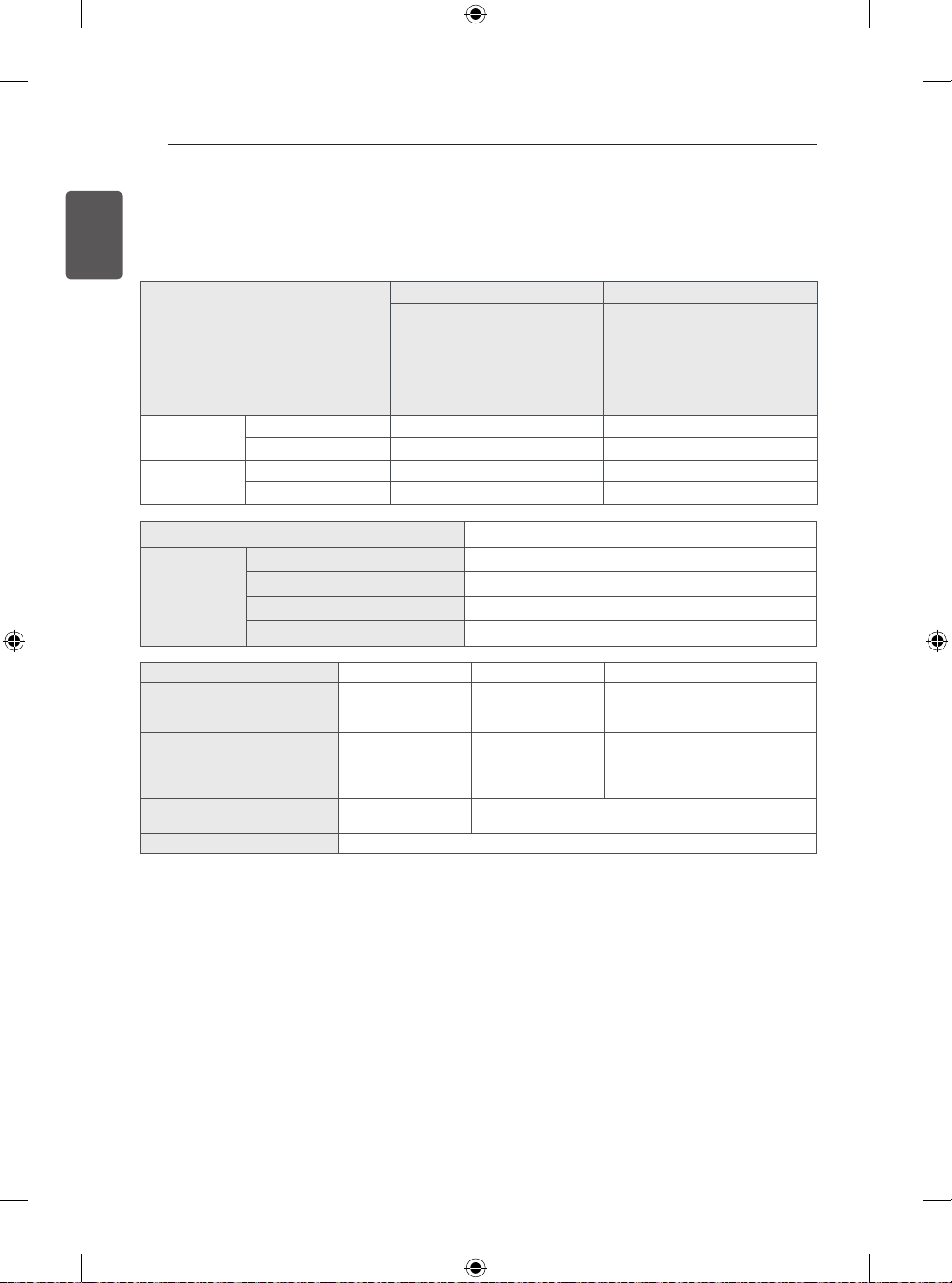
Problem Solution
CannotcontroltheTV
withtheremotecontrol.
Checktheremotecontrolsensorontheproductandtryagain.
Checkifthereisanyobstaclebetweentheproductandtheremotecontrol.
Checkifthebatteriesarestillworkingandproperlyinstalled( to , to ).
Noimagedisplayand
nosoundisproduced.
Checkiftheproductisturnedon.
Checkifthepowercordisconnectedtoawalloutlet.
Checkifthereisaprobleminthewalloutletbyconnectingotherproducts.
TheTVturnsoff
suddenly.
Checkthepowercontrolsettings.Thepowersupplymaybeinterrupted.
CheckiftheAutomaticStandby(Dependingonmodel)/SleepTimer/OffTime
featureisactivatedintheTIMEsettings.
IfthereisnosignalwhiletheTVison,theTVwillturnoffautomaticallyafter15
minutesofinactivity.
Whenconnectingto
thePC(HDMI/DVI),
‘Nosignal’or‘Invalid
Format’isdisplayed.
TurntheTVoff/onusingtheremotecontrol.
ReconnecttheHDMIcable.
RestartthePCwiththeTVon.
28
ENGLISH
SPECIFICATIONS
Productspeci�cationsmaybechangedwithoutpriornoticeduetoupgradeofproductfunctions.
Forthepowersupplyandpowerconsumption,refertothelabelattachedtotheproduct.
MODELS
50PB56** 60PB56**
50PB560V-ZA
50PB5600-ZA
50PB5608-ZA
50PB560U-ZA
50PB560B-ZA
50PB5606-ZA
60PB5600-ZA
60PB560V-ZA
60PB5608-ZA
60PB560U-ZA
60PB560B-ZA
60PB5606-ZA
Dimensions
(WxHxD)
Withstand(mm)
1172
x
756.7
x
315 1390.8x880.9x340
Withoutstand(mm)
1172
x
700.9
x
56 1390.8x823.7x56
Weight
Withstand(kg)
24.9 35.7
Withoutstand(kg)
23.3 33
CIModuleSize(WxHxD)
100.0mmx55.0mmx5.0mm
Environment
condition
OperatingTemperature 0°Cto40°C
OperatingHumidity Lessthan80%
StorageTemperature -20°Cto60°C
StorageHumidity Lessthan85%
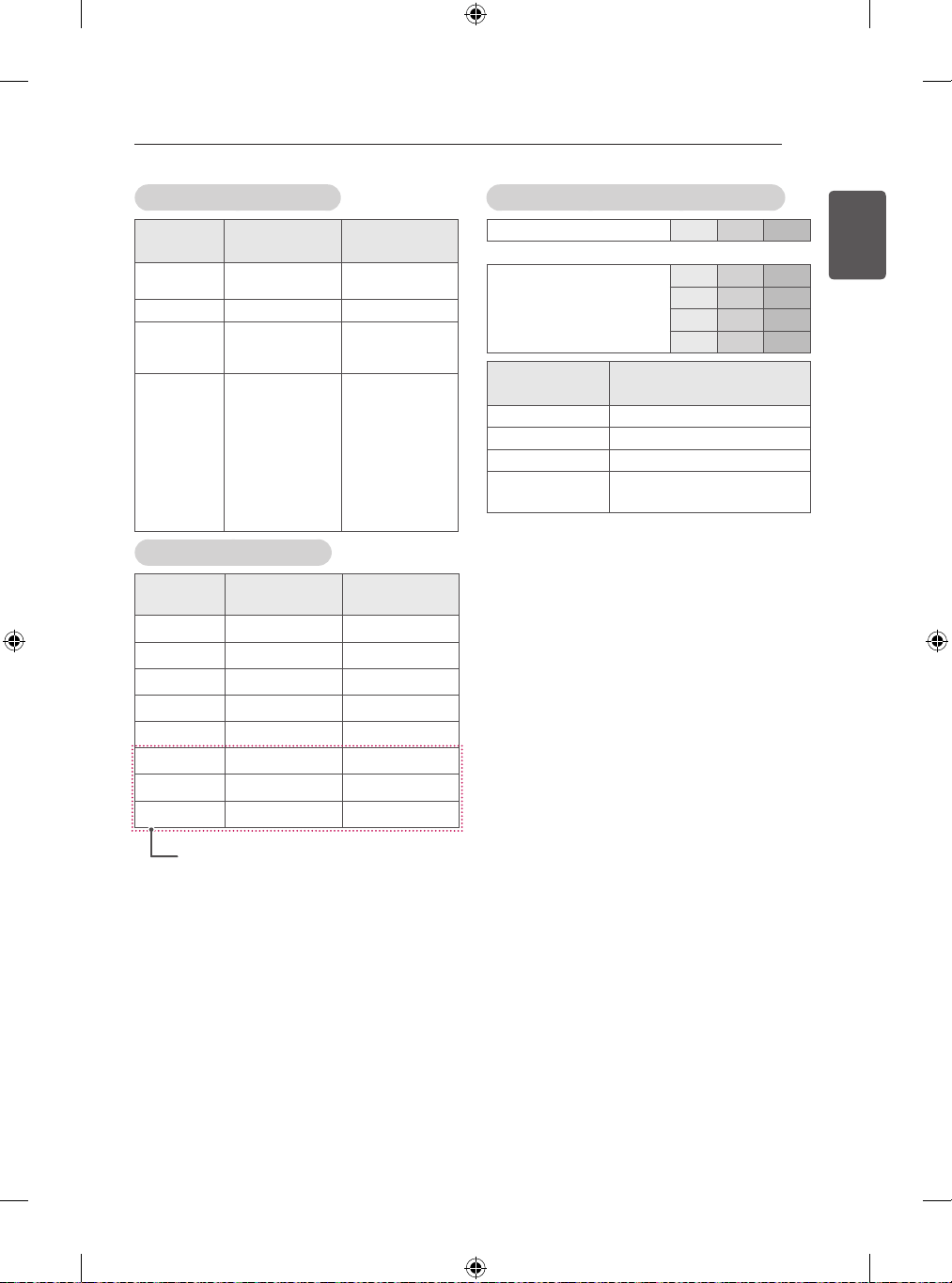
SatelliteDigitalTV DigitalTV AnalogueTV
Televisionsystem DVB-T/T2
DVB-C
DVB-S/S2
DVB-T
DVB-C
PAL/SECAMB/G/I/D/K,
SECAML/L’
Programmecoverage
VHF,UHF
C-Band,Ku-Band
VHF,UHF
VHF:E2toE12,
UHF:E21toE69,
CATV:S1toS20,
HYPER:S21toS47
Maximumnumberofstorable
programmes
6,000 1,500
Externalantennaimpedance 75Ω
SPECIFICATIONS
29
ENGLISH
SPECIFICATIONS
HDMI-DTVsupportedmode
Resolution
Horizontal
Frequency(kHz)
Vertical
Frequency(Hz)
720x480
31.469
31.5
59.94
60
720x576 31.25 50
1280x720
37.5
44.96
45
50
59.94
60
1920x1080
33.72
33.75
28.125
26.97
27
33.716
33.75
56.25
67.43
67.5
59.94
60
50
23.97
24
29.976
30.00
50
59.94
60
HDMI-PCsupportedmode
Resolution
Horizontal
Frequency(kHz)
Vertical
Frequency(Hz)
640x350 31.468 70.09
720x400 31.469 70.08
640x480 31.469 59.94
800x600 37.879 60.31
1024x768 48.363 60.00
1360x768 47.712 60.01
1280x1024 63.981 60.02
1920x1080 67.5 60.02
Componentportconnectinginformation
ComponentportsontheTV Y P
B
P
R
Videooutputports
onDVDplayer
Y P
B
P
R
Y B-Y R-Y
Y Cb Cr
Y Pb Pr
Signal Component
480i/576i O
480p/576p O
720p/1080i O
1080p
O
(50Hz/60Hzonly)
(Exceptfor50PB560B,50PB5606,50PB560U)
30
ENGLISH
REGULATORY
REGULATORY
LGRecyclingPolicy(OnlyEU)
LGElectronicsoffersacustomizede-wastetake-back&recyclingservicethatmeetslocalneedsandrequirements
inthecountrieswheree-wasteregulationsareinplace,andalsoprovidesproductandpackagingtake-back&recy-
clingservicevoluntarilyinsomecountries.LGElectronicsevaluatesproducts’recyclabilityatthedesignstepusing
LG’srecyclabilityevaluationtool,withthegoalofimprovingrecyclabilitywherepracticable.Throughtheseactivities,
LGseekstocontributetoconservingnaturalresourcesandprotectingtheenvironment.
FormoreinformationabouttheLGRecyclingPolicy,pleasevisitourglobalsiteathttp://www.lg.com/global/sustain-
ability/environment/take-back-recycling
EnergySaving
Energyef�ciencycutsenergyconsumptionandthussavesmoneybyreducingelectricitybills.Thefollowingindica-
tionsallowtoreducepowerconsumptionwhenthetelevisionisnotbeingwatched:
Turningthetelevisionoffatitsmainssupply,orun-pluggingit,willcutenergyusetozeroforalltelevisions,and
isrecommendedwhenthetelevisionisnotbeingusedforalongtime,e.g.whenonholiday,
Puttingthetelevisionintostandbymode,willreduceenergyconsumption,butwillstilldrawsomepower,
Reducingthebrightnessofthescreenwillreduceenergyuse.
Disposalofwastebatteries(ApplicableintheEuropeanUnionand
otherEuropeancountrieswithseparatecollectionsystems)
Thissymbolonthebatteryoronthepackagingindicatesthatthebatteryprovidedwiththisproductshallnotbe
treatedashouseholdwaste.
Byensuringthesebatteriesaredisposedofcorrectly,youwillhelppreventpotentiallynegativeconsequencesfor
theenvironmentandhumanhealthwhichcouldotherwisebecausedbyinappropriatewastehandlingofthebattery.
Therecyclingofthematerialswillhelptoconservenaturalresources.
Incaseofproductsthatforsafety,performanceordataintegrityreasonsrequireapermanentconnectionwithan
incorporatedbattery,thisbatteryshouldbereplacedbyquali�edservicestaffonly.
Toensurethatthebatterywillbetreatedproperly,handovertheproductatend-of-lifetotheapplicablecollection
pointfortherecyclingofelectricalandelectronicequipment.
Forallotherbatteries,pleaseviewthesectiononhowtoremovethebatteryfromtheproductsafely.Handthe
batteryovertotheapplicablecollectionpointfortherecyclingofwastebatteries.
Formoredetailedinformationaboutrecyclingofthisproductorbattery,pleasecontactyourlocalauthority,your
householdwastedisposalserviceortheshopwhereyoupurchasedtheproduct.
31
ENGLISH
REGULATORY
EUecolabel(OnlyEUecolabelappliedmodel)
Betterfortheenvironment...
HighEnergyEf�ciency
ReducedCO2emissions
Designedtofacilitaterepairandrecycling
...betterforyou.
EUEcolabel:PL/22/004
LGEannouncedthe‘LGDeclarationforaCleanerEnvironment‘in1994,andthisidealhasservedasaGuiding
managerialprincipleeversince.TheDeclarationisafoundationthathasallowedustoundertaikeEnvironmentally
friendlyactivitiesincarefulconsiderationofeconomic,environmental,andsocialaspects.Wepromoteactivities
forenvironmentalpreservation,andwespeci�callydevelopourproductstoembracetheConceptofenvironment-
friendlythroughwholeprocessfromgettingrawmaterials,production,transportation,usageandend-of-life.These
environmentalcharacteristicsareendorsedbytheawardoftheEuropeanCommissionasapprovaloftheproduct
environmentalstatusforenergysaving.Facilitiesforrecyclingandahostofotherfeatures.
Thefulllistofcriteriaandmoreinformationontheecolabelcanbefoundattheweb-siteaddress:
http://www.ecolabel.eu
RestrictionofHazardousSubstances(OnlyUkraine)
ОбмеженняУкраїнинанаявністьнебезпечнихречовин
TheequipmentcomplieswithrequirementsoftheTechnicalRegulation,intermsofrestrictionsfortheuseof
certaindangeroussubstancesinelectricalandelectronicequipment.
Устаткуваннявідповідаєвимогамтехнічногорегламентущодообмеженноговикористаннянебезпечних
речовинвелектричномуіелектронномуобладнанні.
Isolator(OnlySweden,Norway)
“Equipmentconnectedtotheprotectiveearthingofthebuildinginstallationthroughthemainsconnectionor
throughotherequipmentwithaconnectiontoprotectiveearthing-andtoacabledistributionsystemusing
coaxialcable,mayinsomecircumstancescreatea�rehazard.Connectiontoacabledistributionsystemhas
thereforetobeprovidedthroughadeviceprovidingelectricalisolationbelowacertainfrequencyrange(galvanic
isolator,seeEN60728-11)”
“Utrustningsomärkoppladtillskyddsjordviajordatvägguttagoch/ellerviaannanutrustningochsamtidigtär
koppladtillkabel-TVnätkanivissafallmedförariskförbrand.
Förattundvikadettaskallvidanslutningavutrustningentillkabel-TVnätgalvaniskisolator�nnasmellan
utrustningenochkabel-TVnätet.”
“Utstyrsomerkoplettilbeskyttelsesjordvianettpluggog/ellerviaannetjordtilkopletutstyr-ogertilkopletet
kabel-TVnett,kanforårsakebrannfare.
Foråunngådetteskaldetvedtilkoplingavutstyrettilkabel-TVnettetinstalleresengalvaniskisolatormellom
utstyretogkabel-TVnettet.”
Record the model number and serial number of
the TV.
Refer to the label on the back cover and quote
this information to your dealer when requiring
any service.
MODEL
SERIAL
Please contact LG First.
If you have any inquiries or comments,
please contact LG customer information centre.
Customer Information Centre
Country
Service
Country
Service
0 810 144 131 0900 543 5454
015 200 255 800 187 40
0032 15 200255 801 54 54 54
07001 54 54 808 78 54 54
810 555 810 031 228 3542
8088 5758 0850 111 154
0800 0 54 54 902 500 234
3220 54
0770 54 54 54
01806 11 54 11
(0,20€ pro Anruf
aus dem Festnetz der
DTAG; Mobilfunk: max.
0,60€ pro Anruf)
0848 543 543
801 11 200 900,
210 4800 564
0844 847 5454
8 800 200 7676
06 40 54 54 54 800 9990
0818 27 6955 0 800 303 000
199600099
8 8000 805 805,
2255(GSM)
8 820 0071 1111
Latvija
80200201 8 800 120 2222
880008081 8 0000 710 005