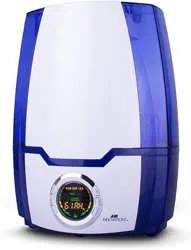
CLEAN MIST
™
SMART HUMIDIFIER
™
WITH AROMA TRAY
Instruction Manual and Warranty Information
READ AND SAVE THESE INSTRUCTIONS

Contents
Safety Instructions ............................................................................................................. 1
Unpacking / Specications ............................................................................................... 2
Parts & Contents ............................................................................................................... 3
Filling The Water Tank ....................................................................................................... 4
Operating Instructions ....................................................................................................... 5
Weekly Cleaning & Care / Storage .................................................................................... 6
Troubleshooting ................................................................................................................. 7
Other Great Products ........................................................................................................ 8
Warranty ............................................................................................................................ 9
If you have a respiratory condition, please contact your physician prior to use.
FCC Statement
Potential for Radio/Television interference
This device complies with Part 18 of the FCC Rules. Operation is subject to the following two conditions:
(1) This device may not cause harmful interference, and (2) this device must accept any interference
received, including interference that may cause undesired operation.This product has been tested and
found to comply with the limits for a Class B digital device, pursuant to Part 18 of the FCC rules.
These limits are designed to provide reasonable protection against harmful interference in a residential
installation. The product generates, uses, and can radiate radio frequency energy and, if not installed
and used in accordance with the instructions, may cause harmful interference to radio communications.
However, there is no guarantee that the interference will not occur in a particular installation. If the product
does cause harmful interference to radio or television reception, which can be determined by turning the
product on or o, the user is encouraged to try to correct the interference by one or more of the following
measures:
• Reorient or relocate the receiving antenna.
• Increase the separation between the product and the receiver.
• Connect the product into an outlet on a circuit dierent from that to which the receiver is connected.
• Consult the dealer or an experienced radio/TV technician for help.
• Changes or modications not expressly approved by the party responsible for compliance
could void the user’s authority to operate the equipment.

1
SAFETY INSTRUCTIONS
• This appliance has a polarized plug (one blade is wider than the other) as a safety
feature. If the plug does not t fully into the outlet, reverse the plug. If it still doesn’t
t, contact a qualied electrician. DO NOT attempt to defeat this safety feature.
• Before using the humidier, extend the cord and inspect for any signs of damage; DO
NOT use if the cord has been damaged.
• Keep cord away from heated surfaces and out of the way, where it cannot be
stepped on or tripped over.
• NEVER use in an environment where explosive gases are present.
• Place humidier on a stable level surface; DO NOT place on carpet, next to
heating vents, under direct sunlight, in high temperature areas, or near computers
and electronic equipment.
• DO NOT place the the humidier directly on wood furniture or other surfaces which
could get damaged by water.
• DO NOT direct the mist against a wall or home appliances.
• NEVER operate without water in the Tank; DO NOT use anything other than room
temperature tap or distilled water.
• NEVER add essential oils directly to the water, as this will damage the unit and void
the warranty.
• DO NOT touch the water in the Base during operation.
• DO NOT expose or immerse the Base in water when cleaning.
• DO NOT pour water into the base through the Air Outlet during cleaning and lling.
• NEVER block the Air Outlet or intake or cover the unit when it’s in operation
• DO NOT use any attachments not provided with the unit.
• Discontinue use if humidier makes loud noises or has a strange smell.
• DO NOT attempt to repair or adjust the unit; servicing must be performed by
professional or qualied personnel.
• Only operate when fully assembled; only use as intended and described in this manual.
• Keep out of reach of small children.
• Always insert plug securely into the power source.
• Unplug the unit and empty the Water Tank and Base before carrying/moving.
• Only unplug when the humidier is turned o; ensure hands are dry.
• Always turn o the unit before removing, emptying or lling the Water Tank.
• Perform regular maintenance of the Ultrasonic Nebulizer; NEVER scrape Nebulizer with
a hard or sharp object.
• Dry the unit completely before storage; store in a cool, dry place.
• Do not drop, hit or otherwise subject this product to excessive shock.
READ AND SAVE THESE INSTRUCTIONS: Failure to follow
all the instructions may result in electrical shock.
WARNING
CAUTION
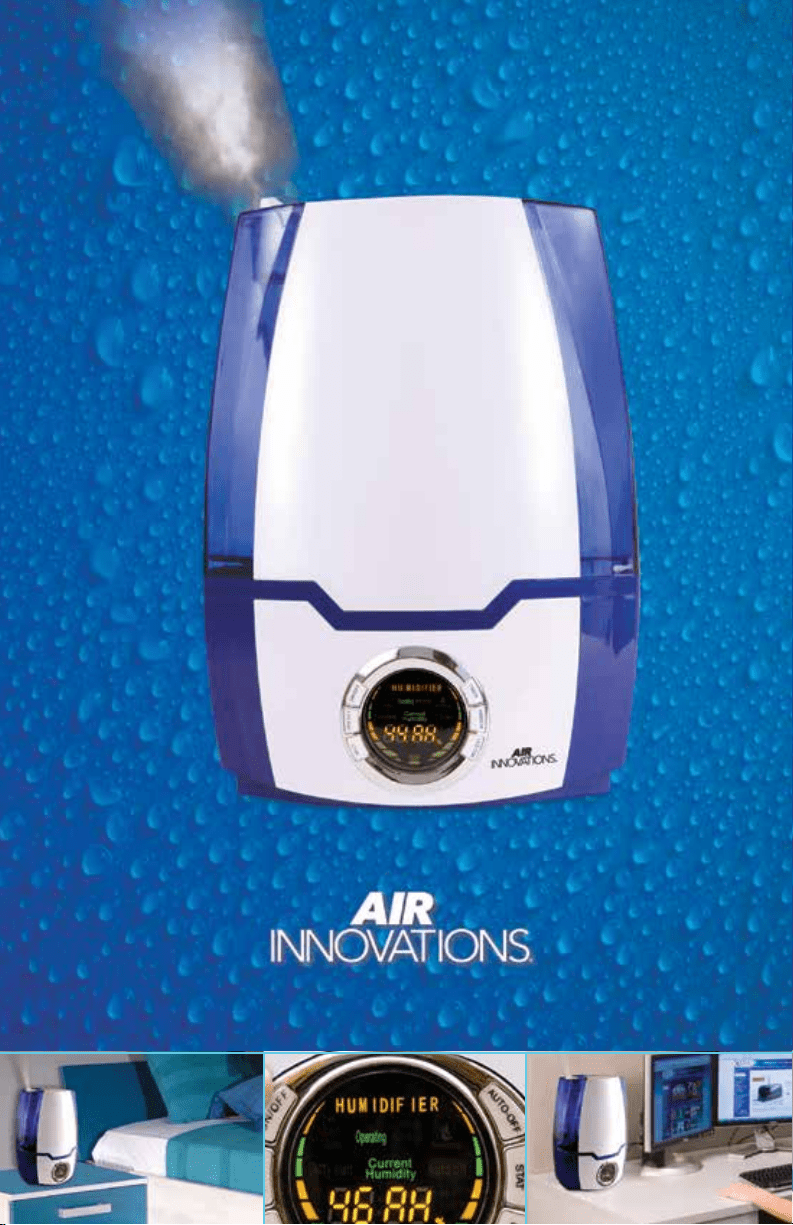
No More Dry Air
Thank you for choosing the Air Innovations – Clean Mist
™
Smart Humidier
™
with Aroma Tray and
congratulations on taking this important step in improving the quality of air in your home or oce.
The Air Innovations – Clean Mist
™
Smart Humidier
™
with Aroma Tray uses Ultrasonic Technology
to create humidity instantaneously, while working silently to erase the discomforts of dry air.
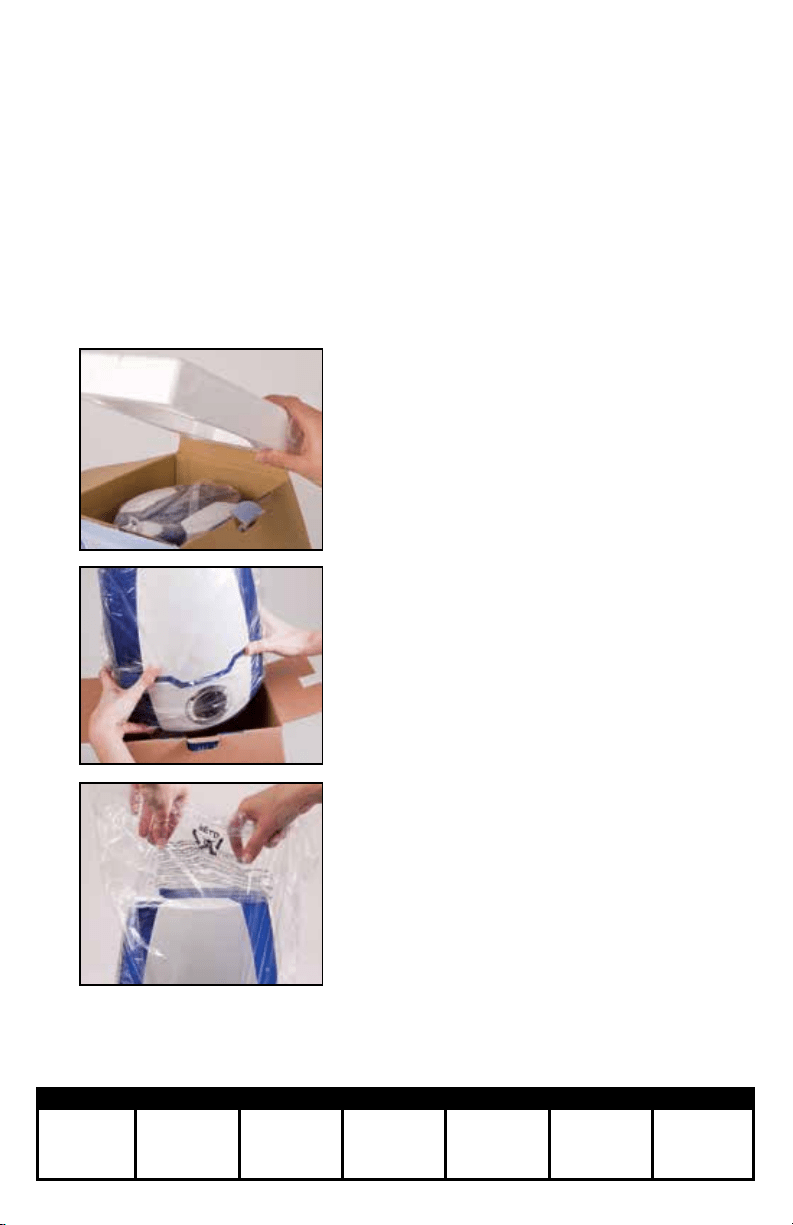
Unpacking
Specications
Carefully remove the humidier
from the box by pulling the Base
of the unit (Do not take the unit
out of the box by pulling the tank).
2
Remove the plastic bag
from the humidier.
3
*Follow directions to ll and operate the humidier
2
Open the box and remove
packaging material.
1
Product Model Power Consumption Current Rating Voltage Tank Capacity Dimensions Weight
MH-505A 30W 0.4A 110-120V~60Hz
5.2L / 1.37
Gallon
9.25”W x 6.5”D
x 12.75”H
3.5 Lbs.
7
8
9
10
11
12
13
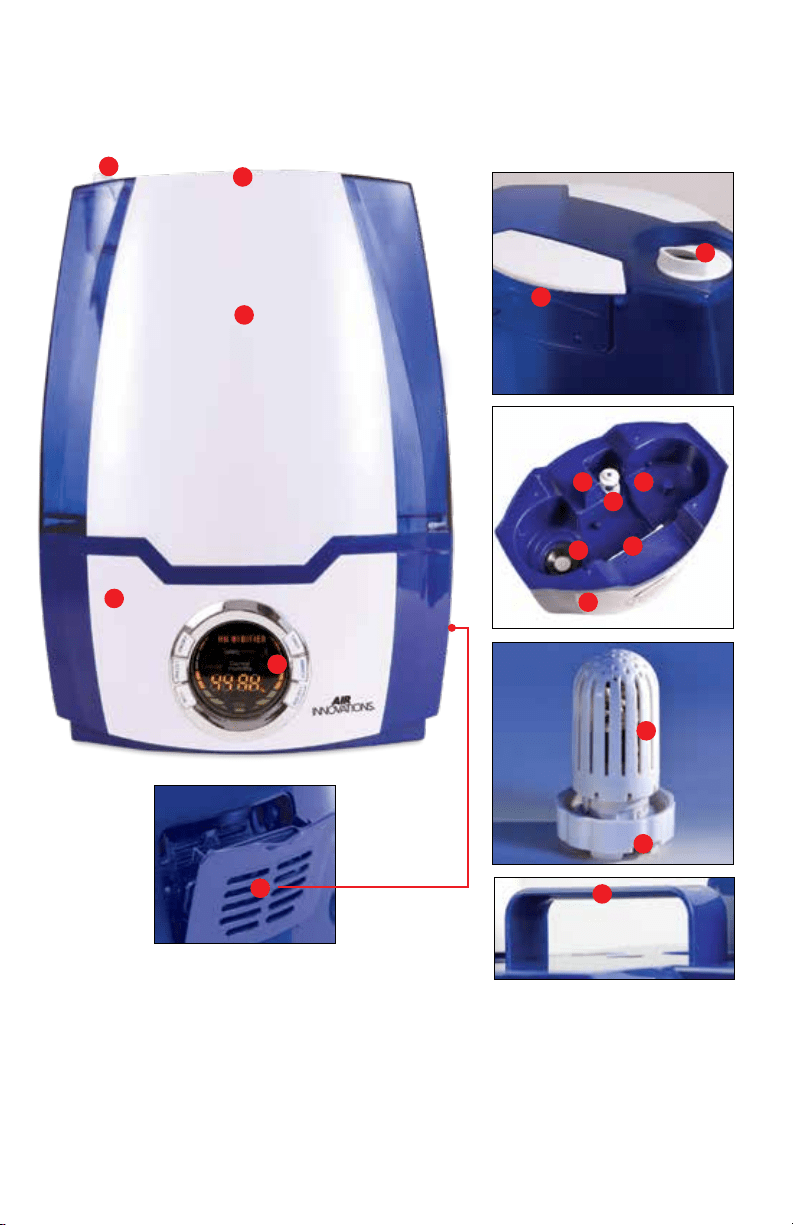
1. Rotating Mist Nozzle
2. Handle
3. Water Tank
4. Base
5. Control Panel
6. Aroma Tray
7. Air Outlet
8. Water Sensor
9. Water Reservoir
10. Ultrasonic Nebulizer
11. Cleaning Brush
12. Ceramic Filter
13. Tank Cap
14. Bottom Tank Handle
3
Parts & Contents
1
1
3
4
4
5
6
2
2
14
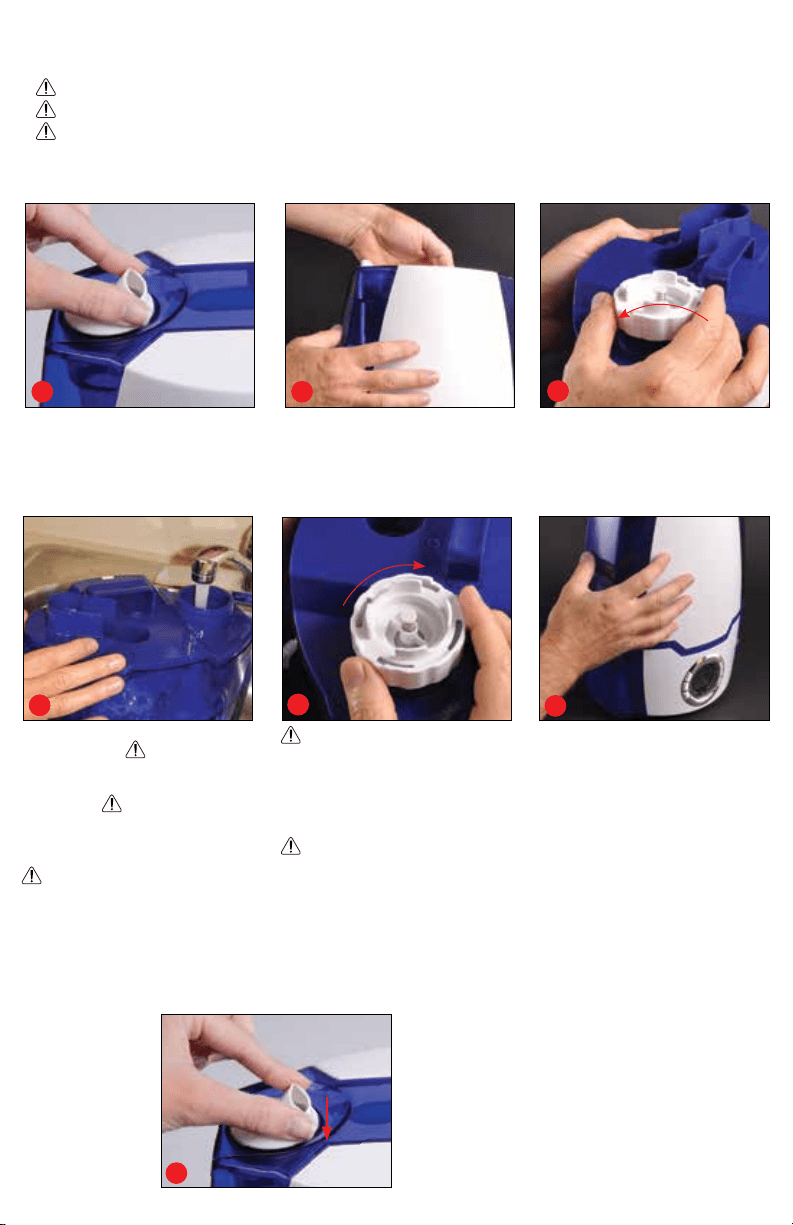
Lift the Water Tank with both
hands using the Handle to
remove the humidier from
the Base.
Remove Rotating Mist Nozzle
prior to lling the Water Tank.
Turn the Water Tank upside down
and remove the Tank Cap by
turning it counter clockwise.
21
3
4
5
6
WARNING: Replace the Tank
Cap by rmly turning clockwise
until tight. Turn the Water Tank
upright and check the Tank Cap
for leaks. If any water drips,
remove the Tank Cap and retighten.
WARNING: DO NOT place
Water Tank on the humidier Base
if the cap is leaking.
Lift the Water Tank with both
hands using the Handle and
replace on the humidier base.
Make sure to follow the shape
of the Water Tank and the hu-
midier Base, so that the tank
sits level and ush to the Base.
Ensure the tank is rmly seated.
4
Filling The Water Tank
WARNING: Always unplug the unit before removing the Water Tank.
WARNING: DO NOT touch the water in the Base.
WARNING: NEVER ll the Water Tank from the top of the unit. Follow Water Tank
lling instructions in #4.
Filling the Water Tank: Use clean,
cool, tap water.
WARNING:
DO NOT
use extremely cold water,
since it may temporarily reduce the
mist output.
WARNING:
NEVER
ll with hot/warm water or use
additives as this could damage the
unit and void the warranty.
WARNING:
If you have
hard tap water use our
Humidifier Demineralization Filters
(available at www.Air-Innovations.com)
or use ONLY filtered/distilled water.
Attach the Rotating Mist Nozzle
to the top of the Water Tank by
snapping into place for desired
use as pictured.
7
Operating Instructions
WARNING: DO NOT operate the humidier without water in the tank.
WARNING: NEVER lift the tank o the Base while the unit is operating.
5
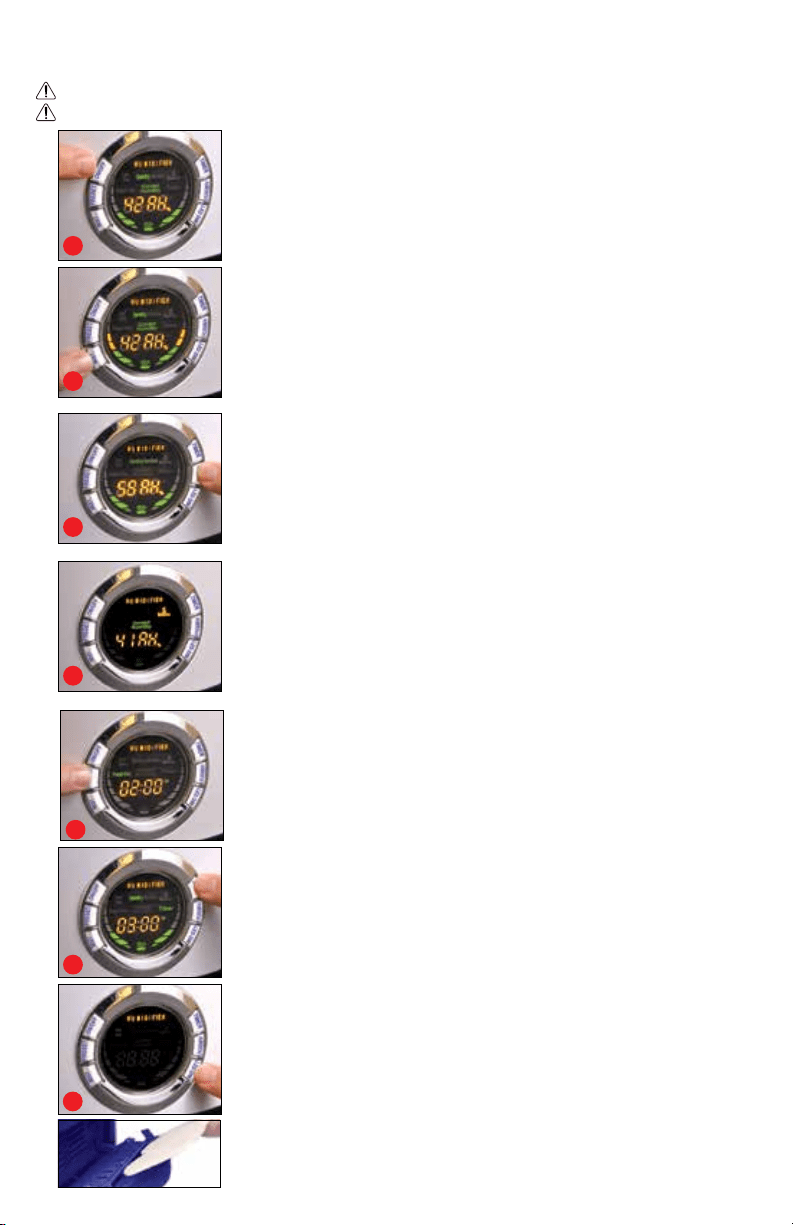
ON/OFF – Plug in to a standard (120V AC) electrical outlet. The LED Display will
turn on for 2 seconds then turn OFF. Press the ON/OFF button once and the
“Operating” indicator will turn on. Mist may not appear immediately; allow up to
15 minutes for water in the tank to transfer to the Base.
Mist Output – When you turn the unit ON, it will default to the lowest mist
setting. Pressing the Mist button each time will increase the output. Press once
for Medium, twice for High, three times for Supreme. Pressing the Mist button a
fourth time will bring the unit back to Low.
Humidistat –
By using this feature the humidier will automatically monitor and
control the humidity level according to your desired setting. Once the desired humidity
level is reached the mist will shut OFF until the humidity drops below the setting and
then the mist will turn back ON automatically to maintain the humidity level desired.
To set this feature press the Humidistat button to your desired setting. Settings range
from 40%-95% RH (Relative Humidity) in 5% RH increments. A 40%-60% Relative
Humidity is recommended. Once you set your desired humidity, the number will blink
three times and then the display will revert back to the Relative Humidity. To view the
set humidity level, press the Humidistat button once.
1
2
4
3
5
7
6
LOW Water – When the tank is out of water the Waterless indicator will
appear in the display, you will hear three beeps and the automatic safety
shut-o will turn the Ultrasonic Nebulizer & unit OFF.
Automatic Use
Safety Shut O
The Preset and Timer buttons allow you to set the humidier to turn ON and OFF
automatically as desired.
Preset – The Preset feature allows you to program the unit to turn ON
Automatically. To use, press the Preset button once; you will see Preset 01:00H
illuminated on the display. This feature works in one hour increments and is pro
-
grammable up to 24 hours. Simply keep pressing the Preset button until you get
to your desired Preset time, once you have reached the time the display will ash
three times and then will start to countdown until the unit turns ON.
Timer – The Timer feature allows you to run the humidier now and set it to turn o
at a specic time automatically (in 1 hour increments from 1-24 hours). To use -
press the Timer button once you will see “Timer” 01:00H illuminated on the display.
This feature works in one hour increments and is programmable up to 24 hours.
Simply keep pressing the Timer button until you get to your desired time, once
you have reached the time the display will ash three times and then start to count
down until the unit turns OFF. The display will start alternating between the current
ambient humidity and the Timer. NOTE: You can use the Preset and Timer functions
together on this fully programmable LED Display to program the
humidier to turn ON and turn OFF at your desired times.
LED/Dim – To turn OFF the LED Display, press the LED Dim button once. The
unit will remain working but without the the display illuminated. Press any
button to illuminate the display for one minute. Press the LED Dim button once
more to turn the display ON.
Extra Features
Manual Use
AROMA
TRAY
Aroma Tray- By inserting an Air Innovations Essential Oil Aroma Pad into the
built-in aroma tray, you can transform your humidier into an easy-to-use fragrance
dispenser. Visit www.Air-Innovations.com to purchase Aroma Pads.
Weekly Cleaning & Care
WARNING: Before cleaning always turn power o and unplug the unit from outlet.
WARNING: DO NOT rinse Base under faucet. To clean, wipe the Base with a paper towel.
WARNING: DO NOT use any solvents or aggressive cleaning agents. Keep water away
from the Air Outlet.
WARNING: DO NOT tamper with the Water Sensor.
About White Dust -Use of high-mineral content water may cause a white mineral residue to
accumulate on room surfaces near the humidier. The mineral residue is commonly referred to as
“White Dust”. The higher the mineral content (the harder your water is), the greater the potential for
White Dust. The White Dust is not caused by a defect in the humidier, but is due only to minerals
suspended in the water from your tap.
WARNING: If you have hard tap water use our
Humidier Demineralization Filters (available at www.Air-Innovations.com) or use ONLY ltered/
distilled water.
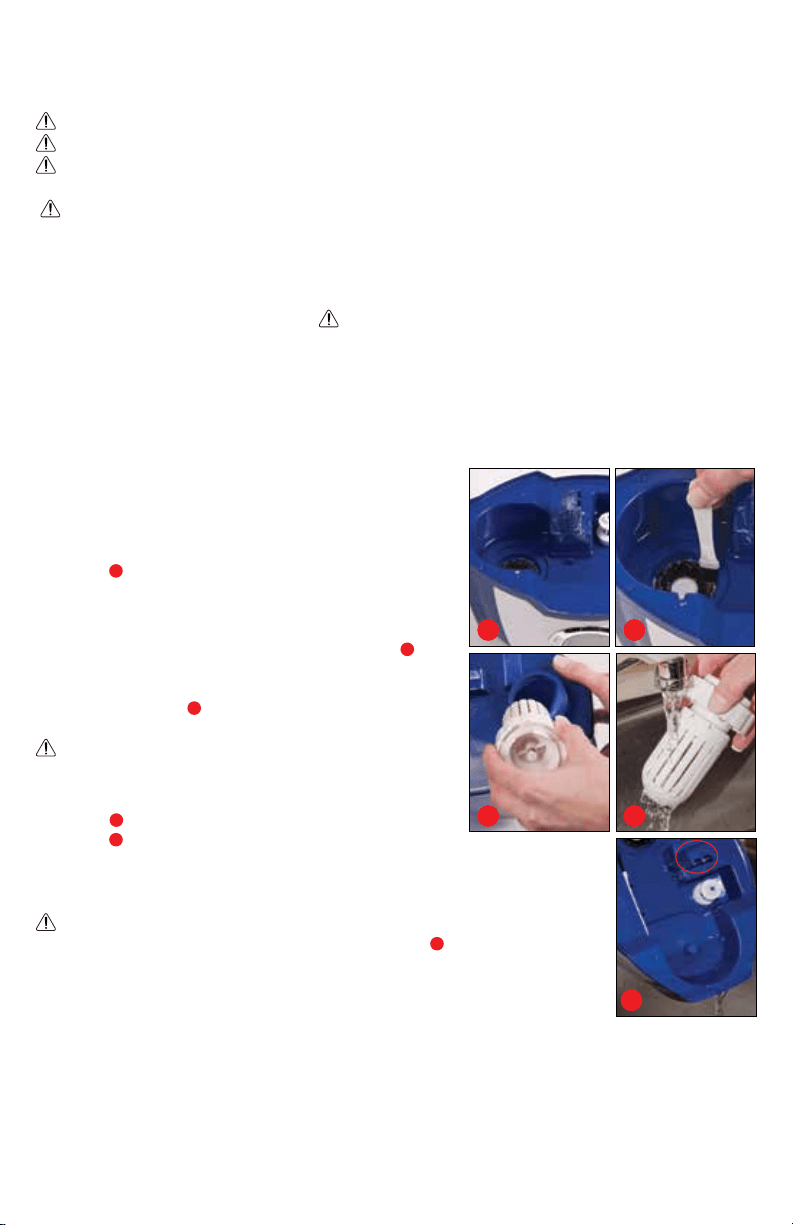
Tank Cleaning - Remove the Rotating Mist Nozzle from the top of the Water Tank then remove the
Water Tank from the unit. Turn the tank upside down, unscrew the Tank Cap and drain any water
from the tank. Wipe the tank with a soft damp cloth then
rinse it with warm water inside and out.
Base Cleaning - Gently wipe the Base with a
soft damp cloth.
White Dust Cleaning - If mineral deposits
“White Dust” are evident around the Ultrasonic
Nebulizer
a
and Water Sensor, clean these surfaces
with a soft cloth and a small amount of undiluted
white vinegar. If necessary, mix a solution of 50%
white vinegar and 50% water and ll the Base with
enough solution to cover the Ultrasonic Nebulizer
a
.
Allow it to soak for an hour and then use the provided
brush to gently loosen buildup on the
Ultrasonic Nebulizer
b
. Put 1 cup of water in the
Base and wipe clean with a soft cloth.
WARNING: DO NOT rinse Base under faucet.
Ceramic Water Filter Cleaning - Remove the
Water Tank from the humidier Base. Remove the
Tank Cap
c
and rinse Ceramic Filter thoroughly with
tap water
d
, then replace on Water Tank.
Surface Cleaning - Clean all surfaces of the unit with a clean
damp soft cloth.
WARNING: When emptying the Water Reservoir on the Base, make
sure that the water is poured away from the Air Outlet
e
. If water is
poured into the outlet it may damage the humidier.
.
Storage
1. Follow all cleaning instructions prior to storage.
2. Dry all parts, including the inside of the Water Tank.
3. Leave the tank cap partially loosened to prolong the life of the cap.
4. Preferably store in its original box, in a dry place away from high temperatures.
5. Follow all cleaning instructions after long periods of storage.
a
e
c
b
d
6
Troubleshooting
7
Problem Solution
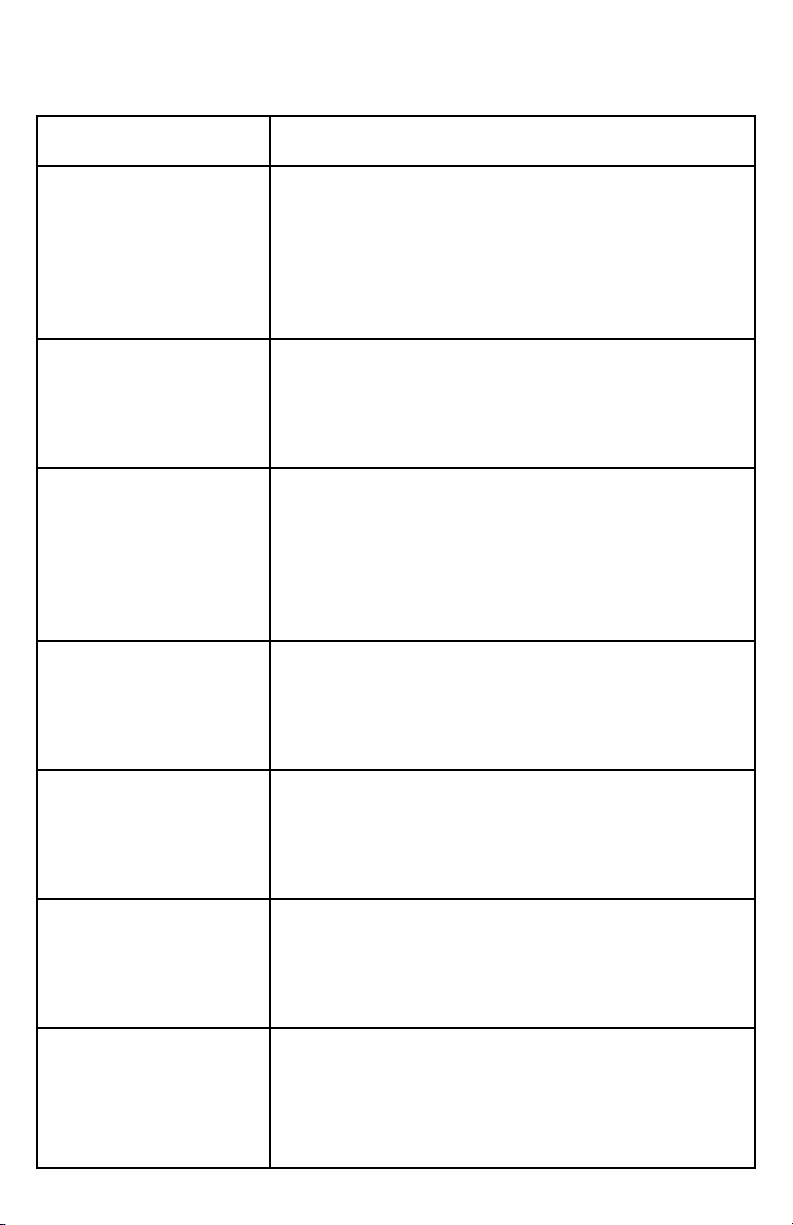
Weak or no mist output. The water in the unit is too cold: Replace with cool but not
cold water or set output to High and wait 10-15 minutes.
The surface of the Ultrasonic Nebulizer is dirty: Clean Ultra
-
sonic Nebulizer. (see pg. 6 “White Dust Cleaning”)
Ultrasonic Nebulizer is not working: See Warranty.
White dust is forming on
nearby furniture.
Hard tap water may deposit a certain amount of dust. Visit our
website (www.Air-Innovations.com) to purchase Humidier
Demineralization Filters or use distilled water.
Water is leaking. Water Tank Installation: Make sure the tank is correctly
attached. (see pg. 4 “Filling the Water Tank”)
Humidier is not on a level surface: Place on level surface.
Ceramic Filter Installation: Turn Filter Tank Cap clockwise until
tight.
Condensation is forming
around humidier or
windows.
Mist output level is too high for room size: Decrease the mist
output.
Direction of Rotating Mist Nozzle: Change direction of nozzle.
Aroma Tray does not close. Aroma Pad is not seated properly: Remove and reinsert the
pad.
4 LED lights continuously
ash for more than one
minute.
Unit is in Alert Mode: Unplug and restart the humidier;
if problem continues, call our Customer Service Center for
assistance.
Missing parts. Call us toll free at: 844-600-1370, Monday thru Friday
8:30am to 5pm EST.
Please reference model: MH-505A

8
Try These Other Great
Products For Your Life!
Available at: www.ForLifeProducts.com, www.Air-Innovations.com, www.Pursfection.com, www.RejuvenateProducts.com
1-YEAR WARRANTY -
MH-505A
Air Innovations
®
Clean Mist™ Smart Humidier™ with Aroma Tray comes with a 1-year
manufacturer’s warranty. If this unit should become defective within 1-year from the
date of purchase, or if you have any questions or comments or regarding replacements
for any of our products, please contact us directly at:
Call us toll free at: 844-600-1370
Monday thru Friday 8:30 AM to 5:00 PM EST.
Visit us on the web at: www.Air-Innovations.com
e-mail us: sales@air-innovations.com
Or write us:
Air Innovations
Att: Quality Assurance Dept.
2301 SW 145
th
Ave.
Miramar, FL. 33027 USA
Please ll out the warranty card and
mail back to the above address.
Or, register your warranty online today.
Simply go to:
www.Air-Innovations.com
NAME
ADDRESS
CITY
STATE ZIP
TELEPHONE
E-MAIL
DATE OF PURCHASE
PLACE OF PURCHASE
THIS UNIT COMES WITH A 1-YEAR WARRANTY SUBJECT TO THE FOLLOWING CONDITIONS:
In the rst year, all repairs will be performed free of charge or the unit will be replaced. This
warranty is not transferable, it is valid only for the original purchaser. This warranty will be
voided if the unit is subjected to unauthorized repair or impact damage. If you have any
questions please call toll free: 844-600-1370. This warranty gives you specic legal rights,
and you may also have other rights which vary from state to state.
Please check here if you would not like to receive any solicitations from our company
9
!
Air Innovations
®
©2019 Great Innovations, LLC. All Rights Reserved. US & International Patents Pending. Printed in China.