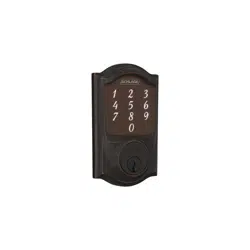
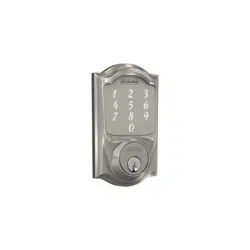
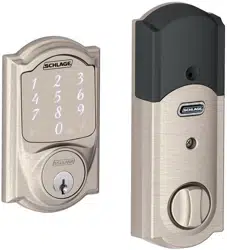
1. Download the app! Just search for “Schlage Sense” in the App Store or on Google Play.
Once you connect your lock to your app, the manual programming functions will be disabled and any access codes will be deleted. Be sure to accept any available firmware upgrades. The app will alert you to upgrades and walk you through the process.
The Schlage Sense app works on iPhone, iPad, and iPod touch with iOS 9.3 or later or devices with Android 5.0 or later. HomeKit is a trademark of Apple Inc. Google Play and the Google Play logo are trademarks of Google Inc. Android is a trademark of Google Inc.
Note : DON’T WANT TO USE THE APP? →Go to page 7 for manual programming instructions.
2. Install your lock.
Follow installation instructions (in separate booklet), or access the step-by-step installation video on the app.
3. Pair your lock with your iOS or Android device.
Pair your lock using the Schlage Sense app for easy management.
4. Add access codes to your lock
After adding your lock to your home, use the app to add codes to unlock your lock. Tap on the “people” icon, then “Access Codes.”
5. Configure the alarm and other lock features.
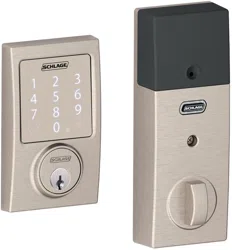
The Schlage Sense Smart Deadbolt includes many features that you can configure using the Schlage Sense app.
6. Send virtual keys.
Share access with administrators and guests in the Schlage Sense app by tapping on the “people”icon, then “Virtual Keys”. If you set up your lock with Apple HomeKit, you will see “HomeKit Users”.
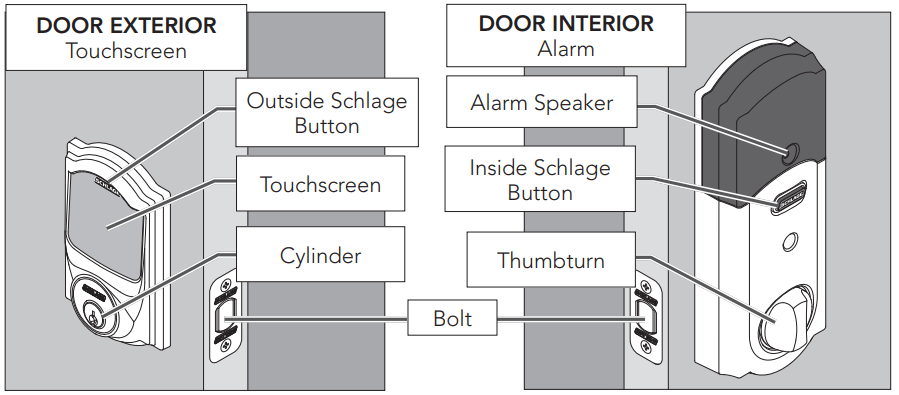
Lock Parts
Inside Schlage Button
• Located on the inside of the door. • Used to silence the alarm. • Does not lock or unlock the door
Thumbturn
• Used to lock and unlock manually from the inside
Outside Schlage Button
• Located on the outside of the door.
• Locks the deadbolt with 1-Touch Locking.
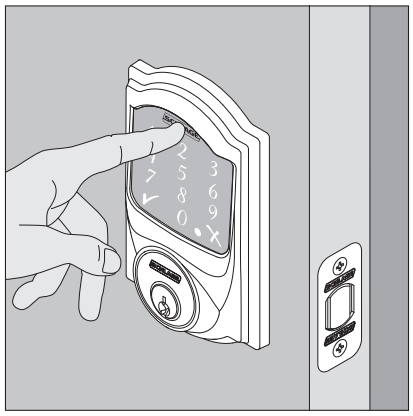
• Illuminate the lock’s touchscreen for access code entry
Touchscreen
• Remains unlit until a button is pressed.
• Located on the outside of the door.
• Used to enter access codes.
• Used to lock door (default setup).
Cylinder
• Used to unlock in emergency situations. See Emergency Key Override on page 14.
Alarm Speaker
• Sounds alarms based on the chosen settings. Alarm can be programmed in the app.
Bolt
• Automatically extends and retracts when the lock’s touchscreen is used.
• Manually extends and retracts when the thumbturn is rotated.
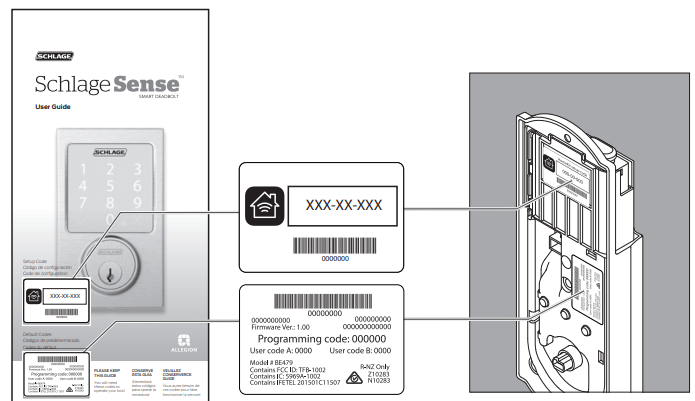
Programming Code and Default Access Codes
The programming code and default access codes are located on one sticker, and the HomeKit setup code is located on the other sticker.
Front of this user guide
Back of the Alarm
» You must remove the alarm from the door to see these stickers.
Locking and Unlocking
FROM THE OUTSIDE
To Lock
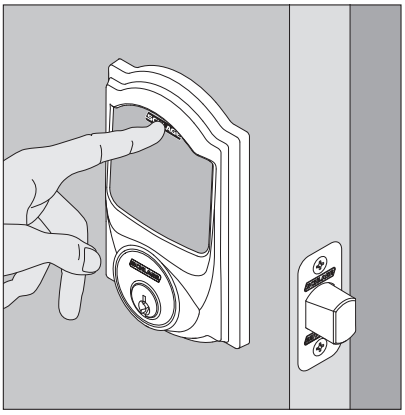
1. Press the Schlage Button.
2. The lock will lock. The green check mark will light once.
If the bolt cannot fully extend, the red X will light and a tone will sound. The door may remain unlocked!
To Unlock
1. Press the Schlage Button.
2. Enter a valid access code.
3. The green success check mark will flash twice and one beep will sound. The deadbolt will unlock.
If the red error X lights, the access code was not valid.
FROM THE INSIDE
To Lock
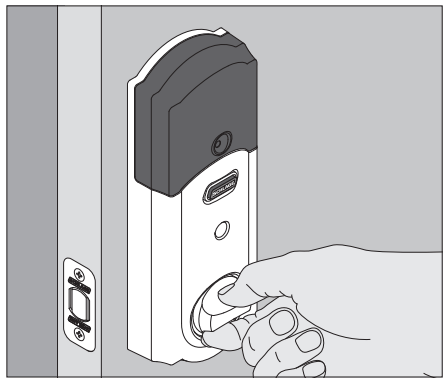
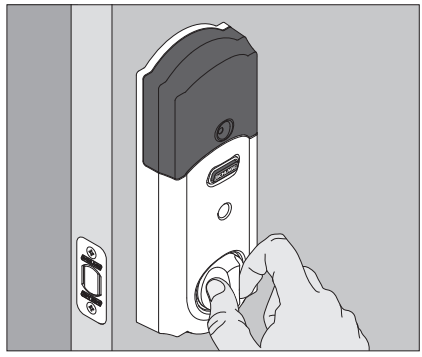
Rotate the Inside Thumbturn
To Unlock
Rotate the Inside Thumbturn
The Inside Schlage Button will not lock or unlock the deadbolt. It is used to silence the built-in alarm. See the alarm settings within the Schlage Sense app
Cleaning the Lock
In order to properly clean the touchscreen from build-up of dirt, oils, or other contaminants you should use a mild dish soap with warm water and follow the general rules below:
• Do rinse the touchscreen with warm water prior to cleaning process.
• Do follow the application of soap with a damp, lukewarm cloth.
• Don’t use abrasives, high alkaline cleaners, or gasoline.
• Don’t leave cleaners on touchscreen for long periods, wash immediately.
• Don’t apply cleaners in direct sunlight or at elevated temperatures.
• Don’t use scrapers, squeegees or razors.
The bolt itself can be cleaned using a mild dish soap and warm water. This can help improve decreased performance.
Replacing the Batteries
» Replace the batteries in your lock at the same time each year that you test and replace the batteries in your smoke alarms. This will help ensure continued reliable operation.
» Use four high-quality alkaline AA batteries for replacement.
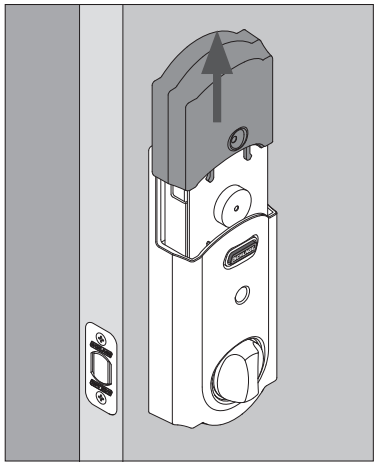
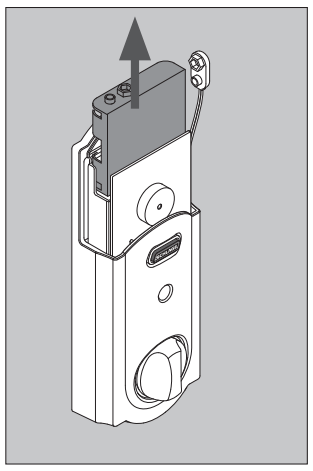
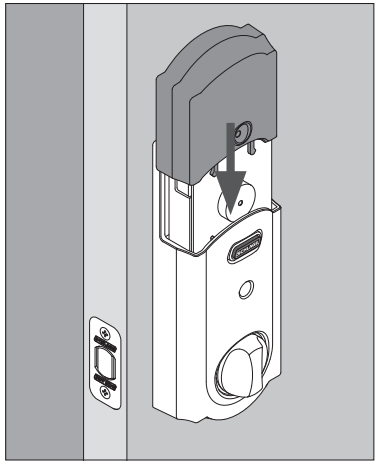
1. Remove the inside cover.
2. Unsnap the battery connector, remove the battery tray and replace the batteries.
3. Replace the battery tray with the batteries facing the door. Snap the battery connector to the tray and replace the cover.
Manual Programming Guide
Schlage recommends using the Schlage Sense mobile app to program your lock. If you don’t have the Schlage Sense app, you can use the manual programming instructions below.
Programming Descriptions
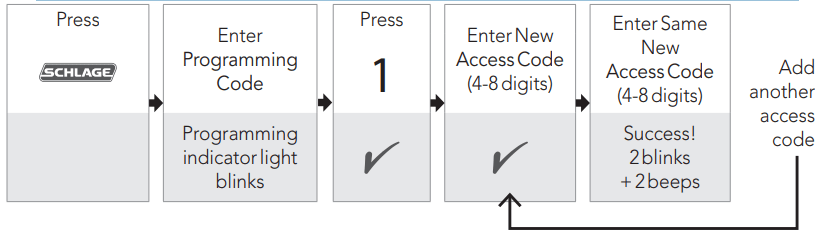
Add Access Code : Access codes unlock the deadbolt. Can be 4 - 8 digits long. All codes must be the same length as the first code programmed into the lock. See Changing Access Code Length below.
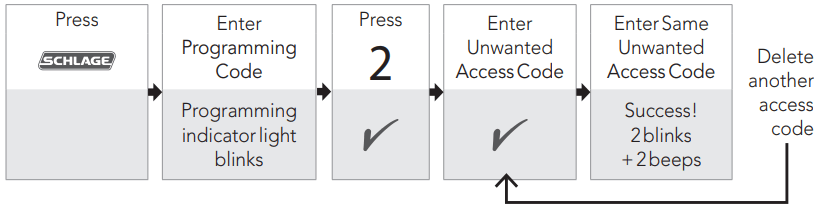
Delete Access Code : Removes one access code at a time.
Change Programming Code : The Programming Code is used to put the lock into Programming Mode. It is 6 digits long.
Enable/Disable Beeper : The beeper can be turned off if desired. Beeps will still sound during programming.
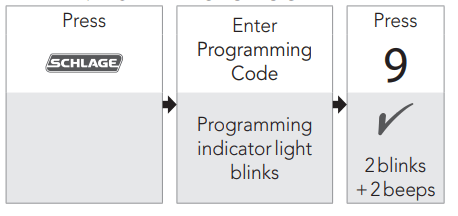
Delete ALL Access Codes : Removes ALL access codes from the lock.
Enable/Disable 1-Touch Locking : When enabled: Press the Outside Schlage Button to lock the deadbolt. (Default setting). When disabled: Press the Outside Schlage Button and then enter an access code to lock the deadbolt
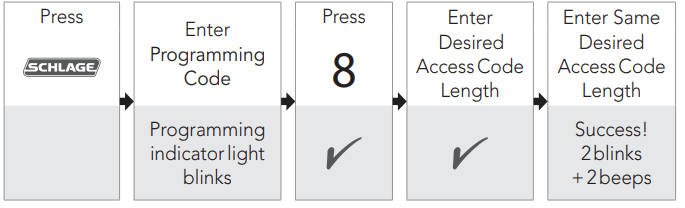
Change Access Code Length : Access codes can be 4 - 8 digits in length. Default is 4 digits. Changing the access code length will delete all existing access codes!
Enable/Disable AutoLock : When enabled, the lock will automatically relock 30 seconds after unlocking. (Disabled by default).
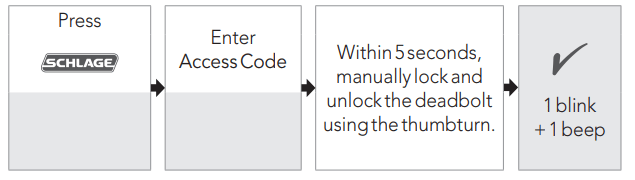
Temporarily Disable Auto-Lock : Auto-Lock must already be enabled. While the deadbolt is locked, press the Outside Schlage Button and then enter a 4-8 digit access code to unlock the deadbolt. Within 5 seconds, manually lock and unlock the deadbolt using the thumbturn.
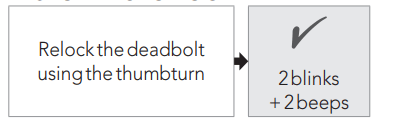
Restore Auto-Lock : Lock the deadbolt using the thumbturn.
Programming Procedures
» Programming mode will automatically time out after 30 seconds of inactivity.
Write your programming code here for easy access.
»If you make a mistake during programming, press the outside Schlage button to leave Programming mode and start over.
ADDING ACCESS CODES
» Determine how long you want your access codes to be BEFORE adding any access codes. If you change the access code length, all existing access codes will be deleted!
DELETING ACCESS CODES
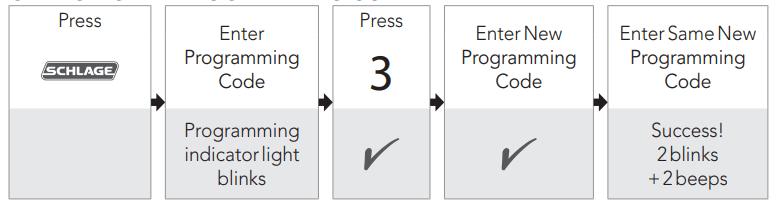
CHANGING THE PROGRAMMING CODE
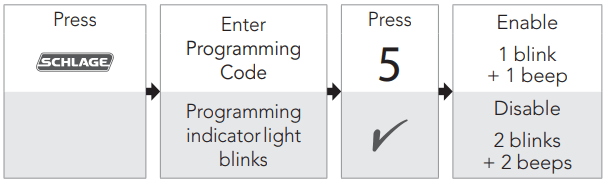
ENABLE/DISABLE BEEPER*
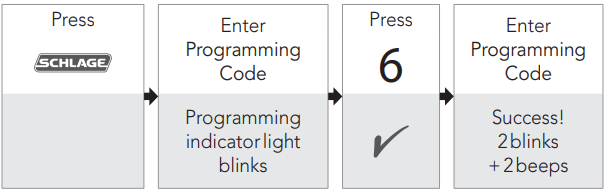
DELETE ALL ACCESS CODES
ENABLE/DISABLE 1-TOUCH LOCKING
CHANGE ACCESS CODE LENGTH
ENABLE/DISABLE AUTO-LOCK
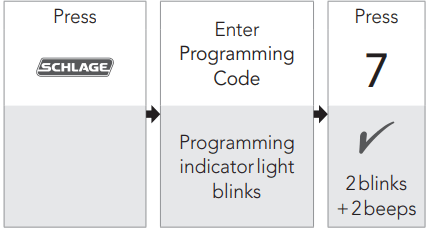
TEMPORARILY DISABLE AUTO-LOCK
Deadbolt should be locked to begin.
RESTORE AUTO-LOCK
Alarm features can be programmed using the app.
My Codes
If you are not using the Schlage Sense app, use these tables to record programming and access codes that you program into the lock.
» Use a pencil to enter the codes in the boxes so you can easily change them later.
• The Programming Code can be any combination of six numbers entered into the keypad to put the lock in Programming Mode.
• The first 4-6 numbers (depending on access code Length) must be different from all of the access codes currently in the lock.
• One Programming Code is programmed into the lock by default. This code can be found on the stickers, one on the back of the Alarm Assembly and one on the back of this guide. Access Codes
» Up to 30 access codes can be stored in the lock at one time.
• An access code can be any combination of 4-8 digits entered into the keypad to unlock the lock.
• The first 4-6 digits must be different from the first 4-6 digits of the Programming Code.
• Two access codes are programmed into the lock by default. These two codes can be found on the stickers, one on the back of the Inside Alarm Assembly and one on the back of this guide.
Best Practices
• Give each person their own unique access code.
• Change access and Programming Codes periodically to ensure security.
Troubleshooting
Problem
Sounds
Lights
Solution
I forgot my Programming Code.*
—
—
Check the front of this guide or the back of the Alarm Assembly for default Programming Code
If needed, restore lock to factory settings. See Factory Default Reset on page 14
I need to delete an access code that I don’t remember.*
—
—
Delete all access codes. Then add all needed access codes back into the lock. See Delete ALL Access Codes on page 8.
Cannot add a new access code.*
—
Yellow dot flashing
1 was not pressed after entering Programming Mode.
2 beeps
2 Red
30 access codes already exist. Delete an access code before adding a new one. See Deleting Access Codes on page 8.
Second access code entry did not match first access code entry.
The new access code matches the first 4 - 6 digits of the existing Programming Code
Cannot change Programming Code.*
—
Yellow dot flashing
3 was not pressed after entering Programming Mode.
2 beeps
2 Red
Second Programming Code entered did not match first Programming Code entered
First 4 - 6 digits of new Programming Code match an existing access code.
Cannot delete all access codes.*
—
Yellow dot flashing
6 was not pressed after entering Programming Mode
The second Programming Code entered was not valid.
Access code does not unlock lock.
1 beep
1 Red
Access code entered is not a valid access code.
Backlighting does not come on when Outside Schlage button is pressed and access code cannot be entered.
—
—
Batteries are completely dead and no electronic operations are possible. See Replacing the Batteries on page 6.
The battery tray is not connected
The cable that runs through the door is not connected. Remove the Alarm Assembly and check the connection. See Step 9 of the Schlage Sense Installation Instructions for help.
After entering an access code to unlock the lock, the yellow dot is flashing and there is a delay before unlock.
Several beeps
Outside yellow dot flashing
Battery is low and should be replaced. See Replacing the Batteries on page 6.
Inside Schlage Button is flashing but no alarm is sounding.
—
Inside Schlage Button flashes every 5 minutes
3 Red when Outside Schlage Button is pressed
—
3 Red
Battery is critical and must be replaced. See Replacing the Batteries on page 6.
Pressing Outside Schlage button when deadbolt is unlocked does not cause deadbolt to relock.
—
—
The 1-Touch Locking feature is not enabled. See lock settings in Schlage Sense app.
If you do not want to enable Lock & Leave, then enter a valid access code to lock the door.
Deadbolt will not extend or retract as expected.
1 long beep
1 Red
Adjust bolt/frame alignment. Browse to answers.schlage.com for help.
Deadbolt requires two attempts to lock or unlock.
—
Green
Deadbolt/frame alignment is marginal. Adjust door/frame for best operation. Browse to answers.schlage.com for help
The bolt was operating smoothly, but now is not.
—
—
The bolt has become soiled. Clean with mild detergent and warm water.
The strike has become worn. Flip the strike over for continued smooth operation.
* These features are not available using manual programming if your lock has been paired using the Schlage Sense mobile application.