www.lg.com
Please read this manual carefully before operating your set
and retain it for future reference.
P/NO : MFL67468112 (1203-REV02)
OWNER’S MANUAL
LED LCD TV
/
LCD TV
LED LCD TV MODELS LCD TV MODELS
32LS3400
42LS3400
22LS3500
26LS3500
32LS3500
22LS3510
26LS3510
32LS3510
32CS460
32CS461
42CS530
32CS560
37CS560
42CS560
WARNING/CAUTION
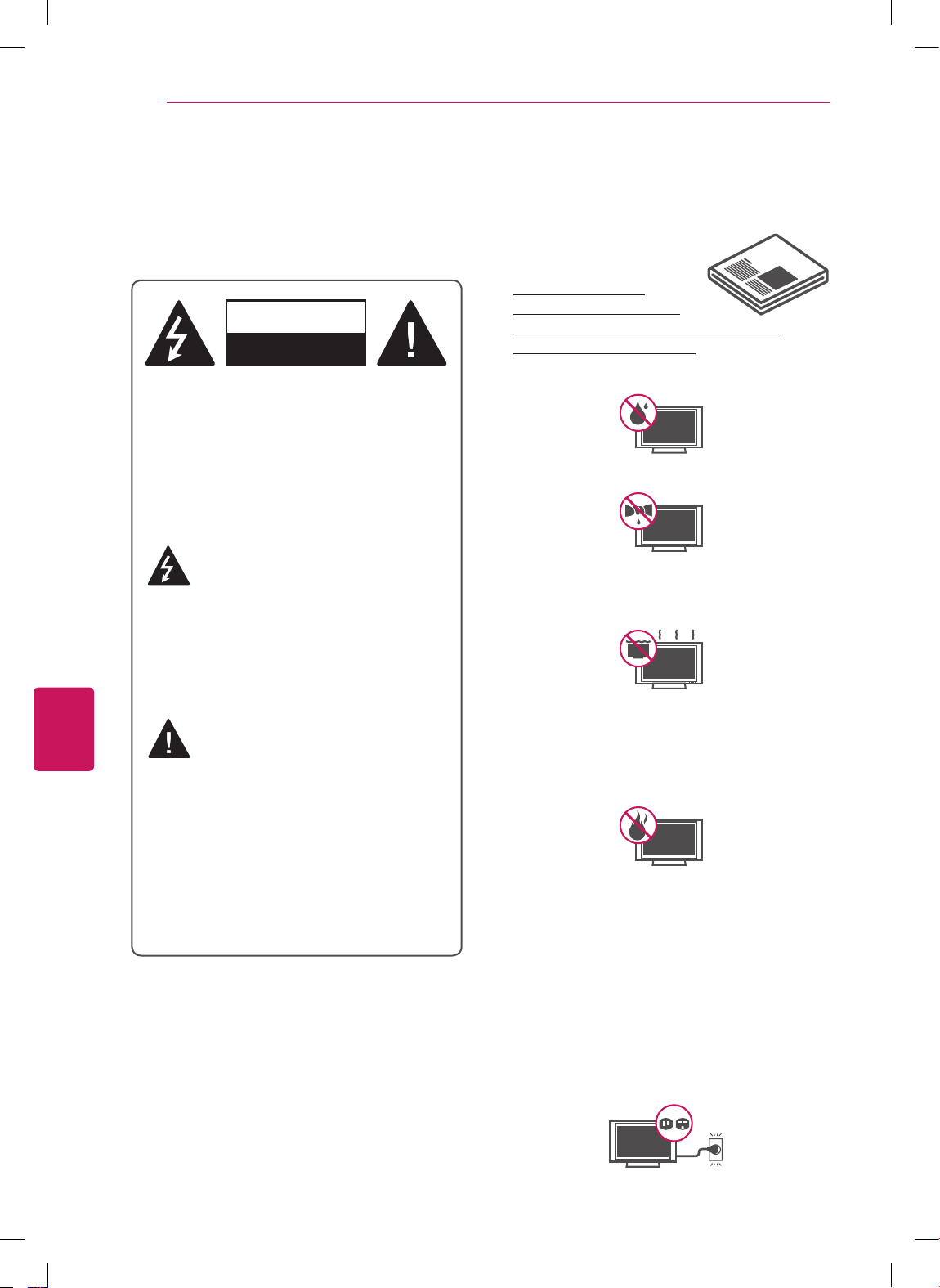
RISK OF ELECTRIC SHOCK
DO NOT OPEN
TO REDUCE THE RISK OF ELECTRIC SHOCK
DO NOT REMOVE COVER (OR BACK). NO
USER SERVICEABLE PARTS INSIDE. REFER
TO QUALIFIED SERVICE PERSONNEL.
WARNING/CAUTION
RISK OF ELECTRIC SHOCK
DO NOT OPEN
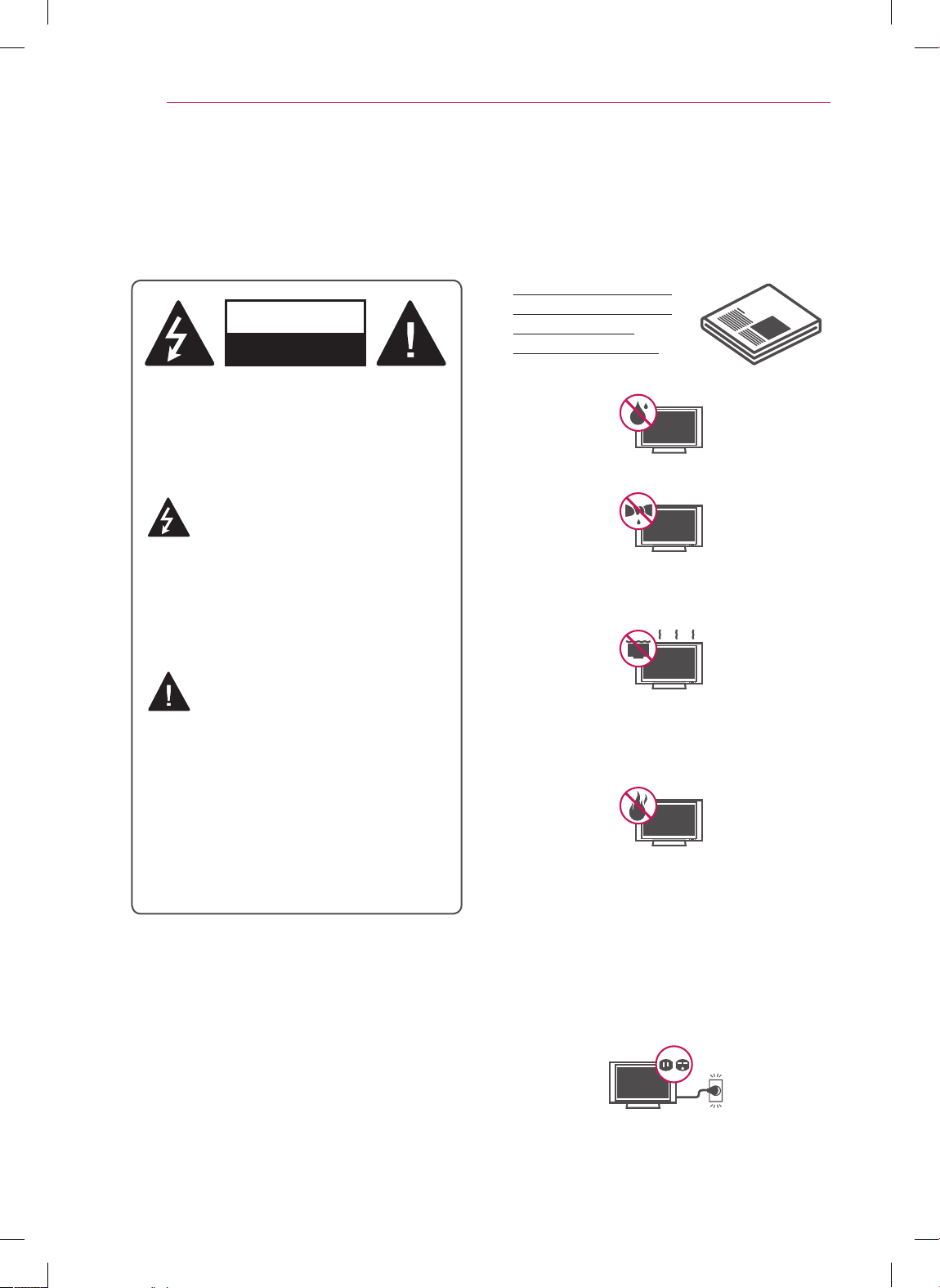
The lightning flash with arrowhead
symbol, within an equilateral triangle,
is intended to alert the user to the
presence of uninsulated “dangerous voltage”
within the product’s enclosure that may be of
sufficient magnitude to constitute a risk of
electric shock to persons.
WARNING/CAUTION
RISK OF ELECTRIC SHOCK
DO NOT OPEN
The exclamation point within an
equilateral triangle is intended to alert
the user to the presence of important
operating and maintenance (servicing)
instructions in the literature accompanying
the appliance.
WARNING/CAUTION
- TO REDUCE THE RISK OF FIRE AND
ELECTRIC SHOCK, DO NOT EXPOSE THIS
PRODUCT TO RAIN OR MOISTURE.
Do not use this apparatus near water.
Short-circuit
Breaker
Power Supply
Clean only with a dry cloth.
Short-circuit
Breaker
Power Supply
Do not block any ventilation openings. Install
in accordance with the manufacturer’s
instructions.
Short-circuit
Breaker
Power Supply
Do not install near any heat sources such
as radiators, heat registers, stoves, or other
apparatus (including amplifiers) that produce
heat.
Short-circuit
Breaker
Power Supply
Do not defeat the safety purpose of the
polarized or grounding-type plug. A polarized
plug has two blades with one wider than the
other. A grounding type plug has two blades
and a third grounding prong. The wide blade
or the third prong are provided for your safety.
If the provided plug does not fit into your
outlet, consult an electrician for replacement
of the obsolete outlet (Can differ by country).
Short-circuit
Breaker
Power Supply
IMPORTANT SAFETY INSTRUCTIONS
Always comply with the following precautions to avoid dangerous situations and ensure peak performance
of your product.
Read these instructions.
Keep these instructions.
Heed all warnings.
Follow all instructions.
Short-circuit
Breaker
Power Supply
2
IMPORTANT SAFETY INSTRUCTIONS
ENGLISH
3
IMPORTANT SAFETY INSTRUCTIONS
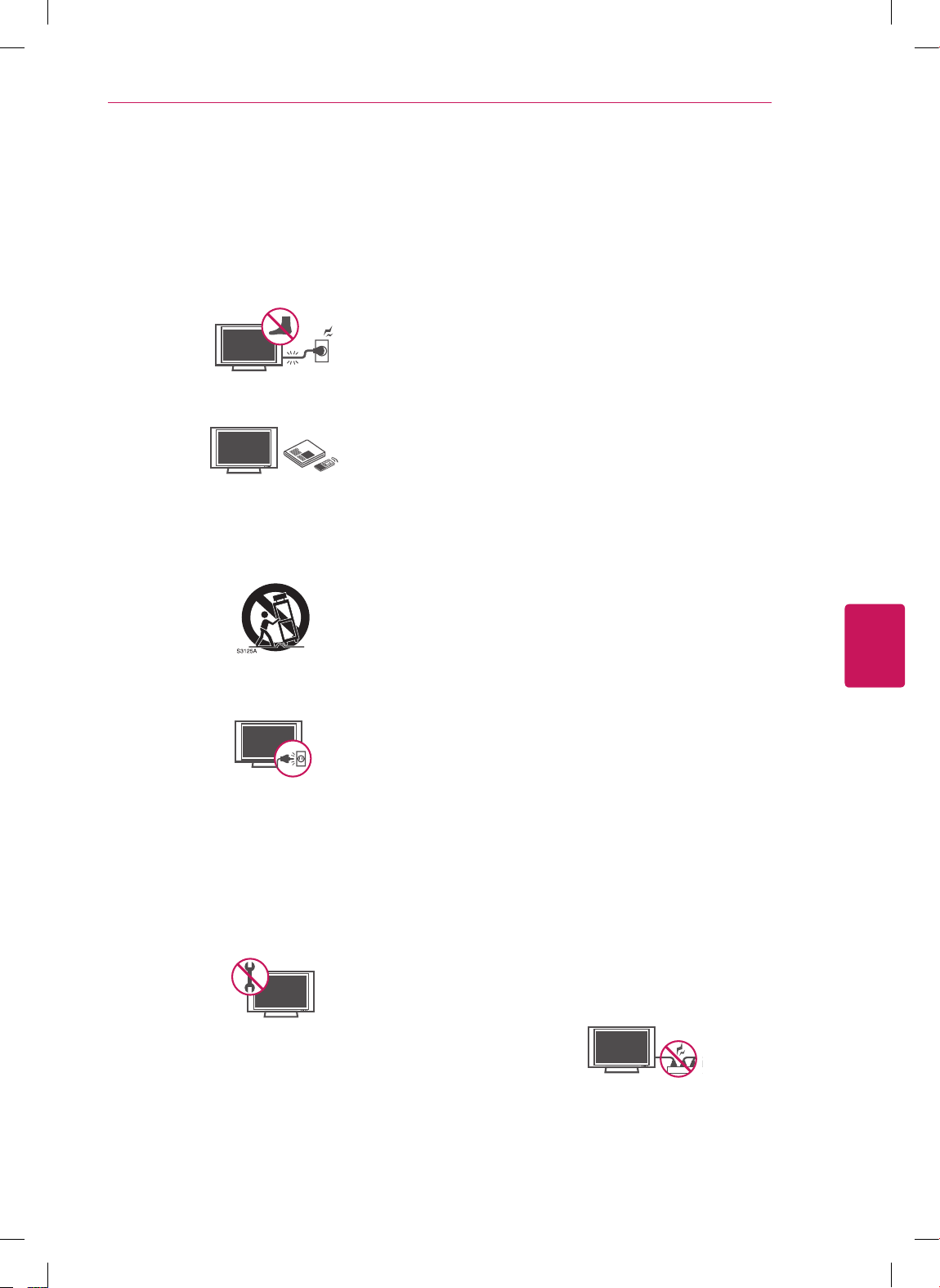
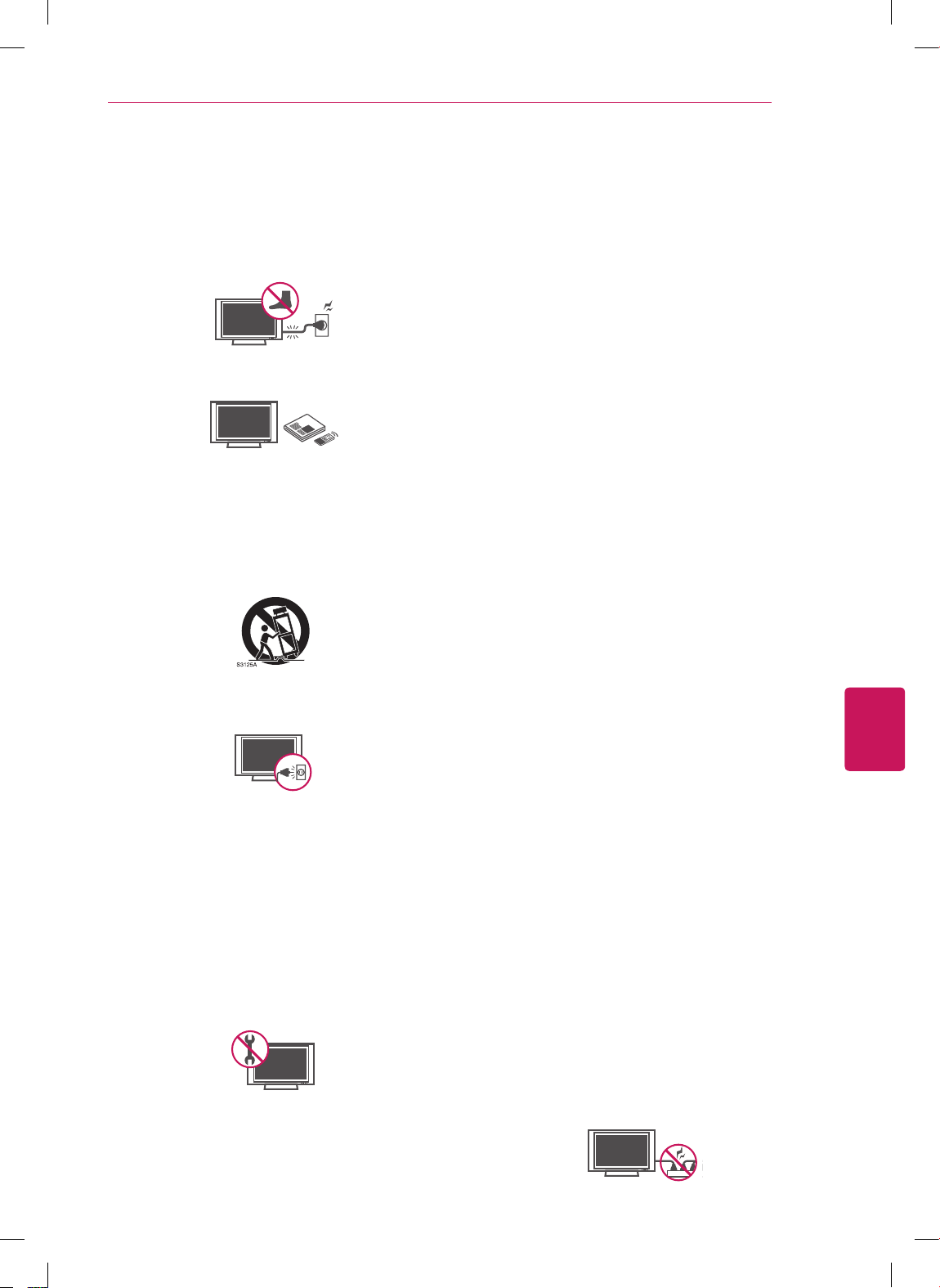
Protect the power cord from being walked on
or pinched particularly at plugs, convenience
receptacles, and the point where they exit
from the apparatus.
Short-circuit
Breaker
Power Supply
Only use attachments/accessories specified
by the manufacturer.
Short-circuit
Breaker
Power Supply
Use only with a cart, stand, tripod, bracket,
or table specified by the manufacturer, or
sold with the apparatus. When a cart is used,
use caution when moving the cart/apparatus
combination to avoid injury from tip-over.
Short-circuit
Breaker
Power Supply
Unplug this apparatus during lightning
storms or when unused for long periods of
time.
Short-circuit
Breaker
Power Supply
Refer all servicing to qualified service
personnel. Servicing is required when
the apparatus has been damaged in any
way, such as power-supply cord or plug is
damaged, liquid has been spilled or objects
have fallen into the apparatus, the apparatus
has been exposed to rain or moisture, does
not operate normally, or has been dropped.
Short-circuit
Breaker
Power Supply
Do not stick metal objects or any other
conductive material into the power cord. Do
not touch the end of the power cord while it
is plugged in.
Keep the packing anti-moisture material or
vinyl packing out of the reach of children.
Anti-moisture material is harmful if
swallowed. If swallowed by mistake, force
the patient to vomit and visit the nearest
hospital. Additionally, vinyl packing can
cause suffocation. Keep it out of the reach of
children.
CAUTION concerning the Power Cord
(Can differ by country):
It is recommended that appliances be
placed upon a dedicated circuit; that is, a
single outlet circuit which powers only that
appliance and has no additional outlets or
branch circuits. Check the specification page
of this owner’s manual to be certain. Do not
connect too many appliances to the same
AC power outlet as this could result in fire or
electric shock. Do not overload wall outlets.
Overloaded wall outlets, loose or damaged
wall outlets, extension cords, frayed power
cords, or damaged or cracked wire insulation
are dangerous. Any of these conditions could
result in electric shock or fire. Periodically
examine the cord of your appliance, and
if its appearance indicates damage or
deterioration, unplug it, discontinue use of
the appliance, and have the cord replaced
with an exact replacement part by an
authorized service. Protect the power cord
from physical or mechanical abuse, such as
being twisted, kinked, pinched, closed in a
door, or walked upon. Pay particular attention
to plugs, wall outlets, and the point where
the cord exits the appliance. Do not move
the TV with the power cord plugged in. Do
not use a damaged or loose power cord. Be
sure do grasp the plug when unplugging the
power cord. Do not pull on the power cord
to unplug the TV.
Short-circuit
Breaker
Power Supply
ENGLISH
4
IMPORTANT SAFETY INSTRUCTIONS
Warning
- To reduce the risk of fire or
electrical shock, do not expose this product
to rain, moisture or other liquids. Do not
touch the TV with wet hands. Do not install
this product near flammable objects such
as gasoline or candles, or expose the TV to
direct air conditioning.
Short-circuit
Breaker
Power Supply
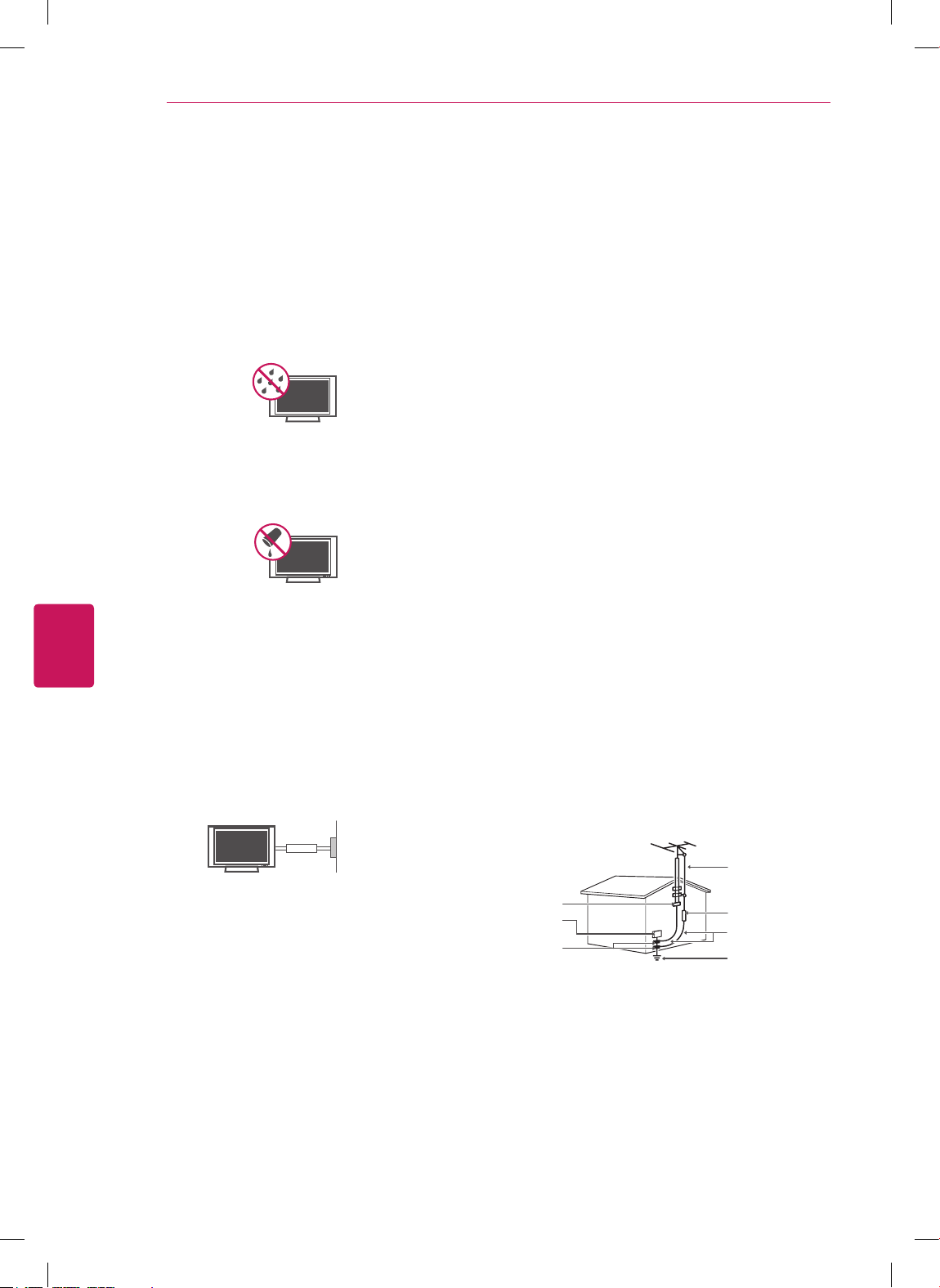
Do not expose to dripping or splashing and
do not place objects filled with liquids, such
as vases, cups, etc. on or over the apparatus
(e.g. on shelves above the unit).
Short-circuit
Breaker
Power Supply
Grounding
(Except for devices which are not grounded.)
Ensure that you connect the earth ground
wire to prevent possible electric shock
(i.e. a TV with a three-prong grounded AC
plug must be connected to a three-prong
grounded AC outlet). If grounding methods
are not possible, have a qualified electrician
install a separate circuit breaker. Do not try to
ground the unit by connecting it to telephone
wires, lightening rods, or gas pipes.
Short-circuit
Breaker
Power Supply
DISCONNECTING DEVICE FROM THE MAIN
POWER
Mains plug is the disconnecting device. The
plug must remain readily operable.
As long as this unit is connected to the AC
wall outlet, it is not disconnected from the
AC power source even if the unit is turned
off.
Do not attempt to modify this product in any
way without written authorization from LG
Electronics. Unauthorized modification could
void the user’s authority to operate this
product.
ANTENNAS Outdoor antenna grounding
(Can differ by country):
If an outdoor antenna is installed, follow
the precautions below. An outdoor antenna
system should not be located in the vicinity
of overhead power lines or other electric light
or power circuits, or where it can come in
contact with such power lines or circuits as
death or serious injury can occur. Be sure the
antenna system is grounded so as to provide
some protection against voltage surges
and built-up static charges. Section 810 of
the National Electrical Code (NEC) in the
U.S.A. provides information with respect to
proper grounding of the mast and supporting
structure, grounding of the lead-in wire to
an antenna discharge unit, size of grounding
conductors, location of antenna discharge
unit, connection to grounding electrodes and
requirements for the grounding electrode.
Antenna grounding according to the National
Electrical Code, ANSI/NFPA 70
Short-circuit
Breaker
Power Supply
NEC: National Electrical Code
Ground Clamp
Antenna Lead in Wire
Antenna Discharge Unit
(NEC Section 810-20)
Grounding Conductor
(NEC Section 810-21)
Power Service Grounding
Electrode System
(NEC Art 250, Part H)
Electric Service
Equipment
Ground Clamp
ENGLISH
5
IMPORTANT SAFETY INSTRUCTIONS
Cleaning
When cleaning, unplug the power cord and
wipe gently with a soft cloth to prevent
scratching. Do not spray water or other
liquids directly on the TV as electric shock
may occur. Do not clean with chemicals
such as alcohol, thinners or benzine.
Moving
Make sure the product is turned off,
unplugged and all cables have been
removed. It may take 2 or more people to
carry larger TVs. Do not press or put stress
on the front panel of the TV.
Ventilation
Install your TV where there is proper
ventilation. Do not install in a confined
space such as a bookcase. Do not cover the
product with cloth or other materials while
plugged. Do not install in excessively dusty
places.
If you smell smoke or other odors coming
from the TV, unplug the power cord and
contact an authorized service center.
Do not press strongly upon the panel with a
hand or a sharp object such as a nail, pencil
or pen, or make a scratch on it.
Keep the product away from direct sunlight.
Short-circuit
Breaker
Power Supply
Never touch this apparatus or antenna during
a thunder or lightning storm.
When mounting a TV on the wall, make sure
not to install the TV by hanging the power
and signal cables on the back of the TV.
Do not allow an impact shock or any objects
to fall into the product, and do not drop
anything onto the screen.
Dot Defect
The Plasma or LCD panel is a high
technology product with resolution of two
million to six million pixels. In a very few
cases, you could see fine dots on the screen
while you’re viewing the TV. Those dots
are deactivated pixels and do not affect the
performance and reliability of the TV.
Generated Sound
“Cracking” noise: A cracking noise that
occurs when watching or turning off the TV
is generated by plastic thermal contraction
due to temperature and humidity. This noise
is common for products where thermal
deformation is required.
Electrical circuit humming/panel buzzing: A
low level noise is generated from a high-
speed switching circuit, which supplies a
large amount of current to operate a product.
It varies depending on the product.
This generated sound does not affect the
performance and reliability of the product.
Take care not to touch the ventilation
openings. When watching the TV for a long
period, the ventilation openings may become
hot. This does not affect the performance of
the product or cause defects in the product.
If the TV feels cold to the touch, there may
be a small “flicker” when it is turned on. This
is normal, there is nothing wrong with TV.
Some minute dot defects may be visible on
the screen, appearing as tiny red, green, or
blue spots. However, they have no adverse
effect on the TV’s performance. Avoid
touching the LCD screen or holding your
finger(s) against it for long periods of time.
Doing so may produce some temporary
distortion effects on the screen.
ENGLISH
6
IMPORTANT SAFETY INSTRUCTIONS
DISPOSAL (Hg lamp only used in LCD TVs)
The fluorescent lamp used in this product contains
a small amount of mercury. Do not dispose of this
product with general household waste. Disposal of
this product must be carried out in accordance to
the regulations of your local authority.
Preventing “Image burn” or “Burn-in” on your TV screen
If a fixed image displays on the TV screen
for a long period of time, it will be imprinted
and become a permanent disfigurement on
the screen. This is “image burn” or “burn-in”
and not covered by the warranty.
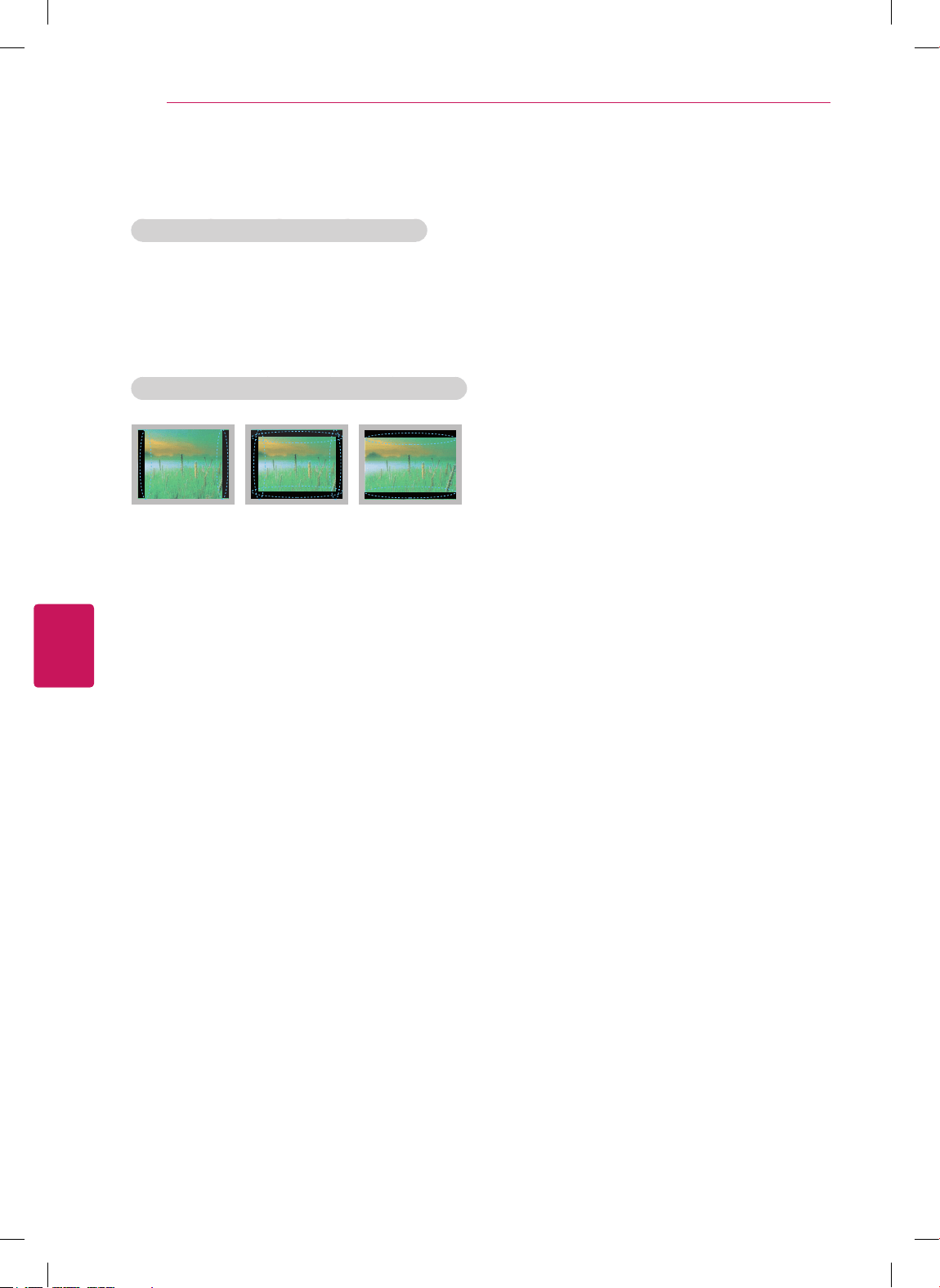
If the aspect ratio of the TV is set to 4:3 for
a long period of time, image burn may occur
on the letterboxed area of the screen.
Avoid displaying a fixed image on the TV
screen for a long period of time (2 or more
hours for LCD, 1 or more hours for the
Plasma TV) to prevent image burn.
ENGLISH
7
IMPORTANT SAFETY INSTRUCTIONS
Additional information of the
manual
Viewing the owner's manual
The owner’s manual in PDF file format is supplied
on the enclosed CD. Install the Adobe Acrobat
Reader to view the owner’s manual on your PC.
1
Insert the supplied CD.
The web page appears automatically.
2
Click Owner’s Manual on the web page.
3
View the owner’s manual.
If the web page does not appear
automatically, access My computer and
then click LG and
index.html
to view the
owner’s manual.
NOTE
For USA and Canada
FCC NOTICE
This equipment has been tested and found
to comply with the limits for a Class B digital
device, pursuant to Part 15 of the FCC Rules.
These limits are designed to provide reasonable
protection against harmful interference in a
residential installation. This equipment generates,
uses and can radiate radio frequency energy and,
if not installed and used in accordance with the
instructions, may cause harmful interference
to radio communications. However, there is no
guarantee that interference will not occur in a
particular installation. If this equipment does
cause harmful interference to radio or television
reception, which can be determined by turning
the equipment off and on, the user is encouraged
to try to correct the interference by one or more
of the following measures:
- Reorient or relocate the receiving antenna.
- Increase the separation between the
equipment and the receiver.
- Connect the equipment to an outlet on
a circuit different from that to which the
receiver is connected.
- Consult the dealer or an experienced radio/
TV technician for help.
This device complies with part 15 of the FCC
Rules. Operation is subject to the following two
conditions: (1) this device may not cause harmful
interference and (2) this device must accept any
interference received, including interference that
may cause undesired operation of the device.
Any changes or modifications in construction of
this device which are not expressly approved by
the party responsible for compliance could void
the user’s authority to operate the equipment.
NOTE TO CABLE/TV INSTALLER
This reminder is provided to call the CATV
system installer’s attention to Article 820-40 of
the National Electric Code (U.S.A.). The code
provides guidelines for proper grounding and, in
particular, specifies that the cable ground shall
be connected to the grounding system of the
building, as close to the point of the cable entry
as practical.
ENGLISH
8
TABLE OF CONTENTS
TABLE OF CONTENTS
2 IMPORTANT SAFETY INSTRUCTIONS
7 Additional information of the manual
8 TABLE OF CONTENTS
9 INSTALLATION PROCEDURE
9 ASSEMBLING AND PREPARING
9 Unpacking
14 Parts and buttons
16 Lifting and moving the TV
17 Setting up the TV
17 - Attaching the stand
21 - Mounting on a table
23 - Mounting on a wall
24 - Tidying cables
25 MAKING CONNECTIONS
25 Connecting to an antenna or cable
26 Connecting to a HD receiver, DVD, or VCR
player
26 - HDMI Connection
27 - Component Connection
28 - Composite Connection
29 Connecting to a PC
29 - HDMI Connection
30 Connecting to a USB
31 REMOTE CONTROL
33 WATCHING TV
33 Connecting to the AC/DC adapter
33 Turning the TV on for the first time
34 TROUBLESHOOTING
36 SPECIFICATIONS
38 OPEN SOURCE SOFTWARE NOTICE
Image shown may differ from your TV.
Your TV’s OSD (On Screen Display) may
differ slightly from that shown in this
manual.
The available menus and options may differ
from the input source or product model that
you are using.
New features may be added to this TV in
the future.
NOTE
ENGLISH
9
ASSEMBLING AND PREPARING
INSTALLATION PROCEDURE
1
Open the package and make sure all the accessories are included.
2
Attach the stand to the TV set.
3
Connect an external device to the TV set.
ASSEMBLING AND PREPARING
Unpacking
Check your product box for the following items. If there are any missing accessories, contact the local
dealer where you purchased your product. The illustrations in this manual may differ from the actual
product and item.
The items supplied with your product may vary depending on the model.
Product specifications or contents of this manual may be changed without prior notice due to
upgrade of product functions.
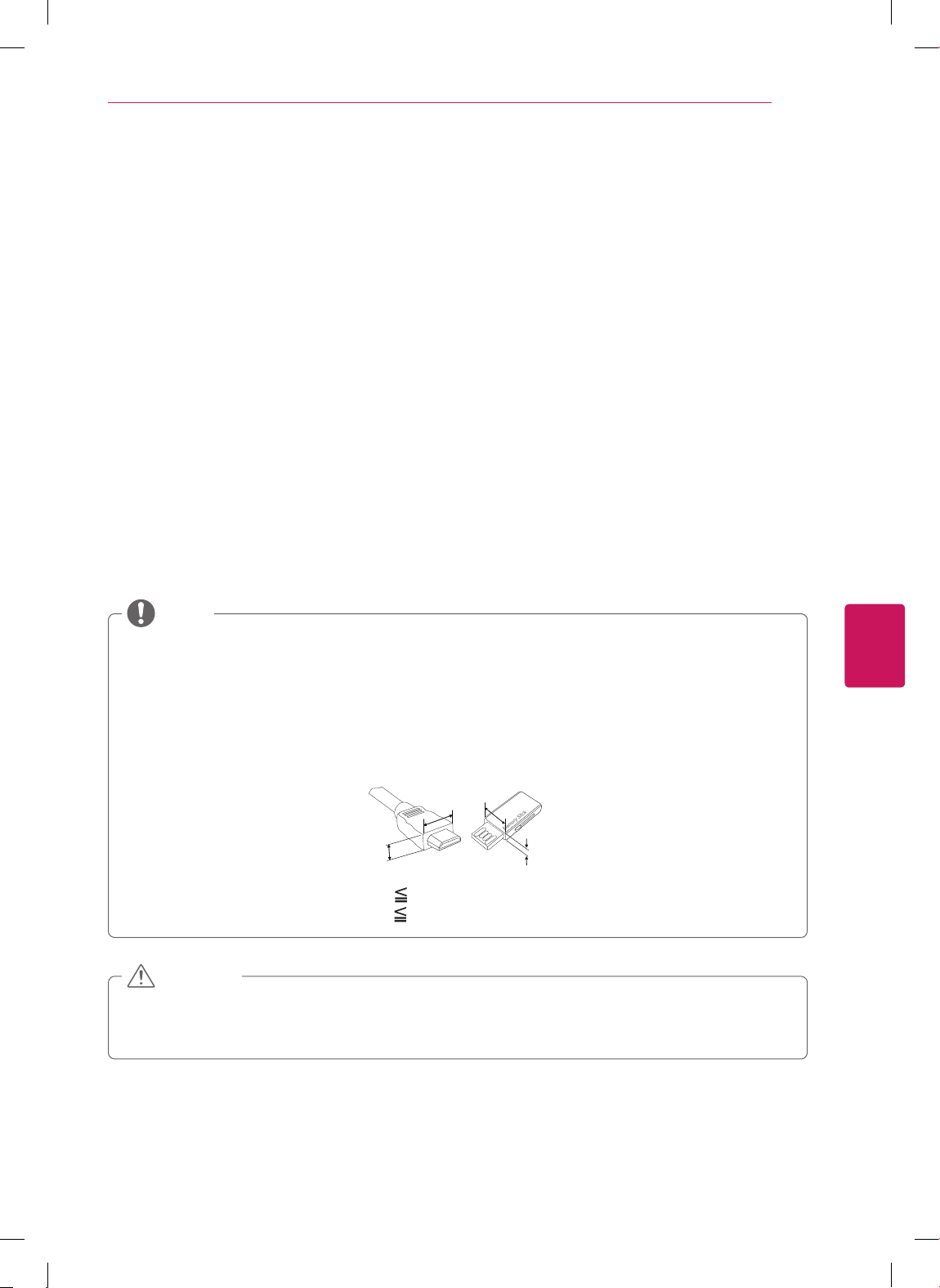
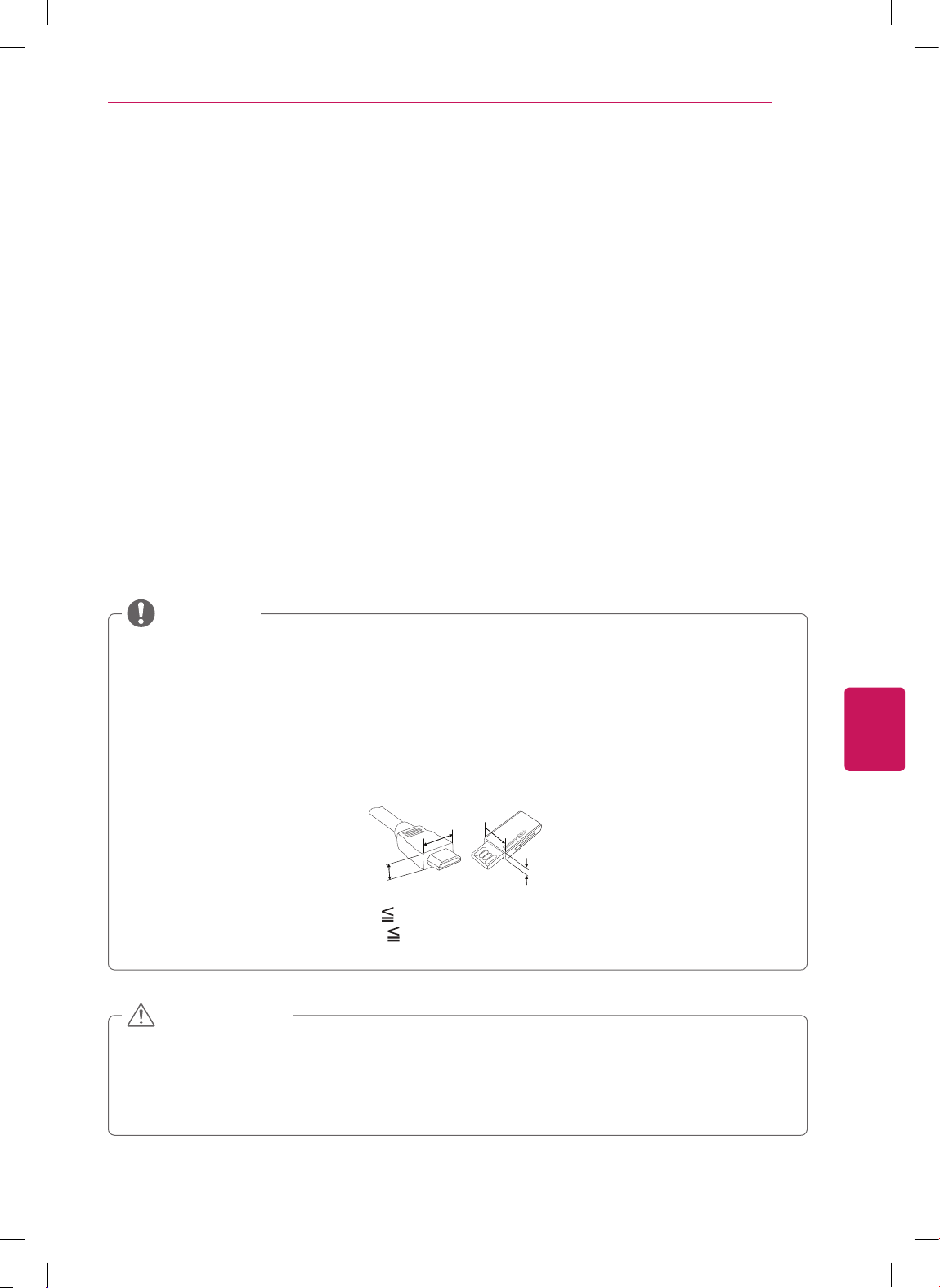
For an optimal connection, HDMI cables and USB devices should have bezels less than 10 mm (0.39
inches) thick and 18 mm (0.7 inches) width.
Use an extension cable that supports USB 2.0 if the USB cable or USB memory stick does not fit
into your TV's USB port.
B
A
A
B
*A 10 mm (0.39 inches)
*B
18 mm (0.7 inches)
NOTE
Do not use any unapproved items to ensure the safety and product life span.
Any damages or injuries by using unapproved items are not covered by the warranty.
In case of some model, the thin film on screen is a part of TV, So don’t take it off.
CAUTION
ENGLISH
10
ASSEMBLING AND PREPARING
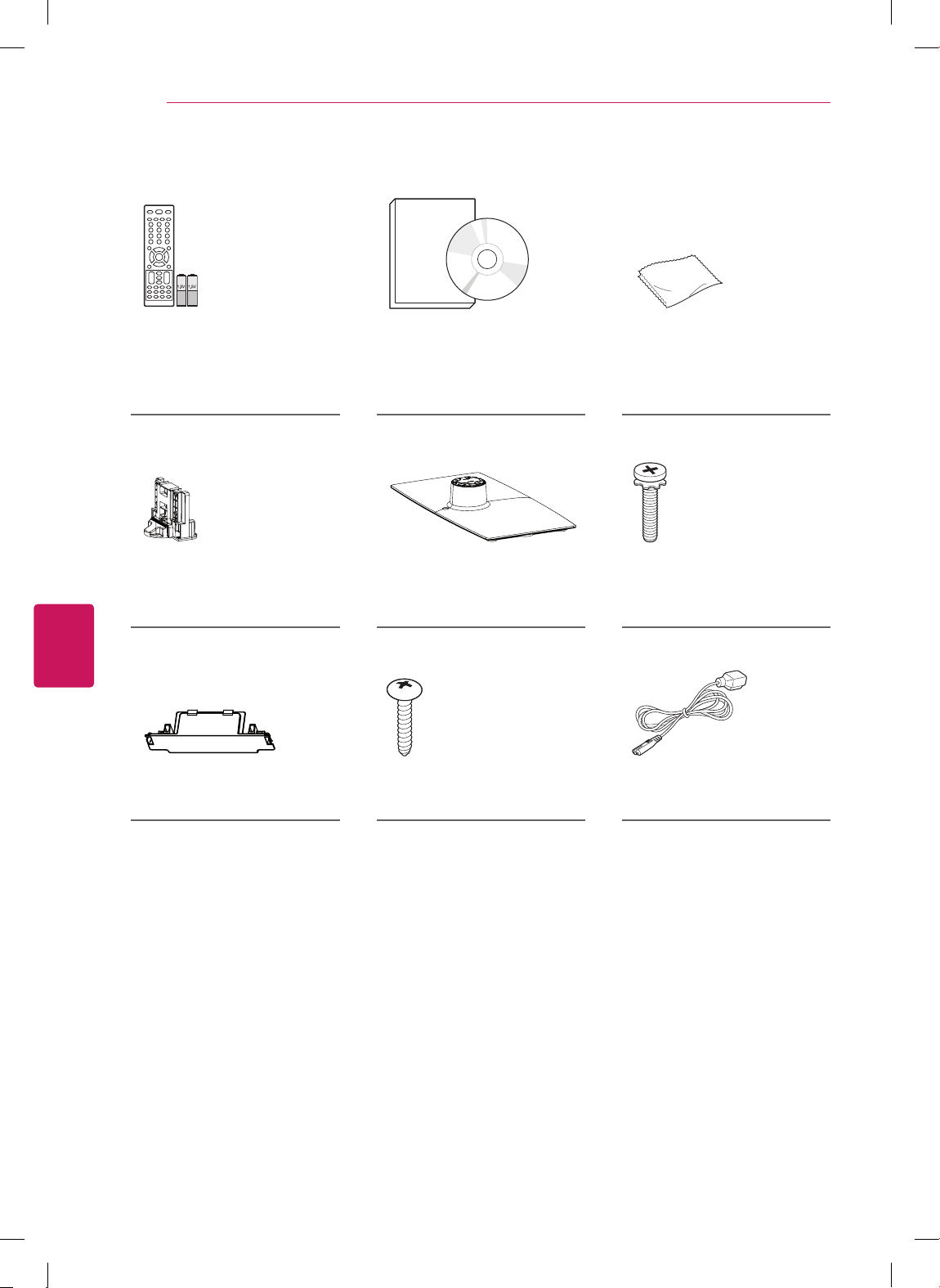
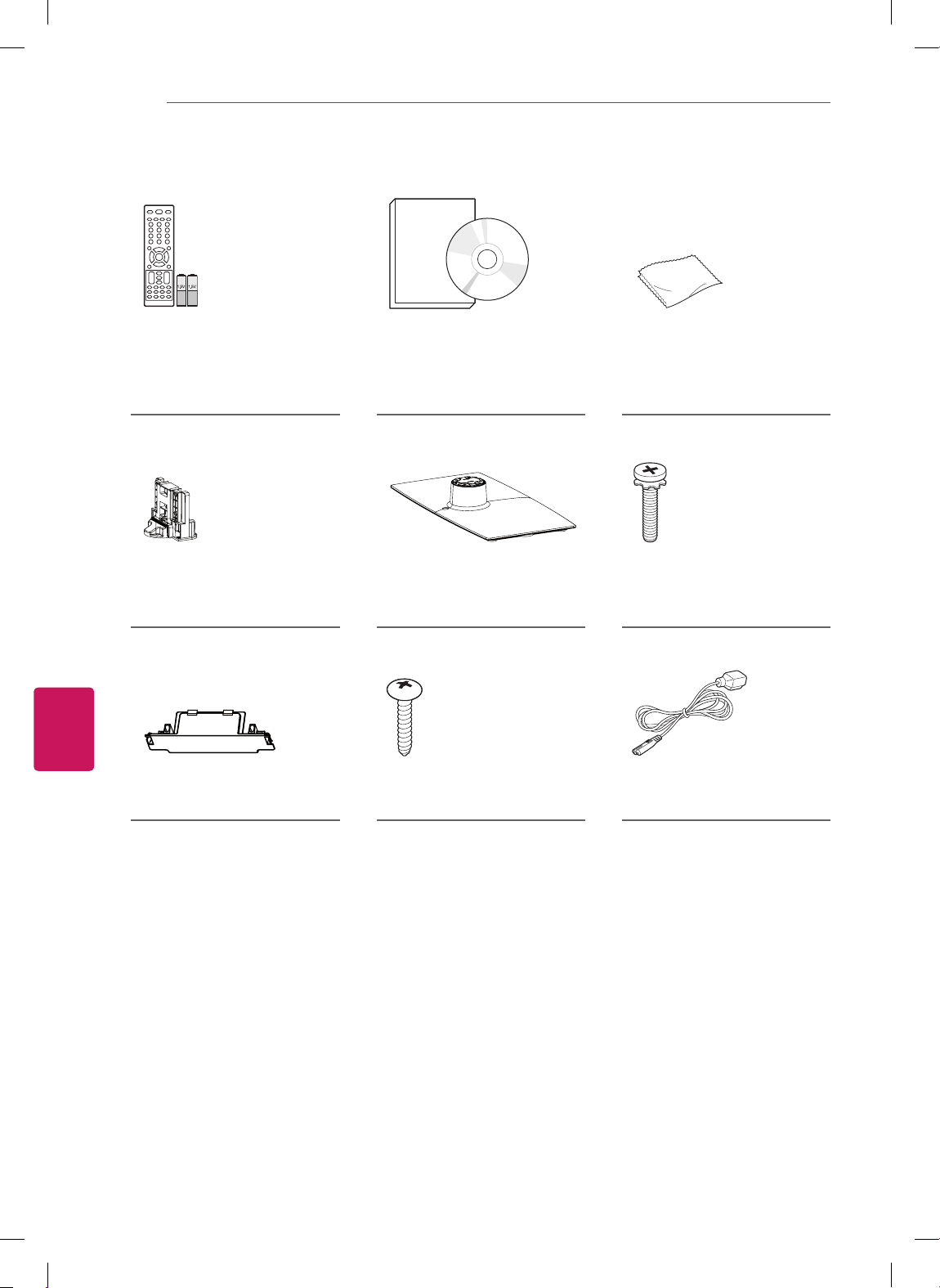
For CS460, CS461, LS3400 series
Remote control,
Batteries (AAA)
(See p.31)
Owner’s manual,
CD manual
Polishing cloth
(Depending on model)
Use this to remove dust
from the cabinet.
Stand Body
(See p.17)
Stand Base
(See p.17)
Stand Screws
8 EA, M4 x 20
(See p.17)
Protection cover Desk-mount Screw
(See p.21)
Power Cord
ENGLISH
11
ASSEMBLING AND PREPARING
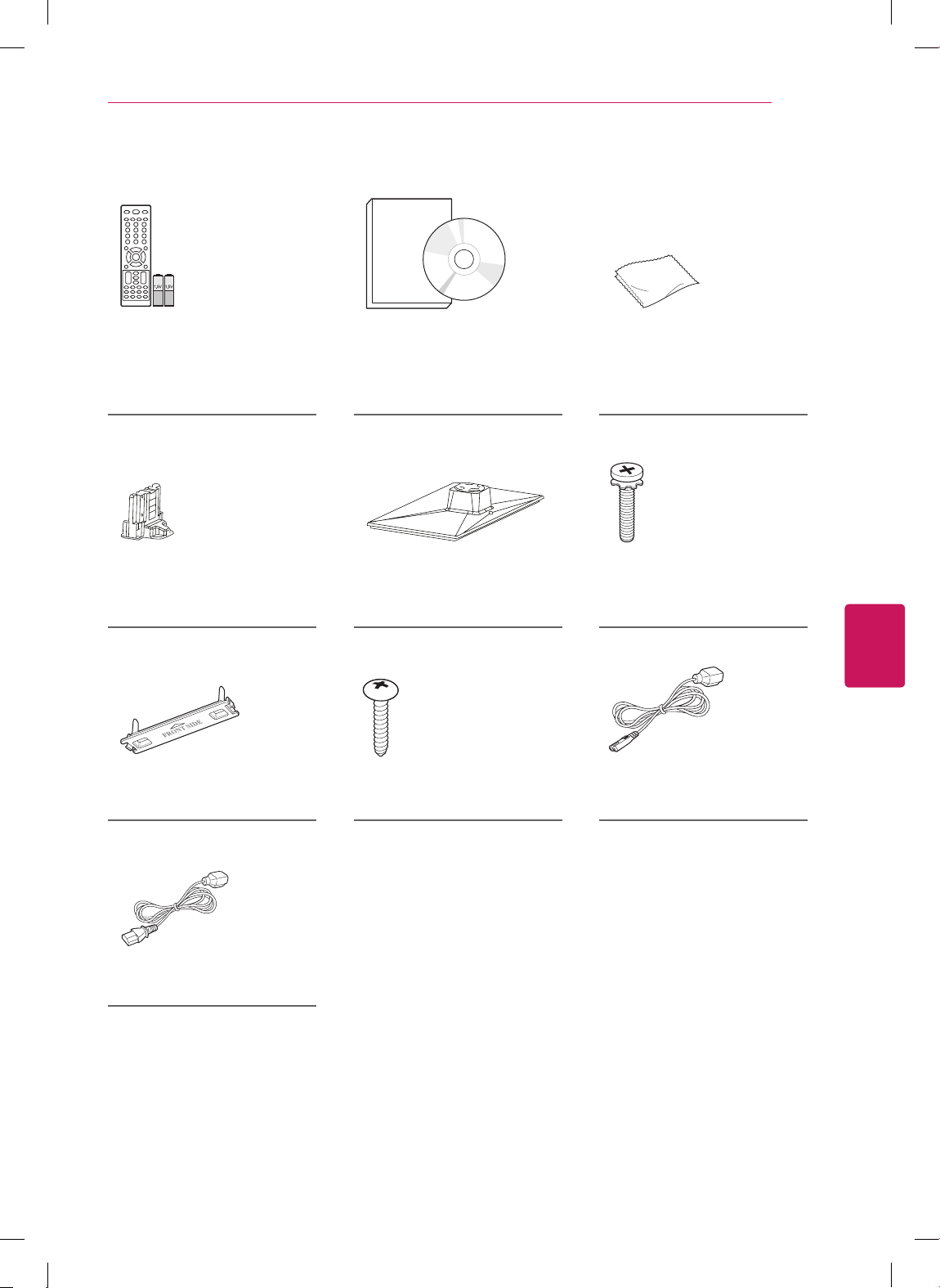
For CS530, CS560 series
Remote control,
Batteries (AAA)
(See p.31)
Owner’s manual,
CD manual
Polishing cloth
(Depending on model)
Use this to remove dust
from the cabinet.
Stand Body
(See p.18)
Stand Base
(See p.18)
Stand Screws
8 EA, M4 x 20
(See p.18)
(For 42CS530, 32/42CS560)
Protection cover Desk-mount Screw
(See p.21)
Power Cord
(For 37CS560)
Power Cord

ENGLISH
12
ASSEMBLING AND PREPARING
For 22/26LS3500, 22/26LS3510
Remote control,
Batteries (AAA)
(See p.31)
Owner’s manual,
CD manual
Polishing cloth
(Depending on model)
Use this to remove dust
from the cabinet.
(For 22LS3500, 22LS3510)
Stand Body
(See p.19)
Stand Base
(See p.19)
Stand Screws
2 EA, P4 x 16
(See p.19)
(For 26LS3500, 26LS3510)
Stand Screws
2 EA, M4 x 14
(See p.19)
Cable holder
(See p.24)
Power Cord
AC/DC Adapter
ENGLISH
13
ASSEMBLING AND PREPARING
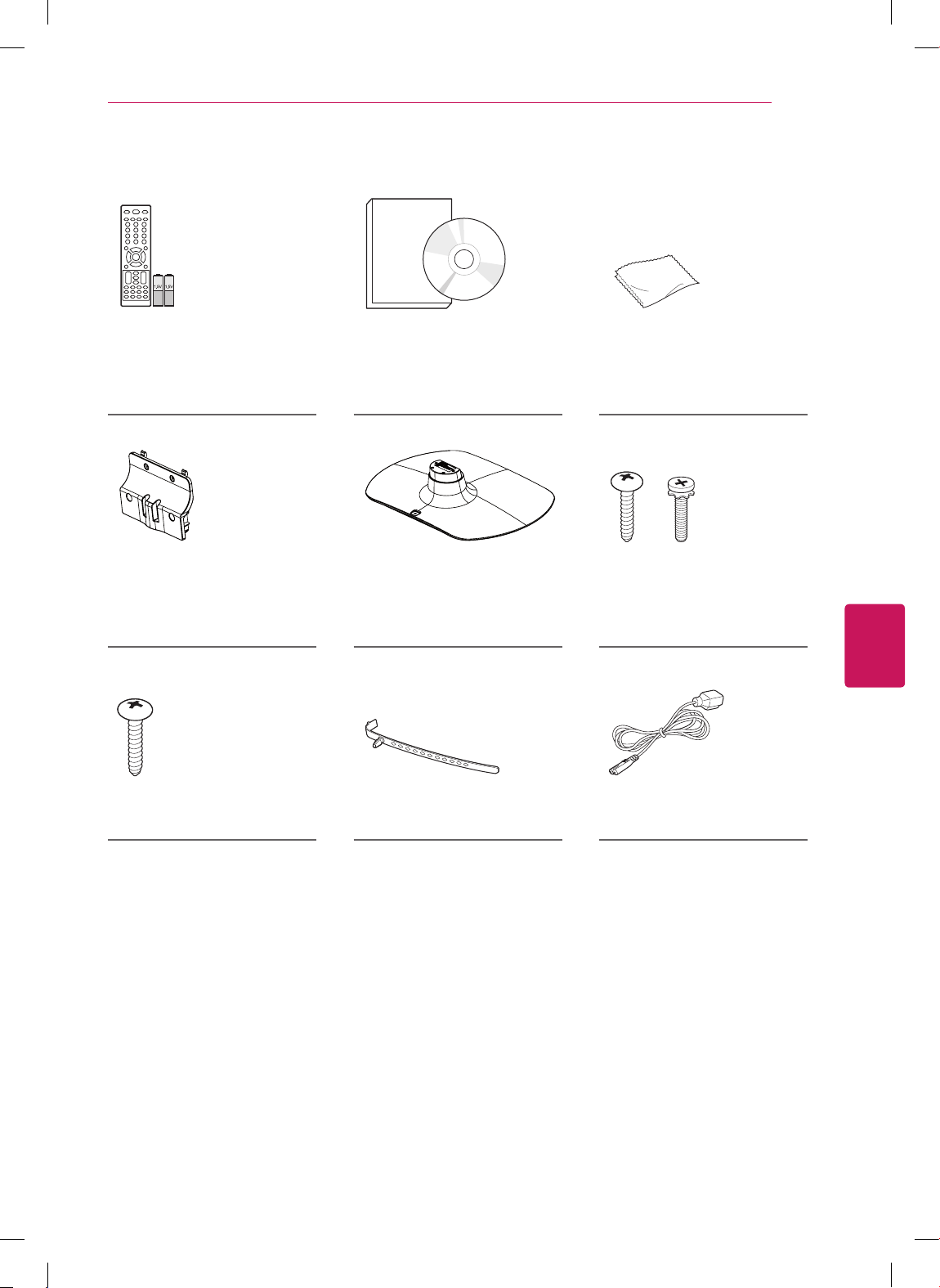
For 32LS3500, 32LS3510
Remote control,
Batteries (AAA)
(See p.31)
Owner’s manual,
CD manual
Polishing cloth
(Depending on model)
Use this to remove dust
from the cabinet.
Stand Body
(See p.20)
Stand Base
(See p.20)
Stand Screws
4 EA, P4 x 16
4 EA, M4 x 14
(See p.20)
Desk-mount Screw
(See p.21)
Cable holder
(See p.24)
Power Cord

ENGLISH
14
ASSEMBLING AND PREPARING
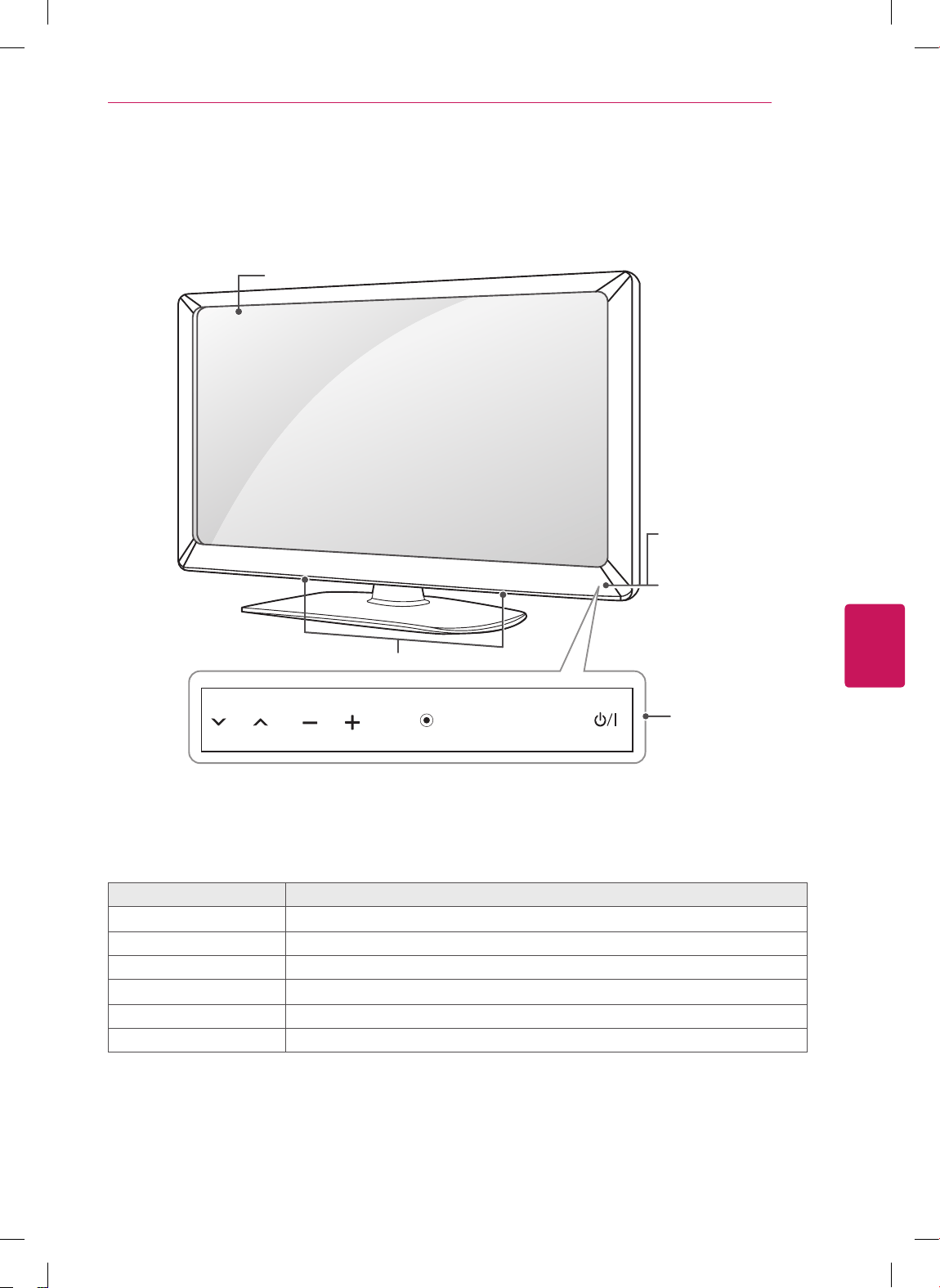
Parts and buttons
For CS460, CS461, CS530, CS560, LS3400 series
Touch button
2
Description
ꔰ
/
I
Turns the power on or off.
INPUT Changes the input source.
SETTINGS Accesses the main menus, or saves your input and exits the menus.
OK
⊙
Selects the highlighted menu option or confirms an input.
- + Adjusts the volume level.
v ^
Scrolls through the saved channels.
1 Intelligent sensor - Adjusts the image quality and brightness based on the surrounding environment.
2 All of the buttons are touch sensitive and can be operated through simple touch with your finger.
OK
SETTINGS
INPUT
OK
SETTINGS
INPUT
Screen
Speakers
Touch buttons
2
Power indicator
Remote control and
Intelligent sensors
1
For CS460, CS461,
LS3400 series
For CS530,
CS560 series
ENGLISH
15
ASSEMBLING AND PREPARING
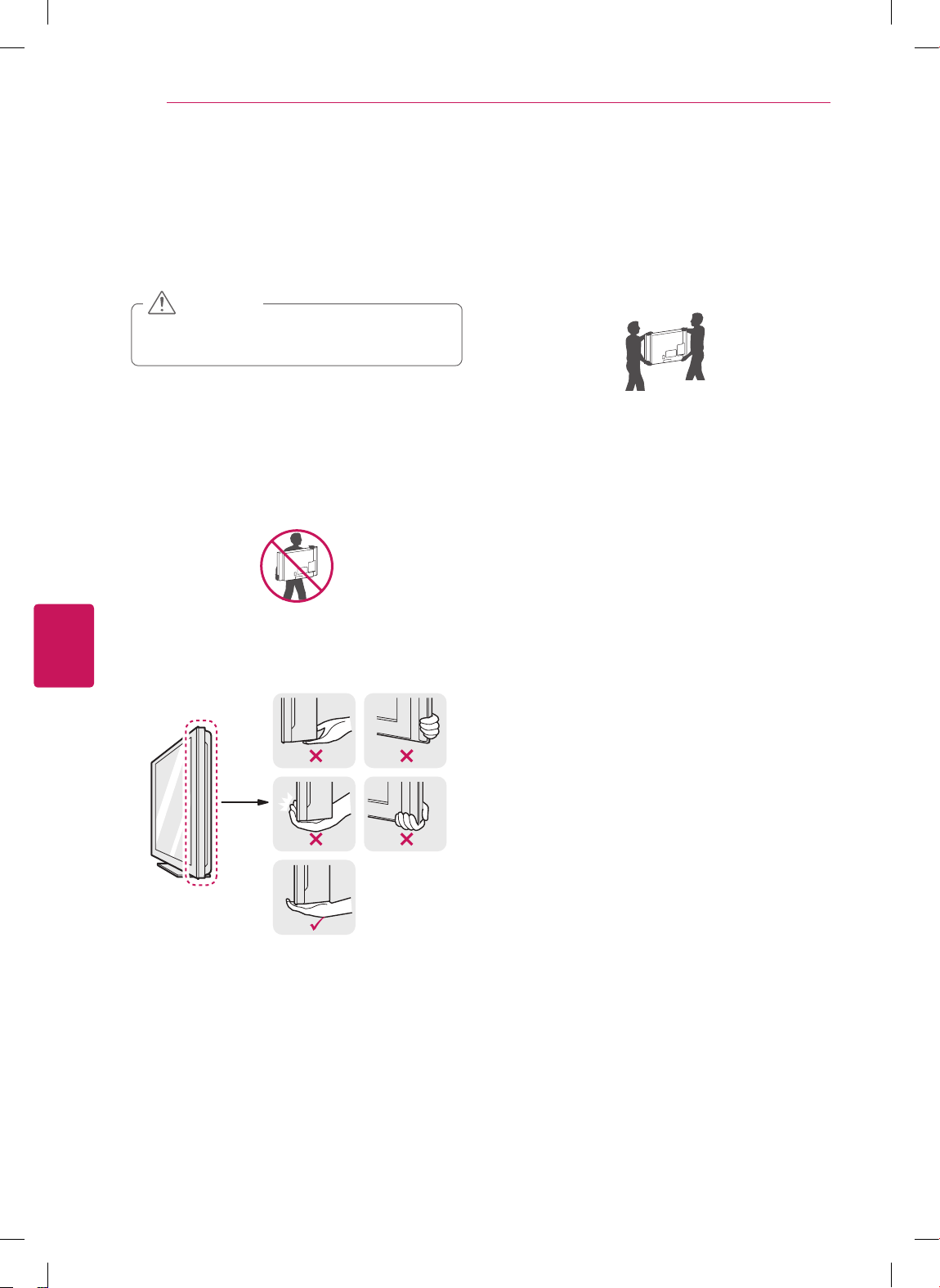
For LS3500, LS3510 series
Touch button
2
Description
ꔰ
/
I
Turns the power on or off.
INPUT Changes the input source.
SETTINGS Accesses the main menus, or saves your input and exits the menus.
OK
⊙
Selects the highlighted menu option or confirms an input.
- + Adjusts the volume level.
v ^
Scrolls through the saved channels.
1 Intelligent sensor - Adjusts the image quality and brightness based on the surrounding environment.
2 All of the buttons are touch sensitive and can be operated through simple touch with your finger.
OK
SETTINGS
INPUT
Screen
Speakers
Touch buttons
2
Power indicator
Remote control and
Intelligent sensors
1
ENGLISH
16
ASSEMBLING AND PREPARING
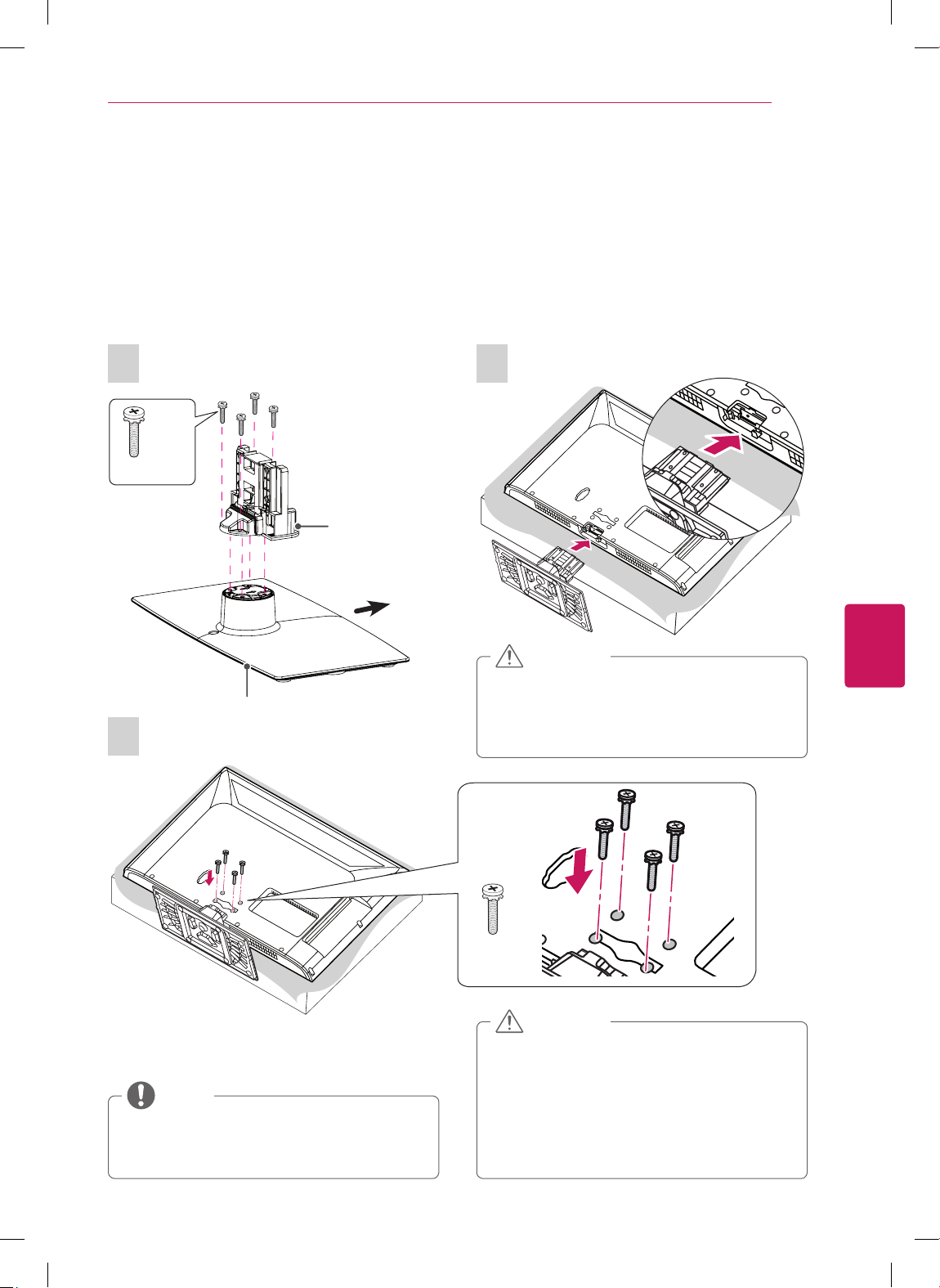
Lifting and moving the TV
When moving or lifting the TV, read the following
to prevent the TV from being scratched or
damaged and for safe transportation regardless of
its type and size.
Avoid touching the screen at all times, as
this may result in damage to the screen.
CAUTION
It is recommended to move the TV in the
box or packing material that the TV originally
came in.
Before moving or lifting the TV, disconnect
the power cord and all cables.
When holding the TV, the screen should face
away from you to avoid damage.
Hold the top and bottom of the TV frame
firmly. Make sure not to hold the transparent
part, speaker, or speaker grill area.
When transporting a large TV, there should
be at least 2 people.
When transporting the TV by hand, hold the
TV as shown in the following illustration.
When transporting the TV, do not expose the
TV to jolts or excessive vibration.
When transporting the TV, keep the TV
upright, never turn the TV on its side or tilt
towards the left or right.
ENGLISH
17
ASSEMBLING AND PREPARING
Setting up the TV
Put your TV on a pedestal stand and mount the TV on a table or wall.
Attaching the stand
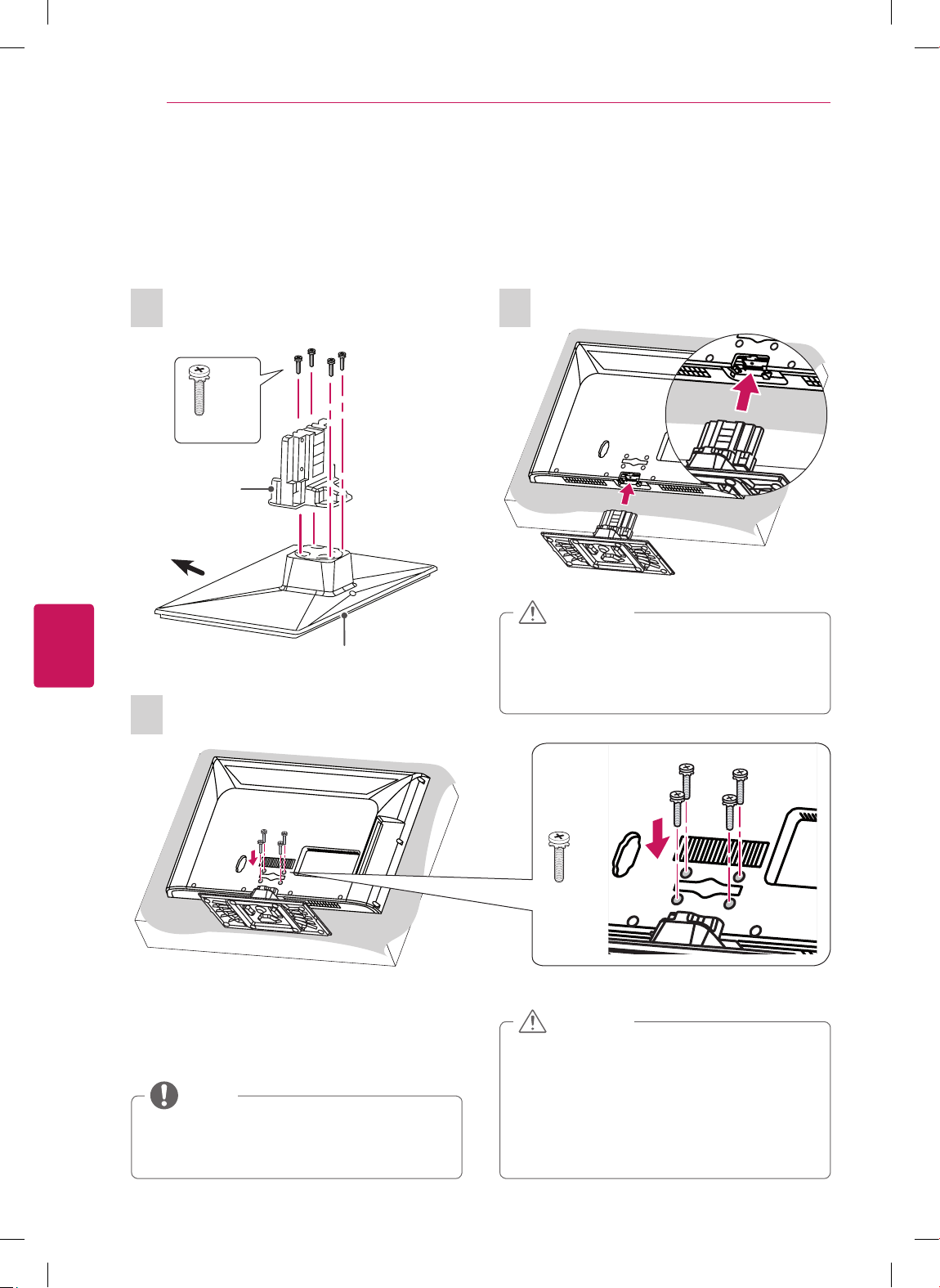
If you are not mounting the TV to a wall, use the following instructions to attach the stand.
For CS460, CS461, LS3400 series
1
4 EA
M4 x 20
Stand Body
Stand Base
Front
3
M4 x 20
4 EA
2
When attaching the stand to the TV
set, place the screen facing down on a
cushioned table or flat surface to protect
the screen from scratches.
CAUTION
Make sure that the screws are fastened
completely. (If they are not fastened
securely enough, the TV may tilt forward
after being installed.)
Do not fasten the screws with too much
force; otherwise they may be worn out and
get loosened.
CAUTION
Remove the stand before installing the TV
on a wall mount by performing the stand
attachment in reverse.
NOTE
ENGLISH
18
ASSEMBLING AND PREPARING
For CS530, CS560 series
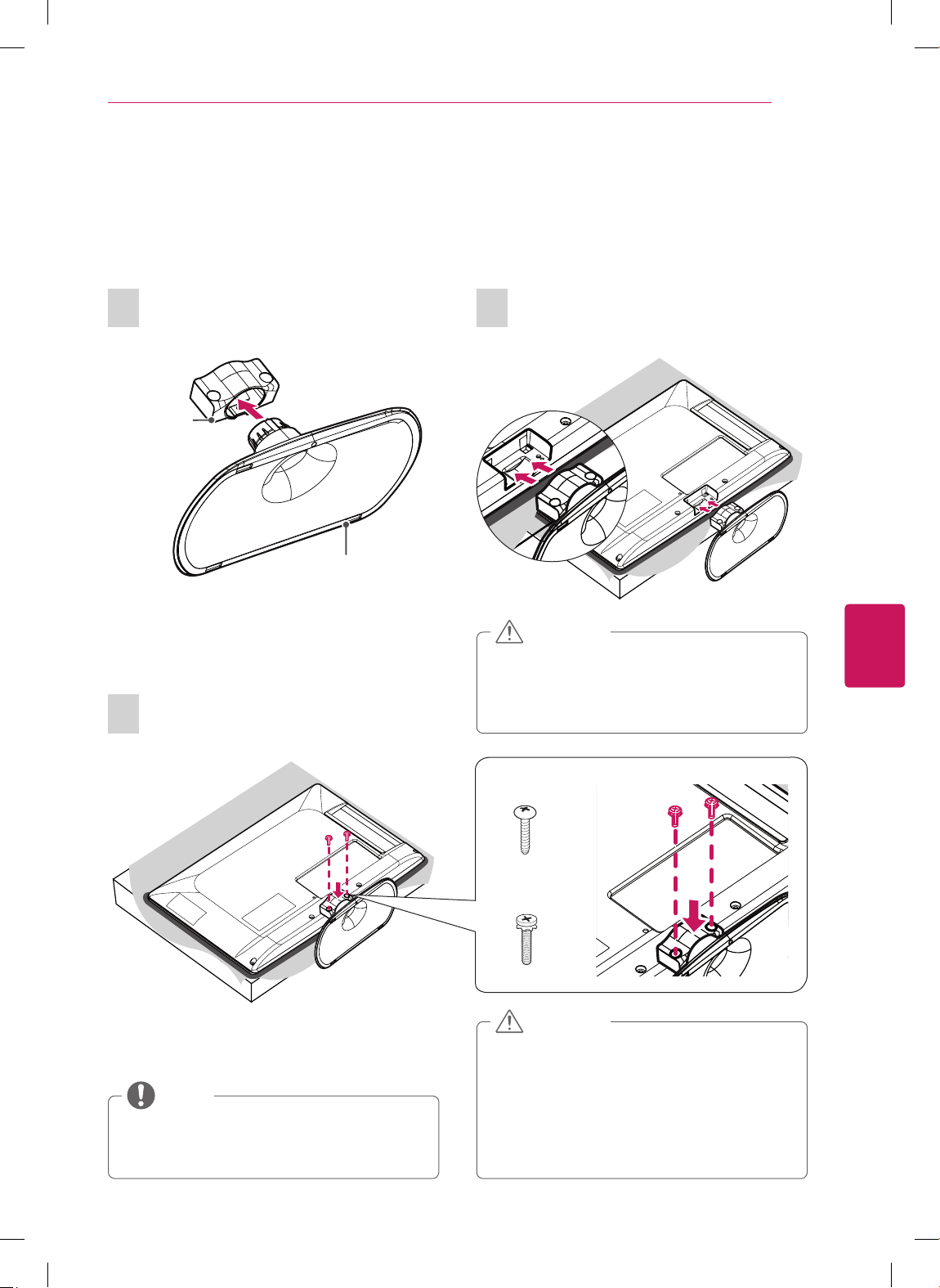
1
Stand Body
Stand Base
Front
4 EA
M4 x 20
3
M4 x 20
4 EA
2
When attaching the stand to the TV
set, place the screen facing down on a
cushioned table or flat surface to protect
the screen from scratches.
CAUTION
Make sure that the screws are fastened
completely. (If they are not fastened
securely enough, the TV may tilt forward
after being installed.)
Do not fasten the screws with too much
force; otherwise they may be worn out and
get loosened.
CAUTION
Remove the stand before installing the TV
on a wall mount by performing the stand
attachment in reverse.
NOTE
ENGLISH
19
ASSEMBLING AND PREPARING
For 22/26LS3500, 22/26LS3510
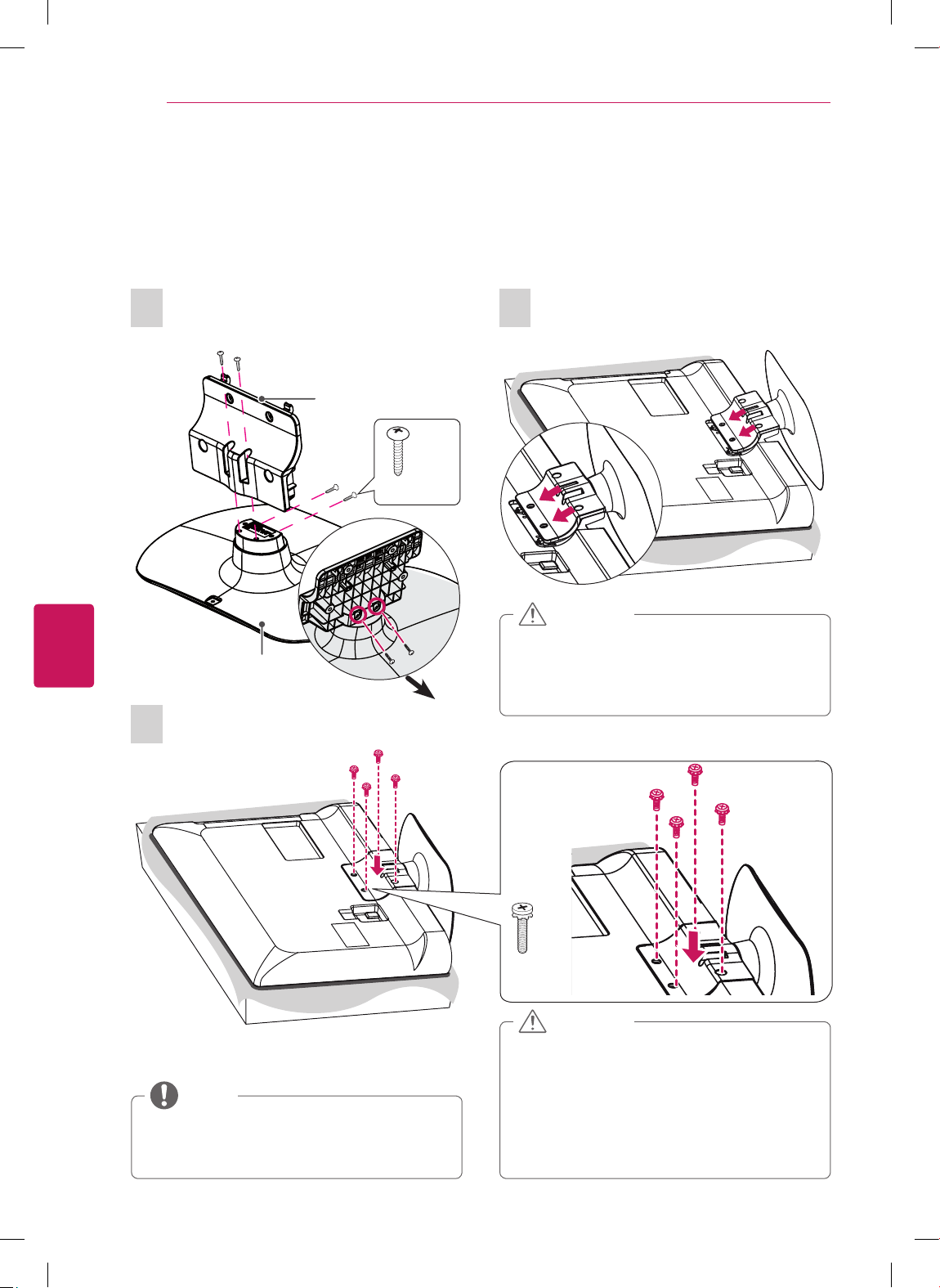
1
Stand Body
Stand Base
3
(For 22LS3500,
22LS3510)
P4 x 16
2 EA
(For 26LS3500,
26LS3510)
M4 x 14
2 EA
Remove the stand before installing the TV
on a wall mount by performing the stand
attachment in reverse.
NOTE
Make sure that the screws are fastened
completely. (If they are not fastened
securely enough, the TV may tilt forward
after being installed.)
Do not fasten the screws with too much
force; otherwise they may be worn out and
get loosened.
CAUTION
2
When attaching the stand to the TV
set, place the screen facing down on a
cushioned table or flat surface to protect
the screen from scratches.
CAUTION
ENGLISH
20
ASSEMBLING AND PREPARING
For 32LS3500, 32LS3510
1
Stand Base
Front
4 EA
P4 x 16
Stand Body
3
M4 x 14
4 EA
2
When attaching the stand to the TV
set, place the screen facing down on a
cushioned table or flat surface to protect
the screen from scratches.
CAUTION
Remove the stand before installing the TV
on a wall mount by performing the stand
attachment in reverse.
NOTE
Make sure that the screws are fastened
completely. (If they are not fastened
securely enough, the TV may tilt forward
after being installed.)
Do not fasten the screws with too much
force; otherwise they may be worn out and
get loosened.
CAUTION
ENGLISH
21
ASSEMBLING AND PREPARING
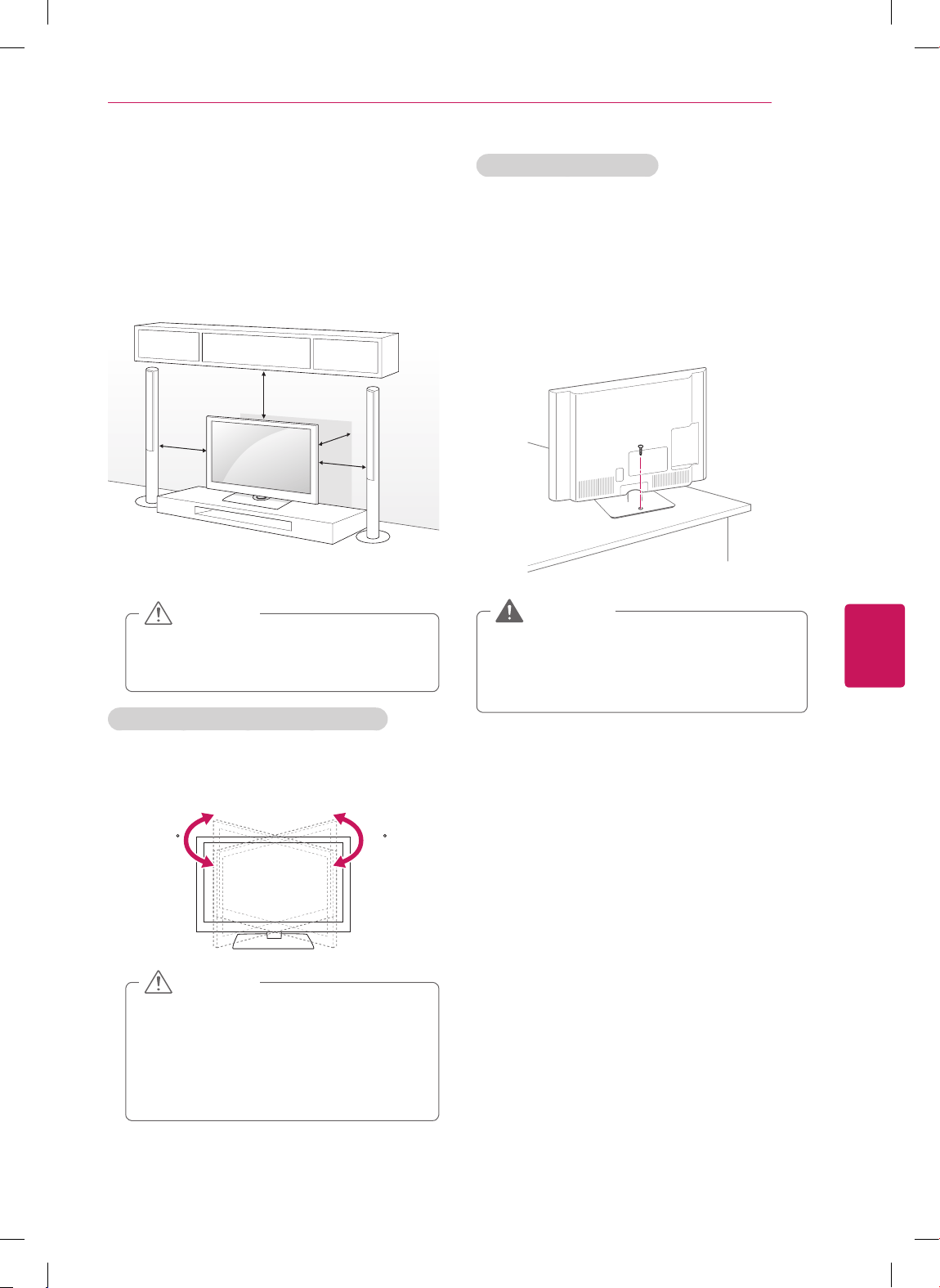
Mounting on a table
1
Lift and tilt the TV into its upright position on a
table.
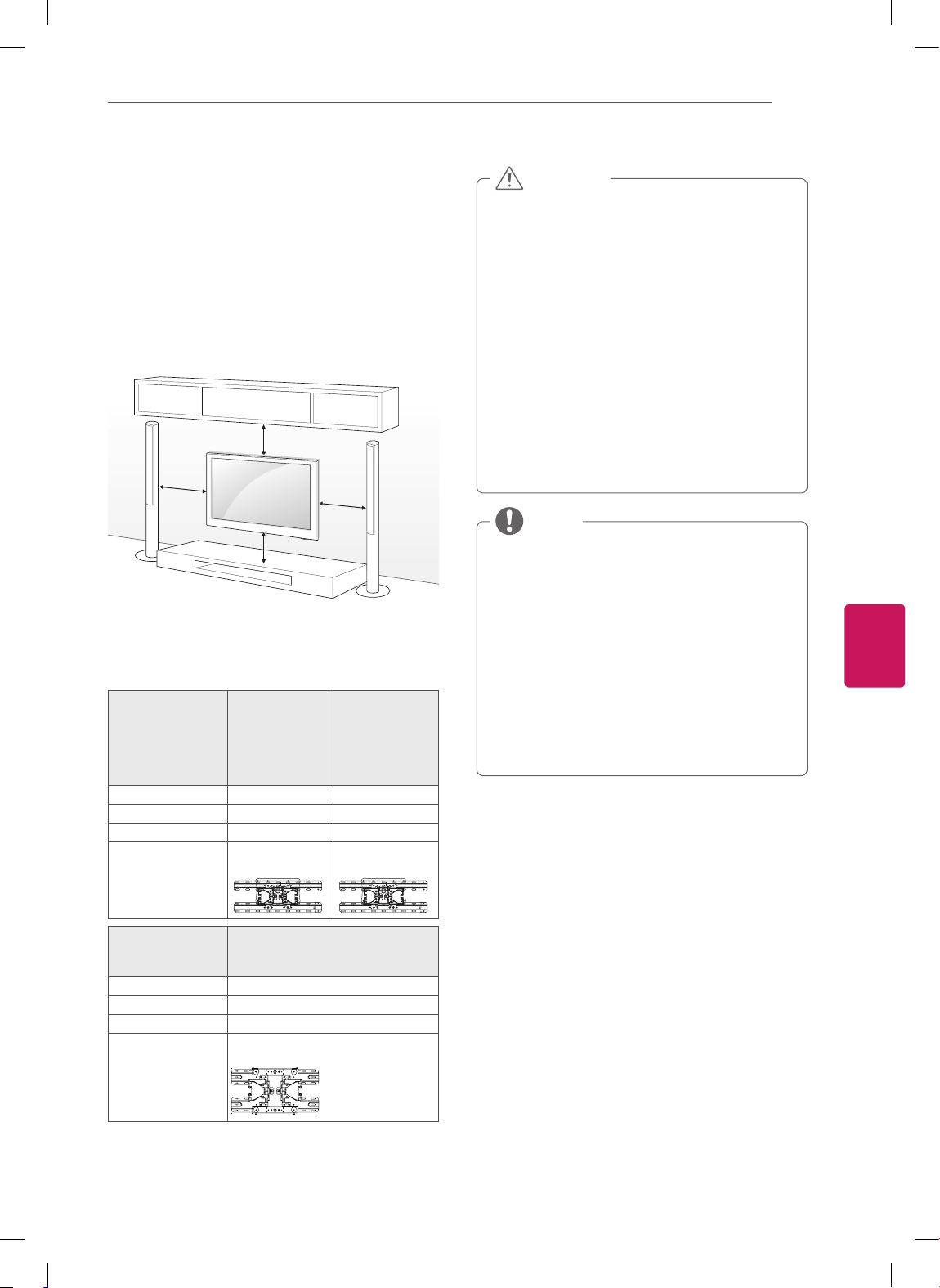
- Leave a 10 cm (4 inch) (minimum) space from
the wall for proper ventilation.
10 cm
10 cm
10 cm
10 cm
(4
in
ch
es)
2
Connect the power cord to a wall outlet.
Do not place the TV near or on sources
of heat, as this may result in fire or other
damage.
CAUTION
Adjusting the angle of the TV to suit view
(Depending on model)
Swivel 20 degrees to the left or right and adjust
the angle of the TV to suit your view.
2020
When adjusting the angle of the TV,
watch out for your fingers.
- Personal injury may occur if hands or
fingers are pinched. If the product is
tilted too much, it may fall, causing
damage or injury.
CAUTION
Securing the TV to a table
(For 32CS460, 32CS461, 42CS530,
32/37/42CS560, 32/42LS3400, 32LS3500,
32LS3510)
Fix the TV to a table to prevent from tilting
forward, damage, and potential injury.
Mount the TV on a table, and then insert and
tighten the supplied screw on the rear of the
stand.
To prevent TV from falling over, the TV
should be securely attached to the floor/
wall per installation instructions. Tipping,
shaking, or rocking the TV may cause injury.
WARNING
ENGLISH
22
ASSEMBLING AND PREPARING
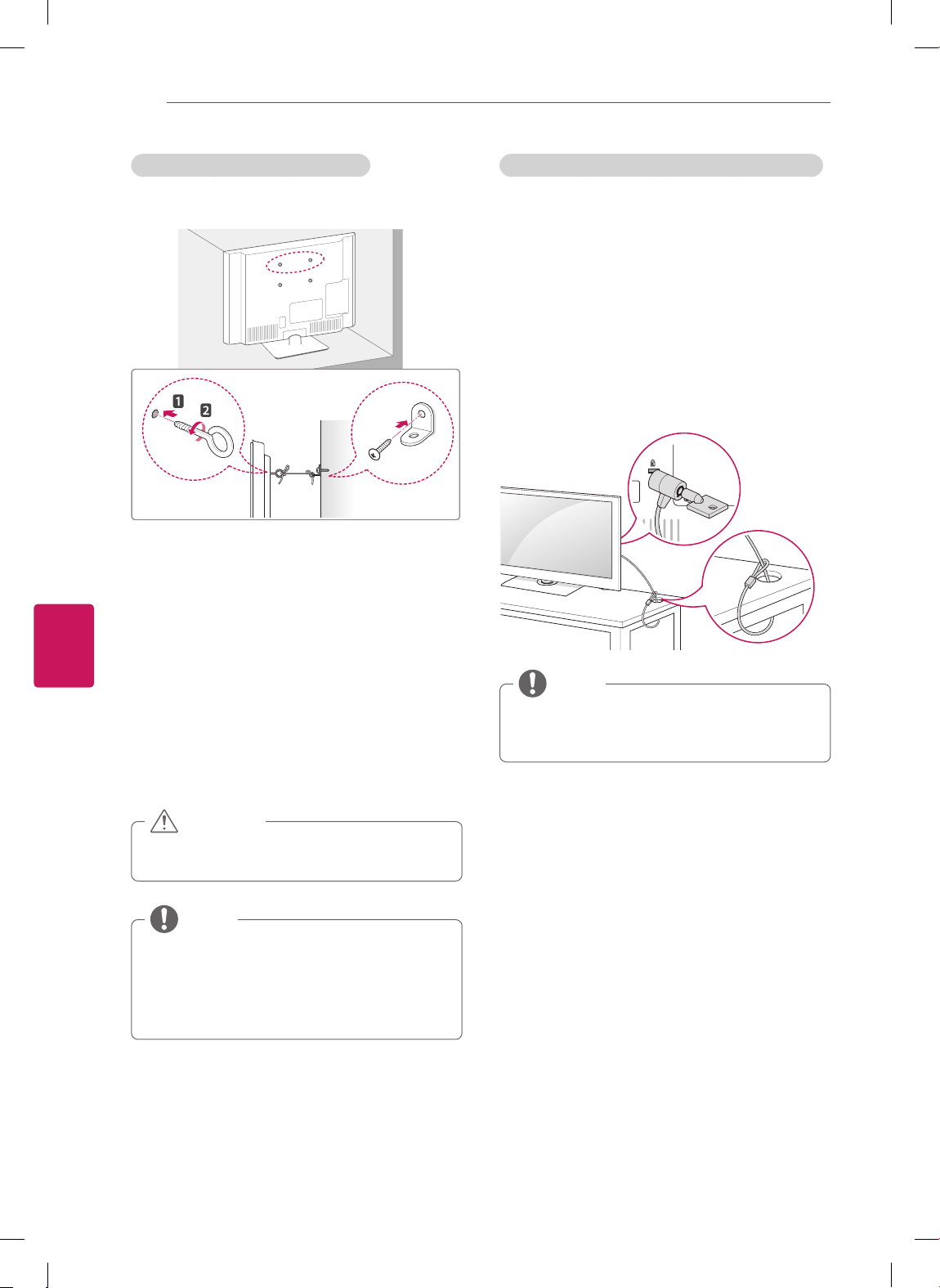
Using the Kensington security system (optional)
(For 32CS460, 32CS461, 42CS530,
32/37/42CS560, 22/26LS3500, 22/26LS3510)
The Kensington security system connector is
located at the rear of the TV. For more information
of installation and using, refer to the manual
provided with the Kensington security system or
visit http://www.kensington.com.
Connect the Kensington security system cable
between the TV and a table.
The Kensington security system is optional.
You can obtain additional accessories from
your local dealer.
NOTE
Securing the TV to a wall (optional)
(Depending on model)
1
Insert and tighten the eye-bolts, or TV brackets
and bolts on the back of the TV.
- If there are bolts inserted at the eye-bolts
position, remove the bolts first.
2
Mount the wall brackets with the bolts to the
wall.
Match the location of the wall bracket and the
eye-bolts on the rear of the TV.
3
Connect the eye-bolts and wall brackets tightly
with a sturdy rope.
Make sure to keep the rope horizontal with the
flat surface.
Make sure that children do not climb on or
hang on the TV.
CAUTION
Use a platform or cabinet that is strong and
large enough to support the TV securely.
Brackets, bolts and ropes are optional. You
can obtain additional accessories from your
local dealer.
NOTE
ENGLISH
23
ASSEMBLING AND PREPARING
Mounting on a wall
Attach an optional wall mount bracket at the rear
of the TV carefully and install the wall mount
bracket on a solid wall perpendicular to the
floor. When you attach the TV to other building
materials, please contact qualified personnel.
We recommend that you use an LG brand wall
mount when mounting the TV to a wall.
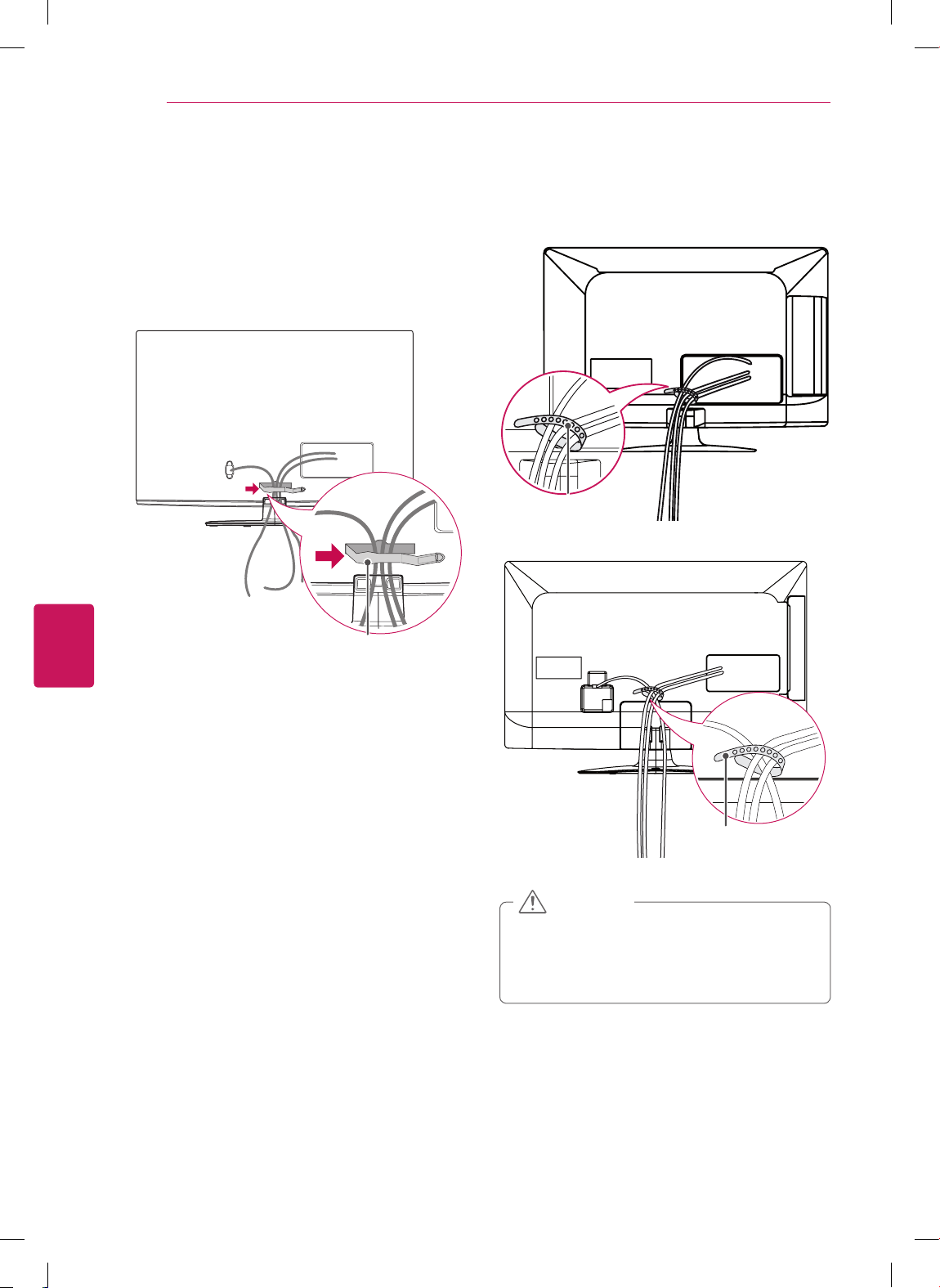
10 cm
10 cm
10 cm
10 cm
(4
in
ch
e
s)
Make sure to use screws and wall mounts that
meet the VESA standard. Standard dimensions for
the wall mount kits are described in the following
table.
Model 22/26LS3500
22/26LS3510
32CS460
32CS461
32CS560
32LS3400
32LS3500
32LS3510
VESA 100 x 100 200 x 100
Standard screw M4 M4
Number of screws 4 4
Wall mount bracket
(optional)
LSW100B,
LSW100BG
LSW100B,
LSW100BG
Model 42CS530
37/42CS560
42LS3400
VESA 200 x 200
Standard screw M6
Number of screws 4
Wall mount bracket
(optional)
LSW200B, LSW200BX
Disconnect the power first, and then move
or install the TV. Otherwise electric shock
may occur.
If you install the TV on a ceiling or slanted
wall, it may fall and result in severe injury.
Use an authorized LG wall mount and
contact the local dealer or qualified
personnel.
Do not over tighten the screws as this may
cause damage to the TV and void your
warranty.
Use the screws and wall mounts that meet
the VESA standard. Any damages or injuries
by misuse or using an improper accessory
are not covered by the warranty.
CAUTION
Use the screws that are listed on the VESA
standard screw specifications.
The wall mount kit includes an installation
manual and necessary parts.
The wall mount bracket is optional. You can
obtain additional accessories from your local
dealer.
The length of screws may differ depending
on the wall mount. Make sure to use the
proper length.
For more information, refer to the manual
supplied with the wall mount.
NOTE
ENGLISH
24
ASSEMBLING AND PREPARING
Tidying cables
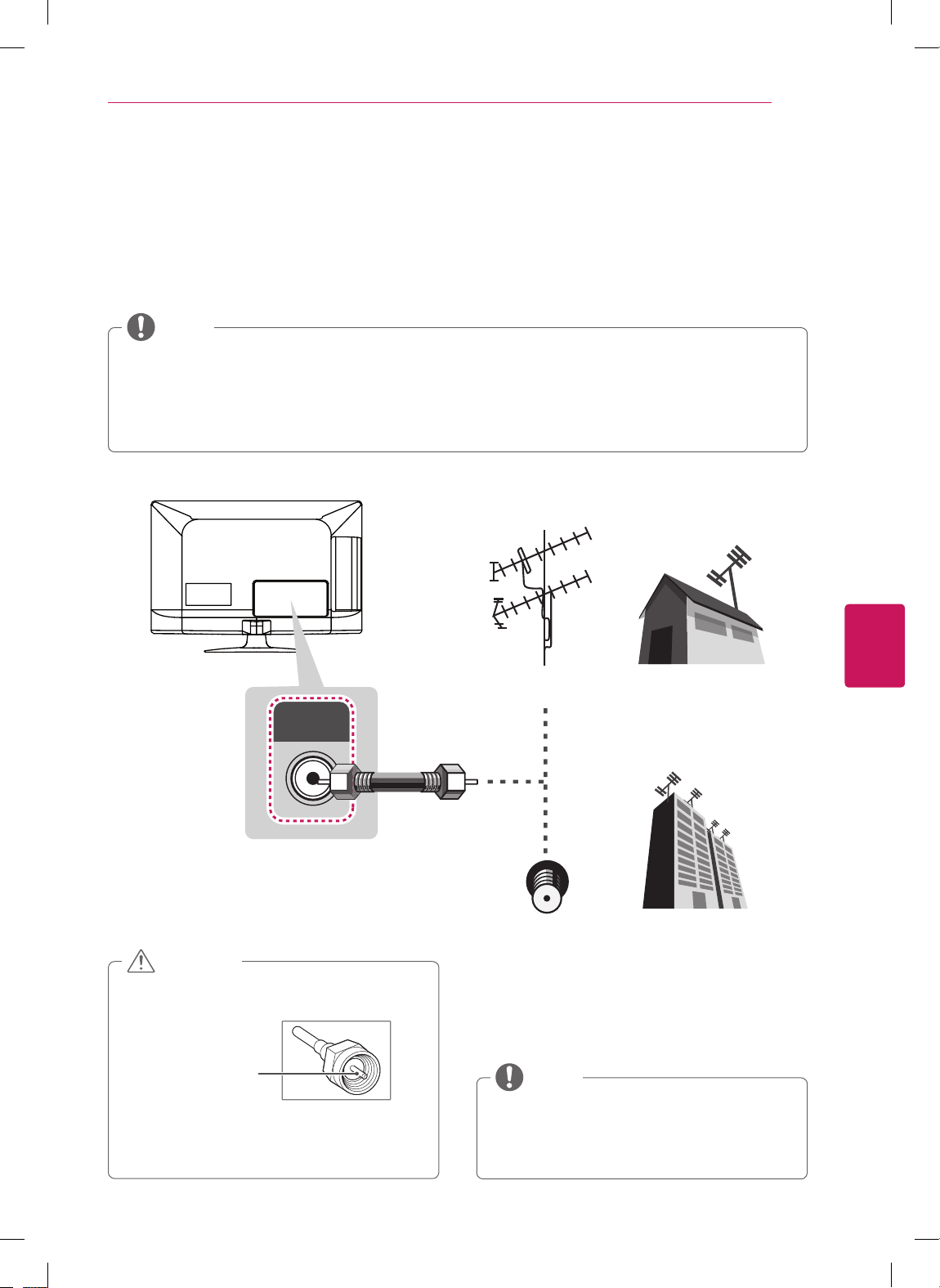
For CS460, CS461, CS530, CS560, LS3400
1
Gather and bind the cables with the cable
management clip.
2
Fix the cable management clip firmly to the TV.
Cable management clip
1
Gather and bind the cables with the cable
holder.
For 22/26LS3500, 22/26LS3510
Cable holder
For 32LS3500, 32LS3510
Cable holder
Do not move the TV by holding the cable
holder and power cord holder, as the cable
holders may break, and injuries and damage
to the TV may occur.
CAUTION
ENGLISH
25
MAKING CONNECTIONS
MAKING CONNECTIONS
Connect various external devices to the TV and switch input modes to select an external device.
For more information of external device’s connection, refer to the manual provided with each device.
Available external devices are: HD receivers, DVD players, VCRs, audio systems, USB storage devices, PC,
gaming devices, and other external devices.
If you record a TV program on a DVD recorder or VCR, make sure to connect the TV signal input
cable to the TV through a DVD recorder or VCR. For more information of recording, refer to the
manual provided with the connected device.
The external device connection may differ from the model.
Connect external devices to the TV regardless of the order of the TV port.
NOTE
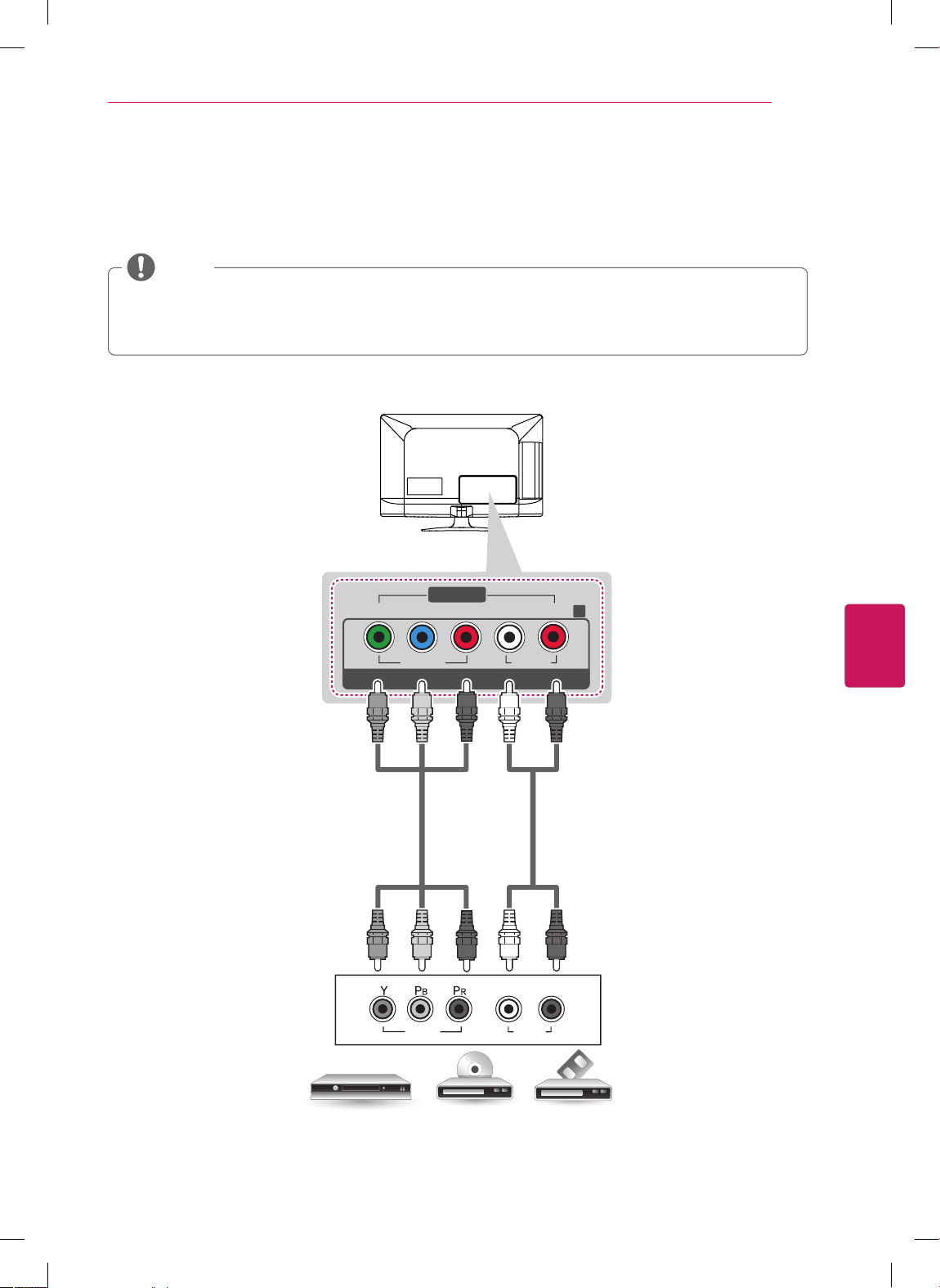
Connecting to an antenna or cable
ANTENNA/
CABLE IN
VHF Antenna
UHF Antenna
Antenna
Terminal
Coaxial (75Ω)
Make sure not to bend the copper wire of
the RF cable.
Copper wire
Complete all connections between devices,
and then connect the power cord to the
power outlet to prevent damage to your TV.
CAUTION
Use a signal splitter to use more than 2 TVs.
Visit http://lgknowledgebase.com for more
information about the antenna and cable
connection. Search for antenna.
NOTE

ENGLISH
26
MAKING CONNECTIONS
Connecting to a HD receiver, DVD, or VCR player
Connect a HD receiver, DVD, or VCR player to the TV and select an appropriate input mode.
HDMI Connection
HDMI is the best way to connect a device.
Transmits the digital video and audio signals from an external device to the TV. Connect the external device
and the TV with the HDMI cable as shown in the following illustration.
Use the latest High Speed HDMI™ Cable with CEC (Customer Electronics Control) function.
High Speed HDMI™ Cables are tested to carry an HD signal up to 1080p and higher.
NOTE
DVD/ Blu-Ray / HD Cable Box / HD STB
2
1
IN
Choose any HDMI input port to connect.
It does not matter which port you use.
HDMI
(*Not Provided)
ENGLISH
27
MAKING CONNECTIONS
VIDEO
Y
P
B
PR
RL
VIDEO AUDIO
L/MONO AUDIO
COMPONENT IN
AV IN
R
AUDIO
VIDEO
L R
DVD/ Blu-Ray / HD Cable Box
GREEN
GREEN
BLUE
BLUE
RED
RED
WHITE
WHITE
RED
RED
(*Not Provided)
(*Not Provided)
Component Connection
Transmits the analog video and audio signals from an external device to the TV. Connect the external
device and the TV with the component cable as shown in the following illustration.
If cables are installed incorrectly, it could case the image to display in black and white or with
distorted color.
Check to ensure the cable are matched with the corresponding color connection.
NOTE
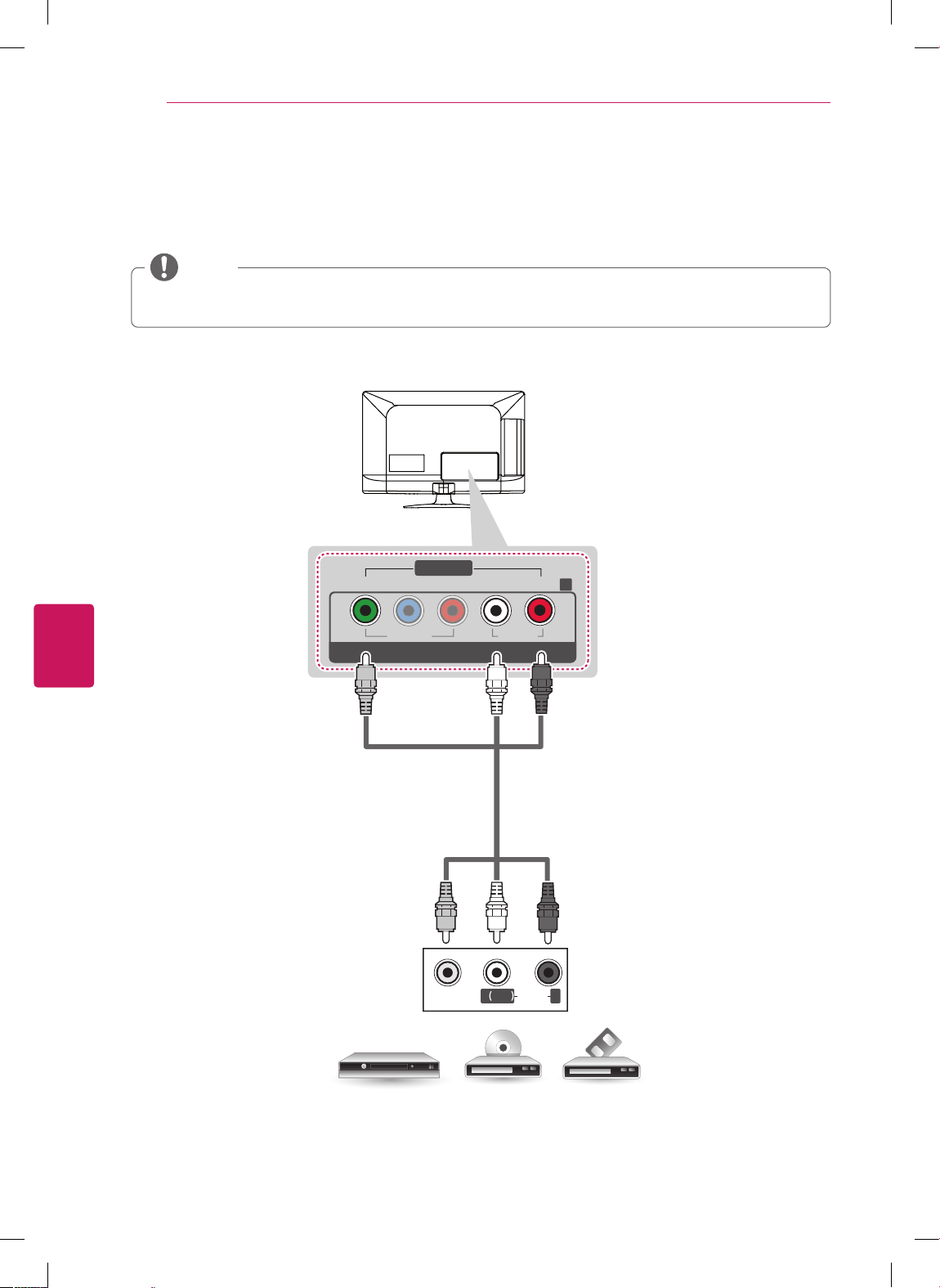
ENGLISH
28
MAKING CONNECTIONS
Composite Connection
Transmits the analog video and audio signals from an external device to the TV. Connect the external
device and the TV with the composite cable as shown in the following illustration.
If you have a mono VCR, connect the audio cable from the VCR to the AUDIO L/MONO jack of the
TV.
NOTE
VIDEO
MONO
( )
AUDIOL R
VIDEO
Y
P
B
P
R
RL
V
IDE
O
AU
DI
O
L/MONO AUDIO
COMPONENT IN
AV IN
R
YELLOW
BLUE
BLUE
YELLOW
RED
RED
(*Not Provided)
VCR / DVD/ Blu-Ray / HD Cable Box
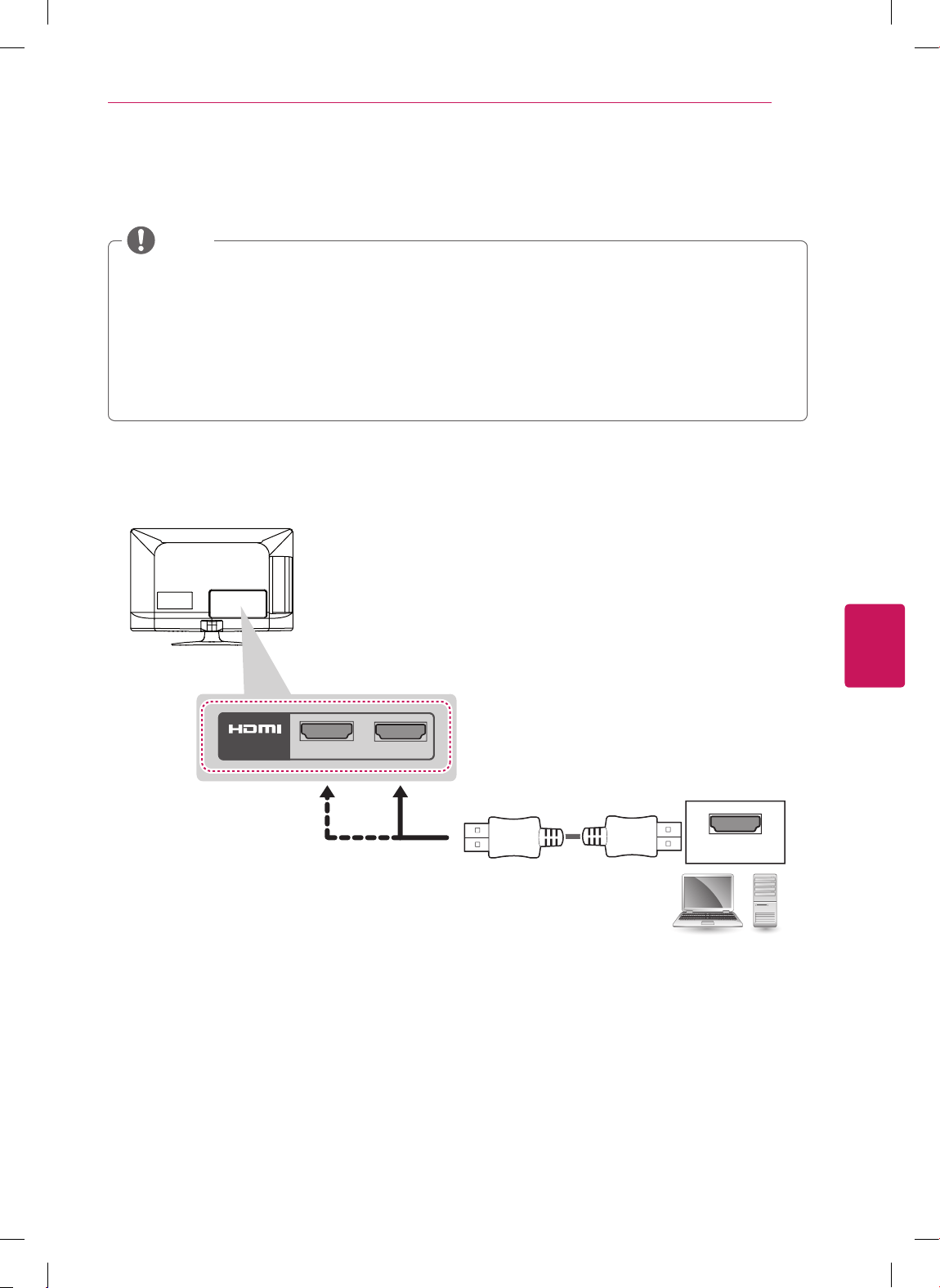
ENGLISH
29
MAKING CONNECTIONS
Connecting to a PC
It is recommended to use the TV with the HDMI connection for the best image quality.
Depending on the graphics card, DOS mode may not work if a HDMI to DVI Cable is in use.
In PC mode, there may be noise associated with the resolution, vertical pattern, contrast or
brightness. If noise is present, change the PC output to another resolution, change the refresh rate
to another rate or adjust the brightness and contrast on the PICTURE menu until the picture is clear.
The synchronization input form for Horizontal and Vertical frequencies is separate.
Depending on the graphics card, some resolution settings may not allow the image to be positioned
on the screen properly.
NOTE
HDMI Connection
PC
2
1
IN
Choose any HDMI input port to connect.
It does not matter which port you use.
HDMI
(*Not Provided)
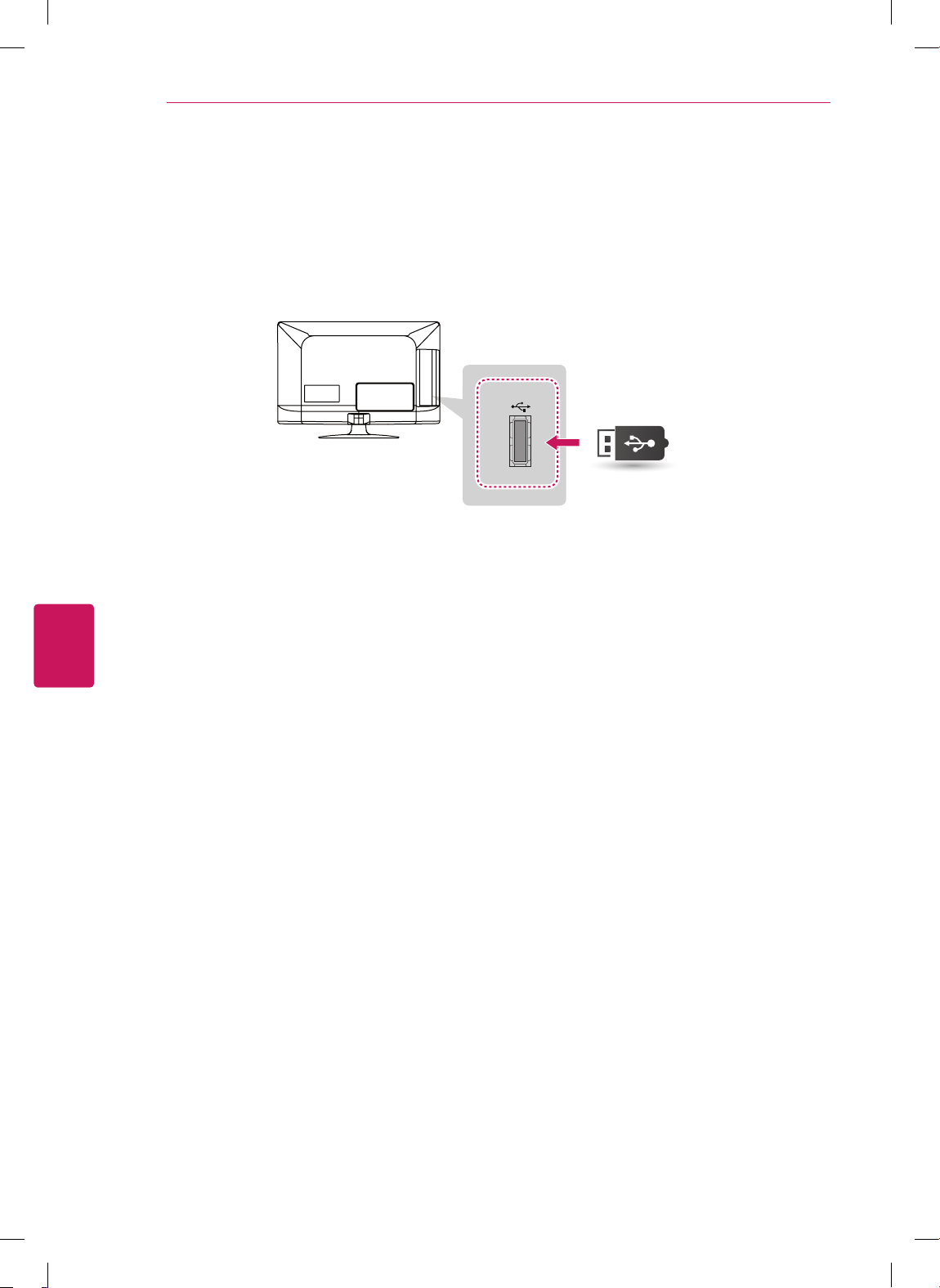
ENGLISH
30
MAKING CONNECTIONS
Connecting to a USB
Connect a USB storage device such as a USB flash memory, external hard drive, or a USB memory card
reader to the TV.
USB IN
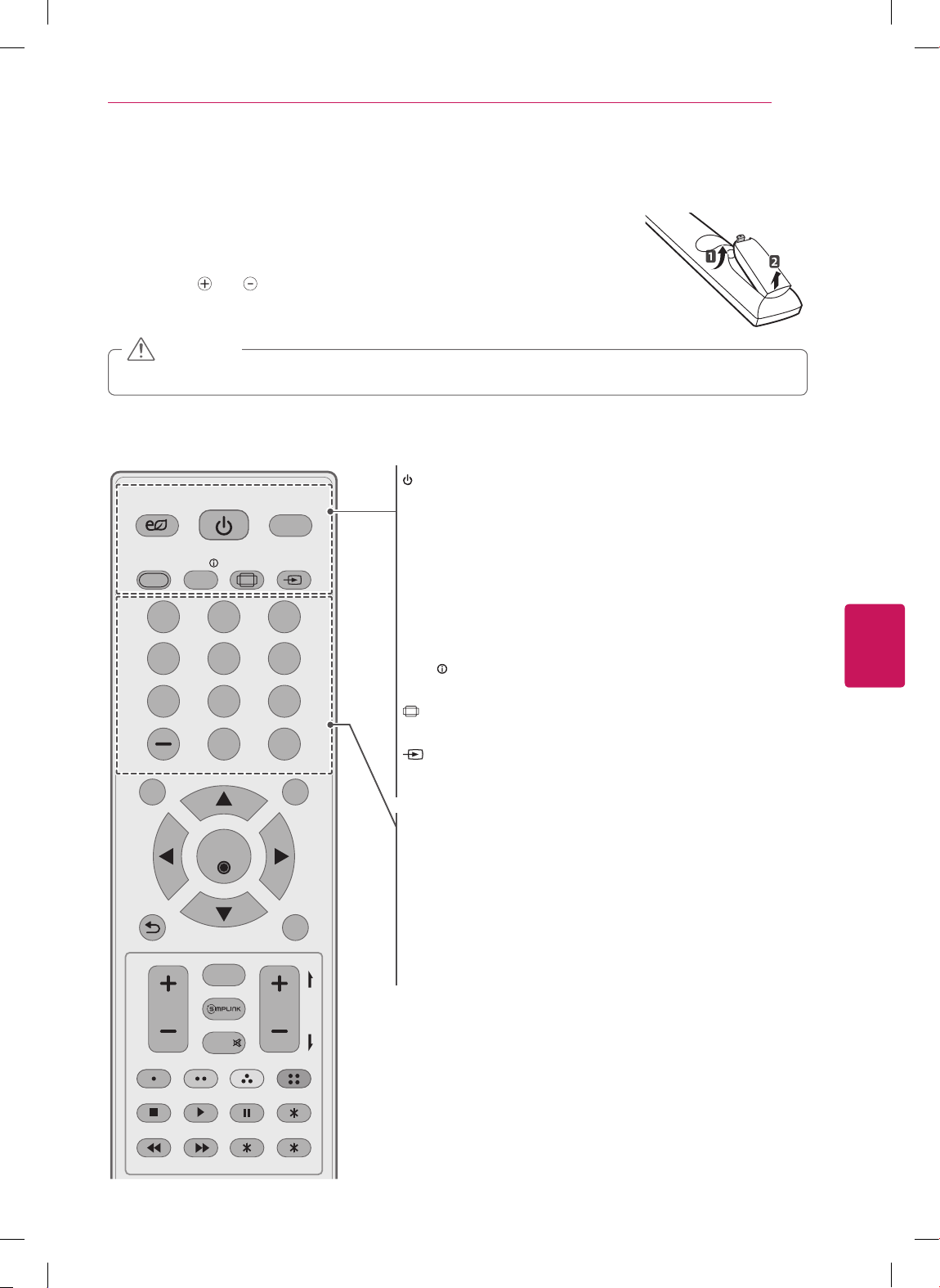
ENGLISH
31
REMOTE CONTROL
REMOTE CONTROL
The descriptions in this manual are based on the buttons on the remote control.
Please read this manual carefully and use the TV correctly.
To replace batteries, open the battery cover, replace batteries (1.5 V AAA)
matching the
and ends to the label inside the compartment, and close the
battery cover. To remove the batteries, perform the installation actions in reverse.
Do not mix old and new batteries, as this may damage the remote control.
CAUTION
Make sure to point the remote control toward at the remote control sensor on the TV.
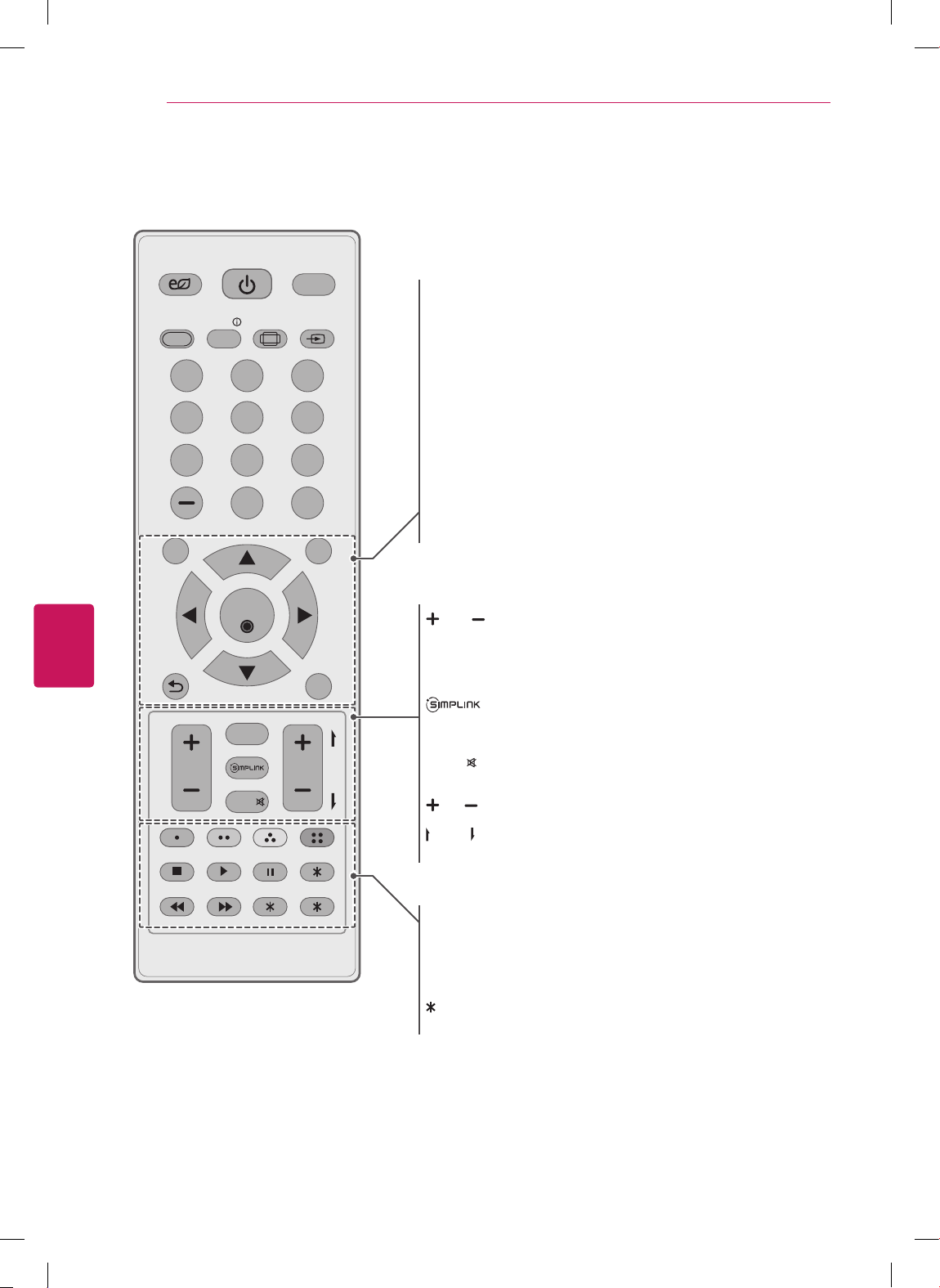
POWER
TV
ENERGY
SAVING
AV MODE INFO
LIST
SETTINGS
OK
Q.MENU
EXIT
P
A
G
E
MUTE
FAV
CHVOL
FLASHBK
RATIO INPUT
ꕯ
POWER
Turns the TV on or off.
ꕊ
ENERGY SAVING
Adjusts the brightness of the screen to reduce energy
consumption.
TV
Returns to the last TV channel.
AV MODE
Selects an AV mode.
INFO
Views the information of the current program and screen.
RATIO
Resizes an image.
INPUT
Rotates through inputs.
Also switches the TV on from standby.
Number button
Enters numbers.
LIST
Accesses the saved channel list.
- (Dash)
Inserts a dash between numbers such as 2-1 and 2-2.
FLASHBK
Alternates between the two last channels selected (pressing
repeatedly).
ENGLISH
32
REMOTE CONTROL
POWER
TV
ENERGY
SAVING
AV MODE INFO
LIST
SETTINGS
OK
Q.MENU
EXIT
P
A
G
E
MUTE
FAV
CHVOL
FLASHBK
RATIO INPUT
ꕯ
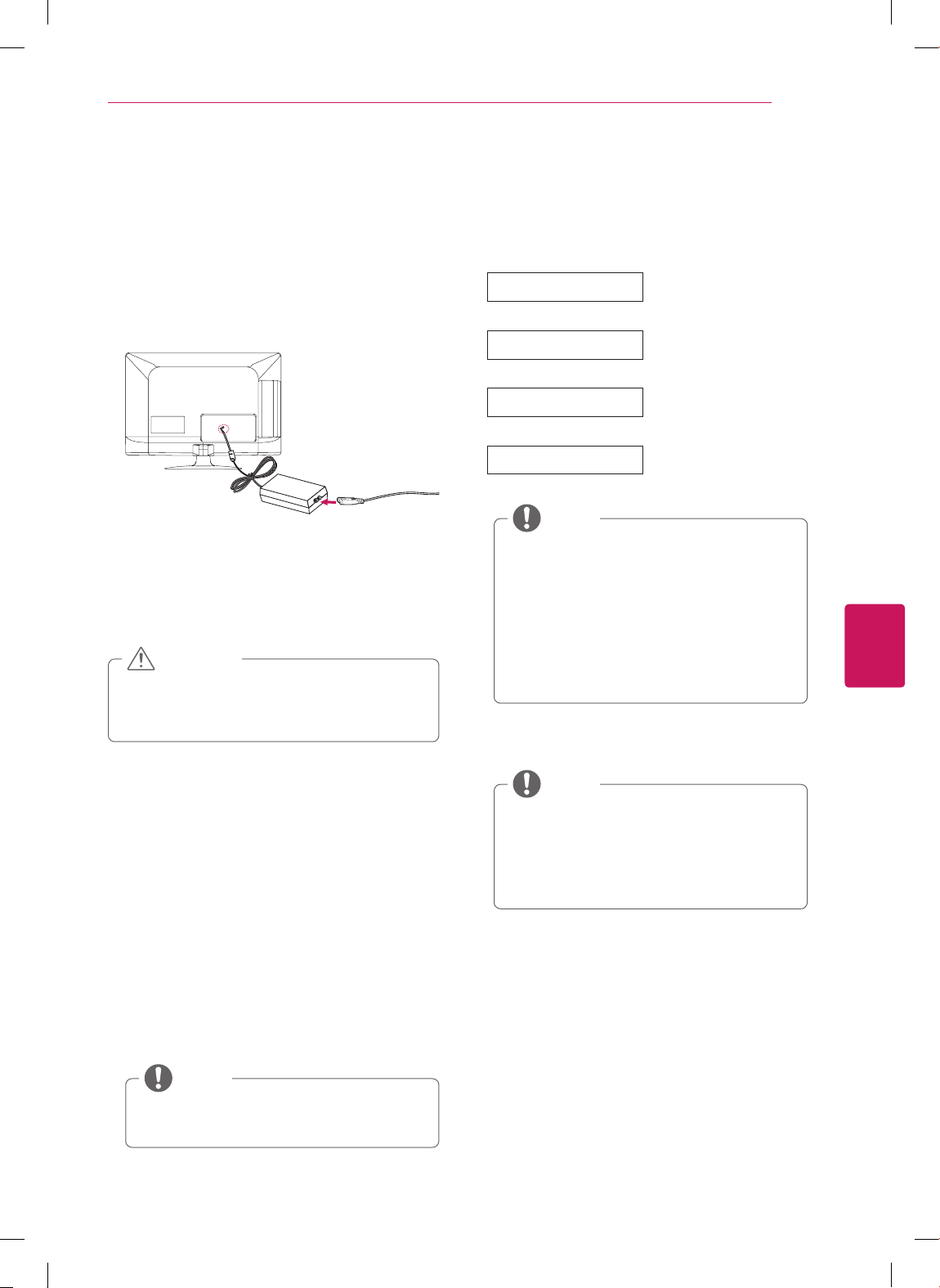
SETTINGS
Accesses the main menu.
Q.MENU
Accesses the quick menu.
Navigation buttons
(up/down/left/right)
Scrolls through menus or options.
OK
ꔉ
Selects menus or options and confirms your input.
ꕣ
(BACK)
Returns to the previous level.
EXIT
ꕯ
Clears all on-screen displays and returns to TV viewing.
VOL
Adjusts the volume level.
FAV
Accesses your favorite channel list.
Accesses the AV devices connected to the TV;
Opens the SIMPLINK menu.
MUTE
Mutes all sounds.
CH
Scrolls through the saved channels.
PAGE
Moves to the previous or next screen.
Color buttons
These access special functions in some menus.
Control buttons
Controls the SIMPLINK compatible devices (USB,SIMPLINK).
Not functional.
ENGLISH
33
WATCHING TV
WATCHING TV
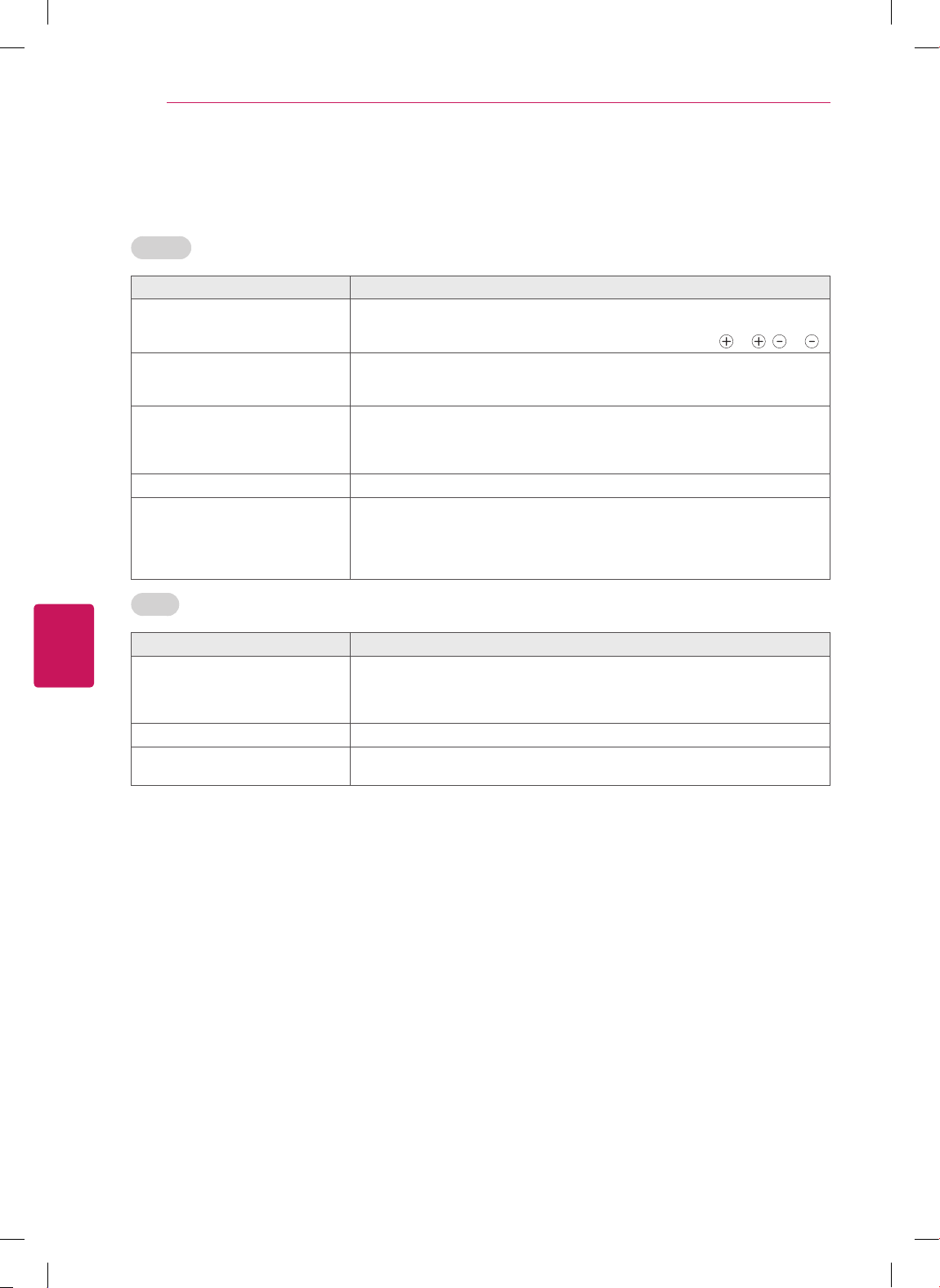
Connecting to the AC/DC
adapter
(For 22/26LS3500, 22/26LS3510)
1
Connect the AC/DC adapter plug to the power
input jack on the TV.
2
Connect the power cord to the AC/DC adapter
first, then plug the power cord into the wall
power outlet.
Please be sure to connect the TV to the AC/
DC power adapter before connecting the
TV’s power plug to a wall power outlet.
CAUTION
Turning the TV on for the first
time
When you turn the TV on for the first time, the
Initial setting screen appears. Select a language
and customize the basic settings.
1
Connect the power cord to a power outlet.
The Power indicator turns red and the TV
switches to Standby mode.
2
In Standby mode, press the power button on
the remote control to turn the TV on.
The Initial setting screen appears if you turn
the TV on for the first time.
You can also access
Initial Setting
by
accessing
OPTION
in the main menu.
NOTE
3
Follow the on-screen instructions to customize
your TV settings according to your preferences.
Language
Selects a language to
display.
Mode Setting
Selects
Home Use
for
the home environment.
Time Setting
Selects the time zone
and daylight saving.
Auto Tuning
Scans and saves available
channels automatically.
To display images in the best quality for
your home environment, select
Home
Use
.
Store Demo
is suitable for the retail
environment.
If you select
Store Demo
, any customized
settings will switch back to the default
settings of
Store Demo
in 5 minutes.
NOTE
4
When the basic settings are complete,
press
OK
.
If you do not complete the Initial setting,
it will appear whenever the TV turns on.
Disconnect the power cord from the
power outlet when you do not use the TV
for a long period of time.
NOTE
5
To turn the TV off, press the power button on
the remote control.
ENGLISH
34
TROUBLESHOOTING
TROUBLESHOOTING
General
Problem Solution
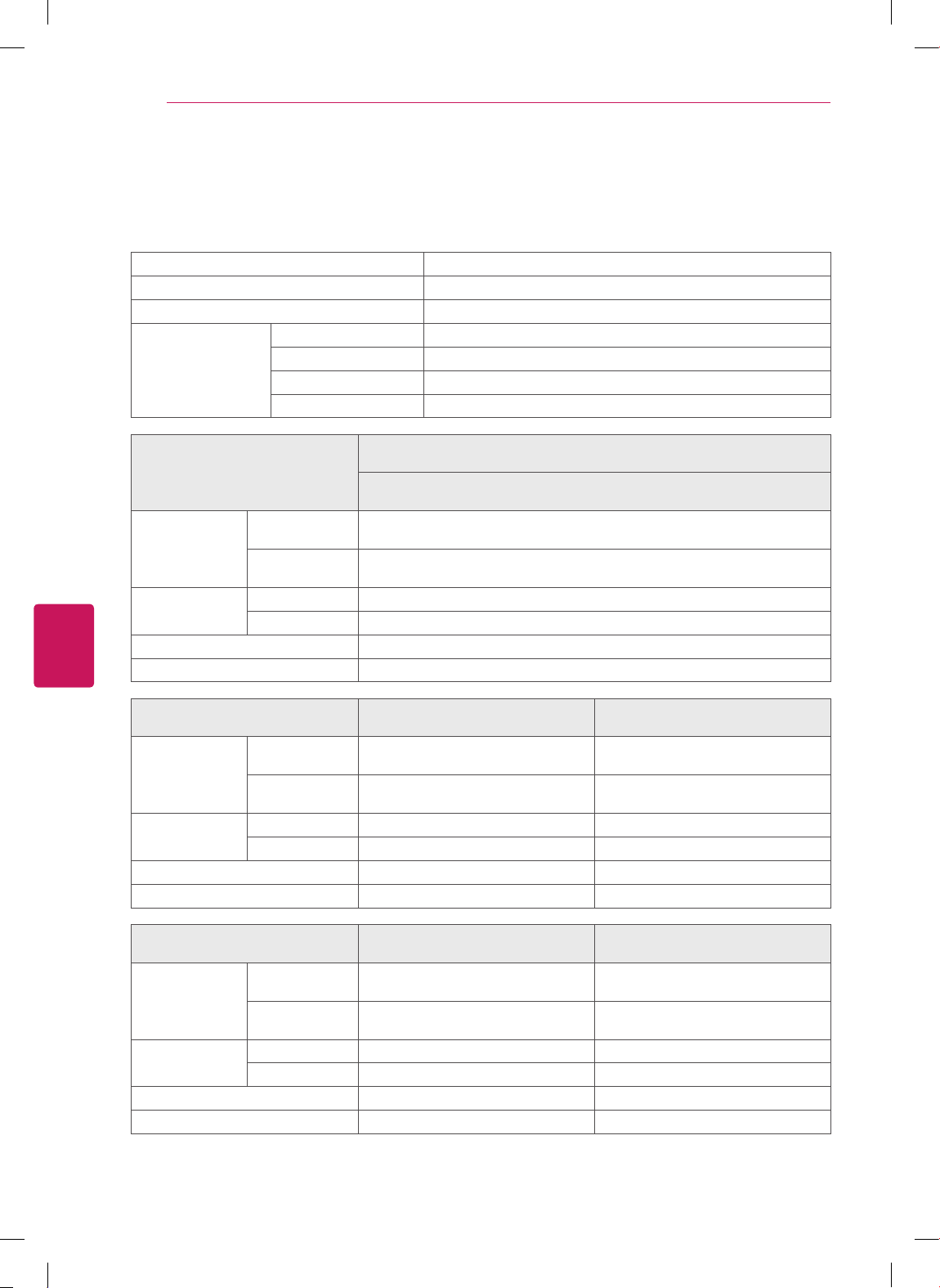
Cannot control the TV with the
remote control.
Check the remote control sensor on the product and try again.
Check if there is any obstacle between the product and the remote control.
Check if the batteries are still working and properly installed (
to , to ).
No image display and no sound is
produced.
Check if the product is turned on.
Check if the power cord is connected to a wall outlet.
Check if there is a problem in the wall outlet by connecting other products.
Image appears slowly when the TV
turns on.
The image is muted during the product startup process. This is normal. If the
image does not appear in a few minutes, unplug the TV for 30 seconds and try
again. If the image still does not appear, contact the authorized service center
in your local area.
Cannot connect external devices.
Refer to the "Connection Overview" and connect an external device.
The TV turns off suddenly.
Check the power control settings. The power supply may be interrupted.
Check if the Auto sleep feature is activated in the Time settings.
Refer to the "Sleep Timer".
If there is no signal while the TV is on, the TV will turn off automatically after
15 minutes of inactivity. (Depending on model)
Audio
Problem Solution
No sound is produced while images
are displaying.
Press
VOL +
or
-
button.
Check if the sound is muted by pressing
MUTE
.
Scroll to other channels. There may a problem with the broadcast.
Check if the TV Speaker feature is activated in the menu option.
No output from one of the speakers
Adjust Balance in the menu option.
Unusual sound from inside the TV is
produced.
A change in ambient humidity or temperature may result in an unusual noise
when the product turns on or off. There is no problem with your product.

ENGLISH
35
TROUBLESHOOTING
Video
Problem Solution
An image displays in black and
white or the color quality is poor.
Adjust the color setting in the menu option.
Keep a sufficient distance between this product and other electronic products.
Scroll to other channels. There may a problem with the broadcast.
Horizontal or vertical bars appears
or images blur
Check if there are local interferences such as an electrical appliance or power
tool.
Lines or streaks appear on images
Check the antenna or aim the antenna to the proper direction.
Afterimages (ghosts) appear when
the product turns off
Pixels may have been damaged from a fixed image displayed for a long time
(image burn). Use a screen saver to prevent the pixel damage on the screen.
The power is on but the screen
appears extremely dark.
Adjust the brightness and contrast in the menu option.
“No Signal” appears on the screen.
Check if the signal cable is connected between the TV and products properly.
Check the selected input source by pressing
INPUT
.
Black spots appear on the screen.
Several pixels in red, green, white, or black may appear on the screen that can
attribute to the characteristics of the panel.
This is normal.
The display offset is wrong.
Adjust the position setting in the Picture menu.
Check if the video card resolution and frequency are supported by the product.
If the frequency is out of range, set to the recommended resolution using the
display settings on the external device.
Thin lines appear in the background
of the screen.
Check the video cable connections.
The reception on some channels is
poor
Scroll to other channels. There may a problem with the broadcast.
The station signal may be weak. Aim the antenna to the proper direction.
Check if there is local interferences such as an electrical appliance or power
tool.
ENGLISH
36
SPECIFICATIONS
SPECIFICATIONS
Product specifications may be changed without prior notice due to upgrade of product functions.
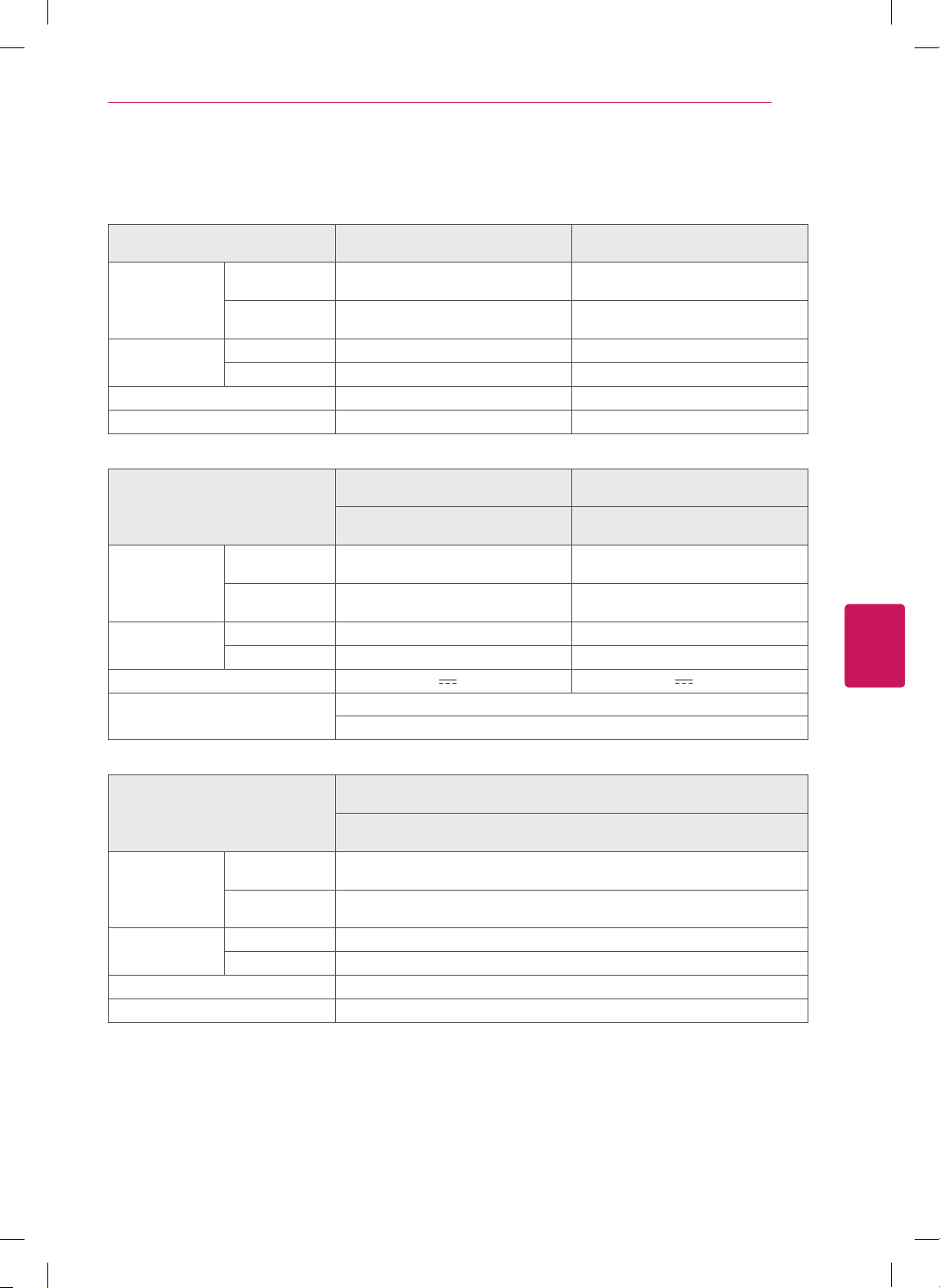
Television System NTSC-M, ATSC, 64 & 256 QAM
Program Coverage VHF 2-13, UHF 14-69, CATV 1-135, DTV 2-69, CADTV 1-135
External Antenna Impedance
75
Ω
Environment
condition
Operating Temperature 0 - 40 °C
Operating Humidity Less than 80 %
Storage Temperature -20 - 60 °C
Storage Humidity Less than 85 %
MODELS
32CS460
(32CS460-UC)
32CS461
(32CS461-UA)
Dimensions
(W x H x D)
With stand
794.0 x 565.0 x 207.0 mm
(31.2 x 22.2 x 8.1 inch)
Without stand
794.0 x 504.0 x 73.5 mm
(31.2 x 19.8 x 2.8 inch)
Weight
With stand 9.0 kg (19.8 lbs)
Without stand 8.0 kg (17.6 lbs)
Current Value / Power consumption 1.1 A / 110 W
Power requirement AC100 - 240 V ~ 50/60 Hz
MODELS
42CS530
(42CS530-UB)
32CS560
(32CS560-UE)
Dimensions
(W x H x D)
With stand 1019.0 x 698.0 x 265.0 mm
(40.1 x 27.4 x 10.4 inch)
795.0 x 568.0 x 207.0 mm
(31.2 x 22.3 x 8.1 inch)
Without stand 1019.0 x 631.0 x 76.5 mm
(40.1 x 24.8 x 3.0 inch)
795.0 x 504.0 x 73.5 mm
(31.2 x 19.8 x 2.8 inch)
Weight With stand 15.1 kg (33.2 lbs) 9.2 kg (20.2 lbs)
Without stand 13.4 kg (29.5 lbs) 8.1 kg (17.8 lbs)
Current Value / Power consumption 1.7 A / 170 W 1.2 A / 120 W
Power requirement AC100 - 240 V ~ 50/60 Hz AC100 - 240 V ~ 50/60 Hz
MODELS
37CS560
(37CS560-UE)
42CS560
(42CS560-UE)
Dimensions
(W x H x D)
With stand 913.0 x 639.0 x 265.0 mm
(35.9 x 25.1 x 10.4 inch)
1019.0 x 698.0 x 265.0 mm
(40.1 x 27.4 x 10.4 inch)
Without stand 913.0 x 571.0 x 77.4 mm
(35.9 x 22.4 x 3.0 inch)
1019.0 x 631.0 x 76.5 mm
(40.1 x 24.8 x 3.0 inch)
Weight With stand 12.8 kg (28.2 lbs) 15.1 kg (33.2 lbs)
Without stand 11.1 kg (24.4 lbs) 13.4 kg (29.5 lbs)
Current Value / Power consumption 1.6 A / 160 W 1.7 A / 170 W
Power requirement AC100 - 240 V ~ 50/60 Hz AC100 - 240 V ~ 50/60 Hz
ENGLISH
37
SPECIFICATIONS
MODELS
32LS3400
(32LS3400-UA)
42LS3400
(42LS3400-UA)
Dimensions
(W x H x D)
With stand
795.0 x 566.0 x 207.0 mm
(31.2 x 22.2 x 8.1 inch)
1017.0 x 695.0 x 261.0 mm
(40.0 x 27.3 x 10.2 inch)
Without stand
795.0 x 504.0 x 73.5 mm
(31.2 x 19.8 x 2.8 inch)
1017.0 x 629.0 x 76.5 mm
(40.0 x 24.7 x 3.0 inch)
Weight
With stand 9.1 kg (20.0 lbs) 14.7 kg (32.4 lbs)
Without stand 8.1 kg (17.8 lbs) 13.1 kg (28.8 lbs)
Current Value / Power consumption 1.0 A / 70 W 1.2 A / 120 W
Power requirement AC100 - 240 V ~ 50/60 Hz AC100 - 240 V ~ 50/60 Hz
MODELS
22LS3500
(22LS3500-UD)
26LS3500
(26LS3500-UD)
22LS3510
(22LS3510-UA)
26LS3510
(26LS3510-UA)
Dimensions
(W x H x D)
With stand
523.0 x 376.0 x 140.0 mm
(20.5 x 14.8 x 5.4 inch)
627.0 x 442.0 x 162.0 mm
(24.6 x 17.4 x 6.3 inch)
Without stand
523.0 x 339.0 x 31.6 mm
(20.5 x 13.3 x 1.2 inch)
627.0 x 402.0 x 30.1 mm
(24.6 x 15.8 x 1.1 inch)
Weight
With stand 3.5 kg (7.7 lbs) 4.5 kg (9.9 lbs)
Without stand 3.2 kg (7.0 lbs) 4.2 kg (9.2 lbs)
Power requirement 24 V
, 1.4 A 24 V , 1.8 A
Adapter (DC Power)
In: AC 100 - 240 V ~ 50/60 Hz
Out: DC 24 V, 2.7 A or 2.71 A
MODELS
32LS3500
(32LS3500-UD)
32LS3510
(32LS3510-UA)
Dimensions
(W x H x D)
With stand
755.0 x 530.0 x 239.0 mm
(29.7 x 20.8 x 9.4 inch)
Without stand
755.0 x 479.0 x 45.8 mm
(29.7 x 18.8 x 1.8 inch)
Weight
With stand 9.1 kg (20.0 lbs)
Without stand 8.3 kg (18.2 lbs)
Current Value / Power consumption 0.6 A / 60 W
Power requirement AC100 - 240 V ~ 50/60 Hz

ENGLISH
38
OPEN SOURCE SOFTWARE NOTICE
OPEN SOURCE SOFTWARE NOTICE
To obtain the source code under GPL, LGPL, MPL and other open source licenses, that is contained in this
product, please visit http://opensource.lge.com.
In addition to the source code, all referred license terms, warranty disclaimers and copyright notices are
available for download.
LG Electronics will also provide open source code to you on CD-ROM for a charge covering the cost of
performing such distribution (such as the cost of media, shipping and handling) upon email request to
[email protected]. This offer is valid for three (3) years from the date on which you purchased the
product.

The model and serial number of the TV is
located on the back and/or one side of the TV.
Record it below should you ever need service.
MODEL
SERIAL
The extended owner’s manuals that contain
information on the advanced features of this LG
TV are located on the CD-ROM provided in an
electronic version.
To read these files, you will need to use the personal
computer (PC) equipped with a CD-ROM drive.
LG Customer Information Center
For inquires or comments, visit www.lg.com or call;
1-888-542-2623
CANADA
1-800-243-0000
USA, Commercial User
1-888-865-3026
USA, Consumer User
Register your product Online!
www.lg.com
(For LS3400, LS3500 series USA, Canada, Mexico)
This product qualifies for ENERGY STAR in the
“factory default (Home Use)” setting.
Changing the factory default settings or enabling
other features may increase power consumption
that could exceed the limits necessary to quality for
ENERGY STAR.

www.lg.com
Veuillez lire ce manuel attentivement avant d'utiliser l'appareil
et le conserver pour pouvoir vous y reporter ultérieurement.
GUIDE D'UTILISATION
TÉLÉVISEUR
ACL À DEL / ACL
MODÈLES DE TÉLÉVISEURS ACL À DEL MODÈLES DE TÉLÉVISEURS ACL
32LS3400
42LS3400
22LS3500
26LS3500
32LS3500
22LS3510
26LS3510
32LS3510
32CS460
32CS461
42CS530
32CS560
37CS560
42CS560
FRANÇAIS
2
DIRECTIVES DE SÉCURITÉ IMPORTANTES
DIRECTIVES DE SÉCURITÉ IMPORTANTES
Conformez-vous toujours aux précautions suivantes pour éviter des situations dangereuses et assurer une
performance optimale du produit.
WARNING/CAUTION
RISK OF ELECTRIC SHOCK
DO NOT OPEN
AVERTISSMENT
RISQUE D'ÉLECTROCUTION
NE PAS OUVRIR
AFIN DE RÉDUIRE LE RISQUE
D'ÉLECTROCUTION, NE PAS RETIRER LE
COUVERCLE (OU LE PANNEAU ARRIÈRE).
AUCUNE PIÈCE POUVANT ÊTRE RÉPARÉE
PAR L'UTILISATEUR NE SE TROUVE
À L'INTÉRIEUR. SE REPORTER AU
PERSONNEL D'ENTRETIEN QUALIFIÉ.
WARNING/CAUTION
RISK OF ELECTRIC SHOCK
DO NOT OPEN
Le symbole d'éclair avec une flèche,
dans un triangle équilatéral a pour
fonction d'alerter l'utilisateur de la
présence de « tension dangereuse » non
isolée à l'intérieur du boîtier du produit et qui
pourrait être d'une puissance suffisante pour
causer une électrocution.
WARNING/CAUTION
RISK OF ELECTRIC SHOCK
DO NOT OPEN
Le point d'exclamation dans un triangle
équilatéral est conçu pour alerter
l'utilisateur de la présence
d'instructions importantes d'utilisation et de
maintenance (entretien) dans la
documentation accompagnant l'appareil.
AVERTISSEMENT/MISE EN GARDE
- AFIN DE RÉDUIRE LE RISQUE D'INCENDIE
ET D'ÉLECTROCUTION, NE PAS EXPOSER
CE PRODUIT À LA PLUIE OU À L'HUMIDITÉ.
N'utilisez pas cet appareil près de l'eau.
Short-circuit
Breaker
Power Supply
Nettoyez uniquement avec un linge sec.
Short-circuit
Breaker
Power Supply
Ne bloquez pas les orifices de ventilation.
Installez le produit en respectant les
directives du fabricant.
Short-circuit
Breaker
Power Supply
N'installez pas le produit près de sources
de chaleur telles les radiateurs, les bouches
de chaleur, les fours et tout autre appareil (y
compris les amplificateurs) produisant de la
chaleur.
Short-circuit
Breaker
Power Supply
Ne contournez pas la sécurité de la fiche
polarisée ou de mise à la terre. Une fiche
polarisée a deux lames, l'une d'elles étant
plus large que l'autre. Une fiche de mise à la
terre comporte deux lames et une troisième
broche de mise à la terre. La lame plus large
ou la troisième broche sont fournies pour
votre sécurité. Si la fiche fournie ne s'insère
pas dans votre prise, consultez un électricien
afin de faire remplacer la prise obsolète.
(Peut varier selon le pays).
Short-circuit
Breaker
Power Supply
Lisez ces directives.
Conservez ces directives.
Soyez attentif à tous les avertissements.
Suivez toutes les directives.
Short-circuit
Breaker
Power Supply
FRANÇAIS
3
DIRECTIVES DE SÉCURITÉ IMPORTANTES
Protégez le cordon d'alimentation de
manière à ce que les personnes ne marchent
pas dessus et contre les pincements,
particulièrement au niveau de la fiche, des
prises de courant et à l'endroit où elles
sortent de l'appareil.
Short-circuit
Breaker
Power Supply
N'utilisez que les articles connexes ou
accessoires recommandés par le fabricant.
Short-circuit
Breaker
Power Supply
Utilisez uniquement avec un chariot, un
pied, une fixation ou une table spécifié par le
fabricant ou vendu avec l'appareil. Lorsqu'un
chariot est utilisé, faites preuve de prudence
lors du déplacement du chariot et de l'écran,
afin de prévenir les blessures causées par un
basculement.
Short-circuit
Breaker
Power Supply
Débranchez cet appareil pendant les orages
électriques ou lorsqu'il n'est pas utilisé
pendant de longues périodes.
Short-circuit
Breaker
Power Supply
Laissez le personnel qualifié se charger de
tous les services d'entretien. Faites appel
à un fournisseur de services d'entretien
lorsque le produit a été endommagé d'une
quelconque façon, notamment si la fiche ou
le cordon d'alimentation est endommagé, si
une substance liquide a été déversée sur le
produit, si des objets sont tombés dans le
produit, si le produit a été exposé à la pluie
ou à l'humidité, s'il cesse de fonctionner
correctement ou a été échappé.
Short-circuit
Breaker
Power Supply
N'insérez pas d'objet métallique ou
conducteur dans le câble d'alimentation.
Ne touchez pas l'extrémité du cordon
d'alimentation lorsqu'il est branché.
Gardez le matériel anti-humidité et le
matériel d'emballage en vinyle hors de la
portée des enfants. Le matériel anti-humidité
est dangereux pour la santé s'il est avalé. S'il
est avalé par erreur, forcez le patient à vomir
et rendez-vous à l'hôpital le plus proche. De
plus, le matériel d'emballage en vinyle peut
entraîner la suffocation. Gardez-le hors de la
portée des enfants.
AVERTISSEMENT relatif au cordon
d'alimentation (Peut varier selon le pays):
Il est recommandé de brancher les appareils
sur un circuit spécialisé, soit un circuit
comportant une seule prise de courant
qui alimente seulement cet appareil et ne
comporte aucune prise supplémentaire
ni aucun circuit de dérivation. Consultez
la page des caractéristiques du présent
guide d'utilisation, pour vous en assurer.
Ne branchez pas un trop grand nombre
d'appareils dans une même prise
d'alimentation c.a.; cela pourrait causer un
incendie ou une électrocution. Ne surchargez
pas les prises de courant murales. Les
prises de courant murales surchargées,
les prises de courant murales ou rallonges
desserrées ou endommagées, les cordons
d'alimentation éraillés ou endommagés
et les revêtements de fil fissurés sont
dangereux. Chacune de ces conditions peut
entraîner des chocs électriques ou provoquer
un incendie. Examinez périodiquement
le cordon de votre appareil, et si son
apparence indique des dommages ou une
détérioration, cessez d'utiliser l'appareil et
faites remplacer le cordon par une pièce
de remplacement exacte auprès d'un
fournisseur de services d'entretien autorisé.
Protégez le cordon d'alimentation contre
les dommages physiques ou mécaniques.
Veillez notamment à ce qu'il ne soit pas
tordu, déformé, pincé, coincé dans une porte
ou piétiné. Soyez particulièrement attentif
aux fiches, aux prises de courant murales
et à l'emplacement de sortie du cordon sur
l'appareil. Ne déplacez pas le téléviseur avec
le cordon d'alimentation branché. N'utilisez
pas un cordon d'alimentation endommagé
ou desserré. Assurez-vous de saisir la
fiche lorsque vous débranchez la prise
d'alimentation. Ne tirez pas sur le cordon
d'alimentation pour débrancher le téléviseur.
Short-circuit
Breaker
Power Supply
FRANÇAIS
4
DIRECTIVES DE SÉCURITÉ IMPORTANTES
Avertissement
- Afin de réduire le risque
d'incendie ou d'électrocution, n'exposez
pas ce produit à la pluie, à l'humidité ou à
d'autres liquides. Ne touchez pas le téléviseur
si vos mains sont mouillées. N'installez
pas ce produit près d'objets inflammables
comme de l'essence ou des chandelles, ni
n'exposez le téléviseur directement à l'air
climatisé.
Short-circuit
Breaker
Power Supply
Le moniteur ne doit être exposé à aucune
vaporisation ni éclaboussure, et vous devez
éviter d'y poser des objets remplis d'eau,
comme des vases. (par exemple, sur des
tablettes au-dessus de l'appareil).
Short-circuit
Breaker
Power Supply
Mise à la masse
(Sauf pour les appareils non mis à la terre.)
Assurez-vous de brancher le fil de mise
à la masse afin de prévenir tout risque
d'électrocution (p. ex., un téléviseur doté
d'une fiche c.a. à trois broches avec mise à la
masse devrait être branchée dans une prise
électrique murale c.a. avec mise à la masse).
Si la mise à la masse n'est pas possible, un
électricien doit installer un disjoncteur de
circuit pour la prise. Ne tentez pas de mettre
l'appareil à la masse en le raccordant à des
câbles téléphoniques, à un paratonnerre ou à
des canalisations de gaz.
Short-circuit
Breaker
Power Supply
Alimentation
électrique
Disjoncteur
de circuit
DÉBRANCHEMENT D'UN APPAREIL DE
L'ALIMENTATION PRINCIPALE
La prise d'alimentation doit demeurer
facilement accessible, afin de pouvoir
débrancher l'appareil lorsque nécessaire.
Tant que ce produit est branché sur la
prise de courant murale c.a., il n'est pas
déconnecté de la source d'alimentation c.a.
même s'il est mis hors tension.
Ne pas tenter de modifier ce produit d'aucune
manière sans avoir obtenu au préalable
l'autorisation écrite de LG Electronics. Une
modification non autorisée pourrait annuler
l'autorisation d'utiliser ce produit.
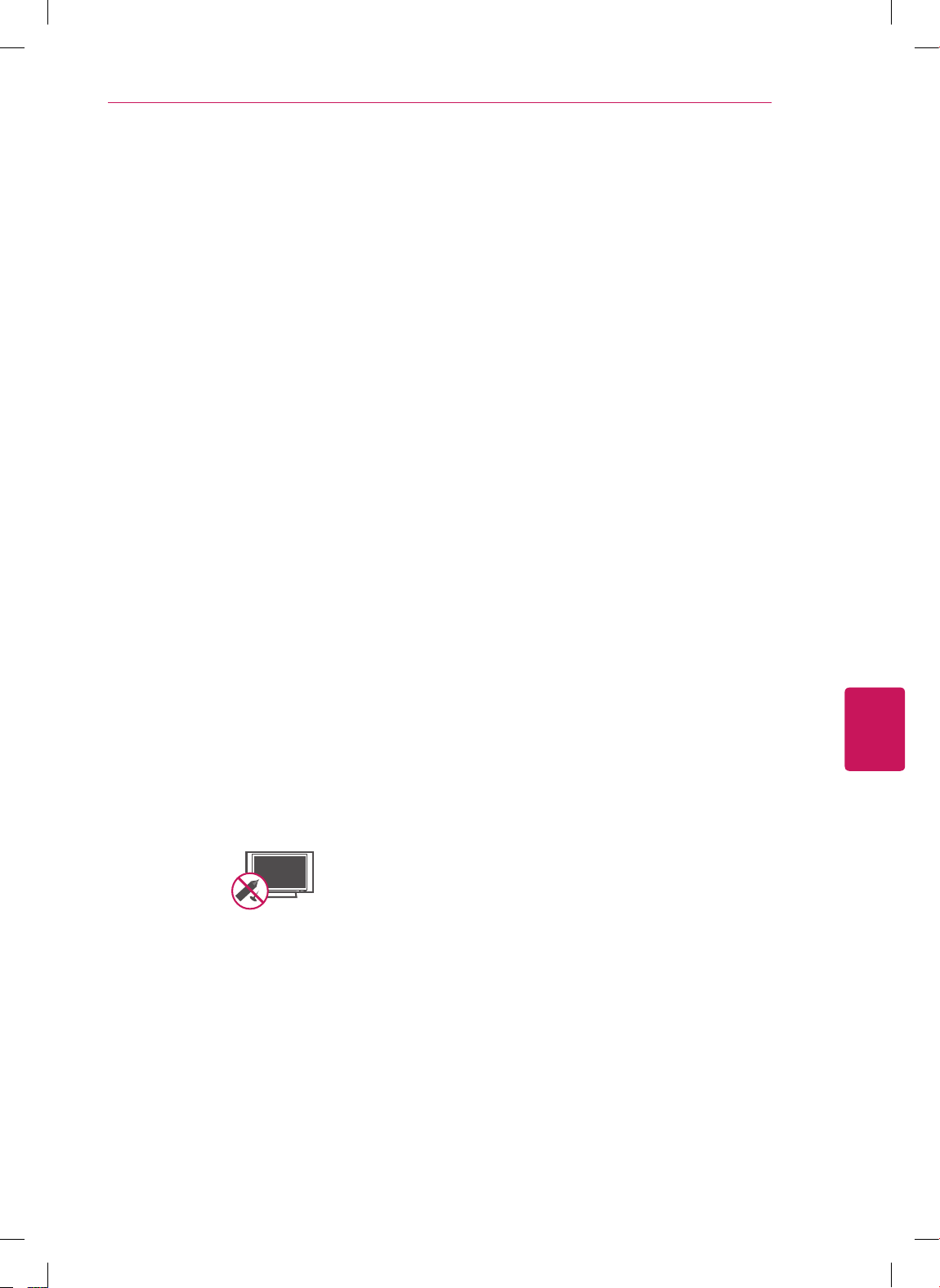
ANTENNES Mise à la masse d'antennes
extérieures
(Peut varier selon le pays):
Si une antenne extérieure est installée,
suivez les précautions ci-dessous. Un
système d'antennes extérieures ne devrait
pas se trouver à proximité des lignes
aériennes d'électricité, de d'autres éclairages
électriques ou de circuits d'alimentation, ou
à un endroit où il peut entrer en contact avec
de telles lignes électriques ou de tels circuits
d'alimentation, puisque des blessures
graves, voire la mort, pourraient se produire.
Assurez-vous que le système d'antennes
est mis à la terre, afin de fournir une
certaine protection contre les surtensions
et les accumulations de charge d'électricité
statique. La section 810 du Code national
de l'électricité (NEC) aux États-Unis fournit
des informations relatives à la procédure
conforme de mise à la terre du mât et de
la structure d'appui, du câble d'entrée à
l'élément de sortie antenne, au format
des fils de terre, à la position de l'élément
de sortie antenne, au branchement des
électrodes de masse, ainsi qu'aux exigences
de mise à la masse de l'électrode.
Mise à la terre de l'antenne en vertu du
code électrique national, ANSI/NFPA 70
Short-circuit
Breaker
Power Supply
NEC : Code national de l'électricité
Prise de terre
Fil d'antenne sous gaine
Dispositif de décharge de
l'antenne (NEC - Section
810-20)
Conducteur de terre
(NEC - Section 810-21)
Électrodes de terre du
service d'électricité (NEC -
Article 250, Partie H)
Équipement
du service
d'électricité
Prise de terre
FRANÇAIS
5
DIRECTIVES DE SÉCURITÉ IMPORTANTES
Nettoyage
Lors du nettoyage, débranchez le cordon
d'alimentation et essuyez le produit avec
un linge doux pour éviter de le rayer. Ne
vaporisez pas d'eau ou d'autres liquides
directement sur le téléviseur, car cela
pourrait causer une électrocution. Ne
nettoyez pas avec des produits chimiques
tels l'alcool, les solvants et le benzène.
Déplacement
Assurez-vous que le produit est hors tension,
débranché et que tous les câbles ont été
retirés. Deux personnes ou plus peuvent être
requises pour porter les téléviseurs d'une
certaine taille. N'appliquez aucune pression
(provenant de vous-même ou d'un élément
extérieur) sur le panneau avant du téléviseur.
Ventilation
Installez votre téléviseur à un endroit où
la ventilation est suffisante. N'installez
pas dans un espace confiné comme une
bibliothèque. Ne couvrez pas ce produit
d'un drap ou d'autres matériaux lorsqu'il
est branché. N'installez pas à un endroit
excessivement poussiéreux.
Si vous sentez une odeur de fumée ou
d'autres odeurs provenant du téléviseur,
débranchez le cordon d'alimentation et
contactez un centre de service autorisé.
Évitez que le produit ne soit exposé à la
lumière solaire directe.
Évitez d'appuyer fortement sur l'écran
avec une main ou un objet pointu, comme
un ongle, un crayon ou un stylo, et évitez
d'égratigner l'écran.
Short-circuit
Breaker
Power Supply
Ne touchez jamais cet appareil ou cette
antenne pendant un orage.
Lors du montage du téléviseur au mur,
assurez-vous de ne pas le suspendre à l'aide
du câble de signal ou d'alimentation se
trouvant à l'arrière du téléviseur
Évitez de heurter le produit et assurez-vous
qu'aucun objet ne tombe dans celui-ci ou
n'entre en contact avec l'écran.
Défaut de point
Un écran plasma ou ACL est un produit de
haute technologie présentant une résolution
de deux à six millions de pixels. Dans de
rares cas, on pourrait voir de petits points
sur l'écran lors du visionnement. Ces points
sont des pixels désactivés ne nuisant pas à
la performance et à la fiabilité du téléviseur.
Son produit
« Craquement » : un craquement survenant
pendant le visionnement ou lors de l'arrêt
du téléviseur est produit par une contraction
thermique plastique causée par la chaleur
ou l'humidité. Ce bruit est courant dans les
produits où une déformation thermique est
requise.
Bourdonnement de circuit ou de panneau
électrique : un bruit très faible est produit
par un circuit commutateur haute vitesse
fournissant une grande quantité de courant
pour faire fonctionner un produit. Il varie
selon le produit.
Ce son ne nuit aucunement à la performance
ou à la fiabilité du produit.
Prenez soin de ne pas toucher aux
ouvertures de ventilation. Lorsque le
téléviseur fonctionne pendant de longues
périodes, les ouvertures de ventilation
peuvent devenir chaudes. Cela ne nuit
aucunement à la performance du produit et
ne l'endommage pas.
Si le téléviseur est froid au toucher, il peut
y avoir un léger « sautillement » quand on
l'allume. Cela est normal; le téléviseur n'est
pas défectueux. Pendant quelques minutes,
des défauts de point peuvent être visibles
à l'écran, apparaissant comme de petites
taches rouges, vertes ou bleues. Toutefois,
ils ne produisent aucun effet indésirable
sur la performance du téléviseur. Évitez
de toucher l'écran ACL ou de mettre vos
doigts dessus pendant une longue période
de temps. Cela pourrait produire un effet de
distorsion à l'écran
FRANÇAIS
6
DIRECTIVES DE SÉCURITÉ IMPORTANTES
MISE AU REBUT (Lampe Hg utilisée dans les
téléviseurs ACL seulement)
La lampe fluorescente utilisée dans ce produit
contient une petite quantité de mercure. Ne
disposez pas de ce produit avec les ordures
ménagères générales. La mise au rebut de ce
produit doit être effectuée en respectant les
règlements de vos autorités locales.
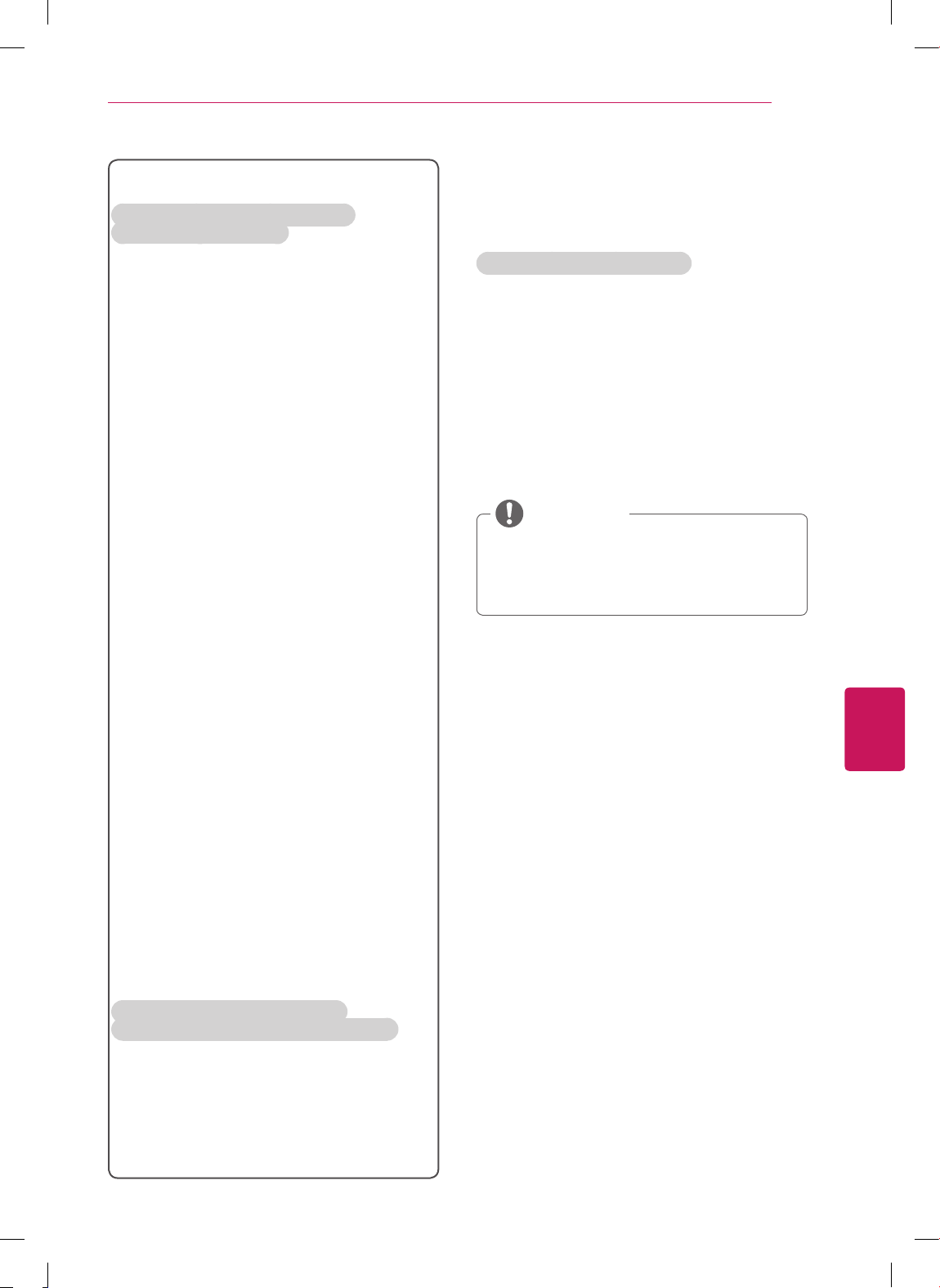
Prévention des images fantômes ou rémanentes
sur l'écran de votre téléviseur
Une image figée à l’écran pendant de
longues périodes peut causer une image
fantôme et endommager définitivement
votre écran. Ce phénomène n'est pas
couvert par la garantie.
Si le format d'image de votre téléviseur est
réglé sur 4:3 pendant une période prolongée,
il est possible qu'une image rémanente
apparaisse dans la zone propre à ce format.
Pour éviter tout problème d'image
rémanente, évitez de laisser une image fixe
affichée à l'écran pendant des périodes
prolongées (2 heures ou plus pour les écrans
ACL, 1 heure ou plus pour les téléviseurs à
plasma).
FRANÇAIS
7
DIRECTIVES DE SÉCURITÉ IMPORTANTES
Renseignements
supplémentaires du manuel
Affichage du guide d'utilisation
Le guide d'utilisation est un fichier au format PDF,
fourni sur un CD. Installez l'application Adobe
Acrobat Reader pour afficher le guide d'utilisation
sur votre PC.
1
Insérez le CD fourni.
La page Web s'affiche automatiquement.
2
Cliquez sur Guide d'utilisation sur la page Web.
3
Consultez le guide d'utilisation.
Si la page Web ne s'affiche pas
automatiquement, cliquez sur l'icône Poste
de travail, puis cliquez sur LG et
index.htm
pour afficher le guide d'utilisation.
REMARQUE
Pour les États-Unis et le Canada
INFORMATIONS RELATIVES À LA
RÉGLEMENTATION FCC
Cet équipement a été testé et jugé conforme
aux limites relatives aux appareils numériques
de catégorie B imposées par le paragraphe 15
de la réglementation de la FCC. Ces limites sont
établies pour fournir une protection raisonnable
contre les interférences nuisibles en installation
résidentielle. Cet équipement génère, utilise et
peut diffuser de l'énergie de radiofréquences
et, s'il n'est pas installé et utilisé conformément
aux instructions, peut causer des interférences
nuisibles aux communications radio. Cependant,
il n'existe aucune garantie qu'il n'y aura pas
d'interférences dans une installation particulière.
Si cet équipement cause des interférences
nuisibles à la réception radio ou télévision (pour
s'en assurer, il suffit d'éteindre et de rallumer
l'appareil), l'utilisateur est invité à essayer de
corriger les interférences par l'une ou plusieurs
des mesures suivantes :
- Réorienter ou déplacer l'antenne de
réception.
- Augmenter la distance entre l'équipement et
le récepteur.
- Brancher l'équipement sur un circuit
électrique distinct de celui qui alimente le
récepteur.
- Consulter le distributeur ou un technicien
radio/télé qualifié pour vous aider.
Cet appareil est conforme aux limites imposées
par le paragraphe 15 de la réglementation FCC.
Son utilisation est sujette aux deux conditions
suivantes : (1) cet appareil ne doit pas provoquer
de brouillage préjudiciable, et (2) cet appareil
doit accepter toutes les interférences reçues, y
compris celles pouvant causer un fonctionnement
indésirable. Les modifications dans la fabrication
de cet appareil qui ne sont pas expressément
approuvées par l'autorité responsable de la
conformité peuvent annuler l'autorisation
accordée à l'utilisateur de faire fonctionner
l'équipement.
REMARQUE À L'INTENTION DES
INSTALLATEURS DE RÉSEAUX CÂBLÉS
Nous désirons attirer l'attention des installateurs
de réseaux câblés sur l'article 820-40 du Code
national de l'électricité (NEC) concernant la mise
à la terre de tels réseaux, et en particulier sur
le fait que le câble doit être relié au système de
terre du bâtiment aussi près qu'il est possible de
son point d'entrée.
FRANÇAIS
8
TABLE DES MATIÈRES
TABLE DES MATIÈRES
2 DIRECTIVES DE SÉCURITÉ
IMPORTANTES
7 Renseignements supplémentaires du
manuel
8 TABLE DES MATIÈRES
9 PROCÉDURE D’INSTALLATION
9 ASSEMBLAGE ET PRÉPARATION
9 Déballage
14 Pièces et touches
16 Soulèvement et déplacement du téléviseur
17 Installation du téléviseur
17 - Fixation du support
21 - Montage sur une table
23 - Montage mural
24 - Gestion des câbles
25 ÉTABLISSEMENT DES CONNEXIONS
25 Raccordement à une antenne ou au câble
26 Connexion à un récepteur HD, à un lecteur
DVD ou à un magnétoscope
26 - Connexion HDMI
27 - Connexion composante
28 - Connexion composite
29 Connexion à un PC
29 - Connexion HDMI
30 Connexion USB
31 TÉLÉCOMMANDE
33 VISIONNEMENT DE LA TV
33 Raccordement à l’adaptateur AC/DC
33 Allumer le téléviseur pour la première fois
34 DÉPANNAGE
36 CARACTÉRISTIQUES
38 AVIS CONCERNANT LES LOGICIELS
LIBRES
Cette illustration peut ne pas correspondre
à votre téléviseur.
L'afficheur (OSD) de votre téléviseur peut
différer légèrement de l’illustration du
présent manuel.
Les menus et options disponibles peuvent
différer en fonction des sources que vous
utilisez.
De nouvelles fonctionnalités pourraient être
ajoutées à ce téléviseur dans le futur.
REMARQUE
FRANÇAIS
9
ASSEMBLAGE ET PRÉPARATION
PROCÉDURE D’INSTALLATION
1
Ouvrez l’emballage et assurez-vous que tous les accessoires sont présents.
2
Fixez le support au téléviseur.
3
Branchez un appareil externe sur le téléviseur.
ASSEMBLAGE ET PRÉPARATION
Déballage
Vérifiez le contenu de votre boîte pour les articles suivants. S'il manque des accessoires, communiquez
avec le détaillant local où vous avez acheté le produit. Les illustrations du présent guide peuvent différer du
produit et de l'article réels.
Les articles fournis avec votre produit peuvent varier selon le modèle.
Les caractéristiques du produit ou le contenu de ce manuel peuvent être modifiés sans préavis, pour
refléter la mise à niveau des fonctions du produit.
Pour que la connexion soit optimale, les connecteurs des câbles HDMI et des dispositifs USB
devraient avoir un rebord de moins de 10 mm (0,39 po) d'épaisseur et de moins de 18 mm (0,7 po)
de largeur.
Si le câble ou la clé USB ne rentre pas dans le port USB de la télé, servez-vous d'un câble de rallonge
compatible USB 2.0.
B
A
A
B
*A 10 mm (0,39 pouces)
*B 18 mm (0,7 pouces)
REMARQUE
Afin de garantir la sécurité et la durée de vie de l'appareil, n'utilisez pas d'éléments non approuvés.
Tout dommage ou blessure causé par l'utilisation d'un élément non approuvé n'est pas couvert par
la garantie.
Sur certains modèles, la fine pellicule apposée sur l'écran fait partie du téléviseur et il ne faut pas la
retirer.
MISE EN GARDE
FRANÇAIS
10
ASSEMBLAGE ET PRÉPARATION
Pour séries CS460, CS461, LS3400
Télécommande et piles
(AAA)
(Voir p.31)
Guide d'utilisation,
Manuel sur CD
Chiffon à lustre
(Selon le modèle)
Servez-vous-en pour essuyer
la poussière sur le boîtier.
Partie Principale
(Voir p.17)
Base du Pied
(Voir p.17)
Vis de support
8 EA, M4 x 20
(Voir p.17)
Couvercle de protection Vis de fixation sur table
(Voir p.21)
Cordon d'alimentation
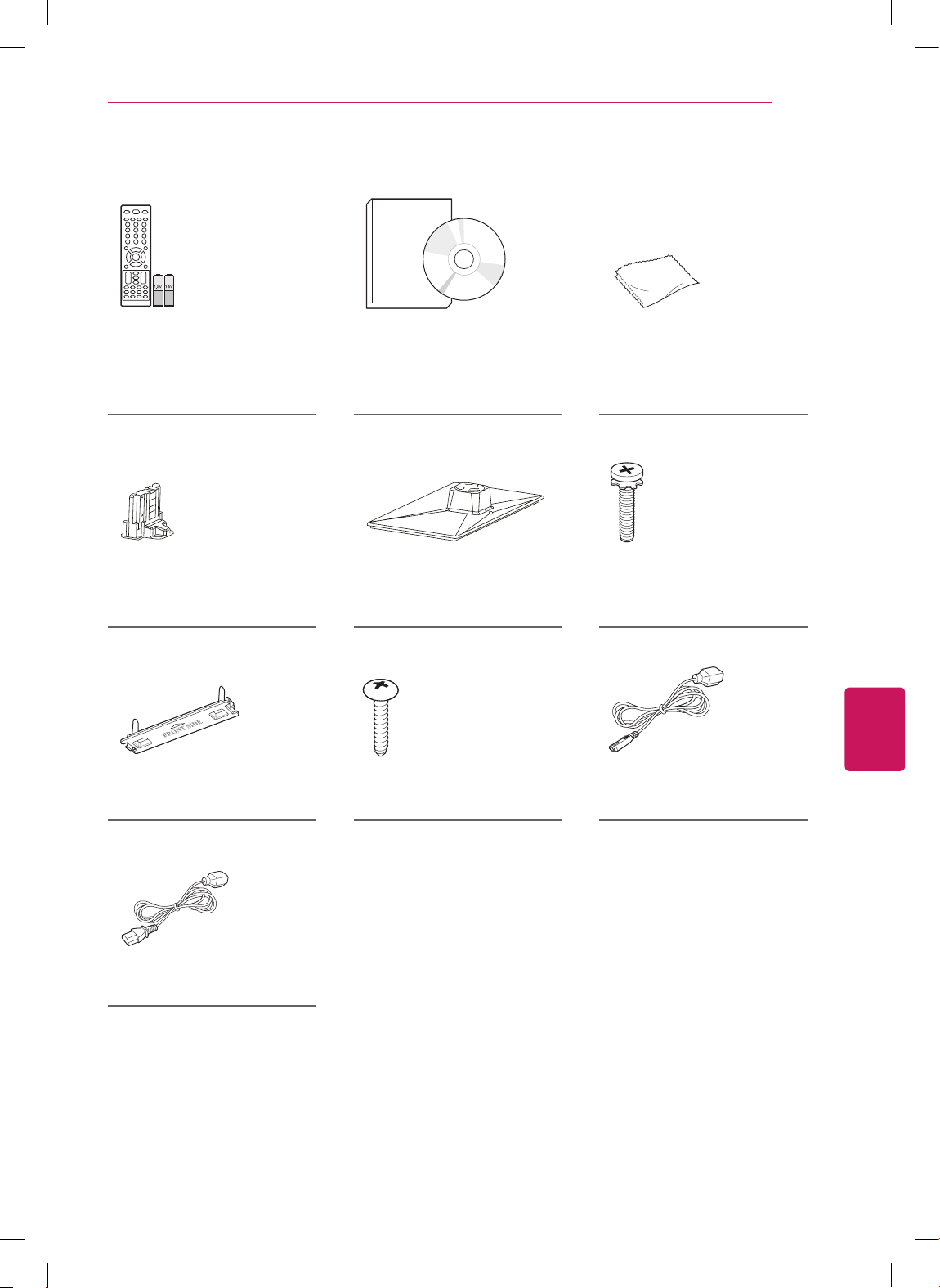
FRANÇAIS
11
ASSEMBLAGE ET PRÉPARATION
Pour séries CS530, CS560
Télécommande et piles
(AAA)
(Voir p.31)
Guide d'utilisation,
Manuel sur CD
Chiffon à lustre
(Selon le modèle)
Servez-vous-en pour essuyer
la poussière sur le boîtier.
Partie Principale
(Voir p.18)
Base du Pied
(Voir p.18)
Vis de support
8 EA, M4 x 20
(Voir p.18)
(Pour 42CS530, 32/42CS560)
Couvercle de protection Vis de fixation sur table
(Voir p.21)
Cordon d'alimentation
(Pour 37CS560)
Cordon d'alimentation
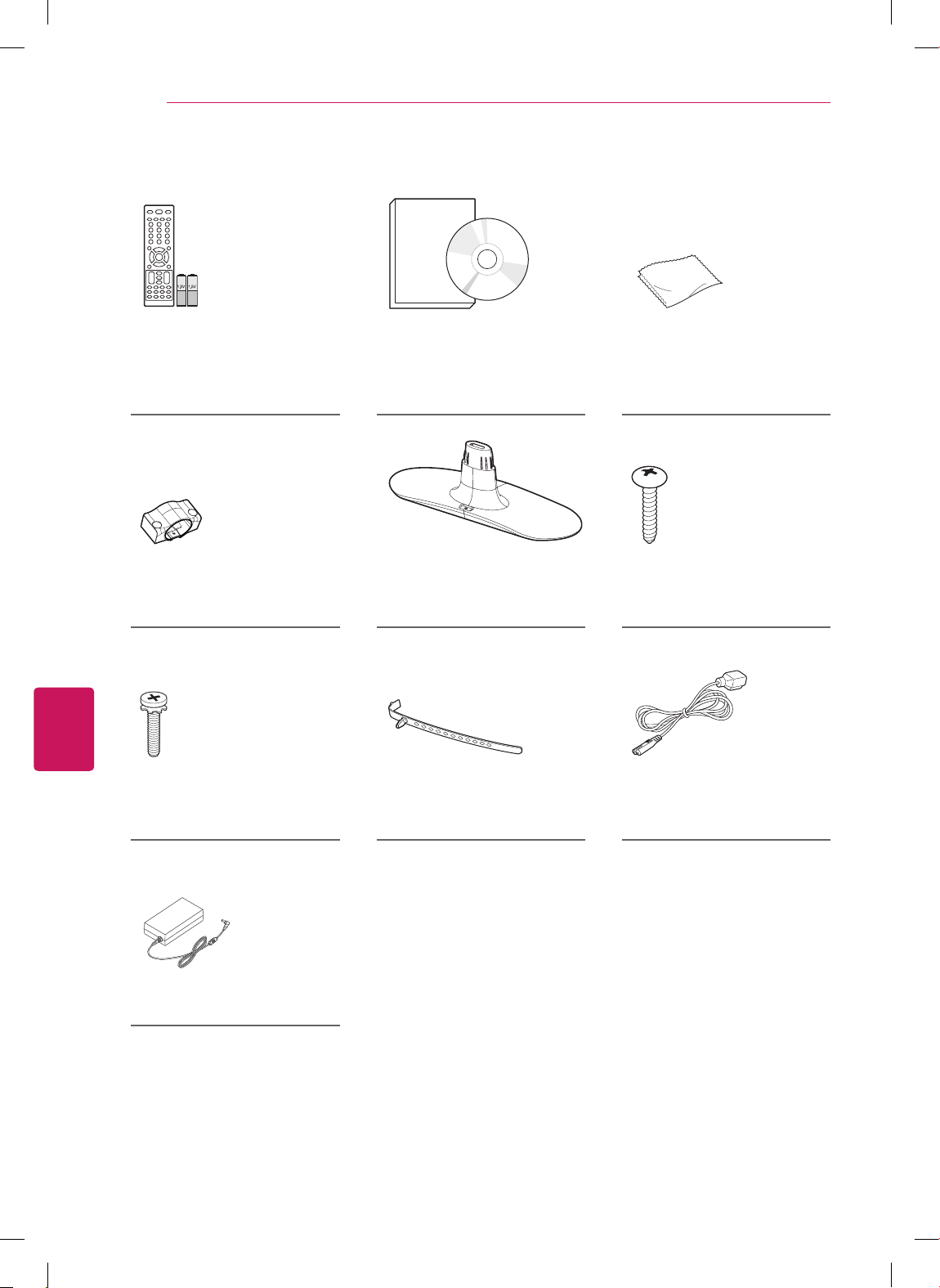
FRANÇAIS
12
ASSEMBLAGE ET PRÉPARATION
Pour 22/26LS3500, 22/26LS3510
Télécommande et piles
(AAA)
(Voir p.31)
Guide d'utilisation,
Manuel sur CD
Chiffon à lustre
(Selon le modèle)
Servez-vous-en pour essuyer
la poussière sur le boîtier.
(Pour 22LS3500, 22LS3510)
Partie Principale
(Voir p.19)
Base du Pied
(Voir p.19)
Vis de support
2 EA, P4 x 16
(Voir p.19)
(Pour 26LS3500, 26LS3510)
Vis de support
2 EA, M4 x 14
(Voir p.19)
Serre-câbles
(Voir p.24)
Cordon d'alimentation
AC/DC Adaptateur
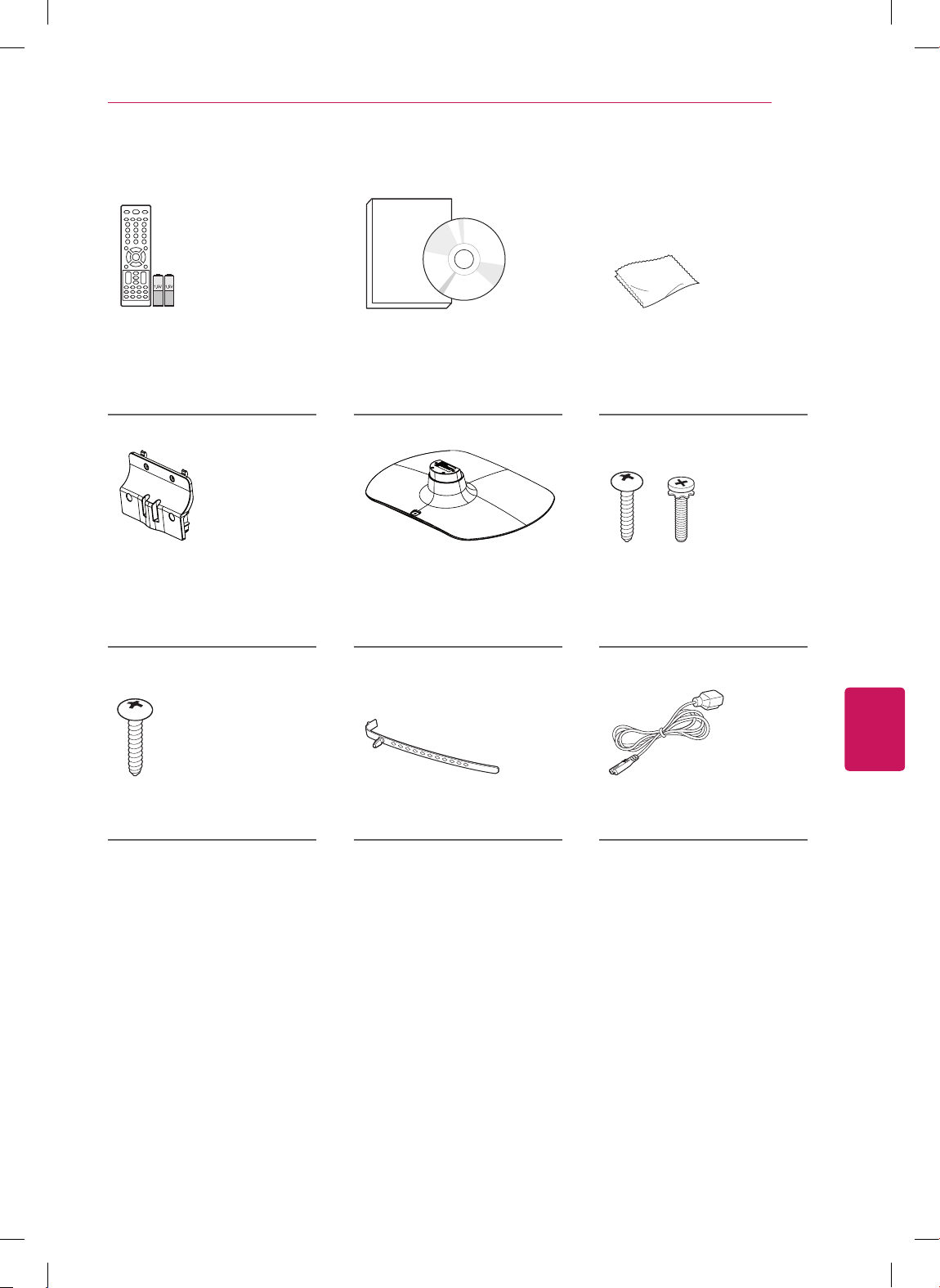
FRANÇAIS
13
ASSEMBLAGE ET PRÉPARATION
Pour 32LS3500, 32LS3510
Télécommande et piles
(AAA)
(Voir p.31)
Guide d'utilisation,
Manuel sur CD
Chiffon à lustre
(Selon le modèle)
Servez-vous-en pour essuyer
la poussière sur le boîtier.
Partie Principale
(Voir p.20)
Base du Pied
(Voir p.20)
Vis de support
4 EA, P4 x 16
4 EA, M4 x 14
(Voir p.20)
Vis de fixation sur table
(Voir p.21)
Serre-câbles
(Voir p.24)
Cordon d'alimentation
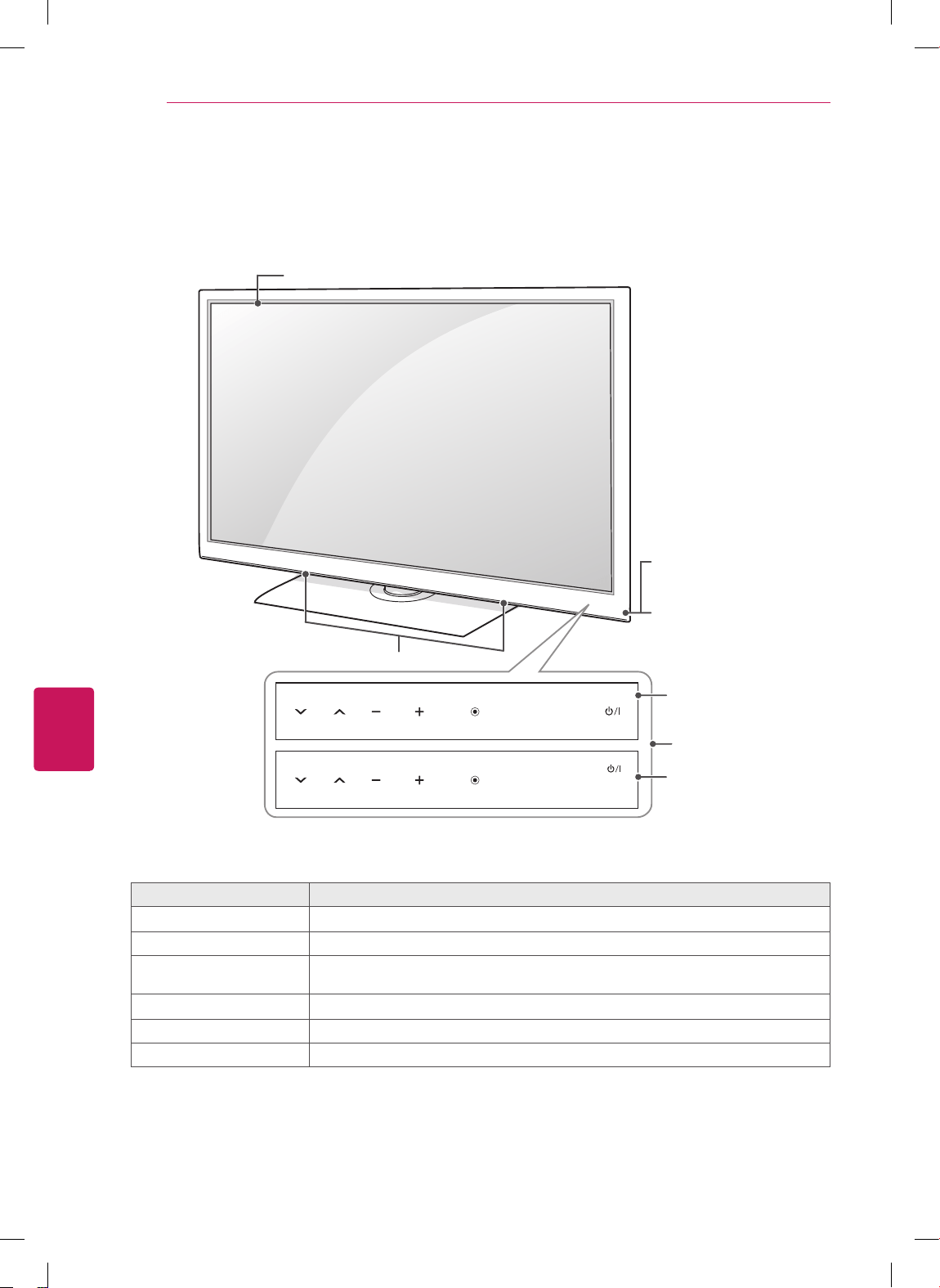
FRANÇAIS
14
ASSEMBLAGE ET PRÉPARATION
Pièces et touches
Pour séries CS460, CS461, CS530, CS560, LS3400
Touches tactiles
2
Description
ꔰ
/
I
Allume l'appareil ou le met hors tension.
INPUT Change de source d'entrée.
SETTINGS Permet d'accéder aux menus principaux ou d'enregistrer votre sélection et de quitter
les menus.
OK
⊙
Accepte l'option de menu sélectionnée ou confirme une entrée.
- + Règle le volume.
v ^
Parcourt les chaînes enregistrées.
1 Les capteurs intelligents ajustent la qualité et la luminosité de l'image en fonction de l'environnement
immédiat.
2 Toutes les touches sont tactiles et peuvent être activées en les effleurant simplement avec le doigt.
OK
SETTINGS
INPUT
OK
SETTINGS
INPUT
Écran
Haut-parleurs
Touches tactiles
2
Voyant lumineux
d'alimentation
Capteurs intelligents
1
et
pour la télécommande
Pour séries CS460,
CS461, LS3400
Pour séries
CS530, CS560
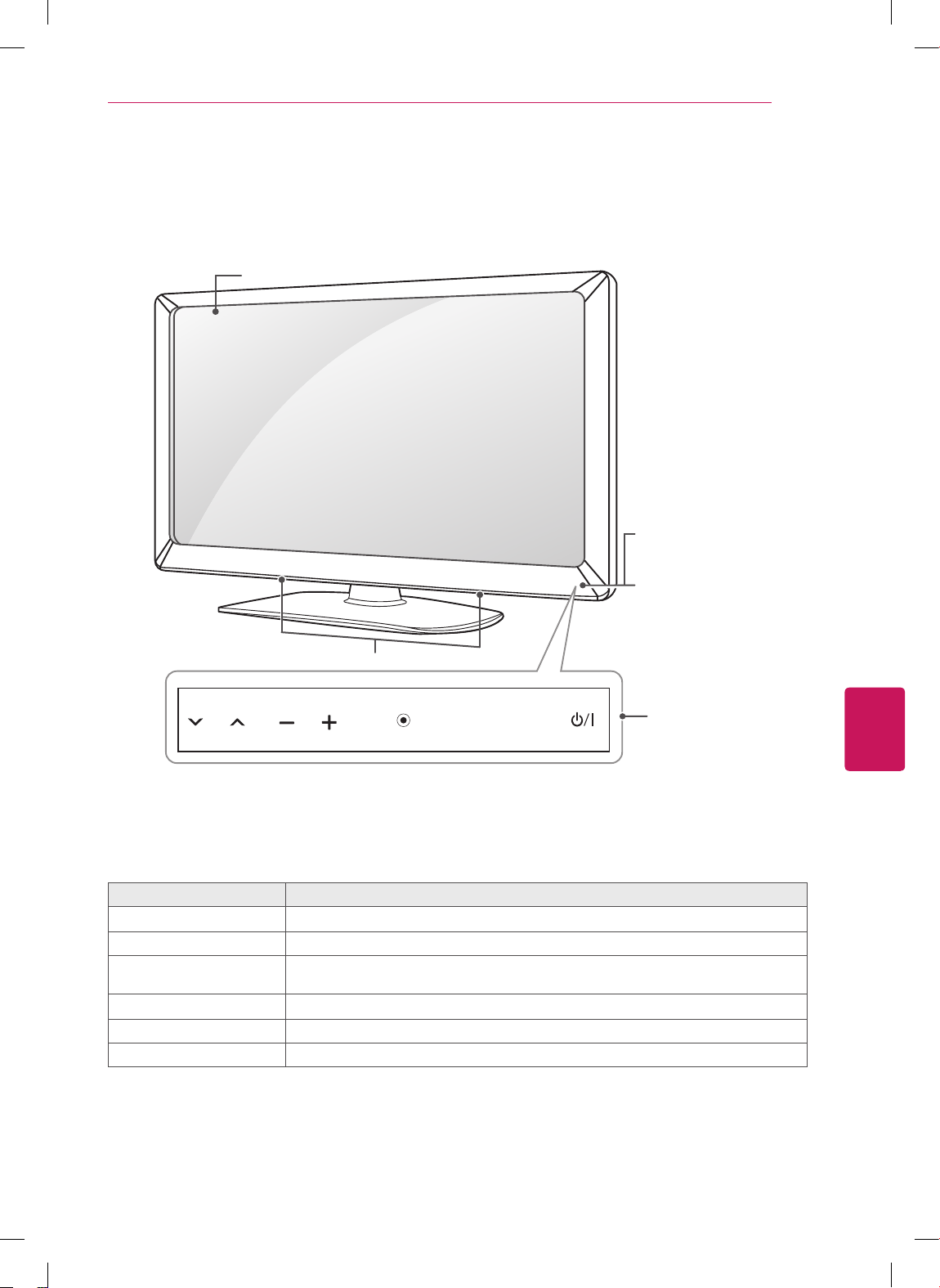
FRANÇAIS
15
ASSEMBLAGE ET PRÉPARATION
Pour séries LS3500, LS3510
Touches tactiles
2
Description
ꔰ
/
I
Allume l'appareil ou le met hors tension.
INPUT Change de source d'entrée.
SETTINGS Permet d'accéder aux menus principaux ou d'enregistrer votre sélection et de quitter
les menus.
OK
⊙
Accepte l'option de menu sélectionnée ou confirme une entrée.
- + Règle le volume.
v ^
Parcourt les chaînes enregistrées.
1 Les capteurs intelligents ajustent la qualité et la luminosité de l'image en fonction de l'environnement
immédiat.
2 Toutes les touches sont tactiles et peuvent être activées en les effleurant simplement avec le doigt.
OK
SETTINGS
INPUT
Écran
Haut-parleurs
Touches tactiles
2
Voyant lumineux
d'alimentation
Capteurs intelligents
1
et
pour la télécommande
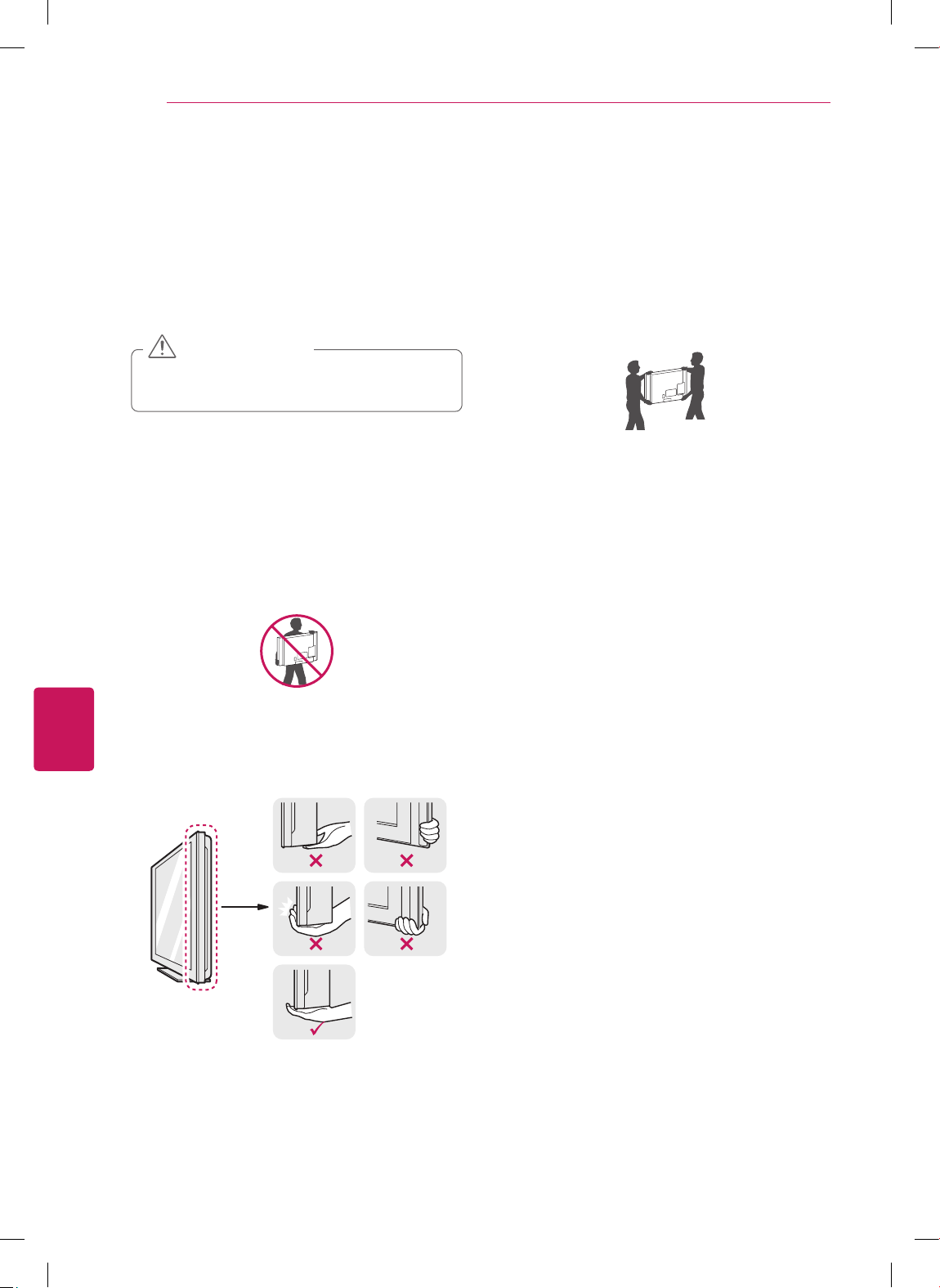
FRANÇAIS
16
ASSEMBLAGE ET PRÉPARATION
Soulèvement et déplacement
du téléviseur
Lorsque vous désirez déplacer ou soulever le
téléviseur, lisez tout d'abord ce qui suit pour éviter
d'égratigner ou d'endommager le téléviseur, ainsi
que pour effectuer un transport sécuritaire sans
égard au type et à la taille du téléviseur.
Évitez de toucher à l'écran, puisque cela
pourrait causer des dommages à l'écran.
MISE EN GARDE
Il est recommandé de déplacer le téléviseur
en utilisant la boîte ou le matériel d'emballage
dans lequel a été livré le téléviseur à l'origine.
Avant de déplacer ou de soulever le téléviseur,
débranchez le cordon d'alimentation et tous les
câbles.
Lorsque vous manipulez le téléviseur, vous
devriez l'orienter pour que l'écran ne soit pas
de votre côté, pour éviter de l'endommager.
Tenez fermement le haut et le bas du cadre
du téléviseur. Assurez-vous de ne pas tenir la
partie transparente, le haut-parleur ou la grille
de haut-parleur du téléviseur.
Lorsque vous transportez un téléviseur de
grande dimension, demandez l'aide d'au moins
une autre personne.
Lorsque vous transportez un téléviseur dans
vos mains, tenez-le tel que montré dans l'illus-
tration suivante.
Lorsque vous transportez le téléviseur, évitez
de l'exposer à des chocs ou à des vibrations
excessives.
Lorsque vous transportez le téléviseur, mainte-
nez-le à la verticale; ne le tournez jamais sur le
côté et ne le penchez pas à gauche ou à droite.
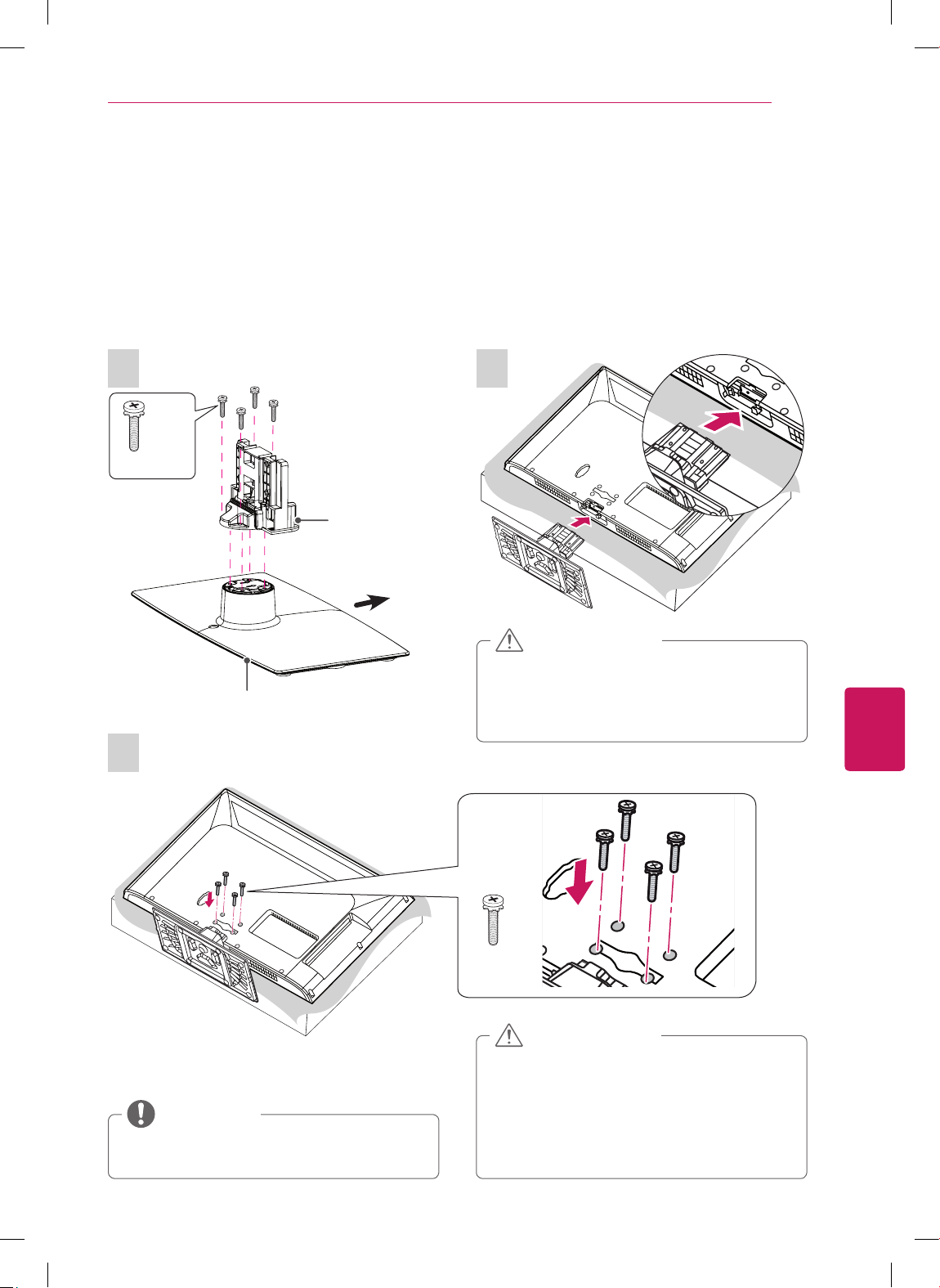
FRANÇAIS
17
ASSEMBLAGE ET PRÉPARATION
Installation du téléviseur
Placez le téléviseur sur un support et fixez-le à une table ou au mur.
Fixation du support
Si vous ne montez pas le téléviseur au mur, suivez les directives ci-dessous pour fixer le support.
Pour séries CS460, CS461, LS3400
1
4 EA
M4 x 20
Partie
Principale
Base du Pied
Avant
3
M4 x 20
4 EA
Assurez-vous que les vis sont fixées
fermement. (si elles ne sont pas bien fixées,
la télé peut s'incliner vers l'avant après son
installation).
Ne serrez pas les vis avec trop de force,
sinon elles peuvent se desserrer à l'usage.
MISE EN GARDE
2
Lors de la fixation du support, posez le
téléviseur, écran vers le bas, sur une table
matelassée ou sur une surface plane pour
prévenir les risques de rayures.
MISE EN GARDE
Avant d'installer le téléviseur sur une
fixation murale, retirez son support.
REMARQUE
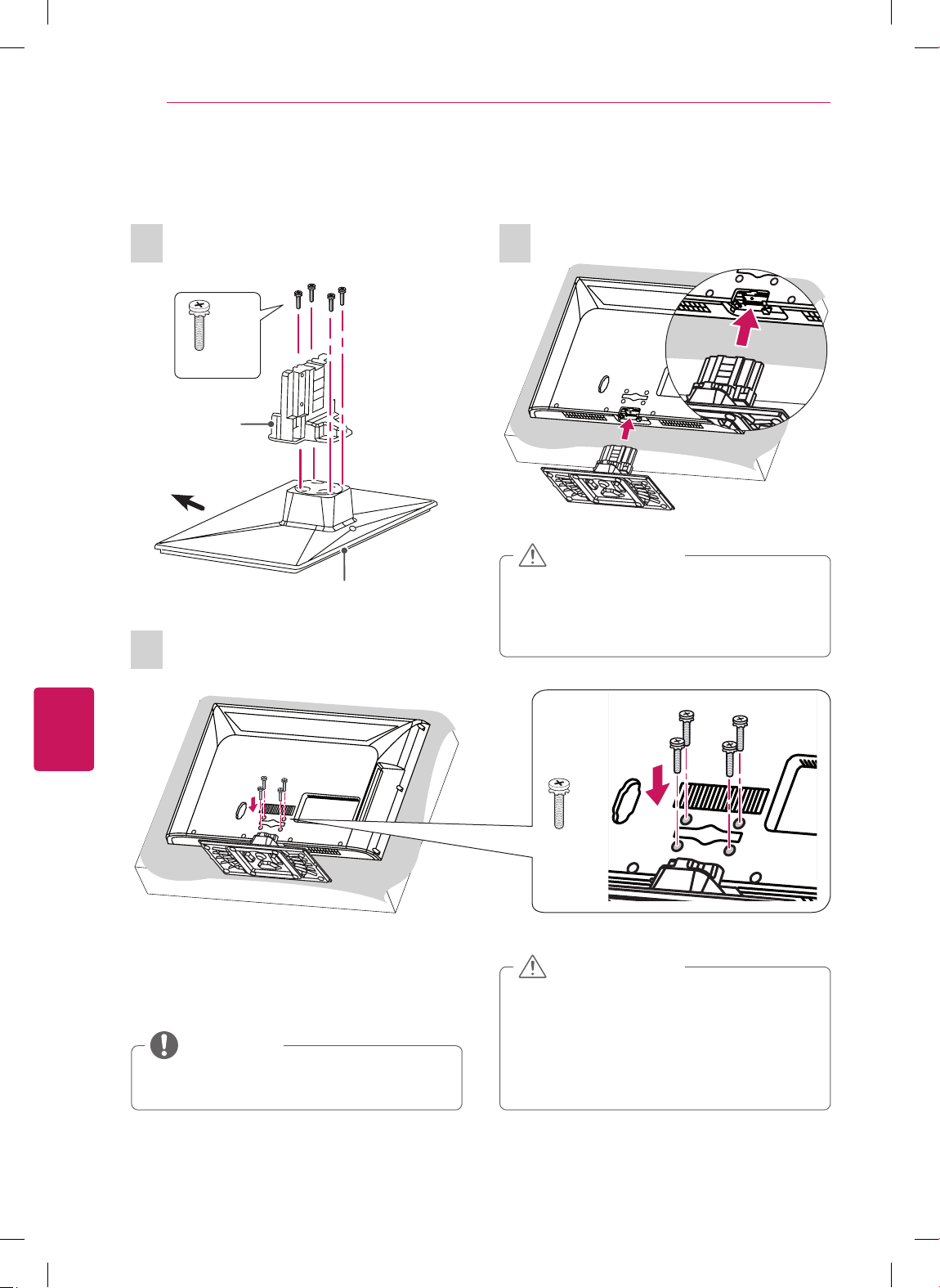
FRANÇAIS
18
ASSEMBLAGE ET PRÉPARATION
Pour séries CS530, CS560
Assurez-vous que les vis sont fixées
fermement. (si elles ne sont pas bien fixées,
la télé peut s'incliner vers l'avant après son
installation).
Ne serrez pas les vis avec trop de force,
sinon elles peuvent se desserrer à l'usage.
MISE EN GARDE
1
Partie
Principale
Base du Pied
Avant
4 EA
M4 x 20
3
M4 x 20
4 EA
2
Lors de la fixation du support, posez le
téléviseur, écran vers le bas, sur une table
matelassée ou sur une surface plane pour
prévenir les risques de rayures.
MISE EN GARDE
Avant d'installer le téléviseur sur une
fixation murale, retirez son support.
REMARQUE
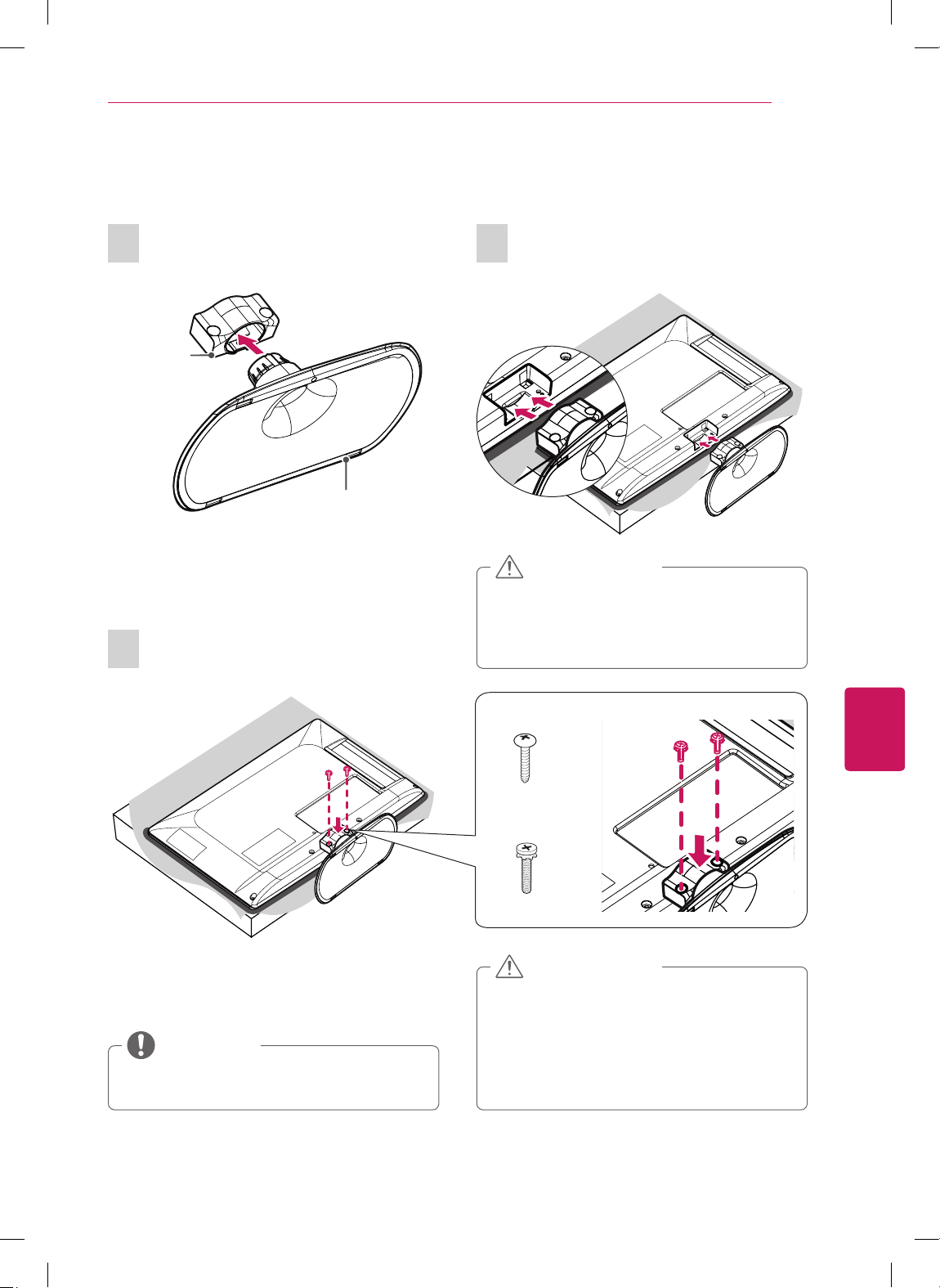
FRANÇAIS
19
ASSEMBLAGE ET PRÉPARATION
Pour 22/26LS3500, 22/26LS3510
1
Partie
Principale
Base du Pied
3
(Pour 22LS3500,
22LS3510)
P4 x 16
2 EA
(Pour 26LS3500,
26LS3510)
M4 x 14
2 EA
2
Lors de la fixation du support, posez le
téléviseur, écran vers le bas, sur une table
matelassée ou sur une surface plane pour
prévenir les risques de rayures.
MISE EN GARDE
Assurez-vous que les vis sont fixées
fermement. (si elles ne sont pas bien fixées,
la télé peut s'incliner vers l'avant après son
installation).
Ne serrez pas les vis avec trop de force,
sinon elles peuvent se desserrer à l'usage.
MISE EN GARDE
Avant d'installer le téléviseur sur une
fixation murale, retirez son support.
REMARQUE
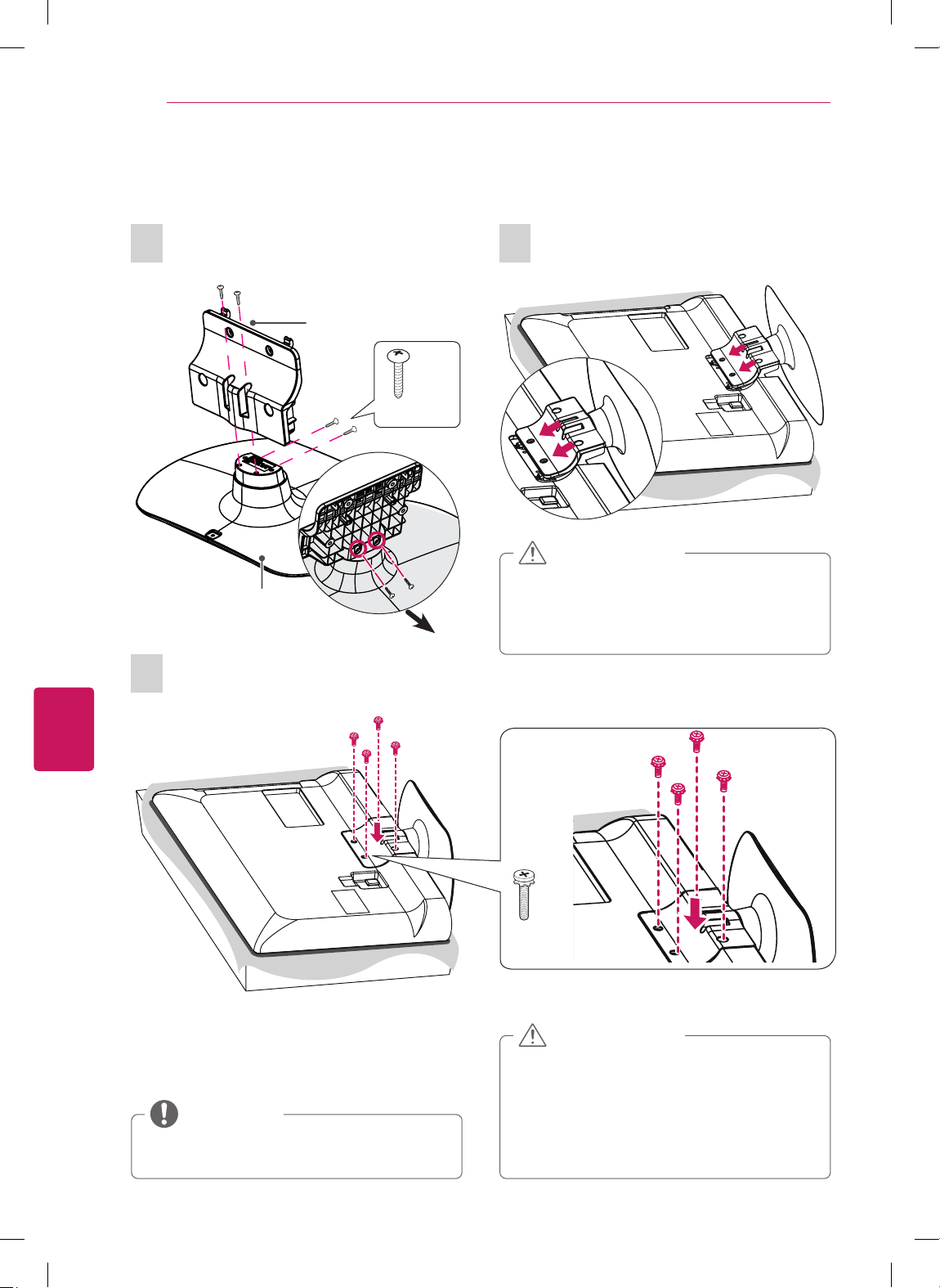
FRANÇAIS
20
ASSEMBLAGE ET PRÉPARATION
Pour 32LS3500, 32LS3510
1
Base du Pied
Avant
4 EA
P4 x 16
Partie Principale
3
M4 x 14
4 EA
2
Lors de la fixation du support, posez le
téléviseur, écran vers le bas, sur une table
matelassée ou sur une surface plane pour
prévenir les risques de rayures.
MISE EN GARDE
Assurez-vous que les vis sont fixées
fermement. (si elles ne sont pas bien fixées,
la télé peut s'incliner vers l'avant après son
installation).
Ne serrez pas les vis avec trop de force,
sinon elles peuvent se desserrer à l'usage.
MISE EN GARDE
Avant d'installer le téléviseur sur une
fixation murale, retirez son support.
REMARQUE
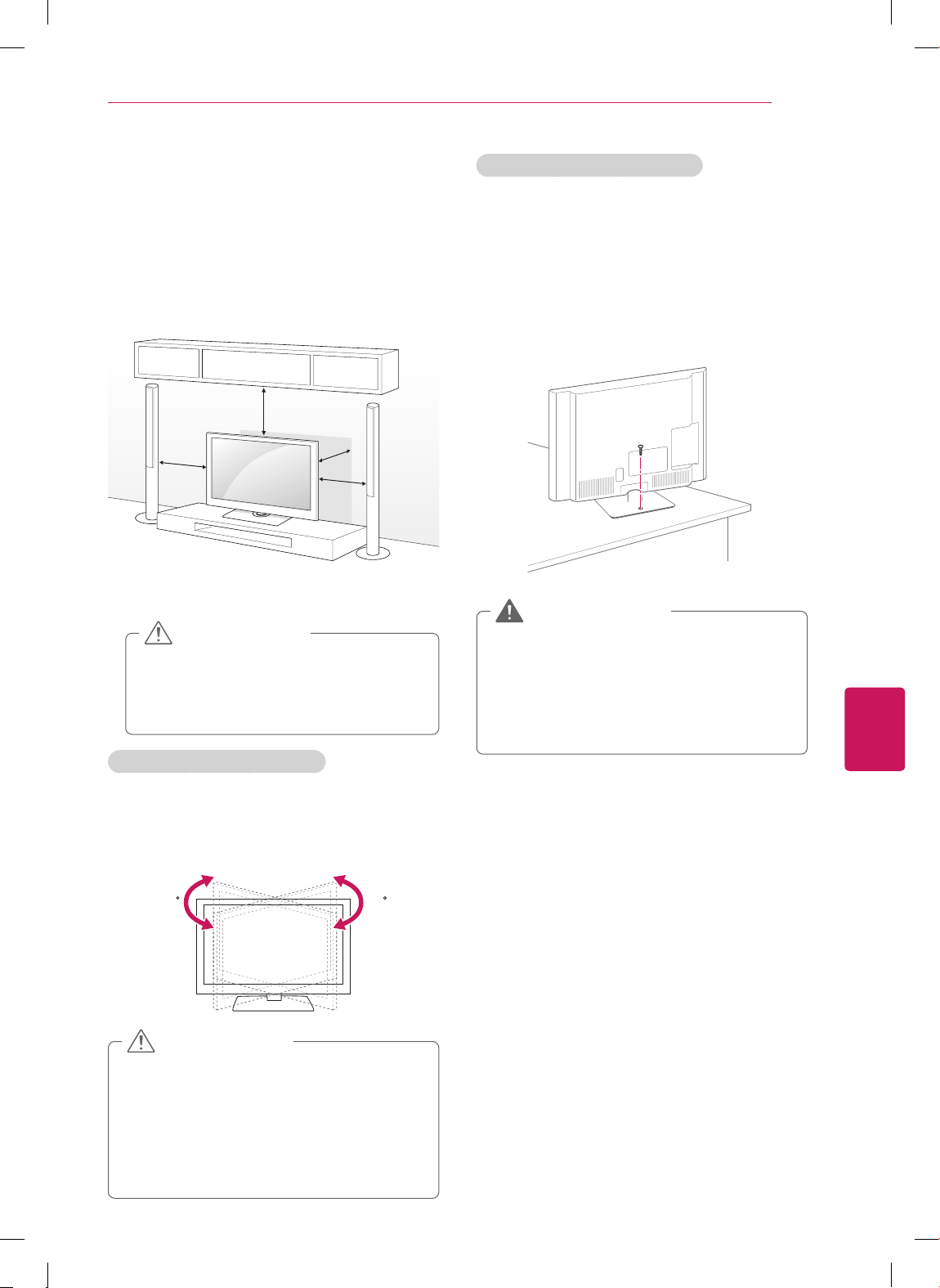
FRANÇAIS
21
ASSEMBLAGE ET PRÉPARATION
Montage sur une table
1
Soulevez et inclinez le téléviseur dans sa
position verticale sur une table.
- Laissez un espace de 10 cm (4 po) (minimum)
entre le mur et le téléviseur pour une
ventilation adéquate.
10 cm
10 cm
10 cm
10 cm
(4
p
o
u
ce
)
2
Raccordez le cordon d'alimentation à une prise
murale.
Ne placez pas le téléviseur près ou sur
des sources de chaleur, car cela peut
causer un incendie ou d'autres domma-
ges.
MISE EN GARDE
Réglage de l'angle du téléviseur
(selon le modèle)
Faites pivoter le téléviseur de 20 degrés vers la
gauche ou la droite et ajustez l'angle du téléviseur
selon vos préférences.
2020
Regardez où vous mettez les doigts, lorsque
vous réglez l'angle du téléviseur.
- Vous pourriez vous blesser en vous pinçant
les mains ou les doigts. L'appareil pourrait
tomber s'il est trop incliné et ainsi risquer
de provoquer des blessures ou d'être
endommagé.
MISE EN GARDE
Fixation du téléviseur à une table
(Pour
32CS460, 32CS461, 42CS530,
32/37/42CS560, 32/42LS3400, 32LS3500,
32LS3510)
Fixez le téléviseur à une table pour l'empêcher de
basculer vers l'avant et de causer des dommages
et des blessures.
Montez le téléviseur sur une table, puis insérez et
serrez la vis fournie à l'arrière du pied.
Pour empêcher le téléviseur de basculer,
celui-ci devrait être attaché solidement au
mur ou au plancher, conformément aux
instructions d'installation. Le fait de renver-
ser, secouer ou basculer le téléviseur peut
causer des blessures.
AVERTISSEMENT
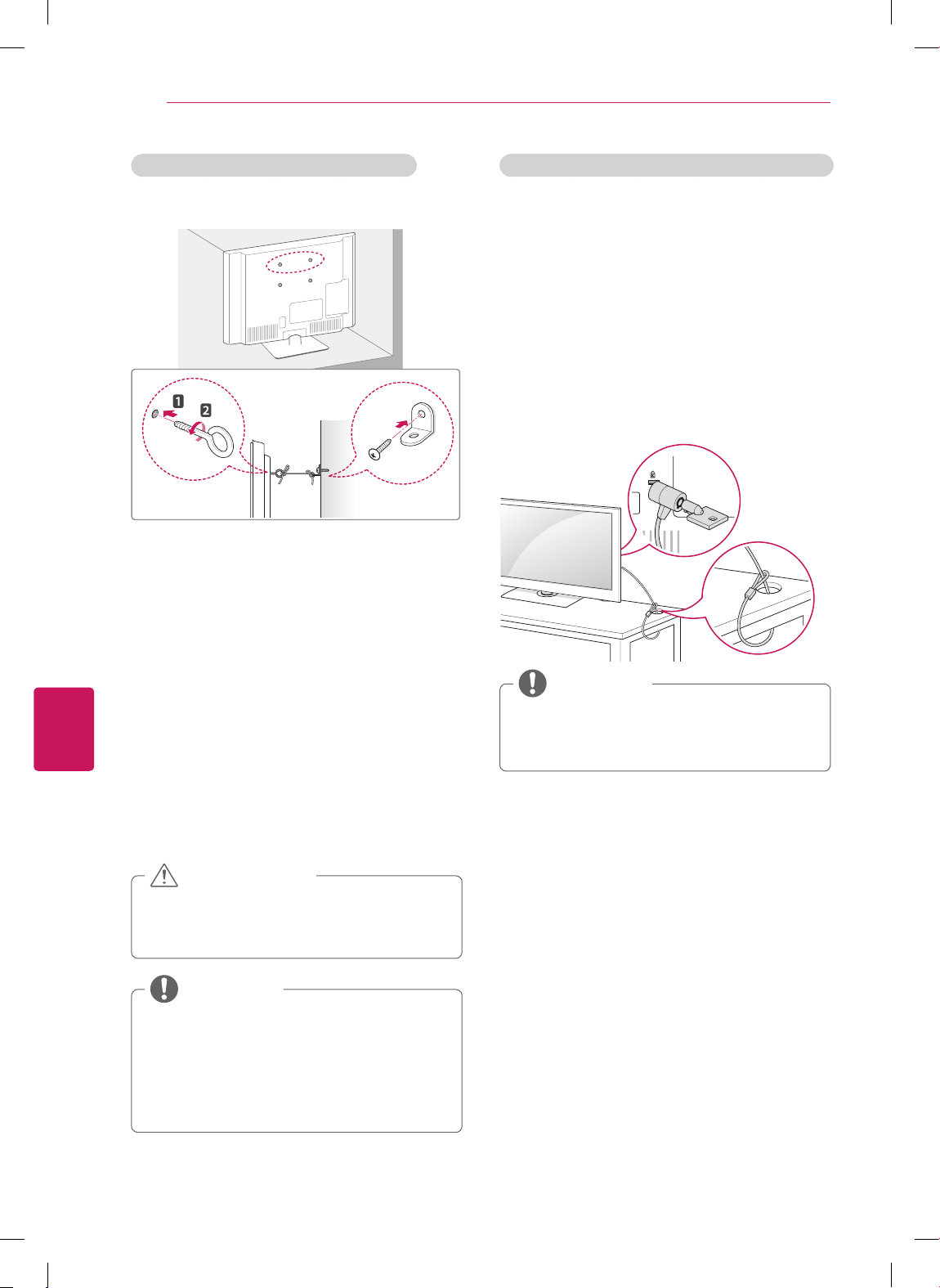
FRANÇAIS
22
ASSEMBLAGE ET PRÉPARATION
Utilisation du système de sécurité Kensington (facultatif)
(Pour 32CS460, 32CS461, 42CS530,
32/37/42CS560, 22/26LS3500, 22/26LS3510)
Le connecteur du système de sécurité Kensington
se trouve à l'arrière du téléviseur. Pour de
plus amples renseignements sur l'installation
et l'utilisation de ce système, rapportez-vous
au manuel fourni avec le système de sécurité
Kensington ou visitez le site Web http://www.
kensington.com.
Connectez le câble du système de sécurité
Kensington au téléviseur et à une table.
Le système de sécurité Kensington
est facultatif. Vous pouvez obtenir des
accessoires auprès de votre détaillant local.
REMARQUE
Fixation du téléviseur à un mur (facultatif)
(Selon le modèle)
1
Insérez et serrez les boulons à œil ou les
supports et les boulons à l'arrière du téléviseur.
- Si des boulons sont insérés dans les
emplacements des boulons à œil, retirez tout
d'abord les boulons.
2
Fixez les supports de fixation murale au mur à
l'aide des boulons.
Alignez les boulons à œil à l'arrière du
téléviseur et les emplacements correspondants
sur la fixation murale.
3
Attachez les boulons à œil aux supports de
fixation murale à l'aide d'une corde solide.
Assurez-vous d'installer la corde pour qu'elle
soit horizontale relativement à une surface
plane.
Assurez-vous que des enfants ne grimpent
pas sur le téléviseur et ne se suspendent
pas à celui-ci.
MISE EN GARDE
Utilisez une plateforme ou un meuble
qui est suffisamment solide et large pour
soutenir le téléviseur de manière sécuritaire.
Les supports, les boulons et les cordes
sont facultatifs. Vous pouvez obtenir des
accessoires auprès de votre détaillant local.
REMARQUE
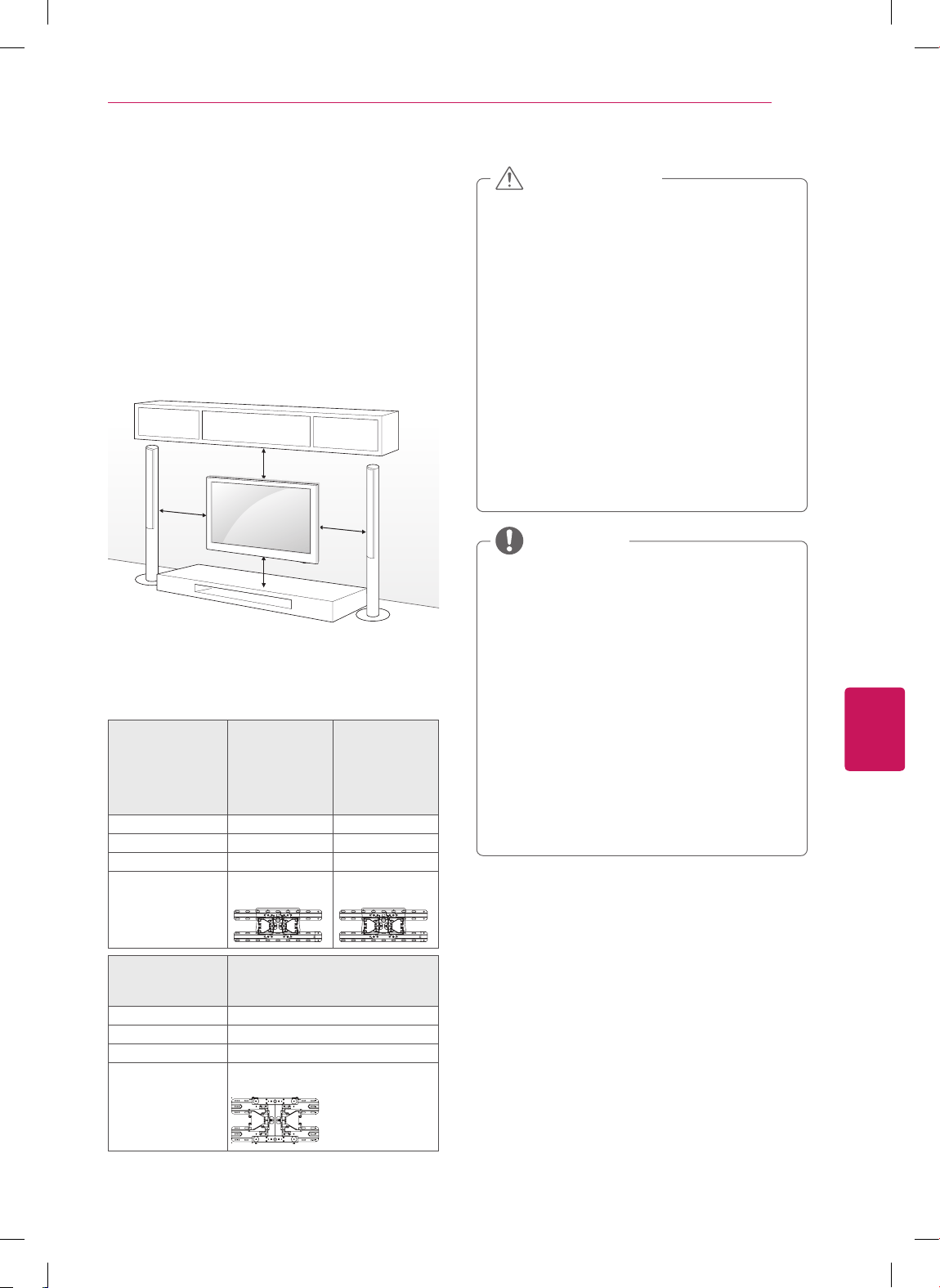
FRANÇAIS
23
ASSEMBLAGE ET PRÉPARATION
Montage mural
Attachez soigneusement un support de fixation
murale en option à l'arrière du téléviseur et
installez le support de fixation murale sur un mur
solide et perpendiculaire au plancher. Lorsque
vous fixez le téléviseur à d'autres matériaux de
construction, veuillez contacter le personnel
qualifié.
LG recommande de faire effectuer le montage au
mur par un installateur professionnel qualifié.
10 cm
10 cm
10 cm
10 cm
(4
p
o
u
ce
)
Assurez-vous d'utiliser les vis et les fixations
murales qui répondent aux normes VESA. Les
dimensions standard des trousses de fixation
murale sont décrites dans le tableau suivant.
Modèle 22/26LS3500
22/26LS3510
32CS460
32CS461
32CS560
32LS3400
32LS3500
32LS3510
VESA 100 x 100 200 x 100
Vis standard M4 M4
Nombre de vis 4 4
Fixation murale
(facultatif)
LSW100B,
LSW100BG
LSW100B,
LSW100BG
Modèle 42CS530
37/42CS560
42LS3400
VESA 200 x 200
Vis standard M6
Nombre de vis 4
Fixation murale
(facultatif)
LSW200B, LSW200BX
Débranchez tout d'abord l'alimentation, puis
déplacez ou installez le téléviseur. Sinon,
cela pourrait causer une électrocution.
Si vous installez le téléviseur sur un plafond
ou un mur incliné, il pourrait tomber et
causer de graves blessures. Utilisez
une fixation murale autorisée par LG et
communiquez avec votre détaillant local ou
du personnel qualifié.
Ne serrez pas trop les vis, car cela pourrait
endommager le téléviseur et annuler votre
garantie.
Utilisez les vis et les fixations murales
qui répondent aux normes VESA. Tout
dommage ou blessure résultant d'un usage
abusif ou de l'utilisation d'un accessoire
inapproprié n'est pas couvert par la garantie.
MISE EN GARDE
Utilisez les vis qui sont répertoriées sur
les caractéristiques applicables aux vis de
norme VESA.
La trousse de la fixation murale comprend
un manuel d'installation et les pièces
nécessaires.
Le support de fixation murale est facultatif.
Vous pouvez obtenir des accessoires
supplémentaires auprès de votre détaillant
local.
La longueur des vis peut varier selon la
fixation murale. Assurez-vous d'utiliser la
longueur appropriée.
Pour de plus amples renseignements,
reportez-vous au manuel livré avec la
fixation murale.
REMARQUE
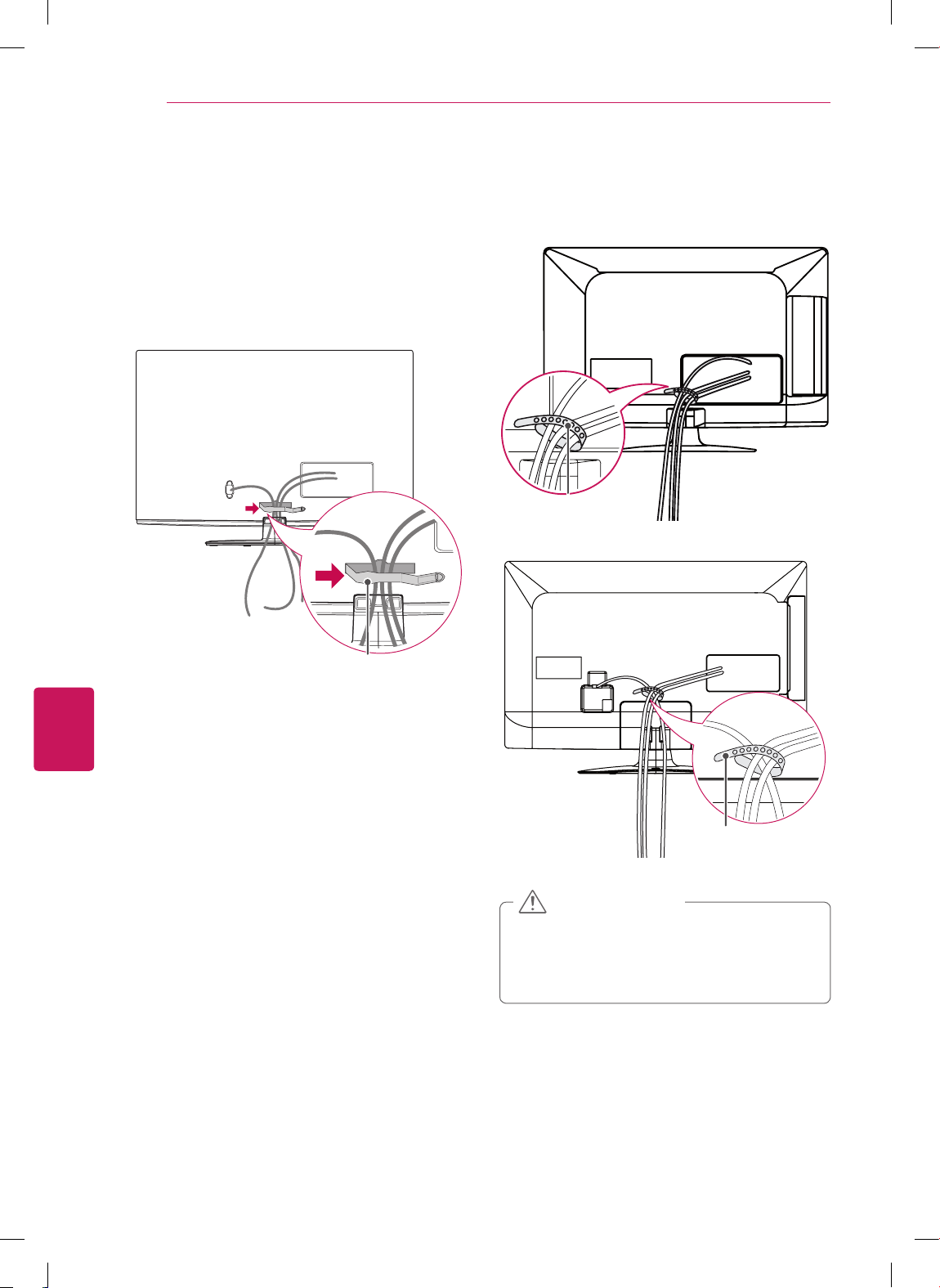
FRANÇAIS
24
ASSEMBLAGE ET PRÉPARATION
Gestion des câbles
Pour CS460, CS461, CS530, CS560, LS3400
1
Regroupez et fixez les autres câbles à l'aide de
l'attache de câbles.
2
Fixez l'attache de câbles fermement au
téléviseur.
Attache de câbles
1
Regroupez et fixez les autres câbles à l'aide du
serre-câbles.
Pour 22/26LS3500, 22/26LS3510
Serre-câbles
Pour 32LS3500, 32LS3510
Serre-câbles
Ne déplacez pas le téléviseur en le tenant
par le Attache de câbles ou le serre-câbles,
ce qui peut le briser, causer des blessures
et endommager le téléviseur.
MISE EN GARDE
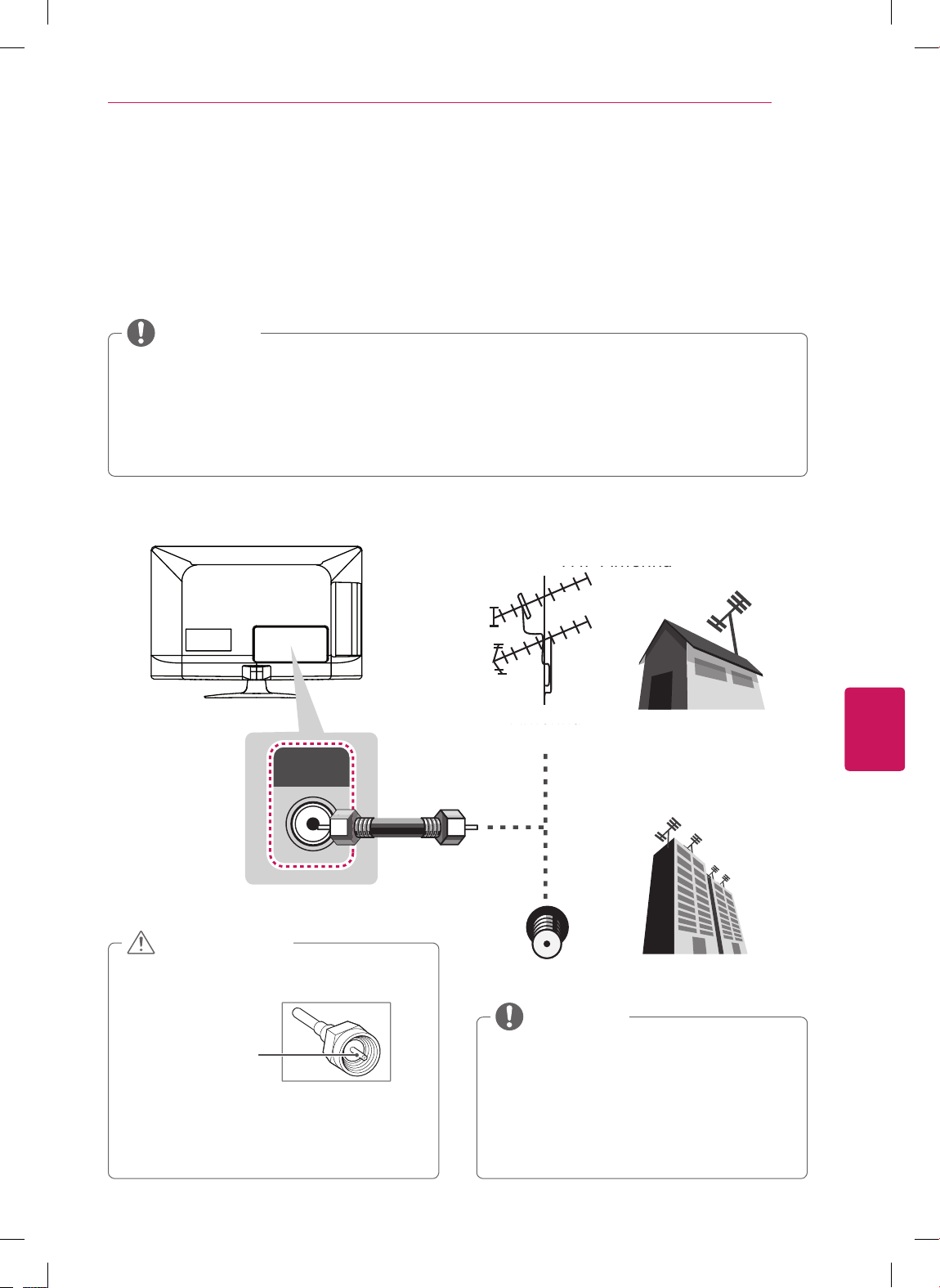
FRANÇAIS
25
ÉTABLISSEMENT DES CONNEXIONS
ÉTABLISSEMENT DES CONNEXIONS
Connectez divers appareils externes à votre téléviseur et alternez entre les modes d'entrée pour
sélectionner les différents appareils. Pour en savoir plus sur la connexion de périphériques externes,
reportez-vous au manuel accompagnant chaque appareil.
Vous pouvez brancher les appareils externes suivants : récepteurs HD, lecteurs DVD, magnétoscopes,
systèmes audio, dispositifs de stockage USB, ordinateur, consoles de jeu et autres dispositifs externes.
Si vous enregistrez un programme télévisé à l'aide d'un enregistreur de DVD ou d'un magnétoscope,
assurez-vous de brancher le câble de signal télévisé au téléviseur par l'intermédiaire de l'enregistreur
ou du magnétoscope. Pour en savoir davantage sur l'enregistrement, reportez-vous au manuel fourni
avec le périphérique connecté.
La connexion au périphérique externe peut différer de l'illustration.
Connectez les appareils externes au téléviseur indépendamment de l'ordre du port TV.
REMARQUE
Raccordement à une antenne ou au câble
ANTENNA/
CABLE IN
VHF Antenna
UHF Antenna
Antenna
Terminal
Coaxial (75Ω)
Antenne VHF
Antenne UHF
Antenne
Assurez-vous de ne pas plier le fil de cuivre
du câble RF.
Fil de cuivre
Terminez tous les raccordements entre
les appareils, puis connectez le cordon
d'alimentation à la prise d'alimentation afin
d'éviter des dommages à votre téléviseur
MISE EN GARDE
Servez-vous d'un dispositif d'aiguillage
des signaux pour utiliser plus de deux
téléviseurs.
Pour plus d'information sur la connexion
à une antenne ou au câble, visitez le site
http://lgknowledgebase.com. Effectuez une
recherche sur les antennes.
REMARQUE
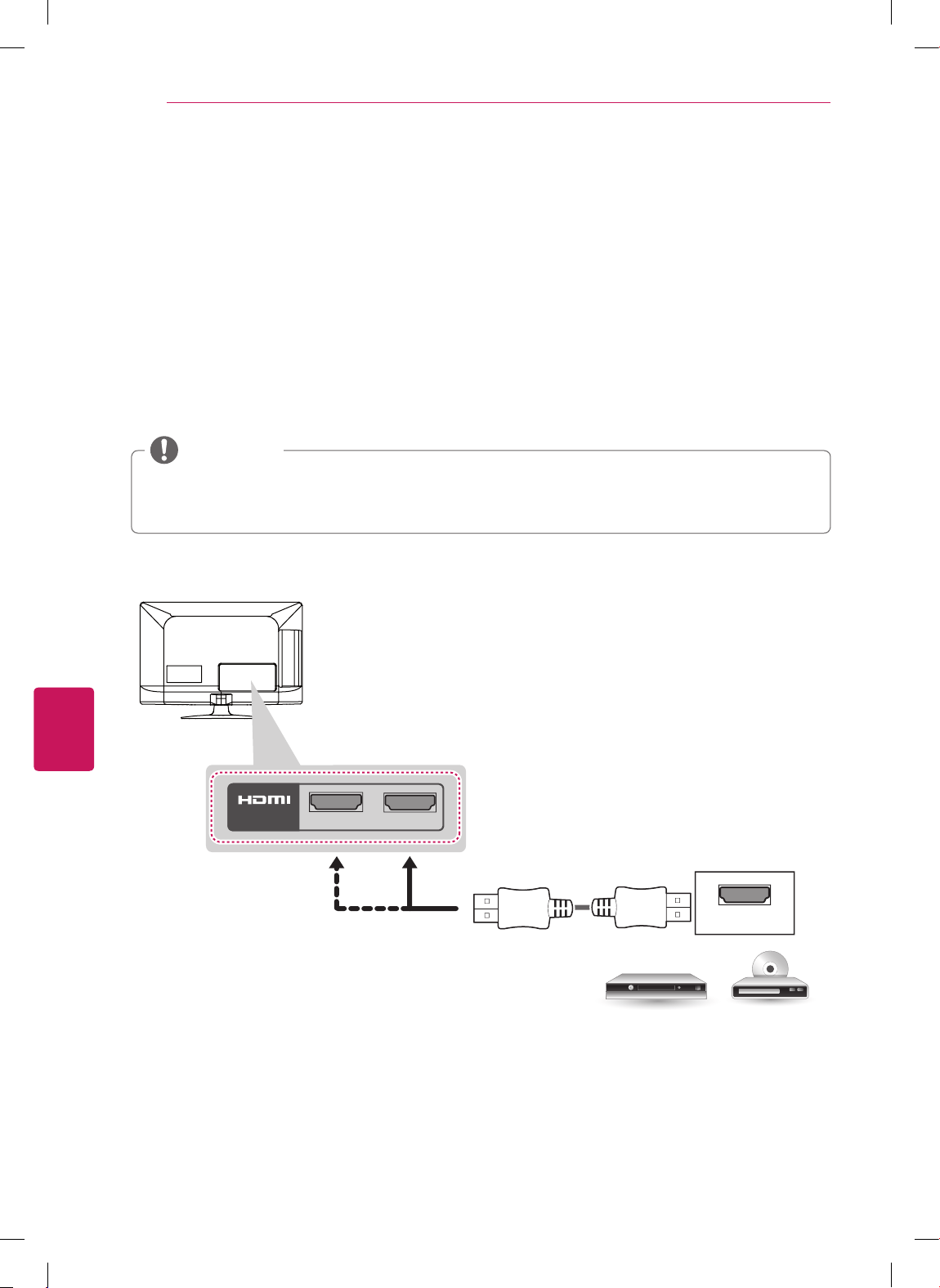
FRANÇAIS
26
ÉTABLISSEMENT DES CONNEXIONS
Connexion à un récepteur HD, à un lecteur DVD ou à un
magnétoscope
Reliez un récepteur HD, un lecteur DVD ou un magnétoscope au téléviseur, puis sélectionnez le mode
d'entrée approprié.
Connexion HDMI
La connexion HDMI est la meilleure qui soit.
Transmet les signaux audio et vidéo numériques d'un appareil externe vers le téléviseur. Reliez l'appareil
externe et le téléviseur au moyen d'un câble HDMI, comme indiqué sur l'illustration suivante.
Utilisez le modèle de câble HDMI™ haute vitesse le plus récent avec fonction CEC (Consumer Elec-
tronics Control).
Les câbles HDMI™ haute vitesse sont testés afin de transmettre un signal HD 1080p supérieur.
REMARQUE
DVD/ Blu-Ray / HD Cable Box / HD STB
2
1
IN
Choose any HDMI input port to connect.
It does not matter which port you use.
HDMI
(*Not Provided)
(*Non fourni)
Lecteur DVD / Lecteur Blu-Ray /
Câblosélecteur HD / Décodeur HD
Choisissez un port d'entrée HDMI.
Vous pouvez utiliser n'importe lequel.
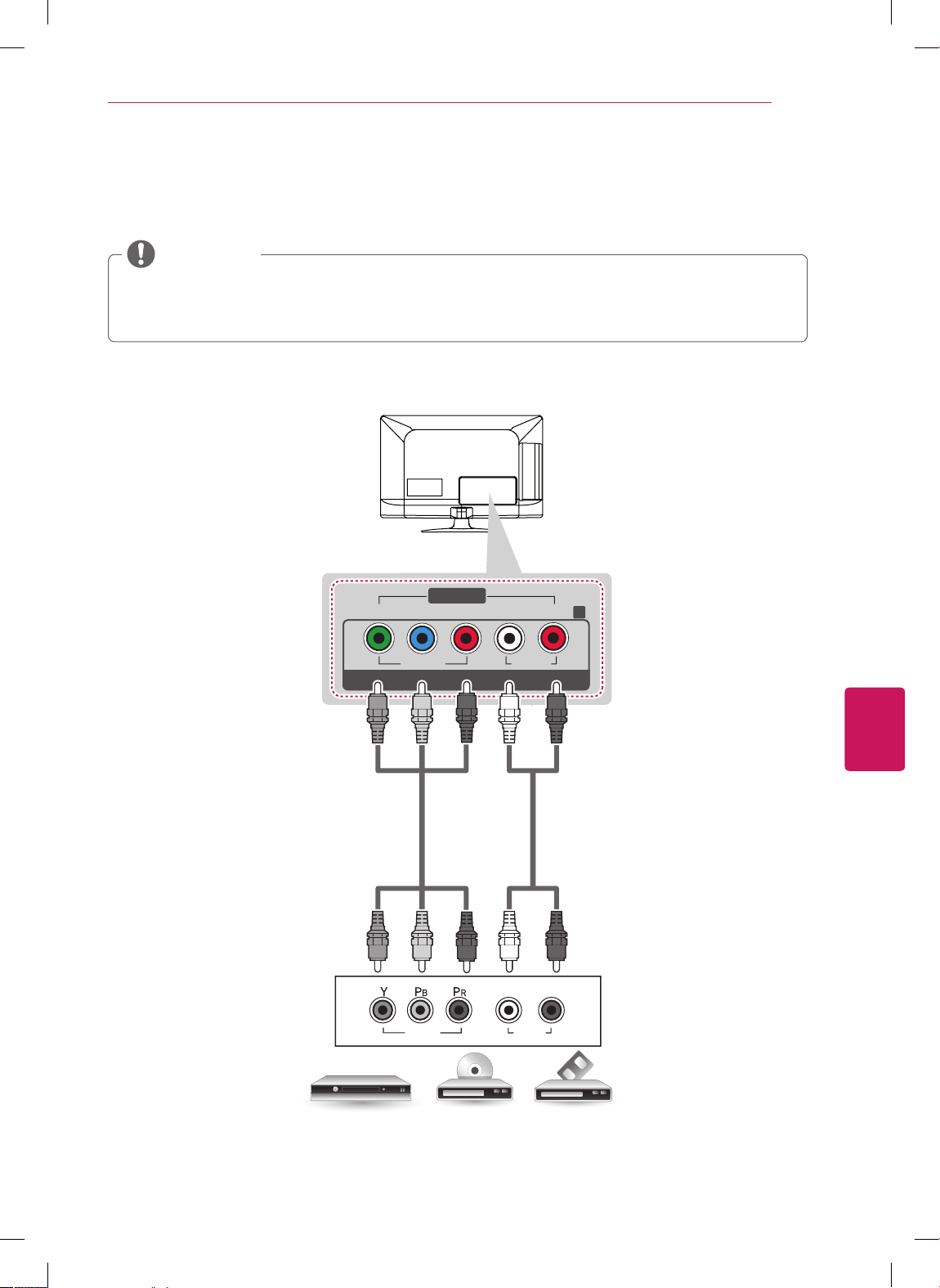
FRANÇAIS
27
ÉTABLISSEMENT DES CONNEXIONS
Connexion composante
Transmet les signaux audio et vidéo analogiques d'un appareil externe vers le téléviseur. Reliez l'appareil
externe et le téléviseur au moyen d'un câble composante, comme indiqué sur l'illustration suivante.
Si les câbles ne sont pas correctement branchés, l'image risque de s'afficher en noir et blanc ou les
couleurs peuvent être déformées.
Veuillez vous assurer que les connexions sont bien effectuées selon les couleurs des fiches
.
REMARQUE
VIDEO
Y
P
B
PR
RL
VIDEO AUDIO
L/MONO AUDIO
COMPONENT IN
AV IN
R
AUDIO
VIDEO
L R
DVD/ Blu-Ray / HD Cable Box
GREEN
GREEN
BLUE
BLUE
RED
RED
WHITE
WHITE
RED
RED
(*Not Provided)
(*Not Provided)
Lecteur DVD / Lecteur Blu-Ray / Câblosélecteur HD
(*Non fourni)
(*Non fourni)
VERT
BLEU
ROUGE
ROUGE
BLANC
VERT
BLEU
ROUGE
ROUGE
BLANC
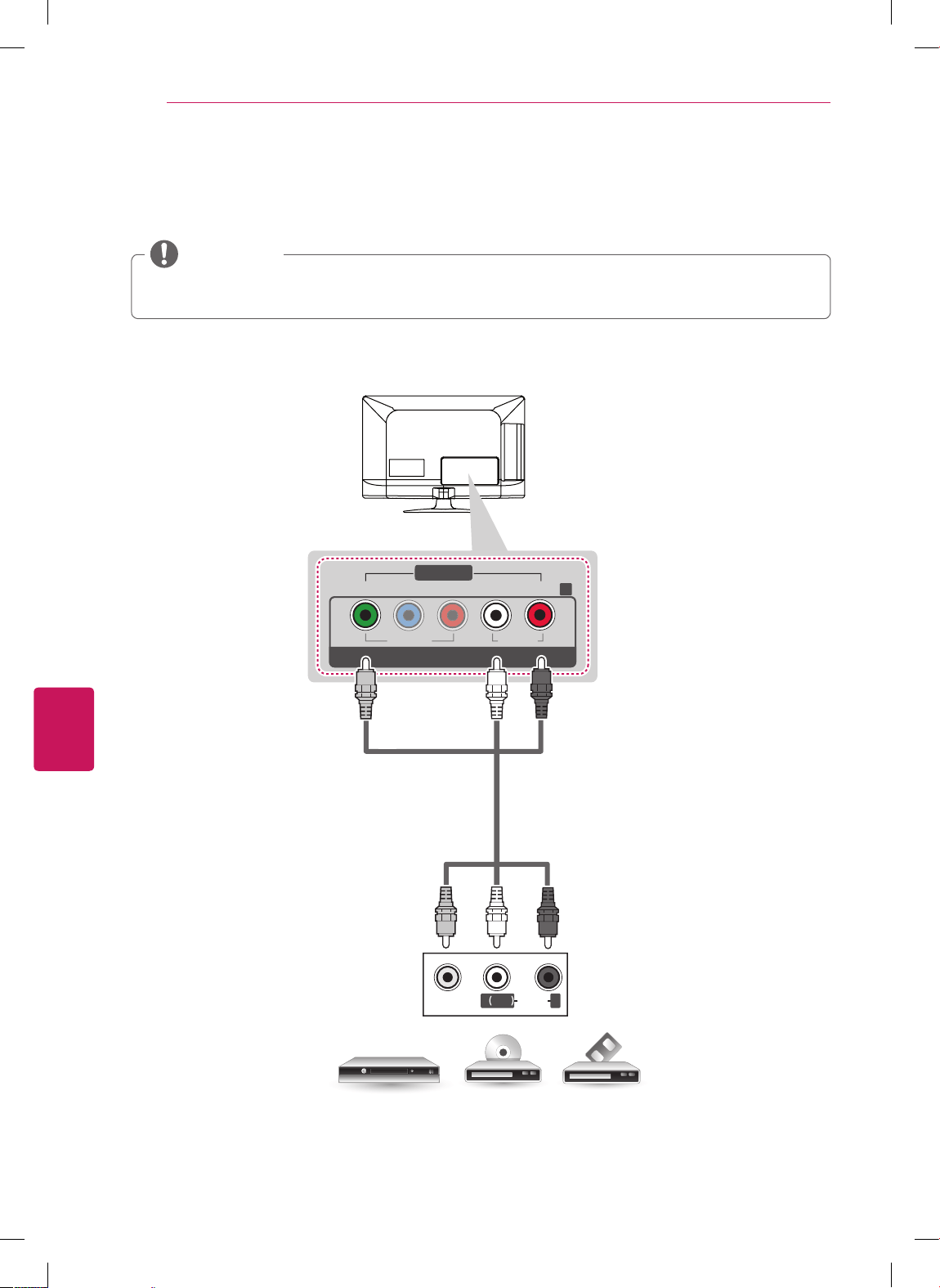
FRANÇAIS
28
ÉTABLISSEMENT DES CONNEXIONS
Connexion composite
Transmet les signaux audio et vidéo analogiques d'un appareil externe vers le téléviseur. Reliez l'appareil
externe et le téléviseur au moyen d'un câble composite, comme indiqué sur l'illustration suivante.
Si vous possédez un magnétoscope mono, branchez son câble audio dans la prise AUDIO L/MONO
du téléviseur
.
REMARQUE
VIDEO
MONO
( )
AUDIOL R
VIDEO
Y
P
B
P
R
RL
V
IDE
O
AU
DI
O
L/MONO AUDIO
COMPONENT IN
AV IN
R
YELLOW
BLUE
BLUE
YELLOW
RED
RED
(*Not Provided)
VCR / DVD/ Blu-Ray / HD Cable Box
VCR / Lecteur DVD / Lecteur Blu-Ray / Câblosélecteur HD
(*Non fourni)
JAUNE
BLANC
ROUGE
JAUNE
BLANC
ROUGE
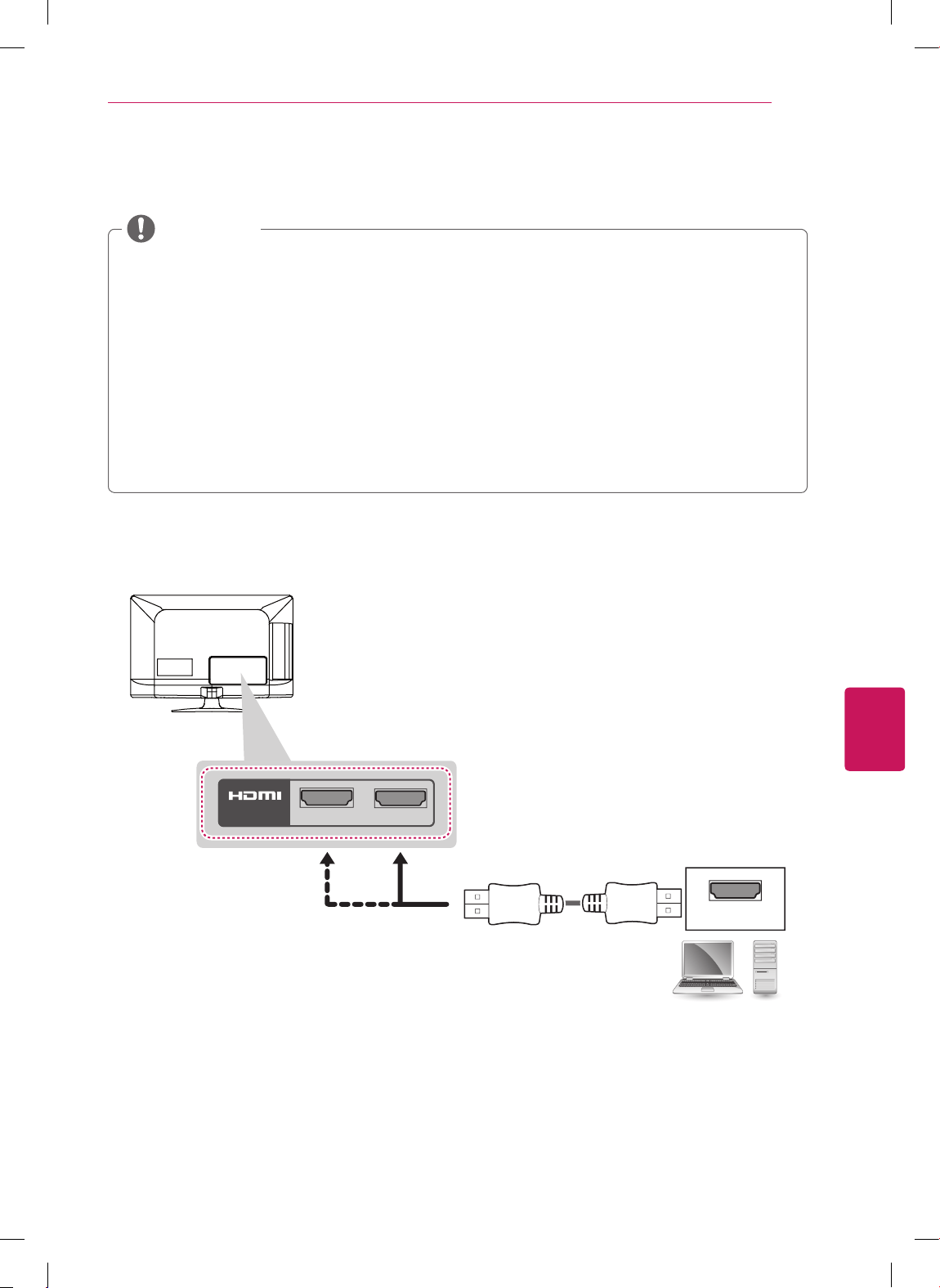
FRANÇAIS
29
ÉTABLISSEMENT DES CONNEXIONS
Connexion à un PC
Pour une qualité d'image optimale, nous vous conseillons d'utiliser une connexion HDMI sur votre
téléviseur.
Selon votre carte graphique, il est possible que le mode DOS ne fonctionne pas si vous utilisez un
câble HDMI à DVI.
En mode PC, il peut y avoir du bruit associé à la résolution, au motif vertical, au contraste ou à la
brillance. Si vous observez du bruit, changez la résolution de la sortie PC, changez la fréquence de
rafraîchissement, ou réglez la brillance et le contraste dans le menu IMAGE pour obtenir une image
nette.
Les formes des ondes des sources de synchronisation sont distinctes pour les fréquences
horizontale et verticale.
Depending on the graphics card, some resolution settings may not allow the image to be positioned
on the screen properly.
REMARQUE
Connexion HDMI
PC
2
1
IN
Choose any HDMI input port to connect.
It does not matter which port you use.
HDMI
(*Not Provided)
Choisissez un port d'entrée HDMI.
Vous pouvez utiliser n'importe lequel.
(*Non fourni)
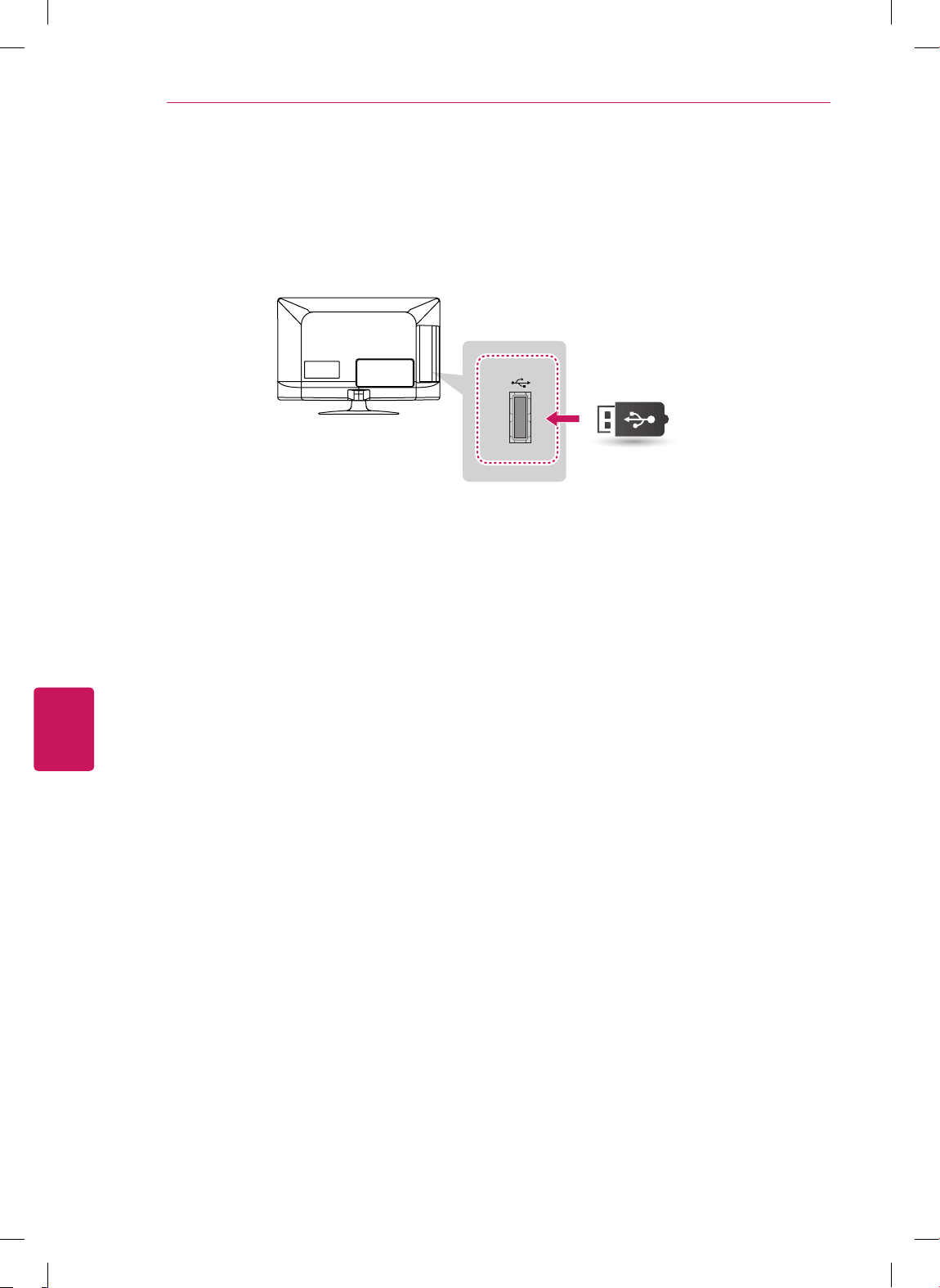
FRANÇAIS
30
ÉTABLISSEMENT DES CONNEXIONS
Connexion USB
Connectez un dispositif de stockage USB, comme une clé USB à mémoire flash, un disque dur externe ou
un lecteur de carte mémoire USB, au téléviseur,
USB IN
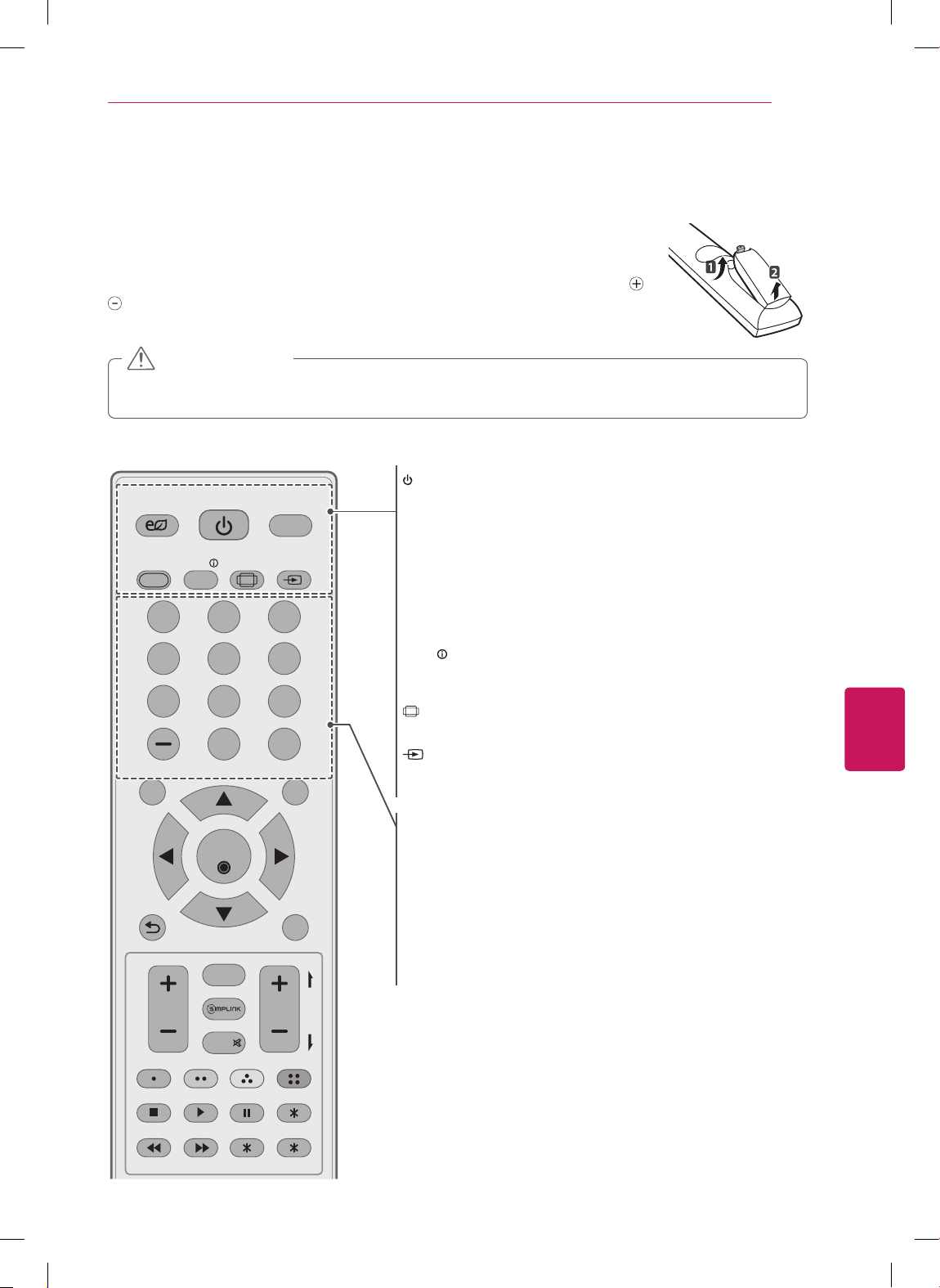
FRANÇAIS
31
TÉLÉCOMMANDE
TÉLÉCOMMANDE
Les descriptions données dans le présent manuel font référence aux touches qui se
trouvent sur la télécommande. Veuillez lire le présent manuel attentivement et utiliser
le téléviseur correctement.Pour changer les piles, ouvrez le couvercle de leur compar-
timent et insérez des piles (AAA de 1,5 volt) en faisant correspondre les bornes
et
à ce qui figure sur l'étiquette à l'intérieur du compartiment, puis remettez le cou-
vercle en place. Pour retirer les piles, suivez le processus d'installation à l'envers.
N'utilisez pas une combinaison de piles usées et neuves, ce qui pourrait endommager la
télécommande.
MISE EN GARDE
Assurez-vous d'orienter la télécommande vers le capteur de télécommande du téléviseur.
POWER
Allume ou éteint le téléviseur.
ꕊ
ENERGY SAVING
Règle la brillance de l'écran pour économiser l'énergie.
TV
Permet de retourner à la dernière chaîne de télévision.
AV MODE
Sélectionne un mode audio-vidéo.
INFO
Affiche l'information sur le programme actuel et sur ce qui est à
l'écran.
RATIO
Redimensionne une image.
INPUT
Parcourt les modes d'entrée.
Permet aussi d'allumer un téléviseur à partir du mode d'attente.
Touches numérotées
Permettent d'entrer des chiffres.
LIST
Affiche la liste de chaînes enregistrées.
- (tiret)
Insère un tiret entre des chiffres, comme 2-1 et 2-2.
FLASHBK
Permet d'alterner entre les deux dernières chaînes sélectionnées
(en appuyant de façon répétée).
POWER
TV
ENERGY
SAVING
AV MODE INFO
LIST
SETTINGS
OK
Q.MENU
EXIT
P
A
G
E
MUTE
FAV
CHVOL
FLASHBK
RATIO INPUT
ꕯ
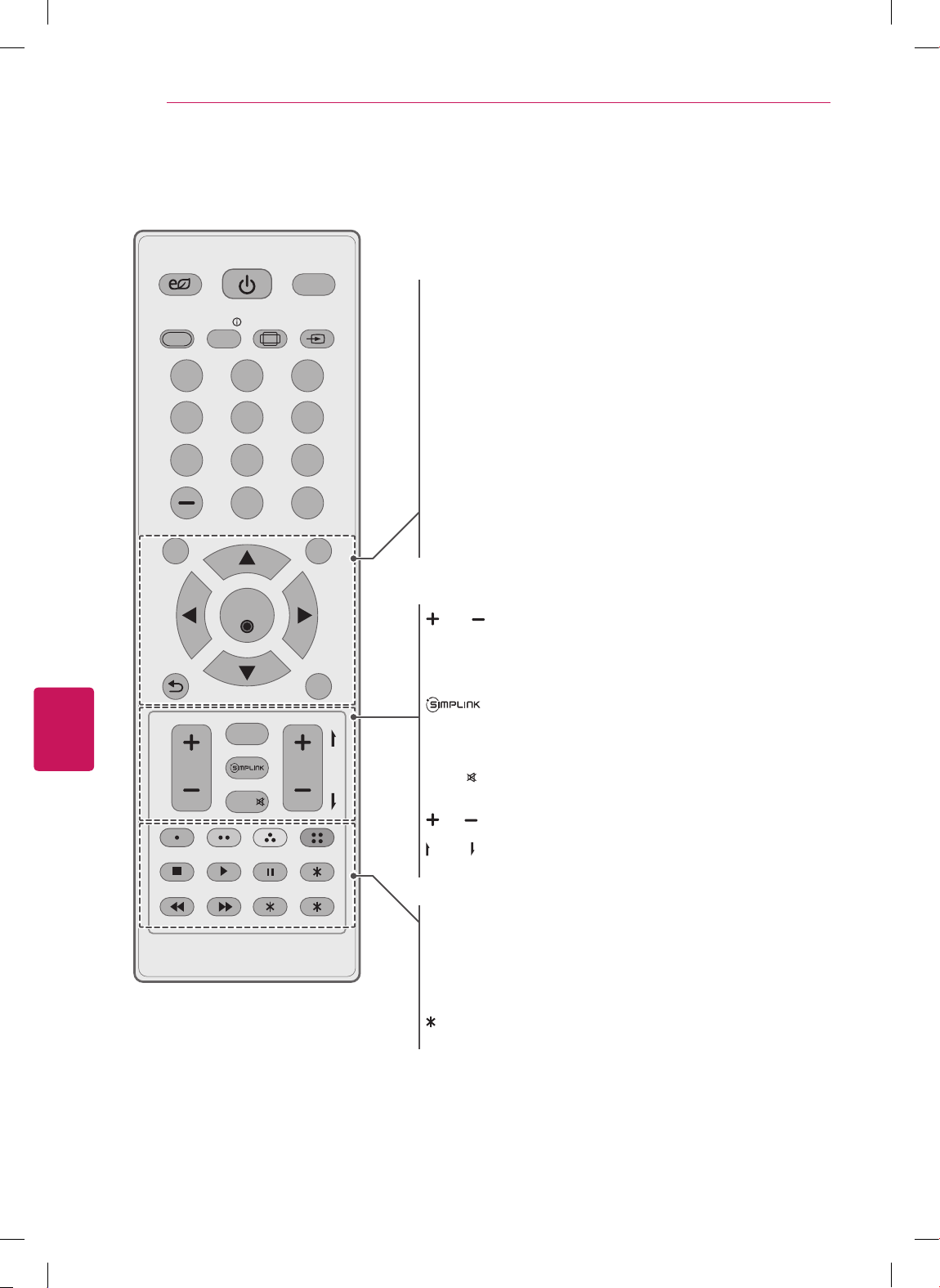
FRANÇAIS
32
TÉLÉCOMMANDE
POWER
TV
ENERGY
SAVING
AV MODE INFO
LIST
SETTINGS
OK
Q.MENU
EXIT
P
A
G
E
MUTE
FAV
CHVOL
FLASHBK
RATIO INPUT
ꕯ
SETTINGS
Permet d'accéder aux menus principaux.
Q.MENU
Permet d'accéder au menu rapide.
Touches de navigation
(haut / bas / gauche / droite)
Permettent de faire défiler les menus ou les options.
OK
ꔉ
Sélectionne des menus ou des options et confirme votre choix.
ꕣ
(Retour)
Retourne au niveau précédent.
EXIT
ꕯ
Supprime tout le texte affiché à l'écran et permet de retourner au
contenu télé.
VOL
Règle le volume.
FAV
Affiche la liste de vos chaînes favorites.
Permet d'accéder aux dispositifs audio-vidéo connectés au
téléviseur;
Ouvre le menu SIMPLINK.
MUTE
Désactive tous les sons.
CH
Parcourt les chaînes enregistrées.
PAGE
Affiche l'écran précédent ou suivant.
Touches de couleur
Permettent d'accéder à diverses fonctions de certains menus.
Touches de contrôle
Commandent les appareils compatibles avec SIMPLINK (USB,
SIMPLINK).
Non fonctionnel
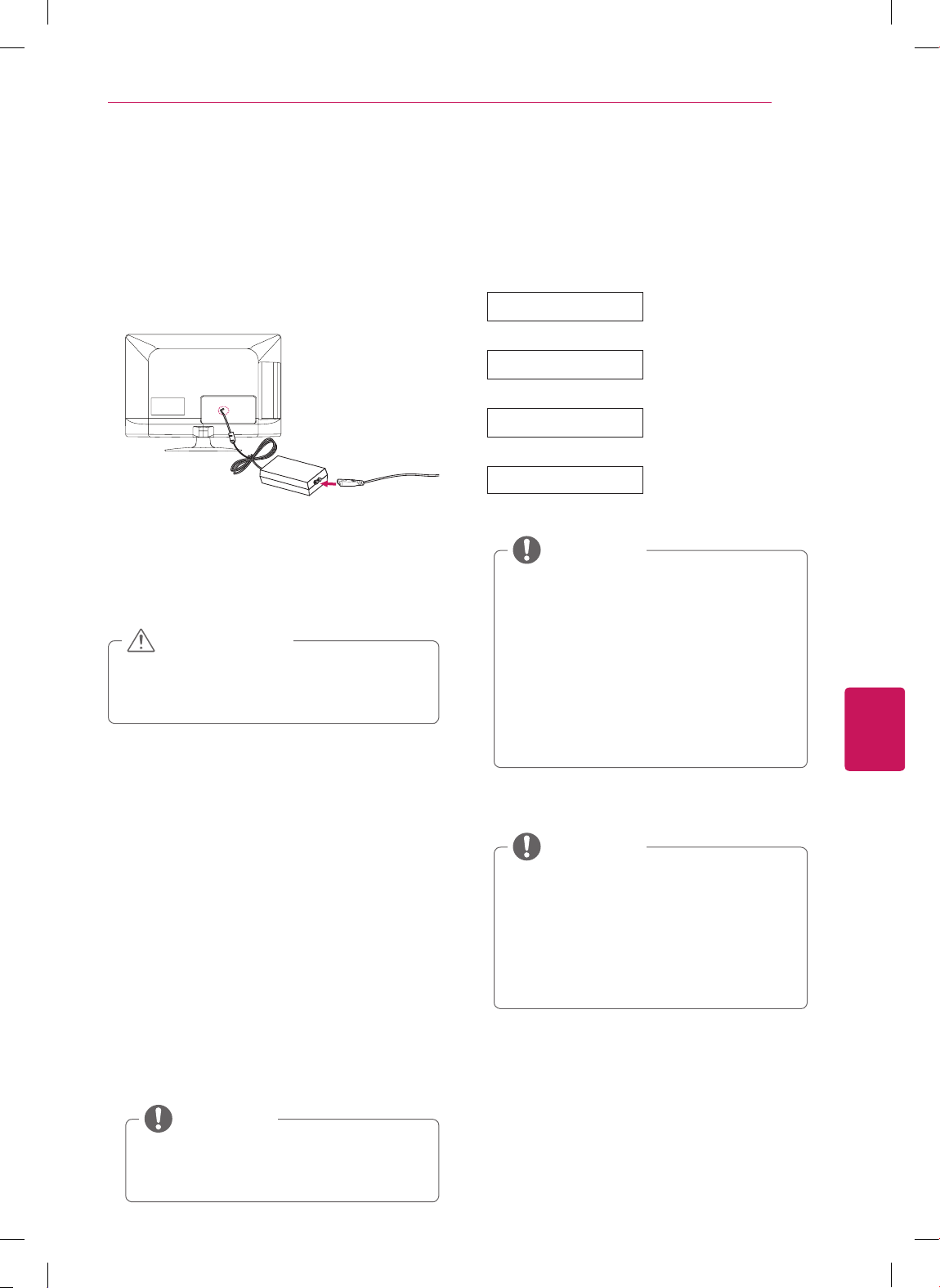
FRANÇAIS
33
VISIONNEMENT DE LA TV
Raccordement à l’adaptateur
AC/DC
(Pour 22/26LS3500, 22/26LS3510)
1
Brancher l’adaptateur AC/DC sur le port
d’entrée d’alimentation del’appareil.
2
Brancher le cordon d’alimentation sur la
prise murale aprèsavoir branché le cordon
d’alimentation sur l’adaptateur.
S’assurer de brancher le cordon
d’alimentation sur une prisemurale après
avoir branché le téléviseur sur l’adaptateur.
MISE EN GARDE
Allumer le téléviseur pour la
première fois
Lorsque vous allumez le téléviseur pour la
première fois, l'écran Réglage initial apparaît.
Sélectionnez une langue et personnalisez les
réglages de base.
1
Raccordez le cordon d'alimentation à une prise
d'alimentation.
Le voyant lumineux d'alimentation s'allume en
rouge et le téléviseur passe en mode d'attente.
2
En mode d'attente, appuyez sur la touche de
mise sous tension de la télécommande pour
allumer le téléviseur.
L'écran Réglage initial apparaît si vous allumez
le téléviseur pour la première fois.
Vous pouvez également accéder à l'écran
Réglage initial
en sélectionnant
OPTION
dans le menu principal.
REMARQUE
VISIONNEMENT DE LA TV
3
Suivez les instructions à l'écran pour
personnaliser vos réglages de téléviseur selon
vos préférences.
Langage (Language)
Permet de sélectionner la
langue d'affichage.
Choix du mode
Permet de sélectionner
Résidentielle
pour
un environnement
domestique.
Réglage temporel
Permet de sélectionner le
fuseau horaire et l'heure
avancée.
Syntonisation auto
Recherche et enregistre
automatiquement les
chaînes disponibles.
Pour afficher des images de la meilleure
qualité pour votre environnement
domestique, sélectionnez
Résidentielle
.
Le réglage
Démo en magasin
est
approprié pour un environnement
commercial.
Si vous sélectionnez
Démo en magasin
,
les réglages par défaut de ce mode
seront rétablis dans un délai de
5 minutes.
REMARQUE
4
Lorsque les réglages de base sont terminés,
appuyez sur la touche
OK
.
Si vous ne terminez pas le réglage initial,
il sera affiché chaque fois que vous
allumez le téléviseur.
Débranchez le cordon d'alimentation de
la prise de courant lorsque vous n'utilisez
pas le téléviseur pendant une longue
période.
REMARQUE
5
Pour éteindre le téléviseur, appuyez sur
la touche de mise sous tension de la
télécommande.
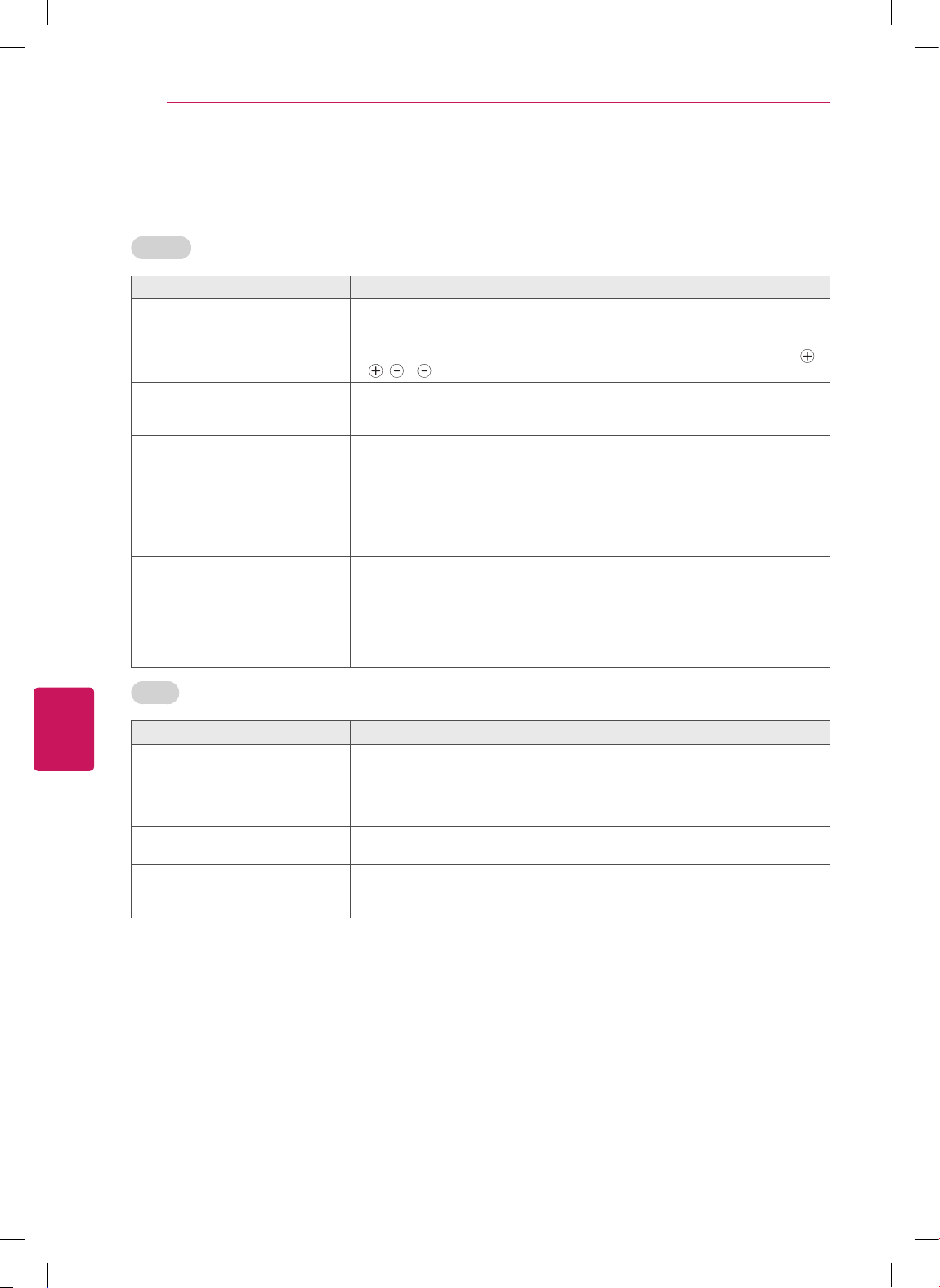
FRANÇAIS
34
DÉPANNAGE
DÉPANNAGE
Général
Problème Solution
La télécommande ne fonctionne
pas.
Vérifiez le capteur de télécommande sur le téléviseur et réessayez.
Vérifiez qu'aucun n'obstacle n'empêche la communication entre l'appareil et la
télécommande.
Vérifiez que les piles fonctionnent et qu'elles sont correctement insérées (
à
, à ).
Le téléviseur ne produit ni d’image
ni de son.
Vérifiez que le téléviseur est allumé.
Vérifiez que le cordon d'alimentation est branché sur une prise murale.
Vérifiez que la prise murale fonctionne en y branchant d'autres appareils.
L'image s'affiche lentement à la
mise sous tension du téléviseur.
L'image est mise en sourdine durant le processus de démarrage du produit.
Ceci est normal. Si l'image n'apparaît toujours pas au bout de quelques
minutes, débranchez le téléviseur pendant 30 secondes et réessayez. Si
l'image n'apparaît toujours pas, communiquez avec votre centre de service
autorisé local.
Impossible de connecter un appareil
externe.
Reportez-vous à la rubrique « Aperçu des connexions » et branchez un appareil
externe.
Le téléviseur s'éteint brusquement.
Vérifiez les réglages de commande de l'alimentation. Il y a peut-être eu une
coupure de courant.
Vérifiez si la fonction de mise en veille automatique a été activée dans les
réglages Heure.
Reportez-vous à la rubrique « Minuterie ».
En l’absence de signal, le téléviseur s’éteint automatiquement au bout de
15 minutes d'inactivité. (Selon le modèle)
Audio
Problème Solution
Aucun son alors que l'image s'affi-
che.
Appuyez sur
VOL +
ou
-
.
Vérifiez que le son n'a pas été mis en sourdine en appuyant sur
MUTE
.
Essayez de changer de chaîne. Il y a peut-être un problème au niveau de la
diffusion.
Vérifiez que les câbles audio sont correctement branchés.
Pas de son en provenance d'un des
haut-parleurs
Réglez l'option Équilibre dans le menu.
Le téléviseur émet un son
inhabituel.
Les variations du niveau d’humidité ou de la température ambiante peuvent
provoquer des bruits inhabituels lorsque vous allumez ou éteignez le
téléviseur. Il ne s'agit pas d'un problème de fonctionnement.
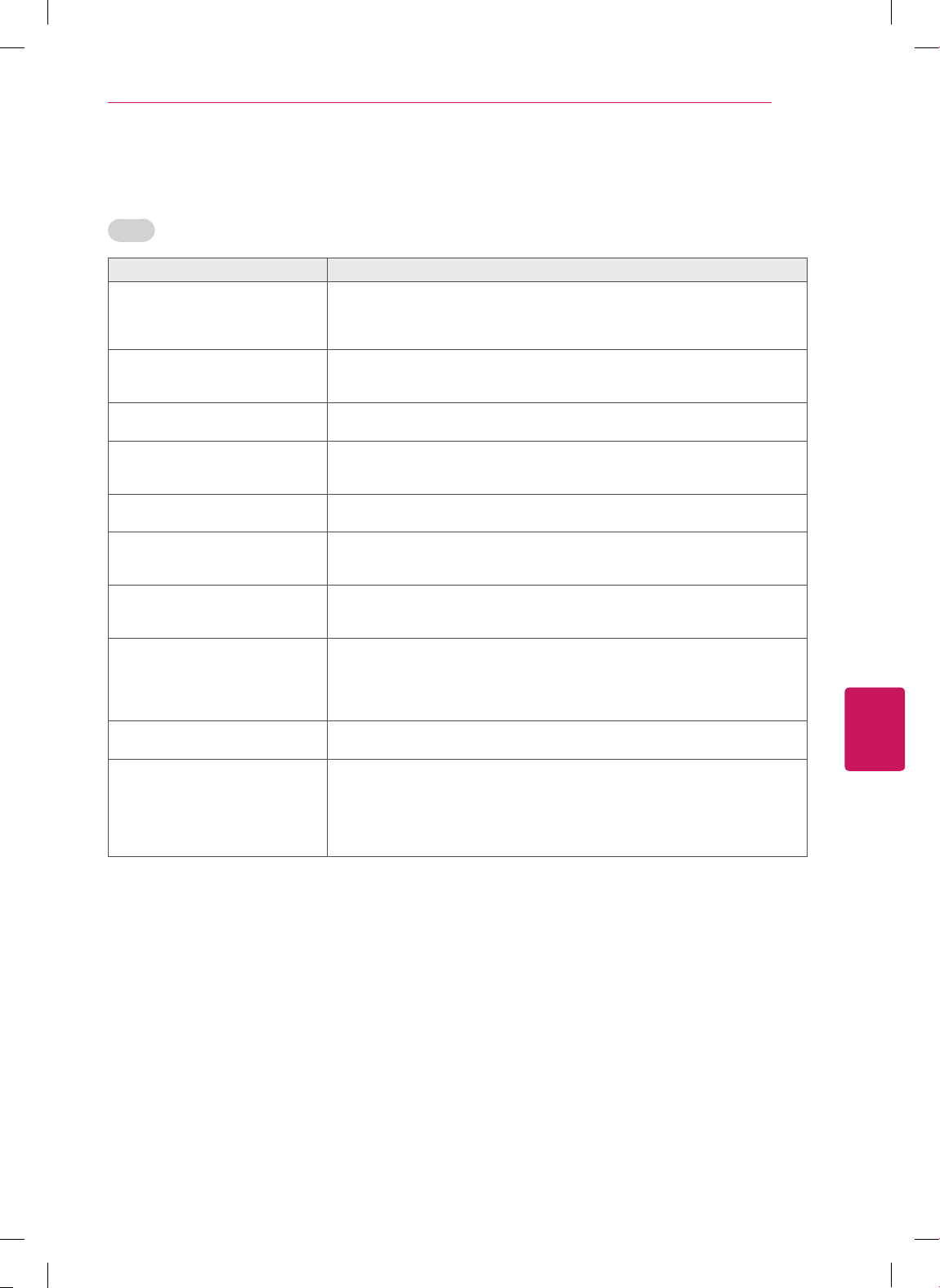
FRANÇAIS
35
DÉPANNAGE
Vidéo
Problème Solution
L'image s'affiche en noir et blanc
ou la couleur est de piètre qualité.
Réglez les couleurs dans le menu.
Espacez suffisamment le téléviseur des autres produits électroniques.
Essayez de changer de chaîne. Il y a peut-être un problème au niveau de la
diffusion.
Des lignes horizontales ou verti-
cales apparaissent ou l'image est
floue.
Assurez-vous qu'aucun appareil ou outil électrique ne provoque
d'interférences.
Des lignes ou stries apparaissent
sur l'image.
Vérifiez l'antenne ou orientez-la correctement.
Des images fantômes apparaissent
lorsque le téléviseur s'éteint.
Des pixels ont peut-être été endommagés si une image fixe est restée
affichée pendant une période prolongée. Activez un économiseur d'écran pour
éviter d'endommager les pixels.
Le téléviseur est sous tension mais
l'écran est extrêmement sombre.
Réglez la brillance et le contraste dans le menu.
Le message « Aucun signal » s'affi-
che à l'écran..
Vérifiez que le câble transmettant le signal relie bien le téléviseur aux autres
appareils.
Vérifiez que la bonne source d'entrée est sélectionnée en appuyant sur
INPUT
.
Des taches noires apparaissent à
l'écran.
Plusieurs pixels rouges, verts, blancs ou noirs peuvent apparaître à l'écran.
Ceci est attribuable aux caractéristiques du panneau.
Ceci est normal.
L'écran est décalé.
Réglez la position dans le menu Image.
Vérifiez que la résolution de la carte vidéo et la fréquence sont prises en
charge par le téléviseur. Si la fréquence n'est pas prise en charge, réglez-la
sur la résolution recommandée à l'aide des réglages d'affichage de l'appareil
externe.
Des lignes minces apparaissent en
arrière-plan.
Vérifiez les branchements du câble vidéo.
La réception de certaines chaînes
est mauvaise.
Essayez de changer de chaîne. Il y a peut-être un problème au niveau de la
diffusion.
Le signal de la chaîne peut être faible. Réorientez l'antenne dans la bonne
direction.
Assurez-vous qu'aucun appareil ou outil électrique ne provoque
d'interférences.
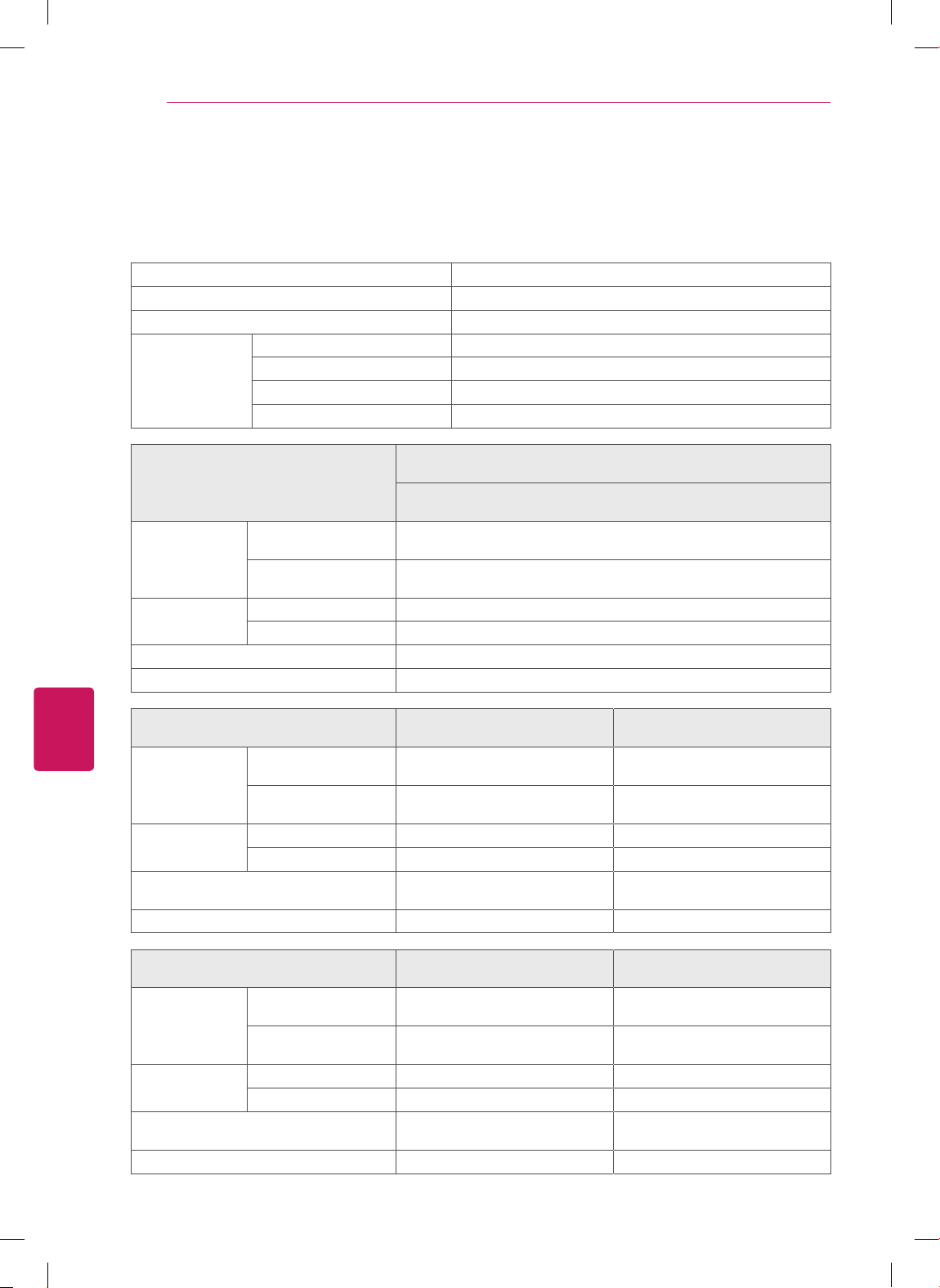
FRANÇAIS
36
CARACTÉRISTIQUES
CARACTÉRISTIQUES
Les spécifications sont susceptibles d'être modifiées sans préavis en raison des mises à niveau des
fonctions des produits.
Système télévisuel NTSC-M, ATSC, 64 & 256 QAM
Programmation VHF 2-13, UHF 14-69, CATV 1-135, DTV 2-69, CADTV 1-135
Impédance de l'antenne externe
75
Ω
Conditions
environnementales
Température de fonctionnement De 0 à 40 °C
Humidité de fonctionnement Moins de 80 %
Température de stockage De -20 à 60 °C
Humidité de stockage Moins de 85 %
MODÈLES
32CS460
(32CS460-UC)
32CS461
(32CS461-UA)
Dimensions
(L x H x P)
Avec support
794,0 x 565,0 x 207,0 mm
(31,2 x 22,2 x 8,1 pouces)
Sans support
794,0 x 504,0 x 73,5 mm
(31,2 x 19,8 x 2,8 pouces)
Poids
Avec support 9,0 kg (19,8 livres)
Sans support 8,0 kg (17,6 livres)
Valeur courante / Consommation électrique 1,1 A / 110 W
Alimentation AC100 - 240 V ~ 50/60 Hz
MODÈLES
42CS530
(42CS530-UB)
32CS560
(32CS560-UE)
Dimensions
(L x H x P))
Avec support
1019,0 x 698,0 x 265,0 mm
(40,1 x 27,4 x 10,4 pouces)
795,0 x 568,0 x 207,0 mm
(31,2 x 22,3 x 8,1 pouces)
Sans support
1019,0 x 631,0 x 76,5 mm
(40,1 x 24,8 x 3,0 pouces)
795,0 x 504,0 x 73,5 mm
(31,2 x 19,8 x 2,8 pouces)
Poids
Avec support 15,1 kg (33,2 livres) 9,2 kg (20,2 livres)
Sans support 13,4 kg (29,5 livres) 8,1 kg (17,8 livres)
Valeur courante /
Consommation électrique
1,7 A / 170 W 1,2 A / 120 W
Alimentation AC100 - 240 V ~ 50/60 Hz AC100 - 240 V ~ 50/60 Hz
MODÈLES
37CS560
(37CS560-UE)
42CS560
(42CS560-UE)
Dimensions
(L x H x P)
Avec support
913,0 x 639,0 x 265,0 mm
(35,9 x 25,1 x 10,4 pouces)
1019,0 x 698,0 x 265,0 mm
(40,1 x 27,4 x 10,4 pouces)
Sans support
913,0 x 571,0 x 77,4 mm
(35,9 x 22,4 x 3,0 pouces)
1019,0 x 631,0 x 76,5 mm
(40,1 x 24,8 x 3,0 pouces)
Poids
Avec support 12,8 kg (28,2 livres) 15,1 kg (33,2 livres)
Sans support 11,1 kg (24,4 livres) 13,4 kg (29,5 livres)
Valeur courante /
Consommation électrique
1,6 A / 160 W 1,7 A / 170 W
Alimentation AC100 - 240 V ~ 50/60 Hz AC100 - 240 V ~ 50/60 Hz
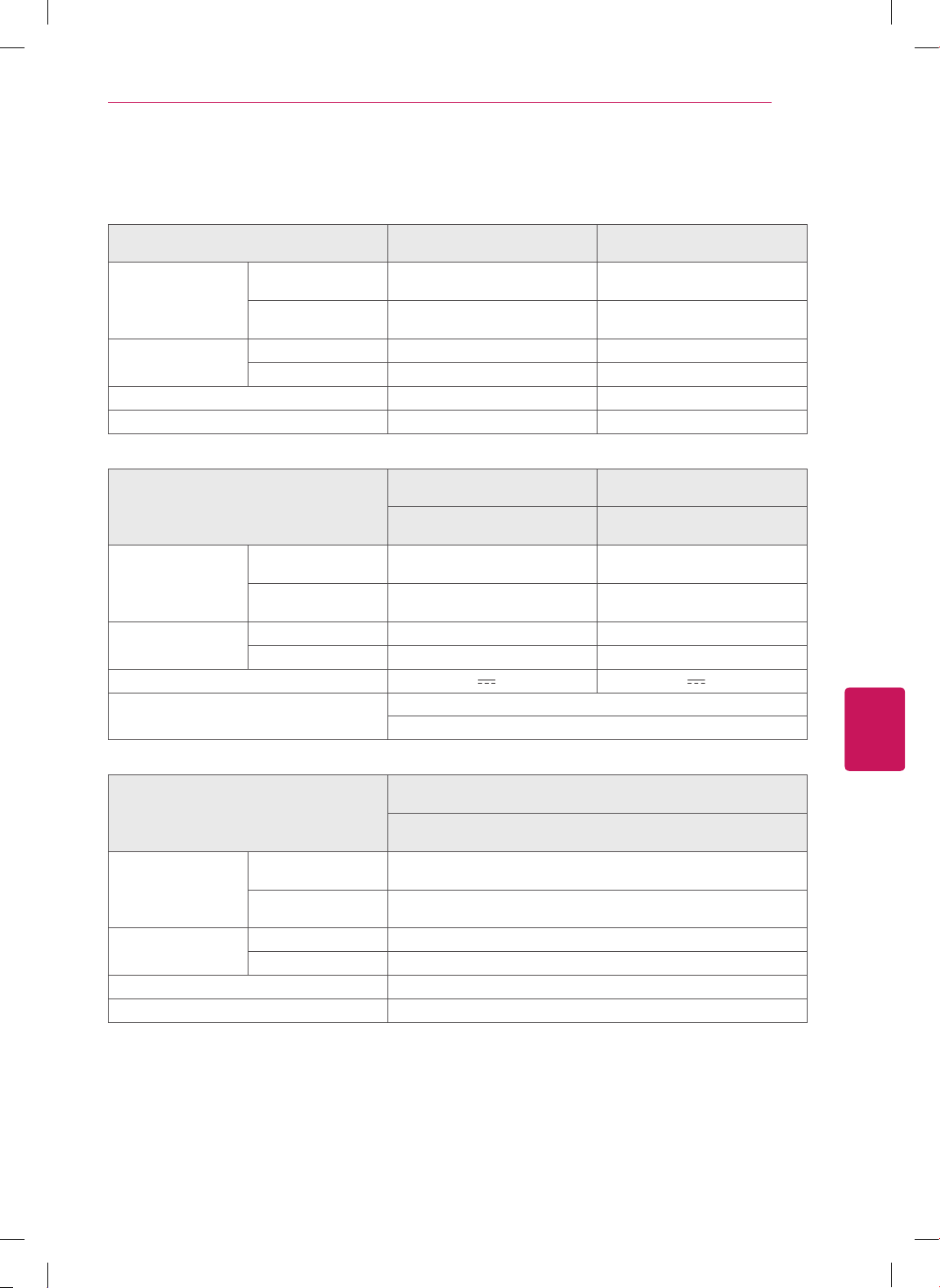
FRANÇAIS
37
CARACTÉRISTIQUES
MODÈLES
32LS3400
(32LS3400-UA)
42LS3400
(42LS3400-UA)
Dimensions
(L x H x P))
Avec support 795,0 x 566,0 x 207,0 mm
(31,2 x 22,2 x 8,1 pouces)
1017,0 x 695,0 x 261,0 mm
(40,0 x 27,3 x 10,2 pouces)
Sans support 795,0 x 504,0 x 73,5 mm
(31,2 x 19,8 x 2,8 pouces)
1017,0 x 629,0 x 76,5 mm
(40,0 x 24,7 x 3,0 pouces)
Poids Avec support 9,1 kg (20,0 livres) 14,7 kg (32,4 livres)
Sans support 8,1 kg (17,8 livres) 13,1 kg (28,8 livres)
Valeur courante / Consommation électrique 1,0 A / 70 W 1,2 A / 120 W
Alimentation requise AC100 - 240 V ~ 50/60 Hz AC100 - 240 V ~ 50/60 Hz
MODÈLES
22LS3500
(22LS3500-UD)
26LS3500
(26LS3500-UD)
22LS3510
(22LS3510-UA)
26LS3510
(26LS3510-UA)
Dimensions
(L x H x P)
Avec support 523,0 x 376,0 x 140,0 mm
(20,5 x 14,8 x 5,4 pouces)
627,0 x 442,0 x 162,0 mm
(24,6 x 17,4 x 6,3 pouces)
Sans support 523,0 x 339,0 x 31,6 mm
(20,5 x 13,3 x 1,2 pouces)
627,0 x 402,0 x 30,1 mm
(24,6 x 15,8 x 1,1 pouces)
Poids Avec support 3,5 kg (7,7 livres) 4,5 kg (9,9 livres)
Sans support 3,2 kg (7,0 livres) 4,2 kg (9,2 livres)
Alimentation requise 24 V
, 1,4 A 24 V , 1,8 A
Adaptateur AC/DC Entrée: AC 100 - 240 V ~ 50/60 Hz
Sortie: DC 24 V, 2,7 A ou 2,71 A
MODÈLES
32LS3500
(32LS3500-UD)
32LS3510
(32LS3510-UA)
Dimensions
(L x H x P)
Avec support 755,0 x 530,0 x 239,0 mm
(29,7 x 20,8 x 9,4 pouces)
Sans support 755,0 x 479,0 x 45,8 mm
(29,7 x 18,8 x 1,8 pouces)
Poids Avec support 9,1 kg (20,0 livres)
Sans support 8,3 kg (18,2 livres)
Valeur courante / Consommation électrique 0,6 A / 60 W
Alimentation requise AC100 - 240 V ~ 50/60 Hz

FRANÇAIS
38
AVIS CONCERNANT LES LOGICIELS LIBRES
AVIS CONCERNANT LES LOGICIELS LIBRES
Pour obtenir le code source conformément aux dispositions de la licence publique générale, de la licence
publique générale limitée, de la licence publique Mozilla et de toute autre licence régissant les logiciels à
code source libre contenus dans cet appareil, visitez le site http://opensource.lge.com.
En plus du code source, toutes les dispositions de licence, les clauses de non-garantie et les avis de droits
d'auteurs peuvent aussi être téléchargés.
LG Electronics mettra également à votre disposition le code source libre sur CD-ROM pour un prix couvrant
le coût de la distribution (coût du support, de l'expédition et de la manutention) sur simple demande par
courriel à l'adresse [email protected]. Cette offre est valable pendant les trois (3) années suivant la
date d'achat du produit.

Les numéros de modèle et de série sont situés au
dos du téléviseur.
Inscrivez-les ci-dessous au cas où vous auriez
besoin de service.
MODÈLE
NUMÉRO DE SÉRIE
Le mode d’emploi complet, qui contient la
description des fonctions avancées de ces
téléviseurs LG, se trouve sur le CD-ROM en
version électronique.
Pour le lire, vous devez ouvrir les fichiers
sélectionnés à l’aide d’un ordinateur muni d’un
lecteur de CD-ROM.
Centre d’information à la clientèle LG
Pour toute question ou commentaire,
accédez à www.lg.com ou appelez ;
1-888-542-2623
CANADA
1-800-243-0000
États-Unis, résidentiel
1-888-865-3026
États-Unis, Commercial
Enregistrez votre produit en ligne !
www.lg.com
(Pour séries LS3400, LS3500 États-Unis, Canada, Mexique)
Ce produit est conforme ENERGY STAR dans le
réglage défaut «d’usine (Résidentielle)».
Modifier les réglages d’usine par défaut ou activer
d’autres fonctionnalités augmente la consommation
d’énergie qui pourrait alors dépasser les limites de
la qualification Energy Star.