OPERATING INSTRUCTIONS
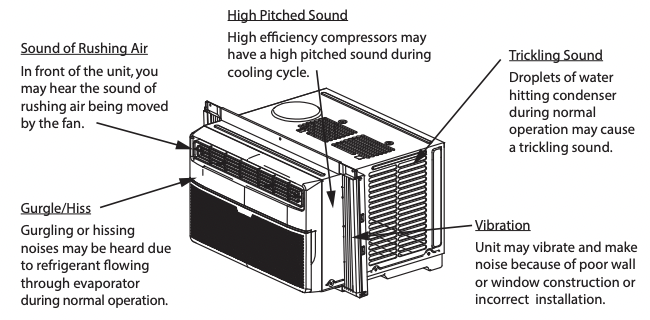
Normal Sounds
RAC-WK06 / RAC-WK08 / RAC-WK10 / RAC-WK12 Models
 NOTE
NOTE
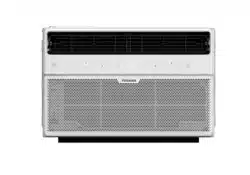
All the pictures in this manual are for illustrative purposes only. The actual appearance of the air conditioner you purchased may vary slightly, but its operation and functions will be similar.
Air Conditioner Features (general)
 WARNING To reduce the risk of fire, electrical shock, or injury to people or property, read the SAFETY PRECAUTIONS before operating this appliance.
This air conditioner is designed to be operated under the following conditions:
Cooling Operation
Outdoor temp.: 64 ~ 109°F / 18 ~ 43°C
Indoor temp.: 62 ~ 90°F / 17 ~ 32°C
NOTES
• The relative humidity of room should be less than 80%. If the unit is used in a condition with a relative humidity over 80%, there will be condensed water on the surface of the unit.
• Performance may be reduced outside of these operating temperatures.
Air Directional Louvers
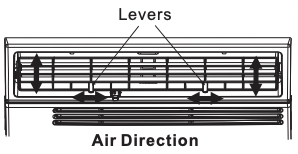
The louvers will allow you to direct the air fl ow Left or Right, or Up and Down (optional on some models) throughout the room as needed.
Move the Levers from side to side until the desired LEFT/RIGHT direction is obtained.
You can also move the LEFT lever to adjust air fl ow UP/DOWN as needed
Air Conditioner Features (Models RAC-WK06 / 08 / 10 / 12)
Electronic Control Operating Instructions
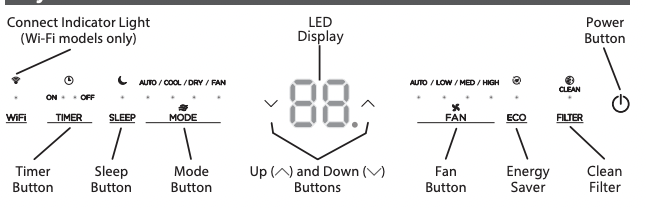
Before you begin, thoroughly familiarize yourself with the control panel as shown below and all its functions, then follow the symbol for the functions you desire. The unit can be controlled by the unit control alone or with the remote.
Key Pad Features
TO TURN UNIT ON OR OFF:
Press ON/OFF button to turn unit on or off .
NOTE: The unit will automatically initiate the Energy Saver function under Cool, Dry, Auto (only AutoCooling and Auto-Fan) modes.
TO CHANGE TEMPERATURE SETTING:
Press UP/DOWN button to change temperature setting.
NOTE: Press or hold either UP ( ) or DOWN (
 ) button until the desired temperature is seen on the display. This temperature will be automatically maintained anywhere between 62°F (17°C) and 86°F (30°C). If you want to display the actual room temperature, see To Operate on Fan Only section.
TO ADJUST FAN SPEEDS:
Press to select the Fan Speed in four steps - Auto, Low, Med or High. Each time the button is pressed, the fan speed mode is changed. On Dry mode, the fan operates on Low speed automatically and cannot be changed.
SLEEP FEATURE:
Press Sleep button to initiate the sleep mode. In this mode the selected temperature will increase by 2°F/ 1(or 2)°C 30 minutes after the mode is selected. The temperature will then increase by another 2°F/ 1(or 2)°C after an additional 30 minutes. This new temperature will be maintained for 6 hours before it returns to the originally selected temperature. This ends the Sleep mode and the unit will continue to operate as originally programmed. The Sleep mode program can be cancelled at any time during operation by pressing the Sleep button again.
CHECK FILTER FEATURE:
Press Check fi lter button to initiate this feature. This feature is a reminder to clean the Air Filter for more effi cient operation. The light will illuminate after 250 hours of operation. To reset after cleaning the fi lter, press the Check Filter button and the light will go off .
ENERGY SAVER FEATURE (ECO):
Press Energy Saver button to initiate this function. This function is available on COOL, DRY, AUTO (only AUTO-COOLING and AUTO-FAN) modes. The fan will continue to run for 3 minutes after the compressor shuts off.The fan then cycles on for 2 minutes at 10 minute intervals until the room temperature is above the set temperature, at which time the compressor turns back on and Cooling resumes.
TO SELECT THE OPERATING MODE:
To choose operating mode, press Mode button. Each time you press the button, a mode is selected in a sequence that goes from Auto, Cool, Dry and Fan. The indicator light adjacent will be illuminated and remain on once the mode is selected. The unit will automatically initiate the Energy Saver function under Cool, Dry, Auto (only AutoCooling and Auto-Fan) modes.
To operate on Auto feature:
- When you set the air conditioner to AUTO mode, it will automatically select cooling or fan only operation depending on what temperature you have selected and the current room temperature.
- The air conditioner will control room temperature automatically according to temperature you’ve set. - In this mode, the fan speed cannot be adjusted as it’s automatically controlled according to temperature setting and room temperature.
To operate on Fan Only:
- Use this function only when cooling is not desired, such as for room air circulation or to exhaust stale air (on some models). (Remember to open the vent during this function, but keep it closed during cooling for maximum cooling effi ciency.) You can choose any fan speed you prefer.
- During this function, the display will show the actual room temperature, not the set temperature as in the cooling mode.
- In Fan Only mode, the temperature is not adjusted.
To operate on Dry mode:
- In this mode, the air conditioner will generally function as a dehumidifi er. Since the conditioned space is a closed or sealed area, some degree of cooling will occur.
TIMER: AUTO START/STOP FEATURE:
- When the unit is on or off , fi rst press the Timer button. The TIMER ON indicator light will illuminate indicating the Auto Start program has initiated.
- When the time of TIMER ON is displayed, press the Timer button again. The TIMER OFF indicator light illuminates. It indicates the Auto Stop program has initiated.
- Press or hold the UP or DOWN button to change the Auto time by 0.5 hour increments, up to 10 hours, then at 1 hour increments up to 24 hours. The control will count down the time remaining until start.
- The selected time will register in 5 seconds, and the system will automatically revert back to display the previous temperature setting or room temperature when the unit is on. (when the unit is off , there is no display.)
- Turning the unit ON or OFF at any time or adjusting the timer setting to 0.0 will cancel the Auto Start/Stop timed program.
Displays
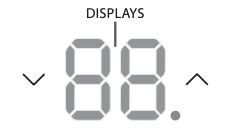
DISPLAYS:
Shows the set temperature in “°C” or “°F” and the Auto-timer settings. While on Fan Only mode, it shows the room temperature.
Error codes:
AS
- Room temperature sensor error - Unplug the unit and plug it back in. If error repeats, call for service.
NOTE: In Fan Only mode, it will display “LO” or “HI.”
 - Evaporator temperature sensor error
- Unplug the unit and plug it back in. If error repeats, call for service.
NOTE: “ ” is shown in the display area.
NOTES
• To change the AC between Celsius and Fahrenheit scales, press the temperature control arrows at the same time for 5 seconds.
• If the unit shuts off unexpectedly due to the power outage, it will restart with the previous function setting automatically when the power resumes.
INSTALLATION INSTRUCTIONS
 WARNING - Before You Begin
Read these instructions completely and carefully.
- IMPORTANT - Save these instructions for local inspector’s use.
- IMPORTANT - Observe all governing codes and ordinances.
- Note to Installer - Be sure to leave these instructions with the consumer.
- Note to Consumer - Keep these instructions for future reference.
- Skill level - Installation of this appliance requires basic mechanical skills.
- Completion time - Approximately 1 hour. We recommend that two people install this product.
Proper installation is the responsibility of the installer.
Product failure due to improper installation is not covered under the Warranty.
You MUST use all supplied parts and use proper installation procedures as described in these instructions when installing this air conditioner.
Do not, under any circumstances, cut or remove the third (ground) prong from the power cord.
Do not change the plug on the power cord of the air conditioner.
Aluminum house wiring may present special problems - consult a qualifi ed electrician.
When handling unit, be careful to avoid cuts from sharp metal edges and aluminum fi ns on front and rear coils.
NOTE Save carton and these Installation Instructions for future reference. The carton is the best way to store unit during winter, or when not in use.
Window Requirements
Your air conditioner is designed to install in standard double hung windows with opening widths of 23” to 36” (584mm to 914mm).
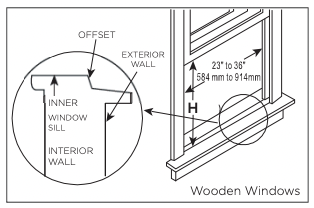
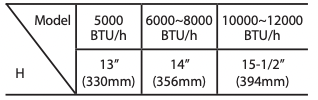
Table 1
Tools You Will Need
 Phillips Screwdriver
 Level
Level
Tools You May Use
 Flathead Screwdriver
 Pencil
 Ruler or tape measure
 Scissors or knife
1. Prepare the Window
Lower sash must open sufficiently to allow a clear vertical opening (see dimension H in Table 1). Side louvers and the rear of the AC must have clear air space to allow enough airflow through the condenser for heat removal. The rear of the unit must be outdoors, not inside a building or garage
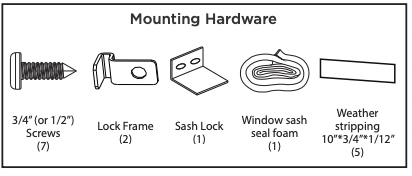
NOTE Weather stripping is only for ENERGY STAR models.
2. Prepare Air Conditioner
A: Remove the air conditioner from the carton and place on a fl at surface.
B: Remove top rail and R1 insulation hardware (R1 insulation hardware for ENERGY STAR models only) from the packaging material as shown in Fig. A.
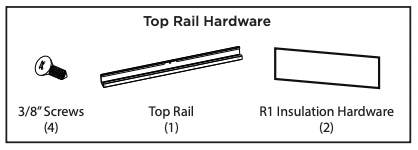
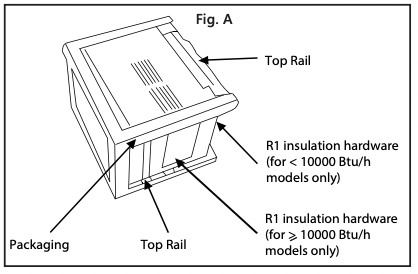
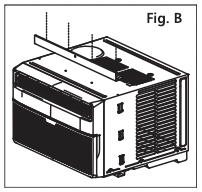
C. Align the hole in the top rail with those in the top of the unit as shown in Fig. B.
D. Secure the top rail to the unit with the 3/8” Screws as shown in Fig. C.
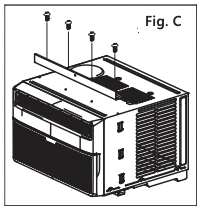
NOTE For safety reasons, all four (4) screws MUST be securely fastened.
NOTE Before installing unit, the top rail must be assembled on the unit.
3. Install the Accordion Panels on Air Conditioner
NOTE
Top rail and Sliding Panels at each side are off set to provide the proper pitch to the rear of (5/16”). This is necessary for proper condensed water management and drainage. If you are not using the Side Panels for any reason, this pitch to the rear must be maintained.
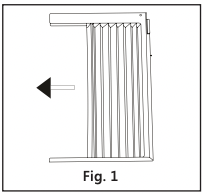
A. Place unit on floor, a bench or a table. Hold the Accordion Panel in one hand and gently pull back the center to free the open end. See Fig. 1.
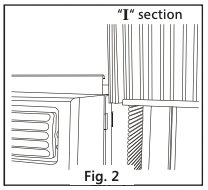
B. Slide the free end  section of the panel directly into the cabinet as shown in Fig. 2. Slide the panel down. Be sure to leave enough space to slip the top and bottom of the frame into the rails on the cabinet.
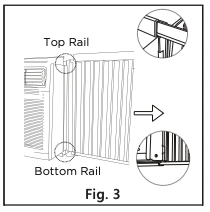
C. Once the panel has been installed on the side of the cabinet, make sure it sits securely inside the frame channel by making slight adjustments. Slide the top and bottom ends of the frame into the top and bottom rails of the cabinet. Fig. 3.
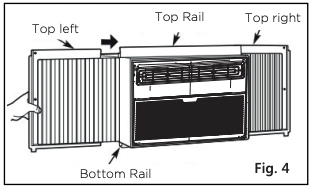
D. Slide the panel all the way in and repeat on the other side.
NOTE If storm window blocks AC, see Fig. 15.
4. Secure the Accordion Panels
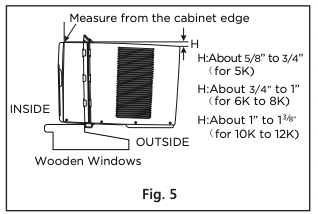
A. Keep a fi rm grip on the air conditioner, carefully place the unit into the window opening so the bottom of the air conditioner frame is against the window sill (Fig. 5). Carefully close the window behind the top rail of the unit.
NOTE
Check that air conditioner is tilted back per dimension H (Fig. 5) (tilted about 3° to 4° downward to the outside). After proper installation, condensate should not drain from the overflow drain hole during normal use. Adjust the slope if otherwise.
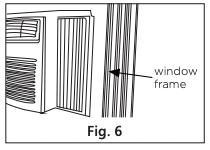
B. Extend the side panels out against the window frame (Fig. 6).
5. Install Support Bracket
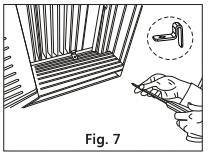
A. Place the frame lock between the frame extensions and the window sill as shown (Fig. 7). Drive 3/4” (19 mm) or 1/2” (12.7 mm) locking screws through the frame lock and into the sill.
NOTE
To prevent window sill from splitting, drill 1/8” (3 mm) pilot holes before driving screws.
Models RAC-WK06/08/10/12
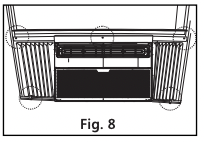
B. Drive 3/4” (19 mm) or 1/2” (12.7 mm) locking screws through frame holes into window sash (Fig. 8).
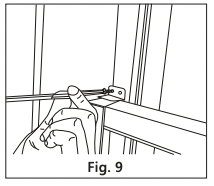
C. To secure lower sash in place, attach right angle sash lock with 3/4” (19 mm) or 1/2” (12.7 mm) screw as shown (Fig. 9).
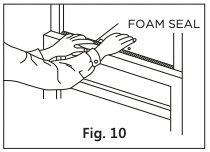
D. Cut Window sash seal foam and insert it in the space between the upper and lower sashes (Fig. 10).
6. Install R1 Insulation Hardware (only applicable to Energy Star models)
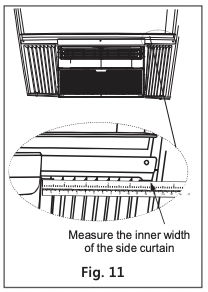
In order to minimize air leaks and ensure optimal insulation, it is necessary to install the included R1 insulation hardware to the side curtain. Follow the instructions below.
Step 1. After the unit is installed in the window, measure the inner width of the side curtain as shown (Fig. 11).
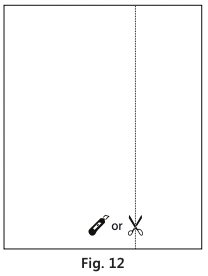
Step 2. Mark a line on the provided R1 insulation panel that is 1/8” (3 mm) less than the measured width in step 1, then cut the R1 insulation panel along the line (Fig. 12).
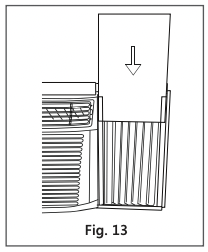
Step 3. Slide the R1 insulation panel into the side curtain. The side with the pattern should facing indoors. (Fig. 13).
Step 4. Repeat on the other side.
7. Install Weather Stripping (ENERGY STAR models only)
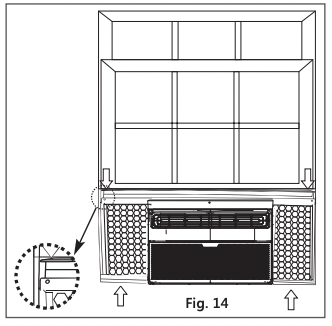
In order to minimize air leaks between the room air conditoner and the window opening, trim the weather stripping to the proper length, peel off the protective backing and plug any gaps if needed (Fig. 14).
If AC is Blocked by Storm Window
Models RAC-WK05/06/08/10/12
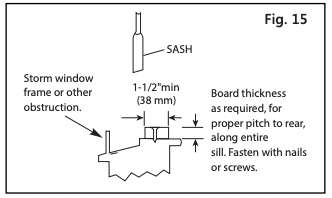
Add wood as shown in Fig. 15, or remove storm window before air conditioner is installed.
If storm window frame must remain, be sure the drain holes or slots are not caulked or painted shut. Accumulated rain water or condensation must be allowed to drain out.
Removing AC From Window
- Turn AC off , and disconnect power cord.
- Remove sash seal from between windows, and unscrew safety lock.
- Remove screws installed through frame and frame lock.
- Remove the R1 Panel (ENERGY STAR models only).
- Close (slide) side panels into frame.
- Keeping a fi rm grip on air conditioner, raise sash and carefully remove.
- Be careful not to spill any standing water while lifting unit from window. Store parts WITH air conditioner
CARE AND CLEANING
 CAUTION Clean your air conditioner occasionally to keep it looking new. Be sure to unplug the unit before cleaning to prevent shock or fi re hazards.
Air Filter Cleaning
Models RAC-WK06 / 08 / 10 / 12
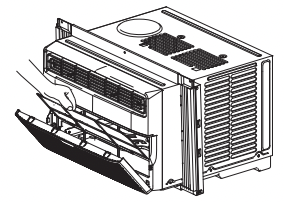
The air filter should be checked at least once a month to see if cleaning is necessary. Trapped particles in the filter can build up and cause an accumulation of frost on the cooling coils.
- Remove the filter by sliding it out from the righthand side. (RAC-WK05 only)
- Push the vent handle to the Vent Closed position where applicable).
- Open the front panel.
- Grasp the filter by the center and pull up and out.
- Wash the filter using liquid dishwashing detergent and warm water. Rinse filter thoroughly.
- Gently shake excess water from the filter. Be sure the filter is thoroughly dry before replacing.
- You may also vacuum the filter clean rather than washing.
NOTE Never use hot water over 104°F (40°C) to clean the air fi lter. Never attempt to operate the unit without the air fi lter.
Cabinet Cleaning
- Be sure to unplug the air conditioner to prevent shock or fi re hazard. The cabinet and front may be dusted with an oil-free cloth or washed with a cloth dampened in a solution of warm water and mild liquid dishwashing detergent. Rinse thoroughly and wipe dry.
- Never use harsh cleansers, wax or polish on the cabinet front.
- Be sure to wring excess water from the cloth before wiping around the controls. Excess water in or around the controls may cause damage to the air conditioner.
- Plug in air conditioner.
Winter Storage
If you plan to store the air conditioner during the winter, remove it carefully from the window according to the installation instructions. Cover it with plastic or return it to the original carton.
TROUBLESHOOTING TIPS
Before calling for service, review this list. It may save you time and expense. This list includes common occurrences that are not the result of defective workmanship or materials in this appliance.
Air conditioner does not start
- Wall plug disconnected. Push plug fi rmly into wall outlet.
- House fuse blown or circuit breaker tripped. Replace fuse with time delay type or reset circuit breaker.
- Plug current device tripped. Press the RESET button.
- Power is OFF. Turn power ON and set to desired setting.
- Unit turned off and then on quickly. Turn unit off and wait 3 minutes before restarting.
Air from unit does not feel cold enough
- Room temperature below 62°F (17°C). Cooling may not occur until room temperature rises above 62°F (17°C).
- Temperature sensing element touching cold coil, located behind air fi lter. Straighten tube away from coil.
- Reset to a lower temperature.
- Compressor shut-off by changing modes. Wait approximately 3 minutes and listen for compressor to restart when set in the COOL mode.
Air conditioner cooling, but room is too warm- ice forming on cooling coil behind decorative front.
- Outdoor temperature below 64°F (18°C).
- Air filter may be dirty. Clean filter. Refer to Care and Cleaning section.
- Thermostat set too cold for night-time cooling. Then, set temperature to a higher setting.
- To defrost the coil, set to FAN ONLY mode.
Air conditioner cooling, but room is too warm- NO ice forming on cooling coil behind decorative front
- Air filter may be dirty. Clean filter. Refer to Care and Cleaning section.
- Temperature is set too high, set temperature to a lower setting.
- Air directional louvers positioned improperly. Position louvers for better air distribution.
- Front of unit is blocked by drapes, blinds, furniture, etc. - restricts air distribution. Clear obstruction in front of unit.
- Doors, windows, registers, etc. open- cold air escapes. Close doors, windows, registers.
- Unit recently turned on in hot room. Allow additional time to remove “stored heat” from walls, ceiling, fl oor and furniture.
Air conditioner turns on and off rapidly
- Dirty air filter- air restricted. Clean air filter.
- Outside temperature extremely hot. Set FAN speed to a higher setting to bring air past cooling coils more frequently.
Noise when unit is cooling
- This is normal. Air movement sound. If too loud, set to a slower FAN setting.
- Window vibration - poor installation. Refer to installation instructions or check with installer.
Water dripping INSIDE when unit is cooling
- Improper installation. Tilt air conditioner slightly to the outside to allow water drainage.
- Refer to installation instructions - check with installer.
Water dripping OUTSIDE when unit is cooling
- Unit removing large quantity of moisture from humid room. This is normal during excessively humid days.
Remote sensing deactivating prematurely (some models)
- Remote control not located within range. Place remote control within 20 feet & 180°, radius of the front of the unit.
- Remote control signal obstructed. Remove obstruction.
Room too cold
- Temperature setting too low. Increase temperature setting.
REMOTE CONTROL INSTRUCTIONS
Handling the Remote Controller
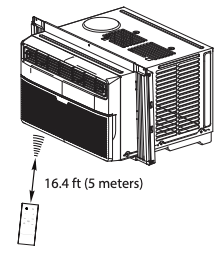
Location of the remote controller
• Use the remote controller within a distance of 16.4 ft (5 meters) from the air conditioner, pointing it towards the receiver. Reception is confi rmed by a beep.
CAUTIONS
- The air conditioner will not operate if curtains, doors or other materials block the signals from the remote controller to the unit.
- Prevent any liquid from spilling onto the remote controller. Do not expose the remote controller to direct sunlight or heat.
- If the infrared signal receiver on the indoor unit is exposed to direct sunlight, the air conditioner may not function properly. Use curtains to prevent the sunlight from falling on the receiver.
- If other electrical appliances react to the remote controller, either move these appliances or consult your local dealer.
Installing the Battery
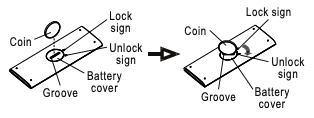
Step 1: Insert a coin vertically in the groove on the battery cover, and turn 45º clockwise, making sure that the groove is aligned with the “unlock” sign as shown below and remove the battery cover.
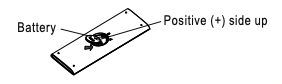
Step 2: Install battery inside the remote controller, the positive (+) side up
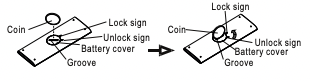
Step 3: Replace the battery cover, making sure the battery cover groove is aligned with the “unlock” sign. Insert a coin vertically in the groove and press it gently, then rotate 45º counter clockwise, making sure the groove is aligned with the “lock” sign as shown below.
 WARNING
1. Battery must be disposed of properly. Do not short circuit or dispose of in a fire.
2. Keep batteries out of the reach of children.
3. Do not ingest.
4. Non-rechargeable batteries are not to be recharged.
5. Exhausted batteries are to be removed from the product.
Function Buttons
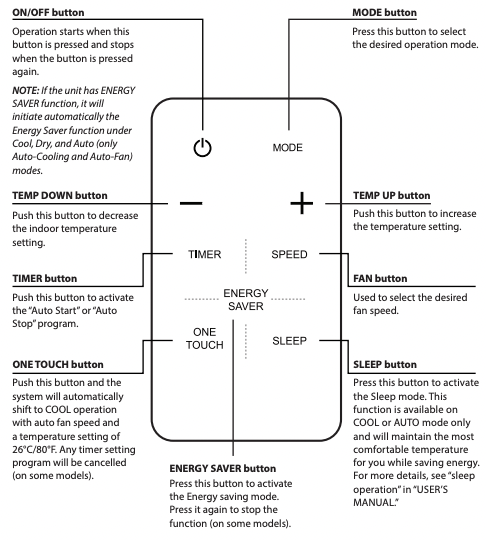
How to Use the Buttons
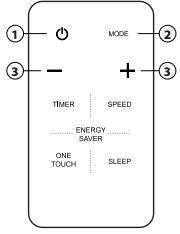
Auto operation
Ensure the unit is plugged in and power is available.
1. Press the ON/OFF button to start the air conditioner.
2. Press the MODE button to select Auto.
3. Press the TEMP UP/DOWN button to set the desired temperature.
NOTES
1. In the Auto mode, the air conditioner can logically choose the mode (Cooling or Fan) and by sensing the diff erence between the actual ambient room temperature and the set temperature on the remote controller.
2. In Auto mode, you cannot adjust the fan speed. As it is controlled automatically.
3. If the Auto mode is not comfortable for you, the desired mode can be selected manually
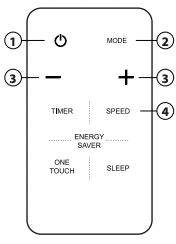
Cooling / Fan operation
Ensure the unit is plugged in and power is available.
1. Press the ON/OFF button to start the air conditioner.
2. Press the MODE button to select Cool or Fan mode.
3. Press the TEMP UP/DOWN button to set the desired temperature.
4. Press the FAN button to select the fan speed.
NOTE Temperature cannot be changed in Fan mode.
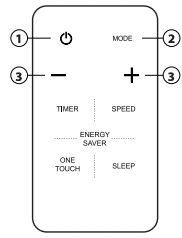
Dehumidifying operation
Ensure the unit is plugged in and power is available.
1. Press the ON/OFF button to start the air conditioner.
2. Press the MODE button to select Dry.
3. Press the TEMP UP/DOWN button to set the desired temperature.
NOTE
In the Dehumidifying mode, you cannot adjust the fan speed, as it is controlled automatically.
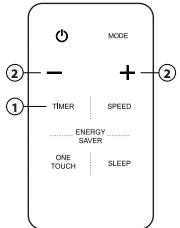
Timer operation
Press the TIMER button to initiate the Auto-start and Auto-stop setting program of the unit.
To set the Auto-start/stop time.
1. Press the TIMER button, when the TIMER ON indicator is displayed on the LED window of the air conditioner, it indicates the Auto Start setting program is initiated. When the TIMER OFF indicator is displayed on the LED window of the air conditioner, it indicates the Auto Stop setting program is initiated.
2. Press or hold the Up (+) or Down (- ) to change the Auto time. The control will count down the time remaining until start/stop.
3. The selected time will register in 5 seconds and the air conditioner will automatically revert back to display the previous temperature setting.
4. Turning the unit ON or OFF at any time will cancel the Auto Start/stop function.
NOTE
To cancel the TIMER setting, push the TIMER button and press or hold the Up (+) or Down ( - ) until 0 hour is displayed on the LCD window of the air conditioner.
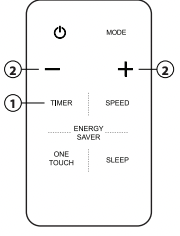
COMBINED TIMER
( Setting both ON and OFF timers simultaneously)
AUTO STOP >AUTO START
( On > Stop > Start operation)
This feature is useful when you want to stop the air conditioner after you go to bed, and start it again in the morning when you wake up or when you return home.
Example:
To stop the air conditioner 2 hours after setting and start it again 10 hours after setting.
- Press the TIMER button until the TIMER OFF indicator is displayed on the LED display of the air conditioner.
- Use the UP/DOWN button to display “2.0” on the LED display of the air conditioner.
- Press the TIMER button again to display the TIMER OFF on the LED display of the unit.
- Use the UP/DOWN button to display “10” on the LED display of the unit.
- Wait for 5 seconds until the previous display appears in LED window.
AUTO START > AUTO STOP
(Off > Start > Stop operation)
This feature is useful when you want to start the air conditioner before you wake up and stop it after you leave the house.
Example:
To start the air conditioner 5 hours after setting, and stop it 8 hours after setting.
- Press the TIMER button until the TIMER ON indicator is displayed on the LED display of the air conditioner.
- Use the UP/DOWN button to display “5.0” on the LED display of the air conditioner.
- Press the TIMER button again to display the TIMER OFF on the LED display of the unit.
- Use the UP/DOWN button to display “8.0” on the LED display of the unit.
- Wait for 5 seconds until the previous display appears in LED window.
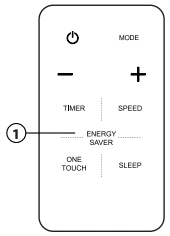
Energy saver operation
In this mode, the fan will continue to run for 3 minutes after the compressor shuts off. The fan then cycles on for 2 minutes at 10 minute intervals until the room temperature is above the set temperature, at which time the compressor turns back on and cooling resumes.
NOTE
• Button design is based on a typical model and may slightly vary from the actual one you purchased.
• All the functions described can also be accomplished using the unit’s control panel. If the unit is without this feature, there will be no corresponding operation when pressing the relevant button on the remote controller.
• When there are significant differences between features or operation implied by the remote control illustration and the actual functions described in the USER’S MANUAL, the descriptions in the USER’S MANUAL shall prevail.
• The device may comply with local national regulations. In Canada, it should comply with CAN ICES-3(B)/NMB-3(B). In USA, this device complies with part 15 of the FCC Rules. Operation is subject to the following two conditions: (1) This device may not cause harmful interference, and (2) this device must accept any interference received, including interference that may cause undesired operation.
• This equipment has been tested and found to comply with the limits for a Class B digital device, pursuant to part 15 of the FCC Rules. These limits are designed to provide reasonable protection against harmful interference in a residential installation. This equipment generates, uses and can radiate radio frequency energy and, if not installed and used in accordance with the instructions, may cause harmful interference to radio communications. However, there is no guarantee that interference will not occur in a particular installation. If this equipment does cause harmful interference to radio or television reception, which can be determined by turning the equipment off and on, the user is encouraged to try to correct the interference by one or more of the following measures:
- Reorient or relocate the receiving antenna.
- Increase the separation between the equipment and receiver.
- Connect the equipment to an outlet on a circuit diff erent from that to which the receiver is connected.
- Consult the dealer or an experienced radio/TV technician for help.
- Changes or modifi cations not approved by the party responsible for compliance could void users authority to operate the equipment
WARNING: Chemical Burn Hazard. Keep batteries away from children. This product contains a lithium button/coin cell battery. If a new or used lithium button/coin cell battery is swallowed or enters the body, it can cause severe internal burns and can lead to death in as little as 2 hours. Always completely secure the battery compartment. If the battery compartment does not close securely, stop using the product, remove the batteries, and keep it away from children. If you think batteries might have been swallowed or placed inside any part of the body, seek immediate medical attention.