Owner’s Manual and
Installation Instruction
Manual del propietario y
instrucciones de instalación
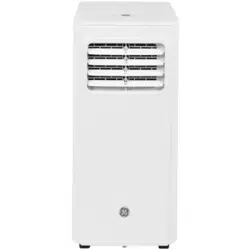
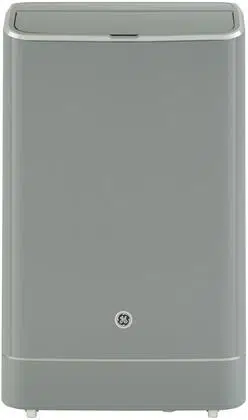
QPCD05NXTW
HPB08XCM
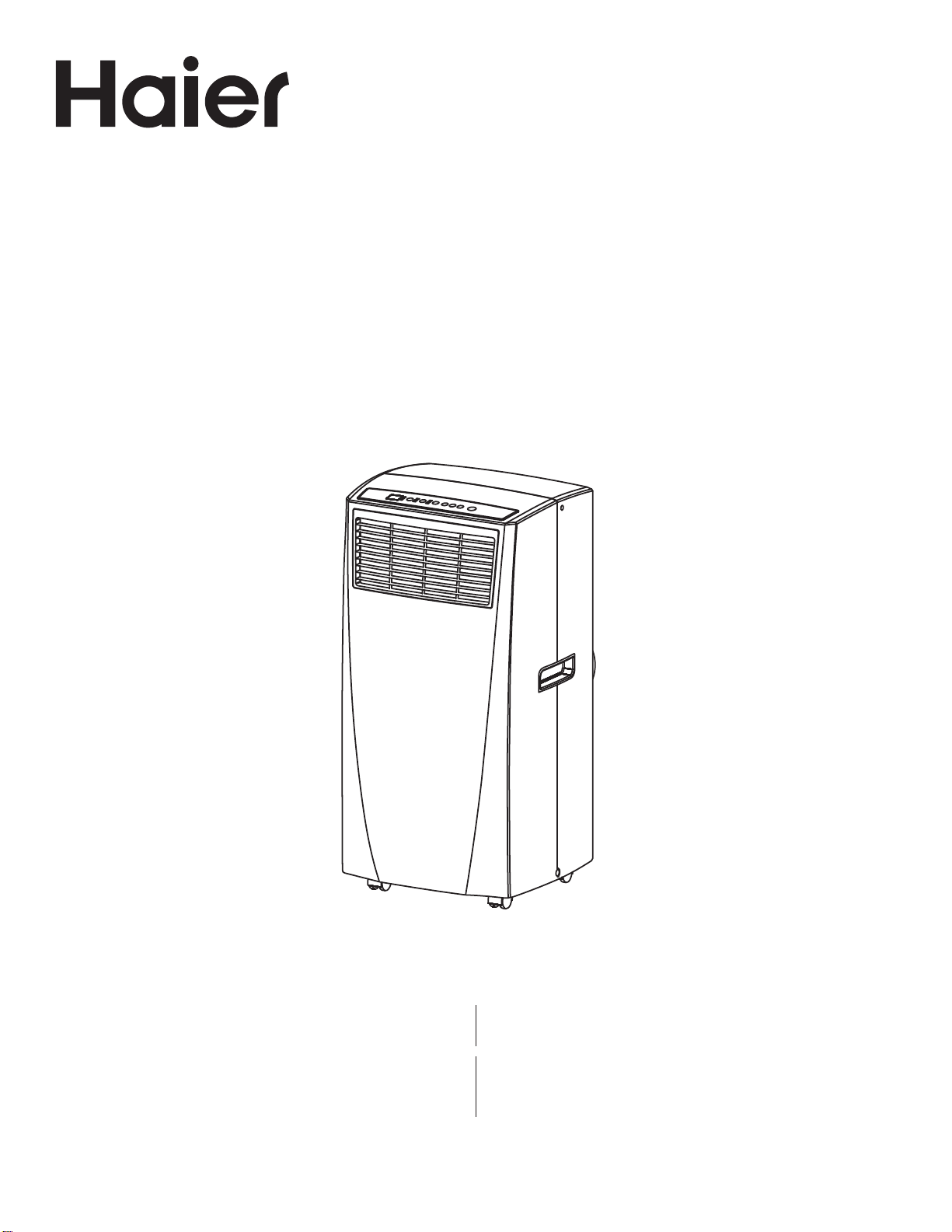
Portable Air Conditioner
Acondicionador de aire portatil
49-7782-1 12-18 GEA
Design may vary by model number.
Some models may have an additional
letter after the model number
El diseño puede variar según el número
de modelo
Algunos modelos pueden tener una
letra adicional después del número del
modelo

2 49-7782-1
ENGLISH

49-7782-1 3
ENGLISH
TABLE OF CONTENTS
SAFTEY INFORMATION ...........................................................................................4
CONTROL PANEL .................................................................................................5
PARTS AND FEATURES .......................................................................................... 8
INSTALLATION REQUIREMENTS ................................................................................. 9
INSTALLATION INSTRUCTIONS ..................................................................................10
AIR CONDITIONER USE . . . . . . . . . . . . . . . . . . . . . . . . . . . . . . . . . . . . . . . . . . . . . . . . . . . . . . . . . . . . . . . . . . . . . . . . . . . . . . . . . . . . . . . . . 13
AIR CONDITIONER CARE ....................................................................................... 13
TROUBLESHOOTING . . . . . . . . . . . . . . . . . . . . . . . . . . . . . . . . . . . . . . . . . . . . . . . . . . . . . . . . . . . . . . . . . . . . . . . . . . . . . . . . . . . . . . . . . . . 14
LIMITED WARRANTY ............................................................................................15
RECORD KEEPING
Thank you for purchasing this Haier product. This user manual
will help you get the best performance from your new range.
For future reference, record the model and serial number
located on the front behind the range storage drawer, and the
date of purchase.
Staple your proof of purchase to this manual to aid in
obtaining warranty service if needed.
____________________________________________________
Model number
____________________________________________________
Serial number
____________________________________________________
Date of purchase
HAIER WEBSITE
Have a question or need assistance with your appliance? Try the Haier Website 24 hours a day, any day of the year! You
can also shop for more great Haier products and take advantage of all our on-line support services designed for your
convenience. In the US: Haierappliances.com
4 49-7782-1
ENGLISH
IMPORTANT SAFETY INSTRUCTIONS
WARNING
To reduce the risk of fire, electrical
shock, injury to persons, or damage when using the air
conditioner, follow basic precautions, including the
following:
• Read all of the instructions before using this appliance.
• Plug into a grounded 3 prong outlet.
• Do not remove ground prong.
• Do not use an adapter.
• Do not use an extension cord.
• Do not operate the air conditioner if it has a damaged
cord or plug, if it is not working properly, or if it has been
damaged or dropped.
• The air conditioner should be serviced only by qualified
service personnel. Call an authorized service company
for examination, repair, or adjustment.
• Disconnect power before servicing.
• Disconnect power before cleaning.
NOTE: Turning off power by pressing the Power button
does NOT disconnect the appliance from the power
supply.
• Do not install or use the air conditioner in any area where
the atmosphere contains combustible gases or where
the atmosphere is contaminated. Avoid any chemicals
coming in contact with your air conditioner.
• Do not store anything directly on top of the air
conditioner.
• Use two or more people to move and install air
conditioner.
• Never operate the air conditioner without the filters in
place.
• Do not use the air conditioner near a bathtub, shower or
wash basin or other wet area.
READ AND SAVE THESE INSTRUCTIONS
IMPORTANT SAFETY INFORMATION
READ ALL INSTRUCTIONS BEFORE USING THE APPLIANCE
SAFETY INFORMATION
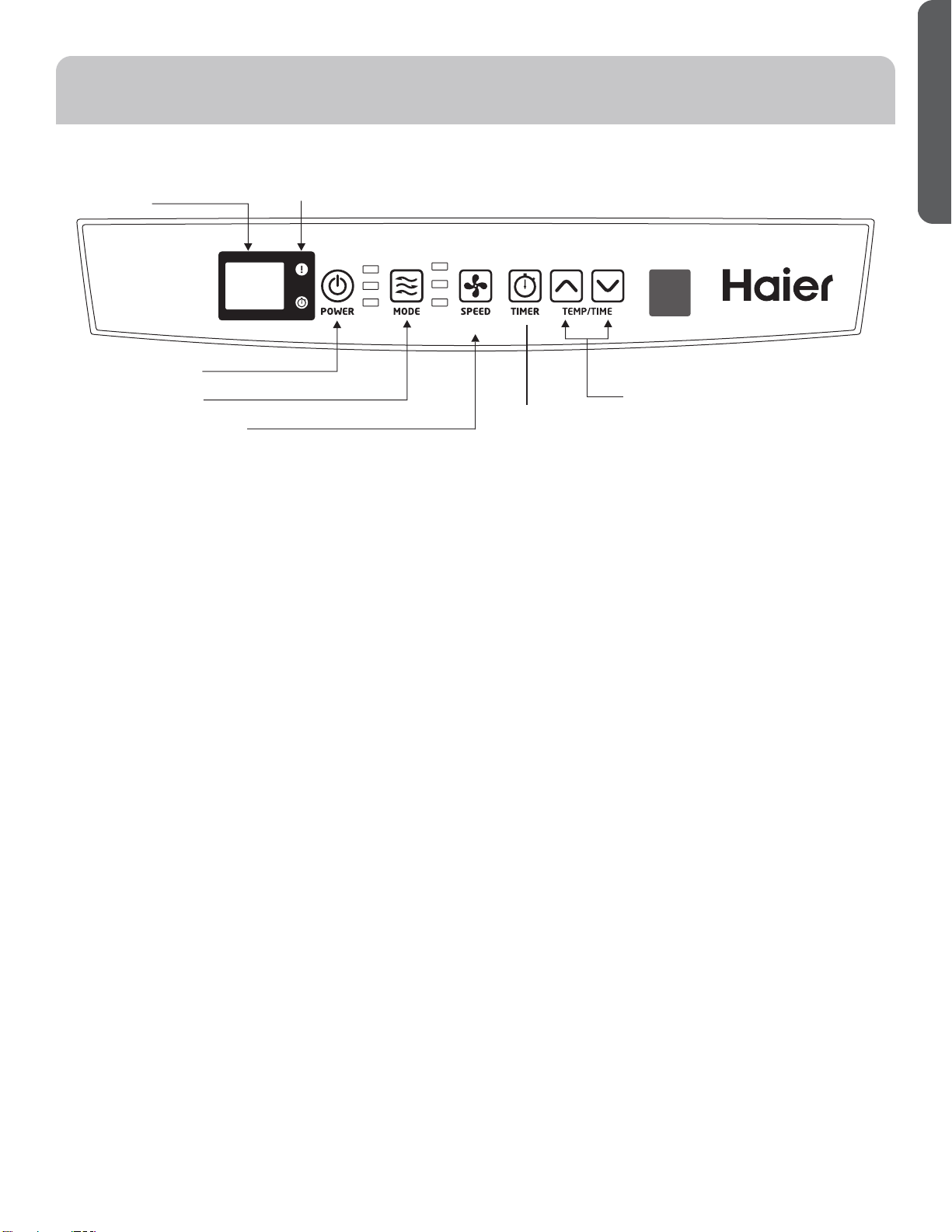
49-7782-1 5
ENGLISH
Features and appearance will vary.
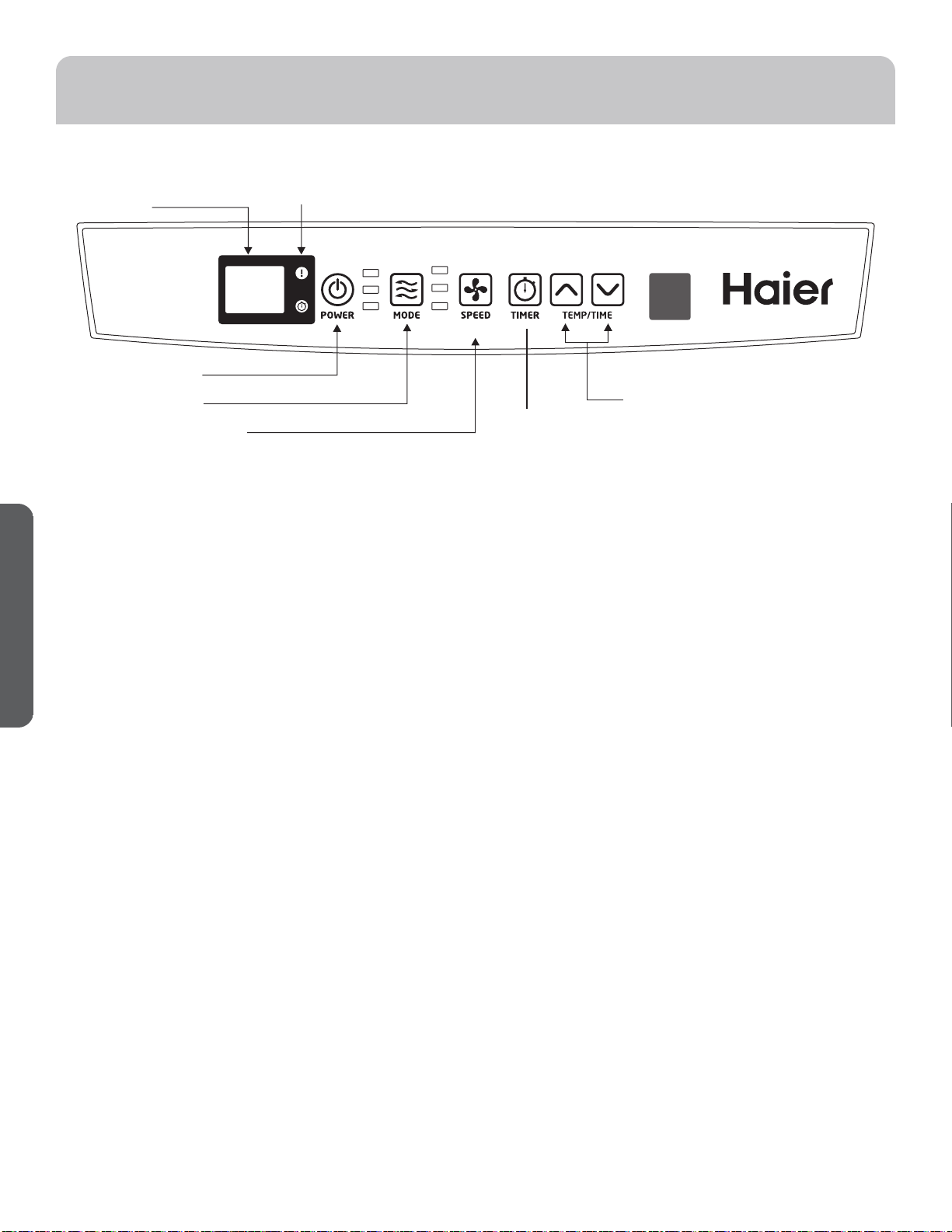
Lights next to the touch pads on the air conditioner control panel indicate the selected settings.
BUTTONS
A
Display
B. Warning Light
Condensed water may accumulate in the unit. If the
internal tank becomes full, the warning light will light
up and the unit will not operate until the unit has been
drained.
C. Power Control
The power control turns the unit on and off.
D. Mode Control
The mode control has three settings: COOL,
DEHUMIDIFY, and FAN. The settings are adjusted with
Mode Control button. A light will indicate which setting is
currently being used.
Cooling Mode.
When cool mode is selected, the indicator light turns blue.
During the cooling mode the air is cooled and hot air
is exhausted to the outside through the exhaust tube.
Adjust fan speed and air temperature to suite your desired
comfort level. NOTE: The air exchange hoses must vent
outside the room when using cool mode.
Dehumidify Mode.
When dehumidify mode is selected, the indicator light
turns yellow. Air is dehumidified as it passes through
the unit, without being in full cooling mode. If room
temperature is higher than 77 degrees Fahrenheit, fan
speed can be adjusted; otherwise fan speed is fixed to
“Low”. NOTE: If the unit is to be used as a dehumidifier,
do not connect the exhaust hose let the warm air return
to the room. Continuous drainage is then necessary.
Fan Mode
When fan mode is selected the indicator light will shine
green. Air is circulated throughout the room with no
cooling. NOTE: Unit does not need to be vented in Fan
mode.
E. Fan Speed Control
Select between multiple fan speeds. Number of fan
speeds vary by model.
Hold the FAN button for 3 seconds, the fan will continue
running even when the compressor stops due to the
temperature being reached.
F. Timer
Auto Turn Off:
With machine in running mode, press timer button to
select number of hours you would like the unit to run in air
conditioning mode until it automatically shuts off.
Auto Turn On:
With machine in stand by mode, press timer button to
select number of hours until you would like the unit to
automatically start running in air conditioning mode.
F. Timer/Temp Set Controls
• Used for adjusting the timer and thermostat.
• The default display is room temperature.
• In cooling mode when ޔ or ޕ button is pressed, the set
temperature is displayed and may be adjusted. After 15
seconds the display will revert back to room temperature.
Temperature is only adjustable in cool mode. The time is
adjustable between 1-24 hours.
NOTE: By pressing both ޔ and ޕ buttons at the same
time, the display will toggle between Celsius and
Fahrenheit. The temperature cannot be adjusted in the
fan or dehumidification modes.
CONTROL PANEL
After switching the air conditioner off, you must wait 3 minutes before switching it back on again.
A
B
C
D
E
F
G
Hold 3 Sec for
Constant Cool
CONSTANT
COOL
COOL
DEHUM
FAN
LOW
HIGH
6 49-7782-1
ENGLISH
CONTROL PANEL
Cool Mode
Use the COOL mode for cooling and for economy cooling.
To set the COOL mode:
1. Press the MODE pad until the COOL indicator light is
lit.
2. Press the FAN pad to set HIGH or LOW fan speed.
3. Press + or - to set the desired temperature between
61°F and 89°F in 1°F increments.
After settings have been made, the display will change
back to show the room temperature.
The temperature control is used to maintain the room
temperature. The compressor will cycle on and off to keep
the room at the set level of comfort. Set the temperature
control at a lower number and the indoor air will become
cooler. Set the temperature control at a higher number and
the indoor air will become warmer.
NOTE: If the air conditioner is off and is then turned on
while set to COOL, it will take approximately 3 minutes for
the compressor to start and cooling to begin.
Cooling Descriptions
For Normal Cooling—Select the COOL mode or HIGH
fan speed with a middle set temperature.
For Maximum Cooling—Select the COOL mode
and HIGH fan speed with a lower set temperature.
For Quieter & Nighttime Cooling—Select the COOL
mode and LOW fan speed with a middle set temperature.
NOTE: If you switch from COOL or DRY mode setting to
OFF wait 3 minutes before restarting.
In Cool mode, the fan will cycle off with the compressor when
the room temperature is reached. Then the fan will cycle 10
minutes off and 2 minutes on to sample the air temperature.
DRY Mode—Dehumidification
Use the DRY mode to provide dehumidification only. The
fan will run at a fixed speed at this setting, so a fan speed
cannot be set. Keep windows and doors closed for the
best dehumidifying effects.
To set the DRY mode:
•Press the MODE pad until the DRY indicator light is lit.
In the DRY mode, a set temperature will not be displayed.
After DRY mode has been set, the display will change
back to show the room temperature.
NOTE: If you switch from a DRY setting to OFF or to a fan
setting, wait at least 3 minutes before switching back to a
DRY setting.
If using the unit in the DRY mode as a dehumidifier for an
extended time.
1 . Unplug the power cord.
2. Connect a drain hose (not included) to the center drain
port (see page 9, upper drain #8) and lead hose to floor
drain.
3. Reconnect the power cord and press the MODE pad
until the DRY indicator light is lit.
FAN Mode
Use the FAN mode to provide air circulation and filtering
without cooling.
To set the FAN mode:
• Press the FAN pad until the desired indicator light for
HIGH or LOW fan speed is lit.
Since fan only settings do not provide cooling, a set
temperature will not be displayed. After FAN speed has
been set, the display will change back to show the room
temperature.
Constant Cool Mode
Use Constant Cool mode when you do not want the fan to
stop running.
To Set Constant Cool Mode:
1. Press the FAN pad for 3 seconds until the Constant Cool
indicator light is lit.
2. Press the FAN pad to set High or Low fan speed.
3. Press + or - to set the desired temperature between 61°F
and 89°F in 1°F increments.
In Constant Cool Mode, the fan will continue running even
when the compressor stops due to the set temperature being
reached.
Power Outage Recovery Feature
In the case of a power outage or interruption, the unit will
automatically re-start in the settings last used after the
power is restored.
NOTE: If the TIMER was set before the power outage, it
will need to be reset after power is restored.
The display will always default to show the room temperature.
When the air conditioner is turned on, it will automatically start in the last mode and fan settings selected.
49-7782-1 7
ENGLISH
CONTROL PANEL
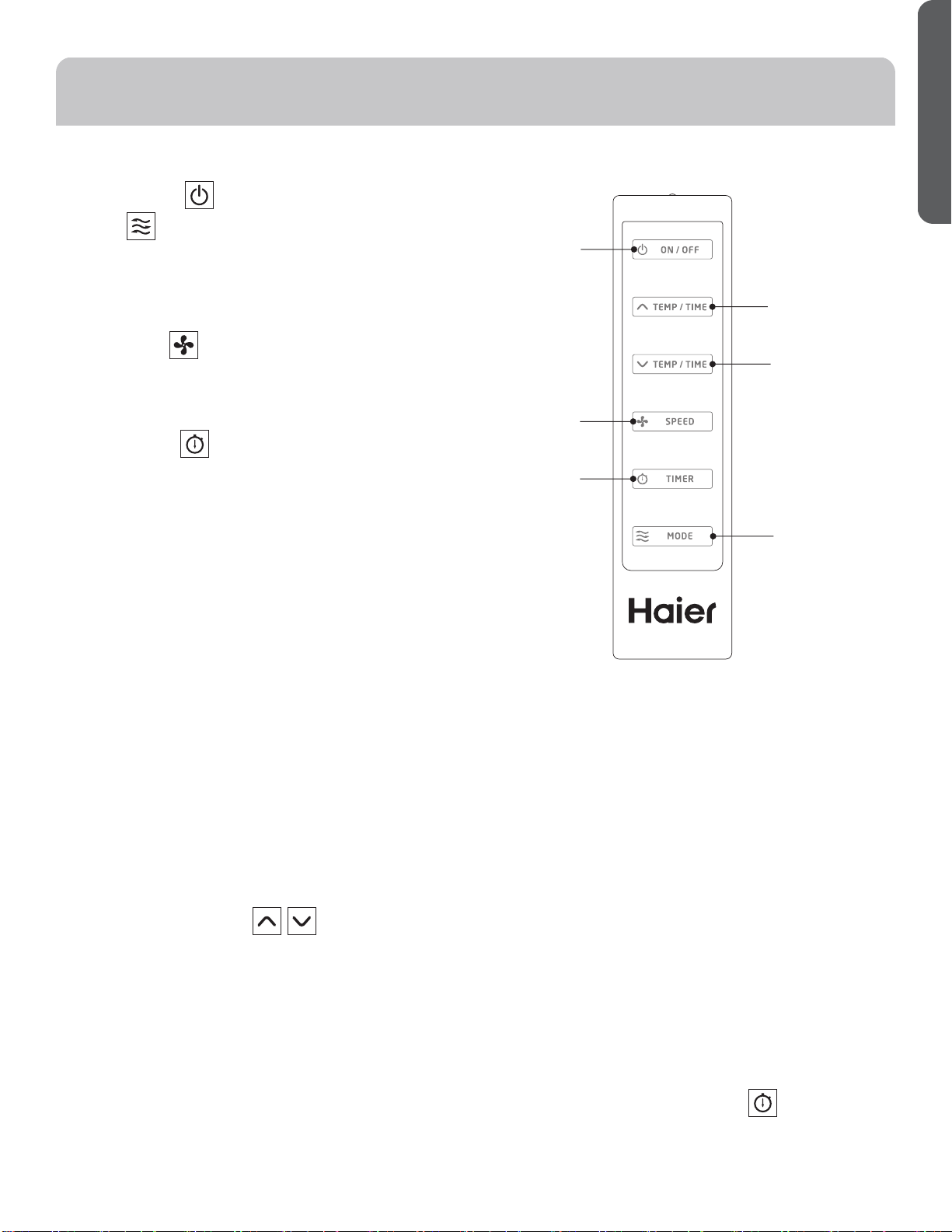
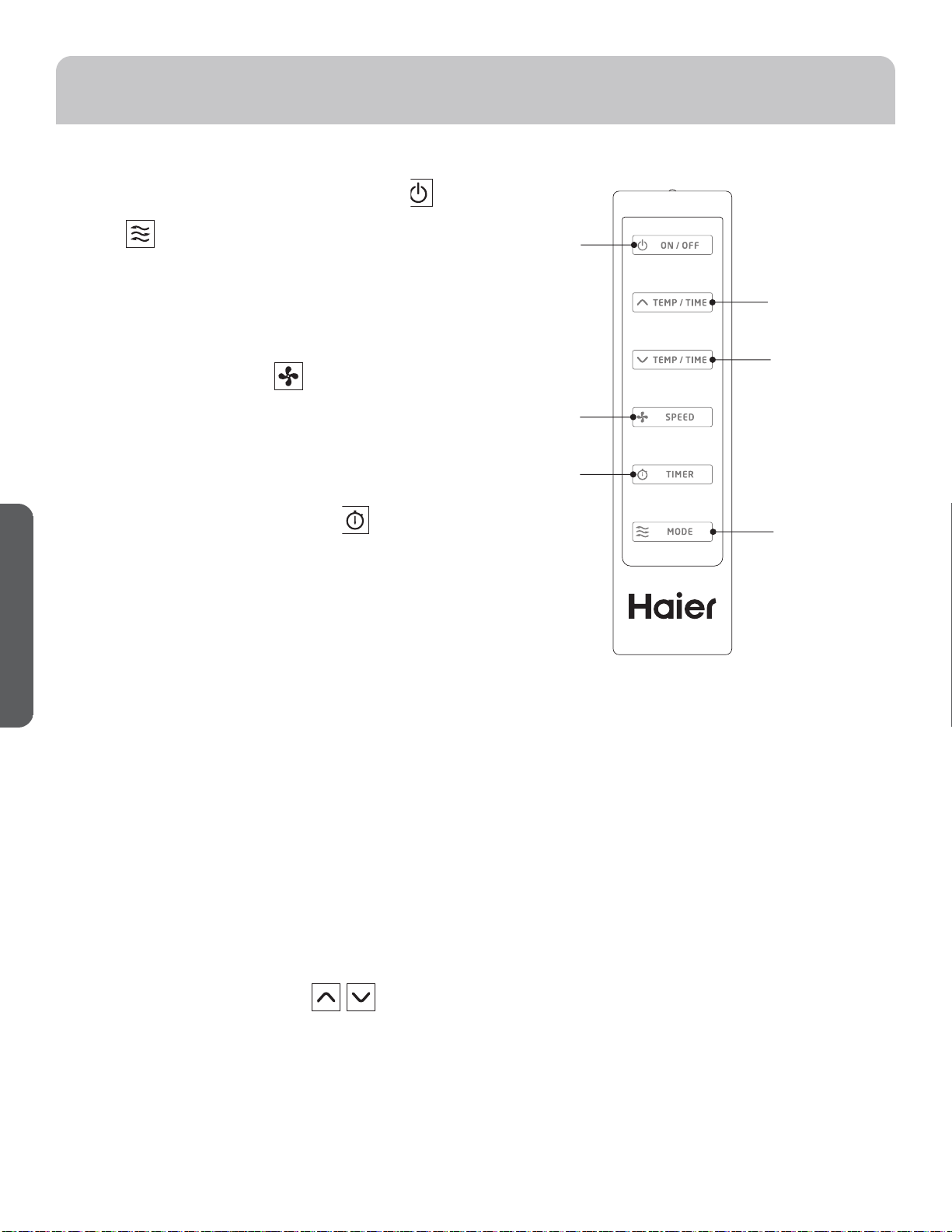
REMOTE CONTROL
1. Power On/Off
2. Mode
Cool: Blue LED lights when in cooling mode.
Dehumidification: Yellow LED lights when in
dehumidification mode.
Fan: Green LED lights when in fan mode.
3. Fan Speeds
Select between multiple fan speeds. Number of fan
speeds vary by model. In dehumidification mode, and
room temperature is greater than 77° F, fan speed can be
adjusted; Otherwise fan speed is fixed to “low”.
4. On/Off Timer
To set the timer for a 1- 24-hour delay until the air
conditioner turns off:
1. When you use the timer setting button while the unit is
operating, you can preset a time for the unit to turn off.
2.
When you use the timer setting button while the unit is
on standby, you can preset a time for the unit to turn on.
3. If you press the “ON/OFF” button, the preset timer
function will be canceled.
4. Timer setting range is 1-24 hours.
To clear Timer Delay program:
NOTE: Air conditioner can be either on or off.
1. Press the Timer Button.
2. Press the + or - buttons continuously till “00” appears
to cancel the timer function.
To change the remaining time (in hours):
1. Press the Timer Button.
2. Press the plus or minus button to change the delay time
from 1 to 24 hours.
3. The new delay time will display.
5. Setting the Temperature
To set the temperature, press the ޔ or ޕ keys to raise or
lower the temperature. The temperature can be raised
or lowered in the cool mode. The temperature cannot be
adjusted in fan or dehumidification mode.
NOTE; The temperature can be set between 61° F to 89° F
(Cool Mode).
1
2
3
4
5
6
8 49-7782-1
ENGLISH
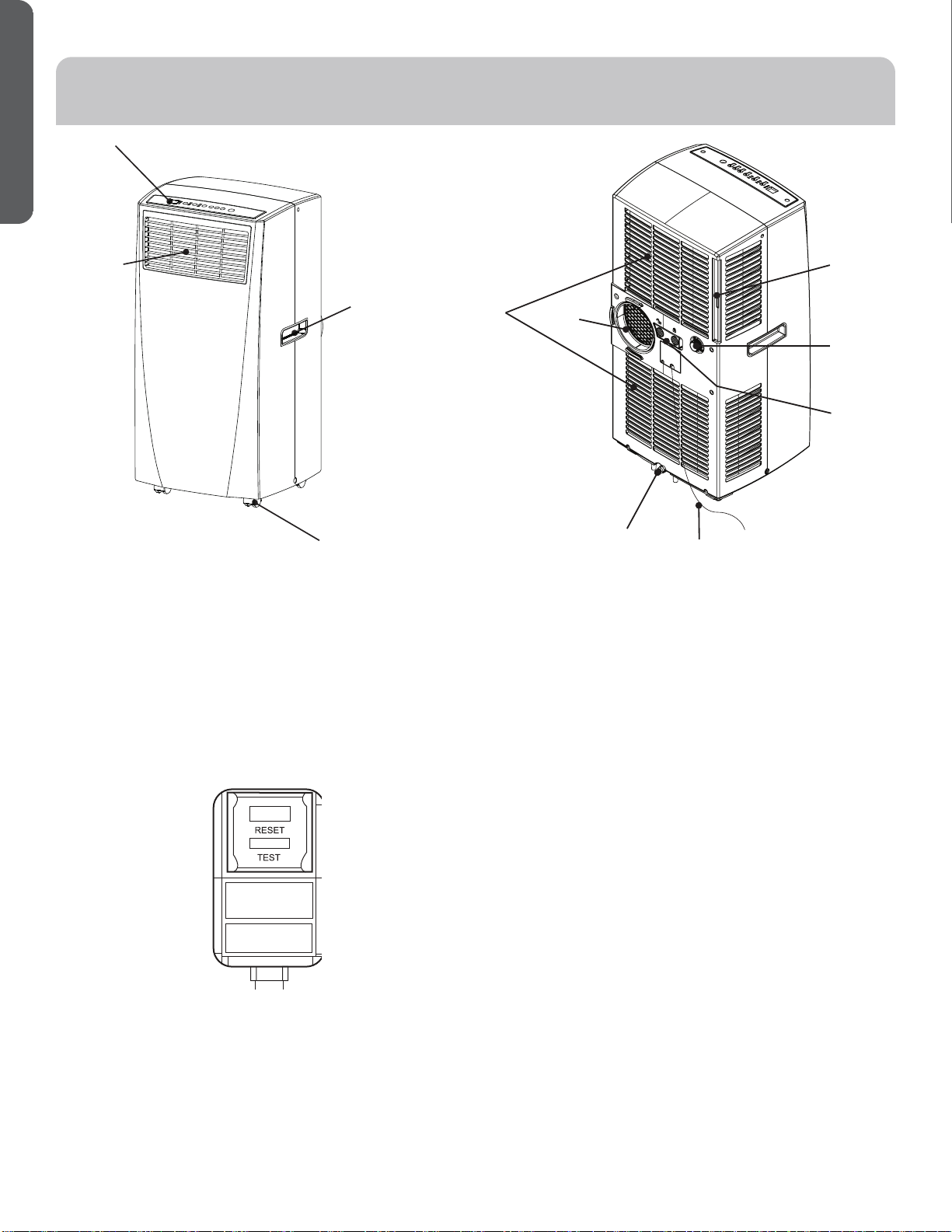
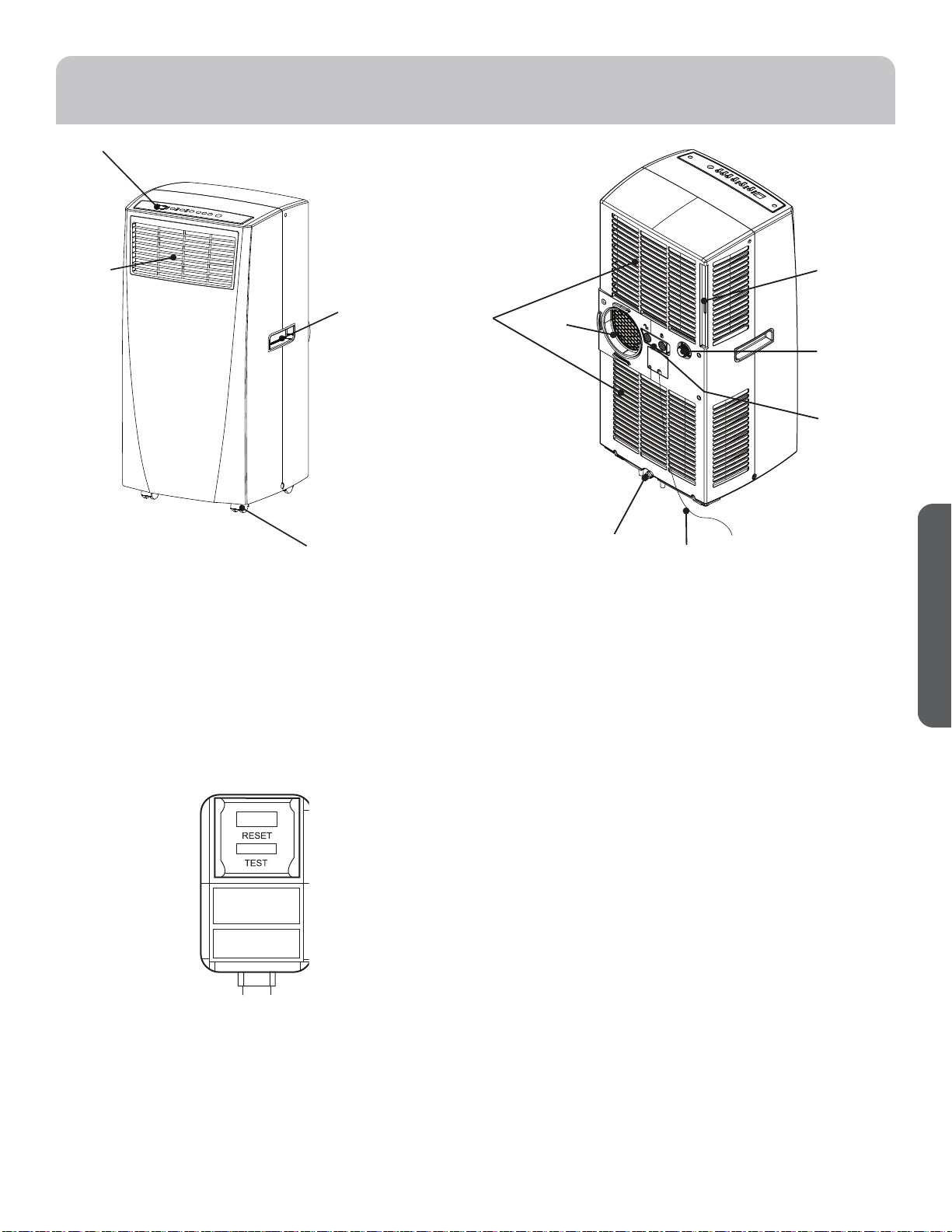
Power Cord
TEST: When this button is pressed or when there is a
current leak, the unit will not operate.
RESET: After resolving the problem, press the reset
button to resume operation.
PARTS AND FEATURES
1. Control Panel
2. Air Outlet
3. Handle hole
4. Caster
5. Air Filter
6. Exhaust Hose Connection
7. Air Intake
8. Upper Drain
9. Lower Drain
NOTE: Please ensure if the water outlet drain is
well installed before use.
10. Power Supply Cord
11. Rocker Switch
1
2
3
4
5
6
7
8
9
10
11
49-7782-1 9
ENGLISH
INSTALLATION REQUIREMENTS
TOOLS AND PARTS
Gather the required tools and parts before starting installation.
TOOLS NEEDED
• Flat-blade Screwdriver
• Phillips Screwdriver
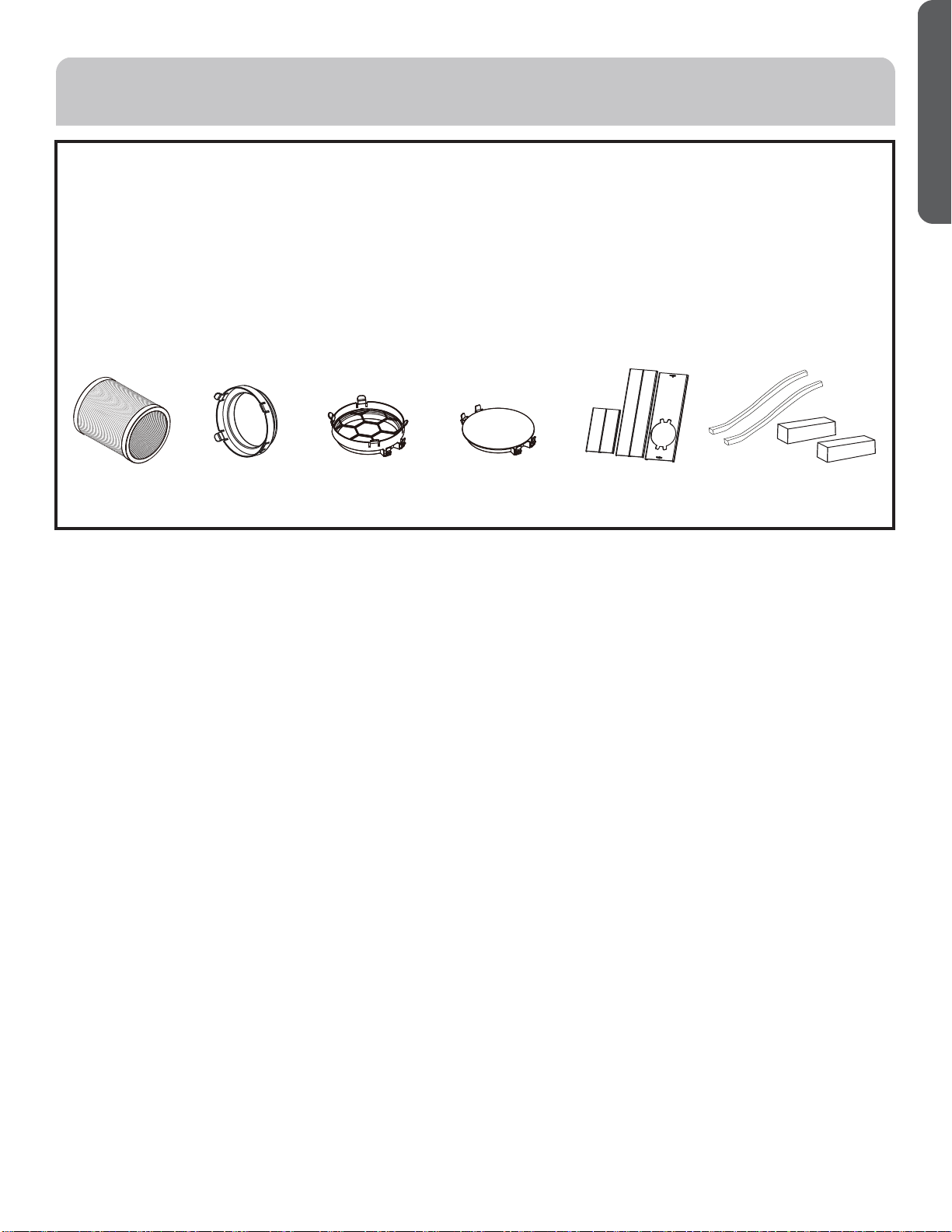
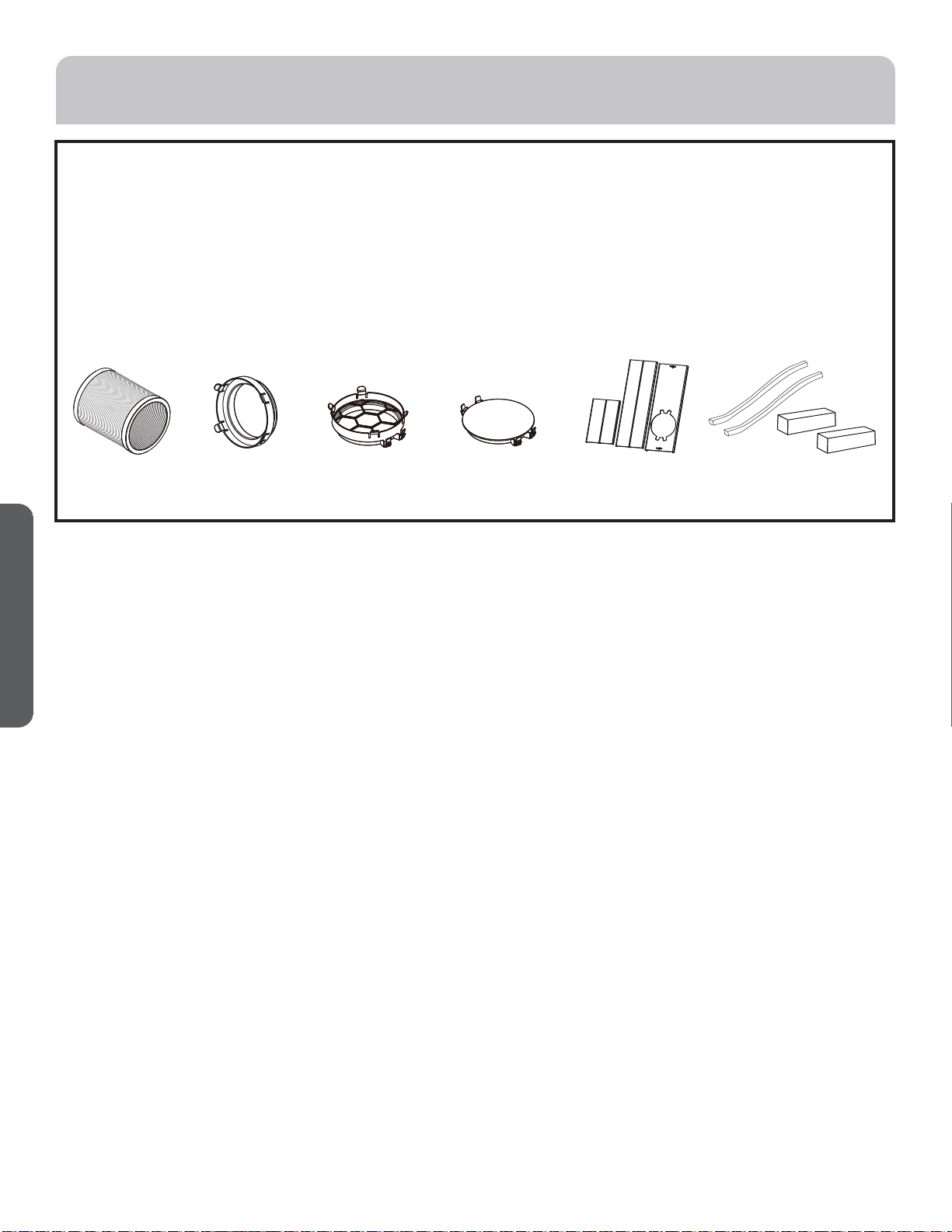
PARTS SUPPLIED
Exhaust Hose
Hose Connector
Hose Connector
Cover #5
Window Panel and
Extension Panel (3)
Foam Seals
10 49-7782-1
ENGLISH
Questions? Call Haier Appliances at 1.877.337.3639 or visit our Website at: HaierAppliances.com.
BEFORE YOU BEGIN
Read these instructions completely and carefully.
• IMPORTANT — Save these instructions for local
inspector’s use.
• IMPORTANT — Observe all governing codes and
ordinances.
• Note to Installer – Be sure to leave these instructions
with the Consumer.
• Note to Consumer – Keep these instructions for future
reference.
• Skill level – Installation of this appliance requires basic
mechanical skills.
• Completion time – Approximately 1 hour
• We recommend that two people install this product.
• Proper installation is the responsibility of the installer.
• Product failure due to improper installation is not
covered under the Warranty.
• You MUST use all supplied parts and use proper
installation procedures as described in these
instructions when installing this air conditioner.
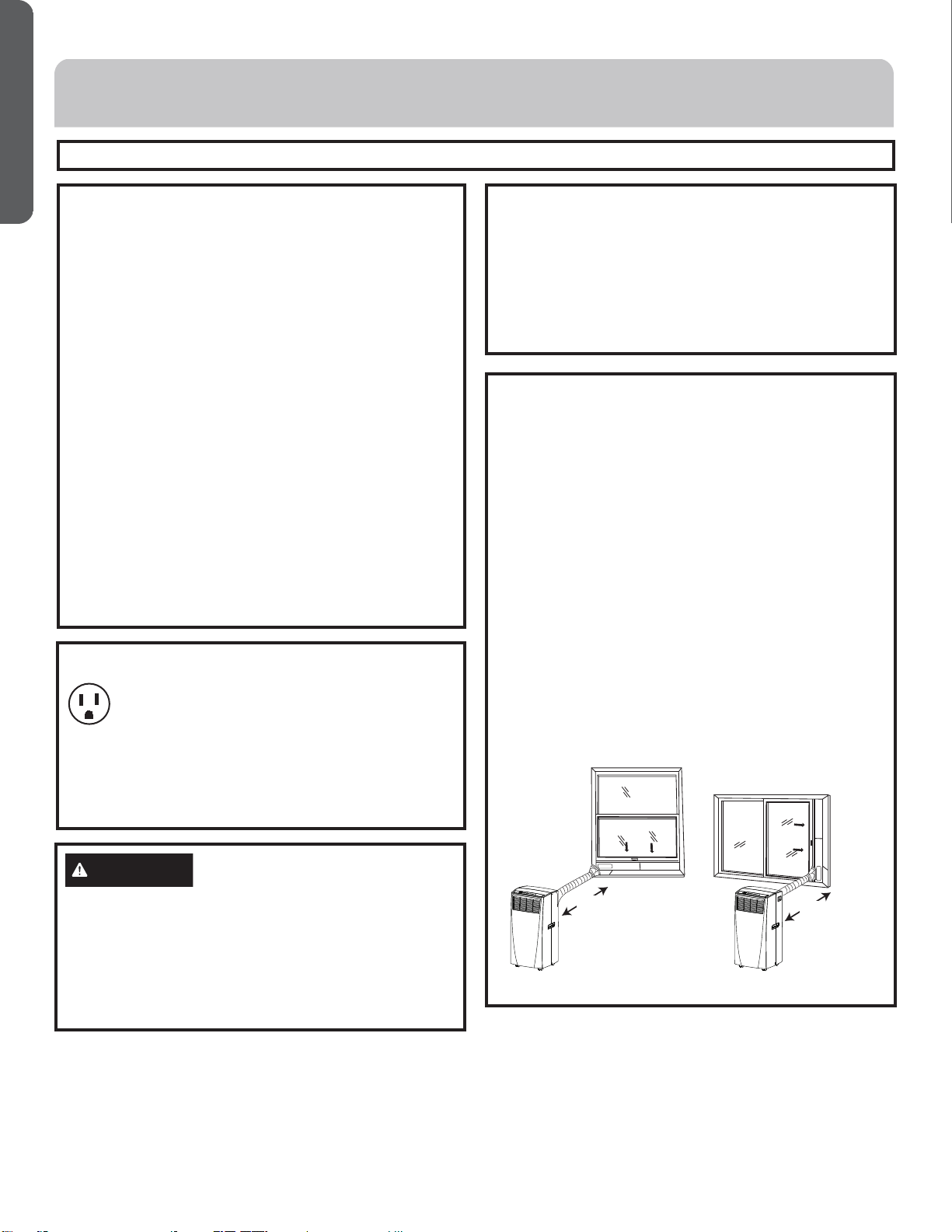
Location Requirements
• Place the air conditioner on a flat, level surface in a
location that is at least 20” (51 cm) from any wall.
NOTE: A minimum clearance of 30” (76.2 cm) from the
air conditioner to the wall must be maintained to ensure
proper airflow.
• Maintain a minimum 20” (51 cm) clearance around the air
conditioner to not block airflow.
• Keep the air conditioner free of any obstructions such as
drapes, curtains, blinds, etc.
• The exhaust hose should be free of any obstructions.
• Do not place the air conditioner on an unstable or raised
surface because it could fall and cause damage or injury.
•
Do not place the air conditioner in direct sunlight or near
a heat source such as baseboard heaters, stoves, etc.
• The window panel can be installed in a window with a
minimum 20” (51 cm) to a maximum 40” (101.6 cm)
opening.
20”
(51 CM)
20”
(51 CM)
ÎÕÎÌÝÛÒÌÊÕÛÎÚÞÒÛÎÖÎ×ÝÜ
Some models require a 115/120-volt AC,
60-Hz grounded outlet protected with a 15-amp
time-delay fuse or circuit breaker.
The 3-prong grounding plug minimizes the possibility of
electric shock hazard. If the wall outlet you plan to use is
only a 2-prong outlet, it is your responsibility to have it
replaced with a properly grounded 3-prong wall outlet.
CAUTION
Do not, under any circumstances, cut or remove the third
(ground) prong from the power cord.
Do not change the plug on the power cord of this air
conditioner.
Aluminium house wiring may present special problems—
consult a qualified electrician.
Power cord includes a current interrupter device. A test
and reset button is provided on the plug case. The device
should be tested on a periodic basis by first pressing the
TEST button and then the RESET button while plugged
into the outlet. If the TEST button does not trip or if the
RESET button will not stay engaged, discontinue use
of the air conditioner and contact a qualified service
technician.
INSTALLATION INSTRUCTIONS
49-7782-1 11
ENGLISH
1. Unpack the Air Conditioner
WARNING
Excessive Weight Hazard
• Use two or more people to move and install air
conditioner.
• Failure to do so can result in back or other injury.
• Remove packaging materials. Save the carton and the
foam packaging for storing the air conditioner when
not in use.
NOTE: There are NO packing materials inside the air
conditioner to remove—Do Not open the cabinet.
• Properly dispose of/recycle all packing material.
• Handle the air conditioner gently.
• Keep the air conditioner upright and level. Do not set
the air conditioner on its side, front, back or upside
down.
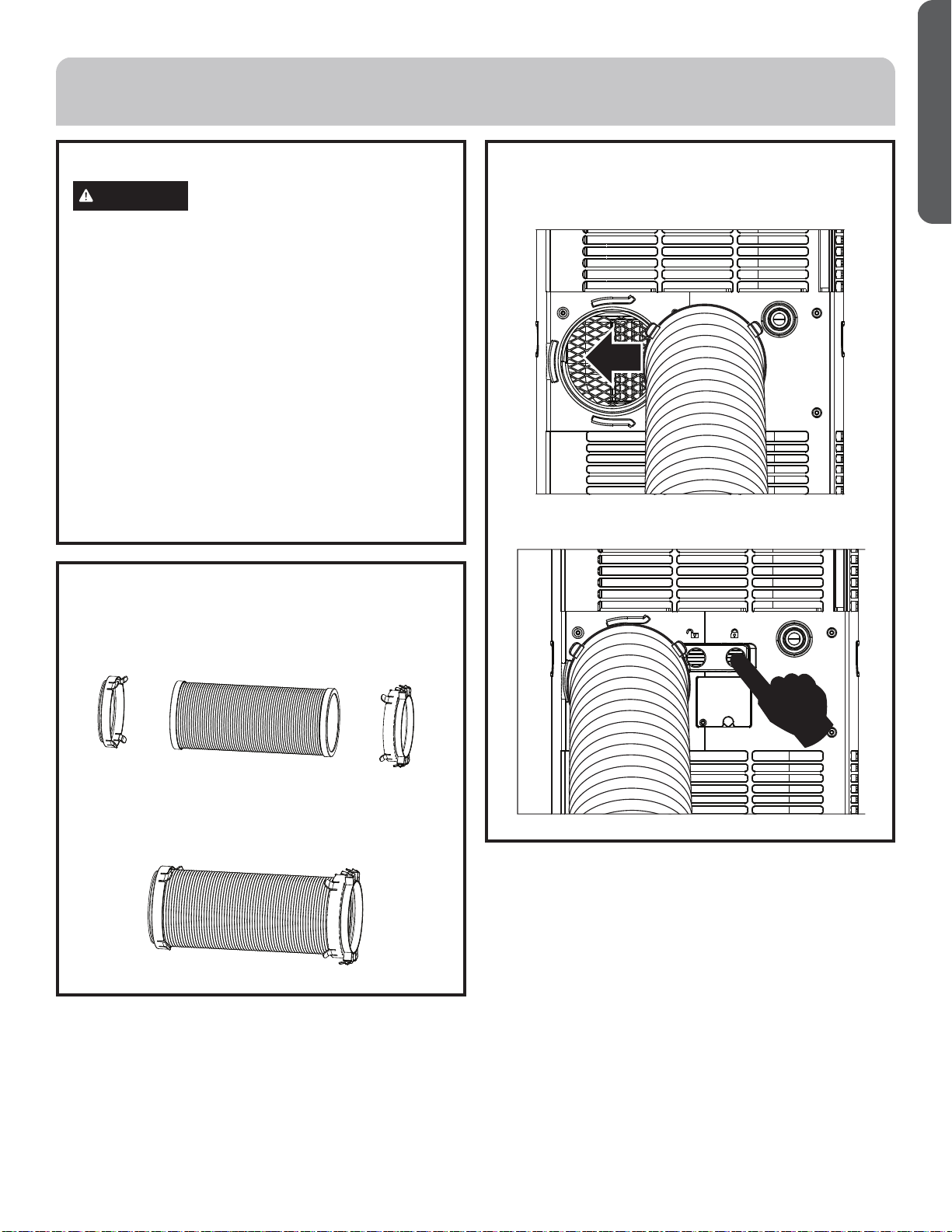
2. Install Exhaust
1. Connect the connectors #2 and #3 to two sides of
exhaust hose #1 to create an exhaust assembly.
2. Install Exhaust (cont.)
2. Sliding in one end of hose assembly (with hose
connector #2) to rear panel.
Ýëèñóøöë÷ëèõòæîèõöúì÷æë÷òĤû÷ëèëòöèäööèðåïü
Ĥõðïü
INSTALLATION INSTRUCTIONS
2 1 3
12 49-7782-1
ENGLISH
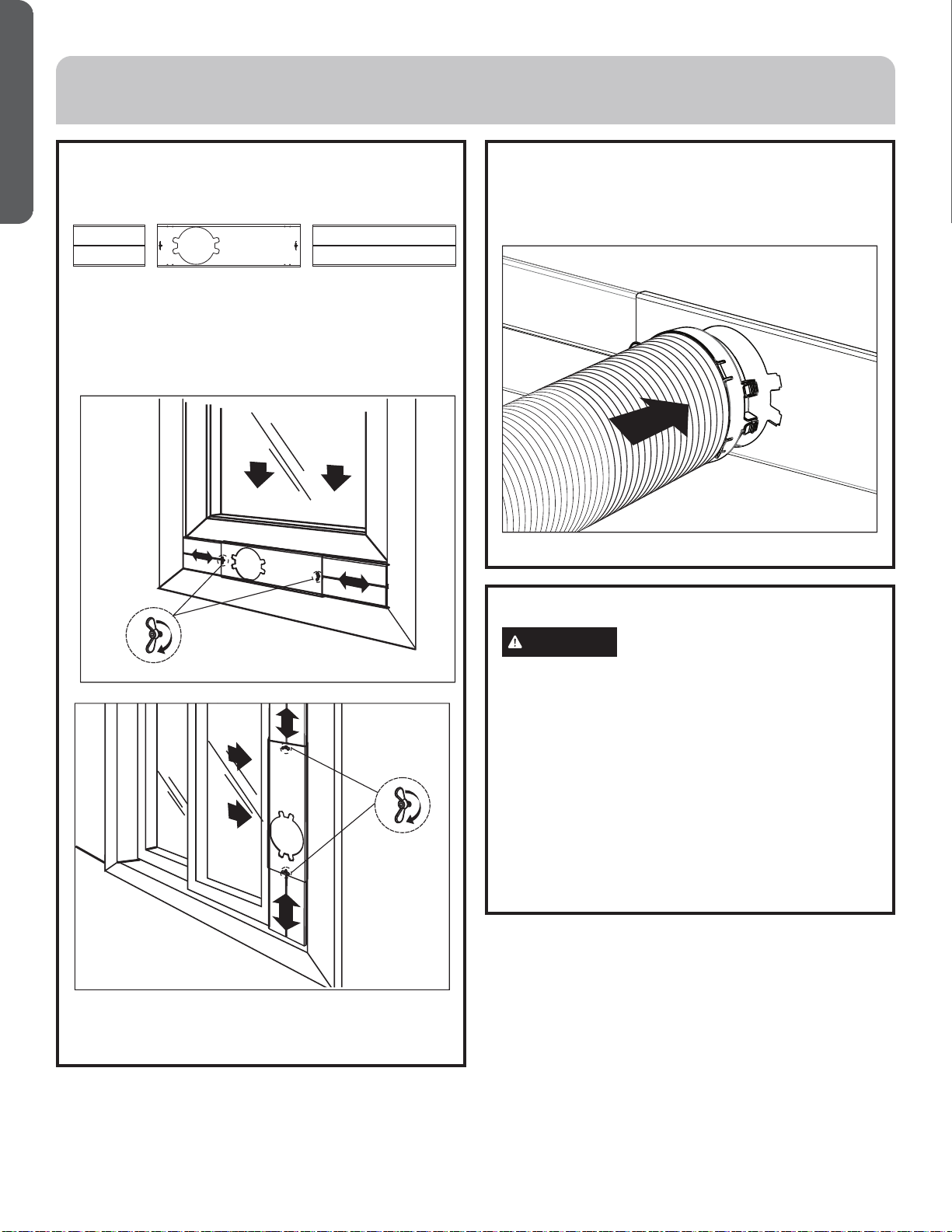
3. Install Window Panels
1. Insert the window panel B and C to each end of the
main panel A. Adjust to fix the length of window.
2. Open the window and place window panels into
úìñçòúÊçíøö÷÷ëèèû÷èñöìòñóäñèïö÷òĤ÷úìç÷ëòõ
height of window by the screw and nut sets mounted
on the main ptanel A.
4. Attach Exhaust Hose to the
Exhaust Nozzle
1. Insert the other end of the exhaust hose assembly
(with hose connector #3) onto the window bracket.
INSTALLATION INSTRUCTIONS
5. Complete Installation
WARNING
Electrical Shock Hazard:
• Plug into a grounded 3 prong outlet.
• Do not remove the ground prong from the power
cord plug.
• Do not use an adapter.
• Do not use an extension cord.
• Failure to do so can result in death, fire or electrical shock.
1. Plug the power cord into a grounded 3 prong outlet.
2. Press the Reset button on the power cord to
ensure the safety plug is providing power to the air
conditioner.
CA B
49-7782-1 13
ENGLISH
IMPORTANT: If the air conditioner has been tilted on its side,
wait 24 hours before turning on the air conditioner to allow
the oil to return to the compressor. This will prevent the air
conditioner from failing prematurely.
• Allow 20” (51 cm) of space around the unit for proper air
circulation.
• Do Not operate the air conditioner without air filters in
place.
• Do not spill liquid on the control panel; it may cause an
electrical short to the interior electronic parts that would
either disable them or cause them to function improperly.
• When turning on the air conditioner for the first time
after plugging it into an electrical outlet, the unit will
start in Cooling mode set at 75ºF (24°C), and at High fan
speed. The control panel will display the current room
temperature.
• When turning on the unit after previous use, it will
remember the last settings used.
• After a normal shut down, please wait for 3 minutes before
restarting the unit.
• In Cooling mode, this unit should not require water to be
removed. This model has a unique design that continuously
evaporates the water.
• When the unit is operated in high humidity conditions, you
may need to empty the water tank periodically.
• The unit will shut down automatically when the water tank
is full. The Full indicator illuminates to alert you of this
condition.
WARNING
Electrical Shock Hazard:
• Disconnect power before cleaning.
• Failure to do so can result in death or electrical shock.
Cleaning
1. Unplug or disconnect power.
2. Use only a soft cloth dampened with water to clean the
cabinet.
NOTE: Do not use a liquid or spray cleaner to clean the air
conditioner.
NOTE: DO NOT use chemicals, abrasives, ammonia,
chlorine bleach, concentrated detergents, solvents or
scouring pads. Some of these chemicals/items may
damage and/or discolor your air conditioner.
3. Dry thoroughly with a soft cloth.
4. Plug in or reconnect power.
Air Filters
The air filters should be cleaned at least once a week for your
unit to operate at optimum efficiency.
IMPORTANT: Do Not operate the air conditioner without the
air filters in place.
1. Unplug or disconnect the power.
2. Pull on the tabs to slide out the filters from the back of the
air conditioner.
NOTE: The secondary filters are accessible once the main
filters are removed.
3. Wash or vacuum the dust from the air filters.
NOTE: If washed, gently shake the filter to remove the
excess water and dust particles trapped in the filter.
4. Reinstall the filters.
5. Plug in or reconnect power.
Internal Water Tank
The Full indicator illuminates, when the internal water tank
has filled with condensed water.
To Empty the Internal Water Tank:
1. Unplug or disconnect power.
2. Place a shallow 1 quart or larger pan (not included) below
the lower drain located on the back (near the bottom) of
the air conditioner.
3. Remove the cap and the rubber plug and drain the water
tank.
4. Re-insert the drain plug and screw the cap snugly into
place.
5. Plug in or reconnect power.
Storage
If the unit is not being used for a long period of time:
1. Unplug or disconnect power.
2. Drain the water from the water tank. See “Air
Conditioner Care.”
3. Use the original packaging to repack the unit to avoid a
buildup of dust or dirt.
4. Store the air conditioner in a cool, dry location.
AIR CONDITIONER USE
AIR CONDITIONER CARE
14 49-7782-1
ENGLISH
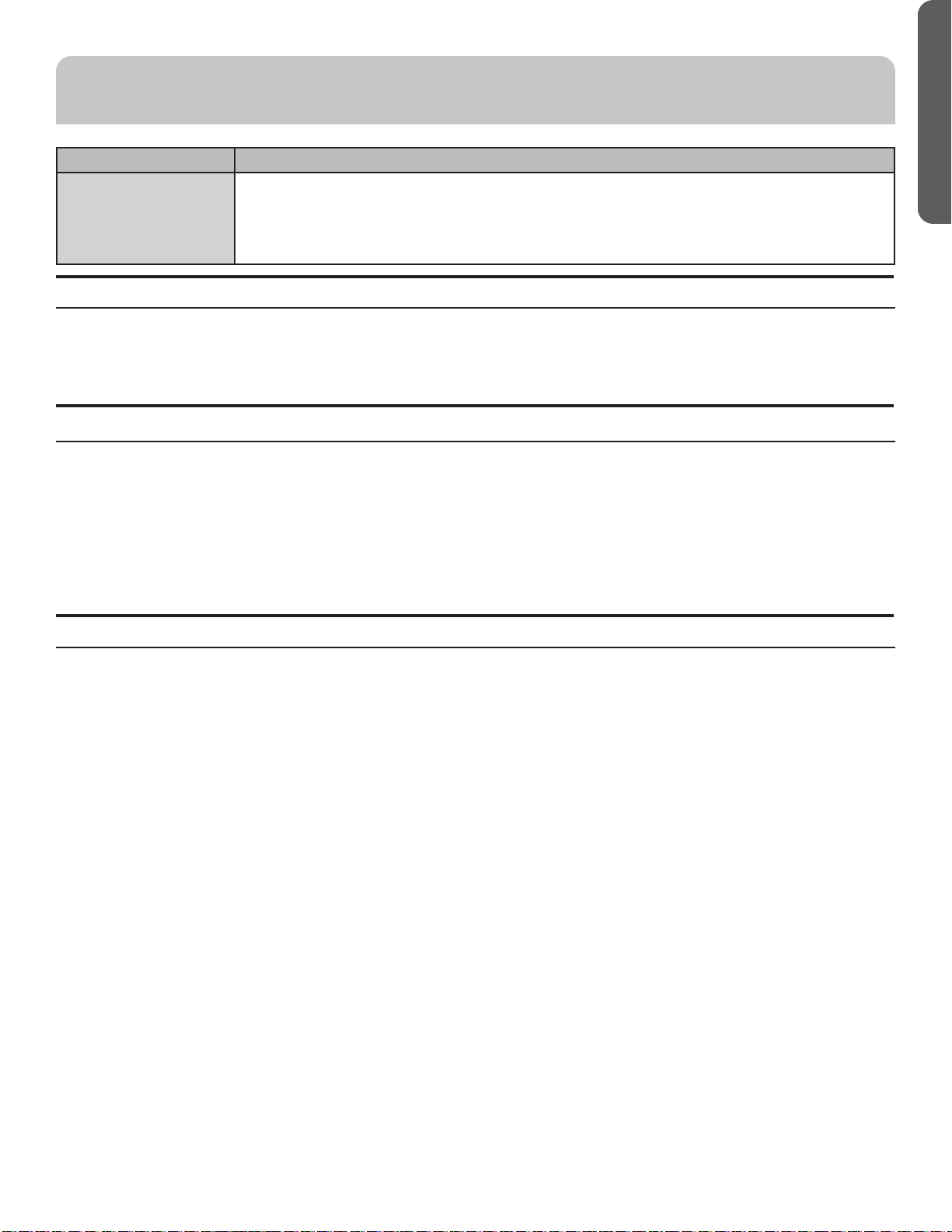
Problem Possible Causes Solution
Unit does not start or
operate
Power supply cord is not plugged into an
outlet.
Plug the power cord into a grounded 3 prong outlet.
Power supply cord has tripped. Press and release the RESET button on the power
supply cord.
The Power button has not been pressed. Press the Power button on the Control Panel or
Remote Control to turn ON the air conditioner.
There is no power to the electrical outlet. Plug a working lamp into the outlet to check for
power.
A household fuse has blown or a circuit breaker
has tripped.
Replace the fuse or reset the circuit breaker.
The control was programmed for a Time Delay. Cancel the Time Delay. See “Control Panel.”
The batteries in the remote control are dead. Replace the batteries.
The internal water tank is full.
NOTE: The air conditioner automatically turns
off, and the Water Full indicator illuminates to
alert you of this condition.
Empty the water tank. See “Air Conditioner
Care.”
Remote control is not
working
Batteries are dead. Replace the batteries.
Batteries are installed incorrectly. Make sure the batteries are inserted in the correct
position.
Air conditioner is
working but the room
is not cooling.
The room temperature is hot.
NOTE: On extremely hot and humid days,the
air conditioner will take longer to cool the
room.
Allow time for the room to cool when you first turn
on the unit.
Make sure the air conditioner has an adequate
BTU rating for the size of the room being cooled.
The control is set incorrectly to Fan or Dehum
mode.
Set the Mode to Cool and the Fan Speed to High.
Airflow is restricted. Remove any obstacles to the airflow and redirect
airflow for uniform cooling.
Temperature set too high. Lower the set temperature.
Air filters are dirty or restricted. Clean the air filter. See “Air Conditioner Care.”
Air conditioner installed incorrectly Check the exhaust hose and window panel for
proper installation.
Doors and windows are open. Close the doors and windows to the room being
cooled to prevent cooled air from escaping.
TROUBLESHOOTING
49-7782-1 15
ENGLISH
LIMITED WARRANTY
EXCLUSION OF IMPLIED WARRANTIES - Your sole and exclusive remedy is product repair as provided in this Limited
Warranty. Any implied warranties, including the implied warranties of merchantability or fitness for a particular purpose,
are limited to one year or the shortest period allowed by law.
For US Customers: This limited warranty is extended to the original purchaser and any succeeding owner for products
purchased for home use within the USA. If the product is located in an area where service by a GE Appliances Authorized
Servicer is not available, you may be responsible for a trip charge or you may be required to bring the product to an Authorized
GE Appliances Service location for service. In Alaska, the limited warranty excludes the cost of shipping or service calls to your
home.
Some states do not allow the exclusion or limitation of incidental or consequential damages. This limited warranty gives you
specific legal rights, and you may also have other rights which vary from state to state. To know what your legal rights are,
consult your local or state consumer affairs office or your state’s Attorney General.
Warrantor US:
GE Appliances, a Haier company
Louisville, KY 40225
Ŷ Customer instruction. This owner’s manual provides
information regarding operating instructions and user
controls.
Ŷ Improper installation. If you have an installation problem,
or if the air conditioner is of improper capacity, contact
your dealer or installer. You are responsible for providing
adequate electrical connecting facilities.
Ŷ Failure of the product resulting from modifications to the
product or due to unreasonable use including failure to
provide reasonable and necessary maintenance.
Ŷ Replacement of house fuses or resetting of circuit breakers.
Ŷ Failure due to corrosion on models not corrosion-protected.
Ŷ Damage to the product caused by improper power supply
voltage, accident, fire, floods or acts of God.
Ŷ Incidental or consequential damage caused by possible
defects with this air conditioner.
Ŷ Damage caused after delivery.
What Will Not Cover:
For The Period Of: Will Replace:
One Year
From the date of the
original purchase
Replacement, repair, or refund of the original retail price for any product which fails due to a
defect in materials or workmanship. If the unit is exchanged, the replacement unit is warranted
for the remainder of your product’s original one-year warranty period. GE will, at its sole
discretion, replace the product with a product of the same or comparable functionality and quality
or refund the original retail price.
Ŷ Properly pack your unit. We recommend using the original
carton and packing materials.
ŶReturn the product to the retail location where it was
purchased.
Ŷ Include in the package a copy of the sales receipt or other
evidence of date of original purchase. Also print your name
and address and a description of the defect.
In Order to Make a Warranty Claim During the First 90 Days from the Date of Original Purchase:
Ŷ Locate your original sales receipt and make a note of your
model and serial number.
Ŷ Call 1.877.337.3639 (in the United States) to initiate the
product replacement process.
ŶYou will be asked to provide your name, address, date of
purchase, model and serial number.
ŶGE Appliances will arrange for a carton to be sent to your
home to recover the product.
Ŷ Please return all requested materials (postage pre-paid) in the
carton provided. Please include a description of the defect.
ŶYou should receive your replacement product or refund
within 7 to 10 business days after your package is received.
In Order to Make a Warranty Claim During the Remainder of the One-Year Warranty:
16 49-7782-1
ENGLISH
NOTES
49-7782-1 17
ESPAÑOL
ÍNDICE
SEGURIDAD DEL ACONDICIONADOR DE AIRE ......................................................................... 19
PANEL DE CONTROL .................................................................................................. 20
PIEZAS Y CARACTERÍSTICAS .......................................................................................... 23
REQUISITOS DE INSTALACIÓN .........................................................................................24
INSTRUCCIONES DE INSTALACIÓN ....................................................................................25
USO DEL ACONDICIONADOR DE AIRE ................................................................................. 28
CUIDADO DEL ACONDICIONADOR DE AIRE ............................................................................28
SOLUCIÓN DE PROBLEMAS ............................................................................................29
GARANTÍA LIMITADA ..................................................................................................31
SITIO WEB DE HAIER
¿Desea realizar una consulta o necesita ayuda con su electrodoméstico? ¡Intente a través del Sitio Web de Haier las 24 horas del día,
cualquier día del año! Usted también puede comprar más electrodomésticos maravillosos de Haier y aprovechar todos nuestros servicios
de soporte a través de Internet, diseñados para su conveniencia. En EE.UU.: Haierappliances.com
INFORMACIÓN A TENER EN CUENTA
Le agradecemos la compra de este producto de marca Haier. Este
manual para el usuario le ayudará a obtener el mejor funcionamiento
de su nueva estufa.
Para referencia futura, registre el modelo y número de serie ubicados
en el frente, detrás del cajón de almacenamiento de la cocina, y la
fecha de compra.
Engrape la prueba de compra a este manual para asistirle cuando
necesite obtener servicio bajo la garantía.
__________________________________________________________
Número de modelo
__________________________________________________________
Número de serie
__________________________________________________________
Fecha de compra
18 49-7782-1
ESPAÑOL
49-7782-1 19
ESPAÑOL
INSTRUCCIONES IMPORTANTES DE SEGURIDAD
ADVERTENCIA
Para reducir el riesgo de incendio,
choque eléctrico, lesiones a personas o daños al utilizar el
acondicionador de aire, siga precauciones básicas, incluyendo
las siguientes:
• Lea todas las instrucciones antes de usar este
electrodoméstico.
• Conecte a un contacto de pared de conexión a tierra de 3
terminales.
• No quite el terminal de conexión a tierra.
• No use un adaptador.
• No use un cable eléctrico de extensión.
• No ponga a funcionar el acondicionador de aire si tiene un
cable o enchufe dañado, si no funciona correctamente o si se
ha dañado o caído.
• El acondicionador de aire solo debe ser reparado por personal
de servicio competente. Llame a la compañía de servicio
técnico autorizada para su inspección, reparación o ajuste.
• Desconecte el suministro de energía antes de darle
servicio técnico.
• Desconecte el suministro de energía antes de limpiarlo..
NOTA: Si apaga la unidad presionando el botón Power
(Encendido), esto NO desconecta el electrodoméstico del
suministro de energía.
• No instale ni utilice el acondicionador de aire en áreas
donde la atmósfera contenga gases combustibles o donde
la atmósfera esté contaminada. Evite que cualquier producto
químico entre en contacto con el acondicionador de aire.
• No almacene nada directamente encima del acondicionador
de aire.
• Con la ayuda de dos o más personas, mueva e instale el
acondicionador de aire.
• Nunca haga funcionar el acondicionador de aire si los filtros
de aire no están colocados en su lugar.
• No utilice el acondicionado de aire cerca de una tina, ducha o
lavabo ni otra zona húmeda.
INFORMACIÓN IMPORTANTE DE SEGURIDAD
LEA TODAS LAS INSTRUCCIONES ANTES DE USAR
LEA Y GUARDE ESTAS INSTRUCCIONES
SEGURIDAD DEL ACONDICIONADOR DE AIRE
20 49-7782-1
ESPAÑOL
PANEL DE CONTROL
Features and appearance will vary.
Lights next to the touch pads on the air conditioner control panel indicate the selected settings.
BOTONES
A Pantalla
B. Luz de Advertencia
Se podrá acumular agua condensada en la unidad. Si el tanque
interno se llena, la luz de advertencia se iluminará y la unidad no
funcionará hasta que la unidad haya sido drenada.
C. Control de la Corriente
El control de la corriente enciende y apaga la unidad.
D. Control de Modo
Îïæòñ÷õòïçèðòçòóòöèè÷õèöæòñĤêøõäæìòñèöÌØØÕ¤Ïõżò¥
ÍÎÑÞÖÒÍÒÏâ¤ÍèöëøðìçìĤæäõ¥üÏÊפßèñ÷ìïäçòõ¥Õäö
æòñĤêøõäæìòñèööòñäíøö÷äçäöæòñèïåò÷ſñÖòçèÌòñ÷õòï
¤Ìòñ÷õòïçèÖòçò¥ÞñäïøýìñçìæäõŹôøŻæòñĤêøõäæìſñèö÷Ź
siendo usada actualmente.
Modo de Refrigeración
Ìøäñçòèïðòçòçèõèéõìêèõäæìſñöèäöèïèææìòñäçòïäïøýìñçìæä-
dora cambiará a azul. Durante el modo de refrigeración, el aire
es enfriado y el aire caliente es extraído hacia afuera a través de
ïäö÷øåèõżäöçèïèû÷õäæ÷òõÊíøö÷èïäùèïòæìçäççèïùèñ÷ìïäçòõüïä
temperatura del aire hasta el nivel de confort deseado. NOTA:
Las mangueras de intercambio de aire deberán ventilar hacia
afuera de la sala al usar el modo de refrigeración.
0RGRGH'HVKXPLGL¿FDFLyQ
ÌøäñçòèïðòçòçèçèöëøðìçìĤæäæìſñöèäöèïèææìòñäçòïäïøý
ìñçìæäçòõäæäðåìäõŹääðäõìïïòÎïäìõèöèõŹçèöëøðìçìĤæäçòäï
pasar a través de la unidad, sin estar en el modo de refrigeración
total. Si la temperatura del ambiente es superior a 77 grados
Fahrenheit, la velocidad del ventilador podrá ser ajustada; de otro
ðòçòïäùèïòæìçäççèïùèñ÷ìïäçòõöèõŹäíøö÷äçäèñēÕòúĔ¤Ëäíò¥
×ØÝÊÜìïäøñìçäçöèõŹøöäçäæòðòçèöëøðìçìĤæäçòõñò
conecte la manguera del extractor; permita que el aire caliente
regrese a la sala. Un drenaje continuo será entonces necesario.
Modo de Ventilación
Ìøäñçòèïðòçòçèùèñ÷ìïäæìſñöèäöèïèææìòñäçòïäïøýìñçìæä-
dora brillará de color verde. El aire será circuilado a través de toda
la sala sin refrigeración. NOTA: No es necesario que la unidad
sea ventilada en el modo Fan (Ventilador).
E. Control de Velocidad del Ventilador
Seleccione entre varias velocidades de ventilador. El número de
velocidades del ventilador varía según el modelo.
Öäñ÷èñêäóõèöìòñäçòèïåò÷ſñÏÊ×çøõäñ÷è#öèêøñçòöèï
ventilador continuará funcionando incluso cuando el compresor
se detenga debido a la temperatura alcanzada.
F. Temporizador
Apagado Automático:
Ìòñèïðò÷òõèñèïðòçòçèéøñæìòñäðìèñ÷òóõèöìòñèèïåò÷ſñ
del temporizador para seleccionar la cantidad de horas que de-
sea que la unidad funcione en el modo de acondicionador de aire
hasta que la misma se apague de forma automática.
Encendido Automático:
Ìòñèïðò÷òõèñèïðòçòçèèöóèõäóõèöìòñèèïåò÷ſñçèï
temporizador para seleccionar la cantidad de horas que desea
que pasen hasta que la unidad comience a funcionar de forma
automática en el modo de acondicionador de aire.
)&RQWUROHVGHO7HPSRUL]DGRU&RQ¿JGH7HPSHUDWXUD
• Se usa para ajustar el temporizador y el termostato.
• La pantalla por omisión es la temperatura del ambiente.
¬Ìøäñçòïòöåò÷òñèöޕRޔsean presionados en el modo de
õèéõìêèõäæìſñïä÷èðóèõä÷øõäæòñĤêøõäçäöèõŹèûëìåìçäüóòçõŹ
ser ajustada. Luego de 15 segundos, la pantalla regresará a
la temperatura del ambiente. La temperature sólo puede ser
ajustada en el modo de refrigeración. La hora puede ser ajustada
entre 1 y 24 horas.
×ØÝÊÊïóõèöìòñäõïòöËò÷òñèöçèÌòñĤêøõäæìſñÝìðèõ¦Ýèðó
¤Ýèðóòõìýäçòõ¦Ýèðó¥äïðìöðò÷ìèðóòïäóäñ÷äïïääï÷èõñäõŹ
entre Celsius y Fahrenheit. La temperatura no puede ser
äíøö÷äçäèñïòöðòçòöçèùèñ÷ìïäçòõòçèöëøðìçìĤæäæìſñ
ÕøèêòçèäóäêäõèïäæòñçìæìòñäçòõçèäìõèçèåèõŹèöóèõäõ#ðìñø÷òöóäõäùòïùèõäèñæèñçèõïò
Ê
Ë
Ì
D
E
F
G
Hold 3 Sec for
Constant Cool
CONSTANT
COOL
COOL
DEHUM
FAN
LOW
HIGH
49-7782-1 21
ESPAÑOL
PANEL DE CONTROL
Modo de Refrigeración
Use el modo COOL (Refrigeración) para enfriar.
Para configurar el modo COOL (Refrigeración):
1. Presione la tecla MODE (Modo) hasta que la luz indicadora
de COOL (Refrigeración) esté encendida.
2. Presione la tecla FAN (Ventilador) para configurar la velocidad
del ventilador en HIGH (Alto), LOW (Bajo).
3. Presione + o – para configurar la temperatura deseada entre
61°F y 89°F por incrementos de 1°F.
Una vez aplicadas las configuraciones, la pantalla volverá a
mostrar la temperatura ambiente.
El control de temperatura se usa para mantener la temperatura
del ambiente. El compresor realizará el ciclo de encendido
y apagado para mantener la sala en el nivel de confort
configurado. Configure el control de temperatura en un número
más bajo, y el aire interior comenzará a ser más frío. Configure
el control de temperatura en un número más alto, y el aire
interior comenzará a ser más caliente.
NOTA: Si el acondicionador de aire está apagado y luego es
encendido en la configuración COOL (Refrigeración), pasarán
aproximadamente 3 minutos hasta que el compresor se inicie y
comience la refrigeración.
Descripciones de Refrigeración
Para un Enfriamiento Normal—Seleccione el modo COOL
(Refrigeración) y la velocidad del ventilador en HIGH (Alto)
o MEDIUM (Medio) con una temperatura en la configuración
intermedia.
Para un Enfriamiento Máximo—Seleccione el modo COOL
(Refrigeración) y la velocidad del ventilador en HIGH (Alto) con
una temperatura en una configuración baja.
Para un Enfriamiento Más Suave y Nocturno—Seleccione el
modo COOL (Refrigeración) y la velocidad del ventilador en LOW
(Bajo) con una temperatura en la configuración intermedia.
NOTA: Si pasa de la configuración del modo COOL
(Refrigeración) o DRY (Seco) a OFF (Apagado), espere 3
minutos antes de realizar el reinicio.
En el modo Frío, el ventilador se apagará con el compresor
cuando se alcance la temperatura ambiente. Luego, el
ventilador realizará un ciclo de 10 minutos de apagado y 2
minutos en la temperatura del aire
Modo DRY (Seco) - Deshumidificación
Use el modo DRY (Seco) sólo para aplicar la deshumidificación.
El ventilador funcionará en una velocidad fija en esta
configuración, de modo que no será posible configurar la
velocidad de la ventilación. Mantenga las ventanas y puertas
cerradas para lograr los mejores efectos de deshumidificación.
Para configurar el modo DRY (Seco):
•Presione la tecla MODE (Modo) hasta que la luz indicadora de
DRY (Seco) esté encendida
En el modo DRY (Seco), no se mostrará una temperatura
configurada. Una vez configurado el modo DRY (Seco), la
pantalla volverá a mostrar la temperatura ambiente.
NOTA: Si pasa de una configuración de DRY (Seco) a OFF
(Apagado) o a una configuración del ventilador, espere por los
menos 3 minutos antes de volver a pasar a una configuración de
DRY (Seco).
Si usará la unidad en el modo DRY (Seco) como
deshumidificador durante un período de tiempo prolongado:
1 . Desenchufe el cable de corriente.
2. Conecte una manguera de drenaje (no incluida) al puerto de
drenaje central (consulte la página 9, drenaje superior nº 8) y
una manguera principal al drenaje del piso.
3. Vuelva a conectar el cable de corriente y presione la tecla
MODE (Modo) hasta que la luz indicadora de DRY (Seco)
esté encendida.
Modo de Ventilación
Use el modo FAN (Ventilación) para brindar circulación de aire y
filtrar sin refrigerar.
Para configurar el modo FAN (Ventilación):
• Presione la tecla FAN (Ventilación) hasta que la luz indicadora
deseada de velocidad en HIGH (Alto) or LOW (Bajo) (Inactivo)
esté encendida.
Debido a que las configuraciones de sólo ventilador no brindan
refrigeración, no será exhibida una temperatura configurada. Una
vez configurada la velocidad de FAN (Ventilación), la pantalla
volverá a mostrar la temperatura ambiente.
Función de Recuperación por Corte de Suministro
En caso de corte de suministro o interrupción, la unidad se
reiniciará de forma automática en las configuraciones usadas por
última vez una vez restablecido el servicio.
NOTA: Si TIMER (Temporizador) fue configurado antes del
corte de corriente, será necesario reiniciar el mismo una vez
restablecido el servicio.
La pantalla siempre mostrará la temperatura del ambiente por omisión.
Cuando el acondicionador de aire sea encendido, se iniciará de forma automática en las configuraciones de modo y
ventilación que fueron usadas por última vez.
Modo de enfriamiento constante
Utilice el modo de enfriamiento constante para un enfriamiento
económico.
Para establecer el modo de enfriamiento constante:
1. Presione el botón FAN durante 3 segundos hasta que se
encienda la luz indicadora Constant Cool.
2. Presione el botón FAN para establecer la velocidad alta o
baja del ventilador.
3. Presione + o - para configurar la temperatura deseada entre
61 ° F y 89 ° F en incrementos de 1 ° F.
En el modo de enfriamiento constante, el ventilador continuará
funcionando cuando se alcance la temperatura..
22 49-7782-1
ESPAÑOL
PANEL DE CONTROL
1
2
3
4
5
6
Control Remoto
!Òñ÷èõõøó÷òõèñØñ¦Øéé¤Îñæèñçìçò¦Êóäêäçò¥
2. Modo
Refrigeración: Luces LED azules al estar en el modo de
refrigeración.
Deshumidificación: Luces LED amarillas al estar en el modo
de deshumidificación.
ßèñ÷ìïäçòõÕøæèöÕÎÍùèõçèöäïèö÷äõèñèïðòçòçè
ventilación.
#ßèïòæìçäçèöçèïùèñ÷ìïäçòõ
Seleccione entre varias velocidades de ventilador. El
número de velocidades del ventilador varía según el
modelo. En el modo de deshumidificación, la temperatura
del ambiente es superior a los 77° F y la velocidad del
ventilador puede ser ajustada; de otra forma, el ventilador
es configurado en velocidad “baja”.
$ÝèðóòõìýäçòõçèÎñæèñçìçò¦Êóäêäçò
Para configurar el temporizador con un retraso de entre 1 y
24 horas, hasta que el acondicionador de aire se apague:
!Êïøöäõèïåò÷ſñçèæòñéìêøõäæìſñðìèñ÷õäöïäøñìçäçèö÷Ź
en funcionamiento, usted puede hacer una configuración
previa de un tiempo para que la unidad se apague.
"Êïøöäõèïåò÷ſñçèæòñéìêøõäæìſñðìèñ÷õäöïäøñìçäç
está en el modo de espera, usted puede realizar una
configuración previa de un tiempo para que la unidad se
encienda.
#Üìóõèöìòñäèïåò÷ſñēØצØÏÏĔ¤Îñæèñçìçò¦Êóäêäçò¥ïä
función presente del temporizador será cancelada.
4. El rango de configuración del temporizador es de entre 1
y 24 horas.
ÙäõäåòõõäõèïóõòêõäðäçèÝìðèõÍèïäü¤Ûè÷õäöòçèï
Ýèðóòõìýäçòõ¥
×ØÝÊÎïäæòñçìæìòñäçòõçèäìõèóòçõŹèö÷äõèñæèñçìçòò
apagado
!Ùõèöìòñèèïåò÷ſñÝÒÖÎÛ¤Ýèðóòõìýäçòõ¥
2. Mantenga presionado el botón menos hasta que la
pantalla del temporizador haya sido borrada.
Ùäõäæäðåìäõèï÷ìèðóòõèö÷äñ÷è¤èñëòõäö¥
!Ùõèöìòñèèïåò÷ſñÝÒÖÎÛ¤Ýèðóòõìýäçòõ¥
2. Presione los botones + o - continúe hasta que aparezca
“00” para cancelar la función del temporizador
3. Será exhibido el nuevo tiempo de retraso.
5. ÌòñéìêøõäæìſñçèïäÝèðóèõä÷øõä
Para configurar la temperatura, presione las teclas ^
o v para subir o bajar la temperatura. La temperatura
podrá ser liberada o bajada en el modo de refrigeración.
La temperatura no podrá ser ajustada en los modos de
ventilador o deshumidificación.
×ØÝÊÕä÷èðóèõä÷øõäóòçõŹöèõæòñéìêøõäçäèñ÷õè&!Ïü
()ϤÖòçòçèÛèéõìêèõäæìſñ¥
49-7782-1 23
ESPAÑOL
PIEZAS Y CARACTERÍSTICAS
Cable de Corriente
PRUEBA: Cuando este botón sea presionado o cuando
haya una pérdida de corriente, la unidad no funcionará.
REINICIO: Luego de resolver el problema, presione el
botón de reanudar para reiniciar el funcionamiento.
1. Panel de Control
2. Salida de Aire
3. Hueco de la manija
4. Ruedita
5. Filtro de Aire
6. Conexión de la Manguera del Extractor
7. Entrada de Aire
8. Drenaje Superior
9. Drenaje Inferior
NOTA: Por favor asegúrese de que el drenaje de
la salida de agua esté bien instalado antes del
uso.
10. Cable de Suministro de Corriente
11. Interruptor Basculante
1
2
3
4
5
6
7
8
9
10
11
24 49-7782-1
ESPAÑOL
HERRAMIENTAS Y PIEZAS
Reúna las herramientas y piezas necesarias antes de comenzar la instalación.
HERRAMIENTAS NECESARIAS
• Destornillador de hoja plana
• Destornillador Phillips
PIEZAS SUMINISTRADAS
REQUISITOS DE INSTALACIÓN
Exhaust Hose
Hose Connector
Hose Connector
Cover #5
Window Panel and
Extension Panel (3)
Foam Seals
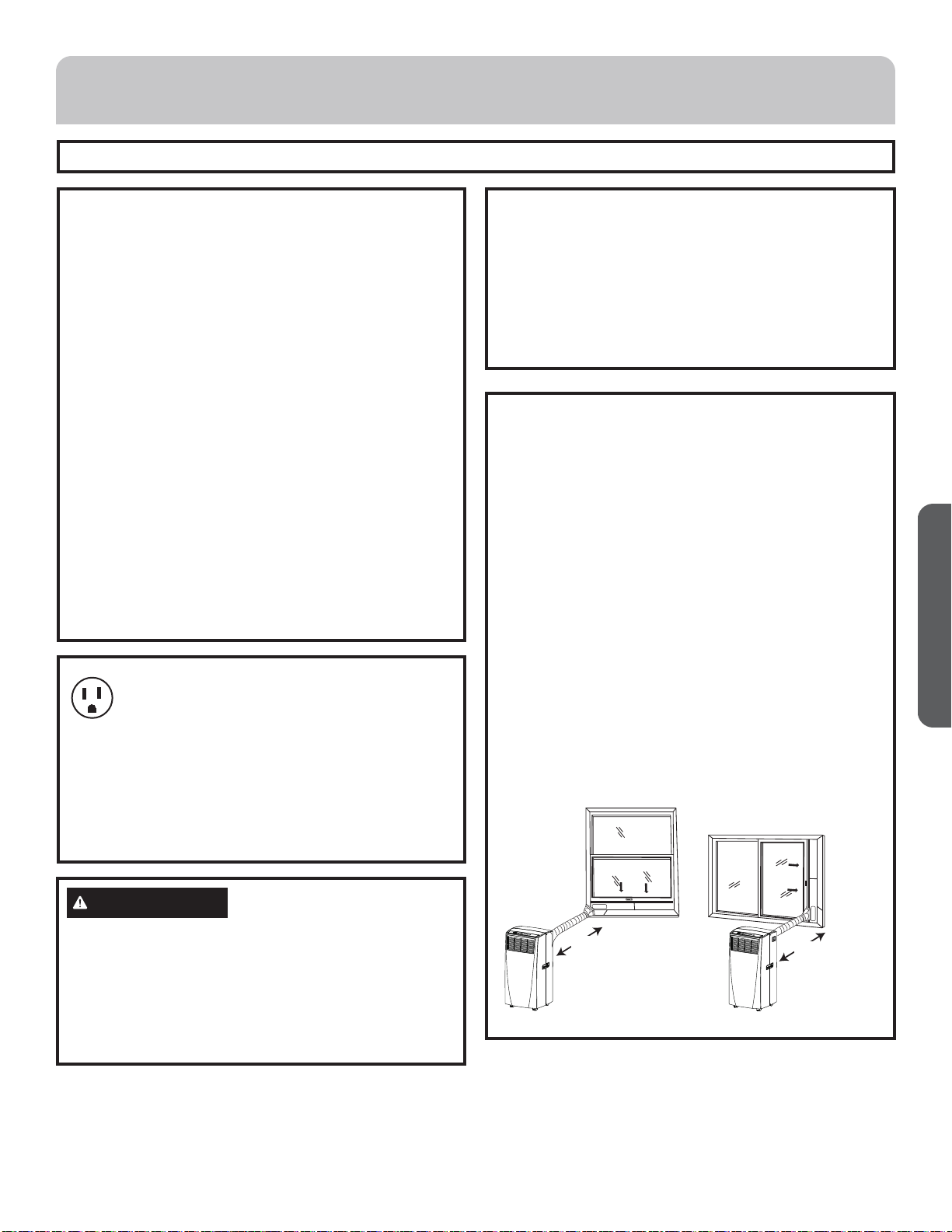
49-7782-1 25
ESPAÑOL
¿Preguntas? Llame a Haier Appliances al 1.877.337.3639 o visite nuestro sitio web en: HaierAppliances.com.
ANTES DE INICIAR
Lea estas instrucciones completa y cuidadosamente.
• IMPORTANTE — Guarde estas instrucciones
para uso del inspector local.
• IMPORTANTE — Observe todos los códigos y
órdenes de ley.
• Nota al instalador – Asegúrese de dejar estas
instrucciones con el consumidor.
• Nota al consumidor – Conserve estas instrucciones para
referencia futura.
• Nivel de destreza – La instalación de este aparato
requiere de destrezas mecánicas básicas.
• Tiempo de ejecución – Aprox. 1 hora
• Recomendamos dos personas para la instalación de este
producto.
• La instalación apropiada es la responsabilidad del
instalador.
• La falla del producto debido a una instalación inadecuada
no está cubierta por la garantía.
• Cuando instale este acondicionador de aire, DEBE usar
todas las piezas suministradas y usar procedimientos
adecuados de instalación.
Requisitos De Ubicación
• Coloque el acondicionador de aire sobre una supercie plana
y nivelada en una ubicación que esté al menos a 20” (51
cm) de la pared.
NOTA: La distancia recomendada de la ventana para un
rendimiento óptimo es de 30 “(76 cm).
• Mantenga un espacio libre mínimo de 20” (51 cm) alrededor
del acondicionador de aire para no bloquear el flujo de aire.
• Mantenga el acondicionador de aire libre de obstrucciones
como cortinas con pliegues, cortinas, persianas, etc.
• La manguera de escape debe estar libre de cualquier
obstrucción.
• No coloque el acondicionador de aire en una supercie
inestable o elevada, ya que podría caerse y provocar daños
o lesiones.
• No exponga el acondicionador de aire a la luz directa del
sol o cerca una fuente de calor como zócalos radiantes,
estufas, etc.
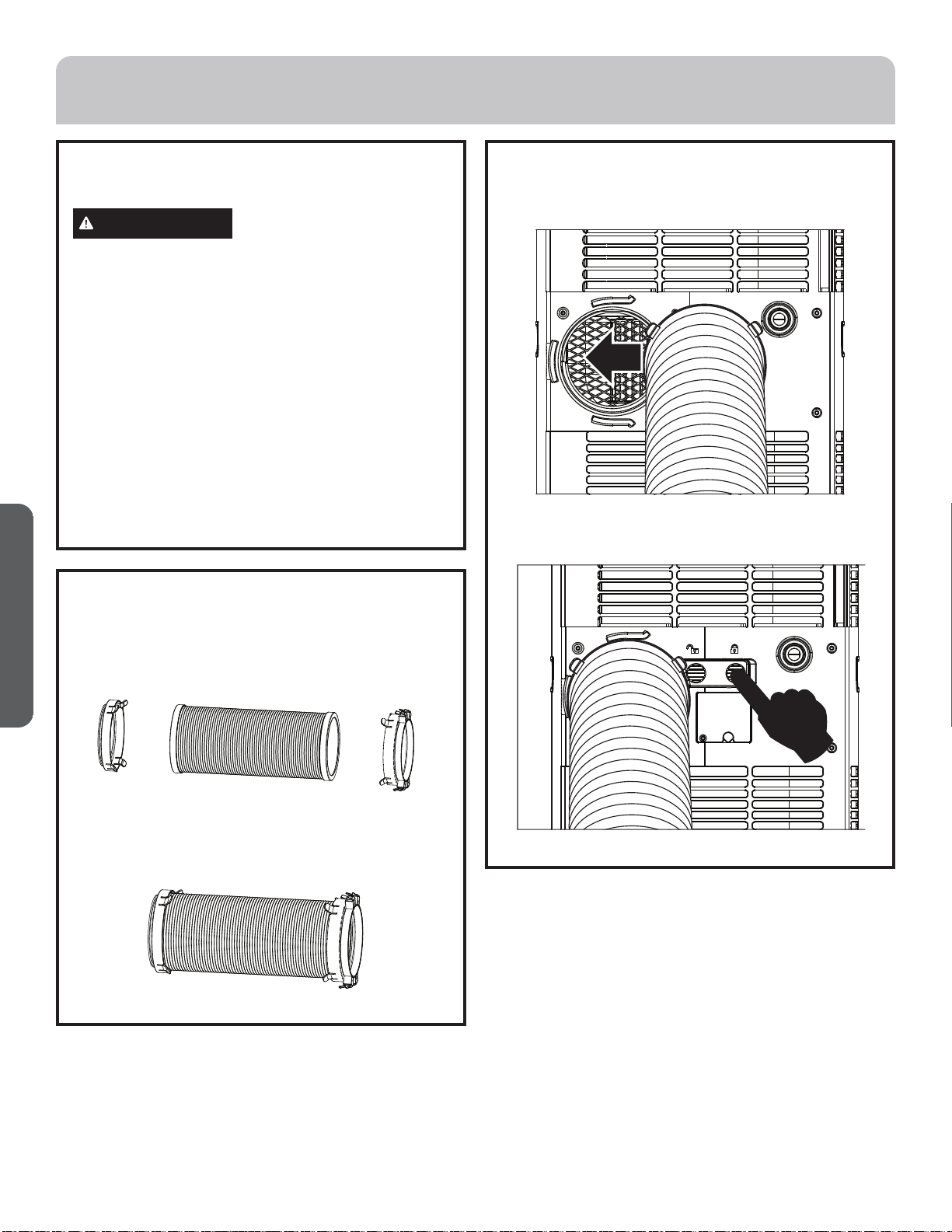
• El panel de la ventana puede instalarse en una ventana con
una abertura mínima de 20” (51 cm) hasta un máximo de
40” (101,6 cm).
Requisitos eléctricos
Algunos modelos requieren tomacorrientes de
115/120 voltios de corriente alterna y 60 Hz
conectados a tierra, protegidos con un fusible de
dilatación de tiempo de 15 amperios o un cortacircuitos.
El enchufe de tres púas con conexión a tierra minimiza la
posibilidad de descargas eléctricas. Si el tomacorriente de la
pared que usted planea usar solamente tiene 2 tomas, es su
responsabilidad hacer que un técnico lo reemplace por uno
de tres tomas con conexión a tierra.
PRECAUCIÓN
Bajo ninguna circunstancia corte o remueva la tercera púa
(conexión a tierra) del cable eléctrico.
No cambie el enchufe en el cable eléctrico de este
acondicionador de aire.
Los cables caseros de aluminio podrían presentar problemas
especiales. Consulte a un técnico electricista calificado.
El cable de alimentación incluye un dispositivo para
interrupción de corriente. Se incluye un botón de prueba y
de reinicio en el dispositivo. El dispositivo debe ponerse a
prueba periódicamente: primero se presiona el botón de TEST
(prueba) y luego RESET (reinicio) mientras se encuentra
enchufado al tomacorriente. Si el botón TEST no se dispara
o si el botón RESET no queda enganchado, deje de utilizar
el acondicionador de aire y comuníquese con un técnico
calificado.
INSTRUCCIONES DE INSTALACIÓN
20”
(51 CM)
20”
(51 CM)
26 49-7782-1
ESPAÑOL
INSTRUCCIONES DE INSTALACIÓN
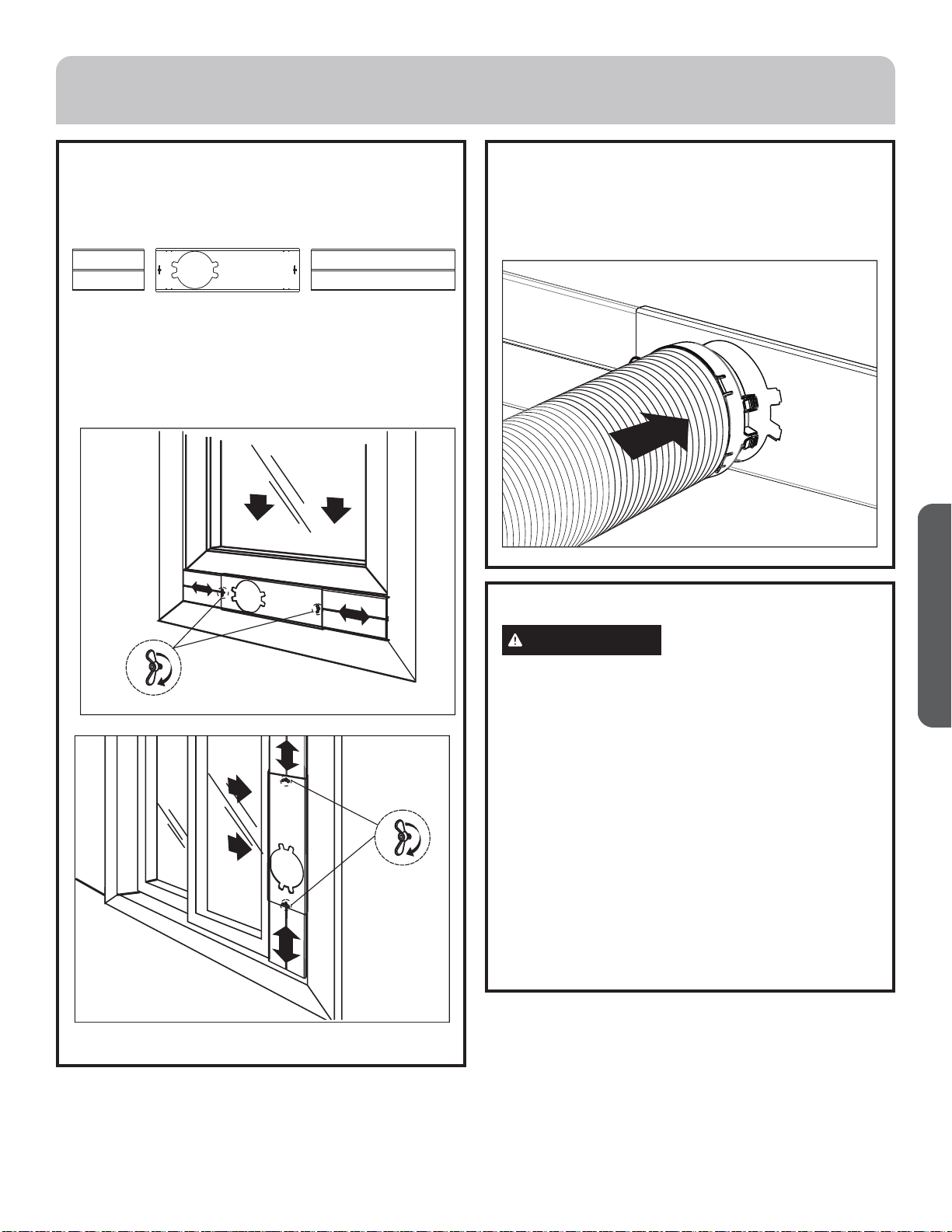
2. Instalación Del Extractor
1. Ìòñèæ÷èïòöæòñèæ÷òõèöñĀ"üñĀ#öòåõèïòöçòö
ïäçòöçèïäðäñêøèõäçèïèû÷õäæ÷òõñĀ!äéìñçèæõèäõ
un ensamble con el extractor.
2. Instalación Del Extractor (cont.)
2. Íèöïìæèøñèû÷õèðòçèïèñöäðåïèçèïäðäñêøèõä¤æòñ
èïæòñèæ÷òõçèðäñêøèõäñĀ"¥öòåõèóäñèï÷õäöèõò
Luego empuje el interruptor basculante para que el
ensamble de la manguera sea colocado de manera
firme.
2 1 3
1. Desempaque Su Acondicionador
De Aire
ADVERTENCIA
Peligro de Peso Excesivo
• Use dos o más personas para mover e instalar el
acondicionador de aire.
• No seguir esta instrucción puede ocasionar una lesión en la
espalda u otro tipo de lesiones.
• Quite los materiales de empaque. Guarde la caja y el empaque
de espuma para almacenar el acondicionador de aire cuando no
esté en uso.
NOTA: NO hay materiales de empaque internos dentro del
acondicionador de aire para quitar. No abra el gabinete.
• Deshágase adecuadamente de todos los materiales de empaque
o recíclelos.
• Manipule el acondicionador de aire con cuidado.
• Mantenga el acondicionador de aire en posición vertical y
nivelado. No coloque el acondicionador de aire de costado, sobre
su parte frontal, su parte posterior o al revés.
49-7782-1 27
ESPAÑOL
INSTRUCCIONES DE INSTALACIÓN
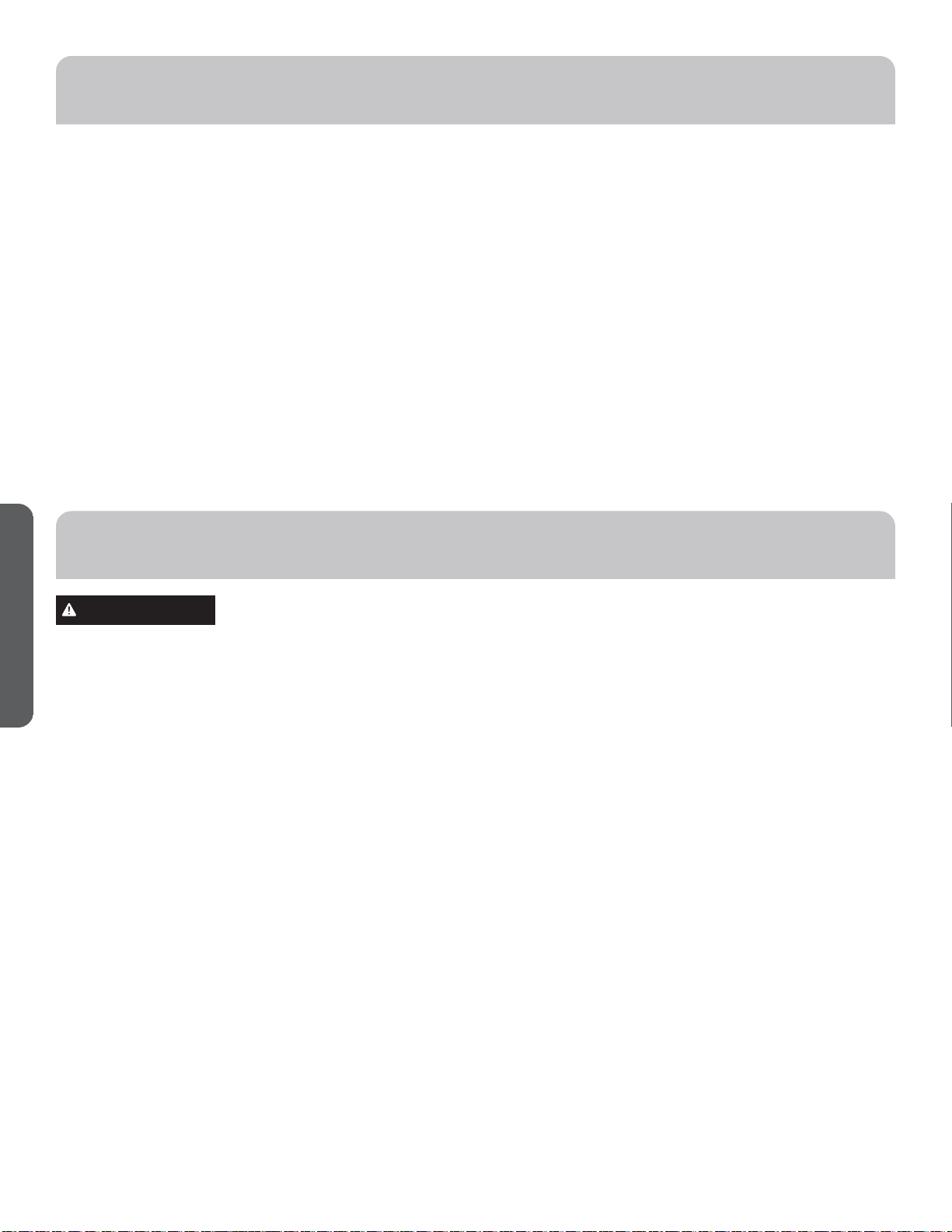
# Instale Los Paneles De Ventana
1.Òñöèõ÷èïòöóäñèïèöçèùèñ÷äñäËüÌèñæäçäèû÷õèðò
çèïóäñèïóõìñæìóäïÊÑäêääíøö÷èöóäõäëäæèõæòìñæìçìõ
la extensión de la ventana.
2.Êåõäïäùèñ÷äñäüæòïòôøèïòöóäñèïèöçèùèñ÷äñäèñ
ïäùèñ÷äñäÊíøö÷èïòöóäñèïèöçèùèñ÷äñäóäõäôøè
coincidan con el ancho y alto de la ventana con el
conjunto de tornillos y tuercas montados en el panel
óõìñæìóäïÊ
4. Adhiera La Manguera Del Extractor
A La Boca Del Extractor
1. Inserte el otro extremo del ensamble de la manguera
çèïèû÷õäæ÷òõ¤æòñèïæòñèæ÷òõçèðäñêøèõäñĀ#¥èñèï
soporte de la ventana.
ÌÊ Ë
5. Complete La Instalación
ADVERTENCIA
Peligro de Choque Eléctrico:
• Conecte a un contacto de pared de conexión a tierra
de 3 terminales.
• No quite el terminal de conexión a tierra del cable de
alimentación.
• No use un adaptador.
• No use un cable eléctrico de extensión.
• No seguir estas instrucciones puede ocasionar la
muerte, incendio o choque eléctrico.
1. Conecte el cable eléctrico a un toma corriente de 3
terminales con conexión a tierra.
2. Presione el botón Reset (Restablecer) en el cable
eléctrico para asegurar que el tapón de seguridad
está proporcionando energía al acondicionador de
aire.
28 49-7782-1
ESPAÑOL
IMPORTANTE: Si el acondicionador de aire se ha inclinado
hacia un lado, espere 24 horas antes de encender el
acondicionador de aire a fin de permitir que el aceite
vuelva al compresor. Esto evitará que el acondicionador
de aire falle antes de tiempo.
• Deje 20” (51 cm) de espacio alrededor de la unidad para
permitir una circulación adecuada de aire.
• No haga funcionar el acondicionador de aire si los ltros
de aire no están colocados en su lugar.
• No derrame líquido en el panel de control; puede causar
un cortocircuito a las piezas electrónicas del interior que
lo desactivaría o haría que funcione incorrectamente.
• Al encender el acondicionador de aire por primera vez
después de conectarlo a un toma corriente eléctrico,
la unidad comenzará a funcionar en el modo Cooling
(Enfriamiento) fijado en 75 ºF (24 ºC), y a la velocidad
alta del ventilador. El panel de control mostrará la
temperatura actual de la habitación.
• Al encender la unidad después de un uso anterior,
recordará los últimos ajustes utilizados.
• Después de un apagado normal, espere 3 minutos antes
de volver a poner en marcha la unidad.
• En el modo de enfriamiento, esta unidad no deberá
requerir que se elimine el agua. Este modelo cuenta con
un diseño único que evapora continuamente el agua.
• Cuando la unidad funciona en condiciones de alta
humedad, es posible que usted tenga que vaciar
periódicamente el tanque de agua.
• La unidad se apagará automáticamente cuando el
tanque de agua esté lleno. El indicador Water Full
(Máximo nivel de agua) se iluminará para avisarle
acerca de esta condición.
ADVERTENCIA
Peligro de choque eléctrico:
• Desconecte el suministro de energía antes de limpiarlo.
• No seguir esta instrucción puede ocasionar la muerte o
choque eléctrico..
Limpieza
1. Desenchufe o desconecte el suministro de energía.
2. Utilice solamente un paño suave humedecido con agua para
limpiar el gabinete.
NOTA: No utilice un limpiador líquido o con rociador para
limpiar el acondicionador de aire.
NOTA: NO utilice productos químicos, abrasivos, amoníaco,
blanqueador con cloro, detergentes concentrados, solventes
o estropajos de metal. Algunos de estos artículos/productos
químicos pueden dañar y/o decolorar su acondicionador de aire
.
3. Seque bien con un paño suave.
4. Enchufe o vuelva a conectar el suministro de energía.
Filtros De Aire
Los filtros de aire deben limpiarse al menos una vez a la semana
para que la unidad funcione con óptima eficacia.
IMPORTANTE: No haga funcionar el acondicionador de aire si
los filtros de aire no están colocados en su lugar.
1. Desenchufe o desconecte el suministro de energía.
2. Jale de las lengüetas para deslizar los filtros de la parte
posterior del acondicionador de aire.
NOTA: Los filtros secundarios son accesibles una vez que se
quitan los filtros principales.
3. Lave o aspire el polvo de los filtros de aire.
NOTA: Si se lavan, agite suavemente el filtro para eliminar el
exceso de agua y las partículas de polvo atrapadas en el filtro.
4. Vuelva a instalar los filtros.
5. Enchufe o vuelva a conectar el suministro de energía.
Tanque De Agua Interno
El indicador Water Full (Máximo nivel de agua) se ilumina cuando
el tanque de agua interno se llena de agua condensada.
Para vaciar el tanque de agua interno:
1. Desenchufe o desconecte el suministro de energía.
2. Coloque una bandeja profunda grande o de 1 cuarto de galón
(no incluida) debajo del desagüe inferior situado en la parte
posterior (cerca de la base) del acondicionador de aire.
3. Quite la tapa y el tapón de goma, y desagüe el tanque de agua.
4. Vuelva a colocar el tapón de desagüe y enrosque la tapa para
que firme en su lugar.
5. Enchufe o vuelva a conectar el suministro de energía.
Almacenamiento
Si la unidad no se utiliza durante un período prolongado de
tiempo:
1. Desenchufe o desconecte el suministro de energía.
2. Desagüe el agua del tanque de agua. Vea “Cuidado del
acondicionador de aire”.
3. Utilice el empaque original para volver a empacar la unidad y
evitar acumulación de polvo o suciedad.
4. Guarde el acondicionador de aire en un lugar fresco y seco.
USO DEL ACONDICIONADOR DE AIRE
CUIDADO DEL ACONDICIONADOR DE AIRE
49-7782-1 29
ESPAÑOL
Problema Causas posibles Qué hacer
La unidad no se pone
en marcha ni funciona
El cable de suministro de energía no está
enchufado en un toma corriente.
Conecte el cable eléctrico a un toma corriente de
3 terminales con conexión a tierra.
El cable de suministro de energía se ha
disparado.
Presione y libere RESET (Restablecer) en el cable de
suministro de energía.
El botón Power (Encendido) no se ha presionado. Presione el botón Power (Encendido) en el panel
de control o el control remoto para ENCENDER el
acondicionador de aire.
El toma corriente eléctrico no recibe suministro
eléctrico.
Enchufe una lámpara de trabajo en el toma corriente
para verificar si hay energía.
Se ha fundido un fusible de la casa o se ha
disparado un cortacircuitos.
Reemplace el fusible o reposicione el cortacircuitos.
El control fue programado para un tiempo diferido. Cancele el tiempo diferido. Vea “Panel de control”.
Las pilas del control remoto están agotadas. Reemplace las pilas.
El tanque de agua interno está lleno.
NOTA: El acondicionador de aire se apaga
automáticamente y el indicador Water Full
(Máximo nivel de agua) se ilumina para avisarle
de este estado.
Vacíe el tanque de agua. Vea “Cuidado del
acondicionador de aire”.
El control remoto no
funciona
Las pilas están agotadas. Reemplace las pilas.
Las pilas están insertadas de forma incorrecta. Asegúrese de que las pilas se inserten en la posición
correcta.
El acondicionador de
aire está funcionando,
perola habitación no se
enfría.
La temperatura de la habitación está caliente.
NOTA: En días muy calurosos y húmedos,el
acondicionador de aire necesitará más tiempo
para enfriar la habitación.
Dé tiempo para que la habitación se enfríe cuando
enciende la unidad por primera vez.
Asegúrese de que el acondicionador de aire tenga una
categoría de BTU (Unidad Térmica
Británica) adecuada para el tamaño de la habitación
que desea enfriar.
El control se ha fijado incorrectamente en modo
Fan (Ventilador) o Dry (Seco).
Fije el modo Cool (Enfriamiento) y la velocidad del
ventilador en High (Alta).
El flujo de aire ha disminuido. Quite los obstáculos que bloquean el flujo de aire
y redirija el flujo de aire para lograr un enfriamiento
uniforme.
La temperatura está fijada demasiada alta. Baje la temperatura fijada.
Los filtros de aire están sucios u obstruidos. Limpie el filtro de aire. Vea “Cuidado del
acondicionador de aire”.
El acondicionador de aire se ha instalado
incorrectamente.
Verifique que la manguera de escape y el panel de la
ventana estén correctamente instalados.
Las puertas y las ventanas están abiertas. Cierre las puertas y las ventanas de la habitación
que desea enfriar para evitar que el aire enfriado se
escape.
SOLUCIÓN DE PROBLEMAS
30 49-7782-1
ESPAÑOL
NOTAS
49-7782-1 31
ESPAÑOL
GARANTÍA LIMITADA
EXCLUSIÓN DE GARANTÍAS IMPLÍCITAS—Su única y exclusiva alternativa es la reparación del producto, como
se indica en la Garantía Limitada. Las garantías implícitas, incluyendo garantías implícitas de comerciabilidad o
conveniencia sobre un propósito particular, se limitan a un año o al período más corto permitido por la ley.
Para Clientes de EE.UU: Esta garantía se extiende al comprador original y a cualquier dueño subsiguiente de productos
comprados para uso hogareño dentro de EE.UU. Si el producto está en un área donde no se encuentra disponible un
Proveedor Autorizado del Servicio Técnico de GE Appliances, usted será responsable por el costo de un viaje o se podrá
requerir que traiga el producto a una ubicación del Servicio Técnico de GE Appliances Autorizado para recibir el servicio.
En Alaska, la garantía excluye el costo de envío o llamadas del servicio técnico a su hogar.
Algunos estados no permiten la exclusión o limitación de daños fortuitos o consecuentes. Esta garantía le da derechos
legales específicos y es posible que tenga otros derechos legales que varían entre un estado y otro. Para conocer cuáles
son sus derechos legales, consulte a la oficina de asuntos del consumidor local o estatal o al Fiscal de su estado.
Garante en EE.UU:
GE Appliances, a Haier company
Louisville, KY 40225
Ŷ Instrucción al cliente. Este manual del propietario
brinda información relacionada con instrucciones de
funcionamiento y controles del usuario.
Ŷ Instalación inadecuada. Si tiene un problema de instalación
òèïäæòñçìæìòñäçòõçèäìõèñòóòöèèïäæäóäæìçäçäçèæøäçä
contacte a su vendedor minorista o instalador. Usted es
responsable de brindar instalaciones de conexión eléctrica
adecuadas.
Ŷ Falla del producto como resultado de modificaciones sobre
èïðìöðòòçèåìçòäøñøöòìõõäýòñäåïèìñæïøüèñçòïäéäï÷ä
de mantenimiento razonable o necesario.
Ŷ Reemplazo de fusibles del hogar o reinicio de disyuntores.
Ŷ Fallas como consecuencia de corrosión en modelos sin
protección contra ésta.
Ŷ Daños ocasionados sobre el producto por nivel de
öøðìñìö÷õòçèùòï÷äíèìñäçèæøäçòäææìçèñ÷èìñæèñçìò
inundaciones o catástrofes naturales.
Ŷ Daños consecuentes o incidentales causados por posibles
defectos del acondicionador de aire.
Ŷ Daño causado después de la entrega.
Qué No Será Cubierto:
Por el Período de: Reemplazaremos:
ÞñÊƻò
Desde la fecha de la
compra original
Ûèèðóïäýòõèóäõäæìſñòõèèðåòïöòdel costo minorista original de cualquier producto que
falle debido a un defecto en los materiales o la fabricación. Si la unidad es cambiada, la unidad
de reemplazo posee garantía por el resto del período de la garantía original de un año sobre su
óõòçøæ÷òÐÎÊóóïìäñæèöõèèðóïäýäõŹäöøèûæïøöìùòæõì÷èõìòèïóõòçøæ÷òóòõò÷õòçèïäðìöðäò
de una funcionalidad y calidad comparable o hará un reembolso por el precio minorista original.
Ŷ Embale la unidad correctamente. Le recomendamos usar la
caja de cartón y los materiales de embalaje originales.
ŶEntregue el producto en la ubicación del vendedor minorista
donde fue adquirido.
Ŷ Incluya en el paquete una copia del receptor de la venta u
otro comprobante de la fecha de compra original. También
escriba su nombre y domicilio y una descripción del defecto.
A Fin de Realizar una Reclamo sobre la Garantía Durante los Primeros 90 Días desde la Fecha Original de Compra:
Ŷ Ubique su recibo de venta original y haga una nota de su
modelo y número de serie.
ŶÕïäðèäï!(''##'#&#)¤èñÎö÷äçòöÞñìçòö¥óäõäìñìæìäõèï
proceso de reemplazo del producto.
ŶÜèöòïìæì÷äõŹöøñòðåõèçòðìæìïìòéèæëäçèæòðóõäü
números de modelo y serie.
ŶGE Appliances hará arreglos para que se envíe una caja de
cartón a su hogar para recuperar el producto.
Ŷ Ùòõéäùòõèñ÷õèêøè÷òçòöïòöðä÷èõìäïèööòïìæì÷äçòö¤èñùżò
óòö÷äïóõèóäêò¥èñïäæäíäçèæäõ÷ſñóõòùìö÷äÙòõéäùòõìñæïøüä
una descripción del defecto.
ŶDebería recibir el producto de reemplazo o un reembolso
entre los 7 y 10 días hábiles una vez que hayamos recibido su
paquete.
A Fin de Realizar un Reclamo sobre la Garantía Durante el Resto de la Garantía de un Año:
32 49-7782-1
ESPAÑOL
Impreso en China
IMPORTANT
Do Not Return This Product To The Store
Òéüòøëäùèäóõòåïèðúì÷ë÷ëìöóõòçøæ÷óïèäöèæäïï!¡(''¡##'¡#&#)éòõ÷ëèñäðèäñç÷èïèóëòñèñøðåèõòé÷ëè
nearest authorized service center.
DATED PROOF OF PURCHASE REQUIRED FOR WARRANTY SERVICE
IMPORTANTE
No regrese este producto a la tienda
Üì÷ìèñèøñóõòåïèðäæòñèö÷èóõòçøæ÷òóòõéäùòõæòðøñżôøèöèäï!¡(''¡##'¡#&#)óäõäöòïìæì÷äõèï
nombre y número telefónico del centro de servicio al cliente autorizado más cercano.
×ÎÌÎÜÒÝÊÞ×ÊÙÛÞÎËÊÍÎÌØÖÙÛÊÏÎÌÑÊÍÊ×ųÖÎÛØÍÎÖØÍÎÕØ
Y DE SERIE PARA EL SERVICIO DE LA GARANTÍA