Instruction for Use Coffee Machine
DESCRIPTION
Description of the appliance
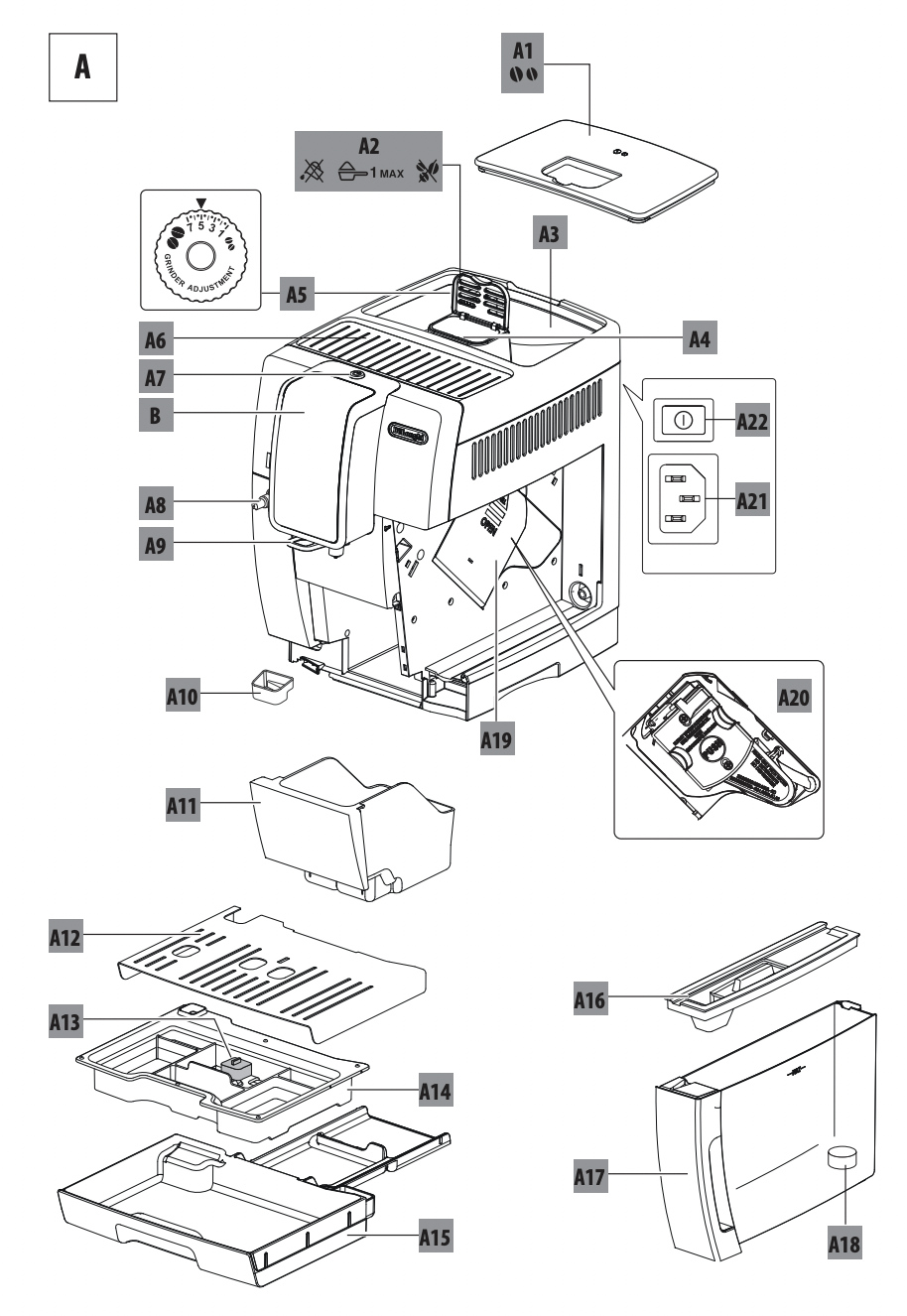
A1. Beans container lid
A2. Pre-ground coffee funnel lid
A3. Beans container
A4. Pre-ground coffee funnel
A5. Grinding adjustment dial
A6. Cup shelf
A7.  button: to turn the appliance on and off (standby)
A8. Hot water and steam connection nozzle
A9. Coffee spouts (adjustable height)
A10. Condensate tray
A11. Coffee grounds container
A12. Cup tray
A13. Drip tray water level indicator
A14. Drip tray grille
A15. Drip tray
A16. Water tank lid
A17. Water tank
A18. Water softener filter housing
A19. Infuser door
A20. Infuser
A21. Power cord connector socket
A22. Main switch
Description of the touch screen
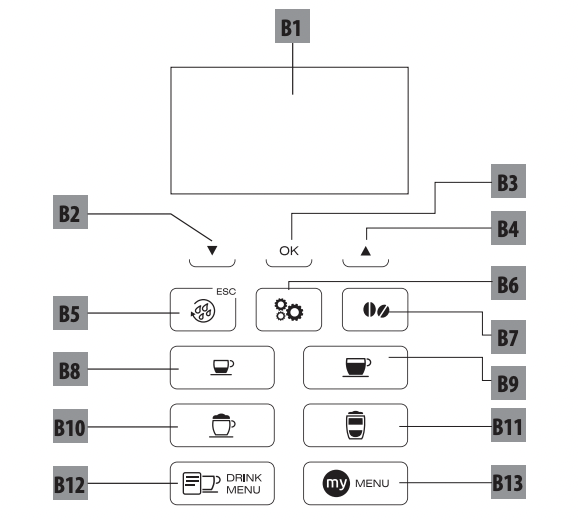
A number of buttons on the panel have a double function. This is indicated in brackets in the description.
B1. Display: guides the user in using the appliance. The current selection is at the centre between two dotted lines.
B2. ▼ Selection arrow(“ESC”: when programming beverages, press to exit without saving the change)
B3. OK: to confirm the selection(During the first few seconds of espresso", "Ristretto" or "Espresso lungo" delivery, press for 2 cups)
B4. ▲ Selection arrow(“STOP” - When delivering/programming beverages, press to interrupt/programme)
B5.  /ESC: to perform a rinse cycle.
(When in the settings menu, it acts as the "ESC" button to exit from the selected function and go back to the main menu)
B6.  : appliance settings menu
B7. : aroma selection
Directly selected beverages:
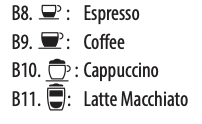
B12.  : Beverage selection menu (other than directly selected beverages): Espresso lungo, Ristretto, Long, Doppio+, Caffelatte, Flat white, Hot milk, 2xEspresso, 2 x Espresso lungo, 2x Ristretto, Hot Water
B13.  : My beverages selection menu. Unless previously programmed from the settings menu (“8.4 Program My beverages”), the beverage is programmed directly the first time you use the appliance.
Description of the accessories
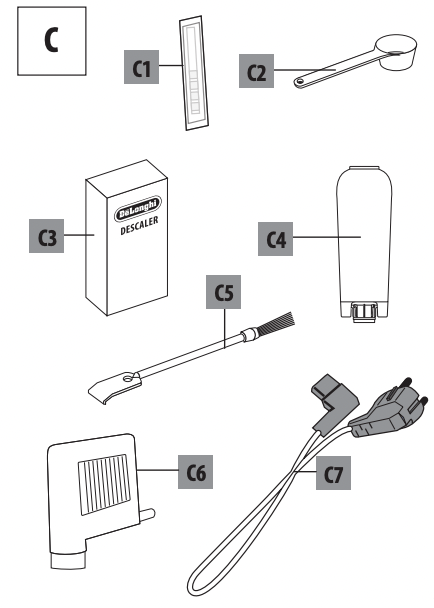
C1. Indicator paper
C2. Pre-ground coffee measure
C3. Descaler
C4. Water softener filter (certain models only)
C5. Cleaning brush
C6. Hot water spout
C7. Power cord
Description of the milk container
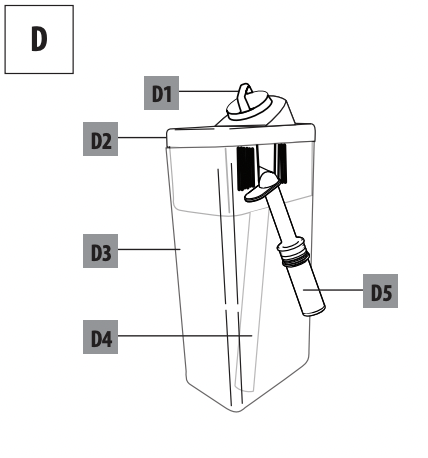
D1. Froth adjustment and CLEAN dial
D2. Milk container lid
D3. Milk container
D4. Milk intake tube
D5. Frothed milk spout (adjustable)
BEFORE USE
Checking the appliance
After removing the packaging, make sure the product is complete and undamaged and that all accessories (C) are present. Do not use the appliance if it is visibly damaged. Contact De’Longhi Customer Services.
Installing the appliance
Important! When you install the appliance, you should respect the following safety warnings:
- The appliance gives off heat. After positioning the appliance on the worktop, leave a space of at least 3 cm between the surfaces of the appliance and the side and rear walls and at least 15 cm above the coffee maker.
- Water penetrating the coffee machine could cause damage.
- Do not place the appliance near taps or sinks.
- The appliance could be damaged if the water it contains freezes. Do not install the appliance in a room where the temperature could drop below freezing point.
- Arrange the cord (C7) in such a way that it cannot be damaged by sharp edges or contact with hot surfaces (e.g. electric hot plates).
Connecting the appliance
Important! Check that the mains power supply voltage corresponds to that indicated on the rating plate on the bottom of the appliance. Connect the appliance to an efficiently earthed and correctly installed socket with a minimum current rating of 10A only. If the power socket does not match the plug on the appliance, have the socket replaced with a suitable type by a qualified professional.
Setting up the appliance
Please note:
- Coffee has been used to factory test the appliance and it is therefore completely normal for there to be traces of coffee in the mill. The machine is, however, guaranteed to be new.
- You should customise water hardness as soon as possible following the instructions in section “16. Setting water hardness”.
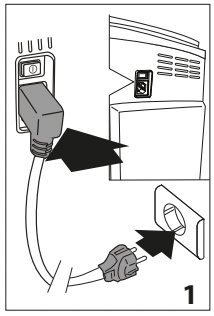
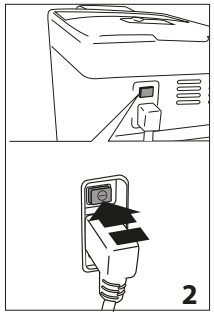
- Plug the power cord (C7) connector into the socket (A21) at the back of the appliance and connect the appliance to the mains electricity supply (fig. 1). Make sure the main switch (A22) at the back of the appliance is pressed (fig. 2);
- "Language": press the selection arrow (B2) until the required language is displayed between the two dotted lines, then press OK (B3) to confirm.
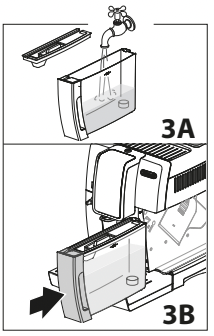
3. “Fill tank”: remove the water tank (A17), fill to the MAX line with fresh water (fig. 3A), then replace in the appliance (fig. 3B);
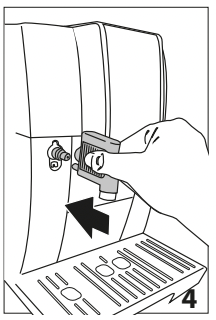
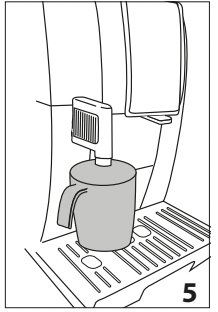
4. "Insert water spout": Check that the hot water spout (C6) is inserted on the connection nozzle (A8) (fig. 4) and place a container holding a minimum of 100 ml underneath (fig. 5);
5. "Water circuit empty, Fill water circuit, Hot water, Confirm?";
6. Press the OK button to confirm. The appliance delivers hot water from the spout then goes off automatically.
The coffee machine is now ready for normal use.
Please note:
- The first time you use the coffee maker, you need to make 4-5 cups of coffee or 4-5 cappuccinos before it starts to give satisfactory results.
- When making the first 5-6 cappuccinos, it is normal to hear the noise of boiling water. After this, the noise becomes less.
- To enjoy your coffee even more and improve the performance of your appliance, we recommend installing a water softener filter (C4) as described in section “17. Water softener filter”. If your model is not provided with a filter, you can request one from De'Longhi Customer Services.
TURNING THE APPLIANCE ON
Please note: Before turning the appliance on, make sure the main switch (A22) on the back of the appliance is pressed (fig. 2).
Each time the appliance is turned on, it performs an automatic preheat and rinse cycle which cannot be interrupted. The appliance is ready for use only after completion of this cycle.
Danger of burns! During rinsing, a little hot water comes out of the coffee spouts (A9) and is collected in the drip tray (A15) underneath. Avoid contact with splashes of water.
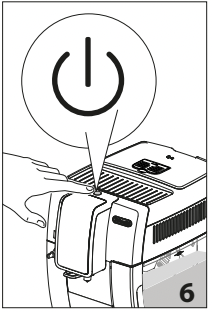
- To turn the appliance on, press the button (A7) (fig. 6). The message "Heating Please wait" appears on the display (B1).
After heating, the message "Rinsing" is displayed, together with a progress bar which gradually fills as preparation proceeds. As well as heating the boiler, the appliance also heats the internal circuits by circulating hot water. The appliance is at temperature when the message "Select your beverage" is displayed.
TURNING THE APPLIANCE OFF
Whenever the coffee machine is turned off after being used to make coffee, it performs an automatic rinse cycle.
Danger of burns! During rinsing, a little hot water flows from the coffee spouts (A9). Avoid contact with splashes of water.
- To turn the appliance off, press the button (A7) (fig.6)
- The message "Turning off underway Please wait" appears on the display (B1), then the appliance performs a rinse cycle and goes off (standby).
Please note! If you will not be using the appliance for some time, unplug from the mains socket:
- first turn the appliance off by pressing the button (fig. 6);
- press the main switch (A22) (fig. 2).
Important! Never press the main switch while the appliance is on.
The menu has 6 items, some divided into subgroups:
• Language;
• Maintenance:
- Descale,
- Install filter,
- (if a filter has been installed): Replace filter,
- (if a filter has been installed): Remove filter;
• Prg. beverages;
• Prg. my beverages;
• General:
- Set temperature,
- Water hardness,
- Auto-off,
- Energy saving,
- Beep,
- Default beverages,
- Default values;
• Statistics.
Language
To modify the language of the display (B1), proceed as follows:
- Press (B6) to enter the "Settings" menu;
- Press OK (B3) to select "Language". The available languages are displayed;
- Press the selection arrows (B2 and B4) until the required language is displayed between the two lines;
- Press OK to confirm;
- The appliance goes back to the "Settings" menu;
- Press /ESC (B5) to exit the menu.
Maintenance
Here you can find all the maintenance operations required by the appliance over time:
• Descale: For instructions on descaling, see section “15. Descaling”.
• Install filter: For instructions on how to install the filter (C4), see section “17.1 Installing the filter”.
To select the operation you require, proceed as follows:
- Press (B6) to enter the "Settings" menu;
- Press the selection arrows (B2 and B4) until "Maintenance" is displayed between the two lines;
- Press OK (B3) to confirm;
- Press the selection arrows to display the operation to be performed;
- Press OK to confirm and perform the operations as described in the corresponding sections.
Program beverages
The appliance is set by default to automatically deliver standard quantities. To change these quantities and customise the directly selected beverages and the (B12), proceed as follows:
1. Press (B6) to enter the "Settings" menu;
2. Press the selection arrows (B2 and B4) until "Prg. beverages" is displayed between the two lines;
3. Press OK (B3) to confirm: the appliance lists the beverages you can customise;
4. Press the selection arrows until the beverage you want to customise is displayed, then press OK to confirm;
5. Beverages with coffee: "Program aroma" appears on the display: press the selection arrows (B2 and B4) or (B7) until the required aroma is selected (see section “10.4 Temporarily varying the coffee aroma”), then press OK. "Program coffee" appears on the display together with a bar which gradually fills as delivery progresses. When the required quantity is reached, press OK;
Cappuccinos and milk-based coffees: after selecting the aroma, "Program milk" appears on the display together with a bar which gradually fills as milk delivery progresses. When the required quantity is reached, press OK. The appliance then makes the coffee. Press OK to interrupt delivery when the required quantity of coffee is reached.
Hot water: press OK. Delivery begins: press OK when the required quantity is reached.
6. "Save parameters?": to save the settings, press OK (otherwise press /ESC - B2 or B5).
7. "Parameters saved" (or "Parameters not saved"). The appliance is ready for use again.
Program My beverages
Follow the procedures described in the previous section “8.3 Program beverages”to customise the beverages in the " " (B13) or proceed with direct programming, as described in section “12. “ ” Programming and selecting”.
General
Here you can find the settings to customise the basic functions of the appliance:
- Press (B6) to enter the "Settings" menu;
- Press the selection arrows (B2 and B4) until "General" is displayed between the two lines;
- Press OK (B3) to confirm and select the required item with the selection arrows. Then follow the instructions for each setting.
• Set temperature:
To modify the temperature of the water used to make the coffee, proceed as follows:
4. Press OK (B3). The current value appears on the display (B1) and the "New" value flashes;
5. Select the new value you want to set using the selection arrows (B2 or B4);
6. When the required value (low, medium, high, maximum) has been selected, press OK. The display goes back to the previous screen.
• Water hardness:
For instructions on identifying and setting water hardness, see section “16. Setting water hardness”.
• Auto-off (standby):
Auto-off can be set so that the appliance goes off after 15 or 30 minutes, or 1, 2 or 3 hours
4. Press OK. The current value appears on the display (B1) and the "New" value flashes;
5. Select the new value you want to set using the selection arrows (B2 or B4);
6. When the required value (low, medium, high, maximum) has been selected, press OK.
The display goes back to the previous screen.
• Energy saving:
Use this function to enable or disable energy saving. When enabled, the function reduces energy consumption in compliance with European regulations.
To disable or enable "Energy Saving", proceed as follows:
4. Press OK. The current state ("Enabled" or "Disabled") and the operation to be performed ("Disable?" or "Enable?") is displayed. Press OK to confirm;
5. Press OK to disable or enable the function.
The display goes back to the previous screen.
Please note!
- when the function is enabled, the symbol "ECO" appears on the display.
- When in energy saving mode, a few seconds elapse before the first coffee, cappuccino or milk-based coffee is delivered as the appliance must heat up again.
- If the milk container (D) is inserted, "Energy Saving" cannot be activated.
• Beep:
Use this function to enable or disable the beep. Proceed as follows:
4. Press OK. The current state ("Enabled" or "Disabled") and the operation to be performed ("Disable?" or "Enable?") is displayed. Press OK to confirm;
5. Press OK to disable or enable the function.
The display goes back to the previous screen.
• Default beverages:
Use this function to reset the default values for all the beverages, or the individual beverages programmed previously. Select the beverage, then proceed as follows:
4. Select "All" to reset the aroma and quantity settings to the default values, or select the required beverage, then press OK;
5. "Reset?": to reset the default values, press OK.
6. "Reset complete": the appliance confirms the reset and goes back to the previous screen.
To reset another beverage, repeat from point 4 or to exit, press /ESC (B5).
• Default values:
Use this function to reset all the appliance and beverage settings (apart from the language which remains as selected the first time the appliance was used). Select the item, then proceed as follows:
4. "Reset?"; press OK;
5. "Reset complete": the appliance confirms the reset and goes back to the previous screen.
To exit, press /ESC (B5).
Statistics
This displays statistics relating to the machine. To display the statistics, proceed as follows:
- Press (B6) to enter the "Settings" menu;
- Press the selection arrows (B2 and B4) until "Statistics" is displayed between the two lines;
- Press OK (B3): statistics on the appliance are displayed, use the selection arrows to scroll through the items;
- Press /ESC (B5) to exit.
To go back to the main screen, press /ESC.
RINSING
Use this function to deliver hot water from the coffee spouts (A9) and hot water spout (C6), if inserted, to clean and heat the appliance’s internal circuit. Place a container with a minimum capacity of 100ml under the coffee and hot water spouts.
Important! Danger of burns. Do not leave the appliance unattended while hot water is being delivered.
1) To enable this function, press (B5). "RINSING" appears on the display (B1);
2) After a few seconds, hot water is delivered first from the coffee spouts, then from the hot water spout (if inserted) to clean and heat the appliance’s internal circuit. A progress bar is displayed and fills gradually as preparation proceeds;
3) To interrupt, press the arrow corresponding to "STOP" (B4).
Please note!
• If the appliance is not used for more than 3-4 days, when switched on again, we strongly recommend performing 2/3 rinses before use;
• After cleaning, it is normal for the coffee grounds container (A11) to contain water.
MAKING COFFEE
Adjusting the coffee mill
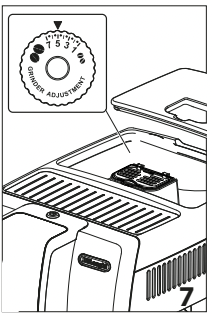
The coffee mill is set by default to prepare coffee correctly and should not require regulating initially. However, if after making the first few coffees you find that the coffee is either too weak and not creamy enough or delivery is too slow (a drop at a time), this can be corrected by adjusting the grinding dial (A5) (fig. 7).
Please note:
The grinding adjustment dial must only be turned when the coffee mill is in operation.
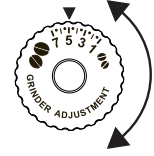
If the coffee is delivered too slowly or not at all, turn one click clockwise towards 7. For fuller bodied creamier coffee, turn one click anticlockwise towards 1 (do not turn more than one click at a time otherwise the coffee could be delivered a drop at a time).
These adjustments will only be evident after at least 2 cups of coffee have been delivered. If this adjustment does not obtain the desired result, turn the dial another click.
Tips for a hotter coffee
For hotter coffee, you should:
• to rinse, press /ESC (B5);
• warm the cups with hot water using the hot water function (see section “13. Delivering hot water”);
• increase the coffee temperature in the "Settings" menu (see section “8.5 General”).
Making automatic recipes using coffee beans
Important! Do not use green, caramelised or candied coffee beans as they could stick to the coffee mill and make it unusable.
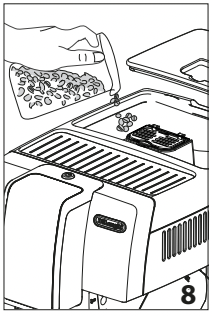
1. Fill the container (A3) (fig. 8) with coffee beans;
2. Place under the coffee spouts (A9):
- 1 cup, if you want to make 1 coffee (fig. 9);
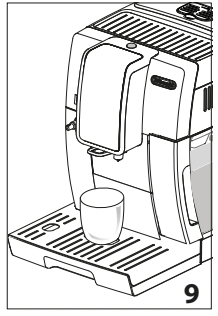
- 2 cups if you want 2 coffees.
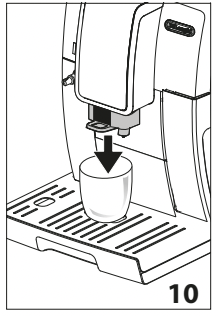
3. Lower the spouts as near as possible to the cup. This makes a creamier coffee (fig. 10);
4. Then select your required coffee:
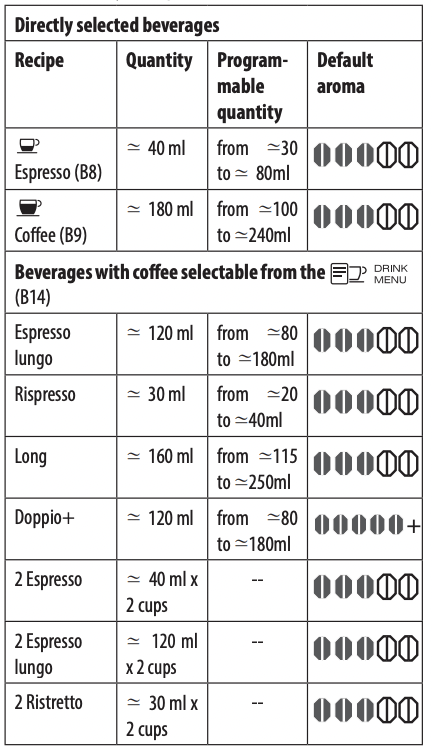
5. Preparation begins. A progress bar appears on the display (B1) and gradually fills as preparation proceeds.
Please note:
- You can prepare 2 cups of Ristretto, ESPRESSO or Espresso lungo coffee at the same time by pressing "2X" (B3) during preparation of single beverages (the image is displayed for a few seconds at the start of preparation).
- While the machine is making coffee, delivery can be interrupted at any time by pressing the selection arrow corresponding to "STOP" (B4).
- At the end of delivery, to increase the quantity of coffee in the cup, just press and hold (within 3 seconds) one of the coffee buttons (B8 or B10).
Once the coffee has been made, the appliance is ready to make the next beverage.
Please note:
- Various alarm messages could be displayed while using the appliance (fill tank, empty grounds container, etc.). Their meaning is explained in section “20. Displayed messages”.
- For hotter coffee, see section “10.2 Tips for a hotter coffee”.
- If the coffee is delivered a drop at a time, too weak and not creamy enough or too cold, read the tips in section “21. Troubleshooting”.
- To customise the beverages according to personal taste, see sections “8.3 Program beverages” and “8.4 Program My beverages”
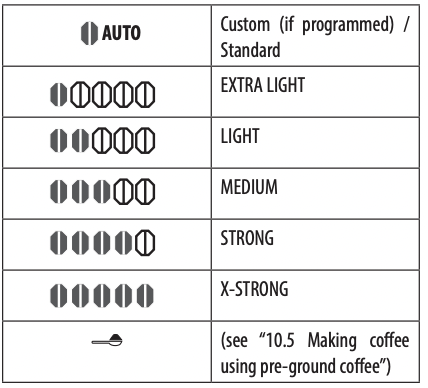
Temporarily varying the coffee aroma
To temporarily vary the aroma of the coffee in the automatic recipes, press (B7):
Please note:
- The variation in aroma is not saved and the next time a beverage is delivered automatically, the appliance selects the default value (
 AUTO).
- If a few seconds elapse between temporary customising of the aroma and delivery of the beverage, the aroma returns to the default value (AUTO).
Making coffee using pre-ground coffee
Important!
- Never add pre-ground coffee when the machine is off or it could spread through the inside of the machine and dirty it. This could damage the appliance.
- Never use more than 1 level measure (C2) or it could dirty the inside of the coffee machine or block the funnel (A4).
Please note:
If you use pre-ground coffee, you can only make one cup of coffee at a time.
- Press the button (B7) repeatedly until "
 " appears on the display (B1).
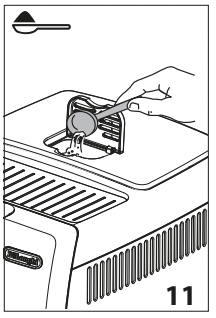
- Make sure the funnel is not blocked, then add one level measure of pre-ground coffee (fig. 11).
3. Place a cup under the coffee spouts (A9) (fig. 9).
4. Then select your required coffee:
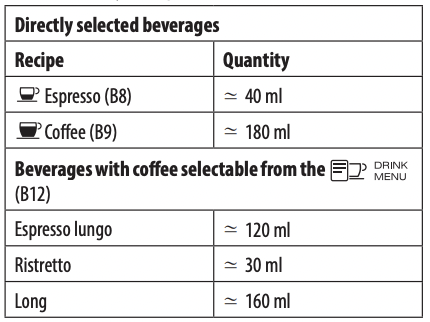
5. Preparation begins. The beverage selected appears on the display together with a progress bar which gradually fills as preparation proceeds.
Important! Making LONG coffee
Halfway through preparation, the message "Add pre-ground coffee" appears on the display (B1). Add one level measure of pre-ground coffee and press OK (B3).
Please note: If "Energy Saving" mode is active, you may have to wait a few seconds before the first coffee is delivered.
MAKING CAPPUCCINOS AND MILK-BASED COFFEES
Please note:
- To avoid milk with poor froth or large bubbles, always clean the milk container lid (D2) and hot water connection nozzle (A8) as described in sections “11.4 Cleaning the milk 15 container after use”, “14.10 Cleaning the milk container” and “14.11 Cleaning the hot water nozzle”.
Filling and attaching the milk container
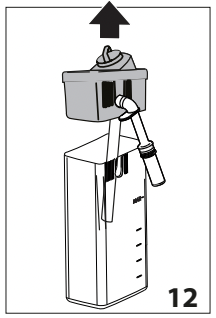
- Remove the lid (D2) (fig. 12);
2. Fill the milk container (D3) with a sufficient quantity of milk, not exceeding the MAX level marked on the handle (fig. 13). Each mark on the side of the container corresponds to 100ml of milk;
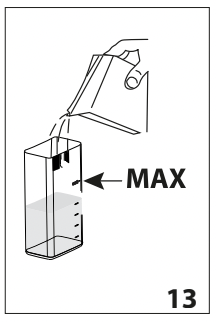
Please note:
• For a denser more even froth, you must use skimmed or partially skimmed milk at refrigerator temperature (about 5°C).
• If "Energy Saving" mode is enabled, you may have to wait a few seconds before the first cappuccino is delivered.
3. Make sure the milk intake tube (D4) is correctly inserted in the bottom of the milk container lid (fig. 14);
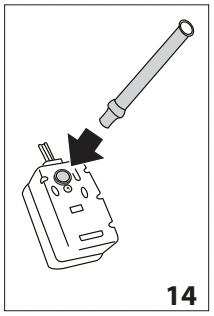
4. Place the lid back on the milk container;
5. Remove the hot water spout (C6) from the connection nozzle (A8) (fig. 15);
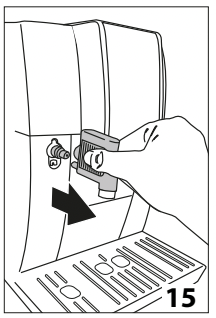
6. Attach the container to the connection nozzle and push as far as it will go (fig. 16). The machine emits a beep (if enabled);
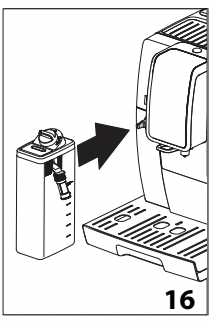
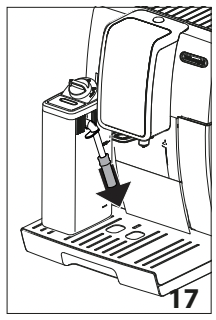
7. Place a sufficiently large cup under the coffee spouts (A9) and frothed milk spout (D5). Adjust the length of the milk spout. To move it nearer the cup, simply pull it downwards (fig. 17);
8. Follow the instructions below for each function.
Adjusting the amount of froth
Turn the froth adjustment dial (D1) to adjust the amount of froth on the milk delivered while making cappuccinos and milk-based coffees.
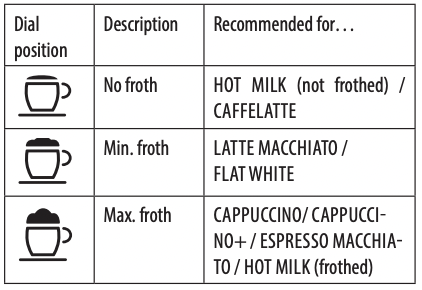
Making cappuccino and milk-based coffees automatically
- Fill the milk container (D) and attach it as described above;
- Select the required beverage:
Directly selected beverages:
•  : CAPPUCCINO (B10)
•  : Latte Macchiato (B11)
Select by pressing (B12):
• Caffelatte
• Flat white
• Hot milk
3. After a few seconds, preparation begins automatically, a progress bar appears on the display and gradually fills as preparation proceeds;
4. After delivering the milk, the machine automatically makes the coffee (if required by the recipe).
Please note:
- If you want to interrupt preparation during delivery, press the arrow corresponding to "STOP" (B4).
- Do not leave the milk container out of the refrigerator for long periods. The warmer the milk (5°C is ideal), the poorer the quality of froth produced.
- The beverages can be customised (see sections “8.3 Program beverages” and “8.4 Program My beverages”).
Cleaning the milk container after use
Important! Danger of burns
• When cleaning the internal tubes of the milk container (D), a little hot water and steam leak out of the milk spout (D5). Avoid contact with splashes of water.
"Set dial to CLEAN, ESC to cancel" appears on the display (B1) each time you use a milk function. Clean as described to eliminate all milk residues (or press “ /ESC” (B5) to clean later):
- Leave the milk container (D) in the machine (you do not need to empty it);
- Place a cup or other recipient under the frothed milk spout;
- Turn the froth adjustment dial (D1) to “CLEAN” (fig. 19). "Cleaning underway” appears on the display, together with a progress bar which gradually fills as the operation proceeds. Cleaning stops automatically;
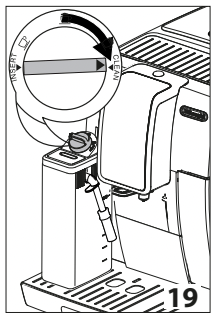
4. Turn the dial back to one of the froth selections;
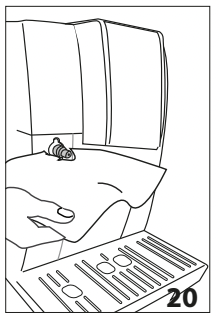
5. Remove the milk container and always clean the steam connection nozzle (A8) with a sponge (fig. 20).
Please note!
- To prepare a number of cappuccinos or milk-based coffees, clean the milk container after you have prepared the last beverage only. In this case, press /ESC (B5) to go back to the main menu.
- The milk container can be kept in the refrigerator.
- In some cases, before cleaning you must wait for the appliance to heat up.
“” PROGRAMMING AND SELECTING
In you can select beverages customised to your personal tastes. If the beverages have not yet been programmed, the appliance will request the customisation procedure before proceeding with delivery:
1. Press (B13);
2. Press the selection arrows (B2 and B4) until the required beverage is displayed between the two lines;
Unprogrammed beverages:
3. Press OK (B3) to select;
4. Beverages with coffee: "Program aroma" appears on the display. Press the selection arrows (B2 and B4) or (B7) until the required aroma is selected. Press OK. "Program coffee" appears on the display together with a bar which gradually fills as delivery progresses. When the required quantity is reached, press OK.
5. Cappuccinos and milk-based coffees: After selecting the aroma, "Program milk" appears on the display together with a bar which gradually fills as milk delivery progresses. When the required quantity is reached, press OK.
6. The appliance then makes the coffee. Press OK to interrupt delivery when the required quantity of coffee is reached.
7. "Save parameters?": to save the settings, press OK (otherwise press ESC - B2 or B5).
8. "Parameters saved" (or "Parameters not saved"). The appliance is ready for use again.
Programmed beverages:
3. Press OK (B3) to select;
4. Preparation begins according to the previously programmed settings.
Please note: Two cups of a beverage can only be selected when the corresponding single beverages have been programmed.
DELIVERING HOT WATER
Important! Danger of burns.
Never leave the machine unattended while delivering hot water.
- Make sure the hot water spout (C6) is attached correctly;
- Place a container under the water spout (as close as possible to avoid splashes) (fig. 5);
- Press (B12) and scroll through the beverages in the menu by pressing the selection arrows (B2 or B4) until "Hot water" is selected;
- Press OK (B3). A progress bar appears and gradually fills as preparation proceeds;
- The machine delivers about 250 ml of hot water, then delivery stops automatically. To interrupt hot water delivery manually, press the selection arrow corresponding to "STOP" (B4) again.
Please note:
- If "Energy Saving" mode is active, you may have to wait a few seconds before hot water is delivered.
- The quantity of water delivered can be customised (see section “8.3 Program beverages”).
CLEANING
Cleaning the machine
The following parts of the machine must be cleaned regularly:
- the appliance’s internal circuit;
- coffee grounds container (A11);
- drip tray (A15) and condensate tray (A10);
- water tank (A17);
- coffee spouts (A9);
- pre-ground coffee funnel (A4);
- infuser (A20), accessible after opening the infuser door (A19);
- milk container (D);
- hot water/steam connection nozzle (A8);
Important!
- Do not use solvents, abrasive detergents or alcohol to clean the coffee machine. With De’Longhi superautomatic coffee machines, you need not use chemical products to clean the machine.
- None of the components of the appliance can be washed in a dishwasher with the exception of the drip tray grille (A14) and milk container (D).
- Do not use metal objects to remove encrustations or coffee deposits as they could scratch metal or plastic surfaces.
Cleaning the machine's internal circuit
If the appliance is not used for more than 3/4 days, before using it again, we strongly recommend switching it on and:
- performing 2/3 rinse cycles by pressing (B5);
- delivering hot water for a few seconds (section “13. Delivering hot water”).
Please note: After cleaning, it is normal for the coffee grounds container (A11) to contain water.
Cleaning the coffee grounds container
When "Empty grounds container" appears on the display (B1), the grounds container must be emptied and cleaned. The appliance cannot be used to make coffee until you have cleaned the grounds container (A11). Even if not full, the empty grounds container message appears on the display 72 hours after the first coffee has been prepared. For the 72 hours to be calculated correctly, the machine must never be turned off with the main switch (A22).
Important! Danger of burns If you make a number of cappuccinos one after the other, the metal cup tray (A12) becomes hot. Wait for it to cool down before touching it and handle it from the front only
To clean (with the machine on):
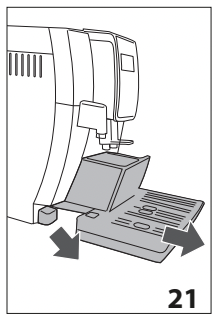
- Remove the drip tray (A15) (fig. 21), empty and clean.
- Empty the grounds container (A11) and clean thoroughly to remove all residues left on the bottom. This can be done with the spatula on the brush (C5) provided.
- Check the condensate tray (A10) (red) and empty if necessary.
Important! When removing the drip tray, the grounds container must be emptied, even if it contains few grounds. If this is not done, when you make the next coffees, the grounds container may fill up more than expected and clog the machine.
Cleaning the drip tray and condensate tray
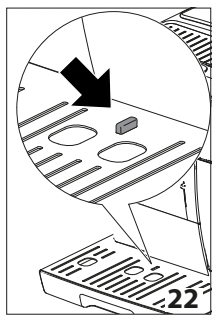
Important! The drip tray (A15) is fitted with a level indicator (A13) (red) showing the level of water it contains (fig. 22). Before the indicator protrudes from the cup tray (A12), the drip tray must be emptied and cleaned otherwise the water may overflow the edge and damage the appliance, the surface it rests on or the surrounding area.
To remove the drip tray:
1. Remove the drip tray and the coffee grounds container (A11) (fig. 21);
2. Remove the cup tray (A12) and drip tray grille (A14), then empty the drip tray and grounds container and wash all components;
3. Check the red condensate tray (A10) and empty if necessary;
4. Replace the drip tray complete with grille and grounds container.
Cleaning the inside of the coffee machine
Danger of electric shock! Before cleaning internal parts, the machine must be turned off (see section “7. Turning the appliance off”) and unplugged from the mains power supply. Never immerse the coffee machine in water.
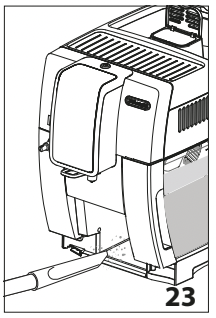
- Check regularly (about once a month) that the inside of the appliance (accessible after removing the drip tray, A15) is not dirty. If necessary, remove coffee deposits with the brush (C5) supplied and a sponge;
- Remove all the residues with a vacuum cleaner (fig. 23).
Cleaning the water tank
- Clean the water tank (A17) regularly (about once a month) and whenever you replace the water softener filter (C4) (if provided) with a damp cloth and a little mild washing up liquid;
- Remove the filter (C4) (if present) and rinse with running water;
- Replace the filter (if provided), fill the tank with fresh water and replace the tank;
- Models with water softener filter only) Deliver about ml of water.
Cleaning the coffee spouts
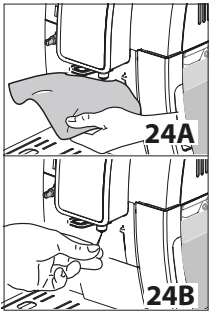
- Clean the coffee spouts (A9) regularly with a sponge or cloth (fig. 24A);
- Check that the holes in the coffee spouts are not blocked. If necessary, remove coffee deposits with a toothpick (fig. 24B).
Cleaning the pre-ground coffee funnel
Check regularly (about once a month) that the pre-ground coffee funnel (A4) is not blocked. If necessary, remove coffee deposits with the brush (C5) supplied.
Cleaning the infuser
The infuser (A20) must be cleaned at least once a month.
Important! The infuser may not be extracted when the machine is on.
1. Make sure the machine is correctly turned off (see “7. Turning the appliance off”);
2. Remove the water tank (A17);
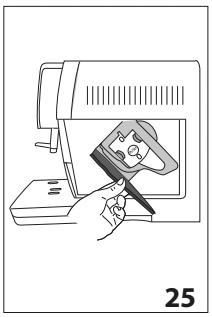
3. Open the infuser door (A19) (fig. 25) on the right side of the appliance;
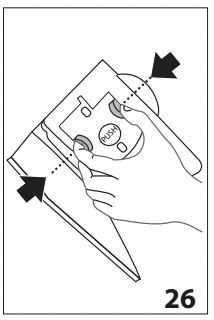
4. Press the two coloured release buttons inwards and at the same time pull the infuser outwards (fig. 26);
5. Soak the infuser in water for about 5 minutes, then rinse under the tap;
Important! RINSE WITH WATER ONLY NO WASHING UP LIQUID - NO DISH WASHER Clean the infuser without using washing up liquid as it could be damaged.
6. Use the brush (C5) to remove any coffee residues left in the infuser housing, visible through the infuser door;
7. After cleaning, replace the infuser by sliding it onto the internal support, then push the PUSH symbol fully in until it clicks into place;
Please note: If the infuser is difficult to insert, before insertion, adapt it to the right size by pressing the two levers (fig. 27).
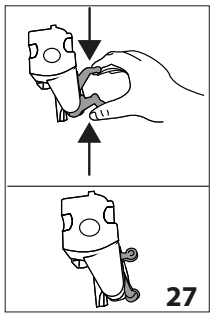
8. Once inserted, make sure the two coloured buttons have snapped out;
9. Close the infuser door;
10. Put the water tank back.
Cleaning the milk container
Clean the milk container (D) each time you prepare milk as described below:
1. Remove the lid (D2);
2. Remove the milk spout (D5) and intake tube (D4) (fig. 28);
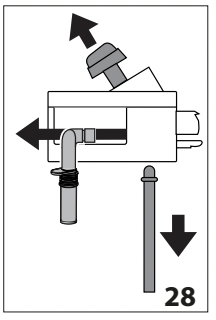
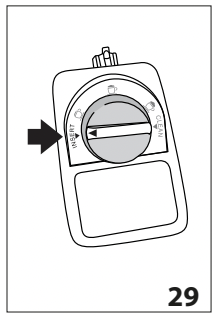
3. Turn the froth adjustment dial (D1) anticlockwise to the "INSERT" position (fig. 29) and pull off upwards;
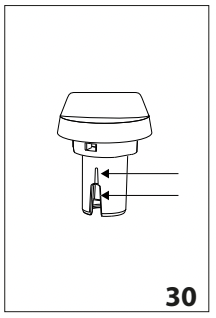
4. Wash all the components thoroughly with hot water and mild washing-up liquid. All components are dishwasher safe, placing them in the top basket of the dishwasher. Make sure there are no milk residues on the hollow and groove under the dial (fig. 30). If necessary, scrape the groove with a toothpick;
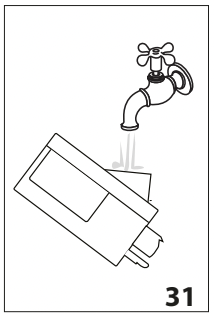
5. Rinse inside the froth adjustment dial seat with running water (fig. 31);
6. Check that the intake tube and milk spout are not clogged with milk residues;
7. Replace the dial (in correspondence to the word "INSERT"), spout and milk intake tube;
8. Place the lid back on the milk container (D3).
Cleaning the hot water nozzle
Each time you prepare milk, clean the connection nozzle (A8) with a sponge to remove milk residues from the gaskets (fig. 20).
DESCALING
Important!
- Before use, read the instructions and the labelling on the descaler pack.
- You should use De’Longhi descaler only. Using unsuitable descaler and/or performing descaling incorrectly may result in faults not covered by the manufacturer's guarantee.
Descale the machine when "Descale, ESC to cancel, OK to descale (∼45 minutes)" appears on the display (B1). To descale immediately, press OK (B3) and follow the instructions from point
6. To descale the appliance later, press ESC (B5). The  symbol on the display reminds you that the appliance needs descaling.
To access the descaling menu:
1. Turn the appliance on and wait until it is ready for use;
2. Press (B6) to enter the "Settings" menu;
3. Press the selection arrows (B2 and B4) until "Maintenance" is displayed between the two lines. Press OK (B3);
4. Press OK to select "Descale";
5. Confirm? (∼45 minutes)”. Press OK to confirm;
6. "Remove filter": extract the water tank (A17), remove the water softener filter (C4) (if present) and empty the water tank. Press OK;
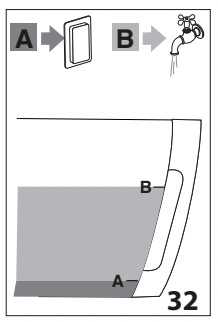
7. "Pour descaler and water into tank": Pour the descaler into the tank up to level A (corresponding to a 100 ml pack) marked on the inner surface of the tank, then add water (1 litre) up to level B (fig. 32) and put the water tank back. Press OK;
8. "Empty drip tray": Remove, empty and replace the drip tray (A15) and grounds container (A11). Press OK;
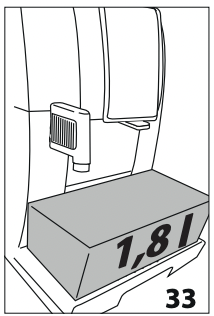
9. "Place 1.8L container empty under spouts": Place an empty container with a minimum capacity of 1.8 litres under the hot water spout (C6) and coffee spouts (A9) (fig. 33). Press OK;
Important! Danger of burns
Hot water containing acid flows out of the coffee spouts and hot water spout. Take care to avoid contact with splashes of this solution.
10. "Descaling underway": The descale programme starts and the descaler liquid comes out of the hot water and coffee spouts. A series of rinses and pauses is performed automatically to remove all the scale residues inside the coffee machine;
After about 25 minutes, descaling stops;
11. "Rinse tank and fill with water": the appliance is now ready to rinse with fresh water. Empty the container used to collect the descaler solution. Extract the water tank, empty, rinse under running water, fill with fresh water up to the MAX level and put back in the appliance. Press OK;
12. "Place 1.8L container empty under spouts": place the container used to collect the descaler solution empty under the coffee spouts and hot water spout (fig. 33) and press OK";
13. "Rinsing Confirm?": press OK;
11. "Rinsing underway": hot water is delivered first from the coffee spouts, then from the hot water spout;
12. When the water in the tank has run out, empty the container used to collect the rinsing water;
13. "Rinse tank and fill with water": extract the water tank and fill with fresh water up to the MAX level. Press OK;
14. "Insert filter": put the water softener filter (if removed) back in its housing in the water tank, and replace the tank in the appliance. Press OK;
15. "Place 1.8L container empty under spouts": place the container used to collect the descaler solution empty under the hot water spout. Press OK;
16. "Rinsing Confirm?": press OK.
17. "Rinsing underway". Hot water comes out of the hot water spout;
18. "Empty drip tray": At the end of the second rinse, remove, empty and replace the drip tray (A15) and grounds container (A11). Press OK;
19. "Descale complete": press OK;
20. "Fill tank": empty the container used to collect the rinse water, remove the water tank and fill with fresh water up to the MAX level, then put back in the appliance.
Descaling is complete.
Please note!
- If the descaling cycle is not completed correctly (e.g. no electricity) we recommend repeating the cycle;
- After descaling, it is normal for the grounds container (A11) to contain water;
- If the water tank has not been filled to the MAX level, at the end of descaling, the appliance requests a third rinse to guarantee that the descaler solution has been completely eliminated from the machine's internal circuits.
- The appliance may request descaling cycles at very short intervals. This is normal and due to the appliance’s advanced control system.
SETTING WATER HARDNESS
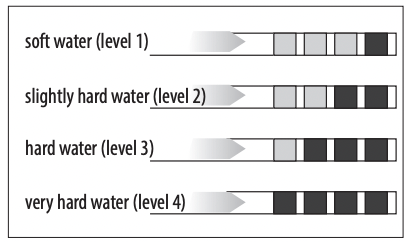
The descale message is displayed after a period of time established according to water hardness. The machine is set by default for a hardness level of 4. The machine can also be programmed according to the hardness of the mains water in the various regions so that the machine needs to be descaled less often.
Measuring water hardness
- Remove the "TOTAL HARDNESS TEST" indicator paper (C1) from its pack (attached to the English instructions);
- Immerse the paper completely in a glass of water for one second;
- Remove the paper from the water and shake lightly. After about a minute, 1, 2, 3, or 4 red squares form, depending on the hardness of the water. Each square corresponds to one level;
Setting water hardness
- Press (B6) to enter the "Settings" menu;
- Press the selection arrows (B2 and B4) until "General" is displayed between the two lines. Press OK;
- Press the selection arrows until "Water hardness" is displayed, then press OK;
- The current selection appears on the display and the new selection flashes. Press the selection arrows until the required new selection is displayed. Press OK.
The new level is saved and the appliance goes back to the "General" menu.
Press /ESC (B5) twice to go back to the main screen.
WATER SOFTENER FILTER
Certain models are fitted with a water softener filter (C4). If this is not the case with your model, you are recommended to purchase one from De’Longhi Customer Services. To use the filter correctly, follow the instructions below.
Installing the filter
1. Remove the filter (C4) from the packaging. The date indicator disk varies according to the filter provided.
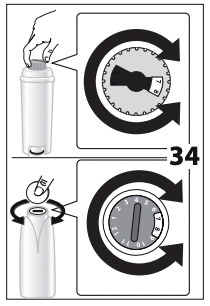
2. Turn the date indicator disk (fig. 34) until the next 2 months of use are displayed.
Please note The filter lasts about two months if the appliance is used normally.
If the coffee machine is left unused with the filter installed, it will last a maximum of three weeks.
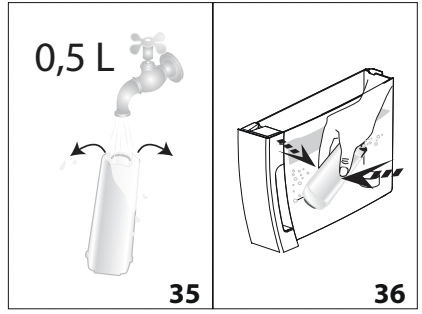
3. To activate the filter, run tap water through the hole in the filter as shown in fig. 35 until water comes out of the openings at the side for more than a minute.;
4. Extract the tank (A17) from the appliance and fill with water;
5. Insert the filter in the water tank and immerse it completely for about ten seconds, sloping it and pressing it lightly to enable the air bubbles to escape (fig. 36).
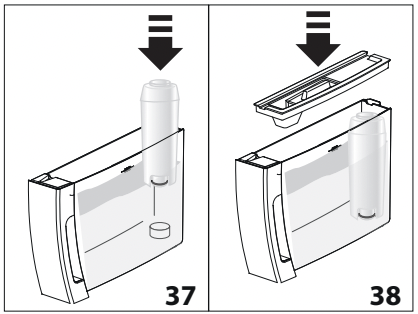
6. Insert the filter in the filter housing (A18) and press as far as it will go (fig. 37);
7. Close the tank with the lid (A16) (fig. 38), then replace the tank in the machine;
When you install the filter, you must notify the appliance of its presence.
8. Press (B6) to enter the "Settings" menu;
9. Press the selection arrows (B2 and B4) until "Maintenance" is displayed between the two lines. Press OK;
10. Press the selection arrows until "Install filter" is displayed, then press OK;
11. Confirm?": press OK;
12. "Hot water, Confirm?": Position a container under the hot water spout (C6) (min. capacity: 500 ml), then press OK;
13. The appliance begins hot water delivery and the message "Please wait" is displayed;
14. After the flow of hot water stops, the appliance automatically resets to "Ready for coffee" status.
The filter is now active and you can use the coffee machine.
Replacing the filter
Replace the filter (C4) when "Replace filter, ESC to cancel, OK to replace" appears on the display (B1). To replace immediately, press OK (B3) and follow the instructions from point 8. To replace later, press ESC (B5). The symbol on the display reminds you that the filter needs replacing.
To replace the filter, proceed as follows:
- Extract the tank (A17) and exhausted filter;
- Take the new filter out of its packet and proceed as illustrated in points 2, 3, 4, 5, 6 and 7 in the previous section;
- Press (B6) to enter the "Settings" menu;
- Press the selection arrows (B2 and B4) until "Maintenance" is displayed between the two lines. Press OK;
- Press the selection arrows until "Replace filter" is displayed, then press OK;
- Confirm?": press OK;
- Hot water, Confirm?": Position a container under the hot water spout (C6) (min. capacity: 500 ml), then press OK;
- The appliance begins hot water delivery and the message "Please wait" is displayed;
- After the flow of hot water stops, the appliance automatically resets to "Ready for coffee" status.
The new filter is now active and you can use the coffee machine.
Please note! After two months (see date indicator) or when the appliance has not been used for 3 weeks, you should replace the filter even if the message has not yet been displayed.
Removing the filter
If you want to use the appliance without the filter (C4), you must remove it and notify the appliance of its removal. Proceed as follows:
- Extract the tank (A17) and exhausted filter;
- Press (B6) to enter the "Settings" menu;
- Press the selection arrows (B2 and B4) until "Maintenance" is displayed between the two lines. Press OK;
- Press the selection arrows until "Remove filter" is displayed, then press OK;
- "Confirm?": press OK to confirm removal. The appliance goes back to the "Maintenance" menu;
Press /ESC (B5) to exit the menu.
Please note! After two months (see date indicator) or when the appliance has not been used for 3 weeks, you should replace the filter even if the message has not yet been displayed.
DISPLAYED MESSAGES
| DISPLAYED MESSAGE |
POSSIBLE CAUSE |
REMEDY |
| Fill tank |
Insufficient water in the tank (A17). |
Fill the tank with water and/or insert it correctly, pushing it as far as it will go until it clicks into place (fig. 3B). |
| Insert tank |
The tank (A17) is not correctly in place. |
Insert the tank correctly and press as far as it will go (page 3B). |
| Empty grounds container |
The grounds container (A11) is full. |
Empty the grounds container and drip tray (A15), clean and replace. Important: when removing the drip tray, the grounds container MUST be emptied, even if it contains few grounds. If this is not done, when you make the next coffees, the grounds container may fill up more than expected and clog the machine. |
| Insert grounds container |
After cleaning, the grounds container (A11) has not been replaced. |
Remove the drip tray (A15) and insert the grounds container. |
| Add pre-ground coffee |
The "pre-ground coffee" function has been selected without placing any pre-ground coffee in the funnel (A4) |
Place pre-ground coffee in the funnel (fig. 11) or deselect the "pre-ground" function. |
| A LONG coffee with pre-ground coffee has been requested |
Put one level measure of pre-ground coffee into the pre-ground coffee funnel (A4) and press OK (B3) to continue and complete preparation. |
| Fill beans container |
The coffee beans have run out. |
Fill the beans container (A3) (fig. 8). |
| The pre-ground coffee funnel (A4) is clogged. |
Empty the funnel with the help of the brush (C5) as described in section “14.8 Cleaning the pre-ground coffee funnel”. |
| Ground too fine Adjust mill |
The grinding is too fine and the coffee is delivered too slowly or not at all. |
Repeat coffee delivery and turn the grinding adjustment dial (A5) (fig. 7) one click clockwise towards 7 while the coffee mill is in operation. If after making at least 2 coffees delivery is still too slow, repeat the correction procedure, turning the grinding adjustment dial another click until delivery is correct (see section “10.1 Adjusting the coffee mill”. If the problem persists, make sure the water tank (A17) is fully inserted. |
| If the water softener filter (C4) is present, an air bubble may have been released inside the circuit, obstructing delivery. |
Insert the hot water spout (C6) in the appliance and deliver a little water until the flow becomes regular. |
| Less coffee |
Too much coffee has been used. |
Select a lighter taste by pressing (B7) or reduce the quantity of pre-ground coffee. |
| Insert water spout |
The hot water spout (C6) is not inserted or is inserted incorrectly. |
Fully insert the hot water spout (fig. 4). |
| Insert milk container |
The milk container (D) is not inserted correctly. |
Insert the milk container as far as it will go (fig. 16). |
| Insert infuser assembly |
The infuser (A20) has not been replaced after cleaning. |
Insert the infuser as described in section “14.9 Cleaning the infuser”. |
| Water circuit empty Fill water circuit Hot water Confirm? |
The water circuit is empty. |
Press OK (B3) to deliver water from the spout (C6) until it flows out normally. If the problem persists, make sure the water tank (A17) is fully inserted. |
| Press OK to CLEAN |
The milk container (D) has been inserted with the froth adjustment dial (D1) in the "CLEAN" position. |
To proceed with the CLEAN function press OK or turn the froth adjustment dial to another position. |
| Set dial to CLEAN ESC to cancel |
Milk has been delivered recently and the tubes inside the milk container (D) must be cleaned |
Turn the froth adjustment dial (D1) to CLEAN (fig. 19). |
| Turn froth adjustment dial |
The milk container (D) has been inserted with the froth adjustment dial (D1) in the "CLEAN" position. |
Turn the froth adjustment dial to one of the milk froth positions. |
| Descale ESC to cancel OK to descale (∼45 minutes) |
The machine must be descaled. |
The descaling procedure described in section “15. Descaling” needs to be performed. |
| Replace filter ESC to cancel OK to replace |
The water softener filter (C4) is exhausted. |
Replace the filter or remove it as described in section “17. Water softener filter”. |
| General alarm |
The inside of the appliance is very dirty. |
Clean the inside of the appliance thoroughly, as described in section “14. Cleaning”. If the message is still displayed after cleaning, contact a service centre. |
 |
The tubes inside the milk container (D) must be cleaned. |
Turn the froth adjustment dial (D1) to CLEAN (fig. 19). |
 |
The water softener filter (C4) is exhausted and must be replaced or removed. |
Replace the filter or remove it as described in section “17. Water softener filter”. |
 |
The machine must be descaled. |
The descaling procedure described in section “15. Descaling” needs to be performed. The appliance may request descaling cycles at very short intervals. This is normal and due to the appliance’s advanced control system. |
 |
Energy saving is enabled. |
To disable energy saving, proceed as described in section “8.5 General” - “•Energy saving:” |
TROUBLESHOOTING
Below is a list of some of the possible malfunctions. If the problem cannot be resolved as described, contact Customer Services.
| PROBLEM |
POSSIBLE CAUSE |
REMEDY |
The coffee is not hot.
|
The cups were not preheated. |
Warm the cups by rinsing them with hot water (Please note: you can use the hot water function). |
| The internal circuits of the appliance have cooled down because 2/3 minutes have elapsed since the last coffee was made. |
Before making coffee, rinse the internal circuits by pressing the button (B5). (B5). |
| A low coffee temperature is set. |
Set a higher coffee temperature in the menu. |
| The coffee is weak or not creamy enough. |
The coffee is ground too coarsely. |
Turn the grinding adjustment dial (A5) one click anticlockwise towards 1 while the coffee mill is in operation (fig. 7). Continue one click at a time until coffee delivery is satisfactory. The effect is only visible after delivering 2 coffees (see section “10.1 Adjusting the coffee mill”). |
| The coffee is unsuitable |
Use pre-ground coffee for espresso machines. |
| The coffee is delivered too slowly or a drop at a time. |
The coffee is ground too finely. |
Turn the grinding adjustment dial (A5) one click clockwise towards 7 while the coffee mill is in operation (fig. 7). Continue one click at a time until coffee delivery is satisfactory. The effect is only visible after delivering 2 coffees (see section “10.1 Adjusting the coffee mill”). |
| The appliance will not make coffee |
The appliance has detected impurities in its internal circuits. "Please wait" is displayed. |
Wait for the appliance to be ready for use again and reselect the required beverage. Contact Customer Services if the problem persists. |
| Coffee does not come out of one or both of the spouts. |
The coffee spouts (A9) are blocked. |
Clean the spouts with a toothpick (fig. 24B). |
The appliance does not come on
|
It is not plugged into the mains socket. |
Plug into the mains socket (fig. 1). |
| The main switch (A22) is not turned on. |
Place the main switch in the I position (fig. 2). |
| The power cord (C7) connector is not inserted correctly. |
Insert the connector as far as it will go in the socket at the back of the appliance (fig. 1). |
| The infuser cannot be extracted |
The appliance has not been turned off correctly |
Turn the appliance off by pressing the button (A7) (fig. 6) (see section “7. Turning the appliance off”). |
| At the end of descaling, the appliance requests a third rinse |
During the two rinse cycles, the water tank has not been filled to the MAX level. |
Follow the instructions displayed by the appliance, but first empty the drip tray to avoid the water overflowing. |
| The milk does not come out of the milk spout (D5) |
The lid (D2) of the milk container lid is dirty |
Clean the milk container lid as described in the section “15. Descaling”. |
The milk contains large bubbles and squirts out of the milk spout (D5) or there is little froth
|
The milk is not cold enough or is not semi-skimmed. |
Use skimmed or semi-skimmed milk at refrigerator temperature (about 5° C). If the result is not as you wished, try changing brand of milk. |
| The froth adjustment dial (D1) is incorrectly adjusted. |
Adjust following the instructions in section “ • Espresso macchiato;” |
| The milk container lid (D2) or froth adjustment dial (D1) is dirty |
Clean the milk container lid and dial as described in section “15. Descaling” |
| The hot water connection nozzle (A8) is dirty |
Clean the connection nozzle as described in section . “14.11 Cleaning the hot water nozzle”. |