
WARNING: This product contains chemicals known to the State of California to cause cancer and birth defects or other
reproductive harm. Wash hands after handling.

2
ENG
ENGLISH
CONTENTS
CONTENTS
3 INSTALLATIONPREPARATION
3 Accessories
4 MountingHoles
6 UnpackingandCabling
8 PortraitLayout(Onlysupportedfor47TS30MF)
9 StorageMethodforPanelProtection
9 - CorrectMethod
9 - IncorrectMethod
10 PRODUCTINSTALLATION
10 Lightinginstallation
11 InstallationinEnclosure
12 Precaution
12 - CorrectMethod
12 - IncorrectMethod
13 TROUBLESHOOTING
14 SPECIFICATIONS
14 26TS30MF
15 47TS30MF
16 LVDSPINMAPGUIDE
16 26TS30MF
17 47TS30MF
3
ENG
ENGLISH
INSTALLATION PREPARATION
INSTALLATION PREPARATION
Accessories
Check your product box for the following items. If there are any missing accessories, contact the local
dealer where you purchased your product. The illustrations in this manual may differ from the actual product
and accessories.
Do not use any unapproved or counterfeit parts or accessories to ensure the safety and product life
span.
Any damages or injuries by using unapproved items are not covered by the warranty.
The accessories supplied with your product may vary depending on the model.
Product specifications or contents in this manual may be changed without prior notice due to upgrade
of product functions.
CD (Owner's Manual)/
Easy Setup Guide
CAUTION
NOTE
4
ENG
ENGLISH
INSTALLATIONPREPARATION
MountingHoles
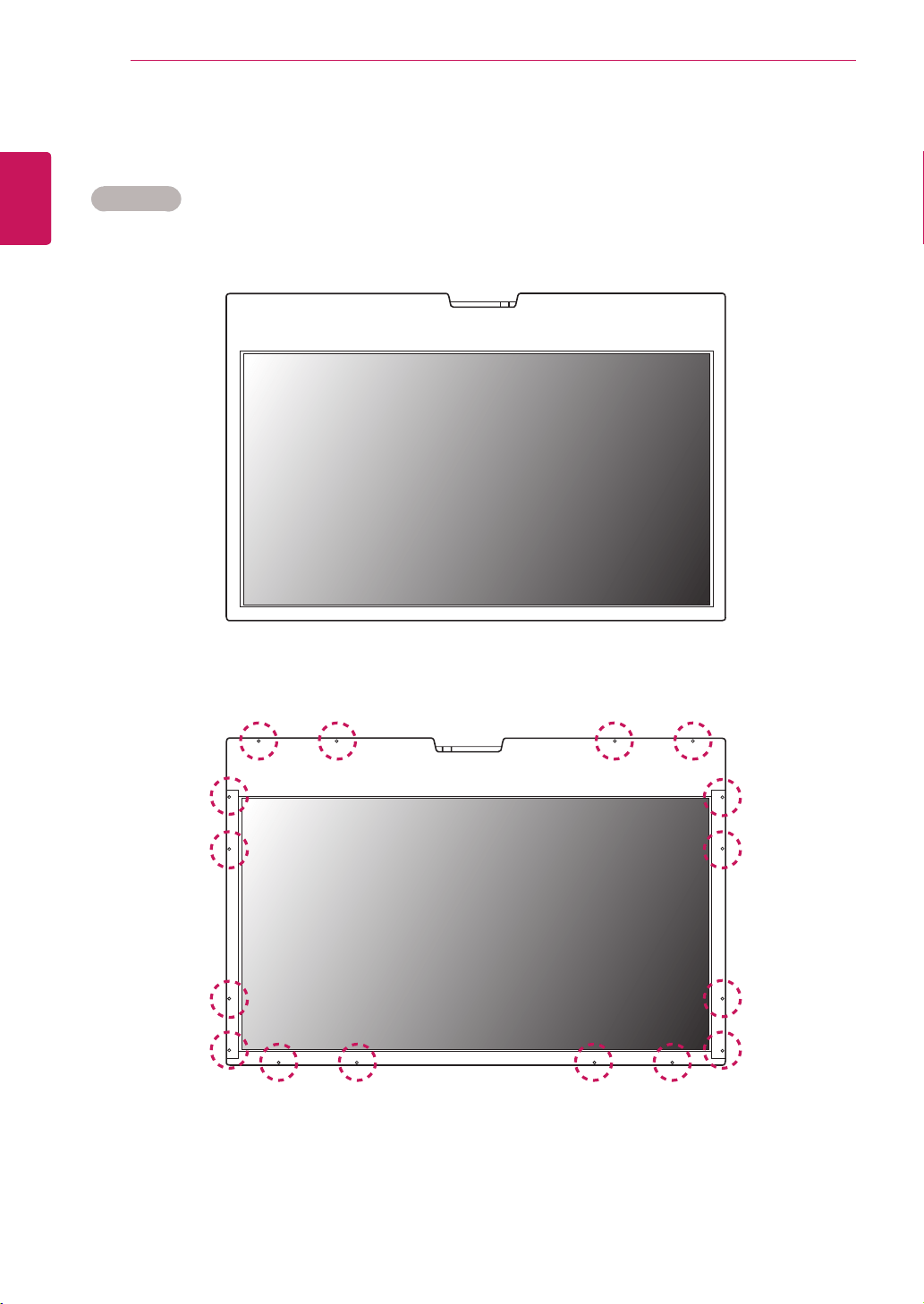
UseM3x4mmscrewstomountthemonitor.Thereare16screwholesontherearsideoftheproduct.
26TS30MF
<Frontsideoftheproduct>
<Rearsideoftheproduct>
5
ENG
ENGLISH
INSTALLATIONPREPARATION
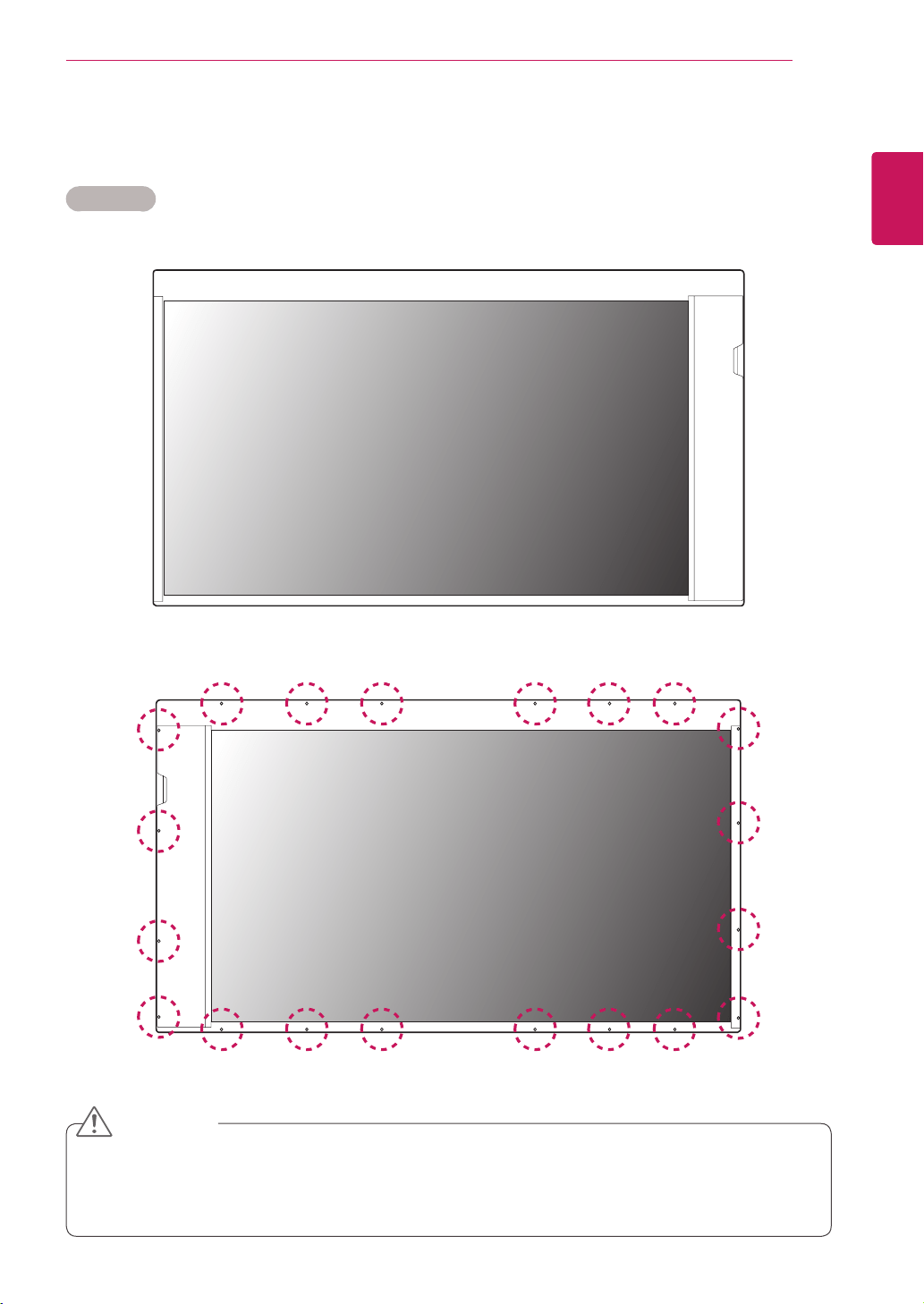
UseM3x4mmscrewstomountthemonitor.Thereare20screwholesontherearsideoftheproduct.
47TS30MF
<Frontsideoftheproduct>
<Rearsideoftheproduct>
Thisproducthasthefrontandbacksides.Makesuretheproductisinstalledwiththefrontsidefacing
forward.
Imageisdisplayedreverselyonthebackside.
CAUTION
6
ENG
ENGLISH
INSTALLATIONPREPARATION
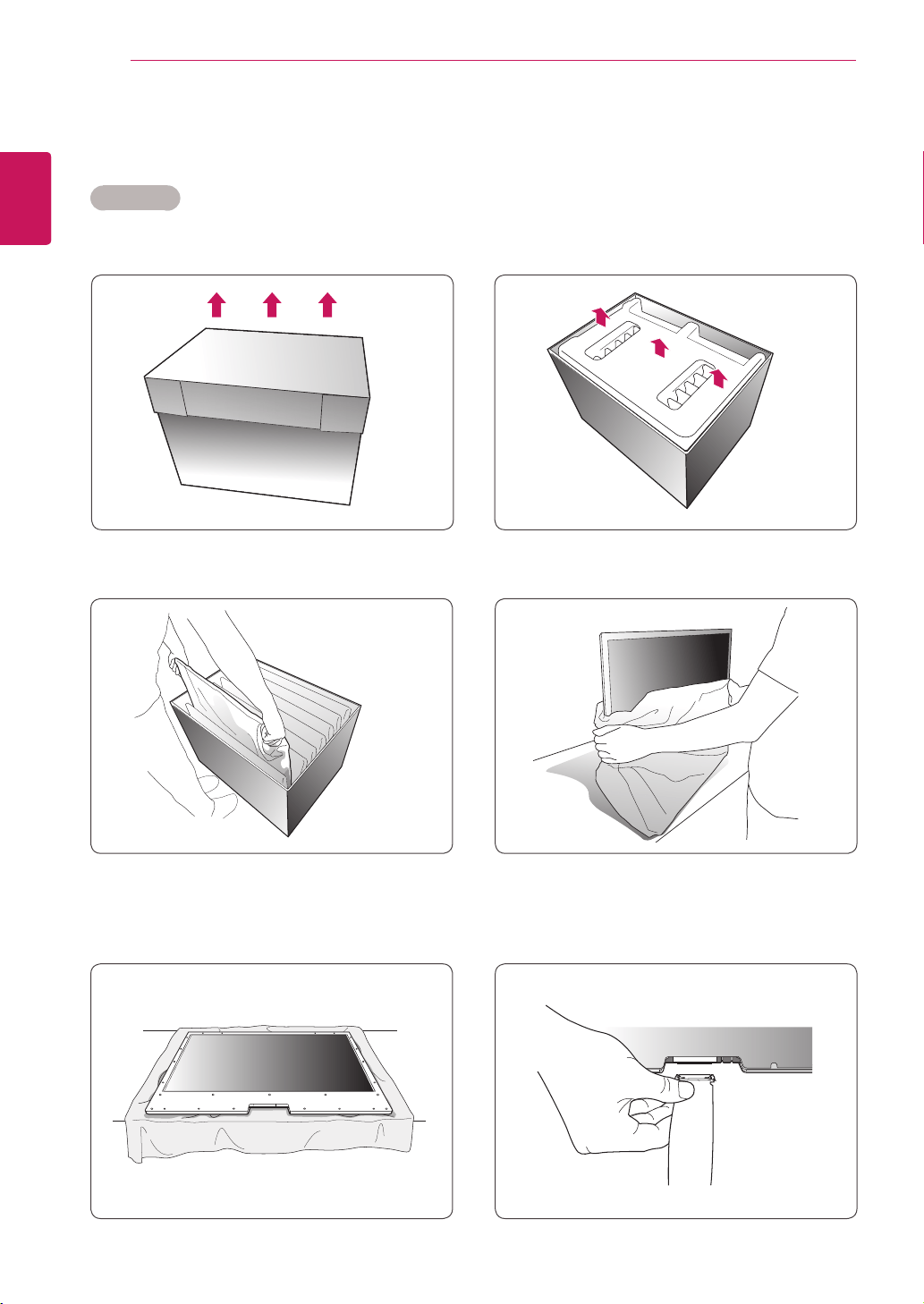
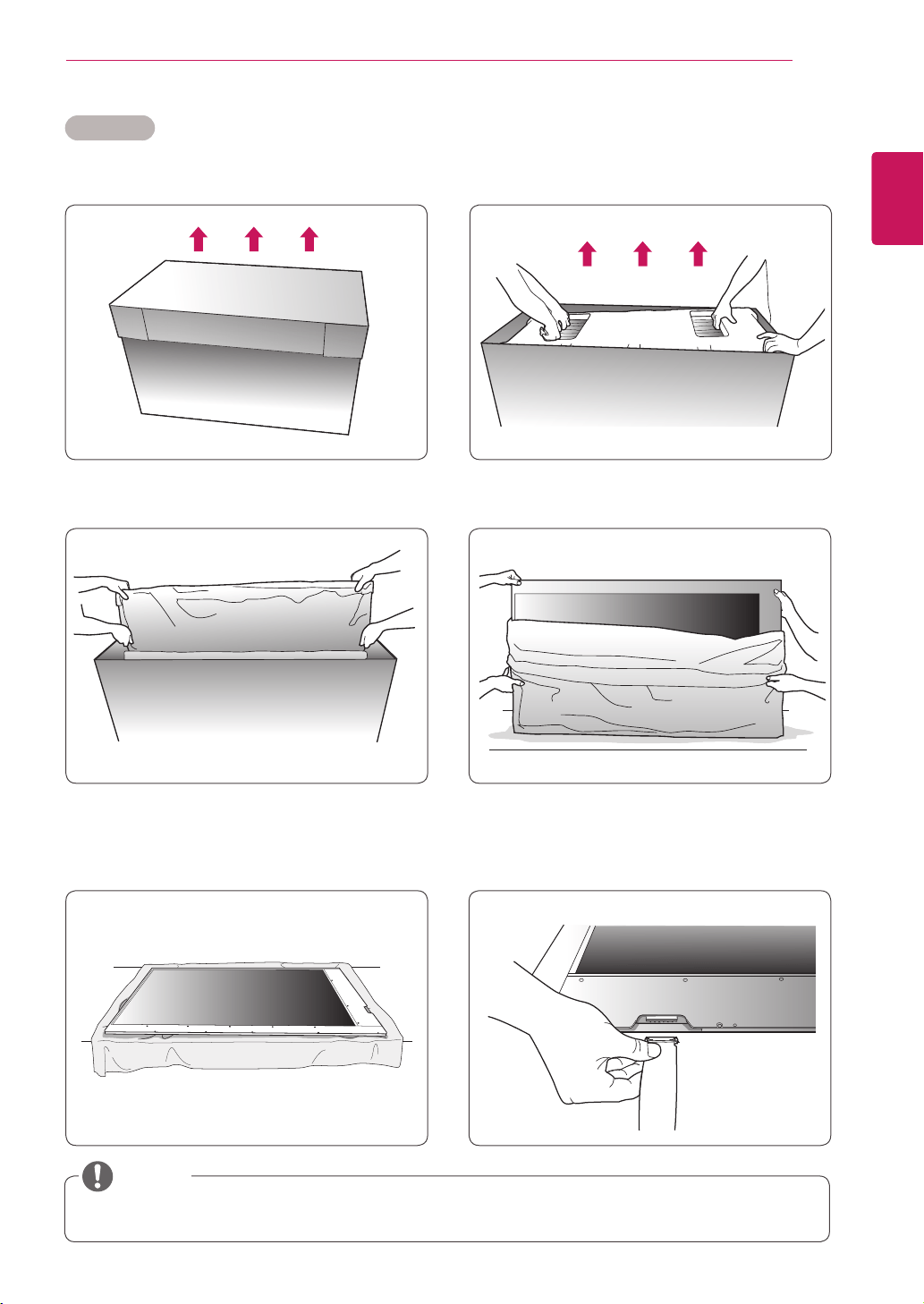
UnpackingandCabling
1
Liftupthecoverofthebox.
2
Removethetoppackaging.
3
Holdbothsidesoftheproductandliftitup.
5
Placeasoftclothonthetableandputthe
productdownwiththescreenfacingdownward.
4
Removethepolybag.
6
ConnecttheLVDScable(Additionalassembly
isrequired).AscalerboardorLVDScableis
optionalandnotprovidedwiththeproduct.
26TS30MF
7
ENG
ENGLISH
INSTALLATIONPREPARATION
1
Liftupthecoverofthebox.
2
Removethetoppackaging.
3
Holdbothsidesoftheproductandliftitup.
5
Placeasoftclothonthetableandputthe
productdownwiththescreenfacingdownward.
4
Removethepolybag.
6
ConnecttheLVDScable(Additionalassembly
isrequired).AscalerboardorLVDScableis
optionalandnotprovidedwiththeproduct.
47TS30MF
Pleasereferto"LVDSPinMapGuide"onpages16to18fortheLVDScableassembly.
NOTE
8
ENG
ENGLISH
INSTALLATIONPREPARATION
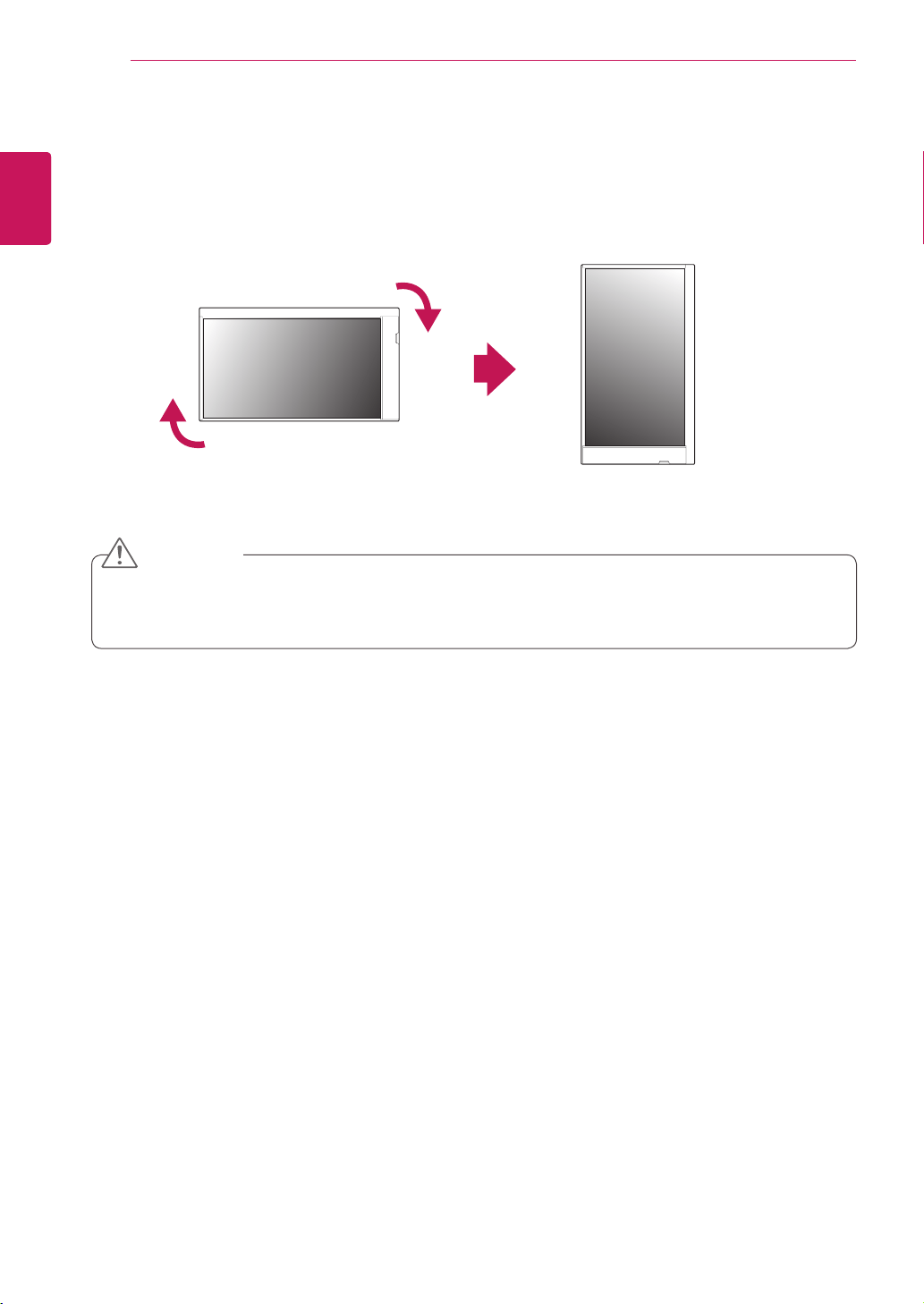
PortraitLayout(Onlysupportedfor47TS30MF)
Toinstallinportraitmode,rotatethesetclockwise90degreeswhenlookingatfromthefront.
Theportraitmodeisonlyavailableonthescalerboard.(Thescalerboardshouldsupportportraitmode.)
The26TS30MFmodelcannotberotated.
Thescalerboardisoptionalanditisnotpartoftheproduct.
CAUTION

9
ENG
ENGLISH
INSTALLATIONPREPARATION
CorrectMethod IncorrectMethod
StorageMethodforPanelProtection
Panel
Cushion
Whenlayingdowntheproduct,placeacushionor
asoftclothonaflatfloor.Puttheproductdown
withthepaneloftheproductfacingdown.
Ifthereisnoacushionorasoftclothavailable,
ensurethefloorisclean.Thenlaytheproduct
downcarefullywiththepanelfacingeitherupward
ordownward.Atthistime,makesurethatno
objectfallsonthepanel.
Panel
Panel
Panel
Iftheproductistiltedontothebezel,thebottomof
thepanelmaybedamaged.
Iftheproductistiltedontotheedgeofthepanel,
thepanelmaybedamaged.
10
ENG
ENGLISH
PRODUCTINSTALLATION
PRODUCTINSTALLATION
Lightinginstallation
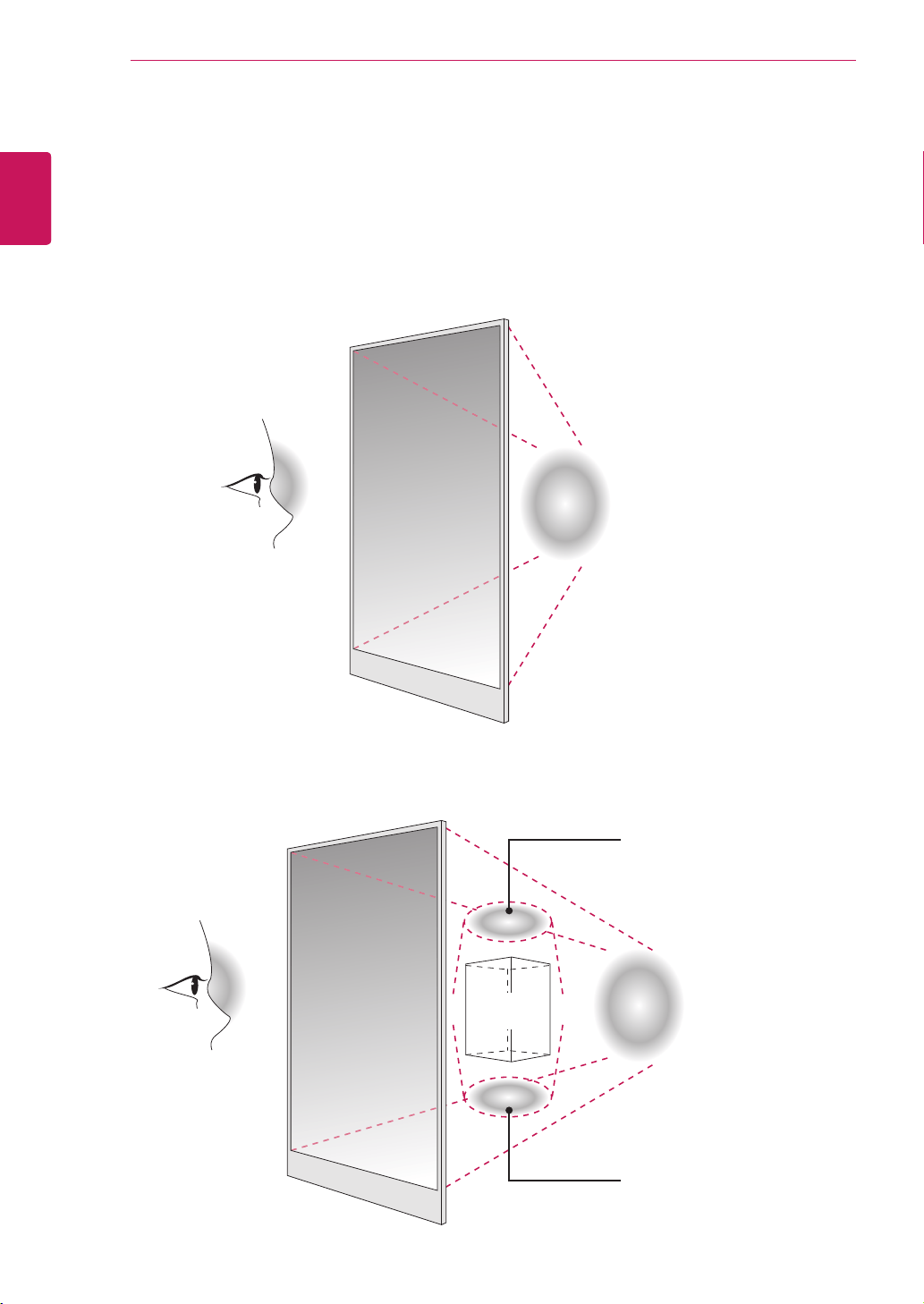
Thisproductmustbeinstalledwithlighting.
Lightingmustbeinstalledbehindtheproductsothatthedisplaycanbeseenclearly.
Installingacertainobjectbehindthescreenmayrequireadditionallighting.
Lighting 600luxormore
Lighting 600luxormore
Additionallighting
Additionallighting
Object
11
ENG
ENGLISH
PRODUCTINSTALLATION
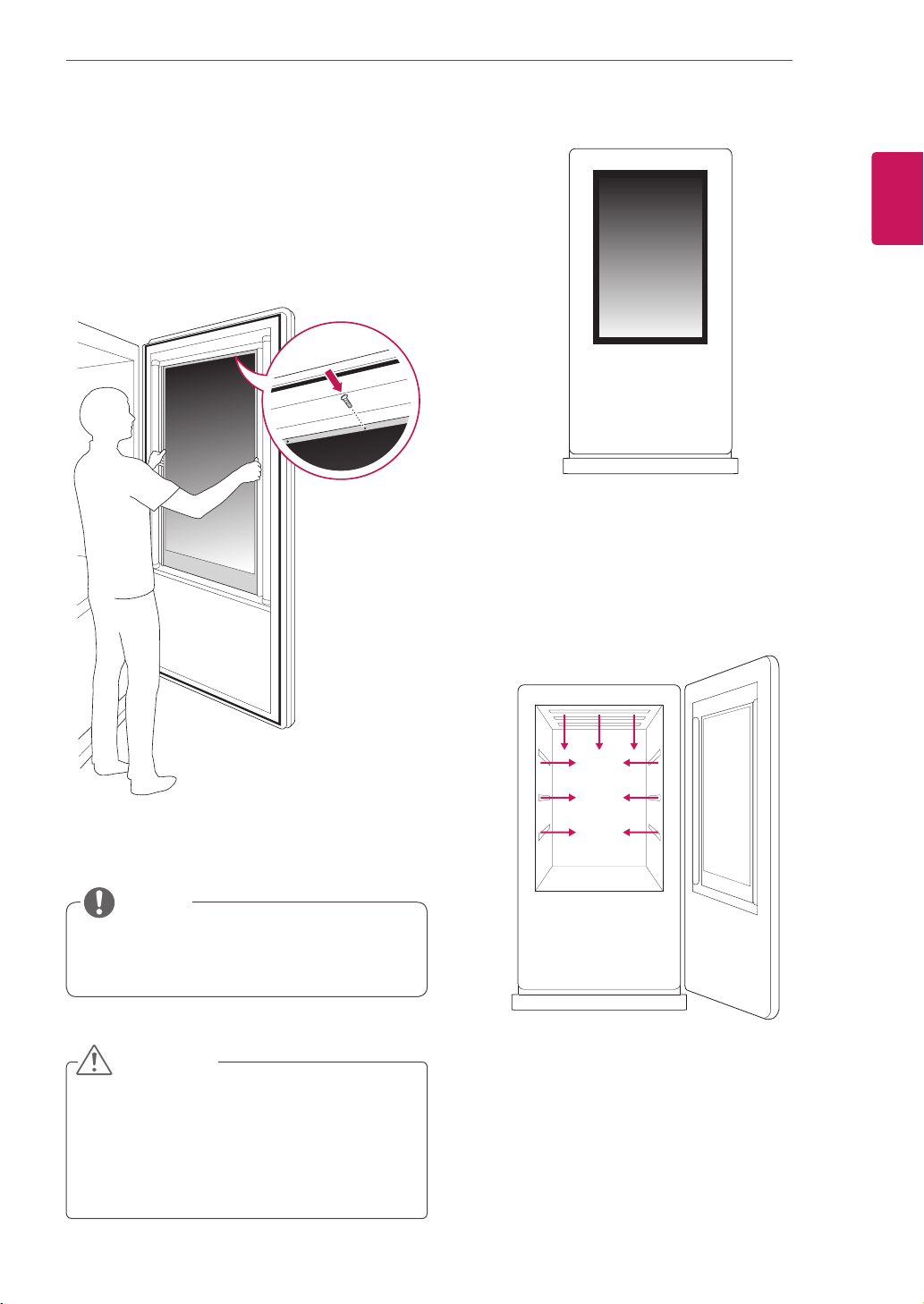
Thisproductcanbeinstalledinvarious
locationsbesidestheenclosure.
<Exampleoftheproductintheenclosure>
<Exampleofthelightinginstallation>
Lightingmustbeinstalledintheenclosure.
InstallationinEnclosure
Installtheproductintheenclosure.
1
Placetheproductintheenclosure.
2
Attachtheproductusingthepreparedscrew
holesandanadditionalenclosureguideframe.
NOTE
Thepanelofthisproductissothinthatit
canbeeasilybrokenwhenitisexposedto
theoutside.Pleaseusetheprotectiveglass
topreventtheproductfromdirectlybeing
exposedtotheoutside.
CAUTION
12
ENG
ENGLISH
INSTALLATIONPREPARATION
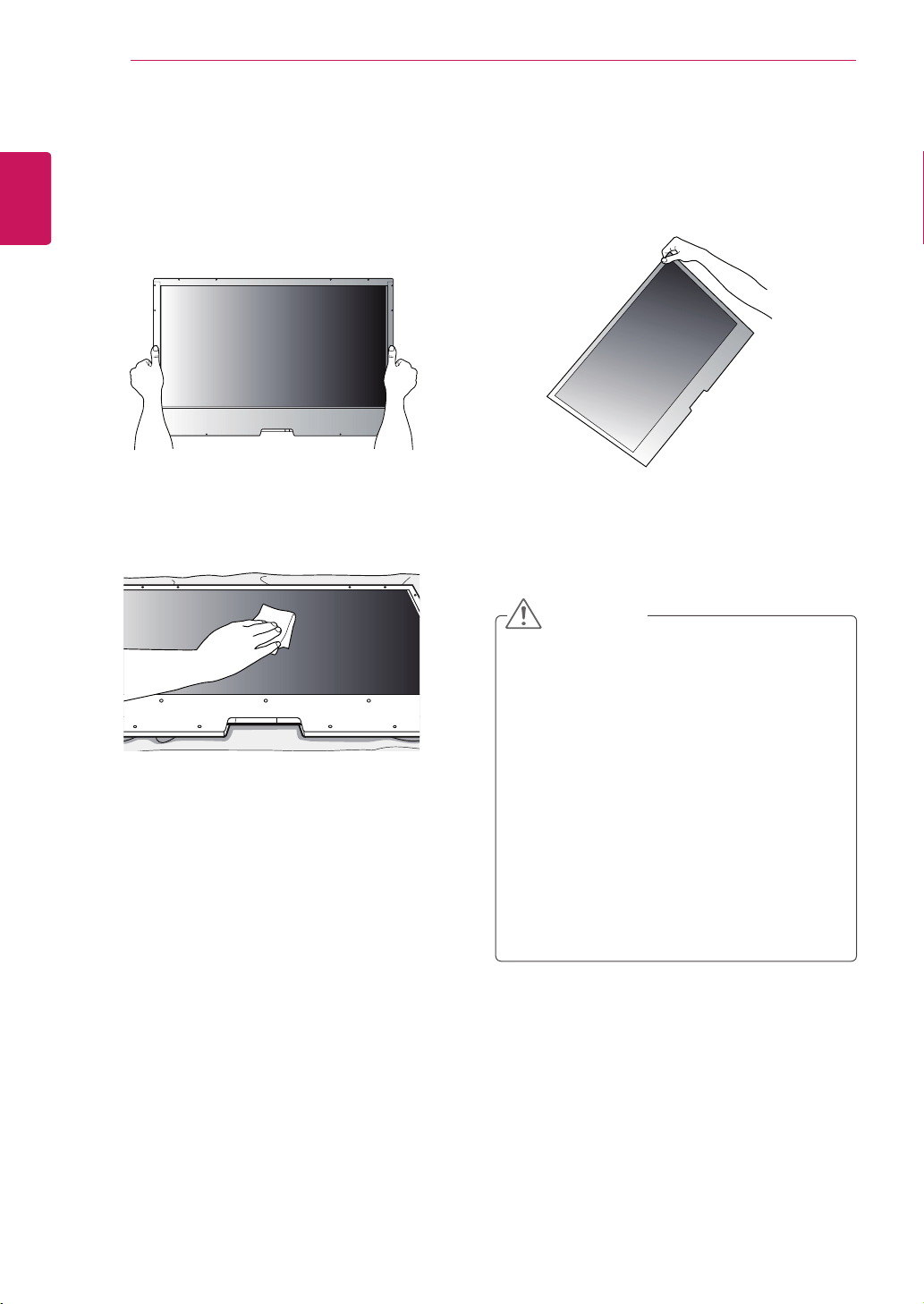
Precaution
Donotliftuptheproductbyholdingacorner.Donotholdthescreenareawhenholdingthe
product.
Useasoftclothmoistenedwithn-hexaneto
removedustorstainsonthescreen.
CorrectMethod IncorrectMethod
Makesurethepowerisdisconnectedbefore
movingorinstallingtheproduct.Otherwise
electricshockmayoccur.
Ifyouinstalltheproductonaceilingor
slantedwall,itmayfallandresultinsevere
injury.
Donotfastenthescrewstootightly;thismay
causedamagetotheproductandvoidyour
warranty.
UseM3x4mmscrewstomountthe
monitor.Anydamagesorinjuriescausedby
misuseoruseofimproperaccessoriesare
notcoveredbythewarranty.
CAUTION
13
ENG
ENGLISH
TROUBLESHOOTING
TROUBLESHOOTING
After-imageappearsontheproduct.
Problem Resolution
After-imageappearswhenthe
productisturnedoff.
Ifyouuseafixedimageforalongtime,thepixelsmaybedamaged
quickly.Usethescreen-saverfunction.
Screencolorisabnormal.
Problem Resolution
Screencolorisunstableor
mono-colored.
ChecktheconnectionstatusoftheLVDScable.
CheckwhethertheLVDScableisconnectedcorrectlyfollowingthe
"LVDSPinMapGuide".
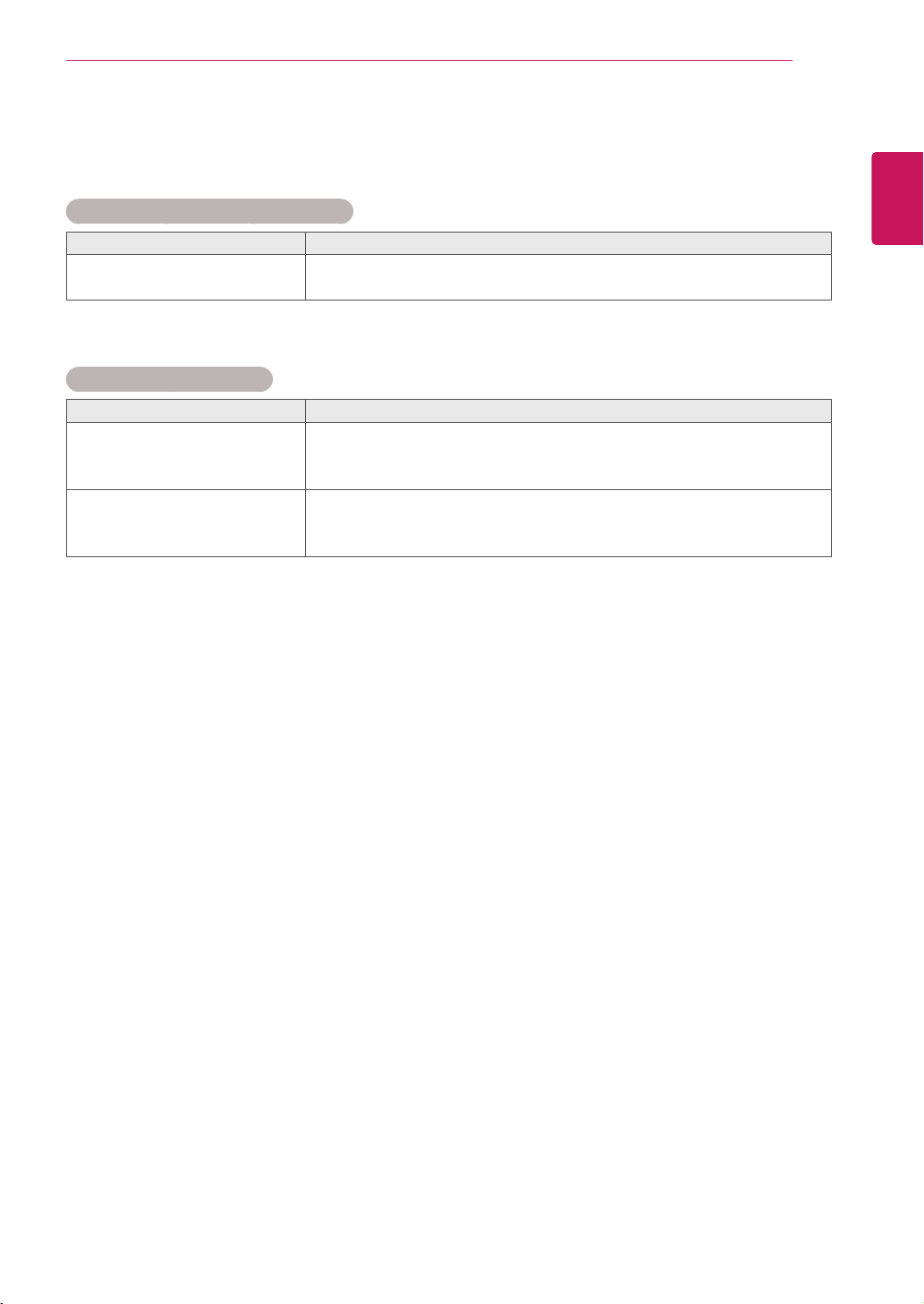
Doblackspotsappearonthe
screen?
Severalpixels(red,green,whiteorblackcolor)mayappearonthe
screen,whichcanbeattributabletotheuniquecharacteristicsofthe
LCDpanel.ItisnotamalfunctionoftheLCD.
14
ENG
ENGLISH
SPECIFICATIONS
SPECIFICATIONS
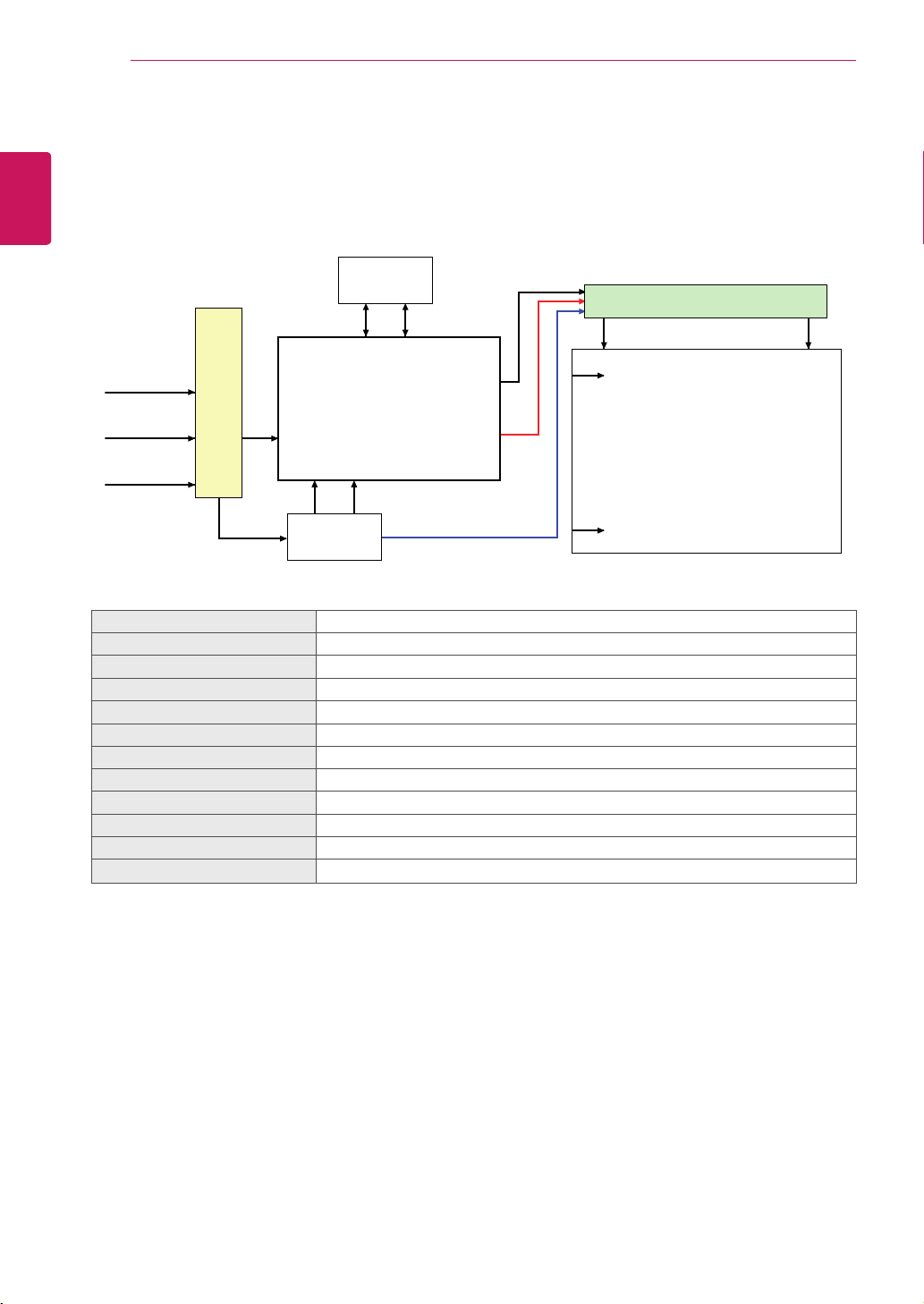
26TS30MF
CN1
(30pin)
EEPROM
S1
SCL SDA
S1366
Source Driver Circuit
LVDS Select #9
LVDS 1Port
+12.0V
Timing Controller
[LVDS Rx]
TFT - LCD Panel
(1366 x RGB x 768 pixels)
[Gate In Panel]
G1
G768
RGB
Control
Signals
Power Signals
Power Circuit
Block
ScreenSize 26"class(25.5"/66,4cmdiagonal)
Dimension(WxHxD) 609mmx412.8mmx8.8mm
PixelPitch
140.5
㎛
xRGBX421.5
㎛
PixelFormat 1366horiz.by768vert.pixelsRGBstripearrangement
ColorDepth 8bit(D),16,7Mcolors
Transmittance(WithPOL) 4.84%(Typ.)
ViewingAngle(CR>10) Viewinganglefree(R/L178(Min.),U/D178(Min.))
PowerConsumption Total2.7W(Typ)(TBD)
Weight(head) 1.62kg
DisplayOperatingMode Transmissivemode,Normallyblack
SurfaceTreatment(Top) Hardcoating(3H),Anti-glaretreatmentofthefrontpolarizer(Haze10%)
PossibleDisplayType Landscapeonly

15
ENG
ENGLISH
SPECIFICATIONS
47TS30MF
CN1
(51pin)
EEPROM
S1
SCL SDA
S1920
Source Driver Circuit
Timing Controller
LVDS Rx + DCA + ODC
Intergrated
TFT - LCD Panel
(1920 x RGB x 1080 pixels)
[Gate In Panel]
G1
G1080
Mini-LVDS
(RGB)
Control
Signals
Power Signals
LVDS 2Port
LVDS 1,2
I2C
Option
signal
LVDS Select
Bit Select
+12.0V
Power Circuit
Block
ScreenSize 47"class(46.9"/119,2cmdiagonal)
Dimension(WxHxD) 1165.9mmx663.27x8.8mm
PixelPitch 0.5415mmx0.5415mm
PixelFormat 1920horiz.by1080vert.Pixels,RGBstripearrangement
ColorDepth 10Bit(D),1.07Billioncolors
Transmittance(WithPOL) 5,5%(Typ.)
ViewingAngle(CR>10) Viewinganglefree(R/L178(Min.),U/D178(Min.))
PowerConsumption Total6.6W(Typ.)(TBD)
Weight(head) 4.56kg
DisplayOperatingMode Transmissivemode,Normallyblack
SurfaceTreatment(Top) Hardcoating(3H),Anti-glaretreatment(Reflectance<2%),
PossibleDisplayType LandscapeandPortraitEnabled
16
ENG
ENGLISH
LVDSPINMAPGUIDE
LVDSPINMAPGUIDE
26TS30MF
PinNo. Symbol Description Note
1 VLCD PowerSupply+12.0V
2 VLCD PowerSupply+12.0V
3 VLCD PowerSupply+12.0V
4 VLCD PowerSupply+12.0V
5 GND Ground
6 GND Ground
7 GND Ground
8 GND Ground
9 LVDSSelect 'H'=JEIDA,'L'orNC=VESA
10 NC NoConnection 4
11 GND Ground
12 RA- LVDSReceiverSignal(-)
13 RA+ LVDSReceiverSignal(+)
14 GND Ground
15 RB- LVDSReceiverSignal(-)
16 RB+ LVDSReceiverSignal(+)
17 GND Ground
18 RC- LVDSReceiverSignal(-)
19 RC+ LVDSReceiverSignal(+)
20 GND Ground
21 RCLK- LVDSReceiverClockSignal(-)
22 RCLK+ LVDSReceiverClockSignal(+)
23 GND Ground
24 RD- LVDSReceiverSignal(-)
25 RD+ LVDSReceiverSignal(+)
26 GND Ground
27 NC NoConnection(Note4) 4
28 NC NoConnection(Note4) 4
29 NC NoConnection(Note4) 4
30 GND Ground
LVDSConnector(CN1):KDF71G-30S-1H(Hirose)orCompatible,Refertobelowtable.
MatingConnector:FI-X30C2L(ManufacturedbyJAE)orEquivalent
Cablelength:1mofFFCcableorless
Note:1.AllGND(Ground)pinsshouldbeconnectedtogethertotheLCDmodule'smetalframe.
2.AllVLCD(powerinput)pinsshouldbeconnectedtogether.
3.AllInputlevelsofLVDSsignalsarebasedontheEIA644Standard.
4.ThesepinsareusedonlyforLGD(Donotconnect).
17
ENG
ENGLISH
LVDSPINMAPGUIDE
47TS30MF
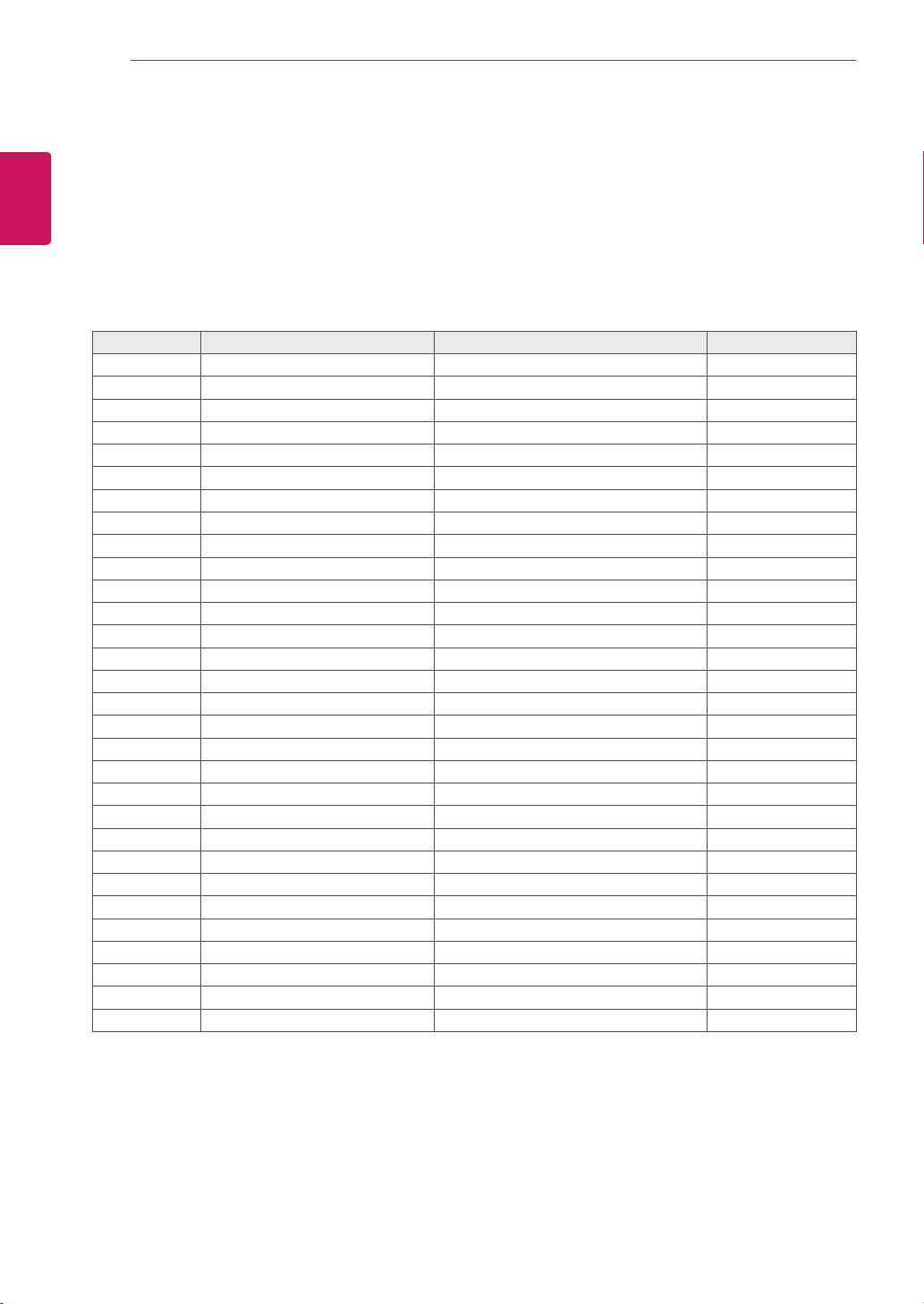
PinNo. Symbol Description Note
1 GND Ground 1
2 NC NoConnection 4
3 NC NoConnection 4
4 NC NoConnection(ReservedforLGD) 4
5 NC NoConnection(ReservedforLGD) 4
6 NC NoConnection(ReservedforLGD) 4
7 LVDSSelect 'H'=JEIDA,'L'orNC=VESA
8 NC NoConnection
9 NC NoConnection
10 NC NoConnection
11 GND Ground 1
12 RO0N FIRSTLVDSReceiverSignal(A-)
13 RO0P FIRSTLVDSReceiverSignal(A+)
14 RO1N FIRSTLVDSReceiverSignal(B-)
15 RO1P FIRSTLVDSReceiverSignal(B+)
16 RO2N FIRSTLVDSReceiverSignal(C-)
17 RO2P FIRSTLVDSReceiverSignal(C+)
18 GND Ground 1
19 ROCLKN FIRSTLVDSReceiverClockSignal(A-)
20 ROCLKP FIRSTLVDSReceiverClockSignal(A+)
21 GND Ground 1
22 RO3N FIRSTLVDSReceiverSignal(D-)
23 RO3P FIRSTLVDSReceiverSignal(D+)
24 RO4N FIRSTLVDSReceiverSignal(E-) 5
25 RO4P FIRSTLVDSReceiverSignal(E+) 5
26 NC NoConnection
27 BitSelect 'H'orNC=10bit(D),'L'=8bit
28 RE0N SECONDLVDSReceiverSignal(A-)
29 RE0P SECONDLVDSReceiverSignal(A+)
30 RE1N SECONDLVDSReceiverSignal(B-)
31 RE1P SECONDLVDSReceiverSignal(B+)
32 RE2N SECONDLVDSReceiverSignal(C-)
33 RE2P SECONDLVDSReceiverSignal(C+)
34 GND Ground 1
35 RECLKN SECONDLVDSReceiverClockSignal(-)
36 RECLKP SECONDLVDSReceiverClockSignal(+)
37 GND Ground 1
38 RE3N SECONDLVDSReceiverSignal(D-)
39 RE3P SECONDLVDSReceiverSignal(D+)
40 RE4N SECONDLVDSReceiverSignal(E-) 5
41 RE4P SECONDLVDSReceiverSignal(E+) 5
LVDSConnector(CN1):FI-RE51S-HForEquivalent,Refertobelowtable.
MatingConnector:FI-RE51SorEquivalent
Cablelength:1mofcoaxialcableorless

18
ENG
ENGLISH
LVDSPINMAPGUIDE
Note:1.AllGND(Ground)pinsshouldbeconnectedtogethertotheLCDmodule'smetalframe.
2.AllVLCD(powerinput)pinsshouldbeconnectedtogether.
3.AllInputlevelsofLVDSsignalsarebasedontheEIA644Standard.
4.Specificpins(pinNo.#2~#6)areusedforinternaldataprocessoftheLCDmodule.
Thesepinsshouldbenoconnections.
5.LVDSpin(pinNo.#24,25,40,41)areusedfor10Bit(D)oftheLCDmodule.
Ifusedfor8Bit(R),thesepinsarenoconnection.
PinNo. Symbol Description Note
42 NC NoConnection
43 NC NoConnection
44 NC NoConnection
45 GND Ground
46 GND Ground
47 GND Ground
48 VLCD PowerSupply+12.0V 2
49 VLCD PowerSupply+12.0V 2
50 VLCD PowerSupply+12.0V 2
51 VLCD PowerSupply+12.0V 2

Make sure to read the Safety Precautions
before using the product.
Keep the Owner's Manual(CD) in an accessible
place for future reference.
The model and serial number of the SET is
located on the back and one side of the SET.
Record it below should you ever need service.
MODEL
SERIAL
Temporarynoiseisnormalwhen poweringONor
OFFthisdevice.

P/NO : 3840TRL098E (0801-REV00)
www.lge.com