© 2018 Samsung Electronics Co., Ltd. All rights reserved.
•Readtheseinstructions–Allthesafetyandoperatinginstructionsshouldbereadbeforethisproductisoperated.
•Keeptheseinstructions–Thesafetyandoperatinginstructionsshouldberetainedforfuturereference.
•Heedallwarnings–Allwarningsontheapplianceandintheoperatinginstructionsshouldbeadheredto.
•Followallinstructions–Alloperatinganduseinstructionsshouldbefollowed.
•Donotusethisapparatusnearwater–Theapplianceshouldnotbeusednearwaterormoisture–forexample,inawetbasementornear
aswimmingpool,andthelike.
•Cleanonlywithdrycloth.
•Donotblockanyventilationopenings.Installinaccordancewiththemanufacturer’sinstructions.
•Donotinstallnearanyheatsourcessuchasradiators,heatregisters,stoves,orotherapparatus(includingamplifiers)thatproduceheat.
•Donotdefeatthesafetypurposeofthepolarizedorgrounding-typeplug.Apolarizedplughastwobladeswithonewiderthantheother.
Agrounding-typeplughastwobladesandathirdgroundingprong.Thewidebladeorthethirdprongareprovidedforyoursafety.Ifthe
providedplugdoesnotfitintoyouroutlet,consultanelectricianforreplacementoftheobsoleteoutlet.
•Protectthepowercordfrombeingwalkedonorpinchedparticularlyatplugs,conveniencereceptacles,andthepointwheretheyexit
fromtheapparatus.
•Onlyuseattachments/accessoriesspecifiedbythemanufacturer.
•Useonlywiththecart,stand,tripod,bracket,ortablespecifiedbythemanufacturer,orsoldwiththeapparatus.Whenacart
isused,usecautionwhenmovingthecart/apparatuscombinationtoavoidinjuryfromtip-over.
•Unplugthisapparatusduringlightningstormsorwhenunusedforlongperiodsoftime.
•Referallservicingtoqualifiedservicepersonnel.Servicingisrequiredwhentheapparatushasbeendamagedinanyway,suchasthe
power-supplycordorplugisdamaged,liquidhasbeenspilledorobjectshavefallenintotheapparatus,theapparatushasbeenexposed
torainormoisture,doesnotoperatenormally,orhasbeendropped.
•Pleasekeeptheunitinawell-ventilatedenvironment.
•Donotblockventilationslotsinthebackcover.YoumayplacetheTVinacabinet,butensureatleast5cm(2’’)clearanceallaround.
•Theventilationshouldnotbeimpededbycoveringtheventilationopeningswithitems,suchasnewspapers,table-cloths,curtains,etc.
•Nonakedflamesorces,suchaslightedcandles,shouldbeplacedonapparatus.
•Theuseofapparatusinmoderateclimates.
•Attentionshouldbedrawntotheenvironmentalaspectsofbatterydisposal.
WARNING:Toreducetheriskoffireorelectricshock,donotexposethisapparatustorainormoisture.Theapparatusshouldnotbe
exposedtodrippingorsplashing.Objectsfilledwithliquids,suchasvasesshouldnotbeplacedonapparatus.
WARNING:Thebatteriesshallnotbeexposedtoexcessiveheatsuchassunshine,fireorthelike.
WARNING:Themainplugisusedasdisconnectdevice,thedisconnectdeviceshallremainreadilyoperable.
WARNING:Toreducetheriskofelectricshock,donotremovecover(orback)astherearenouser-serviceablepartsinside.Referservicing
toqualifiedpersonnel.
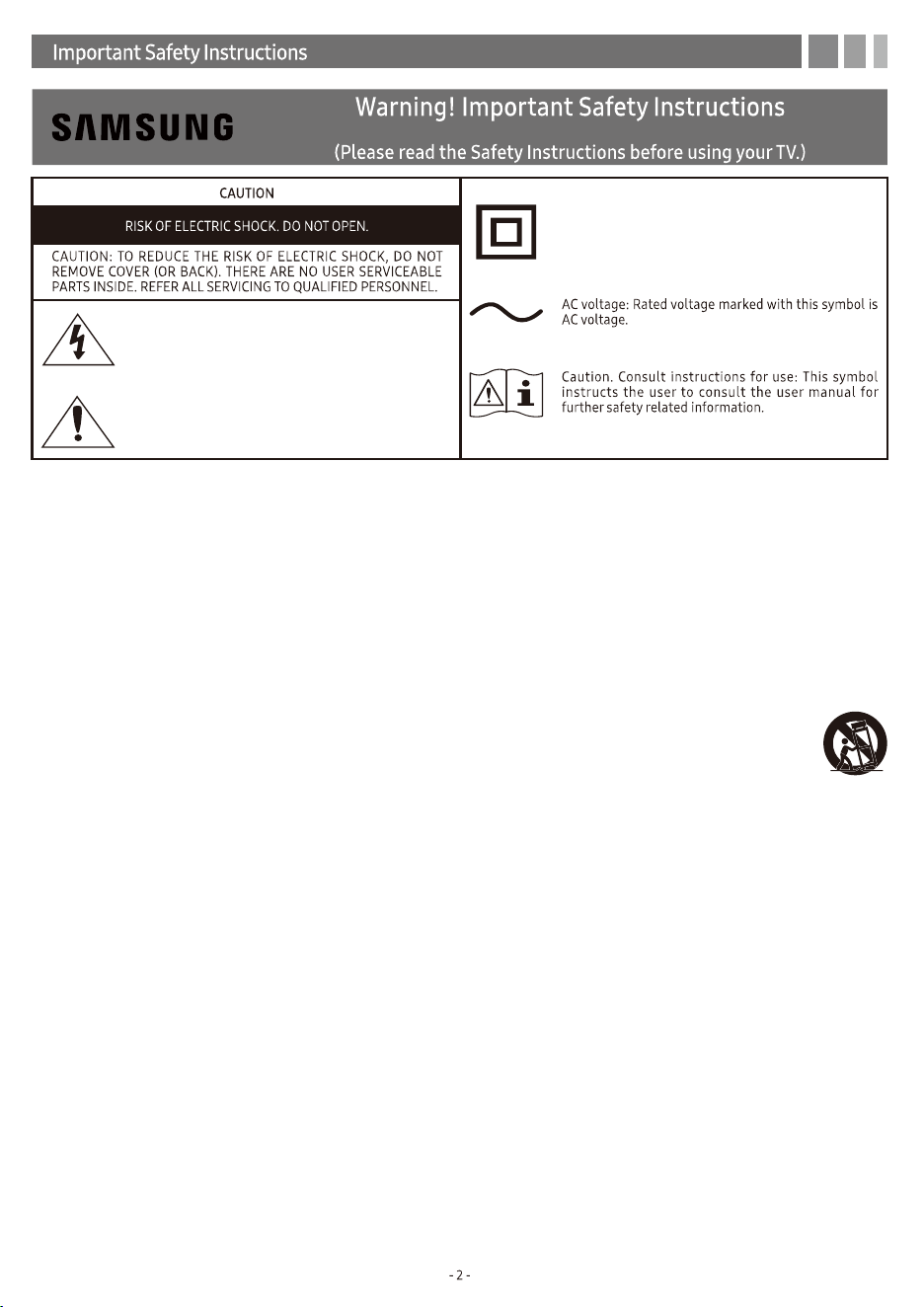
Thislightningflashwitharrowheadsymbolwithinan
equilateraltriangleisintendedtoalerttheusertothe
presenceofnon-insulated“dangerousvoltage”within
theproduct’senclosurethatmaybeofsufficient
magnitudetoconstituteariskofelectricshock.
Theexclamationpointwithinanequilateraltriangleis
intendedtoalerttheusertothepresenceofimportant
operatingandmaintenanceinstructionsinthe
literatureaccompanyingtheappliance.
This equipment is a Class II or double insulated
electrical appliance. I t has been designed in such a
way that it does not require a safety connection to
electrical earth.
90101-17661
© 2018 Samsung Electronics Co., Ltd. All rights reserved.
•Readtheseinstructions–Allthesafetyandoperatinginstructionsshouldbereadbeforethisproductisoperated.
•Keeptheseinstructions–Thesafetyandoperatinginstructionsshouldberetainedforfuturereference.
•Heedallwarnings–Allwarningsontheapplianceandintheoperatinginstructionsshouldbeadheredto.
•Followallinstructions–Alloperatinganduseinstructionsshouldbefollowed.
•Donotusethisapparatusnearwater–Theapplianceshouldnotbeusednearwaterormoisture–forexample,inawetbasementornear
aswimmingpool,andthelike.
•Cleanonlywithdrycloth.
•Donotblockanyventilationopenings.Installinaccordancewiththemanufacturer’sinstructions.
•Donotinstallnearanyheatsourcessuchasradiators,heatregisters,stoves,orotherapparatus(includingamplifiers)thatproduceheat.
•Donotdefeatthesafetypurposeofthepolarizedorgrounding-typeplug.Apolarizedplughastwobladeswithonewiderthantheother.
Agrounding-typeplughastwobladesandathirdgroundingprong.Thewidebladeorthethirdprongareprovidedforyoursafety.Ifthe
providedplugdoesnotfitintoyouroutlet,consultanelectricianforreplacementoftheobsoleteoutlet.
•Protectthepowercordfrombeingwalkedonorpinchedparticularlyatplugs,conveniencereceptacles,andthepointwheretheyexit
fromtheapparatus.
•Onlyuseattachments/accessoriesspecifiedbythemanufacturer.
•Useonlywiththecart,stand,tripod,bracket,ortablespecifiedbythemanufacturer,orsoldwiththeapparatus.Whenacart
isused,usecautionwhenmovingthecart/apparatuscombinationtoavoidinjuryfromtip-over.
•Unplugthisapparatusduringlightningstormsorwhenunusedforlongperiodsoftime.
•Referallservicingtoqualifiedservicepersonnel.Servicingisrequiredwhentheapparatushasbeendamagedinanyway,suchasthe
power-supplycordorplugisdamaged,liquidhasbeenspilledorobjectshavefallenintotheapparatus,theapparatushasbeenexposed
torainormoisture,doesnotoperatenormally,orhasbeendropped.
•Pleasekeeptheunitinawell-ventilatedenvironment.
•Donotblockventilationslotsinthebackcover.YoumayplacetheTVinacabinet,butensureatleast5cm(2’’)clearanceallaround.
•Theventilationshouldnotbeimpededbycoveringtheventilationopeningswithitems,suchasnewspapers,table-cloths,curtains,etc.
•Nonakedflamesorces,suchaslightedcandles,shouldbeplacedonapparatus.
•Theuseofapparatusinmoderateclimates.
•Attentionshouldbedrawntotheenvironmentalaspectsofbatterydisposal.
WARNING:Toreducetheriskoffireorelectricshock,donotexposethisapparatustorainormoisture.Theapparatusshouldnotbe
exposedtodrippingorsplashing.Objectsfilledwithliquids,suchasvasesshouldnotbeplacedonapparatus.
WARNING:Thebatteriesshallnotbeexposedtoexcessiveheatsuchassunshine,fireorthelike.
WARNING:Themainplugisusedasdisconnectdevice,thedisconnectdeviceshallremainreadilyoperable.
WARNING:Toreducetheriskofelectricshock,donotremovecover(orback)astherearenouser-serviceablepartsinside.Referservicing
toqualifiedpersonnel.
Thislightningflashwitharrowheadsymbolwithinan
equilateraltriangleisintendedtoalerttheusertothe
presenceofnon-insulated“dangerousvoltage”within
theproduct’senclosurethatmaybeofsufficient
magnitudetoconstituteariskofelectricshock.
Theexclamationpointwithinanequilateraltriangleis
intendedtoalerttheusertothepresenceofimportant
operatingandmaintenanceinstructionsinthe
literatureaccompanyingtheappliance.
This equipment is a Class II or double insulated
electrical appliance. I t has been designed in such a
way that it does not require a safety connection to
electrical earth.
90101-17661

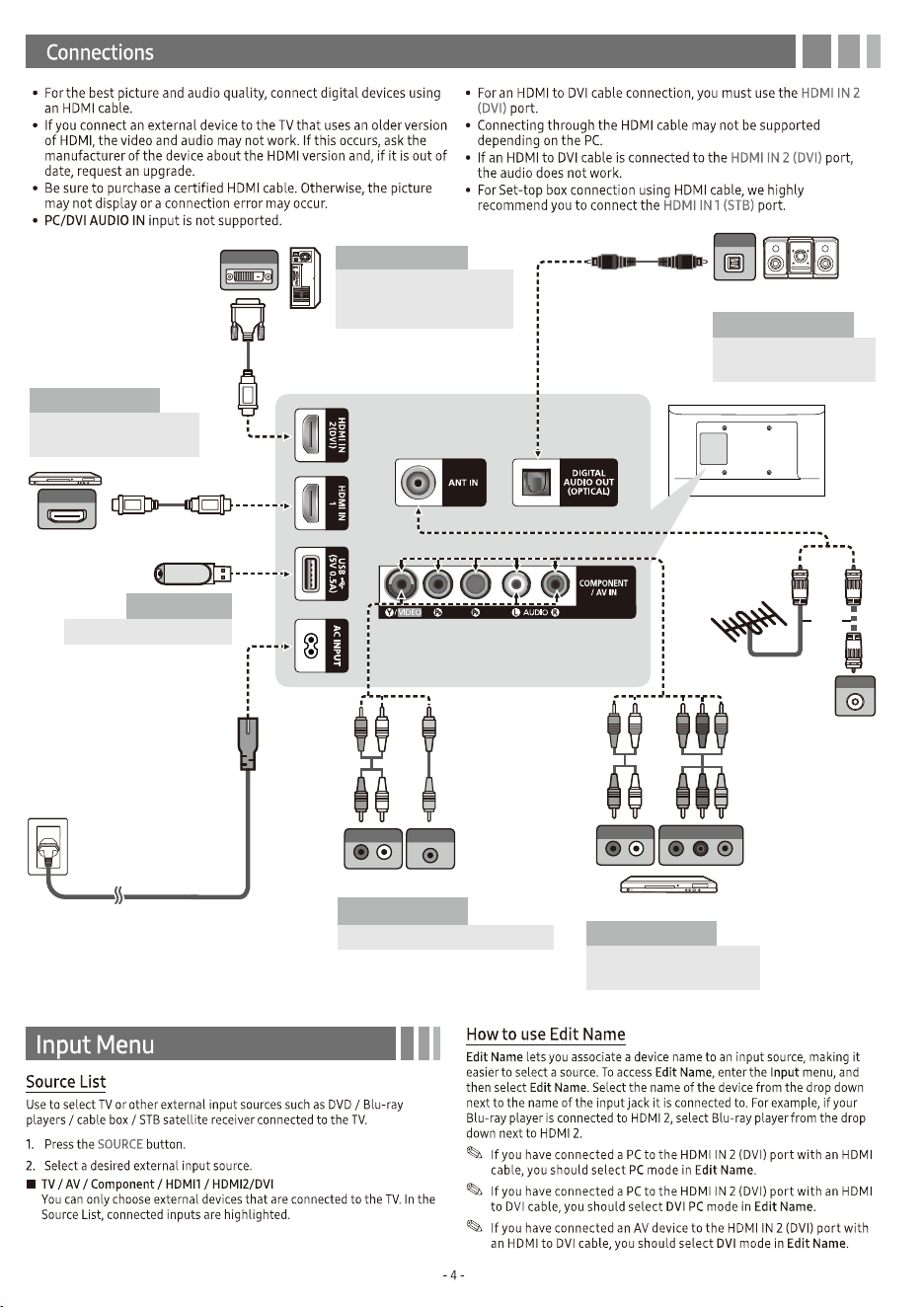
WR Y
R RYW
AUDIO OUT
R-AUDIO-L
VIDEO OUT
VCR
AV Device (2)
Using Audio/Video Cables
WR
R W
AUDIO OUT
R-AUDIO-L
COMPONENT OUT
P
R
P
B
Y
R B
R B RG
R
G
Blu-ray player
AV Device (3)
Using a Component
Cable (up to 1080p)
Media Play
Using a USB Drive
PC
Using an HDMI Cable or an
HDMI to DVI Cable. Use the
PC speakers for audio.
Audio Device
Using an Optical
(Digital) Cable
TV Rear Panel
OPTICAL
Digital Audio System
DVI OUT
HDMI OUT
PC
Blu-ray player / DVD /
cable box / sat box
AV Device (1)
Using an HDMI Cable
(up to 1080p)
ANT OUT
or
VHF/UHF Antenna
Cable
WR Y
R RYW
AUDIO OUT
R-AUDIO-L
VIDEO OUT
VCR
AV Device (2)
Using Audio/Video Cables
WR
R W
AUDIO OUT
R-AUDIO-L
COMPONENT OUT
P
R
P
B
Y
R B
R B RG
R
G
Blu-ray player
AV Device (3)
Using a Component
Cable (up to 1080p)
Media Play
Using a USB Drive
PC
Using an HDMI Cable or an
HDMI to DVI Cable. Use the
PC speakers for audio.
Audio Device
Using an Optical
(Digital) Cable
TV Rear Panel
OPTICAL
Digital Audio System
DVI OUT
HDMI OUT
PC
Blu-ray player / DVD /
cable box / sat box
AV Device (1)
Using an HDMI Cable
(up to 1080p)
ANT OUT
or
VHF/UHF Antenna
Cable
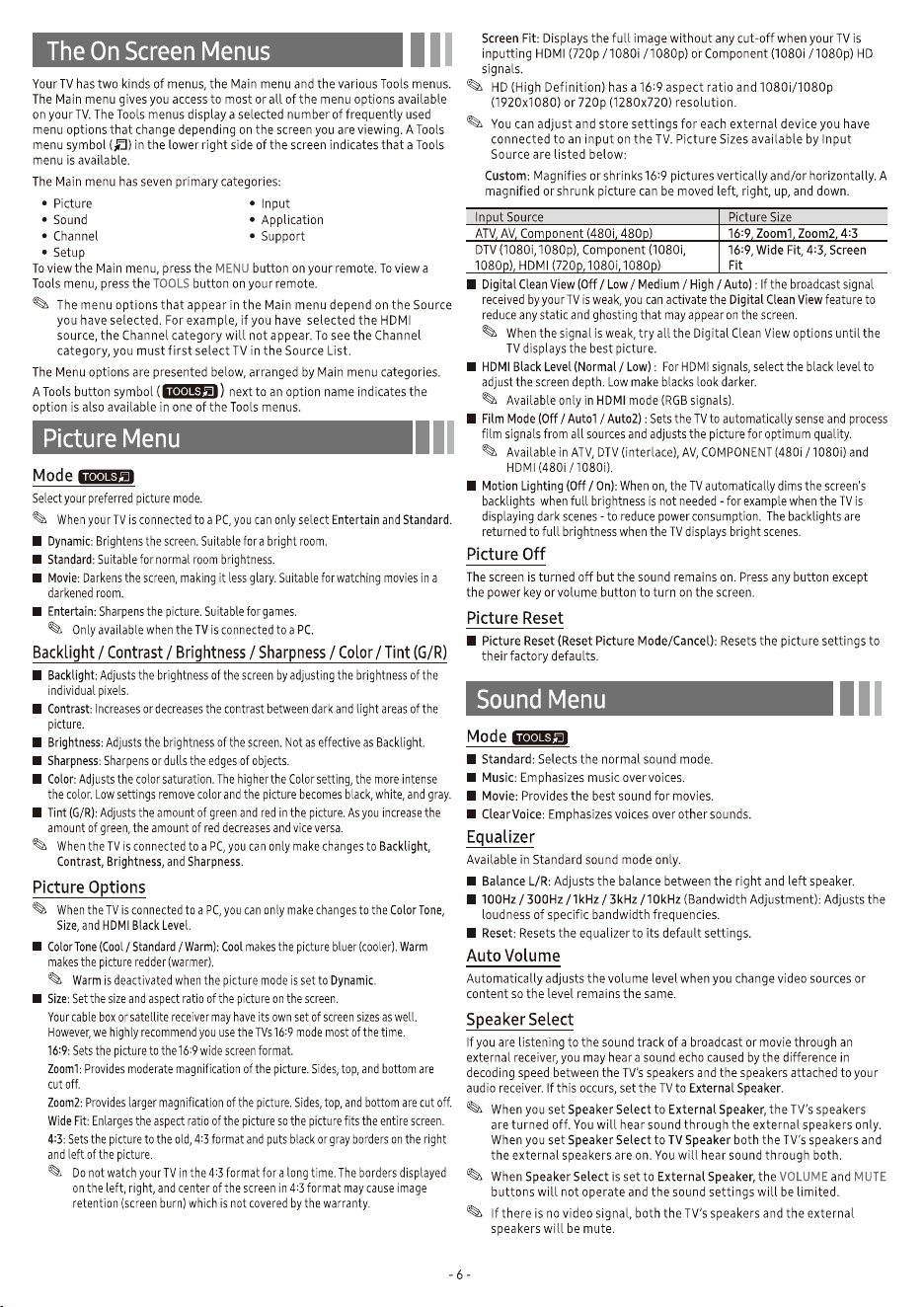
Mode Resolution
Horizontal
Frequency (KHz)
Vertical
Frequency (Hz)
Pixel Clock
Frequency (MHz)
Sync Polarity
(H / V)
IBM 720 x 400 31.469 70.087 28.322 -/+
MAC
640 x 480 35.000 66.667 30.240 -/-
832 x 624 49.726 74.551 57.284 -/-
1152 x 870 68.681 75.062 100.000 -/-
VESA DMT
640 x 480 31.469 59.940 25.175 -/-
640 x 480 37.861 72.809 31.500 -/-
640 x 480 37.500 75.000 31.500 -/-
800 x 600 37.879 60.317 40.000 +/+
800 x 600 48.077 72.188 50.000 +/+
800 x 600 46.875 75.000 49.500 +/+
1024 x 768 48.363 60.004 65.000 -/-
1024 x 768 56.476 70.069 75.000 -/-
1024 x 768 60.023 75.029 78.750 +/+
1152 x 864 67.500 75.000 108.000 +/+
1280 x 720 45.000 60.000 74.250 +/+
1280 x 800 49.702 59.810 83.500 -/+
1280 x 1024 63.981 60.020 108.000 +/+
1280 x 1024 79.976 75.025 135.000 +/+
1366 x 768 47.712 59.790 85.500 +/+
1440 x 900 55.935 59.887 106.500 -/+
1600 x 900RB 60.000 60.000 108.000 +/+
1680 x 1050 65.290 59.954 146.250 -/+
1920 x 1080 67.500 60.000 148.500 +/+
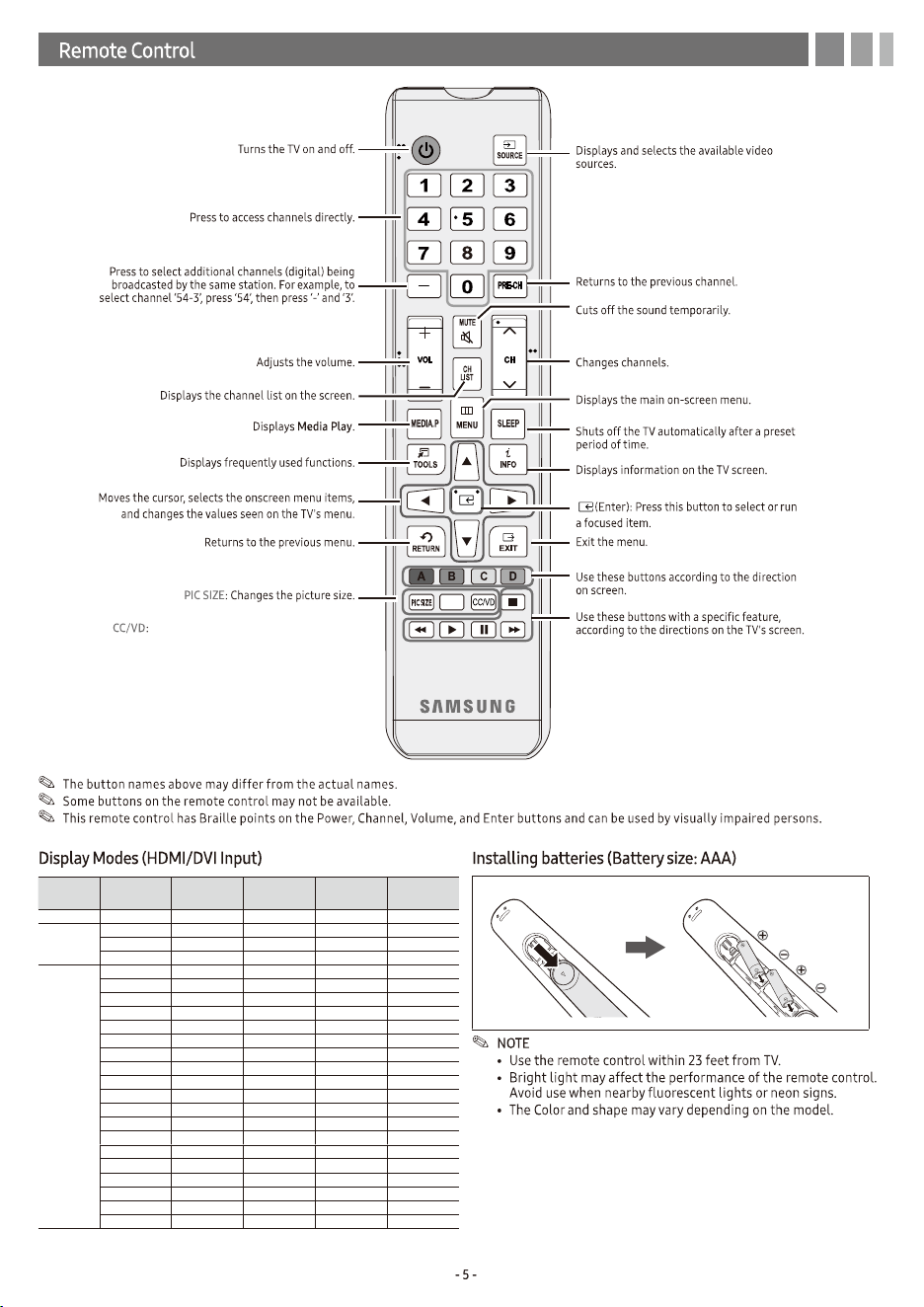
When press this button, the Accessibility
Shortcuts menu appears.
PICTURE
PICTURE: Changes the picture mode.
Mode Resolution
Horizontal
Frequency (KHz)
Vertical
Frequency (Hz)
Pixel Clock
Frequency (MHz)
Sync Polarity
(H / V)
IBM 720 x 400 31.469 70.087 28.322 -/+
MAC
640 x 480 35.000 66.667 30.240 -/-
832 x 624 49.726 74.551 57.284 -/-
1152 x 870 68.681 75.062 100.000 -/-
VESA DMT
640 x 480 31.469 59.940 25.175 -/-
640 x 480 37.861 72.809 31.500 -/-
640 x 480 37.500 75.000 31.500 -/-
800 x 600 37.879 60.317 40.000 +/+
800 x 600 48.077 72.188 50.000 +/+
800 x 600 46.875 75.000 49.500 +/+
1024 x 768 48.363 60.004 65.000 -/-
1024 x 768 56.476 70.069 75.000 -/-
1024 x 768 60.023 75.029 78.750 +/+
1152 x 864 67.500 75.000 108.000 +/+
1280 x 720 45.000 60.000 74.250 +/+
1280 x 800 49.702 59.810 83.500 -/+
1280 x 1024 63.981 60.020 108.000 +/+
1280 x 1024 79.976 75.025 135.000 +/+
1366 x 768 47.712 59.790 85.500 +/+
1440 x 900 55.935 59.887 106.500 -/+
1600 x 900RB 60.000 60.000 108.000 +/+
1680 x 1050 65.290 59.954 146.250 -/+
1920 x 1080 67.500 60.000 148.500 +/+
When press this button, the Accessibility
Shortcuts menu appears.
PICTURE
PICTURE: Changes the picture mode.
Video Description
Add video description to the main audio to help the visually impaired.
Video Description
Add video description to the main audio to help the visually impaired.
File
Extension
Container Video Codec Resolution
Frame
rate(fps)
Bit rate
(Mbps)
Audio Codec
*.3gp
*.3gpp
*.mov
*.mp4
3gpp
mp4
H.263 1920x1080
MAX 30 60
AAC/AC3
ADPCM/DD+
HE-AAC/LPCM
MP3/MPEG
Vorbis
H.264 BP/MP/HP 1920x1080
MOTION JPEG 640x480
MPEG-4 SP/ASP 1920x1080
MPEG1 1920x1080
MPEG2 1920x1080
*.asdf
*.wmv
asf
H.264 BP/MP/HP 1920x1080
MP3
MPEG
WMA
MOTION JPEG 640x480
MPEG-4 SP/ASP 1920x1080
MPEG2 1920x1080
VC1 1920x1080
WINDOW MEDIA
VIDEO V9
1920x1080
*.avi
*.mkv
avi
mkv
H.263 1920x1080
AAC
AC3
ADPCM
HE-AAC
LPCM
MP3
MPEG
WMA
H.264 BP/MP/HP 1920x1080
MOTION JPEG 640x480
MPEG-4 SP/ASP 1920x1080
MPEG1 1920x1080
MPEG2 1920x1080
VC1 1920x1080
WINDOW MEDIA
VIDEO V9
1920x1080
*.dat
*.mpeg
*.mpg
*.vob
ps
MPEG-4 SP/ASP 1920x1080
AAC/AC3
DD+/HE-AAC
LPCM/MP3
MPEG
MPEG1 1920x1080
MPEG2 1920x1080
VC1 1920x1080
File
Extension
Container Video Codec Resolution
Frame
rate(fps)
Bit rate
(Mbps)
Audio Codec
*.3gp
*.3gpp
*.mov
*.mp4
3gpp
mp4
H.263 1920x1080
MAX 30 60
AAC/AC3
ADPCM/DD+
HE-AAC/LPCM
MP3/MPEG
Vorbis
H.264 BP/MP/HP 1920x1080
MOTION JPEG 640x480
MPEG-4 SP/ASP 1920x1080
MPEG1 1920x1080
MPEG2 1920x1080
*.asdf
*.wmv
asf
H.264 BP/MP/HP 1920x1080
MP3
MPEG
WMA
MOTION JPEG 640x480
MPEG-4 SP/ASP 1920x1080
MPEG2 1920x1080
VC1 1920x1080
WINDOW MEDIA
VIDEO V9
1920x1080
*.avi
*.mkv
avi
mkv
H.263 1920x1080
AAC
AC3
ADPCM
HE-AAC
LPCM
MP3
MPEG
WMA
H.264 BP/MP/HP 1920x1080
MOTION JPEG 640x480
MPEG-4 SP/ASP 1920x1080
MPEG1 1920x1080
MPEG2 1920x1080
VC1 1920x1080
WINDOW MEDIA
VIDEO V9
1920x1080
*.dat
*.mpeg
*.mpg
*.vob
ps
MPEG-4 SP/ASP 1920x1080
AAC/AC3
DD+/HE-AAC
LPCM/MP3
MPEG
MPEG1 1920x1080
MPEG2 1920x1080
VC1 1920x1080
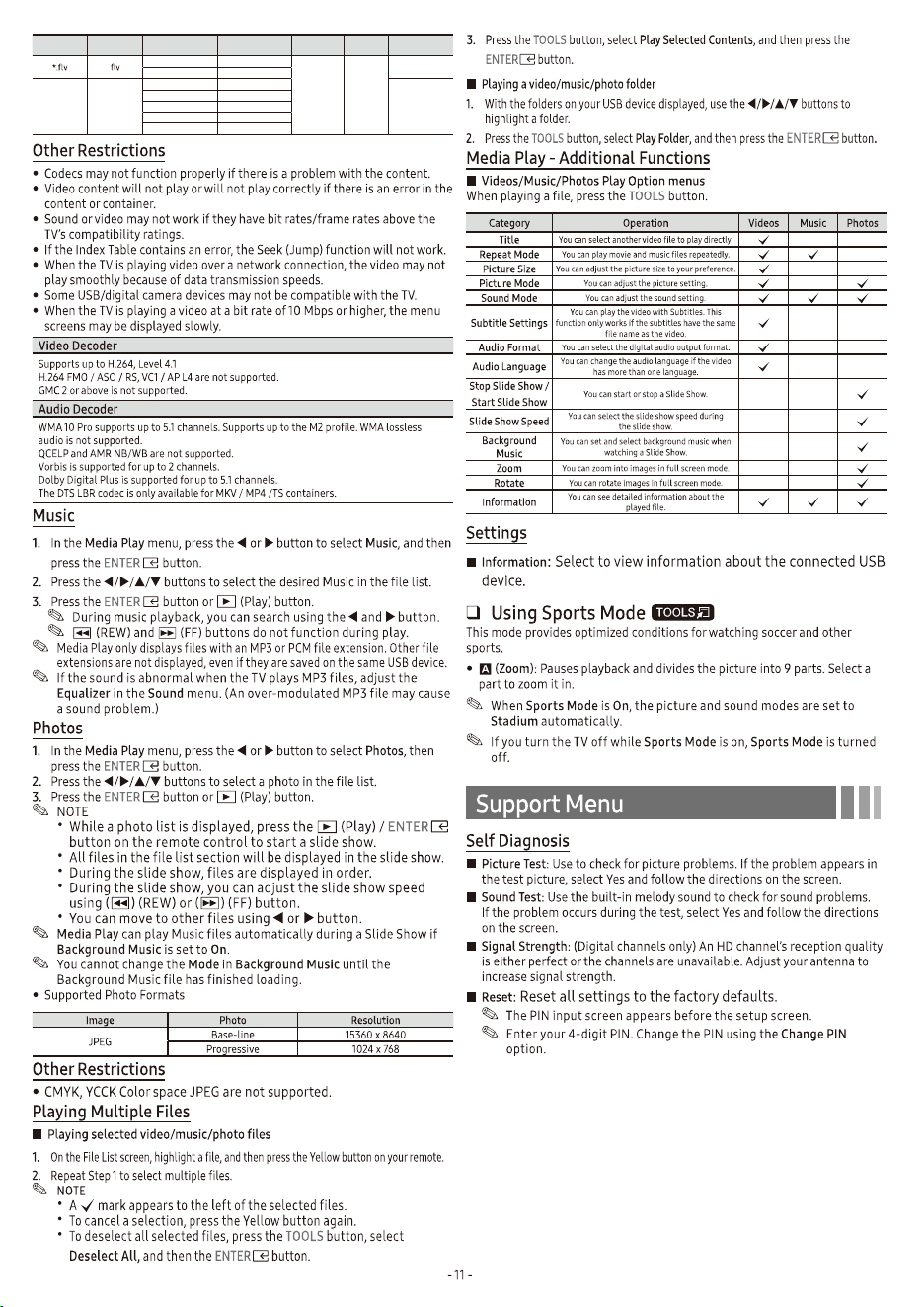
Product
Family
TV size in
inches
VESA screw hole
specs (A * B) in
millimeters
C (mm)
Standard
Screw
Quantity
LED-TV 43 200 X 200 9.5 ~ 11.5 M6 4
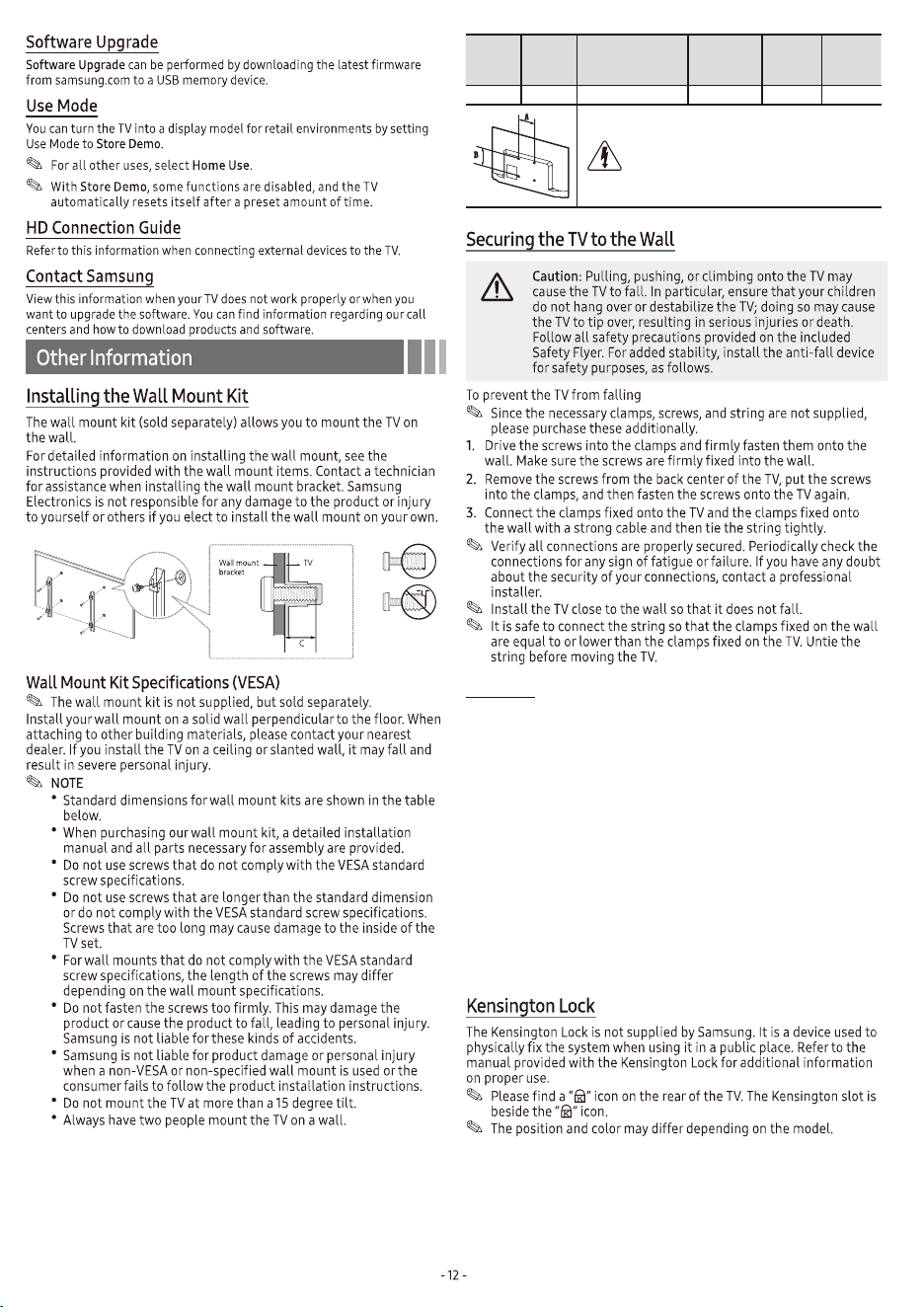
Do not install your Wall Mount Kit while your
TV is turned on. It may result in personal
injury due to electric shock.
File
Extension
Container Video Codec Resolution
Frame
rate(fps)
Bit rate
(Mbps)
Audio Codec
H.264 BP/MP/HP 1920x1080
MAX 30 60
AAC/HE-AAC
MP3/MPEG
SORENSON 1920x1080
*.tp
*.trp
*.ts
ts
H.264 BP/MP/HP 1920x1080
AAC/AC3
DD+/HE-AAC
LPCM/MP3
MPEG
MPEG-4 SP/ASP 1920x1080
MPEG1 1920x1080
MPEG2 1920x1080
VC1 1920x1080
Warning
Never place a television set in an unstable location. The television set may
fall, causing serious personal injury or death. Many injuries, particularly to
children, can be avoided by taking simple precautions such as
• Using cabinets or stands recommended by the manufacturer of the
television set.
• Only using furniture that can safely support the television set.
• Ensuring the television set is not overhanging the edge of the
supporting furniture.
• Not placing the television set on tall furniture (for example, cupboards
or bookcases) without anchoring both the furniture and the television
set to a suitable support.
• Not placing the television set on cloth or other materials that may be
located between the television set and supporting furniture.
• Educating children about the dangers of climbing on furniture to reach
the television set or its controls.
If you are retaining and relocating the television set that you are replacing
with this new set, you should apply the same precautions to the old set.
Product
Family
TV size in
inches
VESA screw hole
specs (A * B) in
millimeters
C (mm)
Standard
Screw
Quantity
LED-TV 43 200 X 200 9.5 ~ 11.5 M6 4
Do not install your Wall Mount Kit while your
TV is turned on. It may result in personal
injury due to electric shock.
File
Extension
Container Video Codec Resolution
Frame
rate(fps)
Bit rate
(Mbps)
Audio Codec
H.264 BP/MP/HP 1920x1080
MAX 30 60
AAC/HE-AAC
MP3/MPEG
SORENSON 1920x1080
*.tp
*.trp
*.ts
ts
H.264 BP/MP/HP 1920x1080
AAC/AC3
DD+/HE-AAC
LPCM/MP3
MPEG
MPEG-4 SP/ASP 1920x1080
MPEG1 1920x1080
MPEG2 1920x1080
VC1 1920x1080
Warning
Never place a television set in an unstable location. The television set may
fall, causing serious personal injury or death. Many injuries, particularly to
children, can be avoided by taking simple precautions such as
• Using cabinets or stands recommended by the manufacturer of the
television set.
• Only using furniture that can safely support the television set.
• Ensuring the television set is not overhanging the edge of the
supporting furniture.
• Not placing the television set on tall furniture (for example, cupboards
or bookcases) without anchoring both the furniture and the television
set to a suitable support.
• Not placing the television set on cloth or other materials that may be
located between the television set and supporting furniture.
• Educating children about the dangers of climbing on furniture to reach
the television set or its controls.
If you are retaining and relocating the television set that you are replacing
with this new set, you should apply the same precautions to the old set.
UN43N5000
1920 x 1080
10W + 10W
38.1 x 22.5 x 3.2 inches
(967.4 x 571.8 x 79.9 mm)
38.1 x 23.3 x 6.3 inches
(967.4 x 590.6 x 159.5 mm)
16.1 lbs (7.3 kg)
16.3 lbs (7.4 kg)
43" Class
(42.5" measured diagonally)
Model name
UN43N5000 9.1 15.1 5.2
8.9
8.4
NOTE: All drawings are not necessarily to scale. Some dimensions are subject to change without prior notice. Refer to the dimensions prior to
performing installation of your TV. Not responsible for typographical or printed errors.
© 2018 Samsung Electronics America, Inc
55 minutes
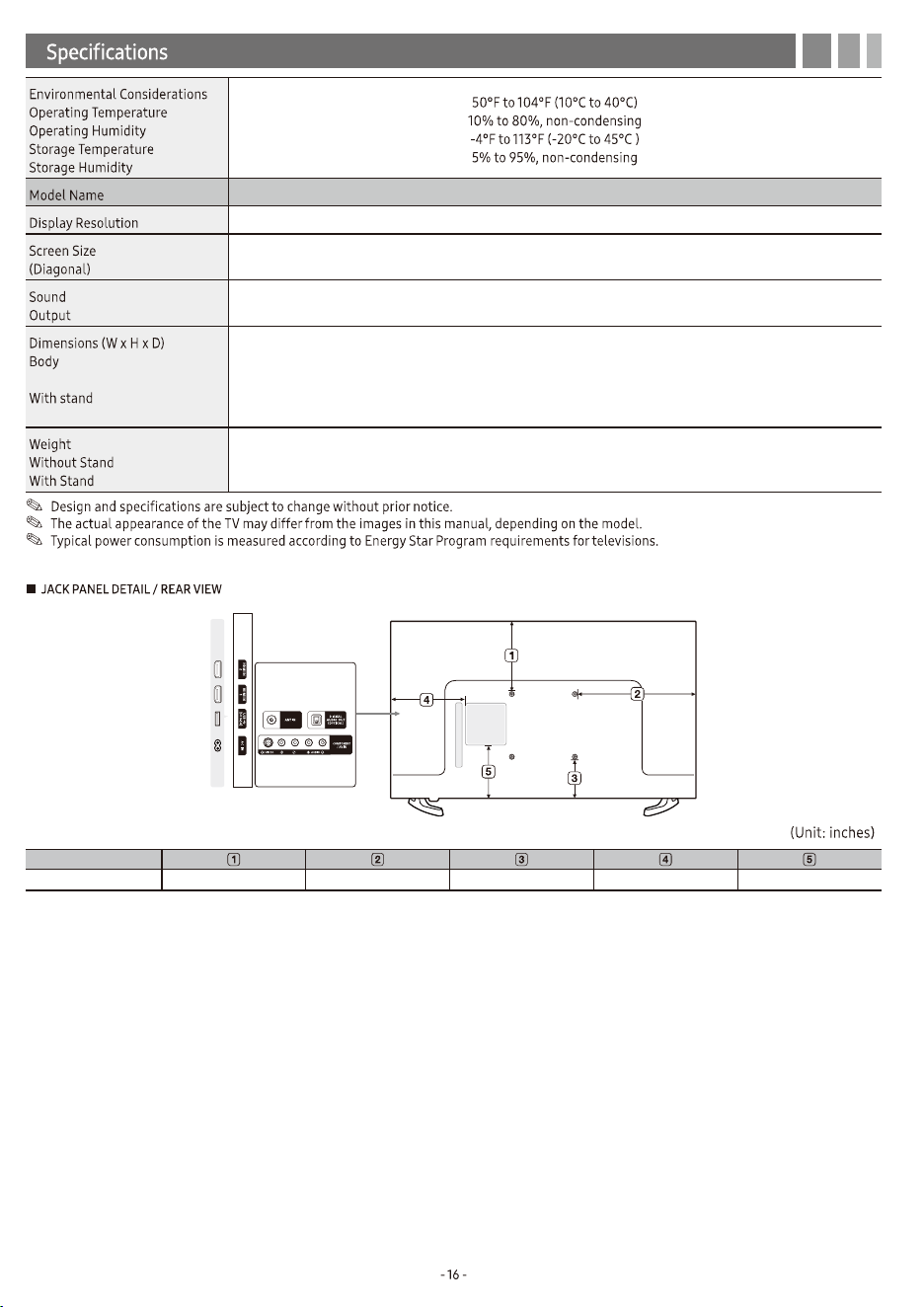
UN43N5000
1920 x 1080
10W + 10W
38.1 x 22.5 x 3.2 inches
(967.4 x 571.8 x 79.9 mm)
38.1 x 23.3 x 6.3 inches
(967.4 x 590.6 x 159.5 mm)
16.1 lbs (7.3 kg)
16.3 lbs (7.4 kg)
43" Class
(42.5" measured diagonally)
Model name
UN43N5000 9.1 15.1 5.2
8.9
8.4
NOTE: All drawings are not necessarily to scale. Some dimensions are subject to change without prior notice. Refer to the dimensions prior to
performing installation of your TV. Not responsible for typographical or printed errors.
© 2018 Samsung Electronics America, Inc
55 minutes