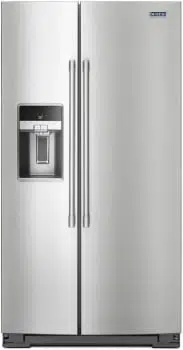
USER INSTRUCTIONS REFRIGERATOR
INSTALLATION INSTRUCTIONS
Unpack the Refrigerator
Remove packaging materials. Do not use sharp instruments, rubbing alcohol, flammable fluids, or abrasive cleaners to remove tape or glue. These products can damage the surface of your refrigerator. For more information, see “Refrigerator Safety.”
Door Removal, Leveling, and Alignment
Gather the required tools and parts and read all instructions before starting installation. Save these instructions for future reference.
IMPORTANT: The graphics on this page are for models with the ice storage bin on the door. On models with the ice storage bin inside the freezer, the wiring and water dispenser tubing configurations are simpler than what is shown in these graphics. Please read all instructions on the next few pages for more information.
NOTE: Before moving your product into your home, measure the doorway of your home to see whether you need to remove the refrigerator and freezer doors. If door removal is necessary, see the instructions below.
IMPORTANT: Before you begin, turn the refrigerator control off or turn cooling off. Unplug refrigerator or disconnect power. Remove food, the ice storage bin (on some models), and any adjustable door or utility bins from doors.

TOOLS NEEDED:
Bubble level, Phillips screwdriver, ³⁄₁₆" hex key, ¹⁄₄" hex-head socket wrench, ¹⁄₄" and ⁵⁄₁₆" open-ended wrenches or adjustable wrench, internal star drive, or ³⁄₈" hex-head socket wrench
Remove the Doors
1. Unplug refrigerator or disconnect power.
2. Open both doors to 90°. Remove the base grille by removing the two screws, then pulling out on the outside corners. See Graphic 1.
NOTE: The doors must only be opened to 90°. If they are opened all the way, the base grille will not come off.
3. Disconnect the water tubing, located behind the base grille on the freezer door side. The dispenser tubing runs through the door hinge and must be disconnected in order to remove the door. NOTE: On models with the ice storage bin on the door, there are two water tubing connections, as shown. On models with the ice storage bin inside the freezer, there is only one water tubing connection.
■ Style 1: Press the colored outer ring against the face of fitting and pull the water tubing free. See Graphic 2A.
NOTE: Keep the water tubing connector attached to the tube that runs underneath the freezer. The door cannot be removed if the connector is still attached to the tube that runs through the door hinge.
■ Style 2: Firmly pull on the clasp to release the tube, then pull the water tubing free. See Graphic 2B.
NOTE: Keep the clasp attached to the tube that runs underneath the freezer
4. Disconnect the wiring, located behind the base grille on the freezer door side. See Graphic 3.
On models with the ice storage bin on the door:
NOTE: There are two wiring bundles that run underneath the freezer - a large bundle with a large grommet and two white plugs at the end and a small bundle with a small grommet and one yellow plug at the end.
- Remove the P-clamp using a ¹⁄₄" hex-head socket wrench. Remove the small wiring bundle from the P-clamp.
- Remove the wiring clip using a ¹⁄₄" hex-head socket wrench.
- Pull the electrical housing out from under the refrigerator. Disconnect the wiring plugs from the housing.
- Gently pull the large wiring bundle (with two white plugs) through the routing plate.
On models with the ice storage bin inside the freezer:
NOTE: The wiring configuration is simpler than what is shown in Graphic 3. There is only one wiring bundle with one wiring plug and there is not a routing plate.
- Remove the wiring clip using a ¹⁄₄" hex-head socket wrench.
- Pull the electrical housing out from under the refrigerator. Disconnect the wiring plug from the housing.
5. Close both doors and keep them closed until you are ready to lift them free from the cabinet.
6. Use a ³⁄₁₆" hex key to remove the top left hinge screws as shown. See Graphic 4.
IMPORTANT: Do not remove either screw A.
7. Lift freezer door straight up off bottom hinge. See Graphic 5. The water tubing and wiring remain attached to the freezer door and pull through the bottom left hinge.
NOTE: This may require two people - one to lift the door and another to feed the water tubing and wiring through the hinge.
On models with the ice storage bin on the door:
- Be sure the hole in the hinge is clear of obstructions, then gently pull one water tube through the hinge. (Avoid kinking the tube.) Next, gently pull the other water tube through the hinge, again avoiding kinks. Finally, gently pull the wiring bundle (including the grommet and wiring plugs) through the hinge.
On models with the ice storage bin inside the freezer:
- Be sure the hole in the hinge is clear of obstructions, then gently pull the water tube through the hinge. (Avoid kinking the tube.) Next, gently pull the wiring bundle (including the grommet and wiring plug) through the hinge.
IMPORTANT: Rest the door on its side on a soft, clean surface, such as a towel, blanket or piece of cardboard. This will help avoid damaging the door, water tubing, and wiring.
8. Use a ³⁄₁₆" hex key to remove the top right hinge screws as shown. See Graphic 6.
IMPORTANT: Do not remove either screw A.
9. Lift the refrigerator door straight up off bottom hinge.
IMPORTANT: Rest the door on its side on a soft, clean surface, such as a towel, blanket, or piece of cardboard. This will help avoid damaging the door.
10. It may not be necessary to remove the bottom hinges to move the refrigerator through a doorway. Both bottom hinges have similar construction.
■ If necessary, use an internal star drive or a ³⁄₈" hex-head socket wrench to remove the bottom hinges. See Graphic 7.
IMPORTANT: The leveler brackets are mounted behind the hinges. If you remove the hinges, make sure that the leveler brackets are replaced when reinstalling the hinges.
Leveling and Door Closing
Your refrigerator has two adjustable front feet — one on the right and one on the left. In most cases, the refrigerator should be steady when both feet are touching the floor. If your refrigerator seems unsteady or if you want the doors to close more easily, adjust the refrigerator’s tilt using the instructions below:
1. Move the refrigerator into its final location. If necessary, open both doors to 90° and remove the base grille. See Graphic 1.
2. The two leveling feet are located on the brackets on each side of the product. See Graphic 8.
NOTE: Having someone push against the top of the refrigerator takes some weight off the leveling feet. This makes it easier to make adjustments.
3. Use a ¹⁄₄" open-ended or adjustable wrench to adjust the leveling feet. Turn the leveling foot to the left to raise that side of the product or turn it to the right to lower that side of the product.
NOTE: Both leveling feet should be snug against the floor and the rollers should not touch the floor. This keeps the refrigerator from rolling forward when opening the doors.
4. Open both doors again and check that they close as easily as you like. If not, tilt the refrigerator slightly more to the rear by turning the leveling feet to the left. It may take several more turns and you should turn both leveling feet the same amount.
5. Use a bubble level to check the leveling of the refrigerator.
NOTE: Whenever you need to move the refrigerator, turn the leveling feet to the right until they are no longer touching the ground. This will allow the refrigerator to roll more easily
Handle Installation and Removal
PARTS INCLUDED: Door handles (2), ¹⁄₈" hex key, spare setscrew(s)
To Install the Handles:
NOTE: The handle mounting setscrews are preinstalled in the handle
1. Remove the handles, which are packed inside the refrigerator.
NOTE: To avoid scratching the finish, place the handles on a towel or other soft surface.
2. Open the freezer door. On the refrigerator door, place the handle on the shoulder screws with the setscrews facing the freezer.
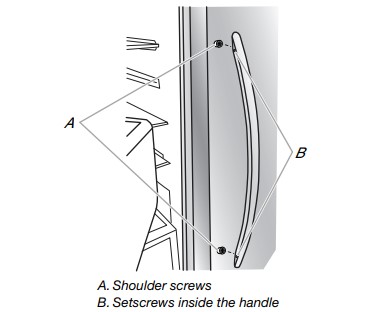
3. Firmly push the handle toward the door until the handle base is flush against the door.
4. While holding the handle, insert the short end of the hex key into the upper hole and slightly rotate the hex key until it is engaged in the setscrew.
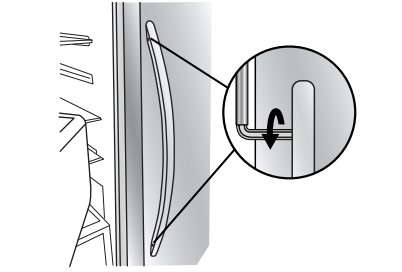
5. Using a clockwise motion, tighten the setscrew until it begins to contact the shoulder screw.
6. Repeat steps 4 and 5 to begin fastening the lower setscrew.
7. Once both setscrews have been partially tightened as outlined in the previous steps, fully tighten both the upper and lower setscrews.
IMPORTANT: When the screws feel tight, tighten them an additional quarter-turn. The handle is not properly installed without this extra tightening.
8. Open the refrigerator door and close the freezer door. Repeat steps 2 through 7 to install the other handle onto the freezer door with the setscrews facing the refrigerator.
9. Save the hex key and all instructions.
To Remove the Handles:
1. While holding the handle, insert the short end of the hex key into the lower setscrew hole and slightly rotate the hex key until it is engaged in the setscrew.
2. Using a counterclockwise motion, loosen the setscrew a quarter-turn at a time.
3. Repeat steps 1 and 2 for the upper setscrew. Gently pull the handle away from the door.
4. If necessary, use a Phillips screwdriver to remove the shoulder screws from the door.
Location Requirements
IMPORTANT: This refrigerator is designed for indoor household use only.
To ensure proper ventilation for your refrigerator, allow for ¹⁄₂" (1.27 cm) of space on each side and at the top. Allow for 1" (2.54 cm) of space behind the refrigerator. If your refrigerator has an ice maker, allow extra space at the back for the water line connections. When installing your refrigerator next to a fixed wall, leave a 2" (5.08 cm) minimum space on each side (depending on your model) to allow the doors to swing open.
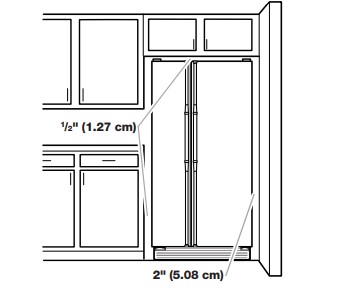
NOTES:
- This refrigerator is intended for use in a location where the temperature ranges from a minimum of 55°F (13°C) to a maximum of 110°F (43°C). The preferred room temperature range for optimum performance, which reduces electricity usage and provides superior cooling, is between 60°F (15°C) and 90°F (32°C). It is recommended that you do not install the refrigerator near a heat source, such as an oven or radiator.
- Normal minimum cabinet cutout width required for product installation is 36" (91.44 cm). However, if the product is placed against an extended wall and the ability to remove the crisper pans is desired, an additional 18" (45.72 cm) of cabinet width is required, so a total cabinet opening width of 54" (137.16 cm) is recommended.
Electrical Requirements
Before you move your refrigerator into its final location, it is important to make sure you have the proper electrical connection
Recommended Grounding Method
A 115-volt, 60 Hz, AC-only, 15- or 20-amp fused, grounded electrical supply is required. It is recommended that a separate circuit serving only your refrigerator be provided. Use an outlet that cannot be turned off by a switch. Do not use an extension cord.
NOTE: Before performing any type of installation, cleaning, or removing a light bulb, turn cooling off or turn the control (Thermostat, Refrigerator, or Freezer control depending on the model) to OFF, and then disconnect the refrigerator from the electrical source. When you are finished, reconnect the refrigerator to the electrical source and turn cooling on or reset the control (Thermostat, Refrigerator, or Freezer control depending on the model) to the desired setting. See “Using the Controls” in the User Instructions, User Guide, or Use & Care Guide.
REFRIGERATOR USE
Using the Controls
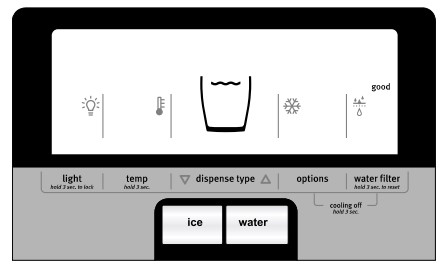
The refrigerator and freezer controls are located on the dispenser panel.
IMPORTANT: The display screen on the dispenser control panel will turn off automatically and enter “sleep” mode when the control buttons and dispenser pad have not been used for 2 minutes or more. While in “sleep” mode, the first press of a control button will only reactivate the display screen without changing any settings.
- Touch any control button on the dispenser panel to activate the display screen. The home screen will appear as shown.
Adjusting the Controls
For your convenience, your refrigerator and freezer controls are preset at the factory. When you first install your refrigerator, make sure that the controls are still set to the “mid-settings.” The factory recommended set points are 37°F (3°C) for the refrigerator and 0°F (-18°C) for the freezer.
IMPORTANT:
- Wait 24 hours before you put food into the refrigerator. If you add food before the refrigerator has cooled completely, your food may spoil.
NOTE: Adjusting the set points to a colder-thanrecommended setting will not cool the compartments any faster.
- If the temperature is too warm or too cold in the refrigerator or freezer, first check the air vents to be sure they are not blocked before adjusting the controls.
- The preset settings should be correct for normal household usage. The controls are set correctly when milk or juice is as cold as you like and when ice cream is firm.
- Wait at least 24 hours between adjustments. Recheck the temperatures before other adjustments are made.
To view and adjust the set points, press and hold the Temp button for 3 seconds. When Adjust mode is activated, adjusting information will appear on the display screen.
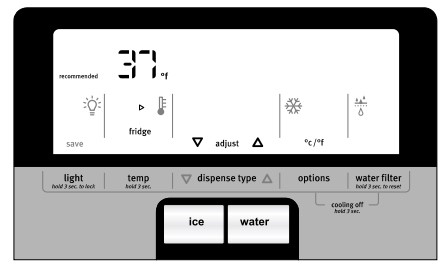
NOTE: To view Celsius temperatures, press the Options button when Adjust mode is activated. To return the display setting to Fahrenheit, press OPTIONS again.
- When Adjust mode is activated, the display screen shows the refrigerator set point and “Fridge” appears.
- Press the Dispense Type arrows to raise or lower the set point.
- When you have finished viewing (and adjusting if desired) the refrigerator set point, press TEMP to change the display to show the freezer set point. When the zone has been changed, “Freezer” appears on the display screen.
- Press the Dispense Type arrows to raise or lower the set point.
- When you have finished viewing (and adjusting if desired) both the refrigerator and freezer set points, press LIGHT to save the settings.
NOTE: To exit without saving changes, allow about 60 seconds of inactivity and Adjust mode will turn off automatically.
When adjusting temperature set points, use the following chart as a guide.
| CONDITION |
TEMPERATURE ADJUSTMENT: |
| REFRIGERATOR too cold |
REFRIGERATOR setting 1° higher |
| REFRIGERATOR too warm |
REFRIGERATOR setting 1° lower |
| FREEZER too cold |
FREEZER setting 1° higher |
| FREEZER too warm/ Too little ice |
FREEZER setting 1° lower |
The set point range for the refrigerator is 33°F to 45°F (0°C to 7°C). The set point range for the freezer is -5°F to 5°F (-21°C to -15°C).
Convertible Drawer Temperature Control (on some models)
The control can be adjusted to properly chill meats or vegetables. The air inside the pan is cooled to avoid “spot” freezing and can be set to keep meats at the National Livestock and Meat Board recommended storage temperatures of 28° to 32°F (-2° to 0°C).
To store meat:
Set the control to one of the three Meat settings to store meat at its optimal storage temperature.
To store vegetables:
Set the control to VEG to store vegetables at their optimal storage temperatures.
NOTE: If food starts to freeze, move the control to the right (less cold) toward the VEG setting. Remember to wait 24 hours between adjustments.
Water and Ice Dispensers
Flush the Water System
Air in the water dispensing system can cause the water dispenser to drip. After connecting the refrigerator to a water source or replacing the water filter, flush the water system. Flushing the water dispensing system forces air from the water line and filter and prepares the water filter for use.
NOTE: As air is cleared from the system, water may spurt out of the dispenser.
- Using a sturdy container, depress and hold the water dispenser pad for 5 seconds, then release it for 5 seconds.
- Repeat Step 1 until water begins to flow.
- Once water begins to flow, continue depressing and releasing the dispenser pad (5 seconds on, 5 seconds off) until a total of 3 gal (12 L) has been dispensed.
Additional flushing may be required in some households.
The Water Dispenser
IMPORTANT:
- Dispense at least 1 qt (1 L) of water every week to maintain a fresh supply.
- If the flow of water from the dispenser decreases, it could be caused by low water pressure.
- With the water filter removed, dispense 1 cup (237 mL) of water. If 1 cup of water is dispensed in 8 seconds or less, the water pressure to the refrigerator meets the minimum requirement.
- If it takes longer than 8 seconds to dispense 1 cup of water, the water pressure to the refrigerator is lower than recommended. See “Water Supply Requirements” or the “Problem Solver” section for suggestions.
To Dispense Water:
1. Press the Dispense Type arrows on the dispenser control panel, until “Water” is selected.
2. To dispense water, press a sturdy glass against the dispenser pad or press the Water button. Hold the glass close to the water dispenser spout to ensure that the water dispenses into the glass.

3. To stop dispensing, remove the glass from the dispenser pad or release the Water button.
REFRIGERATOR CARE
Cleaning
Both the refrigerator and freezer sections defrost automatically. However, clean both sections about once a month to avoid buildup
To Clean Your Refrigerator:
NOTE: Do not use abrasive or harsh cleaners such as window sprays, scouring cleansers, flammable fluids, cleaning waxes, concentrated detergents, bleaches, or cleansers containing petroleum products on plastic parts, interior and door liners or gaskets. Do not use paper towels, scouring pads, or other harsh cleaning tools. Stainless steel models has coating, Do Not Use regular stainless steel cleaning products. Do Not Use stainless steel Cleaner or Polish and use only mild soap, water, and soft microfiber cloth to avoid damage to the stainless steel protective coating. Paper towels scratch and may dull the clear coat of the painted door. To avoid possible damage, use only clean cloths to polish and wipe the door.
1. Unplug refrigerator or disconnect power.
2. Hand wash, rinse, and dry removable parts and interior surfaces thoroughly. Use a clean sponge or soft cloth and a mild detergent in warm water.
3. Wash stainless steel and painted metal exteriors with a clean sponge or soft cloth and a mild detergent in warm water.
4. There is no need for routine condenser cleaning in normal home operating environments. If the environment is particularly greasy or dusty, or there is significant pet traffic in the home, the condenser should be cleaned every 2 to 3 months to ensure maximum efficiency.
If you need to clean the condenser:
- Remove the base grille. See the “Door Removal” instructions, either in the User Instructions or the Installation Instructions and Owner’s Manual or in the separate instruction sheet provided with your refrigerator.
- Use a vacuum cleaner with a soft brush to clean the grille, the open areas behind the grille, and the front surface area of the condenser.
- Replace the base grille when finished.
5. Plug in refrigerator or reconnect power.
Vacation and Moving Care
Vacations
If You Choose to Leave Refrigerator On While You Are Away:
1. Use up any perishables and freeze other items.
2. If your refrigerator has an automatic ice maker and is connected to the household water supply, turn off the water supply to the refrigerator. Property damage can occur if the water supply is not turned off.
3. If you have an automatic ice maker, turn off the ice maker. NOTE: Depending on your model, raise the wire shut-off arm to Off (up) position or press the switch to OFF.
4. Empty the ice bin.
If You Choose to Turn Refrigerator Off Before You Leave:
1. Remove all food from the refrigerator.
2. If your refrigerator has an automatic ice maker:
- Turn off the water supply to the ice maker at least one day ahead of time.
- When the last load of ice drops, raise the wire shutoff arm to the Off (up) position or move the switch to OFF.
3. Depending on the model, turn the Refrigerator Control to OFF or turn cooling off. See “Using the Controls” in the User Instructions, User Guide or Use & Care Guide.
4. Clean, wipe, and dry thoroughly.
5. Tape rubber or wood blocks to the tops of both doors to prop them open far enough for air to get in. This stops odor and mold from building up
Moving
When you are moving your refrigerator to a new home, follow these steps to prepare it for the move.
1. If your refrigerator has an automatic ice maker:
- Turn off the water supply to the ice maker at least one day ahead of time.
- Disconnect the water line from the back of the refrigerator.
- When the last load of ice drops, raise the wire shut-off arm to the Off (up) position or move the switch to OFF.
2. Remove all food from the refrigerator and pack all frozen food in dry ice.
3. Empty the ice bin.
4. Depending on the model, turn the Refrigerator Control to OFF or turn cooling off. See “Using the Controls” in the User Instructions, User Guide, or Use & Care Guide.
5. Unplug refrigerator.
6. Clean, wipe, and dry thoroughly.
7. Take out all removable parts, wrap them well, and tape them together so they don’t shift and rattle during the move.
8. Depending on the model, raise the front of the refrigerator so it rolls more easily OR screw in the leveling legs so they don’t scrape the floor. See “Adjust the Doors” or “Door Removal, Leveling, and Alignment.”
9. Tape the doors closed and tape the power cord to the back of the refrigerator.
When you get to your new home, put everything back and refer to the Installation Instructions for preparation instructions. Also, if your refrigerator has an automatic ice maker, remember to reconnect the water supply to the refrigerator.
PROBLEM SOLVER
| GENERAL OPERATION |
Possible Causes and/or Recommended Solutions |
| Refrigerator will not operate |
- Not connected to an electrical supply - Plug the power cord into a grounded 3 prong outlet. Do not use an extension cord.
- No power to the electrical outlet - Plug in a lamp to see if the outlet is working.
- Household fuse has blown or circuit breaker has tripped - Replace the fuse or reset the circuit breaker. If the problem continues, contact a licensed electrician.
- Control or cooling is not turned on - Turn on the refrigerator control or turn cooling on. See “Using the Controls.”
- New installation - Following installation, allow 24 hours for the refrigerator and freezer to cool completely.
NOTE: Adjusting the temperature control(s) to the coldest setting(s) will not cool either compartment (refrigerator or freezer) more quickly.
|
| Motor seems to run too much |
- Your new refrigerator has an energy efficient motor - The refrigerator may run longer than you’re used to because the compressor and fans operate at lower speeds that are more energy efficient. This is normal.
NOTE: Your refrigerator may run even longer if the room is warm, a large load of food is added, the doors are opened often, or if a door has been left open.
|
| Refrigerator seems noisy |
The compressor in your new refrigerator regulates temperature more efficiently and uses less energy than older models. During various stages of operation, you may hear normal operating sounds that are unfamiliar.
The following noises are normal:
- Buzzing/Clicking - Heard when the water valve opens and closes to dispense water or fill the ice maker. If the refrigerator is connected to a water line, this is normal. If the refrigerator is not connected to a water line, turn off the ice maker.
- Cracking/Crashing - Heard when ice is ejected from the ice maker mold.
- Popping - Heard when the inside walls contract/expand, especially during initial cool down.
- Pulsating/Whirring - Heard when the fans/compressor adjust to optimize performance during normal operation.
- Rattling - Heard when water passes through the water line or due to the flow of refrigerant. Rattling may also come from items placed on top of the refrigerator.
- Water running or gurgling - Heard when ice melts during the defrost cycle and water runs into the drain pan.
- Sizzling - Heard when water drips onto the heater during the Defrost cycle.
|
| Temperature is too warm |
- New installation - Following installation, allow 24 hours for the refrigerator and freezer to cool completely.
NOTE: Adjusting the temperature control(s) to the coldest setting will not cool either compartment (refrigerator or freezer) more quickly.
- Doors are opened often or not closed completely - This allows warm air to enter the refrigerator. Minimize door openings, keep the doors fully closed, and make sure both doors are properly sealed.
- Air vents are blocked - Remove items that are immediately in front of the vents.
- Large amount of warm food recently added - Allow several hours for the refrigerator to return to its normal temperature.
- Controls are not set correctly for the surrounding conditions - Adjust the controls to a colder setting. Check the temperature again in 24 hours.
|
| Temperature is too cold |
- Controls are not set correctly for the surrounding conditions - Adjust the controls to a warmer setting. Check the temperature again in 24 hours.
- Top refrigerator shelf is colder than lower shelves - On some models, air from the freezer enters the refrigerator compartment through vents near the top refrigerator shelf. As a result, the top shelf can be slightly colder than lower shelves.
- Air vents are blocked - Remove items that are immediately in front of the vents.
|
| Interior moisture buildup |
NOTE: Some moisture buildup is normal. Clean with a soft dry cloth.
- Room is humid - A humid environment contributes to moisture buildup. Use the refrigerator only in an indoor location with as little humidity as possible.
- Doors are opened often or not closed completely - This allows humid air to enter the refrigerator. Minimize door openings, keep the doors fully closed, and make sure both doors are properly sealed.
|
|
Interior lights do not work
|
- Doors have been open for an extended period of time - Close the doors to reset the lights.
- Light bulb is loose in the socket or has burned out - On models with incandescent or full-size LED interior light bulbs, tighten or replace the bulb. See “Lights.”
NOTE: On models with mini LED lights, call for assistance or service if the interior lights do not illuminate when either door is opened. See either the front cover or the Warranty for contact information.
|
| Dispenser lights do not work (on some models) |
- Dispenser light is turned off - On some models, if the dispenser light is set to OFF, the light will turn on only when a dispenser pad/lever is pressed. If you want the dispenser light to stay on continuously, select a different setting. See “Water and Ice Dispensers.”
- Dispenser light is set to AUTO or NIGHT LIGHT - On some models, if the dispenser light is set to AUTO or NIGHT LIGHT, make sure the dispenser light sensor is not blocked. See “Water and Ice Dispensers.”
NOTE: On models with mini LED lights, call for assistance or service if the dispenser lights do not operate correctly. See either the front cover or the Warranty for contact information.
|
| DOORS AND LEVELING |
Possible Causes and/or Recommended Solutions |
| Doors are difficult to open |
- Gaskets are dirty or sticky - Clean the gaskets and contact surfaces with mild soap and warm water. Rinse and dry with a soft cloth.
|
| Doors will not close completely |
- Door is blocked open - Move food packages away from the door. Make sure all bins and shelves are in their correct positions. Make sure all packaging materials have been removed.
|
| Doors appear to be uneven |
- Doors need to be aligned or refrigerator needs to be leveled - See the “Door Removal, Leveling, and Alignment.”
|
| Refrigerator rocks and is not stable |
- Refrigerator is not level - To stabilize the refrigerator, remove the base grille and lower the leveling feet until they touch the floor. See the “Door Removal, Leveling, and Alignment.”
|
| ICE AND WATER |
Possible Causes and/or Recommended Solutions |
| Ice maker is not producing ice, not producing enough ice, or producing small/hollow ice |
- Refrigerator is not connected to a water supply or the water supply shut-off valve is not fully turned on - Connect the refrigerator to a water supply and make sure the water shutoff valve is fully open.
- Kink in the water source line - A kink in the water line can reduce water flow, resulting in decreased ice production, small ice cubes, and/or hollow or irregularly shaped ice. Straighten the water line.
- Ice maker is not turned on - Turn on the ice maker. See “Ice Maker and Storage Bin.”
- New installation - After connecting the refrigerator to a water source, flush the water system. (See “Water and Ice Dispensers.”) Wait 24 hours for ice production to begin. Wait 72 hours for full ice production. Discard the first three batches of ice produced.
- Large amount of ice was recently removed - Allow sufficient time for the ice maker to produce more ice.
- Ice is jammed in the ice maker ejector arm (on some models) - Remove ice from the ejector arm using a plastic utensil.
- Inadequate water pressure - Verify that the household has adequate water pressure. See “Water Supply Requirements.”
- Water filter is installed incorrectly - Make sure the filter is properly installed. See “Water Filtration System.”
- A reverse osmosis water filtration system is connected to your cold water supply - This can decrease water pressure. See “Water Supply Requirements.”
NOTE: If questions remain regarding water pressure, contact a licensed, qualified plumber.
|
| Ice dispenser will not operate properly |
- Doors not closed completely - Make sure both doors are firmly closed. (On some models, only the freezer door must be closed in order to operate the dispenser.)
- New installation - After connecting the refrigerator to a water source, flush the water system. (See “Water and Ice Dispensers.”) Wait 24 hours for ice production to begin. Wait 72 hours for full ice production. Discard the first three batches of ice produced.
- Ice maker is not turned on or ice bin is not installed correctly - Turn on the ice maker and make sure the ice storage bin is firmly in position. See “Ice Maker and Storage Bin.”
- Ice is clogged or frozen together in the ice storage bin or ice is blocking the ice delivery chute - Remove or separate the clogged ice, using a plastic utensil if necessary. Clean the ice delivery chute and the bottom of the ice storage bin using a warm damp cloth, then dry both thoroughly. To avoid clogging and to maintain a fresh supply of ice, empty the storage bin and clean both the storage bin and the delivery chute every 2 weeks.
- Wrong ice has been added to the storage bin - Use only ice cubes produced by the current ice maker.
- Dispenser is locked - Unlock the dispenser. See “Water and Ice Dispensers.”
- Ice dispenser jams while dispensing crushed ice - For models with the ice storage bin on the door, temporarily switch from crushed ice to cubed ice to clear the jam.
- Dispenser pad/lever has been pressed too long - Ice will automatically stop dispensing. Wait a few minutes for the dispenser to reset, then resume dispensing. Take large amounts of ice directly from the ice bin, not through the dispenser.
- Water pressure to the home is not at or above 30 psi (207 kPa) - The water pressure to the home affects the flow from the dispenser. See “Water Supply Requirements.”
- Water filter is clogged or incorrectly installed - Replace filter or reinstall it correctly. See “Water Filtration System.”
|
| Ice or water has an off-taste, odor, or gray color |
- New plumbing connections - New plumbing connections can result in off-flavored or discolored ice or water. This problem should go away over time.
- Ice has been stored too long - Discard the ice and wash the ice bin. Allow 24 hours for the ice maker to produce new ice.
- Odor has transferred from food - Use airtight moisture-proof packaging to store food.
- Use of non-recommended water supply line - Odors and tastes can transfer from certain materials used in non-recommended water supply lines. Use only a recommended water supply line. See “Water Supply Requirements.”
- There are minerals (such as sulfur) in the water - A water filter may need to be installed in order to remove the minerals.
- Water filter was recently installed or replaced - Gray or dark discoloration in ice or water indicates that the water filtration system needs additional flushing. See “Water and Ice Dispensers.”
|
| Water dispenser will not operate properly |
- Doors not closed completely - Make sure both doors are firmly closed. (On some models, only the freezer door must be closed in order to operate the dispenser.)
- Refrigerator is not connected to a water supply or the water supply shut-off valve is not turned on - Connect the refrigerator to a water supply and make sure the water shut-off valve is fully open.
- Kink in the water source line - A kink in the water line can reduce water flow to the dispenser. Straighten the water line.
- Water pressure to the home is not at or above 30 psi (207 kPa) - The water pressure to the home affects the flow from the dispenser. See “Water Supply Requirements.”
- New installation - After connecting the refrigerator to a water source, flush the water system. See “Water and Ice Dispensers.”
- Dispenser is locked - Unlock the dispenser. See “Water and Ice Dispensers.”
- Water filter is clogged or incorrectly installed - Replace filter or reinstall it correctly. See “Water Filtration System.”
- A reverse osmosis water filtration system is connected to your cold water supply - This can decrease water pressure. See “Water Supply Requirements.”
NOTE: If questions remain regarding water pressure, contact a licensed, qualified plumber.
|
| Water is leaking or dripping from the dispenser |
NOTE: After dispensing, a few additional drops of water are normal.
- Glass was not held under the dispenser long enough - Hold the glass under the dispenser for 2 to 3 seconds after releasing the dispenser pad/lever.
- New installation or water filter was recently installed or replaced - Air in the water lines causes the water dispenser to drip. Flush the water system to remove the air in the water lines. See “Water and Ice Dispensers.”
- Residual ice in the dispenser chute is melting - Make sure the ice chute is free of ice shavings or pieces.
|
| Water is leaking from the back of the refrigerator |
- Water line connections are not fully tightened - Make sure all connections are firmly tightened. See “Connect Water Supply.”
|
| Water from the dispenser is not cool enough (on some models) |
NOTE: Water from the dispenser is chilled to 50°F (10°C).
- New installation - Allow 24 hours after installation for the water supply to cool completely.
- Recently dispensed a large amount of water - Allow 24 hours for the new water supply to cool completely.
- Water has not been recently dispensed - The first glass of water may not be cool. Discard the first glass of water dispensed.
- Refrigerator is not connected to a cold water pipe - Make sure the refrigerator is connected to a cold water pipe. See “Water Supply Requirements.”
|