2017/01/04
EG EB GN
TQBJ2019-2
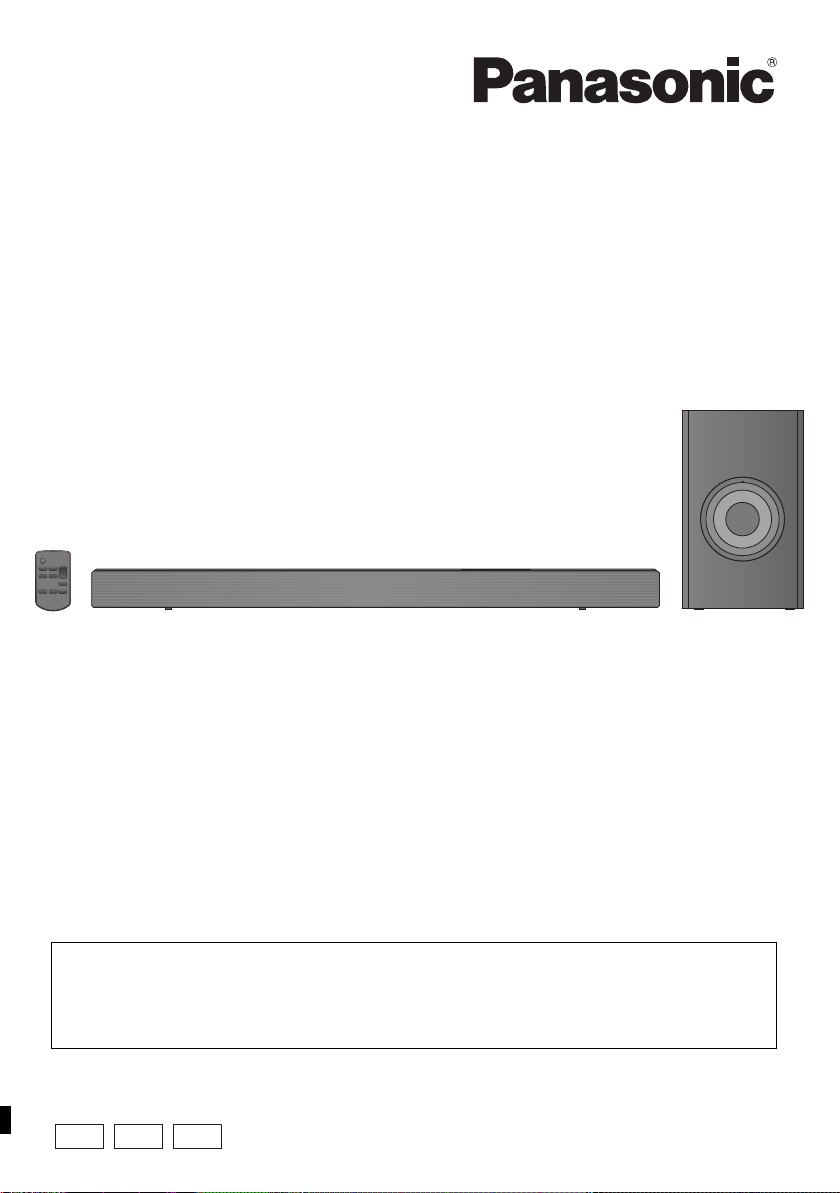
Operating Instructions
Home Theater Audio System
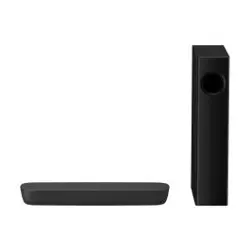
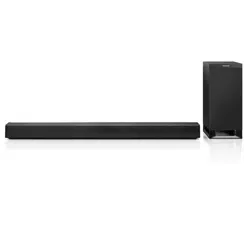
Model No. SC-HTB688
SC-HTB498
SC-HTB488
Thank you for purchasing this product.
Please read these instructions carefully before using this product,
and save this manual for future use.
Included Installation Instructions
The installation work should be done by a qualified installation specialist. ( 12 to 17)
Before commencing work, carefully read these installation instructions and the operating instructions
to ensure that installation is performed correctly.
(Please keep these instructions. You may need them when maintaining or moving this system.)
Model number suffix “EB” denotes UK model.
SC-HTB488_688_EGEBGN_TQBJ2019.book 1 ページ 2017年3月8日 水曜日 午後5時17分

2
TQBJ2019
Safety precautions
Unit
≥ To reduce the risk of fire, electric shock or
product damage,
jDo not expose this unit to rain, moisture,
dripping or splashing.
jDo not place objects filled with liquids, such as
vases, on this unit.
jUse only the recommended accessories.
jDo not remove covers.
jDo not repair this unit by yourself. Refer
servicing to qualified service personnel.
≥ To prevent injury, this apparatus must be
securely attached to the wall in accordance with
the installation instructions.
AC mains lead
≥ To reduce the risk of fire, electric shock or
product damage,
jEnsure that the power supply voltage
corresponds to the voltage printed on this unit.
j
Insert the mains plug fully into the socket outlet.
j
Do not pull, bend, or place heavy items on the lead.
jDo not handle the plug with wet hands.
jHold onto the mains plug body when
disconnecting the plug.
j
Do not use a damaged mains plug or socket outlet.
≥ The mains plug is the disconnecting device.
Install this unit so that the mains plug can be
unplugged from the socket outlet immediately.
Button-type battery (Lithium battery)
≥ Risk of fire, explosion and burns. Do not
recharge, disassemble, heat above 60
o
C or
incinerate.
≥ If the button-type battery is swallowed, it can
cause severe internal burns in just 2 hours and
can lead to death.
≥ If the battery compartment does not close
securely, stop using the remote control and keep
it away from children.
≥ If you think batteries might have been swallowed
or placed inside any part of the body, seek
immediate medical attention.
Small object
≥ Keep the screws out of reach of children to
prevent swallowing.
≥ Keep the button-type battery out of reach of
children to prevent swallowing.
≥ Keep the screw eyes out of reach of children to
prevent swallowing.
Unit
≥ Do not place sources of naked flames, such as
lighted candles, on this unit.
≥ This unit may receive radio interference caused
by mobile telephones during use. If such
interference occurs, please increase separation
between this unit and the mobile telephone.
≥ This unit is intended for use in moderate
climates.
≥ Product Identification Marking is located on the
bottom of the unit.
Placement
≥ Place this unit on an even surface.
≥ To reduce the risk of fire, electric shock or
product damage,
jDo not install or place this unit in a bookcase,
built-in cabinet or in another confined space.
Ensure this unit is well ventilated.
jDo not obstruct this unit’s ventilation openings
with newspapers, tablecloths, curtains, and
similar items.
jDo not expose this unit to direct sunlight, high
temperatures, high humidity, and excessive
vibration.
Button-type battery (Lithium battery)
≥ Danger of explosion if battery is incorrectly
replaced. Replace only with the type
recommended by the manufacturer.
≥ Insert with poles aligned.
≥ Mishandling of batteries can cause electrolyte
leakage and may cause a fire.
jRemove the battery if you do not intend to use
the remote control for a long period of time.
Store in a cool, dark place.
jDo not heat or expose to flame.
jDo not leave the battery(ies) in a car exposed
to direct sunlight for a long period of time with
doors and windows closed.
≥ When disposing of the batteries, please contact
your local authorities or dealer and ask for the
correct method of disposal.
WARNING CAUTION
SC-HTB488_688_EGEBGN_TQBJ2019.book 2 ページ 2017年3月8日 水曜日 午後5時17分
Precautions
TQBJ2019
3
Caution for AC Mains
Lead
(For the AC mains plug of three pins)
For your safety, please read the following text
carefully.
This appliance is supplied with a moulded three
pin mains plug for your safety and convenience.
A 5-ampere fuse is fitted in this plug.
Should the fuse need to be replaced please
ensure that the replacement fuse has a rating of 5-
ampere and that it is approved by ASTA or BSI to
BS1362.
Check for the ASTA mark Ï or the BSI mark Ì on
the body of the fuse.
If the plug contains a removable fuse cover you
must ensure that it is refitted when the fuse is
replaced.
If you lose the fuse cover the plug must not be
used until a replacement cover is obtained.
A replacement fuse cover can be purchased from
your local dealer.
Before use
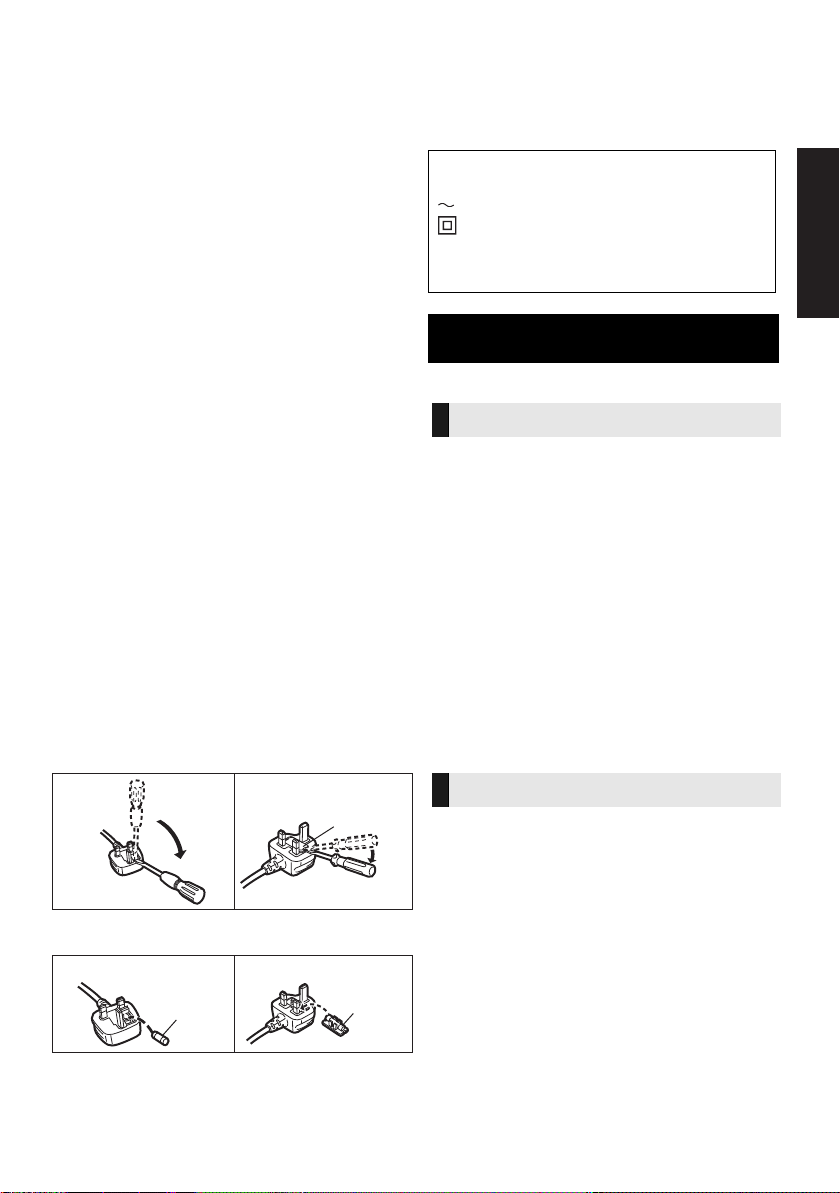
Remove the connector cover.
How to replace the fuse
The location of the fuse differ according to the type
of AC mains plug (figures A and B). Confirm the AC
mains plug fitted and follow the instructions below.
Illustrations may differ from actual AC mains plug.
1. Open the fuse cover with a screwdriver.
2. Replace the fuse and close or attach the fuse cover.
NORSK
Produkt
≥ For å redusere faren for brann, elektrisk støt
eller skade på apparatet:
jUtsett ikke produktet for regn, fukt, drypping
eller sprut.
jIkke plasser objekter som er fylt med væske,
som vaser, på apparatet.
jBruk kun anbefalt tilbehør.
jFjern ikke deksler.
jReparer ikke denne enheten selv, overlat
service til kvalifisert servicepersonell.
Vekselstrømnett
≥ Nettstøpselet er trukket ut fra denne enheten.
Installer denne enheten slik at nettstøpselet
umiddelbart kan trekkes fra stikkontakten.
Produkt
≥ Plasser ikke åpen ild, slik som levende lys, oppå
apparatet.
≥ Dette apparatet er beregnet for bruk under
moderate klimaforhold.
Plassering
≥ For å redusere faren for brann, elektrisk støt
eller skade på apparatet:
jIkke plasser apparatet i en bokhylle, et
innebygget kabinett eller et annet lukket sted.
Pass på at produktet er godt ventilert.
jApparatets ventilasjonsåpninger må ikke
dekkes til med aviser, duker, gardiner eller
lignende.
Figure A Figure B
Fuse cover
Figure A Figure B
Fuse
(5 ampere)
Fuse
(5 ampere)
The symbols on this product (including the
accessories) represent the following:
AC
Class II equipment (The construction of
the product is double-insulated.)
I On
Í Standby
Safety information for customers in
Norway
ADVARSEL
FORSIKTIG
SC-HTB488_688_EGEBGN_TQBJ2019.book 3 ページ 2017年3月8日 水曜日 午後5時17分

4
TQBJ2019
Table of contents
Safety precautions............................................................................................ 2
Caution for AC Mains Lead ..............................................................................3
Before use
Supplied items .................................................................................................. 5
This system .........................................................................................................................5
Accessories .........................................................................................................................5
Control reference guide ................................................................................... 6
This system (Front) ..............................................................................................................6
This system (Rear) ..............................................................................................................7
Remote control ....................................................................................................................8
Getting started
Step 1 Connections ......................................................................................... 9
Connection with the TV .......................................................................................................9
Connection to a 4K Ultra HD TV ........................................................................................10
AC mains lead connection .................................................................................................11
Step 2 Placement ........................................................................................... 12
Safety Precautions ............................................................................................................12
The active subwoofer ........................................................................................................12
Wireless interference .........................................................................................................12
Selecting the placement method .......................................................................................13
When placing the main unit in a rack or on a table ............................................................14
When attaching the main unit to a wall ..............................................................................15
Step 3 Wireless connections........................................................................ 18
Active subwoofer wireless connection ...............................................................................18
Bluetooth
®
connection .......................................................................................................18
Operations
Using this system ...........................................................................................19
Advanced operations .....................................................................................20
“HDMI CEC” ....................................................................................................22
Reference
Troubleshooting .............................................................................................23
Indicator illumination ..................................................................................... 25
Unit care ..........................................................................................................25
About Bluetooth
®
............................................................................................26
Licenses ..........................................................................................................26
Specifications ................................................................................................. 27
Limited Warranty (ONLY FOR AUSTRALIA)................................................. 31
≥ Operations in this operating instructions are described mainly with the remote control, but
you can perform the operations on the main unit if the controls are the same.
≥ [HTB688]: indicates features applicable to SC-HTB688 only.
[HTB498]: indicates features applicable to SC-HTB498 only.
[HTB488]: indicates features applicable to SC-HTB488 only.
SC-HTB488_688_EGEBGN_TQBJ2019.book 4 ページ 2017年3月8日 水曜日 午後5時17分
Getting started
Operations
Reference
Before use
Precautions
TQBJ2019
5
Before use
Supplied items
Check the supplied accessories before using this system.
≥ Product numbers are correct as of December 2016. These may be subject to change.
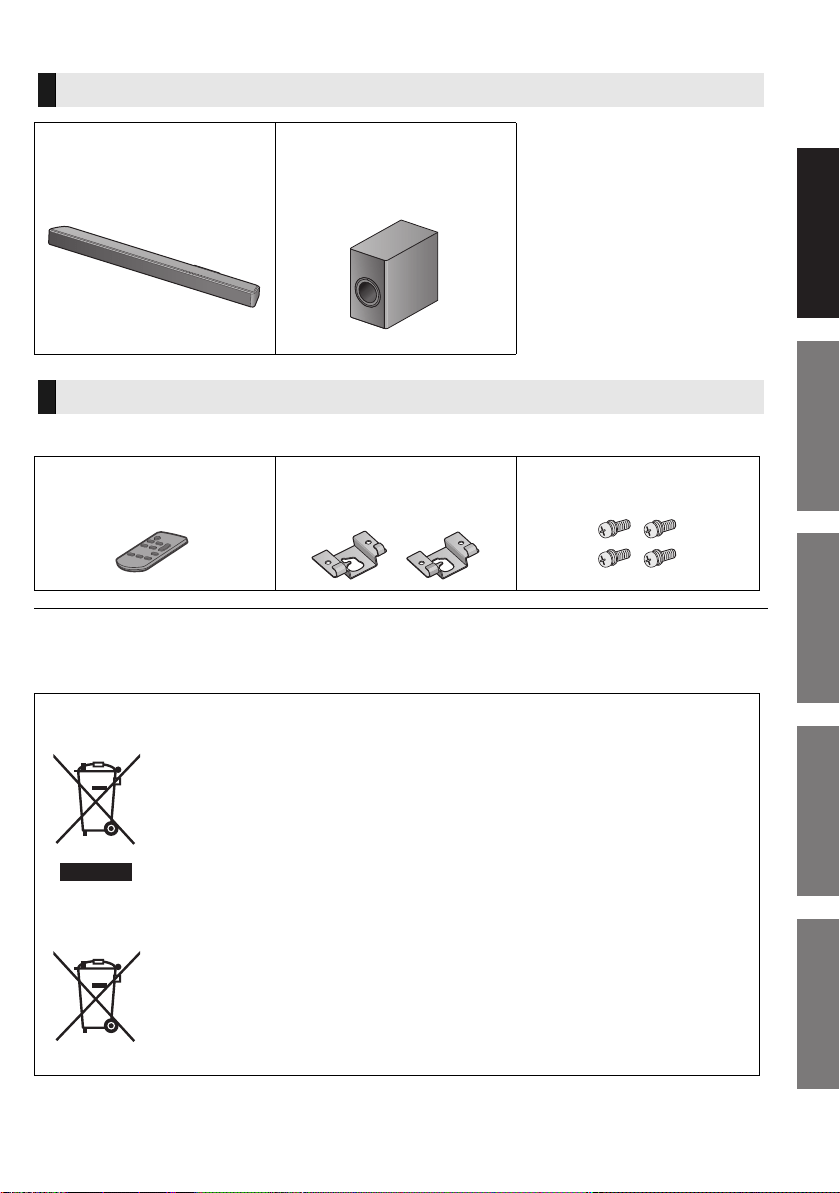
This system
∏ 1 Main unit (speaker)
≥
(
[HTB688]
: SU-HTB688)
≥
(
[HTB498]
: SU-HTB498)
≥
(
[HTB488]
: SU-HTB488)
∏ 1 Active subwoofer
≥
(
[HTB688]
: SB-HWA688)
≥
(
[HTB498]
: SB-HWA488)
≥
(
[HTB488]
: SB-HWA488)
Accessories
∏ 1 Remote control (with a
battery)
(N2QAYC000115)
∏ 2 Wall mount brackets
(TEKL014, TEKL015)
∏ 4 Screws
(XYN5+J14FJK)
Disposal of Old Equipment and Batteries
Only for European Union and countries with recycling systems
These symbols on the products, packaging, and/or accompanying documents
mean that used electrical and electronic products and batteries must not be mixed
with general household waste.
For proper treatment, recovery and recycling of old products and used batteries,
please take them to applicable collection points in accordance with your national
legislation.
By disposing of them correctly, you will help to save valuable resources and prevent
any potential negative effects on human health and the environment.
For more information about collection and recycling, please contact your local
municipality.
Penalties may be applicable for incorrect disposal of this waste, in accordance with
national legislation.
Note for the battery symbol (bottom symbol):
This symbol might be used in combination with a chemical symbol. In this case it
complies with the requirement set by the Directive for the chemical involved.
SC-HTB488_688_EGEBGN_TQBJ2019.book 5 ページ 2017年3月8日 水曜日 午後5時17分
6
TQBJ2019
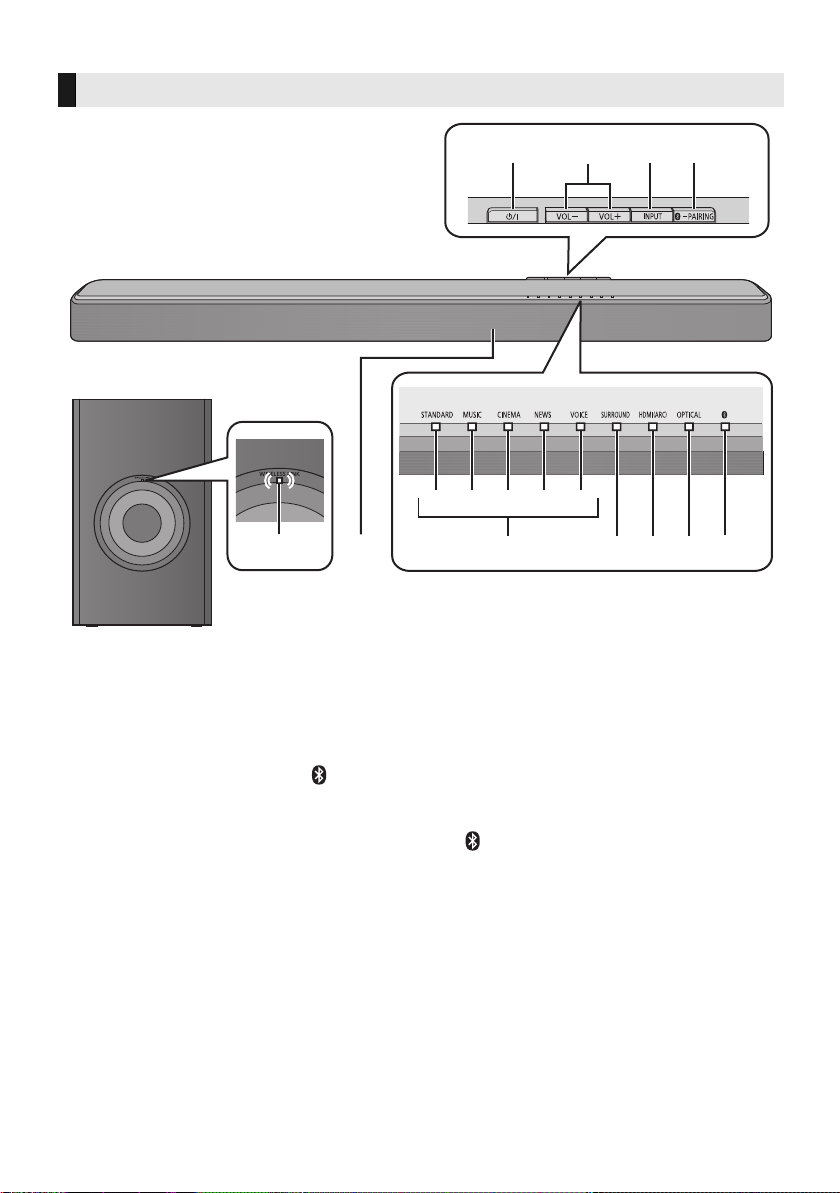
Control reference guide
1 Standby/on switch (Í/I)
Press to switch the unit from on to standby
mode or vice versa. In standby mode, the unit
is still consuming a small amount of power.
2 Adjust the volume of this system ( 19)
3 Select the input source ( 19)
“
HDMI (ARC)
”
#
“
OPTICAL
”
#
“ ” (Bluetooth
®
)
^---------------------------------------------------------------}
4 Select the Bluetooth
®
device as the source
( 19)
Bluetooth
®
pairing ( 18)
Disconnecting a Bluetooth
®
device ( 18)
5 Remote control signal sensor
6 Sound mode indicators
Lights when the corresponding sound mode is
selected
A STANDARD indicator
B MUSIC indicator
C CINEMA indicator
D NEWS indicator
E VOICE indicator
7 SURROUND indicator
Lights when the surround effect is activated
8 HDMI (ARC) indicator
Lights when the device connected to the
HDMI (ARC) terminal is the audio source
9 OPTICAL indicator
Lights when the device connected to the
OPTICAL DIGITAL AUDIO IN terminal is the
audio source
10 (Bluetooth
®
) indicator
Lights when the Bluetooth
®
device is the
audio source
11 WIRELESS LINK indicator ( 18)
This system (Front)
2341
768910
ABCDE
11
5
Main unit
Active subwoofer
SC-HTB488_688_EGEBGN_TQBJ2019.book 6 ページ 2017年3月8日 水曜日 午後5時17分
Before use
TQBJ2019
7
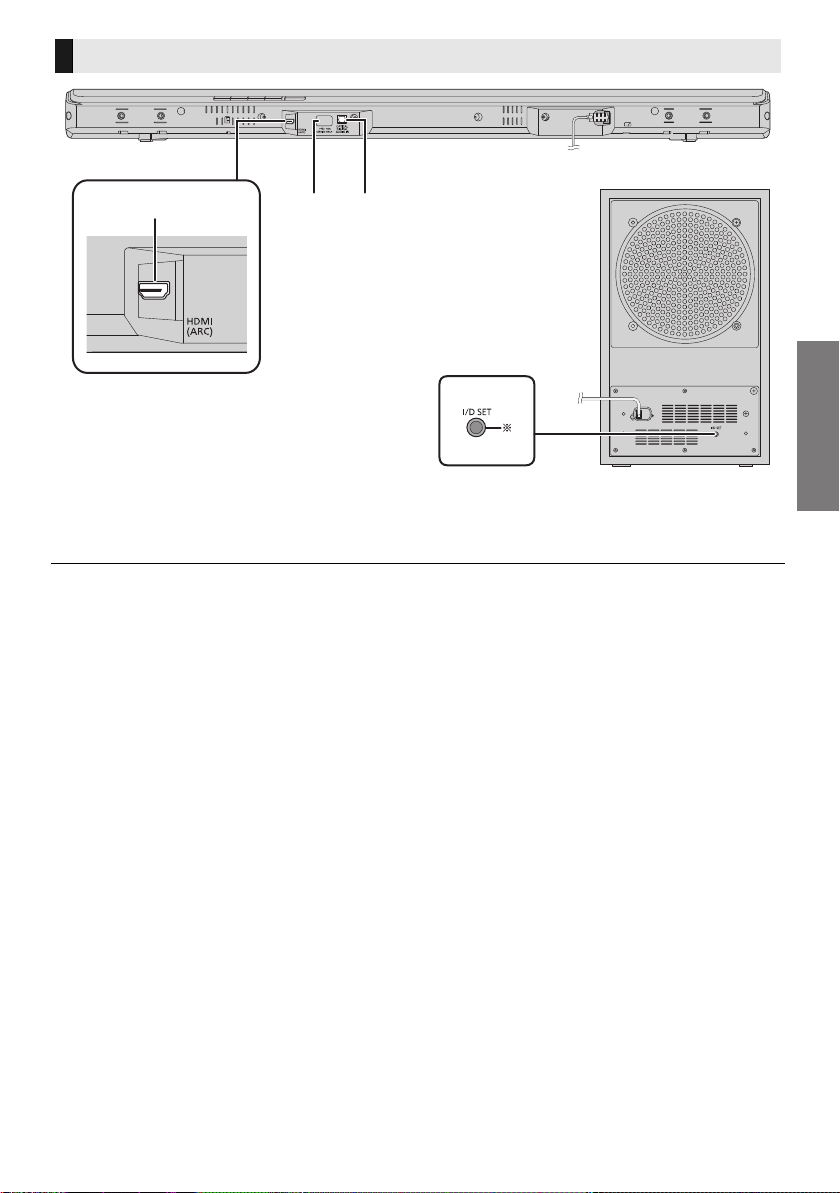
1 HDMI (ARC) terminal (ARC compatible)
( 9, 10)
2 USB port (for service use only)
3 OPTICAL DIGITAL AUDIO IN terminal ( 10)
§ The I/D SET button is only used when the main unit is not paired with the active subwoofer. ( 24)
This system (Rear)
231
Main unit
Active subwoofer
SC-HTB488_688_EGEBGN_TQBJ2019.book 7 ページ 2017年3月8日 水曜日 午後5時17分
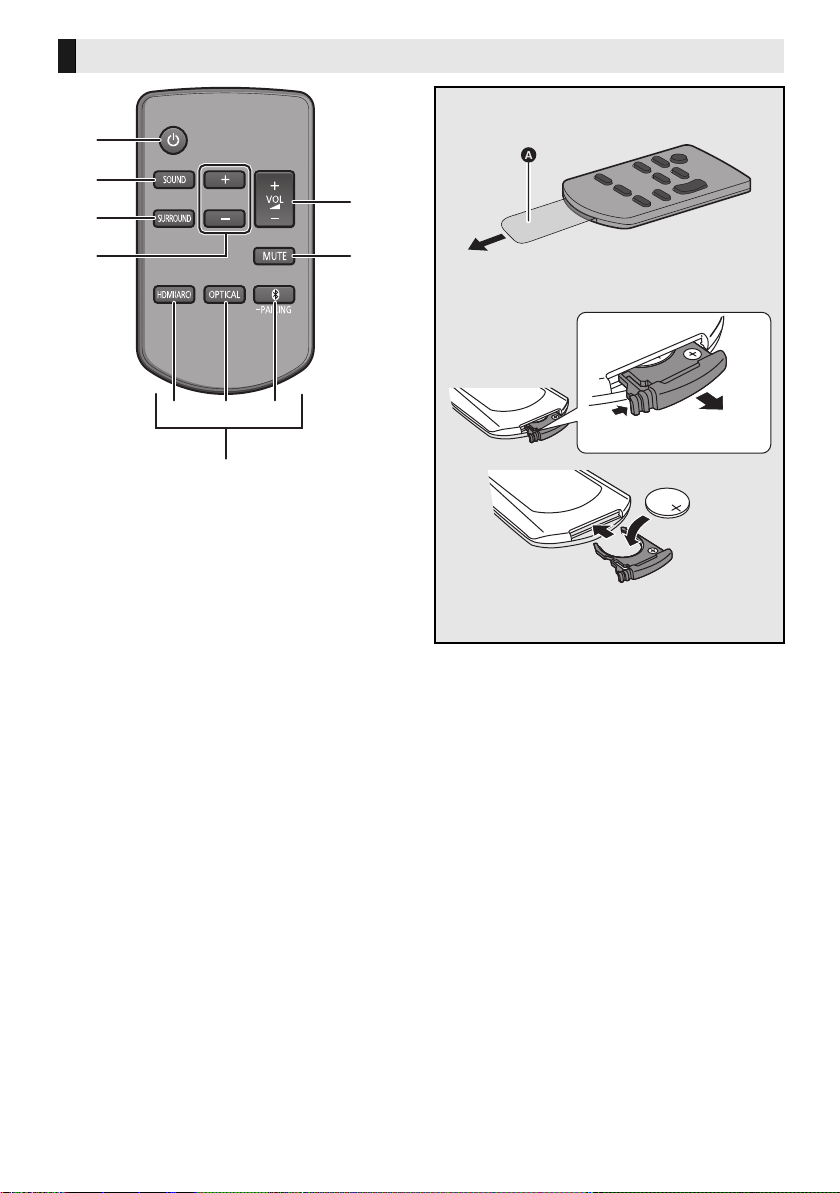
8
TQBJ2019
1 Turn the main unit on or off ( 19)
2 Select the sound mode ( 20)
3 Set the surround mode ( 20)
4 Adjust the subwoofer level (
19)
5 Adjust the volume of this system ( 19)
6 Mute the sound ( 20)
7 Select the input source
A Select the HDMI (ARC) device as the
source ( 19)
B Select the Optical device as the source
( 19)
C Select the Bluetooth
®
device as the
source ( 19)
Bluetooth
®
pairing ( 18)
Disconnecting a Bluetooth
®
device ( 18)
∫ About remote control signal sensor
The remote control signal sensor is
located on the main unit.
≥ Use the remote control within the correct
operation range.
Distance: Within approx. 7 m directly in front
Angle: Approx. 30
o
left and right
Remote control
SUBWOOFER
1
5
6
7
3
2
4
∫ Before using for the first time
Remove the insulation sheet A.
∫ To replace a button-type battery
Battery type: CR2025 (Lithium battery)
≥ Set the button-type battery with its (i) mark
facing upward.
SC-HTB488_688_EGEBGN_TQBJ2019.book 8 ページ 2017年3月8日 水曜日 午後5時17分
Getting started
Before use
TQBJ2019
9
Getting start ed
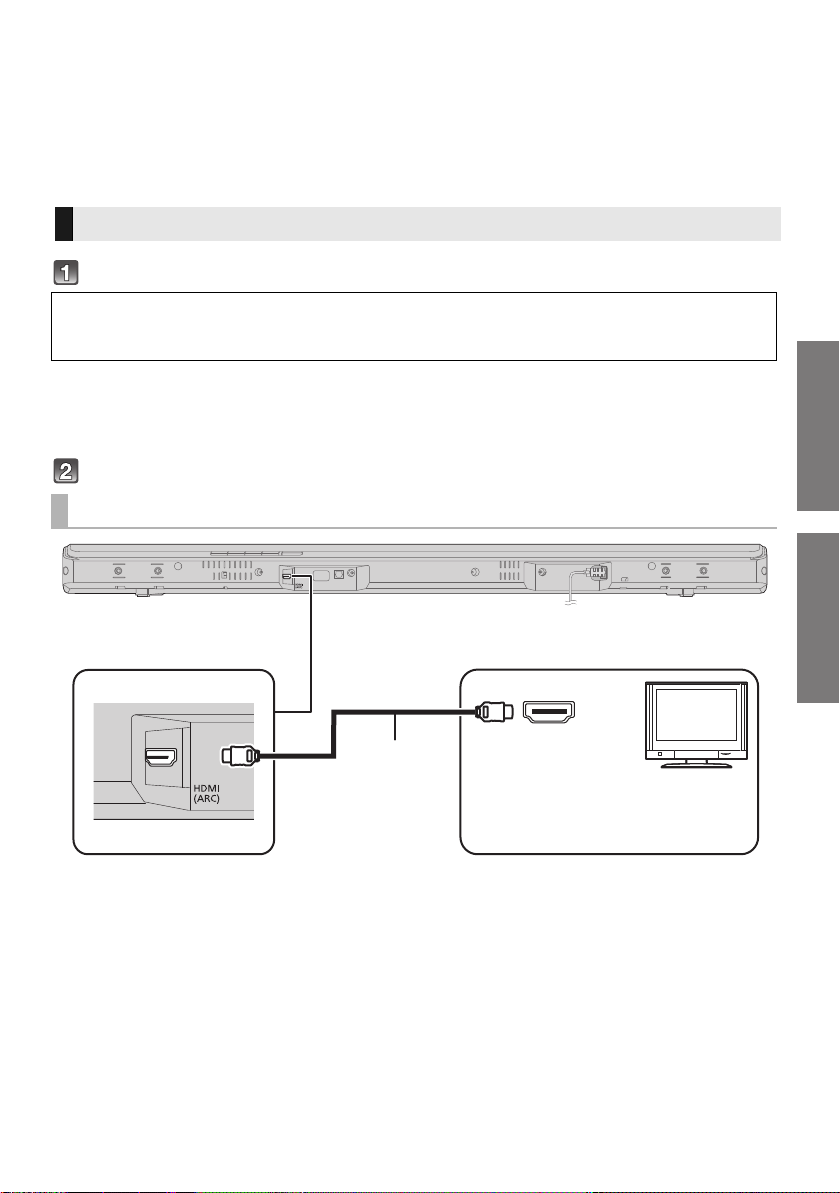
Step 1 Connections
≥Turn off all equipment before connection and read the appropriate operating instructions.
Do not connect the AC mains lead until all other connections are completed.
∫ HDMI (High-Definition Multimedia Interface)
≥ Use the ARC compatible High Speed HDMI Cables. Non-HDMI-compliant cables cannot be utilised.
≥ It is recommended that you use Panasonic’s HDMI cable.
Verify if the TV’s HDMI terminal is labelled “HDMI (ARC)”.
∫ What is ARC?
ARC is an abbreviation of Audio Return Channel, also known as HDMI ARC. It refers to one of the HDMI functions. When you
connect the main unit to the terminal labelled “HDMI (ARC)” on the TV, the optical digital audio cable that is usually required in
order to listen to sound from a TV is no longer required, and TV pictures and sound can be enjoyed with a single HDMI cable.
Make the connection.
A HDMI cable
Connection with the TV
Connection differs depending on the label printed next to the HDMI terminal.
Labelled “HDMI (ARC)”: Connection [A]
Not Labelled “HDMI (ARC)”: Connection [B]
[A] Labelled “HDMI (ARC)”
HDMI IN (ARC)
A
Be sure to connect to
the TV’s ARC
compatible terminal.
(Refer to the operating
instructions for the TV.)
TV
SC-HTB488_688_EGEBGN_TQBJ2019.book 9 ページ 2017年3月8日 水曜日 午後5時17分
10
TQBJ2019
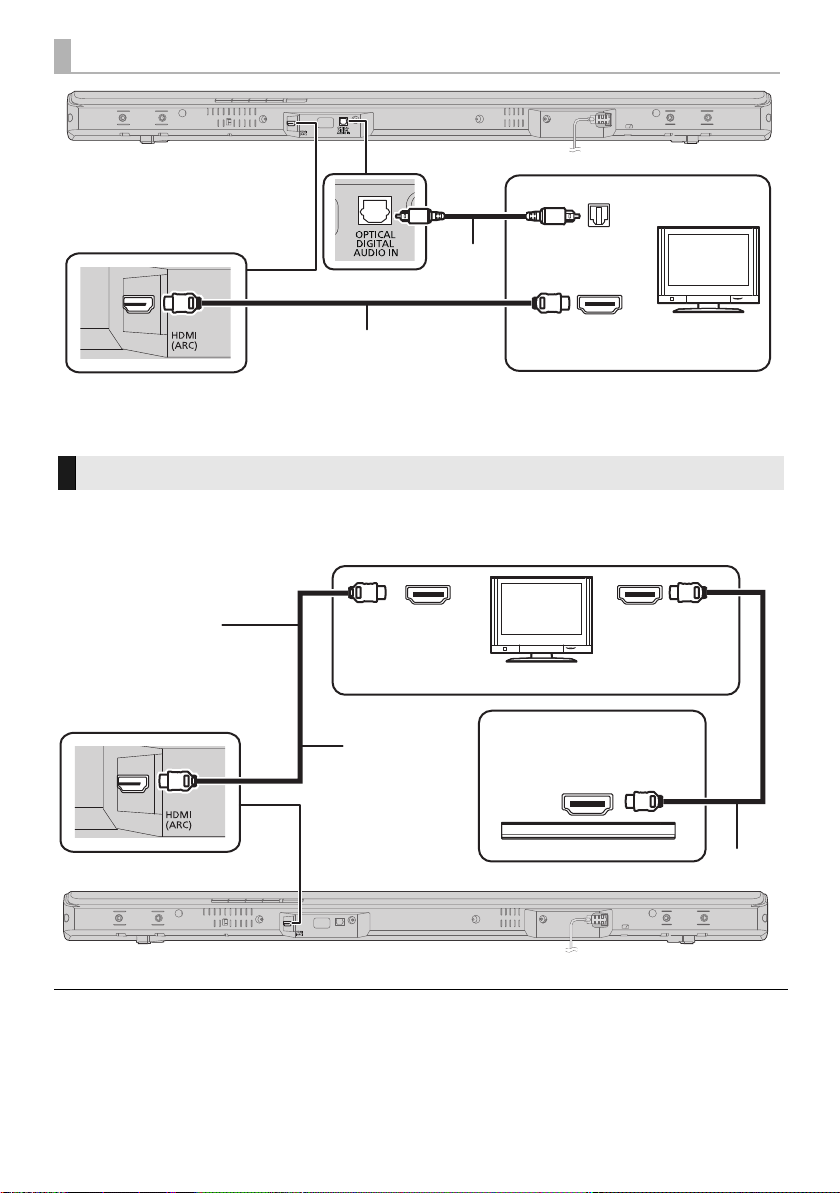
A Optical digital audio cable
≥ When you use the optical digital audio cable, insert
the tip correctly into the terminal.
B HDMI cable
This system cannot pass-through the 4K content of a 4K compatible equipment to a 4K Ultra HD TV.
However, you can connect the system to a 4K Ultra HD TV to enjoy the 4K content.
A HDMI cable
≥ Refer to the operating instructions of the 4K Ultra HD TV (VIERA) and the 4K/60p compatible equipment for setup and for
playing the 4K content.
≥ To enjoy multi-channel output from this system, set the audio output of other equipment to Bitstream.
≥ The audio signal input to this system is up to 5.1 channels.
[B] Not labelled “HDMI (ARC)”
HDMI IN
OPTICAL OUT
B
A
TV
Connection to a 4K Ultra HD TV
HDMI IN (ARC)
HDMI IN (4K)
HDMI OUT
A
A
e.g., Blu-ray Disc player
(4K compatible)
TV
Connect both ends
to ARC compatible
HDMI terminals.
(4K compatible)
SC-HTB488_688_EGEBGN_TQBJ2019.book 10 ページ 2017年3月8日 水曜日 午後5時17分
Getting started
TQBJ2019
11
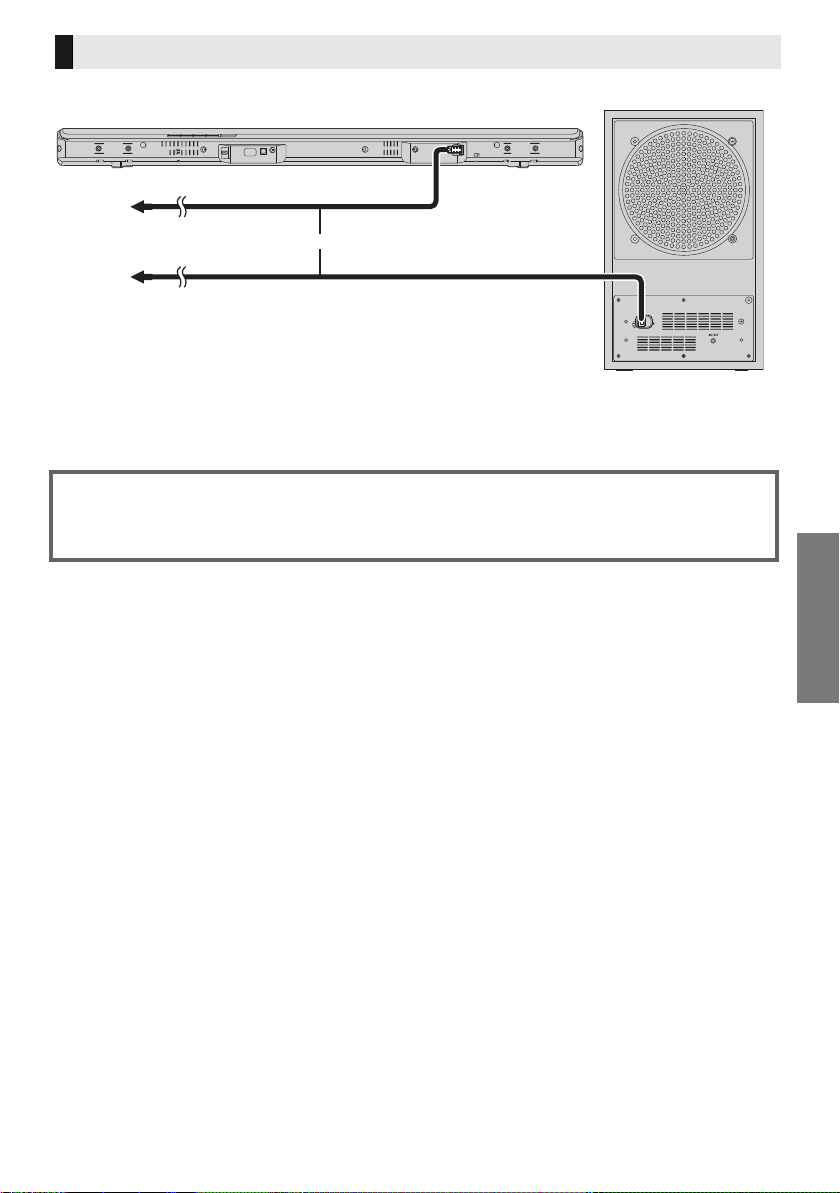
≥ Connect only after all other connections are completed.
A To a household mains socket
B AC mains lead
≥
This system consumes a small amount of AC power (
27) even when it is turned off. In the interest of power
conservation, if you will not be using this system for a long time, unplug it from the household mains socket.
AC mains lead connection
Saving energy
The main unit is designed to conserve its power consumption and save energy.
≥
The main unit will automatically switch to standby mode when no signal is input and no operation is
performed for approx. 20 minutes. Refer to page 21, “Auto power down” to turn this function off.
SC-HTB488_688_EGEBGN_TQBJ2019.book 11 ページ 2017年3月8日 水曜日 午後5時17分
12
TQBJ2019
Step 2 Placement
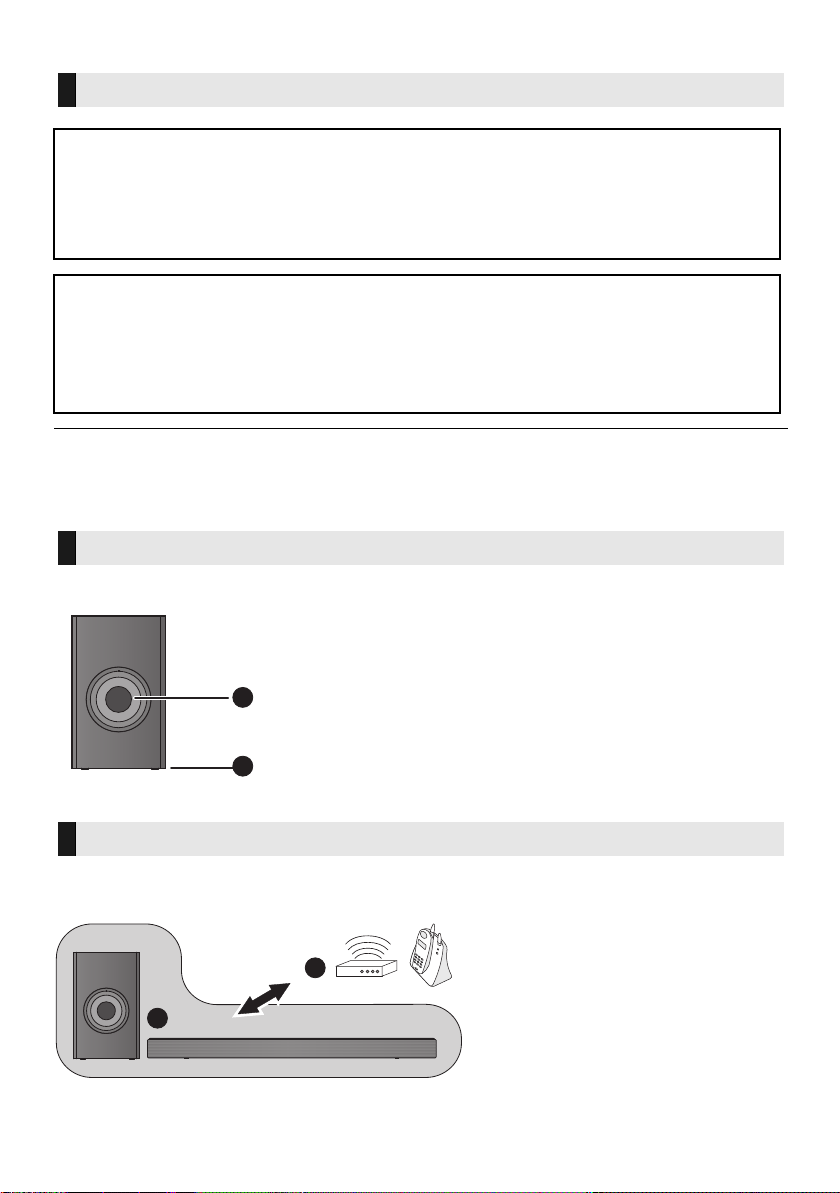
≥ Do not hold the main unit in one hand to avoid injury, you may drop the main unit when carrying it.
≥ To prevent damage or scratches, lay down a soft cloth and perform the assembly on it.
When carrying the active subwoofer
To avoid interference, maintain the following distances between the main unit/active subwoofer
and other electronic devices that use the same radio frequency (2.4 GHz band).
Safety Precautions
Professional installation is required.
The installation should never be done by any other than a qualified installation specialist.
PANASONIC DISCLAIMS ANY PROPERTY DAMAGE AND/OR SERIOUS INJURY, INCLUDING
DEATH RESULTING FROM IMPROPER INSTALLATION OR INCORRECT HANDLING.
≥ Be sure to install the main unit as indicated within this operating instructions.
≥ Attach using techniques suited to the structure and materials of the installation location.
Caution
≥ This system is to be used only as indicated in these instructions. Failure to do so may lead to
damage to the amplifier and/or the speaker, and may result in the risk of fire. Consult a qualified
service person if damage has occurred or if you experience a sudden change in performance.
≥ Do not attempt to attach the main unit to a wall using methods other than those described in this
manual.
The active subwoofer
A Do not hold the active subwoofer from this
opening.
The parts inside may get damaged.
B Always hold the bottom of the active subwoofer when
moving it.
Wireless interference
C Main unit/active subwoofer
D Wireless router, cordless phone and
other electronic devices: approx. 2 m
A
B
D
C
SC-HTB488_688_EGEBGN_TQBJ2019.book 12 ページ 2017年3月8日 水曜日 午後5時17分
Getting started
TQBJ2019
13
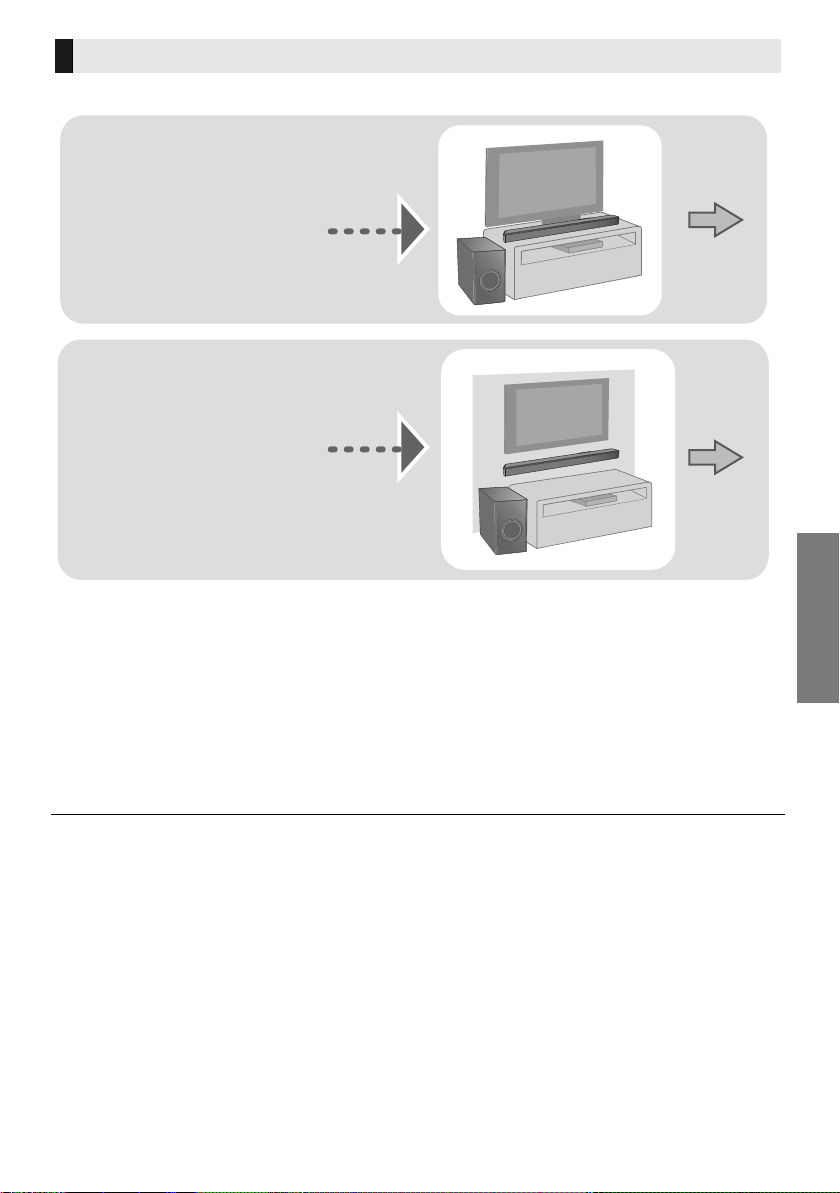
Choose a placement method that suits you best.
∫ When placing the main unit in front of the TV
The main unit may block or interfere with the TV’s various sensors (C.A.T.S. (Contrast Automatic
Tracking System) sensor, remote control sensor, etc.) and the 3D Eyewear transmitters on a 3D
compatible TV.
≥If interference occurs, move the main unit further away from the TV. If the TV still does not function
correctly, try using it in a rack or in the wall mount position.
∫ If the TV’s remote control sensor is blocked by the main unit
Try using the TV’s remote control from a different angle.
≥ Place the active subwoofer within a few meters of the main unit and in a horizontal position with the top panel facing upward.
≥ Do not use the main unit or the active subwoofer in a metal cabinet.
≥ Depending on the position of the active subwoofer, the effect may vary.
Placing the active subwoofer too close to the walls and corners can result in excessive bass. Cover walls and windows with
thick curtains.
You may change the position of the active subwoofer, or adjust the subwoofer level ( 19) to achieve optimum effect.
≥ If irregular colouring occurs on your TV, turn the TV off for about 30 minutes. If it persists, move the main unit and active
subwoofer further away from the TV.
≥ Keep magnetised items away. Magnetised cards, watches, etc., can be damaged if placed too close to the main unit and active
subwoofer.
Selecting the placement method
When placing the main unit
in a rack or on a table
≥ Place the main unit on a flat
and horizontal surface.
When attaching the main
unit to a wall
≥ Place the main unit on a
flat and vertical surface.
Page 14
Page 15
SC-HTB488_688_EGEBGN_TQBJ2019.book 13 ページ 2017年3月8日 水曜日 午後5時17分
14
TQBJ2019
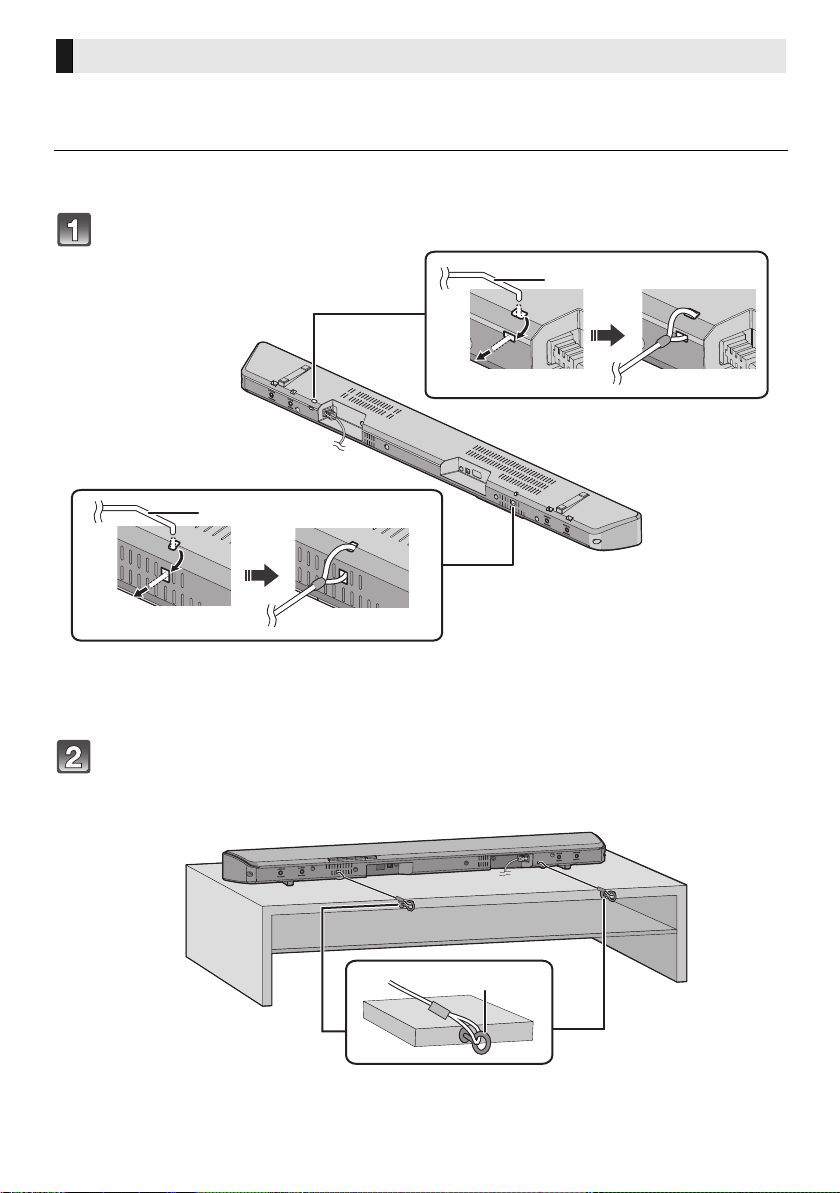
Additionally required accessories (commercially available)
≥Fall prevention cord ..................................................................................................................... k 2
≥Screw eyes (to attach the fall prevention cord)............................................................................. k 2
≥ Use commercially available screws that are capable of supporting over 24 kg.
≥ Use a cord that is capable of supporting over 24 kg (with a diameter of about 1.5 mm).
Attach the cord to the main unit.
A Cord
§
§ If the cord cannot be threaded through the holes, try bending the cord,
about 5 mm apart from the tip, at an angle of 45
o
(as
illustrated above).
Place the main unit in the desired position and attach each cord onto the
rack or table.
≥ Make sure that the slack of the cord is minimal.
≥ Do not lean the main unit against the TV or wall.
B Screw eye
≥ Attach at a position capable of supporting over 24 kg.
≥ Depending on the placement of the main unit, the screwing position of the screw eye may differ.
When placing the main unit in a rack or on a table
SC-HTB488_688_EGEBGN_TQBJ2019.book 14 ページ 2017年3月8日 水曜日 午後5時17分
Getting started
TQBJ2019
15
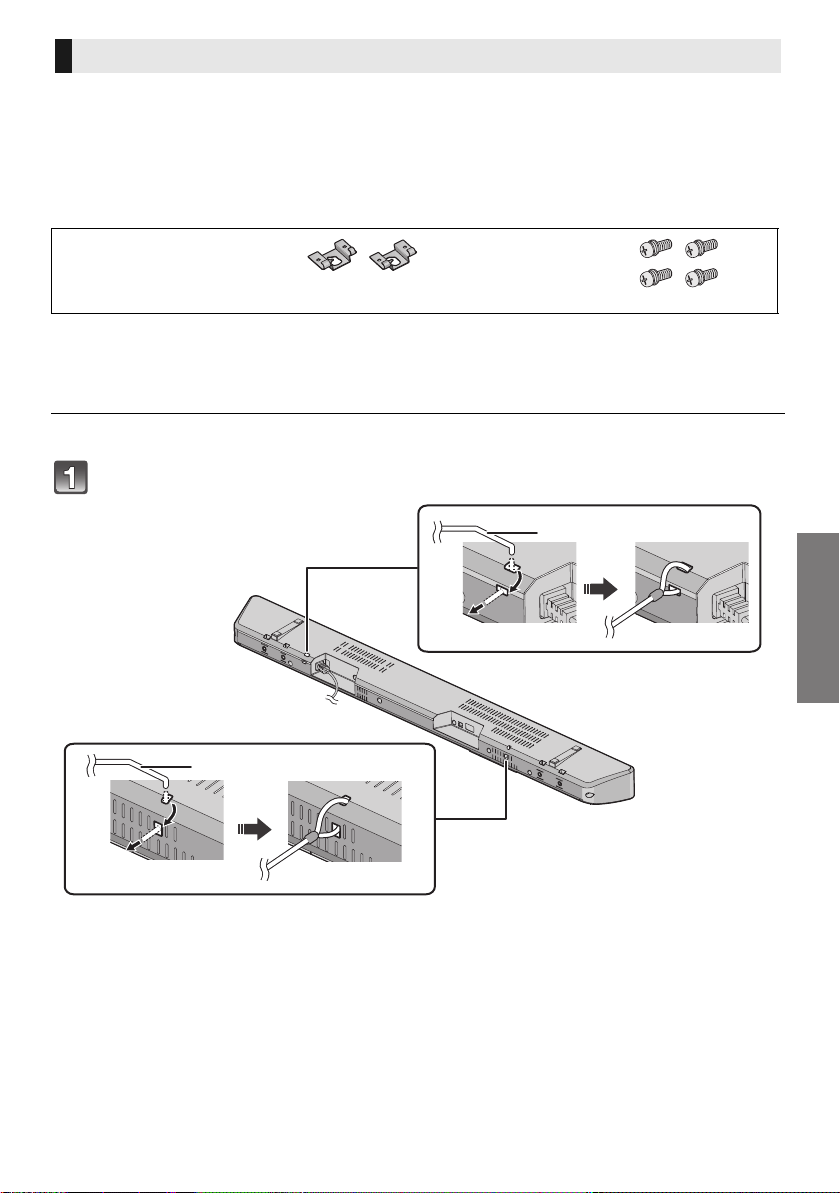
The main unit can be wall mounted using the supplied wall mount brackets, etc. Make sure that the
screw used and the wall are strong enough to support the weight of at least 24 kg.
The screws and other items are not supplied as the type and size will vary with each installation.
≥Refer to step 3 for details about the required screws.
≥Be sure to attach the fall prevention cord as a secondary safety measure.
Supplied accessories
Additionally required accessories (commercially available)
≥Screws for wall mounting ............................................................................................................. k 2
≥Fall prevention cord ...................................................................................................................... k 2
≥Screw eyes (to attach the fall prevention cord) ............................................................................ k 2
≥ Use a cord that is capable of supporting over 24 kg (with a diameter of about 1.5 mm).
Attach the cord to the main unit.
A Cord
§
§ If the cord cannot be threaded through the holes, try bending the cord,
about 5 mm apart from the tip, at an angle of 45
o
(as
illustrated above).
When attaching the main unit to a wall
∏ 2 Wall mount brackets ∏ 4 Screws
SC-HTB488_688_EGEBGN_TQBJ2019.book 15 ページ 2017年3月8日 水曜日 午後5時17分
16
TQBJ2019
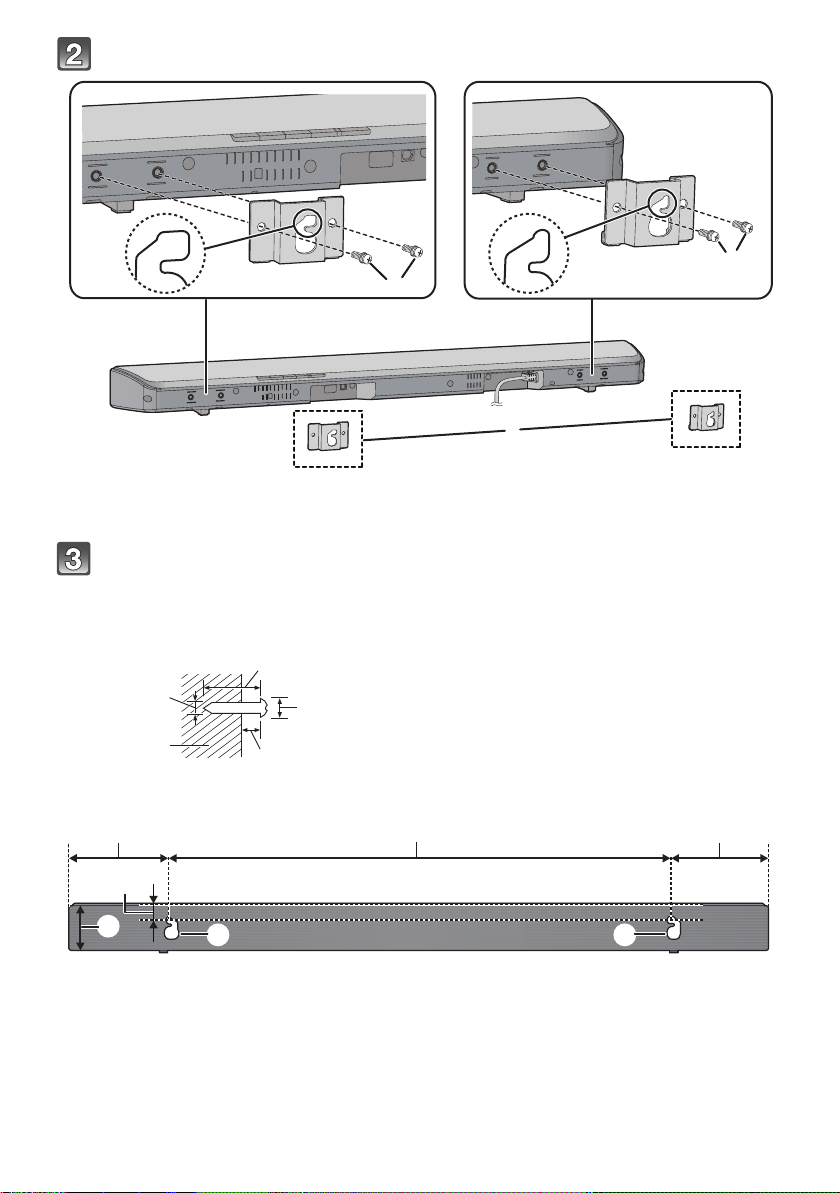
Attach the wall mount brackets to the main unit.
A Wall mount bracket (supplied)
B Screw (supplied)
Drive a screw into the wall.
≥ Use the measurements indicated below to identify the screwing positions on the wall.
≥ Leave at least 100 mm of space above of the main unit to allow enough space for fitting the main unit.
≥ Be sure to use a level to ensure that both mounting holes are level to each other.
Front view (semi-transparent image)
C At least 30 mm
D ‰4.0 mm
E ‰7.0 mm to ‰9.4 mm
F Wall or pillar
G 2.5 mm to 3.5 mm
H 616 mm I 118 mm J 118 mm
K 28 mm L 60.5 mm M Wall mounting hole
SC-HTB488_688_EGEBGN_TQBJ2019.book 16 ページ 2017年3月8日 水曜日 午後5時17分
Getting started
TQBJ2019
17
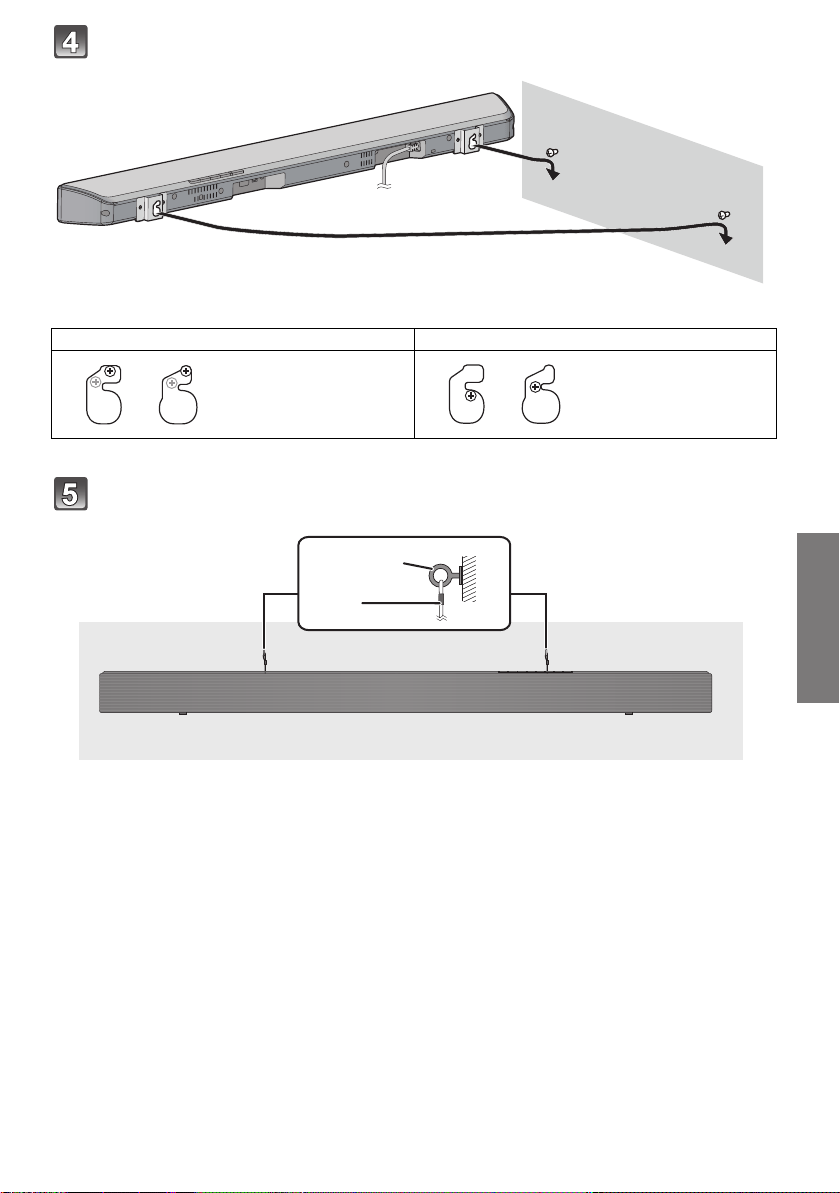
Fit the main unit securely onto the screw(s).
Secure the cord to the wall.
≥ Make sure that the slack of the cord is minimal.
A Screw eye
B Cord
DO DO NOT
≥ Move the speaker so
that the screw is in
this position.
≥ In this position, the
speaker will likely fall
if moved to the left or
right.
SC-HTB488_688_EGEBGN_TQBJ2019.book 17 ページ 2017年3月8日 水曜日 午後5時17分
18
TQBJ2019
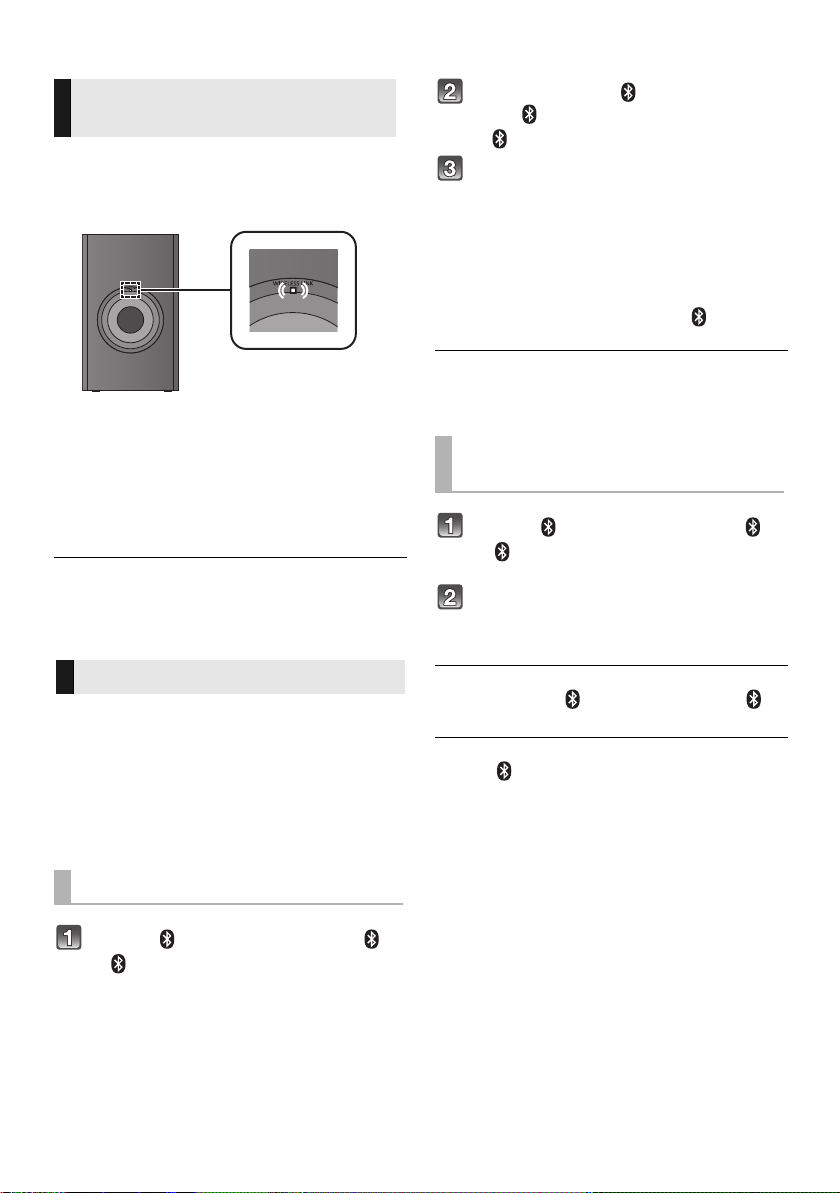
Step 3 Wireless connections
Preparation
≥ Turn on the main unit.
Check that the wireless link is activated.
WIRELESS LINK indicator
Lights:
The wireless link is activated.
Lights off:
The wireless link is not activated.
Blinks:
The active subwoofer is trying to activate the
wireless link with the main unit.
≥ The wireless link will be activated when the main unit and
the active subwoofer are both turned on.
≥ The I/D SET button is only used when the main unit is not
paired with the active subwoofer. ( 24)
By using the Bluetooth
®
connection, you can listen
to the sound from the Bluetooth
®
audio device
from this system wirelessly.
≥
Refer to the operating instructions of the Bluetooth
®
device for
further instruction on how to connect a Bluetooth
®
device.
Preparation
≥ Turn on the Bluetooth
®
feature of the device and
place the device near the main unit.
Press [ -PAIRING] to select “ ”.
≥ If the “ ” indicator starts blinking quickly, go to step 3.
Press and hold [ -PAIRING] until
the “ ” indicator blinks quickly.
≥ If the “ ” indicator blinks slowly, repeat step 2.
Select “SC-HTB688”, “SC-HTB498” or
“SC-HTB488” from the Bluetooth
®
device’s Bluetooth
®
menu.
≥ The MAC address (e.g., 6C:5A:B5:B3:1D:0F) may be
displayed before “SC-HTB688”, “SC-HTB498” or “SC-
HTB488” is displayed.
≥ If prompted for the passkey on the Bluetooth
®
device, enter
“0000” or “1234”.
≥
Once the Bluetooth
®
device is connected, the
“ ”
indicator
stops blinking and lights up.
≥ You can register up to 8 devices with this system. If a 9th
device is paired, the device that has not been used for the
longest time will be replaced.
Press [ -PAIRING] to select “ ”.
≥ If the “ ”
indicator lights, a Bluetooth
®
device is already
connected with this system. Disconnect it. (
below)
Select “SC-HTB688”, “SC-HTB498” or
“SC-HTB488” from the Bluetooth
®
device’s Bluetooth
®
menu.
∫ Disconnecting a Bluetooth
®
device
Press and hold [ -PAIRING] until the “ ”
indicator blinks slowly.
≥ When “ ” is selected as the source, this system will
automatically try and connect to the last connected
Bluetooth
®
device. If the connection attempt fails, try to
establish a connection again.
≥ The Bluetooth
®
device will be disconnected if a different
audio source (e.g. “HDMI (ARC)”) is selected.
≥
This system can only be connected to one device at a time.
Active subwoofer
wireless connection
Bluetooth
®
connection
Bluetooth
®
pairing
Connecting a paired
Bluetooth
®
device
SC-HTB488_688_EGEBGN_TQBJ2019.book 18 ページ 2017年3月8日 水曜日 午後5時17分
Getting started
Operations
TQBJ2019
19
Operations
Using this system
≥ The default setting is underlined. Changed settings will be
kept until it is changed again, unless otherwise indicated.
Preparation
≥ Turn on the TV and/or connected device.
Press [Í] to turn on the main unit.
Select the source.
Main unit
Remote control
≥ This remote control cannot be used to control the
operations of the connected devices.
∫ When “ ” is selected as the source
On the Bluetooth
®
device:
Select this system as the output source of the
connected Bluetooth
®
device and start the
playback.
∫ When “OPTICAL” is selected as the
source
On the TV and the connected device:
Select the TV’s input for this system and start the
playback on the connected device.
∫ To adjust the volume of this system
Press [i VOL j].
≥ Volume range: 0 to 100
The indicators will scroll every time the volume is
adjusted.
≥ The indicators will not blink when it has reached the
maximum or minimum.
VOL j
,-----------------# i VOL
∫ To adjust the subwoofer level
1Press [
i
SUBWOOFER] or [SUBWOOFER
j
]
to display the current level.
2 While the level is displayed:
Press [
i
SUBWOOFER] or [SUBWOOFER
j
]
to adjust the level.
Press To select
[INPUT]
“
HDMI (ARC)
”
-#
“
OPTICAL”
^----
“
” (Bluetooth
®
)
,---}
[ -PAIRING] “ ” (Bluetooth
®
)
Press To select
[HDMI (ARC)]
“
HDMI (ARC)
”
[OPTICAL] “OPTICAL”
[ -PAIRING] “ ” (Bluetooth
®
)
SUBWOOFER
Indication Effect level
5 Highest
4
3
2
1 Lowest
SC-HTB488_688_EGEBGN_TQBJ2019.book 19 ページ 2017年3月8日 水曜日 午後5時17分
20
TQBJ2019
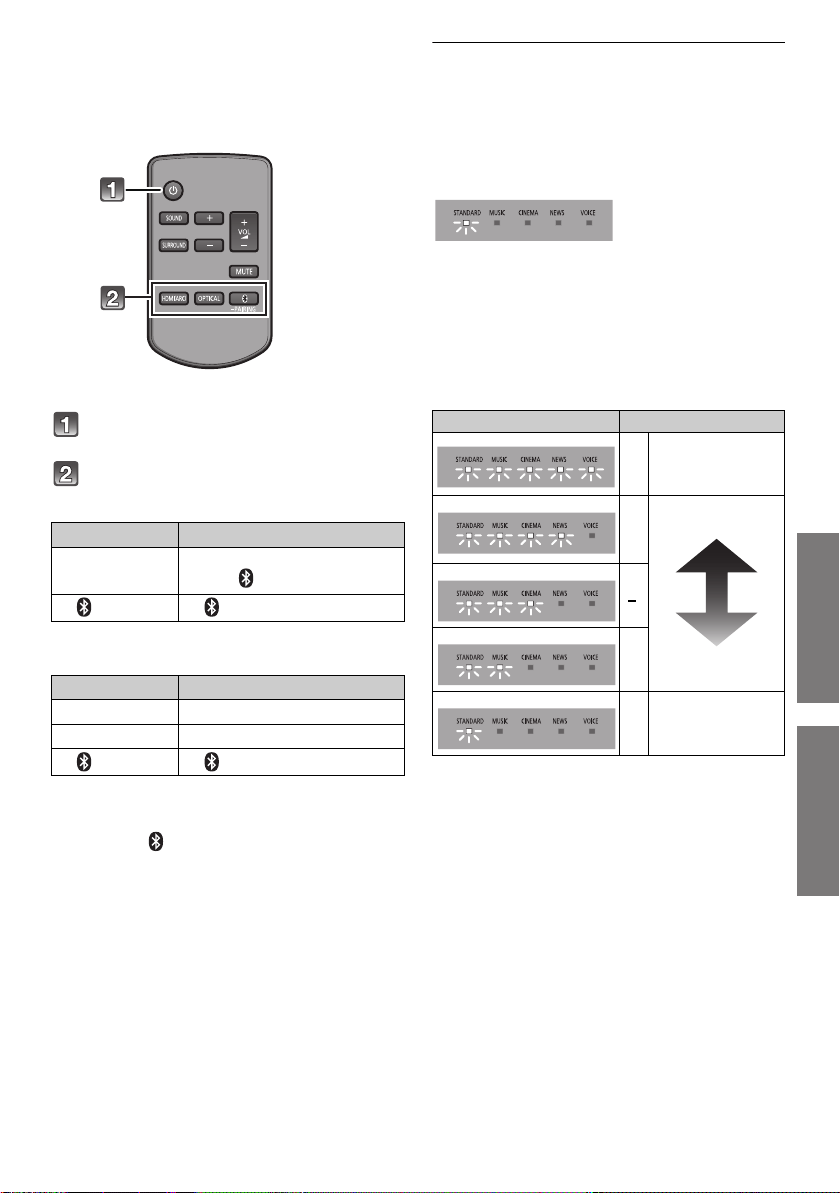
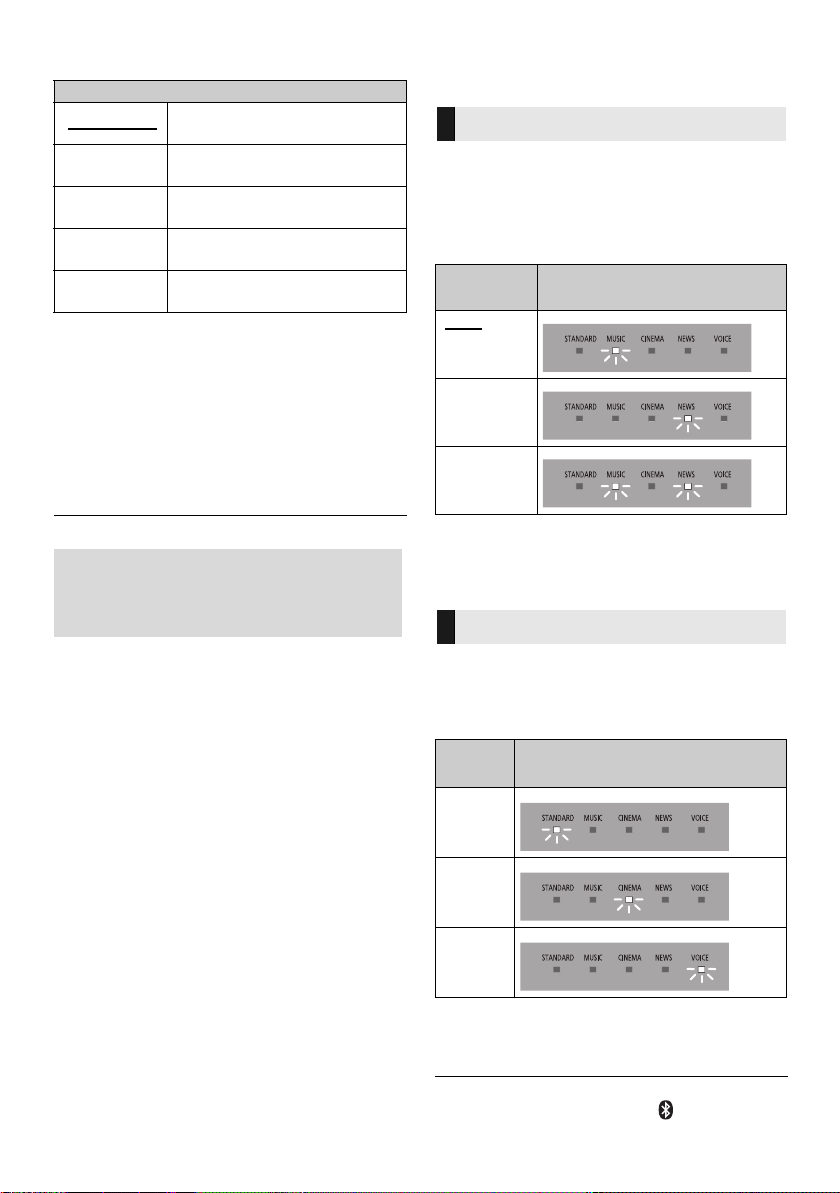
∫ To select the sound mode
Press [SOUND].
∫ To set the surround mode
You can enable/disable the surround effect.
Press [SURROUND].
≥ To cancel, press the button again.
∫ To mute the sound
Press [MUTE].
≥
While muting, the sound mode indicators blink simultaneously.
≥ To cancel, press the button again or adjust the volume.
≥ Muting is cancelled if the main unit is turned off.
≥ If there is sound coming out of the TV’s speakers, reduce
the volume of the TV to its minimum.
Advanced operations
≥ The default setting is underlined. Changed settings will be
kept until it is changed again, unless otherwise indicated.
Sets the preferred audio channel mode when there
are two audio modes received by this system.
Press and hold [MUTE] for more than 4 sec.
Depending on the audio mode, the indicator will
blink as below.
≥ This effect only works if the audio output of the TV or player
is set to “Bitstream” and “Dolby Dual Mono” is available in
the sound source.
≥ The indicator for the selected setting blinks for 5 sec. and
then exits the setting mode.
You can view the current audio format.
Press and hold [SOUND] for more than 4 sec.
Depending on the audio format, the indicator will
blink as below.
≥ The indicator for the selected setting blinks for 5 sec. and
then exits the setting mode.
≥ The indicators may work differently if the main unit detects
an unsupported audio format from the connected TV.
≥ Audio format is not indicated when “ ” is selected as the
source.
Sound mode
STANDARD
Best suited for dramas and
comedy shows.
MUSIC
Enhance the sound of musical
instruments and songs.
CINEMA
Produces three-dimensional
sound unique to movies.
NEWS
Enhance the voice of news and
sports commentaries.
VOICE
Enhance the clearness when
listening to human voice.
If this system does not operate as
expected or sound is unusual, returning
the settings to the factory preset may
solve the problem. ( 23)
Dual audio
Audio
mode
Indicator
Main
Secondary
Main
+Secondary
Audio format
Audio
format
Indicator
Dolby
Digital
DTS
®
PCM
SC-HTB488_688_EGEBGN_TQBJ2019.book 20 ページ 2017年3月8日 水曜日 午後5時17分
Operations
TQBJ2019
21
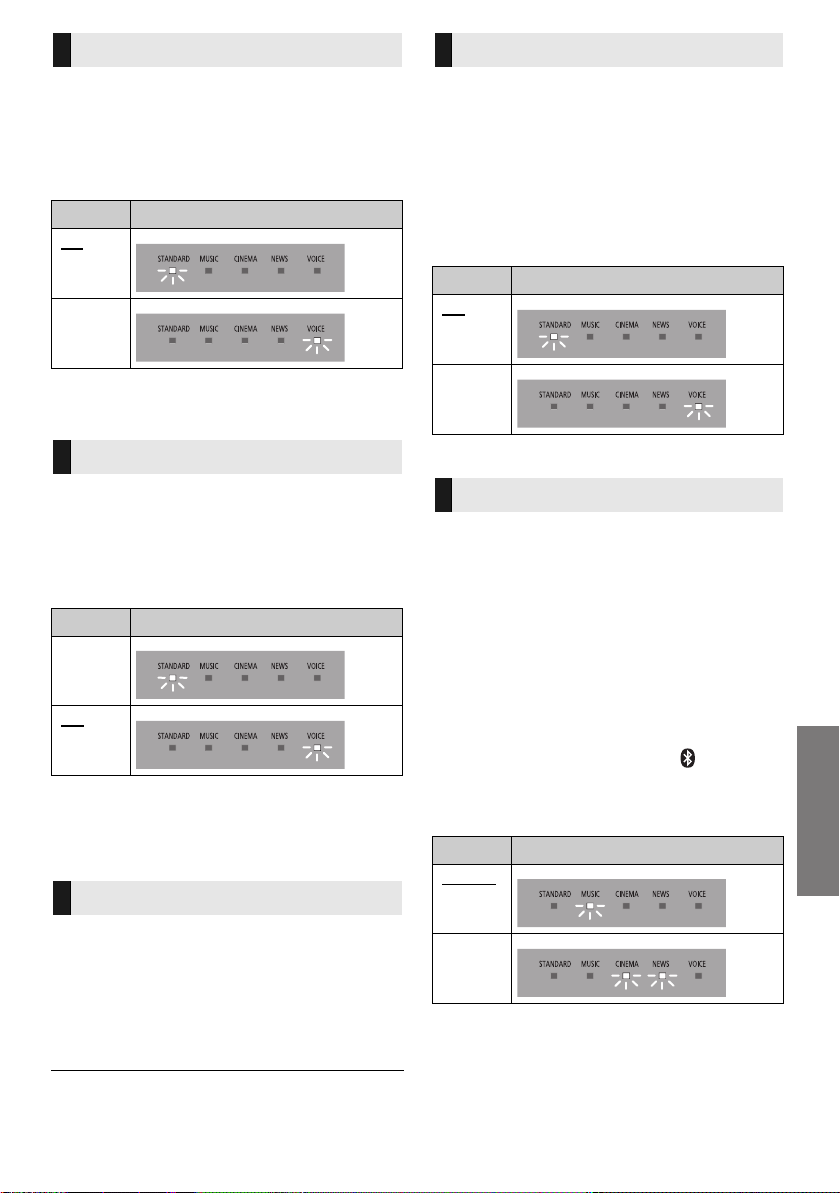
The main unit is automatically turned off if there is no audio
input and when you do not use it for approx. 20 minutes.
Press and hold [HDMI (ARC)] for
more than 4 sec. to select the mode.
Depending on the mode, the indicator will blink as below.
≥ The indicator for the selected setting blinks for 5 sec. and
then exits the setting mode.
≥ The setting is maintained until it is changed again.
This function allows you to connect a paired Bluetooth
®
device when the main unit is in standby mode.
Press and hold [OPTICAL] for more
than 4 sec. to select the mode.
Depending on the mode, the indicator will blink as below.
≥ The indicator for the selected setting blinks for 5 sec. and
then exits the setting mode.
≥ The setting is maintained until it is changed again.
≥ If the AC mains lead is unplugged, the Bluetooth
®
standby
function may not work. Make the setting again.
You can turn off dimmer mode and keep the LED
indicators bright.
Press and hold [SURROUND] for more
than 4 sec. to turn off the mode.
≥ The indicator for the current condition will turn brighter.
≥ The setting is maintained until it is changed again.
≥ Default setting of this function is on.
≥
To turn on dimmer mode, repeat the operation above. After performing
the operation, the indicator for the current condition will be dim.
If a state of the lowered volume disturbs you every
time the main unit turns on, for example, it is
possible to turn off this function as follows:
Press
[SURROUND], [SOUND]*,
[SURROUND]*, [SOUND]* consecutively.
* Within 3 sec.
Depending on the mode, the indicator will blink as
below.
≥ To turn on Volume limitation, repeat the operation above.
When other Panasonic devices respond to this
system’s remote control, change the remote
control code on this system and the remote
control.
Preparation
≥ Turn off all other Panasonic products.
≥ Turn on the main unit.
∫ To set the code to code 2
1 Aim the remote control at the main unit’s
remote control signal sensor.
2 Press and hold
[SOUND]
and
[ -PAIRING]
on the remote control for more than
4sec.
Depending on the mode, the indicator will blink as
below.
≥ To select the code 1, press and hold [SOUND] and
[OPTICAL] for more than 4 sec.
Auto power down
Mode Indicator
On
Off
Bluetooth
®
standby
Mode Indicator
On
Off
Dimmer mode
Volume limitation
Mode Indicator
On
Off
Remote control code
Code Indicator
Code 1
Code 2
SC-HTB488_688_EGEBGN_TQBJ2019.book 21 ページ 2017年3月8日 水曜日 午後5時17分

22
TQBJ2019
“HDMI CEC”
This unit supports “HDMI CEC” (Consumer
Electronics Control) function.
See the operating instructions for connected
equipment for operational details.
Preparation
Confirm that the HDMI connection has been
made. ( 9, 10)
When the TV is turned on, the main unit also turns
on automatically. (This function does not work
when OPTICAL or Bluetooth
®
is the source.)
When the TV is turned off, the main unit also turns
off automatically. (This function does not work
when OPTICAL or Bluetooth
®
is the source.)
You can control the volume setting of this system
using the volume or mute button on the TV remote
control.
If the main unit’s speakers are changed to the TV
speakers, the main unit’s speakers are muted.
Muting will be cancelled by selecting the main
unit’s speakers again.
When the main unit turns on, the TV speakers will
be automatically changed to the main unit’s
speakers.
When the main unit turns off, the main unit’s
speakers will be automatically changed to the TV
speakers.
≥ The operation cannot be guaranteed on all HDMI CEC
equipment.
Power on link
Power off link
Volume adjustment
Changing speakers
SC-HTB488_688_EGEBGN_TQBJ2019.book 22 ページ 2017年3月8日 水曜日 午後5時17分

Reference
Operations
TQBJ2019
23
Reference
Troubleshooting
Before requesting service, make the following
checks. If you are in doubt about some of the
check points, or if the solutions indicated in the
following guide do not solve the problem, consult
your dealer for instructions.
No power.
≥ After connecting the AC mains lead, wait about
10 sec. before turning on the unit.
≥ Unplug the AC mains lead for 10 sec. before
plug in again.
≥ After turning the main unit on, if the main unit
immediately turns off, unplug the AC mains lead
and consult your dealer.
≥
If the main unit does not turn on by turning on TV
(HDMI CEC), turn on the main unit manually.
The remote control does not work properly.
≥ The battery is depleted. Replace it with a new
one. ( 8)
≥
It is possible that the insulation sheet has not been
removed. Remove the insulation sheet. (
8)
≥ It may be necessary to set the code of the
remote control again after changing the battery
of the remote control. ( 21)
≥ Use the remote control within the correct
operation range. ( 8)
The main unit is automatically switched to
standby mode.
“Auto power down” function is on.
The main unit will automatically switch to standby
mode when no signal is input and no operation is
performed for approx. 20 minutes. Refer to page
21 to turn this function off.
HDMI CEC related operations no longer
function properly.
≥ Check the setting on the connected devices.
jTurn on HDMI CEC function on the connected
devices.
jSelect this system as the speaker in the TV’s
HDMI CEC menu.
≥ When the HDMI connections are changed, after
a power failure or after the AC mains lead has
been unplugged, HDMI CEC operations may
not function properly.
j
Turn on all the devices that are connected to the
TV with an HDMI cable and then turn the TV on.
jTurn off the HDMI CEC settings of the TV and
turn it on again. For details refer to the
operating instructions for the TV.
j
While the main unit and the TV are connected with
the HDMI cable, turn on the TV and then unplug
the main unit’s AC mains lead and plug it again.
Pairing cannot be done.
Check the Bluetooth
®
device condition.
The device cannot be connected.
≥ The pairing of the device was unsuccessful or
the registration has been replaced. Try pairing
the device again. ( 18)
≥ This system might be connected to a different
device. Disconnect the other device and try
pairing the device again.
The device is connected but audio cannot be
heard through this system.
For some built-in Bluetooth
®
devices, you have to set
the audio output to “SC-HTB688”, “SC-HTB498” or
“SC-HTB488” manually. Read the operating
instructions for the device for details.
The sound is interrupted.
≥
The device is out of the 10 m communication range.
Bring the Bluetooth
®
device closer to the main unit.
≥ Remove any obstacle between the main unit
and the device.
≥ Other devices that use the 2.4 GHz frequency
band (wireless router, microwaves, cordless
phones, etc.) are interfering. Bring the
Bluetooth
®
device closer to the main unit and
distance it from the other devices.
If the above does not fix the problem, you may be
able to fix the problem by reconnecting the main
unit and the
Bluetooth
®
device. ( 18)
To return to the factory preset.
1 Turn on the main unit.
2 Press [ -PAIRING] to select “ ”.
3 Press and hold [Í/I] on the main unit for
more than 4 sec.
(All the indicators will blink until the system
restarts)
If this system does not operate as expected,
returning the settings to the factory preset
may solve the problem.
≥
The remote control code will return to the code 1
when this system is returned to the factory
preset. To change the remote control code, refer
to page 21.
General operation
HDMI
Bluetooth
®
SC-HTB488_688_EGEBGN_TQBJ2019.book 23 ページ 2017年3月8日 水曜日 午後5時17分

24
TQBJ2019
No sound (or image).
≥ Turn muting off. ( 20)
≥ Check the connections to the other devices.
( 9, 10)
≥ Make sure that the received audio signal is
compatible with this system. ( 27)
≥ Turn this system off and then on again.
≥
If the main unit is connected to the TV with only
an HDMI cable, make sure that the TV’s HDMI
terminal is labelled “HDMI (ARC)”. If not, connect
using the optical digital audio cable. (
9, 10)
≥ If the connections are correct, there might be a
problem with the cables. Redo the connections
with different cables.
≥ Check the audio output settings on the
connected device.
The dual audio cannot be changed from main
to secondary.
If the audio received from the connected device is
not “Dolby Dual Mono” or the output setting is not
“Bitstream”, the setting cannot be changed from
this system. Change the setting on the connected
device.
The volume is lowered when the main unit is
turned on.
“Volume limitation” is on.
If the main unit is turned off with the volume setting
in the greater half (above 50), the main unit will
automatically lower the volume to the middle (50)
when the main unit is turned on. (
21)
The sound lags behind the image.
Depending on the TV, when this unit is connected
to it via Bluetooth
®
, the sound output from this unit
may lag behind the TV image. Connect this unit
and the TV with an HDMI cable/optical digital
audio cable. ( 9, 10)
The audio format indicator does not
correspond to the playback source.
If the playback source is Dolby Digital or DTS
®
,
set the audio output setting of the connected
equipment (e.g., TV, player) to bitstream. For
details, refer to the operating instructions for the
connected equipment.
There is no audio.
The power of the main unit turns off
automatically.
(When the main unit detects a problem, a safety
measure is activated and the main unit
automatically switches to standby mode.)
≥ There is a problem with the amplifier.
≥ Is the volume extremely high?
If so, lower the volume.
≥
Is this system placed in an extremely hot place?
If so, move this system to a cooler place and wait a
few moments and then try to turn it on again.
≥
Does the “SURROUND” indicator keep blinking?
If so, temperature of this unit is hot. Wait until its
temperature becomes low and the blinking
stops.
If the problem persists, confirm the indicator
status, turn this system off, unplug the AC mains
lead and consult your dealer. Please be sure to
remember the indicator status and inform the
dealer.
No power.
Ensure the AC mains lead of the active subwoofer
is connected properly.
After turning the subwoofer on, it immediately
turns off.
Unplug the AC mains lead and consult your dealer.
No sound from the subwoofer.
≥ Check that the active subwoofer is turned on.
≥
Check that the WIRELESS LINK indicator lights. (
18)
The WIRELESS LINK indicator does not light.
≥ There is no link between the main unit and the
active subwoofer.
Check that the main unit is turned on.
≥ The active subwoofer and the main unit may not
be paired correctly. Try the following operation.
(Wireless pairing)
1 Turn on the main unit.
2
Press and hold [I/D SET] on the rear of the
active subwoofer for more than 3 sec.
(The wireless link indicator will blink.)
3 Press [MUTE], [SOUND]*, [MUTE]*,
[HDMI (ARC)]* consecutively.
* Within 3 sec.
(“
”, “OPTICAL” and “HDMI (ARC)”
indicators will blink in rotation on the main unit.)
When the wireless pairing is successful, “
”,
“OPTICAL” and “HDMI (ARC)” indicators will turn off.
Consult your dealer if the problem persists.
Sound
Active Subwoofer
SC-HTB488_688_EGEBGN_TQBJ2019.book 24 ページ 2017年3月8日 水曜日 午後5時17分
Reference
TQBJ2019
25
Indicator illumination
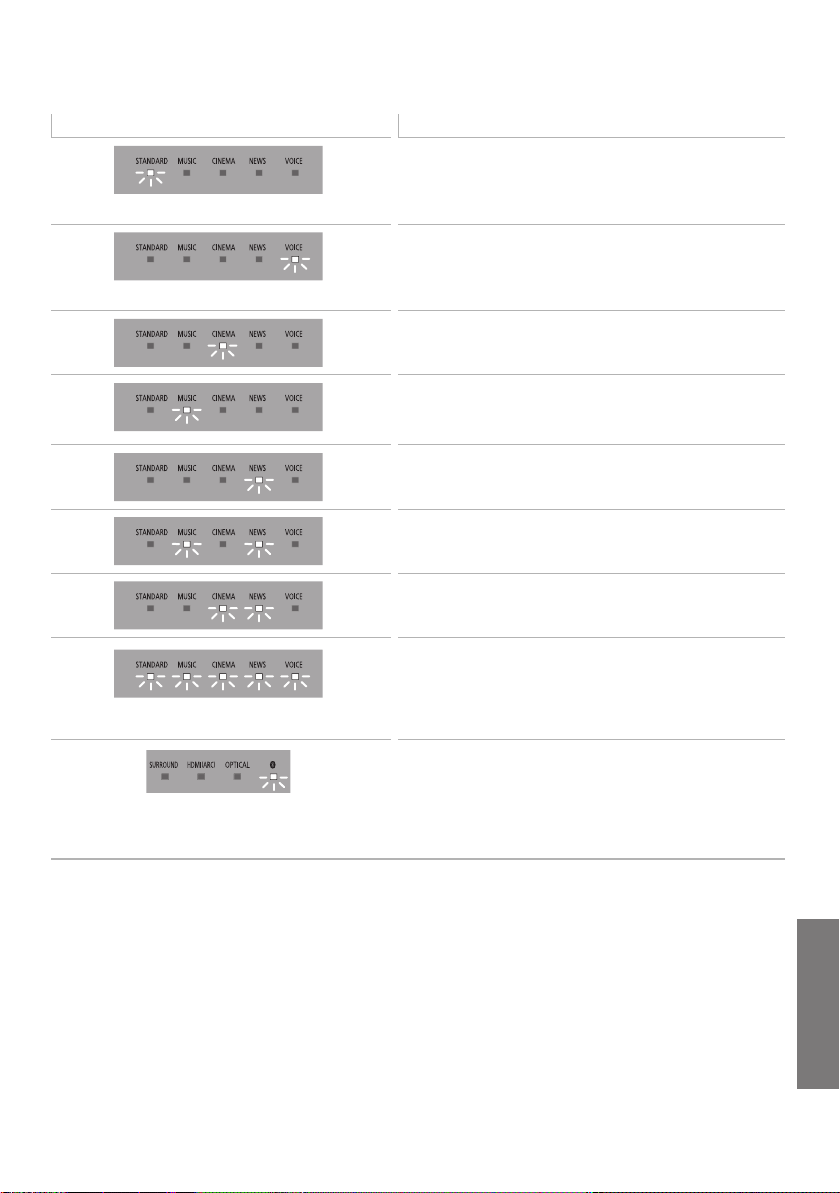
The indicators display the condition of this system by blinking. The indicator patterns illustrated below
are displayed during normal operational conditions. They do not refer to the indications of a problem.
Unit care
∫
Clean this system with a soft, dry cloth
≥ When dirt is heavy, wring a cloth moistened in
water tightly to wipe the dirt, and then wipe it
with a dry cloth.
≥ When cleaning the speakers, use a fine cloth.
Do not use tissues or other materials (towels,
etc.) that can fall apart. Small grains may get
stuck inside the speaker cover.
≥ Never use alcohol, paint thinner or benzine to
clean this system.
≥ Before using chemically-treated cloth, carefully
read the instructions that came with the cloth.
∫ To dispose or transfer this system
This system may keep the user settings
information in the main unit. If you discard the
main unit either by disposal or transfer, then follow
the procedure to return all the settings to the
factory presets to delete the user settings. ( 23,
“To return to the factory preset.”)
≥ The operation history may be recorded in the
memory of the main unit.
Indicator Description
The indicator blinks for 5 sec.
≥ When the setting is on
(“Auto power down”, “Bluetooth
®
standby” and “Volume
limitation”) ( 21)
≥ When the audio format is Dolby Digital ( 20)
The indicator blinks for 5 sec.
≥ When the setting is off
(“Auto power down”, “Bluetooth
®
standby” and “Volume
limitation”) ( 21)
≥ When the audio format is PCM ( 20)
The indicator blinks for 5 sec.
≥ When the audio format is DTS
®
( 20)
The indicator blinks for 10 sec.
≥ When the remote control is code 1 ( 21)
The indicator blinks for 5 sec.
≥ When the dual audio is main ( 20)
The indicator blinks for 5 sec.
≥ When the dual audio is secondary ( 20)
The indicators blink for 5 sec.
≥ When the dual audio is main+secondary ( 20)
The indicators blink for 10 sec.
≥ When the remote control is code 2 ( 21)
The indicators blink until the system restarts.
≥ When the main unit is reset ( 23)
The indicators blink continuously.
≥ When the sound is muted ( 20)
The indicators blink 10 times.
≥ When active subwoofer is failed to connect ( 24)
Bluetooth
®
indicator blinks quickly.
≥ When the main unit is ready for pairing ( 18)
Bluetooth
®
indicator blinks slowly.
≥ When the main unit is waiting to connect ( 18)
Bluetooth
®
indicator turns on.
≥ When the main unit is connected with a Bluetooth
®
device
( 18)
SC-HTB488_688_EGEBGN_TQBJ2019.book 25 ページ 2017年3月8日 水曜日 午後5時17分

26
TQBJ2019
About Bluetooth
®
∫ Frequency band used
This system uses the 2.4 GHz frequency band.
∫ Certification of this device
≥ This system conforms to frequency restrictions
and has received certification based on
frequency laws. Thus, a wireless permit is not
necessary.
≥ The actions below are punishable by law in
some countries:
jTaking apart or modifying the unit.
jRemoving specification indications.
∫ Restrictions of use
≥ Wireless transmission and/or usage with all
Bluetooth
®
equipped devices is not guaranteed.
≥ All devices must conform to standards set by
Bluetooth SIG, Inc.
≥ Depending on the specifications and settings of
a device, it can fail to connect or some
operations can be different.
≥ This system supports Bluetooth
®
security
features. But depending on the operating
environment and/or settings, this security is
possibly not sufficient. Transmit data wirelessly
to this system with caution.
≥ This system cannot transmit data to a
Bluetooth
®
device.
∫ Range of use
Use this device at a maximum range of 10 m.
The range can decrease depending on the
environment, obstacles or interference.
∫ Interference from other devices
≥ This system may not function properly and
troubles such as noise and sound jumps may
arise due to radio wave interference if the main
unit is located too close to other Bluetooth
®
devices or the devices that use the 2.4 GHz
band.
≥ This system may not function properly if radio
waves from a nearby broadcasting station, etc.
are too strong.
∫ Intended usage
≥ This system is for normal, general use only.
≥ Do not use this system near equipment or in an
environment that is sensitive to radio frequency
interference (example: airports, hospitals,
laboratories, etc.).
Licenses
Panasonic bears no responsibility for data
and/or information that is compromised
during a wireless transmission.
Dolby, Dolby Audio, and the double-D symbol are trademarks
of Dolby Laboratories.
For DTS patents, see http://patents.dts.com.
Manufactured under license from DTS Licensing Limited. DTS,
the Symbol, & DTS and the Symbol together are registered
trademarks, and DTS Digital Surround is a trademark of DTS,
Inc. © DTS, Inc. All Rights Reserved.
The terms HDMI and HDMI High-Definition Multimedia
Interface, and the HDMI Logo are trademarks or registered
trademarks of HDMI Licensing, LLC in the United States and
other countries.
The Bluetooth
®
word mark and logos are registered
trademarks owned by Bluetooth SIG, Inc. and any use of such
marks by Panasonic Corporation is under license.
Other trademarks and trade names are those of their
respective owners.
SC-HTB488_688_EGEBGN_TQBJ2019.book 26 ページ 2017年3月8日 水曜日 午後5時17分

Reference
TQBJ2019
27
Specifications
AMPLIFIER SECTION
RMS output power: Dolby Digital Mode
[HTB688]
Front ch (L, R ch)
60 W per channel (6 ≠), 1 kHz, 10% THD
Centre ch (C ch)
60 W per channel (6 ≠), 1 kHz, 10% THD
Subwoofer ch
120 W per channel (3 ≠), 100 Hz, 10% THD
Total RMS Dolby Digital mode power
300 W
[HTB498]
Front ch (L, R ch)
45 W per channel (6 ≠), 1 kHz, 10% THD
Subwoofer ch
90 W per channel (3 ≠), 100 Hz, 10% THD
Total RMS Dolby Digital mode power
180 W
[HTB488]
Front ch (L, R ch)
50 W per channel (6 ≠), 1 kHz, 10% THD
Subwoofer ch
100 W per channel (3 ≠), 100 Hz, 10% THD
Total RMS Dolby Digital mode power
200 W
TERMINAL SECTION
HDMI output (ARC)
Output connector
Type A (19 pin)
Digital audio input
1
Optical digital input
Optical terminal
Sampling frequency
32 kHz, 44.1 kHz, 48 kHz
Audio format
LPCM, Dolby Digital, DTS Digital Surround
TM
USB Port
For service use only.
GENERAL
Power consumption
[HTB688]
Main unit 30 W
Active subwoofer
20 W
[HTB498] [HTB488]
Main unit 19 W
Active subwoofer
18 W
In standby condition
Main unit
When Bluetooth
®
standby is off
Approx. 0.5 W
When Bluetooth
®
standby is on
Approx. 2 W
When all wired network ports are connected
and all wireless networks are activated in
network standby:
[HTB688] Approx. 6.2 W
[HTB498] [HTB488] Approx. 5.1 W
Active subwoofer Approx. 0.5 W
[HTB688]
When wireless activated in network standby
Approx. 3 W
[HTB498] [HTB488]
When wireless activated in network standby
Approx. 2.3 W
Power supply AC 220 V to 240 V, 50 Hz
Dimensions (WkHkD)
Main unit
For table top layout
853 mmk60.5 mmk90 mm
For wall mounting layout
853 mmk60.5 mmk111 mm
Active subwoofer
185 mmk303 mmk337 mm
Mass
Main unit
[HTB688]
For table top layout Approx. 2.3 kg
For wall mounting layout Approx. 2.4 kg
[HTB498] [HTB488]
For table top layout Approx. 1.9 kg
For wall mounting layout Approx. 2.0 kg
Active subwoofer Approx. 4.8 kg
Operating temperature range 0
o
C to i40
o
C
Operating humidity range
20% to 80% RH (no condensation)
SC-HTB488_688_EGEBGN_TQBJ2019.book 27 ページ 2017年3月8日 水曜日 午後5時17分

28
TQBJ2019
≥ Specifications are subject to change without notice.
≥ Mass and dimensions are approximate.
≥ Total harmonic distortion is measured by a digital spectrum
analyzer.
SPEAKER SECTION
Front speakers (Built-in)
Full range
4.5 k12 cm (Cone type) k1/ch
Centre speaker (Built-in) [HTB688]
Full range
4.5 k12 cm (Cone type) k1
Active subwoofer
Woofer
16 cm cone type k1
WIRELESS SECTION
Wireless module
Frequency Range
2404 MHz to 2478 MHz
Maximum RF Power
j0.09 dBm
No. of channels
38
Bluetooth
®
SECTION
Version
Bluetooth
®
Ver.4.0
Class
Class 2
Supported profiles
A2DP
Operating frequency
2402 MHz to 2480 MHz
Maximum RF Power
7.1 dBm
Operating distance
10 m Line of Sight
SC-HTB488_688_EGEBGN_TQBJ2019.book 28 ページ 2017年3月8日 水曜日 午後5時17分

Reference
TQBJ2019
29
English
Declaration of Conformity (DoC)
Hereby, “Panasonic Corporation” declares that this product is in
compliance with the essential requirements and other relevant
provisions of Directive 2014/53/EU.
Customers can download a copy of the original DoC to our RE
products from our DoC server:
http://www.doc.panasonic.de
Contact to Authorised Representative: Panasonic Marketing
Europe GmbH,
Panasonic Testing Centre, Winsbergring 15, 22525 Hamburg,
Germany
Ελληνικά
Δήλωση συμμόρφωσης (DoC)
Με την παρούσα, η “Panasonic Corporation” δηλώνει ότι το
προϊόν αυτό είναι σύμφωνο με τις βασικές απαιτήσεις και άλλες
σχετικές διατάξεις της οδηγίας 2014/53/EE.
Οι πελάτες μπορούν να κατεβάσουν ένα αντίγραφο του
πρωτοτύπου DoC για τα RE προϊόντα μας από τον DoC server
μας:
http://www.doc.panasonic.de
Στοιχεία επικοινωνίας Eξουσιοδοτημένου Aντιπροσώπου:
Panasonic Marketing Europe GmbH,
Panasonic Testing Centre, Winsbergring 15, 22525 Hamburg,
Γερμανία
Português
Declaração de Conformidade (DoC)
Com o presente documento, a “Panasonic Corporation” declara
que este produto é conforme os requisitos específicos e demais
especificações referentes à Directriz 2014/53/UE.
Os clientes podem baixar uma cópia da declaração de
conformidade (DoC) para nossos produtos RE do Server DoC:
http://www.doc.panasonic.de
Contacte o representante autorizado: Panasonic Marketing
Europe GmbH,
Panasonic Testing Centre, Winsbergring 15, 22525 Hamburg,
Alemanha
Česky
Prohlášení o shodě
Společnost “Panasonic Corporation” tímto prohlašuje, že tento
výrobek je ve shodě se základními požadavky a dalšími
příslušnými ustanoveními směrnice 2014/53/EU.
Zákazníci si mohou stáhnout kopii originálu prohlášení o shodě pro
naše produkty RE z našeho serveru:
http://www.doc.panasonic.de
Oprávněný zástupce:
Panasonic Marketing Europe GmbH, Panasonic Testing Centre,
Winsbergring 15, 22525 Hamburg, Německo
Hrvatski
Deklaracija o podobnosti (DoC)
Ovime, “Panasonic Corporation” izjavljuje da ovaj proizvod
udovoljava osnovnim zahtjevima i ostalim relevantnim uvjetima
Smjernice 2014/53/EU.
Kupci mogu preuzeti kopiju originalne DoC za naše RE proizvode
s našeg DoC poslužitelja:
http://www.doc.panasonic.de
Adresa ovlaštenog predstavništva: Panasonic Marketing Europe
GmbH,
Panasonic Testing Centre, Winsbergring 15, 22525 Hamburg,
Njemačka
Lietuviškai
Atitikties deklaracija (AD)
Bendrovė “Panasonic Corporation” patvirtina, kad šis gaminys
tenkina direktyvos 2014/53/ES esminius reikalavimus ir kitas
taikytinas nuostatas.
Mūsų RE gaminių originalios atitikties deklaracijos kopiją klientai
gali atsisiųsti iš mūsų AD serverio:
http://www.doc.panasonic.de
Įgaliotojo atstovo adresas: “Panasonic Marketing Europe GmbH”,
Panasonic Testing Centre, Winsbergring 15, 22525 Hamburg,
Vokietija.
Slovensko
Izjava o skladnosti (DoC)
S pričujočo izjavo podjetje “Panasonic Corporation” izjavlja, da so
svoji izdelki skladni s poglavitnimi zahtevami in drugimi
odgovarjajočimi predpisi direktive 2014/53/EU.
Stranka lahko naloži izvod izvirnega DoC o naših izdelkih RE s
strežnika DoC:
http://www.doc.panasonic.de
Pooblaščeni zastopnik: Panasonic Marketing Europe GmbH,
Panasonic Testing Centre, Winsbergring 15, 22525 Hamburg,
Nemčija
Slovensky
Vyhlásenie o zhode (DoC)
“Panasonic Corporation” týmto prehlasuje, že tento výrobok je v
zhode so základnými požiadavkami a ďalšími príslušnými
ustanoveniami smernice 2014/53/EU.
Zákazníci si môžu stiahnuť kópiu pôvodného DoC na naše RE
výrobky z nášho servera DoC:
http://www.doc.panasonic.de
Kontakt na splnomocneného zástupcu: Panasonic Marketing
Europe GmbH,
Panasonic Testing Centre, Winsbergring 15, 22525 Hamburg,
Nemecko
Norsk
Samsvarserklæring (DoC)
“Panasonic Corporation” erklærer at utstyret er i samsvar med de
grunnleggende krav og øvrige relevante krav i direktiv 2014/53/EU.
Kundene kan laste ned en kopi av den originale
samsvarserklæringen (DoC) for vårt RE utstyr fra vår DoC server:
http://www.doc.panasonic.de
Kontakt vår autoriserte representant: Panasonic Marketing Europe
GmbH,
Panasonic Testing Centre, Winsbergring 15, 22525 Hamburg,
Tyskland
Polski
Deklaracja zgodności (DoC)
Niniejszym “Panasonic Corporation” deklaruje, że ten produkt jest
zgodny z zasadniczymi wymaganiami oraz innymi właściwymi
przepisami Dyrektywy 2014/53/UE.
Klienci mogą pobrać kopię oryginału Deklaracji zgodności (DoC)
naszych produktów RE z naszego serwera DoC:
http://www.doc.panasonic.de
Kontakt z autoryzowanym przedstawicielstwem: Panasonic
Marketing Europe GmbH,
Panasonic Testing Centre, Winsbergring 15, 22525 Hamburg,
Niemcy
Safety information for customers in the EU
SC-HTB488_688_EGEBGN_TQBJ2019.book 29 ページ 2017年3月8日 水曜日 午後5時17分

30
TQBJ2019
Eesti keel
Vastavusdeklaratsioon (DoC)
“Panasonic Corporation” kinnitab käesolevaga, et see toode on
vastavuses põhiliste nõuete ja muude direktiivi 2014/53/EL
asjakohaste sätetega.
Kliendid saavad koopia meie RE toodetele kehtiva
originaalvastavusdeklaratsiooni koopia alla laadida meie DoC-
serverist:
http://www.doc.panasonic.de
Võtke ühendust volitatud esindajaga: Panasonic Marketing
Europe GmbH,
Panasonic Testing Centre, Winsbergring 15, 22525 Hamburg,
Saksamaa
Български
Декларация за съответствие (DoC)
“Panasonic Corporation” декларира, че този продукт
съответства на съществените изисквания и другите
приложими разпоредби на Директива 2014/53/EC.
Потребителите могат да свалят копие от оригиналните DoC
към нашите продуктите от типа RE от сървъра, на който се
съхраняват DoC:
http://www.doc.panasonic.de
За контакт с оторизиран представител: Panasonic Marketing
Europe GmbH,
Panasonic Testing Centre, Winsbergring 15, 22525 Hamburg,
Германия
Român
Declaraţie de Conformitate (DoC)
Prin prezenta, societatea “Panasonic Corporation” declară că
produsul este conform cu cerinţele esenţiale şi cu alte norme
corespunzătoare Directivei 2014/53/UE.
Clienţii pot descărca o copie a DoC-ului original al produselor
noastre RE de la adressa noastră DoC din Internet:
http://www.doc.panasonic.de
Contact la Reprezentanţa autorizată: Panasonic Marketing Europe
GmbH,
Panasonic Testing Centre, Winsbergring 15, 22525 Hamburg,
Germania
Magyar
Megfelelőségi Nyilatkozat (DoC)
Ezennel a “Panasonic Corporation” kijelenti, hogy a jelen termék
kielégíti a 2014/53/EU irányelv létfontosságú követelményeit és
más vonatkozó rendelkezéseit.
A vásárlók letölthetik az RE termékek eredeti DoC másolatát a
DoC szerverünkről:
http://www.doc.panasonic.de
Forduljon a hivatalos márkaképviselethez: Panasonic Marketing
Europe GmbH,
Panasonic Testing Centre, Winsbergring 15, 22525 Hamburg,
Németország
Türkçe
Uygunluk Beyanı (DoC)
“Panasonic Corporation” işbu belge ile bu ürünün 2014/53/EU
sayılı Direktif'in temel gereklerine ve diğer ilgili hükümlerine uygun
olduğunu beyan etmektedir.
Müşterilerimiz RE ürünlerimizle ilgili orijinal DoC belgesinin bir
kopyasını DoC sunucumuzdan indirebilir:
http://www.doc.panasonic.de
Yetkili Temsilci ile temasa geçin:
Panasonic Marketing Europe GmbH, Panasonic Testing Centre,
Winsbergring 15, 22525 Hamburg, Almanya
Latviski
Atbilstības deklarācija (DoC)
Kompānija “Panasonic Corporation” ar šo paziņo, ka šis
izstrādājums atbilst būtiskām prasībām un citām saistošām
Direktīvas 2014/53/ES prasībām.
Pircēji var lejupielādēt oriģinālo DoC kopiju mūsu RE
izstrādājumos no mūsu DoC servera:
http://www.doc.panasonic.de
Lūdzam sazināties ar pilnvaroto parstāvi Panasonic
Marketing Europe GmbH,
Panasonic Testing Centre, Winsbergring 15, 22525
Hamburg, Vācijā
SC-HTB488_688_EGEBGN_TQBJ2019.book 30 ページ 2017年3月8日 水曜日 午後5時17分

Reference
TQBJ2019
31
Limited Warranty (ONLY FOR AUSTRALIA)
Panasonic Warranty
1. The product is warranted for 12 months from the date of purchase. Subject to the conditions of this warranty Panasonic or its
Authorised Service Centre will perform necessary service on the product without charge for parts or labour, if in the opinion of
Panasonic, the product is found to be faulty within the warranty period.
2. This warranty only applies to Panasonic products purchased in Australia and sold by Panasonic Australia or its Authorised
Distributors or Dealers and only where the products are used and serviced within Australia or it's territories. Warranty cover only
applies to service carried out by a Panasonic Authorised Service Centre and only if valid proof of purchase is presented when
warranty service is requested.
3. This warranty only applies if the product has been installed and used in accordance with the manufacturer’s recommendations (as
noted in the operating instructions) under normal use and reasonable care (in the opinion of Panasonic). The warranty covers normal
domestic use only and does not cover damage, malfunction or failure resulting from use of incorrect voltages, incorrect installation,
accident, misuse, neglect, build-up of dirt or dust, abuse, maladjustment of customer controls, mains supply problems, thunderstorm
activity, infestation by insects or vermin, tampering or repair by unauthorised persons (including unauthorised alterations),
introduction of sand, humidity or liquids, commercial use such as hotel, office, restaurant, or other business or rental use of the
product, exposure to abnormally corrosive conditions or any foreign object or matter having entered the product.
5. Some products may be supplied with Ethernet connection hardware. The warranty is limited on such products and will not cover
6. To claim warranty service, when required, you should:
7. The warranties hereby conferred do not extend to, and exclude, any costs associated with the installation, de-installation or
re-installation of a product, including costs related to the mounting, de-mounting or remounting of any screen, (and any other
ancillary activities), delivery, handling, freighting, transportation or insurance of the product or any part thereof or replacement of and
do not extend to, and exclude, any damage or loss occurring by reason of, during, associated with, or related to such installation,
de-installation, re-installation or transit.
Panasonic Authorised Service Centres are located in major metropolitan areas and most regional centres of Australia, however,
coverage will vary dependant on product. For advice on exact Authorised Service Centre locations for your product, please telephone
our Customer Care Centre on 132600 or visit our website and use the Service Centre Locator.
In addition to your rights under this warranty, Panasonic products come with consumer guarantees that cannot be excluded under the
Australian Consumer Law. If there is a major failure with the product, you can reject the product and elect to have a refund or to have
the product replaced or if you wish you may elect to keep the goods and be compensated for the drop in value of the goods. You are
also entitled to have the product repaired or replaced if the product fails to be of acceptable quality and the failure does not amount to a
major failure.
If there is a major failure in regard to the product which cannot be remedied then you must notify us within a reasonable period by
contacting the Panasonic Customer Care Centre. If the failure in the product is not a major failure then Panasonic may choose to repair
or replace the product and will do so in a reasonable period of time from receiving notice from you.
If you require assistance regarding warranty conditions or any other enquiries, please visit the
Panasonic Australia
website www.panasonic.com.au or contact by phone on 132 600
If phoning in, please ensure you have your operating instructions available.
(a) Internet and or DLNA connection / setup related problems
(b) Access fees and or charges incurred for internet connection
(c) The use of incompatible software or software not specifically stipulated in the product operations manual;
and
(d) Any indirect or consequential costs associated with the incorrect use or misuse of the hardware, its connection to the internet or
any other device.
4. This warranty does not cover the following items unless the fault or defect existed at the time of purchase:
(a) Cabinet Part(s) (e) DVD, Blu-ray or Recordable Discs
(b) Video or Audio Tapes (f) Video / Audio Heads from wear and tear in normal use
(c) SD cards or USB devices (g) Information stored on Hard Disk Drive, USB stick or SD card
(d) User replaceable Batteries (h) DTV reception issues caused by TV Aerial / Cabling / Wall socket(s)
etc
Telephone Panasonic’s Customer Care Centre on 132600 or visit our website referred to below and use the Service Centre
Locator for the name/address of the nearest Authorised Service Centre.
Send or take the product to a Panasonic Authorised Service Centre together with your proof of purchase receipt as a proof of
purchase date. Please note that freight and insurance to and / or from your nearest Authorised Service Centre must be arranged
by you.
Note that home or pick-up/delivery service is available for the following products in the major metropolitan areas of Australia or the
normal operating areas of the nearest Authorised Service Centres:
Plasma/LCD televisions / displays (screen size greater than 103 cm)
THIS WARRANTY CARD AND THE PURCHASE DOCKET (OR SIMILAR PROOF OF PURCHASE)
SHOULD BE RETAINED BY THE CUSTOMER AT ALL TIMES
Panasonic Australia Pty. Limited
ACN 001 592 187 ABN 83 001 592 187
1 Innovation Road, Macquarie Park NSW 2113
PRO-031-F11 Issue: 4.0 01-01-2011
SC-HTB488_688_EGEBGN_TQBJ2019.book 31 ページ 2017年3月8日 水曜日 午後5時17分
EU
Web Site: http://www.panasonic.com
Panasonic Corporation 2016
Panasonic Corporation
Panasonic Testing Centre
Winsbergring 15, 22525 Hamburg, Germany
Panasonic Marketing Europe GmbH
Manufactured by:
Importer for Europe:
Panasonic Corporation
Kadoma, Osaka, Japan
TQBJ2019-2
F1216YM3037
72-H488EG-120B4
For the United Kingdom and Ireland customers
Sales and Support Information
Customer Communications Centre
≥ For customers within the UK: 0344 844 3899
≥ For customers within Ireland: 01 289 8333
≥ Monday–Friday 9:00 am – 5:00 pm (Excluding public holidays).
≥ For further support on your product, please visit our website:
www.panasonic.co.uk
Direct Sales at Panasonic UK
≥ Order accessory and consumable items for your product with ease and confidence by phoning our
Customer Communications Centre Monday–Friday 9:00 am – 5:00 pm (Excluding public holidays).
≥ Or go on line through our Internet Accessory ordering application at www.pas-europe.com
.
≥ Most major credit and debit cards accepted.
≥ All enquiries transactions and distribution facilities are provided directly by Panasonic UK.
≥ It couldn’t be simpler!
≥ Also available through our Internet is direct shopping for a wide range of finished products. Take a
browse on our website for further details.
SC-HTB488_688_EGEBGN_TQBJ2019.book 31 ページ 2017年3月8日 水曜日 午後5時17分