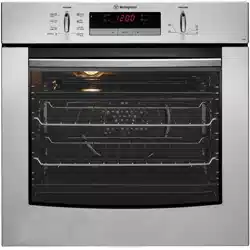
Owner 's Manual for Oven
Before operating your appliance for the first time
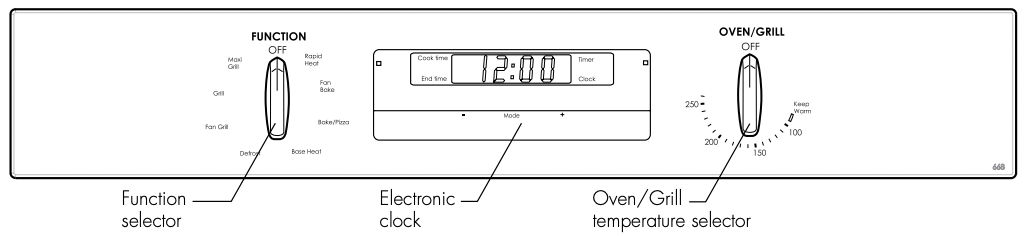
setting the time
If you have purchased a model fitted with an electronic or programmable timer, you must set the time of day before you can operate your appliance.
Electronic Clock
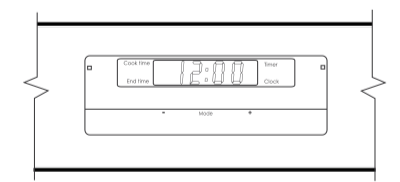
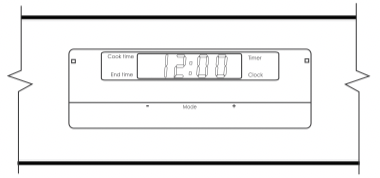
• After the appliance has been electrically connected “12.00” will be displayed and the “clock” indicator will flash.
• To set the time of day, press – or +. 5 seconds after the last change, the “clock” indicator will disappear, confirming the time has been set.
NoTe: The clock has a 24-hour display.
preparing your appliance for the first time
• Please remove all internal boxes and bags from the oven before operation
• Please wipe out the oven interior prior to operation with warm soapy water and polish dry with a soft clean cloth. Do not close the oven door until the oven is completely dry.
• New appliances can have an odour during first operation. It is recommended to ‘run in’ your oven before you cook for the first time. Run the oven at 180ºC for 2-4 hours and ensure that the room is well ventilated.
• DO NOT line the oven with foil, it will damage the enamel.
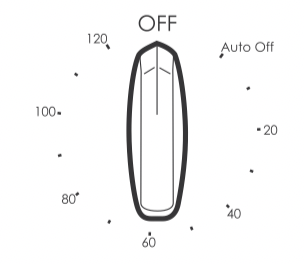
• If your appliance is fitted with a 2-hour “Auto Off” timer, make sure it is set to the ‘Off’ marker for manual operation. See image.
Installing your oven accessories
catalytic liners (on selected models)
Catalytic liners are coated with a specially formulated enamel coating. This porous coating enables the “self cleaning” process - see page 26 for more details. Catalytic liners must be installed first but you can omit them, if you wish, with no effect to cooking performance. Their sole purpose is to make oven cleaning easier.
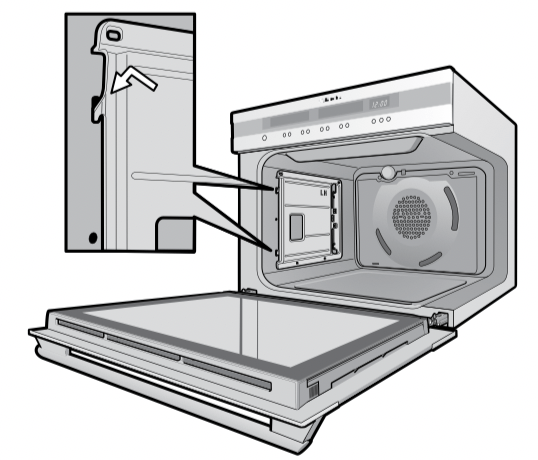
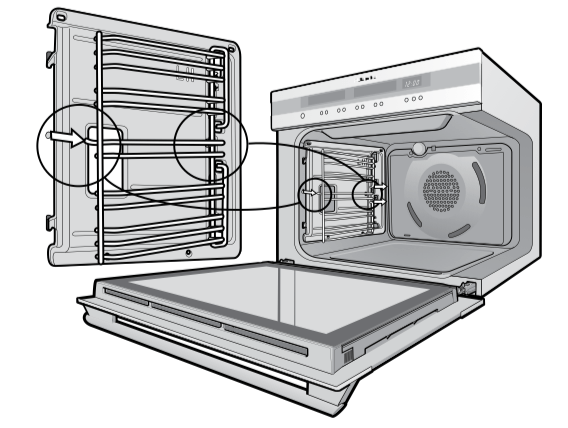
• The catalytic liners will attach to each side of your oven. There will be a left hand and right hand version. This is marked on the panel.
• Position the first liner as per the diagram. The black, shiny side of the liner should be facing the oven wall, the hooks pointing down and the word ‘LH’ positioned to the top rear portion of the oven. The right hand side will be a mirror image of this.
• Line the hooks up with the slots provided in the oven wall, push them in and then allow the liner to slide down to its final position.
• The access hole for the side racks should be visible when the liner is correctly positioned - see diagram.
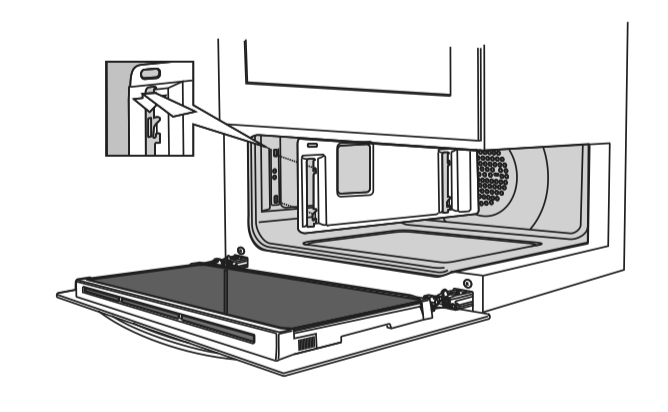
side racks
The side racks that come with your oven are all fitted the same way and can be attached to either side of your oven.
• Insert the largest peg into rear access hole provided. See diagram.
• Then locate the front peg into the front access hole and push in firmly.
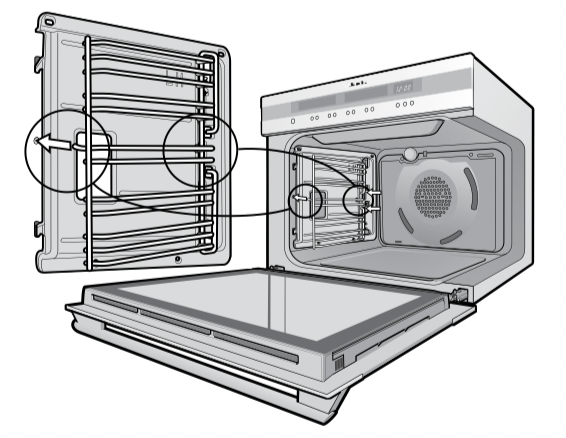
• When locating the left side racks into the small oven or grill ensure the pegs go into the top access holes.
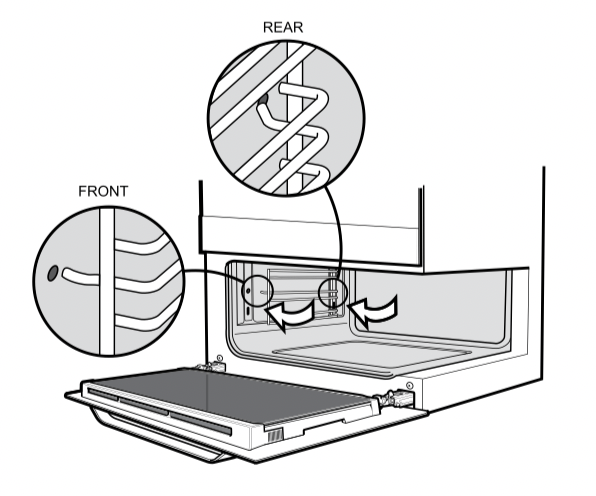
shelves and trays
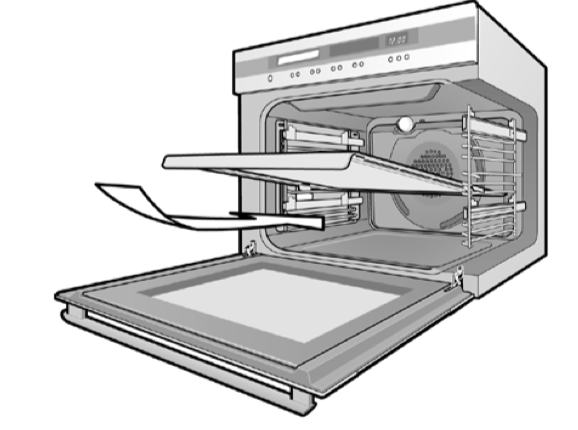
The shelves are designed so that they have maximum travel but cannot be accidentally pulled right out. The trays are designed the same way and fit straight into the side racks.
• Locate the rear edge of the shelf/tray in between 2 guide rails of the side rack - see diagram. Ensure the same rail positions on both sides of the oven are being engaged.
• With the front edge raised, begin to slide the shelf into the oven.
• Once the detents have passed the front edge of the side rack, the shelf can be pushed completely in.
• When fully inserted the shelf/tray should not interfere with the closed oven door.
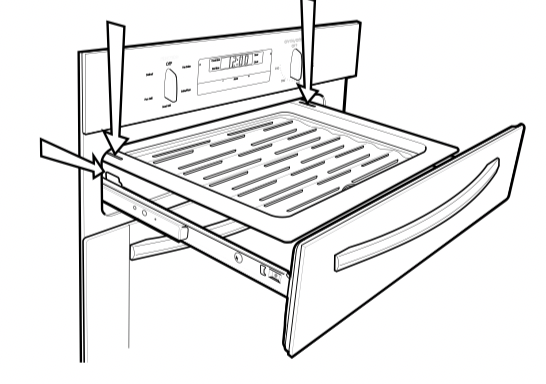
• To insert the grill tray in a separate grill underbench product, fully open the drawer and position the tray so that the slots on the outer edges fit over the tabs on the slides.
• Remove extra trays and dishes before roasting or baking.
To fit a tray to telescopic slides:
1. Fully extend the slides on boths sides.
2. Select the tray you wish to use and position the slots on one side on the respective tabs of the slide.
3. Drop the other side down so that the tray is fully seated on both slides. When fully inserted the shelf/tray should not interfere with the closed oven door.
Using your oven
understanding your oven functions
Your oven will have a selection of the following functions. Refer to “Description of your appliance” (page 4 and 5) to confirm what functions are available to you.
large oven
| function |
description |
 |
Heat comes from the element surrounding the fan as well as the smaller element above the food . This allows you to preheat your oven 30% quicker than on standard “bake” . “Rapid heat” is ideal for cooking frozen pre-cooked foods such as savoury pastries, pizzas, mini meals (TV dinners), meat pies and fruit pies . Simply place the food in the oven straight from the freezer and heat - ideal for busy people . Cook in the upper half of the oven for best results . |
 |
Heat comes from the element surrounding the fan . This fan circulates the hot air around the oven cavity so that you can put your food in different places in the oven and still cook them at the same time . You can use the “fan bake” function for multi-shelf cooking, reheating cooked foods, pastries and complete oven meals. It will cook at a lower temperature and be faster than baking. Please note that some variation in browning is normal . |
 |
Heat comes from two elements, one above and one below the food . The bottom element is a clean heat element and is below the floor of the oven. Both elements are controlled by the thermostat and will turn on and off to maintain the set temperature . You can use the “bake” function for single trays of biscuits, scones, muffins, cakes, slices, casseroles, baked puddings, roasts and delicate egg dishes . |
 |
Heat comes from the element below the food . The element is controlled by the thermostat and will turn on and off to maintain the set temperature . The “base heat” function can be used to add extra browning to the bases of pizzas, pies and pastries . Cook in the lower half of the oven when you are using only one shelf . For best results, use silver or shiny trays . |
 |
Heat comes from two elements, one above and one below the food . The fan circulates the hot air around the oven cavity so that you can put the food in different places in the oven and still cook them at the same time . You should only use a maximum of 2 shelves with “fan assist”. Do not use the bottom shelf. If two shelves are used, food on the shelf in the higher position will cook first and should then be removed to allow the food on the lower shelf to finish cooking . |
 |
“Pizza” is a combination of “base heat” and “fan bake” and offers you the combined benefits of both functions . Heat comes from the element surrounding the fan as well as the clean heat element below the oven floor. The “pizza” function is ideal for foods that require cooking and browning on the base. It is great for foods such as pizzas, quiches, meat pies and fruit pies . Simply place the food in the middle of the oven and set the desired temperature . |
 |
“Maxi grill” directs radiant heat from 2 powerful upper elements onto the food . You can use the “maxi grill” function for tender cuts of meat, steak, chops, sausages, fish, cheese toasties and other quick cooking foods . Grill with the oven door closed .
“Maxi grill” allows you to take full advantage of the large grill dish area and will cook faster than normal “grill” . For best results it is recommended to preheat your grill for 3 minutes . This will help seal in the natural juices of steak, chops etc. for a better flavour. You can slide your grill dish into either of the 2 spaces within the upper pairs of support rails.
|
 |
The “grill” directs radiant heat from the powerful upper element onto the food . You can use the “grill” function for tender cuts of meat, steak, chops, sausages, fish, cheese toasties and other quick cooking foods . Grill with the oven door closed . Preheat your grill for 3 minutes to get the best results . This will help seal in the natural juices of steak, chops etc. for a better flavour. You can slide your grill dish into either of the 2 spaces within the upper pairs of support rails . |
 |
“Fan grill” offers you the benefits of both “bake” and traditional “grill” functions . The grill element turns on and off to maintain the set temperature while the fan circulates the heated air . The oven door remains closed for fan grill . You can use “fan grill” for large cuts of meat in the large oven or smaller cuts in the mini oven (Duo only) . This gives you a result that is similar to “rotisserie” cooked meat . Put your food on a shelf in the second lowest shelf position . Put the grill dish on the lowest shelf position to catch any spills . When using “fan grill” it is not necessary to turn the food over during the cooking cycle . Set temperature to 180°C . |
small oven/grill
other functions
| function |
description |
 |
“Fast heat” can be selected in the initial heat up phase of any cooking function. During “fast heat” the heat comes from the element surrounding the fan as well as the smaller element above the food. This allows you to preheat your oven 30% quicker than on standard “bake”. See page 18 for more information. “Fast heat up” is not a cooking function. It is used to preheat the oven to the desired temperature quickly and efficiently. It is recommended to use this feature when preheating your appliance. The oven will automatically revert to the set cooking function once the preset temperature is reached. |
 |
The “defrost” function uses low temperature air that is circulated by the fan. You can defrost (thaw) your food before you cook it. You can also use “defrost” to raise your yeast dough and to dry fruit, vegetables and herbs. |
cooling/venting fan
Your built-in appliance is fitted with a cooling fan. This prevents your kitchen cabinet from overheating and reduces the condensation inside the oven. It will operate whenever you are using your oven or grill and will blow warm air across the top of the oven door. In some appliances the cooling fan may continue to operate after the appliance is turned off. It will switch off by itself once oven is cool.
condensation
Excess condensation may fog the oven door. This may happen when you are cooking large quantities of food from a cold start. You can minimize condensation by:
• Keeping the amount of water used whilst cooking to a minimum.
• Making sure that the oven door is firmly closed.
• Baking custard in a baking dish that is slightly smaller than the water container.
• Cooking casseroles with the lid on.
NOTE: If you are using water in cooking, this will turn to steam and may condense outside your appliance. This is not a problem or fault with your oven.
operating your oven temperature selector
A thermostat controls the temperature in your appliance. The temperature can be selected within the specified range.
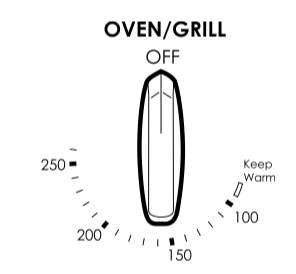
To set the temperature, turn the temperature selector in a clockwise direction to the desired setting. An indicator light above the temperature selector will come on. When the temperature is reached, the heating source switches itself off and the indicator light goes out. When the oven temperature falls below the desired setting, the heating source switches on and the indicator light comes on again. Once the food is cooked, turn the temperature selector back in an anticlockwise direction. Do not force it right round in a clockwise direction as this will result in damage to the thermostat.
NOTE: For multifunction ovens the desired cooking function must be selected before the oven will operate. Once the desired function has been selected, use the temperature selector to set the required temperature.
pre-heating your appliance
For best results when baking you must preheat your oven for 30 minutes. Preheat the grill for 3 minutes to obtain best results. Pre-heating your appliance allows it to reach the required temperature quickly and efficiently.
With “rapid heat”
For electric multifunction appliances preheat your oven by selecting the “rapid heat” function.
This function allows your oven to reach the preset temperature quicker than any other cooking function.
- Turn the function selector to “rapid heat”.
- Set the desired preheat temperature, by rotating your oven temperature selector.
When the indicator light above the temperature selector goes out, the oven has reached the desired temperature. Select the oven function you require for cooking or baking and place the food in the oven.
With “bake/pizza”
- It is recommended you preheat your appliance when cooking or baking.
- Set the desired preheat temperature, by rotating your oven temperature selector.
When the indicator light goes out the oven has reached the desired preset temperature, place your food in the oven, close the door and set the timer if you desire.
With “fan bake”
- It is recommended to preheat your appliance when cooking or baking.
- Set the desired preheat temperature, by rotating your oven temperature selector.
When the indicator light goes out the oven has reached the desired preset temperature, place your food into the oven, close the door and set the timer if you desire.
With “grill”
Preheat the grill for at least 3 minutes to obtain best results.
This will help to seal the natural juices of steak, chops and other meats for a better flavour
setting temperatures
The following table displays the temperature settings for recipes which do not show actual temperatures for non fan modes . For fan-forced modes the temperature should be reduced by10°C .
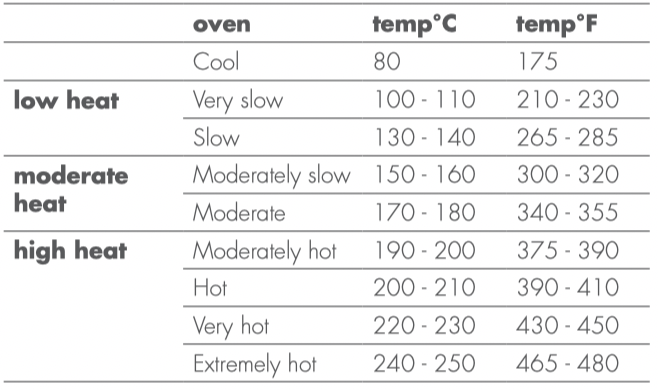
Please refer to the cooking guide to choose the best oven setting for your recipes.
NoTeS:
• Do NoT line oven with foil, it will damage the enamel.
• Do NoT use the base of the oven for cooking – it will damage the enamel.
warning
The ceramic cooktop is made from ceramic glass, a tough durable material that withstands heating and cooling without breaking . However, it must be remembered that as it is GLASS, it may break . Treat it accordingly!
The heating elements are concealed under the smooth glass surface which has a pattern to show the location of the elements . The glass will retain heat for a period of time after the appliance has been turned off . This is indicated by a “HOT SURFACE” warning light. It will remain on whenever the glass surface exceeds 60°C .
Using your oven
utensils
• Use pans with smooth, clean & dry bottoms to avoid scratching or burning residue into the glass .
• Ensure the pan bottom is the same size as the working element .
• We do not recommend ceramic glass pans because they do not conduct heat well Stainless steel or enamelled saucepans are best .
• Do not use pans with copper or aluminium bottoms because they can leave traces which are difficult to remove from the glass .
• If buying new utensils select enamelled steel pans with 2-3mm thick bottoms or stainless steel pans with sandwich bottoms 4-6mm thick. The pan bottom should be flat, or preferably, slightly concave at room temperature so that it lies flat on the glass surface when hot.
cooking do’s and don’ts
• Do use the stored heat in the hotplate by turning the control to “O” before the final few minutes of cooking .
• Do not place heat resistant mats, wire mats or aluminium foil under pots and pans .
• Do not allow pots and pans to boil dry, as damage to both pan and hotplate may result .
• Do not use round bottom woks, wok stands or similar utensils which could lead to overheating of the hotplates and possible damage to the cooking surface .
• Do not slide pans across the surface of the ceramic glass cooktop, it could result in scratching of the surface .
• Do not use the cooktop as extra bench space or as a cutting board .
• Do not allow children on or near the cooktop at any time.
cleaning your ceramic hotplate
1. Remove all spilt food and fat with a razor blade scraper (supplied with the unit) while the ceramic glass is still warm, but not hot . Wipe clean with dishwashing detergent on a damp cloth .
2. If aluminium foil, plastic items or high sugar content liquids/foods are allowed to melt on the ceramic glass, these should be removed immediately with a scraper before the surface has cooled down, otherwise pitting of the surface can occur .
NOTE : Items with high sugar content not only include jam and fruit but also vegetables such as peas, tomatoes and carrots.
3. When the ceramic glass is cool, apply a suitable cleaner (supplied with the unit) .
4. It is important to follow the cleaner manufacturer’s instructions . Remove any cleaning residue from the surface as staining of the cooktop may occur .
5. Do not use abrasive sponges or scourers, oven sprays or stain removers as they may scratch the cooktop .
6. Any pitting, staining, scratches or other surface deterioration is excluded from the warranty .
7. All stains/water marks can be removed by vigorous cleaning, using the supplied ceramic cleaner .
cooking hints
| bringing liquids to the boil |
Use a high setting. |
| Before the liquid begins to boil, turn to a lower setting. |
| This will stop the liquid from boiling over |
| using retained heat |
Cooking areas will stay hot after they are turned off. |
| Turn the cooking area off before cooking is finished and use retained heat to finish cooking. |
| turning to higher settings |
If the pot does not have a lid, use a higher setting. |
| turning to lower settings |
If the pot has a lid, then use a lower setting. |
| Use a lower setting for foods which will easily burn eg milk, white sauce. |
| cooking too fast |
If food is cooking too fast, take the pot off the cooktop. |
| Turn the knob to a lower setting. |
| Let the cooking area cool down and replace the pot |
dealing with cooktop problems
|
problem
|
possible cause
|
what to do
|
|
heating elements not working
|
Power not switched on
|
Check cooktop is plugged in and power is on
|
|
Controls incorrectly set
|
Check correct knob turned for element
|
|
Household fuse blown. If the fuse continues to blow, contact the Service Centre
|
Replace household fuse
|
|
benchtop becoming too hot and/or beginning to discolour
|
Wrong type of cooking pot
|
Make sure bases are not concave
|
|
Pot may overhang cooktop
|
Place pot on centre of element so that it does not overhang
|
|
Pot is too large
|
Use a smaller pot
|
|
food taking too long to cook
|
Pot base is not flat
|
Make sure pot base is flat or slightly convex
|
|
Pot may be off centre
|
Centre pot over element making sure it does not overhang the cooktop
|
|
Need to use larger element
|
Move pot to a larger element
|
|
Using a round based wok
|
Use a flat based wok on electric cooktops
|
|
Controls are incorrectly set
|
Check control is correct
|
|
Check setting and increase setting
|
|
cannot simmer food
|
Control set too high
|
Turn control to lower setting
|
|
Element too large
|
Use a smaller element
|
|
elements giving off smoke or odours when first used
|
Protective oils being removed in first cooking
|
Do not worry. This is normal
|
|
glass surface becomes milky white when pot removed
|
Base of pot is concave
|
Use a flat based pot
|
touch control electronic clock
General features
Your touch control clock has the following features:
• Timer – allows you to set a countdown time that will beep when the set time has elapsed.
• Cooking duration – You can set a cooking duration. A timer will count down the preset cooking time, beep when the time has elapsed and turn the oven off.
• End cooking time – you can set a cooking finish time. A timer will count down the preset cooking time, beep when the finish time has been reached and turn the oven off.
• Delayed start cooking time – You can combine the cooking time and stop cooking time to switch the oven on and off at a specific time during the day.
Note: Your touch control clock only operates with your main oven.
Setting the time of day
You must set the time of day before you can operate your appliance. When power is supplied to your oven “12.00“ will be displayed and the “clock” indicator  will flash.
- To set the time of day in hours and minutes, press – or +. 5 seconds after the last change, the “clock” indicator will disappear, confirming the time has been set.
Note: The clock has a 24-hour display
Change the time of day (daylight saving)
- Press “mode” until the “clock” indicator begins flashing.
- Press – or + to change the time. 5 seconds after the last change, the “clock” indicator will disappear, confirming the time has been set.
Setting the timer
- Press “mode“ until the “timer” indicator begins flashing.
- Set the countdown time you want by using – and +. 5 seconds after the last change the “timer” indicator will stop flashing, confirming the timer has been set.
- To stop the beeper, press –, + or “mode”.
Setting the cooking duration
- Check the clock displays the correct time of day.
- Select the desired oven function and temperature. The oven indicator light will glow and the heating source will come on.
- Press “mode“ until the “cook time” indicator begins flashing.
- Set the cooking duration you want by using – or +. 5 seconds after the last change, the “cook time” indicator will stop flashing, and the time of day will be displayed.
Note: Do not forget to add preheating time if necessary.
Setting the cooking end time
- Check the clock displays the correct time of day.
- Select the desired oven function and temperature. The oven indicator light will glow and the heating source will come on.
- Press “mode“ until the “end time” indicator begins flashing.
- Enter the time of day you want to finish cooking by pressing – or +. 5 seconds after the last change, the “end time” indicator will stop flashing and the current time of day will be displayed.
Setting the delayed start cooking time
- Program the “cook time“ and “end time“ as described in the relevant sections. Once both the “cook time“ and “end time“ have been set, the “cook time“ and “end time” indicators will stop flashing and the current time of day will be displayed.
To check or cancel settings
- To check your settings, press “mode” until the setting you want is displayed. A red light will flash next to the mode cook time, end time etc) that is currently on display.
- To cancel “delayed start” press “mode” until a light flashes next to “end time”. Press and hold “–” until the clock no longer reverses (“0:00” and you will hear a beep). If you have left the temperature and function knobs at a setting the oven will start once the “end time” light stops flashing.
- To cancel “auto shut off” press “mode” until a light flashes next to “cook time”. Press and hold “–” until the clock no longer reverses (“0:00” and you will hear a beep). This automatically cancels “delayed start”. If you have left the temperature and function knobs at a setting, the oven will start once the “cook time” light stops flashing. Because you have cancelled “auto off” the oven will continue to heat until you manually turn it off.
On completion of cooking
The oven will turn off, the timer will beep and the “end time” and/or “cook time” indicators will flash.
- Turn the function and temperature controls to the off position.
- Press “+” or “–” or “mode” to stop the timer from beeping.
Switching the clock display ON and OFF
- Press together “+” and “–” for 2 seconds to switch ’off’ the display.
- Press together “+” and “–” for 2 seconds to switch the clock display ’on’ again.
Note: If a timer mode is set, then it is not possible to switch the display off.
touch control
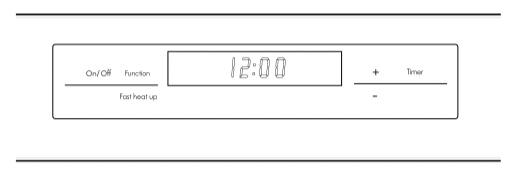
Setting the time of day
After the appliance has been electrically connected the “set clock” symbol and “timer arrow"
  will flash on the clock display.
- To set the time of day in hours and minutes press the – or seconds after the last change the “timer arrow” will disappear, confirming the time has been set.
NOTE: The clock has a 24-hour display.
Change the time of day (daylight saving)
- Switch off the appliance by pressing “On / Off”.
- Press “Timer” as many times as necessary until the “set clock” symbol and “timer arrow” flash on the clock display.
- Press “+” or “–” to change the time. 5 seconds after the last change the “set clock” symbol and “timer arrow” will disappear, confirming the time has been set.
Setting the oven function
- Switch on the appliance by pressing the “On / Off”. The oven lights will light.
- Press the “Function” as many times as necessary until the desired function appears. The suggested cooking temperature appears in the display and the degrees symbol “°” flashes. If the suggested temperature is not changed within approximately 5 seconds the degrees symbol “°” stops flashing and the oven begins to heat. The suggested temperature display is replaced with the oven centre temperature and a thermometer icon. The thermometer icon rises slowly, indicating the degree to which the oven is currently being heated.
Changing the oven temperature
- Press the – or +, to decrease or increase the temperature.
NOTE: The temperature can only be adjusted when the degrees symbol “°” is flashing. The temperature setting changes in increments of 5°C. To change the temperature after the degrees symbol “°” stops flashing, press the "Function” and then press the – or + to change the temperature.
Setting the cooking time
- Select the desired oven function and cooking temperature.
- Press the “Timer” as often as necessary, until the “cook time”
 symbol appears.
- Set the desired cooking time by using the – or +, whilst the “timer arrow” is flashing. After 5 seconds from the last time adjustment the “timer arrow” will disappear and your appliance is now programmed.
- When the set time has elapsed, a signal will sound. To stop the signal, press “+” or “–”.
Setting the stop time
- Select the desired oven function and cooking temperature.
- Press the “Timer” as often as necessary, until the “end time” symbol
 appears flashing.
- Set the desired switch-off time using the – or + whilst the timer arrow” is flashing. After 5 seconds from the last time adjustment the “timer arrow” will disappear and your appliance is now programmed.
- When the set time has elapsed, a signal will sound. To stop the signal, press “+” or “–”.
Setting the delayed start cooking time
The “cook time” and “stop time” functions can be combined to switch the oven on and off at a specific time during the day.
- Select the desired oven function and cooking temperature.
- Press “Timer” as often as necessary, until the “cook time” symbol appears.
- Set the desired cooking time by using – or + , whilst the "timer arrow” is flashing.
- Press “Timer” as often as necessary, until the “end time” symbol appears flashing
- Set the desired switch-off time using the – or + whilst the "timer arrow” is flashing. The “cook time” and “end time” arrows are lit to confirm that the oven has been programmed.
On completion of cooking
When the set time has elapsed, a signal will sound for 1 minute, the oven will switch off and the remaining time indication “0.00” will appear on the display.
- To stop the signal, press “+” or “–”.
Setting the minute minder
For setting a countdown period. When the period of time has elapsed, an audible signal is sounded.
NOTE: This feature has no effect on the oven operation.
- Press “Timer” as often as necessary, until the “minute minder” symbol
 appears flashing. Set the desired length of time using – or + whilst the “timer arrow” is flashing. After 5 seconds from the last time adjustment the "timer arrow” will disappear and the minute minder has been set. Once the set time has elapsed, a signal will sound for 1 minute. The time indication “0.00” and a flashing “minute minder” symbol will appear on the display.
- To stop the signal, press “+” or “–”.
Using FHU (Fast Heat Up) mode
To quickly and efficiently preheat your oven, it is recommended to select the “Fast Heat” cooking feature.
- Ensure the appliance is on by pressing the “On / Off”. The oven lights will light.
- Select the desired oven function by pressing “Function”.
- Set the cooking temperature by pressing the – or + to decrease or increase the temperature. NOTE: The temperature can only be adjusted when the degrees symbol “°” is flashing. The temperature setting changes in increments of 5 °C.
- Press the “Fast Heat”. The letters “FHU” will appear on the temperature display.
- When the set temperature is reached the buzzer will sound and the set temperature will be displayed. NOTE: “FHU” cannot be selected if the oven centre temperature is above the preset temperature.
Activating the child-proof lock
When the child lock is engaged, the oven cannot be switched on.
- Switch off the appliance using the “On / Off”.
- Press “Function” and – at the same time, hold until the word “SAFE” is displayed.
The child-proof lock is now engaged.
NOTE: When the child-proof lock function is active the time of day and minute minder can only be set.
Releasing the child-proof lock
- Press “Function” and – at the same time, hold until the word “SAFE” is cleared from the display. The child-proof lock is now released and the oven is ready to use.
Beep on touch
The beep sound can be activated anytime when a symbol is pressed.
- Ensure the oven is off by pressing “On / Off”.
- Press “Function” and + simultaneously for 2 seconds, a single beep will sound to confirm the operation. Repeat the above procedure to reset the beep on touch mode. As default, the beep on touch mode is off.
Demo mode
This mode is intended to be used in retail shops to demonstrate the oven functionality without any power consumption except the oven lamps.
- To activate this feature the appliance should be in standby mode. (No function selected).
- Press and hold “Fast Heat” and + for 2 seconds, the appliance will beep once. When the appliance is initially turned on the letter “d” will appear in the left hand corner of the display to confirm that the appliance is in demo mode. All functions can be selected, but the thermometer icon will not flash. Repeat the above procedure to deactivate the demo mode.
Safety cut-out feature
The oven automatically switches itself off if the temperature is not adjusted or the appliance is left operating after a period of time. The oven switches itself off after:
• 20 hours when set between 30°C and 120°C
• 8.5 hours when set between 120°C and 200°C
• 5.5 hours when set between 200°C and 250°C
Your oven is equipped with a programmable controller that can be used to turn on and off the oven automatically. The cook time is used to automatically turn the oven off after a set amount of time.
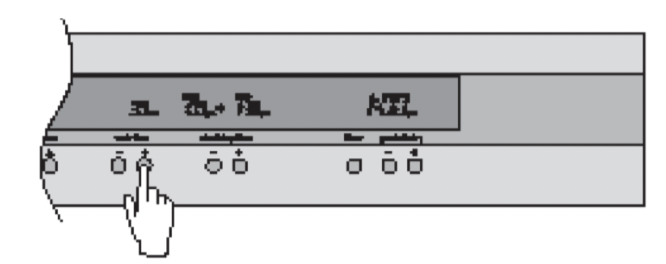
Setting the cook time
- Select the desired oven function and cooking temperature.
- Press the “cook time
 ” button as often as necessary, until the desired cook time has been set.
- After 8 seconds from the last time adjustment your oven will be programmed and will start cooking.
Note:
• During cooking, you can adjust the cook time with the Cook time or buttons for better cooking performance.
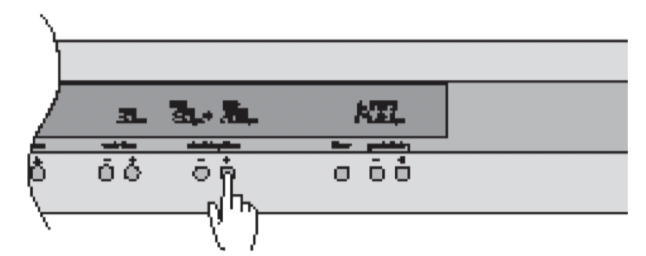
Setting the start/stop time
The start/stop time can be used to switch the oven On and Off at a specific time during the day.
- Check the clock displays the correct time of day.
- Select the desired oven function and cooking temperature.
- Set the required cook time.
- Press the “start/stop” time button to move the start and stop time forward.
- After 8 seconds from the last time adjustment the DELAY SET icon will light and your oven is now programmed.
The oven will start cooking when the time of day reaches the set start time.
Note:
• 30 seconds after a programmed cooking function has started, it is no longer possible to delay the start time.
• In order to delay a cooking function that has already started, the oven needs to be switched Off using the On/Off button, then switched on again and re-programmed.
On completion of cooking
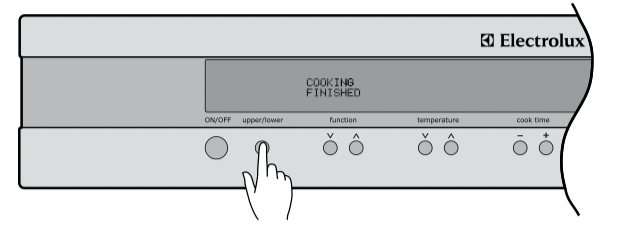
When the cook time has elapsed, an audible signal will sound for 10 seconds, the oven will switch off and COOKING FINISHED will be displayed on the left hand side of the display. On the right hand side of the display, the remaining time indication “0 min” will appear together with the cooking start and stop time.
• To stop the audible signal, press any of the buttons on the control panel.
• If you wish to cook a bit longer, press the “cook time ” button for each additional minute you require. The oven automatically reverts to the function and temperature previously programmed. This feature is available for 5 minutes after cooking has finished. After that, the oven automatically switches off.
 environmental tips
You can use the residual heat in the oven for keeping food warm.
tips & information
Even though the heating element turns off the oven will still retain substantial heat. This will continue to cook the food until it is removed or the oven cools down. If you do not plan on being present when the oven turns off, you should take this extra heating time into account.
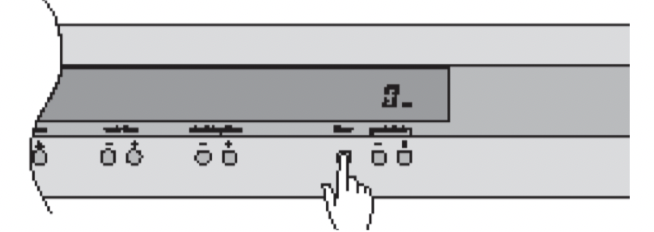
Setting the timer
The timer can be used independently of the oven for setting a countdown period. When the period of time has elapsed, an audible signal sounds.
- Press the timer button.
- Set the desired length of time using the or buttons whilst the timer bell is flashing. After 8 seconds from the last adjustment the timer bell will stop flashing and the timer will start to count down.
- When the set time has elapsed, an audible signal will sound for 10 seconds. The time indication “0 min” and the timer bell will flash on the display.
- To stop the signal, press any of the 3 buttons below the Clock/Timer display
Note:
• This feature has no effect on the oven operation.
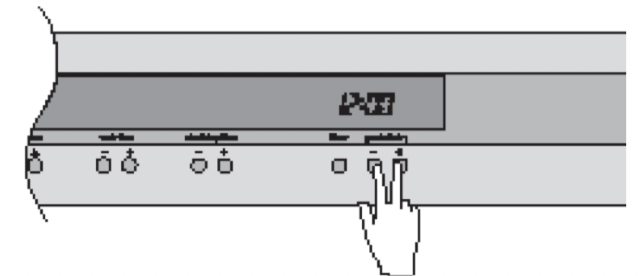
Adjusting the clock
The time of day is independent of the oven and can be adjusted at any point.
- To set the time of day in hours and minutes press and hold the and buttons simultaneously for 1 second until the dots on the clock display start flashing.
- Adjust the time of day using the and buttons.
- After 8 seconds from the last adjustment, the dots will stop flashing, confirming the time has been set. You can also confirm your changes by pressing the timer button.
Demo Mode
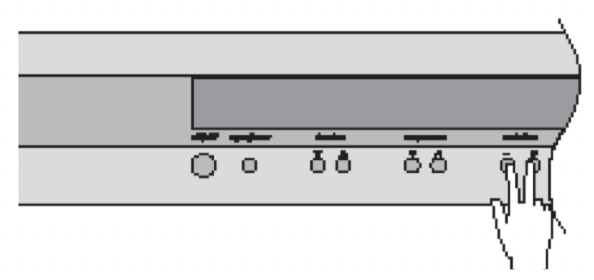
This mode is intended to be used in retail shops to demonstrate the oven functionality without any power consumption except to the oven lamps.
- Ensure the oven is off by pressing the ON/OFF button.
- Press and hold the ON/OFF button until the display turns ON then OFF. Immediately after press the cooktime buttons simultaneously, hold until the words ‘Demo mode’ are displayed, a single beep will sound to confirm the operation.
Releasing Demo Mode
- Ensure the oven is off by pressing the ON/OFF button.
- Press and hold the ON/OFF button until the display turns ON then OFF. Immediately after press the cooktime buttons simultaneously, hold until the words ‘Normal mode’ are displayed, a single beep will sound to confirm the operation.
Activating the child lock
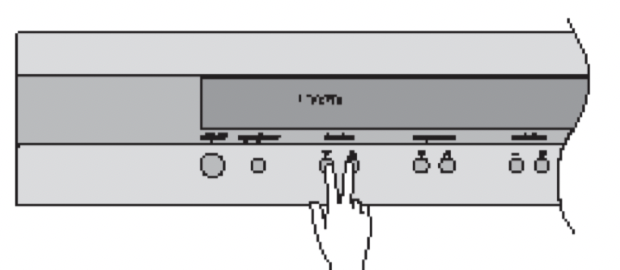
When the child lock is engaged, the oven cannot be switched on.
- Switch off the appliance using the “On/Off” button.
- Press the function buttons simultaneously, hold until the words LOCKED are displayed, a single beep will sound to confirm the operation. The child lock is now engaged.
Note:
• When the child lock function as active, only the clock and timer can be set.
Releasing the child lock
Press the function buttons at the same time, hold until the word LOCKED is cleared from the display. The child lock is now released and the oven is ready to use.
Beep on touch
The beep sound can be activated anytime a button is pressed.
- Ensure the oven is off by pressing the On/Off button.
- Press the temperature buttons simultaneously for one second, a single beep will sound to confirm operation. Repeat the above procedure to reset the beep mode to touch mode. As default the beep on touch mode is off.
Maximum operation times for safety
The oven automatically switches itself off if the temperature is not adjusted or the appliance is left operating for:
• 12.5 hours when set between 30°C and 120°C
• 8.5 hours when set between 120°C and 200°C
• 5.5 hours when set between 200°C and 250°C
cooking hints
- Select the correct shelf location for food being cooked.
- Make sure dishes will fit into the oven before you switch it on.
- Keep edges of baking dishes at least 40mm from the side of the oven. This allows free circulation of heat and ensures even cooking.
- Do not open the oven door more than necessary.
- Do not place foods with a lot of liquid into the oven with other foods. This will cause food to steam and not brown.
- After the oven is turned off it retains the heat for some time. Use this heat to finish custards or to dry bread.
- Do not use a lot of cooking oil when roasting. This will prevent splattering oil on the sides of the oven and the oven door. Polyunsaturated fats can leave residue which is very difficult to remove.
- When cooking things which require a high heat from below (e.g. tarts), place the cooking dish on a scone tray in the desired shelf position.
- For sponges and cakes use aluminium, bright finished or non-stick utensils.
- Remove unnecessary trays or dishes when roasting or baking.
oven shelf location
Your oven has seven for shelves. These are numbered from 1 (the lowest shelf position) to 7 (the highest shelf position). See diagram.
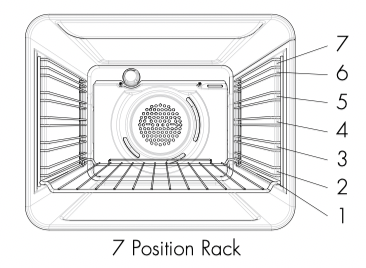
To give maximum space above and below the shelves, load them in this way:
- When cooking with 1 shelf, use position 3 or 4.
- When cooking with 2 shelves, use position 3 and 5. Refer to cooking guide.
Use the oven efficiently, by cooking many trays of food at the same time. For example:
- Cook 2 trays of scones, small cakes or sausage rolls.
- Cook a roast dinner at the same time as you cook chips or vegetables.
grilling hints
warning
Always clean the grill / oven dish after every use . Excessive fat build up may cause a fire
Depending on your model of appliance you will grill:
• With the door open, if you are grilling in the separate grill wall-oven compartment
• With the drawer approximately two finger widths ajar, if you are grilling in the separate grill underbench compartment
• With the door open or closed, if you are grilling in the oven compartment
As a method of cooking, grilling can be used to:
• Enhance the flavours of vegetables, fish, poultry and meat
• Seal the surface of the food and retain the natural juices.
This table shows how to grill different types of meat:
food. grilling method
beef. You can use tenderloin, rump and sirloin. Brush with oil or melted butter, especially if the meat is very lean.
lamb. You can use the loin chops, shortloin chops, chump chops and forequarter chops. Remove skin or cut at intervals to avoid curling. Brush with oil or melted butter.
sausages. Prick sausages to stop skin from bursting.
poultry. Divide into serving pieces. Brush with oil.
fish Brush with oil or melted butter and lemon juice.
bacon. Remove rind. Grill flat and make into rolls.
Guide to better grilling
No definite times can be given for grilling because this depends on your own tastes and the size of the food. These times should only be used as a guide and remember to turn the food over half way through the cooking process.
food. time in minutes
steak 15 - 20 minutes
chops 20 - 30 minutes
fish 8 -10 minutes
bacon. 4 - 5 minutes
For better grilling results, follow these easy instructions:
1. Remove oven / grill dish and smokeless grill insert and preheat grill for about 5 minutes.
2. Choose only prime cuts of meat or fish. If the cut is less than 5mm thick it will dry out. If the cut is more than 40mm thick, the outside may burn whilst the inside remains raw.
3. Do not place aluminium foil under the food as this prevents fats and oils from draining away, which could result in a fire.
4. Baste the food during cooking with butter, olive oil or marinade. Grilled food is better if marinated before cooking.
5. Use tongs to turn food as a fork pierces the surface and will let juices escape.
fan grill (multifunction models only)
If your appliance has fan grill as a function, this will assist the grilling process by circulating the heat evenly around the food. The recommended temperature setting is 180°C for all fan grilling functions.
1. Use the smokeless grill insert and oven dish for all fan grilling.
2. Position the dish in the lower half of the oven, for best results.
3. Wipe off any oil or fat which spatters while the oven is still warm. There is no need to turn the meat as both sides are cooked at the same time which means that the food is succulent.
| problem |
causes |
what to do |
| uneven cooking |
Incorrect shelf position |
Select shelf that puts food in centre of oven |
| Oven tray too large |
Try other trays or dishes |
| Trays not in centre |
Put trays in centre |
| Air flow in oven uneven |
Rotate food during cooking |
| Grill tray affecting thermostat |
Remove grill tray from oven on bake modes |
| baked products too brown on top |
Oven not preheated |
Preheat the oven |
| Baking tins too large for recipe |
Use correct size tins |
| Baking tins not evenly spaced |
Stagger baking tins at least 3cm between tins and the oven walls |
| Products not evenly sized or spaced on trays |
Make into same size and shape and spread evenly over trays |
| baked products too brown on bottom |
Baking tins too large |
Use correct size tins |
| Baking tins are dark metal or glass |
Change to shiny, light tins or lower the temperature by 10°C |
| Food too low in oven |
Cook one shelf higher |
| Oven door opened too frequently during baking |
Don’t open the oven door until at least half the cooking time has passed |
| Baking temperature too high |
Lower the temperature |
| Grill tray affecting thermostat |
Remove grill tray from oven on bake modes |
| cakes have a cracked thick crust |
Baking temperature too high |
Lower the temperature |
| Food too low in oven |
Cook one shelf higher |
| Cake batter over mixed |
Mix just long enough to combine the ingredients |
| Baking tin too deep |
Check size of tin and use recommended size |
| Baking tins dark |
Change to shiny light tins |
| baked products are pale, flat and undercooked |
Baking temperature too low |
Raise the temperature |
| Food too low in oven |
Cook one shelf higher |
| Baking time too short |
Increase cooking time |
| Incorrect baking tin size |
Use correct size tin |
| cakes fallen in centre |
Baking temperature too low |
Raise the temperature |
| Baking time too short |
Increase cooking time |
| Proportions of ingredients incorrect for recipe |
Check recipe |
| Opening door too early during baking |
Do not open door until the last quarter of cooking time |
| roast meat and potatoes not brown in fan oven |
Poor hot air circulation |
Elevate food onto a rack to allow air circulation |
| Grill tray affecting thermostat |
Remove grill tray from oven on bake modes |
| juices running out of meat |
|
Do not pierce meat with fork, turn with tongs |
| grilled meats overcooked on outside & raw in the centre |
|
Grill at lower insert position |
| grilled chops & steaks curling |
|
Cut into fat every 2cm (¾") |
warning
• Always make sure that the oven is electrically isolated before cleaning. This can be done via the functional switch located nearby. Do not use steam cleaners.
• Do not line the bottom of the oven or grill with foil or cookware.
Cleaning your appliance
enamel
• Rub persistent stains vigorously with a nylon scourer or creamed powder cleansers.
NOTE: You can also use household oven enamel cleaners - follow the manufacturer’s instructions carefully.
• Do not use harsh abrasive cleaners, powder cleaners, steel wool or wax polishes.
stainless steel
All grades of stainless steel can stain, discolour or became greasy. You must clean these areas regularly by following the procedures below, if you want your appliance to look its best, perform well and have a long life.
warning
Care must be taken when wiping exposed stainless steel edges.…they can be sharp!
Your stainless steel appliance is manufactured from a mark resistant stainless steel. This special stainless steel resists marks such as finger prints and water spots. To keep your stainless steel appliance looking at its best, you should clean it regularly. Wash with warm soapy water and rinse with clean water. Wipe with clean water and a soft clean cloth to remove soap residue.
NOTE: Make sure you follow the polish or brushing lines in the steel.
caution
DO NOT use stainless steel cleaners, abrasive pads or other cleaners as they are likely to scratch the surface. Damage due to poor cleaning technique is not covered by your warranty
glass
• Glass surfaces on doors and control panels are best cleaned immediately after soiling.
• A damp cloth may help remove baked on food deposits.
• Oven cleaners can be used to remove stubborn marks and stains.
DO NOT use harsh abrasive cleaners or sharp metal scrapers to clean the oven door since they can scratch the surface, which may result in shattering of the glass
oven
• Always keep your appliance clean. Ensure that fats and oils do not accumulate around elements, burners or fans.
• Always keep the oven dish, baking trays, grill dish and grill dish inserts clean, as any fat deposits may catch fire.
• Always wrap your meats in foil or an oven roasting bag to minimise cleaning. Any polyunsaturated fats can leave a varnish-like residue which is very difficult to remove.
grill
• Always keep the grill dish and grill dish insert clean, as any fat deposits may catch fire.
cleaning your oven accessories
Removing the trays and shelves from your appliance
- Slide the dish and shelves towards you until they reach the front stop.
- Tilt them up at the front to clear the side supports, taking care not to spill the contents.
- Lift them clear.
- Wash the dish and insert the shelves in hot soapy water.
- Reverse the above steps to put the grill dish and shelves back again.
- Ensure that they are placed between the 2 support wires. See page 8 for more details.
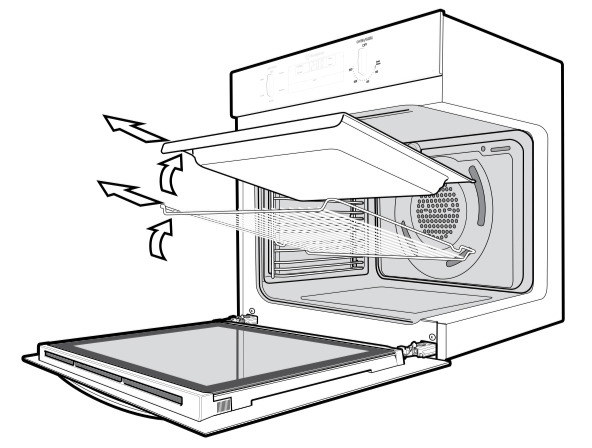
Removing the side racks (shelf supports)
• Grasp the shelf supports at the front.
• Pull them firmly inwards.
• To install the shelf supports, see page 7.
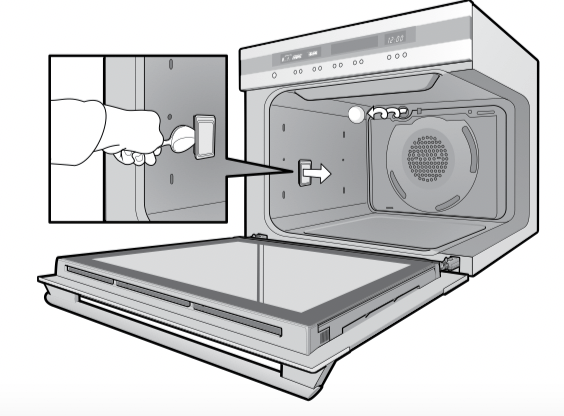
Removing and replacing the oven light and side light (where fitted)
- Turn oven light glass anticlockwise to remove it for globe replacement.
- A special high temperature resistant globe should be used. This can be purchased from the Customer Care Centre.
- To remove side light, place a spoon under the light glass and lever off. Replace globe and snap glass cover back into position.
warning Make sure the appliance is turned off before you remove or replace parts, to avoid the possibility of electric shock.
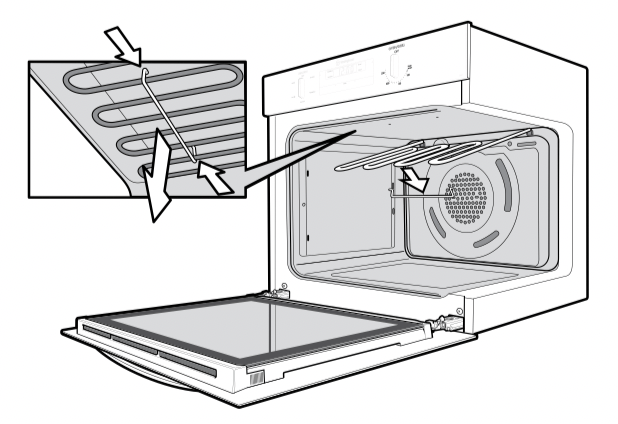
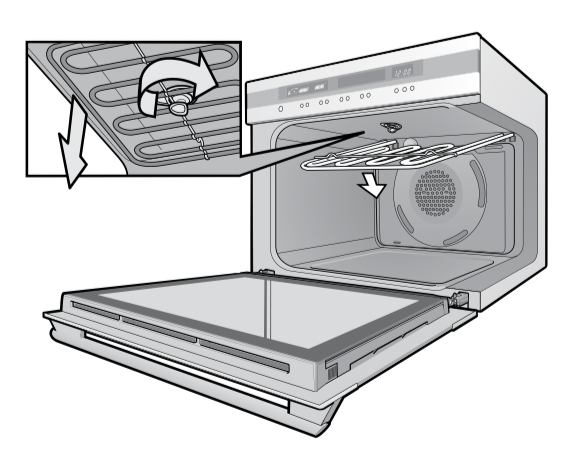
releasing the grill element
We have designed the upper element with a hanger clip to help you reach your oven roof for cleaning.
Retaining wire models
- Lift element up carefully.
- Pull hanger clip to the left or right to unhook it. The element will drop down freely
Rotating latch models
- Rotate latch 180º. The element will drop down freely.
catalytic liners
Some models come with Catalytic liners. These models contain:
• 2 Catalytic side liners (to be fitted by you)
• 1 Catalytic fan cover (already fitted)
NOTE: If your oven does not have catalytic liners and you wish to purchase them, they are available from the Customer Care Centre.
operation
The catalytic liners are coated with a specially formulated enamel coating, over a base of regular enamel. This enamel coating has a rough surface which is also porous. During normal cooking, fats and other food spatter is partially absorbed into the surface and then oxidised away. This oxidisation of the fat works best if the oven is set at high temperatures. If you do a lot of lower temperature baking, say around the normal 180ºC, then the cleaning process may not be complete. Every now and then you should turn the oven on to 260ºC for around one hour to completely remove the soil.
cleaning
Should the panels become heavily soiled, they will need to be taken out of the oven and cleaned by hand. They should be soaked in warm, soapy water for at least 2 hours and then wiped clean with a soft cloth.
NOTE: Solid cleaning powders, creamy cleansers, caustic oven cleaners, steel wool or other scourers will ruin the catalytic surface and must NEVER BE USED.
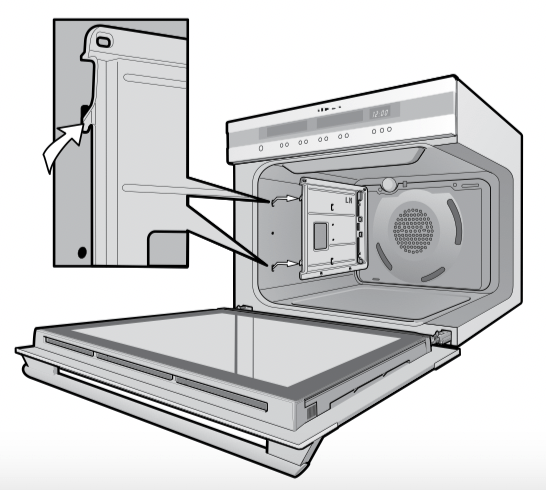
Removing the catalytic liners
- Remove Side Racks (see page 24).
- Lift the liner up to disengage the hooks.
- The liners should now be free to be pulled in towards the centre of the oven.
- Refer to page 7 for re-installing your side liners.
Removing and replacing the catalytic fan baffle (where fitted)
- Remove the 2 retaining screws on the top edge of the fan baffle.
- Pull the top edge towards you and then disengage to bottom tabs from the oven back.
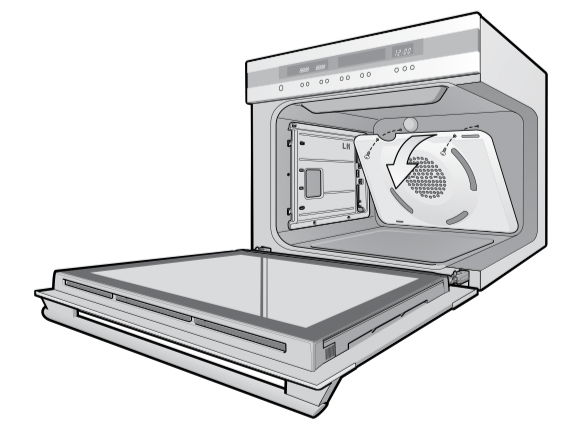
important
NOTE: The fan baffle must be replaced after cleaning.
- Insert the two tabs at the bottom of the fan baffle into their corresponding slots in the oven back.
- Push the top home and insert screws firmly into appropriate holes.
- The fan baffle must not be loose.
warning
Do not lift the door by the handle. Rough handling will cause glass to break.
Removing the oven door
Your oven is equipped with a door that can be disassembled in order to clean all the panes of glass. Remove the door before cleaning.
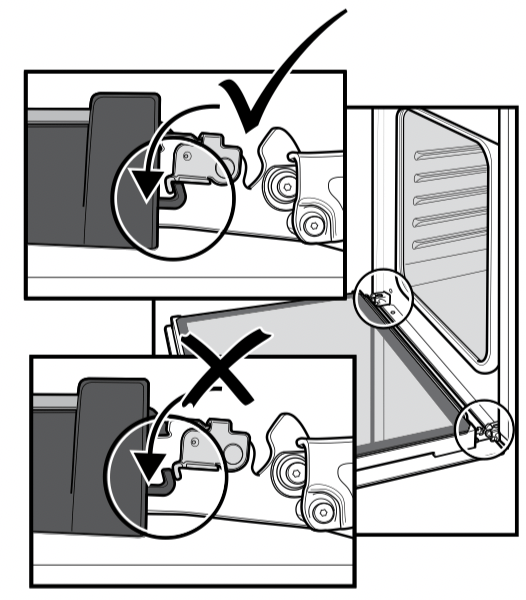
- Open the door fully to access the hinges then rotate the stirrups’ (highlighted in the image) on both hinges fully towards the oven.
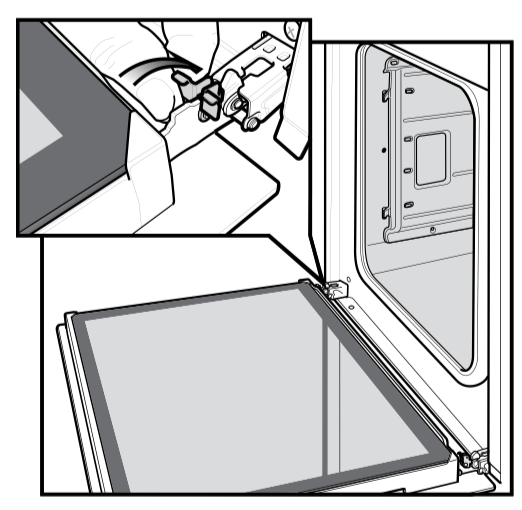
- Slowly close the oven door until it is stops against the ‘stirrups’ (about 45O).
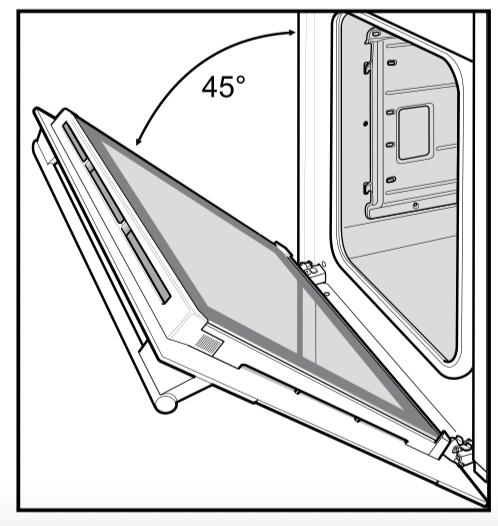
- Grasp the oven door with a hand each side of the door and remove it from the oven by pulling it towards you.
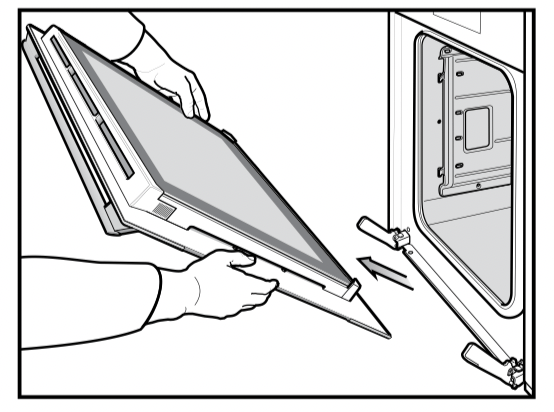
- Lay the oven door with the outer side facing downwards on something soft and flat (for example a blanket on a kitchen table) to prevent scratches.
Removing oven door top trim
- Take hold of the grid embossed sections of the door trim at each end and press inwards to release the clips. Remove the door trim by pulling it towards you.
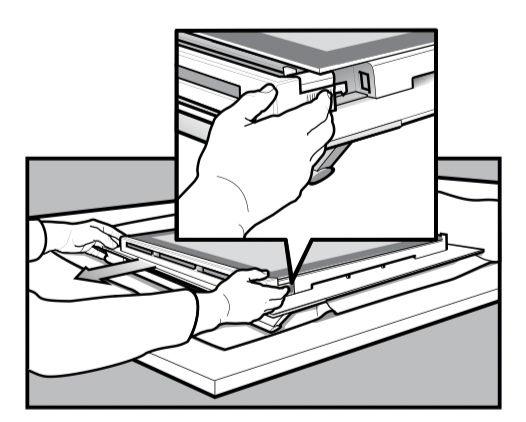
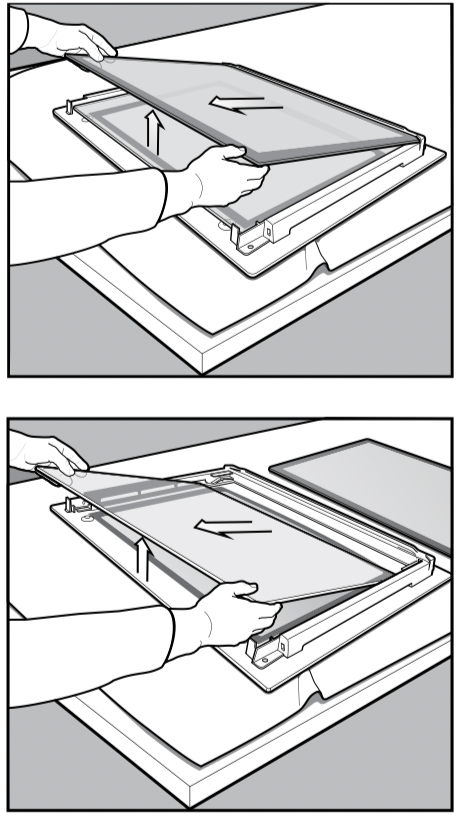
Removing door glass panels
warning
Rough handling, especially around the edges can cause the glass to break.
- Lift the black bordered glass panel out of the guide.
- Repeat this for the smaller clear glass panel when fitted).
Cleaning door glass panels
warning
Do not to use harsh abrasives on the glass panes as the reflective surface plays a role in the function of the oven.
Do not place glass in dishwasher. Hand wash only with a soft cloth and warm soapy water. When dry polish with a soft cloth and ensure the glass is dry before reassembly.
Bottom trim (on selected models)
- The bottom trim may be removed for cleaning by snapping out and lifting away from the glass.
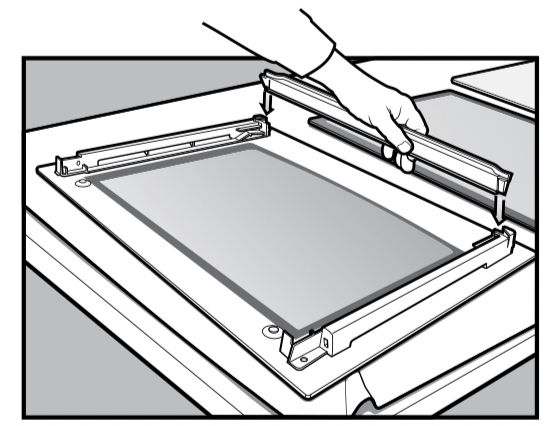
Re-assembling bottom trim
- Push down to “snap” each side of bottom trim back into door columns.
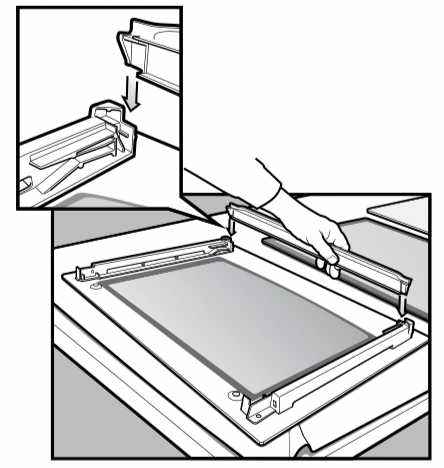
Re-assembling door glass panels
- Insert the smaller clear glass panel (when fitted) first from above and at an angle to the profile of the door.
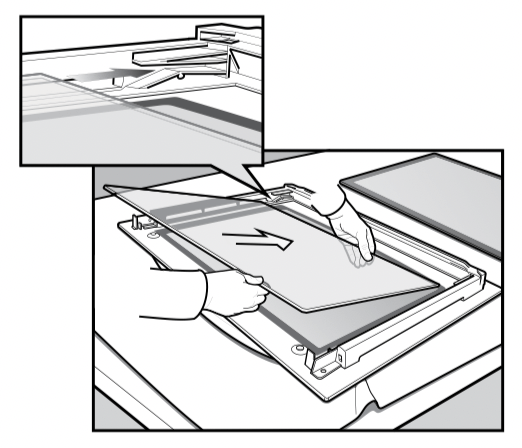
- Repeat for the black bordered glass panel ensuring the painted surface is facing to the downside.
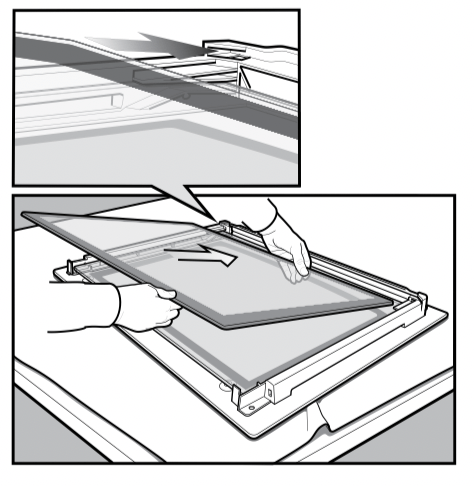
Re-assembling top door trim
- Take hold of the top door trim at each side and position it to the inside edge of the glass.
- Push the trim down with its top edge over glass panel until the clip snaps in on each side of the trim.
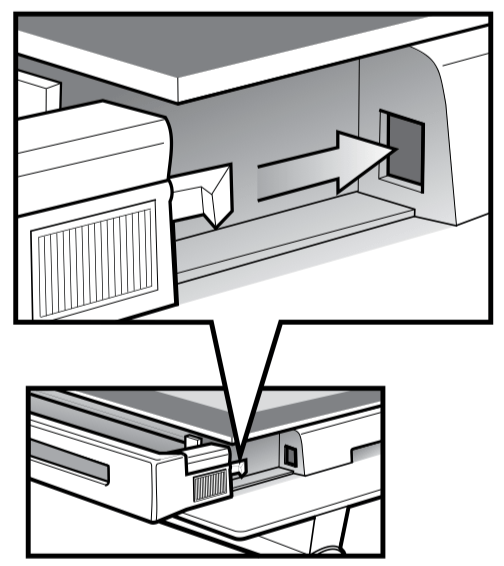
- Push the middle of the trim down to ensure it is straight and firm against the glass panel.
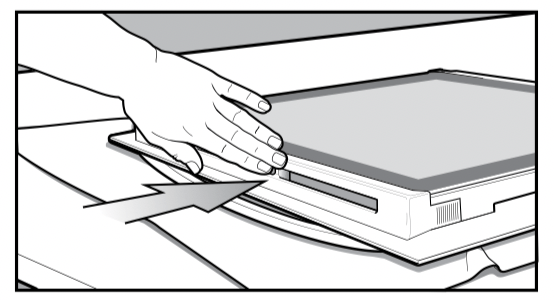
Fitting the oven door
- Take hold of the oven door with a hand on each side and with the door at an angle of 45º, position the recesses at the bottom of the door onto the hinge arms of the oven. Let the door slide down the hinge arms as far as it will go.
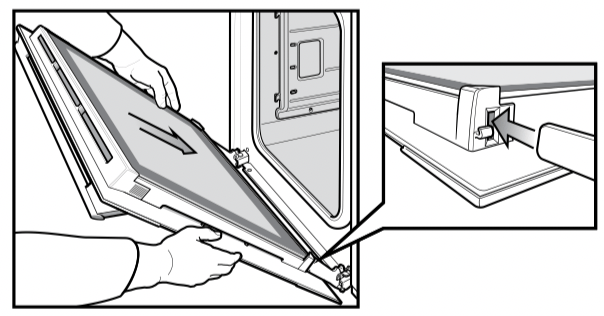
- Open the door fully to access the hinges then rotate the ‘stirrups’ (highlighted in the image) on both hinges back to their original positions. The oven door may now be closed.
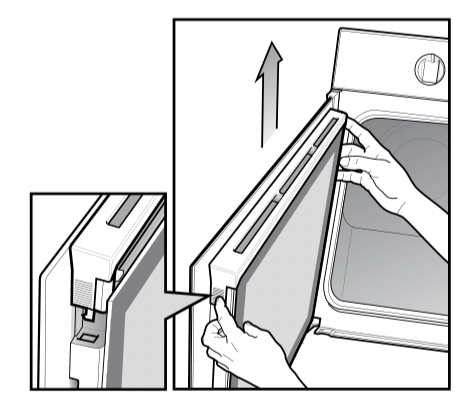
Removing side open door top trim
- Take hold of the grid embossed sections of the door trim at each end and press inwards to release the clips. Then remove the door trim by lifting it upwards.
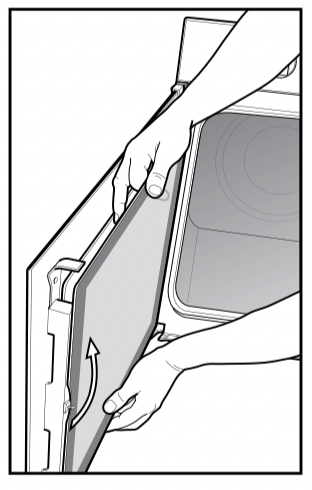
Removing side open door glass panel
warning
Rough handling, especially around the edges can cause the glass to break.
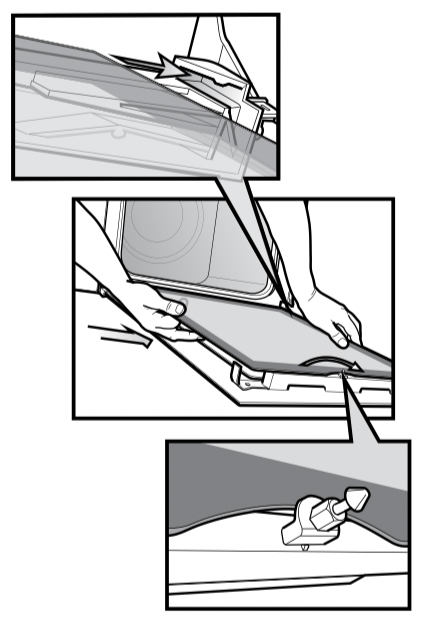
- Take hold of the black bordered glass panel with a hand on its upper and lower edge. Lift and rotate the glass around the retainer to remove it from the guide.
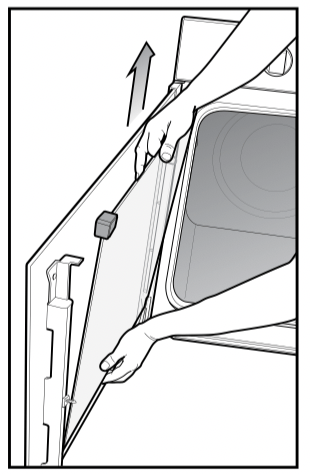
- Take hold of the smaller clear glass panel (when fitted) with a hand on its upper and lower edge. Lift the glass to remove it from the retainer.
- The rubber mouldings on the upper corners of the smaller clear glass panel may be removed. Don’t misplace them.
Cleaning door glass panels
warning Do not to use harsh abrasives on the glass panes as the reflective surface plays a role in the function of the oven. Do not place glass in dishwasher. Hand wash only with a soft cloth and warm soapy water. When dry polish with a soft cloth and ensure the glass is dry before reassembly.
Re-assembling door glass panels
- Ensure the rubber mouldings are on the upper corners of the smaller clear glass panel.
- Insert the smaller glass panel (when fitted) first from above and at an angle to the profile of the door.
- Repeat for the black bordered glass panel ensuring the painted surface is facing toward the door.
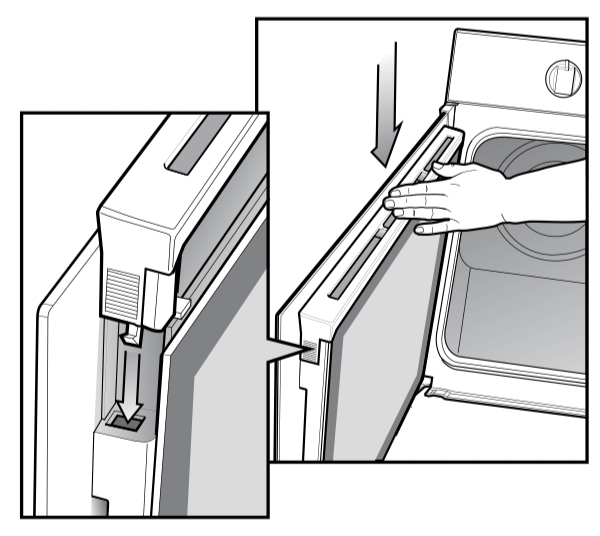
Replacing top door trim
- Take hold of the top door trim at each side and position it to the inside edge of the glass.
- Push the trim down with its top edge over glass panel until the clip snaps in on each side of the trim.
Solving problems
faults
If there is a problem with the oven and/or grill, please:
- Check the points listed below before calling for service. It may be possible to avoid a call by fixing the problem yourself - and so continue cooking.
- For cooking problems refer to page 24.
NOTE: We may charge for service even in the guarantee period if your problem is due to the causes listed below.
| problem |
possible cause |
oven or grill not working
|
Time of day not set. |
| Power not turned on. |
| Controls are incorrectly set. |
| Household fuse has blown or power supply is off. |
| Child-proof oven lock activated. (Refer to operating instructions). |
| NOTE: If the household fuse continues to blow, call the Customer Care Centre. |
| oven light not working |
Lamp blown or loose in socket. |
| Household fuse has blown. |
| NOTE: If the household fuse continues to blow, call the Customer Care Centre. |
| oven not heating enough |
Foil or trays on bottom of oven. |
| oven not working |
Timer is in “AUTO” mode. (Refer to timer operating instructions) |
| Household fuse has blown. |
| NOTE: If the household fuse continues to blow, call the Customer Care Centre. |
| timer flashing on display |
Power failure or interruption. |
| NOTE: If the household fuse continues to blow, call the Customer Care Centre. |
| unit smoking when first used |
Protective oils being removed. |
| condensation building up |
Reduce amount of water used in cooking. (Some condensation is normal). |
| door cannot be replaced after removal |
Stirrup not engaged properly. |
NOTE: Only authorised personnel should carry out servicing.
warning
USE AN AUTHORISED PERSON
As stated in the local municipal building codes and other relevant statutory regulations.
• Wiring connections must be in accordance with AS/NZS 3000 Wiring Rules and any particular conditions of the local authority.
• Refer to data plate for rating information and circuit diagram. The data plate is positioned behind the bottom of the oven door. The circuit diagram is positioned on the top panel of the appliance. For appliances with open cooking surfaces, an all pole disconnected functional switch should be provided near the appliance in an accessible position. Refer to AS/NZS 3000 clause 4.7.1
• Wiring should be protected against mechanical failure. Refer to AS/NZS 3000 clauses 3.3.2.6, 3.9, 3.10
• A means of disconnection with a contact separation of at least 3mm must be supplied in the fixed wiring.
• To gain access to the mains connection terminals, remove the rear access cover by unscrewing the 2 screws.
• If the supply cord is damaged, it must be replaced by the manufacturer, its service agent or similarly qualified persons in order to avoid a hazard.
• For appliances fitted with a supply flexible cord, if the cord is damaged, it must be replaced by the manufacturer or its service agent or similarly qualified person in order to avoid a hazard. The plug must be accessible after installation.
Multi-phase
Where connection is made to a multi-phase 220-240V supply, the bridge piece should be removed from between the active connections.
warning
IMPORTANT: This appliance must be properly earthed.
• Do not lift the appliance by the door handles.
• Prepare the cupboard opening to match your appliance measurements. (See diagrams on following pages).
• Slide appliance into the cupboard, ensuring that the supply cable (where fitted) does not kink.
• To prevent tipping, use the screws supplied to secure your oven into the cupboard. Use just 2 screws for single cavity ovens and 4 screws for dual cavity. Remove the bottom door in dual cavity ovens to provide access to the bottom 2 screwing points (see illustrations on page 30 and 32).
• For appliances fitted with a flexible supply cord, if the cord is damaged, it must be replaced by the manufacturer or its service agent or similarly qualified person in order to avoid a hazard. The plug must be accessible after installation.
• Where the appliance is built into a cabinet, the cabinet material must be capable of withstanding 70°C. Installation into low temperature tolerant cabinetry (e.g. vinyl coated) may result in deterioration of the low temperature coating by discolouring or bubbling.
• If the appliance is installed adjacent to vinyl-wrapped surfaces, use an installation kit available from the vinylwrap supplier.
• Electrolux Home Products cannot accept responsibility for damage caused by installation into low temperature tolerant cabinets.
• After installation, test and ensure that the appliance operates correctly before handing it over to the customer.
caution To avoid any potential hazard, you must follow our instructions below when you install your appliance. Failure to install the appliance correctly could invalidate any warranty or liability claims and lead to prosecution.