REV
DESCRIPTION OF CHANGE
LOC
BY
C.N.
321 4 5 6
2
3
1 4
5
6
D
C
B
A
E
F
C
B
A
E
F
D
CREATION DATE
DRAWN BY
DESCRIPTION (ENGLISH)
DESCRIPTION (LOCAL)
DRAWING SIZE
SHEET
DRAWING NUMBER
DRAWING REV
SCALE
DO NOT SCALE
UNITS: mm
= SPECIAL CHARACTERISTIC
A3
INTERPRETATION PER ISO 1101
FIRST ANGLE
PROJECTION
TOLERANCE UNLESS OTHERWISE SPECIFIED
THIS DRAWING IS THE PROPERTY OF WHIRLPOOL CORP. IT CONTAINS CONFIDENTIAL INFORMATION BELONGING TO AND/OR
ENTRUSTED TO WHIRLPOOL. IT IS DISCLOSED IN CONFIDENCE AND SHALL NOT BE HELD, REPRODUCED, DISCLOSED OR USED
EXCEPT IN A MANNER AND FOR A PURPOSE EXPRESSLY PERMITTED BY WHIRLPOOL IN WRITING.
VENDORS SHALL NOT REVISE ANY PHYSICAL, DIMENSIONAL, OR PERFORMANCE CHARACTERISTICS UNLESS AUTHORIZED IN
WRITING BY WHIRLPOOL ENGINEERING GROUP.
WHIRLPOOL TEST SPECIFICATIONS, IF ANY, ARE NOT INTENDED TO ASSUME ANY RESPONSIBILITY FOR SUBSEQUENT PROBLEMS
WITH OR CAUSED BY THE PART, COMPONENT, OR ASSEMBLY PROVIDED BY THE SUPPLIER, AND DO NOT RELIEVE THE SUPPLIER
OF ITS OBLIGATIONS INCLUDING, BUT NOT LIMITED TO, THE NEED TO PERFORM ITS OWN TESTING, INSPECTION AND
ONGOING QUALITY CONTROL, AND ASSURING FITNESS FOR USE. ANY WHIRLPOOL RECOMMENDED TEST AND ITS OUTCOME
DO NOT IN ANYWAY LIMIT OR CHANGE THE WARRANTY CONTAINED IN WHIRLPOOL’S PURCHASE ORDER OR SUPPLY AGREEMENT.
1
OF
1
A
图纸发布
吴 斌
2015.10.19
描述
版本
部件编码
DESCRIPTION
REV
PART NO.
B
原使用机型
First Occurs On
8S21FNI GD
BCD-576WDGB-CE瑞丝银
材料
MATERIAL
100g双胶纸
8105769500020
8105769500020 B
说明书
USER MANUAL
吴 斌
2015.10.19
1:1
说明书
技术要求:
1.印刷字体、图案应鲜明、亮丽,无漏印、错印、倾斜等缺陷;
2.尺寸规格: B4版,100g双胶纸;
3.纸张页数: 20面5张;
4.印刷颜色: 单墨黑白;
5.符合惠而浦关于RoHS的要求。
8S21FNI GD
User Manual for Side-by-Side Refrigerator
Model:
Please read this instruction carefully before using the appliance.
DATE
B
更改型号名、耗电量、惠而浦LOGO,参数表新增新加坡能耗等级一项
吴 斌
2017.6.28
封面/P11/P12
8S21FNI GD
User Manual for Side-by-Side Refrigerator
Model:
Please read this instruction carefully before using the appliance.
1
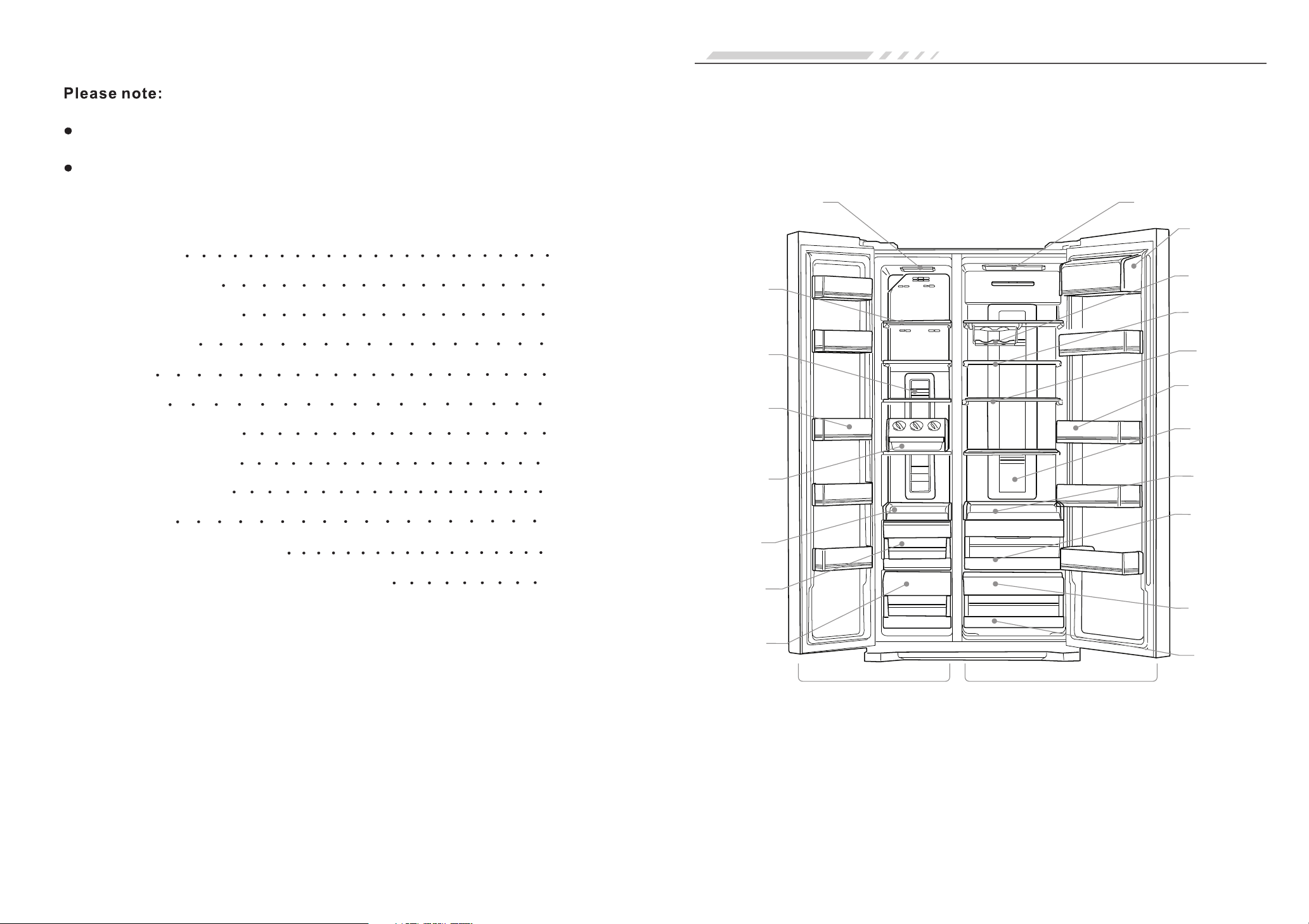
Glass
Shelf
Freezer
Drawer
Door
Bin
Rotary
Ice Cube
Tray
Wine
Rack
Freezer Compartment
Refrigerator Compartment
Lamp
Refrigerator
Drawer
Light Wave
Fresh Room
Lamp
LED
Backlight
LED
Backlight
1
2
3
4
5
8
9
10
11
12
13
14
The illustration is for explanation only, actual product may vary slightly.
Dairy
Compartment
Glass
Shelf
Door
Bin
Folding
Rack
Freezer
Tray
Refrigerator
Tray
Freezer
Drawer
Cover
Refrigerator
Drawer
Cover
Thank you for purchasing our fridge.
We have provided many important safety messages in this manual. Please always
pay attention on the PRECAUTIONS and all safety messages.
Keep the instruction for future reference.
Table of Contents
The Appliance
Refrigerator Safety
Refrigerator Preparation
Refrigerator Use
Functions
Precautions
Care and Maintenance
Troubleshooting Guide
Technical Parameters
Packing List
Energy Saving Tips and Notices
Handle and Retaining Bar Installation instruction
The Appliance
2
3
1. Temperature Zone
● With separate refrigerator and freezer compartment to satisfy different food storage needs.
● Each compartment is separately control and adjustable.
● Refrigerator (2~8°C)
● Freezer ( -16~ -22°C)
2. Microcomputer Control, Intelligent and Accurate Temperature
● Intellectual computer control: Automatically adjust to adapt the temperature changes.
● LED digital display: Clear status review.
● Automatic alarm function: Alert when refrigerator door is not properly closed.
● Intellectual, instant cold, quick-freeze function: Electricity saving.
● Lock screen and other multifunction: More convenient for refrigerator operation.
● Outage memory: Recover settings automatically after outage.
● Fault prompt function: Make it easier for maintenance
● WARNING: Keep the appliance ventilation openings clear of obstruction.
● WARNING: Do not use mechanical, electric or chemical devices other than those recommended by
the manufacturer to accelerate the defrost process.
● WARNING: Do not damage the refrigerant circuit.
● WARNING: Do not use or place electrical appliances inside the appliance compartments unless they
are of the type recommended by the manufacturer.
● Do not store explosive substances such as aerosol cans with a flammable propellant in this appliance.
● Unplug the appliance before maintenance.
● This appliance is not intended for use by persons (including children) with reduced physical, sensory
or mental capabilities, or lack of experience and knowledge, unless they have been given supervision
or instruction concerning use of the appliance by a person responsible for their safety.
● Children should be supervised to ensure that they do not play with the appliance.
● In order to avoid hazard, installation and maintenance, including power cord replacement must be
carried out by a qualified technician, in compliance with the manufacturer's instructions.
● This appliance in interceded to be sued in household and similar application such as
- staff kitchen areas in shops, offices and other working environments;
- farm houses and by clients in hotels, motels and other residential type environments;
- bed and breakfast type environments;
- catering and similar non-retail applications
● The Manufacturer declines any liability for injury to persons or animals or damage to property if the
above advice and precautions are not respected.
● Remove all packaging materials (included foundation pad, foam pad and gummed paper in the fridge)
before use.
● Clean both inside and outside of the fridge before use. Use a humid rag and a mild detergent in warm
water for cleaning. Make sure to use clean water for the final clean up.
● Make sure a separated dipolar earthing socket serving only your refrigerator. It shall not share with
any other electrical equipment.
● Connect the earth wire well, the earthing polar of the socket shall have reliable earthing wire.
Transportation
● Do not turn over, put across, extrude or shock the fridge, the angle of bank cannot over 45 degree.
● Do not make door or coping over strained to avoid distortion.
● The fridge can be slightly lean back (no more than 20 degree) to make short distance move by
the rolling of back castor.
Placement
● The fridge shall be placed in the well ventilated place. Far away from moist place or
place there is water to avoid rusting or weaken the insulation effect.
● The headroom of the fridge shall no less than 30cm, the distance from the two sides
and the back to the wall shall no less than 10cm, to the convenience of open and close
the door and heat emission.
● The fridge shall be placed on the plat and hard ground (if uneven, it can be adjusted
by the leveling legs).
Transportation and Placement of the fridge
Refrigerator PreparationRefrigerator Safety
Product Characteristics
Warning
Unpack the refrigerator
Notice
The power cord shall not be pressed by fridge or other things to avoid accident lead by the
damage of the power cord.
Before connect the fridge to power socket, please check whether the voltage range of fridge
is the same with the power socket.
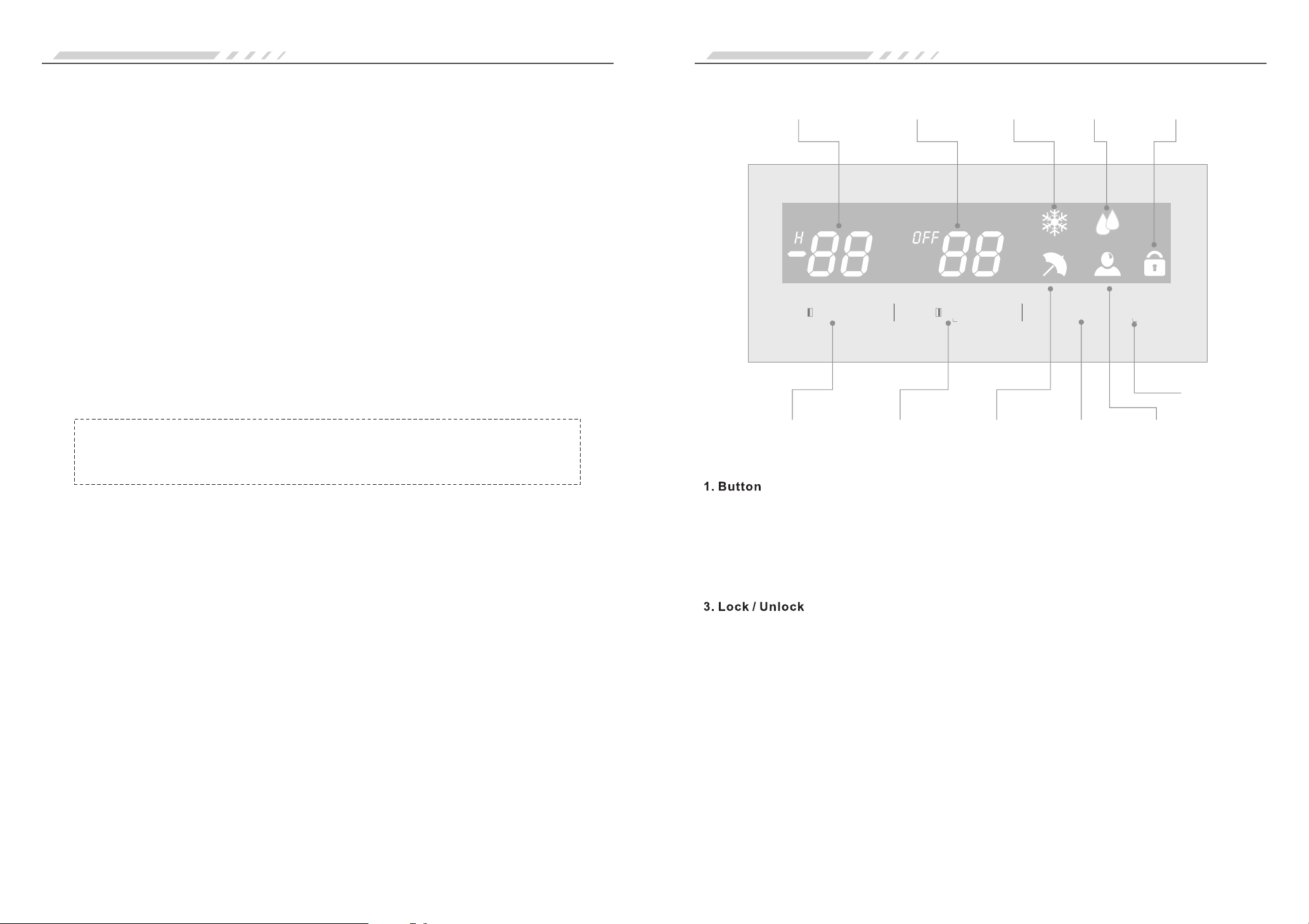
A. Temperature Adjustment B. Temperature Adjustment
C. Mode Setting D. Lock/Unlock
Freezer Refrigerator
1. Compartment Temperature 2. Compartment Temperature 3. Quick Icon
4. Speed Cooling Icon 5. Lock Icon 6. Holiday Icon
7. Intellectual Mode
Freezer Refrigerator Freeze
To activate the lock function, press the Lock/Unlock button (Button D) for 3 seconds; the Lock icon (icon
5) will be lighted and the control panel is locked.
To deactivate the Lock function, repeat the activation procedure by press the Lock/Unlock button by 3
seconds, and the Lock Icon light goes off.
All operation have to be done under the unlock state. If the buttons are pressed / operated under the lock
state, the Lock icon (icon 5) will flicker and buzzing prompt.
If no button is pressed for 30 seconds, the refrigerator will enter into the Lock state automatically.
4
5
1. Plug in Power
It will automatically enter into factory setting state once it was plugged in, besides, you can adjust the
temperature in each compartment.
2. Work Mode of the Fridge
Since the temperature is in the scope of fridge application, no matter how the environment
temperature changes, the intellectual control software will keep fridge running at intelligent state,
and always keep the best refrigeration effect to free yourself from worrying.
● Intelligent mode: we suggest you use intelligent mode if you have no special need. Since then,
the refrigerator and freezer will controlled by the intelligent mode.
● Holiday mode: if you are out for vacation or holiday, and have no or less storage, you can
choose holiday mode which will run at energy saving state.
● Manual mode: you can adjust the temperature of each storage compartment according to your need.
compartment
● Please put food for short storage or those for eat at any time in the refrigerator compartment.
Temperature of the refrigerator compartment is about 2~8 which can restrict the reproduction
of bacterial, but it is unsuitable to store food long in the refrigerator compartment.
● Cooked food should be put into the refrigerator compartment after cooling.
● You'd better seal the food before put it into the fridge.
℃,
Ensure the fridge is placed steadily and correctly and all safety instructions
are understood.
3. Put food in the fridge
Suggestions: Put food into fridge a while after the fridge working, until the temperature of each
compartment reaches the storage temperature, or after the compressor rest for the first time,
which is important for retaining freshness in food.
Refrigerator Compartment
● Generally, the temperature of freezer is under -18℃, food needs long storage is better to be put in it.
● Hot food should be cool to room temperature before putting it into freezer.
● Fruit and vegetables shall not be put into freezer to avoid frost damage, don't put glass container
with liquid in the freezer to avoid frost fracture.
● Freeze food shall categorized, which can save energy for no need to open the door for long spacing time.
Freezer Compartment
Use for the storage of food which needs freeze. Massive meat should be divided into pieces for
storage.
Freezer Drawer
Notice: Please properly close the drawer after using the freezer.
MODE
UNLOCK
press 3S on/off
FRIDGE
FREEZER
press 3S
1
43
2
5
A
D
7
C
6
B
Freezer
Compartment
Temperature
Refrigerator
Compartment
Temperature
Quick
Freeze
Icon
Speed
Cooling
Icon
Lock
Icon
Freezer
Temperature
Adjustment
Refrigerator
Temperature
Adjustment
Holiday
Icon
Mode
Setting
Intellectual
Mode
Lock/
Unlock
Notice: after the set temperature changed or new food was put into the fridge, the
temperature in the compartment will reach balance a while later. The time length
depends on the change of the set temperature, the temperature of the environment,
the frequency of open the door and food amount in the compartment, etc.
FunctionsRefrigerator Use
2.Display Screen

Fault Code
Prompt
E2
E1
Freezer Temperature Sensor
Fault
Refrigerator Temperature
Sensor Fault
Fault Code
dr
E6
Prompt
Open Alarm
Communication Fault
6
7
● Refrigerator Temperature Setting
Deactivate the Lock, press Refrigerator Temperature Adjustment button (Button B) to set temperature
between 2~8°C.
● Turn Off Refrigerator Compartment
Deactivate the Lock, press and hold the Refrigerator Temperature Adjustment button (Button B) for 3
seconds, “OFF” icon will be lighted, refrigerator compartment will be turned off.
This is an energy saving function when the refrigerator is unused for a period of time (ie. Vacation, or
unnecessary used in winter due to low temperature). When the refrigerator is turned off, door should
be closed firmly and it is suggested that no fresh food to be stored.
To activate the refrigerator compartment again, press the Refrigerator Temperature Adjustment button
(Button B) for 3 seconds, “OFF” icon goes off and the refrigerator compartment will back to work.
5. Freezer Temperature Setting
● Deactivate the Lock, press Freezer Temperature Adjustment button (Button A) to set temperature
between -16~ -22°C
6. Setting of the Fridge's Running Mode
Mode Setting button (Button C) allow to choose different mode in the following running order.
Speed Cooling --- Quick Freeze --- Holiday --- Intelligent --- Normal
Speed Cool Mode
Deactivate the Lock, press Mode Setting button (Button C) until the Speed Cooling Icon (Icon 4) flickers,
the high-speed cool function is chosen. The function will become effective after 3 seconds and the Speed
Cooling Icon (Icon 4) will be lighted, the other modes will be terminated.
Under the Speed Cool function, the refrigerator will run under the set 2°C temperature for 4 hours. The
refrigerator will automatically return to the set temperature after 4 hours.
Under the speed cool state, press Refrigerator Temperature Adjustment button (Button B), or Mode
Setting button (Button C) to cancel the speed cool function.
Quick Freeze Mode
Deactivate the Lock, press Mode Setting button (Button C) until the Quick Freeze Icon (Icon 3) flickers,
the quick freeze function is chosen. The function will become effective after 3 seconds and the Quick
Freeze Icon (Icon 3) will be lighted, the other modes will be terminated.
In the Quick Freeze function, the freezer compartment temperature display -24°C , the compressor will
keep running the quick freezing period for 6 hours. The freezer will automatically cancel the quick freeze
function and return to the set temperature after 6 hours.
You could also 'Pre-freeze” to fasten the frozen speed and make the freezer temperature less influenced.
You can adjust the temperature of the freezer to -22°C and make it runs stability first, then put food in and
choose the Quick-Freeze mode.
Quick Freeze Time Setting
Under the Quick Freeze mode, press the Freezer Temperature Adjustment button (Button A) for 3 seconds,
enter into the Quick Freeze Time Setting state. Freezer Compartment Temperature (icon 1) will display
the current quick freeze time (Unit: hour) and Quick Freeze icon (icon 3) flickers, then press the Freezer
Temperature Adjustment button (Button A) to set quick freeze time. The setting order is a circulation of
6-24-6-…..
Deactivate the Lock, press Mode Setting button (Button C) until the Holiday Icon (icon 6) flickers, holiday
mode will take effect in 3 seconds later and the Holiday Icon (icon 6) will lighted up.
When choosing the holiday mode, the refrigerator will automatically set the fridge temperature as 7°C and
freezer temperature as -15°C.
Intellectual mode
Deactivate the Lock, press Mode Setting button (Button C) until the Intellectual Mode Icon (icon 7) flickers,
intellectual mode will take effect in 3 seconds later and the icon (icon 7) will lighted up.
Under intellectual model, the refrigerator will automatically set the fridge temperature as 5°C and freezer
temperature as -18°C.
Holiday Mode
7. Door Open Alarm
When the door of the refrigerator keep open for 90 seconds, the buzzer will alarm once per second,
display will shows Fault code (dr) until the door closed.
8. Fault Prompt
FunctionsFunctions
4. Refrigerator Setting
8 9
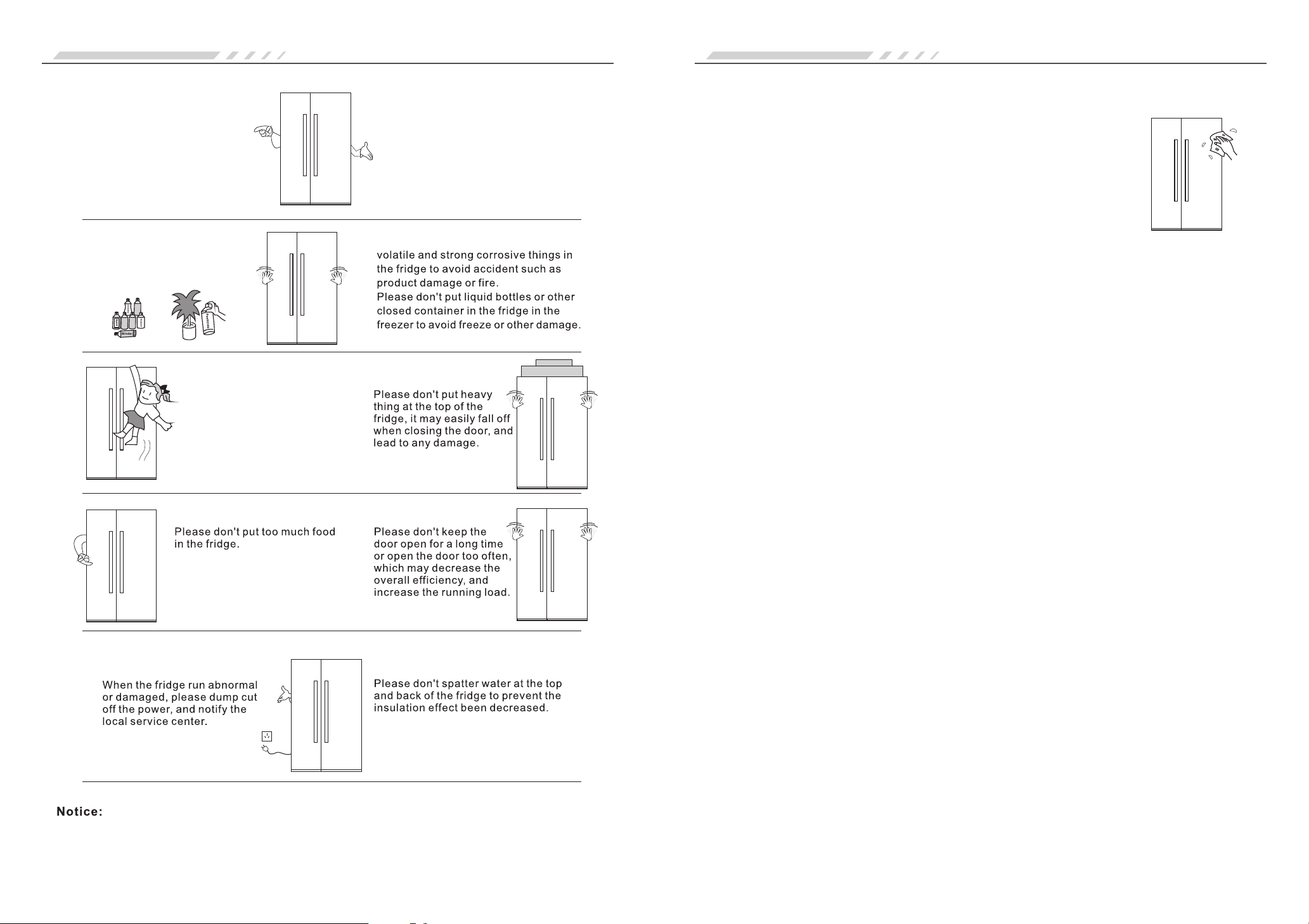
Please don’t repair without
authorization, and choose
the manufacturer appointed
repair shops and replace parts.
Please use standard power socket
above 10A, and the socket should
earthing well.
Please don’t use flammable
dissolvent around the
fridge to avoid fire.
Please don’t put flammable, explosive,
Care and MaintenancePrecautions
To avoid child become trapped
in the fridge or hurt by the fall of
the fridge. Please don't allow
child to climb, play or hide inside
the fridge.
This product is designed for indoor household use only. According to the national regulation, household
fridge can only be suitable for food storage and can't be used to store other items such as blood, drug,
biological product and so on.
● Fingerprint may easily left on the faceplate, it can be wiped by dry towel.
● Clean the dust at the back of the fridge and on the ground regularly.
● Unplug the refrigerator before cleaning.
● Clean the inside of the fridge regularly to prevent odor. Use soft towel with
neutral detergent for cleaning. Make sure to use clean water for final cleaning.
Cleaning
Please don't use the following items to clean the interior of the refrigerator
● Alkaline detergent: It will lead fracture of the inner container and plastic
components.
● Soap power, petroleum benzene, banana oil, alcohol and son on: These will
damage the plastic components.
● If the interior is stained with edible oil or seasoning, please wipe it at once:
It is possible to lead cracking of the plastic components.
Half
If fridge will not be used for a long period of time
Unplug the refrigerator to prevent risk of electric shock or fire.
Clean, wipe and dry thoroughly.
Power cut
When there is power outage, it is not suitable to put fresh food in.
Try to reduce the number of door open.
Discard
Before you throw away the old refrigerator, please remove doors to prevent children
from trapped in the fridge by accident.
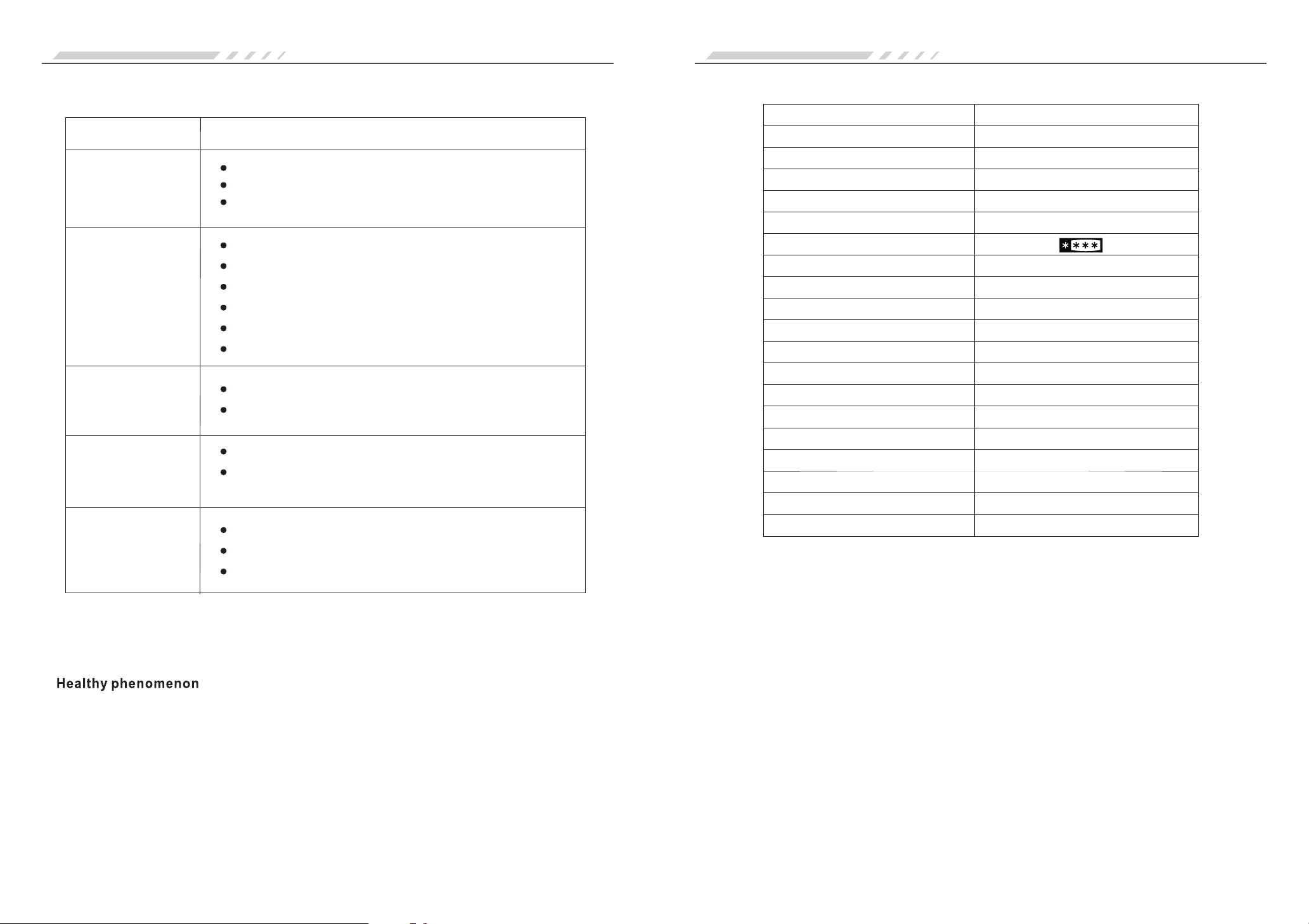
11
Model No
Total Storage Volume(L)
Freezer Storage Volume(L)
Climate Type
Protection Against Electric Shock
Star Level Mark
Refrigerating Mode
Rated Voltage/Frequency
Rated Current(A)
Energy Consumption(kW h/24h)·
Lamp Rated Power(W)
Freezing Capacity(kg/24h)
Energy Efficiency Class
Refrigerant, Amount
Foaming Agent
Noise(dB(A))
Weight(kg)
Dimensions(W*D*H)
Refrigerator Storage Volume(L)
559
194.2
T
I
No Frost
220-240V~50Hz
1.3
1.55
10
12
A+
R600a(83g)
Cyclopentane
≤44
125
915X774X1809
364.8
8S21FNI GD
Technical parameters
10
Fridge does not work
Is the refrigerator steady placed? Is the ground flat?
Is the fridge accessory located at the correct place?
If there is no improvement on the condition after checking on the above list, please
contact our after-sale service department.
If power cord has been damage, it must be repaired by our appointed maintenance
personnel to avoid hazard.
Troubleshooting Guide
Check with the following before calling for maintenance
Phenomenon Possible cause and/or recommend check items
Temperature is
too warm
Noisy
Food frozen in
refrigerator
compartment
Bad smell / odor
Is the appliance connected to an electrical supply?
Is the plug firmly inserted?
Is the voltage too low?
Is the temperature adjusted properly?
Is there too much food in the fridge?
Is there any warm food recently added in the fridge?
Is the door open too often?
Is the door closed completely
Is there any heat source around the fridge?
Is the fridge set at the Speed Cool mode?
Is there any high moisture content, included food, inside
the shelf?
Is odorant food placed well?
Is there any sour food?
Is the fridge clean regularly?
The compressor in your refrigerator regulates temperature more efficiently and uses less energy.
During varies stage of operation, you may hear normal operating sounds that are unfamiliar. The
following noises are normal:
● Pulsating – Heard when the fans / compressor adjust to optimize performance during normal
operation.
● Rattling – Heard when water passes through the water line, or due to the flow of refrigerant.
During the fridge is at work, two sides of the fridge are dissipating heat.
Some moisture buildup around the door is normal. Clean with a soft dry cloth.
MELS energy ticks
2 ticks
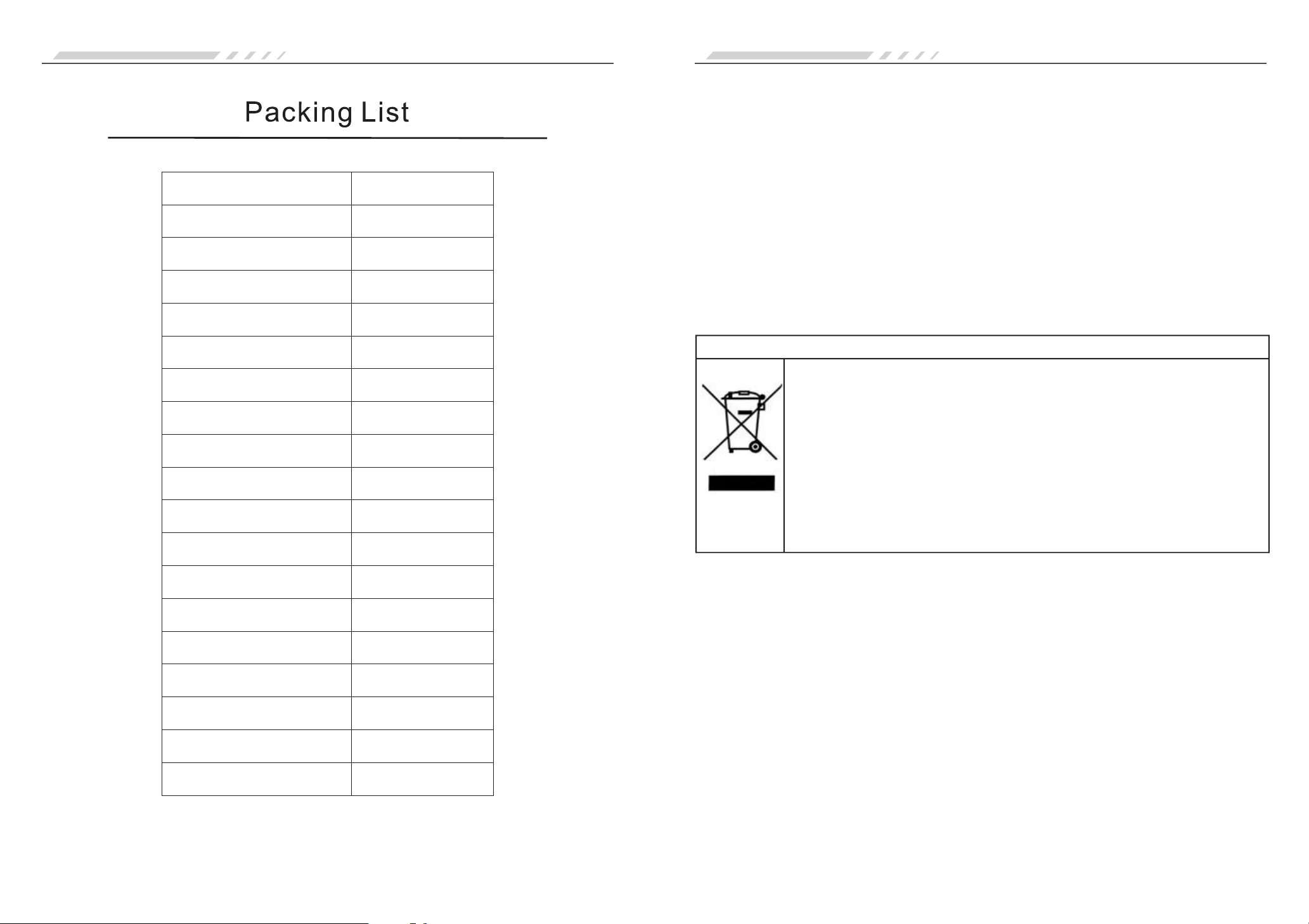
12
Model
User’s Manual
Freezer Door Bin
Freezer Glass Shelf
Freezer Tray
Freezer Drawer
Freezer Drawer Cover
Rotary Ice Cube Tray
Counting Cup
Refrigerator Glass Rack
Refrigerator Wine Rack
Refrigerator Folding Rack
Refrigerator Tray
Refrigerator Drawer
Refrigerator Drawer Cover
Egg Rack
Egg Tray
Refrigerator Door Bin
Refrigerator Dairy Compartment
8S21FNI GD
1
5
4
4
1
2
1
1
1
2
1
1
1
1
2
1
1
1
Packing List
13
Energy saving Tips
Proper Disposal of this product
Proper Disposal of this product
This marking indicates that this product should not be disposed with other
household wastes throughout the EU. By ensuring the correct disposal of
this appliance, you can help prevent potentially negative consequences
for the environment and the health of persons, recycle it responsibly to
promote the sustainable reuse of material resources. To return your used
device, please use the return and collection systems or contact the shop
where you purchased. They can take this product for environmental safe
recycling.
Energy Saving Tips and Notices
● Install the appliance in a dry, well ventilated room far away from any heat source (e.g. radiator, cooker,
etc.) and in a place not exposed directly to the sun.
● Insufficient ventilation on back of the product increases energy consumption and decreases cooling
efficiency.
● The internal temperatures of the appliance may be affected by the ambient temperature, frequency of
door opening, as well as location of the appliance. Temperature setting should take into consideration
these factors.
● Allow warm food and drinks to cool down before placing in the appliance.
● Wrap food properly and wipe container dry before placing them in the appliance.
● Do not obstruct the fan (if available) with food items.
● After placing the food check if the door of compartments closes properly, especially the freezer door.
● Organize and label food to reduce to a minimum door opening.
● Do not line the storage with aluminum foil, wax paper or toweling. Obstruct may interfere the cold air
circulation.
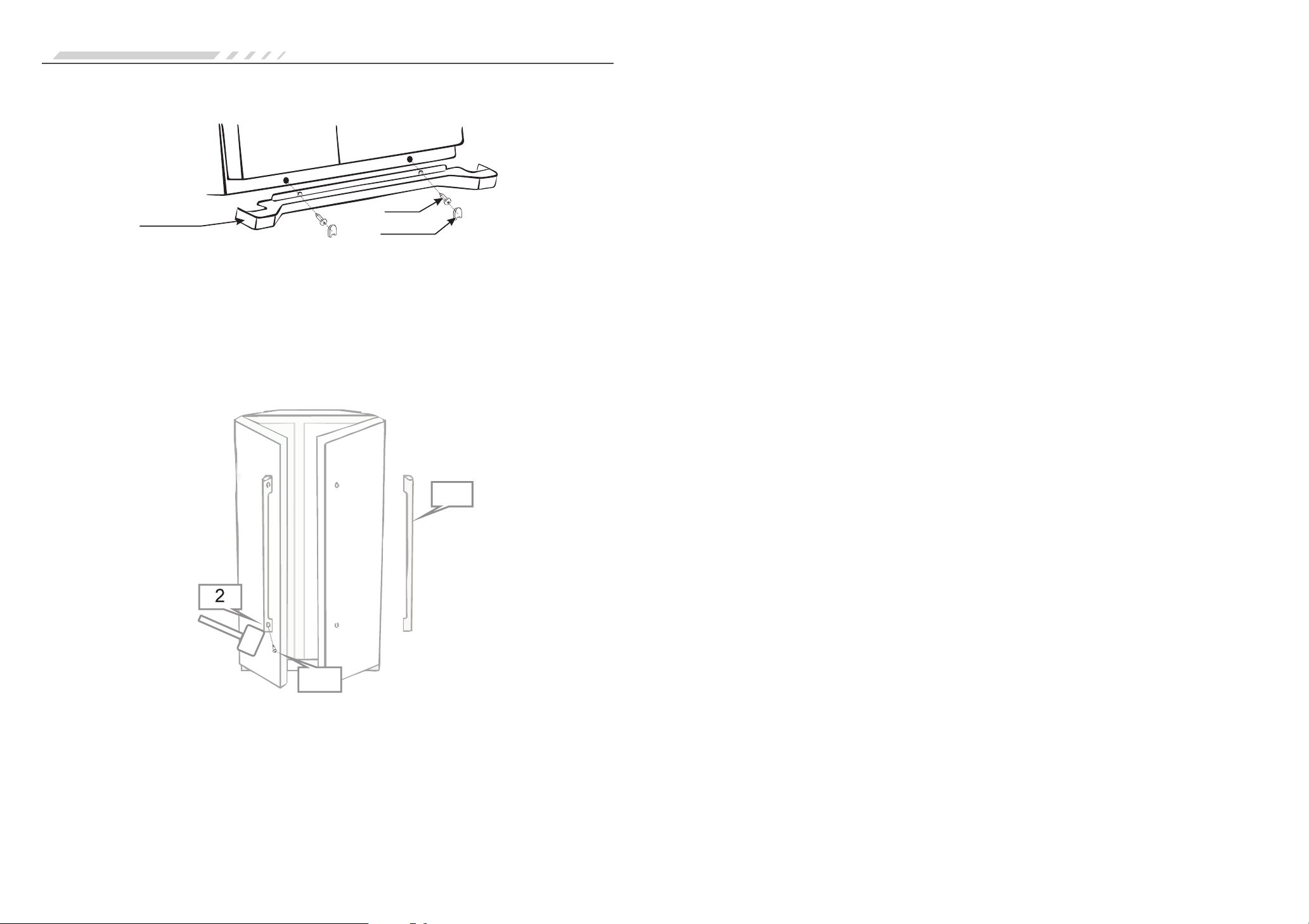
Decorative Retaining Bar Installation Instruction
Decorative
Retaining Bar
Screw
Screw Cap
1.Take the decorative retaining bar out from the refrigerator
2.Use cross recessed screwdriver to set the screws onto the bottom beam. Fix it tight with all screws
thread twisted through the hole.
3.Cover the screws by screw cap.
4.Tear off the protective film.
Handle Installation Instructions
14
1
3
1.Take the door handle out from the refrigerator.
2.Open the fridge door; fix the door handle hole with the seat. Use rubber mallet or similar tool to tap
the door handle from the bottom up.
3.Use screwdriver to tighten the keeper screw in clockwise direction.
4.Gentle shake the handle to check if the handle is installed securely.
Handle and Retaining Bar Installation Instruction