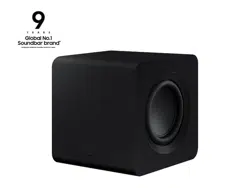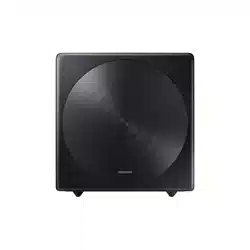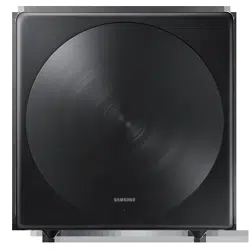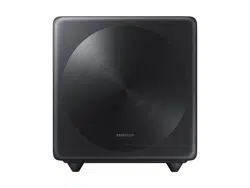

SWA-W500
USER MANUAL
ENG - 2 ENG - 3
Safety Information
Thank you for purchasing this product (SWA-W500).
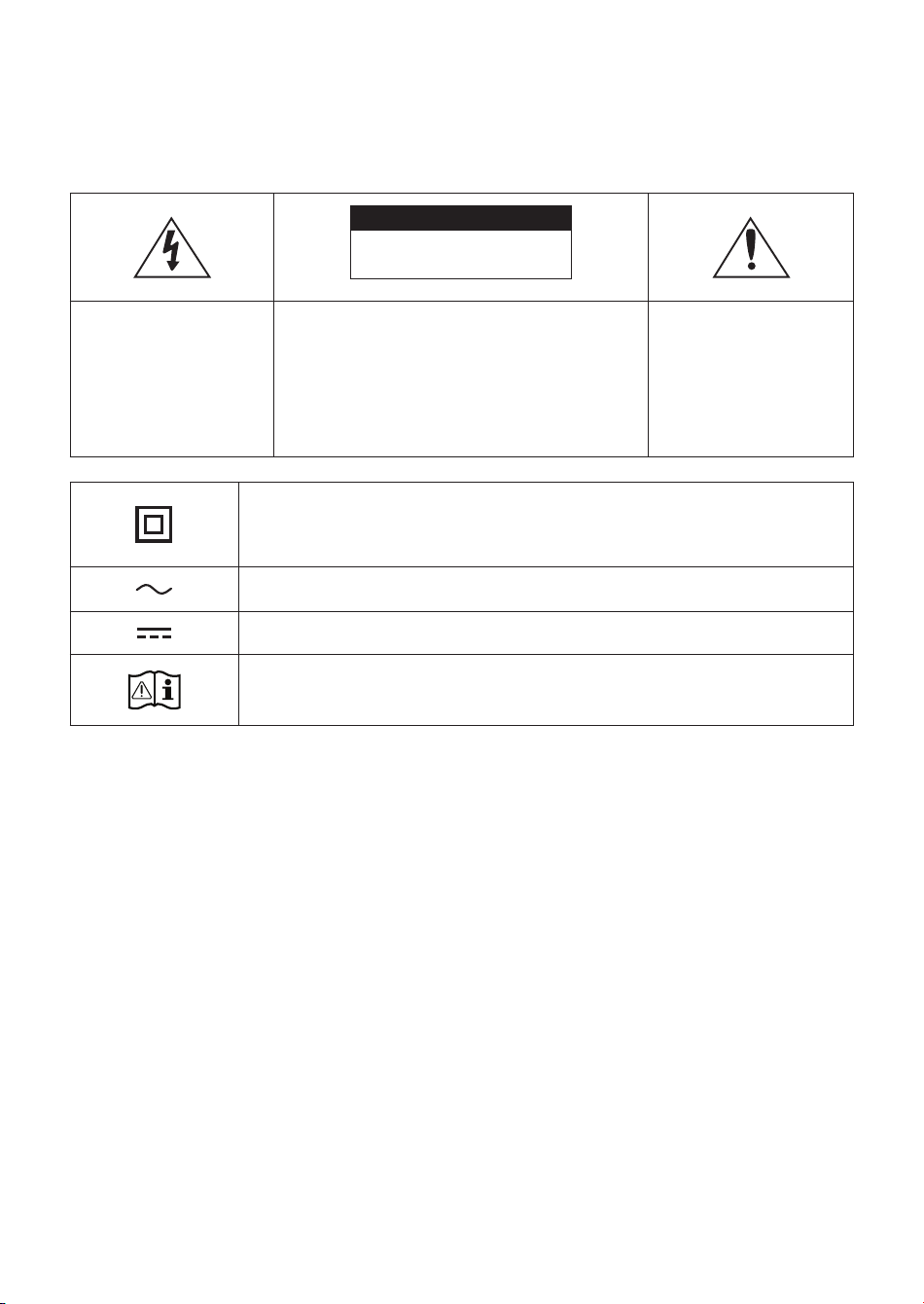
CAUTION
RISK OF ELECTRIC SHOCK.
DO NOT OPEN.
This symbol indicates that
high voltage is present
inside. It is dangerous to
make any kind of contact
with any internal part of
this product.
CAUTION: TO REDUCE THE RISK OF ELECTRIC
SHOCK, DO NOT REMOVE THE COVER (OR BACK).
THERE ARE NO USER SERVICEABLE PARTS INSIDE.
REFER ALL SERVICING TO QUALIFIED PERSONNEL.
Refer to the table below for an explanation of
symbols which may be on your Samsung product.
This symbol indicates
that this product comes
with important literature
concerning operation and
maintenance.
Class II product : This symbol indicates that a safety connection to electrical earth
(ground) is not required. If this symbol is not present on a product with a power cord,
the product MUST have a reliable connection to protective earth (ground).
AC voltage : Rated voltage marked with this symbol is AC voltage.
DC voltage : Rated voltage marked with this symbol is DC voltage.
Caution. Consult Instructions for use : This symbol instructs the user to consult the user
manual for further safety related information.
• The slots and openings in the cabinet and
in the back or bottom are provided for
necessary ventilation. To ensure reliable
operation of this apparatus, and to protect it
from overheating, these slots and openings
must never be blocked or covered.
– Do not place this apparatus in a conned
space, such as a bookcase, or built-in
cabinet, unless proper ventilation is
provided.
– Do not place this apparatus near or over
a radiator or heat register, or where it is
exposed to direct sunlight.
– Do not place vessels (vases etc.)
containing water on this apparatus.
A water spill can cause a re or electric
shock.
• Do not expose this apparatus to rain
or place it near water (near a bathtub,
washbowl, kitchen sink, or laundry tub, in
a wet basement, or near a swimming pool,
etc.). If this apparatus accidentally gets wet,
unplug it and contact an authorized dealer
immediately.
• Do not overload wall outlets, extension cords
or adaptors beyond their capacity, since this
can result in re or electric shock.
• Route power-supply cords so that they are
not likely to be walked on or pinched by items
placed on or against them. Pay particular
attention to cords at the plug end, at wall
outlets, and the point where they exit from
the apparatus.

ENG - 2 ENG - 3
Safety Information
Thank you for purchasing this product (SWA-W500).
CAUTION
RISK OF ELECTRIC SHOCK.
DO NOT OPEN.
This symbol indicates that
high voltage is present
inside. It is dangerous to
make any kind of contact
with any internal part of
this product.
CAUTION: TO REDUCE THE RISK OF ELECTRIC
SHOCK, DO NOT REMOVE THE COVER (OR BACK).
THERE ARE NO USER SERVICEABLE PARTS INSIDE.
REFER ALL SERVICING TO QUALIFIED PERSONNEL.
Refer to the table below for an explanation of
symbols which may be on your Samsung product.
This symbol indicates
that this product comes
with important literature
concerning operation and
maintenance.
Class II product : This symbol indicates that a safety connection to electrical earth
(ground) is not required. If this symbol is not present on a product with a power cord,
the product MUST have a reliable connection to protective earth (ground).
AC voltage : Rated voltage marked with this symbol is AC voltage.
DC voltage : Rated voltage marked with this symbol is DC voltage.
Caution. Consult Instructions for use : This symbol instructs the user to consult the user
manual for further safety related information.
• To protect this apparatus from a lightning
storm, or when it is left unattended and
unused for long periods of time, unplug it from
the wall outlet and disconnect the antenna or
cable system. This will prevent damage to the
set due to lightning and power line surges.
• Before connecting the AC power cord to the
DC adaptor outlet, make sure the voltage
designation of the DC adaptor corresponds to
the local electrical supply.
• Never insert anything metallic into the open
parts of this apparatus. Doing so may create a
danger of electric shock.
• To avoid electric shock, never touch the inside
of this apparatus. Only a qualied technician
should open this apparatus.
• Make sure to plug the power cord in until it is
rmly seated. When unplugging the power
cord from a wall outlet, always pull on the
power cord’s plug. Never unplug by pulling on
the power cord. Do not touch the power cord
with wet hands.
• If this apparatus does not operate normally
- in particular, if there are any unusual
sounds or smells coming from it - unplug it
immediately and contact an authorized dealer
or service center.
• Maintenance of Cabinet.
– Before connecting other components to
this product, be sure to turn them off.
• Be sure to pull the power plug out of the
outlet if the product is to remain unused or
if you are leaving the house for an extended
period of time (especially when children,
elderly, or disabled people will be left alone in
the house).
– Accumulated dust can cause an electric
shock, an electric leakage, or a re by
causing the power cord to generate sparks
and heat or the insulation to deteriorate.
• Contact an authorized service center for
information if you intend to install your
product in a location with heavy dust, high or
low temperatures, high humidity, chemical
substances, or where it will operate 24 hours
a day such as in an airport, a train station, etc.
Failing to do so may cause serious damage to
your product.
• Use only a properly grounded plug and wall
outlet.
– An improper ground may cause electric
shock or equipment damage. (Class l
Equipment only.)
• To turn this apparatus off completely, you
must disconnect it from the wall outlet.
Consequently, the wall outlet and power plug
must be readily accessible at all times.
• Do not allow children to hang on the product.
• Store the accessories (battery, etc.) in a
location safely out of the reach of children.
• Do not install the product in an unstable
location such as a shaky self, a slanted oor,
or a location exposed to vibration.
• Do not drop or strike the product. If the
product is damaged, disconnect the power
cord and contact a service center.
• To clean this apparatus, unplug the power
cord from the wall outlet, and then wipe
the product using a soft, dry cloth. Do not
use any chemicals such as wax, benzene,
alcohol, thinners, insecticide, air fresheners,
lubricants, or detergent. These chemicals can
damage the appearance of the product or
erase the printing on the product.
• Do not expose this apparatus to dripping
or splashing. Do not put objects lled with
liquids, such as vases, on the apparatus.
• Do not plug multiple electric devices into the
same wall socket. Overloading a socket can
cause it to overheat, resulting in a re.
• Do not expose this apparatus to rain
or place it near water (near a bathtub,
washbowl, kitchen sink, or laundry tub, in
a wet basement, or near a swimming pool,
etc.). If this apparatus accidentally gets wet,
unplug it and contact an authorized dealer
immediately.
• Do not overload wall outlets, extension cords
or adaptors beyond their capacity, since this
can result in re or electric shock.
• Route power-supply cords so that they are
not likely to be walked on or pinched by items
placed on or against them. Pay particular
attention to cords at the plug end, at wall
outlets, and the point where they exit from
the apparatus.

ENG - 4 ENG - 5
WARNING :
• TO PREVENT THE SPREAD OF
FIRE, KEEP CANDLES AND
OTHER ITEMS WITH OPEN
FLAMES AWAY FROM THIS
PRODUCT AT ALL TIMES.
• This product contains chemicals known to the
State of California to cause cancer and birth
defects or other reproductive harm.
• To reduce the risk of re or electric shock, do
not expose this appliance to rain or moisture.
FCC NOTE (for U.S.A):
FCC Supplier’s Declaration of Conformity
Responsible Party - U.S. Contact Information:
Samsung Electronics America, Inc.
85 Challenger Road.
Ridgeeld Park, NJ 07660
Phone: 1-800-SAMSUNG (726-7864)
FCC Compliance Statement :
This device complies with Part 15 of the FCC Rules.
Operation is subject to the following two
conditions:
(1) This device may not cause harmful
interference, and (2) this device must accept any
interference received, including interference that
may cause undesired operation.
FCC Caution :
• Any changes or modications not expressly
approved by the party responsible for
compliance could void the user’s authority to
operate this equipment.
• This product satises FCC regulations when
shielded cables and connectors are used to
connect the unit to other equipment.
To prevent electromagnetic interference
with electric appliances, such as radios
and televisions, use shielded cables and
connectors for connections.
Class B FCC Statement
This equipment has been tested and found to
comply with the limits for a Class B digital device,
pursuant to Part 15 of the FCC Rules. These limits are
designed to provide reasonable protection against
harmful interference in a residential installation.
This equipment generates, uses and can radiate
radio frequency energy and, if not installed and
used in accordance with the instructions, may cause
harmful interference to radio communications.
However, there is no guarantee that interference
will not occur in a particular installation. If this
equipment does cause harmful interference to radio
or television reception, which can be determined
by turning the equipment off and on, the user is
encouraged to try to correct the interference by one
of the following measures:
• Reorienting or relocating the receiving
antenna.
• Increasing the separation between the
equipment and receiver.
• Connecting the equipment to an outlet that is
on a different circuit than the radio or TV.
• Consulting the dealer or an experienced
radio/TV technician for help.
FCC Radiation Exposure Statement :
This equipment complies with FCC radiation
exposure limits set forth for an uncontrolled
environment. This equipment should be installed
and operated so there is at least 8 inches (20 cm)
between the radiator and your body. This device
and its antenna(s) must not be co-located or
operated in conjunction with any other antenna or
transmitter.
CALIFORNIA USA ONLY (Applicable for
networking models only.)
This Perchlorate warning applies only to primary
CR(Manganese Dioxide) Lithium coin cells in the
product sold or distributed ONLY in California USA
“Perchloate Material - special handling may apply,
See www.dtsc.ca.gov/hazardouswaste/perchlorate.”
Dispose unwanted electronics through an
approved recycler. To nd the nearest recycling
location, go to our website:www.samsung.com/
recycling Or call, 1‐800‐SAMSUNG
WARNING: Cancer and Reproductive Harm -
www.P65Warnings.ca.gov.
Precautions
1. Ensure that the AC or DC power supply
in your house complies with the power
requirements listed on the identication
sticker located on the rear of your product.
Install your product horizontally, on a
suitable base (furniture), with enough space
around it for ventilation (3~4 inches).
Make sure the ventilation slots are not
covered. Do not place the unit on ampliers
or other equipment which may become hot.
This unit is designed for continuous use. To
fully turn off the unit, disconnect the AC plug
from the wall outlet.
2. Do not expose the unit to direct sunlight
or other heat sources. This could lead
to overheating and cause the unit to
malfunction.
3. Unplug the Power cord from the AC wall
socket if the unit malfunctions. Your product
is not intended for industrial use. It is for
personal use only. Condensation may occur
if your product has been stored in cold
temperatures. If transporting the unit during
the winter, wait approximately 2 hours until
the unit has reached room temperature
before using it.
4. If the electricity supplied to your home is
rated at 240V AC, use a suitable plug adapter
to connect this unit to your electrical outlets.
Important Safety Instructions
Read these operating instructions carefully
before using the unit. Follow all the safety
instructions listed below. Keep these operating
instructions handy for future reference.
1. Read these instructions.
2. Keep these instructions.
3. Heed all warnings.
4. Follow all instructions.
5. Do not use this apparatus near water.

ENG - 4 ENG - 5
Class B FCC Statement
This equipment has been tested and found to
comply with the limits for a Class B digital device,
pursuant to Part 15 of the FCC Rules. These limits are
designed to provide reasonable protection against
harmful interference in a residential installation.
This equipment generates, uses and can radiate
radio frequency energy and, if not installed and
used in accordance with the instructions, may cause
harmful interference to radio communications.
However, there is no guarantee that interference
will not occur in a particular installation. If this
equipment does cause harmful interference to radio
or television reception, which can be determined
by turning the equipment off and on, the user is
encouraged to try to correct the interference by one
of the following measures:
• Reorienting or relocating the receiving
antenna.
• Increasing the separation between the
equipment and receiver.
• Connecting the equipment to an outlet that is
on a different circuit than the radio or TV.
• Consulting the dealer or an experienced
radio/TV technician for help.
FCC Radiation Exposure Statement :
This equipment complies with FCC radiation
exposure limits set forth for an uncontrolled
environment. This equipment should be installed
and operated so there is at least 8 inches (20 cm)
between the radiator and your body. This device
and its antenna(s) must not be co-located or
operated in conjunction with any other antenna or
transmitter.
CALIFORNIA USA ONLY (Applicable for
networking models only.)
This Perchlorate warning applies only to primary
CR(Manganese Dioxide) Lithium coin cells in the
product sold or distributed ONLY in California USA
“Perchloate Material - special handling may apply,
See www.dtsc.ca.gov/hazardouswaste/perchlorate.”
Dispose unwanted electronics through an
approved recycler. To nd the nearest recycling
location, go to our website:www.samsung.com/
recycling Or call, 1‐800‐SAMSUNG
WARNING: Cancer and Reproductive Harm -
www.P65Warnings.ca.gov.
Precautions
1. Ensure that the AC or DC power supply
in your house complies with the power
requirements listed on the identication
sticker located on the rear of your product.
Install your product horizontally, on a
suitable base (furniture), with enough space
around it for ventilation (3~4 inches).
Make sure the ventilation slots are not
covered. Do not place the unit on ampliers
or other equipment which may become hot.
This unit is designed for continuous use. To
fully turn off the unit, disconnect the AC plug
from the wall outlet.
2. Do not expose the unit to direct sunlight
or other heat sources. This could lead
to overheating and cause the unit to
malfunction.
3. Unplug the Power cord from the AC wall
socket if the unit malfunctions. Your product
is not intended for industrial use. It is for
personal use only. Condensation may occur
if your product has been stored in cold
temperatures. If transporting the unit during
the winter, wait approximately 2 hours until
the unit has reached room temperature
before using it.
4. If the electricity supplied to your home is
rated at 240V AC, use a suitable plug adapter
to connect this unit to your electrical outlets.
Important Safety Instructions
Read these operating instructions carefully
before using the unit. Follow all the safety
instructions listed below. Keep these operating
instructions handy for future reference.
1. Read these instructions.
2. Keep these instructions.
3. Heed all warnings.
4. Follow all instructions.
5. Do not use this apparatus near water.
6. Clean only with dry cloth.
7. Do not block any ventilation openings. Install
in accordance with the manufacturer’s
instructions.
8. Do not install near any heat sources such
as radiators, heat registers, stoves, or other
apparatus (including AV receivers) that
produce heat.
9. Do not defeat the safety purpose of the
polarized or grounding-type plug.
A polarized plug has two blades with one
wider than the other. A grounding type plug
has two blades and a third grounding prong.
The wide blade or the third prong are provided
for your safety. If the provided plug does not
t into your outlet, consult an electrician for
replacement of the obsolete outlet.
10. Protect the power cord from being walked
on or pinched particularly at plugs,
convenience receptacles, and the point
where it exits the apparatus.
11. Only use attachments/accessories specied
by the manufacturer.
12. Use only with the cart,
stand, tripod, bracket,
or table specied by the
manufacturer, or sold with
the apparatus. When a cart
is used, use caution when
moving the cart/apparatus combination to
avoid injury from tip-over.
13. Unplug this apparatus during lightning
storms or when you intend to leave it unused
for long periods of time.
14. Refer all servicing to qualied service
personnel. Servicing is required when
the apparatus has been damaged in any
way, such as power-supply cord or plug is
damaged, liquid has been spilled or objects
have fallen into the apparatus, the apparatus
has been exposed to rain or moisture, does
not operate normally, or has been dropped.
ENG - 6 ENG - 7
Checking the Components
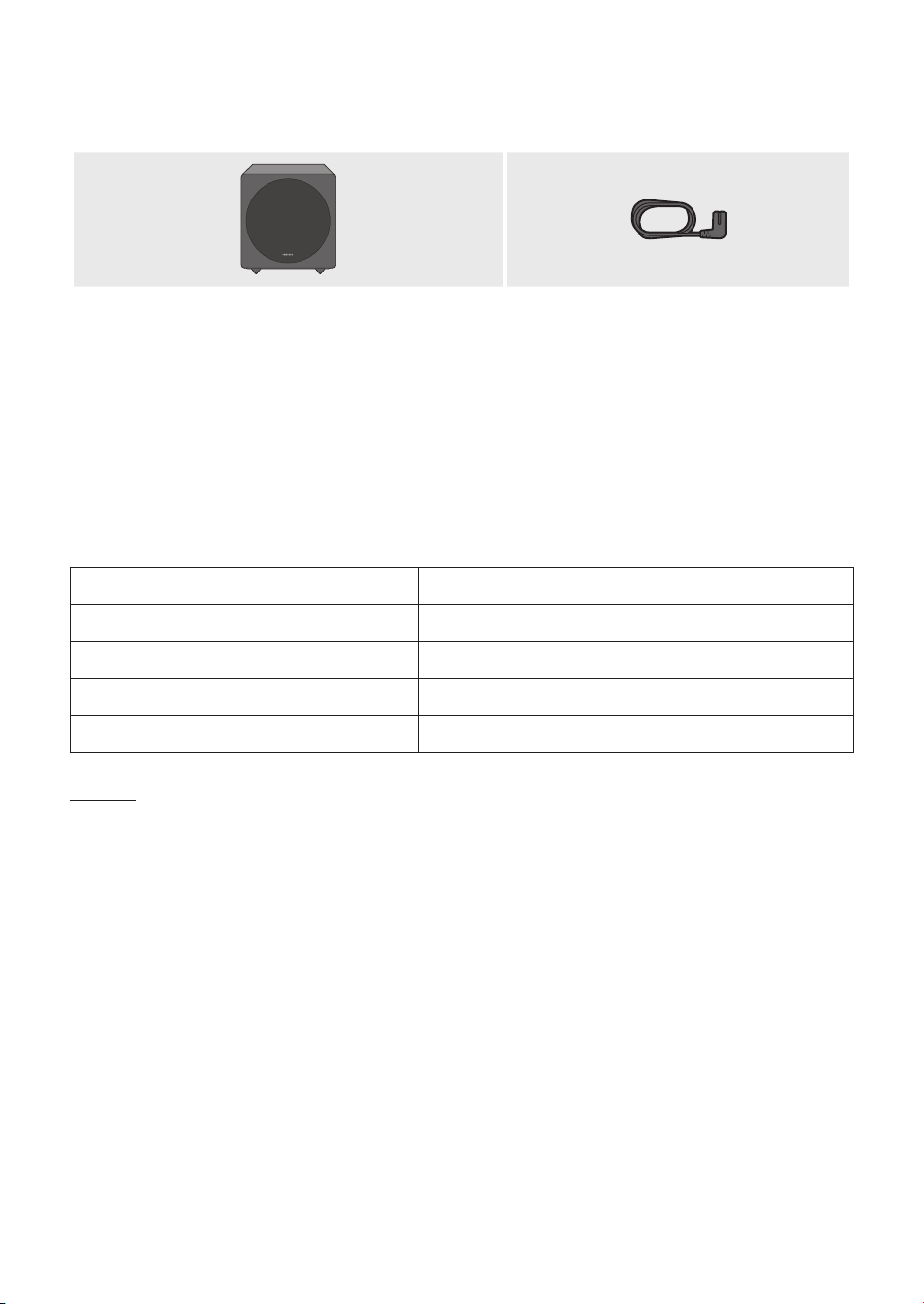
Subwoofer Power Cord
(AH81-09826A)
• Design and specications are subject to change without prior notice.
• For more information about the power supply and power consumption, refer to the label attached
to the product. (Label: Rear of the Main Unit)
Specications
Weight 10.4lbs (4.7 Kg)
Dimensions (W x H x D) 9.8 x 10.8 x 9.9 inches (250.2 x 273.0 x 250.2 mm)
Operating Temperature Range +41°F to +95°F (+5°C to +35°C)
Operating Humidity Range 10% ~ 75%
Woofer Drive Size / Impedence 6.5 inches (165.1 mm) / 3 ohm
NOTES
–
Samsung Electronics Co., Ltd reserves the right to change the specications without notice.
– Weight and dimensions are approximate.
Open Source License Notice
• To send inquiries and requests for questions regarding open sources, contact Samsung via Email
(oss.request@samsung.com).
Connecting the SWA-W500 to a Soundbar
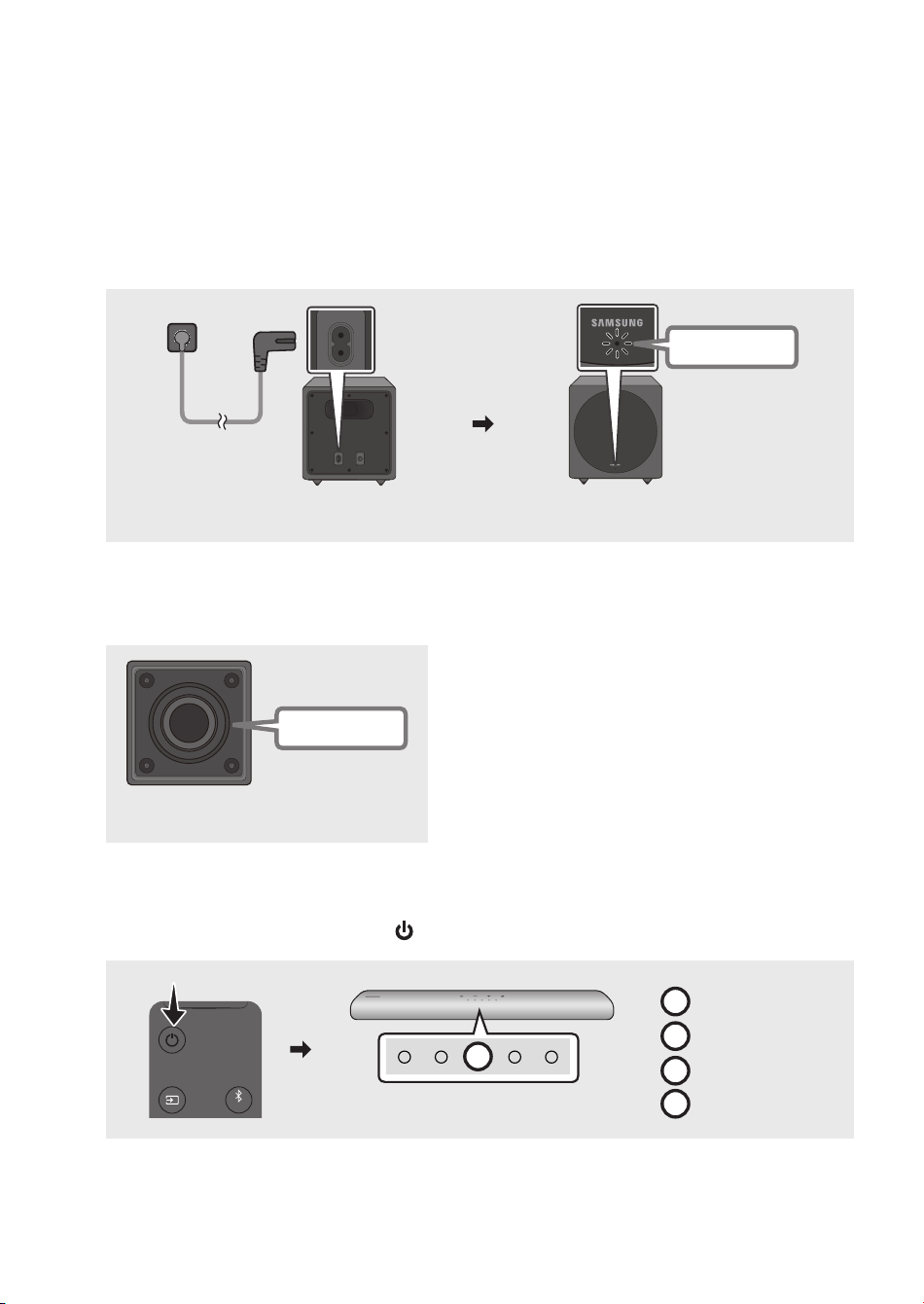
1. Check the standby status after plugging into an electrical outlet
Plug the Wireless Subwoofer power cord into an electrical outlet and into the Wireless Subwoofer
to turn on the Wireless Subwoofer. The LINK LED indicator (blue LED) on the Wireless Subwoofer
blinks. If the LED does not blink, refer to page 9.
Rear of the Wireless Subwoofer
POWER ID SET
POWER ID SET
Front of the Wireless Subwoofer
ID SET
POWER
LINK
SERVICE
POWER
Blue blinking
• The main unit is heavy. Be careful not to pinch your ngers when pressing the ID SET button or
connecting the power cord to the rear of the unit.
• The upper part of the subwoofer is prone to scratches. Handle it carefully.
Speaker Unit
Bottom of the Wireless Subwoofer
• Do not press on or strike the Speaker Unit on the
bottom of the body. You can deform or damage the
speaker.
2. Turn off the Soundbar
Turn off the Soundbar by pressing the (Power) button on the remote control.
R
(Red)
G
(Green)
B
(Blue)
C
(Cyan)
VOL WOOFER
SOUNDBAR
SOUND
MODE
PAIR
R
Red Blinks X3
• The images of the Soundbar shown on this page may differ from your Soundbar, depending on
the model.
ENG - 6 ENG - 7
Checking the Components
Subwoofer Power Cord
(AH81-09826A)
• Design and specications are subject to change without prior notice.
• For more information about the power supply and power consumption, refer to the label attached
to the product. (Label: Rear of the Main Unit)
Specications
Weight 10.4lbs (4.7 Kg)
Dimensions (W x H x D) 9.8 x 10.8 x 9.9 inches (250.2 x 273.0 x 250.2 mm)
Operating Temperature Range +41°F to +95°F (+5°C to +35°C)
Operating Humidity Range 10% ~ 75%
Woofer Drive Size / Impedence 6.5 inches (165.1 mm) / 3 ohm
NOTES
–
Samsung Electronics Co., Ltd reserves the right to change the specications without notice.
– Weight and dimensions are approximate.
Open Source License Notice
• To send inquiries and requests for questions regarding open sources, contact Samsung via Email
(oss.request@samsung.com).
Connecting the SWA-W500 to a Soundbar
1. Check the standby status after plugging into an electrical outlet
Plug the Wireless Subwoofer power cord into an electrical outlet and into the Wireless Subwoofer
to turn on the Wireless Subwoofer. The LINK LED indicator (blue LED) on the Wireless Subwoofer
blinks. If the LED does not blink, refer to page 9.
Rear of the Wireless Subwoofer
POWER ID SET
POWER ID SET
Front of the Wireless Subwoofer
ID SET
POWER
LINK
SERVICE
POWER
Blue blinking
• The main unit is heavy. Be careful not to pinch your ngers when pressing the ID SET button or
connecting the power cord to the rear of the unit.
• The upper part of the subwoofer is prone to scratches. Handle it carefully.
Speaker Unit
Bottom of the Wireless Subwoofer
• Do not press on or strike the Speaker Unit on the
bottom of the body. You can deform or damage the
speaker.
2. Turn off the Soundbar
Turn off the Soundbar by pressing the (Power) button on the remote control.
R
(Red)
G
(Green)
B
(Blue)
C
(Cyan)
VOL WOOFER
SOUNDBAR
SOUND
MODE
PAIR
R
Red Blinks X3
• The images of the Soundbar shown on this page may differ from your Soundbar, depending on
the model.
ENG - 8 ENG - 9
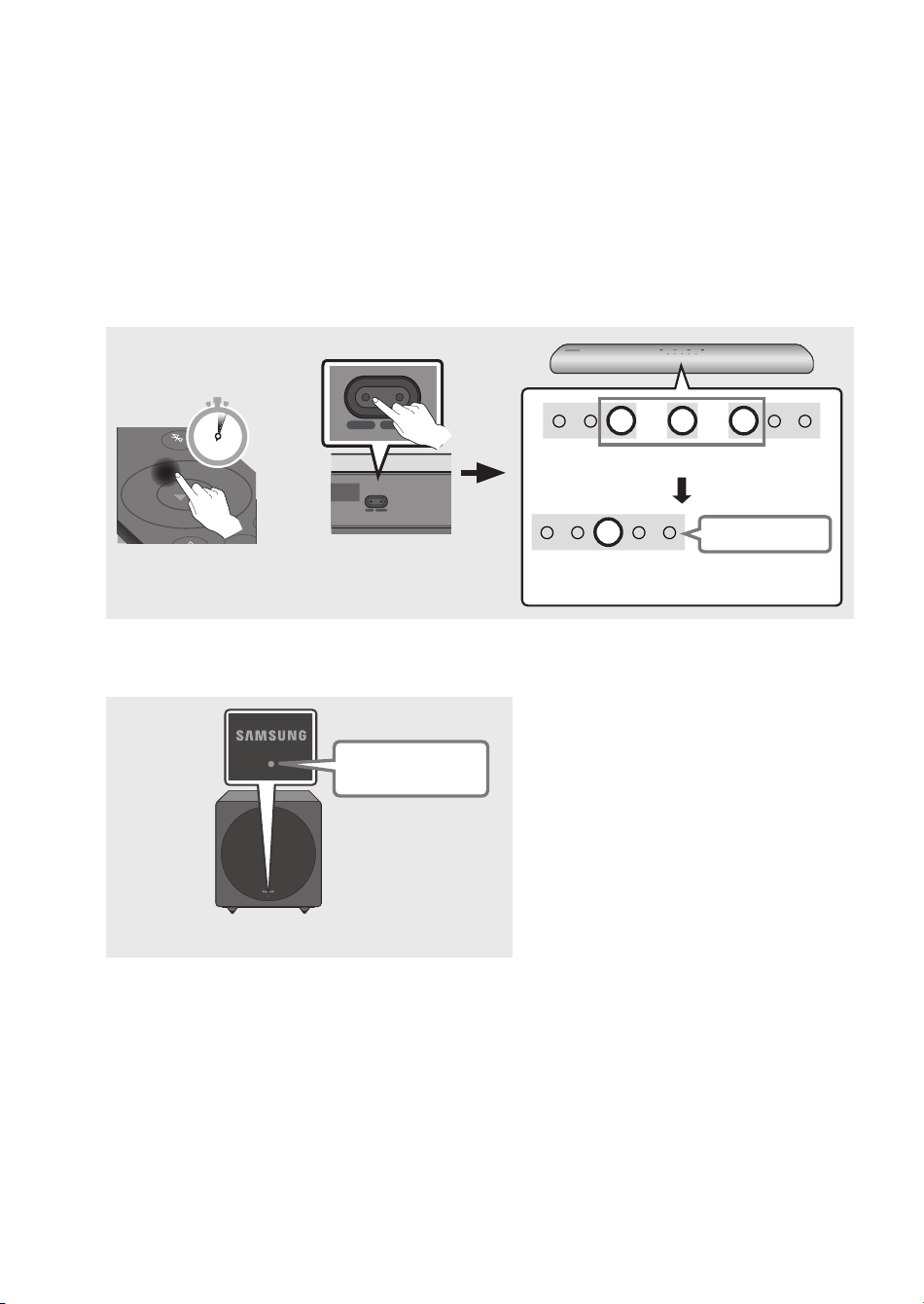
3. Congure “ID SET” using the Soundbar’s remote control
Press the Up button on the remote control for 5 seconds or press the ID SET button located at the
bottom of the Soundbar.
• Until pairing is complete, the Multicolor LED on the Soundbar changes as “Red → Green → Blue”
in turn. When the connection is complete, “Cyan” blinks 3 times in the LED indicator of the
Soundbar.
• Steps for “ID SET” may vary by Soundbar model. Please read manual for your Soundbar.
If the manual does not provide “ID SET” instructions, follow steps described in the image below.
SOUND
MODE
PAIR
5 Sec
OR
SERVICE DC 19V
HDMI
(ARC)
DIGITAL AUDIO IN
(OPTICAL)
ID SET NETWORK
SERVICE DC 19V
HDMI
(ARC)
DIGITAL AUDIO IN
(OPTICAL)
SERVICE DC 19V
HDMI OUT
(TV-ARC)
DIGITAL AUDIO IN
(OPTICAL)
DIGITAL AUDIO IN
(OPTICAL)
ID SET NETWORK
SERVICE DC 19V
HDMI
(ARC)
DIGITAL AUDIO IN
(OPTICAL)
ID SET NETWORK
SERVICE DC 19V
HDMI
(ARC)
DIGITAL AUDIO IN
(OPTICAL)
SERVICE DC 19V
HDMI OUT
(TV-ARC)
DIGITAL AUDIO IN
(OPTICAL)
DIGITAL AUDIO IN
(OPTICAL)
ID SET NETWORK
Bottom of the Soundbar
Main Unit
R
→
G
→
B
Multicolor LED
The connection is complete.
C
Cyan Blinks X3
4. Check if the LINK LED is solid blue (connection complete)
Front of the Wireless Subwoofer
Stops blinking.
Glows blue.
The LINK LED indicator stops blinking
and glows a solid blue when a
connection is established between the
Soundbar and the Wireless Subwoofer.
NOTE
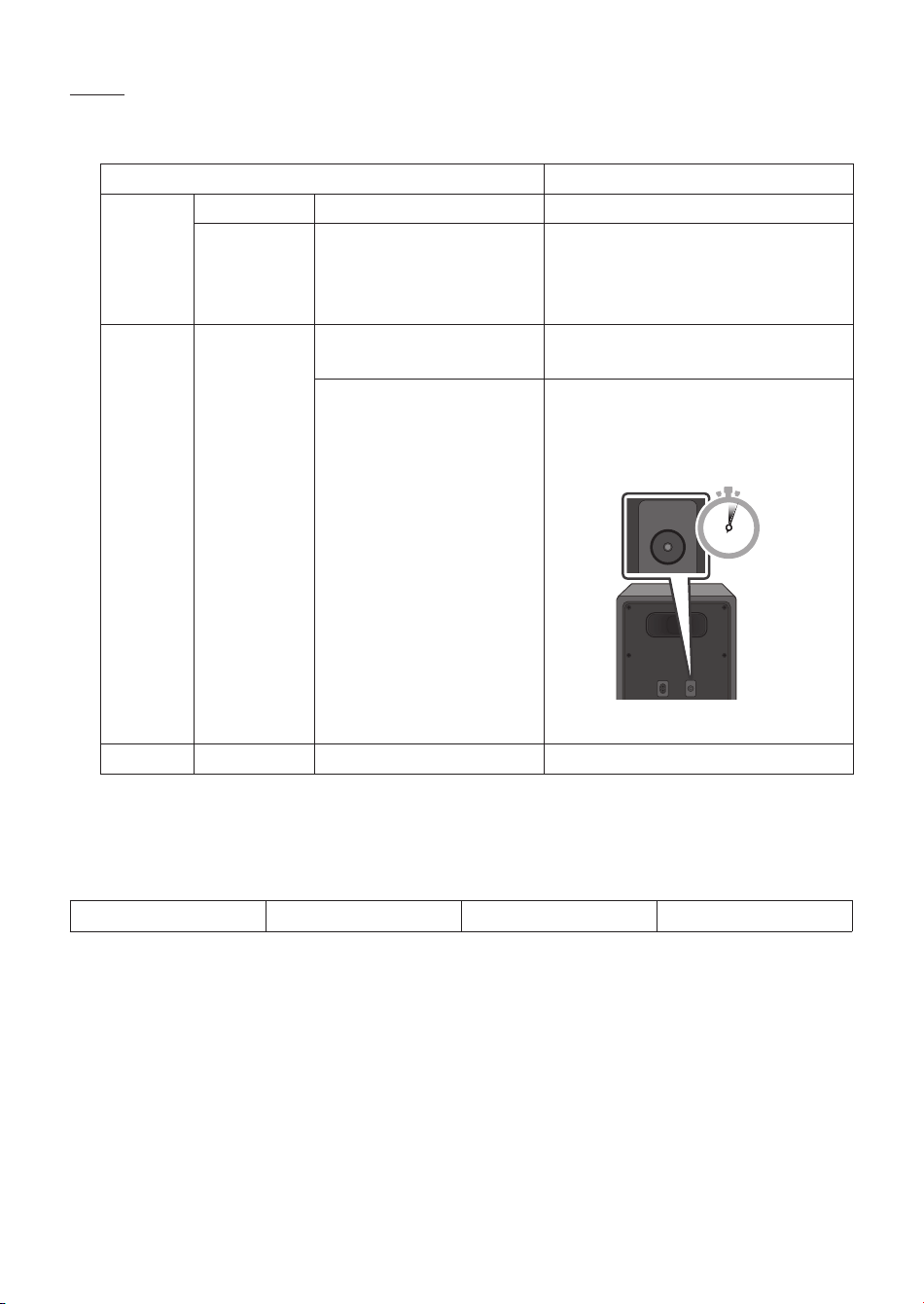
– If the SWA-W500 does not connect, take the necessary steps shown below according to the LED Indicator’s
status.
LED status Action
Blue
On Connected with the Soundbar -
Blinking ID SET status
Check if the power cable attached to the
main Soundbar unit is connected properly
or wait about 5 minutes. If blinking
persists, repeat steps 3 through 4.
Red On
Standby (with the Soundbar
main unit turned off)
Check if the Soundbar is turned on.
Connection failed
1. Press the ID SET button on the rear
of the Wireless Subwoofer with a pen
tip for 5~6 seconds until the LINK LED
indicator blinks (in Blue).
POWER ID SET
ID SET
5 Sec
2. Repeat steps 3 through 4.
Others - Errors Contact a Samsung Service Center.
Compatible Models
HW-S60T HW-S66T HW-S61T HW-S67T
• The model list is subject to change without further notice.
• To check compatability with Soundbars to be released after 2020, please refer to the FULL
MANUAL of the Soundbar (http://samsung.com/support).
ENG - 8 ENG - 9
3. Congure “ID SET” using the Soundbar’s remote control
Press the Up button on the remote control for 5 seconds or press the ID SET button located at the
bottom of the Soundbar.
• Until pairing is complete, the Multicolor LED on the Soundbar changes as “Red → Green → Blue”
in turn. When the connection is complete, “Cyan” blinks 3 times in the LED indicator of the
Soundbar.
• Steps for “ID SET” may vary by Soundbar model. Please read manual for your Soundbar.
If the manual does not provide “ID SET” instructions, follow steps described in the image below.
SOUND
MODE
PAIR
5 Sec
OR
SERVICE DC 19V
HDMI
(ARC)
DIGITAL AUDIO IN
(OPTICAL)
ID SET NETWORK
SERVICE DC 19V
HDMI
(ARC)
DIGITAL AUDIO IN
(OPTICAL)
SERVICE DC 19V
HDMI OUT
(TV-ARC)
DIGITAL AUDIO IN
(OPTICAL)
DIGITAL AUDIO IN
(OPTICAL)
ID SET NETWORK
SERVICE DC 19V
HDMI
(ARC)
DIGITAL AUDIO IN
(OPTICAL)
ID SET NETWORK
SERVICE DC 19V
HDMI
(ARC)
DIGITAL AUDIO IN
(OPTICAL)
SERVICE DC 19V
HDMI OUT
(TV-ARC)
DIGITAL AUDIO IN
(OPTICAL)
DIGITAL AUDIO IN
(OPTICAL)
ID SET NETWORK
Bottom of the Soundbar
Main Unit
R
→
G
→
B
Multicolor LED
The connection is complete.
C
Cyan Blinks X3
4. Check if the LINK LED is solid blue (connection complete)
Front of the Wireless Subwoofer
Stops blinking.
Glows blue.
The LINK LED indicator stops blinking
and glows a solid blue when a
connection is established between the
Soundbar and the Wireless Subwoofer.
NOTE
– If the SWA-W500 does not connect, take the necessary steps shown below according to the LED Indicator’s
status.
LED status Action
Blue
On Connected with the Soundbar -
Blinking ID SET status
Check if the power cable attached to the
main Soundbar unit is connected properly
or wait about 5 minutes. If blinking
persists, repeat steps 3 through 4.
Red On
Standby (with the Soundbar
main unit turned off)
Check if the Soundbar is turned on.
Connection failed
1. Press the ID SET button on the rear
of the Wireless Subwoofer with a pen
tip for 5~6 seconds until the LINK LED
indicator blinks (in Blue).
POWER ID SET
ID SET
5 Sec
2. Repeat steps 3 through 4.
Others - Errors Contact a Samsung Service Center.
Compatible Models
HW-S60T HW-S66T HW-S61T HW-S67T
• The model list is subject to change without further notice.
• To check compatability with Soundbars to be released after 2020, please refer to the FULL
MANUAL of the Soundbar (http://samsung.com/support).

LIMITED WARRANTY TO ORIGINAL PURCHASER
This SAMSUNG brand product, as supplied and distributed by SAMSUNG and delivered new, in the original carton to the original
consumer purchaser, is warranted by SAMSUNG against manufacturing defects in materials and workmanship for a limited
warranty period of:
One (1) Year Parts and Labor*
(*90 Days Parts and Labor for Commercial Use)
This limited warranty begins on the original date of purchase, and is valid only on products purchased and used in the
United States. To receive warranty service, the purchaser must contact SAMSUNG for problem determination and
service procedures. Warranty service can only be performed by a SAMSUNG authorized service center. The original
dated bill of sale must be presented upon request as proof of purchase to SAMSUNG or SAMSUNG’s authorized service
center. Transportation of the product to and from the service center is the responsibility of the purchaser.
SAMSUNG will repair or replace this product, at our option and at no charge as stipulated herein, with new or
reconditioned parts or products if found to be defective during the limited warranty period specied above.
All replaced parts and products become the property of SAMSUNG and must be returned to SAMSUNG.
Replacement parts and products assume the remaining original warranty, or ninety (90) days, whichever is longer.
SAMSUNG’s obligations with respect to software products distributed by SAMSUNG under the SAMSUNG brand
name are set forth in the applicable end user license agreement. Non-SAMSUNG hardware and software products,
if provided, are on an “AS IS” basis.
Non-SAMSUNG manufacturers, suppliers, publishers, and service providers may provide their own warranties.
This limited warranty covers manufacturing defects in materials and workmanship encountered in normal, and
except to the extent otherwise expressly provided for in this statement, noncommercial use of this product, and
shall not apply to the following, including, but not limited to: damage which occurs in shipment; delivery and
installation; applications and uses for which this product was not intended; altered product or serial numbers;
cosmetic damage or exterior nish; accidents, abuse, neglect, re, water, lightning or other acts of nature; use of
products, equipment, systems, utilities, services, parts, supplies, accessories, applications, installations, repairs,
external wiring or connectors not supplied and authorized by SAMSUNG, or which damage this product or result
in service problems; incorrect electrical line voltage, uctuations and surges; customer adjustments and failure
to follow operating instructions, cleaning, maintenance and environmental instructions that are covered and
prescribed in the instruction book; product removal or reinstallation; reception problems and distortion related
to noise, echo, interference or other signal transmission and delivery problems. SAMSUNG does not warrant
uninterrupted or error-free operation of the product.
THERE ARE NO EXPRESS WARRANTIES OTHER THAN THOSE LISTED AND DESCRIBED ABOVE, AND NO
WARRANTIES WHETHER EXPRESS OR IMPLIED, INCLUDING, BUT NOT LIMITED TO, ANY IMPLIED WARRANTIES OF
MERCHANTABILITY OR FITNESS FOR A PARTICULAR PURPOSE, SHALL APPLY AFTER THE EXPRESS WARRANTY
PERIODS STATED ABOVE, AND NO OTHER EXPRESS WARRANTY OR GUARANTY GIVEN BY ANY PERSON, FIRM
OR CORPORATION WITH RESPECT TO THIS PRODUCT SHALL BE BINDING ON SAMSUNG. SAMSUNG SHALL NOT
BE LIABLE FOR LOSS OF REVENUE OR PROFITS, FAILURE TO REALIZE SAVINGS OR OTHER BENEFITS, OR ANY
OTHER SPECIAL, INCIDENTAL OR CONSEQUENTIAL DAMAGES CAUSED BY THE USE, MISUSE OR INABILITY TO USE
THIS PRODUCT, REGARDLESS OF THE LEGAL THEORY ON WHICH THE CLAIM IS BASED, AND EVEN IF SAMSUNG
HAS BEEN ADVISED OF THE POSSIBILITY OF SUCH DAMAGES. NOR SHALL RECOVERY OF ANY KIND AGAINST
SAMSUNG BE GREATER IN AMOUNT THAN THE PURCHASE PRICE OF THE PRODUCT SOLD BY SAMSUNG AND
CAUSING THE ALLEGED DAMAGE. WITHOUT LIMITING THE FOREGOING, PURCHASER ASSUMES ALL RISK AND
LIABILITY FOR LOSS, DAMAGE OR INJURY TO PURCHASER AND PURCHASER’S PROPERTY AND TO OTHERS AND
THEIR PROPERTY ARISING OUT OF THE USE, MISUSE OR INABILITY TO USE THIS PRODUCT SOLD BY SAMSUNG
NOT CAUSED DIRECTLY BY THE NEGLIGENCE OF SAMSUNG. THIS LIMITED WARRANTY SHALL NOT EXTEND TO
ANYONE OTHER THAN THE ORIGINAL PURCHASER OF THIS PRODUCT, IS NONTRANSFERABLE AND STATES YOUR
EXCLUSIVE REMEDY.
Some states do not allow limitations on how long an implied warranty lasts, or the exclusion or limitation of incidental or
consequential damages, so the above limitations or exclusions may not apply to you. This warranty gives you specic legal rights, and
you may also have other rights which vary from state to state.
To obtain warranty service, please contact SAMSUNG customer care center.
The benets of this Limited Warranty extend only to the original purchaser of Samsung products from an authorized
Samsung reseller. THIS LIMITED WARRANTY SHALL NOT APPLY TO ANY SAMSUNG PRODUCTS PURCHASED
FROM UNAUTHORIZED RESELLERS OR RETAILERS, EXCEPT IN STATES WHERE SUCH RESTRICTION MAY BE
PROHIBITED. For a list of Samsung authorized retailers, please go to:
http://www.samsung.com/us/peaceofmind/authorized_resellers.html.
© 2020 Samsung Electronics Co., Ltd. All rights reserved.
QUESTIONS OR COMMENTS?
AREA
IN THE US
1-800-SAMSUNG
(726-7864)
www.samsung.com/us/support
Samsung Electronics America, Inc.
85 Challenger Road
Ridgefi eld Park, NJ 07660
CALL
OR VISIT US ONLINE AT WRITE
Certifi cation model only
NSPBI00532A-01