DWG.
No.
TRIG.
DR COMPLETED
DR
:
LG ( )
LG Electronics Inc.
UNIT SCALE
1
1
mm
REVIEWEDDESIGNED
RELATED DWG.
CHECKED APPROVED
MODELING
I
T
L
E
T
APPROVEDPREPARED
DATE
/ /
REF. NO.
REV. NO.
REVISION DESCRIPTION
8
RELEASING THIS DRAWING
WITHOUT PERMISSION LG
Electronics SHOULD BE
ACCUSED ACCORDING TO THE
LAWS AND COMPANY RULES.
LG
.
PDF
ILLUSTRATOR
148
210
MFL69883640
MANUAL,OWNER’S
1/1
MFL69883640
<< >>
1.
, , , .
2.
, , .
3.
.
4.
.
5.
,
.
<< NOTES >>
1. Material, printing and exterier size are refer to work tables.
2. Printing, text size and line are based on LG design drawing.
3. Exterier size on the drawing is cutting line.
5. The part should not contain prohibited substances(Pb,Cd,Hg,Cr+6,PBB,
WORK
40
1
OFFSET
48, A5
PAGE
REMARK
SEC.
A9S 호주
7
6
5
4
3
2
1
4
: 150g Laminating
: 80g OFFSET
9
11
12
13
14
A9 S 호주향
A9 S 호주향
English (호주영어)
www.lg.com
OWNER'S MANUAL
A9 K
Copyright © 2020 LG Electronics Inc. All Rights Reserved.
Make sure to read the “Safety Cautions” carefully before starting to use this product.
Please keep this Owner’s Manual within easy reach of the user.
As the product is only intended for domestic use such as household cleaning, it must not be used for
commercial, experimental or industrial purposes.
Make sure to fully charge the product’s battery before first use of the product after purchasing it.
MFL69883640
Rev.00_071420

TABLE OF CONTENTS
This manual may contain images or
content that may be different from the
model you purchased.
This manual is subject to revision by the
manufacturer.
SAFETY INSTRUCTION
READ ALL INSTRUCTIONS BEFORE USE...........................................................3
WARNING............................................................................................................3
CAUTION ...........................................................................................................10
INSTALLATION
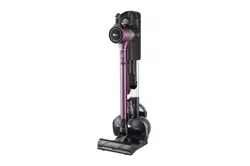
Product Overview.............................................................................................12
Installing the Charging Station ......................................................................16
Storing the Accessories ...................................................................................18
OPERATION
Getting Started .................................................................................................20
Charging the Battery .......................................................................................22
Using the Mop Nozzle .....................................................................................23
Using the Nozzles and Tools...........................................................................26
SMART FUNCTIONS
Using LG ThinQ Application............................................................................29
Smart Diagnosis Function...............................................................................31
MAINTENANCE
Cleaning the Appliance ...................................................................................32
Cleaning the Nozzles .......................................................................................35
TROUBLESHOOTING
Before Calling for Service................................................................................39
global_main.book.book Page 2 Monday, July 13, 2020 4:53 PM
3
SAFETY INSTRUCTION
EN
SAFETY INSTRUCTION
READ ALL INSTRUCTIONS BEFORE USE
The following safety guidelines are intended to prevent unforeseen
risks or damage from unsafe or incorrect operation of the appliance.
The guidelines are separated into ‘
WARNING
’ and ‘
CAUTION
’ as
described below.
Safety Messages
WARNING
WARNING
• To reduce the risk of explosion, fire, death, electric shock, injury or
scalding to persons when using this product, follow basic
precautions, including the following:
Technical Safety
• This appliance is not intended for use by persons (including children)
with reduced physical, sensory or mental capabilities, or lack of
experience and knowledge, unless they have been given supervision
or instruction concerning use of the appliance by a person
This symbol is displayed to indicate matters and
operations that can cause risk. Read the part with this
symbol carefully and follow the instructions in order to
avoid risk.
WARNING
This indicates that the failure to follow the instructions can
cause serious injury or death.
CAUTION
This indicates that the failure to follow the instructions can
cause the minor injury or damage to the product.
global_main.book.book Page 3 Monday, July 13, 2020 4:53 PM
4
SAFETY INSTRUCTION
EN
responsible for their safety. Children should be supervised to ensure
that they do not play with the appliance.
• Do not allow the appliance to be used as a toy. Close attention is
necessary when used by or near children.
• Do not allow children to play with or hang on the appliance.
• Do not use the appliance with damaged power cord or plug. The cord
must be replaced. If the appliance is not working as it should, has
been dropped, damaged, left outdoors, or dropped into water, return
it to an LG Electronics service centre.
• Do not pull or carry by cord, use cord as a handle, close a door on
cord, or pull cord around sharp edges or corners. Do not run
appliance over cord. Keep cord away from heated surfaces.
• Do not unplug by pulling on cord. To unplug, grasp the plug, not the
cord.
• Place the cords from other appliances out of the area to be cleaned.
Battery
• Never use the battery, adapter, and the charging station from other
appliances with this appliance. Use only the battery and the charging
station provided by LG Electronics.
• Never use the battery, adapter, and the charging station from this
appliance with other appliances.
• Do not disassemble, remove or short-circuit the battery.
• Have specifically designated battery packs replaced when it is no
longer able to hold a charge.
• Refer to the
Charging the Battery
section instructions for the
method of replacing the battery.
• When disposing of this appliance, follow regulations for disposal of
rechargeable lithium-ion batteries.
• Follow all local ordinances and regulations when handling or
disposing of the battery.
global_main.book.book Page 4 Monday, July 13, 2020 4:53 PM
5
SAFETY INSTRUCTION
EN
• Prevent unintentional starting. Ensure the switch is in the off position
before connecting to the battery pack, picking up or carrying the
appliance.
• Disconnect the battery pack from the appliance before making any
adjustments, changing accessories, cleaning, serviing, or storing
appliance.
• When battery pack is not in use, keep it away from other metal
objects, like paper clips, coins, keys, nails, screws or other small metal
objects, that can make a connection from one terminal to another.
• Under abusive conditions, liquid may be ejected from the battery. If
this happens, avoid contact. If contact accidentally occurs, flush with
water. If liquid contacts eyes, additionally seek medical help.
Battery Specifications
• One or two batteries are provided, the number of batteries varies
depending on the model purchased.
-
Model Name
: EAC63382204
-
Type
: Rechargeable Lithium-ion Battery
-
Rated Capacity
: 25.2 V
%
, 2400 mAh
Installation
• To avoid an electrical shock or fire, do not install, charge or store the
appliance where it may be exposed to water, rainfall or high
humidity.
• Install, charge and store the appliance in a well-ventilated place.
• Avoid operating the appliance in areas where there is a risk of
leakage of flammable gas, industrial oil or metallic dust.
• Do not store or install the appliance, power cord or plug near heating
devices or open flames.
• Install the charging station on a firm, level surface.
• To prevent tipping, floor standing mode installations should be
anchored to the wall using the provided stand anchoring screw,
anchoring block and double-sided tape.
global_main.book.book Page 5 Monday, July 13, 2020 4:53 PM
6
SAFETY INSTRUCTION
EN
• In wall-mounted mode installations, the charging station should be
secured tightly to the wall using the provided wall anchoring screws.
• Use the anchoring screws only when attaching to concrete or similar
solid surfaces.
• Never drill into a wall without first checking that the area behind it is
free from power conduits, plumbing, vents, or cables.
• Do not use or store the appliance at temperatures below 5 ℃ or
above 38 ℃.
• Do not store or install the appliance where it is exposed to
temperatures below freezing or exposed to outdoor weather
conditions.
• When installing or moving the appliance, be careful not to pinch,
crush, or damage the power cord or plug.
Operation
• Read all instructions before using the appliance, and save these
instructions.
• Use only as described in this manual. Use only manufacturer’s
recommended attachment.
• This appliance is designed for normal indoor domestic use only. It is
not to be used for any non-residential, commercial, or industrial
application.
• This product should only be used with a 100 V - 240 V~ 50/60 Hz, 0.8
amp outlet. Make sure to check the power specifications of the place
where you intend to use the appliance.
• Do not handle the power cord, plug, or appliance controls with wet
hands.
• Wipe any moisture or dirt off the cord or plug with a dry cloth.
• Never attempt to operate this appliance if it is damaged,
malfunctioning, partially disassembled, or has missing or broken
parts, including a damaged cord or plug. Take it to an authorized LG
Electronics service centre or dealer for assistance.
• Do not apply excessive force to the power cord to bend it, or place it
under a heavy object as this will damage it.
global_main.book.book Page 6 Monday, July 13, 2020 4:53 PM
7
SAFETY INSTRUCTION
EN
• Do not use multiple-outlet adapters with this appliance. Make sure to
use a power socket with a capacity of 10 A.
• Do not plug the appliance into a damaged or loose outlet.
• Make sure to unplug the power cord when the appliance is not to be
used for an extended period of time.
• Do not damage, alter, excessively bend, twist, pull, pinch or heat the
power cord.
• Before using the appliance, remove any wire or string on the floor.
• Avoid touching the prongs of the power plug with your finger(s) when
unplugging the power cord.
• Do not cover the power cord with a rug or carpeting.
• Push the power plug firmly into the wall outlet so that it is not loose.
• If the product has been submerged, contact an LG Electronics service
centre or dealer for instructions before resuming use.
• If the product makes a strange noise or emits an odour or smoke,
discontinue use and contact an LG Electronics customer information
centre.
• Only qualified technicians or service personnel from LG Electronics
may disassemble, repair or modify the appliance.
• Never insert a sharp metallic object such as a pin, nail or knife in a
hole or gap in the appliance or the charging station.
• Do not vacuum liquids with this appliance. Make sure that no water,
beverage or detergent gets inside the appliance or the charging
station.
• Do not allow the appliance to sweep up blades, thumb tacks,
sawdust, sharp objects, or hot or cold ashes.
• Do not allow children to use the appliance.
• Do not let children or pets get close to the appliance when using,
charging or storing.
• Do not insert the nozzle or tools in your mouth.
• Keep clothing and hair, fingers, or other parts of the body away from
openings and moving parts.
• Do not operate the appliance with the suction inlet or outlet blocked.
global_main.book.book Page 7 Monday, July 13, 2020 4:53 PM
8
SAFETY INSTRUCTION
EN
• Do not use the appliance without the dust bin and filters in place.
• Do not use in an enclosed space where vapors are present from paint
thinner, mothproofing substances, flammable dust or other
explosive or toxic materials.
• Do not touch the charging terminals on the appliance or the charging
station, or insert an electrified object inside the appliance or the
station.
• Always store the appliance on the floor standing or wall-mounted
charging station when it is not in use.
• Do not lean the appliance on walls, chairs or tables.
• If the earth leakage breaker is tripped when the product is put on the
charging station, immediately remove the appliance from the
charging station. Contact an LG Electronics customer service centre.
• Use extra care when cleaning on stairs.
• Do not use or store a heating device or flammable substance(ether,
benzene, alcohol, chemicals, combustible sprays, insecticide, air
freshener or cosmetics) in close proximity to the appliance.
• Do not attempt to clean up a liquid substance (water, beverage),
odourous substances (candy, chocolate, pet excrement), metallic
objects (blades, pins), flammable substances, burning/
smoking(cigarettes, matches, or hot ashes), surfactants, or glass
shards with this appliance.
• In the event of a gas leak(natural gas, propane gas, etc.), do not
operate this or any other appliance. Open a window or door to
ventilate the area immediately.
• Do not hold the charging station upside down with the battery in the
charging station.
• Do not expose the appliance, and the battery in particular, to heat, a
heating device or direct sunlight.
• Do not keep the appliance or its battery inside a vehicle which is
exposed to direct sunlight.
• Never allow any water, beverage or detergent to get inside the
battery.
• Do not apply physical impacts to the battery.
global_main.book.book Page 8 Monday, July 13, 2020 4:53 PM
9
SAFETY INSTRUCTION
EN
Maintenance
• Make sure to unplug the power cord when cleaning or maintaining
the charging station.
• Do not wash the inlet port or the dust bin with water or detergent.
• Do not use detergents, polishes or air fresheners to clean the dust
bin.
• Do not apply or spray a flammable substance (gasoline or thinner) or
surfactants (detergent or bath soap) on the appliance.
• Wash hands after handling nozzles. The nozzles contain carbon fiber,
and contact may cause minor skin irritation.
Disposal
• Keep packing materials out of the reach of children. Packaging
materials can pose a suffocation risk for children.
• Destroy the carton, plastic bag, and other packing materials after the
appliance is unpacked. Children might use them for play. Cartons
covered with rugs, bedspreads, or plastic sheets can become airtight
chambers.
• Dispose of this appliance according to local, state, and regional laws
and regulations.
• Contact your local city council or the related government authority
before disposing of this appliance.
Mop Nozzle
• Do not vacuum sharp objects (glass pieces, wire, blades, pins, etc.)
with the mop nozzle attached. When cleaning the mop pads after
mopping, you could be injured by a sharp object embedded in the
mop.
global_main.book.book Page 9 Monday, July 13, 2020 4:53 PM
10
SAFETY INSTRUCTION
EN
CAUTION
CAUTION
• To reduce the risk of injury to persons, malfunction, or damage to the
product or property when using the appliance, follow basic safety
precautions, including the following:
Operation
• This appliance has a built-in safety device to prevent damage from
overheating. If the appliance becomes overheated after extended
use, it may automatically turn off. If this occurs, leave the appliance
in a cool, well-ventilated area for about an hour before turning on the
power again.
• Do not subject the product to shocks or drop it.
• Do not install wet or damp filters.
• Always use a soft cloth to clean the appliance. Do not clean the
product with a volatile or organic solvent(thinner or acetone).
• Do not clean the same spot repeatedly for an extended period of
time. Doing so may damage the carpet or flooring surface.
• Keep fingers away from pinch points when assembling the appliance
or the charging station.
• Do not use the double-sided tape to anchor the charging station on
wallpaper. Use the provided screws to anchor the charging station.
The weight of the charging station and the appliance could damage
the paper.
• Do not apply force or any impact to the Cyclonic Mesh Filter.
• Do not remove the battery during operation.
Mop Nozzle
• Do not use the mop nozzle for any purpose(for example, polishing a
car, cleaning windows) other than domestic floor cleaning.
• Do not use the mop nozzle to vacuum up liquids(water, beverage).
• When using the mop nozzle, always attach the mop pads.
global_main.book.book Page 10 Monday, July 13, 2020 4:53 PM
11
SAFETY INSTRUCTION
EN
• Do not clean a coated, rough or delicate floating floor and carpets
with the mop nozzle.
• Do not use the mop nozzle to clean the same spot repeatedly for an
extended period of time. The water injection at the mop nozzle may
cause water to get into the dust inlet and damage the appliance.
• Do not step on the mop nozzle.
• Wet floors can pose a slip hazard. Allow floors to dry completely
before allowing anyone to walk on them.
• Do not store the appliance by attaching the water tank filled with
water to the mop nozzle.
global_main.book.book Page 11 Monday, July 13, 2020 4:53 PM

12
INSTALLATION
EN
INSTALLATION
Product Overview
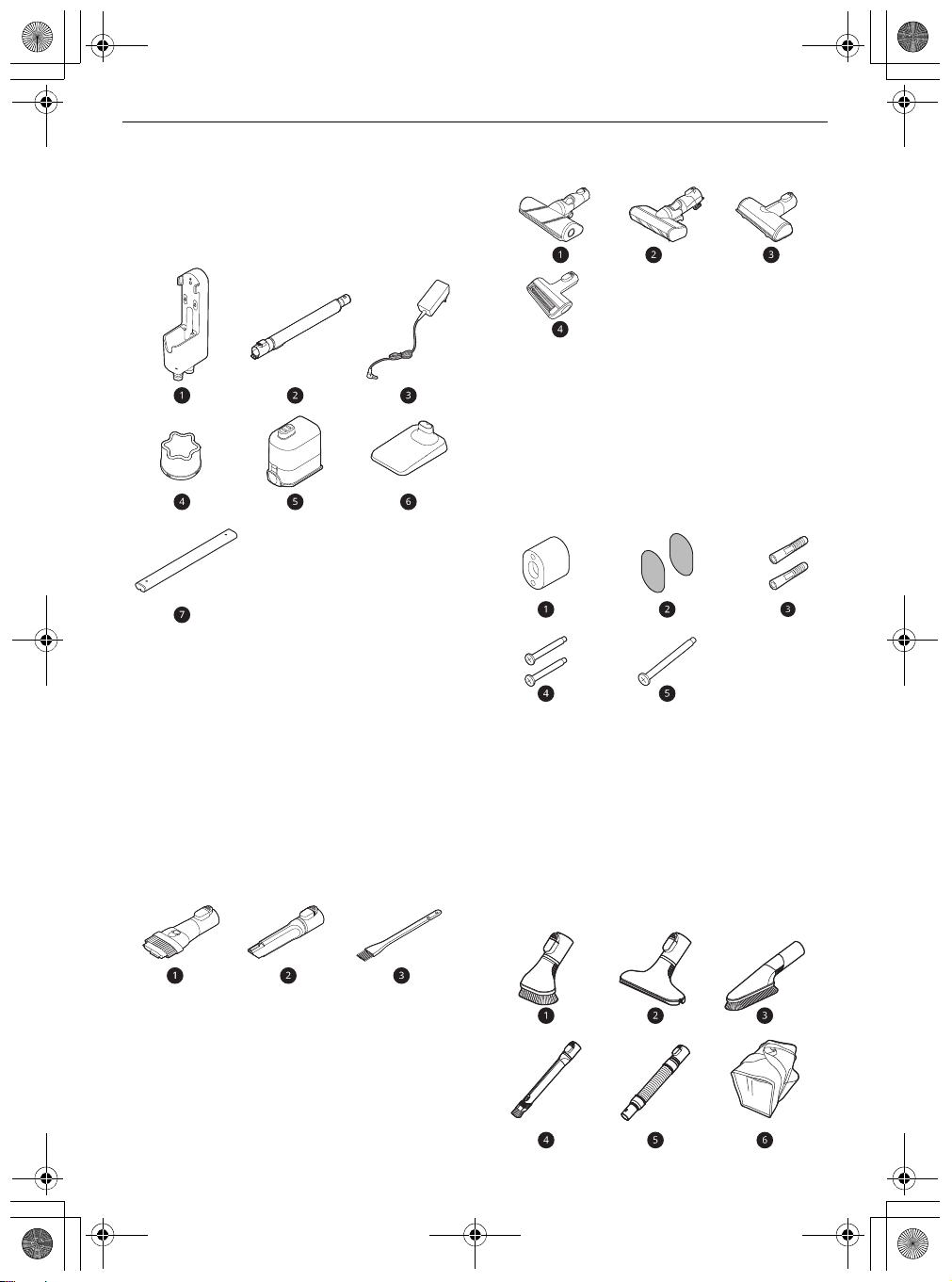
The images in this guide may be different from the actual components and accessories, which are subject
to change by the manufacturer without prior notice for product improvement purposes.
Front View
*1 This feature is only available on some models.
a
Charging Station
b
Auxiliary Charging Station
c
Battery (Dual Battery
*1
)
d
Product Body
e
Extension Pipe
f
Nozzle
g
Floor Stand Dock
h
Floor Stand Pipe
i
Adapter
j
Detachable Nozzle Storage
k
Tool Holders
l
Exhaust Filter
m
Pre-filter
n
Kompressor Lever
o
Cyclonic Mesh Filter
global_main.book.book Page 12 Monday, July 13, 2020 4:53 PM
13
INSTALLATION
EN
Accessories
*1 This accessory is only available on some models.
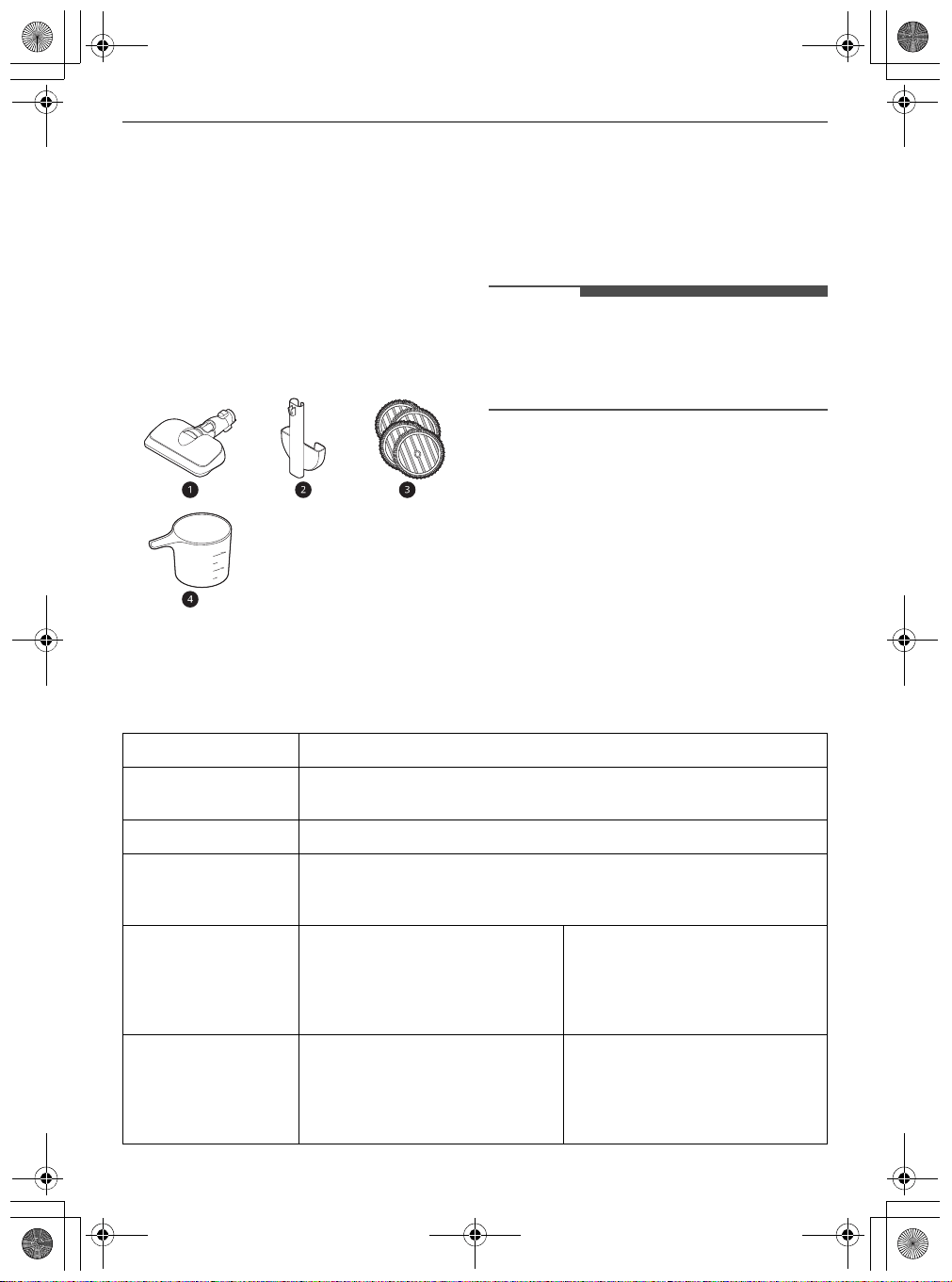
Included Accessories
a
Charging Station
b
Extension Pipe
c
Adapter
d
Pre-filter
e
Battery (Dual Battery
*1
)
f
Floor Stand Dock
*1
g
Floor Stand Pipe
*1
Basic Accessories
a
Combination Tool
b
Crevice Tool
c
Cleaning Brush
Nozzles
a
Multi-Surface Power Drive Nozzle
*1
b
Power Drive Floor Nozzle
*1
c
Power Punch Nozzle
*1
d
Power Drive Mini Nozzle
*1
Installation Kit
a
Wall Anchoring Block
*1
b
Double-Sided Tape
*1
c
Drywall Anchor
*1
d
Wall Anchoring Screw
*1
e
Stand Anchoring Screw
*1
Tools and Accessory Bag
global_main.book.book Page 13 Monday, July 13, 2020 4:53 PM
14
INSTALLATION
EN
a
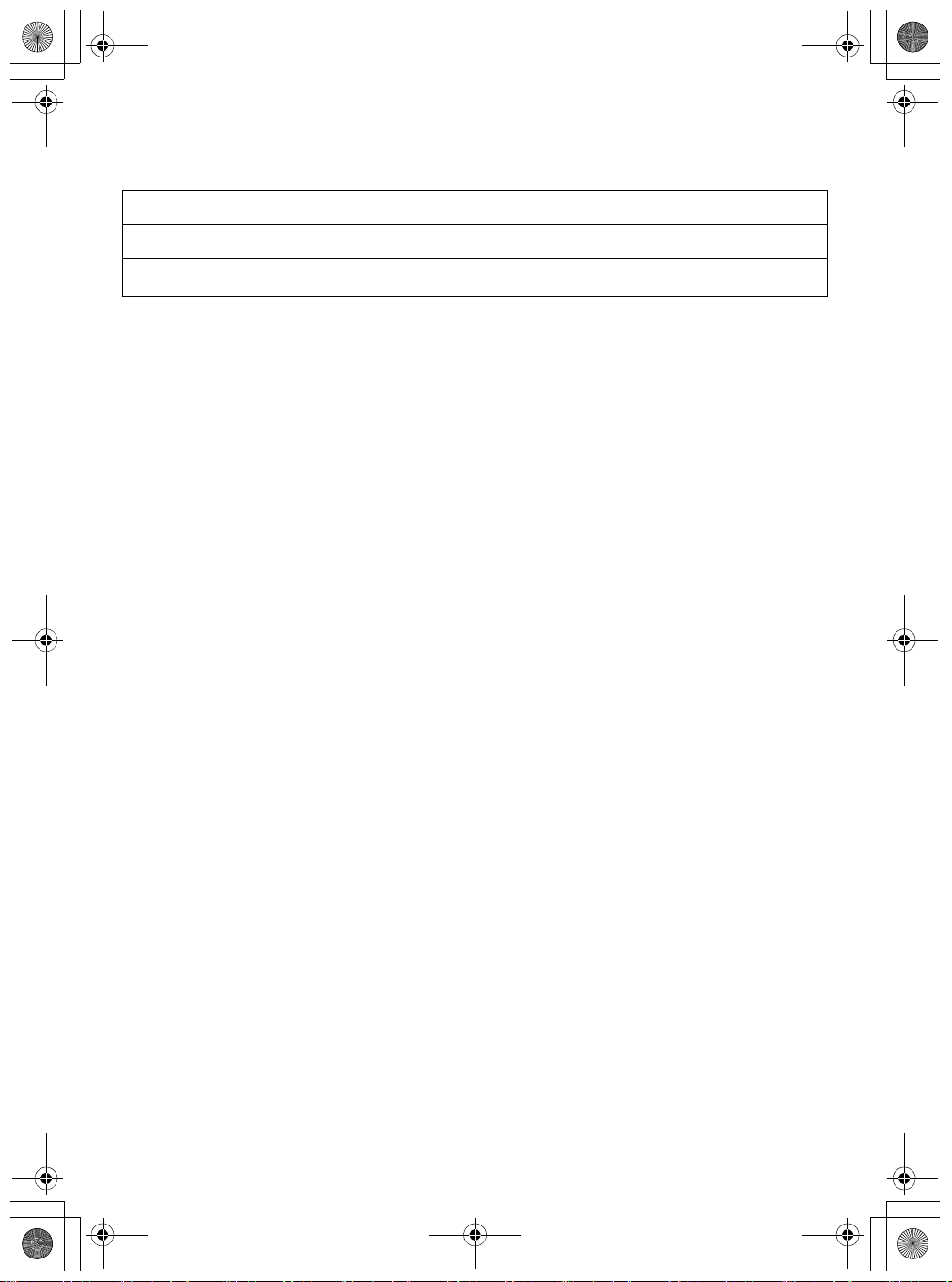
Hard Dirt Tool
*1
b
Mattress Tool
*1
c
Multi-angle Tool
*1
d
Flexible Crevice Tool
*1
e
Flexible Hose Extension
*1
f
Accessory Bag
*1
Mop Kit
a
Mop Nozzle
*1
b
Detachable Nozzle and Mop Pads Storage
*1
c
Mop Pads for General Cleaning
*1
d
Measuring Cup
*1
NOTE
• The mop pads, batteries, exhaust filter and the
pre-filter will eventually need to be replaced.
Contact an LG Electronics customer service
centre.
Specifications
Appliance
Model
A9**********
Dimensions
(Width X
Depth X Height)
260 mm X 270 mm x 1120 mm
Weight
Approximately 2.6 kg
Power Consumption
370 W in
Turbo
Mode (Maximum 590 W)
120 W in
Power
Mode
68 W in
Normal
Mode
Battery Run Time
(Using two battery)
Using with the Power Drive Nozzle
Up to 12 minutes in
Turbo
Mode
Up to 40 minutes in
Power
Mode
Up to 80 minutes in
Normal
Mode
Using Nozzles other than the
Power Drive Nozzle
Up to 14 minutes in
Turbo
Mode
Up to 60 minutes in
Power
Mode
Up to 120 minutes in
Normal
Mode
Battery Run Time
(Using one battery)
Using with the Power Drive Nozzle
Up to 6 minutes in
Turbo
Mode
Up to 20 minutes in
Power
Mode
Up to 40 minutes in
Normal
Mode
Using Nozzles other than the
Power Drive Nozzle
Up to 7 minutes in
Turbo
Mode
Up to 30 minutes in
Power
Mode
Up to 60 minutes in
Normal
Mode
global_main.book.book Page 14 Monday, July 13, 2020 4:53 PM
15
INSTALLATION
EN
Charger Adaptor
• Dimensions are given for the assembled product body, extension pipe and nozzle.
• Suction power is an average of suction power with IEC 62885-2, 5.8 standard tested by an independent
test lab. Individually measured data would be different from a lab test result.
• Battery run time is the result of using a fully charged battery according to the LG Electronics test
standard. Results may be different depending on actual use environment and period of use.
• The Power Drive Nozzle contains the direct drive motor that rotates the nozzle cleaning head directly.
Model
ADC-30FSA-30 29430EPSA
Input
100 V - 240 V~, 50/60 Hz, 0.8 A
Output
DC 29.4 V
%
, 1.0 A
global_main.book.book Page 15 Monday, July 13, 2020 4:53 PM
16
INSTALLATION
EN
Installing the Charging
Station
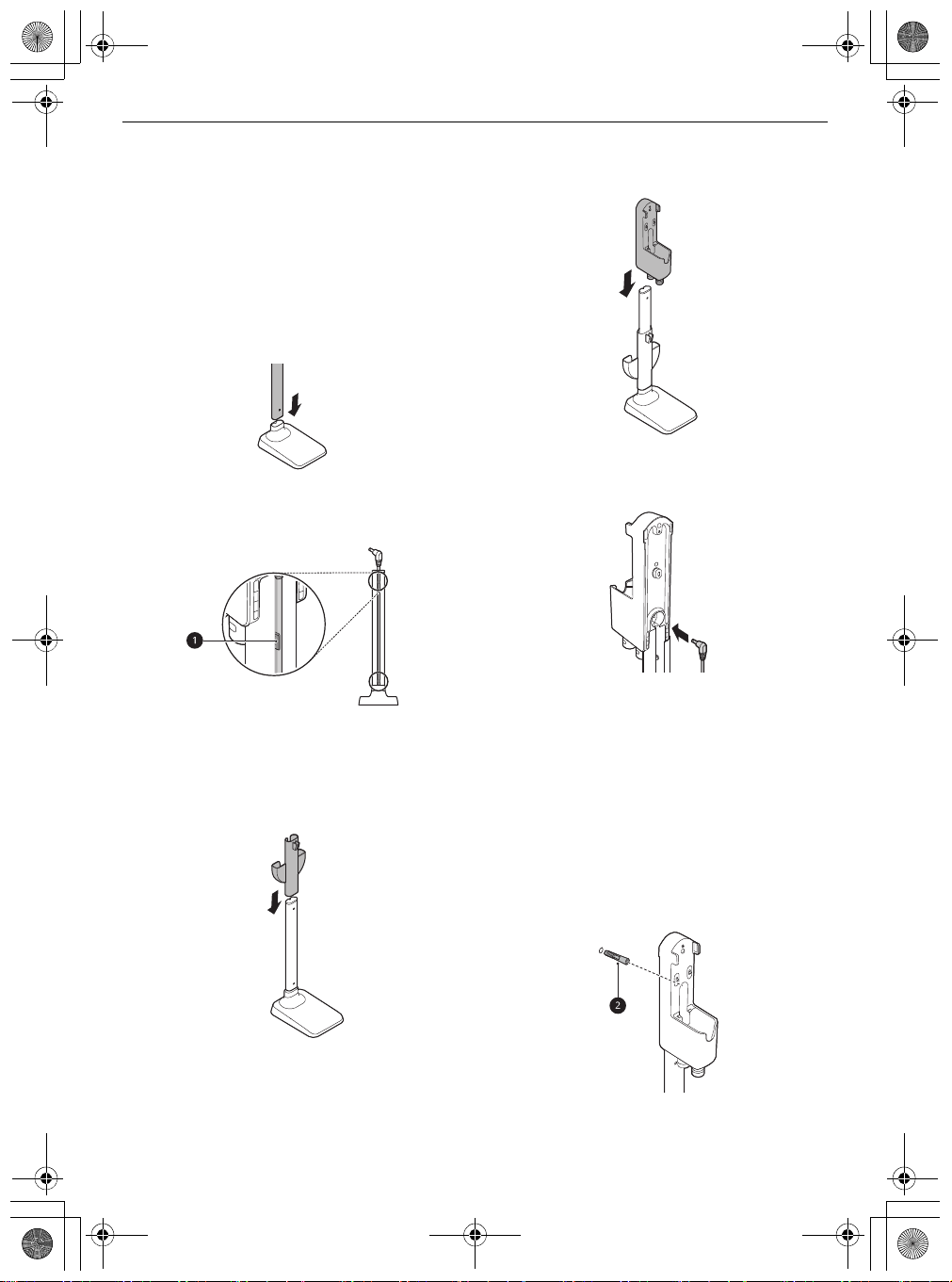
Self-Standing Installation
Follow the steps below to install the charging
station on a hard and level floor.
1
Place the floor stand dock on a hard and level
floor and assemble the floor stand pipe.
2
Clip the power cord tidily into the cord keeper
a
on the back of the floor stand pipe.
3
Slide the detachable nozzle storage onto the
floor stand pipe.
• Make sure not to pinch or tangle the power
cord behind the mop pads storage.
4
Assemble the charging station onto the top of
the floor stand pipe.
5
Connect the power adapter to the port on the
back of the charging station.
6
Drill a hole in the wall and insert the drywall
anchor
b
if needed.
• Before drilling, make sure that there are no
pipes or electrical wires inside the wall at the
desired location.
• For drywall anchor: use 1/4″ (6.5 mm) drill bit
• For concrete or wall stud: use 1/8″ (3 mm)
drill bit
• If screwing into drywall, use the drywall
anchor.
7
Align the wall anchoring block
c
of the
chanrging station, and fix the charging station
global_main.book.book Page 16 Monday, July 13, 2020 4:53 PM
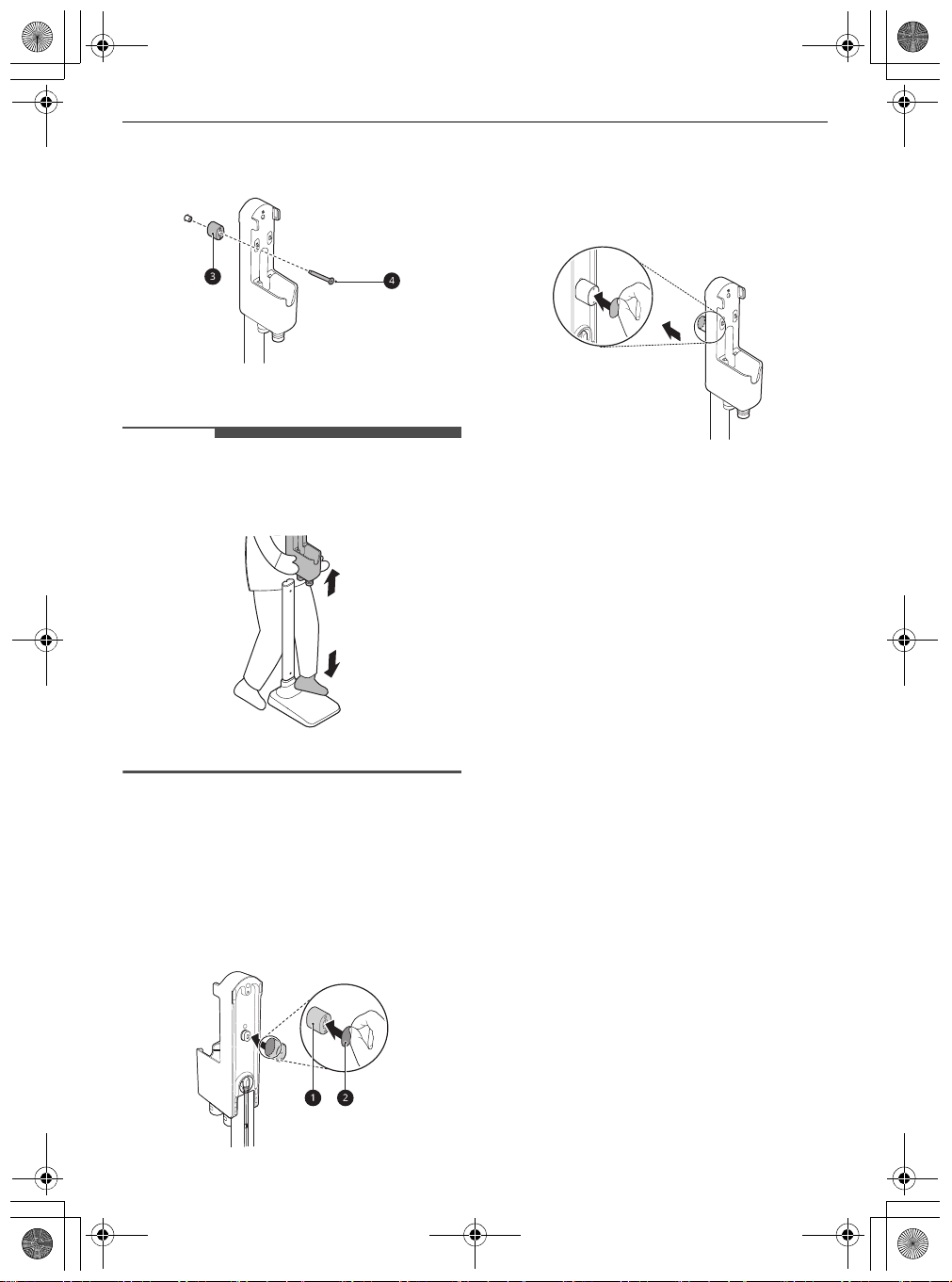
17
INSTALLATION
EN
to the wall by tightening the anchoring screw
d
all the way.
8
Plug the power cord into the power outlet.
NOTE
• The charging station can be removed as needed.
To remove it, hold the floor stand dock steady
and pull up on the charging station.
Using Double-Sided Tape to Secure
the Appliance
1
Use the double-sided tape
a
to attach the wall
anchoring block
b
to the charging station.
• Remove the centre section of double-sided
tape before attaching it to the wall
anchoring block.
2
Attach the second piece of double-sided tape
to the other side of the wall anchoring block to
secure it to the wall.
• Do not use double-sided tape on wallpaper.
Wall-Mounted Installation
For wall-mounted installations, the charging
station must be attached securely to the wall using
the provided(short) wall anchoring screws.
• The detachable nozzle storage cannot be
attached to the charging station in a wall-
mounted installation.
1
Connect the power adapter to the port on the
back of the charging station.
2
Drill 2 holes and insert the drywall anchors(if
needed) at least 1 m from the floor and near
enough to easily reach a power outlet.
• Before drilling, make sure that there are no
pipes or electrical wires inside the wall at the
desired location.
• For drywall anchor: use 6.5 mm drill bit
• For concrete or wall stud: use 3 mm drill bit
global_main.book.book Page 17 Monday, July 13, 2020 4:53 PM
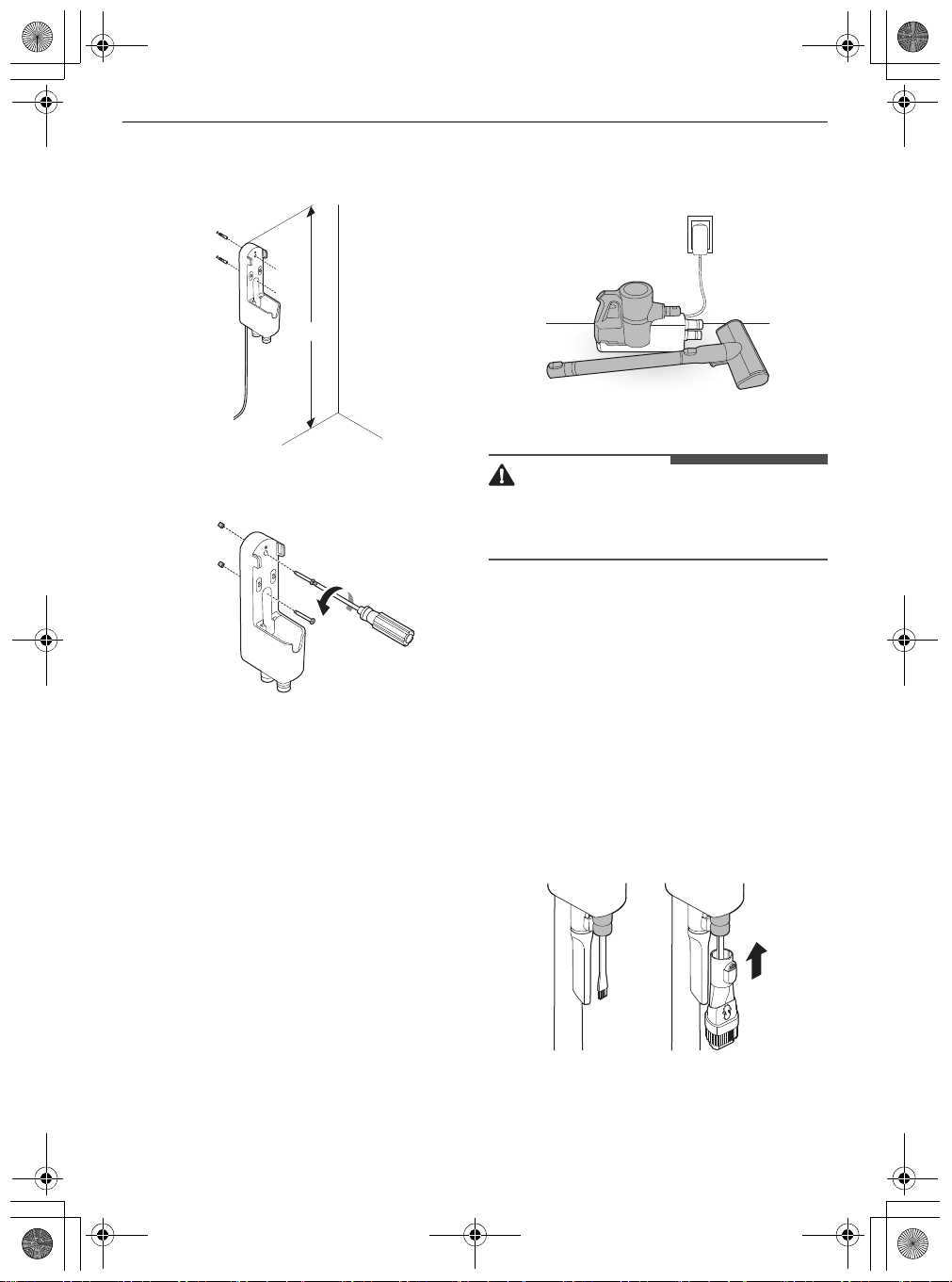
18
INSTALLATION
EN
• If screwing into drywall, use the drywall
anchors.
3
Attach the charging station to the wall with the
wall anchoring screws.
4
Plug the power cord into the power outlet.
Compact Installation
For safety and convenience, install the charging
station using the self-standing or wall-mounted
installation methods. If you choose not to install
the charging station, place it on a level floor for
charging or storage.
1
Connect the power adapter to the port on the
back of the charging station.
2
Place the charging station on a hard and level
floor.
3
Separate the extension pipe and nozzle from
the product body before charging or storing
the appliance.
4
Plug the power cord into the power outlet.
CAUTION
• Leaving the appliance on a level floor for a long
time with the extension pipe and nozzle attached
may damage the appliance.
Storing the Accessories
Storing the Tools
Store the frequently used tools such as the
combination tool, crevice tool and cleaning brush
at the bottom of the charging station.
• Slide the cleaning brush up into the tool holder.
• Slide the combination tool over the cleaning
brush and onto the tool holder.
• To remove a tool, press the release button at the
front of the tool.
1m
global_main.book.book Page 18 Monday, July 13, 2020 4:53 PM
19
INSTALLATION
EN
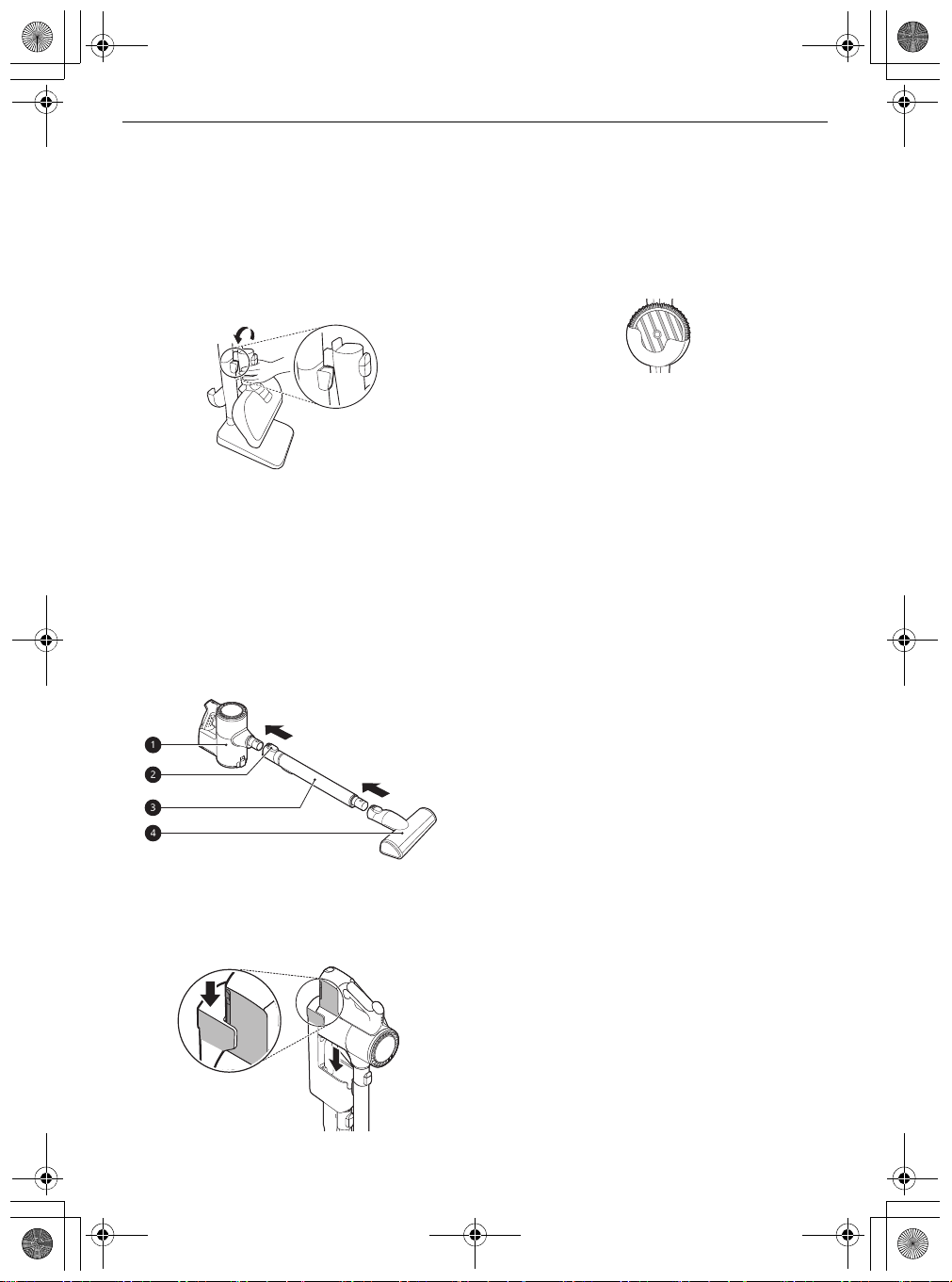
Storing the Nozzles
When a nozzle is not in use, store it in the
convenient detachable nozzle storage so you can
easily find it.
• The nozzle storage cradle is compatible with the
Power Drive Floor Nozzle
or the
Power Punch
Nozzle
.
Assembling the Appliance
Follow these steps to safely assemble the
appliance.
1
Firmly attach the extension pipe
c
, nozzle
d
,
or tool onto the product body
a
.
• To detach the extension pipe, press the
extension pipe release button
b
.
2
Put the product body on the charging station.
• See
Charging the Battery
for instructions
on installing and charging the battery.
Storing the Mop Pads
Up to 2 mop pads can be stored in the detachable
mop pads storage.
• Store the mop pads completely in a dry state. It
can result in an unpleasant odour.
global_main.book.book Page 19 Monday, July 13, 2020 4:53 PM
20
OPERATION
EN
OPERATION
Getting Started
Before Cleaning the Appliance
• Support the bottom of the appliance when
cleaning an elevated surface.
• To avoid scratches on polished floors, keep the
brushes of the nozzles and tools free from grit,
sand, or abrasive objects.
• Make sure that the exhaust filter or pre-filter is
properly assembled before using the appliance.
• Close the dust bin cover properly before using
the appliance. If the dust bin cover is left open,
the suction strength may deteriorate and affect
the cleaning results.
• Store the appliance in the charging station or
place it flat on the floor when not in use. Leaning
the appliance against a wall or chair can result in
product damage or personal injury if the
appliance falls.
• Environmental conditions such as temperature
and humidity may cause static electricity to
accumulate on the appliance. Please contact LG
Electronics customer information centre if the
problem persists.
• Make sure to remove any foreign object such as
a sock or stocking before using the appliance.
Any foreign object on the inlet port or extension
pipe will prevent the appliance from functioning
properly.
• Please use the product at normal room
temperatures as the battery runtime may
deteriorate severely if used at temperatures
lower than 5 ℃ or higher than 38 ℃ for an
extended period of time.
• The battery runtime is dependent on the surface
type and the suction power.
• Follow manufacturer’s recommendations when
cleaning flooring, carpets, and rugs.
• Refer to the
Specifications
section for battery
runtime details.
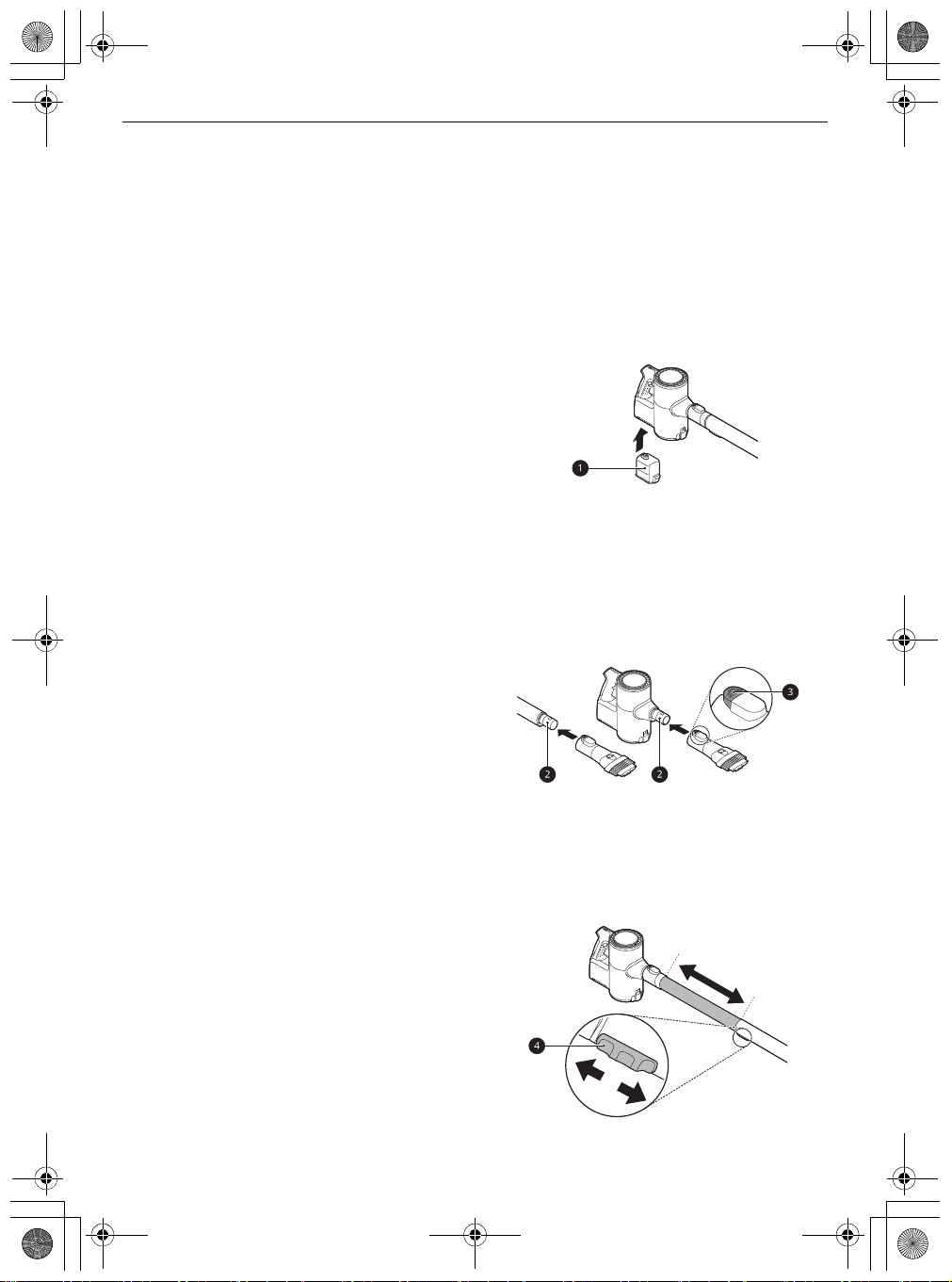
Assembling Attachments
Nozzles and tools can be attached to either the
product body or the end of the extension pipe.
1
Insert the fully charged battery
a
into the
cavity at the bottom of the handle on the
product body.
2
Attach the nozzles, tools, or extension pipe by
sliding them onto the inlet
b
on the body until
they click into place. The nozzles and tools can
also be attached to the end of the extension
pipe
b
.
• Detach the accessories by pressing the
release button
c
.
3
Adjust the extension pipe by pressing the
length adjustment button
d
on the back of the
pipe and sliding until it clicks into place at the
desired length.
• The extension pipe extends in four steps.
global_main.book.book Page 20 Monday, July 13, 2020 4:53 PM
21
OPERATION
EN
4
Press the
Power
button to activate the
Normal
mode.
• To turn off the appliance, press the
Power
button again.
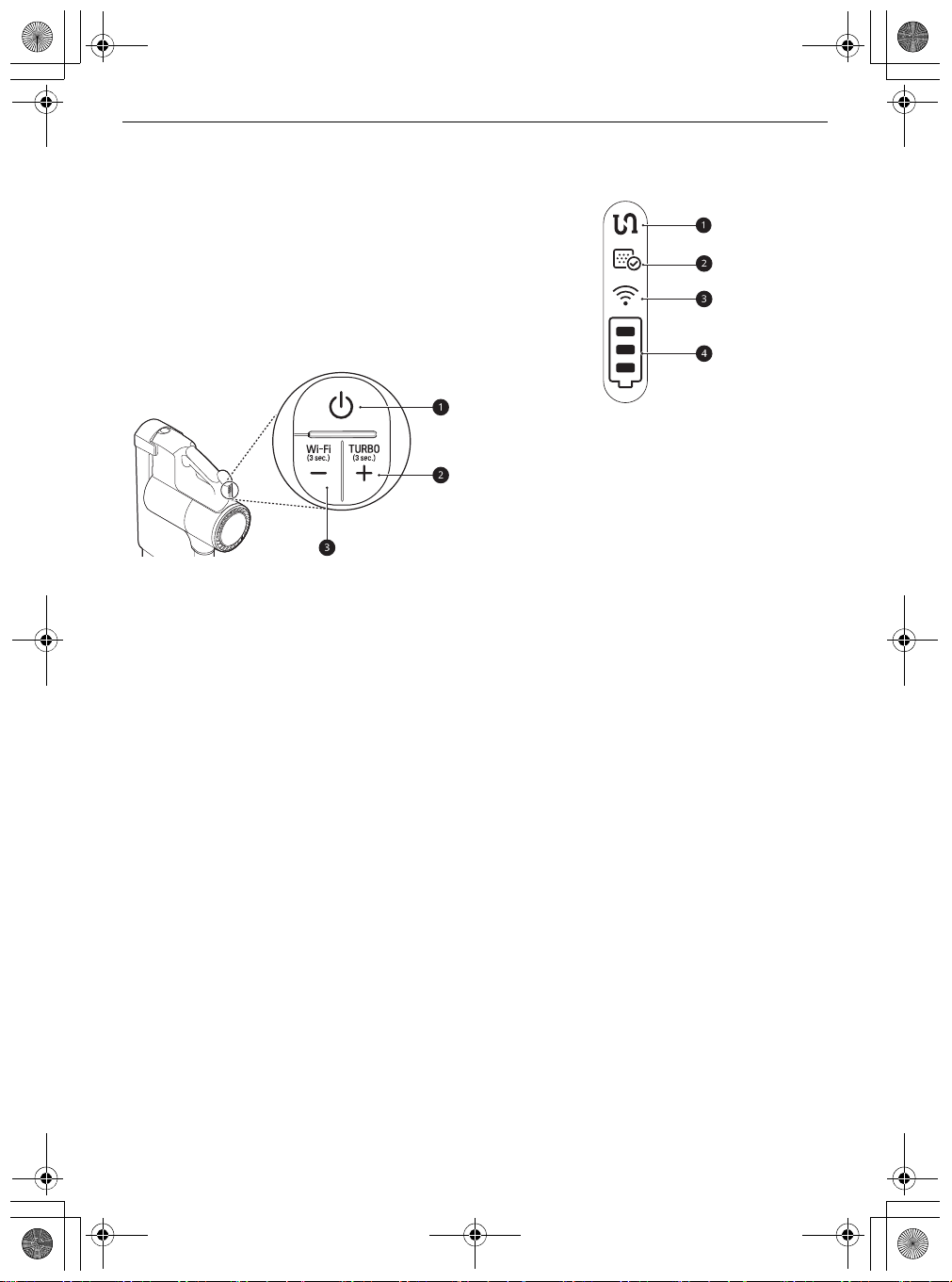
Adjusting the Suction Power
Adjust the suction power using the suction power
adjustment button on the handle.
a
Power
Button
• Press the
Power
button to turn the appliance
on or off.
• Press the
Power
button to activate
Normal
mode.
b
Suction Power Up (+) Button / Turbo Mode
• Press the + button to increase the suction
power. (
Normal
~
Power
~
Turbo
)
• Press and hold the + button for more than 3
seconds to activate
Turbo
mode from
Power
mode.
c
Suction Power Down (-) Button / Wi-Fi Mode
• Press the - button to decrease the suction
power. (
Turbo
~
Power
~
Normal
)
• Press and hold the - button for 3 seconds to
activate Wi-Fi and connect the appliance in
the
LG ThinQ
application.
Display
The handle of the appliance displays indicators for
clogged objects, filter cleaning alerts, appliance
connection status, and the remaining battery
charge.
a
Clogged Objects Indicator
• This indicator lights up when the interior of
the product body, extension pipe, inlets,
nozzle, exhaust filter, pre-filter, or cyclonic
mesh filter is clogged with foreign objects.
• If clogging persists, the motor will cycle and
the appliance will shut off. Remove the
foreign objects and clean the exhaust filter,
pre-filter and cyclonic mesh filter following
the steps in the Removing Foreign Objects
section.
b
Filter Cleaning Cycle Alarm Indicator
• This indicator lights up when the appliance is
used for a certain period of time. Clean the
exhaust filter, pre-filter and cyclonic mesh
filter if necessary.
c
Wi-Fi Indicator
• This indicator blinks when the appliance is
connecting to the
LG ThinQ
application or
home Wi-Fi network, and the indicator lights
up when the connection is complete.
d
Battery Level Indicator
• The remaining battery level is displayed in 3
stages according to the remaining battery
power.
• The battery level indicator blinks when the
battery needs to be charged.
• As the product is charging, bars light up on
the battery level indicator to indicate the level
of charge.
• Once the battery is fully recharged, 3 bars will
remain lighted on the battery level indicator.
global_main.book.book Page 21 Monday, July 13, 2020 4:53 PM
22
OPERATION
EN
Charging the Battery
Before Charging the Battery
• Make sure that the adapter is connected to both
the charging station and the power outlet.
• Fully charging a single battery usually takes 3.5
hours. It will take twice as long to charge both
the main and auxiliary batteries.
• The battery will not be charged if the indoor
temperature is below 5 ℃. Only charge the
battery when indoor temperatures are between
5 ℃ and 38 ℃.
• The battery will eventually need to be replaced.
Due to the battery characteristics, runtime is
shortened after using the appliance repeatedly
for an extended period.
• The last bar on the battery indicator begins to
flash when the battery needs to be recharged.
Use the appliance with a fully charged battery.
• To maintain battery life on dual-battery models,
swap the positions of the two batteries
periodically, between the main body and the
auxiliary charging station.
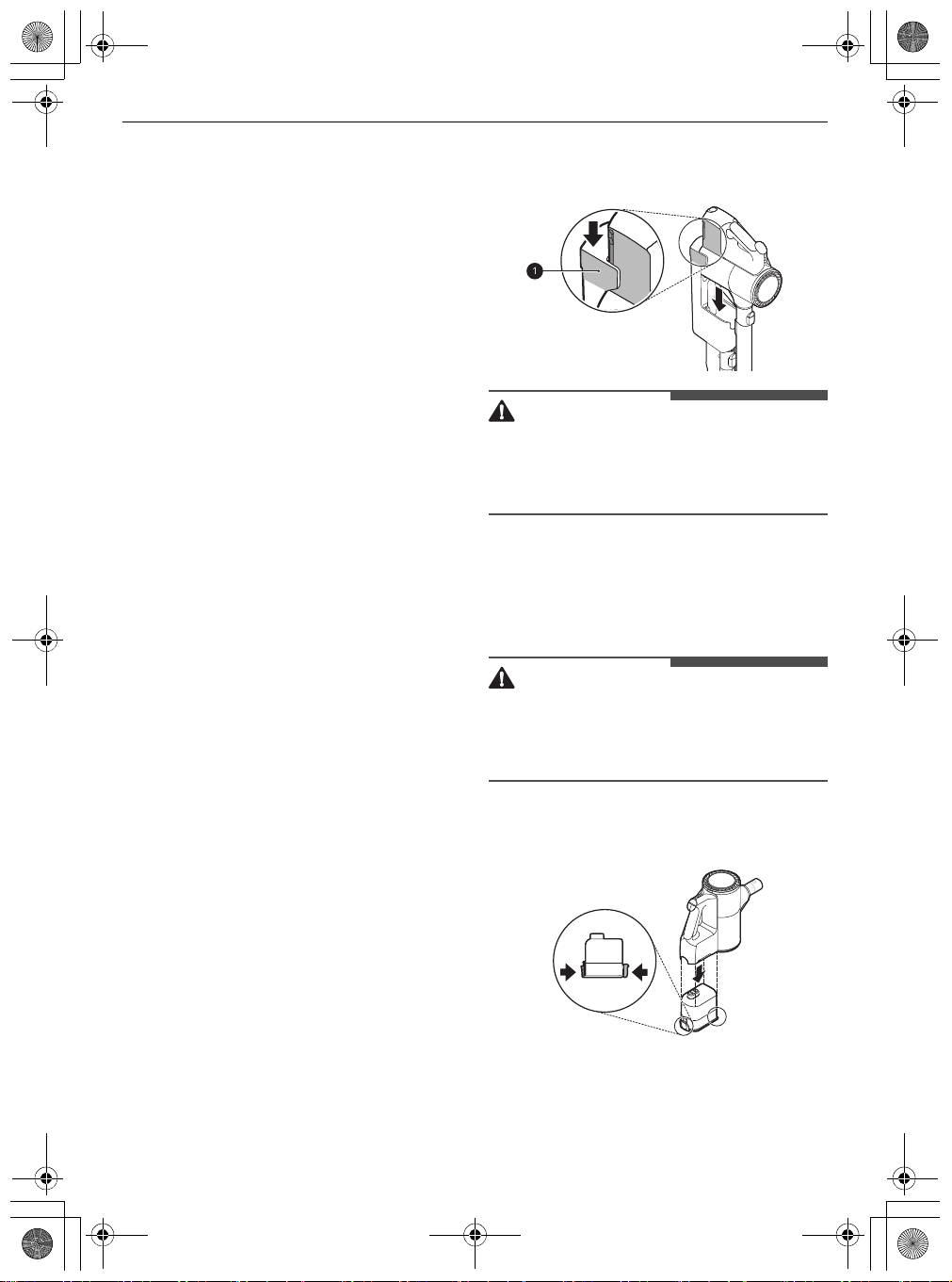
Charging the Product Body
Storing the appliance on the charging station
automatically recharges the battery.
1
Press the
Power
button to turn the appliance
off.
2
Put the product body onto the charging station
by aligning it to the hook
a
of the charging
station.
• The battery level indicator starts to blink and
begins charging the battery.
• If you don't hear a beep, reload the
appliance on the charging station.
WARNING
• Make sure to securely fit the product body onto
the charging station. If the appliance falls off the
charging station, it could cause injuries, property
damage or product damage.
Charging the Auxiliary Battery
An auxiliary battery can be stored and charged in
the base of the charging station.
CAUTION
• Keep fingers away from pinch points when
assembling or disassembling the battery from
the product body or the charging station to
avoid personal injury.
1
Remove the discharged battery from the
product body by pressing the battery release
button on either side of the battery and pulling.
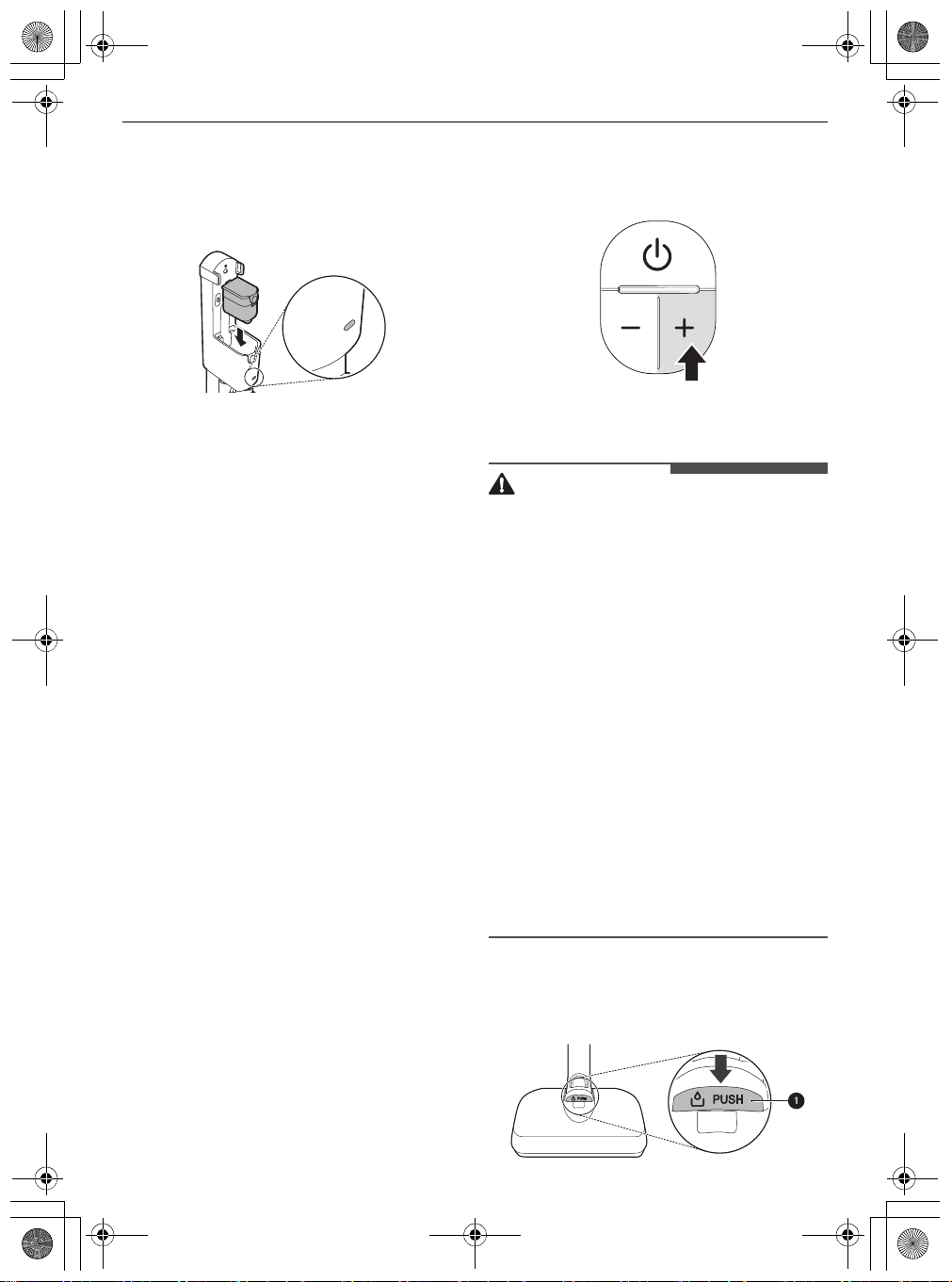
2
Insert the discharged battery into the auxiliary
charging station.
• The battery will only fit into the cavity if
aligned properly.
global_main.book.book Page 22 Monday, July 13, 2020 4:53 PM
23
OPERATION
EN
• The auxiliary charging indicator blinks while
recharging is in progress.
• The auxiliary charging indicator lights up
when charging is complete.
Using the Mop Nozzle
Before Using the Mop Nozzle
• The mop pads only rotate at one speed
regardless of what suction power setting the
product body is set to.
• To prevent product damage, the mop
attachment plate will automatically stop if there
are foreign objects stuck in the plate or if it is
subjected to a strong impact. Turn the appliance
off immediately and remove the foreign objects
or obstructions before resuming use.
• If you hear a noise while mopping, the mop pad
may have dropped off the mop attachment
plate. Turn off the product immediately and
reattach the mop to the attachment plate before
resuming use.
• Do not use a soiled mop pad to clean floors.
• Use only authorized LG Electronics mop pads.
• Empty the dust bin and clean the fine dust filter
and the pre-filter after using the mop nozzle.
Using the Wet Mop Pads
Press the
Power
button. You can use the only mop
mode and not turn on the dust suction function.
• Press the
~
button to turn on the dust suction
function.
• Press the
!
button once while pressing the
~
button once to turn off the dust suction function.
CAUTION
• Do not assemble or disassemble the nozzle while
the appliance is turned on. Doing so may result
in injury.
• Set the water adjustment button to the
STOP
position when not using the appliance for an
extended period of time. Failure to do so may
result in product failure.
• Do not let the appliance stand on the floor while
the wet mop pads are attached. Doing so may
result in damage or swelling to wood flooring.
• Do not use on PVC or PU mat for infants or
children. Friction can cause the motor to
overheat.
• If you use the mop nozzle for a long time with the
suction off, the motor may overheat
(recommended duration of use: 80 minutes).
When the moter overheats, the overheating
prevention function is activated and the
appliance is automatically turned off. Use the
appliance after cooling the heat for about one
hour in a cool, well-ventilated place.
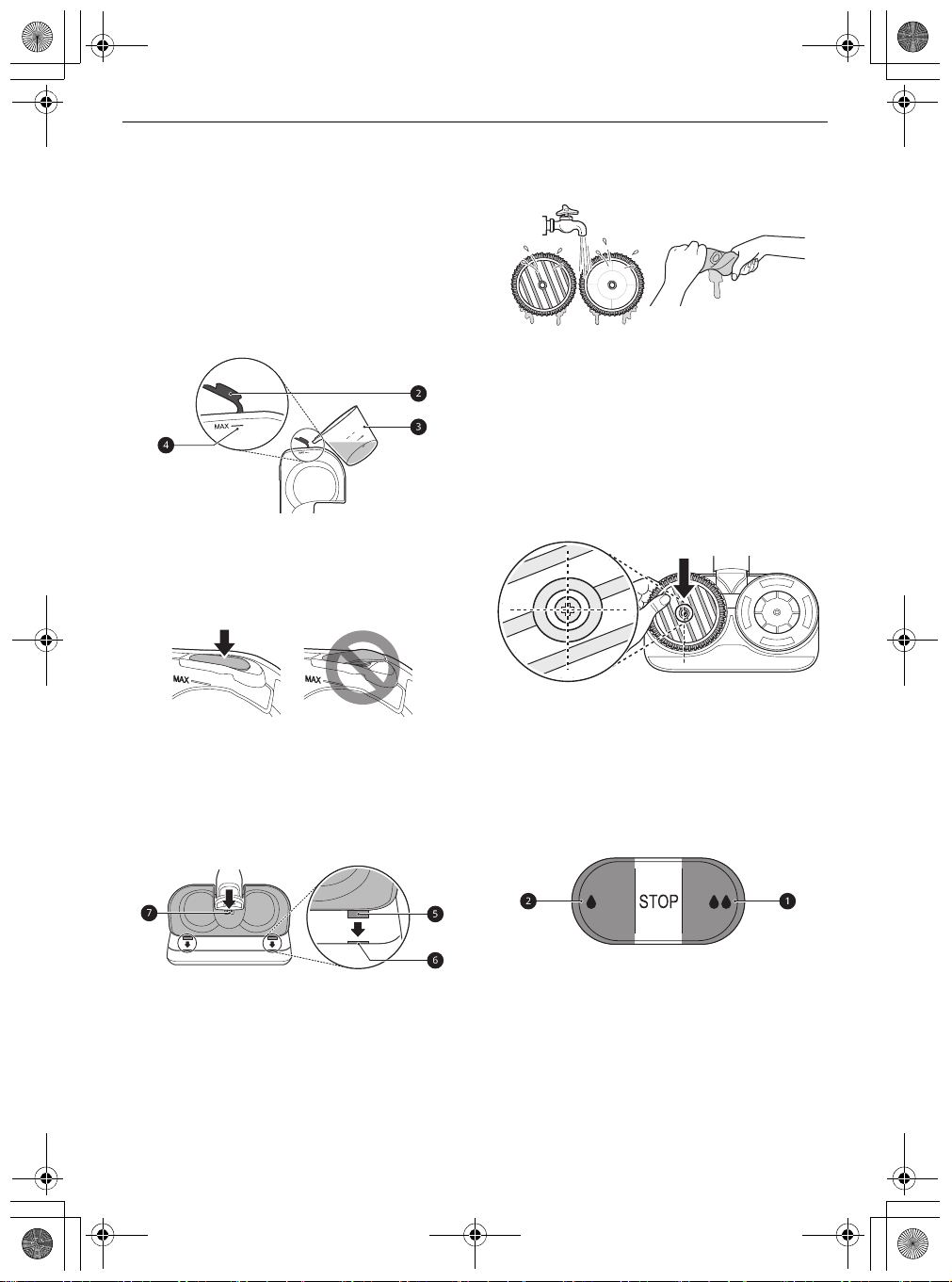
Filling the Water Tank
1
Press the
PUSH
button
a
to remove the water
tank from the mop nozzle.
global_main.book.book Page 23 Monday, July 13, 2020 4:53 PM
24
OPERATION
EN
2
Open the water inlet cap
b
on the side of the
water tank and fill the tank with water using
the measuring cup
c
.
• Open only one water inlet cap to fill the
water. Opening both caps may cause the
water to flush.
• Do not fill the tank over the
MAX
line
d
.
• Do not put liquid other than water and hot
water in the water tank.
3
Close the water inlet cap tightly.
• If the water inlet cap is not closed properly,
water may leak.
4
Attach the water tank to the mop nozzle again.
• Insert the 2 tabs
e
at the front of the water
tank into the slots
f
on the top of the mop
nozzle. Press down at the centre
g
to lock
the tank in place.
Attaching the Mop Pads
1
Wet both sides of the mop pads with water
then squeeze out any excess water before
attaching the pads.
• Do not attach pads while they are dripping
wet.
• Attaching and using mop pads while they
are dry may affect the cleaning results.
2
Place the mop nozzle upside down on the floor.
3
Align and attach the centre of the mop pad
with the centre of the mop attachment plate.
• Attach the mop pad so the striped side is
visible. Attaching the mop pad upside down
or improperly may affect the cleaning
results.
4
Attach the mop nozzle to the appliance.
Adjusting the Amount of Water
Press the water adjustment buttons to adjust the
amount of water released onto the mop pad to
either
High Mode
or
Low Mode
.
•
High Mode
: Press the
High Mode
button
a
all
the way down to clean ingrained dirt or supply a
large amount of water.
•
Low Mode
: Press the
Low Mode
button
b
all the
way down to supply a small amount of water for
cleaning wood or other flooring that can be
damaged by too much water.
•
STOP
: Press the
Low Mode
or
High Mode
button halfway to toggle back to the
STOP
global_main.book.book Page 24 Monday, July 13, 2020 4:53 PM
25
OPERATION
EN
position. This stops the supply of water so you
can go over areas that are already wet.
WARNING
• To avoid injury, do not attach the mop pad while
the mop attachment plate is rotating.
CAUTION
• Do not let the appliance stand on the floor while
the wet mop pads are attached. Doing so may
result in damage or swelling to wood flooring.
Using with the Mop Nozzle
1
Attach the water tank and mop pads to the
mop nozzle.
2
Set the water adjustment button to the
STOP
position.
3
Press the
Power
button to start cleaning.
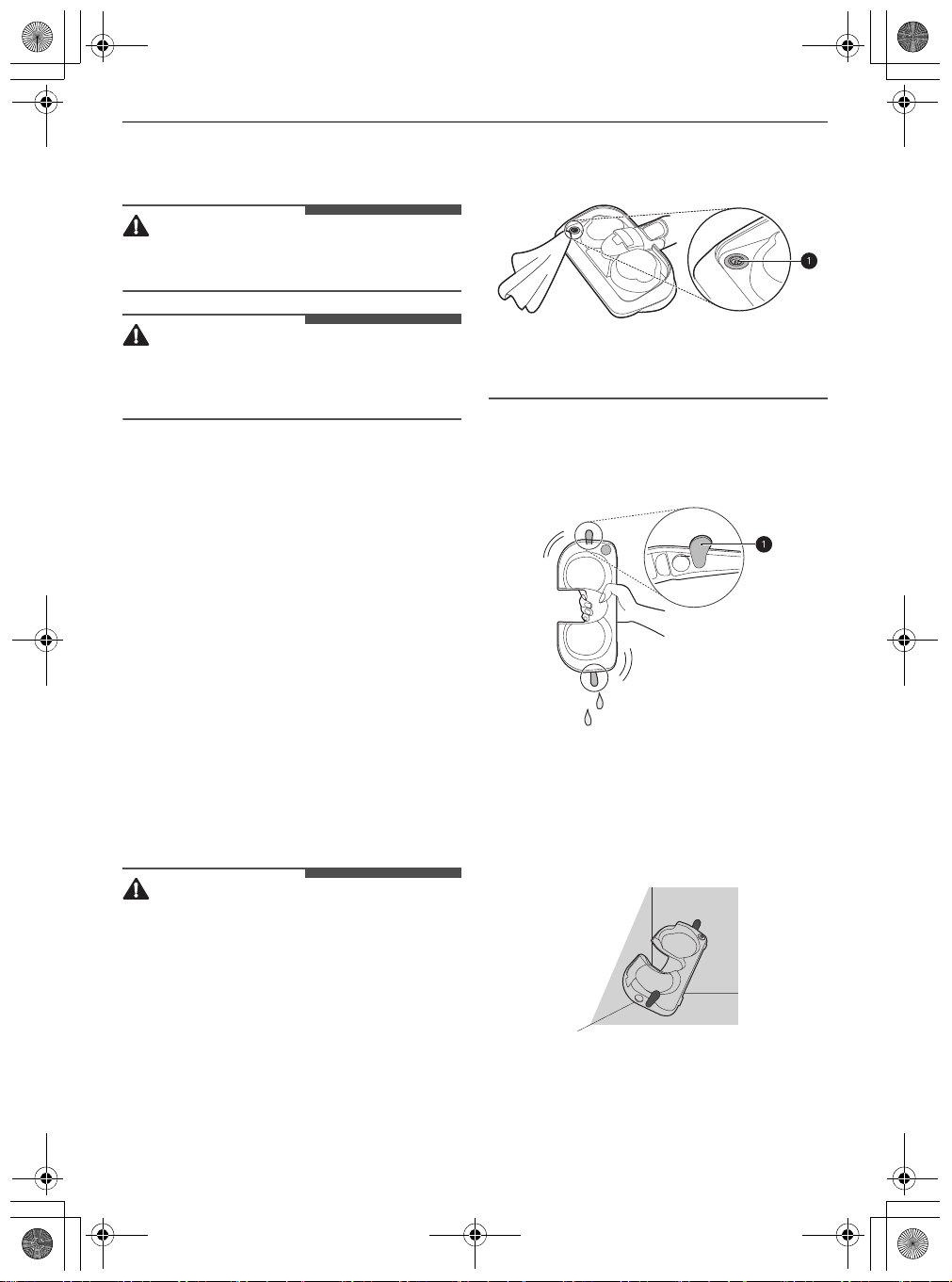
Drying the Water Tank and Mop
Pads
Drying the Water Tank
When cleaning is completed, make sure to empty
the water tank and dry it before storing the mop
nozzle.
CAUTION
• Turn the water inlet caps to make sure they
remain open when storing the water tank. If
caps are closed and not properly dried, it may
cause odour.
• Do not remove the water inlet caps from the
water tank. Caps may tear.
• Do not add detergent, vinegar or baking soda to
the water tank when washing. It is not easily
removed in the water tank, which may soil the
floor.
• After cleaning, wipe off any remaining water on
the water supply inlet
a
on the mop nozzle with
a soft cloth. The water could drip onto the floor
and damage it.
• Do not pull or stretch the rubber gasket on the
water supply inlet. Doing so may tear or damage
it.
1
Open the 2 water inlet caps
a
on the side of
the water tank and empty the water tank.
Shake the water tank to remove the remaining
water.
2
Leave the 2 water inlet caps open and allow the
water tank to dry in a well-ventilated area out
of direct sunlight for at least 24 hours.
• Keep the water tank after water is
completely empty and dry. Moisture or
residual water in the tank may cause odour.
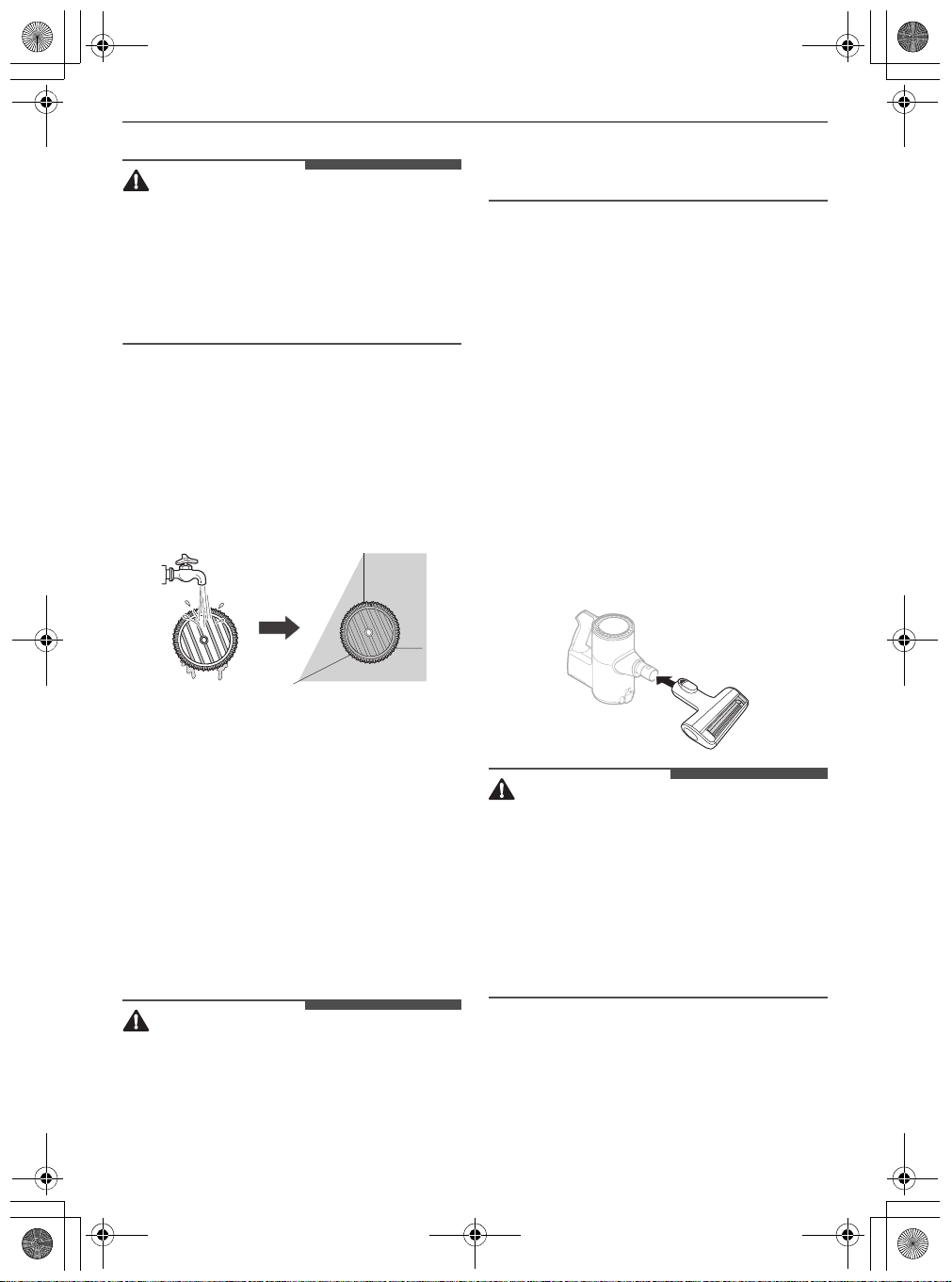
Drying the Mop Pads
After using the mop pads, hand wash them and
allow them to dry before storing them.
global_main.book.book Page 25 Monday, July 13, 2020 4:53 PM
26
OPERATION
EN
CAUTION
• Do not use as follows, as it may become
deformed.
- Do not use bleach or fabric softener when
washing the mop pads.
- Do not dry the pads in a clothes dryer.
- Do not boil the mop pad.
1
Separate the mop pads from the mop
attachment plate.
2
Hand wash the pads with a neutral detergent.
• Storing mop pads in a damp state can result
in an unpleasant odour. Set the pads in a
well-ventilated area out of direct sunlight for
at least 24 hours or until completely dry.
Using the Nozzles and
Tools
Some accessories are only available on some
models.
Specialized attachments can help you clean more
effectively. Tools and nozzles can be attached to
the product body or the extension pipe.
• Adjust the suction power if the inlet gets stuck on
the floor, carpet, or bedding.
• Each
Power Drive Nozzle
is equipped with a
motor and may make a sound when operating.
CAUTION
• Do not use the
Multi-Surface Power Drive
Nozzle
or
Power Drive Floor Nozzle
on PVC or
polyurethane mats for infants and children. The
mat may stick to the nozzle, making it difficult to
operate, causing damage to the mat or static
electricity on the appliance. Clean mats using the
crevice tool.
Multi-surface Power Drive
Nozzle
Use this nozzle to clean carpets or rugs.
• If used on hard flooring, this nozzle will be noisy.
Power Drive Floor Nozzle
Use this nozzle to clean hard floor surfaces.
• While cleaning, it was not intended, but pressing
the
PUSH
button on the nozzle may remove the
brush. Please attach the brush again.
Power Drive Mini Nozzle
It is suitable for soft surfaces and pet hair removal.
CAUTION
• Do not use the nozzle following surface. It may
cause scratch or damage. Especially, do not
clean a coated or lacquered floor. If used
repeatedly, the coating may wear off.
- Clothing, bedding
- Leather cushioned sofas, cushions
- Carpet
- Vinyl flooring, tiles, marble, etc.
Power Punch Nozzle
This nozzle lets you clean sheets and bedding more
effectively. It removes dust in bedding using strong
suction and a punching motion.
global_main.book.book Page 26 Monday, July 13, 2020 4:53 PM
27
OPERATION
EN
• Lower the suction level when vacuuming
bedding such as duvet covers to avoid the thin
fabric getting sucked into the nozzle.
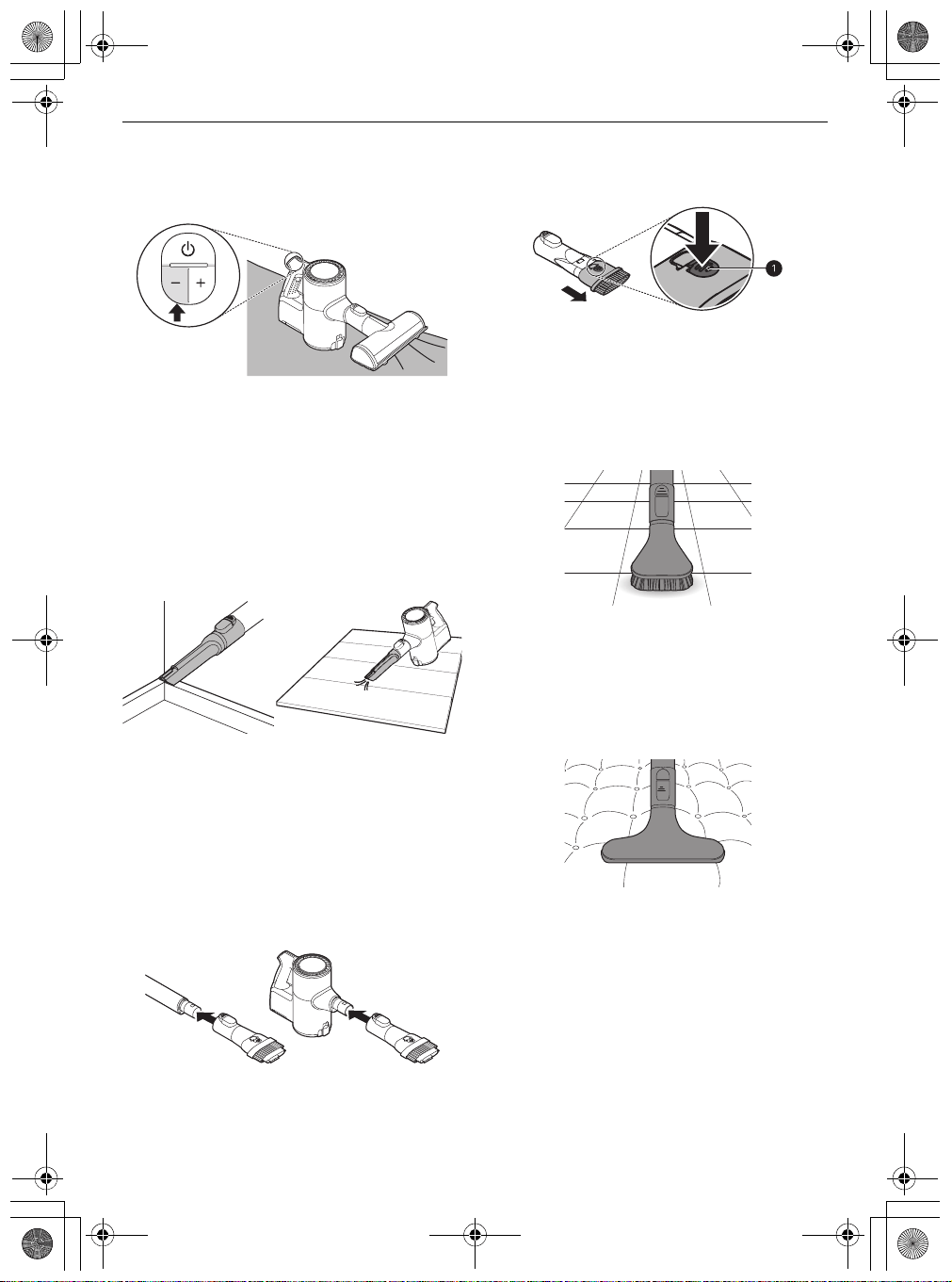
Crevice Tool
Use this tool to remove dust from corners or
narrow spaces.
• Use it for areas with static electricity such as
mats.
• Use it with the
Turbo
mode to clean pet hair out
of furniture, mats, or tight areas like corners.
Combination Tool
Can be used in either crevice mode or brush mode
for cleaning corners or small gaps where dust and
dirt gather.
•
Crevice Mode
Use the tool in the crevice mode to clean flat
surfaces such as sofas or mattresses.
•
Brush Mode
Use the tool in the brush mode to clean delicate
surfaces such as frames or furniture.
- To convert modes, press the adjustment
button
a
and push forward.
Hard Dirt Tool
Firm bristles remove solidified dirt from hard
surfaces. Clean up hair or foreign objects that are
entangled in carpets or rugs.
Mattress Tool
Use this tool to clean up dust and foreign objects
from mattresses, delicate fabrics, and upholstery.
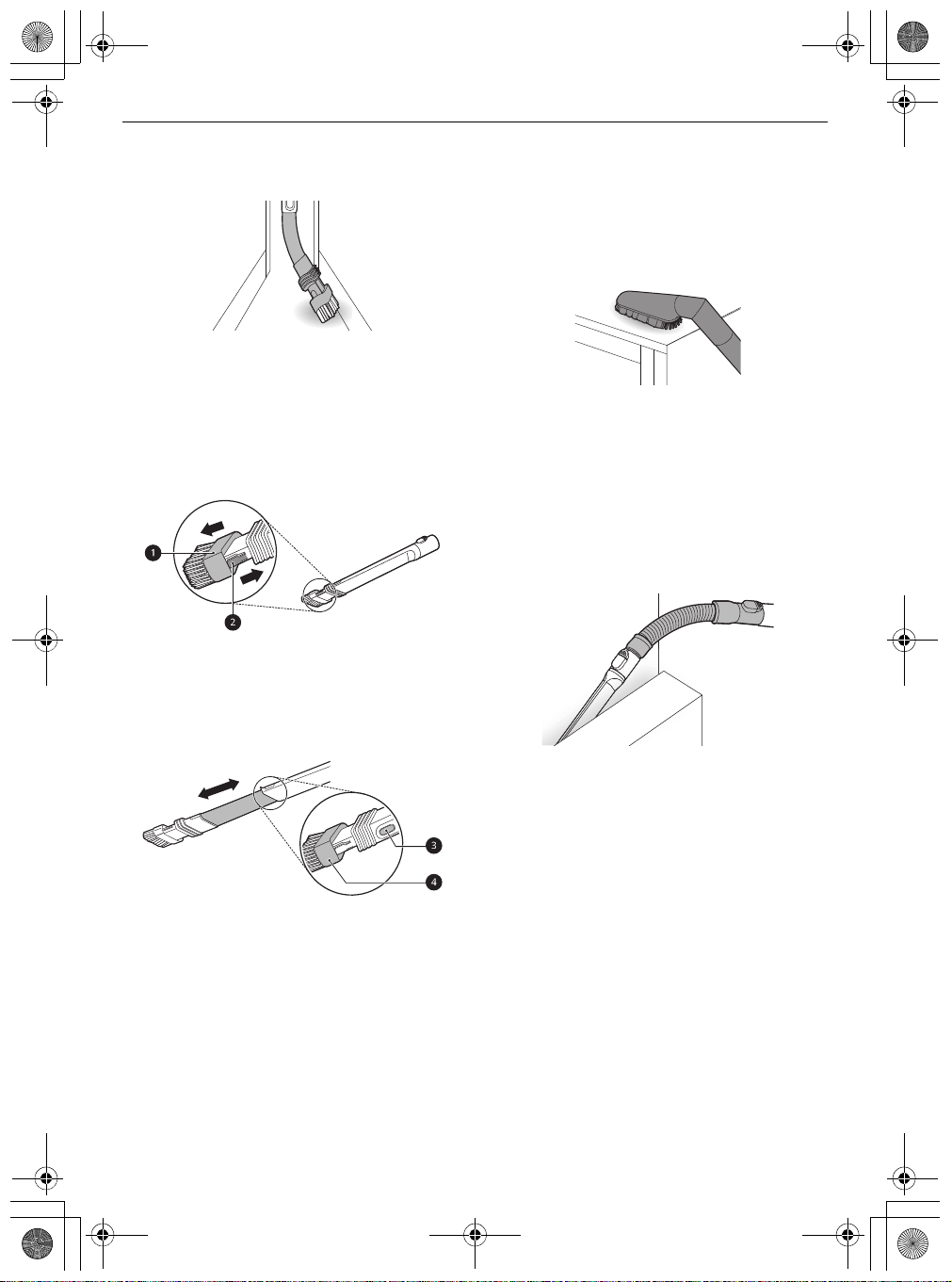
Flexible Crevice Tool
This tool is flexible and its length can be adjusted,
making it especially useful for cleaning inside
global_main.book.book Page 27 Monday, July 13, 2020 4:53 PM
28
OPERATION
EN
vehicles or in narrow spaces under and behind
furniture where an angled tool is needed.
Using the Brush
To convert the tool from crevice to brush mode,
press in on the sides of the brush head
a
and pull
the brush down.
• To convert back to the crevice mode, press in on
the brush release button
b
and slide the brush
up.
Adjusting the Length
To adjust the length of the tool, press and hold the
release button
c
on the side of the tool. Pull or
push on the brush head
d
to extend or retract the
extension tube.
Multi-angle Tool
This tool has a soft brush that can be adjusted to a
variety of angles, making it especially useful for
cleaning vehicle consoles or the tops of furniture.
Flexible Hose Extension
Connect this flexible, extendable hose between the
product body and the tools to clean hard to reach
areas.
• The flexible hose extension cannot be used with
the Power Drive Nozzle.
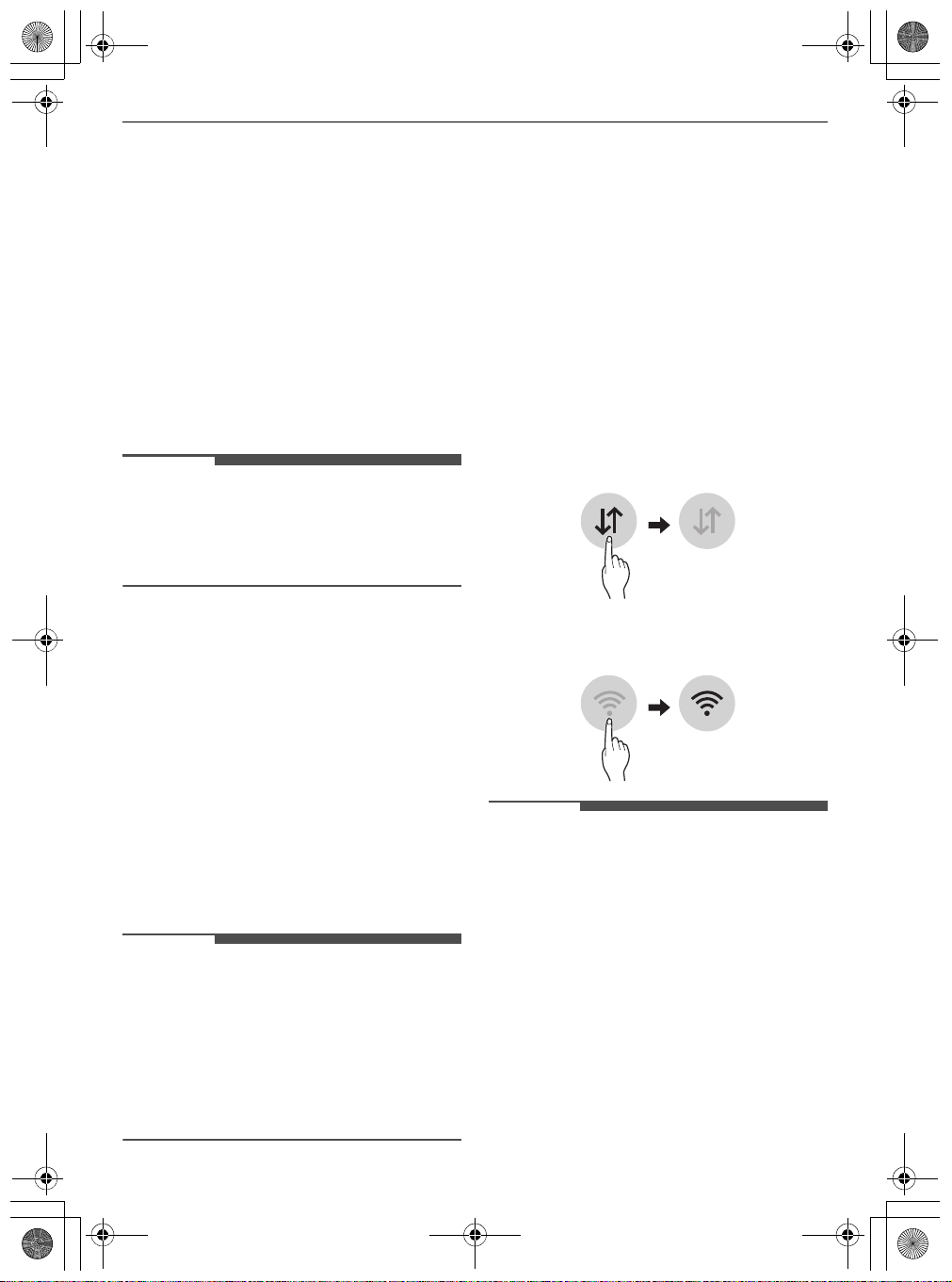
Using the Kompressor Lever
Use the Kompressor lever to compress hair and
fibers inside the dust bin after vacuuming and
before emptying the dust bin.
• The vacuum must be turned off before using the
Kompressor lever.
• Compressing the dust clears it off the interior
walls of the dust bin and allows you to vacuum
for longer periods before emptying the dust bin.
It also makes cleaning the dust bin easier and
less messy.
• The dust bin must be at least half full for the
compression plate to be effective.
• Press the Kompressor lever down several times
to compress the dust and clean off the interior
walls of the dust bin.
global_main.book.book Page 28 Monday, July 13, 2020 4:53 PM
29
SMART FUNCTIONS
EN
SMART FUNCTIONS
Using LG ThinQ Application
The
LG ThinQ
application allows you to
communicate with the appliance using a
smartphone.
LG ThinQ Application Features
•
Cleaning History
- Shows the cleaning history, such as monthly
cleaning time, cleaning frequency, and
cleaning mode, etc.
NOTE
• Assembled suction tool is displayed on the
screen during cleaning.
• A notification is displayed on the screen if the
pre-filter and the exhaust filter need cleaning.
•
Filter Cleaning Cycle Alarm
- After using the appliance for a centain period
of time, a notification is displayed on the
screen of your smartphone. Clean the exhaust
filter or pre-filter, if necessary.
•
Cleaning Mode
- The cleaning mode you are using is displayed
on the screen of your smartphone.
•
Filter Cleaning Guide
- Guide to cleaning the filters.
•
Smart Diagnosis
™
- This function provides useful information for
diagnosing and solving issues with the
appliance based on the pattern of use.
NOTE
• If you change your wireless router, Internet
service provider, or password, delete the
connected appliance from the
LG ThinQ
application and connect it again.
• This information is current at the time of
publication. The application is subject to change
for product improvement purposes without
notice to users.
Before Using LG ThinQ
Application
1
Use a smartphone to check the strength of the
wireless router (Wi-Fi network) near the
appliance.
• If the appliance is too far from the router,
the signal becomes weak. It may take a long
time to register or fail to install the
application.
2
Turn off the
Mobile data
or
Cellular Data
on
your smartphone.
3
Connect your smartphone to the wireless
router.
NOTE
• To verify the Wi-Fi connection, check that the
f
icon on the control panel is lit.
• The appliance supports 2.4 GHz Wi-Fi networks
only. To check your network frequency, contact
your Internet service provider or refer to your
wireless router manual.
•
LG ThinQ
is not responsible for any network
connection problems or any faults,
malfunctions, or errors caused by network
connection.
• The surrounding wireless environment can
make the wireless network service run slowly.
global_main.book.book Page 29 Monday, July 13, 2020 4:53 PM
30
SMART FUNCTIONS
EN
NOTE
• If the appliance is having trouble connecting to
the Wi-Fi network, it may be too far from the
router. Purchase a Wi-Fi repeater (range
extender) to improve the Wi-Fi signal strength.
• The network connection may not work properly
depending on the Internet service provider.
• The Wi-Fi may not connect or the connection
may be interrupted because of the home
network environment.
• If the appliance cannot be connected due to
problems with the wireless signal transmission,
unplug the appliance and wait about a minute
before trying again.
• If the firewall on your wireless router is enabled,
disable the firewall or add an exception to it.
• The wireless network name (SSID) should be a
combination of English letters and numbers. (Do
not use special characters.)
• Smartphone user interface (UI) may vary
depending on the mobile operating system (OS)
and the manufacturer.
• If the security protocol of the router is set to
WEP
, network setup may fail. Change the
security protocol (
WPA2
is recommended), and
connect the product again.
Installing the LG ThinQ
Application
Search for the
LG ThinQ
application from the
Google Play Store or Apple App Store on a
smartphone. Follow instructions to download and
install the application.
Connecting the Appliance to LG
ThinQ
Wi-Fi Indicator
f
Status
Connecting the Appliance Initially
Select your appliance on menu by pressing the
Add
a Product (+)
button. Follow instructions in the
LG
ThinQ
to connect your appliance.
Connecting Additional Users
Remove the appliance from the charging station.
Follow the instructions under
Connecting the
Appliance Initially
.
NOTE
• The usage history will be reset if you delete a
connected appliance in
LG ThinQ
.
• If the Wi-Fi signal is weak, the appliance may be
temporarily disconnected to the application.
When the Wi-Fi signal moves to the normal
position, the appliance is connected to the
application again.
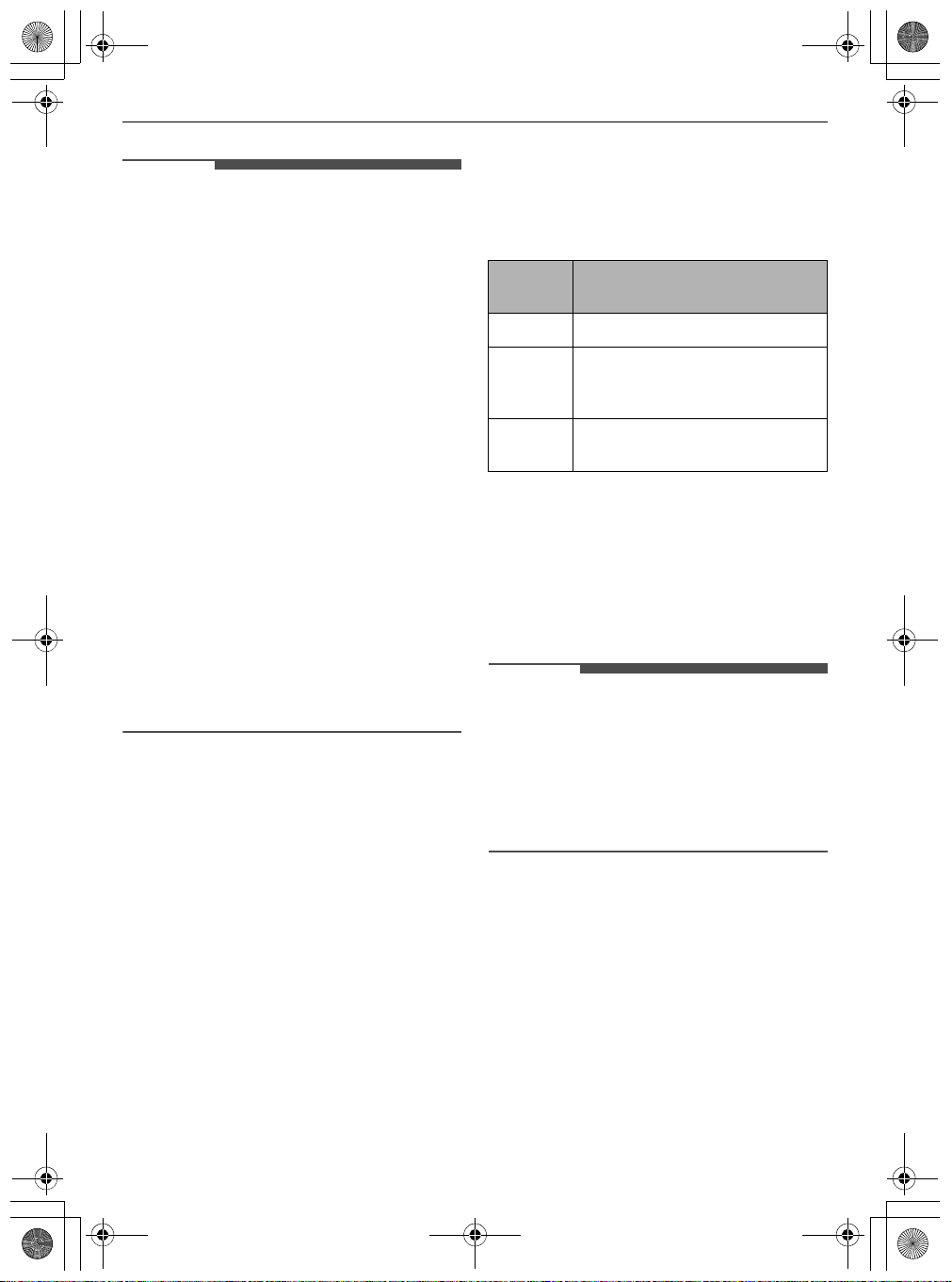
Turning Wi-Fi On/Off on the
Appliance
Disconnecting from Wi-Fi
To save energy, turn off the Wi-Fi function by
pressing the
Wi-Fi
button for 3 seconds while the
appliance is charging on the charging station.
Reconnecting to Wi-Fi
Follow the steps below on the appliance.
1
Press and hold the
Wi-Fi
button for 3 seconds
until the
f
icon blinks in the display.
Indicator
Status
Description
Blinking The appliance is connecting.
ON The appliance has finished
connecting.
The appliance is connected to Wi-Fi.
OFF The appliance has been
disconnected.
global_main.book.book Page 30 Monday, July 13, 2020 4:53 PM
31
SMART FUNCTIONS
EN
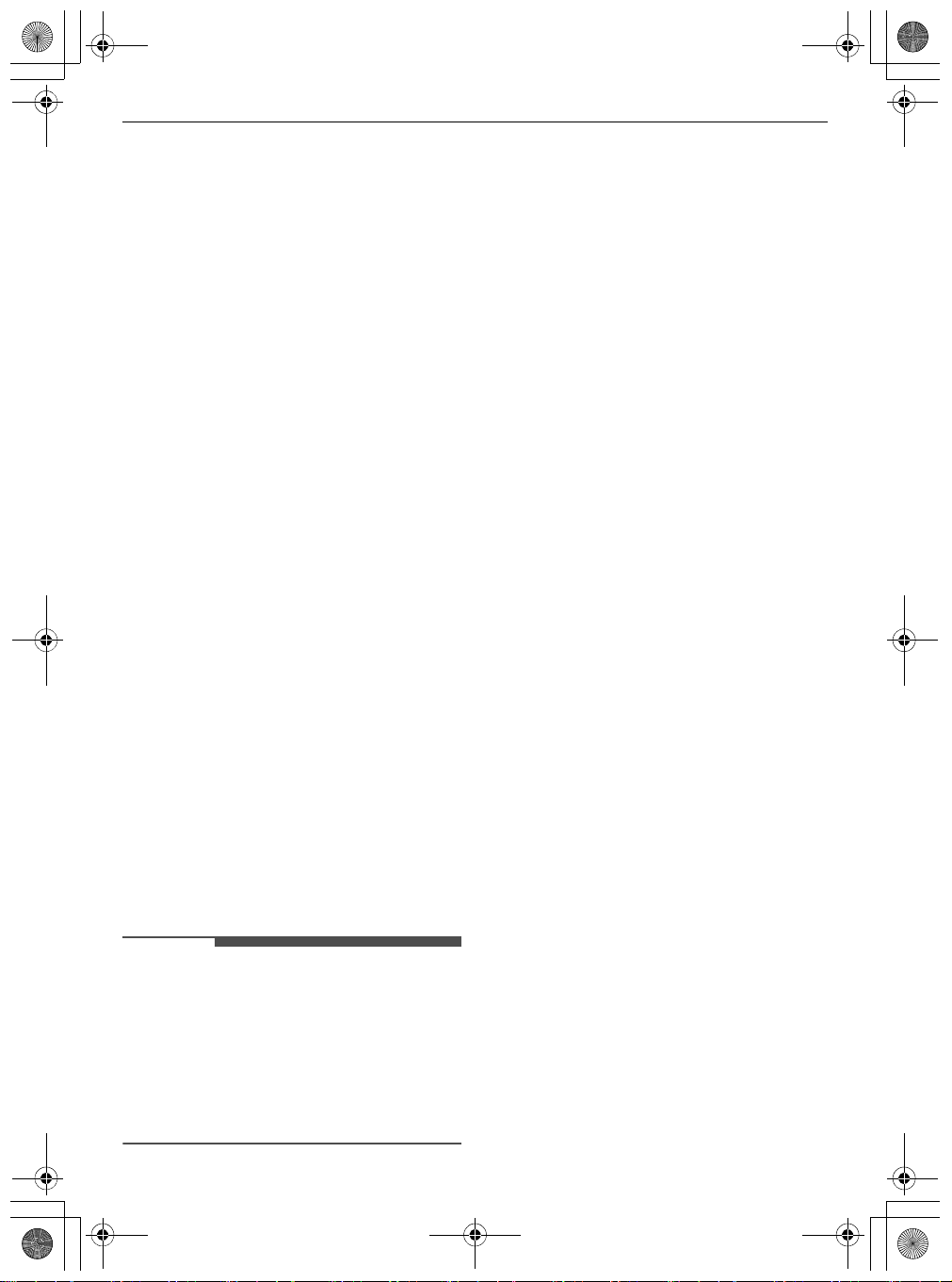
2
Press the
Wi-Fi
button for 3 seconds again.
• After the icon turns off, wait for a while and
turn it on again.
• The time before the icon turns on may vary
depending on the network environment.
RF Radiation Exposure
Statement
This equipment complies with radiation exposure
limit (<4.0 W/kg for extremity (hand) exposure
condition) set forth for an uncontrolled
environment.
Open Source Software Notice
Information
To obtain the source code under GPL, LGPL, MPL,
and other open source licenses, that is contained in
this product, please visit http://
opensource.lge.com. In addition to the source
code, all referred license terms, warranty
disclaimers and copyright notices are available for
download.
LG Electronics will also provide open source code to
you on CD-ROM for a charge covering the cost of
performing such distribution (such as the cost of
media, shipping, and handling) upon email request
to [email protected]. This offer is va
lid for a
period of three years after our last shipment of this
product. This offer is valid to anyone in receipt of
this information.
Smart Diagnosis Function
Use this feature to help you diagnose and solve
problems with your appliance.
NOTE
• For reasons not attributable to LGE’s negligence,
the service may not operate due to external
factors such as, but not limited to, Wi-Fi
unavailability, Wi-Fi disconnection, local app
store policy, or app unavailability.
• The feature may be subject to change without
prior notice and may have a different form
depending on where you are located.
Using LG ThinQ to Diagnose
Issues
If you experience a problem with your Wi-Fi
equipped appliance, it can transmit
troubleshooting data to a smartphone using the
LG ThinQ
application.
• Launch the
LG ThinQ
application and select the
Smart Diagnosis
feature in the menu. Follow
the instructions provided in the
LG ThinQ
application.
global_main.book.book Page 31 Monday, July 13, 2020 4:53 PM
32
MAINTENANCE
EN
MAINTENANCE
Cleaning the Appliance
Before Cleaning the Appliance
To maintain the optimum suction power, the
cyclonic mesh filter, the exhaust filter and the pre-
filter should be cleaned regularly and washed
under running water at least once a month.
• Turn off the power before cleaning the
appliance.
• The frequency of cleaning varies depending on
the usage environment and usage time. In a
dusty environment, clean frequently.
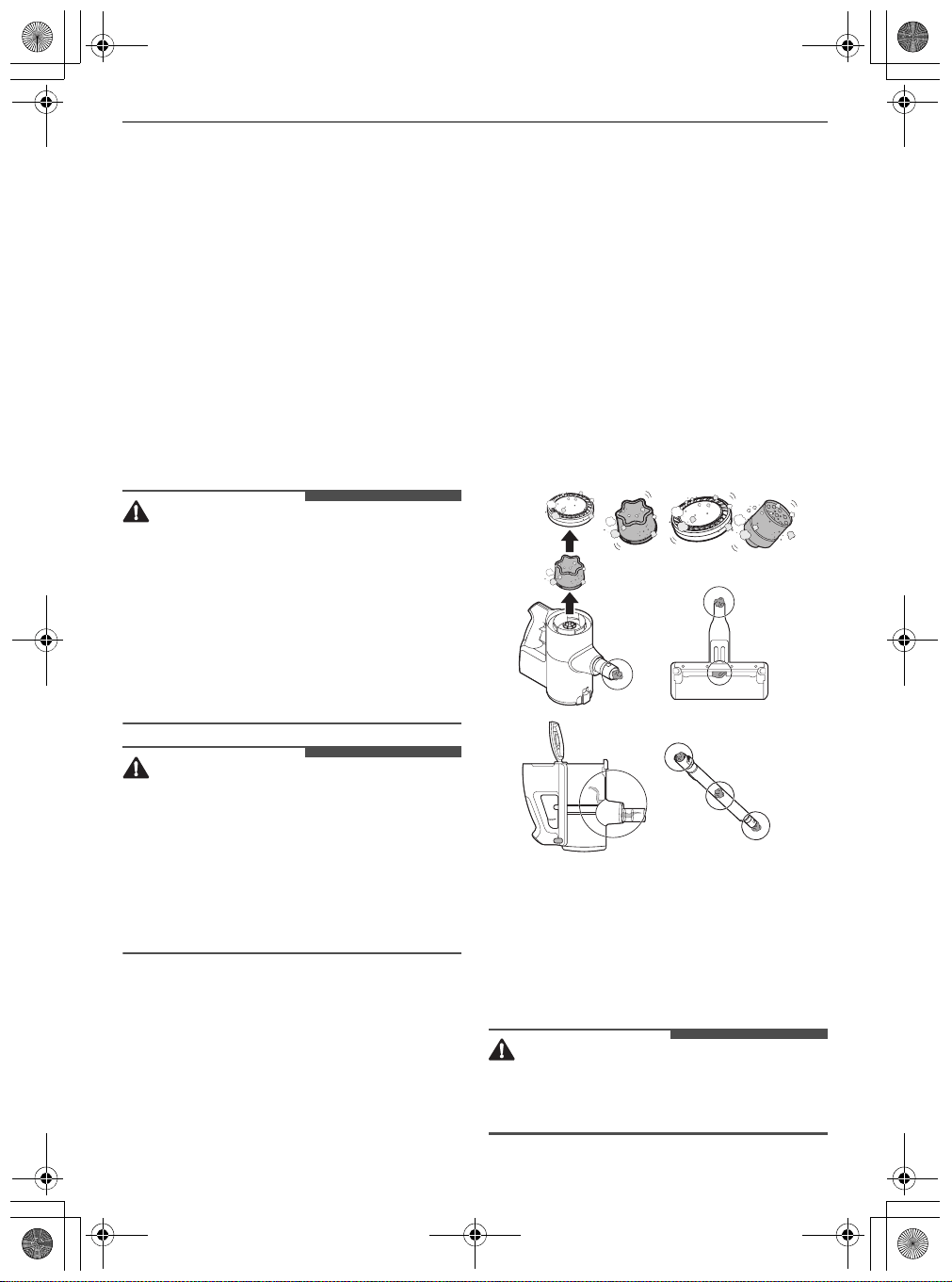
WARNING
• Never wash the
Power Drive Nozzle
, rotating
brush or product body with water. Water could
reach the motor and cause electric shock or fire.
• Do not allow foreign objects to enter the motor.
Doing so may cause electric shock, fire or
product damage.
• Do not insert fingers or sharp objects into the
motor. Doing so could cause product damage,
personal injury or electric shock.
CAUTION
• Do not apply force or allow impacts to the
cyclonic mesh filter. Doing so could deform the
filter, compromise product performance, or
cause the product to malfunction.
• If the Kompressor lever does not return to the
top, remove the cyclonic mesh filter from the
dust bin and clean it. A clogged or dirty filter may
cause poor cleaning results.
Removing Foreign Objects
If the appliance is clogged with foreign objects, the
suction power changes, the motor cycles
repeatedly, and the foreign objects clogging alarm
icon blinks.
If clogging persists, the appliance will turn off
automatically to prevent damage. Separate the
battery from the product body and remove the
foreign objects before resuming use of the
appliance.
• Check the inside of the product body, above the
Kompressor working plate, the extension pipe,
inlets, exhaust filter, pre-filter and cyclonic mesh
filter for foreign objects.
• If the inlets are not completely blocked, the
foreign objects clogging alarm indicator may not
light up.
• If the sound of the appliance becomes loud or
the cleaning results is poor, check for foreign
objects.
Cleaning the Dust Bin
Empty and clean the dust bin after every use.
• If the dust bin is completely full of dust or the
filter is clogged, the suction power may be
reduced.
CAUTION
• Do not use the appliance without the cyclonic
mesh filter installed. Doing so could damage the
appliance.
global_main.book.book Page 32 Monday, July 13, 2020 4:53 PM
33
MAINTENANCE
EN
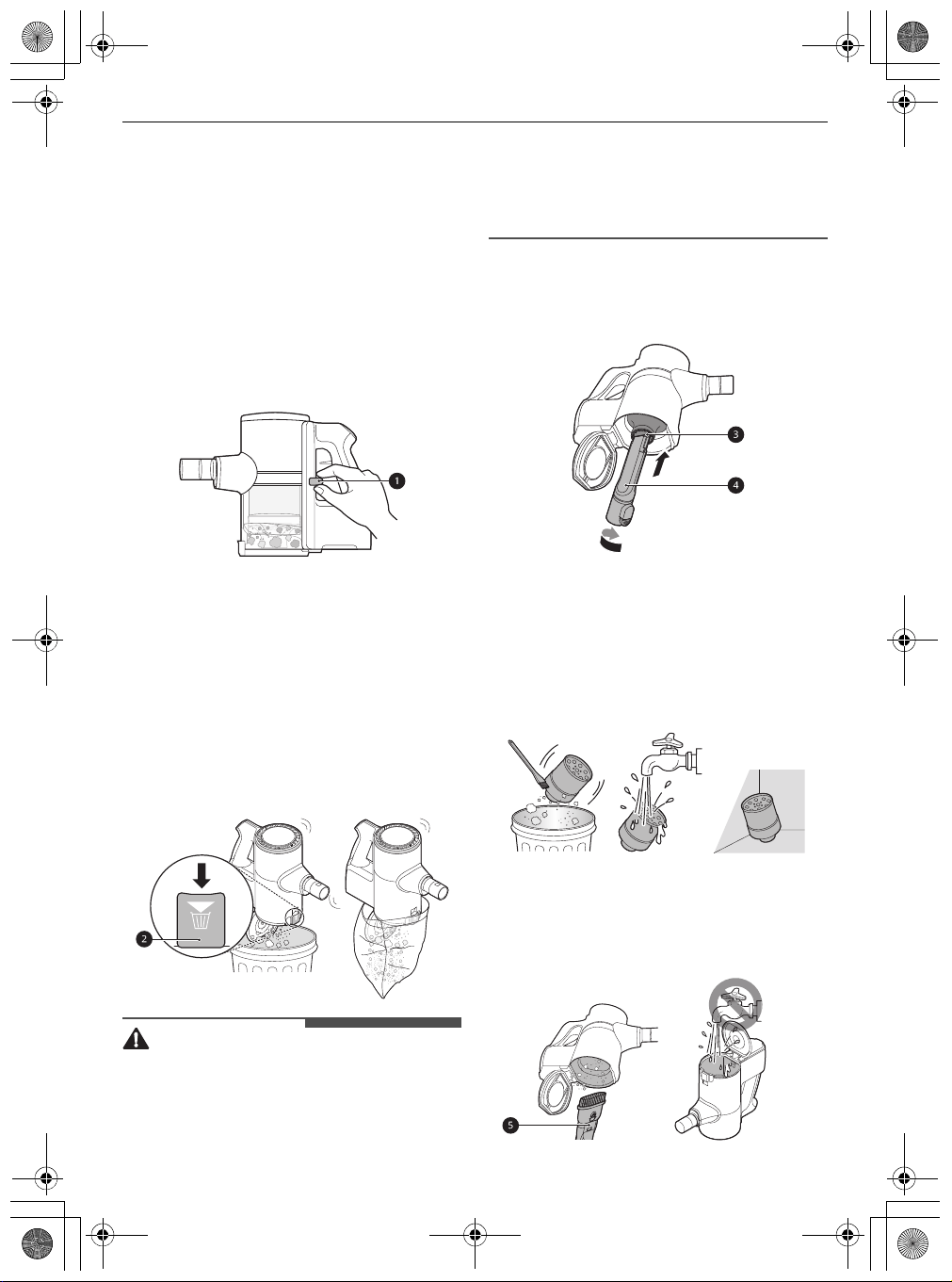
1
Remove the battery from the product body
before cleaning the dust bin.
2
Push down the Kompressor lever
a
several
times to collect and compact the dust from the
outside of the cyclonic mesh filter and the
interior walls of the dust bin.
• Foreign objects which become lodged in the
cyclonic mesh filter may be difficult to
dislodge with the Kompressor lever. Remove
the cyclonic mesh filter and use the provided
cleaning brush to clean it.
3
Press the dust bin cover release button
b
to
open the dust bin cover. Shake the dust bin to
empty it.
• Be careful as dust or foreign objects may
spill out when opening the dust bin. Empty
the dust bin into a wastebasket or where
dust and foreign objects can be easily
removed.
• The dust bin can be wrapped in a plastic bag
to contain the dust when emptying the dust
bin.
WARNING
• If the Kompressor lever does not slide down
smoothly, foreign objects may be trapped
between the dust bin and the cyclonic mesh
filter. Clean the dust bin and cyclonic mesh filter
to avoid product damage.
• Do not force the Kompressor lever down if
foreign objects are caught around the working
plate of the Kompressor system. Doing so may
cause product damage.
4
Insert the crevice tool
d
into the cyclonic mesh
filter
c
and turn it counterclockwise to remove
the filter.
5
Wash the cyclonic mesh filter under running
water.
• To avoid odour and the malfunction of the
motor, allow the cyclonic mesh filter to dry
completely in a well-ventilated area out of
direct sunlight for at least 24 hours before
reassembling.
6
Use the combination tool
e
to clean out dust
or foreign objects inside the dust bin.
• Do not wash the product body or motor with
water.
global_main.book.book Page 33 Monday, July 13, 2020 4:53 PM
34
MAINTENANCE
EN
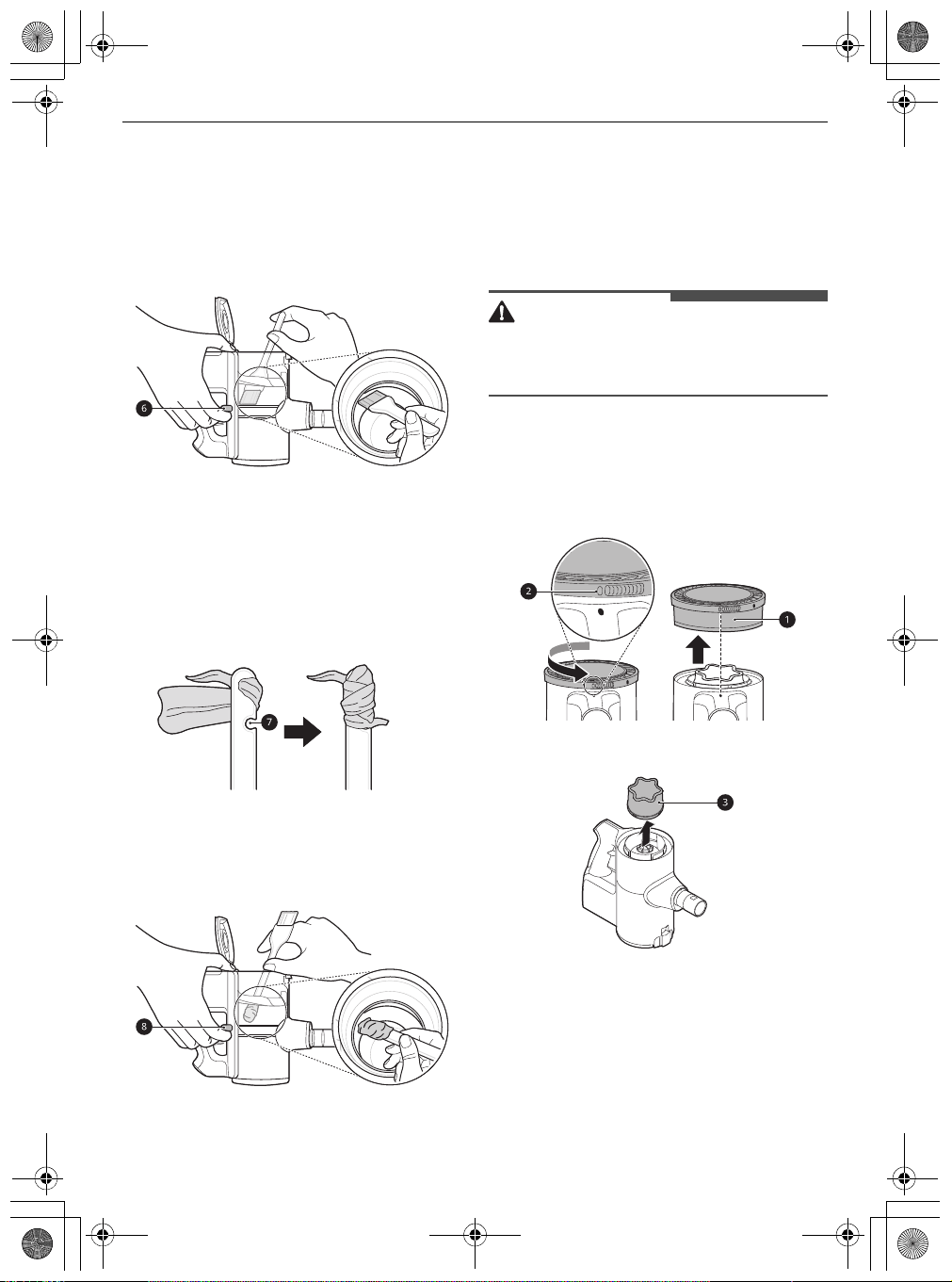
7
Turn the product body over and lift the
Kompressor lever
f
up to clean the inside of
the working plate with the provided cleaning
brush.
• Do not push the Kompressor lever down
hard. The working plate may be damaged.
8
Turn the product body over again and shake it
while pressing down the lever to remove the
dust.
9
Wrap the provided cleaning brush with a wet
paper towel, tucked into the slots
g
on the
handle.
10
Turn the product body over, lift the
Kompressor lever
h
up, and clean the inside of
the working plate with the towel-wrapped
brush handle.
Cleaning the Filters
Clean the exhaust filter and the pre-filter when the
filter cleaning icon
K
lights up.
• Clean the filters more frequently if the appliance
is used regularly or in areas with a lot of dust.
CAUTION
• Do not use the appliance without the exhaust
filter and pre-filter installed. Doing so could
result in product damage.
1
Remove the battery from the product body.
2
Rotate the exhaust filter
a
to the unlocked
position
b
to separate it from the product
body.
3
Lift out the pre-filter
c
from the product body.
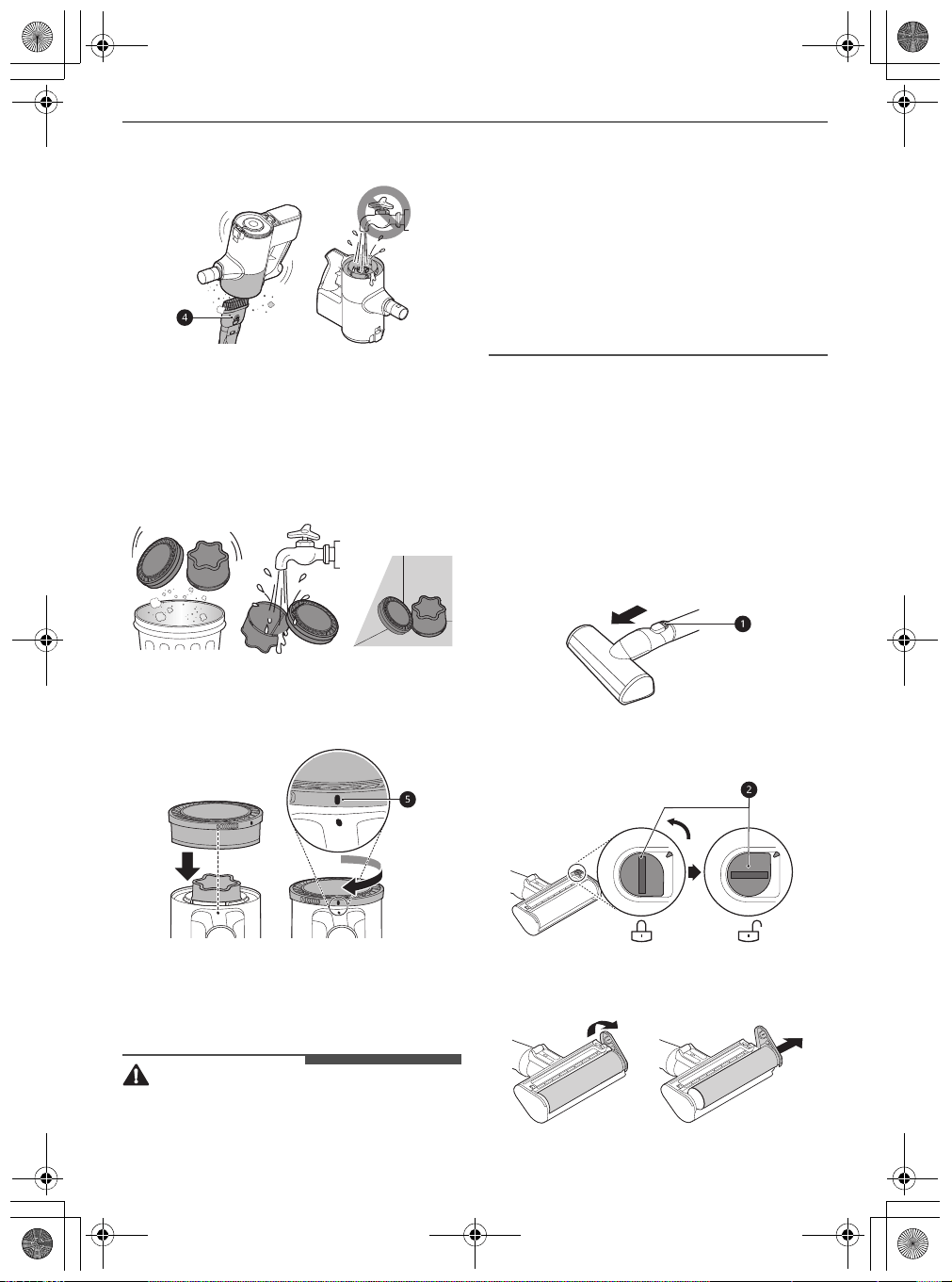
4
Use the combination tool
d
to clean any dust
off the motor.
global_main.book.book Page 34 Monday, July 13, 2020 4:53 PM
35
MAINTENANCE
EN
• Do not wash the motor with water.
5
Clean filters by brushing the dust off and wash
them in running water at least once a month.
• To avoid odour and the malfunction of the
motor, allow the exhaust filter to dry
completely in a well-ventilated area out of
direct sunlight for at least 24 hours before
reassembling.
6
Insert the dried pre-filter and rotate the
exhaust filter to the locked position
e
to
reassemble it on the product body.
Cleaning the Nozzles
Clean the nozzle and rotating brush regularly.
CAUTION
• Always separate the nozzle from the product
body or remove the battery before cleaning. If
the nozzle starts to operate during cleaning, it
could cause an injury.
• Keep fingers away from pinch points when
assembling the nozzle on the appliance or the
rotating brush on the nozzle.
• Do not use the rotating brush as a wet mop. It
may cause product damage.
• Do not rinse or submerge the rotating brush or
nozzle in water. It may cause product damage.
Cleaning the Multi-Surface
Power Drive Nozzle
Clean the brush and roller heads before each use.
• If the brush contains foreign objects, the brush
may not spin or a noise may occur during
operation.
1
Press the nozzle release button
a
to remove
the nozzle from the extension pipe or product
body.
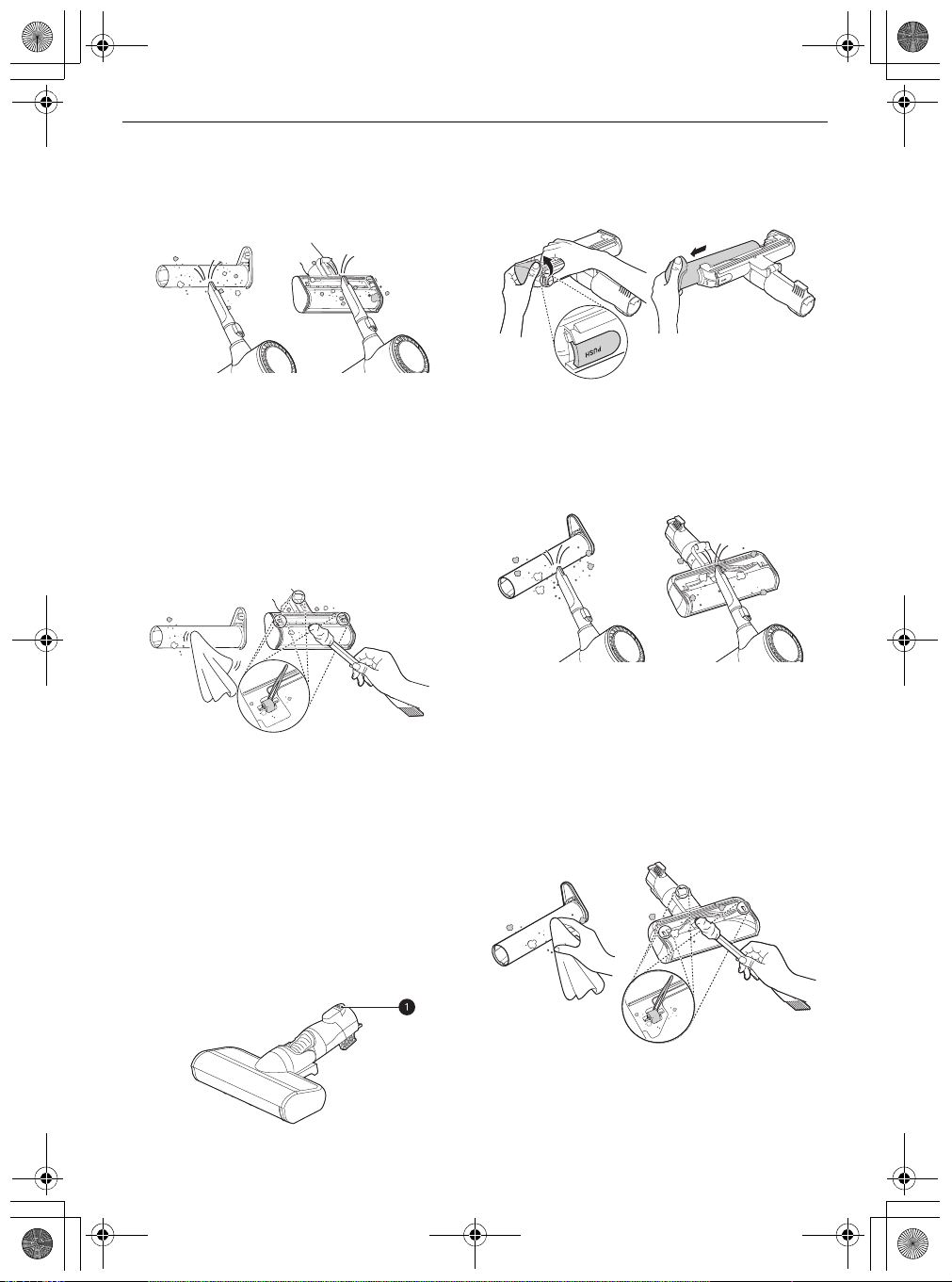
2
Turn the nozzle upside down and rotate the
cover lock slot
b
counterclockwise.
3
Pull the brush cover forward and pull the brush
out.
global_main.book.book Page 35 Monday, July 13, 2020 4:53 PM
36
MAINTENANCE
EN
4
Attach the crevice tool to the product body and
use the vacuum to remove foreign objects and
dust from the brush and the bottom of the
nozzle.
5
Use a damp towel or cloth to remove any
remaining foreign objects and dust from the
brush and the bottom of the nozzle. Remove
foreign objects, debris and hair from all Rollers
of the nozzles using tweezers.
• Wrap the handle of the cleaning brush with
a wet towel or cloth and use it to clean the
rotating brush and nozzle.
6
Slide the brush back into the nozzle and rotate
the cover back into place. Turn the cover lock
clockwise to lock the cover.
Cleaning the Power Drive Floor
Nozzle
1
Press the nozzle release button
a
to remove
the nozzle from the extension pipe or product
body.
2
Turn the nozzle upside down and remove the
rotating brush while holding down the
PUSH
button on the nozzle.
3
Attach the crevice tool to the product body and
use the vacuum to remove foreign objects and
dust from the brush and the bottom of the
nozzle.
4
Use a damp towel or cloth to remove any
remaining foreign objects and dust from the
brush and the bottom of the nozzle. Remove
foreign objects, debris and hair from all Rollers
of the nozzles using tweezers.
• Wrap the handle of the cleaning brush with
a wet towel or cloth and use it to clean the
rotating brush and nozzle.
5
Slide the brush back into the nozzle until it
clicks into place.
global_main.book.book Page 36 Monday, July 13, 2020 4:53 PM
37
MAINTENANCE
EN
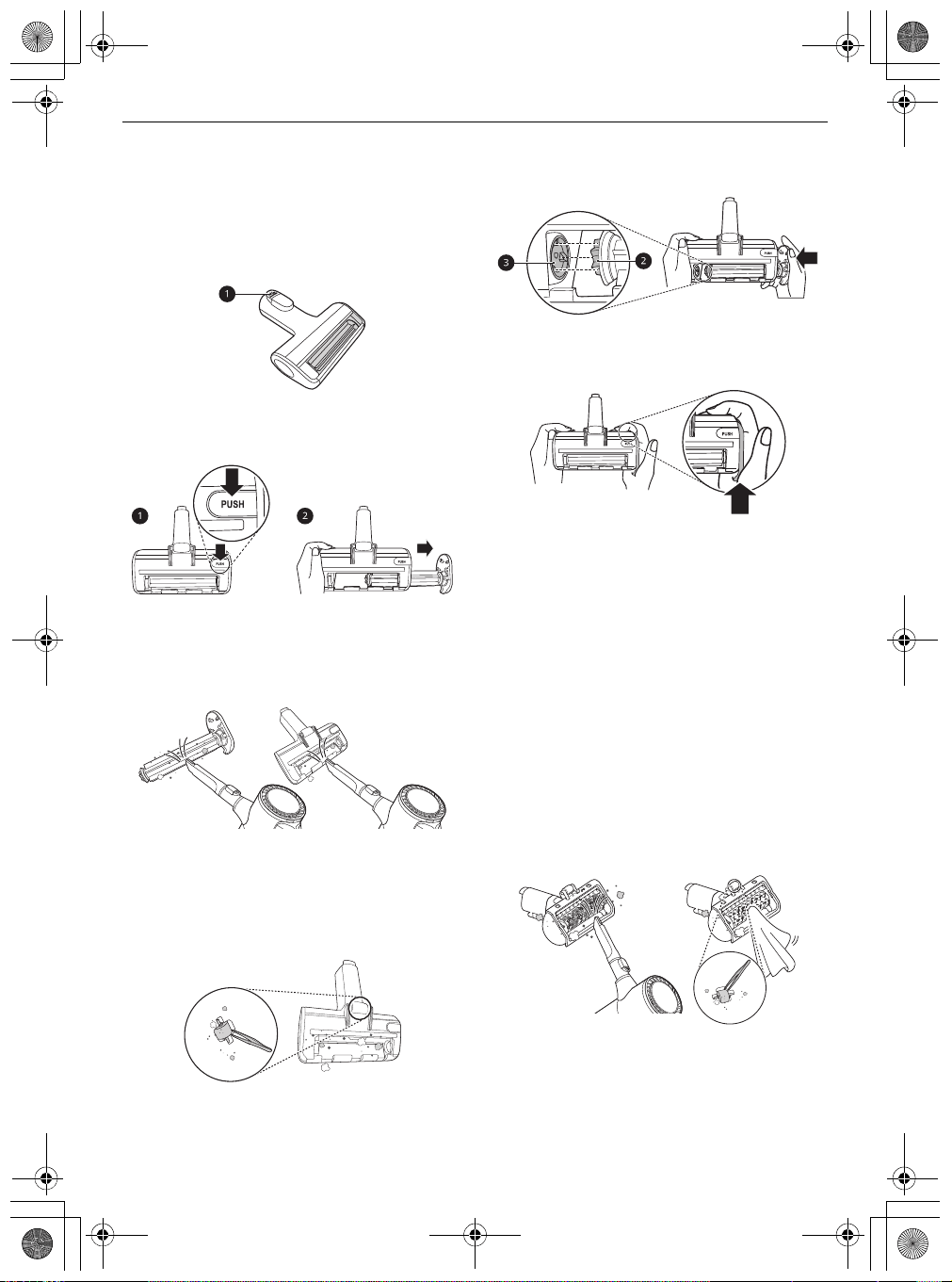
Cleaning the Power Drive Mini
Nozzle
1
Press the nozzle release button
a
to remove
the nozzle from the extension pipe or product
body.
2
Remove the rotating brush while holding down
the
PUSH
button on the nozzle.
3
Attach the crevice tool to the product body and
use the vacuum to remove foreign objects and
dust from the brush and the bottom of the
nozzle.
4
Use a damp towel or cloth to remove any
remaining foreign objects and dust from the
brush and the bottom of the nozzle. Remove
foreign objects, debris and hair from all Rollers
of the nozzles using tweezers.
5
Insert the left side of the brush
b
into the
groove
c
inside the nozzle.
6
Press the cover of the brush to lock the brush
until a clicking sound is heard.
Cleaning the Power Punch
Nozzle
1
Press the nozzle release button to remove the
nozzle from the extension pipe or product
body and turn the nozzle upside down.
2
Attach the crevice tool to the product body and
use the vacuum to remove foreign objects and
dust from the bottom of the nozzle. Use a
damp towel or cloth to remove any remaining
foreign objects and dust from the bottom of
the nozzle. Remove foreign objects, debris and
hair from all Rollers of the nozzles using
tweezers.
global_main.book.book Page 37 Monday, July 13, 2020 4:53 PM
38
MAINTENANCE
EN
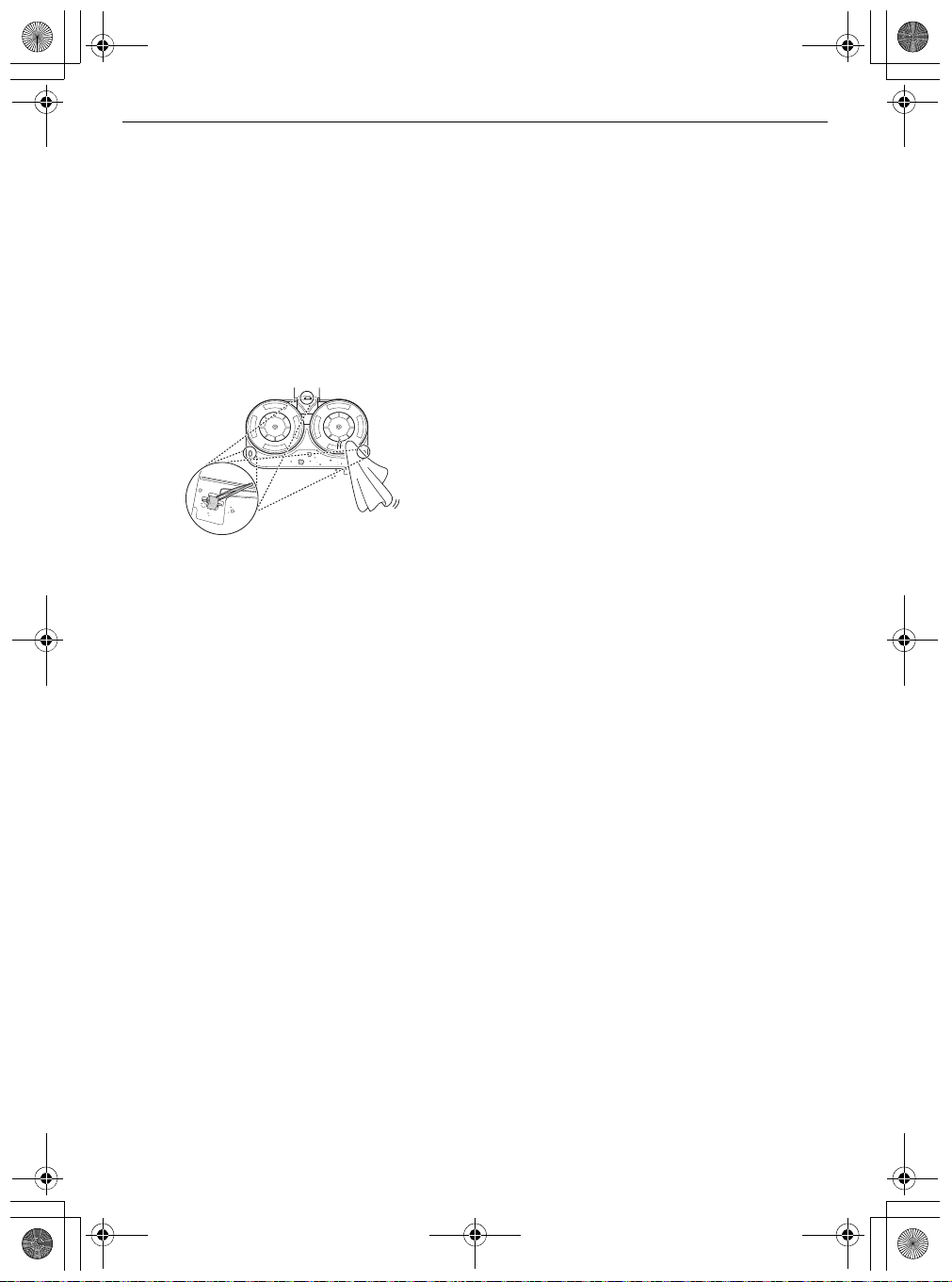
Cleaning the Mop Nozzle
1
Press the nozzle release button to remove the
mop nozzle from the extension pipe and turn
the nozzle upside down.
2
Use a damp towel or cloth to remove any
remaining foreign objects and dust from the
bottom of the mop nozzle. Remove foreign
objects, debris and hair from all Rollers of the
nozzles using tweezers.
global_main.book.book Page 38 Monday, July 13, 2020 4:53 PM
39
TROUBLESHOOTING
EN
TROUBLESHOOTING
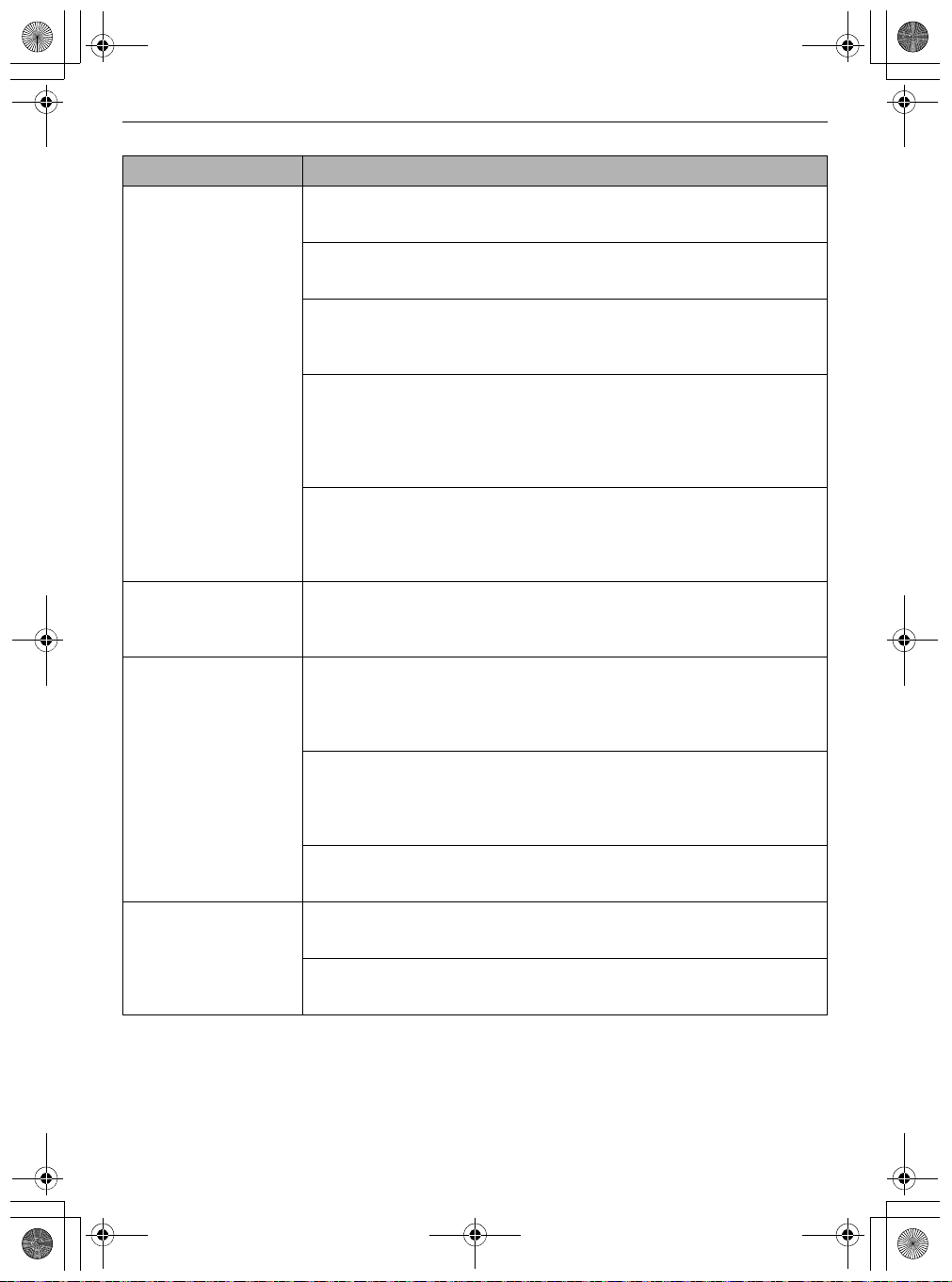
Before Calling for Service
Operation
Symptoms Possible Cause & Solution
The appliance does not
operate.
Battery is fully discharged.
• Charge the battery.
Appliance is turned off.
• Press the
Power
button to turn on the appliance.
Suction power is too
weak.
Dust bin is full of dust.
• Empty the dust bin.
Filters are clogged.
• Clean the pre-filter and the exhaust filter.
Inlet is clogged.
• Remove any foreign objects from inside the product body or the extension
pipe.
Foreign object is on rotating brush, or in inlet port.
• Remove any foreign objects (thread, hair) from the rotating brush or the
inlet port.
The product body does
not appear to be
charging.
Power adapter is not connected to the charging station.
• Plug the adapter firmly into the charging station.
Power cord is unplugged.
• Plug the power cord securely into the charging station.
Foreign object is on the charging terminals.
• Remove dirt or foreign objects from the charging terminals with a dry
cloth.
Hot air is coming from
the product body.
Motor is cooling.
• If the appliance is running normally, the hot air is a result of the motor
cooling and is not a sign of malfunction.
The Kompressor lever
does not return.
Foreign objects which become lodged in the cyclonic mesh filter may be
difficult to dislodge with the Kompressor lever.
• Remove the cyclonic mesh filter and use the provided cleaning brush to
clean it.
global_main.book.book Page 39 Monday, July 13, 2020 4:53 PM
40
TROUBLESHOOTING
EN
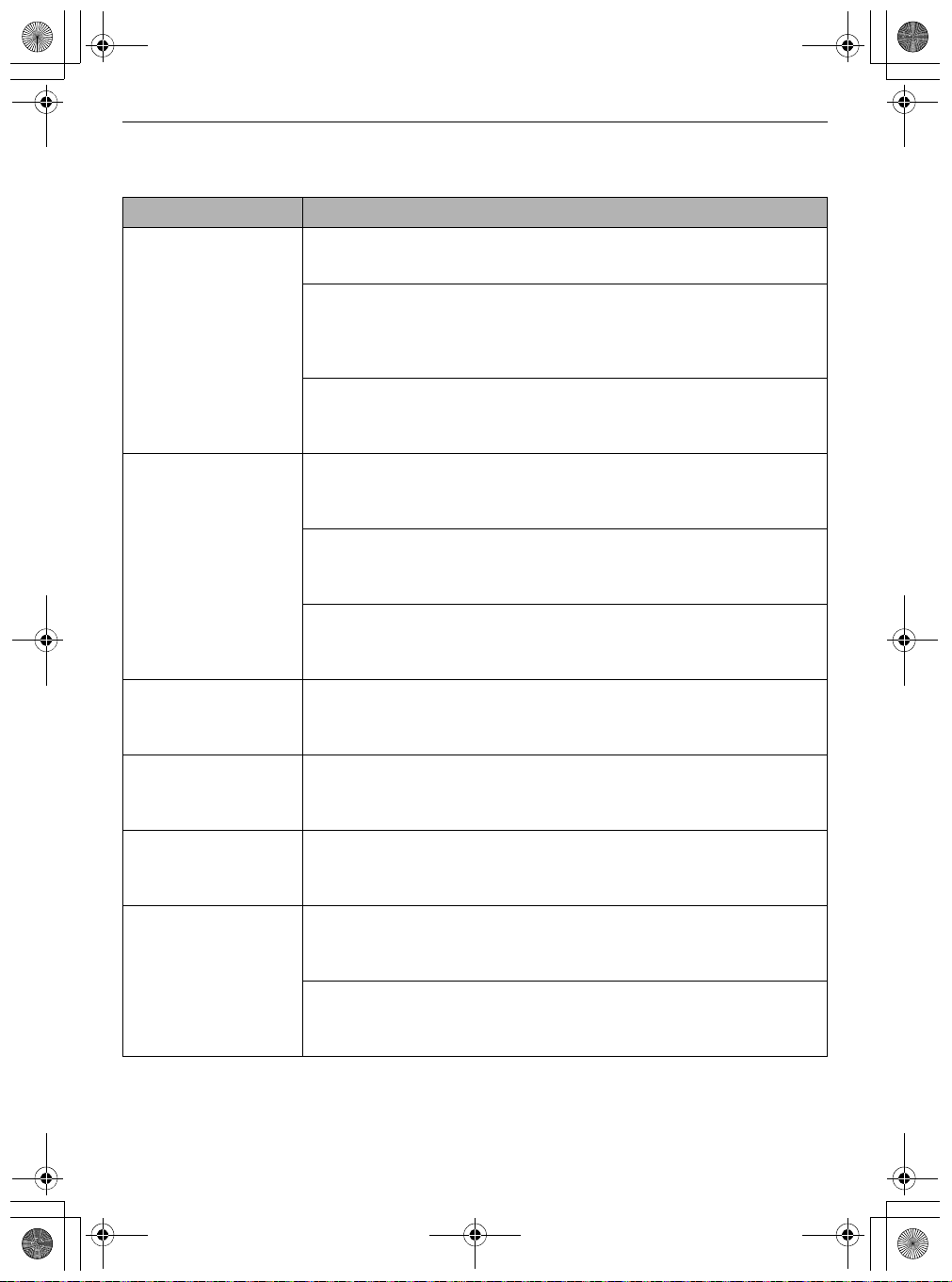
A strange odour is
coming from the
appliance.
Appliance was purchased within the last 3 months.
• The cleaner may emit a smell of rubber for about 3 months after purchase.
Dust bin is full of dust.
• The dust in the bin may cause some odour. Empty the bin and clean it.
Foreign object is on the filter.
• The filter may emit an odour if it has not been cleaned for some time. Clean
the pre-filter and exhaust filter regularly.
Pre-filter, Fine dust filter or the Cyclonic Mesh Filter were installed while
damp or wet.
• Wash the filters with running water. To avoid odour, allow the pre-filter to
dry completely in a well-ventilated area out of direct sunlight for at least 24
hours before reassembling.
Exhaust filter was installed while damp or wet.
• Wash the exhaust filter with running water. To avoid odour, allow the
exhaust filter to dry completely in a well-ventilated area out of direct
sunlight for at least 24 hours before reassembling.
The appliance makes
too much noise.
Vacuum cleaner is running in Turbo mode.
• The motor may be louder at the higher suction power settings. This is
normal.
The appliance turns off
unexpectedly or by
itself after the motor
speed fluctuates
repeatedly.
Battery is not fully charged.
• The battery must be fully charged before cleaning. If the problem persists
when the battery is fully charged and the pipes and attachments are clear
from obstructions, contact an LG customer information centre for service.
Foreign object is in the product body, extension pipe, inlet port or
nozzle.
• Remove any foreign objects from the product body, extension pipe, inlet
port or nozzle.
Filters are clogged.
• Clean the pre-filter and the exhaust filter.
The rotating brush
does not rotate.
Brush is improperly installed.
• Remove the brush, clean it if necessary and attach it again.
Foreign object is on rotating brush.
• Remove any foreign objects from the rotating brush.
Symptoms Possible Cause & Solution
global_main.book.book Page 40 Monday, July 13, 2020 4:53 PM
41
TROUBLESHOOTING
EN
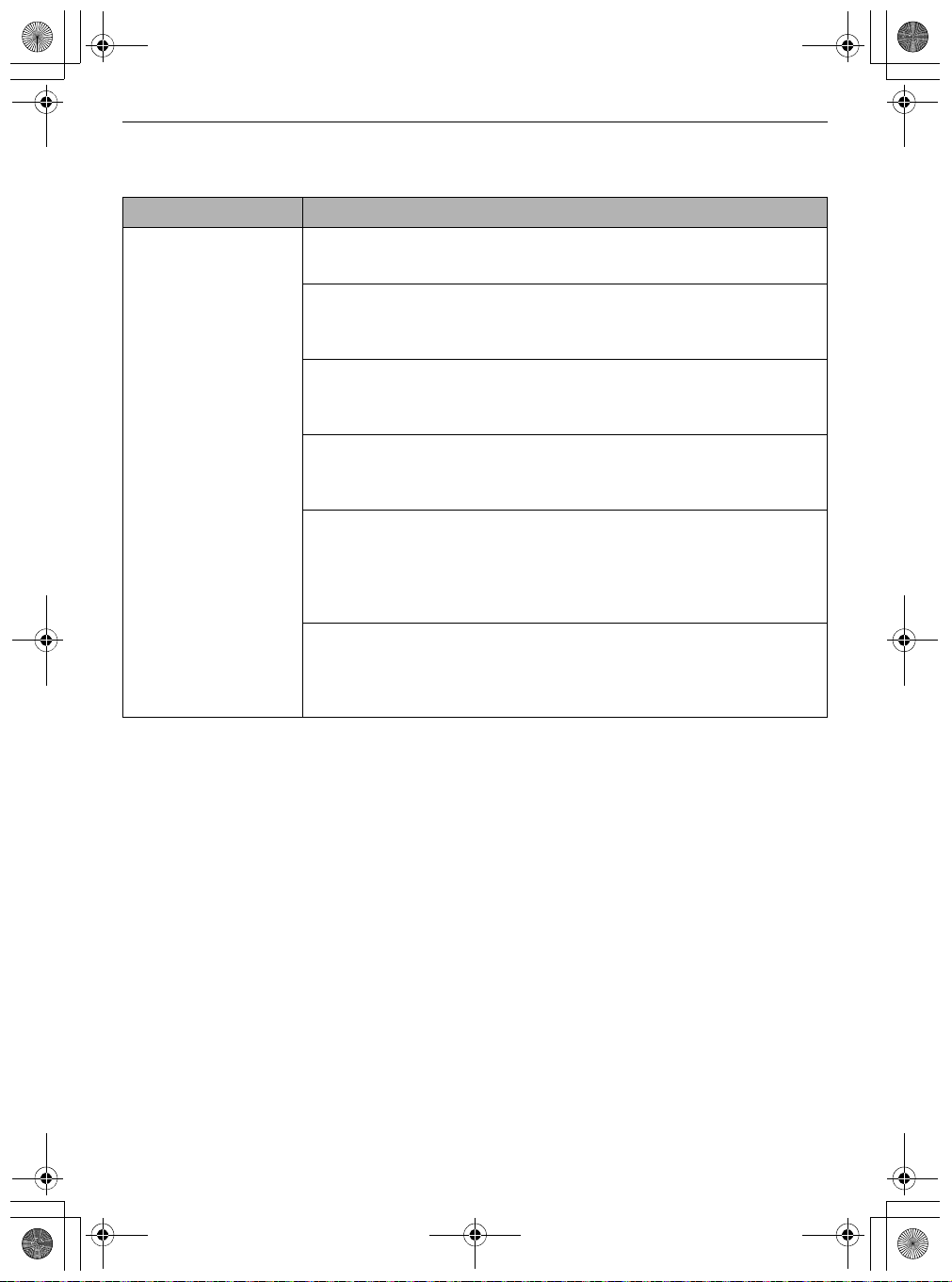
Mop Nozzle
Symptoms Possible Cause & Solution
The mop pad
attachment plate does
not rotate.
Mop pads are improperly installed.
• Remove the mop pads, clean them if necessary and attach them again.
Mop nozzle is pressed too hard against the floor.
• The mop attachment plate stops automatically to protect the product. This
is not a failure. Attach the mop pads securely to the mop attachment plate
and press the power button to resume use.
Foreign object is between mop attachment plate and mop pads.
• Remove foreign objects from the mop nozzle attachment plate and press
the power button to resume use.
There is no water
coming out of the mop
nozzle.
Water tank is empty.
• Fill the water tank. Remove the battery or detach the nozzle before filling
the water tank.
Water tank is improperly attached to mop nozzle.
• Properly attach the water tank to the mop nozzle. Remove the battery or
detach the nozzle before properly securing the water tank to the nozzle.
Water supply adjustment button is set to STOP.
• Press the
High
or
Low
water adjustment button all the way down. The
water will not come out if the button is set to
STOP
.
There is moisture in
the water tank.
Water tank is not allowed to dry completely after use.
• Empty the water tank, set it out of direct sunlight, and allow it to dry
completely after use.
A strange odour is
coming from the
appliance.
Foreign object is on the dust inlet of the mop nozzle.
• Wet dust in the mop nozzle may result in odour. Make sure to wipe the
dust inlet of the mop nozzle with a wet wipe after each use.
Using the mop nozzle
makes the floor dirtier.
Mop pads are not cleaned properly after use.
• Clean the mop pads thoroughly after each use. Using soiled mop pads may
make the floor dirtier.
The appliance makes
too much noise.
This is the sound generated when the pump at the inlet of the mop is
operating.
• This is normal.
The mop pads were improperly attached on the plates.
• Align and attach the centre of the mop pad with the centre of the mop
attachment plate.
global_main.book.book Page 41 Monday, July 13, 2020 4:53 PM
42
TROUBLESHOOTING
EN
Wi-Fi
Symptoms Possible Cause & Solution
Your home appliance
and smartphone are
not connected to the
Wi-Fi network.
Battery is fully discharged.
• Charge the battery, then register your appliance on
LG ThinQ
.
The password for the Wi-Fi that you are trying to connect to is incorrect.
• Find the Wi-Fi network connected to your smartphone and remove it, then
register your appliance on
LG ThinQ
.
Mobile data for your smartphone is turned on.
• Turn off the
Mobile data
of your smartphone and register the appliance
using the Wi-Fi network.
The wireless network name (SSID) is set incorrectly.
• The wireless network name (SSID) should be a combination of English
letters and numbers. (Do not use special characters.)
The router frequency is not 2.4 GHz.
• Only a 2.4 GHz router frequency is supported. Set the wireless router to 2.4
GHz and connect the appliance to the wireless router. To check the router
frequency, check with your Internet service provider or the router
manufacturer.
The distance between the appliance and the router is too far.
• If the distance between the appliance and the router is too far, the signal
may be weak and the connection may not be configured correctly. Move
the location of the router so that it is closer to the appliance.
global_main.book.book Page 42 Monday, July 13, 2020 4:53 PM
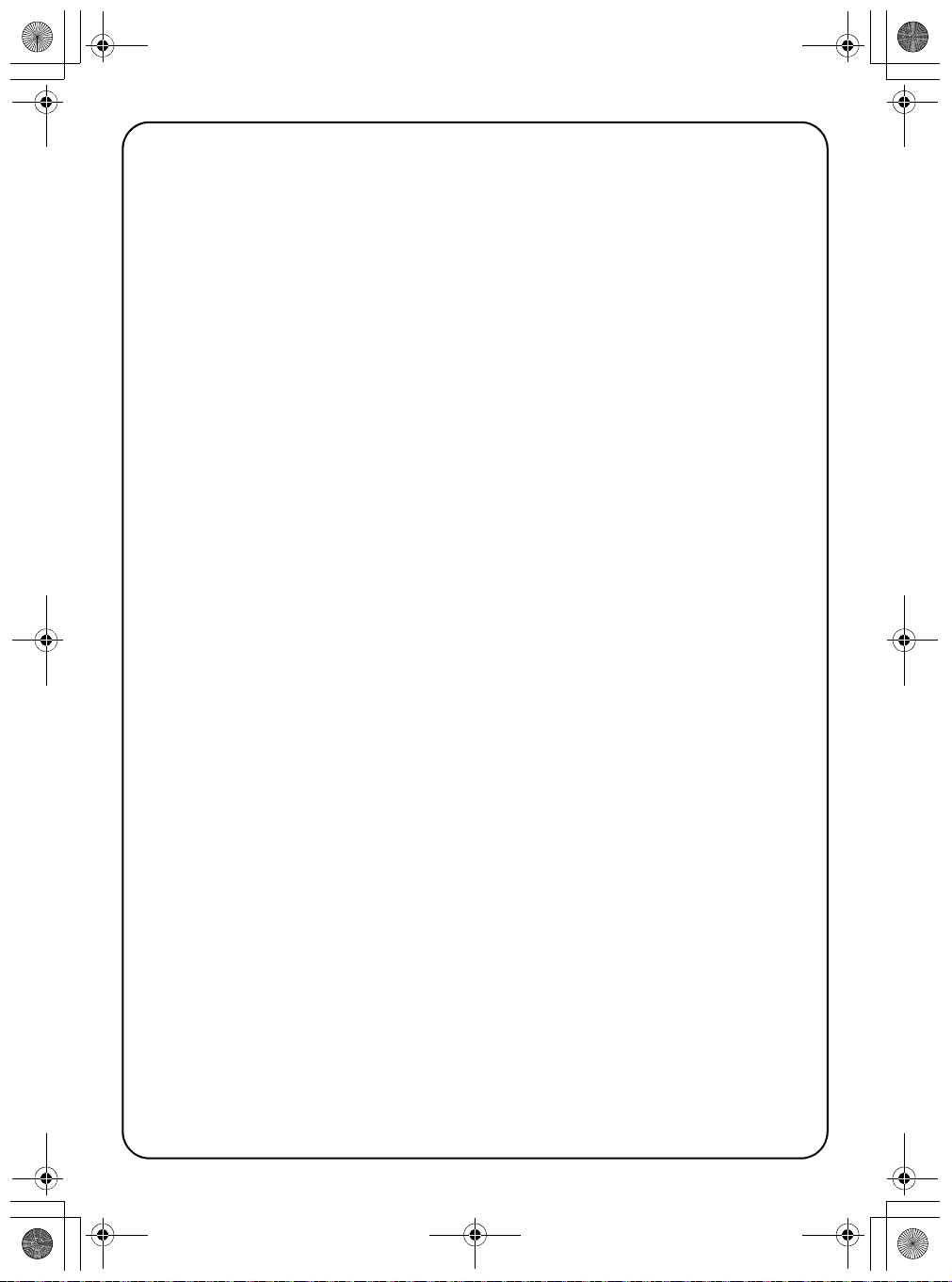
Memo
global_main.book.book Page 43 Monday, July 13, 2020 4:53 PM

Memo
global_main.book.book Page 43 Monday, July 13, 2020 4:53 PM
Memo
global_main.book.book Page 43 Monday, July 13, 2020 4:53 PM