
2
Your new tumble dryer
You have opted for a tumble dryer
manufactured by Bosch.
Please take a few minutes to read and
become familiar with the advantages of
your tumble dryer.
To meet the high quality demands
required by Bosch, every tumble dryer
that leaves our factory is carefully
checked to ensure that it functions
correctly and is in perfect condition.
For more information on our products,
accessories, replacement parts and
services, see our website www.bosch-
home.com or contact our Customer
Service centres.
If the operating and installation
instructions describe different models,
any differences will be pointed out at the
relevant points in the text.
Read these operating and installation
instructions before operating the tumble
dryer.
Display rules
: Warning!
This combination of symbol and signal
word indicates a possibly dangerous
situation. Not heeding the warning can
cause death or injuries.
Caution!
This signal word indicates a possibly
dangerous situation. Not heeding the
caution can cause property and/or
environmental damage.
Note/tip
Information about the optimum use of
the appliance/any other useful
information.
1. 2. 3. / a) b) c)
The steps are represented by numbers
or letters.
■ / -
Lists are represented by a small box or
a dash.

en
3
Table of contents
en Installation and operating instructions
8 Intended use. . . . . . . . . . . . . . . . .4
( Safety instructions . . . . . . . . . . .5
Children/people/pets . . . . . . . . . . . . . 5
Installation. . . . . . . . . . . . . . . . . . . . . . 6
Operation . . . . . . . . . . . . . . . . . . . . . . 8
Cleaning/Maintenance . . . . . . . . . . . 11
7 Energy-saving tips. . . . . . . . . . .12
5 Installing and connecting
the appliance . . . . . . . . . . . . . . .13
Scope of supply . . . . . . . . . . . . . . . . 13
Installing the appliance . . . . . . . . . . . 13
Changing the side on which
the door is hinged . . . . . . . . . . . . . . 15
Connecting the appliance. . . . . . . . . 17
Before using the appliance
for the first time. . . . . . . . . . . . . . . . . 18
Optional accessories . . . . . . . . . . . . 19
9 Quick reference guide . . . . . . . .20
* Familiarising yourself
with your appliance . . . . . . . . . .21
Appliance overview. . . . . . . . . . . . . . 21
Fascia . . . . . . . . . . . . . . . . . . . . . . . . 22
Y Display . . . . . . . . . . . . . . . . . . . .22
Information in the display . . . . . . . . . 24
/ Overview of programmes . . . . .26
0 Settings. . . . . . . . . . . . . . . . . . . .29
Z Laundry. . . . . . . . . . . . . . . . . . . .31
Preparing laundry . . . . . . . . . . . . . . . 31
Sorting laundry . . . . . . . . . . . . . . . . . 31
1 Operating the appliance . . . . . .32
Loading laundry and switching on
the appliance . . . . . . . . . . . . . . . . . . 32
Operation/navigation . . . . . . . . . . . . 33
Setting a programme. . . . . . . . . . . . .33
Programme settings . . . . . . . . . . . . .34
Starting the programme . . . . . . . . . .34
Programme progress . . . . . . . . . . . .34
Changing the programme
or adding more laundry. . . . . . . . . . .35
Cancelling the programme . . . . . . . .35
End of programme . . . . . . . . . . . . . .35
Removing laundry and
switching off the appliance . . . . . . . .35
Emptying the condensation
container . . . . . . . . . . . . . . . . . . . . . .36
2 Appliance settings . . . . . . . . . . 37
Childproof lock . . . . . . . . . . . . . . . . .37
Basic settings . . . . . . . . . . . . . . . . . .37
o Home Connect . . . . . . . . . . . . . . 38
Calling up the Home Connect
menu . . . . . . . . . . . . . . . . . . . . . . . . .38
Connecting to the home network
and the Home Connect app . . . . . . .38
Activating/deactivating Wi-Fi . . . . . . .41
Resetting your network settings . . . .41
Updating the software . . . . . . . . . . . .41
Energy management . . . . . . . . . . . . .42
Intelligent program
recommendation . . . . . . . . . . . . . . . .43
Remote diagnostics. . . . . . . . . . . . . .44
Information on data protection . . . . .44
Declaration of Conformity . . . . . . . . .44
„ Drying with the basket for
woollens . . . . . . . . . . . . . . . . . . . 45
The basket for woollens . . . . . . . . . .45
Securing the basket for woollens . . .45
Application examples . . . . . . . . . . . .45
Putting the insert in place
and starting a programme. . . . . . . . .46
…Crease-removal function . . . . . . 47
Filling the water tank . . . . . . . . . . . . .47
Programs for removing creases . . . .48
Cleaning the filter in
the water tank . . . . . . . . . . . . . . . . . .49

en Intended use
4
ΠDraining the condensation
water . . . . . . . . . . . . . . . . . . . . . 50
D Cleaning and maintenance . . . 52
Cleaning the appliance . . . . . . . . . . 52
Cleaning the base unit. . . . . . . . . . . 53
Cleaning the moisture sensor . . . . . 55
Cleaning the filter in
the condensation container . . . . . . . 56
Ö Appliance care . . . . . . . . . . . . . 57
Preparing the appliance
for appliance care . . . . . . . . . . . . . . 57
Running the basic
appliance care programme . . . . . . . 58
Running the intensive
appliance care programme . . . . . . . 60
3 Help with the appliance . . . . . . 63
L Transporting the appliance . . . 66
[ Consumption values . . . . . . . . 67
Consumption values table . . . . . . . . 67
Most efficient programme
for cotton laundry. . . . . . . . . . . . . . . 67
{ Technical data. . . . . . . . . . . . . . 68
) Disposal. . . . . . . . . . . . . . . . . . . 68
4 Customer Service . . . . . . . . . . . 69
8 Intended use
Intended use
■ This appliance is intended for private
domestic use only.
■ Do not install or operate this
appliance anywhere that is liable to
experience frost and/or outdoor
conditions. There is a risk that the
appliance will be damaged if
residual water in it freezes. If hoses
freeze up, they may crack/burst.
■ This appliance must only be used for
drying and freshening up domestic
laundry, consisting of items that have
been washed with water and are
suitable for tumble drying (see label
on item). Using the appliance for any
other purpose is outside of the
scope of its intended application and
is forbidden.
■ This appliance is intended for use up
to a maximum height of
4000 metres above sea level.
Before you switch on the appliance:
Check that there is no visible damage to
the appliance. Do not operate the
appliance if it is damaged. Should you
have any problems, please contact your
specialist dealer or our customer
service.
Read and follow the operating and
installation instructions and all other
information provided with this appliance.
Retain the documents for subsequent
use or for subsequent owners.

Safety instructions en
5
( Safety instructions
Safety instructi ons
The following safety information
and warnings are provided to
protect you from injury and to
prevent material damage to
your surroundings.
It is nevertheless important to
take the necessary precautions
and to proceed with care when
installing, maintaining, cleaning
and operating the appliance.
Children/people/pets
:Warning
Risk of death!
Children and other people who
are unable to assess the risks
involved when using the
appliance may injure
themselves or may find
themselves in life-threatening
situations. Therefore please
note:
■ The appliance may be used
by children over the age of 8
years and by persons with
reduced physical, sensory or
mental capacity or by
persons with a lack of
experience or knowledge as
long as they are supervised
or have received instruction
on how to use the appliance
safely and they have
understood the potential
risks of using the appliance.
■ Children must not play with
this appliance.
■ Do not allow children to
clean or maintain this
appliance unsupervised.
■ Keep children under 3 years
and pets away from this
appliance.
■ Do not leave the appliance
unattended when children or
other people who are unable
to assess the risks are in the
vicinity.
:Warning
Risk of death!
Children may lock themselves
inside appliances and find
themselves in a life-threatening
situation.
■ Do not position the
appliance behind a door, as
this may obstruct the
appliance door or prevent it
from opening completely.
■ Once an appliance has
reached the end of its life,
pull the mains plug from the
socket before severing the
mains cable, and then
destroy the lock on the
appliance door.

en Safety instructions
6
:Warning
Risk of suffocation!
If allowed to play with the
packaging/plastic film or
packing components, children
may become caught in these or
pull them over their heads and
suffocate.
Keep packaging, plastic film
and packing components away
from children.
:Warning
Risk of poisoning!
Detergents and care products
may result in poisoning if
consumed.
If accidentally swallowed, seek
medical advice. Keep
detergents and care products
out of the reach of children.
:Warning
Eye/skin irritation!
Contact with detergents or care
products may cause eye/skin
irritation.
Rinse eyes/skin thoroughly if
they/it come(s) into contact
with detergents or care
products. Keep detergents and
care products out of the reach
of children.
Installation
:Warning
Risk of electric shock/fire/
material damage/damage to
the appliance!
If the appliance is not installed
properly, this may lead to a
dangerous situation. Ensure
the following:
■ The mains voltage on your
power socket must match
the rated voltage specified
on the appliance
(identification plate). The
connected loads and the
required fuse protection are
specified on the identification
plate.
■ The appliance must not be
supplied through an external
switching device, such as a
timer, or connected to a
circuit that is regularly
switched on and off by a
utility.
■ The mains plug and the
protective contact socket
must match and the earthing
system must be correctly
installed.
■ The installation must have an
adequate cross section.

Safety instructions en
7
■ The mains plug must be
freely accessible at all times.
If this is not possible, in
order to comply with the
relevant safety regulations, a
switch (all pole
disconnection) must be built
into the permanent
installation in accordance
with electrical installation
regulations.
■ If using a residual current
circuit breaker, only use one
that bears the following
mark: z. The presence of
this mark is the only way to
be sure that it fulfils all the
applicable regulations.
:Warning
Risk of electric shock/fire/
material damage/damage to
the appliance!
If the appliance's mains cable is
altered or damaged, this may
result in electric shock, short
circuiting or fire due to
overheating.
The mains cable must not be
kinked, crushed or altered, and
must not come into contact with
any heat sources.
:Warning
Risk of fire/material damage/
damage to the appliance!
The use of extension cords or
power strips may result in fire
due to overheating or short
circuiting.
Connect the appliance directly
to an earthed socket that has
been correctly installed. Do not
use extension cords, power
strips or multi-way couplers.
:Warning
Risk of injury/material
damage/damage to the
appliance!
■ The appliance may vibrate or
move when in operation,
potentially resulting in injury
or material damage.
Place the appliance on a
clean, even, solid surface
and, using a spirit level to
guide you, level it with the
screw-in feet.
Risk of injury/material damage/damage to the appliance!

en Safety instructions
8
■ Incorrectly placing (stacking)
this appliance on top of a
washing machine may result
in injury, material damage
and/or damage to the
appliance.
If this appliance is to be
placed on top of a washing
machine, the washing
machine must be of at least
the same depth and width as
the appliance, and it must be
secured in place with the
appropriate connection set if
available. ~ Page 19
The appliance MUST be
secured with this connection
set. Stacking the appliance
in any other way is forbidden.
Risk of injury/material damage/damage to the appliance!
■ If you take hold of any of the
appliance's protruding parts
(e.g. the appliance door) in
order to lift or move it, these
parts may break off and
cause injury.
Do not take hold of any of
the appliance's protruding
parts in order to move the
appliance.
:Warning
Risk of injury!
■ The appliance is very heavy.
Lifting it may result in injury.
Do not lift the appliance on
your own.
Risk of injury!
■ The appliance has sharp
edges on which you could
cut your hands.
Do not take hold of the
appliance by its sharp
edges. Wear protective
gloves to lift it.
Risk of injury!
■ If the hoses and mains
cables are not correctly
routed, they may constitute a
tripping hazard, which may
result in injury.
Route hoses and cables
such that they do not
constitute a tripping hazard.
Operation
:Warning
Risk of explosions/fire!
Laundry that has come into
contact with solvents, oil, wax,
wax remover, paint, grease or
stain remover may ignite when
dried in the machine, or even
cause the appliance to explode.
Therefore please note:
■ Rinse the laundry thoroughly
with warm water and
detergent before drying it in
the machine.
■ Do not place laundry in this
appliance to be dried if the
laundry has not been
washed first.
■ Do not use the appliance if
industrial chemicals have
been used to clean the
laundry.

Safety instructions en
9
:Warning
Risk of explosions/fire!
■ If there is any residual
material left in the fluff filter,
this may ignite when drying
is in progress, or even cause
the appliance to catch fire or
explode.
Clean the fluff filter regularly.
Risk of explosions/fire!
■ Certain objects may ignite
when drying is in progress,
or even cause the appliance
to catch fire or explode.
Remove any lighters or
matches from pockets on
items of clothing.
Risk of explosions/fire!
■ If there is coal dust or flour in
the air around the appliance,
this may cause an explosion.
Make sure that the area
around the appliance is kept
clean when it is in operation.
:Warning
Risk of fire/material damage/
damage to the appliance!
The appliance contains R290, a
refrigerant that is
environmentally friendly but
flammable.
Keep open fire and ignition
sources away from the
appliance.
:Warning
Risk of fire/material damage/
damage to the appliance!
If a program is terminated
before the drying cycle has
finished, this prevents the
laundry from cooling down
sufficiently and may cause the
laundry to ignite, or may result
in material damage or damage
to the appliance.
■ During the last part of the
drying cycle, the laundry in
the drum is not heated
(cooling cycle). This is to
ensure that it remains at a
temperature at which it will
not be damaged.
■ Do not switch off the
appliance before the drying
cycle has finished unless you
remove all items of laundry
from the drum immediately
and spread them out (to
dissipate the heat).
:Warning
Risk of poisoning/material
damage!
Condensation water is not
suitable for drinking and may
be contaminated with lint.
Contaminated condensation
water may be hazardous to
health and may cause material
damage.
Do not drink or reuse.

en Safety instructions
10
:Warning
Risk of poisoning!
Poisonous fumes may be given
off by cleaning agents that
contain solvents, e.g. cleaning
solvent.
Do not use cleaning agents that
contain solvents.
:Warning
Risk of injury!
■ If you support your weight/sit
on the appliance door when
it is open, the appliance may
tip over, which may result in
injury.
Do not support your weight
on the appliance door when
it is open.
Risk of injury!
■ If you climb onto the
appliance, the worktop may
break, which may result in
injury.
Do not climb onto the
appliance.
Risk of injury!
■ If you reach into the drum
while it is still rotating, you
risk injuring your hands.
Wait until the drum has
stopped rotating.
Caution!
Material damage/damage to
the appliance
■ If the amount of laundry in
the appliance exceeds its
maximum load capacity, it
may not be able to operate
properly, or this may result in
material damage or damage
to the appliance.
Do not exceed the maximum
load capacity of dry laundry.
Make sure you comply with
the maximum load capacities
specified for each of the
programs. ~ Page 26
Material damage/damage to the appliance
■ If you operate the appliance
without a fluff catcher (e.g.
fluff filter, fluff depot,
depending on appliance
specifications), or if the fluff
catcher is incomplete or
defective, this may result in
damage to the appliance.
Do not operate the appliance
without a fluff catcher, or with
a fluff catcher that is
incomplete or defective.
Material damage/damage to the appliance
■ Light objects such as hair
and lint may be sucked into
the air inlet when the
appliance is in operation.
Keep these away from the
appliance.
Material damage/damage to the appliance
■ Foam and foam rubber may
deform or melt if dried in the
appliance.
Do not dry laundry items that
contain foam or foam rubber
in the appliance.
Material damage/damage to the appliance

Safety instructions en
11
■ If you pour the wrong
quantity of detergent or
cleaning agent into the
appliance, this may result in
material damage or damage
to the appliance.
Use detergents/care
products/cleaning agents
and softeners in accordance
with the manufacturers'
instructions.
Material damage/damage to the appliance
■ If the appliance overheats, it
may not be able to operate
properly, or this may result in
material damage or damage
to the appliance.
Make sure that the
appliance's air inlet is never
obstructed when the
appliance is in operation,
and that the area around the
appliance is adequately
ventilated.
Cleaning/Maintenance
:Warning
Risk of death!
The appliance is powered by
electricity. There is a risk of
electric shock if you come into
contact with live components.
Therefore please note:
■ Switch off the appliance.
Disconnect the appliance
from the power supply (pull
out the plug).
■ Never take hold of the mains
plug with wet hands.
■ When removing the mains
plug from the socket, always
take hold of the plug itself
and never the mains cable,
otherwise this may damage
the mains cable.
■ Do not make any technical
modifications to the
appliance or its features.
■ Repairs and any other work
on the appliance must only
be conducted by our
customer service or by an
electrician. The same applies
for replacing the mains cable
(when necessary).
■ Spare mains cables can be
ordered from our customer
service.
:Warning
Risk of poisoning!
Poisonous fumes may be given
off by cleaning agents that
contain solvents, e.g. cleaning
solvent.
Do not use cleaning agents that
contain solvents.
:Warning
Risk of electric shock/material
damage/damage to the
appliance!
If moisture penetrates the
appliance, this may cause it to
short circuit.
Do not use a pressure washer,
steam cleaner, hose or spray
gun to clean your appliance.

en Energy-saving tips
12
:Warning
Risk of injury/material
damage/damage to the
appliance!
The use of spare parts and
accessories supplied by other
brands is dangerous and may
result in injury, material damage
or damage to the appliance.
For safety reasons, use
genuine spare parts and
accessories only.
Caution!
Material damage/damage to
the appliance
Cleaning agents and agents for
pretreating laundry (e.g. stain
removers, prewash sprays, etc.)
may cause damage if they
come into contact with the
surfaces of the appliance.
Therefore please note:
■ Do not allow these agents to
come into contact with the
surfaces of the appliance.
■ Clean the appliance with
nothing but water and a soft,
damp cloth.
■ Remove any detergent,
spray or other residues
immediately.
7 Energy-saving tips
Energy-saving tips
■ Spin the laundry before drying. The
drier the laundry, the shorter the
programme will be, in turn reducing
energy consumption.
■ Load the appliance with the
maximum loads permitted for the
programmes.
Note: If the maximum load is
exceeded, this extends the programme
duration and increases energy
consumption.
■ Operate the appliance in a ventilated
room and make sure that the air inlet
on the appliance is unobstructed so
that air exchange can take place
unhindered.
■ Regularly remove the fluff from the
appliance. If there is fluff in the
appliance, this extends the
programme duration and increases
energy consumption.
■ If you do not perform any actions on
the appliance for an extended period
before the programme starts or once
the programme has ended, the
appliance will automatically switch to
energy-saving mode. The display
and indicator lights go out after a
few minutes and A (Start/Pause)
flashes. To end energy-saving mode,
all you need to do is perform an
action on the appliance, such as
opening and closing the door.
■ If you do not perform any actions on
the appliance for an extended period
when it is in energy-saving mode, the
appliance automatically switches
itself off.
Note: If Wi-Fi is activated, the appliance
will not switch itself off automatically.
Installing and connecting the appliance en
13
5 Installing and
connecting the
appliance
Installi ng and connecting the appliance
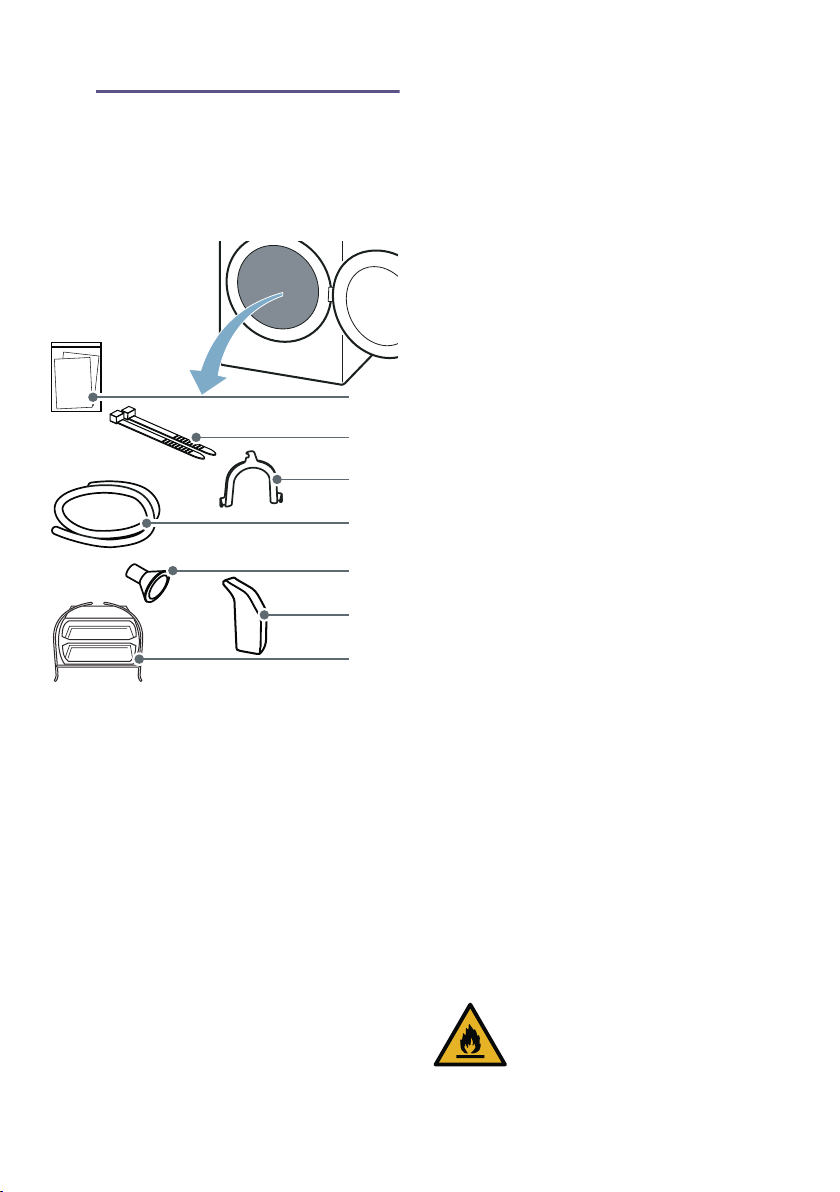
Scope of supply
1. Remove any packaging and
protective covers completely from
the appliance.
2. Open the door.
3. Remove all the accessories from the
drum.
You can now install and connect the
appliance.
Caution!
Risk of material damage and damage
to the appliance
Objects remaining in the drum that are
not designed for operation with the
appliance may result in material
damage and damage to the appliance.
Remove these objects, along with all
accessories, from the drum.
Installing the appliance
:Warning
Risk of death!
Children may lock themselves inside
appliances and find themselves in a life-
threatening situation.
■ Do not position the appliance behind
a door, as this may obstruct the
appliance door or prevent it from
opening completely.
■ Once an appliance has reached the
end of its life, pull the mains plug
from the socket before severing the
mains cable, and then destroy the
lock on the appliance door.
:Warning
Risk of explosions/fire!
If there is coal dust or flour in the air
around the appliance, this may cause
an explosion.
Make sure that the area around the
appliance is kept clean when it is in
operation.
:Warning
Risk of fire/material damage/damage
to the appliance!
The appliance contains R290, a
refrigerant that is environmentally
friendly but flammable.
Keep open fire and ignition sources
away from the appliance.
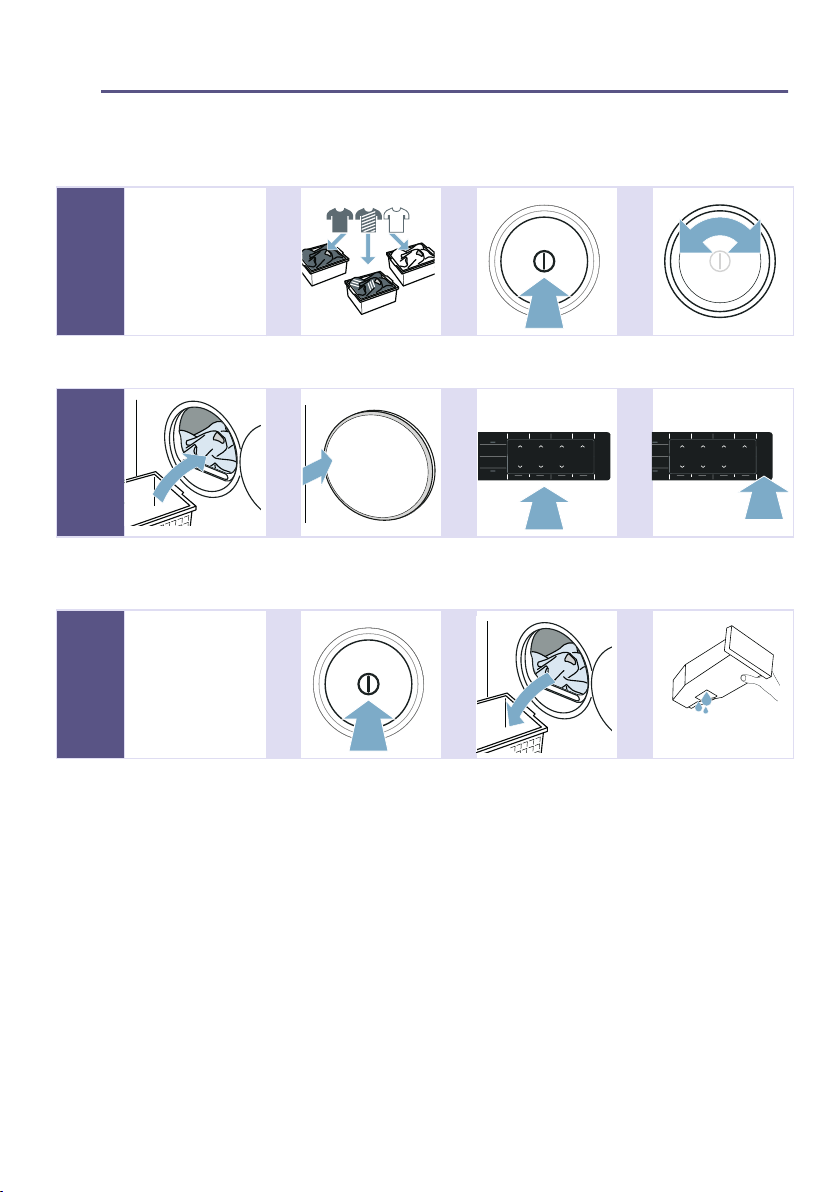
( Accompanying documents (e.g.
installation and operating
instructions)
0 Fastening parts
8 U-piece for fixing the drain hose
in place
@ Outlet hose
H Connection adapter
P Water jug
X Basket for woollens
#
+
3
;
en Installing and connecting the appliance
14
:Warning
Risk of injury/material damage/
damage to the appliance!
■ The appliance may vibrate or move
when in operation, potentially
resulting in injury or material
damage.
Place the appliance on a clean,
even, solid surface and, using a
spirit level to guide you, level it with
the screw-in feet.
Risk of injury/material damage/damage to the appliance!
■ Incorrectly placing (stacking) this
appliance on top of a washing
machine may result in injury, material
damage and/or damage to the
appliance.
If this appliance is to be placed on
top of a washing machine, the
washing machine must be of at least
the same depth and width as the
appliance, and it must be secured in
place with the appropriate
connection set if available.
~ Page 19
The appliance MUST be secured
with this connection set. Stacking the
appliance in any other way is
forbidden.
Risk of injury/material damage/damage to the appliance!
■ If you take hold of any of the
appliance's protruding parts (e.g. the
appliance door) in order to lift or
move it, these parts may break off
and cause injury.
Do not take hold of any of the
appliance's protruding parts in order
to move the appliance.
:Warning
Risk of injury!
■ The appliance is very heavy. Lifting it
may result in injury.
Do not lift the appliance on your
own.
Risk of injury!
■ The appliance has sharp edges on
which you could cut your hands.
Do not take hold of the appliance by
its sharp edges. Wear protective
gloves to lift it.
Caution!
Material damage/damage to the
appliance
If the appliance overheats, it may not be
able to operate properly, or this may
result in material damage or damage to
the appliance.
Make sure that the appliance's air inlet
is never obstructed when the appliance
is in operation, and that the area around
the appliance is adequately ventilated.
Caution!
Risk of material damage and damage
to the appliance
The appliance underwent a function test
before leaving the factory and therefore
may contain residual water. This
residual water may leak out if the
appliance is tilted at an angle greater
than 40°.
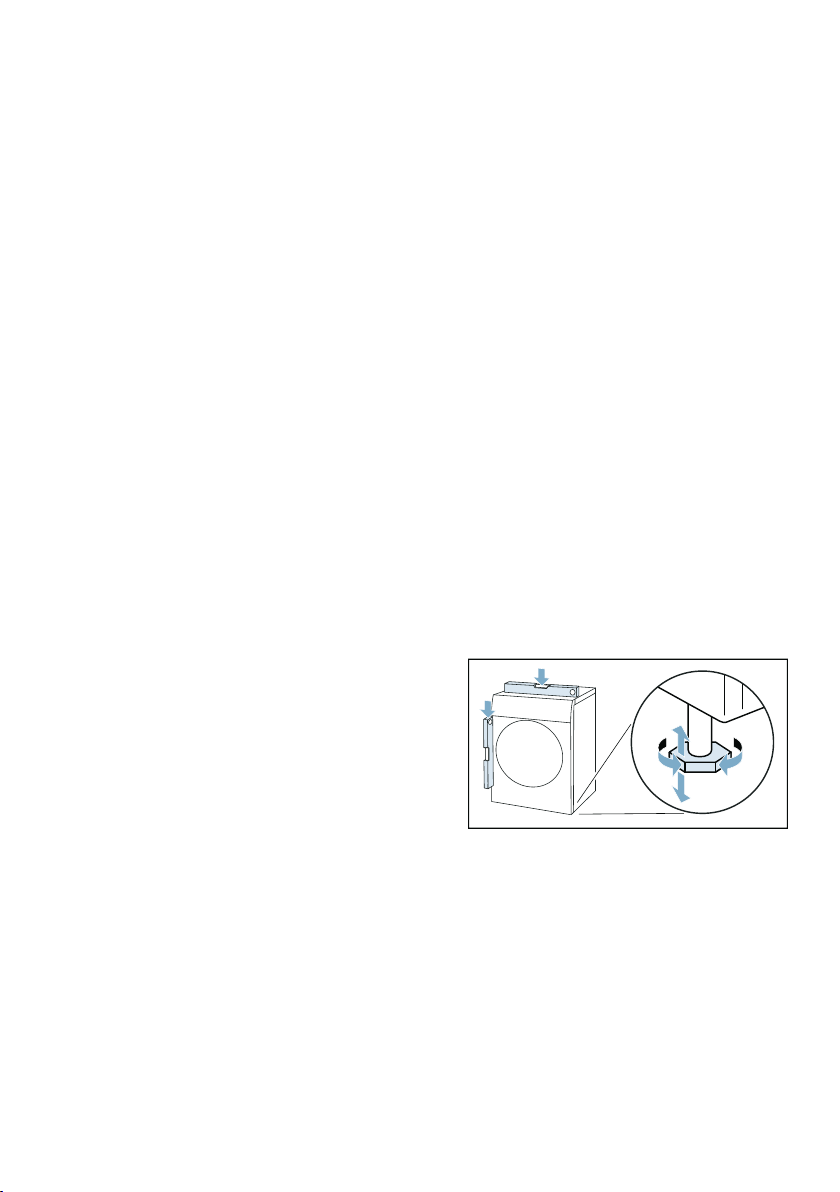
Install the appliance as follows:
1. Place the appliance on a clean,
even, solid surface.
2. Check that the appliance is level
using a spirit level.
3. If necessary, turn the appliance feet
to make sure it is level.
You can now connect the appliance.
Notes
■ All appliance feet must stand firmly
on the ground.
Installing and connecting the appliance en
15
■ If appliances are not aligned
correctly, this may result in noises,
vibrations, uneven drum operation
and/or to residual water leaking out
of the appliance.
Changing the side on which
the door is hinged
To load the drum more conveniently,
you can change the side on which the
door is hinged on this appliance and,
for example, adapt it to an adjacent
washing machine.
Note: When the appliance is delivered,
the door opening is on the left side.
:Warning
Risk of injury!
■ The appliance is very heavy. Lifting it
may result in injury.
Do not lift the appliance on your
own.
Risk of injury!
■ The appliance has sharp edges on
which you could cut your hands.
Do not take hold of the appliance by
its sharp edges. Wear protective
gloves to lift it.
:Warning
Risk of injury/material damage/
damage to the appliance!
If you take hold of any of the appliance's
protruding parts (e.g. the appliance
door) in order to lift or move it, these
parts may break off and cause injury.
Do not take hold of any of the
appliance's protruding parts in order to
move the appliance.
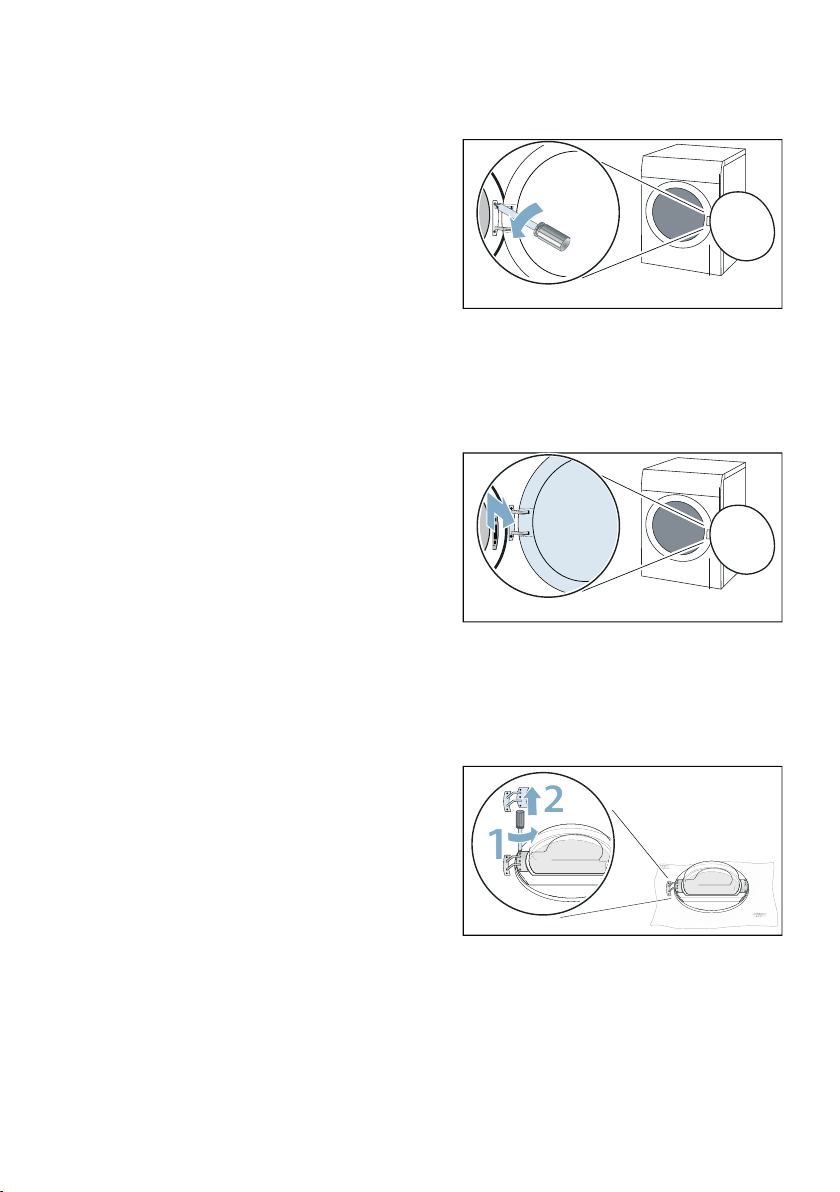
Change the side on which the door is
hinged as follows:
1. Open the door.
2. Remove the screws from the hinge
on the appliance.
Note: Only use a T20 (Torx)
screwdriver and no other tools to
change the side on which the door is
hinged.
3. Remove the door and carefully set it
down on a soft, flat surface.
Note: Ensure that you do not
damage or scratch the door by, for
example, placing a soft towel below
it.
4. Remove screws from the hinge, and
remove the hinge.
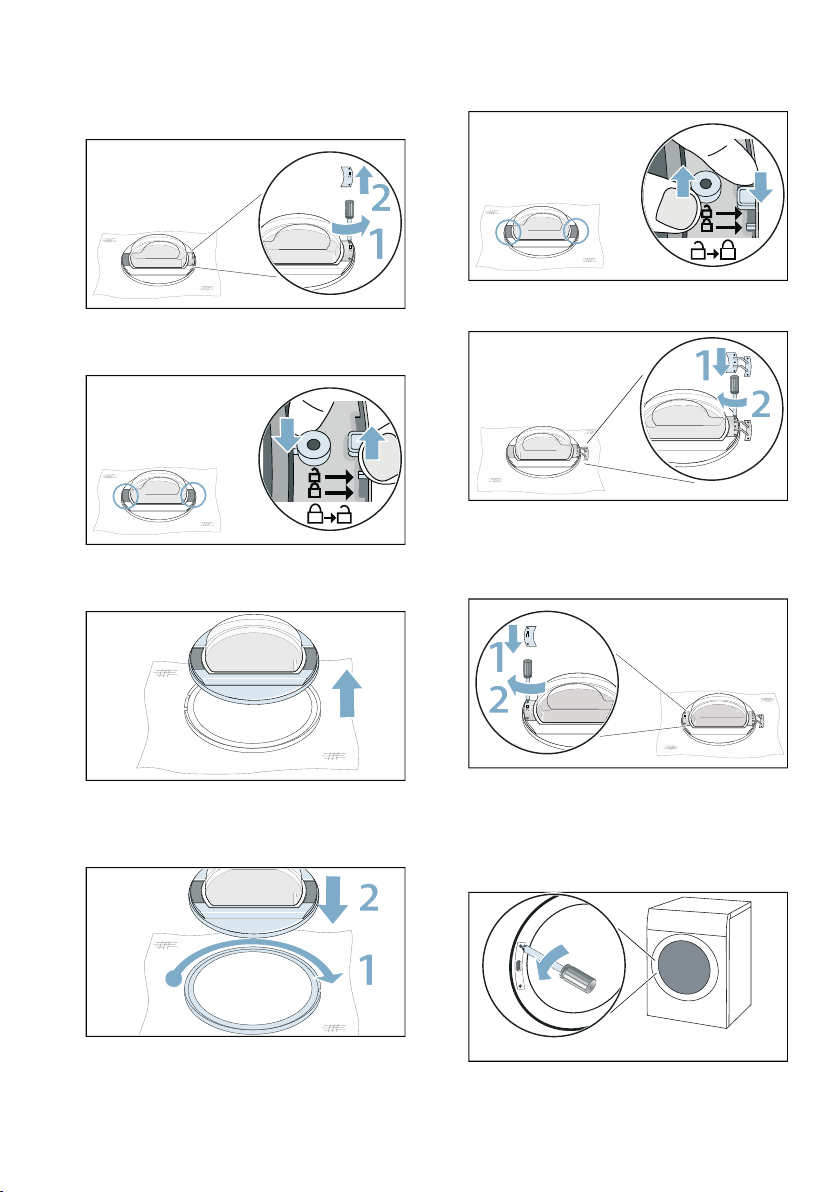
en Installing and connecting the appliance
16
5. Remove the screws from the eyelet
and remove the eyelet.
6. Unlock the door.
7. Remove the door from the door ring.
8. Rotate the door ring by 180° and
insert the door properly.
9. Lock the door ring.
10.Screw the hinge onto the door.
Note: Ensure that the door's seal is
not jammed or damaged when
inserting the hinge.
11.Screw the eyelet to the door.
Note: Ensure that the door's seal is
not jammed or damaged when
inserting the eyelet.
12.Remove the cover from the door
lock.
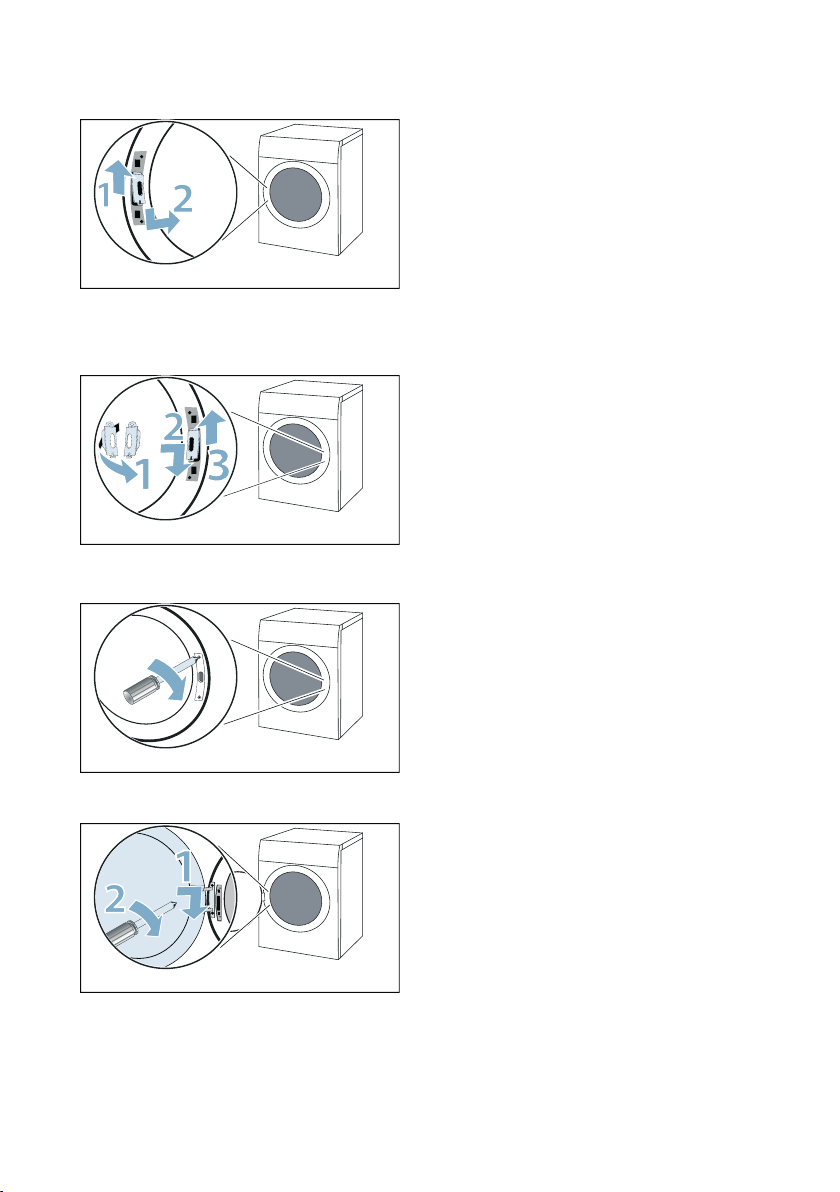
Installing and connecting the appliance en
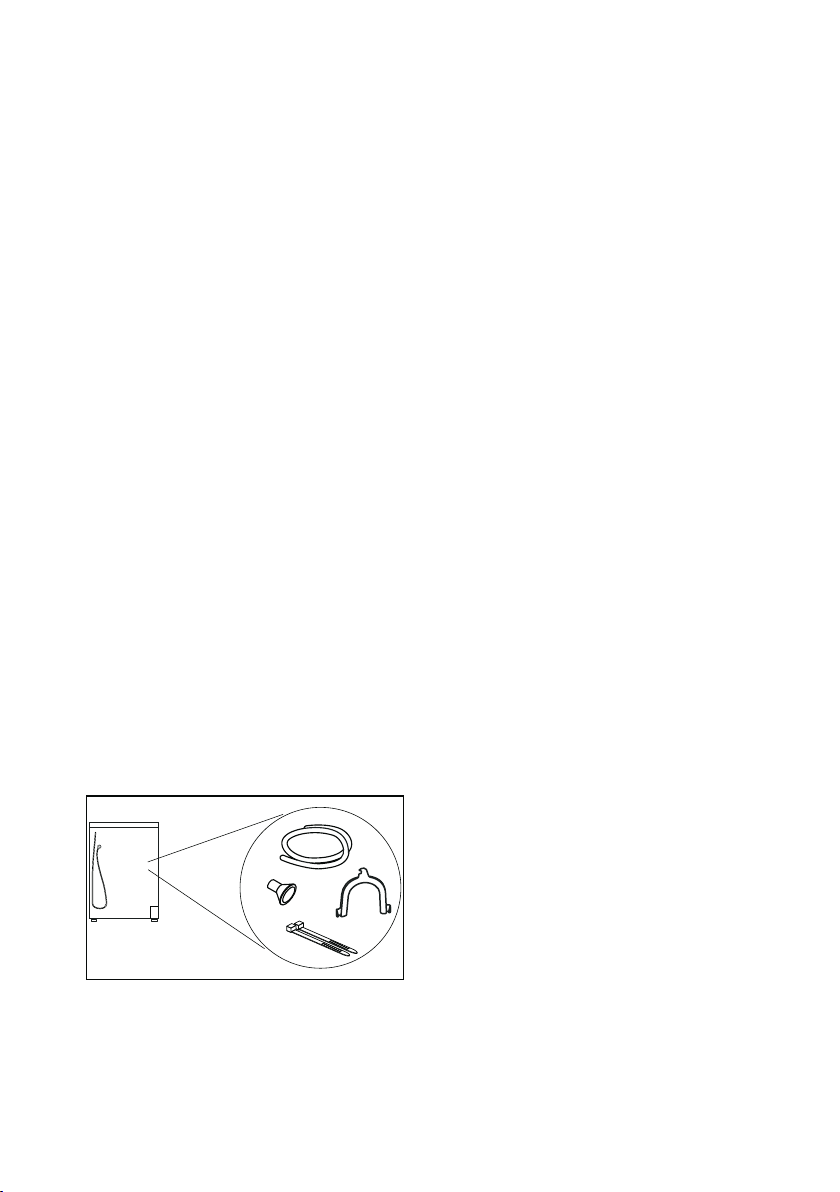
17
13.Remove the door lock.
14.Turn the door lock by 180° and
insert it on the other side.
15.Screw the cover from the door lock.
16.Insert and screw in the door.
You can now connect the appliance.
Note: If you want to change the door
direction again, reverse these steps.
Connecting the appliance
:Warning
Risk of electric shock/fire/material
damage/damage to the appliance!
If the appliance is not installed properly,
this may lead to a dangerous situation.
Ensure the following:
■ The mains voltage on your power
socket must match the rated voltage
specified on the appliance
(identification plate). The connected
loads and the required fuse
protection are specified on the
identification plate.
■ The appliance must not be supplied
through an external switching
device, such as a timer, or
connected to a circuit that is
regularly switched on and off by a
utility.
■ The mains plug and the protective
contact socket must match and the
earthing system must be correctly
installed.
■ The installation must have an
adequate cross section.
■ The mains plug must be freely
accessible at all times. If this is not
possible, in order to comply with the
relevant safety regulations, a switch
(all pole disconnection) must be built
into the permanent installation in
accordance with electrical
installation regulations.
■ If using a residual current circuit
breaker, only use one that bears the
following mark: z. The presence of
this mark is the only way to be sure
that it fulfils all the applicable
regulations.
en Installing and connecting the appliance
18
:Warning
Risk of electric shock/fire/material
damage/damage to the appliance!
If the appliance's mains cable is altered
or damaged, this may result in electric
shock, short circuiting or fire due to
overheating.
The mains cable must not be kinked,
crushed or altered, and must not come
into contact with any heat sources.
:Warning
Risk of fire/material damage/damage
to the appliance!
The use of extension cords or power
strips may result in fire due to
overheating or short circuiting.
Connect the appliance directly to an
earthed socket that has been correctly
installed. Do not use extension cords,
power strips or multi-way couplers.
:Warning
Risk of injury!
If the hoses and mains cables are not
correctly routed, they may constitute a
tripping hazard, which may result in
injury.
Route hoses and cables such that they
do not constitute a tripping hazard.
Connect the appliance as follows:
1. Connecting the drain hose.
~ Page 50
2. Plug the appliance's mains plug into
the designated socket.
3. Check that the mains plug is in
securely.
Your appliance is now ready to use.
Caution!
Risk of material damage/damage to the
appliance
The appliance contains refrigerant and
may be damaged if it is operated
immediately after transportation.
Allow the appliance to rest for two hours
before initial use.
Note: If in doubt, have your appliance
connected by a qualified professional.
Before using the appliance for
the first time
Before you switch on the appliance:
Check that there is no visible damage to
the appliance. Do not operate the
appliance if it is damaged. Should you
have any problems, please contact your
specialist dealer or our customer
service.
Note: Once the appliance has been
properly installed and connected, it is
ready to use. No further steps are
necessary.

Installing and connecting the appliance en
19
Optional accessories
Order optional accessories
*
from the
after-sales service:
■ Basket for woollens:
Dry or air individual woollen items,
sports shoes and soft toys in the
basket for woollens.
– Order number: WMZ20600.
■ Platform:
For easier loading and unloading,
raise your dryer with a platform.
You can transport laundry with the
laundry basket integrated into the
platform drawer.
– Order number: WMZ20500.
■ Washer-dryer stack connection kit:
To save space, the dryer can be
placed on top of a suitable washing
machine of the same width and
depth.
Only this connection kit may be used
to secure the dryer to the washing
machine.
– Order number with pull-out
worktop: WTZ27400
– Order number without pull-out
worktop: WTZ27410.
■ Condensate drainage kit:
You can discharge the condensation
water into the waste-water system
via a drain hose. If you choose to
discharge the condensation water
into the waste-water system, you will
not need to empty the condensation
container during the drying
programme or after each time you
use the dryer.
– Order number: ~
* Depending on the appliance features
en Short introduction
20
9 Quick reference guide
Short introducti on
Note: The appliance must be correctly installed and connected. ~ Page 13
--------
--------
--------
1
Before starting
the programme:
@ @ @
Sort the laundry. Switch on the
appliance.
Select a
programme.
2 @ @ @
Open the door and
place the laundry in
the drum.
Close the door. If necessary: Adjust
the programme
settings.
Start the
programme.
3
Once the
programme has
ended:
@ @ @
Switch off the
appliance.
Open the door and
remove the laundry.
Empty the
condensation
container.
Familiarising yourself with your appliance en
21
* Familiarising yourself with your appliance
Familiari sing yourself with your appliance
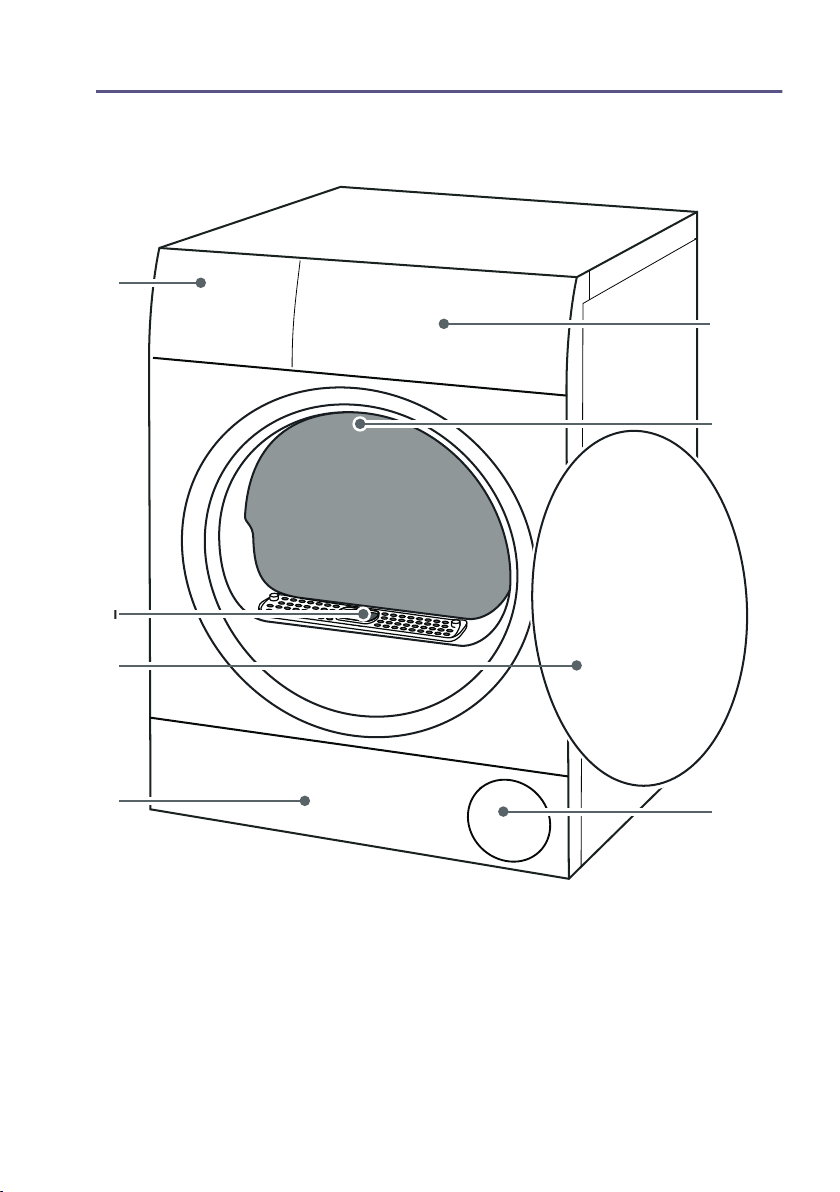
Appliance overview
( Condensation container~ Page 36
0 Panel
8 Drum interior lighting (depending on the model)
@ Air inlet
H Maintenance flap on the base unit~ Page 53
P Door
X Air channel cover (do not remove)
#
3
+
;
;
en Display
22
Fascia
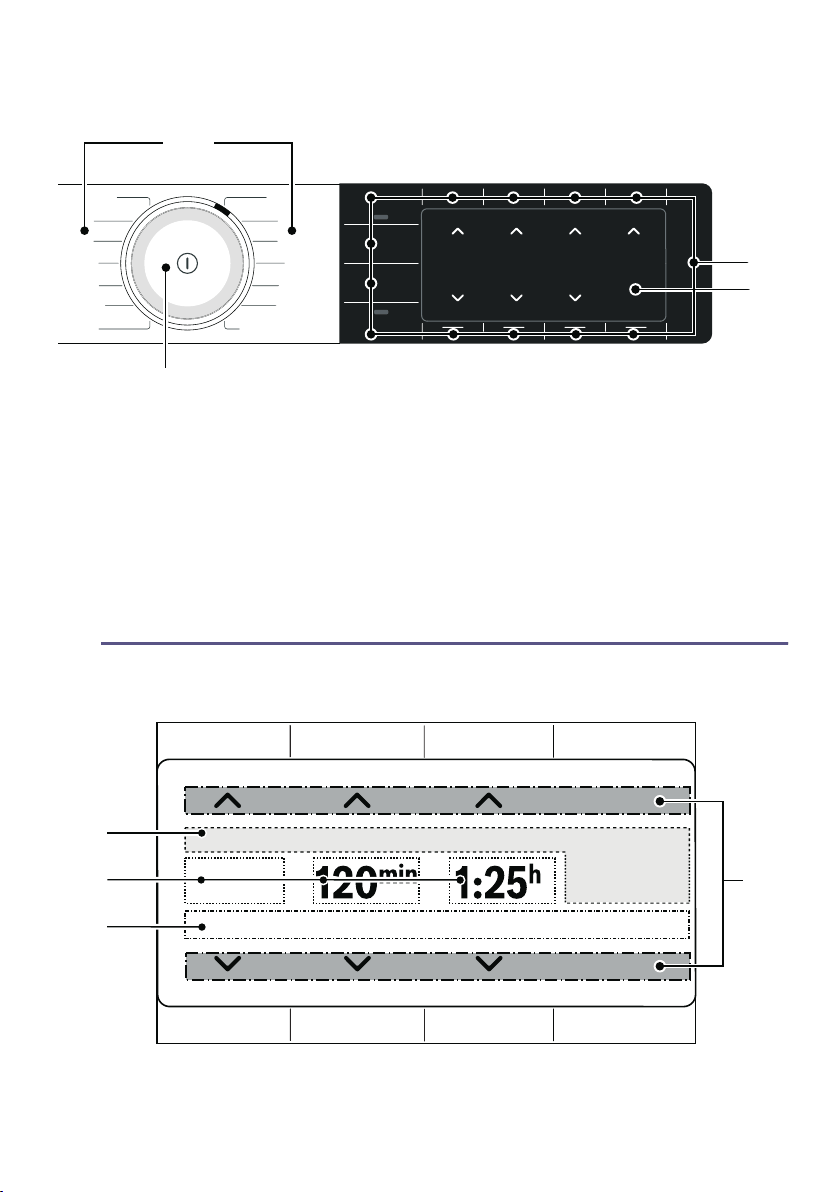
Y Display
Display
#
( Programmes
0 Programme selector
■ Turn: Set a programme
■ Press: Switch the appliance on/off
8 Display
Displays settings and information
@ Buttons
for programme settings and additional functions/appliance settings
'
#
V
Ð
Ï
Æ

Display en
23
--------
Display Description Information
( Status display Information on the programme status and on the
settings that are activated.
0
Ò Dryness level Dryness level Ò (C/board dry extra) activated
» Dryness level » (C/board dry) activated
ö Dryness level ö (Iron dry) activated
e.g. 20 min Timed program Duration of the timed program
e.g. 60 min Anti-crease Duration of the anti-crease phase
e.g. 1:27 Programme duration Expected programme duration in hours and min-
utes.
e.g. 3 h Program delay Program delay in hours when the "Ready in" time is
adjusted and activated
8
E Childproof lock Lit: The childproof lock is activated. ~ Page 37
ù Degree of dryness Degree of dryness activated for a dryness level
s Low-heat drying Gentle drying for delicate fabrics activated
ø Spin speed (rpm) Spin speed activated for the laundry that has been
previously spun
¡ Wi-Fi ■ Off: Wi-Fi is switched off and your appliance is
not connected to your home network.
■ Flashing: The appliance is trying to connect to
your home network.
■ Lit: Wi-Fi is switched on and your appliance is
connected to your home network.
¢ Wi-Fi Wi-Fi is switched on but your appliance has been
unable to connect to your home network.
} Remote Start lights up: Remote start function is activated.
~ Page 29
„ Energy manager Lit: appliance is connected to the smart energy sys-
tem (Energy manager) (not available in every coun-
try)
@
Control elements: Active control element for the upper or lower but-
ton.
×/Ö Change selection
˜ Additional options
™ Additional programs

en Display
24
Information in the display
Display Information
Please empty condensate container ■ Empty the condensation container and then rein-
sert it.~ Page 36
Then press A (Start/Pause).
■ Clean the filter in the condensation container.
~ Page 56
■ If the optional drain hose* is installed, make sure
that the drain hose:
– Is correctly connected. ~ Page 50
– Is not kinked or bent.
– Is not blocked or clogged, e.g. by deposits.
■ Run the intensive appliance care programme.
~ Page 60
■ Check that no debris has found its way into the base
unit. Open the maintenance flap and remove any
debris. ~ Page 53
Please clean lint filter Cleaning the base unit ~ Page 53
Basic machine care required. After a certain period, the appliance automatically rec-
ommends that you run the basic appliance care pro-
gramme. Run the basic appliance care programme.
~ Page 58
A new software version is available. Do you
want to update the software now? This may
take several minutes.
New software version available for the appliance. Run
the software update. ~ Page 41
Selfcleaning The appliance's automatic self-cleaning function is run-
ning. Do not pull out the condensation container or can-
cel the program while this is displayed.
Refresher-container is empty, please re-fill. Fill the water tank with cold, potable tap water.
~ Page 47
Press A (Start/Pause).

Display en
25
--------
Cooling The appliance can reach high temperatures when dry-
ing. The cool-down process reduces the temperature to
prevent damage to the laundry when you:
■ Pause the program
■ Cancel the program
■ Switch off the appliance via the app
If the door is not opened, the cool-down process starts
after 30 seconds. You can continue to operate the appli-
ance during the cool-down process.
Notes
■ The drum continues to rotate during the cool-down
process, even if you have paused the program.
■ Temperature regulation can take up to 10 minutes.
* Depending on how the appliance is equipped or the available accessories

en Overview of programmes
26
/ Overview of programmes
Overview of programmes
Programme Maximum load
Programme name
Brief explanation of the programme and the items for which it is suitable.
Maximum load
based on the dry
weight of the items
Cotton
Hard-wearing items and heat-resistant items made of cotton or linen.
9 kg
Easy Care
Items made of synthetic or blended fabrics.
3.5 kg
Mix
Mixed load consisting of items made from cotton and synthetic fabrics.
3 kg
Time Program Warm
Timed programme for all types of fabric except for wool and silk.
Suitable for pre-dried or slightly damp laundry and for drying off multi-layered, thick
laundry.
Note: In the timed programme, the laundry's remaining moisture is not automati-
cally detected. If the laundry is still too damp when the drying programme has end-
ed, repeat the programme and, if required, extend the programme duration.
3 kg
Wool in Basket
Items of laundry made of wool or that contain wool; shoes/sports shoes and train-
ers; washable soft toys made of polymer fibres.
Notes
■ Dry the laundry only using the basket for woollens ~ Page 45.
■ Do not dry leather shoes or shoes with leather parts.
■ The stuffing in the soft toys must also be suitable for tumble-trying.
Max. load for wool-
lens/soft toys in the
basket: 1 basket
load
Max. load for shoes
in the basket: 1 pair
Smart Dry Ç
After you have washed your laundry in the washing machine, the dryer will recom-
mend a suitable program for drying your laundry. Further information: ~ Page 44
Notes
■ The washing machine must be Home Connect-capable.
■ The washing machine and dryer must be connected to your home network and
registered in your Home Connect app.
Depends on the rec-
ommended program

Overview of programmes en
27
--------
Business î
Timed program for reducing creasing and airborne odours (e.g. cigarette smoke).
Suitable for dry suits, jackets and trousers that have not been worn for long, are
labelled "Dry clean only" and are therefore not suitable for washing in the washing
machine. Further information: ~ Page 47
Notes
■ Laundry is not dried or washed.
■ The program is not suitable for thin, lightweight summer suits.
■ To prevent creasing, remove laundry immediately after the program has
ended.
1 suit (1 jacket and
1 pair of trousers/
skirt)
5 Shirts î
Timed program for reducing creasing and airborne odours (e.g. cigarette smoke).
Suitable for dry shirts and blouses that have not been worn for long. Further infor-
mation: ~ Page 47
Notes
■ Laundry is not dried or washed.
■ To prevent creasing, remove laundry immediately after the program has
ended.
2-5 shirts
1 Shirt î
Timed program for reducing creasing and airborne odours (e.g. cigarette smoke).
Suitable for dry shirts and blouses that have not been worn for long. Further infor-
mation: ~ Page 47
Notes
■ Laundry is not dried or washed.
■ To prevent creasing, remove laundry immediately after the program has
ended.
1 shirt or 1 blouse
Shirts/Blouses
Shirts/blouses made of cotton, linen, or synthetic or blended fabrics.
Note: Once the laundry is dry, iron it or hang it up. This will allow the residual mois-
ture to be distributed evenly.
1.5 kg
Towels
Hard-wearing towels and dressing gowns made of cotton.
6 kg
Rapid 40’
Mixed load of synthetic fabrics and light cottons.
1 kg
AllergyPlus
Hard-wearing items.
Note: The programme reaches high temperatures. Particularly suitable for strict
hygiene requirements.
4 kg
... further ™ Maximum load
Program name
Brief explanation of the program and the items for which it is suitable.
Maximum load
based on the dry
weight of the items

en Overview of programmes
28
--------
Duvet
Clothing, pillows, quilts or bedspreads filled with synthetic fibres.
Note: Dry large items individually. Follow the instructions on the care label.
2.5 kg
Time Progr. Cold
Timed programme for all types of fabric except for wool and silk.
For freshening up or airing clothing that has hardly been worn.
Note: You can adjust the programme duration.
3 kg
Delicates
Delicate, washable items, e.g. made from satin, or synthetic or blended fabrics.
2 kg
Down Wear
Clothing, bedspreads or eiderdowns stuffed with down.
Notes
■ Dry large items individually.
■ Once the programme has ended, shake the items of laundry to distribute the
stuffing and eliminate any pockets of moisture.Restart the programme if neces-
sary.
1.5 kg
Woollen Finish
Machine-washable items made of wool or containing wool.
Notes
■ Laundry becomes fluffier but not dry.
■ Remove laundry once the programme has ended and allow to dry.
0.5 kg
Sportswear
Weatherproof and outdoor clothing with a membrane coating and water-repellent
fabrics.
1.5 kg

Overview of programmes en
29
0 Settings
Program setting Function
Note: Not all settings can be activated in every program. The activated settings are displayed on the but-
tons or on the display. You can change or deactivate the activated settings by repeatedly pressing on the
relevant buttons.
} (Remote Start) Pressing } (Remote Start) allows you to start the appliance remotely via the
Home Connect app or to call up the Home Connect settings.
Notes
■ Please observe the instructions for the ambient temperatures
~ Page 68.
■ Remote start can only be activated if the appliance door is closed and the
appliance is connected to your home network.
■ Remote start is deactivated for safety reasons in the following circum-
stances:
■ Open the door,
■ Power failure,
■ Press A (Start/Pause) on the appliance,
■ Briefly press } again,
■ Press # to switch off the appliance.
‰ ü (Drying Target): The dryness level defines how damp or dry the laundry is after the pro-
gramme ends.
If you have set a dryness level, this is retained even after the appliance has
been switched off for the relevant programme. Exception: The settings are
not saved for Cottons.
Ò (C/board dry extra) Multi-layered, thick laundry that does not dry readily.
» (C/board dry) Normal, single-layered laundry.
ö (Iron dry) Normal, single-layered laundry that still needs to be damp after drying and is
suitable for ironing or hanging up.
Q (Anti-Crease) The drum moves the laundry at regular intervals after drying to prevent creas-
ing. You can activate or deactivate the automatic Anti-Crease function for the
indicated duration in minutes.
ñ (Ready in) Before starting the programme, you can delay the time at which the pro-
gramme ends by up to 24 hours using × and Ö.
The set time in hours, e.g. 8 h, is shown in the display and counts down until
the programme starts. Once the programme has started, the programme
duration is displayed.
Note: Observe the information about the ambient temperatures
~ Page 68.
‰ ü The drying time for timed programmes can be extended in 10-minute
increments using × and Ö.

en Overview of programmes
30
--------
9 or : (favourite pro-
grams)
Save or activate your customised program settings for a program:
Press 9 or :
■ for at least 3 seconds to save your customised program settings.
■ for less than 3 seconds to activate your customised program settings.
Note: The selected settings will be retained even after the appliance has
been switched off.
A (Start/Pause) Starting, cancelling and interrupting a programme.
² (Options) Call up further settings:
ø Spin Speed Set the spin speed for the laundry that has been previously spun. The drying
time is increased or decreased in accordance with the set spin speed.
Note: The set spin speed does not change the drying time for the timed pro-
grams.
ù Adjust drying level If you think the laundry is still too damp when the drying programme has
ended, you can adjust the degree of dryness to achieve a particular dryness
level. To increase the dryness level, set the degree of dryness to between
1 and 3. This extends the programme duration but the temperature remains
the same.
Once you have adjusted the degree of dryness for a dryness level, this setting
is retained even after the appliance is switched off.
s low heat Reduced temperature for delicate fabrics, e.g. polyacrylic or elastane, may
increase the drying time.
Appliance setting Function
You can find out how to adjust the appliance setting on~ Page 37
œ 3 sek. (Basic Settings 3
sec.)
For adapting the appliance settings and the Home Connect settings.
E 3 sek. (Child Lock 3
sec.)
Disable the control panel to prevent unwanted or accidental operation.

Laundry en
31
Z Laundry
Laundry
Preparing laundry
:Warning
Risk of explosions/fire!
Certain objects may ignite when drying
is in progress, or even cause the
appliance to catch fire or explode.
Remove any lighters or matches from
pockets on items of clothing.
Caution!
Risk of damage to the drum and
laundry
Leaving objects in the pockets of your
clothing can cause damage to the drum
and laundry when the appliance is in
operation. Remove all objects (e.g.
metal items) from clothing pockets.
Prepare the laundry as follows:
■ Tie cloth belts, apron strings, etc.
together or use a laundry bag.
■ Close zips, hooks, eyelets and
buttons. Button up large items of
laundry, such as covers.
■ Always dry very small items of
laundry, e.g. babies' socks, together
with large items such as towels.
■ Use timed programmes for single
items.
■ Knitted items, such as T-shirts and
jerseys, often shrink slightly the first
time they are tumble-dried. Use a
gentle programme.
■ Do not overdry easy-care laundry.
This leads to increased creasing of
your laundry.
■ Some detergents and care products,
e.g. starch or softeners, contain
particles that may accumulate on the
moisture sensor. This may impair the
sensor's performance and, in turn,
the drying result.
Notes
– When washing laundry to be
tumble-dried, use the correct
amount of detergent and care
products as specified in the
manufacturer's instructions.
– Clean the moisture sensor
regularly ~ Page 55.
Sorting laundry
Note: Load the laundry item by item
into the appliance. For more effective
drying, do not stuff an entire bundle of
laundry into the dryer at once.
Caution!
Risk of material damage to the dryer or
laundry
Laundry that is unsuitable for tumble-
drying may damage the appliance and
the laundry when it is dried. Before you
dry it, sort the laundry according to the
information given on the care label:
When sorting the laundry to be dried,
take the following points into account:
■ To achieve an even drying result,
only dry laundry of the same type of
fabric and texture together.
If you dry thin, thick and multi-
layered fabrics together, they will dry
to differing degrees.
c Suitable for tumble drying
a Dry at normal temperature
` Dry at low temperature
b Do not tumble-dry
en Operating the appliance
32
■ Use the fabric descriptions given for
the individual drying programmes to
help you choose the most
appropriate programme.
~ "Overview of programmes"
on page 26
~ "Drying with the basket for
woollens" on page 45
Note: You can select a timed
programme to add extra drying time for
laundry that is still damp.
Caution!
Risk of material damage to the
appliance and laundry
Do not tumble-dry the following items or
fabrics in the appliance:
■ Laundry contaminated with solvents,
wax or grease.
■ Unwashed items.
■ Items made from non-breathable
fabrics (e.g. rubber-coated).
■ Items made from delicate fabrics,
such as silk and curtains made of
synthetic material.
1 Operating the
appliance
Operati ng the appliance
Loading laundry and
switching on the appliance
Note: The appliance must be correctly
installed and connected. ~ Page 13
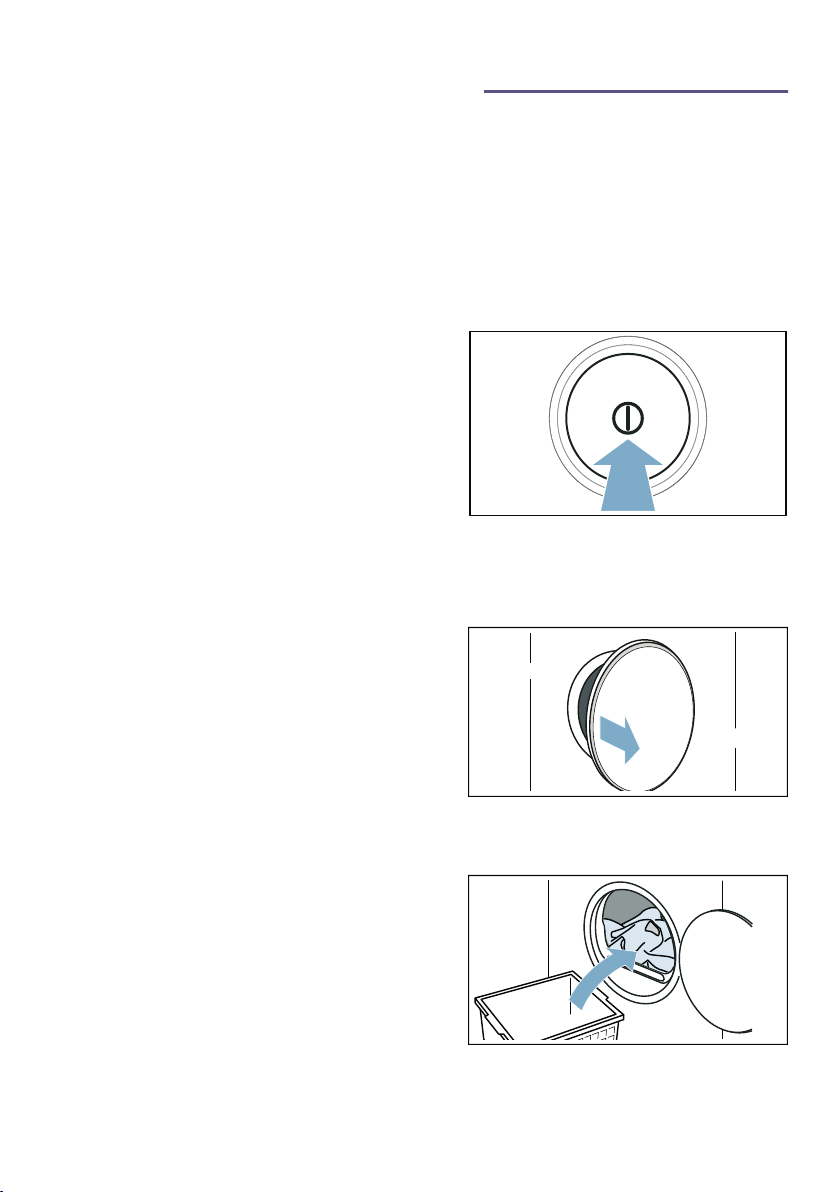
1. Prepare and sort the laundry.
2. Press # to switch on the appliance.
3. Open the door.
Check that the drum has been
completely emptied. Empty it if
necessary.
4. Load the laundry unfolded into the
drum.
Operating the appliance en
33
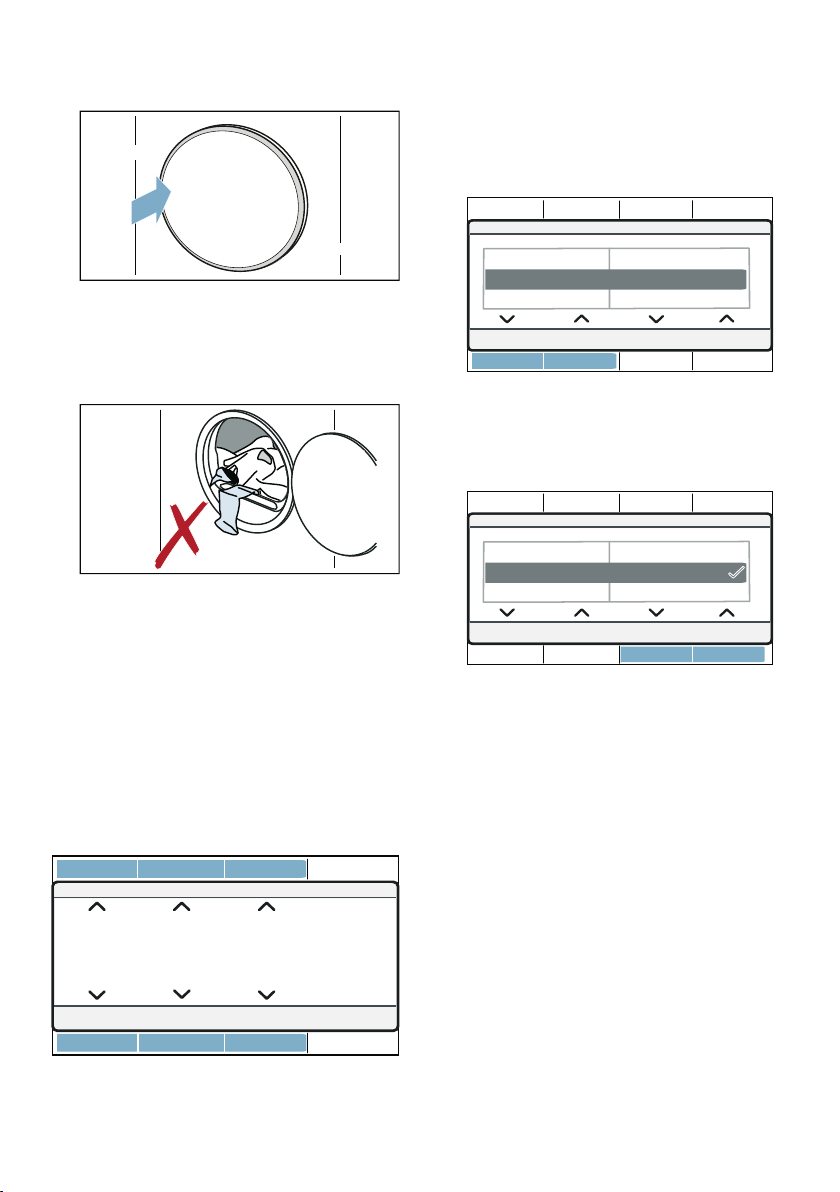
5. Close the appliance door.
Caution!
Risk of material damage to the
appliance or laundry.
Make sure that laundry is not
trapped in the door.
Note: The appliance's drum is lit up
after the door is opened and closed and
once the programme has started. The
drum's interior light goes out on its own.
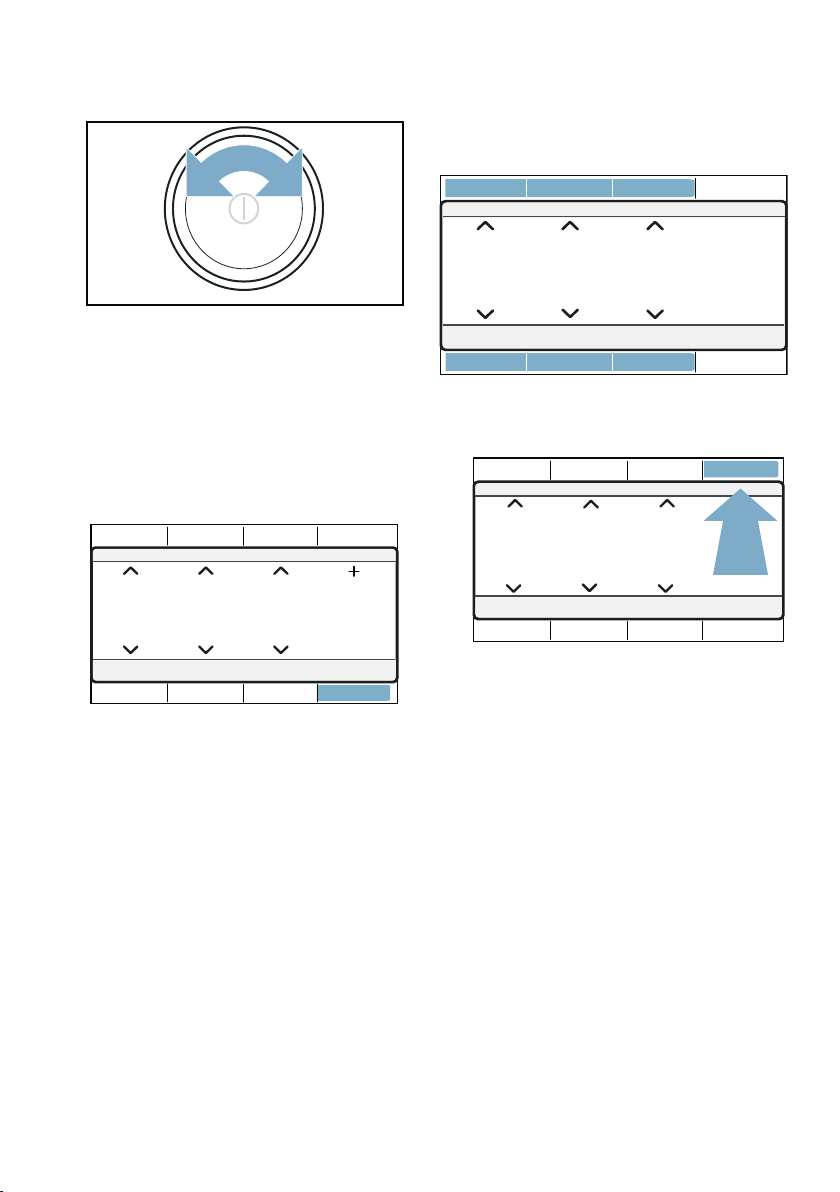
Operation/navigation
You can operate the appliance and
adjust settings using the ×/Ö selection
buttons above and/or below the
display.
■ In the main menu:
■ In sub-menus for options, further
settings or programs:
1. Use the buttons on the left to select
a setting.
The selected setting is highlighted
on the display.
2. Use the buttons on the right to adjust
the values of the setting.
The setting is activated if it is selected.
The setting is deactivated if it is not
selected.
Note: Your changes are implemented
without further confirmation.
Setting a programme
Note: If you have activated the
childproof lock, you must deactivate it
before you can set a programme.
~ Page 37
en Operating the appliance
34
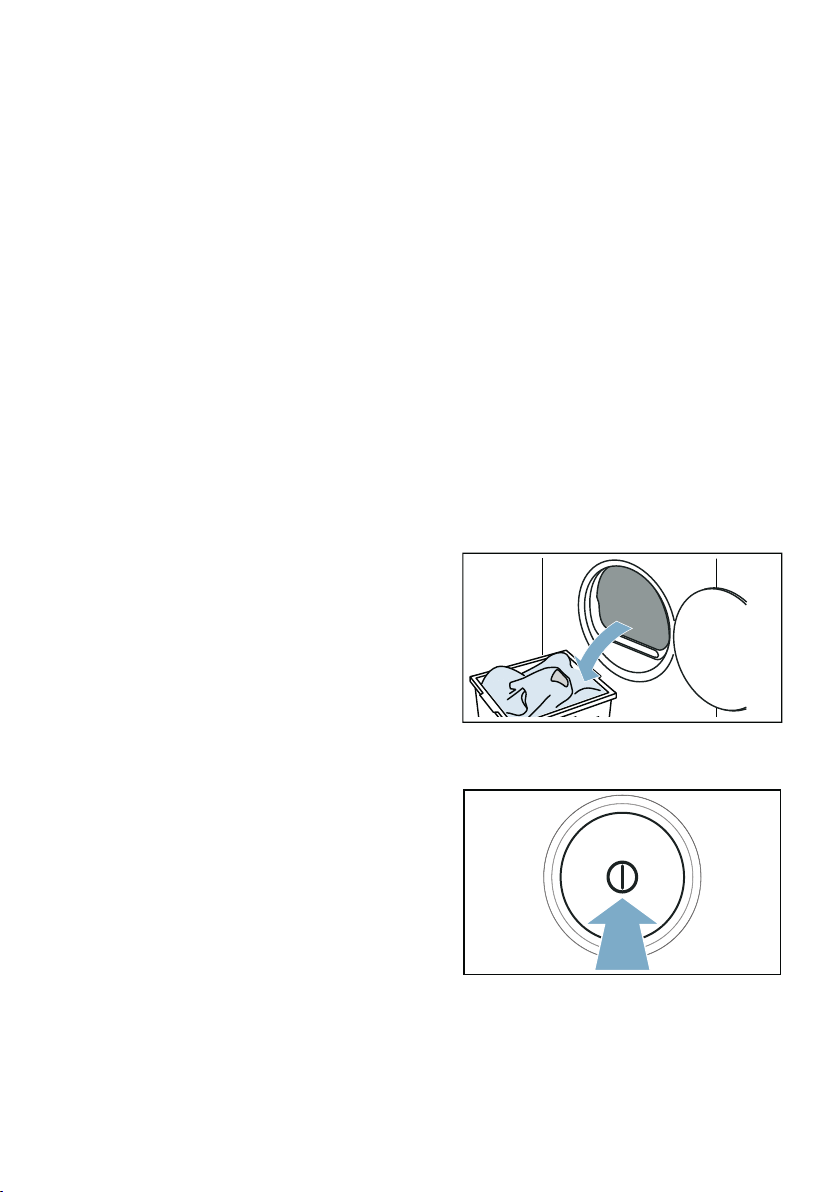
1. Set the programme you require.
The programme settings will appear
on the display.
2. Adjust the programme settings, if
required.
Set Additional programs as follows:
1. Set the ... further program.
2. Press the button below ™.
3. Set the program you require.
4. Adjust the programme settings, if
required.
Note: Wait or press Main menu to exit
the settings.
Programme settings
Once you have set a program, you can
adjust or activate/deactivate the
settings available for this program. An
overview of the possible program
settings can be found starting on
~ Page 29.
Adjust or activate/deactivate a
program setting as follows:
■ In the main menu:
■ Under ² (Options):
1. Press ² (Options).
2. Adjust the setting to the required
setting.
Note: Wait or press ²(Options) to exit
the settings.
Starting the programme
Press A (Start/Pause).
Note: If you want to prevent the
programme from being adjusted
inadvertently, activate the childproof
lock. ~ Page 37
Programme progress
The programme status will be indicated
on the display.
Operating the appliance en
35
Note: When a programme is selected,
the expected drying time for the
maximum permitted load is displayed.
The moisture sensor measures the
residual moisture in the laundry as it is
being dried. The programme duration
and the remaining time indicated on the
display are automatically adjusted as
the programme progresses, depending
on how damp the laundry is (exception:
Timed programmes).
Changing the programme or
adding more laundry
You can remove or add laundry and
change or adjust the programme at any
time during drying.
1. Open the door or press A (Start/
Pause) to pause the programme.
Note: The drum will continue to
rotate when the CoolDown process
is in progress, even if you have
paused the programme. You can
stop the CoolDown process at any
time by opening the door.
2. Add or remove laundry.
3. If required, select a different
programme or a different
programme setting.~ "Overview of
programmes" on page 26
Note: Do not change the
programme during the CoolDown
process.
4. Close the appliance door.
5. Press A (Start/Pause).
Note: The programme duration is
updated on the display, depending on
the load and on the residual moisture in
the laundry. The values displayed may
change when the programme or load is
changed.
Cancelling the programme
The programme can be cancelled at
any time by opening the door or
pressing A (Start/Pause).
Caution!
Risk of fire. Laundry may catch fire.
If you cancel the programme, remove all
items of laundry from the dryer and
spread them out to allow the heat to
dissipate.
End of programme
The following message appears in the
display: Finished, remove washing
Removing laundry and
switching off the appliance
1. Remove the laundry.
2. Press # to switch off the appliance.
en Operating the appliance
36
Emptying the condensation
container
Condensation will form in the appliance
as it dries the laundry.
If there is no drain hose connected to
the appliance, the condensation water
from the appliance will run into the
condensation container. In this case,
you will need to empty the condensation
container each time the dryer finishes
drying the laundry, and also if it
becomes full before drying is complete.
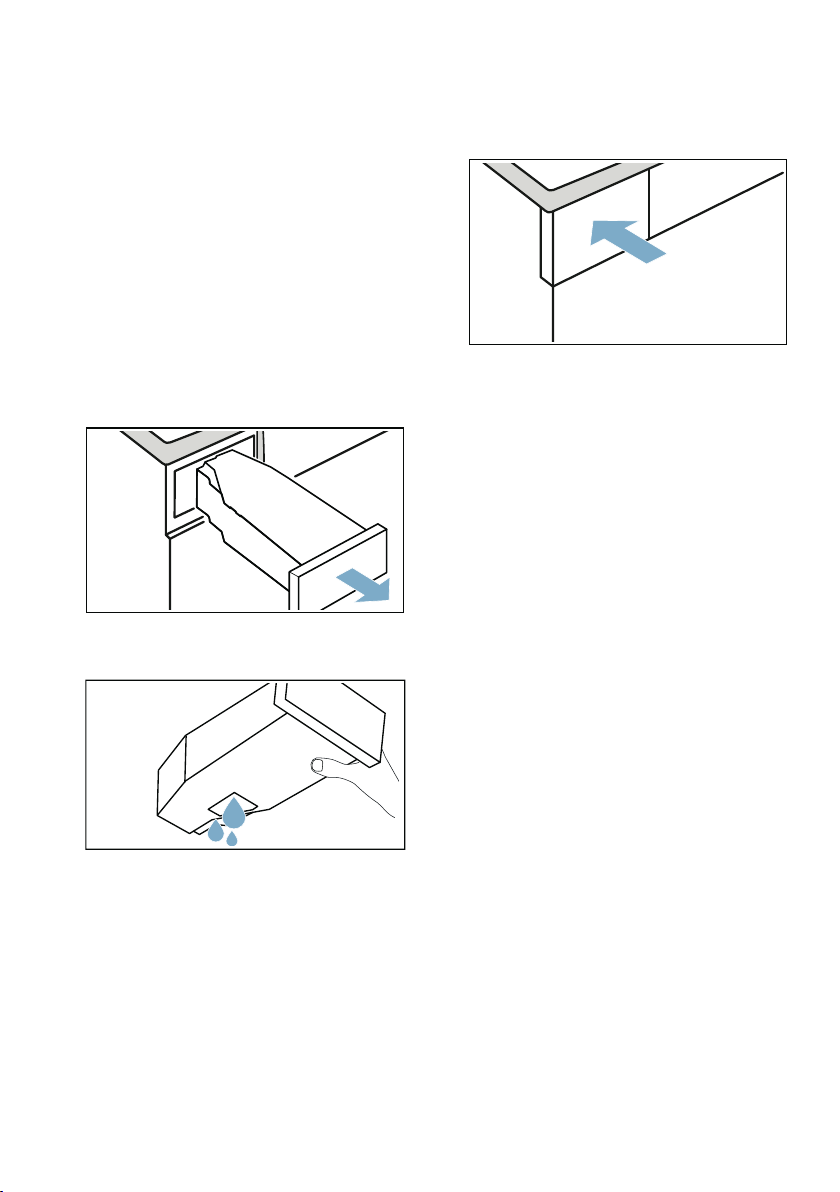
1. Pull out the condensation container
horizontally.
2. Pour out the condensation water.
Caution!
Risk of harm to health and material
damage
Condensation water is not suitable
for drinking and may be
contaminated with fluff.
Contaminated condensation water
may be harmful to your health and
cause material damage. Do not drink
the condensation water or reuse it.
3. Push the condensation container
back into the appliance until you feel
it lock into place.
Note: The filter in the condensation
container filters the condensation water,
which is used during the appliance's
automatic cleaning cycle. The filter is
cleaned by emptying out the
condensation water. You should still
check the filter regularly for any build-
up, and remove this if necessary.
~ "Cleaning the filter in the
condensation container" on page 56

Appliance settings en
37
2 Appliance settings
Appliance settings
You can activate/deactivate the
childproof lock and adjust the basic
settings (e.g. signals).
Childproof lock
Activating the childproof lock prevents
the settings from being accidentally
changed on the control panel.
Activate/deactivate the childproof lock
as follows:
Press and hold the two E 3 sek.
buttons for approx. 3 seconds.
Note: The childproof lock remains
active even after the appliance has
been switched off. In order to operate
the control panel when you turn on the
appliance, you need to deactivate the
childproof lock.
Basic settings
You can adjust certain basic settings on
the appliance. To make adjustments,
you first need to call up the setting
mode :
Press and hold the two
œ 3 sek. buttons for approx.
3 seconds.
You can adjust the following basic
settings:
Adjust and activate/deactivate the
basic settings as follows
1. Adjust the setting to the required
setting.
The activated setting is highlighted on
the display.
2. Adjust any additional basic settings
you require or save and exit the
basic settings.
Save and exit the basic settings as
follows
■ Turn the program selector.
■ Switch off the appliance.
■ Press and hold the two
œ 3 sek. buttons for approx.
3 seconds.
Basic setting Description
end signal Adjust the volume of the
audible notification signals
(e.g. at the end of a program)
or deactivate these signals
button signal Adjust the volume of the
audible operating signals or
deactivate them
Language Change the language of the
appliance

en Home Connect
38
o Home Connect
Home Connect
This appliance is Wi-Fi-capable and can
be remotely controlled using a mobile
device.
You can use the Home Connect app to
do the following on your appliance from
your mobile device:
■ Set up programs and launch them.
■ Adjust, activate and deactivate
program settings.
■ Query the status of programs.
■ Adjust, activate and deactivate
appliance settings.
■ Switch off the appliance.
Before you can use the Home Connect
functions, you will need to carry out the
following steps:
1. Install the Home Connect app on
your mobile device.
2. Register in the Home Connect app.
3. Connect your appliance to your
home network automatically or
manually (you only need to do this
the first time).
4. Connect your appliance to the Home
Connect app.
You can find information about the app
on our Home Connect website
www.home-connect.com
Home Connect services are not
available in every country. The
availability of the Home Connect
function depends on the availability of
Home Connect services in your country.
You can find information on this at:
www.home-connect.com
Notes
■ Please observe the safety
precautions in this instruction
manual and make sure that these
are complied with even when
operating the appliance via the
Home Connect app while you are
away from home. You must also
follow the instructions in the
Home Connect app.
■ You cannot use the
Home Connect app to make
changes while the controls on the
appliance are being operated.
However, you can use the
Home Connect app to see any
adjustments made directly on the
appliance itself.
Calling up the Home Connect
menu
In the Home Connect menu, you can
create and view network connections,
reset network settings, activate/
deactivate Wi-Fi and find other Home
Connect functions.
1. Switch on the appliance.
2. Press and hold } (Remote Start) for
at least 3 seconds.
Aut. network log-in appears in the
display.
You are now in the Home Connect
menu.
Note: Briefly press } (Remote Start) to
exit the Home Connect menu.
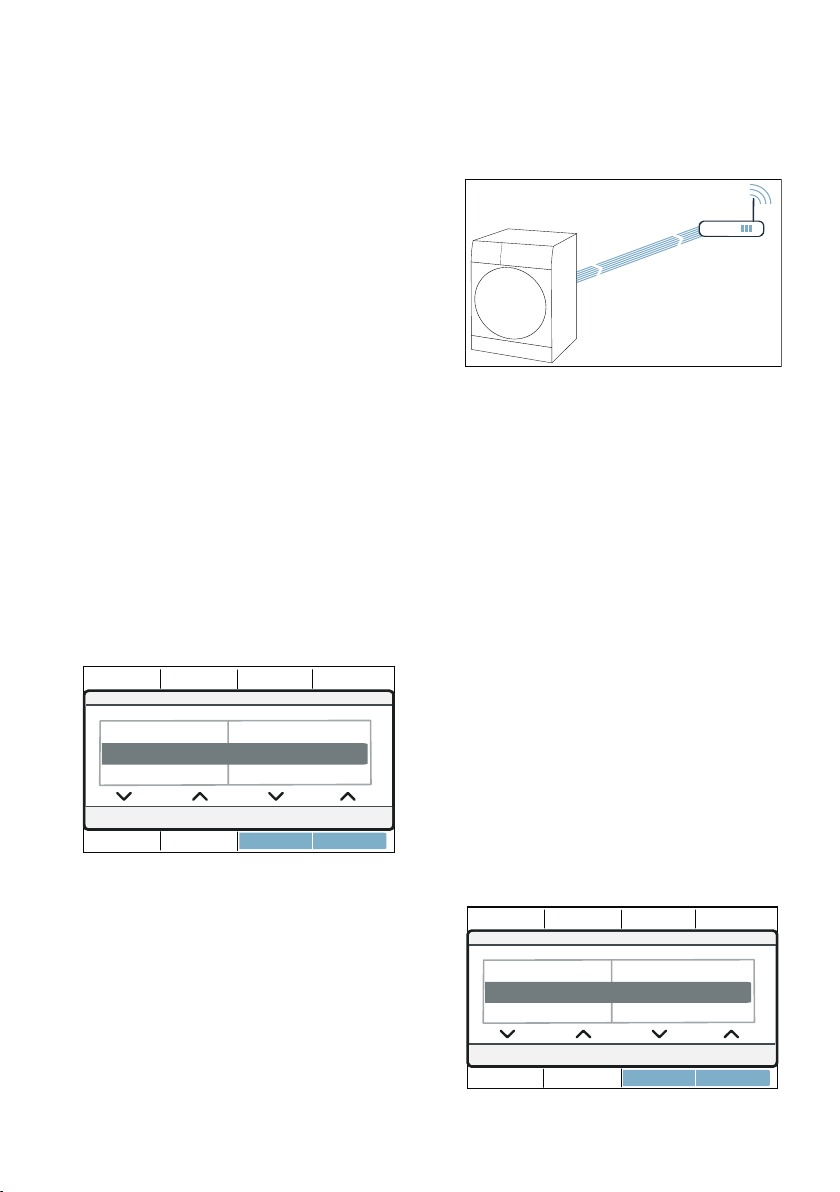
Connecting to the home
network and the Home
Connect app
Connect your appliance to the home
network automatically or manually
(you only need to do this the first time).
Home Connect en
39
Notes
■ If your home network router has a
WPS function, you can connect the
appliance to your home network
automatically.
■ If your home network router does not
have a WPS function, you need to
connect the appliance to your home
network manually.
You must then connect to the Home
Connect app.
Note: To connect your appliance to the
home network, Wi-Fi must be activated
on the appliance. Wi-Fi is deactivated
on the appliance by default and is
activated automatically when you
connect your appliance to your home
network.
Connecting to your home network
automatically
Step 2.1
Ensure that you are in the Home
Connect menu. ~ Page 38
1. Press Connect.
2. Confirm the message in the display.
The appliance now attempts to connect
to your home network. ¡ flashes in the
display.
3. Activate the WPS function on your
home network router within the next
2 minutes.
If the appliance has connected to your
home network successfully, Connected
and ¡ appear in the display and light
up continuously.
Note: If you are not able to establish a
connection, check whether your
appliance is within range of your home
network. Try connecting automatically
again or connect your appliance
manually.
Connecting to your home network
manually
Step 2.2
Ensure that you are in the Home
Connect menu. ~ Page 38
Make sure that you have opened the
Home Connect app and are logged in.
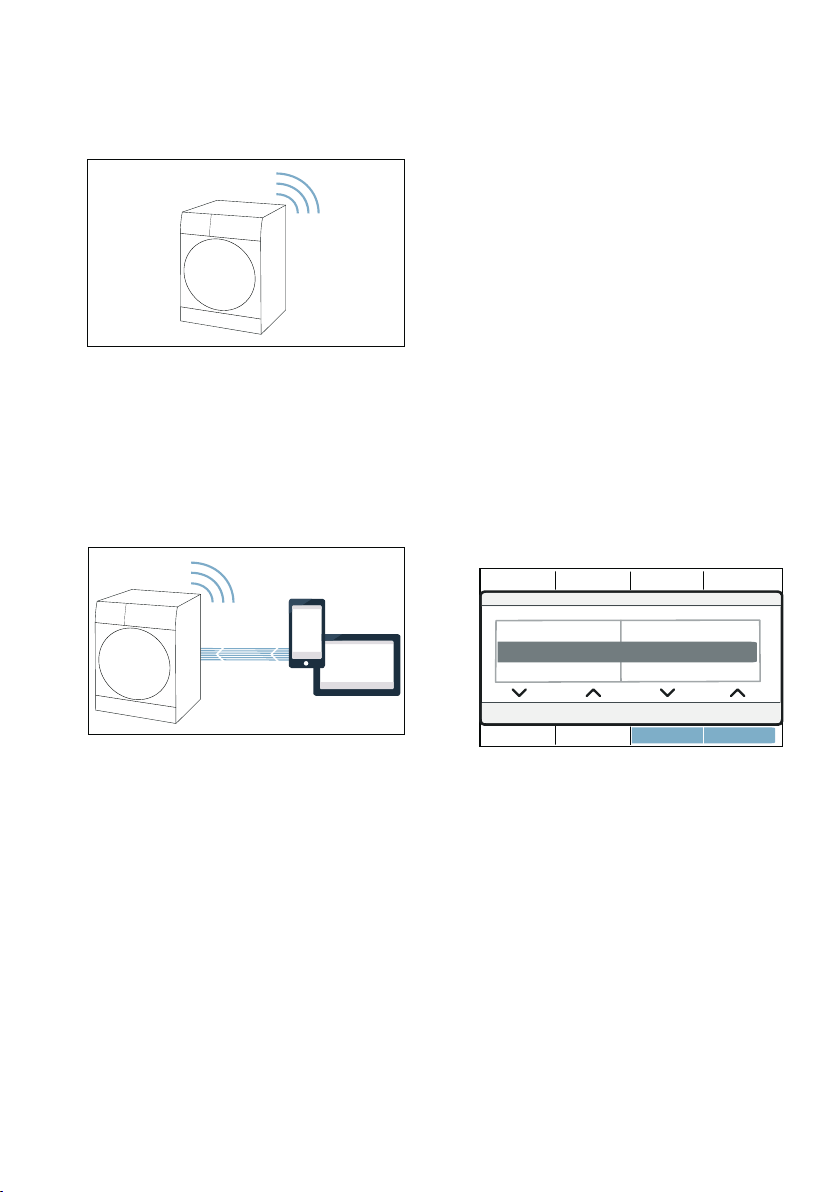
1. Press Man. network log-in.
2. Press Connect.
&RQQHFW
1RWFRQQHFWHG
0DQQHWZRUNORJLQ
$XWQHWZRUNORJLQ
&RQQHFWWRWKHDSS
0DQQHWZRUNORJLQ
1RWFRQQHFWHG
&RQQHFW
$XWQHWZRUNORJLQ
en Home Connect
40
The appliance now sets up its own Wi-Fi
network with the name (SSID)
HomeConnect.
3. Call up the Wi-Fi setting on the
mobile device.
4. Connect the mobile device to the
Home Connect Wi-Fi network and
enter the password (key)
HomeConnect.
Your mobile device now connects to
the appliance. The connection
process may take up to 60 seconds.
5. Once you have connected
successfully, open the
Home Connect app on your mobile
device and carry out the steps in the
app.
6. In the Home Connect app, enter the
network name (SSID) and password
(key) for your home network.
7. Carry out the last steps in the
Home Connect app to connect your
appliance.
If the appliance has connected to your
home network successfully, Connected
and ¡ appear in the display and light
up continuously.
Note: If you are not able to establish a
connection, check whether your
appliance is within range of your home
network. Try connecting manually again.
Connecting to the Home Connect app
Step 3
If your appliance is connected to your
home network, you can connect it to the
Home Connect app.
Ensure that you are in the Home
Connect menu. ~ Page 38
Make sure that you have opened the
Home Connect app and are logged in.
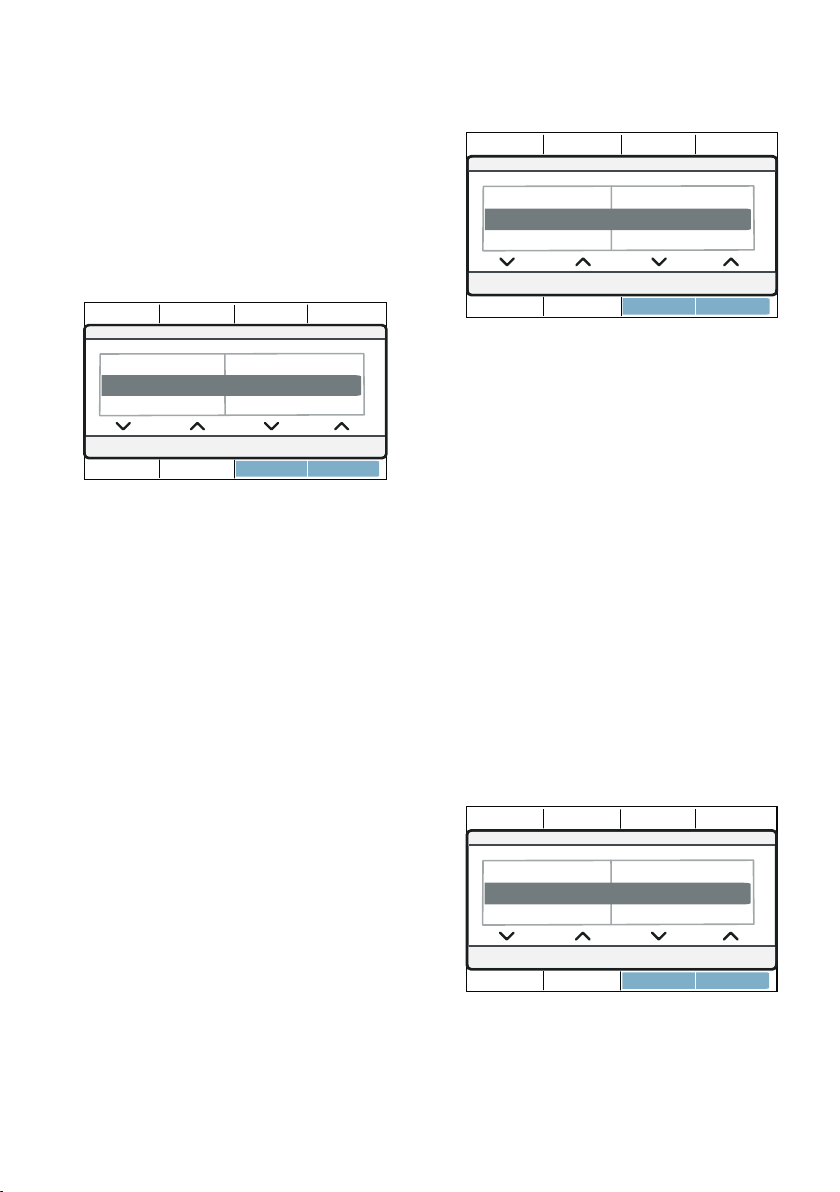
1. Press Connect to the app.
2. Press Connect app.
The appliance now attempts to connect
to the Home Connect app.
3. Once your appliance is displayed in
the app, carry out the last steps in
the Home Connect app.
Note: If you were not able to establish
a connection, check whether your
mobile end device is within range of
your home network or is connected to
this. Try connecting to the
Home Connect app again.
:L)LRQRII
&RQQHFWWRWKHDSS &RQQHFWDSS
0DQQHWZRUNORJLQ 1RWFRQQHFWHG
Home Connect en
41
Activating/deactivating Wi-Fi
If your appliance is already connected
to your home network, you can activate
or deactivate Wi-Fi on your appliance.
Ensure that you are in the Home
Connect menu. ~ Page 38
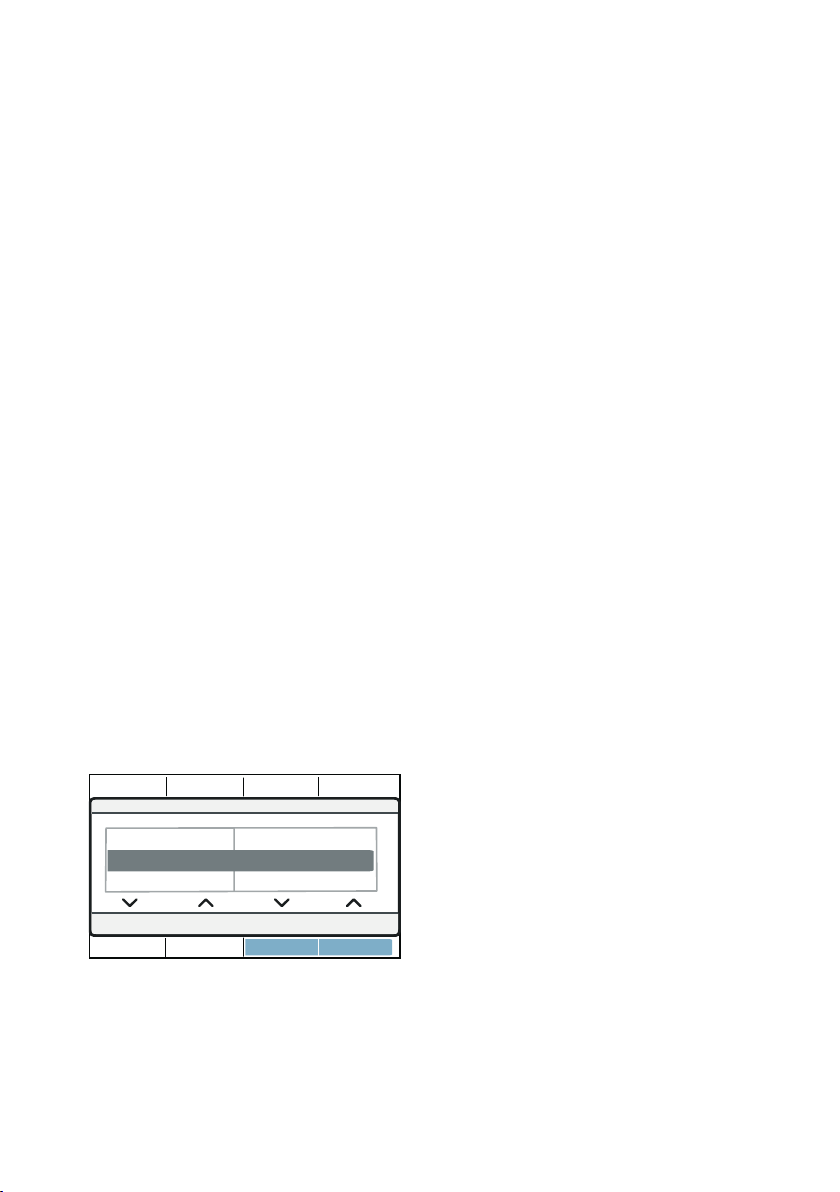
1. Press Wi-Fi on/off.
2. Press on or off.
Notes
■ If you connect to your home network,
Wi-Fi is activated automatically.
■ If Wi-Fi is activated, the appliance will
not switch itself off automatically.
■ If Wi-Fi is switched off on the
appliance, it is not possible to use
the Home Connect app to start or
control the appliance remotely.
■ If Wi-Fi is switched off and your
appliance was previously connected
to your home network, this
connection will be re-established
automatically when Wi-Fi is switched
back on.
■ If you activate this function, the
energy consumption increases in
comparison to the values specified
in the consumption value table.
~ Page 67
Resetting your network
settings
You can reset all of the network
settings.
Ensure that you are in the Home
Connect menu. ~ Page 38
1. Press Network settings.
2. Press Reset.
Note: If you want to operate your
appliance via the Home Connect app
again, you will need to reconnect it to
your home network and to the
Home Connect app.
Updating the software
You can update the Home Connect
software on your appliance. As soon as
a new software update is available, a
note appears in the display: A new
software version is available. Do you
want to update the software now? This
may take several minutes.
Install the update directly via the
message in the display or manually as
follows:
Ensure that you are in the Home
Connect menu. ~ Page 38
1. Press Software update.
2. Press Install now.
Note: The software update may take
several minutes. Do not switch the
appliance off while updates are being
installed.
1HWZRUNVHWWLQJV
:L)LRQRII
RII
&RQQHFWWRWKHDSS
6RIWZDUHXSGDWH
1HWZRUNVHWWLQJV
5HVHW
:L)LRQRII
5HWDLQ
6RIWZDUHXSGDWH
,QVWDOOQRZ
1HWZRUNVHWWLQJV
$YDLODEOH
en Home Connect
42
Note: If no software update is available,
Not available appears in the display.
Energy management
You can connect your appliance to your
smart energy system (Energy manager).
Once you have connected your
appliance to the smart energy system
(Energy manager) and activated the
Flex start function, you will be able to
optimise your energy consumption
because your appliance will not start up
until your home photovoltaic system can
provide sufficient energy or the energy
tariff is good.
Further information and system
requirements for using the Energy
manager can be found at: www.home-
connect.com/energymanagement
Notes
■ The smart energy system (Energy
manager) must use the EEBus
initiative communications standard.
■ Before you start, read the smart
energy system instruction manual to
find out how to connect your
appliance to the smart energy
system (Energy manager).
1. Press energy mngmt..
2. Press Connect.
Your appliance now attempts to connect
to the smart energy system (energy
manager).If the appliance has
connected successfully, Connect
appears in the display.
3. Activate Flexstart if you want the
smart energy system (Energy
manager) to start up your appliance.
Flex start
Activate the Flex start function to allow
your smart energy system (Energy
manager) to start your appliance once
your home photovoltaic system is able
to provide sufficient energy or the
energy tariff is good.
Note: Your smart energy system
(Energy manager) cannot start your
appliance until it is connected to the
appliance.
1. Select the programme you require.
2. Press ñ (Ready in).
3. Select the time period you require.
Note: The time period can be set in
1-hour increments up to 24 h.
4. Press A (Start/Pause).
Delayed start appears in the display.
5. Press } (Remote Start).
Flex start appears in the display.
The FlexStart function has now been
activated and the appliance will wait to
be remotely started by the smart energy
system (Energy manager).
: Ready in approx. appears in the
display. The smart energy system
(energy manager) has set a time at
which your appliance can start. The
program will end after the specified
time.
Notes
■ If the smart energy system (Energy
manager) does not start your
appliance, the programme will still
be started before the set time period
ends.
The programme will end when the
time period ends.
'UXPFOHDQDGYLFH
HQHUJ\PQJPW
1RWFRQQHFWHG
&RQQHFW
6RIWZDUHXSGDWH

Home Connect en
43
■ For safety reasons, } and in turn the
Flex start function will be
deactivated in the following
circumstances:
– Press A.
– Open the door.
– Programme end.
– Press # to switch off the
appliance.
– Power failure.
If the Flex start function is
deactivated, the ñ (Ready in) will
remain active.
Adding more laundry or removing
laundry:
Note: If the Flex start function has
already been activated but the
programme has not yet started, you will
still be able to load more laundry or
remove some from the drum.
1. Press A (Start/Pause).
2. Open the door.
3. Add or remove laundry.
4. Close the appliance door.
5. Press A (Start/Pause).
6. Press } (Remote Start).
The FlexStart function has now been
activated and the appliance will wait to
be remotely started by the smart energy
system (Energy manager).
Intelligent program
recommendation
After you have washed your laundry in
the washing machine, the dryer will
recommend a suitable program for
drying your laundry.
The expected duration of the
recommended program is determined
based on the washing program you just
used.
To determine the best drying program
to use, your appliances must transmit
and receive information.
Therefore please note the following:
■ Before the data can be transmitted,
the washing program must run
through to the end.
■ The washing machine must be
Home Connect-capable.
■ The washing machine and dryer
must be connected to your home
network and registered in your
Home Connect app.
1. Switch on the appliance.
2. Set the program to Smart Dry Ç.
The analysis starts.
3. To cancel the analysis, set a different
program or switch the appliance off.
If an appropriate program has been
found, the LED associated with the
recommended program will be lit
continuously. If necessary, confirm the
notifications on the display. The
program information will then be shown
on the display.
4. Press A (Start/Pause).
Note: If a suitable program cannot be
found, an audible signal will sound and
There is no particular drying
programme recommended for the last
wash programme. will appear on the
display.
Possible reasons:
■ No suitable drying programs could
be found for the selected washing
program.
■ The washing machine and dryer
must be connected to your home
network and registered in your
Home Connect app.
■ Check whether your appliances are
within range of your home network.
■ No data is available for the last wash
program used. The data is stored for
24 hours and then deleted.
■ The washing program was aborted.
The washing program must run
through to the end.
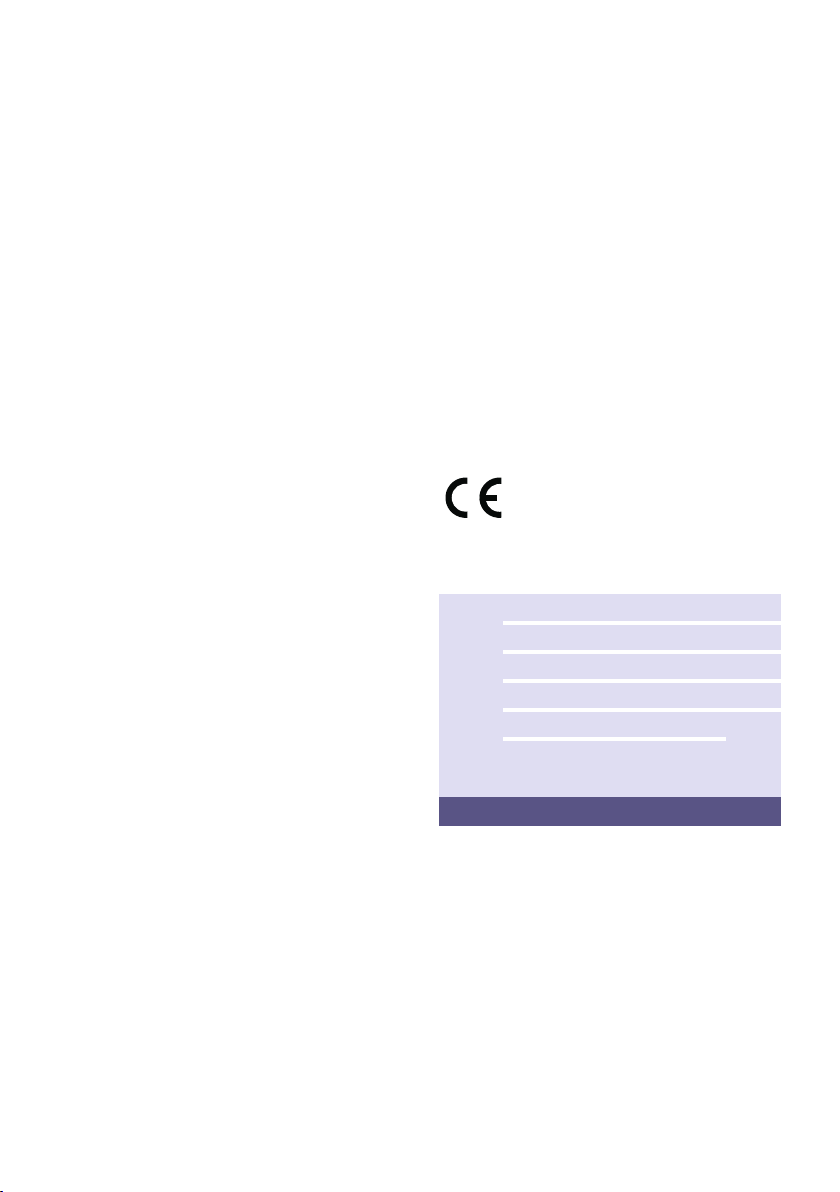
en Home Connect
44
Remote diagnostics
If a fault occurs, the after-sales service
can use remote diagnostics to access
your appliance.
Contact the after-sales service, making
sure that your appliance is connected to
the Home Connect server and checking
that the remote diagnostics service is
available in your country.
Note: For more information and to
check whether the remote diagnostics
service is available in your country,
please visit the Help & Support area of
the Home Connect website for your
country: www.home-connect.com
Information on data protection
When your appliance is connected for
the first time to a Wi-Fi network, which is
connected to the Internet, your
appliance transmits the following
categories of data to the Home Connect
server (initial registration):
■ Unique appliance identification
(consisting of appliance codes as
well as the MAC address of the
installed Wi-Fi communication
module).
■ Security certificate of the Wi-Fi
communication module (to ensure a
secure data connection).
■ The current software and hardware
version of your household appliance.
■ Status of any previous resetting to
factory settings.
This initial registration prepares the
Home Connect functions for use and is
only required when you want to use
these Home Connect functions for the
first time.
Note: Ensure that the Home Connect
functions can be used only in
conjunction with the Home Connect
app. Information on data protection can
be accessed in the Home Connect app.
Declaration of Conformity
Robert Bosch Hausgeräte GmbH
hereby declares that the appliance with
Home Connect functionality meets the
basic requirements and other relevant
provisions of the Directive 2014/53/EU.
A detailed RED Declaration of
Conformity can be found online at
www.bosch-home.com among the
additional documents on the product
page for your appliance.
2.4 GHz band: max. 100 mW
5 GHz band: max. 100 mW
y
BE BG CZ DK DE
EE IE EL ES FR
HR IT CY LV LT
LU HU MT NL AT
PL PT RO SI SK
FI SE UK NO CH
TR
5 GHz Wi-Fi: for indoor use only
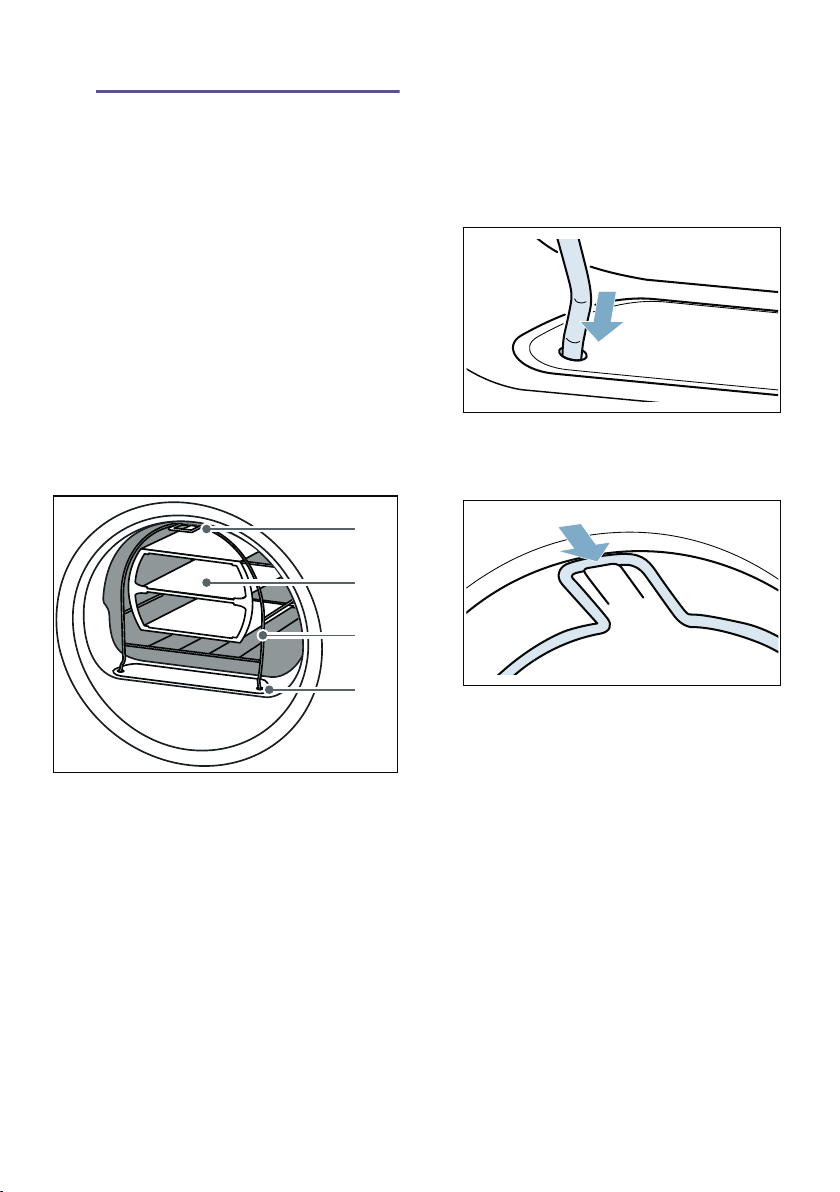
Drying with the basket for woollens en
45
„ Drying with the basket
for woollens
Drying with the basket for woollens
The basket for woollens
Note: The basket for woollens is
supplied with your appliance
*
or it can
be purchased as an accessory from our
after-sales service.
Caution!
Risk of material damage to the
appliance and laundry
Operating the dryer when the basket for
woollens is damaged may damage the
appliance and the laundry.
Never operate the appliance if the
basket for woollens is damaged.
Securing the basket for
woollens
1. Insert the feet for the basket for
woollens into the holes in the air
channel cover.
2. Rest the basket for woollens on the
upper hooks starting at the front.
The basket for woollens should now
be securely fixed to the front panel.
Application examples
■ Laundry
Laundry must be spun.
Place laundry loosely in the insert;
do not squash.
* Depending on the model
( Foot for securing the hook in the
upper part of the front panel of the
appliance
0 Insert for the basket for woollens
8 Basket for woollens
@ Feet for securing in the air channel
cover
#
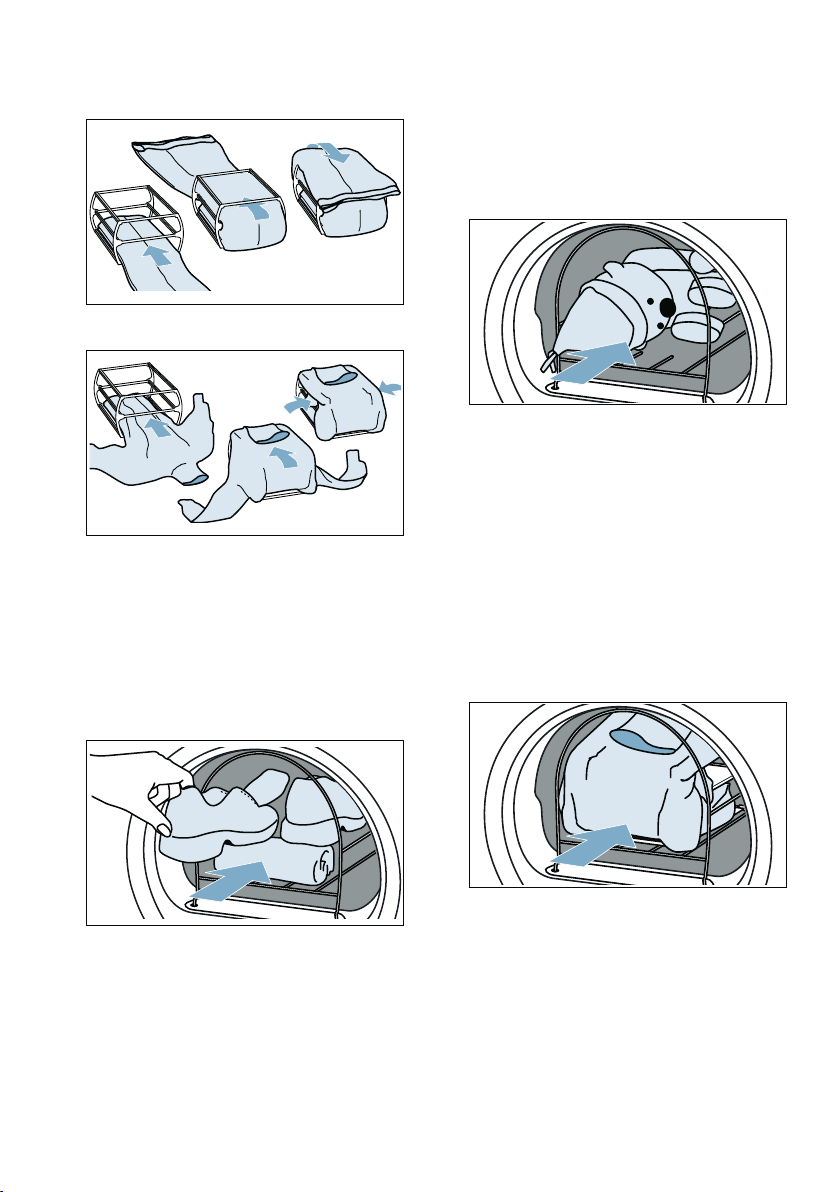
en Drying with the basket for woollens
46
– Trousers or skirt
– Pullover
■ Sports shoes
Place sports shoes in the basket for
woollens without the insert. Pull the
tongue quite far out of the shoes.
Remove insoles and heel cushions.
Roll up a towel and place it under
the sports shoes to create an
inclined surface. Place the shoes so
that the heels are on the towel.
■ Soft toys
Dry soft toys in the basket for
woollens without the insert. Only
place as many soft toys in the
basket for woollens as is possible
without any falling out.
Putting the insert in place and
starting a programme
1. Place the insert with laundry, sports
shoes or soft toys in the basket for
woollens.
Caution!
Risk of material damage to the
laundry
Place the laundry in the insert of the
basket for woollens so that they do
not come into contact with the drum.

Crease-removal function en
47
2. Select the programme for the basket
for woollens or a timed programme.
~ "Overview of programmes"
on page 26
3. Set the drying time.
The table below lists examples for
the loads with a suggested drying
time.
Note: For items made from thicker
or multi-layered fabrics, you may
need to extend the drying time to
achieve the required dryness level.
4. Start the programme.
5. Once the programme has ended,
remove the load and switch off the
appliance.
…Crease-removal
function
Crease-removal functi on
This appliance has programs for
removing creases from dry clothing that
has not been worn for long and for
reducing odours.
Notes
■ See the laundry tips. ~ Page 31
■ Wash clothing with traces of
perfume, deodorant or sweat before
wearing again.
■ Do not run a crease-removal
program with the following items:
– Items made from wool, leather,
viscose, or featuring metal,
wooden or plastic parts.
– Waxed and oiled jackets.
■ Do not use dryer cleaning sets.
Filling the water tank
Your appliance uses cold drinking water
to remove creases from dry clothing
that has not been worn for long. Use the
water jug provided to pour the water
into the filling hole in the front of the
appliance.
Caution!
Risk of material damage and damage
to the appliance
Fluff may remain in the appliance or the
appliance may be damaged by deposits
or debris if drinking water is not used
for crease removal.
■ Always use cold drinking water for
crease removal.
■ Do not use condensed water,
distilled water, additives or descaler.
1. Select the required crease-removal
program.~ "Overview of
programmes" on page 26
2. Configure the settings for the
required crease-removal program.
3. Press A (Start/Pause).
Thin woollen pullover Approx. 1 h 20
Thick woollen pullo-
ver
Approx. 1 h 30 - 3 h 00
Skirt Approx. 1 h 00 - 1 h 30
Trousers Approx. 1 h 00 - 1 h 30
Gloves Approx. 30 min
Sports shoes Approx. 1 h 30/
max. 2 h 00 with airing
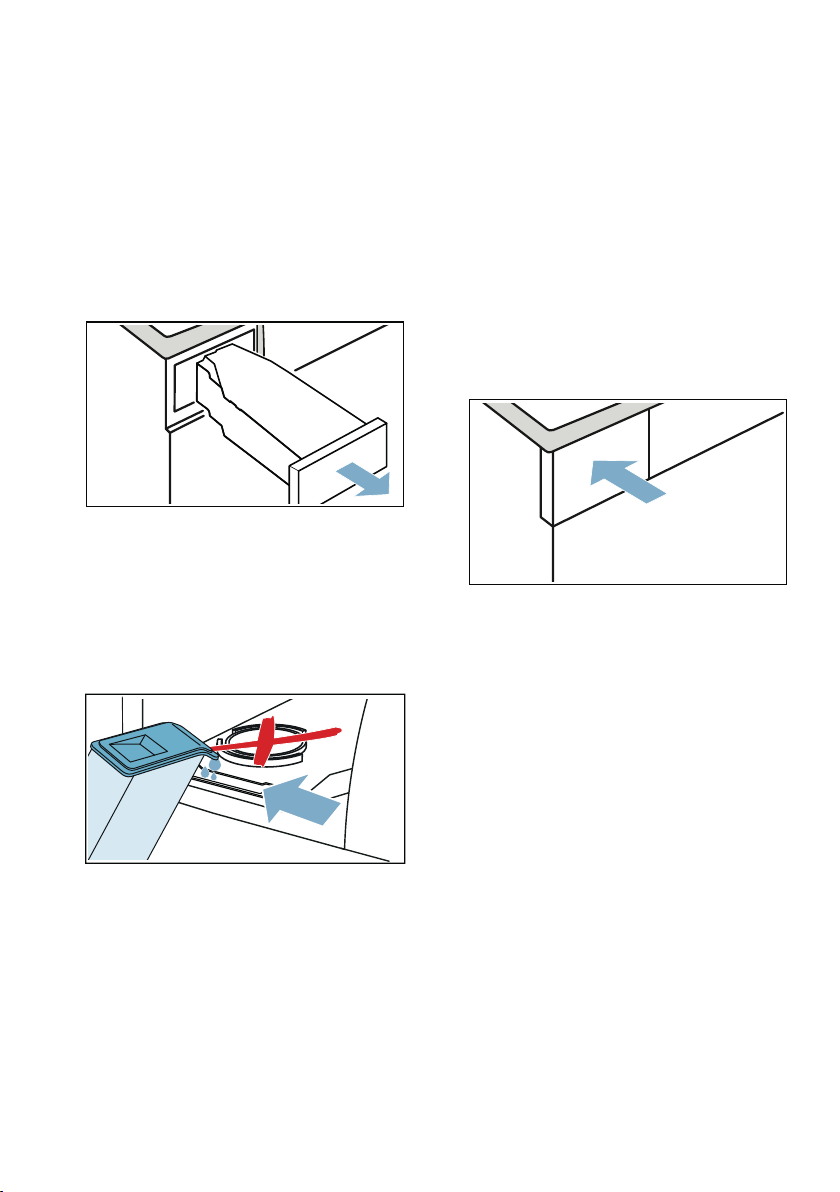
en Crease-removal function
48
4. Refresher-container is empty,
please re-fill. will appear on the
display.
Note: If Refresher-container is
empty, please re-fill. does not
appear on the display, the water tank
is already filled with the correct
amount of water and the program
will start.
5. Pull out the condensation container
horizontally.
6. Use the water jug provided to pour
approx. 180 ml cold drinking water
into the filling hole in the front of the
appliance, until Refresher-container
is empty, please re-fill. goes out on
the display and an audible signal
sounds.
Note: If you pour more than 180 ml
drinking water into the appliance and
Refresher-container is empty,
please re-fill. does not go out on the
display, this means that the drinking
water has been poured into the
wrong filling hole or the appliance is
not fully level. Pour the drinking
water into the filling hole on the front
or make the appliance level.
~ "Installing the appliance"
on page 13
7. Push the condensation container
back into the appliance until you feel
it lock into place.
8. Press A (Start/Pause).
Programs for removing
creases
■ Do not run crease-removal programs
without a load in the drum. Comply
with the washing instructions on the
clothing label and do not exceed the
maximum permitted load for the
crease-removal
programs.~ Page 26
■ Opening the door during a crease-
removal program pauses the
program. To resume the program,
close the door and press A (Start/
Pause).
■ Crease-removal programs run for
approx. 45 minutes on average.
They may run for longer at low
ambient temperatures; at high
ambient temperatures, the run time
may be reduced.
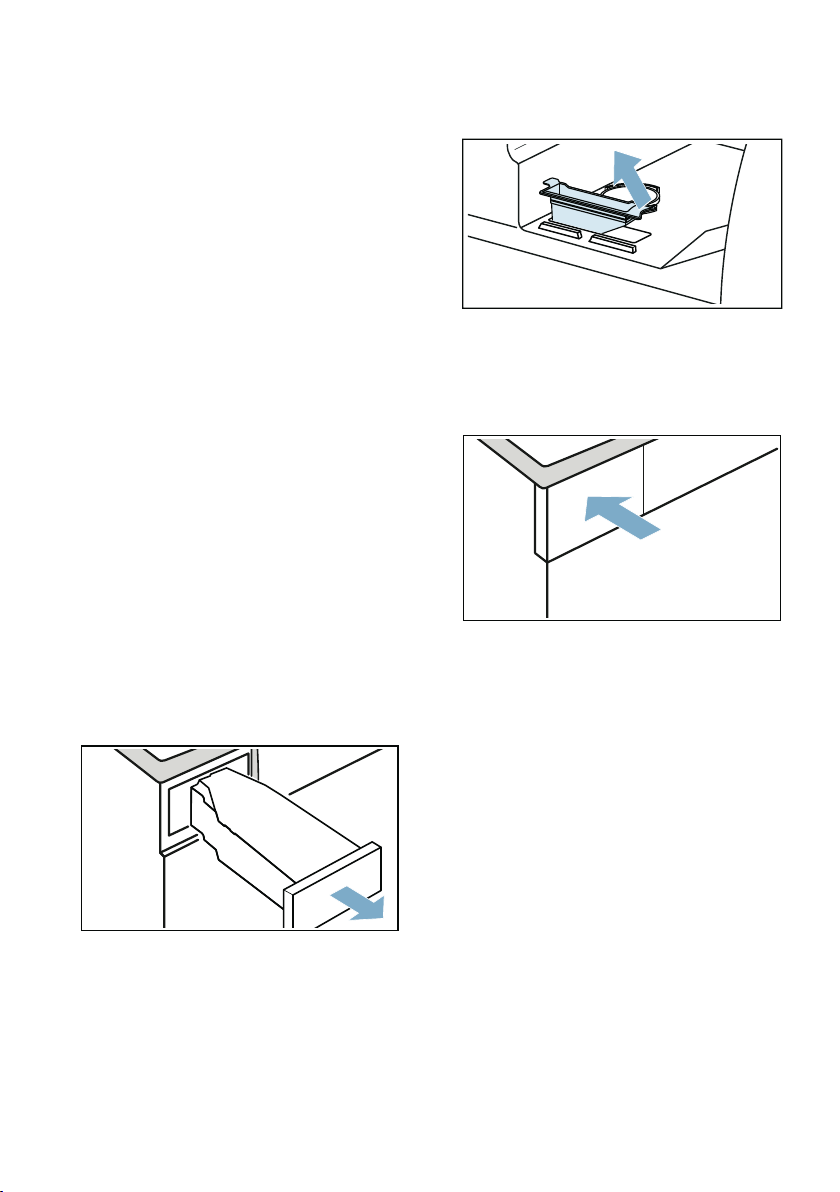
Crease-removal function en
49
■ There may be some extra noise
when a crease-removal program is
running.
■ Crease removal results may vary
depending on the type of fabric, the
amount of laundry and the selected
program. For best results, take the
laundry out of the machine as soon
as the program comes to an end,
hang it on a clothes hanger to finish
drying and reshape it while still
damp.
Cleaning the filter in the water
tank
The filter in the water tank protects the
appliance from dirt and debris and
should be cleaned regularly.
Caution!
Risk of material damage and damage
to the appliance
If you operate the appliance without a
filter or if the filter is defective, this may
result in damage to the appliance.
Always ensure that the filter is in place
and is undamaged before operating the
appliance.
1. Pull out the condensation container
horizontally.
2. Remove the filter and clean it under
running water or in the dishwasher.
3. Insert the filter into the water tank.
4. Push the condensation container
back into the appliance until you feel
it lock into place.
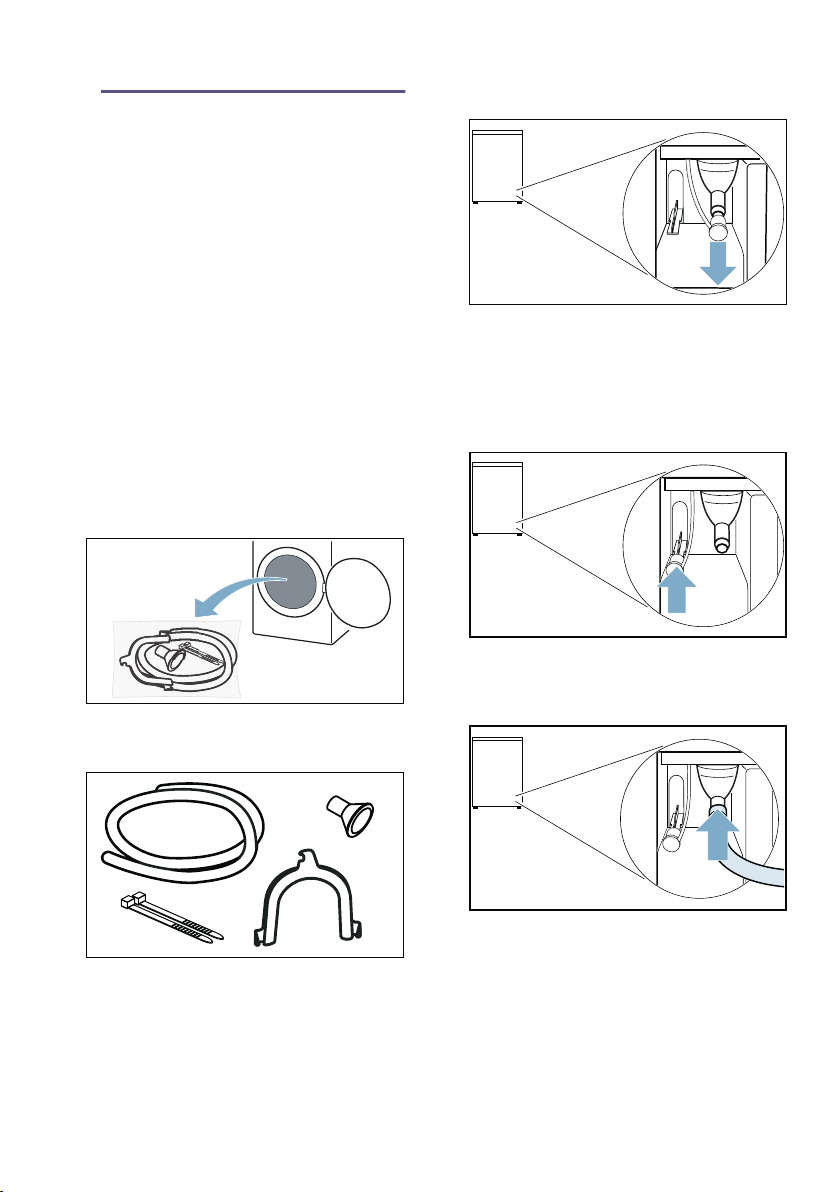
en Draining the condensation water
50
ΠDraining the
condensation water
Draining the condensati on water
Condensation will form in the appliance
as it dries the laundry.
You must ensure that the drain hose is
connected when you operate the
appliance.
If there is no drain hose connected to
the appliance, the condensation water
from the appliance will run into the
condensation container. In this case,
you will need to empty the condensation
container each time the dryer finishes
drying the laundry, and also if it
becomes full before drying is complete.
Connect the drain hose as follows:
1. Remove any accessories from the
drum.
2. Remove all items from the bag.
3. Remove the cap from the socket.
Notes
– The appliance is supplied with
the cap fitted on the socket.
– When removing the cap, a little
liquid may issue from the socket.
4. Push the cap into its "park position".
5. Push the drain hose as far as it will
go onto the uncovered socket.
6. Secure the other side of the drain
hose using the remaining
accessories, depending on the
connection situation.
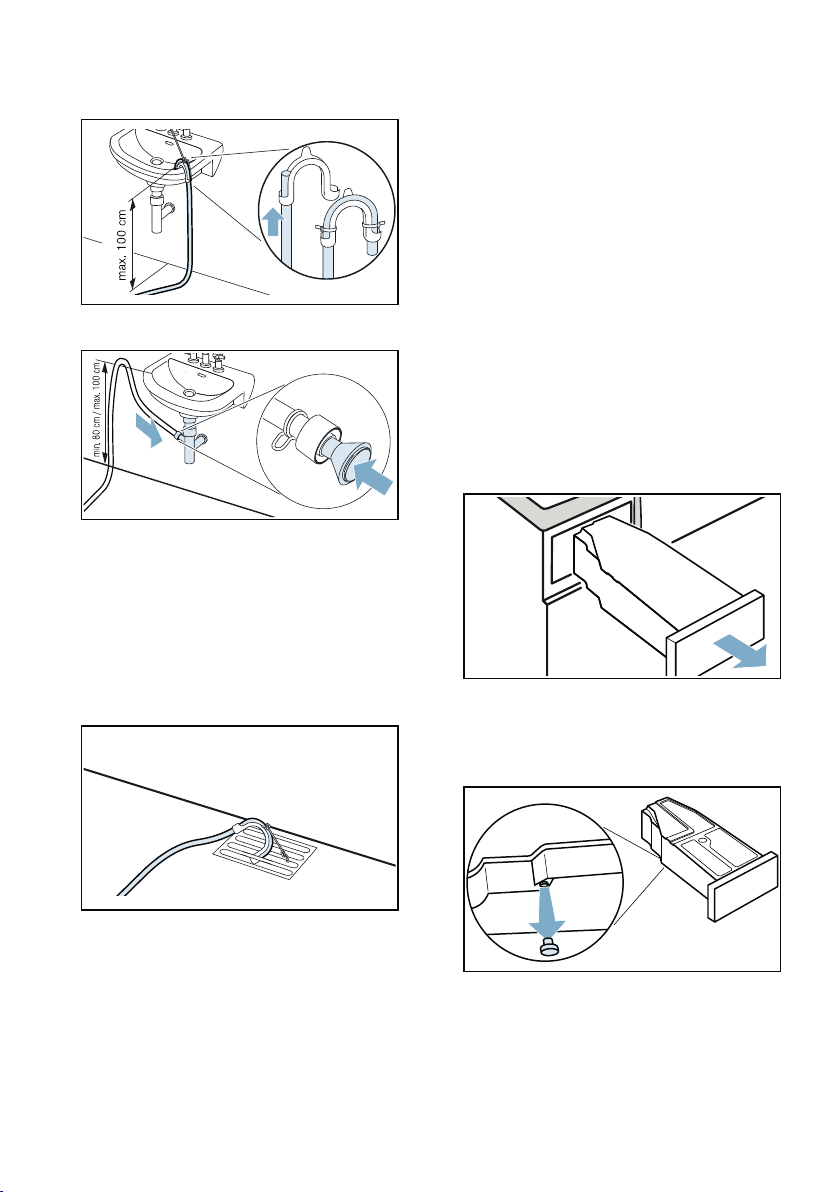
Draining the condensation water en
51
Washbasin:
Siphon:
The connection point must be
secured using a hose clamp (12-
22 mm clamping range, available
from specialist retailers).
When connecting to a siphon, make
sure that the drain hose is routed at
a height of at least 80 cm, but no
more than 100 cm.
Floor drain:
Caution!
Risk of material damage due to
leaks or draining water.
Secure the drain hose to prevent it
from slipping out. Do not kink or
bend the drain hose. The height
difference between the surface on
which the appliance is installed and
the drain hose must be no more than
100 cm.
Caution!
Risk of accumulated water being
drawn back into the appliance and
causing material damage.
Check that the water drains away
quickly. The drain must not be
sealed or blocked.
7. Pull out the condensation container
horizontally and empty it.
8. Turn the condensation container
180° onto its underside and remove
the stopper that is fitted.
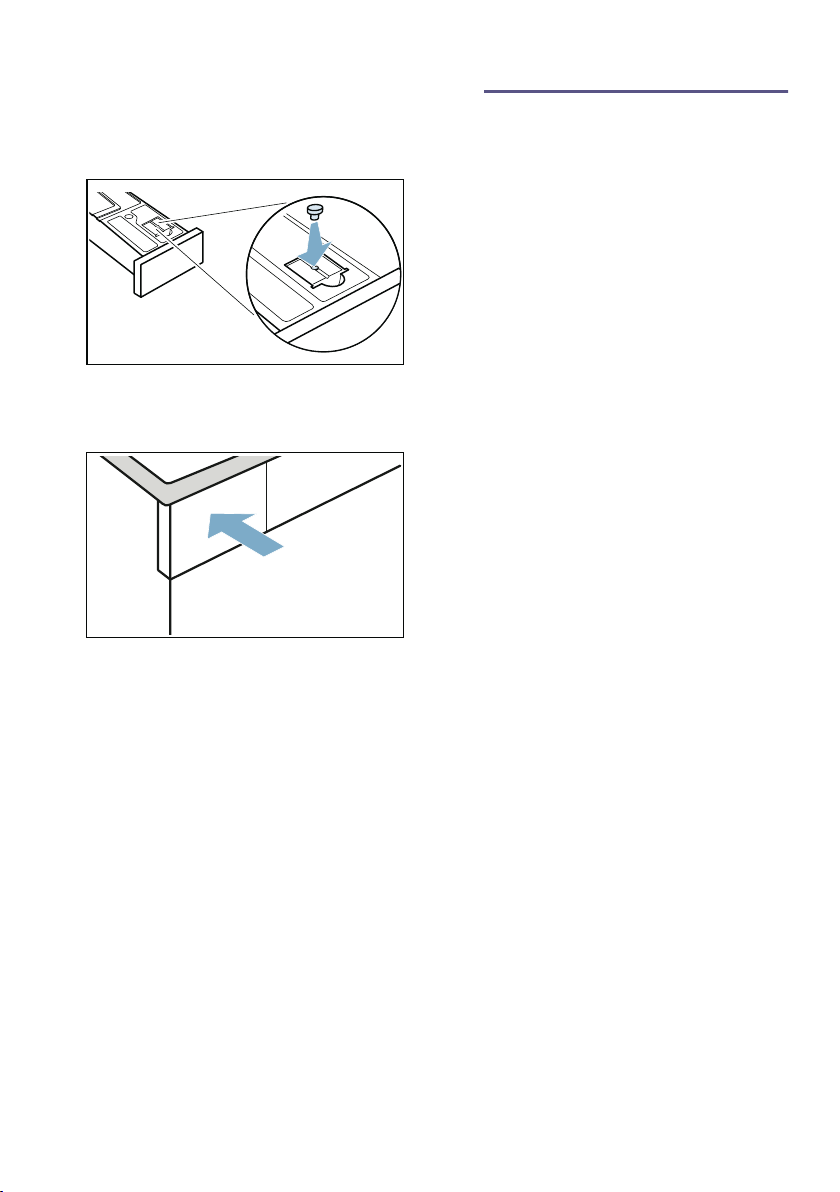
en Cleaning and maintenance
52
9. Turn the condensation container
180° again and insert the stopper
into the recess in the top of the
condensation container.
10.Slide in the condensation container
until it clicks into place.
The condensation water is now
discharged via the drain hose into the
waste-water system or into a washbasin.
Note: If you want to drain the
condensation water back into the
condensation container, reverse these
steps.
Caution!
Risk of material damage/damage to the
appliance
If you are draining condensation water
into the condensation container, liquid
may issue from the socket and cause
material damage. Before using the
appliance, plug the cap into the socket.
D Cleaning and
maintenance
Cleaning and maintenance
Cleaning the appliance
:Warning
Risk of death!
The appliance is powered by electricity.
There is a risk of electric shock if you
come into contact with live components.
Therefore please note:
■ Switch off the appliance. Disconnect
the appliance from the power supply
(pull out the plug).
■ Never take hold of the mains plug
with wet hands.
■ When removing the mains plug from
the socket, always take hold of the
plug itself and never the mains
cable, otherwise this may damage
the mains cable.
■ Do not make any technical
modifications to the appliance or its
features.
■ Repairs and any other work on the
appliance must only be conducted
by our customer service or by an
electrician. The same applies for
replacing the mains cable (when
necessary).
■ Spare mains cables can be ordered
from our customer service.
:Warning
Risk of poisoning!
Poisonous fumes may be given off by
cleaning agents that contain solvents,
e.g. cleaning solvent.
Do not use cleaning agents that contain
solvents.
:Warning
Risk of electric shock/material
damage/damage to the appliance!
If moisture penetrates the appliance,
this may cause it to short circuit.
Do not use a pressure washer, steam
cleaner, hose or spray gun to clean
your appliance.
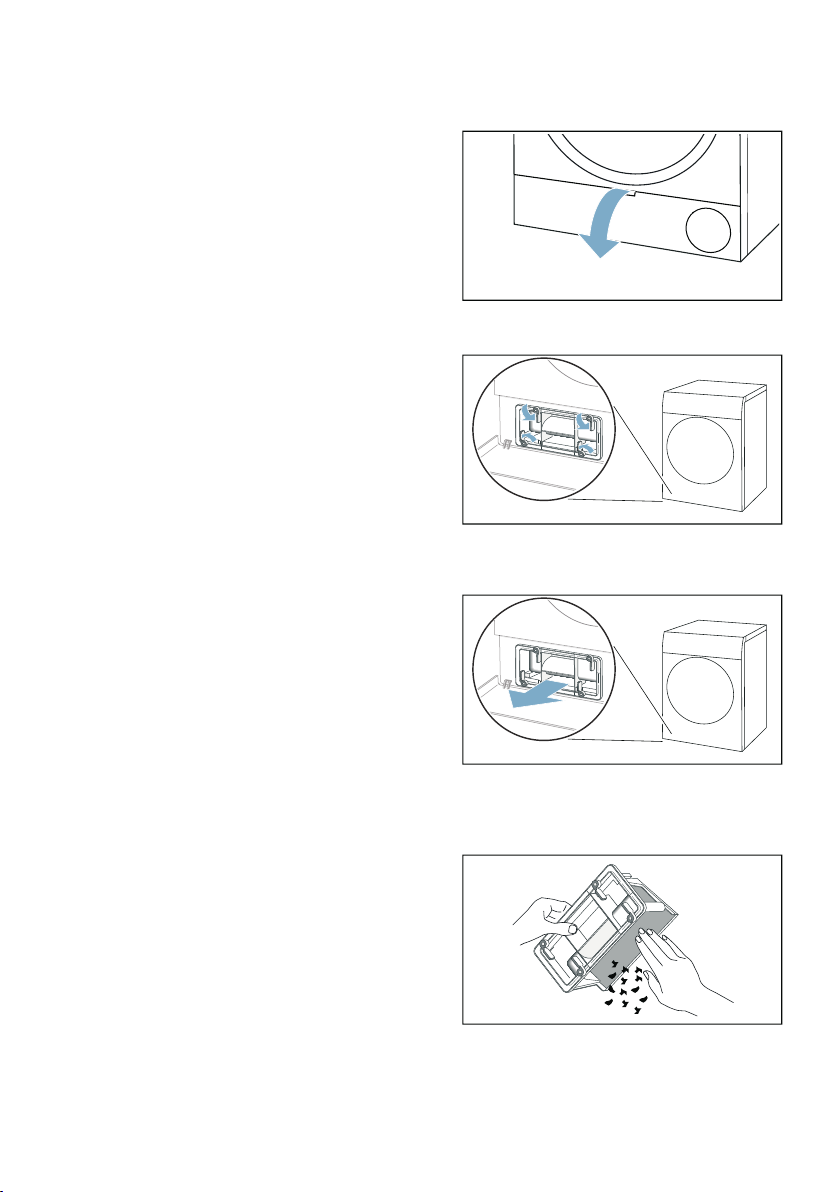
Cleaning and maintenance en
53
Caution!
Material damage/damage to the
appliance
Cleaning agents and agents for
pretreating laundry (e.g. stain removers,
prewash sprays, etc.) may cause
damage if they come into contact with
the surfaces of the appliance. Therefore
please note:
■ Do not allow these agents to come
into contact with the surfaces of the
appliance.
■ Clean the appliance with nothing but
water and a soft, damp cloth.
■ Remove any detergent, spray or
other residues immediately.
Cleaning the base unit
This appliance is equipped with
automatic self-cleaning. Fluff from the
laundry does not have to be removed
after each use – it is collected in the
base unit.
In order to not adversely affect the
operation of the appliance, you must
clean the base unit (fluff collector and
fluff filter) only in the following cases:
■ The following message appears in
the display: Please clean lint filter
■ Before running the appliance care
programme.
As an option, you can clean the
appliance's base unit at any time.
Note: Allow the appliance to cool down
for approximately 30 minutes after use
before commencing cleaning.
Clean the base unit as follows:
1. Open the maintenance flap by the
handle.
2. Unlock the levers on the heat
exchanger cover.
3. Pull the heat exchanger cover out by
its grip.
4. Remove all of the fluff from the heat
exchanger cover and remove the
fluff filter.
Note: Ensure that no dirt remains on
the seals of the heat exchanger
cover.
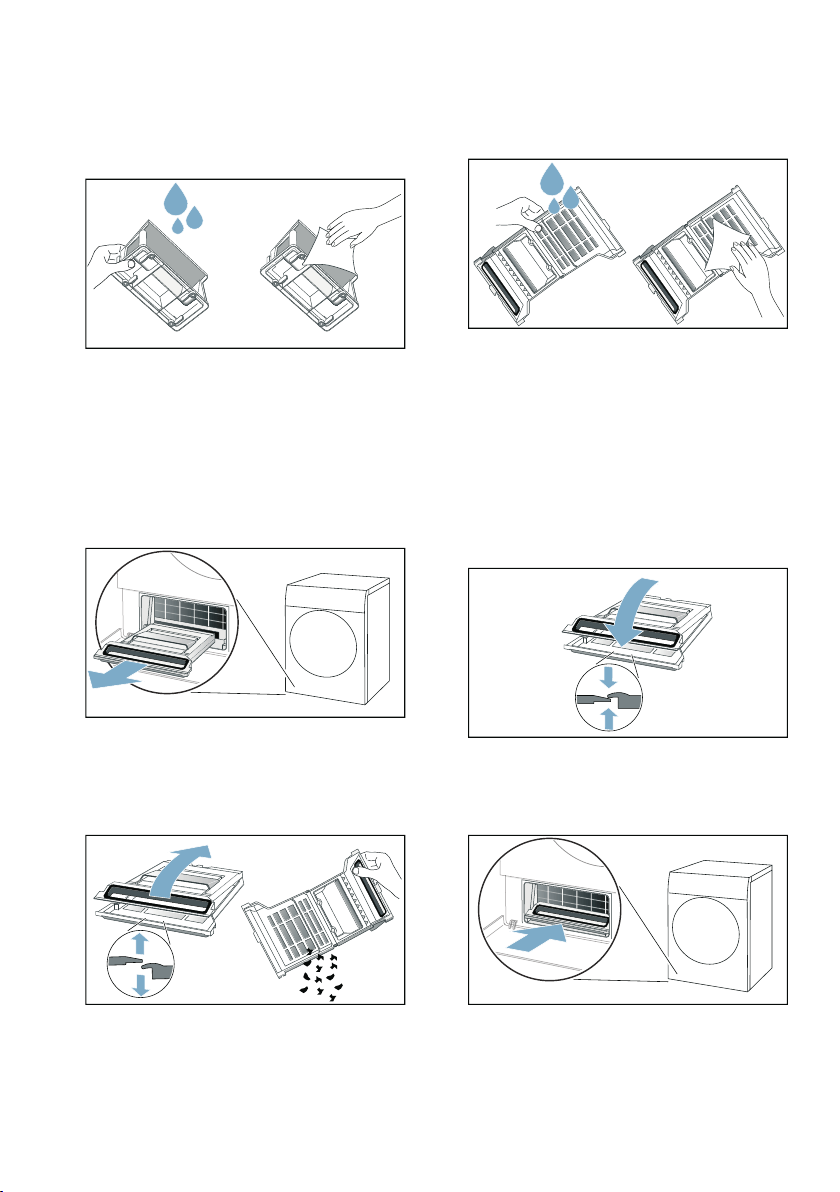
en Cleaning and maintenance
54
5. Rinse the inside of the heat
exchanger cover and the fluff filter
thoroughly under running water and
dry them.
Notes
– You can use a soft brush to clean
off more stubborn dirt.
– Make sure you dry the fluff
collector's filter thoroughly after
rinsing it. If the fluff filter is damp,
this may increase the drying time
and affect the drying result.
6. Pull the fluff collector out horizontally.
Note: The fluff collector may contain
fluff and residual water, which may
drip out of it when you pull it out.
7. Open the fluff collector and remove
any fluff.
8. Rinse the fluff collector's filter
thoroughly under running water and
dry it.
Notes
– You can use a soft brush to clean
off more stubborn dirt.
– You must not remove or damage
the fluff collector's seal.
– You can also clean the fluff
collector in the dishwasher.
– Make sure you dry the fluff
collector's filter thoroughly after
rinsing it.
9. Close the fluff collector.
Note: Ensure that you close the fluff
collector fully.
10.Slide the fluff collector in horizontally
as far as it will go.
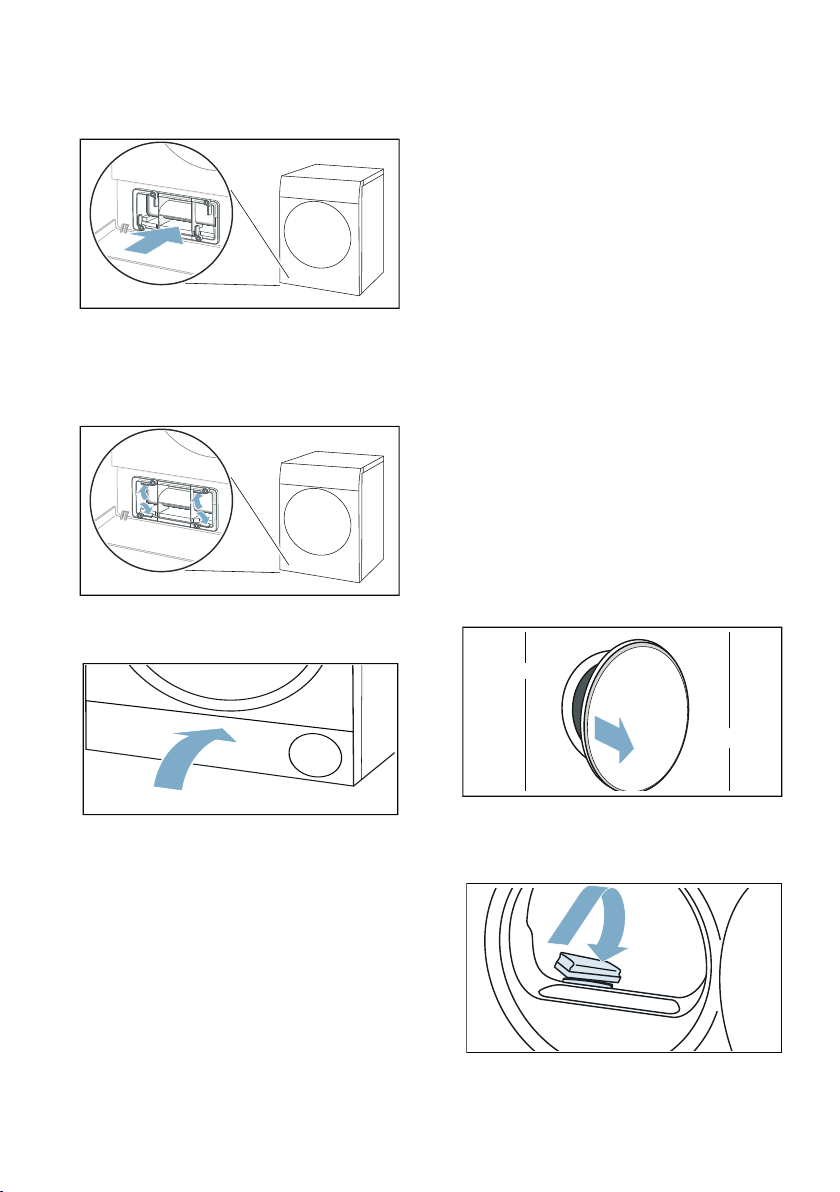
Cleaning and maintenance en
55
11.Slide the heat exchanger cover in by
its grip.
Note: You can only slide the heat
exchanger cover in if the fluff
collector is in the appliance.
12.Lock the levers on the heat
exchanger cover.
13.Close the maintenance flap.
You have now finished cleaning the
appliance's base unit.
Caution!
Material damage/damage to the
appliance
If you operate the appliance without a
fluff catcher (e.g. fluff filter, fluff depot,
depending on appliance specifications),
or if the fluff catcher is incomplete or
defective, this may result in damage to
the appliance.
Do not operate the appliance without a
fluff catcher, or with a fluff catcher that is
incomplete or defective.
Cleaning the moisture sensor
Note: The moisture sensor measures
the amount of moisture in the laundry.
After long periods of usage, the
moisture sensor may become covered
by a fine layer of limescale or detergent
and care product residue. These
deposits must be removed regularly,
otherwise the drying results may not be
optimal.
1. Open the door.
2. Clean the moisture sensor with a
rough sponge.
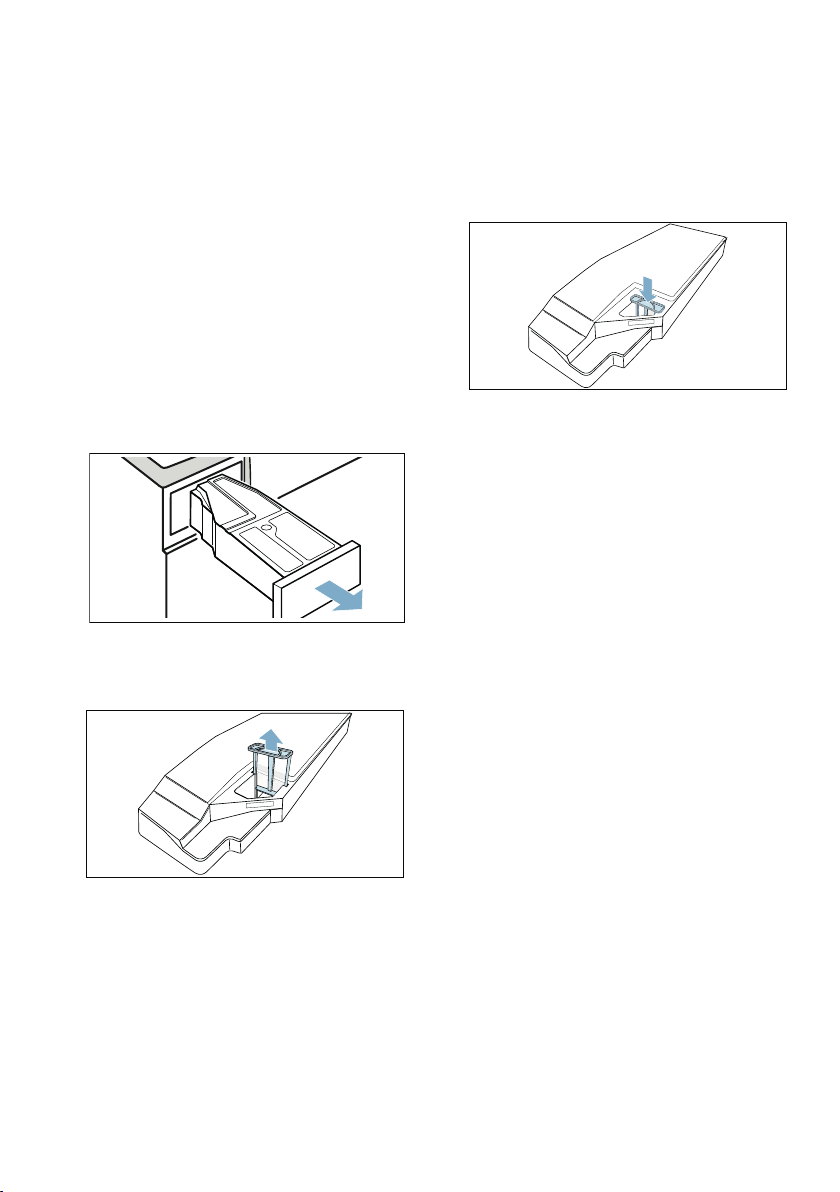
en Cleaning and maintenance
56
Caution!
Risk of damaging the moisture sensor.
The moisture sensor is made from
stainless steel. Do not clean the sensor
with abrasive cleaning products or wire
wool.
Cleaning the filter in the
condensation container
Note: The filter in the condensation
container cleans the condensation
water, which is used during the
appliance's automatic cleaning cycle.
1. Pull out the condensation container
horizontally.
2. Pour out the condensation water.
3. Remove the filter.
4. Clean the filter under warm, running
water or in the dishwasher.
Note: You can use a soft brush to
clean off more stubborn dirt.
5. Push the filter in until you feel it lock
into place.
Caution!
If the filter is not inserted, fluff can
find its way inside the appliance
and damage it.
Only operate the appliance with the
filter inserted.
6. Push the condensation container in
until you feel it lock into place.
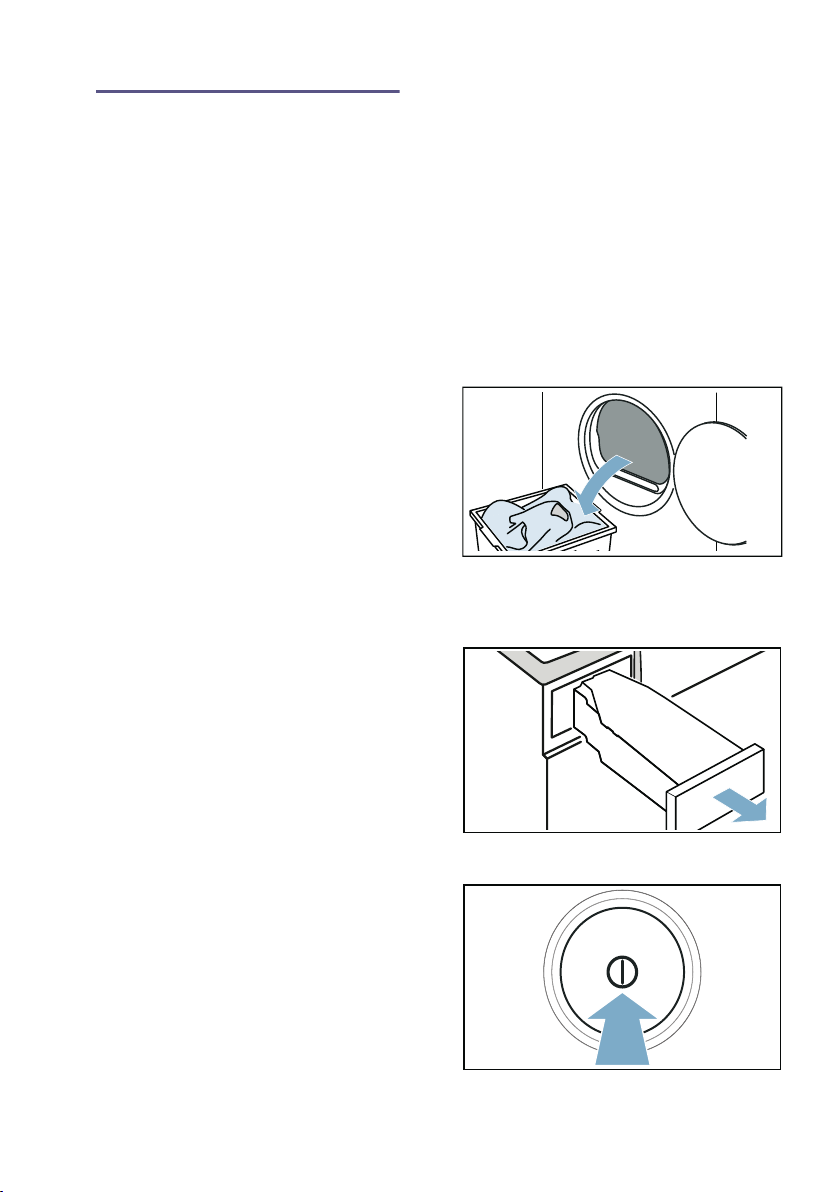
Appliance care en
57
Ö Appliance care
Appliance care
The appliance offers the following
settings for the appliance care
programme:
You can use the appliance
setting Basic machine care to call up
and run the basic appliance care
programme. This is an additional
cleaning programme to remove any
light dirt deposits in the appliance.
You can use the appliance
setting Intensive machine care to call
up and run the intensive appliance care
programme. This is an additional
cleaning programme to remove any
stubborn dirt in the appliance and any
odours after a downtime of more than
one month.
Before running the appliance care
programme, the appliance must be
suitably prepared.
:Warning
Risk of scalding/material damage/
damage to the appliance!
Boiling or hot water can cause severe
scalding as well as material damage
and damage to the appliance if it is
spilled or leaks out.
Do not use boiling water for this
appliance or its components or
accessories. Do not allow hot water or
steam to come into contact with your
skin.
:Warning
Risk of poisoning/material damage!
Condensation water is not suitable for
drinking and may be contaminated with
lint. Contaminated condensation water
may be hazardous to health and may
cause material damage.
Do not drink or reuse.
Preparing the appliance for
appliance care
Preparing the appliance for appliance
care
The appliance must be prepared before
you can run a basic or intensive
appliance care programme.
Prepare the appliance for appliance
care as follows:
1. Clean the base unit.~ Page 53
2. Open the door.
3. Remove the laundry.
4. Close the appliance door.
5. Pull out the condensation container
horizontally and empty it.
6. Press # to switch on the appliance.
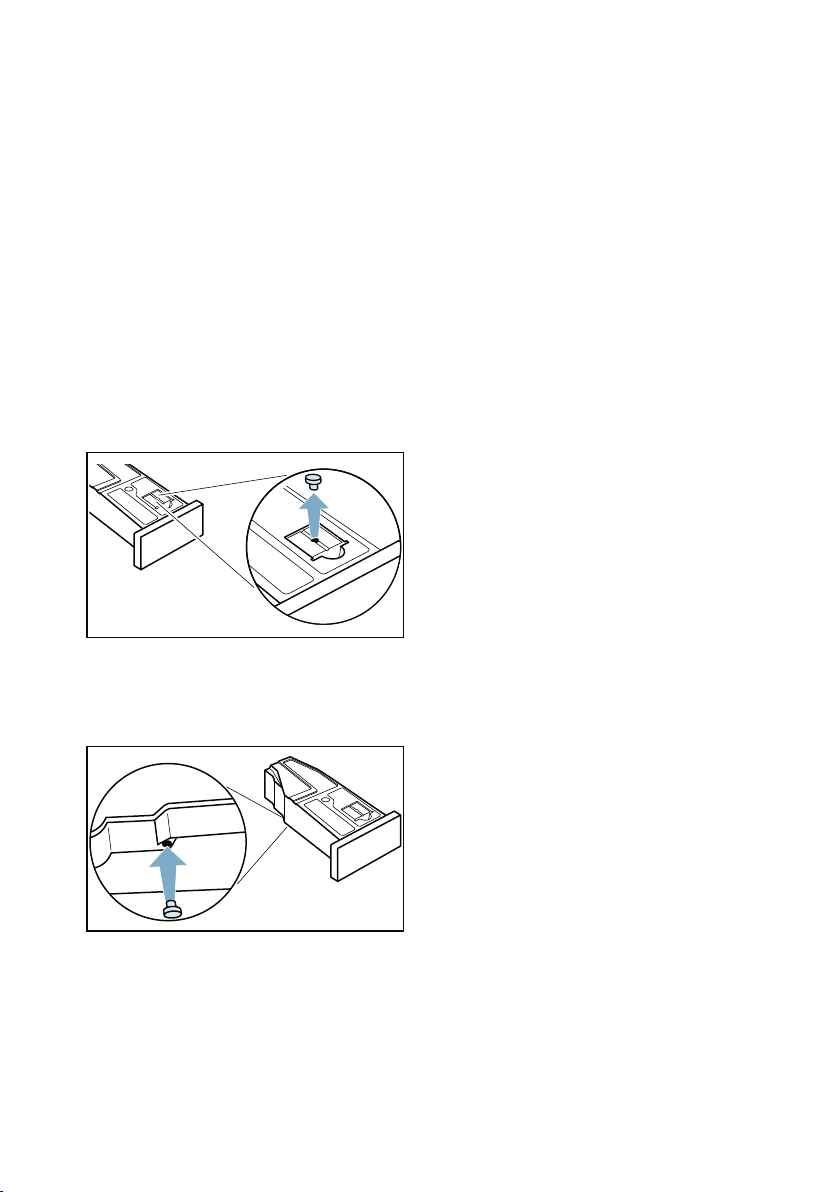
en Appliance care
58
The appliance is now ready to run the
appliance care programme.
Preparing the condensation container
for appliance care
If you are draining the condensation
water from the appliance using the drain
hose, the condensation container must
be prepared before the basic or
intensive appliance care programme
can be run.
Prepare the condensation container
for appliance care as follows:
1. Remove the stopper inserted in the
recess on the condensation
container.
2. Turn the condensation container
180° onto its underside and insert
the stopper.
3. Clean the filter in the condensation
container.~ Page 56
The condensation container is now
ready for the appliance care
programme.
Note: If you are draining the
condensation water from the appliance
using the drain hose, reverse these
steps after running the basic or
intensive appliance care programme.
Running the basic appliance
care programme
You can use the appliance
setting Basic machine care to call up
and run the basic appliance care
programme. This is an additional
cleaning programme to remove any
light dirt deposits in the appliance.
Notes
■ After a certain period, your appliance
will automatically recommend that
you run the basic appliance care
programme. Basic machine care
required. will then appear on the
display for 5 seconds before the
programme starts, and again once
the programme ends. This message
will appear repeatedly until you have
run the basic appliance care
programme through to the end.
■ The basic appliance care
programme runs for approximately
one hour.
Running the appliance care
programme
Run the appliance care programme as
follows:
1. Prepare the appliance for appliance
care. ~ Page 57
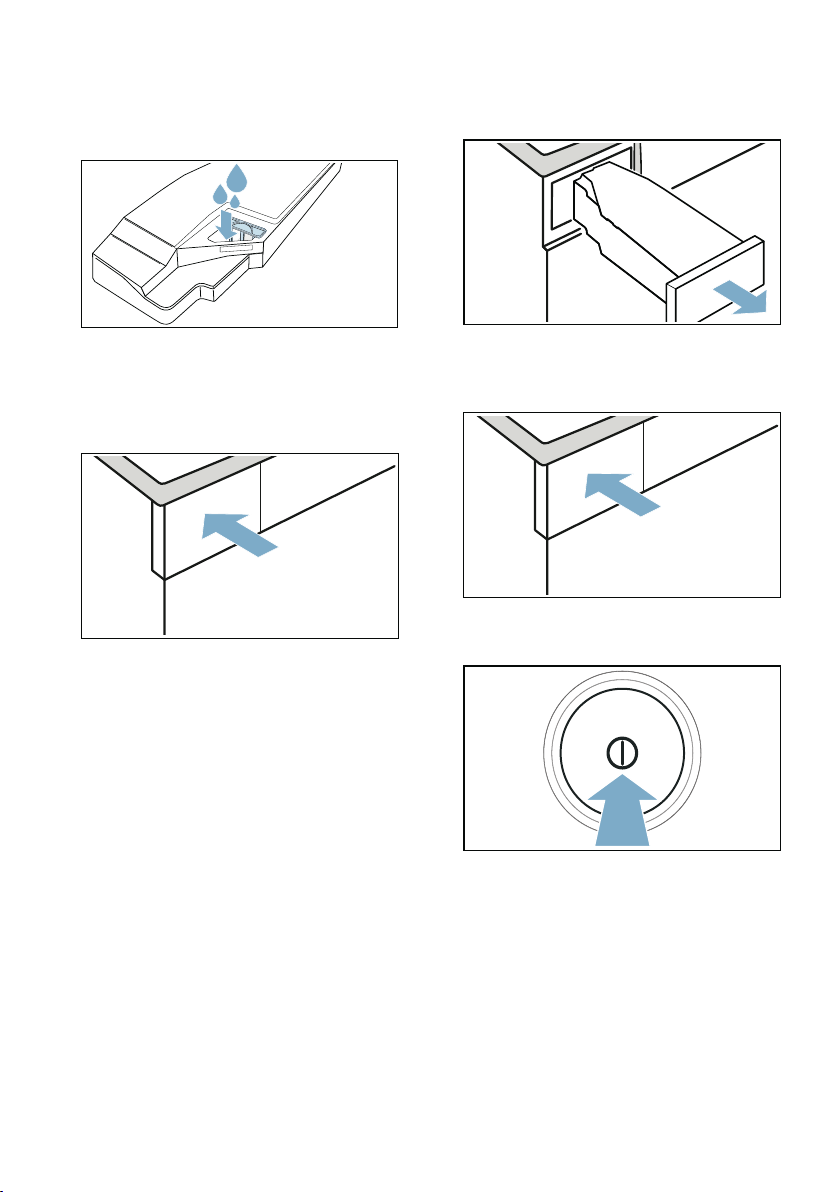
Appliance care en
59
2. Pour approx. 1 ^ litre of warm tap
water into the condensation
container.
Note: Hold the full condensation
container horizontally at all times so
that no liquid spills out.
3. Slide in the condensation container
until it clicks into place.
4. Press and hold the two
œ 3 sek. (Basic Settings 3 sec.)
buttons for approx. 3 seconds.
5. Press Basic machine care .
6. Press start .
The appliance care program will
start and an audible signal will
sound.
Note: While the appliance care
program is in progress, you cannot
pause the appliance with the A
(Start/Pause) button.
A message appears in the display once
the appliance care programme has
ended, and an audible signal sounds.
7. Pull out the condensation container
horizontally and empty it.
8. Slide in the condensation container
until it clicks into place.
9. Press # to switch off the appliance.
You have now completed the appliance
care programme.

en Appliance care
60
Running the intensive
appliance care programme
You can use the appliance
setting Intensive machine care to call
up and run the intensive appliance care
programme. This is an additional
cleaning programme to remove any
stubborn dirt in the appliance and any
odours after a downtime of more than
one month.
Notes
■ The intensive appliance care
programme runs for approximately 4
hours. The programme may take
longer if you do not carry out the
necessary steps in good time while
the programme is running.
■ Once it has started, the intensive
appliance care programme should
not be cancelled.
■ When you run the intensive
appliance care programme, you will
need to use the original appliance
care product. This can be ordered
from our after-sales service using
spare part number 00311829.
Contact information for all countries
can be found in the enclosed after-
sales service directory.
:Warning
Risk of injury/material damage/
damage to the appliance!
The use of spare parts and accessories
supplied by other brands is dangerous
and may result in injury, material
damage or damage to the appliance.
For safety reasons, use genuine spare
parts and accessories only.
Caution!
Material damage/damage to the
appliance
If you pour the wrong quantity of
detergent or cleaning agent into the
appliance, this may result in material
damage or damage to the appliance.
Use detergents/care products/cleaning
agents and softeners in accordance
with the manufacturers' instructions.
Running the appliance care
programme
Run the appliance care programme as
follows:
1. Prepare the appliance for appliance
care. ~ Page 57
2. Pour a bottle of the original
appliance care product and
approx. 1 ^ litre of warm tap water
into the condensation container.
Note: Hold the full condensation
container horizontally at all times so
that no liquid spills out.
3. Slide in the condensation container
until it clicks into place.
4. Press and hold the two
œ 3 sek. (Basic Settings 3 sec.)
buttons for approx. 3 seconds.
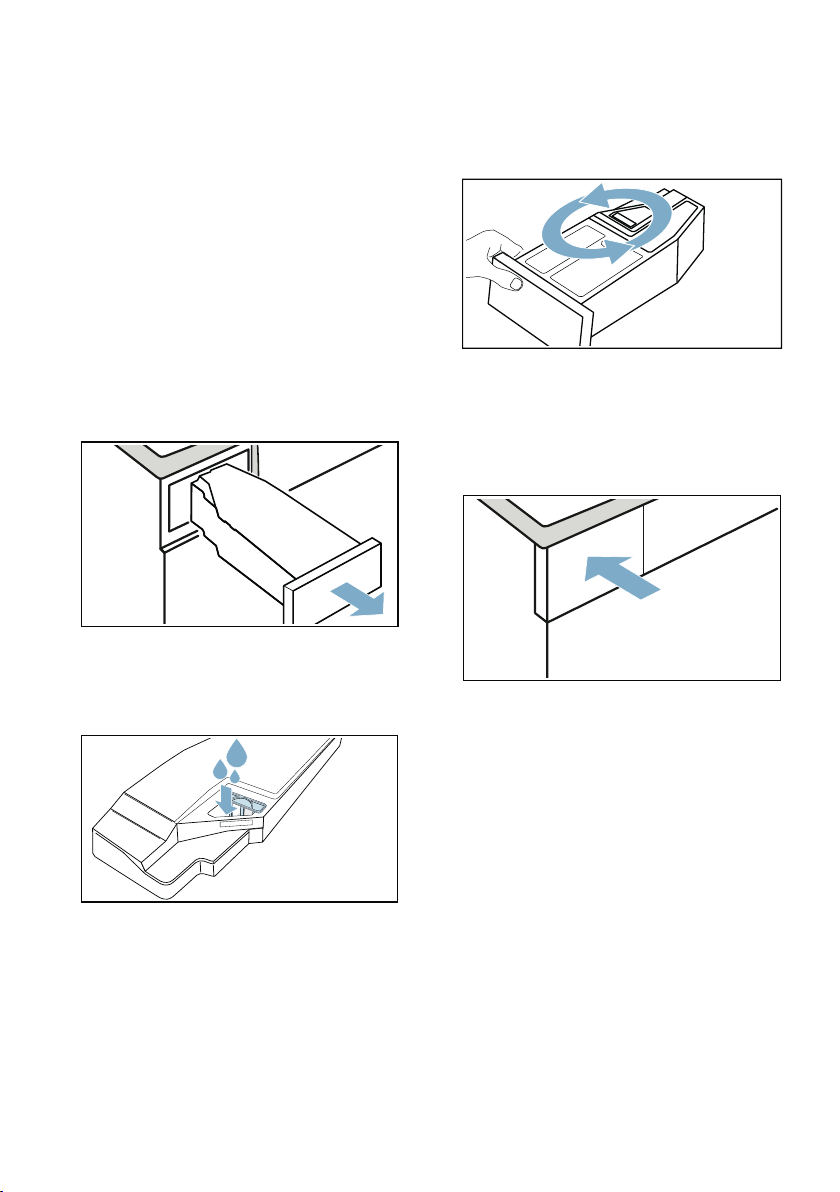
Appliance care en
61
5. Press Intensive machine care .
6. Press start .
The appliance care program will
start and an audible signal will
sound.
Note: While the appliance care
program is in progress, you cannot
pause the appliance with the A
(Start/Pause) button.
After approx. three hours, the appliance
pauses the appliance care programme
and a message appears in the display
informing you that the first part of the
appliance care programme has been
carried out.
7. Pull out the condensation container
horizontally and empty it.
8. Pour approx. 1 ^ litre of warm tap
water into the condensation
container.
Note: Hold the full condensation
container horizontally at all times so
that no liquid spills out.
9. Carefully swing the condensation
container round horizontally and
empty it to dispose of any remaining
original appliance care product.
10.Pour approx. another 1 ^ litre of
warm tap water into the
condensation container.
11.Slide in the condensation container
until it clicks into place.
12.Press A (Start/Pause).
The appliance care programme is
resumed.
Note: During the appliance care
programme, you cannot pause the
appliance via A (Start/Pause).
A message appears in the display once
the appliance care programme has
ended, and an audible signal sounds.
13.Empty the condensation container
again.
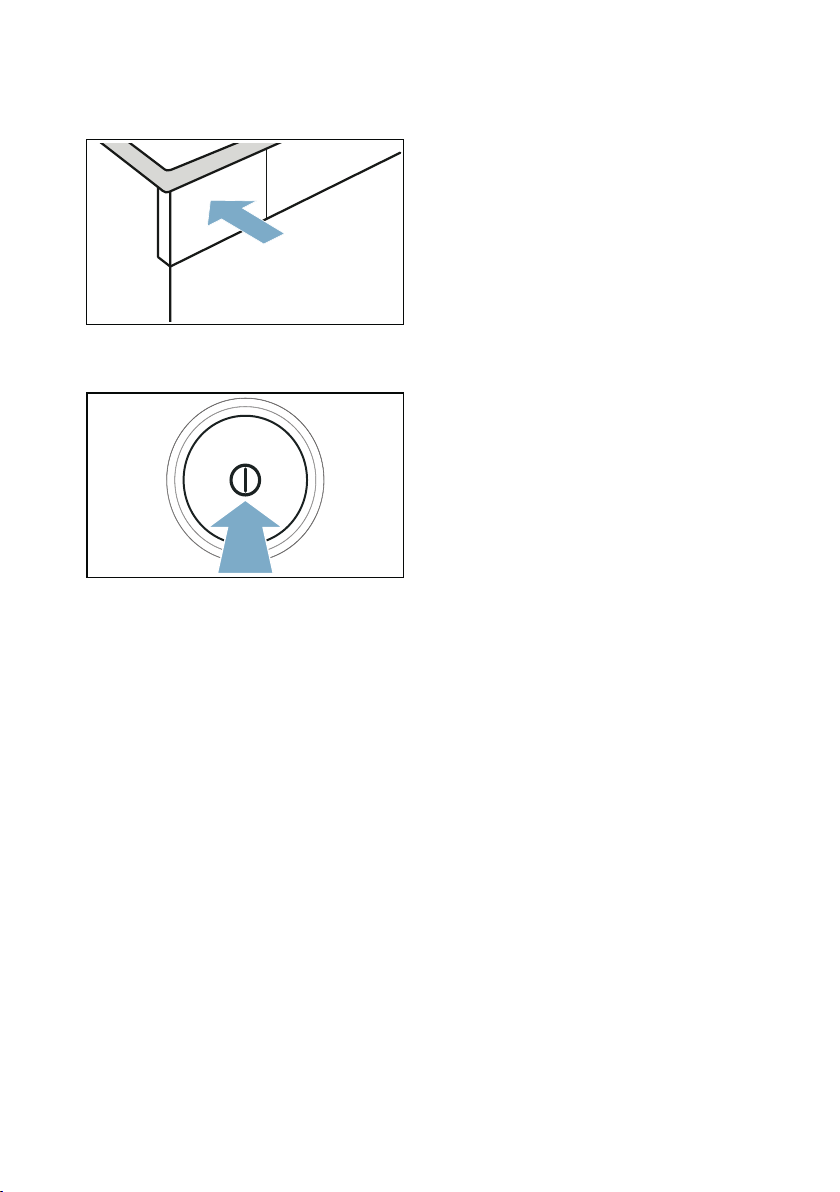
en Appliance care
62
14.Slide in the condensation container
until it clicks into place.
15.Press # to switch off the appliance.
You have now completed the appliance
care programme.

Help with the appliance en
63
3 Help with the appliance
Help with the appliance
Faults Cause/Remedy
Appliance does not start. Check the mains plug and the fuses.
The appliance does not
respond to inputs and the dis-
play shows: Please clean lint
filter
■ If there is fluff or debris in the fluff filter or if the fluff filter is damp,
this may impair the airflow in the appliance at low ambient tempera-
tures.
– Clean the base unit and dry the fluff filter thoroughly.
~ Page 53
– Switch the appliance off and on again.
– Press A (Start/Pause) to restart the programme.
Creasing. ■ Load exceeded or incorrect programme selected for a type of fabric.
All the required information can be found in the programme
table.~ Page 26
■ Remove laundry from the drum as soon as the drying programme
has finished. Creasing occurs when clothing is left in the drum.
Water is leaking out. ■ The appliance may be positioned at an angle. Level the appliance.
■ In the base unit, make sure that:
– The heat exchanger cover is properly locked.
– There is no dirt or debris on the heat exchanger cover's seal.
~ Page 53
■ If the optional drain hose* is installed, make sure that the drain hose
is correctly connected. ~ Page 50
The appliance is paused but the
drum is turning.
The appliance has detected a high temperature and has started the
CoolDown process. Temperature regulation can take up to 10 minutes.
You can cancel the CoolDown process at any time by opening the door.
The programme does not start Make sure that:
■ The door is closed
■ The E 3 sek. (Child Lock 3 sec.) has been deactivated
■ You have pressed A (Start/Pause)
Note: If the programme has been delayed by setting ñ (Ready in), the
programme starts at a later point.
Programme duration displayed
changes as drying progresses.
Not a fault. The moisture sensor measures the residual moisture in the
laundry and adjusts the programme duration (with the exception of timed
programmes).

en Help with the appliance
64
Laundry is not dried properly or
is still too damp.
■ After the programme has ended, warm laundry feels damper than it
actually is. Spread out the laundry and let it cool down.
■ Adjust the drying time or increase the degree of dryness. This will
extend the drying time but the temperature will remain the same.
■ Select a timed programme to add extra drying time for laundry that is
still damp.
■ Select a timed programme for a small load.
■ Do not exceed the maximum load for a programme.~ Page 26
■ Clean the moisture sensor in the drum. The sensor may become cov-
ered in a fine layer of limescale or detergent and care product resi-
due, which then impairs its performance.~ Page 55
■ Drying has been interrupted as a result of a power cut, because the
condensation container is full or because the maximum drying time
has been exceeded.
Note: See also the laundry tips.~ Page 31
Drying time too long. ■ The appliance may have fluff in it. This will increase the required dry-
ing time.
– Clean the base unit. ~ Page 53
– Run a complete drying cycle with a load weighing more than
3 kg. Make sure the laundry has not been pre-dried.
Note: The appliance's automatic self-cleaning function uses the
condensed water from your laundry. If you regularly dry loads weigh-
ing less than 3 kg or you regularly use the crease-removal function,
there will not be enough condensed water from your laundry to run
the appliance's automatic self-cleaning function. You should there-
fore dry loads weighing more than 3 kg on a regular basis, making
sure that the laundry has not been pre-dried.
■ The heat exchanger may have fluff in it.
– Run the basic appliance care programme. ~ Page 58
■ If the fluff filter is damp, this may increase the drying time and affect
the drying result. Dry the base unit's fluff filter thoroughly after rins-
ing it.~ Page 53
■ If the air inlet on the appliance is blocked or not fully open, this may
increase the drying time. Make sure the air inlet remains unob-
structed.
■ If the ambient temperature is lower than 15 °C or higher than 30 °C,
this may increase the drying time and affect the drying result.
■ If the air circulation in the room is inadequate, this may increase the
drying time. Make sure the room is adequately ventilated.
Unpleasant odour in the appli-
ance
Run the intensive appliance care programme. ~ Page 60
Humidity in the room is increas-
ing.
Make sure the room is sufficiently ventilated.
Unusual noises when drying. When drying is in progress, the pump and compressor generate noise
when operating normally. This does not indicate that the appliance is
malfunctioning.

Help with the appliance en
65
--------
Note: If you cannot rectify the fault yourself by turning the appliance off and then on
again, please contact our after-sales service.~ Page 69
The appliance feels cold
despite drying.
Not a fault. The appliance can dry effectively at low temperatures using a
heat pump.
Drying programme is stopped. If the drying programme is stopped due to a power failure, restart the
programme or remove the laundry and spread it out.
I am unable to connect to my
home network.
■ Wi-Fi is switched off.To connect to your home network, switch on Wi-
Fi. ¡ must appear on the display.
■ Wi-Fi is switched on but a connection to your home network cannot
be established.Check whether your home network is available or try
to connect to your home network again.
Home Connect is not working. ■ You can find solutions to problems with Home Connect at
www.home-connect.com.
■ The availability of the Home Connect functionality depends on the
availability of the Home Connect Services (e.g. provision of the app)
in your country. Home Connect Services are not available in every
country – for further information please check: www.home-con-
nect.com.
Water overflows when the
water tank is filled.
The water tank is completely full. Do not pour in any more water. It does
not matter if a little water has already spilled over – there is no need for
concern. ~ "Filling the water tank" on page 47
The filter in the water tank may be blocked by deposits or debris.
Remove the filter and clean it.
The steam programs are taking
too long.
Low ambient temperatures will extend the duration of the steam pro-
grams.
Residual water in the conden-
sation container despite the
appliance being connected to
the drain hose*.
If the optional drain hose is installed, residual water remains in the con-
densation container due to the appliance's self-cleaning function.
* Depending on how the appliance is equipped or the available accessory
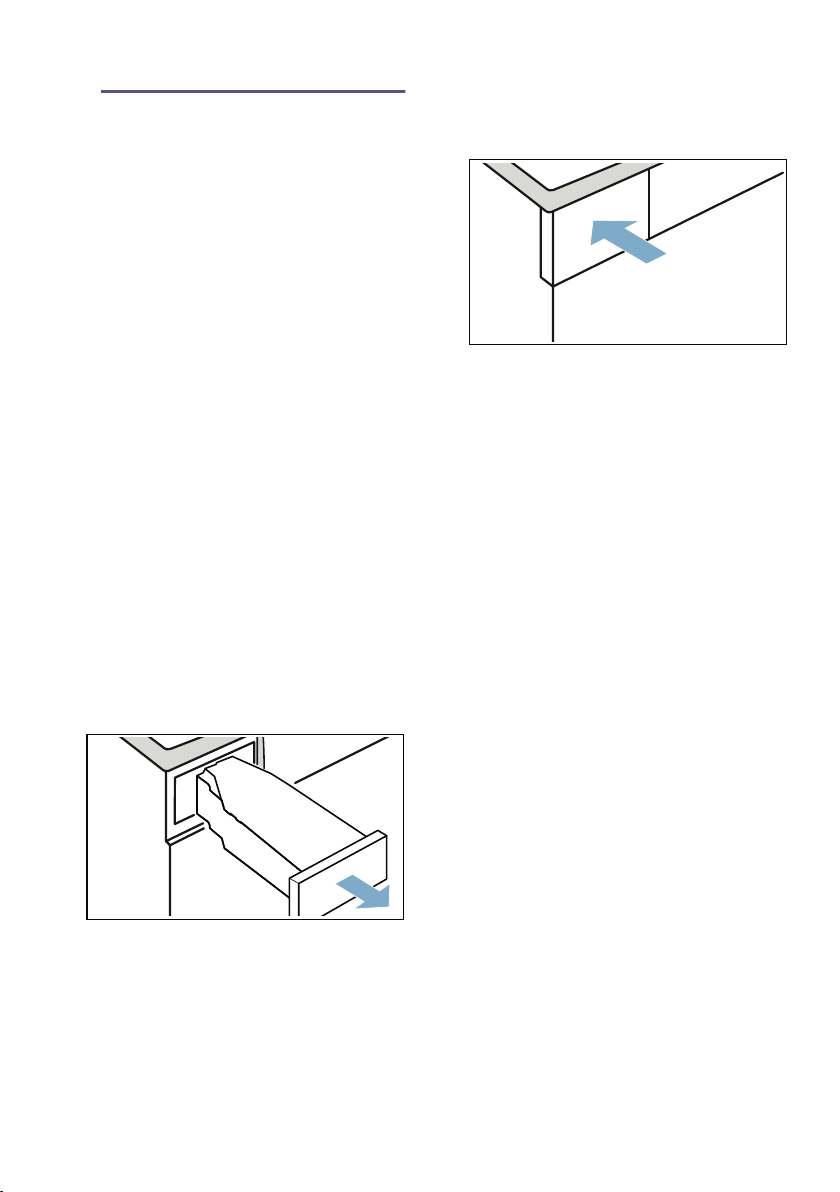
en Transporting the appliance
66
L Transporting the
appliance
Transport ing the appliance
:Warning
Risk of injury/material damage/
damage to the appliance!
If you take hold of any of the appliance's
protruding parts (e.g. the appliance
door) in order to lift or move it, these
parts may break off and cause injury.
Do not take hold of any of the
appliance's protruding parts in order to
move the appliance.
:Warning
Risk of injury!
■ The appliance is very heavy. Lifting it
may result in injury.
Do not lift the appliance on your
own.
Risk of injury!
■ The appliance has sharp edges on
which you could cut your hands.
Do not take hold of the appliance by
its sharp edges. Wear protective
gloves to lift it.
Prepare the appliance for
transportation as follows:
1. Pull out the condensation container
horizontally and empty it.
2. Push the condensation container
back into the appliance until you feel
it lock into place.
3. Switch on the appliance.
4. Set any programme.
5. Press A (Start/Pause).
6. Wait for 5 minutes.
The condensation water will be drained.
7. Empty the condensation container
again.
8. If installed, remove the drain hose
from the washbasin, siphon or floor
drain. ~ Page 50
Caution!
Secure the drain hose to the
appliance to prevent it from slipping
out. Do not kink the drain hose.
9. Switch off the appliance.
10.Disconnect the appliance's mains
plug from the power supply.
The appliance is now ready to be
transported.
Caution!
Risk of material damage/damage to the
appliance
Despite draining, there will always be
some residual water in the appliance.
Any residual water may leak out and
cause material damage.
The appliance should therefore be
transported upright.

Consumption values en
67
[ Consumption values
Consumption values
Consumption values table
Most efficient programme for cotton laundry
The "standard cottons programme" below (denoted by the ü symbol) is suitable
for drying cotton laundry with a normal dampness level, and is the most efficient
programme for drying damp cotton laundry in terms of combined energy
consumption.
Programme
Spin speed used for
spinning the laundry
(in rpm)
Duration**
(in min)
Energy consumption**
(in kWh)
Cotton 9 kg 4.5 kg 9 kg 4.5 kg
Cupboard Dry »* 1400 192 119 1,37 0.77
1000 215 132 1.61 0.90
800 238 145 1.85 1.03
Iron Dry ö* 1400 143 86 0.97 0.54
1000 166 99 1.21 0.67
800 189 112 1.45 0.80
Easy Care 3.5 kg 3.5 kg
Cupboard Dry »* 800 77 0.44
600 87 0.53
* Programme setting in accordance with the applicable EN61121 standard when using the external drain
hose.
** The values may differ from those specified, depending on the type of fabric, composition of laundry to
be dried, residual moisture in the laundry, the degree of dryness that has been set, the amount of laun-
dry being loaded, the environmental conditions, and any additional functions that have been activated.
Standard programmes for cottons in accordance with current EU regulation 932/2012
Programme + dryness level Load
(in kg)
Energy consump-
tion
(in kWh)
Programme dura-
tion
(in min)
ü Cotton + (C/board dry) » 9/4.5 1.61/0.9 215/132
Programme setting for testing and energy labelling in accordance with Directive 2010/30/EU.

en Technical data
68
{ Technical data
Technical data
Dimensions:
850 x 600 x 640 mm
(height x width x depth)
Weight:
56 kg (depending on the model)
Mains connection:
Mains voltage 220 - 240 V, 50 Hz
Nominal current 10 A
Nominal power 600 W
Maximum load:
9 kg
Power consumption when switched
off:
0.10 W
Power consumption when left on:
0.10 W
Drum interior light
*
Ambient temperature
**
5 - 35°C
Power consumption when networked
(Wi-Fi) in standby mode/duration:
1.3 W / 20 mins
) Disposal
Disposal
Caution!
Risk of fire/risk of poisoning/risk of
material damage and damage to the
appliance
The appliance contains R290, a
refrigerant that is environmentally
friendly but flammable. If it is not
disposed of correctly, this may result in
fire or poisoning.
Dispose of the appliance correctly and
do not damage the pipes in the
refrigerant circuit.
* Depending on the appliance
specifications
** At an ambient temperature below
10 °C, the } (Remote Start) function
and the maximum duration of 24
hours can be limited for the ñ
(Ready in) function.
)
Dispose of packaging and the
appliance in an
environmentally responsible
manner.
This appliance is labelled in
accordance with the European
Directive 2012/19/EU, which
governs waste electrical and
electronic equipment (WEEE).
The directive provides a
framework for the collection
and recycling of old
appliances, which is valid
across the EU.
Customer Service en
69
4 Customer Service
Customer Service
If you cannot rectify the error yourself by
turning the appliance off and then on
again, please contact our after-sales
service.~ Enclosed after-sales service
directory or cover page
We will always find an appropriate
solution and, where possible, prevent
the need for an engineer to visit.
Please provide the after-sales service
with the product number (E no.) and the
production number (FD) of the
appliance.
You can find this information,
*depending on the model:
On the inside of the door*/open service
flap* and at the rear of the appliance.
You can trust in the manufacturer's
expertise.
Contact us. This ensures that the repair
is carried out by trained service
engineers with genuine spare parts.
E no. Product number
FD Production number
(1U )'
6
6
Robert Bosch Hausgeräte GmbH
Carl-Wery-Straße 34
81739 München, GERMANY
www.bosch-home.com
*9001444235*
9001444235 (9907)
en
Thank you for buying a Bosch
Home Appliance!
Register your new device on MyBosch now and profit directly from:
• Expert tips & tricks for your appliance
• Warranty extension options
• Discounts for accessories & spare-parts
• Digital manual and all appliance data at hand
• Easy access to Bosch Home Appliances Service
Free and easy registration – also on mobile phones:
www.bosch-home.com/welcome
Looking for help?
You´ll find it here.
Expert advice for your Bosch home appliances, need help with problems or a repair from
Bosch experts.
Find out everything about the many ways Bosch can support you:
www.bosch-home.com/service
Contact data of all countries are listed in the attached service directory.