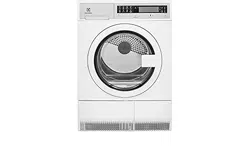
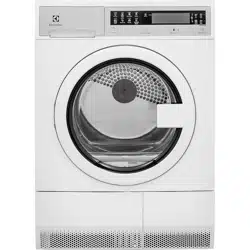
User & care guide Dryer Electrolux
Features
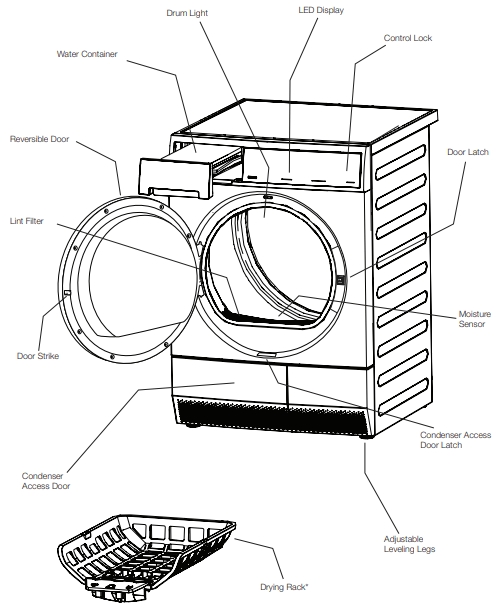
- Not all models come with drying rack and stacking kit from the factory. They may be purchased as accessories.
Operating Instructions
Normal Operating Sounds
You may or may not hear the following sounds from your new dryer:
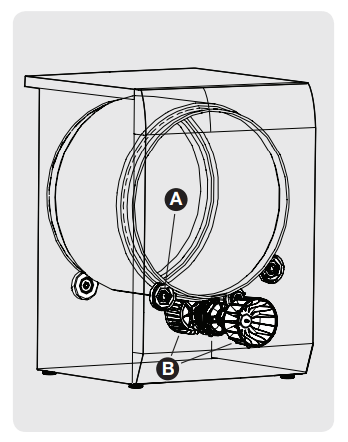
A. SUSPENSION ROLLERS: The dryer drum is supported by a set of suspension rollers. At times there may be a thumping or rolling sound when the dryer starts. This may happen if the dryer has not been in use for a period of time, or after a heavy load has remained in the dryer drum for an extended period, creating a temporary flat spot on the edge of the roller. The noise should dissipate as the dryer operates and the flat spots smooth out.
B. AIR FLOW SYSTEM Your dryer is equipped with a high volume air handling system. In some installations there may be some sounds associated with air movement throughout the dryer. This is normal and can vary with load size and type.
CAUTION
Do not continue to use the dryer if you hear squeaking, grinding, rubbing or other unusual noises. This could be a sign of mechanical breakdown and lead to fire or serious injury. Contact a qualified technician immediately.
IMPORTANT
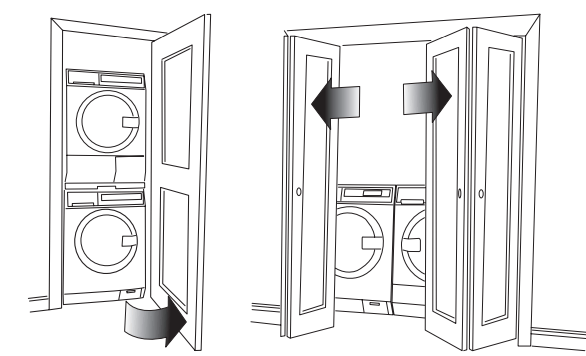
If installed in a closet the dryer will not function correctly with the door in the closed position. This condensation process requires access to cool air from the room. The unit must only be operated with the door in the open position to allow correct air circulation.
Operating Your Dryer
WARNING
To reduce the risk of fire, electric shock or injury to persons, read the IMPORTANT SAFETY INSTRUCTIONS in this Use and Care Guide before operating your dryer
1 Prepare load for drying.
- Dry items of similar fabric, weight and construction in the same load.
- Separate dark items from light-colored items. Separate items that shed lint from those that attract lint.
- Check for stains which may not have been removed in washing. Repeat stain removal process and wash again before drying. Drying may permanently set some stains.
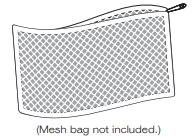
- Place delicate or small items in a mesh bag.
- Be sure buckles, buttons and trim are heatproof and won’t damage the drum finish. Close zippers; fasten hooks and Velcro®-like fasteners. Tie strings and sashes to prevent snagging and tangling.
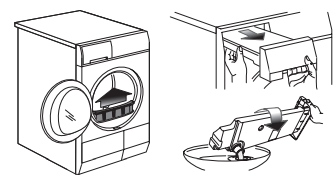
2 Check that the lint filter is clean and in place and water container is empty. See also Care and Cleaning section.
CAUTION
Do not operate dryer without lint filter in place
3 Load the dryer and close the door
- Load items loosely. The average wet load will fill the drum 1/3 to 1/2 full. Items need room to tumble freely for even drying and less wrinkling.
- Fabric softener sheets are not recommended with this condensing dryer.
- To save energy and time and avoid uneven drying and wrinkling, do not overload the dryer.
- When drying large items, dry only two or three items at a time. Fill out the load with small and medium sized items.
- For delicate or very small loads, add two or three similar items to improve tumbling action.
4 Select the appropriate cycle and settings for each load.
NOTE
- Over-drying can cause wrinkles, shrinkage, lint, harshness and a build up of static electricity.
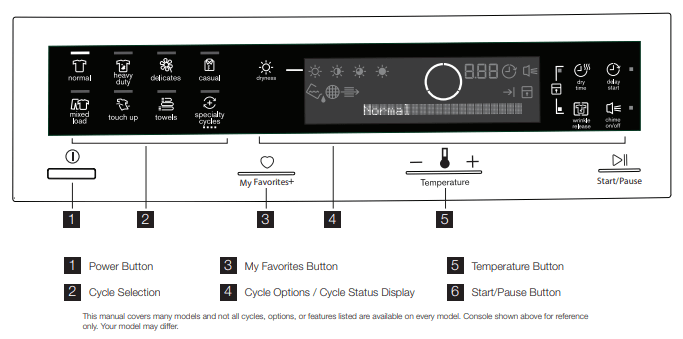
- Press the Power button to turn on the unit.
- Select a desired cycle by pressing its icon.
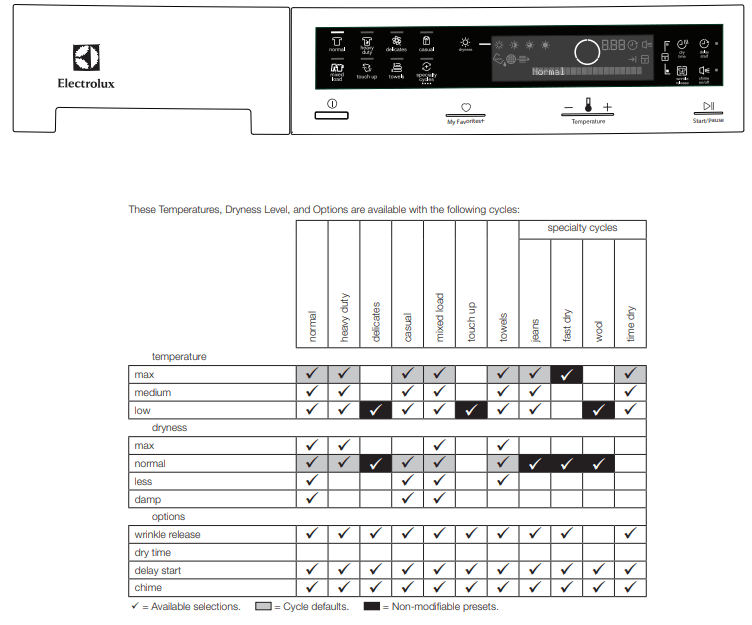
- The estimated cycle time, drying temperature, dryness level and options will be indicated for the cycle selected. See the “Dryer Settings Chart” for more details.
- To change the settings, press the Temperature or dryness icons to scroll to the desired settings.
- To select or delete an option, press the icon for that option. The indicator will be illuminated when the option has been selected. The indicator will no longer be lighted when the option has been deleted.
NOTE
To provide the best care for your laundry, not every setting or option is available with every cycle. If a setting or option is not available for the cycle selected, the indicator will not light
5 Start the dryer.
- Close the door and press Start. The dryer will not operate with the door open. “Check the door” will be displayed as a reminder to close the door.
- Select delay start to delay the beginning of the cycle, if desired.
- To add a forgotten item to the dryer drum, press Pause and open the door. “PAUSE” will be displayed alternately with the estimated remaining cycle time. Opening the door with a cycle running will also pause the cycle. Add the item, close the door and press Start to resume the cycle.
- If changes to the settings or options are attempted after the cycle starts, you will hear several beeps when the buttons are pressed. To change the settings or options, press Pause, make the new selections and press Start again.
- To change the cycle once the cycle has begun, press the Power button to cancel the current cycle, press the Power button to turn on unit again, select a new cycle, and press Start again. Just pressing another cycle icon will not change the cycle.
- To stop the cycle, press the Power button.
- A signal will sound at the end of the cycle if the chime option has been selected.
NOTE
If drying a single large or bulky item remove the item part way through the cycle and turn it “inside out” to maximize drying effectiveness. Place item back in dryer and re-start cycle.
6 When the cycle ends, remove items immediately and hang or fold.
IMPORTANT
Clean the lint filter and empty the water container after every load.
Cycle Selection
Press the Power button to turn on the unit. Press the icon for the cycle desired and the indicator for that cycle will be illuminated.
To change the cycle once the cycle has begun, press the Power button to cancel the current cycle, press the Power button to turn on unit again, select a new cycle, and press Start again. Just pressing another cycle icon will not change the cycle.
Auto Dry Cycles
Auto Dry cycles take the guesswork out of selecting the correct drying time for each load. Moisture sensing bars in the front of the dryer drum sense the moisture level of the load as it tumbles through the heated air. With Auto Dry cycles, the load will automatically be dried at the selected temperature to the desired dryness level. Auto Dry cycles save time and energy and protect fabrics.
When the load has reached the selected dryness level, it will continue to tumble during a cool down period. This helps reduce wrinkling and makes items easier to handle during unloading.
Drying time varies depending on size and dampness of load and fabric type. If the load is too small or almost dry, the moisture sensing bars may not detect enough moisture to continue the cycle and the cycle may end after a few minutes. If this occurs, select a Timed Dry cycle.
Room temperature, and electrical voltage can also affect drying time.
normal
Select this Auto Dry cycle for cotton items.
heavy duty
Select this Auto Dry cycle to dry durable fabrics such as jeans and overalls.
delicates
Select this Auto Dry cycle for knits and delicate items.
casual
Select this Auto Dry cycle for cottons and blends with a no-iron finish.
mixed load
Select this Auto Dry cycle to dry loads containing a mix of fabrics.
touch up
Select touch up to help remove wrinkles from clean and dry items that were not taken from the dryer at the end of the cycle, have been stored in crowded closets or drawers, or unpacked from luggage following a trip. It provides approximately 10 minutes of low heat tumbling followed by a 25-minute cool down period.
towels
Select this cycle to dry heavy loads such as towels and nonrubber-backed bath mats.
Specialty Cycle Selection
To scroll through the specialty cycles, continue to press the specialty cycles icon. The selected cycle will be shown on the text display.
jeans
Select this Auto Dry cycle for drying an entire load of denim jeans.
fast dry
Quickly dry a small load.
wool
Use the wool cycle with washable woolens - check your fabric care label to ensure proper garment care. To help your wool items keep their shape, use of optional drying rack is recommended.
time dry
To manually select the drying time for this specialty cycle, press the dry time icon. Actual drying time (20 minutes to 120 minutes) will be displayed.
Because this is not an Auto Dry cycle, you will not be able to select a dryness level. Moisture sensing bars are not active and dryer will continue to heat throughout the cycle until the final cool down period.
Cycle Settings
Appropriate temperature, dryness level and options will be displayed for each cycle. The settings can be changed before the cycle is started. If changes are attempted after the cycle starts a signal will beep and “Not possible” will be displayed.
NOTE
To change settings after the cycle starts, press Pause, adjust the setting and press Start to resume the cycle.
Drying Temperature
To change the preset temperature, press the temperature icon to scroll to the desired setting.
To protect your fabrics, not all temperatures are available with every cycle. The indicator will not light if the setting is not available with that cycle.
max 
Recommended for durable fabrics and towels.
medium 
Recommended for most cotton fabrics.
low 
Recommended for delicate fabrics.
Dryness Level (Auto Dry)
To change the preset level, press the dryness icon to scroll to the degree of dryness desired.
To protect your fabrics, not all dryness levels are available with every cycle. If a dryness level is not appropriate for the cycle, it cannot be selected.
Select the normal  dry level for most Auto Dry cycles.
Occasionally a load may seem too damp or over-dried at the end of the cycle. To increase drying time for similar loads in the future, select max  . For loads requiring less drying time, select less
  .
.
Select damp  for items you wish to partially dry before hanging or ironing.
Cycle Options
To add options, press the corresponding option’s icon to illuminate the selection desired. To delete options, press the option’s icon again and the indicator light will turn off. If an option is not appropriate for the cycle, the indicator will not light. To protect your fabrics, not all options are available with every cycle. Not all options are available on every model.
NOTE
To change the options once the cycle has begun, press the Pause button, make the new selection and press Start again.
wrinkle release
Select wrinkle release if the dried load might not be removed promptly at the end of the cycle. The dry load will continue tumbling without heat to help reduce wrinkling. When chime is selected, a beep will be heard periodically. The load may be removed any time during wrinkle release. chime
A signal will sound at the end of the cycle (and periodically during wrinkle release) if this option is selected.
Drying System Maintenance Procedures

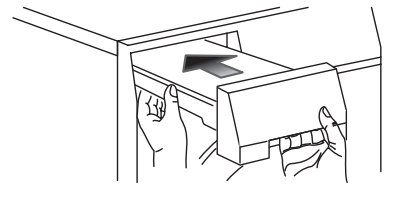
Water Container Full (if direct drain kit not installed)
When the “Water Container Full” indicator comes on, follow these steps to empty the container:
1. Support the container as you pull it out.
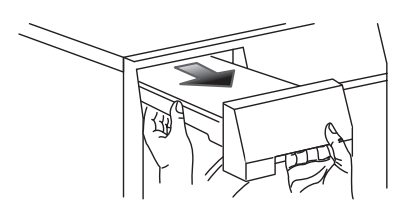
2. Hold container level to prevent water from spilling.
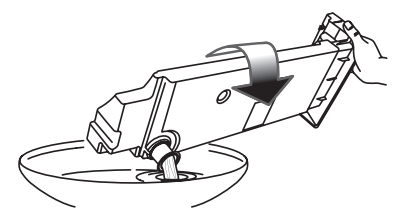
3. Dump water container in sink or drain.
CAUTION
Do not drink or prepare food with the condensed water from your dryer water. It can cause health problems to people and pets.
4. Return container fully before continuing operation of dryer.

Lint Filter Plugged
When the “Lint Filter Plugged” indicator comes on, follow these steps to clean the filter:
1. Remove the filter by pulling straight up.
2. Release the latch on the filter grille to open the filter.
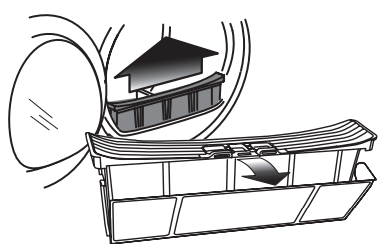
3. Remove trapped lint and larger particles by hand.
4. If necessary, clean filter screen with hot water.
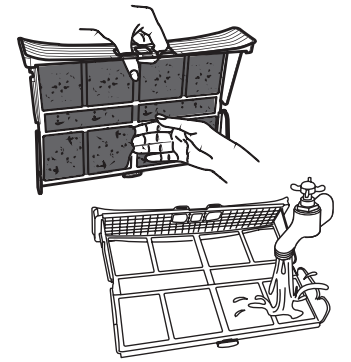
5. Return filter before continuing use of the dryer.
CAUTION
Do not operate dryer without lint filter in place

Clean Condenser 
When the “Clean Condenser” indicator comes on, follow the Condenser Cleaning instructions in the Care and Cleaning section of this manual.
Other Features
My Favorites
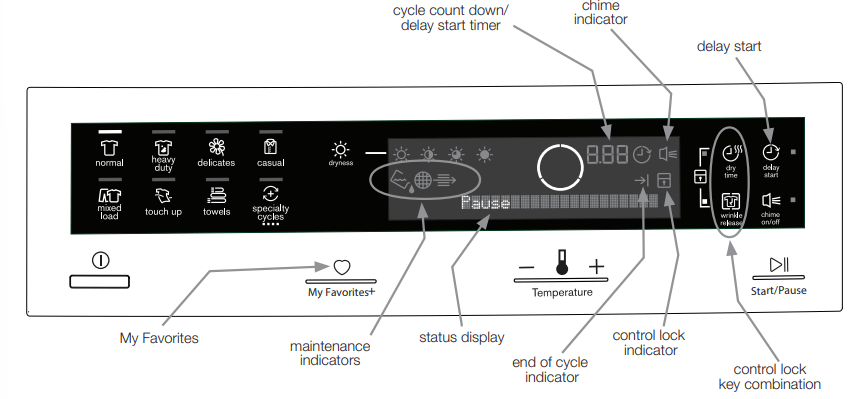
After some time of initial usage, the dryer will automatically remember the 3 most used cycles with their settings and options. To cycle through this list continue to press the My Favorites button. Press Start after your desired cycle appears.
Delay Start
Press delay start to select a dry time convenient to your schedule or during off peak energy hours. The delay time selected will be displayed and begin counting down when you select Start.
 Control Lock
To avoid having someone accidentally start or stop the dryer, press dry time and wrinkle release at the same time and hold until the indicator is lit. To unlock the controls, press dry time and wrinkle release at the same time and hold until the indicator is no longer lit.
Status Display/Status Lights
The estimated total cycle time will be displayed when the cycle is selected. The estimated remaining cycle time is displayed during the cycle.
Drum Light
The drum light will come on whenever the door is opened to illuminate the drum during loading and unloading. Closing the door turns off the light.
Reversible Door
Your dryer is equipped with a reversible door. The door can be hinged on the right or left side.
NOTE
For step-by-step instructions on DOOR REVERSAL, refer to the Installation Instructions supplied with this dryer.
Drying Rack (on select models)
Use the drying rack for items which should not be tumble dried. Insert the rack into the dryer drum and lower the front two “legs” into the openings on the lint filter grille.
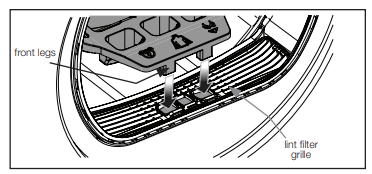
Place items to be dried on top of the rack, leaving space between items and not allowing them to hang over the sides or through the holes. Select the low heat setting for items containing plastic, foam rubber, rubber-like materials, feathers or down.
When items are dry, remove the rack and store it in a convenient location.
NOTE
If your model did not come supplied from the factory with a drying rack you may order one.
Dryer Settings Chart
Care and Cleaning
IMPORTANT
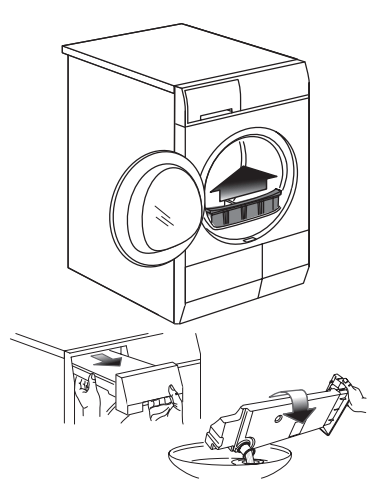
Clean the lint filter and dump water container after every load
IMPORTANT
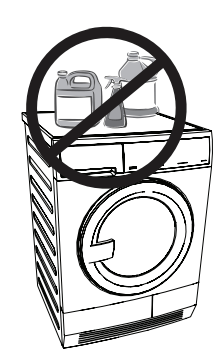
Do not store or place laundry products on top of dryer at any time. They can damage the finish or controls.
WARNING
To reduce risk of fire or serious injury to persons or property, comply with the basic warnings listed in the Important Safety Instructions and those listed below
- Before cleaning the dryer interior, unplug the electrical power cord to avoid electrical shock hazards.
- Do not use any type spray cleanser when cleaning the dryer interior. Hazardous fumes or electrical shock could occur.
INSIDE
- Clean the lint filter after every load. Lint build-up on the filter restricts air flow, which causes longer drying times. The filter is located at the bottom of the door opening. Remove by pulling straight up. Remove the lint and replace the filter.
- Occasionally a waxy build-up may form on the lint filter and/ or moisture sensing bars from using dryer-added fabric softener sheets. To remove this build-up, wash them with warm, soapy water. Dry the filter thoroughly and replace. Do not operate the dryer without the lint filter in place.
- If the dryer drum becomes stained from noncolorfast fabrics, clean the drum with a damp cloth and a mild liquid household cleanser. Remove cleanser residue before drying the next load.
- See next page for more information regarding cleaning of the condenser assembly.
OUTSIDE
- Clean the cabinet with mild soap and water. Never use harsh, gritty or abrasive cleansers.
- Remove debris and lint from the front of the condenser door with a vacuum cleaner.
- Remove glue residue from tape or labels with a mixture of warm water and mild detergent. Or, touch residue with the sticky side of the tape or label.
- Before moving the dryer, place a strip of cardboard or thin fiberboard under the front leveling legs to prevent damage to the floor.
Cleaning Condenser
Clean Condenser
When the “Clean Condenser” indicator comes on, follow these steps to remove and clean the condenser assembly:
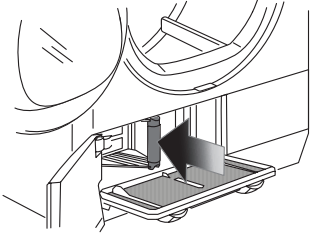
1. Open the dryer door and locate the condenser access door latch release
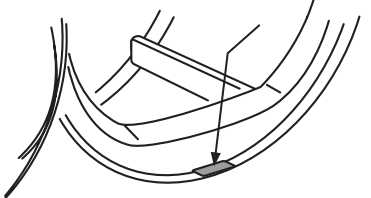
2. While pressing release, open the condenser access door.
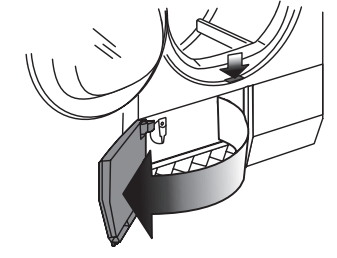
3. Rotate the two latches to lower the condenser screen.
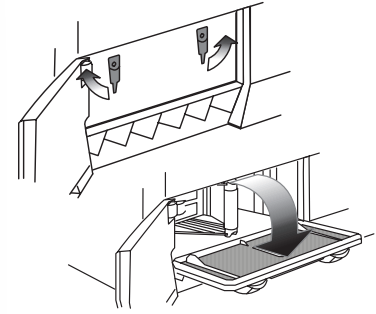
4. Grab the condenser handle and pull straight out.
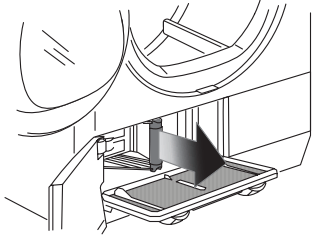
5. Rinse condenser in sink. Clean with mild soap and water if necessary.
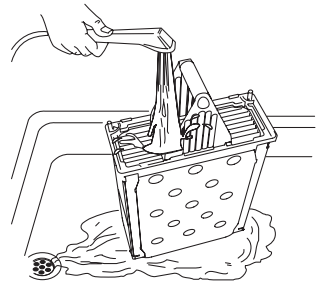
6. Push condenser back in place, close retention panel, rotate latches and close condenser access door until it latches.
Solutions to Common Problems
Common Drying Problems
Many drying problems involve poor soil and stain removal, residues of lint and scum, and fabric damage. For satisfactory washing results, follow these suggestions provided by The Soap and Detergent Association.
Greasy, oily stains
- Possible Cause: Fabric softener sheet.
- Solutions: Rub fabric softener stains with bar soap. Rinse and rewash.
- Preventime Measures:
- Add a few bath towels to small loads for proper tumbling.
- Some “silk-like” fabrics should be air dried.
- Use proper drying temperature.
- Place fabric softener sheet on top of load before starting the dryer
Lint
- Possible Cause:
- Overloading.
- Overdrying causes static electricity.
- Lint screen not clean when cycle began.
- Lint is attached to “pills.”
- Solutions:
- Reduce load size and rewash using liquid fabric softener in the final rinse.
- Or, add a fabric softener sheet and tumble without heat.
- Use lint brush or roller to remove lint.
- Preventime Measures:
- Do not overload dryer.
- Use fabric softener in washer or dryer to reduce static electricity.
- Remove items when they are slightly damp to avoid overdrying.
- Check that lint filter is clean and in place.
Pilling (Fibers break off, ball up and cling to fabric.)
- Possible Cause: Overdrying.
- Solutions: Use a lint brush or shaver to remove pills.
- Preventime Measures:
- Use fabric softener to lubricate fibers.
- When ironing, use spray starch or fabric finish on collars and cuffs.
- Turn items inside out to reduce abrasion.
Shrinking
- Possible Cause:
- Temperature too high.
- Overdrying.
- Solutions: Irreversible condition
- Preventime Measures:
- Follow fabric care label directions.
- If shrinking is a concern, check load often.
- Remove items while slightly damp and hang or lay flat to complete drying.
- Block knits into shape.
Wrinkling
- Possible Cause:
- Overloading.
- Leaving items in dryer after cycle ends.
- Solutions:
- Reduce load size and tumble at medium or low heat for 5-10 minutes.
- Remove items immediately. Hang or fold
- Preventime Measures:
- Do not overload dryer.
- Remove items as soon as cycle ends.
Avoid Service Checklist
Before calling for service, review this list. It may save both time and expense. The list includes common occurrences that are not the result of defective workmanship or materials in this dryer.
Dryer does not start.:
- Electrical power cord is not securely plugged in or plug may be loose.
- Make sure the plug fits tightly in wall outlet.
- House fuse blown or circuit breaker tripped
- Reset circuit breaker or replace fuse.
- Make sure electrical line is not overloaded and the dryer is on a separate circuit.
Dryer runs but won’t heat.
- There are 2 house fuses in the dryer circuit. If 1 of the 2 fuses is blown, the drum may turn but the heater will not operate.
Drying cycle takes too long, outside of the dryer feels too hot or smells hot.
- Lint filter is clogged with lint.
- Make sure all lint has been removed from the dryer lint filter before starting each cycle.
- Electric dryer is connected to a 208 volt circuit.
- Drying time will be 20% longer than drying on a 240 volt circuit.
- Drying procedures have not been followed.
- See “Operating Instructions.”
- High humidity.
- Use a dehumidifier near the dryer
Dryer stops during a cycle and symbol is lit on console.
- Water tank was not emptied between cycles and is full.
- Empty water tank and continue cycle
Excessive wrinkling.
- Dryer is overloaded.
- Do not overload. See “Operating Instructions.”
- Items left in dryer too long.
- Remove items as soon as cycle ends.
- Insufficient sorting of items.
- See “Operating Instructions.”
- Drying temperature too high.
- Follow fabric care label instructions.
Scratching or chipping of the drum finish.
- Foreign objects such as coins, pins, clips or buttons are inside the dryer.*
- Always remove foreign objects from pockets before laundering. Remove objects from drum and restart dryer.
- Permanently attached items such as belt buckles, zippers and fasteners may be hitting the inside of the drum.*
- It may be necessary to sew a scrap of material securely around ornaments before drying to prevent scratching and damage to the dryer.
*Drum damage caused by foreign objects or permanently attached items is not covered by the warranty