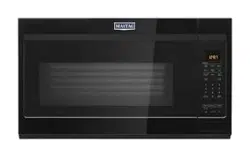
Owner Manual Microwave Oven
Features
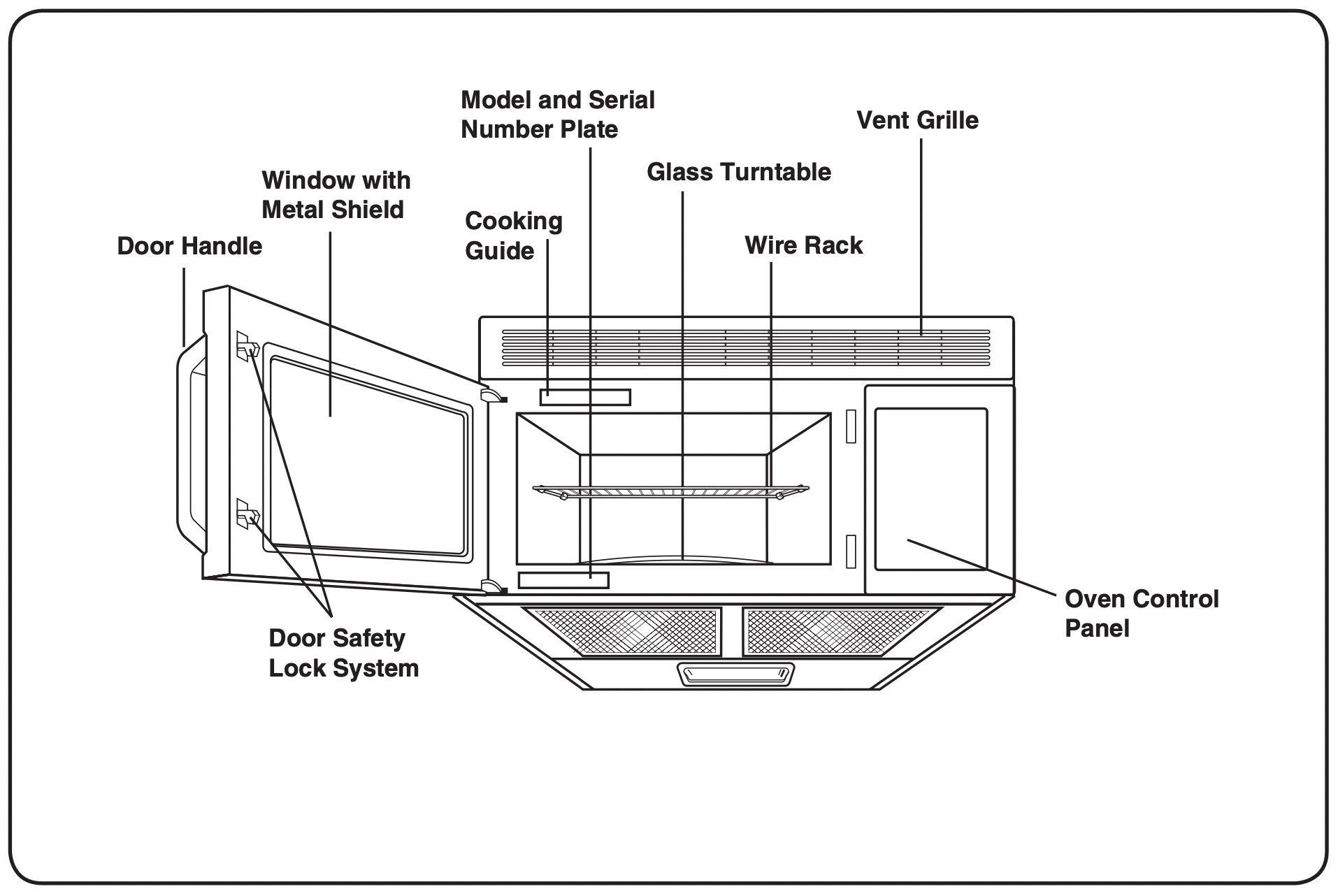
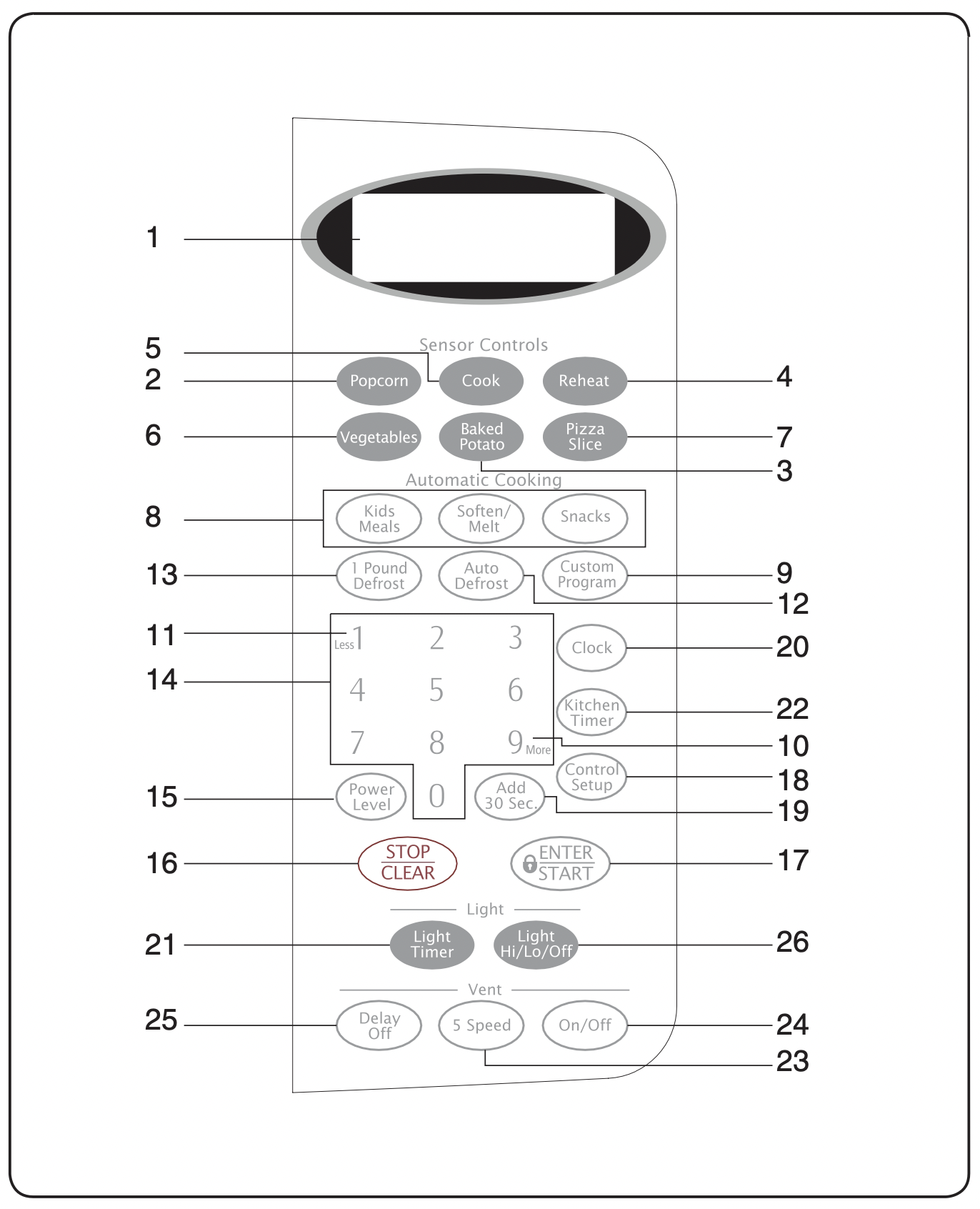
- DISPLAY: The Display includes a clock and indicators to tell you time of day, cooking time settings and cooking functions selected.
- POPCORN: Touch this pad when popping popcorn in your microwave oven. The oven's sensor will tell the oven how long to cook depending on the amount of humidity it detects from the popcorn. See page 13 for more information.
- BAKED POTATO: Touch this pad to cook potatoes. The oven's sensor will tell the oven how long to cook depending on the amount of humidity it detects from the potato. See page 14 for more information.
- REHEAT: Touch this pad to reheat dinner plate, casserole, and pasta. The oven's sensor will tell the oven how long to cook depending on the amount of humidity coming from the food. See page 14 for more information.
- COOK: Touch this pad to cook beverage, frozen dinner, frozen breakfast, chicken breast. The oven's sensor will tell the oven how long to cook depending on the amount of humidity coming from the food. See page 14 for more information.
- VEGETABLES: Touch this pad to cook fresh or frozen vegetables. The oven's sensor will tell the oven how long to cook depending on the amount of humidity it detects from the vegetables. See page 14 for more information.
- PIZZA SLICE: Touch this pad to reheat pizza. The oven's sensor will tell the oven how long to cook depending on the amount of humidity it detects. See page 13 for more information.
- KIDS MEALS, SNACKS, SOFTEN/MELT: Touch this pad to cook specific food. See page 16, 17 and 18 for more information.
- CUSTOM PROGRAM: Touch this pad to recall one cooking instruction previously programmed into memory. See page 10 for more information.
- MORE(9): Touch this pad to add more cooking time. See page 11 for more information.
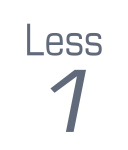
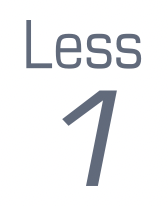
- LESS(1): Touch this pad to subtract the cooking time. See page 11 for more information.
- AUTO DEFROST: Touch this pad to defrost food by weight. See page 19 for more information.
- 1 POUND DEFROST: This pad provides 1 pound defrost for 1.0 pound of frozen food. See page 19 for more information.
- NUMBER: Touch number pads to enter cooking time, power level, quantities, or weights.
- POWER LEVEL: Touch this pad to select a cooking power level.
- STOP/CLEAR: Touch this pad to stop the oven or to clear all entries.
- ENTER/START: Touch this pad to start a function. If you open the door after oven begins to cook, close the door and touch ENTER/START pad again.
- CONTROL SETUP: Touch this pad to change the oven's default settings. See page 9 for more information.
- ADD 30 SEC: Touch this pad to set and start quickly at 100% power level. See page 10 for more information.
- CLOCK: Touch this pad to enter the time of day. See page 9 for more information.
- LIGHT TIMER: Touch this pad to set the light timer. See page 10 for more information.
- KITCHEN TIMER: Touch this pad to set the kitchen timer. See page 9 for more information.
- VENT 5 SPEED: Touch this pad to choose one of 5 fan speeds.
- VENT ON/OFF: Touch this pad to turn the fan on/off.
- VENT DELAY OFF: Touch this pad when setting ventilation time. (1, 3, 5, 10, 30 minutes)
- LIGHT HI/LO/OFF: Touch this pad to turn on the cooktop light. See page 10 for more infomation.
Operation Instructions
LEARN ABOUT YOUR MICROWAVE OVEN
This section introduces you to the basics you need to know to operate your microwave oven. Please read this information before use.
CAUTION
- To avoid risk of personal injury or property damage, do not run oven empty.
- To avoid risk of personal injury or property damage, do not use stoneware, aluminum foil, metal utensils, or metal trimmed utensils in the oven.
CLOCK
Example: To set 8:00 AM.
- Touch CLOCK pad.

- Enter the time by using the number pads.

- Touch ENTER/START pad.

- Touch 1 for AM.
- Touch ENTER/START pad.

NOTE: Follow steps 1-3 above in the 24hour clock mode.
KITCHEN TIMER
You can use your microwave oven as a timer. Use the Kitchen Timer for timing up to 99 minutes, 99 seconds.
Example: To set for 8 minutes.
- Touch KITCHENTIMER pad.

- Enter the time by using the number pads.

- Touch ENTER/START pad.

When the time is over, you will hear beeps and END will display.
CONTROL SETUP
You can change the default values.
See following chart for more information.
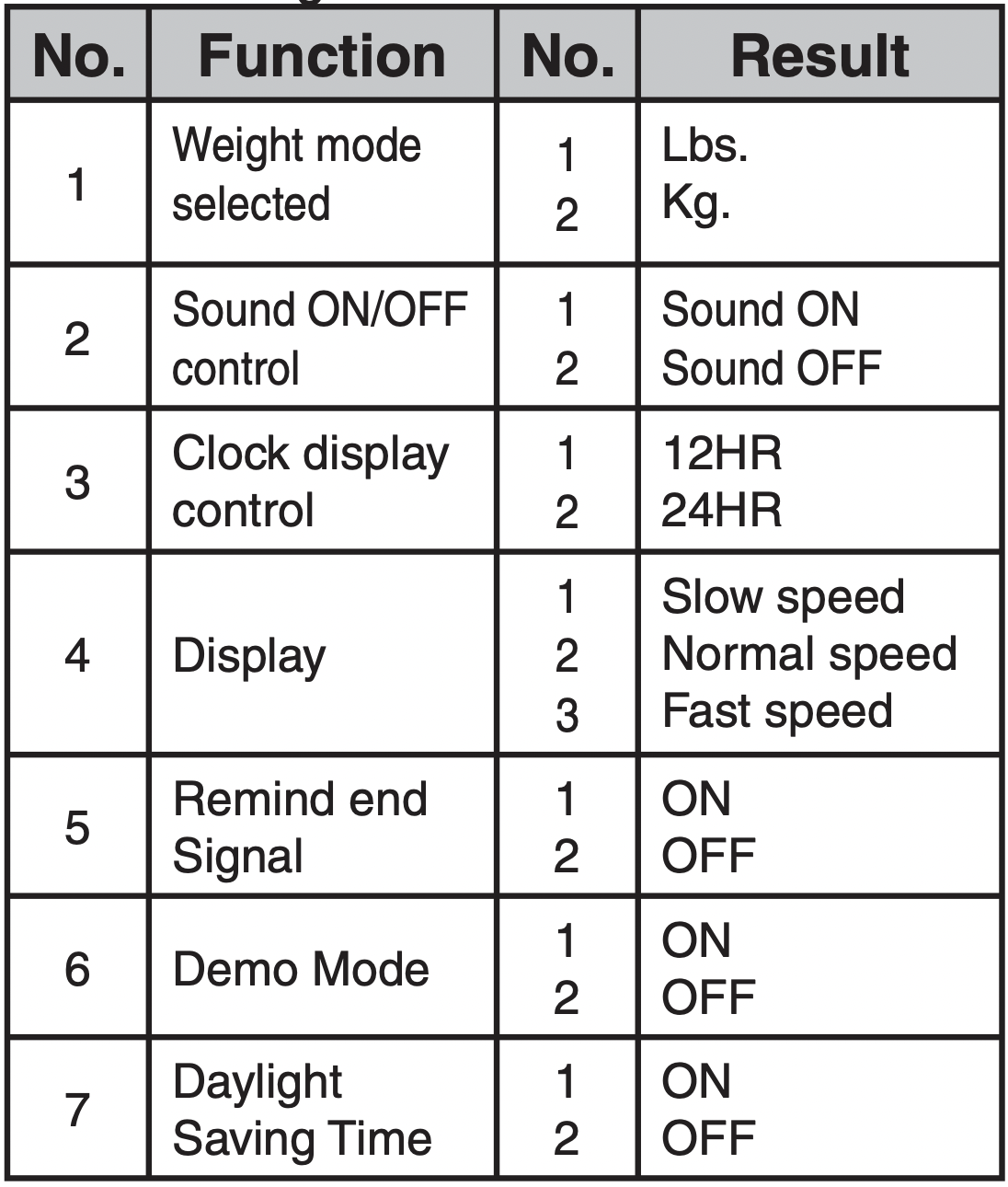
Example: To change weight mode(from Lbs. to Kg).
- Touch CONTROL SETUP pad.
- Touch number 1 pad.

- Touch number 2 pad.

VENT FAN
The VENT moves steam and other vapors from the cooking surface.
Example: To set Level 4.
- Touch ON/OFF pad. This shows the last level until you select the fan speed level.

- Touch 5 SPEED pad until Level 4 appears in the display.

Touch ON/OFF pad to turn off fan when desired.
NOTE: If the temperature gets too hot around the microwave oven, the fan in the vent hood will automatically turn on at the LEVEL 2 setting to cool the oven. The fan will automatically turn off when the internal parts are cool. When this occurs, the vent cannot be turned off.
DELAY OFF
Example: To turn off fan after 30 minutes for Level 4.
- Touch ON/OFF pad.

- Touch 5 SPEED pad until Level 4 appears in the display.

- Touch DELAY OFF pad five times.

CHILD LOCK
You may lock the control panel to prevent the microwave from being accidentally started or used by children.
The Child Lock feature is also useful when cleaning the control panel. Child Lock prevents accidental programming when wiping the control panel.
Example: To set the child lock.
Touch and hold ENTER/START pad more than 3 seconds. CHILD LOCK ON will appear in the display window with two beeps.

Example: To cancel the child lock.
Touch and hold ENTER/START pad more than 3 seconds. LOCKED will disappear and you hear two beeps.
LIGHT HI/LO/OFF
LIGHT HI/LO/OFF
Touch LIGHT HI/LO/OFF pad once for bright light, twice for night light, or three times to turn the light off.
ADD 30 SEC.

ADD 30 SEC.
A time-saving pad, this simplified control lets you quickly set and start microwave cooking without the need to touch the ENTER/START pad.
Example: To set ADD 30 SEC. for 2 minutes.
Touch ADD 30 SEC. pad 4 times. The oven begins cooking and display shows time counting down.

LIGHT TIMER
You can set the LIGHT to turn on and off automatically at any time.The light comes on at the same time every day until reset.
Example: Turn on 2:00 AM, turn off7:00 PM.
12 hour clock mode.
- Touch LIGHTTIMER pad.

- Enter the time you want the LIGHT to turn on.

- Touch ENTER/START pad.

- Touch 1 for AM.
- Touch ENTER/START pad.

- Enter the time you want the LIGHT to turn off.

- Touch ENTER/START pad.

- Touch 2 for PM.

- Touch ENTER/START pad.

24 hour clock mode.
- Touch LIGHT TIMER pad.

- Enter the time you want the LIGHT to turn on.

- Touch ENTER/START pad.

- Enter the time you want the LIGHT to turn off.

- Touch ENTER/START pad.
Example: To cancel the LIGHT TIMER.
- Touch LIGHT TIMER pad.

- Touch 0 pad.

NOTE: If you want to cancel the LIGHT TIMER in operation, touch the 0 pad.
CUSTOM PROGRAM
CUSTOM PROGRAM lets you recall one cooking instruction previously placed in memory and begin cooking quickly.
Example: To cook for 2 minutes at 70% power.
- Touch CUSTOM PROGRAM pad.

- Enter the cook time.

- Touch POWER LEVEL pad.

- Enter the power level.
- Touch ENTER/START pad.
Example: To recall the custom program.
- Touch CUSTOM PROGRAM pad.

- Touch ENTER/START pad.

When the cook time is over, you will hear four beeps and END will display.
MORE/LESS
The More (9)/Less (1) pads allow you to adjust pre-set cooking times. They only work in the Sensor Reheat Sensor Cooking (except Beverage), Add 30 sec, Custom Cook or Time Cook modes. Use the More (9)/Less (1) pads only after you have already begun cooking with one of these procedures.
- To ADD more time to an automatic cooking procedure: Touch the More (9) pad.

- To REDUCE the time of an automatic cooking procedure: Touch the Less (1) pad.
COOKING AT HIGH POWER LEVELS
Example: To cook food for 8 minutes 30 seconds at 100% power.
- Enter the cook time.

- Touch ENTER/START pad.

When the cook time is over, you will hear four beeps and END will display.
COOKING AT LOWER POWER LEVELS
HIGH power cooking does not always give you the best results with foods that need slower cooking, such as roasts, baked goods, or custards. Your oven has 9 power settings in addition to HIGH.
Example: To cook food for 7 minutes 30 seconds at 70% power.
- Enter the cook time.

- Touch POWERLEVEL pad.

- Enter the power level.

- Touch ENTER/START pad.

When the cook time is over, you will hear four beeps and END will display.
See cooking guide for Power levels, page 12.
IMPORTANT:
- DO NOT store or use the wire rack in this oven unless more than one item is being cooked or a recipe calls for it.
- Damage to the oven could occur.
COOKING WITH MORE THAN ONE COOK CYCLE
For best results, some recipes call for one Power Level for a certain length of time, and another Power Level for another length of time. Your oven can be set to change from one to another automatically, for up to three cycles if the first cycle is defrost.
Example: To cook food for 3minutes at 90% power and then70% power for 7 minutes 30seconds.
- Enter the first cook time.

- Touch POWER LEVEL pad.

- Enter the power level.

- Enter the second cook time.

- Touch POWERLEVEL pad.

- Enter the power level.

- Touch ENTER/START pad.

When the cook time is over, you will hear four beeps and END will display.
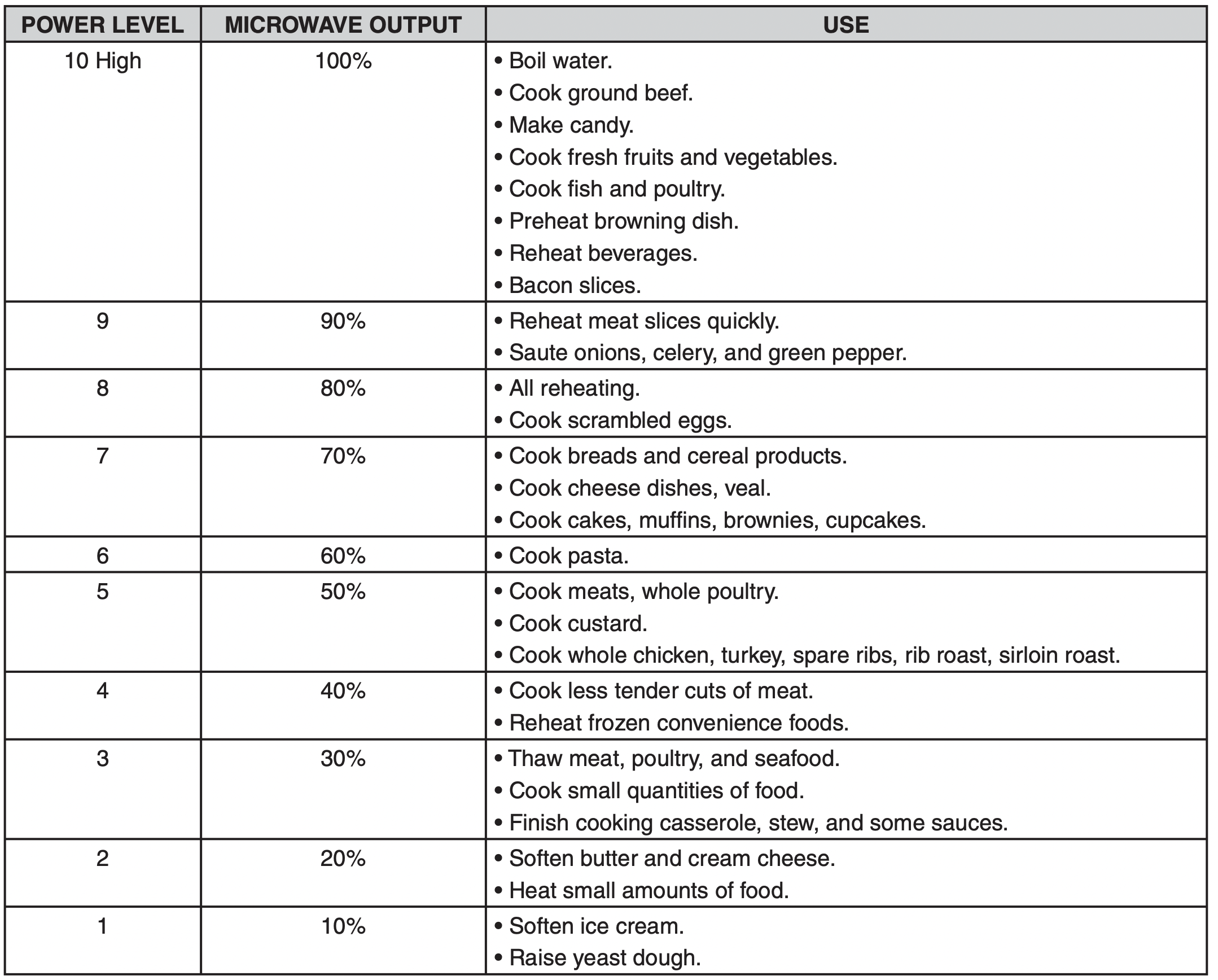
COOKING GUIDE FOR POWER LEVELS
The power levels allow you to choose the best power level for the food you are cooking. Below are listed all the power levels, examples of foods best cooked at each level, and the amount of microwave power you are using.
SENSOR OPERATING INSTRUCTIONS
Sensor Cook allows you to cook most of your favorite foods without selecting cooking times and power levels. The display will indicate the sensing period by scrolling the name of the food. The oven automatically determines required cooking time for each food item. When the internal sensor detects a certain amount of humidity coming from the food, it will tell the oven how much longer to cook. The display will show the remaining heating time. For best results when cooking by Sensor, follow these recommendations:
- Food cooked with the sensor system should be at normal storage temperature.
- Glass turntable and outside of container should be dry to assure best cooking results.
- Most foods should always be covered loosely with microwavable plastic wrap, waxed paper, or a lid.
- Do not open the door or touch the STOP/CLEAR pad during the sensing time.When sensing time is over, the oven beeps and the remaining cooking time will appear in the display window. At this time you can open the door to stir, turn, or rearrange the food.
IMPORTANT: When using sensor cook, the oven must cool for 5 minutes between uses or food will not cook properly.
SENSOR COOKING GUIDE
Appropriate containers and coverings help assure good Sensor cooking results.
- Always use microwavable containers and cover them with lids or vented plastic wrap.
- Never use tight-sealing plastic covers. They can prevent steam from escaping and cause food to over cook.
- Match the amount to the size of the container. Fill containers at least half full for best results.
- Be sure the outside of the cooking container and the inside of the microwave oven are dry before placing food in the oven. Beads of moisture turning into steam can mislead the sensor.
NOTE: If food is not thoroughly cooked or reheated when using the sensor feature, complete using a power level and cooking time. DO NOT continue using the sensor pad.
ADDING OR SUBTRACTING COOK TIME
By using the More (9) or Less (1) pad all of the sensor cook and time cook settings can be adjusted to cook food for a longer or shorter time.
PIZZA SLICE
Reheating pizza with PIZZA SLICE pad lets you reheat one or several slices of pizza without selecting cooking times and power levels.
Example: To reheat 2 slices of pizza.
Touch PIZZA SLICE pad.

When the cook time is over, you will hear four beeps and END will display.
- Recommended amounts: 1-4 slices.
CAUTION
- DO NOT leave microwave oven unattended while popping corn.
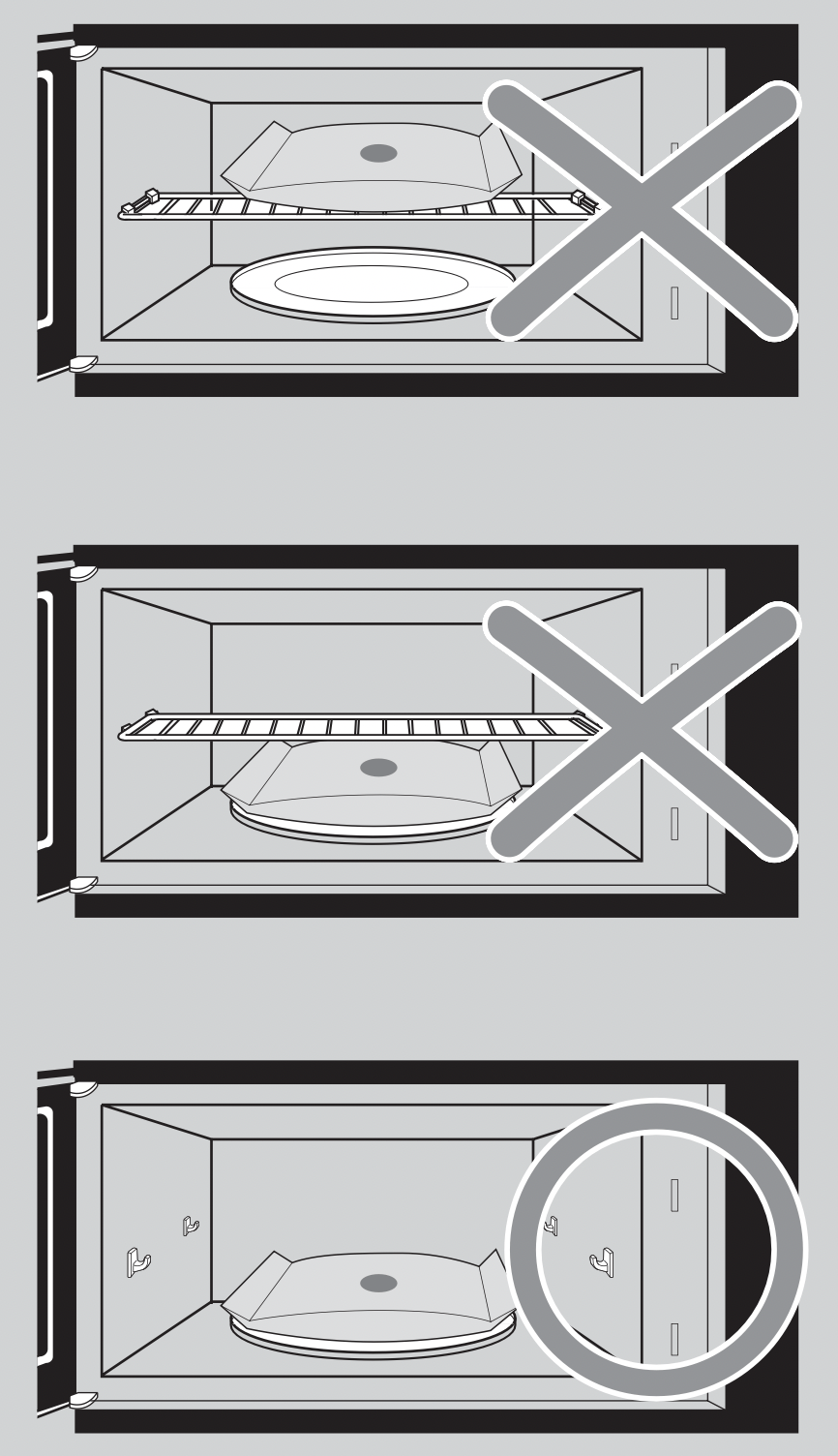
- When popping commercially packaged popcorn, remove the rack from the oven;
Do not place the bag of microwave popcorn on the rack or under the rack.
POPCORN
POPCORN pad lets you pop commercially packaged microwave popcorn.Pop only one package at a time. For best results, use fresh bags of popcorn.
Example: To pop popcorn
Touch POPCORN pad.

When the cook time is over, you will hear four beeps and END will display.
- Recommended amounts: 3.0-3.5 ozs.
BAKED POTATO
The BAKED POTATO pad lets you bake one to six potatoes without selecting cooking times and power levels.
NOTES:
- Cooking time is based on a 8-10 oz. potato.
- Use the More (9)/Less (1) pads if cooking larger or smaller potatoes.
- Before baking, pierce potato with fork several times.
- If potatoes are not completely cooked, continue cooking using cooking time.
- DO NOT use the BAKED POTATO pad to complete cooking.
After baking, let stand for 5 minutes.
Example: To cook 2 potatoes.
Touch BAKED POTATO pad.

When the cook time is over, you will hear four beeps and END will display.
- Recommended amounts: 1-6potatoes.
VEGETABLE
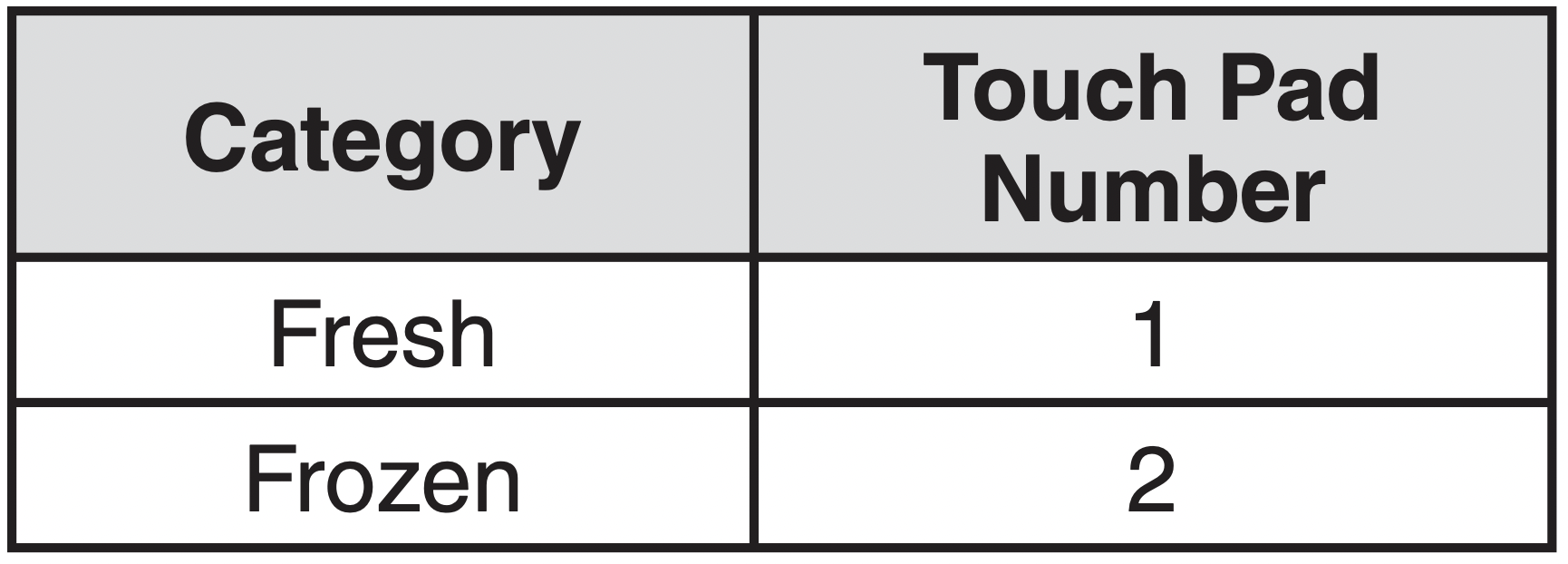
VEGETABLES pad has preset cook powers for 2 food categories: Fresh, Frozen.
Example: To cook Frozen Vegetables.
- Touch VEGETABLES pad.

- Choose food category.

When the cook time is over, you will hear four beeps and END will display.
COOK
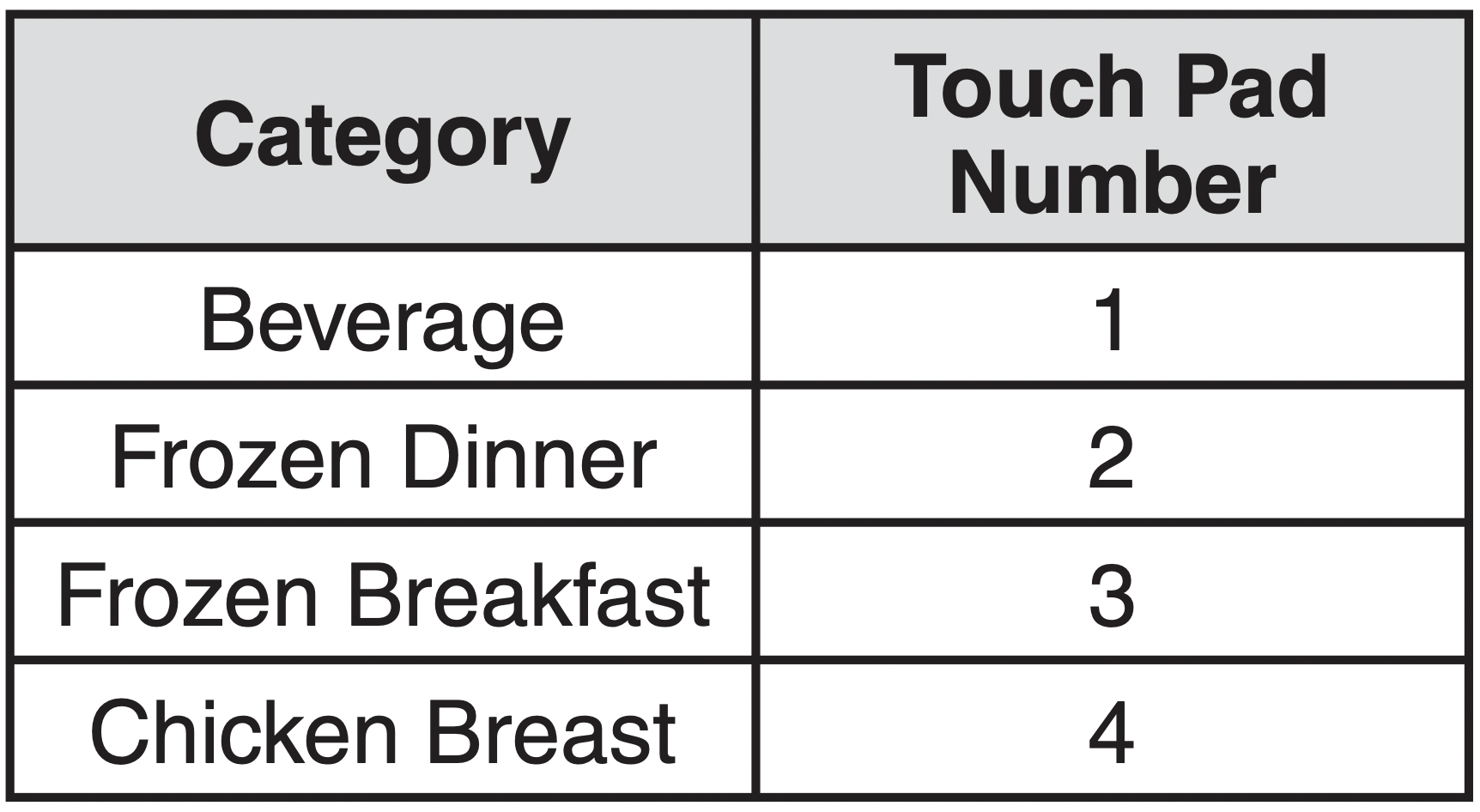
Using COOK pad lets you heat common microwave-prepared foods without needing to program cooking times and power levels. COOK has 4 preset food categories: Beverage, Frozen Dinner, Frozen Breakfast and Chicken Breast.
Example: To cook FrozenBreakfast.
- Touch COOK pad.

- Choose food category.

When the cook time is over, you will hear four beeps and END will display.
Recommended amounts:
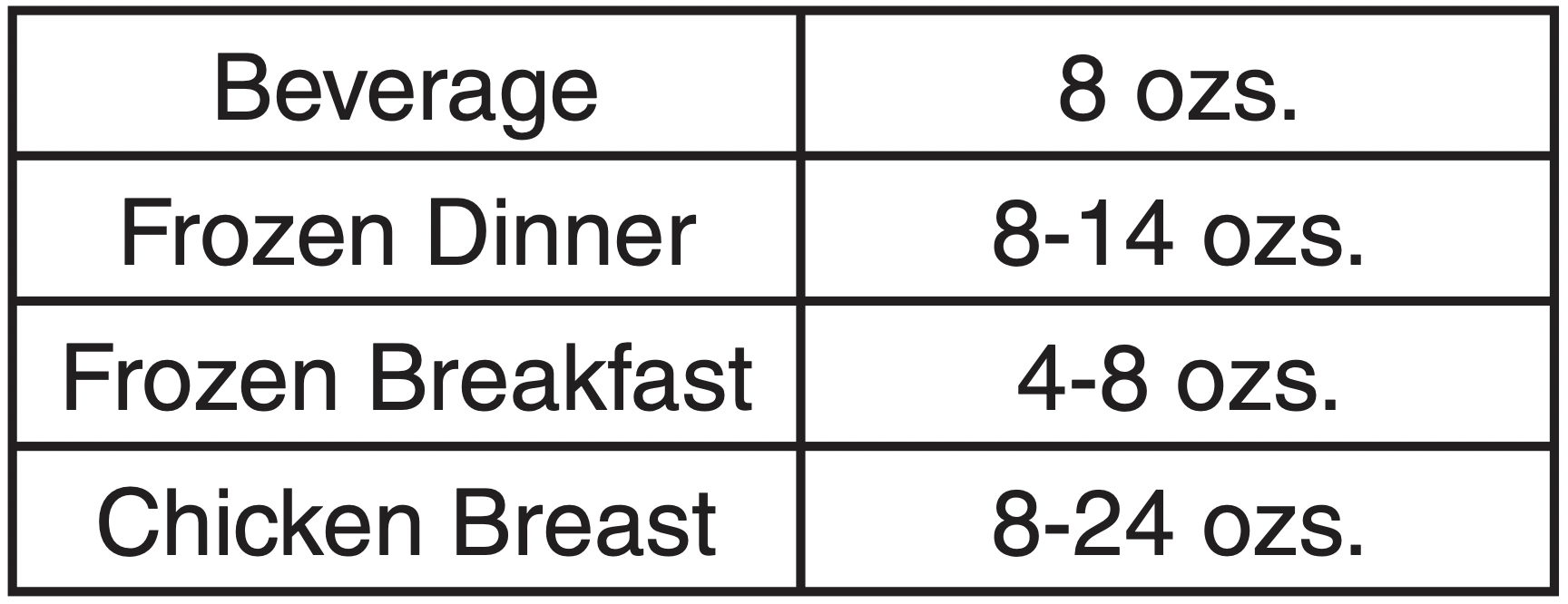
See Sensor Cook Guide on page 15.
REHEAT
REHEAT pad lets you heat foods without needing to program cooking times and power levels. REHEAT has3 preset categories: Dinner Plate, Casserole and Pasta.
Example: To reheat Casserole.
- Touch REHEAT pad.

- Choose food category.

When the cook time is over, you will hear four beeps and END will display.
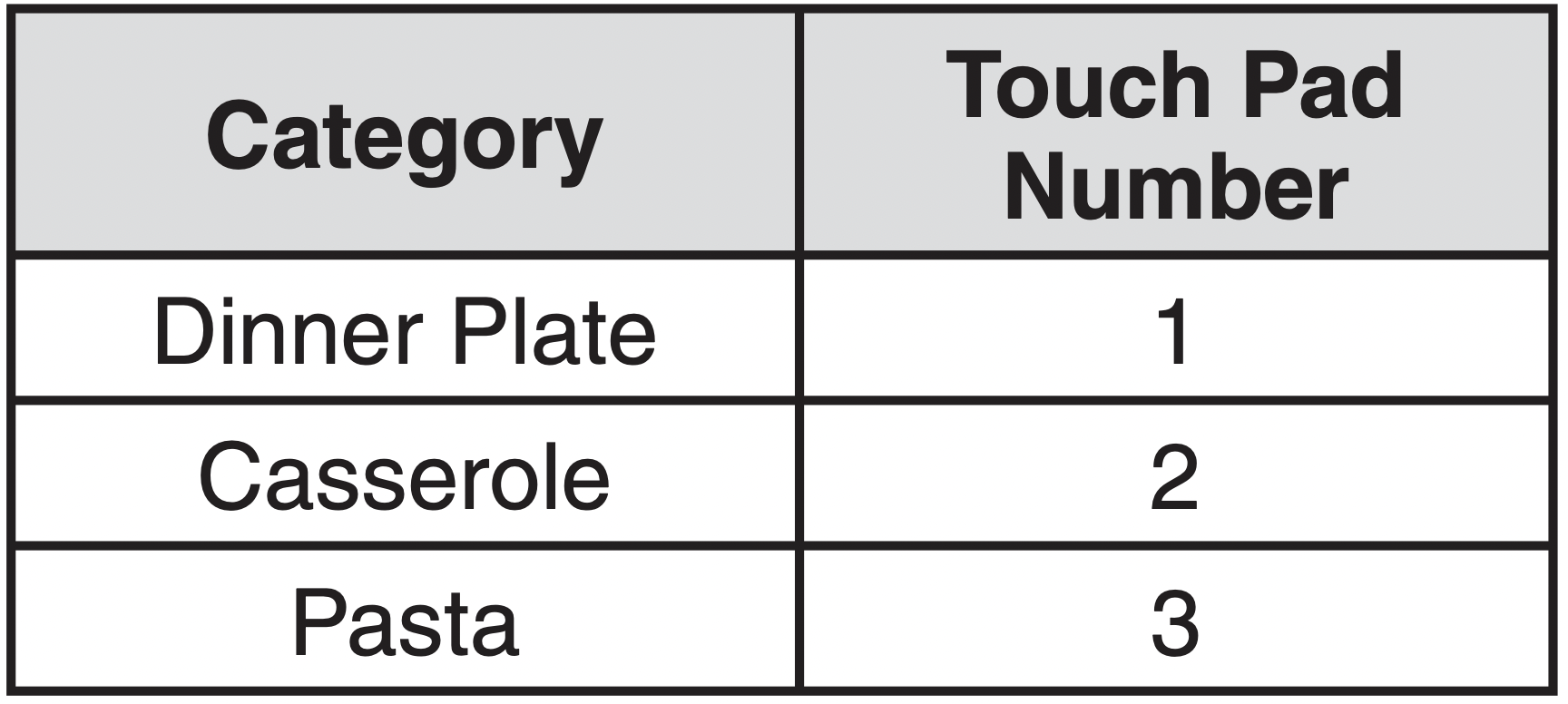
Recommended amounts:
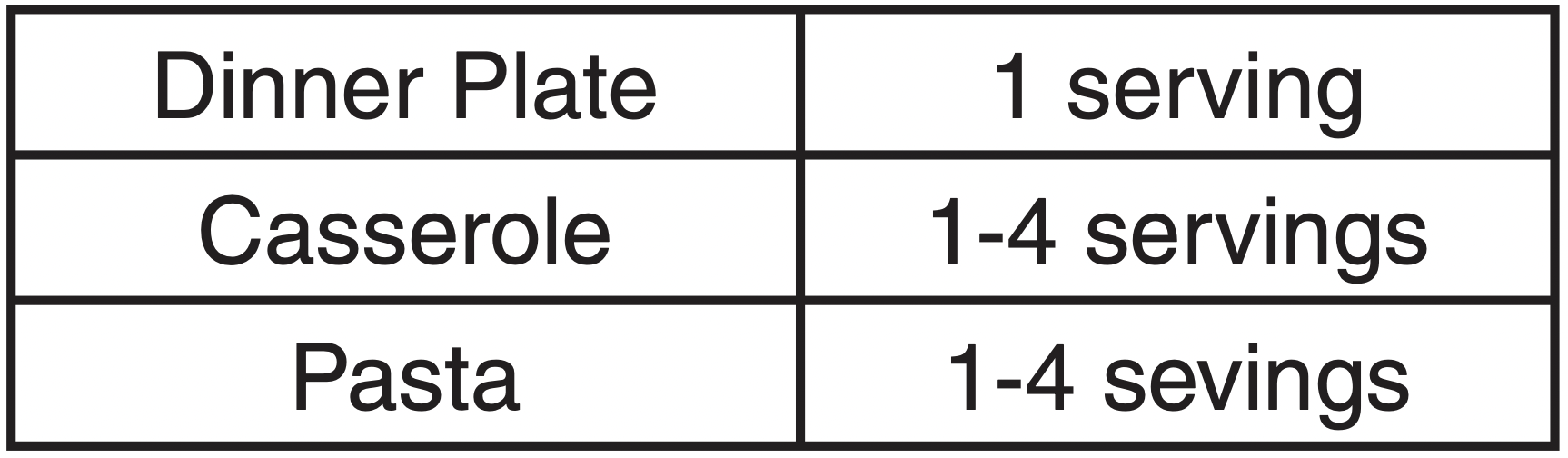
See Sensor Reheat Guide on page 15.
SENSOR COOK GUIDE
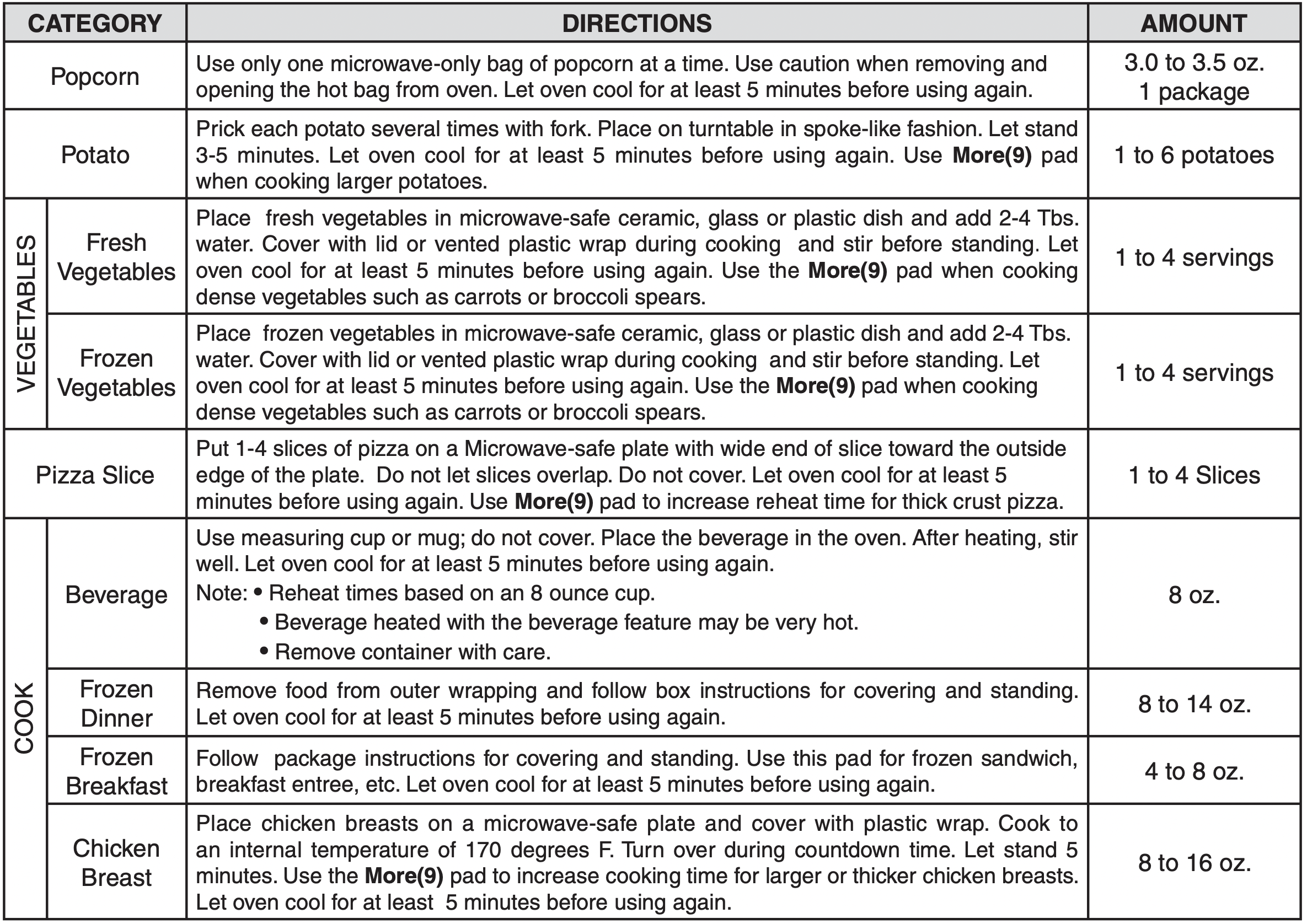
SENSOR REHEAT GUIDE
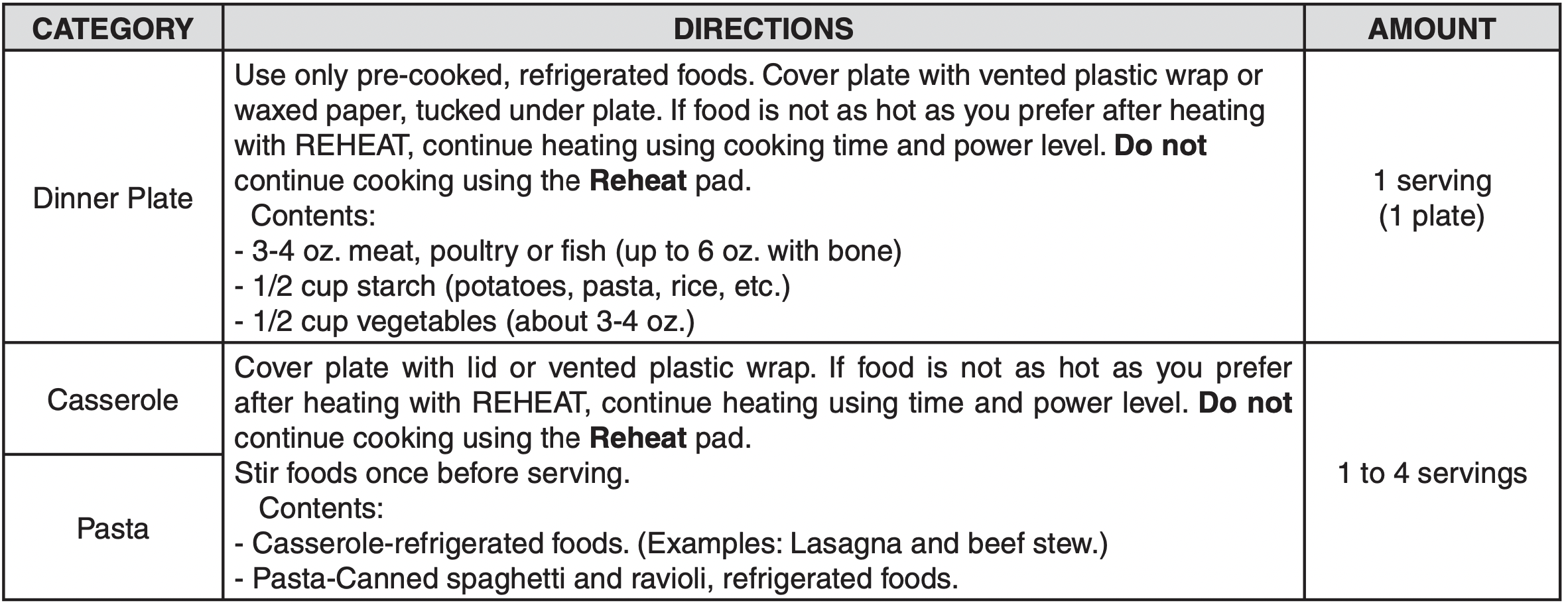
NOTE: Desired food temperature varies from person to person. Use the More (9)/Less (1) pads to fit your temperature preference.
KIDS MEALS
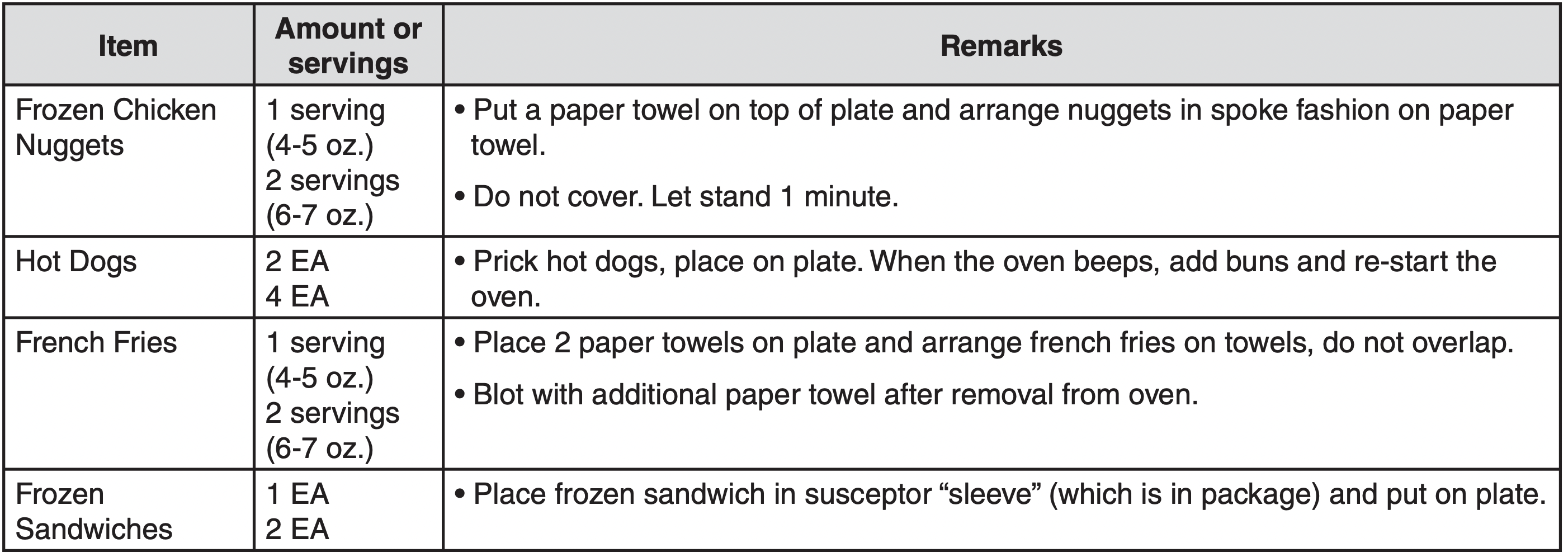
KIDS MEALS lets you heat 4 categories of food: Chicken Nuggets, Hot dogs, French Fries and Frozen Sandwiches.
Example: To cook frozen sandwiches.
- Touch KIDS MEALS pad.

- Choose food category (1-4).

- Touch ENTER/START pad.

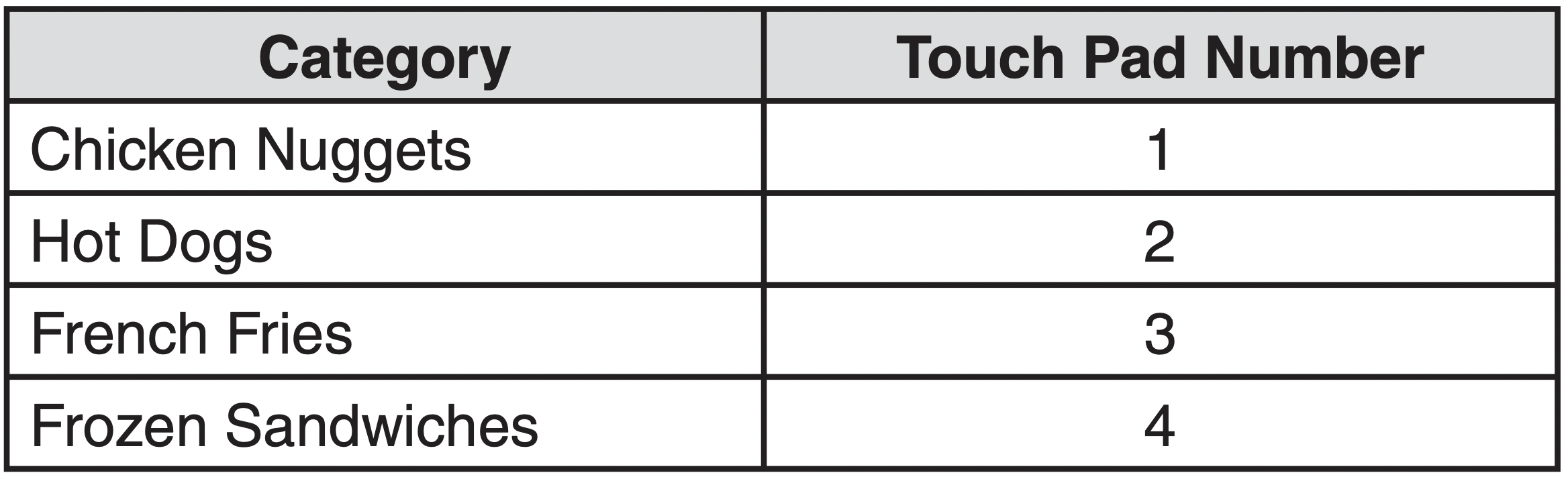
KIDS MEALS CHART
SNACKS
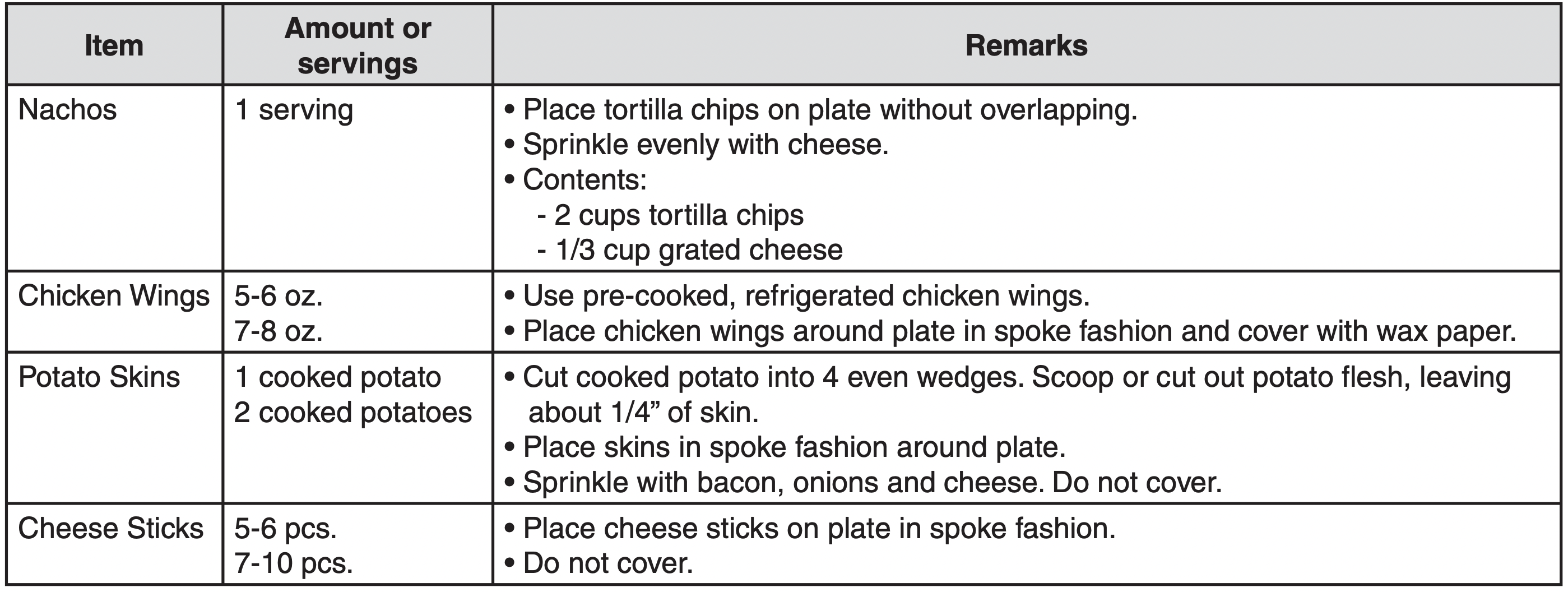
SNACKS lets you heat 4 categories of food: Nachos, Chicken Wings, Potato Skins, and Cheese Sticks.
Example: To cook chicken wings.
- Touch SNACKS pad.

- Choose food category (1-4).

- Touch ENTER/START pad.

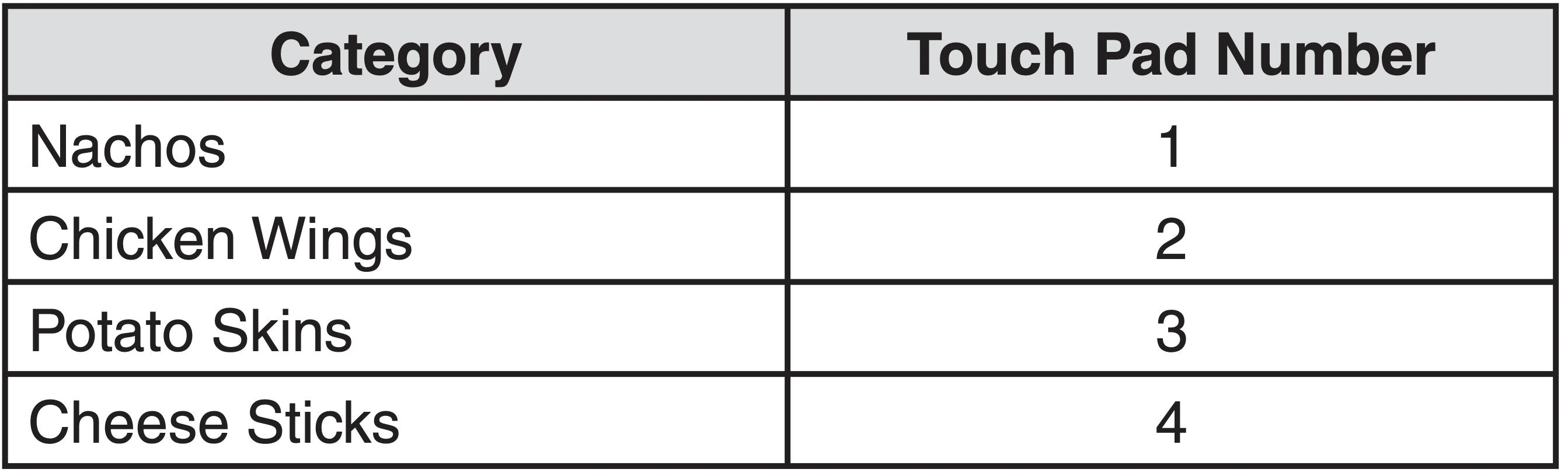
SNACKS CHART
SOFTEN/MELT
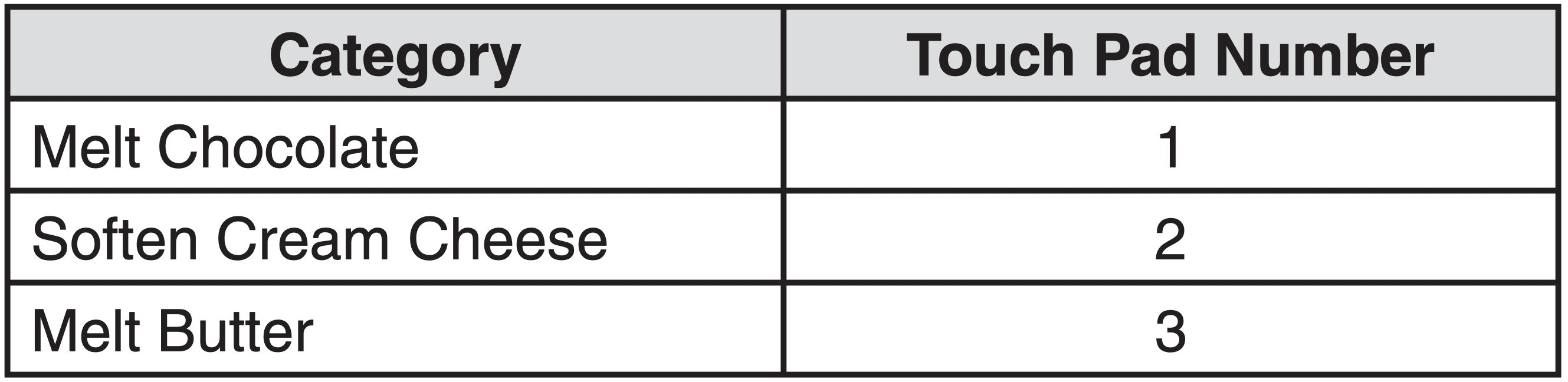
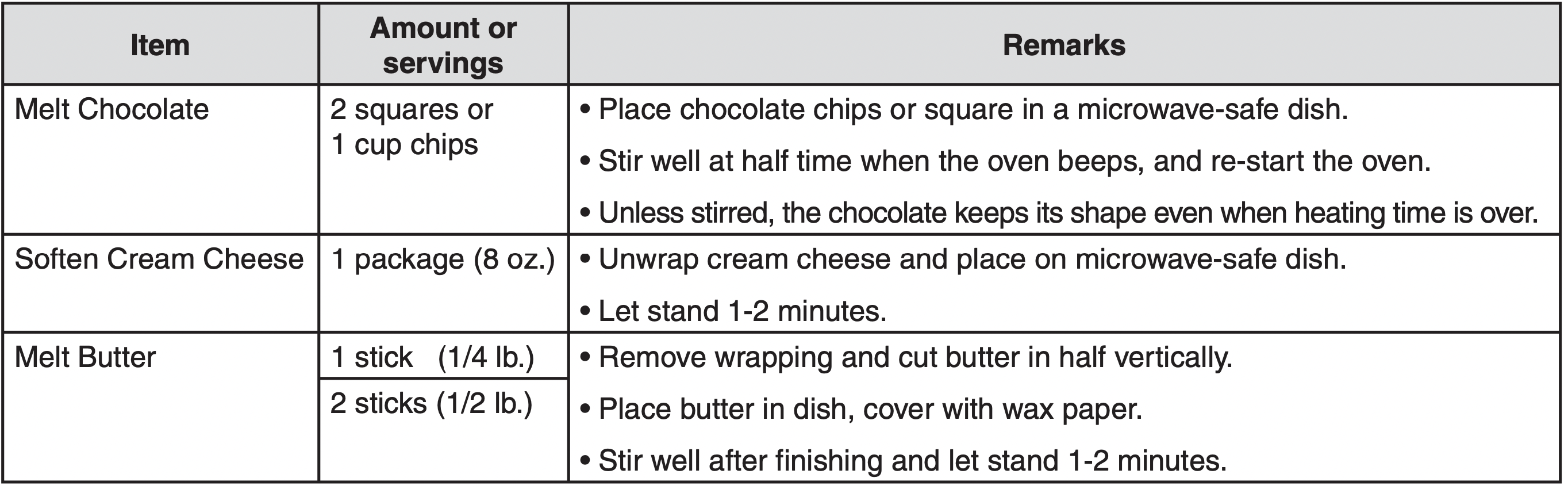
SOFTEN/MELT lets you soften or melt 3 categories of food: Melt Chocolate, Soften Cream Cheese and Melt Butter.
Example: To melt chocolate.
- Touch SOFTEN/MELT pad.

- Choose food category (1-3).
- Touch ENTER/START pad.

SOFTEN/MELT CHART
AUTO DEFROST
Defrost choices are preset in the oven.
The defrost feature provides you with the best defrosting method for frozen foods, because the oven automatically sets the defrosting times according to the weight you enter. For added convenience, the AUTO DEFROST beeps to remind you to check or turn over the food during the defrost cycle.
After touching the AUTO DEFROST pad once, select the food weight. Available weight ranges are 0.1 to 6.0 lbs.
Example: To defrost 1.2 lbs of meat.
- Touch AUTO DEFROST pad.

- Enter the weight.

- Touch ENTER/ START pad.

NOTES:
- After you touch ENTER/START pad, the display counts down the defrost time.The oven will beep twice during the Defrost cycle.At this time, open the door and turn the food as needed. Remove any portions that have thawed then return frozen portions to the oven and touch ENTER/START pad to resume the defrost cycle.
- The oven will not stop during the BEEP unless the door is opened.
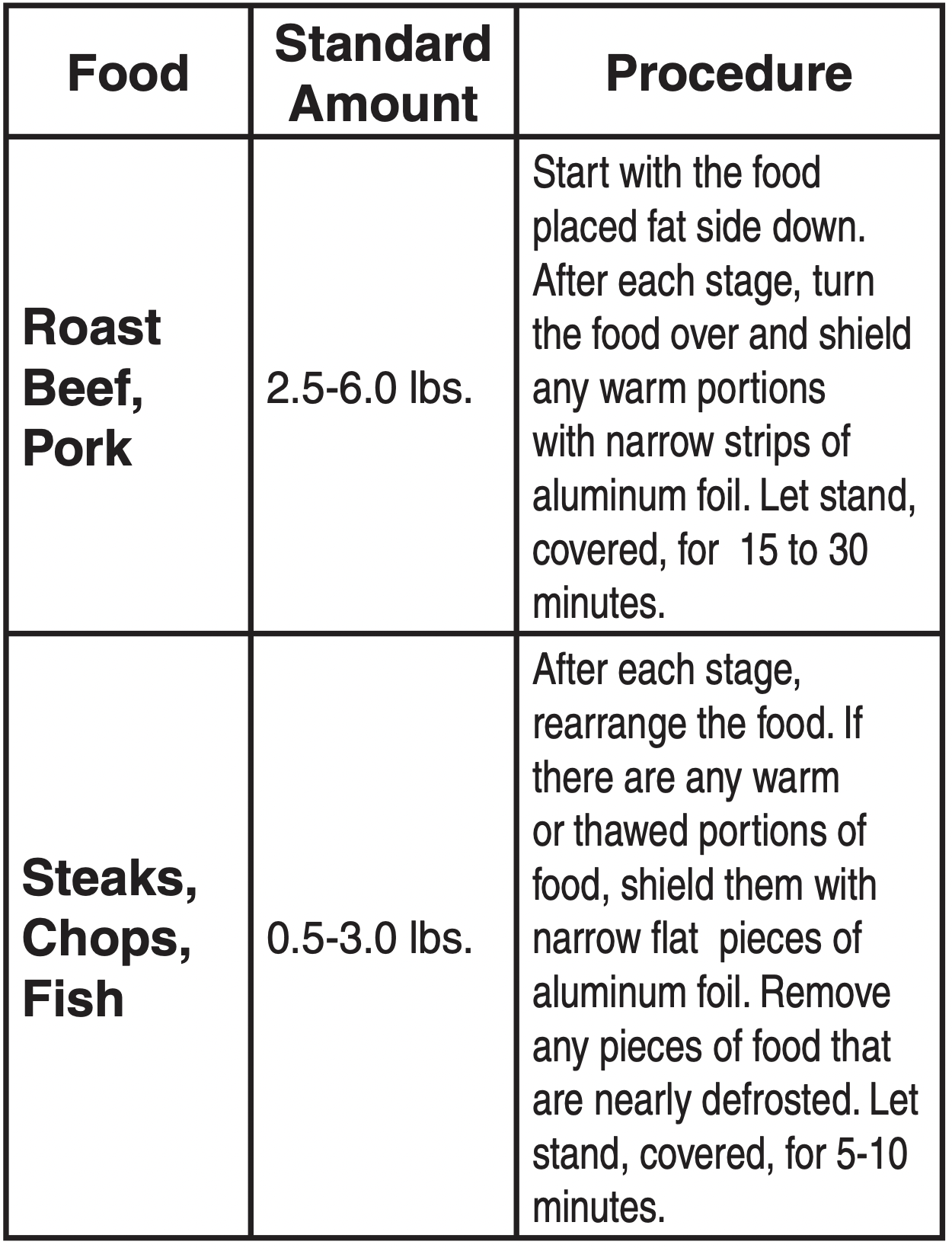
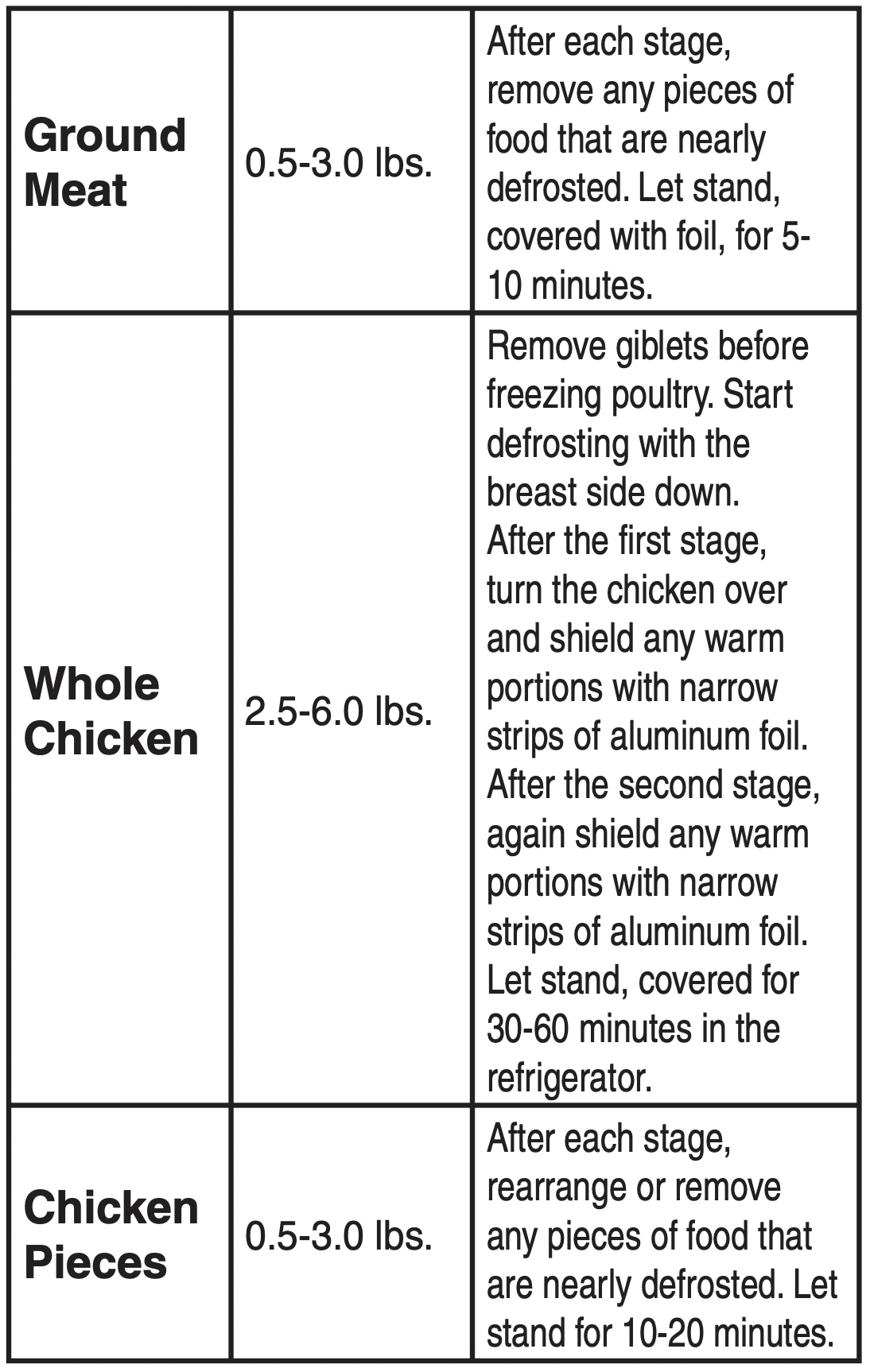
DEFROSTING GUIDE
- Follow the instructions below when defrosting different types of food.
DEFROST TIPS
- When using AUTO DEFROST, the weight to be entered is the net weight in pounds and tenths of pounds (the weight of the food minus the container).
- Use AUTO DEFROST only for raw food. AUTO DEFROST gives best results when food to be thawed is a minimum of 0°F (taken directly from a true freezer). If food has been stored in a refrigerator-freezer that does not maintain a temperature of 5°F or below, always program a lower food weight (for a shorter defrosting time) to prevent cooking the food.
- If the food is stored outside the freezer for up to 20 minutes, enter a lower food weight.
- The shape of the package alters the defrosting time. Shallow rectangular packets defrost more quickly than a deep block.
- Separate pieces as they begin to defrost. Separated pieces defrost more easily.
- Shield areas of food with small pieces of foil if they start to become warm.
- You can use small pieces of aluminum foil to shield foods like chicken wings, leg tips, and fish tails, but the foil must not touch the side of the oven.Foil causes arcing, which can damage the oven lining.
1POUND DEFROST
The 1POUND DEFROST feature provides a rapid defrost for 1.0 pound frozen food. The oven automatically sets the defrosting time.
Example: To defrost 1lb. ground beef.
- Touch 1POUND DEFROST pad.

- Touch ENTER/START pad.

WIRE RACK
CAUTION: To avoid risk of property damage:
- Do not use rack to pop popcorn.
- Rack must be on the four plastic supports when used.
- Use the rack only when cooking food on rack position.
- Do not cook with rack on floor of the oven.
The wire rack gives you extra space when cooking in more than one container at the same time.
To use rack:
- Place rack securely in the four plastic supports.
Rack MUST NOT touch metal walls or back of microwave oven.
- Place equal amounts of food both ABOVE AND BELOW rack.
Amount of food must be approximately the same to balance out cooking energy.
IMPORTANT:
- DO NOT store or use the wire rack in this oven unless more than one item is being cooked or a recipe calls for it.
- Damage to the oven could occur.
COOKING GUIDE
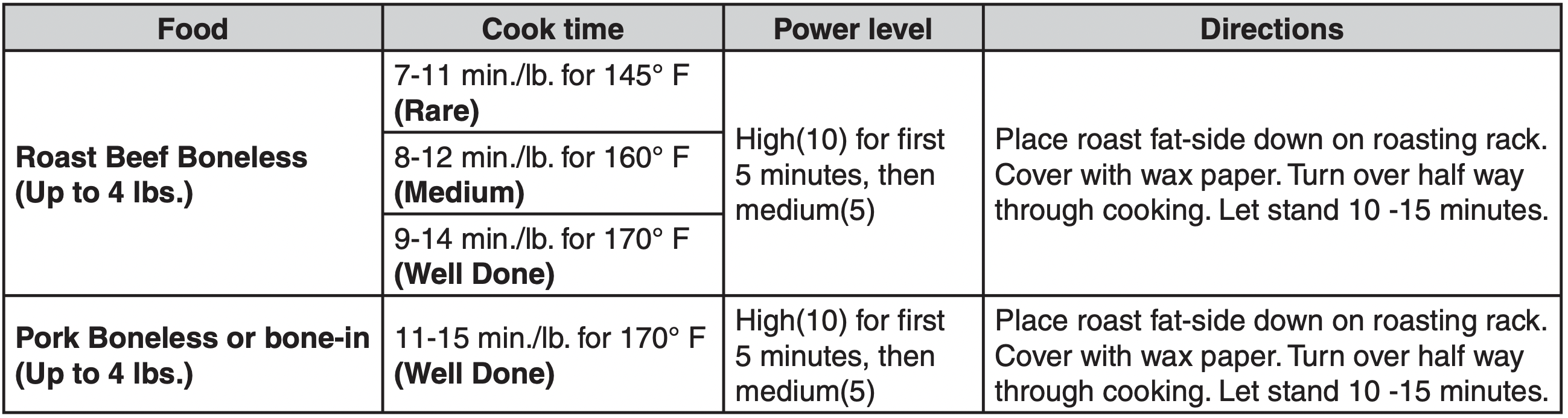
Guide for Cooking Meat in Your Microwave
- Place meat on a microwave-safe roasting rack in a microwave-safe dish.
- Start meat fat-side down. Use narrow strips of aluminum foil to shield any bone tips or thin meat areas.
- Check the temperature in several places before letting the meat stand the recommended time.
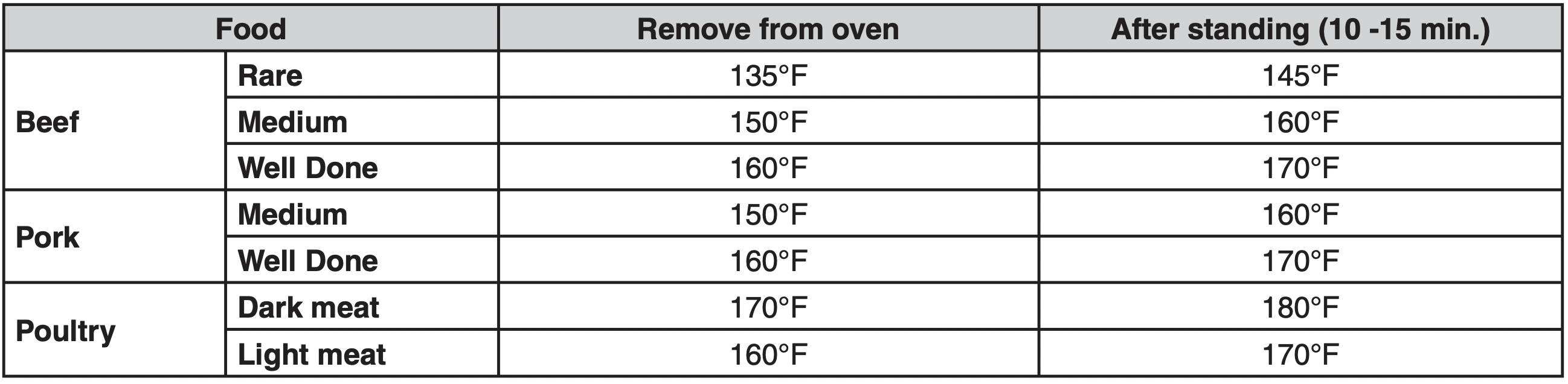
- The following temperatures are removal temperatures. The temperature of the food will rise during the standing time.
- Expect a 10°F rise in temperature during the standing time.
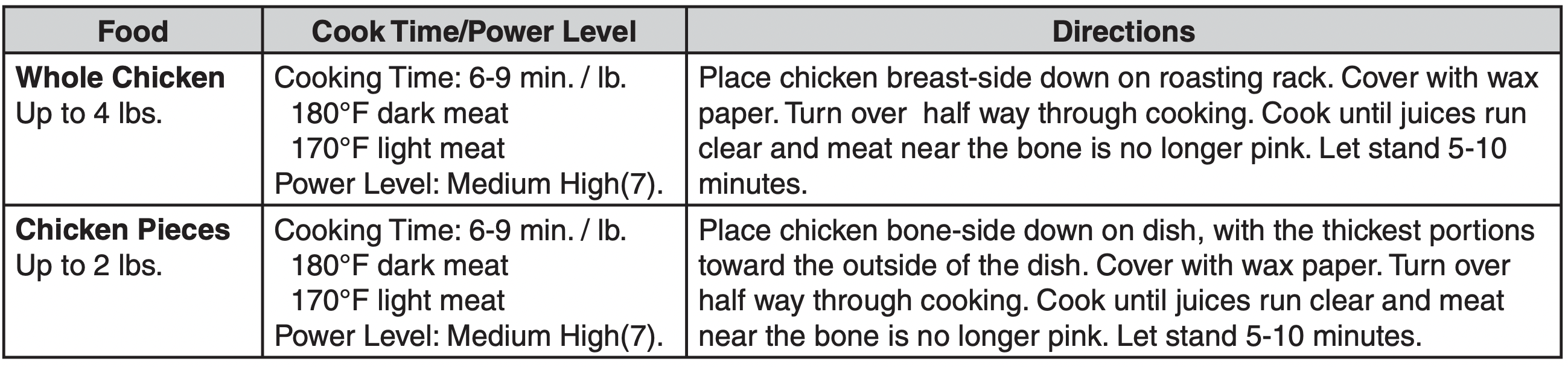
Guide for Cooking Poultry in Your Microwave
- Place poultry on a microwave-safe roasting rack in a microwave-safe dish.
- Cover poultry with wax paper to prevent spattering.
- Use aluminum foil to shield bone tips, thin meat areas, or areas that start to overcook.
- Check the temperature in several places before letting the poultry stand the recommended time.
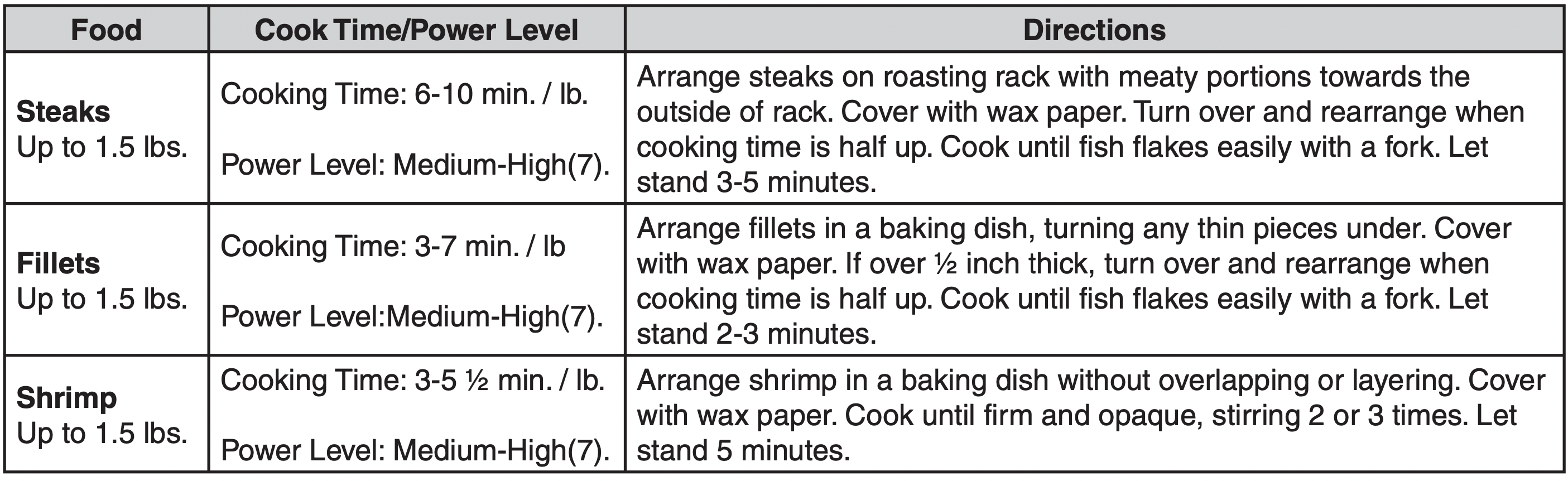
Guide for Cooking Seafood in Your Microwave
- Cook fish until it flakes easily with a fork.
- Place fish on a microwave-safe roasting rack in a microwave-safe dish.
- Use a tight cover to steam fish. A lighter cover of wax paper or paper towel provides less steaming.
- Do not overcook fish; check it at minimum cooking time.
Guide for Cooking Eggs in Your Microwave
- Never cook eggs in the shell, and never warm hard-cooked eggs in the shell; they can explode.
- Always pierce whole eggs to keep them from bursting.
- Cook eggs just until set; they become tough if overcooked.
Guide for Cooking Vegetables in Your Microwave
- Vegetables should be washed just before cooking. Often, no extra water is needed. If dense vegetables such as potatoes, carrots and green beans are being cooked, add about 1/4 cup water.
- Small vegetables (sliced carrots, peas, lima beans, etc.) will cook faster than larger ones.
- Whole vegetables, such as potatoes, a corn squash or corn on the cob, should be arranged in a circle on the turntable before cooking. They will cook more evenly if turned over after half the cooking time has passed.
- Always place vegetables like asparagus and broccoli with the stem ends pointing towards the edge of the dish and the tips toward the center.
- When cooking cut vegetables, always cover the dish with a lid or vented microwavable plastic wrap.
- Whole, unpeeled vegetables such as potatoes, squash, eggplant, etc., should have their skin pricked in several spots before cooking to prevent them from bursting.
- For more even cooking, stir or rearrange whole vegetables halfway through the cooking time.
- Generally, the denser the food, the longer the standing time. (Standing time refers to the time necessary for dense, large foods and vegetables to finish cooking after they come out of the oven). A baked potato can stand on the counter for five minutes, while a dish of peas can be served immediately.
Cooking Utensils
MICROWAVE UTENSIL GUIDE
| USE |
DO NOT USE |
|
OVEN PROOF GLASS (treated for high intensity heat):
Utility dishes, loaf dishes, pie plates, cake plates, liquid measuring cups, casseroles and bowls without metallic trim.
CHINA:
Bowls, cups, serving plates and platters without metallic trim.
PLASTIC:
Plastic wrap (as a cover)--lay the plastic wrap loosely over the dish and press it to the sides.
Vent plastic wrap by turning back one edge slightly to allow excess steam to escape. The dish should be deep enough so that the plastic wrap will not touch the food. As the food heats it may melt the plastic wrap wherever the wrap touches the food.
Use plastic dishes, cups, semirigid freezer containers and plastic bags only for short cooking times.
Use these with care because the plastic may soften from the heat of the food.
PAPER:
Paper towels, waxed paper, paper napkins, and paper plates with no metallic trim or design.Look for the manufacturer's label for use in the microwave oven.
|
METAL UTENSILS:
Metal shields the food from microwave energy and produces uneven cooking. Also avoid metal skewers, thermometers or foil trays. Metal utensils can cause arcing, which can damage your microwave oven.
METAL DECORATION:
Metal-trimmed or metal-banded dinnerware, casserole dishes, etc. The metal trim interferes with normal cooking and may damage the oven.
ALUMINUM FOIL:
Avoid large sheets of aluminum foil because they hinder cooking and may cause harmful arcing. Use small pieces of foil to shield poultry legs and wings. Keep ALL aluminum foil at least 1 inch from the side walls and door of the oven.
WOOD:
Wooden bowls and boards will dry out and may split or crack when you use them in the microwave oven. Baskets react in the same way.
TIGHTLY COVERED UTENSILS:
Be sure to leave openings for steam to escape from covered utensils. Pierce plastic pouches of vegetables or other food items before cooking. Tightly closed pouches could explode.
BROWN PAPER:
Avoid using brown paper bags.
They absorb too much heat and could burn.
FLAWED OR CHIPPED UTENSILS:
Any utensil that is cracked, flawed, or chipped may break in the oven.
METAL TWIST TIES:
Remove metal twist ties from plastic or paper bags.
They become hot and could cause a fire.
|
Care and Cleaning
CARE AND CLEANING
For best performance and safety, keep the oven clean inside and out-side. Take special care to keep the inner door panel and the oven front frame free of food or grease build-up. Never use rough powder or pads. Wipe the microwave oven inside and out, including the hood bottom cover, with a soft cloth and a warm (not hot) mild detergent solution.
Then rinse and wipe dry.Use a chrome cleaner and polish on chrome, metal and aluminum surfaces. Wipe spatters immediately with a wet paper towel, especially after cooking chicken or bacon.Clean your oven weekly or more often, if needed.
Follow these instructions to clean and care for your oven.
- Keep the inside of the oven clean. Food particles and spilled liquids can stick to the oven walls, causing the oven to workless efficiently.
- Wipe up spills immediately. Use a damp cloth and mild soap. Do not use harsh detergents or abrasives.
- To help loosen baked on food particles or liquids, heat two cups of water (add the juice of one lemon if you desire to keep the oven fresh) in a four-cup measuring glass at High power for five minutes or until boiling. Let stand in the oven for one or two minutes.
- Remove the glass tray from the oven when cleaning the oven or tray. To prevent the tray from breaking, handle it carefully and do not put it in water immediately after cooking.Wash the tray carefully in warm sudsy water or in the dishwasher.
- Clean the outside surface of the oven with soap and a damp cloth. Dry with a soft cloth. To prevent damage to the operating parts of the oven, don't let water seep into the openings.
- Wash the door window with very mild soap and water. Be sure to use a soft cloth to avoid scratching.
- If steam accumulates inside or outside the oven door, wipe with a soft cloth.Steam can accumulate when operating the oven in high humidity and in no way indicates microwave leakage.
- Never operate the oven without food in it; this can damage the magnetron tube or glass tray. You may wish to leave a cup of water in the oven when it is not in use to prevent damage if the oven is accidentally turned on.
CLEANING THE GREASE FILTER
The grease filter should be removed and cleaned often, at least once a month.
CAUTION: To avoid risk of personal injury or property damage, do not operate oven hood without filters in place.
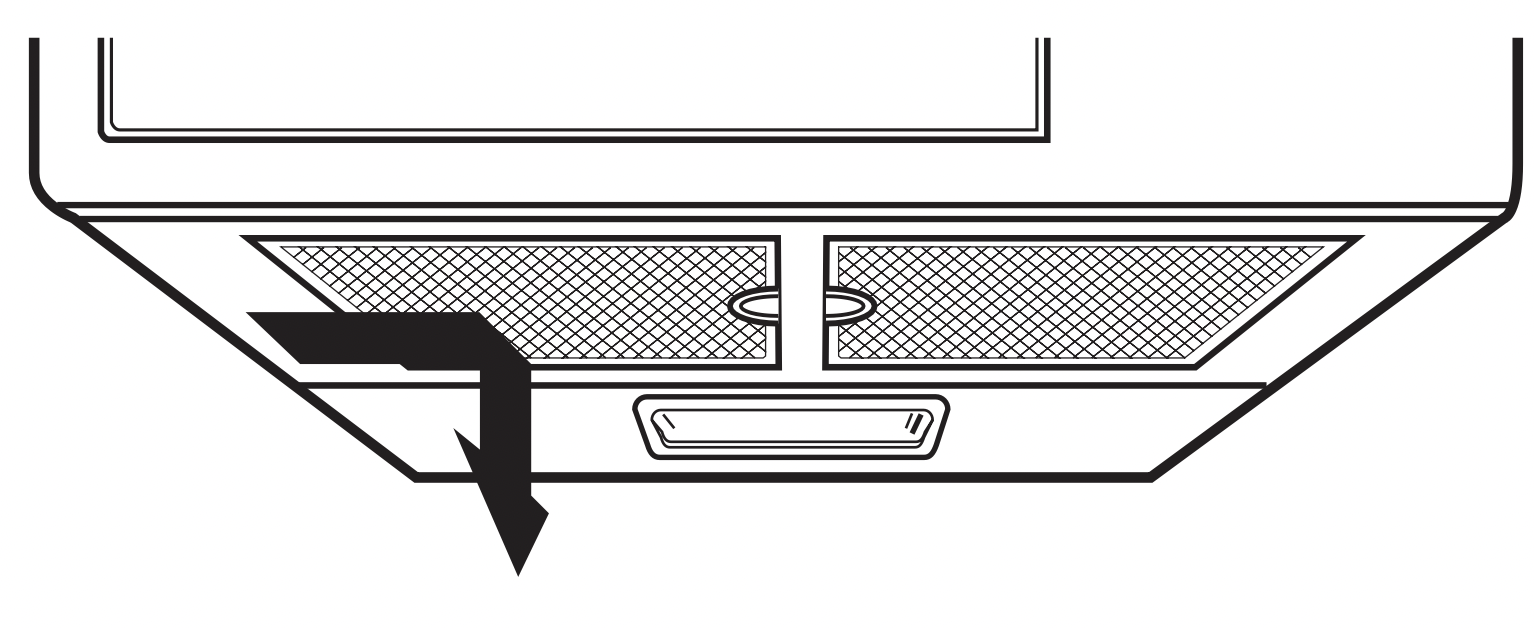
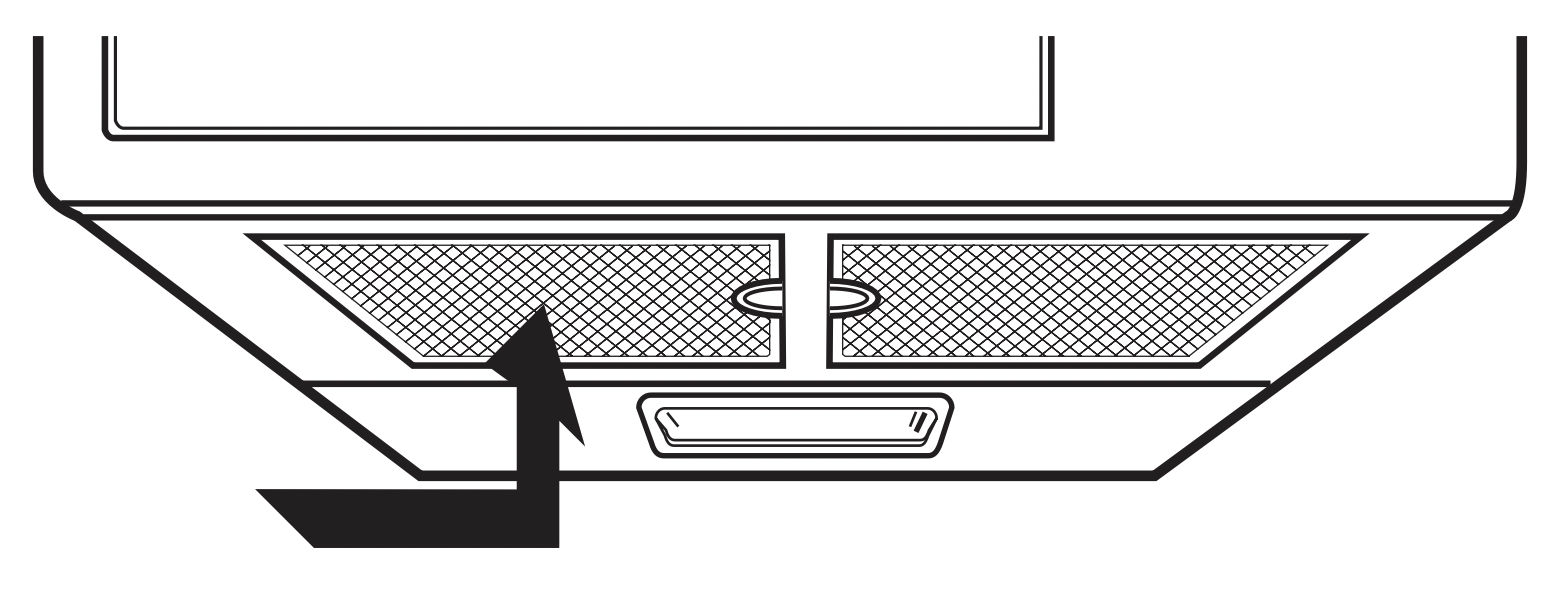
- To remove grease filter, slide filter to the side. Pull filter downward and push to the other side. The filter will drop out.
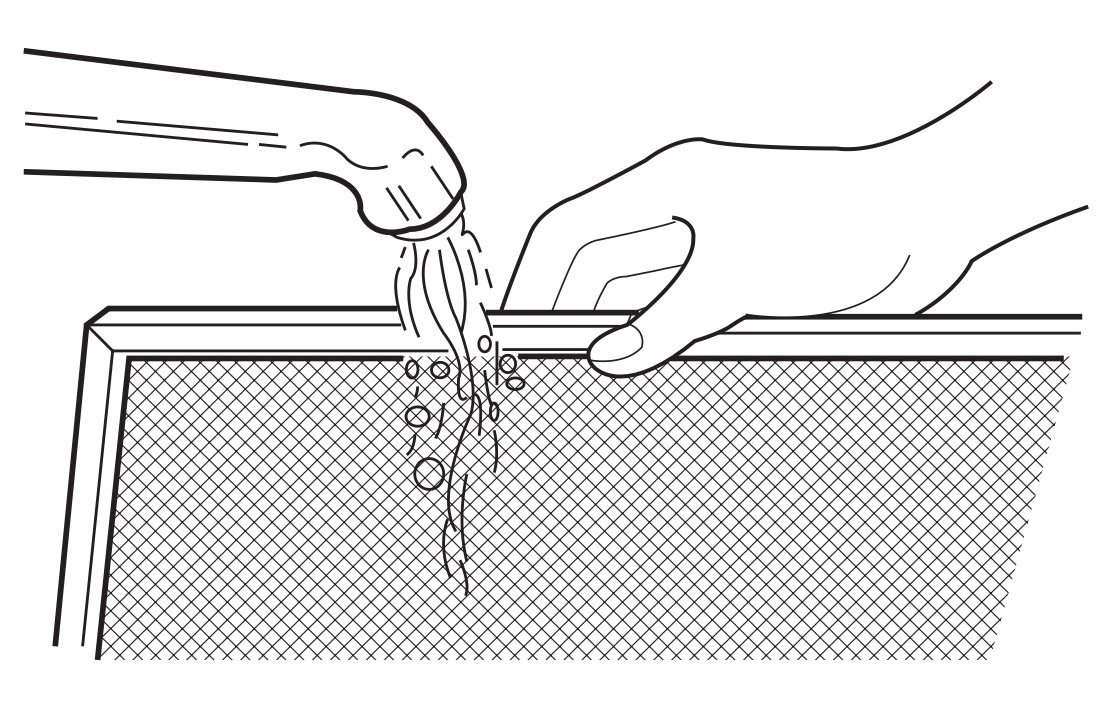
- Soak grease filter in hot water and a mild detergent. Rinse well and shake to dry. Do not use ammonia or place in a dishwasher. The aluminum will darken.
- To reinstall the filter, slide it into the side slot, then push up and toward oven center to lock.
CHARCOAL FILTER REPLACEMENT
If your oven is vented to the inside, the charcoal filter should be replaced every 6 to 12 months, and more often if necessary. The charcoal filter cannot be cleaned.
- Unplug oven or turn off power at the main power supply.
- Open the door.
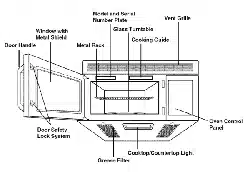
- Remove the two vent grille mounting screws. (2 middle screws)
- Slide the grille to the left, then pull straight out.
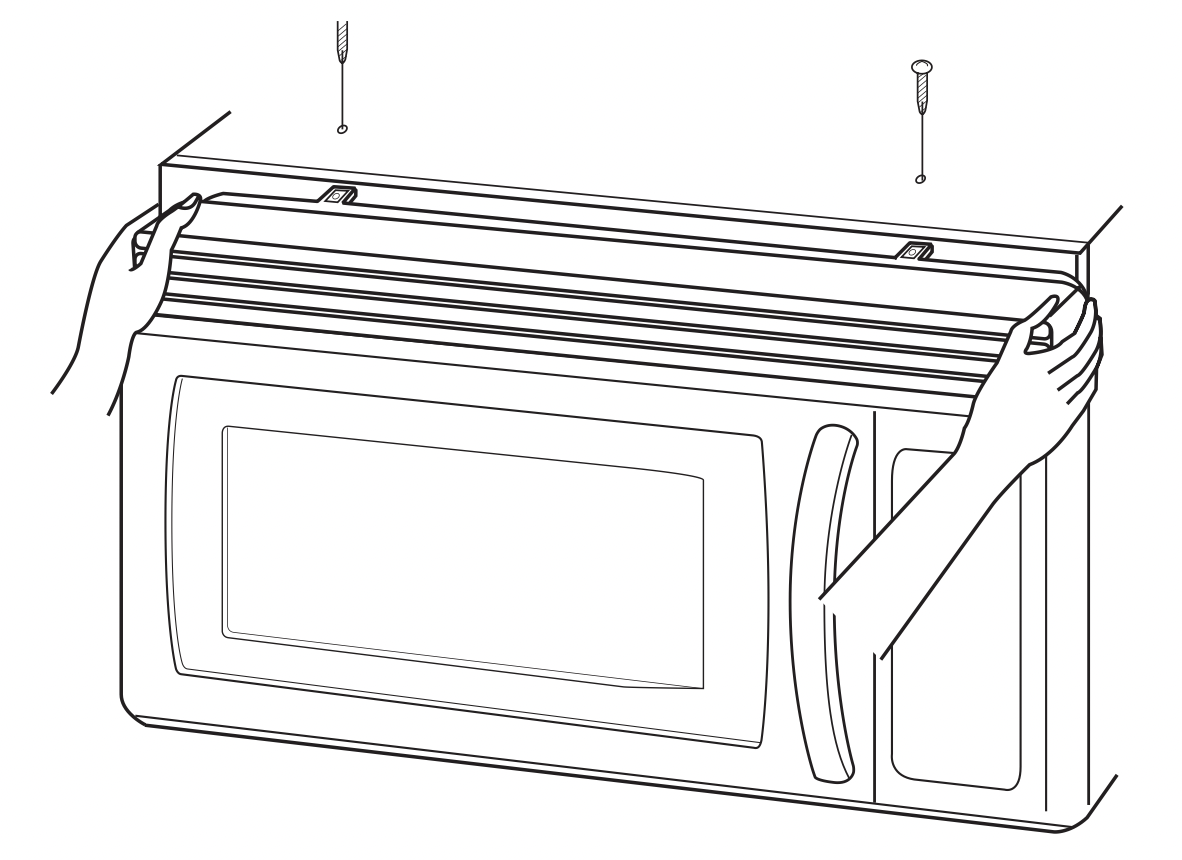
- Remove old filter.
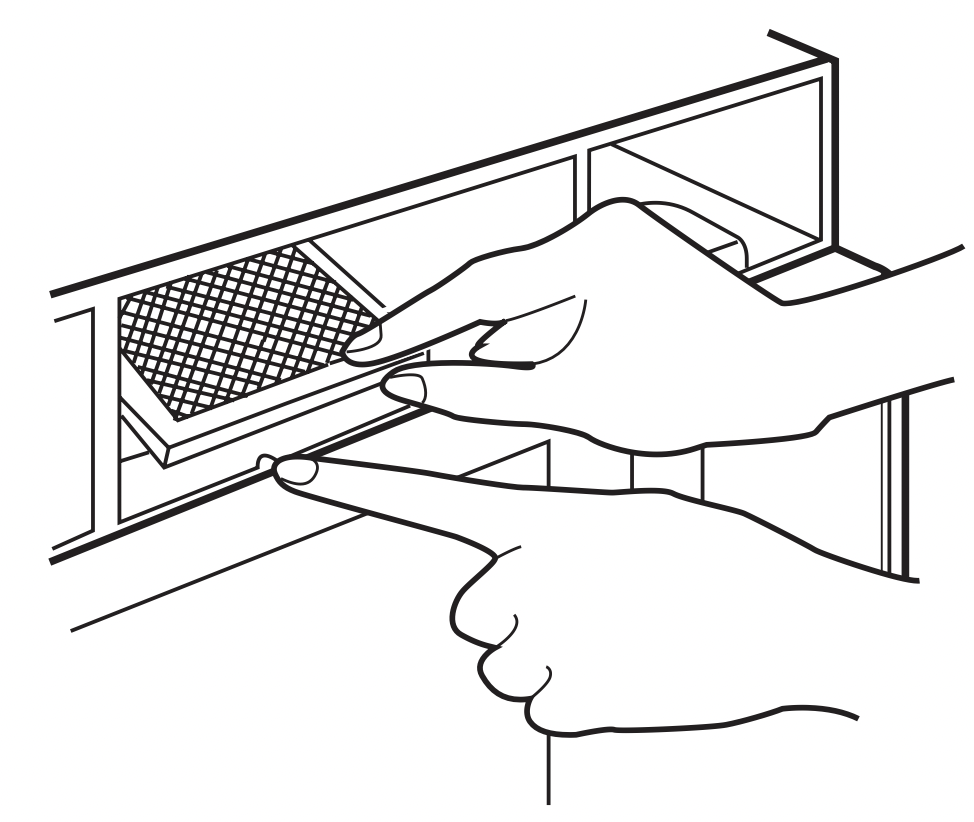
- Slide a new charcoal filter into place. The filter should rest at the angle shown.
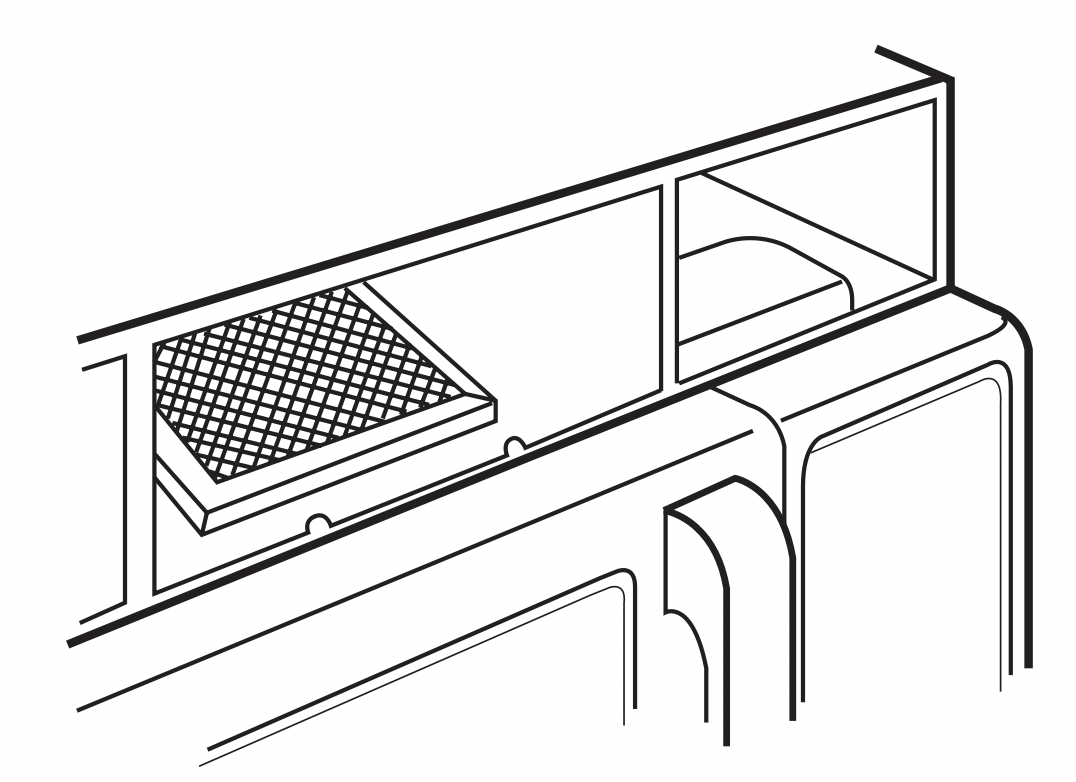
- Replace the mounting screws and close the door. Turn the power back on at the main power supply and set the clock.
COOKTOP/NIGHT LIGHT REPLACEMENT
CAUTION: To avoid personal injury or property damage, wear gloves when replacing light bulb.
- Unplug the oven or turn off power at the main power supply.
- Remove the bulb cover mounting screws.
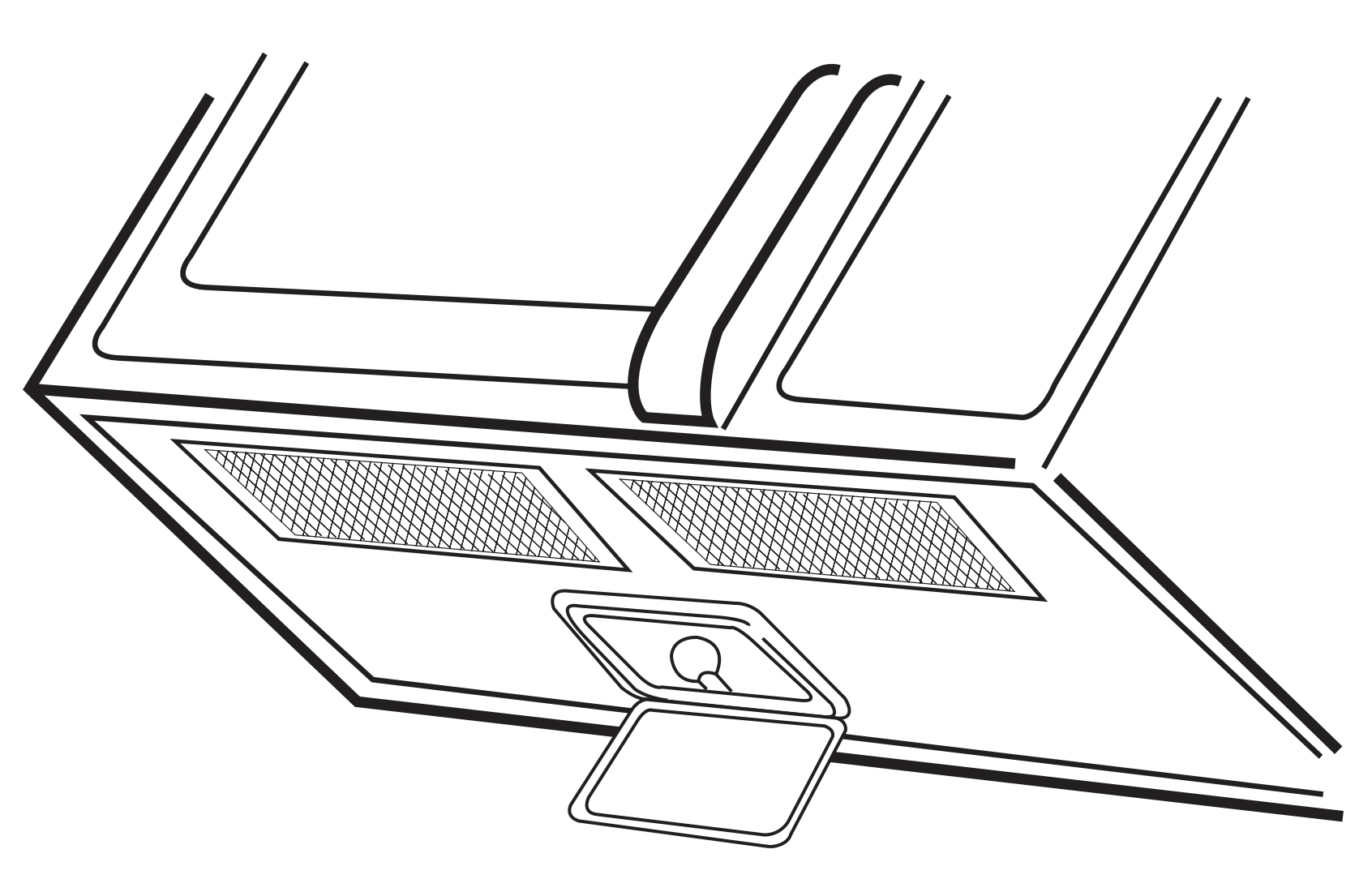
- Replace bulb with 20 watt appliance bulb.
- Replace bulb cover, and mounting screws.
- Turn the power back on at the main power supply.
OVEN LIGHT REPLACEMENT
- Unplug oven or turn off power at the main power supply.
- Open the door.
- Remove the vent cover mounting screws. (2 middle screws)
- Slide the grille to the left, then pull straight out.
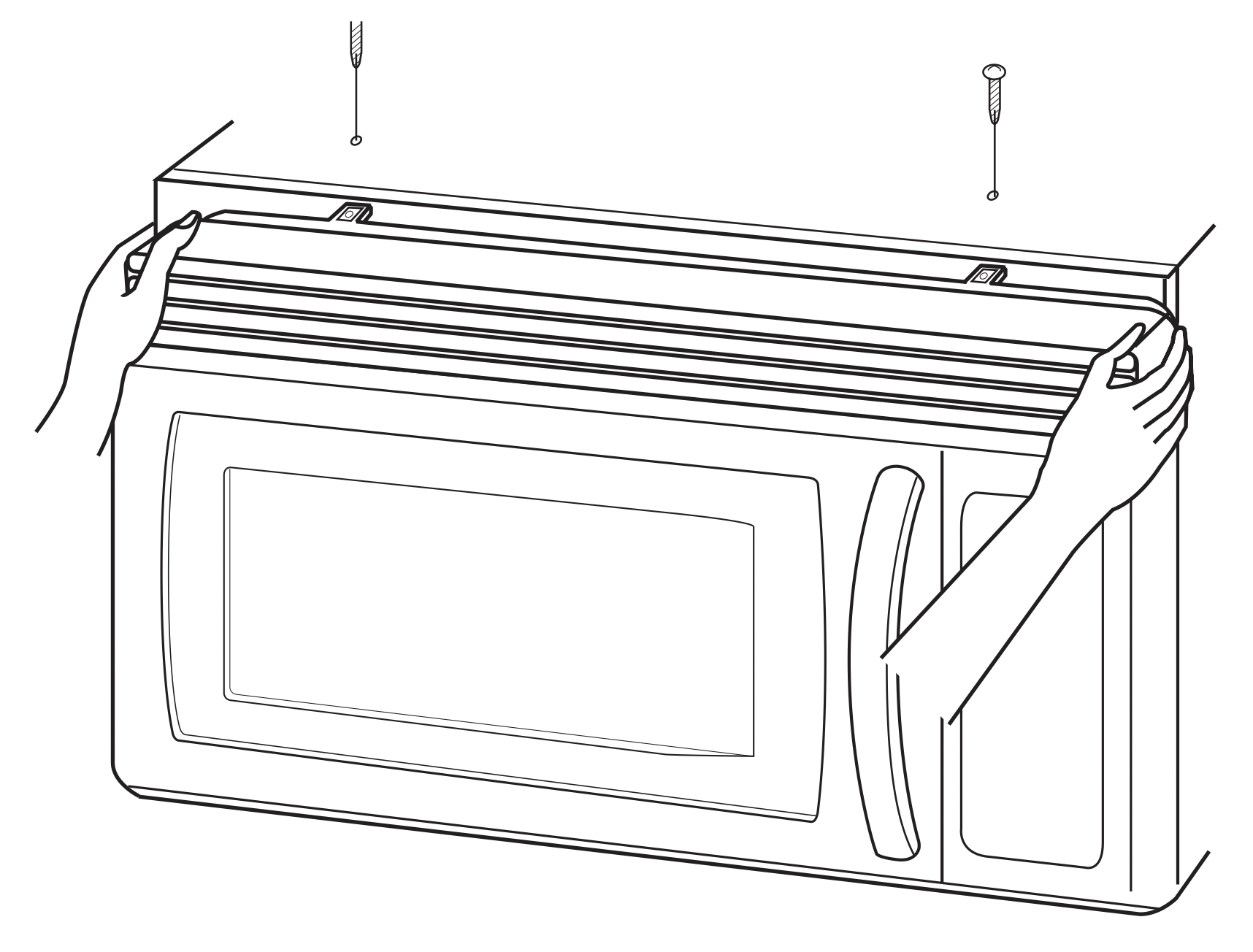
- Remove the screw located above the door near the center of the oven that secures the bulb holder.
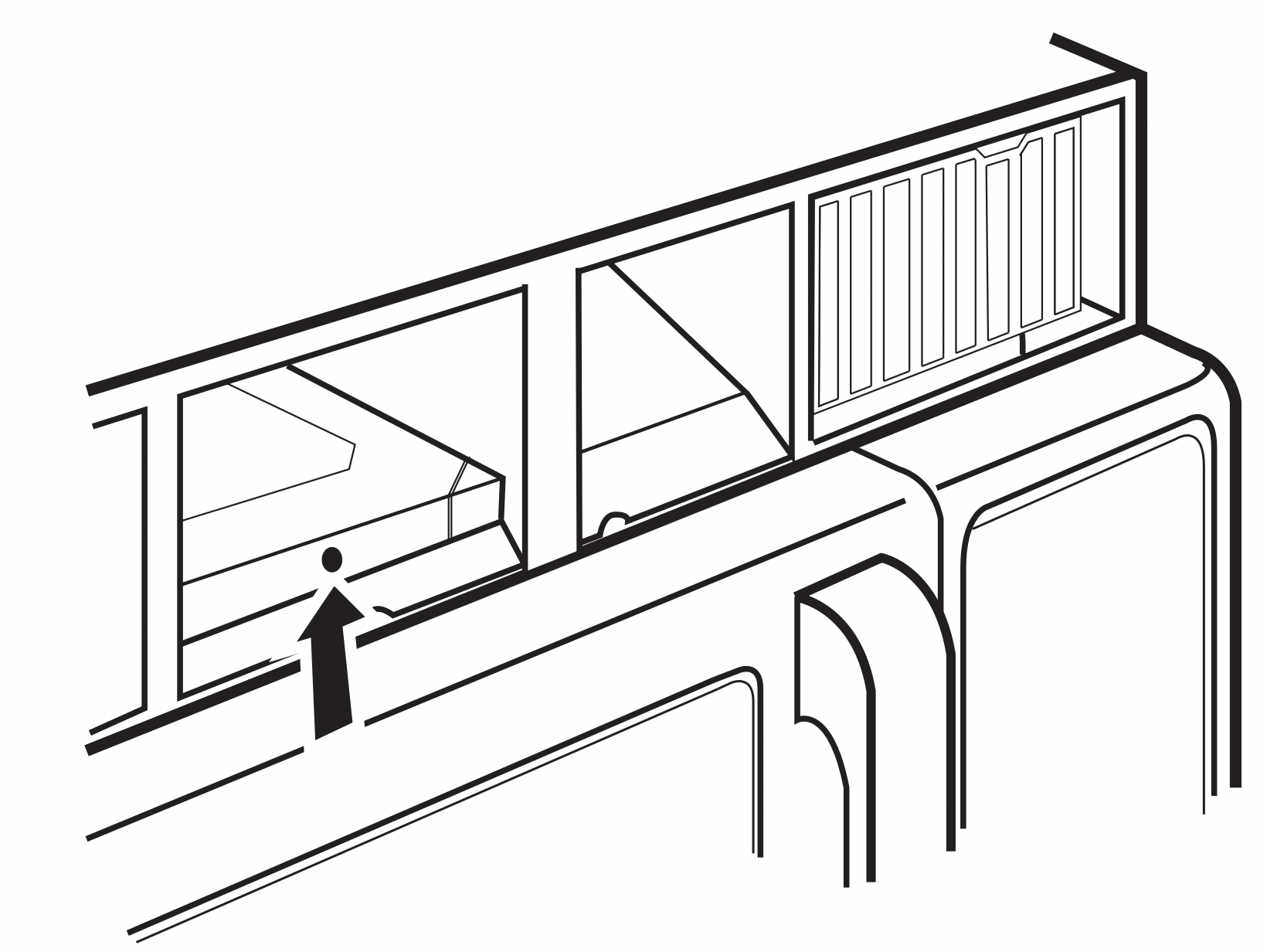
- Remove bulb holder.
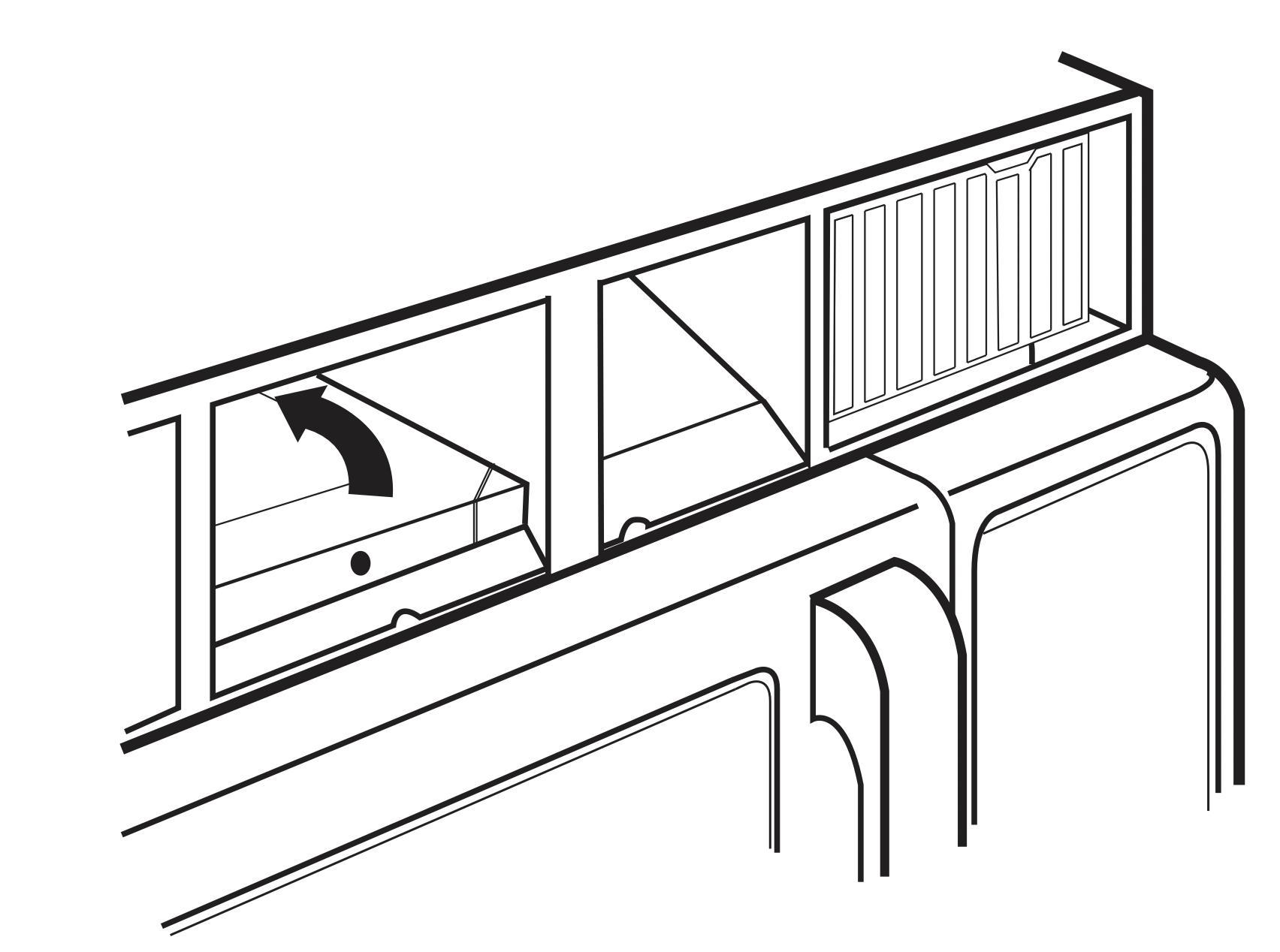
- Replace bulb with a 20 watt appliance bulb.
- Replace the bulb holder.
- Replace the grille and 2 screws. Turn the power back on at the main power supply.
Troubleshooting
Before you call a repair person for your oven, check this list of possible problems and solutions.
Neither the oven's display nor the oven operate.
- Properly insert the plug into a grounded outlet.
- If the outlet is controlled by a wall switch, make sure the wall switch is turned on.
- Remove the plug from the outlet, wait ten seconds, then plug it in again.
- Reset the circuit breaker or replace any blown fuse.
- Plug another appliance into the outlet; if the other appliance doesn't work, have a qualified electrician repair the outlet.
- Plug the oven into a different outlet.
The oven's display works, but the power won't come on.
- Make sure the door is closed securely.
- Check to see if packing material or other material is stuck to the door seal.
- Check for door damage.
- Press STOP/CLEAR pad twice and re-enter all cooking instructions.
The power goes off before the set time has elapsed.
- If there has not been a power outage, remove the plug from the outlet, wait ten seconds, then plug it in again. If there was a power outage, the time indicator will display: PLEASE TOUCH CLOCK AND TIME OF DAY. Reset the clock and any cooking instructions.
- Reset the circuit breaker or replace any blown fuse.
The food is cooking too slowly.
- Make sure the oven is on its own 20 amp circuit line. Operating another appliance on the same circuit can cause a voltage drop. If necessary, move the oven to its own circuit.
You see sparks or arcing.
- Remove any metallic utensils, cookware, or metal ties. If using foil, use only narrow strips and allow at least one inch between the foil and interior oven walls.
The turntable makes noises or sticks.
- Clean the turntable, roller ring and oven floor.
- Make sure the turntable and roller ring are positioned correctly.
Using your microwave causes TV or radio interference.
- This is similar to the interference caused by other small appliances, such as hair dryers. Move your microwave further away from other appliances, like your TV or radio.
Note: If the oven is set to cook for more than 25 minutes, it will automatically adjust itself to 70 percent power after 25 minutes to avoid overcooking.