pt
es
nl
it
fr
ru
en
de
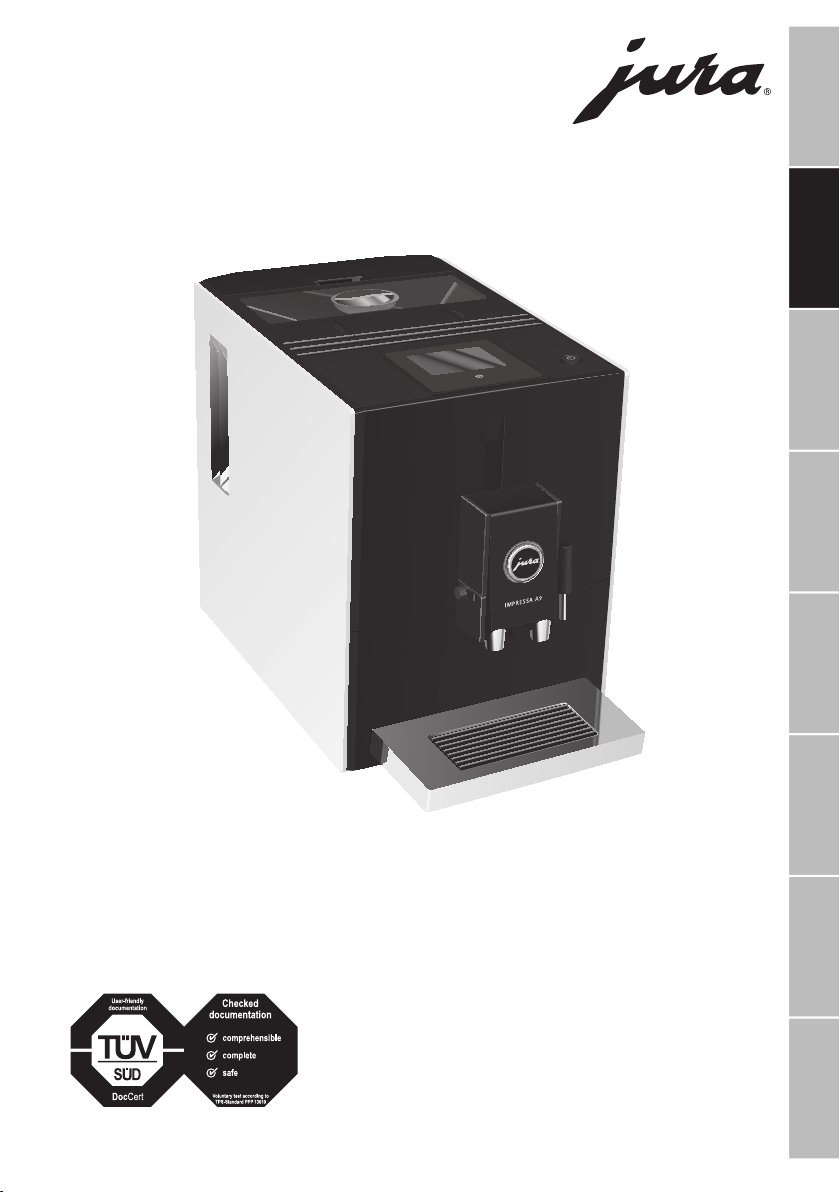
Instructions for use for IMPRESSA A9 One Touch
The Instructions for Use has been awarded the seal of approval by the
independent German Technical Inspection Agency, TÜV SÜD, due to its
easy-to-understand style, its thoroughness and coverage of safety
aspects.

34
Table of contents
Your IMPRESSA A9 One Touch
Control elements 36
Important information 38
Proper use ...............................................................................................................................................................38
For your safety .......................................................................................................................................................38
1 Preparing and using for the first time 40
JURA on the Internet ............................................................................................................................................ 40
Touchscreen display ............................................................................................................................................. 40
Setting up the machine ........................................................................................................................................ 41
Filling the bean container .................................................................................................................................... 41
First-time use .......................................................................................................................................................... 41
First-time use with filter cartridge activation ................................................................................................... 41
First-time use without filter cartridge activation .............................................................................................42
Determining the water hardness ........................................................................................................................43
Connecting milk .....................................................................................................................................................43
Filling the water tank ............................................................................................................................................43
2 Preparation 44
Ways of preparing a beverage ............................................................................................................................ 44
Ristretto, espresso and coffee ............................................................................................................................ 44
2 ristretti, 2 espressi and 2 coffees ..................................................................................................................... 44
Latte macchiato and Cappuccino ...................................................................................................................... 45
Latte macchiato doppio and Cappuccino doppio .......................................................................................... 45
Permanently setting the amount of water for the cup size .......................................................................... 45
Ground coffee ........................................................................................................................................................ 46
Adjusting the grinder ........................................................................................................................................... 46
Hot water.................................................................................................................................................................47
3 Daily operation 47
Switching on the machine ...................................................................................................................................47
Daily maintenance ................................................................................................................................................ 48
Regular maintenance ........................................................................................................................................... 48
Switching off the machine .................................................................................................................................. 48
4 Permanent settings in programming mode 49
Replacing products on the start screen ............................................................................................................ 49
Deactivating the start screen ............................................................................................................................. 49
Setting the water hardness ................................................................................................................................. 49
Automatic switch-off ............................................................................................................................................ 50
Unit for amount of water .................................................................................................................................... 50
Language ................................................................................................................................................................ 50

35
pt
es
nl
it
fr
ru
en
de
Table of contents
Symbol description
Warnings
J WARNING
J CAUTION
Always take note of any information marked with the words CAUTION or WARNING
and a warning sign. The signal word WARNING draws your attention to potential
serious injury, and the signal word CAUTION to potential minor injury.
CAUTION CAUTION draws your attention to potential damage to the machine.
Symbols used
T
Prompt to take action. This symbol means that you are being prompted to perform
some action.
E
Information and tips to make it even easier to use your IMPRESSA.
‘Espresso’ Display
5 Maintenance 50
Rinsing the machine ............................................................................................................................................. 51
Rinsing the milk system ....................................................................................................................................... 51
Cleaning the milk system ..................................................................................................................................... 51
Dismantling and rinsing the dual spout ............................................................................................................52
Inserting and activating the filter .......................................................................................................................53
Changing the filter................................................................................................................................................ 54
Cleaning the machine ...........................................................................................................................................55
Descaling the machine ....................................................................................................................................... 56
Cleaning the bean container ...............................................................................................................................57
Descaling the water tank ......................................................................................................................................57
6 Display messages 58
7 Troubleshooting 59
8 Transport and environmentally friendly disposal 60
Transport/ Emptying the system ...................................................................................................................... 60
Disposal .................................................................................................................................................................. 60
9 Technical data 60
10 Index 61
11 JURA contact details/ Legal information 64
36
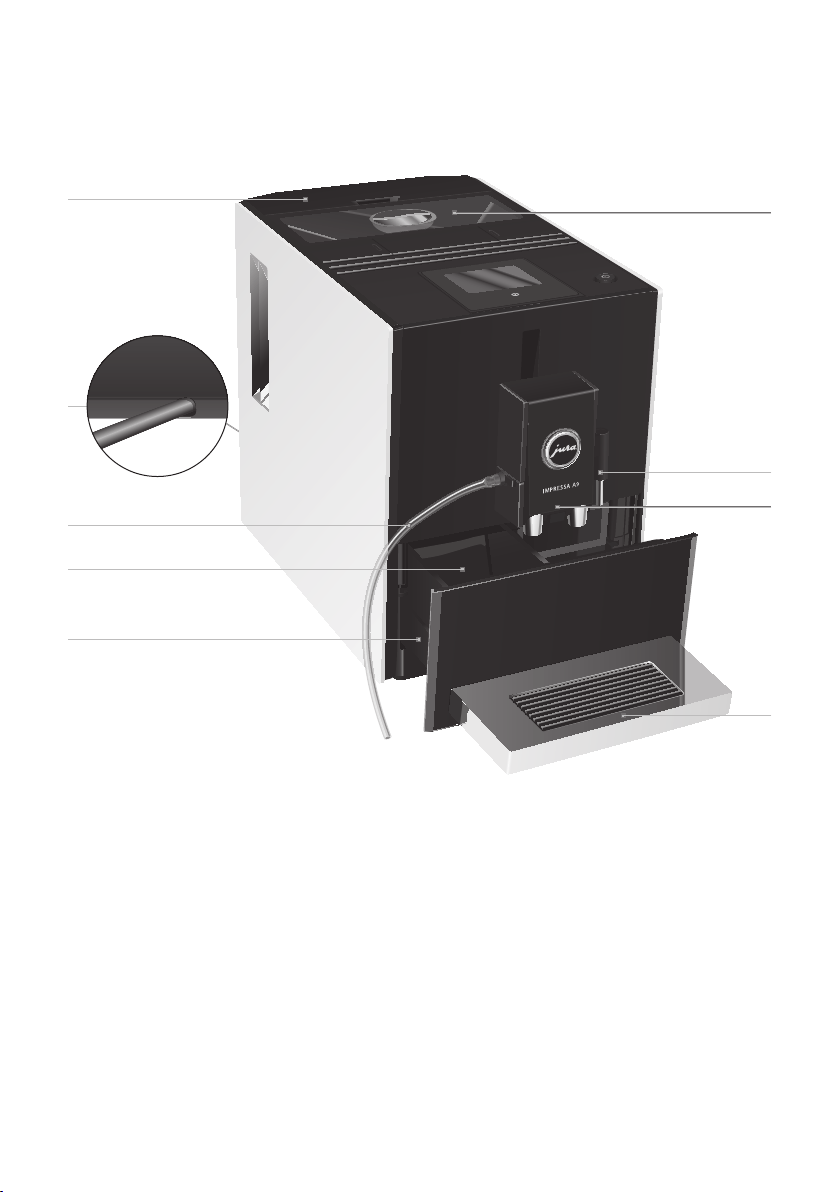
Control elements
Control elements
2
3
5
4
6
7
1
9
8
1 Water tank
2 Mains cable (back of the machine)
3 Milk pipe
4 Coffee grounds container
5 Drip tray
6 Bean container with aroma preservation cover
7 Hot-water spout
8 Height-adjustable dual spout
9 Cup grille
37
Control elements
pt
es
nl
it
fr
ru
en
de
5
1
2
6
7
4
3
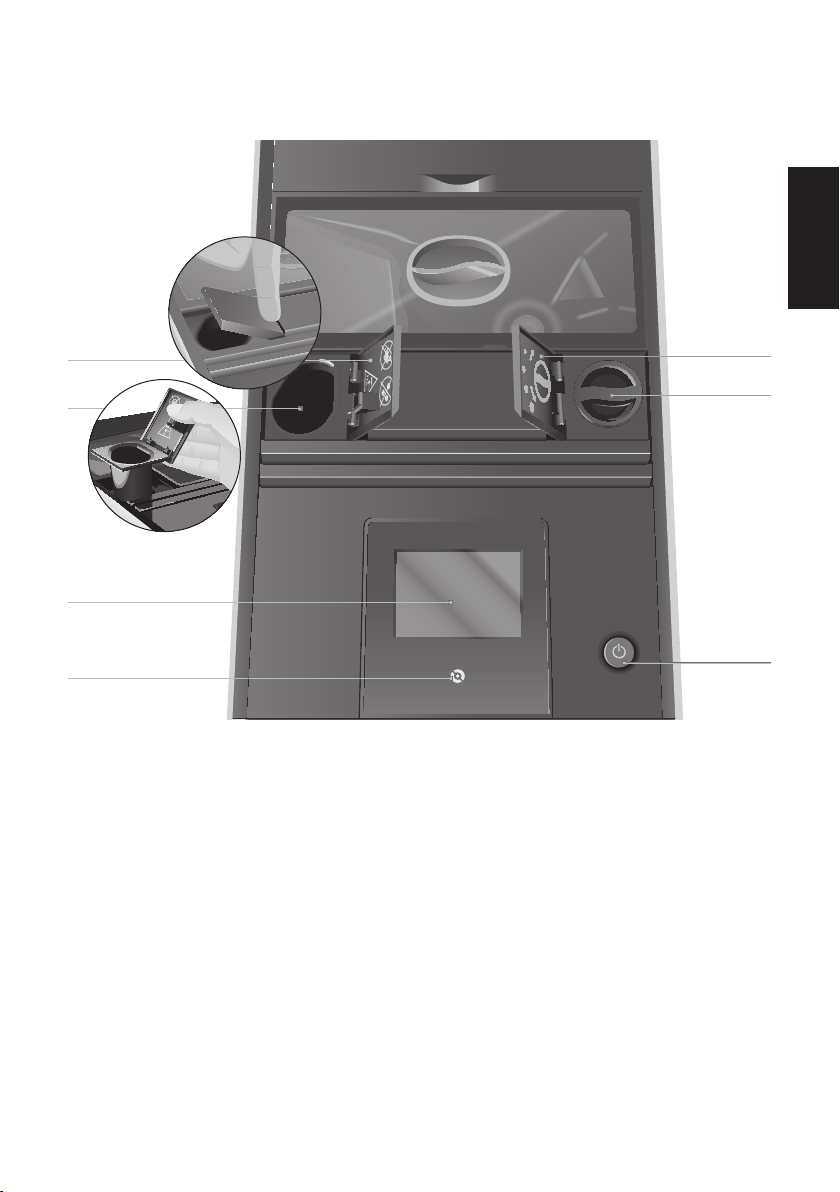
1 Cover for powder chute for ground coffee
2 Powder chute for ground coffee (removable)
3 Touchscreen display
4 t Menu symbol
5 Cover cap for grinder adjustment switch
6 Grinder adjustment switch
7 Q On/Off button

38
Important information
Important information
Proper use
The machine is designed and
intended for private domestic use.
It should only be used for coffee
preparation and to heat milk and
water. Use for any other purpose
will be deemed improper. JURA
Elektroapparate AG cannot accept
any responsibility for the conse-
quences of improper use.
Before using the machine read
these instructions for use thor-
oughly and completely and comply
with the instructions they contain.
A warranty service is not applicable
for damage or defects caused by
non-compliance with the instruc-
tions for use. Keep these instruc-
tions for use close to the machine
and pass them on to the next user.
For your safety
Please carefully read and observe
the important safety information
set out below.
To avoid danger of potentially fatal
electric shock:
U
Never use a machine which is
damaged or has a defective
mains cable.
U
In the event of signs of damage,
for example if there is a smell of
burning, unplug the machine
immediately from the mains
supply and contact JURA service.
U
If the mains cable of this machine
is damaged, it must be repaired
either directly by JURA or by an
authorised JURA service centre.
U
Make sure that the IMPRESSA
and the mains cable are not
located close to hot surfaces.
U
Be careful to ensure that the
mains cable is not trapped and
does not rub against sharp
edges.
U
Never open and repair the
machine yourself. Do not modify
the machine in any way that is
not described in these instruc-
tions for use. The machine
contains live parts. If opened,
there is a danger of potentially
fatal injury. Repairs may only be
carried out by authorised JURA
service centres, using original
spare parts and accessories.
U
To completely and safely discon-
nect the machine from the
power supply, first switch off the
IMPRESSA using the On/Off
button. Only then should you
remove the mains plug from the
power socket.

39
Important information
pt
es
nl
it
fr
ru
en
de
There is a risk of scalds or burns on
the spouts.
U
Place the machine out of the
reach of children.
U
Do not touch any hot parts.
Use the handles provided.
A defective machine is not safe and
could cause injury or fire. To avoid
damage and any associated risk of
injury or fire:
U
Never allow the mains cable to
loosely hang down. The mains
cable could pose a tripping
hazard or become damaged.
U
Protect the IMPRESSA from
environmental influences such as
rain, frost and direct sunlight.
U
Do not immerse the IMPRESSA,
mains cable or connections in
water.
U
Do not put the IMPRESSA or any
individual parts in the dish-
washer.
U
Switch your IMPRESSA off at the
power switch before any clean-
ing operation. Always wipe the
IMPRESSA with a damp cloth
rather than a wet one, and
protect it from prolonged expo-
sure to water splash.
U
Only connect the machine to the
mains voltage in accordance
with the information on the
rating plate. The rating plate is
located on the underside of your
IMPRESSA. Further technical data
is provided in these instructions
for use (see Chapter 9 ‘Technical
data’).
U
Please only use original JURA
maintenance products. Use of
products that are not explicitly
recommended by JURA could
damage the IMPRESSA.
U
Do not use any coffee beans
treated with additives or
caramelised coffee beans.
U
Only fill the water tank with
fresh, cold water.
U
Switch the machine off at the
power switch if you are going to
be absent for a longer period of
time.
U
Children may not clean or ser-
vice the machine unless super-
vised by a responsible person.
U
Do not allow children to play
with the machine.
U
Keep children under the age
of 8 away from the machine, or
supervise them constantly.
U
Children aged 8 and over may
only operate the machine with-
out supervision if they have been
instructed in how to use it safely.
Children must be able to recog-
nise and understand the poten-
tial dangers arising from incor-
rect use.
40
1 Preparing and using for the first time
People, including children, who
U
do not have the physical, sen-
sory or mental capabilities to use
the machine safely or
U
are inexperienced or lack knowl-
edge in how to use the machine
safely
must be supervised by a responsi-
ble person when using it, or must
be instructed in how to use it
correctly.
Safety when handling the
CLARIS Blue filter cartridge:
U
Filter cartridges should be kept
out of the reach of children.
U
Store filter cartridges in a dry
place in the sealed packaging.
U
Protect cartridges from heat and
direct sunlight.
U
Do not use damaged filter
cartridges.
U
Do not open filter cartridges.
1 Preparing and using for the
first time
JURA on the Internet
Visit us on the Internet. You can download short
operating instructions for your machine from the
JURA website (www.jura.com). You will also find
interesting and up-to-date information on your
IMPRESSA and on every aspect of coffee.
Touchscreen display
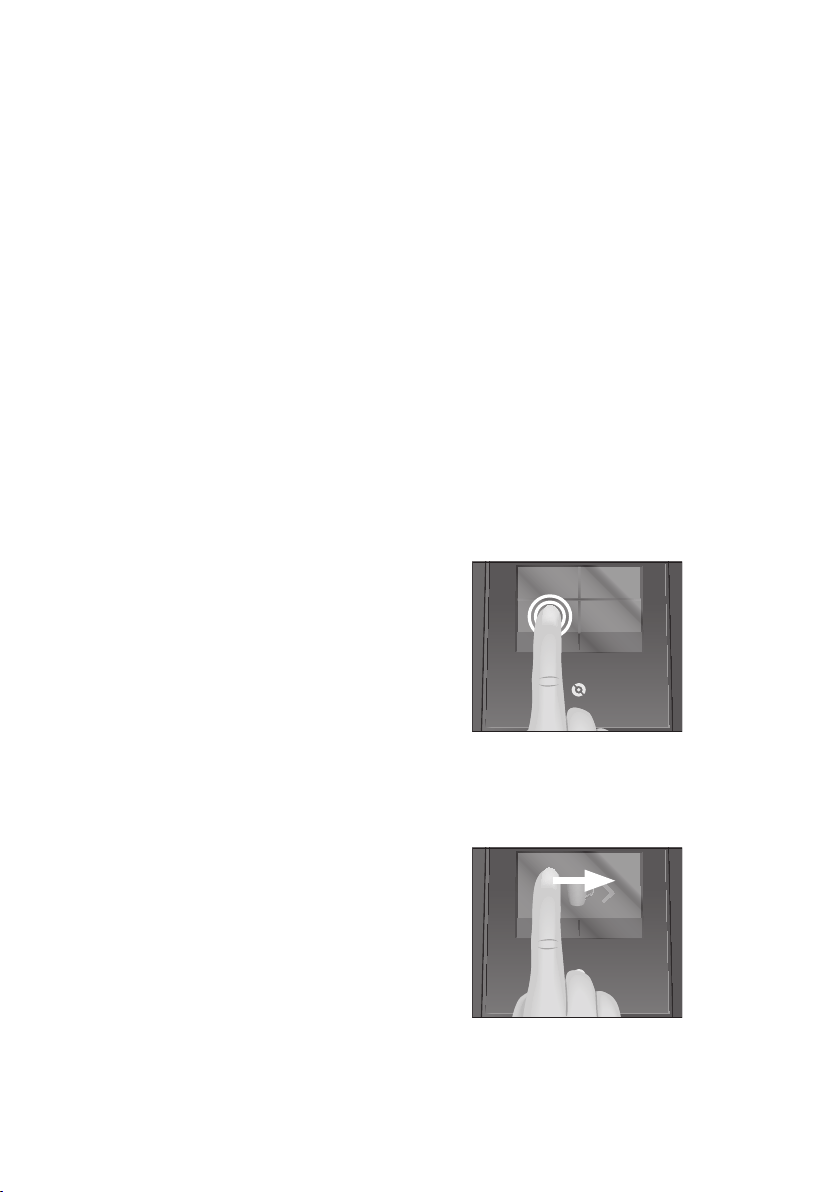
Your IMPRESSA features an intuitive touchscreen
display. There are two ways of operating the
touchscreen display:
U
Touch
Touch the display with your fi nger, for example
to start coff ee preparation or undertake
various settings in programming mode.
U
Slide
Move your fi nger from left to right (or vice
versa) across the touchscreen display to select
a speciality coff ee in the product selector view.
c
Espresso

41
1 Preparing and using for the first time
pt
es
nl
it
fr
ru
en
de
Setting up the machine
When setting up your IMPRESSA, please note the
following:
U
Place the IMPRESSA on a horizontal surface
that is not sensitive to water.
U
Choose a spot for your IMPRESSA which
protects the machine against overheating.
Ensure that the ventilation slots are not
covered.
Filling the bean container
The bean container has an aroma preservation
cover. This will ensure that your coffee beans retain
their aroma for longer.
CAUTION
Coffee beans which have been treated with
additives (e.g. sugar), ground coffee or freeze-dried
coffee will damage the grinder.
T Only use untreated coffee beans to fill the
bean container.
T Remove the aroma preservation cover.
T Remove any dirt or foreign objects from
inside the bean container.
T Fill the bean container with coffee beans and
close the aroma preservation cover.
First-time use
When using the machine for the first time, you can
choose whether you want to operate IMPRESSA
with or without the CLARIS Blue filter cartridge. If
the water hardness is 10°dH or more, we recom-
mend using the filter cartridge. If you do not know
the hardness of your water, you can find this out
first (see Chapter 1 ‘Preparing and using for the first
time – Determining the water hardness’).
J WARNING
If the machine is operated with a defective mains
cable, there is a danger of potentially fatal electric
shock.
T Never use a machine which is damaged or
has a defective mains cable.
Precondition:The bean container has been filled.
T Insert the mains plug into a power socket.
T Press the On/Off button Q to switch the
IMPRESSA on.
The display shows the languages you can
choose from.
E To display more languages, touch
‘>’
(bottom right).
T Touch the language you want, e.g.
‘English’.
‘Saved’ appears briefly on the display to
confirm the setting.
‘Use filter’, the box ‘Active’ lights up green.
E Now decide whether you want to operate
your IMPRESSA with or without a CLARIS
Blue filter cartridge.
First-time use with filter cartridge
activation
CAUTION
Milk, sparkling mineral water or other liquids can
damage the water tank or the machine.
T Only fill the water tank with fresh, cold water.
T Touch
‘Save’.
‘Saved’ appears briefly on the display.
‘Insert filter’
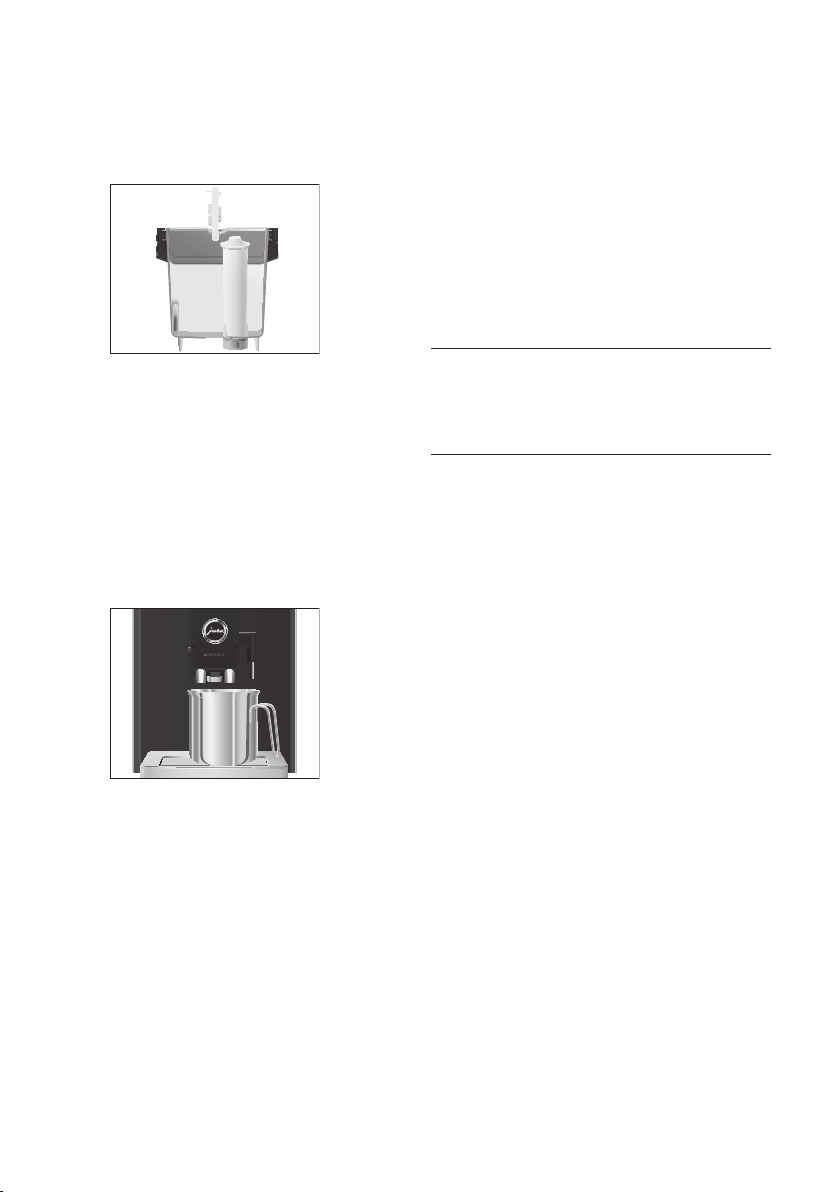
T Remove the water tank.
42
1 Preparing and using for the first time
T Open the filter holder and insert the filter
cartridge into the water tank, exerting slight
pressure.
T Close the filter holder. It will click into place
audibly.
E After two months, the filter will cease to
work. Set the date on the date plate on the
filter holder in the water tank.
T Fill the water tank with fresh, cold water and
reinsert the tank.
T Place a receptacle (at least 300 ml) under the
hot-water spout and the dual spout.
T Touch
‘Next’.
‘Filter is being rinsed’, water flows out of the
hot-water spout.
E The water may be slightly discoloured. This
is not harmful to health and does not affect
the taste.
Rinsing of the filter stops automatically after
approximately 300ml.
‘Welcome to JURA’
‘System is filling’
, the system fills up with
water. Water flows out of the hot-water
spout and the dual spout. The operation
stops automatically.
9
‘Machine is heating’
‘Machine is rinsing’
, the machine rinses. The
operation stops automatically. Your
IMPRESSA is ready for use.
E The display shows the products you can
prepare.
First-time use without filter cartridge
activation
CAUTION
Milk, sparkling mineral water or other liquids can
damage the water tank or the machine.
T Only fill the water tank with fresh, cold water.
T Touch
‘Inactive’.
T Touch
‘Save’.
‘Saved’ appears briefly on the display.
‘Water hardness’
E If you do not know the hardness of your
water, you must find this out first (see
Chapter 1 ‘Preparing and using for the first
time – Determining the water hardness’).
T Touch
‘<’ or ‘>’ to adjust the water
hardness.
T Touch
‘Save’.
‘Saved’ appears briefly on the display.
‘Fill water tank’
T Remove the water tank and rinse it with cold
water.
T Fill the water tank with fresh, cold water and
reinsert the tank.
‘Welcome to JURA’
‘System is filling’
, the system fills up with
water. Water flows out of the hot-water
spout and the dual spout. The operation
stops automatically.
‘Machine is rinsing’, the machine rinses.
The operation stops automatically. Your
IMPRESSA is ready for use.
E The display shows the products you can
prepare.
43
1 Preparing and using for the first time
pt
es
nl
it
fr
ru
en
de
Determining the water hardness
You can find out what the water hardness is by
using the Aquadur® test strip supplied as standard.
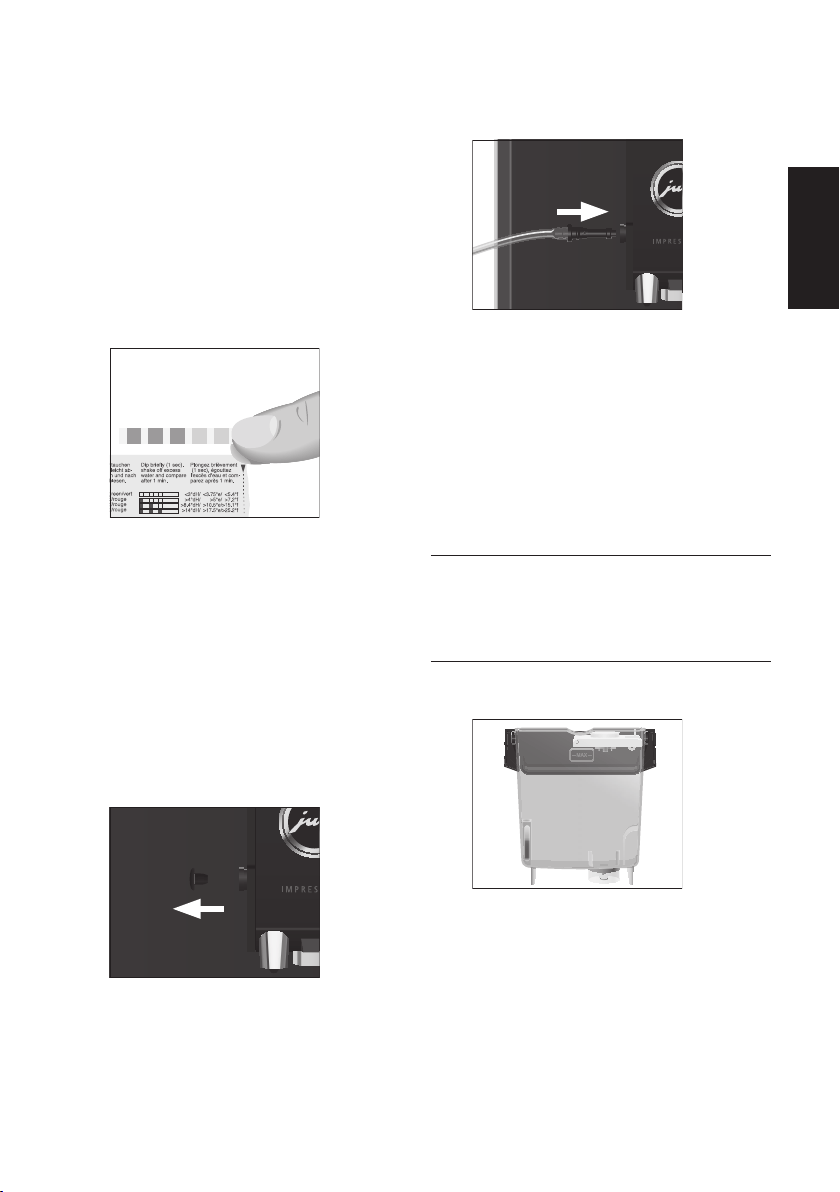
T Hold the test strip briefly (for 1 second)
under flowing water. Shake off the water.
T Wait for about one minute.
T You will then be able to read the degree of
water hardness from the discolouration of
the Aquadur® test strip and the description
on the packaging.
You can now adjust the water hardness.
Connecting milk
Your IMPRESSA creates fine, creamy, feather-light
milk foam with a perfect consistency. The most
important requirement for frothing milk is a milk
temperature of 4–8°C. We would therefore
recommend using a milk cooler or a vacuum milk
container.
T Remove the protective cover from the dual
spout.
T Connect the milk pipe to the dual spout.
T Connect the other end of the milk pipe to a
milk container or immerse it in a milk
carton.
Filling the water tank
Daily maintenance of the machine and hygiene
when handling milk, coffee and water are key to a
perfect coffee result in the cup every time. You
should therefore change the water daily.
CAUTION
Milk, sparkling mineral water or other liquids can
damage the water tank or the machine.
T Only fill the water tank with fresh, cold water.
T Remove the water tank and rinse it with cold
water.
T Fill the water tank with fresh, cold water and
reinsert the tank.

44
2 Preparation
2 Preparation
E You can stop preparation of a speciality
coffee, speciality coffee with milk or hot
water at any time. To do this, touch
‘Cancel’.
E After a speciality coffee is selected and
during grinding, the coffee strength is
briefly displayed. You can change the
coffee strength by touching the display
(
‘<’ or ‘>’). The next time you prepare
this product, this coffee strength setting
will be used.
E During preparation you can change the
amount of water by touching
‘<’ or ‘>’.
This setting is not saved.
E You can follow the current status of
preparation on the display.
Coffee tastes best served hot. A cold porcelain cup
cools the beverage – and impairs the taste. We
therefore recommend prewarming the cups. The
full coffee aroma can develop only in prewarmed
cups. You can purchase a JURA cup warmer from
your specialised dealer.
Ways of preparing a beverage
The IMPRESSA offers various ways of preparing a
speciality coffee, milk foam or hot water:
U
Preparation using the start screen: Simply
touch the desired product on the display (start
screen).
The following products are displayed as stan-
dard on the start screen:
U
‘Cappuccino’
U
‘Latte macchiato’
U
‘Espresso’
U
‘Coffee’
U
Preparation using the product selector view:
Only some of the products you can prepare
are shown on the start screen. As soon as you
touch the
‘^’ box (bottom left), more
products are displayed in a product selector
view.
Move your fi nger from left to right (or vice
versa) across the touchscreen display until
the desired product is displayed. Then touch
‘Prepare’ to start preparation.
The following additional products are shown
in the product selector view:
U
‘Ristretto’
U
‘2 ristretti’
U
‘2 espressi’
U
‘2 coffees’
U
‘Hot water’
U
‘Milk foam’
U
‘Latte Macchiato Doppio’
U
‘Cappuccino doppio’
E The product selector view disappears
automatically after 10seconds if no
preparation is started.
E You have the option of replacing the four
products on the start screen with your
personal favourites (see Chapter 4 ‘Perma-
nent settings in programming mode –
Replacing products on the start screen’).
Please note that the descriptions provided in
the following sections always refer to the
default settings.
Ristretto, espresso and coffee
Example:Proceed as follows to prepare one coffee.
Precondition:The start screen is displayed.
T Place a cup under the coffee spout.
T Touch
‘Coffee’.
Preparation starts. The preset amount of
water for coffee flows into the cup.
Preparation stops automatically. Your
IMPRESSA is once more ready for use.
2 ristretti, 2 espressi and 2 coffees
There are several ways of preparing two speciality
coffees.
U
When preparing a single product:
U
As soon as you start preparing a single
product,
‘2x’ is displayed in the bottom right
of the display. Touch
‘2x’ to prepare the
double product.

45
2 Preparation
pt
es
nl
it
fr
ru
en
de
U
Using the product selector view:
U
In the product selector view, move your
finger from left to right (or vice versa) across
the touchscreen display until the required
double product
‘2 ristretti’, ‘2 espressi’ or
‘2 coffees’ is displayed. Then touch ‘Prepare’.
Example:Proceed as follows to prepare two
coffees (using product selector view).
Precondition:The start screen is displayed.
T Place two cups under the coffee spout.
T Touch the
‘^’ box (bottom left).
T Move your finger from left to right (or vice
versa) across the touchscreen display until
‘2 coffees’ is displayed.
T Touch
‘Prepare’.
Coffee preparation starts.
E Please note that when two speciality coffees
are prepared, the second is prepared
immediately after the first.
The preset amount of water for coffee flows
into the cups. Preparation stops automati-
cally. Your IMPRESSA is once more ready for
use.
Latte macchiato and Cappuccino
Your IMPRESSA can prepare a latte macchiato or
cappuccino at the touch of a button. There is no
need to move the glass or cup.
Example:Proceed as follows to prepare one latte
macchiato.
Precondition:The start screen is displayed. Milk is
connected to the dual spout.
T Place a glass under the dual spout.
T Touch
‘Latte macchiato’.
‘Latte macchiato’, the milk foam is prepared.
Preparation stops automatically when the
preset amount of milk is reached.
E There is a short interval (20 seconds) while
the hot milk separates from the milk foam.
This allows the typical layers of a latte
macchiato to form.
Coffee preparation starts. The preset
amount of water flows into the glass.
Preparation stops automatically. Your
IMPRESSA is once more ready for use.
To make sure the dual spout always works
properly, you must rinse and clean it regularly
(see Chapter 5 ‘Maintenance – Cleaning the milk
system’).
Latte macchiato doppio and Cappuccino
doppio
‘Doppio’ is Italian for ‘double’. When you prepare
a latte macchiato doppio or a cappuccino doppio,
two espressi are dispensed one after the other
directly into the hot milk foam. The result is an
extra full-bodied and aromatic speciality coffee.
The amount of water and milk foam used for a
latte macchiato doppio and cappuccino doppio
cannot be changed. The amount of milk foam
is the same as for a ‘standard’ latte macchiato or
cappuccino. The two espressi are prepared with
half the amount of water programmed for latte
macchiato and cappuccino.
Permanently setting the amount of water
for the cup size
It is easy to permanently adjust the amount of
water for all single products and hot water
according to the cup size. Adjust the amount once
as shown in the following example. Every time you
prepare a drink in the future, this amount will be
dispensed.
The permanent settings for adapting the amount
of water to the cup size for all speciality coffees
and hot water follow this model.
Example:Proceed as follows to permanently set
the amount of water for one coffee.
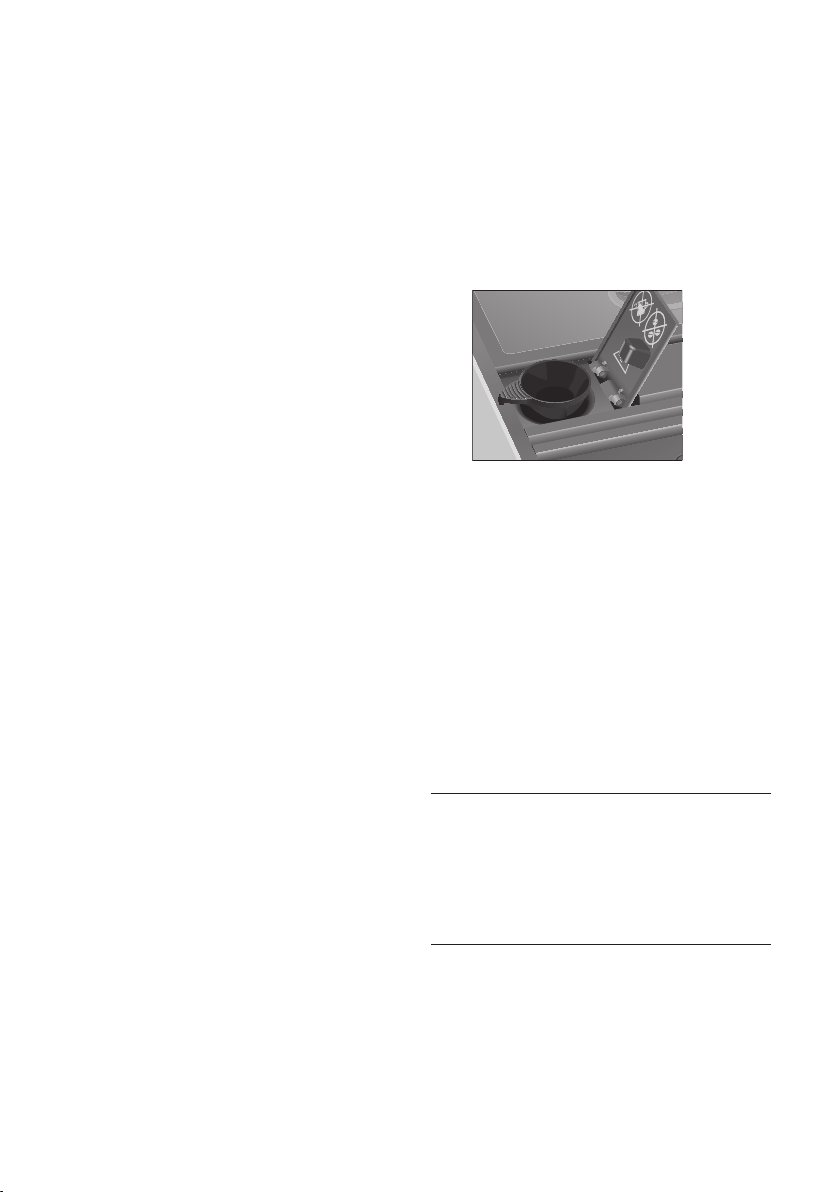
Precondition:The start screen is displayed.
T Place a cup under the coffee spout.
46
2 Preparation
T Touch the ‘Coffee’ box for about 2 seconds
until
‘Enough coffee?’ appears.
Preparation starts and the coffee flows into
the cup.
T Touch
‘Save’ as soon as there is sufficient
coffee in the cup.
Preparation stops.
‘Saved’ appears briefly on
the display. The set amount of water for one
coffee is permanently stored. Your IMPRESSA
is once more ready for use.
E You can alter this setting at any time by
repeating the above procedure.
E The amount can be permanently adjusted to
the cup size for the products shown in the
product selector view too. Move your finger
across the display until the desired product
is displayed. Then touch
‘Prepare’ for about
2 seconds until
‘Enough coffee?’ appears.
Ground coffee
You can choose to use a second coffee variety, for
example decaffeinated coffee, with the filter funnel
for ground coffee.
E Never add more than one level measuring
spoon of ground coffee.
E It is not possible to prepare two ristretti, two
espressi or two coffees with ground coffee.
E Use ground coffee which is not ground too
finely. Very fine coffee can block up the
system so that the coffee only comes out in
drips.
E If you did not fill the machine with a
sufficient amount of ground coffee,
‘Not
enough ground coffee’
is displayed and the
IMPRESSA stops the operation.
E The desired speciality coffee must be
prepared within approximately one minute
after filling with the ground coffee.
Otherwise the IMPRESSA stops the operation
and is once more ready for use.
Example:Proceed as follows to prepare one
espresso using ground coffee.
T Place an espresso cup under the coffee
spout.
T Open the powder chute cover.
‘Please add ground coffee’
T Fit the filler funnel for ground coffee on the
powder chute.
T Place one level measuring spoon of ground
coffee into the filler funnel.
T Close the cover of the powder chute.
The start screen is displayed.
T Touch
‘Espresso’.
Preparation starts. The preset amount of
water for espresso flows into the cup.
Preparation stops automatically. Your
IMPRESSA is once more ready for use.
Adjusting the grinder
You can adjust the grinder on a continuous scale to
suit the degree of roast of your coffee.
CAUTION
If you adjust the consistency of grind when the
grinder is not operating, the grinder adjustment
switch could be damaged.
T Only adjust the consistency of grind when
the grinder is running.
The consistency of grind is correct if the coffee
flows regularly from the coffee spout. In addition a
fine, thick crema forms.
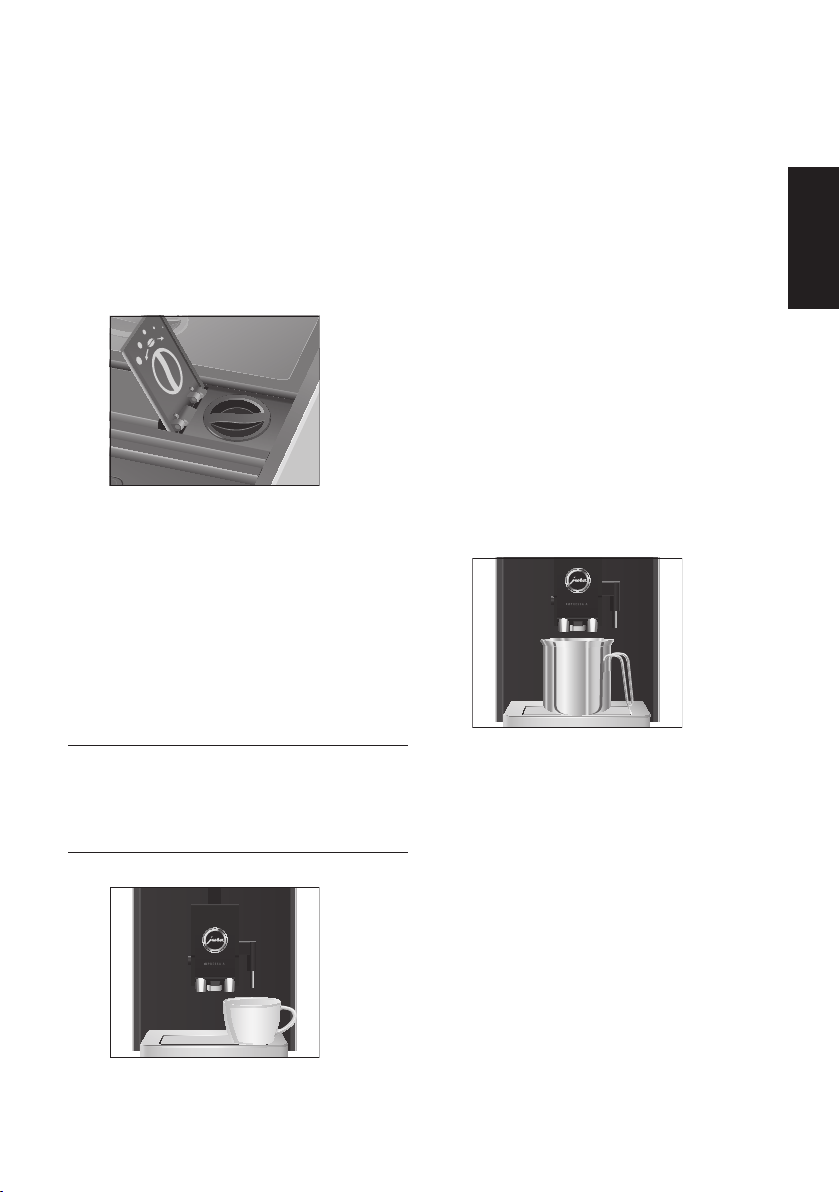
Example:Proceed as follows to change the
consistency of grind during the preparation of an
espresso.
47
3 Daily operation
pt
es
nl
it
fr
ru
en
de
T Place a cup under the coffee spout.
T Open the cover of the grinder adjustment
switch.
T Touch
‘Espresso’.
The coffee strength is briefly displayed.
The grinder starts up.
T Turn the grinder adjustment switch to the
desired position while the grinder is
running.
The espresso is prepared and the consist-
ency of grind is adjusted.
T Close the cover of the grinder adjustment
switch.
E Please note that the new consistency of
grind only takes effect when the second
beverage is prepared.
Hot water
J CAUTION
There is a danger of scalding from hot water
splashes.
T Avoid direct contact with the skin.
T Place a cup under the hot-water spout.
9
T Touch ‘^’ (bottom left) to go to the product
selector view.
T Move your finger from left to right (or vice
versa) across the touchscreen display until
‘Hot water’ is displayed.
T Touch
‘Prepare’.
‘Hot water’, hot water flows into the cup.
Preparation stops automatically. Your
IMPRESSA is once more ready for use.
3 Daily operation
Switching on the machine
Daily maintenance of the machine and hygiene
when handling milk, coffee and water are key to a
perfect coffee result in the cup every time. You
should therefore change the water daily.
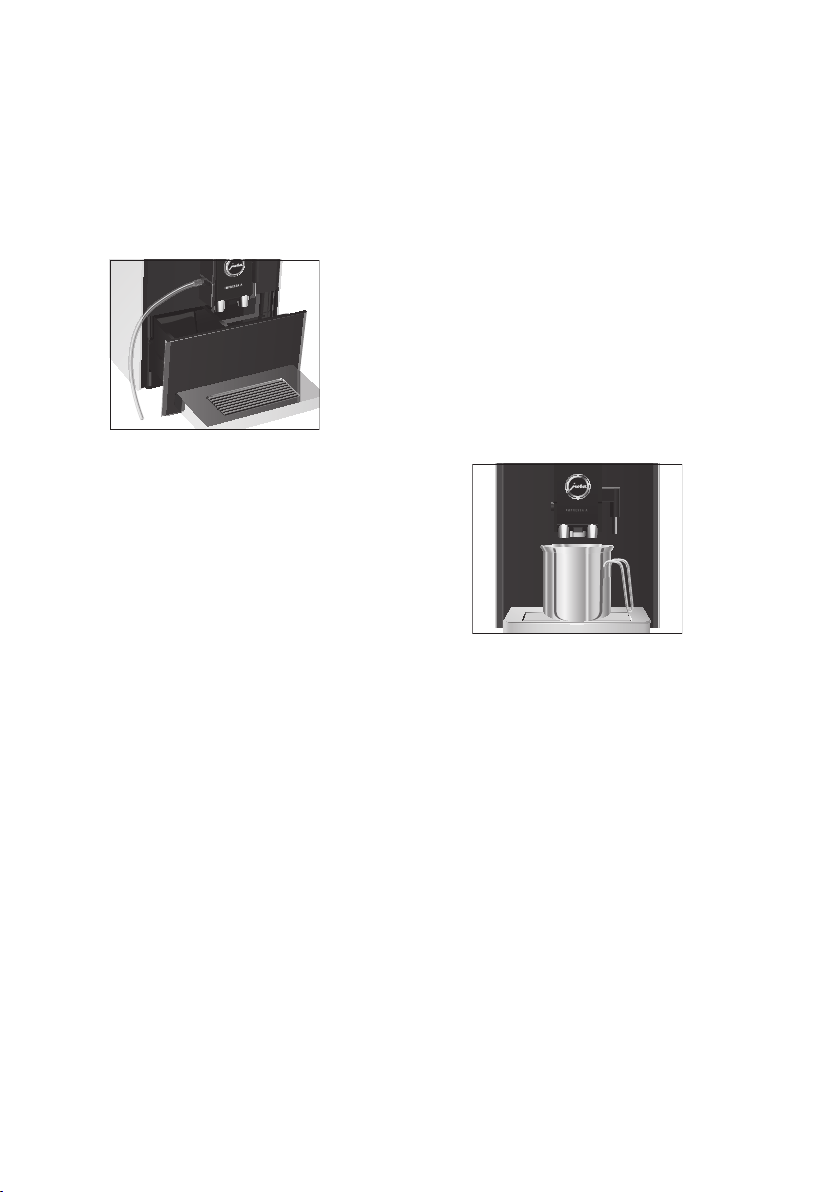
T Place a receptacle under the dual spout.
T Press the On/Off button Q to switch the
IMPRESSA on.
‘Welcome to JURA’
‘Machine is heating’
‘Machine is rinsing’
, the system rinses itself.
The operation stops automatically.
Your IMPRESSA is ready for use.
9
48
3 Daily operation
Daily maintenance
To ensure that you get many years of reliable
service out of your IMPRESSA and to guarantee the
optimum coffee quality, the machine requires daily
maintenance.
T Pull out the drip tray.
T Empty the coffee grounds container and the
drip tray. Rinse them both with warm water.
E Always empty the coffee grounds container
when the machine is switched on. This is
the only way of resetting the coffee grounds
counter.
T Refit the coffee grounds container and the
drip tray.
T Rinse the water tank with clean water.
T Remove the milk pipe and rinse it thor-
oughly under running water.
T Dismantle and rinse the dual spout (see
Chapter 5 ‘Maintenance – Dismantling and
rinsing the dual spout’).
T Wipe the surface of the machine with a
clean, soft, damp cloth (e.g. microfibre
cloth).
Regular maintenance
Carry out the following maintenance actions
regularly or as required:
U
In the interests of hygiene, we recommend
changing the milk pipe on a regular basis
(approximately every 3 months). Replacement
pipes are available from specialised dealers
(JURA original accessory set for frothers).
9
U
Clean the inside of the water tank, e.g. with a
brush. Further information about the water
tank is provided in these instructions for use
(see Chapter 5 ‘Maintenance – Descaling the
water tank’).
U
Traces of milk and coffee may stick to the top
and bottom of the cup grille. If this happens,
clean the cup grille.
Switching off the machine
When the IMPRESSA is switched off, the system is
automatically rinsed if a speciality coffee has been
prepared. If milk has been prepared, the milk
system is rinsed too.
T Place a receptacle under the dual spout.
T Press the On/Off button Q.
‘Machine is rinsing’, ‘Milk system is being
rinsed’
, the system rinses itself. The
operation stops automatically. Your
IMPRESSA is switched off.
E Empty the water tank after switching off.
E When the IMPRESSA is switched off with the
On/Off button, the machine does not
consume standby energy.
9

49
4 Permanent settings in programming mode
pt
es
nl
it
fr
ru
en
de
4 Permanent settings in pro-
gramming mode
Touch the Menu symbol t for about 2 seconds to
view the list of maintenance programmes and
switch to programming mode. The following
settings can be made:
U
Deactivate start screen
U
Water hardness
U
Units
U
Automatic switch-off
U
Language
You can also add your four favourite products to
the start screen (see next chapter).
Replacing products on the start screen
You have the option of replacing the four products
on the start screen with your personal favourites.
Example:Proceed as follows to replace
‘Latte
macchiato’
on the start screen with ‘Latte
Macchiato Doppio’
.
Precondition:The start screen is displayed.
T Touch
‘^’ for about 2 seconds until ‘Replace
which product?’
appears in the bottom right.
T Touch
‘Latte macchiato’.
The product selector view is launched.
T Move your finger from left to right (or vice
versa) across the touchscreen display until
‘Latte Macchiato Doppio’ is displayed.
T Touch
‘Save’.
‘Saved’ appears briefly on the display.
‘Latte Mac. Doppio’ is displayed in the
selected position on the start screen.
Deactivating the start screen
You can deactivate the start screen so that the
product selector view is displayed as standard.
U
‘Start screen’ / ‘Active’
U
The start screen is displayed. You can go to
the product selector view by touching the
‘Rotary Selection’ box.
U
‘Start screen’ / ‘Inactive’
U
The start screen is deactivated. The product
selector view is displayed as standard.
Example:Proceed as follows to deactivate the start
screen.
Precondition:The start screen is displayed.
T Touch the Menu symbol t for about
2 seconds.
T Touch
‘>’ (bottom right) several times
until the programme item
‘Start screen’ is
displayed.
T Touch
‘Start screen’.
‘Start screen’ / ‘Active’
T Touch ‘Inactive’.
T Touch
‘Save’.
‘Saved’ appears briefly on the display.
T Touch the Menu symbol t to exit program-
ming mode.
The product selector view is displayed.
Setting the water hardness
E If you are using the CLARIS Blue filter
cartridge and have activated it, it is not
possible to set the water hardness.
The harder the water is, the more frequently the
IMPRESSA needs to be descaled. It is therefore
important to set the water hardness accurately.
The water hardness can be adjusted on a continu-
ous scale between 1 °dH and 30 °dH.
Precondition:The start screen is displayed.
T Touch the Menu symbol t for about
2 seconds.
T Touch
‘>’ (bottom right).
T Touch
‘>’ several times until ‘Water
hardness’
is displayed.
T Touch
‘Water hardness’.
‘Water hardness’
T Touch ‘<’ or ‘>’ to adjust the water
hardness.
T Touch
‘Save’.
‘Saved’ appears briefly on the display.

50
5 Maintenance
T Touch the Menu symbol t to exit program-
ming mode.
The start screen is displayed.
Automatic switch-off
By instructing your IMPRESSA to automatically
switch itself off, you can cut down your energy
consumption. Your IMPRESSA switches off
automatically after the preset time following the
last action on the machine.
You can set the automatic switch-off to 15minutes,
30minutes or 1–15hours.
Precondition:The start screen is displayed.
T Touch the Menu symbol t for about
2 seconds.
T Touch
‘>’ (bottom right).
T Touch
‘>’ several times until ‘Switch off
after’
is displayed.
T Touch
‘Switch off after’.
‘Switch off after’
T Touch ‘<’ or ‘>’ to change the setting.
T Touch
‘Save’.
‘Saved’ appears briefly on the display.
T Touch the Menu symbol t to exit program-
ming mode.
The start screen is displayed.
Unit for amount of water
You can change the unit for the amount of water
from ‘ml’ to ‘oz’.
Precondition:The start screen is displayed.
T Touch the Menu symbol t for about
2 seconds.
T Touch
‘>’ (bottom right).
T Touch
‘>’ several times until ‘Units’ is
displayed.
T Touch
‘Units’.
‘Units’
T Touch ‘ml’ or ‘oz’ to select the unit for the
amount of water.
T Touch
‘Save’.
‘Saved’ appears briefly on the display.
T Touch the Menu symbol t to exit program-
ming mode.
The start screen is displayed.
Language
In this programme item you can set the language
used by your IMPRESSA.
Example:Proceed as follows to change the
language from
‘English’ to ‘Deutsch’.
Precondition:The start screen is displayed.
T Touch the Menu symbol t for about
2 seconds.
T Touch
‘>’ (bottom right).
T Touch
‘>’ several times until ‘Choose
language’
is displayed.
T Touch
‘Choose language’.
E To display more languages, touch
‘>’
(bottom right).
T Touch
‘Deutsch’.
‘Gespeichert’ appears briefly on the display.
T Touch the Menu symbol t to exit program-
ming mode.
The start screen is displayed.
5 Maintenance
Your IMPRESSA has the following integrated
maintenance programmes:
U
Rinsing the machine (‘Rinse the coffee
system’
)
U
Rinsing the milk system in the dual spout
(
‘Rinse the milk system’)
U
Cleaning the milk system in the dual spout
(
‘Clean the milk system’)
U
Changing the filter (‘Change the filter’) (only if
filter is activated)
U
Cleaning the machine (‘Clean’)
U
Descaling the machine (‘Descale’) (only if filter
is not activated)
51
5 Maintenance
pt
es
nl
it
fr
ru
en
de
E Clean or descale the machine, rinse the milk
system or change the filter when you are
prompted to do so.
E Touch the Menu symbol t for about
2 seconds to view the list of maintenance
programmes. By referring to the bar you can
see which maintenance programme is due.
When the bar is completely filled with red,
your IMPRESSA will prompt you to perform
the appropriate maintenance programme.
E In the interests of hygiene, you should clean
the milk system daily when you have been
preparing milk.
Rinsing the machine
You can initiate the rinse operation manually at
any time.
Precondition:The start screen is displayed.
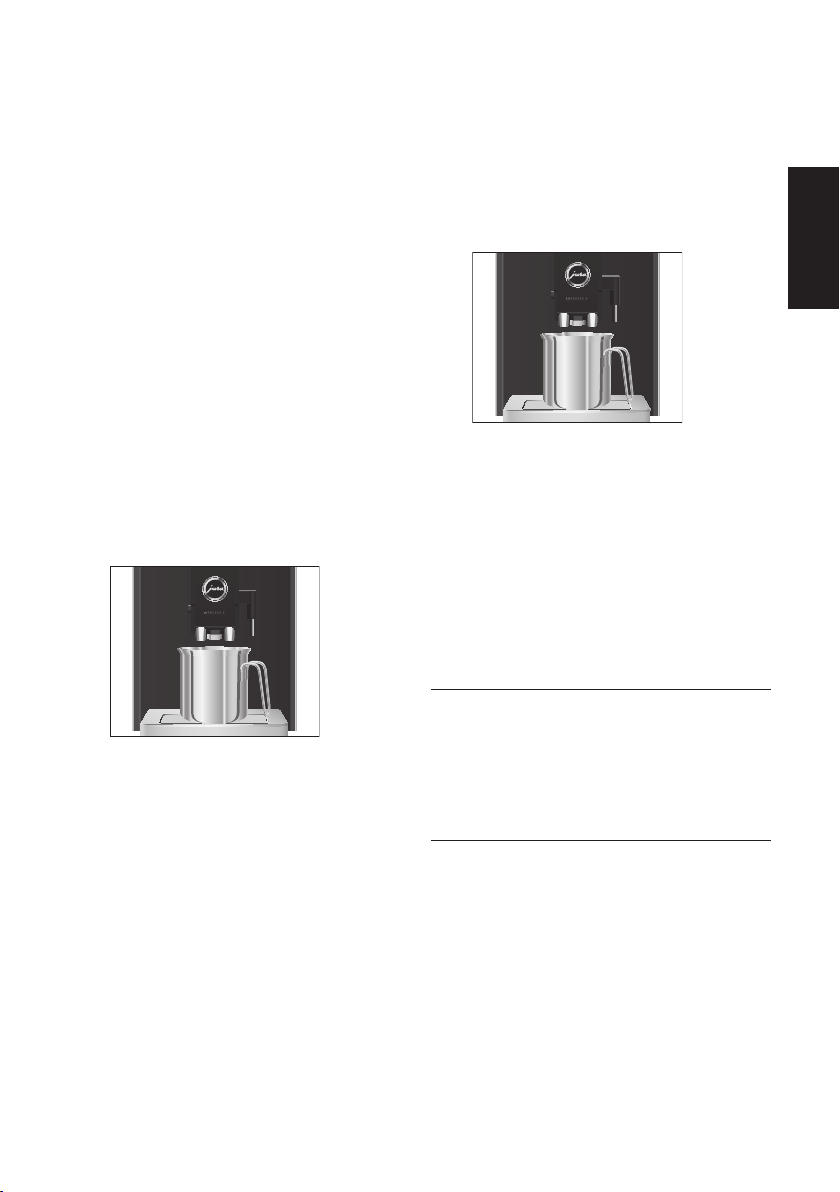
T Place a receptacle under the dual spout.
T Touch
‘c’.
T Touch
‘Rinse the coffee system’.
‘Machine is rinsing’, water flows out of the
dual spout.
The rinse stops automatically. Your
IMPRESSA is once more ready for use.
9
Rinsing the milk system
After milk preparation, the IMPRESSA prompts you
to rinse the milk system.
Precondition:
‘Rinse the milk system’ is displayed.
T Place a receptacle under the dual spout.
T Touch
‘Rinse the milk system’.
‘Milk system is being rinsed’, water flows out
of the dual spout.
The rinse stops automatically. Your
IMPRESSA is once more ready for use.
Cleaning the milk system
To ensure that the milk system in the dual spout
always works properly, you must clean it daily
when you have been preparing milk.
CAUTION
If the wrong cleaning agent is used, the machine
could be damaged and/or traces could be left
behind in the water.
T Use only original JURA maintenance
products.
E JURA milk system cleaner is available from
specialised dealers.
Precondition:The start screen is displayed.
T Touch the Menu symbol t for about
2 seconds.
T Touch
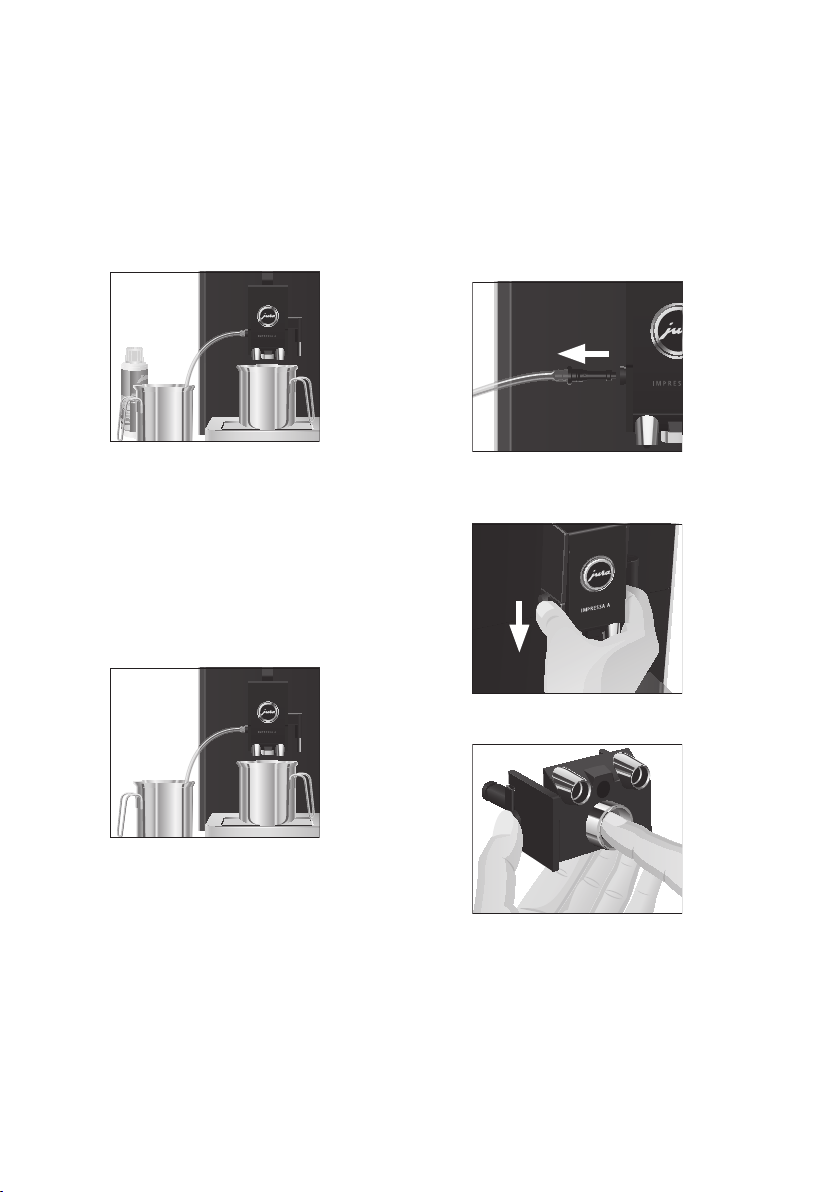
‘Clean the milk system’.
‘Clean the milk system’
T Touch ‘Start’.
9
52
5 Maintenance
T Touch ‘Start’ again.
‘Milk system cleaner’
T Pour 250ml of fresh water into a receptacle
and add one capful of milk system cleaner.
T Immerse the milk pipe in the receptacle.
T Place another receptacle under the dual
spout.
T Touch
‘Next’.
‘Cleaning milk system’, the dual spout and
the pipe are cleaned.
‘Fresh water’
T Rinse the receptacle thoroughly, fill it with
250ml of fresh water and immerse the milk
pipe in the water.
T Empty the other receptacle and place it
under the dual spout again.
T Touch
‘Next’.
‘Cleaning milk system’, the dual spout and
the pipe are rinsed with fresh water.
The operation stops automatically.
‘Milk
system cleaning complete’
appears briefly
on the display.
Your IMPRESSA is once more ready for use.
9
9
Dismantling and rinsing the dual spout
The dual spout must be dismantled and rinsed
daily if milk has been prepared to make sure it
functions perfectly and also in the interests of
hygiene.
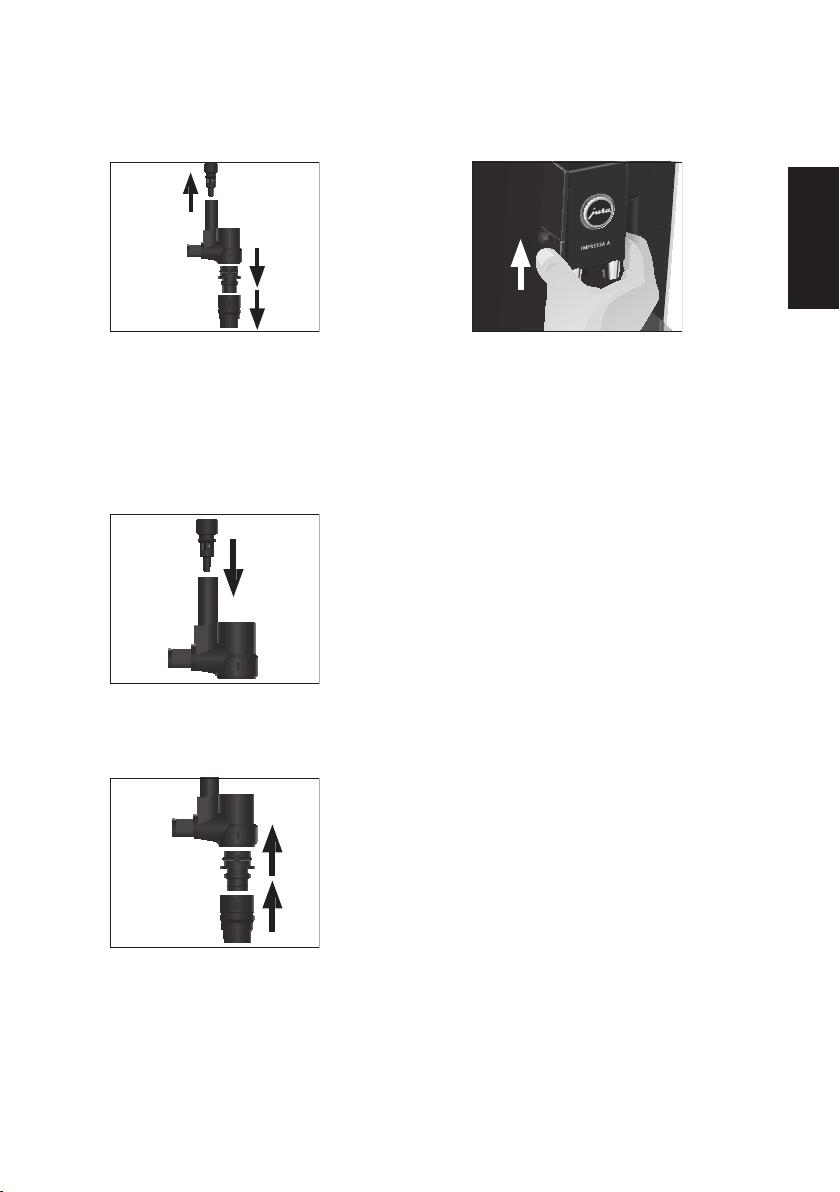
T Remove the milk pipe and rinse it thor-
oughly under running water.
T Press the releasing devices and pull the dual
spout down and off.
T Press the milk system down and take it out.
9
53
5 Maintenance
pt
es
nl
it
fr
ru
en
de
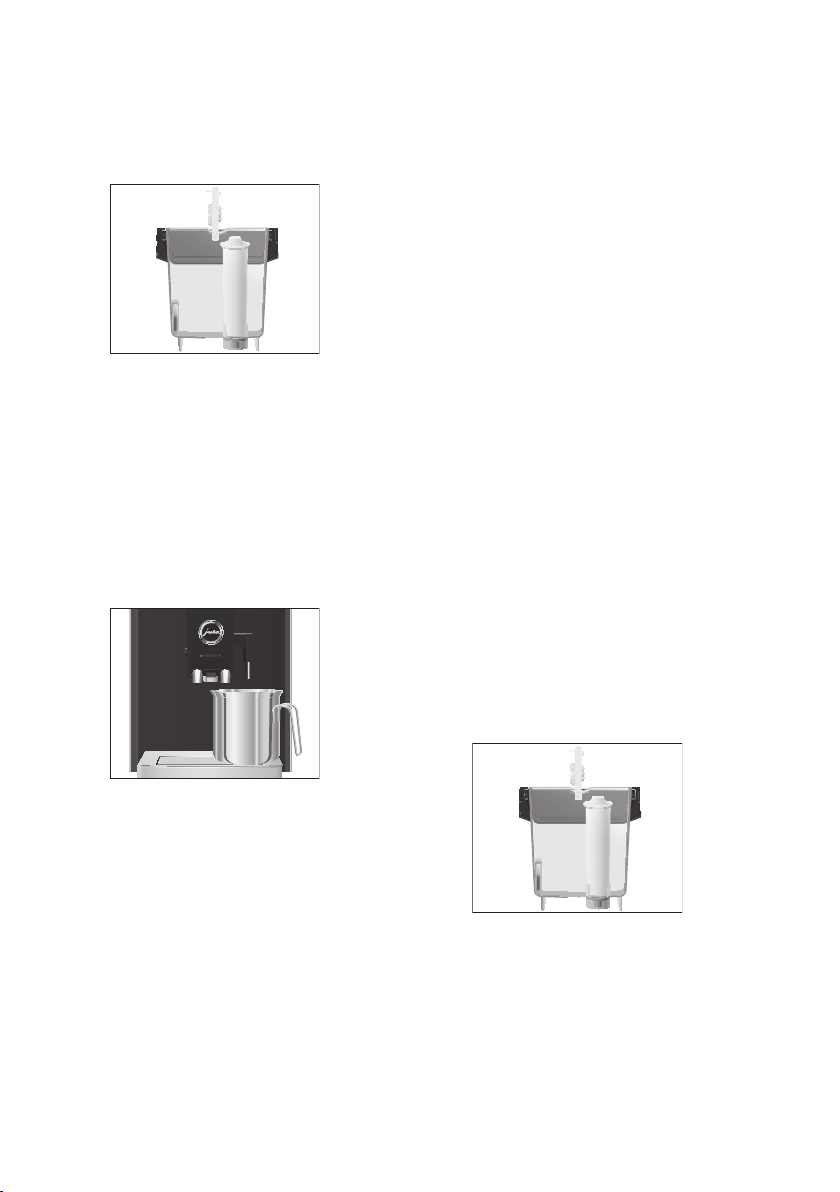
T Dismantle the milk system into its individual
parts.
T Rinse all the parts under running water.
If there are severely dried-on milk residues,
firstly immerse the individual parts in a
solution of 250ml cold water and 1 capful of
JURA milk system cleaner. Then rinse the
parts thoroughly.
T Fit the air intake pipe.
T Reassemble the milk system. When doing
this, note the numbering of the individual
parts.
T Fit the assembled individual parts back in
the dual spout and press it firmly.
1
2
3
T Fit the dual spout on the machine. It will
click into place audibly.
Inserting and activating the filter
Your IMPRESSA no longer has to be descaled if you
are using the CLARIS Blue filter cartridge. If the
water hardness is 10°dH or more, we recommend
using the filter cartridge. If you do not know the
hardness of your water, you can find this out first
(see Chapter 1 ‘Preparing and using for the first
time – Determining the water hardness’).
If you did not activate the filter cartridge the first
time you used the machine, you can do this now
as follows.
E Perform the ‘inserting the filter’ operation
without any interruptions. This will ensure
that your IMPRESSA always produces its
best.
Precondition:The start screen is displayed.
T Touch the Menu symbol t for about
2 seconds.
T Touch
‘>’ (bottom right) several times until
the programme item
‘3/4’ is displayed.
T Touch
‘Use filter’.
‘Use filter’
T Touch ‘Active’.
T Touch
‘Save’.
‘Saved’ appears briefly on the display.
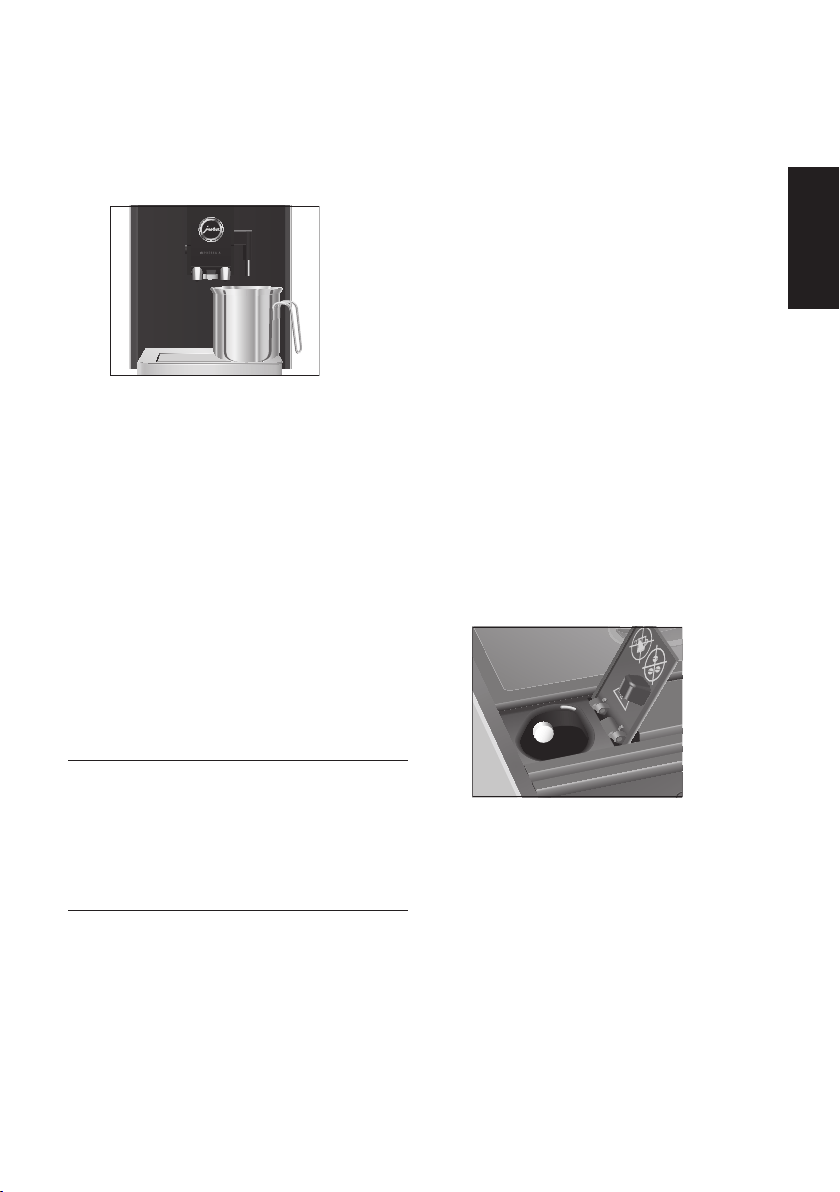
‘Insert filter’
T Remove the water tank.
9
54
5 Maintenance
T Open the filter holder and insert the filter
cartridge into the water tank, exerting slight
pressure.
T Close the filter holder. It will click into place
audibly.
E After two months, the filter will cease to
work. Set the date on the date plate on the
filter holder in the water tank.
T Fill the water tank with fresh, cold water and
reinsert the tank.
T Place a receptacle (at least 300ml) under the
hot-water spout.
T Touch
‘Next’.
‘Filter is being rinsed’, water flows out of the
hot-water spout.
E The water may be slightly discoloured. This
is not harmful to health and does not affect
the taste.
Rinsing of the filter stops automatically after
approximately 300ml.
‘Machine is heating’
Your IMPRESSA is once more ready for use.
9
Changing the filter
E After 50litres of water have flowed through,
the filter will cease to work. Your IMPRESSA
will automatically prompt you to change the
filter.
E After two months, the filter will cease to
work. Set the date on the date plate on the
filter holder in the water tank.
E If the CLARIS Blue filter cartridge is not
activated in programming mode, you will
not be prompted to change the filter.
Precondition:The start screen is displayed. The
box with the Maintenance symbol c lights up red.
T Touch
‘c’.
T Touch
‘Change the filter’.
‘Change the filter’
E If you do not want to start changing the
filter just yet, press the
‘’ button.
T Touch
‘Start’.
T Touch
‘Start’ again.
‘Change the filter’
T Remove and empty the water tank.
T Open the filter holder and remove the old
CLARIS Blue filter cartridge.
T Insert a new CLARIS filter cartridge Blue into
the water tank, exerting slight pressure.
T Close the filter holder. It will click into place
audibly.
E After two months, the filter will cease to
work. Set the date on the date plate on the
filter holder in the water tank.
55
5 Maintenance
pt
es
nl
it
fr
ru
en
de
T Fill the water tank with fresh, cold water and
reinsert the tank.
T Place a receptacle (at least 300ml) under the
hot-water spout.
T Touch
‘Next’.
‘Filter is being rinsed’, water flows out of the
hot-water spout.
E The water may be slightly discoloured. This
is not harmful to health and does not affect
the taste.
Rinsing of the filter stops automatically after
approximately 300ml.
‘Machine is heating’
Your IMPRESSA is once more ready for use.
Cleaning the machine
After 180preparations or 80switch-on rinses, the
IMPRESSA will prompt you to clean it.
CAUTION
If the wrong cleaning agent is used, the machine
could be damaged and/or traces could be left
behind in the water.
T Use only original JURA maintenance
products.
E The cleaning programme lasts approxi-
mately 20 minutes.
E Do not interrupt the cleaning programme.
The quality of cleaning will be impaired if
you do so.
E JURA cleaning tablets are available from
specialised dealers.
9
Precondition:The start screen is displayed. The
box with the Maintenance symbol c lights up red.
T Touch
‘c’.
T Touch
‘Clean’.
‘Clean’
E If you do not want to start cleaning just yet,
press the
‘’ button.
T Touch
‘Start’.
T Touch
‘Start’ again.
‘Empty grounds’
T Empty the drip tray and coffee grounds
container and put them back into the
machine.
‘Press the menu button’
T Touch the Menu symbol t.
‘Machine is being cleaned’
The operation is interrupted, ‘Add cleaning
tablet’
.
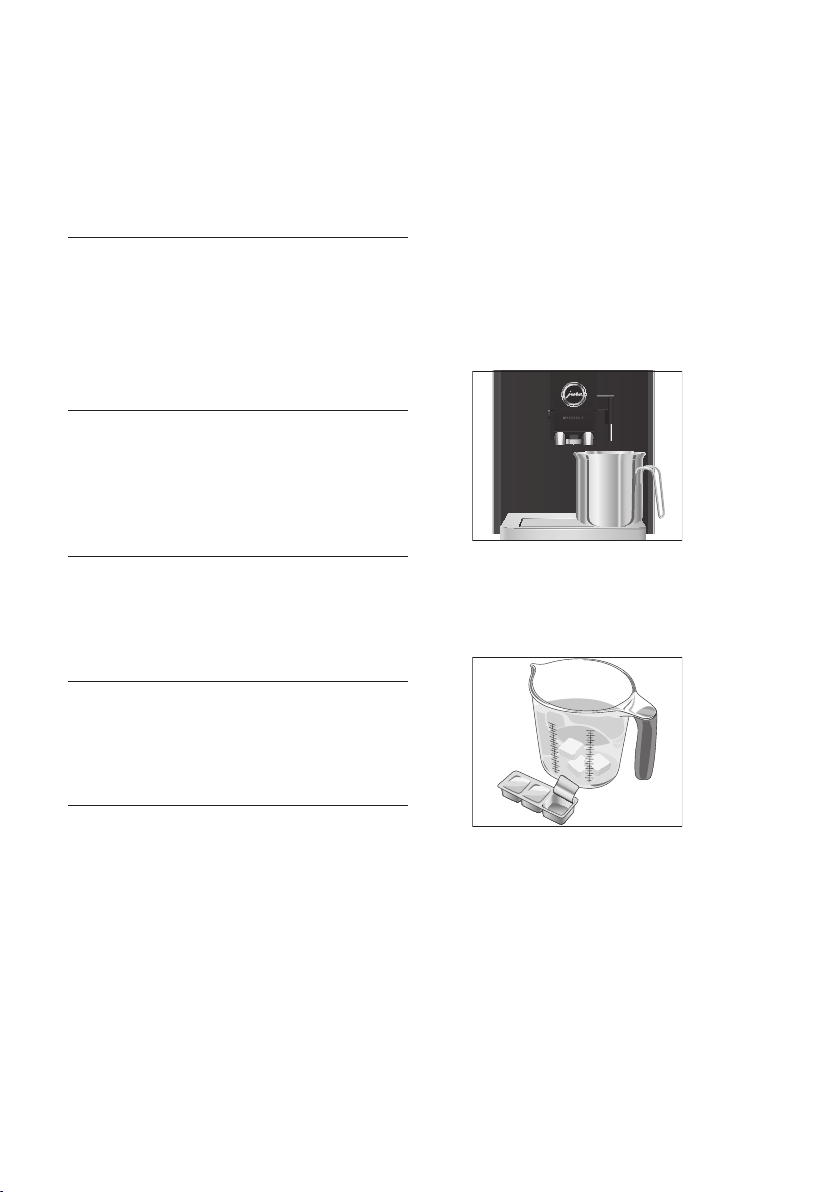
T Open the cover of the filler funnel for ground
coffee.
T Insert a JURA cleaning tablet into the filler
funnel.
T Close the cover of the filler funnel.
‘Press the menu button’
T Touch the Menu symbol t.
‘Machine is being cleaned’
‘Empty grounds’
T Empty the drip tray and coffee grounds
container and put them back into the
machine.
Cleaning is now complete. Your IMPRESSA is
once more ready for use.
56
5 Maintenance
Descaling the machine
The IMPRESSA builds up deposits of limescale over
time and automatically prompts you to descale it
when necessary. The degree of calcification
depends on the hardness of your water.
J CAUTION
If the descaling agent comes into contact with the
skin or eyes, this can cause irritation.
T Avoid contact with the skin or eyes.
T Rinse off the descaling agent with clean
water. Should you get any descaling agent in
your eye, see a doctor.
CAUTION
If the wrong descaling agent is used, the machine
could be damaged and/or traces could be left
behind in the water.
T Use only original JURA maintenance
products.
CAUTION
If the descaling operation is interrupted, there may
be damage to the machine.
T Allow the descaling programme to run to
the end.
CAUTION
If the descaling agent comes into contact with
sensitive surfaces (e.g. marble), damage cannot be
ruled out.
T Clean up any splashes immediately.
E The descaling programme lasts approxi-
mately 45minutes.
E JURA descaling tablets are available from
specialised dealers.
E If you use a CLARIS Blue filter cartridge and
this is activated, you will not be prompted to
descale.
Precondition:The start screen is displayed. The
box with the Maintenance symbol c lights up red.
T Touch
‘c’.
T Touch
‘Descale’.
‘Descale’
E If you do not want to start descaling just yet,
press the
‘’ button.
T Touch
‘Start’.
T Touch
‘Start’ again.
‘Empty drip tray’
T Empty the drip tray and coffee grounds
container and put them back into the
machine.
‘Agent in tank’
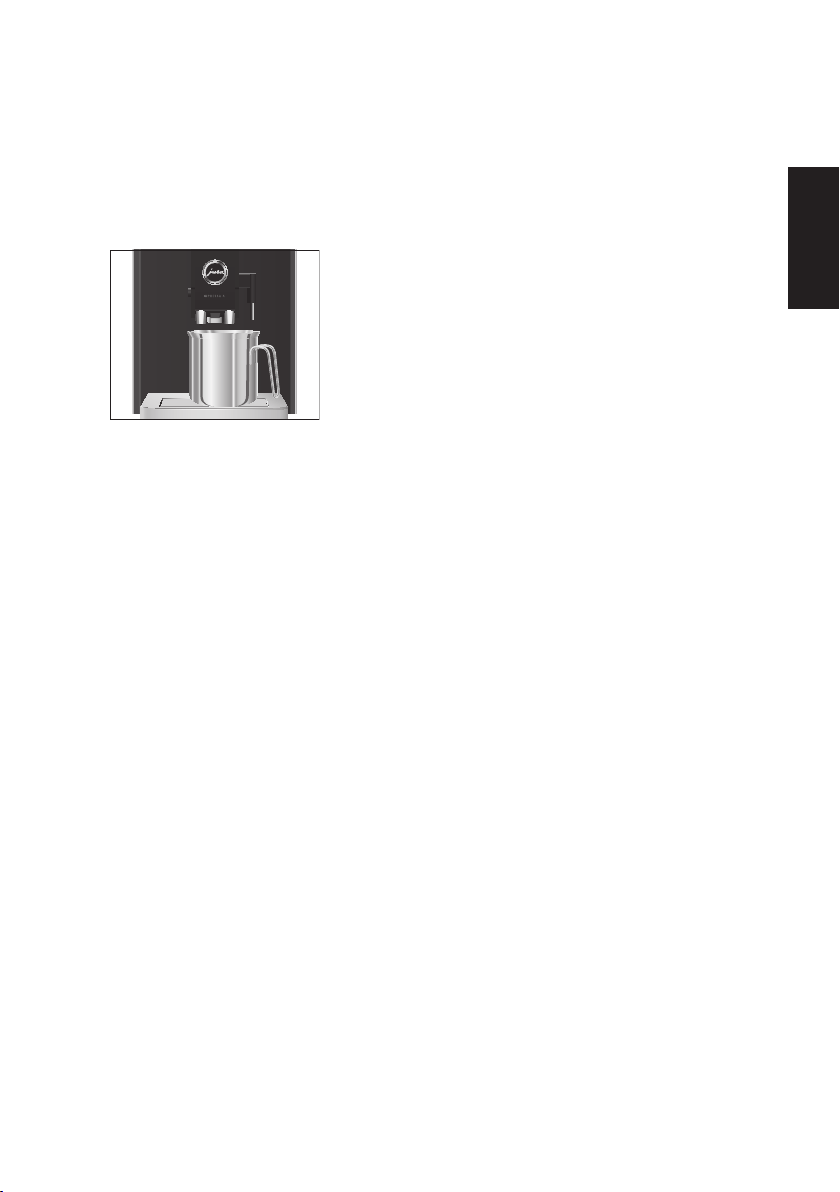
T Place a receptacle under the hot-water
spout.
T Remove and empty the water tank.
T Completely dissolve 3JURA descaling tablets
in a receptacle holding 500ml of water. This
may take several minutes.
T Pour the solution into the empty water tank
and insert it into the machine.
‘Press the menu button’
T Touch the Menu symbol t.
‘Machine is being descaled’, water flows out
of the hot-water nozzle repeatedly.
The operation is interrupted,
‘Empty drip
tray’
.
T Empty the receptacle.
9
57
5 Maintenance
pt
es
nl
it
fr
ru
en
de
T Empty the drip tray and coffee grounds
container and put them back into the
machine.
‘Fill water tank’
T Place a receptacle under the dual spout and
the hot-water spout.
T Remove the water tank and rinse it
thoroughly.
T Fill the water tank with fresh, cold water and
reinsert the tank.
‘Press the menu button’
T Touch the Menu symbol t.
‘Machine is being descaled’, water flows out
of the dual and hot-water spout.
‘Machine is rinsing’, water flows out of the
dual spout.
The operation stops automatically,
‘Empty
drip tray’
.
T Empty the drip tray and coffee grounds
container and put them back into the
machine.
Descaling is now complete. Your IMPRESSA
is once more ready for use.
E If the descaling operation stops unexpect-
edly, rinse the water tank thoroughly.
9
Cleaning the bean container
Coffee beans may be covered with a slight oil film
which remains on the walls of the bean container.
These traces may negatively affect the coffee
result. For this reason clean the bean container
from time to time.
Precondition:
‘Fill bean container’ is displayed.
T Switch the machine off with the On/Off
button Q.
T Remove the aroma preservation cover.
T Clean the bean container with a soft, dry
cloth.
T Fill the bean container with coffee beans and
close the aroma preservation cover.
Descaling the water tank
Limescale deposits may form in the water tank.
To ensure correct function of the machine, descale
the water tank from time to time.
T Remove the water tank.
T If you use a CLARIS Blue filter cartridge,
remove this.
T Completely fill the water tank and dissolve
3 JURA descaling tablets in it.
T Leave the water tank with the descaling
solution for several hours (e.g. overnight).
T Empty the water tank and rinse it thor-
oughly.
T If you use a CLARIS Blue filter cartridge,
insert this again.
T Fill the water tank with fresh, cold water and
reinsert the tank.
58
6 Display messages
6 Display messages
Message Cause/Result Action
‘Fill water tank’ The water tank is empty. You
cannot prepare any products.
T Fill the water tank (see Chapter 1 ‘Preparing
and using for the first time – Filling the water
tank’).
‘Empty grounds’ The coffee grounds container is
full. You cannot prepare any
products.
T Empty the coffee grounds container and
the drip tray (see Chapter 3 ‘Daily operation –
Daily maintenance’).
‘Empty drip tray’ The drip tray is full. You cannot
prepare any products.
T Empty the coffee grounds container and
the drip tray (see Chapter 3 ‘Daily operation –
Daily maintenance’).
‘Tray missing’ The drip tray and coffee grounds
container are not fitted correctly
or not fitted at all. You cannot
prepare any products.
T Fit the coffee grounds container and the
drip tray.
‘Fill bean
container’
The bean container is empty.
You cannot prepare any products.
T Fill the bean container (see Chapter 1
‘Preparing and using for the first time –
Filling the bean container’).
‘Beancover is not
fitted’
The aroma preservation cover for
the bean container is not fitted or
not fitted correctly.
TFit the aroma preservation cover correctly.
‘Rinse the milk
system’
, the box
with the
Maintenance
symbolc lights
up red.
The IMPRESSA is prompting you
to rinse the milk system.
Touch the box with the Maintenance
symbol c to start rinsing the milk system.
The box with the
Maintenance
symbol c lights
up red.
The IMPRESSA is prompting
you to perform a maintenance
programme.
Touch the box with the Maintenance
symbol c to view the list of maintenance
programmes. By referring to the bar you can
see which maintenance programme is due.
When the bar is completely filled with red,
your IMPRESSA will prompt you to perform
the appropriate maintenance programme.
‘Not enough
ground coffee’
There is insufficient ground coffee
in the machine; the IMPRESSA
stops the operation.
T The next time you prepare a beverage, add
more ground coffee (see Chapter 2 ‘Prepara-
tion – Ground coffee’).
‘Too hot’ The system is too hot to start a
maintenance programme.
Wait a few minutes until the system has
cooled down.

59
7 Troubleshooting
pt
es
nl
it
fr
ru
en
de
7 Troubleshooting
Problem Cause/Result Action
Insufficient foam is
produced when the milk
is frothed, or milk sprays
from the dual spout.
The dual spout is dirty.
T Clean the milk system in the dual spout
(see Chapter 5 ‘Maintenance – Cleaning
the milk system’).
T Dismantle and rinse the dual spout (see
Chapter 5 ‘Maintenance – Dismantling
and rinsing the dual spout’).
Coffee only comes out
in drips when it is being
prepared.
Coffee or ground coffee has
been ground too finely and is
blocking the system. The
same filter cartridge may have
been used several times or the
water hardness set incorrectly
in the programming mode.
T Put the grinder on a coarser setting or
use coarser ground coffee(see Chapter 2
‘Preparation – Adjusting the grinder’).
TPerform descaling(see Chapter 5
‘Maintenance – Descaling the machine ’).
Water hardness cannot
be adjusted.
The CLARIS Blue filter
cartridge is activated.
T Deactivate the filter cartridge in
programming mode.
‘Fill water tank’ is
displayed although the
water tank is full.
The water tank float is
trapped.
TDescale the water tank(see Chapter 5
‘Maintenance – Descaling the water
tank’).
Grinder is making a very
loud noise.
There are foreign objects in
the grinder.
T Contact customer support in your
country(see Chapter 11 ‘JURA contact
details/ Legal information’).
‘ERROR2’ or ‘ERROR5’ is
displayed.
If the machine was exposed to
the cold for a long period of
time, heating is disabled for
safety reasons.
T Warm the machine at room tempera-
ture.
Other
‘ERROR’ messages
are displayed.
–
T Contact customer support in your
country(see Chapter 11 ‘JURA contact
details/ Legal information’).
E If you were unable to solve the problem,
contact customer support in your coun-
try(see Chapter 11 ‘JURA contact details/
Legal information’).

60
8 Transport and environmentally friendly disposal
8 Transport and environmentally
friendly disposal
Transport/ Emptying the system
In order to protect the IMPRESSA from frost during
transport, the system must be emptied.
Precondition:The start screen is displayed.
T Touch the ‘Rotary Selection’ box.
The product selector view is launched.
T Move your finger from left to right (or vice
versa) across the touchscreen display until
‘Hot water’ is displayed.
T Touch
‘Prepare’.
‘Hot water’, water flows out of the hot-water
spout.
T Remove and empty the water tank.
Water will flow out of the hot-water spout
until the system is empty.
‘Fill water tank’
T Switch the machine off with the On/Off
button Q.
Your IMPRESSA is switched off.
Disposal
Please dispose of old machines in an environmen-
tally neutral way.
H
Old machines contain valuable, recyclable
materials which should be recycled. Please
therefore dispose of old machines via suitable
collection systems.
9 Technical data
Voltage 220–240V~, 50Hz
Power 1450W
Conformity mark
A S
Pump pressure static, max. 15bar
Holding capacity of
water tank (without
filter)
1.1l
Holding capacity of bean
container
125g
Holding capacity of
coffee grounds container
Approx. 10 servings
Cable length approx. 1.1m
Weight approx. 10.9kg
Dimensions (W×H×D) 23.9 × 32.3 × 44.5cm
Information for testers (repeat test in accordance
with DIN VDE 0701-0702): The central grounding
point (CGP) is located on the underside of the
machine, on the right and at the back.

61
10 Index
pt
es
nl
it
fr
ru
en
de
10 Index
A
Addresses 64
Aroma preservation cover
Bean container with aroma preservation
cover 36
Automatic switch-off 50
B
Bean container
Bean container with aroma preservation
cover 36
Cleaning 57
Filling 41
Bus bar
Technical data 60
Button
On/Off button 37
C
Cappuccino 45
Cappuccino doppio 45
Cappuccino frother cleaning
Cleaning the milk system 51
Cappuccino frother rinsing
Rinsing the milk system 51
Central grounding point 60
CLARIS Blue filter cartridge
Changing 54
Inserting and activating the filter 53
Cleaning
Bean container 57
Machine 55
Coffee 44
2 coffees 44
Coffee grounds container 36
Consistency of grind
Adjusting the grinder 46
Grinder adjustment switch 37
Contact details 64
Cup grille 36
Customer support 64
D
Descaling
Machine 56
Water tank 57
Display
Touch display 37, 40
Display messages 58
Disposal 60
Double product 44
Drip tray 36
Dual spout
Dismantling and cleaning 52
Height-adjustable dual spout 36
E
Emptying the system 60
Errors
Troubleshooting 59
Espresso
2 espressi 44
Espresso 44
F
Filling
Bean container 41
Water tank 43
Filter
Changing 54
Inserting and activating the filter 53
First-time use 41
With filter cartridge activation 41
Without filter cartridge activation 42
G
Grinder adjustment switch 37
Ground coffee 46
Powder chute for ground coffee 37
Grounding point 60
H
Hotline 64
Hot water 47
Hot-water spout 36
I
Instant coffee
Ground coffee 46
Internet 40
J
JURA
Contact details 64
Internet 40

62
10 Index
L
Language 50
Latte macchiato 45
Latte macchiato doppio 45
M
Machine
Cleaning 55
Descaling 56
Regular maintenance 48
Rinsing 51
Setting up 41
Switching off 48
Switching on 47
Mains cable 36
Maintenance 50
Daily maintenance 48
Regular maintenance 48
Menu symbol 37
Menu symbol 37
Messages, display 58
Milk
Connecting milk 43
Milk system
Cleaning 51
Rinsing 51
P
Permanently setting the water for the
cup size 45
Permanent settings in programming mode 49
Powder chute
Powder chute for ground coffee 37
Preparation 44
2 coffees 44
2 espressi 44
2 ristretti 44
At the touch of a button 44
Cappuccino 45
Cappuccino doppio 45
Coffee 44
Espresso 44
Ground coffee 46
Hot water 47
Latte macchiato 45
Latte macchiato doppio 45
Ristretto 44
Two speciality coffees 44
Using the product selector 44
Preparation options 44
Problems
Troubleshooting 59
Product selector view 44
Programming mode 49
Automatic switch-off 50
Deactivating the start screen 49
Language 50
Replacing products on the start screen 49
Setting the water hardness 49
Unit for amount of water 50
Proper use 38
R
Regular maintenance 48
Rinsing
Machine 51
Ristretto 44
2 ristretti 44
Rotary Selection 44
S
Safety 38
Safety information 38
Settings
Permanent settings in programming
mode 49
Setting up
Setting up the machine 41
Short operating instructions 40
Spout
Height-adjustable dual spout 36
Hot-water spout 36
Switching off 48
Switching on 47
Switch-off
Automatic switch-off 50
Symbol description 35
T
Technical data 60
Tel 64
Touchscreen display 37, 40
Transport 60
Troubleshooting 59
Two products 44
U
Unit for amount of water 50
Use, First-time 41

63
10 Index
pt
es
nl
it
fr
ru
en
de
W
Water hardness
Determining the water hardness 43
Setting the water hardness 49
Water tank 36
Descaling 57
Filling 43
Website 40

64
11 JURA contact details/ Legal information
11 JURA contact details/ Legal
information
JURA Elektroapparate AG
Kaffeeweltstrasse 10
CH-4626 Niederbuchsiten
Tel. +41 (0)62 38 98 233
@ You will find additional contact details for
your country at www.jura.com.
Directives
The machine complies with the following
directives:
U
2006/95/EC– Low Voltage Directive
U
2004/108/EC– Electromagnetic Compatibility
U
2009/125/EC– Ecodesign Directive
U
2011/65/EU– RoHS Directive
Technical changes
We reserve the right to make technical changes.
The diagrams used in these instructions for use are
for illustration purposes only and do not represent
the original colours of the machine. Some details
of your IMPRESSA may vary.
Feedback
Your opinion is important to us! Use the contact
link at www.jura.com.
Copyright
The instructions for use contain information which
is protected by copyright. It is not permitted to
photocopy these instructions for use or translate
them into another language without the prior
written consent of JURA Elektroapparate AG.
J71254/A9/en/201402