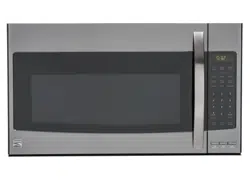
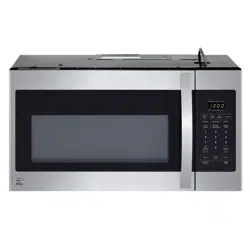
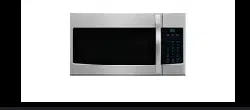
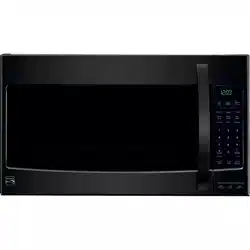
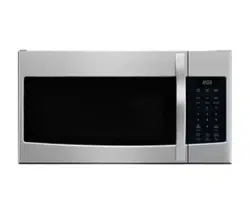
This section discusses the concepts behind microwave cooking. It also shows the basics that you need to know in order to operate your microwave oven. Please read this information before using your oven.
HOW YOUR MICROWAVE OVEN WORKS
Microwave ovens are safe. Microwave energy is not hot. It causes food to make its own heat, and it is this heat that cooks the food.
Microwaves are like TV waves, radio waves, or light waves. You cannot see them, but you can see the results of what they do.
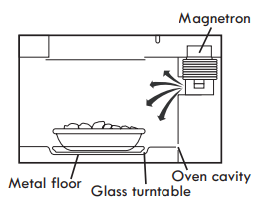
A magnetron in the microwave oven produces microwaves. The microwaves move into the oven where they contact food as it turns on the turntable.
The glass turntable of your microwave oven lets microwaves pass through. The microwaves then bounce off a metal floor, back through the glass turntable, and are absorbed by the food.
Microwaves pass through most glass, paper, and plastics without heating them, so food absorbs the energy. Microwaves bounce off metal containers so food does not absorb the energy.
RADIO INTERFERENC
Using your microwave oven may cause interference to your radio, TV, or similar equipment. When there is interference, you can reduce it or remove it by:
Cleaning the door and sealing surfaces of the oven.
Adjusting the receiving antenna of the radio or television.
Moving the receiver away from the microwave oven.
Plugging the microwave oven into a different outlet so that the microwave oven and receiver are on different branch circuits.
FOR THE BEST COOKING RESULTS
Always cook food for the shortest cooking time recommended. Check to see how the food is cooking. If needed, touch Add 30 Sec while the oven is operating, or after the cooking cycle is over (see the "Add 30 Sec" section).
Stir, turn over, or rearrange the food being cooked about halfway through the cooking time for all recipes. This will help ensure that the food is evenly cooked.
If you do not have a cover for a dish, use wax paper, or microwave-approved paper towels or plastic wrap. Remember to turn back a corner of the plastic wrap to vent steam during cooking.
The metal shelf is used for cooking certain items and should be removed from the microwave oven when not needed. Do not store metal shelf in the microwave oven.
COOKWARE GUIDE
Most heat resistant, nonmetallic cookware is safe for use in your microwave oven. However, to test cookware before using, follow these steps:
Place empty cookware in the microwave oven.
Measure 1 cup (250ml) of water in a glass measuring cup and place it in the oven beside the cookware.
Microwave on 100% power for 1 minute. If the cookware is warm, it should not be used for microwave cooking.
NOTE:
Some dishes (melamine, some ceramic dinnerware, etc.) absorb microwave energy, becoming too hot to handle and slowing cooking time. Cooking in metal containers, not designed for microwave use, could damage the oven, as could containers with hidden metal (twist-ties, foil lining, staples, metallic glaze or trim).
OPERATING SAFETY PRECAUTIONS
Never lean on or allow a child to swing on the door when it is open.
Use hot pads to handle food containers. Microwave energy does not heat containers, but the heat from the food can make the container hot
Do not use newspaper or other printed paper in the oven.
Do not dry flowers, fruit, herbs, wood, paper, gourds, or clothes in the oven.
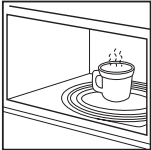
Do not start a microwave oven when it is empty. This may shorten the life-span of the oven. To practice programming, put a container of water in the oven before starting.
Do not try to melt paraffin wax in the oven. Paraffin wax will not melt in a microwave oven because it allows microwaves to pass through it.
Do not operate the microwave oven unless the glass turntable is securely in place and can rotate freely. The turntable can rotate in either direction. Make sure the turntable is correct-side up in the oven. Handle your turntable with care when removing it from the oven to avoid breaking it.
When using a browning dish, the browning dish bottom must be at least 3/16 inch above the turntable. Follow the directions supplied with the browning dish.
Never cook or reheat a whole egg inside the shell. Steam buildup in whole eggs may cause them to burst, and possibly damage the oven. Slice hard-boiled eggs before heating. In rare cases, poached eggs have been known to explode. Cover poached eggs and allow a standing time of one minute before cutting into them.
For best results, stir any liquid several times during heating or reheating. Liquids heated in certain containers (especially containers shaped like cylinders) may overheat. The liquid may splash during or after heating or when adding ingredients (coffee granules, tea bags, etc.). This can harm you or damage the microwave oven.
Microwaves may not reach the center of a roast. The heat spreads from the outer to the center cooked areas, just as in regular oven cooking. This is one of the reasons for letting some foods (for example, roasts or baked potatoes) stand for a while after cooking, or for stirring some foods during the cooking time.
Do not deep fry in the oven. Microwavable utensils are not suitable and it is difficult to maintain appropriate deep-frying temperatures.
Do not overcook potatoes. At the end of the recommended cooking time, potatoes should be slightly firm because they will continue cooking during standing time. After microwaving, let potatoes stand for 5 minutes. They will finish cooking while standing.
ELECTRICAL CONNECTION
If your electric power line or outlet voltage is less than 110 volts, cooking times may be longer. Have a qualified electrician check your electrical system.
SPECIFICATIONS
MICROWAVE OVEN FEATURES
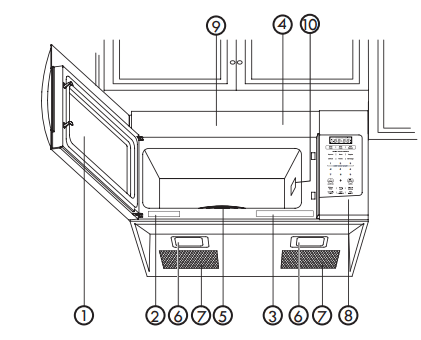
The microwave oven is designed to make your cooking experience as enjoyable and productive as possible. To get you up and running quickly, the following is a list of the oven's basic features:
1. Metal Shielded Window: The shield prevents microwaves from escaping. It is designed as a screen to allow you to view food as it cooks.
2. Model and Serial Number Plate
3. Cooking Guide label
4. Vent Top
5. Glass Turntable:
The turntable reverses rotation each time the microwave oven door is opened and closed.
This helps cook food evenly. Do not operate the microwave oven without the turntable in place.
To Install:
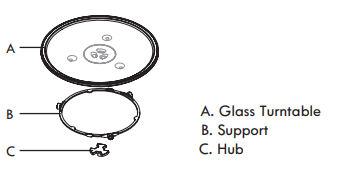
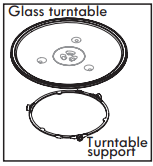
1. Place the support on the oven cavity bottom.
2. Place the glass turntable on the support. Fit the raised, curved lines in the center of the turntable bottom between the three spokes of the hub. The rollers on the support should fit inside the turntable bottom ridge.
6. Cooktop Light
7. Grease Filters: See "Caring for the Filters" section.
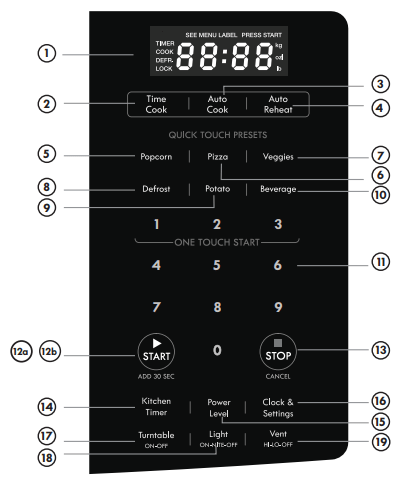
8. Control Panel: Touch the pads on this panel to perform all functions.
9. Charcoal Filter: (behind Vent Top): See "Caring for the Filters" section.
10. Waveguide Cover: DO NOT REMOVE.
NOTE: Not all models come with a charcoal filter.
CONTROL PANEL FEATURES
Your microwave oven control panel lets you select the desired cooking function quickly and easily. All you have to do is touch the necessary Command Pad. The following is a list of all the Command and Number Pads located on the control panel. For more information on these features, see the “Using Your Microwave Oven” section.
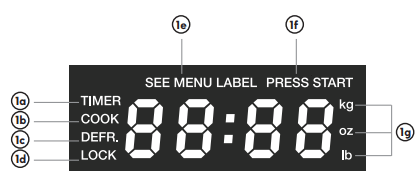
1. Display: The display includes a clock and indicators that show the time of day, cooking time settings, cook powers, quantities, weights and cooking functions selected.
TIMER: Icon displayed when timer is being set or running.
COOK: Icon displayed when starting microwave cooking.
DEFR: Icon displayed when defrosting food
LOCK: Icon displayed in control lock.
SEE MENU LABEL: Icon displayed when the menu label inside the microwave oven needs to be referenced.
PRESS START: Icon displayed when a valid function can be started.
kg, oz, lb: Icon displayed when choosing the weight.
2. Time Cook: Touch this pad, followed by Number Pads, to set a cooking time.
3. Auto Cook: Touch this pad to cook microwavable foods without entering a cook time or power.
4. Auto Reheat: Touch this pad to reheat microwavable foods without entering a cook time or power.
5. Popcorn: Touch this pad to pop one of three bag sizes of popcorn without entering a cook time or power. Remove metal rack before cooking popcorn .
6. Pizza: Touch this pad to reheat one, two or three slices of pizza without entering a cook time or power.
7. Veggies: Touch this pad to cook fresh or frozen vegetables without entering a cook time or power.
8. Defrost: Touch this pad, followed by Number Pads, to thaw frozen meat, poultry, fish by weight.
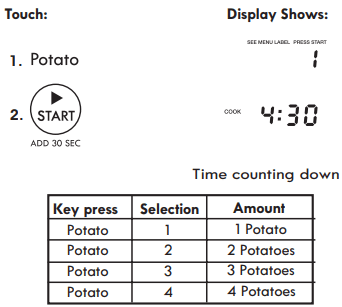
9. Potato: Touch this pad to cook up to four potatoes without entering a cook time or power.
10. Beverage: Touch this pad to heat one cup or two cup sized beverages.
11. Number Pads: Touch number pads to enter time, cook power, quantity, weight, or food category.
12a. START: Touch this pad to start or restart a function.
12b. Add 30 Sec.: Touch this pad to cook for 30 seconds at 100% cook power, or to add extra time to your current cooking cycle.
13. STOP: Touch this pad to erase an incorrect command, cancel a program during cooking, or to clear the Display.
14. Kitchen Timer: Touch this pad to set the kitchen timer.
15. Power level: Touch this pad after the cook time has been set, followed by a Number Pad to set the amount of microwave energy released to cook the food. The higher the number, the higher the microwave power or "cooking speed."
16. Clock & Settings: Touch this pad to enter the correct time of day or set options.
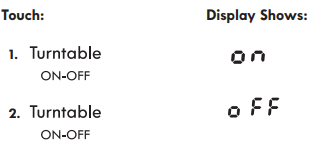
17. Turntable On/Off: Touch this pad to turn on or off the turntable during a cooking cycle. "OFF" or "ON" will appear in the display.
18. Light On/Nite/Off:Touch this pad to turn the light on high, night (low) or off.
19. Vent Hi/Lo/Off: Touch this pad to turn the vent on high, low or off.
Microwave Cooking Tips
Amount of Food
If you increase or decrease the amount of food you prepare, the time it takes to cook that food will also change. For example, if you double a recipe, add a little more than half the original cooking time. Check for readiness and, if necessary, add more time in small increments.
Starting Temperature of Food
The lower the temperature of the food being put into the microwave oven, the longer it takes to cook. Food at room temperature will reheat quicker than food at refrigerator temperature.
Composition of Food
Food with a lot of fat and sugar will heat faster than food containing a lot of water. Fat and sugar will also reach a higher temperature than water in the cooking process.
The more dense the food, the longer it takes to heat. "Very dense" food, like meat, takes longer to heat than lighter, more porous food, like sponge cakes.
Size and Shape
Smaller pieces of food will cook faster than larger pieces. Also, same shaped pieces cook more evenly than differently shaped pieces.
With foods that have different thicknesses,the thinner parts will cook faster than the thicker parts. Place the thinner parts of chicken wings and legs in the center of the dish.
Stirring and Turning Foods
Stirring and turning foods spreads heat quickly to the center of the dish and avoids overcooking at the outer edges of the food.
Covering Food
Cover food to reduce splattering, shorten cooking times, and keep food moist.
You can use any covering that lets microwaves pass through. See "Getting to Know Your Microwave Oven" for materials that microwaves will pass through.
Releasing Pressure in Foods
Several foods (for example: baked potatoes, sausages, egg yolks, and some fruits) are tightly covered by a skin or membrane. Steam can build up under the membrane during cooking, causing the food to burst. To relieve the pressure and to prevent bursting, pierce these foods before cooking with a fork, cocktail pick, or toothpick.
Using Standing Time
Always allow food to stand, either in or out of the oven, after cooking power stops. Standing time after defrosting and cooking allows the temperature to evenly spread throughout the food, improving the cooking results. For inside oven standing time, you can program a "0" power second stage of the cooking cycle. See Two-Stage Cooking
The length of the standing time depends on how much food you are cooking and how dense it is. Sometimes it can be as short as the time it takes to remove the food from the oven and take it to the serving table. However, with a larger, denser food item, the standing time may be as long as 10 minutes.
Arranging Food
For best results, place food evenly on the plate. You can do this in several ways:
If you are cooking several items of the same food, such as baked potatoes, place them in a ring pattern for uniform cooking.
When cooking foods of uneven shapes or thickness, such as chicken breasts, place the smaller or thinner area of the food towards the center of the dish where it will be heated last.
Layer thin slices of meat on top of each other.
When you cook or reheat whole fish, score the skin - this prevents cracking.
Do not let food or a container touch the top or sides of the oven. This will prevent possible arcing. Arcing is a spark that can cause damage to the oven interior.
Using Aluminum Foil
NOTE: Metal containers should not be used in a microwave oven. There are, however, some exceptions. If you have purchased food prepackaged in an aluminum foil container, refer to the instructions on the package.
When using aluminum foil containers, cooking times may be longer because microwaves will only penetrate the top of the food. When using aluminum containers without package instructions, follow these guidelines:
Place the container in a glass bowl and add some water so that it covers the bottom of the container more than 1/4 in. (.60 cm).This ensures even heating of the container bottom.
Always remove the lid to avoid damage to the oven.
Use only undamaged containers.
Do not use containers taller than 3/4 in. (1.9 cm).
The container must be at least half filled.
To avoid arcing, there must be a minimum of 1/4 in. (.60 cm) between the aluminum container and the walls of the oven and also between two aluminum containers.
Always place the container on the turntable.
Shield, with small pieces of aluminum foil, parts of food that may cook quickly; such as wing tips and leg ends of poultry.
Heating food in aluminum foil containers usually takes up to double the time compared to reheating in plastic, glass, china, or paper containers. The time when food is ready will vary depending upon the type of container used.
Let food stand for 2 to 3 minutes after heating so that heat is spread evenly throughout container.
Cooking you should not do in your microwave oven
Do not put canned foods in the oven. Closed glass jars may explode, resulting in damage to the oven.
Do not use the microwave oven to sterilize objects (baby bottles, etc.). It is difficult to keep the oven at the high temperature needed for sterilization.
Using Your Microwave Oven
This section gives instructions for operating each function. Please read this section carefully.
CLOCK & SETTINGS (Control Panel Feature 16)
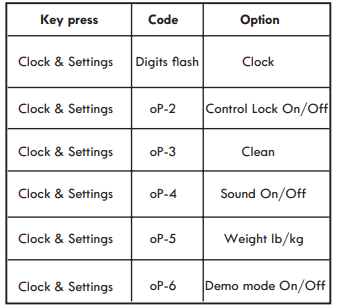
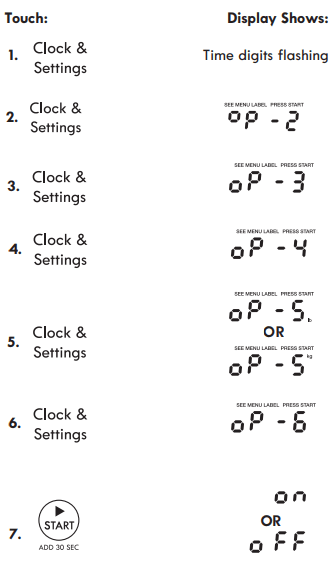
The microwave oven has settings that allow you to customize the operation for your convience. Below is the table showing the various settings. Touch the Clock & Settings key multiple times to scroll to the desired setting function.
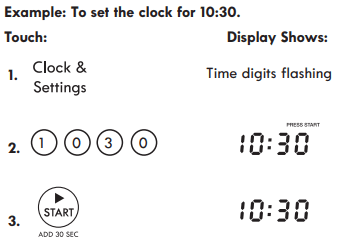
SETTING CLOCK (Control Panel Feature 16)
The clock can be disabled when the microwave is first plugged in and the STOP key is selected.
To re-enable the clock follow clock instructions.
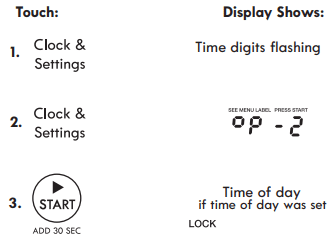
SETTING CONTROL LOCK ON/OFF ( Control Panel Feature 16)
To turn ON Control Lock touch Clock & Settings twice.
To turn OFF the Control Lock, touch Clock & Settings hen touch
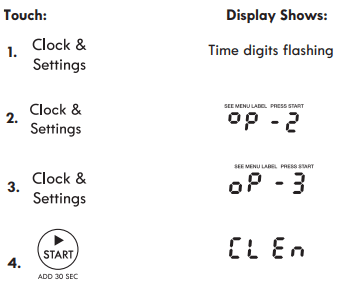
USING CLEAN (Control Panel Feature 16)
To enter Clean mode touch Clock & Settings three times.
This is a preset timed cycle to boil water creating steam to soften soils inside the microwave oven. When the cycle is done remove the water and wipe the inside of the microwave with cloth.
NOTE: Place two cups of water in the microwave oven. To get rid of odors inside the oven add some lemon juice or vinegar into the water.
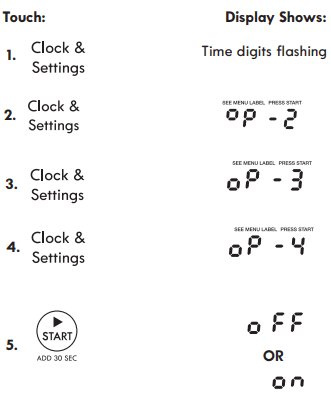
TURNING SOUND ON/OFF (Control Panel Feature 16)
Audible signals are available to guide you when setting and using your oven.
A programming tone will sound each time you touch a pad.
Three tones signal the end of a Kitchen Timer countdown.
Three tones signal the end of a cooking cycle.
Example: To turn audible signal on or off.
When START is pressed and the previous setting was ON then it will be set to OFF. If you want to turn the audible signal back ON you will have to again press Clock & Settings four times and then START.
When the cooking cycle is completed END will be displayed and the audible signal will sound if the sound is turned on.
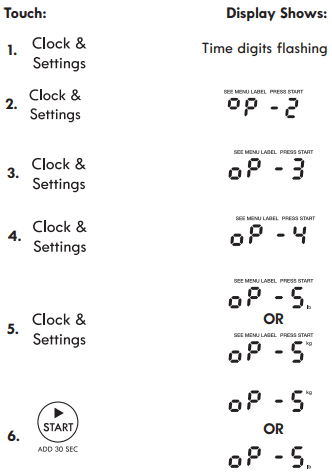
SETTING WEIGHT IB/KG (Control Panel Feature 16)
Example: To toggle weight between pounds & Touch: Display Shows:
If the display shows oP - 5kg, pressing the START button will reset the oven controls to lbs. To return to kg, you will have to again press Clock & Settings five times and then START.
When START is pressed and the previous setting was OFF then it will be set to ON. If you want to turn the demo mode back OFF you will have to again press Clock & Settings six times and then START.
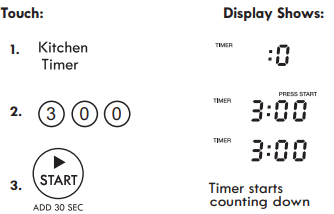
SETTING KITCHEN TIMER (Control Panel Feature 14)
Your microwave oven can be used as a kitchen timer. You can set up to 99 minutes, 99 seconds. The kitchen timer can be used while the microwave oven running
Example: To set for three minutes.
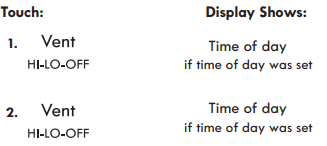
USING VENT FAN (Control Panel Feature 19)
The pad controls the 2-speed vent fan. If the vent fan is OFF the first touch of the Vent pad will turn the fan on High, second touch LOW and third touch OFF.
Example: To set the vent fan speed to LOW from
Turn off fan when desired
NOTE: If the temperature from the range or cooktop below the oven gets too hot, the vent fan will automatically turn on to protect the oven. It may stay on up to an hour to cool the oven. When this occurs, the Vent pad will not turn the fan off.
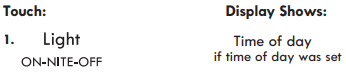
USING COOKTOP LIGHT (Control Panel Feature 18)
The pad controls the cooktop light. If the light is OFF the first touch of the light pad will turn the light ON (high), second touch Nite(low) and third touch OFF.
Example: To set the light for HIGH from the OFF position.
Press Turnta ble On-Off to turn the turntable on or off.
For best cooking results, leave the turntable on. It can be turned off for large dishes.
CAUTION: Sometimes the turntable can become hot to the touch during and after cooking. Do not run the oven empty without food in it.
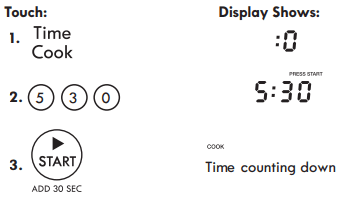
SETTING TIMED COOK (Control Panel Feature 2)
Example: To cook for five minutes, 30 seconds at 100% power
INTERRUPTING COOKING
You can stop the oven during a cycle by opening the door. The oven stops heating and the fan turns off, but the light stays on.
To restart cooking , close the door and Touch.
If you do not want to continue cooking, open the door and touch
USING ONE TOUCH START
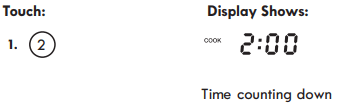
This is a time saving pad that will automatically start cooking 2 seconds after selected. Numeric key 1, 2, or 3 can be touched for a 1 minute, 2 minute or 3 minute automatic start cooking feature.
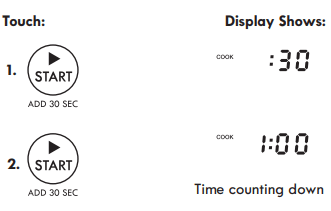
USING ADD 30 SEC. (Control Panel Feature 12)
This is a time-saving pad. It is a simplified feature that lets you quickly set and start microwave cooking at 100% power.
Example: To cook for one minute.
SETTING TIMED COOKING WITH POWER LEVEL
This feature lets you program a specific cook time a nd power. For best results, there are 10 power level settings in addition to HIGH (100%) power. Refer to the "Microwave Power Levels" table.
NOTE: If you do not select a power level, the oven will automatically cook at HIGH (100%) power.
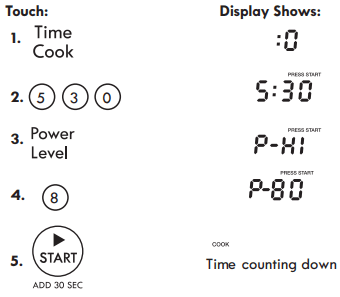
Example: To cook for five minutes, 30 seconds at 80% power.
SETTING TWO-STAGE COOKING
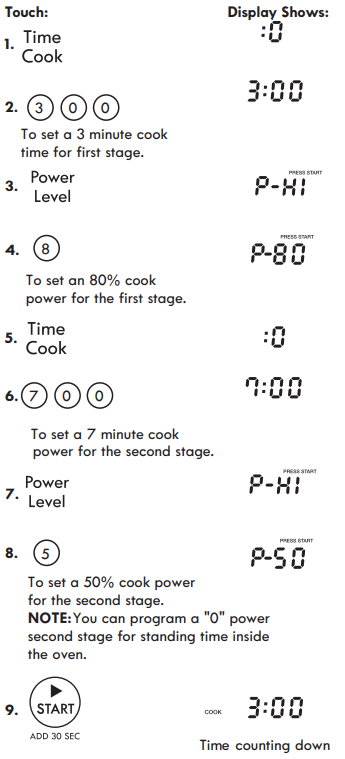
For best results, some recipes call for different power levels during a cook cycle. You can program your oven for two power level stages during the cooking cycle.
Example: To set a 2-stage cook cycle. The first stage is a 3 minute cook time at 80% cook power then a 7 minute cook time at 50% cook power.
MICROWAVE POWER LEVELS
For best results, some recipes call for different cook powers. The lower the cook power, the slower the cooking. Each number from 1 to 9 stands for a different percentage of full cook power.
The following table gives the percentage of cook power each number pad stands for, and the cook power name usually used.
The table also tells you when to use each cook power. Follow recipe or food package instructions if available.
NOTE: Refer to a reliable cookbook for cooking times based on the 1,000 Watt cook power of your microwave oven.
COOK POWER
LEVEL
WHEN TO USE IT
100% of full power
High
Quickly heating convenience foods and foods with high water content, such as soup and beverages.
Cooking tender cuts of meat, ground meat or chicken.
9 = 90% of full power
Heating cream soups.
8 = 80% of full power
Heating rice, pasta, or casseroles.
7 = 70% of full power
Medium- High
Cooking and heating foods that need a Cook Power lower than High (for example,whole fish and meat loaf) or when food is cooking too fast.
Reheating a single serving of food.
6 = 60% of full power
Cooking that requires special care, such as cheese and egg dishes, pudding, and custards.
Finishing cooking casseroles.
5 = 50% of full power
Medium
Cooking ham, whole poultry, and pot roasts.
Simmering stews.
4 = 40% of full power
Melting chocolate.
Heating pastries.
3 = 30% of full power
Medium-Low, Defrost
Manually defrosting precooked and other foods, such as bread, fish, meats and poultry.
2 = 20% of full power
Softening butter, cheese, and ice cream.
1 = 10% of full power
Low
Keeping food warm.
Taking chill out of fruit.
0 = 0% of full power
No ne
Standing time in oven.
USING AUTO DEFROST
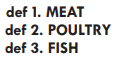
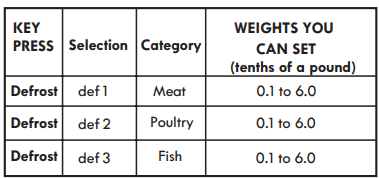
Three defrost sequences are preset in the oven.
The auto defrost feature provides you with the best defrosting method for frozen foods. The cooking guide will show you which defrost sequence is recommended for the food you are defrosting.
For added convenience, the Auto Defrost includes a built-in beep mechanism that reminds you to check, turn over, separate, or rearrange the food in order to get the best defrost results. Three different defrosting levels are provided:
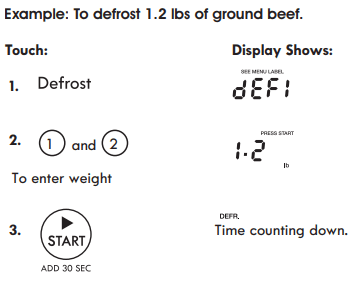
Available weight is 0.1-6.0 lbs
OPERATING TIPS
For best results, remove fish, shellfish, meat, and poultry from its original closed paper or plastic package (wrapper). Otherwise, the wrap will hold steam and juice close to the foods, which can cause the outer surface of the foods to cook.
For best results, roll your ground meat into a ball before freezing. During the DEFROST cycle, the microwave will signal when it is time to turn the meat over. Scrape off any excess frost from the meat and continue defrosting.
Place foods in a shallow container or on a microwave roasting rack to catch drippings.
This table shows food type selections and the weights you can set for each type. For best results, loosen or remove covering on food.
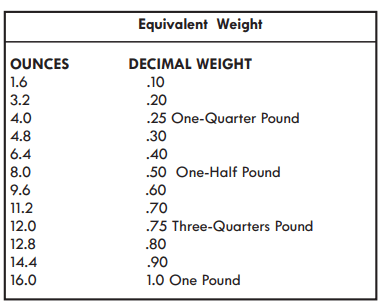
Weight conversion table
You are probably used to measuring food in pounds and ounces that are fractions of a pound (for example, 4 ounces equals 1/4 pound). However, in order to enter food weight in Auto Defrost, you must specify pounds and tenths of a pound.
If the weight on the food package is in fractions of a pound, you can use the following table to convert the weight to decimals.
DEFROSTING TIPS
• When using Auto Defrost, the weight to be entered is the net weight (the weight of the food minus the container).
• Before starting, make sure to remove any and all metal twist-ties that often come with frozen food bags, and replace them with strings or elastic bands.
• Open containers, such as cartons, before placing in the oven.
• Always slit or pierce plastic pouches or packaging.
• If food is foil wrapped, remove foil and place food in a suitable container.
• Slit the skin of skinned food, such as sausage.
• Bend plastic pouches of food to ensure even defrosting.
• Always underestimate defrosting time. If defrosted food is still icy in the center, return it to the microwave oven for more defrosting.
• The length of defrosting time varies according to how solidly the food is frozen.
• The shape of the package affects how quickly food will defrost. Shallow packages will defrost more quickly than a deep block.
• As food begins to defrost, separate the pieces. Separated pieces defrost more easily.
• Use small pieces of aluminum foil to shield parts of food such as chicken wings, leg tips, fish tails, or areas that start to get warm. Make sure the foil does not touch the sides, top, or bottom of the oven. The foil can damage the oven lining.
• For better results, let food stand after defrosting. (For more information on standing time, see the "Microwave Cooking Tips" section).
• Turn over food during defrosting or standing time. Break apart and remove food as required.
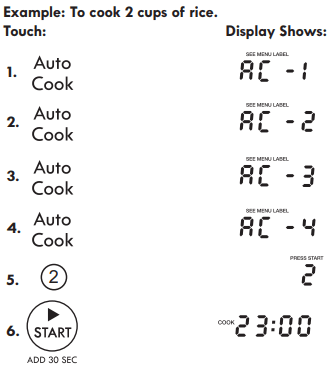
USING AUTO COOK (Control [Panel Feature 3)
Auto Cook provides four preset categories for cooking.
Auto Cook categories are selected by touching the Auto Cook key multiple times to scroll through the Ac-1 to Ac-4 selectons. Once at the desired category selection the quantity of the category item is selected using the numeric keypad
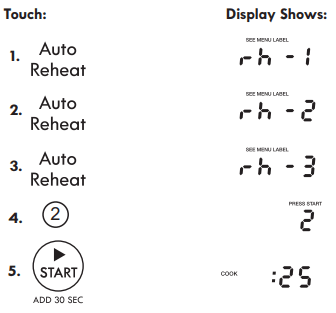
USING AUTO REHEAT (Control Panel Feature 4)
Auto Reheat provides three preset categories for reheating.
Example: To reheat two Rolls or Muffins.
Auto Reheat categories are selected by touching the Auto Reheat key multiple times to scroll through the rh-1 to rh-4 selectons. Once at the desired category selection the quantity of the category item is selected using the numeric keypad.
USING QUICK TOUCH
Your microwave has preprogrammed selections to cook food automatically
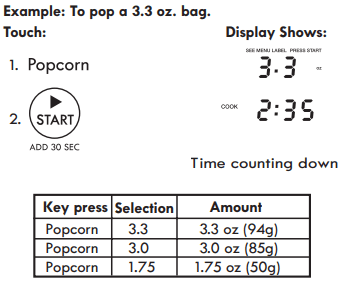
SETTING POPCORN (Control Panel Feature 5)
The Popcorn quick touch pad lets you pop 3.3, 3.0, 1.75 ounce bags of commercially packaged microwave popcorn. Pop only one package at a time. If you are using a microwave popcorn popper, follow manufacturer's instructions.
NOTE: Remove the metal shelf from microwave oven when cooking popcorn. Do not use regular paper bags. Do not re-pop unpopped kernals. Do not pop popcorn in glass cookware.
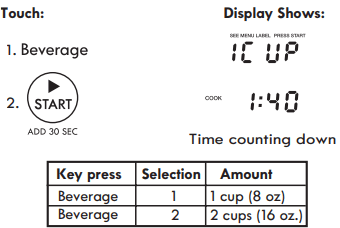
SETTING BEVERAGE (Control Panel Feature 10)
The beverage feature heats 1 cup (8oz) or 2 cup (16oz) sized beverages.
Example: To heat up 1 cup (8 oz.) beverage.
Touch Beverage key repeatedly to switch between 1 Cup and 2 Cup selections.
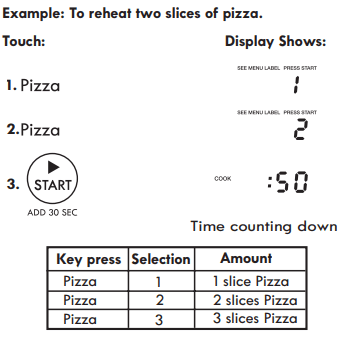
SETTING PIZZA (Control Panel Feature 6)
The Pizza quick touch pad lets you reheat up to three slices of pizza (based on a 5 ounce slice).
NOTE:
Place on a plate and paper towel
Do not cover
Touch Pizza key repeatedly to switch between 1, 2 and 3 slice selections.
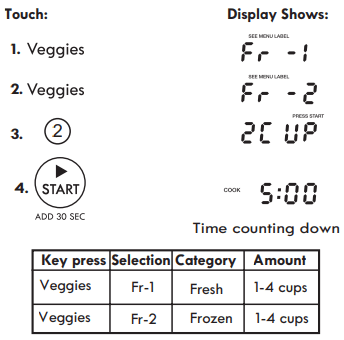
SETTING VEGGIES (Control Panel Feature 7)
The Veggies quick touch pad lets you cook different size fresh and frozen vegetable cups without entering cooking times and power levels.
Example: To cook two cups of Frozen veggies.
Touch Veggie key repeatedly to switch between Fresh and Frozen selections.
SETTING POTATO (Control Panel Feature 9)
The Potato quick touch pad lets you cook potatoes with preset times and cook powers. You can choose from one to four potatoes.
NOTE:
Cooking times are based on an average 8 ounce potato. Before baking, pierce potato with fork several times.
After baking, let stand for five minutes.
Example: To cook one potato.
Touch Potato key repeatedly to switch between 1, 2, 3 and 4 potato selections.
Caring for Your Microwave Oven
In order to ensure that your microwave oven looks good and works well for a long time, you should maintain it properly. For proper care, please follow these instructions carefully.
For interior surfaces:
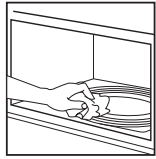
Wash often with warm, sudsy water and a sponge or soft cloth.
Use only mild, nonabrasive soaps or a mild detergent.
Be sure to keep the areas clean where the door and oven frame touch when closed. Wipe well with clean cloth.
Over time, surfaces may stain as a result of food particles splattering during cooking. This is normal.
For stubborn soil
Boil a cup of water in the oven for two to three minutes. Steam will soften the soil.
To get rid of odors inside the oven, boil a cup of water with some lemon juice or vinegar in it.
For exterior surfaces and control panel
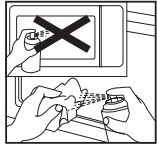
Use a soft cloth with spray glass cleaner. Apply the spray glass cleaner to the soft cloth; do not spray directly on the oven.
NOTE: Abrasive cleansers, steel wool pads, gritty wash cloths, some paper towels, etc.,can damage the control panel and the interior and exterior oven surfaces.
To clean glass turntable and turntable support:
Wash in mild, sudsy water. For heavily soiled areas, use a mild cleanser and scouring sponge.
The glass turntable and turntable support are dishwasher safe.
CARING FOR THE FILTERS
The grease filters should be removed and cleaned often; at least once a month.
NOTE: Models are shipped for recirculating exhaust (To duct air outside reference the Installation Instructions book included with your microwave.). Some models have a disposable charcoal filter installed to help remove smoke and odors. Replacement filters are available from Sears by calling 1-800-4-MY-HOME. The charcoal filter cannot be cleaned and should be replaced every 6 to 12 months.
Grease filters (Part No. 5304478913):
1. Unplug microwave oven or disconnect power.
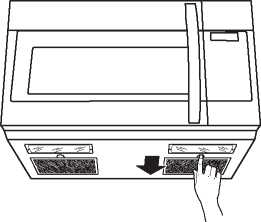
2. To remove grease filters, slide each filter to the side. Pull filters downward and push to the other side. The filter will drop out.
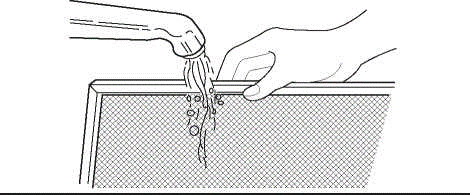
3.Soak grease filters in hot water and a mild detergent. Scrub and swish to remove embedded dirt and grease. Rinse well and shake to dry. Do not clean filters with ammonia, corrosive cleaning agents, such as lye-based oven cleaners, or place them in a dishwasher. The filters will turn black or become damaged.
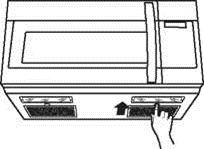
4. To replace grease filters, slide filter in the frame slot on one side of the opening. Push filter upward and push to the other side to lock into place.
5.Plug in microwave oven or reconnect power.
NOTE: Do not operate the hood without the grease filters in place.
Charcoal filters (Part No. 5304464577):
1.Unplug microwave oven or disconnect power.
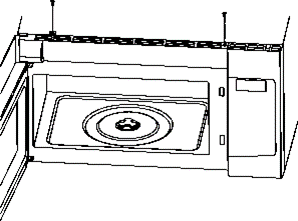
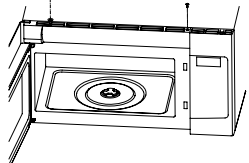
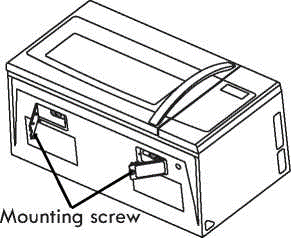
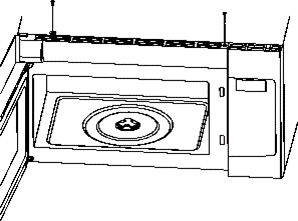
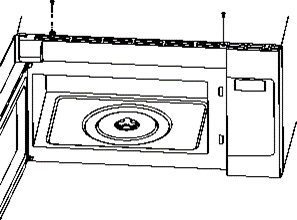
2. Open the microwave door and remove the two vent mounting screws located on top of the microwave using a #1 Phillips screwdriver.
3. Slide the vent left and tip forward. Lift out to remove.
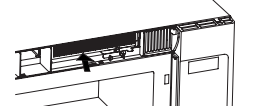
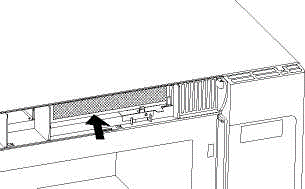
4. Lift the bottom of the charcoal filter. Slide the filter straight out.
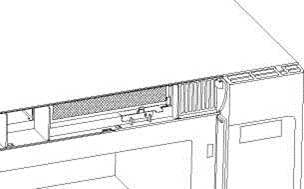
5. Slide a new charcoal filter into place. The filter should rest like the picture shown below.
6. Reinstall the vent by sliding the bottom of the vent into place. Push the vent top into position and slide right into place. Replace the two vent mounting screws located on top of the microwave using a 1 Phillips screwdriver.
7. Close the microwave door. Plug in microwave oven or reconnect power
REPLACING THE COOKTOP AND OVEN CAVITY LIGHTS
The cooktop lights
1. Unplug microwave oven or disconnect power.
2.Remove the bulb cover mounting screw for the specific bulb you want to replace.
3.Replace bulb with candelabra-base 30-watt bulb (Part No. 5304464090) available from Sears by calling 1-800-4-MY-HOME.
4. Plug in microwave oven or reconnect power.
The oven cavity light
1. Unplug microwave oven or disconnect power.
2. Open the microwave door and remove the two vent mounting screws located on top of the microwave using a #1 Phillips screwdriver.
3. Slide the vent left and tip forward, then lift out to remove.
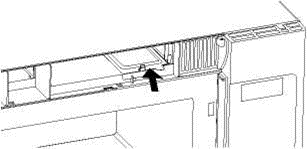
4. Lift the bottom of the charcoal filter. Slide the filter straight out.
5. Lift up the bulb holder.
6.Replace the bulb with a candelabra-base 30-watt bulb (Part No.5304464090) from Sears by calling 1-800-4-MY-HOME.
7. Replace the bulb holder.
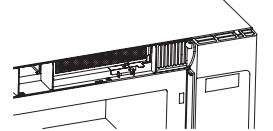
8. Slide the charcoal filter into place. The filter should rest at below shown.
9. Reinstall the vent by sliding the bottom of the vent into place. Push the vent top into position and slide right until it snaps into place. Replace the two vent mounting screws located on top of the microwave using a #1 Phillips screwdriver.
10. Close the microwave door. Plug in microwave oven or reconnect power.
Questions and Answers
QUESTIONS
ANSWERS
Can I operate my microwave oven without the glass turntable or turn the turntable over to hold a large dish?
No. If you remove or turn over the glass turntable, you will get poor cooking results.
Can I use either metal or aluminum pans in my microwave oven?
You can use aluminum foil for shielding (use small, flat pieces), small skewers, and shallow foil trays (if tray is no taller than 3/4 in. [1.9 cm] deep and is filled with food to absorb microwave energy). Never allow metal to touch walls or door.
Is it normal for the turntable to turn in either direction?
Yes. The turntable reverses rotation each time the microwave oven door is opened and closed. This helps cook food evenly.
Sometimes the door of my microwave oven appears wavy. Is this normal?
This appearance is normal and does not affect the operation of your oven.
What are the humming noises that I hear when my microwave oven is operating?
You may hear the sound of the transformer when the magnetron tube cycles on.
Why does the dish become hot when I microwave food in it? I thought that this should not happen.
As the food becomes hot it will conduct the heat to the dish. Be prepared to use hot pads to remove food after cooking.
What does "standing time" mean?
"Standing time" means that after the timed cooking period ends, food should be allowed to stand either inside or outside of the oven to completely finish cooking. Outside oven standing time will allow the oven to be available for other use. For inside oven standing time, you can program a "0" power second stage of the cooking cycle. See Two-Stage Cooking.
Why does steam come out of the air exhaust vent?
Steam is normally produced during cooking. The microwave oven has been designed to vent this steam.
Can I pop popcorn in my microwave oven?
Yes. Use the microwave oven popcorn selection Do not use regular paper bags. Do not re-pop unpopped kernels.
Do not pop popcorn in glass cookware. Remove the metal shelf from microwave oven when cooking popcorn.
Troubleshooting
Most cooking problems often are caused by little things that you can find and fix without tools of any kind. Check the lists below and on the next page before calling for assistance or service. If you still need help, call Sears Service at 1-800-4-MY-HOME.
MICROWAVE OVEN DOES NOT WORK
PROBLEM
CAUSE
Nothing works.
* The power supply cord is not plugged into a grounded 3 prong outlet. (See the "Electrical Requirements "and " Electrical Connection" sections.)
* A household fuse has blown or a circuit breaker has tripped.
* The electric company has had a power failure.
The microwave oven will not run.
* You are using the oven as a timer. Touch STOP to cancel the Kitchen Timer.
* The door is not firmly closed and latched.
* You did not touch START.
* You did not follow directions exactly.
* An operation that you set earlier is still running. Touch STOP to cancel that operation.
COOKING TIMES
PROBLEM
CAUSE
Food is not cooked enough.
* The electric supply to your home or wall outlets is low or lower than normal. Your electric company can tell you if the line voltage is low. Your electrician or service technician can tell you if the outlet voltage is low.
* The cook power is not at the recommended setting. Check the Microwave Power Levels chart.
* Refer to the Microwave Cooking Tips section.
The display shows a time counting down but the oven is not cooking.
* The oven door is not closed completely.
* You have set the controls as a Kitchen Timer. Touch STOP to cancel the Kitchen Timer.
TURNTABLE
PROBLEM
CAUSE
The turntable will not turn.
* The turntable is not correctly in place. The glass plate should be correct-side up and sitting firmly on the center shaft.
* The turntable has been set to OFF.
* The hub is not operating correctly. Remove the turntable and restart the oven. If the hub still does not move, call Sears Service at 1-800-4-MY-HOME. Cooking without the turntable can give you poor results.
TONES
PROBLEM
CAUSE
You do not hear the programming or end-of-cycle tone.
* The sound has been set to OFF. See Turning Sound On/Off section.