Black+Decker EM720CB7 Questions & Answers
You can find answers or submit your question.
In ManualsFile, you can ask and answer questions about your issues. We - volunteers - or other people who own the product will help you.
You should also read the documentation for your own answers. Download documentation for this product here.
Door won't open; push button soft New unit One round rubber pad on bottom of unit missing
How do I open the Microwave Door? Where is the one year limited warranty information?
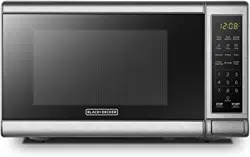
To open this unit, simply press the button located on the lower right hand side of the unit.
For more details on the one year limited warranty information, please turn to page 16 of the User Manual of this model shared below: https://manualsfile.com/download/xap4eyygn.html
The key pad is not working
You may have accidentally switched to child lock safety. To unlock the keypad, press " STOP/CANCEL " for 3 seconds, there will be a long beep" denoting that lock is released.
tried that; still did not work:(
Microwave runs but there is no heat. Food remains unheated. Tried unplugging.
The appliance does not have the option to turn the beeping off.
how to set time
For specific instructions on how to set up the time of this microwave please refer to the following link: https://manualsfile.com/product/xap4eyygn.html#operation:~:text=levels%20are%20available-,2.%20Clock%20Setting,-(1)%20Press%20%22%20CLOCK
how to set timer for 20 seconds
You can program in 20 seconds: (1) Press "KITCHEN TIMER ", LED will display 00:00, the first hour figure flash. (2) Press the number keys and enter the timer time. (The maximum cooking time is 99 minutes and 99 seconds). (3) Press " START/+30SEC. " to confirm setting. (4) When the timer time arrives, the buzzer will ring 5 times.

Submit your question
If you have any questions about this product, please ask here.