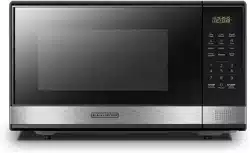
Black+Decker EM031MB11 Questions & Answers
You can find answers or submit your question.
In ManualsFile, you can ask and answer questions about your issues. We - volunteers - or other people who own the product will help you.
You should also read the documentation for your own answers. Download documentation for this product here.
My Model # EM031MB11 does NOT have a "Clock" button in the middle of the display like it shows on this site. Mine has a "Timer/Clock" button on the far right side in the middle of the display. When I push the "Timer/Clock" button once the display starts flashing. Then I enter the time . But when I push the "Timer/Clock" button again it does nothing but make the number on the far left keep flashing. How do I set the time on the Clock on this Model?
My Model EM031MB11 DOES NOT have a "Clock" button in the middle of the display like it shows on this site. It has a "Timer/Clock" button on the right side of the display. When you press that button and enter the time it does NOTHING when you press the button after that. It just keeps flashing the first number that was entered.
My microwave does NOT have a CLOCK button in the middle of the display. So how do I set the time on the clock?
Make sure you hold the button first, not just press it.
Press and HOLD the “Timer/Clock” button for about 3 seconds.
The display should start flashing or show 00:00.
Enter the time using the number pad (for example, 10:12 → press 1 0 1 2).
Press “Timer/Clock” once more to confirm.
After confirmation, the colon ":" will flash and the clock will stay displayed.
How do I turn off the 'food ready' beeps. They drive me crazy and are very loud. Thank you, Vicki
This oven does not come with the mute feature.
does this microwave have a silent/mute operating option?
The unit does not include a sound on/off function.
How do I turn the beeps off
This oven does not have a mute option.

Submit your question
If you have any questions about this product, please ask here.