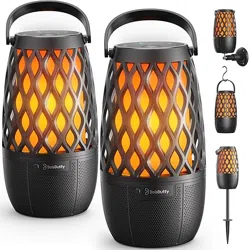
BolaButty L12 Questions & Answers
You can find answers or submit your question.
In ManualsFile, you can ask and answer questions about your issues. We - volunteers - or other people who own the product will help you.
You should also read the documentation for your own answers. Download documentation for this product here.
I received the L12 bola butty torch lights as a gift and enjoy them. I recently bought a second pair to sync so I can have 4 torch lights going a once. But I have tried almost everything and searched everyplace I know of to figure this out and have had zero success. Any help you could provide would be much appreciated! My primary speakers have number #4264 on the bottom and the pair I want to sync with is # 0326.
I cant find TORCH LIGHT on my device list
The BolaButty L12 should display in your device list as “TORCH LIGHT” when it’s in pairing mode. Please try the following:
- Make sure the device is fully charged.
- Ensure that the speaker is in pairing mode by pressing and holding the Power button to power it on, then press Bluetooth button to pair. On your device, enable the Bluetooth feature and select "TORCH LIGHT" from the device list.
- If you still don’t see it, try resetting the device (press and hold power for 10–15 seconds) and attempt pairing again.
- If it continues not to appear, we recommend contacting BolaButty directly for further assistance.

Submit your question
If you have any questions about this product, please ask here.