Before using your new product, please read these instructions to prevent any damage.
USER GUIDE
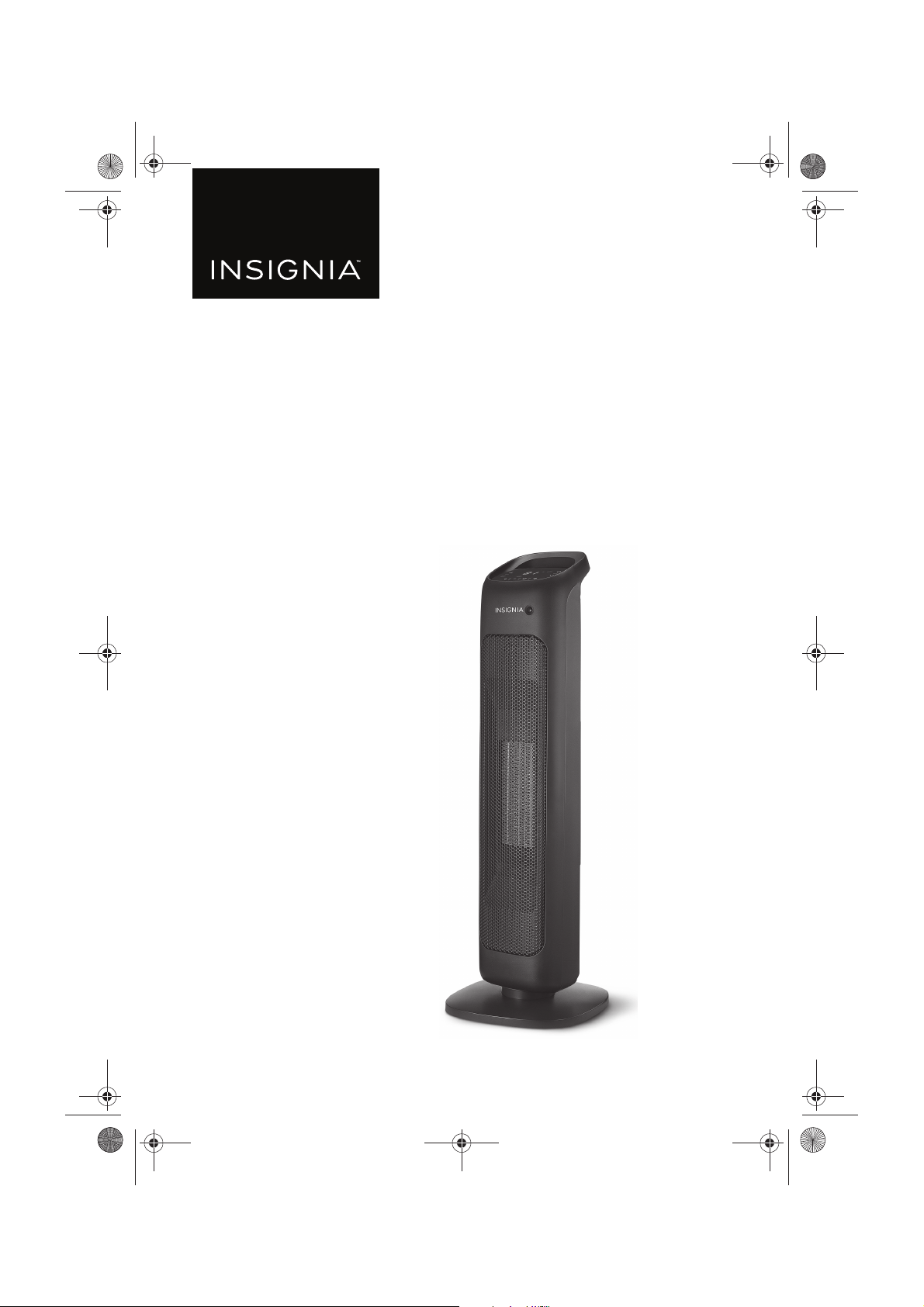
Ceramic Tower
Heater
NS-HTTCFB8
NS-HTTCFB8_17-0321_MAN_V1_ENG.fm Page 1 Thursday, June 15, 2017 2:09 PM
V1
FINAL
FOR PRINT
www.insigniaproducts.com
2
2
Contents
Introduction . . . . . . . . . . . . . . . . . . . . . . . . . . . . . . . . . . . . . . . . . . . . . . . . . . . . .2
IMPORTANT INSTRUCTIONS . . . . . . . . . . . . . . . . . . . . . . . . . . . . . . . . . . . . . .3
Features . . . . . . . . . . . . . . . . . . . . . . . . . . . . . . . . . . . . . . . . . . . . . . . . . . . . . . . . .5
Package contents . . . . . . . . . . . . . . . . . . . . . . . . . . . . . . . . . . . . . . . . . . .5
Main features . . . . . . . . . . . . . . . . . . . . . . . . . . . . . . . . . . . . . . . . . . . . . . .6
Display/control panel . . . . . . . . . . . . . . . . . . . . . . . . . . . . . . . . . . . . . . .6
Remote control . . . . . . . . . . . . . . . . . . . . . . . . . . . . . . . . . . . . . . . . . . . . .7
Assembling your heater . . . . . . . . . . . . . . . . . . . . . . . . . . . . . . . . . . . . . . . . . .7
Using your heater . . . . . . . . . . . . . . . . . . . . . . . . . . . . . . . . . . . . . . . . . . . . . . . .8
Increasing or decreasing the temperature setting . . . . . . . . . . . .9
Switching modes . . . . . . . . . . . . . . . . . . . . . . . . . . . . . . . . . . . . . . . . . . .9
Using ECO mode. . . . . . . . . . . . . . . . . . . . . . . . . . . . . . . . . . . . . . . . . . .10
Turning on the swing (oscillator) to circulate the heat . . . . . . .10
Setting the timer. . . . . . . . . . . . . . . . . . . . . . . . . . . . . . . . . . . . . . . . . . .10
Using the body sensor . . . . . . . . . . . . . . . . . . . . . . . . . . . . . . . . . . . . .10
Cleaning and maintaining your heater . . . . . . . . . . . . . . . . . . . . . . . . . . .11
Cleaning the filter. . . . . . . . . . . . . . . . . . . . . . . . . . . . . . . . . . . . . . . . . .11
Replacing your remote control battery. . . . . . . . . . . . . . . . . . . . . . . . . . .12
Safety features . . . . . . . . . . . . . . . . . . . . . . . . . . . . . . . . . . . . . . . . . . . . . . . . . .12
Troubleshooting . . . . . . . . . . . . . . . . . . . . . . . . . . . . . . . . . . . . . . . . . . . . . . . .13
Specifications . . . . . . . . . . . . . . . . . . . . . . . . . . . . . . . . . . . . . . . . . . . . . . . . . . .13
ONE-YEAR LIMITED WARRANTY. . . . . . . . . . . . . . . . . . . . . . . . . . . . . . . . . .14
Introduction
Congratulations on your purchase of a high-quality Insignia product. Your
NS-HTTCFB8 represents the state of the art in ceramic heater design and is
designed for reliable and trouble-free performance.
NS-HTTCFB8_17-0321_MAN_V1_ENG.fm Page 2 Thursday, June 15, 2017 2:09 PM
3
Ceramic Tower Heater
www.insigniaproducts.com
IMPORTANT INSTRUCTIONS
When using the heater, basic precautions should always be followed to
reduce the risk of fire, electric shock, and injury to persons, including the
following:
1 Read all instructions before using this heater.
2 This heater is hot when in use. To avoid burns, do not let bare skin
touch hot surfaces.
3 Use the handle when moving this heater. Keep combustible materials,
such as furniture, pillows, bedding, papers, clothes, and curtains at
least three feet (0.9 m) from the front of the heater and keep them
away from the sides and rear.
4 Extreme caution is necessary when the heater is used by or near
children or invalids and whenever the heater is left operating and
unattended.
5 Always unplug the heater when not in use.
6 Do not operate the heater with a damaged cord or plug, after the
heater malfunctions, or has been dropped or damaged in any manner.
Discard the heater, or return it to an authorized service facility for
examination and/or repair.
7 Do not use outdoors.
8 This heater is not intended for use in bathrooms, laundry areas, and
similar indoor locations. Never locate the heater where it may fall into
a bathtub or other water container.
9 Do not run the cord under carpeting. Do not cover the cord with throw
rugs, runners, or similar coverings. Do not route the cord under
furniture or appliances. Arrange the cord away from traffic areas and
where it will not be tripped over.
10 To disconnect the heater, turn the controls to off, then remove the
plug from the wall outlet.
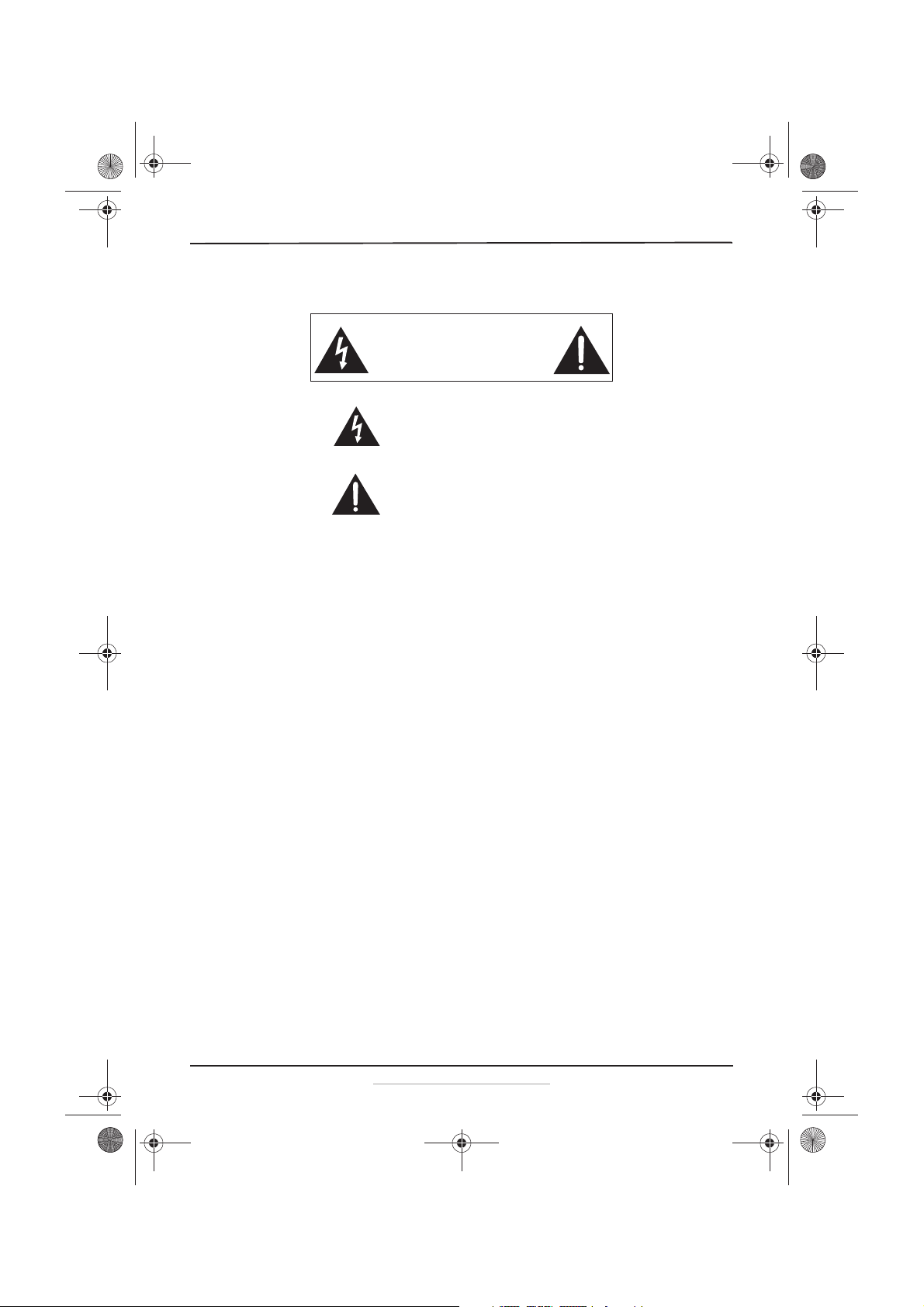
CAUTION
RISK OF ELECTRIC SHOCK
DO NOT OPEN
This symbol indicates that dangerous voltage
constituting a risk of electric shock is present
within your heater.
This symbol indicates that there are important
operating and maintenance instructions in the
literature accompanying your heater.
NS-HTTCFB8_17-0321_MAN_V1_ENG.fm Page 3 Thursday, June 15, 2017 2:09 PM
4
NS-HTTCFB8
www.insigniaproducts.com
11 Prior to cleaning or other maintenance, the heater must be
disconnected from the wall outlet.
12 Do not insert or allow foreign objects to enter any ventilation or
exhaust opening as this may cause an electric shock or fire, or damage
the heater.
13 To prevent a possible fire, do not block air intakes or exhaust in any
manner. Do not use on soft surfaces, like a bed, where openings may
become blocked.
14 A heater has hot and arcing or sparking parts inside. Do not use it in
areas where gasoline, paint, or flammable liquids are used or stored.
15 Use this heater only as described in this manual. Any other use not
recommended by the manufacturer may cause fire, electric shock, or
injury to persons.
16 Always plug heaters directly into a wall outlet/receptacle. Never use
with an extension cord or relocatable power tap (outlet/power strip).
17 This heater is not intended for use by persons (including children) with
reduced physical, sensory or mental capabilities, or lack of experience
and knowledge, unless they have been given supervision or
instruction concerning use of the appliance by a person responsible
for their safety.
18 Children should be supervised to ensure that they do not play with the
heater.
19 CAUTION: Some parts of this product can become very hot and cause
burns. Particular attention has to be given where children and
vulnerable people are present.
20 WARNING: In order to avoid overheating, do not cover the heater.
21 This heater draws up to 1500 W during operation. To prevent
overloading a circuit, do not plug the heater into a circuit that already
has other appliances working.
22 It is normal for the plug to feel warm to the touch, however, a loose fit
between the wall outlet and plug may cause overheating and
distortion of the plug. Contact a qualified electrician to replace loose
or worn outlets.
23 The output of this heater may vary and its temperature may become
intense enough to burn exposed skin. Use of this heater is not
recommended for persons with reduced sensitivity to heat or an
inability to react to avoid burns.
24 Do not leave the heater on unattended.
25 This appliance has a polarized plug (one blade is wider than the other).
To reduce the risk of electric shock, this plug is intended to fit in a
polarized outlet only one way. If the plug does not fit fully into the
outlet, reverse the plug. If is still does not fit, contact a qualified
electrician. Do not attempt to defeat this safety feature.
NS-HTTCFB8_17-0321_MAN_V1_ENG.fm Page 4 Thursday, June 15, 2017 2:09 PM
5
Ceramic Tower Heater
www.insigniaproducts.com
26 If the supply cord is damaged, it must be replaced by the
manufacturer, its service agent, or similarly qualified persons in order
to avoid a hazard.
27 The heater must not be located immediately below a socket-outlet.
28 Do not use this heater near a bath, a shower, or a swimming pool.
29 Do not spray pesticide or any other flammable spray around the
heater. It could damage the heater.
30 Stop using the heater and unplug it immediately if any unusual smell
or sounds come from the heater.
31 Do not cover the heater when in use or when not allowed to cool
completely.
SAVE THESE INSTRUCTIONS
WARNING
Electric Shock Hazard
Failure to follow these instructions can result in electric shock, fire, or
death.
Features
• PTC heater with 1000/1500W power
• Electronic button control with LED display
• Digital temperature control from 41° F to 95° F
•24-hour timer
•Swing setting
• Remote control
• Easy-carry handle
• Tip-over protection
• Double over-heating protection
• Dust-proof filter
• ECO setting and body sensor function
Package contents
• Ceramic Tower heater
•Heater base
• Remote control (with pre-installed battery)
•User Guide
NS-HTTCFB8_17-0321_MAN_V1_ENG.fm Page 5 Thursday, June 15, 2017 2:09 PM
6
NS-HTTCFB8
www.insigniaproducts.com
Main features
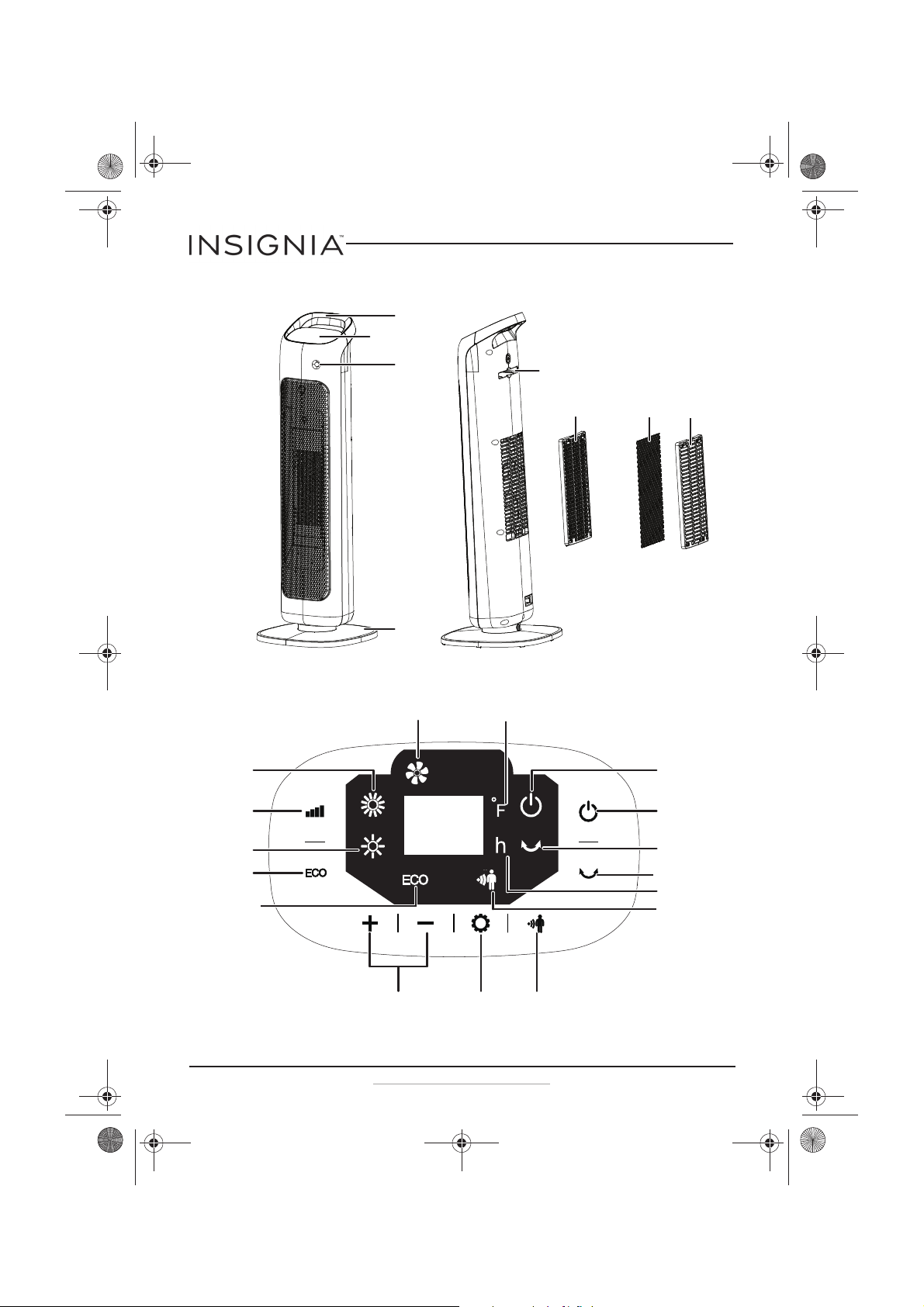
Display/control panel
Control panel
Handle
Body sensor
Base
Filter coverFilter
The filter cover and filter come
pre-installed in the heater.
Filter frame with
filter attached
Remote control shelf
ECO button
Swing indicator
High power
indicator
Power button
Timer and Temp + (up)
and - (down) buttons
Set button
Swing button
Power indicator
ECO indicator
Display
Fan indicator
Fahrenheit indicator
Low power
indicator
Mode button
Body sensor button
Body sensor
indicator
Time indicator
NS-HTTCFB8_17-0321_MAN_V1_ENG.fm Page 6 Thursday, June 15, 2017 2:09 PM
7
Ceramic Tower Heater
www.insigniaproducts.com
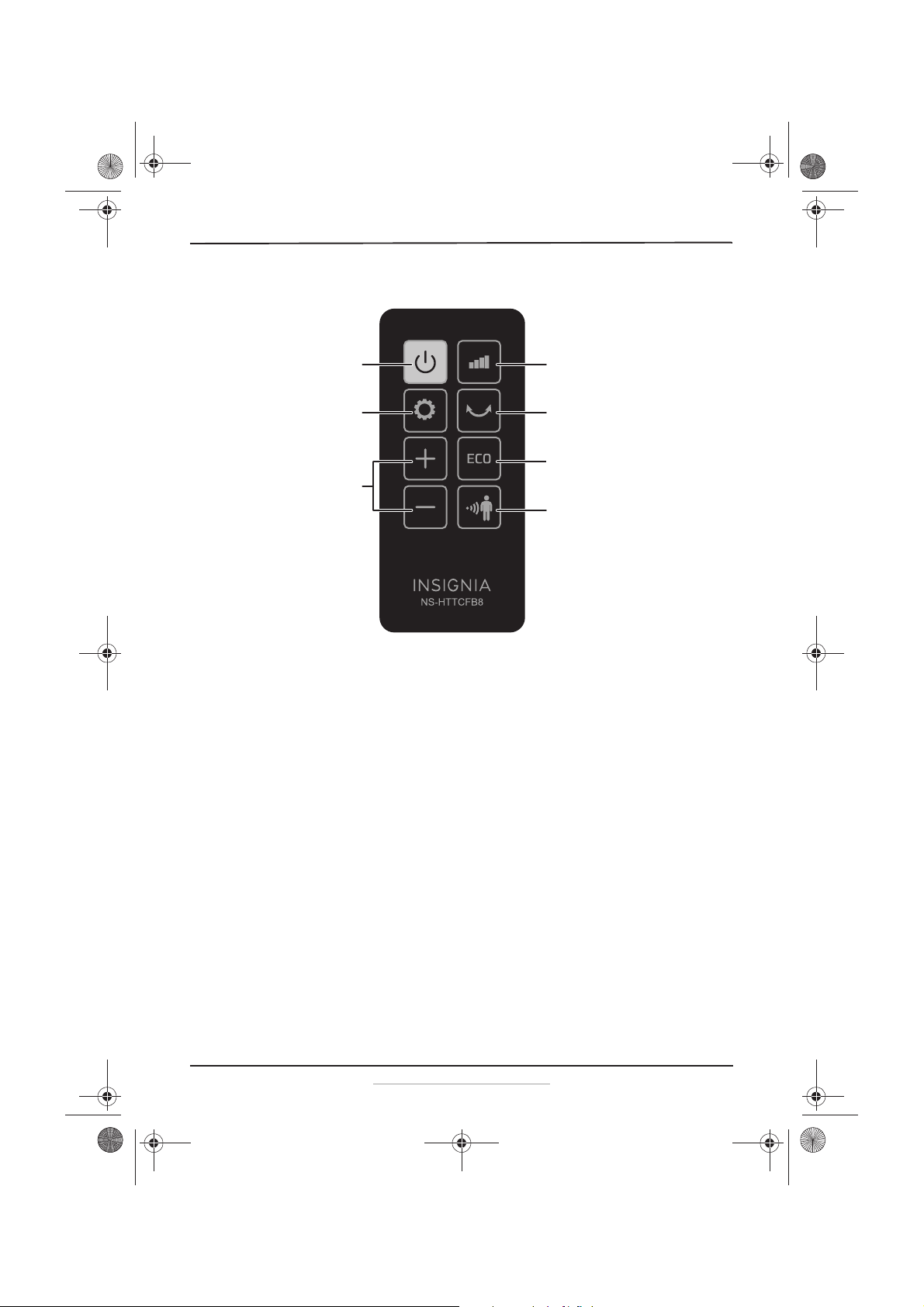
Remote control
Assembling your heater
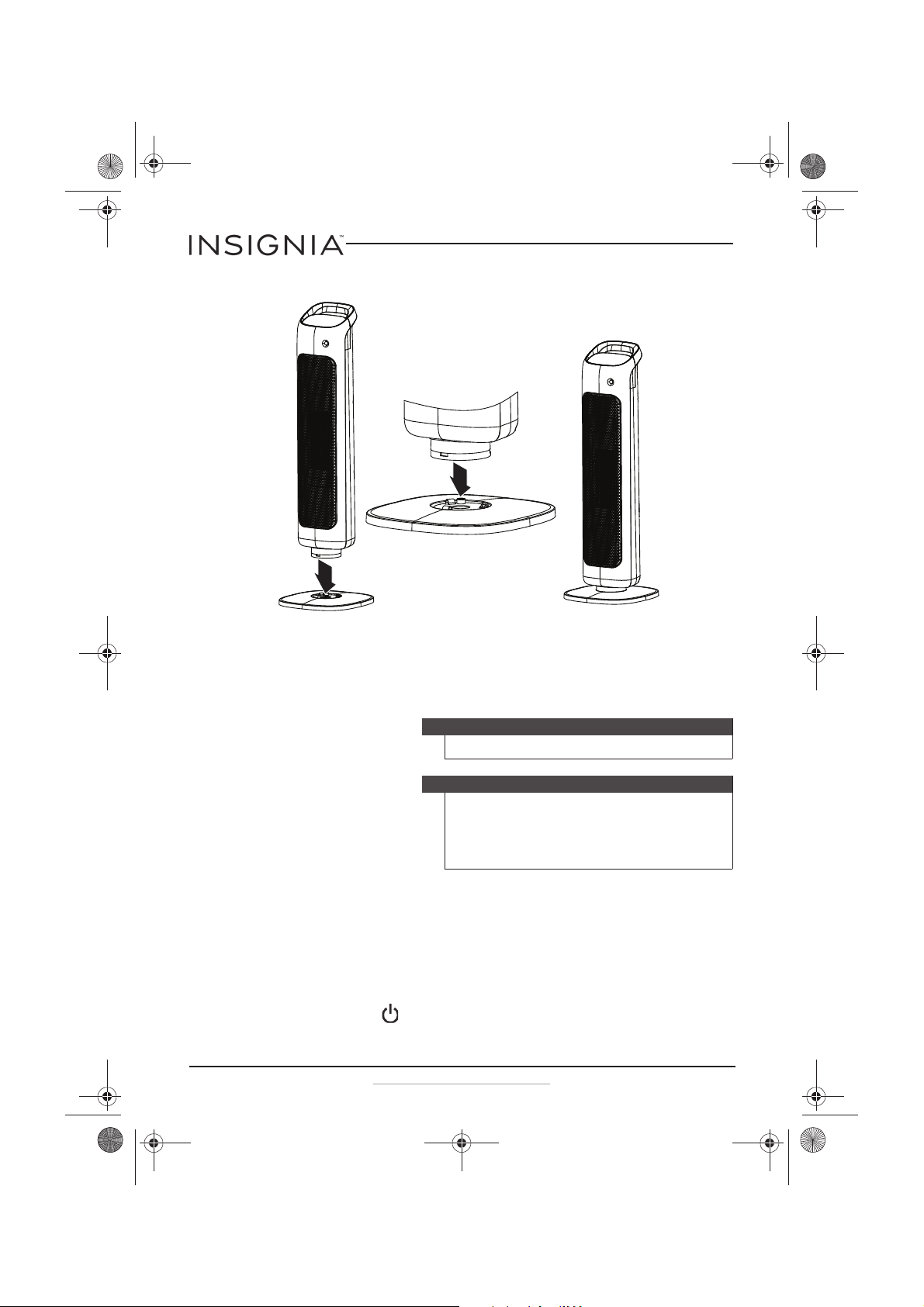
1 Remove the package contents from the box, then remove the bubble
wrap from the heater, the base, and the remote control.
2 Make sure that neither the heater nor the power cord has been
damaged in any way during transportation.
3 Carefully place your heater face-up on a cushioned, clean surface to
prevent scratches.
Power button
Timer and Temp + (up)
and - (down) buttons
Mode button
Set button Swing button
ECO button
Body sensor
button
NS-HTTCFB8_17-0321_MAN_V1_ENG.fm Page 7 Thursday, June 15, 2017 2:09 PM
8
NS-HTTCFB8
www.insigniaproducts.com
4 Fit the bottom of the heater into the base until it snaps into place.
5 Place the heater upright on a stable and level surface.
Using your heater
1 Firmly grab the pull-tab on the remote control battery and pull it to
remove it from the remote control.
2 Place the heater on a firm, level surface, at least three feet (0.9 m) away
from any wall or other objects, such as furniture, curtains, plants, or
combustible material.
3 Fully unwrap the power cord and plug it into a standard wall plug
(120 VAC~60 Hz). The heater beeps as it enters standby mode. In this
mode, only the power button is available for use.
Caution
Never leave an operating heater unattended.
Note
• When you turn on the heater, it will operate at the previous
setting.
• The display remains bright for one minute after changes are
made, then the display dims. Press any button to return the
display to normal.
NS-HTTCFB8_17-0321_MAN_V1_ENG.fm Page 8 Thursday, June 15, 2017 2:09 PM
9
Ceramic Tower Heater
www.insigniaproducts.com
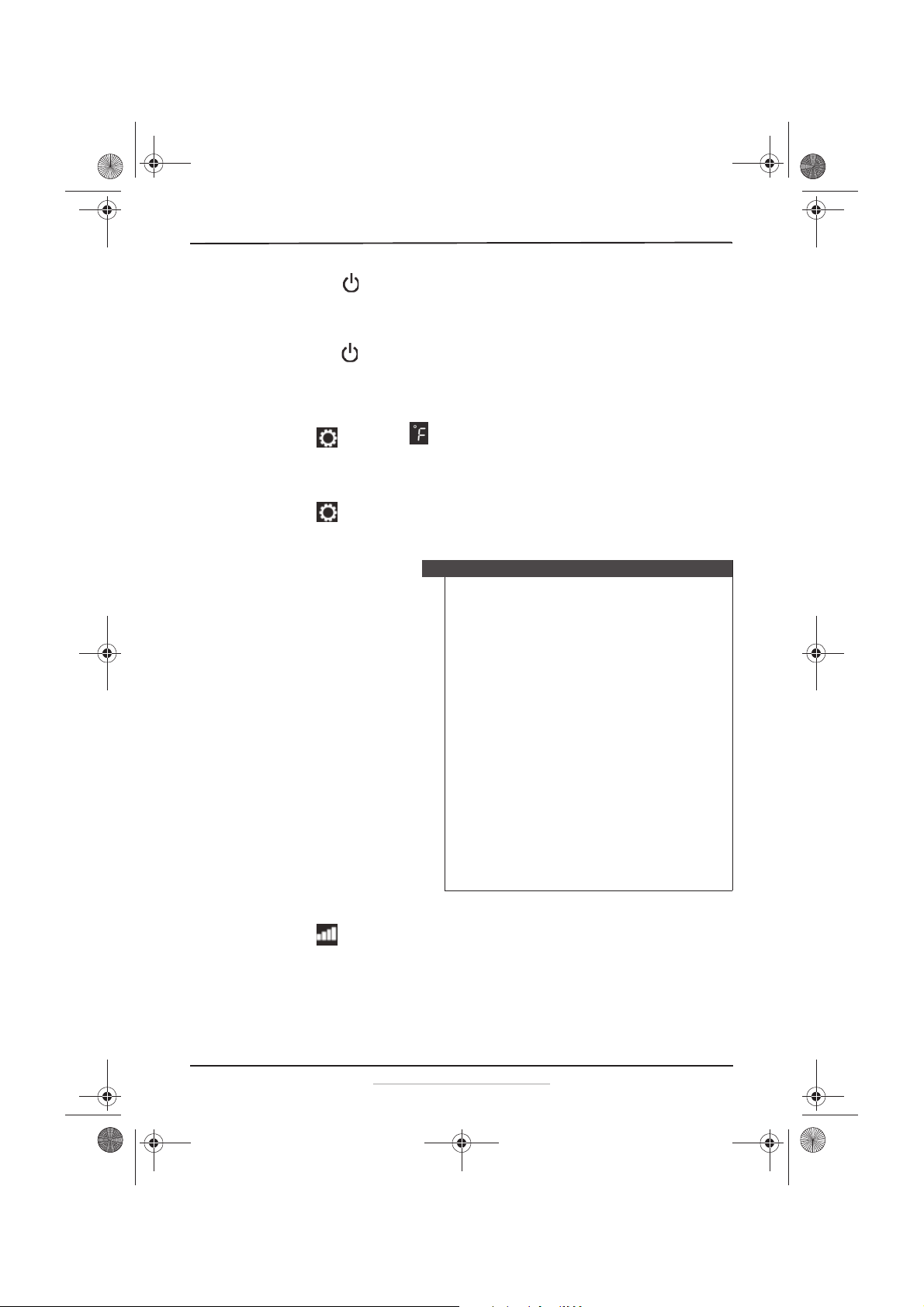
4 Press the power button to turn the heater on. The display shows
the current room temperature in °F with the °F icon turned on. The
default temperature setting is 77° F and the heater is on low power
with the low power indicator on.
5 Press the power button to turn the heater off (go to standby mode).
When you turn the heater back on, the settings remain the same as
when you turned it off.
Increasing or decreasing the temperature setting
1 Press twice. The turns on.
2 Press the + (up) or – (down) button to increase or decrease the
temperature from 41° F to 95° F. The temperature setting changes by
1° F each time you press the button and is shown on the display.
3 Press again to confirm the change. The display returns to the
current room temperature. The heater turns on and stays on until the
set temperature is reached, then the heater, fan, and swing turn off.
Switching modes
• Press repeatedly to cycle through low, high, and fan modes. The
appropriate indicator lights as the mode is selected.
Note
• Press and hold the “+/-” button to change the number
rapidly.
• If you don't set the temperature within five seconds, or if
you press any button except “+/-”, the heater will exit the
temperature function.
• When the room temperature is below 14° F, the display
shows “LO”. When the room temperature is 104° F or higher,
the display shows “HI”. If the temperature is within that
range, the display shows the actual temperature.
• If the room temperature is higher than the temperature
setting, the heating elements and mode indicator on the
panel stop automatically and the fan continues to operate
for another 60 seconds.
• If you turn off the heater, the fan will continue to operate
for 10 seconds.
• If the room temperature is 3° F below the temperature
setting, the heating elements restart and the heating mode
shows on the display.
• When both the timer function and the desired temperature
are set, the display panel shows the timer and the room
temperature respectively every 30 seconds. If the timer is
not set, the display only shows the room temperature.
NS-HTTCFB8_17-0321_MAN_V1_ENG.fm Page 9 Thursday, June 15, 2017 2:09 PM
10
NS-HTTCFB8
www.insigniaproducts.com
Using ECO mode
In ECO mode, the heater automatically adjusts the mode according to the
room temperature. When the room temperature is below 64° F, the heater
operates in high power mode. When the room temperature is above 64° F
and below 72° F, the heater operates in low power mode. When the room
temperature is 72° F or above, the heater turns off.
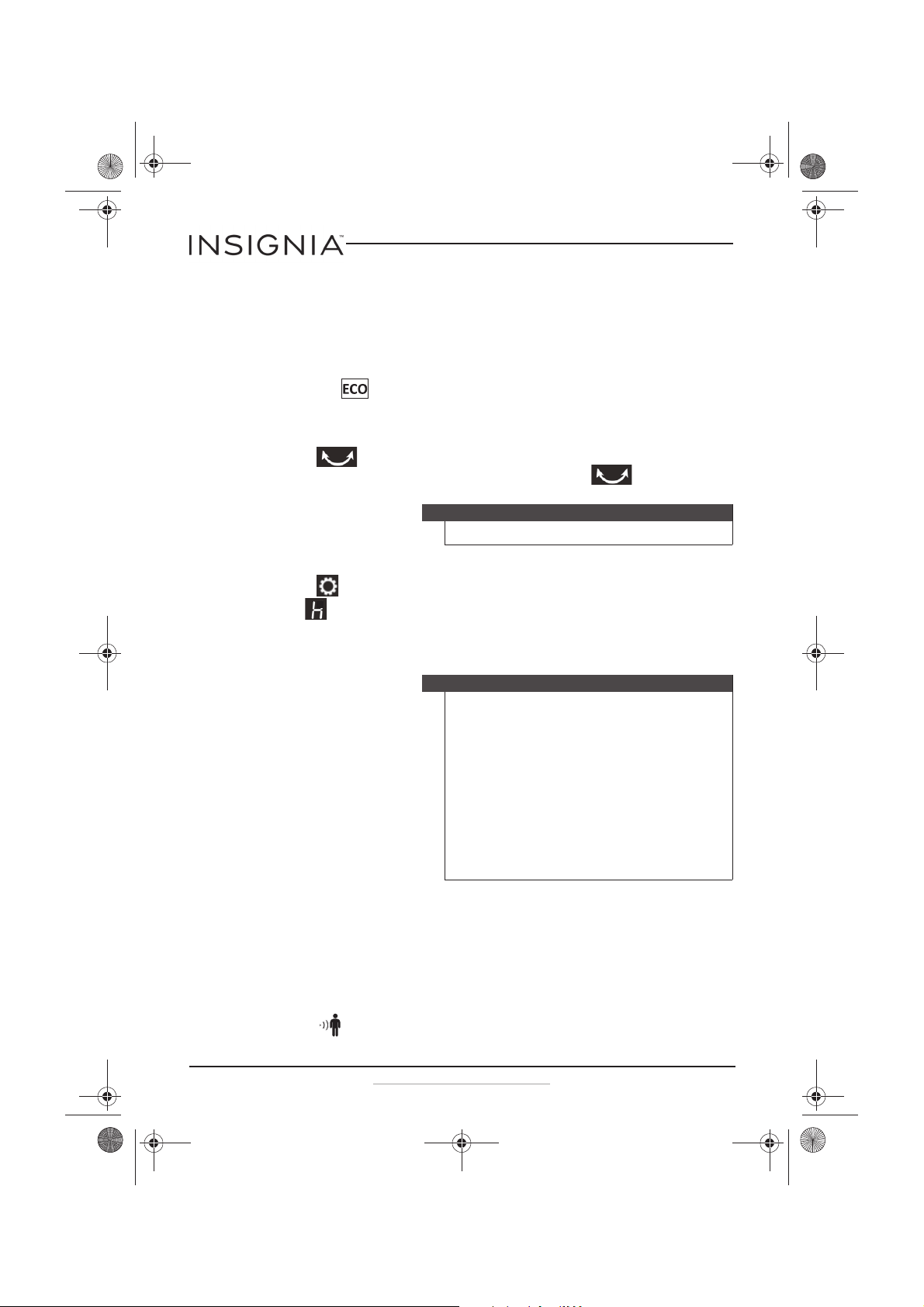
• Press the button. The heater switches to ECO mode and the ECO
indicator lights.
Turning on the swing (oscillator) to circulate the heat
• Press swing to turn the swing function on. The swing indicator
turns on and the heater begins to oscillate. Press again to turn it
off.
Setting the timer
1 Press to set the timer. The time/temperature display turns on and
the indicator lights on the display.
2 Press the + (up) or – (down) button. The timer setting changes by one
hour each time you press the button and is shown on the display. The
maximum timer setting is 24 hours.
.
Using the body sensor
When the body sensor is on, the heater detects bodies in the area. If any
bodies are detected, the heater works normally. If no bodies are detected,
the heater stops working after two minutes, the fan turns off after 10
seconds, and the body sensor indicator light blinks. During this period,
you can set the mode and function, but the heater will not respond to the
new setting until a body is detected in the area.
• Press . The body sensor turns on and the body sensor indicator
turns on. Press it again and the body sensor turns off.
Note
If you activate the body sensor, the fan will stop swinging.
Note
• Press and hold the “+/-” button to change the number
rapidly.
• The previous timer setting will not change unless you press
the “+/-” button to reset the time.
• If you don't set the time within five seconds, or if you press
any button except “+/-”, the heater will exit the timer
function.
• When you set the timer within 1-24 hour(s), the timer
function will start (it does not show a countdown number).
When the time is complete, the heater turns off and enters
standby mode.
• If you set the timer to 0, the timer function turns off and the
heater works normally.
NS-HTTCFB8_17-0321_MAN_V1_ENG.fm Page 10 Thursday, June 15, 2017 2:09 PM
11
Ceramic Tower Heater
www.insigniaproducts.com
Cleaning and maintaining your heater
• Always remove the plug from the wall socket and allow the heater to
cool before cleaning.
• Wipe the heater with a soft, damp cloth. Use a mild detergent if
necessary. DO NOT USE solvents or harsh cleaners or you may damage
the finish.
• Vacuum the grill with your vacuum's brush attachment every few
weeks for optimal performance.
• If the heater will not be used for an extended period of time, store it in
a dry place.
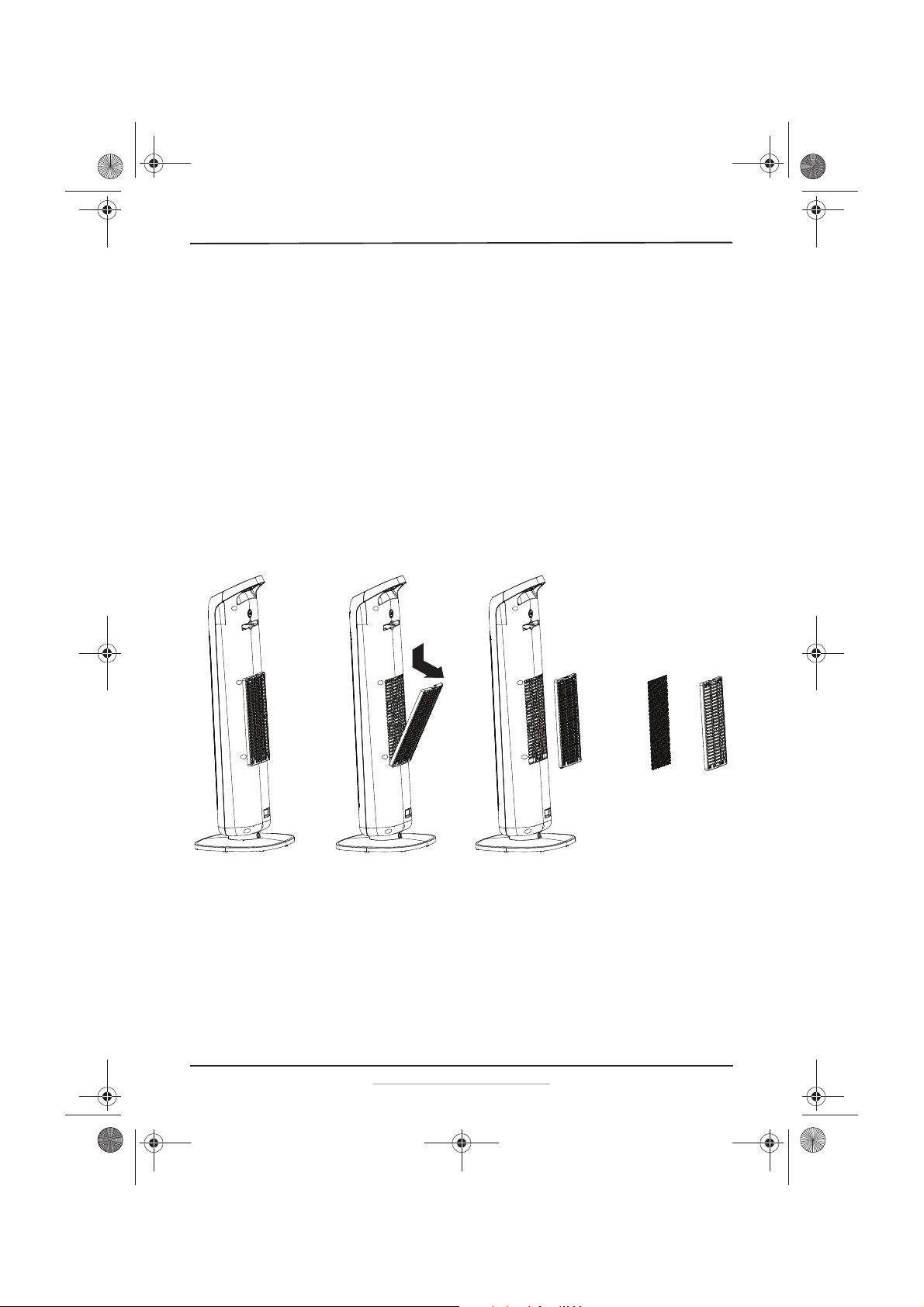
Cleaning the filter
1 Remove the filter cover from the back of the heater by pressing the
indent at the top of the filter carrier, then pulling the top of the filter
carrier out and away from the heater.
2 Remove the filter from the filter frame.
3 Clean the filter using a spray cleaner such as Simple Green and a brush,
then dry the filter before replacing it.
4 Replace the filter into the filter frame, then place the filter frame into
the heater.
5 Reattach the filter cover into the heater by aligning the bottom of the
cover with the filter recess, then pushing the top of the filter cover into
the heater until it clicks into place.
NS-HTTCFB8_17-0321_MAN_V1_ENG.fm Page 11 Thursday, June 15, 2017 2:09 PM
12
NS-HTTCFB8
www.insigniaproducts.com
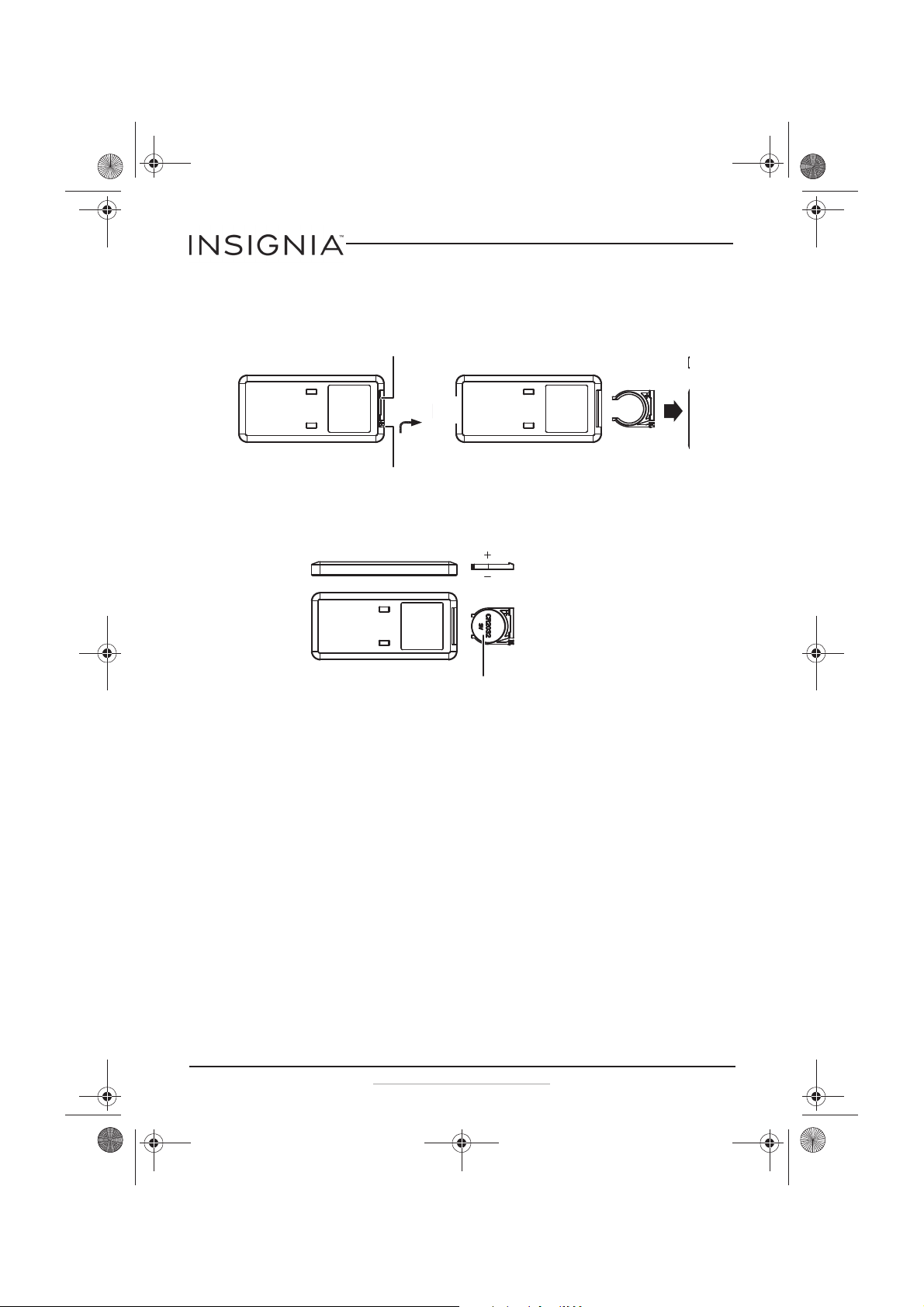
Replacing your remote control battery
1 Squeeze then pull the battery holder out of the remote control.
2 Insert the battery into the battery holder with the positive (+) side
toward the front of the remote control.
3 Push the battery holder into the remote control.
Safety features
The heater is equipped with double over-heating protection, which
causes the unit to stop operating in the event that the internal
temperature exceeds the normal operating temperature. It also includes
tip-over protection, which turns the heater off in case it is tipped over.
If the heater shuts down:
1 Turn off and unplug the heater.
2 Put the heater in the upright position, if necessary.
3 Wait for at least 10 minutes until the heater cools.
4 Plug the heater into the power outlet and then turn it on. The heater
resumes its normal operation.
Squeeze together then pull out.
Squeeze together then pull out.
Positive (+)
toward front.
Insert battery (CR2032 3V Lithium)
NS-HTTCFB8_17-0321_MAN_V1_ENG.fm Page 12 Thursday, June 15, 2017 2:09 PM
13
Ceramic Tower Heater
www.insigniaproducts.com
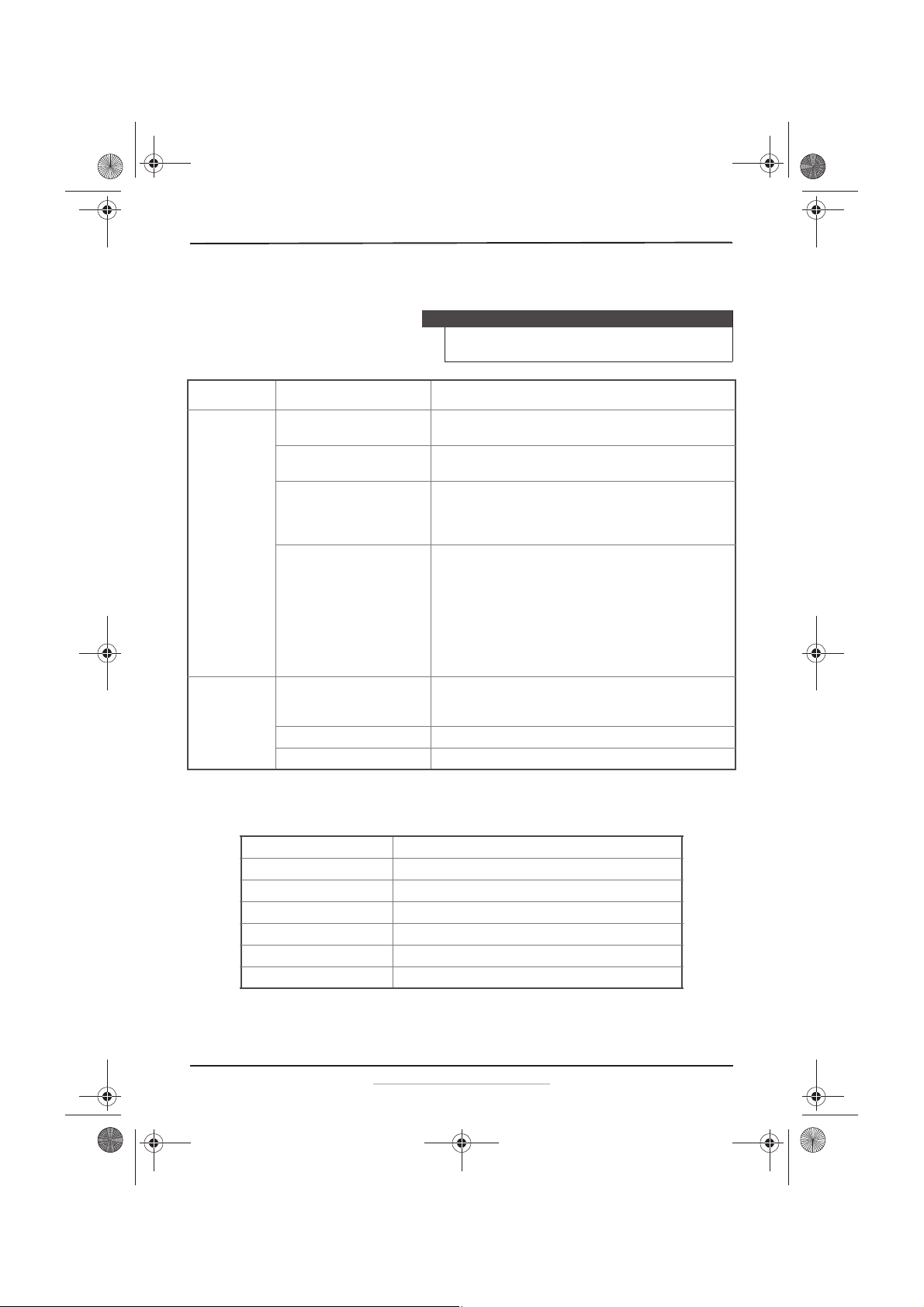
Troubleshooting
Specifications
Caution
Do not try to repair your heater yourself. Doing so invalidates the
warranty.
PROBLEM POSSIBLE CAUSE POSSIBLE SOLUTION
Your heater shuts
off unexpectedly
or fails to operate
There is no power. Make sure that the heater is plugged in and that the electrical outlet
is working.
The set temperature is lower than
the current room temperature.
Set the desired temperature higher than the current temperature to
restart the heater.
Room temperature has reached
the temperature set on the
temperature control.
• This is normal. The heater restarts when room temperature is lower
than the set temperature.
• Adjust the temperature control setting if it's not set to your desired
temperature.
One of the safety protection
devices was activated to prevent
overheating.
1. Place the heater in an upright position.
2. Check for any obstructions. If you find an obstruction, turn the
heater off.
3. Unplug the heater and wait at least 10 minutes for it to cool down.
4. Carefully remove the obstruction. Plug the heater in and restart it
as described in “Using your heater” on page 8.
5. If you still notice the same problem, remove the plug from the wall
and have the heater checked by an authorized service person.
The room is not
warm enough
The room is too large or a window
is open.
• Turn on the main heat source for the room.
• Use more portable heaters.
•Close the window.
The temperature is set too low. • Increase the temperature setting.
The power setting is too low. • Select a higher power setting.
Model number NS-HTTCFB8
Voltage 120 VAC
Frequency 60 Hz
Power 1500 Watts
Noise level ≤ 50 dB
Dimensions 9.2 x 8.8 x 27.0 in. (234 x 225 x 686 mm)
Remote control battery CR2032 3V Lithium button
NS-HTTCFB8_17-0321_MAN_V1_ENG.fm Page 13 Thursday, June 15, 2017 2:09 PM
14
NS-HTTCFB8
www.insigniaproducts.com
ONE-YEAR LIMITED WARRANTY
Definitions:
The Distributor* of Insignia branded products warrants to you, the original purchaser of this
new Insignia-branded product (“Product”), that the Product shall be free of defects in the
original manufacturer of the material or workmanship for a period of one (1) year from the
date of your purchase of the Product (“Warranty Period”).
For this warranty to apply, your Product must be purchased in the United States or Canada
from a Best Buy branded retail store or online at www.bestbuy.com or www.bestbuy.ca, and
is packaged with this warranty statement.
How long does the coverage last?
The Warranty Period lasts for 1 year (365 days) from the date you purchased the Product.
Your purchase date is printed on the receipt you received with the Product.
What does this warranty cover?
During the Warranty Period, if the original manufacture of the material or workmanship of
the Product is determined to be defective by an authorized Insignia repair center or store
personnel, Insignia will (at its sole option): (1) repair the Product with new or rebuilt parts; or
(2) replace the Product at no charge with new or rebuilt comparable products or parts.
Products and parts replaced under this warranty become the property of Insignia and are
not returned to you. If service of Products or parts are required after the Warranty Period
expires, you must pay all labor and parts charges. This warranty lasts as long as you own your
Insignia Product during the Warranty Period. Warranty coverage terminates if you sell or
otherwise transfer the Product.
How to obtain warranty service?
If you purchased the Product at a Best Buy retail store location, please take your original
receipt and the Product to any Best Buy store. Make sure that you place the Product in its
original packaging or packaging that provides the same amount of protection as the original
packaging. If you purchased the Product from a Best Buy online web site (www.bestbuy.com
or www.bestbuy.ca), mail your original receipt and the Product to the address listed on the
web site. Make sure that you put the Product in its original packaging or packaging that
provides the same amount of protection as the original packaging.
To obtain warranty service, in the United States call 1-888-BESTBUY, Canada call
1-866-BESTBUY. Call agents may diagnose and correct the issue over the phone.
Where is the warranty valid?
This warranty is valid only in the United States and Canada at Best Buy branded retail stores
or websites to the original purchaser of the product in the county where the original
purchase was made.
What does the warranty not cover?
This warranty does not cover:
• Customer instruction/education
•Installation
•Set up adjustments
•Cosmetic damage
• Damage due to weather, lightning, and other acts of God, such as power surges
•Accidental damage
•Misuse
•Abuse
•Negligence
NS-HTTCFB8_17-0321_MAN_V1_ENG.fm Page 14 Thursday, June 15, 2017 2:09 PM
15
Ceramic Tower Heater
www.insigniaproducts.com
• Commercial purposes/use, including but not limited to use in a place of business or in
communal areas of a multiple dwelling condominium or apartment complex, or
otherwise used in a place of other than a private home.
• Modification of any part of the Product, including the antenna
• Display panel damaged by static (non-moving) images applied for lengthy periods
(burn-in).
• Damage due to incorrect operation or maintenance
• Connection to an incorrect voltage or power supply
• Attempted repair by any person not authorized by Insignia to service the Product
• Products sold “as is” or “with all faults”
• Consumables, including but not limited to batteries (i.e. AA, AAA, C etc.)
• Products where the factory applied serial number has been altered or removed
• Loss or Theft of this product or any part of the product
• Display panels containing up to three (3) pixel failures (dots that are dark or incorrectly
illuminated) grouped in an area smaller than one tenth (1/10) of the display size or up
to five (5) pixel failures throughout the display. (Pixel based displays may contain a
limited number of pixels that may not function normally.)
• Failures or Damage caused by any contact including but not limited to liquids, gels or
pastes.
REPAIR REPLACEMENT AS PROVIDED UNDER THIS WARRANTY IS YOUR EXCLUSIVE REMEDY
FOR BREACH OF WARRANTY. INSIGNIA SHALL NOT BE LIABLE FOR ANY INCIDENTAL OR
CONSEQUENTIAL DAMAGES FOR THE BREACH OF ANY EXPRESS OR IMPLIED WARRANTY ON
THIS PRODUCT, INCLUDING, BUT NOT LIMITED TO, LOST DATA, LOSS OF USE OF YOUR
PRODUCT, LOST BUSINESS OR LOST PROFITS. INSIGNIA PRODUCTS MAKES NO OTHER
EXPRESS WARRANTIES WITH RESPECT TO THE PRODUCT, ALL EXPRESS AND IMPLIED
WARRANTIES FOR THE PRODUCT, INCLUDING, BUT NOT LIMITED TO, ANY IMPLIED
WARRANTIES OF AND CONDITIONS OF MERCHANTABILITY AND FITNESS FOR A PARTICULAR
PURPOSE, ARE LIMITED IN DURATION TO THE WARRANTY PERIOD SET FORTH ABOVE AND
NO WARRANTIES, WHETHER EXPRESS OR IMPLIED, WILL APPLY AFTER THE WARRANTY
PERIOD. SOME STATES, PROVINCES AND JURISDICTIONS DO NOT ALLOW LIMITATIONS ON
HOW LONG AN IMPLIED WARRANTY LASTS, SO THE ABOVE LIMITATION MAY NOT APPLY TO
YOU. THIS WARRANTY GIVES YOU SPECIFIC LEGAL RIGHTS, AND YOU MAY ALSO HAVE OTHER
RIGHTS, WHICH VARY FROM STATE TO STATE OR PROVINCE TO PROVINCE.
Contact Insignia:
For customer service please call 1-877-467-4289
www.insigniaproducts.com
INSIGNIA is a trademark of Best Buy and its affiliated companies.
Distributed by Best Buy Purchasing, LLC
7601 Penn Ave South, Richfield, MN 55423 U.S.A.
©2017 Best Buy. All rights reserved.
Made in China
NS-HTTCFB8_17-0321_MAN_V1_ENG.fm Page 15 Thursday, June 15, 2017 2:09 PM
www.insigniaproducts.com
1-877-467-4289 (U.S. and Canada) or 01-800-926-3000 (Mexico)
INSIGNIA is a trademark of Best Buy and its affiliated companies.
Distributed by Best Buy Purchasing, LLC
7601 Penn Ave South, Richfield, MN 55423 U.S.A.
©2017 Best Buy. All rights reserved.
Made in China.
V1 ENGLISH
17-0321
NS-HTTCFB8_17-0321_MAN_V1_ENG.fm Page 16 Thursday, June 15, 2017 2:09 PM