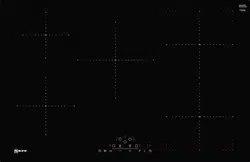
Induction cooking is very different from traditional cooking methods, as heat builds up directly in the item of cookware. This offers numerous advantages:
■ Saves time when boiling and frying.
■ Saves energy.
■ Easier to care for and clean. Spilled food does not burn on as quickly.
■ Heat control and safety – the hob increases or decreases the heat supply as soon as the user changes the setting. The induction hotplate stops the heat supply as soon as the cookware is removed from the hotplate, without having to switch it off first.
Cookware
Only use ferromagnetic cookware for induction cooking, such as:
■ Cookware made from enamelled steel
■ Cookware made from cast iron
■ Special induction-compatible cookware made from stainless steel.
To check whether your cookware is suitable for induction cooking, refer to the section on
"Cookware check".
To achieve a good cooking result, the ferromagnetic area on the base of the pan should match the size of the hotplate. If a hotplate does not detect an item of cookware, try placing it on another hotplate with a smaller diameter.
If the only hotplate being used is the flexible cooking zone, larger cookware that is particularly suited to this zone can be used. You can find information on positioning cookware in the section on "Flex Zone".
Induction cooking
8 Some induction cookware does not have a fully ferromagnetic base:
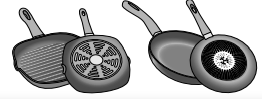
■ If the base of the cookware is only partially ferromagnetic, only the area that is ferromagnetic will heat up. This may mean that heat will not be distributed evenly. The non-ferromagnetic area may not heat up to a sufficient temperature for cooking.
■ The ferromagnetic area will also be reduced if the material from which the base of the cookware is made contains aluminium, for example. This may mean that the cookware will not become sufficiently hot or even that it will not be detected.
Unsuitable pans
Never use diffuser hobs or pans made from:
■ common thin steel
■ glass
■ earthenware
■ copper
■ aluminium
Properties of the base of the cookware
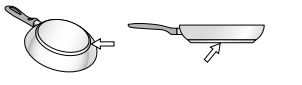
The material(s) from which the base of the cookware is made can affect the cooking result. Using pots and pans made from materials that distribute heat evenly through them, such as stainless-steel pans with a threelayer base, saves time and energy.
Use cookware with a flat base; if the base of the cookware is uneven, this may impair the heat supply
Absence of pan or unsuitable size
If no pan is placed on the selected hotplate, or if it is made of unsuitable material or is not the correct size, the power level displayed on the hotplate indicator will flash. Place a suitable pan on the hotplate to stop the flashing. If this takes more than 90 seconds, the hotplate will switch off automatically.
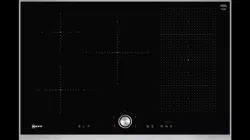
Getting to know your appliance
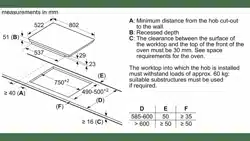
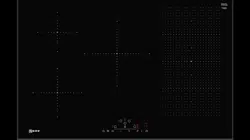
You can find information on the dimensions and power of the hotplates in Page 2
Note: . Depending on the appliance model, individual details and colours may differ.
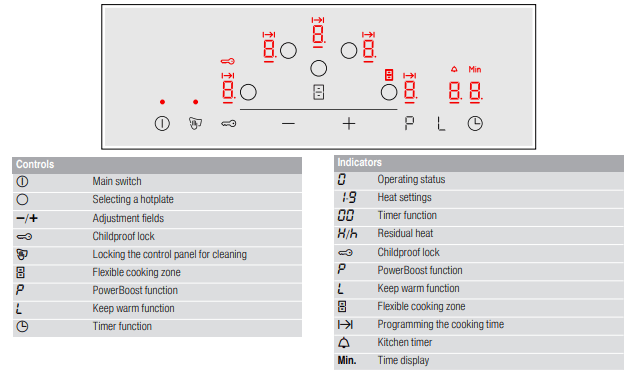
The control panel
Touch controls
Touching a symbol activates the associated function.
Notes
■ Always keep the control panel clean and dry.
Moisture reduces its effectiveness.
■ Do not place any cookware near the indicators or sensors. The electronics could overheat.
The hotplates
Residual heat indicator
The hob has a residual heat indicator for each hotplate. This indicates that a hotplate is still hot. Do not touch a hotplate while the residual heat indicator is lit up.
The following indicators are shown depending on the amount of residual heat:
■ Display : High temperature
■ Display : Low temperature
If you remove the cookware from the hotplate during cooking, the residual heat indicator and the selected heat setting will flash alternately.
When the hotplate is switched off, the residual heat indicator will light up. Even after the hob has been switched off, the residual heat indicator will stay lit for as long as the hotplate is still warm.
Operating the appliance
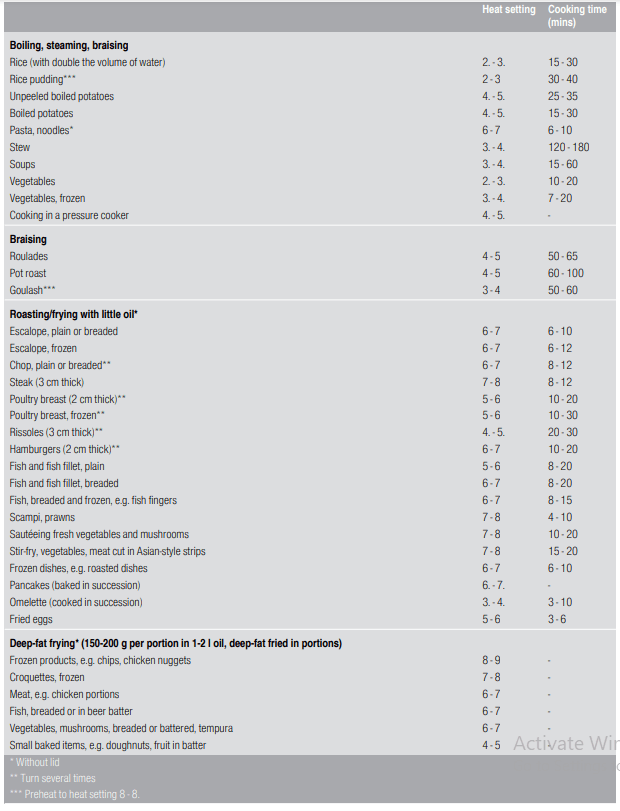
This chapter explains how to set a hotplate. The table shows heat settings and cooking times for various meals.
Switching the hob on and off
The main switch is used to switch the hob on and off.
To switch on: Touch the symbol. An audible signal sounds. The indicator next to the main switch and the hotplate indicators light up. The hob is ready to use.
To switch off: Touch the symbol until the indicator goes out. All hotplates are switched off. The residual heat indicator remains lit until the hotplates have cooled down sufficiently.
Notes
■ The hob switches off automatically if all hotplates have been switched off for more than 20 seconds.
■ The selected settings are stored for four seconds after the hob has been switched off. If you switch it on again during this time, the hob will operate using the previously stored settings.
Setting a hotplate
Use the and symbols to select the required heat setting.
Heat setting = lowest setting.
Heat setting = highest setting.
Every heat setting has an intermediate setting. This is marked with a dot.
Notes
■ To protect the fragile parts of your appliance from overheating and electrical overloading, the hob may temporarily reduce the power.
■ In order to prevent the appliance from producing excess noise, the hob may temporarily reduce the power.
Selecting a hotplate and heat setting
The hob must be switched on.
1. Select the hotplate using the symbol
2. Touch the or A symbol within 10 seconds. The following basic setting appears:
symbol: heat setting
symbol: heat setting
The heat setting is set.
Changing the heat setting
Select the hotplate and touch the or symbol until the required heat setting appears.
Switching off the hotplate
Select the hotplate and then touch the or symbol until appears.
The hotplate switches itself off and the residual heat indicator appears.
Notes
■ If no pan has been placed on the hotplate, the selected power level flashes. After a certain time has elapsed, the hotplate switches off.
■ If a pan has been placed on the hotplate before switching on the hob, it will be detected within 20 seconds of pressing the main switch and the hotplate will be selected automatically. Once detected, select the power level within the next 20 seconds or the hotplate will switch off. If more than one pan is placed on the hob, only one will be detected when switching it on.
Chef's recommendations
Recommendations
■ When heating up puree, cream soups and thick sauces, stir occasionally.
■ Set heat setting 8 to 9 for preheating.
■ When cooking with the lid on, turn the heat setting down as soon as steam escapes between the lid and the cookware. Steam does not need to escape for a good cooking result.
■ After cooking, keep the lid on the cookware until you serve the food.
■ To cook with the pressure cooker, observe the manufacturer's instructions.
■ Do not cook food for too long, otherwise the nutrients will be lost. The kitchen clock can be used to set the optimum cooking time.
■ For a more healthy cooking result, smoking oil should be avoided.
■ To brown food, fry small portions in succession.
■ Cookware may reach high temperatures while the food is cooking. We recommend that you use oven gloves.
■ You can find recommendations for energy-efficient cooking in section "Environmental protection"
Cooking table
The table shows which heat setting is suitable for each type of food. The cooking time may vary depending on the type, weight, thickness and quality of the food.
Flex Zone
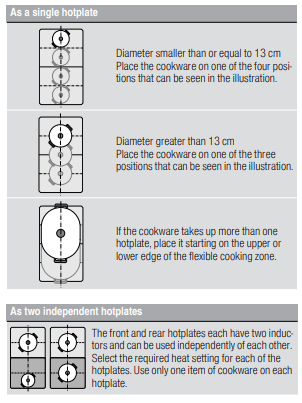
You can use each flex zone as a single hotplate or as two independent hotplates, as required.
It consists of four inductors that work independently of each other. If using the flexible cooking zone, only the area that is covered by cookware is activated.
Advice on using cookware
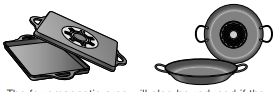
To ensure that the cookware is detected and heat is distributed evenly, correctly centre the cookware:
As two independent hotplates
The flexible cooking zone is used like two independent hotplates.
Activating
See section "Operating the appliance"
As a single hotplate
Using the entire cooking zone by connecting both hotplates.
Linking the two hotplates
1. Set an item of cookware down. Select one of the two hotplates belonging to the flexible cooking zone and set the heat setting for it.
2. Touch the symbol. The indicator lights up. The heat setting appears in the display for the lower hotplate.
The flexible cooking zone has now been activated.
Changing the heat setting
Select one of the two hotplates in the flexible cooking zone and use the or symbol to set the heat setting.
Adding a new piece of cookware
Set the new piece of cookware down, select the hotplate in the flexible cooking zone and then touch the symbol twice. The new piece of cookware will be detected and the heat setting that was previously selected will be retained.
Note: If the cookware is moved on the hotplate or lifted from it, the hotplate begins an automatic search and the heat setting selected previously is retained.
Unlinking the two hotplates
Select one of the two hotplates in the flexible cooking zone and touch the symbol.
This deactivates the flexible cooking zone. The two hotplates will now function independently.
Note: If the hob is switched off, and then switched back on again later, the flexible cooking zone is reset to function as two independent hotplates.
Time-setting options
Your hob has two timer functions:
■ Programming the cooking time
■ Kitchen timer
Programming the cooking time
The hotplate automatically switches off after the time that is set has elapsed.
Setting procedure:
1. Select the hotplate and the required heat setting.
2. Touch the symbol. lights up on the display for the hotplate. lights up on the timer display.
3. Touch the or symbol. The basic setting appears:
symbol: 30 minutes.
symbol: 10 minutes
4. Use the or symbol to select the required cooking time.
After a few seconds, the time begins to elapse
Notes
■ The same cooking time can be set automatically for all hotplates. The set time for each of the hotplates counts down independently.
You can find information on automatically programming the cooking time in section “Basic settings”
■ If the flexible cooking zone is selected as the only hotplate, the set time for the entire cooking zone is the same.
Changing or deleting the time
Select a hotplate. Touch the symbol and use the or symbols to change the cooking time, or set the time to
When the time has elapsed
The hotplate switches off. An audible signal sounds. lights up in the timer display for 60 seconds.
Touch the symbol. The displays go out and the audible signal ceases.
Notes
■ If a cooking time was programmed for several hotplates, the time information for the selected hotplate is shown in the timer display.
■ You can set a cooking time of up to 99 minutes.
The kitchen timer
You can use the kitchen timer to set a time of up to 99 minutes.
This functions independently from the hotplates and from other settings. This function does not automatically switch off a hotplate.
Setting procedure
1. Touch the symbol repeatedly until the indicator lights up. lights up on the timer display.
2. Touch the or symbol. The basic setting appears
symbol: 10 minutes.
symbol: 5 minutes
3. Use the or symbol to set the required time. After a few seconds, the time begins to count down.
Changing or cancelling the cooking time
Touch the symbol repeatedly until the indicator lights up. Change or set the time to using the or symbol
When the time has elapsed
An audible signal sounds. appears in the timer display. The displays go out after 60 seconds.
By pressing the symbol, the displays go out and the audible signal ceases.
PowerBoost function
The PowerBoost function enables you to heat up large quantities of water faster than when using heat setting
This function can always be activated for a hotplate, provided the other hotplate in the same group is not in use (see illustration). Otherwise, and will flash in the display for the selected hotplate; the heat setting will then be set automatically without activating the function.
Note: The PowerBoost function can also be activated in the flexible area if the cooking zone is being used as a single hotplate. Activation
Activation
1. Select a hotplate.
2. Touch the symbol.
lights up on the display.
The function is activated.
Deactivation
1. Select a hotplate.
2. Touch the symbol.
The display goes out and the hotplate switches back to the heat setting.
The function is deactivated.
Note: In certain circumstances, the PowerBoost function can switch itself off automatically in order to protect the electronic elements inside the hob.
Keep warm function
This function is suitable for melting chocolate or butter and for keeping food warm.
Activation
1. Select the required hotplate.
2. Touch the within the next 10 seconds
lights up on the display
The function is activated.
Deactivation
1. Select the hotplate.
2. Touch the symbol
The indicator goes out. The hotplate switches itself off and the residual heat indicator lights up.
The function is deactivated.
Childproof lock
You can use the childproof lock to prevent children from switching on the hob.
Activating and deactivating the childproof lock
The hob must be off.
To activate: Touch the symbol for approx. 4 seconds. The indicator lights up for 10 seconds. The hob is locked.
To deactivate: Touch the symbol for approx. 4 seconds. The lock is released.
Childproof lock
With this function, the childproof lock automatically activates when a hob is switched off.
Switching on and off
You can find out how to switch the automatic childproof lock on in the “Basic settings” section
Wipe protection
If you wipe over the control panel while the hob is switched on, settings may be altered. To avoid doing this, you can use the hob's "Lock control panel for cleaning" function.
To activate: Touch the symbol. You will hear an audible signal. The control panel is locked for 35 seconds. You can now wipe over the surface of the control panel without altering any settings.
To deactivate: The control panel will be unlocked once 35 seconds have elapsed. To release the function early, touch the symbol
Notes
■ An audible signal sounds 30 seconds after activation. This indicates that the function is about to finish.
■ The cleaning lock does not lock the main switch. The hob can be switched off at any time.
Automatic safety cut-out
If a hotplate operates for an extended period and no settings are changed, the automatic safety shut-off is activated.
The hotplate stops heating. and the residual heat indicator or flash alternately in the hotplate display.
When you touch any symbol, the display switches off. The hotplate can now be set again.
The point at which the safety shut-off becomes active depends on which heat setting has been set (after 1 to 10 hours).
Basic settings
The appliance has various basic settings. These basic settings can be altered to suit your individual requirements.
To access the basic settings:
The hob must be off.
1. Switch on the hob.
2. Within ten seconds, touch and hold the symbol for approximately four seconds.
The first four displays provide product information. Touch the or symbol to view the individual displays.
3. Touch the symbol again to access the basic settings.
and flash alternately on the displays and appears as a presetting.
4. Touch the symbol repeatedly until the required function is displayed.
5. Then use the and symbols to select the required setting.
6. Touch the symbol for at least four seconds.
The settings have been saved.
Leaving the basic settings
Turn off the hob with the main switch.
Energy consumption indicator
This function indicates the total amount of energy consumed by this hob the last time it was used for cooking. Once the hob is switched off, the energy consumption is displayed in kilowatt hours (e.g. kWh) for 10 seconds.
The accuracy of the information displayed depends on the voltage quality of the mains power supply, among other factors.
You can find out how to switch this function on in the section on “Basic settings”
Cookware check
This function can be used to check the speed and quality of the cooking process depending on the cookware.
The result is a reference value and depends on the properties of the cookware and the hotplate being used.
1. Place a cold saucepan containing approx. 200 ml of water in the centre of the hotplate the diameter of which matches the base of the pan most closely.
2. Go to the basic settings and select the setting.
3. Touch the and symbol will flash on the hotplate display.
The function has now been enabled.
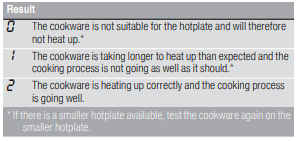
After 20 seconds, the quality and speed of the cooking process will appear in the hotplate display
Check the result using the following table:
To activate the function again, select the or symbol
Notes
■ The flexible cooking zone only counts as a single hotplate; place no more than one item of cookware on it.
■ If the diameter of the hotplate used is much smaller than the diameter of the cookware, only the middle of the cookware can be expected to heat up. This may result in the cooking results not being as good as expected or being less than satisfactory.
■ You can find information on this function in the section on “Basic settings”
■ You can find information on the type, size and positioning of the cookware in the sections on “Induction cooking” and “Flex Zone”
Power manager
You can use the power manager to set the total power of the hob.
The hob is preset at the factory. Its maximum performance is specified on the rating plate. You can use the power manager to change the value in accordance with the requirements for the relevant electrical installation.
In order not to exceed this set value, the hob automatically distributes the power available between the cooking zones that are switched on.
As long as the power manager function is activated, the output of a cooking zone may temporarily fall below the nominal value. If a cooking zone is switched on and the power limit is reached, ¬ appears in the heat setting display for a short time. The appliance automatically regulates and selects the highest possible power level.
For more information about how the total power of the hob is changed, see section “Basic settings”
Cleaning
Suitable maintenance and cleaning products can be purchased from the after-sales service or in our e-Shop.
Hob
Cleaning
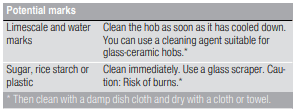
Always clean the hob after cooking. This will prevent food deposits from becoming burned on. Only clean the hob after the residual heat indicator has gone out.
Clean the hob with a damp dish cloth and dry it with a cloth or towel to prevent limescale build-up.
Only use cleaning agents that are suitable for this type of hob. Observe the manufacturer's instructions on the product packaging.
Never use:
■ Undiluted washing-up liquid
■ Cleaning agents designed for dishwashers
■ Abrasive cleaners
■ Harsh cleaning agents, such as oven spray and limescale remover
■ Scouring pads
■ High-pressure cleaners or steam jet cleaners
Stubborn dirt is best removed with a glass scraper, available from retailers. Observe the manufacturer's instructions.
You can obtain a suitable glass scraper from customer services or through our online shop.
Using a special sponge for cleaning glass-ceramic hobs achieves a great cleaning result.
Note: Do not use any cleaning agents while the hob is still hot. This may mark the surface. Make sure that any residue left by cleaning agents is removed.
Hob surround
To prevent damage to the hob surround, observe the following instructions:
■ Only use warm soapy water
■ Wash new dish cloths thoroughly before use.
■ Do not use harsh or abrasive cleaning agents.
■ Do not use a glass scraper or sharp objects.
Trouble shooting
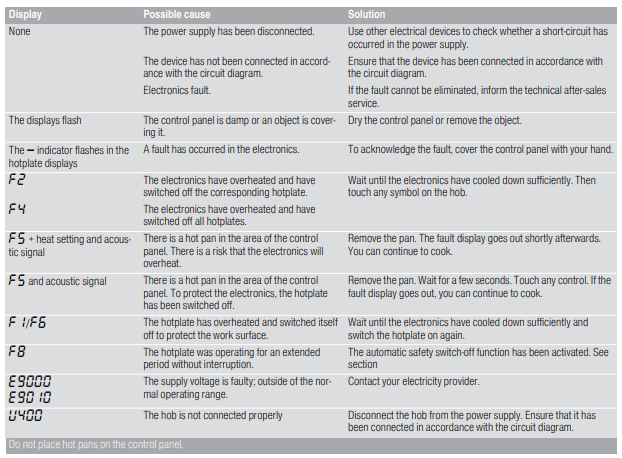
Usually, faults are small matters that are easy to eliminate. Please read the information in the table before calling the after-sales service.
Notes
■ If appears on the display, press and hold the button for the relevant cooking zone in order to read the fault code.
■ If the fault code is not listed in the table, disconnect the hob from the mains power supply and wait 30 seconds before reconnecting it. If this code is displayed again, contact the technical after-sales service and specify which fault code has appeared.
■ If a fault occurs, the appliance will not switch to standby mode.
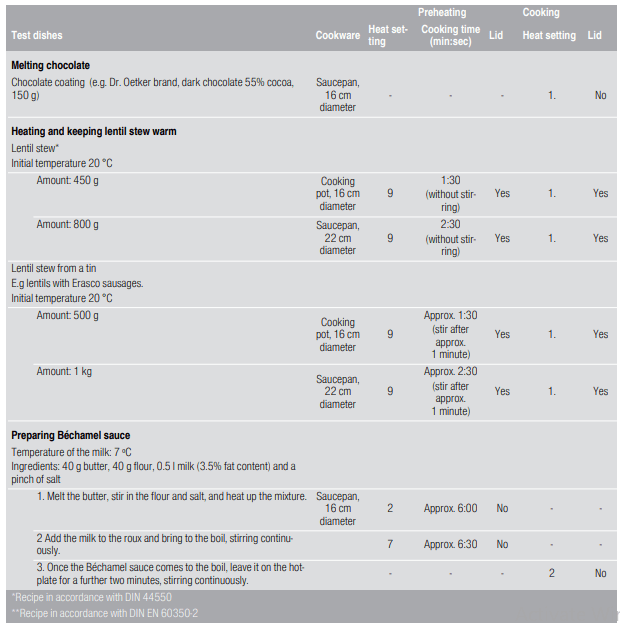
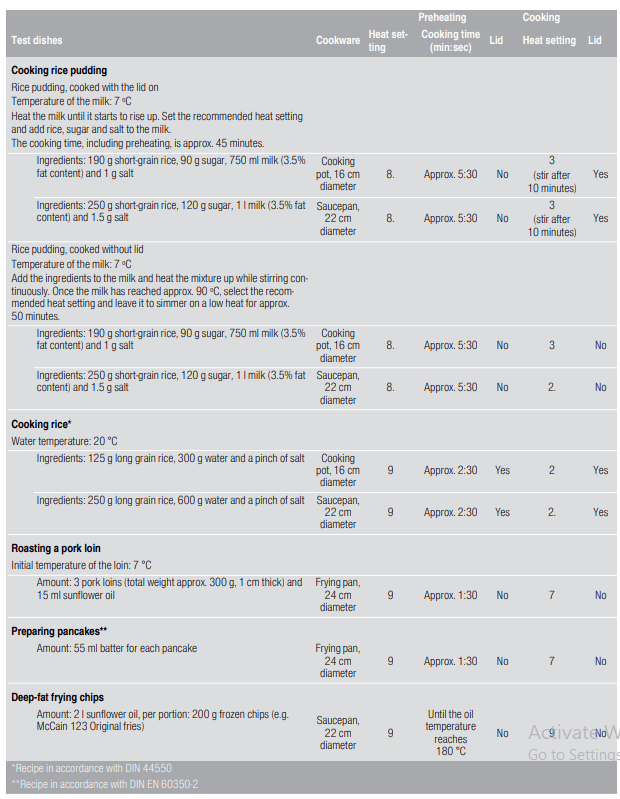
Test dishes
This table has been produced for test institutes to facilitate the testing of our appliances.
The data in the table refer to our Schulte-Ufer cookware accessories (4-piece cooking set for induction hob Z9442X0) with the following dimensions:
■ Saucepan: 16 cm Ø, 1.2 l for 14.5 cm Ø hotplates
 "Cookware check".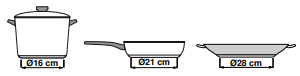


 : High temperature
 : Low temperature
 symbol. An audible signal sounds. The indicator next to the main switch and the hotplate indicators
  light up. The hob is ready to use.
 and
and  symbols to select the required heat setting.
 = lowest setting.
 = highest setting.
 symbol
 heat setting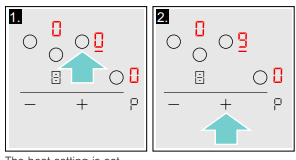
 appears.
 "Environmental protection"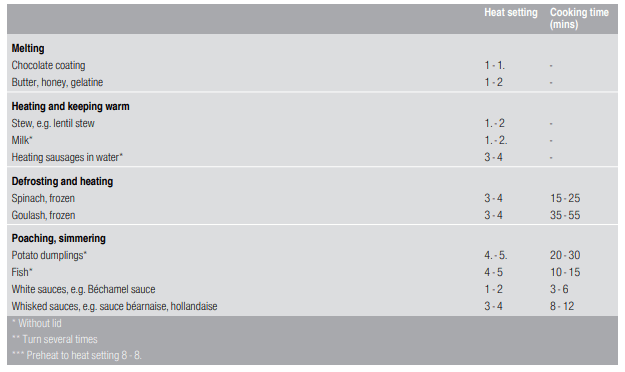
 symbol. The indicator lights up. The heat setting appears in the display for the lower hotplate.
 or
or  symbol to set the heat setting.
 symbol.
  lights up on the display for the hotplate.
 lights up on the timer display.
 or
or  symbol. The basic setting appears: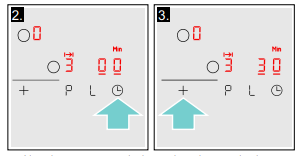
 “Basic settings”
 symbol and use the
 indicator lights up.
 and
and 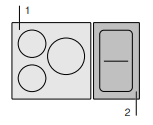
 heat setting.
 within the next 10 seconds
 symbol for approx. 4 seconds. The
  “Basic settings” section
 symbol. You will hear an audible signal. The control panel is locked for 35 seconds. You can now wipe over the surface of the control panel without altering any settings.
 and the residual heat indicator
  or
or  flash alternately in the hotplate display.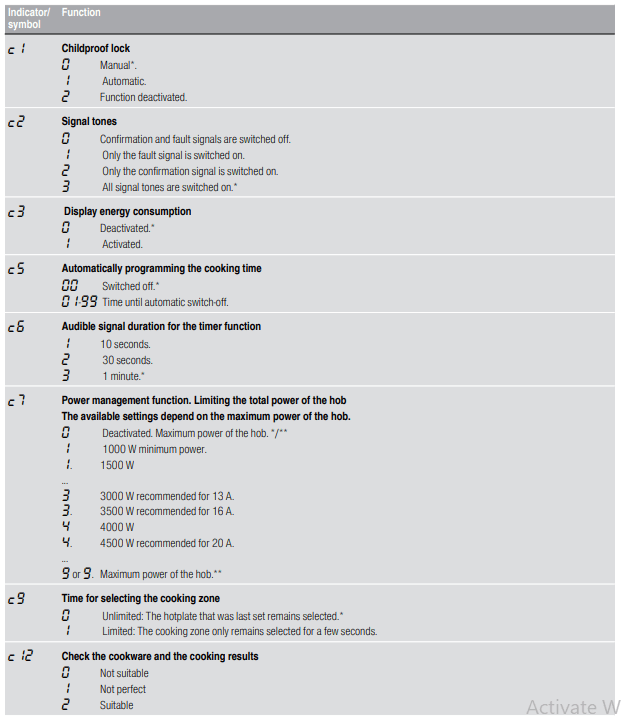

 symbol for approximately four seconds.
 or
or  symbol to view the individual displays.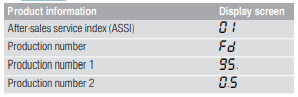
 and
and  flash alternately on the displays and
  appears as a presetting.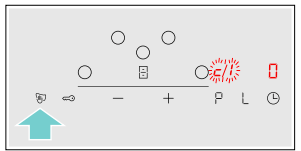
 and
and  symbols to select the required setting.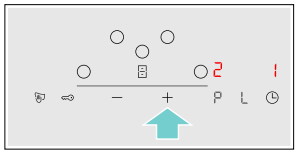
 kWh) for 10 seconds.
 “Basic settings”
 setting.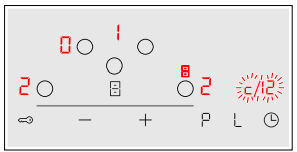
 appears on the display, press and hold the button for the relevant cooking zone in order to read the fault code.