
7084 655-00
ECBN 50
Operating instructions Page 16
NoFrost combined refrigerator-freezer
GB
Disposal notes
The appliance contains reusable materials and should
be disposed of properly - not simply with unsorted
household refuse. Appliances which are no longer
needed must be disposed of in a professional and
appropriate way, in accordance with the current local
regulations and laws.
When disposing of the appliance, ensure that the refrigerant circuit
is not damaged to prevent uncontrolled escape of the refrigerant
it contains (data on type plate) and oil.
• Disabletheappliance.
• Pulloutthemainsplug.
• Cutthroughtheconnectioncable.
WARNING
Dangerofsuffocationduetopackingmaterialandplasticfilm!
Donotallowchildrentoplaywithpackagingmaterial.Takethe
packagingmaterialtoanofficialcollectionpoint.
Safety instructions and warnings
•Topreventinjuryordamagetotheunit,theap-
plianceshouldbeunpackedandsetupbytwo
people.
•Intheeventthattheapplianceisdamagedon
delivery, contact the supplier immediately before
connecting to the mains.
•Toguaranteesafeoperation,ensurethattheap-
pliance is set up and connected as described in
these operating instructions.
•Disconnecttheappliancefromthemainsifany
faultoccurs.Pullouttheplug,switchofforremove
the fuse.
•Whendisconnectingtheappliance,pullonthe
plug, not on the cable.
•Anyrepairsandworkontheapplianceshould
only be carried out by the customer service
department,asunauthorisedworkcouldprove
highly dangerous for the user. The same applies
to changing the mains power cable.
•Donotallownakedflamesorignitionsources
to enter the appliance. When transporting and
cleaning the appliance ensure that the refrigerant
circuitisnotdamaged.Intheeventofdamage,
make sure that there are no ignition sources
nearbyandkeeptheroomwellventilated.
•Donotstandontheplinth,drawersordoorsor
use them to support anything else.
•Thisappliancecanbeusedbychildrenof8years
old and over, and also by persons with restricted
physical,sensoryormentalcapacityorlackof
experienceandknowledge,iftheyaresupervised
or have been instructed on safe use of the appli-
anceandunderstandtheresultingrisks.Children
must not be allowed to play with the appliance.
Cleaning and user maintenance must not be
carried out by children without supervision.
•Avoidprolongedskincontactwithcoldsurfaces
or chilled/frozen food. This could cause pain,
numbnessandfrostbite.Inthecaseofprolonged
skin contact, protective measures should be
taken,e.g.glovesshouldbeworn.
•Donoteaticecream,particularyicelolliesorice
cubes,immediatelyaftertakingthemfromthe
freezercompartmentasthereisariskof"burn-
ing"becauseoftheverycoldtemperatures.
•Donotconsumefoodwhichhasbeenstoredfor
too long, as it could cause food poisoning.
•Do notstore explosivesor spraysusing com-
bustible propellants such as butane, propane,
pentane etc. in the appliance. Electrical compo-
nentsmightcauseleakinggastoignite.Youmay
identify such sprays by the printed contents or a
flame symbol.
•Donotuseelectricalappliancesinsidetheap-
pliance.
•Theapplianceisdesignedforuseinenclosed
areas.Donotoperatetheapplianceoutdoorsor
in areas where it is exposed to splash water or
damp conditions.
•TheLEDlightstripsilluminatetheinteriorofthe
appliance. They are not suitable for lighting a
room.
16
GB
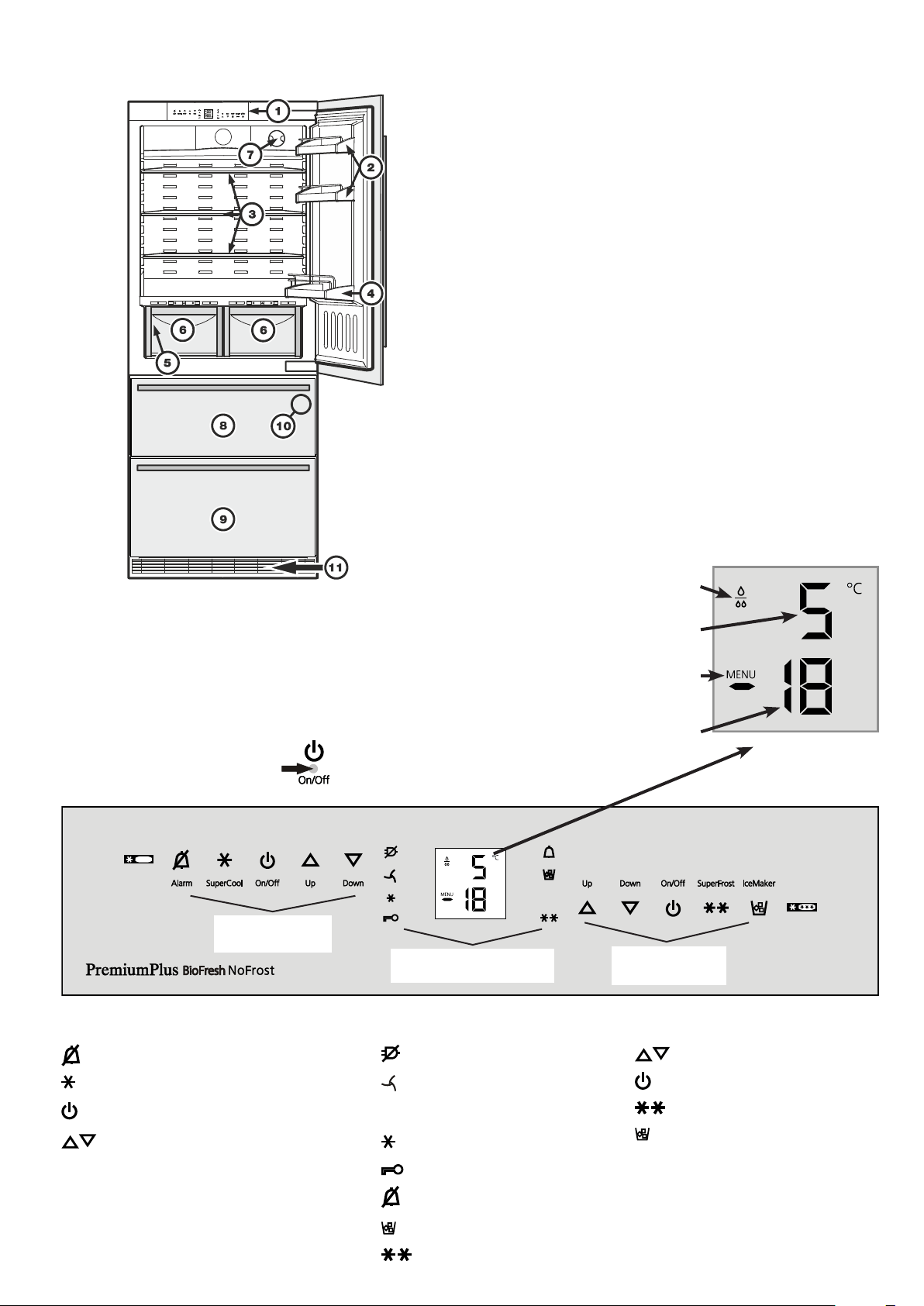
Description of the appliance
1
Operating and control elements
2
Adjustabledoorracks
3
Adjustablestorageshelves
4
Bottleracks
5
Type plate (behind the vegetable drawer on the left-hand side)
6
Vegetable drawers
7
Water filter
8
Upper freezer drawer
9
Lowerfreezerdrawer
bl
IceMaker(intheinterioroftheupperfreezerdrawer)
bm
Ventilationgrille.Inthisarea,theexchangeofairfortherefrigeration
unittakesplace.
Never cover this grille or otherwise obstruct the air flow!
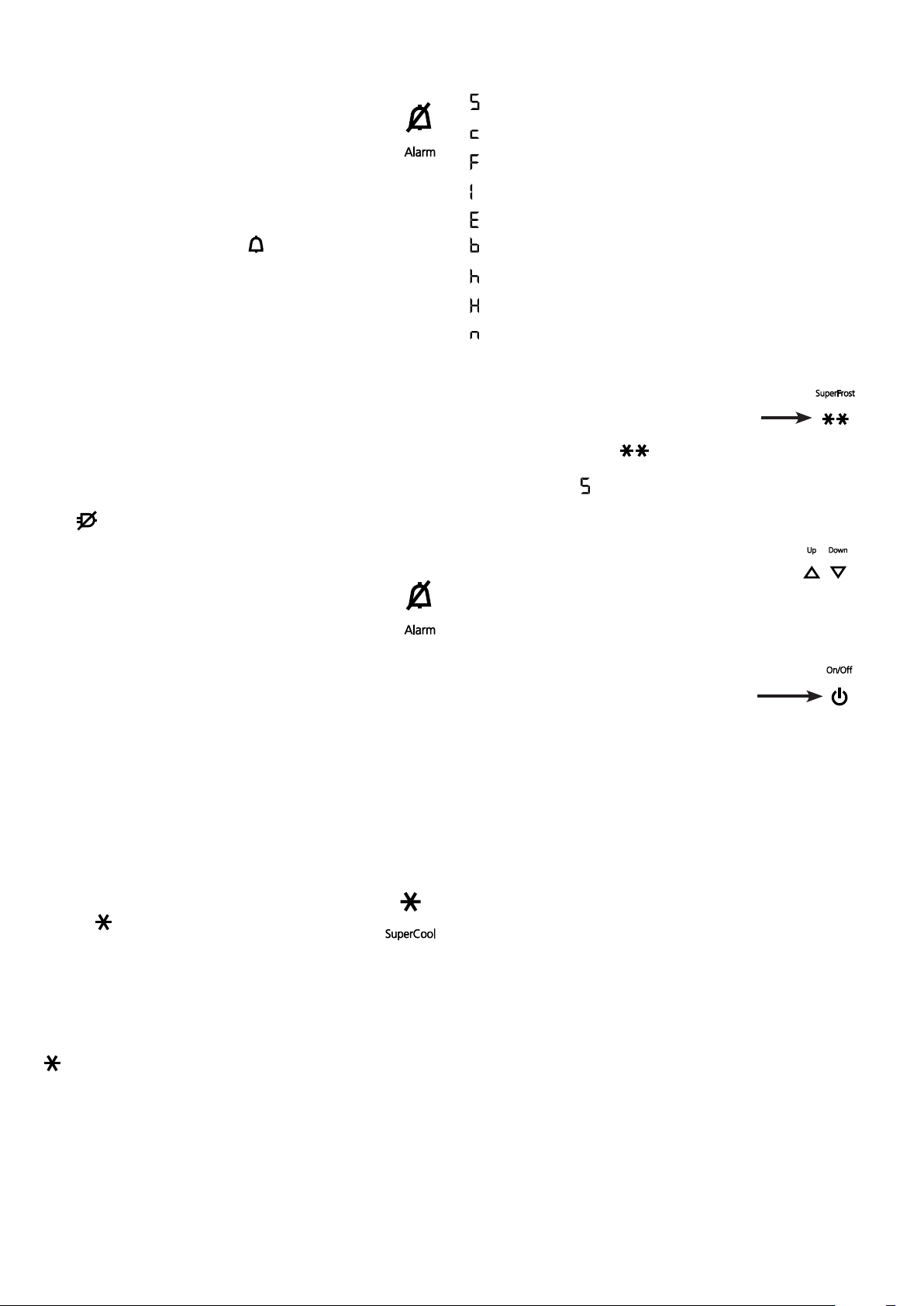
Freezer operating icons
Temperature setting icons
Freezer ON/OFF
SuperFrost
IceMakerON/OFF
Refrigerator
operating icons
Refrigerator operating icons
Mutealarm(refrigeratorandfreezer)
SuperCool
Refrigerator ON/OFF
Temperature setting buttons
Freezer
operating icons
Control icons
PowerfailureLED
DustfilterLED
The dust filter in the appliance
plinth must be cleaned.
SuperCoolLED
ChildlockLED
AlarmLED
IceMakerONLED
SuperFrostLED
Control
icons
Temperature and control display
Refrigerator temperature display
Freezer temperature display
Water filter has to be changed
Menumodeisactivated
(for setting additional functions)
Operating and control elements
The electronic control panel has the "touch capacitance
technology". Any function can be activated by touching the
corresponding icon.
The exact contact point
is between the symbol and its label
17
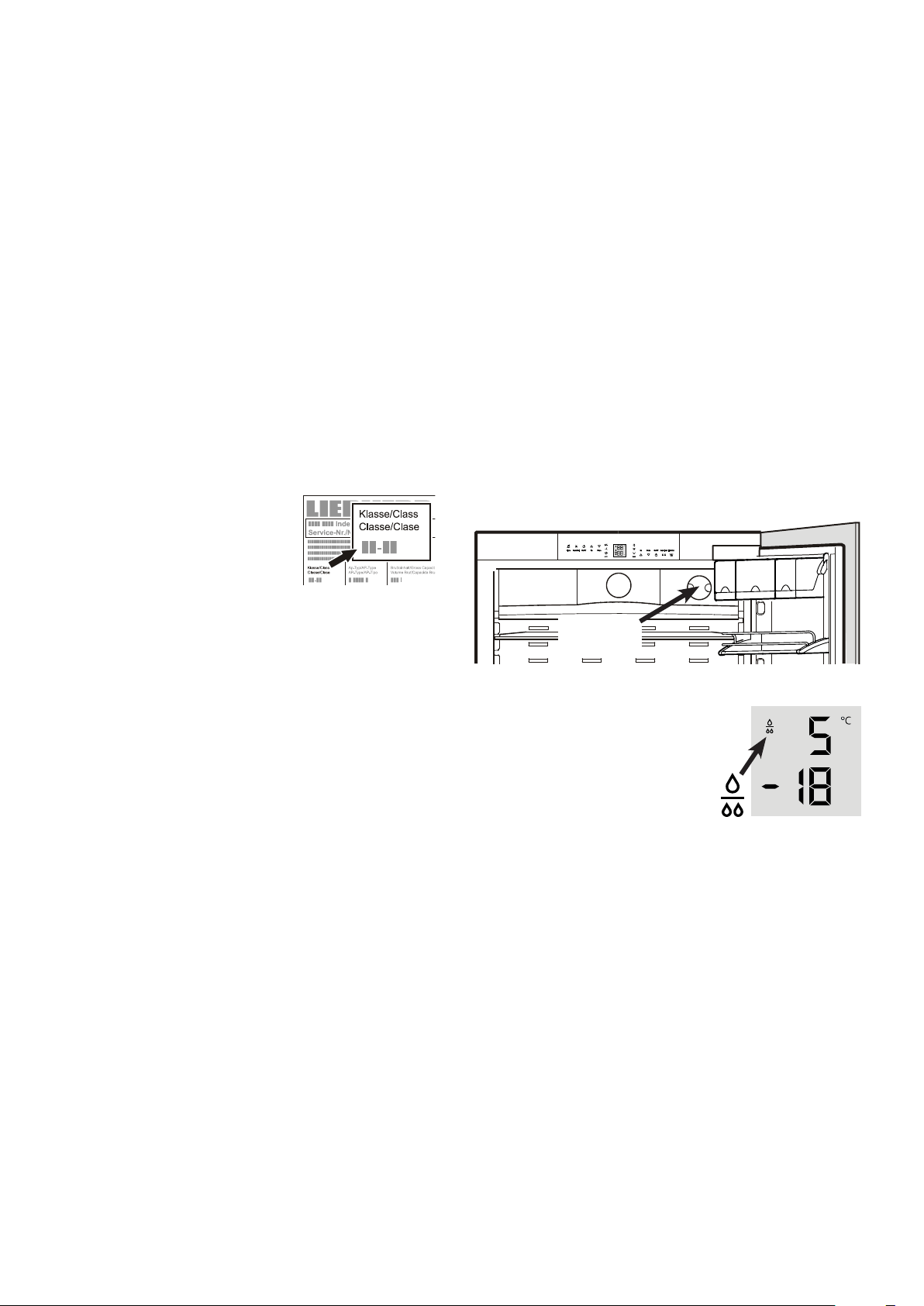
Replace the filter when the waterdrop
symbol appears in the temperature
display.
Filters can be obtained from your dealer.
The drop symbol must be cancelled
after the filter has been changed. For
detailed instructions see section entitled
"Setup mode".
Water filter
Before switching on the appliance, install the water filter provided
in the interior rear wall of the refrigerator compartment.
Thisensuresgoodicecubequalityandkeepsthewatercircuit
free of solids such as sand.
Caution!
To avoid the risk of bacteria growth, the water filter
must be changed when the waterdrop symbol appears
on the display!
Itisnotnecessarytoswitchoffthewatersupplywhenremoving
or installing the water filter.
Water filter
location
Range of appliance use
The appliance is suitable solely for cooling food in
a domestic environment or similar. This includes,
for example, use
-instaffkitchenettes,bedandbreakfastestablish-
ments,
- by guests in cottages, hotels, motels and other
forms of accommodation,
- in catering and similar services in the wholesale
trade.
Use the appliance solely as is customary within a domestic envi-
ronment. All other types of use are inadmissible. The appliance
is not suitable for storing and cooling medicines, blood plasma,
laboratory preparations or similar substances and products cov-
eredbythe2007/47/ECMedicalDevicesDirective.Anymisuse
of the appliance may result in damage to or spoilage of stored
goods. Furthermore, the appliance is not suitable for operation
in potentially explosive atmospheres.
Climate rating
The climate rating indicates the room
temperature at which the appliance may
be operated in order to achieve full refrig-
eration performance.
The climate rating is indicated on the
type plate.
The position of the type plate is shown in
the section entitled Description of the appliance.
Climate rating Room temperature
SN +10°C to +32°C
N +16°C to +32°C
ST +16°Cto+38°C
T +16°C to +43°C
SN-ST +10°Cto+38°C
SN-T +10°C to +43°C
Do not operate the appliance outside the
specified room temperature range.
Saving energy
- Alwaysensuregoodventilation.Donotcoverventilationopen-
ings or grille.
- Alwayskeepfanslitsclear.
- Donotplaceapplianceinareasofdirectsunlightornexttoa
cooker,radiatororsimilarobject.
- The energy consumption depends on the installation conditions,
e.g. the ambient temperature.
- Keep the time the appliance is open to a minimum.
- Store food logically.
- Ensurethatallfoodiswellpackedandcoveredforstorage.This
will prevent frost from forming.
- First cool warm food to room temperature before storing it.
- Defrostfrozenfoodintherefrigerator.
- Empty and switch off refrigerating unit for longer vacation pe-
riods.
18
GB
Switching the appliance on and off
Youareadvisedtocleantheappliancebeforeswitchingitonfor
the first time (see "Cleaning").
Donotloadwithfrozenfooduntilthetemperatureshowsatleast
-18°C.Therefrigeratorandfreezercompartmentscanbeoper-
ated separately.
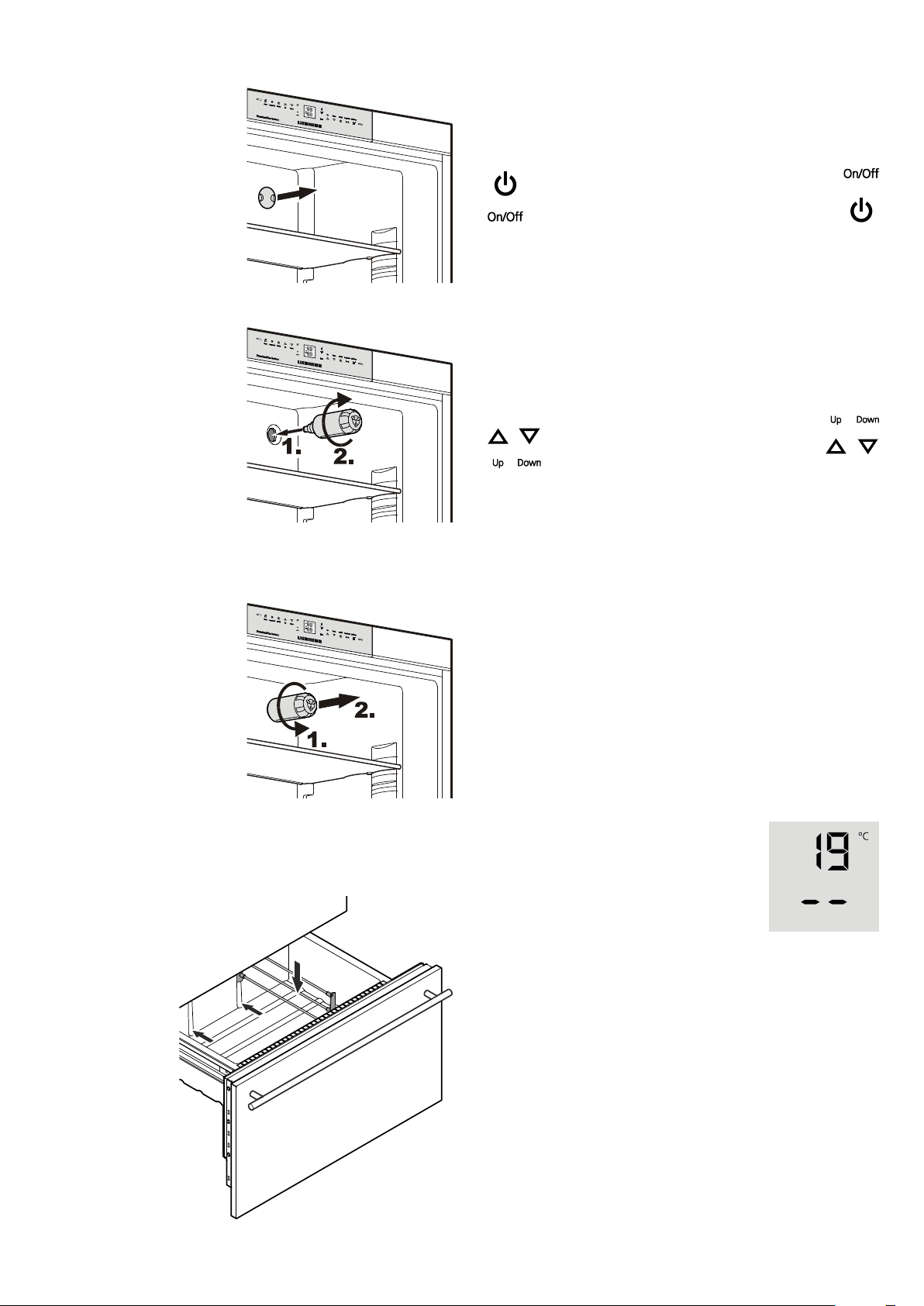
Switching off: keep the On/Off icons pressed for approx.
3 seconds.
Temperature display
In normal operation, the following settings
will be displayed:
- the average refrigerator temperature and
- the warmest frozen food temperature.
When starting up for the first time or when the
appliance is warm, dashes will appear until
the temperature reaches a level that can be
displayed (below 0°C in the freezer).
The display will flash:
- if you change the temperature or
- if the temperature rises by several degrees, indicating cold
loss,e.g.ifyouplacefresh,"warm"foodinthefreezerorifyou
removeorre-packfrozenfood,thetemperaturemayrisefora
short time due to warm air flowing into the freez er.
If F1 to F5 appears in the display, the appliance has a fault.
Consult the customer serv ice department indicating the fault
number displayed.
Switching on: touch the On/Off icons (on left
for refrigerator, on right for freezer) so that the
temperature displays light up or flash.
Setting the temperature
The appliance is pre-set for normal operation. We recommend
temperaturesof+5°Cintherefrigeratorand-18°Cinthefreezer.
To reduce the temperature: touch the
Down icon; on left for refrigerator and on
right for freezer.
To increase the temperature: touch the
Up icon.
- While you are entering the temperature, the set temperature
will flash on the display.
- When you touch the temperature setting icons for the first time,
themostrecentsetting("referencesetting")isdisplayed.
- You can change the settings in increments of 1°C by briefly
touchingtheiconsagain.Iftheiconsareheld,thetemperature
setting will change faster.
- Approximately 5 seconds after the last touch, the display will
automatically show the actual freezing or cooling temperature
("actualsetting").
- Youcanchangethetemperatures
in the refrigerator: between 9°C and 3°C and
inthefreezer:between-14°Cand-28°C.
Installing the water filter
1. Remove the cover of the
filtersocket.
2. Insertthefilterandturn
it90°clockwise.
Removing the water filter
3. Turn the filter 90° anti-
clockwiseandremove.
Partition for bottom freezer drawer
Ifrequired,thepartitionsuppliedintheacces-
sories set can be inserted in the bottom
drawer on the left or right.
19
Power failure/FrostControl display
Ifthe LEDcomesononthecontrolpanel,thismeansthatthe
freezer temperature has risen too high during the last few hours
or days due to a power failure.
IfyoutouchtheALARM icon now, the highest temperature
registered during the power failure will be displayed.
C h e c k t h e q u a l i t yo f t h e f o o d a n d i t s s u i t a b i l i t yf o r c o n s u m p -
tion in case it has become too warm or even defrosted.
The highest temperature will appear for appox. 1 minute. After
that, the actual temperature in the freezer will re-appear.
The display can be switched off by touching the ALARM icon.
Audible warning signal
The appliance is equipped with an alarm function.
Audible door alarm
Ifanappliancedoorisleftopenformorethan60seconds,
the audible warning signal will sound. Touch the ALARM
icon to cancel the alarm. The alarm switches back to
standby when the door is shut.
Audible/visual temperature alarm
Itsoundswhenitisnotcoldenoughinthefreezercompartment.
The temperature display and the
LEDwillalsoflash.
The audible warning device is switched off by touching
the ALARM icon. The temperature display will continue
to flash until the cause of the alarm has been rectified.
This can be caused by:
• thefreezerdoorbeingleftopenforalongtime,allowingwarm
ambient air to enter;
• alongpowerfailure;
• afaultintheappliance.
Ineachcase,makesurefoodhasnotthawedorperished.
SuperCool
Touching the SuperCool icon switches the refrigerator compart-
menttomaximumcooling.Itisrecommendedparticularlyifyou
wishtocoollargequantitiesoffood,drinks,freshlybakedgoods
or meals rapidly.
Switching on: Touch the SuperCool icon briefly so that
theLED
comes on. The refrigerator temperature will
drop to its lowest value.
Note: The SuperCool function uses slightly more energy. After
approximatelysixhours,however,therefrigeratorswitchesback
automaticallytonormalenergy-savingoperation.Ifrequired,the
SuperCool function can be switched off sooner.
Switching off:TouchtheSuperCool iconagainuntil theLED
goes out.
Setup mode
The following functions can be activated in setup mode:
= Sabbath mode
=Childlock
= Confirm water filter change
=Icemakervacationstate
= Water quantity for ice cube tray
= Set BioFresh temperature
=Displaybrightness
=Doorgasketheatingcontrol
=Confirm dust filter cleaning
Activating setup mode
• TouchtheSuperFrost icon for five seconds.
- The SuperFrost LED comes on for 5 seconds,
- after 5 seconds
will flash in the display.
The appliance is in setup mode now.
Youcanselectthesetupmodefunctionsbytouching
the freezer compartment temperature setting icons.
Note
Insetupmodethedisplaywillflashcontinuously.
Exiting setup mode
• TouchthefreezercompartmentOn/Off icon
Theappliancewillchangebacktonormaloperation.
20
GB
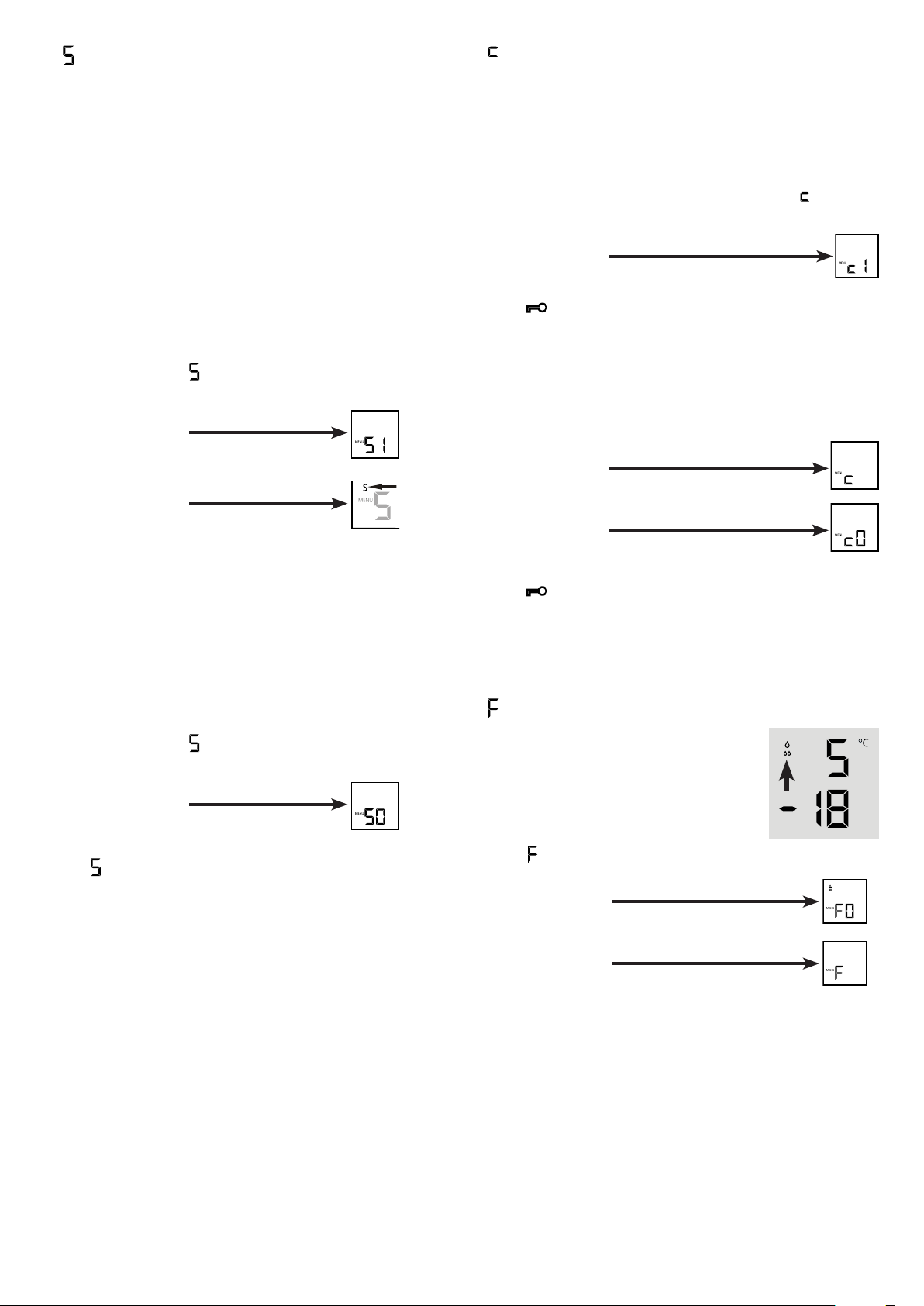
= Confirm water filter change
After the water filter has been changed, the
drop symbol on the display must be reset.
Resetting the drop symbol
•Activate setup mode by touching the
SuperFrost icon for 5 seconds.
• TouchthefreezercompartmentDown icon
until
appears in the display.
• TouchtheSuperFrost icon.
- The display reads
• TouchtheSuperFrost icon again.
- The display reads
• Thedropsymboldisappears.
• ExitsetupmodebytouchingthefreezercompartmentOn/Off
icon.
= Child lock
Thechildlockisdesignedtoprotecttheappliancefrombeing
switched off accidentally.
Activating the child lock
• Activatesetupmodebytouching
the SuperFrost icon for 5 seconds.
• TouchthefreezercompartmentDown icon until
appears in
the display.
• TouchtheSuperFrost icon.
- The display reads
• TouchtheSuperFrost icon again.
- The
LEDislitandthechildlockisactivated.
• ExitsetupmodebytouchingthefreezercompartmentOn/Off
icon.
Deactivating the child lock
• Activatesetupmodebytouching
the SuperFrost icon for 5 seconds.
- The display reads
• TouchtheSuperFrost icon.
- The display reads
• TouchtheSuperFrost icon again.
- The
LEDgoesout.Thechildlockisdeactivated.
• ExitsetupmodebytouchingthefreezercompartmentOn/Off
icon.
= Sabbath mode
This function complies with the religious requirements to be
observed on the Sabbath or religious holidays.
When Sabbath mode is activated, some of the functions of the
control electronics are switched off.
• Theinteriorlightremainsswitchedoffifoneoftheappliance
doors is opened.
• Theinteriorfanremainsinthestatuswhichiscurrentlyset(On
or Off) if an appliance door is opened.
• Nodooropenalarm.
• Notemperaturealarm.
Activating the sabbath mode
• Activatesetupmodebytouching the SuperFrost icon for
5 seconds.
- The display reads
• TouchtheSuperFrost icon.
- The display reads
• TouchtheSuperFrost icon again.
- The display reads
The sabbath mode is activated.
• ExitsetupmodebytouchingthefreezercompartmentOn/Off
icon.
Note
The Sabbath mode is deactivated automatically after 120 hours.
Deactivating the sabbath mode
• Activatesetupmodebytouching the SuperFrost icon for
5 seconds.
- The display reads
• TouchtheSuperFrost icon.
- The display reads
• TouchtheSuperFrost icon again.
The
in the display will go out.
The sabbath mode is deactivated.
• ExitsetupmodebytouchingthefreezercompartmentOn/Off
icon.
21
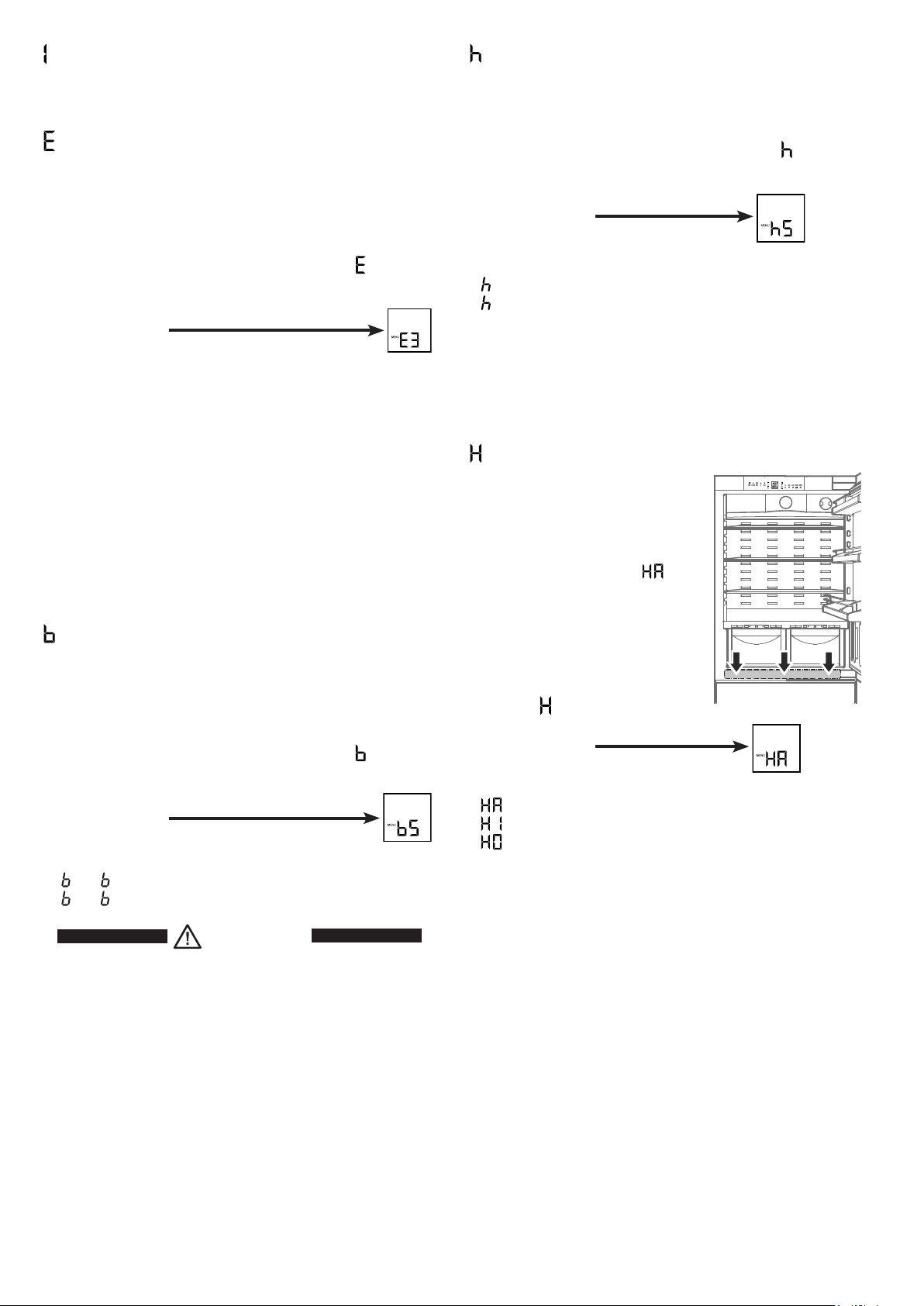
= Lower hinge heating control
Ifcondensedwaterappearsinthelower
hinge area or on the base plate between
refrigerator and freezer compartment,
increase the output of the heating lo-
cated behind the base plate.
The factory setting is set to
= me-
dium output.
Changing the heating output
• Activatesetupmodebytouchingthe
SuperFrost icon for 5 seconds.
• Touch the freezer compartment Down
icon until
appears in the display.
• TouchtheSuperFrost icon.
- The display reads
• Touchthefreezercompartment
Up/Down icons to select
= at slight condensation
= at heavy condensation
= heating off
• TouchtheSuperFrost icon at the desired value.
• ExitsetupmodebytouchingthefreezercompartmentOn/Off
icon.
Note
With normal ambient conditions no condensation will appear. With
high humidity and low ambient temperature this feature helps to
prevent condensation.
= Display brightness
Adjusting the display brightness
• Activate setup mode by touching the SuperFrost icon for
5 seconds.
• TouchthefreezercompartmentDown icon until
appears in
the display.
• TouchtheSuperFrost icon.
- The display reads
• Touchthefreezercompartment
Up/Down icons to select
0 = minimum to
5 = maximum brightness.
• TouchtheSuperFrost icon at the desired value.
• ExitsetupmodebytouchingthefreezercompartmentOn/Off
icon.
= Ice maker vacation state
Seesectionentitled"Ice maker".
= Water quantity for ice cube tray
If the produced ice cubes of the ice maker are too small, the
inflowingwaterquantitycanbeadjusted.
Adjusting the water quantity
• Activate setup mode by touching the SuperFrost icon for
5 seconds.
• TouchthefreezercompartmentDown icon until
appears in
the display.
• TouchtheSuperFrost icon.
- The display reads
• TouchthefreezercompartmentUp icon once only so that E 4
appears in the display.
Caution!
Do not increase for more than one step. If the adjusted value
is too high, the ice cube tray of the ice maker could overflow.
• TouchtheSuperFrost icon again.
• ExitsetupmodebytouchingthefreezercompartmentOn/Off
icon.
Checktheicecubesizewithinthenextdays.Iftheicecubesare
still too small, follow the steps above again.
= Set BioFresh temperature
The temperature in the BioFresh drawers may be changed.
Setting the BioFresh temperature
• Activate setup mode by touching the SuperFrost icon for
5 seconds.
• TouchthefreezercompartmentDown icon until
appears in
the display.
• TouchtheSuperFrost icon.
- The display reads
• TouchthefreezercompartmentUp/Down icons
and set
6 - 9 to increase the temperature (warmer),
4 - 1 to reduce the temperature.
CAUTION!
For values b4 - b1, the temperature in the drawers can
drop to below 0°C. Food may freeze.
• TouchtheSuperFrost icon at the desired value.
• ExitsetupmodebytouchingthefreezercompartmentOn/Off
icon.
22
GB
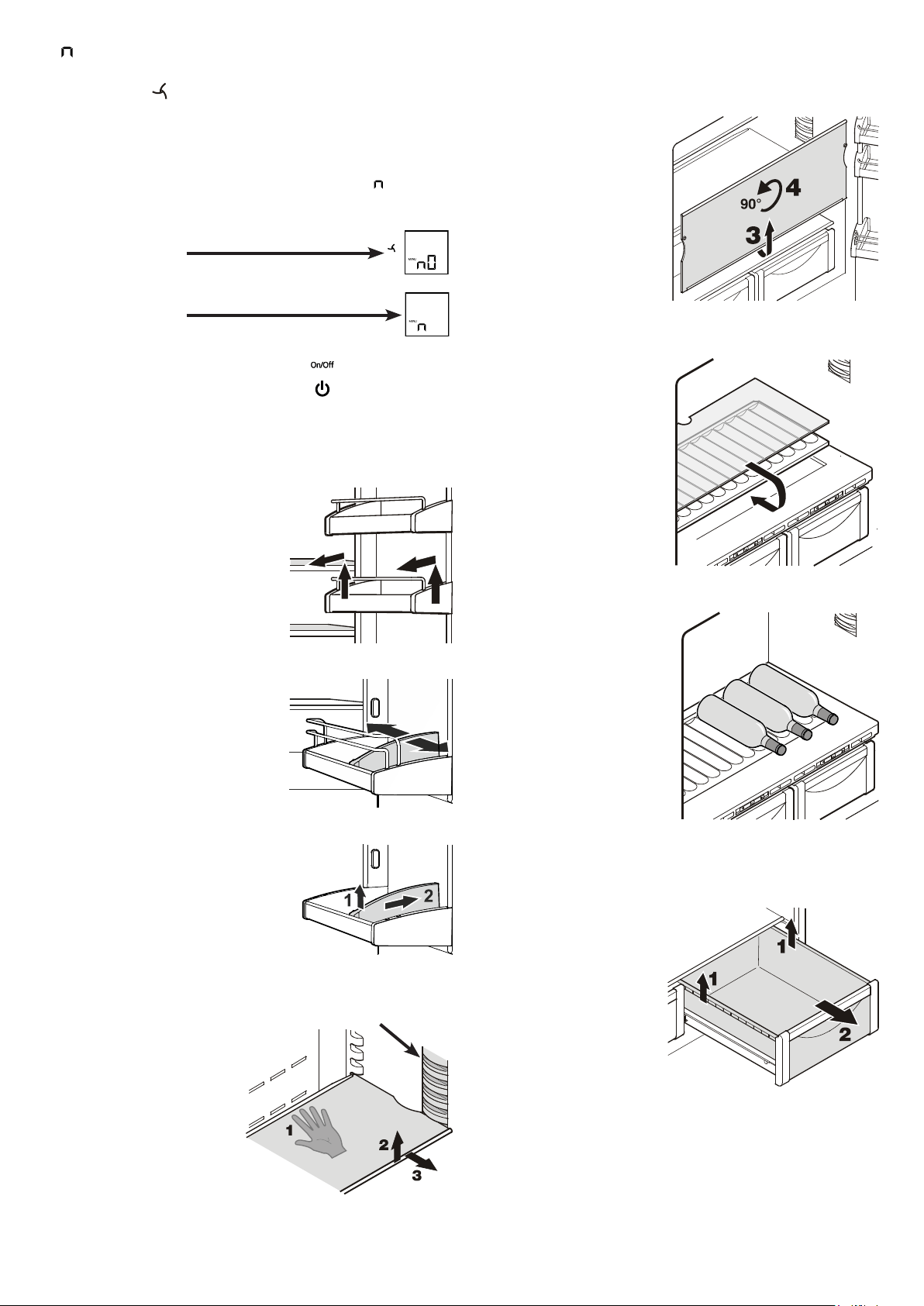
Removing the BioFresh drawer
Pullthedrawerstraightout,
gripatthebackandliftout.
Inserting the BioFresh
drawer
Placethedraweronthepull-
out rails. The rails must be
fully extended and aligned
with the front of the drawer.
Slide the drawer in.
Repositioning the shelves
1. Hold the shelf underneath
with your hand to prevent
from tipping down back-
wards when removing.
2. Lifttheshelfatthefront.
3. Pulltheshelftowardsyou
until the round cutout of
the shelf is in line with the
interior light cover.
4. Lifttheshelfupandreplace
in the desired position.
Removing the shelves
1. Follow the first three steps
in the chapter above.
2. Movetheshelfdownand
stopjustoverthevegeta-
ble drawer.
3. Movethefrontoftheshelf
upwards until the shelf is
in a vertical position.
4. Turn the shelf by 90° and
remove.
Equipment
Repositioning the door racks
Lift door rack vertically, lift out to
the front and re-insert at a different
height, following these steps in the
reverse order.
Lightcover
Bottle shelf
The shelf above the BioFresh
drawers can be used for stor-
ing bottles horizontally.
Remove the glass plate and
insert it under the shelf plate.
The recesses in the shelf plate
ensure that the bottles are
stored securely.
When storing tall bottles, the
bottom door rack must be
moved further up.
By shifting the bottle holder you
can protect the bottles from falling
over when opening or closing the
door.
Removing the bottle holder
Lift thebottleholder vertically atthe
front (1), move backwards (2) and
remove.
= Confirm dust filter cleaning
Once the dust filter in the appliance plinth has been cleaned, the
dustfilterLED
in the display must be cancelled.
Cancelling the dust filter symbol
• Activate setup mode by touching the SuperFrost icon for
5 seconds.
• TouchthefreezercompartmentDown icon until
appears in
the display.
• TouchtheSuperFrost icon.
- The display reads
• TouchtheSuperFrost icon.
- The display reads
• Thedustfiltersymbolhasbeencancelled.
• Exitsetupmodebytouching
the freezer compartment On/Off icon.
23
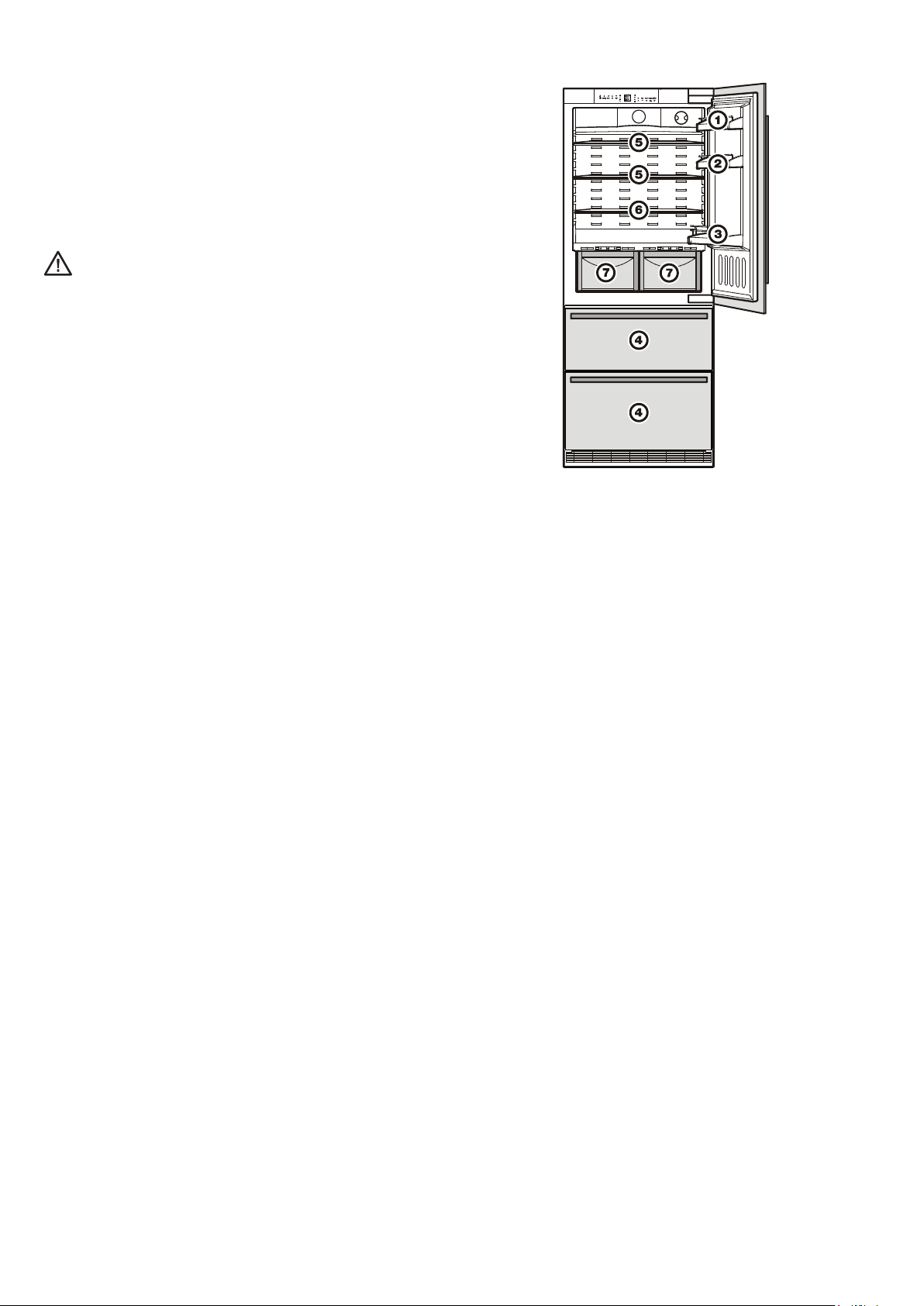
Arranging food
(1) butter, cheese
(2) eggs
(3) bottles
(4) frozen food, ice cubes
(5) meat, sausage products, dairy products
(6) bakedgoods,pre-cookedmeals
(7) fruit, vegetables, salads (for high humidity setting)
meat, cold meats, dairy products (for low humidity setting)
TheadjustablehumidityisexplainedintheBioFresh com-
partment section.
Note
• Foodwhichgivesofforabsorbsodoursandflavoursaswellas
liquids should always be stored covered or in closed containers.
• High-percentagealcoholsshouldbetightlysealedandstored
upright.
Interior light
The interior light is located at the left, right and top in the refrigerator
compartment and above each drawer in the freezer compartment.
Itcomesonifoneofthedoorsorafreezerdrawerisopened.
The light switches off automatically if one of the doors or a freezer
drawer has been left open for more than 15 minutes. The audible
warning signal sounds at the same time.
Ifoneofthestriplightsisnotlit,itisdefective.
The light intensity of the LED light corresponds to laser
class 1/1M.
Important
The light cover may only be removed by customer service
staff. If the cover is removed, do not look directly at the
light through optical lenses from close distance. This can
damage your eyes.
24
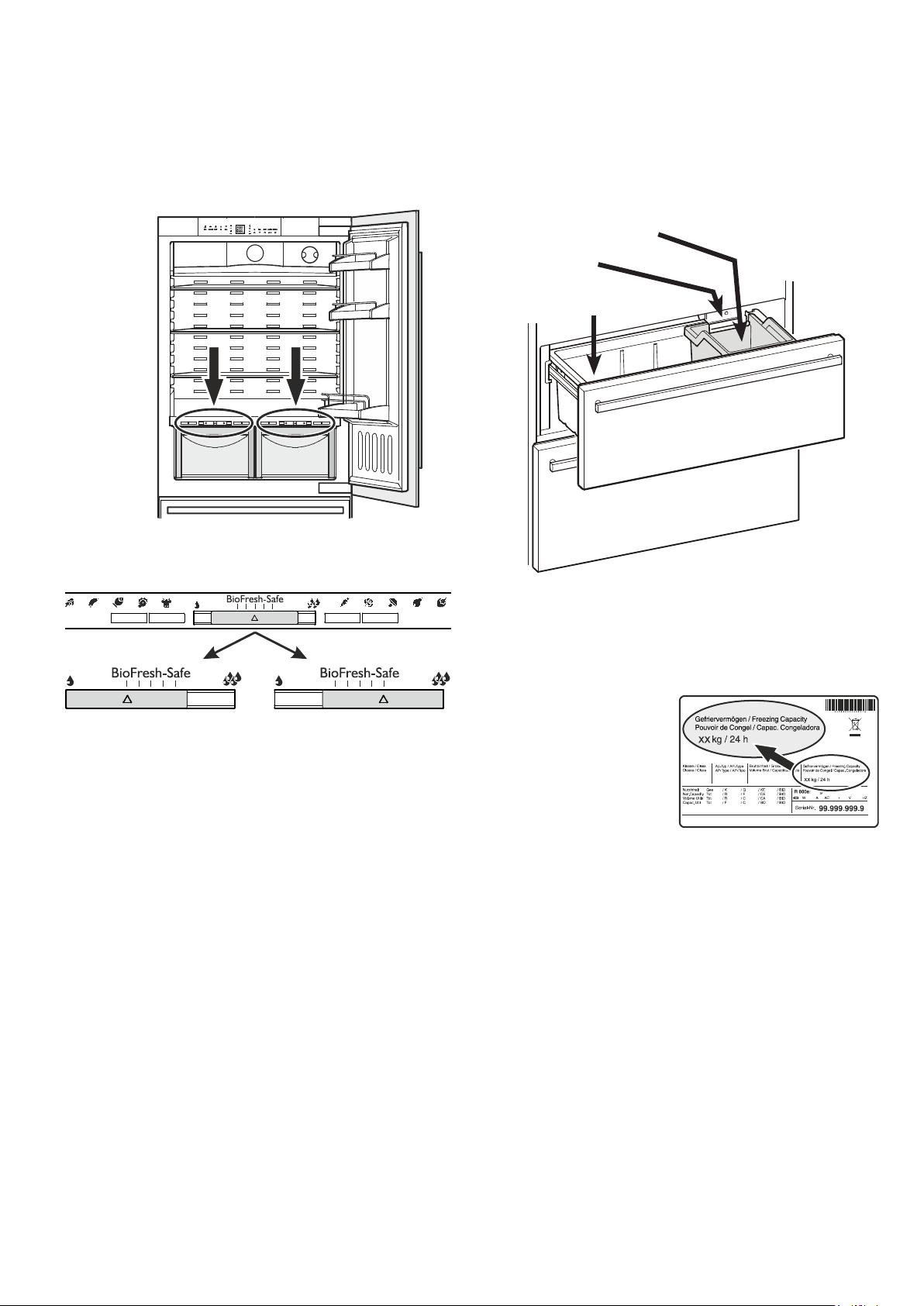
Freezing
Fresh food should be frozen to the core as rapidly as possible.
Frozen food can also be given a cold boost. This is provided by
the SuperFrost facility.
The maximum amount of food
(inkg)whichcanbefrozenin
24 hours is shown on the type
plate("Freezingcapacity").
This amount varies according
to the model and climate rating.
Space for freezing and
storage
Icemaker
Icecubebin
Freezer compartment description
Both drawers can be used for freezing of food or storage of
frozen food.
The ice cube bin in the upper drawer is intended for ice cubes only.
Ifyouneedthewholeupperdrawerforfreezingorstorage,the
ice cube bin can be removed.
Important:theicemakerwillnotejecttheicecubesofitstrayif
the bin has been removed.
BioFresh compartment
TheBioFreshcompartmentenablesyoutokeepfoodforupto
3 times longer than in normal refrigerators.
Theconstanttemperatureofjustabove0°Candtheadjustable
humidity provide the ideal storage conditions for different types
of food.
The BioFresh compartment satisfies the requirements of a chill
compartmenttoENISO15502.
Notes
• The humidity in the compartment depends on the moisture
content of the food in it, and the frequency with which the com-
partment is opened.
• Thefreshertheproductandthehigheritsquality,thelongerit
willkeep.
• Unwrapped animal and vegetable foods should be stored
separatelyinthedrawers.Ifthereisnotenoughspaceforthem
tobestoredseparately,makesurethattheyarewrapped.Do
not allow different types of meat to come into contact with one
anotherbut keepthem packaged separately so as to avoid
premature bacterial spoilage.
• ThefollowingproductsshouldnotbestoredintheBioFresh
compartment: hard cheese, potatoes, cold-sensitive vegetables
such as cucumbers, aubergines, avocadoes, semiripe tomatoes,
zucchini, all cold-sensitive tropical fruits such as pineapples,
bananas, grapefruit, melons, mangos, papayas, etc.
Dry
Small humidity symbol - slide
control to left.
This setting is suitable for dry
or wrapped food like dairy
products, meat, fish, cold
meats.
Humidity selection
Humid
High relative humidity of max.
90%, large humidity symbol -
slide control to right.
This setting is suitable for
storing unwrapped food with
a high moisture content such
as salad, vegetables and fruit.
25
Ice maker
Safety instructions and warnings
• Theicemakerisdesignedexclusivelytomakeicecubesin
quantities required by a household and may only be operated
with water suitable for this purpose.
• Allrepairsandworkontheicemakermayonlybecarriedout
by customer service personnel or other trained personnel.
• The first three batches of ice must not be consumed or
used. This applies both to using the appliance for the first
time and also to using it after it has not been used for a
lengthy period of time.
This ensures that the water supply
is purged.
• The manufacturer cannot accept liability for damage
caused by a faulty connection to the mains water supply.
• Theicemakerwillonlyworkifthecombinedrefrigerator-freezer
isconnectedtotheelectricitysupply.Itwillonlymakeicecubes
if the freezer compartment is operating.
• Ensure that the drawer is fully closed, as the icemaker can
otherwise not produce ice cubes.
Notes on freezing
• Alwaysstoreidenticalfooditemstogether.
• Packfoodwhichyouarefreezingyourselfinquantitiesappro-
priate to your household. To ensure that the food freezes right
through, the following quantities should not be exceeded per
package:fruit,vegetables:upto1kg,meat:upto2.5kg.
• Packfrozenfoodinstandardfreezerbagsorreuseableplastic,
metal or aluminium containers.
• Donotallowfreshfoodwhichistobefrozentocomeintocon-
tactwithfoodalreadyfrozen.Alwayskeeppacksdryinorder
toavoidthemstickingtogether.
• Always write the date and contents on the pack and do not
exceed the stated storage time for the food.
• Donotfreezebottlesandcanswhichcontaincarbonateddrinks
as they might burst.
• Only take out as much food as is immediately required for
thawing. Use food which has been thawed in prepared meals
asquicklyaspossible.
Frozen food can be thawed in the following ways:
– in a fan oven,
– in a microwave oven,
– at room temperature,
– in the refrigerator: the cold given off by the frozen food is used
for cooling.
Bleeding the ice maker
Toensurethattheicemakerworksproperly,thewatersupply
line must be bled.
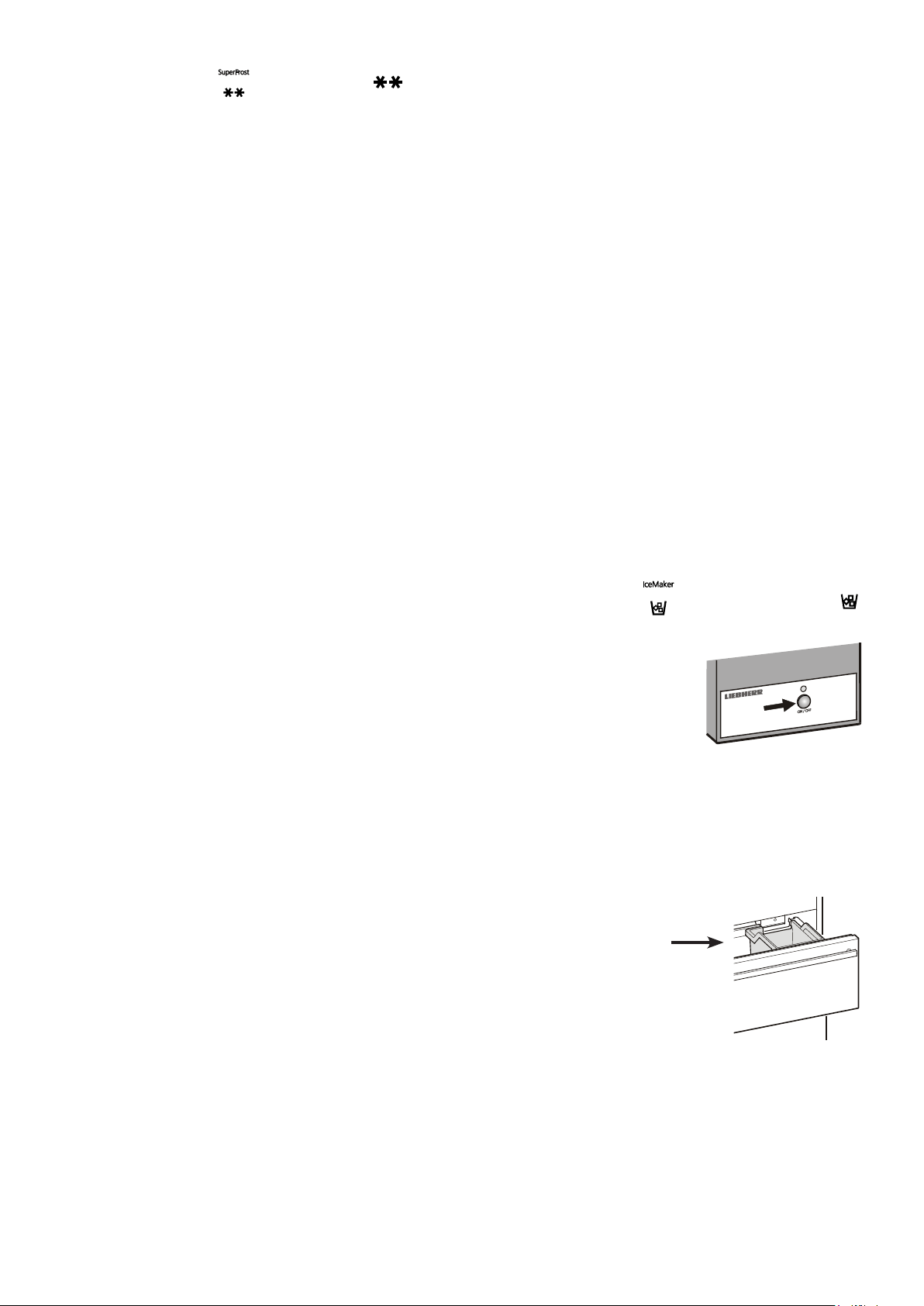
• TouchtheIceMaker icon
so that the IceMaker LED
comes on.
• Openthetopfreezerdrawer.
• PresstheON/OFF button on the ice
maker housing for approx. 3 sec-
onds. The LED above the button
starts flashing.
• Pressthebuttonagainbriefly.TheLEDflashesmorequickly.
• Closethefreezerdrawerimmediately.
The water supply valve opens for 25 seconds and pumps all the
air out of the water supply system.
• Thentheicecubetrayoftheicemakermustbecompletely
emptied. See the section Activating the ice maker vacation
state.
• Finally,cleantheicecubebin.
Freezing with SuperFrost
Touch the SuperFrost icon briey so that the LED
comes on.
• ForsmallamountsoffrozenfoodswitchonSuperFrost6hours
beforehand. For the maximum amount (see freezing capacity on
the type plate) you will need to switch it on 24 hours beforehand.
• Thenplacethefreshfoodinsidethefreezer.
- The SuperFrost function switches off automatically.Depending
on the quantity of food placed in the freezer, this will normally
be between 30 and max. 65 hours. The freezing process is now
complete, the SuperFrost LED will go out.
You should not switch on the SuperFrost func tion:
- when placing frozen food in the freezer;
- whenfreezinguptoapprox.2kgfreshfooddaily.
26
Switching the ice maker on
• TouchtheIceMaker icon so that the IceMaker LED
comes on.
Afteryoustarttheicemakerforthefirsttime,itmaytakeupto
24 hours before the first ice cubes are ready.
The production capacity depends on the temperature inside the
freezer compartment. The lower the temperature, the more ice
cubes can be produced over a period of time.
Theicecubesfalloutoftheicemakerintotheicecubebin.When
the ice reaches a certain level in the bin, the appliance stops
producing ice automatically.
Switching the ice maker off
Ifyoudonotneedanyicecubes,theicemakercanbeswitched
off independently of the freezer compartment.
• TouchtheIceMaker icon
so that the IceMaker LED
goes out.
The ice maker can also be
switched on and off using the
ON/OFFbu t to n a t t h e i c e m a k e r
housing.
Press the button for approxi-
mately 1 second.
GB
Activating the ice maker vacation state
Be sure the upper freezer drawer is com-
pletely closed and the ice cube bin is
installed correctly.
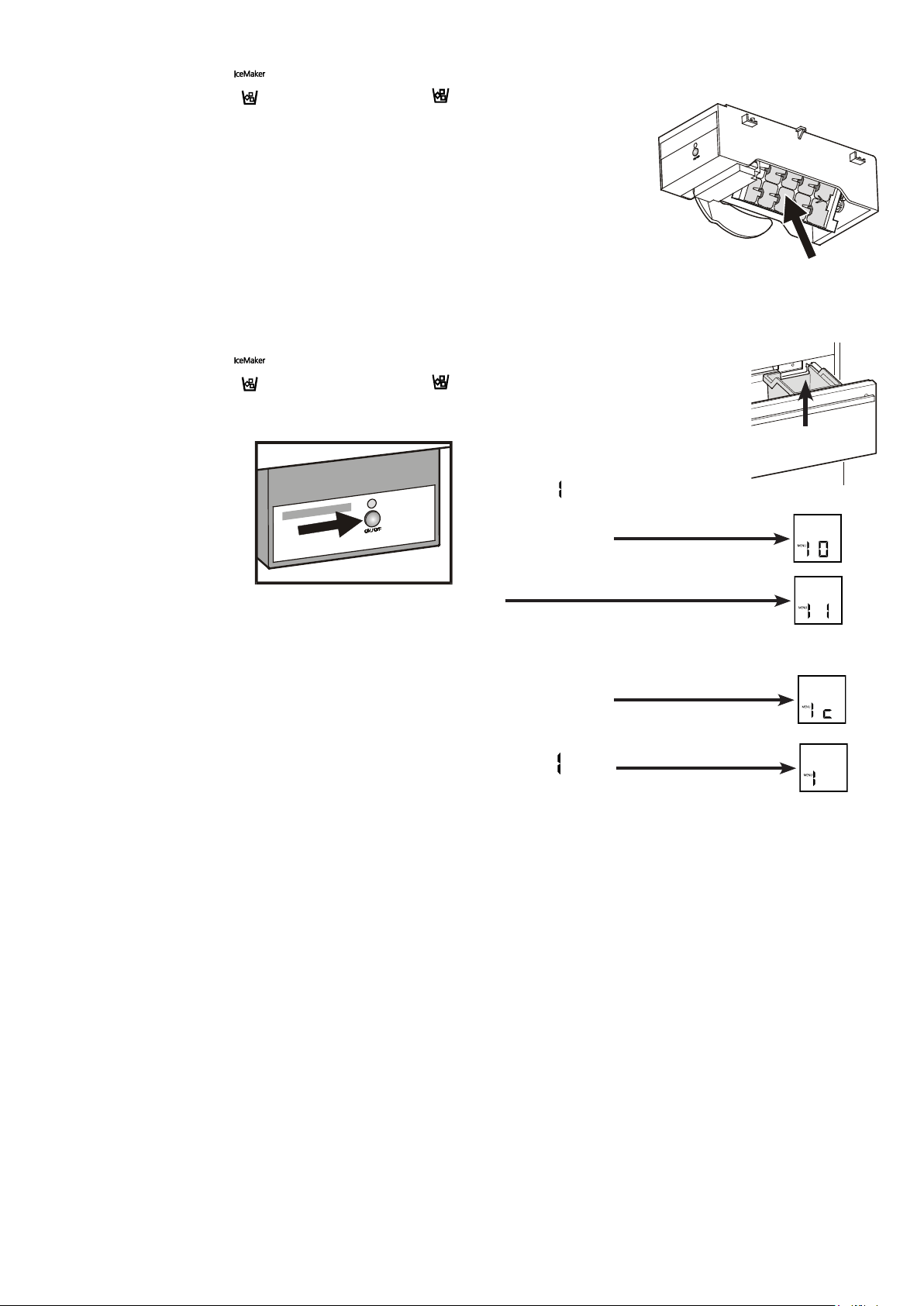
• Activate setup mode by touching the
SuperFrost icon for 5 seconds.
• Touch the freezer compartment Down
icon until
appears in the display.
• TouchtheSuperFrost icon.
- The display reads
or
dependingonwhethertheicemakerisswitched
on or off.
• Touchthefreezer compartment Down icon.
- The display reads
• TouchtheSuperFrost icon.
- The digit
flashes.
The ice cube tray rotates down.
When the interior temperature appears in the display, the tray is in
thedownpositionandtheicemakerisswitchedoffautomatically.
Ice maker vacation state
Incaseoflongervacations,theicecubetrayshouldbeemptied.
Bysettingtheicemakerintothe
vacation state, the tray will
rotate down and no water
remains in the tray.
The freezer drawer must be
left open so that the surface
of the tray dries up and no mould
or unpleasant odours can occur.
Icecubebin
27
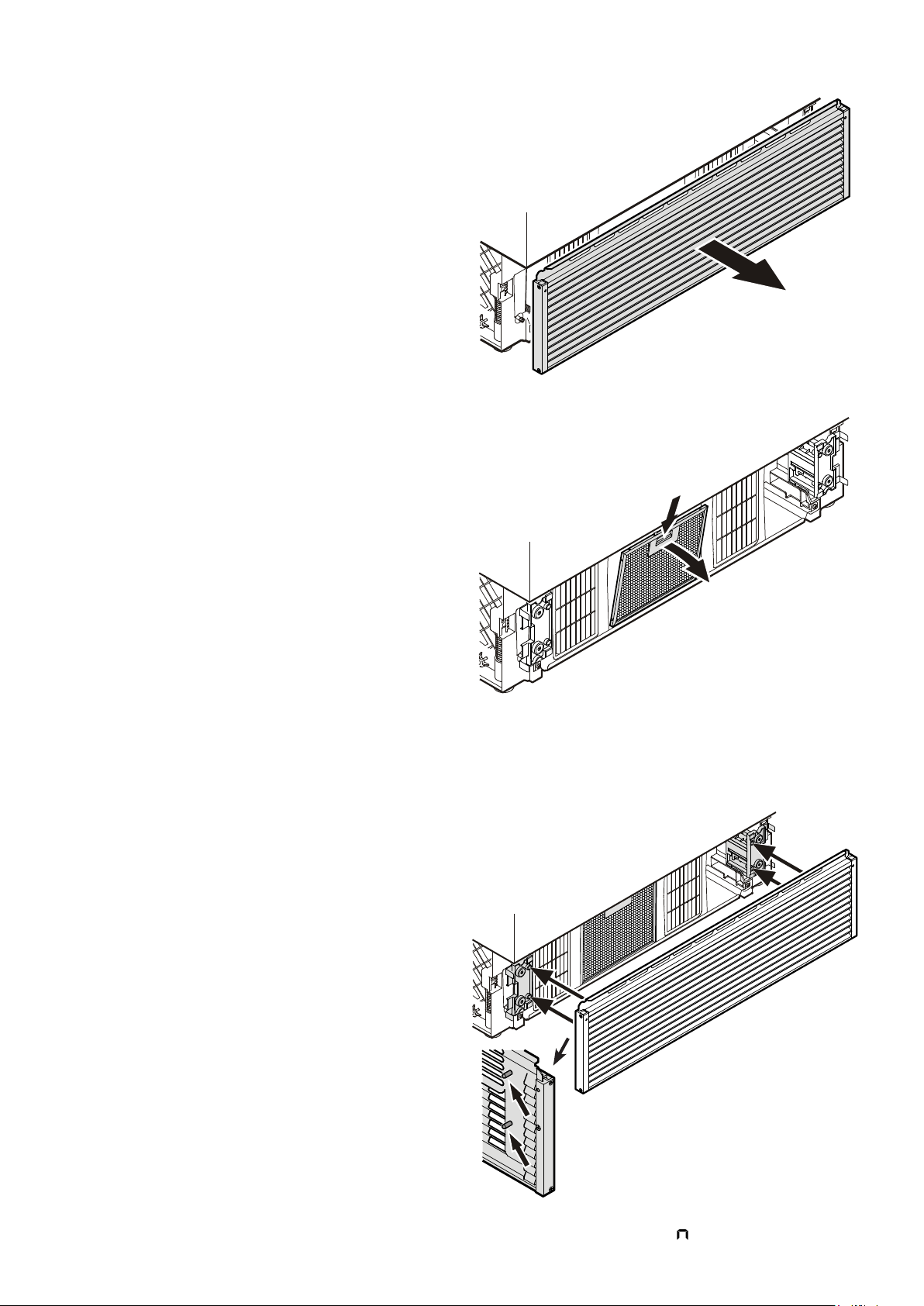
• Open the bottom freezer drawer and
remove the ventilation grille by pull-
ing forwards. The grille is supported
magnetically so no tool is required for
removing.
• ResettheairfilterLED.
Refer to chapter Setup Mode -
= ResetairfilterLED.
• Push down the button of the air
filter, tilt to the front and remove.
Cleaning the air filter
• Cleanthefilterinadishwasherorbyhandwith
lukewarmwateranddishwasherdetergent.
• Installtheairfilterinthereverseorder.
• Installtheventilationgrille.
The grille has bolts on the inside. These
bolts must be inserted into the holes of
the supports.
Cleaning
Before cleaning always switch off the appliance. Pull out
the mains plug or switch off or unscrew the fuse.
• Cleantheinside,equipmentandouterwallswithlukewarmwater
andalittledetergent.Donotuseabrasiveoracidcleanersor
chemical solvents.
Do not use steam cleaners because of the
risk of injury and damage.
• Ensure that no cleaning water penetrates into the electrical
components or ventilation grille.
• Dryallpartswellwithacloth.
• Donotdamageorremovethetypeplateontheinsideofthe
appliance.Itisveryimportantforservicingpurposes.
Defrosting
Refrigerator compartment
The refrigerator compartment defrosts automatically. The water
thatformsontherearwalldrainsintoareservoiratthebackof
the appliance and evaporates automatically through the com-
pressor heat.
Freezer compartment
The NoFrost system automatically defrosts the appliance.
Any moisture arising collects on the evaporator and freezes, and
is periodically defrosted and evaporated.
28
Malfunctions
You may be able to rectify the following faults by checking
the possible causes yourself:
Appliance does not function:
–Istheapplianceswitchedon?
–Istheplugcorrectlyfittedinthemainssocket?
–Isthefuseintact?
Loud running noise:
–Istheappliancesetupfirmlyonthefloor?
–Doestheappliancecausenearbyitemsoffurnitureorobjects
tovibrate?Pleasenotethatnoisescausedbytherefrigerant
circuit cannot be avoided.
The temperature is not cold enough:
–Isthetemperaturesettingcorrect(see"Settingthetempera-
ture")?
– Have excessive amounts of fresh food been placed in the ap-
pliance?
–Doestheseparatelyinstalledthermometershowthecorrect
reading?
–Istheventilationsystemworkingproperly?
–Istheappliancesetuptooclosetoaheatsource?
If none of the above causes
apply and you cannot rectify
the fault yourself, contact the
nearest customer service de-
partment stating the type des-
ignation
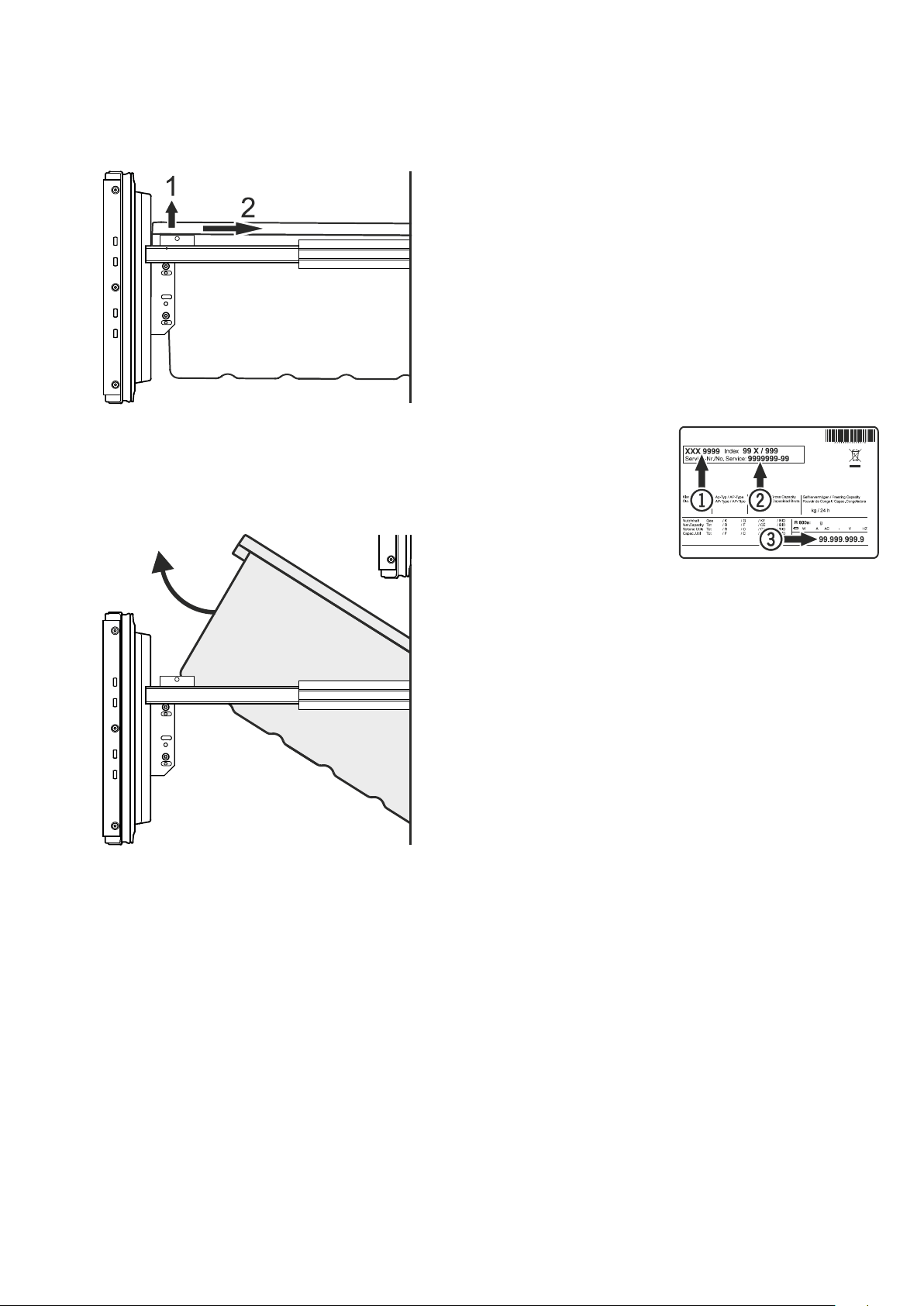
1
, service number
2
and appliance number
3
as
indicated on the type plate.
The position of the type plate
is shown in the section entitled
Description of the appliance.
Shutting your appliance down
Ifyourapplianceistobeshutdownforanylengthoftime,switch
it off and disconnect the plug or switch off or unscrew the fuse.
Clean the appliance and leave the door open in order to prevent
unpleasant smells.
The appliance complies with the relevant safety regulations and
ECDirectives2004/108/ECand2006/95/EC.
GB
Removing the freezer drawer containers
• Opentherefrigeratordoor.
• Pulloutthefreezerdrawer.
• Pullthecontainerupwardsbytherightandleftcorners(1).
• Pushthecontainerbackwards(2).
• Tiltthecontaineratanangleandremove.
• Installthecontainerinthereverseorder.
Side view of the freezer
drawer pulled out
29