Ù
5HVHWVHF
6HWXSVHF

aus
3
Table of contents
ausI nst r uct i on manual
8 Intended use . . . . . . . . . . . . . . . . 5
( Safety instructions. . . . . . . . . . . . 5
Before you switch ON the
appliance . . . . . . . . . . . . . . . . . . . . . 5
Delivery. . . . . . . . . . . . . . . . . . . . . . . . 5
Installation. . . . . . . . . . . . . . . . . . . . . . 6
In daily use . . . . . . . . . . . . . . . . . . . . . 7
Damage . . . . . . . . . . . . . . . . . . . . . . . 7
Disposal . . . . . . . . . . . . . . . . . . . . . . . 7
Door lock . . . . . . . . . . . . . . . . . . . . . . 9
7 Environmental protection . . . . . 10
Packaging. . . . . . . . . . . . . . . . . . . . . 10
Old appliances . . . . . . . . . . . . . . . . . 10
* Getting to know your
appliance . . . . . . . . . . . . . . . . . . 11
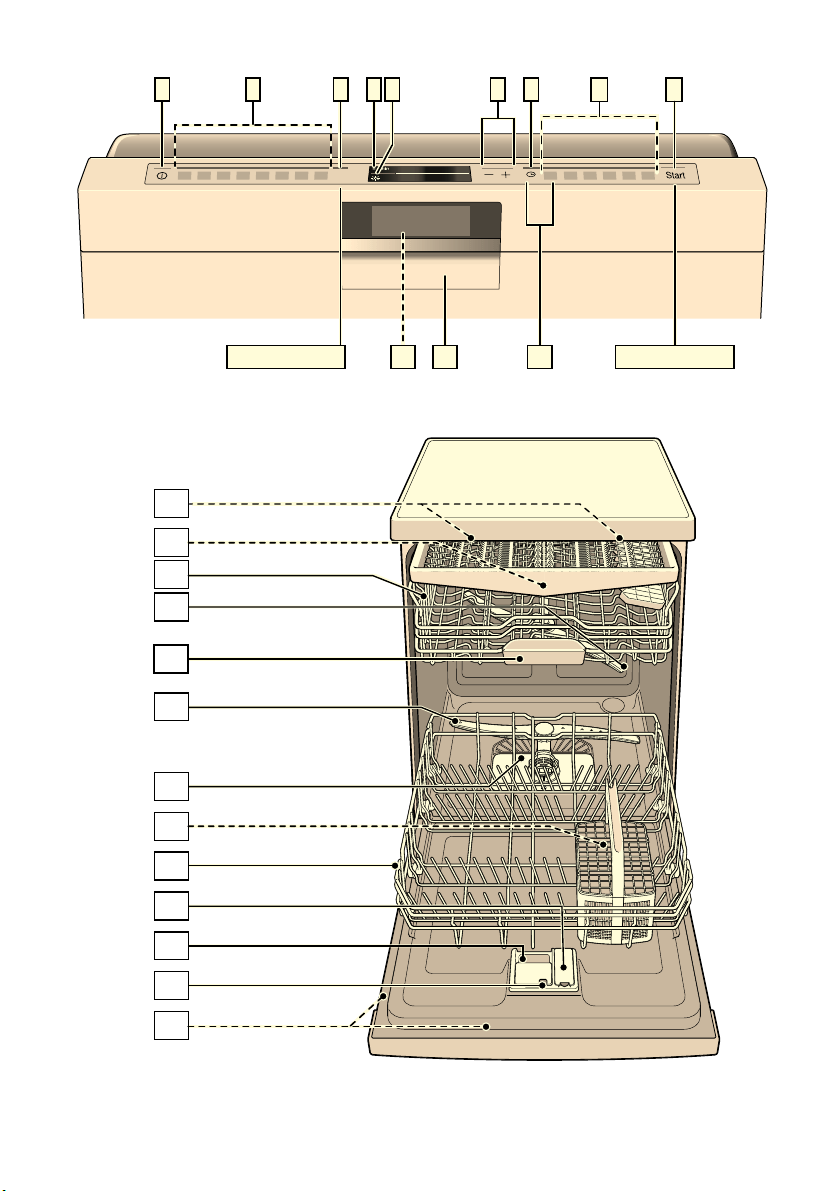
Control panel . . . . . . . . . . . . . . . . . . 11
Appliance interior . . . . . . . . . . . . . . . 11
Info button . . . . . . . . . . . . . . . . . . . . 12
Time setting . . . . . . . . . . . . . . . . . . . 12
Switching on the appliance for
the first time . . . . . . . . . . . . . . . . . . . 13
Settings. . . . . . . . . . . . . . . . . . . . . . . 14
, Rinse aid . . . . . . . . . . . . . . . . . . . 16
Setting amount of rinse aid. . . . . . . . 17
Switching off rinse aid refill
indicator . . . . . . . . . . . . . . . . . . . . . . 17
- Utensils. . . . . . . . . . . . . . . . . . . . 17
Not suitable . . . . . . . . . . . . . . . . . . . . 17
Glass and utensil damage. . . . . . . . . 17
Loading the dishwasher . . . . . . . . . . 18
Upper basket. . . . . . . . . . . . . . . . . . . 18
Lower basket. . . . . . . . . . . . . . . . . . . 18
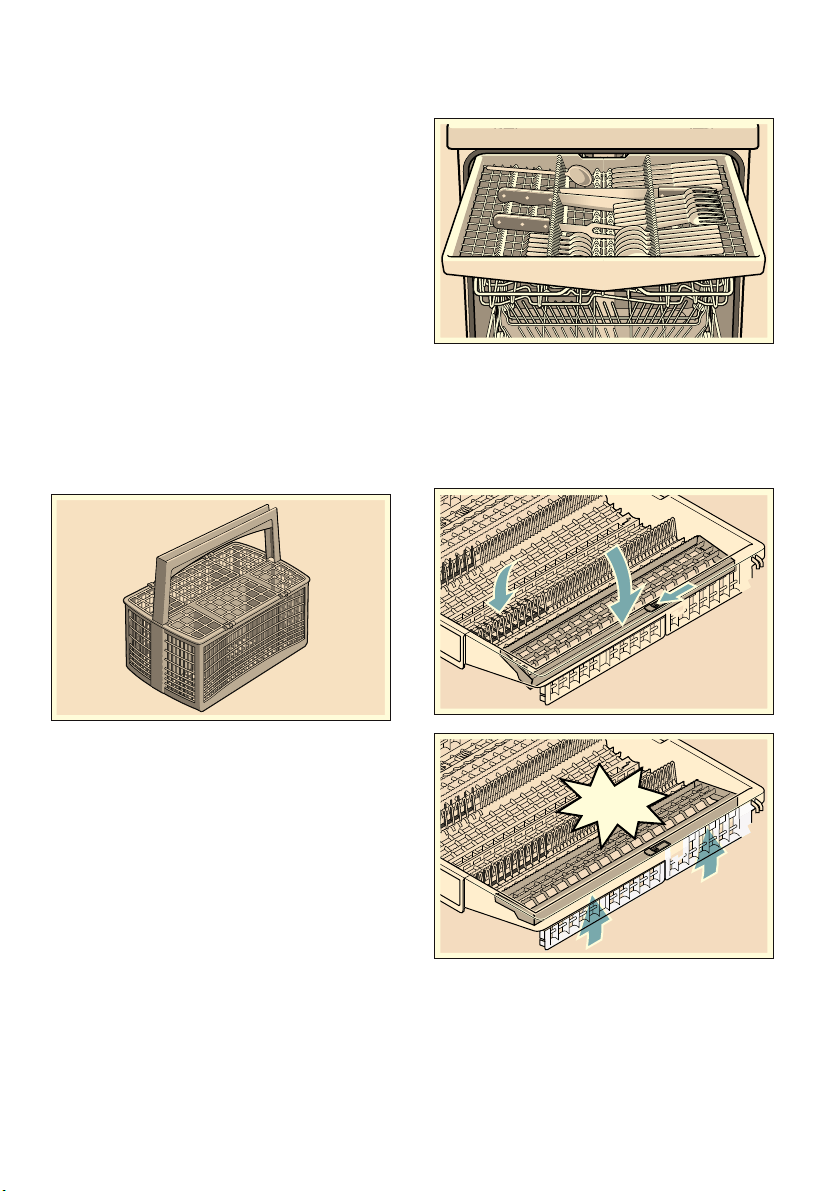
Cutlery basket . . . . . . . . . . . . . . . . . . 19
Cutlery drawer . . . . . . . . . . . . . . . . . . 19
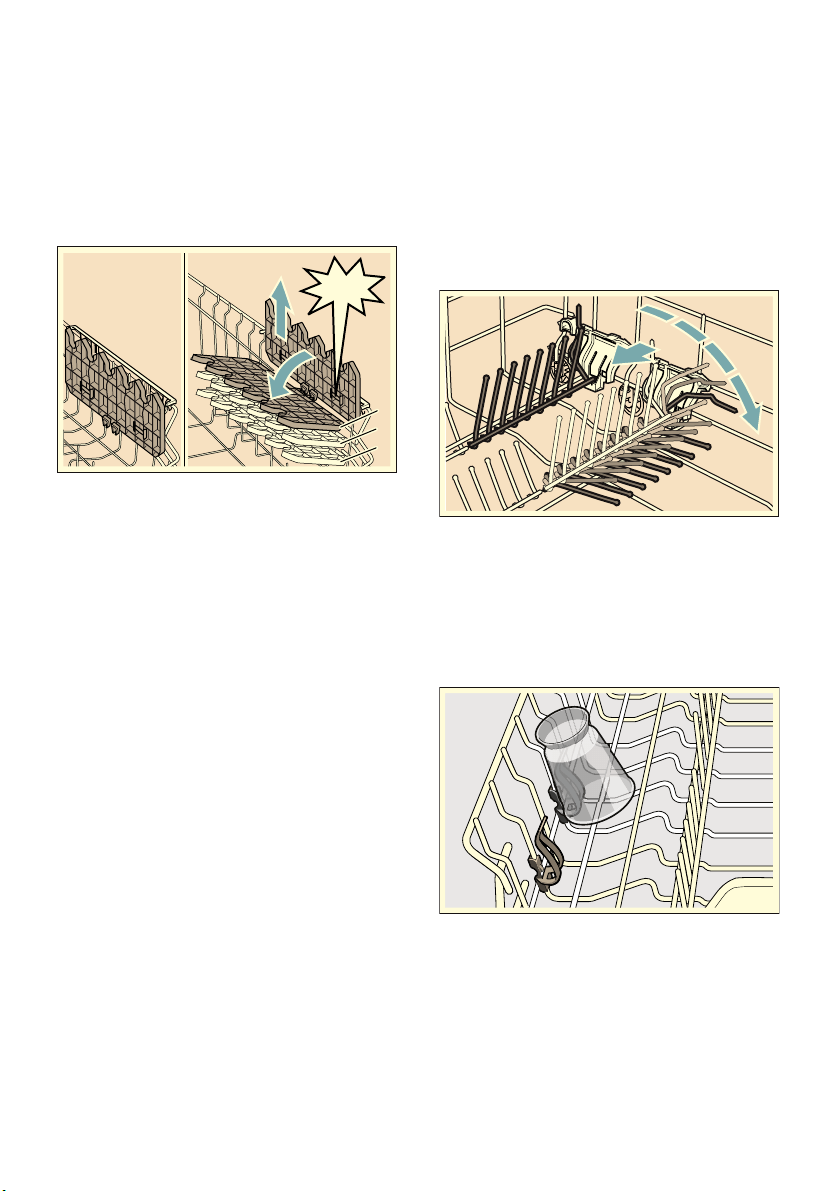
Etagere . . . . . . . . . . . . . . . . . . . . . . . 20
Folding spikes . . . . . . . . . . . . . . . . . . 20
Small items holder. . . . . . . . . . . . . . . 20
Knife rack . . . . . . . . . . . . . . . . . . . . . 21
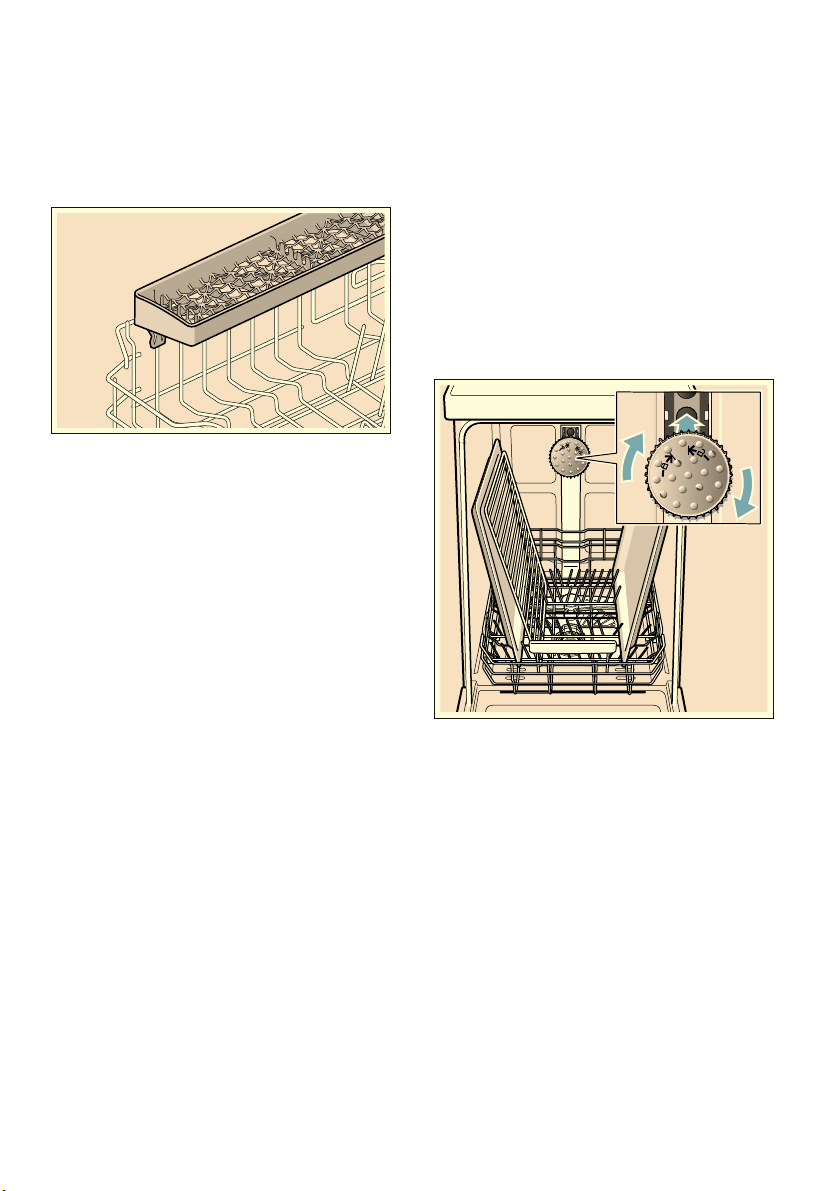
Baking sheet spray head. . . . . . . . . . 21
Unloading the dishwasher . . . . . . . . . 22
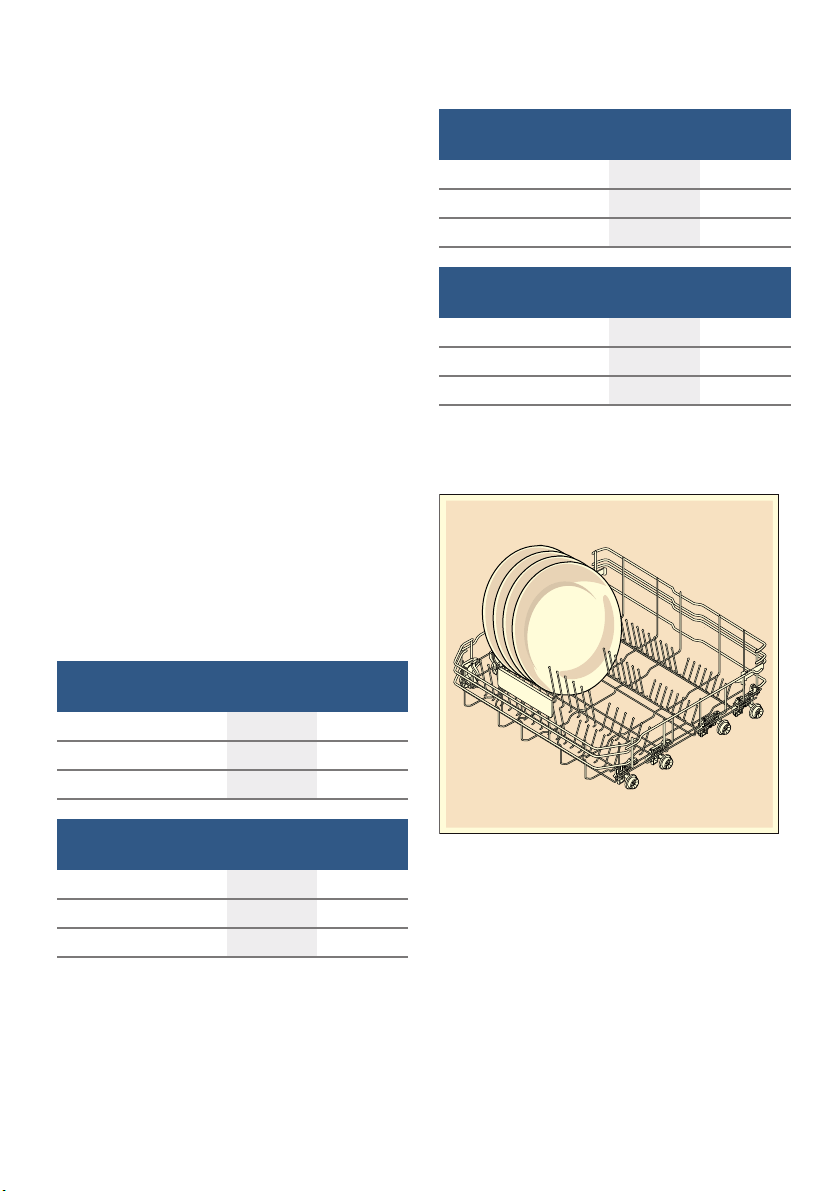
Adjusting the height of the
basket . . . . . . . . . . . . . . . . . . . . . . . . 22
. Detergent . . . . . . . . . . . . . . . . . . 23
Adding detergent. . . . . . . . . . . . . . . . 24
/ Overview of programmes . . . . . 25
Programme selection . . . . . . . . . . . . 26
Information for test institutes . . . . . . . 26
0 Additional functions . . . . . . . . . 27
Speed Perfect . . . . . . . . . . . . . . . . . . 27
Half load . . . . . . . . . . . . . . . . . . . . . . 27
hygienePlus (HygienePlus) . . . . . . . . 27
intensiveZone . . . . . . . . . . . . . . . . . . 27
Extra Dry . . . . . . . . . . . . . . . . . . . . . . 27

aus
4
1 Operating the appliance . . . . . . 28
Changing the settings . . . . . . . . . . . .28
AquaSensor . . . . . . . . . . . . . . . . . . . .28
Time display . . . . . . . . . . . . . . . . . . .28
Sensor setting . . . . . . . . . . . . . . . . . .29
extraDry . . . . . . . . . . . . . . . . . . . . . . .29
Eco forecast . . . . . . . . . . . . . . . . . . .29
Auto Power Off . . . . . . . . . . . . . . . . . 29
EmotionLight . . . . . . . . . . . . . . . . . . .29
Front display . . . . . . . . . . . . . . . . . . . 30
timeLight . . . . . . . . . . . . . . . . . . . . . .30
infoLight . . . . . . . . . . . . . . . . . . . . . . .30
Changing start programme . . . . . . . .30
Tone volume . . . . . . . . . . . . . . . . . . .30
Button volume . . . . . . . . . . . . . . . . . .30
Child-proof lock . . . . . . . . . . . . . . . . .30
Greeting. . . . . . . . . . . . . . . . . . . . . . .30
Factory setting . . . . . . . . . . . . . . . . . .31
Switching on the appliance . . . . . . . . 31
Time preselection . . . . . . . . . . . . . . . 31
Programme end. . . . . . . . . . . . . . . . .31
Switching off the appliance . . . . . . . .31
Interrupting the programme . . . . . . . .31
Terminating the programme . . . . . . .32
Changing the programme . . . . . . . . .32
2 Cleaning and maintenance . . . 32
Overall status of the dishwasher . . . . 32
Machine Care . . . . . . . . . . . . . . . . . .33
Rinse aid . . . . . . . . . . . . . . . . . . . . . .34
Filters. . . . . . . . . . . . . . . . . . . . . . . . .34
Spray arms . . . . . . . . . . . . . . . . . . . . 35
3 Fault, what to do? . . . . . . . . . . .35
Error message . . . . . . . . . . . . . . . . . 35
Waste water pump . . . . . . . . . . . . . . 36
Fault table . . . . . . . . . . . . . . . . . . . . 37
4 Customer service . . . . . . . . . . . .44
5 Installation and
connection . . . . . . . . . . . . . . . . .44
Contents of package . . . . . . . . . . . . 44
Safety instructions . . . . . . . . . . . . . . 44
Delivery . . . . . . . . . . . . . . . . . . . . . . 45
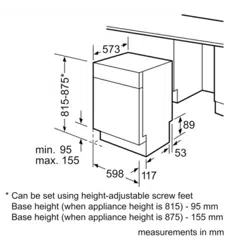
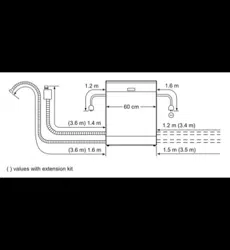
Technical specifications . . . . . . . . . . 45
Installation . . . . . . . . . . . . . . . . . . . . 45
Drainage connection . . . . . . . . . . . . 45
Drinking water connection . . . . . . . . 46
Warm water connection . . . . . . . . . . 46
Electrical connection . . . . . . . . . . . . 47
Removal . . . . . . . . . . . . . . . . . . . . . . 47
Transporting . . . . . . . . . . . . . . . . . . . 47
Protection against frost
(Emptying the appliance) . . . . . . . . . 47

Intended use aus
5
8 Intended use
I nt ended use
■ This appliance is intended
for use in the home and
domestic environments.
■ Use the dishwasher only in
the home and only for its
designated purpose: for
washing domestic dishes.
■ This appliance is intended
for use up to a maximum
altitude of 4000 metres
above sea level.
( Safety instructions
Safety instructions
This appliance may be used by
children over the age of 8 years
old and by persons with
reduced physical, sensory or
mental capabilities or by
persons with a lack of
experience or knowledge if they
are supervised or are instructed
by a person responsible for
their safety how to use the
appliance safely and have
understood the associated
hazards.
Children must not play with, on,
or around the appliance.
Children must not clean the
appliance or carry out general
maintenance unless they are at
least 8 years old and are being
supervised.
Keep children below the age of
8 years old at a safe distance
from the appliance and power
cable.
Before you switch ON the
appliance
Please read the instructions for
use and installation carefully.
They contain important
information on how to install,
use and maintain the appliance.
Retain all documents for later
use or for the subsequent
owner.
You can download the
instructions for use from our
website free of charge. The
relevant Internet address can
be found overleaf on these
instructions for use.
Delivery
1. Check the packaging and
dishwasher immediately for
damage caused in transit.
Do not switch on a damaged
appliance, but contact your
supplier.
2. Please dispose of the
packaging material in an
environmentally friendly
manner.
3. Do not let children play with
packaging and its parts.
There is a risk of suffocation
from collapsible boxes and
film.

aus Safety instructions
6
Installation
■ Following installation, ensure
that the back of the
dishwasher is not freely
accessible (protection
against contact due to hot
surface).
■ Install and connect the
appliance according to the
installation and assembly
instructions.
■ Prior to installation,
disconnect the dishwasher
from the power supply.
■ Ensure that the protective
conductor system of the
domestic supply has been
correctly installed.
■ The electrical connection
conditions must correspond
with the specifications on the
dishwasher rating plate 92.
■ If the power cord of this
appliance is damaged, it
must be replaced with a
particular power cord.
To prevent injury, the power
cord may be purchased from
customer service only.
■ If the dishwasher is installed
in a high-sided unit, the unit
must be secured properly.
■ If the dishwasher is installed
below or above other
domestic appliances, follow
the information for
installation in combination
with a dishwasher in the
installation instructions for
the particular appliances.
■ Also follow the installation
instructions for the
dishwasher to ensure that all
appliances are operated
safely.
■ If there is no information or if
the installation instructions
do not include the
appropriate information,
contact the manufacturer of
these appliances to ensure
that the dishwasher can be
installed above or below
these appliances.
■ If you cannot obtain any
information from the
manufacturer, you must not
install the dishwasher above
or below these appliances.
■ If you install a microwave
oven above the dishwasher,
the microwave oven may be
damaged.
■ Install built-under or
integratable appliances only
under continuous worktops
which have been screwed to
adjacent cupboards to
ensure stability.
■ Do not install the appliance
near heat sources (radiators,
heat storage tanks, cookers
or other appliances which
generate heat) and do not
install under a hob.

Safety instructions aus
7
■ Please note that the
insulation material of the
dishwasher power cord may
melt next to heat sources
(e.g. heating / hot water
installations) or hot
appliance parts. Make sure
that the power cord of the
dishwasher never comes into
contact with heat sources or
hot appliance parts.
■ After installing the appliance,
ensure that the plug is easily
accessible. ~ "Electrical
connection" on page 47
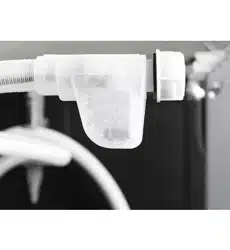
■ For some models:
The plastic housing on the
water connection contains an
electric valve. The supply
hose contains electrical
connection cables. Do not
cut through the supply hose.
Do not immerse the plastic
housing in water.
In daily use
Read and observe the safety
information and instructions for
use on the packaging for
cleaning and rinsing agents.
Damage
■ The appliance may be
repaired and opened up by a
technician only. To do this,
disconnect the appliance
from the power supply. Pull
out the mains plug or switch
off the fuse. Turn off the tap.
■ If the appliance is damaged,
especially the control panel
(cracks, holes, broken
buttons), or the door function
is impaired, stop operating
the appliance. Pull out the
mains plug or switch off the
fuse. Turn off tap, call
customer service.
Disposal
1. Make redundant appliances
unusable to prevent
subsequent accidents.
2. Dispose of the appliance in
an environmentally friendly
manner.

aus Safety instructions
8
:Warning
Risk of injury!
■ To prevent injuries, e.g.
caused by stumbling, open
the dishwasher only briefly in
order to load and unload the
dishwasher.
■ Knives and other utensils
with sharp points must be
placed with the points
downwards in the cutlery
basket*1Z or horizontally
on the knife shelf* or in the
cutlery drawer*1*.
■ Do not lean or sit on the
open door.
■ In the case of free-standing
appliances, ensure that the
baskets are not overloaded.
The appliance could tip.
■ If the appliance is not in a
cavity and a side panel is
accessible, the door hinge
area must be covered at the
side for reasons of safety
(risk of injury). The covers
are available as optional
accessories from customer
service or specialist outlets.
* depending on the features of
your dishwasher
:Warning
Risk of explosion!
Do not add any solvents to the
rinsing compartment. Danger of
explosion!
:Warning
Risk of scalding!
Open the door carefully when
the programme is still running.
There is a risk of hot water
spraying out of the appliance.
:Warning
Risk to children!
■ If fitted, use the childproof
lock.
■ Do not allow children to play
with or operate the
appliance.
■ Keep children away from
detergents and rinse aid.
These may cause chemical
burns in the mouth, throat
and eyes or asphyxiation.
■ Keep children away from
open dishwasher. There may
be small parts in the
dishwasher which children
could swallow and the water
inside the dishwasher is not
drinking water as it may
contain detergent residue.
Safety instructions aus
9
■ Ensure that children do not
place fingers in the tablet
collecting tray 1B. Small
fingers could become caught
in the slots.
■ When opening and closing
the door on an eye-level
appliance, ensure that
children do not become
jammed or crushed between
the appliance door and the
cupboard door below.
■ Children could become
locked in the appliance
(danger of suffocation) or get
into another dangerous
situation.
Redundant appliances: Pull
out the mains plug, sever
and dispose of the power
cord. Destroy the door lock
so that the door can no
longer be closed.
Childproof lock (door lock) *
Do o r lock
The child-proof lock (door lock)
protects children from potential
hazards which the dishwasher
poses.
:Warning
Risk of suffocation!
Children may become locked in
the dishwasher and suffocate.
Always completely close the
appliance door when leaving
the dishwasher.
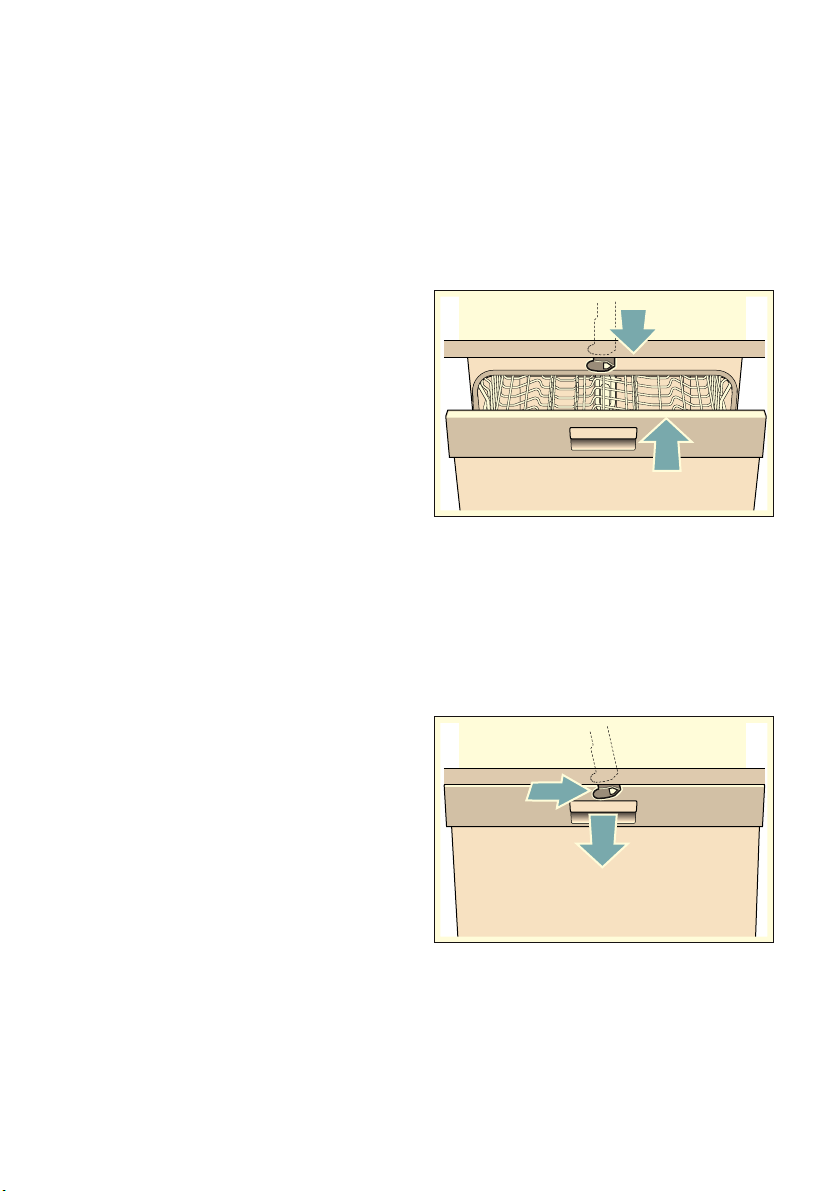
Activate the child-proof lock
(door lock) as follows:
1. Pull the catch of the
child-proof lock towards
yourself (1).
2. Close the door (2).
The child-proof lock is
activated.
Open the door with activated
child-proof lock (door lock) as
follows:
1. Press the catch of the
child-proof lock to the right
(1).
2. Open the door (2).
aus Environmental protection
10
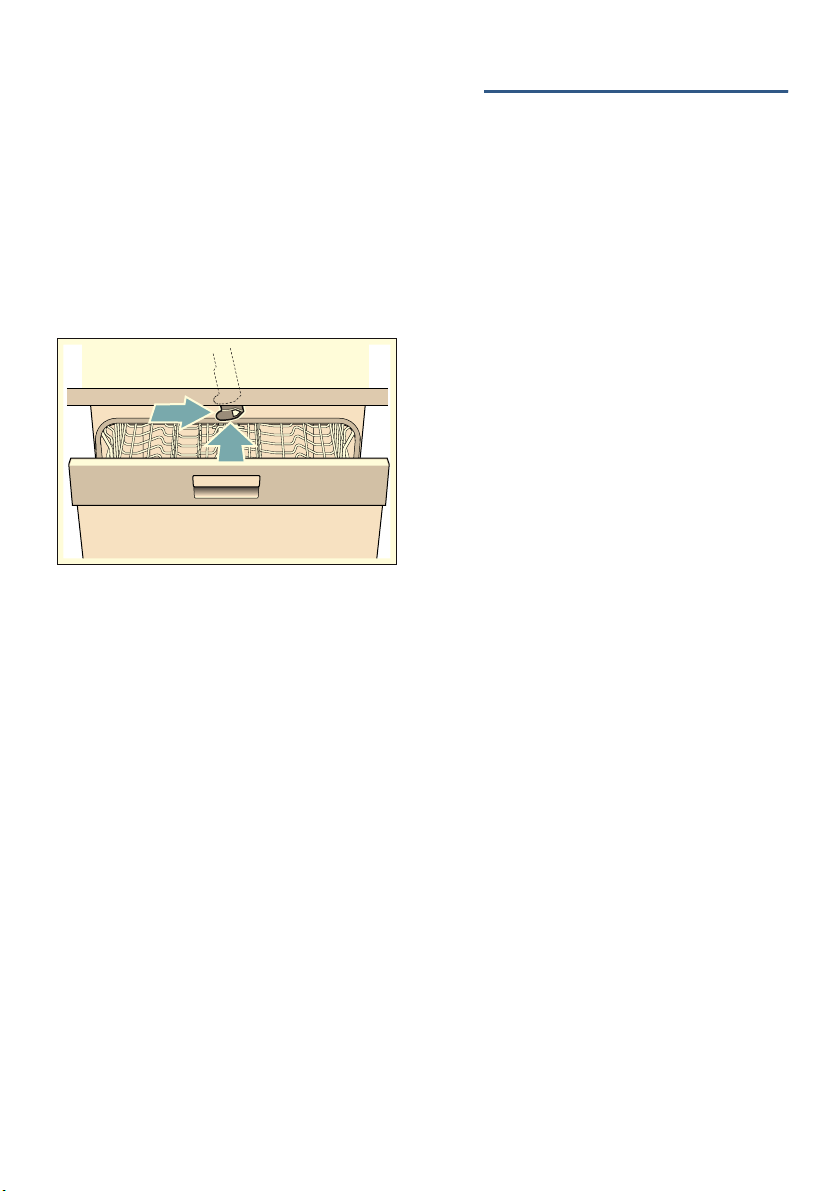
Deactivate the child-proof lock
(door lock) as follows:
1. Press the catch of the
child-proof lock to the right
(1).
2. Press the catch of the
child-proof lock backwards
(2).
The childproof lock is
deactivated.
* depending on the features of
your dishwasher
7 Environmental
protection
Env i r o nment al pr ot ec t i on
Both the packaging of new appliances
and the old appliances themselves
contain valuable raw materials and
recyclable materials.
Please dispose of the individual parts
separated according to type.
Please ask your dealer or inquire at
your local authority about current means
of disposal.
Packaging
All plastic parts of the appliance are
identified with internationally
standardised abbreviations (e.g. PS
polystyrene). Therefore, plastic waste
can be sorted out when the appliance is
being disposed of.
Please follow the safety instructions
under “Delivery” ~ Page 5.
Old appliances
Please follow the safety instructions
under “Disposal of your appliance”
~ Page 7.
This appliance has been
identified in accordance with the
European Directive 2012/19/EU
on Waste Electrical and
Electronic Equipment (WEEE).
The directive provides a
framework for the collection and
recycling of old appliances,
which is valid across the EU.

Getting to know your appliance aus
11
* Getting to know your
appliance
Get t i ng to k now your appl i ance
Diagrams of the control panel and the
interior of the appliance can be found at
the front of the manual. Individual
positions are referred to in the text.
Control panel
See Fig. ~ Page 2
* depending on the features of your
dishwasher
** number depending on the features of
your dishwasher
Appliance interior
See Fig. ~ Page 2
* depending on the features of your
dishwasher
( On/off switch
0 Programme buttons **
8 Info button {
@ Display window at top
H Rinse aid refill indicator
P Selection buttons
X Time preselection
` Additional functions **
h START button
)" < > button
)* Door opener
)2 Front display *
1" Interior light *
1* Cutlery drawer *
12 Top basket
1: Upper spray arm
1B Tablet collecting tray
1J Lower spray arm
1R Filters
1Z Cutlery basket *
1b Bottom basket
1j Dispenser for rinse aid
9" Detergent dispenser
9* Lock for detergent dispenser
92 Rating plate

aus Getting to know your appliance
12
Info button {
Info but t on
The Info button { can be used to
display additional programme
information.
1. Press the Info button { 8.
2. Press the programme button.
Information on the selected
programme is indicated on the
display window at the top @.
3. To leave, press Info button { 8.
Time setting
Ti me set t i ng
When the appliance is switched on the
for the first time, the time starts at 12:00
o’clock.
Set the time as follows:
1. Open the door.
2. Switch on ON/OFF switch (.
3. Press Info button { 8 for 3
seconds until the following text is
indicated on the display window at
the top @:
Scroll with < >
Set with - +
Leave with Setup 3 sec.
4. Keep pressing button > )" until the
time setting is indicated on the
display window at the top @.
5. Make the setting with setting buttons
+ - P. If the selection buttons + -
P are held down, the set values
are changed in 10-minute steps.
6. Press and hold the Info button {
8 for 3 seconds.
The chosen setting has now been
stored.
Note: If the appliance was
disconnected from the power supply for
a prolonged period, the time starts at
12:00 o’clock. Set the time.
Getting to know your appliance aus
13
Switching on the appliance for the first time
When the dishwasher is switched on for
the first time, you are taken directly to
the settings for switching on the
appliance for the first time. The following
text is indicated on the display window
at the top @:
Scroll with < >
Set with - +
Leave with Setup 3 sec.
The required settings for switching on
the appliance for the first time are listed
in the table below.
Change the setting as follows:
1. Keep pressing button > )" until the
required setting is displayed.
2. Make the setting with setting buttons
+ - P.
3. Press and hold the Info button {
8 for 3 seconds.
The chosen setting has now been
stored.
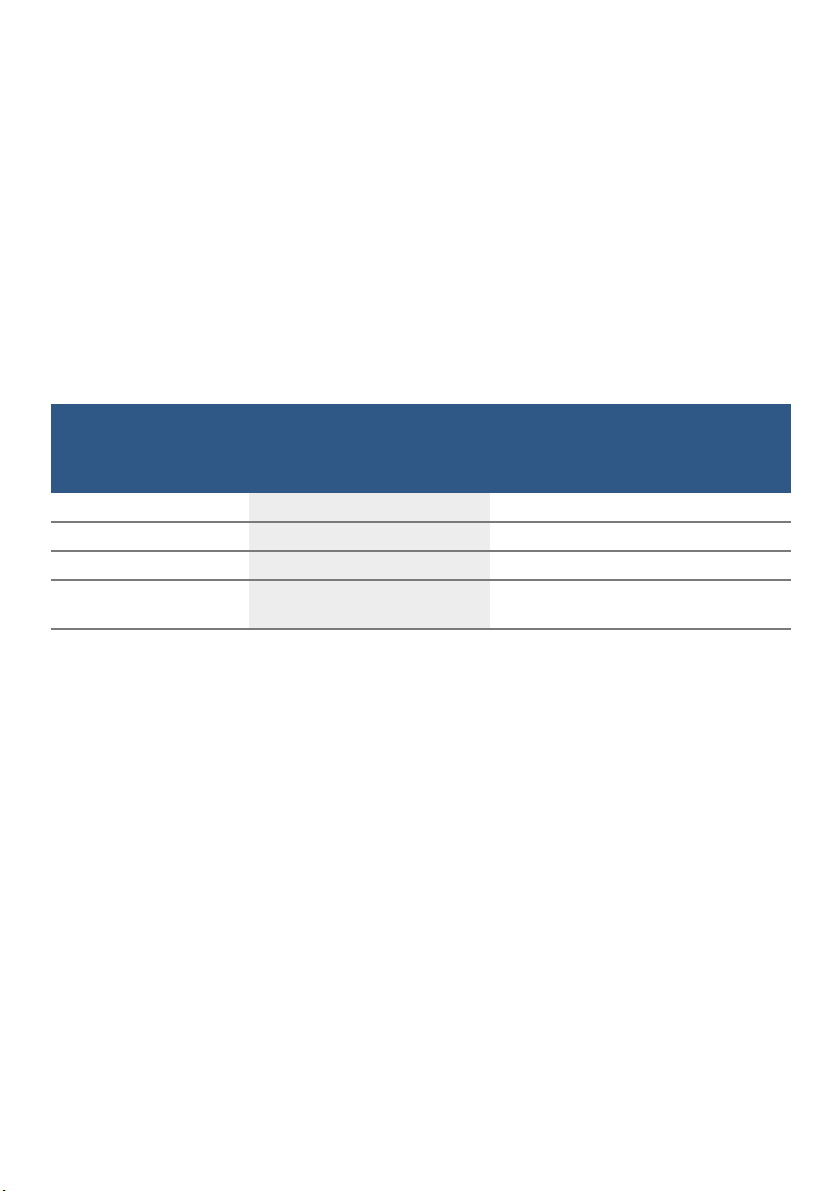
--------
Settings
Switching on the
appliance for the first
time
Factory setting Infotext
by pressing Info button {
Language English Language selection.
Time format 24h 12h or 24h.
Time setting 12:00 Set the current time.
Rinse aid disp. Setting 5 Amount of rinse aid affects drying. When
using Multitabs, select setting 0.
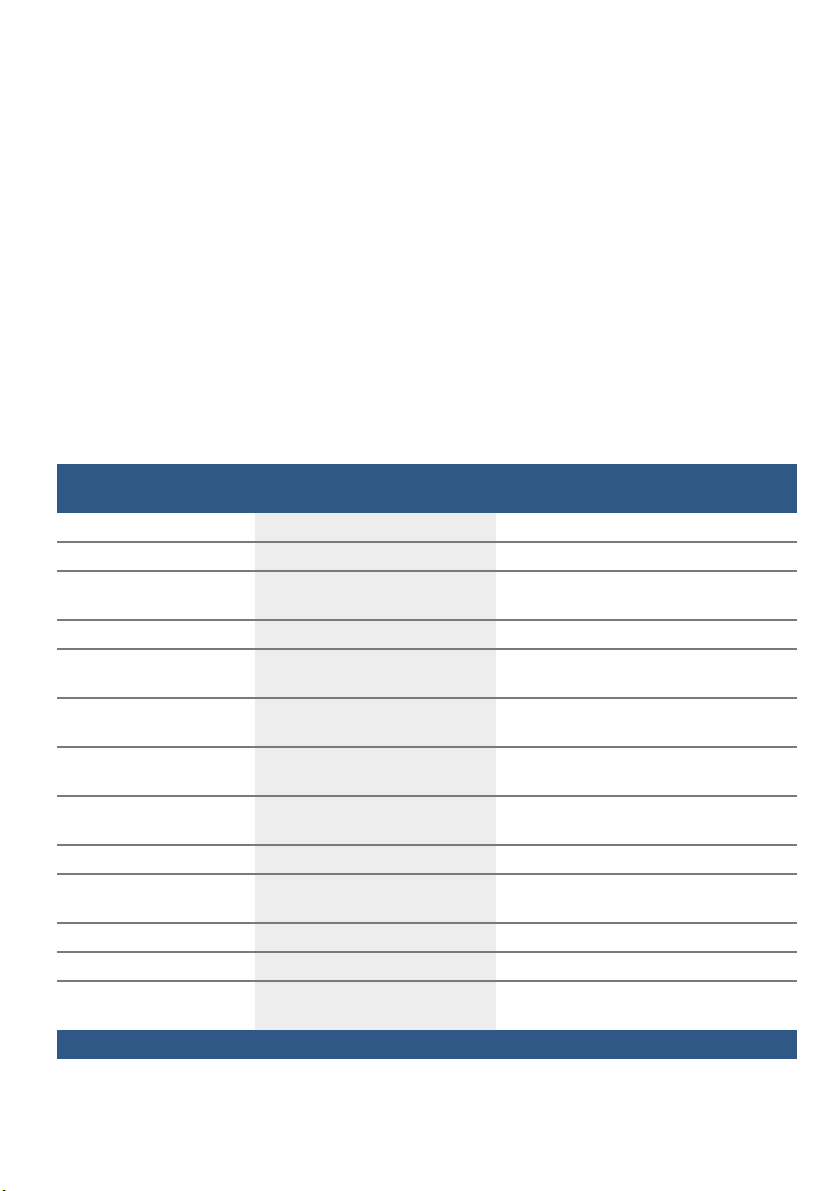
aus Getting to know your appliance
14
Settings
The dishwasher has been preset with
certain settings for your convenience.
You can change this factory setting.
Change the setting as follows:
1. Open the door.
2. Switch on ON/OFF switch (.
3. Press Info button { 8 for 3
seconds until the following text is
indicated on the display window at
the top @:
Scroll with < >
Set with - +
Leave with Setup 3 sec.
4. Keep pressing button > )" until the
required setting is displayed.
5. Make the setting with setting buttons
+ - P.
6. Press and hold the Info button {
8 for 3 seconds.
The chosen setting has now been
stored.
You have the option of resetting all
changed settings back to the original
factory settings.
Note: When you reset your dishwasher
to the factory settings, you are taken
directly to the settings for switching on
the appliance for the first time.
Setting Factory setting Infotext
by pressing Info button {
Time setting 12:00 Set the current time.
Time format 24h 12h or 24h.
Time display Time Show end of programme with display
"Finish in" or "Finish at".
Language English Language selection.
Rinse aid disp. Setting 5 Amount of rinse aid affects drying. When
using Multitabs, select setting 0.
Sensor setting Standard Adjustment of soiling detection for
optimum cleaning result.
Extra dry Off Improved drying for glasses and
plasticware.
Water connection * Cold water * Connection to hot water (40-60°C) or cold
water (<40°C) possible. *
Eco forecast Off Show the water and energy consumption.
Auto Power Off after 1 min. Appliance automatically switches off at
end of rinsing process.
Emotion Light * On Interior light.
Front display * On The front display can be selected.
Timelight * On While programme is running, status
information is projected onto floor.
* depending on the features of your dishwasher
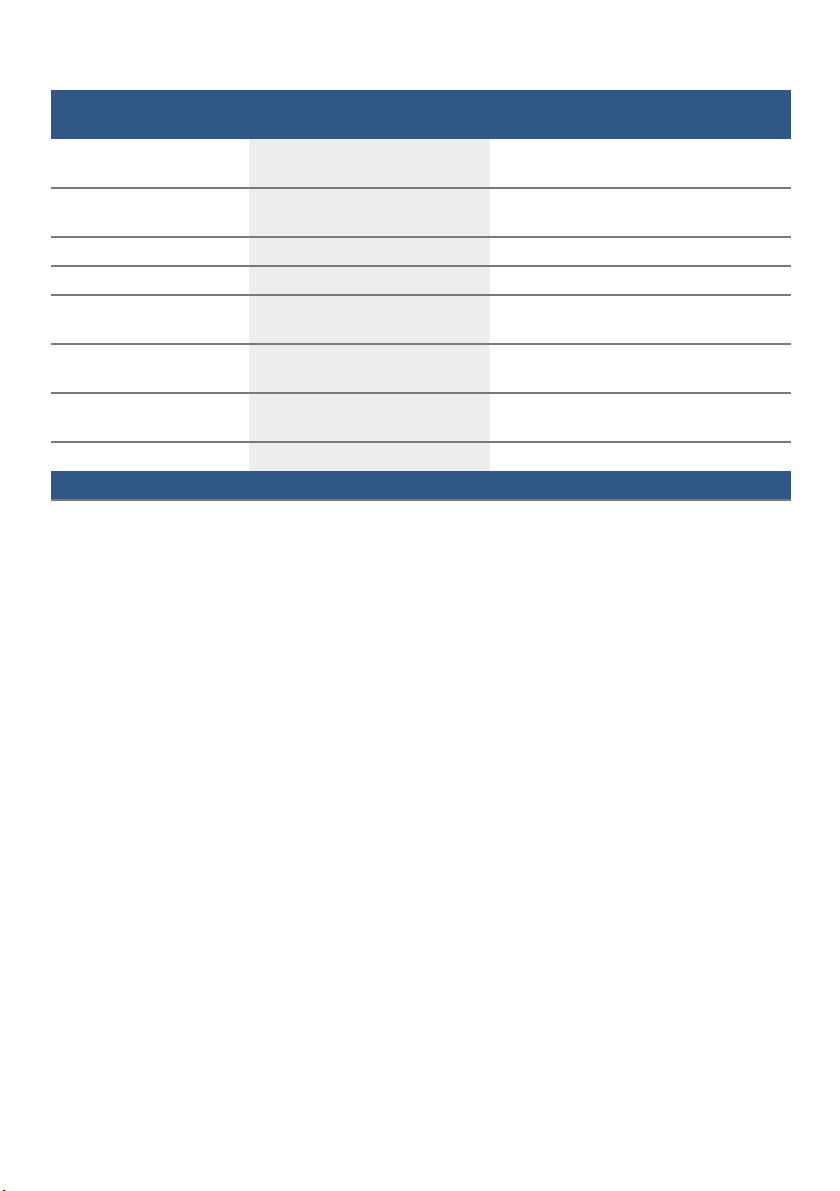
Getting to know your appliance aus
15
--------
Infolight * On Light is projected to signal an active
cleaning cycle.
Start programme * The last selected programme * When switching on, the last selected
programme appears. *
Tone volume * Setting 2 Volume of signal at end of programme.
Button volume Setting 2 Volume when using buttons.
Childproof lock * Off Activated child-proof lock impedes
opening of door.
Eco drying * On Door opens automatically at the end of the
programme.
Greeting On When switching on the appliance, the
brand logo can be deselected.
Factory setting Confirm/Back Resetting to the factory setting.
Setting Factory setting Infotext
by pressing Info button {
* depending on the features of your dishwasher
aus Rinse aid
16
, Rinse aid
Ri n s e ai d
As soon as the low rinse-aid indicator
H is lit on the control panel or is
requested on the front display * )2,
rinse-aid should be topped up.
The rinse aid is required for stain-free
utensils and clear glasses. Use only
rinse aid for domestic dishwashers.
Combined detergents with rinse-aid
component may be used up to a water
hardness of 21° dH (37° fH, 26°
Clarke, 3.7 mmol/l) only. If the water
hardness is over 21° dH, rinse-aid must
be used.
* depending on the features of your
dishwasher
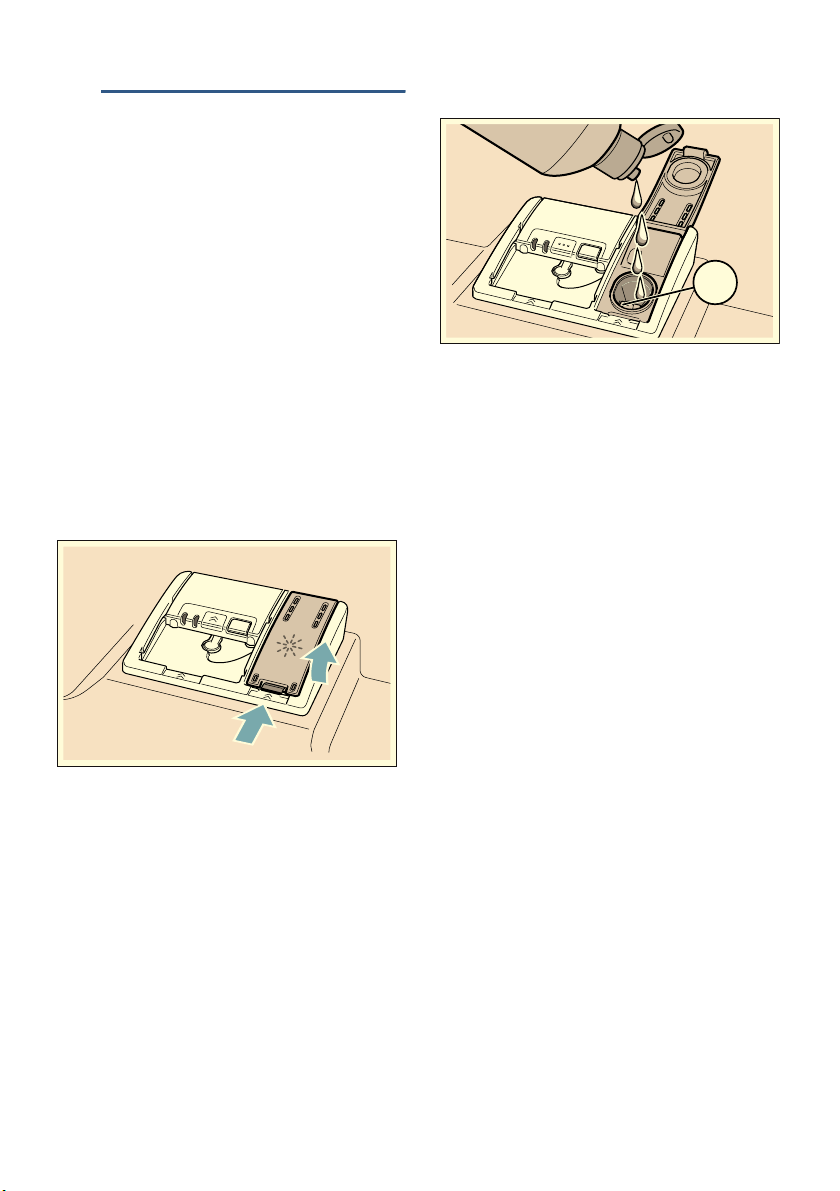
Top up the rinse-aid as follows:
1. Open dispenser 1j; press lug on
the lid (1) and lift (2).
2. Add rinse-aid up to the max. mark.
3. Close the lid.
Lid “clicks” into position.
4. Remove overflowed rinse aid with a
cloth.
This prevents excessive frothing
during the next rinse cycle.
2
1
PD[

Utensils aus
17
Setting amount of rinse aid
The amount of rinse aid to be
dispensed can be set from 0 to 6. Set
the amount of rinse aid to be dispensed
to 5 to obtain a very good drying result.
Do not change the amount of rinse aid
unless there are streaks or water stains
on the utensils. Set a lower level to
avoid streaks. Set a higher level to
avoid water stains.
Set the amount of rinse aid as follows:
1. Open the door.
2. Switch on ON/OFF switch (.
3. Press Info button { 8 for 3
seconds until the following text is
indicated on the display window at
the top @:
Scroll with < >
Set with - +
Leave with Setup 3 sec.
4. Keep pressing button > )" until the
rinse aid dispenser is indicated on
the display window at the top @.
5. Make the setting with setting buttons
+ - P.
6. Press and hold the Info button {
8 for 3 seconds.
The chosen setting has now been
stored.
Switching off rinse aid refill
indicator
If the use of combined detergents with a
rinse-aid component impairs the low
rinse-aid indicator H on the control
panel or the text on the front
display * )2 (enough rinse aid for x
rinse cycles), the displays can be
switched off.
Proceed as described under “Setting
amount of rinse aid” and select
setting 0.
* depending on the features of your
dishwasher
- Utensils
Ut e n s i l s
Not suitable
■ Cutlery and utensils made of wood.
■ Delicate decorative glasses, craft
and antique utensils. These decors
are not dishwasher-proof.
■ Plastic parts not resistant to heat.
■ Copper and tin utensils.
■ Utensils which are soiled with ash,
wax, lubricating grease or ink.
Aluminium and silver parts have
a tendency to discolour and fade during
the wash cycle. Even some types of
glass (e.g. crystal glass objects) may
turn cloudy after many wash cycles.
Glass and utensil damage
Causes:
■ Glass type and glass production
process.
■ Chemical composition of the
detergent.
■ Water temperature of the wash
programme.
Recommendation:
■ Use only glasses and porcelain
which the manufacturer designates
as dishwasher-proof.
■ Use a detergent which protects
utensils.
■ Take glass and cutlery out of
the dishwasher as soon as possible
after the programme ends.
aus Utensils
18
Loading the dishwasher
1. Remove large food remnants. It
is not necessary to prerinse utensils
under running water.
2. Place the utensils so that
– they are secure and cannot tip
over.
– all utensils with their openings
face down.
– parts with curves or indentations
are at an angle, thereby allowing
water to drain.
– does not obstruct rotation of the
two spray arms 1: and 1J.
Very small utensils should not be
washed in the machine, as they may fall
out of the baskets.
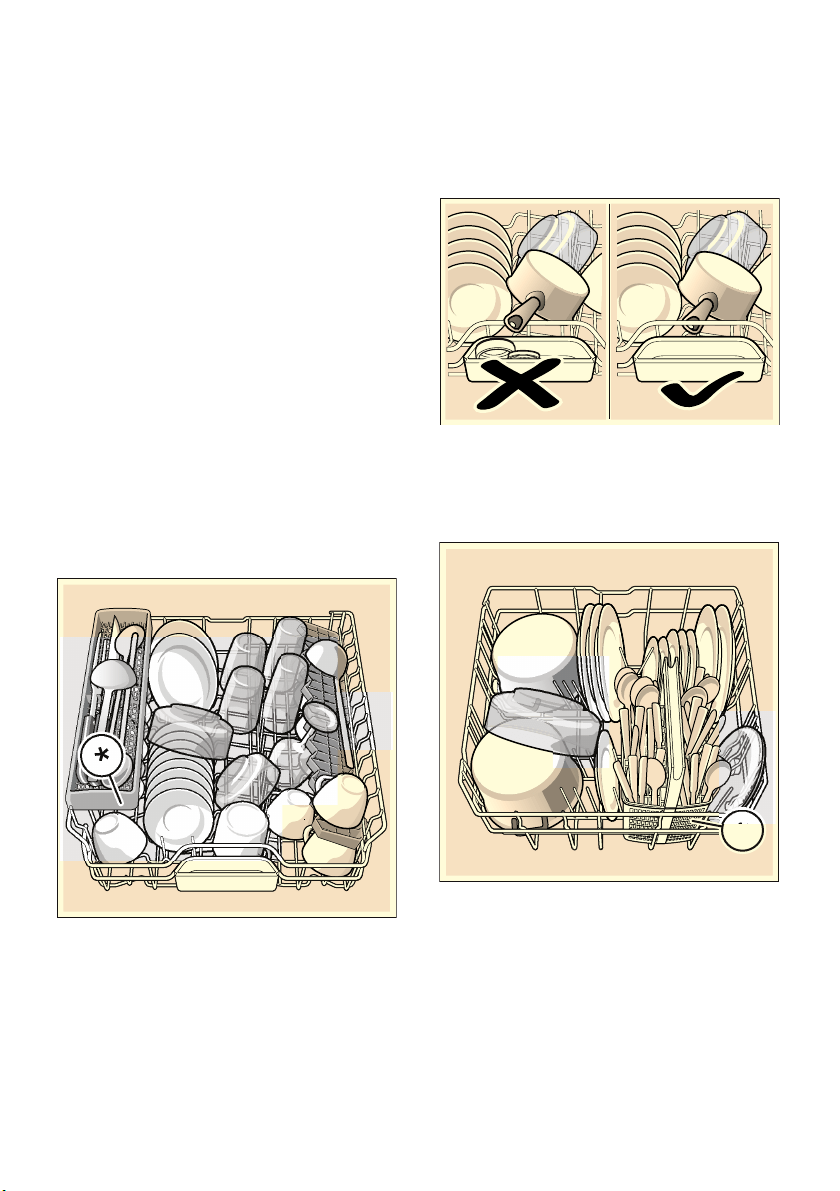
Upper basket
Arrange cups and glasses in the upper
basket 12.
* depending on the features of your
dishwasher
Note: Utensils must not be placed
above the tablet collecting tray 1B.
These may block the lid of the detergent
dispenser and prevent it from opening
fully.
Lower basket
Arrange pots and plates in the lower
basket 1b.
* depending on the features of your
dishwasher
Utensils aus
19
Tip: Heavily soiled utensils (pans)
should be placed in the lower basket.
The more powerful spray jet provides a
better dishwashing result.
Tip: Other examples, such as the best
way of loading your dishwasher, can be
found on our homepage. These can be
downloaded free of charge. The
corresponding Internet address can be
found on the back page of these
instructions for use.
Cutlery basket *
Cu t l e r y basket
Place cutlery, always unsorted with the
tips face down, in the cutlery basket *.
To prevent injuries, place long, pointed
implements and knives on the knife
shelf *.
* depending on the features of your
dishwasher
Cutlery drawer *
Cu t l e r y dr awer
Arrange the cutlery in the cutlery drawer
1* as illustrated. Separately arranged
utensils are easier to remove after
washing.
You can take out the cutlery drawer.
Depending on the features of your
dishwasher, you can fold down the side
shelves to provide more room for taller
items of cutlery. The front rows of
prongs can be folded down to provide
room for wider handles.
* depending on the features of your
dishwasher
CLICK
aus Utensils
20
Etagere *
Et ager e
The etagere and the space underneath
can be used for small cups and glasses
or for larger items of cutlery, such as
wooden spoons or serving cutlery. If
you do not require the etagere, it can be
folded up.
* Depending on the features of your
dishwasher, you can adjust the etagere
3 times the height.
Adjust the height of the etagere as
follows:
1. Position the etagere vertically and
pull upwards.
2. Push etagere at a slight angle
downwards to the required height
(1, 2, or 3).
3. Engage etagere.
Etagere “clicks” into position.
Folding spikes *
Fol di ng spi kes
* Depending on the features of your
dishwasher, the spikes can be folded
down. This facilitates arrangement of
pots, bowls and glasses.
Fold down the spikes as follows:
1. Press lever forwards (1).
2. Fold down spikes (2).
Small items holder *
Smal l items hol der
* Depending on the features of your
dishwasher, the upper basket is fitted
with small items holders. The small
items holders can be used to securely
attach light plastic parts.
&/,&.
Utensils aus
21
Knife rack *
Kn i f e rack
* Depending on the features of your
dishwasher, the upper basket is fitted
with a knife shelf. Long knives and other
utensils can be placed in the knife shelf.
Baking sheet spray head *
Ba k i n g sheet spr ay head
* depending on the features of your
dishwasher
Large trays or grilles as well as large
plates (gourmet plates, pasta plates,
dinner plates) can be cleaned with this
spray head.
Insert the spray head as follows:
1. Remove upper basket 12.
2. Insert spray head as illustrated and
turn to the right.
Spray head is engaged.
To ensure that the spray jet can reach
all parts, arrange the baking sheets as
illustrated (max. 2 baking sheets and 2
grilles).
Note: Ensure that the dishwasher is
always operated with upper basket 12
or baking tray spray head.
aus Utensils
22
Unloading the dishwasher
To prevent water from dripping off the
upper basket onto the utensils in the
lower basket, it is recommended
to empty the appliance from the bottom
up.
Tip: Hot utensils are sensitive to shock!
Therefore, when the programme ends,
leave the utensils to cool down in the
dishwasher until they can be handled.
Note: When the programme ends,
water droplets can still be seen inside
the appliance. This does not affect the
drying of the utensils.
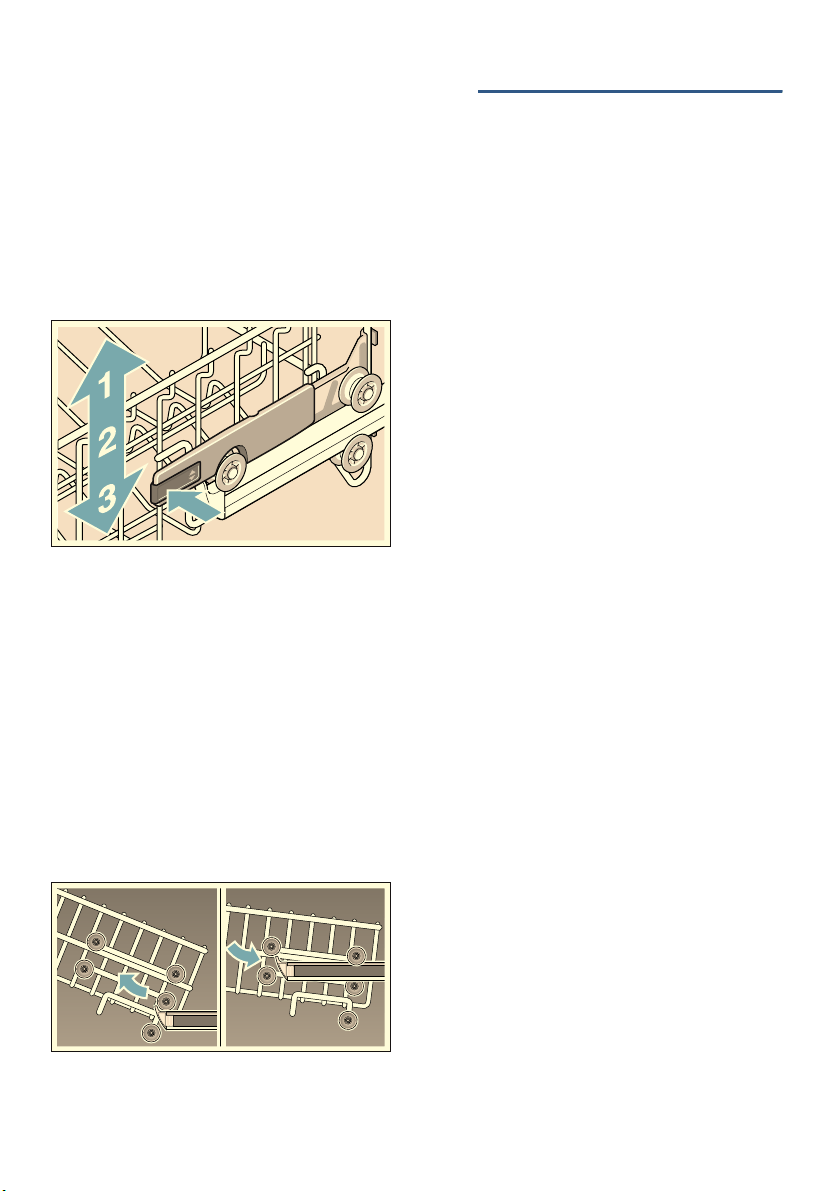
Adjusting the height of the
basket *
Adjusting the hei ght of the bas k et
* depending on the features of your
dishwasher
If required, the height of the upper
basket 12 can be adjusted to create
more space for taller utensils either in
the upper or lower basket.
Appliance height 81.5 cm
Appliance height 86.5 cm
Arrange large plates up to a diameter of
31/34* cm in the lower basket 1b as
illustrated.
* depending on the features of your
dishwasher
With cutlery basket Upper
basket
Lower
basket
Setting 1 max. ø 22 cm 31 cm
Setting 2 max. ø 24.5 cm 27.5 cm
Setting 3 max. ø 27 cm 25 cm
With cutlery drawer Upper
basket
Lower
basket
Setting 1 max. ø 16 cm 31 cm
Setting 2 max. ø 18.5 cm 27.5 cm
Setting 3 max. ø 21 cm 25 cm
With cutlery basket Upper
basket
Lower
basket
Setting 1 max. ø 24 cm 34 cm
Setting 2 max. ø 26.5 cm 30.5 cm
Setting 3 max. ø 29 cm 28 cm
With cutlery drawer Upper
basket
Lower
basket
Setting 1 max. ø 18 cm 34 cm
Setting 2 max. ø 20.5 cm 30.5 cm
Setting 3 max. ø 23 cm 28 cm
detergent aus
23
Upper basket with side levers
1. Pull out upper basket 12.
2. Hold the sides of the basket along
the upper edge.
This prevents it from suddenly
dropping.
3. To lower the upper basket; press in
both levers on the left and right on
the outside of the basket. The upper
basket lowers.
4. To lift the upper basket; grip the
sides of the upper basket along the
upper edge and lift.
5. Ensure that both sides of the upper
basket are at the same height.
6. Push in upper basket.
Upper basket with upper and
lower pairs of rollers
1. Pull out upper basket 12.
2. Remove upper basket.
3. Re-attach upper basket to the upper
(Setting 3) or lower (Setting 1)
rollers.
4. Push in upper basket.
. Detergent
det er gent
You can use tablets as well as powder
or liquid detergents for dishwashers, but
never use washing-up liquid. The
dosage can be individually adjusted
with powder or a liquid detergent
according to the degree of soiling.
Tablets contain an adequately large
amount of active ingredients for all
cleaning tasks. Modern, powerful
detergents predominantly use a
low-alkaline formulation with enzymes.
Enzymes break down starch and
remove protein. To remove coloured
stains (e.g. tea, ketchup), oxygen-based
bleaching agents are generally used.
Note: To ensure a good washing result,
always follow the instructions on the
detergent packaging!
If you have further questions,
we recommend that you contact
the detergent manufacturers’ helplines.
:Warning
Risk of injury and damage due to
non-observance of the safety
instructions for detergent and
rinse-aid products!
Always follow the safety instructions for
detergent products and rinse-aid
products.
aus detergent
24
Adding detergent
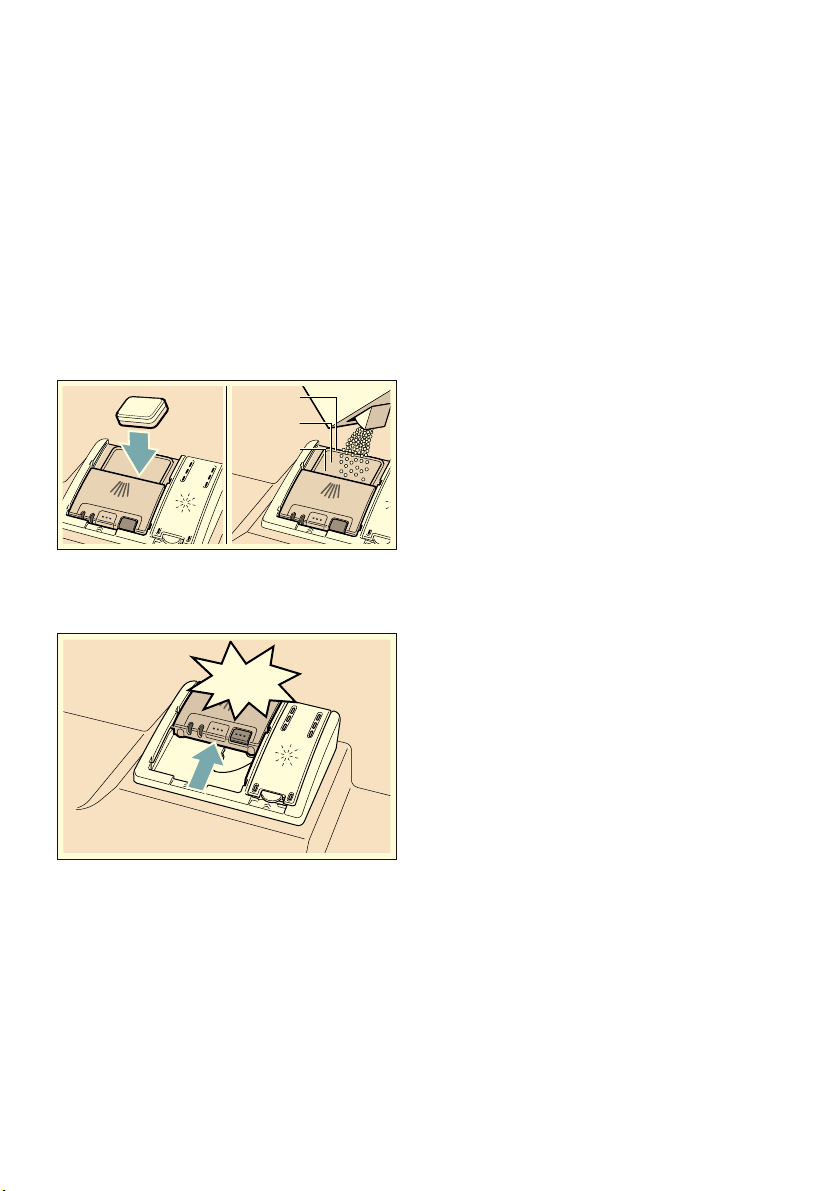
1. If the detergent dispenser 9" is still
closed, actuate locking bar 9* to
open it.
2. Pour detergent into the dry detergent
dispenser 9" only (insert tablet flat,
not on its edge).
3. Dosage: see manufacturer’s
instructions on the packaging. Use
graduated detergent dispenser.
Usually 20 ml–25 ml are adequate
for normal soiling. If using tablets,
one tablet is adequate.
4. Close cover on the detergent
dispenser.
Cover “clicks” into position.
The detergent dispenser opens
automatically at the optimum time
depending on the programme. The
powder or liquid detergent is
distributed in the appliance and is
dissolved, the tablet falls into the
tablet collecting tray where it
dissolves in doses.
Tip: If the utensils are only lightly
soiled, slightly less than the indicated
amount of detergent is usually
adequate.
Suitable detergents and care products
can be purchased online via our
website or via customer service (see
back page).
Notes
■ If programmes are short, tablets
may not have full cleaning effect
due to different dissolving properties
and there may even be undissolved
detergent residue. It is
recommended to use washing
powder for these programmes.
■ The Intensive programme (on some
models) requires one tab only. When
using washing powder, you can
apply some of this cleaning agent
to the inside of the appliance’s door.
■ If using detergents in a water-soluble
protective cover: Take hold of the
cover with dry hands only and put
the detergent into an absolutely
dry detergent dispenser only,
otherwise the detergent may stick.
■ If you switch from combined
detergents to solo detergents,
ensure that the water softening
system * and amount of rinse aid
have been set to the correct value.
* depending on the features of your
dishwasher
15 ml
25 ml
50 ml
CLICK

Overview of programmes aus
25
/ Overview of programmes
Over vi ew of pr ogr ammes
The max. possible number of programmes is illustrated in this overview. The
corresponding programmes for your appliance can be found on the fascia. The
programme data has been measured in the laboratory according to AS/NSZ 2007.
Note: The consumption figures depend on the selected programme and additional
functions. The programme duration will be different if the machine is short of rinse
additive or the function is turned off.
Type of utensils
and soiling
Programme Programme data
1.) Duration: hs/mins
2.) Energy
consumption in kWh
3.) Water
consumption in
litres
4.) With Aquasensor
Possible
additional
options
Programme sequence
Pots, utensils and
cutlery
Highly soiled
Á
Auto Intensive
65° - 75°
1.) 1:40 - 2:15
2.) 1,30 - 1,60
3.) -
4.) 11 - 15
all
Sensor-controlled:
Is optimised according
to the soiling with the
aid of sensors.
Utensils and
cutlery
Normally soiled
Á / Ù
Auto Wash
45° - 65°
1.) 1:45 - 2:55
2.) 0,95 - 1,60
3.) -
4.) 7 - 18
all
non-sensitive
utensils and
cutlery
Highly soiled
± / °
Super Wash 60°
1.) 2:20
2.) 1,45
3.) 13
4.) -
all
Intensiv:
Clean 60°
Intermediate rinse
Final rinse 72°
Dry
Utensils and
cutlery
Normally soiled
â / à
Eco Wash
45°
1.) 2:50
2.) 0,64
3.) 12
4.) -
all
Most economical
programme:
Prerinse
Clean 45°
Intermediate rinse
Final rinse 45°
Dry
sensitive utensils,
cutlery,
temperature-sens
itive plastic and
glasses,
lightly soiled
É / è
Auto Gentle
35° - 45°
1.) 1:05 - 1:20
2.) 0,70 - 0,85
3.) -
4.) 10 - 15
intensiveZone
Speed Perfect
Half load
Extra Dry
Sensor-controlled:
Is optimised according
to the soiling with the
aid of sensors.

aus Overview of programmes
26
--------
Programme selection
You can select a suitable programme
according to the type of utensils and
type of soiling.
Information for test institutes
Test institutes can request the
conditions for running comparison tests
by sending an e-mail to
Quote the appliance number (ENr.)
and the production date (FD) which you
can find on the rating
plate 92 on the appliance door.
mixed utensils
and cutlery,
part dried,
common
household food
remnants
Û
Extra Quiet
40dB
1.) 3:55 - 4:00
2.) 1,05 - 1,09
3.) 10
4.) -
intensiveZone
Half load
SanitationPlus
Extra Dry
Reduced noise:
Pre Rinse
Clean 50°
Intermediate rinse
Final rinse 65°
Dry
Utensils and
cutlery
Normally soiled
ñ / ð
Quick 60 min.
65°
1.) 1:00
2.) 1,30
3.) 10
4.) -
Extra Dry
Time-optimised:
Clean 65°
Intermediate rinse
Final rinse
Dry
Utensils and
cutlery
Lightly soiled
ñ / ð
Quick 29 min.
45°
1.) 0:29
2.) 0,80
3.) 10
4.) -
Extra Dry
Time-optimised:
Clean 45°
Intermediate rinse
Final rinse 55°
-
‰ / Š
Machine Care
1.) 1:30
2.) 0,90 - 1,06
3.) 9,5 - 12,5
4.) -
none
Machine cleaning
cycle 70°
Type of utensils
and soiling
Programme Programme data
1.) Duration: hs/mins
2.) Energy
consumption in kWh
3.) Water
consumption in
litres
4.) With Aquasensor
Possible
additional
options
Programme sequence

Additional functions aus
27
0 Additional functions
Addi t i onal f unct i ons
* Depending on the features of your
dishwasher, you can select different
additional functions `.
Ÿ Speed Perfect *
Speed Pe r f e c t
This function can reduce the running
time by approx. 20% to 50% depending
on the selected rinse programme. To
obtain optimum cleaning and drying
results at a reduced running time, water
and energy consumption are increased.
§ Half load *
Ha l f l oad
If you have only a few items to wash
(e.g. glasses, cups, plates), you can
switch to “half load”. This will save
water, energy and time. It is
recommended to put a little less
detergent in the detergent dispenser
than for a full load.
μ hygienePlus
(HygienePlus) *
hygi enePl us ( Hy gi enePl us )
This function increases the
temperatures and retains them for an
extra long time to obtain a defined
disinfection performance. Continuous
use of this function increases the
hygiene status. This additional option is
ideal for cleaning e.g. chopping boards
and baby bottles.
Ï intensiveZone *
i nt ensi veZone
Perfect for a mixed load. You can wash
very soiled pots and pans in the lower
basket together with normally soiled
utensils in the upper basket. The spray
pressure in the lower basket
is intensified, the rinsing temperature
is increased slightly.
¿ Extra Dry *
Ex t r a Dr y
An increased temperature during the
final rinse and an extended drying
phase ensure that even plastic parts dry
better. There is a slight increase in the
energy consumption.

aus Operating the appliance
28
1 Operating the
appliance
Oper at i ng the appl i ance
Changing the settings
The dishwasher has been preset with
certain settings for your convenience.
You can change these factory settings.
Change the setting as follows:
1. Open the door.
2. Switch on ON/OFF switch (.
3. Press Info button {8 for 3
seconds until the following text is
indicated on the display window at
the top @:
Scroll with < >
Set with - +
Leave with Setup 3 sec.
4. Keep pressing button >)" until the
required setting is indicated on the
display window at the top @.
5. Make the setting with setting buttons
+ -P.
6. Press and hold the Info button {
8 for 3 seconds.
The chosen setting has now been
stored.
Tip: If you change several settings, first
make all changes in succession. Now
press the Info button { 8 for
3 seconds. This saves all set values in
the appliance.
AquaSensor *
AquaSens or
* depending on the features of your
dishwasher
The Aqua sensor is an optical
measuring device (light barrier) which
measures the turbidity of the rinsing
water.
The AquaSensor is used according
to the programme. If the AquaSensor is
active, “clean” rinsing water can be
transferred to the next rinse bath and
water consumption can be reduced by
3–6 litres. If the turbidity is greater,
the water is drained and is replaced
with fresh water. In the automatic
programmes the temperature
and running time can also be adjusted
to the degree of soiling.
Time display
The running time is determined during
the programme by the water
temperature, the number of utensils as
well as the degree of soiling and may
vary (depending on the selected
programme). You can change the time
display in time or hours/minutes so that
the remaining running time of the rinsing
progamme appears in the display
window “Ready at” (for example 15:20
hours) or “Ready in” (for example 3:25).

Operating the appliance aus
29
Sensor setting
The programme sequence is optmised
in Auto programmes with the aid of
sensors. The sensors adjust the
programme strength of Auto
programmes depending on the amount
and type of soiling. You can adjust the
sensitivity of the sensors in 3 stages.
Standard: This setting is ideal for a
mixed load and heavily soiled utensils,
but also saves energy and water.
Sensitive: This setting adjusts the
programme strength for the effective
removal of food remnants, even if the
amount of soiling is low. The energy and
water consumption is adjusted
accordingly.
Very sensitive: This setting adjusts the
programme strength for difficult
conditions of use, for example firmly
dried on food remnants. This setting is
recommended if using biological or eco
detergents which contain lower
amounts of active agents. The energy
and water consumption is adjusted
accordingly.
extraDry
The final rinse uses a higher
temperature which improves the drying
result. The running time may increase
slightly. (Caution if utensils are delicate!)
You can switch the extraDry function on
or off.
Eco forecast
When Eco forecast is activated, the
average water and energy consumption
of the selected programme is briefly
displayed on the display window at the
top @.
AutoPowerOff (Switching off
automatically after the end of
the programme)
Au t o Po wer Off
To save energy, the dishwasher
is switched off 1 minute after
the programme ends. You can also
change this setting.
Possible settings are:
■ off: The appliance does not switch
off automatically.
■ After one minute: The appliance
switches off after 1 minute.
■ After two hours: The appliance
switches off after 2 hours.
Note: Note that for the settings "After
one minute" and "After two hours", the
interior lighting 1" is switched off. To
activate the interior lighting, press the
ON/OFF switch (.
emotionLight (interior
lighting) *
Emot i onLi ght
* Depending on the features of your
dishwasher
EmotionLight 1" is the interior lighting
for your dishwasher. You can switch
the interior lighting on or off.
Notes
■ Depending on the setting of
AutoPowerOff, the interior lighting is
either switched on or off.
■ Note that the interior lighting is
automatically switched off after 1
hour when it is switched on and the
door is open.

aus Operating the appliance
30
Front display *
Fr ont di s pl ay
* depending on the features of your
dishwasher
You can switch the front display )2 on
or off (additional programme
information).
TimeLight (Optical display
while the programme is
running) *
ti meLi ght
* depending on the features of your
dishwasher
While programme is running, an optical
display (additional programme
information) is indicated on the floor
under the appliance door. If the base
panel is pulled forwards or if the
appliance is installed at eye-level with
flush furniture front, the display is not
visible.
You can switch the optical display on or
off.
Infolight *
i nf oLi ght
* depending on the features of your
dishwasher
While the programme is running, a light
spot shines on the floor under
the appliance door. Do not open the
appliance door until the light point is no
longer visible on the floor. If the
appliance door is not completely
closed, the light spot flashes *. If
the appliance is installed at eye-level,
with flush furniture front, the light point
is not visible. You can switch the
Infolight on or off.
Changing start programme *
Ch a n g i n g st ar t pr ogr amme
* depending on the features of your
dishwasher
You can change the “Start programme”
setting.
Tone volume*
Tone vol ume
* depending on the configuration of
your specific dishwasher
The end of the programme is indicated
by a buzzer. You can also change this
setting.
Button volume
When you are operating the dishwasher,
a signal sounds whenever a button is
pressed. You can control the volume of
the signal. If you do not like the button
volume, you can switch it off.
Child-proof lock *
Chi l d- pr oof lock
* depending on the features of your
dishwasher
The dishwasher features an electronic
child-proof lock. The child-proof lock
protects children from potential hazards
which the dishwasher poses.
You can switch the child-proof lock on
or off. When the child-proof lock is on, it
is difficult to open the door.
Greeting
When you switch on the dishwasher, the
brand logo appears. You can switch off
the brand logo.

Operating the appliance aus
31
Factory setting
You can reset all settings to the factory
setting.
Switching on the appliance
1. Turn tap fully on.
2. Switch on ON/OFF switch (.
The displays for the last programme
and last additional function selected
flash. These settings will be retained
unless another 0 programme key
is pressed.
3. Press the START button h.
Programme sequence starts.
Time preselection
You can delay the start of the
programme by up to 24 hours.
Depending on the setting of the time
display, the end of programme is
indicated with “Finish in” (for example
3h 25m) or “Finish at” (for example
15:20 hours).
1. Open the door.
2. Switch on ON/OFF switch (.
3. Selects programme 0.
4. Press time preselection button X.
5. Keep pressing the setting buttons + -
P until the displayed time
corresponds with your requirements.
6. Press START button h, timer
programming is activated.
7. To delete the time preselection,
press START button h for approx.
3 seconds.
Time preselection was terminated.
8. Close the door.
Programme end
* The programme has ended when
“Finished” is indicated on the display
window at the top @ and on the front
display * )2.
* The end of the programme is
displayed on the floor – provided the
TimeLight (optical display) is switched
on and is visible.
* depending on the features of your
dishwasher
Switching off the appliance
Short time after the end of the
programme:
1. Open the door.
2. Switch off ON/OFF switch (.
3. Turn off tap (does not apply to
appliances with Aqua-Stop).
4. Remove the utensils when they have
cooled down.
Note: When the programme ends,
leave the appliance to cool down a
while before opening it. This will prevent
steam from escaping and causing
long-term damage to your built-in
furniture.
Interrupting the programme
Caution!
Expansion (overpressure) may cause
the appliance door to jump open and/or
water to escape! If the door was opened
on an appliance which has a hot water
connection or is heated, always leave
the door ajar for several minutes and
then close.
1. Open the door.
2. Switch off ON/OFF switch (.
The LEDs go out. The programme
is saved.
3. To continue the programme, switch
on the ON/OFF switch ( again.
4. Close the door.

aus Cleaning and maintenance
32
Terminating the programme
(Reset)
Ter mi nat i ng the pr ogr amme
1. Open the door.
2. Press the START button h and
hold for 3 seconds
The display window at the top @
and the front display * )2 show:
"Program was terminated".
3. Close the door.
The programme sequence lasts
approx. 1 min. The display window
at the top @ shows: “Finished”.
4. Open the door.
5. Switch off ON/OFF switch (.
6. Close the door.
* depending on the features of your
dishwasher
Changing the programme
When the START button h has been
pressed, the programme cannot be
changed. The only way a programme
can be changed is by Cancel
programme (Reset).
2 Cleaning and
maintenance
Cl eani ng and mai nt enanc e
A regular inspection and maintenance
of your machine will help to prevent
faults. This saves time and prevents
problems.
Overall status of the
dishwasher
*The interior of your dishwasher is
predominantly self-cleaning. In order to
remove deposits, your dishwasher
automatically changes the running of
the programme (such as by increasing
the cleaning temperature) at certain
intervals. This will lead to higher
consumption values when running this
programme.
*Depending on the features of your
dishwasher
If you should find deposits in the
interior of the dishwasher in spite of
this, remove these deposits as
follows:
1. Fill the detergent dispenser 9" with
detergent.
2. Select the programme with the
highest temperature.
3. Start the programme without dishes.
:Warning
Health hazard due to detergents
containing chlorine!
Always use chlorine-free detergents.

Cleaning and maintenance aus
33
Notes
■ Only clean the appliance with
special detergents/appliance
cleaners which are suitable for use
with dishwashers.
■ Regularly wipe the door seals using
a damp cloth and a little washing-up
liquid. This will keep the door seal
clean and hygienic.
■ Leave the door open slightly if the
appliance will not be used for a
while. This will prevent an unpleasant
odour from developing.
■ Never clean the dishwasher using a
steam cleaner. The manufacturer
is not liable for any consequential
damage.
■ Wipe the front of the dishwasher and
the control panel regularly using a
damp cloth and a little washing-up
liquid.
■ Do not use sponges with a rough
surface or abrasive detergents.
These could scratch the surface.
■ For dishwashers with a stainless
steel front, avoid using sponge
cloths, or rinse these thoroughly
several times before using them for
the first time. This will prevent
corrosion.
Machine Care ‰ *
Mac hi ne Ca r e
Machine Care used in combination with
commercially available machine
cleaning detergent is a suitable
programme for cleaning your
dishwasher. Deposits such as grease
and limescale can cause your
dishwasher to malfunction. In order to
avoid such faults and to reduce the
development of odours, we recommend
cleaning the dishwasher at regular
intervals.
* As soon as the Machine Care display
lights up in the control panel, or you are
advised to do so on the front display,
run the Machine cleaning programme
Machine Care without loading any
tableware. After you have run the
Machine Care the display in the control
panel will go out.
If your dishwasher does not have a
reminder function, follow the instructions
for use on the machine cleaning
detergents.
aus Cleaning and maintenance
34
Notes
■ Remove any coarse soiling in the
interior using a damp cloth.
■ Run the programme without dishes,
and in combination with a machine
cleaning detergent.
■ Use a special machine cleaning
detergent, and not dishwasher
detergent.
■ Observe the safety instructions and
the instructions for use on the
machine cleaning detergent
packaging.
■ *After three rinse cycles, the display
in the control panel will go out
automatically, even if you have not
run the Machine cleaning cycle
programme.
* depending on the features of your
dishwasher
Rinse aid
As soon as the refill indicator are lit on
the fascia H or there is a request in
the display window * )2, rinse aid
should be topped up.
* depending on the features of your
dishwasher
Filters
The filters 1R keep large foreign
objects in the rinsing water away from
the pump. hese foreign objects may
occasionally block the filters.
The filter system consists of
■ a coarse filter
■ a flat fine filter
■ a microfilter
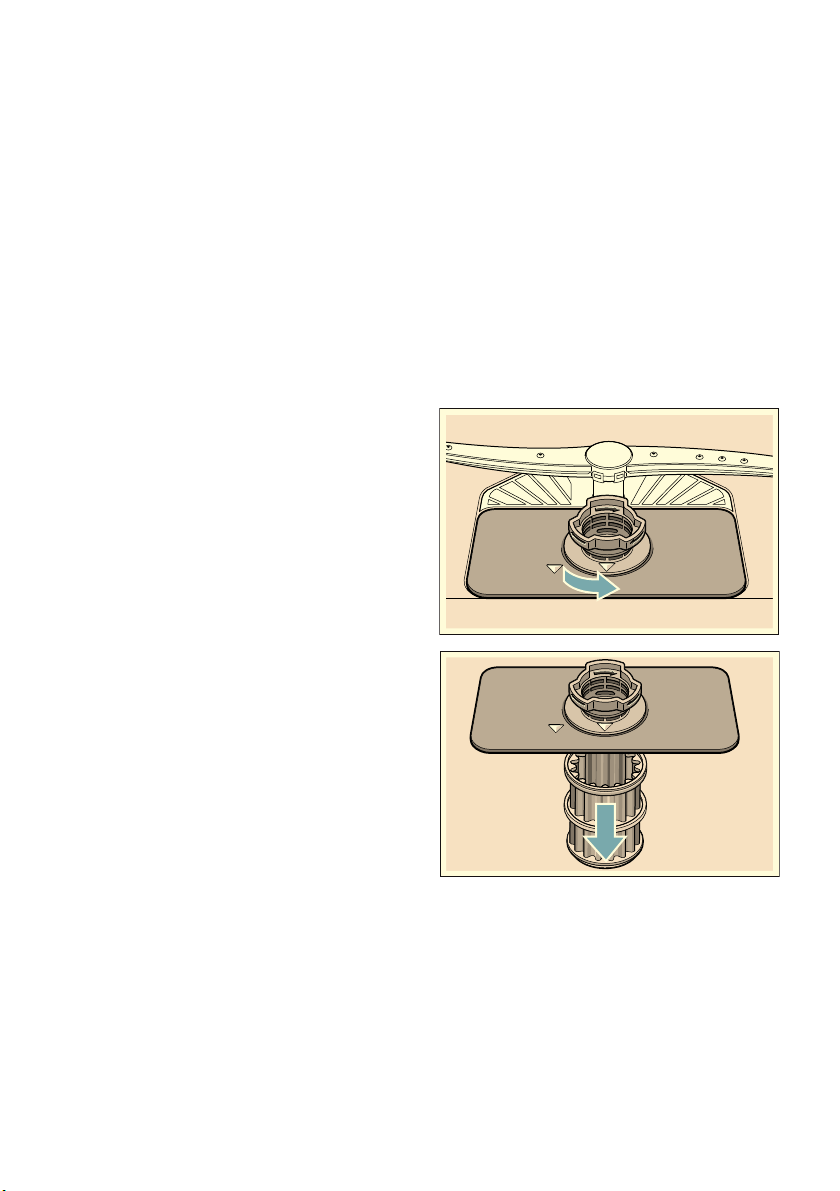
1. After each washing cycle check
the filters for residue.
2. Unscrew filter cylinder as illustrated
and take out filter system.
3. Remove any residue and clean
filters under running water.
4. Re-install filter system in reverse
sequence and ensure that the arrow
marks are opposite each other after
closing the filter system.
Fault, what to do? aus
35
Spray arms
Limescale and contaminants in the
rinsing water may block nozzles and
bearings on the spray arms 1: and
1J.
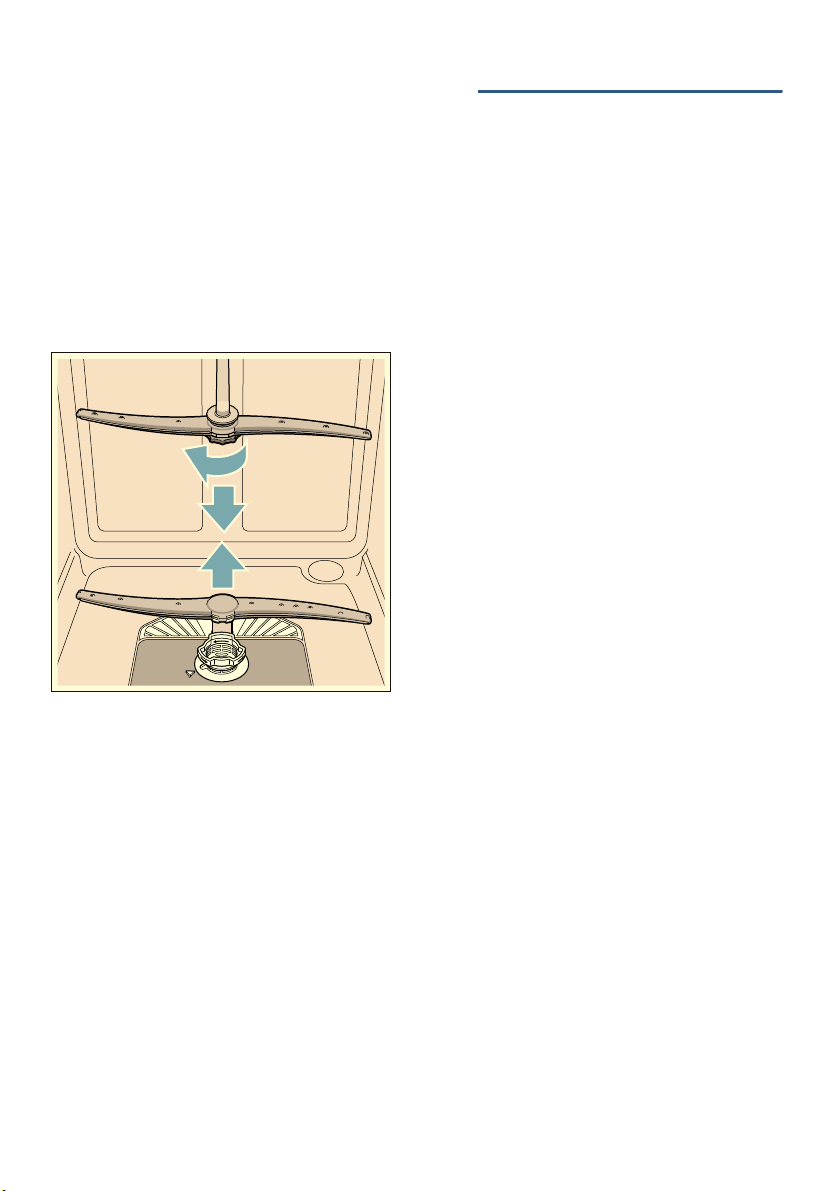
1. Check outlet nozzles on the spray
arms for blockages.
2. Unscrew the upper spray arm 1:
(1) and remove downwards (2).
3. Remove the lower spray arm 1J
upwards.
4. Clean spray arms under running
water.
5. Re-engage or screw on spray arms.
3 Fault, what to do?
Fau l t , wh a t to do?
Experience has shown that you can
rectify most faults which occur in daily
operation yourself. This ensures that the
appliance is quickly available to you
again. In the following overview you can
find possible causes of malfunctions
and helpful information for rectifying
them.
Note: If the appliance stops during
dishwashing or does not start for no
obvious reason, first run the Abort
programme function (Reset)
~ "Operating the appliance"
on page 28.
:Warning
Improper
repairs or use of non-original spare
parts may cause considerable damage
and put the user at considerable risk!
Always have repairs carried out by
technicians. If a component has to be
replaced, always use original spare
parts.
Error message
Some faults are indicated at the top of
the display window @ and on the front
display * )2 and possible remedies
are offered (for example Filter system
soiled (E22) -->Clean filters).
* depending on the features of your
dishwasher
aus Fault, what to do?
36
Waste water pump
Large food remnants or foreign objects
which were not captured by the filters
may block the waste water pump. The
rinsing water will then be above the
filter.
:Warning
Danger of cutting!
Sharp and pointed objects or glass
fragments may block the waste water
pump.
Always carefully remove foreign objects.
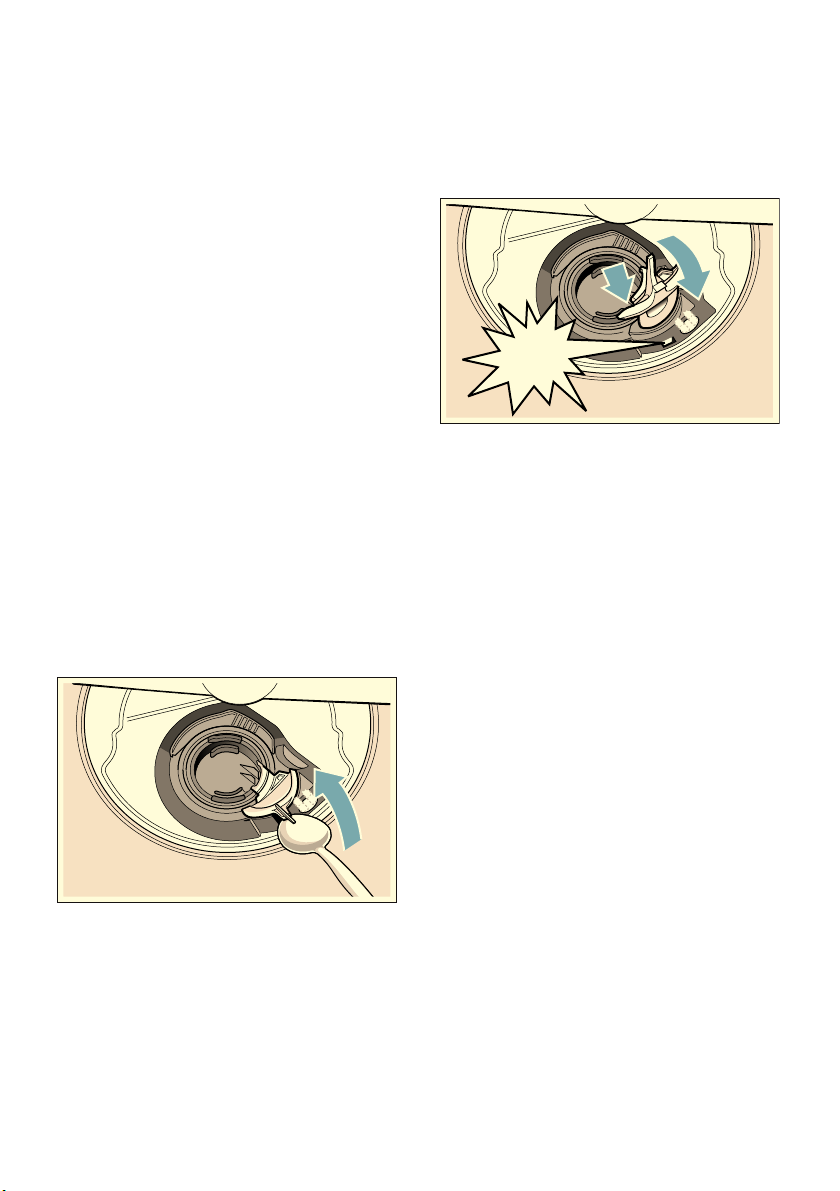
Clean the waste water pump as
follows:
1. Disconnect the dishwasher from the
power supply.
2. Take out top basket 12 and bottom
basket 1b.
3. Remove the filters 1R.
4. Scoop out water, use a sponge if
required.
5. Prise off the pump cover (as shown)
using a spoon. Grip the pump cover
by the crosspiece and lift diagonally
inwards (1). Remove cover
completely.
6. Check impeller wheel and remove
any foreign objects.
7. Place pump cover in the original
position (2) and press down until it
engages (3).
8. Install filters.
9. Re-insert baskets.
1
CLICK
Fault, what to do? aus
37
Fault table
Fault Cause Remedial action
Error code “:‹ˆ is lit. Intake opening (on right inside of
appliance) covered by utensils.
Arrange utensils so that the intake
opening is not obstructed.
Error code “:‚ƒ is lit. Heating element calcified or
soiled.
Clean appliance with dishwasher cleaning
agent or descaler. Operate the dishwasher
with water softening system and check the
setting.
Error code “:‚‰ is lit. Supply hose kinked. Install supply hose without kinks.
Tap turned off. Turn on the tap.
Tap jammed or calcified. Turn on the tap.
Flow rate must be min. 10 l/min. when
water supply is open.
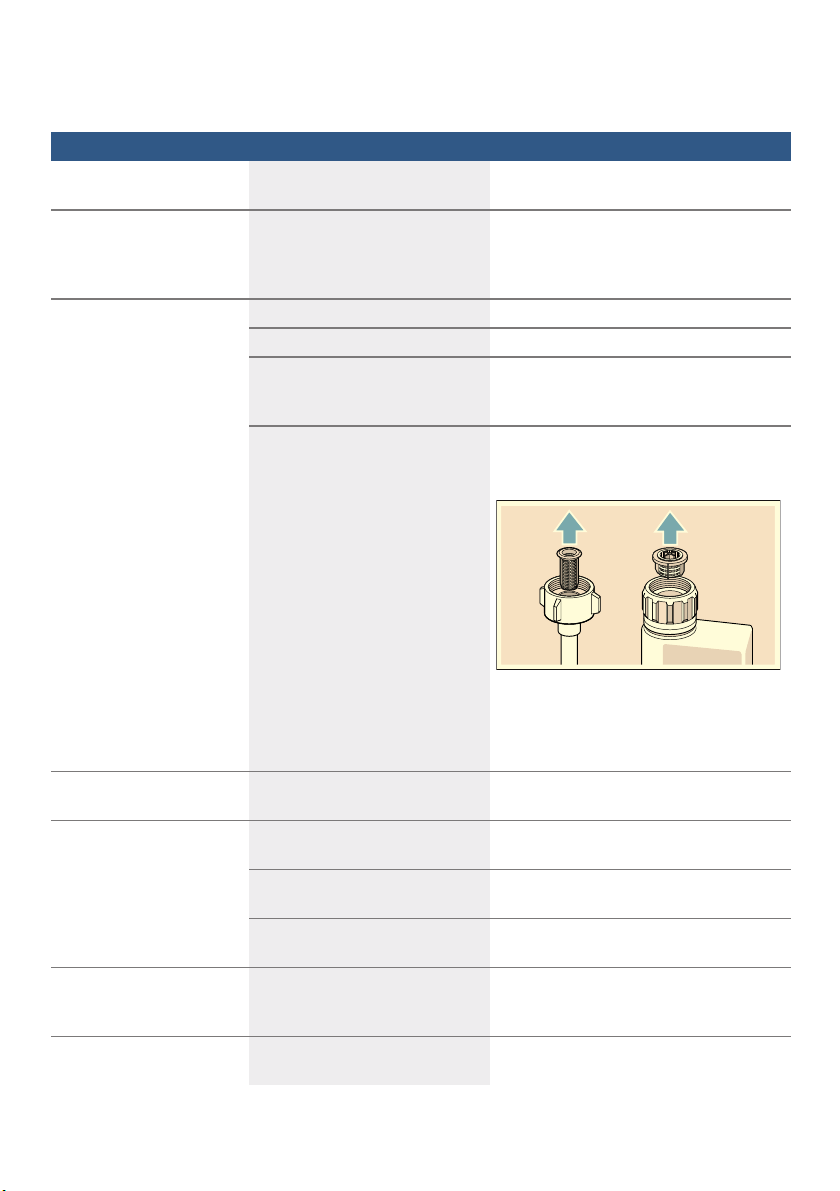
Filter in the water supply blocked. Switch off the appliance and pull out the
mains plug. Turn off the tap. Unscrew
water connection.
Clean filter in the supply hose. Screw
water connection on again. Check for
leaks. Reconnect power supply. Switch on
the appliance.
Error code “:ƒƒ is lit. Filters 1R are soiled or
blocked.
Clean filters. ~ "Filters" on page 34
Error code “:ƒ… is lit. Waste-water hose kinked or
blocked.
Install hose without kinks, remove any
residue.
Siphon connection still sealed. Check connection to siphon and open if
required.
Cover on the waste water pump
loose.
Lock cover correctly. ~ "Waste water
pump" on page 36
Error code “:ƒ† is lit. Waste water pump blocked or
cover on the waste water pump is
not locked in position.
Clean pump and lock cover correctly.
~ "Waste water pump" on page 36
Error code “:ƒˆ is lit. Mains voltage too low. Not an appliance fault, have the mains
voltage and electrical installation checked.
aus Fault, what to do?
38
A different error code is
indicated on the digital
display.
(“:‹‚ to “:„‹)
A technical fault has probably
occurred.
Switch off appliances with the ON/OFF
switch (. After a short time restart the
appliance.
If the problem recurs, turn off the tap and
pull out the mains plug.
Call customer service and mention the
error code.
Refill indicator for rinse-aid
H is lit.
No rinse aid. Refill rinse aid.
Refill indicator for rinse-aid
H is not lit.
Refill indicator switched off. Activation/deactivation.~ "Rinse aid"
on page 16
There is still enough rinse aid
available.
Check refill indicator, levels.
Water is left in the
appliance at the end of the
programme.
Filter system or area under the
filters 1R is blocked.
Clean filters and area underneath.
Program has not ended yet. Wait until programme ends or reset.
Utensils not dry. No or too little rinse aid in the
dispenser.
Refill rinse aid.
Programme selected without
drying.
Select programme with drying.
Water collecting in depressions
on the utensils and cutlery.
Arrange utensils in a sloping position,
arrange affected utensils as sloping as
possible.
The combined detergent used
has a poor drying performance
Use different combination detergent with
better drying performance. Use of rinse
aid also increases the drying performance.
ExtraDry to increase drying not
activated.
Activate ExtraDry.
Utensils were removed too early
or drying process had not ended
yet.
Wait until program ends or wait until 30
min after program ends before removing
utensils.
The eco rinse aid used has a
limited drying performance.
Use a proprietary rinse aid. Eco products
may have limited effectiveness.
Plastic utensils not dry. Special properties of plastic. Plastic has a lower heat storage capacity
and therefore dries less well.
Fault Cause Remedial action

Fault, what to do? aus
39
Cutlery not dry. Cutlery not arranged properly in
the cutlery basket.
Separate cutlery if possible, prevent
contact points.
Cutlery not arranged properly in
the cutlery drawer.
Arrange cutlery properly and separate if
possible.
Appliance interior wet after
rinse cycle.
No appliance fault On account of the “Condensation drying”
principle, water droplets are physically
induced and required in the container. The
humidity in the air condenses on the inner
walls of the dishwasher, drains and is
pumped out.
Food remnants on the
utensils.
Utensils placed too closely
together, utensils basket
overfilled.
Arrange utensils with adequate clearance
between them ensuring that the spray jets
can reach the surface of the utensils.
Prevent contact points.
Spray arm rotation obstructed. Arrange utensils so that the spray arm can
rotate without obstruction.
Spray arm nozzles are blocked. Clean the spray arm nozzles.
~ "Cleaning and maintenance"
on page 32
Filters 1R dirty. Clean filters. ~ "Cleaning and
maintenance" on page 32
Filters 1R inserted incorrectly
and/or not engaged.
Insert and engage filters correctly.
Rinse programme too weak. Select a more intensive rinse programme.
Increase sensitivity of the sensors.
~ "Sensor setting" on page 29
Utensils precleaned too intensely;
sensors therefore decide on
weak programme sequence.
Stubborn soiling cannot be
completely removed.
Do not prerinse utensils. Remove only
large food remnants.
Increase sensitivity of the sensors.
~ "Sensor setting" on page 29
Recommended programme Intensive.
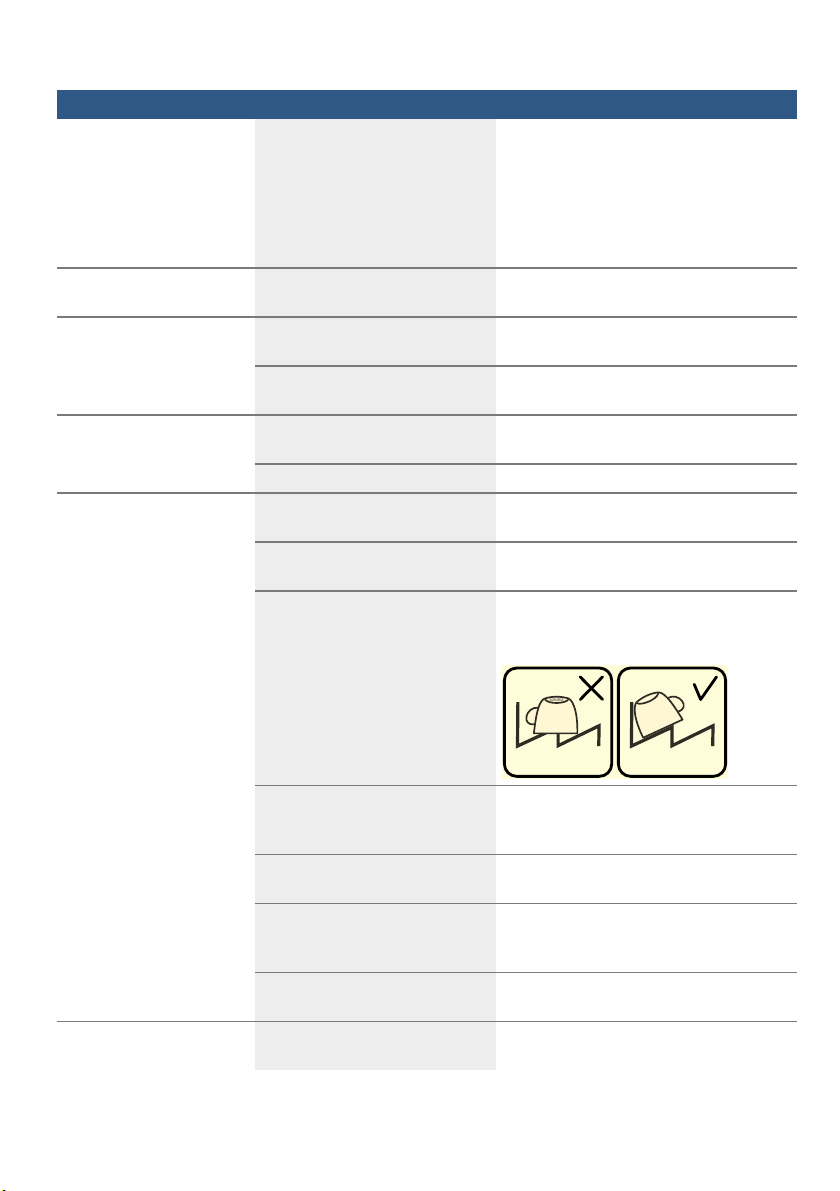
Tall narrow receptacles in corner
areas are not rinsed adequately.
Do not place hollow receptacles too
obliquely and do not place in the corner
area.
Top basket 12 on right and left
not set to same height.
Set top basket to same height using side
levers.
Fault Cause Remedial action

aus Fault, what to do?
40
Detergent residue. Detergent dispenser cover 9"
blocked by utensils and therefore
does not open fully.
Utensils must not be placed above the
tablet collecting tray 1B. These may
block the lid of the detergent dispenser
and prevent it from opening fully.
~ "Upper basket" on page 18
Do not place utensils or fragrance
dispenser in the tablet collecting tray.
Detergent dispenser cover 9"
blocked by the tablet.
Tablet must be inserted flat and not
upright.
Tablets used in the quick or short
programme.
Dissolving time of the detergent
is not reached in the selected
short programme.
Dissolving time of tablets too long for a
quick or short programme.
Use a detergent powder or select a more
intensive programme.
Washing effect and dissolving
performance are reduced after a
prolonged storage time or
detergent is very lumpy.
Change detergent.
Water stains on plastic
parts.
Droplet formation on plastic
surface is physically unavoidable.
After drying, water stains are
visible.
Use a more intensive programme (more
water changes).
Arrange utensils in a sloping position.
Use rinse aid.
Washable or water-soluble
coatings in the container or
on the door.
Detergent substances are
deposited. These coatings cannot
usually be removed with
chemicals (appliance cleaner, ...).
Change detergent brand.
Clean appliance mechanically.
Only for glasses: Initial glass
corrosion – can only apparently
be wiped off.
See “Glass and utensil damage”
~ Page 17.
White, stubborn coatings;
limescale on the utensils,
container or door.
Detergent substances are
deposited. These coatings cannot
usually be removed with
chemicals (appliance cleaner, ...).
Change detergent brand.
Clean appliance mechanically.
Underdosing of detergent. Increase detergent dosage or change
detergent.
Too weak rinse programme
selected.
Select a more intensive rinse programme.
Fault Cause Remedial action

Fault, what to do? aus
41
Tea or lipstick residue on
the utensils.
Too low rinsing temperature. Select programme with higher washing
temperature.
Too little or unsuitable detergent. Use suitable detergent at correct dosage.
Utensils precleaned too intensely;
sensors therefore decide on
weak programme sequence.
Stubborn soiling cannot be
completely removed.
Do not prerinse utensils. Remove only
large food remnants.
Increase sensitivity of the sensors.
~ "Sensor setting" on page 29
Coloured (blue, yellow,
brown), difficult to remove
to non-removable coatings
in the appliance or on
stainless steel utensils.
Film formation consisting of
ingredients from vegetables (e.g.
cabbage, celery, potatoes,
noodles, ...) or the tap water (e.g.
manganese).
Can be partly removed with machine
cleaner or by mechanical cleaning.
Coatings are harmless.
Film formation caused by metallic
components on silver or
aluminium utensils.
Can be partly removed with machine
cleaner or by mechanical cleaning.
Discolouration of the
plastic parts inside the
appliance.
Plastic parts inside the appliance
may become discoloured during
the service life of the dishwasher.
Discolouration is normal and will not
impair the function of the dishwasher.
Plastic parts discoloured. Too low rinsing temperature. Select programme with higher washing
temperature.
Utensils precleaned too intensely;
sensors therefore decide on
weak programme sequence.
Stubborn soiling cannot be
completely removed.
Do not prerinse utensils. Remove only
large food remnants.
Increase sensitivity of the sensors.
~ "Sensor setting" on page 29
Removable streaks on
glasses, glasses with
metallic appearance and
cutlery.
Too much rinse aid. Set rinse aid amount to lower setting.
No rinse aid added or setting too
low.
Add rinse aid and check dosage
(recommended setting 4–5).
Detergent residue in the final
rinse programme section.
Detergent dispenser cover
blocked by utensils (cover does
not open fully).
Detergent dispenser cover must not be
obstructed by utensils.
Do not place utensils or fragrance
dispenser in the tablet collecting tray.
Utensils precleaned too intensely;
sensors therefore decide on
weak programme sequence.
Stubborn soiling cannot be
completely removed.
Do not prerinse utensils. Remove only
large food remnants.
Increase sensitivity of the sensors.
~ "Sensor setting" on page 29
Fault Cause Remedial action
aus Fault, what to do?
42
Initial or existing,
irreversible clouding of
glass.
Glasses not dishwasher-proof,
only suitable for dishwasher.
Use dishwasher-proof glasses.
Avoid long steam phase (standing time
after wash cycle ends).
Use wash cycle at lower temperature.
Use detergent with glass protection
component.
Rust spots on the cutlery. Cutlery not adequately
rust-resistant. Knife blades are
frequently more severely
affected.
Use corrosion-resistant cutlery.
Cutlery will also rust if rusting
parts are rinsed at the same time
(pan handles, damaged utensil
baskets, etc.).
Do not wash rusting parts.
Appliance cannot be
switched on or operated.
Malfunction. Disconnect appliance from the power
supply; pull out the mains plug or switch
off the fuse. Wait at least 5 seconds, then
connect the appliance to the power
supply.
Appliance does not start. The mains fuse has tripped. Check mains fuse.
Power cord not inserted. Ensure that the power cord is plugged all
the way into the back of the appliance and
into the socket. Check that the socket
functions.
The appliance door has not been
shut properly.
Close the door.
Programme starts
automatically.
You did not wait until programme
ended.
Perform reset.
The door is difficult to
open.
Child lock is activated. Deactivate the child lock.
Door cannot be closed. Door lock has been activated. Close door with increased force.
Door cannot be closed due to
installation.
Check appliance installation: Door
or attached parts must close without
obstruction.
Cover on the detergent
dispenser cannot be
closed.
Detergent dispenser or cover
guide blocked by sticky detergent
residue.
Remove detergent residue.
Detergent residue in the
detergent dispenser 9"
or in the tablet collecting
tray 1B.
Spray arms blocked by utensils,
therefore detergent is not rinsed
out.
Ensure that the spray arms can rotate
freely.
The detergent dispenser was
damp when filled.
Pour detergent into the dry detergent
dispenser only.
Fault Cause Remedial action
Fault, what to do? aus
43
--------
Appliance stops in the
programme or programme
is interrupted.
Door not closed properly. Close the door.
Do not place utensils or fragrance
dispenser in the tablet collecting
tray.
Top basket presses against the
door and prevents door from
being closed securely.
Check whether rear panel is being
pressed in, e.g. by socket or by hose
holder which has not been removed.
Power and/or water supply
interrupted.
Restore power and/or water supply.
Filling valves making
striking noises.
Depends on domestic installation,
as appliance is not defective. No
effect on appliance function.
No remedial action possible.
Knocking or rattling noise. Spray arm strikes the utensils,
utensils not positioned correctly.
Position utensils so that the spray arms do
not strike the utensils.
If there is a low load, the water
jets strike the washing tank
directly.
Load the appliance with more utensils or
distribute the utensils more evenly in the
dishwasher.
Light utensils move during the
wash cycle.
Arrange light utensils securely.
Unusual foam formation. Handwash liquid in the rinse aid
dispenser.
Immediately refill rinse aid dispenser with
rinse aid.
Rinse aid spilled. Remove rinse aid with a cloth.
Fault Cause Remedial action
aus Customer service
44
4 Customer service
Cu s t o mer ser vi ce
If you are unable to rectify the fault,
please contact your customer service.
We will always find an appropriate
solution in order to avoid unnecessary
visits by engineers. Contact information
for your nearest customer service can
be found on the back of these
instructions for use or on the enclosed
customer service list. When calling,
please state the appliance number
(E-Nr. = 1) and the production number
(FD = 2) which can be found on the
rating plate 92 on the appliance door.
Trust the expertise of the
manufacturer. Contact us for
assistance. You can therefore be sure
that the repair is carried out by trained
service technicians who carry original
spare parts for your domestic
appliances.
5 Installation and
connection
Install ation and c onnect i on
The dishwasher must be connected
correctly, otherwise it will not function
properly. The specifications for the inlet
and outlet as well as the electrical
connected loads must correspond with
the required criteria as
specified in the following paragraphs
or in the installation instructions.
Install the appliance in the correct
sequence:
1. Checking appliance on delivery
2. Installation
3. Drainage connection
4. Drinking water connection
5. Electrical connection
Contents of package
If you have any complaints, contact the
dealer from whom you purchased the
appliance or our customer services.
■ Dishwasher
■ User manual
■ Installation instructions
■ Quick reference guide*
■ Warranty*
■ Installation materials
■ Steam guard plate*
■ Rubber apron*
■ Power cord
* depending on the features of your
dishwasher
Safety instructions
Please follow the safety instructions
under ~ "Installation" on page 6.
)'
(1U

Installation and connection aus
45
Delivery
Your dishwasher has been checked
thoroughly in the factory to ensure that
it is in working order. This may cause
small water stains. These will disappear
after the first wash cycle.
Technical specifications
■ Weight:
up to 60 kg
■ Voltage:
220–240 V, 50 Hz or 60 Hz
■ Connected load:
2000 - 2400 W.
■ Fuse:
10/16 A (UK 13 A).
■ Power input:
off mode (Po)* 0.50 W.
left on mode (Pl)* 0.50 W.
*according to regulations (EU) nos.
1016/2010 and 1059/2010.
Additional functions and settings
may increase the power input.
■ Water pressure:
at least 0.05 MPa (0.5 bar),
maximum 1 MPa (10 bar).
At a higher water pressure:
connect pressure-reducing valve
ahead.
■ Inlet rate:
minimum 10 litres/minute
■ Water temperature:
cold water.
Hot water:
Maximum temperature 60 °C.
■ Capacity:
12–15 place settings (depending on
the features of your dishwasher).
Installation
The required installation dimensions
can be found in the installation
instructions. Level the appliance with
the aid of the height-adjustable feet.
Ensure that the appliance is situated
securely on the floor.
■ A built-under or integrated appliance
which is installed subsequently as a
free-standing appliance must be
secured to prevent it from
overturning, e.g. by screwing it to the
wall or by installing it under a
continuous worktop which is
screwed to adjacent cupboards.
■ The appliance can easily be installed
in a fitted kitchen between wooden
and plastic walls.
Drainage connection
1. The required work sequence can be
found in the installation instructions.
If required, fit a siphon with an
drainage connection.
2. Connect the waste-water hose
to the drainage
connection of the siphon with
the enclosed parts.
Ensure that the drainage hose is not
kinked, crushed or twisted and that
there is no cover
plate in the drainage to prevent
the waste water from flowing out!

aus Installation and connection
46
Drinking water connection
1. Fasten the drinking water connection
to the tap according
to the installation instructions using
the enclosed parts.
Ensure that the drinking water
connection is not kinked, crushed
or twisted.
2. When replacing the appliance,
always use a new water supply
hose.
Water pressure:
at least 0.05 MPa (0.5 bar), maximum 1
MPa (10 bar).
At a higher water pressure:
connect pressure-reducing valve ahead.
Inlet rate:
minimum 10 litres/minute
Water temperature:
cold water.
Hot water:
Maximum temperature 60 °C.
Warm water connection *
War m wa t e r connec t i on
* depending on the features of your
dishwasher
The dishwasher can be connected
to cold or hot water up to max. 60 °C.
Connection to hot water is
recommended if the hot water can be
supplied by energetically favourable
means and from a suitable installation,
e.g. solar heating system with
circulation line. This will save energy
and time. The “Hot water” setting allows
you to adjust your dishwasher optimally
to operation with hot water. It is
recommended to have a water
temperature (temperature of the
incoming water) of at least 40 °C and
no more than 60 °C. It is not
recommended to connect the appliance
to hot water if the water is supplied from
an electric boiler.
To change the setting:
1. Open the door.
2. Switch on ON/OFF switch (.
3. Press Info button {8 for 3
seconds until the following text is
indicated on the display window at
the top @:
Scroll with < >
Set with - +
Leave with Setup 3 sec.
4. Keep pressing the button > )" until
water connection appears of the
display window at the top @.
5. Make the setting with setting buttons
+ -P.
6. Press and hold the Info button {
8 for 3 seconds.
The chosen setting has now been
stored.

Installation and connection aus
47
Electrical connection
■ Connect the appliance to an
alternating current only, ranging from
220 V to 240 V and 50 Hz or 60 Hz
via a correctly installed socket with
protective earth conductor. See
rating plate for required fusing 92.
■ The socket must be near the
appliance and freely accessible
following installation.
If the plug is not freely accessible, an
allpole disconnector with a contact
opening of at least 3 mm must be
fitted on the installation side to
satisfy the relevant safety
instructions.
■ The connection may be modified
by technicians only.
■ A power cord extension may be
purchased from customer service
only.
■ Use only a residual current operated
circuit-breaker which features the
symbol ‚. Only this extension
guarantees compliance with
the currently valid regulations.
■ The appliance features a water
damage protection system. Please
note the system will function only
when the power supply
is connected.
Removal
Also observe
the sequence of worksteps here.
1. Disconnect the appliance from the
power supply.
2. Turn off the tap.
3. Undo the waste water and drinking
water connection.
4. Loosen fastening screws for the
furniture parts.
5. If fitted, remove the base panel.
6. Pull out the appliance, carefully
pulling the hose behind.
Transporting
Empty the dishwasher and secure loose
parts.
Drain the appliance according
to the following steps:
1. Turn on the tap.
2. Open the door.
3. Switch on ON/OFF switch (.
4. Select programme with the highest
temperature.
The estimated programme duration
is indicated on the display window at
the top @.
5. Press START button h.
6. Close the door.
Programme sequence starts.
7. Open the door after
approx. 4 minutes.
8. Press START button h until
“Program was terminated”/“Ready in
one minute.” is indicated at the top
of the display window @.
9. Close the door.
10. Open the door after approx. 1
minute.
The display window at the top @
indicates; “Finished”.
11. Switch off ON/OFF switch (.
12. Turn off the tap, disconnect supply
hose and drain water.
Note: Transport appliance upright only.
This prevents residual water from
running into the machine control
and damaging the programme
sequence.
Protection against frost
Pr ot ec t i on agai nst frost (Empt yi ng the appl i anc e)
If the appliance is in a room where
there is a risk of frost (e.g. holiday
home), empty the appliance completely
(see Transportation).
6XEMHFWWRFKDQ
J
HV

AquaStop guarantee
(does not apply to appliances without AquaStop)
Contact information for all countries can be found on the enclosed customer service list.
Repair order and advice on faults.
GB 0344 892 8979
Calls from a BT landline will be charged at up to 3 pence per minute.
A call set-up fee of up to 6 pence may apply.
Robert Bosch Hausgeräte GmbH
www.bosch-home.com
Carl-Wery-Straße 34
81739 München
Germany
4.
If your appliance is fitted with AquaStop, you can leave your appliance
unattended during operation and leave the tap turned on afterwards.
The tap should only be turned off if you are absent from home for
a prolonged period, e.g. several weeks holiday.
In addition to warranty claims against the seller based on the purchase contract
and in addition to our appliance warranty we will pay damages under
the following conditions:
1.
If our AquaStop system is defective and causes water damage,
we will make good the damage for private users.
To ensure water damage protection, the appliance must be connected
to the power supply.
3.
A prerequisite for the warranty claim is that the appliance has been correctly
installed and connected with AquaStop according to our instructions.
This also includes the correct installation of the AquaStop extension
(original accessory). Our warranty does not extend to defective
feed lines or fittings up to the AquaStop connection on the tap.
2.
This liability guarantee is valid for the service life of the appliance.
IE 01450 2655
US 800 944 2904
toll-free
0.03 € per minute at peak. Off peak 0.0088 € per minute.
*9001244194*
9001244194
(9712) 642 TW