CONTENTS
SAFETY
PRECAUTIONS: AVOIDIHG
POSSIBLE EXPOSURE TO
MICROWAVE ENERGY
FEATURES OF YOUR/OVEN
MICROWAVE OVEN
Control ........................................................................................... 7
Timer, Using e Hold Time ......................................................8
To Time Delrost, Hold and Cook .................................. 8
Microwave Time Cooking ....................................................9
Defrosting by Time, Auto Delrost, Stand Time ........10
Conversion Guide, Auto Defrost Guide .....................11
Temperature Cooking, Temperature Probe .......... 12
Auto Roast, Auto Simmering ................................... 13
Auto Cook, Auto Cooking Contro!
Guide ........................................................................... 13, 14, 15, 16
Microwave Oven Shelf ....................................... 17, 19
LOWER OVEN
Control, Clock and Timer ..........................................20, 21
Bake, Delay Bake and Hold Mode ....................... 21, 22
Broiling ............................................................................. 23
Self-Clean Cycle .......................................................24, 25
Cleaning Tips ............................................................ 26, 27
REMOVABLE PARTS
........................................................................................... ..... 28, 29
Removal o| Packaging Tape .............................................29
BEFORE CALLIHG FOR SERVICE
...................................................................................... 30-32
Thermostat Adjustments ........................................... 33
MODELS 49425, 49429
o oSAFETY
A UAL
MNM085-7 SR10015
SAVE THESE INSTRUCTIONS
Read all instructions before using th_s appliance. When using electrical
appliances, basic safety precautions should be followed, including the following:
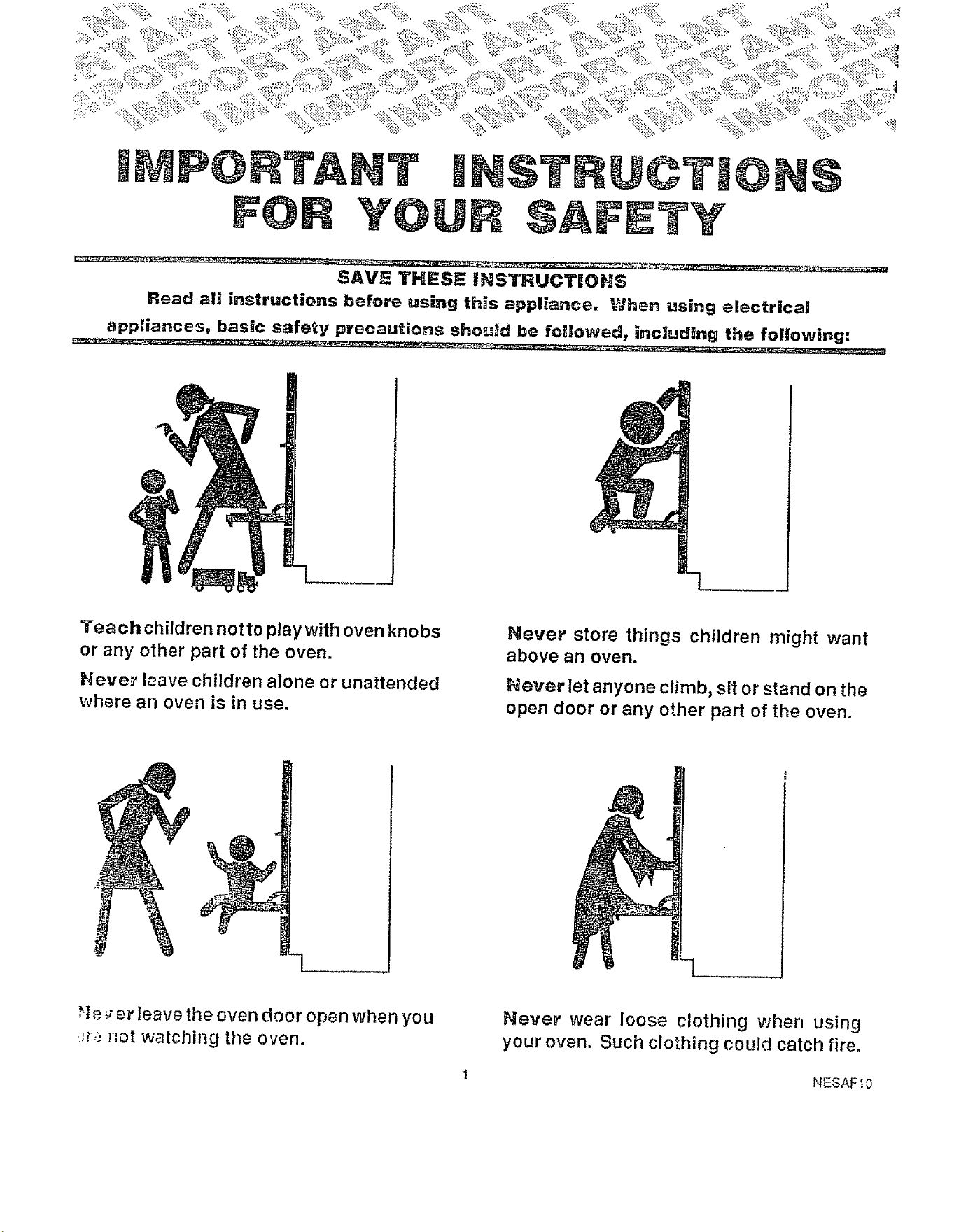
Teach children notto play with oven knobs
or any other part of the oven.
Never leave children alone or unattended
where an oven is in use.
Hever store things children might want
above an oven.
Never let anyone climb, sit or stand on the
open door or any other part of the oven.
;!e:; er leave the oven door open when you
_._,_not watching the oven.
Never" wear loose clothing when using
your oven. Such clothing could catch fire,
1 NESAFtO
Toi insure safety for yourself and your home, please read your Owner's Manual
Ca_efuiiyl Keep it handy for quick easy reference. Pay close attention to the
safety sections of your manual. You can recognize the safety sections by
looking for the A symbol or the word "Safety".
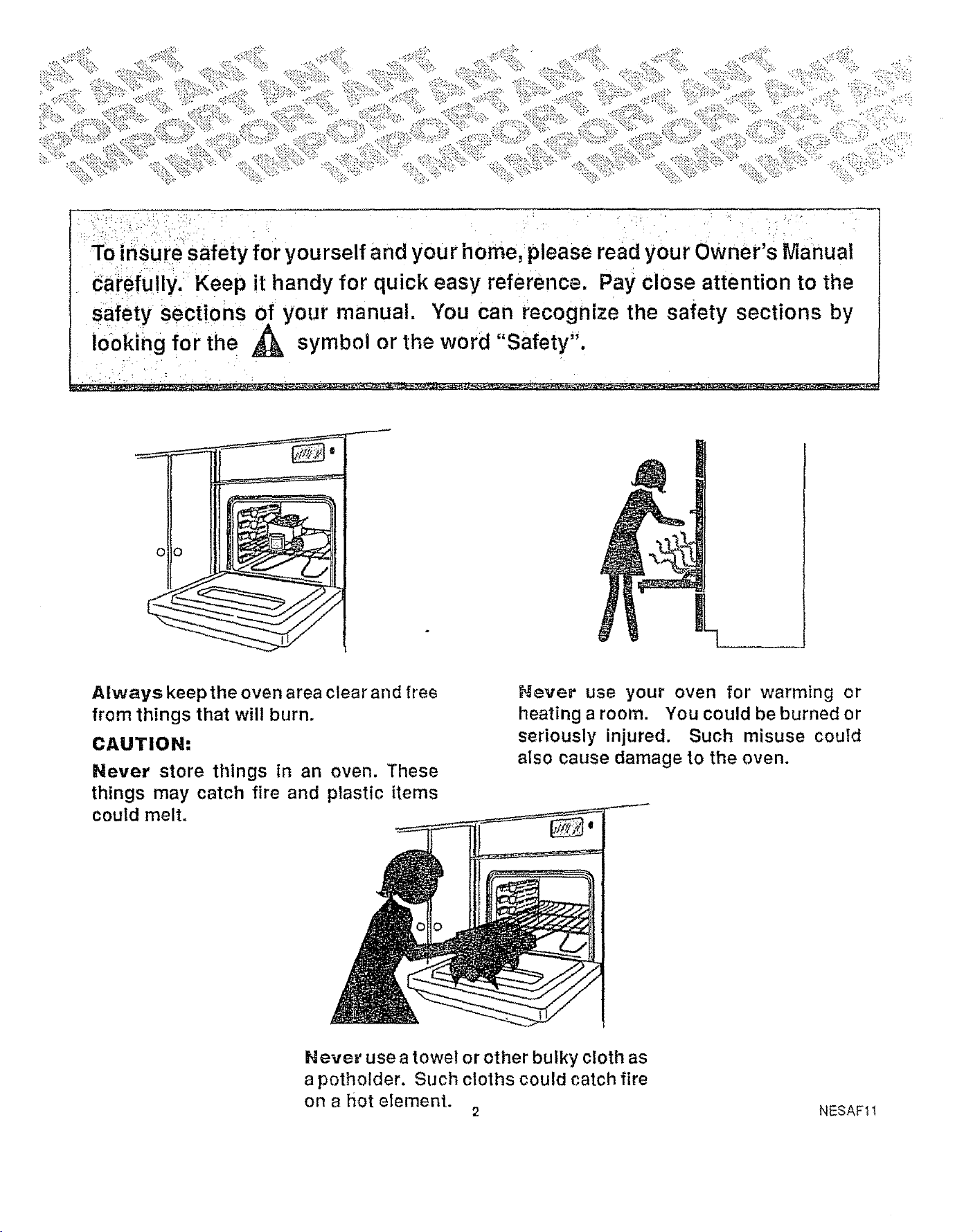
Always keep the oven area clear and flee
from things that will burn.
CAUTION:
Never store things in an oven. These
things may catch fire and plastic items
could melt.
Never" use your oven for warming or
heating a room. You could be burned or
seriously injured. Such misuse could
aIso cause damage to the oven.
Never use a towel or other bulky cloth as
a potholder. Such cloths could catch fire
on a hot element.
2 NESAF11
Read all instructions BEFORE using this appliance.
Wh_ using electrica_ appliances, basic safety
precautions should be followed, including the followtn_;
_lways use this appliance only for its intended use as
described in lhis manual.
_ sure your appliance Is properly installed ant
_;ounded b_ a qualified technician In accordance wi_
_h_ insis_l_t!on tn_ructions provtoec,
_eio,'_;. perzormin; any service, DISCONNECT T_-iE
R._.N{._E POWER SUPPLY AT THE HOUSEHOL£
DISTribUTION PANE;. BY REMOVING THE FLISE OF_
SWITCHING O_F THE CIRCUIT BREAKEP,.
LI €_ _f_l_" =._r,_polholders Moist or damp potholders
Dr_h_T_f_'_-.es may result in burns from steam. Do no,
1_ p_f_lders touch hot heating elemenls. Do not use
&';_W_I or ¢F_f/_rbulky cloth.
eep oven and vent clean to maintain good venting and
ic_avmd grease fires.
Wh._n cooking pork, follow the directions exactly and
n!w.3ys cool{ the meat to an Internal temperature of at
least 170_F. This assures that, in the remote possibility
that lrichina may be present In the meat, tt will be killed
and the meat will be safe to eat.
Stan_ away irom the oven when opening the oven
door. Hot air or steam which escapes can cause burns
1ohands, face or eyes.
[3o z_ot a/lempt to repair or replace any part of your oven
u:}less it is specifically recommended in this book. All
oliver servicing should be referred to a qualified
technician°
C,_,UTtON: items of interest to chil-
dren should not be stored in cabi-
nels alive an oven. Children climb-
ing on the oven to reach items
_ould b_ seriously injured.
D_ ,,_i store or use combustible materials, gasoline or
uther !lammable vapors and liquids in the vicinity of this
or any other appliance,
Do not let cooking grease or olher flammable materials
accumulate in or near the oven.
Do not tOUCl_heating elements or Interior surface of
ovP.n. These surfaces may be hot enough to burn even
though they _re dark In color. Do not let clothing or other
_Iammable materials contact the interior of the oven.
Allow sufficient time for cooling.
Potentially hot surfaces Include the oven vent opening
and surfaces near the opening and crevices around the
oven door° Remember: The Inside surface of the oven
may be hot when the door is opened.
De no_ block oven vent area.
Ke_p oven free from grease buildup Keep clean t_
maintain good vent!ng and to avoid grease fires.
Place oven shelf tn desired position while oven Is cool
ifshelves must be handl_edwhen hot, do not let potholde _
contact heating units in the oven
PuHin=_ ot_ shelf to the shelf stop Is a convenience ir
lifting heavy foods. It is also a precaution against burn_
from touching hot surfaces of the door or oven walf_
When using cookin_ or roasting bags In oven,,follow the
manufacturer's directions
_,o not: use your oven to dry Items; tfoverheated, they
can catch fir&
Do no_ clean door gasket. The door gasket Is
essentiai for a good seal. Care should be taken not to
rub, damage or move the gasket.
Do not use oven cleaners,, No commercial overl cleaner
or oven liner protective coating of any kind should be
used |n or around any part of the oven.
Clean only parts listed In this Owner's Manual.
]Before self-cleaning the oven, remove broiler pan and
other cookware.
Do not use aluminum fell anywhere In the oven except
as described In this manual. Misuse could result In a
shock, fire hazard or damage to the oven.
This appliance should be serviced only by
qualified service personnel. Contact nearest
authorized sentice facility for examination_ repair
or adjustment,
This appliance must be connected to a grounded,
metamc, permanent wiring system, or an equipment
grounding conductor should be run with the circuit
conductors and connected to the equipment grounding
terminal or lead on the appliance. The possibility c!
electrical shock exists with an unplugged microwave.
Do not operate this appliance If it is not working
properly or if it has been damaged or dropped.
As with any appliance, close supervision Is necessary
when used by children.
tf self-cleanlng mode malfunctions, turn off and
disconnect at the fuse or ctrcuit breaker panel. Have
serviced by a qualified technician.
Do not heat unopened food contalnerso Pressurebulld-
up may make container burst and cause injury.
3 NESAF18-1
SAVE THESE IINSTRUCT_ONS
IMPORTAHT SAFETY NOTICE
The California Safety Drinking Water and Toxic
Enforcement Act requires the governor of California to
publish a list of substances known to the state to cause
birth defects or other reproductive harm and requires
businesses to warn customers of potential exposure to
such substances.
The fiberglass insulation in self-clean ovens gives off a
very small amount of carbon monoxide during the
cleaning cycle. Exposure can be minimized by venting
with an open window or using a ventilation fan or hood.
READ AND UNDERSTAND THIS
INFORMATION NOW!
Should you ever need it, you will not have time for
reading.
Never use water on a grease fire--it will only
spread the flames,
OVEN FIRE
1, Close oven door and turn controls off.
2. IF FiRE CONTINUES, THROW BAKING SODA ON THE
FiRE OR USE A DRY CHEMICAL FOAM, OR HALON
TYPE EXTINGUISHER.
PRECAUTIONS TO AVOID POS-
SIBLIE EXPOSURE TO EXCESSIVE
MICROWAVE ENERGY
DO NOT ATTEMPT to operate this oven with the door
open since open door operation can result in harmlui
exposure to microwave energy. It is important not to
defeat or tamper with the safety interlocks.
DO NOT PLACE any object between the oven front face
and the door orallow soil orcleaner residue to accumulate
on sealing surfacesr
DO NOT OPERATE the oven if it Is damaged. It is
particularly important that t he oven door close properly,
and that there is no damage to the door, hinges and
latches (broken or loosened), and door seals and sealing
surfaces.
THE OVEN SHOULD NOT be adjusted or repaired by
anyone except properly qualified service personnel.
TO REDUCE THE RISK OF FIRE IN
THE MICROWAVE OVEN CAVITY:
Do not overtook food. Carefully attend appliance if
paper, plastic, orothercombustible materials are placed
in the oven to facilitate cooking_
Remove wire twist-ties from paper or plastic bags
before placing bags in oven.
Do not use your microwave oven to dry newspapers or
other ttems.
Paper towels, napkins, wax paper and other recycle
paper products can contain metal flecks which mE
cause arcing or ignite. Paper products containing nylc
or nylon filaments should be avoided, as they may al_
ignite.
De nell pop popcorn in your microwave oven unless i
a special microwave popcorn accessory or unless yo
use popcorn labeled for use in microwave ovens°
Do not overcook potatoes_ They could dehydrat_
catch fire and damage your oven.
Do not operate the oven while empty to avoid damag,
to the oven and the dangerof fire. if by accident the over
should run empty a minute or two, no harm is done
However, try to avoid operating the oven empty at at
times_it saves energy and prolongs life of the oven.
If materials inside oven{s) should ignite, keel"
oven door closed, turn oven off, and disconnect th_
power cord, or shut off power at the fuse or circui
breaker panel.
Some products, such as eggs and sealec
containers--for example, closed glass jars--ma_
explode and should not be heated in this oven.
See door surface cleaning instructions in this manual.
Do no! defrost beverages_especia]ly carbonated
ones_in narrow necked bottles. Even if the container i_
opened, pressure can build up. This can cause the
container tO burst, resulting in injury.
Use metal enly as directed in cookbook, Felt
strips used on meat roasts are helpful when used as
shown In cookbookr
TV dinners may be microwaved in foil trays less than
3/4" high; remove top foil cover and return tray to box.
When using metal in microwave oven, keep metal (except
microwave oven shelf) at least 1" away from sides of
oven.
Cooking utensils may become hot because of heat
transferred from the heated food. Potholders may be
needed to handle the utensil.
Sometimes the oven floor can become too hot to
touch. Be careful touching the floor during and after
cooking.
Foods cooked In liquids (such as pasta) may tend to boil
over more rapidly than foods containing less moisture°
Should this occur refer to the cleaning section of this
manual.
Do not use a thermometer in food you are microwaving
unless the thermometer is designed or recommended
for use in the microwave oven.
Remove the temperature probe from the oven when not
using it to cook with, If you leave the probe inside th_
oven wffhout _nserting it in food or liquid, and turn or
NESAF19
mlcrowave e_.ergy,ttcan c_eatee_ectr_ca_a_c_ngIn_h_
oven and d_mage the oven walls.
._NO|D h_a_ing baby food in glass jars, even wt_hou'i
their lids; especially meat _nd egg mixtures.
Do no_ I_o_! eggs in a m_crovs_ve oven° Pressure
can build up Inside egg yolk and may cause it to burst,
resulting In injury.
FOODS WITH UNBROKEN OUTER "SKIN" such as
potatoes, sausages, tomatoes, apples, chicken livers
and other giblets, and egg yolks (see pi'evious caution)
should be pierced to a_!ow steam to escape rJuring
cooking.
PLASTIC UTENSILS designed for microwave cooking
are very useful, but should be used carefully. Even
mIcrowave plastic may not be as tolerant of overcooking
conditions as are glass or ceramic materials and may
so_t_n or char if subjected to short periods of
overcooking. In longer exposures to overcooktng, the
food and utensils could Ignite, For these reasons:
1) Use microwave plastics only and use them In strict
compliance with the utensil manufacturer's
recommendations,
2) Do not subject empty utensils to microwaving.
3) Do not permit children to use plastic utensils without
complete supervision.
"BOILABLE"cooking pouches andtightlyctosedplastic
b_gs should be slit, pierced or vented as directed in
cookbook. Ifthey are not, plastic could burst during or
immediately after cooking, posslbly resulting in injury.
AlSo, plastic storage containers should be at least
partially uncovered because they form a tight seal.
When cooking wit h containers tightly covered wtt h plastic
wrap, remove covering carefully and direct steam away
from hands and face.
Wh_= hea_!ng pac_ag.=d foods, a_w_ys place them on
a microwave proof dish. Examples are microwave
French fries or microwave popcorn.
be NOT deep fa_ fry In your microwave. This is not a
safe procedure In the confined cavity.
DO _OT attempt to do home canning In your microwave.
It Is Impossible to be sure atl areas of the jar have
reached bo!_lng temperature for the proper processing
time.
SPOP;TA_,;_OL_ BO_LtHQ _ Under certain
circumstances, tIqulds may start to boil during orshortty
after removal from the microwave° To prevent burns
from splashing liquid, st_r liquid briefly before
removing the container from the microwave oven.
This rn_c_owave even _s specifically designed _o
he_t or cook food_ and is not intended fo_
la_orstory o_ indus_ia! use.
MICROWAVE OV H SHELF
Remove the shelf from the oven when not in use.
DO NOT store or cook with shelf on floor of oven,
Product damage may result,
Use po_he_ders when handling the shelf and utensils,
They may be hot.
DO NOT use microwave browning dish on shelf. The
shelf could overheat.
5 NESAF2O-1
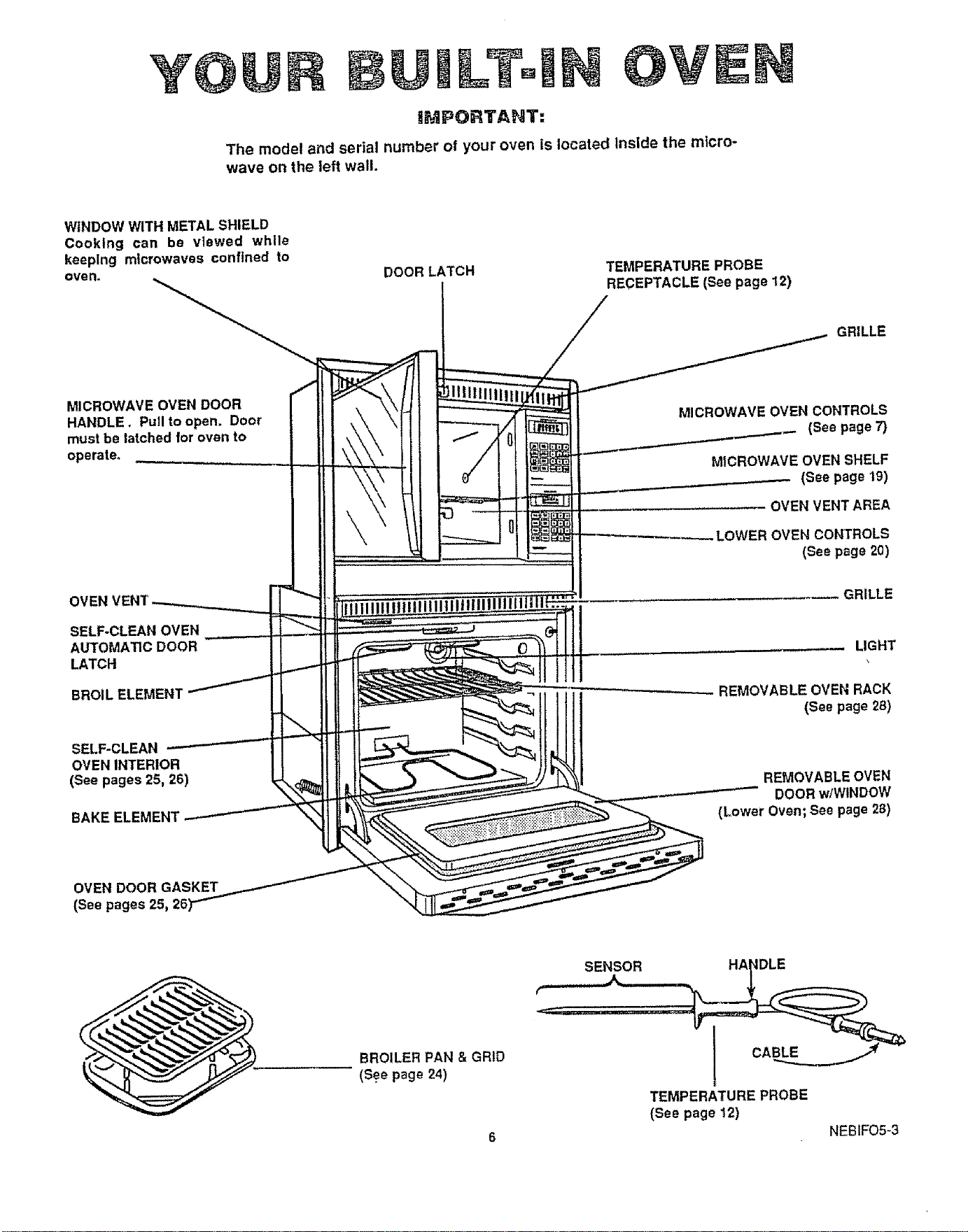
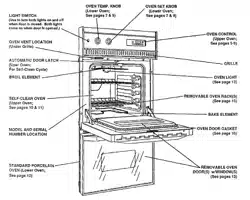
Y@ LTo OVEN
IMPORTANT:
The model and serial number of your oven is located Inside the micro-
wave on the left wall.
WINDOW WITH METAL SHIELD
Cooking can be viewed while
keeping microwaves confined to
oven° DOOR LATCH
TEMPERATURE PROBE
RECEPTACLE (See page 12)
GRILLE
MICROWAVE OVEN DOOR
HANDLE, PuJI to open. Door
must be latched for oven to
operate.
SELF-CLEAN OVEN
AUTOMA_C DOOR
LATCH
BROIL ELEMENT
SELF-CLEAN
OVEN INTERIOR
(See pages 25, 26)
BAKE ELEMENT
MICROWAVE OVEN CONTROLS
(See page 7)
MICROWAVEOVEN SHELF
.__.-.--- (See page 19)
- OVEN VENTAREA
.LOWER OVEN CONTROLS
(Seepage20)
.... GRILLE
LIGHT
REMOVABLE OVEN RACK
(See page 28}
REMOVABLE OVEN
DOOR wlWtNDOW
(Lower Oven; See page 28)
OVEN DOOR GASKET
(See pages
BROILER PAN & GRiD
(See page 24)
TEMPERATURE PROBE
(See page 12)
6 NEBIFO5-3
MICROWAVE OVEN
][
D RosTj[DEFROST
cook
HOLD
Pow .1[ .o o
%
Kenmore
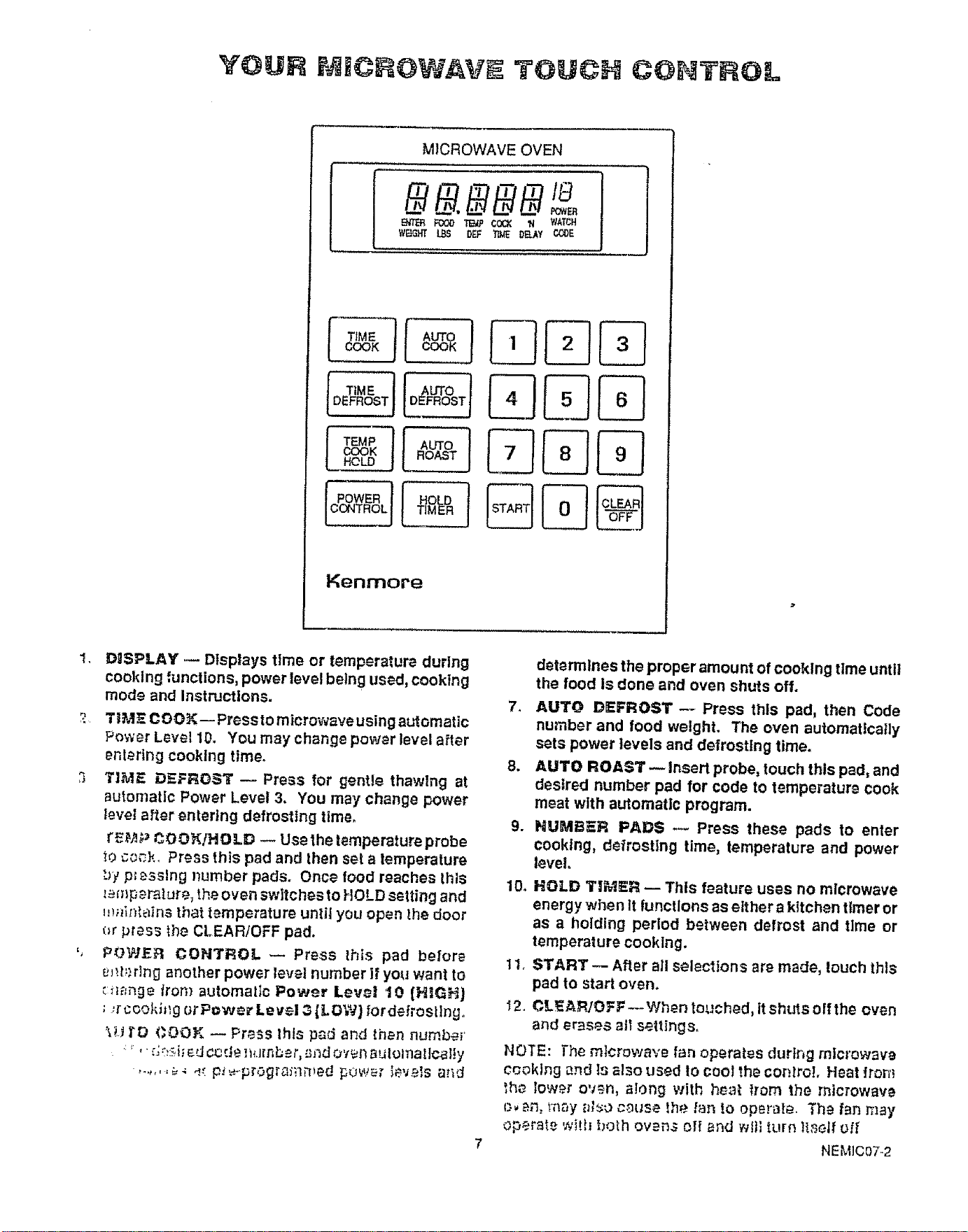
1,
DOSPLAY .-- Displays time or temperature during
cooking functions, power level belng used, cooking
mode and Instructions.
2 TIM7 COOK-- Pressto microwave using automatic
Power Level 10. You may change power level after
entering cooklng time.
3 TIME DEFROST -- Press for gentle thawing at
automati¢ Power Level 3. You may change power
Ievel after entering defrosting time.
_'£_t,) _OOf(!HOLD -- Use the temperature probe
_oc_ck. Press this pad and then set a temperature
_}y pt _sslng number pads. Once food reaches this
_mp_rature, the oven switches to HOLD setting and
m_iif_lalns that temperature until you open the door
_r press the CLEARIOFF pad.
', POWEFI CONTROL _ Press this pad before
_J_.h._ringanother power level number if you want to
_:_mnge iron} automatic Power Love! 10 (H!GH]
; ,rcoohh_g orPow._r Level 3[LOW} {ordefrosllng.
%H i'D COOK -- PreSS thlsp_d and then number
: _' ':;:;_:_,k e;J¢_rJe,,l_.ffnbe_",._ndo'_i_ SulomatloBI!y
determines the proper amount of cooking time until
the food Is done and oven shuts off.
7, AUTO DEFROST -- Press this pad, then Code
number and food weight. The oven automatically
sets power levels and defrosting time.
8. AUTO ROAST-- Insert probe, touch this pad, and
desired number pad for code to temperature cook
meat with automatic program.
9. NUMBER PADS -- Press these pads to enter
cooking, defrosting time, temperature and power
level.
10. HOLD TI_IER _ This _eature uses no microwave
energy when It functions as either a kitchen timer or
as a holding period between defrost and tlme or
temperature cooklng.
tl. START -- After all selections are made, touch this
pad to start oven.
2. CL_AFb'OFF-- When touched, it shuts off the oven
and erases al_ settlngs_
NOTE: The microwave fan operates durtr_g mlcrowaw
c_oklng and Isalso used !o cool the cor_._roLHeat Iron'}
_he lower oven, along with hm_t from the microwave
{_ _.n,t_'_aya_o cm_se _he f,_n to operate. The fan may
operate with both ovens off and wf}; turn ]lseif oil'
HEM]C07-2
THE HOLD TIMER
The HOLD TIMER has three timing functions:
• It can be set as a minute timer°
• It can be set as a holding time after defrosting.
It can be set to delay cooking_
The HOLD TIMER operates without microwave energy.
TO SET MINUTE TIMER
The minute timer displays minutes:seconds. The
maximum time setting is 99 minutes and 99 seconds.
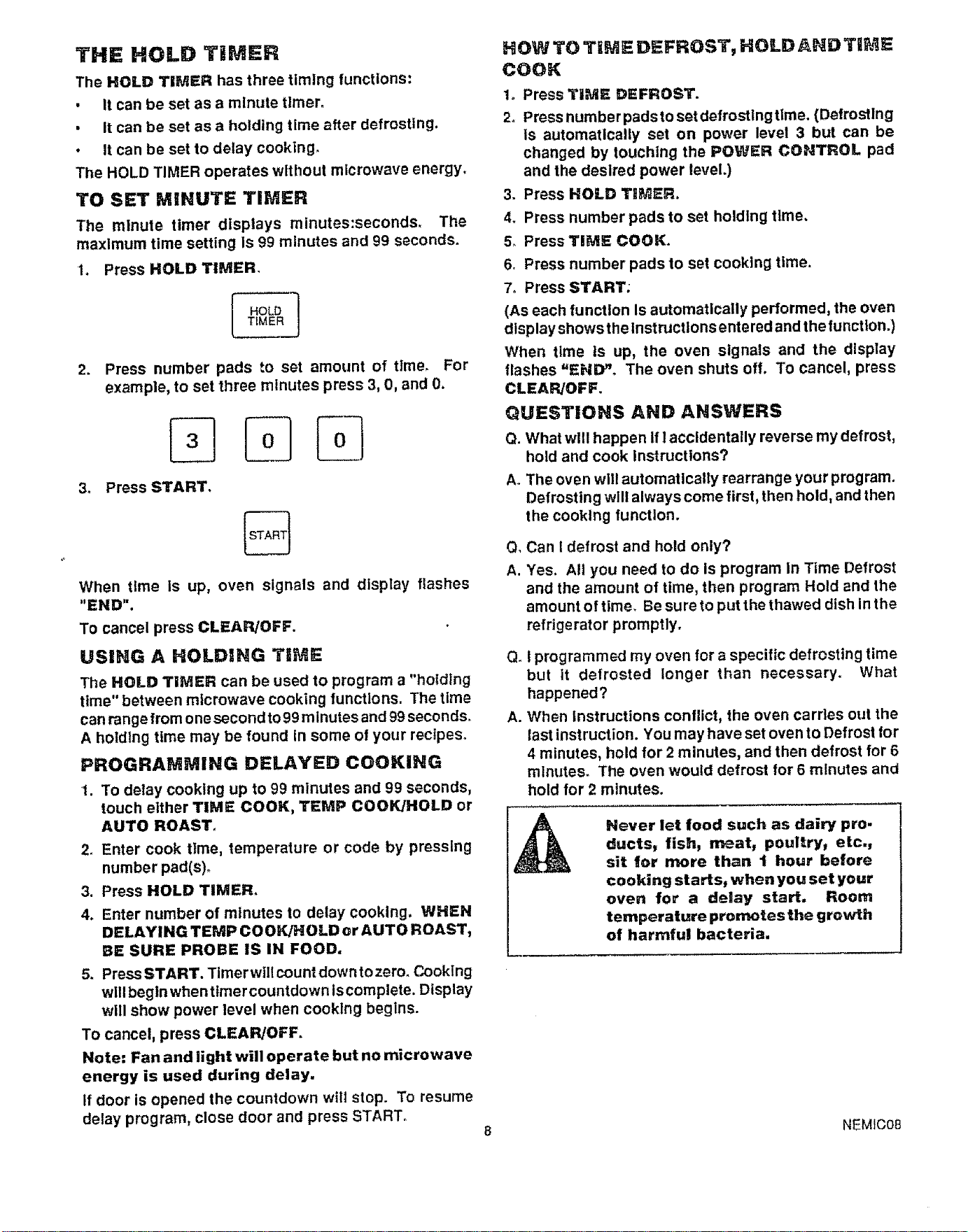
t. Press HOLD TIMER,
HOLD ]
TIMER
2.
3_
Press number pads to set amount of time, For
example, to set three minutes press 3, 0, and 0.
Press START.
%
When time Is up, oven signals and display flashes
"END".
To cancel press CLEAR/OFF.
USING A HOLDING TiME
The HOLD TIMER can be used to program a "holdlng
time" between microwave cooking functions, The time
canrange from one second to 99 minutes and 99 seconds.
A holding time may be found In some of your recipes°
PROGRAMMING DELAYED COOKING
1. To delay cooking up to 99 minutes and 99 seconds,
touch either TIME COOK, TEMP COOK/HOLD or
AUTO ROAST,
2, Enter cook time, temperature or code by pressing
number pad(s),
3. Press HOLD TIMER.
4. Enter number of minutes to delay cooking. WHEN
DELAYING TEMP COOK!HOLD or AUTO ROAST,
BE SURE PROBE IS IN FOOD.
5. Press START. Timer will count down to zero_ Cooking
will begin when timer countdown Is complete. Display
will show power level when cooklng begins.
To cancel, press CLEAR/OFF.
Note: Fan and light will operate but no microwave
energy is used during delay.
If door is opened the countdown wtlt stop. To resume
delay program, close door and press START.
HOW TO TIME DEFROST, HOLD AND TiME
COOK
1_ Press TiME DEFROST.
2, Press number pads to set defrosting time. (Defrosting
Is automatically set on power level 3 but can be
changed by touching the POWER CONTROL pad
and the desired power level.)
Press HOLD TI_ER.=
4.
5.
6.
Press number pads to set holding time,
Press TIME COOK.
Press number pads to set cooking time.
7o Press START;
(As each function Is automatically performed, the oven
display showsthelnstructlonsentered and the function.)
When time is up, the oven signals and the display
flashes =ENID_, The oven shuts off. To cancel, press
CLEAR/OFF.
QUESTIONS AND ANSWERS
Q. What wlll happen If I accidentally reverse my defrost,
hold and cook Instructions?
A. The oven will automatically rearrange your program.
Defrosting will always come first, then hold, and then
the cooking function.
Q, Can t defrost and hold only?
A. Yes. All you need to do Is program In Time Defrost
and the amount of time, then program Hold and the
amount of time, Be sure to put the thawed dish in the
refrigerator promptly.
Q_I programmed my oven for a specific defrosting time
but it defrosted longer than necessary. What
happened?
A. When Instructions conflict, the oven carries out the
last instruction. You may have set oven to Defrost for
4 minutes, hold for 2 minutes, and then defrost for 6
minutes° The oven would defrost for 6 minutes and
hold for 2 minutes.
Never let food such as dairy pro.
ducts, fish, meat, poultry, etc.,
sit for more than I hour before
cooking starts, when you set your
oven for a delay start. Room
temperature promotes the growth
of harmful bacteria.
NEMIC08
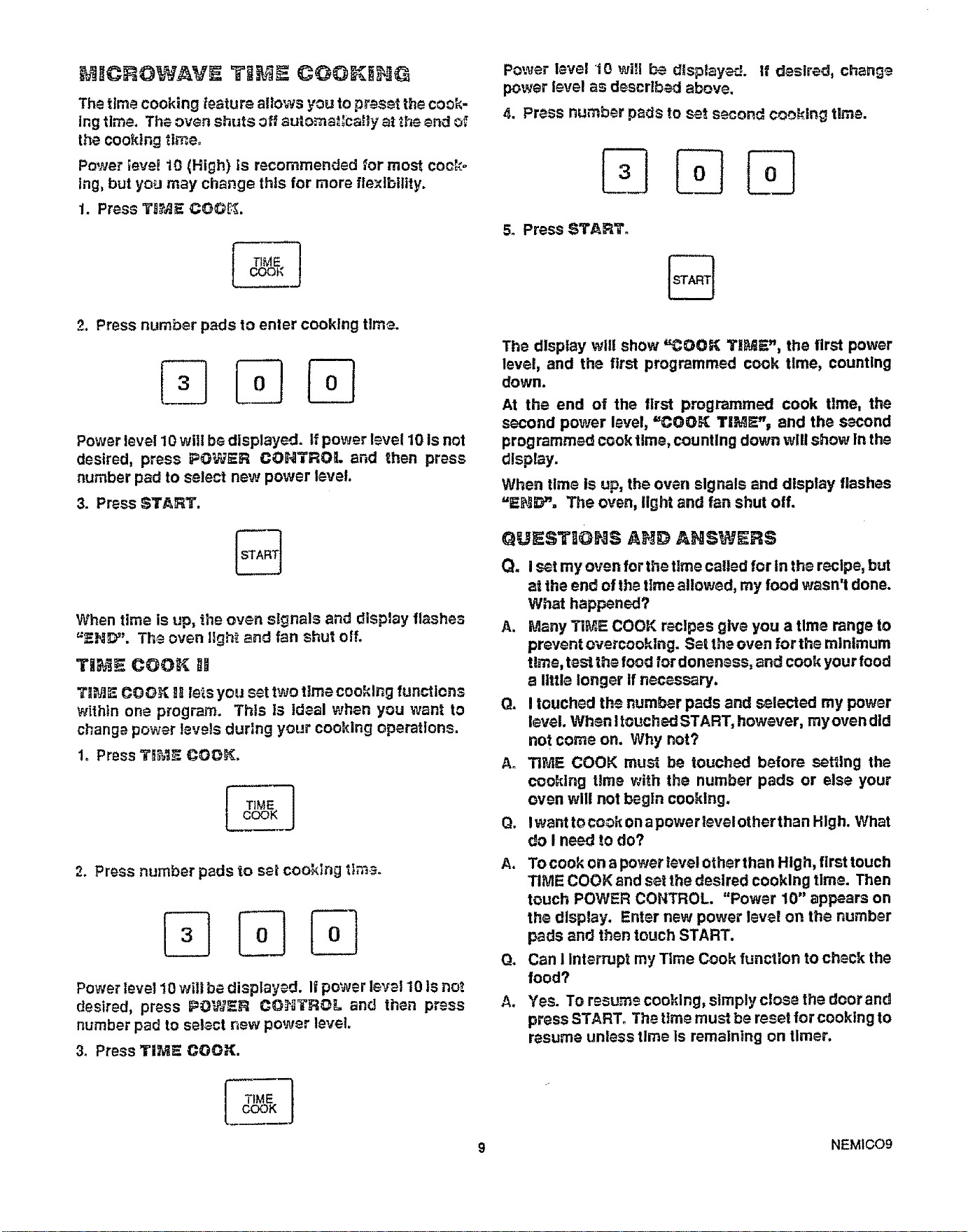
The time cooking feature altows you to preset the cook-
ing time. The oven shuts off automat:Ca!ly at the end of
the cooking time.
Power }eve_ 10 (High) is recommended for most cock°
tng, but you may change thls for more flexibility.
1. Press T_JE COG_;.
i IME
COOk
Power level 10 will _ displayed. If desired, chang_
power level as descr!bed above.
4. Press number pads to set second cook!rig time.
5. Press START.
%
2. Press number pads to enter cooking time.
Power level 10 wil! be displayed. If power level 10 Is not
desired, press POWER CONTROL and then press
number pad to select new power level.
3. Press START.
When time is up, the oven signals and display flashes
=END". The oven Ilgh_ and fan shut oil.
TII_,_E COOR I_
T],_I_ COO_ BRlets you set two time cooking functions
within one wogFam. This Is Ideal when you want to
changa power teve!s durlng your cooking operations.
1. Press T_ COOK.
TiME
COOK
2. Press number pads to seI cooking tt,_.
Power level 10 will be displayed. If power level 10 Is not
desired, press IPOWER CO_TROL and then press
number pad to select new power level.
3. Press TIM_ COOK.
The display will show "COOK T]_ME', the first power
level, and the first programmed cook time, counting
down.
At the end of the first programmed cook tlme, the
second power level, "COOK T|M_"_ and the second
programmed cook time, counting down will show In the
display.
When time is up, the ovan signals and display flashes
=_Hi_Y'. The ovan, light and fan shut off.
Q_ST_ON_ A_JD ANSWERS
Q. i s_t my oven for the time called for in the r_clpe, but
at the end of the ttme allowed, my food wasn't done.
What happened?
A. Many TI_ COOK recipes give you a tlm_ range to
prevent overcooklng. Set th_ oven for the minimum
time, tes_the food for donensss, and cook your food
a I!ttle longer If necessary.
Q. I touched the number pads and s_lected my power
level. When !touched START, however, my oven did
not come on. Why not?
A. TI_I_ COOK must be touched before setting the
cook!ng tlme with the number pads or else your
oven will not begln cooking.
Q. Iwant to cook on a power ievel other than High. What
do I need to do?
A. To cook on a power tore! other than High, first touch
TIME COOK and set the desired cooking time. Then
touch POWER CONTROL. "Power 10" appears on
the d!splay. Enter new power level on the number
pads and then touch START.
Q, Can 1Interrupt my Time Cook function to check the
food?
A, Yes. To rasume cooking, simply close the door and
press START. The time must be reset for cooking to
resume unless time ls remaining on timer.
9 NEM1CO9
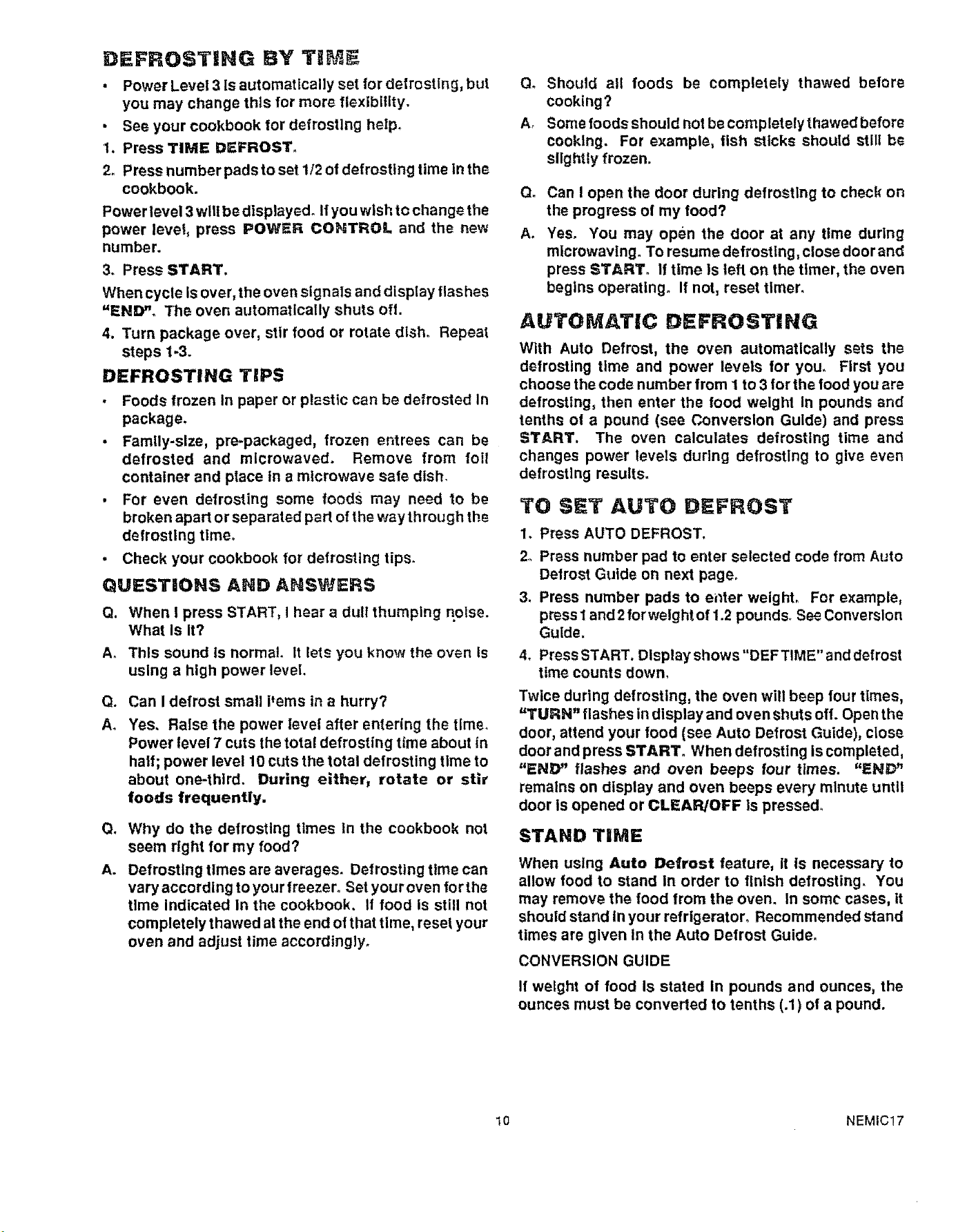
DEFROST|NG BY TIM
• Power Level 3 Is automatlcally set for defrosting, but
you may change this for more flexibility.
• See your cookbook for defrosting help.
1. Press TIME DEFROST_
2. Press number pads to set 1/2 of defrosting time in the
cookbook.
Power level 3 will be displayed° Ifyou wish to change the
power level, press POWER COHTROL and the new
number.
3. Press START.
When cycle is over, the oven signals and display flashes
"END". The oven automatically shuts off.
4. Turn package over, stir food or rotate dish° Repeat
steps 1-3.
DEFROSTING TiPS
• Foods frozen in paper or plastic can be defrosted In
package.
• Family-size, pre-packaged, frozen entrees can be
defrosted and mlcrowaved. Remove from foil
container and place in a microwave safe dish.
• For even defrosting some foods may need to be
broken apart or separated part of the way through the
defrosting time.
• Check your cookbook for defrosting tips.
QUESTIONS AND ANSWERS
Q. When I press START, I hear a dull thumping noise.
What Is It?
A. This sound Is normal It lets you know the oven Is
using a high power level
Go
A°
Can I defrost small Pems in a hurry?
Yes. Raise the power level after entering the timer
Power level 7 cuts the total defrosting time about in
half; power level 10 cuts the total defrosting time to
about one-third. During either, rotate or stir
foods frequently.
Q*
A.
Why do the defrosting times tn the cookbook not
seem right for my food?
Defrosting times are averages. Defrosting time can
vary according to your freezer° Set your oven for the
time Indicated In the cookbook. If food is still not
completely thawed at the end ofthat time, reset your
oven and adjust time accordingly.
Q. Should all foods be completely thawed before
cooktng?
A° Some foods should not be completely thawed before
cooking. For example, fish sticks should stll[ be
slightly frozen.
Q_
A.
Can I open the door during defrostlng to check on
the progress of my food?
Yes. You may open the door at any time during
microwavlng. To resume defrosting, close door and
press START° If time Is left on the timer, the oven
begins operating. If not, reset timer.
AUTOMATIC DEFROSTING
With Auto Defrost, the oven automatically sets the
defrosting time and power levels for you. First you
choose the code number from I to 3 tor the food you are
defrosting, then enter the food weight in pounds and
tenths of a pound (see Conversion Guide) and press
START, The oven calculates defrosting time and
changes power levels during defrostlng to give even
defrosting results.
TO SET AUTO DEFROST
1. Press AUTO DEFROST.
2o Press number pad to enter selected code from Auto
Defrost Guide on next page_
3. Press number pads to el_ter welghL For example,
press 1 and 2for weight of 1.2 pounds. See Conversion
Guide.
4. Press START. Display shows "DEFTIME" and defrost
time counts down,
Twice during defrosting, the oven will beep four times,
"TURN" flashes in display and oven shuts oft. Open the
door, attend your food (see Auto Defrost Guide), close
door and press START. When defrosting is completed,
"END" flashes and oven beeps four times. "END"
remains on display and oven beeps every minute until
door is opened or CLEAR/OFF Is pressed_
STAND TiME
When using Auto Defrost feature, It is necessary to
allow food to stand In order to finish defrosting. You
may remove the food from the oven. In some cases, It
should stand in your refrigerator. Recommended stand
times are given In the Auto Defrost Guide.
CONVERSION GUIDE
It weight of food Is stated In pounds and ounces, the
ounces must be converted to tenths (.1) of a pound.
t0 NEMIC17
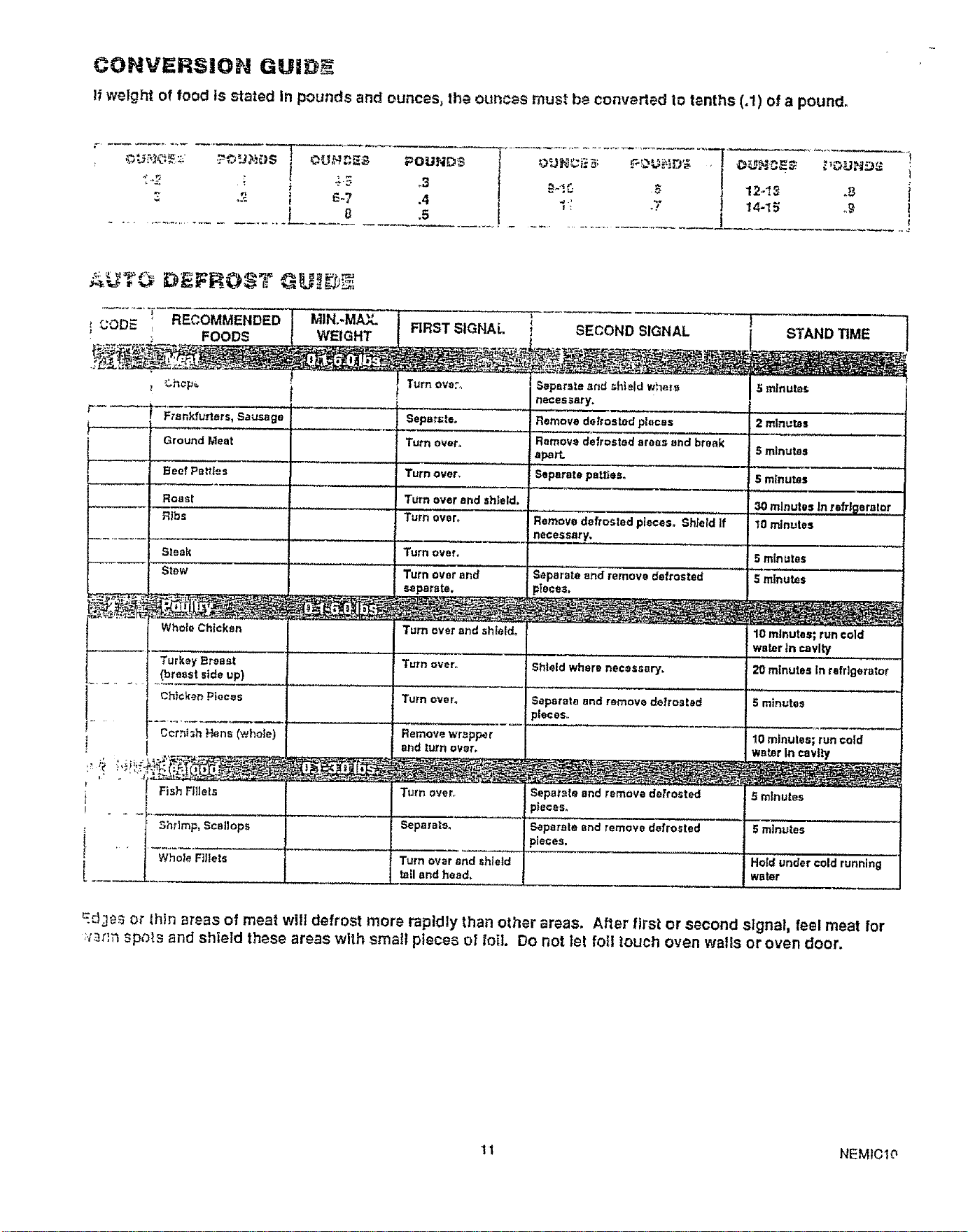
CONVERSION GU|D_
If welght of food Is stated in pounds and ounces, the ounces must be converted to tenths (.1) of a pound.
! 1
!
I
..............................L.... ....... .__£_s................................. j
12.-I3 .8 {
14-_5 .,,q !
€
r._
RECOMMENDED
l CODE
! ,_- ; FOODS
!
k-----
k----
1
F_ank'lurtars, Sausage
Ground Meat
Beef Pallas
Roast
Rtbs
MIN..MACL
WEIGHT
, SECOND SIGNAL
Separate and _-htetdwhere
necessary.
Remove datros_d pieces
Remove defrosted areas and break
s1_rt.
Separate patties.
Remove defrosted pieces. Shield If
necessary,
5 mlnute_.
minutes
5 minutes
FIRST SIGNAL
Turn Dye:,,
Seperl;te,,
Turn over.
Turn over.
Turn over and shteld.-
Turn over°
Turn over_
Turn over end
separate.
Turn over and shieid_
Turn over.
Turn over.
Remove wrapper
and turn over.
S minutes
30 minutes In refrigerator
10 minutes
Steak S minutes
Stew Separate and remove defrosted $ minutes
Whole Chicken
Turkey Breast
(breast side up)
Chicken Pieces
Cornish Hens (.whole)
10 minutes; run cold
water _n cavity ...........
Shield where necessary. 20 minutes In refrigerator
Separate and remove defrosted
_leces.
Turnover_
Separate°
Fish Ffllsls [
Shrimp, Scallops
Whole Fillets '
5 minutes
10 minutes; runcold
Water In cavity
Turn over and shleld
tell and heed,
Separate end remove defrosted
_teoes.
Seperele end remove defrosted
>laces,
5 minutes
5 mlnu_es
Hold under cold running
water
E:13es or _hin areas of meat will defrost more rapidly than other areas. A!ler first or second signal, feel meat lot
.:.z_nnspots and shield these areas with small pieces el foil. Do not let fell touch oven walls or oven door.
I t NEMtClO
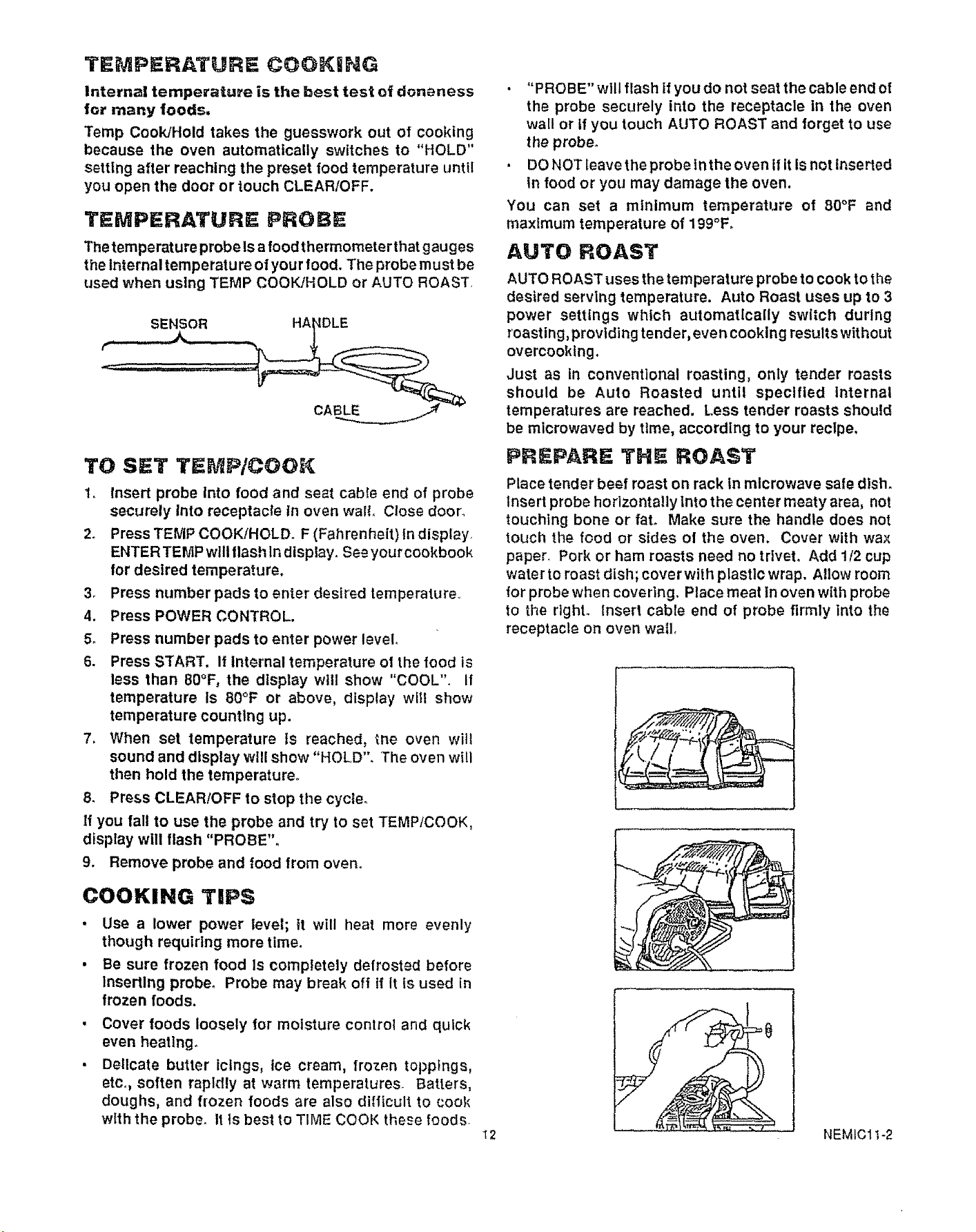
TEMPERATURE COOKING
Internal temperature is the best test of doneness
for many foods,
Temp Cook/Hold takes the guesswork out of cooking
because the oven automatically switches to "HOLD"
setting after reaching the preset food temperature until
you open the door or touch CLEAR/OFF.
TEMPERATURE; P_OBE
The temperature probe Isa food thermometer that gauges
the tnternaltemperature of your food. The probe must be
used when using TEMP COOK/HOLD or AUTO ROAST
TO SET TEMP/CGOK
1. Insert probe Into food and seat cable end of probe
securely Into receptacle tn oven walt. Close door_
2. Press TEMP COOK/HOLD_ F (Fahrenheit) In display.
ENTER TEMP will flash In display, See your cookbook
for desired temperature,
3. Press number pads to enter desired temperature°
4. Press POWER CONTROL.
5. Press number pads to enter power level
6. Press START. It Internal temperature of the food is
less than 80°F, the display will show "COOL". if
temperature Is 80°F or above, display will show
temperature counting up.
7. When set temperature ls reached, the oven will
sound and display will show "HOLD". The oven will
then hold the temperature°
8. Press CLEAR/OFF to stop the cycle°
If you fall to use the probe and try to set TEMP/COOK,
display will flash "PROBE"°
9. Remove probe and food from oven.
COOKING TIPS
• Use a lower power level; it will heat more evenly
though requiring more time.
• Be sure frozen food Is completely defrosted before
inserting probe° Probe may break off if it is used in
frozen foods.
i
Cover foods loosely for moisture control and quick
even heatlng_
Dellcate butter ictngs, ice cream, froz_.n toppings,
etc,, soften rapidly at warm temperatures. Batters,
doughs, and frozen foods are also difficult to cook
with the probe. It is best to TIME COOK these foods.
"PROBE" will flash if you do not seat the cable end of
the probe securely into the receptacle In the oven
wall or If you touch AUTO ROAST and forget to use
the probe°
DO NOT leave the probe in the oven if itIs not Inserted
in food or you may damage the oven,
You can set a minimum temperature of 80°F and
maximum temperature of 199°F_
AUTO ROAST
AUTO ROAST uses the temperature probe to cook to the
desired serving temperature. Auto Roast uses up to 3
power settings which automatically switch during
roasting, providing tender, even cooking results without
overcooklng.
Just as in conventional roasting, only tender roasts
should be Auto Roasted until specified Internal
temperatures are reached. Less tender roasts should
be mlcrowaved by time, according to your recipe.
PREPARE THE ROAST
Place tender beef roast on rack In microwave safe dish.
Insert probe horizontally lnto the center meaty area, not
touching bone or faL Make sure the handle does not
touch the food or sides of the oven. Cover with wax
paper. Pork or ham roasts need no trivet, Add 1t2 cup
water to roast dish; cover with plastic wrap. Allow room
for probe when covering. Place meat in oven with probe
to the rtghL Insert cable end of probe firmly into the
receptacle on oven wall,
12 NEMICll-2
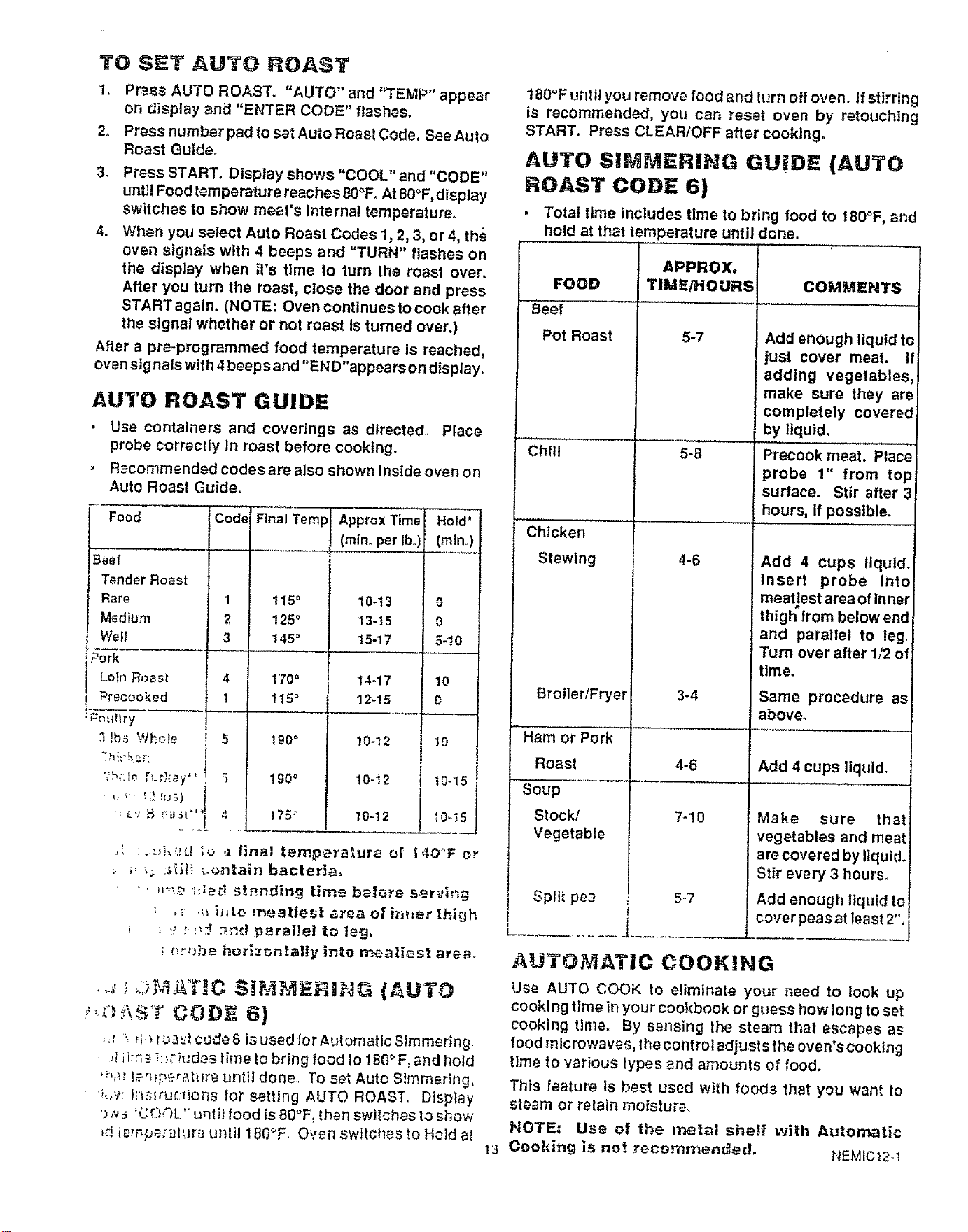
TO SET AUTO ROAST
1. Press AUTO ROAST. "AUTO"and "TEMP" appear
on display and "ENTER CODE" flashes,
2. Press number pad to set Auto Roast Code, See Auto
Roast Guide.
3. Press START. Display shows "COOL"and"CODE"
until Food temperature reaches 8O°FoAt 80°F,dtsplay
switches to show moat's Internal temperature.
4. When you select Auto Roast Codes 1,2, 3, or 4, th_
oven signals with 4 beeps and "TURN" flashes on
the display when it's time to turn the roast over.
After you turn the roast, close the door and press
START again. (NOTE: Oven continues to cook after
the signal whether or not roast Is turned over.)
After a pre-programmed food temperature is reached,
oven slgnals with 4 beeps and "END"appears on display.
AUTO ROAST GUIDE
• Use containers and coverings as directed. Place
probe correctly In roast before cooking.
, Recommended codes are also shown inside oven on
Auto Roast Guide.
Food Cod_
Beef
TenderRoast
Rare 1
M_dium 2
Wet! 3
IPork
Loin Roast 4
j Precooked 1
3 !be WhsI_ 5
';h::lo [;,r,ke y' ' 5
Final Tamp Approx Time
(rain. per Ib,,)
115 ° 10-13
125 ° 13-15
145 = t5-17
170 ° t4-17
115 = 12-15
190 = 10_12
1£0° t0-t2
t75 _ 10-12
Hold'
(mine)
0
0
5-10
10
0
10
,' ._._k_d _o ,._llnal temperalure of I40_F or
; ,: L; :_t_ ;oOntain bacteria=
• ' ,,',',_ u;e# standing tlme before ser,Jh_g
; , r ,_ i_,lo meatiest =_ea el =in_=e_ thigh
, ,:: _:',_ ._ed _parallei to leg,
__f_.-"-."}b8hot'_zt_n[ally into mealiest area,
,,,,, ::;_,_AT,_C _IM_4ERING (AUTO
:;,' _ _i'.:_t:._,_ code 6 is used forAulomatlc Simmering,
,_iira_ h;; iu'des time to bring food to 180° F, and hold
'"b_! |_r;;[;_,£r_;[_F£. urliil done. To set Auto S)mmer]ng,
_:t: inslruc_ions for setting AUTO ROAST. Display
:) ,v_ 'Cr.I_OTL"unlit food is 80'°F, then switches to show
_diem#e_alur£ until t 80_F. Oven sw}tches to Hold at
13
180°F until you remove food and lurn off oven. If stirring
is recommended, you can reset oven by retouching
START. Press CLEAR/OFF after cooking°
AUTO S!_MERING GIJID_ (AUTO
ROAST CODE 6)
, Total time includes time to bring food to 180°F, and
hold at that temperature until done.
APPROX,
FOOD TIME/HOURS COMMENTS
Beet
Pot Roast 5-7
Chill
Chicken
Stewing
Broiler/Fryer
5-8
4-6
3-4
Add enough liquid to
just cover meat. I!
adding vegetables,
make sure they are
completely covered
by liquid,
Precook meat. Place
probe 1" from top
surface. Stir after 3
hours, if possible.
Add 4 cups liquid.
Insert probe Into
meatiest area of Inner
thigh from below end
and parallel to leg,
Turn over after 1/2 of
time.
Same procedure as
above.
4-6 Add 4 cups liquid.
Ham or Pork
Roast
Soup
Stock/
Vegetable
' Split pea
7-10
5-7
Make sure that
vegetables and meat
are covered by liqui&
Stir every 3 hours,
Add enough liquid to
cover peas at least 2".
AUTO_ilATIC COOKIHG
Use AUTO COOK to eliminate your need to look up
cooking time in your cookbook or guess how long to set
cooking time. By sensing the steam that escapes as
food microwaves, the control adjusts the oven's cooking
ilme to various types and amounts of food.
This feature ts best used with foods that you want to
steam or retain moisture,
NOTE: Use of the me|al she_i with Aulon_tlc
Cooking is .or recommended, NEMIC12.1
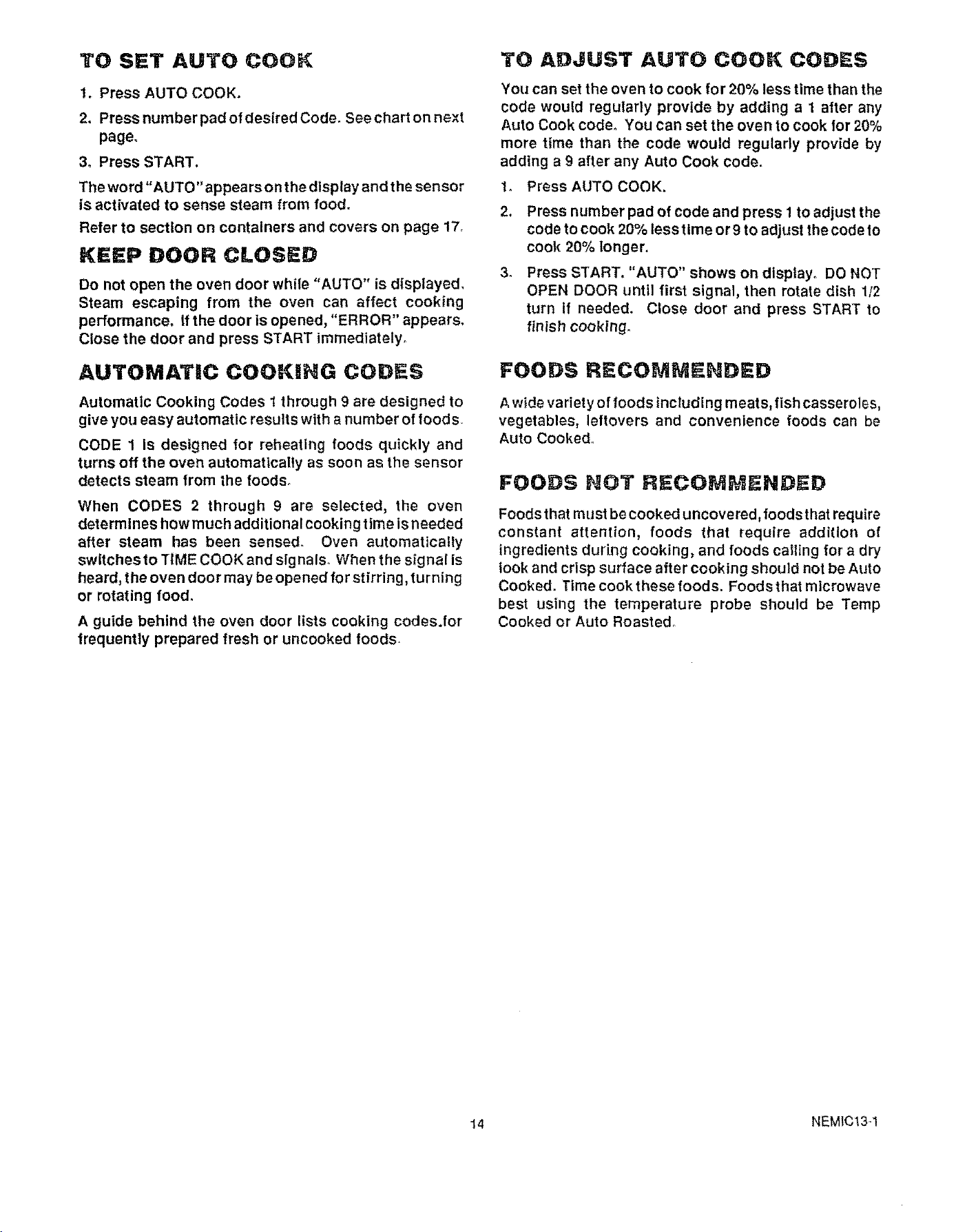
TO SET AUTO COOK
1. Press AUTO COOK.
2. Press number pad of desired Code. See chart on next
page.
3. Press START.
The word "AUTO" appears on the display and the sensor
is activated to sense steam from food.
Refer to section on containers and covers on page 17,
KEEP DOOR CLOSED
Do not open the oven door while "AUTO" is displayed.
Steam escaping from the oven can affect cooking
performance. If the door is opened, "ERROR" appears.
Close the door and press START immediately°
AUTOMATIC COOKING CODES
Automatic Cooking Codes 1 through 9 are designed to
give you easy automatic results with a number of roods
CODE 1 Is designed for reheating foods quickly and
turns off the oven automatically as soon as the sensor
detects steam from the toods_
When CODES 2 through 9 are selected, the oven
determines how much additional cooking time is needed
after steam has been sensed. Oven automatically
switches to TiME COOK and slg nals. When the signal is
heard, the oven door may be opened for stirring, turning
or rotating food.
A guide behind the oven door lists cooking codes.for
_requentty prepared fresh or uncooked foods.
TO ADJUST AUTO COOK CODES
You can set the oven to cook for 20% less time than the
code would regularly provide by adding a 1 after any
Auto Cook code° You can set the oven to cook for 20%
more time than the code would regularly provide by
adding a 9 after any Auto Cook code.
1_ Press AUTO COOK.
34
Press number pad of code and press 1 to adjust the
code to cook 20% less time or 9 to adjust the code to
cook 20% longer.
Press START. "AUTO" shows on display. DO NOT
OPEN DOOR until first signal, then rotate dish 112
turn if needed, Close door and press START to
finish cooking.
FOODS RECOMUENDED
Awide variet yof 1oods including meats, fish casseroles,
vegetables, leftovers and convenience foods can be
Auto Cooked°
FOODS NOT RECOMMENDED
Foods that must be cooked uncovered, foods that require
constant attention, foods that require addition of
ingredients during cooking, and foods catting for a dry
look and crisp surface after cooking should not be Auto
Cooked. Time cook these foods. Foods that microwave
best using the temperature probe should be Temp
Cooked or Auto Roasted.
14 NEMIC134
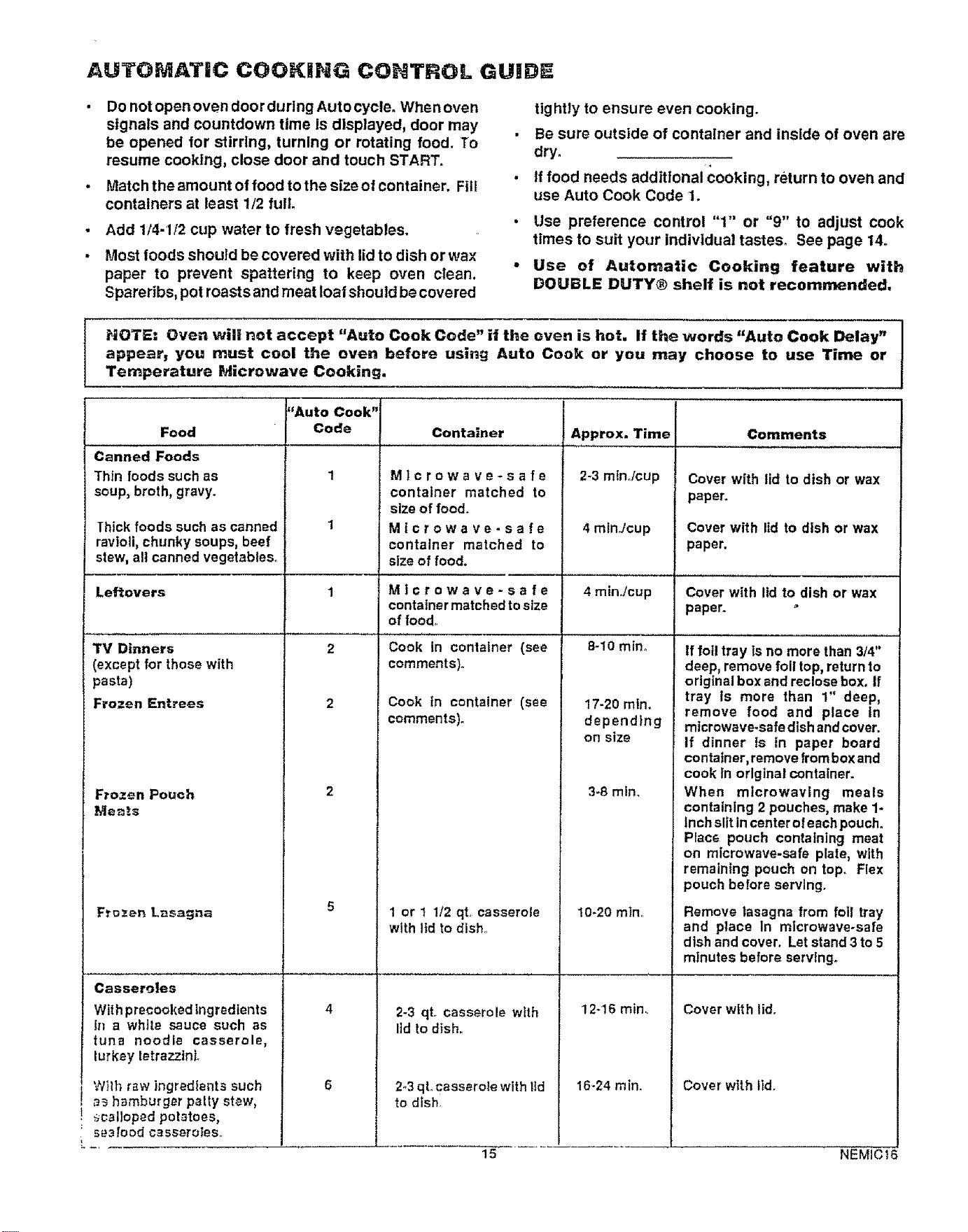
AUTOMATIC COOKING CONTROL GUIDE
Do not open oven door during Auto cycle° When oven
signals and countdown time is displayed, door may
be opened for stirring, turning or rotating food. To
resume cooking, close door and touch START.
Match the amount of food to the slze of container. Fill
containers at least 1/2 full.
Add 1/4-1/2 cup water to fresh vegetables.
Most foods should be covered with lidto dish or wax
paper to prevent spattering to keep oven clean.
Spareribs, pot roasts and meat loaf should be covered
tightly to ensure even cooking.
Be sure outside of container and inside of oven are
dry.
tf food needs additional cooking, return to oven and
use Auto Cook Code 1.
• Use preference control "1" or "9" to adjust cook
times to suit your individual tastes. See page 14o
• Use of Automatic Cooking feature with
DOUBLE DUTY® shelf is not recommended.
HOTE: Oven will not accept "Auto Cook Code" if the even is hot, If the words "Auto Cook Delay"
appear, you must cool the oven before using Auto Cook or you may choose to use Time or
Temperature Microwave Cooking•
Food
Canned Foods
Thin foods such as
soup, broth, gravy.
Thick foods such as canned
ravioli, chunky soups, beef
stew, all canned vegetables.
Container
Leftovers
Microwave-safe
container matched to
size of food.
Microwave.safe
container matched to
size of food.
Microwave-safe
container matched to size
of food.
TV Dinners
(except for those with
pasta)
Frozen Entrees
Frozen Pouch
Mea!a
FrDzen L_sagn_
Cassero|es
With precookedIngredients
In a white sauce such as
tuna noodle casserole,
lurkey letrazztnL
Wilh r,_w ingredients such
_ hamburger patty stew,
scalloped potatoes,
seafood casseroles,,
;'Auto Cook"
Code
Cook in container (see
comments)°
Cook in container (see
comments).
1 or 1 1!2 qt. casserole
with lid to dish
2-3 qtr casserole wtth
lid to dish.
2-3 qt,,casserole with lid
to dish
15
Approx. Time
2-3 mlnJcup
4 minJcup
4 minJcup
8-10 min_
17-20 mln.
depend}ng
on size
3-8 mlm
10-20 min.,
12-16 min,
16-24 rain.
Comments
Cover with lid to dish or wax
paper.
Cover with lid to dish or wax
paper.
Cover with lld to dish or wax
paper.
If foil tray ls no more than 3/4"
deep, remove foil top, return to
original box end reclose box. If
tray Is more than 1" deep,
remove food and place in
microwave.safe dish andcover.
If dinner ts tn paper board
contain or, remove from box and
cook In orlglnal container.
When mtcrowavtng meals
containing 2 pouches, make 1-
Inch slit In center of each pouch.
Place pouch containing meat
on microwave.safe plate, with
remaining pouch on top. Flex
pouch before serving.
Remove lasagna from foil tray
and place In microwave-sate
dish and cover. Let stand 3 to 5
minutes before serving.
Cover with lid.
Cover with lid,
NEMICt6
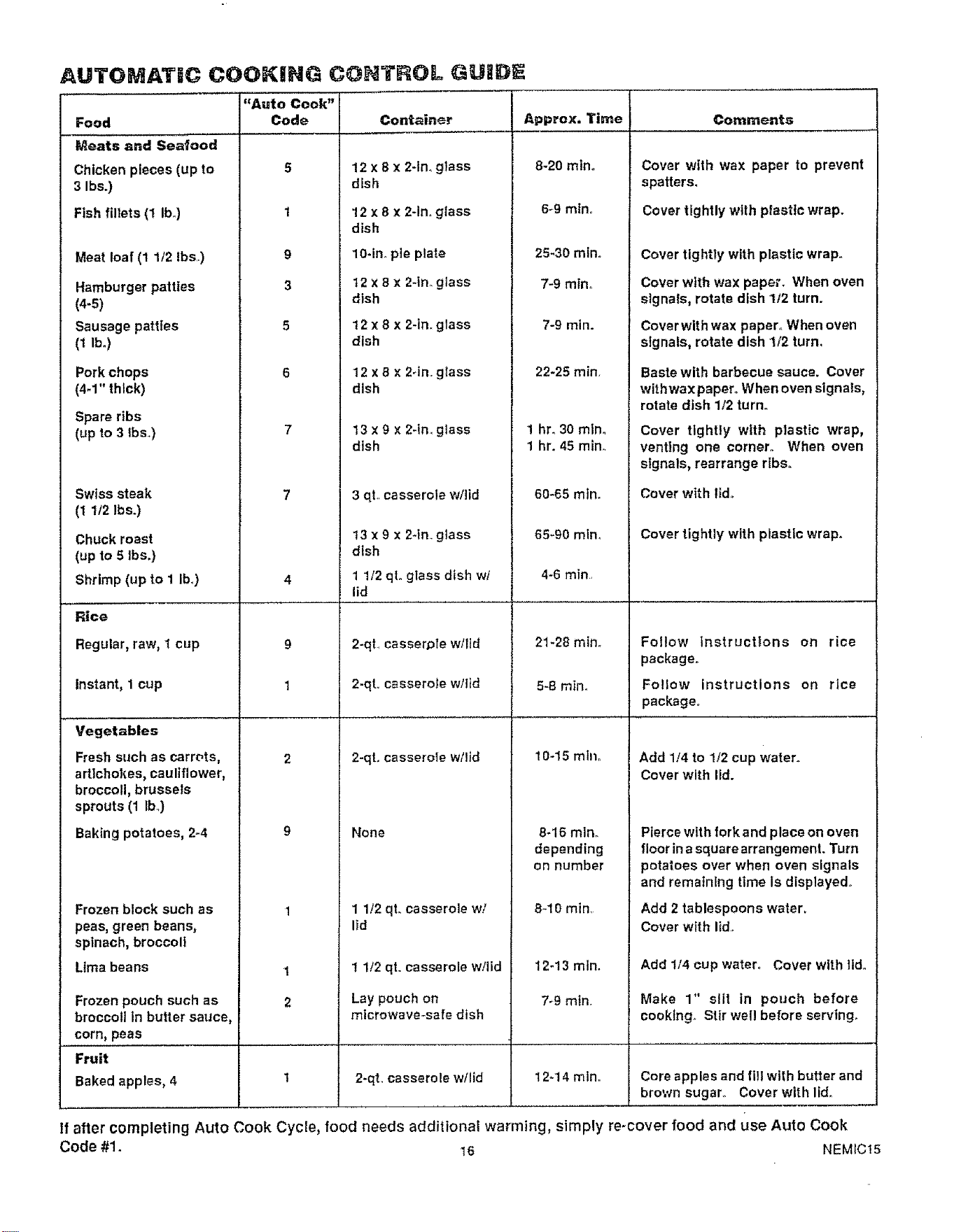
AUTOMAT|C COOKJHG CONTROL GUIDE
"Auto Cook"
Food Code Container
Meats and Seafood
Chicken pieces (up to
3 Ibs.)
Fish fillets (1 Ibo)
Meat loaf (1 1/2 Ibs..)
Hamburger patties
(4-5)
Sausage patties
(1 lb.)
Pork chops
(4-1" thick)
Spare ribs
(up to 3 Ibs.)
Swiss steak
(1 1/2 Ibs.)
Chuckroast
(upto 5 Ibs.)
5
1
9
3
5
6
Shrimp (up to I Ibm)
Comments
12 x 8 x 2-in. glass
dish
12 x 8 x 2-in, glass
dish
10-in. pie plate
t2 x 8 x 2-in. glass
dish
12 x 8 x 2-in. glass
dish
12 x 8 x 2-in gtass
dish
13 x 9 x 2-in glass
dish
3 qL casserole w/lid
13x9 x 2-tin gtass
dlsh
1 1/2 qL glass dish wi
lid
App,ox.Ti e t
8-20 mtno
6_9 mlno
25-30 mino
7-9 mino
7-9 mln.
22-25 min,
1 hr. 30 mlno
1 hr. 45 min
60-65 mtn.
65_90 mtno
4-6 min
Cover with wax paper to prevent
spatters.
Cover tightly with plastic wrap.
Cover tightly with plastic wrap.
Cover with wax paper. When oven
signals, rotate dish 112 turn.
Coverwithwax paper. Whenoven
signals,rotate dish 1/2 turn.
Baste with barbecue sauce. Cover
withwax paper. When oven signals,
rotate dish 1/2 turn..
Cover tightly with plastic wrap,
venting one corner. When oven
signals, rearrange ribs..
Cover with lld.
Cover tightly with plastic wrap.
Rice
Regular, raw, t cup
instant, 1 cup
Vegetables
Fresh such as carrots,
9
1
2
2-qt.. casser.ole wllld
2-qt.. casserole w/lid
2-qL casserole w!lid
21-28 mino
5-8 mino
10-15 mlno
Follow instructions on rice
package,
Fo!low instructions on rice
package°
Add 1/4 to 1/2 cup water.
artichokes, cauliflower,
broccoli, brussels
sprouts (1 lb..)
Baking potatoes, 2-4
None
Cover with lid.
8-16 min.
depending
on number
Pierce with fork and place on oven
floor ina square arrangement. Turn
potatoes over when oven signals
and remaining time is displayed.
Frozen block such as
peas, green beans,
spinach, broccoli
Lima beans
Frozen pouch such as
broccoliln buHersauce,
corn, peas
Fruit
t
2
1 112qL casserole wl
lid
1 1/2 qt. casserole w/lid
Lay pouch on
microwave-safe dish
B-I 0 min,
12-13 mln.
7*9 mtn,
Add 2 tablespoons water_
Cover with lid..
Add 114cup water,, Cover with lido
Make 1" slit in pouch before
cooking. Stir well before serving.
Baked apples, 4 1 2-qt. casserole w!lid 12-14 mtno Core apples and fill with butter and
brown sugar,, Cover with lid.
If after completing Auto Cook Cycle, food needs additional warming, simply re-cover food and use Auto Cook
Code #1. 16 NEMIC15
MUCROW VIiHG TiiP$
• Make sure all cookware used in your microwave oven
Is suitable for microwaving_ Most glass casseroles,
cooking dishes, measuring dishes, measuring cups,
custard cups, pottery or china dinnerware which doe_
nol have metallic trim or glaze with a metallic sheen cap
be usec Som_ cookware ts labete_; 5uitabie in:
t,;yo_Ja,'_ not sure it a dish is microwave-sa1_, use titi:
_ast: P._acein the microwave oven both the dish you ar_
_._stit_._.3r_:._a glass measuring cup filled with one cup e_
wa_et. Set the measuring cup of water either in or next
ia the dish. Microwave 1 minute at High power, if the
di_t_ heat_, tt should not be used for microwavlng° tf the
dish remains cool and only the water in the cup heats,
lhen the dish is mlcrowave-safe.
, P_per towels, wax paper and plastic wrap can be used
i,o co}er dlshes in order to retain molsture and prevent
spatterttlFj. Be sure to vent plastic wrap so steam can
escape.
• Som_, mlcrowaved foods require stirring, rotating or
rearrangh_g Check the cookbook.
• _team builds up pressure In foods which are tightly
cowred by a skin or membrane. Pierce potatoes, egg
yolks and chicken livers to prevent bursting.
COOKWARE FOR SHELF H &T NG
R HF=AT NG
Before placing food in dishes to cook using your
m_crowave oven shelf, check to see if the dishes will fit
[og_[her on or under the shelf, Also, be sure cookware
is microwave-safe,
Cookware Ior heating or reheating Includes a 1-cup
measuring cup, 9x5x3-1nch loaf dishes or 9-inch pie
plates,
Leftovers may be placed in small individual ceramic or
plastic bowls or divided plates.
Use wax paper or plastic wrap instead of lids on
casseroles. Lids may add too much height to dish.
AUTO ]ATaC CO0 I G
COHTA_H_._ A_D COVERS
Appropriate containers and coverings help assure good
cooking results.
Aiw_ys use microwave-sale containers and cover
them witl_ lids, wax paper or plastic wrap. Wonder It
it's microwave safe? Put It to the test described in
Microwave Cooking Tips.
Never use tight-sealing plastic c0vers--they can
prevent steam from escaping and cause food to
overtook,
, Matchtheamountoffoodtolhesizeoflhecontalnero
Fill containers at least half fullo
Be sure the outside of the cooking container and the
inside of the microwave oven are dry before placing
food in the oven. Beads of moisture turning Into
steam can mislead the sensor_
• Stir or rotate some foods after a beeping signal. See
Automatic Cooking Control Guide.
Use microwave-safe casseroles or bowls for entrees
and vegetables, Cover with llds that fit. If lids are not
available, use plastic wrap or wax paper. Plastic wrap
should be loose over food to allow for expansion. Seal
by pressing plastic wrap firmly around edges.
For frozen entrees in paperboard trays, remove tray
from box but do not remove film over tray. Thick entrees
may take longer to cook--see guide on page 15.
Forfrozen foods in metal trays, remove 1ollcovering and
baked goods, re.insert tray into box and close ends of
box.
Slit plastic pouches 1 inch as shown above. Break food
up thoroughly after oven stgnals_
Use oblong or square containers for chicken or corn on
the cob. Plastic wrap covering should be loose over
food to allow for expansion, Seal by pressing plastic
wrap firmly around edges.
Paper plates--while they may be used for Time and
Temperature Cooking and Defrosting, do not use them
with automatic cooking. Use mlcrowave-safe plates or
bowls for reheating. Cover with plastic wrap c_"wax
paper.
Follow Automatic Cooking Control Guide setting for
casseroles. Cover casserole meat and vegetables with
sauce. Cool hot ingredients or sauces. If they are not
cool, use TIME COOK.
17 NEMIC20
r
,i
Q,
Am
0_
A
Q_
A_
Q_
A.
a_
A_
Q,
A.
Why does my oven cut off after the Auto cycle when
using Auto Cook Code I when it does not alter other
settings?
When using Code 1, there is no second phase of
minutes counting down. Cooking is completed in
first phase oi cooking.
If food is not completely cooked after usin_
suggested code, what should I do?
Use Time Cook and power leve! 10 for -3few tonsures
to complete cooking.
Do all fresh or frozen vegetables require a standing
period after cooking with Auto Cook?
Most vegetables are cooked to a crisp state during
Auto Cook. It is recommended that you let the
vegetables stand for up to 5 mtnutas depending on
slze and density of pieces. The standing tlme also
enhances the overall flavor and appearance of most
vegetables.
What If I don't fully cover the dish In Auto Cook?
Oven senses steam too quickly, shortens thecooking
time and undercooks food. Cover tightly and reset
Auto Cook..
Do the shapes and sizes of foods make a difference
when using Auto Cook?
Add water to the vegetables as recommended on
guide and cover well for even, complete cooking.
ta *
Should I use Auto Cook to coo.-,pudding or sauces?
Most pudding and sauces require a lot of stirring
during cooking; therefore, time cooking is
recommended.
Q_
A,
Q
A,
Q_
t%,
A.
Q_
Ao
My scalloped polatoes were not completely cooked
after using Auto Cook. Why not?
tf you prepared the sauce in theoven pdorto cover_: .
the potatoes with the sauce, there may have b ,_
too much remaining moisture In the oven Dry _
oven completely before using Auto Coo_ since _;,
function operates by senslng -steam l_ th_ _v,.
Also, starting Auto Cook wffh hot foods ca_Js:
steam In the oven too soon.
Which foods are best Time Cooked, rather than Au;.
Cooked?
Bakery foods, candles, melted chocolate or food_
when a dry or crisp surface ts desired are cooked
best by Time Cook.
Are plastic containers with tight fitting lids
appropriate for Auto Cooking?
No, most types of plastic storage dishes, butter
tubs, etc., are not recommended for mlcrowavlng.
Also tight fitting plastic lids may prevent adequate
steam from escaping and may keep food from
cooking properly.
I tried to warm chow mein noodles using Auto Cook.
Why didn't this work?
Food must have some moisture in order to create
steam. Dry foods such as chow mein noodles,
potato chips and other such foods do not have
enough moisture.
May I use Auto Cook when ! am cooking my foods In
more than one dish?
No. It is best to use Time Cook when cooking many
loods_
t
18 NEMIC14
YOUR MICROWAVE OVEN SHELF
iMPORTANT SAFETY
INFORMATmON
o DO HOT STORE OR COOK with
shelf on floor of oven. Product
damage may result,
• Use potholders when handEing
metal shelf and utensils. THEY
MAY BE HOT,
o DO HOT store microwave
browning dish on metal she]If.
• Use of shelf with Automatic
Cooking is not recommended.
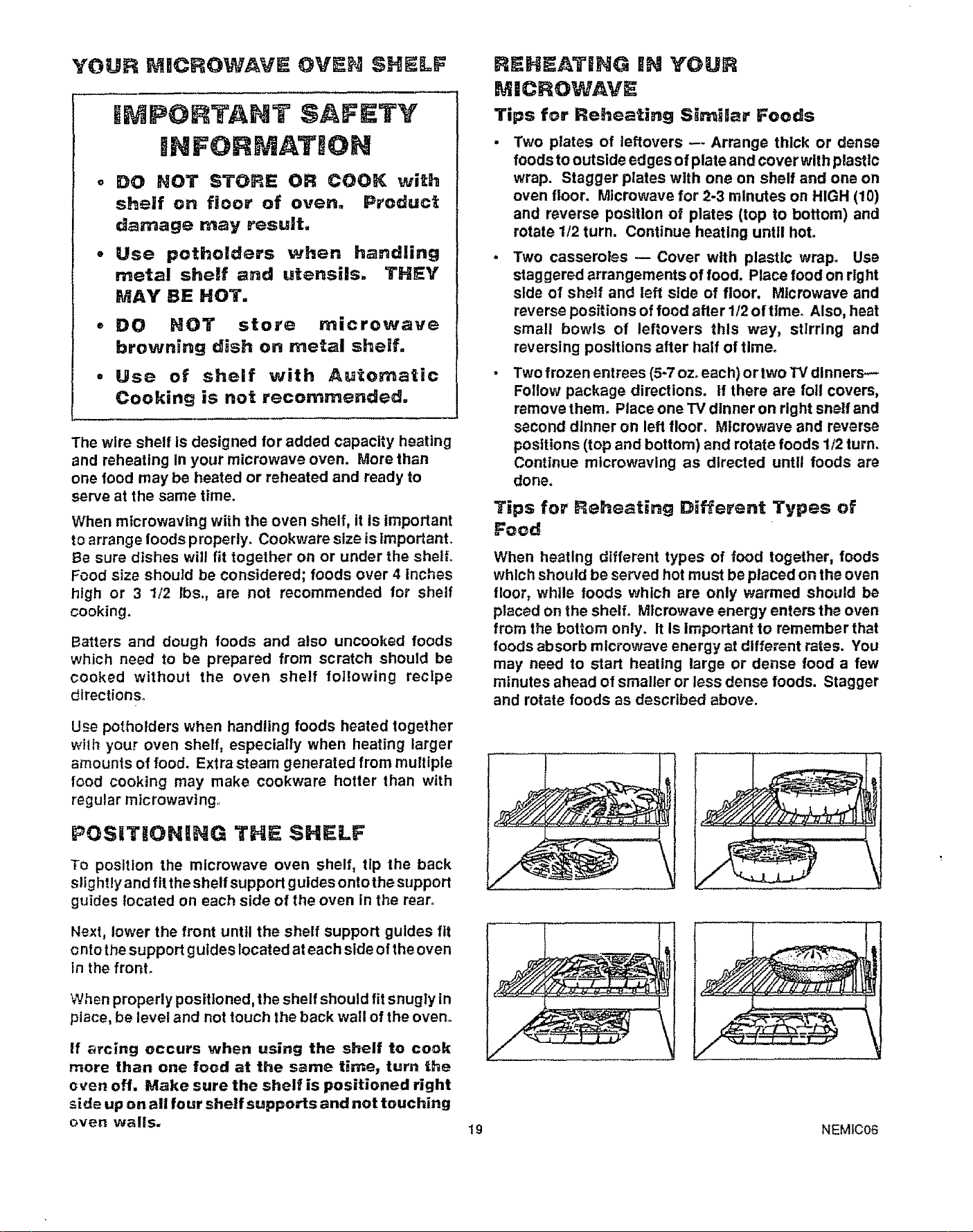
The wire shelf is designed for added capacity heating
and reheating In your microwave oven. More than
one food may be heated or reheated and ready to
serve at the same time.
When microwaving with the oven shelf, it Is important
to arrange foods properly. Cookware size is important.
Be sure dishes will fit together on or under the shelf.
Food size should be considered; foods over 4 Inches
high or 3 1/2 Ibs., are not recommended for shelf
cooking.
Batters and dough foods and also uncooked foods
which need to be prepared from scratch should be
cooked without the oven shelf following recipe
directions°
Use potholders when handling foods heated together
with your oven shelf, especially when heating larger
amounts of food. Extra steam generated from multiple
food cooking may make cookware hotter than with
regular mtcrowavtng..
POSiT|ONING THE $HII_LF
To position the microwave oven shelf, tip the back
slightly and fit the shelf support guldes ontothe support
guides located on each side of the oven in the rear.
REHF=ATIING iN YOUR
MICROWAVE
Tips for Reheating Similar Foods
Two plates of leftovers --- Arrange thick or dense
foods to outside edges of plate and cover with plastic
wrap. Stagger plates with one on shelf and one on
oven floor. Microwave for 2-3 minutes on HIGH (10)
and reverse position of plates (top to bottom) and
rotate 1/2 turn. Continue heating until hot.
Two casseroles -- Cover with plastic wrap. Use
staggered arrangements of food. Place food on right
side of shelf and left side of floor. Microwave and
reverse positions of food after 1/2 of tlme_ Also, heat
small bowls of leftovers this way, stirring and
reversing positions after half of tlmeo
Two frozen entrees (5-7 ozoeach) or two W dinners--
Follow package directions. If there are foil covers,
remove them. Place one "IVdinner on right snell and
second dinner on left floor. Microwave and reverse
positions (top and bottom) and rotate foods 1/2 turn.
Continue mlcrowavlng as directed until foods are
done.
Tips for Reheating Different Types of
Food
When heating different types of food together, foods
which should be served hot must be placed on the oven
floor, while foods which are only warmed should be
placed on the shelf. Microwave energy enters the oven
from the bottom only. It Is important to remember that
foods absorb microwave energy at different rates. You
may need to start heating large or dense food a few
minutes ahead of smaller or less dense foods. Stagger
and rotate foods as described above.
Next, lower the front until the shelf support guides fit
onto the support guides located at each side ofthe oven
in the front.
When properly positioned, the shelf should fit snugly In
place, be level and not touch the back wall of the oven.
If _rcing occurs when using the shelf to cook
more fhan one food at the same timej turn the
oven off. Make sure the shelf is positioned right
side up on all four shelf supports and not touching
oven walls.
19 NEMiC06
YOUR LOWER COHTROL
LOWER OVEN
[8!888/.XE OL_
_'_B e 8 r_ N BB,5_
_A_E I [ COOKTiME
BROIL ) [ STOPTIME
CLEAN I [ CLOCK
UGHT 1 ON/OFF
_t" MICROWAVE FAN MAY OPERATE
WHILE OVEN IS CLEANING
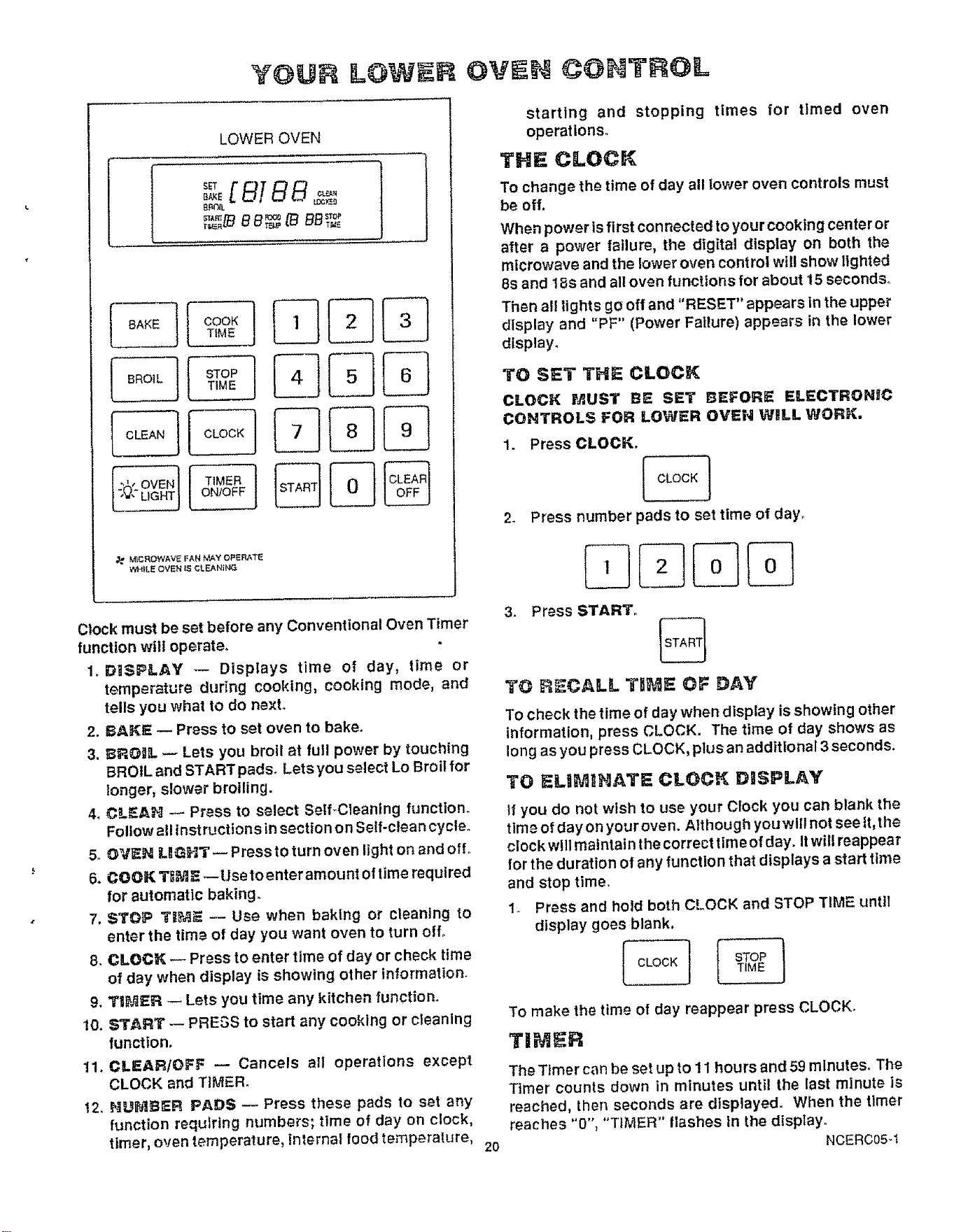
Clock must be set before any Conventional Oven Timer
function will operate.
1o DISPLAY _-- Displays time of day, time or
temperature during cooking, cooking mode, and
tells you what to do next.
2. BAKE _ Press to set oven to bake.
3. BROIIL _ Lets you broil at futl power by touching
BROIL and START pads. Lets you select Lo Broil for
longer, slower broiling.
4. CLEAH _ Press to select Self_Cleaning function.
Follow all instructions in section on Self-clean cycle.
5. OV[EN LBGHT _ Press to turn oven light on and off.
6. COOK T_M5 _Usetoenteramount of time required
for automatic baking.
7. STOP I"_ _ Use when baking or cleaning to
enter the time of day you want oven to turn off°
8. CLOCK _ Press to enter time of day or check time
of day when display is showing other information.
9. T|_ER _ Lets you time any kffchen function.
10. START _ PRESS to start any cooking or cleaning
function.
11. CLEARIOFF _ Cancels all operations except
CLOCK and TIMER.
t2, HUli_BER PADS -- Press these pads to set any
function requiring numbers; time of day on clock,
timer, oven temperature, inlernal food temperalure,
starting and stopping times for timed oven
operations°
TNE CLOCK
To change the time of day all lower oven controls must
be off,
When power is first connected to your cooking center or
after a power failure, the digital display on both the
microwave and the lower oven control will show lighted
8s and 18s and all oven functions for about 15 seconds°
Then el! lights go off and "RESET" appears in the upper
display and "PF" (Power Failure) appears in the lower
display.
TO SET THE CLOCK
CLOCK MUST B5 SET BEFORE ELECTRONgC
CONTROLS FOR LOWER OVEN Will WORK.
1. Press CLOCK.
CLOCK 1
2° Press number pads to set time of day.
3. Press START.
%
TO R_CALL Tt;_E OF DAY
To check the time of day when display is showing other
information, press CLOCK. The time of day shows as
long as you press CLOCK, plus an additional 3 seconds.
TO ELIMINATe: C1LOCI( DISPLAY
If you do not wish to use your Clock you can blank the
time of day on your oven. Although youwlllnot seeft, the
clock will maintain the correct time of day. It will reappear
for the duration of any function that displays a start time
and stop time.
1. Press and hold both CLOCK and STOP TiME until
display goes blank.
To make the time of day reappear press CLOCK.
TI ER
2O
The Timer can be set up to 11 hours and 59 minutes. The
Timer counts down in minutes until the last minute is
reached, then seconds are displayed. When the timer
reaches "0", "TIMER" flashes in the display.
NCERC05q
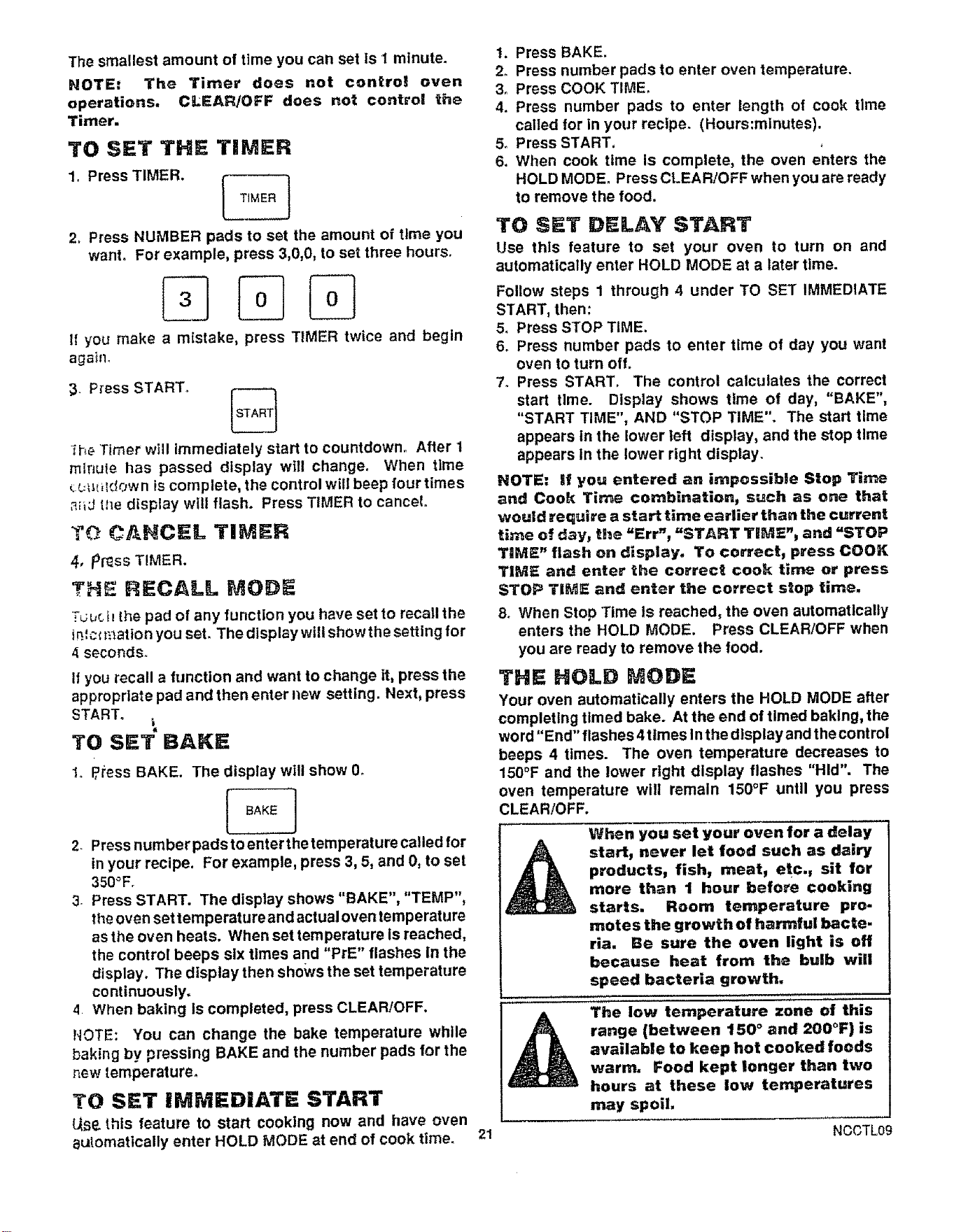
The smallest amount of time you can set is I minute.
NOTE: The Timer does not control oven
operations, CLEAR/OFF does not control the
Timer.
TO SET THE TIMER
1. Press TIMER. [
TtMER
(
2, Press NUMBER pads to set the amount of tlme you
want. For example, press 3,0,0, to set three hours.
It" you make a mistake, press TIMER twice and begin
again_
3- Press START° I_
L___J
1he Timer will immediately start to countdown, After 1
mlnuIe has passed display will change. When time
__.q_i_lc!own iscomplete, the control will beep four times
,_J the display will flash. Press TIMER to cancel.
TO CANCEL TIMER
4, p_ss TIMER.
THE RECALL MODE
Tuuch the pad of any function you have set to recall the
in.',clt:3ation you set. The display will showthe setting for
4 seconds°
If you recall a function and want to change it, press the
appropriate pad and then enter new setting. Next, press
START.
TO SET" BAKE
1, P,ress BAKE. The display will show 0.
I BAKE ]
2. Press number pads to enter the temperature called for
in your recipe, For example, press 3, 5, and 0, to set
350°Fr
3. Press START. The display shows "BAKE", "TEMP",
the oven set temperature and actual oven temperature
as the oven heats. When set temperature Is reached,
the control beeps six times and "PrE" flashes In the
display. The display then shows the set temperature
continuously.
4 When baking Is completed, press CLEAR/OFF.
NOTE: You can change the bake temperature while
baking by pressing BAKE and the number pads for the
new temperature.
TO SET iMMEDIATE START
L_Se.this feature to start cooking now and have oven
automatically enter HOLD MODE at end of cook time.
t, Press BAKE.
2. Press number pads to enter oven temperature.
3o Press COOK TIME.
4. Press number pads to enter length of cook time
called for in your recipe. (Hours:minutes).
5o Press START,
6. When cook time is complete, the oven enters the
HOLD MODE. Press CLEAR/OFFwhen you are ready
to remove the food.
TO SET DELAY START
Use this feature to set your oven to turn on and
automatically enter HOLD MODE at a later time.
Follow steps 1 through 4 under TO SET IMMEDIATE
START, then:
5. Press STOP TIME.
6. Press number pads to enter time of day you want
oven to turn off.
7. Press START. The control calculates the correct
start time. Display shows time of day, "BAKE",
"START TIME", AND "STOP TIME". The start time
appears in the lower left display, and the stop time
appears In the lower right display.
NOTE: if you entered an impossible Stop Time
and Cook Time combination, such as one that
would require a start time earlier than the current
time of day, the "Err", "START TIME"_ and "STOP
TIME" flash on display. To correct, press COOK
TiME and enter the correct cook time or press
STOP TIME and enter the correct stop time.
8. When Stop Time is reached, the oven automatically
enters the HOLD MODE. Press CLEAR/OFF when
you are ready to remove the food.
THE HOLD MODE
Your oven automatically enters the HOLD MODE after
completing timed bake. At the end of timed baking, the
word"End" flashes 4 times In the display and thecontrol
beeps 4 times. The oven temperature decreases to
150_F and the lower right display flashes "Hid". The
oven temperature will remain 150°F until you press
CLEAR!OFF.
When you set your oven for a delay
start, never let food such as dairy
products, fish, meat, etc., sit for
more than I hour before cooking
starts. Room temperature pro-
motes the growth of harmful bacte.
rla. Be sure the oven light is off
because heat from the bulb will
speed bacteria growth,
The low temperature zone of this
range (between 150 ° and 200°F} is
available to keep hot cooked foods
warm. Food kept longer than two
hours at these low temperatures
may spoil,
21 NCCTL09
OVIH !i)0011111
When coektng a food for the first time tn your new
oven, use time g!ven on reclpes as a gtdde,
Your new oven has been set correcly at the factory
and Is more apt to be accurate than the o_e_ it
replaced.
After you have used your ov_n for awhile, if you feel
your oven should be holer or cooler, you can adjust
it yourself. See T_E_Oz3T,_,7,5.DJL_$T_,'_._NTS
In this manual.
• Always fofow recipe cat'efuly.
• Measure Ingredients properly.
Use proper pan placement,
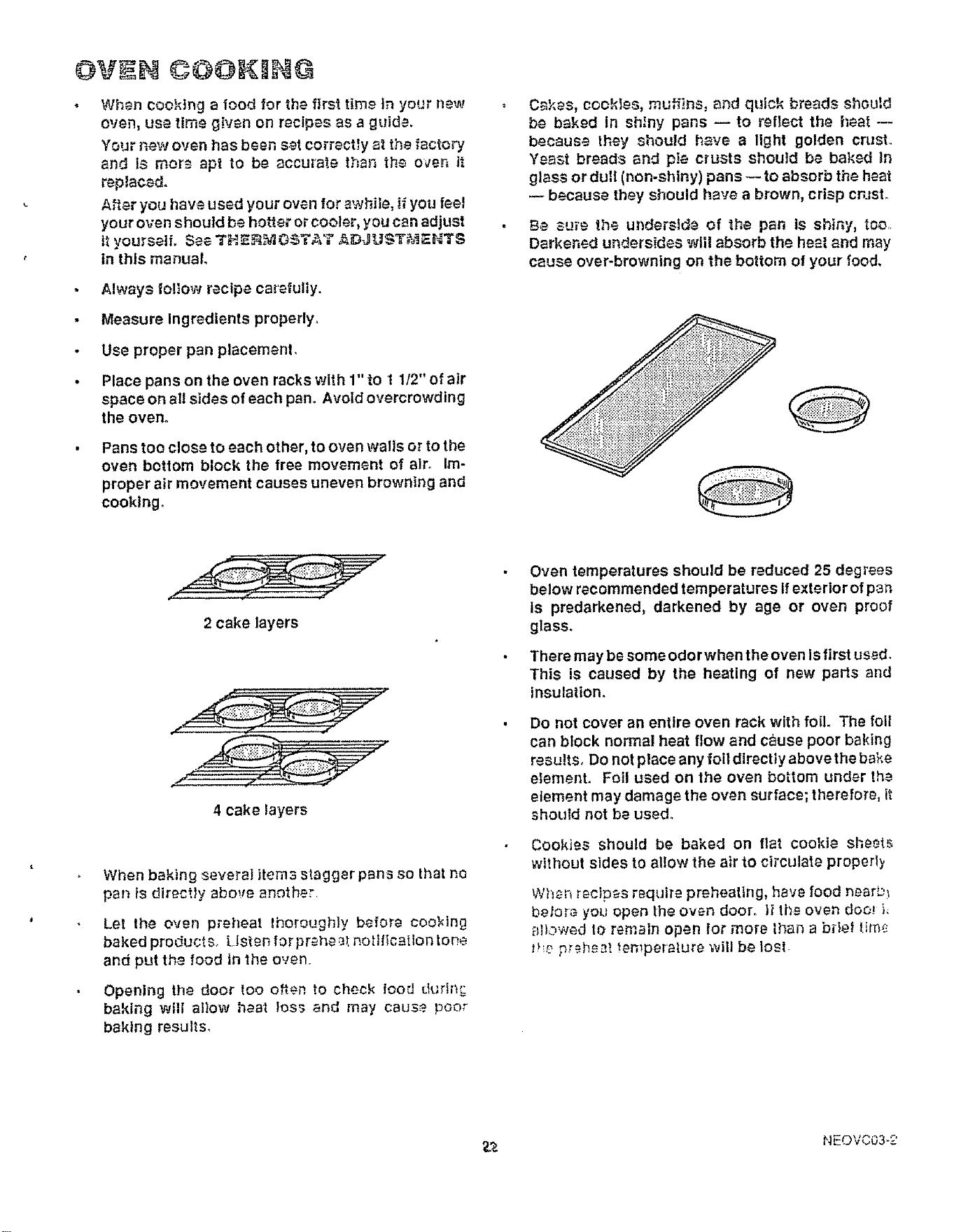
Place pans on the oven racks with 1" to t 1/2" of air
space on all sides of each pan. Avoid overcrowding
the oven.
Pans too close to each other, to oven walls or to the
oven bottom block the free movement of air. Im-
proper air movement causes uneven browning and
cooking.
o Cakes, cookies, muffins, and quick breads shou!d
be baked In shiny pans -- to reflect the heat --
because they should have a light golden crust.
Yeast breads and pin crusts should be baked in
glass or dull (non-shiny) pans --to absorb the heat
because they should have a brown, crisp cnJst.
Be su_'e the ut_derside of the pan is shiny, too,.
Darkened undersides will absorb the heat and may
cause over-browning on the bottom of your food.
2 cake layers
4 cake layers
When baking several items stagger pans so that no
pan is directly abo,_e another.
Let lhe oven p_eheat Ihoroughiy before coo_ing
baked products. Listen for preheat notitication tone
and put the food in the oven.
Opening the door too o!en to check iood duri)_
baking will attow heat toss and may cause poor
baking results,
Oven temperatures should be reduced 25 degrees
below recommended temperatures If exterio r of pan
Is predarkened, darkened by age or oven proof
glass.
There may be some ode rwhen the oven is first used.
This is caused by the heating of new parts and
insulation.
Do not cover an entire oven rack with foil. The foil
can block normal heat flow and cause poor baking
results, Do NOtplace any foil directly above the bake
element. Foil used on the oven bottom under the
etement may damage the oven surface; therefore, it
should not be used°
Cookies should be baked on flat cookie sheets
without sides to allow the air to circulate properI?
When recipes require preheating, have food near_)
befor_ you open the oven door. II tl_e oven doo.J L
ai),:,wed to remain open for more lhan a brief tir¢_,._
t!_e preh£._t temperature will be losl
_.,& NEOVC03-2
Broiling
TO SET BROIL
1. Press BROIL. "HI" and "BROIL" appear In display,
2, Press BROIL again to set LO broil, You can alternate
between HI(550°F) and LO(450°F) by pressing
BROIL.
3, Press START,
4. Press CLEAR/OFF when broiling is complete.
Most foods can be broiled at the HI broil setting
Select the LO Broil setting to avoid excessive
browning or drying of foods that should be cooked
to the well-done stage (such as thick pork chops or
poultry),
BROILING TIPS
• YourlowerovendoorshouldbeopentotheBROIL
STOP position while broiling.
Use only the broiler pan and grid that came with
your range for broiling° They are designed for
proper drainage of fat and liquids and hetp prevent
spatter, smoke or fire.
. Do not prehea_ when broiling. Preheating may
cause the thermostat to cycle the broil element oft
al_d on, For even broiling on both sides, start the
food on a cold pan°
Trim the outer layer of fat from steaks and chops°
Slit the fatty edges to keep the meat from curling.
• For maximum juiciness, salt the first side just be-
fore turning the meal Salt the second side just
before serving,
, Brush chicken and fish with butter several times as
they broil. When broiling fish, grease the grid to
prevent sticking and broil with skin side down, It is
not necessary to turn fish,
Never leave a soiled broiler pan in the range.
Grease in the pan may smoke or burn the next tlme
the oven Is used.
Be sure you know the correct procedure for
putting out a grease fire. See the section on
safety,
Do not cover the entire broiler
grid with foil. Poor drainage
of hot fat may cause a broiler
fire.
If a fire starts, close the oven
door and turn controls off. if
fire continues, throw baking
soda on the fire. Do not put
water on the fire.
PO$1TBONIHG BROBLER PAN
Broiling is cooktng by direct heat from the broil element.
Tender cuts of meat or marinated meat should be se-
lected for broiling. For best results steaks and chops
should be at least 3/4" thick,
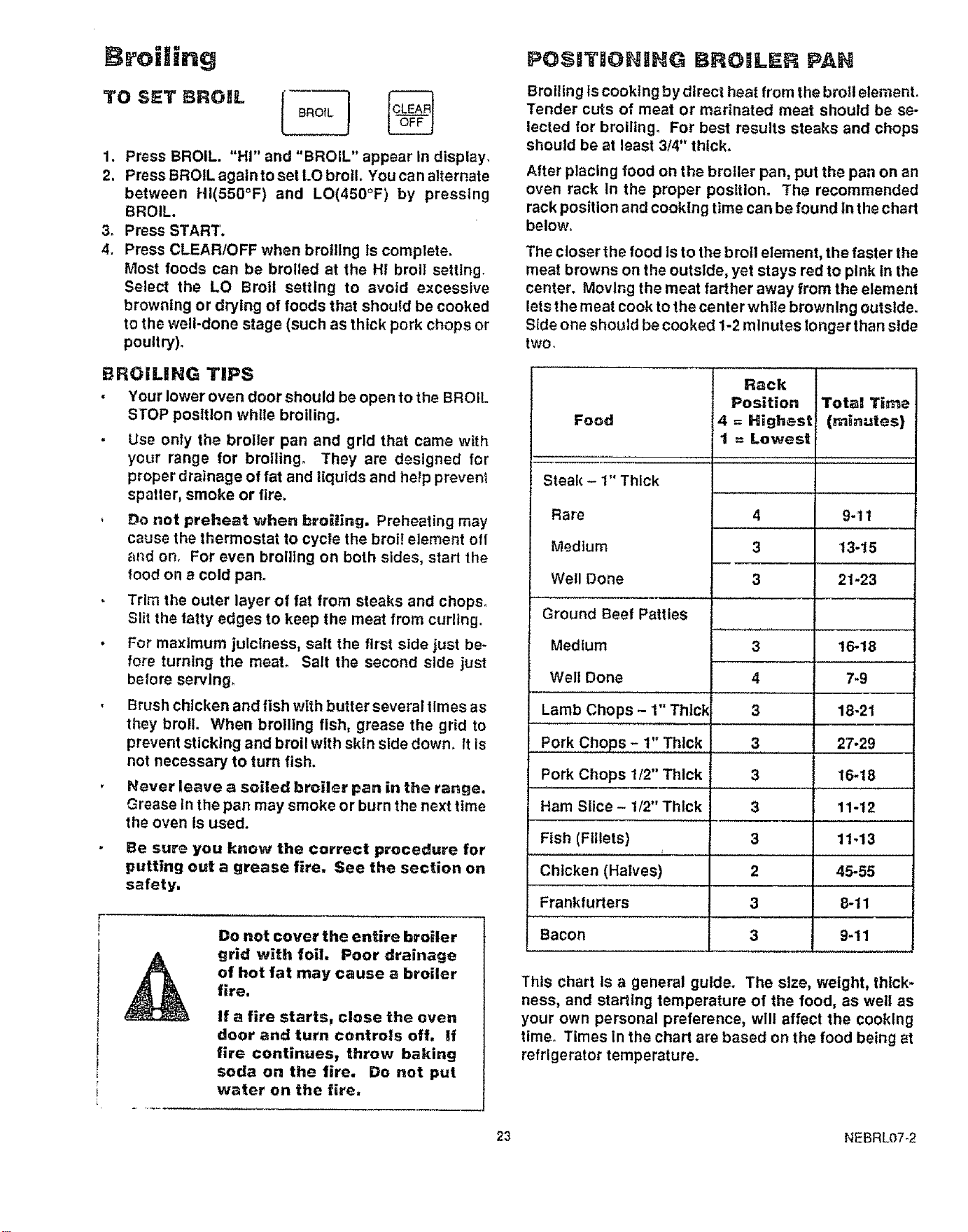
After placing food on the broiler pan. put the pan on an
oven rack In the proper posltlom The recommended
rack position and cooking time can be found In the chart
below°
The closer the food is to the b roll element, the faster the
meat browns on the outside, yet stays red to pink In the
center. Moving the meat farther away from the element
lets the meat cook to the center while browning outside.
Side one should be cooked 1-2 minutes longer than stde
two,
Food
Rack
Position
4 = Highest
t = Lowest
Steak - 1" Thick
Rare
Medium
Well Done
Ground Beef Patties
Medium
Well Done
Lamb Chops - 1" Thick
Pork Chops - 1" Thick
Pork Chops t/2" Thick
Ham Slice - t/2" Thick
Fish (Fillets)
Chicken (Halves)
Frankfurters
Bacon
Total Time
(minutes)
4 9-11
3 13-15
3 21-23
3
4
3
16-18
7-9
18-21
3
3
3
3
2
3
3
27-29
16-18
11-12
11-13
45-55
8-11
9-11
This chart Is a general guide. The size, weight, thick-
ness, and starting temperature of the food, as well as
your own personal preference, will affect the cooking
timer Times in the chart are based on the food being at
refrigerator temperature.
23 NEBRL07-2
BEFOR A CLEAN CYCL
Remove the broiler pan and grid, oven rac_;s, a!_
u_a_lslts and _n_t felt that may be !n tt_e oven, G3 not
tiy t_ ciear_ '.t_ensifsor any o_her objects in th_ ov_n
durit_g & sei_-ciea;_ cycle, i_ oven racks _e _-={__n
you choose to leave the racks In the oven, yo_ csn
polish the edges o_"the racks with stee; woo_ an_
apply a small amount of vegetable ot| to the rack
edges after the serf-clean cycle. Thts wltl make the
racks easier to slide.
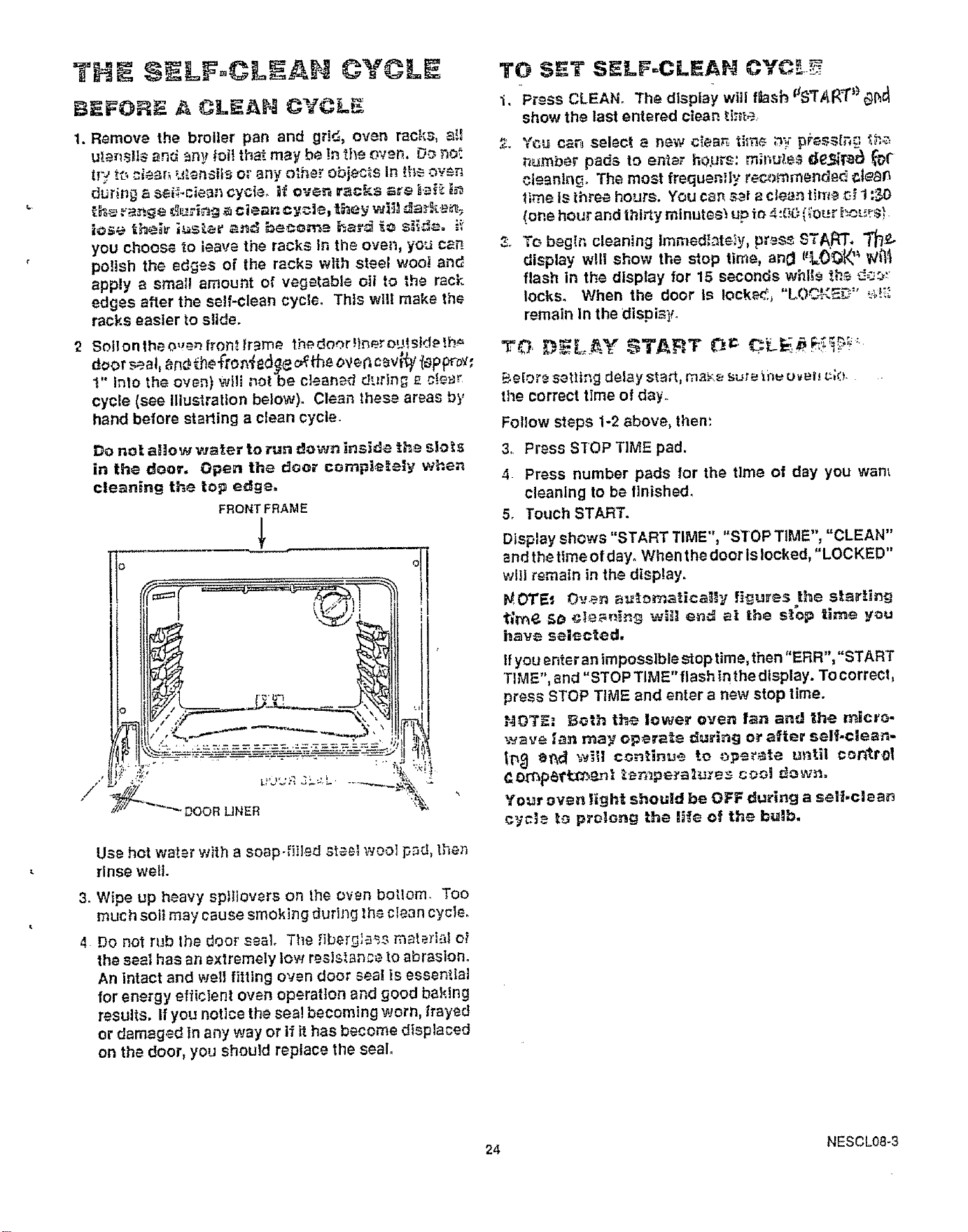
Soil o n the o,J_n fro_. {r_rn_. the,door _Iner oUlSid_ !h_
eoor al, n M'ron ed e ovenc v; y oppro ,
1" Into the oven) viii not be cleaned durin_ _ cf_r
cycle (see Illustration below). Clean these areas by
hand before starting a clean cycle.
Do not a_tow waler to run down inside the slols
in the door. Open the d_or completely when
cleaning the top edge.
FRONTFRAME
_'_"_"" DOOR UNER %
Use hot valet with a soap-,f!lled steel wool pad, the_
rinse well
3. Wipe up heavy sptliovers on the oven bottom. Too
much sott may cause smoking during the clean cyc}e.
4 Do not rub the door seal, The ,qber_;_s mated-3t eI
the sea! has an extremely low resls._ance to abrasion.
An intact and well fitting oven door seal is essential
for energy efficient oven operatlon and good baking
results, If you notice the seal becoming worn, frayed
or damaged In any way or if it has become displaced
on the door, you should replace the seal,
"i, Press CLEAN, The display will fi}asb aSTA_ _ _t_
show the last entered clean ti;t_a
n_mber pads to enier hOP_s: m;r_,e;; de.._P_ _t"
cleaning, The most frequenfly recommended _.t_
_me is three hours. You c8_,s_l a clet}_ Hrr_ _ 1::_O
(one hour and thirty mfnutes_ up _o4:00 (;o_r,he_sL
_. T_ b_gln cleaning ImmedI_te_y, pr_ START', "T_/P..
display viii show the stop time, an0 I_LO_ _ _}_I
flash in the display for 15 seconds whl_s th_ d-_"
locks° When the door is Iocke_ "LOC_<5_" ,._!i:
remain In the dispia V
Beiore sat}ing delay staA, ma_'.e£,ute _,P,uUv el_t_;O,
the correct time of day.,
Follow steps 1-2 above, then:
3, Press SIOP TiME pad.
4 Press number pads for the time of day you want
cleaning to be finished.
5. Touch START.
Display shews "START TIME", "STOP TIME", "CLEAN"
and the time of day° When t he door Is locked, "LOCKED''
will remain inthe display.
_/,OTE_ Oven aut_maHca_y flgu_ss the st_#.ing
t;rn_ SO cIe_PJ_ w_] en-,_ al t_e s_op ilme _ou
hav_ sel_cied.
If you enteran impossible stop time, then "ERR", "START
TIME", and "STOP TIME" flash in the display. To correct,
press STOP TIME and enter a new stop time.
NOTE: Both the lower oven fan an'J _he micra-
wave tan n_ay operate du_ing ot after seH-clean-
tP,_ ei_¢] will continue to ,)pupate until control
C.o_p_ttr_.,_nl _empe_a_u:e$ coo] r_own.
Your oven ligh_ should be OFF during a sell.clean
cy#L = b3 prolong the li{e of the bulb.
24 NESCL08-3
AF'rI,_R A CLEAN CYCLE
After a clean cycle Is complete, the oven door will stay
locked until the oven temperature cools to a safe level
When the oven has cooled "LOCKED" will disappear
from display. "CLEAN" will remain In display until you
press CLEAR/OFF or enter an oven operation. NEVER
TRY TO FORCE THE DOOR TO OPEN WHEN "LOCKED"
IS IN THE DISPLAY.
After aclean cycle, you may notice some white ash in the
oven° Just wipe It up with a damp cloth.
If white spots remain, remove them with a soap-filled
steel wool pad. Be sure to rinse thoroughly with a
vinegar and water mixture. These deposits are usually
a salt residue that cannot be removed by the clean cycle.
If the oven is not clean after one clean cycle, the cycle
may be repeated.
TO INTERRUPT A CLEAN CYCLE
t. Press CLEAR/OFF.
2. Wait until "LOCKED" is no longer indisplay and door
wil! open easily° Never force the door°
NOTE: The microwave cooling fan will come on ap-
proximately one hour Into the clean cycle, The
fan will run for a short period of time after the
clean cycle ts completed.
QUESTIONS AHD AHSWER$
Q. If my oven clock Is not set to correct time of day, can
I still self-clean my oven?
A. Yes, however, I! you desire to set a delay self-clean
cycle to end at a specific time of day your clock
should be set to the correct time of day.
Q. Can I use commercla! oven cleaners on any part of
my self-cleaning oven?
A. No cleaners or coatings should be used on or around
any part of this oven.
Q. Can Iclean the woven gasket around the oven door?
A. No. Do not to rub, move, or damage the gasket.
Qo Is it normal to hear "crackling sound" during clean-
Ing?
A_ Yes. This Is the metal heating and cooling.
(3. Why do I have ash left in my oven after cleaning?
A. Some types of soil will leave a deposit, It can be
removed with a damp sponge or cloth.
Q_
Ao
What should !do If excessive smoking occurs during
cleaning?
This Is caused by excessive soil and you should
switch the OVEN to OFF. Open windows to rld room
of smoke, Allow the oven to cool for at least one hour
before opening the door. Wipe up excess soll and
reset the clean cycle,
Qr
A.
Should there be any odor during the cleaning?
Yes, there may be a slight odor during the first few
cleanings. Failure to wipe out excessive soil might
also cause an odor when cleanlng_
25 NESCL09-3
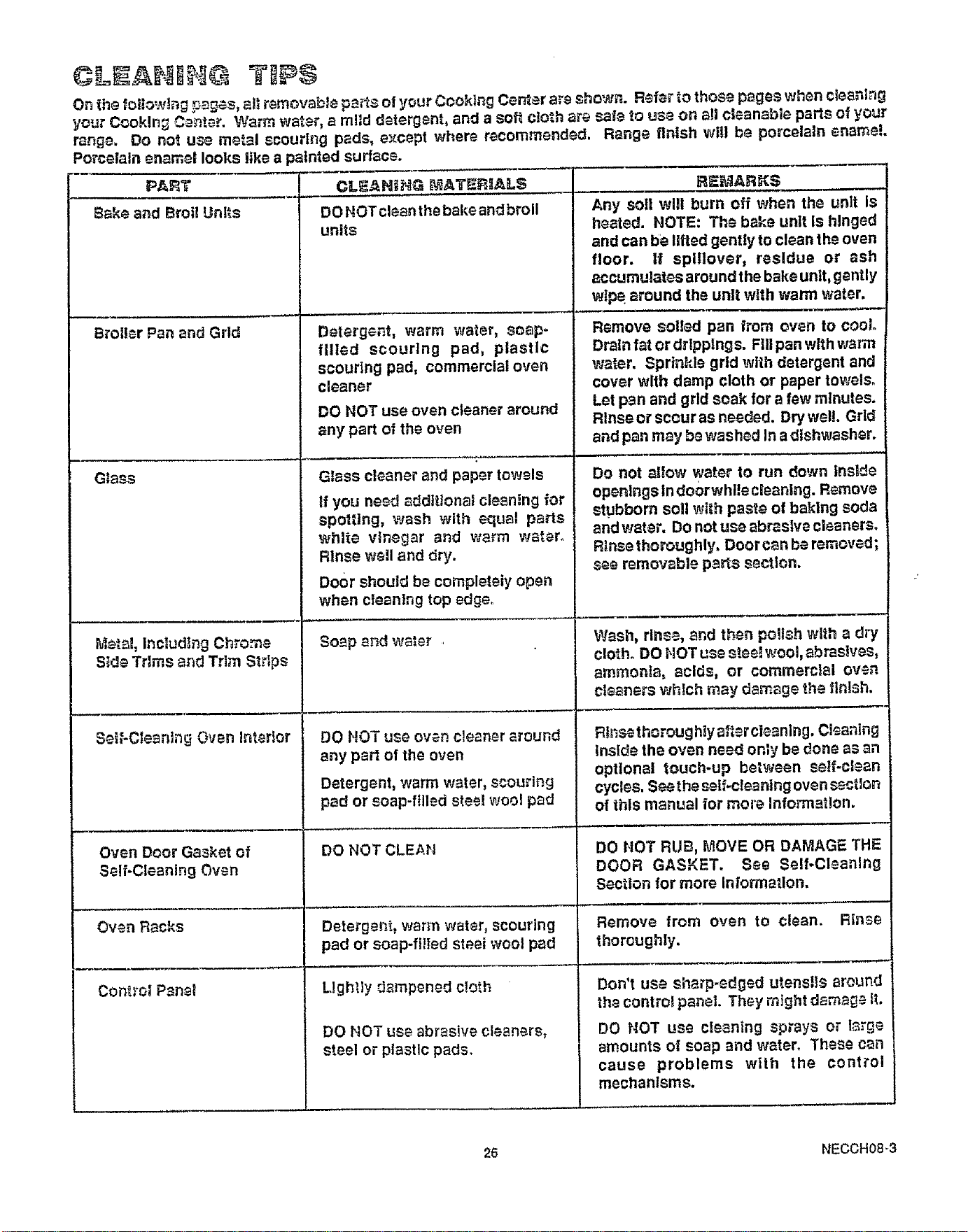
Q -I=IAIII -£@ TII$
On the folowlng pages, al removable pans of your Cooking Cen_er are sho'_vn. R-_ferto those pages when clean!ng
your C_okJn_ C_nte._. Warm water, a ml!d detergent, and a soft cloth are saie to use on al cleanable parts of your
range. Do not use metal scouring pads, except where recommended. Range finish will be porcelain enamel
Porcelain enamel looks like a painted surface.
PA_T
Bake and Broil Units
Broiler Pan and Grld
Glass
Metal, Including Chrome
S_de Trims and Trim Strips
Set{-Clesn]ng Own Interior
Oven Door Gasket of
Self-Cleaning Oven
Oven Racks
Control Psnet
CLEANtF_G MATE,_IAL$
DO NOT clean the bake and broil
units
Detergent,warm water, soap-
filled scouring pad, plastic
scouring pad, commercial oven
cleaner
DO NOT use oven cleaner around
any part of the oven
Glass cleaner and paper towels
If you need additional clean!ng for
spotting, wash with equal parts
white vinegar and warm water.
Rinse well and dry.
Door should be completely open
when cleaning top edge.
Soap end water
DO NOT use oven cleaner around
any part of the oven
Detergent, warm water, scouring
pad or soap-filled sloe! wool pad
DO NOT CLEAN
Detergent, warm water, scouring
pad or soap-filed st_.ei wool pad
Lightly dmnpened cloth
DO HOT use abrasive cleaners,
steel or plastic pads.
RE_,_ARK$
Any soil will burn off when the unit Is "
heated. NOTE: The bake unit Is hinged
and can be lifted gently to clean the oven
floor, tf splIIover, residue or ash
accumulates around the bake unlt, gently
wtpe around the unit with warm water.
Remove soled pan from oven to cool.
Drain fat or dr!pplngs. Fill pan with warm
water. Sprin_de grid wih detergent and
cover with damp cloth or paper towels.
Let pan and grid soak for a few minutes.
R!nse or scour as needed. Dry well. Grid
and pan may be washed In a dishwasher.
Do not allowwater to run down Inslde
openings In do0rwhlle cleaning. Remove
stubborn soil with past_ of baiting soda
and water. Do not use abrastve cleanerso
Rlnse thoroughly, Door can be removed;
see removable parts secton.
Wash,rinse,andthenpolshwitha dry
cloth.DO NOT uses_.ee!_mol,abras!ves,
ammonia, acids, or commercial oven
cleaners which may damage the flni_h.
Rinse thoroughiy al_.r cleaning. Cleaning
Inside the oven need only be done as an
optional touch-up between set-clean
cycles. S¢_a_the _lf.cle_nlng oven sectlon
of this manual ior more Information.
DO HOT RUB, MOVE OR DAMAGE THE
DOOR GASKET. See Self-Cleaning
Section for more Inlormaflon.
Remove from oven to clean. Rinse
thoroughly.
Don't use sharp-edged utensls around
th_ contro! panel They might dam_ IL
DO NOT use cleaning sprays or large
amounts o_ soap and water_ These can
cause problems wilh the control
mechanisms.
25 NECCH08-3
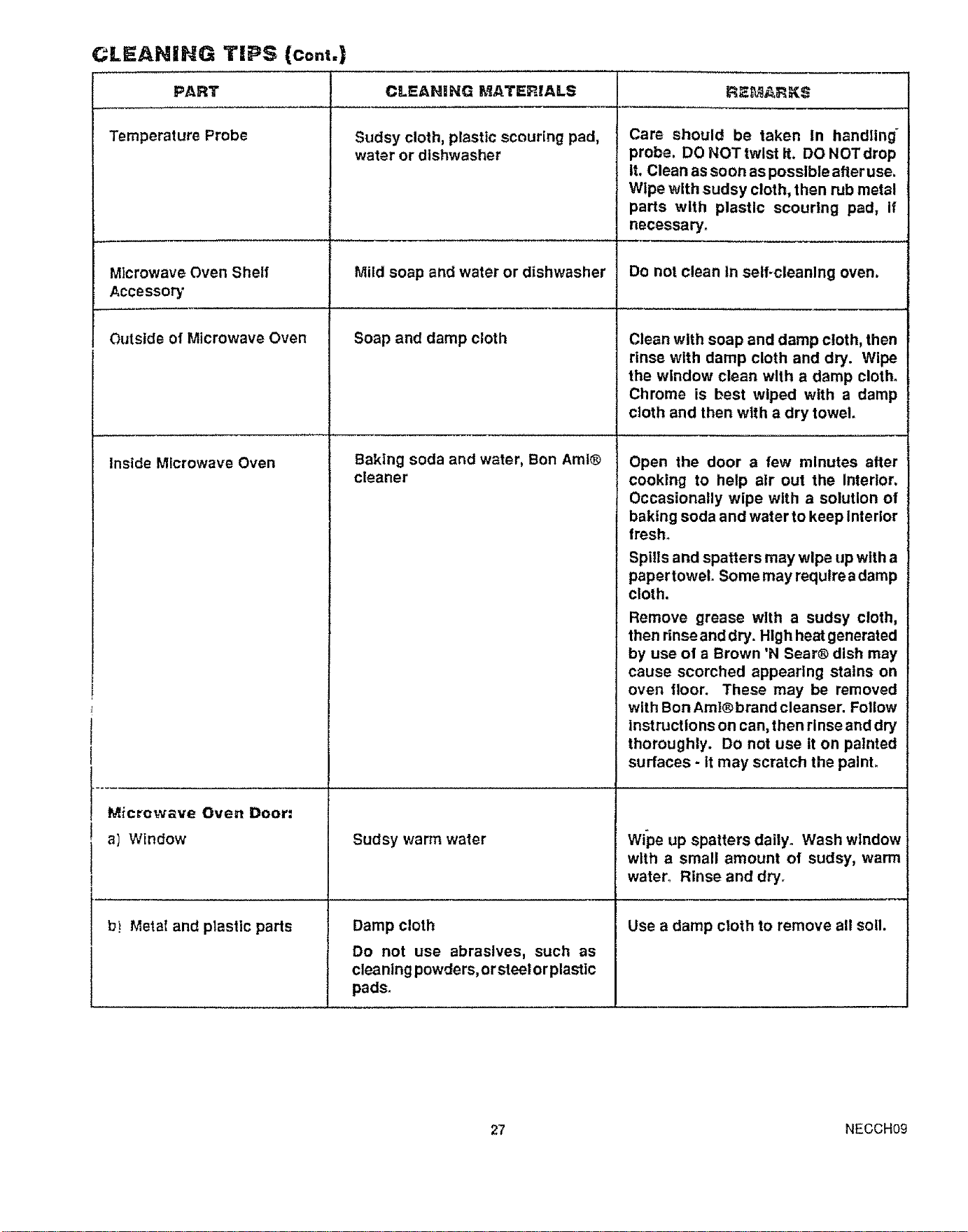
CLEANING TIPS; (co.t.)
PART
Temperature Probe
Microwave Oven Shelf
Accessory
CLEANING P,_ATERIALS
Sudsy cloth, plastic scouring pad,
water or dishwasher
Mild soap and water or dishwasher
Outside of Microwave Oven Soap and damp cloth
Inside Microwave Oven
Baking soda and water, Bon Amf®
cleaner
Microwave Oven Door:
a) Window
b! Metal and plastic parts
Sudsy warm water
Damp cloth
Do not use abrasives, such as
cleaning powders, orsteel or plastic
pads.
RF._ARKS
Care should be taken In handling _
probe, DO NOT twist it, DO NOTdrop
It. Clean as soon as possible afteruse.
Wipe with sudsy cloth, then rub metal
parts with plastic scouring pad, if
necessary.
Do not clean In selFcleanlng oven.
Clean with soap and damp cloth, then
rinse wlth damp cloth and dry. Wipe
the window clean with a damp cloth.
Chrome is best wiped with a damp
cloth and then with a dry towel,
Open the door a few minutes after
cooking to help alr out the Interior.
Occasionally wipe with a solution of
baking soda and water to keep Interior
fresh_
Spills and spatters may wipe up with a
paper towel. Some may requtre a damp
cloth.
Remove grease with a sudsy cloth,
then rinse and dry. High heatgenerated
by use of a Brown 'N Sear® dish may
cause scorched appearing stains on
oven floor. These may be removed
with Bon Aml®brand cleanser. Follow
Instructions on can, then rinse and dry
thoroughly. Do not use It on painted
surfaces - tt may scratch the palnL
wipe up spatters daily. Wash window
with a small amount of sudsy, warm
water. Rinse and dry,
Use a damp cloth to remove all soil.
27 NECCH09
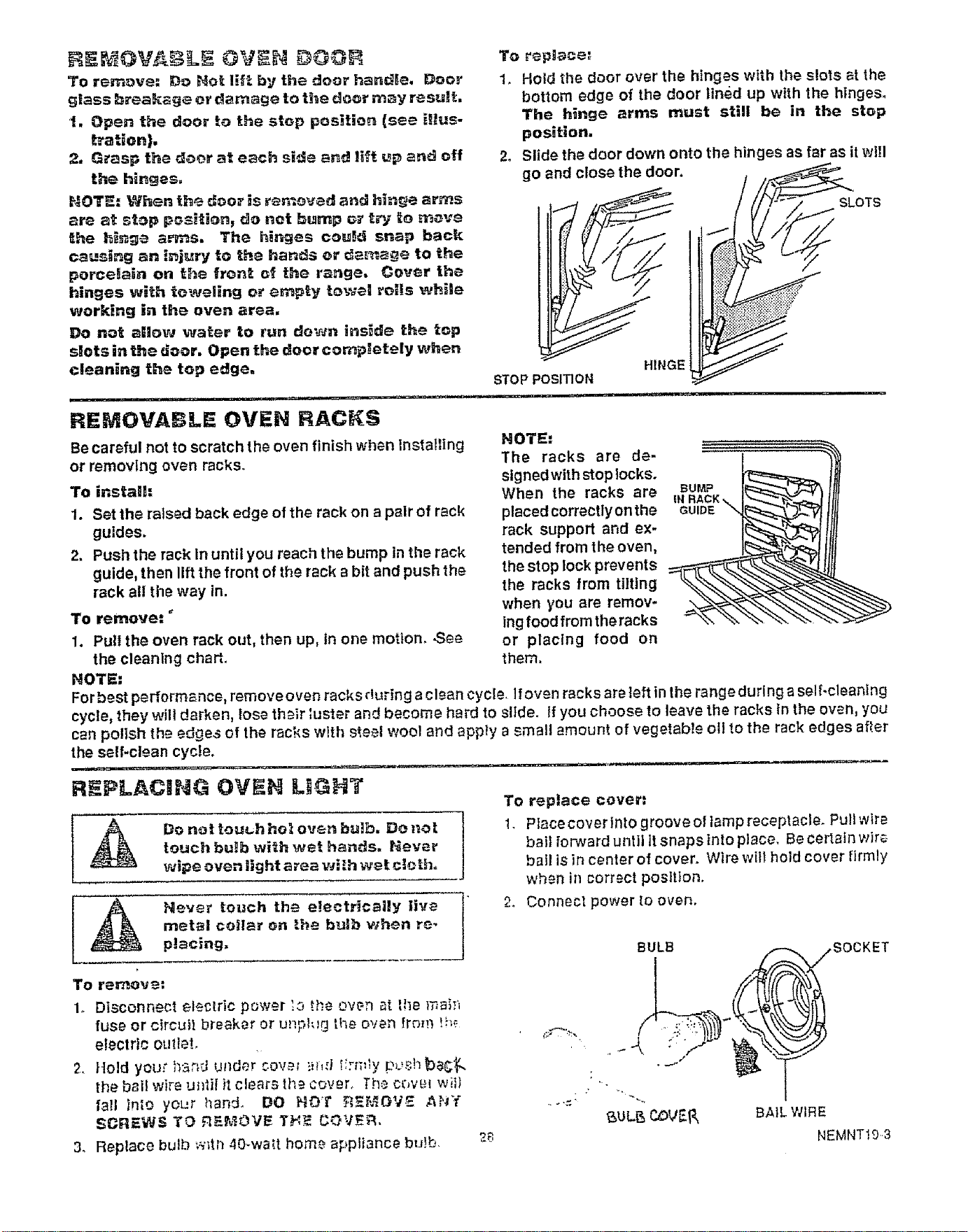
REMOVABLE OVEN RACKS
Becareful not to scratch the oven finish when installing
or removing oven racks°
To instalh
1. Set the raised back edge of the rack on a pair of rack
guides.
2. Push the rack In until you reach the bump In the rack
guide, then lift the front of the rack a bit and push the
rack all the way in.
To remove= _
1. Pull the oven rack out, then up, in one motlom .Se_
the cleaning charL
NOT_:
To repg_ce',
1° Hold the door over the hinges with the s!ots at the
bottom edge of the door lined up with the hinges,
The hinge arms must still be in the stop
position.
2° Slide the door down onto the hinges as far as it wi!l
go and close the door.
[
SLOTS
NOTE=
The racks are de-
signed with stop locks.
When the racks are
placed correctly on the
rack support and ex-
tended from the oven,
the stop lock prevents
the racks from tilting
when you are remov-
ing food from the racks
or placing food on
them.
BUMP
GUIDE
.
To rer_ov e=
1. Disconnect electric power ':o H'..eoven _t the mai:_
fuse or circuit breaker or up,pl_g the oven from !h_
electric outlet,
2. Hold your b_;_d under cow_ kn,d i_:n:_y p_,shba,_
the bail wire u_lfit it clears th=.cover° The c_,v_.! wiil
fall into yoL,r l_and. DO HOT _=_MOV_ AP_'Y
SCREW_ TO RF-I_,_OVE TH_ COVER,
3. Replace bulb w_tI_40-wa_t hom_ appliance bu)b
To replace cover=
1 Piece cover into groove el lamp receptacle. Pullwlr_
bail forward until it snaps tnlo place. Be certain wir_
bail is in center of cover. Wire will held cover firmly
when in correct posltlon,
2. Connect power to oven.
BULB SOCKET
6OL_ C_VER SA_LW;RE
NEMNT1O3
Never to_ch the etectr_calty live
metal coitar on _he l_atb when re.
prating.
]
Do not tou_.h hot ove_ bulb. Do z_ot |
touch bulb wi_h wet hands. Never
J
wii0e oven llghtarea wi_h wet cloth.
Forbest performance, remove oven racks during a clean cycle lfoven racks are left in the range during a selflcleaning
cycle, they will darken, fuse their luster and become hard to slide, tf you choose Doleave the racks In the oven, you
can polish the edges of the racks with s_eel wool and apply a small amount of vegetable oil to the rack edges afler
the self-clean cycle.
R PLACING OVEN LIGHT
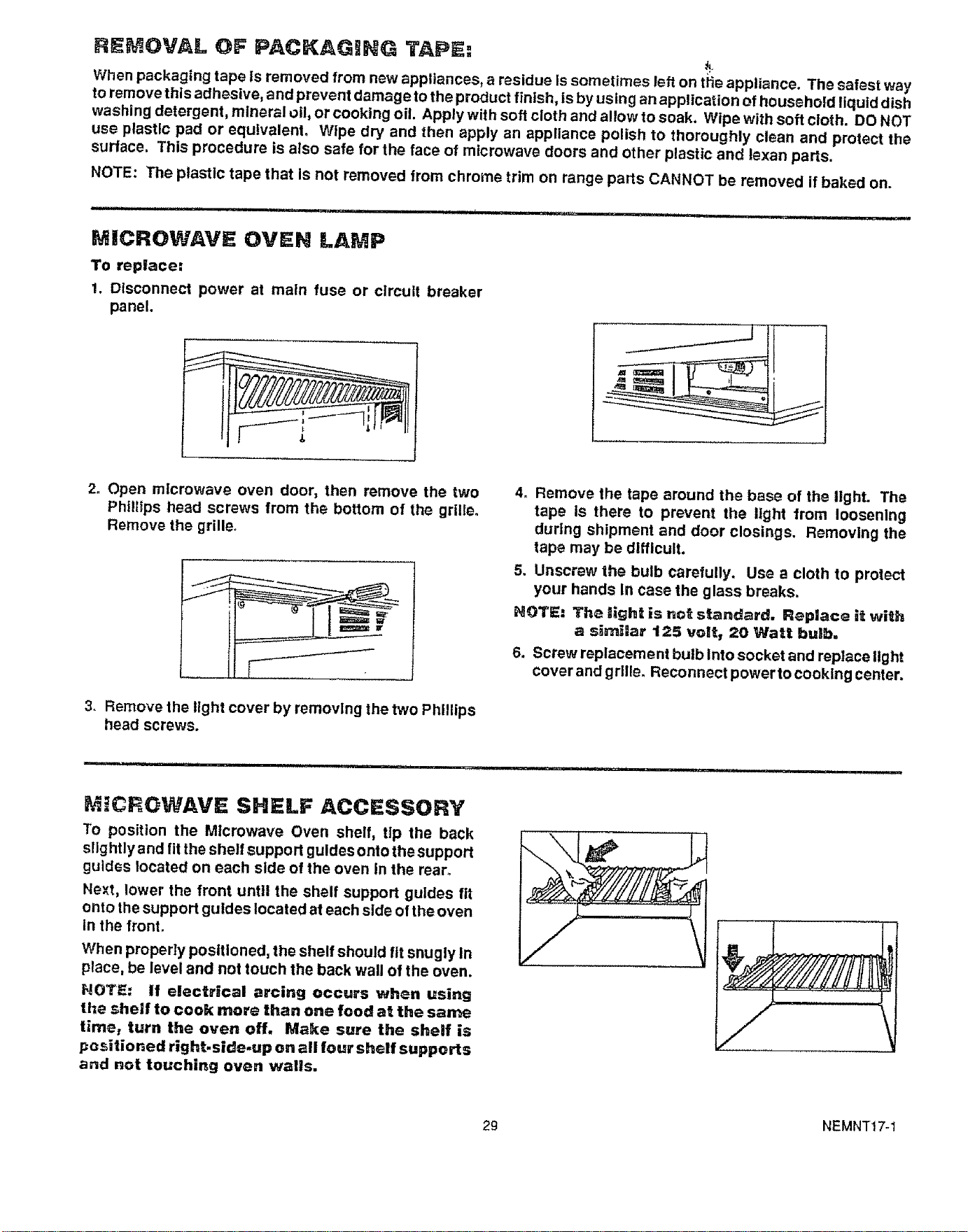
RE OVAL OF PACKAGBNG TAPE:
k
When packaging tape is removed from new appliances, a residue Is sometimes left on t_ie appliance. The safest way
to remove this adhesive, and prevent damageto the product finish, is by using an application of household liquid dish
washing detergent, mineral o1!,or cooking oil. Apply with soft cloth and allow to soak. Wipe with soft cloth. DO NOT
use plastic pad or equivalent. Wipe dry and then apply an appliance polish to thoroughly clean and protect the
surface, This procedure is also safe for the face of microwave doors and other plastic and lexan parts.
NOTE: The plastic tape that is not removed from chrome trim on range parts CANNOT be removed if baked on.
t rl..., iii i1,,i.... iii i i i, i, ii jjl,lll /.." H
MICROWAVE OVEN LAMP
To replace:
1. Disconnect power at main fuse or circuit breaker
panel.
2o Open microwave oven door, then remove the two
Phlllips head screws from the bottom of the grille.
Remove the grille,
3. Remove the light cover by removing the two Phillips
head screws.
4. Remove the tape around the base of the IlghL The
tape Is there to prevent the light from loosening
during shipment and door closings. Removing the
tape may be difficult.
5. Unscrew the bulb carefully. Use a cloth to protect
your hands In case the glass breaks.
NOTE: The light is not standard. Replace it wi_h
a similar 125 volt, 20 Watt bulb,
6. Screw replacement bulb lnto socket and replace llght
cover and grille. Reconnect power to cooking center.
MICROWAVE SHELF ACCESSORY
To position the Microwave Oven shelf, tip the back
s!lg htly and fit the shelf support guides onto the support
guides located on each side of the oven in the rear.
Next, lower the front until the shelf support guides fit
onto the support guides located at each slde of the oven
In the front.
When properly positioned, the shelf should fit snugly In
place, be level and not touch the back wall of the oven.
NOTE: If electrical arcing occurs when using
the shelf to cook more than one food at the same
timer turn the oven off. Make sure the shelf is
positioned right.side-up on all four shelf supports
and not touching oven walls.
29 NEMNTt 7-1
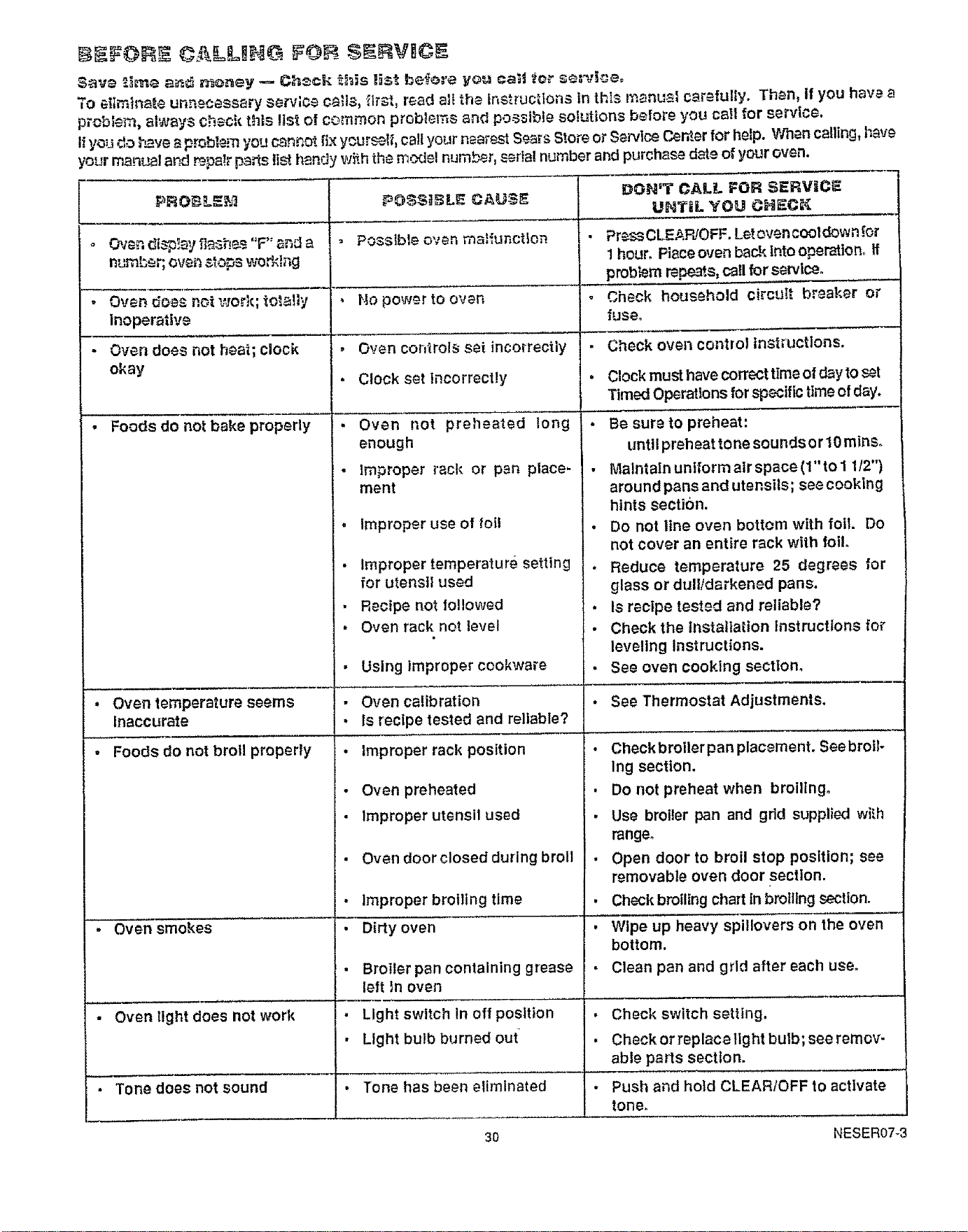
IIIFOIIII ALLI£1i F@I SI_INVICl
Say-_ _.i_e a_ _oney _ Ch_ck _his list befe:'e yo_ catg _o_ s__;_ice°
To et_inate un_;ecessary service ca!s, -lrst, read alt the tnstruclons in this manu_i carefully. Than, tf you have a
problem, always check this list of common problems and possible solutions before you call for service.
I_.you do ;',_vea probl_ you cannot {ix ycur_lf, call your nearest Sears Store or Service ('.enter for help. V_en calling, have
,our man_,_l aP_ _pa!r pa_s t_ handy wih the model number, _rta! number and purchase d_e of your oven.
Oven disi3!ay fla_he__."F" _nd a
num[;er; oven sto_s _,'ktag
Oven does not v.sork; tot_3ty
inoperativ_
Oven does not heat; clock
okay
, Foods do not bake properly
Oven temperature seems
Inaccurate
Foods do not brol properly
Oven smokes
Oven tight does not work
Tone does not sound
, Posslb_e oven rnsHunctton
, No power to oven
• Oven controls set incorrectly
• Clock set incorrectly
, Oven not preheated long
enough
• Improper rack or pen place-
ment
• Improper use of foil
• Improper temperature setting
for utensil used
• Rectpe not fo!lowed
• Oven rack not level
• Using improper cookware
• Oven calibration
• Is recipe tested and reliable?
• Improper rack position
• Oven preheated
• Improper utensil used
. Oven door closed during broil
• improper broiling time
• Dirty oven
Broiler pan containing grease
left tn oven
• Light switch In off position
, Light bulb burned out
• Tone has been eliminated
Do_,_,1rCAL_. FOR SERV_C5
UHTIL YOU CHEC_
• Pr-_sCLEARfOFF. Letovencooldown._or
1hour. Piece oven back into operation. If
problem repeats, call for service.
, Check household circuit breaker or
fuse°
,=
Check oven control instructlons,
Clockmust have correct time of day to set
Timed Operations for specific time of day.
• Be sure to preheat:
until preh eat tone sounds o r10 mine.
• Maintain uniform alr space (1" to I 1/2")
around pans and utensils; see cooking
hints section.
• Do not line oven bottom with foil. Do
not cover an entire rack with foil.
• Reduce temperature 25 degrees for
glass or dull/darkened pans.
• Is recipe tested and reliable?
• Check the Installation instructions for
leveling Instructions.
• See even cooking section.
See Thermostat Adjustments.
• Checkbroilerpan placement. See broil-
Ing section.
• Do not preheat when broiling°
• Use broiler pan and grid supplied wRh
range.
• Open door to broil stop position; see
removable oven door section.
• Check bmlling chart tn broiling section.
• Wipe up heavy spi!lovers on the oven
bottom.
• Clean pan and grid after each use.
Check switch setting.
Check or replace light bulb; see remov-
able parts section.
Push and hold CLEARtOFF to activate
tone.
3O NESER07-3
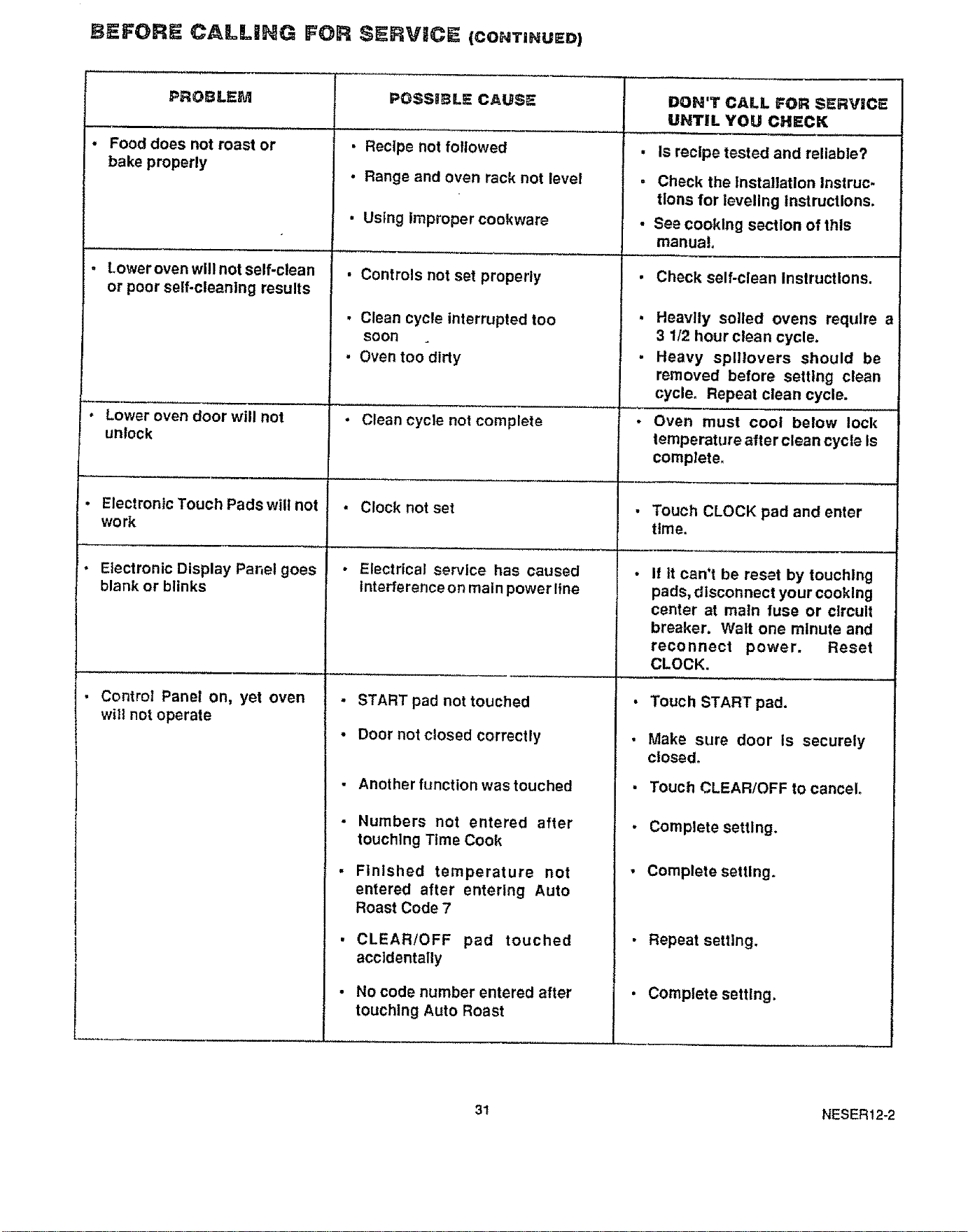
BEFORE CALLING FOR SERVICE (CONTINUED)
PROBLEM
• Food does not roast or
bake properly
. Loweroven will not self-clean
or poor self-cleaning results
Lower oven door will not
unlock
PO$SIIBL_ CAUSE DON'T CALL FOR SERVICE
UNTIL YOU CHECK
• Recipe not followed
• Range and oven rack not level
Using improper cookware
• Controls not set properly
• Clean cycle interrupted too
soon
• Oven too dirty
• Clean cycle not complete
Electronic Touch Pads will not • Clock not set
work
• Electrical service has caused
Interference on main power line
' • Electronic Display Panel goes
blank or blinks
. Control Panel on, yet oven
will not operate
• START pad not touched
• Door not Closed correctly
Another function was touched
Numbers not entered after
touching Time Cook
Finished temperature not
entered after entering Auto
Roast Code 7
CLEAR/OFF pad touched
accidentally
No code number entered after
touchlng Auto Roast
• Is recipe tested and reliable?
, Check the Installation Instruc.
tlons for leveling Instructions.
• See cooking section of this
manual
i
i
i
Check self-clean Instructions.
Heavily soiled ovens require a
3 1/2 hour clean cycle.
Heavy splllovers should be
removed before setting clean
cycle. Repeat clean cycle.
Oven must cool below lock
temperature after clean cycle Is
complete.
Touch CLOCK pad and enter
time.
If it can't be reset by touching
pads, disconnect your cooking
center at main fuse or circuit
breaker. Watt one minute and
reconnect power. Reset
CLOCK.
Touch START pad.
Make sure door is securely
closed_
Touch CLEAR/OFF to cancel.
Complete setting.
Complete setting.
• Repeat setting.
• Complete setting.
3! NESER12-2
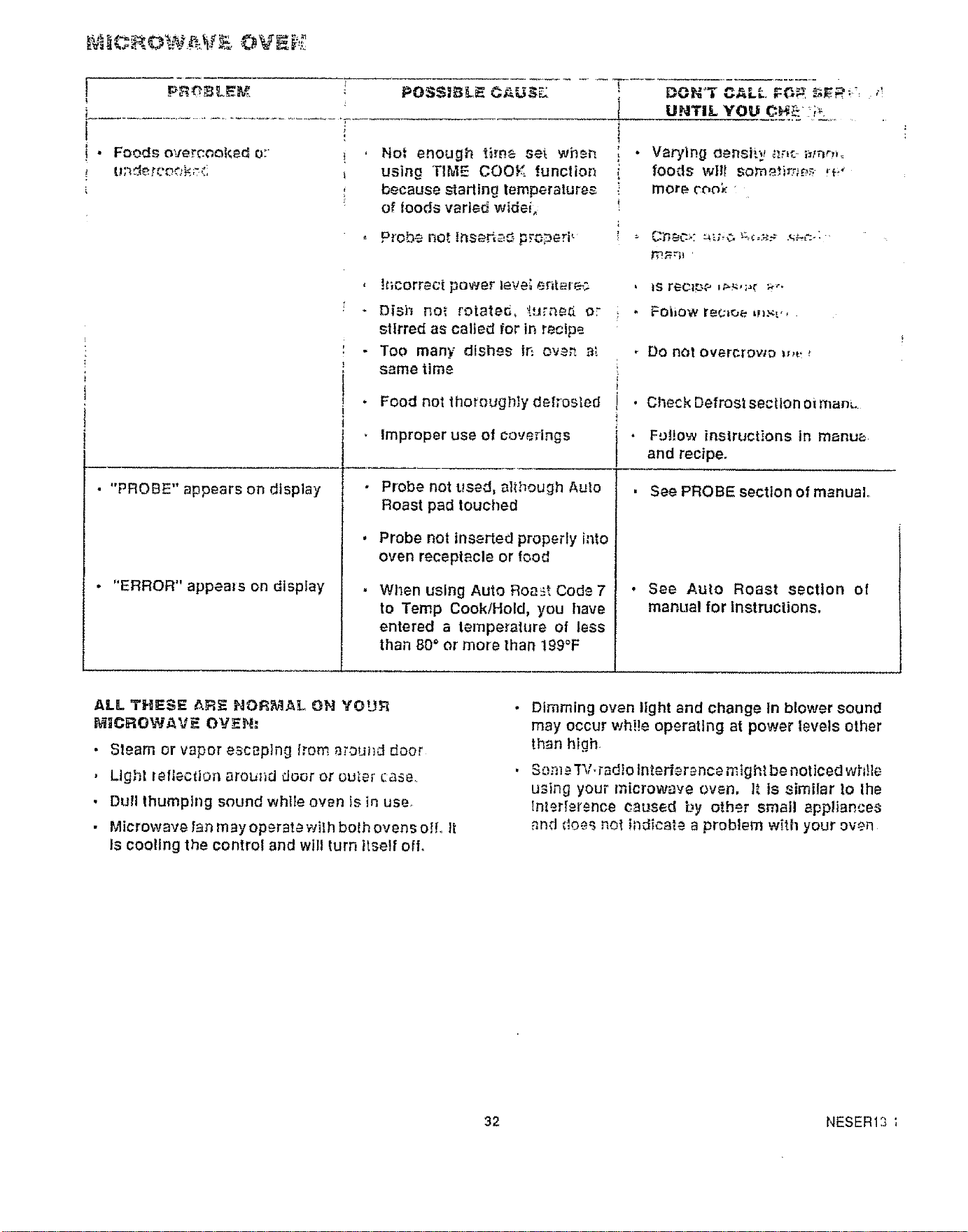
• Foods over_.ookedo;
POSSIBL_. CAU._
Not enough t_me se_ when
using "lIME COOK function
because starting lemperalure_
of ioods varied widei_
UNTIL YOU O_ ::_:_.
"- Probe Rot f,_s_L,=_,__....._e,i
• "PROBE" appears on display
"ERROR" appems on display
, !t;corract power tevei entare_
- Dish no_ rotate_, _.urne.d o_
stirred as called for in recipe
• Too many dishes lt_ ov_ a,'.
same time
Food notthoroughlydefrosled
Improper use of coverings
Probe not used, although Aulo
Roast pad touched
Probe not insertedpropeMy into
oven receptacleor food
Wl_en using Auto Roast Code 7
to Temp Cook/Hold, you have
entered a temperature of less
than BO" or more than 199°F
, Do notov_rcrowo _,_
, Check Defrost section oiman_.
. F'_!!ow instructions inmanua
and recipe.
• See PROBE section of manual
• See Auto Roast section of
manual for instructions,
ALL, THIES@{ AF:_ NORMAL ON YOUF_
I_iICROW.a,VF_OV_H:
• Slearnorvapor escaping [._oma_ound door
• Light _eflection around door or ouier case.
, Dull thumping sound while own Is in use.
• Microwave fan may operma wilh both ovens oil It
Is cooling the control and will turn Itself off.
Dimming oven light and change In blower sound
may occur wh!!e operating at power levels other
than hlgh.
Sore _"P,/,Fad}otnterfer ance mig hiba noticed wMle
using your microwave oven, It Is similar to lhe
tnl_rIersnce caused by other small appiiance_
_nd doe_ no_ Indicate a problem with your oven
32 NESER13
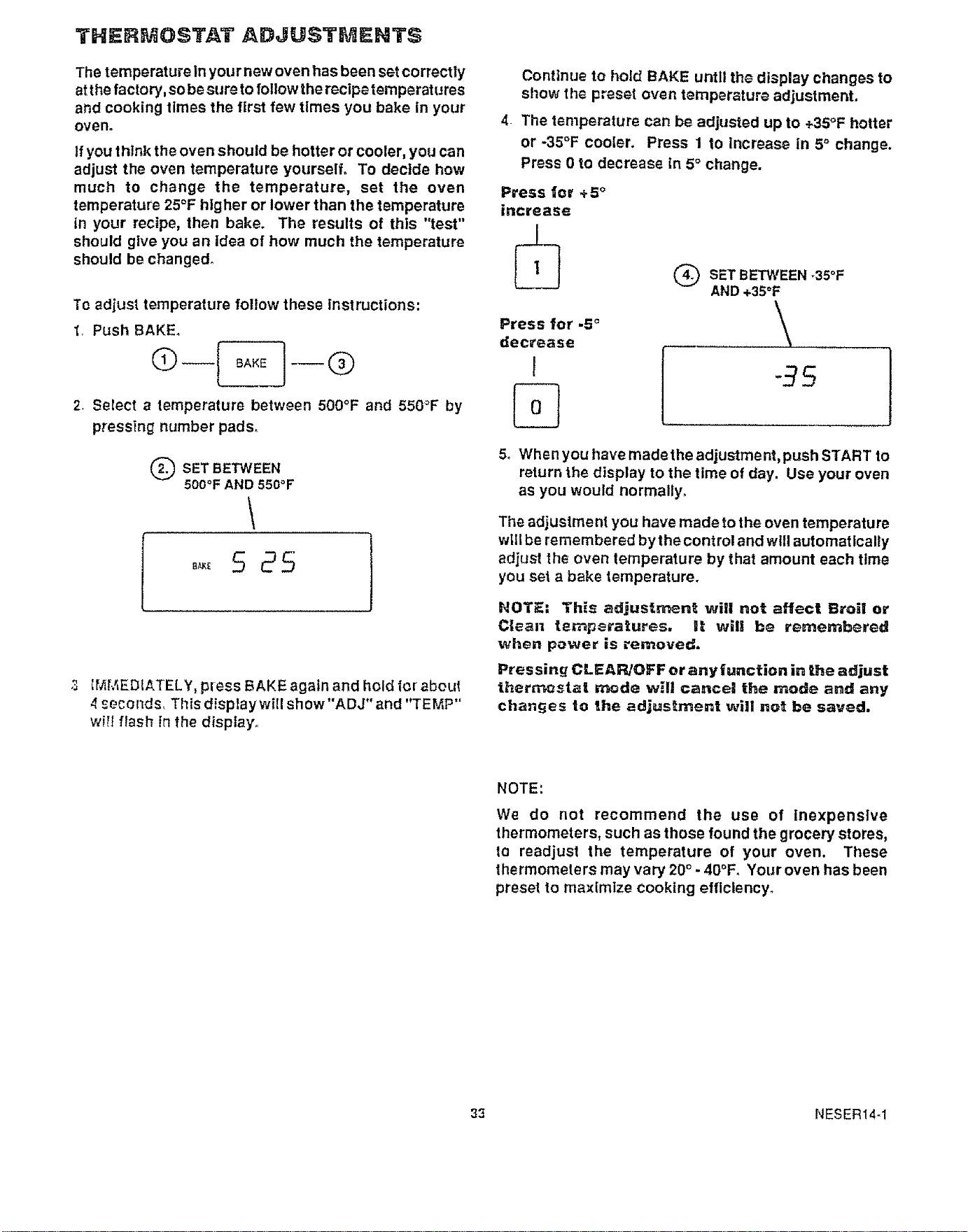
THERMOSTAT ADJUSTMENTS
The temperature in your new oven has been set correctly
at the factory, sobe sure to follow the recipetemperat ures
and cooking times the first few tlmes you bake in your
oven.
If you think the oven should be hotter or cooler, you can
adjust the oven temperature yourself° To decide how
much to change the temperature, set the oven
temperature 25°F higher or lower than the temperature
in your recipe, then bake. The results of this "test"
should give you an Idea of how much the temperature
should be changed_
Te adjust temperature follow these instructions:
1. Push BAKE.
2. Select a temperature between 500°F and 550"F by
pressing number pads.
Q SET BETWEEN
500°F AND 550°F
5 25
3 IMMEDIATELY, press BAKE again and hold for aboLd
4 seconds, This disptaywill show"ADJ" and "TEMP"
wiIi flash in fhe display.
Continue to hold BAKE untll the display changes to
show the preset oven temperature adjustment,
4. The temperature can be adjusted up to +35°F hotter
or -35°F cooler. Press 1 to increase in 5° change.
Press 0 to decrease In 5° change.
Press 1or +5 °
increase
Press for .5 _
decrease
J
Q SET BETWEEN-35°F
AND +35°F
\,
-95
5o When you have made the adjustment, push START to
return the display to the time of day. Use your oven
as you would normally.
The adjustment you have made to the oven temperature
w_llbe remembered by the control and will automatically
adjust the oven temperature by that amount each time
you set a bake temperature.
NOTE: Th_s adjustr_nt will not affect Broi! or
Clean temperatures, 1! will be remembered
when power is removed.
Pressing CLEAP_OFF or any function in the adjust
ther_stat mode will cancel the mode and any
chan_es to the adjustn3ent will not be saved.
NOTE:
We do not recommend the use of inexpensive
thermometers, such as those found the grocery stores,
to readjust the temperature of your oven. These
thermometers may vary 20° - 4O°F. Your oven has been
preset to maximize cooking efficiency.
33 NESERt4-1

34
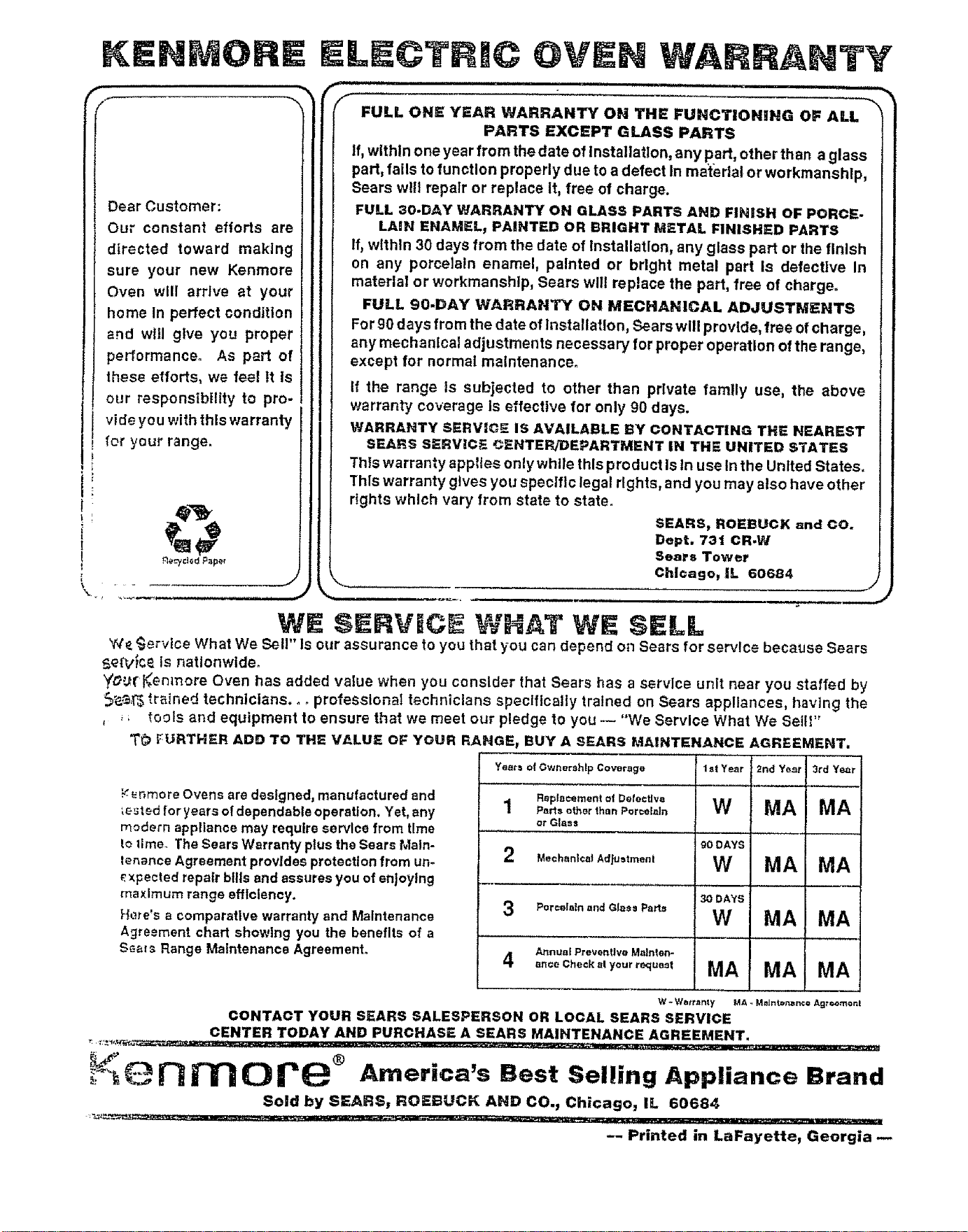
KENMOli E
Dear Customer:
Our constant efforts are
directed toward making
sure your new Kenmore
Oven will arrive at your
home In perfect condition
and will give you proper
performance. As p_rt of
these efforts, we feel It Is
our responsibility to pro-
vide you with this warranty
for your range.
E NTY
_-_ llllllll i
FULL ONE YEAR WARRANTY ON THE FUNCTIONgNG OF ALL
PARTS EXCEPT GLASS PARTS
If, within one year from the date of Installation, any part, other than aglass
part, fails to function properly due to a defect In ma'terlai or workmanship,
Sears w!|l repair or replace It, free of charge.
FULL 3e-DAY WARRANTY ON GLASS PARTS AND FINISH OF PORCE-
LAiN ENAMEL, PAINTED OR BRIGHT METAL FINISHED PARTS
If, wlthln 30 days from the date of Installation, any glass part or the finish
on any porcelain enamel, painted or brlght metal part Is defective In
materla! or workmanship, Sears will replace the part, free of charge.
FULL 90.DAY WARRANTY ON MECltANICAL ADJUSTMENTS
For90 days from the date ofInstallation, Sears will provide, free ofcharge,
any mechanical adjustments necessary for proper operation of the range,
except for normal malntenanceo
tf the range Is subjected to other than private family use, the above
warranty coverage Is effective for only g0 days.
WARRANTY SERVICE iS AVAILABLE BY CONTACTING THE NEAREST
SEARS SERVICE CENTER/DEPARTMENT IN THE UNITED STATES
This warranty applies onlywhile this product Is In use In the United States.
This warranty gives you specific legal rights, and you may also have other
rights which vary from state to state.
_ SEARS, ROEBUCK and CO.
Dept. 731 CR.W
_¢J_dP_p_, Sears Tower
Chicago, IL 60684
WE SERVICE WHAT SELL
We,_jervlce What We Sell" Is our assurance to you that you can depend on Sears for service because Sears
5ePv_c_ Is nationwide.
_Lr _-_enlnore Oven has added value when you consider that Sears has a service unit near you staffed by
_'e.._ _.rained technicians.., professional technicians specifically trained on Sears appliances, having the
, ,; tools and equipment to ensure that we meet our pledge to you _ "We Service What We Sell_"
T_ FURTHER ADD TO THE VALUE OF YOUR RANGE_ BUY A SEARS MAINTENANCE AGREEMENT.
Years of Gwnershlp Coverage 1st Year 2rid Year 3rd Ye,_r
_ _r_moreOvens are designed,manufacturedand ReplacementofDetecfJve
te_ted foryears of dependableoperation. Yet,any 1 .o.. ot.°r,,a°.erceleJ. W MA MA
or Glass
modern appliancemay requireservicefrom time
to lime. TheSearsWarranty plus the Sears Main- goDAYS
tenanceAgreementprovidesprotectionfrom un- 2 MechanicalA_fo.,.,a°, W MA MA
P.xpected repairbills andassuresyou ofenjoying .........................
maximum range efficiency. 3oDAYS
;'_ere'sa comparative warrantyand Maintenance 3 Po,cei°t°on_Glee°Pa.o W MA MA
Agreementchart showing you the benefits of a .................................
Annual Preventive Malnten-
Seal_ Range Maintenance Agreement. 4 o_ooC.o°.o,..r._o.o, MA MA MA
W - Watr_t n_,y MA ,*MeJntenzmce Agroomo_,!
CONTACT YOUR SEARS SALESPERSON OR LOCAL SEARS SERVICE
CENTER TODAY AND PURCHASE A SEARS MAINTENANCE AGREEMENT.
!<.-.
_"%_ _ J'_ 0 _e ® America's Best Selling Appliance Brand
Sold by SEARS, ROEt3UCK AND CO._ Chicago, IL 60684
-- Printed in LaFayette, Georgia