
OWNER’S MANUAL
LED LCD TV
Please read this manual carefully before operating the
set and retain it for future reference.
G2 Series
P/NO : SAC35474202 (1204-REV01)
www.lg.com
COVER

2
ENG
ENGLISH
TABLE OF CONTENTS
Table of Contents
4 BEFORE USE
4 LICENSES
5 IMPORTANTSAFETYINSTRUCTIONS
10 Viewing3DImaging
12 Unpacking
14 OptionalExtras
15 Partsandbuttons
16 RemoteControlFunctions
16 - Insertingbatteries
19 - RegisteringtheRemoteControl
19 - Howtousethezoomin/outgestures
19 - PrecautionstoTakewhenUsingthe
RemoteControl
20 INSTALLATION
20 LiftingandmovingtheTV
21 SettinguptheTV
21 - Attachingthestand
22 - Mountingonatable
23 - Mountingonawall
24 - Tidyingcables
25 CONNECTIONS
25 Connectingtoanantennaorcable
26 Networkconnection
26 - WirelessNetworkConnection
26 - WiredNetworkConnection
27 ConnectionOverview
28 ConnectingtoaHDreceiver,DVD,or
VCRplayer
28 - HDMIConnection
29 - DVItoHDMIConnection
30 - ComponentConnection
31 - CompositeConnection
32 ConnectingtoaPC
32 - HDMIConnection,DVItoHDMICon-
nectionorRGBConnection
34 ConnectingtoanAudioSystem
34 - DigitalOpticalAudioConnection
35 ConnectingtoaUSB
36 USING (BASIC)
36 TurningtheTVonforthefirsttime
36 SettingtheMode
37 AccessingHomeMenu
38 Settingupchannels
39 Checkingcurrentprograminfo
40 Adjustingaspectratio
41 Usingtheinputlist
42 Usingthecustomersupport
42 - TestingthePicture/Sound
42 - Usingtheproductorservice
information
43 APPLICATIONS
43 GoogleChrome
43 - Gettingstarted
43 - Browserwindows
44 - Bookmarks
44 - Safetyandsecuritysettings
44 - Advancedsettings
45 GooglePlay
45 - GettingStarted
45 - Howtodownloadorremoveapps
46 - Charges
46 - Returningapps
47 LiveTV
48 3DWorld
48 - Whenwatching3Dimaging
48 - Whenusing3DGlasses
48 - Viewing3DImaging
49 - Setting3DImaging
50 MediaPlayer
50 - Options
51 Netflix

3
ENG
ENGLISH
TABLE OF CONTENTS
51 Photos
52 Search
52 TV&Movies
53 YouTube
54 SETTINGS
54 TheMainMenus
55 - Network
55 - Videoinput
55 - Picture&sound
56 - Channelsetting
56 - 3Dsettings
56 - InputList
56 - Search
56 - Applications
56 - Language&inputdevices
57 - Accounts&sync
57 - Privacy&safety
58 - Storage
58 - Date,time&location
59 - Accessibility
59 - Option
59 - About
60 APPENDIX
60 UpdatingtheTVsystem
61 CleaningYourTV
61 - Screen,frame,cabinetandstand
61 - Powercord
61 Preventing“Imageburn”or“Burn-in”on
yourTVscreen
62 IRBlasterGuide
63 - IRCodelist(bybrandname)
68 Troubleshooting
70 Specifications
75 OpenSourceSoftwareNotice
76 PrivacyNoticefortheGoogleTV
77 GoogleTVSafety

4
ENG
ENGLISH
Before Use
ManufacturedunderlicensefromDolbyLaboratories.“Dolby”andthedouble-D
symbolaretrademarksofDolbyLaboratories.
HDMI,theHDMIlogoandHigh-DefinitionMultimediaInterfacearetrademarksor
registeredtrademarksofHDMILicensingLLC.
ManufacturedunderlicenseunderU.S.PatentNos:5,956,674;5,974,380;
6,487,535&otherU.S.andworldwidepatentsissued&pending.DTS,theSymbol
&DTSandtheSymboltogetherareregisteredtrademarks&DTS2.0+Digital
OutisatrademarkofDTS,Inc.Productincludessoftware.©DTS,Inc.AllRights
Reserved.
BEFORE USE
LICENSES
Supportedlicensesmaydifferbymodel.Formoreinformationaboutlicenses,visitwww.lg.com.
ImageshownmaydifferfromyourTV.
YourTV'sOSD(OnScreenDisplay)maydifferslightlyfromthatshowninthismanual.
NOTE
5
ENG
ENGLISH
Before Use
IMPORTANT SAFETY INSTRUCTIONS
Alwayscomplywiththefollowingprecautionstoavoiddangeroussituationsandensurepeakperformance
ofyourproduct.
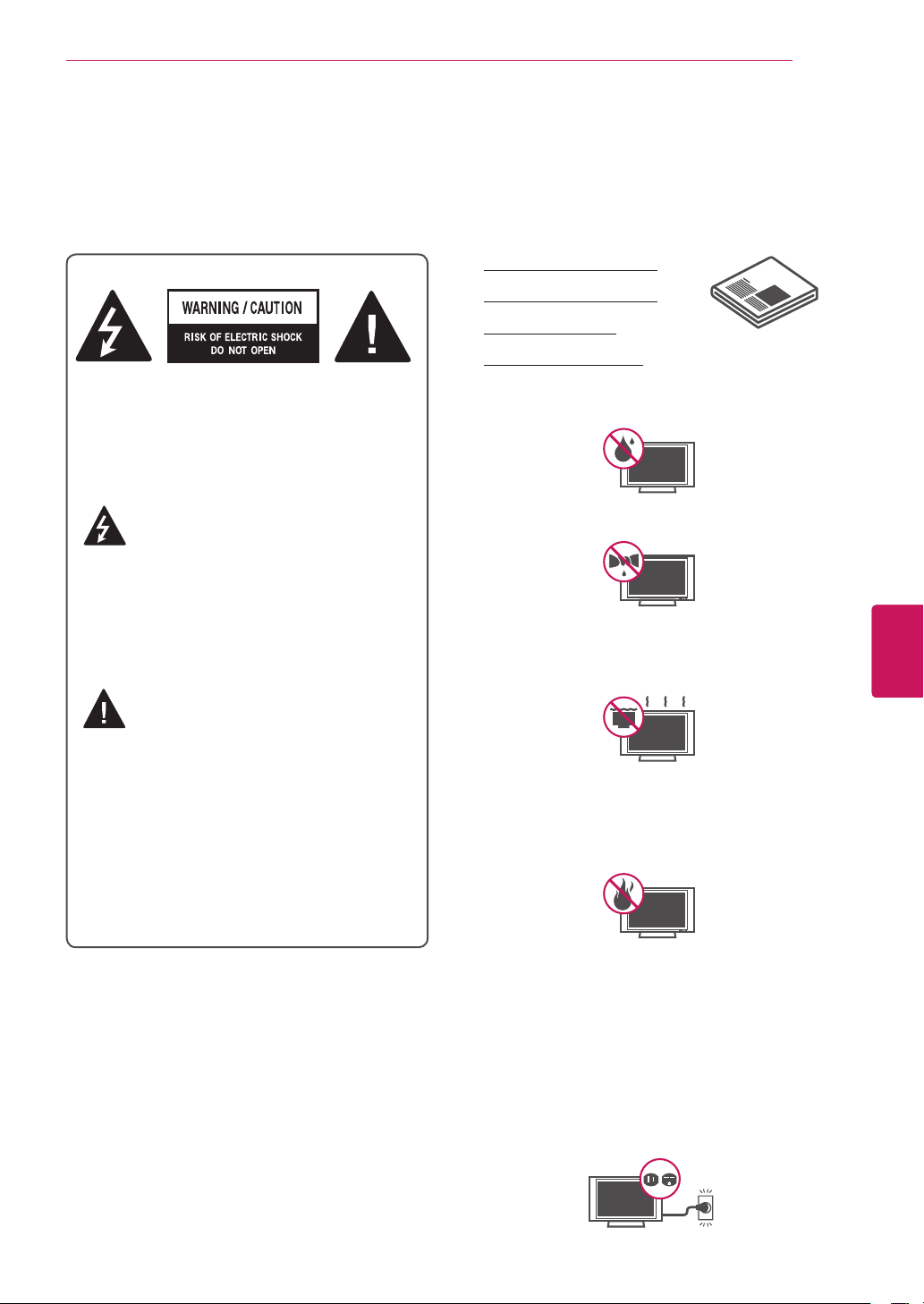
TOREDUCETHERISKOFELECTRIC
SHOCKDONOTREMOVECOVER(OR
BACK).NOUSERSERVICEABLEPARTS
INSIDE.REFERTOQUALIFIEDSERVICE
PERSONNEL.
Thelightningflashwitharrowhead
symbol,withinanequilateraltriangle,
isintendedtoalerttheusertothe
presenceofuninsulated“dangerousvoltage”
withintheproduct’senclosurethatmaybe
ofsufficientmagnitudetoconstituteariskof
electricshocktopersons.
Theexclamationpointwithinan
equilateraltriangleisintendedtoalert
theusertothepresenceofimportant
operatingandmaintenance(servicing)
instructionsintheliteratureaccompanying
theappliance.
WARNING/CAUTION
- TOREDUCETHERISKOFFIREAND
ELECTRICSHOCK,DONOTEXPOSETHIS
PRODUCTTORAINORMOISTURE.
Readtheseinstructions.
Keeptheseinstructions.
Heedallwarnings.
Followallinstructions.
Donotusethisapparatusnearwater.
Antenna Lead in Wire
Antenna Discharge Unit
(NEC Section 810-20)
Grounding Conductor
(NEC Section 810-21)
Ground Clamps
Power Service Grounding
Electrode System
(NEC Art 250, Part H)
Short-circuit Breaker
Power Supply
NEC: National Electrical Code
Cleanonlywithadrycloth.
Antenna Lead in Wire
Antenna Discharge Unit
(NEC Section 810-20)
Grounding Conductor
(NEC Section 810-21)
Ground Clamps
Power Service Grounding
Electrode System
(NEC Art 250, Part H)
Short-circuit Breaker
Power Supply
NEC: National Electrical Code
Donotblockanyventilationopenings.Install
inaccordancewiththemanufacturer’s
instructions.
Antenna Lead in Wire
Antenna Discharge Unit
(NEC Section 810-20)
Grounding Conductor
(NEC Section 810-21)
Ground Clamps
Power Service Grounding
Electrode System
(NEC Art 250, Part H)
Short-circuit Breaker
Power Supply
NEC: National Electrical Code
Donotinstallnearanyheatsourcessuch
asradiators,heatregisters,stoves,orother
apparatus(includingamplifiers)thatproduce
heat.
Antenna Lead in Wire
Antenna Discharge Unit
(NEC Section 810-20)
Grounding Conductor
(NEC Section 810-21)
Ground Clamps
Power Service Grounding
Electrode System
(NEC Art 250, Part H)
Short-circuit Breaker
Power Supply
NEC: National Electrical Code
Donotdefeatthesafetypurposeofthe
polarizedorgrounding-typeplug.Apolarized
plughastwobladeswithonewiderthanthe
other.Agroundingtypeplughastwoblades
andathirdgroundingprong.Thewideblade
orthethirdprongareprovidedforyoursafety.
Iftheprovidedplugdoesnotfitintoyour
outlet,consultanelectricianforreplacement
oftheobsoleteoutlet(Candifferbycountry).
Antenna Lead in Wire
Antenna Discharge Unit
(NEC Section 810-20)
Grounding Conductor
(NEC Section 810-21)
Ground Clamps
Power Service Grounding
Electrode System
(NEC Art 250, Part H)
Short-circuit Breaker
Power Supply
NEC: National Electrical Code
Antenna Lead in Wire
Antenna Discharge Unit
(NEC Section 810-20)
Grounding Conductor
(NEC Section 810-21)
Ground Clamps
Power Service Grounding
Electrode System
(NEC Art 250, Part H)
Short-circuit Breaker
Power Supply
NEC: National Electrical Code
6
ENG
ENGLISH
Before Use
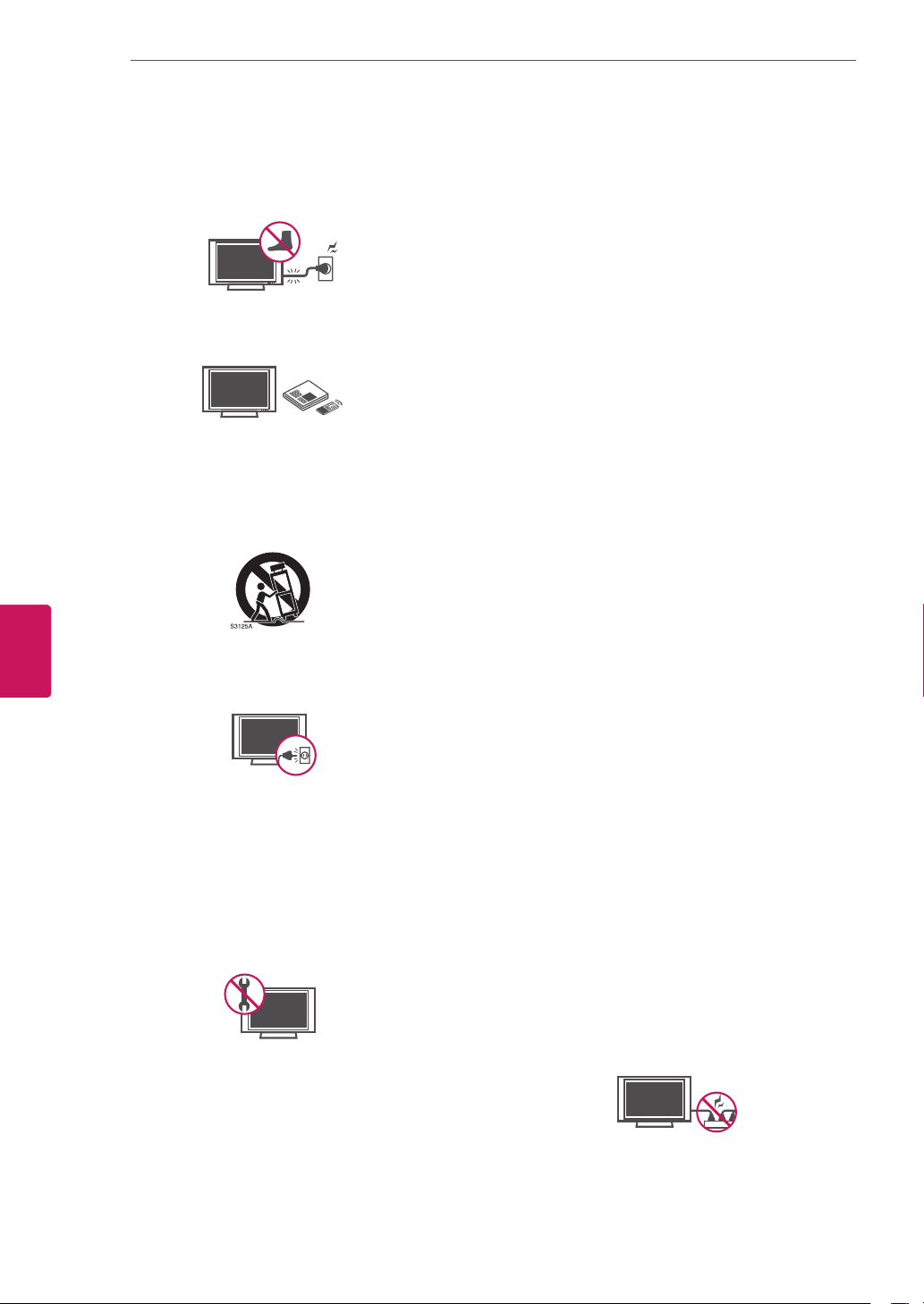
Protectthepowercordfrombeingwalkedon
orpinchedparticularlyatplugs,convenience
receptacles,andthepointwheretheyexit
fromtheapparatus.
Antenna Lead in Wire
Antenna Discharge Unit
(NEC Section 810-20)
Grounding Conductor
(NEC Section 810-21)
Ground Clamps
Power Service Grounding
Electrode System
(NEC Art 250, Part H)
Short-circuit Breaker
Power Supply
NEC: National Electrical Code
Onlyuseattachments/accessoriesspecified
bythemanufacturer.
Antenna Lead in Wire
Antenna Discharge Unit
(NEC Section 810-20)
Grounding Conductor
(NEC Section 810-21)
Ground Clamps
Power Service Grounding
Electrode System
(NEC Art 250, Part H)
Short-circuit Breaker
Power Supply
NEC: National Electrical Code
Useonlywithacart,stand,tripod,bracket,
ortablespecifiedbythemanufacturer,or
soldwiththeapparatus.Whenacartisused,
usecautionwhenmovingthecart/apparatus
combinationtoavoidinjuryfromtip-over.
Antenna Lead in Wire
Antenna Discharge Unit
(NEC Section 810-20)
Grounding Conductor
(NEC Section 810-21)
Ground Clamps
Power Service Grounding
Electrode System
(NEC Art 250, Part H)
Short-circuit Breaker
Power Supply
NEC: National Electrical Code
Unplugthisapparatusduringlightning
stormsorwhenunusedforlongperiodsof
time.
Antenna Lead in Wire
Antenna Discharge Unit
(NEC Section 810-20)
Grounding Conductor
(NEC Section 810-21)
Ground Clamps
Power Service Grounding
Electrode System
(NEC Art 250, Part H)
Short-circuit Breaker
Power Supply
NEC: National Electrical Code
Referallservicingtoqualifiedservice
personnel.Servicingisrequiredwhen
theapparatushasbeendamagedinany
way,suchaspower-supplycordorplugis
damaged,liquidhasbeenspilledorobjects
havefallenintotheapparatus,theapparatus
hasbeenexposedtorainormoisture,does
notoperatenormally,orhasbeendropped.
Antenna Lead in Wire
Antenna Discharge Unit
(NEC Section 810-20)
Grounding Conductor
(NEC Section 810-21)
Ground Clamps
Power Service Grounding
Electrode System
(NEC Art 250, Part H)
Short-circuit Breaker
Power Supply
NEC: National Electrical Code
Nevertouchthisapparatusorantennaduring
athunderorlightningstorm.
WhenmountingaTVonthewall,makesure
nottoinstalltheTVbyhangingthepower
andsignalcablesonthebackoftheTV.
Donotallowanimpactshockoranyobjects
tofallintotheproduct,anddonotdrop
anythingontothescreen.
Keepthepackinganti-moisturematerialor
vinylpackingoutofthereachofchildren.
Anti-moisturematerialisharmfulif
swallowed.Ifswallowedbymistake,force
thepatienttovomitandvisitthenearest
hospital.Additionally,vinylpackingcan
causesuffocation.Keepitoutofthereachof
children.
CAUTIONconcerningthePowerCord
(Candifferbycountry):
Itisrecommendedthatappliancesbe
placeduponadedicatedcircuit;thatis,a
singleoutletcircuitwhichpowersonlythat
applianceandhasnoadditionaloutletsor
branchcircuits.Checkthespecificationpage
ofthisowner’smanualtobecertain.Donot
connecttoomanyappliancestothesame
ACpoweroutletasthiscouldresultinfireor
electricshock.Donotoverloadwalloutlets.
Overloadedwalloutlets,looseordamaged
walloutlets,extensioncords,frayedpower
cords,ordamagedorcrackedwireinsulation
aredangerous.Anyoftheseconditionscould
resultinelectricshockorfire.Periodically
examinethecordofyourappliance,and
ifitsappearanceindicatesdamageor
deterioration,unplugit,discontinueuseof
theappliance,andhavethecordreplaced
withanexactreplacementpartbyan
authorizedservice.Protectthepowercord
fromphysicalormechanicalabuse,suchas
beingtwisted,kinked,pinched,closedina
door,orwalkedupon.Payparticularattention
toplugs,walloutlets,andthepointwhere
thecordexitstheappliance.Donotmove
theTVwiththepowercordpluggedin.Do
notuseadamagedorloosepowercord.Be
suredograsptheplugwhenunpluggingthe
powercord.Donotpullonthepowercord
tounplugtheTV.
Antenna Lead in Wire
Antenna Discharge Unit
(NEC Section 810-20)
Grounding Conductor
(NEC Section 810-21)
Ground Clamps
Power Service Grounding
Electrode System
(NEC Art 250, Part H)
Short-circuit Breaker
Power Supply
NEC: National Electrical Code
Donotstickmetalobjectsoranyother
conductivematerialintothepowercord.Do
nottouchtheendofthepowercordwhileit
ispluggedin.
7
ENG
ENGLISH
Before Use
Warning
-Toreducetheriskoffireor
electricalshock,donotexposethisproduct
torain,moistureorotherliquids.Donot
touchtheTVwithwethands.Donotinstall
thisproductnearflammableobjectssuch
asgasolineorcandles,orexposetheTVto
directairconditioning.
Antenna Lead in Wire
Antenna Discharge Unit
(NEC Section 810-20)
Grounding Conductor
(NEC Section 810-21)
Ground Clamps
Power Service Grounding
Electrode System
(NEC Art 250, Part H)
Short-circuit Breaker
Power Supply
NEC: National Electrical Code
Donotexposetodrippingorsplashingand
donotplaceobjectsfilledwithliquids,such
asvases,cups,etc.onorovertheapparatus
(e.g.onshelvesabovetheunit).
Antenna Lead in Wire
Antenna Discharge Unit
(NEC Section 810-20)
Grounding Conductor
(NEC Section 810-21)
Ground Clamps
Power Service Grounding
Electrode System
(NEC Art 250, Part H)
Short-circuit Breaker
Power Supply
NEC: National Electrical Code
Grounding
(Exceptfordeviceswhicharenotgrounded.)
Ensurethatyouconnecttheearthground
wiretopreventpossibleelectricshock
(i.e.aTVwithathree-pronggroundedAC
plugmustbeconnectedtoathree-prong
groundedACoutlet).Ifgroundingmethods
arenotpossible,haveaqualifiedelectrician
installaseparatecircuitbreaker.Donottryto
groundtheunitbyconnectingittotelephone
wires,lighteningrods,orgaspipes.
Antenna Lead in Wire
Antenna Discharge Unit
(NEC Section 810-20)
Grounding Conductor
(NEC Section 810-21)
Ground Clamps
Power Service Grounding
Electrode System
(NEC Art 250, Part H)
Short-circuit Breaker
Power Supply
NEC: National Electrical Code
DISCONNECTING DEVICE FROM MAINS
Mainsplugisthedisconnectingdevice.The
plugmustremainreadilyoperable.
AslongasthisunitisconnectedtotheAC
walloutlet,itisnotdisconnectedfromthe
ACpowersourceeveniftheunitisturned
off.
Donotattempttomodifythisproductinany
waywithoutwrittenauthorizationfromLG
Electronics.Unauthorizedmodificationcould
voidtheuser’sauthoritytooperatethis
product.
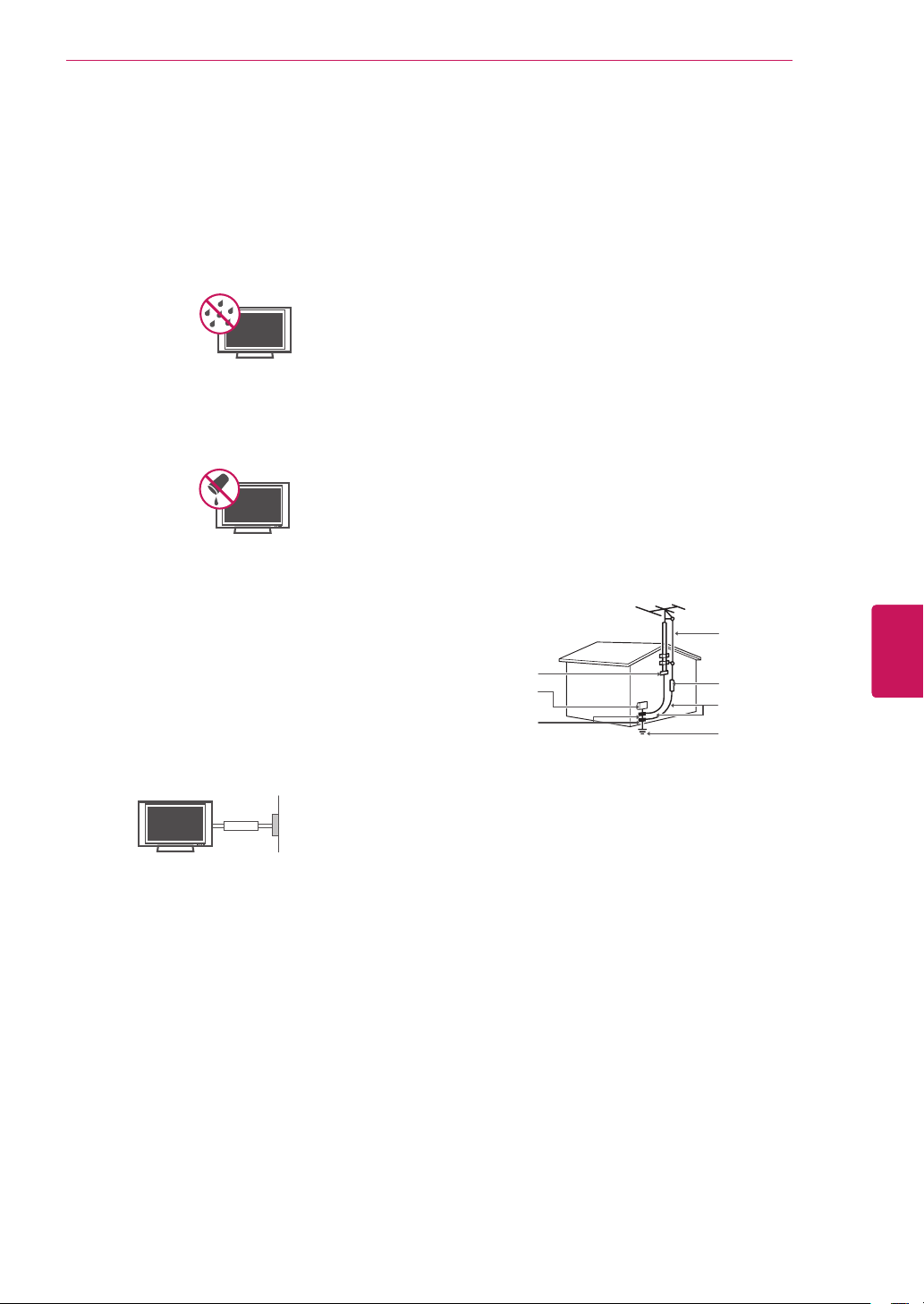
ANTENNAS Outdoor antenna grounding
(Candifferbycountry):
Ifanoutdoorantennaisinstalled,follow
theprecautionsbelow.Anoutdoorantenna
systemshouldnotbelocatedinthevicinity
ofoverheadpowerlinesorotherelectriclight
orpowercircuits,orwhereitcancomein
contactwithsuchpowerlinesorcircuitsas
deathorseriousinjurycanoccur.Besurethe
antennasystemisgroundedsoastoprovide
someprotectionagainstvoltagesurges
andbuilt-upstaticcharges.Section810of
theNationalElectricalCode(NEC)inthe
U.S.A.providesinformationwithrespectto
propergroundingofthemastandsupporting
structure,groundingofthelead-inwireto
anantennadischargeunit,sizeofgrounding
conductors,locationofantennadischarge
unit,connectiontogroundingelectrodesand
requirementsforthegroundingelectrode.
Antenna grounding according to the National
Electrical Code, ANSI/NFPA 70
Antenna Lead in Wire
Antenna Discharge Unit
(NEC Section 810-20)
Grounding Conductor
(NEC Section 810-21)
Ground Clamps
Power Service Grounding
Electrode System
(NEC Art 250, Part H)
Short-circuit Breaker
Power Supply
NEC: National Electrical Code
NEC:NationalElectricalCode
GroundClamp
AntennaLeadinWire
AntennaDischargeUnit
(NECSection810-20)
GroundingConductor
(NECSection810-21)
PowerServiceGrounding
ElectrodeSystem
(NECArt250,PartH)
ElectricService
Equipment
GroundClamp
Cleaning
Whencleaning,unplugthepowercordand
wipegentlywithasoftclothtoprevent
scratching.Donotspraywaterorother
liquidsdirectlyontheTVaselectricshock
mayoccur.Donotcleanwithchemicals
suchasalcohol,thinnersorbenzine.
Moving
Makesuretheproductisturnedoff,
unpluggedandallcableshavebeen
removed.Itmaytake2ormorepeopleto
carrylargerTVs.Donotpressorputstress
onthefrontpaneloftheTV.
Ventilation
InstallyourTVwherethereisproper
ventilation.Donotinstallinaconfined
spacesuchasabookcase.Donotcoverthe
productwithclothorothermaterialswhile
plugged.Donotinstallinexcessivelydusty
places.

8
ENG
ENGLISH
Before Use
Ifyousmellsmokeorotherodorscoming
fromtheTV,unplugthepowercordand
contactanauthorizedservicecenter.
Donotpressstronglyuponthepanelwith
yourhandorasharpobjectsuchasanail,
pencilorpen,ormakeascratchonit.
Keeptheproductawayfromdirectsunlight.
Antenna Lead in Wire
Antenna Discharge Unit
(NEC Section 810-20)
Grounding Conductor
(NEC Section 810-21)
Ground Clamps
Power Service Grounding
Electrode System
(NEC Art 250, Part H)
Short-circuit Breaker
Power Supply
NEC: National Electrical Code
Dot Defect
ThePlasmaorLCDpanelisahigh
technologyproductwithresolutionoftwo
milliontosixmillionpixels.Inaveryfew
cases,youcouldseefinedotsonthescreen
whileyou’reviewingtheTV.Thosedots
aredeactivatedpixelsanddonotaffectthe
performanceandreliabilityoftheTV.
Generated Sound
“Cracking”noise:Acrackingnoisethat
occurswhenwatchingorturningofftheTV
isgeneratedbyplasticthermalcontraction
duetotemperatureandhumidity.Thisnoise
iscommonforproductswherethermal
deformationisrequired.
Electricalcircuithumming/panelbuzzing:A
lowlevelnoiseisgeneratedfromahigh-
speedswitchingcircuit,whichsuppliesa
largeamountofcurrenttooperateaproduct.
Itvariesdependingontheproduct.
Thisgeneratedsounddoesnotaffectthe
performanceandreliabilityoftheproduct.
Takecarenottotouchtheventilation
openings.WhenwatchingtheTVforalong
period,theventilationopeningsmaybecome
hot.Thisdoesnotaffecttheperformanceof
theproductorcausedefectsintheproduct.
IftheTVfeelscoldtothetouch,theremay
beasmall“flicker”whenitisturnedon.This
isnormal,thereisnothingwrongwithTV.
Someminutedotdefectsmaybevisibleon
thescreen,appearingastinyred,green,or
bluespots.However,theyhavenoadverse
effectontheTV’sperformance.Avoid
touchingtheLCDscreenorholdingyour
finger(s)againstitforlongperiodsoftime.
Doingsomayproducesometemporary
distortioneffectsonthescreen.
Network
ForseamlessinternetstreamingLG
recommendsastable4Mbpsbroadband
speedand1.5Mbpsasaminimum.
DISPOSAL (Hg lamp only used in LCD TVs)
Thefluorescentlampusedinthisproductcontains
asmallamountofmercury.Donotdisposeofthis
productwithgeneralhouseholdwaste.Disposalof
thisproductmustbecarriedoutinaccordanceto
theregulationsofyourlocalauthority.
NOTE TO CABLE/TV INSTALLER
ThisreminderisprovidedtocalltheCATVsystem
installer’sattentiontoArticle820-40ofthe
NationalElectricCode(U.S.A.).Thecodeprovides
guidelinesforpropergroundingand,inparticular,
specifiesthatthecablegroundshallbeconnected
tothegroundingsystemofthebuilding,asclose
tothepointofthecableentryaspractical.

9
ENG
ENGLISH
Before Use
FCC NOTICE
Thisequipmenthasbeentestedandfoundto
complywiththelimitsforaClassBdigitaldevice,
pursuanttoPart15oftheFCCRules.Theselimits
aredesignedtoprovidereasonableprotection
againstharmfulinterferenceinaresidential
installation.Thisequipmentgenerates,uses
andcanradiateradiofrequencyenergyand,if
notinstalledandusedinaccordancewiththe
instructions,maycauseharmfulinterference
toradiocommunications.However,thereisno
guaranteethatinterferencewillnotoccurina
particularinstallation.Ifthisequipmentdoes
causeharmfulinterferencetoradioortelevision
reception,whichcanbedeterminedbyturningthe
equipmentoffandon,theuserisencouragedto
trytocorrecttheinterferencebyoneormoreof
thefollowingmeasures:
-Reorientorrelocatethereceivingantenna.
-Increasetheseparationbetweenthe
equipmentandthereceiver.
-Connecttheequipmenttoanoutleton
acircuitdifferentfromthattowhichthe
receiverisconnected.
-Consultthedealeroranexperiencedradio/TV
technicianforhelp.
Thisdevicecomplieswithpart15oftheFCC
Rules.Operationissubjecttothefollowingtwo
conditions:(1)thisdevicemaynotcauseharmful
interferenceand(2)thisdevicemustacceptany
interferencereceived,includinginterferencethat
maycauseundesiredoperationofthedevice.
Anychangesormodificationsinconstructionof
thisdevicewhicharenotexpresslyapprovedby
thepartyresponsibleforcompliancecouldvoid
theuser’sauthoritytooperatetheequipment.
NOTE TO CABLE/TV INSTALLER
ThisreminderisprovidedtocalltheCATVsystem
installer’sattentiontoArticle820-40ofthe
NationalElectricCode(U.S.A.).Thecodeprovides
guidelinesforpropergroundingand,inparticular,
specifiesthatthecablegroundshallbeconnected
tothegroundingsystemofthebuilding,asclose
tothepointofthecableentryaspractical.

10
ENG
ENGLISH
Before Use
Viewing 3D Imaging
WARNING
Viewing Environment
ViewingTime
-Whenwatching3Dcontents,take5-15minutebreakseveryhour.Viewing3Dcontentsforalong
periodoftimemaycauseheadache,dizziness,fatigueoreyestrain.
Those that have a photosensitive seizure or chronic illness
Someusersmayexperienceaseizureorotherabnormalsymptomswhentheyareexposedtoa
flashinglightorparticularpatternfrom3Dcontents.
Donotwatch3Dvideosifyoufeelnausea,arepregnantand/orhaveachronicillnesssuchas
epilepsy,cardiacdisorder,orbloodpressuredisease,etc.
3DContentsarenotrecommendedtothosewhosufferfromstereoblindnessorstereoanomaly.
Doubleimagesordiscomfortinviewingmaybeexperienced.
Ifyouhavestrabismus(cross-eyed),amblyopia(weakeyesight)orastigmatism,youmayhavetrouble
sensingdepthandeasilyfeelfatigueduetodoubleimages.Itisadvisedtotakefrequentbreaksthan
theaverageadult.
Ifyoureyesightvariesbetweenyourrightandlefteye,reviseyoureyesightpriortowatching3D
contents.
Symptoms which require discontinuation or refraining from watching 3D contents
Donotwatch3Dcontentswhenyoufeelfatiguefromlackofsleep,overworkordrinking.
Whenthesesymptomsareexperienced,stopusing/watching3Dcontentsandgetenoughrestuntil
thesymptomsubsides.
-Consultyourdoctorwhenthesymptomspersist.Symptomsmayincludeheadache,eyeballpain,
dizziness,nausea,palpitation,blurriness,discomfort,doubleimage,visualinconvenienceorfatigue.

11
ENG
ENGLISH
Before Use
CAUTION
Viewing Environment
ViewingDistance
-Maintainadistanceofatleasttwicethescreendiagonallengthwhenwatching3Dcontents.Ifyou
feeldiscomfortinviewing3Dcontents,movefurtherawayfromtheTV.
Viewing Age
Infants/Children
-Usage/Viewing3Dcontentsforchildrenundertheageof5areprohibited.
-Childrenundertheageof10mayoverreactandbecomeoverlyexcitedbecausetheirvisionisin
development(forexample:tryingtotouchthescreenortryingtojumpintoit.Specialmonitoringand
extraattentionisrequiredforchildrenwatching3Dcontents.
-Childrenhavegreaterbinoculardisparityof3Dpresentationsthanadultsbecausethedistance
betweentheeyesisshorterthanoneofadults.Thereforetheywillperceivemorestereoscopicdepth
comparedtoadultsforthesame3Dimage.
Teenagers
-Teenagersundertheageof19maybestimulatedtolightcomingfrom3Dvideos.Advisethemnotto
watch3Dvideosforalongtimewhentheyaretired.
Elderly
-Theelderlymayperceivelessofa3Deffectthantheyouth.DonotsitclosertotheTVthanthe
recommendeddistance.
Cautions when using the 3D glasses
MakesuretouseLG3Dglasses.Otherwise,youmaynotbeabletoview3Dvideosproperly.
Donotuse3Dglassesinsteadofyournormalglasses,sunglassesorprotectivegoggles.
Usingmodified3Dglassesmaycauseeyestrainorimagedistortion.
Donotkeepyour3Dglassesinextremelyhighorlowtemperatures.Itwillcausedeformation.
The3Dglassesarefragileandareeasytobescratched.Alwaysuseasoft,cleanpieceofclothwhen
wipingthelenses.Donotscratchthelensesofthe3Dglasseswithsharpobjectsorclean/wipe
themwithchemicals.
12
ENG
ENGLISH
Before Use
Unpacking
Checkyourproductboxforthefollowingitems.Ifthereareanymissingaccessories,contactthelocal
dealerwhereyoupurchasedyourproduct.Theillustrationsinthismanualmaydifferfromtheactual
productanditem.
Theitemssuppliedwithyourproductmayvarydependingonthemodel.
Productspecificationsorcontentsofthismanualmaybechangedwithoutpriornoticedueto
upgradeofproductfunctions.
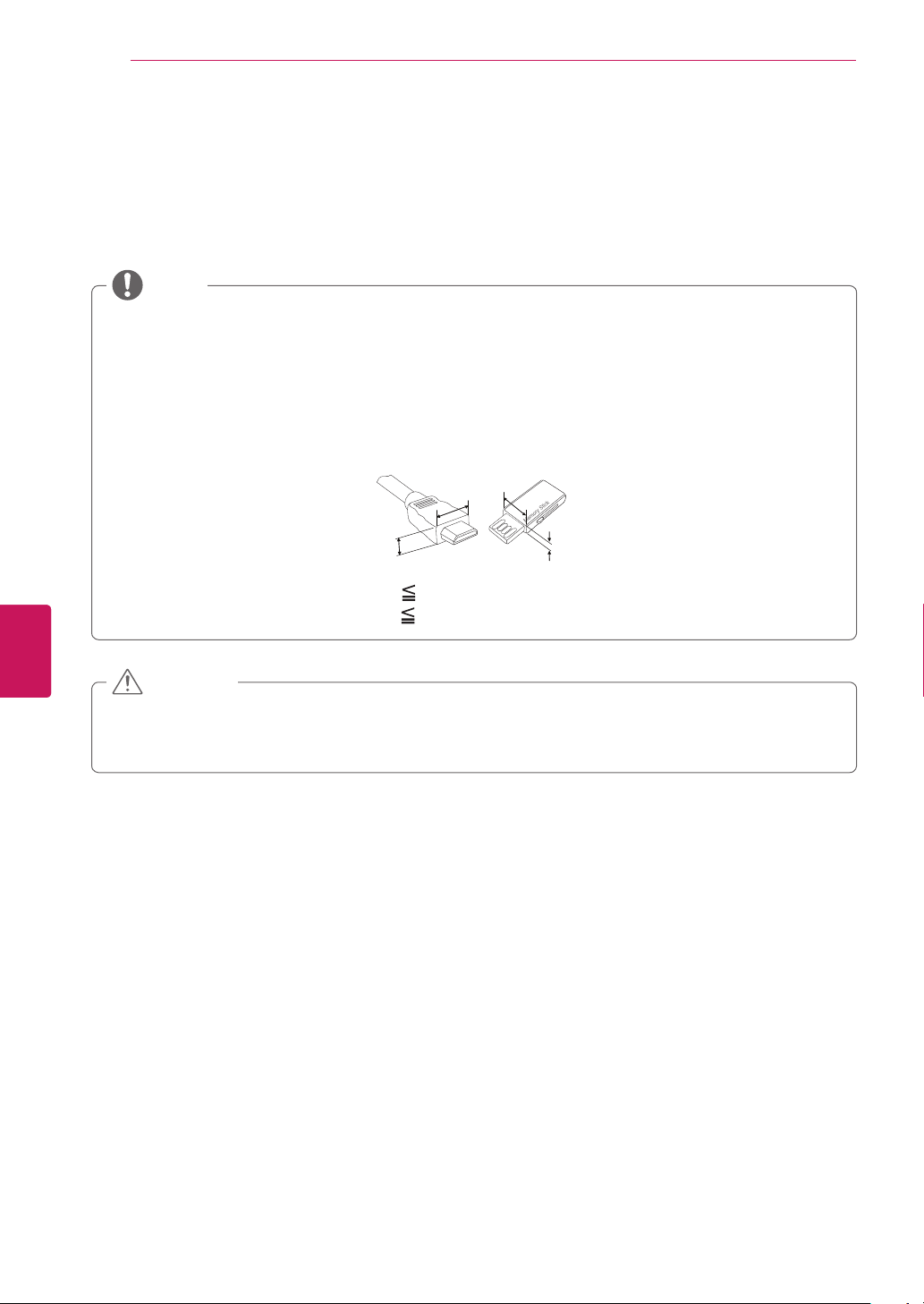
Foranoptimalconnection,HDMIcablesandUSBdevicesshouldhavebezelslessthan10mm(0.39
inches)thickand18mm(0.7inches)width.
UseanextensioncablethatsupportsUSB2.0iftheUSBcableorUSBmemorystickdoesnotfit
intoyourTV'sUSBport.
B
A
A
B
*A 10 mm (0.39 inches)
*B
18 mm (0.7 inches)
NOTE
Donotuseanyunapproveditemstoensurethesafetyandproductlifespan.
Anydamagesorinjuriesbyusingunapproveditemsarenotcoveredbythewarranty.
Incaseofsomemodel,thethinfilmonscreenisapartofTV,Sodon’ttakeitoff.
CAUTION

13
ENG
ENGLISH
Before Use
QWERTY Remote Control,
Batteries (AA)
(Seep.16)
Owner’s manual,
CD manual
Power Cord
Cinema 3D Glasses
(Dependingonmodel)
Stand Body
(Seep.21)
Stand Base
(Seep.21)
Stand Screws
8EA,M4x20
(Seep.21)
Wall mount inner spacers
4EA
Cable holder
(Seep.24)
Component video cable
(Seep.30)
Composite video cable
(Seep.30,p.31)
Polishing cloth
(Dependingonmodel)
Usethistoremovedust
fromthecabinet.
IR Blaster cable
(Seep.62)

14
ENG
ENGLISH
Before Use
Optional Extras
Optionalextrascanbechangedormodifiedforqualityimprovementwithoutanynotification.
Contactyourdealerforbuyingtheseitems.
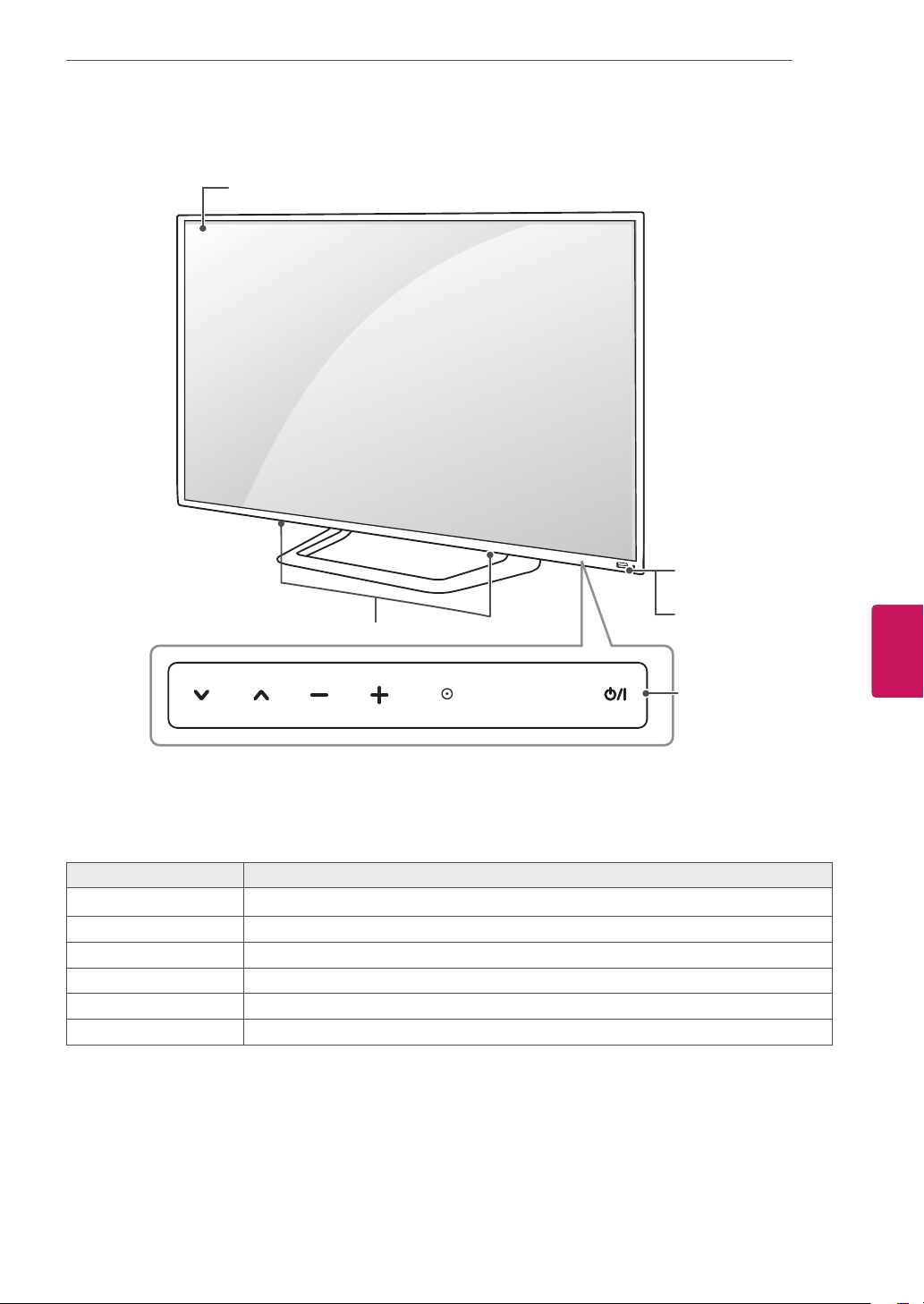
AG-F3**
Cinema3DGlasses
Themodelname
ordesignmaybe
changedmanufacturer’s
circumstancesorpolicies.
15
ENG
ENGLISH
Before Use
Parts and buttons
Touch buttons
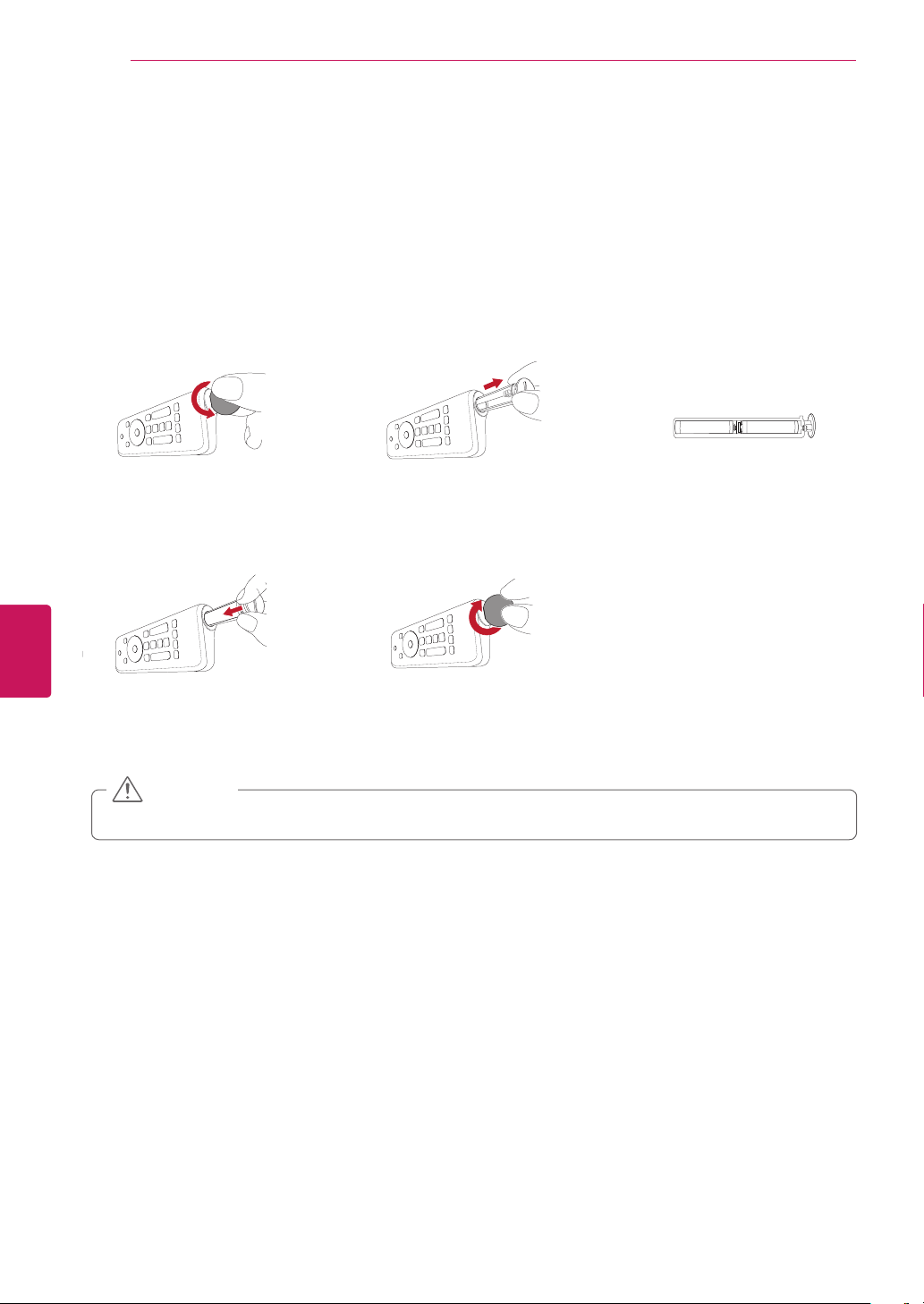
2
Description
ꔰ
/
I
Turnsthepoweronoroff.
INPUT Changestheinputsource.
SETTINGS Accessesthemainmenus,orsavesyourinputandexitsthemenus.
OK
⊙
Selectsthehighlightedmenuoptionorconfirmsaninput.
-+ Adjuststhevolumelevel.
v^
Scrollsthroughthesavedchannels.
1Intelligentsensor-Adjuststheimagequalityandbrightnessbasedonthesurroundingenvironment.
2Allofthebuttonsaretouchsensitiveandcanbeoperatedthroughsimpletouchwithyourfinger.
SETTINGS
INPUTOK
Touch buttons
2
Power indicator
Intelligent sensors
1
Speakers
Screen
16
ENG
ENGLISH
Before Use
Remote Control Functions
Inserting batteries
Whenyouusetheremotecontrolforthefirsttime,youshouldinsertthebatteriestoremotecontrol.
1. Open the battery cover as
shown below.
2. Eject the battery holder. 3. Place the batteries into
the holder.
4. Insert the holder to the
remote control.
5. Close the battery cover as
shown below.
Donotmixoldandnewbatteries,asthismaydamagetheremotecontrol.
CAUTION
COIN
COIN
COIN
COIN
COIN
COIN
COIN
COIN
COIN
COIN

17
ENG
ENGLISH
Before Use
Remote Control Side - Front
BACK
Move to previous or superior step.
(Wake-up pointer)
Activate the pointer.
MENU
Call option pop-up for activating app.
VOL
Adjust the volume level.
CH
Change TV channels.
GUIDE
Access the EPG on connected
set-top box.
(Available only on Live TV)
Change between 2D and 3D
mode.
(MUTE)
Mute all sounds.
(POWER)
Turn the TV on or off.
HOME
Access the homescreen.
SEARCH
Access the Quick Search Bar.
Press and hold to use the voice
search.
Microphone
OK
Select item by pushing key.
Wheel
Spin the wheel up/down to scroll
up/down.
Navigation Buttons
(up/down/left/right)
Move focus
Color buttons
(red, green, yellow, blue)
Use with other devices.
18
ENG
ENGLISH
Before Use
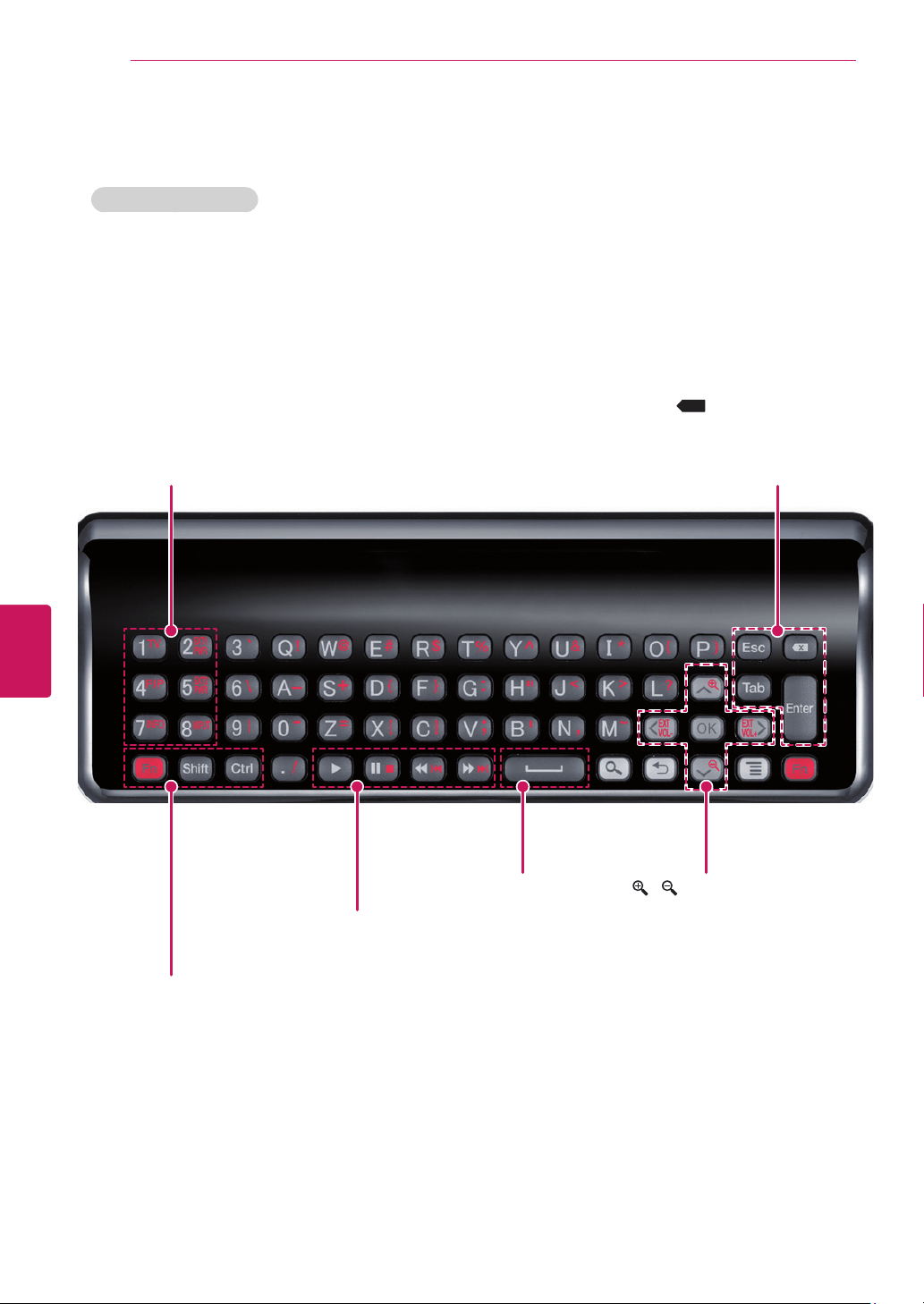
QWERTY Side - Back
*
Search
,
Back
,
Menu
,
OK
:Operateassamekeysonfrontside
TV (FN+1)
Activate TV player app
PIP (FN+4)
Activate/Deactivate PIP
INFO (FN+7)
Show channel information (available only on Live TV)
EXT1 PWR (FN+2)
Turn on/off external device 1
EXT 2 PWR (FN+5)
Turn on/off external device 2
INPUT (FN+8)
Show external input list
Fn
Combination key with other keys
Shift
Combination key with alphabet keys;input upper case
Ctrl
Combination key with other keys
Trick play keys
Play, pause, stop, scan –/+, skip -/+
Spacebar
Enter a space
/ (FN+∧ / FN+∨)
Zoom in/out
EXT VOL -/+ (FN+< / FN+>)
Volume up/down on audio receiver
ESC
Cancel state or command
Tab
Move focus to next depth or step
X
(Backspace)
Delete the preceding character and moves the cursor one
position backwards
Enter
Confirm the text entry
19
ENG
ENGLISH
Before Use
Registering the Remote Control
TheRemoteControloperatesbypairingwithyour
TV.
OnceyoupurchasedtheTV,pleaseregisterthe
RemoteControlasfollows;
How to register the Remote Control
PresstheWake-uppointerbuttonto
pairtheremotecontrol.
How to Re-register the Remote Control after
Registration Failure
Resettheremotecontrolbypressing
andholdingthe
ꕣ
BACK
buttonfor3
seconds.(Oncetheresetiscomplete,
thelightonthePointerblinks.)Then
repeattheaboveproceduretoregister
theremotecontrol.
How to use the zoom in/out
gestures
1 Pressandholdthezoombuttonfor2
seconds.
2 Whileholdingthezoombutton,drawa
circleinaclockwisedirectiontozoomin
orcounter-clockwisedirectiontozoom
out.
(Thisfeatureisonlyavailablewhileusing
Web.)
Precautions to Take when Using
the Remote Control
Usetheremotecontrolwithinthemaximum
communicationdistance(10m,32.8ft).
Usingtheremotecontrolbeyondthis
distance,orwithanobjectobstructingit,
maycauseacommunicationfailure.
Acommunicationfailuremayoccurdueto
nearbydevices.Electricaldevicessuchas
amicrowaveovenorwirelessLANproduct
maycauseinterference,astheseusethe
samebandwidth(2.4GHz)astheRemote
Control.
TheRemoteControlmaybedamagedor
maymalfunctionifitisdroppedorreceivesa
heavyimpact.
Manufacturerandinstallercannotprovide
servicerelatedtohumansafetyasthe
applicablewirelessdevicehaspossibilityof
electricwaveinterference.
ItisrecommendedthatanAccessPoint(AP)
belocatedmorethan1m(3.28ft)away
fromtheTV.IftheAPisinstalledcloser
than1m(3.28ft),theRemoteControlmay
notperformasexpectedduetofrequency
interference.
LGQwertyremotecontrolorLogitech
googlekeyboardisonlysupported.Other
keyboard(HID)ismaynotbecompatible.
WhentheQwertysideisfacedup,the
cursorisnotmovedtopreventthewobble.
20
ENG
ENGLISH
Installation
INSTALLATION
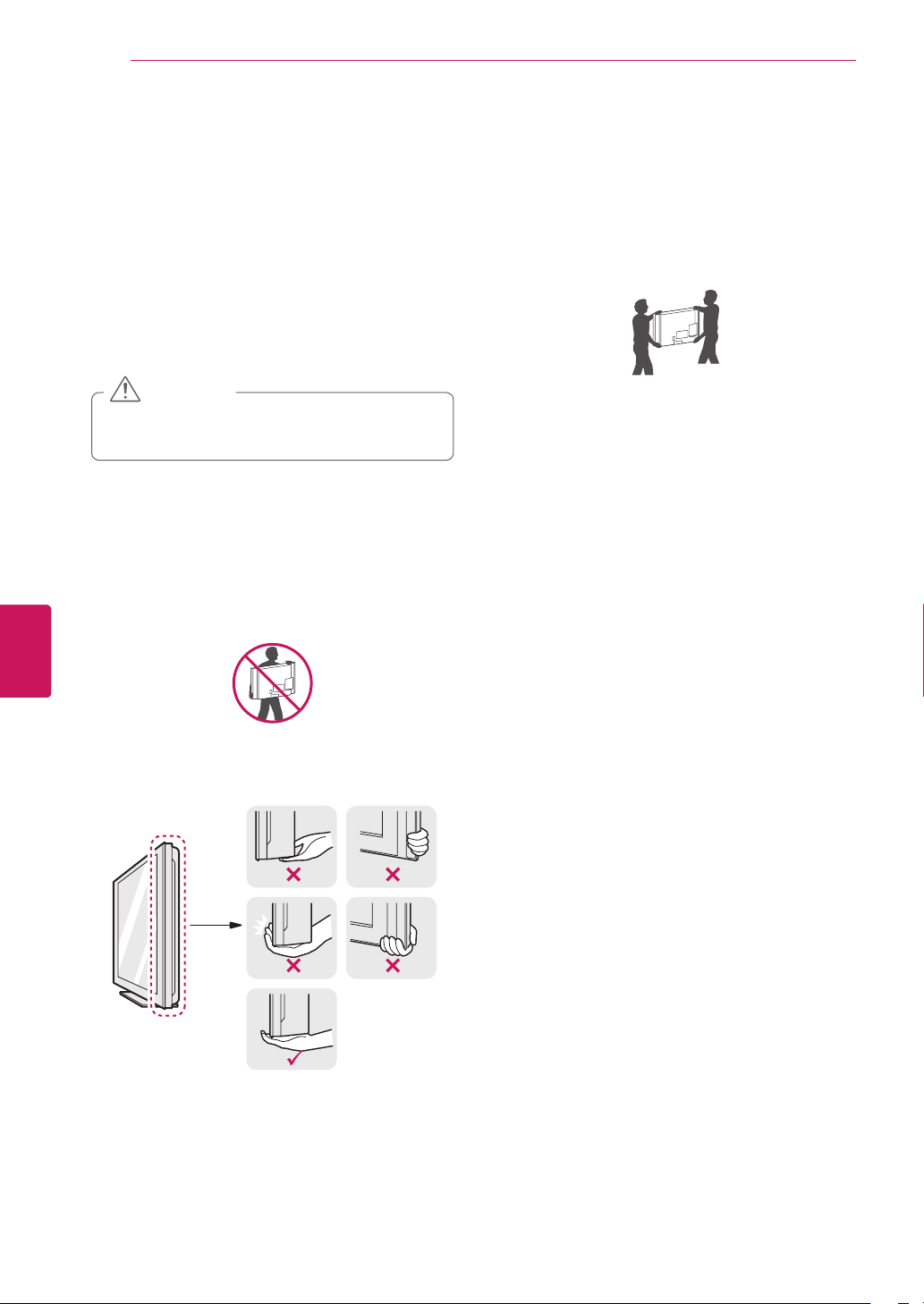
Lifting and moving the TV
WhenmovingorliftingtheTV,readthefollowing
topreventtheTVfrombeingscratchedor
damagedandforsafetransportationregardlessof
itstypeandsize.
Avoidtouchingthescreenatalltimes,as
thismayresultindamagetothescreen.
CAUTION
ItisrecommendedtomovetheTVinthe
boxorpackingmaterialthattheTVoriginally
camein.
BeforemovingorliftingtheTV,disconnect
thepowercordandallcables.
WhenholdingtheTV,thescreenshouldface
awayfromyoutoavoiddamage.
HoldthetopandbottomoftheTVframe
firmly.Makesurenottoholdthetransparent
part,speaker,orspeakergrillarea.
WhentransportingalargeTV,thereshould
beatleast2people.
WhentransportingtheTVbyhand,holdthe
TVasshowninthefollowingillustration.
WhentransportingtheTV,donotexposethe
TVtojoltsorexcessivevibration.
WhentransportingtheTV,keeptheTV
upright,neverturntheTVonitssideortilt
towardstheleftorright.
21
ENG
ENGLISH
Installation
Setting up the TV
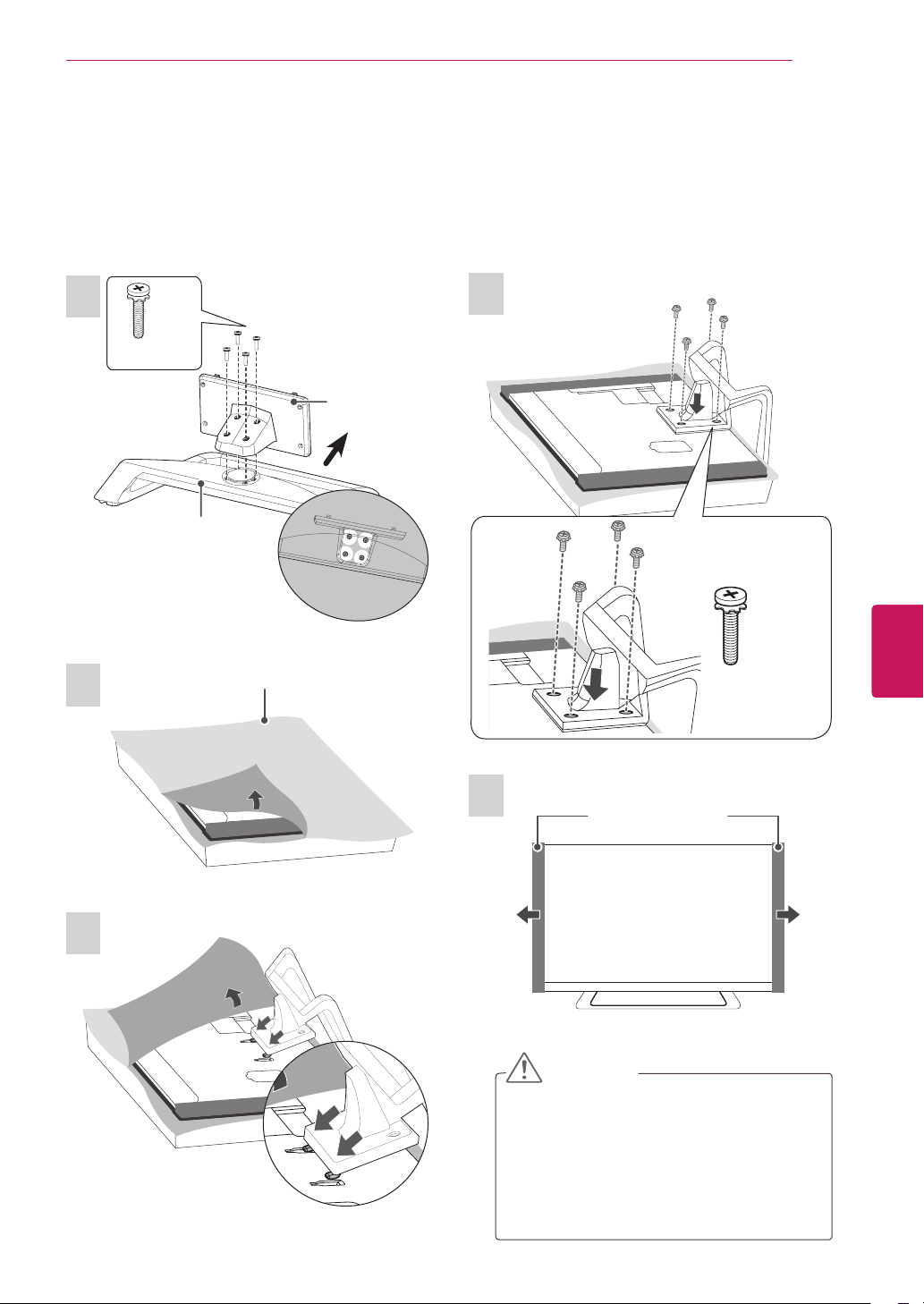
PutyourTVonapedestalstandandmounttheTVonatableorwall.
Attaching the stand
3
2
4
5
CAUTION
WhenattachingthestandtotheTV
set,placethescreenfacingdownona
cushionedtableorflatsurfacetoprotect
thescreenfromscratches.
Tightenthescrewsfirmlytoprevent
theTVfromtiltingforward.Donotover
tighten.
1
Front
M4x20
4EA
Stand Body
Stand Base
Top View
Protectionpad
(Dependingonmodel)
M4x20
4EA
Wrappingbag(Dependingonmodel)
22
ENG
ENGLISH
Installation
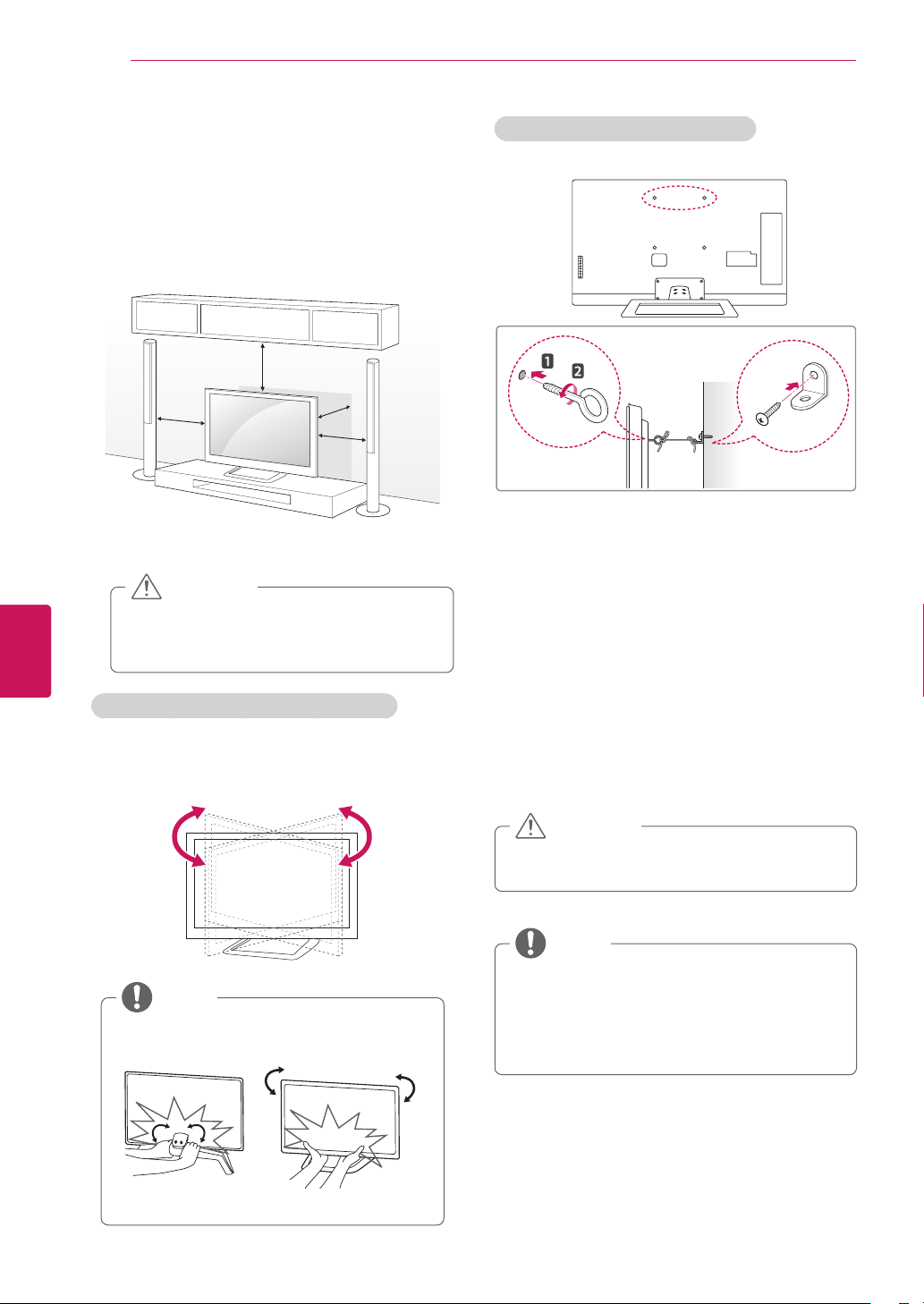
Mounting on a table
1
LiftandtilttheTVintoitsuprightpositionona
table.
-Leavea10cm(4inch)(minimum)spacefrom
thewallforproperventilation.
10 cm
10 cm
10 cm (4 inches)
10 cm
2
Connectthepowercordtoawalloutlet.
DonotplacetheTVnearoronsources
ofheat,asthismayresultinfireorother
damage.
CAUTION
Adjusting the angle of the TV to suit view
Swivel10±2degreestotheleftorrightandadjust
theangleoftheTVtosuityourview.
10±2˚10±2˚
WhenadjustingtheangleoftheTV,
watchoutforyourfingers.
FrontRear
NOTE
Securing the TV to a wall (optional)
1
Insertandtightentheeye-bolts,orTVbrackets
andboltsonthebackoftheTV.
-Ifthereareboltsinsertedattheeye-bolts
position,removetheboltsfirst.
2
Mountthewallbracketswiththeboltstothe
wall.
Matchthelocationofthewallbracketandthe
eye-boltsontherearoftheTV.
3
Connecttheeye-boltsandwallbracketstightly
withasturdyrope.
Makesuretokeeptheropehorizontalwiththe
flatsurface.
Makesurethatchildrendonotclimbonor
hangontheTV.
CAUTION
Useaplatformorcabinetthatisstrongand
largeenoughtosupporttheTVsecurely.
Brackets,boltsandropesareoptional.You
canobtainadditionalaccessoriesfromyour
localdealer.
NOTE
23
ENG
ENGLISH
Installation
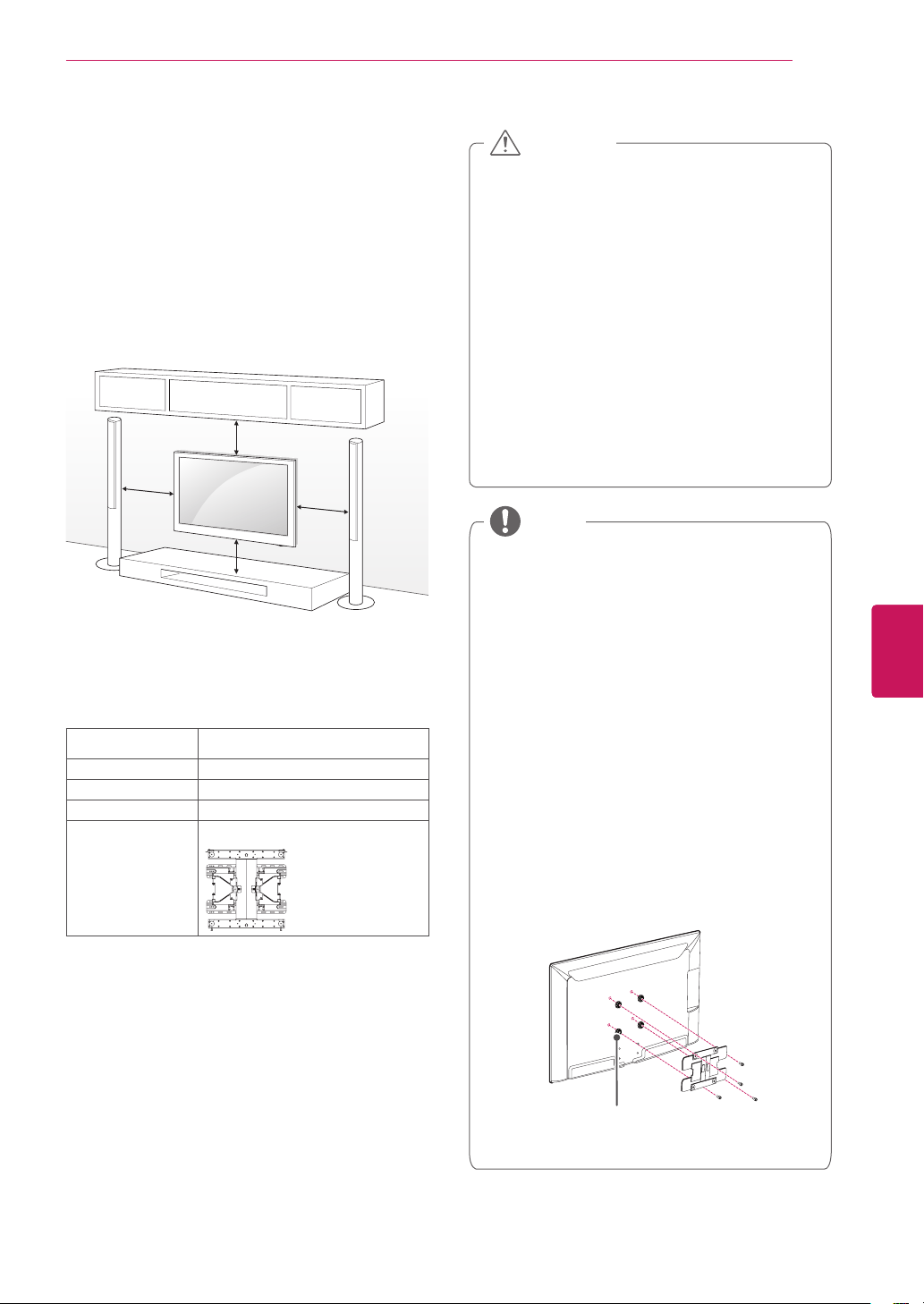
Mounting on a wall
Attachanoptionalwallmountbracketattherear
oftheTVcarefullyandinstallthewallmount
bracketonasolidwallperpendiculartothe
floor.WhenyouattachtheTVtootherbuilding
materials,pleasecontactqualifiedpersonnel.
WerecommendthatyouuseanLGbrandwall
mountwhenmountingtheTVtoawall.
10 cm
10 cm
10 cm (4 inches)
10 cm
Makesuretousescrewsandwallmountsthat
meettheVESAstandard.Standarddimensionsfor
thewallmountkitsaredescribedinthefollowing
table.
Model 47/55G2
VESA 400x400
Standard screw M6
Number of screws 4
Wall mount bracket
(optional)
LSW400BX,LSW400BXG
Disconnectthepowerfirst,andthenmove
orinstalltheTV.Otherwiseelectricshock
mayoccur.
IfyouinstalltheTVonaceilingorslanted
wall,itmayfallandresultinsevereinjury.
UseanauthorizedLGwallmountand
contactthelocaldealerorqualified
personnel.
Donotovertightenthescrewsasthismay
causedamagetotheTVandvoidyour
warranty.
Usethescrewsandwallmountsthatmeet
theVESAstandard.Anydamagesorinjuries
bymisuseorusinganimproperaccessory
arenotcoveredbythewarranty.
CAUTION
UsethescrewsthatarelistedontheVESA
standardscrewspecifications.
Thewallmountkitincludesaninstallation
manualandnecessaryparts.
Thewallmountbracketisoptional.Youcan
obtainadditionalaccessoriesfromyourlocal
dealer.
Thelengthofscrewsmaydifferdepending
onthewallmount.Makesuretousethe
properlength.
Formoreinformation,refertothemanual
suppliedwiththewallmount.
Whenattachingathird-partywallmounting
brackettotheTV,insertthewallmount
innerspacersintotheTVwallmountholes
tomoveyourTVinverticalangle.Please
makesurenottousethespacersforLG
wallmountingbracket.
Wall Mount Inner Spacer
NOTE
24
ENG
ENGLISH
Installation
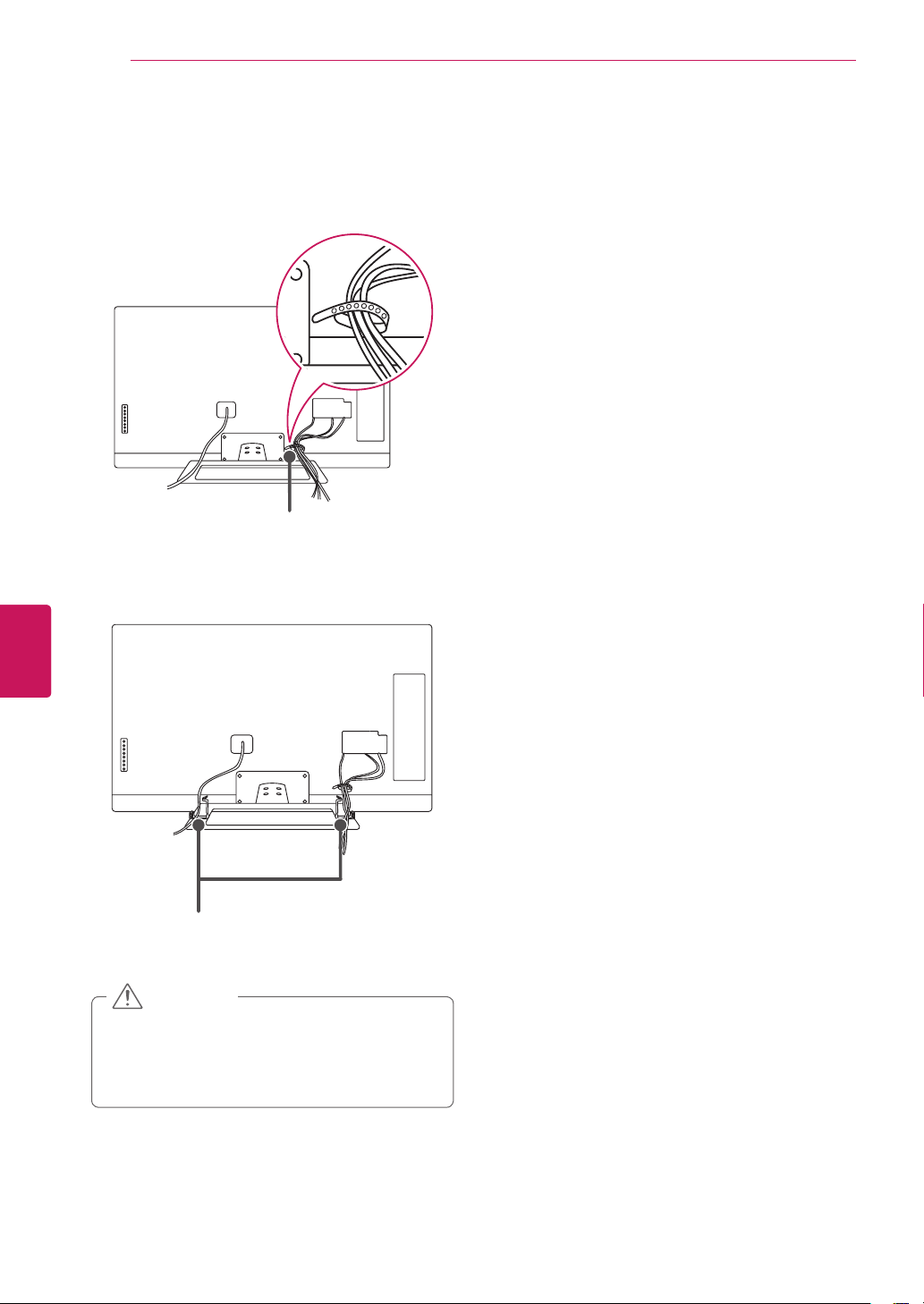
Tidying cables
1
Gatherandbindthecableswiththecable
holder.
Cable holder
2
FixthecablemanagementclipfirmlytotheTV.
Cable management clip
DonotmovetheTVbyholdingthecable
holderandcablemanagementclip,asthe
cableholdersmaybreak,andinjuriesand
damagetotheTVmayoccur.
CAUTION
25
ENG
ENGLISH
Connections
CONNECTIONS
ConnectvariousexternaldevicestotheTVandswitchinputmodestoselectanexternaldevice.Formore
informationonanexternaldevice’sconnection,refertothemanualprovidedwitheachdevice.
Availableexternaldevicesare:HDreceivers,DVDplayers,VCRs,audiosystems,USBstoragedevices,PC,
gamingdevices,andotherexternaldevices.
IfyourecordaTVprogramonaDVDrecorderorVCR,makesuretoconnecttheTVsignalinput
cabletotheTVthroughaDVDrecorderorVCR.Formoreinformationonrecording,refertothe
manualprovidedwiththeconnecteddevice.
Theexternaldeviceconnectionmaydifferfromthemodel.
ConnectexternaldevicestotheTVregardlessoftheorderoftheTVport.
IfyouconnectagamingdevicetotheTV,usethecablesuppliedwiththegamingdevice.
Refertotheexternalequipment’smanualforoperatinginstructions.
NOTE
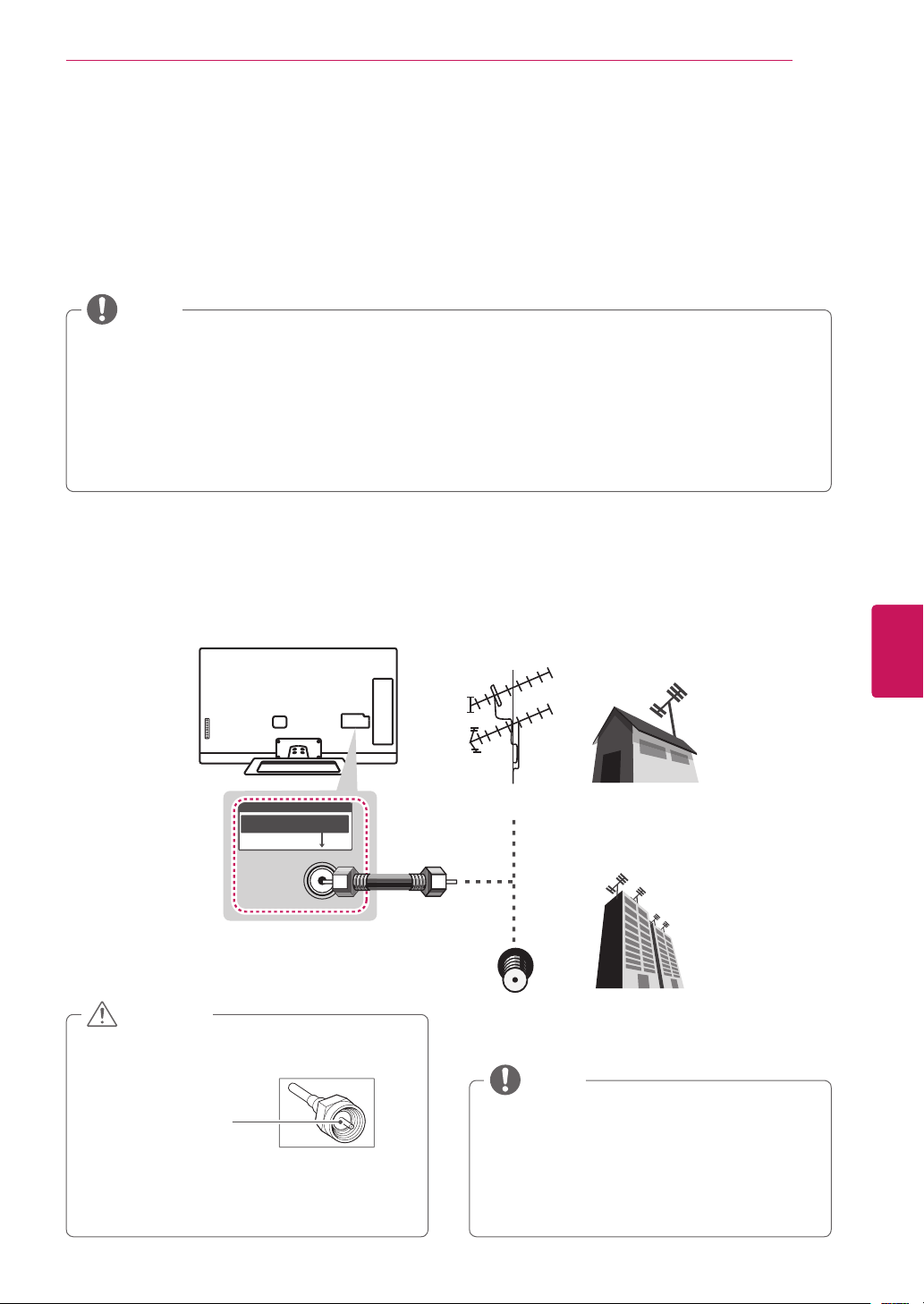
Connecting to an antenna or cable
Connectanantenna,cable,orcableboxtowatchTVwhilereferringtothefollowing.Theillustrationsmay
differfromtheactualitemsandaRFcableisoptional.
Makesurenottobendthecopperwireof
theRFcable.
Copper wire
Completeallconnectionsbetweendevices,
andthenconnectthepowercordtothe
poweroutlettopreventdamagetoyourTV.
CAUTION
Toimprovethepicturequalityinapoor
signalarea,pleasepurchaseasignal
amplifierandinstallproperly.
Useasignalsplittertousemorethan2TVs.
Iftheantennaisnotinstalledproperly,
contactyourdealerforassistance.
NOTE
ANTENNA / CABLE
VHF Antenna
UHF Antenna
Antenna
Terminal
Coaxial (75Ω)
26
ENG
ENGLISH
Connections
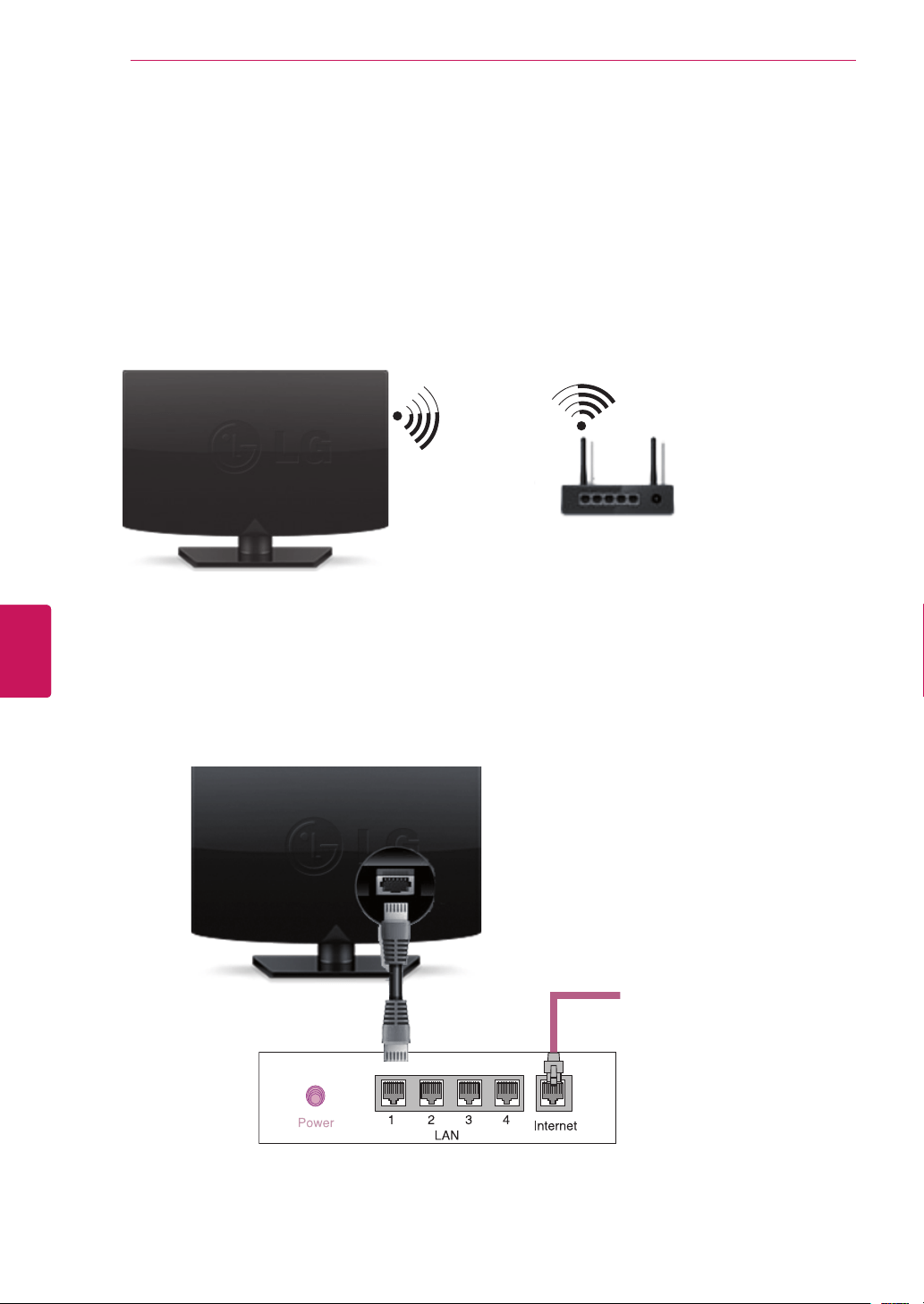
Network connection
ConnecttheTVtoarouterwithaLANcable.Or,connectwithWi-FibyaccessingNetworkSetupinthe
initialSetupWizard.ForseamlessinternetstreamingLGrecommendsastable4Mbpsbroadbandspeed
and1.5Mbpsasaminimum.
Wireless Network Connection
Wired Network Connection
Internet connection
Wired router
wireless router
27
ENG
ENGLISH
Connections
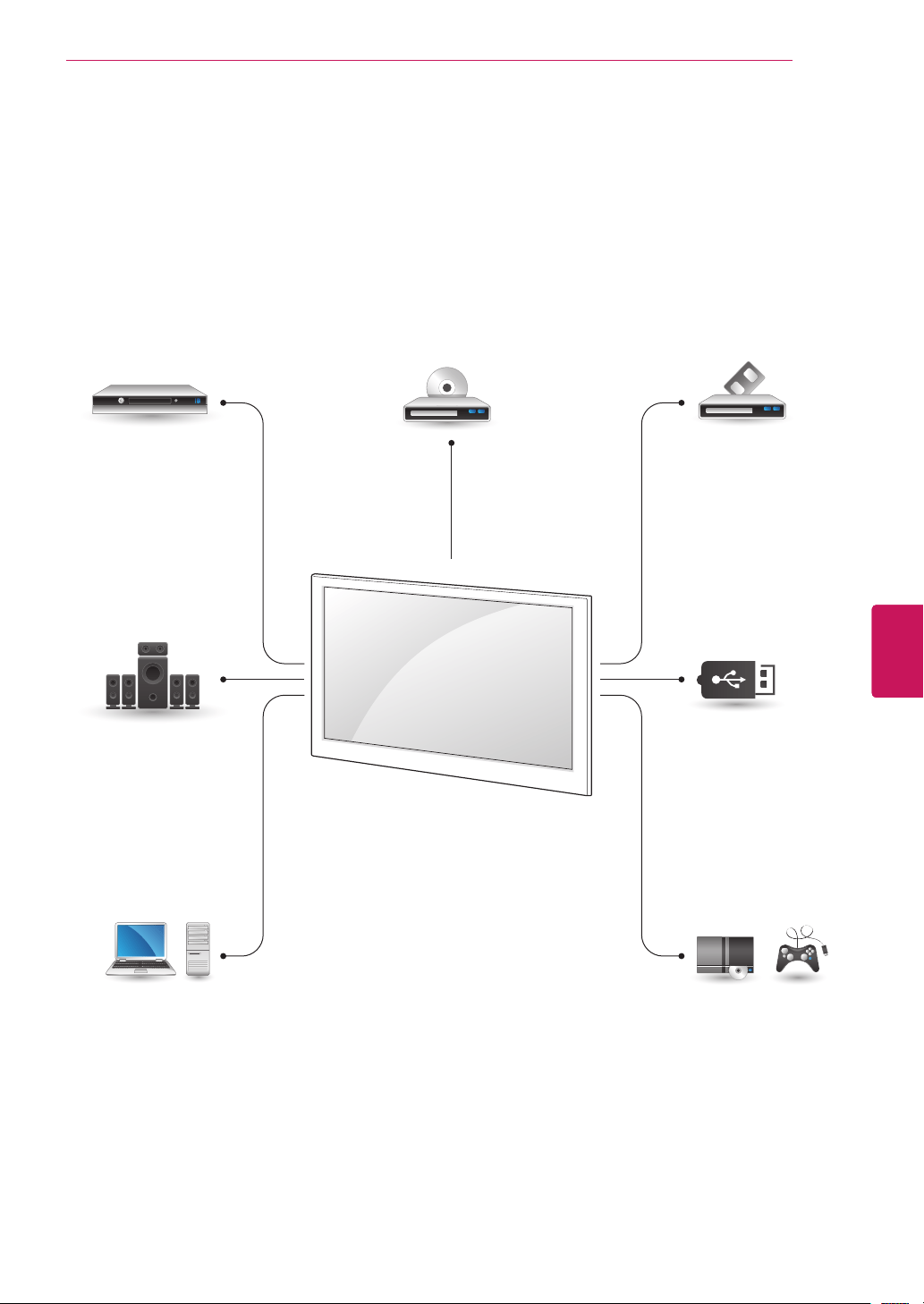
Connection Overview
ConnectvariousexternaldevicestotheportsontheTVbackpanel.
1
FindanexternaldeviceyouwanttoconnecttoyourTVasshownonthefollowingillustration.
2
Checktheconnectiontypeoftheexternaldevice.
3
Gototheappropriateillustrationandchecktheconnectiondetails.
HD Receiver DVD VCR
Speaker
USB
PC
Gaming device
28
ENG
ENGLISH
Connections
Connecting to a HD receiver, DVD, or VCR player
ConnectaHDreceiver,DVD,orVCRplayertotheTVandselectanappropriateinputmode.
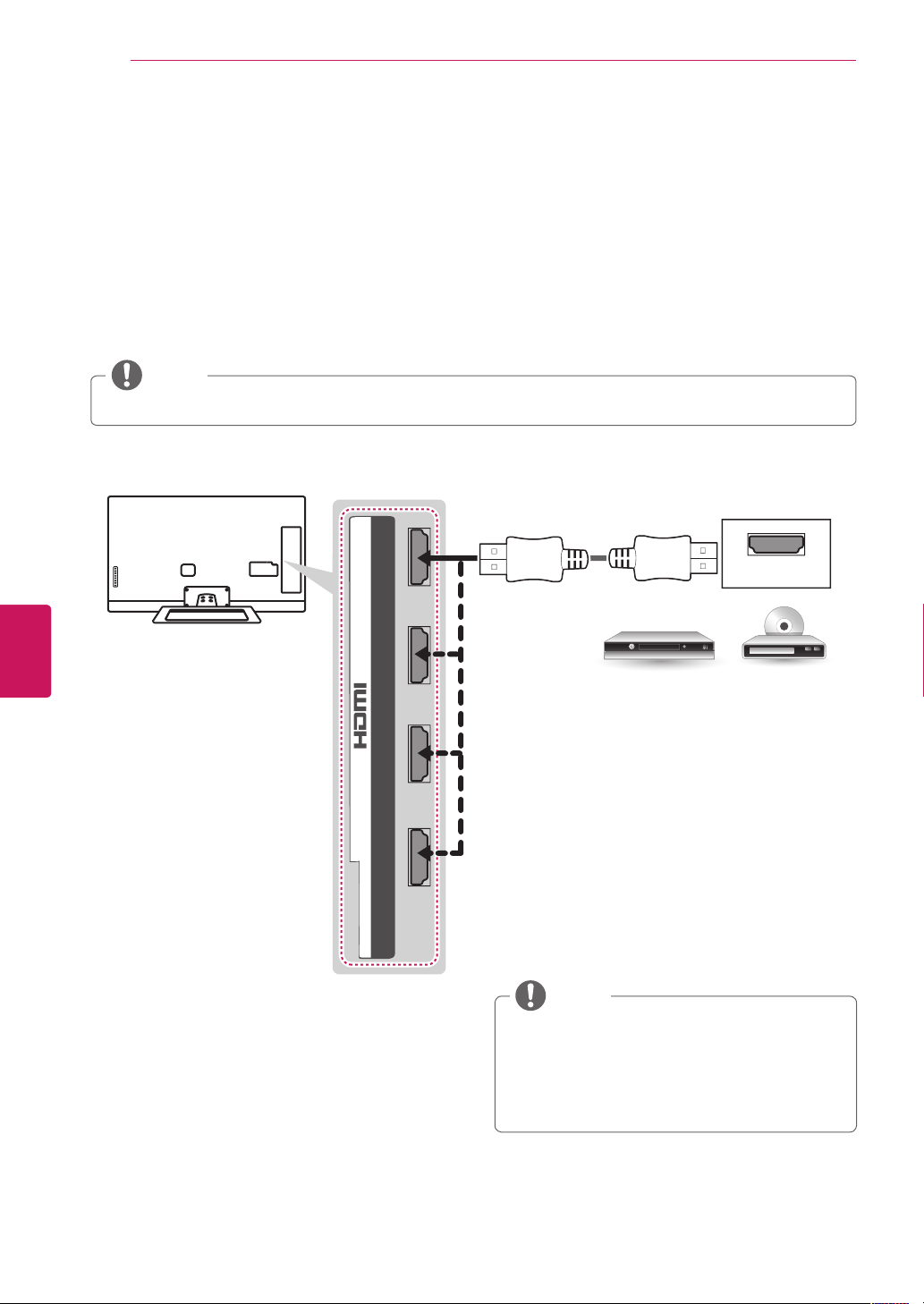
HDMI Connection
HDMI is the best way to connect a device.
TransmitsthedigitalvideoandaudiosignalsfromanexternaldevicetotheTV.Connecttheexternaldevice
andtheTVwiththeHDMIcableasshowninthefollowingillustration.
HDMI
2 3 1
4
/ DVI IN
DVD/ Blu-Ray / HD Cable Box / HD STB
Choose any HDMI input port to connect.
It does not matter which port you use.
(*Not Provided)
DTVAudioSupportedCodec:MPEG,Dolby
Digital
HDMIAudiosupportedFormat:Dolby
Digital,PCM(Upto192KHz,32k/44.1k/48k
/88k/96k/176k/192k)->NotsupportedDTS.
NOTE
HighSpeedHDMI™CablesaretestedtocarryanHDsignalupto1080pandhigher.
NOTE

29
ENG
ENGLISH
Connections
DVI to HDMI Connection
TransmitsthedigitalvideosignalfromanexternaldevicetotheTV.Connecttheexternaldeviceandthe
TVwiththeDVI-HDMIcableasshowninthefollowingillustration.Totransmitanaudiosignal,connectan
audiocable.
(RGB/HDMI-PC)
AUDIO
(RGB/DVI)
AUDIO
2 3 1
4
/ DVI IN
AUDIO OUT
DVI OUT
(*Not Provided)
(*Not Provided)
DVD/ Blu-Ray / HD Cable Box
30
ENG
ENGLISH
Connections
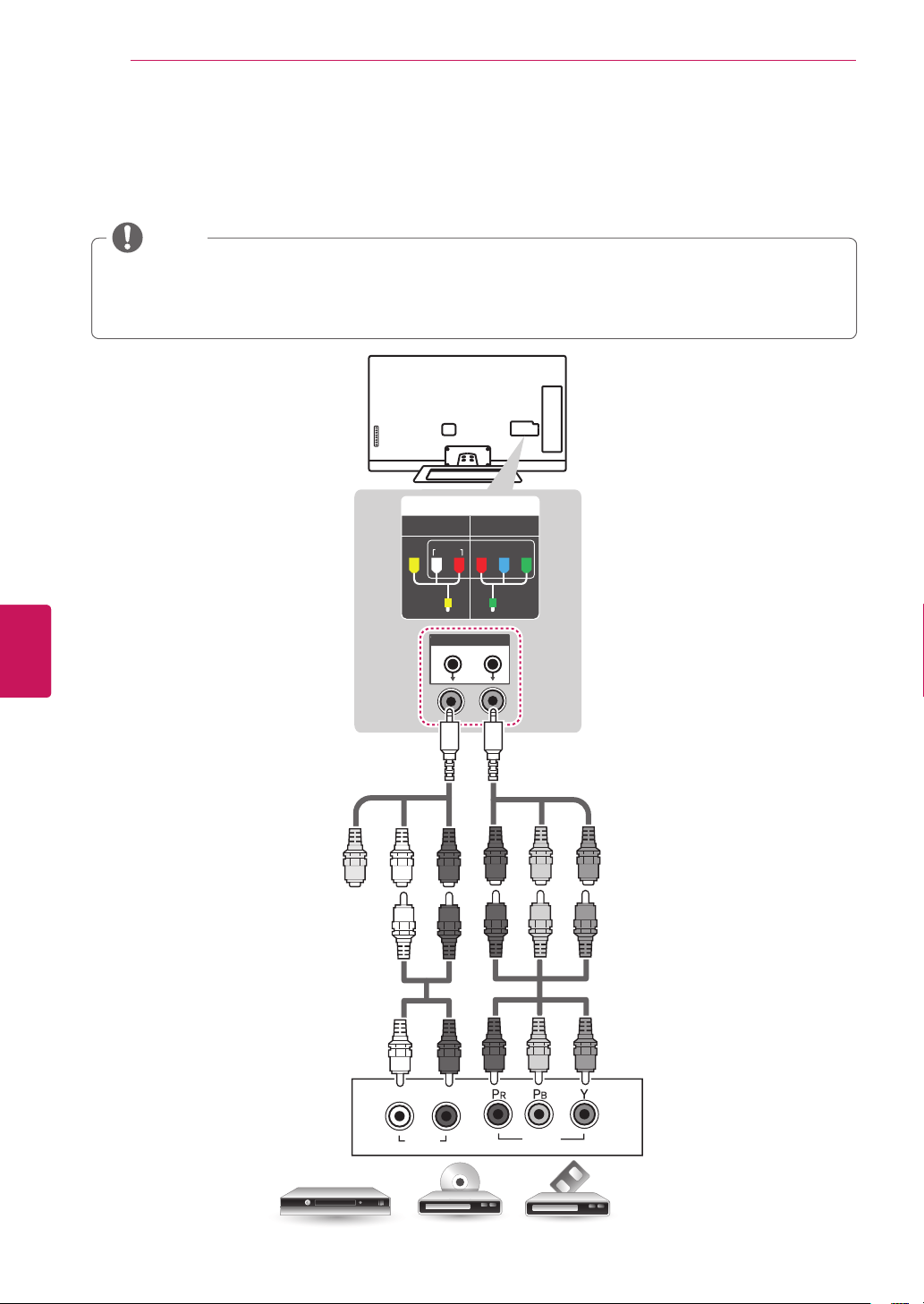
Component Connection
TransmitstheanalogvideoandaudiosignalsfromanexternaldevicetotheTV.Connecttheexternal
deviceandtheTVwiththecomponentcableasshowninthefollowingillustration.
Ifcablesareinstalledincorrectly,itcouldcausetheimagetodisplayinblackandwhiteorwith
distortedcolor.
Check to ensure each cable is matched with the corresponding color connection.
NOTE
VIDEO
AUDIO
L R
DVD/ Blu-Ray / HD Cable Box
(Use the component video cable provided.)(Use the composite video cable provided.)
(*Not Provided)
(*Not Provided)
GREEN
RED
BLUE
YELLOW
GREENYELLOW
WHITE
RED
GREEN
RED
BLUE
GREEN
RED
BLUE
WHITE
RED
WHITE
RED
IN
COMPONENT
AV
VIDEO AUDIO
Y
P
B
P
R
31
ENG
ENGLISH
Connections
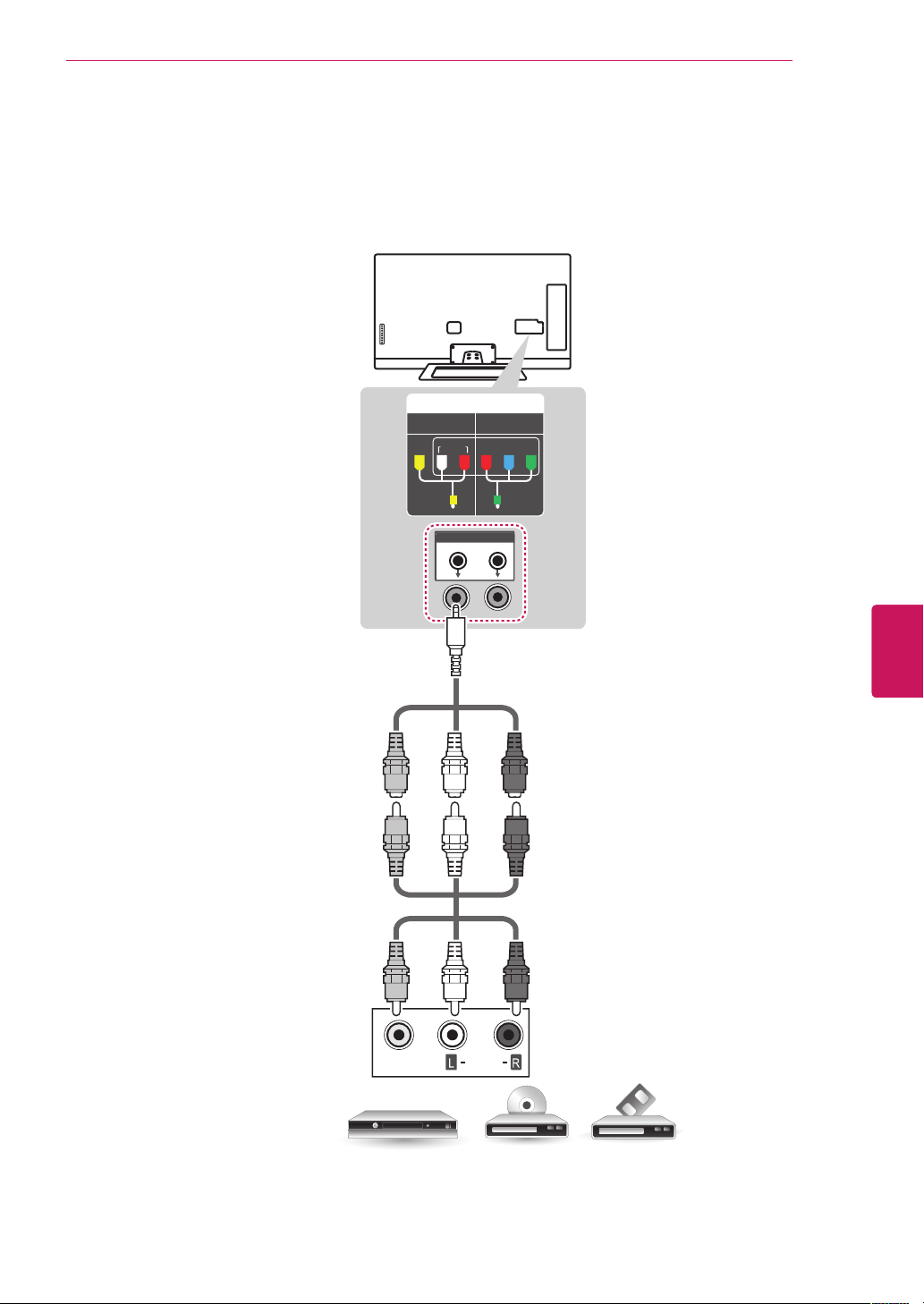
Composite Connection
TransmitstheanalogvideoandaudiosignalsfromanexternaldevicetotheTV.Connecttheexternal
deviceandtheTVwiththecompositecableasshowninthefollowingillustration.
IN
COMPONENT
AV
VIDEO AUDIO
Y
P
B
P
R
VIDEO
AUDIO
VCR / DVD/ Blu-Ray / HD Cable Box
(*Not Provided)
YELLOW
WHITE
RED
YELLOW
WHITE
RED
YELLOW
YELLOW
WHITE
RED
(Use the composite video cable provided.)
32
ENG
ENGLISH
Connections
Connecting to a PC
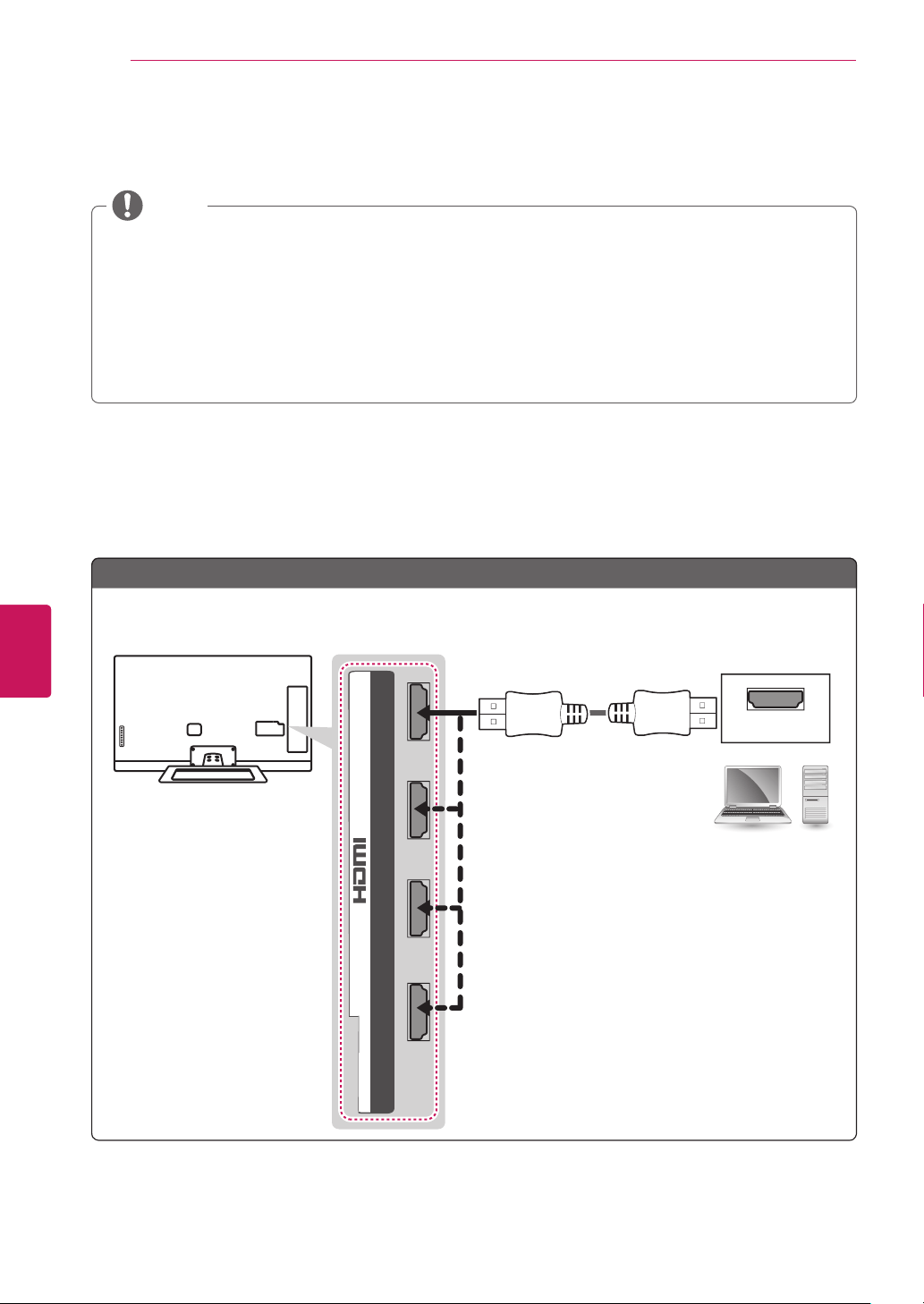
ItisrecommendedtousetheTVwiththeHDMIconnectionforthebestimagequality.
Dependingonthegraphicscard,DOSmodemaynotworkifaHDMItoDVICableisinuse.
InPCmode,theremaybenoiseassociatedwiththeresolution,verticalpattern,contrastor
brightness.Ifnoiseispresent,changethePCoutputtoanotherresolution,changetherefreshrate
toanotherrateoradjustthebrightnessandcontrastonthePICTUREmenuuntilthepictureisclear.
ThesynchronizationinputformforHorizontalandVerticalfrequenciesisseparate.
Dependingonthegraphicscard,someresolutionsettingsmaynotallowtheimagetobepositioned
onthescreenproperly.
NOTE
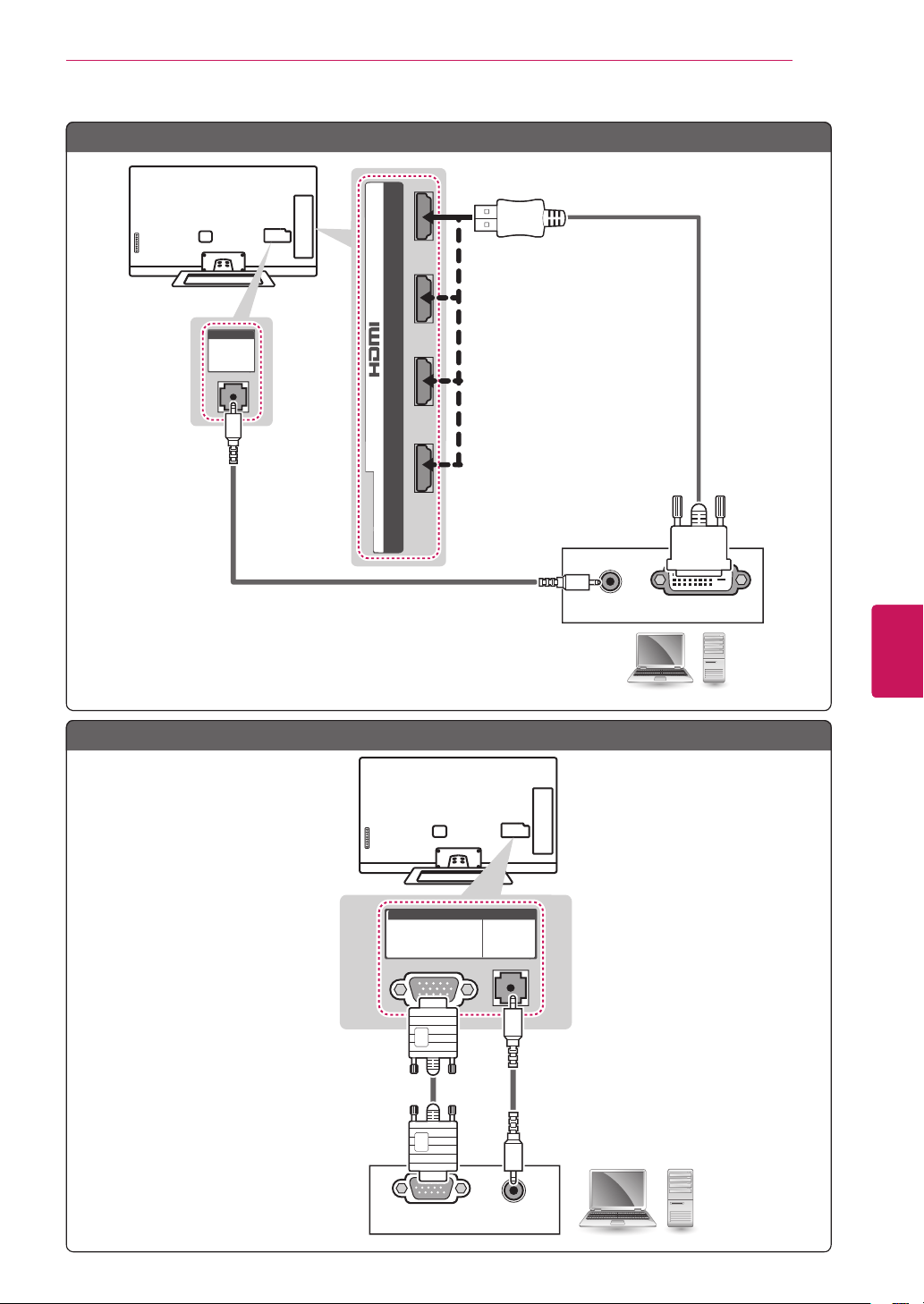
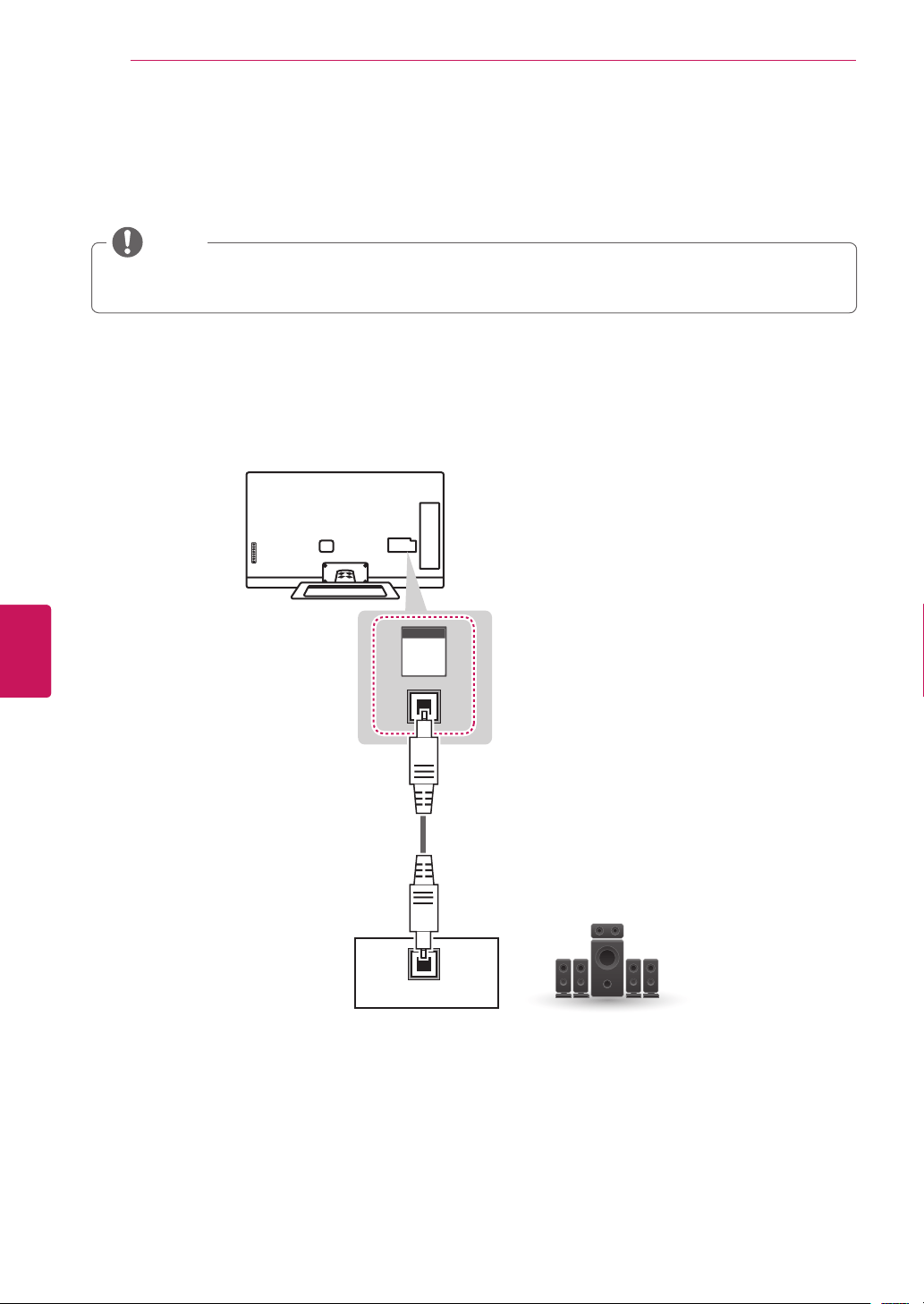
HDMI Connection, DVI to HDMI Connection or RGB Connection
Choose method A, B or C to make connection.
HDMI
2 3 1
4
/ DVI IN
Choose any HDMI input port to connect.
It does not matter which port you use.
(*Not Provided)
SF
Method A: HDMI Connection
33
ENG
ENGLISH
Connections
AUDIO OUT
DVI OUT
(RGB/HDMI-PC)
AUDIO
(RGB/DVI)
AUDIO
(*Not Provided)
PC
(*Not Provided)
2 3 1
4
/ DVI IN
Method B: DVI to HDMI Connection
RGB OUT (PC)
AUDIO OUT
(PC)
RGB
(RGB/HDMI-PC)
AUDIO
(PC)
RGB
(RGB/DVI)
AUDIO
(*Not Provided)
(*Not Provided)
PC
Method C: RGB Connection
34
ENG
ENGLISH
Connections
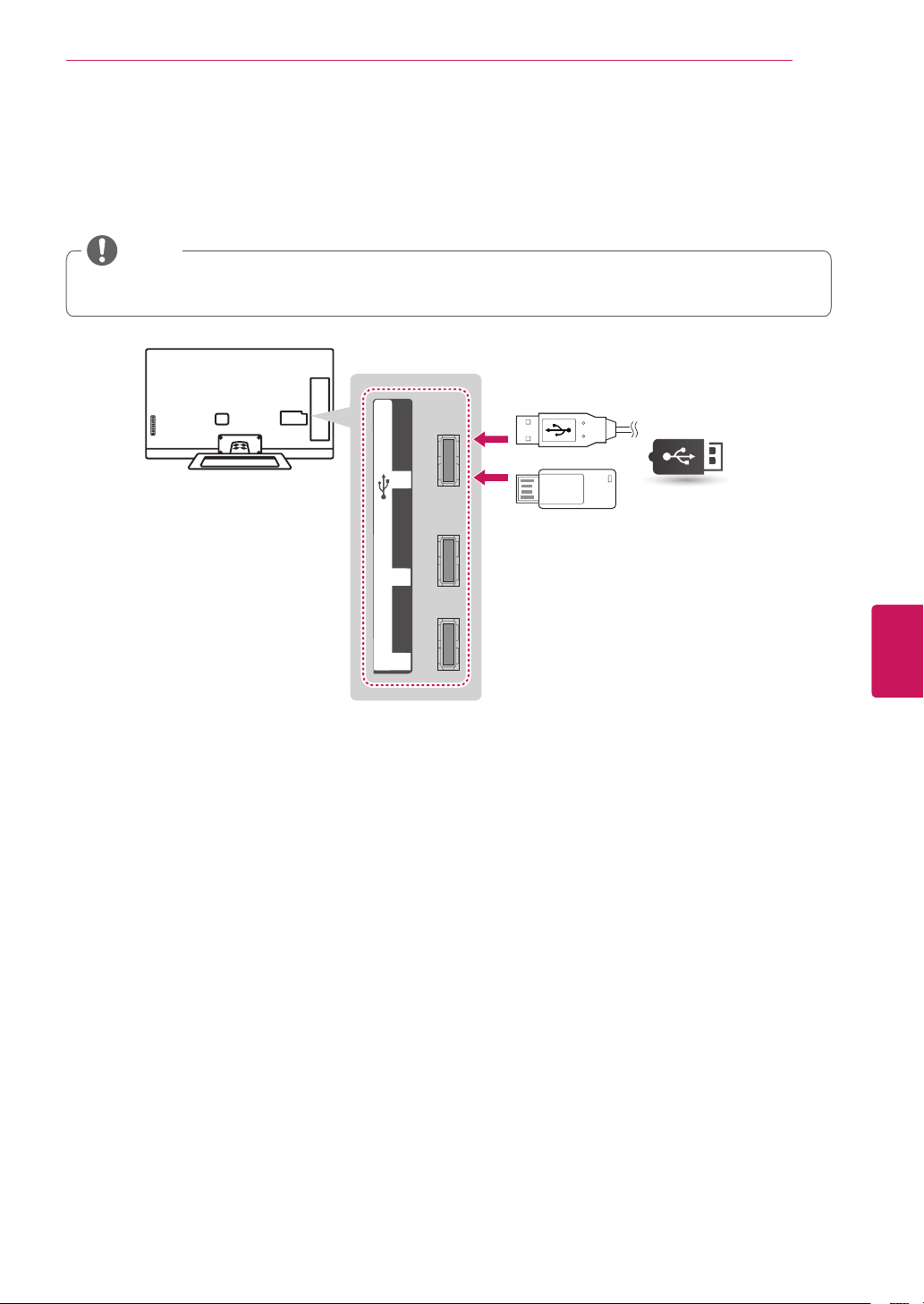
Connecting to an Audio System
Useanoptionalexternalaudiosysteminsteadofthebuilt-inspeaker.
Ifyouuseanoptionalexternalaudiodeviceinsteadofthebuilt-inspeaker,settheTVspeaker
featuretooff.
NOTE
Digital Optical Audio Connection
TransmitsthedigitalaudiosignalfromtheTVtoanexternaldevice.Connecttheexternaldeviceandthe
TVwiththeopticalaudiocableasshowninthefollowingillustration.
OPTICAL
AUDIO IN
OPTICAL
DIGITAL
AUDIO
OUT
Digital Audio System
(*Not Provided)
35
ENG
ENGLISH
Connections
Connecting to a USB
ConnectaUSBstoragedevicesuchasaUSBflashmemory,externalharddrive,oraUSBmemorycard
readertotheTV.
USB HubHDD IN USB
1
2
3
USB IN
USB
(*Not Provided)
SomeUSBHubsmaynotwork.IfaUSBdeviceconnectedusingaUSBHubisnotdetected,
connectittotheUSBportontheTVdirectly.
NOTE
36
ENG
ENGLISH
Using (Basic)
USING (BASIC)
Turning the TV on for the first
time
WhenyouturntheTVonforthefirsttime,the
Initialsettingscreenappears.Selectalanguage
andcustomizethebasicsettings.
1
Connectthepowercordtoapoweroutlet.
ThePowerindicatorturnsonandtheTV
switchestoStandbymode.
2
InStandbymode,pressthepowerbuttonon
theremotecontroltoturntheTVon.
TheInitialsettingscreenappearsifyouturn
theTVonforthefirsttime.
Youcanalsoaccess
Initial Setting
by
accessing
OPTION
inthemainmenu.
NOTE
3
Followtheon-screeninstructionstocustomize
yourTVsettingsaccordingtoyourpreferences.
Pairing remote
controller
Pairingtheremotecontrol
Environment Selection
Selecting
Home
or
Store.
Connect to the Internet
ConnectingtotheInternet
toEthernetcableor
wireless.
Google Account
Signinginwithyour
GoogleAccount
Help make Google TV
better
Checktheboxtosend
theusagestatisticsand
crashreportstoGoogle
automatically.
Enter ZIP code
EnterZIPcodesothat
youreceiveaccurate
programminginformation.
Set up TV service
Selectthevideoinputyou
usetoconnectyourTV
servicetoyourTV.
Set up Audio amplifier
control
SelectyourAudio
amplifiermanufacturer.
Tocontrolyourreceiver,
connecttheIRblaster.
That's it!
Theinitialsettingsare
completed.
4
Whenthe
initial
settingsarecompleted,
select
Finish
.
5
ToturntheTVoff,pressthepowerbuttonon
theremotecontrol.
Setting the Mode
1
Press
Home
toaccesstheHomemenu.
2
Goto
All Apps
>
Settings
>
Option
>
Environment Selection
.
3
Select
Store
forin-storedisplay.Forusein-
home,select
Home
.
Todisplayimagesinthebestqualityfor
yourhomeenvironment,select
Home
.
Store
issuitablefortheretail
environment.
Ifyouselect
Store
,anycustomized
settingswillswitchbacktothedefault
settingsof
Store
in5minutes.
NOTE
Disconnectthepowercordfromthe
poweroutletwhenyoudonotusetheTV
foralongperiodoftime.
NOTE
37
ENG
ENGLISH
Using (Basic)
Accessing Home Menu
Press
Home
toaccesstheHomemenu.
Current watching channel screen
Input List & Settings
Next page
Launcher Bar
Channel
description

38
ENG
ENGLISH
Using (Basic)
Setting up channels
Storing channels
Tostorechannelsautomatically,
1
Press
Home
toaccesstheHomemenu.
2
Goto
All Apps > Settings > Channel setting >
Auto Tuning
.
3
Select
Start
tostartautomatictuning.
TheTVscansandsavesavailablechannels
automatically.
4
Whenyoureturntothepreviousmenu,press
ꕣ
BACK
.
Tostorechannelsmanually,
1
Press
Home
toaccesstheHomemenu.
2
Goto
All Apps > Settings > Channel setting >
Manual Tuning
.
3
Scrollthroughthechanneltypes,andthenadd
ordeletechannels.
4
Whenyoureturntothepreviousmenu,press
ꕣ
BACK
.
IftheTVscansablockedchannel,youwill
bepromptedtoenteryourpasswordto
keepthechannelscanned.
Youcanstoreupto1000channels.The
numberofchannelsthatyoucanstore
differsdependingonthebroadcastingsignal
environment.
NOTE
39
ENG
ENGLISH
Using (Basic)
Checking current program info
Press
MENU
andselect
INFO
toviewtheinformationofthecurrentlyprogramwhileyouarewatching.
Thefollowinginformationappearsatthescreen.
ꔒ MPAA PG ꔥ Multilingual ꔨ ꔯ Caption ꔷ 1080i
▶ Next ꔀ Ch. Change ꔉ Watch
3/01/2012 10:10 PM
Channel information
Program(Channel) title
Current time
This is the Live Edens segment.
Icon Description
Multilingual
ꔥ
Theprogramcontainstwoormoreaudiolanguageservices.Youcanchangethe
audiolanguageonsettings.
Dolby Digital
ꔨ
TheprogramcontainsaDolbyDigitalaudiosignalinTVandHDMIinputsources.
Dolby Digital
Plus
ꔩ
TheprogramcontainsaDolbyDigitalPlusaudiosignalinTVandHDMIinput
sources.
Caption
ꔯ
Theprogramcontainsoneormorelanguagecaptionservices.Youcanselecta
closedcaptionyouwantonsettings.
Aspect ratio
ꔶ
ꔷ
Theoriginalaspectratioofthevideois4:3.
Theoriginalaspectratioofthevideois16:9(wide).
Resolution
480i
480p
720p
1080i
1080p
Thevideoresolutionis720x480i.
Thevideoresolutionis720x480p.
Thevideoresolutionis1280x720p.
Thevideoresolutionis1920x1080i.
Thevideoresolutionis1920x1080p.
V-Chip
ꔒ
TheprogramcontainsLockinformation.
DTV
30-1
N-CHETT
This is the Live Edens segment.
40
ENG
ENGLISH
Using (Basic)
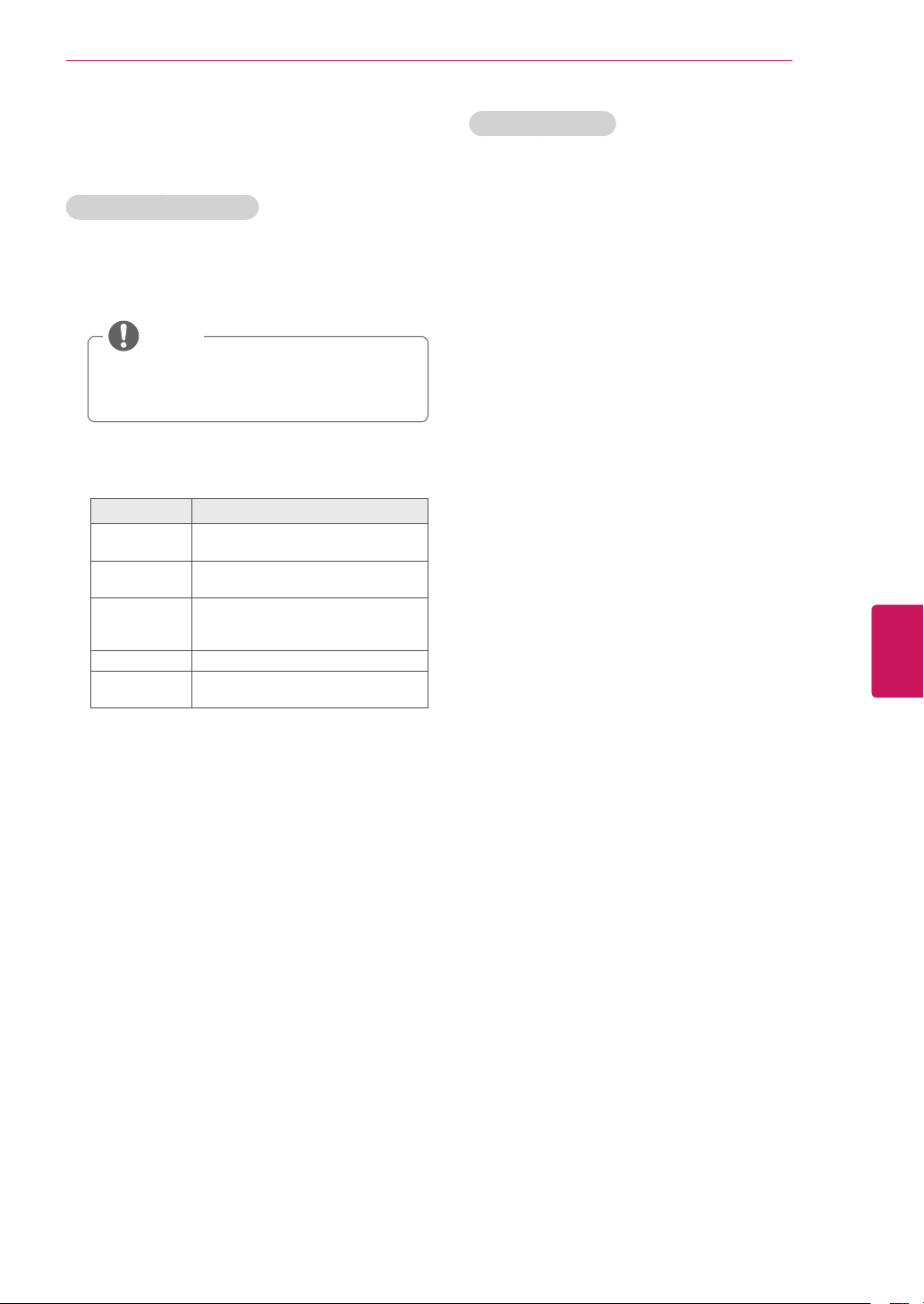
Adjusting aspect ratio
Resizeanimagetoviewitsoptimalsizewhileyou
arewatchingTV.
1
Press
Home
toaccesstheHomemenu.
2
Goto
All Apps
>
Settings
>
Picture & sound
>
Picture adjustment
.
3
PresstheNavigationbuttonstoscrollto
Aspect Ratio
andpress
Wheel
.
4
Selectadisplaymethod.
Theavailableratiovariesdependingonthe
inputsource.
-Theinputsources:HDMI-PCandRGB-PC
support4:3and16:9.
-Theinputsources:HDMI-PC1920X1080
supports4:3and16:9oftheaspectratios.
NOTE
-
16:9
:Resizesimagestofitthescreenwidth.
-
Just scan
:
Noanyresizeimages.Itisavailable
theinputsignalisupto720Presolution.
-
Set by Program
:WhenyourTVreceivesa
widescreensignalitwillautomaticallychange
tothepictureformatbroadcast.
Set by Program
-
4:3
:Resizesimagestothepreviousstandard
4:3.
-
Zoom
:Youcanmoveorselecttheaspectratio
bypressingupordownbutton
.
-
Cinema Zoom 1
:Formatsanimagetothe
cinemascoperatio,2.35:1.
Tochangetheratioofthecinemazoom,
pressleftorrightanditsrangeisfrom1to
16.
Tomovethezoomfocusupordown,
pressupordown.
Ifyouenlargeorreduceanimage,the
imagemaybedistorted.
NOTE
41
ENG
ENGLISH
Using (Basic)
Using the input list
Selecting an input source
1
Goto
All Apps
>
Settings
>
Input List
-Theconnecteddevicedisplaysoneachinput
source.
Youcanalsoaccesstheinputsourcelist
byselecting
Input List
inthe
Settings
menu.
NOTE
2
PresstheNavigationbuttonstoscrolltooneof
theinputsourcesandpress
OK
.
Input source Description
TV WatchTVovertheair,cable,and
digitalcablebroadcast.
AV WatchvideofromaVCRorother
externaldevices.
COMPONENT WatchvideofromaDVDorother
externaldevices,orthroughadigital
set-topbox.
RGB-PC UsetheTVasacomputermonitor.
HDMI WatchvideofromaHTSorother
highdefinitiondevices.
Editing input name
Edittheinputnamesothatyoucaneasilyidentify
adeviceconnectedtoeachinputsource.
1
Press
Home
toaccesstheHomemenu.
2
Goto
All Apps
>
Settings
>
Input List
>
Edit Input Name
.
3
Selectthe
Input Name
and
New Input Name
to
changetheinputname.
4
Select
Set
tosave.
5
Whenyoureturntothepreviousmenu,
press
ꕣ
BACK
.

42
ENG
ENGLISH
Using (Basic)
Using the customer support
Testing the Picture / Sound
Toexecutepictureandsoundtests.
1
Press
Home
toaccesstheHomemenu.
2
Goto
All Apps
>
Settings
>
Option
>
Customer Support
.
3
Select
Picture test
or
Sound test
.
4
Ifyouhaveanyproblem,select
Yes
.LG
customerservicecenterandproduct
informationappears.ContactLGcutomer
servicecenterforhelp.
5
Whenyouarefinished,select
Close
.
Whenyoureturntothepreviousmenu,
press
ꕣ
BACK
.
Using the product or service
information
Tochecktheproductorserviceinformation
1
Press
Home
toaccesstheHomemenu.
2
Goto
All Apps
>
Settings
>
About
>
Product/
Service Info.
3
YoucancheckthevariousProduct/Service
infomationbasedonyourmodel.
4
Whenyouarefinished,select
Close
.
Whenyoureturntothepreviousmenu,
press
ꕣ
BACK
.
43
ENG
ENGLISH
Applications
APPLICATIONS
Google Chrome
Getting started
1
Selectthe
Google Chrome
in
Home
orin
All Apps
,orsimplytypeaURLorsearch
querydirectlyintothesearchbar.Usethe
SEARCH
keytoopenthesearchbar.
2
WhileusingGoogleChrome,
pressthe
Menu
keytomanageyour
browserwindows,bookmarks,history,and
more.Select
Settings
toconfigureyour
browsersettings.
Browser windows
Toopenanewwindow,
pressthe
Menu
key,select
Windows
,
thenselect
New window
orpress
Ctrl + T
onyourcontroller.
Toviewallopenwindows,
pressthe
Menu
keyandselect
Windows
.
Youcanhave3openChromewindowsat
onetime.
Toreloadabrowserwindow,
pressthe
Menu
keyandthen
Reload
or
press
Ctrl + R
onyourcontroller.
Google Chrome shortcuts
Ctrl + R Reloadsthecurrenttab
Ctrl +
↑
Zoomsin
Ctrl +
↓
Zoomsout
Ctrl + 0 Resetszoomlevelto100%
Ctrl + T Opensanewtab
Ctrl + Shift
+ T
Opensanewtabinanincognitowindow
Ctrl + W Closesthecurrenttab
Ctrl + D AddstoBookmarksorHomeScreen.
Ctrl + F Opensthefindonpagebar
Space bar Scrollsdownthecurrentwebpage
Browsing history
ToaccessyourGoogleChromebrowsing
history,pressthe
Menu
keyandselect
History
.Toclearyourhistory,select
Clear
history
.
Toclearallbrowsingdata,includingclearing
yourcache,historyandcookiedata,press
the
Menu
keyandselect
Settings
.
Incognito Browsing
Ifyoudon'twantyourwebsitevisitstobe
recordedinyourbrowserhistory,youcanbrowse
inincognitomode.Toopenanewincognito
window,pressthe
Menu
key,select
Windows
,
thenselect
New incognito window
orpress
Ctrl +
Shift + T
onyourcontroller.
InternetsupportsuptoFlash(10.2.164)
butdoesnotsupportplatform-dependent
technologylikeActiveX.
Internetonlyworkswithpre-installedplug-
ins.
Internetonlyreplaysthefollowingmedia
fileformats:JPEG/PNG/GIF/BMP/
WMV(ASF)/WMA/MP3/MP4
Internetisforciblyclosedwhenmemoryis
insufficient.
FortheInternet,fontsinstalledontheTV
areusedandmaynotbedisplayednormally
dependingonthecontentplayed.
Internetdoesnotsupportfileandfont
download.
InternetismadeforTVsoitmayfunction
differentlyfromPCbrowsers.
NOTE

44
ENG
ENGLISH
Applications
Bookmarks
Bookmarkingallowsyoutosavewebsiteswithout
havingtorememberURLs.Yourwebbookmarks
arelocatedwithinyourGoogleChromebrowser
foreasyaccesswhileyou’resurfingtheweb.
To Bookmark a Webpage:
1
OpenGoogleChrome.
2
Navigatetothewebpageyouwantto
bookmark.
3
Pressthe
Menu
keyandselect
Save
.
4
Fromthefollowingmenu,select
Add to
bookmarks
or
Add to home screen
.Youcan
nameyourbookmarkonthenextscreen.
5
Select
OK
tosavechanges.
To Access your Bookmarks:
1
OpenGoogleChrome.
2
Pressthe
Menu
keyandselect
Bookmarks
.
To Delete a Bookmark:
1
Openyourbookmarksusingthestepsabove.
2
Navigatetothebookmarkyou’dliketodelete,
thenlong-press(pressandhold)the
Enter
or
OK
keyonyourremote.
3
Select
Delete bookmark
.
Safety and security settings
Lock Google Chrome
LockGoogleChromebysettingaPINpasswordto
opentheapplication.Pressthe
Menu
keyand
select
Settings
.Under
Privacy & Safety
,select
Chrome lock settings
andchecktheboxforLock
Google Chrome
.Enterthe
PIN number
andselect
OK
.
LockingGoogleChromewillalsolockthe
GooglePlaywiththesamePIN.
NOTE
Enable SafeSearch:
EnablingSafeSearchonGoogleChromeisalittle
bitdifferentfromenablingitforGoogleTVSearch.
ToenableSafeSearchforin-browsersearches,
pressthe
SEARCH
keyandenter
http://www.google.com/preferences
.Selectyour
preferredoptionunderSafeSeachFiltering.Visit
thisarticleformoreinformationaboutSafeSearch
onGoogle.
Advanced settings
Pressthe
Menu
,select
Settings
,then
Advanced settings
toconfigureseveraladvanced
options,including:
Personal Stuff
Passwords
FormAutofill
Under the Hood
Privacy
WebContent
Security
UserAgent
45
ENG
ENGLISH
Applications
Google Play
Getting Started
TheGooglePlayofferseasyaccesstoAndroid
applicationsavailableonGoogleTV.Thesehave
beencreatedbydevelopersallaroundtheworld,
andhavebeenratedbyyourfellowusers.
Google Accounts and the Google Play
ThefirsttimeyouopentheGooglePlay,you’llbe
promptedtoselectyourGoogleAccountincase
there'remorethantwoaccounts.Thiswillbethe
defaultGoogleAccountforGooglePlaypurchases
anddownloads.
AllitemsdownloadedtoyourGoogleTVwillbe
accessibleunder
All Apps
(pressthe
Home
key
andselect
All Apps
),regardlessofwhichGoogle
Accountwasusedtodownloadthem.
How to download or remove apps
Downloading Apps
Free Apps
1
Navigatetoanitemyouwanttoinstalland
selectit.Theitemdetailsscreenwillappear
andyoucanreadmoreabouttheitemandits
developer.
2
Ifyouwanttoinstalltheitem,selectthe
INSTALL
.Allowaccessappears.
3
Select
Install
toacceptthepermissionsfor
theapp,theitemwillstartdownloading
immediately.
Paid Apps
1
Navigatetoanitemyouwanttoinstalland
selectit.Theitemdetailsscreenwillappear
andyoucanreadmoreabouttheitemandits
developer.
2
Ifyouwanttoinstalltheitem,selectthe
BUY
button.
3
Press
Continue
toacceptthepermissionsfor
theapp.
YoumaybeaskedtosignintoyourGoogle
Checkoutaccountifit'sthefirsttimeyou're
purchasingfromtheGooglePlay.
Signinandselect
Purchase now
ifyou
wanttoproceed.
NOTE
Removing Applications
1
OnyourAndroiddevice,opentheGooglePlay
appandselect
My apps
fromtheGooglePlay
homescreen.(Onsomedevices,press
Menu
andthenselect
My apps
)
2
Selecttheitemyou'dliketouninstall.
3
Ontheapplicationhomescreen,selectthe
"
Uninstall
"button.
Youwillbeabletoreturnto
My apps
atany
timetoreinstallapurchasedapplicationthat
you'vepreviouslyremoved.
NOTE
46
ENG
ENGLISH
Applications
Charges
When to Expect Charges
Onceyouplaceanorder,chargesgenerallypost
toyourcredit/debitcardwithinafewdays.Check
yourreceiptinthe
Purchase History
sectionof
youraccounttoseeifyourcardhasbeencharged
ortheexactdateyourcredit/debitcardwas
chargedforyourpurchase.
Pleasenote,ifyoucancelledyourorderwithinthe
first15minutes,restassuredthatyourcredit/debit
cardhasnotbeencharged.Anylineitemsonyour
statementareonlyauthorizations.
Charges and Cancelled Orders
Ifyoubelieveyouwerechargedforanorder
youcancelled,pleaseverifythatyourorderwas
cancelledinyourGoogleCheckoutaccount.
Here'show:
1
Signintoyouraccountathttps://checkout.
google.com/.
2
Onthe
Purchase History
page,click
View
Order
nexttotheordercontainingtheitem
you'dliketoreview.
3
Ifyourorderhasbeencancelled,theorder
detailsshouldread
Your order has been
cancelled
.
Ifyourorderhasbeencancelled,the
pendingamountthatyou'venoticedon
yourcredit/debitcardstatementisonlyan
authorization,notanactualcharge.
Ifyourorderdetailsdonotreflect
cancellation,orifyou'rewaitingfora
refund,learnmoreaboutcancellingyour
orderdirectlythroughtheseller.
NOTE
Returning apps
Refund Policy
Youhave
15 minutes
fromthetimeofdownload
toreturnanapplicationpurchasedthroughGoogle
Playforafullrefund.Youmayonlyreturnagiven
applicationonce;ifyousubsequentlypurchasethe
sameappagain,youmaynotreturnitasecond
time.
How to return an app within the 15 minute return period:
1
LaunchGooglePlayonyourdevice
2
Select
Menu
>
My Apps
3
Selecttheappyou'dliketoreturn
Ifthe15minuterefundwindowhasnotyet
passed,theappiseligibleforreturnand
willhavetwobuttonssaying“Open”or
“Refund”
NOTE
4
Selectthe
Refund
option
TheRefundbuttonwillnowsay“Uninstall.”
Press“Uninstall”toremovetheappfrom
yourdeviceandinitiatetherefund.
Afterthe15minutereturnperiodhas
expired,theRefundoptionwillnotbe
available.Selectingthe“Uninstall”buttonat
thispointwillsimplyremovetheapplication
fromyourdevice.
NOTE

47
ENG
ENGLISH
Applications
After the 15 minute return period:
Ifyou'reunsatisfiedwithanapplicationafterthe15
minutereturnperiodhasexpired,werecommend
contactingthedeveloperdirectly.
You may find developers' contact information
here:
1
GotoGooglePlayandselecttheappin
question.
2
Ontheapp'sdescriptionpage,scrolldownto
the“Developer”section
3
Oneofthefollowingcontactoptionswillbe
provided:anemailaddress,aphonenumber,
orawebsite.
Live TV
GoogleTVworkswithyourexistingcableor
satelliteTVservicetohelpyoufindwhatyouwant
towatchthroughsearchandtobringyouaccess
tothefullinternettofindgreatwebcontent.
48
ENG
ENGLISH
Applications
3D World
ThisTVcandisplayin3Dvia3Dbroadcastingor
whentheTVisconnectedtoacompatibledevice,
suchasaBlu-ray3DPlayer.Theviewermust
wearcompatible3Dglassesinordertoseethese
imagesin3Dformat.
When watching 3D imaging
TowatchtheTVin3D,youmustputonyour
3Dglasses.Forbestresults,youshouldwear
LGBrand3Dglasses.The3Dimagingmaynot
displayproperlywhenusinganotherbrandof3D
glasses.Pleaseseethe3Dglassesmanualfor
instructionsonhowtousethe3Dglasses.
Whenwatching2Dimages,itisrecommended
totakeoffthe3Dglasses.Ifyouwatch2D
imageswiththe3Dglasseson,youmaysee
distortedimages.
Werecommendthatyoumaintainadistanceof
atleasttwicethescreendiagonallengthwhen
watching3Dvideos.
If3DTVbroadcaststandardchangesinthe
futureanditisnotsupportedbythisTVset,
youmayneedaseparatedevice,suchasa
set-top-box.
NOTE
When using 3D Glasses
Donotusethe3Dglassestoreplaceyour
correctiveglasses,sunglassesorprotective
goggles.
Donotstorethe3Dglassesinhotorcold
locations.
Donotdropobjectsontothe3Dglasses.Donot
droporbendtheglasses.
Sincethelensesofthe3Dglassesareeasily
scratched,makesuretocleanonlywithasoft
cloth.Shakeoffanydustbeforeusingthecloth
sincetheglassesareeasilyscratched.
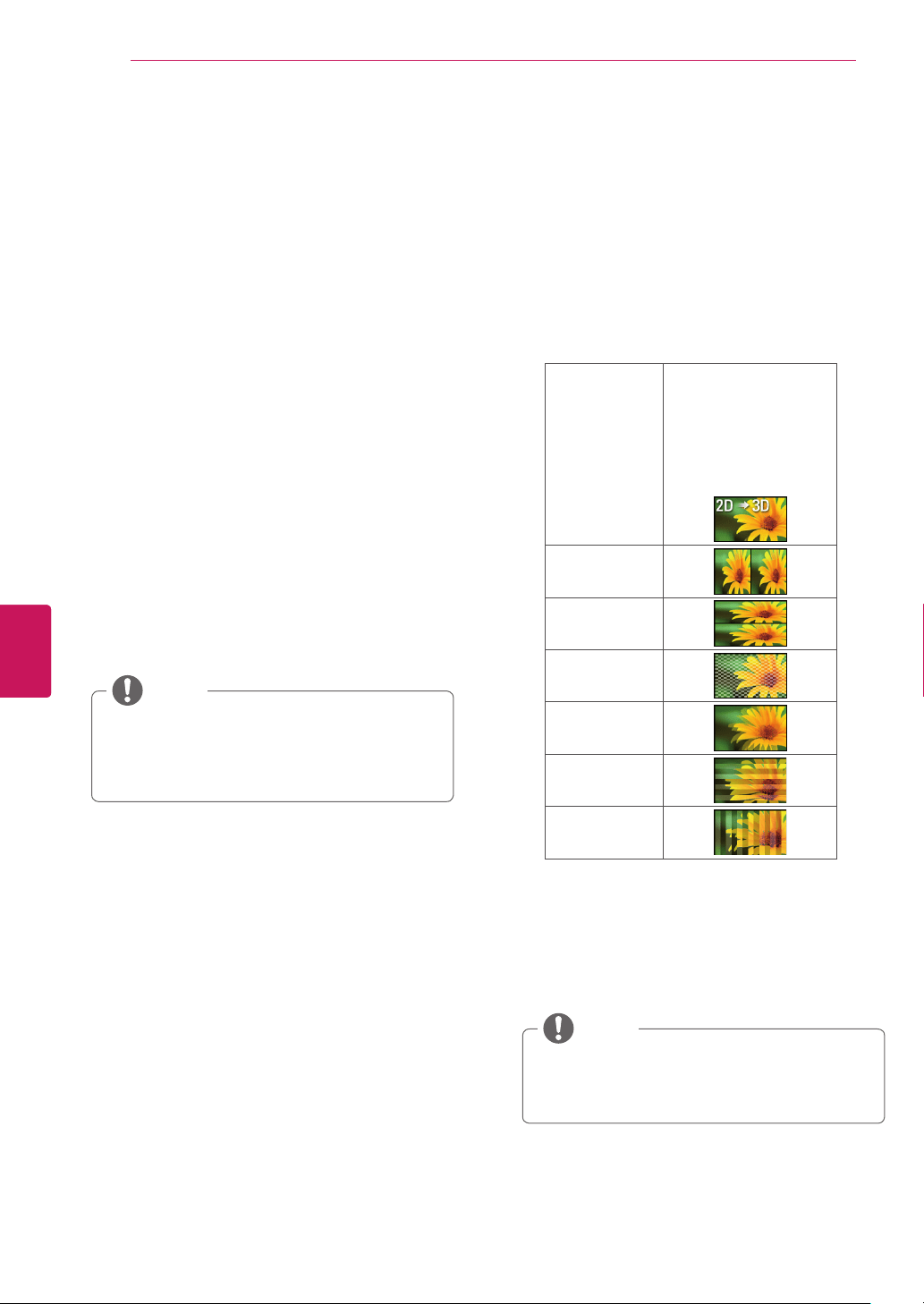
Viewing 3D Imaging
1
Playthevideoproducedin3D.
2
Wearthe3Dglasses.
3
Selectthethumbnailmatchingthescreen.
4
Press
3D
buttontoselectaoption.
Change Format
Changethethumbnailmatching
thescreen.
2D » 3D
Changedfrom2D
imagingto3Dimaging.
2D-to-3Dconverted
videosmayappear
lessrealisticthantitles
originallyproducedas3D
videos.
Side by Side
Top & Bottom
Checker Board
Frame
Sequential
Row
Interleaving
Column
Interleaving
3D settings
Adjusts3Dsettings.
Picture
adjustment
AdjuststhePictureadjustment.
3D to 2D
Changesthe3Dto2D.
3D off
Turnoffthe3D.
Supported3Dapplications
:TVapplications,Mediaplayer(USB),
3DWorld
NOTE

49
ENG
ENGLISH
Applications
Setting 3D Imaging
1
Goto
All Apps
>
Settings
>
3D settings
2
Selectoneofthefollowingoptionsandpress
OK
(Wheel).
3D Settings
Turn on the
power by 3D
Checktheboxtoturnonthepower
by3D.
3D Mode
Selectoneofthe3Dmode.
3D Depth
Adjuststhestereoscopiceffectofthe
3Dimageconvertedfrom2Dimage.
3D Viewpoint
Movesthe3Dimagetofrontand
backtoadjustthe3Dperspective
view.
3D Color
Correction
Providesthe3DOptimizedcolor.
3D Sound
Zooming
Providesthe3DOptimizedsound.
3D Image
Correction
Selects
Left/Right
or
Right/Left
.
Selectsthescreenwith3Dvideowith
bettervisibility.
Somemenusmaynotworkwhileviewing
3Dimaging.
The3Dimagingisdisabledautomatically
whenswitchinginputsourceorDTV
channel.(Exceptfor2Dto3D)
Thescreenmaynotbedisplayedproperlyif
youview2Dimagesin3Dimagingmode.
3Deffectcanbeseenwhen3DMode
isselectedappropriatelyforthe3Dinput
signalsuppliedtotheTV.
CAUTION

50
ENG
ENGLISH
Applications
Media Player
Playbackaudio/video/imagefiles.
1
InsertaUSBdevicecontainingfilesintothe
USBjack.
2
Goto
All Apps
>
Media Player
.
3
Selectafilefromthelistandpress
OK
.
Keys available during playback
►
Startsorre-startsplayback(video/music
playback).StartsSlideshoworstartsmoving
apanoramicphoto(photoplayback)..
Pausesplayback(video/musicplayback).
Stopsplayback.StopsSlideshoworImage
viewer,andreturnstothefilelist(photo
playback).
Fastrewinds/Fastforwardsthetitle/track.
Skipstotheprevious/nexttitle(video
playback)/track(musicplayback)/file(photo
playback).
Options
Varioussettingsandplaybackoperationsare
availablebypressing
MENU
duringplayback.
Theavailableitemsdifferdependingonthe
situation.
Photo playback
Slide
show
Youcanstart(PlaySlideshow)orpause
(PauseSlideshow)aslideshow.
Rotate
Youcanrotatephotofilesclockwise(Right)
by90degrees.
Slide
show
setting
Youcanadjustthespeedorrandomplayof
theslideshow.
USBdevicesmustbelessthan2TB.
NOTE

51
ENG
ENGLISH
Applications
Netflix
SignintoyourNetflix®accounttobrowseby
genre,searchfortitles,manageyourInstant
QueueandreviewNetflix®recommendationsall
fromyourGoogleTV.IfyoudonothaveaNetflix®
account,youwillneedtocreateanewaccountto
usethisfeature.
Formoreinformation,visitwww.Netflix.com.
WatchTVshowsandmoviesonlineorby
streamingthemfromNetflix.
Photos
Browsephotosonaphotosharingwebsite,such
asPicasa.Youcanalsobrowsephotosinthe
connectedUSBdevices.
To View Albums from Local Media
1
InsertyourUSBdeviceintotheUSBsloton
yourTV.
2
Inthe
Photos
app,navigateto
Local media
on
theleftnavigationbar.
3
SelectyourUSBdeviceandyouwillthenbe
abletonavigatethroughthefoldersonyour
device.
To Link your online Album:
1
Whileinthe
Photos
app,pressthe
Menu
keyonremotecontrol.
2
Select
Settings
.Checktheboxnexttothe
accountthatyouwanttolinktothe
Photos
app.
3
IfyourGoogleaccountisnotlisted,select
New
Account
whereyouwillbeaskedtoCreatea
newaccountorSign-Intoanexistingaccount.
52
ENG
ENGLISH
Applications
Search
1
Pressthe
SEARCH
keyonyourremote
control.The
SEARCH
keyworksno
matterwhereyouareonyourGoogleTV,and
searchesacrossallapplications,bookmarks,
TVcontent,webvideo,andwebpages.
2
Whenyouenterasearchquery,adrop-down
listwilldisplayaselectionofresults.
3
Navigatesearchresultsusingthedirectional
arrowkeys,thenpress
Enter
toselectan
option.YoucanalsoenteraURLintoGoogle
TVsearchtonavigatedirectlytoawebsite.
To customize Search Results
It’seasytoconfigureyourGoogleTVsearch
experiencetoincluderesultsfromTV&Movies,
Apps,Podcasts,andmore.
1
Pressthe
SEARCH
key,type‘Settings,’and
selectthe
Settings
application.
2
Select
Search
,then
Searchable items
to
customizewhatappearswhenyousearch.
SafeSearch
UseSafeSearchtoblockadultcontentfrom
appearinginsearchresults.
1
Pressthe
SEARCH
key,type‘Settings,’and
selectthe
Settings
application.
2
Select
Privacy & safety
,navigateto
Safety
,
andselect
SafeSearch
.
TV & Movies
TV&Moviesisthesimplestwaytofindshows
andmoviestowatchinstantly.Inadditionto
liveTV,youcanbrowseandsearchforvideoon
demandoptions,andfilterresultsbyprice(Free
vs.All)andstreamingquality(HDvs.all).
TV&Moviesprovides:
AccesstocontentfromyourNetflix
subscription
Accesstowebvideocontentfrom100+
webdomains
AccesstoVODrentalsonAmazonand
YouTube
NOTE
To access TV & Movies:
1
Pressthe
Home
keyandselect
TV &
Movies
.
2
Oncein
TV & Movies
,usetheleftnavigation
bartofilterby
Live
,
Shows
and
Movies
To filter available TV & Movies:
Live
:UsethetoptoolbartofilterliveTV
listingsbytimeandquality(AllorHD)
Shows
:Usethetoptoolbartofiltershows
byprice(FreeorAll)andquality
Movies
:Usethetoptoolbartofiltermovies
bypriceandquality
53
ENG
ENGLISH
Applications
YouTube
Full-lengthfeaturefilmsfrommanymajor
Hollywoodstudiosarenowavailableforrenton
YouTube.Discoverauniverseofrelatedremixes,
clips,andbehindthescenesfootagewithYouTube
MovieExtras.OnGoogleTV,navigatetoYouTube.
com/Moviestobrowseandsearchformovies,and
renttitlesusingyourGoogleAccount.
GoogleTVofferstwodifferentYouTube
experiences:
TheYouTubeonTVapp,anAndroid-based
appthatmakesiteasytofindandwatch
contentonYouTube.
Through
YouTube.com
:UsetheChrome
browsertoaccessthedesktopYouTube
experienceyou’reusedto.
YouTubeMovies(video-on-demandrentals)
arecurrentlyonlyavailablethroughthe
YouTube.comexperience.
BrowsemoviesandshowsinTV&Movies
oratYouTube.com/movies.Tolearnmore
aboutGoogleTV’svideoondemand
options,pleasevisittheVideoonDemand
article.
NOTE

54
ENG
ENGLISH
Settings
SETTINGS
The Main Menus
YoucanrevieworedityourTVsettingsbytyping
Settings
intotheSearchbarorbynavigatingto
Settings
in
All Apps
.
YouwillbeabletorevieworupdatetheTVsettingsincluding:
Network
Manageinternetconnection.
Video input
SetupTVserviceprovider.
Picture & sound
AdjustthePictureandSound.
Channel setting
Setupandeditchannels.
3D Setting
Setup3Dmode.
Input List
Selectaninputsource.
Search
Managesearchableitems,clearshortcuts.
Applications
Manageapplicationsanddevelopmentoptions.
Language & input devices
Managesystemlanguage,inputdevices,IPremotes.
Accounts & sync
Manageaccountsanddatasync.
Privacy & safety
Manageprivacy,safetyandlocksettings.
Storage
UnmountUSBstorage,viewavailablestorage.
Date, time & location
Setdate,time,timezoneandformats.
Accessibility
Manageaccessibilityoptions
Option
Managesystemoption.
About
Systeminformation

55
ENG
ENGLISH
Settings
Network
ManageInternetconnection.
Ethernet Youcansetupthestatusofthewirednetworkconnection.
Wi-Fi YoucanselectanavailableWi-FinetworkfromthelistofWi-Finetworksfoundinyour
areaorsetupanewWi-Finetwork.
Status Youcancheckthenetworkinformation,suchasIPaddress,EthernetMACaddress,and
Wi-FiMACaddress.
Video input
Edit configured devices
Youcanselectthedevicetocontrolortosetasthetuner.
Select available source
Toaddadevice,selectitfromthelist.YoucanaddadeviceyouwanttocontrolusingtheIRBlaster.
Picture & sound
Adjustsscreensaver,screenofftimeoutandsoundeffects.
Picture
Screen saver Adjustthescreensavertimeout.
Screen off timeout Adjustthescreenofftimeout.
Picture adjustment Adjusttheimagesize,qualityoreffect.
Sound
Volume Adjustthevolumelevel.
Sound effects Setthesoundeffectsenabledordisabled.
Notification sounds Select
Silent
ifyouwanttosilencethenotificationsounds.
Text-to-speech SettheText-to-speechfunction.
Sound adjustment Adjustthesoundquality,effectorvolumelevel.

56
ENG
ENGLISH
Settings
Channel setting
Setupandeditchannels.
Auto Tuning TuneandStoreallavailablechannelsthroughantennasorcableinputs.
Manual Tuning TuneandStorethechannelsthatyouwantmanually.
3D settings
Turn on the power by 3D
Checktheboxtoturnonthepowerby3D.
3D Mode
Selectoneofthe3Dmode.
3D Depth
Adjuststhestereoscopiceffectofthe3Dimageconvertedfrom2Dimage.
3D Viewpoint
Movesthe3Dimagetofrontandbacktoadjustthe3Dperspectiveview.
3D Color Correction
Providesthe3DOptimizedcolor.
3D Sound Zooming
Providesthe3DOptimizedsound.
3D Image Correction
Selects
Left/Right
or
Right/Left
.Selectsthescreenwith3Dvideowithbettervisibility.
Input List
Viewstheinputsourceswiththeirlabels.Youcanselectainputsource.
Search
ManageSearchableitemsandClearshortcuts
Searchable items Chooseapplicationstosearch.
Clear shortcuts Clearshortcutstorecentlychosensearchsuggestions.
Applications
Manageapplicationsanddevelopmentoptions.
Unknown sources Allowinstallationofnon-GooglePlayapplications
Manage applications Manageandremoveinstalledapplications.
Running services Viewandcontrolcurrentlyrunningservices.
Development Setoptionsforapplicationdevelopment
Language & input devices
Managesystemlanguage,inputdevices,IPremotes
Manage IP remotes ConnectanddisconnectsIPremotes.
Chrome to TV PushlinkstothisdevicefromGoogleChrome.
Pointer speed Adjustmouseandtrackpadspeed.

57
ENG
ENGLISH
Settings
Select language Selectalanguage
Current keyboard Configurecurrentkeyboard
Configure input methods Configureinputmethods.
Accounts & sync
Manageaccountsanddatasync.
General sync settings
Background data Applicationscansync,sendandreceivedataatanytime.
Auto-sync Applicationssyncdataautomatically.
Manage accounts
Youcanclearthesavedpasswordorremoveaccout.
Add account Addsanewaccount.
Privacy & safety
Manageprivacy,safetyandlocksettings.
Personal data
Reporting AutomaticallysendsGoogleTVusagestatisticsandcrashreportstoGoogle.
Video history EnablehistoryofvideowatchingsuchasTVchannels.
Clear video history Erasethevideohistory.
Safety
SafeSearch Blockadultcontentfromappearinginsearchresults.
Application lock RequirePINtouseGoogleChrome&GooglePlay.
Safety(Lock) LockorUnlockchannelsandprograms.
Backup and restore
Back up my data BackupapplicationdataandothersettingstoGoogleservers.
Backup account Setthebackupaccount.
Automatic restore Ifyoureinstallananpplication,restorebackupsettingsorotherdata.

58
ENG
ENGLISH
Settings
Storage
UnmountUSBstorage,viewavailablestorage.
Internal memory
Total Viewthetotalinternalmemorysize.
Available Viewtheavailablememorysize.
External access via FTP
Enable FTP access SettheFTPservertobedisabledorenabled.
Media storage
Viewtheconnectedstoragedevices.
Date, time & location
Setsthedate,time,timezoneandformats.
Date & time
Automatic Useprovidednetworktime.
Set date Setthedatemanually.
Set time Setthetimemanually.
Select time zone Selectthetimezone.
Use 24-hour format Selectthe24-hourformat.
Select date format Selectthedateformat.
Timer
Off Time SetthetimetoturnOfftheTVautomatically.
On Time SetthetimetoturnOntheTVautomatically.
Sleep Timer SettheSleeptimer.
Auto off SetthelengthoftimeuntiltheTVtoturnoff.
Location
Select country Selectyourcountry.
Set location SetyourlocationbyZIPcode.

59
ENG
ENGLISH
Settings
Accessibility
Manageaccessibilityoptions.
Accessibility services
TalkBack ChecktheboxtoprovideaudibleexplanationsforGoogleTVfeatures.
Accessibility scripts
Download accessibility
scripts
AllowapplicationstodownloadaccessibilityscriptsfromGoogle.
Option
Managesystemoption.
Audio amplifier SettheIRBlastertocontroltheAudioamplifier.
Initial Setting FactoryReset.Allusersettingsandchannelsettingswillbereset.
Audio Language Selecttheaudiolanguage.
Caption SetwhethertodisplaycaptionsandCustomizeyouroptionineachmode.
Standby Light SettoturnonorofftheindicatorlightinStandbyMode
Pointer Alignment Aligntheremotecontrol'sdirectionwiththepointeronyourTVscreenbyshakingthe
remotecontrolleftandright.
Customer Support Checkthecustomerinformation.
Environment Selection Selectyourenvironment.
Netflix Deactivation DeleteallNetflixprivatedata
About
Viewsthesysteminformation.
Product/Service Info ShowtheProductorServiceinformation
System updates Updatethesystem.
System tutorial LearnaboutthekeyfeaturesofGoogleTV.
Model name Viewthemodelname.
Android version Viewtheandroidversion.
Build number Viewthebuildnumber.
Legal information
Open source licenses Viewtheopensourcelicenses.
Google legal ViewtheGooglelegalinformation.
60
ENG
ENGLISH
Appendix
APPENDIX
Updating the TV system
Downloadandinstallthelatestsystemthrough
networksignaltoenhanceorchangetheproduct
function,oraddnewfeatures.
Tocheckthecurrentfirmwareversionorupdate
thefirmware,
1
Goto
All Apps
>
Settings
>
About
>
System
updates
.
2
PresstheNavigationbuttonstoscrollto
System updates
andselect
Check now
.
Thecurrentfirmwareversiondisplays.
3
Ifnewupdateexists,thedownloadis
startedautomaticalyonbackground.When
downloadingiscompleted,aPop-upappears.
Thenupdateyoursystem.
Youcannotdowngradebacktoanolder
systemversion.
Theperiodoftimeforthefirmwareupdate
maybedifferentdependingonthefirmware
sizeandnetworkbandwidth.
NOTE
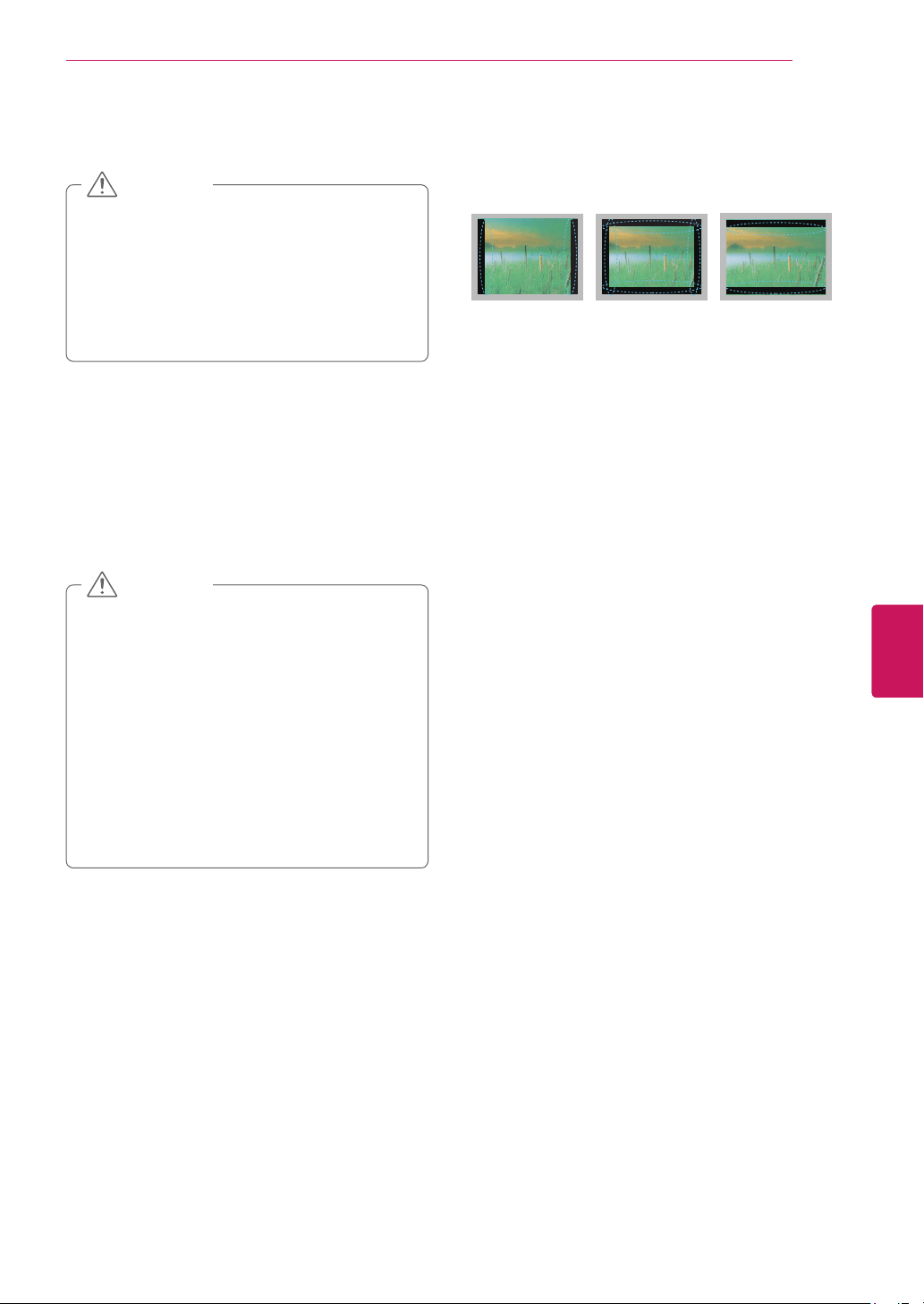
61
ENG
ENGLISH
Appendix
Cleaning Your TV
Makesuretoturnthepoweroffand
disconnectthepowercordandallother
cablesfirst.
WhentheTVisleftunattendedandunused
foralongtime,disconnectthepowercord
fromthewalloutlettopreventpossible
damagefromlightningorpowersurges.
CAUTION
Screen, frame, cabinet and stand
Toremovedustorlightdirt,wipethesurfacewith
adry,clean,andsoftcloth.
Toremovemajordirt,wipethesurfacewitha
softclothdampenedincleanwateroradiluted
milddetergent.Thenwipeimmediatelywithadry
cloth.
Donotpush,rub,orhitthesurfacewith
yourfingernailorasharpobject,asthismay
resultinscratchesonthescreenandimage
distortions.
Donotuseanychemicals,suchaswaxes,
benzene,alcohol,thinners,insecticides,
airfresheners,lubricants,asthesemay
damagethescreen’sfinishandcause
discoloration.
Donotsprayliquidontothesurface.If
waterenterstheTV,itmayresultinfire,
electricshock,ormalfunction.
CAUTION
Power cord
Removetheaccumulateddustordirtonthe
powercordregularly.
Preventing “Image burn” or
“Burn-in” on your TV screen
IfafixedimagedisplaysontheTVscreenfor
alongperiodoftime,itwillbeimprintedand
becomeapermanentdisfigurementonthe
screen.Thisis“imageburn”or“burn-in”and
notcoveredbythewarranty.
IftheaspectratiooftheTVissetto4:3fora
longperiodoftime,imageburnmayoccuron
theletterboxedareaofthescreen.
AvoiddisplayingafixedimageontheTVscreen
foralongperiodoftime(1ormorehoursforthe
PlasmaTV)topreventimageburn.
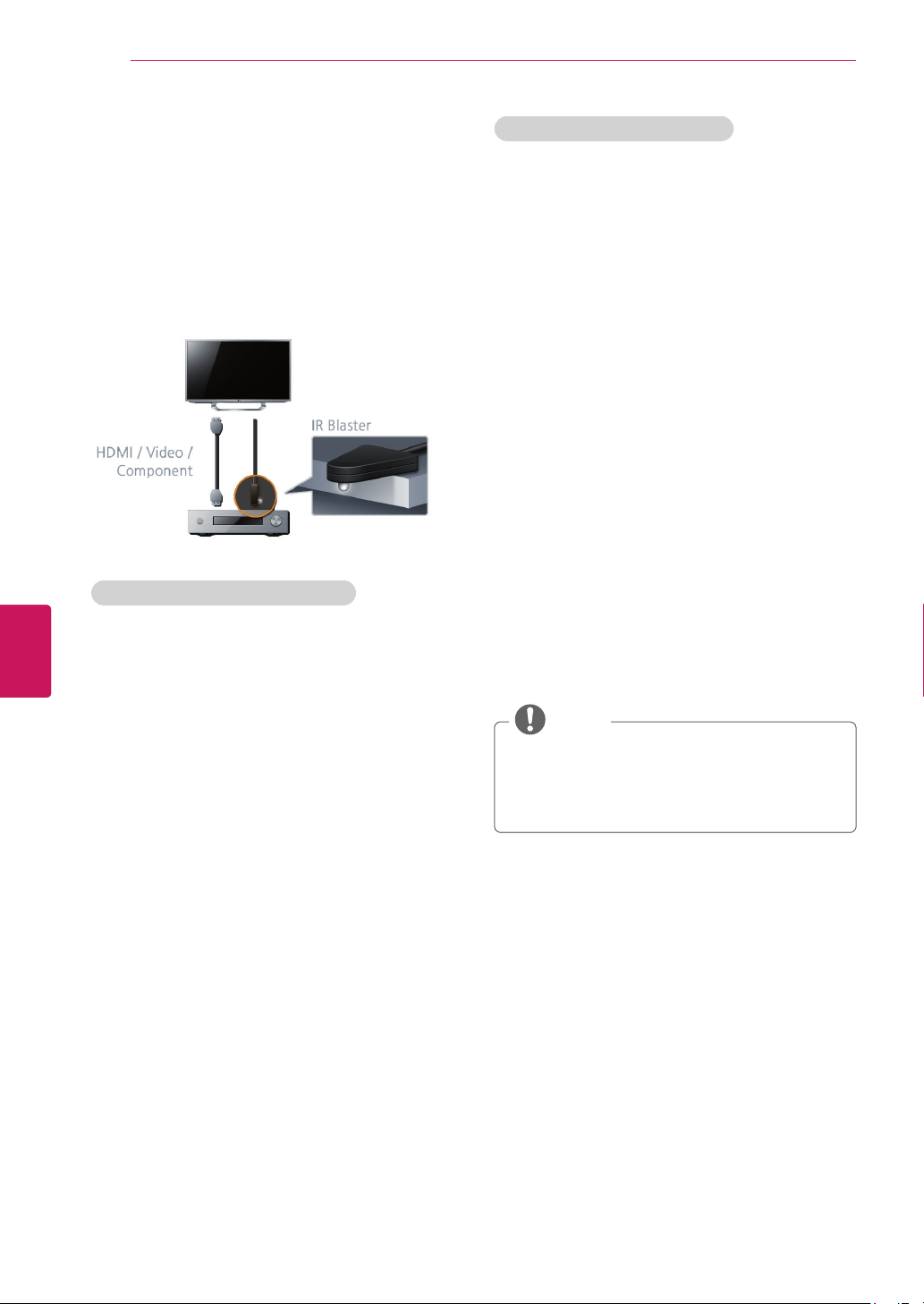
62
ENG
ENGLISH
Appendix
IR Blaster Guide
Universalremotecontrolsettingenablesuser
tocontrolmultipledeviceswithasingleremote
controller.Inordertocontinuethesetting,
pleasecheck,ifIRBlasterandotherdevicesare
connectedwithTVproperly.
When audio amplifier is connected:
1
ConnecttheIRBlasterCabletotheTV.Place
thetransmitterinfrontoftheAudioamplifier.
2
Goto
Home
>
All Apps
>
Settings
>
Option
>
Audio amplifier
.
3
Select
Yes, I have an Audio amplifier
and
Next
.
4
Selectthemanufacturerofthereceiver.
5
Testthecode.Ifthecodeisnotmatched,
select
No, try next code
tofindthe
correspondingcode.
6
Select
Yes
.Yourdeviceisregistered.
7
Press
Fn + 5
totestthecode.Andselect
Next
.
8
SelectthedefaultoutputbetweenAudio
amplifierandTVspeakers.AndSelect
Done
.
Thesettingisfinished.
When set-top box is connected:
1
ConnecttheIRBlasterCabletotheTV.Place
thetransmitterinfrontoftheAudioamplifier.
2
Goto
Home
>
All Apps
>
Settings
>
Video
input
>
Add device manually
.
3
Selectadeviceand
Next
.TheTVsignalplaying
isdisplayed.
4
Selectyourdevicetype.
5
Selectthemanufactureroftheselected
device.
6
CheckiftheIRBlasterisfirmlypluggedinto
theIRBlasterportandisplacednearthe
remotesensorofyourdevice.andSelect
Next
.
7
Select
Send POWER
totestthecode.Ifthe
codeisnotmatched,select
No, try next code
tofindthecorrespondingcode.Ifthecodeis
matched,select
Yes
.
(IfyourZIPcodeisnotcorrect,changetheZIP
codebyselecting
Change ZIP code
.)
8
Select
Done
.Yourdeviceisregistered.
Somedevicescanbesupportedevenif
therearenoexistinIRcodelist.
Somefunctionsmaydifferdepedingonthe
device.
NOTE
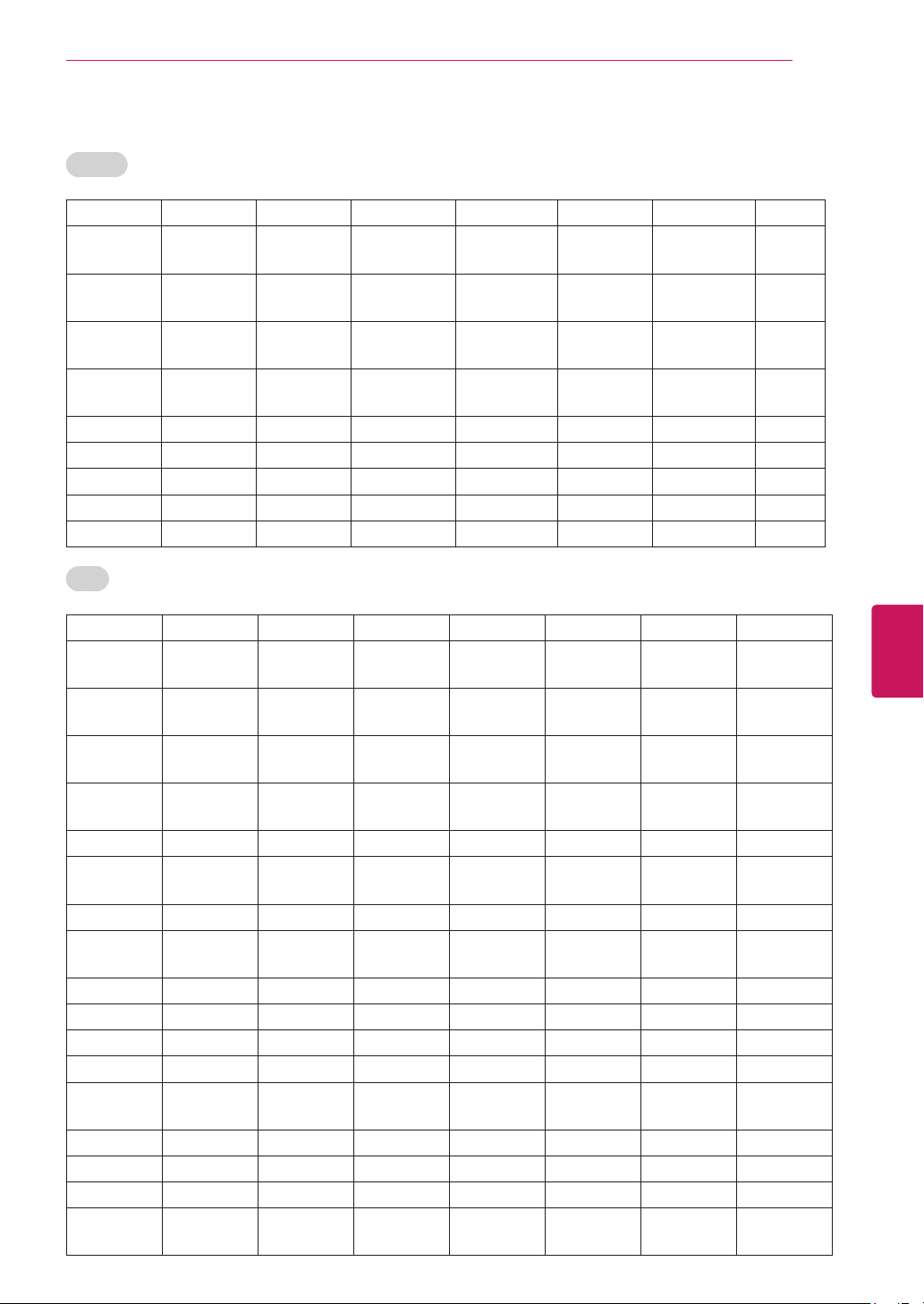
63
ENG
ENGLISH
Appendix
IR Code list (by brand name)
AUDIO
ADCOM AIWA AKAI ANTHEM ARAGON ARCAM OPTIMUS OUTLAW
PANASONIC PARASOUND PHILIPS PIONEER ATLANTIC_
TECHNOLOGY
AUDIO_FILE B_&_K BOSE
BOSTON_
ACOUSTICS
CAMBRIGE_
AUDIO
CARVER CARY_AUDIO_
DESIGN
SAMSUNG SANSUI SANYO SCOTT
CITATION CLARION DENON DIGITAL_
PROJECTION
DVICO ELAN ENLIGHTENED
_AUDIO
ESCIENT
TEAC TECHNICS THETA_DIGITAL FISHER FLEXTRONICS FOSGATE_
AUDIONICS
HARMAN_
KARDON
HITACHI
INTEGRA JAMO PROCEED RCA JCPENNEY JVC KENWOOD KLEGG
KLH KLIPSCH KOSS KRELL SHARP SHERWOOD LEXICON LG
LINN LUXMAN MAGNAVOX MARANTZ MCINTOSH MERIDIAN SUNFIRE ROTEL
TOSHIBA YAMAHA MITSUBISHI MONDIAL MYRYAD NAD NAKAMICHI NEC
NILES ONKYO REALISTIC SOUNDESIGN SONY ZENITH
DVD
ACCURIAN ADCOM ADVENT AIWA AKAI ALLEGRO ALPINE AMW
ANTHEM APEX_DIGITAL ARCAM ASPIRE_
DIGITAL
AUDIOVOX BEL_CANTO_
DESIGN
BLAUPUNKT BROKSONIC
BUFFALO CALIFORNIA_
AUDIO_LABS
CAMBRIDGE_
AUDIO
GREENHILL RCA RIO SHARP SHERWOOD
CARY_AUDIO_
DESIGN
CENTRIOS CINEVISION CITIZEN COBY CYBERHOME DAEWOO DENON
DIAMOND_
VISION
DISNEY DURABRAND DVD_2000 DYNEX EMERSON ENTERPRISE ESA
FISHER FUNAI GATEWAY GPX GRADIENTE GE GO_VIDEO GRUNDIG
HARMAN_
KARDON
HITACHI HITEKER ILO INITIAL INSIGNIA INTEGRA JATON
JBL JSI JVC JWIN KAWASAKI KENWOOD RJTECH ROTEL
SAMPO SAMSUNG SEARS SENSORY_
SCIENCE
SANSUI SANYO KONKA KOSS
KISS KLH KREISEN KRELL LASONIC LEXICON LG LITEON
LOEWE MAGNAVOX MALATA MARANTZ MCINTOSH MEMOREX MERIDIAN MICROSOFT
MINTEK YAMAHA ZENITH MITSUBISHI MYRYAD NAD NAKAMICHI NESA
NEUNEO NEXXTECH NORCENT ONKYO OPPO OPTIMUS ORION ORITRON
PANASONIC PARASOUND PHILIPS PHILIPS_
MAGNAVOX
PIONEER POLAROID POLK_AUDIO PRESIDIAN
PRINCETON PROSCAN PRIMA PRIMARE SHINSONIC SONIC_BLUE SONY
SPECTRONIQ SUNGALE SUPERSCAN SVA SYLVANIA SYMPHONIC TAG_MCLAREN TATUNG
TEAC TECHNICS TECHWOOD THETA_DIGITAL THOMPSON TOSHIBA TRUTECH VINC
URBAN_
CONCEPTS
X-BOX US_LOGIC VENTURER
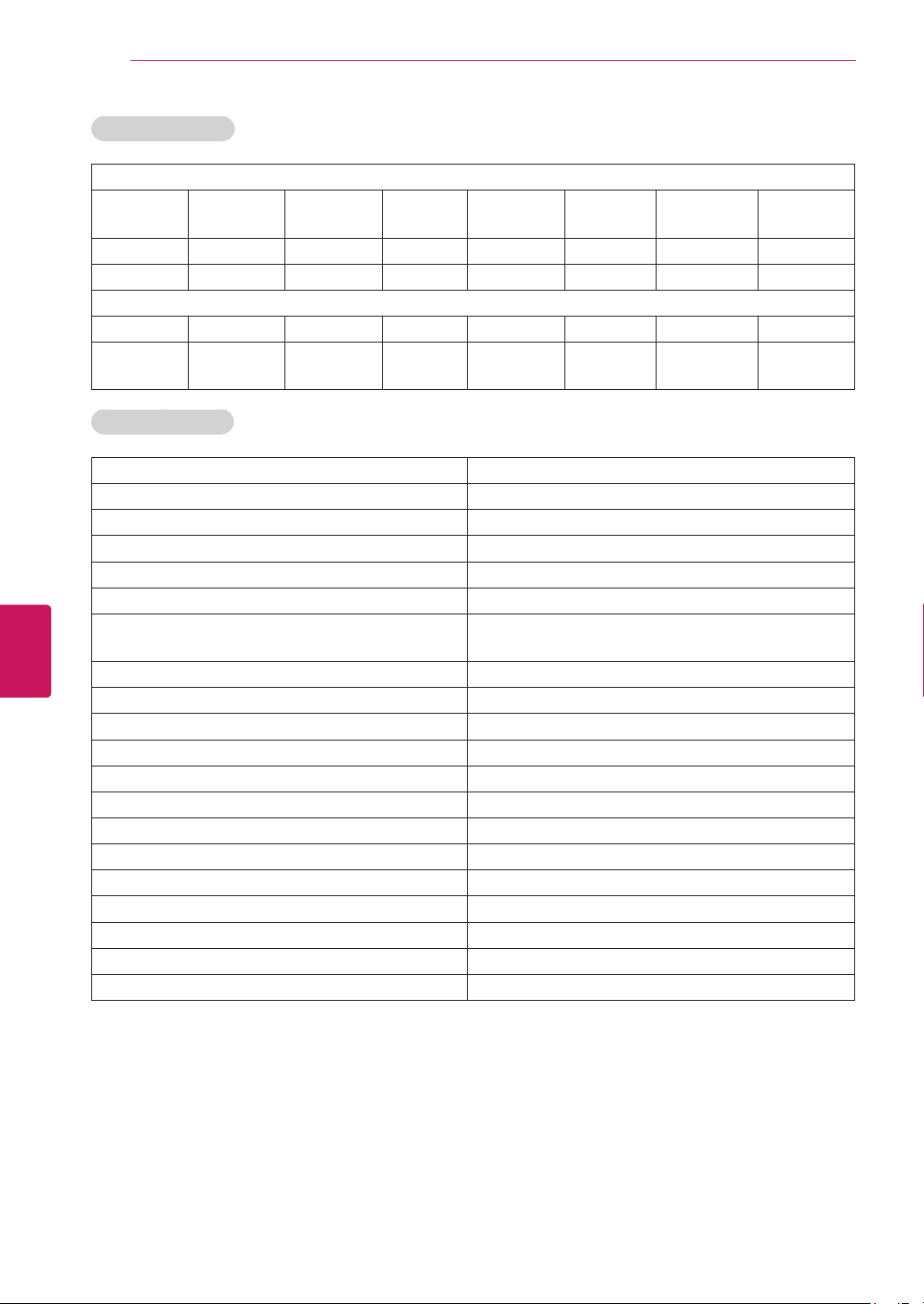
64
ENG
ENGLISH
Appendix
Cable & IPTV STB
CableSet-topBox
CABLEVISION CE-LABS DIGEO DIGITAL_
STREAM
EVOLUTIONFTA SONY SUDDENLINK VIEWSTAR
MAGNAVOX MEMOREX HITACHI PANASONIC PHILIPS PULSAR SPRUCER TELNET
RCA REGAL TOSHIBA TILEVISION ZENITH DSTV FOXTEL DUNE
IPTVSet-topBox
ADB AMINO AT&T CISCO COMCAST DREAM ENTONE MINERVA
MOTOROLA MYRIO NOWTV PAGE VERIZON SCIENTIFI
-CATLANTA
WEGENER
Cable Set-top Box
SO&Manufacturer Modelname
CISCO/SA EXPLORERSeries,OCAPMODELS,DIGITALTRANSPORTADAPTER50
TOCOM 5503VIP,5507
NBOX ADB-5720SX,ABD5720SX
REGENCY ALLMODELS
HAMLIN CR6000,6600,CR6800,CR-83
PACE DC501P,DC511P,DC550P,DC551P,TDC850,TDC850NF,TDC758D_
SUMMIT,TDC787X_ASPEN
MOTOROLA DCH70,100,200,3200,3416,6200,6416,QIP2500,2708,6200,6416,7100,7216
THOMPSON DCI1011GEM,DCI1011GEM1,DCI104ICS
VERIZON DCT6416,FIOSTV
GENERALINSTRUMENT DL4,DQNV/DRX,DPBB,DPV/DP/DQN
JERROLD DPBB,DPV/DP/DQN,DL4,DQNV/DRX
TIVO HD,HR10-250,SERIES2,3
BELGACOM IPP430MC
MOXI MOXIMEDIACENTER,2065-MSX
HOMECAST NC3000C01
NFUSION NOVA,NUVENIOHD,NUVENIOSDPHOENIX,SOLARIS
SKY SKYHD
SAMSUNG SMT-3090HD,3270HD,SMT-3260HD
PIONEER VOYAGERSeries,DTVSeries
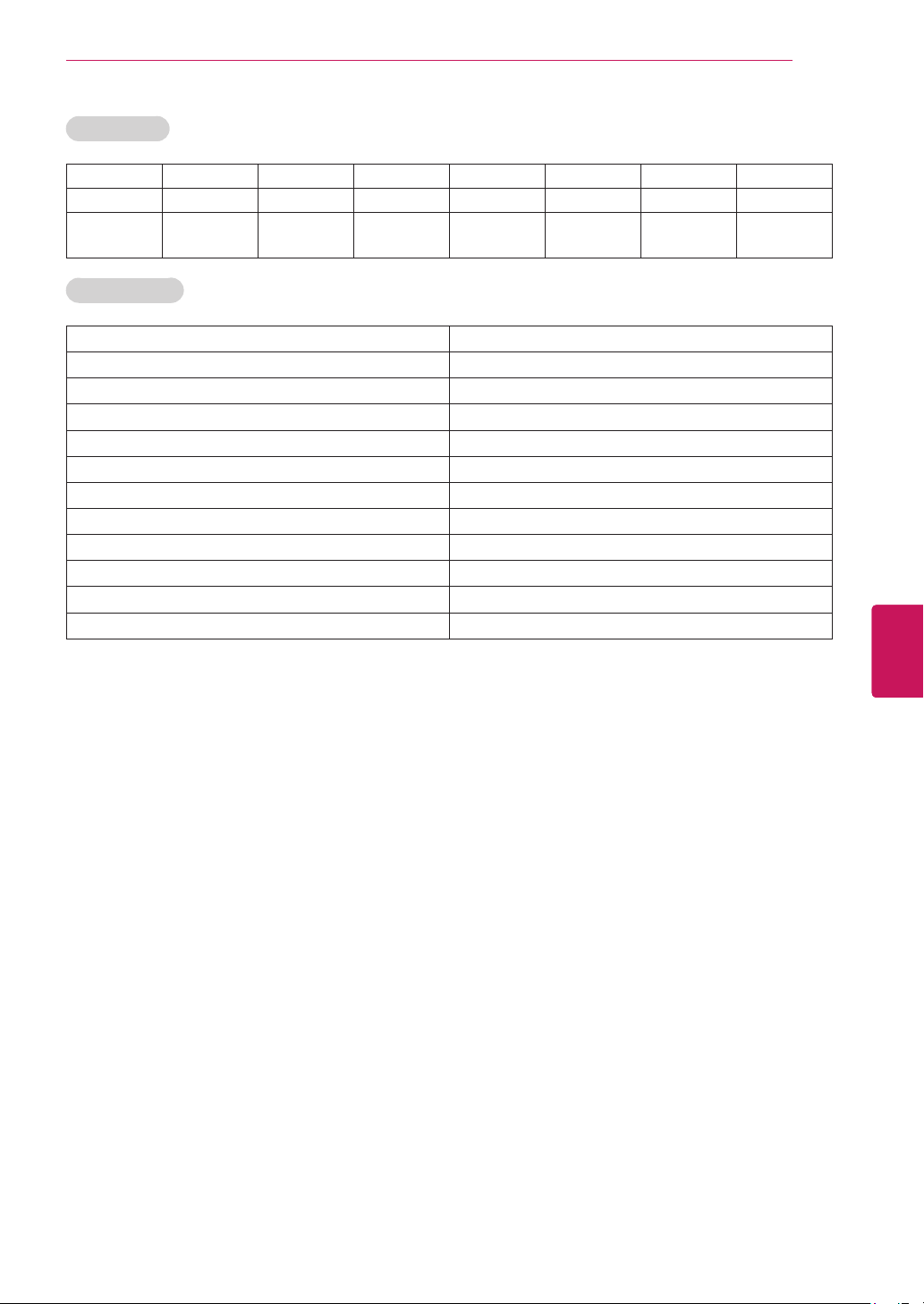
65
ENG
ENGLISH
Appendix
Satellite STB
EXPRESSVU GE GOI HITACHI HTS MAGNAVOX MEMOREX NEXT_LEVEL
PAYSAT PROSCAN SAMSUNG UNIDEN VOOM STARCHOICE RADIOSHACK CABLEVISION
GENERAL_
INSTRUMENT
DVR model list
SO&Manufacturer Modelname
DIRECTV HR20,21
DSTV DSTV[A][B][C][D]
HUGHES GXCEBOT,HDVR2,SD-DVR120,DVR40
HUMAX
ICREALTIME FLEX16,4,8,MAX16,4,8
MOXI HD_DVR_MR-1500T3
PHILIPS TIVO1,DSR6000R,7000,704,708
RCA DVD490RE
REPLAYNETWORKS REPLAY1,RTV5040,5060,5080,5160,5504,5508,5516,5532
SONY RM-Y809,SAT-T60,W60,SVR-2000
TOSHIBA
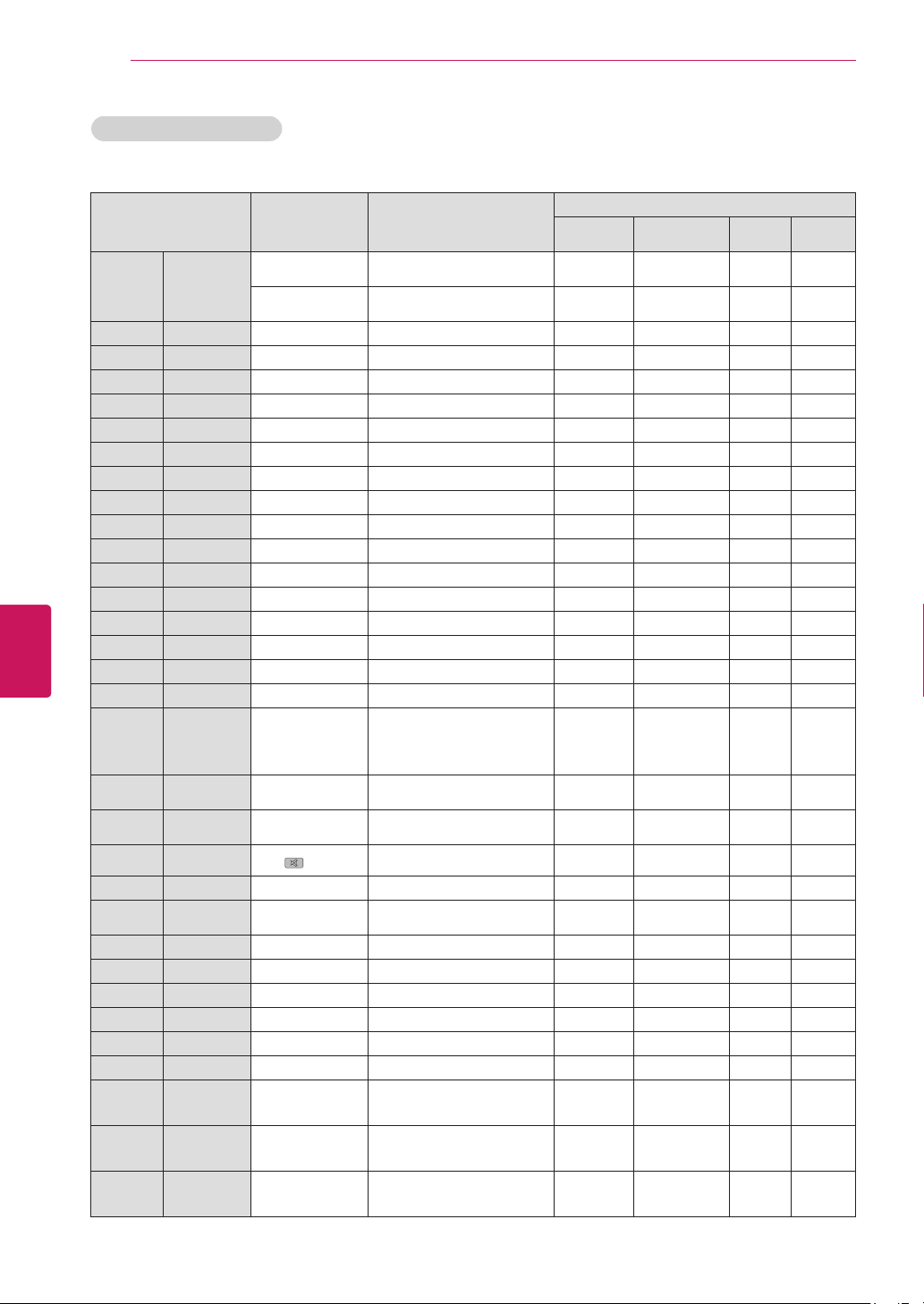
66
ENG
ENGLISH
Appendix
Function
Key
(onGoogleTV
RCU)
Reference
Devices
Audio
amplifier
STB
(Cable/SAT)
DVD DVR
Power
Power(on/
off)
FN+2(EXT1PWR)
STB/DVD/DVR
(completedtheconfiguration)
O O O
FN+5(EXT2PWR)
Audioamplifier
(completedtheconfiguration)
O
1 Numbers 1 O O O
2 Numbers 2 O O O
3 Numbers 3 O O O
4 Numbers 4 O O O
5 Numbers 5 O O O
6 Numbers 6 O O O
7 Numbers 7 O O O
8 Numbers 8 O O O
9 Numbers 9 O O O
0 Numbers 0 O O O
- Dash Fn+0
Up Up Qside,Rside O O O
Down Down Qside,Rside O O O
Left Left Qside,Rside O O O
Right Right Qside,Rside O O O
Ok Confirms OK Qside,Rside O O O
Exit
Closesall
menus
/Moves
previous
step
ESC AvailableforadevicehasExitbutton O O O
VolUp Volumeup
FN+Right
(EXTVOL+)
Availableforadeviceselectedto
volumecontrol
O
Vol
Down
Volume
down
FN+Left
(EXTVOL-)
Availableforadeviceselectedto
volumecontrol
O
Mute Mute
(Mute)
O
ChUp Channelup CH+ O
Ch
Down
Channel
down
CH- O
Menu Menu Menu Qside,Rside
Stops Fn+
O O O
Pauses
O O O
4
Plays
4
O O O
FF
O O O
REW
O O O
Movesnext
chapteror
contents
Fn+
O O
Movesprevious
chapteror
contents
Fn+
O O
BACK
Closesallmenus
/Movesprevious
step
Back Qside,Rside O O O
Universal Remote key list
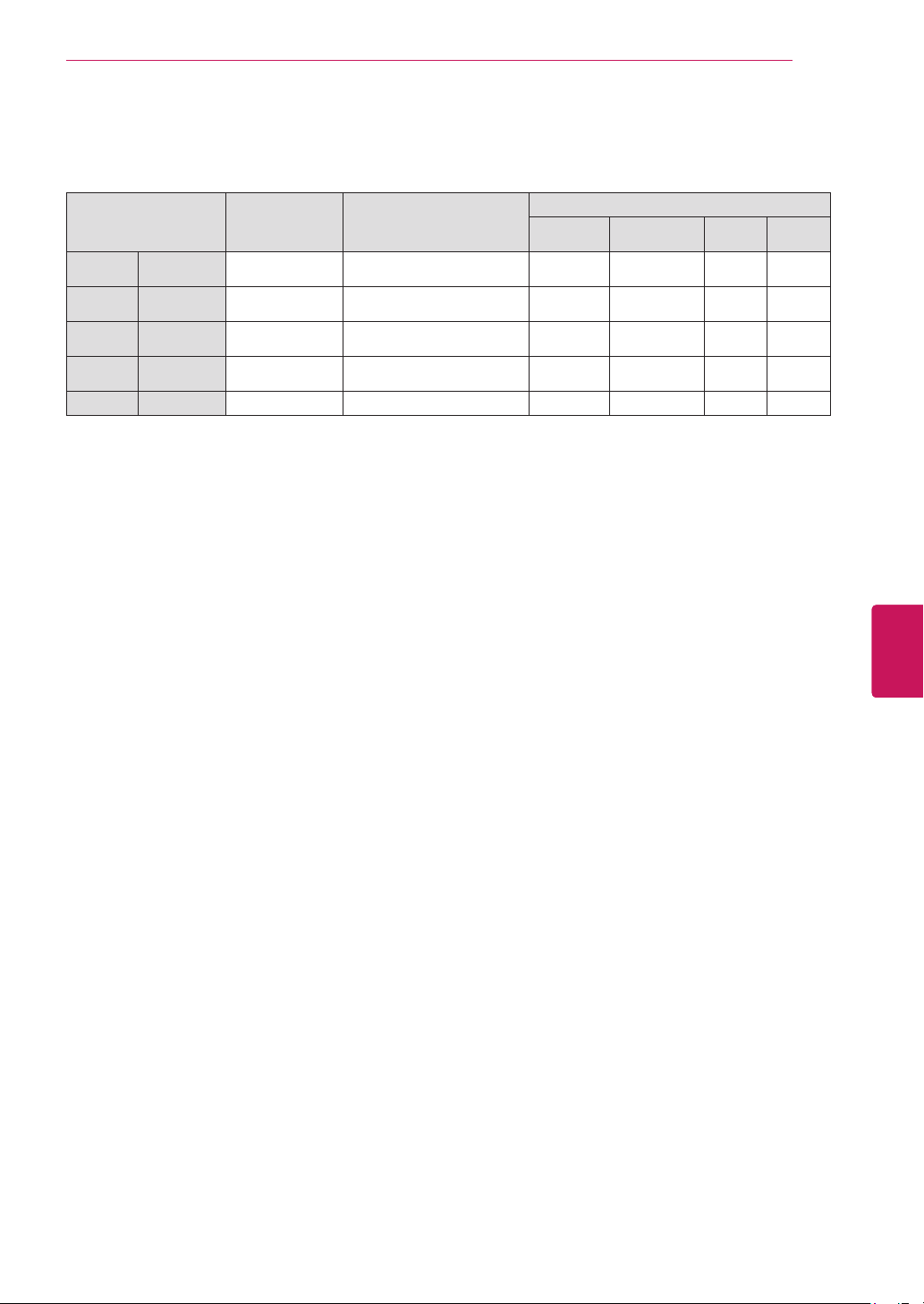
67
ENG
ENGLISH
Appendix
Function
Key
(onGoogleTV
RCU)
Reference
Devices
Audio
amplifier
STB
(Cable/SAT)
DVD DVR
YELLOW Yellow
NotavailableforDVDreceiverordevice
hasnocolorkeys
O O
RED Red
NotavailableforDVDreceiverordevice
hasnocolorkeys
O O
GREEN Green
NotavailableforDVDreceiverordevice
hasnocolorkeys
O O
BLUE Blue
NotavailableforDVDreceiverordevice
hasnocolorkeys
O O
GUIDE DisplaysEPG Guide O
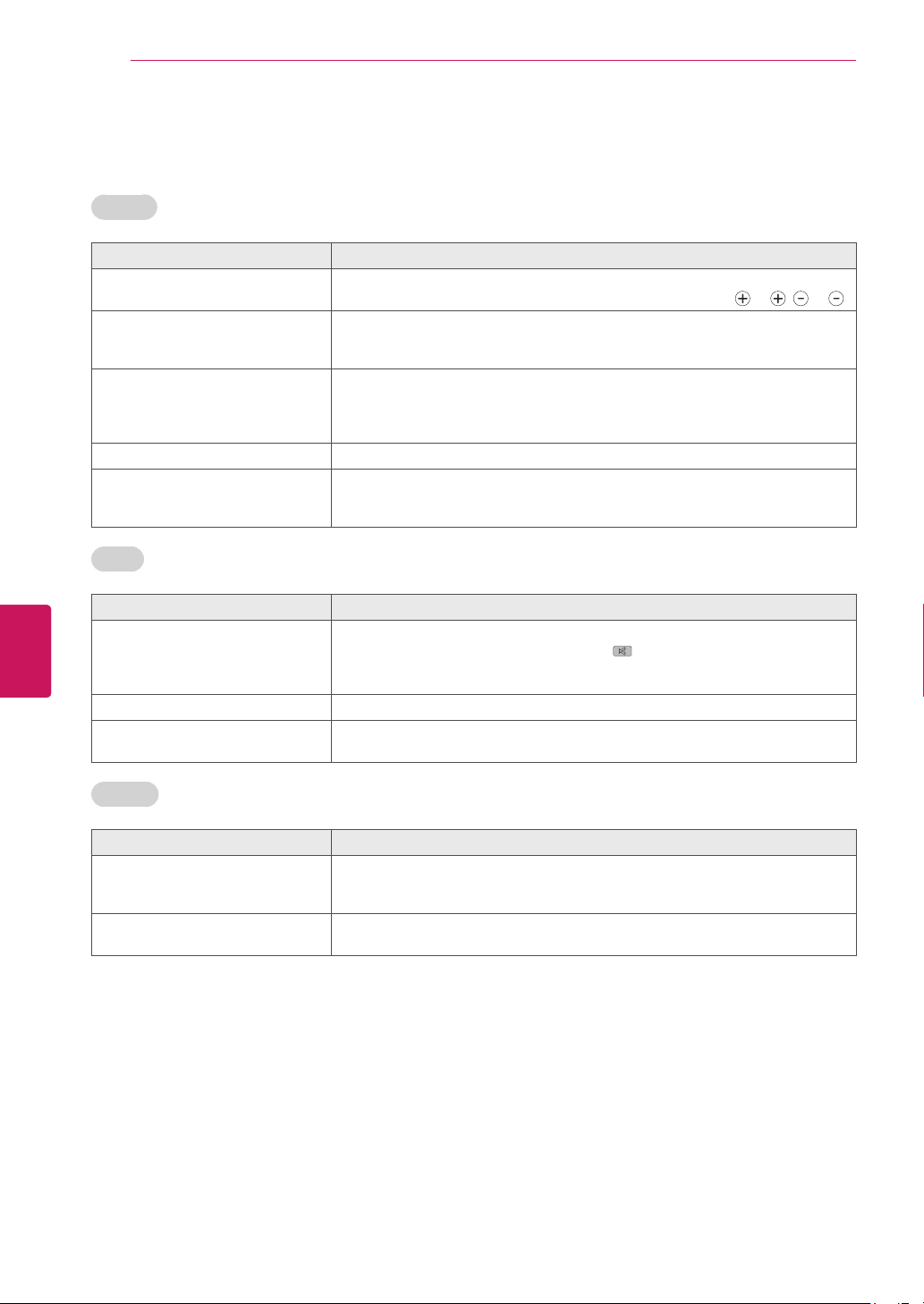
68
ENG
ENGLISH
Appendix
Troubleshooting
General
Problem Solution
CannotcontroltheTVwiththe
remotecontrol.
Checktheremotecontrolsensorontheproductandtryagain.
Checkifthebatteriesarestillworkingandproperlyinstalled(
to , to ).
Noimagedisplayandnosoundis
produced.
Checkiftheproductisturnedon.
Checkifthepowercordisconnectedtoawalloutlet.
Checkifthereisaprobleminthewalloutletbyconnectingotherproducts.
ImageappearsslowlywhentheTV
turnson.
Theimageismutedduringtheproductstartupprocess.Thisisnormal.Ifthe
imagedoesnotappearinafewminutes,unplugtheTVfor30secondsandtry
again.Iftheimagestilldoesnotappear,contacttheauthorizedservicecenter
inyourlocalarea.
Cannotconnectexternaldevices.
Refertothe"ConnectionOverview"andconnectanexternaldevice.
TheTVturnsoffsuddenly.
Checkthepowercontrolsettings.Thepowersupplymaybeinterrupted.
IfthereisnosignalwhiletheTVison,theTVwillturnoffautomaticallyafter
15minutesofinactivity.
Audio
Problem Solution
Nosoundisproducedwhileimages
aredisplaying.
Press
VOL +
or
-
button.
Checkifthesoundismutedbypressing (MUTE).
Scrolltootherchannels.Theremayaproblemwiththebroadcast.
CheckiftheTVSpeakerfeatureisactivatedinthesettings.
Nooutputfromoneofthespeakers
AdjustBalanceinthesettings.
UnusualsoundfrominsidetheTVis
produced.
Achangeinambienthumidityortemperaturemayresultinanunusualnoise
whentheproductturnsonoroff.Thereisnoproblemwithyourproduct.
Browser
Problem Solution
Whileusinginternetfeatures,there
isspacethatdoesnotappearin
somewebsites.
TheinternetoftheTVsupportsuptoFlash(10.2.164)andmaynotreplayany
fileformatotherthanthefollowing
:JPEG,PNG,GIF,BMP,WMV(ASF),WMA,MP3,MP4.
Internetclosesautomaticallywhen
visitingwebsite.
Ifmemoryisinsufficientbecauseoflargevolumeofimageinformationinthe
webpage,internetmaybeforcedtoclose.
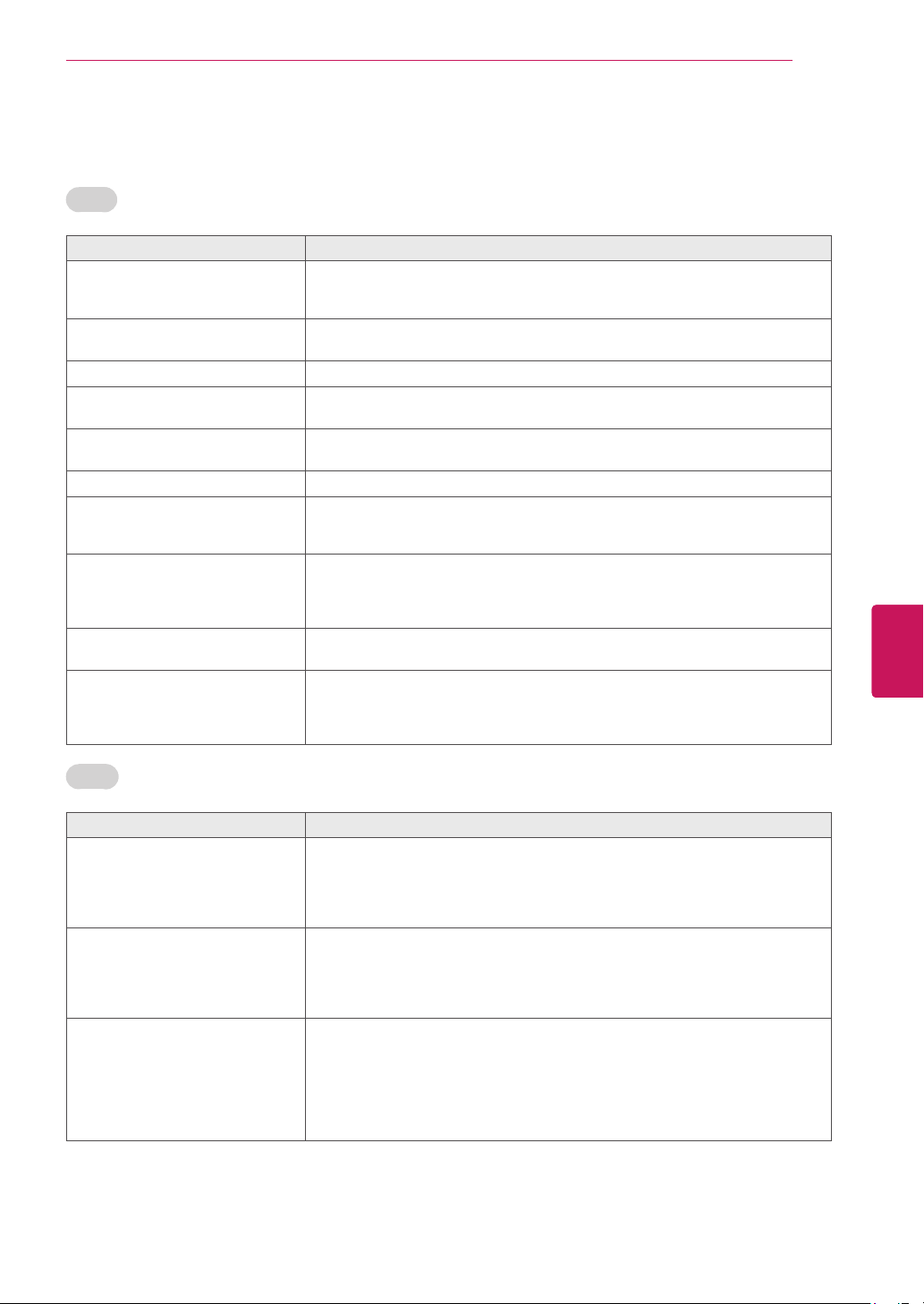
69
ENG
ENGLISH
Appendix
Video
Problem Solution
Animagedisplaysinblackand
whiteorthecolorqualityispoor.
Adjustthecolorsettinginthemenuoption.
Keepasufficientdistancebetweenthisproductandotherelectronicproducts.
Scrolltootherchannels.Theremayaproblemwiththebroadcast.
Horizontalorverticalbarsappears
orimagesblur
Checkiftherearelocalinterferencessuchasanelectricalapplianceorpower
tool.
Linesorstreaksappearonimages
Checktheantennaoraimtheantennatotheproperdirection.
Afterimages(ghosts)appearwhen
theproductturnsoff
Pixelsmayhavebeendamagedfromafixedimagedisplayedforalongtime
(imageburn).Useascreensavertopreventthepixeldamageonthescreen.
Thepowerisonbutthescreen
appearsextremelydark.
Adjustthebrightnessandcontrastinthemenuoption.
“NoSignal”appearsonthescreen.
CheckifthesignalcableisconnectedbetweentheTVandproductsproperly.
Blackspotsappearonthescreen.
Severalpixelsinred,green,white,orblackmayappearonthescreenthatcan
attributetothecharacteristicsofthepanel.
Thisisnormal.
Thedisplayoffsetiswrong.
Adjustthepositionsettinginthesettings.
Checkifthevideocardresolutionandfrequencyaresupportedbytheproduct.
Ifthefrequencyisoutofrange,settotherecommendedresolutionusingthe
displaysettingsontheexternaldevice.
Thinlinesappearinthebackground
ofthescreen.
Checkthevideocableconnections.
Thereceptiononsomechannelsis
poor
Scrolltootherchannels.Theremayaproblemwiththebroadcast.
Thestationsignalmaybeweak.Aimtheantennatotheproperdirection.
Checkifthereislocalinterferencessuchasanelectricalapplianceorpower
tool.
Movie
Problem Solution
Messageisdisplayedsaying
“Thisfileisinvalid”ortheaudiois
workingnormallybutthevideois
notworkingnormally.
CheckwhetherthefileisplayingnormallyonaPC.
(Checkwhetherthefileisdamaged.)
Checkwhethertheresolutionissupported.
Checkwhetherthevideo/audiocodecissupported.
Checkwhethertheframerateissupported.
Messageisdisplayedsaying
“UnsupportedAudio”orthevideo
isworkingnormallybuttheaudiois
notworkingnormally.
CheckwhetherthefileisplayingnormallyonaPC.
(Checkwhetherthefileisdamaged.)
Checkwhethertheaudiocodecissupported.
Checkwhetherthebitrateissupported.
Checkwhetherthesamplerateissupported.
Subtitleisnotworking.
CheckwhetherthefileisplayingnormallyonaPC.
(Checkwhetherthefileisdamaged.)
Checkwhetherthevideofileandsubtitlefilenamearethesame.
Checkwhetherthevideofileandsubtitlefilearelocatedinthesamefolder.
Checkwhetherthesubtitlefileissupported.
Checkwhetherthelanguageissupported.(Whenyouopenthesubtitlefilein
MemoPad,youcancheckthelanguageofthesubtitlefile.)
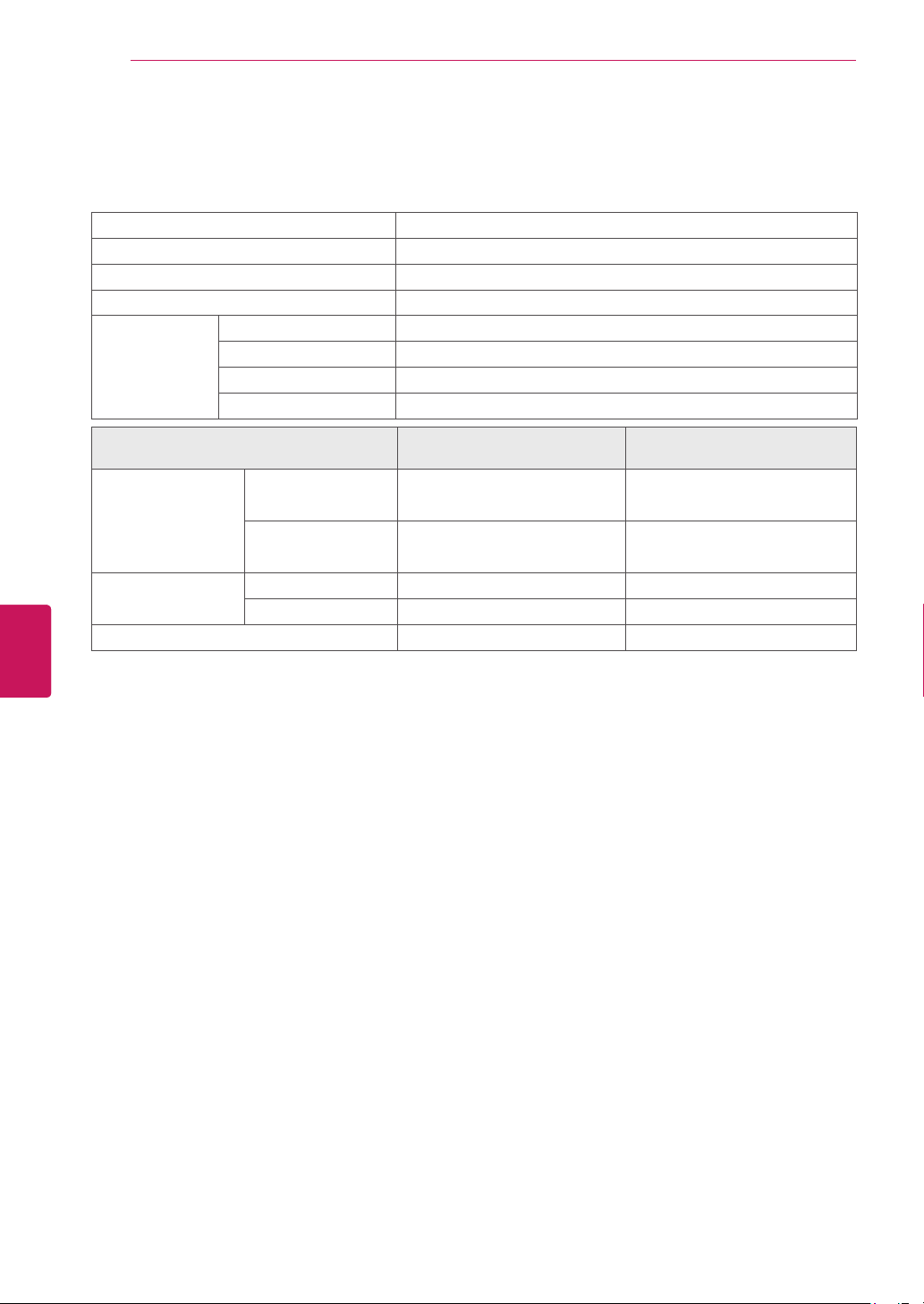
70
ENG
ENGLISH
Appendix
Specifications
Productspecificationsmaybechangedwithoutpriornoticeduetoupgradeofproductfunctions.
Powerrequirement AC100~240V~50/60Hz
TelevisionSystem NTSC-M,ATSC,64&256QAM
ProgramCoverage VHF2-13,UHF14-69,CATV1-135,DTV2-69,CADTV1-135
ExternalAntennaImpedance
75
Ω
Environment
condition
OperatingTemperature 0-40°C
OperatingHumidity Lessthan80%
StorageTemperature -20-60°C
StorageHumidity Lessthan85%
MODELS
47G2
(47G2-UG)
55G2
(55G2-UG)
Dimensions
(WxHxD)
Withstand 1089.0x730.0x263.0mm
(42.8x28.7x10.3inch)
1263.0x830.0x331.0mm
(49.7x32.6x13.0inch)
Withoutstand 1089.0x655.0x35.5mm
(42.8x25.7x1.3inch)
1263.0x754.0x35.5mm
(49.7x29.6x1.3inch)
Weight Withstand 17.8kg(39.2lbs) 25.3kg(55.7lbs)
Withoutstand 15.6kg(34.3lbs) 21.9kg(48.2lbs)
CurrentValue/Powerconsumption 1.2A/120W 1.5A/150W
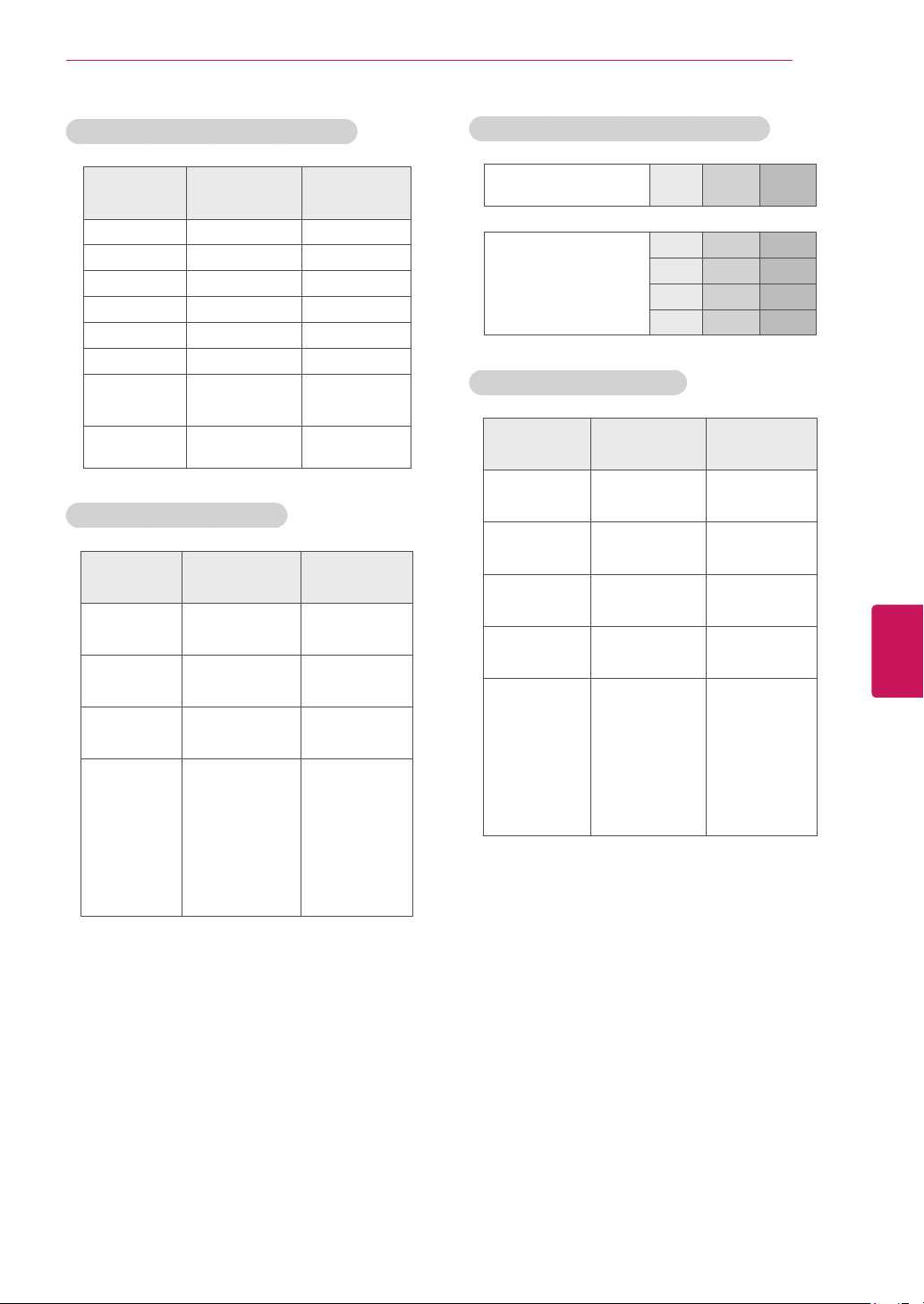
71
ENG
ENGLISH
Appendix
Component port connecting information
Componentports
ontheTV
Y P
B
P
R
Videooutputports
onDVDplayer
Y P
B
P
R
Y B-Y R-Y
Y Cb Cr
Y Pb Pr
Component supported mode
Resolution
Horizontal
Frequency (KHz)
Vertical
Frequency (Hz)
720x480i
15.73
15.73
59.94
60.00
720x480p
31.47
31.50
59.94
60.00
1280x720p
44.96
45.00
59.94
60.00
1920x1080i
33.72
33.75
59.94
60.00
1920x1080p
26.97
27.00
33.71
33.75
67.432
67.50
23.976
24.00
29.97
30.00
59.94
60.00
RGB (PC), HDMI (PC) supported mode
Resolution
Horizontal
Frequency (KHz)
Vertical
Frequency (Hz)
640x350 31.468 70.09
720x400 31.469 70.08
640x480 31.469 59.94
800x600 37.879 60.31
1024x768 48.363 60.00
1360x768 47.712 60.015
1280x1024
HDMI-PC
63.981 60.02
1920x1080 67.50 60.00
HDMI (DTV) supported mode
Resolution
Horizontal
Frequency (KHz)
Vertical
Frequency (Hz)
720x480p
31.47
31.50
59.94
60.00
1280x720p
44.96
45.00
59.94
60.00
1920x1080i
33.72
33.75
59.94
60.00
1920x1080p
26.97
27.00
33.71
33.75
67.432
67.50
23.976
24.00
29.97
30.00
59.94
60.00
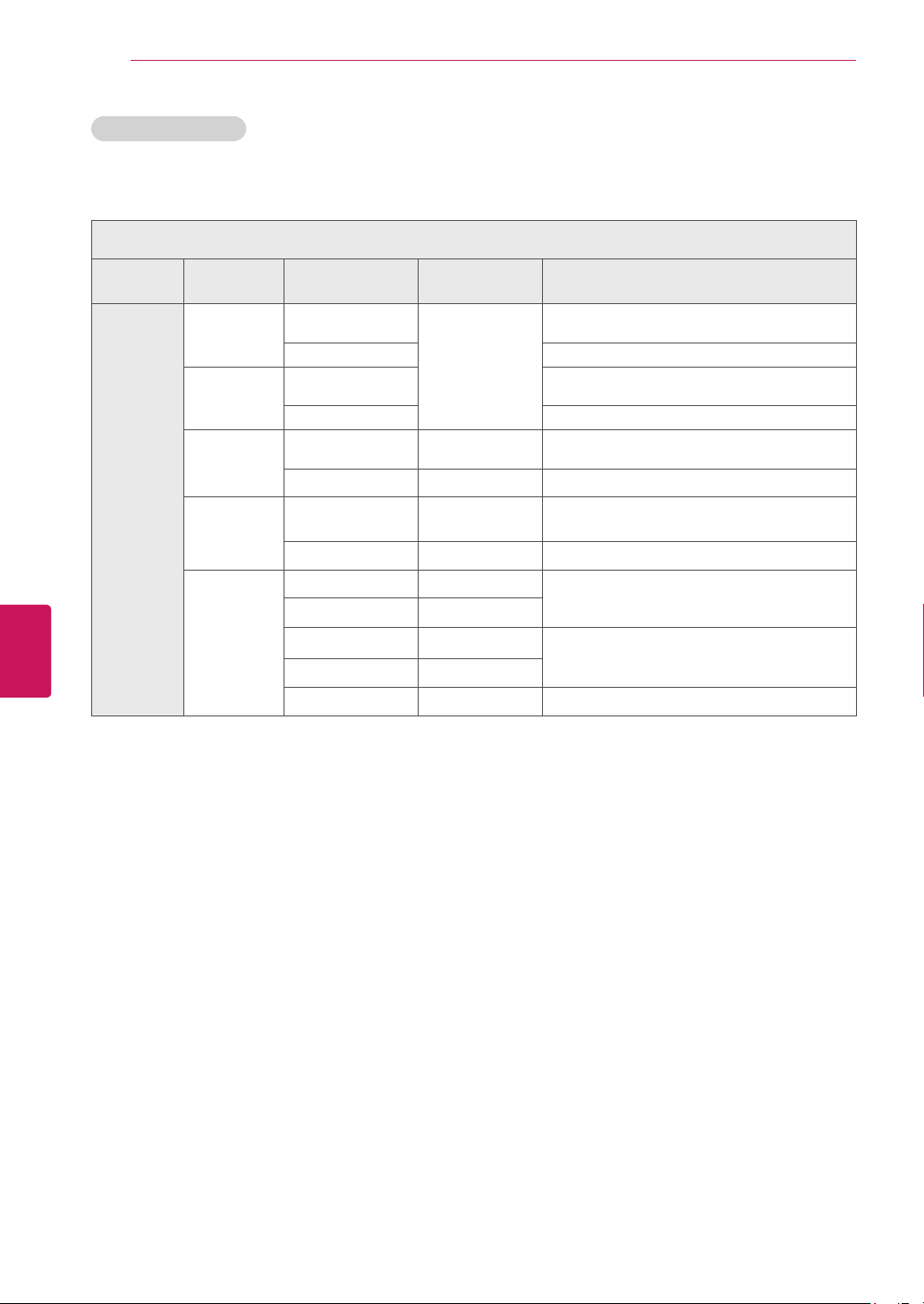
72
ENG
ENGLISH
Appendix
3D supported mode
Themethodfor3Ddigitalbroadcastmaydifferdependingonthesignalenvironment.Ifvideoisnot
switchedautomaticallyinto3D,manuallyconvertthesettingstoview3Dimages.
3Dsupportedmodeautomatically
Input Signal
Horizontal
Frequency(kHz)
Vertical
Frequency(Hz)
Playable3Dvideoformat
HDMI
640X480
31.469/31.5
59.94/60
Top&Bottom,
SidebySide(Half),SidebySide(Full)
62.938/63 FramePacking,LineAlternative
480p
31.469/31.5
Top&Bottom,
SidebySide(Half),SidebySide(Full)
62.938/63 FramePacking,LineAlternative
720p
44.96/45 59.94/60
Top&Bottom,
SidebySide(Half),SidebySide(Full)
89.91/90 59.94/60 FramePacking,LineAlternative
1080i
33.72/33.75 59.94/60
Top&Bottom,
SidebySide(Half),SidebySide(Full)
67.5 59.94/60 FramePacking,FieldAlternative
1080p
26.97/27 23.97/24
Top&Bottom,
SidebySide(Half),SidebySide(Full)
33.72/33.75 29.976/30
43.94/54 23.97/24
FramePacking,LineAlternative
67.432/67.5 29.976/30
67.432/67.5 59.94/60 Top&Bottom,SidebySide(Half)
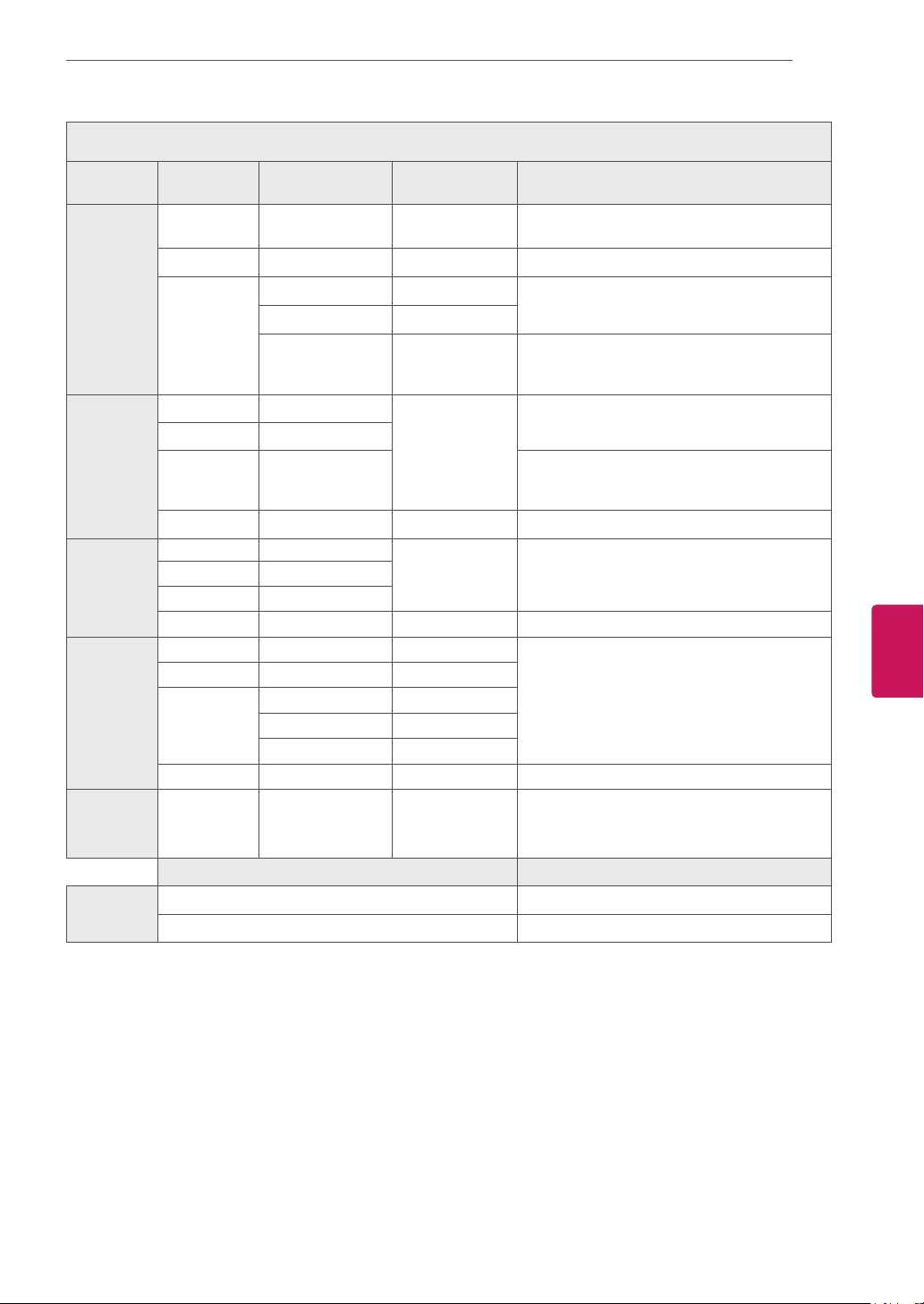
73
ENG
ENGLISH
Appendix
3D supported mode manually
Input Signal
Horizontal
Frequency (kHz)
Vertical
Frequency (Hz)
Playable 3D video format
HDMI-DTV
720p 45.00 60
2Dto3D,SidebySide(Half),Top&Bottom,
SingleFrameSequential
1080i 33.75 60
2Dto3D,SidebySide(Half),Top&Bottom
1080p
27.00 24
2Dto3D,SidebySide(Half),Top&Bottom,
CheckerBoard
33.75 30
67.50 60
2Dto3D,SidebySide(Half),Top&Bottom,
CheckerBoard,SingleFrameSequential,
RowInterleaving,ColumnInterleaving
HDMI-PC
1024x768 48.36
60
2Dto3D,SidebySide(Half),Top&Bottom
1360x768 47.71
1920x1080 67.50
2Dto3D,SidebySide(Half),Top&Bottom,
CheckerBoard,SingleFrameSequential,
RowInterleaving,ColumnInterleaving
Others - -
2Dto3D
RGB-PC
1024x768 48.36
60
2Dto3D,SidebySide(Half),Top&Bottom
1360x768 47.71
1920x1080 67.50
Others - -
2Dto3D
Component
720p 45.00 60
2Dto3D,SidebySide(Half),Top&Bottom
1080i 33.75 60
1080p
27.00 24
33.75 30
67.50 60
Others - -
2Dto3D
USB
1080p 33.75 30
2Dto3D,SidebySide(Half),Top&Bottom,
CheckerBoard,RowInterleaving,Column
Interleaving(Photo:SidebySide(Half),
Top&Bottom),SingleFrameSequential
Signal
Playable3Dvideoformat
DTV
HD
2Dto3D,SidebySide(Half),Top&Bottom
SD
2Dto3D
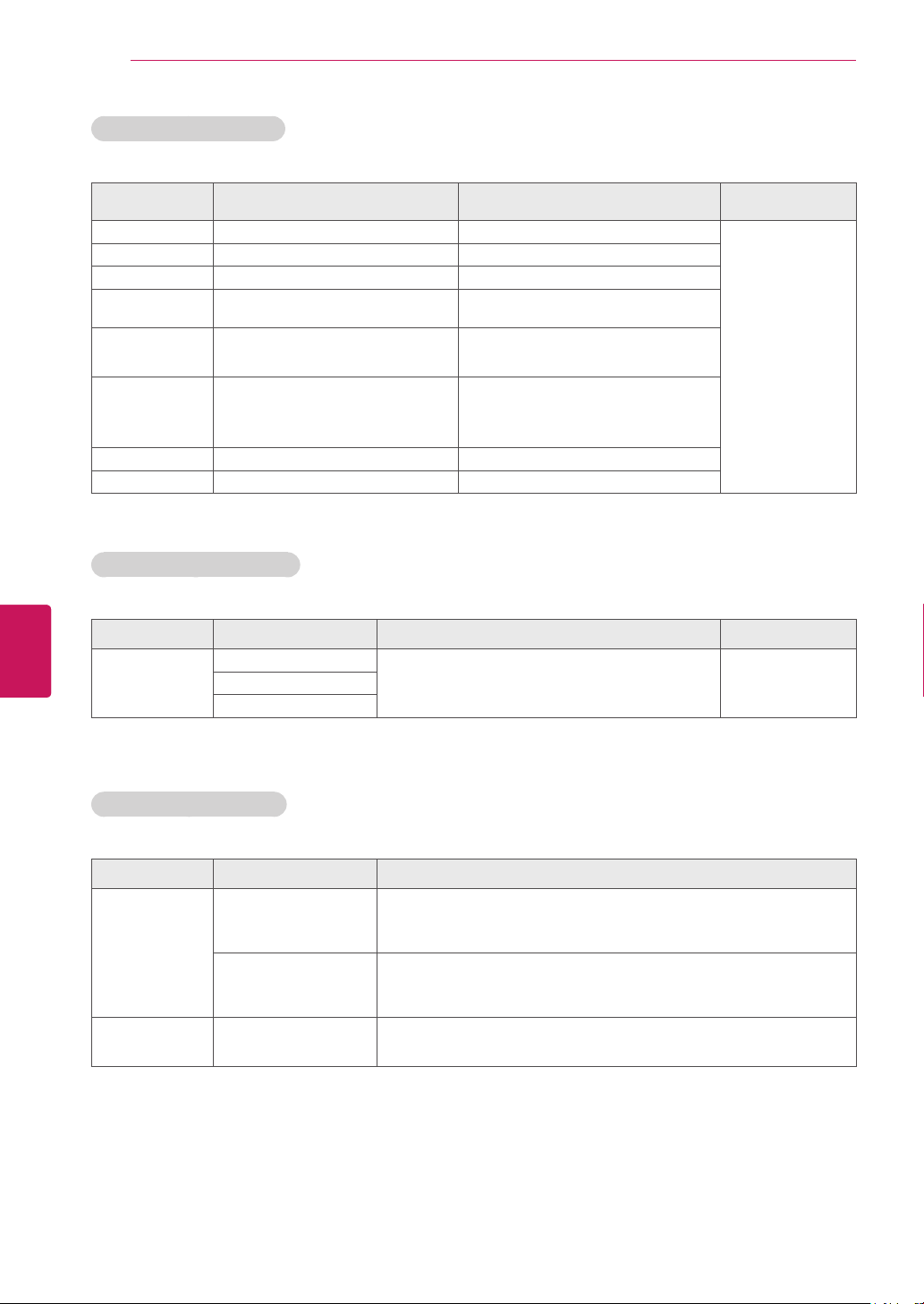
74
ENG
ENGLISH
Appendix
Video Supported Formats
File
Extension
Video Codec Audio Codec Max Resolution
mpg,mpeg MPEG2 MP3,DolbyDigital,LPCM
1920x1080@30p
ts,trp,tp MPEG2,H.264,VC1 MP3,DolbyDigital,AAC,HE-AAC,PCM
vob MPEG1,2 MP2,MP3,DolbyDigital
mp4,mov
MPEG4,DivX3.11,DivX4.12,DivX
5.x,DivX6,H.264,H.263
DolbyDigital(AC3),AAC,HE-AAC,MP3
mkv H.264,AVC
MP3,DolbyDigital,AAC
HE-AAC
divx,avi
MPEG4,DivX3.11,DivX4,DivX5,
DivX6,H.264,VC-1,XVID
MP3,DolbyDigital,PCM,
AAC,HE-AAC,WMA(standard)
asf,wmv VC1 WMA(standard)
flv SorensonH.263,H264,VP6,VP8 MP3,AAC,PCM
Subtitle Supported Formats
File
Extension
Language Etc. Remark
smi,srt
English
SupportUTF-8encodedfile. Adjust:-10~+10Spanish
French
Photo Supported Formats
File
Extension
Item Profile
JPEG,JPG,JPE
SupportFiletype
SOF0:baseline
SOF1:ExtendSequential
SOF2:Progressive
PictureSize
Min:64*64
Max:-Normaltype:15360(W)*8640(H),
-Progressivetype:1920(W)*1440(H)
PNG,GIF,BMP PictureSize
Min64x64
Max8000x6000

75
ENG
ENGLISH
Appendix
Open Source Software Notice
ToobtainthesourcecodeunderGPL,LGPL,MPLandotheropensourcelicenses,thatiscontainedinthis
product,pleasevisithttp://opensource.lge.com.
Inadditiontothesourcecode,allreferredlicenseterms,warrantydisclaimersandcopyrightnoticesare
availablefordownload.
LGElectronicswillalsoprovideopensourcecodetoyouonCD-ROMforachargecoveringthecostof
performingsuchdistribution(suchasthecostofmedia,shippingandhandling)uponemailrequestto
[email protected].Thisofferisvalidforthree(3)yearsfromthedateonwhichyoupurchasedthe
product.

76
ENG
ENGLISH
Appendix
Privacy Notice for the Google TV
Googletakesprivacyveryseriously,andweworkhardtoensurethatweprovideuserswithtransparency,
choice,andcontrolwheneverdecisionsregardingtheirpersonalinformationareinvolved.Ourbasicprivacy
approachistomakeiteasyforuserstocommunicateandimplementtheirownprivacychoicesthrough
opt-inselections.OtherprivacyprotectionsincludesupportforChrome’sIncognitoModeforprivate
browsingontheweb,anonymizationofmostdatacollectedaftertwoweeks,andgivingusersoptionsfor
clearinginformationstoredontheboxthroughtheSettingsmenu.
PleasenotethatGoogledoesnotcollectanyviewinghistoryinformationunlessauseroptsin.Wecapture
somelimitedusageandtroubleshootingdatawhichisanonymizedaftertwoweeks.Insomecases,pay-
TVoperatorslikeDishmaysharewithGooglethetuningdataandviewinghistorythattheyalreadycollect
iftheuserexplicitlyoptsintothatsharingatsetup.Weprovidethisoptinfeatureforamorepersonalized
GoogleTVintegration.
Additionally,iftheuseroptsin,wewillcollectauser'swebbrowsinghistoryandsearchhistoryonthe
quicksearchfacilityonGoogleTV.Usersmaychoosetooptout,useincognitomodeinChromeorcontrol
webhistorysettingsinChromeastheydoonotherdevices.
FormoreinformationaboutGoogle'sPrivacypolicyvisithttp://www.google.com/privacy.html.

77
ENG
ENGLISH
Appendix
Google TV Safety
Therearenocontent-basedparentalcontrolsonyourGoogleTVdevicetolimitwhattelevisionprograms
canbeaccessedthroughyourGoogleTV,however,ifyouhavecontrolssetupthroughyourset-topboxor
throughaV-Chip,theywillcontinuetoworkforTVcontentshownthroughGoogleTV.
Google Chrome & Google Play
:UsershavetheabilitytolockoutaccesstotheGoogleTVChromebrowser
andGooglePlaybyrequiringa4-digitPINcode.Toenablethisoption,pressthe
Search
keyandtypein
'Settings'.Navigateto
Privacy & safety
andscrolldownuntilyoureach
Application lock
.Pressing
Lock
Google Chrome & Google Play
willallowyoutotypeina4-digitPIN.
SafeSearch
:Userscanalsoimplement
SafeSearch
toblockwebpagescontainingexplicitsexualcontent
fromappearinginwebandTVsearchresults.Toenable
Safe Search
,pressthe
Search
keyandtypein
'Settings'.Under
Privacy & safety
,select
SafeSearch
.ThereyouwillbeabletoselectyourSafeSearch
filterstrength.
TohelppreventmaliciousbehavioronyourTV,wetakeadvantageofthesameinnovativesecurity
technologyasAndroidandChrome,includingourSandboxingandSafeBrowsingfunctionality.With
Sandboxing,applicationsandprocessesonGoogleTVwillrunwithina“sandbox”whichlimitstheir
interactionwithuserdata,systemresources,andotherapps.WithSafeBrowsing,Googlewillpresent
awarningifitdetectsthatauseristryingtovisitasitesuspectedofphishingorcontainingmalware.
WealsorunChromewithlowerprivilegessoitdoesnothaveaccesstoinformationstoredbyother
applications.
FormoreinformationaboutGoogle'ssafetytools,visitGoogleFamilySafetyCenteratwww.google.com/
familysafety/.

The model and serial numbers of the TV is
located on the back of the TV
Record it below should you ever need service.
MODEL
SERIAL