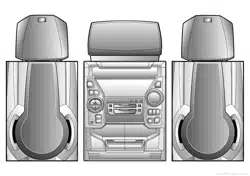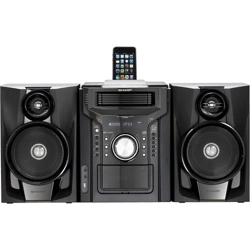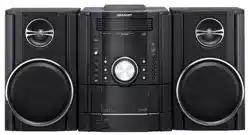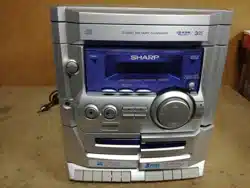
MINI KOMPONENTEN SYSTEM
MINI-CHAÎNE
SISTEMA MINI
MINI KOMPONENT SYSTEM
MINI SISTEMI
MINI SYSTEEM
MINI SISTEMA DE COMPONENTES
MINI COMPONENT SYSTEM
MODELL MODELLO
MODÈLE MODEL
MODELO MODELO
MODELL MODEL
CD-E100H
BEDIENUNGSANLEITUNG MANUALE DI ISTRUZIONI
MODE D’EMPLOI GEBRUIKSAANWIJZING
MANUAL DE MANEJO MANUAL DE OPERAÇÃO
BRUKSANVISNING OPERATION MANUAL
Mini Komponenten System CD-E100H besteht aus CD-E100H (Hauptgerät) und
CP-E100H (Lautsprecher-System).
Mini-chaîne CD-E100H composée de CD-E100H (appareil principal) et de CP-
E100H (enceintes acoustiques).
Sistema mini CD-E100H que consta de CD-E100H (aparato principal) y CP-E100H
(sistema de altavoces).
CD-E100H mini komponent system bestående av CD-E100H (huvudenhet) och
CP-E100H (högtalarsystem).
Mini sistemi CD-E100H composto da CD-E100H (apparecchio principale) e CP-
E100H (sistema di diffusori).
CD-E100H mini systeem bestaande uit CD-E100H (hoofdtoestel) en CP-E100H
(luidsprekersysteem).
CD-E100H Mini Sistema de Componentes composto de CD-E100H (unidade prin-
cipal) e CP-E100H (sistema de alto-falante).
CD-E100H Mini Component System consisting of CD-E100H (main unit) and CP-
E100H (speaker system).
Siehe Seiten i bis vi und D-1 bis D-26.
Se reporter aux pages i à vi et F-1 à F-26.
Consulte las páginas i a vi y S-1 a S-26.
DEUTSCH
Favor consultar as páginas i a vi e P-1 a P-26.
PORTUGUÊS
FRANÇAIS
ESPAÑOL
Hänvisa till sidorna i till vi och V-1 till V-26.
Leggere le pagine i a vi e I-1 a I-26.
Raadpleeg de bladzijden i t/m vi en N-1 t/m N-26.
SVENSKA
ITALIANO
NEDERLANDS
Please refer to pages i to vi and E-1 to E-26.
ENGLISH
01-CDE100HH_FRONT.pm 03.1.29, 4:43 PM1
Downloaded from www.ManualsFile.com manuals search engine
i
CD-E100H
BESONDERE ANMERKUNGEN
REMARQUES SPÉCIALES
NOTAS ESPECIALES
SÄRSKILDA ANMÄRKNINGAR
NOTE PARTICOLARI
BIJZONDERE OPMERKINGEN
NOTAS ESPECIAIS
SPECIAL NOTES
0203
● Dette udstyr overholder kravene i direktiv nr. 89/336/EEC og
73/23/EEC med tillaeg nr. 93/68/EEC.
● Dette produktet oppfyller betingelsene i direktivene 89/336/
EEC og 73/23/EEC i endringen 93/68/EEC.
● Tämä laite täyttää direktiivien 89/336/EEC ja 73/23/EEC
vaatimukset, joita on muutettu direktiivillä 93/68/EEC.
●
● Bei Einstellung der ON/STAND-BY-Taste auf STAND-BY ist
die Netzspannung immer noch im Gerät vorhanden.
Wenn die ON/STAND-BY-Taste auf STAND-BY eingestellt
wird, kann das Gerät unter Verwendung der Timer-Betriebsart
oder Fernbedienung in Betrieb gesetzt werden.
Warnung:
In diesem Gerät sind keine vom Benutzer wartbaren Teile
vorhanden. Niemals Abdeckungen entfernen, außer wenn Sie
dafür qualifiziert sind. In diesem Gerät sind gefährliche
Spannungen vorhanden. Vor Ausführung von irgendwelchen
Kundendienstarbeiten oder bei längerer Nichtverwendung des
Gerätes stets den Netzstecker aus der Netzsteckdose ziehen.
● Lorsque la touche ON/STAND-BY est mise en STAND-BY,
l’appareil est toujours sous tension.
Lorsque la touche ON/STAND-BY se trouve sur la position
STAND-BY, l’appareil est prêt à fonctionner par la minuterie
ou la télécommande.
Avertissement:
Cet appareil contient des pièces non réparables par
l’utilisateur. Personne non qualifiée n’enlèvera jamais les
couvercles. L’appareil contenant des organes portés à haute
tension, débrancher l’appareil avant toute réparation ou en
période de non-utilisation.
● Dieses Gerät entspricht den Anforderungen der EG-Richtlinien
89/336/EWG und 73/23/EWG mit Änderung 93/68/EWG.
● Ce matériel répond aux exigences contenues dans les direc-
tives 89/336/CEE et 73/23/CEE modifiées par la directive 93/
68/CEE.
● Este aparato satisface las exigencias de las Directivas
89/336/CEE y 73/23/CEE, modificadas por medio de la 93/
68/CEE.
● Denna utrustning uppfyller kraven enligt riktlinjerna 89/336/
EEC och 73/23/EEC så som kompletteras av 93/68/EEC.
● Quest’apparecchio è conforme ai requisiti delle direttive 89/
336/EEC e 73/23/EEC, come emendata dalla direttiva 93/68/
EEC.
● Dichiarazione di conformità
La società SHARP ELECTRONICS EUROPE GmbH dichiara
che il prodotto SHARP MINI SISTEMI CD-E100H è costruito
in conformità alle prescrizioni del D.M.n˚548 del 28/8/95,
pubblicato sulla G.U.n˚301 del 28/12/95 ed in particolare è
conforme a quanto indicato nell’art. 2, comma 1 dello stesso
decreto.
● Dit apparaat voldoet aan de eisen van de richtlijnen 89/336/
EEG en 73/23/EEG, gewijzigd door 93/68/EEG.
● Este equipamento obedece às exigências das directivas 89/
336/CEE e 73/23/CEE, na sua versão corrigida pela directiva
93/68/CEE.
● This equipment complies with the requirements of Direc-
tives 89/336/EEC and 73/23/EEC as amended by 93/68/
EEC.
02-CDE100HH_XP1.pm 03.1.29, 4:43 PM1
Downloaded from www.ManualsFile.com manuals search engine
ii
CD-E100H
0203
● Wanneer de ON/STAND-BY toets in de STAND-BY stand
staat, loopt er nog steeds stroom (netspanning) in het toestel.
Wanneer de ON/STAND-BY toets in de STAND-BY stand
staat, kan het toestel ingeschakeld worden via de timerfunctie
of de afstandsbediening.
Waarschuwing:
Dit toestel bevat geen door de gebruiker te repareren
onderdelen. Verwijder de behuizing nooit tenzij u deskundig
bent op dit gebied. In het toestel loopt een gevaarlijke span-
ning; haal de stekker altijd uit het stopcontact alvorens
onderhoud uit te voeren of wanneer het toestel voor langere
tijd niet gebruikt wordt.
● Quando o botão ON/STAND-BY estiver ajustado na posição
STAND-BY, a voltagem de alimentação ainda se encontra
presente dentro do aparelho.
Quando o botão ON/STAND-BY estiver ajustado na posição
STAND-BY, o aparelho pode ser colocado em operação
através do modo de programação horária ou pelo controle
remoto.
Advertência:
Neste aparelho não há partes que podem ser consertadas
pelo usuário. Nunca retire a tampa, a menos que você tenha
qualificação para tal. Este aparelho contém voltagens
perigosas. Remova sempre o cabo de alimentação da tomada
antes de efetuar qualquer conserto ou quando deixar o
aparelho muito tempo fora de uso.
● When the ON/STAND-BY button is set at STAND-BY posi-
tion, mains voltage is still present inside the unit.
When the ON/STAND-BY button is set at STAND-BY posi-
tion, the unit may be brought into operation by the timer mode
or remote control.
Warning:
This unit contains no user serviceable parts. Never remove
covers unless qualified to do so. This unit contains danger-
ous voltages, always remove mains plug from the socket be-
fore any service operation and when not in use for a long
period.
● Cuando el botón ON/STAND-BY está puesto en la posición
STAND-BY, todavía hay tensión dentro del aparato.
Cuando el botón ON/STAND-BY está puesto en la posición
STAND-BY, el aparato puede ponerse en funcionamiento
utilizando el modo del temporizador o el controlador remoto.
Advertencia:
Tenga en cuenta que dentro de este aparato no hay piezas
que pueda reparar. No quite nunca las tapas a menos que se
esté cualificado para hacerlo. Este aparato tiene en su inte-
rior tensiones peligrosas.
Desenchufe siempre la clavija de la red del tomacorriente
antes de realizar cualquier servicio de mantenimiento y
cuando no se use el aparato durante un largo período de
tiempo.
● När ON/STAND-BY knappen är i läge STAND-BY, finns
nätspänning i apparaten.
Med ON/STAND-BY knappen i läge STAND-BY kan apparaten
startas med timerfunktion eller fjärrkontrollen.
Varning:
Apparaten innehåller inga delar som kan åtgärdas av kunden.
Höljet får endast öppnas av kvalificerad personal. Apparaten
innehåller farliga spänningar.
Stickkontakten ska därför dras ut från nätuttaget före
reparationsarbeten och bör dras ut om apparaten inte ska
användas på mycket länge.
● Quando il tasto ON/STAND-BY si trova in posizione STAND-
BY, all’interno dell’apparecchio c’è ancora la corrente.
Se il tasto ON/STAND-BY si trova nella posizione STAND-
BY, l’unità può essere accesa con il modo timer o con il
telecomando.
Avvertenza:
L’apparecchio non contiene parti riparabili dall’utente.
Non togliere mai i coperchi, a meno di non essere qualificati
per farlo. All’interno dell’apparecchio ci sono tensioni
pericolose, per cui si deve sempre staccare la spina del cavo
d’alimentazione dalla presa di corrente prima di qualsiasi
intervento di manutenzione e quando non si usa l’apparecchio
per un lungo periodo di tempo.
03-CDE100HH_XP2.pm 03.1.29, 4:43 PM2
Downloaded from www.ManualsFile.com manuals search engine
iii
CD-E100H
0203
● Når ON/STAND-BY-knappen er sat i STAND-BY positionen,
er der stadig netspaending til stede i apparatet.
Når ON/STAND-BY-knappen er sat i STAND-BY position,
kan apparatet startes v.hj.a. timer-funksionen eller
fjernbetjeningen.
Advarsel:
Apparatet indeholder ingen dele, der kan repareres af
brugeren selv. Fjern aldrig kabinettet med mindre De er
kvalificeret hertil. Apparatet indeholder farlig
strømspaending. Traek altid stikket ud af stikkontakten før
der foretages reparationer, eller hvis apparatet ikke er i
brug i laengere tid.
DENNA APPARAT ÄR ANSLUTEN TILL 230 V
VÄXELSTRÖM NÄR STICKPROPPEN ÄR INSKJUTEN I
VÄGGUTTAGET. FÖR ATT FULLSTÄNDIGT KOPPLA IFRÅN
APPARATEN, V.G. DRAG UT STICKPROPPEN.
● Audio-visuelles Material kann Urheberrechte umfassen, die
ohne Genehmigung des Eigentümers dieser Urheberrechte
nicht aufgenommen werden dürfen. Siehe die entsprechenden
nationalen Gesetze.
● Le matériel audio-visuel peut comporter des oeuvres faisant
l’objet de droits d’auteur qui ne peuvent être enregistrées sans
l’autorisation du possesseur du droit d’auteur, veuillez vous
référer aux réglementations nationales en vigueur.
● El material audiovisual puede consistir en trabajos que tengan
derechos de autor y que no deben grabarse sin la autorización
del poseedor de dichos derechos de autor. Sírvase consultar
las leyes aplicables en su país.
● Audiovisuellt material kan innehålla upphovsrättsarbete som
inte skall mångfaldigas utan tillstånd av copyrightinnehavaren.
Se den tillämpliga lagen i ditt land.
● Il materiale audio-visivo che fosse soggetto a copyright non
può essere registrato senza l’autorizzazione del possessore
del copyright. Si prega di attenersi alle leggi in vigore sul
territorio nazionale.
● Audio-visueel materiaal kan worden beschermd door
auteursrechten, in welk geval het niet mag worden opgenomen
zonder de toestemming van de auteursrechthouder. Zie voor
nadere informatie de betreffende wetten in het land van
gebruik.
● O material audiovisual pode consistir de trabalhos de direitos
autorias que não devem ser gravados sem autorização do
proprietário dos direitos. Favor consultar as leis vigentes em
seu país.
● Audio-visual material may consist of copyrighted works which
must not be recorded without the authority of the owner of the
copyright. Please refer to relevant law in your country.
04-CDE100HH_XP3.pm 03.1.29, 4:43 PM3
Downloaded from www.ManualsFile.com manuals search engine
iv
CD-E100H
● Advarsel:
Til at forbygge ild og stød risiko, lad vaere med at undsaette
denne indretning for drypning eller overstaenkning. Der må
ikke anbringes nogen genstande fyldt med vand, som for
eksempel vaser, på dette apparat.
● Advarsel:
For å unngå brann eller kortslutning, utsett ikke produktet for
vann eller fuktighet. Gjenstander som inneholder vaeske, feks.
en blomstervase, må ikke plasseres oppå apparatet.
● Varoitus:
Älä vie laitetta sateeseen tai kosteisiin tiloihin. Jos laite on
kostunut, anna sen kuivua ennen kuin käytät sitä
verkkovirralla. Nestettä sisältäviä astioita kuten esim.
kukkamaljakoita ei saa asettaa laitteen päälle.
0203
● Vorsicht:
Das Gerät weder Tropf- noch Spritzwasser aussetzen.
Ansonsten besteht die Gefahr eines Brandes oder
elektrischen Schlages. Es sollten keine mit Flüssigkeiten
gefüllten Gegenstände wie Vasen auf dem Gerät abgestellt
werden.
● Attention:
Pour éviter un incendie ou une secousse électrique, mettre
l’appareil à l’abri de l’eau (éclaboussure, goutte). Ne pas poser
sur l’appareil un récipient contenant du liquide.
● Advertencia:
Para evitar incendios y descargas eléctricas, no exponga
el aparato a goteo o salpicadura de líquidos. No deberán
ponerse encima del aparato objetos que estén llenos de
líquido, como por ejemplo un florero.
● Varning:
Utsätt inte enheten för dropp eller stänk för att förhindra
brand eller elektriska stötar. Inga vätskefyllda föremål
såsom vaser bör placeras på enheten.
● Attenzione:
Per prevenire incendi o scosse elettriche, non fare
gocciolare nessun liquido sull’apparecchio e non bagnarlo.
Non collocarvi sopra nessun oggetto riempito d’acqua,
come per esempio vasi.
● Waarschuwing:
Stel het toestel niet bloot aan druipend of spattend water
om brand en elektrische schokken te voorkomen. Met
vloeistoffen gevulde voorwerpen, zoals vazen, mogen niet
op het toestel geplaatst worden.
● Cuidado:
Para evitar incêndio ou choque elétrico, não exponha este
aparelho a gotejamento ou salpicamento de água. Não
coloque objetos com água como, por exemplo, um vaso de
flores, em cima do aparelho.
● Warning:
To prevent fire or shock hazard, do not expose this appli-
ance to dripping or splashing. No objects filled with liquids,
such as vases, should be placed on the apparatus.
Dieses Produkt ist ein Laserprodukt der Klasse 1.
Ce produit est classifié comme étant un LASER DE CLASSE 1.
Este producto está clasificado como un PRODUCTO LÁSER DE
CLASE 1.
Denna produkt klassificeras som KLASS 1 LASERPRODUKT.
Questo prodotto è classificato come CLASS 1 LASER PRODUCT.
Dit product is geclassificeerd als een KLASSE 1 LASER PRODUCT.
This product is classified as a CLASS 1 LASER PRODUCT.
Este produto é classificado como PRODUTO LASER DE CLASSE 1.
Dette produktet er klassifisert som et KLASSE 1 LASERPRODUKT.
Dette produkt er klassificeret som et KLASSE 1 LASERPRODUKT.
Tämä laite on luokiteltu LUOKAN 1 LASERLAITTEEKSI.
Denna produkt klassificeras som KLASS 1 LASERAPPARAT.
05-CDE100HH_XP4.pm 03.1.29, 4:43 PM4
Downloaded from www.ManualsFile.com manuals search engine
v
CD-E100H
0203
● VORSICHT
Verwendung von Regelungen oder Einstellungen bzw.
Durchführung von anderen Verfahren als die hierin
angegebenen kann zum Aussetzen gefährlicher Strahlung
führen.
Da der in diesem Compact Disc Player verwendete Laserstrahl
für die Augen schädlich ist, ist das Gehäuse unter keinen
Umständen zu zerlegen.
Wenden Sie sich für Wartungsarbeiten nur an berechtigten
Fachhändler.
● ATTENTION
Respecter les indications données relatives à la manipula-
tion, au réglage et au fonctionnement. En cas de non-respect,
on s’exposera à une radiation dangereuse.
Éviter absolument de démonter l’appareil, qui utilise un rayon
laser nuisible aux yeux. Pour toute réparation, s’adresser à
une personne qualifiée.
● PRECAUCIÓN
El uso de los controles, ajustes o ejecución de procedimientos
distintos de los especificados podría causar la exposición a
radiación peligrosa.
No intente desmontar la caja ya que el haz de láser usado en
este reproductor de discos compactos es perjudicial para los
ojos. Para el servicio de reparación, consulte a una persona
cualificada.
● OBSERVERA
Användning av reglage eller justeringar eller handhavande
på annat sätt än som anges kan leda till farlig bestrålning.
Försök inte ta isär höljet eftersom CD-spelarens laserstråle
är skadlig för ögonen. Överlåt service endast till kvalificerad
personal.
● ATTENZIONE
L’uso dei comandi e l’effettuazione di regolazioni e
procedimenti diversi da quelli specificati nel manuale possono
provocare una pericolosa esposizione alle radiazioni.
Poiché il raggio laser usato in questo giradischi può
danneggiare gli occhi, non smontare l’apparecchio. Per le
riparazioni rivolgersi a personale specializzato.
● LET OP
Gebruik van regelaars, het maken van instellingen, gebruik
of handelingen anders dan in deze gebruiksaanwijzing
vermeld, kan gevaarlijke straling blootleggen.
De laserstraal in deze CD-speler kan de ogen beschadigen,
Probeer derhalve de ombouw niet te verwijderen. Laat
reparaties alleen over aan erkend onderhoudspersoneel.
● CUIDADO
O uso de controles, ajustes ou a execução de procedimentos
além daqueles especificados aqui pode resultar em perigosa
exposição à radiação.
Como os raios laser usados neste player de CD são perigosos
para os olhos, não tente desmontar o aparelho. Solicite o
conserto somente para pessoas especializadas.
● CAUTION
Use of controls, adjustments or performance of procedures
other than those specified herein may result in hazardous ra-
diation exposure.
As the laser beam used in this compact disc player is harmful
to the eyes, do not attempt to disassemble the cabinet. Refer
servicing to qualified personnel only.
06-CDE100HH_XP5.pm 03.1.29, 4:43 PM5
Downloaded from www.ManualsFile.com manuals search engine
vi
CD-E100H
Eigenschaften der Laserdiode
Material: GaAIAs
Wellenlänge: 780 nm
Emissionsdauer: kontinuierlich
Laser-Ausgang: max. 0,6 mW
Caractéristiques de la diode laser
Matière: GaAIAs
Longueur d’onde: 780 nm
Durée d’émission: ininterrompue
Puissance de sortie laser maximale: 0,6 mW
Características del diodo láser
Material: GaAIAs
Longitud de onda: 780 nm
Duración de emisión : continua
Salida de láser: máx. 0,6 mW
Laserdiodens egenskaper
Material: GaAIAs
Våglängd: 780 nm
Utstrålningsvaraktighet: kontinuerlig
Lasereffekt: max. 0,6 mW
Proprietà del diodo laser
Materiale: GaAIAs
Lunghezza d’onda: 780 nm
Durata di emissione: continua
Uscita massima del laser: 0,6 mW
Laser diode specificaties
Materiaal: GaAIAs
Golflengte: 780 nm
Stralingsduur: doorlopend
Laseruitgang: max. 0,6 mW
Propriedades do diodo laser
Material: GaAlAs
Comprimento de onda: 780 nm
Duração da emissão: contínua
Saída de laser: máx. 0,6 mW
Laser Diode Properties
Material: GaAIAs
Wavelength: 780 nm
Emission Duration: continuous
Laser Output: max. 0.6 mW
0203
VAROITUS! LAITTEEN KÄYTTÄMINEN MUULLA KUIN TÄSSÄ
KÄYTTÖOHJEESSA MAINITULLA TAVALLA SAATTAA
ALTISTAA KÄYTTÄJÄN TURVALLISUUSLUOKAN 1
YLITTÄVÄLLE NÄKYMÄTTÖMÄLLE LASERSÄTEILYLLE.
VARNING - OM APPARATEN ANVÄNDS PÅ ANNAT SÄTT ÄN
I DENNA BRUKSANVISNING SPECIFICERAS. KAN
ANVÄNDAREN UTSÄTTAS FÖR OSYNLIG LASER-
STRÅLNING, SOM ÖVERSKRIDER GRÄNSEN FÖR
LASERKLASS 1.
ADVERSEL-SYNLIG OG USYNLIG LASERSTRÅLING VED ÅBNING.
SE IKKE IND I STRÅLEN-HELLER IKKE MED OPTISKE INSTRUMENTER.
VARO! AVATTAESSA OLET ALTTIINA NÄKYVÄLLE JA NÄKYMÄTTÖMÄLLE
LASERSÄTEILYLLE ÄLÄ TUIJOTA SÄTEESEEN ÄLÄKÄ KATSO SITÄ
OPTISEN LAITTEEN LÄPI.
VARNING-SYNLIG OCH OSYNLIG LASERSTRÅLNING NÄR DENNA
DEL ÄR ÖPPNAD. STIRRA EJ IN I STRÅLEN OCH BETRAKTA EJ
STRÅLEN GENOM OPTISKT INSTRUMENT.
0203
07-CDE100HH_XP6.pm 03.1.29, 4:43 PM6
Downloaded from www.ManualsFile.com manuals search engine
E-1
03/1/21 08-CD-E100H(H)E1.fm
ENGLISH
CD-E100H
ENGLISH
General Information
Introduction
Thank you for purchasing this SHARP product. To obtain the best
performance from this product, please read this manual carefully. It
will guide you in operating your SHARP product.
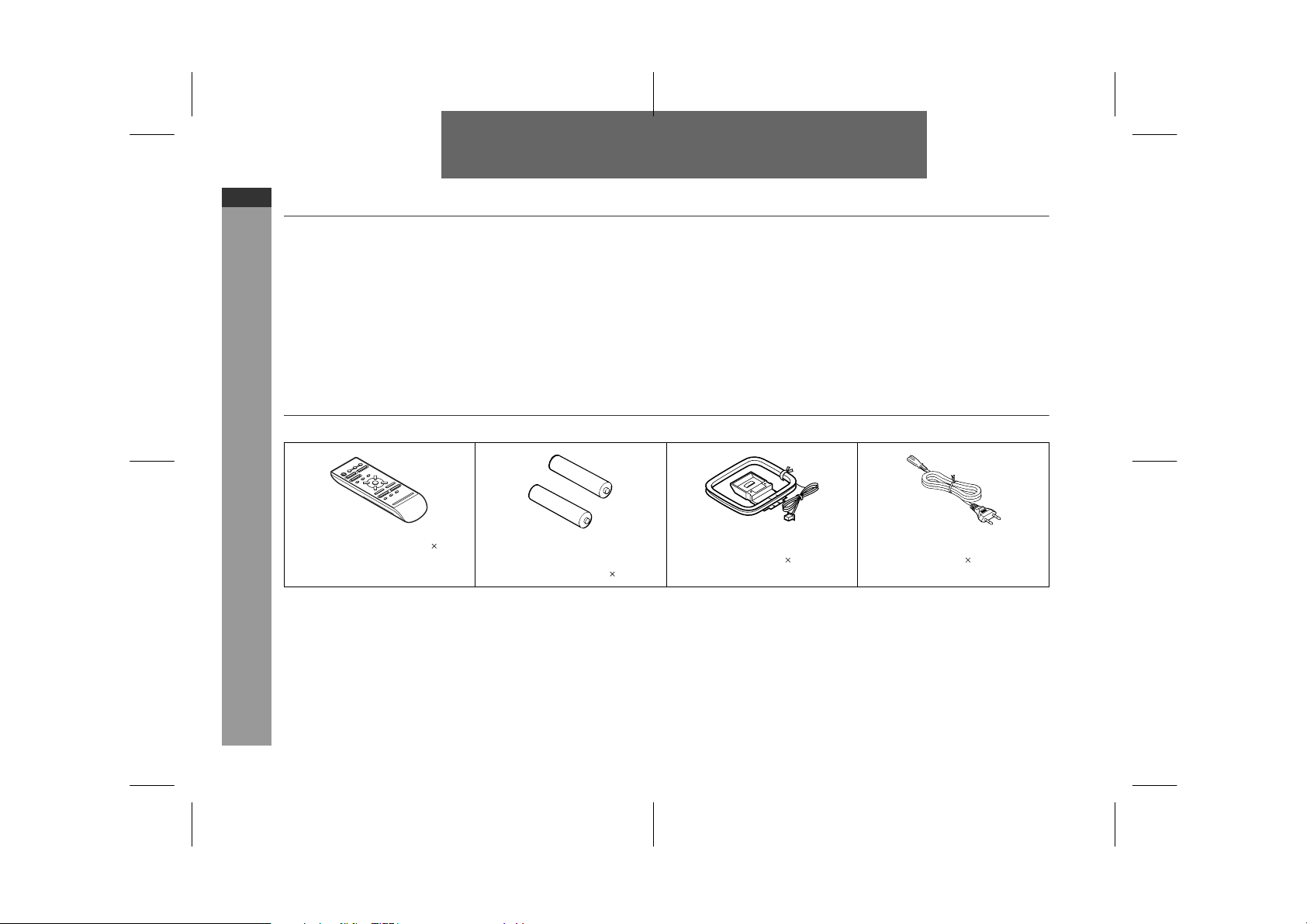
Accessories
Please confirm that the following accessories are included.
Note:
Only the above accessories are included.
Remote control 1 "AA" size battery (UM/SUM-3,
R6, HP-7 or similar) 2
FM/AM loop aerial 1 AC power lead 1
Downloaded from www.ManualsFile.com manuals search engine
03/1/21 08-CD-E100H(H)E1.fm
E-2
ENGLISH
8
CD-E100H
General Information
Contents
Page
T
General Information
Precautions . . . . . . . . . . . . . . . . . . . . . . . . . . . . . . . . . . . . . . . . . 3
Controls and indicators . . . . . . . . . . . . . . . . . . . . . . . . . . . . . .4 - 6
T
Preparation for Use
System connections . . . . . . . . . . . . . . . . . . . . . . . . . . . . . . . . 7, 8
Remote control . . . . . . . . . . . . . . . . . . . . . . . . . . . . . . . . . . . . . . . 9
T
Basic Operation
Sound control . . . . . . . . . . . . . . . . . . . . . . . . . . . . . . . . . . . . . . . 10
Setting the clock . . . . . . . . . . . . . . . . . . . . . . . . . . . . . . . . . . . . 11
T
CD Playback
Listening to a CD (CDs) . . . . . . . . . . . . . . . . . . . . . . . . . . . .12 - 14
Random play . . . . . . . . . . . . . . . . . . . . . . . . . . . . . . . . . . . . . . . 14
Repeat play . . . . . . . . . . . . . . . . . . . . . . . . . . . . . . . . . . . . . . . . . 14
Programmed play . . . . . . . . . . . . . . . . . . . . . . . . . . . . . . . . . . . . 15
T
Radio
Tuning . . . . . . . . . . . . . . . . . . . . . . . . . . . . . . . . . . . . . . . . . . . . . 16
Memorising a station . . . . . . . . . . . . . . . . . . . . . . . . . . . . . . . . . 17
To recall a memorised station . . . . . . . . . . . . . . . . . . . . . . . . . 17
Page
T
Tape Playback
TAPE 1 or TAPE 2 playback . . . . . . . . . . . . . . . . . . . . . . . . . 17, 18
Continuous playback (TAPE 2 to TAPE 1) . . . . . . . . . . . . . . . . 18
T
Tape Recording
Recording from a CD (CDs) . . . . . . . . . . . . . . . . . . . . . . . . . . . 19
Recording from the radio . . . . . . . . . . . . . . . . . . . . . . . . . . . . . 20
Dubbing from tape to tape . . . . . . . . . . . . . . . . . . . . . . . . . . . . 20
Erasing recorded tapes . . . . . . . . . . . . . . . . . . . . . . . . . . . . . . . 20
T
Advanced Features
Timer and sleep operation . . . . . . . . . . . . . . . . . . . . . . . . . 21, 22
T
References
Troubleshooting chart . . . . . . . . . . . . . . . . . . . . . . . . . . . . . 23, 24
Maintenance . . . . . . . . . . . . . . . . . . . . . . . . . . . . . . . . . . . . . . . . 25
Headphones . . . . . . . . . . . . . . . . . . . . . . . . . . . . . . . . . . . . . . . . 25
Specifications . . . . . . . . . . . . . . . . . . . . . . . . . . . . . . . . . . . . . . 26
Downloaded from www.ManualsFile.com manuals search engine
03/1/21 08-CD-E100H(H)E1.fm
E-3
ENGLISH
CD-E100H
General Information
Precautions
T
General
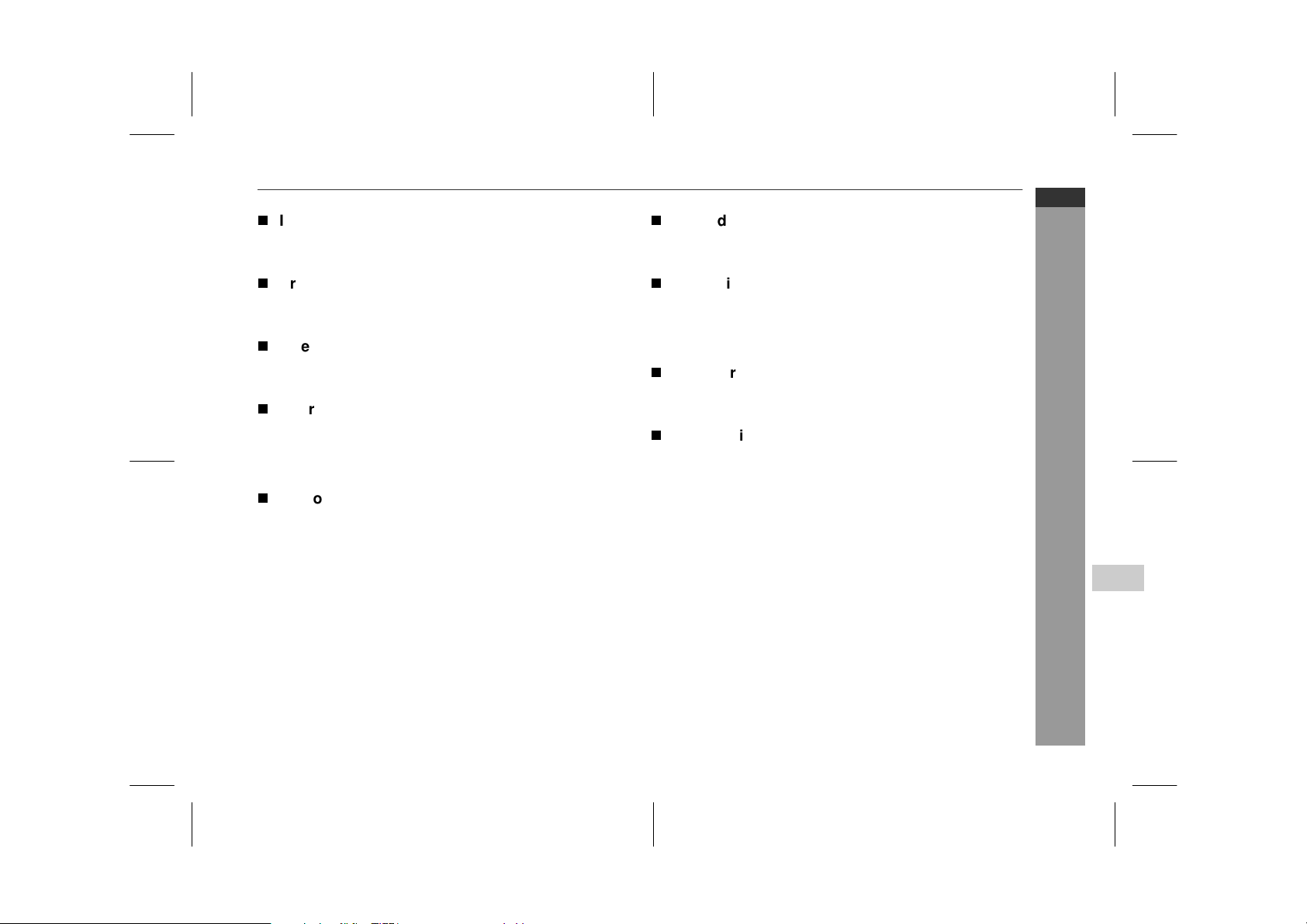
Please ensure that the equipment is positioned in a well venti-
lated area and ensure that there is at least 10 cm (4") of free
space along the sides, top and back of the equipment.
Use the unit on a firm, level surface free from vibration.
Keep the unit away from direct sunlight, strong magnetic fields,
excessive dust, humidity and electronic/electrical equipment
(home computers, facsimiles, etc.) which generate electrical
noise.
Do not place anything on top of the unit.
Do not expose the unit to moisture, to temperatures higher than
60°C (140°F) or to extremely low temperatures.
If your system does not work properly, disconnect the AC power
lead from the wall socket. Plug the AC power lead back in, and
then turn on your system.
In case of an electrical storm, unplug the unit for safety.
Hold the AC power plug by the head when removing it from the
wall socket, as pulling the lead can damage internal wires.
Do not remove the outer cover, as this may result in electric
shock. Refer internal service to your local SHARP service
facility.
The ventilation should not be impeded by covering the ventilation
openings with items, such as newspapers, tablecloths, curtains,
etc.
No naked flame sources, such as lighted candles, should be
placed on the apparatus.
Attention should be drawn to the environmental aspects of bat-
tery disposal.
The apparatus is designed for use in moderate climate.
This unit should only be used within the range of 5°C - 35°C
(41°F - 95°F).
Warning:
The voltage used must be the same as that specified on this unit.
Using this product with a higher voltage other than that which is
specified is dangerous and may result in a fire or other type of acci-
dent causing damage. SHARP will not be held responsible for any
damage resulting from use of this unit with a voltage other than that
which is specified.
T
Volu me contr ol
The sound level at a given volume setting depends on speaker effi-
ciency, location, and various other factors. It is advisable to avoid
exposure to high volume levels. Do not turn the volume on to full at
switch on and listen to music at moderate levels.
T
Care of compact discs
Compact discs are fairly resistant to damage, however mistracking
can occur due to an accumulation of dirt on the disc surface. Follow
the guidelines below for maximum enjoyment from your CD collec-
tion and player.
Do not write on either side of the disc, particularly the non-label
side from which signals are read. Do not mark this surface.
Keep your discs away from direct sunlight, heat, and excessive
moisture.
Always hold the CDs by the edges. Fingerprints, dirt, or water on
the CDs can cause noise or mistracking. If a CD is dirty or does
not play properly, clean it with a soft, dry cloth, wiping straight out
from the centre, along the radius.
10 cm (4") 10 cm (4")
10 cm (4")
10 cm (4")
NO YES
Correct
Downloaded from www.ManualsFile.com manuals search engine
03/1/21 08-CD-E100H(H)E1.fm
E-4
ENGLISH
8
CD-E100H
General Information
Controls and indicators
T
Front panel
Reference page
1. Disc Tray . . . . . . . . . . . . . . . . . . . . . . . . . . . . . . . . . . . . . . . . 12
2. Timer Set Indicator . . . . . . . . . . . . . . . . . . . . . . . . . . . . . . . 22
3. On/Stand-by Button . . . . . . . . . . . . . . . . . . . . . . . . . . . . . . . . 8
4. Tuner (Band) Button . . . . . . . . . . . . . . . . . . . . . . . . . . . . . . 16
5. CD Button . . . . . . . . . . . . . . . . . . . . . . . . . . . . . . . . . . . . 12, 19
6. CD Track Down or Fast Reverse,
Tuner Preset Down Button . . . . . . . . . . . . . . . . . . . . . . 13, 17
7. Headphone Socket . . . . . . . . . . . . . . . . . . . . . . . . . . . . . . . . 25
8. CD Stop Button . . . . . . . . . . . . . . . . . . . . . . . . . . . . . . . . . . 13
9. CD Play or Repeat Button . . . . . . . . . . . . . . . . . . . . . . . 12, 14
10. Tuning Down Button . . . . . . . . . . . . . . . . . . . . . . . . . . . . . . 16
11. Tuning Up Button . . . . . . . . . . . . . . . . . . . . . . . . . . . . . . . . . 16
12. Tape 1 Cassette Compartment . . . . . . . . . . . . . . . . . . . 18, 20
13. Tape Button . . . . . . . . . . . . . . . . . . . . . . . . . . . . . . . . . . 18, 20
14. CD Track Up or Fast Forward,
Tuner Preset Up Button . . . . . . . . . . . . . . . . . . . . . . . . . 13, 17
15. Equaliser Mode Select/Extra Bass/
Demo Mode Button . . . . . . . . . . . . . . . . . . . . . . . . . . . . . 8, 10
16. Disc Tray Open/Close Button . . . . . . . . . . . . . . . . . . . . . . . 12
17. Disc Skip Button . . . . . . . . . . . . . . . . . . . . . . . . . . . . . . . . . 12
18. Volume Up and Down Buttons . . . . . . . . . . . . . . . . . . . . . . 10
19. Tape 2 Cassette Compartment . . . . . . . . . . . . . . . . . . . 18, 20
20. Tape 1 Record Button . . . . . . . . . . . . . . . . . . . . . . . . . . 19, 20
21. Tape 1 Play Button . . . . . . . . . . . . . . . . . . . . . . . . . . . . . . . . 18
22. Tape 1 Rewind Button . . . . . . . . . . . . . . . . . . . . . . . . . . . . . 18
23. Tape 1 Fast Forward Button . . . . . . . . . . . . . . . . . . . . . . . . 18
24. Tape 1 Stop/Eject Button . . . . . . . . . . . . . . . . . . . . . . . . . . . 18
25. Tape 1 Pause Button . . . . . . . . . . . . . . . . . . . . . . . . . . . . . . 18
26. Tape 2 Play Button . . . . . . . . . . . . . . . . . . . . . . . . . . . . . . . . 18
27. Tape 2 Rewind Button . . . . . . . . . . . . . . . . . . . . . . . . . . . . . 18
28. Tape 2 Fast Forward Button . . . . . . . . . . . . . . . . . . . . . . . . 18
29. Tape 2 Stop/Eject Button . . . . . . . . . . . . . . . . . . . . . . . . . . . 18
3
1
2
4
13
14
15
16
17
18
5
6
7
8
9
12
20
19
11
10
21 22 23 24 25 26 27 28 29
Downloaded from www.ManualsFile.com manuals search engine
03/1/21 08-CD-E100H(H)E1.fm
E-5
ENGLISH
CD-E100H
General Information
Controls and indicators (continued)
T
Display
1. CD Play Indicator
2. CD Repeat Play Indicator
3. FM Station Indicator
4. AM Station Indicator
5. Disc Number Indicators
6. Clock Indicator
7. Sleep Indicator
8. Timer Play Indicator
9. Tape 1 Record Indicator
10. CD Pause Indicator
11. FM Stereo Mode Indicator
12. FM Stereo Receiving Indicator
13. Memory Indicator
14. CD Random Play Indicator
15. Extra Bass Indicator
T
Rear panel
Reference page
1. AC Power Input Socket . . . . . . . . . . . . . . . . . . . . . . . . . . . . . 8
2. FM/AM Loop Aerial Socket . . . . . . . . . . . . . . . . . . . . . . . . . . 7
3. Speaker Terminals . . . . . . . . . . . . . . . . . . . . . . . . . . . . . . . 7, 8
T
Speaker system
1. Bass Reflex Ducts
2. Full-Range Speaker
3. Speaker Wire
1
3
1 2 3 4 1112
13
14
78910 15
6
5
3
1
1
2
2
Downloaded from www.ManualsFile.com manuals search engine
03/1/21 08-CD-E100H(H)E1.fm
E-6
ENGLISH
8
CD-E100H
General Information
T
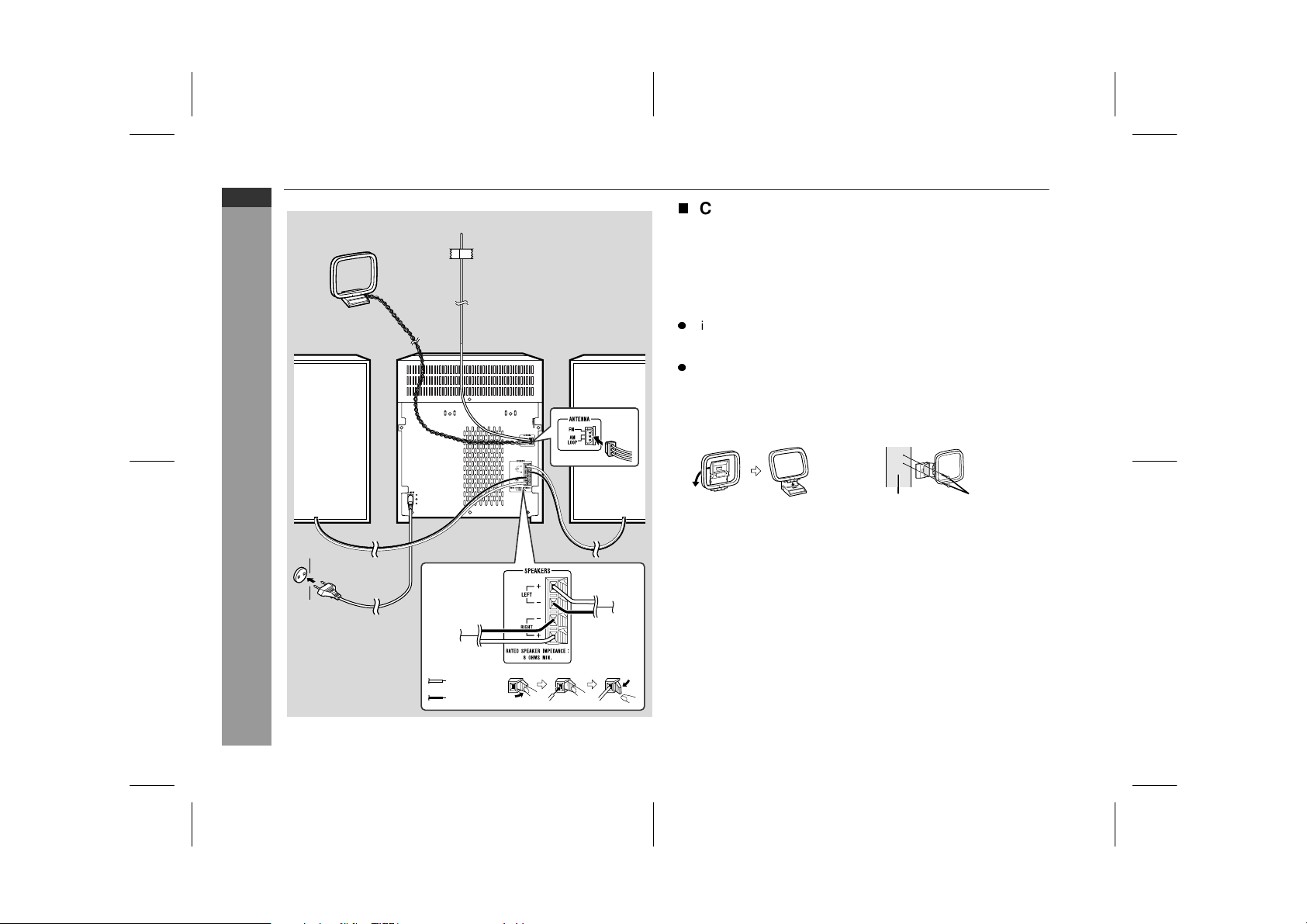
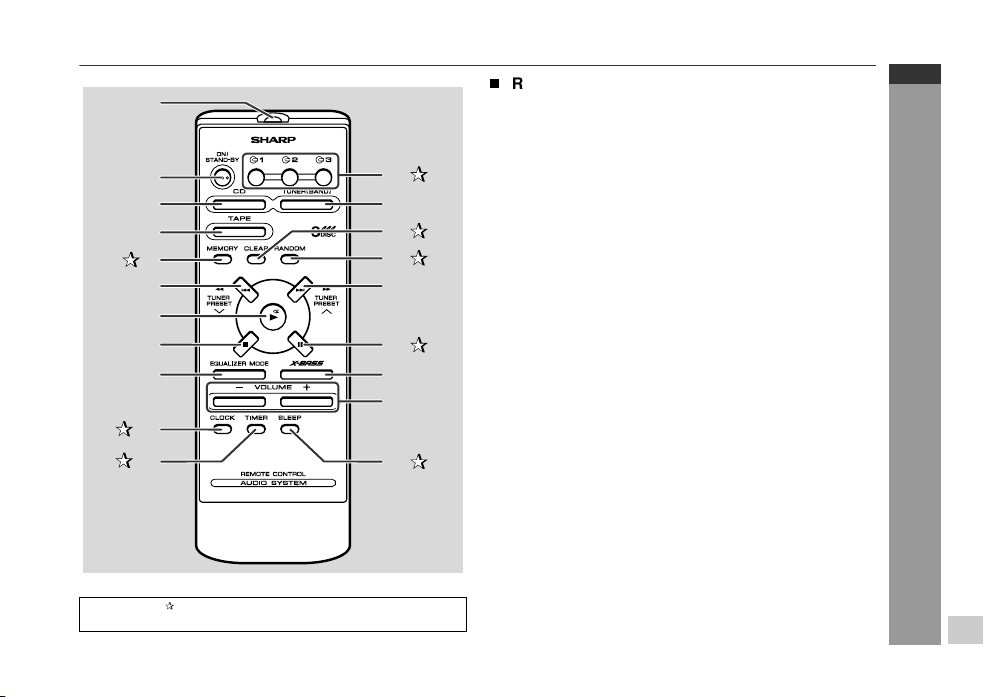
Remote control
Reference page
1.Remote Control Transmitter . . . . . . . . . . . . . . . . . . . . . . . . . . . 9
2.On/Stand-by Button . . . . . . . . . . . . . . . . . . . . . . . . . . . . . . . . . 9
3.CD Button . . . . . . . . . . . . . . . . . . . . . . . . . . . . . . . . . . . . 12, 19
4.Tape Button . . . . . . . . . . . . . . . . . . . . . . . . . . . . . . . . . . . 18, 20
5. Memory Button . . . . . . . . . . . . . . . . . . . . . . . . . . . . . 11, 15, 17
6.CD Track Down or Fast Reverse,
Tuner Preset Down Button . . . . . . . . . . . . . . . . . . . . . . . . 13, 17
7.CD Play or Repeat Button . . . . . . . . . . . . . . . . . . . . . . . . 12, 14
8.CD Stop Button . . . . . . . . . . . . . . . . . . . . . . . . . . . . . . . . . . . 13
9.Equaliser Mode Select Button . . . . . . . . . . . . . . . . . . . . . . . . 10
10. Clock Button . . . . . . . . . . . . . . . . . . . . . . . . . . . . . . . . . . 11, 21
11. Timer Button . . . . . . . . . . . . . . . . . . . . . . . . . . . . . . . . . . . . . 21
12. Disc Number Select Buttons . . . . . . . . . . . . . . . . . . 12, 15, 19
13. Tuner (Band) Button . . . . . . . . . . . . . . . . . . . . . . . . . . . . . . . . 16
14. Programme Clear Button . . . . . . . . . . . . . . . . . . . . . . . . . . . 15
15. CD Random Button . . . . . . . . . . . . . . . . . . . . . . . . . . . . . . . 14
16. CD Track Up or Fast Forward,
Tuner Preset Up Button . . . . . . . . . . . . . . . . . . . . . . . . . . 13, 17
17. CD Pause Button . . . . . . . . . . . . . . . . . . . . . . . . . . . . . . . . . 13
18. Extra Bass Button . . . . . . . . . . . . . . . . . . . . . . . . . . . . . . . . . 10
19. Volume Up and Down Buttons . . . . . . . . . . . . . . . . . . . . . . . . 10
20. Sleep Button . . . . . . . . . . . . . . . . . . . . . . . . . . . . . . . . . . . . . 22
Buttons with " " mark in the illustration or highlighted in bold on
the right can be operated on the remote control only.
1
2
3
4
5
6
7
8
9
11
10
15
18
14
13
12
16
17
19
20
Downloaded from www.ManualsFile.com manuals search engine
03/1/21 08-CD-E100H(H)E1.fm
E-7
ENGLISH
CD-E100H
Preparation for Use
System connections
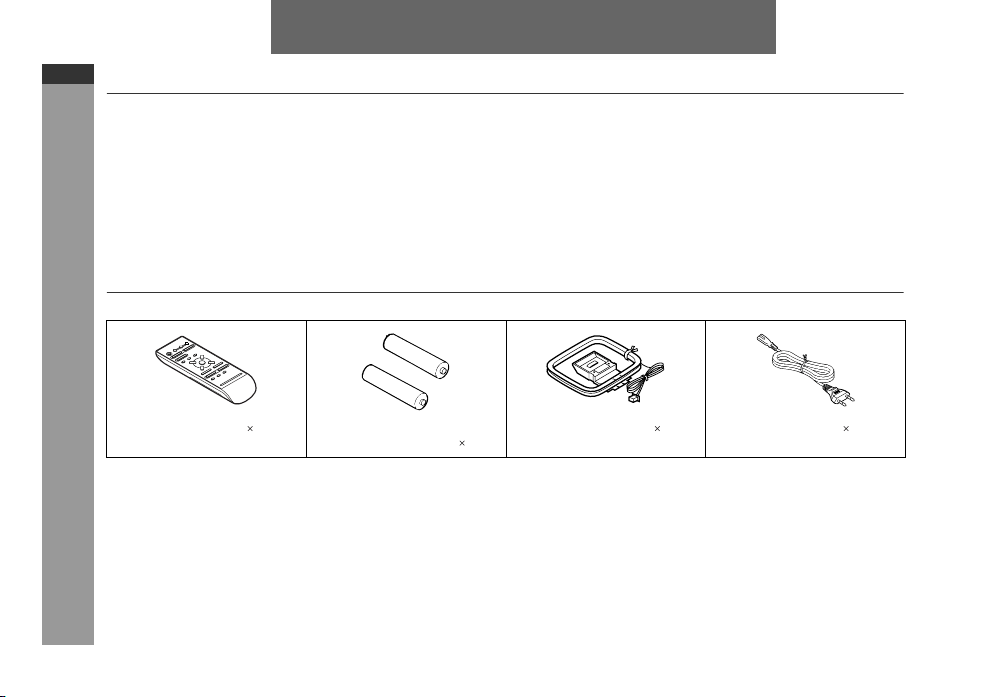
T
FM/AM loop aerial connection
Connect the FM/AM loop aerial to the ANTENNA socket.
Position the FM aerial wire and rotate the AM loop aerial for opti-
mum reception. Place the AM loop aerial on a shelf, or attach it to a
stand or a wall.
Notes:
Placing the aerial on the unit or near the AC power lead may
cause noise pickup. Place the aerial away from the unit for better
reception.
Do not connect the attached FM aerial to an external FM aerial.
Otherwise, trouble may occur.
Installing the AM loop aerial:
Wall socket
(AC 230 V, 50 Hz)
Red
Black
Left speaker
Right speaker
AM loop aerial
FM aerial
< Assembling > < Attaching to the wall >
Wall Screws
(not supplied)
Downloaded from www.ManualsFile.com manuals search engine
03/1/21 08-CD-E100H(H)E1.fm
E-8
ENGLISH
8
CD-E100H
Preparation for Use
T
Speaker connection
Connect the black wire to the minus (-) terminal, and the red wire to
the plus (+) terminal.
Caution:
Note:
The speaker grilles are not removable.
T
Connecting the AC power lead
After checking all the connections have been made correctly, con-
nect the AC power lead to the AC power input socket, then plug the
AC power lead of this unit into the wall socket. If you plug in the unit
first, the unit will enter the demonstration mode.
Notes:
Unplug the AC power lead from the wall socket if the unit will not
be in use for a prolonged period of time.
Never use a power lead other than the one supplied. Otherwise, a
malfunction or an accident may occur.
T
Demonstration mode
To cancel the demonstration mode:
When the unit is in the power stand-by mode (demonstration mode),
press the EQUALIZER/X-BASS/DEMO button. The unit will enter
the low power consumption mode.
To return to the demonstration mode:
When the unit is in the power stand-by mode, press the EQUAL-
IZER/X-BASS/DEMO button again.
Note:
When the power is on, the EQUALIZER/X-BASS/DEMO button can
be used to select the pre-programmed equaliser and extra bass
modes.
T
To turn the power on
Press the ON/STAND-BY button to turn the power on.
Use speakers with an impedance of 8 ohms
or more, as lower impedance speakers can
damage the unit.
Do not mistake the right and the left chan-
nels. The right speaker is the one on the
right side when you face the unit.
Do not let the bare speaker wires touch
each other.
Do not allow any objects to fall into or to be
placed in the bass reflex ducts.
Do not stand or sit on the speakers. You
may be injured.
Incorrect
The first time the unit is plugged in, the
unit will enter the demonstration mode.
You will see words scroll.
After use:
Press the ON/STAND-BY button to enter the power stand-by
mode.
Downloaded from www.ManualsFile.com manuals search engine
03/1/21 08-CD-E100H(H)E1.fm
E-9
ENGLISH
CD-E100H
Preparation for Use
Remote control
T
Battery installation
Precautions for battery use:
Replace all old batteries with new ones at the same time.
Do not mix old and new batteries.
Remove the batteries if the unit is not to be used for long periods
of time. This will prevent potential damage due to battery leak-
age.
Caution:
Do not use rechargeable batteries (nickel-cadmium battery, etc.).
Installing the batteries incorrectly may cause the unit to malfunc-
tion.
Notes concerning use:
Replace the batteries if the operating distance is reduced or if the
operation becomes erratic. Purchase 2 "AA" size batteries (UM/
SUM-3, R6, HP-7 or similar).
Periodically clean the transmitter on the remote control and the
sensor on the unit with a soft cloth.
Exposing the sensor on the unit to strong light may interfere with
operation. Change the lighting or the direction of the unit.
Keep the remote control away from moisture, heat, shock, and
vibrations.
T
Test of the remote control
Check the remote control after checking all the connections (see
pages 7 - 8).
Point the remote control directly at the remote sensor on the unit.
The remote control can be used within the range shown below:
Press the ON/STAND-BY button. Does the power turn on? Now, you
can enjoy music.
1 Remove the battery cover.
2 Insert the batteries according to the direction indicated in
the battery compartment.
When inserting or removing the batteries, push them towards
the battery terminals.
3 Replace the cover.
0.2 m - 6 m
(8" - 20')
Remote sensor
Downloaded from www.ManualsFile.com manuals search engine
03/1/21 08-CD-E100H(H)E1.fm
E-10
ENGLISH
8
CD-E100H
Basic Operation
Sound control
T
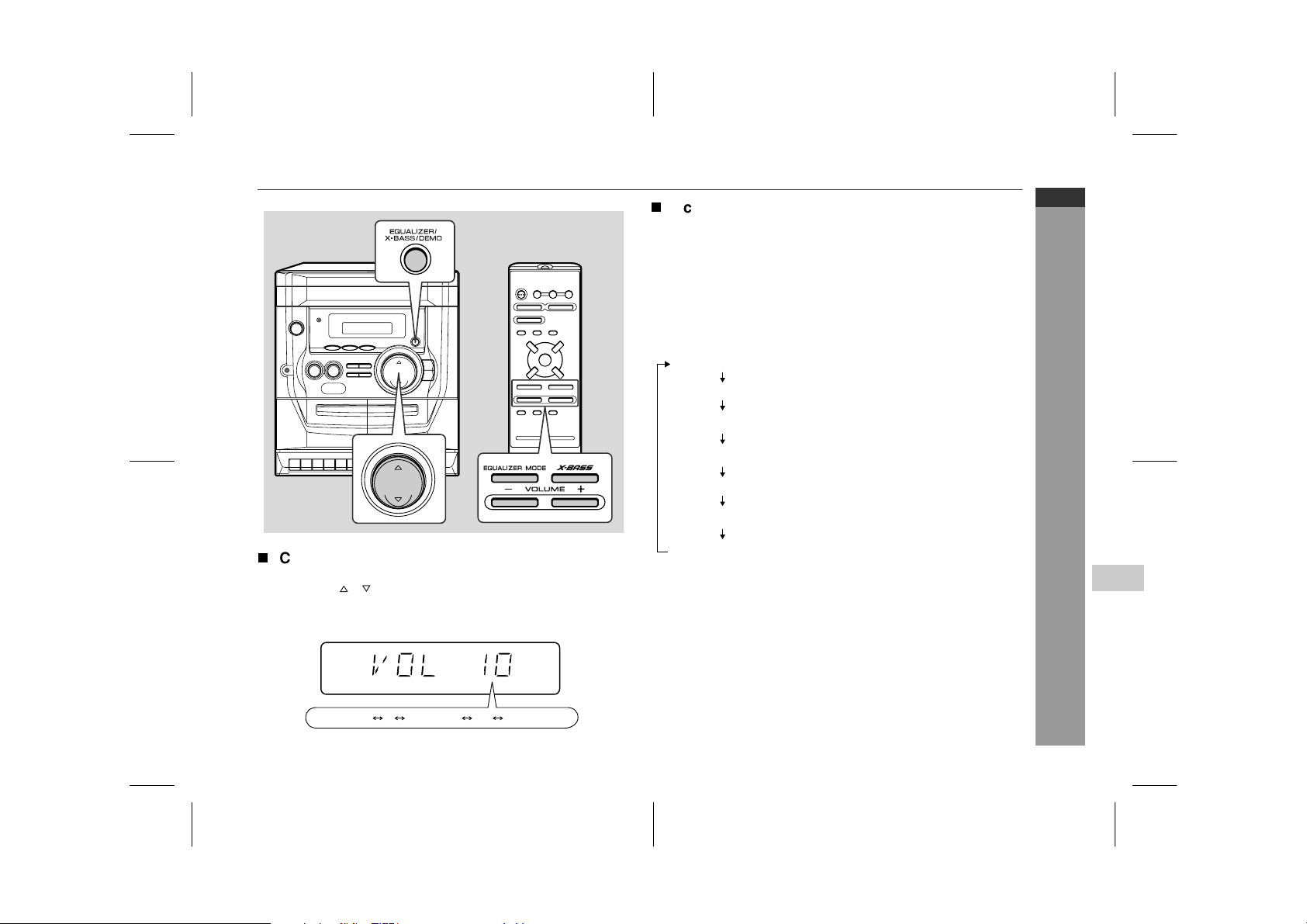
Volume control
Main unit operation:
Press the or button to increase or decrease the volume.
Remote control operation:
Press the VOLUME (+ or -) button to increase or decrease the vol-
ume.
T
Pre-programmed equaliser/Extra bass
(X-BASS)
When the power is first turned on, the unit enters the X-BASS mode.
"X-BASS" is lit and the equaliser is set to FLAT.
Changing the mode:
Press the EQUALIZER/X-BASS/DEMO (EQUALIZER MODE) but-
ton repeatedly until the desired sound mode appears.
To enter or cancel the extra bass mode by the remote control:
Press the X-BASS button to light up "X-BASS". The unit enters the
extra bass mode. Turn off "X-BASS" to cancel the extra bass mode.
12 29 30 VOLMAXVOLMIN
.....
ROCK (X-BASS off)
FLAT (X-BASS on)
FLAT (X-BASS off)
CLASSIC (X-BASS off)
The sound is not modified.
Bass frequencies are emphasised.
Bass and treble are emphasised.
POPS (X-BASS off)
Bass and treble are slightly
emphasised.
JAZZ (X-BASS off)
Treble is cut a little.
Treble is reduced a lot.
VOCAL (X-BASS off)
Vocals (midrange tones) are
emphasised.
Downloaded from www.ManualsFile.com manuals search engine
03/1/21 08-CD-E100H(H)E2.fm
E-11
ENGLISH
CD-E100H
Basic Operation
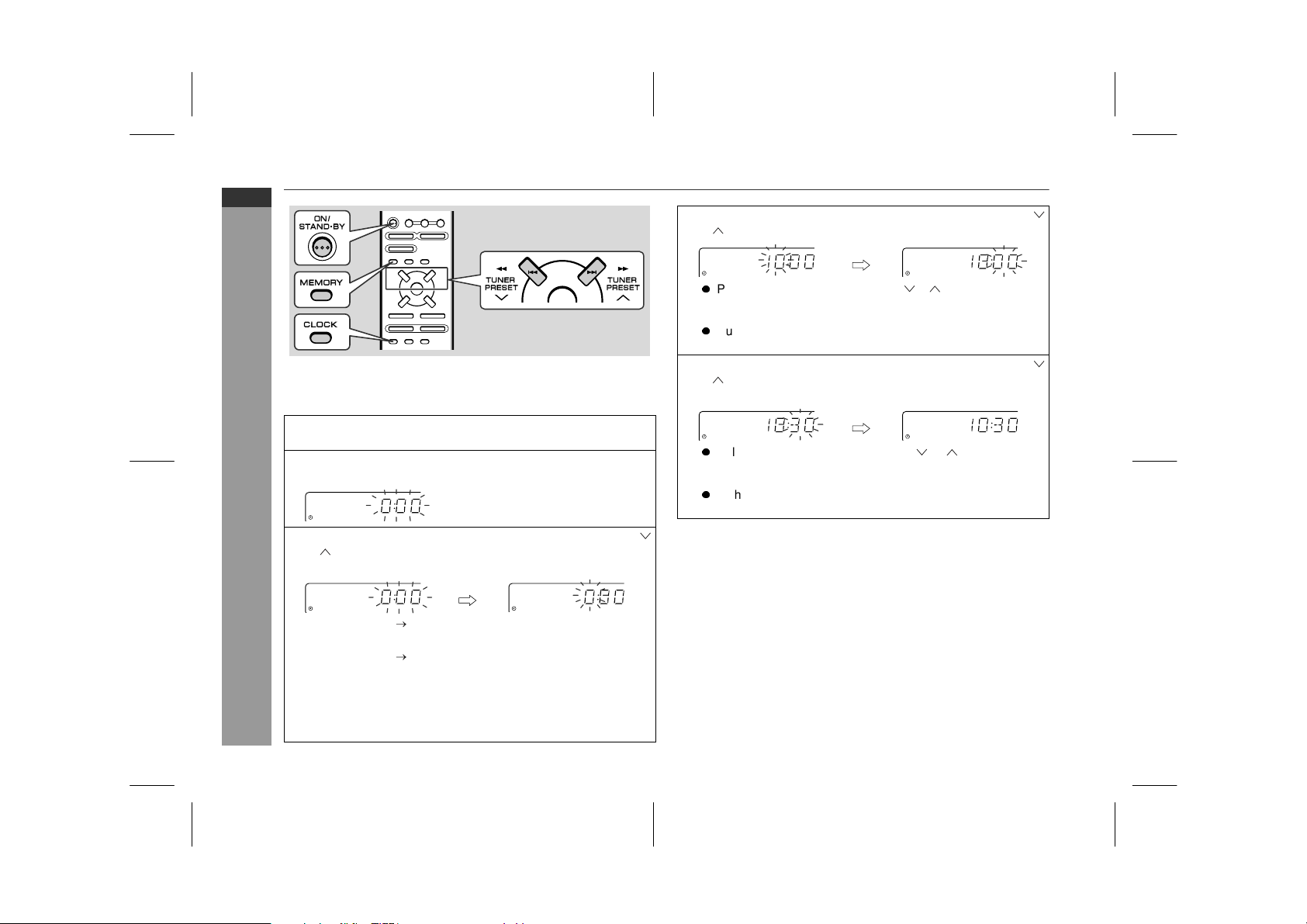
Setting the clock
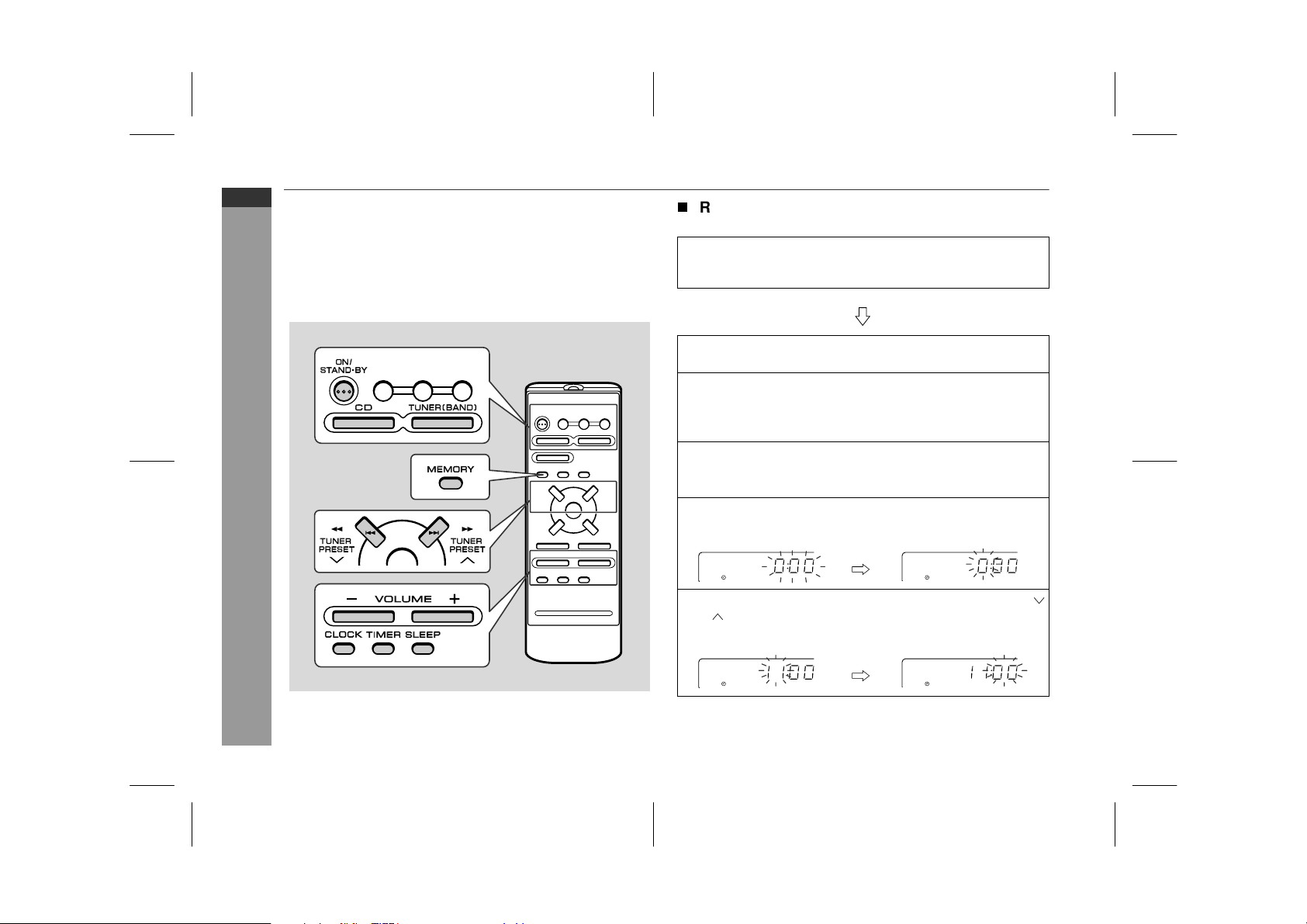
This may be operated only with the remote control.
In this example, the clock is set for the 24-hour (0:00) display.
To confirm the time display:
Press the CLOCK button.
The time display will appear for about 8 seconds.
Note:
The time will flash at the push of the CLOCK button when the AC
power supply is restored after a power failure or unplugging the unit.
Readjust the clock as follows.
To readjust the clock:
Perform "Setting the clock" from the beginning. If the "0:00" is not
flashing in step 2, step 3 (for selecting the 24-hour or 12-hour dis-
play) will be skipped.
To change the 24-hour or 12-hour display:
1
Press the ON/STAND-BY button to turn the power on.
2
Press the CLOCK button and within 8 seconds, press the
MEMORY button.
3
Within 30 seconds, press the TUNER PRESET ( or ) but-
ton to select 24-hour or 12-hour display and then press the
MEMORY button.
"0:00" The 24-hour display will appear.
(0:00 - 23:59)
"AM 12:00" The 12-hour display will appear.
(AM 12:00 - PM 11:59)
Note that this can only be set when the unit is first installed or it
has been reset. [Refer to "Clearing all the memory (reset)" on
page 24 for details.]
4
Within 30 seconds, press the TUNER PRESET
( or )
but-
ton
to adjust the hour and then press the MEMORY button.
z
Press the TUNER PRESET ( or ) button once to advance
the time by 1 hour. Hold it down to advance continuously.
z
When the 12-hour display is selected, "AM" will change au-
tomatically to "PM".
5
Within 30 seconds, press the TUNER PRESET
( or )
button
to adjust the minutes and then press the MEMORY button.
z
Press the TUNER PRESET ( or ) button once to advance
the time by 1 minute. Hold it down to advance continuously.
z
The hour will not advance even if minutes advance from "59"
to "00".
1 Clear all the programmed contents. [Refer to "Clearing all the
memory (reset)" on page 24 for details.]
2 Perform "Setting the clock" from the beginning.
Downloaded from www.ManualsFile.com manuals search engine
03/1/21 08-CD-E100H(H)E2.fm
E-12
ENGLISH
8
CD-E100H
CD Playback
Listening to a CD (CDs)
This system can also play audio CD-R and CD-RW discs, but can-
not record.
Some audio CD-R and CD-RW discs may not be playable due to the
state of disc or the device that was used for recording.
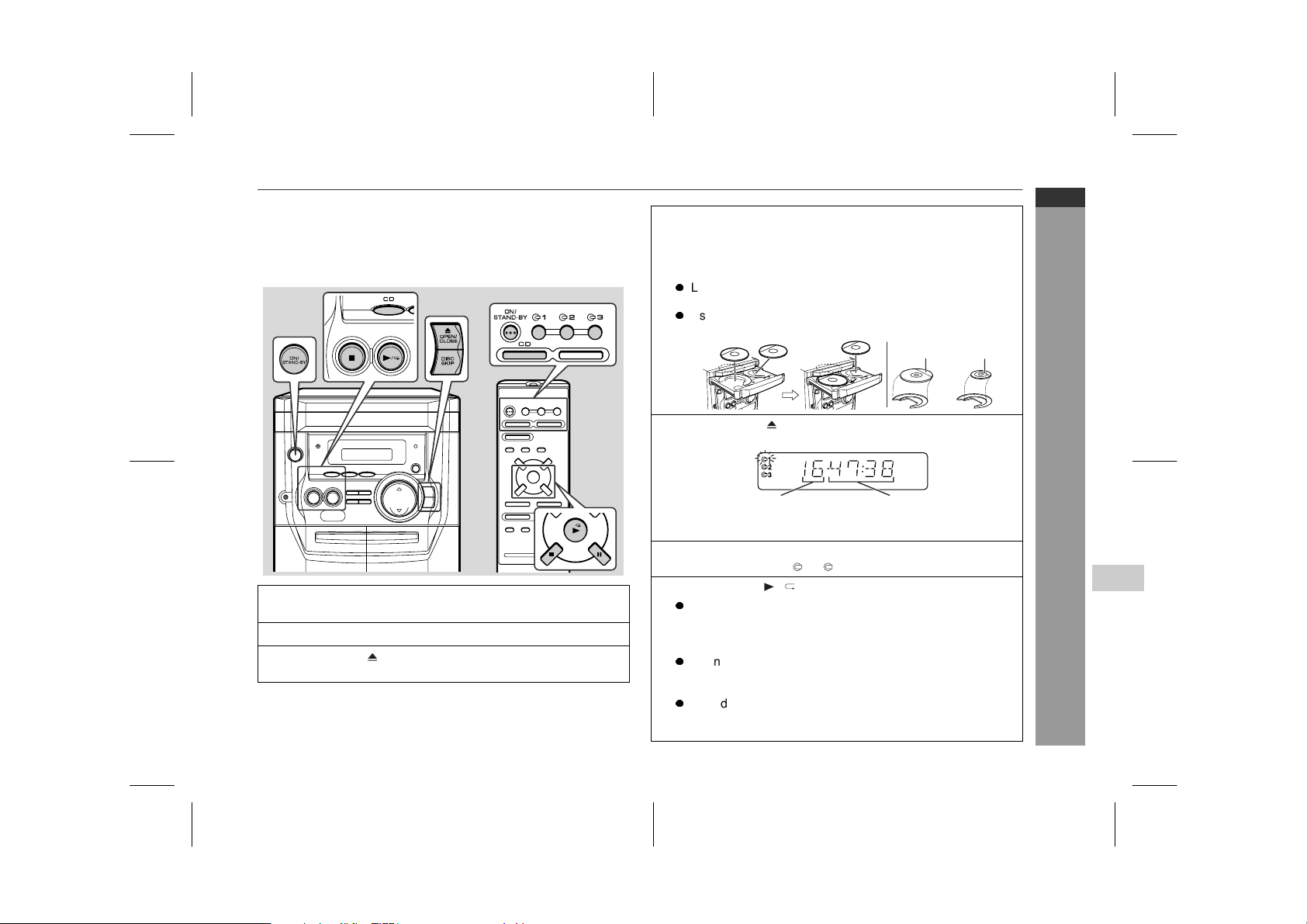
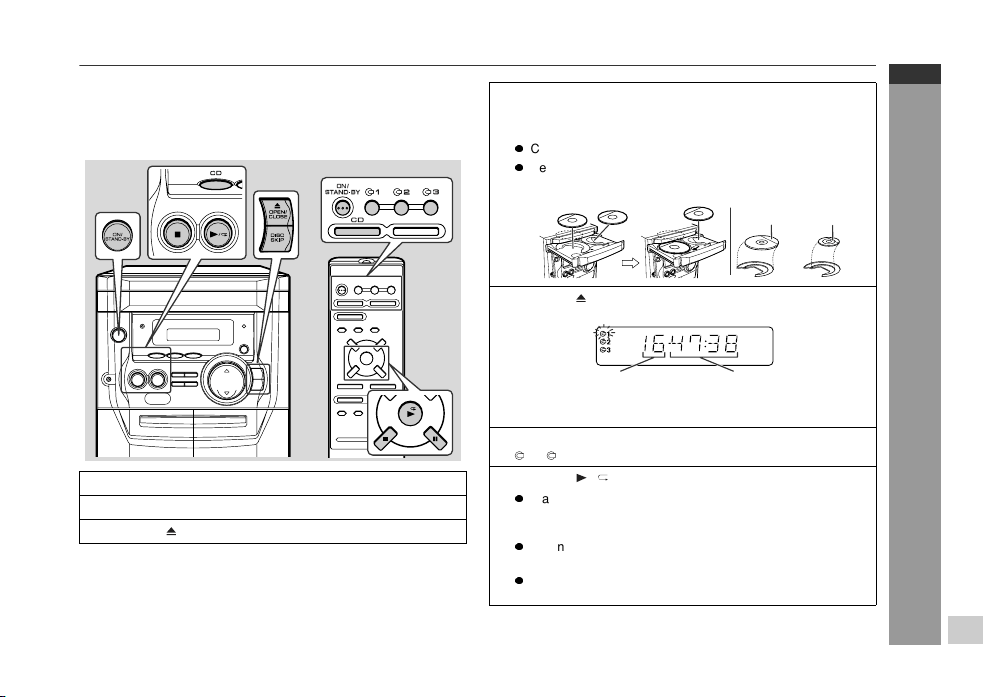
1
Press the ON/STAND-BY button to turn the power on.
2
Press the CD button.
3
Press the OPEN/CLOSE button to open the disc tray.
4
Place the CD(s) on the disc tray, label side up.
When loading a third disc, press the DISC SKIP button to
turn the disc tray, then place the CD in the open position.
z
CDs can be placed on any open position on the disc tray.
z
Be sure to place 8 cm (3") CDs in the middle of the disc po-
sitions.
5
Press the OPEN/CLOSE button to close the disc tray.
Total number of tracks on
the CD whose number is
flashing
Total playing time of the CD
whose number is flashing
6
To select the CD you want to listen to first, press one of the
1 - 3 buttons on the remote control.
7
Press the / button to start playback.
z
Playback will begin from track 1 on the disc you have select-
ed to play. After that disc finishes playing, the next disc will
automatically start playback.
z
When the last track on the third disc has finished playing, the
CD player will automatically stop.
z
When there is no CD in one of the disc 1 - 3 positions, that
position will be skipped and the next CD will begin to play.
12 cm (5") 8 cm (3")
Downloaded from www.ManualsFile.com manuals search engine
03/1/21 08-CD-E100H(H)E2.fm
E-13
ENGLISH
CD-E100H
CD Playback
Listening to a CD (CDs) (continued)
To interrupt playback:
Press the button on the remote control.
To resume playback from the same point, press the button.
To stop playback:
Press the button.
To remove the CDs:
Whilst in the stop mode, press the OPEN/CLOSE button.
The disc tray will open. Remove the two discs. Then, press the DISC
SKIP button to rotate the disc tray and remove the remaining disc.
Caution:
z
If you tilt the unit forward in the power stand-by mode, the disc
tray will open. The unit or CD may be damaged.
z
Do not place two CDs in one disc tray.
z
Do not play discs with special shapes (heart- or octagon-
shaped). It may cause malfunctions.
z
Do not push the disc tray whilst it is moving.
z
Do not turn the disc tray by hand. This may cause malfunctions.
z
If the power fails whilst the tray is open, wait until the power is
restored.
z
If the disc tray is stopped with force, "OPEN" will appear in the
display. If this occurs, press the OPEN/CLOSE button.
z
If TV or radio interference occurs during CD operation, move the
unit away from the TV or radio.
z
If a disc is damaged, dirty, or loaded upside down, the disc will
skip or not play back.
T
To locate the beginning of a track
Notes:
z
You can locate the beginning of a track on one disc only.
z
You can skip to any track by pressing the or button
repeatedly until the desired track number appears.
T
To locate the desired portion
Notes:
z
Normal playback will resume when the or button is
released.
z
You can locate the desired portion on one disc
only
.
z
When the end of the last track is reached during fast forward, the
unit will enter the stop mode. When the beginning of the first track
is reached during fast reverse, playback will start when you
release the button.
To move to the beginning of the next track:
Press the button for less than 0.5 seconds during playback.
To restart the track being played:
Press the button for less than 0.5 seconds during playback.
For audible fast forward:
Press and hold down the button during playback.
For audible fast reverse:
Press and hold down the button during playback.
Downloaded from www.ManualsFile.com manuals search engine
03/1/21 08-CD-E100H(H)E2.fm
E-14
ENGLISH
8
CD-E100H
CD Playback
T
Starting playback with a desired track
You can play a disc starting with the desired track.
1 Whilst in the stop mode, press one of the
1 -
3 buttons
on the remote control or DISC SKIP button to select the
desired disc.
2 Press the or button to select the desired track.
3 Press the / button to start playback.
Playback of the selected track is started. When the end of the
last track is reached, the next disc will automatically be started.
Notes:
z
When the DISC SKIP button is pressed during playback, the next
disc will begin automatically.
z
When one of the 1 - 3 buttons on the remote control is
pressed during playback, the selected disc will begin automati-
cally.
z
It is possible to enter a track number which is larger than the total
track number of the disc (maximum 99). In this case, the last
track on the disc will be played back.
T
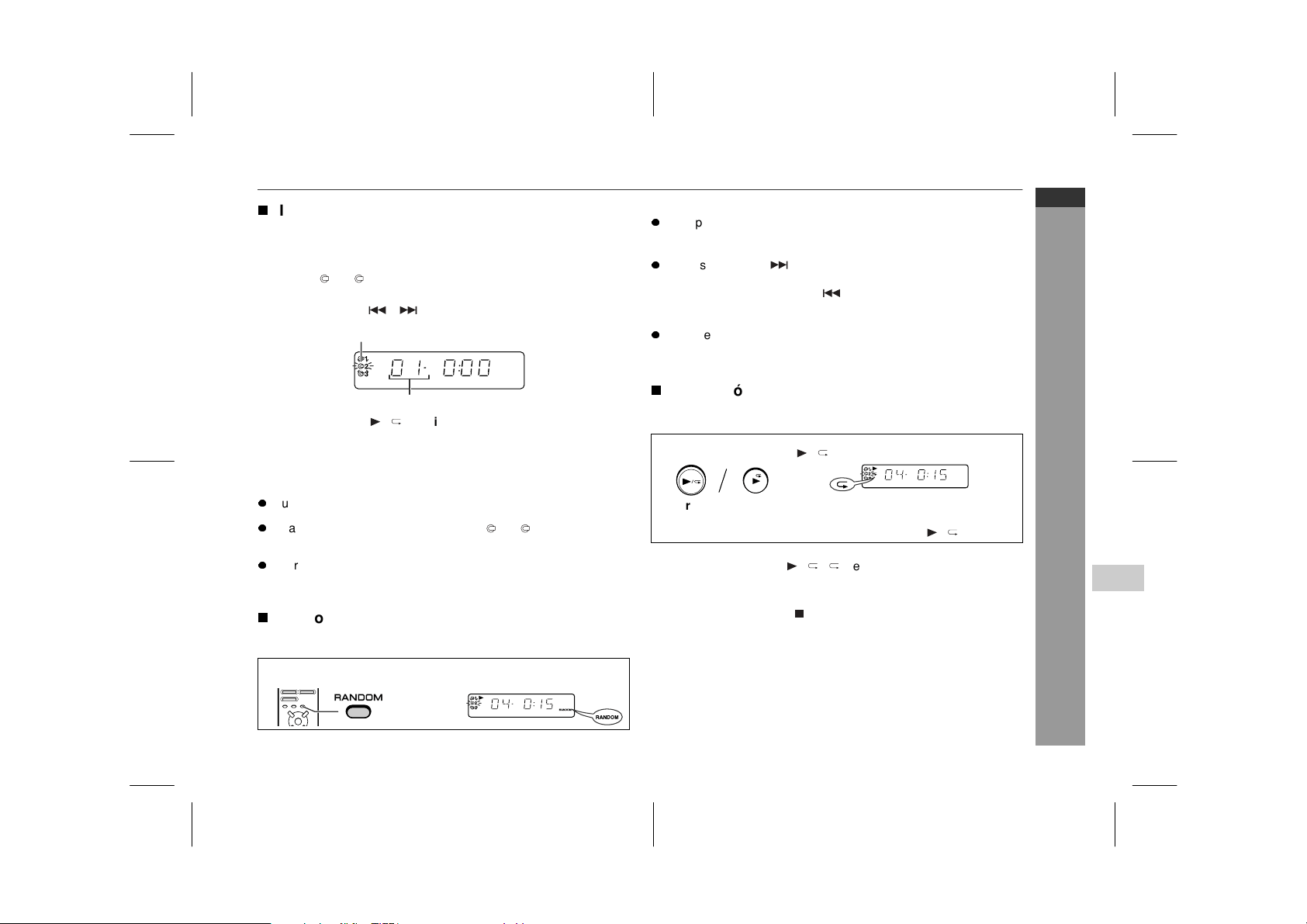
Random play
The tracks on the disc(s) can be played in random order
automati-
cally.
To cancel random play:
Press the RANDOM button.
Notes:
z
The random play will stop automatically when all tracks are
played once. (The same track will not be played back twice.)
z
If you press the
button during random
play
, you can move to
the track selected next by the random operation. On the other
hand, the
button does not allow you to move to the previous
track. The beginning of the track being played will be located.
z
In random play, the CD player will select and play tracks automat-
ically. (You cannot select the order of the tracks.)
T
Repeat play
All tracks on up to 3 discs, or a programmed sequence can be con-
tinuously repeated.
To cancel repeat play:
Press the / button again.
""
will go out.
Caution:
After performing repeat play, be sure to press the button. Other-
wise, the disc(s) will play
continuously.
Selected disc number
Selected track number
Press the RANDOM button on the remote control to begin ran-
dom play.
To repeat all tracks on up to 3 discs:
Press the / button twice.
To repeat a desired track:
Perform steps 1 - 4 in the "Programmed play" section on page 15
and then press the / button twice.
Downloaded from www.ManualsFile.com manuals search engine
03/1/21 08-CD-E100H(H)E2.fm
E-15
ENGLISH
CD-E100H
CD Playback
Listening to a CD (CDs) (continued)
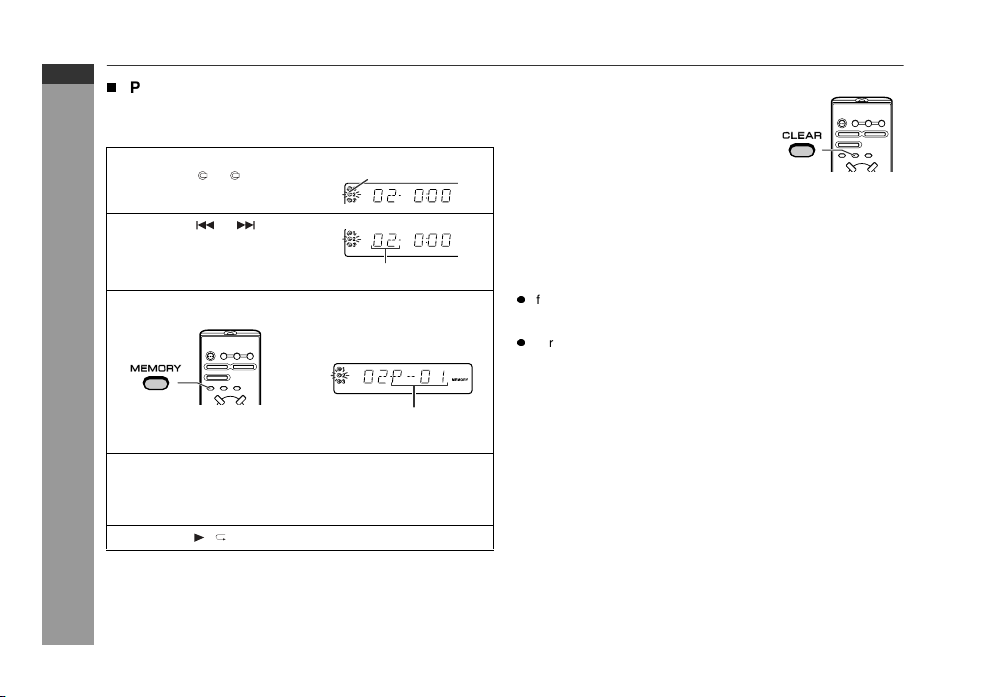
T
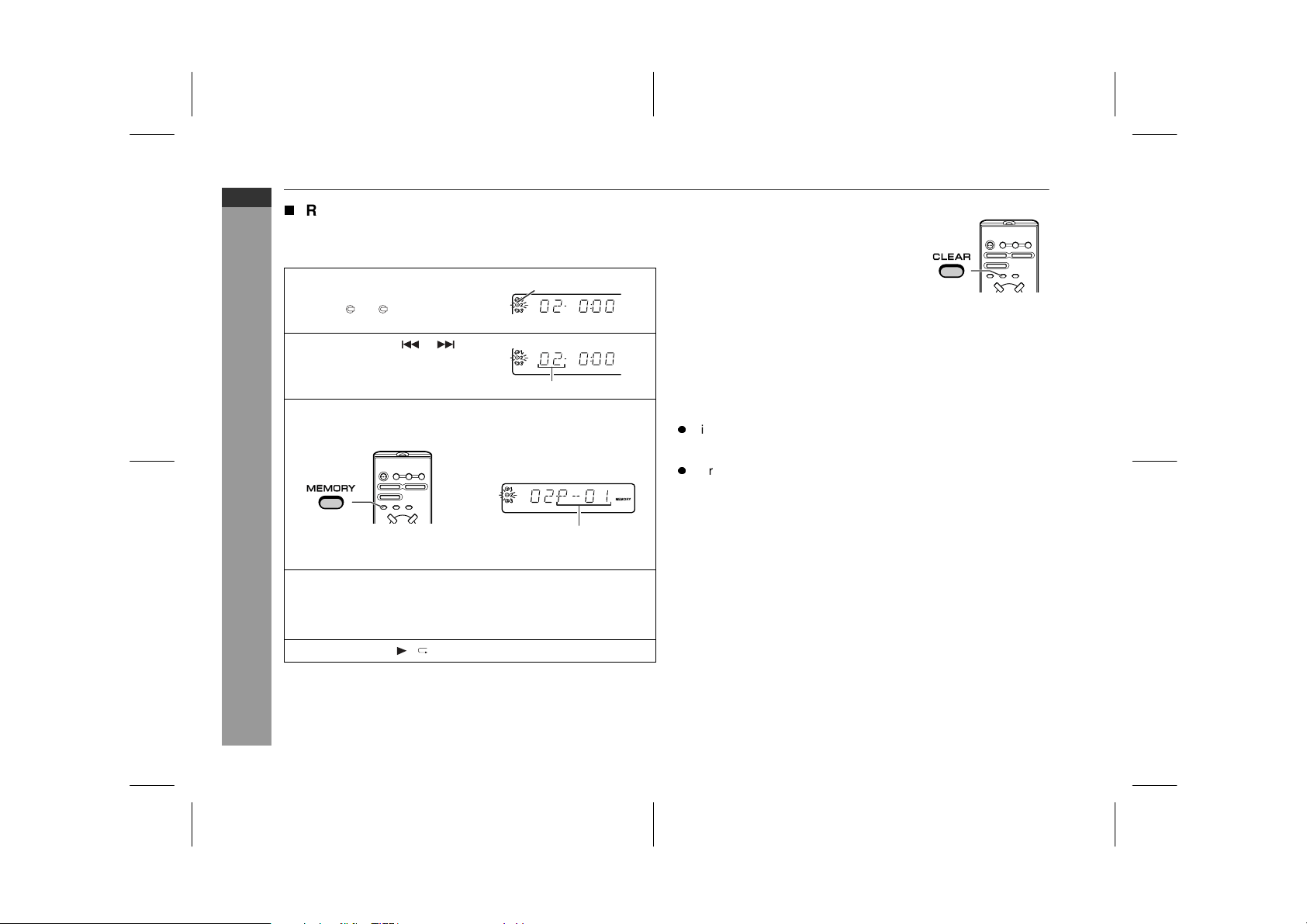
Programmed play
This may be operated only with the remote control.
You can choose up to 20 selections for playback in the order you
like.
Adding tracks to the programme:
If a programme has been previously stored, the "MEMORY" indica-
tor will be displayed. Then follow steps 1 - 3 to add tracks. The new
tracks will be stored after the last track of the original programme.
Notes:
z
If you open the disc tray, change to another function or enter
the stand-by mode, the programmed sequence is automati-
cally cancelled.
z
During programme operation, random play is not possible.
1
Whilst in the stop mode, press
one of the 1 - 3 buttons to
select the desired disc.
Selected disc number
2
Press the or button to
select the desired track.
Selected track number
3
Press the MEMORY button to save the track number.
Playback
order
When the track is memorised, "MEMORY" will appear.
4
Repeat steps 1 - 3 for other tracks. Up to 20 tracks can be
programmed.
If you make a mistake, the programmed tracks can be cleared
by pressing the CLEAR button.
5
Press the / button to start playback.
To clear the programmed selections:
Whilst the "MEMORY" indicator is lit, set the
CD to the stop mode and then press the
CLEAR button.
Each time the button is pressed, one track will
be cleared, beginning with the last track pro-
grammed. When all the tracks are cleared,
"MEMORY" will disappear.
Downloaded from www.ManualsFile.com manuals search engine
03/1/21 08-CD-E100H(H)E2.fm
E-16
ENGLISH
8
CD-E100H
Radio
Listening to the radio
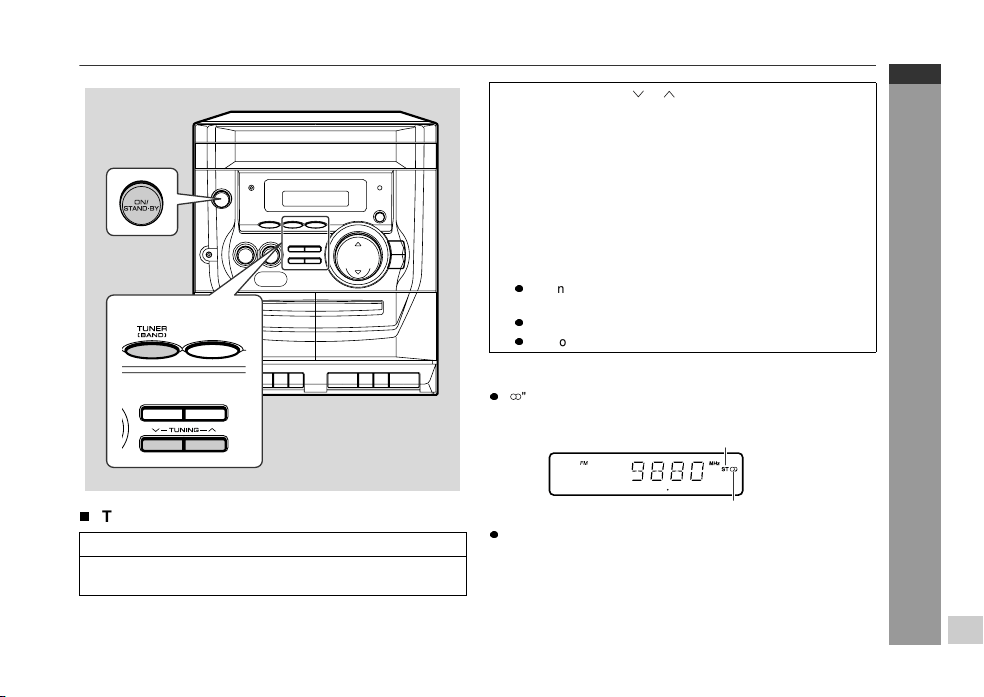
T
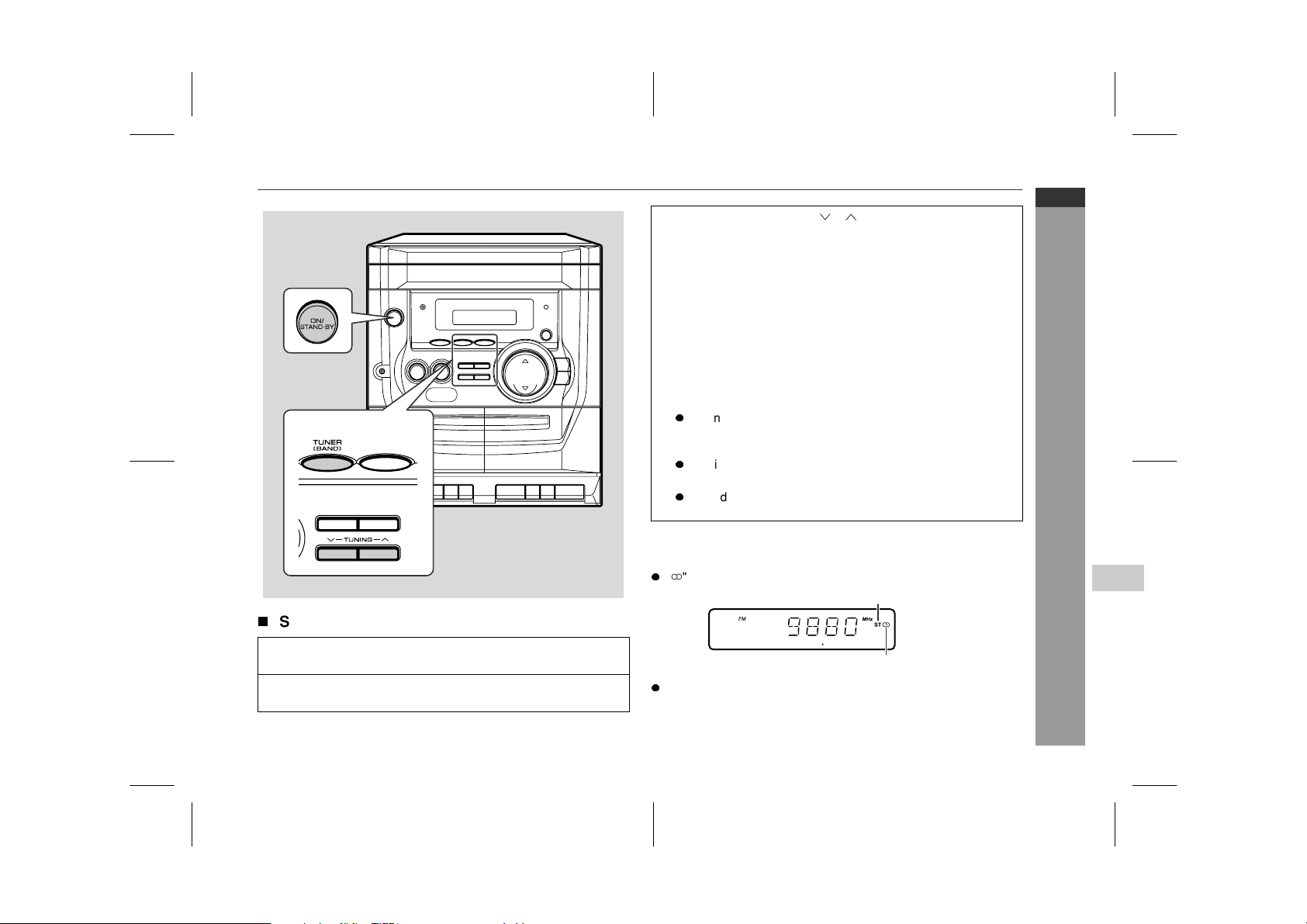
Tuning
To receive an FM stereo transmission:
Press the TUNER (BAND) button to display the "ST" indicator.
z
" " will appear when an FM broadcast is in stereo.
z
If the FM reception is weak, press the TUNER (BAND) button to
extinguish the "ST" indicator. The reception changes to monau-
ral, and the sound becomes clearer.
1
Press the ON/STAND-BY button to turn the power on.
2
Press the TUNER (BAND) button repeatedly to select the
desired frequency band (FM or AM).
3
Press the TUNING ( or ) button to tune in to the desired
station.
Manual tuning:
Press the TUNING button as many times as required to tune in
to the desired station.
Auto tuning:
When the TUNING button is pressed for more than 0.5 sec-
onds, scanning will start automatically and the tuner will stop at
the first receivable broadcast station.
Notes:
z
When radio interference occurs, auto scan tuning may stop
automatically at that point.
z
Auto scan tuning will skip weak signal stations.
z
To stop the auto tuning, press the TUNING button again.
FM stereo mode indicator
FM stereo receiving indicator
Downloaded from www.ManualsFile.com manuals search engine
03/1/21 08-CD-E100H(H)E2.fm
E-17
ENGLISH
CD-E100H
Radio / Tape Playback
Listening to the radio (continued)
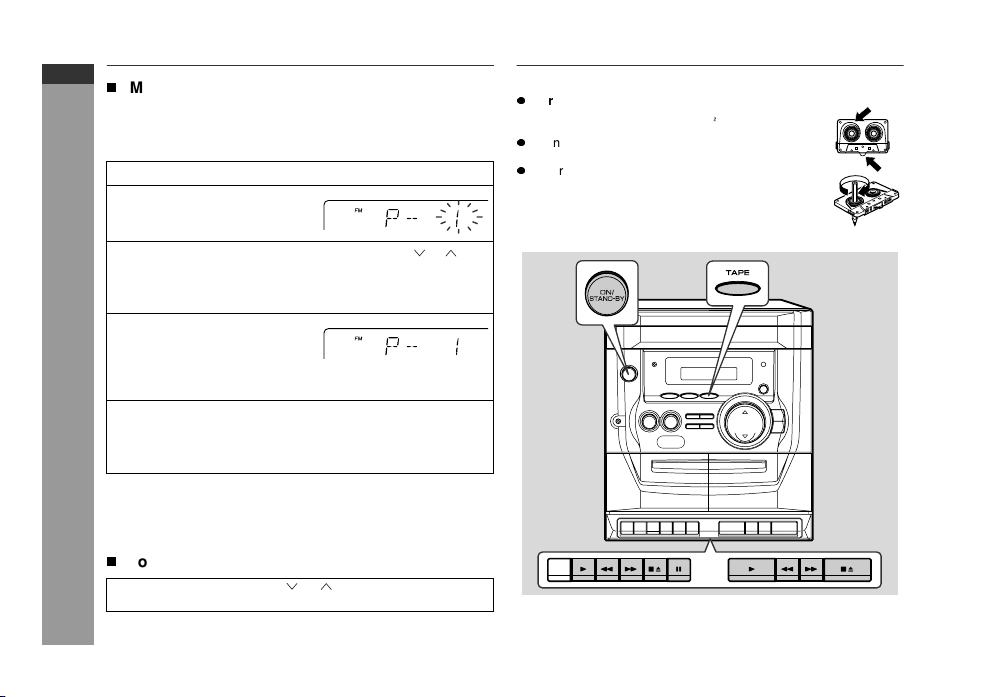
T
Memorising a station
This may be operated only with the remote control.
You can store 30 AM and FM stations in memory and recall them at
the push of a button. (Preset tuning)
Note:
The backup function protects the memorised stations for a few
hours should there be a power failure or if the AC lead is discon-
nected.
T
To recall a memorised station
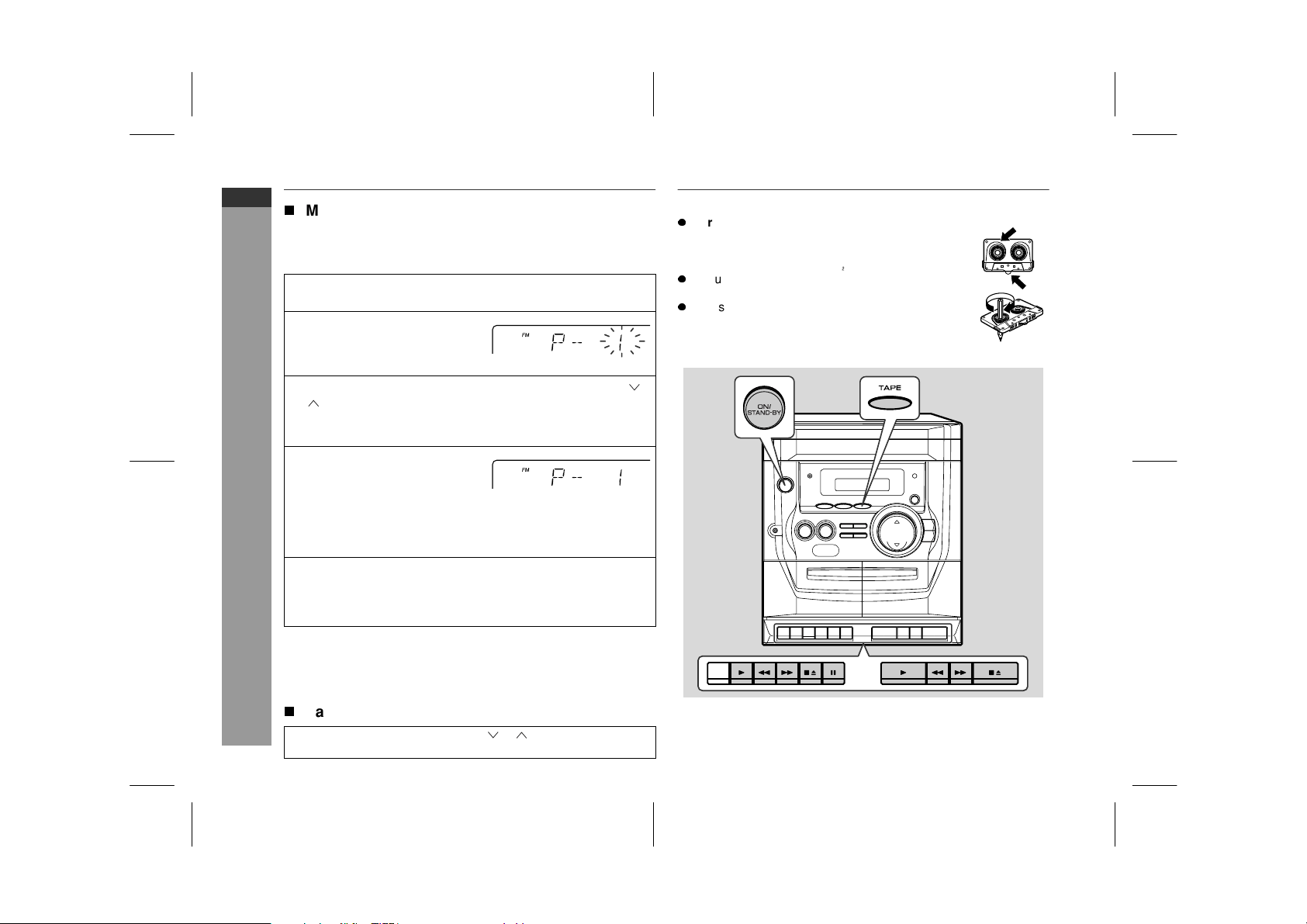
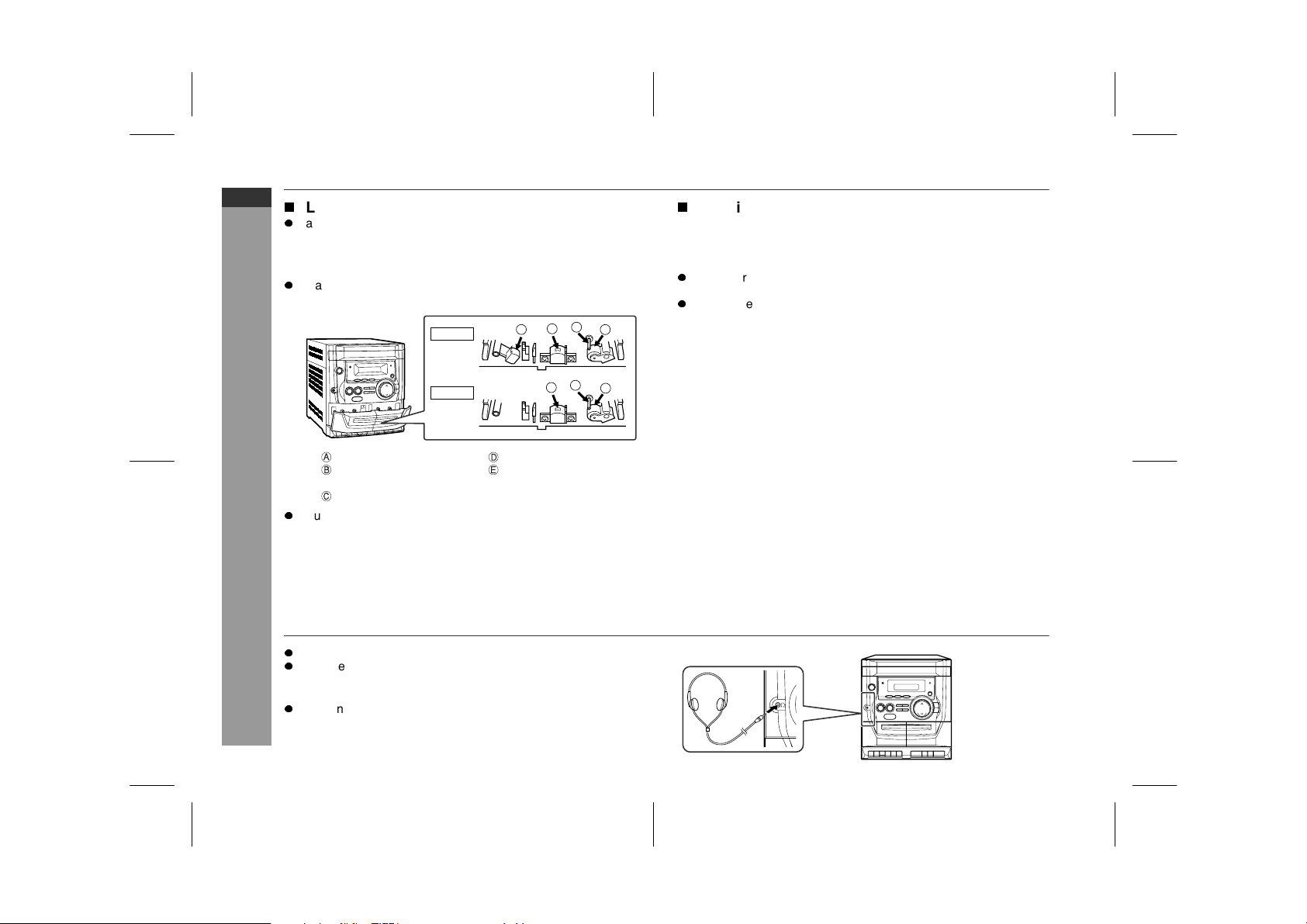
Listening to a cassette tape
Before playback:
1
Perform steps 1 - 3 in "Tuning" on page 16.
2
Press the MEMORY button to
enter the preset tuning sav-
ing mode.
3
Within 5 seconds, press the TUNER PRESET ( or ) but-
ton to select the preset channel number.
Store the stations in memory, in order, starting with preset
channel 1.
4
Within 5 seconds, press the
MEMORY button to store that
station in memory.
If the preset number indicators go out before the station is
memorised, repeat the operation from step 2.
5
Repeat steps 1 - 4 to set other stations, or to change a pre-
set station.
When a new station is stored in memory, the station previously
memorised will be erased.
Press the TUNER PRESET ( or ) button to select the de-
sired station.
z
For playback, use normal or low-noise tapes for
the best sound. (Metal or CrO tapes are not rec-
ommended.)
z
Do not use C-120 tapes or poor-quality tapes, as
they may cause malfunctions.
z
Before loading a tape into the cassette compartment,
tighten the slack with a pen or a pencil.
Downloaded from www.ManualsFile.com manuals search engine
03/1/21 08-CD-E100H(H)E2.fm
E-18
ENGLISH
8
CD-E100H
Tape Playback
T
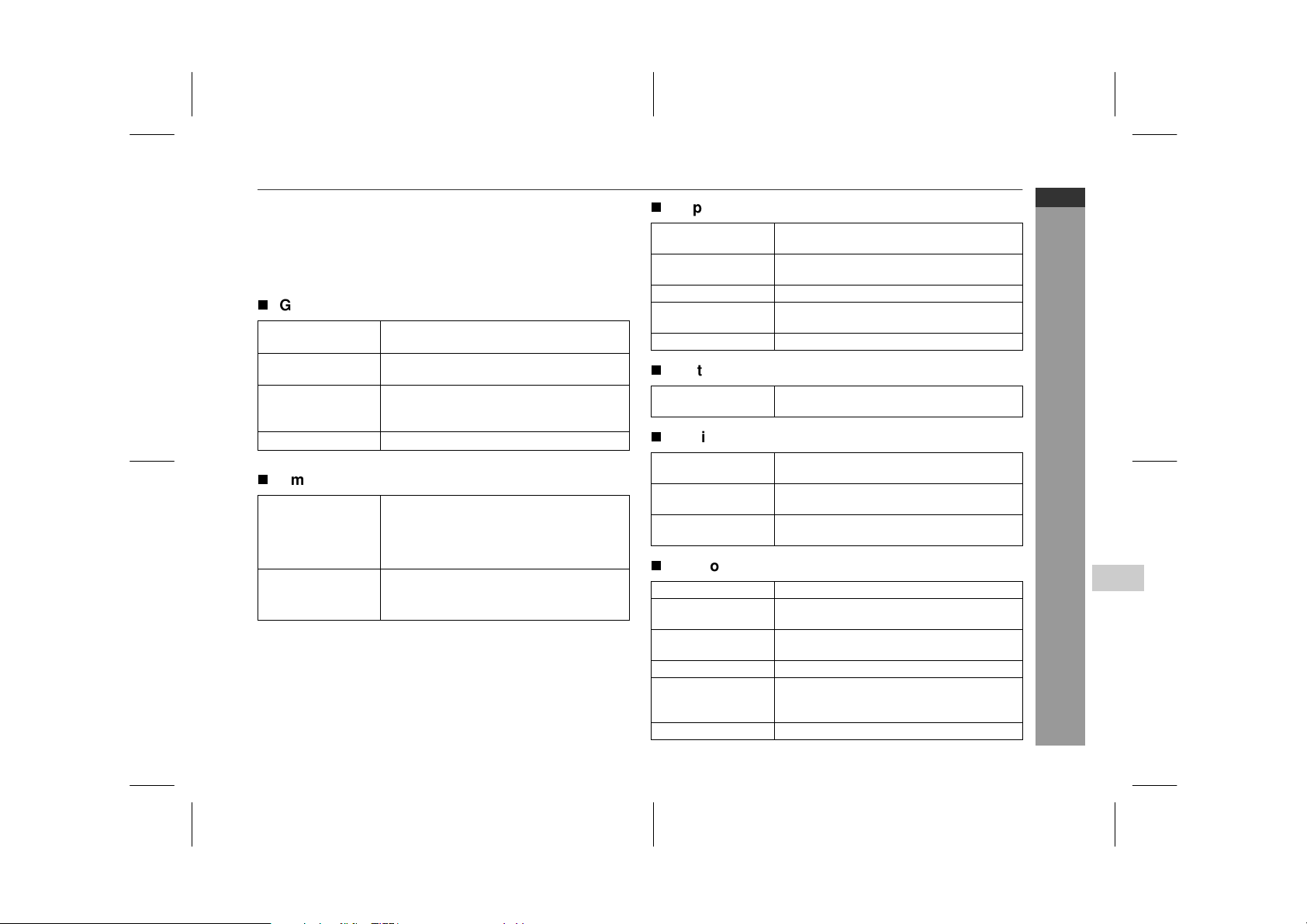
TAPE 1 or TAPE 2 playback
To stop playback:
Press the
button.
Fast forward/rewind:
To advance the tape, press the button, then press the but-
ton. To rewind, press the button, then press the button.
To interrupt playback (TAPE 1 only):
Press the button during playback.
Press the button again to resume playback.
z
Do not press the button whilst the fast forward or rewind opera-
tions are in progress. The or button will not be released
when the tape end is reached. Once this occurs, press the
button.
Caution:
z
Before changing from one tape operation to another, press the
button.
z
If TAPE 1 and TAPE 2 are played
simultaneously
, only the sound
from TAPE 2 will be audible.
T
Continuous playback (TAPE 2 to TAPE 1)
Note:
When in the continuous play mode, pressing the button of
TAPE 2 will start TAPE 1 automatically.
1
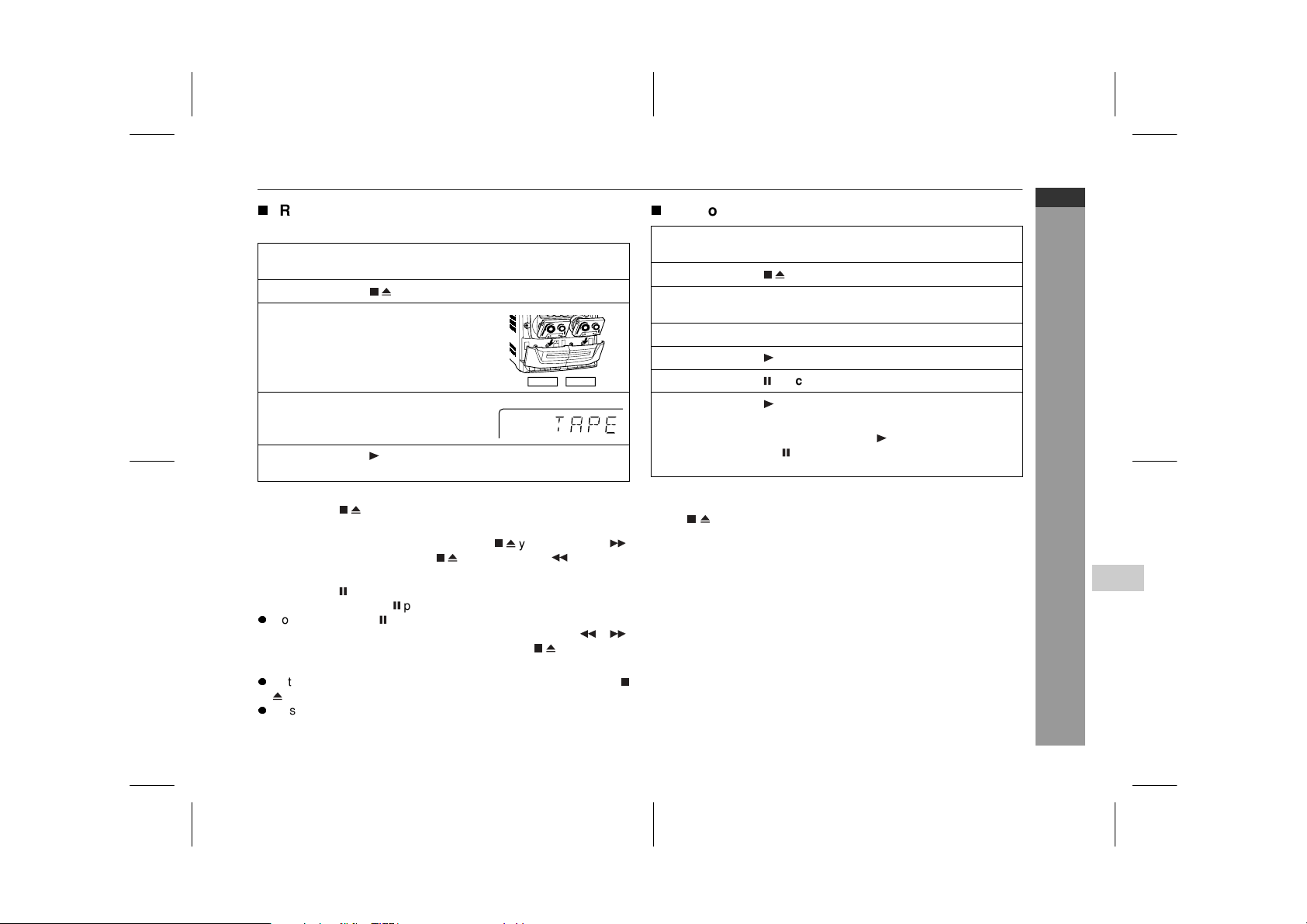
Press the ON/STAND-BY button to turn the power on.
2
Press the
button to open the cassette door.
3
Load a cassette into the TAPE 1
compartment or TAPE 2 compart-
ment with the side to be played
facing toward you.
4
Press the TAPE button.
5
Press the button of TAPE 1 or TAPE 2 to start playback.
TAPE 1
TAPE 2
1
Press the ON/STAND-BY button to turn the power on.
2
Press the button to open the cassette door.
3
Load cassettes into the TAPE 1 and TAPE 2 cassette com-
partments with the side to be played facing toward you.
4
Press the TAPE button.
5
Press the button of TAPE 2.
6
Press the button of TAPE 1.
7
Press the button of TAPE 1.
When TAPE 2 stops at the end of the tape, the button of
TAPE 2 and the button of TAPE 1 will be automatically re-
leased, and TAPE 1 will start playing.
Downloaded from www.ManualsFile.com manuals search engine
03/1/21 08-CD-E100H(H)E2.fm
E-19
ENGLISH
CD-E100H
Tape Recording
Recording to a cassette tape
Before recording:
z
When recording important selections, make a preliminary test to
ensure that the desired material is properly recorded.
z
SHARP is not liable for damage or loss of your recording arising
from malfunction of this unit.
z
The volume and sound controls can be adjusted with no effect on
the recorded signal (Variable Sound Monitor).
z
For recording, use only normal tapes. Do not use metal or
CrO tapes.
z
Recording can be operated in the TAPE 1 compartment only. The
TAPE 2 compartment is for playback only.
T
Recording from a CD (CDs)
You can record 3 CDs
continuously
.
To stop recording:
Press the button of TAPE 1.
To perform programmed recording:
Erase-prevention tab of cassette tapes:
z
When recording on a cassette tape,
make sure that the erase-prevention
tabs are not removed. Cassettes have
removable tabs that prevent accidental
recording or erasing.
z
To protect the recorded sound, remove
the tab after recording. Cover the tab
hole with adhesive tape to record on the
tape without the tab.
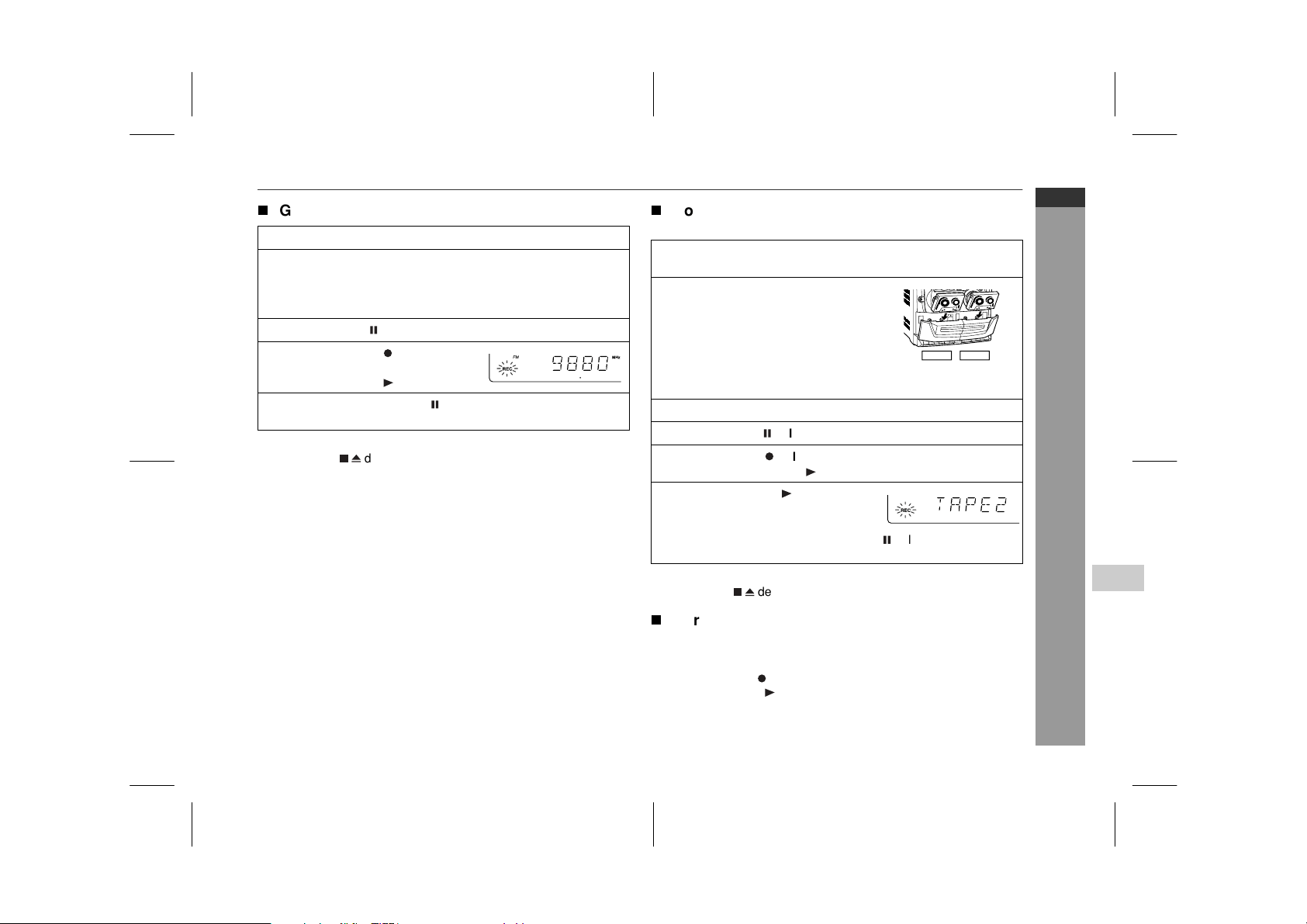
1
Press the ON/STAND-BY button to turn the power on.
2
Load a cassette into the TAPE 1 cassette compartment
with the side to be recorded on facing you.
Wind past the leader of the tape, on which recording cannot be
performed.
3
Press the CD button and load the desired disc.
4
Press one of the 1 - 3 buttons on the remote control
to select the disc to be recorded first.
5
Press the button of TAPE 1,
which also engages the but-
ton.
CD playback and tape recording will start.
1 Press the CD button.
2 Programme discs and tracks. (See page 15.)
3 Press the button of TAPE 1, which also engages the button.
Side A
Tab for
side B
Tab for
side A
Downloaded from www.ManualsFile.com manuals search engine

03/1/21 08-CD-E100H(H)E2.fm
E-20
ENGLISH
8
CD-E100H
Tape Recording
T
Recording from the radio
To stop recording:
Press the button of TAPE 1.
Note:
If you hear a whistling noise whilst recording an AM station, move
the AM loop aerial.
T
Dubbing from tape to tape
You can record from TAPE 2 to TAPE 1.
To stop dubbing:
Press the button of TAPE 1.
T
Erasing recorded tapes
Note:
Make sure that the TAPE 2 is not in use.
1
Tune in to the desired station. (See page 16.)
2
Load a cassette into the TAPE 1 cassette compartment
with the side to be recorded on facing you.
Wind past the leader of the tape, on which recording cannot be
performed.
3
Press the button of TAPE 1.
4
Press the button of TAPE 1,
which also engages the but-
ton.
5
Press the button of TAPE 1 again to begin recording.
1
Press the ON/STAND-BY button to turn the power on.
2
Load a prerecorded cassette into
the TAPE 2 cassette compartment.
Insert a blank tape into the TAPE 1
cassette compartment.
It is recommended that the recording tape is the same length as
the master tape.
3
Press the TAPE button.
4
Press the button of TAPE 1.
5
Press the button of TAPE 1, which also engages the
button.
6
Press the button of TAPE 2.
The button of TAPE 1 will be released automatically and dub-
bing from TAPE 2 to TAPE 1 will begin.
1 Load the tape to be erased into the TAPE 1 cassette compart-
ment with the side to be erased facing toward you.
2 Press the TAPE button.
3 Press the button of TAPE 1, which also engages the button
to begin erasing.
TAPE 1
TAPE 2
Downloaded from www.ManualsFile.com manuals search engine
03/1/21 08-CD-E100H(H)E3.fm
E-21
ENGLISH
CD-E100H
Advanced Features
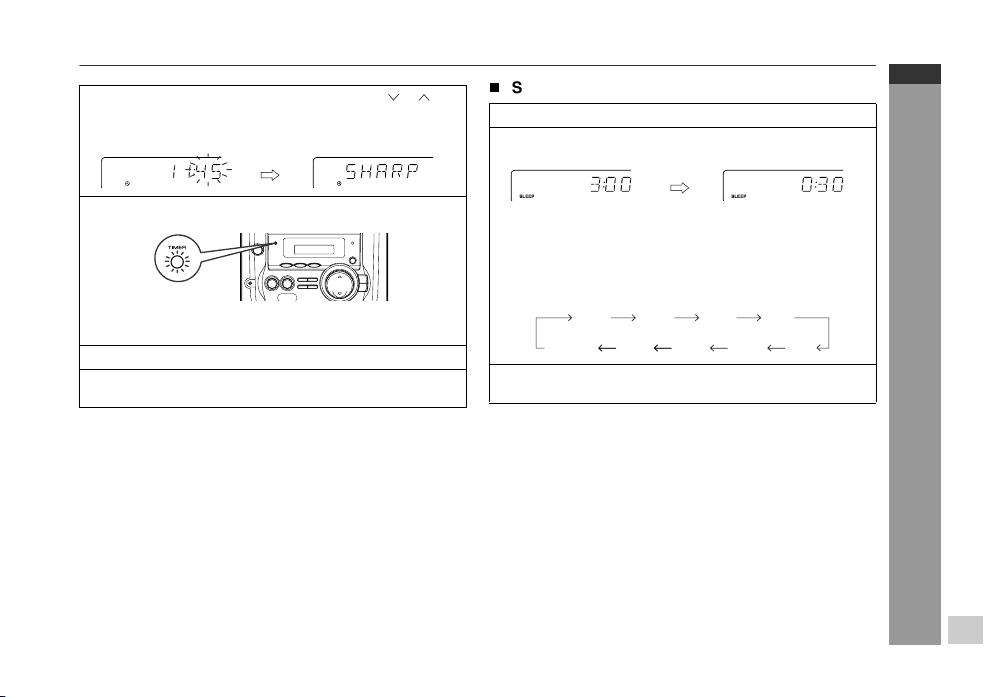
Timer and sleep operation
This may be operated only with the remote control.
Timer playback:
The unit turns on and plays the desired source (CD, tuner) at the
preset time.
Sleep operation:
The radio, compact disc and cassette tape can all be turned off
automatically.
T
Timer playback
Before setting timer:
1 Press the CLOCK button to check that the clock is set to the
correct time. (Refer to page 11.)
2 Load the discs to be played.
1
Press the ON/STAND-BY button to turn the power on.
2
Press the CD or TUNER (BAND) button to select the de-
sired function.
When you select the TUNER (BAND), tune into the desired
station.
3
Adjust the volume using the VOLUME buttons.
Do not turn the volume up too high. Timer playback starts at
the volume you set here.
4
Press the TIMER button and within 8 seconds, press the
MEMORY button.
5
Within 30 seconds, press the TUNER PRESET
( or )
but-
ton to specify the hour to start, then press the MEMORY
button.
Downloaded from www.ManualsFile.com manuals search engine
03/1/21 08-CD-E100H(H)E3.fm
E-22
ENGLISH
8
CD-E100H
Advanced Features
To reset or change the timer setting:
Perform "Timer playback" from the beginning.
Note:
Once the time is set, the setting will be retained until a new time is
entered.
Caution:
Do not turn the volume up too high. Playback starts at the volume
set before entering the timer stand-by mode.
T
Sleep operation
To cancel the sleep operation:
Press the ON/STAND-BY button whilst the sleep timer is set.
To confirm the remaining sleep time:
Press the SLEEP button whilst the sleep timer is set.
The remaining sleep time is displayed for about 3 seconds.
Note:
When you use the sleep operation with a cassette, set the sleep
time longer than the remaining playback time of the cassette. If the
unit enters the stand-by mode before the cassette reaches its end,
the cassette mechanism or the tape may be damaged.
6
Within 30 seconds, press the TUNER PRESET
( or )
but-
ton to specify the minute to start, then press the MEMORY
button.
7
The unit will enter the timer stand-by mode automatically.
To cancel the timer playback:
Press the ON/STAND-BY button to turn the power on.
8
When the preset time is reached, playback will start.
9
It will enter the power stand-by mode one hour after the
timer playback starts.
1
Play back the desired sound source.
2
Press the SLEEP button.
To change the sleep time:
Press the SLEEP button repeatedly to select the desired sleep
time. The time will decrease as follows.
The amount of sleep time can also be changed whilst in the
sleep mode.
3
Your system will enter the power stand-by mode automat-
ically after the preset time has elapsed.
3:00 2:00 1:30 1:00
0:10
0:15 0:300:05(cancel)
Downloaded from www.ManualsFile.com manuals search engine
03/1/21 08-CD-E100H(H)E3.fm
E-23
ENGLISH
CD-E100H
References
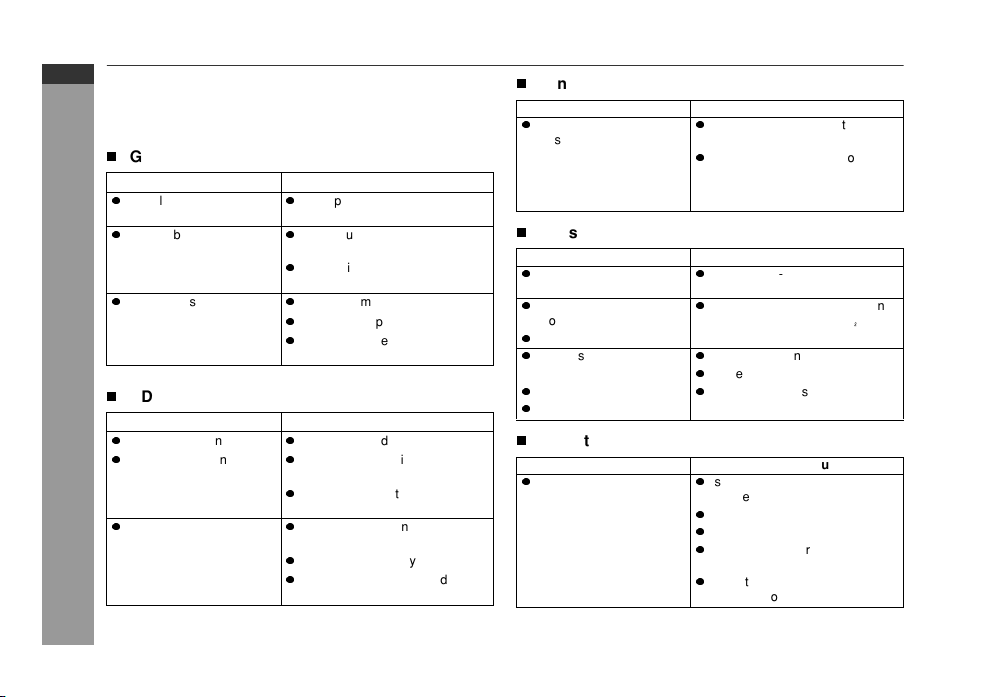
Troubleshooting chart
Many potential problems can be resolved by the owner without call-
ing a service technician.
If something is wrong with this product, check the following before
calling your authorised SHARP dealer or service centre.
T
General
T
CD player
T
Tun er
T
Cassette deck
T
Remote control
Symptom Possible cause
z
The clock is not set to the
correct time.
z
Did a power failure occur? Reset
the clock. (Refer to page 11.)
z
When a button is pressed,
the unit does not respond.
z
Set the unit to the power stand-
by mode and then turn it back on.
z
If the unit still malfunctions, reset
it. (Refer to page 24.)
z
No sound is heard.
z
Is the volume level set to "MIN"?
z
Are the headphones connected?
z
Are the speaker wires discon-
nected?
Symptom Possible cause
z
Playback does not start.
z
Is the disc loaded upside down?
z
Playback stops in the mid-
dle or is not performed
properly.
z
Does the disc satisfy the stan-
dards?
z
Is the disc distorted or
scratched?
z
Playback sounds are
skipped, or stopped in the
middle of a track.
z
Is the unit located near excessive
vibrations?
z
Is the disc very dirty?
z
Has condensation formed inside
the unit?
Symptom Possible cause
z
Radio makes unusual
noise consecutively.
z
Is the unit placed near the TV or
computer?
z
Is the FM aerial or AM loop aerial
placed properly? Move the aerial
away from the AC power lead if
it's located nearby.
Symptom Possible cause
z
Cannot record.
z
Is the erase-prevention tab re-
moved?
z
Cannot record tracks with
proper sound quality.
z
Is it a normal tape? (You cannot
record on a metal or CrO tape.)
z
Cannot erase completely.
z
Sound skipping.
z
Is there slack in the tape?
z
Is the tape stretched?
z
Cannot hear treble.
z
Are the capstans, pinch rollers,
or heads dirty?
z
Sound fluctuation.
Symptom Possible cause
z
The remote control does
not operate.
z
Is the AC power lead of the unit
plugged in?
z
Is the battery polarity correct?
z
Are the batteries dead?
z
Is the distance or angle incor-
rect?
z
Does the remote control sensor
receive strong light?
Downloaded from www.ManualsFile.com manuals search engine
03/1/21 08-CD-E100H(H)E3.fm
E-24
ENGLISH
8
CD-E100H
References
T
If trouble occurs
When this product is subjected to strong external interference
(mechanical shock, excessive static electricity, abnormal supply
voltage due to lightning, etc.) or if it is operated incorrectly, it may
malfunction.
If such a problem occurs, do the following:
1 Set the unit to the stand-by mode and turn the power on again.
2 If the unit is not restored in the previous operation, unplug and
plug in the unit, and then turn the power on.
Note:
If neither operation above restores the unit, clear all the memory by
resetting it.
T
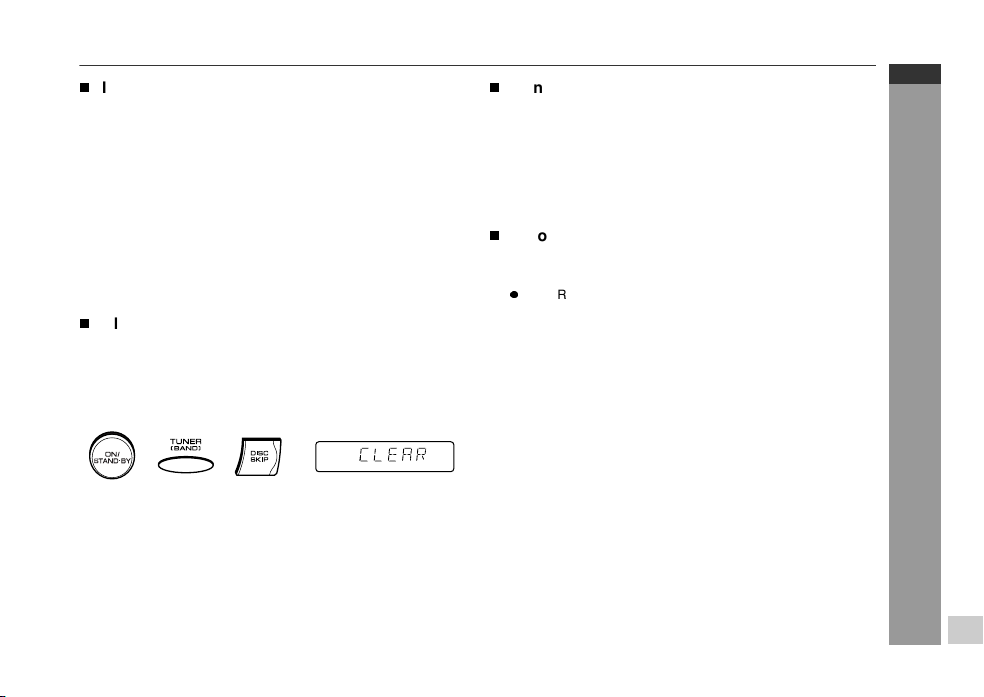
Clearing all the memory (reset)
1 Press the ON/STAND-BY button to enter the power stand-by
mode.
2 Whilst pressing down the TUNER (BAND) button and the DISC
SKIP button, press the ON/STAND-BY button until "CLEAR"
appears.
Caution:
This operation will erase all data stored in memory including clock,
timer settings, tuner preset, and CD programme.
T
Condensation
Sudden temperature changes, storage or operation in an extremely
humid environment may cause condensation inside the cabinet (CD
pickup, tape heads, etc.) or on the transmitter on the remote control.
Condensation can cause the unit to malfunction. If this happens,
leave the power on with no disc (or cassette) in the unit until normal
playback is possible (about 1 hour). Wipe off any condensation on
the transmitter with a soft cloth before operating the unit.
T
Before transporting the unit
1 Press the ON/STAND-BY button to turn the power on.
2 Remove all discs from the unit and close the disc tray.
3 Press the ON/STAND-BY button to enter the stand-by mode.
z
"SHARP" is displayed.
4 When "SHARP" disappears, unplug the AC power lead from
the wall socket.
Downloaded from www.ManualsFile.com manuals search engine
03/1/21 08-CD-E100H(H)E3.fm
E-25
ENGLISH
CD-E100H
References
Maintenance
T
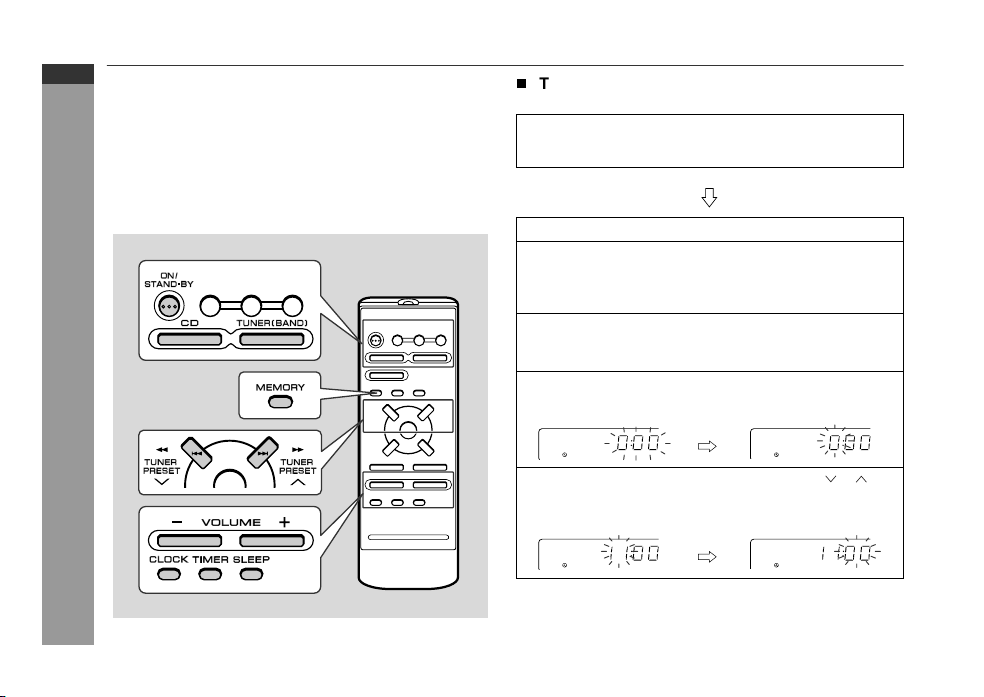
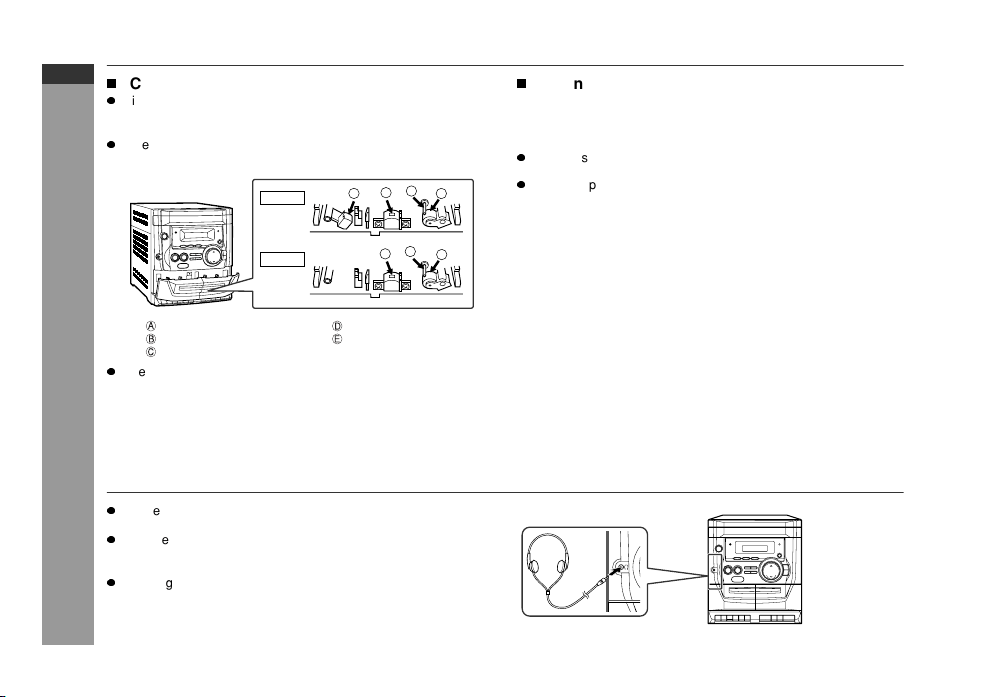
Cleaning the tape-handling parts
z
Dirty heads, capstans or pinch rollers can cause poor sound and
tape jams. Clean these parts with a cotton swab moistened with
commercial head/pinch roller cleaner or isopropyl alcohol.
z
When cleaning the heads, pinch rollers, etc., unplug the unit
which contains high voltages.
z
After long use, the deck's heads and capstans may become mag-
netised, causing poor sound. Demagnetise these parts once
every 30 hours of playing/recording time by using a commercial
tape head demagnetiser. Read the demagnetiser's instructions
carefully before use.
T
Cleaning the cabinet
Headphones
z
Before plugging in or unplugging the headphones, reduce the vol-
ume.
z
Be sure your headphones have a 3.5 mm (1/8") diameter plug
and are between 16 ohms and 50 ohms impedance. The recom-
mended impedance is 32 ohms.
z
Plugging in the headphones disconnects the speakers automati-
cally. Adjust the volume using the VOLUME buttons.
Erase head Pinch roller
Recording/Playback head Playback head
Capstan
TAPE 1
TAPE 2
A
C
C
D
D
E
B
Periodically wipe the cabinet with a soft cloth and a diluted soap so-
lution, then with a dry cloth.
Caution:
z
Do not use chemicals for cleaning (petrol, paint thinner, etc.). It
may damage the cabinet finish.
z
Do not apply oil to the inside of the unit. It may cause malfunc-
tions.
Downloaded from www.ManualsFile.com manuals search engine
03/1/21 08-CD-E100H(H)E3.fm
E-26
ENGLISH
8
CD-E100H
References
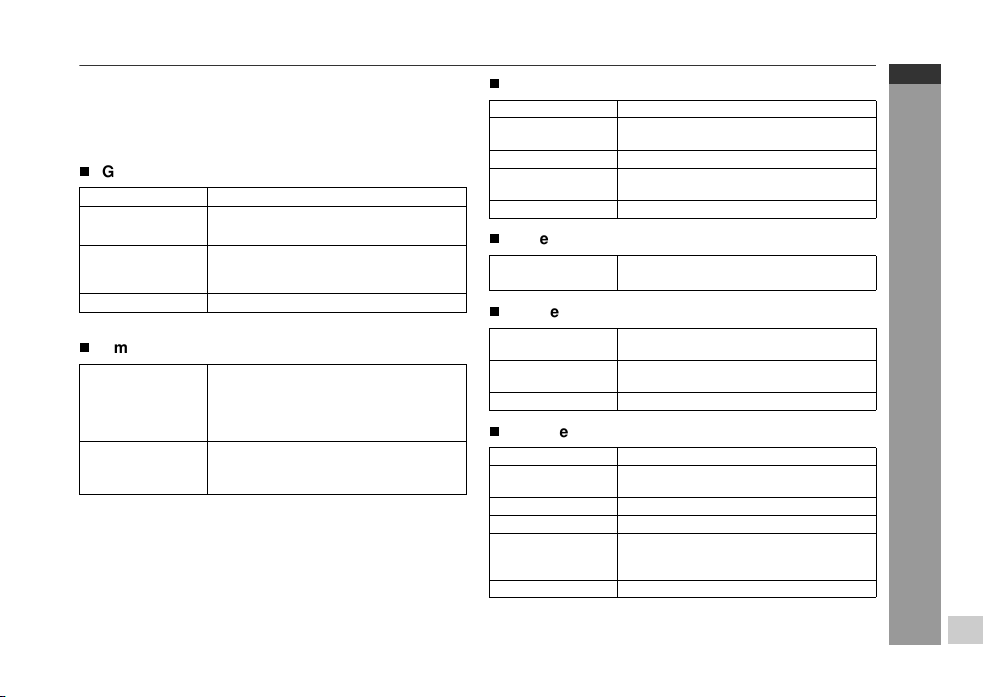
Specifications
As part of our policy of continuous improvement, SHARP reserves
the right to make design and specification changes for product
improvement without prior notice. The performance specification fig-
ures indicated are nominal values of production units. There may be
some deviations from these values in individual units.
T
General
T
Amplifier
T
CD player
T
Tun er
T
Cassette deck
T
Speaker
Power source AC 230 V, 50 Hz
Power
consumption
34 W
Dimensions Width: 270 mm (10-5/8")
Height: 305 mm (12")
Depth: 343 mm (13-1/2")
Weight 5.7 kg (12.6 lbs.)
Output power PMPO: 60 W
MPO: 30 W (15 W + 15 W) (DIN 45 324)
RMS: 20 W (10 W + 10 W) (DIN 45 324)
RMS: 14 W (7 W + 7 W) (DIN 45 500)
Output terminals Speakers: 8 ohms
Headphones: 16 - 50 ohms (recommended:
32 ohms)
Type 3-disc multi-play compact disc player
Signal readout Non-contact, 3-beam semiconductor laser
pickup
D/A converter 1-bit D/A converter
Frequency
response
20 - 20,000 Hz
Dynamic range 90 dB (1 kHz)
Frequency range FM: 87.5 - 108 MHz
AM: 522 - 1,620 kHz
Frequency
response
125 - 8,000 Hz (normal tape)
Signal/noise ratio 50 dB (TAPE 1, recording/playback)
50 dB (TAPE 2, playback)
Wow and flutter 0.35 % (DIN 45 511)
Type 10 cm (4") full-range speaker
Maximum input
power
20 W
Rated input power 10 W
Impedance 8 ohms
Dimensions Width: 200 mm (7-7/8")
Height: 305 mm (12")
Depth: 175 mm (6-7/8")
Weight 2.7 kg (6.0 lbs.)/each
Downloaded from www.ManualsFile.com manuals search engine