User Guide
This guide helps you to get started using your phone.
ENGLISH
•Someofthecontentsofthismanual
maynotapplytoyourphone,
dependingonthesoftwareandyour
serviceprovider.
•Google™,GoogleMaps™,Gmail™,
YouTube™,GoogleTalk™andGoogle
Play™aretrademarksof Google,
Inc.

•Copyright©2013LGElectronics,Inc.Allrightsreserved.LGandtheLG
logoareregisteredtrademarksofLGGroupanditsrelatedentities.All
othertrademarksarethepropertyoftheirrespectiveowners.
• U.S.Cellular
®
CustomerCare1-888-944-9400

3
Contents
Contents ..................................................................................................3
Getting to know your phone ..................................................................6
Your Home screen ................................................................................ 17
Google account setup ......................................................................... 25
Connecting to Networks and Devices ............................................... 26
Calls ...................................................................................................... 33
Contacts ................................................................................................37
Messaging ............................................................................................ 39
Email ..................................................................................................... 42
Camera ................................................................................................. 44
Video camera ....................................................................................... 48
Multimedia ............................................................................................ 51
Utilities.................................................................................................. 58
The web ................................................................................................ 65
Settings ................................................................................................ 66
Troubleshooting ....................................................................................75
Safety .................................................................................................... 82
Limited Warranty Statement ..............................................................112
4
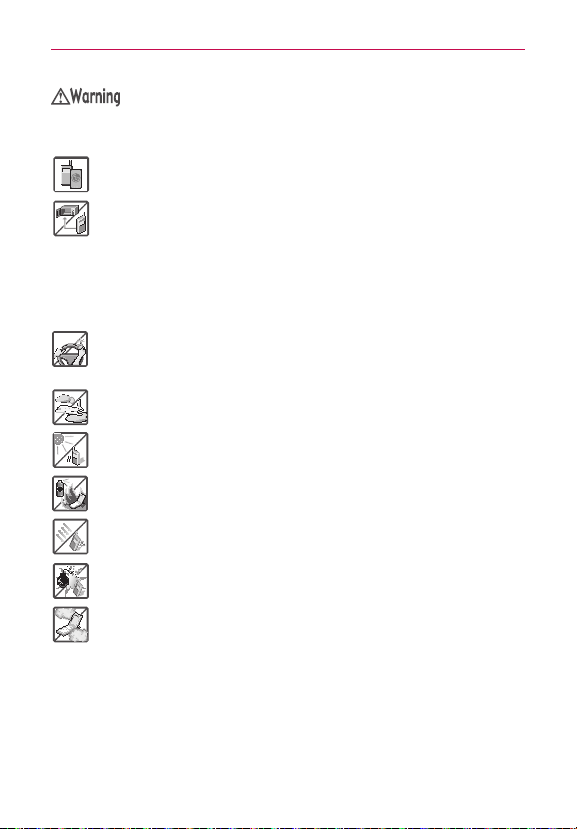
Violationoftheinstructionsmaycauseseriousinjuryordeath.
WARNING:ThisproductcontainschemicalsknowntotheStateofCaliforniatocausecancerand
birthdefectsorotherreproductiveharm.Wash hands after handling.
#
Neveruseanunapprovedbatterysincethiscoulddamagethephoneand/or
batteryandcouldcausethebatterytoexplode.
#
Neverplaceyourphoneinamicrowaveovenasitwillcausethebatteryto
explode.
#
Neverstoreyourphoneintemperatureslessthan-4°Forgreaterthan
122°F.
#
Donotdisposeofyourbatterynearreorwithhazardousorammable
materials.
#
Whenridinginacar,donotleaveyourphoneorsetupthehands-freekit
neartheairbag.Ifwirelessequipmentisimproperlyinstalledandtheair
bagisdeployed,youmaybeseriouslyinjured.
#
Donotusethephoneinareaswhereitsuseisprohibited.(Forexample:
aircraft)
#
Donotexposethebatterychargeroradaptertodirectsunlightoruseitin
placeswithhighhumidity,suchasabathroom.
#
Donotuseharshchemicals(suchasalcohol,benzene,thinners,etc.)or
detergentstocleanyourphone.Thiscouldcauseare.
#
Donotdrop,strike,orshakeyourphoneseverely.Itmayharmtheinternal
circuitboardsofthephone.
#
Donotuseyourphoneinhighexplosiveareasasthephonemaygenerate
sparks.
#
Donotdamagethepowercordbybending,twisting,pulling,orheating.Do
notusetheplugifitislooseasitmaycauseelectricshockorre.
#
Donotplaceanyheavyitemsonthepowercord.Donotallowthepower
cordtobecrimpedasitmaycauseelectricshockorre.
#
Donothandlethephonewithwethandswhileitisbeingcharged.Itmay
causeanelectricshockorseriouslydamageyourphone.
#
Donotdisassemblethephone.
Caution
5
#
Donotplaceoranswercallswhilechargingthephoneasitmayshort-
circuitthephoneand/orcauseelectricshockorre.
#
Donotholdorlettheantennacomeincontactwithyourbodyduringacall.
#
Makesurethatnosharp-edgeditems,suchasanimal’steethornails,come
intocontactwiththebattery.Thiscouldcauseare.
#
Storethebatteryoutofreachofchildren.
#
Becarefulthatchildrendonotswallowanyparts(suchasearphone,
connectionpartsofthephone,etc.)Thiscouldcauseasphyxiationor
suffocationresultinginseriousinjuryordeath.
#
Unplugthepowercordandchargerduringlightningstormstoavoidelectric
shockorre.
#
OnlyusethebatteriesandchargersprovidedbyLG.Thewarrantywillnot
beappliedtoproductsprovidedbyothersuppliers.
#
Onlyauthorizedpersonnelshouldservicethephoneanditsaccessories.
Faultyinstallationorservicemayresultinaccidentsandconsequently
invalidatethewarranty.
#
Anemergencycallcanbemadeonlywithinaservicearea.Foran
emergencycall,makesurethatyouarewithinaserviceareaandthatthe
phoneisturnedon.
#
Yourphoneisanelectronicdevicethatgeneratesheatduringnormal
operation.Extremelyprolonged,directskincontactintheabsenceof
adequateventilationmayresultindiscomfortorminorburns.Therefore,
usecarewhenhandlingyourphoneduringorimmediatelyafteroperation.

6
Getting to know your phone
Before you start using the phone, please read this!
Pleasechecktoseewhetheranyproblemsyouencounteredwithyour
phonearedescribedinthissectionbeforetakingthephoneinforserviceor
callingaservicerepresentative.
1. Phone memory
Whenthereislessthan10%ofspaceavailableinyourphonememory,
yourphonecannotreceivenewmessages.You needtocheckyourphone
memoryanddeletesomedata,suchasapplicationsormessages,tomake
morememoryavailable.
To uninstall applications:
1.OntheHomescreen,touch >Appstab>Settings >Apps
(DEVICEcategory).
2.Onceallapplicationsappear,scrolltoandselecttheapplicationyouwant
touninstall.
3.TouchUninstall>OKtoconrm.
2. Optimizing battery life
Extendyourbattery'slifebetweenchargesbyturningofffeaturesthatyou
don'tneedtohavingrunningconstantlyinthebackground.You canmonitor
howapplicationsandsystemresourcesconsumebatterypower.
Extending your phone's battery life:
#
Turnoffradiocommunicationsyouarenotusing.Ifyouarenotusing
Wi-Fi,BluetoothorGPS,turnthemoff.
#
Reducescreenbrightnessandsetashorterscreentimeout.
#
TurnoffautomaticsyncingforGmail™,Calendar,Contactsandother
applications.
#
Someapplicationsyouhavedownloadedmayreducebatterypower.

7
Getting to know your phone
To check the battery power level:
#
OntheHomescreen,touch >Appstab>Settings > About
phone(SYSTEMcategory)>Battery.
Thebatterystatus(chargingornotcharging)andlevel(percentagecharged)
isdisplayedatthetopofthescreen.
To monitor and control how battery power is being used:
#
OntheHomescreen,touch >Appstab > Settings > About
phone(SYSTEMcategory)>Battery>Battery use.
Batteryusagetimeisdisplayedatthetopofthescreen.Ittellsyouhow
longithasbeensinceyoulastconnectedyourphonetoapowersource
or,ifcurrentlyconnected,howlongthephonewaslastrunningonbattery
power.Thescreenshowstheapplicationsorservicesusingbatterypower,
listedinorderfromthegreatesttosmallestamountused.
3. Using folders
You cancombineseveralappiconsinafolder.Droponeappiconover
anotheronaHomescreenpanelortheApplicationsscreenandafolderwill
becreatedwiththetwoiconsinit.
NOTE
You cancustomizecontentsandpropertiesofeachfolder.Tochangethefoldernameand
color,touchthefolder,thentouch
.Toaddmoreappstothefolder,simplydragand
droptheiconsintothedesiredfolder.
4. Before installing an open source application and
operating system (OS)
Installinganopensourceoperatingsystemonyourphoneandnotusing
theoperatingsystemprovidedbythemanufacturercancauseyourphone
tomalfunction.
Warning
•
Toprotectyourphoneandpersonaldata,downloadapplicationsonlyfromtrusted
sources,suchasPlayStore.Ifsomeapplicationsarenotproperlyinstalledonyour
phone,yourphonemaynotworkproperly-orseriouserrorsmayoccur.Yo u willneedto
uninstallthoseapplicationsandallofitsdataandsettingsfromthephone.

8
Getting to know your phone
5. Using the hard reset (Factory reset)
Ifyourphoneneedstoberestoredtoitsoriginalcondition,performahard
resettorebootyourphone.
1.Turnthephoneoff
2.AtthesametimepressandholdVolume Down Key
+Power/
Lock Key
.
3.ReleasethekeyswhentheFACTORYHARDRESETscreenappears.
4.ReadthewarningandpressthePower/ Lock Key
toconrm.
Pressanyotherkeytocancel.
5.PressthePower/Lock Key
toconrmoncemoreorpressany
otherkeytocancel.
6.Yourdevicewillperformahardresetandrebootautomatically.
CAUTION
Ifyouperformahardreset,alluserapplicationsanduserdatawillbedeleted.This
cannotbereversed.Remembertobackupanyimportantdatabeforeperforminga
hardreset.
6. Opening and switching applications
Multi-taskingiseasywithAndroidbecauseyoucankeepmorethanone
applicationrunningatthesametime.There'snoneedtoquitanapplication
beforeopeninganother.Useandswitchbetweenseveralopenapplications.
Androidmanageseachapplication,stoppingandstartingthemasneeded
toensurethatidleapplicationsdon'tconsumeresourcesunnecessarily.
To view a list of recently used applications:
SimplypressandholdtheHome Key .
To stop applications:
1.OntheHomescreen,touch >Appstab>Settings >Apps
(DEVICEcategory)>RUNNINGtab.
2.ScrollandtouchthedesiredapplicationandtouchStoptostopit.

9
Getting to know your phone
7. Hold your phone upright
Holdyourmobilephonevertically,asyouwouldaregularphone.Thephone
hasaninternalantenna.Becarefulnottoscratchordamagethebackofthe
phone,asthismayaffectperformance.
Whilemaking/receivingcallsorsending/receivingdata,avoidholdingthe
lowerpartofthephonewheretheantennaislocated.Doingsomayaffect
callquality.
8. When the screen freezes
If the screen freezes or the phone does not respond when you try to
operate it:
Removethebattery,reinsertit,thenturnthephoneon.
OR
PressandholdthePower/LockKey
for8secondstoturnitoff.
Ifitstilldoesnotwork,pleasecontacttheservicecenter.
10
Getting to know your phone
Device components
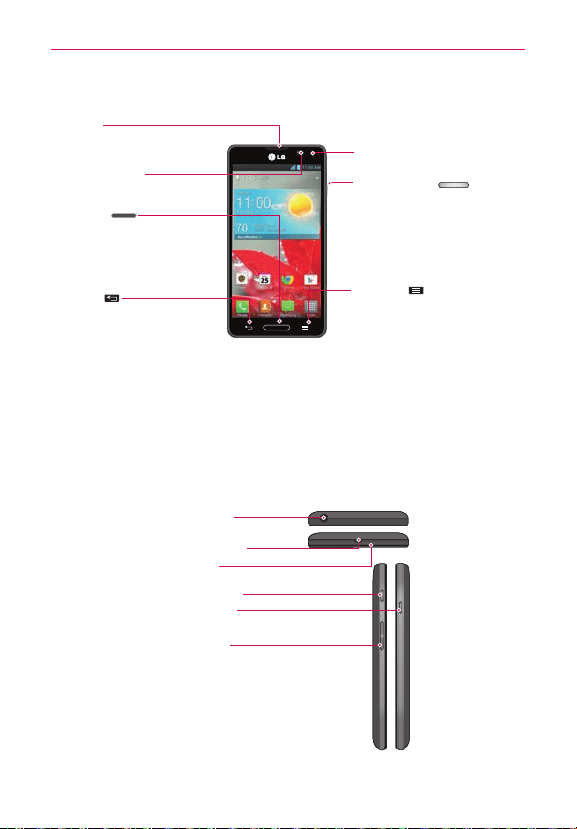
Earpiece
Proximity Sensor
Front Camera Lens
Home Key
• ReturntotheHomescreenfrom
anyscreen.
• Pressandholdtoviewalistof
themostrecentlyusedapps.
Back Key
Returntothepreviousscreen.
Power/Lock Key
•Pressandholdtoturnthe
phoneon/off,restart,activate/
deactivateairplanemode,and
changetheringertype.
• Pressbrieytolock/unlockthe
screen.
Menu Key
•Displaysavailableoptions.
• TouchandholdtoaccessGoogle
SearchandGoogleNow.
NOTE Proximity sensor
Whenreceivingandmakingcalls,theproximitysensorautomaticallyturnsthebacklight
offandlocksthetouchscreenbysensingwhenthephoneisnearyourear.Thisextends
batterylifeandpreventsyoufromunintentionallyactivatingthetouchscreenduringcalls.
WARNING
PlacingaheavyobjectonthephoneorsittingonitcandamagetheLCDandtouch
screenfunctions.DonotcovertheLCDproximitysensorwithprotectivelm.Thiscould
causethesensortomalfunction.
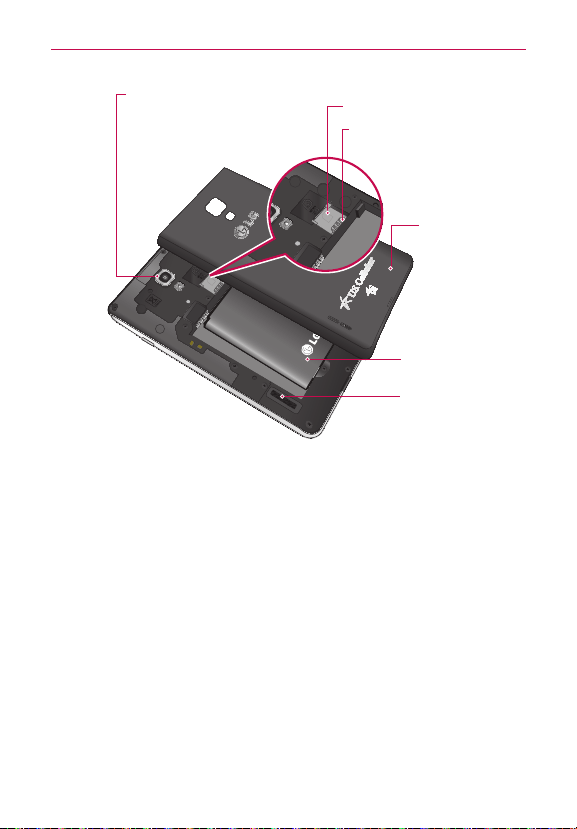
Volume Keys
•IntheHomescreen:Controlringervolume.
•Duringacall:Controlyourearpiecevolume.
• Whenplayingasong:Controlvolume
continuously.
Charger/USB Port
Microphone
Earphone Jack
QuickMemo Key
Power/Lock Key
11
Getting to know your phone
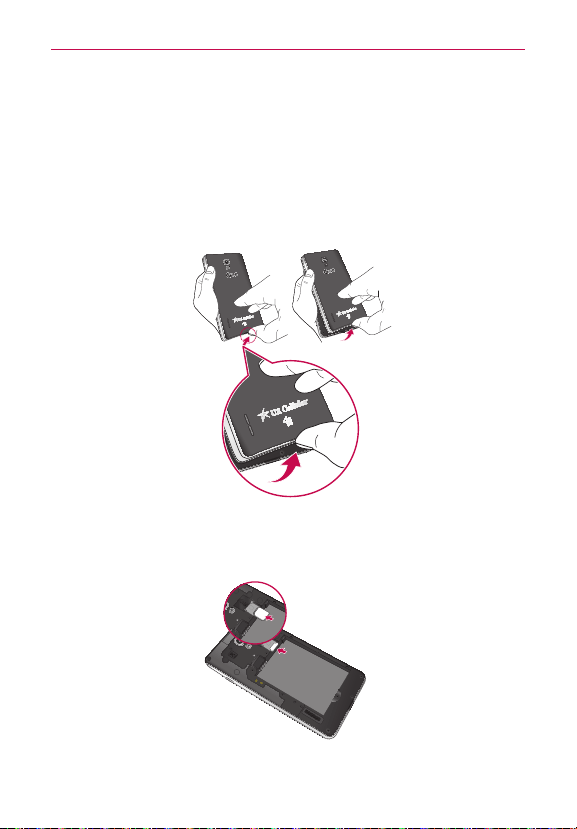
BackCameraLens
microSDCardSlot
Speaker
Battery
BackCover
microSIMCardSlot
NOTICE
TheNFCantennaforthismodelisonthebackcover.Thisbackcoveristheonlyonethat
isofferedwiththemodel.
12
Getting to know your phone
Installing the battery
Beforeyoucanstartexploringyournewphone,you'llneedtosetitup.To
inserttheSIMcardandbattery:
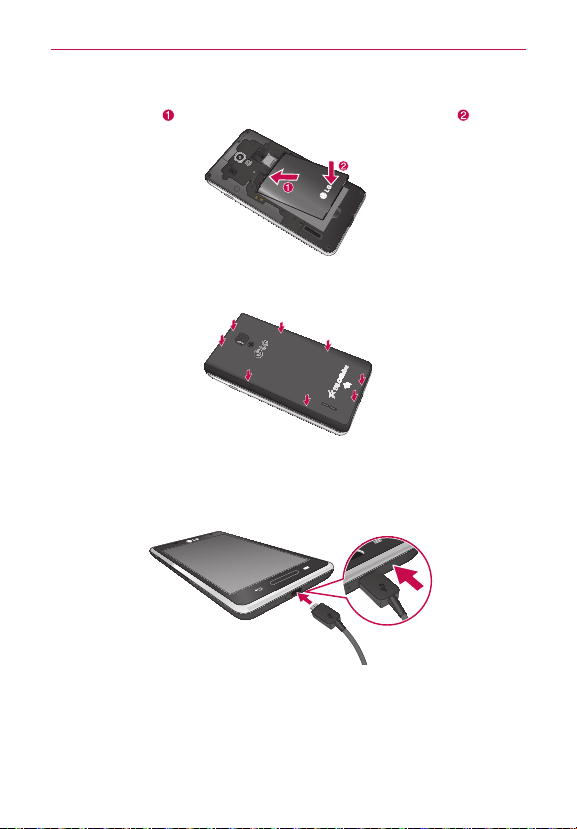
1.Toremovethebackcover,holdthephonermlyinonehand.Withyour
otherhand,liftoffthebackcoverwithyourthumbnailasshowningure
below.
NOTE
PutyourthumbnailintotheCharger/USBPortholeandliftoffthebackcover.
2.SlidetheSIMcardintotheSIMcardslot.Makesurethegoldcontact
areaonthecardisfacingdownwards.
NOTE
PleaseinsertthenotchedsideoftheSIMcardrst.Refertotheimageinscribedabove
theSIMcardslot.
13
Getting to know your phone
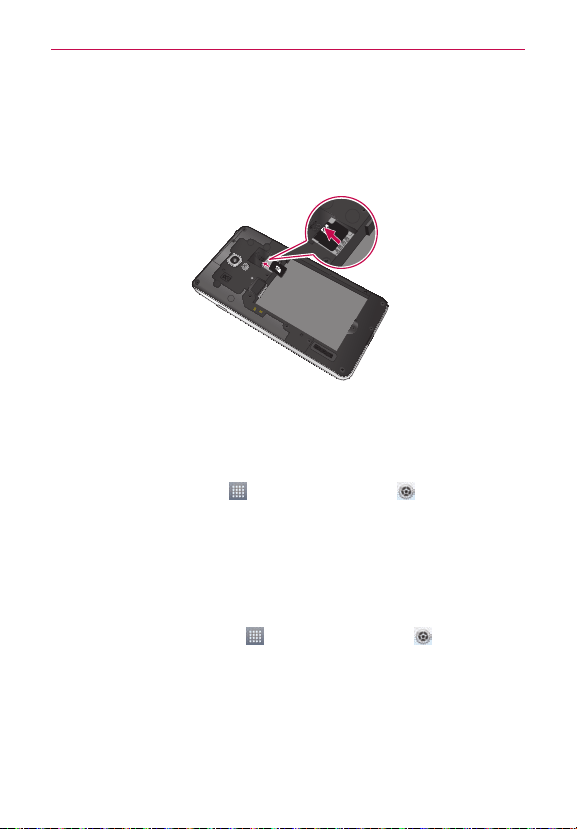
3.Insertthebatteryintoplacebyaligningthegoldcontactsonthebattery
andthephone andpressingitdownuntilitclicksintoplace .
4.Alignthebackcoveroverthebatterycompartmentandpressitdown
untilitclicksintoplace.
Charging your phone
TheCharger/USBPortisatthebottomofthephone.Insertthechargerand
plugitintoanelectricaloutlet.
NOTE
Thebatterymustbefullychargedinitiallytoimprovebatterylifetime.
NOTE
Donotopenthebackcoverwhenchargingyourphone.
14
Getting to know your phone
Using the memory card
To insert a memory card:
Insertthememorycard(notincluded)intotheslot.Makesurethegold
contactareaisfacingdownwards.
WARNING
Donotinsertorremovethememorycardwhenthephoneison.Doingsomaydamage
thememorycardaswellasyourphone,andthedatastoredonthememorycardmay
getcorrupted.
To remove the memory card safely:
OntheHomescreen,touch >Appstab > Settings >Storage
(DEVICEcategory)>Unmount SD card>OK.
To format the memory card:
Yourmemorycardmayalreadybeformatted.Ifitisn't,youmustformatit
beforeyoucanuseit.
NOTE
Alllesonyourmemorycardaredeletedwhenitisformatted.
1.OntheHomescreen,touch >Appstab>Settings >Storage.
2.TouchUnmount SD cardandtouchOKtoconrmit.
3.TouchErase SD cardandthenErase SD cardonemoretimetoconrm
yourchoice.
4.Ifyouhavesetapatternlock,enterthepatternlockandtouchErase
everything.

15
Getting to know your phone
NOTE
Ifthereiscontentonyourmemorycard,thefolderstructuremaybedifferentafter
formattingasalltheleswillbedeleted.
Locking and unlocking the screen
Ifyoudonotusethephoneforawhile,thescreenisturnedoffandlocked
automatically.Thishelpstopreventaccidentaltouchesandsavesbattery
power.
Whenyouarenotusingthephone,pressthePower/Lock Key
tolock
thescreen.
Ifthereareanyprogramsrunningwhenyousetlockscreen,theymaystill
berunninginLockmode.Itisrecommendedthatyouexitallprograms
beforeenteringLockmodetoavoidunnecessarycharges(e.g.phonecalls,
webaccessanddatacommunications).
Towakeupyourphone,pressthePower/Lock Key
.Thelockscreen
willappear.Touchandslidethelockscreeninanydirectiontounlockyour
Homescreen.Thelastscreenyouviewedwillopen.
Secure your lock screen
You canlockyourscreensothatonlyyoucanunlockittoaccessyour
phone.
To set a screen lock
#
OntheHomescreen,touch >Appstab>Settings > Lock
screen > Select screen lock > Swipe,Face Unlock,Pattern,Pinor
Password
NOTE
Precautions to take when using pattern lock.
Itisveryimportanttoremembertheunlockpatternyouset.You willnotbeableto
accessyourphoneifyouuseanincorrectpattern5times.You have5opportunitiesto
enteryourunlockpattern,PINorpassword.Ifyouhaveusedall5opportunities,youcan
enterthebackupPINorpasswordortryagainafter30seconds.

16
Getting to know your phone
When you cannot recall your pattern:
IfyouloggedintoyourGoogleaccountonthephonebutfailedtoenterthe
correctpattern5times,touchForgot pattern?.You arethenrequiredto
loginwithyourGoogleaccounttounlockyourphoneorenteryourBackup
PIN.
IfyouhavenotcreatedaGoogleaccountonthephoneoryouforgotit,you
havetoperformahardreset.
Formoreinformation,referto"5. Using the hard reset (Factory reset)" on
page 8.
To adjust the volume
OntheHomescreen,touchtheMenu Key >System settings >
Sound > Volumes.
You canadjustthevolumeforPhone ringtone, Notification sound, Touch
feedback & system, and Music, video, games and other media.
JustscrolleachvolumebuttontotherightorlefttoadjustthentouchOK.
TalkBack
Beforetheactivationprocesscanbegin,thedevicewillpromptthe
TalkBackvoicenavigationfeature.TalkBackisanAccessibilityServicethat
helpsblindandvision-impairedusersinteractwiththeirdevicesmoreeasily.
Tobypassthisfeature,touchNext.
To disable TalkBack follow these steps:
1.OntheHomescreen,touchMenu Key >System settings>
Accessibility
2.TouchTalkBackundertheSERVICESsection.
3.Touch
totogglethesetting.
NOTE
WhenTalkbackisturnedon,thetouchscreensettingsrequiretheusertorsttapanitem
theywishtoselect,andthendoubletaptheitemagaininordertoaccessthefeature.

17
Your Home screen
Touch screen tips
Herearesometipsonhowtonavigatearoundyourphone.
Touch–Tochooseamenu/optionoropenanapplication,touchit.
Touch and hold–Toopenanoptionsmenuorgrabanobjectyouwantto
move,touchandholdit.
Drag–Toscrollthroughalistormoveslowly,dragacrossthetouchscreen.
Flick–Toscrollthroughalistormovequickly,ickacrossthetouchscreen
(dragquicklyandrelease).
NOTE
•
Toselectanitem,touchthecenteroftheicon.
•
Donotpresstoohard;thetouchscreenissensitiveenoughtopickupalight,rm
touch.
•
Usethetipofyourngertotouchtheoptionyouwant.Becarefulnottotouchany
otherkeys.
Home screen
SimplyswipeyourngertotheleftorrighttoviewtheavailableHome
screencanvas.You cancustomizeeachcanvaswithapps,downloads,
widgetsandwallpapers.
NOTE
Somescreenimagesmaybedifferentdependingonyourphoneprovider.
OnyourHomescreen,youcanaccessquickkeysatthebottomofthe
screen.Quickkeysprovideeasy,one-touchaccesstothefunctionsyouuse
themost.
: TouchthePhoneicontoaccessthetouchscreendialpadtomakea
call.
:TouchtheContactsicontoopenyourcontacts.
: TouchtheMessagingicontoaccessthemessagingmenu,where
youcancreateanewmessage.
: TouchtheAppsicontoviewallyourinstalledapplications.Toopen
anyapplication,simplytouchtheiconintheapplicationslist.
NOTE
Toaddanicon,touchandholdthedesirediconanddragittotheQuickKeysbar.
Releaseitatthedesiredlocation.Toremoveanicon,touchandholdit,thendragitout
oftheQuickKeysbar.
18
Your Home screen
Customizing the Home screen
You canpersonalizeyourHomescreenbyaddingapplicationicons,and
widgetstoanyHomescreencanvas.You canalsochangethewallpaper.
To add items on your Home screen:
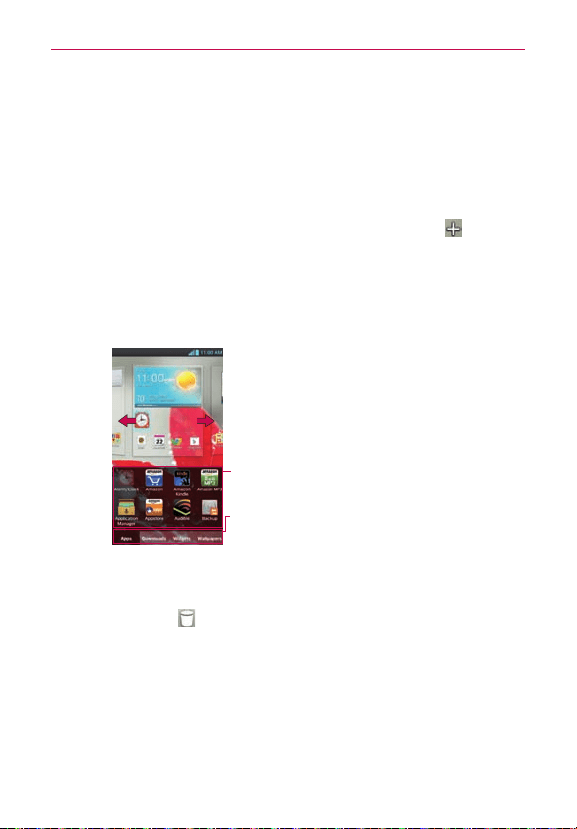
1.GototheHomescreenpanelwhereyouwanttoaddtheitem.Then
touchandholdtheemptypartoftheHomescreenortouch .
NOTE
IfspaceisnotavailableonaparticularHomescreencanvas,youmustdeleteorremove
anitembeforeyoucanaddanotheritem.OrswitchtoanotherHomescreencanvas.
2.Touchthedesiredtabatthebottomofthescreenandselecttheitems
youwanttoadd.You willthenseeaddeditemsontheHomescreen.
3.Dragittothelocationyouwantandliftyournger.
Slidethescreenrightorlefttoviewdifferent
canvases.
Touchandholdtheiconanddragatthescreen
youwanttoput.
Touchtoaccesspreloadedanddownloadedapps,
widgets,andwallpapers.
To remove an item from the Home screen:
#
OntheHomescreen,touchandholdtheiconyouwanttoremove,
thendragitto
.
TIP!
To addanapplicationicontotheHomescreenfromtheApplicationsmenu,touchand
holdtheapplicationyouwanttoadd.TheApplicationsmenuclosesandtheHome
screenwillbedisplayed.
19
Your Home screen
Customizing an application icon from the Home screen
NOTE ThisfeatureallowsyoutomakeanduseaniconwiththepicturesinyourGallery.
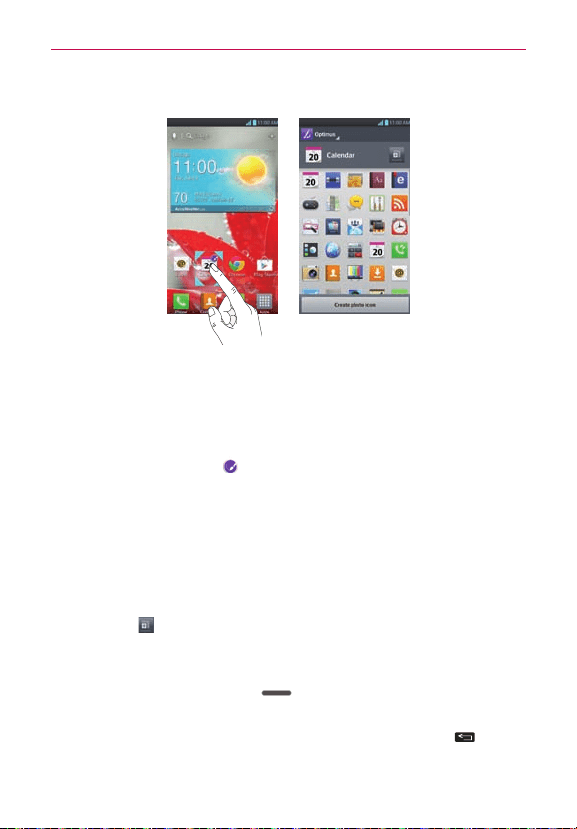
You cannowedittheiconsontheQuickKeysbarorHomescreenby
creatingyourowniconswiththecameraorGalleryimages.Thisgivesyou
theabilitytoreplacethegenericiconsandhavepersonalizedimages.
1.Touchandholdaniconuntilthecanvasgridisdisplayed,thenrelease
theicon.Aneditingicon
appearsattheupperrightsideofthe
applicationicon.
2.Touchtheiconandselectthedesiredicondesign.
OR
TouchCreate photo iconandselectTake phototoopentheCamera
applicationandtakeapictureorSelect from Gallerytochooseoneof
theavailablepicturesinyourGallery.
NOTE
Touch tousebiggericons.
Returning to recently-used applications
1.PressandholdtheHome Key .Thescreendisplaysapop-upwith
iconsofapplicationsyouusedrecently.
2.Touchanicontoopentheapplication.OrtouchtheBackKey
to
returntoyourcurrentapplication.
NOTE
Flicktheapplicationpreviewstotherightorlefttoremovethemfromtherecentapps
list.
20
Your Home screen
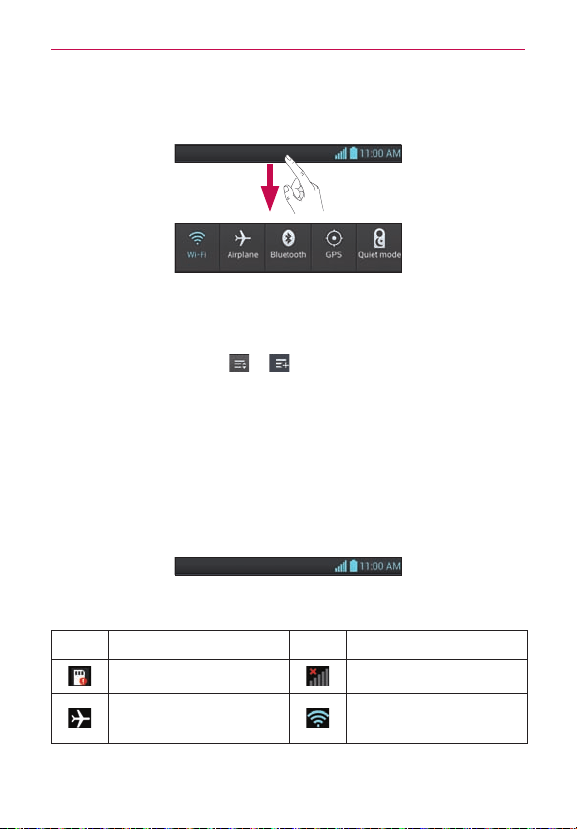
Status Bar
TheStatusBarrunsacrossthetopofyourscreen.
TouchandslidetheStatusBardownwithyourngertodisplaythe
NoticationsPanel.TheNoticationsPaneldisplaysallofyournotications
alongwiththeQuickSettingsandQSlideappsatthetop.
Scrolltotherightandtouch
> tomanageyourQuickSettings.
You canadd,remove,andrearrangeWi-Fi,Airplanemode,Bluetooth,GPS,
Quietmode,Dataenabled,PortableWi-Fi-hotspot,Miracast,NFC,Power
saver,Auto-rotatescreen,Soundprole,andAccounts&sync.
NOTE
TouchandholdaniconfromtheQuickSettingstoviewthefunction'ssettingsmenu.
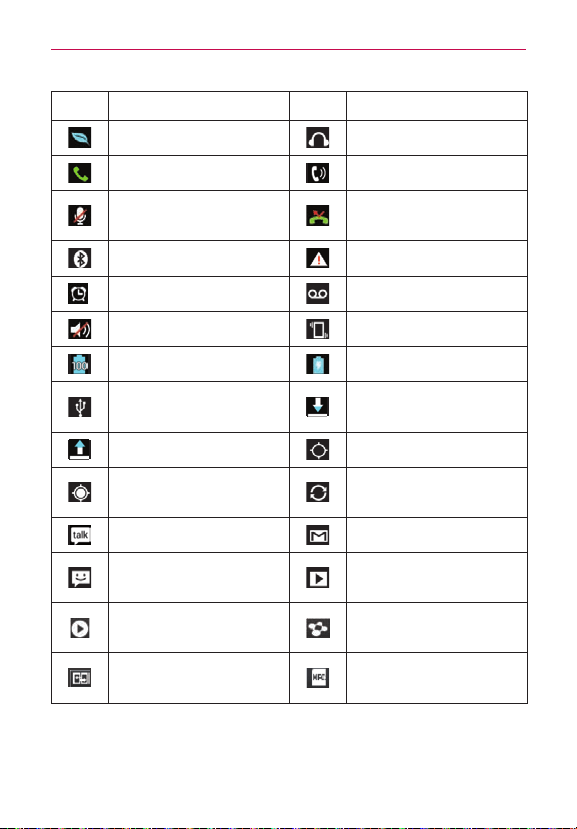
Viewing the Status Bar
TheStatusBarusesdifferenticonstodisplayphoneinformationsuchas
signalstrength,newmessages,batterylife,activeBluetoothanddata
connections.
Belowisatableexplainingthemeaningoficonsyou'relikelytoseeinthe
StatusBar.
Icon Description Icon Description
NoSIMcard Nosignal
Airplanemode
ConnectedtoaWi-Fi
network
21
Your Home screen
Icon Description Icon Description
Powersaverison Wiredheadset
Callinprogress Speakerphone
Phonemicrophoneis
muted
Missedcall
Bluetoothison Systemwarning
Alarmisset Newvoicemail
Ringerissilenced Vibratemode
Batteryfullycharged Batteryischarging
PhoneisconnectedtoPC
viaUSBcable
Downloadingdata
Uploadingdata AcquiringGPS
Receivinglocationdata
fromGPS
Dataissyncing
NewGoogleTalkmessage NewGmailmessage
Newtextormultimedia
message
Songisplaying
Songisplayingusing
SmartShare
SmartShareisrunning
Direct/AndroidBeam
enabled
NFCOn

22
Your Home screen
On-screen keyboard
You canentertextusingtheon-screenkeyboard.Theon-screenkeyboard
appearsautomaticallyonthescreenwhenyouneedtoentertext.To
manuallydisplaythekeyboard,simplytouchatexteldwhereyouwantto
entertext.
Using the keypad & entering text
Taponcetocapitalizethenextletteryoutype.Double-tapforallcaps.
Taptoswitchtothenumbersandsymbolskeyboard.Taptoswitch
tothenumbersandsymbolskeyboard.
Taptoenteraspace.
Taptocreateanewlineinthemessageeld.
Taptodeletethepreviouscharacter.
Entering special characters
Theon-screenkeyboardallowsyoutoenterspecialcharacters(e.g."á").
Forexample,touchandholdthe"a"keyuntilthedesiredspecialcharacteris
displayed.Thenselectthespecialcharacteryouwant.
23
Your Home screen
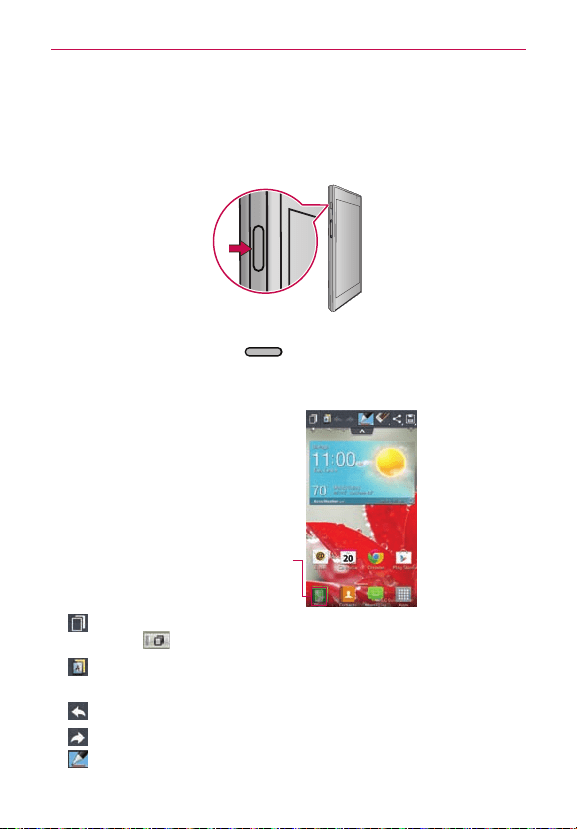
QuickMemo
TheQuickMemofeatureallowsyoutocreatememosandcapturescreen
shots.You canuseQuickMemotoeasilyandefcientlycreatememos
duringacall,withasavedpictureoronthecurrentphonescreen.
1.Whileviewingthescreenyouwanttocaptureandcreateamemoon,
presstheQuickMemo Key
ontheleftsideofthephone.
2.Createamemousingtheavailableoptions.
NOTE
PleaseuseangertipwhileusingtheQuickMemofeature.Donotuseyourngernail.
Touchtolockthefrontkeys
(BackKey/HomeKey/Menu
Key).
-Touchtokeepthememoontopandcontinueusingthephone.
Touch toexittheoverlaymode.
-Touchtoselectifyouwanttousethecurrentscreenasthe
backgroundscreenoranoteimage.
-Touchtoundothemostrecentaction.
-Touchtoredothemostrecentlydeletedaction.
-Touchtoselectthepentypeandcolor.

24
Your Home screen
-Touchtoerasethememothatyoucreated.
-Touchtosharethememowithothersviaanyoftheavailable
applications.
-Touchtosavethememoyou’vecreated.
TouchtheMenu Key
>Signature offifyouwantnottodisplay"LG
QuickMemo"labelontherightbottomofthescreen.
3.Touch
.You canalsocroptheimageusingthetrianglesineach
corner.Touchanddragthetrianglestothedesiredpartofthescreen.
4.Touch
fromtheEditmenuandselect tosavethememo.
Viewing the saved QuickMemo
OpentheGalleryorNotebookandtouchtheQuickMemoalbum.

25
Google account setup
Whenyourstturnonyourphone,youhavetheopportunitytoactivatethe
network,tosignintoyourGoogleAccountandhowyouwanttousesome
Googleservices.
To set up your Google account:
#
SignintoaGoogleAccountfromthepromptedsetupscreen.
OR
#
OntheHomescreen,touch
>Appstab>Settings >Accounts
& sync>ADD ACCOUNT>Google>Newtocreateanewaccount.
IfyouhaveaGoogleaccount,touchExisting,enteryouremailaddressand
password,thentouch
.
OnceyouhavesetupyourGoogleaccountonyourphone,yourphone
automaticallysynchronizeswithyourGoogleaccountontheweb.
Yourcontacts,Gmailmessages,Calendareventsandotherinformation
fromtheseapplicationsandservicesonthewebaresynchronizedwithyour
phone.(Dependingonyoursynchronizationsettings.)
Aftersigningin,youcanuseGmail™andtakeadvantageofGoogleservices
onyourphone.

26
Connecting to Networks and Devices
Wi-Fi
WithWi-Fi,youcanusehigh-speedInternetaccesswithinthecoverageof
thewirelessaccesspoint(AP).EnjoywirelessInternetusingWi-Fi,without
extracharges.
Connecting to Wi-Fi networks
TouseWi-Fionyourphone,youneedtoaccessawirelessaccesspoint
or"hotspot".Someaccesspointsareopenandyoucansimplyconnectto
them.Othersarehiddenorusesecurityfeatures;youmustcongureyour
phonetobeabletoconnecttothem.
TurnoffWi-Fiwhenyou'renotusingittoextendthelifeofyourbattery.
NOTE
IfyouareoutoftheWi-FizoneorturnWi-Fioff,additionalchargesmaybeappliedby
yourmobileoperatorformobiledatause.
Turning Wi-Fi on and connecting to a Wi-Fi network
1.OntheHomescreen,touch >Appstab>Settings >Wi-Fifrom
theWIRELESS&NETWORKScategory.
2.Touchtheswitch
toturnitonandstartscanningforavailableWi-Fi
networks.
3.Touchanetworktoconnecttoit.
#
Ifthenetworkisopen,youwillbeconnectedtothatnetworkby
touchingit.
#
Ifthenetworkissecured,youarepromptedtoenterapasswordor
othercredentials.(Askyournetworkadministratorfordetails)
4.TheStatusBardisplaysaniconthatindicatestheWi-Fistatus.

27
Connecting to Networks and Devices
Bluetooth
You can use Bluetooth to send data by running a corresponding application,
not from the Bluetooth menu as on most other mobile phones.
Turning on Bluetooth and pairing up your phone with a Bluetooth
device
You must pair your device with another device before you connect to it.
1. On the Home screen, touch
> Apps tab > Settings > Bluetooth
from the WIRELESS & NETWORKS category.
2. Touch the switch
to turn Bluetooth on. Your phone will scan for
and display the IDs of all available Bluetooth in-range devices. If the
device you want to pair with isn’t on the list, make sure the target device
is set to be discoverable, then tap Search for devices.
3. Choose the device you want to pair up with from the list. Depending on
the type of device, you will have to confirm pairing, enter a code, or it
will automatically pair.
4. Once the paring is successful, your device will connect to the device.
Sending pictures using Bluetooth
1. Open the Gallery and touch a picture, then touch > Bluetooth
2. Check if Bluetooth is on, then select Search for devices.
3. Choose the device you want to send data to from the list.
Sharing your phone's data connection
USB tethering and portable Wi-Fi hotspot are great features when there are
no wireless connections available. You can share your phone's mobile data
connection with a single computer via a USB cable (USB tethering). You can
also share your phone's data connection with more than a single device at a
time by turning your phone into a portable Wi-Fi hotspot.
When your phone is sharing its data connection, an icon appears in the
Status Bar and as an ongoing notification in the Notifications Panel.

28
Connecting to Networks and Devices
Forthelatestinformationabouttetheringandportablehotspots,including
supportedoperatingsystemsandotherdetails,visit
http://www.android.com/tether.
To change Portable Wi-Fi hotspot settings:
• OntheHomescreen,touch >Appstab>Settings >Tethering
& Networks >Portable Wi-Fi hotspot>Set up Wi-Fi hotspot.Choose
optionsthatyouwanttoadjust
To rename or secure your portable hotspot
You canchangethenameofyourphone'sWi-Finetworkname(SSID)and
secureitsWi-Finetwork.
1.OntheHomescreen,touch
>Appstab>Settings .
2.TouchTethering & Networks fromtheWIRELESS&NETWORKS
categoryandselectPortable Wi-Fi hotspot.
3.TouchSet up Wi-Fi hotspot.
• Yo u canchangethenetworkSSID(name)thatothercomputerssee
whenscanningforWi-Finetworks.
• Yo u canalsotouchtheSecuritymenutocongurethenetworkwith
Wi-FiProtectedAccess2(WPA2)securityusingapre-sharedkey
(PSK).
• IfyoutouchtheWPA2 PSKsecurityoption,apasswordeldisadded
totheSet up Wi-Fi hotspotdialog.Ifyouenterapassword,you
willneedtoenterthatpasswordwhenyouconnecttothephone's
hotspotwithacomputerorotherdevice.You cansetOpeninthe
SecuritymenutoremovesecurityfromyourWi-Finetwork.
4.TouchSave.
ATTENTION!
IfyousetthesecurityoptionasOpen,youcannotpreventunauthorizedusageofonline
servicesbyotherpeopleandadditionalchargescanbeincurred.Toavoidunauthorized
usage,youareadvisedtokeepthesecurityoptionactive.

29
Connecting to Networks and Devices
Using Wi-Fi Direct
You canshareyourmusic,pictureandvideocontentbetweenusers
whouseAndroidphonesconnectedviathesameWi-FiandWi-FiDirect
network.
CheckyourWi-FiandWi-FiDirectnetworkinadvanceandmakesurethe
usersareconnectedtothesamenetwork.
1.OntheHomescreen,touch
>Appstab>Settings >Wi-Fi.
2.Touchtheswitch
toturnonWi-Fi.
3.TouchtheMenu Key
>Wi-Fi Direct.
4.Selectadevicetoconnectfromthescanneddevicelist.
CREATE GROUP–Touchtoactivategroupownermode,whichenables
thelegacyWi-Fidevicestoconnectbyscanningyourphone.Inthiscase
youmustenterthepasswordthatissetintheInformationforWi-Fisection.
NOTE
Whenyourphonebecomesagroupowner,itwillconsumemorebatterypowerthan
whenitisaclient.Wi-FiDirectconnectiondoesnotprovideInternetservice.Additional
costsmaybeincurredwhenconnectingandusingonlineservices.Checkdatacharges
withyournetworkprovider.
5.Tosharedataafterconnecting,useSmartShareonthedevice.

30
Connecting to Networks and Devices
Enabling Wi-Fi Direct to share through
SmartShare
Wi-FiDirectautomaticallyscansnearbyWi-FiDirectdevicesandliststhem
astheyarefound.You canselectaspecicdevicetosharemultimediadata
throughSmartShare.
Using SmartShare
SmartShareusesDLNA(DigitalLivingNetworkAlliance)technologyto
sharedigitalcontentthroughawirelessnetwork.Bothdevicesmustbe
DLNAcertiedtosupportthisfeature.
To turn SmartShare on and allow sharing contents
1.OntheHomescreen,touch >SmartShare .
2.TouchtheMenu Key
>Settings.
3.TouchContents sharetoallowyourdevicetobedetectedbyother
devices.
#
TouchSharing requestsifyouwouldliketoselecthowtoaccept
sharingrequestsfromotherdevices.ChoosefromAlwaysaccept,
Always ask,andAlways deny.
#
TouchReceive filesifyouwouldliketoallowtheotherdevicesto
uploadmedialestomyphone.
NOTE
MakesurethatthemicroSDcardiscorrectlymountedandtheReceive filesoptionin
theSettingsmenuischecked.
4.TouchShared contentstocheckmarkthetypesofcontentyouwould
liketoshare.ChoosefromPhotos,Videos,andMusic.
5.SmartShareisnowactivatedandreadytosharecontents.
To control your renderer devices
Letyourrendererdevice(e.g.TV)playmultimediacontentsfromyour
remotecontentlibrary(e.g.PC).
NOTE
MakesurethattheDLNAfunctionalityofyourdevicesisproperlycongured(e.g.TVand
PC).

31
Connecting to Networks and Devices
1.OntheHomescreen,touch >SmartShare .
2.TouchthePlayericon
andselectthedevicefromtherendererdevice
list.
3.TouchtheLibraryicon
andselectthedeviceoftheremotecontent
library.
4.Yo u canbrowsethecontentlibrary.
5.TouchandholdacontentthumbnailandtouchPlayortouchtheMenu
Key
>Play.
To share contents from your phone to your renderer device(e.g. TV)
NOTE
Makesurethatyourrendererdeviceisproperlycongured.
1.WhileplayingyourmusicusingtheMusicapplication,touchtab /
atthetopofthescreen.
:Selectthedeviceonnetwork.
:Currently,thecontentisbeingsharedthroughSmartShare.
2.Selectthedevicefromrendererliststoplaytheles.
NOTE
FollowthesimilarstepstousetheGallery, Video Player,orPolaris Viewer 4toshare
contents.
NOTICE
CheckthatyourdeviceisconnectedwithyourhomenetworkusingWi-Ficonnectionto
usethisapplication.
SomeDLNAenableddevices(e.g.TV)supportonlytheDMPfeatureofDLNAandwill
notappearintherendererdevicelist.
Yourdevicemightnotbeabletoplaysomecontents.
To download contents from remote content library
1.OntheHomescreen,touch >SmartShare .
2.TouchtheLibraryicon
andselectthedeviceoftheremotecontent
library.
3.Yo u canbrowsethecontentlibrary.
4. TouchandholdacontentthumbnailandthentouchDownloadortouch
theMenu Key
> Download.
NOTICE
Somecontentsarenotsupported.

32
Connecting to Networks and Devices
To upload contents to the remote content library
1.OntheHomescreen,touch >SmartShare .
2.TouchtheLibraryicon
andselectMy phone.
3.Yo u canbrowsethelocalcontentlibrarytondthecontent(s)youwant.
4.TouchandholdacontentthumbnailandthentouchUploadortouchthe
Menu Key
>Upload.
5.Selectthedeviceoftheremotecontentlibrarytobeuploaded.
NOTICE
SomeDLNAenableddevicesdonotsupporttheDMSuploadfunctionalityandwillnot
uploadles.
Somecontentsarenotsupported.
33
Calls
Making a call
1.OntheHomescreen,touch toopenthekeypad.
2.Enterthenumberusingthekeypad.Todeleteadigit,touch
.
3.Touch
tomakeacall.
4.Toendacall,touch
.
TIP!
Toenter"+"tomakeinternationalcalls,touchandhold
.
Calling your contacts
1.OntheHomescreen,touch toopenyourcontacts.
2.Scrollthroughthecontactlistorentertherstfewlettersofthecontact
youwanttocallbytouchingtheSearch contactseld.You canalso
touchthelettersalongtherightsideofthescreen.
3.Inthelist,touchthecontactyouwanttocall.
4.Touchthephonenumberyouwanttodial.
Answering and rejecting a call
Locked screen
#
Swipe inanydirectiontoansweranincomingcall.
#
Swipe
inanydirectiontodeclineanincomingcall.
Unlocked screen
#
Touch toansweranincomingcall.
#
Touch
todeclineanincomingcall.
TIP!
TouchorswipetheDecline with message Key
ifyouwanttosendamessagetothe
caller.Ifthecallerisunknown,theDecline with message Keyisnotavailable.
Adjusting call volume
Toadjustthein-callvolumeduringacall,usetheVolumeKeysontheleft
sideofthephone.
34
Calls
In-call options
Onceyouinitiateacall,youwillseetheseon-screenoptions.
Add call-Touchtoinitiatea3-waycall.
End-Touchtoendthecall.
Dialpad-Touchtodisplaythedialpad.
Speaker-Touchtoturnthespeakerphoneonoroff.TheSpeakerbutton
lightsuptoindicatethatthespeakerphoneison.
WARNING
Becauseofhighervolumelevels,donotplacethephonenearyourearwhileusing
thespeakerphone.
Mute-Touchtomutethemicrophoneduringacall.TheMutebuttonlights
uptoindicatethemicrophoneismuted.Tounmutethemicrophone,touch
itagain.
Bluetooth (Only available when a Bluetooth headset is connected to
your phone)-TouchtoconductthecallviatheBluetoothheadsetfor
hands-freeconversation.
Whenanothercalliscomingwhileyouareinacall,touchSwap callsto
receivethenewcallandputthecurrentcallonhold.
Making a second call
1.Duringyourrstcall,touchAdd callanddialthenumber.Yo u canalso
gotoyourrecentlydialedlistbytouching orsearchcontactsby
touching andselectthenumberyouwanttocall.
2.Touch
tomakethecall.
3.Bothcallsaredisplayedonthecallscreen.Yourinitialcallisputonhold.
4.Tomergethecalls,touch
.Toendactivecalls,touch .
NOTE
Yo u arechargedforeachcallyoumake.
Viewing your call logs
OntheHomescreen,touch andchoosetheCall logstab .
Viewacompletelistofalldialed,receivedandmissedvoicecalls.

35
Calls
TIP!
Touchanycalllogentrytoviewthedate,timeanddurationofthecall.
TIP!
TouchtheMenu Key
,thentouchDeletealltodeletealltherecordeditemsortouch
Deletetoselectindividualitems.
Call settings
You cancongurephonecallsettingssuchascallrejectandotherspecial
featuresofferedbyyourcarrier.
1.OntheHomescreen,touch
.
2.TouchtheMenu Key
.
3.TouchCall settingsandchoosetheoptionsthatyouwanttoadjust.
Save unknown numbers–Addunknownnumberstocontactsafteracall.
Voicemail
Service-Allowsyoutoselectyourcarrier'svoicemailservice.
Setup–Ifyouareusingyourcarrier’svoicemailservice,thisoption
allowsyoutoenterthephonenumbertouseforlisteningtoand
managingyourvoicemail.
Notification sound-Allowsyoutoselectthesoundtonotifyyouof
newvoicemailreceipt.
Vibrate-Allowsyoutochoosethevibrationsetting.
Incoming call popup - Checkmarkifyouwanttodisplayincomingcall
popupwhenusingCameraandVideos.
Decline with messages–Addoreditamessagetosendoutwhenyou
declineincomingcall.
Privacy keeper-Choosewhethertohidethecallernameand/ornumber
forincomingcallsornot.
Power button ends call-Checkmarkifyouwanttoendacallwiththe
Power/LockKey,besidestheEnd Key
onthescreen.
Auto retry–Settheautoretryoption.Afterthetimeyouset(10
seconds,30seconds,60seconds),thephonewillautomaticallyredialin
caseacallisfailedtobeconnected.

36
Calls
TTY mode–AllowsyoutosettheTTYmodetocommunicatewith
otherTTYdevices.
DTMF tones–SetthelengthofDTMFtones.
Auto answer–EnableAutoanswerwithHandsfree.
Call restrictions–Setthecallrestrictionsoptions.
Call duration–Allowsyoutoviewthecallduration.
Voice privacy–Checkmarktoenableenhancedprivacymode.
37
Contacts
Addcontactstoyourphoneandsynchronizethemwiththecontactsinyour
Googleaccountorotheraccountsthatsupportcontactsyncing.
Searching for a contact
1.OntheHomescreen,touch toopenyourcontacts.
2.TouchtheSearch contactseldandenterthecontactnameusingthe
keyboardortouchthelettersalongtherightsideofthescreenandscroll
tothecontact.
Adding a new contact
1.OntheHomescreen,touch ,enterthenewcontact'snumber,then
touch Add to Contacts > Create new contact.
2.Ifyouwanttoaddapicturetothenewcontact,touch
andchoose
fromTake photoorSelect from Gallery.
3.Touch
atthetopofthescreentoselecttheaccountwhereyouwant
tosavethecontact.
4.Touchacategoryofcontactinformationandenterthedetailsaboutyour
contact.
5.TouchSave.
Editing Contacts
1.OpentheContactsapplication.
2.TouchtheContactentryyouwanttoedit.
3.TouchtheEditicon
atthetopofthescreen.
4.Makethechangestotheentryasneeded.
5.TouchSave.
NOTE
IfyoutouchtheMenu Key
fromthecontactinfoscreen,youcanchoosefrom
Delete, Share, Join, ExportorAdd to Home screen.

38
Contacts
Favorite contacts
You canclassifyfrequentlycalledcontactsasfavorites.
Adding a contact to your favorites
1.OntheHomescreen,touch toopenyourcontacts.
2. Touchacontacttoviewtheirdetails.
3. Touchthestartotherightofthecontact'sname.Thestarturnsyellow,
indicatingthatthecontacthasbeenaddedtoyourcontacts.
Removing a contact from your favorites list
1.OntheHomescreen,touch toopenyourcontacts.
2. TouchtheFavorites tab
tabandchooseacontacttoviewitsdetails.
3.Touchtheyellowstartotherightofthecontact'sname.Thestarturns
greyandthecontactisremovedfromyourfavorites.

39
Messaging
Yourphonecombinestext(SMS)andmultimedia(MMS)messagesinto
oneintuitive,easy-to-usemenu.
Sending a message
1.Touch ontheHomescreen,andtouch tocreateanewmessage.
2.EnteracontactnameorcontactnumberintheToeld.Asyouenter
thecontactname,matchingcontactsappear.You cantouchasuggested
recipient.You canaddmultiplecontacts.
NOTE
You willbechargedforatextmessageforeverypersonyousendthemessageto.
3.Touchthetexteldandstarttocomposeyourmessage.
4.Touch
toattachanimage,video,audio,contact,oraddanotherslide.
5.TouchtheMenu Key
toopentheOptionsmenu.ChoosefromAdd
subject, Insert smiley, Quick messages, Discard, Set priority,and
Change skin.
6.TouchSend(orSend MMS)tosendyourmessage.
WARNING
The924-characterlimit(6Segments)mayvaryfromlanguageandhowtheSMSis
coded.
WARNING
Ifanimage,videooraudioleisaddedtoanSMSmessage,itisautomaticallyconverted
intoanMMSmessageandyouarechargedaccordingly.
Conversation view
Messages(SMS,MMS)exchangedwithanotherpartyaredisplayedin
chronologicalordersothatyoucanconvenientlyseeanoverviewofyour
conversation.
Using Smilies
LivenupyourmessagesusingSmilies.
Whenwritinganewmessage,touchtheMenuKey
,thenchoose
Insert smiley.

40
Messaging
Changing your message settings
Yourphone'smessagesettingsarepredened,soyoucansendmessages
immediately.Yo ucanchangethesettingsbasedonyourpreferences.
OpentheMessagingapplicationandtouchtheMenu Key
>Settings.
Setyoupreferencesasdesired.
Storage
• Delete old messages:Enablethisoptiontodeleteoldertextmessages
whenthelimitformaximumnumberoftextmessagesisexceeded.
• Text message limit:Setsthemaximumnumberoftextmessagesthat
canbestoredonthephone(perconversation).
• Multimedia message limit:Setsthemaximumnumberofmultimedia
messagesthatcanbestoredonthephone(perconversation).
• Signature:Tap thistoautomaticallyaddsignature(bluecheckmark
displays).
• Callback number:Checkthistoautomaticallyaddcallbacknumber(blue
checkmarkdisplays).
Text Message
• Set priority:SelectNormalorHigh.
Multimedia Message
• Auto-retrieve:Enablethisoptiontoautomaticallyretrievetheentire
contentofyourmultimediamessage.Whenchecked,themultimedia
messageheader,messagebody,andanyattachmentswillautomatically
downloadtoyourphone.
• Roaming auto-retrieve:Disablethisoptionifyouonlydesirethe
multimediamessageheaderstodownloadwhileroaming.Enablethis
optiontoautomaticallydownloadyourcompletemultimediamessages
evenwhileroaming.
• Set priority:SelectLow,Normal,orHigh.

41
Messaging
Conversation skin
Allowsyoutoselectthedesiredconversationskin.
Notification
• Notifications:Enablethisoptionifyouwishtoreceiveanoticationin
theStatusBarwhenanewtextormultimediamessagearrives.
• Preview:Enablethisoptionifyouwishtopreviewthecontentsof
messageswhennewmessagesarrive.
• New message popup:Enablethisoptionifyouwishtoseeanew
messageasapop-up.
• Notification sound:Allowsyoutoselectaringertosoundwhenanew
messageisreceived.Tapthisoption,andthenselectaringtonethatis
specictonewtextandmultimediamessages.Asamplewillbrieybe
playeduponselection.
• Vibrate:Enablethisoptionifyouwantthephonetovibratewhenanew
textormultimediamessageisreceived.
• Message Reminder:Enablethisoptionifyouwishthephonetoremind
youatevery2minutesaboutthemessagesyouhaven'tread.
Quick message
Tapthistoaddoreditquickmessages.Quickmessageisthespecied
textmessagetosendoutwhenyouwanttoignoreanincomingcalland
respondtothecallerwithinstead.
Emergency alerts settings
• Presidential alert:Enablethisoptionifyouwishpresidentialalertstobe
alwayspresented.Thisissettoenabledbydefault.
• Extreme alert:Enablethisoptiontoreceiveextremealerts.
• Severe alert:Enablethisoptiontoreceiveseverealerts.
• AMBER alert:EnablethisoptiontoreceiveAMBERalertsonchild
abduction.
42
Email
You canusetheEmailapplicationtoreademailsfromservicesotherthan
Gmail.TheEmailapplicationsupportsthefollowingaccounttypes:POP3,
IMAPandExchange.
Yourserviceproviderorsystemadministratorcanprovidetheaccount
settingsyouneed.
Managing an email account
ThersttimeyouopentheEmailapplication,asetupwizardopenstohelp
youtosetupanemailaccount.
To add another email account:
#
OpenEmail andtouchtheMenu Key >Accounts>Menu
Key
>Add Account.
Aftertheinitialsetup,EmaildisplaysthecontentsofyourInbox.Ifyouhave
addedmorethanoneaccount,youcanswitchamongaccounts.
To change an email account's settings:
#
OpenEmail andtouchtheMenu Key >Account settings.
To delete an email account:
#
OpenEmail andtouchtheMenu Key >Account settings >
Remove account > Yes.
Email account screen
–Touchthefoldericontoopentheaccountfolders.
-Touchtosearchyouremail.
-Touchtocomposeanewemail.
TouchtheMenu Key
toaccessadditionaloptions.

43
Email
Working with account folders
EachaccounthasanInbox,Outbox,SentandDraftsfolder.Dependingon
thefeaturessupportedbyyouraccount'sserviceprovider,youmayhave
additionalfolders.
Composing and sending email
To compose and send a message
1.OpentheEmailapplicationandtouch .
2.Enteranaddressforthemessage'sintendedrecipient.Asyouenter
text,matchingaddressesareofferedfromyourContacts.Separate
multipleaddresseswithsemicolon.
3.TouchtheMeny Key
toaddCc/Bccandaddattachmentlesif
required.
4.Enterthemessage.
5.Touch
tosendthemessage.
Ifyouaren'tconnectedtoanetwork,forexample,ifyou'reworkingin
airplanemode,themessagesthatyousendarestoredinyourOutbox
folderuntilyou'reconnectedtoanetworkagain.Ifitcontainsany
pendingmessages,theOutboxisdisplayedifyoutouch .
TIP!
Whenanewemailarrivesintheinbox,youwillreceiveanoticationbysoundor
vibration(dependingonyoursettings).You willalsoreceiveanoticationintheStatus
Bar.
44
Camera
Getting to know the viewfinder
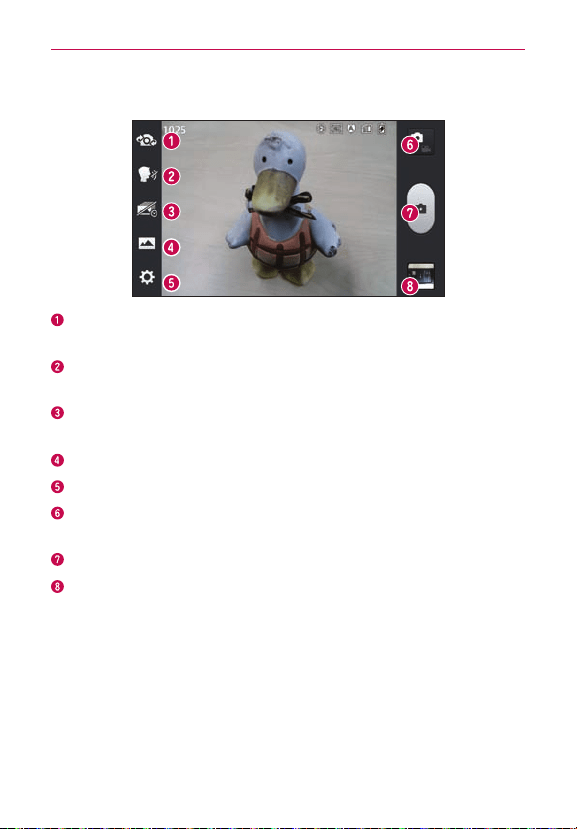
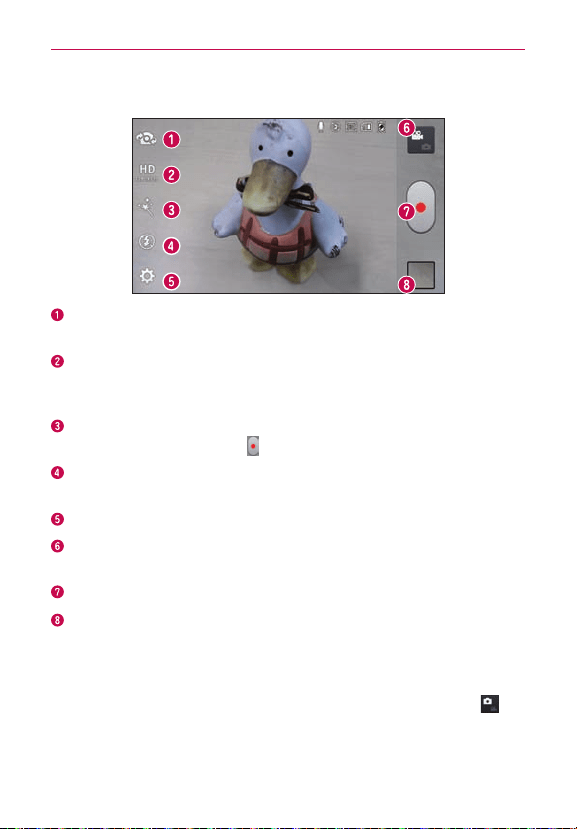
Swap camera–Switchbetweentherear–facingcameralensandthe
front–facingcameralens.
Cheese shutter–Takephotowithvoicecommand(saying"Cheese",
"Smile","Whisky","Kimchi"or"LG").
Time catch shot–Allowsyoutocapturethemissingmomentbytaking
vesequentialpicturesatoncebeforetheshutterkeyistouched.
Shot mode–ChoosefromNormal,HDR,Panorama,Continuousshot.
Settings–AccesstheSettingsmenu.
Mode switch–Allowsyoutoswitchbetweencameramodeandvideo
mode.
Capture–Takesaphoto.
Gallery–Allowsyoutoviewthelastphotoyoucaptured.Thisenables
youtoaccessyourGalleryandviewsavedphotoswithincameramode.
Taking a quick photo
1.OpentheCameraapplication.
2.Holdthephoneandpointthelenstowardsthesubjectyouwantto
photograph.
3.Touchthesubjectandafocusboxwillappearinthecenterofthe
viewnderscreen.
45
Camera
4.Whenthefocusboxturnsgreen,thecamerahasfocusedonyour
subject.
5.Touch
tocapturetheimage.
Once you've taken the photo
Touchtheimagepreviewatthebottomofthescreentoviewthelastphoto
youcaptured.
TouchtoshareviaSmartShare.
TouchtoreturntoCameramodetotakeanotherpicture.
Touchtoshareyourphotousinganysupportedapplications.
TIP!
Ifyouhaveasocialnetworkingaccountandsetituponyourphone,youcanshareyour
photowiththesocialnetworkingcommunity.
Touchtodeletetheimage.
TouchtheMenu Key
toopenthefollowingoptions.
Set image as–TouchtosettheimageasaContact photo,Home screen
wallpaperorLock screen wallpaper.
Move–Touchtomovetheimagetoanotheralbum.
Copy-Touchtocopytheimagetoanotherfolder.
Rename–Touchtoeditthenameoftheselectedpicture.
Rotate left/right–Touchtorotatetheimagetotheleftorright.
Crop–Cropyourphoto.Moveyourngeracrossthescreentoselectthe
area.
Edit-Viewandeditthepictures.
Improvescolorqualitiesindifferentlightingconditions.
Appliesartisticeffectstothepictures.
Appliescoloreffectstothepictures.
Appliesadditionaloptionstothepictures.
Slideshow–Displaysyourimagesinaslideshow.

46
Camera
Details–Displaysthepictureinformation.
Using the advanced settings
Intheviewnder,touch toopentheadvancedoptions.
–Edit quick menutoeditthequickmenusontheviewnder.
–FlashtosettheFlashmode.ChoosefromOff,On,orAuto.
–Zoomtozoominorout.
–Brightnesstoadjustthebrightnesssettingcompatiblewiththe
environment.
–Focustosetafocusmode.ChoosefromAutoorFace tracking.
–Image sizetosetthesizeofyourpicture.
–Scene modetochooseascenemodesetting.ChoosefromNormal,
Portrait, Landscape, Sports, Sunset, Night,andSmart shutter.
–ISOtocontrolthecamera'ssensitivitytolight.ChoosefromAuto
(default), 400, 200,or100.
–White balancetoselecthowthecameraadjustscolorsindifferent
kindsoflightinordertoachievethemostnatural-lookingcolors
foryourpictures.ChoosefromAuto, Incandescent, Sunny,
Fluorescent,orCloudy.
–Color effect toapplydifferentcoloreffectstoyourpictures.Choose
fromNone,Mono,Sepia,orNegative.
–Timertosetyourcamera'stimer.Thisisidealifyouwanttobeapart
ofthepicture.
– Geotaggingtouseyourphone'slocation-basedservices.Take
pictureswhereveryouareandtagthemwiththelocation.Ifyou
uploadtaggedpicturestoablogthatsupportsgeotagging,youcan
seethepicturesdisplayedonamap.

47
Camera
–Shutter soundtoadjustthesoundtheshuttermakeswhentakinga
picture.
–Auto reviewtosetwhethertoviewthepicturethatwasjusttaken.
ChoosefromOff(default),On, 2 sec,or5 sec.
–Storagetochoosewheretosaveyourpictures.
–Resettorestoreallcameradefaultsettings.
–Camera help guidetoseethehelpguidewheneveryouwanttoknow
howafunctionoperates.
48
Video camera
Getting to know the viewfinder
Swap camera–Switchbetweentherear–facingcameralensandthe
front-facingcameralens.
Video size–DenetheresolutionfromFullHD(1920x1080),
HD(1280x720),TV(720x480),VGA(640x480),MMS(320x240),
MMS(176x144).
Live Effect–Allowsyoutoputvariouseffectswhenrecordingavideo.
Chooseaneffectandtouch
.
Flash–Allowsyoutoturnontheashwhenrecordingavideoinadark
place.
Settings–AccesstheSettingsmenu.
Mode switch–Allowsyoutoswitchbetweenvideomodeandcamera
mode.
Record–Touchtostartrecordingavideo.
Gallery–Touchtoviewthelastvideoyourecorded.Thisenablesyouto
accessyourGalleryandviewyoursavedvideosfromwithinvideomode.
Recording a quick video
1.OpentheCameraapplicationandtouchtheMode switchbutton .
2.Thevideocameraviewnderappearsonthescreen.
3.Holdingthephone,pointthelenstowardsthesubjectyouwantto
captureinyourvideo.
49
Video camera
4.Touch oncetostartrecording.
5.Aredlightappearsatthetopcorneroftheviewnderwithatimer
showingthelengthofthevideo.
6.Touch
onthescreentostoprecording.
After recording a video
Touchtheimagepreviewatthebottomofthescreentoviewthelastvideo
yourecorded.
Touchtoplaythevideo.
TouchtoshareviaSmartShare.
TouchtoreturntoCameramodetotakeanotherpictureorrecorda
video.
Touchtosharethevideoviaanysupportedapplications.
Touchtodeletethevideoyoujustmade.ConrmbytouchingYes.The
viewnderreappears.
TouchtheMenu Key
toopenthefollowingoptions.
Move–Touchtomovethevideotoanotheralbum.
Copy-Touchtocopythevideotoanotheralbum.
Rename–Touchtoeditthenameoftheselectedvideo.
Details–Touchtoseeadetailedinformation,suchasthename,date,time,
sizeandtype.
Using the advanced settings
Usingtheviewnder,touch toopenthetheadvancedoptions.
–Edit quick menutoeditthequickmenusontheviewnder.
–Zoomtozoominorout.
–Brightnesstoadjustthebrightnesssettingcompatiblewiththe
environment.
–White balancetoselecthowthecamcorderadjustscolorsin
differentkindsoflightinordertoachievethemostnatural-looking
colorsforyourvideos.ChoosefromAuto,Incandescent,Sunny,

50
Video camera
Fluorescent,orCloudy.
–Color effect toapplydifferentcoloreffectstoyourvideos.Choose
fromNone,Mono,Sepia,orNegative.
– Geotaggingtouseyourphone'slocation-basedservices.Take
pictureswhereveryouareandtagthemwiththelocation.Ifyou
uploadtaggedpicturestoablogthatsupportsgeotagging,youcan
seethepicturesdisplayedonamap.
–Audio recordingtochoosewhethertoturnonoroffvoicerecording.
–Auto reviewtoenableautoreviewofyourvideo.
–Storagetochoosewheretosaveyourvideos.
–Resettorestoreallcameradefaultsettings.
–Video help guidetoseethehelpguidewheneveryouwanttoknow
howafunctionoperates.
Adjusting the volume when viewing a video
Toadjustthevolumeofavideowhileitisplaying,usetheVolumeKeyson
theleftsideofthephone.
51
Multimedia
You canstoremultimedialesonamemorycardforeasyaccesstoallyour
imageandvideoles.
Gallery
OntheHomescreen,touch >Appstab>Gallery .Openalistof
albumsthatstoreallyourimageandvideoles.
Playing a video
1.OntheHomescreen,touch >Appstab>Videos .
2.Selectthevideoyouwanttoplay.
Touchtopauseplayback.
Touchtoresumeplayback.
Touchtofast-forwardplaybackby10seconds.
Touchtogorewindplaybackby10seconds.
Touchtomanagethevideovolume.
Touchtochangetheratioofthevideoscreen.
TouchtoactivatetheQSlidefunction.
TouchtoshareyourvideoviatheSmartSharefunction.
Touchtolockthetouchkeysonthescreen.
Tochangethevolumewhilewatchingavideo,presstheupanddown
VolumeKeysontheleftsideofthephone.
TouchandholdavideointhelisttoaccessShare,Trim,Deleteand
Details.
52
Multimedia
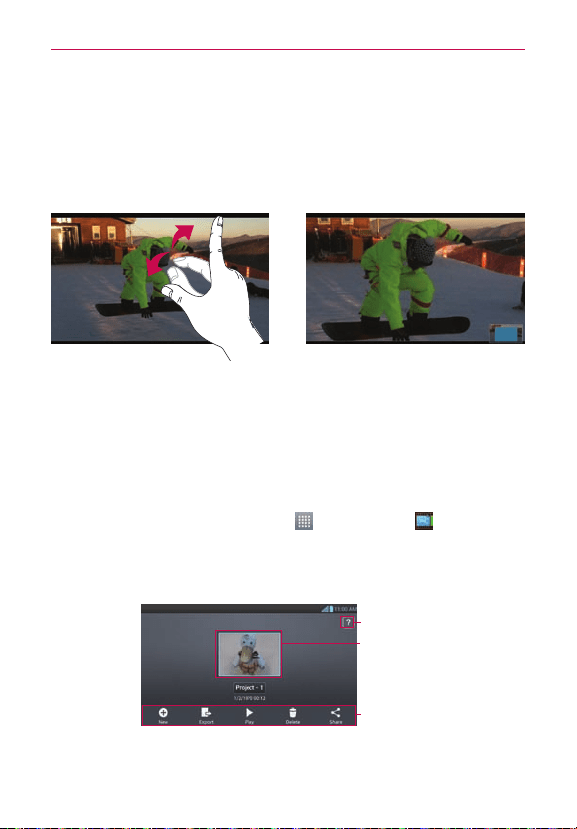
Live Zooming
LiveZoomingallowsyoutozoominorzoomoutonaportionofavideothat
isbeingplayedtomakethedesiredscanappearlargerorsmaller.
Whenviewingthevideo,useyourindexngerandthumbinapinchingor
spreadingmotiontozoominorout.
NOTE
•
Wheninvideoplaybackmode,slidethescreenupordowntoadjustthebrightness.
•
Wheninvideoplaybackmode,slidethescreenleftorrighttorewindorfast-forward.
NOTE
Donotpresstoohard;thetouchscreenissensitiveenoughtopickupalight,butrm
touch.
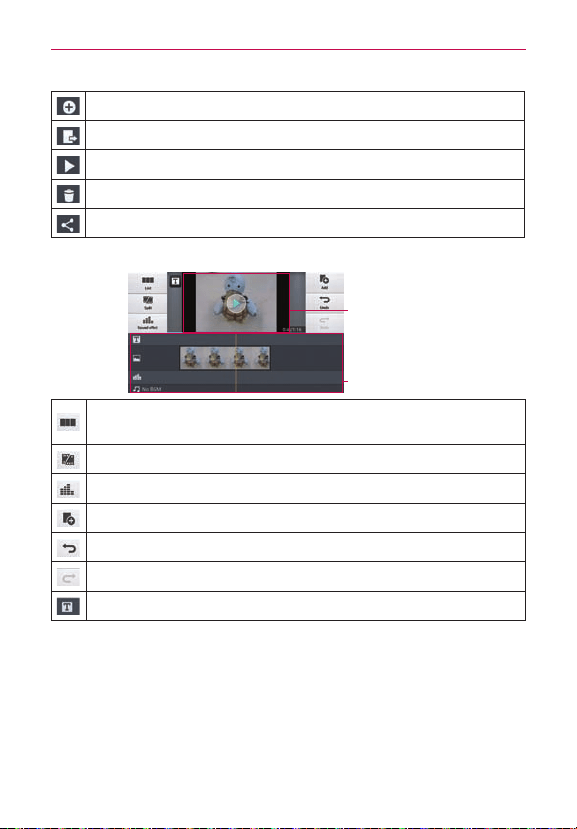
Video Editor
You caneditthephotosorvideosstoredonthephone.
Toaccess,ontheHomescreen,touch
>Video Editor .
NOTE
Video Editingfunctionissupportedonlyforphotosorvideoswhichrecordedwiththis
phone.
< Project list screen >
Help
Projectlistarea
Buttonsarea
53
Multimedia
Createproject.
Projectsshouldbeexportedtoplayinapplicationssuchasvodeos.
Playproject.
Deleteproject.
ShareprojectwithapplicationsuchasYouTube.
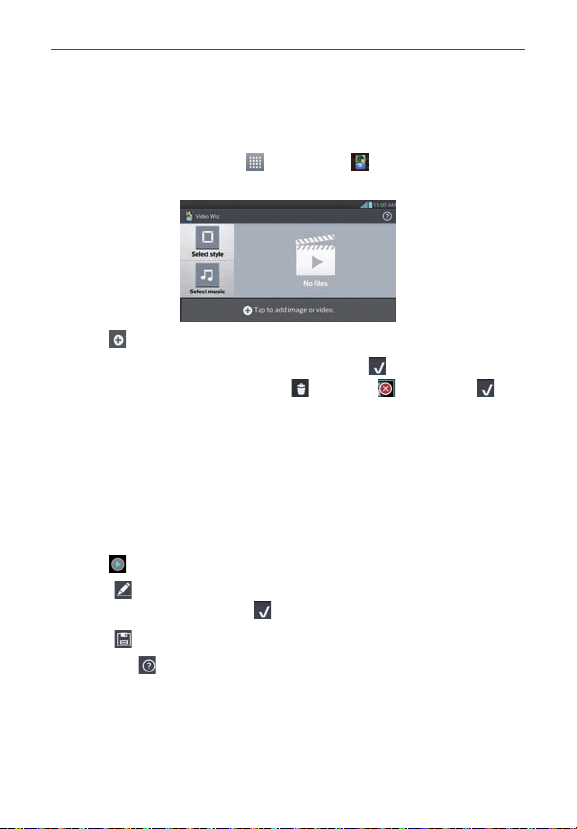
< Project edit screen >
Previewarea
Timelinearea
Movetothemainprojectlistscreen.Currentlyeditedprojectis
savedautomatically.
Splitthevideoclipintotwoportions.
Addsoundeffect.
Addvideo,imageoraudioclip.
Undoanaction.
Redoanaction.
Addtexttovideoorimageclip.
54
Multimedia
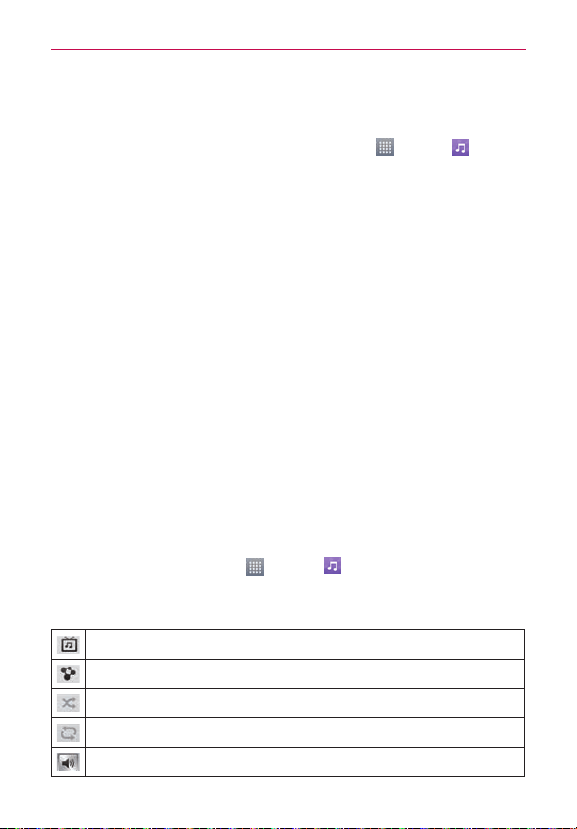
Video Wiz
You canmakeyourownmovieusingyourimages/videoandmusic.
1.OntheHomescreen,touch
>Video Wiz .
2.Afterseeingthebriefintroductiononthestepstofollow,touchOK.
3.Touch toaddimagesorvideotoyourmovie.
4.Touchthedesiredimagesorvideos,thentouch
.
• To removeimagesorvideos,touch
andtouch .Thentouch .
• To rearrangethem,touchandholdanimage/video,anddraganddropit
tothedesiredposition.
5.TouchSelect styletoselectthedesiredmoviestyle.
• Scrollthroughandselectthestyleyouwant.Asyouscrollthroughthe
styles,apreviewwillbedisplayed.
6.TouchSelect musictosetthebackgroundmusic.
7.Touch
toplayyourmovie.
8. Touch
toeditthevideoclipusingText,StickerorMagicSpot.
• Aftereditingthevideo,touch
.
9. Touch
tosavethevideo.
NOTE
Touch toviewthehelpinformationonusingthisfeature.
55
Multimedia
Music
Yourphonehasamusicplayerthatletsyouplayallyourfavoritetracks.To
accessthemusicplayer,ontheHomescreen,touch
>Music .
Add music files to your phone
Startbytransferringmusiclestoyourphone:
• TransfermusicusingMediasync(MTP).
• DownloadfromtheWeb.
• Synchronizeyourphonetoacomputer.
• ReceivelesviaBluetooth.
Transfer music using Media sync (MTP)
1.ConnectthephonetoyourPCusingtheUSBcable.
2.SelecttheMedia sync (MTP)option.Yourphonewillappearasanother
harddriveonyourcomputer.Clickonthedrivetoviewit.Copytheles
fromyourPCtothedrivefolder.
3.Whenyou’renishedtransferringles,swipedownontheStatusBar
andtouchUSB connected > Charge only.You maynowsafelyunplug
yourdevice.
Playing a song
1.OntheHomescreen,touch >Music .
2.TouchSongs.
3.Selectthesongyouwanttoplay.
TouchtondthesongonYouTube.
TouchtoshareyourmusicviaSmartShare.
Touchtosetshufemode.
Touchtosetrepeatmode.
Touchtomanagethemusicvolume.
56
Multimedia
Touchtopauseplayback.
Touchtoresumeplayback.
Touchtoskiptothenexttrackonthealbumorinthe,playlist.
Touchtogobacktothebeginningofthesong.Touchtwicetoreturn
totheprevioussong.
Touchtosetthesongasafavorite.
Touchtoseethecurrentplaylist.
TouchtosetDolbyaudioeffectwhenconnectedwithaheadset
jack.
Tochangethevolumewhilelisteningtomusic,presstheupanddown
VolumeKeysontheleftsideofthephone.
TouchandholdanysonginthelisttoaccessPlay, Add to playlist, Share,
Set as ringtone, Delete, Details andSearch.
NOTE
•
Someleformatsarenotsupported,dependingonthedevicesoftware.
•
Ifthelesizeexceedstheavailablememory,anerrorcanoccurwhenyouopenles.
NOTE
Musiclecopyrightsmaybeprotectedbyinternationaltreatiesandnationalcopyright
laws.Therefore,itmaybenecessarytoobtainpermissionoralicencetoreproduceor
copymusic.Insomecountries,nationallawsprohibitprivatecopyingofcopyrighted
material.Beforedownloadingorcopyingthele,checkthenationallawsoftherelevant
countryconcerningtheuseofsuchmaterial.
Tasks
ThistaskcanbesynchronizedwithMSExchangeaccount.You cancreate
task,reviseitanddeleteitinMSOutlookorMSOfceOutlookWebAccess.
To Synchronize MS Exchange
1.OntheHomescreen,touch >Settings .
2.TouchAccounts & sync>ADD ACCOUNT.
3.TouchMicrosoft ExchangetoaddyourMicrosoftExchangeaccount.
4.MakesureifyoucheckmarkSync Tasks.

57
Multimedia
To open the Tasks application
OntheHomescreen,touch >Tasks .
Tasks options
:Tap toviewAlltasks,Overduetasks,andDuetodaytasks.
:Tap torefreshyourtasklist.
:Tap tosearchfortasks.
:Tap tocreateanewtask.
TaptheMenu Key
toaccessthefollowingoptions:
• Sort by:AllowsyoutosorttasksbyCreationorder,Duedate,Subject,
andPriority.
• Accounts and Lists:Allowsyoutoselectwhichaccountsandliststo
display.
• Import/Export:AllowsyoutoimportorexporttaskstotheSDcardor
internalstorage.
• Settings:Allowsyoutosetadvancedsettings.
58
Utilities
QSlide
The QSlide function enables an overlay on your phone’s display for easy
multi-tasking.
OR
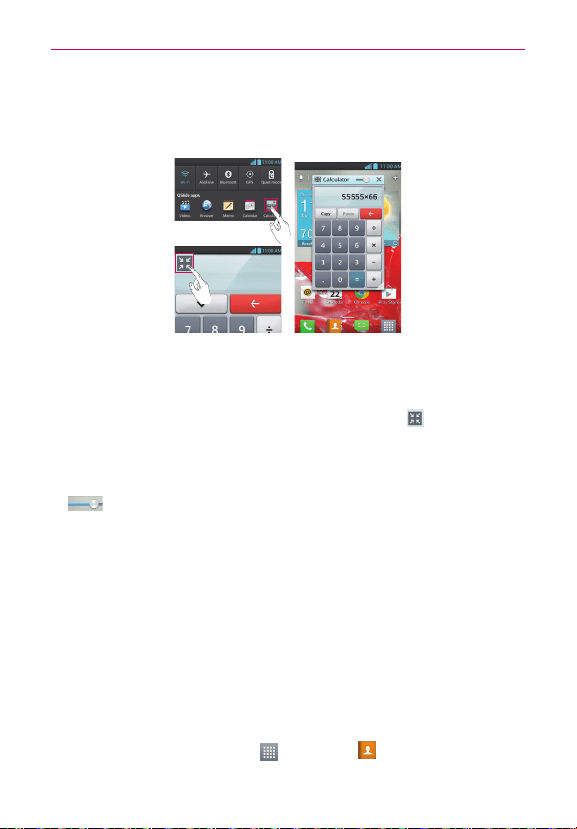
1. Open the Notifications Panel and touch the desired app from the QSlide
apps section.
OR
While using an application that supports QSlide, touch
. The function
will be continuously displayed as a small window on your screen.
2. You can make a call, browse the Web, or choose other phone options.
You can also use the QSlide window by adjusting the transparency bar
.
NOTE
The QSlide function can support up to two windows at the same time.
VuTalk
Use VuTalk to collaboratively communicate using real-time interactive
handwriting.
NOTE
•
VuTalk is compatible with other VuTalk-capable LG devices.
•
During a voice call, you can use VuTalk only when connected to the 3G data network or
Wi-Fi.
•
The screen may lock if no input is made for a period of time.
Registering VuTalk
1. From the Home screen, touch > Contacts .
59
Utilities
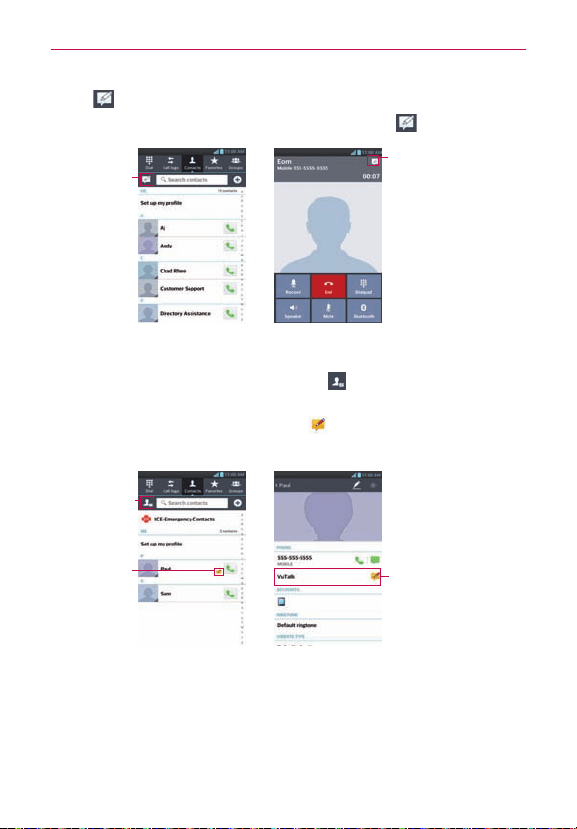
2.Tap andagreetothetermsandconditions.
• Yo u canalsoregistertheVuTalkservicebyselecting
onacallscreen.
Call screenContacts screen
Registering
theVuTalk
service
•
Before registering
the VuTalk service:
RegistertheVuTalk
service
•
After registering
the VuTalk service:
LaunchtheVuTalk
feature
Using VuTalk
1.OpentheContactsapplicationandtouch todisplayonlythecontacts
whousetheVuTalkfeature.
2.Touchthedesiredcontact,thentouch
tosendaninvitationtothe
contact.
Detail contacts screenContacts screen
FilterVuTalk
users
VuTalkuser
LaunchVuTalk
60
Utilities
VuTalk request screenVuTalk agreement screen
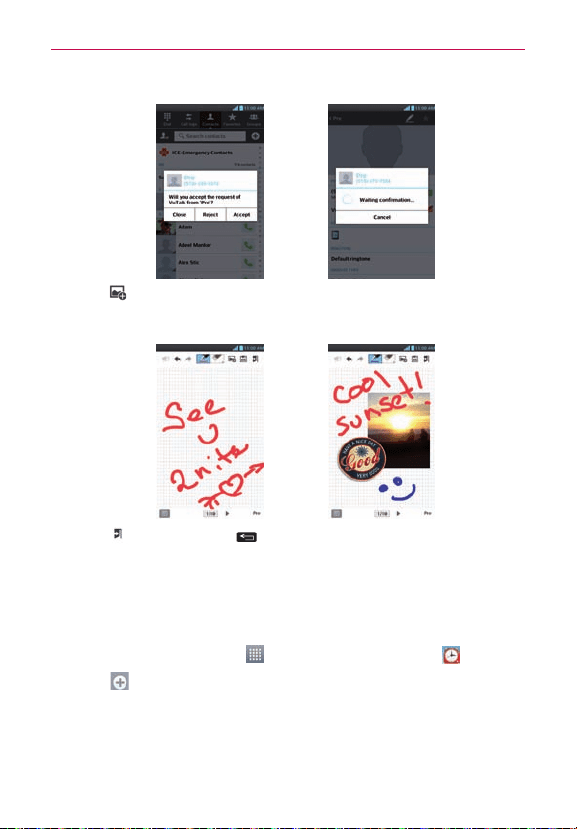
• Touch toattachanimage,takeaphoto,orinsertamapviewor
sticker.
A example of use 2A example of use 1
3.Touch ortheBack Key toendtheVuTalkfeature.
• Yo u maysaveVuTalkcontentstotheNotebookwhenexitingVuTalk.
• TheVuTalkfeaturewillnotbeendedbypressingtheHomeKey.
Setting your alarm
1.OntheHomescreen,touch >Appstab>Alarm/Clock .
2.Touch
toaddanewalarmandenterthedesiredtime.
3.SetRepeat,Snooze duration,Vibration,Alarm sound,Alarm
volume,Auto app starter,Puzzle lock and Memo.
4.TouchSavetosavethealarm.
61
Utilities
Using your calculator
1.OntheHomescreen,touch >Appstab>Calculator .
2.Touchthenumberkeystoenternumbers.
3.Forsimplecalculations,touchthefunctionyouwant(
, , or )
followedby .
NOTE
Formorecomplexcalculations,touchtheMenu Key ,selectAdvancedpanel,then
choosethedesiredfunction.
Adding an event to your calendar
1.OntheHomescreen,touch >Appstab>Calendar .
2.Touch
toselectfromthefollowingCalendarviews:Day,Week,
Month,Agenda.
3.Touchonthedateyouwanttoaddaneventon.
4.Touch
andselecttheaccountwhereyouwanttosavetheevent(if
applicable).
5.TouchtheEvent nameeldandentertheeventname.
6.TouchtheLocationeldandenterthelocation.Checkthedateand
enterthetimeyouwantyoureventtostartandnish.
7.Ifyouwanttoaddanotetoyourevent,touchtheDescriptioneldand
enterthedetails.
8.Ifyouwanttorepeatthealarm,setREPEAT,andsetREMINDERS,if
necessary.
9.TouchSavetosavetheeventinthecalendar.
62
Utilities
Polaris Viewer 4
PolarisViewer4isaprofessionalmobileofcesolutionthatletsusers
convenientlyviewvarioustypesofofcedocuments,includingWord,Excel
andPowerPointles,anywhere,anytime,usingtheirmobiledevices.
OntheHomescreen,touch
>Appstab>Polaris Viewer 4 .
Viewing files
Mobileuserscannoweasilyviewawidevarietyofletypes,including
MicrosoftOfcedocumentsandAdobePDF,rightontheirmobiledevices.
WhenviewingdocumentsusingPolarisViewer4,theobjectsandlayout
remainthesameasintheiroriginaldocuments.
Your Navigator Deluxe
WithYourNavigatorDeluxe,getallofthefeaturesofanadvancedcar
navigationsystemonyourmobilephonewithvoiceturn-by-turnnavigation
enabledbyGPS.Searchforanydestinationincludinggasstations,ATMs,
restaurants,andmore.Getdetailedmapsofanylocation.
1.InordertouseYourNavigatorDeluxe,youmustrstturnonyour
phoneslocationandGPSsettings.OntheHomescreen,touch
>Settings >Location access.Touch .MakesurethatGPS
satellitesisactive.
2.AfteractivatingyourlocationandGPSsettings,presstheHome Key
andtouch >Your Navigator Deluxe .
FromtheYourNavigatorDeluxeHomescreenyoucanselect
• "Drive To"forturnbyturndirectiontoanaddress,airport,contacts
addressesandmore.
• "Maps"toseewhereyoucurrentlyarelocatedonamapandwhattrafc
isinthearea.
• "Places"tosearchfornearbybusinesses,thecheapestgaspricesand
more.
63
Utilities
Play Store
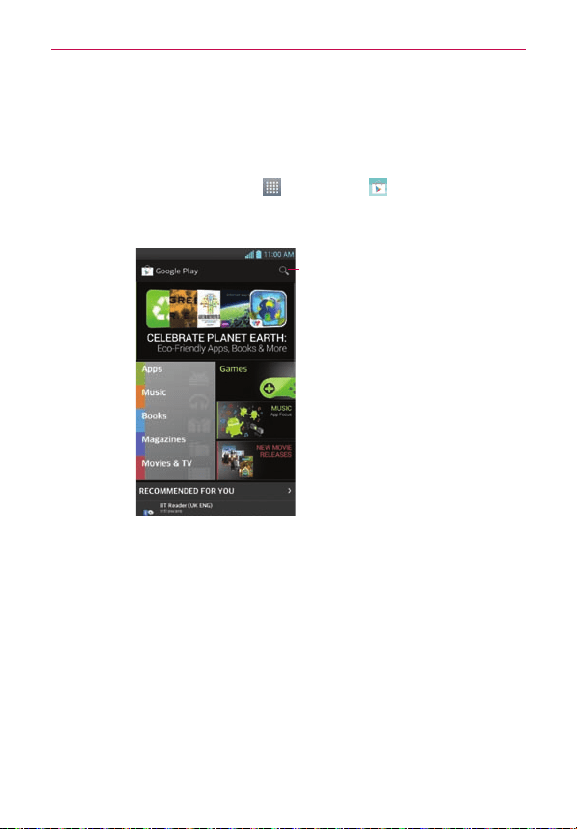
PlayStoreallowsyoutobrowseandsearchforfreeandpaidapplications.
To open the Play Store application
#
OntheHomescreen,touch
>Play Store
.Whenyouopenthe
Play Storeapplicationforthersttime,youmustreadandacceptthe
termsofservicetocontinue.
Touchheretosearchforthe
apps.
To download the applications
NOTE
Beforeyoucandownloadapaidapplication,youmustsetupabillingarrangement.
1.Findanapplicationyouwantandopenitsdetailsscreen.
2.TouchtheInstallbutton(freeapps)orPricebutton(paidapps).The
screenwilldisplayiftheapplicationrequiresaccesstoyourdataor
controlofanyfunctionsonyourphone.ThePlayStoreapplicationtells
youwhatitcanaccessifyoucontinuewiththedownload.
3.Ifyouagreetotheapplication’saccessrequirements,touchAccept &
download(forfreeapplications)orAccept & buy(forpaidapplications.).

64
Utilities
To get help with Play Store
PlayStoreHelpwebpagesareavailablefromallPlayStorescreens.
TouchtheMenu Key
>Help.
TheBrowserapplicationopenstothePlayStoreHelppage,withlinksto
manyhelptopics.
NOTE
Afteryouopenanapp,youcanusuallyadjustitssettingsbytouchingtheMenu Key .
65
The web
Browser
TheBrowsergivesyouafast,full-colorworldofgames,music,news,sport,
entertainmentandmuchmore,rightonyourmobilephone.Whereveryou
areandwhateveryouenjoy.
NOTE
Additionalchargesapplywhenconnectingtotheseservicesanddownloadingcontent.
Checkdatachargeswithyournetworkprovider.
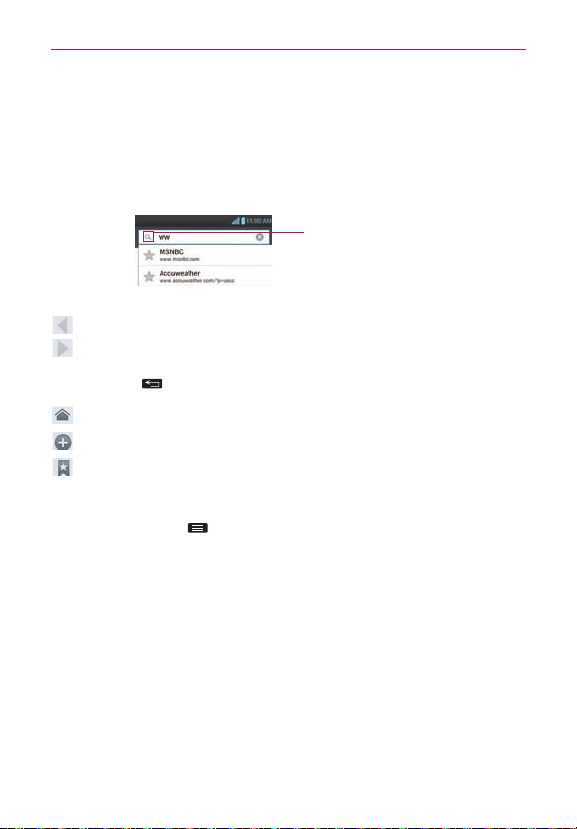
EntertheURLandtouch
heretosearch.
Using the web toolbar
Touchtogobackapage.
Touchtogoforwardsapage,tothepageyouconnectedtoafterthe
currentone.Thisistheoppositeofwhathappenswhenyoupressthe
BackKey
,whichgoestothepreviouspage.
Gotothehomepage.
Touchtoaddanewwindow.
Touchtoaccessyourbookmarks.
Using options
TouchtheMenu Key toviewthefollowingoptions.
Refresh–Updatethecurrentwebpage.
Save to bookmarks–Addthecurrentwebpageasbookmark.
Share page–Allowsyoutosharethewebpagewithothers.
Find on page–Allowsyoutondlettersorwordsonthecurrentwebpage.
Desktop view–Allowsyoutoviewthewebpageindesktopview.
Save for offline reading–Allowsyoutosavethecurrentpageofineso
youcanreaditlater.
Settings–DisplaysBrowsersettings.
Exit–ExitsthewebpageandclosestheBrowser.

66
Settings
To access your phone's settings
OntheHomescreen,touch >Appstab>Settings .
OR
OntheHomescreen,taptheMenu Key
>System settings.
Wireless & Networks
<Airplane mode>
Afterswitchingtoairplanemode,allwirelessconnectionsaredisabled.
< Wi-Fi >
Touchtheswitch toturnonWi-FitoconnecttoavailableWi-Fi
networks.
TIP!
How to obtain the MAC address
TosetupaconnectioninsomewirelessnetworkswithMAClters,youmayneedto
entertheMACaddressofyourLGOPTIMUSF7
™
intotherouter.
You canndtheMACaddressinthefollowinguserinterface:OntheHomescreen,
touch
>Appstab>Settings >Wi-Fi>Menu Key >Advanced>MAC
Address.
< Bluetooth >
Touchtheswitch toturnonBluetoothtoconnecttoBluetoothdevices.
< Mobile data >
Displaysthedatausageandsetmobiledatalimit.
< Call >
You cancongurephonecallsettingssuchasVoicemailandotherspecial
featuresofferedbyyourcarrier.
< Share & Connect >
NFC-Touchtheswitch totoggleNFConandoff.
NOTE
NFC(NearFieldCommunication)isawirelesstechnologythatenablesdatatransmission
betweentwoobjectswhentheyarebroughtwithinafewinchesofeachothers.When
youenableNFConyourphone,yourphonecanexchangedatawithotherNFC-enabled
devicesorreadinformationfromsmarttagsembeddedinposters,stickers,andother

67
Settings
products.FromtheNFCsettingsmenu,youcanmanagedirectsharingandpairing
BluetoothviaNFC.
Direct/Android Beam-Touchtheswitch totoggleDirect/Android
Beamonandoff.
Whenthisfeatureisturnedon,youcanbeamappcontentsorlestoother
NFCandWi-FiDirect(andAndroidBeamdevices)devicesbyholdingthe
devicesclosetogether.
Forexample,youcanbeamBrowserpages,YouTubevideos,contacts,and
more.Andyoucanbeamimages/videosfromtheGallery,musicfromthe
Music,anddocumentsfromthePolarisViewer4.Justbringthedevices
together(typicallybacktoback)andthentouchyourscreen.Theapp
determineswhatgetsbeamed.
Miracast-YoucanmirrorphonescreenandsoundontoLGMiracastdongle
orTVwirelessly.
NOTE
TostarttheMiracastfeaturequickly,touchtheMiracasticon intheNotications
Panel.Whilemirroring,Wi-FiorMobileHotspotcannotbeusedsimultaneously.
SmartShare Beam-EnabletoreceivelefromLGphones.
File networking-FileNetworkingrequireswirelessconnection.Makesure
thatdevicesareusingsameAP(AccessPoint).Networkfoldersharingmay
usemorebattery.
< Tethering & Networks >
Portable Wi-Fi hotspot–Yo u canconguretheportableWi-Fihotspot
settings.
Help-DisplayshelpinformationabouttheportableWi-Fihotspotfeature.
VPN–DisplaysthelistofVirtualPrivateNetworks(VPNs)thatyou've
previouslycongured.AllowsyoutoadddifferenttypesofVPN.
Mobile networks–Allowsyoutoenable/disabledata,dataroaming,and
selectanetworkmodeandsystem.

68
Settings
DEVICE
< Sound >
Quiet time–Settimestoturnoffallsoundsexceptalarmandmedia.
Sound profile–YoucanchooseSound, Vibrate onlyorSilent.
Volumes–You canmanagethevolumesforvariousphonesettings.
Ringtone with vibration–Vibrationfeedbackforcallsandnotications.
Phone ringtone–Allowsyoutosetyourdefaultincomingcallringtone.
Notification sound–Allowsyoutosetyourdefaultnoticationringtone.
Vibrate type - Allowsyoutochoosethevibrationtype.
Gentle vibration-Graduallyincreasesthevibrationuptothecurrent
strengthset.
Vibrate strength-Setthevibratestrengthforcalls,notications,andtouch
feedback.
Incoming call vibration-Selectthetypeofvibrationtouseforincoming
calls.
Dial pad touch tones–Allowsyoutosetthephonetoplaytoneswhen
usingthedialpadtodialnumbers.
Touch sounds–Allowsyoutosetyourphonetoplayasoundwhenyou
touchbuttons,iconsandotheron-screenitemsthatreacttoyourtouch.
Screen lock sound–Allowsyoutosetyourphonetoplayasoundwhen
lockingandunlockingthescreen.
Emergency tone–AllowsyoutosetemergencytoneasOff,Alertor
Vibrate.
Vibrate on touch-Checkmarkifyouwantthephonetovibratewhen
touchingkeys.
< Display >
Brightness–Adjustthescreenbrightness.

69
Settings
Screen timeout–Setthetimeforscreentimeout.
Smart screen-Checkmarkifyouwanttokeepscreenonwhenthephone
detectsyoureyeslookingatthescreen.
Auto-rotate screen–Settoswitchorientationautomaticallywhenyou
rotatethephone.
Font type-Choosethedesiredfonttype.
Font size–Changethesizeofthedisplayfont.
Front touch key light–SetthefrontkeyLEDtime.
Home button LED-SelecttheitemyouwishtoapplyLEDlighting.
Motion sensor calibration-Improvetheaccuracyofthetiltandspeedof
thesensor.
< Home screen >
Theme -Allowsyoutosetthescreenthemeforyourdevice.
Screen swipe effect-Allowsyoutoselecttheeffecttousewhenyou
swipetochangescreens.
Wallpaper-AllowsyoutosetthewallpapertouseonyourHomescreen.
Scroll screens circularly-CheckmarktosettheHomescreenstoscroll
continuously,eliminatingtheneedtoscrollbackintheoppositedirection
whenyoureachoneend.
Portrait view only-CheckmarkthissettingsothattheHomescreenis
alwaysdisplayedinportraitview.
Home backup & restore-Allowsyoutobackupandrestoreapp,widget
andthemecongurations.
< Lock screen >
Select screen lock–Setascreenlocktosecureyourphone.You canset
Swipe,Face Unlock,Pattern,PIN,PasswordorleaveitasNone.
Whenyouturnonyourphoneorwakeupthescreen,you'reaskedtoenter
yourunlocksequencetounlockthescreen.

70
Settings
Wallpaper–YoucansetthelockscreenwallpaperfromtheGalleryor
Wallpaper gallery.
Clocks & shortcuts-Customizeclocksandshortcutsonthelockscreen.
Screen effect-Choosethedesiredscreeneffectwhenyouswipethe
screentounlockthephone.
Owner info–Showownerinformationonthelockscreen.
Lock timer-Selectthelocktimerduration.
Power button instantly locks-Checkmarksothatpressingthe
Power/Lock Key
instantlylocksthephone.
Vibrate on touch-Checkmarkifyouwantthephonetovibratewhen
enteringyourunlocksequence.
< Gestures >
Move Home screen items-Ifyoucheckmarkthis,youcanmovetoother
Homescreencanvasesbytiltingthephonewhileyoupressandholdan
item.
Tilt sensitivity-WhentheMovehomescreenitemsoptionis
checkmarked,youcantestandadjustsensitivityoftiltsensorfortheHome
screenandapplications.
Silence incoming calls-Checkmarktosetthephonetosilenceincoming
callsbyjustippingthephone.
Snooze or stop alarm-Checkmarktosetthephonetosnoozeorstopthe
alarmbyjustippingthephone.
Pause video-Checkmarktosetthephonetopausevideosbyjustipping
thephone.
Help-Provideshelpinformationonsomeofthegesturesfeatures
< One-handed operation >
Dial keypad-Allowsyoutotouchthearrowtoadjustthepositionofthe
dialkeypadtotheleftorright.

71
Settings
LG keyboard-Allowsyoutoickthekeyboardortouchthearrowtoadjust
thepositionoftheLGKeyboardtotheleftorright.
Lock screen-Allowsyoutotouchthearrowtoadjustthepositionofthe
PINentryscreentotheleftorright.
Help-Displayshelpinformationabouttheavailableoptions.
< Storage >
INTERNAL STORAGE–Displaysinternalstorageavailabilityandthetypes
ofdatathatisusingupinternalstorage.
SD CARD-Displaysinternalstorageavailabilityandthetypesofdatathatis
usingupinternalstorage.
Mount/Unmount SD card-MountsandunmountsthemicroSDcardfrom
yourphonesothatyoucanaccessthedataonit,formatthecardorsafely
removeit.
Erase SD card-PermanentlyeraseseverythingonthemicroSDcardand
preparesitforusewithyourphone.
< Battery >
Hereyoucanmanagethebatteryandcheckthepowersavingitems.You
canalsocheckthebatteryuse.
< Apps >
Usethismenutoviewdetailsabouttheapplicationsinstalledonyour
phone,managetheirdata,andforcethemtostop.
PERSONAL
< Accounts & sync >
Allowsyoutomanageyouraccountsandtosynchronizedatainthe
background,whetherornotyouareactivelyworkinginthem.Turningthe
Auto-sync dataoptionoffcansavebatterypowerandlowers(butdoesnot
eliminate)datausage.

72
Settings
< Location access >
Access to my location–Allowsappthathaveaskedyourpermissionuse
yourlocationinformation.
GPS satellites–LetsappsuseGPStopinpointyourlocation.
Wi-Fi & mobile network location–LetsappsuseGoogle'slocation
servicetoestimateyourlocationfaster.Anonymouslocationdatawillbe
collectedandsenttoGoogle.
< Security >
Encrypt phone–Encryptalldataonphoneincludingsystemdata.Require
anumericPINorpasswordtodecryptyourphoneeachtimeyouturniton.
Password typing visible–Showpasswordasyoutype.
Phone administrators–Viewordeactivatedeviceadministrators.
Unknown sources–Allowsyoutoinstallnon-Marketapplications.
Trusted credentials–DisplaytrustedCAcerticates.
Install from storage–ChoosetoinstallencryptedcerticatesfromyourSD
card.
Clear credentials–Removeallcerticates.
< Language & input >
UsetheLanguage&inputsettingstoselectthelanguageforthetexton
yourphoneandforconguringtheon-screenkeyboard,includingwords
you'veaddedtoitsdictionary.
< Backup & reset >
Changethesettingsformanagingyoursettingsanddata.
Back up my data–Settobackupyoursettingsandapplicationdatatothe
Googleserver.
Backup account–Settheaccountyouwanttobackupinformationto.
Automatic restore–Settorestoreyoursettingsandapplicationdatawhen
theapplicationsarereinstalledonyourdevice.

73
Settings
Factory data reset–Resetyoursettingstothefactorydefaultvaluesand
deleteallyourdata.Ifyouresetthephoneinthisway,youarepromptedto
reenterthesameinformationaswhenyourststartedyourphone.
SYSTEM
< Date & time >
UseDate & timesettingstosethowdatesaredisplayed.
< Accessibility >
UsetheAccessibilitysettingstocongureaccessibilityplug-insyouhave
installedonyourphone.
NOTE
Requiresadditionalplug-ins.
< PC connection >
USB connection type–Youcansetthedesiredmode(Charge only,
Media sync(MTP),USB tethering,LG softwareorCamera(PTP)).
Ask on connection–AskUSBconnectionmodewhenconnectingtoa
computer.
Help-DisplaysinformationabouttheUSBconnectiontypes.
On-Screen Phone-Allowsyoutoactivatethisfeaturetodisplaythescreen
andcontrolthephoneusingthePCviaUSB,BluetoothorWi-Ficonnection.
<Developer options>
Allowsyoutoselectdeveloperoptions.
< About phone >
Allowsyoutoviewinformationaboutyourphoneandnetwork.Also
provideslegalandpatentinformation.

74
Settings
DivX Mobile
ABOUTDIVXVIDEO:DivX
®
isadigitalvideoformatcreatedbyDivX,LLC,
asubsidiaryofRoviCorporation.ThisisanofcialDivXCertied
®
device
thathaspassedrigoroustestingtoverifythatitplaysDivXvideo.Visitdivx.
comformoreinformationandsoftwaretoolstoconvertyourlesintoDivX
videos.
ABOUTDIVXVIDEO-ON-DEMAND:ThisDivXCertied
®
devicemustbe
registeredinordertoplaypurchasedDivXVideo-on-Demand(VOD)movies.
Toobtainyourregistrationcode,locatetheDivXVODsectioninyourdevice
setupmenu.Gotovod.divx.comformoreinformationonhowtocomplete
yourregistration.
DivXCertied
®
toplayDivX
®
videouptoHD720p,includingpremium
content.
DivX
®
,DivXCertied
®
andassociatedlogosaretrademarksofRovi
Corporationoritssubsidiariesandareusedunderlicense.
Dolby Digital Plus License notice
ManufacturedunderlicensefromDolbyLaboratories.Dolby
andthedouble-DsymbolaretrademarksofDolby
Laboratories.
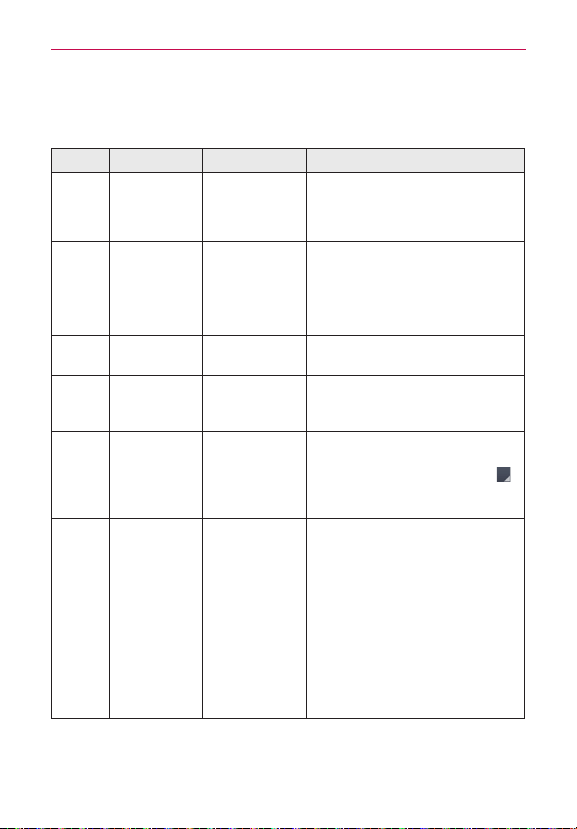
75
Troubleshooting
Pleasechecktoseeifanyproblemsyouhaveencounteredwithyourphone
aredescribedinthissectionbeforetakingthephoneinforserviceorcalling
aservicerepresentative.
Category Sub-Category Question Answer
Bluetooth
Bluetooth
Devices
Whatarethe
functionsavailable
viaBluetooth?
ConnectingtoStereo/MonoHeadset,
CarKit,FTPserverispossible.Whenit’s
connectedtoanotherphoneviaBluetooth,
youcanreceiveContactsdata.
Bluetooth
Bluetooth
Headset
IfmyBluetooth
headsetis
connected,canI
listentomymusic
throughmy3.5mm
wiredheadphones?
WhenaBluetoothheadsetisconnected,all
systemsoundsareplayedovertheheadset.
Asaresult,youwillnotbeabletolistento
musicthroughyourwiredheadphones.
Data ContactsBackup
HowcanIbackup
Contacts?
TheContactsdatacanbesynchronized
betweenyourphoneandGmail™.
Data Synchronization
Isitpossibletoset
uponeway-sync
withGmail?
Onlytwo-waysynchronizationisavailable.
Data Synchronization
Isitpossibleto
synchronizeallthe
Emailfolders?
TheInboxisautomaticallysynchronized.
You canviewotherfoldersbytouching
andselectingthedesiredfolder.
Data Synchronization
Isitpossibleto
transferContacts
datafromafeature
phonetoan
Android™phone?
Yes,ifyourcontactscanbeextractedintoa
.CSVle.
Howtotransfer:
1.Create“.CSV”lewiththecontactson
yourcurrentphone.
2.LogintoGmailwithyourPC.
3.ClickContacts.
4.ClickImport.
5.Attachthe“.CSV”le.
6.Yourcontactswillthenbesynchronized
betweenyourAndroidphoneandGmail.

76
Troubleshooting
Category Sub-Category Question Answer
Google™
Service
GmailLog-In
ShouldIhaveto
logintoGmail
wheneverIwantto
accessGmail?
OnceyoulogintoGmail,youdon’tneedto
loginGmailagain.
Google
Service
GoogleAccount
Isitpossibleto
lteremails?
No,emaillteringisnotsupportedviathe
phone.
Phone
Function
YouTube™
Isitpossibletoplay
YouTubevideos?
Yes,YouTubevideosaresupportedbutmay
havetobeviewedthroughtheYouTube
application(andnottheBrowser).
Phone
Function
Email
Whathappens
whenIexecute
anotherapplication
whilewritingan
email?
Youremailwillautomaticallybesavedasa
draft.
Phone
Function
Ringtone
Istherealesize
limitationforwhen
Iwanttousean
.MP3leasa
ringtone?
Thereisnolesizelimitation.
Phone
Function
MessageTime
Myphonedoes
notdisplaythe
timeofreceiptfor
messagesolder
than24hours.How
canIchangethis?
Nosettingscanbechangedbutfollowthe
stepsbelowtoviewthetimes.
1.Opentheconversationthatcontainsthe
desiredmessage.
2.Touchandholdthemessage.
3.TouchView message details.
Phone
Function
microSDCard
Whatisthe
maximum
supportedsizefor
amemorycard?
32GBmemorycardsarecompatible.
Phone
Function
Navigation
Isitpossibleto
installanother
navigation
applicationonmy
phone?
Anyapplication
thatisavailableonPlay
Storeandiscompatiblewiththehardware
canbeinstalledandused.

77
Troubleshooting
Category Sub-Category Question Answer
Phone
Function
Synchronization
Isitpossibleto
synchronizemy
contactsfrom
allmyemail
accounts?
OnlyGmailandMSExchangeserver
(CompanyEmailServer)contactscanbe
synchronized.
Phone
Function
WaitandPause
Isitpossibleto
saveacontactwith
WaitandPausein
thenumbers?
IfyoutransferredacontactwiththeWait
&Pausefunctionssavedintothenumber,
thosefunctionswillnotberecognized.You
willneedtore-saveeachnumber.
How to re-save numbers with Wait and
Pause:
1.OntheHomescreen,touch
.
2.Dialthenumber,thentouchtheMenu Key
.
3.TouchAdd 2-sec pauseorAdd wait.
4.Entertheremainingnumber(s)and
continuesavingthenumberasnecessary.
Phone
Function
Security
Whatarethe
phone’ssecurity
functions?
You areabletosetthephonetorequirethe
entryofanunlocksequence(Swipe,Face
Unlock,Pattern,PIN,orPassword)before
thephonecanbeaccessedorused.
Phone
Function
UnlockPattern
WhatshouldIdoif
IforgetmyUnlock
Pattern?
AfterattemptingtheUnlockPattern5
times,youcantouchForget Pattern?and
useyourGoogleAccountinformationto
unlockyourphone.Inaddition,ifyouforgot
theunlockpattern,youcanunlockusingthe
BackupPin.
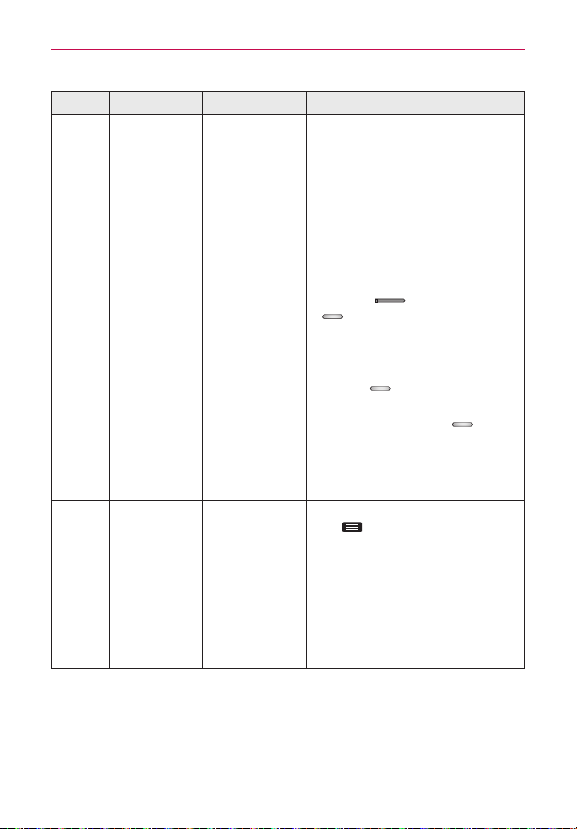
78
Troubleshooting
Category Sub-Category Question Answer
Phone
Function
UnlockPattern
WhatshouldIdoif
IforgottheUnlock
PatternandIdidn’t
createaGoogle
Accountonthe
phone?
WithoutenteringtheUnlockPattern,you
willnotbeabletoaccessyourphone.
Caution:Ifyouperformafactoryreset,
alluserapplicationsanduserdatawillbe
deleted.Pleaseremembertobackupany
importantdatabeforeperformingafactory
reset.
How to perform a factory reset:
1.Turnthephoneoff.
2.AtthesametimepressandholdVolume
Down Key
+Power/Lock Key
.
3.ReleasethekeyswhentheFACTORY
HARDRESETscreenappears.
4.ReadthewarningandpressthePower/
Lock Key
toconrm.Pressany
otherkeytocancel.
5.PressthePower/Lock Key
to
conrmoncemoreorpressanyotherkey
tocancel.
6.Yourdevicewillperformahardresetand
rebootautomatically.
Phone
Function
UnlockPattern
HowdoIcreate
theUnlockPattern?
1.OntheHomescreen,touchtheMenu
Key
.
2.TouchLock screensettings.
3.TouchSelect screen lock.
4.TouchPattern.Thersttimeyoudothis,
ashorttutorialaboutcreatinganunlock
patternappears.
5.Setupbydrawingyourpatternonce>
Continue>drawagain>Confirm.
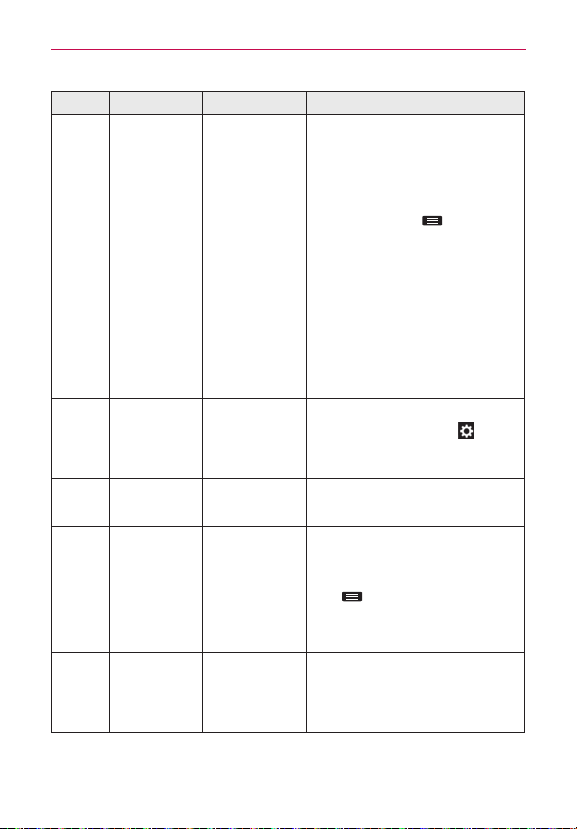
79
Troubleshooting
Category Sub-Category Question Answer
Phone
Function
SpeedDial
IsSpeedDialing
supported?
Yes.You cansetSpeedDialsaswellas
saveacontactdirectlyonyourHome
screen.
To set a Speed Dial:
1.OpentheContactsapplication.
2.TouchtheMenu Key
>Speed dial.
3.Touchtheemptyspeeddiallocationand
selectthedesiredcontactandphone
number.
To set a Direct Dial shortcut to your
Home screen:
1.Touchandholdanemptyareaonyour
Homescreen.
2.TouchWidgets > Direct dial.
3.SelectacontactfromyourContactsList.
Phone
Function
Memory
Isitpossibleto
saveapicture
totheinternal
memorywhile
takingapicture?
Whileusingthecamera,touch
>
Storage>Internal storage.
Phone
Function
Memory
WillIknowwhen
mymemoryisfull?
Yes,youwillreceiveanotication.
Phone
Function
Language
Support
Isitpossible
tochangethe
language?
Thephonehasmulti-lingualcapabilities.
Tochangethelanguage:
1.OntheHomescreen,touchtheMenu
Key
>System settings.
2.TouchLanguage & input > Language.
3.Touchthedesiredlanguage.
Phone
Function
VPN
HowdoIsetupa
VPN?
VPNaccesscongurationisdifferent
accordingtoeachcompany.Tocongure
VPNaccessfromyourphone,youmust
obtainthedetailsfromyourcompany’s
networkadministrator.
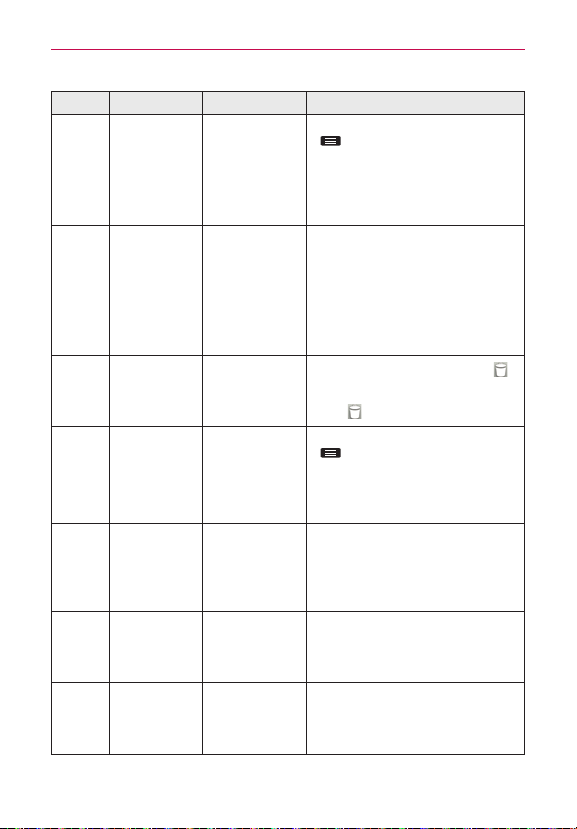
80
Troubleshooting
Category Sub-Category Question Answer
Phone
Function
Screentimeout
Myscreenturns
offafteronly15
seconds.How
canIchangethe
amountoftime
forthebacklightto
turnoff?
1.OntheHomescreen,touchtheMenu Key
.
2.TouchSystem settings > Display >
Screen timeout.
3.Touchthepreferredscreenbacklight
timeouttime.
Phone
Function
Wi-Fi&3G
WhenWi-Fiand3G
arebothavailable,
whichservicewill
myphoneuse?
Whenusingdata,yourphonemaydefault
totheWi-Ficonnection(ifWi-Ficonnectivity
onyourphoneissettoOn).However,there
willbenonoticationwhenyourphone
switchesfromonetotheother.
Toknowwhichdataconnectionisbeing
used,usethe3GorWi-Fiiconatthetopof
yourscreen.
Phone
Function
Homescreen
Isitpossible
toremovean
applicationfrom
theHomescreen?
Yes.Justtouchandholdtheiconuntil
appearsatthetop-centerofthescreen.
Then,withoutliftingyournger,dragthe
iconto
andreleaseit.
Phone
Function
Application
Idownloadedan
applicationand
itcausesalotof
errors.HowdoI
removeit?
1.OntheHomescreen,touchtheMenu Key
.
2.TouchSystem settings > Apps.
3.Touchtheapplicationandthentouch
Uninstall.
Phone
Function
Alarm
CanIusemusic
lesformyalarm?
Yes.Aftersavingamusicleasaringtone,
youcanuseitforyouralarm.
•Touchandholdasonginalibrarylist.In
theContextmenuthatopens,touchSet
as ringtone.
Phone
Function
Alarm
Willmyalarmbe
audibleorwillitgo
offifthephoneis
turnedoff?
No,thisisnotsupported.
Phone
Function
Alarm
IfmyRinger
Volumeissetto
OfforVibrate,willI
hearmyalarm?
Youralarmisprogrammedtobeaudible
eveninthesescenarios.
81
Troubleshooting
Category Sub-Category Question Answer
Phone
Spec
BatteryTime
Whatisthe
maximumamount
oftimemyphone’s
batterywilllast
beforeIneedto
rechargeit?
TalkTime:15hr(900min.)
StandbyTime:300Hr(12.5Days)
Phone
Spec
Band
Whichwireless
bandsare
supportedbythe
phone?
Yourphoneisabletooperateonthe
800MHz,1900MHz,and2100MHzbands.
Recovery
Solution
FactoryReset
HowdoIperforma
factoryreset?
1.OntheHomescreen,touchtheMenu
Key
.
2.TouchSystem settings > Backup & reset
> Factory data reset.
NOTE You cantouchthecheckboxto
alsoeraseallcontentsfromyour
microSDcardwhenthephoneis
reset.
3.ReadthewarningandtouchReset
phone.
4.TouchErase everything.
Attention:Ifafactoryresetisperformed,
allinstalledapplicationanduserdatawillbe
erased.Pleaseremembertobackupany
importantdatabeforeperformingafactory
reset.

82
Safety
HAC
Thisphonehasbeentestedandratedforusewithhearingaidsforsome
ofthewirelesstechnologiesthatituses.However,theremaybesome
newerwirelesstechnologiesusedinthisphonethathavenotbeentested
yetforusewithhearingaids.Itisimportanttotrythedifferentfeaturesof
thisphonethoroughlyandindifferentlocations,usingyourhearingaidor
cochlearimplant,todetermineifyouhearanyinterferingnoise.Consult
yourserviceproviderorthemanufacturerofthisphoneforinformationon
hearingaidcompatibility.Ifyouhavequestionsaboutreturnorexchange
policies,consultyourserviceproviderorphoneretailer.
FCC Part 15 Class B Compliance
Thisdevicecomplieswithpart15ofFCCrules.Operationissubject
tothefollowingtwoconditions:(1)Thisdevicemaynotcauseharmful
interference,and(2)thisdevicemustacceptanyinterferencereceived,
includinginterferencethatcausesundesiredoperation.Anychanges
ormodicationsnotexpresslyapprovedinthisuserguidecouldvoid
yourwarrantyforthisequipment.Useonlythesuppliedantenna.Use
ofunauthorizedantennas(ormodicationstotheantenna)couldimpair
callquality,damagethephone,voidyourwarrantyand/orviolateFCC
regulations.Don’tusethephonewithadamagedantenna.Adamaged
antennacouldcauseaminorskinburn.Contactyourlocaldealerfora
replacementantenna.
FCC RF Exposure Information
WARNING! Read this information before operating the phone.
InAugust1996,theFederalCommunicationsCommission(FCC)ofthe
UnitedStates,withitsactioninReportandOrderFCC96-326,adopted
anupdatedsafetystandardforhumanexposuretoRadioFrequency(RF)
electromagneticenergyemittedbyFCCregulatedtransmitters.Those
guidelinesareconsistentwiththesafetystandardpreviouslysetbybothU.S.
andinternationalstandardsbodies.Thedesignofthisphonecomplieswith
theFCCguidelinesandtheseinternationalstandards.

83
Safety
Bodily Contact During Operation
Thisdevicewastestedfortypicalusewiththebackofthephonekept
0.39inches(1.0cm)fromthebody.TocomplywithFCCRFexposure
requirements,aminimumseparationdistanceof0.39inches(1.0cm)
mustbemaintainedbetweentheuser’sbodyandthebackofthephone,
includingtheantenna,whetherextendedorretracted.Third-partybelt-clips,
holsters,andsimilaraccessoriescontainingmetalliccomponentsmaynot
beused.Avoidtheuseofaccessoriesthatcannotmaintain0.39inches(1.0
cm)distancebetweentheuser’sbodyandthebackofthephoneandhave
notbeentestedforcompliancewithFCCRFexposurelimits.
Vehicle-Mounted External Antenna
(Optional,ifavailable.)
TosatisfyFCCRFexposurerequirements,keep8inches(20cm)between
theuser/bystanderandvehicle-mountedexternalantenna.Formore
informationaboutRFexposure,visittheFCCwebsiteatwww.fcc.gov.
Caution
Useonlythesuppliedantenna.Useofunauthorizedantennas(or
modicationstotheantenna)couldimpaircallquality,damagethephone,
voidyourwarrantyand/orviolateFCCregulations.Don’tusethephonewith
adamagedantenna.Adamagedantennacouldcauseaminorskinburn.
Contactyourlocaldealerforareplacementantenna.
Wi Fi Caution
Thisdeviceiscapableofoperatingin802.11a/nmode.
For802.11a/ndevicesoperatinginthefrequencyrangeof5.15-5.25GHz,
theyarerestrictedforindooroperationstoreduceanypotentialharmful
interferenceforMobileSatelliteServices(MSS)intheUS.
Wi-FiAccessPointsthatarecapableofallowingyourdevicetooperatein
802.11a/nmode(5.15-5.25GHzband)areoptimizedforindooruseonly.
IfyourWi-Finetworkiscapableofoperatinginthismode,pleaserestrict
yourWi-FiuseindoorstonotviolatefederalregulationstoprotectMobile
SatelliteServices.

84
Safety
Consumer Information About Radio Frequency
Emissions
Your wireless phone, which contains a radio transmitter and receiver,
emits radio frequency energy during use. The following consumer
information addresses commonly asked questions about the health
effects of wireless phones.
Are wireless phones safe?
Scienticresearchonthesubjectofwirelessphonesandradiofrequency
(“RF”)energyhasbeenconductedworldwideformanyyears,and
continues.IntheUnitedStates,theFoodandDrugAdministration(“FDA”)
andtheFederalCommunicationsCommission(“FCC”)setpoliciesand
proceduresforwirelessphones.TheFDAissuedawebsitepublicationon
healthissuesrelatedtocellphoneusagewhereitstates,“Thescientic
communityatlarge…believesthattheweightofscienticevidencedoes
notshowanassociationbetweenexposuretoradiofrequency(RF)fromcell
phonesandadversehealthoutcomes.Stillthescienticcommunitydoes
recommendconductingadditionalresearchtoaddressgapsinknowledge.
ThatresearchisbeingconductedaroundtheworldandFDAcontinues
tomonitordevelopmentsinthiseld.You canaccessthejointFDA/FCC
websiteathttp://www.fda.gov(under“c”inthesubjectindex,selectCell
Phones>Research).You canalsocontacttheFDAtoll-freeat(888)463-
6332or(888)INFO-FDA.InJune2000,theFDAenteredintoacooperative
researchanddevelopmentagreementthroughwhichadditionalscientic
researchisbeingconducted.TheFCCissueditsownwebsitepublication
statingthat“thereisnoscienticevidencethatprovesthatwireless
phoneusagecanleadtocancer
oravarietyofotherproblems,including
headaches,dizzinessormemoryloss.”Thispublicationisavailableathttp://
www.fcc.gov/cgb/cellular.htmlorthroughtheFCCat(888)225-5322or(888)
CALL-FCC.
What does “SAR” mean?
In1996,theFCC,workingwiththeFDA,theU.S.EnvironmentalProtection
Agency,andotheragencies,establishedRFexposuresafetyguidelines
forwirelessphonesintheUnitedStates.Beforeawirelessphonemodel

85
Safety
isavailableforsaletothepublic,itmustbetestedbythemanufacturer
andcertiedtotheFCCthatitdoesnotexceedlimitsestablishedbythe
FCC.OneoftheselimitsisexpressedasaSpecicAbsorptionRate,or
“SAR.”SARisameasureoftherateofabsorptionofRFenergyinthe
body.TestsforSARareconductedwiththephonetransmittingatits
highestpowerlevelinalltestedfrequencybands.Since1996,theFCC
hasrequiredthattheSARofhandheldwirelessphonesnotexceed1.6
wattsperkilogram,averagedoveronegramoftissue.AlthoughtheSARis
determinedatthehighestpowerlevel,theactualSARvalueofawireless
phonewhileoperatingcanbelessthanthereportedSARvalue.Thisis
becausetheSARvaluemayvaryfromcalltocall,dependingonfactors
suchasproximitytoacellsite,theproximityofthephonetothebody
whileinuse,andtheuseofhands-freedevices.Formoreinformationabout
SARs,seetheFCC’sOET
Bulletins56and65athttp://www.fcc.gov/Bureaus/Engineering_Technology/
Documents/bulletinsorvisittheCellularTelecommunicationsIndustry
Associationwebsiteathttp://www.ctia.org/consumer_info/index.cfm/
AID/10371.You mayalsowishtocontactthemanufacturerof
yourphone.
Can I minimize my RF exposure?
IfyouareconcernedaboutR F, thereareseveralsimplestepsyoucantake
tominimizeyourRFexposure.You can,ofcourse,reduceyourtalktime.
You canplacemoredistancebetweenyourbodyandthesourceoftheRF,
astheexposureleveldropsoffdramaticallywithdistance.TheFDA/FCC
websitestatesthat“hands-freekitscanbeusedwithwirelessphones
forconvenienceandcomfort.Thesesystemsreducetheabsorptionof
RFenergyintheheadbecausethephone,whichisthesourceoftheRF
emissions,willnotbeplacedagainstthehead.Ontheotherhand,ifthe
phoneismountedagainstthewaistorotherpartofthebodyduringuse,
thenthatpartofthebodywillabsorbmoreRFenergy.Wirelessphones
marketedintheU.S.arerequiredtomeetsafetyrequirementsregardless
ofwhethertheyareusedagainsttheheadoragainstthebody.Either
congurationshouldresultincompliancewiththesafetylimit.”Also,if
youuseyourwirelessphonewhileinacar,youcanuseaphonewithan
antennaontheoutsideofthevehicle.Youshouldalsoreadandfollowyour

86
Safety
wirelessphonemanufacturer’sinstructionsforthesafeoperationofyour
phone.
Do wireless phones pose any special risks to children?
TheFDA/FCCwebsitestatesthat“thescienticevidencedoesnotshowa
dangertousersofwirelesscommunicationdevices,includingchildren.”The
FDA/FCCwebsitefurtherstatesthat“somegroupssponsoredbyother
nationalgovernmentshaveadvisedthatchildrenbediscouragedfrom
usingwirelessphonesatall”.Forexample,theStewartReportfromthe
UnitedKingdom[“UK”]madesucharecommendationinDecember2000.
Inthisreportagroupofindependentexpertsnotedthatnoevidence
existsthatusingacellphonecausesbraintumorsorotherilleffects.[The
UK’s]recommendationtolimitcellphoneusebychildrenwasstrictly
precautionary;itwasnotbasedonscienticevidencethatanyhealth
hazardexists.AcopyoftheUK’sleaetisavailableathttp://www.dh.gov.uk
(search“mobile”),oryoucanwriteto:NRPB,Chilton,Didcot,OxonOX11
ORQ,UnitedKingdom.CopiesoftheUK’sannualreportsonmobilephones
andRFareavailableonlineatwww.iegmp.org.ukandhttp://www.hpa.org.
uk/radiation/(search“mobile”).Parentswhowishtoreducetheirchildren’s
RFexposuremaychoosetorestricttheirchildren’swirelessphoneuse.
Where can I get further information about RF emissions?
Forfurtherinformation,seethefollowingadditionalresources(websites
currentasofApril2005):
U.S. Food and Drug Administration
FDAConsumermagazineNovember-December2000
Telephone:(888)INFO-FDA
http://www.fda.gov(Under“c”inthesubjectindex,selectCellPhones>
Research.)
U.S. Federal Communications Commission
44512thStreet,S.W.Washington,D.C.20554
Telephone:(888)225-5322
http://www.fcc.gov/oet/rfsafety

87
Safety
Independent Expert Group on Mobile Phones
http://www.iegmp.org.uk
Royal Society of Canada Expert Panels on Potential Health Risks
of Radio Frequency Fields from Wireless Telecommunication
Devices
283SparksStreetOttawa,OntarioK1R7X9Canada
Telephone:(613)991-6990
http://www.rsc.ca/index.php?page=Expert_Panels_RF&Lang_id=120
World Health Organization
AvenueAppia201211Geneva27Switzerland
Telephone:01141227912111
http://www.who.int/mediacentre/factsheets/fs193/en/
International Commission on Non-Ionizing Radiation Protection
c/oBundesamtfurStrahlenschutz
IngolstaedterLandstr.1
85764OberschleissheimGermany
Telephone:0114918883332156
http://www.icnirp.de
American National Standards Institute
1819LStreet,N.W.,6thFloorWashington,D.C.20036
Telephone:(202)293-8020
http://www.ansi.org
National Council on Radiation Protection and Measurements
7910WoodmontAvenue,Suite800Bethesda,MD20814-3095
Telephone:(301)657-2652
http://www.ncrponline.org
Engineering in Medicine and Biology Society, Committee on
Man and Radiation (COMAR) of the Institute of Electrical and
Electronics Engineers
http://ewh.ieee.org/soc/embs/comar/

88
Safety
Consumer Information on SAR
(Specific Absorption Rate)
Thismodelphonemeetsthegovernment'srequirementsforexposure
toradiowaves.Yourwirelessphoneisaradiotransmitterandreceiver.
Itisdesignedandmanufacturednottoexceedtheemissionlimits
forexposuretoRadioFrequency(RF)energysetbytheFederal
CommunicationsCommissionoftheU.S.Government.Theselimitsare
partofcomprehensiveguidelinesandestablishpermittedlevelsofRF
energyforthegeneralpopulation.Theguidelinesarebasedonstandards
thatweredevelopedbyindependentscienticorganizationsthrough
periodicandthoroughevaluationofscienticstudies.Thestandardsinclude
asubstantialsafetymargindesignedtoassurethesafetyofallpersons,
regardlessofageandhealth.Theexposurestandardforwirelessmobile
phonesemploysaunitofmeasurementknownastheSpecicAbsorption
Rate,orSAR.TheSARlimitsetbytheFCCis1.6W/kg.TestsforSARare
conductedusingstandardoperatingpositionsspeciedbytheFCCwith
thephonetransmittingatitshighestcertiedpowerlevelinalltested
frequencybands.AlthoughSARisdeterminedatthehighestcertied
powerlevel,theactualSARlevelofthephonewhileoperatingcanbewell
belowthemaximumvalue.Becausethephoneisdesignedtooperateat
multiple
powerlevelstouseonlythepowerrequiredtoreachthenetwork,
ingeneral,thecloseryouaretoawirelessbasestationantenna,thelower
thepoweroutput.Beforeaphonemodelisavailableforsaletothepublic,
itmustbetestedandcertiedtotheFCCthatitdoesnotexceedthelimit
establishedbythegovernment-adoptedrequirementforsafeexposure.
Thetestsareperformedinpositionsandlocations(e.g.,attheearandworn
onthebody)asrequiredbytheFCCforeachmodel.ThehighestSARvalue
forthismodelphonewhentestedforuseattheearis0.78W/kgandwhen
wornonthebody,asdescribedinthisuserguide,is1.14W/kg(bodyworn
measurementsdifferamongphonemodels,dependinguponavailable
accessoriesandFCCrequirements).Whiletheremaybedifferences
betweenSARlevelsofvariousphonesandatvariouspositions,theyall
meetthegovernmentrequirementforsafeexposure.TheFCChasgranted
anEquipmentAuthorizationforthismodelphonewithallreportedSAR

89
Safety
levelsevaluatedasincompliancewiththeFCCRFemissionguidelines.
SARinformationonthismodelphoneisonlewiththeFCCandcanbe
foundundertheDisplayGrantsectionofhttp://www.fcc.gov/oet/fccidafter
searchingonFCCIDZNFUS780.
AdditionalinformationonSpecicAbsorptionRates(SAR)canbefound
ontheCellularTelecommunicationsIndustryAssociation(CTIA)websiteat
http://www.ctia.org/.
*IntheUnitedStatesandCanada,theSARlimitformobilephones
usedbythepublicis1.6watts/kg(W/kg)averagedoveronegramof
tissue.Thestandardincorporatesasubstantialmarginofsafetytogive
additionalprotectionforthepublicandtoaccountforanyvariationsin
measurements.
FCC Hearing-Aid Compatibility (HAC) Regulations
for Wireless Devices
OnJuly10,2003,theU.S.FederalCommunicationsCommission(FCC)
ReportandOrderinWTDocket01-309modiedtheexceptionofwireless
phonesundertheHearingAidCompatibilityActof1988(HACAct)to
requiredigitalwirelessphonesbecompatiblewithhearing-aids.Theintent
oftheHACActistoensurereasonableaccesstotelecommunications
servicesforpersonswithhearingdisabilities.Whilesomewirelessphones
areusednearsomehearingdevices(hearingaidsandcochlearimplants),
usersmaydetectabuzzing,humming,orwhiningnoise.Somehearing
devicesaremoreimmunethanotherstothisinterferencenoise,and
phonesalsovaryintheamountofinterferencetheygenerate.Thewireless
telephoneindustryhasdevelopedaratingsystemforwirelessphones,to
assisthearingdeviceuserstondphonesthatmaybecompatiblewith
theirhearingdevices.Notallphoneshavebeenrated.Phonesthatarerated
havetheratingontheirboxoralabellocatedonthebox.
Theratingsarenotguarantees.Resultswillvarydependingontheuser's
hearingdeviceandhearingloss.Ifyourhearingdevicehappenstobe
vulnerabletointerference,youmaynotbeabletousearatedphone
successfully.Tryingoutthephonewithyourhearingdeviceisthebestway
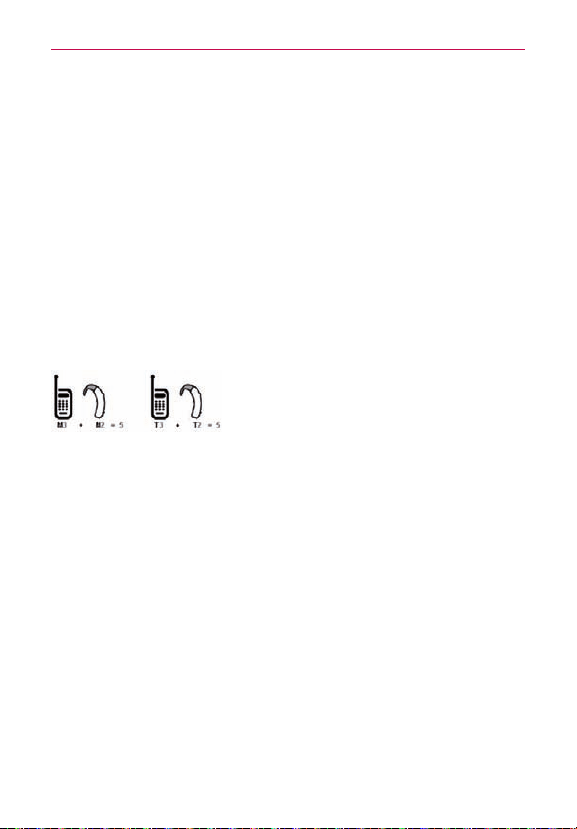
90
Safety
toevaluateitforyourpersonalneeds.
M-Ratings:PhonesratedM3orM4meetFCCrequirementsandarelikely
togeneratelessinterferencetohearingdevicesthanphonesthatarenot
labeled.M4isthebetter/higherofthetworatings.
T-Ratings:PhonesratedT3orT4meetFCCrequirementsandarelikely
togeneratelessinterferencetohearingdevicesthanphonesthatarenot
labeled.T4isthebetter/higherofthetworatings.
Hearingdevicesmayalsoberated.Yourhearingdevicemanufactureror
hearinghealthprofessionalmayhelpyoundthisrating.Higherratings
meanthatthehearingdeviceisrelativelyimmunetointerferencenoise.
Thehearingaidandwirelessphoneratingvaluesarethenaddedtogether.A
sumof5isconsideredacceptablefornormaluse.Asumof6isconsidered
forbestuse.
Intheaboveexample,ifahearingaidmeetstheM2levelratingandthe
wirelessphonemeetstheM3levelrating,thesumofthetwovaluesequal
M5.Thisshouldprovidethehearingaiduserwith“normalusage”while
usingtheirhearingaidwiththeparticularwirelessphone.“Normalusage”in
thiscontextisdenedasasignalqualitythat’sacceptablefornormal
operation.TheMmarkisintendedtobesynonymouswiththeUmark.
TheTmarkisintendedtobesynonymouswiththeUTmark.TheMandT
marksarerecommendedbytheAllianceforTelecommunicationsIndustries
Solutions(ATIS).TheUandUTmarksarereferencedinSection20.19of
theFCCRules.TheHACratingandmeasurementprocedurearedescribed
intheAmericanNationalStandardsInstitute(ANSI)C63.19standard.When
you'retalkingoverthecellphone,it'srecommendedyou'dturntheBT
(Bluetooth)orWLANmodeoffforHAC.Thisphonehasbeentestedand
ratedforusewithhearingaidsforsomeofthewirelesstechnologiesthat
ituses.However,theremaybesomenewerwirelesstechnologiesused
inthisphonethathavenotbeentestedyetforusewithhearingaids.It

91
Safety
isimportanttotrythedifferentfeaturesofthisphonethoroughlyandin
differentlocations,usingyourhearingaidorcochlearimplant,todetermine
ifyouhearanyinterferingnoise.Consultyourserviceproviderorthe
manufacturerofthisphoneforinformationonhearingaidcompatibility.If
youhavequestionsaboutreturnorexchangepolicies,consultyourservice
providerorphoneretailer.
For information about hearing aids and digital wireless phones
FCC Hearing Aid Compatibility and Volume Control
http://www.fcc.gov/cgb/dro/hearing.html
Gallaudet University, RERC
http://tap.gallaudet.edu/Voice/
Hearing Loss Association of America [HLAA]
http://hearingloss.org/content/telephones-and-mobile-devices
The Hearing Aid Compatibility FCC Order
http://hraunfoss.fcc.gov/edocs_public/attachmatch/FCC-03-168A1.pdf
Wireless Phones and Hearing Aid Accessibility
http://www.accesswireless.org/hearingaid/

92
Safety
Caution: Avoid potential hearing loss.
Prolongedexposuretoloudsounds(includingmusic)isthemostcommon
causeofpreventablehearingloss.Somescienticresearchsuggests
thatusingportableaudiodevices,suchasportablemusicplayersand
cellulartelephones,athighvolumesettingsforlongdurationsmayleadto
permanentnoise-inducedhearingloss.Thisincludestheuseofheadphones
(includingheadsets,earbudsandBluetooth
®
orotherwirelessdevices).
Exposuretoveryloudsoundhasalsobeenassociatedinsomestudies
withtinnitus(aringingintheear),hypersensitivitytosoundanddistorted
hearing.Individualsusceptibilitytonoise-inducedhearinglossandother
potentialhearingproblemsvaries.
Theamountofsoundproducedbyaportableaudiodevicevariesdepending
onthenatureofthesound,thedevice,thedevicesettingsandthe
headphones.You shouldfollowsomecommonsenserecommendations
whenusinganyportableaudiodevice:
• Setthevolumeinaquietenvironmentandselectthelowestvolumeat
whichyoucanhearadequately.
• Whenusingheadphones,turnthevolumedownifyoucannothearthe
peoplespeakingnearyouorifthepersonsittingnexttoyoucanhear
whatyouarelisteningto.
• Donotturnthevolumeuptoblockoutnoisysurroundings.Ifyouchoose
tolistentoyourportabledeviceinanoisyenvironment,usenoise-
cancellingheadphonestoblockoutbackgroundenvironmentalnoise.
• Limittheamountoftimeyoulisten.Asthevolumeincreases,lesstime
isrequiredbeforeyourhearingcouldbeaffected.
• Avoidusingheadphonesafterexposuretoextremelyloudnoises,such
asrockconcerts,thatmightcausetemporaryhearingloss.Temporary
hearinglossmightcauseunsafevolumestosoundnormal.
• Donotlistenatanyvolumethatcausesyoudiscomfort.Ifyou
experienceringinginyourears,hearmufedspeechorexperienceany
temporaryhearingdifcultyafterlisteningtoyourportableaudiodevice,
discontinueuseandconsultyourdoctor.

93
Safety
TIA Safety Information
ThefollowingisthecompleteTIASafetyInformationforwirelesshandheld
phones.
Exposure to Radio Frequency Signal
Yourwirelesshandheldportablephoneisalowpowerradiotransmitterand
receiver.WhenON,itreceivesandsendsoutRadioFrequency(RF)signals.
InAugust,1996,theFederalCommunicationsCommissions(FCC)adopted
RFexposureguidelineswithsafetylevelsforhandheldwirelessphones.
Thoseguidelinesareconsistentwiththesafetystandardspreviouslysetby
bothU.S.andinternationalstandardsbodies:
ANSIC95.1(1992)*
NCRPReport86(1986)
ICNIRP(1996)
*AmericanNationalStandardsInstitute;NationalCouncilonRadiation
ProtectionandMeasurements;InternationalCommissiononNon-Ionizing
RadiationProtectionThosestandardswerebasedoncomprehensiveand
periodicevaluationsoftherelevantscienticliterature.Forexample,over
120scientists,engineers,andphysiciansfromuniversities,government
healthagencies,andindustryreviewedtheavailablebodyofresearchto
developtheANSIStandard(C95.1).Thedesignofyourphonecomplies
withtheFCCguidelines(andthosestandards).
Antenna Care
Useonlythesuppliedoranapprovedreplacementantenna.Unauthorized
antennas,modications,orattachmentscoulddamagethephoneandmay
violateFCCregulations.
Tips on Efficient Operation
Foryourphonetooperatemostefciently:
Don’ttouchtheantennaunnecessarilywhenthephoneisinuse.Contact
withtheantennaaffectscallqualityandmaycausethephonetooperateat
ahigherpowerlevelthanotherwiseneeded.

94
Safety
Electronic Devices
MostmodernelectronicequipmentisshieldedfromRFsignals.However,
certainelectronicequipmentmaynotbeshieldedagainsttheRFsignals
fromyourwirelessphone.
Pacemakers
TheHealthIndustryManufacturersAssociationrecommendsthata
minimumseparationofsix(6)inchesbemaintainedbetweenahandheld
wirelessphoneandapacemakertoavoidpotentialinterferencewiththe
pacemaker.Theserecommendationsareconsistentwiththeindependent
researchbyandrecommendationsofWirelessTechnologyResearch.
Personswithpacemakers.
• ShouldALWAYSkeepthephonemorethansix(6)inchesfromtheir
pacemakerwhenthephoneisturnedON;
• Shouldnotcarrythephoneinabreastpocket;
• Shouldusetheearoppositethepacemakertominimizethepotentialfor
interference;
• ShouldturnthephoneOFFimmediatelyifthereisanyreasontosuspect
thatinterferenceistakingplace.
Hearing Aids
Somedigitalwirelessphonesmayinterferewithsomehearingaids.Inthe
eventofsuchinterference,youmaywanttoconsultyourserviceprovider(or
callthecustomerservicelinetodiscussalternatives).
Other Medical Devices
Ifyouuseanyotherpersonalmedicaldevice,consultthemanufacturer
ofyourdevicetodetermineifitisadequatelyshieldedfromexternal
RFenergy.Yourphysicianmaybeabletoassistyouinobtainingthis
information.
Health Care Facilities
TurnyourphoneOFFinhealthcarefacilitieswhenanyregulationspostedin
theseareasinstructyoutodoso.Hospitalsorhealthcarefacilitiesmayuse

95
Safety
equipmentthatcouldbesensitivetoexternalRFenergy.
Vehicles
RFsignalsmayaffectimproperlyinstalledorinadequatelyshielded
electronicsystemsinmotorvehicles.Checkwiththemanufactureror
itsrepresentativeregardingyourvehicle.You shouldalsoconsultthe
manufacturerofanyequipmentthathasbeenaddedtoyourvehicle.
Posted Facilities
TurnyourphoneOFFinanyfacilitywherepostednoticessorequire.
Aircraft
FCCregulationsprohibitusingyourphonewhileintheair.SwitchOFFyour
phonebeforeboardinganaircraft.
Blasting Areas
Toavoidinterferingwithblastingoperations,turnyourphoneOFFwhenina
“blastingarea”orinareasposted:“Turnofftwo-wayradio”.Obeyallsigns
andinstructions.
Potentially Explosive Atmosphere
TurnyourphoneOFFwheninanyareawithapotentiallyexplosive
atmosphereandobeyallsignsandinstructions.Sparksinsuchareascould
causeanexplosionorreresultinginbodilyinjuryorevendeath.
Areaswithapotentiallyexplosiveatmosphereareoften,butnotalways
markedclearly.Potentialareasmayinclude:fuelingareas(suchasgasoline
stations);belowdeckonboats;fuelorchemicaltransferorstoragefacilities;
vehiclesusingliqueedpetroleumgas(suchaspropaneorbutane);areas
wheretheaircontainschemicalsorparticles(suchasgrain,dust,ormetal
powders);andanyotherareawhereyouwouldnormallybeadvisedtoturn
offyourvehicleengine.
For Vehicles Equipped with an Air Bag
Anairbaginateswithgreatforce.DONOTplaceobjects,includingeither
installedorportablewirelessequipment,intheareaovertheairbagorin

96
Safety
theairbagdeploymentarea.Ifin-vehiclewirelessequipmentisimproperly
installedandtheairbaginates,seriousinjurycouldresult.
Part 15.19 statement
Thisdevicecomplieswithpart15ofFCCrules.Operationissubjecttothe
followingtwoconditions:
(1)Thisdevicemaynotcauseharmfulinterference.
(2)Thisdevicemustacceptanyinterferencereceived,includinginterference
thatmaycauseundesiredoperation.
Part 15.105 statement
Thisequipmenthasbeentestedandfoundtocomplywiththelimitsfora
classBdigitaldevice,pursuanttoPart15oftheFCCrules.Theselimitsare
designedtoprovidereasonableprotectionagainstharmfulinterferencein
aresidentialinstallation.Thisequipmentgenerates,uses,andcanradiate
radiofrequencyenergyand,ifnotinstalledandusedinaccordancewith
theinstructions,maycauseharmfulinterferencetoradiocommunications.
However,thereisnoguaranteethatinterferencewillnotoccurinaparticular
installation.Ifyouexperienceinterferencewithreception(e.g.,television),
determineifthisequipmentiscausingtheharmfulinterferencebyturning
theequipmentoffandthenbackontoseeiftheinterferenceisaffected.If
necessary,trycorrectingtheinterferencebyoneormoreofthefollowing
measures:
-Reorientorrelocatethereceivingantenna.
-Increasetheseparationbetweentheequipmentandreceiver.
-Connecttheequipmentintoanoutletonacircuitdifferentfromthatto
whichthereceiverisconnected.
-Consultthedealeroranexperiencedradio/TVtechnicianforhelp.
*Informationsubjecttochange.
Part 15.21 statement
Changesormodicationsthatarenotexpresslyapprovedbythe
manufacturercouldvoidtheuser’sauthoritytooperatetheequipment.

97
Safety
Safety Information
Pleasereadandobservethefollowinginformationforsafeandproperuse
ofyourphoneandtopreventdamage.
Caution
Charger and Adapter Safety
• Thechargerandadapterareintendedforindooruseonly.
• Insertthebatterypackchargerverticallyintothewallpowersocket.
• OnlyusetheLG-approvedbatterycharger.Otherwise,youmaycause
seriousdamagetoyourphone.
• Usethecorrectadapterforyourphonewhenusingthebatterypack
chargerabroad.
Battery Information and Care
• Alwaysunplugthechargerfromthewallsocketafterthephoneisfully
chargedtosaveunnecessarypowerconsumptionofthecharger.
• Pleasereadthemanualofproperinstallationandremovalofthebattery.
• Pleasereadthemanualofspeciedchargeraboutchargingmethod.
• Donotdamagethepowercordbybending,twisting,orheating.Donot
usetheplugifitislooseasitmaycauseelectricshockorre.Donot
placeanyheavyitemsonthepowercord.Donotallowthepowercord
tobecrimpedasitmaycauseelectricshockorre.
• Unplugthepowercordpriortocleaningyourphone,andcleanthepower
plugpinwhenit’sdirty.Whenusingthepowerplug,ensurethatit’srmly
connected.Ifnot,itmaycauseexcessiveheatorre.Ifyouputyour
phoneinapocketorbagwithoutcoveringthereceptacleofthephone
(powerplugpin),metallicarticles(suchasacoin,papercliporpen)may
short-circuitthephone.Alwayscoverthereceptaclewhennotinuse.
• Rechargethebatteryafterlongperiodsofnon-usetomaximizebattery
life.Batterylifewillvaryduetousagepatternandenvironmental
conditions.

98
Safety
• PleaseuseonlyanLG-approvedchargingaccessorytochargeyourLG
phone.Improperhandlingofthechargingport,aswellastheuseofan
incompatiblecharger,maycausedamagetoyourphoneandvoidthe
warranty.
• Neverstoreyourphoneintemperaturelessthan-4°Forgreaterthan
122°F.Chargethebatteryinrangeof0°C~45°C.
• Chargingtemperaturerangeisregulatedbetween0°Cand45°C.Donot
chargethebatteryoutofrecommendedtemperaturerange.Charging
outofrecommendedrangemightcausethegeneratingheatorserious
damageofbattery.Andalso,itmightcausethedeteriorationofbattery's
characteristicsandcyclelife.
• Donotuseorleavethebatteryundertheblazingsunorinheatedcarby
sunshine.Thebatterymaygenerateheat,smokeorame.Andalso,it
mightcausethedeteriorationofbattery’scharacteristicsorcyclelife.
• Thebatterypackhasprotectioncircuittoavoidthedanger.Donotuse
nearbytheplacewheregeneratesstaticelectricitymorethan100V
whichgivesdamagetotheprotectioncircuit.Iftheprotectioncircuit
werebroken,thebatterywouldgeneratesmoke,ruptureorame.
• Whenthebatteryhasrust,badsmellorsomethingabnormalatrst-
time-using,do
notusetheequipmentandgotobringthebatterytothe
shopwhichitwasbought.
• Incaseyoungerchildrenusethebattery,theirparentsshouldteachthem
howtousebatteriesaccordingtothemanualwithcare.
• Iftheskinorclothissmearedwithliquidfromthebattery,washwith
freshwater.Itmaycausetheskininammation.Removeanddonotuse
thebattery.
• Donothandlethephonewithwethandswhileitisbeingcharged.It
maycauseanelectricshockorseriouslydamageyourphone.
• Donotplaceoranswercallswhilechargingthephoneasitmayshort-
circuitthephoneand/orcauseelectricshockorre.
• Thechargerandadapterareintendedforindooruseonly.

99
Safety
• Insertthebatterypackchargerverticallyintothewallpowersocket.
• OnlyusetheLG-approvedbatterycharger.Otherwise,youmaycause
seriousdamagetoyourphoneandriskofoverheating,reorexplosion
mayoccur.
• Usethecorrectadapterforyourphonewhenusingthebatterypack
chargerabroad.
• Talkingonyourphoneforalongperiodoftimemayreducecallquality
duetoheatgeneratedduringuse.
• Donotuseharshchemicals(suchasalcohol,benzene,thinners,etc.)or
detergentstocleanyourphone.Thiscouldcauseare.Donotplaceor
answercallswhilechargingthephoneasitmayshort-circuitthephone
and/orcauseelectricshockorre.Don’tshort-circuitthebattery.Metallic
articlessuchasacoin,papercliporpeninyourpocketorbagmayshort-
circuitthe+and–terminalsofthebattery(metalstripsonthebattery)
uponmoving.Short-circuitoftheterminalmaydamagethebatteryand
causeanexplosion.
• Neveruseandunapprovedbatterysincethiscoulddamagethephone
and/orbatteryandcouldcausethebatterytoexplode.Onlyusethe
batteriesandchargersprovidedbyLG.Thewarrantywillnotbeapplied
toproductsprovidedbyothersuppliers.
Onlyauthorizedpersonnel
shouldservicethephoneanditsaccessories.Faultyinstallationor
servicemayresultinaccidentsandconsequentlyinvalidatethewarranty.

100
Safety
Explosion, Shock, and Fire Hazards
• Donotputyourphoneinaplacesubjecttoexcessivedustandkeepthe
minimumrequireddistancebetweenthepowercordandheatsources.
• Unplugthepowercordpriortocleaningyourphone,andcleanthepower
plugpinwhenit’sdirty.
• Whenusingthepowerplug,ensurethatit’srmlyconnected.Ifnot,it
maycauseexcessiveheatorre.
• Ifyouputyourphoneinapocketorbagwithoutcoveringthereceptacle
ofthephone(powerplugpin),metallicarticles(suchasacoin,paperclip
orpen)mayshort-circuitthephoneandmaycauseanexplosion.Always
coverthereceptaclewhennotinuse.
• Don’tshort-circuitthebattery.Metallicarticlessuchasacoin,paperclip
orpeninyourpocketorbagorcontactwithsharpobjectsincluding
animalbitesmayshort-circuitthe+and–terminalsofthebattery(metal
stripsonthebattery)uponmoving.Shortcircuitoftheterminalmay
damagethebatteryandcauseanexplosion.
General Notice
• Usingadamagedbatteryorplacingabatteryinyourmouthoranimal's
mouthmaycauseseriousinjuryincludingareorexplosion.
• Donotplaceitemscontainingmagneticcomponentssuchasacredit
card,phonecard,bankbook,orsubwayticketnearyourphone.The
magnetismofthephonemaydamagethedatastoredinthemagnetic
strip.
• Talkingonyourphoneforalongperiodoftimemayreducecallquality
duetoheatgeneratedduringuse.
• Whenthephoneisnotusedforalongperiodtime,storeitinasafe
placewiththepowercordunplugged.
• Usingthephoneinproximitytoreceivingequipment(i.e.,TVorradio)
maycauseinterferencetothephone.
• Donotusethephoneiftheantennaisdamaged.Ifadamaged

101
Safety
antennacontactsskin,itmaycauseaslightburn.PleasecontactanLG
AuthorizedServiceCentertoreplacethedamagedantenna.
• Donotimmerseyourphoneinwater,liquid,orexposetohighhumidity.
Ifthishappens,turnitoffimmediatelyandremovethebattery.
Immediately,takeittoanLGAuthorizedServiceCenter.
• Donotpaintyourphone.
• Thedatasavedinyourphonemightbedeletedduetocarelessuse,
repairofthephone,orupgradeofthesoftware.Pleasebackupyour
importantphonenumbers.(Ringtones,textmessages,voicemessages,
pictures,andvideoscouldalsobedeleted.)Themanufacturerisnot
liablefordamageduetothelossofdata.
• Whenyouusethephoneinpublicplaces,settheringtonetovibrationso
youdon'tdisturbothers.
• Donotturnyourphoneonoroffwhenputtingittoyourear.
• Useaccessories,suchasearphonesandheadsets,withcaution.
Ensurethatcablesaretuckedawaysafelyanddonottouchtheantenna
unnecessarily.
FDA Consumer Update
TheU.S.FoodandDrugAdministration’sCenterforDevicesand
RadiologicalHealthConsumerUpdateonMobilePhones
1. Do wireless phones pose a health hazard?
Theavailablescienticevidencedoesnotshowthatanyhealthproblems
areassociatedwithusingwirelessphones.Thereisnoproof,however,that
wirelessphonesareabsolutelysafe.WirelessphonesemitlowlevelsofRadio
Frequency(RF)energyinthemicrowaverangewhilebeingused.Theyalso
emitverylowlevelsofRFwheninstandbymode.WhereashighlevelsofRF
canproducehealtheffects(byheatingtissue),exposuretolowlevelRFthat
doesnotproduceheatingeffectscausesnoknownadversehealtheffects.
ManystudiesoflowlevelRFexposureshavenotfoundanybiologicaleffects.
Somestudieshavesuggestedthatsomebiologicaleffectsmayoccur,butsuch

102
Safety
ndingshavenotbeenconrmedbyadditionalresearch.Insomecases,other
researchershavehaddifcultyinreproducingthosestudies,orindetermining
thereasonsforinconsistentresults.
2. What is the FDA's role concerning the safety of wireless phones?
Underthelaw,theFDAdoesnotreviewthesafetyofradiation-emitting
consumerproductssuchaswirelessphonesbeforetheycanbesold,
asitdoeswithnewdrugsormedicaldevices.However,theagency
hasauthoritytotakeactionifwirelessphonesareshowntoemitRadio
Frequency(RF)energyatalevelthatishazardoustotheuser.Insucha
case,theFDAcouldrequirethemanufacturersofwirelessphonestonotify
usersofthehealthhazardandtorepair,replace,orrecallthephonessothat
thehazardnolongerexists.
AlthoughtheexistingscienticdatadonotjustifyFDAregulatoryactions,
theFDAhasurgedthewirelessphoneindustrytotakeanumberofsteps,
includingthefollowing.
• SupportneededresearchintopossiblebiologicaleffectsofRFofthetype
emittedbywirelessphones;
• DesignwirelessphonesinawaythatminimizesanyRFexposuretothe
userthatisnotnecessaryfordevicefunction;and
• Cooperateinprovidingusersofwirelessphoneswiththebestpossible
informationonpossibleeffectsofwirelessphoneuseonhumanhealth.
TheFDAbelongstoaninteragencyworkinggroupofthefederalagencies
thathaveresponsibilityfordifferentaspectsofRFsafetytoensure
coordinatedeffortsatthefederallevel.Thefollowingagenciesbelongto
thisworkinggroup:
• NationalInstituteforOccupationalSafetyandHealth
• EnvironmentalProtectionAgency
• OccupationalSafetyandHealthAdministration
• NationalTelecommunicationsandInformationAdministration

103
Safety
TheNationalInstitutesofHealthparticipatesinsomeinteragencyworking
groupactivities,aswell.TheFDAsharesregulatoryresponsibilitiesfor
wirelessphoneswiththeFederalCommunicationsCommission(FCC).All
phonesthataresoldintheUnitedStatesmustcomplywithFCCsafety
guidelinesthatlimitRFexposure.
TheFCCreliesontheFDAandotherhealthagenciesforsafetyquestions
aboutwirelessphones.
TheFCCalsoregulatesthebasestationsthatthewirelessphonenetworks
relyupon.Whilethesebasestationsoperateathigherpowerthandothe
wirelessphonesthemselves,theRFexposuresthatpeoplegetfromthese
basestationsaretypicallythousandsoftimeslowerthanthosetheycan
getfromwirelessphones.Basestationsarethusnotthesubjectofthe
safetyquestionsdiscussedinthisdocument.
3. What kinds of phones are the subject of this update?
Theterm“wirelessphone”refersheretohandheldwirelessphoneswith
built-inantennas,oftencalled“cell”,“mobile”,or“PCS”phones.These
typesofwirelessphonescanexposetheusertomeasurableRadio
Frequency(RF)energybecauseoftheshortdistancebetweenthephone
andtheuser’shead.
TheseRFexposuresarelimitedbyFCCsafetyguidelinesthatwere
developedwiththeadviceoftheFDAandotherfederalhealthandsafety
agencies.Whenthephoneislocatedatgreaterdistancesfromtheuser,
theexposuretoRFisdrasticallylowerbecauseaperson'sRFexposure
decreasesrapidlywithincreasingdistancefromthesource.Theso-called
“cordlessphones,”whichhaveabaseunitconnectedtothetelephone
wiringinahouse,typicallyoperateatfarlowerpowerlevels,andthus
produceRFexposuresfarbelowtheFCCsafetylimits.
4. What are the results of the research done already?
Theresearchdonethusfarhasproducedconictingresults,andmany
studieshavesufferedfromawsintheirresearchmethods.Animal
experimentsinvestigatingtheeffectsofRadioFrequency(RF)energy
exposurescharacteristicofwirelessphoneshaveyieldedconicting

104
Safety
resultsthatoftencannotberepeatedinotherlaboratories.Afewanimal
studies,however,havesuggestedthatlowlevelsofRFcouldaccelerate
thedevelopmentofcancerinlaboratoryanimals.However,manyofthe
studiesthatshowedincreasedtumordevelopmentusedanimalsthathad
beengeneticallyengineeredortreatedwithcancercausingchemicalsso
astobepre-disposedtodevelopcancerintheabsenceofRFexposure.
OtherstudiesexposedtheanimalstoRFforupto22hoursperday.These
conditionsarenotsimilartotheconditionsunderwhichpeopleusewireless
phones,sowedonotknowwithcertaintywhattheresultsofsuchstudies
meanforhumanhealth.Threelargeepidemiologystudieshavebeen
publishedsinceDecember2000.Betweenthem,thestudiesinvestigated
anypossibleassociationbetweentheuseofwirelessphonesandprimary
braincancer,glioma,meningioma,oracousticneuroma,tumorsofthe
brainorsalivarygland,leukemia,orothercancers.Noneofthestudies
demonstratedtheexistenceofanyharmfulhealtheffectsfromwireless
phoneRFexposures.However,noneofthestudiescananswerquestions
aboutlong-termexposures,sincetheaverageperiodofphoneuseinthese
studieswasaroundthreeyears.
5. What research is needed to decide whether RF exposure from
wireless phones poses a health risk?
Acombinationoflaboratorystudiesandepidemiologicalstudiesofpeople
actuallyusingwirelessphoneswouldprovidesomeofthedatathatare
needed.Lifetimeanimalexposurestudiescouldbecompletedinafew
years.However,verylargenumbersofanimalswouldbeneededtoprovide
reliableproofofacancerpromotingeffectifoneexists.Epidemiological
studiescanprovidedatathatisdirectlyapplicabletohumanpopulations,
buttenormoreyearsfollow-upmaybeneededtoprovideanswersabout
somehealtheffects,suchascancer.Thisisbecausetheintervalbetween
thetimeofexposuretoacancer-causingagentandthetimetumors
develop—iftheydo—maybemany,manyyears.Theinterpretationof
epidemiologicalstudiesishamperedbydifcultiesinmeasuringactualRF
exposureduringday-to-dayuseofwirelessphones.Manyfactorsaffect
thismeasurement,suchastheangleatwhichthephoneisheld,orwhich
modelofphoneisused.

105
Safety
6. What is the FDA doing to find out more about the possible
health effects of wireless phone RF?
TheFDAisworkingwiththeU.S.NationalToxicologyProgramandwith
groupsofinvestigatorsaroundtheworldtoensurethathighpriorityanimal
studiesareconductedtoaddressimportantquestionsabouttheeffects
ofexposuretoRadioFrequency(RF)energy.TheFDAhasbeenaleading
participantintheWorldHealthOrganizationInternationalElectroMagnetic
Fields(EMF)Projectsinceitsinceptionin1996.Aninuentialresultofthis
workhasbeenthedevelopmentofadetailedagendaofresearchneeds
thathasdriventheestablishmentofnewresearchprogramsaroundthe
world.Theprojecthasalsohelpeddevelopaseriesofpublicinformation
documentsonEMFissues.TheFDAandtheCellularTelecommunications
&InternetAssociation(CTIA)haveaformalCooperativeResearchAnd
DevelopmentAgreement(CRADA)todoresearchonwirelessphonesafety.
TheFDAprovidesthescienticoversight,obtaininginputfromexpertsin
government,industry,andacademicorganizations.CTIA-fundedresearch
isconductedthroughcontractswithindependentinvestigators.Theinitial
researchwillincludebothlaboratorystudiesandstudiesofwirelessphone
users.TheCRADAwillalsoincludeabroadassessmentofadditional
researchneedsinthecontextofthelatestresearchdevelopmentsaround
theworld.
7. How can I find out how much Radio Frequency energy exposure
I can get by using my wireless phone?
AllphonessoldintheUnitedStatesmustcomplywithFederal
CommunicationsCommission(FCC)guidelinesthatlimitRadioFrequency
(RF)energyexposures.TheFCCestablishedtheseguidelinesin
consultationwiththeFDAandtheotherfederalhealthandsafetyagencies.
TheFCClimitforRFexposurefromwirelessphonesissetataSpecic
AbsorptionRate(SAR)of1.6wattsperkilogram(1.6W/kg).TheFCClimitis
consistentwiththesafetystandardsdevelopedbytheInstituteofElectrical
andElectronicEngineering(IEEE)andtheNationalCouncilonRadiation
ProtectionandMeasurement.Theexposurelimittakesintoconsideration
thebody’sabilitytoremoveheatfromthetissuesthatabsorbenergyfrom
thewirelessphoneandissetwellbelowlevelsknowntohaveeffects.

106
Safety
ManufacturersofwirelessphonesmustreporttheRFexposurelevelfor
eachmodelofphonetotheFCC.TheFCCwebsite(http://www.fcc.gov/
oet/rfsafety)givesdirectionsforlocatingtheFCCidenticationnumberon
yourphonesoyoucanndyourphone’sRFexposurelevelintheonline
listing.
8. What has the FDA done to measure the Radio Frequency energy
coming from wireless phones?
TheInstituteofElectricalandElectronicEngineers(IEEE)isdevelopinga
technicalstandardformeasuringtheRadioFrequency(RF)energyexposure
fromwirelessphonesandotherwirelesshandsetswiththeparticipationand
leadershipofFDAscientistsandengineers.Thestandard,“Recommended
PracticeforDeterminingtheSpatial-PeakSpecicAbsorptionRate(SAR)in
theHumanBodyDuetoWirelessCommunicationsDevices:Experimental
Techniques”,setsforththerstconsistenttestmethodologyformeasuring
therateatwhichRFisdepositedintheheadsofwirelessphoneusers.
Thetestmethodusesatissue-simulatingmodelofthehumanhead.
StandardizedSARtestmethodologyisexpectedtogreatlyimprovethe
consistencyofmeasurementsmadeatdifferentlaboratoriesonthesame
phone.SARisthemeasurementoftheamountofenergyabsorbedin
tissue,eitherbythewholebodyorasmallpartofthebody.Itismeasured
inwatts/kg(ormilliwatts/g)ofmatter.Thismeasurementisusedto
determinewhetherawirelessphonecomplieswithsafetyguidelines.
9. What steps can I take to reduce my exposure to Radio Frequency
energy from my wireless phone?
Ifthereisariskfromtheseproducts—andatthispointwedonotknowthat
thereis—itisprobablyverysmall.Butifyouareconcernedaboutavoidingeven
potentialrisks,youcantakeafewsimplestepstominimizeyourexposureto
RadioFrequency(RF)energy.Sincetimeisakeyfactorinhowmuchexposurea
personreceives,reducingtheamountoftimespentusingawirelessphonewill
reduceRFexposure.Ifyoumustconductextendedconversationsbywireless
phoneeveryday,youcouldplacemoredistancebetweenyourbodyandthe
sourceoftheR F, sincetheexposureleveldropsoffdramaticallywithdistance.
Forexample,youcoulduseaheadsetandcarrythewirelessphoneawayfrom

107
Safety
yourbodyoruseawirelessphoneconnectedtoaremoteantenna.Again,the
scienticdatadoesnotdemonstratethatwirelessphonesareharmful.Butif
youareconcernedabouttheRFexposurefromtheseproducts,youcanuse
measureslikethosedescribedabovetoreduceyourRFexposurefromwireless
phoneuse.
10. What about children using wireless phones?
Thescienticevidencedoesnotshowadangertousersofwireless
phones,includingchildrenandteenagers.Ifyouwanttotakestepstolower
exposuretoRadioFrequency(RF)energy,themeasuresdescribedabove
wouldapplytochildrenandteenagersusingwirelessphones.Reducingthe
timeofwirelessphoneuseandincreasingthedistancebetweentheuser
andtheRFsourcewillreduceRFexposure.
Somegroupssponsoredbyothernationalgovernmentshaveadvisedthat
childrenbediscouragedfromusingwirelessphonesatall.Forexample,
thegovernmentintheUnitedKingdomdistributedleaetscontaining
sucharecommendationinDecember2000.Theynotedthatnoevidence
existsthatusingawirelessphonecausesbraintumorsorotherilleffects.
Theirrecommendationtolimitwirelessphoneusebychildrenwasstrictly
precautionary;itwasnotbasedonscienticevidencethatanyhealthhazard
exists.
11. What about wireless phone interference with medical
equipment?
RadioFrequency(RF)energyfromwirelessphonescaninteractwithsome
electronicdevices.Forthisreason,theFDAhelpeddevelopadetailed
testmethodtomeasureElectroMagneticInterference(EMI)ofimplanted
cardiacpacemakersanddebrillatorsfromwirelesstelephones.Thistest
methodisnowpartofastandardsponsoredbytheAssociationforthe
AdvancementofMedicalInstrumentation(AAMI).Thenaldraft,ajoint
effortbytheFDA,medicaldevicemanufacturers,andmanyothergroups,
wascompletedinlate2000.Thisstandardwillallowmanufacturersto
ensurethatcardiacpacemakersanddebrillatorsaresafefromwireless
phoneEMI.TheFDAhastestedhearingaidsforinterferencefromhandheld
wirelessphonesandhelpeddevelopavoluntarystandardsponsoredby

108
Safety
theInstituteofElectricalandElectronicEngineers(IEEE).Thisstandard
speciestestmethodsandperformancerequirementsforhearingaids
andwirelessphonessothatnointerferenceoccurswhenapersonusesa
“compatible”phoneanda“compatible”hearingaidatthesametime.This
standardwasapprovedbytheIEEEin2000.
TheFDAcontinuestomonitortheuseofwirelessphonesforpossible
interactionswithothermedicaldevices.Shouldharmfulinterferencebe
foundtooccur,theFDAwillconducttestingtoassesstheinterferenceand
worktoresolvetheproblem.
12. Where can I find additional information?
Foradditionalinformation,pleaserefertothefollowingresources:
FDAwebpageonwirelessphones(http://www.fda.gov/cellphones/)
FederalCommunicationsCommission(FCC)RFSafetyProgram(http://
www.fcc.gov/oet/rfsafety)
InternationalCommissiononNon-lonizingRadiationProtection(http://www.
icnirp.de)
WorldHealthOrganization(WHO)InternationalEMFProject(http://www.
who.int/emf)
NationalRadiologicalProtectionBoard(UK)(http://www.hpa.org.uk/
radiation/)

109
Safety
Driving
Checkthelawsandregulationsontheuseofwirelessphonesintheareas
whereyoudriveandalwaysobeythem.Also,ifusingyourphonewhile
driving,pleaseobservethefollowing:
• Givefullattentiontodriving--drivingsafelyisyourrstresponsibility;
• Usehands-freeoperation,ifavailable;
• Pullofftheroadandparkbeforemakingoransweringacallifdriving
conditionsorthelawrequireit.
10 Driver Safety Tips
Yourwirelessphonegivesyouthepowerfulabilitytocommunicateby
voicealmostanywhere,anytime.Animportantresponsibilityaccompanies
thebenetsofwirelessphones,onethateveryusermustuphold.When
operatingacar,drivingisyourrstresponsibility.Whenusingyourwireless
phonebehindthewheelofacar,practicegoodcommonsenseand
rememberthefollowingtips:
1. Gettoknowyourwirelessphoneanditsfeaturessuchasspeeddial
andredial.Carefullyreadyourinstructionmanualandlearntotake
advantageofvaluablefeaturesmostphonesoffer,includingautomatic
redialandmemory.Also,worktomemorizethephonekeypadsoyou
canusethespeeddialfunctionwithouttakingyourattentionoffthe
road.
2. Whenavailable,useahands-freedevice.Anumberofhands-free
wirelessphoneaccessoriesarereadilyavailabletoday.Whetheryou
chooseaninstalledmounteddeviceforyourwirelessphoneora
speakerphoneaccessory,takeadvantageofthesedevicesifavailable
toyou.
3. Makesureyouplaceyourwirelessphonewithineasyreachandwhere
youcanreachitwithoutremovingyoureyesfromtheroad.Ifyouget
anincomingcallataninconvenienttime,ifpossible,letyourvoicemail
answeritforyou.

110
Safety
4. Suspendconversationsduringhazardousdrivingconditionsor
situations.Letthepersonyouarespeakingwithknowyouaredriving;
ifnecessary,suspendthecallinheavytrafcorhazardousweather
conditions.Rain,sleet,snow,andicecanbehazardous,butsoisheavy
trafc.Asadriver,yourrstresponsibilityistopayattentiontotheroad.
5. Don’ttakenotesorlookupphonenumberswhiledriving.Ifyouare
readinganaddressbookorbusinesscard,orwritinga“to-do”list
whiledrivingacar,youarenotwatchingwhereyouaregoing.Itis
commonsense.Donotgetcaughtinadangeroussituationbecause
youarereadingorwritingandnotpayingattentiontotheroadornearby
vehicles.
6. Dialsensiblyandassessthetrafc;ifpossible,placecallswhenyouare
notmovingorbeforepullingintotrafc.Trytoplanyourcallsbeforeyou
beginyourtriporattempttocoincideyourcallswithtimesyoumaybe
stoppedatastopsign,redlight,orotherwisestationary.Butifyouneed
todialwhiledriving,followthissimpletip--dialonlyafewnumbers,
checktheroadandyourmirrors,thencontinue.
7. Donotengageinstressfuloremotionalconversationsthatmaybe
distracting.Stressfuloremotionalconversationsanddrivingdonot
mix;theyaredistractingandevendangerouswhenyouarebehindthe
wheelofacar.Makepeopleyouaretalkingwithawareyouaredriving
andifnecessary,suspendconversationswhichhavethepotentialto
divertyourattentionfromtheroad.
8. Useyourwirelessphonetocallforhelp.Yourwirelessphoneisoneof
thegreatesttoolsyoucanowntoprotectyourselfandyourfamilyin
dangeroussituations--withyourphoneatyourside,helpisonlythree
numbersaway.Dial911orotherlocalemergencynumberinthecaseof
re,trafcaccident,roadhazard,ormedicalemergency.Remember,it’s
afreecallonyourwirelessphone!
9. Useyourwirelessphonetohelpothersinemergencies.Yourwireless
phoneprovidesyouaperfectopportunitytobea“GoodSamaritan”in
yourcommunity.Ifyouseeanautoaccident,crimeinprogressorother
seriousemergencywherelivesareindanger,call911orotherlocal
emergencynumber,asyouwouldwantotherstodoforyou.

111
Safety
10.Callroadsideassistanceoraspecialwirelessnonemergencyassistance
numberwhennecessary.Certainsituationsyouencounterwhiledriving
mayrequireattention,butarenoturgentenoughtomeritacallfor
emergencyservices.Butyoucanstilluseyourwirelessphonetolend
ahand.Ifyouseeabroken-downvehicleposingnoserioushazard,
abrokentrafcsignal,aminortrafcaccidentwherenooneappears
injuredoravehicleyouknowtobestolen,callroadsideassistanceor
otherspecialnonemergencywirelessnumber.
Theabovetipsaremeantasgeneralguidelines.Beforedecidingtouseyour
mobiledevicewhileoperatingavehicle,itisrecommendedthatyouconsult
yourapplicablejurisdiction’slocallawsorotherregulationsregardingsuch
use.Suchlawsorotherregulationsmayprohibitorotherwiserestrict
themannerinwhichadrivermayusehisorherphonewhileoperatinga
vehicle.

112
Limited Warranty Statement
Limited Warranty Statement
1. WHAT THIS WARRANTY COVERS:
LGoffersyoualimitedwarrantythattheenclosedsubscriberunit
anditsenclosedaccessorieswillbefreefromdefectsinmaterialand
workmanship,accordingtothefollowingtermsandconditions:
(1) ThelimitedwarrantyfortheproductextendsforTWELVE(12)MONTHS
beginningonthedateofpurchaseoftheproductwithvalidproofof
purchase,orabsentvalidproofofpurchase,FIFTEEN(15)MONTHS
fromdateofmanufactureasdeterminedbytheunit'smanufacturedate
code.
(2) Thelimitedwarrantyextendsonlytotheoriginalpurchaserofthe
productandisnotassignableortransferabletoanysubsequent
purchaser/enduser.
(3) Thiswarrantyisgoodonlytotheoriginalpurchaseroftheproductduring
thewarrantyperiodaslongasitisintheU.S.,includingAlaska,Hawaii,
U.S.TerritoriesandCanada.
(4) Theexternalhousingandcosmeticpartsshallbefreeofdefectsat
thetimeofshipmentand,therefore,shallnotbecoveredunderthese
limitedwarrantyterms.
(5) UponrequestfromLG,theconsumermustprovideinformationto
reasonablyprovethedateofpurchase.
(6) Thecustomershallbearthecostofshippingtheproducttothe
CustomerServiceDepartmentofLG.LGshallbearthecostof
shipping
theproductbacktotheconsumerafterthecompletionofserviceunder
thislimitedwarranty.
2. WHAT THIS WARRANTY DOES NOT COVER:
(1) Defectsordamagesresultingfromuseoftheproductinotherthanits
normalandcustomarymanner.
(2) Defectsordamagesfromabnormaluse,abnormalconditions,improper
storage,exposuretomoistureordampness,unauthorizedmodications,

113
Limited Warranty Statement
unauthorizedconnections,unauthorizedrepair,misuse,neglect,abuse,
accident,alteration,improperinstallation,orotheractswhicharenotthe
faultofLG,includingdamagecausedbyshipping,blownfuses,spillsof
foodorliquid.
(3) Breakageordamagetoantennasunlesscauseddirectlybydefectsin
materialorworkmanship.
(4) ThattheCustomerServiceDepartmentatLGwasnotnotiedby
consumeroftheallegeddefectormalfunctionoftheproductduringthe
applicablelimitedwarrantyperiod.
(5) Productswhichhavehadtheserialnumberremovedormadeillegible.
(6) Thislimitedwarrantyisinlieuofallotherwarranties,expressorimplied
eitherinfactorbyoperationsoflaw,statutoryorotherwise,including,
butnotlimitedtoanyimpliedwarrantyofmarketabilityortnessfora
particularuse.
(7) DamageresultingfromuseofnonLGapprovedaccessories.
(8) Allplasticsurfacesandallotherexternallyexposedpartsthatare
scratchedordamagedduetonormalcustomeruse.
(9) Productsoperatedoutsidepublishedmaximumratings.
(10)Productsusedorobtainedinarentalprogram.
(11)Consumables(suchasfuses).
3. WHAT LG WILL DO:
LGwill,atitssoleoption,eitherrepair,replaceorrefundthepurchaseprice
ofanyunitthatiscoveredunderthislimitedwarranty.LGmaychoose
atitsoptiontousefunctionallyequivalentre-conditioned,refurbishedor
newunitsorpartsoranyunits.Inaddition,LGwillnotre-installorback-up
anydata,applicationsorsoftwarethatyouhaveaddedtoyourphone.Itis
thereforerecommendedthatyouback-upanysuchdataorinformationprior
tosendingtheunittoLGtoavoidthepermanentlossofsuchinformation.

114
Limited Warranty Statement
4. STATE LAW RIGHTS:
Nootherexpresswarrantyisapplicabletothisproduct.
Nootherexpresswarrantyisapplicabletothisproduct.THEDURATION
OFANYIMPLIEDWARRANTIES,INCLUDINGTHEIMPLIEDWARRANTY
OFMARKETABILITYORMERCHANTABILITYORFITNESSFORA
PARTICULARPURPOSE,ISLIMITEDTOTHEDURATIONOFTHE
EXPRESSWARRANTYHEREIN.LGSHALLNOTBELIABLEFORTHE
LOSSOFTHEUSEOFTHEPRODUCT,INCONVENIENCE,LOSSORANY
OTHERDAMAGES,DIRECTORCONSEQUENTIAL,ARISINGOUTOFTHE
USEO F, ORINABILITYTOUSE,THISPRODUCTORFORANYBREACH
OFANYEXPRESSORIMPLIEDWARRANTY,INCLUDINGTHEIMPLIED
WARRANTYOFMARKETABILITYORMERCHANTABILITYORFITNESS
FORAPARTICULARPURPOSEAPPLICABLETOTHISPRODUCT.
Somestatesdonotallowtheexclusivelimitationofincidentalor
consequentialdamagesorlimitationsonhowlonganimpliedwarranty
lasts;sotheselimitationsorexclusionsmaynotapplytoyou.Thiswarranty
givesyouspeciclegalrightsandyoumayalsohaveotherrightswhich
varyfromstatetostate.
5. HOW TO GET WARRANTY SERVICE:
Toobtainwarrantyservice,pleasecallorfaxtothefollowingtelephone
numbersfromanywhereinthecontinentalUnitedStates:
Tel. 1-800-793-8896 or Fax. 1-800-448-4026
Orvisithttp://us.lgservice.com.Correspondencemayalsobemailedto:
LGElectronicsService-MobileHandsets,P.O.Box240007,Huntsville,AL
35824
DO NOT RETURN YOUR PRODUCT TO THE ABOVE ADDRESS.
PleasecallorwriteforthelocationoftheLGauthorizedservicecenter
nearestyouandfortheproceduresforobtainingwarrantyclaims.