
1
TABLE OF CONTENTS
OVEN SAFETY ............................................................................................................ 2
Warnings for Electric Installation
.......................................................................................... 3
PARTS AND FEATURES
.............................................................................................. 6
CONTROL PANEL....................................................................................................... 7
Oven Mode Controls
............................................................................................................. 7
Display .................................................................................................................................... 7
Start/Control Lockout
........................................................................................................... 7
Cancel
..................................................................................................................................... 8
Light
....................................................................................................................................... 8
Timer
...................................................................................................................................... 8
Cook Time
.............................................................................................................................. 8
Start Time
.............................................................................................................................. 9
Settings
................................................................................................................................ 10
Self-Clean
............................................................................................................................ 12
OVEN USE ................................................................................................................ 13
Before Using the Oven
........................................................................................................ 13
General
................................................................................................................................. 13
Oven Temperature Control
................................................................................................. 16
Oven Modes
......................................................................................................................... 17
Bake Tips
.............................................................................................................................. 22
Convection Bake Tips
.......................................................................................................... 23
Convection Roast Tips
........................................................................................................ 26
Convection Broil Tips
.......................................................................................................... 28
Dehydrate Tips
.................................................................................................................... 29
Broil Tips
............................................................................................................................... 30
Food Service Temperature Guidelines from FSIS
.............................................................. 31
OVEN CARE
............................................................................................................. 32
General Cleaning
................................................................................................................. 32
Automatic Self-Cleaning
..................................................................................................... 34
Oven Door Removal
............................................................................................................ 36
Replacing an Oven Light
...................................................................................................... 37
TROUBLESHOOTING
............................................................................................... 39
Baking and Roasting
............................................................................................................ 39
Operation
............................................................................................................................. 40
RECORD KEEPING
Thank you for purchasing this
product. This user manual will help you
get the best performance from your
new oven.
For future reference, record the model
and serial number located on the inside
frame of the oven, and the date of
purchase.
Staple your proof of purchase to this
manual to aid in obtaining warranty
service if needed.
___________________________________
Model number
___________________________________
Serial number
___________________________________
Date of purchase
2
OVEN SAFETY
Your safety and the safety of others are very important.
We have provided many important safety messages in this manual and
on your appliance. Always read and obey all safety messages.
DANGER
WARNING
CAUTION
This is the safety alert symbol.
This symbol alerts you to potential hazards that can
kill or hurt you and others. All safety messages will
follow the safety alert symbol and either the word
“DANGER,” “WARNING” or “CAUTION.”
These words mean:
An imminently hazardous situation. You
could be killed or seriously injured if you
don’t immediately follow instructions.
A potentially hazardous situation
which, if not avoided, could result in
death or serious bodily injury.
A potentially hazardous situation
which, if not avoided, may result in
moderate or minor injury.
All safety messages will tell you what the potential hazard is, tell you
how to reduce the chance of injury, and tell you what can happen if the
instructions are not followed.
State of California Proposition 65 Warnings:
WARNING: This product contains one or more chemicals known to the
State of California to cause cancer.
WARNING: This product contains one or more chemicals known to the
State of California to cause birth defects or other reproductive harm.
3
WARNINGS FOR ELECTRIC INSTALLATION
WARNING
Electrical Shock Hazard
Installation and service must be performed by a qualified installer or
service agency.
The models may be powered at 240V or 208V.
Always disconnect the power before servicing this unit.
This appliance must be properly grounded.
Failure to do so could result in death or serious injury.
IMPORTANT SAFETY
INSTRUCTIONS
WARNING: To reduce the risk of re, elecrical shock, injury to persons,
or damage when using the oven, follow basic precautions, including the
following:
Proper Installation
•
This appliance must be
properly installed and
electrically grounded by a
qualied technician. Connect
only to properly grounded
outlet. See “Grounding
Instructions” found in the
Installation Instructions.
•
This appliance should
be serviced only by a
qualied service technician.
Contact the nearest
authorized service center
for examination, repair or
adjustment.
•
Do not repair or replace
any part of the oven unless
specically recommended.
Refer service to an authorized
servicer.
•
Do not operate this appliance
if it is not working properly or
if it has been damaged, until
an authorized servicer has
examined it.
•
Install or locate this appliance
only in accordance with the
Installation Instructions.
•
Use this oven only as intended
by the manufacturer. If you
have any questions, contact
the manufacturer.

4
IMPORTANT SAFETY
INSTRUCTIONS
•
Do not cover or block any
openings on this appliance.
•
Use this appliance only for
its intended use as described
in this manual. Do not use
corrosive chemicals, vapors,
or nonfood products in this
appliance. This type of oven is
specically designed to heat
or cook. It is not designed
for industrial or laboratory
use. The use of corrosive
chemicals in heating or
cleaning will damage the
appliance.
To reduce the risk of re in the
oven cavity:
•
Do not store ammable
materials in or near the oven.
•
Do not use water on a grease
re. Smother re or use a
dry chemical or foam-type
extinguisher.
•
It is highly recommended that
a re extinguisher be readily
available and highly visible
next to any cooking appliance.
•
Do not overcook food.
Carefully attend oven if paper,
plastic or other combustible
materials are placed inside
the oven.
•
Do not use the cavity for
storage purposes. Do not
leave paper products, cooking
utensils or food in the cavity
when not being used.
•
If materials inside the oven
should ignite, keep oven door
closed. Turn oven o and
disconnect the circuit at the
circuit breaker box.
•
Be sure the blower fan runs
whenever the oven is in
operation. If the fan does not
operate, do not use the oven.
Call an authorized service
center.
•
Never use the oven to warm
or heat a room.
Personal Safety
•
Do not allow children to use
this appliance unless closely
supervised by an adult.
Children and pets should not
be left alone or unattended in
the area where the appliance
is in use. Never allow children
to sit or stand on any part of
the oven.
•
Do not store items of interest
to children above the oven.
If children should climb onto
the appliance to reach these
items, they could be seriously
injured.
•
For personal safety, wear
proper clothing. Loose tting
or garments with hanging
sleeves should never be worn
while using this appliance.
•
Tie long hair so that it doesn’t
hang loose.
•
Do not touch heating
elements or interior surfaces
of oven.
•
The heating elements may be
hot even though they are dark
in color. Interior surfaces of
an oven become hot enough
to cause burns.

5
IMPORTANT SAFETY
INSTRUCTIONS
•
During and after use, do not
touch or let clothing or other
ammable materials contact
the heating elements or the
interior surfaces of the oven
until they have had sucient
time to cool.
•
The trim on the top and sides
of the oven door may become
hot enough to cause burns.
•
Use care when opening the
door. Open the door slightly
to let hot air or steam escape
before removing or replacing
food.
•
Do not heat unopened
food containers. Build-up
of pressure may cause the
container to burst and cause
injury.
•
Always place oven racks in
desired location while oven is
cool. If a rack must be moved
while oven is hot, do not let
potholder contact the hot
heating elements.
•
Use only dry potholders.
Moist or damp potholders
on hot surfaces may result in
burns from steam. Do not let
potholder touch hot heating
elements. Do not use a towel
or other bulky cloth.
Safety for the Self-cleaning
Oven:
•
Before self-cleaning the oven,
remove the broiler pan, oven
racks (only when not made of
porcelain), other utensils and
excess soft spillage.
•
Conrm that the door locks
and will not open once both
selectors are in CLEAN
position and the door lock
icon appears. If the door
does not lock, turn the cook
mode selector to OFF and
do not run Self-Clean. Call an
authorized servicer.
•
Do not clean the door gasket.
It is essential for a good seal.
Care should be taken not to
rub, damage, move or remove
the door gasket.
•
Do not use commercial
oven cleaners or oven liner
protective coatings of any
kind in or around any part of
the oven.
•
Clean only oven parts listed in
this manual.
•
Other surfaces of the
appliance may become hot
enough to cause burns -
among these surfaces are for
example: oven vent openings
and surfaces near these
openings, oven doors, and
windows of oven doors.
READ AND SAVE THESE
INSTRUCTIONS
6
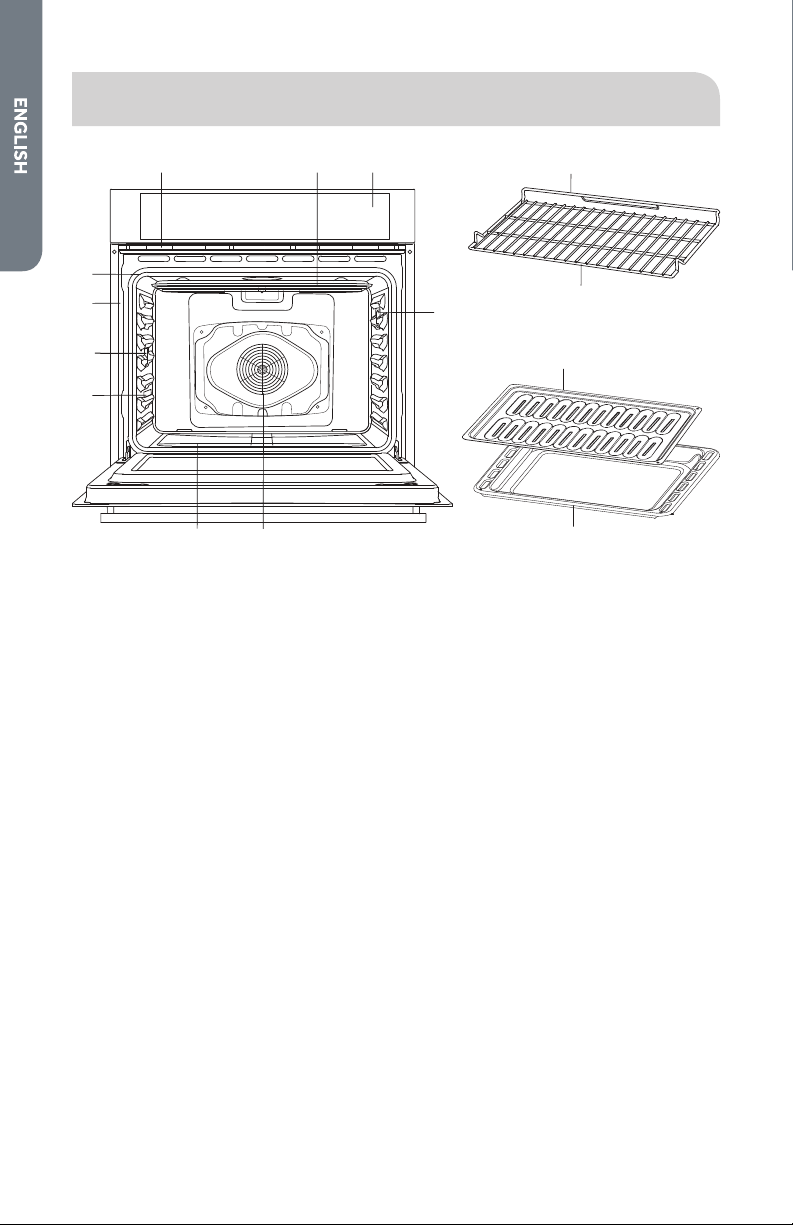
PARTS AND FEATURES
h
d
d
g
a b c
f e
j
l
k
m
i
a Oven Vent
b Broil Element
c Control Panel
d Halogen Light
e Convection Fan and Element
f Bottom Element (not visible)
g Model and Serial # Plate
h Door Gasket
i Temperature Probe
j Oven Rack Back
k Oven Rack Front
l Broiler Pan Rack
m Broiler Pan
7
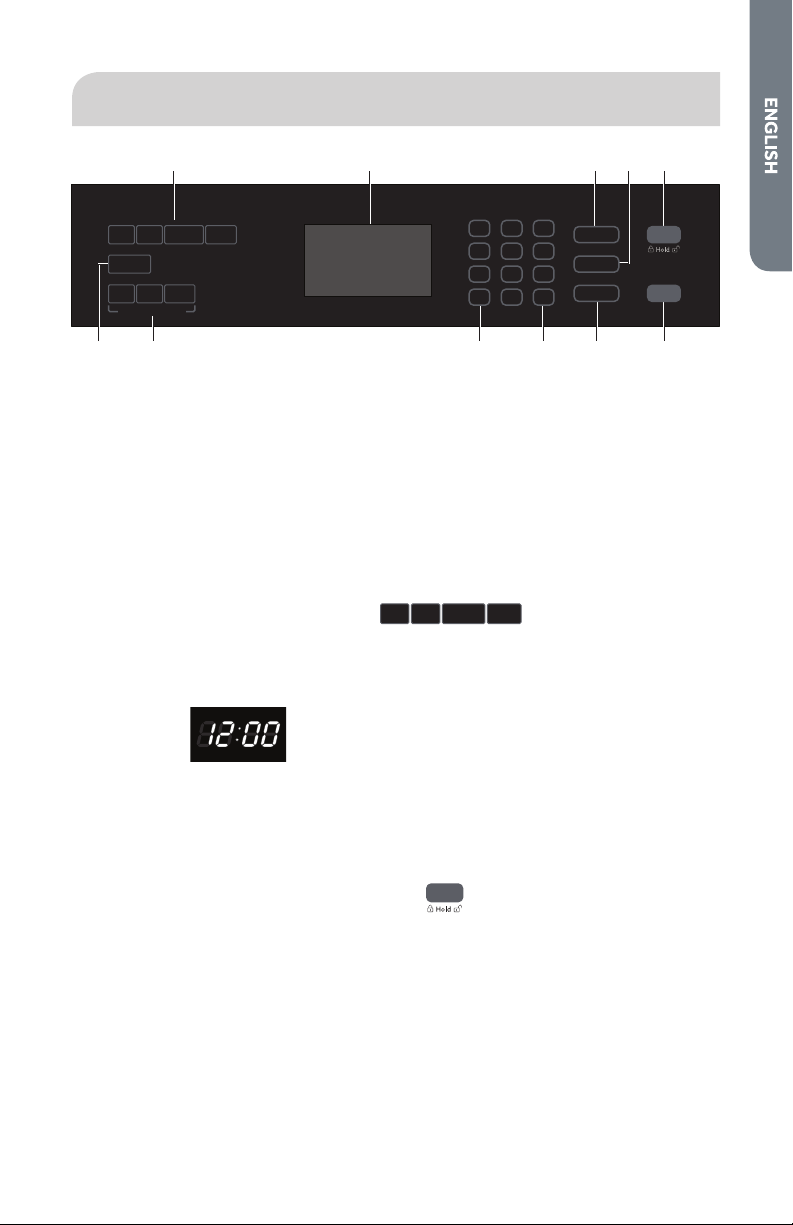
CONTROL PANEL
c da b e
fghijk
Convection Conversion
Cook Time
Start
Cancel
1 2 3
4 5 6
7 8
0
9
Timer Light
Settings
Bake Broil Convection
Warm/
Proof
Self Clean
Baked
Goods
Meats
Other
Foods
Start Time
a Oven Mode Controls
b Display
c Cook Time
d Start Time
e Start/Control Lock (hold 3 seconds)
f Cancel
g Settings
h Light
i Timer
j Convection Conversion
Mode Controls
k Self-Clean
OVEN MODE CONTROLS
Bake Broil Convection
Warm/
Proof
Select from Bake, Broil, Convection and Warm/Proof oven modes.
NOTE: The Warm/Proof control toggles between the two oven modes.
DISPLAY
When power is rst supplied to the oven or if a power failure occurs, “12:00” will
appear on the display.
See “Clock,” later in this section, for instructions to set the time-of-day. When the
oven is not in use, the time-of-day appears in the display.
START/CONTROL LOCKOUT
Start
START
The Start control begins any oven function. If Start is not pressed within 2 minutes
after pressing a keypad the function is canceled and the time-of- day is displayed.

8
CONTROL PANEL LOCKOUT
The control panel can be locked to avoid unintended use of the oven.
NOTES:
•
The control cannot be locked if the oven is in use or if Cook Time is operating.
•
The current time-of-day will remain in the display when the control is locked.
To Lock Control Panel:
•
Press and hold START for 3 seconds or until “LOCKED” appears in the display.
“LOCKED” will remain lit in the display.
To Unlock Control Panel:
•
Press and hold START for 3 seconds or until “LOCKED” scrolls in the display.
CANCEL
Cancel
•
Press the Cancel button to stop any function except Cook Time and Control
Panel Lockout.
LIGHT
Light
The oven lights turn On automatically when the oven door is opened, and turns O
automatically when the oven door is closed.
•
Press the Light button to turn On/O the oven lights when the oven door is
closed.
TIMER
Timer
The Timer can be set in hours or minutes up to 11 hours and 59 minutes.
To Set the Timer:
1. Press TIMER.
2. Use the number keypad to enter the length of time in hours and minutes.
3. Press TIMER to begin the countdown. If enabled, timer tone(s) will sound at the
end of countdown.
4. Press TIMER to cancel the Timer and return to the time-of-day.
NOTE: Do not press CANCEL because the oven will turn o.
COOK TIME
Cook Time
The Cook Time feature allows the oven to be set to cook for a set length of time, and
then turn o automatically.
IMPORTANT: You must select an Oven Mode before you can set a Cook Time.
9
NOTES:
•
Cook Time can be set in hours or minutes up to 11 hours and 59 minutes.
•
To change the cook time during cooking, press CANCEL. Enter the new cook
time and press START.
•
At the end of the set cook time, the oven will turn o automatically, the alert
tone will sound, and “Cooking Complete” will appear in the text area.
To Set Cook Time:
1. Select cooking mode.
2. Select temperature.
3. Press COOK TIME. Enter the desired cook time by pressing the number keypad.
4. Press START. The oven will begin to preheat.
NOTES:
•
The Cook Time format is HR:MIN, switching to MIN:SEC during the last
minute.
•
An alert tone will sound until Cook Time is canceled.
START TIME
Start Time
This feature allows you to set the oven to turn on at a later time.
IMPORTANT: The clock must be set to the correct time-of-day.
1. Select an Oven Mode.
2. Select temperature.
3. Set Cook Time.
4. Press START TIME.
5. Enter the desired Start Time by pressing the number keypad. “Press START” will
appear the display. If Cook Time was not set, the control will prompt you to “Set
Cook Time.”
Food Poisoning Hazard
Do not let food sit in oven more than one hour before or after cooking.
Doing so can result in food poisoning or sickness.
WARNING
6. Place the food in the oven and close the oven door.
7. Press START. Start Time will begin counting down until it reaches the set time-
of-day.
NOTE: At the end of Cook Time, the oven will turn o automatically, an alert
tone will sound and “Cooking Complete” will appear in the display.
10
SETTINGS
Settings
The Settings control allows you to access the menu for additional functions and
features.
Press SETTINGS to show Menu Options 1 - 6. Then, press START to show Options
7 - 9.
CLOCK
The clock can be set to display time in a 12-hour or 24-hour format. The clock is
factory preset for the 12-hour format.
To Set the Clock:
NOTE: Before setting the clock, make sure both the Oven and Timer are turned O.
1. Press SETTINGS. The various Options will appear in the display.
2. Press 1 on the number keypad. “Clock” will appear in the display.
3. Press the number keypad to enter the time-of-day.
4. Press START to toggle between AM and PM.
5. Press SETTINGS to conrm; time-of-day is set.
To Change the Clock to 24-Hour Format:
1. Press SETTINGS. The various Options will appear in the display.
2. Press “5” on the number keypad. “12/24 HOUR” and “12” will appear in the
display.
3. Press “1” on the number keypad to change the 12/24 Hour setting to 24-hour.
4. Press SETTINGS to conrm. The 12/24-Hour setting has been changed.
TONES
Tones are audible signals, indicating the following:
Number of Tones
Indicates
1
Valid Press Function has been
entered
Oven is Preheated
2
Invalid Touch Pad
Press
4
End of Cycle End of Timer
To Turn On/O Sound:
The oven sound is factory preset for On but can be changed to O.
1. Press SETTINGS. The various Options will appear in the display.
2. Press “3” on the number keypad. “SOUND” and “ON” will appear in the display.
3.
Press “1” on the number keypad. “ON/OFF” will appear in the display.
4. Press “1” on the number keypad to turn the sound O.
5. Press SETTINGS to conrm. The sound has now been turned o.
6. Press SETTINGS, and then follow the display prompts to return the sound
setting to On.

11
To Adjust Sound Volume:
The oven sound is factory preset for High but can be changed to Low.
1. Press SETTINGS. The various Options will appear in the display.
2. Press “4” on the number keypad. “SOUND VOLUME” and “HIGH” will appear in
the display.
3. Press “1” on the number keypad. HIGH/LOW” will appear in the display.
4. Press “1” on the number keypad to turn the sound Low.
5. Press SETTINGS to conrm. The sound volume has now been changed.
6. Press SETTINGS, and then follow the display prompts to return the sound
volume setting to High.
DEGREES FAHRENHEIT AND CELSIUS
The temperature is factory preset to display in degrees Fahrenheit, but can be
changed to display in degrees Celsius.
To Change the Display from Degrees Fahrenheit to Degrees Celsius:
1. Press SETTINGS. The various Options will appear in the display.
2. Press “2” on the number keypad. “TEMP UNIT” and “FAHRENHEIT” will appear in
the display.
3. Press “1” on the number keypad. “DEGREE F/C” will appear in the display.
4. Press “1” on the number keypad to change the temperature unit setting to
degrees Celsius.
5. Press SETTINGS to conrm. The temperature unit has been changed.
6. Press SETTINGS, and then follow the display prompts to return to Fahrenheit.
SABBATH MODE
Sabbath mode is designed for those whose religious observances require disabling
certain oven features. By enabling Sabbath Mode, the oven will conform to Star-K
Jewish Sabbath requirements.
NOTE: The oven is factory preset with Sabbath Mode O.
To Turn On/O Sabbath Mode:
1. Make sure the oven is turned O, and the meat probe is not plugged in.
NOTE: Sabbath mode cannot be set when the oven is On. The oven will not
recognize the meat probe while in Sabbath mode.
2. Press SETTINGS > Press START > Press 7, and then press 1 to (toggle between
ON / OFF).
3. Press SETTINGS again to enable Sabbath mode. The only cooking function that
works while the oven is set to Sabbath mode is Bake.

12
To Bake While the Oven is in Sabbath Mode:
1. Press and hold BAKE for 3 seconds.
2. Enter the desired oven temperature by pressing the numbered keypad.
3. After selecting Bake and a Temperature, you have the option to set a Cook Time
and Start Time before pressing START. See “Cook Time” and “Start Time.”
4. Press START. Pressing Start activates Sabbath mode.
Only the Cancel control is functional.
•
Press CANCEL twice to exit Sabbath mode, and resume normal oven operation.
The display will return to the time-of-day.
NOTE: If there is a power failure while the oven is in Sabbath mode, the oven will
exit Sabbath mode and resume in normal mode when power is restored.
LANGUAGE
The Language is preset to English but it can be changed to French.
To Change the Language from English to French:
1. Press SETTINGS. The various Options will appear in the display.
2. Press “6” on the number keypad. “LANGUAGE, ENGLISH1, and FRENCH 2” will
appear in the display.
3. Press “2” on the number keypad to select French.
4. Press SETTINGS, and then follow the display prompts to return the Language
setting to English.
SELF-CLEAN
Self Clean
Operates the Automatic Self-cleaning feature. See “Oven Care.”

13
OVEN USE
BEFORE USING THE OVEN
1. Turn the Temperature Control to the highest setting.
2. Turn the Cooking Mode Selection control to a cooking mode.
3. Allow the oven to operate for 30 minutes with the door closed and no food in the
cavity.
NOTE: Any odor that may be detected during this initial use is due to the
evaporation of substances used to protect the oven during storage.
4. Turn o the oven, and allow the oven to cool.
GENERAL
IMPORTANT: Do not place anything, including dishes, foil and oven trays, on the
bottom of the oven when it is in operation to avoid damaging the enamel.
1. Place bake ware with food on one or both of the shelves provided with the oven.
2. Press the Oven Mode control for the desired oven function.
3. Use the number keypad to enter the oven temperature.
4. Press START.
PREHEATING THE OVEN
•
Preheat the oven when using the Bake, Convection Bake and Convection Roast
modes.
•
Selecting a higher temperature does not shorten the preheat time.
•
Preheating is necessary for good results when baking cakes, cookies, pastry and
breads.
•
Preheating will help to sear roasts and seal in meat juices.
•
Place oven racks in their proper position before preheating.
•
During preheating, the selected cooking temperature is always displayed.
•
A beep will conrm that the oven is preheated and the “PREHEAT” writing will
turn o.
OPERATIONAL SUGGESTIONS
•
Use the cooking charts, in this manual, as a guide.
•
Do not set pans on the open oven door.
•
Use the interior oven lights to view the food through the oven door window
rather than opening the door frequently.
14
TEMPERATURE PROBE
WARNING
Burn Hazard
Use an oven mitt to remove temperature probe.
Do not touch broil element.
Failure to do so can result in burns.
The temperature probe monitors the internal food temperature, which is frequently
used as an indicator of doneness especially for meats and poultry, and turns o the
oven when the internal food temperature reaches the programmed temperature.
The temperature probe will work with all oven modes except for the Warm/Proof,
Sabbath and Self-Clean modes.
IMPORTANT: Always unplug and remove the temperature probe from the oven
when removing the food.
To Use the Temperature Probe:
1. Insert the probe into the food.
NOTE: For meats, the probe tip should be inserted into the center of the
thickest part of the meat. Make sure that the probe tip is not into the fat or
touching bone.
2. Place the food into the oven. Keeping the temperature probe as far away from a
heat source as possible, plug the temperature probe into the oven outlet. Close
the oven door.
3. Select the oven mode.
4. Enter the oven temperature by pressing the numbers on the keypad.
5. Press START. The set oven temperature will appear on the display throughout
cooking.
6. Enter the desired internal food temperature by pressing the numbers on the
keypad, and then press START.
NOTES:
•
The internal food temperature can be set between 110°F and 200°F (43°C
and 93°C).
•
When the set probe temperature is reached, the oven will turn o.
7.
Press CANCEL when nished. Unplug the temperature probe and remove food
from the oven.
NOTE: The probe icon will remain lit in the display until the probe is unplugged.

15
UTENSILS
•
Glass baking dishes absorb heat. Reduce oven temperature 25°F (15°C) when
baking in glass.
•
Use pans that produce the desired browning. The type of nish on the pan will
help determine the amount of browning that will occur.
- Shiny, smooth metal or light non-stick / anodized pans reect heat, resulting in
lighter, more delicate browning. Cakes and cookies require this type of utensil.
- Dark, rough or dull pans will absorb heat resulting in a browner, crisper crust.
Use this type for pies.
•
Do not cook with the empty broiler pan in the oven, as this could aect cooking
performance. Store the broil pan outside of the oven.
HIGH ALTITUDE BAKING
When cooking at high altitude, cooking times may be extended.
OVEN RACKS
IMPORTANT: To avoid permanent damage to the porcelain nish, place food or
bakeware on an oven rack. Do not place food or bakeware directly onto the oven
door or oven bottom.
•
The oven racks can be placed in any of the six height positions with the oven.
•
Position racks before turning on the oven.
•
Make sure the oven racks are level.
•
Oven racks have a stop to keep them from being unintentionally withdrawn fully.
To Remove Oven Racks:
•
Pull rack out to the stop position, raise the front edge, and then lift out.
To Replace Oven Racks:
•
Place oven rack on the wire supports along the sides of the oven. Tilt the front
edge up slightly, and slide rack to the rear until it clears the stop position. Lower
the front and slide the rack into the oven.
COMPONENT COOLING FAN
Activates during any cooking or self-cleaning mode to cool inner components and
outer door surfaces. This air is exhausted through the vent located above the oven
door. It continues to run until components have cooled suciently. The cooling
fan operates at double speed (or RPM’s) in self-clean and whenever the internal
components temperature becomes high.
OVEN DOOR
To avoid oven door glass breakage:
•
Do not close the oven door if the racks are not fully inserted into the oven cavity
or if bakeware extends past the front edge of an oven rack.
•
Do not set objects on the glass surface of the oven door.
•
Do not hit glass surfaces with bakeware or other objects.
•
Do not wipe down glass surfaces until the oven has completely cooled.
16
OVEN VENTS
Blocking or covering the oven vents will cause poor air circulation, aecting cooking,
cleaning and cooling results.
•
Both the upper and lower oven vent(s) allow fresh air to enter the cooling
system.
•
The lower oven vent also allows hot air to be expelled from the cooling system.
OVEN CONDENSATION AND TEMPERATURE
•
It is normal for a certain amount of moisture to evaporate from the food during
any cooking process. The amount depends on the moisture content of the food.
•
The moisture may condense on any surface cooler than the inside of the oven,
such as the control panel.
•
Your new oven has an electronic temperature sensor to help maintain an
accurate temperature. Your previous oven may have had a mechanical
thermostat that drifted gradually over time to a higher temperature. It is normal
that you may need to adjust your favorite recipes when cooking in a new oven.
OVEN TEMPERATURE CONTROL
The oven provides accurate temperatures; however, it may cook faster or slower
than your previous oven, so the temperature calibration can be adjusted. It can be
adjusted in degrees Fahrenheit or Celsius.
A minus sign means the oven will be cooler by the displayed amount. The absence of
a minus sign means the oven will be warmer by the displayed amount.
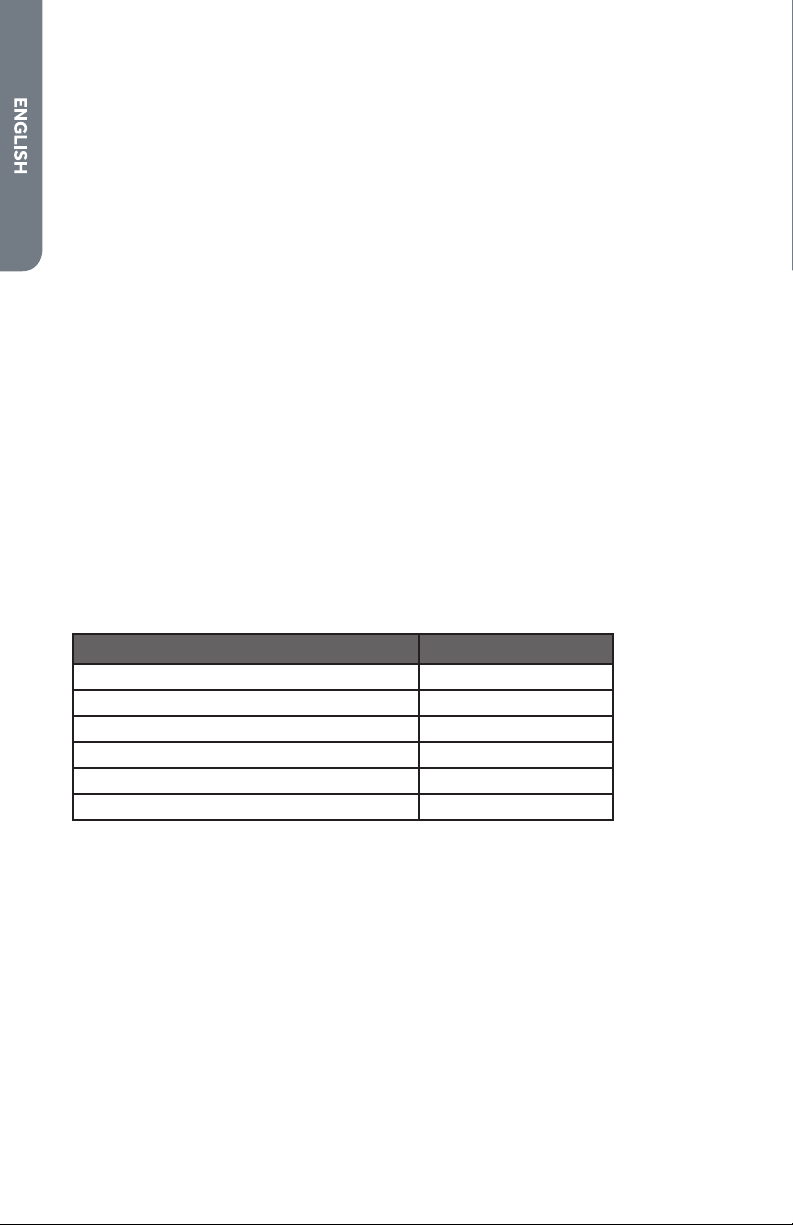
Use the following chart as a guide:
ADJUSTMENT °F (ADJUSTMENT °C) COOKS FOOD
10°F (6°C) a little more
20°F (12°C) moderately more
30°F (17°C) much more
-10°F (-6°C) a little less
-20°F (-12°C) moderately less
-30°F (-17°C) much less
To Adjust Oven Temperature Calibration:
1. Press SETTINGS. The various Options will appear in the display.
2. Press number 9 on the keypad. “CALIBRATION” “PRESS 3 TO INCREASE/PRESS
6 TO DECREASE” will scroll across the display.
3. Press number 3 on the keypad to increase or number 6 to decrease the
temperature in 5°F (3°C) increments. The adjustment can be set between 30°F
(18°C) and -30°F (-18°C).
4. Press SETTINGS to save the adjustment, and then exit the Temperature
Calibration menu.
17
OVEN MODES
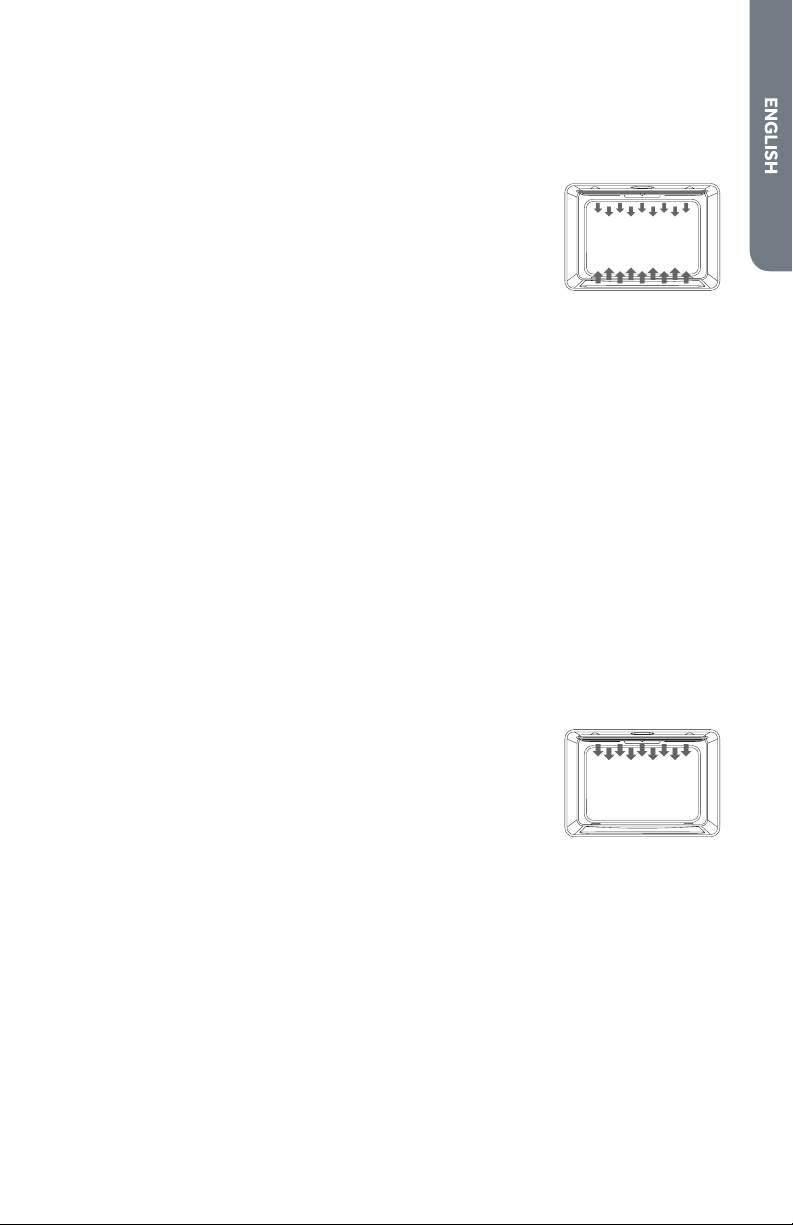
The illustrations show the heating elements and fans used for each oven mode.
NOTE: The lower element is concealed under the oven oor.
BAKE
Baking is cooking with heated air. Both upper and lower
elements in the oven are used to heat the air but no fan is used
to circulate the heat.
Follow the recipe or convenience food directions for baking
temperature, time and rack position. Baking time will vary with
the temperature of ingredients and the size, shape and nish
of the bakeware.
1. Press BAKE to select the bake mode. “BAKE” will appear in
the display and 350°F (177°C) will be displayed. “Set temp
or Press START” will appear in the display.
2. Press START, if you wish to cook at 350°F (177°C).
OR
Enter the desired temperature by pressing the number keypad, and then press
START. The temperature can be set from 170°F (77°C) to 500°F (260°C).
NOTES:
•
The temperature can be changed at any time during cooking. Press CANCEL
to clear the settings. Select oven mode, then enter the desired temperature
by pressing the number keypad, and then press START.
•
After selecting an Oven Mode and Temperature, you have the option to set
a Cook Time and Start Time before pressing START. See “Cook Time” and
“Start Time.”
3. Press CANCEL when nished baking, and remove food from the oven.
BROIL
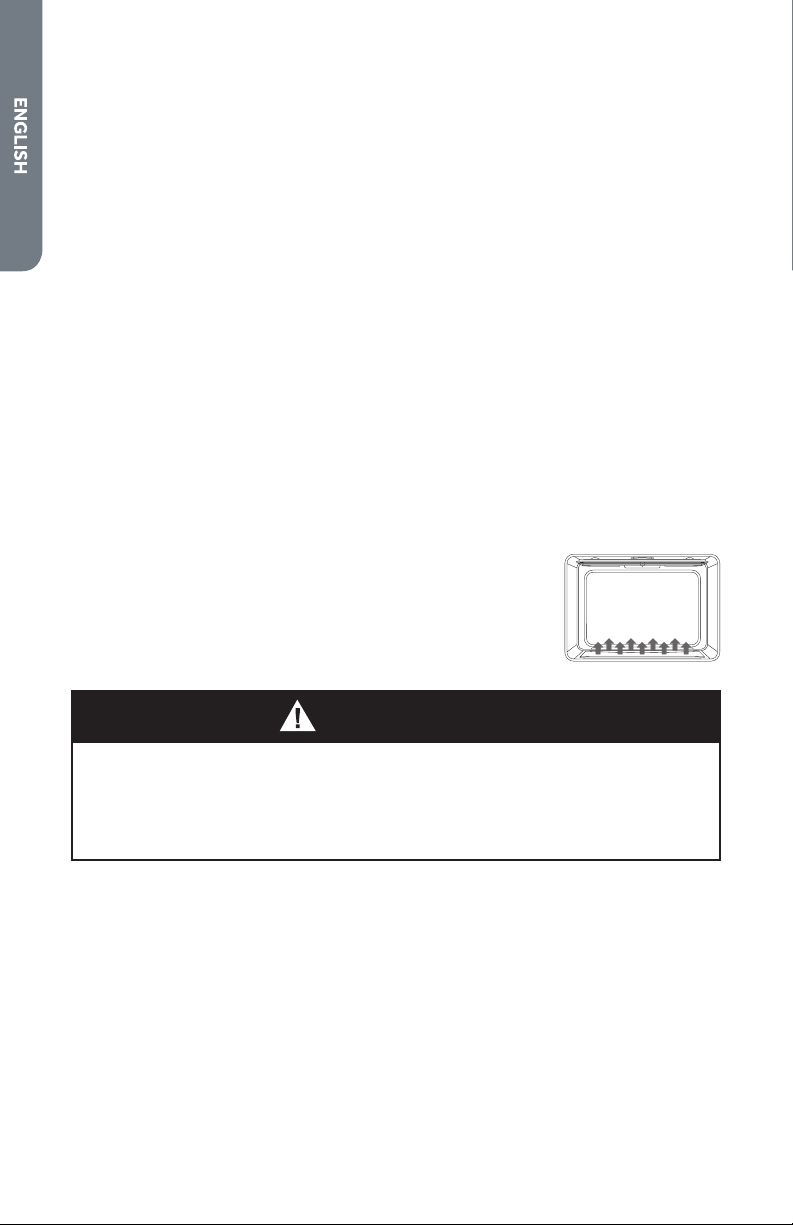
Broiling uses direct radiant heat to cook food. The lower
the temperature, the slower the cooking. Thicker cuts and
unevenly shaped pieces of meat, sh and poultry may cook
better at lower broiling temperatures.
•
For best results, use a broiler pan and rack. It is designed to drain juices and help
avoid spatter and smoke.
•
For proper draining, do not cover the grid with foil. The bottom of the pan may
be lined with aluminum foil for easier cleaning.
•
Trim excess fat to reduce spattering. Slit the remaining fat on the edges to avoid
curling.
•
Select HI/550°F (288°C) broil for most broiling. Select LO/450°F (232°C) broil for
low-temperature broiling of longer cooking foods such as poultry to avoid over
browning.
•
Pull out oven rack to stop position before turning or removing food. Use tongs to
turn food to avoid the loss of juices. Very thin cuts of sh, poultry or meat may
not need to be turned.
18
To Broil:
1. Place the food on the rack in the broiler pan and place pan in the oven. Close the
oven door.
NOTE: Preheating is not necessary.
2. Press BROIL for the desired mode. “BROIL” and “Set temp or Press START” will
appear in the display, and “550ºF” (288ºC) will be displayed.
3. Press START, if you wish to broil at 550°F (288°C).
OR
Enter the desired temperature by pressing the number keypad, and then press
START. The temperature can be set from 450°F (232°C) to 550°F (288°C).
4. “BROIL” will appear in the display after Start is pressed.
NOTES:
•
The broil temperature can be changed at any time during cooking. Press
CANCEL to clear the settings. Select oven mode, then enter the desired
temperature by pressing the number keypad, and then press START.
•
After selecting an Oven Mode and Temperature, you have the option to set
a Cook Time and Start Time before pressing START. See “Cook Time” and
“Start Time.”
5. Press CANCEL when nished broiling, and remove food from the oven.
WARM/PROOF
The Warm mode keeps hot, cooked foods at serving
temperature.
The Proof mode prepares dough for baking by activating the
yeast. Follow the recipe directions as a guide.
Food Poisoning Hazard
Do not let food sit in oven more than one hour before or after cooking.
Doing so can result in food poisoning or sickness.
WARNING
IMPORTANT: Food must be at serving temperature before placing it in the warmed
oven. Food may be held up to 1 hour; however, breads and casseroles may become
too dry if left in the oven during the Warm function. For best results, cover food.
Warm
1. Press WARM/PROOF. “Warm” and “Set Temp or Press START” and 140°F (60°C)
will be displayed.
2.
Press START, if you want to Warm food at 140°F (60°C).
OR
Enter the desired temperature by pressing the number keypad, and then press
START. The temperature can be set from 140°F (60°C) to 210°F (99°C).

19
3. “WARM” will appear in the display, once Start is pressed.
NOTE: After selecting an Oven Mode and Temperature, you have the option to
set a Cook Time and Start Time before pressing START. See “Cook Time” and
“Start Time.”
4. Place food in the oven and close the door.
5. Press CANCEL when nished, and remove food from the oven.
To Cancel Warm Feature:
•
Press CANCEL. Remove food from oven.
Proof
1. Before proong, place the dough in a lightly greased bowl and cover loosely with
wax paper, coated with shortening. Place on second rack from the bottom and
close the oven door.
2. Press and hold WARM/PROOF for 3 seconds. “Proof” and “Set Temp or Press
START,” and 100°F (38°C) will be displayed.
3. Press START, if you want to Proof dough at 100°F (38°C).
OR
Enter the desired temperature by pressing the number keypad, and then press
START. The temperature can be set from 80°F (27°C) to 120°F (49°C).
4. “PROOF” will appear in the display, once Start is pressed.
NOTE: After selecting an Oven Mode and Temperature, you have the option to
set a Cook Time and Start Time before pressing START. See “Cook Time” and
“Start Time.”
5. Let the dough rise until nearly doubled in size, checking after 20-25 minutes.
Proong time may vary depending on dough type and quantity.
6. Press CANCEL when nished proong.
7. Before second proong, shape the dough, place it in baking pan(s) and cover
loosely with plastic wrap, coated with cooking spray. Follow the same placement
and control steps above. Before baking, remove the plastic wrap.
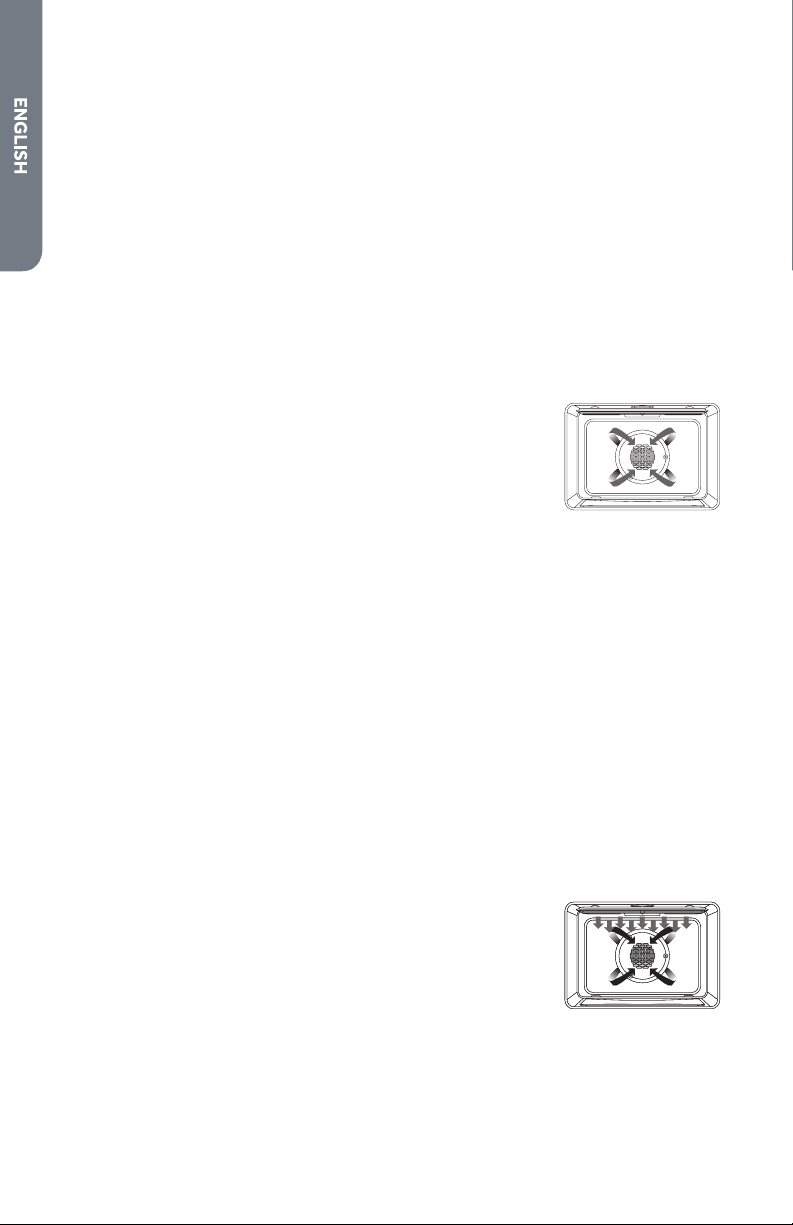
CONVECTION
During convection cooking, the fan provides hot air circulation throughout the
oven. The movement of heated air around the food can help to speed up cooking by
penetrating the cooler outer surfaces.
In Convection mode, the ring element, bake and broil elements, and the fan operate
to heat the oven cavity. If the oven door is opened during convection cooking or
preheating, the fan turns o immediately and the element(s) will turn o after
30seconds. Once the door is closed, the element(s) will turn back on.
CONVECTION FAN
The convection fan operates during any convection mode. When the oven is
operating in convection mode, the fan will turn o automatically when the door is
opened. The convection fan always runs during the preheat time.
20
Advantages of Convection Cooking
•
Saves time and energy.
•
Even baking, browning and crisping are achieved.
•
During roasting, juices and avors are sealed in while the exterior is crisp.
•
Yeast breads are lighter, more evenly textured, more golden and crustier.
•
Air-leavened foods such as cream pus, soués and meringues are higher and
lighter.
•
Baking on multiple racks at the same time with even results is possible.
•
Prepare whole meals at once with no avor transfer.
•
Dehydrates herbs, fruits and vegetables.
•
Requires no specialized bake ware.
•
Convection broiling allows for extraordinary grilling with thicker cuts of food.
CONVECTION BAKE
Use Convection bake for single or multiple rack baking. When
convection baking, reduce your recipe baking temperature by
25°F (15°C).
To Set Convection Bake:
1. Press CONVECTION once. “Convection” and “Press 1-3 To Choose” will appear
in the display.
2. Press number 1 on the keypad. “Convect Bake” and “Set Temp or Press START”
and 325°F (162°C) will be displayed.
3. Press START If you wish to convection bake at 325°F (162°C).
OR
Enter the desired temperature by pressing the number keypad, and then press
START. The temperature can be set from 170°F (77°C) to 500°F(260°C).
NOTE: After selecting an Oven Mode and Temperature, you have the option to
set a Cook Time and Start Time before pressing START. See “Cook Time” and
“Start Time.”
4. The oven will begin preheating once Start is pressed. A tone will sound when the
oven is at the set temperature.
5. Place the food in the oven and close the oven door when preheat is completed.
6. Press CANCEL when nished, and remove food from the oven.
CONVECTION BROIL
When convection broiling, enter your normal broiling
temperature. The oven door must be closed when using
Convection Broil.
It is not necessary to preheat the oven for Convection Broil.
1. Place the food in the oven and close the oven door.
2. Press CONVECTION once. “Convection and “Press 1-4 To Choose” will be
displayed.
3. Press number 3 on the keypad. “Convect Broil” and “Set Temp or Press Start”
and 450°F (232°C) will be displayed.

21
4. Press START, if you wish to broil at 450°F (232°C).
OR
Enter the desired temperature by pressing the number keypad, and then press
START. The temperature can be set from 170°F(77°C) to 550°F(288°C).
NOTE: After selecting an Oven Mode and Temperature, you have the option to
set a Cook Time and Start Time before pressing START. See “Cook Time” and
“Start Time.”
5. “Convect Broil” will be displayed, once Start is pressed.
6. Press CANCEL when nished, and remove food from the oven.
CONVECTION ROAST
When Convection roasting, enter your normal roasting
temperature. The roasting time should be 15-30% less than in
conventional cooking. It is not necessary to preheat the oven
for convection roast.
1. Place the food in the oven and close the oven door.
2. Press CONVECTION once. “Convection” and “Press 1-4 To Choose” will be
displayed.
3. Press number 2 on the keypad. “Convect Roast,” “Set Temp or Press START”,
and 325°F (163°C) will be displayed.
4. Press START, if you wish to convection roast at 325°F (163°C).
OR
Enter the desired temperature by pressing the number keypad, and then press
START. The temperature can be set from 170°F (77°C) to 500°F (260°C).
NOTE: After selecting an Oven Mode and Temperature, you have the option to
set a Cook Time and Start Time before pressing START. See “Cook Time” and
“Start Time.”
5. ”Convect Roast” will be displayed, once Start is pressed.
6. Press CANCEL when nished and remove food from the oven.
CONVECTION CONVERSION
Convection Conversion
Baked
Goods
Meats
Other
Foods
NOTES:
•
When using Convection Conversion, enter the normal cooking temperature and
time.
•
The oven door must be closed before setting Convection Conversion.
MEAT (ONLY)
It is not necessary to preheat the oven for the Convection Conversion MEATS
option. Preheating can cause overcooking. If preheat is required for the recipe, add
15 minutes to the Cook Time, and place food in the oven at the appropriate time.
1.
Place food the in oven and close the oven door.
2. Press CONVECTION once. “Convection” and “Press 1-4 To Choose” will appear
in the display.
3. Press number 4 on the keypad. “Conv Conversion” and “Press 1-3 To Choose”
will appear in the display.

22
4. Press the number keypad to select among the 1.MEAT, 2.BAKED GOODS and
3.OTHER FOODS options.
5. Press START to conrm the selection. “Set temp and press START” will appear in
the display.
6. Enter your normal roasting temperature by pressing the number keypad.
7. Enter your normal Cook Time. See “Cook Time,” and then press START.
NOTE: Setting a Cook Time is required for Convection Conversion oven mode.
See “Cook Time.”
BAKED GOODS AND OTHER FOODS (ONLY)
1. Preheating will start. Once the oven is preheated to the set temperature, the
control will beep. Place the food the in oven and close the oven door.
2. At the end of the set cooking time, the oven will turn o automatically. The Alert
tone will sound, and “Cooking Complete” will appear in the display.
3. Press CANCEL when nished and remove food from the oven.
BAKE TIPS
•
For best results, bake food on a single rack with at least 1" - 1½" (2.5 - 3 cm)
space between utensils and oven walls.
•
Use one rack when selecting the bake mode.
•
Check for doneness at the minimum time.
•
Use metal bake ware (with or without a non stick nish), heatproof glass, glass-
ceramic, pottery or other utensils suitable for the oven.
•
When using heatproof glass, reduce temperature by 25°F (15°C) from
recommended temperature.
•
Use baking sheets with or without sides or jelly roll pans.
•
Dark metal pans or nonstick coatings will cook faster with more browning.
Insulated bake ware will slightly lengthen the cooking time for most foods.
•
Do not use aluminum foil or disposable aluminum trays to line any part of the
oven. Foil is an excellent heat insulator and heat will be trapped beneath it. This
will alter the cooking performance and can damage the nish of the oven.
•
Avoid using the opened door as a shelf to place pans.
•
See Troubleshooting for tips for Baking and Roasting problems.
23
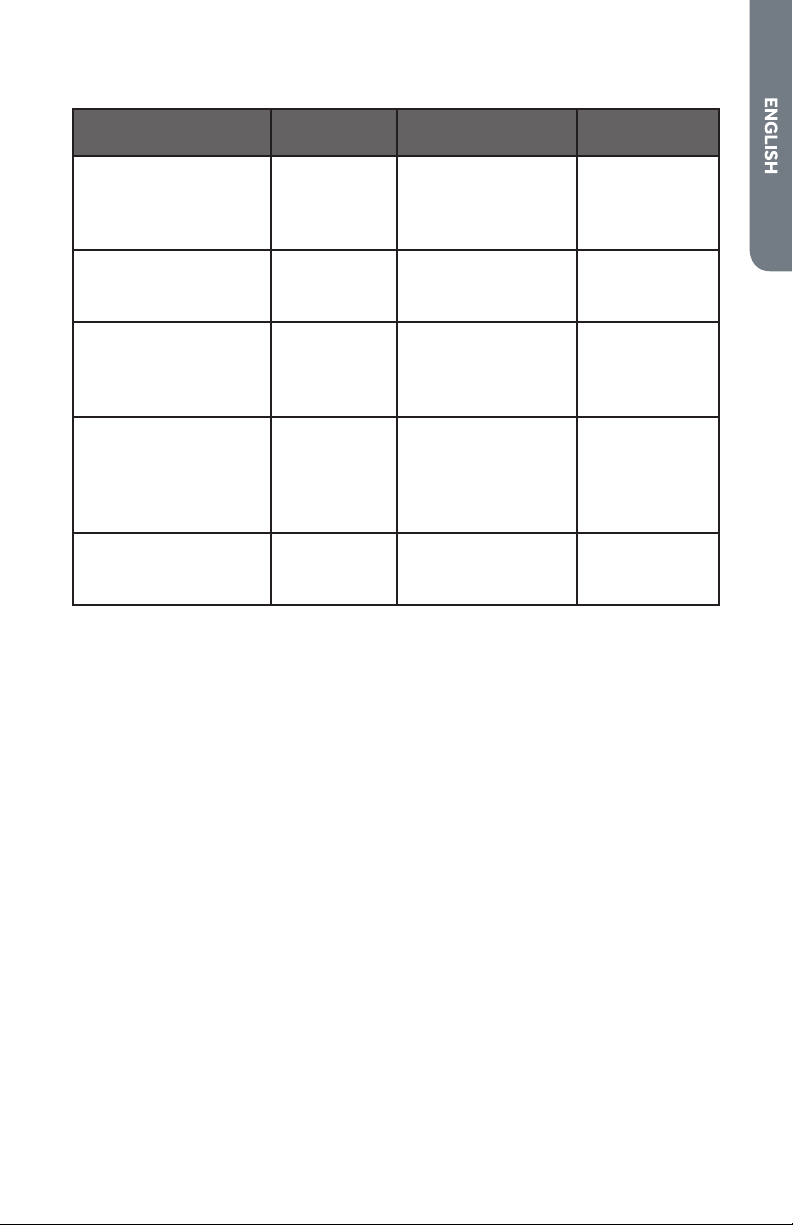
BAKE CHART
FOOD ITEM
RACK
POSITION
TEMP. °F (°C)
(PREHEATED OVEN)
TIME (MIN)
Cake
Cupcakes
Bundt Cake
Angel Food
2
1
1
350 (175)
350 (175)
350 (175)
19-22
40-45
35-39
Pie
2 crust, fresh, 9"
2 crust, frozen fruit, 9"
2
2
375-400 (190-205)
375 (190)
45-50
68-78
Cookies
Sugar
Chocolate Chip
Brownies
2
2
2
350-375 (175-190)
350-375 (175-190)
350 (175)
8-10
8-13
29-36
Breads
Yeast bread loaf, 9x5
Yeast rolls
Biscuits
Muns
2
2
2
2
375 (190)
375-400 (190-205)
375-400 (190-205)
425 (220)
18-22
12-15
7-9
15-19
Pizza
Frozen
Fresh
2
2
400-450 (205-235)
475 (246)
23-26
15-18
CONVECTION BAKE TIPS
Reduce recipe baking temperatures by 25°F (15°C).
•
For best results, foods should be cooked uncovered, in low-sided pans to take
advantage of the forced air circulation. Use shiny aluminum pans for best results
unless otherwise specied.
•
Heatproof glass or ceramic can be used. Reduce temperature by another 25°F
(15°C) when using heatproof glass dishes for a total reduction of 50°F (30°C).
•
Dark metal pans may be used. Note that food may brown faster when using dark
metal bake ware.
•
The number of racks used is determined by the height of the food to be cooked.
•
Baked items, for the most part, cook extremely well in convection. Don’t try to
convert recipes such as custards, quiches, pumpkin pie , or cheesecakes, which
do not benet from the convection-heating process. Use the regular Bake mode
for these foods.
24
•
Multiple rack cooking for oven meals is
done on rack positions 1, 2, 3 , 4 and 5. All
six racks can be used for cookies, biscuits
and appetizers.
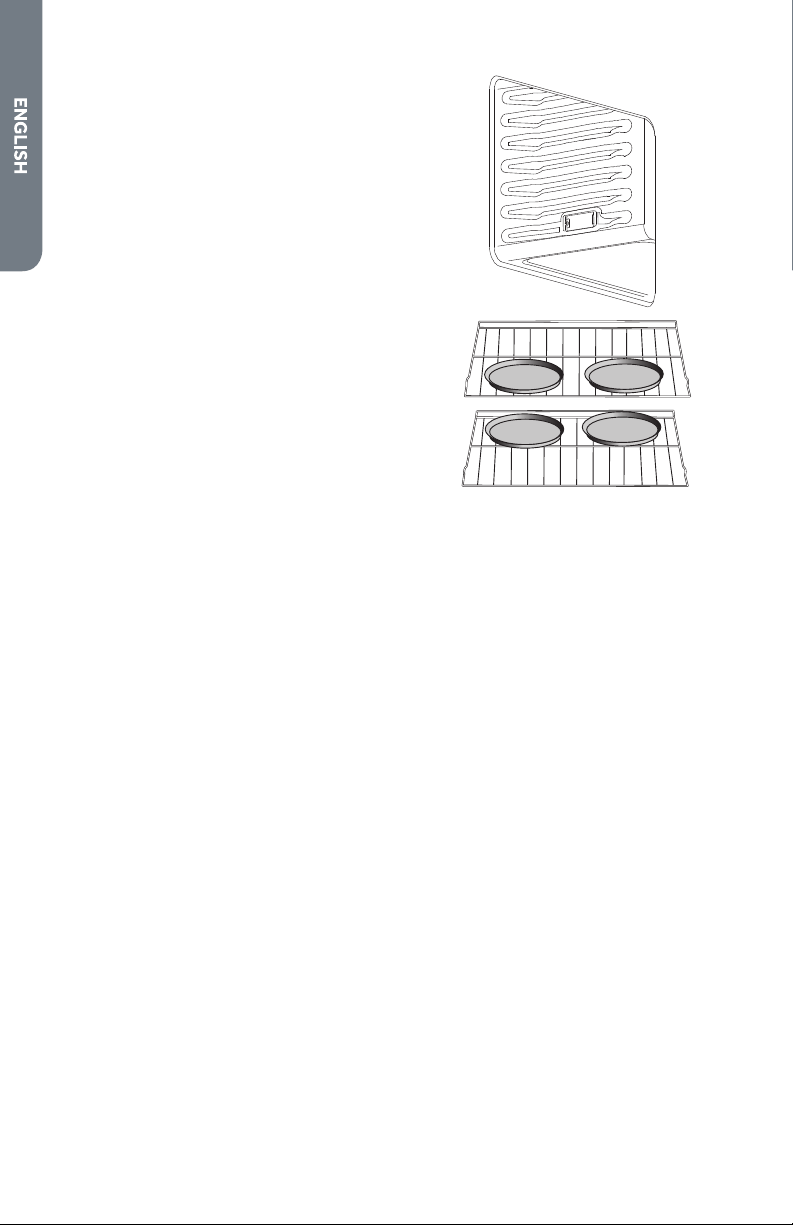
- 2 Rack baking: Use positions 1 and 3.
- When baking four cake layers at the same
time, stagger pans so that one pan is not
directly above another. For best results,
place cakes on front of upper rack and
back of lower rack (See graphic at right).
Allow 1" - 1 ½" (2.5 - 3 cm) air space
around pans.
•
Converting your own recipe can be easy.
Choose a recipe that will work well in
convection.
•
Reduce the temperature and cooking
time if necessary. It may take some trial
and error to achieve a perfect result. Keep
track of your technique for the next time
you want to prepare the recipe using
convection.
4
6
5
3
2
1
Rack 3
Rack 1
•
See Troubleshooting for tips for Baking and Roasting problems.
FOODS RECOMMENDED FOR CONVECTION BAKE MODE:
Appetizers, Biscuits, Coee Cakes
Cookies (2 to 4 racks), Yeast Breads
Cream Pus, Popovers
Casseroles and One-Dish Entreés
Oven Meals (rack positions 1, 2, 3)
Air Leavened Foods (Soués, Meringue, Meringue-Topped Desserts, Angel Food
Cakes, Chion Cakes)

25
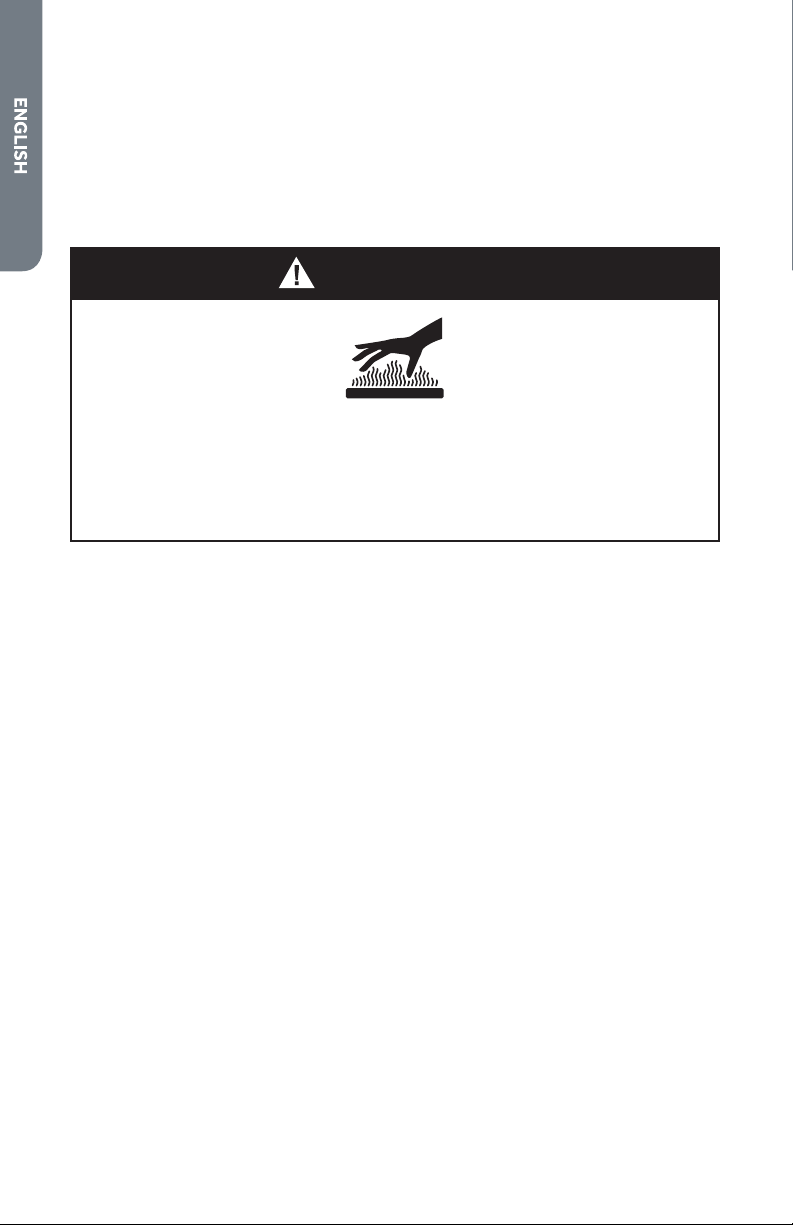
CONVECTION BAKE CHART
Reduce standard recipe temperature by 25 ºF (15 °C) for Convection Bake.
Temperatures have been reduced in this chart.
FOOD ITEM
RACK
POSITION
TEMP. °F (°C)
(PREHEATED OVEN)
TIME (MIN)
Cake
Cupcakes
Bundt Cake
Angel Food
2
1
1
325 (160)
325 (160)
325 (160)
20-22
43-50
43-47
Pie
2 crust, fresh, 9"
2 crust, frozen fruit, 9"
2
2
350-400 (175-205)
350 (175)
40-52
68-78
Cookies
Sugar
Chocolate Chip
Brownies
2
2
2
325-350 (160-175)
325-350 (160-175)
325 (160)
9-12
8-13
29-36
Breads
Yeast bread loaf, 9x5
Yeast rolls
Biscuits
Muns
2
2
2
2
350 (175)
350-375 (175-190)
375 (190)
400 (205)
18-22
12-15
8-10
17-21
Pizza
Frozen
Fresh
2
2
375-425 (190-220)
450 (232)
23-26
15-18
26
CONVECTION ROAST TIPS
•
Do not preheat for Convection Roast.
•
Roast in a low-sided, uncovered pan.
•
When roasting whole chickens or turkey, tuck wings behind back and loosely tie
legs with kitchen string.
•
Use the 2-piece broil pan for roasting uncovered.
WARNING
Burn Hazard
Use an oven mitt to remove temperature probe.
Do not touch broil element.
Failure to do so can result in burns.
•
Use the probe or a meat thermometer to determine the internal doneness on
“END” temperature (see cooking chart).
•
Double-check the internal temperature of meat or poultry by inserting meat
thermometer into another position.
•
Large birds may also need to be covered with foil (and pan roasted) during a
portion of the roasting time to prevent over-browning.
•
The minimum safe temperature for stung in poultry is 165ºF (75ºC).
•
After removing the item from the oven, cover loosely with foil for 10 to
15minutes before carving if necessary to increase the nal foodstu
temperature by 5° to 10°F (3° to 6° C).

27
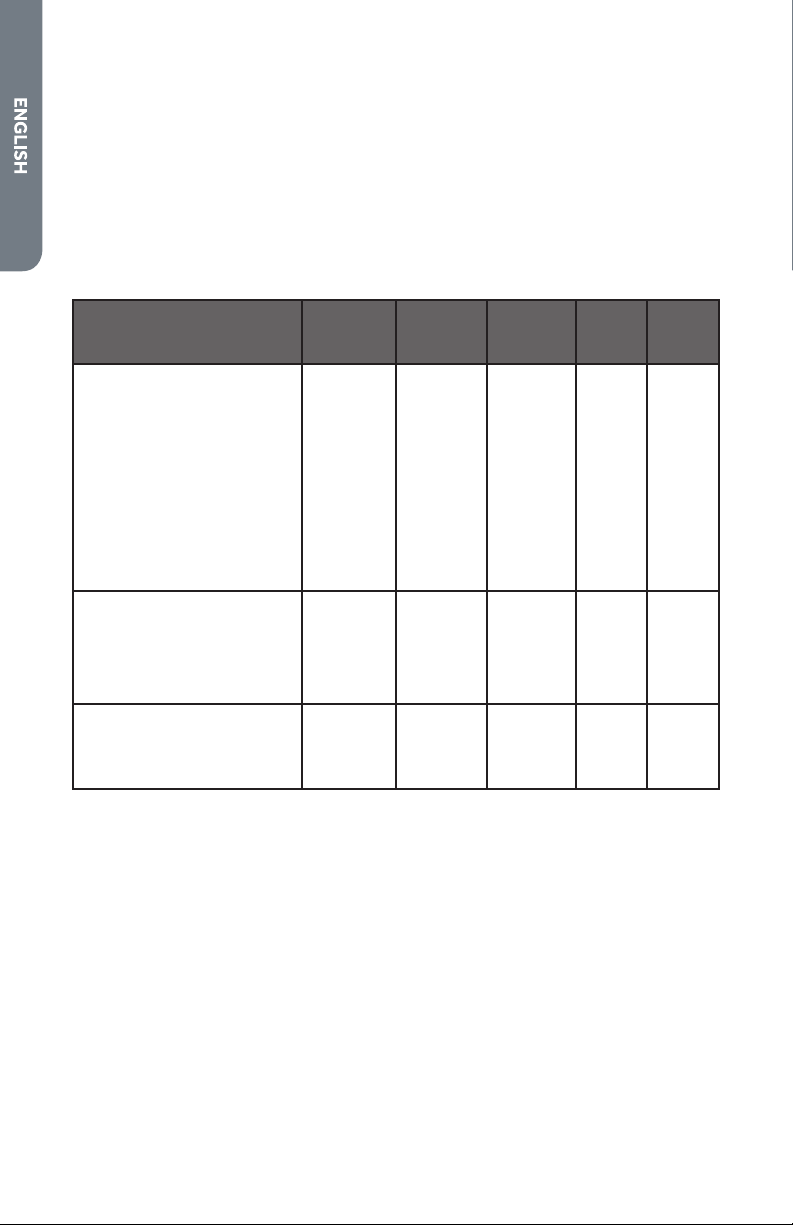
CONVECTION ROAST CHART
MEATS
WEIGHT
(lb)
OVEN TEMP.
°F (°C)
RACK
POSITION
TIME
(min. per
lb)
INTERNAL
TEMP. °F (°C)
Beef
Rib Roast 4-6 325 (160) 2 16-20
18-22
145 (63)
medium rare
160 (71)
medium
Rib Eye Roast,
(boneless)
4-6 325 (160) 2 16-20
18-22
145 (63)
medium rare
160 (71)
medium
Rump, Eye, Tip,
Sirloin (boneless)
3-6 325 (160) 2 16-20
18-22
145 (63)
medium rare
160 (71)
medium
Tenderloin Roast 2-3 400 (205) 2 15-20 145 (63)
medium rare
Pork
Loin Roast
(boneless or bone-
in)
5-8 350 (175) 2 16-20 160 (71)
medium
Shoulder 3-6 350 (175) 2 20-25 160 (71)
medium
Poultry
Chicken whole 3-4 375 (190) 2 18-21 180 (82)
Turkey, not stued 12-15 325 (160) 1 10-14 180 (82)
Turkey, not stued 16-20 325 (160) 1 9-11 180 (82)
Turkey, not stued 21-25 325 (160) 1 6-10 180 (82)
Turkey Breast 3-8 325 (160) 1 15-20 170 (77)
Comish Hen 1-1 ½ 350 (175) 2 45-75
total
180 (82)
Lamb
Half Leg 3-4 325 (160) 2 22-27
28-33
160 (71)
medium
170 (77) well
Whole Leg 6-8 325 (160) 1 22-27
28-33
160 (71)
medium
170 (77) well
28
CONVECTION BROIL TIPS
•
Place rack in the required position needed before turning on the oven.
•
Use Convection Broil mode with the oven door closed.
•
Do not preheat oven.
•
Use the 2-piece broil pan.
•
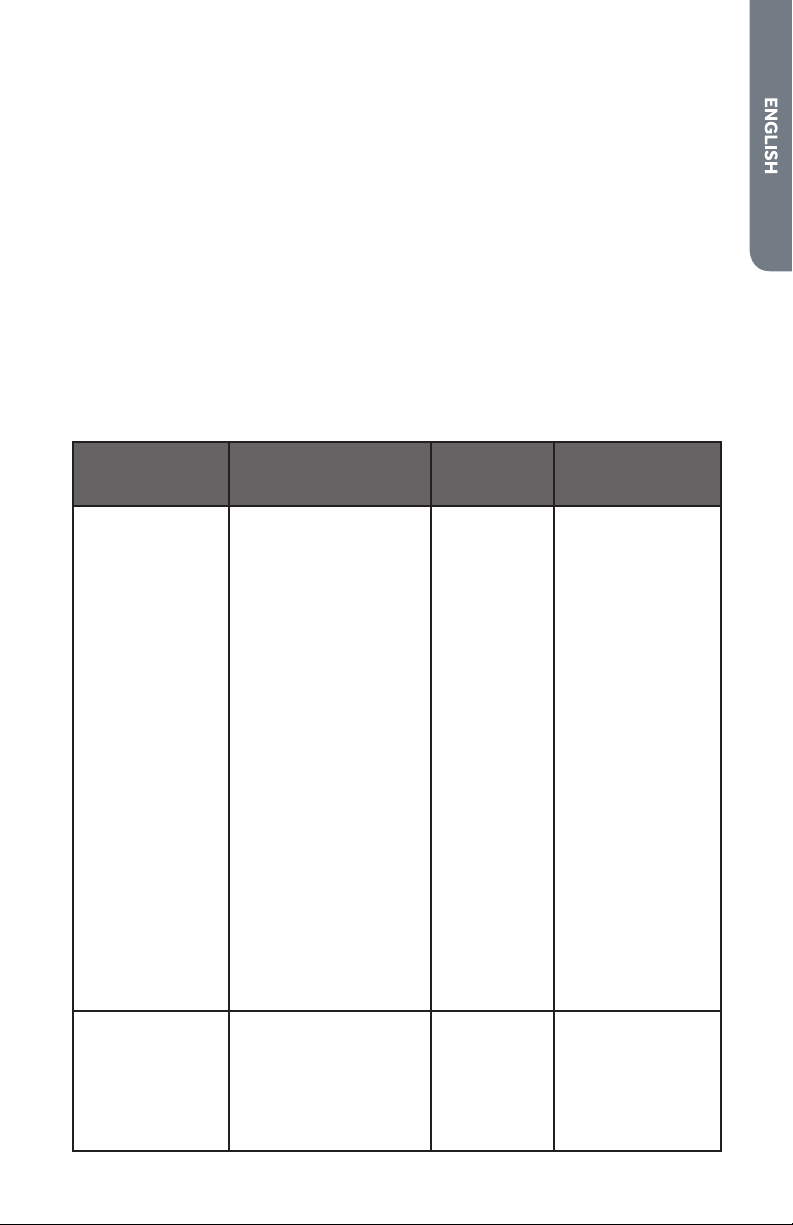
Turn meats once halfway through the cooking time (see convection broil chart).
CONVECTION BROIL CHART
FOOD AND THICKNESS
RACK
POSITION
BROIL
SETTING
°F (°C)
INTERNAL
TEMP. °F
(°C)
TIME
SIDE 1
(MIN.)*
TIME
SIDE 2
(MIN.)*
Beef
Steak (1½" or more)
Medium rare 4 450 (235) 145 (65) 9-12 8-10
Medium 4 450 (235) 160 (71) 11-13 10-12
Well 4 450 (235) 170 (77) 18-20 16-17
Hamburgers (more than 1")
Medium 4 550 (290) 160 (71) 8-11 5-7
Well 4 550 (290) 170 (77) 11-13 8-10
Poultry
Chicken Quarters 4 450 (235) 180 (82) 16-18 10-13
Chicken Halves 3 450 (235) 180 (82) 25-27 15-18
Chicken Breasts 4 450 (235) 170 (77) 13-15 9-13
Pork
Pork Chops (1¼" or more) 4 450 (235) 160 (71) 12-14 11-13
Sausage - fresh 4 450 (235) 160 (71) 4-6 3-5
29
DEHYDRATE TIPS
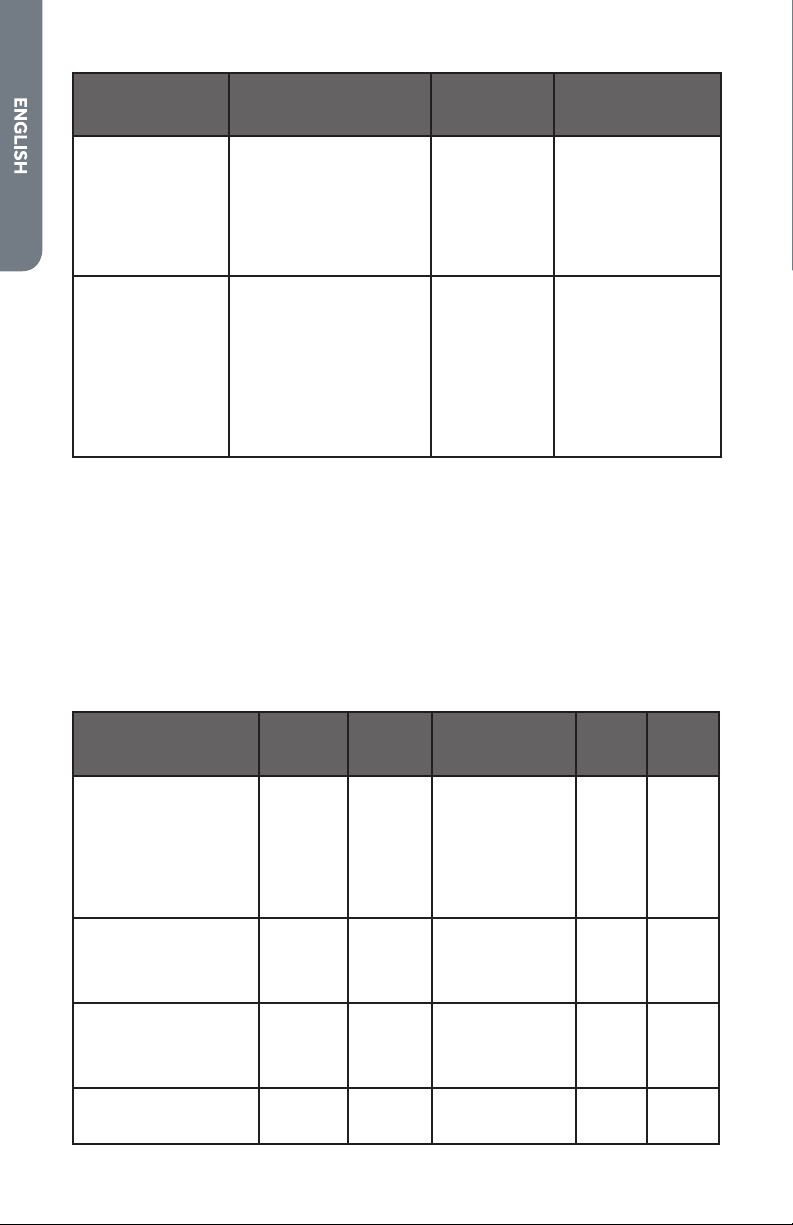
The circulating heated air at a lower temperature slowly removes the moisture for
food preservation.
•
Oven temperature for dehydrating is between 120ºF (50ºC) to 160ºF (70ºC).
•
Multiple racks can be used simultaneously.
•
Some foods require as much as 14-15 hours of time to fully dehydrate.
•
Consult a food preservation book for specic times and the handling of various
foods.
•
This mode is suitable for a variety of fruits, vegetables, herbs and meat strips.
•
Drying screens can be purchased at specialty kitchen shops.
•
By using paper towels, some food moisture can be absorbed before dehydrating
begins (such as with sliced tomatoes or sliced peaches).
DEHYDRATE CHART
FOOD PREPARATION
APPROXIMATE
DRYING TIME*
(hrs)
TEST FOR DONENESS
Fruit
Apples Dipped in ¼ cup lemon
juice and 2 cups water,
¼ slices
11-15 Slightly pliable
Bananas Dipped in ¼ cup lemon
juice and 2 cups water,
¼ slices
11-15 Slightly pliable
Cherries Wash and towel dry.
For fresh cherries,
remove pits
10-15 Pliable, leathery,
chewy
Oranges Peels
and slices
¼ slices of orange;
orange part of skin
thinly peeled from
oranges
Peels 2-4
Slices: 12-16
Orange peel: dry
and brittle
Orange slices:
skins are dry and
brittle, fruit is
slightly moist
Pineapple rings Towel dried Canned: 9-13
Fresh: 8-12
Soft and pliable
Strawberries Wash and towel dry.
Sliced ½" thick,
skin (outside) down on
rack
12-17 Dry, brittle
Vegetable
Peppers Wash and towel dry.
Remove membrane
of pepper,
coarsely chopped about
1" pieces
16-20 Leathery with no
moisture inside
30
FOOD PREPARATION
APPROXIMATE
DRYING TIME*
(hrs)
TEST FOR DONENESS
Mushrooms Wash and towel dry.
Cut of stem end. Cut
into " slices
7-12 Tough and leathery,
dry
Tomatoes Wash and towel dry.
Cut this slices, " thick,
dry well
16-23 Dry, brick red color
Herbs
Oregano, sage
parsley and
thyme, and fennel
Rinse and dry with
paper towel
Dry at 120°F
(60°C) 3-5 hrs
Crisp and brittle
Basil Use basil leaves 3 to 4
inches from top. Spray
with water, shake o
moisture and pat dry
Dry at 120°F
(60°C) 3-5 hrs
Crisp and brittle
BROIL TIPS
•
Place rack in the required position needed before turning on the oven.
•
Use Broil mode with the oven door closed.
•
Preheat oven for 5 minutes before use.
•
Use the 2-piece broil pan.
•
Turn meats once halfway through the cooking time (see convection broil chart).
BROIL CHART
FOOD AND THICKNESS
RACK
POSITION
BROIL
SETTING
°F (°C)
INTERNAL TEMP.
°F (°C)
TIME
SIDE 1
(MIN.)*
TIME
SIDE 2
(MIN.)*
Beef
Steak (¾"-1)
Medium rare 5 5 145 (65) 5-7 4-6
Medium 5 5 160 (71) 6-8 5-7
Well 5 5 170 (77) 8-10 7-9
Hamburgers (¾"-1")
Medium 4 5 160 (71) 8-11 6-9
Well 4 5 170 (77) 10-13 8-10
Poultry
Breast (bone-in) 4 4 170 (77) 10-12 8-10
Thigh (very well done) 4 3 180 (82) 28-30 13-15
Pork
Pork Chops (1") 5 5 160 (71) 7-9 5-7
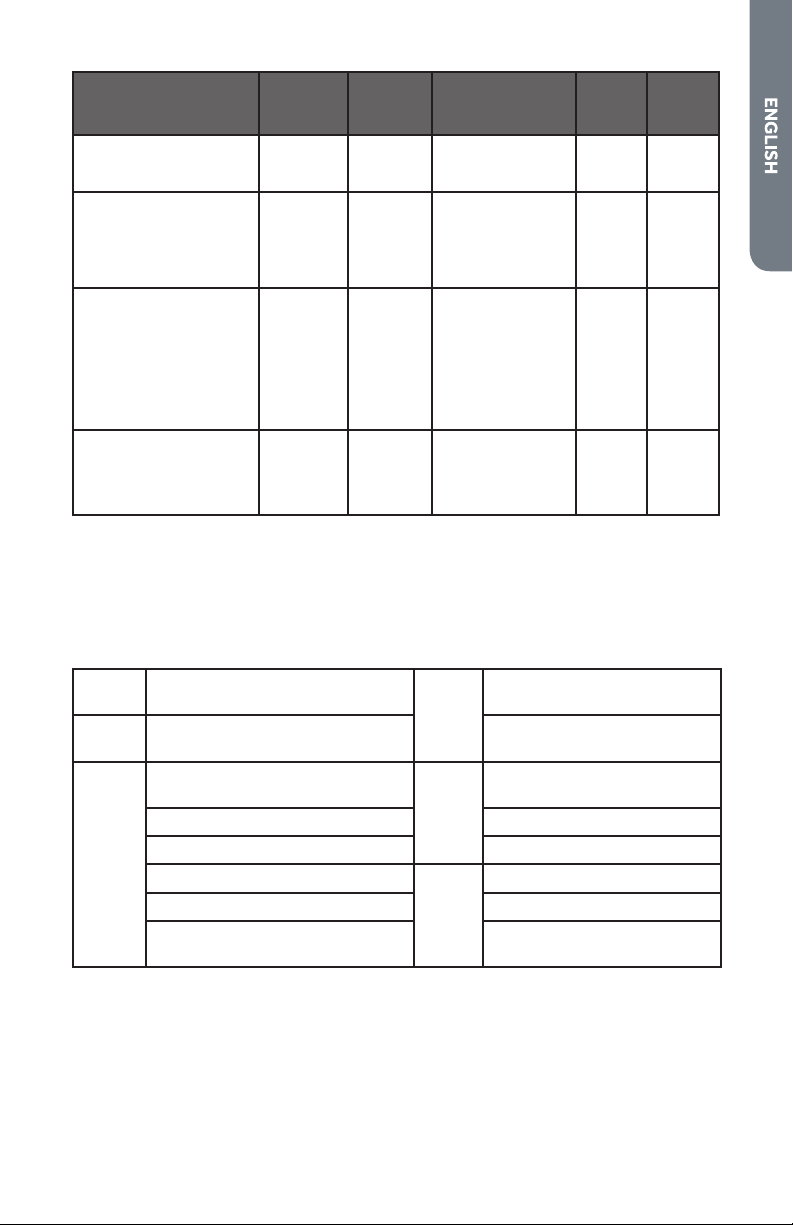
31
FOOD AND THICKNESS
RACK
POSITION
BROIL
SETTING
°F (°C)
INTERNAL TEMP.
°F (°C)
TIME
SIDE 1
(MIN.)*
TIME
SIDE 2
(MIN.)*
Sausage - fresh 5 5 160 (71) 5-7 3-5
Ham Slice (½") 5 5 160 (71) 4-6 3-5
Seafood
Fish Filets, 1"
Buttered
4 4 Cook until
opaque & akes
easily with fork
10-14 Do not
turn
Lamb
Chops (1")
Medium Rare 5 5 145 (63) 5-7 4-6
Medium 5 5 160 (71) 6-8 4-6
Well 5 5 170 (77) 7-9 5-7
Bread
Garlic Bread, 1" slices 4 5 2-2,30
Garlic Bread, 1" slices 3 5 4-6
* Broiling and convection broiling times are approximate and may vary slightly
Cooking times are indicative and also depend on the thickness and the starting temperature of
the meat before cooking .
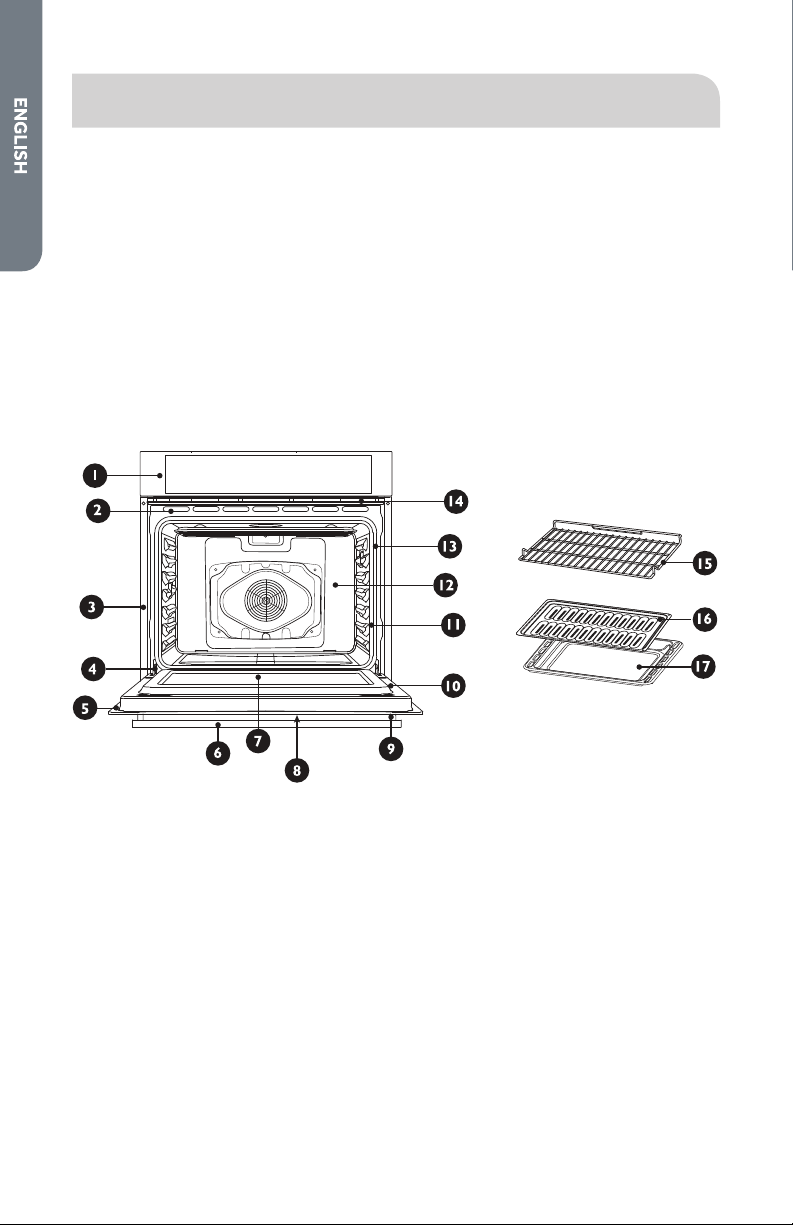
FOOD SERVICE TEMPERATURE GUIDELINES FROM FSIS
(USDA FOOD SAFETY & INSPECTION SERVICE)
140°F
(60°C)
Ham, precooked ( to Reheat)
165°F
(74°C)
Stung (cooked alone or in
bird)
145°F
(63°C)
Fresh beef, Veal, Lamb (medium
rare)
Leftovers & Casseroles
160°F
(71°C)
Ground Meat & Meat mixtures
(Beef, Pork, Veal Lamb)
170°F
(77°C)
Fresh beef, Veal, Lamb (well
done)
Fresh beef, Veal, Lamb (medium) Poultry breast
Fresh Pork (medium) Fresh Pork (well done)
Fresh Ham (raw)
180°F
(82°C)
Chicken and Turkey (Whole)
Egg Dishes Poultry (thighs and wings)
Ground Meat & Meat mixtures
(Turkey, Chicken)
Duck and Goose
NOTE: Eggs (alone, not used in a recipe) – cook until yolk & white are rm
Meat Thermometer
On models without a temperature probe, use a meat thermometer to determine
whether meat, poultry and sh are cooked to the desired degree of doneness. The
internal temperature, not appearance, should be used to determine doneness.
32
OVEN CARE
GENERAL CLEANING
IMPORTANT: Before Cleaning, make sure all controls are o and the oven is cool.
Always follow the instructions printed on the label of the cleaning products.
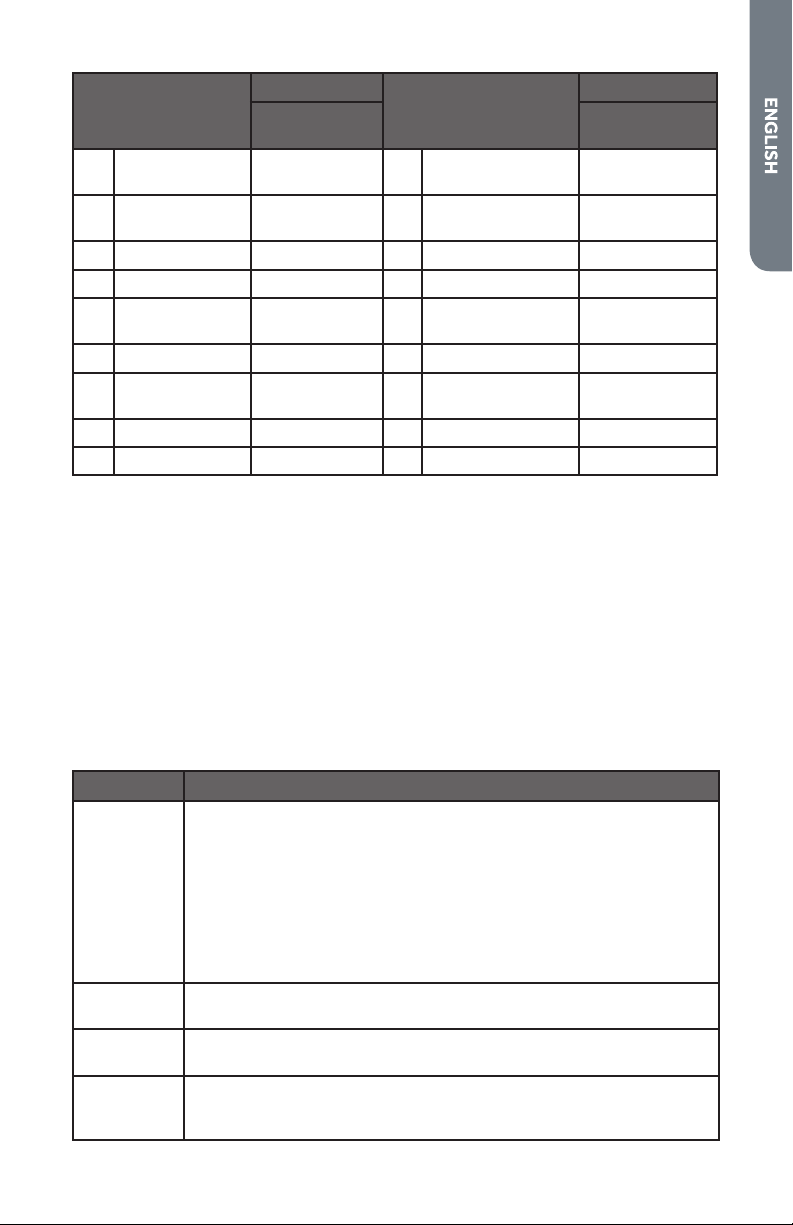
USING THE CLEANING CHART
1. Locate the number of the part to be cleaned in the following illustration.
2. Find the part name in the chart.
•
Use the cleaning method in the left column if the oven is black or white.
•
Use the cleaning method in the right column if the oven is stainless steel.
3. Match the letter with the cleaning method on following chart.
33
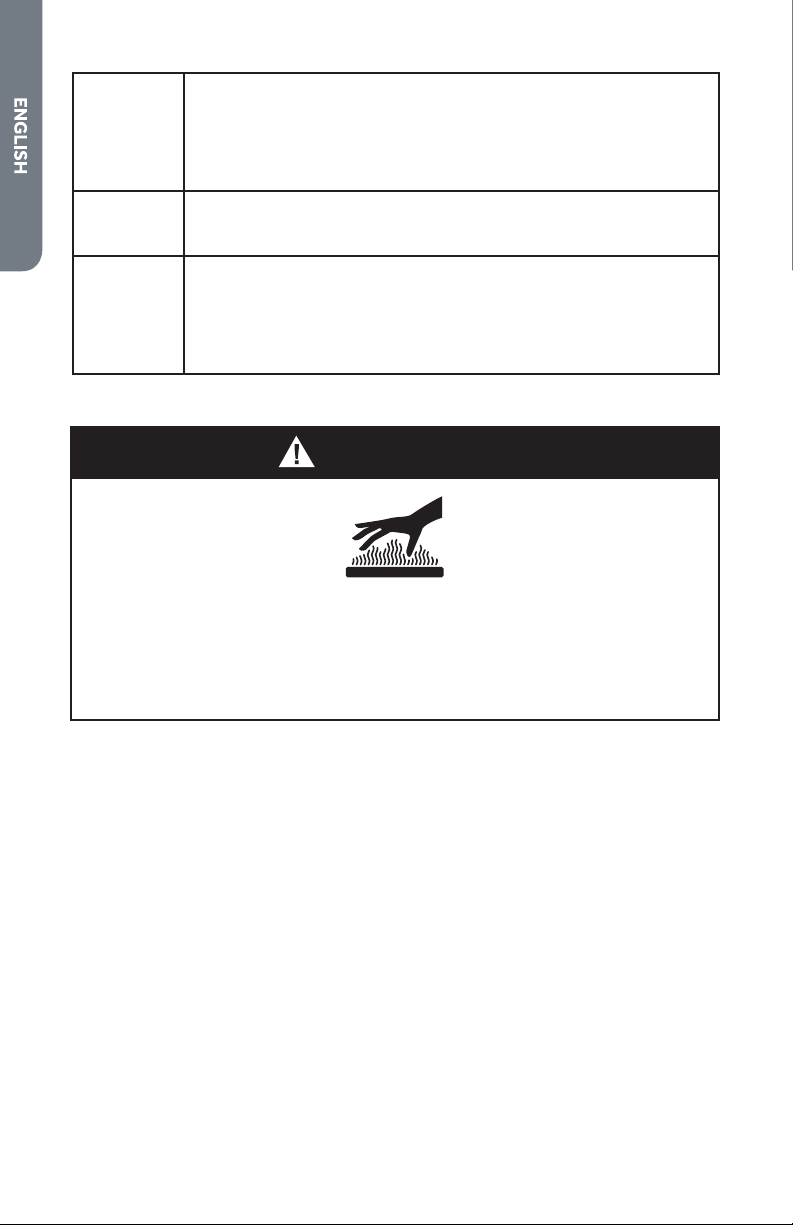
Part
Cleaning Method
Part
Cleaning Method
Stainless Steel
Oven
Stainless Steel
Oven
1 Control Panel C-G 10 Interior Oven
Door
E
2 Door Cooling
Vent
E 11 Oven Front Frame E
3 Side Trim D 12 Oven Cavity E
4 Bottom Trim D 13 Door Gasket B
5 Door Frame E 14 Oven Cooling
Vents
D
6 Door Handle G 15 Oven Rack A
7 Interior Door
Windows
F 16 Broiler Pan Rack E
8 Door Front C&G 17 Broiler Pan E
9 End Caps D
OVEN FINISHES / CLEANING METHODS
The entire oven can be safely cleaned with a soapy sponge, rinsed and dried. If
stubborn soil remains, follow the recommended cleaning methods below.
•
Always use the mildest cleaner that will do the job.
•
Rub metal nishes in the direction of the grain.
•
Use clean, soft cloths, sponges or paper towels.
•
Rinse thoroughly with a minimum of water so it does not drip into door slots.
•
Dry to avoid water marks.
The cleaners listed below indicate types of products to use and are not being
endorsed. Use all products according to package directions.
Part Cleaning Method
A Chrome
Plated
Wash with hot sudsy water. Rinse thoroughly and dry. Or, gently rub
with Soft Scrub
®
, Bon-Ami
®
, Comet
®
, Ajax
®
, Brillo
®
or S.O.S.
®
pads
as directed.
Easy O
®
or Dow
®
Oven Cleaners (cold oven formula) can be used,
but may cause darkening and discoloration.
Racks may be cleaned in the oven during the Self-Cleaning mode.
However, chromed racks will lose their shiny nish and permanently
change to a metallic gray.
B Fiberglass
Knit
DO NOT HAND CLEAN GASKET.
C Glass Spray Windex
®
or Glass Plus
®
onto a cloth rst, then wipe to clean.
Use Fantastik
®
or Formula 409
®
to remove grease spatters.
D Painted Clean with hot sudsy water or apply Fantastik
® or Formula 409
®
rst to a clean sponge or paper towel and wipe clean. Avoid using
powdered cleansers and steel wool pads.
34
E Porcelain Immediately wipe up acidic spills like fruit juice, milk and tomatoes
with a dry towel. Do not use a moistened sponge/towel on hot
porcelain. When cool, clean with hot sudsy water or apply Bon-
Ami
®
or Soft Scrub
®
to a damp sponge. Rinse and dry. For stubborn
stains, gently use Brillo
®
or S.O.S.
®
pads. It is normal for porcelain to
craze (ne lines) with age due to exposure from heat and food soil.
F Reective
Glass
Clean with hot sudsy water and sponge or plastic scrubber. Rub
stubborn stains with vinegar, Windex
®
, ammonia or Bon-Ami
®
DO
NOT USE HARSH ABRASIVES.
G Stainless Always wipe or rub with grain. Clean with a soapy sponge then rinse
and dry. Or, wipe with Fantastik
®
or Formula 409
®
sprayed onto a
paper towel. Protect and polish with Stainless Steel Magic
®
and a
soft cloth. Remove water spots with a cloth dampened with white
vinegar. Use Zud
®
, Cameo
®
, Bar Keeper’s Friend
®
or RevereWare
Stainless Steel Cleaner
®
, to remove heat discoloration.
AUTOMATIC SELF-CLEANING
WARNING
Burn Hazard
Do not touch the oven during the Self-Cleaning cycle.
Keep children away from oven during Self-Cleaning cycle.
Failure to do so can result in burns.
This oven features a self-cleaning function that eliminates the need to manually
scrub the oven interior. During self-cleaning, the oven uses very high temperatures,
burning soil to a powdery ash.
IMPORTANT: The health of some birds is extremely sensitive to the fumes given o
during the Self-Cleaning cycle. Exposure to the fumes may result in death to certain
birds. Always move birds to another closed and well-ventilated room.
•
Keep the kitchen well ventilated during the Self-Cleaning cycle to help get rid of
heat, odors and smoke.
•
It is common to see smoke and/or an occasional ame-up during the Self-Clean
cycle, depending on the content and amount of soil remaining in the oven. If a
ame persists, turn o the oven and allow it to cool before opening the door to
wipe up the excessive food soil.
•
Do not block the oven vent(s) during the Self-Cleaning cycle. Air must be able to
move freely. See “Oven Vents.”
•
Do not clean, rub, damage or move the oven door gasket.
•
The door latch is automatically activated after selecting the Self-Clean cycle.
“AUTO LOCK” will appear in the display. This ensures that the oven door cannot
be opened while the oven interior is at clean temperatures.
35
•
The oven is preset for a 2.5 hour clean cycle; however, the time can be changed.
Suggested clean times are 2 hours for light soil and between 3.0 hours and
3.5hours for average to heavy soil.
•
Clean mode stops automatically at the end of the set cleaning time.
•
When the oven heat drops to a safe temperature, the automatic door lock will
release and the door can be opened.
•
The oven light does not operate during Clean mode.
BEFORE SELF-CLEANING
1. Remove all utensils and bakeware.
2. Remove non-porcelain oven racks. If chromed racks are left in the oven during
the self-clean cycle, they will permanently lose the shiny nish and change to a
dull dark nish. See “Oven Finishes/Cleaning Methods” for proper care.
3. Wipe up any soft soil spills and grease with paper towels. Excess grease will cause
ames and smoke inside the oven during self-cleaning.
4. Be sure oven interior lights are turned o and the light bulbs and lens covers are
in place.
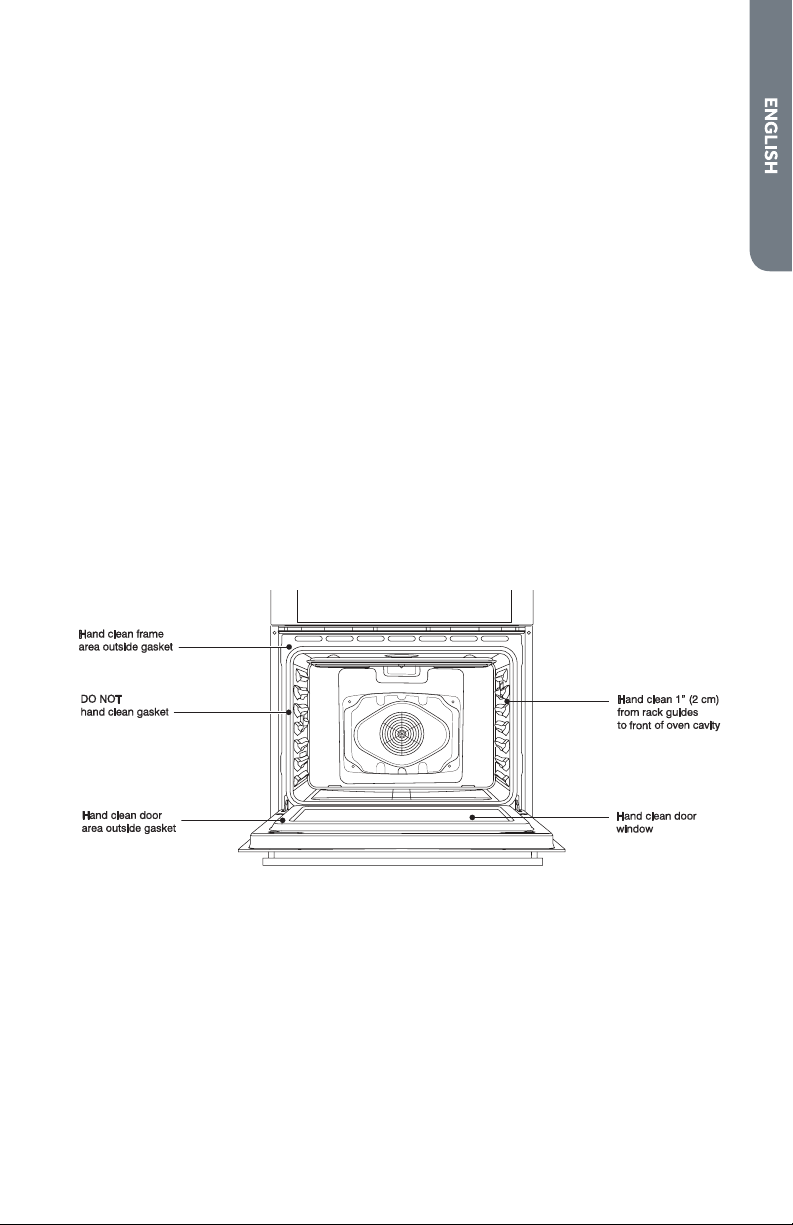
5. Some areas of the oven such as the oven door edge, oven door window, oven
front frame and up to 1½" (2-3 cm) inside the frame do not get hot enough during
the cleaning cycle for soil to burn away and must be cleaned by hand. BEFORE the
cycle begins, clean oven interior using a soapy sponge or plastic scrubber and a
solution of detergent and hot water. Rinse and dry all areas thoroughly.
NOTE: Do not rub the oven door gasket.
SELF-CLEAN CYCLE
A minimum 24-hour wait is recommended between cleaning cycles.
To Self-Clean:
1. Close the oven door.
2.
Press SELF CLEAN. “REMOVE RACKS” will scroll in the selected oven text area of
the display.
3. “2:00 3:00 3:30” will appear in the display.
4. Use the number keypad to select the clean level.

36
5. If you want to delay the start of the self-cleaning cycle, press DELAY START, and
then set a time, by pressing the number keypad.
6. Press START.
After the door is locked, “SELF CLEAN” will scroll in the selected text area until
the clean cycle is nished.
When the Self-clean Cycle Ends:
“COMPLETE” appears in the display and the oven door unlocks.
7. Once the oven has completely cooled, remove ash with a damp cloth.
NOTE: To avoid breaking the glass, do not apply a cool, damp cloth to the inner
door glass before it has cooled completely.
OVEN DOOR REMOVAL
For normal oven use, there is no need to remove the oven door. However, should it
become necessary to remove the door, follow the instructions in this section.
IMPORTANT:
•
Make sure oven is cool and that power to the oven has been turned o before
removing the door.
•
The oven door is heavy and fragile, and the door front is glass. To avoid oven
door glass breakage, use both hands, and grasp only the sides of the oven door
to remove. Do not grasp the handle.
•
Be sure both levers are securely in place before removing the door.
•
Do not force door open or closed.
To Remove the Oven Door:
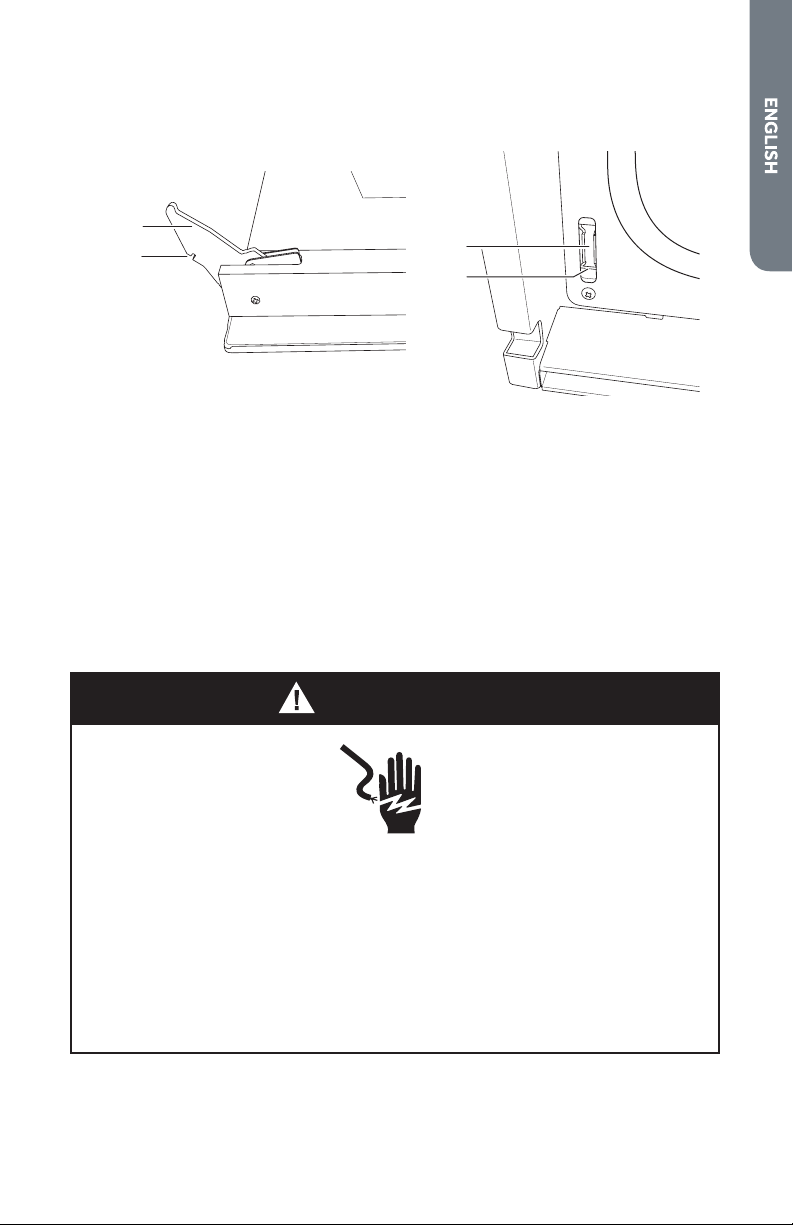
1. Open the door completely.
2. Flip up the hinge latch on each side.
a
a
a Hinge Bracket
3. Holding the door rmly, close the oven door completely.
4. Grasping both sides lift up on the oven door while pushing it closed, and then
pull it away from the door frame.
5. Place the door in a protected location.
37
To Replace the Oven Door:
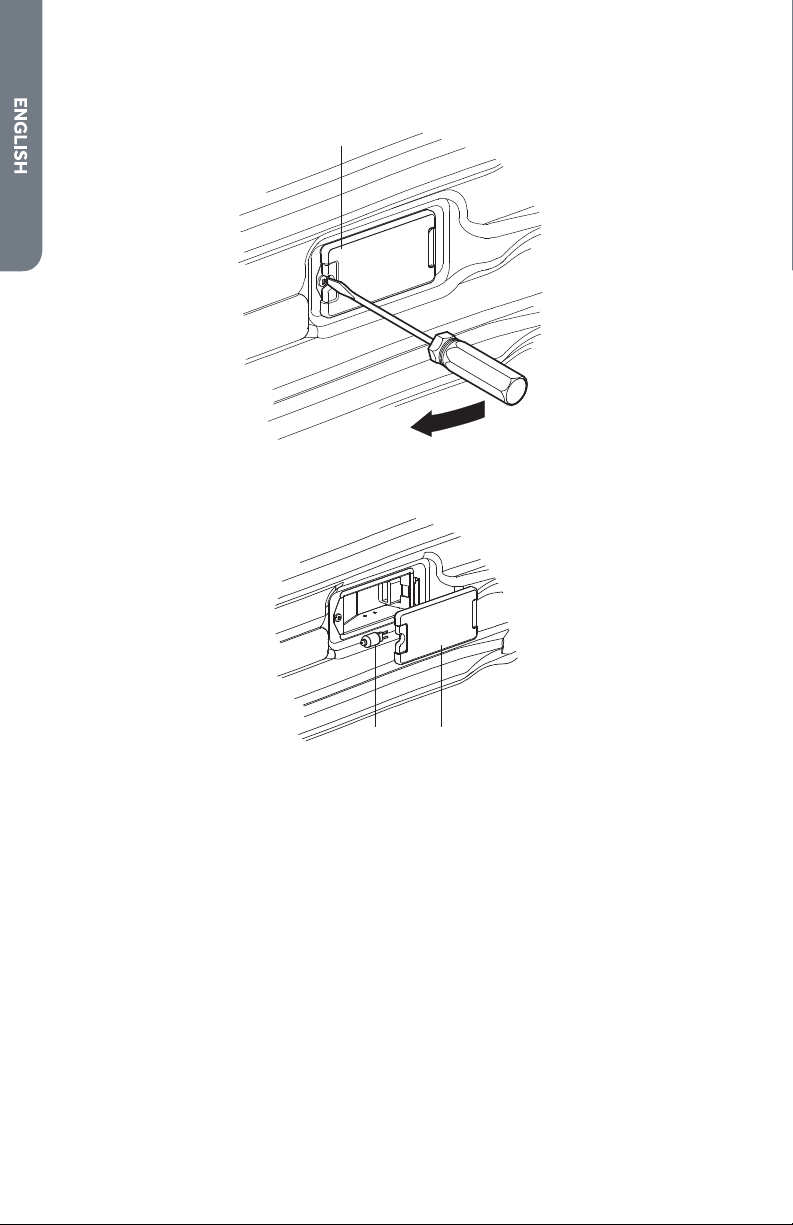
1. Holding the door rmly, insert the upper arms of both hinges into the slots. The
recesses must hook on the lips.
a
b
c
d
a Upper Arm
b Recess
c Slots
d Lip
2. Open the oven door.
NOTE: You should hear a “click” sound when the door is correctly in place.
3. Move the hinge latch on each side back into the locked position.
4. Open and close the door to test that it operates freely. If it does not, repeat the
door removal and replacement process.
5. Close and open the door slowly to assure that it is correctly and securely in place.
REPLACING AN OVEN LIGHT
WARNING
Electrical Shock Hazard
Make sure the oven and lights are cool and power to the oven has been
turned off before replacing the light bulb(s).
The lenses must be in place when using the oven. The lenses serve to
protect the light bulb from breaking.
The lenses are made of glass. Handle carefully to avoid breakage.
Failure to do so could result in death, electric shock, cuts or burns.
The oven light is a standard 25 watt (G9) appliance bulb.
IMPORTANT: Before replacing the bulb, make sure the oven is cool and the controls
are turned o.
38
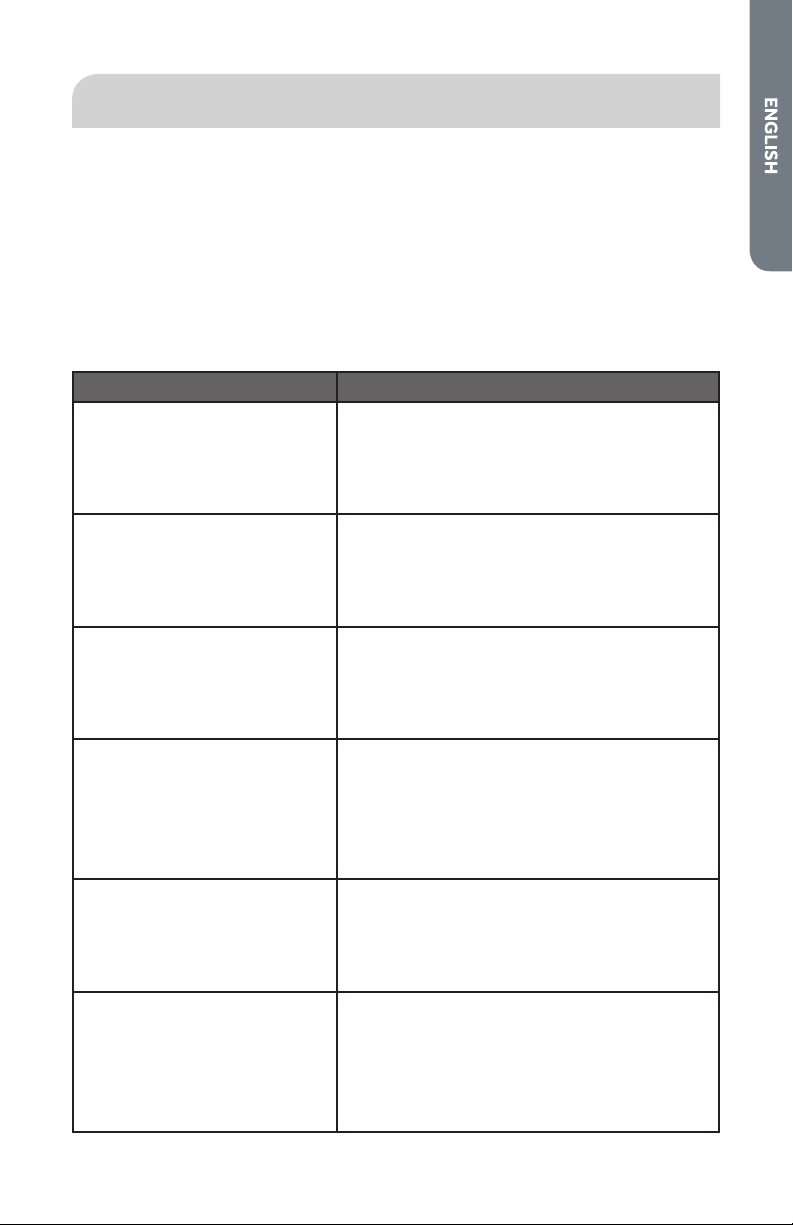
1. Disconnect power at the main power supply (fuse or breaker box).
2. Using a Phillips-head screwdriver, remove the screw, and then remove the cover.
a
a Light Cover
3. Remove the burned out bulb from the socket.
a b
a Light Bulb
b Light Cover
NOTE: To avoid damage or decreasing the life of the new bulb, do not touch bulb
with bare ngers. Wear cotton gloves or use a tissue when replacing the light bulb.
4. Replace the bulb, and then replace the bulb cover.
5. Reconnect power at the main power supply (fuse or breaker box).
39
TROUBLESHOOTING
First try the solutions suggested here to possibly avoid the cost of a service call.
BAKING AND ROASTING
With either Bake or Convection Bake and Convection Roast poor results can occur
for many reasons other than a malfunction of the oven. Check the chart below for
causes of the most common problems. Since the size, shape and material of baking
utensils directly aect the baking results, the best solution may be to replace old
baking utensils that have darkened and warped with age and use. Check the Baking
Charts for the correct rack position and baking time.
BAKING PROBLEM CAUSE
Food browns unevenly
•
Oven not preheated
•
Aluminum foil on oven rack or oven bottom
•
Baking utensil too large for recipe
•
Pans touching each other or oven walls
Food too brown on bottom
•
Oven not preheated
•
Using glass, dull or darkened metal pans
•
Incorrect rack position
•
Pans touching each other or oven walls
Food is dry or has shrunk
excessively
•
Oven temperature too high
•
Baking time too long
•
Oven door opened frequently
•
Pan size too large
Food is baking or roasting too
slowly
•
Oven temperature too low
•
Oven not preheated
•
Oven door opened frequently
•
Tightly sealed with aluminum foil
•
Pan size too small
Piecrusts do not brown on
bottom or crust is soggy
•
Baking time not long enough
•
Using shiny steel pans
•
Incorrect rack position
•
Oven temperature is too low
Cakes pale, at and may not be
done inside
•
Oven temperature too low
•
Incorrect baking time
•
Cake tested too soon
•
Oven door opened too often
•
Pan size may be too large
40
BAKING PROBLEM CAUSE
Cakes high in middle with crack
on top
•
Oven temperature too high
•
Baking time too long
•
Pans touching each other or oven walls
•
Incorrect rack position
•
Pan size too small
Piecrust edges too brown
•
Oven temperature too high
•
Edges of crust too thin
OPERATION
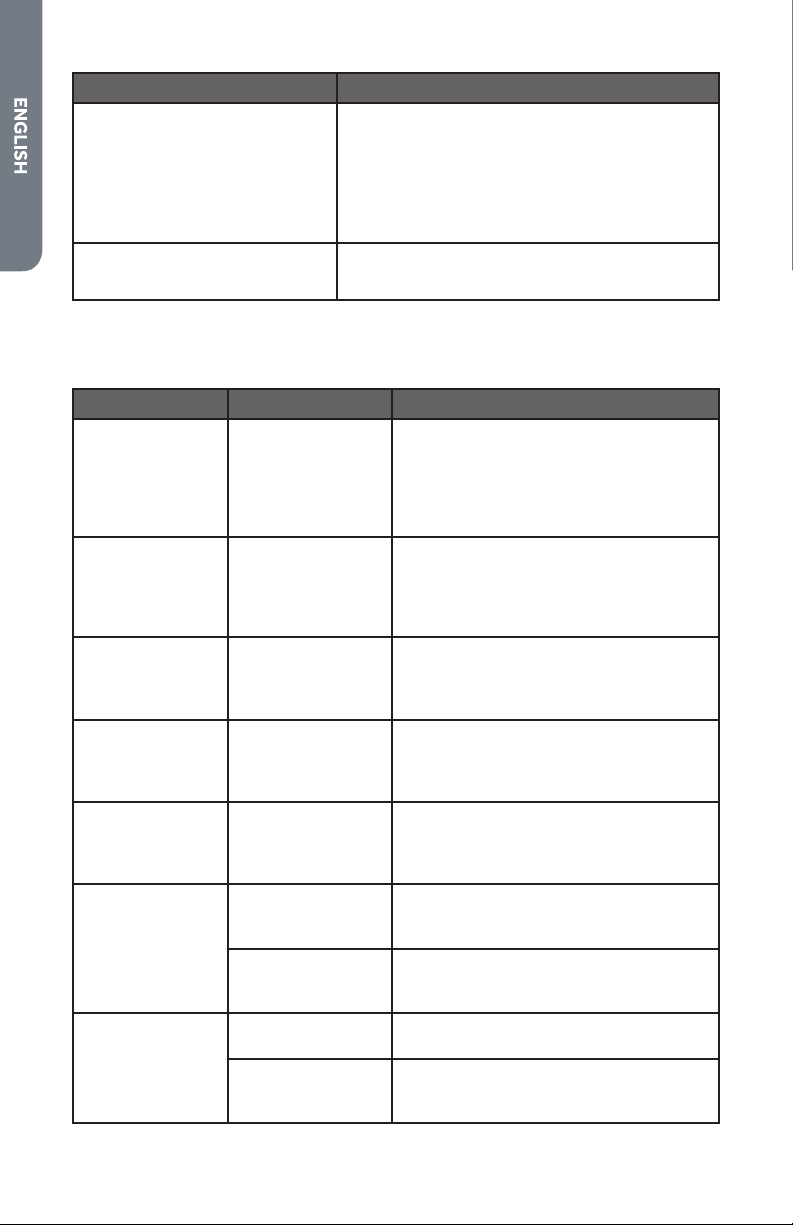
PROBLEM POSSIBLE CAUSE SOLUTION
F03 or F04 Error
appears in the
display window.
A problem with
latch mechanism
occurred.
Turn o power at the main power supply
(fuse or breaker box), wait a few seconds
and turn it back on again. The oven
should run a latch auto–test. If condition
persists, note the code number and call
an authorized service center.
Other F_ Error
appears in the
display window.
Turn o power at the main power supply
(fuse or breaker box), wait a few seconds
and turn it back on again. If condition
persists, note the code number and call
an authorized service center.
The oven
display does not
illuminate.
Turn o power at the main power supply
(fuse or breaker box). Turn breaker
back on. If condition persists, call an
authorized service center.
Cooling fan
continues to
run after oven is
turned o.
The oven
components
have not cooled
suciently.
The fan turns o automatically when
the electronic components have cooled
suciently.
Oven door is
locked and will
not release, even
after cooling.
Turn the oven o at the circuit breaker
and wait a few seconds. Turn breaker
back on. The oven should reset itself
and will be operable.
Oven is not
heating.
No power going to
the oven.
Turn on power at the main power supply
(fuse or circuit breaker box). If condition
persists, call a qualied electrician.
Oven Mode or
Temperature not
selected.
Turn control knobs to select the oven
mode and temperature.
Oven is not
cooking evenly
Oven rack is not in
correct position.
Refer to cook charts for recommended
rack position.
Convection Bake
Mode
Always reduce recipe temperature
by 25°F (15 °C) when baking with
Convention Bake mode.
41
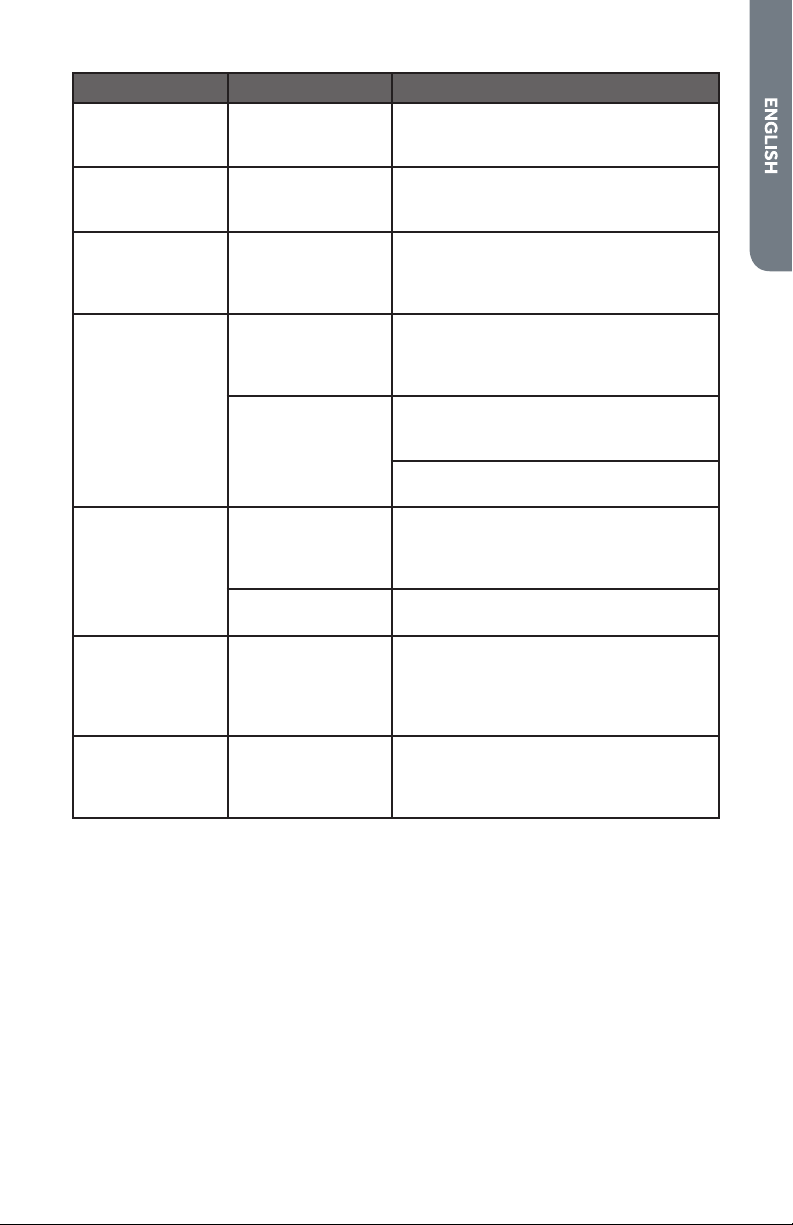
PROBLEM POSSIBLE CAUSE SOLUTION
Oven light is
not working
properly.
Light bulb is loose
or burned out.
Replace or reinsert the light bulb if loose
or defective. Touching the bulb with
ngers may cause the bulb to burn out.
Oven light stays
on.
Oven door
does not close
completely.
Check for obstruction in oven door.
Check to see if hinge is bent or door
switch is broken.
Cannot remove
lens cover on
light.
Lens cover is dirty. There may be a soil build-up around the
lens cover. Wipe lens cover area with a
clean dry towel prior to attempting to
remove the lens cover.
Oven will not
Self- Clean
properly.
Oven was still
warm when
Cleaning mode
was selected.
Allow the oven to cool before running
Self-Cleaning.
Oven is heavily
soiled.
Always wipe out loose soils or heavy
spillover before running Self-Cleaning.
See Preparing the Oven to Self-Clean.
If oven is badly soiled, set oven for a
4-hour Self-Cleaning.
Clock and timer
are not working
properly.
No power going to
the oven.
Turn on power at the main power supply
(fuse or circuit breaker box). If condition
persists, call an authorized service
center.
Clock or Timer not
set correctly.
See the Clock and Timer sections.
Excessive
moisture
Oven was
not properly
preheated.
When using bake mode, preheat
the oven rst. Convection Bake and
Convection Roast will eliminate any
moisture in oven (one of the advantages
of convection).
Porcelain chips
Oven racks
removed
and replaced
incorrectly.
When oven racks are removed and
replaced, always tilt racks upward and
do not force them to avoid chipping the
porcelain.