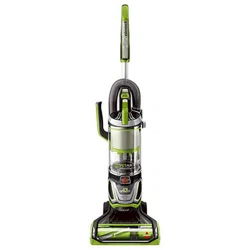
Slide handle into vacuum base. Attach with the screw that is taped to the handle.
Attach hose by lining the tabs on the cuff with the notches on the back of the vacuum. Twist clockwise to lock hose into place.
Push handle end into base of vacuum on opposite side.
4. INSTALL OPTIONAL FEBREZE® FILTER
Press Tank Release Button and pull container away from vacuum.
Remove post-motor filter cover by pulling up on the tab.
Unlock the postmotor filter by twisting the tab counter-clockwise.
Remove the postmotor filter and replace with the Febreze® filter.
IMPORTANT REMINDER
Your vacuum features an adjustable Floor Type Setting that provides easy multi-surface cleaning. See page 8 for further instructions
Built by Pet Owners
Cyclonic Pet Hair Spooling System™
BISSELL is the only vacuum brand with a Cyclonic Pet-Hair Spooling System™ for a Hands Free Empty.
A patented hair management system that spools and traps hair to keep it out of your filters and off your hands.
Just press the release button and watch the ball of pet hair drop right out.
You no longer have to reach up and pull the ‘yuck’ out.
The Tangle Free Brush Roll’s unique design helps reduce hair wrapping and catching on the bristles, and uses the carpet to pull the hair off the brush roll.
Product View
*NOTE: Pet TurboEraser® Tool does not store on unit.
THIS APPLIANCE HAS A POLARIZED PLUG
To reduce the risk of electric shock, this appliance has a polarized plug (one blade is wider than the other). This plug will fit in a polarized outlet only one way. If the plug does not fit fully in the outlet, reverse the plug. If it still does not fit, contact a qualified electrician to install a proper outlet. Do not change the plug in any way.
Operations
WARNING: Do not plug in your vacuum until you are familiar with all instructions and operating procedures.
Turn vacuum on by pressing Power Switch on (I - ON and O - OFF). Press Brush Roll switch to run the PowerBrush for carpet cleaning (brush roll is on when light on switch is illuminated). See page 15 to maintain the brush roll.
Step gently on base and pull back on handle to recline.
NOTE: The brush roll will automatically shut off when vacuum is locked in upright position. Recline to reactivate.
NOTE: In the unlikely event that hair wrapped around your brush roll, run vacuum back and forth on clean carpet several times to help release any wrapped hair.
NOTE: Turn off the brush roll when vacuuming hard or delicate surfaces that may be caught by the rotating brush. This could include hard wood, tiled floors, small area rugs or frieze carpets that have long delicate fibers or threads.
Adjusting the Floor Type Setting
Locate the Floor Type Setting on the side of the vacuum.
Turn the knob to the LEFT for high pile carpet and to the RIGHT for bare floors.
Above Floor Cleaning
Clean stairs or furniture easily with the removable canister. Push the Lift-Off button to remove and attach desired tool.
For the most reach, extend the telescoping extension wand by twisting to the right to unlock. Then slide the telescoping extension wand to your desired length.
If desired, the telescoping extension wand can be removed from the hose. To do so, grab the telescoping wand handle and pull up while holding the end of the hose.
Attach desired tool. Use the Pet TurboEraser® tool for best results on your stairs. Or use the 2-in-1 Pet Brush which has white soft bristles for more sensitive/gentle surfaces and rubber nubs for embedded pet hair.
When finished, replace the canister back on vacuum by aligning the front with the base of vacuum, then lean canister back and lock into place.
NOTE: When wrapping the cord, be sure that it is placed securely around the cord wraps. If it falls behind the lift-off canister, it can impede reattachment.
LED Lighted Crevice Tool
Pull tabs out of battery door area before use to activate. Connect to wand or hose and the LED Light will automatically come on.
To replace LED battery, unscrew the small screw with a Phillips head screw driver. Pull cover off to reveal two batteries (CR1632 3V). Slide and pull out each battery and replace with new. Be sure the “+” sign on battery is facing out. Dispose of used battery promptly. Keep away from children. Do not disassemble and do not dispose of in fire.
NOTE: When the small tab on the connection point of Crevice tool comes into contact with the handle, wand, or hose; that triggers the LED light to come on.
Vacuum Motor Protection
An internal thermal protector has been designed into your vacuum to protect it from overheating. When the thermal protector activates, the main vacuum motor will stop operating. The front lights will remain on, even though the motor turns off. If this happens, proceed as follows.
Turn vacuum OFF and unplug from electrical outlet
Check for the source of overheating problem (full dirt cup, dirty filters or, a clog) and fix by following the maintenance instructions.
When the motor cools for approximately 30 minutes, the thermal protector automatically resets and cleaning may continue. If the vacuum will not turn on or the thermal protector continues to activate, your vacuum may need servicing. Contact BISSELL Consumer Care.
NOTE: The thermal protector controls the main vacuum motor only, not the brush motor. If the thermal protector activates, brush and lights will continue to operate normally; however, there will be no suction.
Remove/Empty Dirt Container
WARNING: To reduce the risk of electrical shock, turn power switch OFF and disconnect polarized plug from electrical outlet before performing maintenance or troubleshooting checks.
The dirt container is full. Time to empty!
Press the Release Button and grab the handle to pull the dirt container away from vacuum.
Hold the dirt container over a trash bin and press the Empty Button. Once emptied, snap bottom back into place
Return the dirt container to the vacuum, securing the bottom in place first and then pushing back until you hear a “click”.
WARNING: Do not operate vacuum with damp or wet filters. Allow components to dry before reassembling the dirt container.
WARNING: Before using your vacuum, make sure that the dirt container is in locked position and that all filters, both pre and post-filters are in place. DO NOT operate your vacuum without these filters.
Maintenance & Care
Clean/Replace Pre-Motor Filters
WARNING: To reduce the risk of electrical shock, turn power switch OFF and disconnect polarized plug from electrical outlet before performing maintenance or troubleshooting checks.
WARNING: Do not operate vacuum with damp or wet filters. Allow components to dry before reassembling the dirt container.
Press the dirt container Release Button and pull away from vacuum.
Twist tank cover to the unlock position then pull up on handle.
Pull down on the pre-motor filter to remove.
There are three pieces to the pre-motor filter. All are washable. Be sure to dry all filter layers separately and that they are fully dry before reassembling and returning to the vacuum.
NOTE: Replace this filter every 3 to 6 months. Visit BISSELL.com for Style 2087 filter replacements.
Clean/Replace Post-Motor Filter
WARNING: To reduce the risk of electrical shock, turn power switch OFF and disconnect polarized plug from electrical outlet before performing maintenance or troubleshooting checks.
WARNING: Do not operate vacuum with damp or wet filters. Allow components to dry before reassembling the dirt container.
Press the dirt container Release Button and pull container away from vacuum.
Remove post-motor filter cover by pulling up on the tab.
Unlock the post-motor filter by twisting the tab counter-clockwise.
Remove the post-motor filter. When reassembling, be sure to lock the filter back into place. The pleated filter may NOT be washed. If dust/debris accumulates, gently tap the filter on the inside of a trash bin.
NOTE: Replace this filter every 3 to 6 months. Visit BISSELL.com for Style 2087 filter replacements.
Clean Inner Cyclone Separator
Twist tank cover to the unlock position then pull up on handle to access bulk separator.
Pull up to remove the bulk separator from dirt container.
Tap separator against inside of trash bin and rinse under warm water, if necessary. Be sure to let it completely dry before placing back in dirt container. When replacing, be sure that separator aligns with the upper tank to ensure fit.
Maintain Pet TurboEraser® Tool
Twist gray collar counter-clockwise, until slot appears, and then separate faceplate
Remove brush roll, belt, and paddle wheel. Inspect for damages and replace if necessary
To reassemble, align two clips on each end of paddle wheel with belt on and pop back into place. Place brush roll with belt back in. Faceplate will not close properly if all parts are not aligned correctly
To put faceplate back on, align the tabs in the top of the cover and place it down to “click” into place.
Replace Brush and Belt
Unplug and turn vacuum over. Unscrew 10 Phillips head screws to remove bottom cover.
Pull roller straight out and slide belt off motor gear. Replace roller and/or belt.
Inspect brush roll by placing it on its end and spin. The brush roll should spin freely, multiple times by one flick. If it doesn’t, replace brush roll.
Inspect belt, replace if it appears damaged.
Place belt back on brush roll.
Pinch belt around brush roll & hook back around the motor gear.
Rotate brush roll into place and line up end caps.
Re-attach bottom cover with 10 screws.
NOTE: If an object becomes lodged in foot and brush shuts off, turn vacuum off and unplug from electrical outlet. Remove obstruction and brush will automatically reset when vacuum is plugged and turned back on.
Troubleshooting
WARNING: To reduce the risk of electric shock, turn power switch off and disconnect plug from electrical outlet before performing maintenance or troubleshooting checks.
Problem
Possible causes
Remedies
Brush roll doesn’t rotate
Brush roll switch is turned off.
Make sure Brush roll switch is on.
Vacuum is locked in upright position.
Recline vacuum and switch on the Brush roll.
Vacuuming on Premium Soft Carpet.
Turn the Floor Type Setting towards high carpet.
Brush roll has lodged debris or other entanglements, keeping the brush from rotating
Unplug to reset brush motor, checking for and removing debris before turning ON.
Vacuum won’t pick up dirt
Pod is not securely seated.
Remove pod and replace, making sure that it “clicks” into place.
Filters are dirty.
Remove and rinse pre-motor filters. Allow enough time for them to dry properly before reinserting. Rem
There is a clog in the vacuum.
Remove debris and any other entanglements that may be restricting the brush roll’s rotation.
Dirt Container is not seated correctly.
Press the Tank Release to release the Dirt Container and reseat properly.
There is a crack or hole in the Main Hose.
If there is a crack or hole, order a new Main Hose from the BISSELL website.
Main Hose is not connected
Locate the Main Hose and reconnect by pushing the hose connection.
There is a clog in the hose.
Check inside of hose for clogs by disconnecting from vacuum.
Hair wrapped around brush roll.
Run vacuum back and forth on clean carpet several times to release wrapped hair.
Dirt is escaping from the vacuum
Dirt Container is full.
Empty the Dirt Container.
Filters are missing or dirty.
Check to see if all of the Pre-Motor and Post-Motor filters are in place and clean