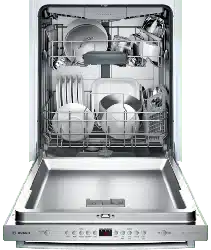
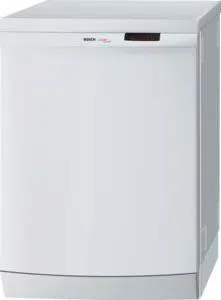
User Manual Dishwasher
Getting Started
Appliance overview
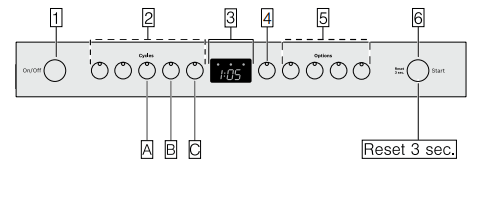
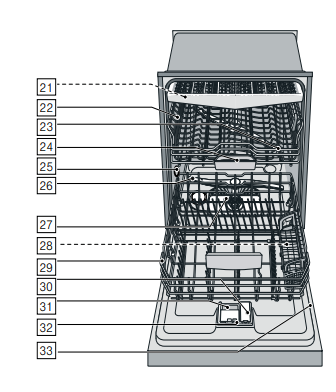
The dotted lines show optional features which may or may not be included with your dishwasher. The numbers stated below refer to the overview images on the previous page of this manual.
Operating panel
- On/Off button
- Wash cycles**
- Digital display
- Delay start button
- Wash cycle options**
- Start button
Note: Some of the wash cycles and options will vary by model.
Dishwasher interior components
21. Third rack*
22. Upper rack
23. Upper spray arm
24. Detergent tab tray
25. Vent hole
26. Lower spray arm
27. Filters
28. Silverware basket *
29. Lower rack
30. Rinse aid dispenser
31. Detergent dispenser
32. Lock for detergent dispenser
33. Rating plate
* optional feature which may or may not be included with your dishwasher.
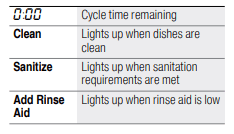
Display indicators
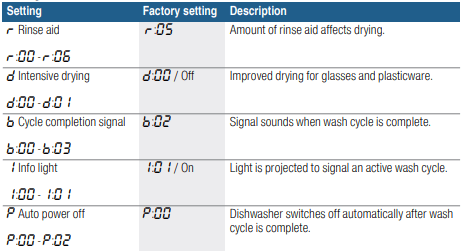
Menu overview
The dishwasher has been preset with certain settings for your convenience. You can change these factory settings.
Use the function keys #, + and 3 to change the settings. See instructions ~ "1 Operating the Dishwasher" on page 34
Rinse Aid
To achieve proper drying, always use a liquid rinse aid, even if your detergent contains a rinse aid or drying additive.
Note: The dishwasher indicates low rinse aid by turning on the Rinse Aid indicator. If this indicator lights up, you need to refill the rinse aid dispenser 9" by following the directions below.
Adding rinse aid
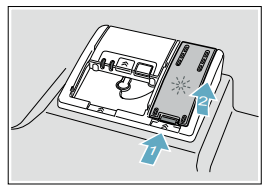
1. Open the rinse aid dispenser 30 by pressing on the latch of the lid and pull it open.
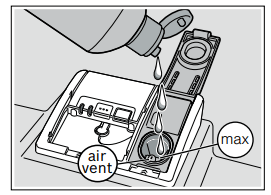
2. Add liquid rinse aid to the dispenser 30 until it is full. Do not overfill. Avoid spilling into air vent hole.
3. Close the lid. Lid must be fully closed until it clicks in order to seal.
4. Wipe up any excess rinse aid that may have puddled when the dispenser reservoir is full.
The indicator light will go out a few moments after the dishwasher door is shut.
Tip: For easier pouring, remove lid from the rinse aid bottle.
Setting the amount of rinse aid used
The amount of rinse aid dispensed can be set from  to
to  . The factory setting is
 .
.
You should only change the setting if streaks remain on the dishes (lower the amount), or if dishes are not getting dry enough (increase the amount).
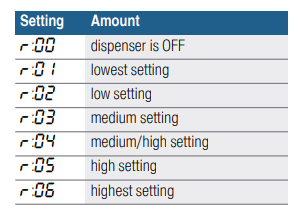
- Press the On/Off button 1
- Hold down the function key A and press the Start button 6 until the display 3 indicates
 or
or  (x can be any number). Release both buttons.
- Press the function key A until the display 3 shows

- Press the function key C to select the desired setting.
- Press the Start button P to save the setting.
Turning off rinse aid indicator
Proceed as described in the section “Setting the amount of rinse aid used” and set value to  . The rinse aid indicator is now turned off.
Loading the Dishwasher
Dishware material
Recommended :
Aluminum
- Colored anodized aluminum may fade over time. Minerals in your water may cause the aluminum to darken or spot. This can usually be removed with a soap-filled steel wool pad.
China, Crystal, Stoneware
- Some hand-painted utensils may discolor, fade or spot. Hand wash these utensils. Position fragile glassware so that it will not topple over or come in contact with other utensils during the wash cycle.
Glass
- Make sure to use dishwasher-safe glass. Milk glass may discolor or become yellow.
Non-stick Coatings
- Apply a light coating of vegetable oil to non-stick surfaces after drying.
Plastics
- Make sure the plasticware is dishwasher-safe.
Stainless Steel, Sterling Silver and Silver Plates
- Load these so they do not come in contact with other metals, stainless steel dishwasher tub walls or the inner door.
Not Recommended
Acrylic
- Crazing or small cracks throughout the acrylic, may occur.
AdhesiveJoined Pieces
- Adhesives that join materials such as plastic, wood, bone, steel, copper, tin, etc. may loosen.
Bone-Handled Utensils
Iron
- Iron will rust. Hand wash and dry immediately.
Non-Dishware Items
- Your dishwasher is intended for use in cleaning ONLY standard household dishware and kitchenware.
Pewter, Brass, Bronze
- These items will tarnish. Hand wash and dry immediately.
Tin
- Tin will stain. Hand wash and dry immediately.
Wood
- Wooden bowls, wooden utensils and utensils with wooden handles can crack, warp and lose their finish.
Loading the racks
For best dishwashing results, observe the following when loading the dishwasher:
- Do not pre-wash items with loosely attached food soil.
- Remove all food particles, bones, toothpicks and excessive grease.
- Pre-treat items having burned-on, baked-on or starchy soils.
- Load dishes in the dishwasher racks so the insides of bowls, pots and pans are facing the spray arms.
- Avoid nesting and contact points between dishes.
- Separate items of dissimilar metals. Use care to not block movement of the spray arms.
- Only wash household dishware and kitchenware rated as dishwasher-safe. Refer to the Dishware Materials section for more information about dishware suitability
Loading the upper rack
Ensure items do not protrude through the bottom of the racks and block the spray arms.
Note: When pushing the upper rack 22 into the dishwasher, push it until it stops against the back of the tub so the upper rack spray arm 23 connects to the water supply at the back of the tub. Do not push racks in using the door.
Loading the lower rack
Place large items in the lower rack 29 . Load pots, pans and bowls upside down. Do not block the vent hole 25 with tall baking sheets. Load these items on the right side of the dishwasher.
Recommended loading pattern
For daily, regular or typical use
12 place setting
Lower rack 29
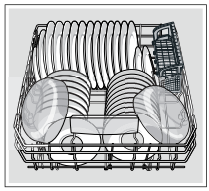
Upper rack 22
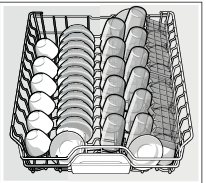
Third rack 21
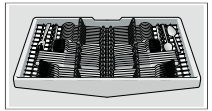
Additional loading pattern
10 place setting
Lower rack 29
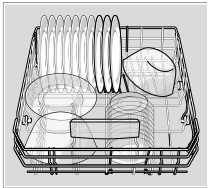
Upper rack 22
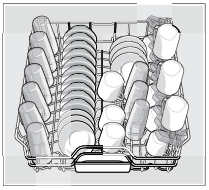
Third rack 21

Loading the silverware basket
Place knives and sharp utensils with their handles up and forks and spoons with their handles down. If large or oddly-shaped items are loaded in the silverware basket, be sure they do not nest together.
The Silverware basket *
This dishwasher is equipped with a silverware drawer* that should accommodate most silverware loading needs.
However, if you are washing while the silverware drawer has been removed, or with excess silverware, a silverware basket is also included.
When loading the silverware basket you should avoid excessive contact points and nesting of similar items (allowing two spoons to rest inside one another).
A good way to avoid excessive contact points is to load the silverware basket with the lids closed, inserting each piece of silverware into one of the individual slots as shown.

Note: The silverware basket lid may also be folded downward in order to leave the basket open.
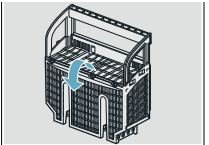
The Double Flex silverware basket *
This basket splits along its length, resulting in two halves that may be placed in a variety of positions in the lower rack 29, greatly increasing the lower rack’s loading versatility. The basket snaps together either side by side or back to back.
To split the Double Flex silverware basket:
Grasp the basket and slide the two halves in opposite directions and then pull the two halves apart.
Side by side
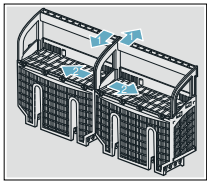
Back to back
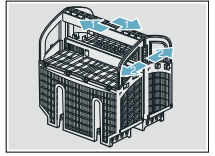
To assemble the Double Flex silverware basket:
Hold the two halves side by side or back to back, so that the tab on one basket can slip into the notch on the other basket. Push the two halves in opposite directions until they click.
* optional feature which may or may not be included with your dishwasher.
Unloading the dishwasher
Note: Dishes are more likely to chip when unloading before cooling.
When unloading the dishwasher, to prevent water from dripping onto dry dishes, unload the lower rack 29 first. Next, unload the silverware basket 28 followed by the upper rack 22, and then the third rack (if equipped).
Adjusting the height of the rack
If desired, the height of the upper rack 22 can be adjusted to create more space for taller utensils either in the upper or lower rack.
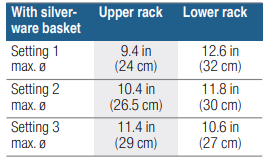
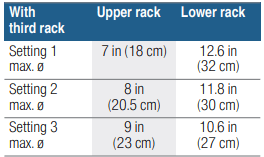
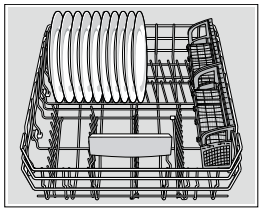
Arrange large plates up to a diameter of 12.6 in (32 cm) in the lower basket 29 as illustrated.
RackMatic®
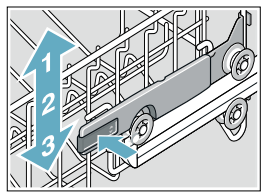
The height of the upper rack 22 can be adjusted in 3 steps to create more space.
- Pull the upper rack out of the dishwasher until it stops.
- To lower the rack, push the RackMatic® lever inward.
- To raise the rack, hold the basket on the sides of the upper rack and lift it up.
Rack accessories
Flip tines
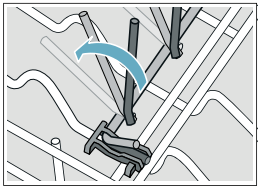
The upper and lower rack are fitted with flip tines that can be folded down depending on what you may need to load in the rack. Lower rack flip tines: To fold down, pull flip tine gently forward and release it from the notch. Push the flip tine downward. To fold up, push flip tines into an upright position until the holder engages in the notch.
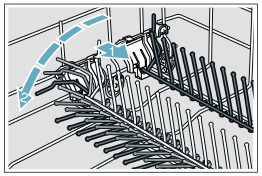
Upper rack flip tines: To fold down, push flip tines downward with gentle pressure. To fold up, push flip tines into an upright position until the holder engages in the notch.
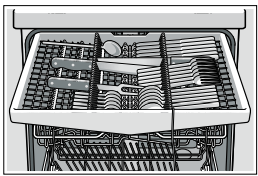
Third rack*
The third rack horizontally positions knives, spatulas and other oversized tools for improved cleaning and easier loading and unloading. Arrange cutlery in third rack as illustrated.
* optional feature which may or may not be included with your dishwasher.
Cup shelves
The cup shelves and the space underneath them can be used for small cups or for larger serving utensils. They also serve as stemware supports.

Removing/Installing third rack

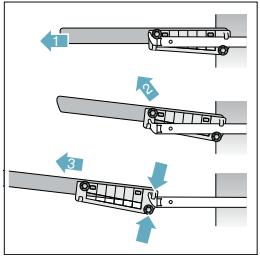
Removing third rack 21
- Pull out third rack all the way (1).
- Lift upper rollers over the stopper hooks of both rails (2).
- Pull third rack out forward and upward so that the holding hooks and the lower rollers of the rack slide over the stopper hooks of both rails (3).
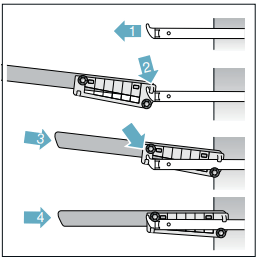
Installing third rack 21
- Pull out third rack rails all the way (1).
- Insert third rack at an angle. Make sure that the stopper hooks of both rails slide in between the holding hooks and the lower rollers of the third rack (2).
- Slide third rack in and lift the upper rollers over the front stopper hooks of both rails (3).
- Push in third rack (4).
Removing/Installing upper rack with Rackmatic®
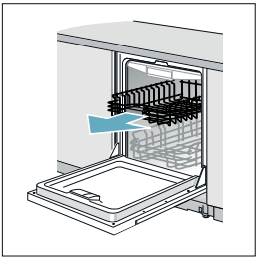
Removing upper rack 22
- Pull out upper rack all the way (1).
- Lift front rollers over the stopper hook of the rail (2).
- Pull out upper rack forwards and upwards so that the upper and lower rollers of the rack slide over the stopper hooks of both rails (3).

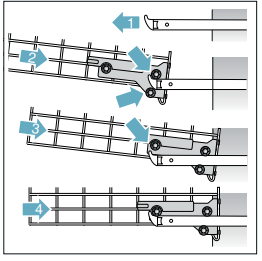
Installing upper rack 22
- Pull out upper rack rails all the way (1).
- Insert upper rack at an angle. Make sure that the stopper hooks of both rails slide in between the upper and lower rollers on the rear side of the rack (2).
- Slide upper rack in and lift the upper rollers over the front stopper hooks of both rails (3).
- Push in upper rack (4).
Detergent
Use only detergent specifically designed for dishwashers. For best results, use fresh powdered dishwashing detergent or detergent tabs.
NOTICE
To avoid damage to dishwasher or dishware:
- Do not use hand dishwashing products in your dishwasher.
- Do not use too much detergent if your water is soft. Using too much detergent with soft water may cause etching in glassware and fine china.
- To best protect glassware, use a wash cycle with low temperatures or a specific glass-care cycle (depending on the model) and use a detergent that includes etch protection.
This dishwasher uses less water than most, therefore, less detergent is required. With soft water, 1 tablespoon (15 ml) of detergent will clean most loads. The detergent dispenser cup has lines that measure detergent to 1 tablespoon (15 ml) and 1.75 tablespoons (25 ml). 3 tablespoons (45 ml) of detergent will completely fill the detergent dispenser.
Note: If you do not know the hardness of your water supply, use 15 ml of detergent. Increase the amount if necessary to the least amount required to get your kitchenware clean.
Use the measuring lines in the detergent dispenser cup as a guide to measure the amount of detergent recommended in the following table.
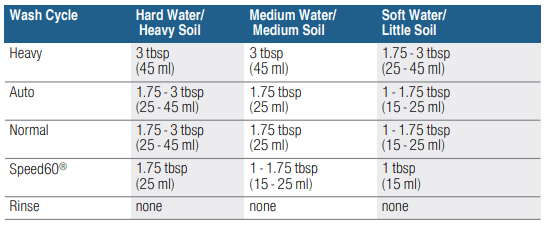
Adding detergent
1. If the detergent dispenser 31 is still closed, push the button 32 to open it.
Note: Make sure the detergent dispenser is dry and clear of detergent residue.
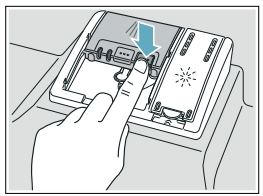
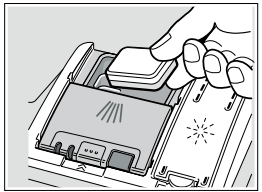
2. When using detergent tabs, lay them such that they do not come in contact with the cover, insert a detergent tab flat, not on its side.
Note: Do not place detergent tabs or utensils in the detergent tab tray 24. Place tabs or other detergent forms directly in the detergent dispenser 31
Pour detergent into the dry detergent dispenser 31 only. Add detergent. Do not overfill the detergent dispenser.
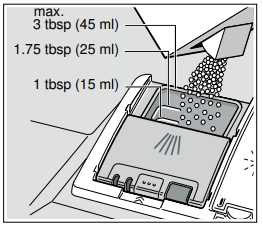
Dosage: see manufacturer’s instructions on the packaging.
3. Close the lid by placing the finger on the lid as shown. Slide the lid closed until it clicks.
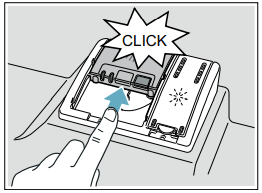
The detergent dispenser will open automatically at the ideal time for the set cycle. The powder or liquid detergent is distributed in the appliance and is dissolved, detergent tabs will fall into the detergent tab tray 24 where it dissolves during the cycle.
Tip: If the dishware is only lightly soiled, slightly less than the indicated amount of detergent is usually adequate.
Dishwasher Cycles

Note: The Energy Guide label was based on the Normal soil sensing cycle as follows: The unit was tested without any rinse aid (liquid) in the rinse aid dispenser 30. A single dose of detergent was inserted into the detergent dispenser 31, with no detergent being used in the prewash. The unit was not subjected to truncated testing per the definitions in the test procedure. We recommend that dish loads such as the one in the energy certification test have the rack position set in the highest position
Dishwasher Cycle Options
Delay
Allows you to delay the start time of your dishwasher up to 24 hours.
ExtraScrub*
This option increases pressure and temperature in the lower rack for intensive cleaning.
Extra Shine®*
Used in combination with a wash cycle (except Rinse), the Extra Shine® option raises the temperature and extends the drying time to further enhance drying results and provide a brilliant shine.
Top Rack*
For small, lightly soiled loads that fill primarily the top rack of the dishwasher. Can reduce water consumption.
Delicate*
This option’s reduced time and temperature are best for lightly soiled items with easy to remove food soils. The option also reduces the likelihood of cloudy glasses. Rinse aid is recommended for the high gloss drying function (even when using combination detergents).
Sanitize *
Increases the temperatures and retains them for an extra long time to obtain a defined disinfecting performance. Continuous use of this function increases the hygiene status. This additional option is ideal for cleaning items such as chopping boards and baby bottles. Using the Sanitize option may also improve drying. The cycle time and energy usage may be increased.
Extra Dry *
An increased temperature during the final rinse and an extended drying phase ensure that plastic parts dry better. There is a slight increase in the energy consumption.
* Not on all models. See fascia panel for corresponding programs.
Wash Cycle Information
To save energy, this dishwasher has EcoSense where the sensors in the dishwasher automatically adjust the cycle length, temperature and water changes based on the amount of food soil and the incoming water temperature. The “Smart Control”
makes decisions that can cause the cycle time and water usage to adjust intermittently. Wash cycle times are based on 120°F (49° C) water supply. If your household water supply is different than 120°F (49° C), your dishwasher’s cycle times may be impacted.
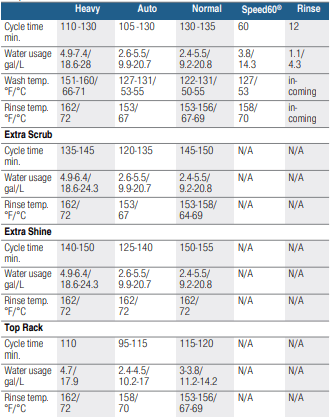
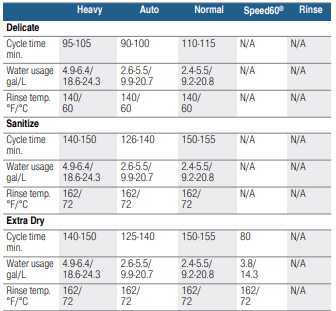
Notes
- Only sanitizing cycles have been designed to meet the requirements of Section 6 of the NSF/ANSI Standard for Residential Equipment for soil removal and sanitization efficacy. There is no intention, either directly or indirectly, to imply that all cycles have passed sanitization performance tests.
- There may be a slight increase in water usage (up to 1 gallon/3.8 liters) and cycle length (up to 5 minutes) for model SHVM4AYB3N.
The following consumption values are for dishwasher SHX84AAF5N

Operating the Dishwasher
Protection against unintentional operation
Your dishwasher is equipped with a function that helps to prevent unintentional operation (e.g. by children).
After starting the dishwasher, the dishwasher door has to be closed within 4 seconds, otherwise the operation will be paused. There will be a signal on the control panel advising you to press the Start button again and close the door.
This function will be activated when:
- pressing Start to begin a wash cycle
- setting Delay time and pressing Start
- opening the door while Delay time is active
- opening the door during a wash cycle.
Note: This function cannot be deactivated.
AquaSensor
The AquaSensor is an optical measuring device which measures the cleanliness of the rinse water.
The AquaSensor is used according to the wash cycle. If the AquaSensor is active, “clean” rinse water can be transferred to the next rinse and water consumption can be reduced by 0.8–1-5 gal (3–6 liters). If the rinse water is not yet clear, the water is drained and is replaced with fresh water. In the automatic wash cycles the temperature and running time can also be adjusted to the degree of soiling.
Switching the appliance on
1. Turn the water supply on fully.
2. Press the On/Off button 1 The AUTO wash cycle has been preset as a default whenever the appliance starts. This wash cycle remains selected if no other wash cycle button 2 is pressed. Select any desired option.
3. Press Start button 6. Wash cycle sequence starts.
Note: Your dishwasher is protected against unintentional operation. If the appliance door remains open for more than 4 seconds after pressing the Start button, the operation will be paused. Close the appliance door and press the Start button 6 again.
Time display
When a wash cycle is selected the remaining wash cycle time is shown on the display 3.
The wash cycle time is determined during the wash cycle by the water temperature, the amount of dishes, as well as the degree of soiling and may vary (depending on the selected wash cycle).
Delay start
You can delay the start of the cycle in one hour increments up to 24 hours
 1 hour delay
 24 hours delay
To set Delay start:
-
Press On/Off button 1 . Select a cycle.
-
Press Delay button 4 until the displayed time corresponds with your requirements.
-
Press Start button 6 to activate Delay start.
To cancel Delay start:
-
Press Delay button 4 until  is indicated on the digital display 3.
-
Press Start button P 6 to save setting.
Note: Your dishwasher is protected against unintentional operation. If the appliance door remains open for more than 4 seconds after pressing the Start button, the operation will be paused. Close the appliance door and press the Start button 6 again.
Wash cycle end
The wash cycle has ended when the display 3 reads  .
.
If the signal tone has been set, the wash cylce end is also indicated by a buzzer.
 Off
Off
 low
low
 medium
 loud
loud
To change the signal volume:
1. Open the door.
2. Press the On/Off button 1
3. Hold down function key A and press Start button 6 until the display 3 indicates  (x can be any number). Release both buttons.
4. Press function key A until the display shows  .
.
5. Press function key C. Each time the button is pressed the set value increases by one level; when it reaches the value  the display jumps back to
  (off).
6. Press Start button 6 to save the setting.
Auto power off
This setting determines the length of time the control panel stays illuminated after the cycle is complete. To save energy the recommended setting is 
This setting can be adjusted from  to
to 
 dishwasher does not turn off automatically
 dishwasher turns off automatically after 1 minute
 dishwasher turns off automatically after 120 minutes (2 hours)
To change the setting:
- Press the On/Off button 1
- Hold down the function key A and press the Start button 6 until the display 3 indicates
 (x can be any number).
- Release both buttons.
- Press the function key A until the display 3 indicates
 .
.
- Press the function key C until the display corresponds with your requirements.
- Press the Start button 6
Switching off the appliance
Short time after the end of the wash cycle:
- Press On/Off button 1.
- Remove the dishes when they have cooled down.
Interrupting the wash cycle
- Press On/Off button 1 The LED’s go out. The wash cycle is saved.
- To continue the wash cycle, close the door and press On/Off button 1 again.
Note: Your dishwasher is protected against unintentional operation. If the appliance door remains open for more than 4 seconds after pressing the Start button, the operation will be paused. Close the appliance door and press the Start button 6 again
Terminating the wash cycle (Reset)
- Press and hold Start button 6 for approximately 3 seconds until the display reads

- Wait about 1 minute while the dishwasher drains.
- Press On/Off button 1 You may now power the dishwasher back on and begin a new cycle if desired.
Changing the wash cycle
When the Start button 1 has been pressed, the wash cycle cannot be changed. The only way a wash cycle can be changed is by terminating the wash cycle (Reset).
InfoLight®
While the wash cycle is running, a light spot shines on the floor under the appliance door.
Do not open the appliance door until the light point is no longer visible on the floor.
If the appliance door is not completely closed, the light spot flashes*.
If the appliance is installed at eye-level, with flush furniture front, the light point is not visible.
In darkened rooms, some light scattering may be visible. This is normal and cannot be changed.
You can switch the Infolight on or off.
 Off
Off
 On
On
To change the setting:
- Press the On/Off button 1
- Hold down function key A and press Start button 6 until the display 3 indicates
 (x can be any number). Release both buttons.
- Press function key A until the display shows

- Press the function key C to switch the InfoLight® feature on
 or off
- Press Start button 6 to save the setting.
Intensive drying
The final rinse uses a higher temperature which improves the drying result. The cycle time and energy usage may be increased. (Caution if utensils are delicate!)
This feature has two settings:
 Off
Off
 On
On
- Press the On/Off button 1
- Hold down function key A and press Start button 6 until the display 3 indicates
 (x can be any number).
- Release both buttons.
- Press function key A until the display 3 indicates the factory set value
 .
.
- Press function key 3 to switch the intensive drying feature on
 or off
  .
.
- Press Start button P to save setting.
Care and Maintenance
Cleaning the dishwasher
- Regularly wipe the front of the appliance with a damp cloth - water and a small amount of liquid soap is adequate.
- For black stainless steel and anti-fingerprint surfaces, use a soft, dry towel. For stubborn dirt, use warm water diluted with a non-abrasive, mild cleansing soap. Never use stainless steel polish.
- For stainless steel appliances (excluding black stainless and anti-fingerprint), use a stainless steel polish to seal and protect the surface.
- Clean the outer edges of the inside door panel regularly to remove debris that may collect from normal loading. If spots begin to appear on the stainless steel, make sure the rinse aid dispenser is full and functioning properly.
- Clean the door seal regularly with a damp cloth to remove food particles that may collect from normal loading and cause odor. A soiled door seal may not seal properly
Filters
The Bosch® filter system 1Z is designed to prevent the need to pre-rinse normally attached food soils from your dishes. Simply scrape leftover food soils off of dishware before loading. This process will conserve time, water and the energy require to heat your household water supply.
Your dishwasher filter system is designed to filter 100% of the water entering the spray arms to provide a continuous supply of clean water to remove food soils from your dishware.
Filter components
The filter system 27 consists of three parts.
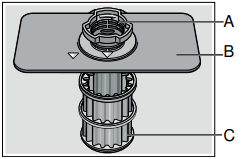
A Large Object Trap
Prevents objects that should not be placed in your dishwasher from damaging the dishwasher pump system or clogging your household drain.
B Flat Fine Filter
Prevents food particles from entering the wash chamber and directs particles toward the micro filter.
C Micro Filter
Directs the smallest of particles to the household plumbing drain.
Cleaning intervals
The filter system 27 is designed to minimize maintenance while providing premium cleaning performance and minimum energy consumption.
Depending on use habits and water hardness, the filter system will require some maintenance to sustain premium cleaning performance.
Your filter system may need to be cleaned when:
- You notice food soils remaining on the filter system or objects trapped in the Large Object Trap.
- A drop in cleaning performance or a gritty film forms on the dishware.
When washing normally attached food soils that have been scraped before loading, in a household that runs the dishwasher every other day, your filter should be cleaned:
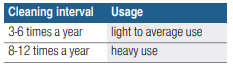
Note: Clean the filter system after washing loads with large amounts of food soils or loads with a heavy starch content, like potatoes and pasta, to maintain optimal performance.
To check or clean the filter system:
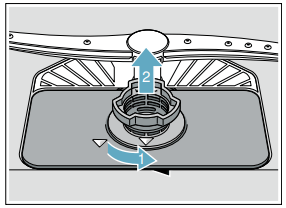
1. Unscrew the Large Object Trap as illustrated and remove the entire filter system.
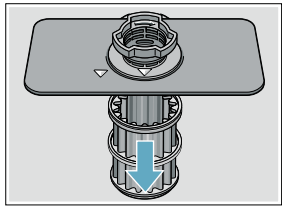
2. Remove the microfilter from the fine filter for easier cleaning.
3. Rinse the filters under running water and use a soft brush to clean.
Note: do not use abrasive brushes or steel wool, etc., as they may damage the filter.
4. Reinstall the filter system in reverse sequence and lock into place by screwing the Large Object Trap until the marking arrows align.
Spray arms
Check spray arms 23, 26 for grease and limescale deposits. If you find such deposits:
- Fill detergent dispenser 31 with detergent and start the appliance without utensils in the cycle with the highest rinsing temperature. →"Wash Cycle Information" on page 31
- Clean the appliance with detergents/appliance cleaners which are particularly suitable for use with dishwashers.
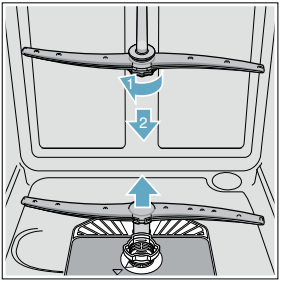
- Unscrew the upper spray arm 23 and pull off the lower spray 26 arm as shown. Inspect for deposits.
Drain pump
Large food remnants in the rinsing water not retained by the filters may block the waste water pump. In this case:
- Disconnect the appliance from the power supply.
- Remove the filters. →"Filters" on page 39
- Scoop out standing water - use a sponge if necessary.
- Using a spoon, pry off the pump cover until it clicks, then grip the cover and pull upward until it resists and then pull forward.
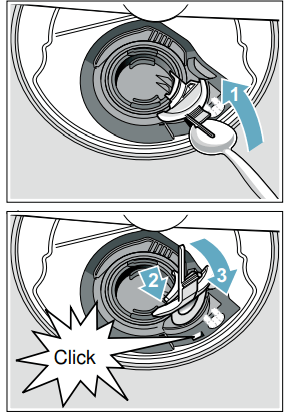
- Check inner compartment and remove any foreign objects.
- Place cover in the original position, press down and engage.
- Reinstall filters.
Note: The drain pump will not work properly if the drain pump cover is not snapped in completely until it clicks.
Preparing your unit for vacation
NOTICE : Before leaving for vacation during warmer weather, besides turning off the main valve, also turn off water supply at the nearest point to the dishwasher. Do not leave soiled dishware in unit and leave door slightly open. During colder weather, please follow the instructions for winterizing your unit below.
Winterizing your unit
NOTICE : If your dishwasher will be unused for a period of time in a location that experiences freezing temperatures (holiday home or through a vacation period), have your dishwasher winterized by a professional service.
Troubleshooting
Error code  is lit.
- Supply hose kinked.
- Install supply hose without kinks.
- Water supply turned off.
- Turn on the water supply.
- Water supply line is clogged.
Error code  is lit
- Water in sump since sump filters 27 are dirty or blocked.
Error code  is lit.
- Drain line is clogged.
- Drain hose is kinked, clogged or blocked.
- Drain pump impeller (vanes) is clogged or blocked.
- Remove drain pump cover, clean around pump impeller and replace cover.
- Drain pump cover was loose.
- Lock drain pump cover into place in the sump.
Error code is lit.
- Drain pump is blocked or pump cover is loose.
- Clean drain pump and lock drain pump cover into place in the sump.
Error code  is lit
- Supply voltage too low (less than 98 volts).
- Not a dishwasher fault; have the supply voltage and electrical installation checked.
A different error code is indicated on the digital display. ( to
to  )
)
- A technical fault has probably occurred.
- Switch off dishwasher with the On/Off switch 1. After a short time restart the dishwasher.
If the problem recurs, turn off the tap and pull out the power supply plug. Call customer service and mention the error code.
Dishwasher does not start.
- Door may be ajar or not be properly latched.
- Close door securely until door latch clicks.
- No power to the dishwasher (display won’t come on). Fuse may have been blown, circuit breaker may have tripped, power cord may have been unplugged or dishwasher may have been turned off.
- Replace blown fuse or reset tripped circuit breaker. Plug power cord into outlet securely. Press the on/off button 1 to turn the dishwasher on.
- Can’t select a wash cycle since the previous wash cycle may not have finished or the dishwasher hasn’t been reset.
- Reset the dishwasher by pressing and holding the START button for at least three seconds.
- Delay start or Child lock may be activated.
- Reset Delay start or Child lock functions (refer to the appropriate section in this manual).
- The door may have been closed without selecting a wash cycle.
- Select a wash cycle and close the door.
- Water supply may not be turned on or connected.
- Check and turn on water supply.
Wash cycle won’t resume after door was opened and closed.
- The door has been open for more than 4 seconds after pressing the Start button.
- Press Start button again and close the dishwasher door within 4 seconds (see “Protection against unintentional operation” section in this manual).
Display does not illuminate.
- A fuse may have been blown or circuit breaker tripped.
- Check the fuse or circuit breaker box and replace the fuse or reset the breaker if necessary.
- Door not closed or latched. Note: For models with controls on top of the door, the display only illuminates when the door is opened and controls are visible.
- Ensure door is properly latched and completely closed.
Dishwasher runs a long time.
- Incoming water is not warm enough.
- Before starting a cycle, run hot water faucet at the sink closest to the dishwasher.
- Cycle time depends on wash cycle chosen and amount of soil on dishes (dishwasher sensors increase cycle times to ensure dishes are clean when heavy soil is detected).
- Scrape food off of dishes and use less intensive wash cycles.
- Rinse aid dispenser 30 is empty, or rinse aid setting = 0. Without rinse aid, wash cycle defaults to longest time with most number of washes and rinses.
- Add rinse aid and change rinse aid setting depending on water hardness.
- Dishwasher is connected to cold water supply.
- Connect dishwasher to hot water supply.
Dishes aren’t clean enough
- Spray arms are blocked or misaligned where they cannot rotate freely.
- Make sure spray arms 23 ,26 can rotate freely
- Little or no water spray due to clogged spray arm nozzle.
- Clean out spray arm nozzles and filters of all debris and obstructions.→ "Spray arms" on page 40
- Little or no water spray due to clogged or misaligned filters 27.
- Clean filters and make sure they’re installed correctly. →"Filter components" on page 39
- Dishes are nested or placed too closely together and racks are overfilled.
- Space dishes apart so spray jets can reach the surface of the dishes and dishes don’t contact each other.→ "Loading the Dishwasher" on page 17
- Improper or ineffective wash cycle or detergent used.
- Choose a more intensive wash cycle and use appropriate dishwasher detergents. →"Wash Cycle Information" on page 31
- Detergent is made less effective due to hard water.
- Install a water softener and choose a more intensive wash cycle.
Removable spots or streaks on glasses and silverware.
- Too much rinse aid causes streaks and too little rinse aid can cause spots.
- Add rinse aid and check rinse aid setting (recommended setting 4-5). → "Rinse Aid" on page 15
- Mineral deposits from hard water.
- Install a water softener.
- Water from top (3rd) or upper rack dripped on racks below.
- Unload lower rack 1st, upper rack 2nd and top (3rd) rack last.
Dishes not dry.
- Rinse aid dispenser 30 is empty or incorrect rinse aid amount is set.
- Add rinse aid or adjust setting - the use of rinse agent improves drying, use the Auto cycle, use the Sanitize option.
- Extra Dry heat option not chosen.
- * Activate Extra Dry heat option.*
- Water collected in depressions on the dishes and silverware.
- Arrange dishes in upper rack to slope so water can drain.
- Door was opened or dishes removed before wash cycle was completed.
- Wait until wash cycle ends before opening door or removing dishes.
- Plastics don’t absorb heat like cutlery or china and don’t dry as well.
- Use more intensive wash cycles (with hotter rinse water) or activate Extra Dry heat option.*
- Silverware not arranged properly in the silverware basket or top rack.
- Arrange silverware properly and separate them so they don’t contact each other.
Odor Note: Water testing is done in the factory. Occasionally water may still appear in dishwasher at purchase which may create an odor
- Food debris in the dishwasher sump and door seal.
- Clean sump filters, sump and door seal as needed. → "Care and Maintenance" on page 38
- Food debris left on dishes too long.
- Run dishwasher more frequently.
- Not using rinse aid or using improper detergent.
- Use rinse aid and the proper detergent.
- Residual standing water in the sump.
- Make sure previous wash cycle has finished.
- Drain line is clogged or drain hose is kinked, clogged or blocked. Or drain hose was not installed with a high loop.
- Unclog drain line or replace drain hose. Be sure drain hose is installed with high-loop. Note: If odor still persists, run the Normal/ Regular cycle until it flushes and interrupt the cycle and place an 8 oz. cup of distilled white vinegar solution on the upper rack and then finish the cycle.
Dishwasher isn’t filling with water (or “Check water supply” display occurs)
- Water supply hose is kinked.
- Install new supply hose (without kinks).
- Previous wash cycle was not completed or current wash cycle was interrupted.
- Complete wash cycle or reset dishwasher.
- Delay start or Child lock may be activated.
- Reset Delay start or Child lock functions (refer to the appropriate sections in this manual).
- Water supply line is clogged.
- Water supply was turned off.
Fascia panel is discolored or scratched.
- Panel was cleaned with bleach-based wipes or abrasive cleaners/cleaning pads.
- Use mild detergents with soft damp cloth.
Noise from dishes rattling or water striking tub walls.
- Dishes weren’t loaded properly, allowing dishes to hit each other or spray arms.
- Load dishes properly into racks. → "Loading the Dishwasher" on page 17
- Light dishes or lightly loaded racks allow dishes to move or water sprays to strike tubs.
- Load more dishes or distribute dishes more evenly/securely in the dishwasher.
Water leaks from tub or from around door.
- Suds from using the wrong detergent (i.e. dish) or overfilling/spilling rinse aid.
- Use an appropriate dishwasher detergent, don’t overfill rinse aid and clean any spilled rinse aid. If suds still persist, add one tablespoon of vegetable oil and run the desired cycle.
- Door seal was misaligned or pulled from its track.
- Make sure the door seal is securely inserted into its track.
- Condensation vent is blocked.
- Clean out vent and move tall items like trays away from the vent.
- Improper installation.
- Have an authorized service professional remount the dishwasher.
White limescale on dishes, tub, racks or door.
- White residue coats dishwasher interior and racks wheels squeak from lime scale deposits in hard water.
- Use a dishwasher cleaner every few months. If dishwasher has a water softener, increase the setting.
- Hard water kept 3 in 1 detergent or Eco detergent from being effective.
- Use separate dishwasher detergent, rinse aid and dishwasher softener salt (if dishwasher has a softener).
- Under dosing of detergent.
- Use more detergent or change to a more effective detergent.
- Rinse temperature is too low.
- Select more intensive wash cycles with higher washing temperatures.
Detergent dispenser cover will not shut
- Cover guides are blocked by sticky detergent residue.
- Remove detergent residue.→"Detergent" on page 27
Unable to select desired cycle
- Previous cycle not finished.
- → "Operating the Dishwasher" on page 34