FR
SGP6031BB/27
Manuel de l’utilisateur
User manual
EN
ES
Manual de usuario

2
EN
Contents
3 Introduction
3 Features
4 Installation
5 Operation
6 FCC Information
7 Warranty
8 Technical Support

EN
3
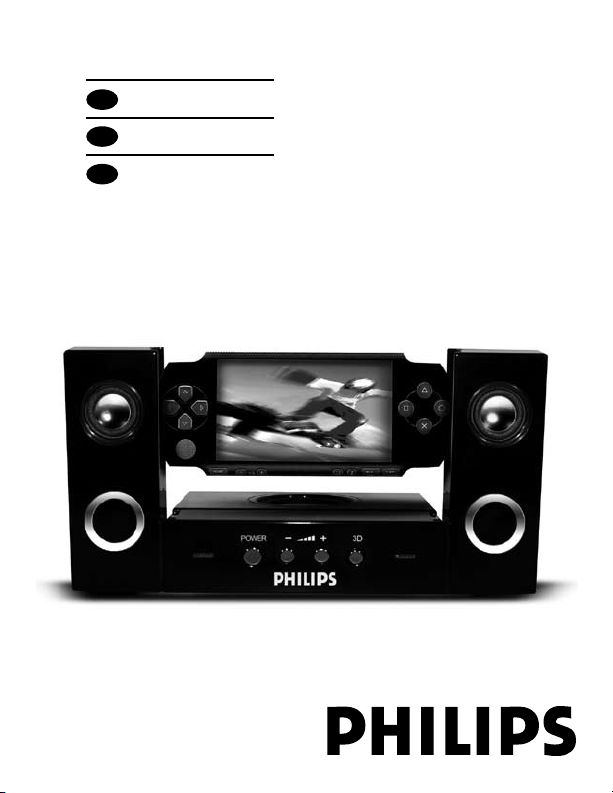
Thank you for your purchase of the Philips
Blasting Dock. With the combination of
dynamic neodymium speakers, a fold down
subwoofer, and 3D sound processor, your PSP
experience will not be complete without it.
Features and Specications
• Total Continuous Power:
12W RMS (6W+3Wx2)
• Satellite Speakers:
3 Watts/Channel @4 ohms
• Sub Woofer: 6 Watts @4 ohms
• Frequency Response: 100HZ~20kHz
• Signal to Noise Ratio:
@ 1 kHz input > 60db
• Speaker Drivers: Two full range neodymium
Micro Drivers + 3” Speaker
Introduction
4
EN
Installation
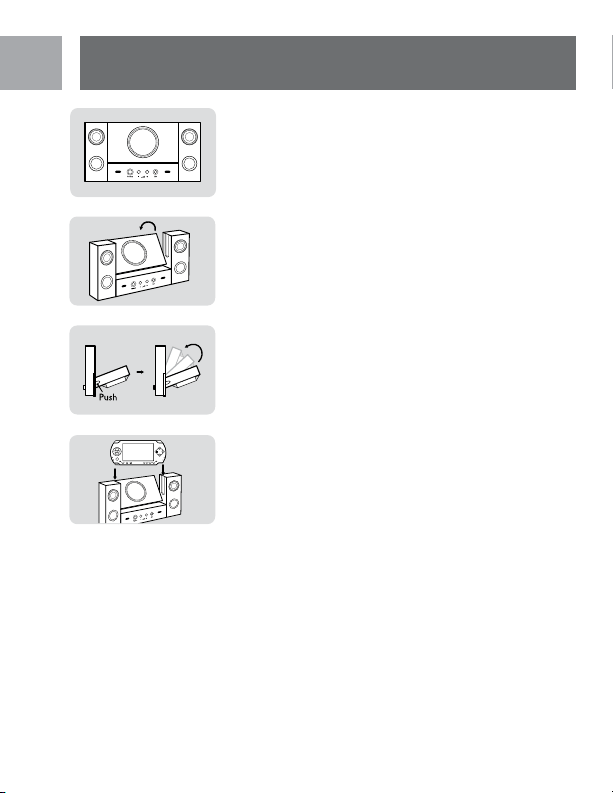
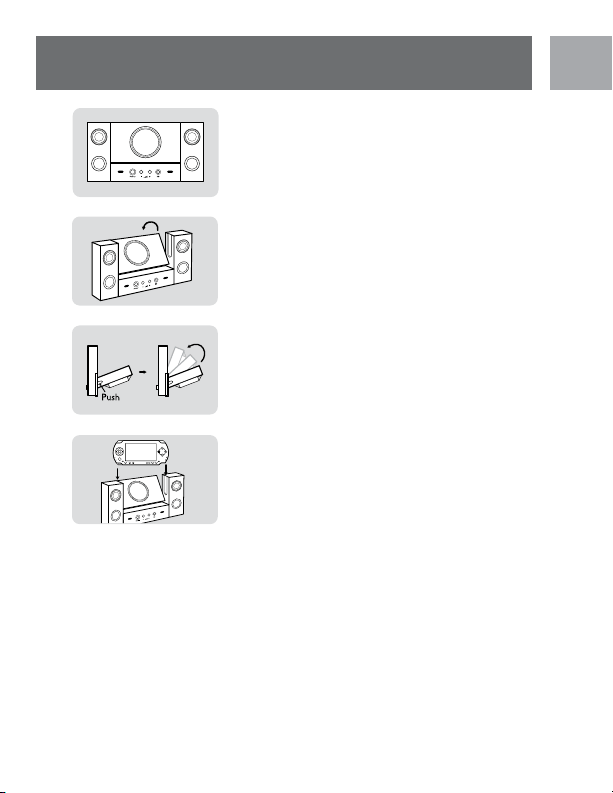
1. Install the AC adapter into the power
socket on the Blasting Dock or install 4 x
AAA batteries (not included) as indicated
in the diagram.
2. Press the button on the side of the Blasting
Dock to unlock the subwoofer.
3. Fold down the subwoofer.
4. Connect the 3.5mm mini connection cable
to the PSP, then to the line in (PSP without
docking, connect the longer 3.5mm play
away cable).
5. Turn PSP on and then install onto the dock
and adjust volume on PSP.
Installation
EN
5
Operation
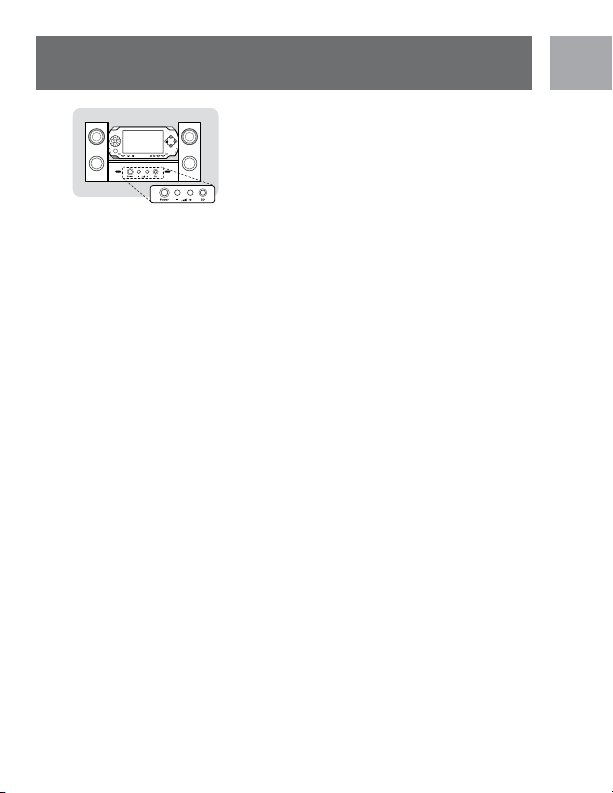
Speaker Controls
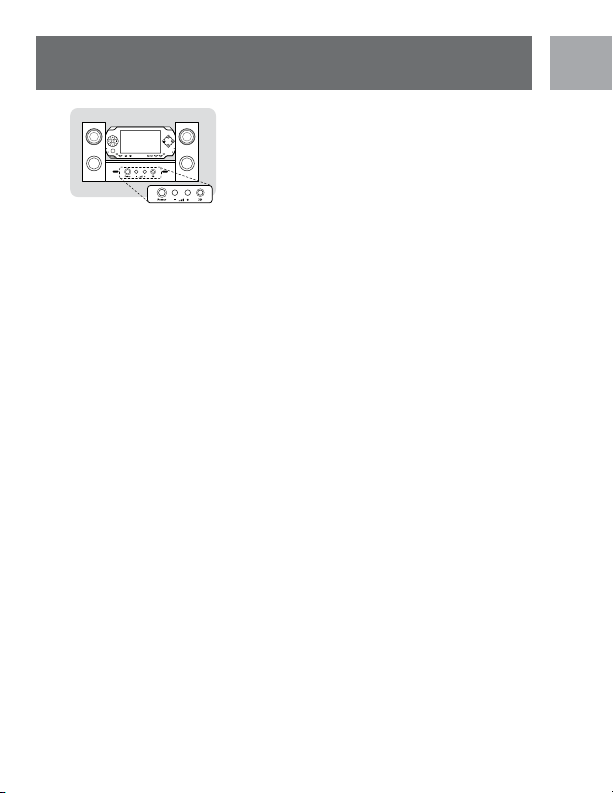
Power On / Off: Push the button once on the
Blasting Dock. The blue LED will illuminate
when the Blasting Dock is turned on. Push
again to turn off.
Volume Controls: Press the up or down
arrows on the Blasting Dock to adjust the
sound level.
3D Button: Press this button to enrich
sound for 3D effect. Note: Volume may need
adjustment to avoid distortion. Push 3D
button again to return to normal.
Line-In
The Blasting Dock has a built in line-in jack
that can also allow the use of other portable
audio devices such as MP3, MiniDisc, Portable
CD Players. Connect the 3.5mm play away
cable to both the line in on the Blasting Dock
and headset output on your device.
Operation

6
EN
FCC Warning:
This equipment has been tested and found
to comply with the limits for a Class B digital
device pursuant to Part 15 of the FCC
Rules. These limits are designed to provide
reasonable protection against harmful
interference in a residential installation.
This equipment generates, uses and can
radiate radio frequency energy and, if not
installed and used in accordance with the
instructions, may cause harmful interference
to radio communications. However, there is
no guarantee that interference to radio or
television reception, which can be determined
by turning the equipment off and on, the user is
encouraged to try and correct the interference
by one or more of the following measures:
• Reorient or relocate the receiving antenna.
• Increase the separation between the
equipment and receiver.
• Connect the equipment into an outlet on
a circuit different form that to which the
receiver is connected.
• Consult the dealer on an experienced
radio/TV technician for help.
Caution: Any changes or modications not
expressly approved by the guarantee of this
device could void the users authority to
operate the equipment.
FCC Information

EN
7
Limited one-year warranty
Philips warrants that this product shall be free
from defects in material, workmanship and
assembly, under normal use, in accordance
with the specications and warnings, for
one year from the date of your purchase of
this product. This warranty extends only to
the original purchaser of the product, and
is not transferable. To exercise your rights
under this warranty, you must provide proof
of purchase in the form of an original sales
receipt that shows the product name and the
date of purchase. For customer support or
to obtain warranty service, please call 1-919-
573-7862. THERE ARE NO OTHER EXPRESS
OR IMPLIED WARRANTIES. Philips’ liability
is limited to repair or, at its sole option,
replacement of the product. Incidental, special
and consequential damages are disclaimed
where permitted by law. This warranty gives
you specic legal rights. You may also have
other rights that vary from state to state.
PSP™ is a registered trademark of Sony®
Computer Entertainment. It is not endorsed,
sponsored or manufactured by the companies
mentioned herein.
Warranty

8
EN
Technical Support
For Technical Support send an email with the
model number of the product and a detailed
description of your problem to:
Email: accessorysup[email protected]om
Accessories Service Center
Philips Accessories and
Computer Peripherals,
Ledgewood, NJ 07852 USA
©2006
Made In China
Technical Support

9
10 Introduction
10 Caractéristiques
et che technique
11 Installation
12 Opération
13 Averissement FCC
14 Garantie
15 Assistance technique
FR
Contenu

10
Nous vous remercions de votre achat d’un
Philips Blasting Dock. Grâce à des hauts-
parleurs dynamiques en neodymium, un
caisson de basse rabattable et un processeur
de son 3D, vous obtiendrez la PSP dont vous
avez toujours rêvé.
Caractéristiques
et che technique
• Alimentation totale continue:
12W RMS (6W+3WX2)
• Enceintes satellite:
3 Watts/Chaîne de 4 ohms
• Caisson de basse: 6 Watts de 4 ohms
• Réponse de fréquence: 100HZ-20kHz
• Rapport signal/bruit: 1kHz entrée > 60db
• Circuits d’attaque du haut-parleur:
Deux Micro Drivers à gamme étendue
en neodymium + Haut-parleur de 7,62 cm
Introduction
FR
11
Installation
1. Installer l’adaptateur de courant alternatif
dans la prise de courant du Blasting Dock
ou installer 4 piles AAA (non incluses)
comme indiqué sur le diagramme.
2. Appuyer sur le bouton latéral du Blasting
Dock an de déverrouiller le caisson de
basse.
3. Rabattre le caisson de basse.
4. Brancher le mini câble de connexion de 3,5
mm au PSP, puis à l’entrée haut-niveau (pour
un PSP sans station d’accueil, brancher le
câble à distance le plus long de 3,5 mm)
5. Allumer le PSP puis l’installer sur la station
d’accueil et régler le volume sur le PSP.
Installation
FR
12
Opération
Contrôle des hauts-parleurs
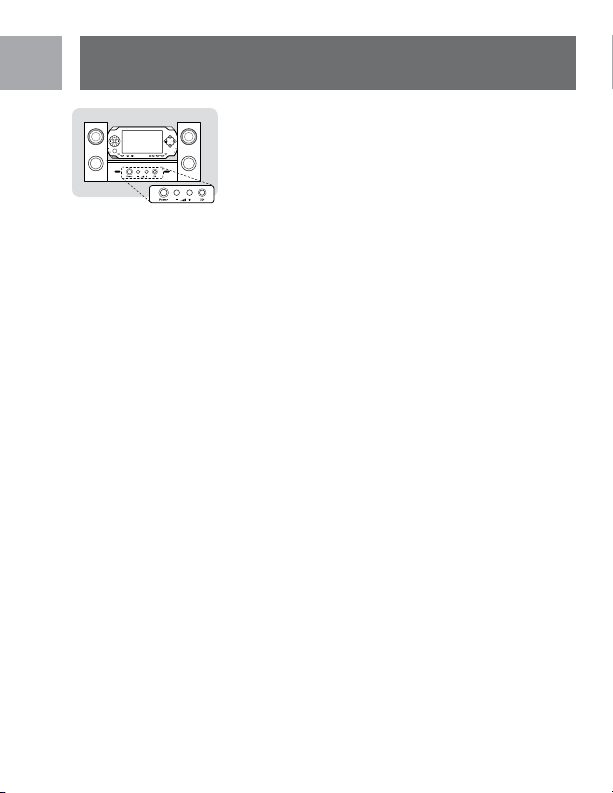
Bouton d’allumage: Appuyer une fois sur le
bouton du Blasting Dock. Le voyant lumineux
se déclenche lorsque le Blasting Dock est
allumé. Appuyez à nouveau pour l’éteindre.
Contrôle du volume: Appuyer sur les èches
de direction haut/bas situées sur le Blasting
Dock pour régler le niveau du son.
Bouton 3D: Appuyer sur le bouton pour
améliorer le son et produire un effet 3D.
Remarque: Le volume peut avoir besoin de
réglage pour éviter toute distorsion. Appuyer
à nouveau sur le bouton 3D pour retourner
au mode normal.
Entrée haut-niveau
Le Blasting Dock comporte une prise intégrée
d’entrée haut-niveau qui peut également
permettre l’utilisation d’autres dispositifs
audio portatifs tels qu’un baladeur MP3, un
lecteur MiniDisc et un baladeur CD. Brancher
le câble de connexion à distance de 3,5 mm à
la fois à l’entrée haut-niveau du Blasting Dock
et à la sortie du casque de votre dispositif.
FR
Opération

13
Averissement FCC
Cet appareil a été testé et s’avère conforme aux
spécications des équipements numériques de
classe B, paragraphe 15 de la réglementation
FCC. Ces spécications ont été établies pour
garantir une protection raisonnable contre
les interférences nuisibles contre dans une
installation résidentielle. Cet appareil génère,
utilise et peut émettre des fréquences radio
et s’il n’est pas installé et utilisé selon les
directives de ce guide, il peut perturber les
communications radio. Toutefois, il n’y a pas de
garantie qu’il n’y aura pas d’interférence lors
de la réception radio ou télévision, que vous
pouvez déterminer en allumant ou éteignant
l’appareil, essayez de remédier au problème
en prenant une ou plusieurs des mesures
suivantes:
• Réorientez ou repositionnez l’antenne de
réception.
• Augmentez la distance entre l’appareil et le
récepteur.
• Branchez l’appareil dans une prise de
courant sur un circuit différent de celui sur
lequel le récepteur est connecté.
• Consultez votre revendeur ou technicien
radio/télévision pour obtenir de l’aide.
Attention: Tout changement ou modication
qui n’a pas été expressément approuvé par
FR
Averissement FCC

14
la garantie de cet appareil pourrait annuler
l’autorité de l’utilisateur en ce qui concerne
l’utilisation de l’appareil.
Garantie limitée d’un an
Philips garantit que ce produit est dépourvu
de défauts au niveau des matériaux, de la
main d’œuvre et du montage, moyennant
des conditions normales d’utilisation,
conformément aux spécications et aux
avertissements, pour une durée d’un an à
compter de la date à laquelle vous avez acheté
ce produit. Cette garantie est seulement
accordée au propriétaire d’origine du produit
et n’est pas transférable. Pour vous prévaloir
du service en vertu de cette garantie, vous
devez fournir une preuve d’achat sous la
forme du ticket de caisse original indiquant le
nom du produit et la date d’achat. Pour un
support clientèle ou pour obtenir un service
de garantie, veuillez appeler 1-919-573-7862.
AUCUNE AUTRE GARANTIE, QU’ELLE SOIT
EXPRESSE OU TACITE, N’EST OFFERTE. La
garantie de Philips est limitée à la réparation
ou, à sa seule discrétion, au remplacement du
produit. Les dommages accessoires, spéciaux
et indirects ne sont pas acceptés dans les
limites permises par la loi. Cette garantie vous
donne des droits reconnus par la loi. Vous
FR
Garantie

15
pouvez également disposer d’autres droits
suivant les états.
PSP™ est une marque déposée de Sony®
Computer Entertainment. Il n’est pas endossé,
sponsorisé ou fabriqué par les sociétés
mentionnées ci-dessus.
Assistance technique
Courriel : accessorysupport@philips.com
Centre de services Accessories
Philips Accessories et Computer Peripherals,
Ledgewood, NJ 07852 USA
©2006
FR
Assistance technique

16
17 Introducción
17 Características
y especicaciones
18 Instalación
19 Operación
20 Imformación FCC
21 Garantía
22 Asistencia Técnica
Contenido
ES

17
Agradecemos su compra del Blasting Dock
de Philips. Gracias la combinación de los
altavoces de neodimio dinámicos, altavoz de
graves plegable y un procesador de sonido
3D, su experiencia con la PSP no será total si
no cuenta con él.
Características
y especicaciones
• Alimentación total continua:
12W RMS (6W+3Wx2)
• Altavoces satélite:
3 Watts/Canal a 4 ohmios
• Altavoz de graves: 6 Watts a 4 ohmios
• Respuesta de frecuencia: 100HZ~20kHz
• Relación señal a radio:
entrada de 1 kHz > 60db
• Motores de altavoces:
Dos micro motores de neomidio de rango
completo + altavoz de 3 pulg.
ES
Introducción
18
Instalación
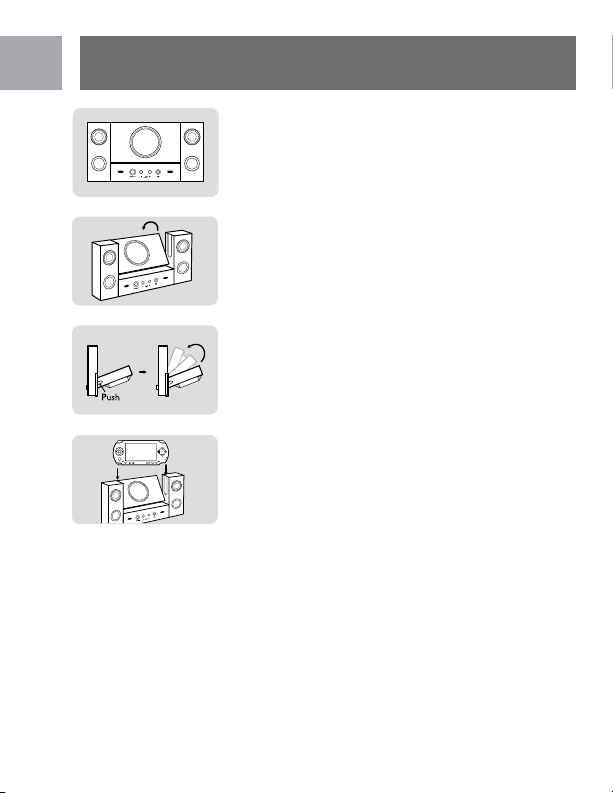
1. Instale el adaptador CA en el enchufe del
Blasting Dock o instale 4 baterías AAA
(no se incluyen), como se indica en el
diagrama
2. Oprima el botón que se encuentra a un
costado del Blasting Dock para desbloquear
el altavoz de graves
3. Pliegue el altavoz de graves
4. Conecte el mini cable de conexión de
3.5mm a la PSP, luego, a la entrada de audio
(PSP sin conexión, conecte el cable “play
away” más largo de 3.5mm)
5. Encienda la PSP y luego instale al conector
y regule el volumen en la PSP.
ES
Instalación
19
Operación
Controles de los altavoces
Encendido/ Apagado (Power On / Off):
Empuje el botón una vez en el Blasting Dock.
Cuando el Blasting Dock se enciende, se
iluminará el LED azul. Empuje nuevamente
para apagarlo.
Controles de volumen: Oprima las echas
arriba o abajo en el Blasting Dock para regular
el nivel de sonido.
Botón 3D: Oprima este botón para lograr
un mejor sonido con el efecto 3D. Nota: Es
posible que deba ajustar el volumen para
evitar que se distorsione. Oprima nuevamente
el botón 3D para regresar a la conguración
normal.
Entrada de audio
El Blasting Dock posee un enchufe para
entrada de audio incorporado que también
permite el uso de otros dispositivos de
audio portátiles, como MP3, MiniDisc,
Reproductores de CD portátiles. Conecte el
cable “play away” de 3.5mm a la entrada de
audio en el Blasting Dock y la salida de los
auriculares en su dispositivo.
ES
Operación

20
Advertencia de FCC
(Comisión Federal de Comunicaciones):
Este equipo ha sido probado y se ha
vericado su cumplimiento dentro de los
límites para dispositivos digitales Clase B en
conformidad con lo dispuesto en la Parte
15 de las Regulaciones de FCC. Estos límites
fueron diseñados para brindar una protección
razonable contra interferencia nociva en una
instalación residencial. Este equipo genera,
utiliza y puede irradiar energía de radio-
frecuencia y, si no es instalado y utilizado según
las instrucciones, puede ocasionar interferencia
nociva a las radiocomunicaciones. Sin embargo,
no hay garantías relativas a la interferencia
que el equipo ocasione en la recepción de
radio o televisión, lo cual puede determinarse
encendiendo y apagando el equipo. Se alienta
al usuario a intentar corregir la interferencia
mediante una o más de las siguientes medidas:
• Reorientar o reubicar la antena de
recepción.
• Aumentar la distancia entre el equipo y el
receptor.
• Conectar el equipo a un toma-corriente en
un circuito diferente al que está conectado
el receptor.
• Solicitar asistencia al distribuidor o a un
técnico experimentado en radio/TV.
ES
Imformación FCC

21
Precaución: Cualquier cambio o modicación
no autorizada expresamente por el proveedor
de la garantía de este dispositivo pueden anular
la potestad del usuario para operar el equipo.
Garantía limitada por un año
Philips garantiza que este producto carece
de defectos de material, manufactura o
armado, bajo uso normal y de acuerdo con las
especicaciones y advertencias, por el plazo
de un año a partir de la fecha de compra de
este producto. Esta garantía cubre únicamente
al comprador original del producto y no es
transferible. Para ejercer sus derechos bajo
esta garantía, debe proporcionar una prueba
de compra mediante una factura original que
muestre el nombre del producto y la fecha
de compra. Por atención al cliente o para
obtener servicio de garantía, sírvase llamar
al 1-919-573-7862. NO EXISTEN OTRAS
GARANTÍAS IMPLÍCITAS O EXPLÍCITAS.
Las obligaciones de Philips se limitan a la
reparación o, a su sola opción, al reemplazo
del producto. No se aceptan reclamos por
daños incidentales, especiales e indirectos, de
acuerdo a lo permitido por la ley. Esta garantía
le otorga a usted derechos legales especícos.
Usted también tener otros derechos que
pueden variar de estado a estado.
ES
Garantía

22
PSP™ es una marca registrada de Sony®
Computer Entertainment. Este producto no
está respaldado, patrocinado o manufacturado
por las compañías aquí mencionadas.
Asistencia Técnica
Correo electrónico:
accessorysupport@philips.com
Centro de Servicio de Accesorios
Ledgewood, NJ 07852 USA
Philips Accessories
and Computer Peripherals,
©2006
Fabricado en China
ES
Asistencia Técnica