User Manual
Installation Instructions
EXHAUSTING HOT AIR
In the Cool Mode the appliance must be placed close to a window or opening so that the warm exhaust air can be ducted outside.
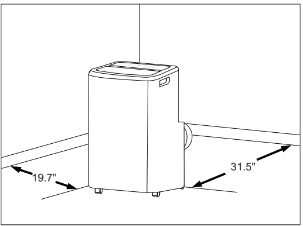
First position unit on a flat floor and is within the vicinity of a single circuit outlet power source. Make sure there’s a minimum of 31.5" clearance in the front/back of the unit, and a minimum of 19.7" clearance in the left/right sides of the unit.
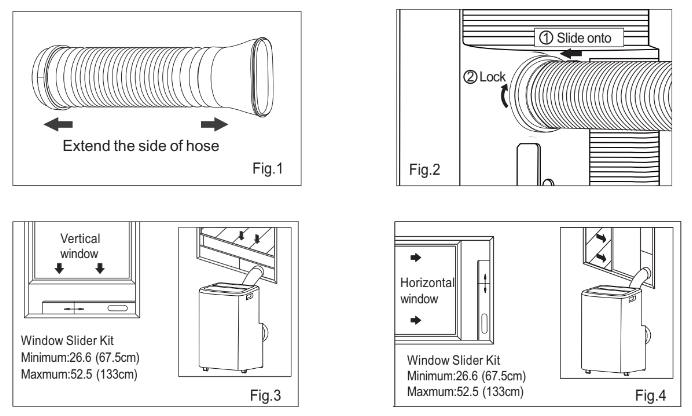
- Extend both side of the exhaust hose(Fig.1)
- Install the connector B into the unit (Fig.2).
- Affix the connector A into the window slider kit and seal.(Fig.3&4)
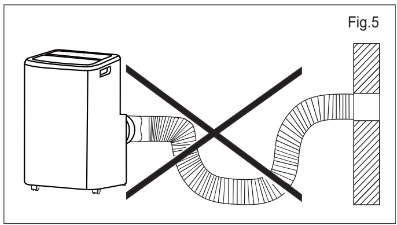
The hose can be extended from its original length of 15"up to 59",but it is the best to keep the length to minimum required. Also make sure that the hose does not have any sharp bends or sags.(Fig.5)
Installation in a double-hung sash window
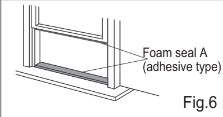
1. Cut the foam seals A(adhesive type) to the proper lengths and attach them to the window and stool.(Fig.6)
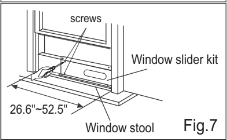
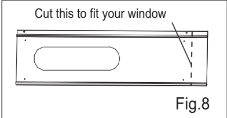
2. Open the window sash and place the window slider kit on the window stool (Fig.7). Attach the window slider kit to the window stool. Adjust the length of the window slider kit according to the width of window. Screw down the two screws on the window slider kit. See Fig.7. Cut the adjustable window slider kit if the width of window is less than inches(Fig.8).
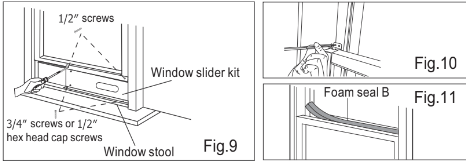
3. Close the window sash securely against the window slider kit.(Fig.9)
4. Drive two 1/2 screws to secure the window slider kit to the window sash.(Fig.9)
5. Secure the window slider kit to the window stool(Fig.9):
A: For wooden window: Use 3/4 screws for securing.
B: For Vinyl-Clad windows: Use 1/2 hex head cap screws for securing.
6. To secure lower sash in place, attach right angle sash lock with 1/2 mm) screw as shown(Fig.10).
NOTE: It is difficult to lock the windows with the sash lock for Vinyl-Clad windows, so you can use lock by window itself.
7. Cut the foam seal B to an appropriate length and seal the open gap between the top window sash and outer window sash, as shown in Fig.11.
Installation in a sliding sash window
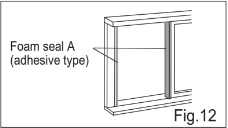
1. Cut the foam seals A(adhesive type) to the proper lengths and attach them to the window frame. See Fig.12.
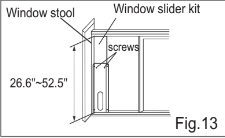
2. Open the window sash and place the window slider kit on the window stool (Fig.13). Attach the window slider kit to the window stool. Adjust the length of the window slider kit according to the height of window. Screw down the two screws on the window slider kit. See Fig.13. Cut the adjustable window slider kit if the height of window is less than inches(Fig.8).
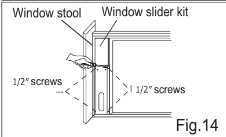
3. Close the window sash securely against the window slider kit.(Fig.14)
4. Drive two 1/2 screws to secure the window slider kit to the window sash.(Fig.14)
5. Drive two 3/4 screws to secure the window slider kit to the window stool.(Fig.14)
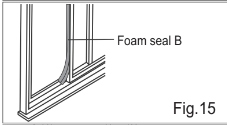
6. Cut the foam seal B to an appropriate length and seal the open gap between the sliding sash and outer window sash, as shown in Fig.15.
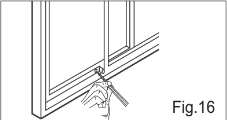
7. To secure sliding sash in place, attach right angle sash lock with 1/2 mm) screw as shown(Fig.16).
Air Conditioner Features & Operating Instructions
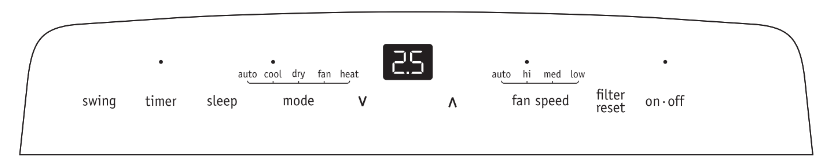
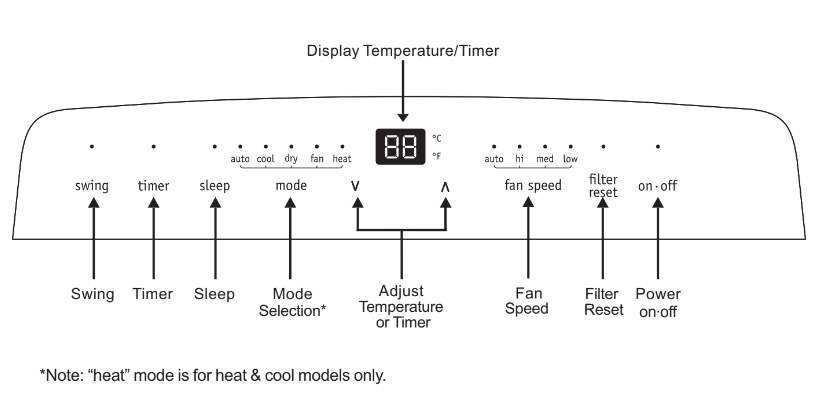
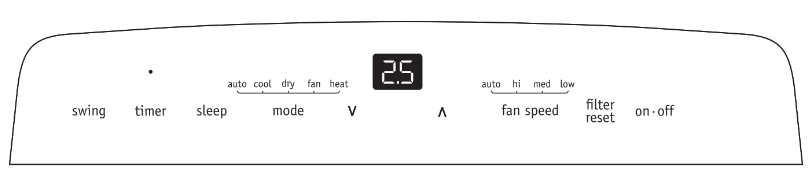
Control Panel
Operating Instruction
Press the "mode" button untill the Cool mode indicator lights.
Press the "fan speed" button to choose the fan speed according to the illumination of the fan speed indicator. You can choose the "hi", "med", "low" or "auto" fan speed setting.
Press the "

" or "

" button to choose the temperature you want.
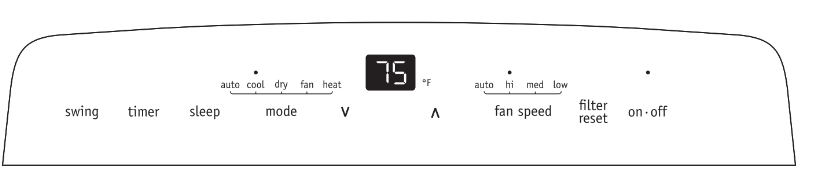
Dry mode
Press the “mode” button until the Dry mode indicator lights. In this mode, the “ ” or “
 ” button is disabled and the screen displays the room temperature. The unit will continuously drain moisture from the room.
Note:
In this mode, the fan speed will be set as “low” automatically, which cannot be changed.
In this mode, condensate drainage are required, refer to the "Drainage Instructions" on Page 16-17 for more instructions to drain the excess condensate.
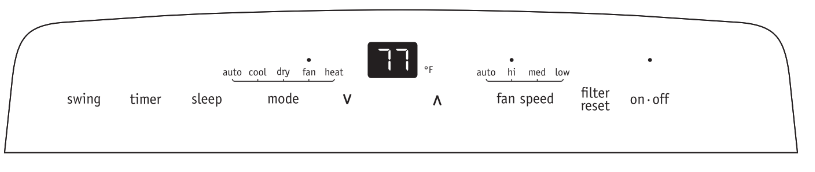
Fan mode
Press the “mode” button until the Fan mode indicator lights.
In this mode, you can select fan speed “hi”, “med” or “low”.
The screen displays room temperature.
Note: In this mode, the air exhaust hose does not need to be connected.
Heat mode(For Heat & Cool models only)
Press the “mode” button until the Heat mode indicator lights.
Press the “

” or “

”button to choose the temperature you want.
Press the "fan speed" button to choose the fan speed according to the illumination of the fan speed indicator.
You can choose the “hi”, “med”, “low”, or “auto” fan speed setting.
Note:
The unit have a build in condensate pump to pump out the excess condensate during heating mode.
Condensate drainage are required, refer to the "Drainage Instructions" on Page 16-17 for more instructions to drain the excess condensate.

AUTO mode
Press the “mode” button until the AUTO mode indicator lights.
Press the “

” or “

” button to choose the temperature you want. The screen will display the setting temperature.
In this mode, the unit will automatically select cooling, heating(not applicable for cooling only models), or fan only operation depending on what temperature you have selected and the room temperature. The air conditioner will control room temperature automatically round the temperature point set by you.
Note: In this mode, fan speed cannot be selected.

Timer mode
The timer facilitates the user to delay the unit startup or shutdown.
How to delay startup
Plug in the unit, so the unit turns to standby.
Press the “timer” button, then the Timer indicator and number of hours on the screen will light.
Tap or hold the UP arrow (

) or the DOWN arrow (

) to change delay start timer at 0.5 hour increments up to 10 hours, then at 1 hour increments up to 24 hours.
After 5 seconds, the setting will be confirmed automatically and the control will count down the time remaining until startup.
The unit will start up in the mode as previously set. Press the “timer” button again within 5 seconds, you will quit the timer setting directly.
To cancel the setting, press the “timer” button again will show the remain time and press the button again to quit the function.
How to delay shutdown
You can delay shutdown when the unit is on.
Press the “timer” button, then the Timer indicator and number of hours on the screen will light.
Tap or hold the UP arrow (

) or the DOWN arrow (

) to change delay shutdown timer at 0.5 hour increments up to 10 hours, then at 1 hour increments up to 24 hours.
After 5 seconds, the setting will be confirmed automatically and the control will count down the time remaining until shutdown. Press the “timer” button again within 5 seconds, you will quit the timer setting directly.
To cancel the setting, press the “timer” button again will show the remain time and press the button again to quit the function.
Sleep mode
When the unit is in Cool, Heat or Auto mode, you can press the “sleep” button to make the unit run in Sleep mode.
In this mode, the fan speed will be set as “auto” automatically, which cannot be changed.
In Cool/Heat mode the selected temperature will increase/decrease by 2 °F 30 minutes after the mode is selected.
The temperature will then increase/decrease by another 2 °F after an additional 30 minutes. This new temperature will be maintained for 7 hours before it returns to the originally selected temperature. This ends the "Sleep" mode and the unit will continue to operate as originally programmed.
The "Sleep" mode program can be cancelled at any time during operation by pressing the "Sleep", “mode”, “fan speed” or “on·off” button.
Note: In Fan or Dry mode, Sleep mode cannot be set. During Sleep mode the brightness of the indicators will reduce by half

.
Louver Swing Function
Press the “swing” button to enable louver swing function, the swing indicator will illuminate and the louver on the top panel will swing up and down. Press this button again to disable the louver swing function.

Filter reset
This feature is a reminder to clean the Air Filter (See Care and Cleaning) for more efficient operation. The filter indicator will illuminate after 250 hours of fan operation. Press the “filter reset” button, to reset after cleaning the filter.

 function
Press the “ ” and “ ”button the same time for more than 3 seconds to switch between degree Fahrenheit and degrees Celsius.
Note: Under Dry/Fan mode, you can not select °F/°C.
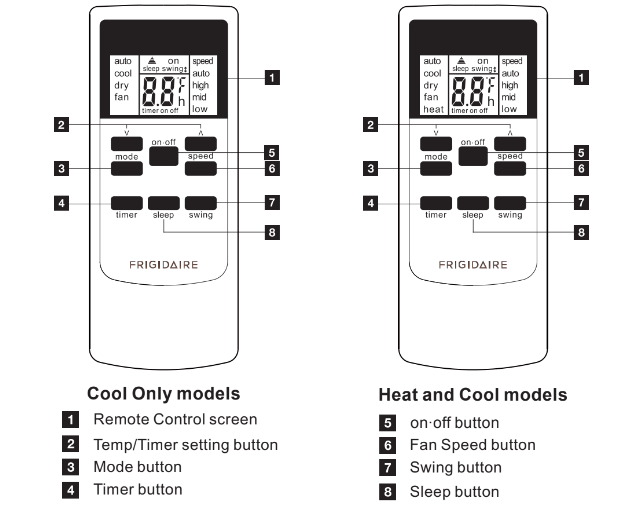
Remote Control
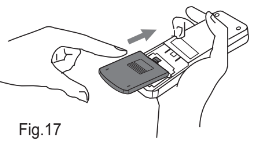
Battery Installation and Important Instructions
Remove the cover at the back of the remote control.
Insert the provided batteries correctly(see the instructions inside the battery compartment).
Close up the cover.
To replace the old batteries (which have been used up) with two new R03 "AAA" 1.5V batteries, repeat the steps above.
If the remote control unit is replaced or discarded, the batteries must be removed and disposed of in accordance with local legislation as they do harm to the environment.
Do not mix old and new batteries.
Do not mix alkaline, standard (carbon-zinc) or rechargeable (nickel-cadmium) batteries.
Do not dispose of batteries in fire. Batteries may explode or leak. If the remote control is not used for a long time, remove the batteries from the remote control.
The remote control must be handled with extreme care. Do not drop it or expose it to direct sunlight or sources of heat. This device complies with Part 15 of the FCC Rules. Operation is subject to the following two conditions:
This device may not cause harmful interference, and (2) this device must accept any interference received, including interference that may cause undesired operation.
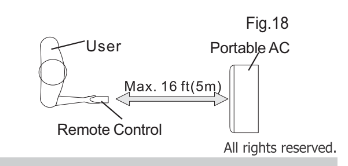
Point the remote control at the location of the signal receiver. The remote control must be no more than 16 ft(5 meters) away from the unit (without obstacles between the remote control and the unit).
How to Use the Remote Control
TURNING THE UNIT ON
Plug in the unit, then press the “on·off” button (when turned on, the unit will operate as the last setting before shutdown. To switch the unit off, press “on·off” button again, then remove the plug. Do NOT switch the unit off by removing the plug. Always switch the unit off by pressing the “on·off” button and wait for few minutes before removing the plug.
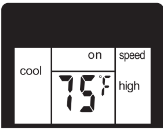
Cool mode
Press the “mode” button until the left side of LCD screen displays “cool”. Press the “ fan speed” button to choose the fan speed auto”, “high”, “mid”, and “low”. Press the “ ” and “
 ”button to choose the temperature you want.
Dry mode
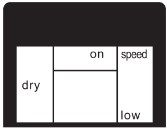
Press the “mode” button until the left side of LCD screen displays “dry”. In this mode, the “ ” or “
 ” button is disabled and the screen will remain blank. The unit will continuously drain moisture from the room.
Note: In this mode, the fan speed will be set as “low” automatically, which cannot be changed. In this mode, condensate drainage are required, refer to the "Drainage Instructions" on Page 16-17 for more instructions to drain the excess condensate.
Fan mode
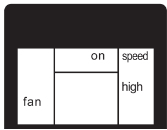
Press the “mode” button until the left side of LCD screen displays “fan”. In this mode, you can select fan speed “high”, “mid”, “low” by pressing the Fan speed button and referring to the diagram. Note: In this mode, the air exhaust hose does not need to be connected.
Heat mode(For Heat & Cool models only)
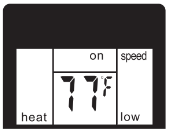
Press the “mode” button until the left side of LCD screen displays “heat”. Press the “ ” and “
 ” button to choose the temperature you want. Press the “ fan speed” button to choose the fan speed auto”, “high”, “mid”, and “low”.
Note: In this mode, condensate drainage are required, refer to the "Drainage Instructions" on Page 16-17 for more instructions to drain the excess condensate.
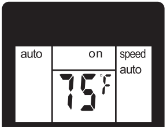
Auto mode
Press the “mode” button until the left side of LCD screen displays “auto”. Press the “ ” and “
 ” button to choose the temperature you want. In this mode, the unit will automatically select cooling, heating(not applicable for cooling only models), or fan only operation depending on what temperature you have selected and the room temperature. The air conditioner will control room temperature automatically round the temperature point set by you. Note: In this mode, fan speed cannot be selected.
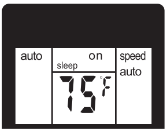
Sleep mode
When the unit is in Cool, Heat or Auto mode, you can press the “sleep” button to make the unit run in Sleep mode. In this mode, the fan speed will be set as “auto” automatically, which cannot be changed. In Cool/Heat mode the selected temperature will increase/decrease by 2 °F 30 minutes after the mode is selected. The temperature will then increase/decrease by another 2 °F after an additional 30 minutes. This new temperature will be maintained for 7 hours before it returns to the originally selected temperature. This ends the "Sleep" mode and the unit will continue to operate as originally programmed. The "Sleep" mode program can be cancelled at any time during operation by pressing the "Sleep", “mode”, “fan speed” or “on·off” button. Note: In Fan or Dry mode, Sleep mode cannot be set.
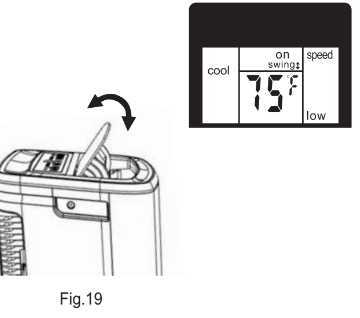
Louver Swing Function
Press the “swing” button to enable louver swing function, and the upper side of screen will display “ ”. The louver on the top panel will swing up and down. Press this button again to disable the louver swing function.
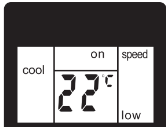
 function
Press the “ ” and “
 ”button the same time for more than 3 seconds to switch between degree Fahrenheit and degrees Celsius.
Note: Under Dry/Fan mode, you can not select °F/°C.
Timer mode
How to delay startup
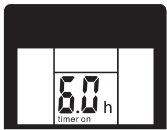
Plug in the unit, so the unit turns to standby. Press the “timer” button, when the unit is off. The screen will display “timer” and “h”, and the “on” will flashing. Tap or hold the UP arrow " " or the DOWN arrow "
  " to change delay start timer at 0.5 hour increments up to 10 hours, then at 1 hour increments up to 24 hours. After 3 seconds, the timer function is enabled, then on” will stop flashing, the display will show the temperature back and the control will count down the time remaining until startup. The unit will start up in the mode as previously set. To cancel the setting, press the “timer” button again. You can also cancel the setting by pressingthe “on·off” button.
How to delay shutdown
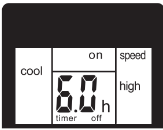
You can delay shutdown when the unit is on. Press the “timer” button, when the unit is on. The screen will display “timer”and “h”, and the “off ” will flashing. Tap or hold the UP arrow “ ” or the DOWN arrow “
 ” to change delay shutdown timer at 0.5 hour increments up to 10 hours, then at 1 hour increments up to 24 hours. After 3 seconds, the timer function is enabled, then off ” will stop flashing, the display will show the temperature back and the control will count down the time remaining until shutdown. To cancel the setting, press the “timer” button again. You can also cancel the setting by pressingthe “on·off” button.
Fault Code

If the screen on the unit displays "AS”, the room temperature sensor has failed. Contact your Authorize Frigidaire Service Center.

If the screen on the unit displays "ES”, the pipe temperature sensor has failed. Contact your Authorize Frigidaire Service Center.

If the display reads "E4" , the communication between display PCB and main control PCB is faulty. Contact your Authorized Frigidaire Service Center.

If the screen on the unit displays “P1”, the water collection tank inside the unit should be full. Refer to the "Drainage Instructions" on Page for more instructions to drain the successive condensate. If error repeats, contact your Authorize Frigidaire Service Center.
Drainage Instructions
Continuous Drainage
During the Heat mode, you will need a 1/4" drainage hose (packed with the unit) to drain the condensate from the unit.
Follow the steps below:
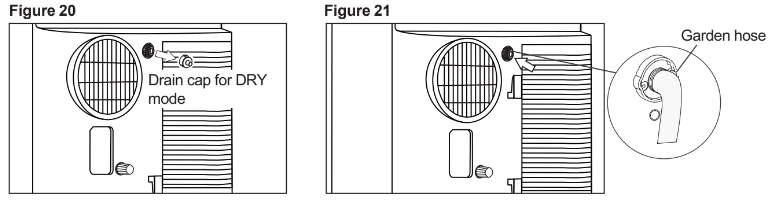
- Unscrew the drain cap of continuous drain outlet(Fig.20).
- Connect one end of the garden hose (sold separately) to the drain outlet then lead the other end into a drain that is lower than the unit(Fig.21).
NOTE
- Condensate may flow out after removing the drain cap, if the unit is running in Cool or Auto mode.
- When you want to remove the garden hose, prepare a drip tray (not supplied) to collect the condensate from the drain outlet.
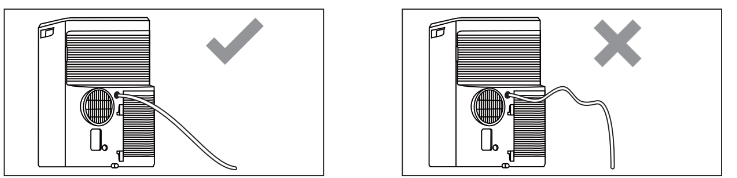
- Please be sure that the height of the drain and section of the drain hose should not be higher than that of the drain outlet, or the continous drainage may not work properly.
- During Cool or Auto mode, it is recommended to disable continuous drainage by replacing the drain cap to the drain outlet, to reach the maximum performance.
Heat pump Drainage(For heating & cooling model only)
During the Heat mode, you will need a 1/4" drainage hose (packed with the unit) to drain the condensate from the unit.
Follow the steps below:
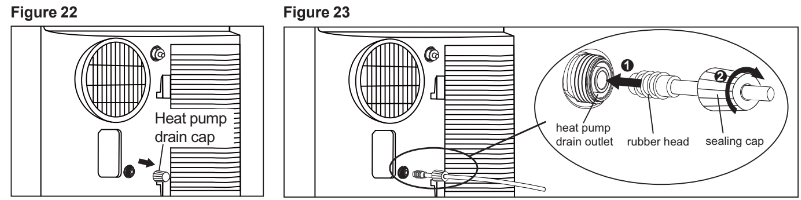
- Unscrew the heat pump drain cap and rubber of heat pump drain outlet(Fig.22).
- Insert the rubber head into the outlet. Then screw the sealing cap into the heat pump drain outlet(Fig.23).
- Lead the other end of the 1/4" drainage hose to a drain that is not 16ft(5m) higher than the heat pump drain outlet.
Drainage Instructions
NOTE:
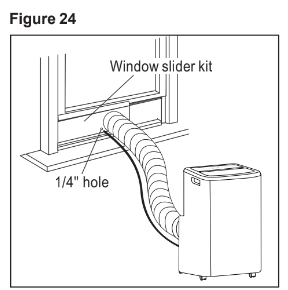
There is a 1/4” hole on the window kit for leading the drainage hose outside during the heating mode. Do not drain condensate outside when outside temperature is below 32°F (0°C).
Emptying the condensate residue inside the unit during winter storage.
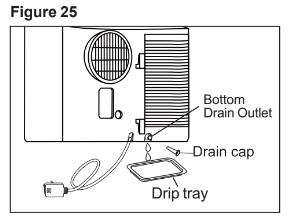
Put a drip tray (not supplied) under the continuous drain outlet, then unscrew the drain cap to allow the condensate to flow into the drip tray. Replace the drain cap to the continuous drain outlet when no condensate flows out. Put the drip tray under the bottom drain outlet, then remove the rubber stopper from the drain outlet, to allow the condensate to flow into the drip tray. If your drip tray can’t hold all the condensate, a number of fills will be needed. Replace the drain cap to the bottom drain outlet when no condensate flows out.
Note: To ensure all condensate residue has been removed, tilt the unit by lifting it slightly upwards from the front until no more condensate comes out from the drain outlet.
Care and Cleaning
Cleaning
Clean your air conditioner occasionally to keep it looking new. Be sure to unplug the unit before cleaning to prevent shock or fire hazards.
CLEANING THE UNIT
The cabinet and front may be dusted with an oil-free cloth or washed with a cloth dampened in a solution of warm water and mild liquid dishwashing detergent. Never use harsh cleaners, wax or polish on the cabinet front. Be sure to wring excess water from the cloth before wiping around the controls. Excess water in or around the controls may cause damage to the air conditioner.
CLEANING THE FILTERS
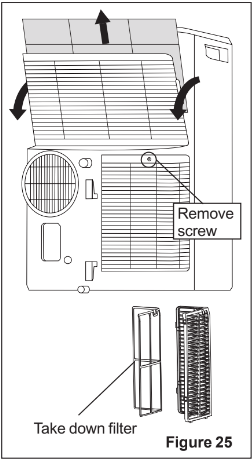
To keep your air conditioner working efficiently, you should clean the filters every week of operation. This unit has two filters, they are filter A and B. Grasp the upper panel tab and take off the filter A which behind the grill of the back panel (Fig.25). Remove the lower filter B by loosening the screw. Take down the air inlet grille, then remove the air filter as shown in Fig.25. Wash the filter using liquid dishwashing detergent and warm water. Rinse filter thoroughly. Gently shake excess water from the filter. Be sure filter is thoroughly dry before replacing. Or, instead of washing you may vacuum the filter clean. Replace the filter after the filter is dry.
Winter Storage
If the air conditioner will not be used for an extended period of time:
- Drain the water collection tank completely and leave the bottom drain cap and rubber plug long time enough to allow any residual water to drain out. Once the tank is completely drained and no more water flows out, reinstall the rubber plug and cap.
- Remove and clean the filter, allow it to dry completely, then reinstall it.
- Remove the batteries from the remote control.
- Store the air conditioner in a cool, dry location, away from direct sunlight, extreme temperature, and excessive dust.
Before using the air conditioner again:
- Make sure the filter and drain cap are in place.
- Check the cord to make sure it is in good condition, without cracks or damage.
- Place new batteries in the remote control.
- Install the air conditioner as described in the Installation Instructions.
Before You Call
Air conditioner turns on and off rapidly.
- Wall plug disconnected. Push plug firmly into wall outlet.
- Plug Current Device Tripped. Press the RESET button.
- House fuse blown or circuit breaker tripped. Replace fuse with time delay type or reset circuit breaker.
- Control is OFF. Turn Control ON and set to desired setting.
- P1 appears in the display window. Drain water as described in Drainage Section.
- Shut off in Heat mode. When the air outlet exceeds 158 °F (70 °C), the automatic heat protection engages. Romove any blockages and let appliance cool down.
- Room Temperature lower than the set temperature (Cool Mode). Reset the temperature.
- Room Temperature higher than the set temperature (Heat Mode). Reset the temperature.
Air from unit does not feel cold enough.
- Room temperature below 60°F (16°C). Cooling may not occur until room temperature rises above 60 F (16°C).
- Reset to a lower temperature.
- Compressor shut-off by changing modes. Wait approximately 3 minutes and listen for compressor to restart when set in the COOL mode.
Air conditioner cooling, but room is too warm-ice forming on cooling coil behind decorative front
- Outdoor temperature below 60 °F (16 °C). To defrost the coil, set FAN ONLY mode.
- Air filter may be dirty. Clean filter. Refer to Care and Cleaning section. To defrost, set to FAN ONLY mode.
- Temperature is set too low for night-time cooling. To defrost the coil, set to FAN ONLY mode. Then, set temperature to a higher setting.
- Exhaust duct not connected or blocked. See EXHAUSTING HOT AIR Section.
Air conditioner cooling, but room is too warm- NO ice forming on cooling coil behind decorative front.
- Dirty air filter air restricted. Clean air filter. Refer to Care and Cleaning section.
- Temperature is set too high. Set temperature to a lower setting.
- Air directional louvers positioned improperly. Position louvers for better air distribution.
- Front of unit is blocked by drapes, blinds, furniture, etc. - restricts air distribution. Clear blockage in front of unit.
- Doors, windows, registers, etc. open - cool air escapes. Close doors, windows, registers, etc.
- Unit recently turned on in hot room. Allow additional time to remove "stored heat" from walls, ceiling, floor and furniture.
Air conditioner turns on and off rapidly.
- Dirty air filter - air restricted. Clean air filter.
- Outside temperature extremely hot. Set FAN speed to a faster setting to bring air through cooling coils more frequently.
Noise when unit is cooling.
- Air movement sound. This is normal. If too loud, set to lower FAN setting.
- Vibraion from uneven floor. Move or support appliance correctly on even surface.
Room too cold.
- Set temperature too low. Increase set temperature.
Room Too Hot.
- Set temperature too high. Lower setting.