JVC XS-N2219BA Wireless Stereo Speakers with Bluetooth | User Manual
Important Safety Instructions
Warning: To prevent fire or shock hazard, do not expose the unit to rain or moisture.
To avoid electrical shock, do not dismantle. Refer all servicing to qualified service personnel.
- Please read all of the instructions carefully and retain for future reference.
- When using electrical appliances, basic safety precautions should always be followed.
- This appliance is not intended for use by persons (including children) with reduced physical, sensory or mental capabilities, or lack of experience and knowledge, unless they have been given supervision or instruction concerning use of the appliance by a person responsible for their safety.
- The speakers are not toys! Children should be supervised to ensure that they do not play with the appliance.
- Any repairs must be done by qualified service personnel. There are no user-serviceable parts inside. Do not attempt to repair by yourself.
- Keep the units free from dust and away from heat sources, direct sunlight, humidity, water or other liquids.
- Do not immerse the units in water or other liquids.
- Do not operate the units if they have been exposed to water, moisture or any other liquid in order to prevent electric shock, explosion and/or injury to yourself and damage to the unit.
- Do not store the units in direct sunlight or in high humidity conditions.
- Do not insert foreign objects into any opening on the unit.
- Keep the units away from flammable materials.
Battery Instructions
- Rechargeable batteries should only be charged under adult supervision.
- Do not throw in fire, crush, puncture, dismantle or otherwise damage the batteries.
- Do not expose batteries to direct sunlight, heat or fire as they may explode.
- Do not dispose of batteries in your household waste. Contact your local council for information on disposal or recycling.
Packing List
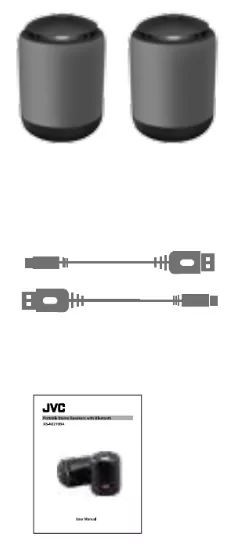
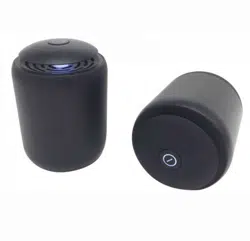
1 x primary speaker
1 x secondary speaker
2 x microUSB charging cables
1 x user manual
Note: Before use, please remove the plastic protective sheet underneath each speaker.
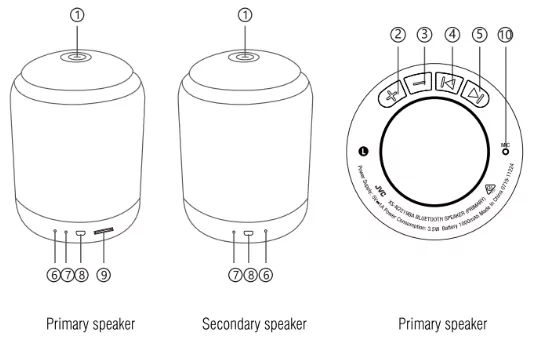
- "
 " Power on/off
- "+" VOL+ key
- "–" VOL- key
- "
 " Previous key
- "
 " Next key
- Reset
- LED Indicator light
- Micro USB Charging Port
- MicroSD Card Slot
- Microphone
Charging the Speakers
Note: When battery is low, the speakers produce an audio indicator and turn off automatically. Please charge the speakers as soon as possible. It takes around 2-3 hours to charge fully.
To charge:
- Connect the small ends of each USB charging cable (included) to the DC5V Charging Port on each speaker. Connect the larger ends of the cables to suitable AC adaptors (DC 5V, 1A not included) or USB ports of a computer or similar. The LED indicator lights up red when charging.
- Once fully charged, the red LED will turn off. Remove the charging cable promptly.
Turning the Speakers On/Off
Press and hold the 'Power' Buttons on each speaker for 3-5 seconds to turn on/turn off the speakers. The speakers turn on in Bluetooth mode.
Lights On/Off
To turn the lights on/off, press and release the 'Power' Buttons on each speaker two times in quick succession.
Note: In paired mode, you can do this on any one speaker — both lights will be turned off.
Pairing the Speakers for Bluetooth mode
These speakers can be used individually, or as a pair. To use individually in different rooms, simply connect the speakers to different Bluetooth devices.
In order to use the speakers as a pair (in stereo mode) for the first time, they need to be paired. To pair the speakers:
- Press and hold the 'Power' Buttons on both speakers simultaneously for 3-5 seconds to turn them both on. The blue indicator lights on both speakers will be flashing.
- Press Volume '+' key on the primary speaker two times to enter pairing mode.
- In a few seconds, the blue indicator light on the secondary speaker stops flashing and remains illuminated; the indicator light on the primary speaker keeps flashing. This indicates that the two speakers are in paired mode.
- The primary speaker will be the 'Left' speaker in paired mode; the secondary speaker the 'Right'.
Note: You should only need to do this the first time. After that, the two speakers will be paired automatically when powered on.
For subsequent uses:
- Press and hold the 'Power' Buttons on each speaker for 3-5 seconds.
- In a few seconds, the blue indicator light on the secondary speaker stops flashing and remains illuminated; the indicator light on the primary speaker keeps flashing. This indicates that the two speakers are in paired mode.
- You can now connect the primary speaker to your Bluetooth-enabled device and listen to audio on both speakers, in stereo.
Bluetooth Operation
- Place the speakers within 10 meters of a Bluetooth-enabled device.
- Enable Bluetooth function on your Bluetooth-enabled smartphone, tablet or media player; navigate to the Bluetooth setting menu, and search for new devices. The Bluetooth name for this speaker is 'XS-N2219'. You will hear an audio indicator when Bluetooth pairing is successful.
Answering phone calls (on the primary speaker)
- Press and release 'Power' Button on the primary speaker to pick up a call under Bluetooth mode; press it again to end the call.
- Press and hold 'Power' Button on the primary speaker to reject the phone call.
MicroSD Operation (for the primary speaker)
- Insert a microSD memory device into the microSD card slot to play mp3 or wav files automatically.
- Maximum size of microSD card that can be connected is 32GB.
Note: When a microSD card is inserted, the two speakers will be 'unpaired' if they were in paired mode. Audio from a microSD card plays only on the primary speaker.
Troubleshooting
| Problem |
Cause/Solution |
| Speakers are not pairing |
- If a microSD card is inserted into the slot on the primary speaker, remove it first. Then turn off both speakers and turn on again.
- If the speakers still do not pair, follow the initial pairing process as below:
a. Press and hold the 'Power' Buttons on both speakers simultaneously for 3-5 seconds to turn them both on. The blue indicator lights on both speakers will be flashing.
b. Press Volume "+" key on the primary speaker two times to enter pairing mode.
c. In a few seconds, the blue indicator light on the secondary speaker stops flashing and remains illuminated; the indicator light on the primary speaker keeps flashing. This indicates that the two speakers are in paired mode. |
| Speaker(s) not connecting via Bluetooth |
- Turn off the speakers, disable Bluetooth on your device. Then turn on the speakers, enable Bluetooth and try again.
- If there are multiple Bluetooth devices, disable Bluetooth on the other devices. |
Sound is too low or distorted
|
- Increase the volume on your Bluetooth device.
- Try charging the speakers. |
No sound in Bluetooth mode
|
- Bring the Bluetooth device closer and avoid any barriers between the device and the speakers. |
Specifications
Power output: 3.5W
Bluetooth version: 4.2
Bluetooth range: ≤10 metres
Battery: 3.7V, 1000mAh
Charging input: DC 5V, 1A