
Welcome to the world of Mercedes-AMG
Before you first drive off, read this Operator's
Manual carefully and familiarize yourself with
your vehicle. For your own safety and a longer
operating lifespan, follow the instructions and
warning notices in this Operator's Manual. Disre‐
garding them may lead to damage to the vehicle
or personal injury.
Vehicle damage resulting from the disregard of
the instructions is not covered by the Mercedes-
Benz Limited Warranty.
The equipment or model designation of your
vehicle may vary according to:
R
Model
R
Order
R
National version
R
Availability
Mercedes-AMG reserves the right to introduce
changes in the following areas:
R
Design
R
Equipment
R
Technical features
The equipment in your vehicle may therefore dif‐
fer from that shown in the descriptions and illus‐
trations.
The following are integral parts of the vehicle:
R
Digital Operator's Manual
R
Printed Operator's Manual
R
Maintenance Booklet
R
Equipment-dependent supplements
Keep these documents in the vehicle at all
times. If you sell the vehicle, always pass all of
the documents on to the new owner.
Mercedes-Benz USA, LLC
Mercedes-Benz Canada, Inc.
A Daimler Company
2385844305
2385844305
Symbols ........................................................ 3
At a glance .................................................... 4
Cockpit ........................................................... 4
General notes ............................................... 6
Operator's Manual .......................................... 6
Operating safety .............................................6
Qualified specialist workshop .........................7
Correct use of the vehicle ...............................8
Limited Warranty ............................................ 8
Seat belts ...................................................... 9
Function of the seat belt extender .................. 9
Driving and parking ................................... 10
Driving .......................................................... 10
DYNAMIC SELECT switch .............................. 11
Automatic transmission ................................ 12
Driving and driving safety systems ................14
Instrument Display and on-board
computer .................................................... 20
Notes on the Instrument Display and on-
board computer ............................................ 20
Calling up displays on the Performance
menu ............................................................ 20
Displaying and starting RACETIMER in
the Performance menu ................................. 21
Function of the Head-up Display ...................23
Multimedia system .................................... 25
AMG TRACK PACE ........................................ 25
Breakdown assistance .............................. 30
Flat tire .........................................................30
Technical data ............................................ 31
Operating fluids ............................................ 31
Vehicle data .................................................. 32
Display messages and warning/indi‐
cator lamps ................................................. 34
Warning and indicator lamps ........................ 34
Index ........................................................... 35
2
Contents
In this Operator's Manual, you will find the fol‐
lowing symbols:
&
DANGER Danger due to not observing
the warning notices
Warning notices draw your attention to haz‐
ards that may endanger your health or life, or
the health or life of others.
#
Observe the warning notices.
+
ENVIRONMENTAL NOTE Environmental
damage due to failure to observe envi‐
ronmental notes
Environmental notes include information on
environmentally responsible behavior or envi‐
ronmentally responsible disposal.
#
Observe environmental notes.
*
NOTE Damage to property due to failure
to observe notes on material damage
Notes on material damage inform you of
risks which may lead to your vehicle being
damaged.
#
Observe notes on material damage.
%
Useful instructions or further information
that could be helpful to you.
X
Instruction
(Q page)
Further information on a topic
Display
Information on the multifunction dis‐
play/media display
+
Highest menu level, which is to be
selected in the multimedia system
*
Corresponding submenus, which are
to be selected in the multimedia sys‐
tem
*Marks a cause
Symbols
3
4
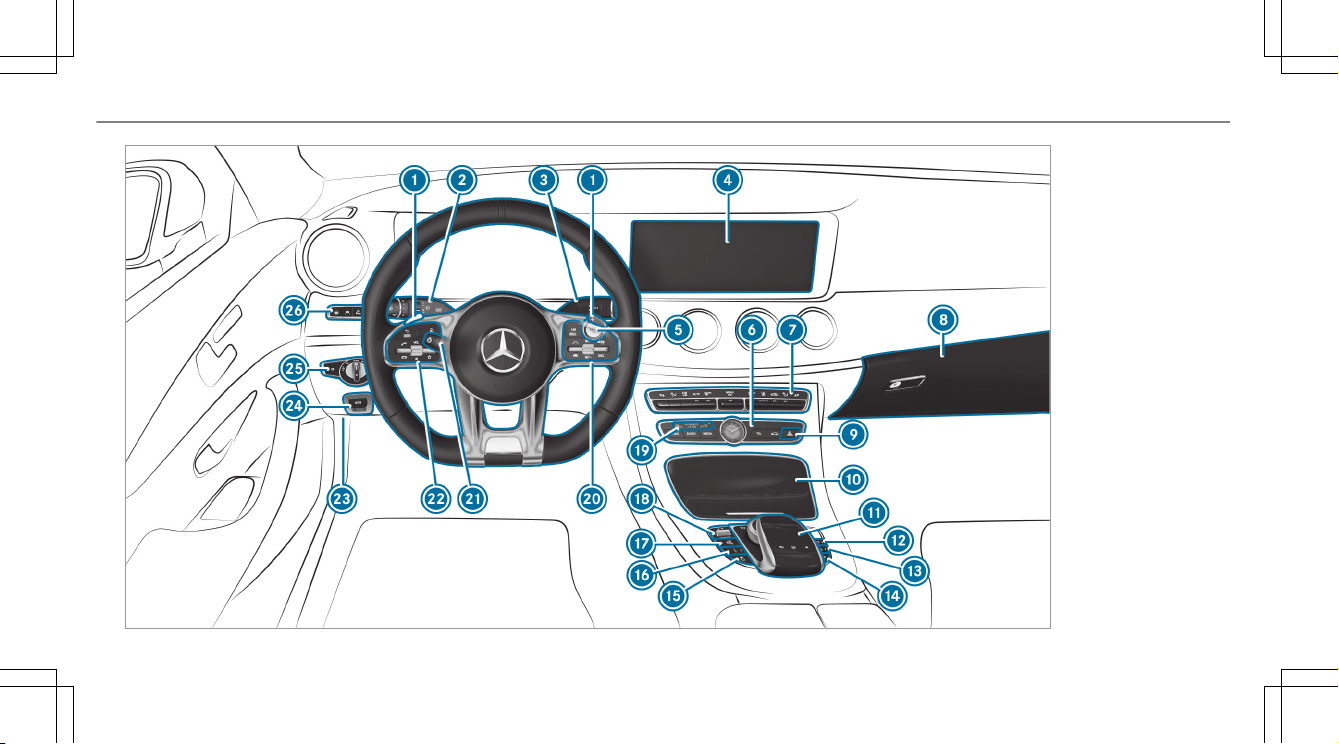
At a glance – Cockpit

1
Steering wheel paddle shifter
→
12
2
Combination switch
3
DIRECT SELECT lever
4
Display (multimedia system)
5
Start/stop button
6
Control panel for the multimedia system
7
Climate control systems
8
Glove box
9
Hazard warning lights
A
Stowage compartment
B
Control elements for the multimedia system
C
AMG Performance exhaust system
→
11
D
ECO start/stop function
E
Active Parking Assist
F
Activates/deactivates ESP
®
→
14
Activates/deactivates SPORT handling mode
→
14
G
AMG adaptive sport suspension system (sus‐
pension tuning)
→
16
H
Manual gearshifting (permanent setting)
→
12
I
DYNAMIC SELECT switch
J
PASSENGER AIRBAG indicator lamps
K
Control panel for the multimedia system
L
Adjusts the steering wheel
M
Control panel for the on-board computer
N
Unlocks the hood
O
Electric parking brake
P
Light switch
Q
Control panel for:
Active Steering Assist
Active Lane Keeping Assist
Parking Assist PARKTRONIC
Head-up Display
At a glance – Cockpit
5
Operator's Manual
This Supplement provides information on all the
important functions of your AMG vehicle that are
either not described or differ from the descrip‐
tions in the vehicle Operator's Manual. This
information supplements or replaces the corre‐
sponding sections in the vehicle Operator's Man‐
ual. Under no circumstances does the Supple‐
ment replace the Operator's Manual.
This Supplement describes all models, and
standard and optional equipment for your vehi‐
cle, as available at the time of going to press.
Country-specific differences are possible. Bear
in mind that your vehicle may not feature all
functions described here. This is also the case
for systems and functions relevant to safety.
Therefore, the equipment on your vehicle may
differ from that in the descriptions and illustra‐
tions.
The original purchase contract documentation
for your vehicle contains a list of all of the sys‐
tems in your vehicle.
Should you have any questions concerning
equipment and operation, please consult an
authorized Mercedes-Benz Center.
The Operator's Manual, the Supplement and the
Maintenance Booklet are important documents
and should be kept in the vehicle.
Operating safety
&
WARNING Risk of accident due to mal‐
functions or system failures
If you do not have the prescribed service/
maintenance work or any required repairs
carried out, this could result in malfunctions
or system failures.
#
Always have the prescribed service/
maintenance work as well any required
repairs carried out at a qualified spe‐
cialist workshop.
&
WARNING Risk of accident or injury due
to incorrect modifications on electronic
component parts
Modification of electronic components, their
software or wiring could impair their function
and/or the function of other networked com‐
ponent parts. In particular, systems relevant
to safety could also be affected.
As a result, these may no longer function
properly and/or jeopardize the operating
safety of the vehicle.
#
Never tamper with the wiring and elec‐
tronic component parts or their soft‐
ware.
#
You should have all work on electrical
and electronic components carried out
at a qualified specialist workshop.
Observe the "On-board electronics" section in
"Technical data" in the vehicle Operator's Man‐
ual.
6
General notes

&
WARNING Risk of fire due to flammable
materials on hot parts of the exhaust
system
Flammable material such as leaves, grass or
twigs may ignite if they come into contact
with hot parts of the exhaust system.
#
When driving on unpaved roads or off-
road, regularly check the vehicle under‐
side.
#
Remove trapped plants or other flam‐
mable material.
#
If there is damage, consult a qualified
specialist workshop immediately.
*
NOTE Damage to the vehicle
In the following situations, in particular, there
is a risk of damage to the vehicle:
R
The vehicle becomes grounded, e.g. on a
high curb or an unpaved road
R
The vehicle is driven too fast over an
obstacle, e.g. a curb, speed bump or pot‐
hole
R
A heavy object strikes the underbody or
chassis components
In situations such as this, the body, the
underbody, chassis components, wheels or
tires could be damaged without the damage
being visible. Components damaged in this
way can unexpectedly fail or, in the case of
an accident, may not absorb the loads that
arise as intended.
If the underbody paneling is damaged, flam‐
mable materials such as leaves, grass or
twigs can collect between the underbody and
the underbody paneling. These materials may
ignite if they come into contact with hot
parts on the exhaust system.
#
Have the vehicle checked and repaired
immediately at a qualified specialist
workshop.
or
#
If driving safety is impaired while con‐
tinuing your journey, pull over and stop
the vehicle immediately in accordance
with the traffic conditions, and contact
a qualified specialist workshop.
Qualified specialist workshop
An authorized Mercedes-Benz Center is a quali‐
fied specialist workshop. It has the necessary
special skills, tools and qualifications to cor‐
rectly carry out the work required on your vehi‐
cle. This particularly applies to safety-relevant
works.
Always have the following work carried out on
your vehicle at a qualified specialist workshop:
R
Safety-relevant work
R
Service and maintenance work
R
Repair work
R
Modifications as well as installations and
conversions
R
Work on electronic components
General notes
7

Mercedes‑AMG recommends a Mercedes‑Benz
service center.
Correct use of the vehicle
If you remove any warning stickers, you or others
could fail to recognize certain dangers. Leave
warning stickers in position.
Observe the following information in particular
when driving your vehicle:
R
the safety notes in this manual
R
technical data for the vehicle
R
traffic rules and regulations
R
laws and safety standards pertaining to
motor vehicles
Limited Warranty
*
NOTE Damage to the vehicle arising
from violation of these operating instruc‐
tions.
Damage to the vehicle can arise from viola‐
tion of these operating instructions.
This damage is not covered either by the
Mercedes-Benz implied warranty or by the
New‑ or Used-Vehicle Warranty.
#
Follow the instructions in these operat‐
ing instructions on proper operation of
your vehicle as well as on possible vehi‐
cle damage.
8
General notes
Function of the seat belt extender
The seat belt extender for the front seat helps
you fasten your seat belt. When the door is
closed, the seat belt extender extends.
The seat belt extender retracts again in the fol‐
lowing cases:
R
the seat belt tongue is engaged in the seat
belt buckle
R
The seat belt tongue is not engaged in the
seat belt buckle within 60 seconds
R
The respective door is opened
R
You fold the seat backrest forwards
R
Nobody is sitting in the front passenger seat
The seat belt extender must always be retracted
while the vehicle is in motion.
Seat belts
9
Driving
Breaking-in notes
To preserve the engine during the first
1,000 miles (1,500 km):
R
Drive at varying road speeds and engine
speeds.
R
Do not drive faster than 85 mph (140 km/h).
R
Only briefly allow the engine to reach a maxi‐
mum engine speed of 4,500 rpm
(4,500 rpm).
R
Drive the vehicle in drive program A
or ;.
R
Change gear before the tachometer needle is
Ô of the way to the red area of the tachome‐
ter.
R
Do not shift down a gear manually in order to
brake.
R
Avoid overstraining the vehicle, e.g. driving at
full throttle.
R
Do not depress the accelerator pedal past
the pressure point (kickdown).
R
Only increase the engine speed gradually and
accelerate the vehicle to full speed after
1,000 miles (1,500 km).
This also applies when the engine or parts of the
drivetrain have been replaced.
Please also observe the following breaking-in
notes:
R
In certain driving and driving safety systems,
the sensors adjust automatically while a cer‐
tain distance is being driven after the vehicle
has been delivered or after repairs. Full sys‐
tem effectiveness is not reached until the
end of this teach-in process.
R
Brakepads, brake discs and tires that are
either new or have been replaced only ach‐
ieve optimum braking effect and grip after
several hundred kilometers of driving. Com‐
pensate for the reduced braking effect by
applying greater force to the brake pedal.
Operation of the ECO start/stop function
The engine is switched off automatically in drive
programs A and ; if all vehicle conditions
for an automatic engine stop are met in the fol‐
lowing situations:
R
if you brake the vehicle to a standstill in
transmission position h or i.
R
you engage transmission position j.
R
you depress the brake pedal when driving at
speeds below 15 mph (20 km/h).
The needle of the tachometer points to zero in
the multifunction display.
The engine is restarted automatically if:
R
you release the brake pedal with the trans‐
mission in position h when the HOLD func‐
tion is not active and the vehicle does not
start to move.
R
you engage transmission position h or k.
R
you release the brake pedal and the vehicle
starts to move on a gentle downhill gradient
at a speed below 3 mph (5 km/h).
R
you depress the accelerator pedal.
10
Driving and parking
R
you change the vehicle level.
R
an automatic engine start is necessary.
If the engine was switched off by the ECO start/
stop function and you leave the vehicle, a warn‐
ing tone sounds and the engine is not restarted.
The Vehicle Operational Switch the Ignition Off
Before Exiting display message also appears in
the multifunction display. If you do not switch off
the ignition, the ignition is automatically
switched off after one minute.
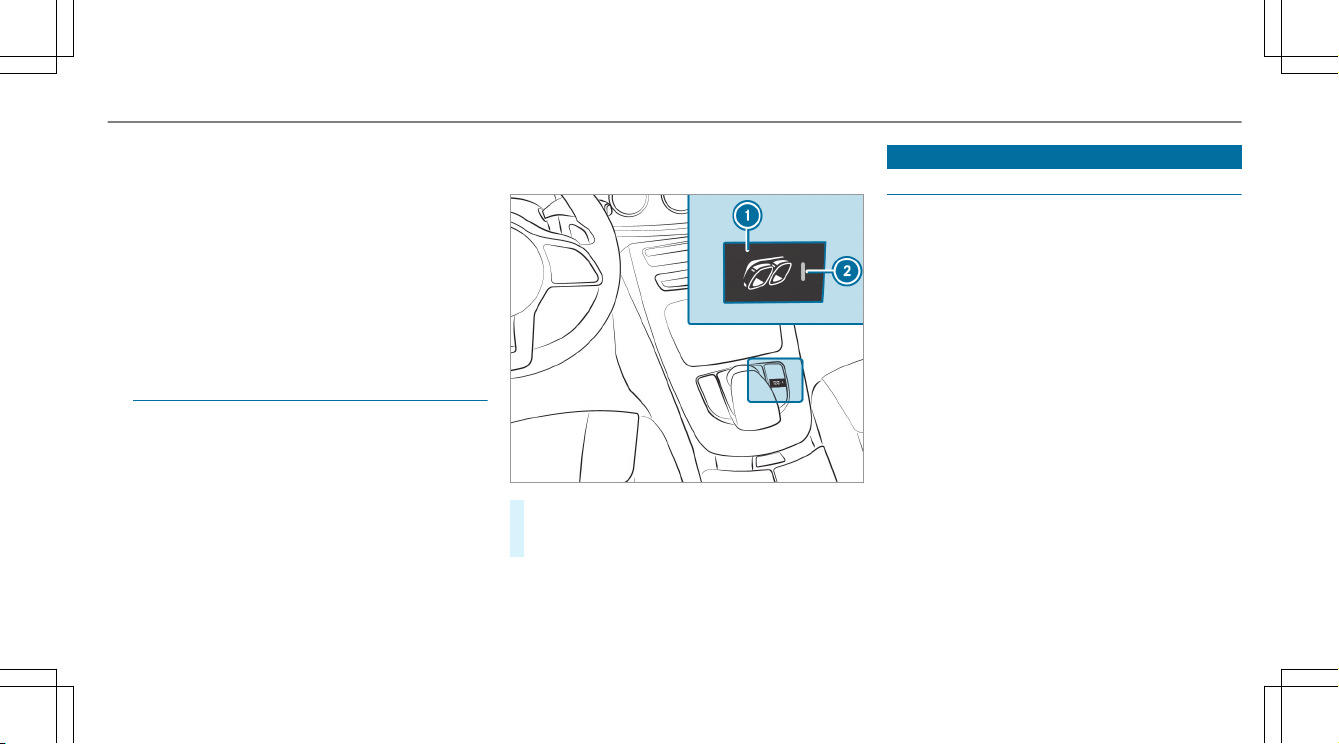
AMG Performance exhaust system
Function of the AMG Performance exhaust
system
Changing the position of the exhaust gas flaps
allows you to select the sound characteristics of
the AMG Performance exhaust system:
R
Closed exhaust gas flaps: comfort character‐
istic (balanced)
R
Open exhaust gas flaps: sporty characteristic
(powerful)
Operating the AMG Performance exhaust
system
#
Press button 1.
The sporty characteristic (powerful) is selec‐
ted when the 2 indicator lamps lights up.
DYNAMIC SELECT switch
Function of the DYNAMIC SELECT switch
Use the DYNAMIC SELECT switch to change
between the following drive programs:
R
; (Eco): particularly economical driving
style
R
= (Individual): individual settings
R
A (Comfort): comfortable and economi‐
cal driving style
R
C (Sport): sporty driving style
R
B (Sport Plus): particularly sporty driving
style
Mercedes-AMG recommends selecting the drive
program A when in city traffic or stop-and-go
traffic.
Depending on the drive program selected, the
following vehicle characteristics will change:
R
Drive (engine management)
R
Transmission management
R
Suspension
R
Position of the exhaust gas flaps
Driving and parking
11
R
Steering
R
Availability of the ECO start/stop function
R
Driver assistance systems
R
Availability of glide mode
%
You can also change the following vehicle
characteristics using the buttons in the cen‐
ter console:
R
Position of the exhaust gas flaps
R
ECO start/stop function
R
Suspension
R
Manual gearshifting
R
ESP
®
Displaying dynamic data
Multimedia system:
Vehicle e DYNAMIC SELECT
#
Select Dyn. Data.
Dynamic data is displayed, e.g.:
R
G-force values
R
Torque distribution
R
Boost
R
Current power output
R
Variable all-wheel drive
Automatic transmission
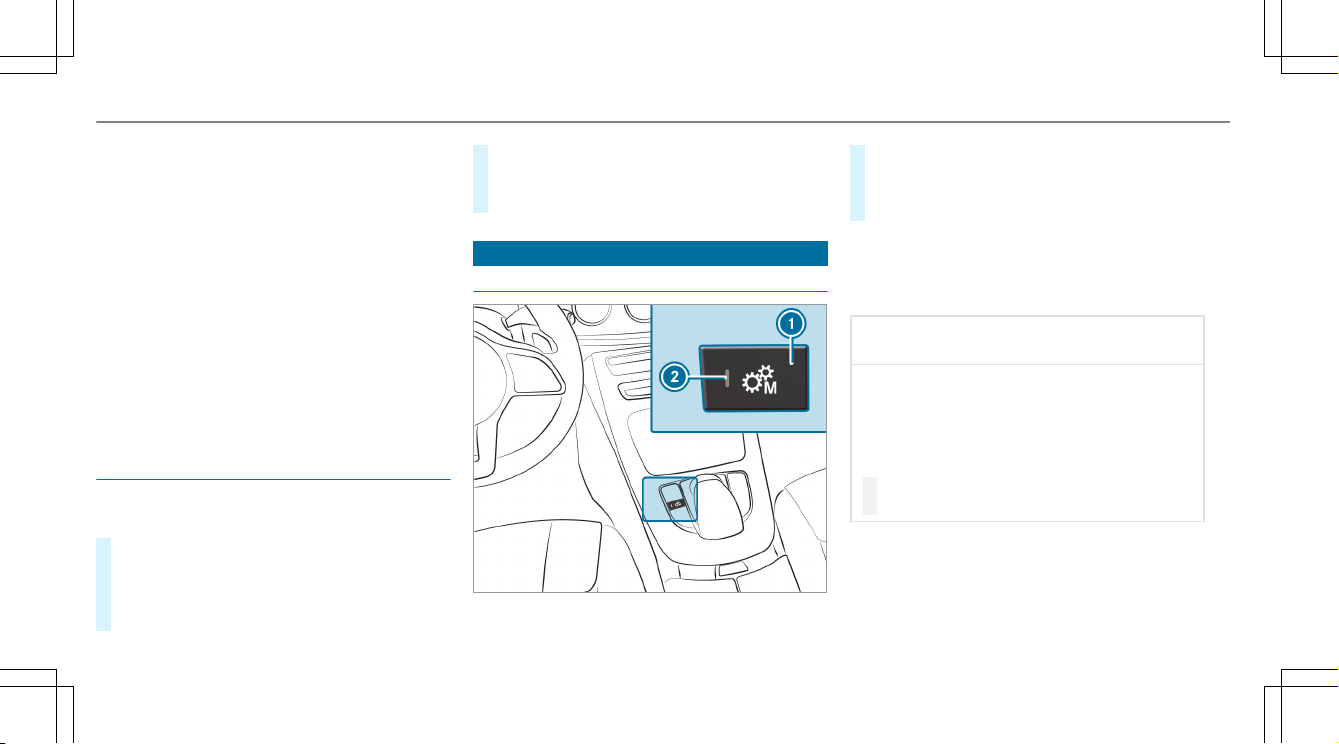
Manual gearshifting
#
To activate/deactivate: press button 1.
If indicator lamp 2 is lit, manual gearshift‐
ing is activated. The current gear is displayed
in the multifunction display.
%
To permanently shift the gears manually in
drive program = using the steering wheel
paddle shifters, select the M (Manual) set‐
ting for the transmission.
*
NOTE Damage to the engine due to shift‐
ing up too late
The automatic transmission does not shift up
in manual mode even when the engine's lim‐
iting speed is reached.
The fuel supply is interrupted in order to pre‐
vent the engine from overrevving.
#
Shift up before the engine speed rea‐
ches the red area in the tachometer.
12
Driving and parking
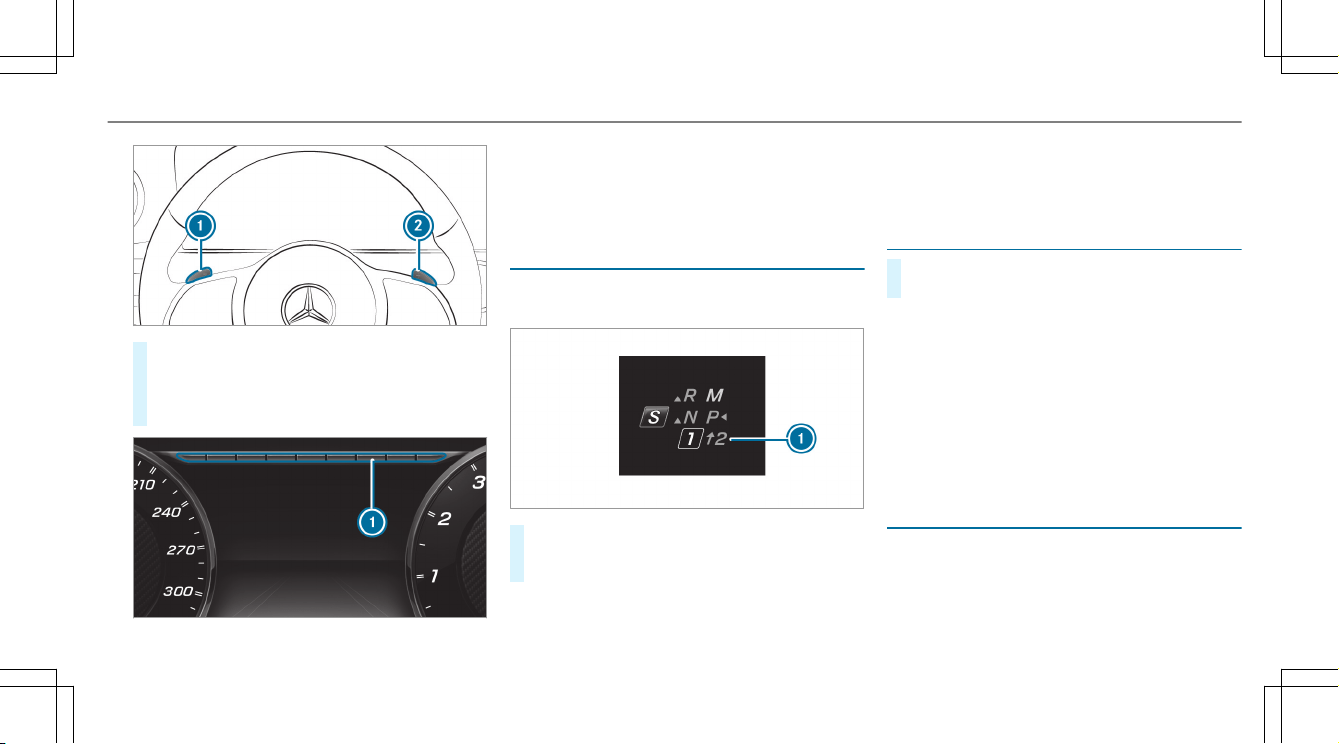
#
To shift up: pull steering wheel paddle
shifter 2.
#
To shift down: pull steering wheel paddle
shifter 1.
If the engine speed is too high or too low, you
cannot change gear using the steering wheel
paddle shifters. In this case, segments 1 light
up red.
Gearshift recommendation
The gearshift recommendation assists you in
adopting an economical driving style.
#
If gearshift recommendation message 1 is
shown on the multifunction display, shift to
the recommended gear.
%
Gearshift recommendation is active only if
you have activated manual gearshifting with
the button on the center console.
Using kickdown
#
Maximum acceleration: depress the accel‐
erator pedal beyond the pressure point.
%
If you have activated manual gearshifting
with the button in the center console, the
transmission does not react to the kick‐
down.
During kickdown, you cannot change gears using
the steering wheel paddle shifters. The auto‐
matic transmission shifts up to the next gear
when the maximum engine speed is reached to
protect the engine from overrevving.
Glide mode function
With an anticipatory driving style, glide mode
helps you to reduce fuel consumption.
Driving and parking
13
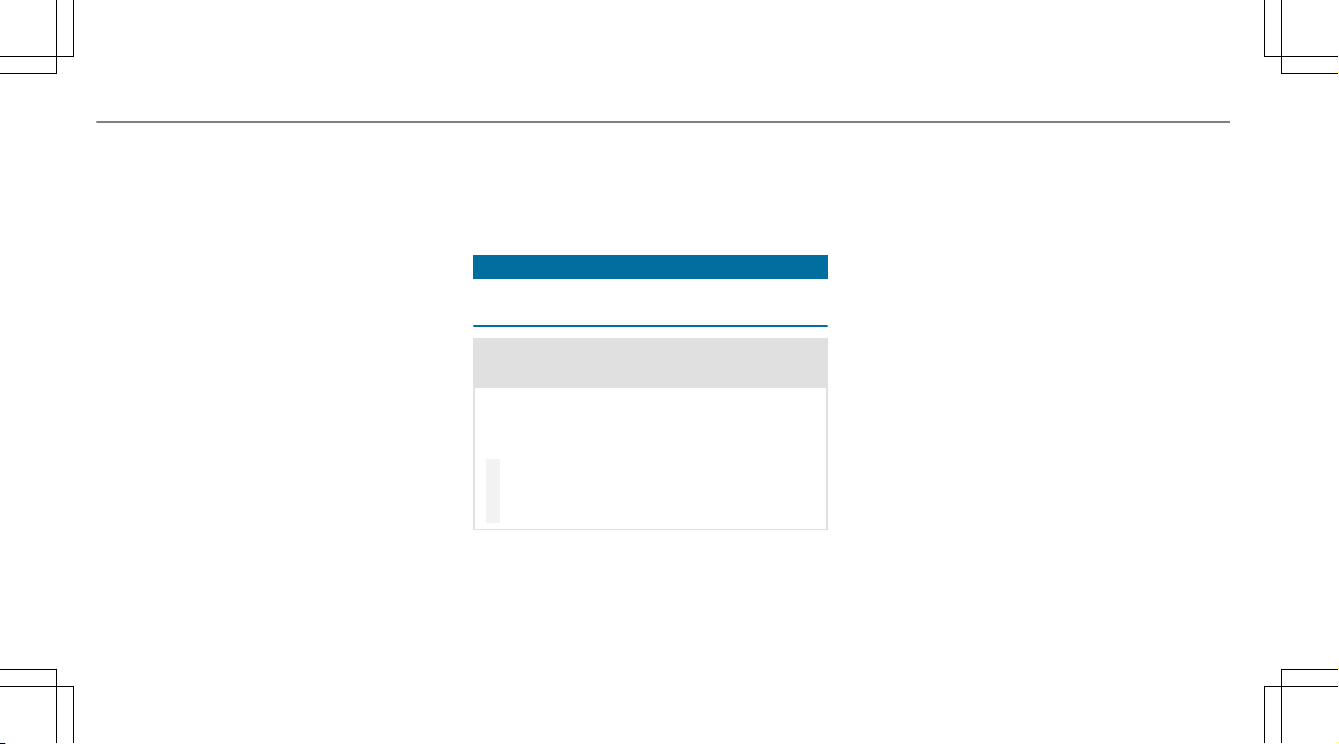
Glide mode is characterized by the following:
R
The combustion engine is disconnected from
the drivetrain.
R
The engine speed corresponds to the idle
speed.
R
The J symbol appears in the multifunc‐
tion display.
Glide mode is activated if the following condi‐
tions are met:
R
The ECO start/stop function is activated.
R
Drive program ; is selected.
R
The speed is within a suitable range.
R
The road's course is suitable, e.g. no steep
uphill or downhill inclines or tight bends.
R
The charge level of the battery is sufficient.
R
you are no longer depressing the accelerator
or brake pedal.
%
Glide mode can also be activated if you have
selected the "Eco" setting for the drive in the
drive program =.
Glide mode is deactivated again if one of the
conditions is no longer met.
When Active Distance Assist DISTRONIC is
active, glide mode is not available.
Driving and driving safety systems
Function of ESP
®
(Electronic Stability Pro‐
gram)
&
WARNING Risk of skidding if ESP
®
is
malfunctioning
If ESP
®
is malfunctioning, ESP
®
cannot carry
out vehicle stabilization. In addition, other
driving safety systems are switched off.
#
Drive on carefully.
#
Have ESP
®
checked at a qualified spe‐
cialist workshop.
You can select between the following modes of
ESP
®
:
R
ESP
®
on
R
SPORT handling mode on
R
ESP
®
off
Characteristics when ESP
®
is activated
ESP
®
monitors and improves driving stability and
traction, particularly in the following situations:
R
When pulling away on wet or slippery road‐
way.
R
When braking.
R
In strong sidewinds when you are driving
faster than 43 mph (70 km/h).
ESP
®
can stabilize the vehicle by intervening in
the following ways:
R
One or more wheels are braked.
R
The engine output is adapted according to
the situation.
ESP
®
is activated every time the engine is star‐
ted, regardless of whether ESP
®
was in SPORT
handling mode or was deactivated before the
engine was switched off.
ESP
®
is intervening if the ESP
®
÷ warning
lamp flashes in the instrument cluster:
R
Do not deactivate ESP
®
.
14
Driving and parking
R
Only depress the accelerator pedal as far as
is necessary.
R
Adapt your driving style to suit the current
road and weather conditions.
Characteristics of activated SPORT handling
mode
&
WARNING Risk of skidding due to incor‐
rect application of SPORT handling mode
When you activate SPORT handling mode,
there is an increased risk of skidding and
having an accident.
#
Only activate SPORT handling mode in
the circumstances described as follows.
Select SPORT handling mode when the vehicle's
own oversteering and understeering characteris‐
tics are desired, for example when driving on
specially designated roads.
Only a highly qualified and experienced driver
should drive in SPORT handling mode or with
ESP
®
deactivated.
If SPORT handling mode is activated and one or
more wheels start to spin, the ÷ ESP
®
warn‐
ing lamp in the instrument cluster flashes. ESP
®
then only stabilizes the vehicle to a limited
degree.
If SPORT handling mode is activated:
R
ESP
®
only improves driving stability to a limi‐
ted degree.
R
ETS/4ETS traction control is still active.
R
The engine's torque is only restricted to a
limited degree and the drive wheels can spin.
The spinning of the wheels results in a cut‐
ting action for better traction on loose surfa‐
ces.
R
ESP
®
continues to provide assistance when
the brakes are firmly applied.
Characteristics when ESP
®
is deactivated
&
WARNING Risk of skidding if ESP
®
is
deactivated
If you deactivate ESP
®
, ESP
®
cannot carry
out vehicle stabilization.
#
ESP
®
should only be deactivated in the
following situations.
ESP
®
is deactivated if the å ESP
®
OFF warn‐
ing lamp lights up continuously in the instrument
cluster:
R
Driving stability will no longer be improved.
R
Crosswind Assist is no longer active.
R
The drive wheels could spin.
R
ETS/4ETS traction control is still active.
%
Even when ESP
®
is deactivated, you are still
assisted by ESP
®
when braking hard.
In the following situations, it may be better to
activate SPORT handling mode or deactivate
ESP
®
:
R
When using snow chains.
R
In deep snow.
R
On sand or gravel.
%
Spinning the wheels results in a cutting
action which provides better grip.
Driving and parking
15

%
Activate ESP
®
as soon as the situations
described above no longer apply. ESP
®
will
otherwise not be able to stabilize the vehicle
if the vehicle starts to skid or a wheel starts
to spin.
If the ÷ ESP
®
warning lamp lights up continu‐
ously, ESP
®
is not available due to a malfunction.
Observe any information which may be displayed
in the instrument cluster:
R
Warning and indicator lamps
R
Display messages
ETS/4ETS (Electronic Traction System)
ETS/4ETS traction control is part of ESP
®
.
ETS/4ETS can improve the vehicle's traction by
intervening in the following ways:
R
The drive wheels are braked individually if
they spin.
R
More drive torque is transferred to the wheel
or wheels with traction.
AMG adaptive sport suspension system
Function of the AMG adaptive sport suspen‐
sion system
The AMG adaptive sport suspension system is
an air suspension system with variable damping
for improved driving characteristics. The all-
round level control system ensures the best pos‐
sible suspension and constant ground clearance,
even with a laden vehicle. When driving at
speed, the vehicle is lowered automatically to
improve driving safety and to reduce fuel con‐
sumption. You also have the option of manually
adjusting the vehicle level.
The damping is tuned individually for each wheel
and is affected by the following factors:
R
the driving style, e.g. sporty
R
the road condition, e.g. bumps
R
the individual selection of "Sport", "Sport
Plus", "Comfort" or "Economy"
The AMG adaptive sport suspension system
includes the following components and func‐
tions:
R
air suspension with variable spring rate and
automatic level control
R
speed-dependent lowering to reduce fuel
consumption
R
manually selectable high-level setting for
greater ground clearance
R
ADS PLUS (Adaptive Damping System with
constant damping force adjustment)
R
DYNAMIC SELECT switch and level button
R
suspension tuning button
16
Driving and parking
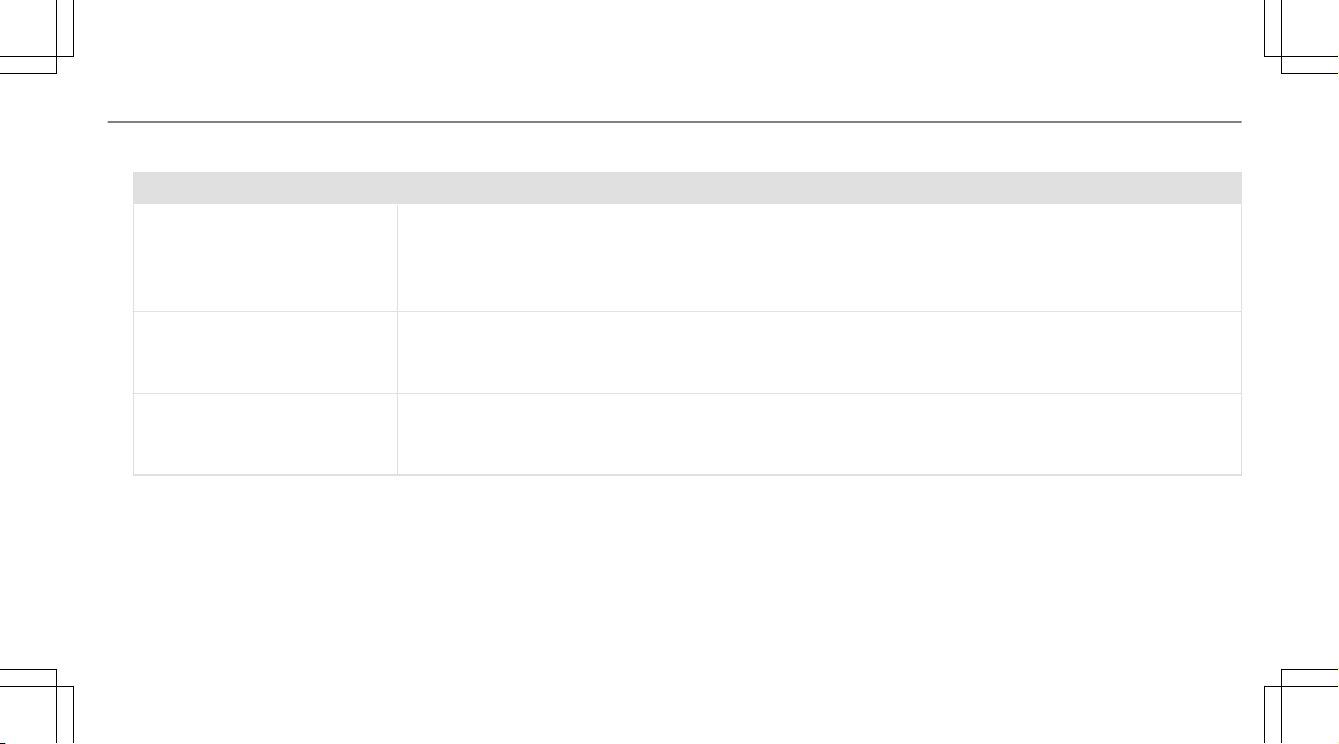
Available suspension tunings
Drive programCharacteristics
A (Comfort)
; (Eco)
R
The suspension tuning is comfortable.
R
The vehicle is set to the normal level.
R
When driving at speeds above 100 mph (160 km/h) the vehicle is lowered.
R
When driving at speeds below 87 mph (140 km/h), the vehicle is raised again.
C (Sport)
R
The suspension tuning is firmer.
R
The vehicle is set to the low level.
R
The vehicle is not lowered any further if you are traveling at higher speeds.
B (Sport Plus)
R
The suspension tuning is even firmer.
R
The vehicle is set to the low level.
R
The vehicle is not lowered any further if you are traveling at higher speeds.
Driving and parking
17
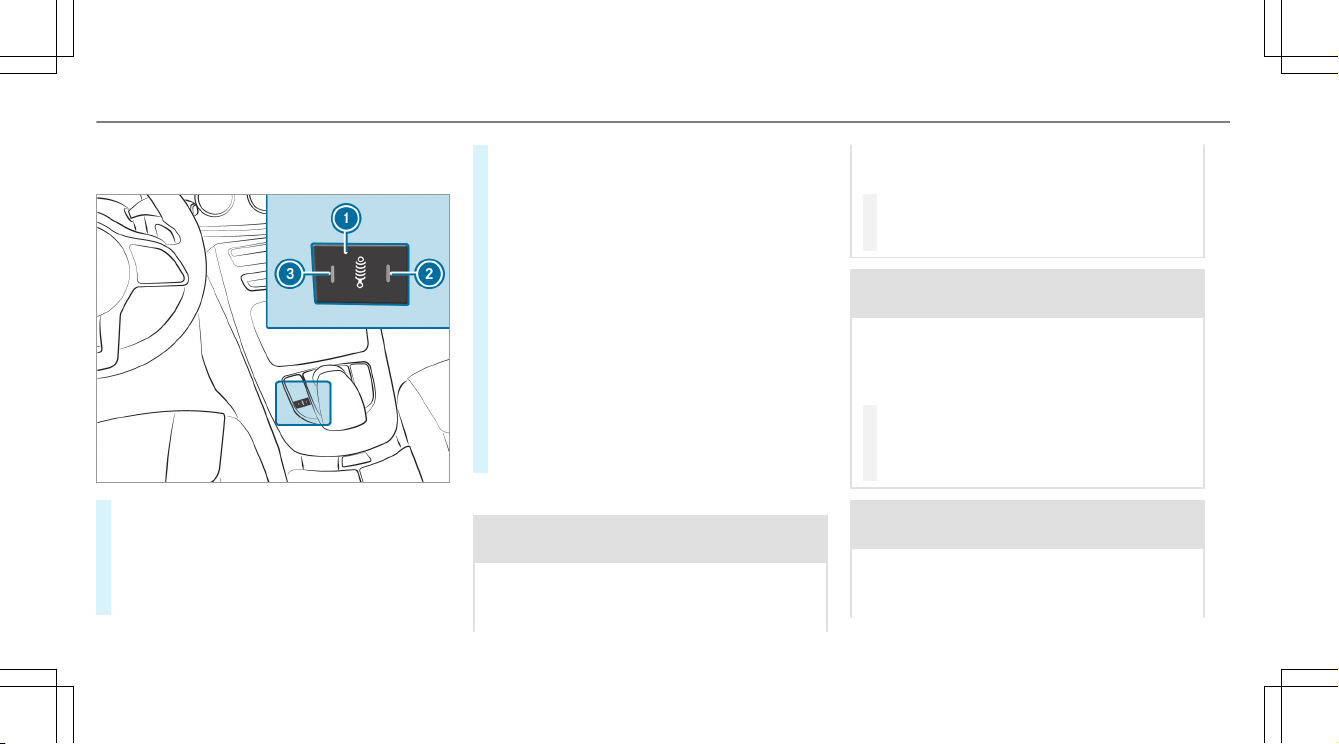
AMG adaptive sport suspension system,
selecting the suspension setting
#
To select the Comfort suspension set‐
ting: press button 1 repeatedly until indica‐
tor lamps 2 and 3 go out.
The AMG Suspension System COMFORT
message appears in the multifunction dis‐
play.
In "Comfort" mode, the driving characteris‐
tics of your vehicle are comfortable.
#
To select the Sport suspension setting:
press button 1 repeatedly until indicator
lamp 3 lights up.
The AMG Suspension System SPORT mes‐
sage appears in the multifunction display.
"Sport" driving mode ensures a firmer sus‐
pension tuning.
#
To select the Sport Plus suspension set‐
ting: press button 1 repeatedly until indica‐
tor lamps 2 and 3 light up.
The AMG Suspension System SPORT + mes‐
sage appears in the multifunction display.
"Sport Plus" driving mode ensures a very
firm suspension tuning.
Setting the vehicle level
&
WARNING Risk of accident because
vehicle level is too high
If you drive at a higher vehicle level, the driv‐
ing characteristics may be impaired due to
the higher vehicle center of gravity.
The vehicle can drift outwards, for example,
when steering or cornering.
#
Always choose a vehicle level which is
suited to the driving style and the road
surface conditions.
&
WARNING Risk of entrapment from vehi‐
cle lowering
When lowering the vehicle, people could
become trapped if their limbs are between
the vehicle body and the tires or underneath
the vehicle.
#
Make sure no one is underneath the
vehicle or in the immediate vicinity of
the wheel arches when you lower the
vehicle.
&
WARNING Risk of entrapment from vehi‐
cle lowering
Vehicles with AIR BODY CONTROL or
level control system: When you unload lug‐
gage or leave the vehicle, the vehicle first
18
Driving and parking
rises slightly and then returns to the set level
shortly afterwards.
You or anyone else in the vicinity of the
wheel arches or the underbody could thus
become trapped.
The vehicle can also be lowered after being
locked.
#
When leaving the vehicle, make sure
that nobody is in the vicinity of the
wheel arches or the underbody.
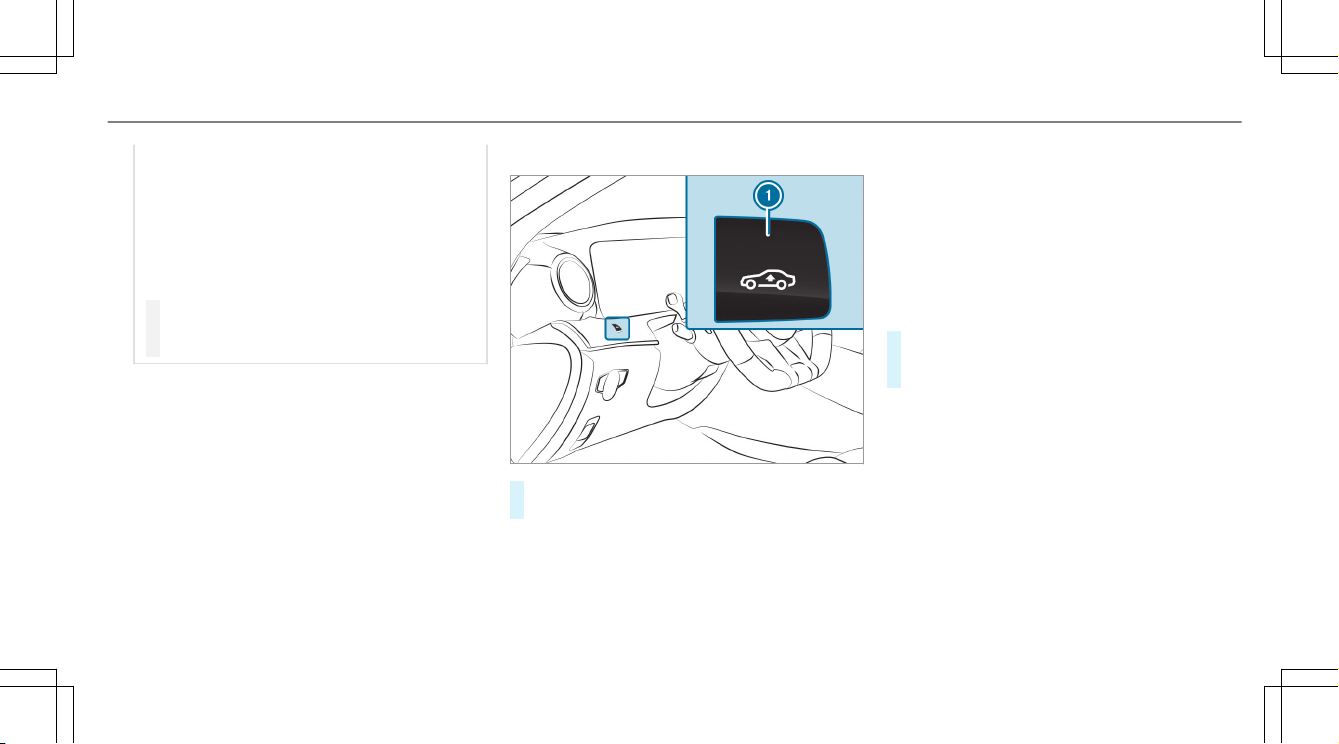
Requirements:
R
The vehicle has been started.
R
The vehicle must not be moving faster than
40 mph (65 km/h).
Raising the vehicle
#
Press button 1.
The vehicle is raised to the high level.
Your selection is saved.
The vehicle is lowered again in the following sit‐
uations:
R
Mercedes‑AMG E 53 4MATIC+: When driv‐
ing faster than 62 mph (100 km/h).
R
Mercedes‑AMG E 53 4MATIC+: When driv‐
ing between 50 mph (80 km/h) and 62 mph
(100 km/h) for approximately three minutes.
R
After selecting a drive program using the
DYNAMIC SELECT switch.
The vehicle is adjusted to the height of the last
active drive program.
Lowering the vehicle
#
Press button 1.
The vehicle is adjusted to the height of the
last active drive program.
Driving and parking
19
Notes on the Instrument Display and on-
board computer
Additional notes regarding your Mercedes-AMG
vehicle:
R
Vehicles with an Instrument Display
(standard) only: if you select the Perform-
ance menu, the upshift bar will appear on the
multifunction display.
R
If you switch on the ECO start/stop function
and select drive program A, the engine
electronics switch from eight-cylinder mode
to four-cylinder mode, if necessary. The mul‐
tifunction display shows the / symbol in
the status area.
R
Additional note regarding the warning and
indicator lamps: the vehicle is also equipped
with the . SPORT handling mode warning
and indicator lamp (→ page 34).
R
You can select the following display content
in vehicles with Widescreen Cockpit:
-
Tachometer (classic display setting)
-
Date (progressive display setting)
-
Gear display
-
Warm-up
-
Track Pace
-
G-Meter
-
Engine data
-
Trip computer
-
Navigation
Calling up displays on the Performance
menu
On-board computer:
Performance
#
To select a display: swipe upwards or down‐
wards on the left-hand Touch Control.
Displays on the Performance menu:
R
Warm-up
R
SETUP
R
G-meter
R
RACETIMER (vehicles without AMG TRACK
PACE)
R
Engine data
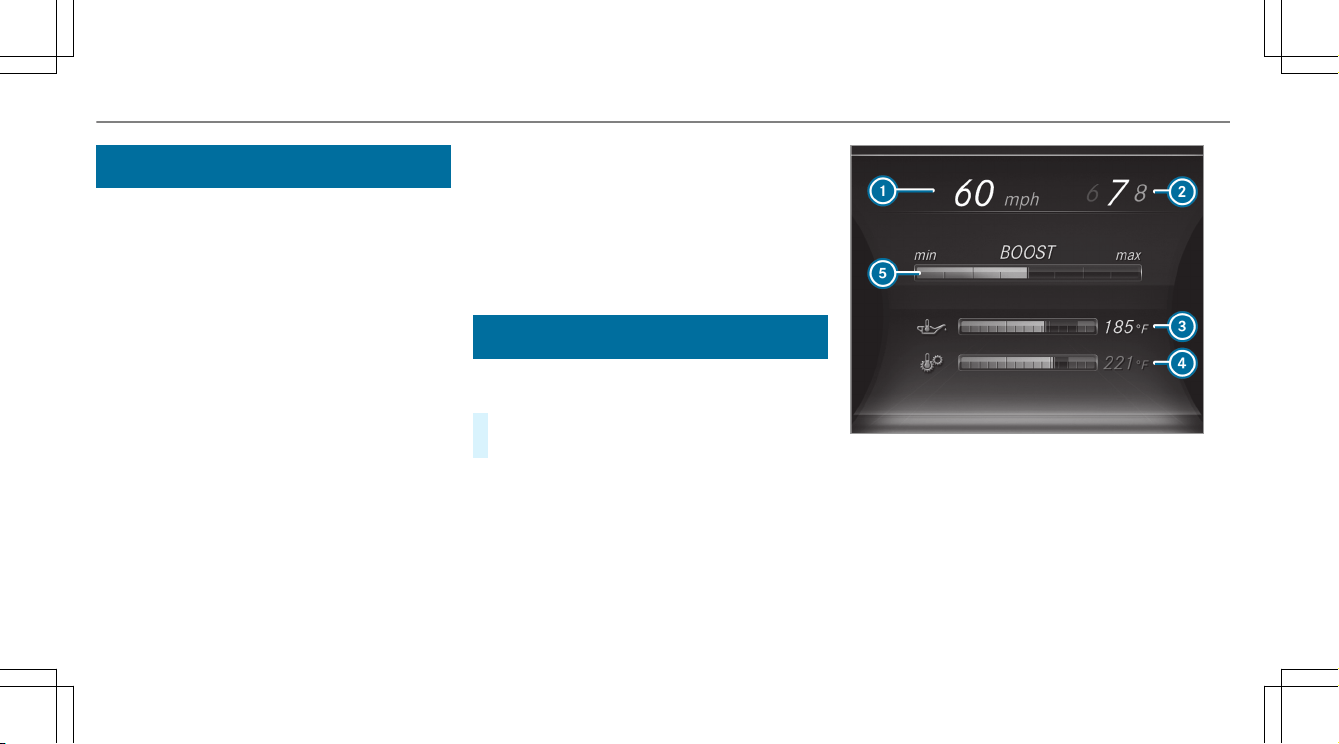
Example: warm-up
1
Digital speedometer
2
Gear display
3
Engine oil temperature
4
Transmission oil temperature
5
Charge-air pressure
If the engine or transmission is not at operating
temperature, the multifunction display shows
20
Instrument Display and on-board computer
temperature 3 or 4 in blue. Avoid using the
full engine power output during this time.
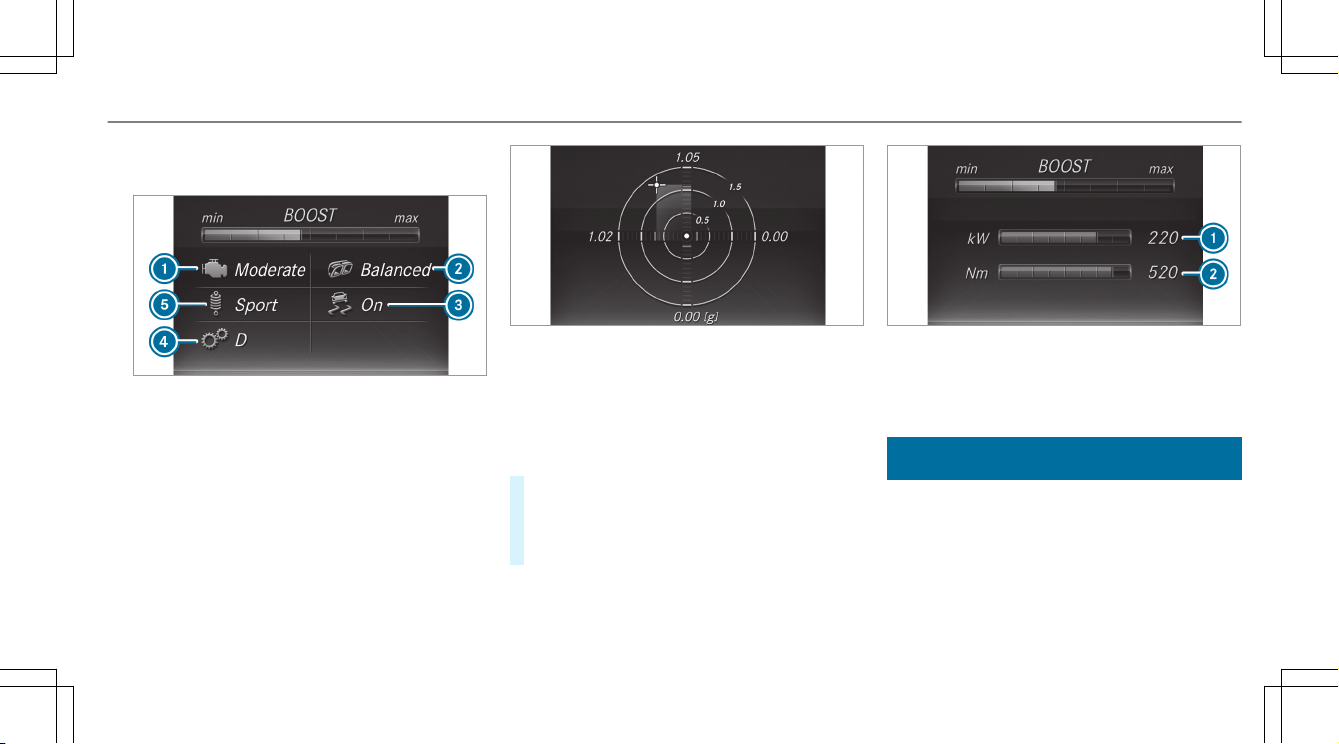
Example: SETUP
1
Drive system setting:
Reduced/Moderate/Sport/Dynamic/Race
2
Exhaust system:
Balanced/Powerful
3
ESP
®
status:
On/Off/SPORT handling mode
4
Transmission position:
D/M
5
Suspension tuning:
5
Comfort/Sport/Sport+
Example: G-meter
While the vehicle is in motion, the G-meter
shows the forces that are exerted on the vehicle
occupants both laterally and in the direction of
travel. The maximum values appear in red in the
coordinate system.
#
To reset the G-meter: press the left-hand
Touch Control.
#
Select Yes .
#
Press the left-hand Touch Control.
If you press and hold the left-hand Touch Con‐
trol, the function will be reset immediately.
Example: engine data
1
Current power output
2
Current torque
Displaying and starting RACETIMER in the
Performance menu
On-board computer:
Performance
%
The RACETIMER function is available only in
vehicles without AMG TRACK PACE.
Instrument Display and on-board computer
21
The following functions are possible in RACE‐
TIMER:
R
Selecting and starting displays
R
Stopping
R
Starting a new lap
R
Displaying lap statistics
R
Resetting
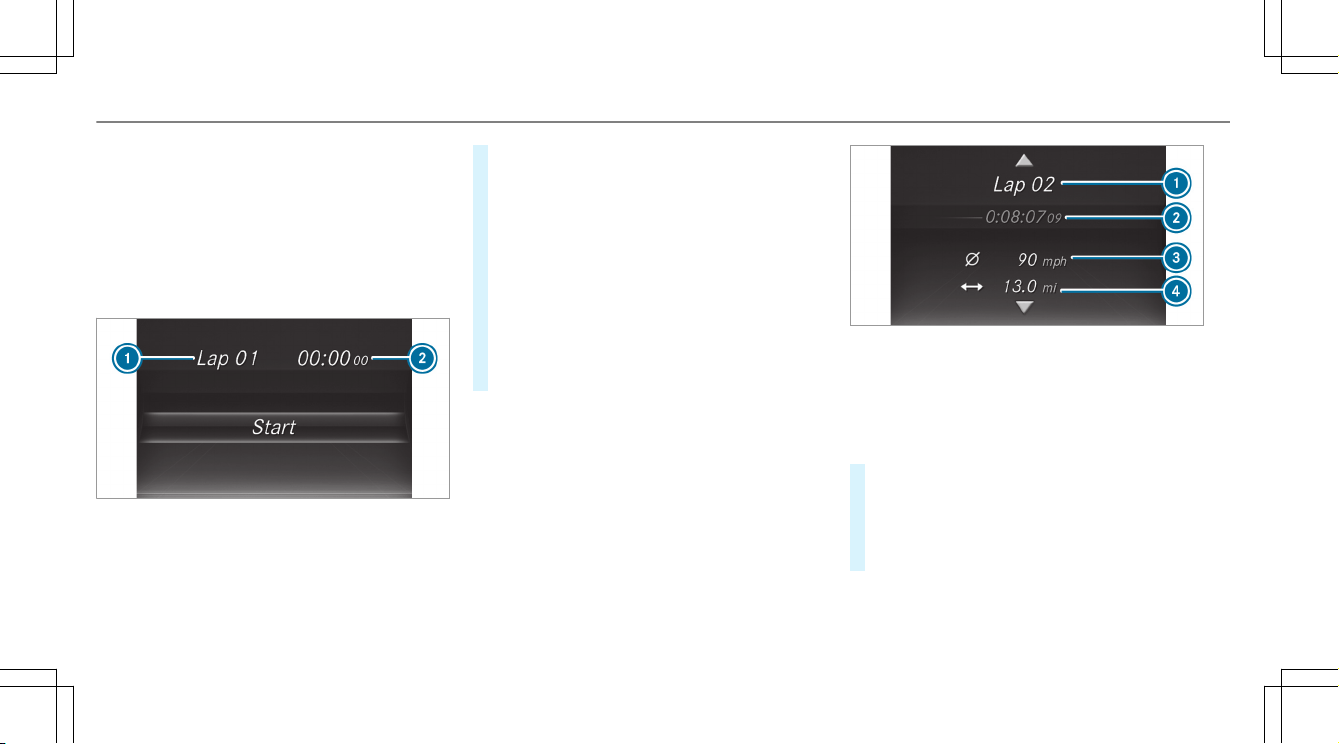
1
Lap
2
Lap time
RACETIMER is intended only for use on designa‐
ted race tracks. Do not use the function on pub‐
lic roads.
#
To select a display and start: swipe up or
down on the left-hand Touch Control.
#
Press the left-hand Touch Control.
#
Select Start and press the left-hand Touch
Control.
#
To stop: select Stop and press the left-hand
Touch Control.
#
To start a new lap: after the first stored lap,
press the left-hand Touch Control.
#
Select New Lap.
A maximum of 32 laps may be stored.
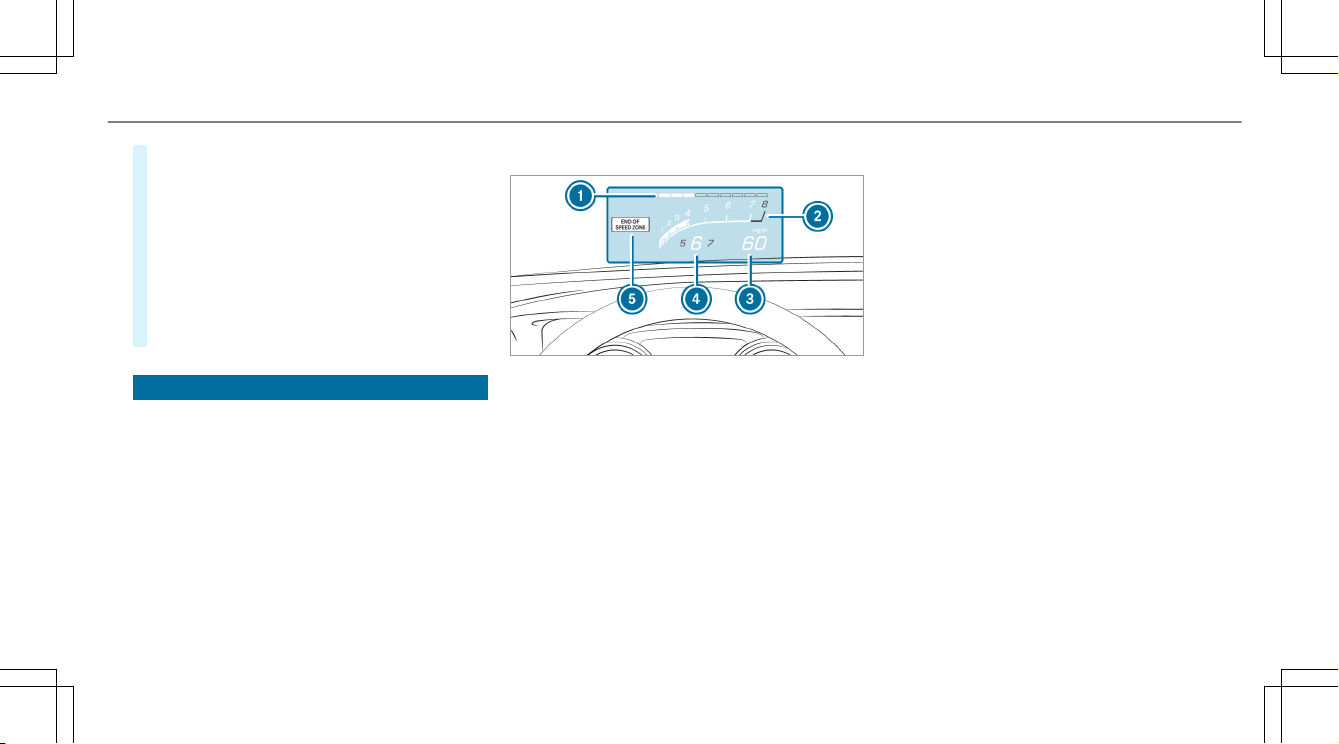
Example: RACETIMER
1
Lap
2
Elapsed time
3
Average speed
4
Distance covered
#
To display the lap statistics: after at least
two stored laps, press the left-hand Touch
Control.
#
Select Lap List.
The lap statistics will be displayed.
22
Instrument Display and on-board computer
#
Display the statistics of the next lap by swip‐
ing up or down on the left-hand Touch Con‐
trol.
The fastest lap is indicated by flashing sym‐
bol 1.
#
To reset: stop RACETIMER and press the
left-hand Touch Control.
#
Select Reset and press the left-hand Touch
Control.
All laps will be deleted.
Function of the Head-up Display
The Head-up Display projects into the driver's
field of vision:
R
Information from the navigation system
R
Information from the driver assistance sys‐
tems
R
Some warning messages
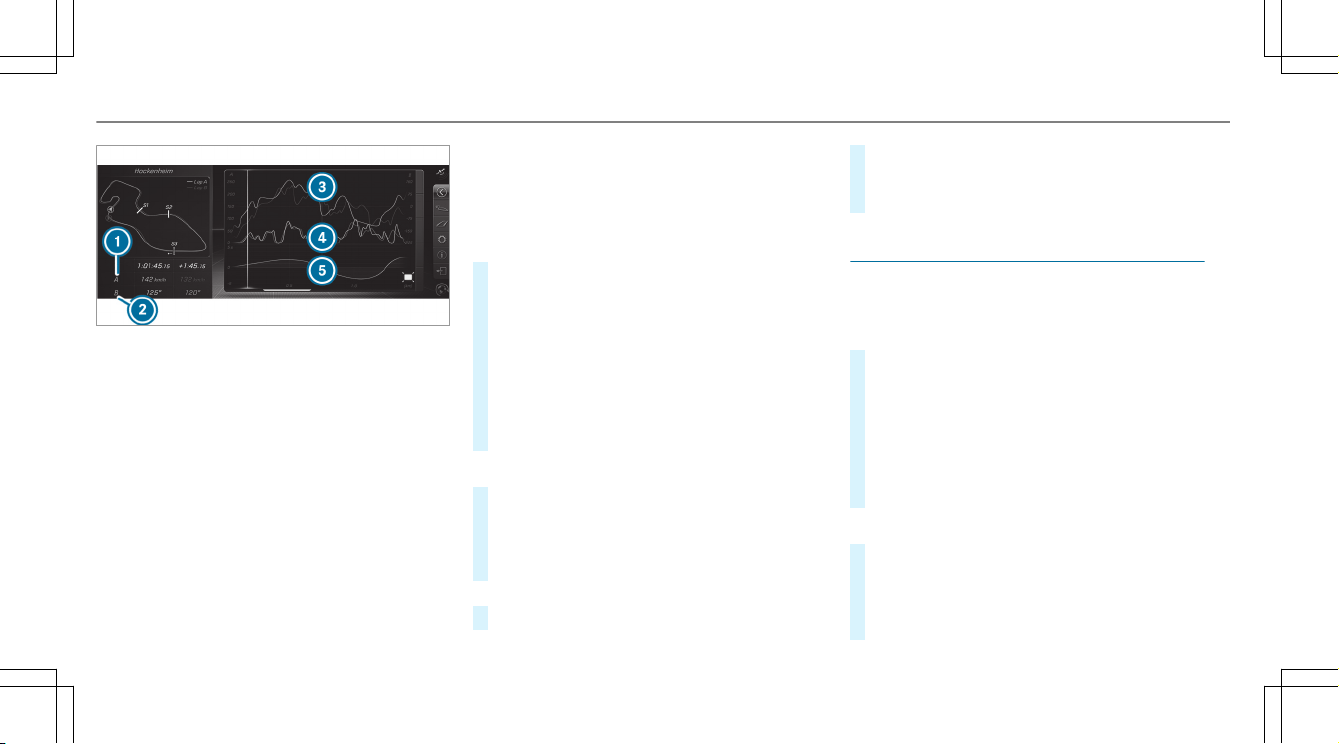
Mercedes-AMG display content
1
Protection from reaching the overrevving
range
2
Current engine speed
3
Current speed
4
Currently selected gear, gearshift options
with manual shifting
5
Detected instructions and traffic signs
Depending on the vehicle's equipment, you can
select further AMG displays in addition to the
standard displays on the Display Content menu.
If you select RACETIMER, the Head-up Display
will show the lap and lap time.
In vehicles with AMG TRACK PACE, you can dis‐
play further content depending on the setting,
e.g.:
R
speed and gear indicator
R
lap and sector times
R
acceleration and braking
R
graphic track layouts
When you receive a call, the 6 Incoming Call
message will appear on the Head-up Display.
In audio mode, the station name or track will be
shown temporarily when the audio source is
being actively operated.
System limitations
The visibility is influenced by the following condi‐
tions:
R
Seat position
R
The positioning of the display image
R
Light conditions
R
Wet roads
R
Objects on the display cover
R
Polarization in sunglasses
Instrument Display and on-board computer
23

%
In extreme sunlight, sections of the display
may appear washed out. You can correct this
by switching the Head-up Display off and on
again.
24
Instrument Display and on-board computer

AMG TRACK PACE
General information
With AMG TRACK PACE, the driving characteris‐
tics on race tracks can be analyzed and opti‐
mized. You can drive previously stored race
tracks (e.g. Hockenheimring) or new tracks can
be recorded and stored. The driven lap times are
stored for every track. These can be analyzed
and compared to other lap times to achieve the
best possible race results. Additionally, accelera‐
tion and braking procedures can be measured
and stored.
Setting Track Race
Multimedia system:
Vehicle TRACK PACE Track Race
Recording a track
#
Select New track.
#
At the desired starting point, select Start.
The track recording starts at this point. Dur‐
ing track recording, sectors can be set to
determine intervals.
#
To finish track recording, select Stop or cross
the starting line again.
#
Enter the weather and the track name.
Searching by track name
#
Select All tracks.
#
Select ª Search.
#
Enter the track name.
Tracks with the searched name are dis‐
played.
Measuring the time on the track
#
Select Timekeeping.
An overview of nearby tracks appears.
The distance and direction to the starting
line of the track is displayed.
#
Select the desired track.
If you have already driven on this track, you
can select a driven time as a reference time.
Timekeeping begins automatically when the
starting line has been crossed.
%
When Zoom is selected, the track display
can be switched from 2D to 3D.
Displaying the analysis
#
Select Lap times.
An overview of all the driven times appears.
#
Select a track.
The following data is displayed:
R
Lap and sector times
R
Average and top speed
R
Driver
R
Vehicle
R
Date
R
Weather
#
Select a desired lap.
The analysis is displayed.
Multimedia system
25
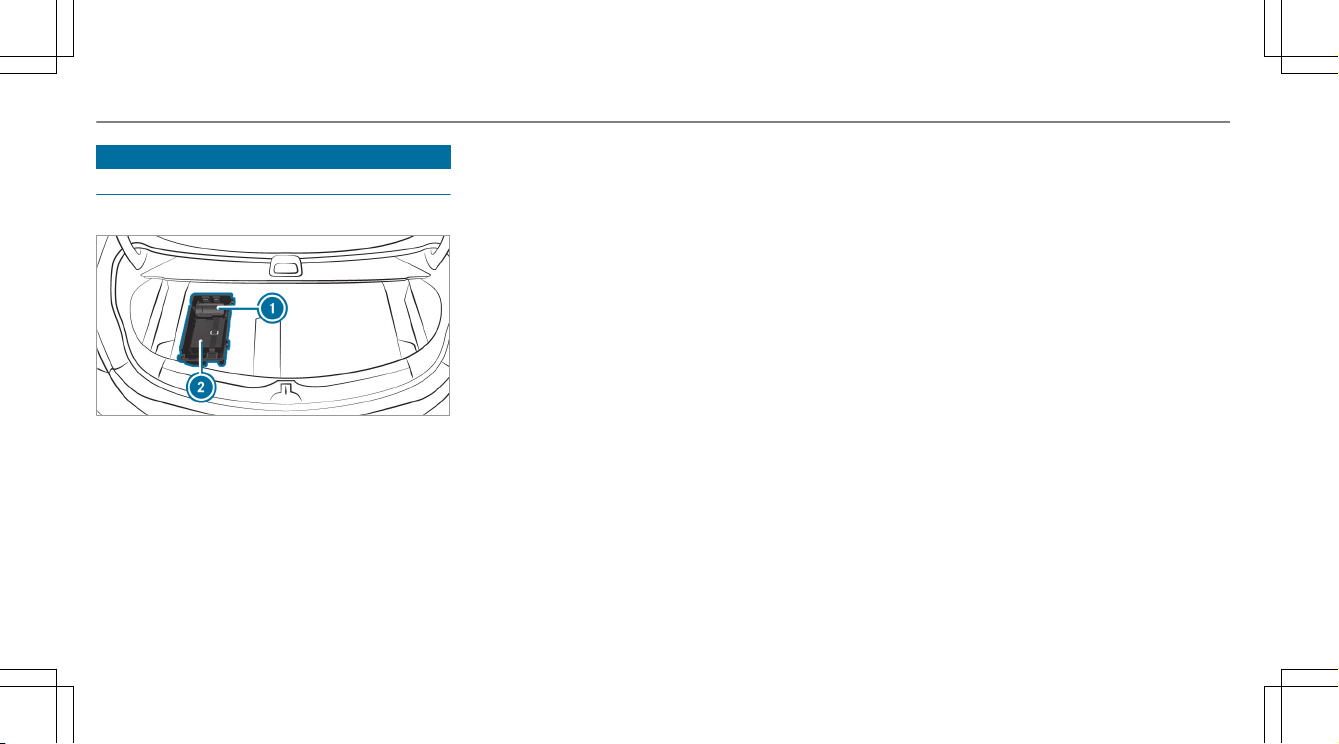
1
Parameter 1 (e.g. speed)
2
Parameter 2 (e.g. steering angle)
3
Speed trend (Parameter 1)
4
Steering angle trend (Parameter 2)
5
Time difference between lap A and B (only
when two laps are selected).
%
The following values can be set for parame‐
ters 1 and 2, for example:
R
Speed
R
Longitudinal/lateral acceleration
R
Steering angle
R
Engine speed
R
Engine oil/tire temperature
Based on the analysis you can check and opti‐
mize driving characteristics for any position on
the track.
Exporting tracks or races (USB)
#
Select All tracks.
An overview of all stored tracks and races
appears.
#
Highlight desired tracks or races.
#
Select Ü Options.
#
Select Export.
The selected tracks or races can be exported
to a USB storage device connected to the
vehicle.
Editing tracks and recordings
#
Select All tracks.
#
Highlight the desired track.
#
Select Ü options.
#
Select Rename or Delete.
or
#
Select a track.
#
Highlight the desired recording.
#
Select Ü options.
#
Select Weather or Delete.
Setting Drag Race
Multimedia system:
Vehicle TRACK PACE Drag Race
Measuring acceleration
#
Select Acceleration.
Measurement begins when the vehicle accel‐
erates. Measurement is incremental, in steps
of 30 mph (50 km/h) up to a maximum of
180 mph (300 km/h) or up to the set maxi‐
mum speed.
Measurement can be stopped early by
selecting Stop or by stopping the vehicle.
Quarter-mile race
#
Select Quarter Mile.
The time measurement runs until a mile has
been traveled or a previously set distance
(e.g. 1/4 mile, 1/3 mile or 1/2 mile) has
been reached.
26
Multimedia system

%
The possible values for setting the end dis‐
tance are determined by the system and
cannot be freely chosen.
Measurement can be stopped early by selecting
Stop or by stopping the vehicle.
Manual start for acceleration and quarter-
mile race
#
Select Acceleration or Quarter Mile.
#
Select Manual start.
Three red traffic lights appear one after the
other. The reaction time measurement starts
when they change to green at the same time.
The reaction time is displayed as soon as you
drive off. If you drive off too early, the mes‐
sage Jump start. will appear and acceleration
or quarter mile measurement will be can‐
celed.
Measuring braking
#
Select Braking.
#
Select Start Record.
Measurement is incremental, in steps of
30 mph (50 km/h) to a standstill. If the brak‐
ing procedure is started e.g. at a speed of
99 mph (160 km/h), measurement starts as
soon as 90 mph (150 km/h) has been
reached.
Storing and calling up measurement values
When a measurement has been completed or
canceled, the measured time can be stored.
#
After a measurement, select Save measure-
ment? .
The stored measurements can be displayed via
the History menu item.
Editing measurements
#
Select History.
#
Highlight the desired measurement.
#
Select Ü options.
#
Select Weather or Delete.
%
The measurements can be displayed by cate‐
gory, e.g. acceleration measurements, by
applying a filter.
Calling up the telemetry display
Multimedia system:
Vehicle TRACK PACE Telemetry
The telemetry display shows current vehicle data
as a digital value and as a diagram. Up to four
parameters can be selected that are to be
shown in the display.
For example:
R
Engine speed
R
Wheel angle
R
Speed
R
Steering angle
#
Set the desired parameters.
#
Set the time.
The set parameters are evaluated in the dia‐
gram for the time set.
%
The time can range from a minimum of
30 seconds to a maximum of 20 minutes.
Multimedia system
27

Configuring AMG TRACK PACE
Requirements
To use the TRACK PACE app:
R
The TRACK PACE app is installed on the
mobile end device.
R
The mobile end device is connected to the
multimedia system via Wi-Fi.
Multimedia system:
Vehicle TRACK PACE Options
Setting driver profiles
#
Select Driver Profile.
#
Create a new driver profile.
or
#
Select an existing driver profile.
The driver profile is activated.
%
Tracks, laps and times driven are assigned to
the active driver profile while driving. For an
exact evaluation of your driving style, you
should always drive with an active driver pro‐
file.
Displaying driver profile statistics
#
Select Driver Profile.
#
Select the desired profile.
The following information is displayed for the
selected driver profile:
R
Driving time
R
Distance driven
R
Number of Track Races, Drag Races and
laps driven
R
Maximum speed
Connecting a mobile device via the TRACK
PACE app
The TRACK PACE app makes it possible to record
videos and to synchronize them with stored
tracks.
#
Select the TRACK PACE app.
Already authorized devices are displayed in
the list.
#
Select Authorize new device.
Available devices are displayed.
#
Start the TRACK PACE app on the device to
be connected and follow the instructions.
#
Confirm the authorization prompt.
#
Enter the code displayed on the device.
The device is authorized.
or
#
Select a device that is already authorized.
The device is de-authorized.
Setting the TRACK PACE display in the head-
up display
#
Select HUD Contents.
#
Activate O or deactivate ª the desired
contents.
The contents in the Head-up Display are
adapted.
%
For further information on the Head-up Dis‐
play, see (→ page 23).
Setting acoustic feedback
#
Select Acoustic feedback.
The following settings are available:
R
Loud
R
Medium
R
Quiet
28
Multimedia system

R
Off
#
Select a setting.
Activating/deactivating additional informa‐
tion
#
Activate O or deactivate ª Display help.
When additional information is activated, popups
provide information on the individual menus.
#
Confirm popups with OK or select Do not dis-
play.
Calling up information
#
Select Info.
The following information is displayed:
R
Software version
R
Memory used
R
Total number of tracks saved
R
Total number of races driven
Multimedia system
29
Flat tire
TIREFIT kit storage location
The TIREFIT kit is located under the trunk floor.
1
Tire sealant bottle
2
Tire inflation compressor
30
Breakdown assistance

Operating fluids
Fuel
Notes on fuel grades for Mercedes-AMG vehi‐
cles
Observe the information on operating fluids in
the vehicle Operator's Manual.
*
NOTE Damage caused by the wrong fuel
Even small amounts of the wrong fuel could
result in damage to the fuel system, the
engine and the emission control system.
#
Only refuel with low-sulfur unleaded
fuel.
This fuel may contain up to 10% ethanol by
volume. Your vehicle is suitable for use with
E10 fuel.
Never refuel with one of the following fuels:
R
Diesel
R
Gasoline with more than 10% ethanol by
volume, e.g. E15, E85, E100
R
Gasoline with more than 3% methanol by
volume, e.g. M15, M30, M85, M100
R
Gasoline with additives containing metal
If you have accidentally refueled with the
wrong fuel:
#
Do not switch on the ignition.
#
Consult a qualified specialist workshop.
If the available fuel is not sufficiently low in sul‐
fur, this can produce unpleasant odors.
Only refuel using unleaded premium grade gaso‐
line with at least 91 AKI/95 RON.
As a temporary measure, if the recommended
fuel is not available, you may also use unleaded
regular gasoline which has at least the octane
number specified in the instruction label in the
fuel filler flap (see the vehicle Operator's Man‐
ual).
Never refuel using gasoline with an even lower
RON.
*
NOTE Premature wear caused by unlea‐
ded regular gasoline
Unleaded regular gasoline can cause the
engine to wear more quickly and impair lon‐
gevity and performance.
If unleaded premium grade gasoline is
unavailable and you have to refuel using
unleaded regular gasoline:
#
Only fill the fuel tank to half full with
unleaded regular gasoline and refill as
soon as possible with unleaded pre‐
mium grade gasoline.
#
Do not drive at the maximum speed.
#
Avoid sudden acceleration and engine
speeds over 3,000 rpm.
Further information on fuel is available at the fol‐
lowing locations:
R
at a gas station
R
at a qualified specialist workshop
R
USA only: at http://www.mbusa.com
Technical data
31
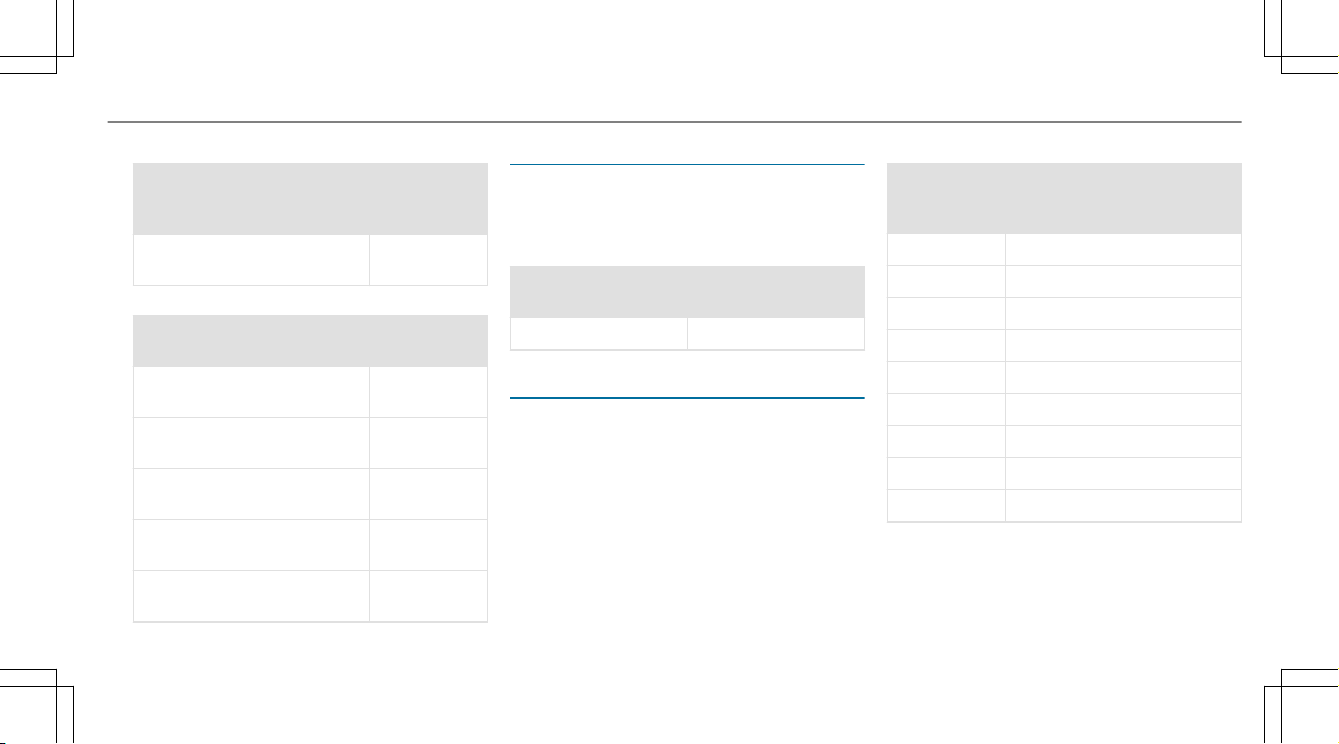
Tank content and fuel reserve
Capacity
Model Total capacity
Mercedes-AMG E 53
4MATIC+
17.4 gal (66.0 liters)
Model Of which reserve
Mercedes-AMG E 53
4MATIC+
1.8 gal (7.0 liters)
Quality and capacity of engine oil
MB-Freigabe or MB-Approval
Model MB-Freigabe or MB-
Approval
Mercedes-AMG E 53
4MATIC+
229.71
The following values refer to an oil change,
including the oil filter.
Capacity
Model Capacity
Mercedes-AMG E 53
4MATIC+
9.0 US qt (8.5 liters)
Coolant capacity
Capacity
Model Capacity
Mercedes-AMG E 53
4MATIC+
14.7 US qt
(14.0 liters)
Refrigerant filling capacity
Vehicle data
Vehicle dimensions
The heights specified may vary as a result of the
following factors:
R
Tires
R
Load
R
Condition of the suspension
R
Optional equipment
32
Technical data
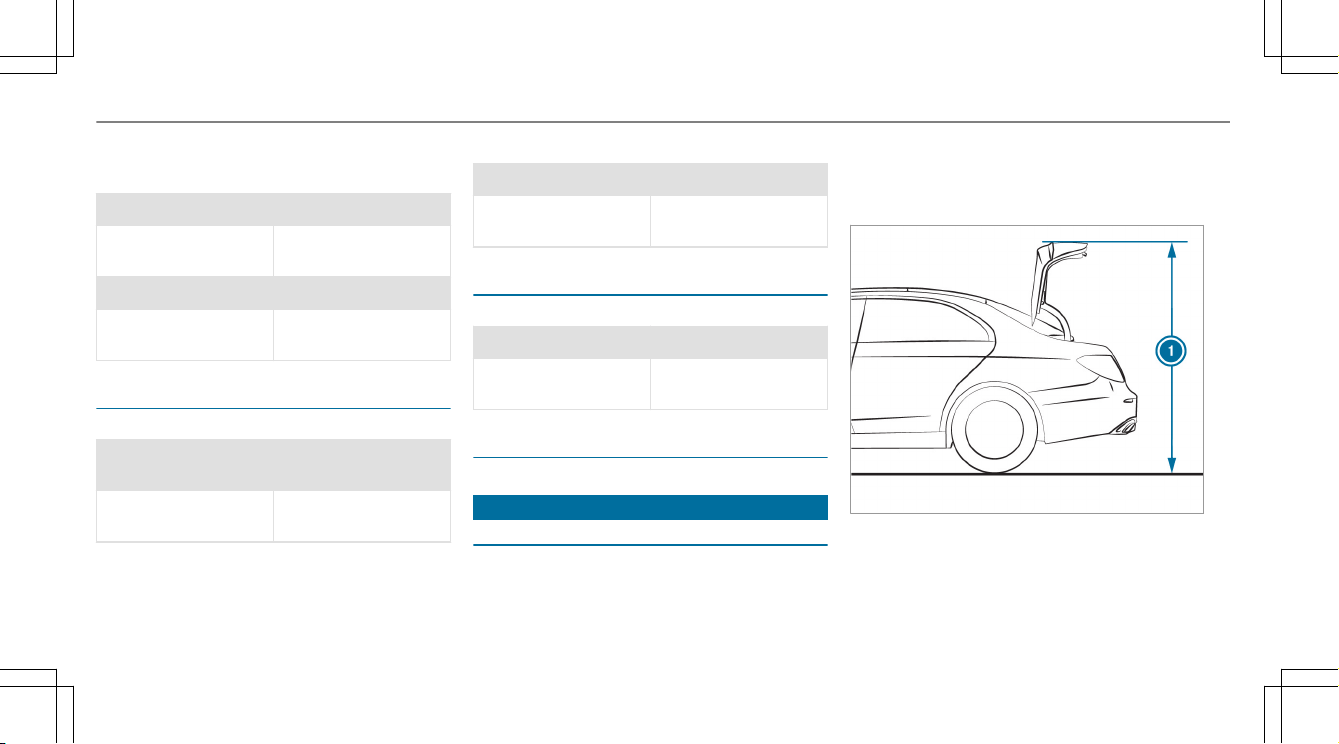
Height when opened
Model
11 Height
when
opened
Mercedes-AMG E 53 4MATIC
+
68.5 in
(1740 mm)
Vehicle dimensions
Mercedes-AMG E 53
4MATIC+
Vehicle length190.6 in
(4842 mm)
Vehicle width including out‐
side mirrors
80.9 in
(2055 mm)
Vehicle height 56.3 in
(1430 mm)
Wheelbase 113.1 in
(2873 mm)
Turning radius 39.7 ft
(12.10 m)
Weights and loads
Please note that for the specified vehicle data:
R
items of optional equipment increase the
curb weight and reduce the payload.
Roof load
Mercedes-AMG E 53
4MATIC+
Maximum roof load 165 lb (75 kg)
Maximum speeds
Missing values were not available at time of
going to print.
The following values only apply to vehicles with
the AMG Driver's Package.
Maximum speeds
Mercedes-
AMG E 53
4MATIC+
Maximum speed
1st gear 31 mph (50 km/h)
2nd gear 51 mph (83 km/h)
3rd gear 74 mph (119 km/h)
4th gear 102 mph (164 km/h)
5th gear 137 mph (221 km/h)
6th gear 155 mph (250 km/h)
7th gear 155 mph (250 km/h)
8th gear
9th gear
Technical data
33
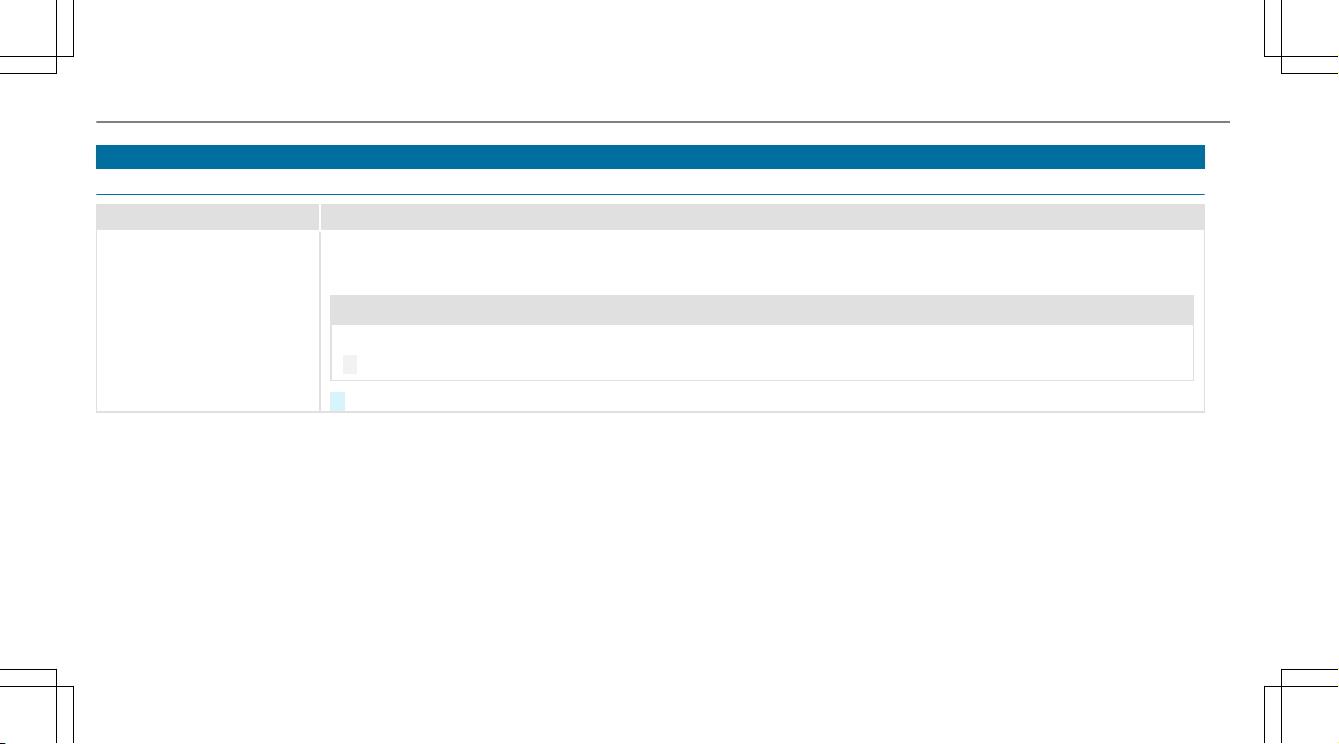
Warning and indicator lamps
Safety systems
Warning/indicator lamp
Possible causes/consequences and MM Solutions
.
SPORT handling mode
warning lamp
SPORT handling mode is activated while the engine is running.
When SPORT handling mode is activated, ESP
®
only stabilizes the vehicle to a limited extent.
&
WARNING Risk of skidding due to incorrect application of SPORT handling mode
When you activate SPORT handling mode, there is an increased risk of skidding and having an accident.
#
Only activate SPORT handling mode in the circumstances described as follows.
#
Observe the notes on activating SPORT handling mode (→ page 14).
34
Display messages and warning/indicator lamps

A
Acceleration
see Kickdown
AMG
Menu (on-board computer) .................... 20
AMG adaptive sport suspension sys‐
tem .............................................................. 18
Selecting the suspension setting ........... 18
Setting ................................................... 18
Suspension ............................................ 16
AMG Performance adjustable exhaust
system ........................................................ 11
Function ................................................. 11
Operating ............................................... 11
AMG TRACK PACE
Configuring ............................................ 28
Drag Race .............................................. 26
General information ............................... 25
Telemetry display ...................................27
Track Race ............................................. 25
Authorized Mercedes-Benz Center
see Qualified specialist workshop
Authorized workshop
see Qualified specialist workshop
Automatic engine start (ECO start/
stop function) ............................................ 10
Automatic engine stop (ECO start/
stop function) ............................................ 10
Automatic transmission
Drive programs ...................................... 11
DYNAMIC SELECT switch ....................... 11
Kickdown ............................................... 13
Manual gearshifting ...............................12
Oil temperature (on-board computer,
Performance menu) ...............................20
Steering wheel paddle shifters .............. 12
B
Boost pressure (on-board computer,
Performance menu) .................................. 20
Brakes
New/replaced brakepads/brake
discs ...................................................... 10
Notes on breaking-in a new vehicle .......10
C
Changing gears .......................................... 12
Manually ................................................ 12
Climate control
Filling capacity for PAG oil .....................32
Refrigerant filling capacity .....................32
Cockpit .........................................................4
Overview .................................................4
Comfort mode
see AMG adaptive sport suspension system
Coolant (engine)
Filling capacity ...................................... 32
D
Dashboard
see Cockpit
Dealership
see Qualified specialist workshop
Drag Race
Setting ...................................................26
Drive programs
see DYNAMIC SELECT
Index
35

Driving safety system
ESP
®
(Electronic Stability Program) ....... 14
Driving system
AMG adaptive sport suspension sys‐
tem ........................................................16
Driving tips
Notes on breaking-in a new vehicle .......10
Dynamic data
Displaying .............................................. 12
DYNAMIC SELECT ....................................... 11
Drive programs ...................................... 11
Function ................................................. 11
E
E10 .............................................................. 31
ECO start/stop function ........................... 10
Automatic engine start .......................... 10
Automatic engine stop ........................... 10
Method of operation .............................. 10
Engine
ECO start/stop function ........................ 10
Engine oil
Capacity ................................................ 32
MB-Freigabe or MB-Approval .................32
Quality ...................................................32
Temperature (on-board computer,
Performance menu) ...............................20
ESP
®
(Electronic Stability Program)
Function/notes .....................................14
SPORT handling mode ........................... 14
Status display (on-board computer,
Performance menu) ...............................20
F
Fuel
E10 ........................................................ 31
Flexible fuel vehicles .............................. 31
Fuel reserve ........................................... 32
Gasoline ................................................. 31
Quality (gasoline) ................................... 31
sulfur content ........................................31
Tank content ......................................... 32
G
G-meter (on-board computer, Per‐
formance menu) ........................................ 20
Gasoline ...................................................... 31
Gear display (on-board computer, Per‐
formance menu) ........................................ 20
Gearshift recommendation ...................... 13
Glide mode ................................................. 13
H
Head-up Display
Function ................................................ 23
I
Instrument display
AMG displays ......................................... 20
K
Kickdown ................................................... 13
Using .....................................................13
L
Limited Warranty
Vehicle ..................................................... 8
M
Maximum speeds ...................................... 33
36
Index

Menu (on-board computer)
AMG displays ......................................... 20
Performance .......................................... 20
N
Notes on breaking-in a new vehicle ......... 10
O
On-board computer
AMG menu ............................................ 20
Performance menu ................................ 20
Operating fluids
Fuel (gasoline) ....................................... 31
Operating safety
Information ..............................................6
Operator's Manual
Vehicle equipment ................................... 6
P
Performance (on-board computer,
Performance menu) .................................. 20
Power output (on-board computer,
Performance menu) .................................. 20
Q
Qualified specialist workshop .................... 7
R
RACETIMER (on-board computer, Per‐
formance menu) ........................................ 21
Reserve
Fuel .......................................................32
Roof load .................................................... 33
S
Seat belt extender ....................................... 9
Seat belts
Seat belt extender ................................... 9
Selecting a gear
see Changing gears
Service center
see Qualified specialist workshop
SETUP (on-board computer, Perform‐
ance menu) ................................................ 20
Shift paddles
see Steering wheel paddle shifters
Shifting gears
Gearshift recommendation .................... 13
Specialist workshop .................................... 7
SPORT handling mode
Function/notes .....................................14
Sport Plus suspension setting
see AMG adaptive sport suspension system
Sport suspension setting
see AMG adaptive sport suspension system
Sports exhaust
see AMG Performance adjustable
exhaust system
Start/stop function
see ECO start/stop function
Steering wheel paddle shifters ................ 12
Sulfur content ............................................ 31
Suspension
AMG adaptive sport suspension sys‐
tem ........................................................16
Selecting the suspension setting ........... 18
Setting the suspension level .................. 18
Suspension level
Setting ................................................... 18
Index
37

T
Tank content
Fuel .......................................................32
Reserve (fuel) ........................................ 32
Telemetry display
Calling up .............................................. 27
Temperature
Engine oil (on-board computer, Per‐
formance menu) .................................... 20
Transmission oil (on-board computer,
Performance menu) ...............................20
Tire inflation compressor
see TIREFIT kit
TIREFIT kit .................................................. 30
Storage location .................................... 30
Tool
see Vehicle tool kit
Torque (on-board computer, Perform‐
ance menu) ................................................ 20
Track Race
Setting ...................................................25
Trunk lid
Opening dimensions .............................. 32
V
Vehicle
Correct use .............................................. 8
Equipment ............................................... 6
Limited Warranty .....................................8
Qualified specialist workshop .................. 7
Vehicle data
Maximum speeds .................................. 33
Roof load ............................................... 33
Turning radius ........................................ 32
Vehicle height ........................................32
Vehicle length ........................................32
Vehicle width ......................................... 32
Wheelbase ............................................. 32
Vehicle dimensions ................................... 32
Vehicle tool kit ...........................................30
TIREFIT kit ............................................. 30
W
Warm-up (on-board computer, Per‐
formance menu) ........................................ 20
Warning/indicator lamp
.SPORT handling mode warning
lamp ...................................................... 34
Warranty ...................................................... 8
Workshop
see Qualified specialist workshop
38
Index