
OWNER’S MANUAL
WASHING MACHINE
WM0642H*
P/NO : MFL31245123
www.lg.com
Please read this manual carefully before operating
your set and retain it for future reference.
DISHWA SHER
OWNER'S MANUAL
Before beginning installation, read these instructions carefully.
This will simplify installation and ensure that the dishwasher is installed
correctly and safely. Leave these instructions near the dishwasher
after installation for future reference.
LD-1481*4
MFL68741410
CONTENTS ................................
2
IMPORTANT SAFETY
INSTRUCTIONS
Important safety instructions ..............3
Read all instructions before use ........4
Save these instructions ......................5
INSTALLATION INSTRUCTIONS
Prepare the installation opening .......7
Preparation for electrical wiring ........7
Preparing the dishwasher for
Installation ..........................................8
Installing the dishwasher in
its location .......................................... 8
Installation of drain hose ....................9
Installation of water inlet hose .........10
Final check and assembling ............10
How to level the dishwasher ............ 10
PARTS IDENTIFICATION ........
11
FUNCTION OF CONTROL
BUTTONS ................................
12
BEFORE USING FOR THE
FIRST TIME
Checking your water hardness level
..... 14
Setting up the softening system level
(hardness level) of your dishwasher
......15
Salt lling .........................................16
Adding rinse aid ............................... 17
INFORMATION FOR ENERGY
TEST ........................................
18
HOW TO USE AND OPERATE
Daily use load ..................................19
Cutlery basket ..................................20
Lower rack .......................................21
Upper rack .......................................21
Adding detergent .............................22
Relling ............................................ 24
Select the programme .....................25
Drying ..............................................26
OPERATING SEQUENCE ......
27
USER MAINTENANCE &
CLEANING INSTRUCTIONS
Not used for a long time ...................28
Cleaning the inside .........................28
Clean using white vinegar ...............28
Filters ............................................... 29
Upper spray arm .............................. 30
Lower spray arm .............................. 31
TROUBLE SHOOTING GUIDE
Display code (condition code) ..........32
Display code (error code) ................34
Washing problems ...........................35
Noise problems ................................37
General problems ............................38
Using SMARTDIAGNOSIS ..............40
SPECIFICATION .....................
41
CONTENTS
2
Thank you for buying an LG Dishwasher.
Please read your owner’s manual
carefully, it provides instruction on safe
installation, use and maintenance.
Retain it for future reference.
Record the model and serial number of
your Dishwasher.
Model No.
Serial No.
Date of Purchase
For your safety, the information in this manual must be followed to minimize the risk of fire or
explosion, electric shock, or to prevent property damage, injury to persons, or death.
READ ALL INSTRUCTIONS AND EXPLANATION OF THE INSTALLATION
BEFORE USE
WARNING
Death or serious injury can occur if the instructions are not strictly followed.
Your safety and the safety of others are very important.
We have provided many important safety messages in this manual and on your appliance.
Always read and obey all safety messages.
This is the safety alert symbol.
This symbol alerts you to potential hazards that can cause death or serious injury.
All safety messages will follow the safety alert symbol and either the word DANGER,
WARNING or CAUTION.
These words mean:
WARNING
You may be injured or cause damage to the product,if you do not follow instructions.
All safety messages will tell you what the potential hazard is, tell you how to reduce the chance
of injury, and tell you what can happen if the instructions are not followed.
CAUTION
Death or serious injury will occur if the instructions are not strictly followed.
DANGER
IMPORTANT SAFETY INSTRUCTIONS
3
4
• Please read this manual carefully
before using the dishwasher for the
first time.
• This manual contains very important
notes regarding the installation, use and
maintenance of your dishwasher.
• The manufacturer can not be responsible
for problems caused by ignoring these
safety and caution instructions.
• This dishwasher is designed for normal
indoor, domestic household use.
• Do not use the dishwasher for
industrial or commercial use, or for
anything other than domestic use.
• The appliance is not intended for use
by young children or infirm persons
without supervision.
• Check packaging and the dishwasher
immediately for signs of transport
damage. If the appliance is damaged,
do not put it into use but contact your
supplier without delay.
• This appliance is intended to be used in
household and similar applications such
as;
- Staff kitchen areas in offices and other
non retail food working environments;
- By clients in holiday appartments and
other residential type environments;
• If this product is used for commercial or
mobile purposes, it is not warranted.
(Example: Public places such as
restaurants, eateries or cafes, boats,
mobile homes and caravans.)
If the product is installed outside
the normal service area, any cost of
transportation involved in the repair of the
product, or the replacement of a defective
part, shall be borne by the owner.
IMPORTANT SAFETY INSTRUCTIONS
Read all instructions before use
WARNING
To reduce the risk of fire, electric shock, or injury to persons when using the dishwasher,
follow basic precautions, including the following:
• Electrical connection must be in
accordance with the rating label.
• Electrical safety is only guaranteed
when the earth system of your house
is in accordance with the related local
regulations. (Do not use an extension
cable or cord unless suited and
approved by Australian Standards.)
• If the hot water exceeds 65ºC, adjust
the water heater setting. If the hot water
temperature can not be maintained below
65ºC, the dishwasher must be connected
to cold water.
• If power supply cord is damaged, it must
only be replaced by the manufacturer
or its service agent or a similar qualified
person in order to avoid a hazard.
• This appliance must be positioned so
that the electrical plug and water supply
connection tap is accessible.
• The appliance is to be connected to water
mains within allowable pressures, and
connected with the supplied hose and that
old hose-sets should not be reused.
During installation
• Only suitable household utensils
should be placed in the dishwasher.
(Please avoid utensils; that are non-
heat-resistant, metal decorated, etc.)
During use
5
IMPORTANT SAFETY INSTRUCTIONS
Read all instructions before use
WARNING
To reduce the risk of fire, electric shock, or injury to persons when using the dishwasher,
follow basic precautions, including the following:
• Do not use any kinds of solvent in your
dishwasher. They may cause an
explosion or fire.
• Do not spray water on the appliance.
It may cause the failure of electric parts
or electric shock.
• Do not push down or sit on the door
when the door is opened. It may cause
damage or failure of your dishwasher.
• Do not use the detergent for hand
washing.
Dishwasher detergent should be used
for normal operation.
• This appliance is fitted with a safety
function that automatically stops the
operation of the dishwasher when it is
exposed to abnormal electrical disturbance
on its mains.
• Dishwasher detergents are extremely
alkaline.They can be extremely dangerous
if swallowed.
Avoid detergent contact with skin and
eyes and keep children away from the
dishwasher when the door is open.
Check that the detergent dispenser is
empty after completion of each wash
cycle.
• Controls may be locked using Child Lock
mode to prevent all the settings from being
changed by a child once the dishwasher is
in operation.
• For safety reasons, the Power button will
still be operative with the Child Lock
engaged.
• Keep children away from detergents
and rinse-aids.
• Do not allow children to operate the
dishwasher.
• Young children should be supervised
to ensure that they do not play with the
appliance.
Child Safety
GROUNDING INSTRUCTIONS
This appliance must be grounded. In the event of malfunction or breakdown, grounding will
reduce the risk of electric shock by providing a path of least resistance for electric current.
This appliance is equipped with a cord having an equipment-grounding conductor and
grounding plug. The plug must be plugged into an appropriate outlet that is properly installed
and grounded in accordance with all local codes and standards.
• Do not use an adapter this will defeat the grounding plug.
• If you don’t have the proper outlet, consult an electrician.
Save these instructions
6
IMPORTANT SAFETY INSTRUCTIONS
CAUTION
The instructions shall state the substance of the following :
This appliance is not intended for use by persons (including children) with reduced
physical, sensory or mental capabilities, or lack of experience and knowledge, unless they
have been given supervision or instruction concerning use of the appliance by a person
responsible for their safety.
Children should be supervised to ensure that they do not play with the appliance.
CAUTION
CAUTION concerning the Power cord
• Most appliances recommend they be placed upon a dedicated circuit; that is, a single
outlet circuit which powers only that appliance and has no additional outlets or branch
circuits. Check the specification page of this owner's manual to be certain.
• Do not overload wall outlets. Overloaded wall outlets, loose or damaged wall outlets,
extension cords, frayed power cords, or damaged or cracked wire insulation are
dangerous. Any of these conditions could result in an electric shock or fire.
• Periodically examine the cord of your appliance, and if its appearance indicates
damage or deterioration, unplug it, discontinue use of the appliance, and have the cord
replaced with an exact replacement part by an authorized servicer.
• Protect the power cord from physical or mechanical abuse, such as being twisted,
kinked, pinched, closed in a door, or walked upon. Pay particular attention to plugs, wall
outlets, and the point where the cord exits the appliance.
If the appliance is connected to an extension cord or power board, they must be positioned
so that they are not subject to water splashing or ingress of moisture.
WARNING
Improper connection of the equipment-grounding conductor can result in electric shock.
Check with a qualified electrician or serviceman if you are in doubt as to whether the
appliance is properly grounded. Do not modify the plug provided with the appliance - if it
does not fit the outlet, have a proper outlet installed by a qualified electrician.
•
A qualified electrician/plumber or competent person should carry out any electrical/
plumbing work required to install this appliance.
WARNING
1. This appliance must be supplied with the
correct and same voltage shown on
instruction manual, and connected to an
individual, properly earthed branch circuit,
protected by a minimum 15 amp circuit
breaker or time delay fuse.
Wiring must be 2 wires with Earth.
2. The power plug must be in a accessible
location adjacent to and not behind the
dishwasher and within 1.2 meters of the
dishwasher side.(See page 9 Fig.A)
3. The power plug must be correctly earthed, if
in doubt, have it checked by a qualified
Electrician. No other appliance should be
connected to the same plug outlet by a
double adapter or similar plug.
Dangerous voltage
To indicate hazards arising
from dangerous voltages.
Note- in case of an application
warning sign, the rules
according to ISO 3864 should
be adhered to.
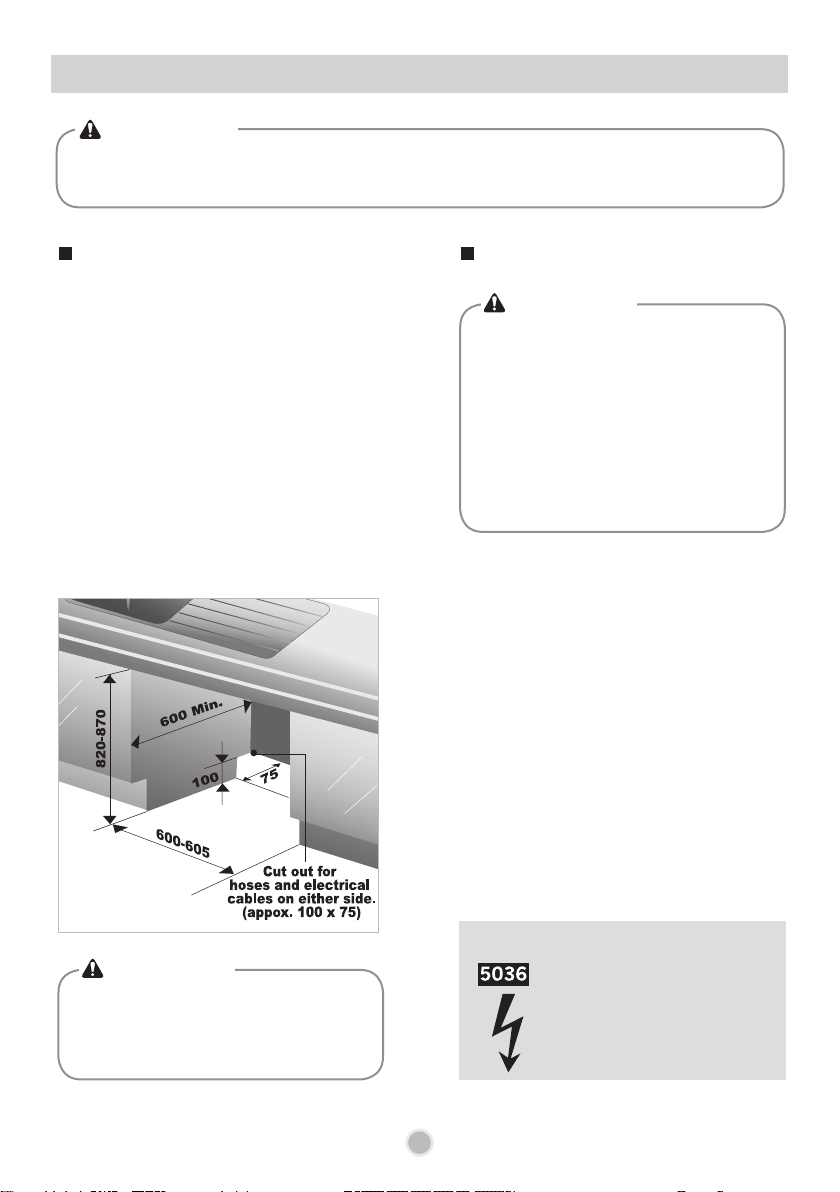
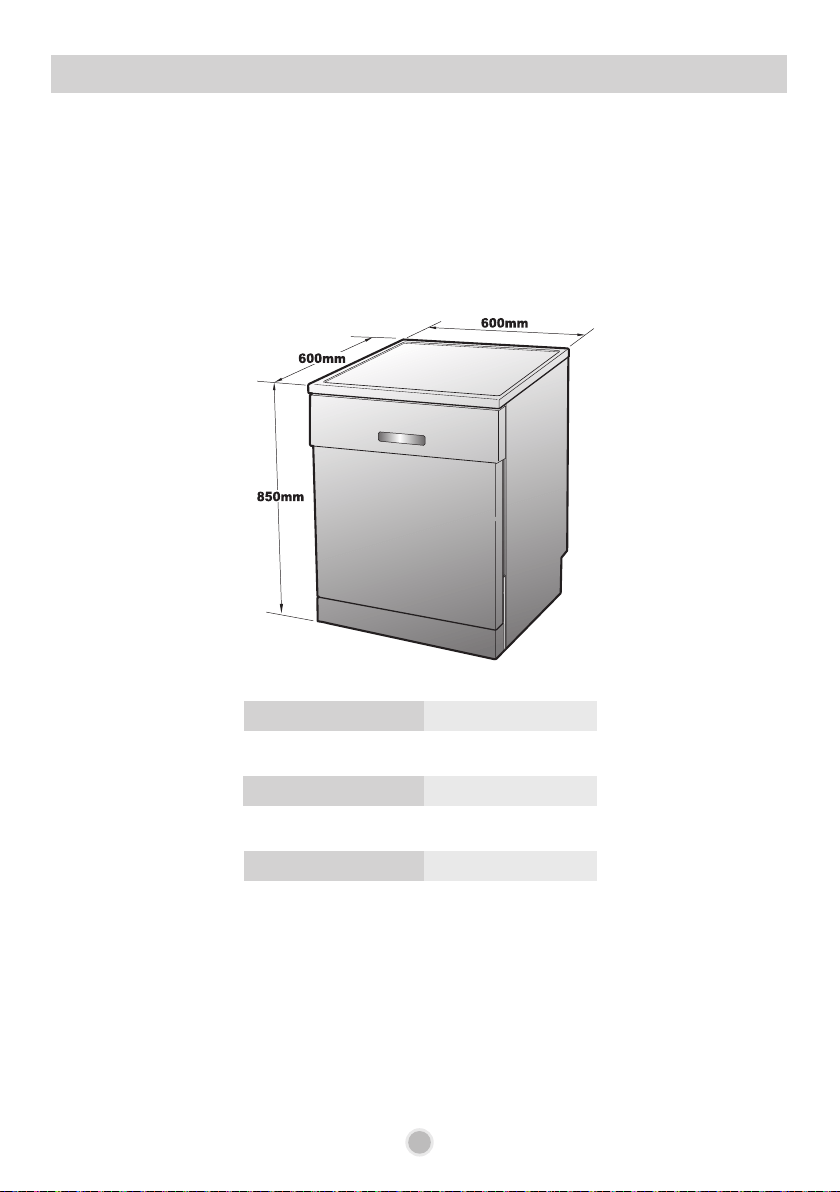
1. This dishwasher is designed to fit the size
shown as below.
2. Select a location as close to the sink as
possible for ease of connection to the water
and drain pipes.
3. To ensure good drainage, the dishwasher
should not be installed more than 1 meter
away from the sink.
4. If the dishwasher is installed in a corner, a
minimum of 5cm of space is required
between the washer and an adjacent cabinet
or wall.
7
Unit:mm
INSTALLATION INSTRUCTIONS
•
For personal safety, remove house
fuse or open circuit breaker before
installation.
•
it is strongly recommended not use
an extension cord or adapter plug
with this appliance.
Electrical and earthing connections must
comply with the national electrical code/
provincial and municipal code and/or
other local codes and standards.
CAUTION
•
Any bare wood surrounding the
dishwasher should be sealed with a
waterproof paint or sealant to prevent it
from swelling.
CAUTION
Prepare the installation opening
Preparation for electrical wiring
•
If the height of the opening is below
850mm, you can remove the top table by
unscrewing the 2 screws.
(Two from rear)
CAUTION
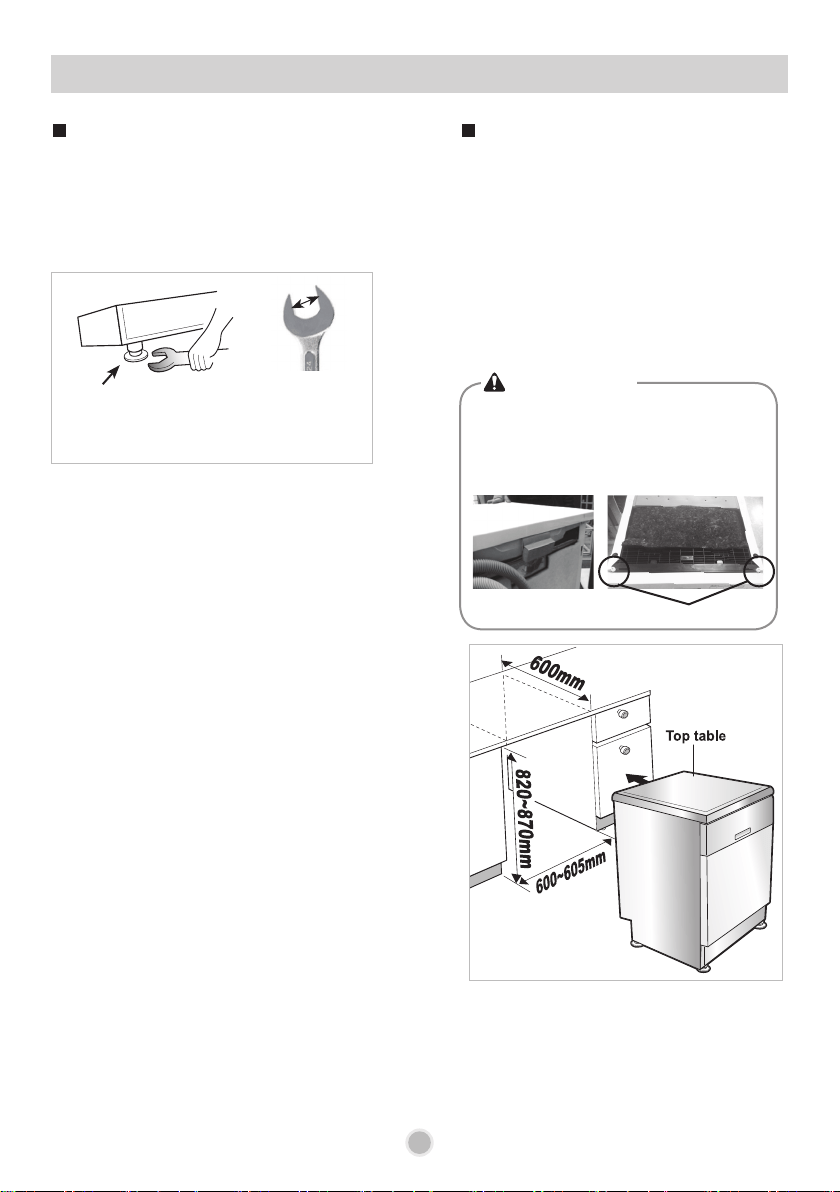
1. Lay the dishwasher on its back.
2. Adjust the legs to the required height
as shown in below figure.
1. Before sliding the dishwasher into the
installation opening, all necessary height
and height adjustments should be made
using a spanner.
2. Slide the dishwasher into the cabinet,
opening carefully. Make sure that the drain
hose inside the cabinet is not kinked or
stretched.
Adjust leg
8
INSTALLATION INSTRUCTIONS
Preparing the dishwasher for
installation
Installing the dishwasher in its
location
(use an open end or adjustable spanner.)
27mm or
1-1/16 inch
9
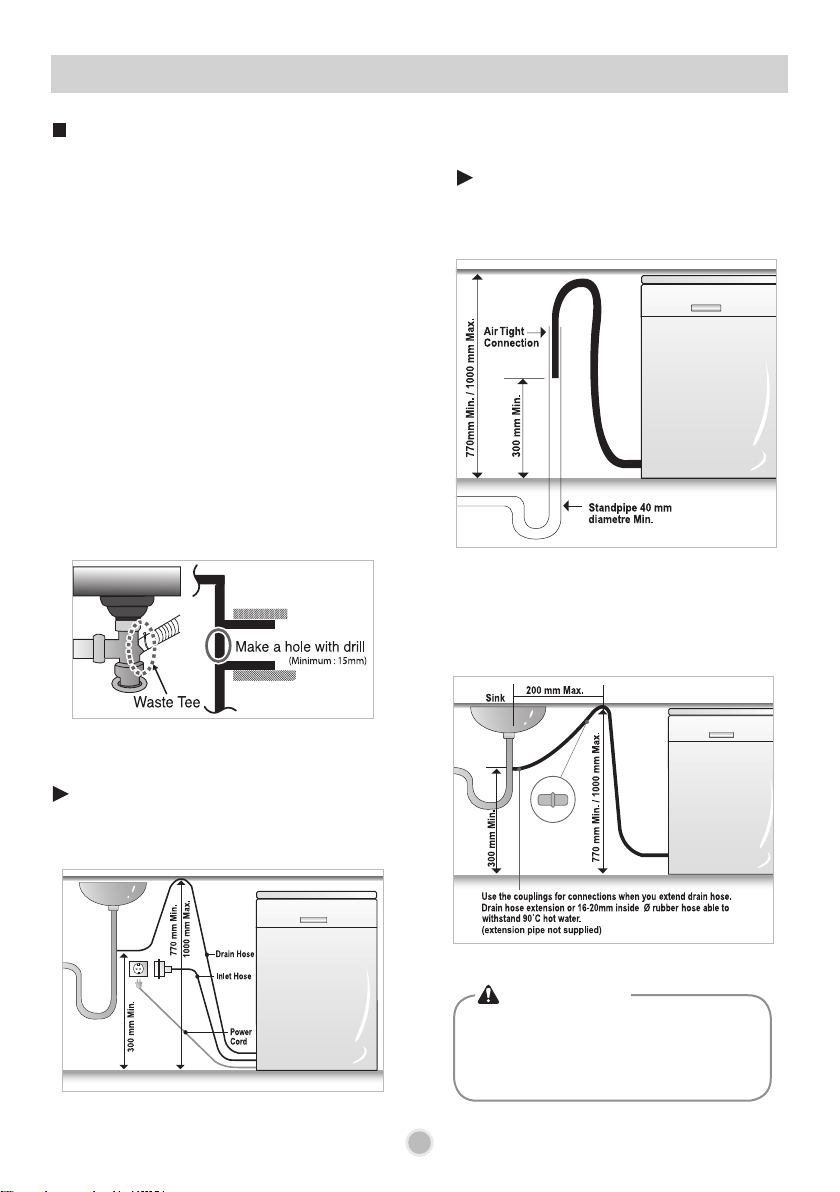
1. If the end of drain hose does not fit to the
drain line, use a rubber coupling (not
supplied) that is resistant to heat and
detergent.
2. This should be available from a plumbing
shop or a hardware store.
3. There are two typical connections as shown
in Figure A, B.
The S trap spigot must be drilled out cleanly
and free of obstruction to its maximum
internal diameter, if used for drainage.
To prevent siphoning, one of the following
methods must be used:
Check the waste spigot when initially installing.
An “OE” error can occur when the waste spigot
below the sink is not drilled out properly.
Please ensure the waste spigot connection to this
drain hose has been completely drilled out before
connecting and securing.
Connection to Waste spigot
When the drain hose is connected to a sink S
trap or waste disposal unit, the hose must be
looped up to the underside of the bench top
and secured.
Drain hose Extension
Extend drain hose as shown below.
Drain hose
extension kit
Fig. A
When the drain hose is connected to a
separate standpipe, it is essential that an
airtight connection be made.
Refer to Fig.B
Fig. B : Drainage connection - stand pipe.
INSTALLATION INSTRUCTIONS
Installation of drain hose
•
When you connect or extend drain hose,
make sure that the drain hose is not
kinked.
(Bends should have a 40mm radius.)
CAUTION
Use the drain hose extension kit appropriately.
10
• This dishwasher may be fed with either hot or
cold water. If the water can not be maintained
below 65ºC, the dishwasher must be connected
to cold water.
• When connecting, you may use sealant tape or
sealing compound to avoid water leaks.
• Make sure that the line is not kinked or sharply
bent.
• It is recommended that the new inlet hose be
used and not an existing or old hose.
Final check and assembling
1. Securely hand tighten supply hose to the
water supply.
Plug the power supply cord into an earthed
electrical point and switch on after having
turned on the circuit breaker.
2. After installing and prior to using the
dishwasher with crockery, we recommend that
you use the dishwasher on Quick mode to
rinse through. At this stage it is useful to
ensure that there are no operating problems or
water leaks.
When the dishwasher is used for the first time,
there may be a loud noise, if this happens, turn
off the power and restart the dishwasher.
After installing the dishwasher, you may notice a
slight sticking of the door to the dishwasher,
when you open or close the door. If this does
happen you need to adjust the level of the
dishwasher.
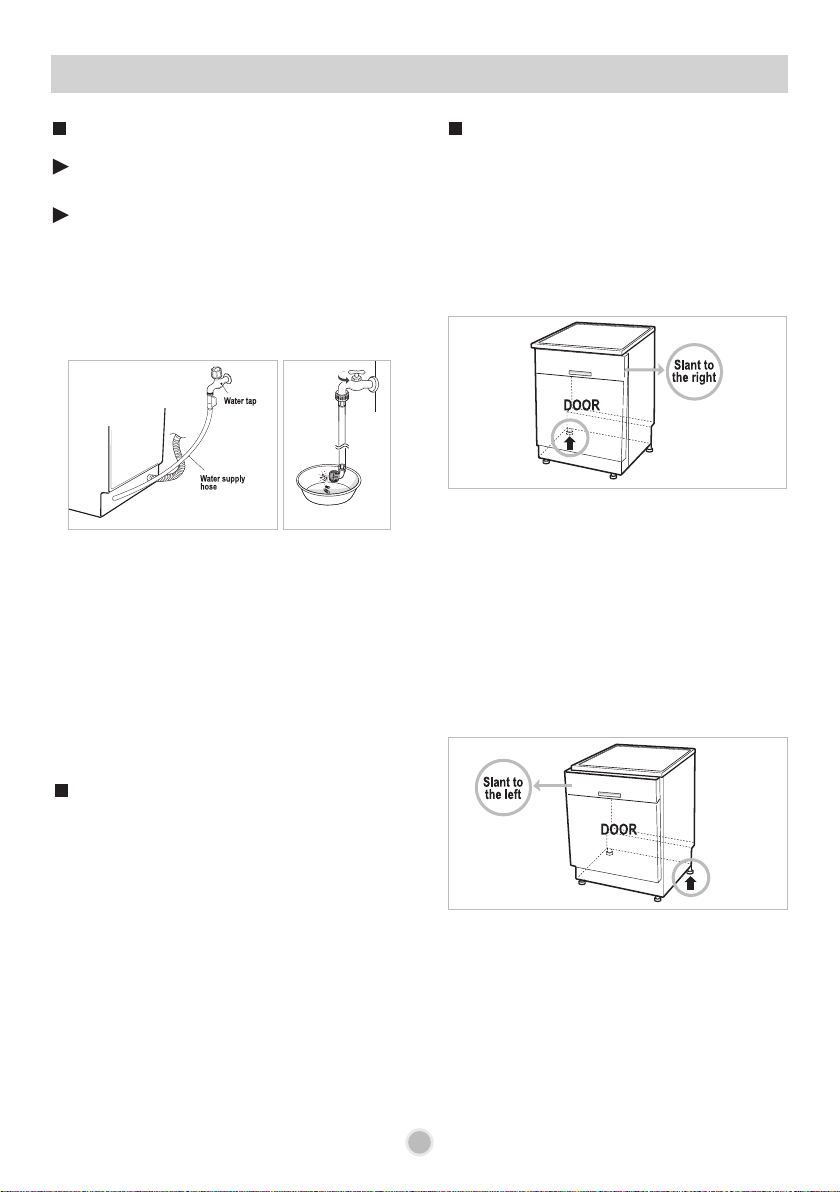
• If the door slants to the right, see fig. C follow
these instructions:
1) Unscrew(counter-clockwise) the left leg of
the back side and correct the level.
2) Check the opening of door and repeat if
necessary until the door opens and closes
properly.
• When the product is correctly leveled, there
should be no slant, stickiness or rubbing sound.
Fig. C
Case 1. In case the door is slanted to the right
• If the door slants to the left, see fig. D follow
these instructions:
1) Check the opening of the door to hear if
there is a sticking or rubbing sound.
2) Check the opening of door and repeat if
necessary until the door opens and closes
properly.
• When the product is correctly leveled, there
should be no slant, stickiness or rubbing sound.
Fig. D
Case 2. In case the door is slanted to the left
Water tap
Fig. A
Fig. B
Some models consist of an inlet valve combined
with a hose. (Fig. A)
Connect the water supply hose to the water tap.
(Fig. B)
After connecting the inlet hose to the tap, turn on
the tap to flush out foreign substances (dirt, sand
or sawdust) in the water lines. Let water drain into
a bucket, and check the water temperature.
Connect the supply hose to the water inlet valve.
INSTALLATION INSTRUCTIONS
Installation of water inlet hose How to level the dishwasher
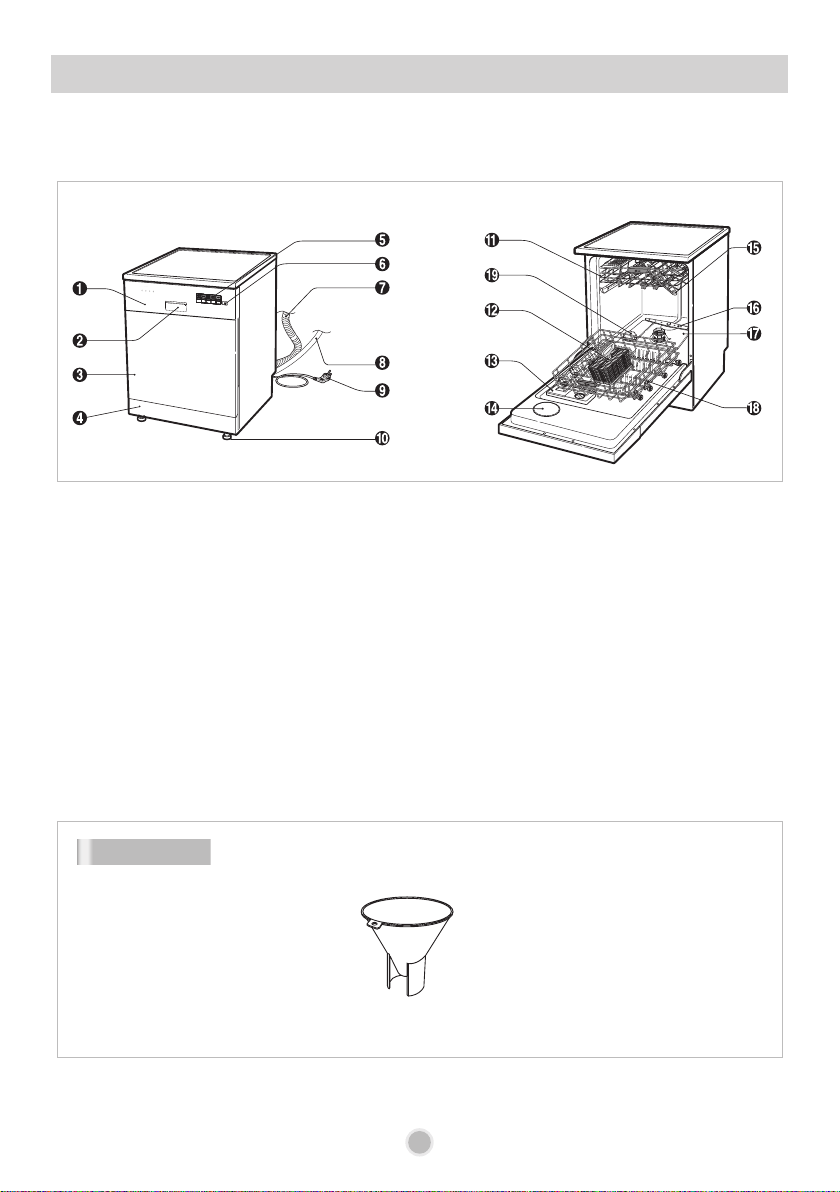
PARTS IDENTIFICATION
11
1. Control panel
2. Door handle
3. Front cover
4. Lower cover
5. Display window
6. Power button
7. Drain hose
8. Inlet hose
9. Power cord
10. Adjustable leg
11. Upper rack
12. Cutlery basket
13. Detergent and rinse aid dispenser
14. Vapor vent cover
15. Upper spray arm
16. Lower spray arm
17. Filter ASM
18. Lower rack
19. Salt container cap
※ The appearance and specifications may vary without notice.
Funnel
Accessory
12
12
FUNCTION OF CONTROL BUTTONS
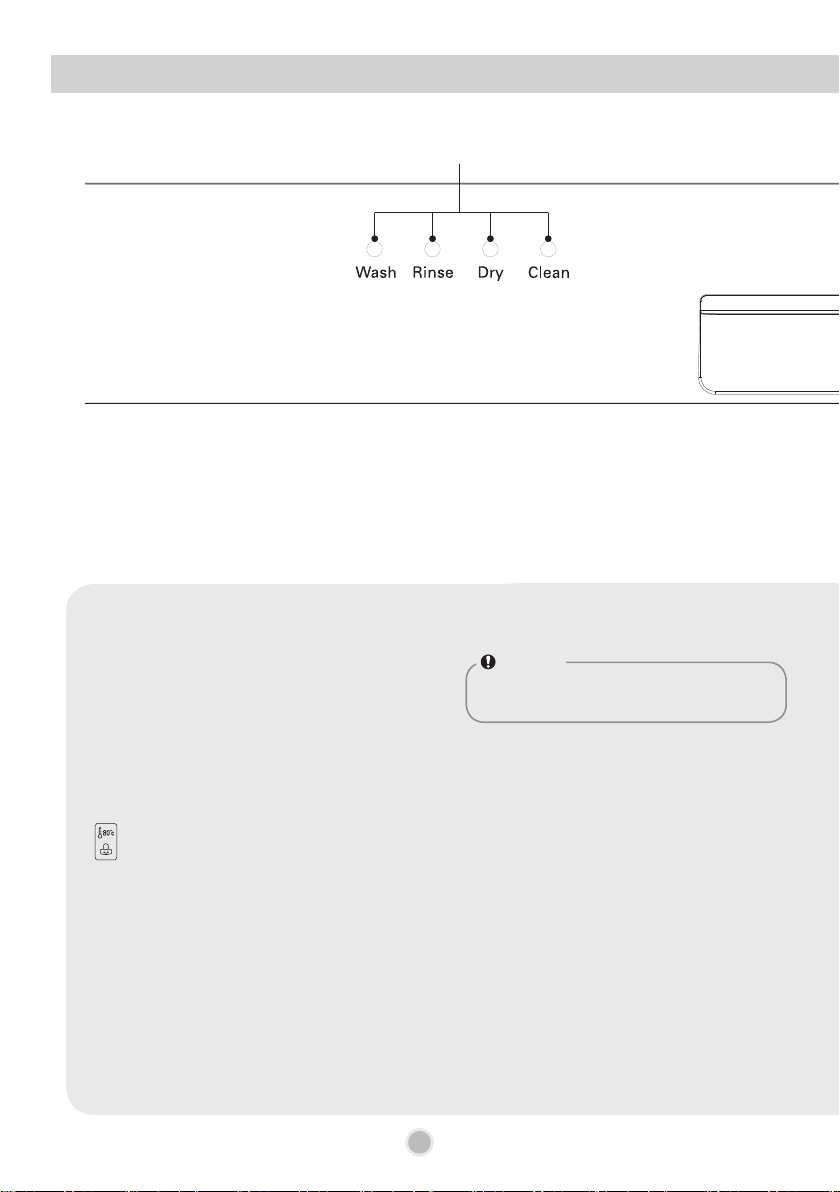
①
NOTE
The Dishwasher can be used without salt if not required,
however, the hardness level will need to be set to H0 so
that the indicator does not remain lit. (See page 14.)
①
Process Indicator
• Indicates current program phase.
• The Wash, Rinse and Dry lamps will flash during each phase of washing process.
• The Clean lamp flashes for 4 minutes at the end of the cycle.
②
Salt & Rinse Refill Indicator
• Salt : Refill with special salt when the
Salt lamp
turns on.
• Rinse : Refill with rinse aid when the Rinse turns on.
③
Half Load
• In case of a small load, use upper or lower rack to save energy.
• With each press, you can select the Upper or Lower rack only.
• In case you don’t select this button, the machine always operates the vario washing, which operates the upper and lower
spray arm alternately.
④
Extra Hot & Child Lock Indicator
• Lamp will turn on when the Extra Hot setting is on.
• Lamp will turn on when the Child Lock setting is on.
⑤
Time Left
• Before starting, the display window shows the running time of the selected program(except for the Auto programme).
• After starting, the display window shows the remaining time.
• If the dishwasher has a problem, the error type will be displayed. (OE, IE, AE(EI), FE, HE, tE, LE, nE)
• If these error letters are displayed, please refer to the trouble shooting on page 29 and follow the guide.
⑥
Delay Start
• If you want to delay the start of the selected program, press this button.
• Press this button to increase the starting time by 1 hour increasements.
• The delay start time can be adjusted from 1 hour to 19 hours.
⑦
Program
• Press the cycle that corresponds to your desired wash cycle.
⑧
Extra Hot
• If you select the Extra Hot function, the operating temperature will be up to 80ºC.
(Dual Intensity, Auto, Eco, Eco and Soft Spray)
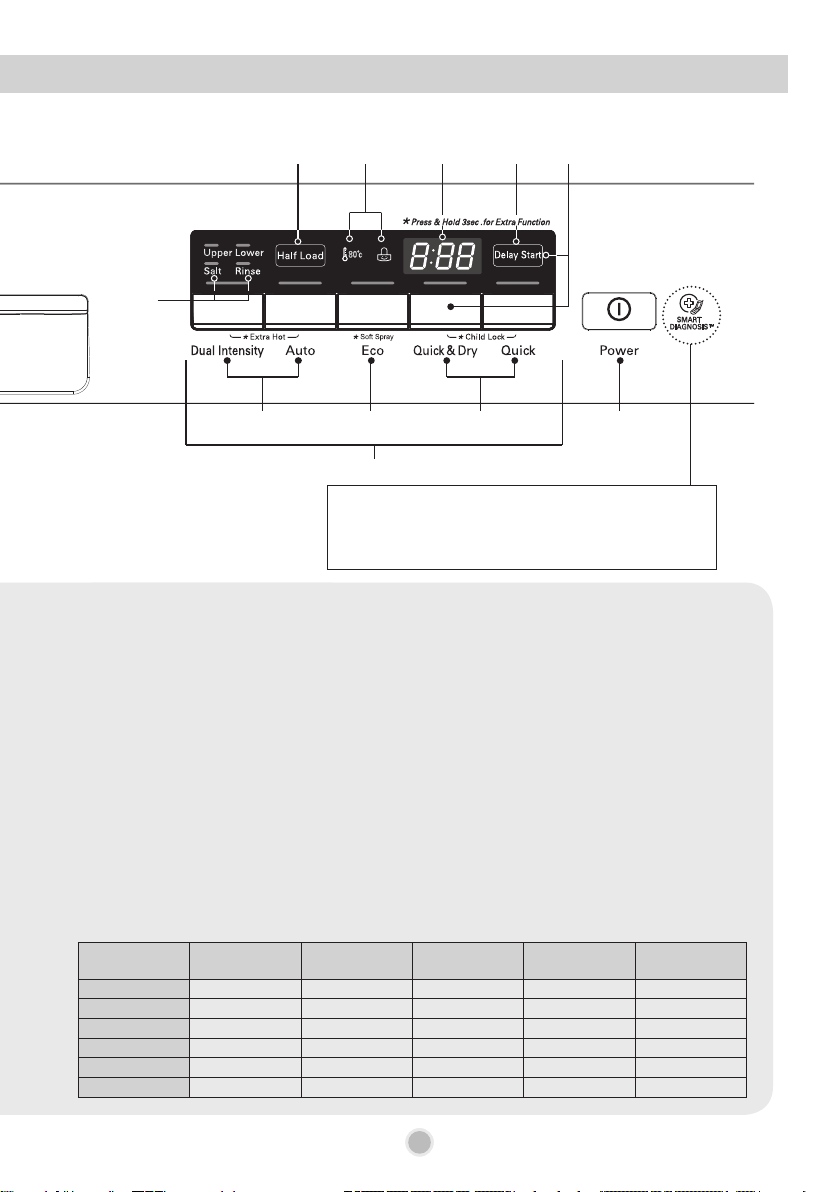
13
Programme Default Spray
Rinse
(Extra Hot)
(Rinse
+
)
Half load
(Upper)
(Lower)
Spray Child Lock Delay Start
Quick Strong
◦ ◦
Quick & Dry Strong
◦ ◦ ◦
Eco Strong
◦ ◦ ◦ ◦ ◦
Auto Medium
◦ ◦ ◦ ◦
Steam Care Medium
◦ ◦ ◦ ◦ ◦
Steam
Dual Spray
Medium
◦ ◦ ◦ ◦ ◦
Steam Power Strong
◦ ◦ ◦
13
SMARTDIAGNOSIS
™
function is available only for
the products with a
SMARTDIAGNOSIS
™
mark.
(Refer to Page 40.)
⑦
②
③ ④ ⑥
⑪
⑤ ⑨
⑧ ⑫⑩
• To engage the Extra Hot rinse in the allowable cycles, hold down the Dual Intensity & Auto buttons simultaneously.
⑨
Beep On/Off
• The dishwasher must be switched on.
• The beep on/off function can be engaged or disengaged by pressing the Delay Start and Quick & Dry buttons
simultaneously for a few seconds.
⑩
Eco and Soft Spray
• If you want to use Eco and Soft Spray course, press & hold Eco button for 3 seconds.
⑪
Child Lock
• Used to lock or unlock the control buttons to prevent all the setting from being changed by a child after starting the wash
cycle.
• To activate or release the Child Lock function, press the Quick & Dry and Quick buttons simultaneously for a few
seconds while the dishwasher is in operation.
• All controls will be disabled except the Child Lock and Power buttons.
• Turning off the dishwasher will not reset the Child Lock function. You must release the Child Lock before you can
operate the dishwasher. The Child Lock function cannot be engaged whilst the unit is in the off (stand by) mode.
⑫
Power
• For operating, press this button first for power on.
• After the programme has completed, this button automatically switches off for safety and energy saving.
• The unit will automatically turn off if the programme is interrupted and not resumed, or started within 4 minutes.
• In case of mild power surges to the machine, the power may be automatically turned off for safety.
•
To turn the power off during a programme, press the
Power
button twice.
Programme Default Spray Extra Hot
Half load
(Upper) (Lower)
Child Lock Delay Start
Quick Strong
◦ ◦ ◦
Eco Strong
◦ ◦ ◦ ◦
Eco Plus -
◦ ◦ ◦ ◦
Auto -
◦ ◦ ◦ ◦
Quick & Dry Strong
◦ ◦
Dual Intensity Medium
◦ ◦ ◦ ◦
■
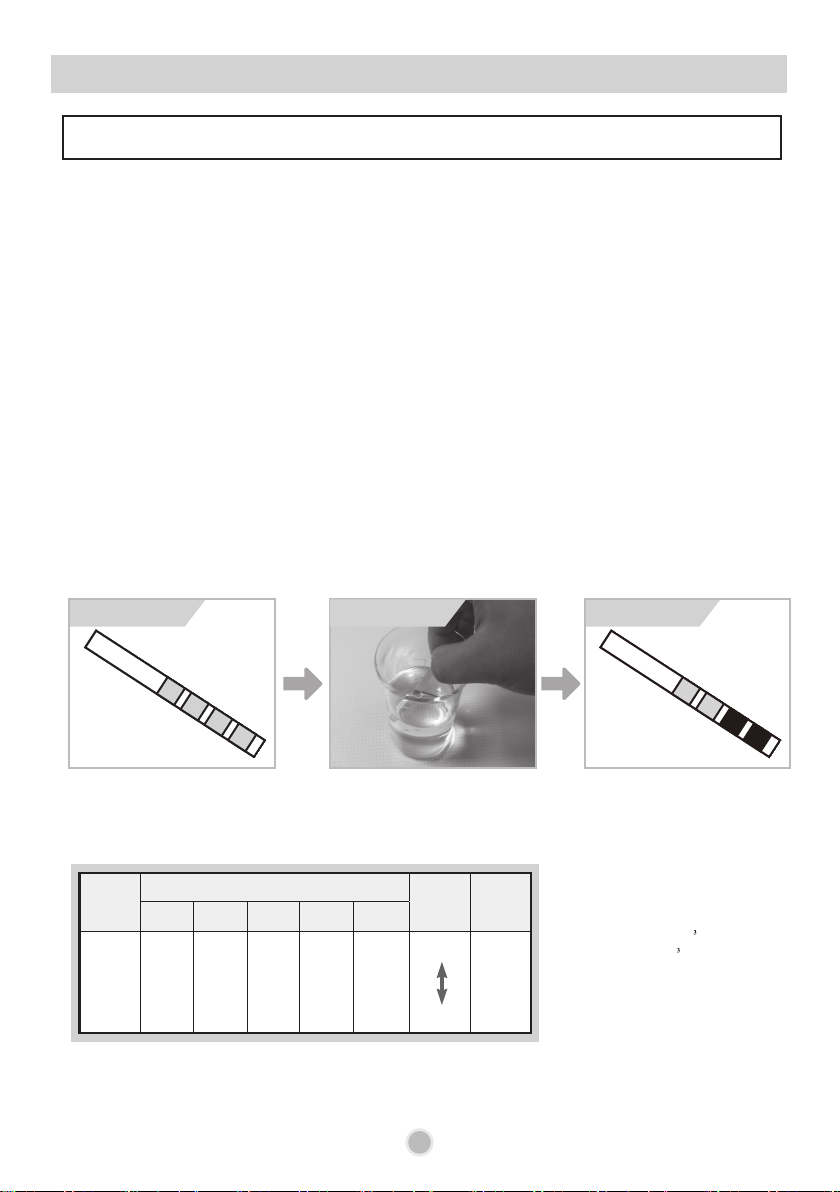
Method 1
- Check the water hardness in your area.
(Your water supply management agency can help you with this.)
■
Method 2
- You can check water harness by using test kit included in the product.
① Immerse the test strip for 30 seconds (Not in running water!)
② Shake off liquid from the test kit, and then wait for 1 minute for checking the change of color.
③ Check the setting value applicable to the number of changed colors.
14
Step 1. Checking your water hardness level
< Water hardness level >
Hardness setting
BEFORE USING FOR THE FIRST TIME
In order to provide satisfactory rinsing results, the dishwasher requires soft water, i.e., containing
little or no lime, otherwise water stains will be left behind on the dishes and interior containers.
If the tap water exceeds a certain level of hardness, it must be softened, i.e., decalcified.
This is achieved by adding a special salt to the water softener inside the dishwasher.
The required amount of salt is set up according to how hard your tap water is.
This model has a water softener to soften hard water.
Please read these notes carefully for correct operation.
Before test Under test After test
* 2 areas changed
1 °e = 14.25 mg/l CaCO
1
°
f = 10 mg/l CaCO
1
°
d = 10 mg/l CaO (=1,78
°
f) (=1,25 °e)
Number of
the areas
(red-violet)
Hardness range
Water
quality
Softening
system
level
ºd ºe ºf
mmol/l
(Ca+Mg)
mg/l
Ca
0
<4 <5 <7 <0.7 <29
soft
very hard
H0
1
4 -7 5 - 9 7 - 13 0.7 - 1.3 29 - 50 H1, H2
2
7 - 14 9 - 17.5 13 - 25 1.3 - 2.5 50 - 100 H3, H4
3
14 - 21 17.5 - 26 25 - 38 2.5 - 3.8 100 - 150 H5, H6
4
>21 >26 >38 >3.8 >150 H7
Step 2. Setting up the softening system level (hardness level)
of your dishwasher
15
BEFORE USING FOR THE FIRST TIME
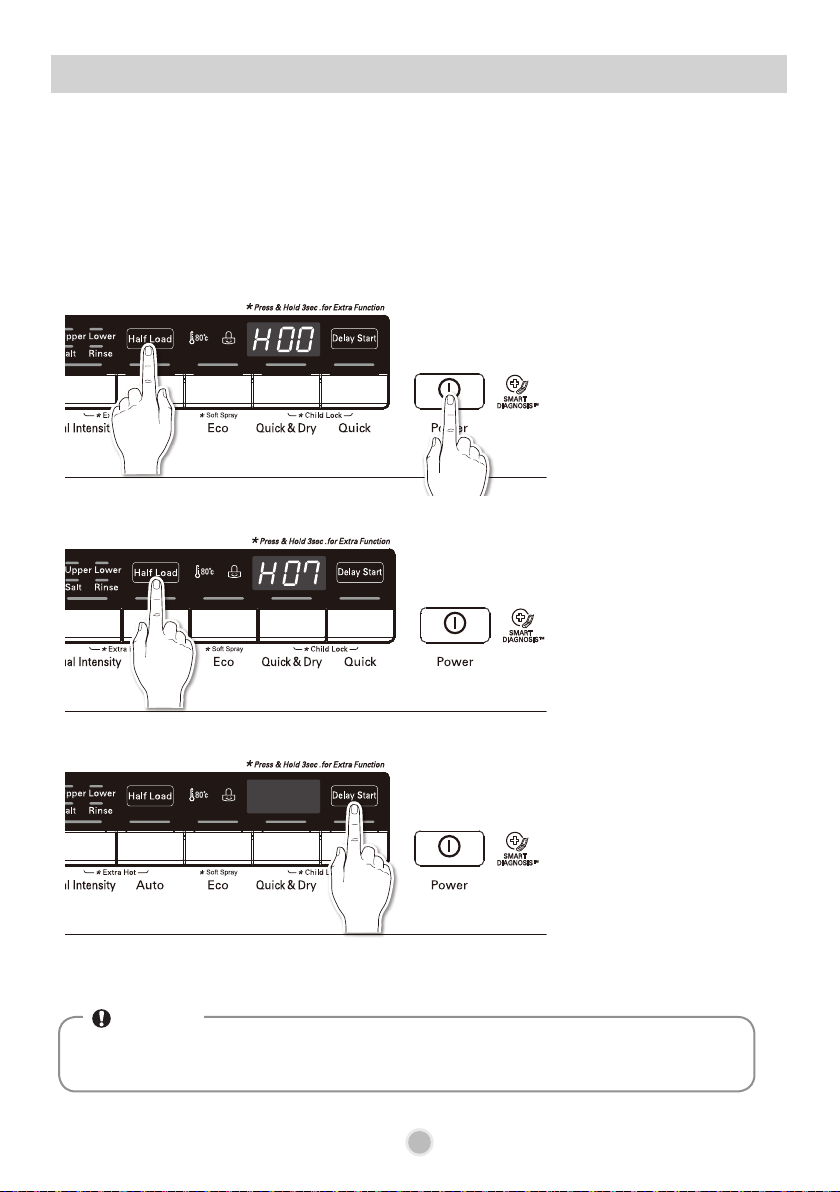
For effective washing performance, adjust the setting corresponding to the hardness level of water
used in water supply. The water softener has 8 adjustment levels, and the dishwasher is programmed
at the factory for a water hardness level of H00. You can check the default setting value and adjust it
in the following manner:
1. Press Half Load
and Power button
simultaneously.
(Current setting value
indicated.)
2. Press the Half Load
button, and then set
up your intended
value.
(Scope of setting
value : H00~H07)
3. Press the Delay Start
button for saving the
setting.
(The power turns off
upon the saving.)
* The display may vary, depending on the model.
• The ‘Salt Filling’ light turns on in the display if salt is not in the softening system.
• If the hardness setting is set to H0, no light turns on in case of no salt.
NOTE
16
BEFORE USING FOR THE FIRST TIME
•
Do not pour any detergent in the water softener. It may cause a malfunction.
WARNING
Step 3. Salt Filling
(Hard water requires salt filling)
Salt
Water
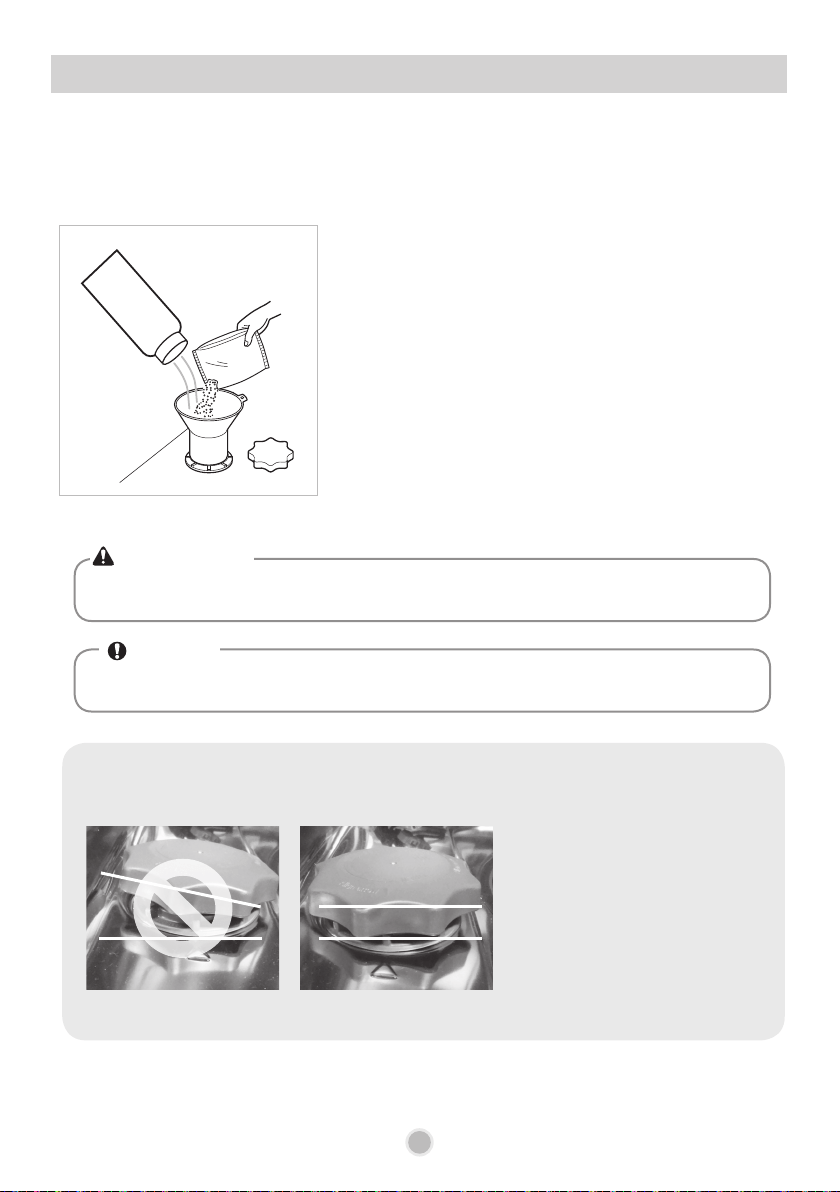
Salt filling must be made before starting the washing program. In case of insufficient salt, the ‘Salt
Filling’ light turns on in the display, unless the Hardness level has been set to H0. (refer to page 15)
1) Remove the lower rack and remove the cap of the water
softener placed in the left side of the bottom of the
washing part by rotating it counterclockwise.
2) Before using your dishwasher for the rst time, it is
necessary to Pour 1.5kg of salt and 1 litre of water
at the same time if intending to use the water softener
system. Refer to page 15 for Hardness level settings.
(Use a funnel when relling salt)
3) Wipe off any spilled salt around the water softener.
4) Fasten the cap tightly.
(Loosely fastened cap may cause rust due to salt spilled
into the container.)
5) Run the Quick course without dishes.
• Water softening salt can be purchased from salt distributors.
NOTE
! Check point
- Note for Fastening the Cap of the water softener.
• Seal the cap properly (by
aligning it horizontally and
turning it clockwise.)
<Wrong assembly> <Normal assembly>
17
BEFORE USING FOR THE FIRST TIME
•
If the rinse aid compartment flap is not closed properly, a large amount of rinse aid will release
into the tub and cause washability problems.
CAUTION
• If, after washing, you notice cloudy spots, streaks or water marks on your glassware, you
need to increase the setting level. If the glass is smeared or foam is present on the bottom,
select a lower setting.
NOTE
Step 4. Adding rinse aid
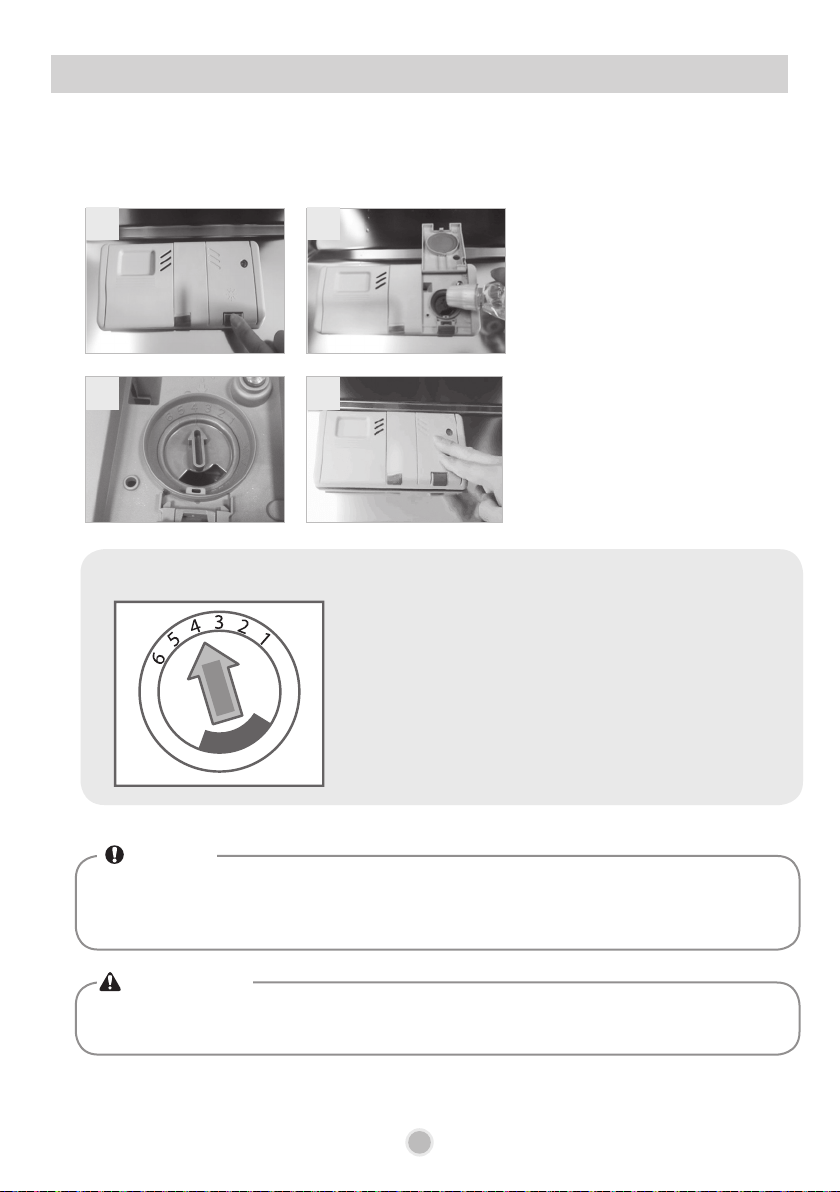
Rinse aid must not be added if dish washing tablets are used which contain a built in Rinse
aid. Too much or too little rinse aid can inhibit the drying performance.
1) Press the lever on the top of the
rinse aid compartment so that
the ap opens.
2) Pour the rinse up to the
maximum level indicator at the
bottom.
3) Adjust the quantity of rinse by
rotating the adjuster.
4) Close the cap after adjustment.
※
Rinse level setting
• You can adjust the quantity of rinse from level 1 to
level 6.
• The higher the level, the more rinse aid dispensed.
• If drying performance is not good, adjust the indicator
to a higher level.
1
3
2
4
18
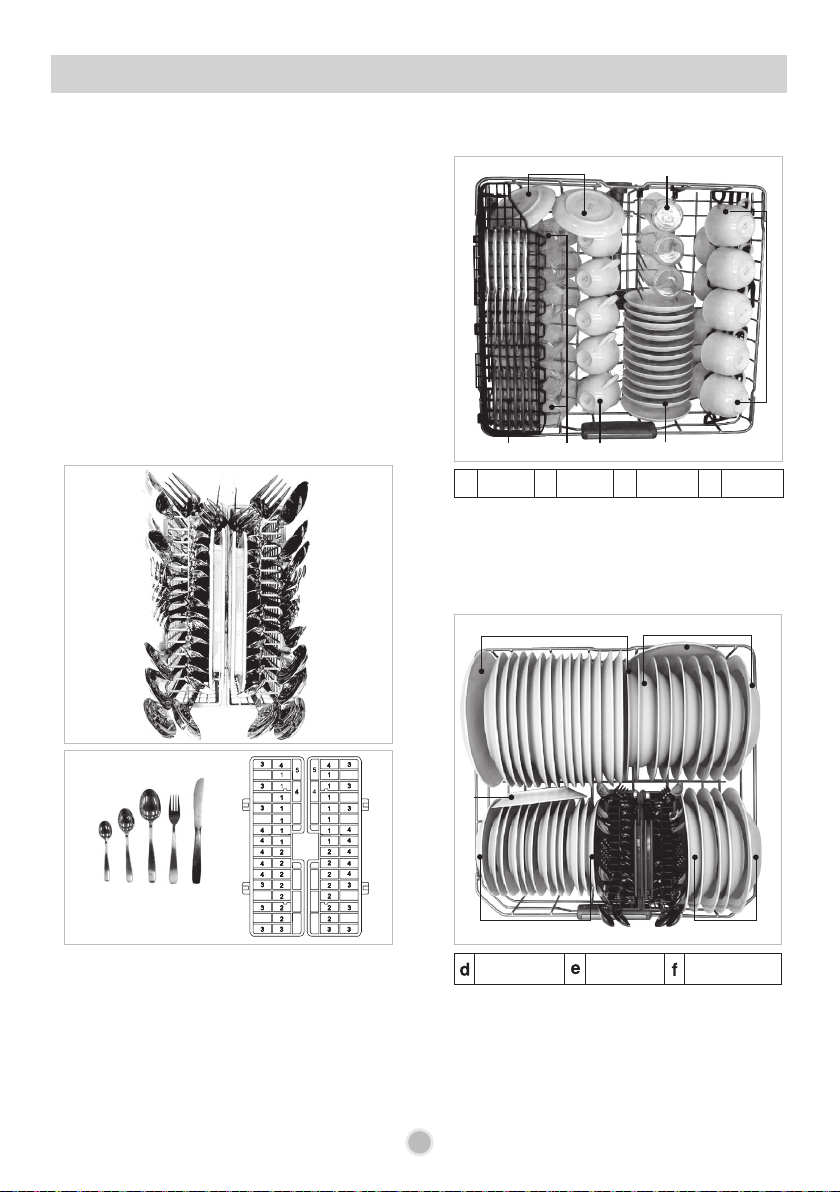
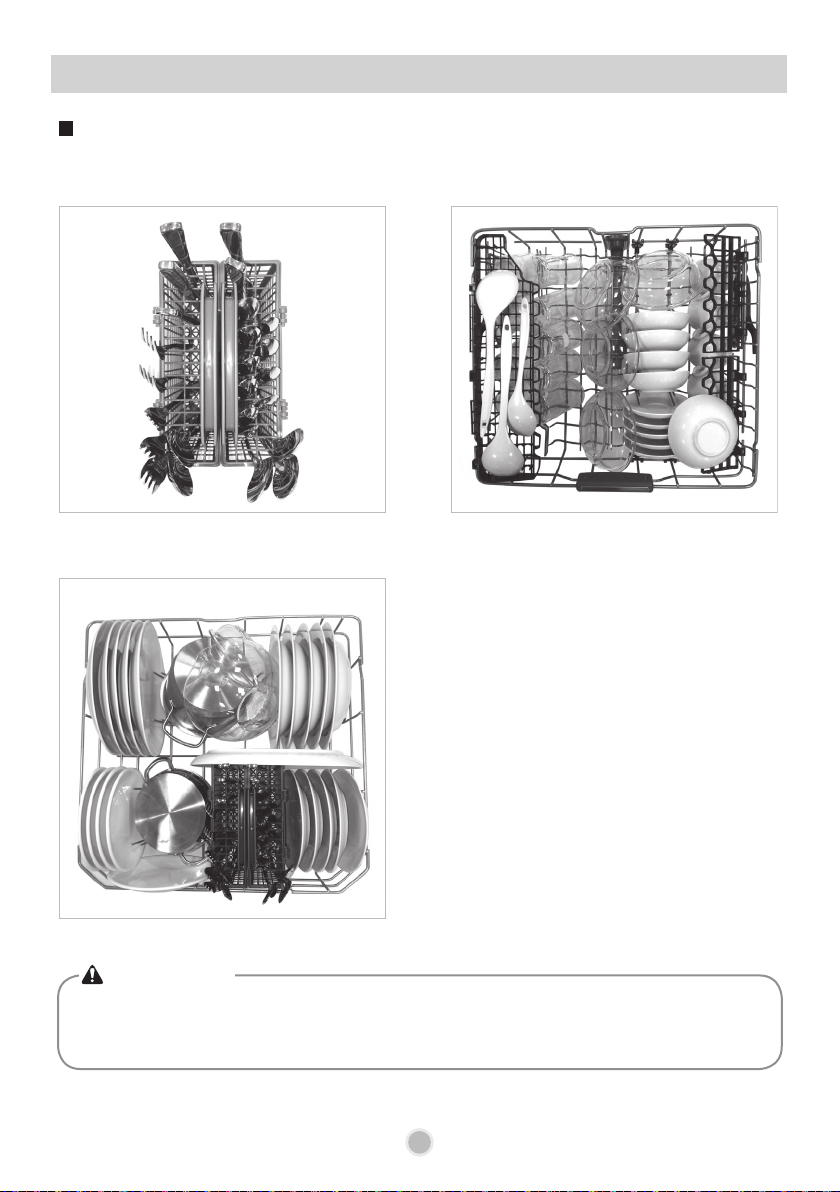
■ Appliance loaded in accordance with
standard specifications.
• Capacity : 14 place settings
• Comparability course : Eco and Soft Spray
• Rinse Aid setting : 4
• Reference cleaner : 25g of detergent onto
the inside surface of the door.
• Door is opened at the end of the drying
cycle for the drying performance test.
(Door position : Open 50 mm)
• Height-adjustable Rack-U must be inserted
into the uppermost position.
2. Upper Rack
1. Cutlery Basket
c
bg
a
b
c
a
3. Lower Rack
Dinner Plates Soup Plates Dessert Plates
e
f
f
d
e
f
INFORMATION FOR ENERGY TEST
1 2 3 4 5
a
Glasses
b
Cups
c
Saucers
g
Knives
19
•
Do not place pots or pans with plastic handles in the washer as the handles may deteriorate due
to the heat and detergent.
•
Water proof or long lasting lipstick smudges on glasses may not be removed during the wash.
CAUTION
Daily use load
HOW TO USE AND OPERATE
1. Cutlery Basket
2. Upper Rack
3. Lower Rack
NOTE
Non dishwasher safe items
The combination of high water
temperatures and dishwasher detergent
may damage particular items, therefore
we do not recommend using the
dishwasher to wash the following:
• Copper or anodised aluminium
•
Hand painted silver or gold leaf crockery
• Wood or bone handled utensils
• Iron or non rust proof utensils
• Plastic items which are not dishwasher
safe
• Expensive ware such as silver and
dishes with golden rings
• Fragile item such as crystal glasses
20
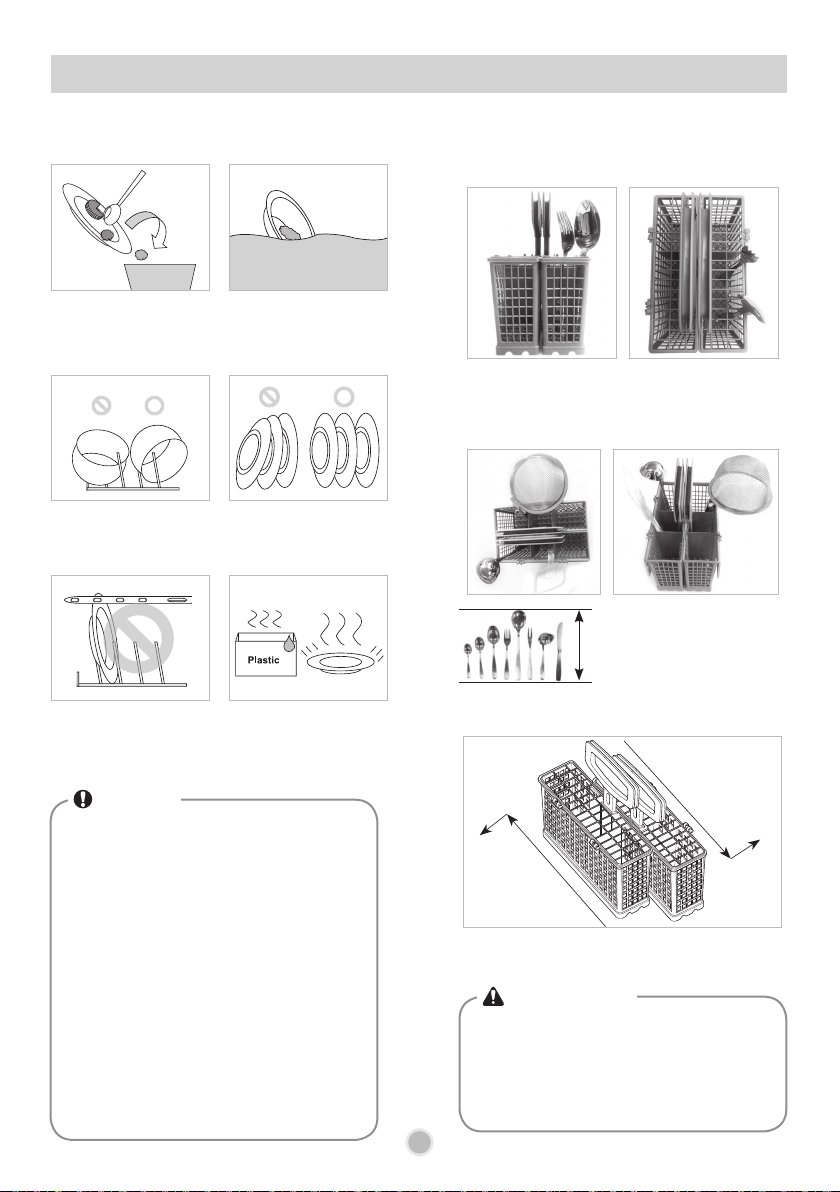
For effective washing performance, always
follow the following instructions.
Remove large particles
of food debris from
plates including bones
etc. before loading.
Items with burnt on
food should be soaked
prior to loading in the
dishwasher.
Deep based items
should be placed upside
down.
Make sure that all
items do not touch
each other.
Take care not to
obstruct the rotation of
spray arms.
Plastic items will not
dry well, compared to
other items.
HOW TO USE AND OPERATE
•
To prevent injuries, place knives and other
utensils with sharp points on the cutlery
rack.
•
If you want to load them in the cutlery
basket, place them with the pointed edges
facing downwards.
WARNING
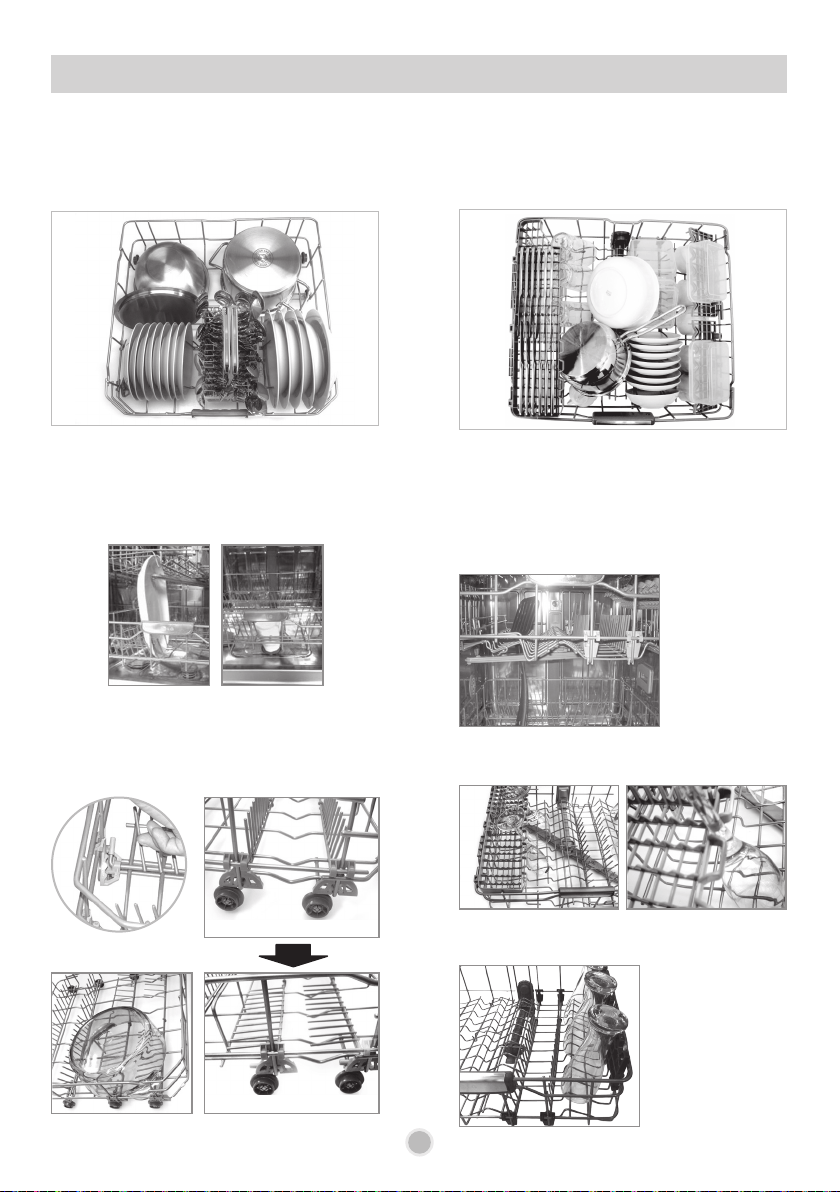
1. Cutlery Basket
Place forks and spoons in the cutlery basket
with their handles downwards.
For Large utensils, such as whisks, the cover
can be opened by being unhinged.
Take care not to obstruct the rotation of the
spray arm.
Slide two baskets in opposite directions, then
pull them apart.
①
①
②
②
The basket can be split along its length,
increasing the lower rack’s loading versatility.
The cutlery shouldn’t
be longer than 18cm.
(In this case, use the
cutlery rack.)
Max.
18cm
21
HOW TO USE AND OPERATE
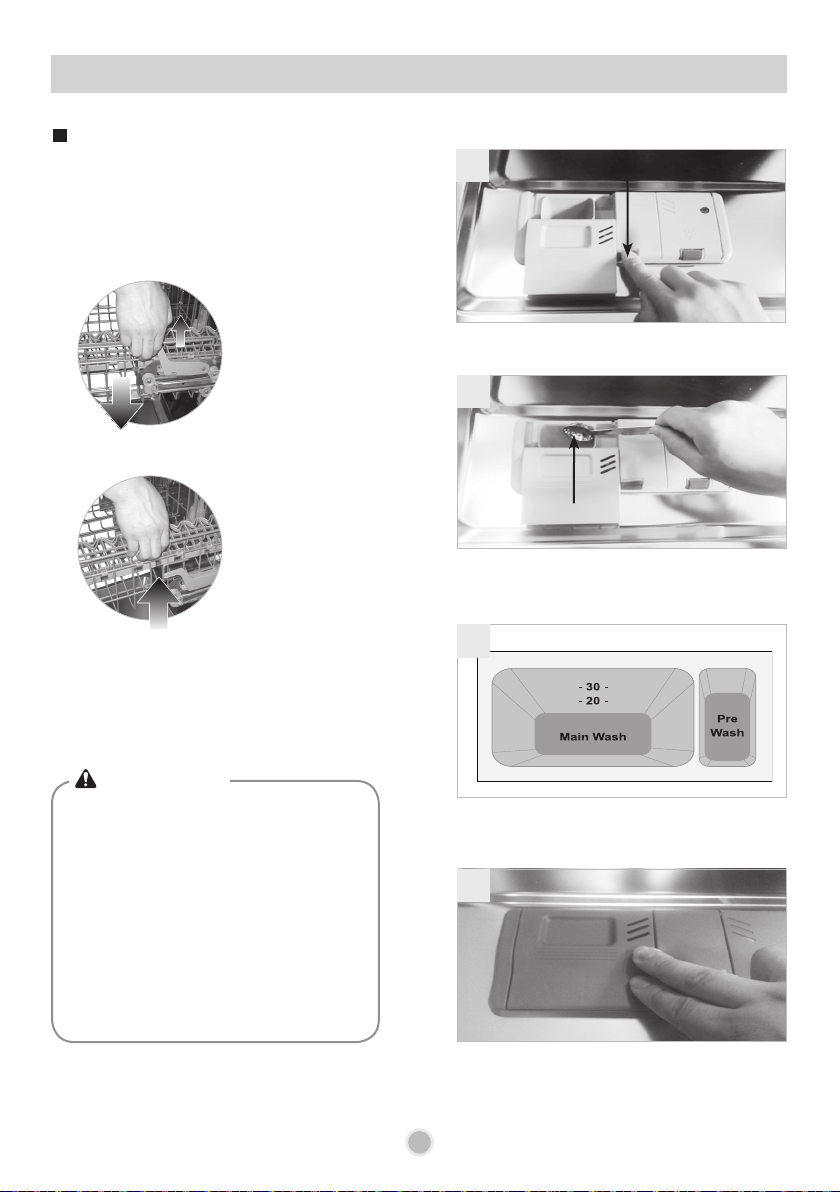
2. Lower Rack
The lower rack is suitable for dinner plates,
soup bowls, dishes, pots, pans, lids and even
a grill tray.
Plates should be positioned upright and facing
the centre of the rack and pots, pans and large
dishes must be turned upside down.
■
How to fold down
Take care not to obstruct the rotation of the
spray arms.
To make it easier to load larger dishes, the front
row of tines can be folded down.
Ex) Loading large pot
Fold up state
Fold down state
3. Upper Rack
Plates should be positioned upwards with the
plate bottom facing the front of the rack.
Cups, glasses and bowls must be positioned
upside down.
The upper rack is suitable for delicate items
such as, small plates, long cutlery, cups,
glasses and dishwasher safe plastic items.
The knife rack provides support for long steam
glasses.
Take care not to obstruct the rotation of the
spray arm under the upper rack.
The cup racks can be folded up out of the way
for tall crockery items.
22
HOW TO USE AND OPERATE
4. Adding Detergent
•
Before adjusting, ensure the rack is empty
of all crockery. Otherwise crockery may
get damaged or you may get injured.
With the lower position of the upper rack,
check if the bottom part of upper rack
including spray arm is not disturbing items
on the lower rack.
•
When the upper rack is in the lower
position, push in the upper rack first, and
the lower rack later.
(Pull out the lower rack first, and the upper
rack later.)
The height of the upper rack can be adjusted
when you load glasses with long stems or tall
crockery items.
• Move the upper rack to the lower position
Pull up the levers
on either side of
the rack.
• Move to upper position
Lift the rack
upward.
Adjusting the height of the upper
rack
There is a 45mm gain in height when the upper
rack is moved to the lower position.
After adjusting the rack levels, check that the
spray arms are free to rotate.
Push button to open
Push the button beside the detergent injection
hole to open the cover.
1
The detergent holder is divided into ‘Main Wash’
and ‘Pre Wash’, and up to 50g of detergent can
be loaded in the main wash section.
3
Place proper detergent into this compartment
Place the proper quantity of detergent into the
detergent holder. Detergent Tablets should be
place on the bottom of the tub next to the lter.
2
Close the cover of the detergent container. If
large tablets are placed in the detergent holder,
it may not close, or allow the lid to release during
the wash.
4
WARNING
23
HOW TO USE AND OPERATE
PROGRAMME
AMOUNT OF DETERGENT
Pre-wash
(Onto the door)
Main-wash
(Dispenser)
Dual Intensity
5g 30g
Auto
7g 25g
Eco
- 25g
Quick&Dry
5g 20g
Quick
- 10g
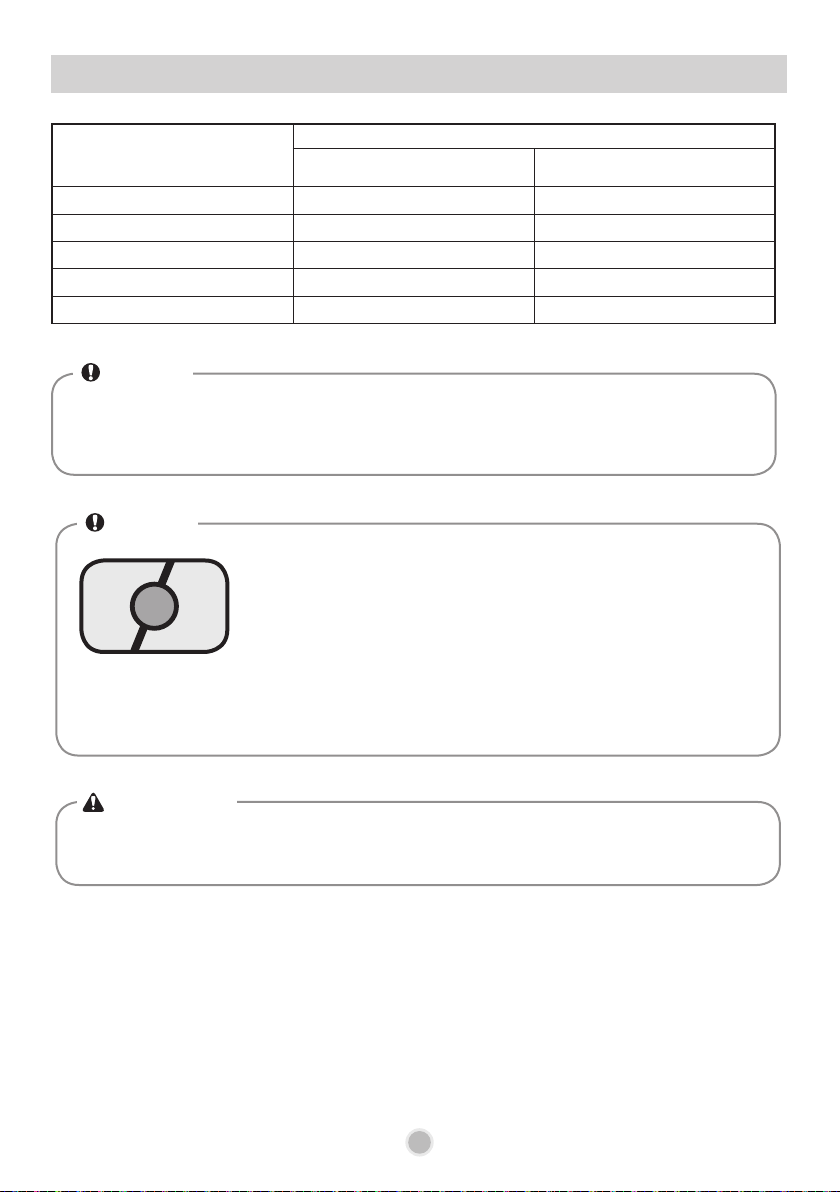
WARNING
• Dishwasher detergent and rinse aid contain chemical components, like all other household
detergent. So, they must be kept out of the reach of children.
NOTE
Cautions for using tablet (2in1, 3in1) detergent
When using some dishwasher detergent tablets, they may become
stuck in the dispenser due to their excessive size.
If this occurs, the dispenser may remain closed causing poor wash
results. Tablets can be placed onto the base of the wash tub next to the
lter before starting the cycle.
Do not use liquid rinse aid if the detergent tablet contains a rinse aid
agent. Otherwise, excessive foaming will occur and cause poor drying
and streaking on dinnerware. If dry performance is not good or water
stain remains, you need add an extra rinse.
• Use only the detergent intended for dishwashers
(Manual dishwashing detergent instead of ordinary detergent.)
• After completion of the wash program, check whether the detergent was completely
washed out.
NOTE
24
HOW TO USE AND OPERATE
5. Refilling
Rinse-aid indicator
Rinse aid level
adjustment
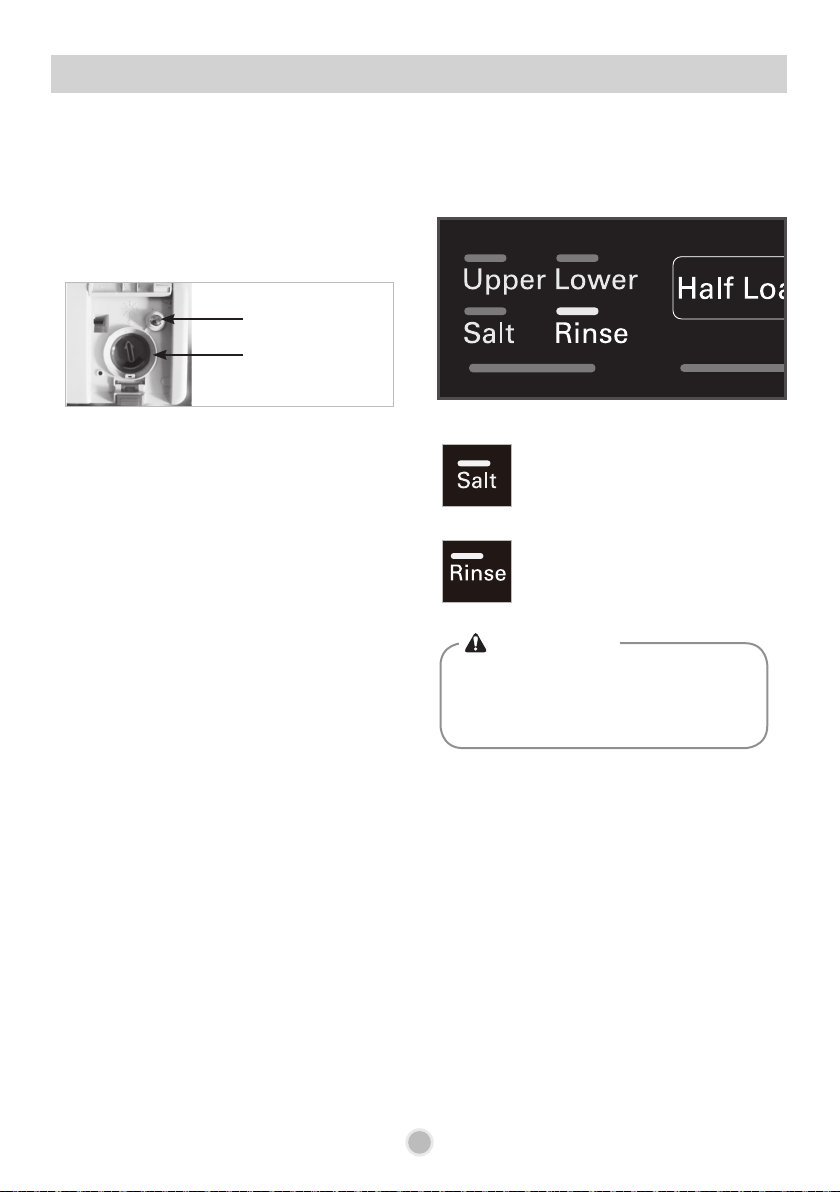
For maintaining the effective wash performance of the dishwasher, checking and relling of rinse aid
and salt should be made on a regular basis.
• Do not add detergent or any other solution
into the water softener housing other than
salt. Doing so will cause the water
softening system to malfunction.
WARNING
■
Checking the remaining rinse aid
■
Checking salt
1) Check the rinse aid indicator
< Black: Sufcient rinse aid / Clear: No rinse aid >
After refilling the salt, a wash program
should be operated without dishes, as any spilled
salt inside the dishwasher may cause rust or
damage to the dishwasher if left unwashed.
2) Check the rinse aid relling lamp on the
display.
When the lamp is lit, it means the Salt
Aid is almost empty. If necessary,
refill the Salt Aid chamber as soon as
possible.
When the lamp is lit, it means the
rinse aid is almost empty. Refill the
Rinse Aid chamber as soon as
possible.
6. Select the Programme
2525
HOW TO USE AND OPERATE
▶Running time may vary according to the water temperature, water pressure and voltage.
▶Running time doesn’t include Cool Dry - 60min.
■
Auto Restart
If the dishwasher is turned off by a power failure, it will restart from the position it stopped at, and
resume accordingly when you press the Power button again.
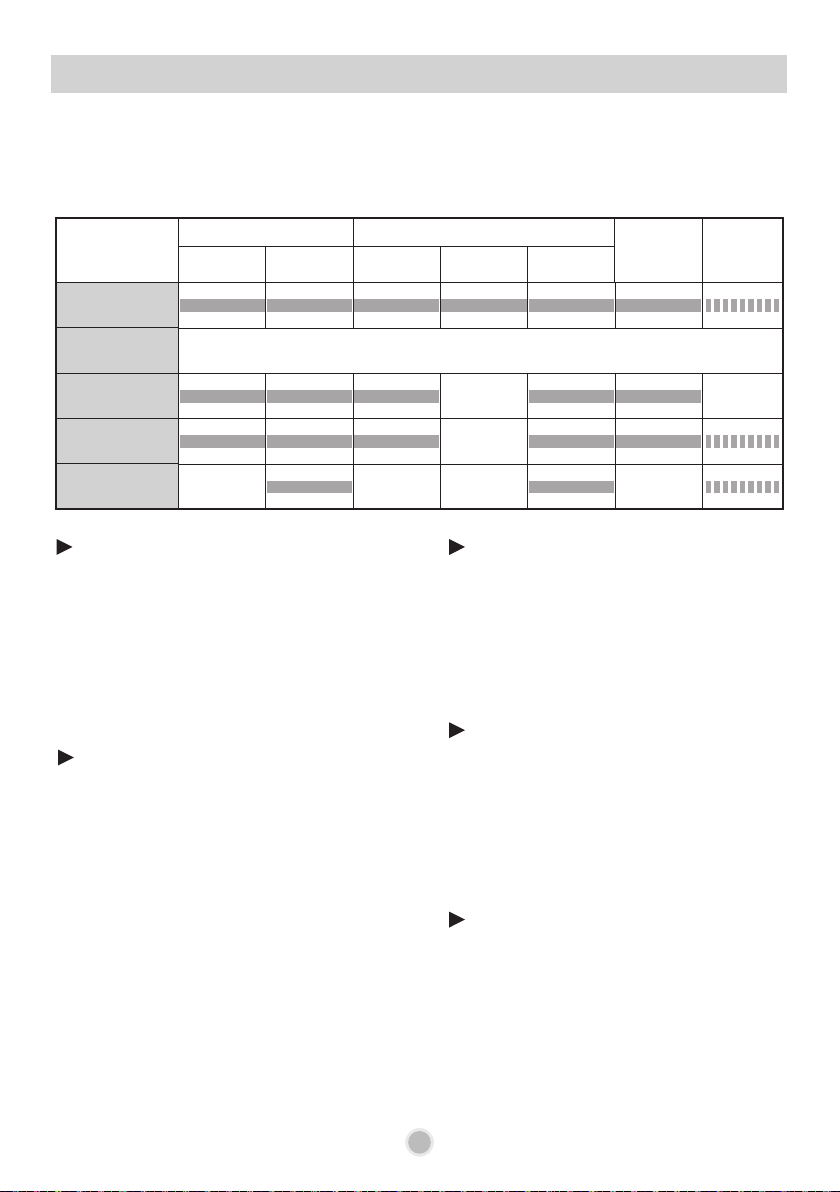
Programme
WASH RINSE
DRY
COOL
DRY
Pre Wash
Main Wash
Rinse 1 Rinse 2
Heating
Rinse
Dual Intensity
45℃ 60℃ 70℃
Auto
The programme sequence is optimised and adapted in accordance
with how dirty the
dishes are
.
Eco
40℃ 41℃
Quick&Dry
65℃ 70℃
Quick
60℃ 65℃
Dual Intensity
This cycle washes the upper and lower racks at
different spray intensities. The lower rack is
washed with a strong spray for hard to clean
items, while the upper rack is washed with a soft
spray for more delicate items.
This provides optimum cleaning performance
for mixed loads, including fine china and
stemware.
This program offers the most efficient energy
and water consumption for a good washing
performance on a moderately soiled load, but
compromises the drying result as it uses very
little energy.
Eco and Soft Spray program is the one to be
used for a normally soiled load.
Eco
Is best used for lightly soiled recently used
dishes and cutlery.
Quick
This programme offers good washing
performance within 60 minutes.
To assist drying, we recommend to open the
door partially when you see small amounts of
wet streaks or drops after the cycle.
Opening the door right after the cycle may set
off the inbuilt High temperature alarm.
Quick & Dry
Auto
During the Auto programme, the degree of
soiling in the dishes is determined by the amount
of clouding in the water.
According to the degree of soiling, the
programme automatically adjusts the washing
time and temperature.
As a result, the energy and water consumption is
kept as low as possible.
The "F" on display means that the sensor is
sensing the status of the dishwasher.

2626
HOW TO USE AND OPERATE
7 . Drying
• For better drying performance, Cd (Cool Dry – 2 hours) program will be added after
completion of all programs. (You are free to take dishes out in the Cd condition)
• Selection of ‘High Temperature + Rinse’ can help improve the drying performance.
• Plastic items will have a poorer drying performance than other items.
• To assist drying, we recommend that the door be partially opened after the program.
• Make sure that all items do not touch each other
• Too much or too little rinse aid can inhibit the drying performance. Refer to page 17.
2727
OPERATING SEQUENCE SUMMARY
1. Press the Power button.
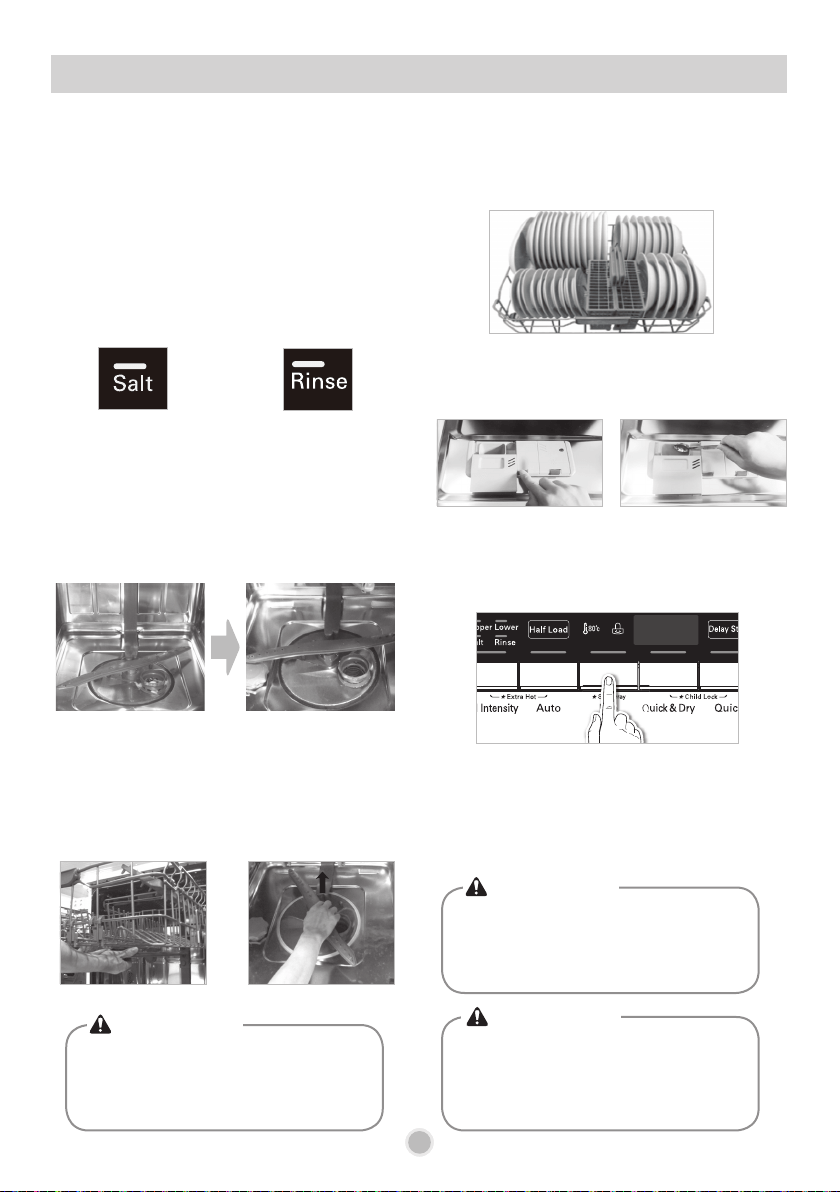
5. Load the dishes in the basket.
6. Add the proper amount of
detergent.
7. Set and start the program
(the
cycle will start automatically 4 seconds
after any setting is selected)
8. Program ends.
2. Check there is rinse aid and
salt.
3. Open the door and check
the filters
4. Ensure the spray arms can
unobstructedly rotate.
The unit will turn on. Observe the indicators. Make sure that all dishes do not touch each other.
Take care that the dishes do not obstruct the
rotation of spray arms.
Check the rinse aid and salt refilling indicators. If
the corresponding indicator lights illuminate, refill
the rinse aid and salt. For more information, refer
to page 24.
Always clean the filter either after a wash or
before a wash so that it does not impair the
washing performance.
Ensure that the upper spray arms and the lower
spray arms rotate freely. Remove the spray arm
and clean it if it does not rotate freely.
After the program ends, dry cycle (Cd) will
operate. During this cycle, the dishes can be
removed if you wish. The Cd cycle will be
cancelled when the door is opened.
Salt relling indicator Rinse aid relling indicator
• Do not load any items in upper rack
when the lower rack is pulled out and
loaded. (The dishwasher may tilt to the
front.)
CAUTION
• Empty the lower rack first and then the
upper one. (It will avoid water dripping
from the upper rack onto the dishes
below)
CAUTION
• Do not open the door during operation or
immediately after it has completed the
wash cycle as the steam build up may
cause scalding as the door is opened.
WARNING
2828
USER MAINTENANCE & CLEANING INSTRUCTIONS
To maintain performance and prevent trouble, it is important to check the inside of the
dishwasher, including filters and nozzles, at regular intervals.
Not used for a long time Clean using white vinegar
Cleaning the inside
If you have not used the dishwasher for a long
time, refresh the inside by running Quick & Dry
cycle without detergent.
When the cycle is finished, clean the inside/
outside of the dishwasher according to the User
Maintenance & Cleaning Instructions.
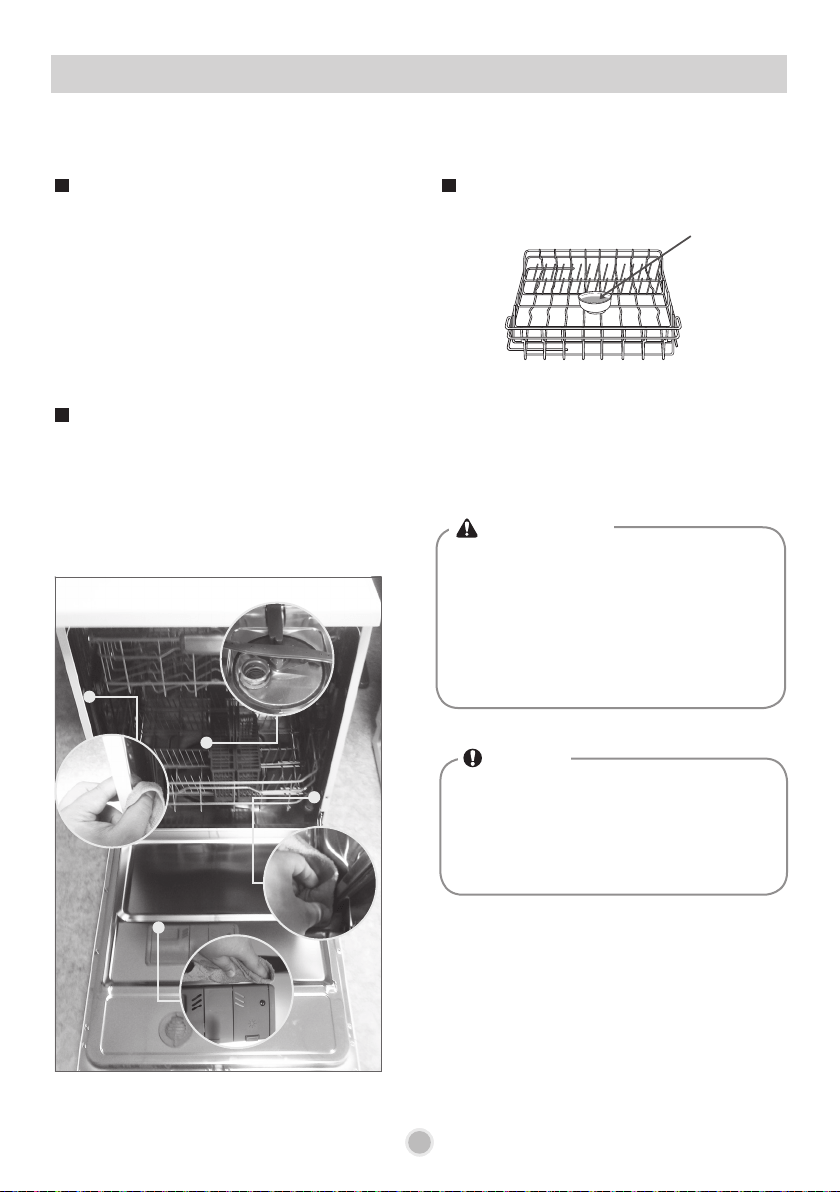
Food residue may be stuck between the narrow
gaps inside the dishwasher after completion of
washing. Any unremoved food residue may cause
odors inside of the dishwasher.
Wipe off all food residue by reference to the
following picture.
If white powder or stains remains inside the
dishwasher, run the Dual Spray or Power cycle
after removing the dishes and then placing the
small bowl containing white vinegar (200ml ~
300ml) onto the upper rack.
White
Vinegar
• When cleaning the inside of the
dishwasher, do not use benzene or
thinner. Otherwise, it may cause fire or
explosion.
• Excessive use of vinegar may cause
damage to the dishwasher. Do not
pour Vinegar directly into the base.
NOTE
•
If food residue remains inside the
dishwasher, Bad odors and bacteria
may generate due to unremoved food
residue. Therefore, maintenance should
be performed on a regular basis.
WARNING
2929
USER MAINTENANCE & CLEANING INSTRUCTIONS
To maintain performance and prevent malfunctions, it is important to check the inside
of the dishwasher, including filters and nozzles, at regular intervals.
Filters
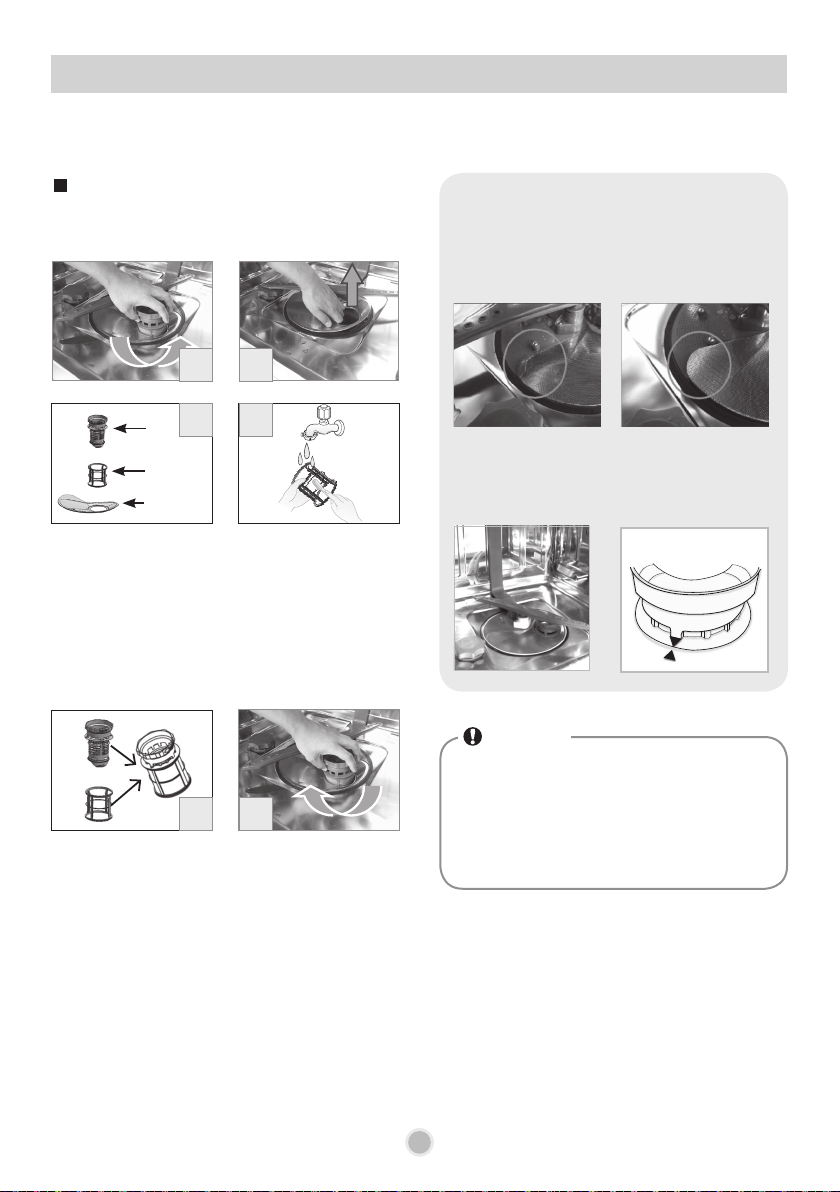
Before cleaning the filters, remove the lower rack
from the dishwasher first.
1. Turn the inner filter counterclockwise.
2. Remove the other filters in an upward
motion.
3. There are three types of filters, inner filter,
mesh filter and STS filter.
4. Clean the filters with a soft brush under
running water.
5. Connect the inner filter and the mesh filter.
6. Insert the STS filter into the dishwasher.
7. Fit the assembled filters back into the filter
holder, then secure them by turning them
clockwise.
• When assembling STS lter, make sure
that the ends are exactly assembled
inwards.
• When assembling the inner lter, rotate it
so that two arrows meet.
! Check point
NOTE
•
After using the dishwasher, particles of
food are filtered by the filters. Any
unremoved food residue may cause bad
smell. In addition, drainage may have a
problem due to food residue stuck in the
filters.
Inner
filter
Mesh filter
STS filter
1
3
5
2
4
7
[Normal assembly] [Wrong assembly]
3030
To maintain performance and prevent malfunction, it is important to check the inside
of the dishwasher, including filters and spray arms, at regular intervals.
Upper Spray Arm
USER MAINTENANCE & CLEANING INSTRUCTIONS
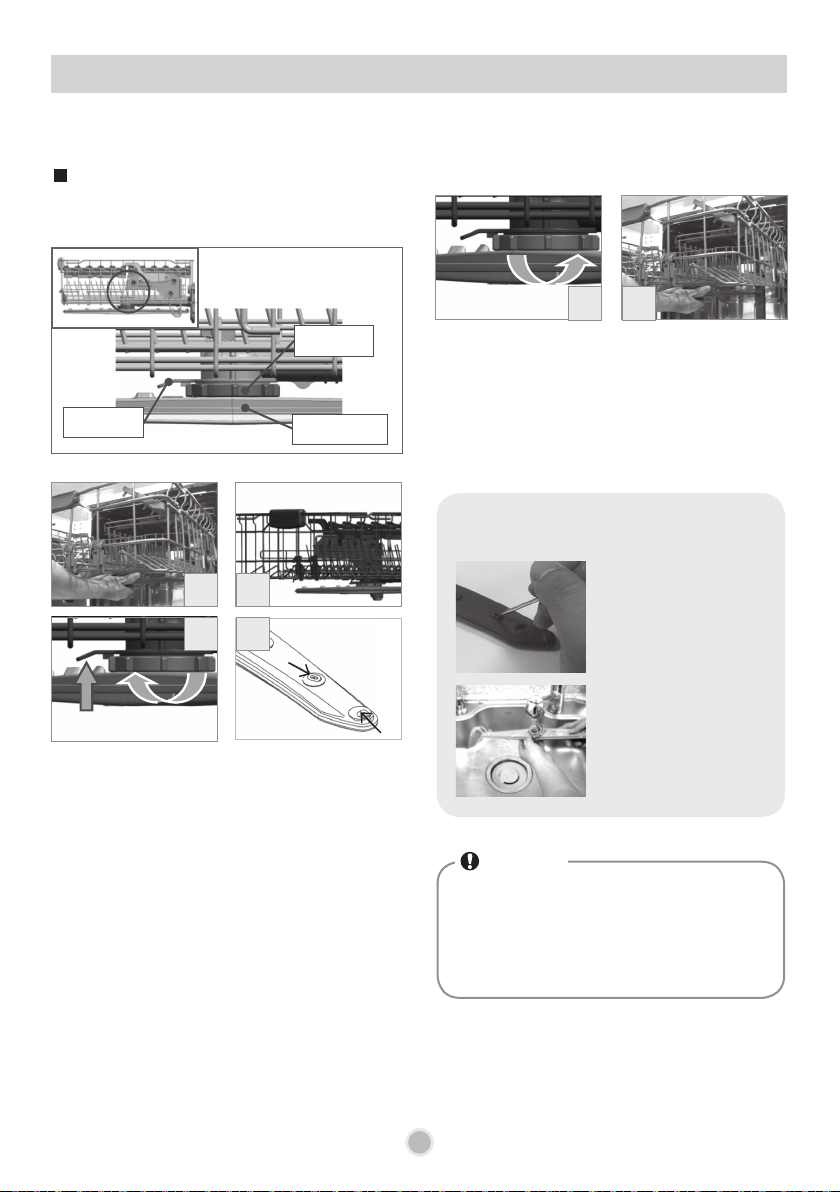
Pull the upper rack forwards to remove the upper
nozzle.
1. Pull the upper rack forwards for easy
removal of the upper spray arms.
2. Rotate the ends of spray arms toward both
sides.
3. As shown in the picture No.3, slightly lift the
lever (①) and then remove the spray arms
by rotating the nut on the spray arms (②)
clockwise
4. Check whether each hole of the spray arms
is blocked by food residue, and if required,
clean them.
- How to clean the
spray arms
If any food residue
blocks the spray arm
holes, remove it with a
pin or any sharp tool.
After removing the food
residue, clean the spray
arms holes in running
water.
5. Assemble the cleaned
spray arms
to the
upper rack by rotating the locking screw
screw counterclockwise.
6. After assembly, check whether the
spray
arms
rotate freely.
NOTE
•
If the spray arm holes are blocked by any
food residue, dishes may not be cleaned
well due to improper water spray.
•
It is recommended that the spray arms
be cleaned once every two weeks.
! Check point
1
6
3
5
2
4
①
②
Lever
Spray arms
Nut
Lower Spray Arm Water Inlet Hose
3131
USER MAINTENANCE & CLEANING INSTRUCTIONS
To maintain performance and prevent malfunctions, it is important to check the inside
of the dishwasher, including filters and nozzles, at regular intervals.
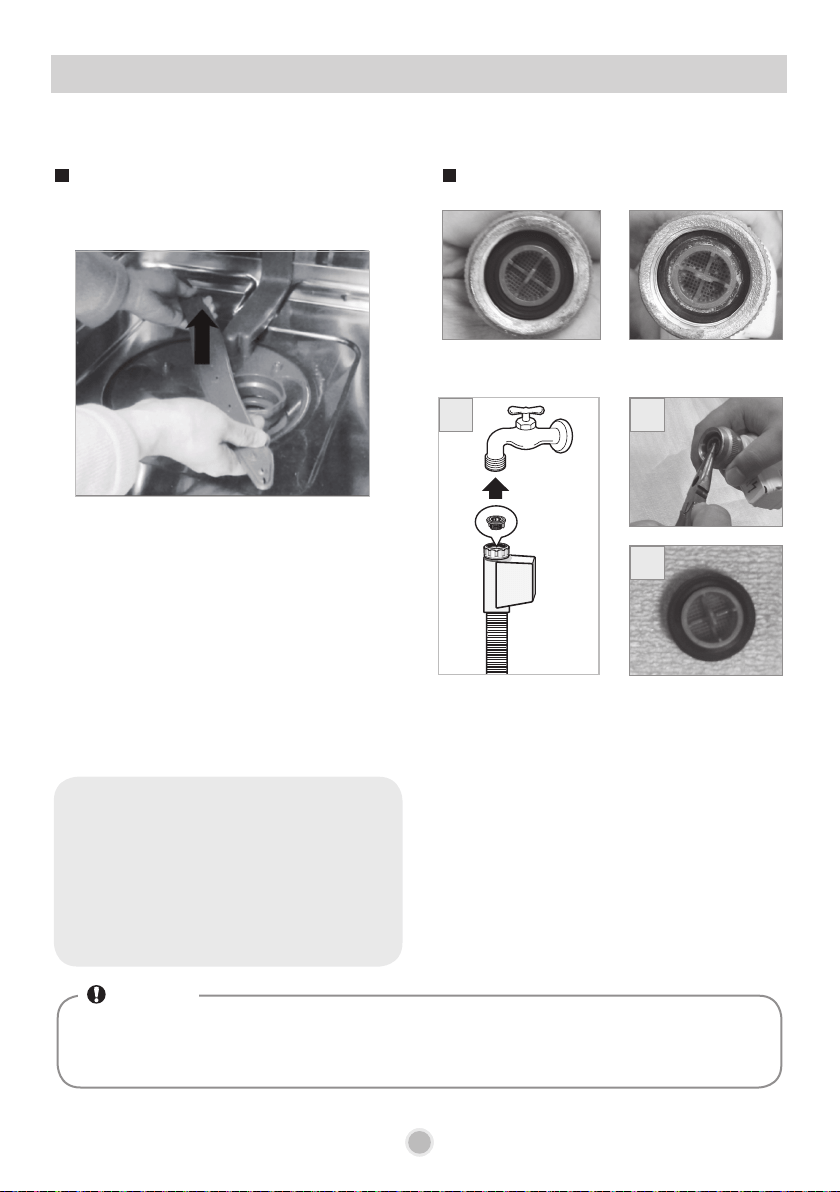
Before cleaning the spray arms, remove the lower
rack from the dishwasher.
1. Check whether the holes of the lower
spray arms are blocked.
2. Remove the lower spray arm by pulling it
up with two hands.
3. Apply the same cleaning method as the
upper spray arm to clean any blocked
holes.
4. After cleaning, refit the lower spray arm
back into its position by pushing it down
firmly.
1. Turn off the water supply. Disconnect the
water supply hose from the dishwasher.
2. Remove the filter with a long nose plier.
3. Clean the filter in the supply hose under
running water.
4. Reconnect the water supply hose to the
tap.
(Securely fasten them to prevent water
leak)
<Normal> <Abnormal>
• Excessive force for removing the lower
nozzle may cause damage to the
dishwasher or physical injury to hands
by hitting the upper rack. So, slowly
remove and ret it with two hands at all
times.
! Check point
1
• If regional water contains a lot of foreign substances (small grains of sand), the water
supply flow into the unit may be obstructed as the inlet hose filter may become blocked. To
prevent this from occurring, clean it on a regular basis.
NOTE
2
3
3232
TROUBLE SHOOTING GUIDE
What to do when you see Condition code.
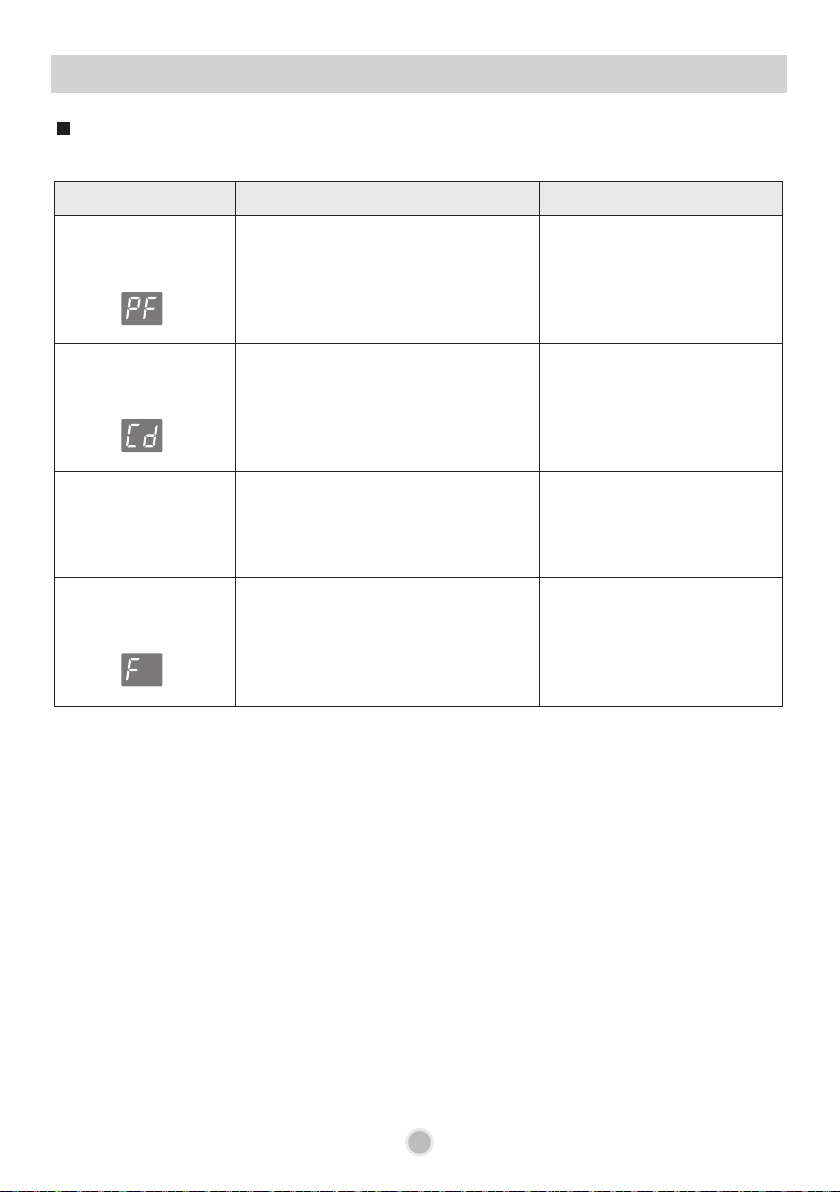
Display code (Condition code)
Symptom Possible Causes Solution
The display shows
PF code.
This indicates there was a power
failure during operation.
Press the Power button.
Restart the program which
was previously run.
The display shows
Cd code.
This is an additional drying cycle
after completion of the program.
You can remove the dishes
from the dishwasher at any
time during this cycle.
The display shows
numbers between
1 ~ 19.
It indicates the reservation setting
The program will
automatically start as time
passes as set in the
reservation setting hours.
The display shows
F code.
When the unit is displaying F, the
sensor is measuring the water clarity
After 5 minutes of sensing (except
draining and filling), the unit’s display
will then show the processing time.
33
TROUBLE SHOOTING GUIDE
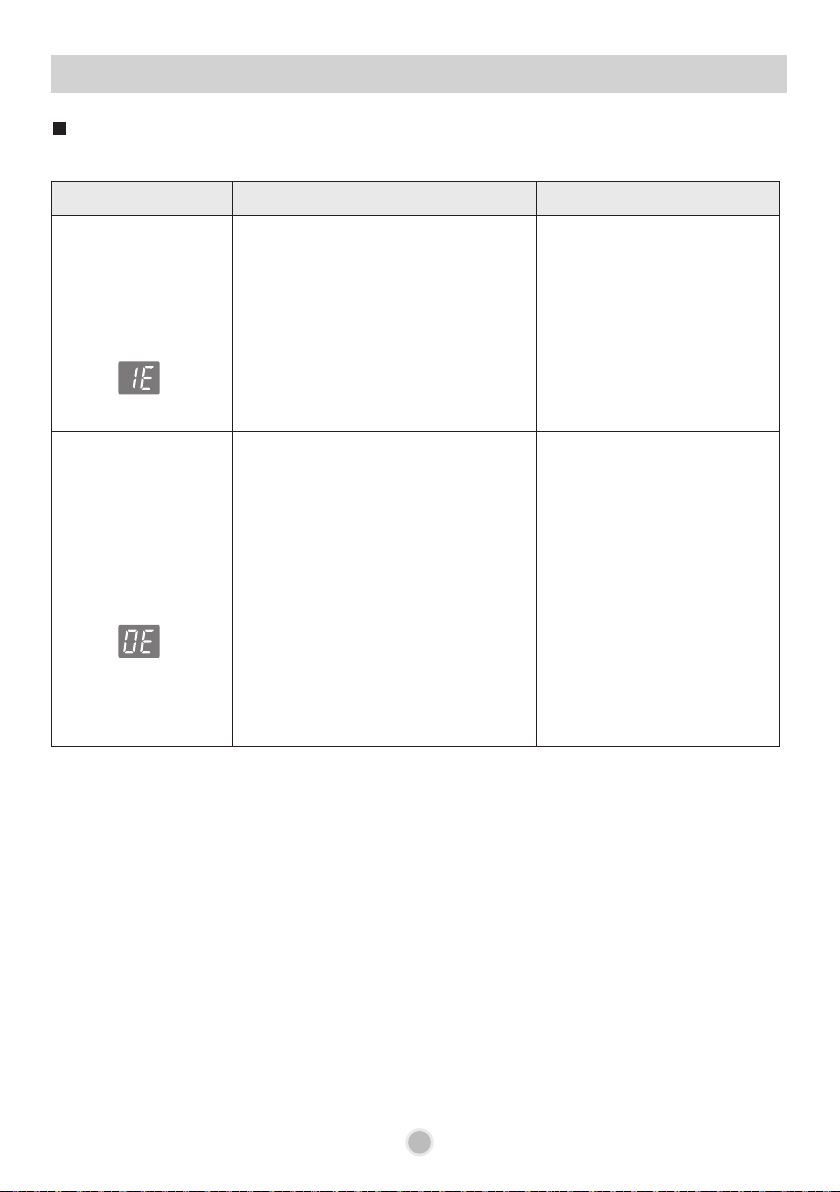
Symptom Possible Causes Solution
The display shows
IE code.
Water is not properly supplied.
• Bent water supply hose.
• Less than 50kpa of water pressure
• The filter of the water supply hose
is clogged
• Frozen water in the water supply
part in winter.
Check water outage or
the valve of water supply
connecting part.
Clean the water supply valve
lters.
Call for service if the same
problem occurs again.
The display shows
OE code.
Drainage problem.
• Clogged drainage hose (Condition
& Error code)
• The lters inside the dishwasher
are clogged.
• Bent drainage hose
• Wrong installation of drainage
hose. (drainage connection point is
not drilled out)
• Wrong installation of the connecting
part of drainage hose
Clean the drainage hose.
Clean the filters.
Check the installation of the
drainage hose.
Call for service if the same
problem occurs again.
What to do when you see condition & error code.
Display code (Condition & Error code)
34
TROUBLE SHOOTING GUIDE
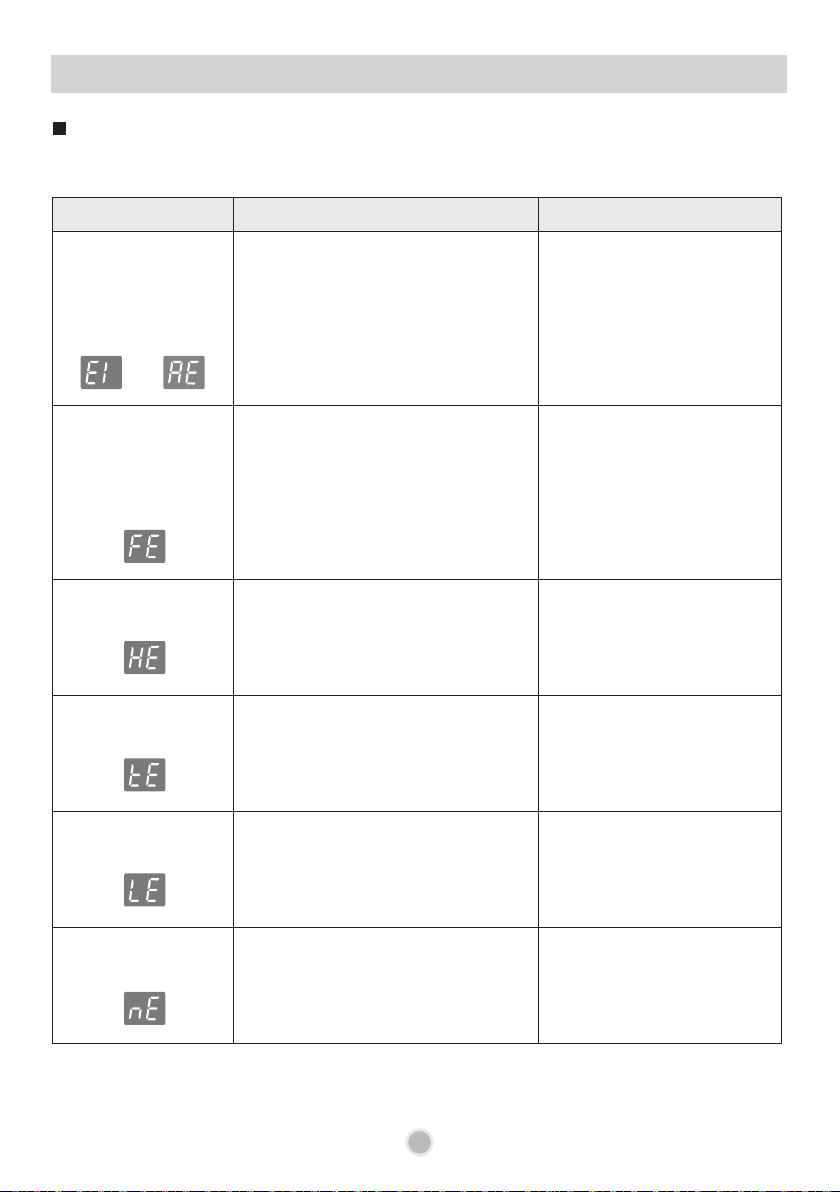
Symptom Possible Causes Solution
The display shows
E1 or AE code.
(Drain pump is
automatically
operated.)
Is the dishwasher installed on even
ground?
If the dishwasher is tilted or has been
damaged during installation, a water
leak may have occurred.
Install the dishwasher on an
even surface and check for
any damage to the inlet hose
or cabinet.
Call for service if the same
problem occurs again.
The display shows
FE code.
(Drain pump is
automatically
operated.)
Excessive water is supplied, which is
more than the normal water level.
If so, there may be a problem with
the water supply valve.
Close the water tap and
unplug the power plug.
Call for service if the same
problem occurs again.
The display shows
HE code.
The water heater circuit is damaged.
Close the water tap and
unplug the power plug.
Call for service
The display shows
tE code.
Thermistor malfunction or very high
inlet water temperature
Close the water tap and
unplug the power plug.
Call for service
The display shows
LE code.
Wash motor malfunction.
Close the water tap and
unplug the power plug.
Call for service
The display shows
nE code.
Vario motor malfunction.
Close the water tap and
unplug the power plug.
Call for service
What to do when you see Error message.
Display code (Error code)
or
35
TROUBLE SHOOTING GUIDE
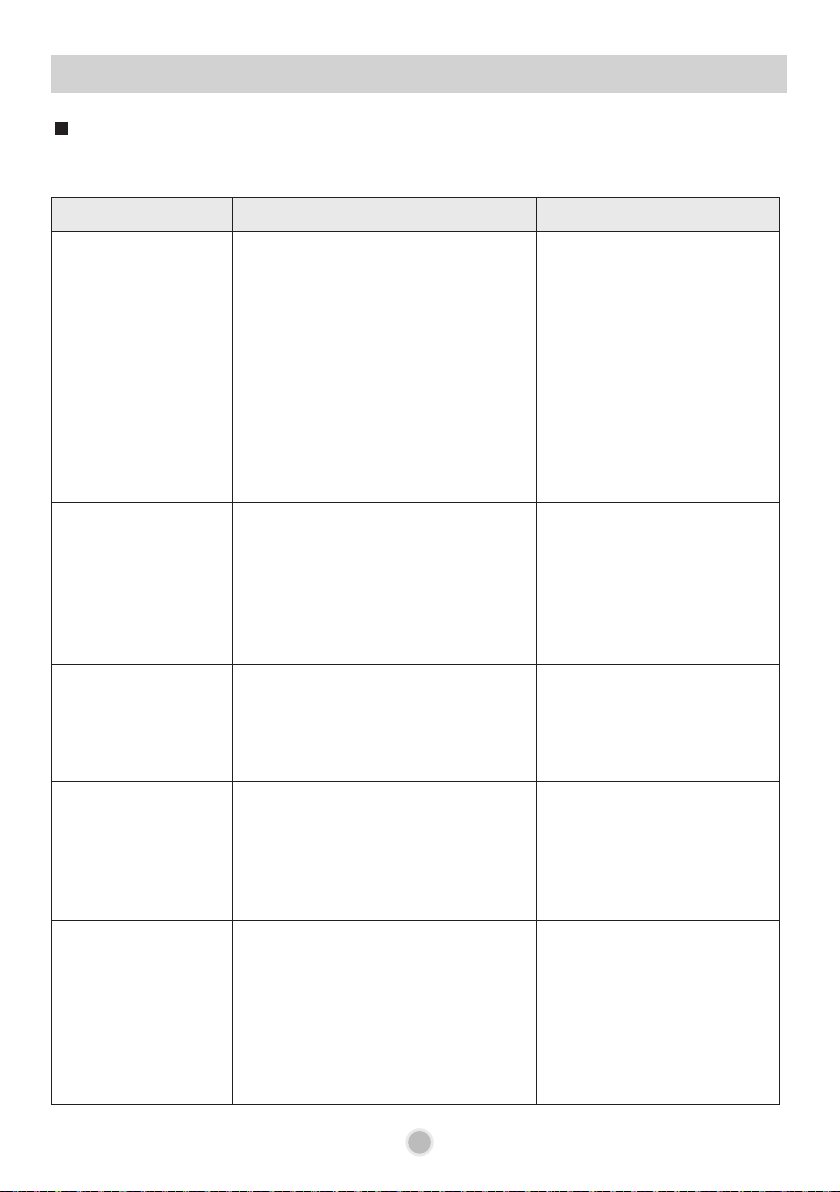
Symptom Possible Causes Solution
Improper wash
(Food residue)
Wrong arrangement of dishes may
prevent rotation of the spray arms.
Improper water spray due to clogged
holes of the spray arms may cause
improper wash.
Filters clogged with food debris may
reduce wash performance.
Unremoved food debris on dishes
may block the filters during washing.
Insufficient washing time or improper
wash cycle may reduce wash
performance.
Correctly arrange the dishes.
Check and clean the spray
arms.
Clean the filters.
Large particles of food
residues should be removed
from the dishes before
staring wash.
Use a proper wash program
(course).
White spots or lines
on the dishes after
completion of wash
The water softener has no salt or
insufficient salt.
Water hardness level may be set too
low.
The rinse aid may be insufficient.
Check whether there is salt
in the water softener.
Increase the hardness level
setting value.
Refill the rinse aid or
increase the dispensing
level.
Water drops or
stains are left on
the dishes after
completion of wash
(Cup, utensils, etc)
Insufficient rinse aid may cause poor
drying results
Adjust the rinse aid
dispensing level.
Dishes are
discolored after
completion of wash.
(Plastic items)
Keeping foods, such as carrot,
tomato, ketchup, kimchi, etc, in the
plastic container for a long time may
cause discoloration, or insufficient
quantity of detergent may cause this
problem.
Increase the quantity of
detergent. In addition, do not
use any dishes that are not
suitable for dishwasher use.
Rust strains are left
on steel utensils.
Failure to remove acid foods from
the utensils for a long time may
cause damage to the utensils.
Any spilled salt in the dishwasher
may cause rust.
Washing silver utensils may cause
damage to the utensils due to the
water quality conditions
Do not leave the utensils
stained with acid items
unremoved for a long time.
Run the ‘Quick’ course
without dishes immediately
after refilling salt.
Use utensils suitable for
dishwasher use.
A wash problem may occur due to many factors, such as dishes arrangement, detergent, rinse aid,
water softener, etc.
Washing problems
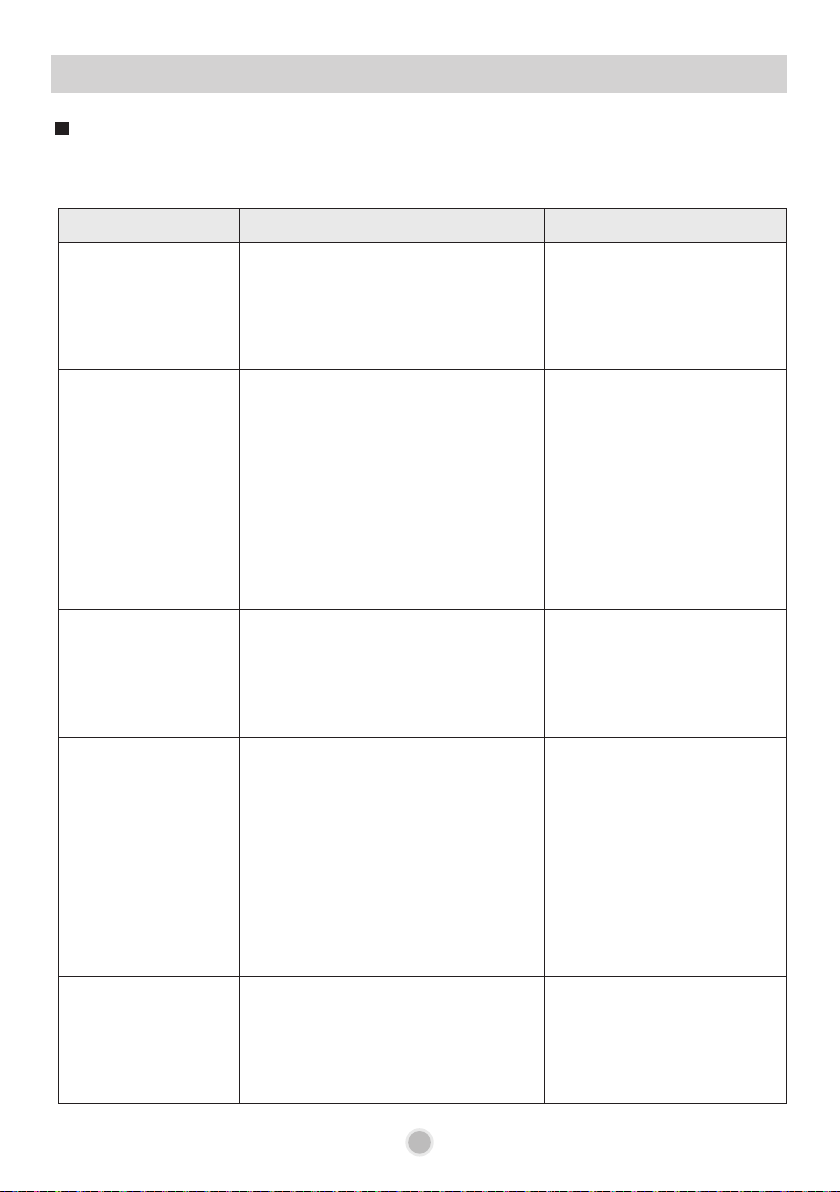
36
TROUBLE SHOOTING GUIDE
Symptom Possible Causes Solution
Detergent is left at
the bottom of the
dishwasher after
completion of wash.
Too short washing time compared to
the quantity of detergent may cause
insufficient disolving of detergent.
Add a suitable quantity of
detergent according to the
selected course.
Dry results are poor.
Insufficient rinse aid may cause poor
drying results.
Using a tablet detergent (2in1, 3in1)
may cause insufficiency in the
quantity of rinse aid
Failure to use dishwasher safe items
may cause insufficient drying.
Check the rinse aid, and
increase the quantity of rinse
aid.
Add an additional rinse if the
cycle permits.
Use suitable utensils.
For better drying results,
slightly open the door after
operation.
There is excessive
foam inside the
dishwasher.
Failure to use the detergent
exclusive for dishwasher may cause
excessive foam.
An excessive amount of rinse may
cause foam.
Use the detergent exclusive
for dishwasher.
Reduce the rinse aid
dispensing level.
Water remains
inside the
dishwasher.
If water remains inside the
dishwasher, when starting the
operation under normal condition,
the course will start after removing
the remaining water through
drainage first.
Water may remain if the power
supply was lost before normal end of
the course or was manually
disconnected.
Re-start the course.
Yellow water
remains inside the
dishwasher.
When initially using the dishwasher,
yellow water may generate in the
water softener tank. This is a normal
condition, and it is harmless to
humans.
It disappears after 1~3
cycles.
A wash problem may occur due to many factors, such as dishes arrangement, detergent, rinse aid,
water softener, etc.
Washing problems
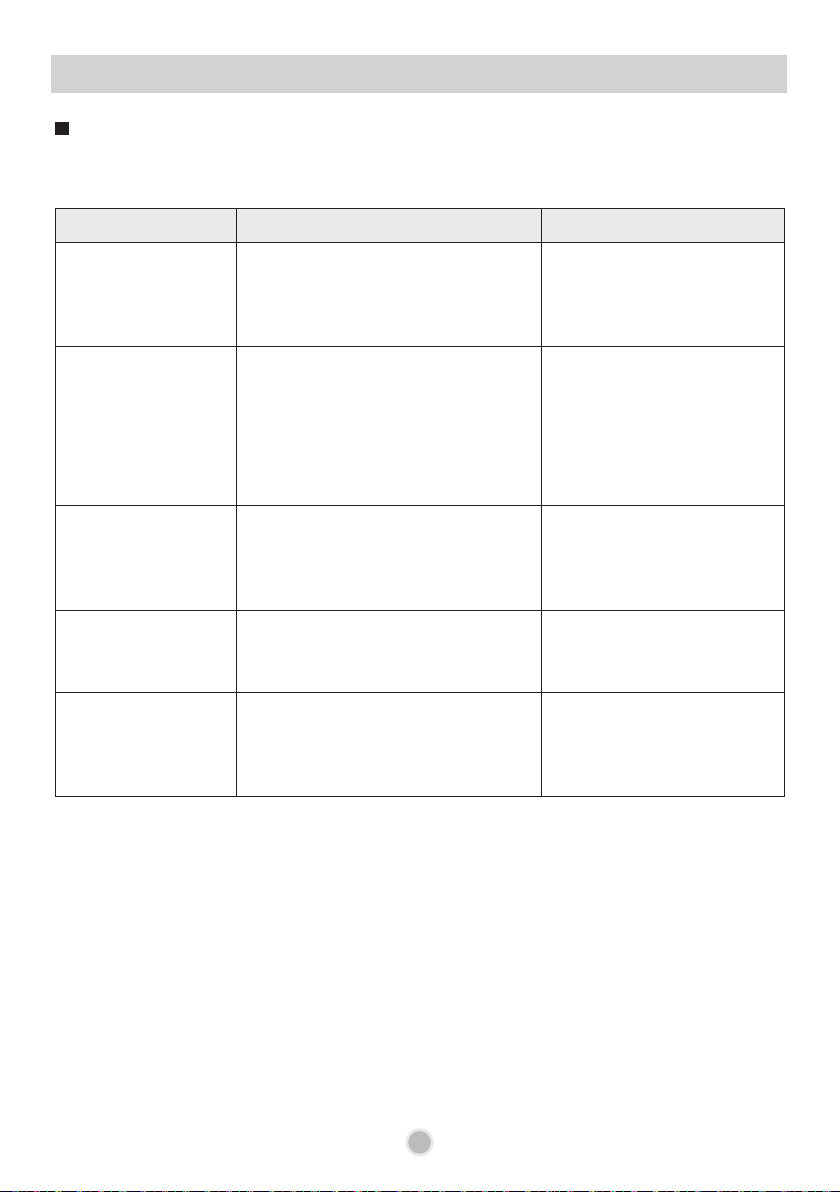
37
TROUBLE SHOOTING GUIDE
Symptom Possible Causes Solution
Knocking sound
is heard during
operation of the
dishwasher.
When the spray arms hit the dishes,
or the dishes move due to the water
current, noise may generate.
Correctly arrange the dishes.
A grinding type noise
during drainage or
water lling.
May be caused by large foreign
substances clogged inside the
drainage pump.
If the water supply contains air, or
water pressure is high, noise may
occur.
Call for service if the
same problem reoccurrs.
Reducing the pressure of
the water supply may reduce
noise.
Moving the
dishwasher from
side to side
generates noise.
If the dishwasher shakes from side
to side due to its imbalance, noise
may occur.
Adjust the left/right height
with the adjusting legs
or adjust the installation
location.
Beep sounds are
heard after operation
of the dishwasher
This sound indicates the completion
of operation. Thereafter, Cd (Cool
dry) condition remains.
You can mute the beep
sound in the display setting
instructions.
‘Click’ sounds can
be heard during
operation of the
dishwasher.
This is normal, it is caused by the
micro switch during operation of the
dishwasher. It is not an error.
Normal operation
A noise problem may occur due to poor arrangement of dishes or negligence in maintenance.
Noise Problems
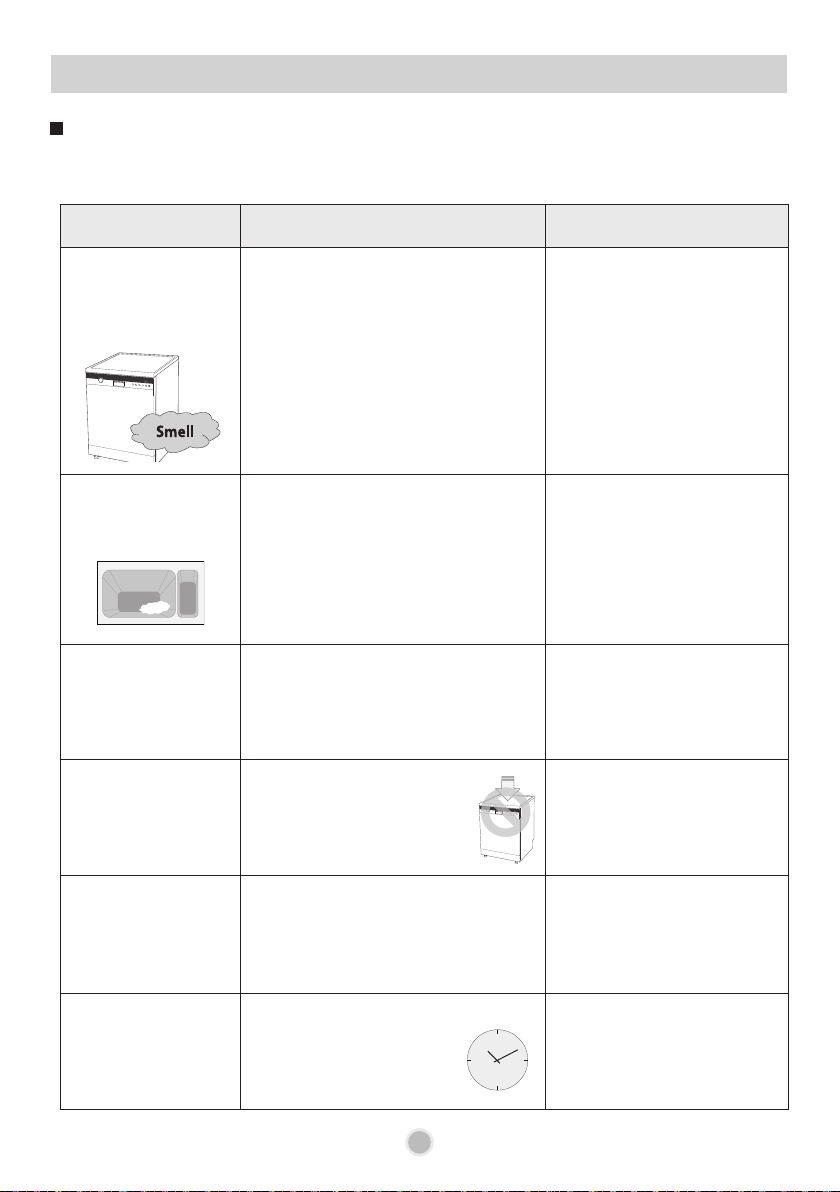
38
TROUBLE SHOOTING GUIDE
Symptom Possible Causes Solution
Bad smell inside the
dishwasher
• A burning-like smell, which is
unique to any electric appliance,
may be generated at the initial use
of the dishwasher, but this smell
will decrease when you use the
dishwasher 5 ~ 10 times.
• Not using or cleaning the
dishwasher for a long time may
cause bad odors due to rotten food
residues.
Clean the inside of the
dishwasher.
Run the wash course
without dishes after placing
a bowl containing white
vinegar onto the upper rack.
And then, open the door
and allow to dry. These
processes may help reduce
odors.
Detergent is left
in the detergent
dispenser.
• Unbalanced upper rack
• Detergent may not be dispensed
because poor stacking of the
dishes prevent automatic opening
of the detergent dispenser.
Adjust the left/right height of
the upper rack.
Correctly arrange the dishes.
Unclosed cover
of the detergent
dispenser.
• The cover may not be closed due
to small particles.
(coffee grain or fruit seed) clogged
in both sides of the detergent
dispenser.
• Clean the surroundings of
the detergent dispenser.
The dishwasher
door is not closed
well.
• Placing any heavy objects
on the dishwasher or an
unbalanced dishwasher
may cause the doors not
to close properly.
• Do not place any heavy
objects on the dishwasher.
• Adjust the left/right height
with the adjusting legs.
Upper rack is not
properly pushed in.
• If the position of the height adjuster
on the left/right sides is incorrect,
the upper rack may not be properly
pushed in.
• Readjust the height
adjuster for the upper rack.
• Check whether any dishes
are obstructing the upper
racks sliding function.
It takes a long time
for the wash cycle to
complete.
If the temperature of supplied
water is low, it takes longer
for the dishwasher to heat
the water in each part of the
cycle.
If there is an option to
connect to hot water, it is
OK providing that the hot
water temp does not exceed
65deg Celsius.
Malfunctions and poor washing results can be the result of user errors or not reading the user
instructions. So, often they can be solved with a simple check.
General Problems
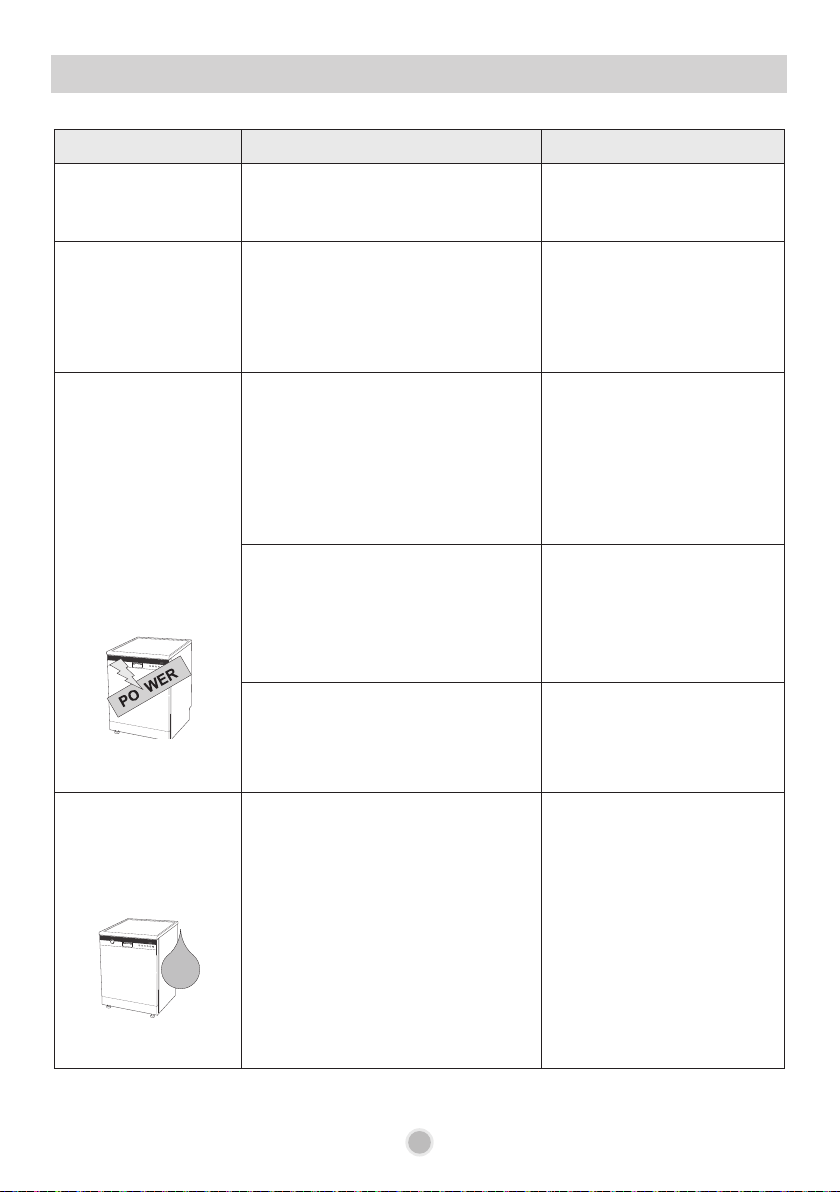
39
TROUBLE SHOOTING GUIDE
Symptom Possible Causes Solution
Damage to the inside
of the dishwasher
Wrong arrangement of dishes may
prevent rotation of the spray arms
and cause damage.
Correctly arrange the dishes.
Buzzing sound.
(High Temperature
Alarm)
((BEEP))
The warning sound alerts if the
inside of the dishwasher increases
higher than specified temperature.
(50℃~55℃)
open the door to allow the
water to cool.
No power-on or
automatic turn-off
Or, power-on but no
operation
• Is the Plug properly inserted into
the socket?
• Is any extension cord (power
board) used?
• Is the circuit breaker off?
• Is there a home power failure?
• Connect the power plug.
• Use an extension suitable
for the product standards.
• Reset the circuit breaker.
• Check other appliances for
power.
If using an extension cord (power
board) the dishwasher may
automatically turn off despite
power-on due to insufficient current
capacity of the extension device
during operation.
• Use an extension suitable
for the product standards.
• Is the dishwasher door closed?
• Is it on timer delay start.
• Close the dishwasher door.
• Cancel the timer setting,
or allow it to start as it was
set to.
Water leaks outside
the dishwasher.
The door may not be closed due to
a titled dishwasher. In this case a
water leak may occur.
Wrong installation of drainage hose
may cause water leak.
If the power is off, a water leak may
be caused by a poor connection to
the tap.
• Re-install the dishwasher
and adjust the front feet.
• Check the connecting part
of drainage hose.
• Check the connection
water supply hose.
40
TROUBLE SHOOTING GUIDE
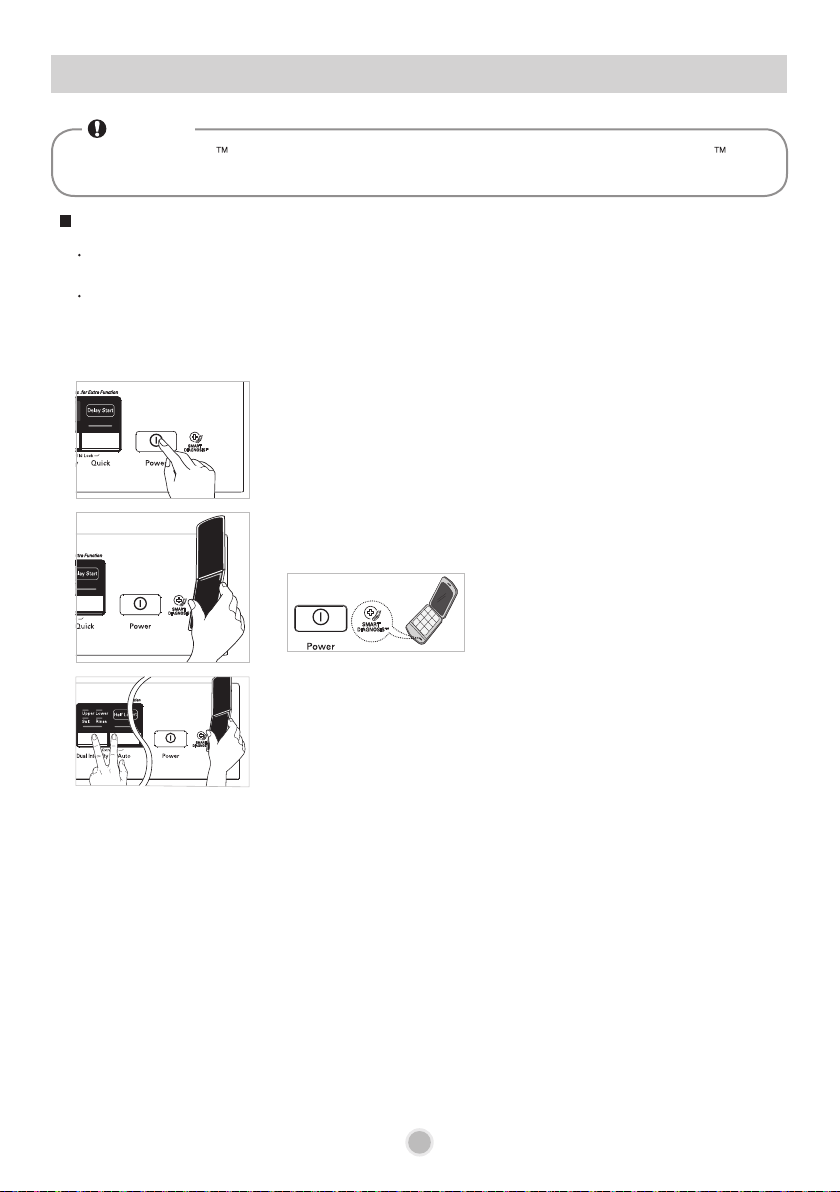
Only use this feature when instructed to do so by the call centre.
The transmission sounds similar to a fax machine, and so has no meaning except to the call centre.
SMARTDIAGNOSIS™ can not be activated if the dishwasher does not power up.
If this happens, then troubleshooting must be done without SMARTDIAGNOSIS™.
If you experience problems with your dishwasher, call the Customer information centre.
Follow the call centre agent's instructions, and do the following steps when requested:
1. Press the Power button to turn on the dishwasher.
Do not press any other buttons.
2. When instructed to do so by the call centre, place the
mouthpiece of your phone very close to the Power button.
(Max. 10mm)
4. Keep the phone in place until the tone transmission has nished.
This takes about 6 seconds, and the display will count down the time.
• For best results, do not move the phone while the tones are being transmitted.
• If the call centre agent is not able to get an accurate recording of the data, you may be asked
to try again.
• Pressing the Power button during the transmission will shut off the
SMARTDIAGNOSIS™.
5. Once the countdown is over and the tones have stopped, the machine will display END and
turn off automatically after a few seconds.
Resume your conversation with the call centre agent, who will then be able to assist you using
the information transmitted for analysis during the call to Customer information centre.
Using SMARTDIAGNOSIS
TM
NOTE
SMARTDIAGNOSIS function is available only for the products with a SMARTDIAGNOSIS mark.
If using a mobile phone with poor signal, the smart diagnosis function might not operate.
3. Press and hold the Dual Intensity and Auto buttons for
three seconds, while holding the phone mouthpiece to
the icon or Power button.
■ Smart Diagnosis is a troubleshooting feature designed to assist, not replace, the traditional
method of troubleshooting through service calls. The effectiveness of this feature depends upon
various factors, including, but not limited to, the reception of the cellular phone being used for
transmission, any external noise that may be present during the transmission, and the acoustics
of the room where the machine is located. Accordingly, LG does not guarantee that Smart
Diagnosis would accurately troubleshoot any given issue.
41
SPECIFICATION
Capacity
Weight
Power Supply
Power Consumption
Water Feed Pressure
14 Place settings
See rating label
See rating label
See rating label
0.05 ~ 0.6 MPa
Minimum and maximum permissible water feed
pressures are necessary for the correct operation of the
appliance.

42
MEMO

43
MEMO