
User Guide
This guide helps you to get started using your phone.
•Somecontentandillustrationsmaydifferfromyourdevicedependingonthe
region,serviceprovider,softwareversion,orOSversion,andaresubjectto
changewithoutpriornotice.
•Google™,GoogleMaps™,Gmail™,YouTube™,Hangouts™andGoogle
Play™aretrademarksof Google, Inc.
ENGLISH
MFL69082001 (1.0)

•Copyright©2015LGElectronics,Inc.Allrightsreserved.LGandtheLG
logoareregisteredtrademarksofLGGroupanditsrelatedentities.All
othertrademarksarethepropertyoftheirrespectiveowners.
• U.S.Cellular
®
CustomerCare1-888-944-9400

3
Contents
Contents ......................................................................................3
Getting to know your phone ......................................................6
Your Home screen ................................................................... 20
Google account setup ............................................................. 29
Connecting to Networks and Devices ................................... 30
Calls .......................................................................................... 34
Contacts ................................................................................... 44
Messaging ................................................................................ 46
Email ......................................................................................... 48
Gmail ........................................................................................ 50
Hangouts ................................................................................... 51
Camera and Video ................................................................... 52
Multimedia ............................................................................... 63
Utilities.......................................................................................67
The web .................................................................................... 86
Settings .................................................................................... 88
Troubleshooting ......................................................................109
Safety ........................................................................................116
Limited Warranty Statement .................................................146
4
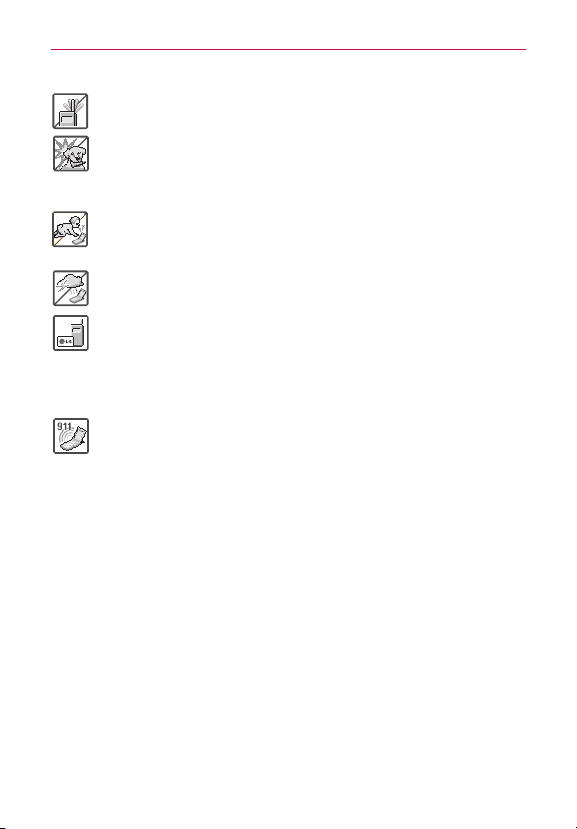
Warning
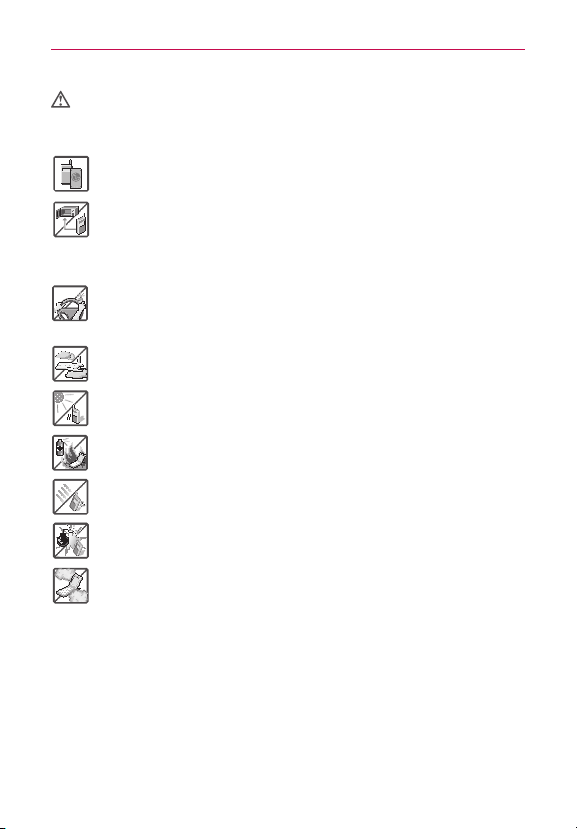
Violationoftheinstructionsmaycauseseriousinjuryordeath.
WARNING:ThisproductcontainschemicalsknowntotheStateofCaliforniatocausecancerand
birthdefectsorotherreproductiveharm.Wash hands after handling.
#
Neveruseanunapprovedbatterysincethiscoulddamagethephoneand/
orbatteryandcouldcausethebatterytoexplode.
#
Neverplaceyourphoneinamicrowaveovenasitwillcausethebatteryto
explode.
#
Donotdisposeofyourbatterynearreorwithhazardousorammable
materials.
#
Whenridinginacar,donotleaveyourphoneorsetupthehands-freekit
neartheairbag.Ifwirelessequipmentisimproperlyinstalledandtheair
bagisdeployed,youmaybeseriouslyinjured.
#
Donotusethephoneinareaswhereitsuseisprohibited.(Forexample:
aircraft)
#
Donotexposethebatterychargeroradaptertodirectsunlightoruseitin
placeswithhighhumidity,suchasabathroom.
#
Donotuseharshchemicals(suchasalcohol,benzene,thinners,etc.)or
detergentstocleanyourphone.Thiscouldcauseare.
#
Donotdrop,strike,orshakeyourphoneseverely.Itmayharmtheinternal
circuitboardsofthephone.
#
Donotuseyourphoneinhighexplosiveareasasthephonemaygenerate
sparks.
#
Donotdamagethepowercordbybending,twisting,pulling,orheating.Do
notusetheplugifitislooseasitmaycauseelectricshockorre.
#
Donotplaceanyheavyitemsonthepowercord.Donotallowthepower
cordtobecrimpedasitmaycauseelectricshockorre.
#
Donothandlethephonewithwethandswhileitisbeingcharged.Itmay
causeanelectricshockorseriouslydamageyourphone.
#
Donotdisassemblethephone.
#
Donotplaceoranswercallswhilechargingthephoneasitmayshort-
circuitthephoneand/orcauseelectricshockorre.
5
#
Donotholdorlettheantennacomeincontactwithyourbodyduringacall.
#
Makesurethatnosharp-edgeditems,suchasanimal’steethornails,come
intocontactwiththebattery.Thiscouldcauseare.
#
Storethebatteryoutofreachofchildren.
#
Becarefulthatchildrendonotswallowanyparts(suchasearphone,
connectionpartsofthephone,etc.)Thiscouldcauseasphyxiationor
suffocationresultinginseriousinjuryordeath.
#
Unplugthepowercordandchargerduringlightningstormstoavoidelectric
shockorre.
#
OnlyusethebatteriesandchargersprovidedbyLG.Thewarrantywillnot
beappliedtoproductsprovidedbyothersuppliers.
#
Onlyauthorizedpersonnelshouldservicethephoneanditsaccessories.
Faultyinstallationorservicemayresultinaccidentsandconsequently
invalidatethewarranty.
#
Anemergencycallcanbemadeonlywithinaservicearea.Foran
emergencycall,makesurethatyouarewithinaserviceareaandthatthe
phoneisturnedon.
#
Yourphoneisanelectronicdevicethatgeneratesheatduringnormal
operation.Extremelyprolonged,directskincontactintheabsenceof
adequateventilationmayresultindiscomfortorminorburns.Therefore,
usecarewhenhandlingyourphoneduringorimmediatelyafteroperation.
6
Getting to know your phone
Phone Overview
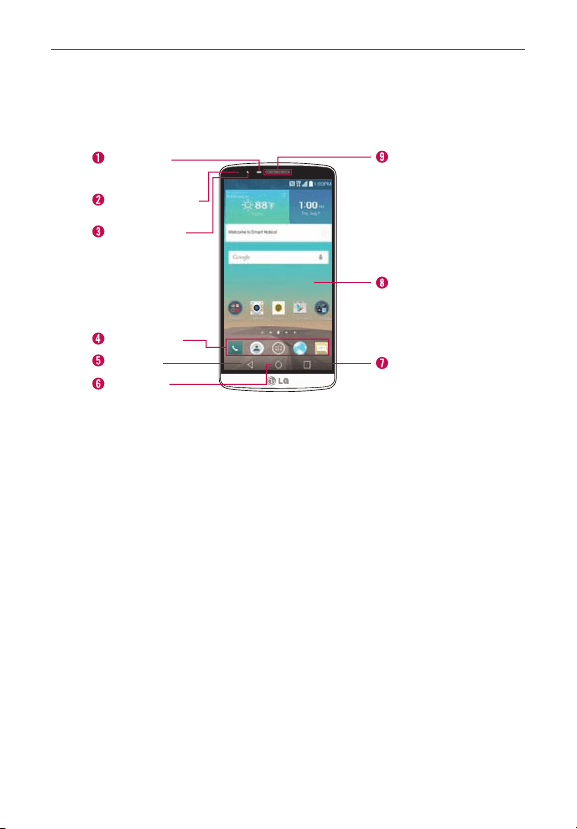
Front View
Proximity
Sensor
QuickTap Bar
Back Key
Home Key
Recent Apps Key
Home Screen
Earpiece
Front Camera
Notification LED
NOTES •Allscreenshotsinthisguidearesimulated.Actualdisplaysmayvary.
•Instructionstoperformtasks in thisguidearebasedon the defaultsettingsandmay
changedependingonthemodeandsoftwareversiononyourphone.
1. Proximity SensorSensesproximitytowardotherobjects(suchasyour
head)sothattapcommandsarenotaccidentallyactivated(duringacall
orwhencarriedinsideapocket.
Italsoemploysanambientsensorwhichmeasuresthesurroundinglight
andadjuststheLCDbrightnesstoprovideavividscreen.
NOTE Don'tblockthesensorornearthesensortoavoidproblemswiththetouchscreen.
2. Notification LEDFlashestoalertyoufornotications(e.g.,incoming
call,newtextmessage,screenunlock,etc.).
3. Front Camera Usetotakepicturesandrecordvideosofyourself.You
canalsousethisforvideochatting.Keepitcleanforoptimal
performance.
4. QuickTap Bar Providesiconsforquick,one-touchaccesstothe
Applicationsscreenandtheappsyouusemostoften.
7
Getting to know your phone
5. Back KeyTapthisTouchKey(intheTouchKeysbar)toreturntothe
previousscreenorclosepop-upitems(suchasmenus,dialogboxes,
andtheon-screenkeyboard).TouchandholdittoaccesstheDual
windowfunctionwhichallowsyoutousetwoappsatthesametime.
6. Home KeyTapthisTouchKey(intheTouchKeysbar)toreturntothe
Homescreen(oryourdefaultHomescreenpanelfromanyoftheHome
screenextensionpanels).TouchandholdittoaccessGoogleNow.
7. Recent Apps KeyTapthisTouchKey(intheTouchKeysbar)todisplay
recentlyusedapps.TouchandholdthiskeytoopenanOptionsmenu
withoptionsthataffectthecurrentscreenorapp.Thisonlyapplies
whenavailable,dependingonthescreenorapp.
8. Home ScreenDisplaysalloftheitemsneededtooperateyourphone
includingiconsforappaccess,widgets,andtheStatusBar(withstatus
icons)allowingsimpletouchaccesstoallofitsfunctionsandfeatures.
WARNING!PlacingaheavyobjectonthephoneorsittingonitcandamagetheLCDand
touchscreenfunctions.
9. EarpieceLetsyouhearcallersandautomatedprompts.
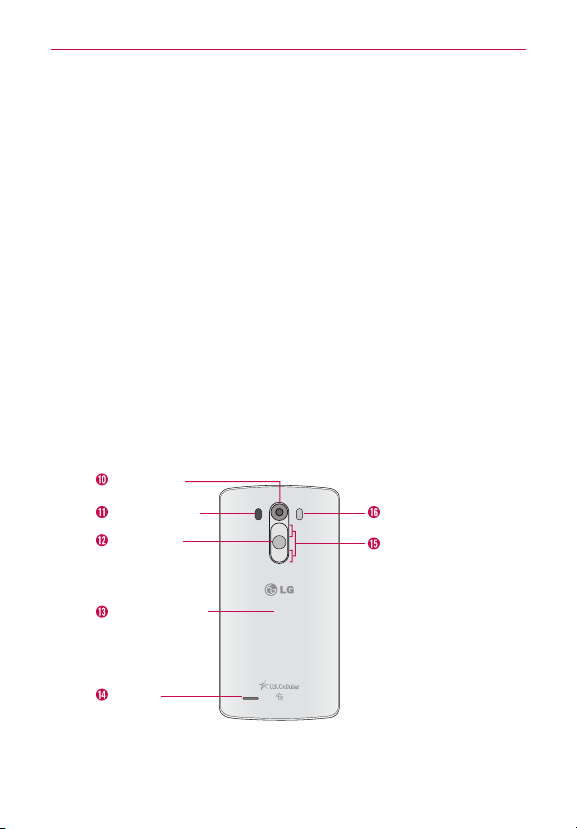
Rear View
Rear Camera
LED Flash
Volume Buttons
Power/Lock
Button
Laser Detection
Auto-focus
NFC Touch Point
Speaker
10.Rear CameraUsetotakephotosandrecordvideos.Keepitcleanfor
optimalperformance.
8
Getting to know your phone
11.Laser Detection Auto-focusDetectsthedistancebetweentherear
cameralensandnearbyobjectsusinglasertechnology.Thisfeature
helpsthecameratofocusquicklyandaccuratelyatshortorlong
distances.
NOTE Don'tcovertheProximitySensorandLaserDetectionAuto-focuswithaprotectionlm,
pouch,orprotectioncasenotauthorizedbyLGastheymaycausethedeviceto
malfunction.
12.Power/Lock ButtonPresstoturnoffthescreenbacklightandlockthe
screen,orturnthescreenbacklightbackon.Pressandholdtoturnthe
phoneon/off,restartit,andactivate/deactivateAirplanemode.
13.NFC Touch PointTapthebackofyourphonetoanNFCtagoranother
NFCcompatibledeviceinthislocationtotransferdatabetweenthem.
14.SpeakerUsetolistentoaudio(e.g.,music,videos,soundclips,
speakerphone,etc.)fromtherearspeakerinsteadoftheearpiece.
15.Volume ButtonsPresstoadjusttheringer,themediavolumes,orthe
in-callvolumeduringacall.
TIPS •Withthescreenbacklightoff(asleep),youcanpressandholdtheVolume Down
Button
toactivatetheCameraapp.
•Withthescreenbacklightoff(asleep),youcanpressandholdtheVolume Up Button
toaccesstheQuickMemo+app.
16.LED FlashBrightensupthecapturedimageorrecordedvideowhen
youturnontheash.
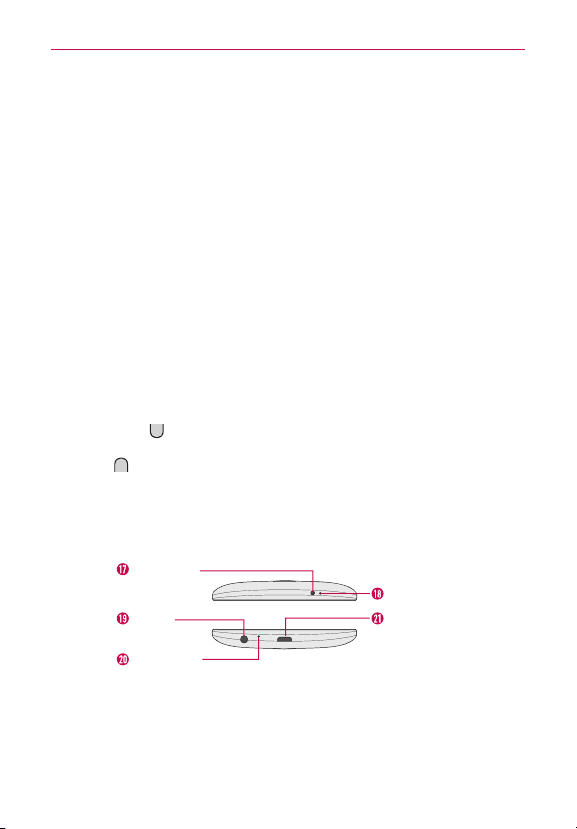
Top and Bottom View
USB/Charger
Port
Microphone
Microphone
3.5mm
Headset Jack
IR (Infrared)
LED
17.IR (Infrared) LED Usesinfraredtocommunicatewithdevicesusingthe
QuickRemoteapp.
18.Microphone Transmitsyourvoicetotheothercaller.It'salsousedfor
voice-activatedfunctions.

9
Getting to know your phone
19.3.5mm Headset JackAllowsyoutopluginanoptionalheadsetfor
convenient,hands-freeconversations.Youcanalsopluginheadphones
tolistentomusic.
20.MicrophoneTransmitsyourvoicetotheothercaller.It'salsousedfor
voice-activatedfunctions.
21.USB/Charger PortAllowsyoutoconnectthephoneandtheUSBCable
forusewiththeChargerAdapter,orothercompatibleaccessories.
NOTE You maypurchaseaseparatefastdatacablefromLGtoenjoyhigherdatatransferspeed
withcompatibledevices(e.g.,laptop).
Setting Up Your Phone
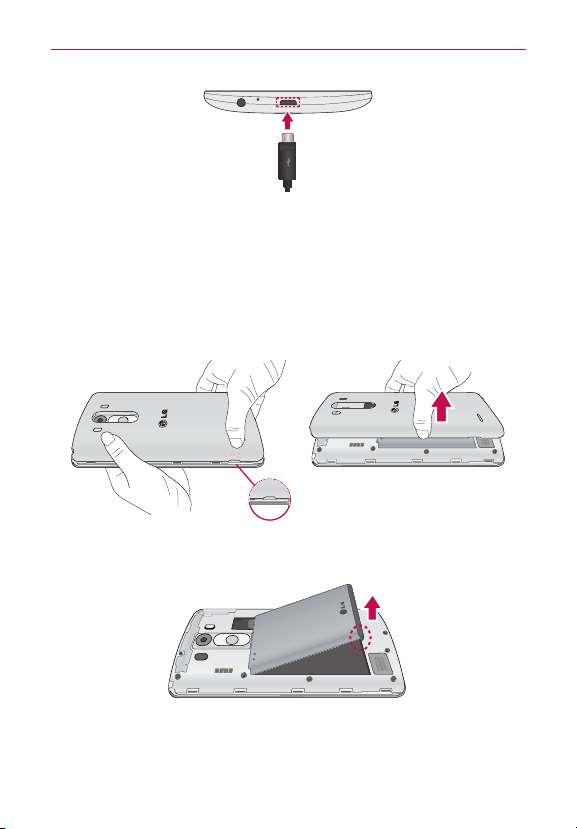
Step 1. Remove the Back Cover
Insertyourngernailintotheslotlocatedonthelowerleftoftheback
coverandliftthecoverupgently.
10
Getting to know your phone
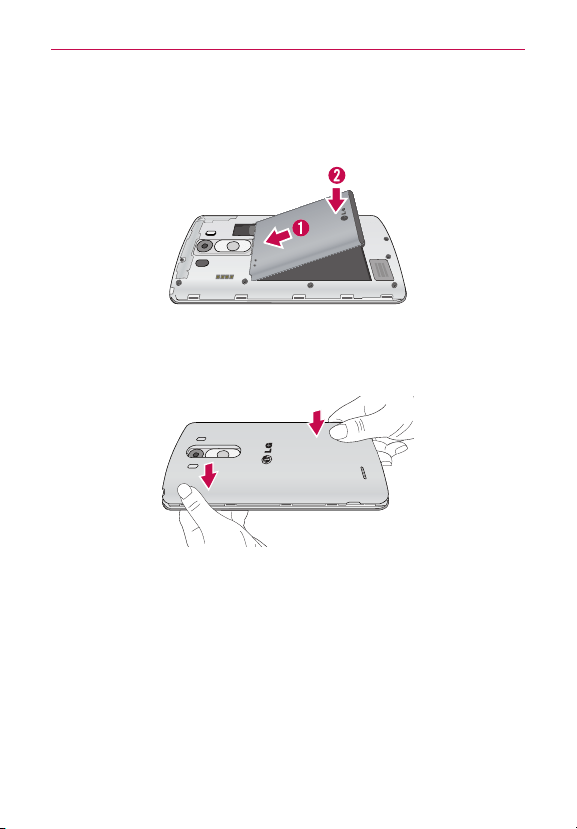
Step 2. Insert the Battery
Insertthebatteryinitscompartment,makingsuretoalignthegold
contacts.Pressdowngentlytosecurethebattery.
Step 3. Replace the Back Cover
Placethecoveroverthebackofthephone,thenpressdownalongthe
edgestosecurethecover.
Step 4. Charge the Phone
Beforeturningonyourphone,fullychargethebattery.Besuretousethe
USBCableandChargerAdapterthatcamewithyourphone.Correctly
orienttheUSBCableplugbeforeinsertingitintheUSB/ChargerPortto
avoiddamagetoyourphone.SeeCharging the Phoneonpage14for
moreinformation.
11
Getting to know your phone
NOTE It’simportanttofullychargethebatterybeforeinitialuseofthephonetomaximizethe
battery'slifetime.
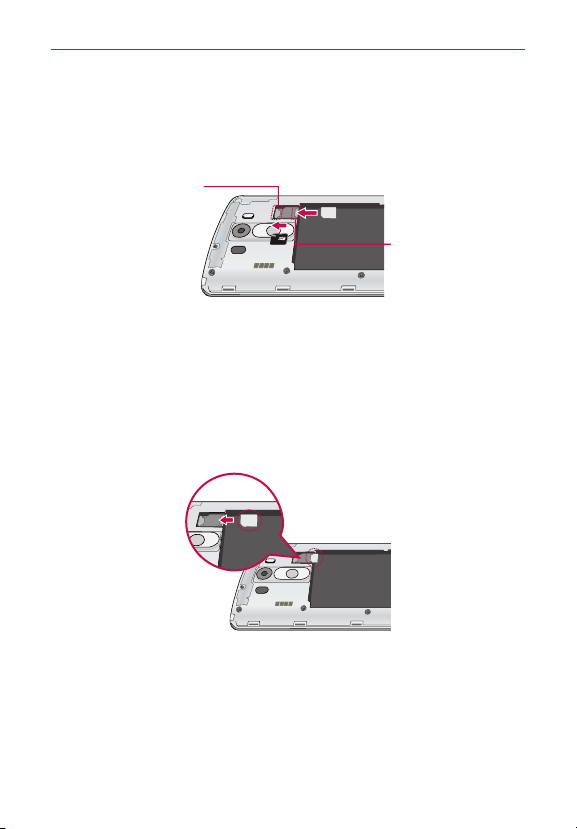
Removing the Battery
Removing the battery
1.
Insertyourngernailintotheslotlocatedonthelowerleftofthebackcover
andliftthecoverupgently.
2. Usethengertipcutoutatthebottomofthebatterycompartmenttoliftthe
batteryout.
12
Getting to know your phone
Inserting and Removing the SIM card and
microSD card
SIM/SD slot location
SIMSlot
MicroSDSlot
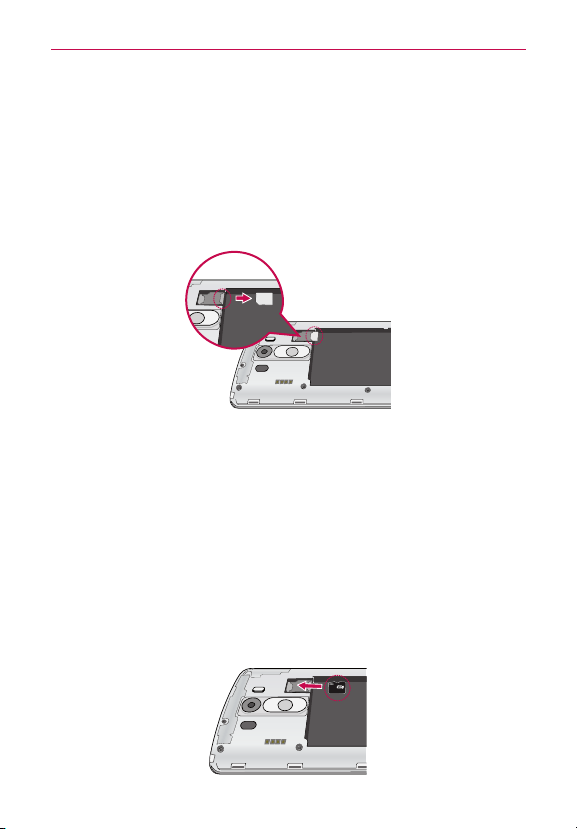
Inserting the SIM card
Beforeyoucanstartexploringyournewphone,you’llneedtosetitup.To
inserttheSIMcard:
1. Removethebackcoverandthebattery.
2. LocatetheslotfortheSIMcard(thelowerofthetwoslotsabovethe
upper-rightcornerofthebatterycompartment)andgentlysidetheSIM
cardintoinsertit.
13
Getting to know your phone
Removing the SIM card
IfyouneedtoreplaceyourSIMcard,refertothefollowinginstructions.
1. Turnthephoneoff,thenremovethebackcoverandthebattery(as
demonstratedinthepreviousinstructions).
2. LocatetheslotfortheSIMcard(thelowerofthetwoslotsabovethe
upper-rightcornerofthebatterycompartment)andgentlyslidetheSIM
cardouttoremoveit.
CAUTION IfamicroSDcardisinsertedinyourphone,pleaseremoveitfromtheupperslot
beforetryingtoremovetheSIMcard.
Inserting the microSD card
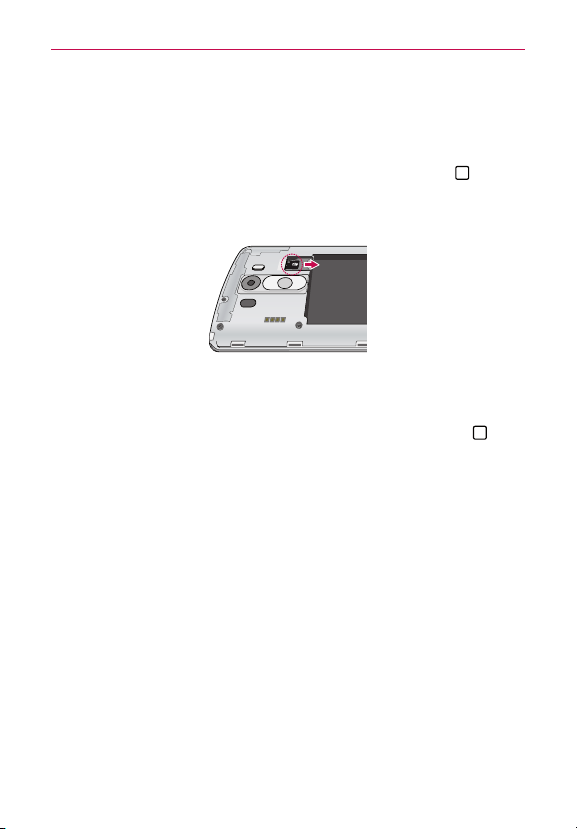
1. Removethebackcover(asdemonstratedinthepreviousinstructions)
andlocatethedualslotjustabovetheupper-rightcornerofthebattery
compartment.(microSDisinscribedneartheslotopening.)
2. PositionthemicroSDcard(soldseparately)withthelabelsidefacingup
andthegoldcontactstowardtheslot,thencarefullyslideitintothe
upperslotuntilit'ssecuredinplace.
NOTE ThemicroSDcardcanbeeasilydamagedbyimproperoperation.Pleasebecarefulwhen
inserting,removing,orhandlingit.
Thisdevicesupportsuptoa2TBmicroSDcard.
14
Getting to know your phone
To unmount the microSD card
It’simportanttounmountthemicroSDcardpriortoremovingitfromthe
phonetoavoiddamagetoitorthedatasavedonthecard.
1. FromtheHomescreen,touchandholdtheRecent Apps Key
(inthe
TouchKeysbar)>System settings>Generaltab>Storage.
2. TapUnmount SD card.
To remove the microSD card
1. UnmountthemicroSDcard.
#
FromtheHomescreen,touchandholdtheRecent Apps Key
(in
theTouchKeysbar)>System settings>Generaltab>Storage>
Unmount SD card.
2. RemovethebackcoverandlocatethemicroSDcardslot(as
demonstratedinthepreviousinstructions).
3. CarefullypullthemicroSDcardouttoremoveit.
Charging the Phone
YourphonecomeswithaUSBCableandaChargerAdapterwhichconnect
togethertochargeyourphone.CorrectlyorienttheUSBCableplugbefore
insertingitintheUSB/ChargerPorttoavoiddamagingyourphone.
NOTE PleaseonlyuseanapprovedchargingaccessorytochargeyourLGphone.Improper
handlingoftheUSB/ChargerPort,aswellastheuseofanincompatiblecharger,may
causedamagetoyourphoneandvoidthewarranty.
15
Getting to know your phone
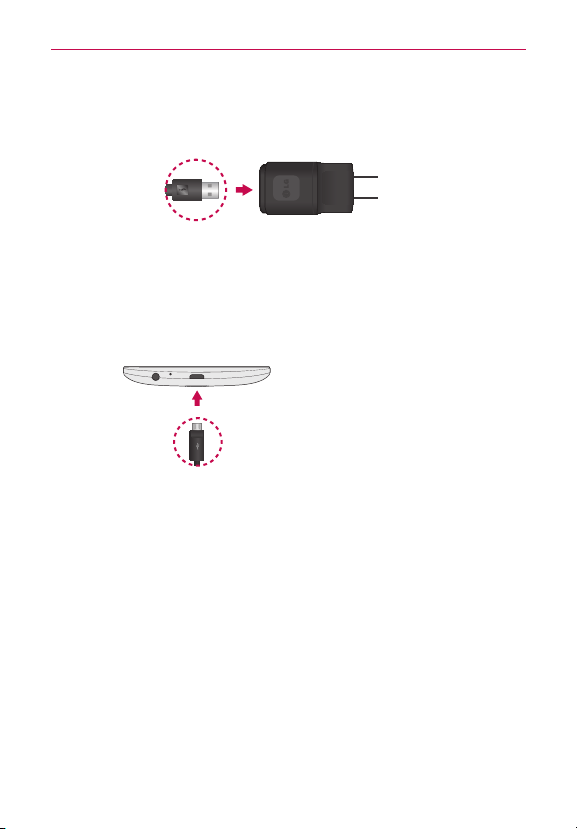
1. CorrectlyorienttheUSBCablewiththeChargerAdapter,andconnect
them.Asshownbelow,boththeUSBlogoontheUSBCableandtheLG
logoontheadapterwillfacetowardyou.
USBCable ChargerAdapter
2. TheUSB/ChargerPortislocatedatthebottomofthephone.Correctly
orientthecable'splugwiththeportbeforepluggingitin.Asshown
below,theUSBlogoonthecablewillfaceupward.
3. PlugtheChargerAdapterintoanelectricaloutlettobegincharging.
Charging with the USB Cable
NOTE
Makesuretocorrectlyorientthecable's
plugwiththeportbeforepluggingitin.
Whenthephoneisfacingupward,theUSB
logoonthecablewillalsofaceupward.
USBCable
You canuseyourcomputertochargeyourphone.Tobeabletochargewith
theUSBCable,youneedtohavethenecessaryUSBdriversinstalledon
yourPCrst.ConnectoneendoftheUSBCabletotheUSB/ChargerPort
onyourphone(asshownabove)andconnecttheotherendtoaUSBport
onyourPC.It’sbesttousetherearUSBportwhenconnectingtoadesktop
PC.TheUSBhubshouldbepoweredbyanexternalpowersource.
NOTE You mayexperienceaslowerchargingratewhenchargingfromyourcomputer.

16
Getting to know your phone
Turning the Phone On and Off
Turning the phone on
#
PressandholdthePower/Lock Button
onthebackofthephonefora
coupleofsecondsuntilthescreenturnson.
Turning the phone off
1. PressandholdthePower/Lock Button onthebackofthephoneuntil
thePhoneoptionsmenuappears.
2. TapPower offinthePhoneoptionsmenu.
3. TapOKtoconrmthatyouwanttoturnoffthephone.
Turning the screen on using the Knock Code feature
IfyourLockscreenunlocksequenceissettoaKnockCode,tapyour
KnockCodeonthedarkenedscreentoautomaticallyturnthescreenon
andunlockitatthesametime.
TIP Whenthescreenisintime-outandaKnockCodeisset,pressingthePower/Lock
Button
(onthebackofthephone)displaystheLockscreen(e.g.,tocheckthetime).
You cantapyourKnockCodetounlockthescreenorturnthescreenbackoffby
pressingthePower/Lock Button
again(ordouble-taptheStatusBar).
NOTES
•IfyouenterincorrectKnockCode5timesconsecutively,youwillberequiredtoenter
thebackupPINyouhaveset.
•Useangertipinsteadofangernailtotapthescreentoturnthescreenon.
•IfKnockCodeisn'tyourunlocksequence,theKnockCodefeatureisn'tactivated,and
youcanusetheKnockONfeaturebydouble-tappingthescreen.
Setting up the Knock Code feature
1. FromtheHomescreen,touchandholdtheRecent Apps Key (inthe
TouchKeysbar)>Lock screen settings.
2. TapSelect screen lock >Knock Code.
3. Tapthesquaresinapattern(from3to8taps)tosetyourKnockCode,
thentapContinue,enteritagain,thenConfirm.

17
Getting to know your phone
Turning the screen on using the KnockON feature
TheKnockONfeatureallowsyoutoturnthescreenonoroffeasilyby
doubletappingthescreen.
#
Quicklydouble-tapthecenterofthescreentoturnthescreenon.
#
Quicklydouble-taptheStatusBar,anemptyareaontheHomescreen,
ortheLockscreentoturnthescreenoff.
NOTES •Whenturningthescreenon(usingtheKnockONfeatureoryourKnockCode),avoid
coveringtheproximitysensor.Doingsowillnotallowyoutoturnthescreenon.
•WhileKnockCodeisinuse,double-tappingthescreenwhileit'soffwillturniton
anddisplaytheKnockCodegridtoallowyoutoenteryourKnockCode.
To unlock the phone
Ifyoudon’tusethephoneforawhile,thescreenandbacklightwillturnoff
toconservebatterypower.Tounlockthephone’sdefaultLockscreen:
1.Turnthescreenon.
#
PressthePower/Lock Button
(onthebackofthephone).The
defaultLockscreenwillappear.
NOTE Avoidcoveringtheproximitysensorwhenturningthescreenon.Doingsoimmediately
turnsthescreenoff.
OR
#
Quicklydouble-tapthecenterofthescreen(KnockON).
NOTE IfyousetupaKnockCodeintheScreenlocksetting,youcantapyoursequencetoturn
thescreenonandunlockthescreenatthesametime.
2.Fromthecenterofthescreen,swipeinanydirectiontounlockit.
#
Touseashortcut,swipetheshortcuticon(atthebottomofthe
screen)inanydirection.Thescreenwillunlockandlaunchtheapp.
NOTE ThedefaultLockscreensimplylocksthescreentopreventunintentionalactions.For
moresecuritytoguardagainstunauthorizeduse,youcansetanunlockrequirement
(suchasaknockcode,pattern,PIN,password,orfacerecognition)thatwillneedtobe
enteredtounlockit.
18
Getting to know your phone
Phone’s Status Icons
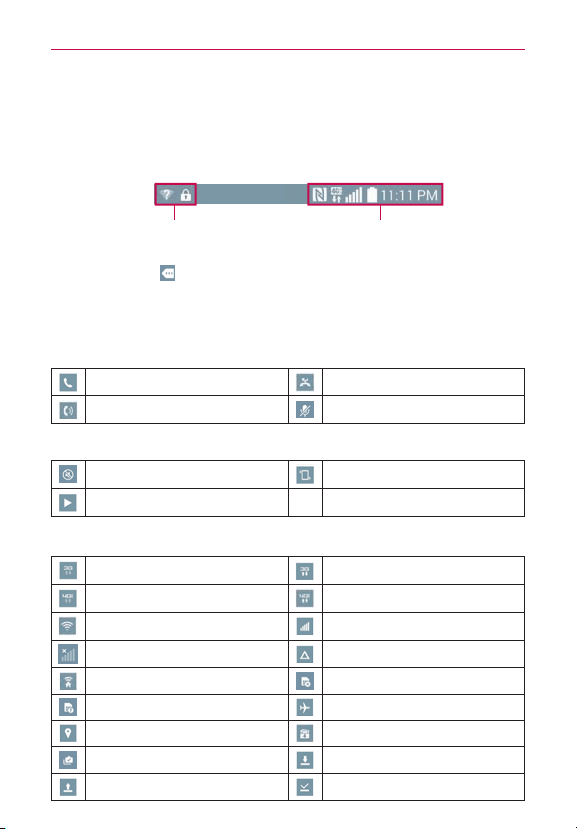
TheStatusBarappearsatthetopofeveryscreen.Itdisplaysicons
indicatingthatyou’vereceivednotications(ontheleft)andiconsindicating
thephone’sstatus(ontheright),alongwiththecurrenttime.
Noticationicons Statusicons
IfyouhavemorenoticationsthancantintheStatusBar,theMore
noticationsicon
isdisplayedasanindicatortoopentheNotications
paneltoviewthemall.
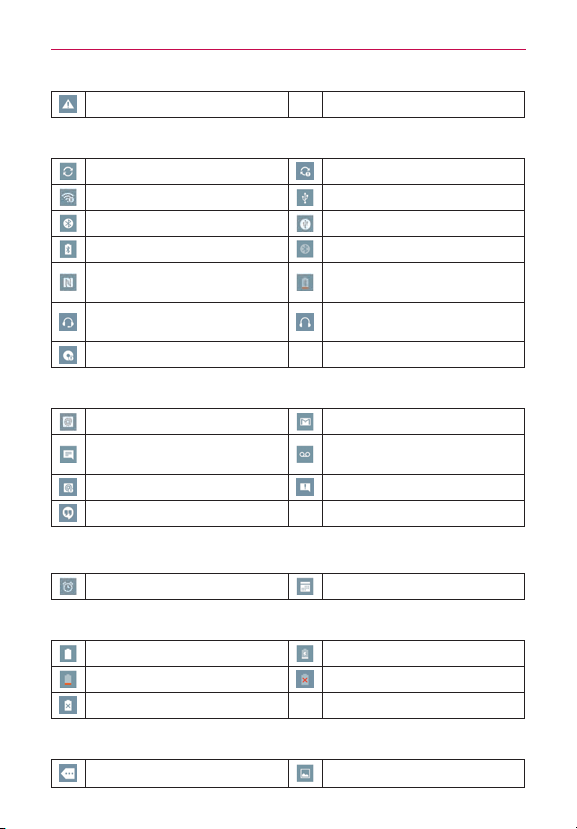
ThefollowingiconsmayappearintheStatusBar.
Call icons
Incall Missedcall
Speakerphoneison Microphoneismuted
Sound icons
Silentmodeisactivated Vibratemodeisactivated
Musicisplaying
Network icons
3Gconnection 3Ginuse
4GLTEconnection 4GLTEinuse
Wi-Ficonnection Signalstrength
Nosignal Roaming
NetworkExtender NoSIMcard
UnknownSIMcard Airplanemodeisactivated
GPSison Appupdateavailable
Appupdatesuccessful Downloading
Uploading Downloadsuccessful
19
Getting to know your phone
EmergencyAlert
Connectivity icons
Syncing Problemwithsign-inorsync
MobileHotspotison USBconnected
Bluetoothconnection MobileBroadbandconnection
Bluetoothheadsetfullbattery Bluetoothison
NFCison
Bluetoothheadsetlow
battery
Headsetwithmicrophoneis
connected
Headsetisconnected
Internalstorageisfull
Email and Messaging icons
Newemail NewGmailmessage
Newtextormultimedia
message
Newvoicemail
Emailnotsent Messagenotsent
NewHangoutsmessage
Calendar and Alarm icons
Alarmisset Upcomingevent
Battery icons
Fullbattery Chargingbattery
Lowbattery Emptybattery
NotCharging
Other icons
Morenoticationsavailable Screenshotcaptured
20
Your Home screen
Getting to Know the Home Screen
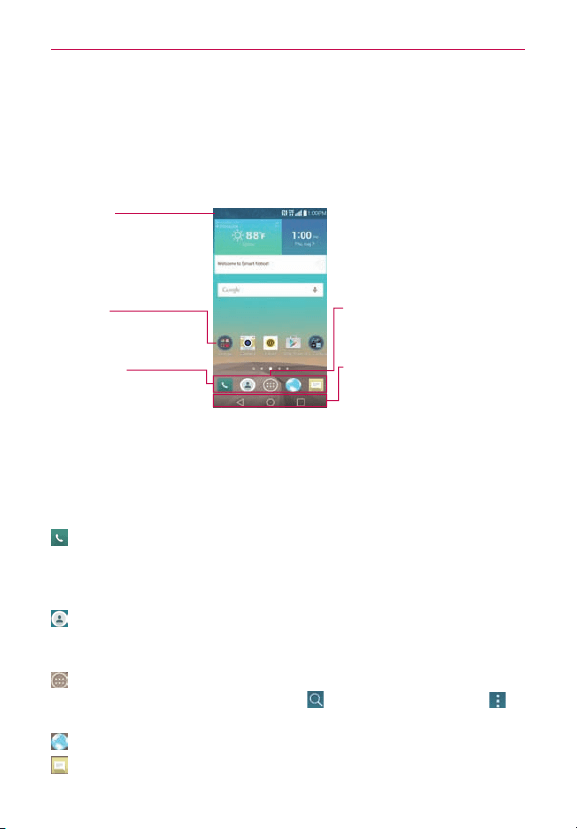
TheHomescreenisyourstartingpointtoaccessallofthefeaturesonyour
phoneusingsimplemotionsonthetouchscreen.It’scomprisedofmultiple
panels(swipehorizontallytoswitch).You cancustomizeallofyourHome
screenpanelswithappshortcuts,icons,widgets,andotherfeatures.
Status Bar
Showsdevicestatus
information,includingthe
time,signalstrength,battery
status,andnoticationicons.
App Icon
Tap anicon(app,widget,
folder,etc.)toopenanduse
it.
QuickTap Bar
Iconsthatprovideeasy,
one-touchaccesstothe
functionsusedmostoften.
Apps Screen Icon
Tap heretoopentheApplications
screentoviewallofyourinstalled
apps.
Touch Keys
Displayedonallscreens,thesekeys
allowyoutoeasilynavigatewithin
thedevicesoftware.
QuickTap bar icons
TheQuickTapbarislocatedonallofyourHomescreenpanels(atthe
bottomofthescreeninportraitview)toallowquickandeasynavigationto
theappsyouusemostoften.Thefollowingveiconsareincludedinthe
QuickTapbar.
:OpensthePhoneappwhichdisplaysthedialpadsoyoucandiala
numbernotstoredinyourphone’smemory.Italsoprovidesadditional
tabsatthetopofthescreentoaccessyourCalllogs,Contacts,
Favorites,andGroups.
:OpenstheContactsappwhichdisplaysthenamesandnumbersstoredin
yourphone'smemory.Italsoprovidesadditionaltabsatthetopofthe
screentoaccessthedialpad,yourCalllogs,Favorites,andGroups.
:OpenstheApps screenwhichdisplaysphoneoptionsandapps.Italso
providesaWidgettab,aSearchicon
,andaMenuoptionsicon at
thetopofthescreen.
:OpenstheBrowserapptoaccessthewebbrowser.
:OpenstheMessagingappsoyoucansendandviewtextand
multimediamessages.

21
Your Home screen
Touch Keys
TheTouchKeysaredisplayedinabaratthebottomofallofthescreensto
provideeasynavigationwithinthedevicesoftware.
NOTE TheTouchKeysaredisplayedalongtherightsideofthescreenwhenthephoneisheld
horizontally.Ifyoudon'tseethekeys,dragupwardfromthebottomofthescreento
redisplaythem.
Back Key:Taptobackuponestepatatimeandcloseon-screenitems
suchaspop-upmessages,theon-screenkeyboard,etc.Touchandhold
theBackKeytoactivateDualwindowmodewhichallowsyoutoopen
twoappsatthesametime.
Home Key:TaptoimmediatelyreturntotheHomescreen.Touchand
holdtoaccessGoogleNow.
Recent Apps Key:Taptodisplaytheappsyourecentlyused.Touchand
holdtoaccessavailableoptionsforthecurrentscreenorapp.
Touchscreen
Yourtouchscreenprovidesanexcellentwaytointeractwithanduseyour
Android™phone.Withthetouchofyournger,youcandownloadanduse
availableapps,makemenuselections,andaccessdatasavedtoyour
phone.
Thefollowingtermsareusedfordescribingthedifferentavailableactions
usingthetouchscreen:
Touch or tapAsinglengertouchselectsitems.Forexample,tapan
icon(e.g.,anapp,widget,orfolder),tapwords(e.g.,menuselectionorto
answeranon-screenquestion),ortouchlettersandnumberstotype.
NOTE Don'tpresstoohardonthetouchscreen.It'ssensitiveenoughtodetectalight,rmtap.
Touch and holdTouchandholdanitemonthescreenbytouchingitand
notliftingyourngeruntilanactionoccurs.Forexample,toopena
Contextmenuforeditingacontact,touchandholdacontactentryuntil
themenupopsup.
DragTouchandholdanitemforamomentandthen,withoutliftingyour
nger,moveyourngeronthescreenuntilyoureachthetargetposition.
Forexample,youcandragitemsontheHomescreentorepositionthem.

22
Your Home screen
Swipe, slide, or flickMoveyourngerquicklyacrossthesurfaceofthe
screen,withoutpausingwhenyoursttouchit(soyoudon’tdraganitem
instead).Forexample,youcanbrowsethroughthedifferentHome
screensbyswipingfromlefttoright(andviceversa),slidethescreenup
ordowntoscrollalist,orremoveanappfromtheRecentappsscreenby
ickingitsgraphicoffthescreen.
Double-tapTapthescreentwicequicklytozoom,highlighttext,orturn
thescreenon/off.Forexample,quicklydouble-tapasectionofaweb
pagetozoomthatsectiontotthewidthofthescreenandcontrolthe
zoominMapsandinotherapps.Double-tapawordtohighlightit.
Double-tapcanalsoactivatetheKnockONfeaturetoturnthetouchscreen
onoroff.
NOTE TheAccessibilitysettingsshortcutsandTouchzoomaccessibilityfeaturesusea
triple-tap.Double-tapalsoactivatesaneweventintheCalendarapp.
Pinch-to-zoomUseyourindexngerandthumbinapinchmotion(to
zoomout)orspreadmotion(tozoomin)whenusingChrome,amap,
photos,therearcameralens,theContactslist,theFavoriteslist,the
Groupslist,theMessaginglist,andamusiclist.Spreadaparttomake
screeninformationlarger(easiertoseeandread),orpinchtogetherto
viewmoreareaandinformation.Thepinchgesturealsochangesthe
Homescreen.PinchinontheHomescreentochangetominipanelview,
thenspreadaparttoreturntothenormalHomescreenview.Spreadapart
onthenormalHomescreentohideallofyourHomescreenitems,then
pinchintoredisplaythem.
Rotate the screenFrommanyappsandmenus,theorientationofthe
screenadjuststothephone’sphysicalorientationbyrotatingthescreen.
You candeactivatethisfunctionintheDisplaysettingsmenu.
Capturing the screenPressandholdtheVolume Down Button
andthe
Power/Lock Button
onthebackofthephoneatthesametimeto
capturethecurrentimageonthescreen.Thecapturedimageissavedin
theScreenshotsfolderoftheGallery.
NOTE You cannotcaptureanimagefromsomevideosandapps.

23
Your Home screen
The Smart screen feature
TheSmartscreenfeaturekeepsthephonefromactivatingscreentime-out
whenitdetectsyoureyeslookingatthescreen.Whenyouturnthisfeature
on,youcansetashorterscreentime-outtoconserveyourbatterypower,
butstillallowyoutoviewascreenforalongerperiodoftimewithout
havingtotouchittokeepitactivated.
Toturnthisfeatureon,fromtheHomescreen,touchandholdtheRecent
Apps Key
(intheTouchKeysbar)>System settings>Displaytab >
checkmarktheSmart screencheckbox.
NOTES Thefollowingsituationsmaypreventthesefeaturesfromfunctioningproperly:
•Whenthephoneisinthedarkoragainstbrightlight.
•Whenthecameralenscan’tdetectthelocationofyoureyes.
•Whenthefrontcameraisusedatthesametimewithotherapps.
Hardware button control mode
Ifyourphonedisplayisdamagedorbroken,youcanansweranincoming
call,orturnoffanalarmusingthehardwarebuttonsonthebackofthe
phone.
#
Answer a call:PressbothVolume Buttonsatthesametime.
#
Stop an alarm:Whenanalarmrings,pressandholdeitherofthe
Volume Buttons tostopthealarm.PresseitherVolume Buttononceto
snoozethealarm.
To activate Hardware key control mode
1. Turnyourphoneoff.
2. PressandholdthePower/Lock Button
andbothoftheVolume
Buttons (onthebackofthephone)atthesametimeformorethan6
secondstoenterHardwarekeycontrolmode.
3. PresstheVolume Buttons
toscrolltoMode ON,Mode OFF,or
Cancel,thenpressthePower/Lock Button toconrm.
NOTE Ifyouuseyourphonewithabrokendisplayglass,yourphonemayincuradditional
damageorcauseinjury.MakesuretovisitanLGauthorizedservicecentertogetyour
phonerepaired.

24
Your Home screen
Working with Menus
Options menus
Optionsmenuscontaintoolsthatapplytotheactivitiesofthecurrent
screenorapp,nottoanyspecicitemonthescreen.Toopentheavailable
Optionsmenu,taptheMenu icon
(attheupper-rightcornerofthe
screen).ToopentheOptionsmenuontheHomescreen,touchandhold
theRecent Apps Key(intheTouchKeysbaratthebottomofthescreen).
Context menus
Contextmenuscontainoptionsthatapplytoaspecicitemonthescreen.
ToopenaContextmenu,touchandholdanitemonthescreen.Notall
itemshaveContextmenus.Ifyoutouchandholdanitemthathasno
Contextmenu,nothingwillhappen.
Managing Notifications
Noticationiconsreportthearrivalofnewmessages,calendarevents,
alarms,aswellasongoingevents,suchaswhenyou’reinacall.
Whenyoureceiveanotication,thenoticationiconwillbedisplayedinthe
StatusBar.You canopentheNoticationspaneltoviewalistofallofyour
recentnotications.Dependingonyoursettings,youmayheara
noticationsound,and/orseeanoticationlight(attheupper-leftcornerof
thephone),and/orthephonemayvibrate.
To open the Notifications panel
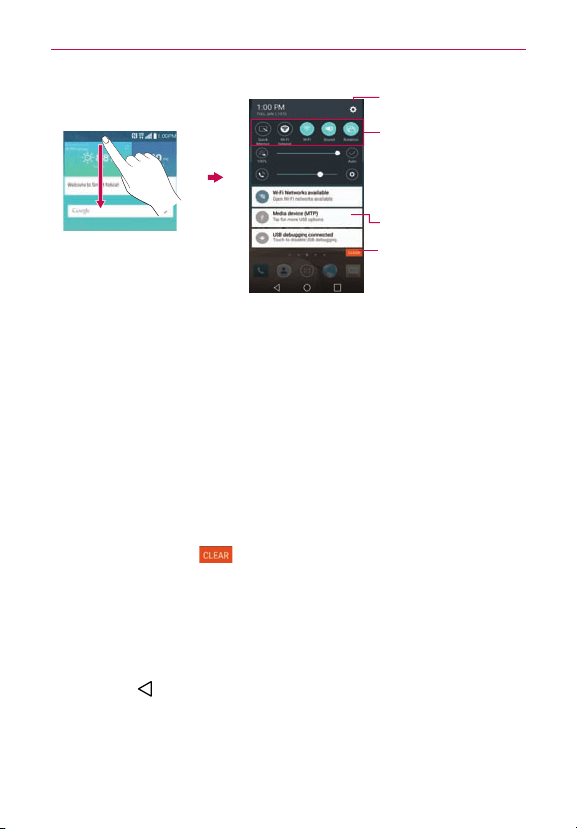
TouchanddragtheStatusBartothebottomofthescreen.
TheNoticationspaneldisplaysalistofyourcurrentnotications,organized
intoongoingandevent-basednotications.ItalsoincludesaQuickSettings
iconbar(atthetopofthepanel)toallowyoutoquicklyandeasilychange
commonlyusedsettings.
NOTE You canalsoaccessthecompleteSettingsmenufromthispanelbytappingtheSettings
icon
(attheupper-rightcornerofthescreen).
25
Your Home screen
Tap anoticationtoopenit.
Quick Settings Bar
Flickrightorlefttoscroll
throughthelistandtapan
icontochangeitssetting.
Settings menu icon
Clear Button
Tap heretoclearyourlistof
event-basednotications.
To respond to a notification
1.OpentheNoticationspanel.Yourcurrentnoticationsarelistedinthe
panel,eachwithabriefdescription.
2.Tapanoticationtoviewit.
TheNoticationspanelwillcloseandtheappthatcorrespondstoyour
selectionwillopen.Forexample,newvoicemailnoticationsdialyour
voicemailboxandGmailnoticationsopentheGmailappsoyoucan
readyournewmessages.
To clear all notifications
1.OpentheNoticationspanel.
2.TaptheClearbutton
(ontherightsideofthescreen).
Allevent-basednoticationswillbecleared;ongoingnoticationswill
remaininthelist.
To close the Notifications panel
Touchanddragthehandle atthebottomoftheNoticationspaneltothe
topofthescreen,icktheNoticationspanelhandleupward,orjusttap
theBack Key
(intheTouchKeysbar).
Thepanelwillalsoclosewhenyoutouchanotication.
NOTE WhenyouopentheNoticationspanelfromtheLockscreen,theTouchKeysbarisnot
displayedatthebottomofthescreen.Dragorickthehandleupwardtocloseit.

26
Your Home screen
Setting your Lock screen
ThereareseveralLockscreentypesallowingyoutolockyourphoneso
thatonlyyoucanunlockittomakecalls,accessyourdata,buyapps,and
preventunauthorizeduse.
Setting a Screen Lock for the First Time
1. FromtheHomescreen,touchandholdtheRecent Apps Key (inthe
TouchKeysbar)>Lock screen settings.
2.TapSelect screen lock.
3.TapNone,Swipe,Knock Code,Pattern,PIN,orPassword.
None:NoLockscreenisenabledsothescreenwillneverbelocked
fromuse.
Swipe:Aswipemotioninanydirectiononthetouchscreenwillunlock
thescreen.ThisisthedefaultLockscreenthatsimplyguardsagainst
unintentionalactions.
Knock Code:Unlocksthescreenbytappingasequenceonthescreen's
2x2grid.(The2x2gridthatyouusedwhilesettingupaKnockCode
won'tbedisplayedbydefault.However,thegridwillbedisplayedifyou
havefailedtoenterincorrectknockcodes5timesconsecutively.)The
rsttimeyousetaKnockcode,you'llseeatutorialwithinstructionson
howtocreateit.Tapasequenceonthe2x2grid(from3to8taps),then
tapContinue.Tap yoursequenceagainandtapConfirm.
NOTE You'repromptedtocreateaBackupPINasasafetymeasureincaseyouforgetyour
Knockcodeunlocksequence.
Pattern:Unlocksthescreenusingapatternyoudrawwithyournger.
Thersttimeyousetanunlockpattern,you'llseeatutorialwith
instructionsonhowtocreateit.Readthetutorial,thentapNext.Draw
yourpattern(connectatleast4dots)andtap Next.Thenredrawyour
patternandtap Next.
NOTE You'repromptedtocreateaBackupPINasasafetymeasureincaseyouforgetyour
unlockpatternsequence.
PIN Unlocksthescreenwithanumbersequence.EnteraPIN(atleast4
digits)andtapContinue.ReenteryourPINandtapOKtoconrmit.

27
Your Home screen
Password Unlocksthescreenwithanalphanumericsequence.Entera
password(atleast4characters)andtapNext.Re-enteryourpassword
andtapOKtoconrmit.
Fromthenon,anytimeyouwanttounlockthescreen,you'llneedto
performtheunlockactionyouset(swipe,facerecognition,knockcode,
pattern,knockcode,PIN,orpassword)togainaccesstoit.
Factory Data Reset
When you can’t recall your Unlock Pattern, PIN, or Password:
IfyouloggedintoaGoogleaccountonthephoneandfailedtousethe
correctpattern5times,tapForgot pattern?You willberequiredtosignin
withyourGoogleaccountandpromptedtocreateanewunlockpattern.
IfyouhavesetabackupPIN,youcanunlockthescreenwithkeyinginthe
backupPIN.
Ifyouhaven’tcreatedaGoogleaccountonthephoneandyouforgotyour
PIN,Password,andthebackupPIN,youneedtoperformahardreset.
CAUTION Ifyouperformahardreset,alluserapplicationsanduserdatawillbedeleted.Please
remembertobackupanyimportantdatabeforeperformingahardreset.
ReadALLstepsbeforeattempting.
1. Turnthephoneoff.
2. Pressandholdthefollowingkeysatthesametime:Volume Down
Button
+Power/Lock Button onthebackofthephone.
3. ReleasethePower/Lock Button
onlywhentheLGlogoisdisplayed,
thenimmediatelypressandholdthePower/Lock Button again.
4. ReleaseallkeyswhentheFactorydataresetisdisplayed.
5. PresstheVolume Buttons
tohighlightYes ingray,thenpressthe
Power/Lock Button tocontinue.
6. PresstheVolume Buttons
tohighlightYes ingray,thenpressthe
Power/Lock Button oncemoretoconrm.
7. Yourdevicewillperformafactoryreset.

28
Your Home screen
Guest mode
UseGuestmodewhenyouletsomeoneelseuseyourphone.They’llonly
beabletousetheappsthatyou’veselected.Onceyousetitup,youcan
easilyputyourphoneinGuestmodebyaccessingtheLockscreenand
drawingtheguestpatternthatyouset,whichisdifferentfromyournormal
unlockpattern.ItalsosupportsKnockCode,PIN,andPassword.
NOTE Guestscanalsouseappsthatyourselectedappsarelinkedto.
Setting up Guest mode
1. FromtheHomescreen,touchandholdtheRecent Apps Key (inthe
TouchKeysbar)>System settings>Generaltab>Guest mode.
2. TapLock screen type,thensetthepatternyouwanttousetoputyour
deviceinGuestmode.
#
IfyourLockscreenisn’tsettoanunlocksequence,you’llbe
promptedtoenteranunlocksequenceforyourselfbeforeyou’re
promptedtoenteranunlocksequenceforyourGuestmode.
3. TapAllowed apptoviewwhichappscanbeaccessedinGuestmode.
#
CheckmarktheappsthatyouwanttoallowtobeaccessedinGuest
mode.
#
RemovecheckmarksfromtheappstohideinGuestmode.
#
Tap theBack Key
(intheTouchKeysbar)whenallofthe
checkboxesaresetasyouwant.
4. TaptheGuest modeswitch
(intheupper-rightcornerofthescreen)
toturniton(oroff).
Using Guest mode
Afteryou’vesetupandenabledGuestmode,lockthescreen,thenaccess
theLockscreen(pressthePower/Lock Button
onthebackofthephone
orusetheKnockONfeature).EnteryourGuestmodescreenlock.The
GuestmodeHomescreenisdisplayedwithonlytheappsyou’veselected
forguestaccess.ToexitGuestmode,simplyaccesstheLockscreenagain
andenteryournormalunlockscreenlock.

29
Google account setup
Your Google Account
You mustsignintoaGoogleAccounttouseGmail,Hangouts,Google
Calendar,andotherGoogleapps;todownloadappsfromPlayStore;to
backupyoursettingstoGoogleservers;andtotakeadvantageofother
Googleservicesonyourphone.
IMPORTANT
• Ifyoudon’tsignintoaGoogleAccountduringsetup,you'repromptedtosigninorto
createaGoogleAccountthersttimeyoustartanappthatrequiresone,suchasGmail
orPlayStore.
• When you sign in, you’re prompted toenter your username andpassword using the
on-screenkeyboard.
• Afteryousignin,yourcontacts,Gmailmessages,Calendarevents,andotherinformation
fromtheseappsandservicesonthewebaresynchronizedwithyourphone.
• Ifyouhaveanenterpriseaccountthroughyourcompanyorotherorganization,yourIT
departmentmayhavespecialinstructionsonhowtosignintothataccount.
30
Connecting to Networks and Devices
Connecting to Mobile Networks
Whenyoubuyyourphoneandsignupforservice,yourphoneiscongured
touseyourprovider’smobilenetworksforvoicecallsandfortransmitting
data.
Differentlocationsmayhavedifferentmobilenetworksavailable.
Initially,yourphoneisconguredtousethefastestmobilenetwork
availablefordata.Youcanalsocongureyourphonetoaccessadifferent
setofnetworksentirely,ortobehaveinspecicwayswhenroaming.
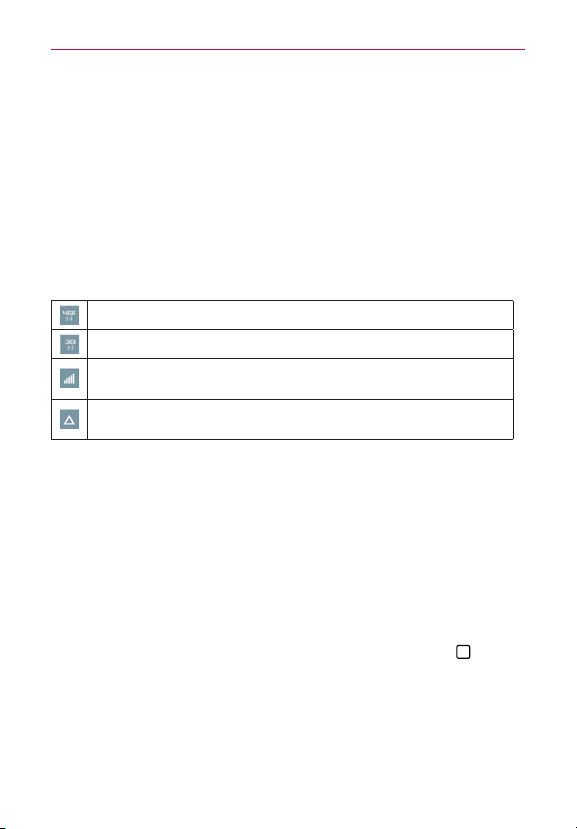
ThefollowingiconsintheStatusBarindicatewhichkindofdatanetwork
you’reconnectedtoandthenetworksignalstrength.
Connectedtothe4Gnetwork(LTE).
ConnectedtotheEVDOnetwork(EVDOrevA).
Signalstrength-themorebarsthatarelit,thestrongerthe
wirelesssignal.
Connectedtoanotherwirelessserviceprovider’snetwork
(roaming).
Whenconnectedtoslowernetworks,youmaywanttopostponeusing
yourphonefordata-intensivetasksuntilyou’reconnectedtoafaster
networkagainorndaWi-Finetworktoconnectto.
To disable data when roaming
You canpreventyourphonefromtransmittingdataoverothercarriers’
mobilenetworkswhenyouleaveanareathat’scoveredbyyourcarrier’s
networks.You canstilltransmitdatawithaWi-FiconnectionwhenGlobal
dataroamingaccessisrestricted.Thisisusefulforcontrollingexpensesif
yourcellplandoesn’tincludedataroaming.
1. FromtheHomescreen,touchandholdtheRecent Apps Key
(inthe
TouchKeysbar)>System settings>Networkstab>Tethering &
networks >Mobile networks.
2. TaptheData roamingcheckboxtoremovethecheckmarkanddisable
dataserviceswhileroaming.

31
Connecting to Networks and Devices
Connecting to Wi-Fi Networks
Wi-FiisawirelessnetworkingtechnologythatcanprovideInternetaccess
atdistancesofupto100meters,dependingontheWi-Firouterandyour
surroundings.
TouseWi-Fionyourphone,youmustconnecttoawirelessaccesspoint.
Someaccesspointsareopenandyoucansimplyconnecttothem.Others
arehiddenorimplementothersecurityfeatures,soyoumustcongure
yourphonesoitcanconnecttothem.
TurnoffWi-Fiwhenyou’renotusingit,toextendthelifeofyourbattery.
WhenyouconnecttoaWi-Finetwork,thephoneobtainsanetwork
addressandotherinformationitneedsfromthenetwork,usingtheDHCP
protocol.TocongurethephonewithastaticIPaddressandother
advancedsettings,fromtheWi-Fisettingsscreen,touchandholdthe
connectednetwork.TapModify network intheContextmenuthatappears,
thencheckmarkthe Show advanced optionscheckbox.
To turn Wi-Fi on and connect to a Wi-Fi network
1. FromtheHomescreen,touchandholdtheRecent Apps Key (inthe
TouchKeysbar)>System settings>Networkstab>Wi-Fi.
IftheWi-Fiswitch
isoff(grayicon),tapit toturnonWi-Fi(On
turnsblue),yourphonescansforavailableWi-Finetworks.
2. Tapanetwork,thentapConnecttoconnecttoit.
#
Ifthenetworkisopen,youcanconnecttothenetworkdirectlyby
tappingthenetworkname.
#
Ifthenetworkissecured,you’llbepromptedtoenterapassword
(Askyournetworkadministratorfordetails).
#
Whenyou’reconnectedtoanetwork,youcantapthenetworkname
intheWi-Fisettingsscreenfordetailsaboutthespeed,security,and
relatedsettings.

32
Connecting to Networks and Devices
USB Connection
USBconnectionisafeaturethatallowsyourphonetoconnecttoaPC
usingaUSBCable.
Using the Status Bar to change the connection mode setting
TheStatusBardisplaystheUSBconnectionicon,whenconnectedvia
USB.
WhenconnectedviaUSB,thecurrentUSBconnectionmodealsoappears
ontheNoticationspanel.Taptheconnectionsettingtodisplayascreen
whereyoucanchangetheUSBconnectionmode.
1. ConnectthephonetoyourPCviaaUSBcable.
2. OpentheNoticationsPanelandtapthecurrentUSBconnectiontype.
ThentapMedia device (MTP) or Send images (PTP)toconnecttothe
PC.
#
Tap Charge phonetouseonlythechargingfunctionandnottheUSB
function.Italsoallowsyoutosafelydisconnectyourphonefromyour
PC.
NOTE TheMTPdrivermaynotbeinstalledonyourPCbydefault.Thedriverisdependenton
thePC'sversionsofWindows
®
andWindowsMediaPlayer(WMP).
SmartShare
You canusetheSmartSharefunctiontoconvenientlyviewphotosandplay
videos(theGalleryapp)andlistentomusic(theMusicapp).
To enjoy SmartShare
You canstreammultimediacontentonyourphonetoanotherdeviceand
alsosendlestoit.
#
Play:You canstreamyourcontentviaTV,Bluetoothspeaker,etc.
#
Beam:You cansendyourcontenttoBluetoothdevicesorSmartShare
Beam-supportedLGphones.
NOTE SmartSharerequiresbothWi-FiandBluetoothnetworks,sowhenyouaccess
SmartShare,they'llturnonautomatically.

33
Connecting to Networks and Devices
1. AccesstheappthathasthecontentyouwanttousewithSmartShare,
thentaptheSmartShareicon
,ortheMenu icon (attheupper-right
cornerofthescreen)>SmartShare.
2. TapPlayorBeam.
3. SelecttheDLNAconnecteddeviceyouwanttouse.TapRescantond
thedevice.
To enjoy content from nearby devices on your phone
You canplaycontentsavedtonearbydevicesonyourphone.Yournearby
devicesmustbesupportedbytheDLNAfunction.
To set nearby devices
1. Ensurethatyourphoneandthenearbydevicesareconnectedtothe
sameWi-Finetwork.
2. SettheDLNAdevicetoenablesharing.

34
Calls
Placing and Ending Calls
ThePhoneappallowsyoutodialphonenumbersmanuallyormakecalls
fromyourphone’smemory.ManuallydialcallsusingtheDial tab.Dialfrom
yourphone’smemoryusingtheCall logstab,theContactstab,the
Favoritestab,ortheGroupstab.
To open the Phone app
#
FromtheHomescreen,tapthePhone icon
(intheQuickTapbar).
Phone app tabs
ThePhoneapptabs(Dial,Call logs,Contacts,Favorites,andGroups)are
atthetopofthescreen.
Moving between the Phone app tabs
TapanyofthePhoneapptabs(Dial,Call logs,Contacts,Favorites,and
Groups)atthetopofthescreentoviewthattab.You canalsoick
horizontallyonthescreentoscrolltotheothertabs.Thecurrenttabis
displayedinwhite.
Modifying the Phone app tabs
You canrearrangetheorderofthePhoneapptabsand/ordeletethe
FavoritesandGroupstabs.
1. FromtheHomescreen,tapthePhone icon
(intheQuickTapbar).
2. TaptheMenu icon
(attheupper-rightcornerofthescreen),thentap
Edit tabs.
#
Dragatabhandle
tomoveittothepositionwhereyouwantitin
thelist.
#
Tap theFavoritesorGroups checkbox(checkmarkdisplaysthetab,
nocheckmarkdeletesitfromthePhoneapptabsbar).
3. Whenyou'renishedmakingchanges,tapSave(atthebottomofthe
screen).
35
Calls
To place a call by dialing
1. FromtheHomescreen,tapthePhone icon (intheQuickTapbar)to
opentheDialtabofthePhoneapp.
2. Usethedialpadtoenterthenumberyouwanttocall.
#
Ifyouenterawrongnumber,taptheDelete Key
toerasedigits
onebyone.
#
Toerasetheentirenumber,touchandholdtheDelete Key
.
#
Todialaninternationalnumber,touchandhold toentertheplus(+)
symbol.Thenentertheinternationalprexforthecountry,followedbythe
fullphonenumber.
3.TaptheCall Key (onthedialpad)todialthenumberthatyouentered.
#
PresstheVolume Buttons(onthebackofthephone)toadjustthe
callvolume.
#
Usetheon-screenbuttonstoenteradditionalnumbers,placethecall
onholdtotakeanotherincomingcall,addanothercall,usethe
speakerphone,endthecall,andotheroptions.
#
Yo u canuseotherphonefeatureswhilethecallisunderway.Ifyou
openanotherapp,theCallicon
appearsintheStatusBarforthe
durationofthecall.
NOTE Ifyouopenedotherappswhileonacall,you'llneedtoreturntotheCallscreentoend
thecall.ToreturntotheCallscreen,youcantaptheHome Key
(intheTouchKeys
bar),thentapthePhone icon
(intheQuickTapbar),ortapthecalltimer(atthe
upper-leftcorneroftheHomescreen).You canalsodragtheStatusBardownandtap
theCallnoticationontheNoticationspanel.
To end a call
#
SimplytaptheEndbutton
ontheCallscreentoendthecall.
Ifyouaccessedotherdevicefunctionswhilethecallwasinprogress,there
areseveralwaystoreturntotheCallscreentoendthecall.
#
Tap theHome Key
(intheTouchKeysbar),tapthePhone icon (in
theQuickTapbar),thentaptheEndbutton ontheCallscreen.

36
Calls
#
Tap theHome Key
(intheTouchKeysbar),taptheCallicon (atthe
upper-leftcorneroftheHomescreen),thentaptheEndbutton on
theCallscreen.
#
DragtheStatusBardownandtapEND CALL.
NOTE You canalsopressthePower/Lock Button (onthebackofthephone)toendthecall,
ifyouactivatedthisfeatureintheCallsettingsmenu.
Calling numbers in your phone’s memory
You canplacecallsusinginformationstoredinyourphone.Anywhereyou
seeaCallicon
nexttoanumber,tapittoautomaticallydialit.
Speed dialing
IfyousetupSpeeddialsintheContactsapp,youcandialanumberby
simplytouchingandholdingtheSpeeddialnumberonthedialpad.
#
FromtheHomescreen,tapthePhoneicon
(intheQuickTapbar),
thentouchandholdtheSpeeddialnumber.
Direct dialing
ADirectdialwidgetislikeaspeeddialbuttononyourHomescreen.Tapit
toautomaticallycallthenumberyouset(forexample,yourhomephone
number).
To place a Direct dial widget on your Home screen
1. TouchandholdanemptyareaonyourHomescreen.
2. TaptheWidgetstab(atthebottomofthescreen)>Direct dial.
3. TapthecontactinyourContactslist.
TIP YoucanchangethelookofeachDirectdialwidgetforeasyidentication.Touch,hold,
andreleasetheDirectDialwidget,thentapit.Selectathemeiconoraphotoicon,then
tapOK.
Answering or Rejecting Calls
Whenyoureceiveaphonecall,theIncomingcallscreenopenswiththe
callerIDandanyadditionalinformationaboutthecallerthatyou’vesavedin
theContactslist.AllincomingcallsarerecordedintheCalllogstab.

37
Calls
To answer a call
#
SimplyswipetheAnswer icon
inanydirectiontoanswerthecall.
#
Ifyouwerealreadyonacall,swipetheAnswer icon
inany
directions,whichplacestherstcallonholdandconnectsthenewcall.
NOTE Tosilencetheincomingcallringer,presseitheroftheVolume Buttons(onthebackof
thephone).
To ignore a call and divert it to voicemail
#
SimplyswipetheDecline icon
inanydirectiontoignorethecall.
#
Thecallerissentdirectlytoyourvoicemailboxtoleaveamessage.
NOTE Tosilencetheringer,presseitheroftheVolume Buttons(onthebackofthephone).
To ignore a call and send a text message
#
Whenyoureceiveanincomingcall,swipetheDecline with message
icon
inanydirection.
#
Tap thetextmessageyouwanttosendinplaceofansweringthecall.
NOTE Thisfeaturecanonlybeusedtosendamessagetoanothermobilephone.It'snot
applicabletoincominglandlinecalls.
Working With the Call Logs Tab
TheCalllogstabrecordsallofthecallsyou’vedialed,received,ormissed.
Itoffersaconvenientwaytoredialanumber,returnacall,oraddanumber
toyourContacts.
To open the Call logs tab
#
FromtheHomescreen,tapthePhone icon
(intheQuickTapbar),
thentaptheCall logstab(atthetopofthescreen).
TheCalllogstablistsyourcallschronologicallybyphonenumber.The
numberinparenthesisindicatesthenumberofcallsrecordedforthat
phonenumber.

38
Calls
Viewing call entry details
OpentheCall logstab,thentapanentrytoviewalloftheentriesforthat
phonenumber.Callsarelistedchronologicallyandeachoneincludesthe
calltype(received
,dialed ,andmissed ),thedate,andthetimeof
thecall.
Filtering your list of calls
Toviewaspeciccalllist,fromtheCall logstab,taptheMenu icon (at
theupper-rightcornerofthescreen),thentapFilter.Tapthecalltypeyou
wanttoview.
TaptheBack Key
(intheTouchKeysbar)toreturntotheCall logstab
screen.
To dial a number in the Call logs tab
#
FromtheCall logstab,taptheCall icon
attherightofthecallentry.
#
FromtheCall logstab,taptheimagetotheleftofthecallentrytoview
allofthecontact'snumberssavedinyourphone’smemory.Tapaphone
numbertodialit.
TIP Yo u caneditaphonenumberintheCall logstabbeforeyouplacethecall(e.g.,toinsert
anareacodewhenyou'retraveling).Touchandholdtheentry,thentapEdit number
before callintheContextmenu.Editthenumberasnecessary,thentaptheCall icon
onthekeypad.
To add a number from the Call logs tab to your Contacts
1. OpentheCall logstab,thentouchandholdthecallentry.
2. TapAdd to ContactsintheContextmenu.
3. TapNew contactorUpdate contactandsaveitasnecessary.
Clearing your Call logs
You candeletetheentirelistofrecentcallsatonceorselectivelydelete
entries.
1. OpentheCall logstab.
2. TaptheMenu icon
(attheupper-rightcornerofthescreen).

39
Calls
#
Tap Deletetoselectentriestoremovefromthelist.Checkmarkthe
entriestodelete,tapDelete,thenYes.
#
Tap Delete alltoremovealloftheentriesfromthelist.TapYes to
conrmyouwanttoClear(atthebottomofthescreen),theentirelist.
NOTE You canalsoselectaspecicnumbertobedeleted.TouchandholdanentryintheCall
logslisttoopenitsContextmenu.Tap Delete all logs of this number,thentapYes to
conrm.
Calling Your Contacts
Insteadofmanuallydialingphonenumbersusingthedialpad,youcanuse
yourContactslisttodialquicklyandeasily.You canalsoquicklycalla
contactusingQuickContactorDirectdialiconsthatyouplacedonyour
Homescreen.
Ifyouhavecontactsontheweb,they’resynchronizedwithyourphone
whenyourstsynchronizewithyourGoogle™Account.
To call a contact
1. FromtheHomescreen,taptheContacts icon (intheQuickTapbar).
2. Tapthecontactyouwanttocall.
3. Tapthecontact’sphonenumberyouwanttocall.
To call a favorite contact
1. FromtheHomescreen,taptheContacts icon (intheQuickTapbar),
thentaptheFavoritestab(atthetopofthescreen).
2. Tapthecontactyouwanttocall.
3. Tapthecontact’sphonenumberyouwanttocall.
Instant List
InstantlistisdisplayedontheDialtabtohelpyouusetheinformation
storedinyourphonewithoutneedingtosearchforitrst.Onceyoubegin
enteringnumbers,InstantlistdisplaysentriesfromyourContactslistor
Recentcallsthatmatchthesequenceyouentered.

40
Calls
Sequence matches
Yourphonesearchesfortheenteredsequenceanywhereinthenumber;
beginning,end,oranywherein-between.Thematchingnumbersequence
isdisplayedwithinthenumberinbluetext.Thenameandtypeofnumber
(i.e.,Mobile,Work,etc.)associatedwiththenumberyouenteredis
displayedabovethedialpad.Whentherearemultiplematches,theInstant
listdisplaysthenumberofmatchesinyourphone'smemory.Tapthe
Instantlisticon
ontherightsideofthescreentoviewtheentirelistof
matchingentries.TapCancel(atthebottomofthelist)toclosethelist.
Selecting an Instant list entry
TapanentryintheInstantlisttoinsertitonthedialpadandtaptheCall Key
(onthedialpad)todialit.
Options During a Call
To mute the microphone
#
Tap theMute button
ontheCallscreen.
Thebuttonisbluewhenthemicrophoneismuted.
WhenviewingtheCallscreen,youcanunmutethemicrophoneby
tappingtheMute button
again.
Themicrophoneisunmutedautomaticallywhenthecallends.
To turn the speakerphone on or off
#
Tap theSpeaker button
ontheCallscreen.
Thebuttonisbluewhenthespeakerphoneison.
WhenviewingtheCallscreen,youcanturnthespeakerphoneoffby
tappingtheSpeaker button
again.
Thespeakerphoneisturnedoffautomaticallywhenthecallends.
WARNING!
Toavoiddamagetoyourhearing,don'tholdthephoneagainstyourearwhenthe
speakerphoneisturnedon.

41
Calls
To switch between a Bluetooth headset and the phone
WhenaBluetoothheadsetispairedandconnectedtoyourphone,youcan
conductcallsontheheadsetforhands-freeconversation.Duringacall,you
canopttousetheBluetoothheadsetorjustthephone.
WhenusingtheBluetoothheadsetduringacall,theOngoingCall
noticationiconisblueintheStatusBar(theiconisgreenwhenusingthe
phone).
#
Tap theBluetooth button
ontheCallscreentoswitchthecallfrom
thephonetotheBluetoothdevice,orviceversa.
Managing Multiple Calls
Contactyourwirelessserviceprovidertondoutwhichcallservicesare
supported.
To switch between current calls
#
Tap theSwap callsbutton
ontheCallscreen.
Thecurrentcallwillbeplacedonholdandyou'llbeconnectedwiththe
othercall.
To set up a conference call
Contactyourwirelessserviceprovidertondoutwhethertheysupport
conferencecallsandhowmanyparticipantsyoucaninclude.
1. Placeacalltotherstparticipant.
2. Whenyou’reconnected,theMenuicon
>Add call.
3. Enteraphonenumberonthedialpad.
#
UsethePhoneapptabs(atthetopofthescreen)toselectasaved
number.
OR
#
Usethekeysonthedialpadtomanuallyenteranumber.
4. TaptheCall Key
(onthedialpad)toplacethecall.

42
Calls
5. Afteryou’reconnected,taptheMerge callsbutton (ontheCall
screen).Theparticipantisaddedtotheconferencecall.
Listening to Your Voicemail
Whenyouhaveanewvoicemailmessage,theVoicemail notificationicon
appearsintheStatusBar.Ifyouhaven’tsetupyourvoicemailnumber,
orifyouneedtochangeit,youcandothatintheCallsettings.
To listen to your Voicemail
#
OpentheNoticationspanelandtapNew voicemail.
OR
#
FromtheHomescreen,tapthe Phone icon
(intheQuickTapbar),
thentapandholdthe
key(onthedialpad).
To set up your Voicemail
Typically,yourcarrier’svoicemailsystemguidesyouthroughtheprocessof
listeningtoandmanagingyourvoicemail.Thersttimeyoucallyour
voicemail,italsoguidesyouthroughtheprocessofrecordinggreetings,
settingapassword,etc.
1. FromtheHomescreen,tapthe Phone icon
(intheQuickTapbar).
2. Tapandholdthe
key (onthedialpad)todialyourvoicemailbox.
3. Followthesetuptutorial.
#
Enterapassword.
#
Recordavoicesignatureandgreetingsforyourvoicemailbox.
Airplane mode
Somelocationsmayrequireyoutoturnoffyourphone’swireless
connectionsbyplacingyourphoneinAirplanemode.
#
PressandholdthePower/Lock Button
(onthebackofthephone),
thentapTurn on Airplane modeinthePhoneOptionsmenuthat
appears.

43
Calls
OR
#
FromtheHomescreen,touchandholdtheRecent Apps Key
(inthe
TouchKeysbar)>System settings>Networkstab>theAirplane
modeswitch(ontherightsideofthescreen).
OR
#
DragtheStatusBardownward,thentapAirplane mode
(intheQuick
settingsbaratthetopofthescreen).
NOTE Eachoftheseaccessmethodstogglesthesettingonandoff.

44
Contacts
Contacts
TheContactsappallowsyoutostorenames,phonenumbers,andother
informationinyourphone’smemory.Entriesarelistedalphabetically.Yo u
canscrollthroughthelist,ortaptheFavoritestaborGroupstab(atthetop
ofthescreen).
UsetheContactsapptoadd,view,andcommunicatewithyourfriends,
acquaintances,andassociates.
To open your Contacts app
#
FromtheHomescreen,tap
theContactsicon
(intheQuickTapbar).
NOTE You canalsotaptheContactstab(atthetopofthescreen)fromthePhoneapp.
Ifyouhaveanewphoneandhaven’taddedanycontactsyet,theContacts
appwilldisplayhintsonhowtostartaddingcontactstoyourphone.
Contacts list
WhenyouopentheContactsapp,yourcontactslistisdisplayed.The
alphabetisdisplayedverticallyalongtherightsideofthescreenwithablue
barthatindicateswhereyouareinthelist.
Adding Contacts
You canaddcontactsonyourphoneandsynchronizethemwiththe
contactsinyourGoogle™Account,MicrosoftExchangeaccount,orother
accountsthatsupportsyncingcontacts.
Sinceyourcontactscancomefromavarietyofsources,theContactsapp
attemptstojoinnewinformationwithexistingsimilarcontactentries,to
createasingleentry.Yo ucanalsomanagethatprocessmanuallybyjoining
orsplittingentries.
To add a new contact
1. OpentheContactsapp.
2. TaptheNew contact icon
(totherightofthesearchbox).

45
Contacts
3. Ifyouhavemorethanoneaccountwithcontacts,selecttheaccount
whereyouwanttosavethecontactbytappingtheAccountseld(atthe
topofthescreen).
NOTE To changetheaccountlater,edittheentry,taptheaccount(atthetopofthescreen),
thentaptheaccountyouwantitassignedto.
4. Enterthecontact’sname.
5. Tapacategoryofcontactinformation,suchasphonenumberoremail
address,toenterthatkindofinformationaboutyourcontact.
#
Tap acategory’sAdd newicon
toaddmorethanoneentryforthat
category.Forexample,inthephonenumbercategory,enterawork
numberandaddahomenumber.Tapthelabeleldtotherightofthe
enteredinformationtoopenadrop-downmenuofpresetlabels.For
example,HOME or WORKforaphonenumber.
#
Tap Add another field
(atthebottomofthescreen),toadd
additionaleldsincludingPhonetic name,Organization,IM,Notes,
Nickname,Website,andEvents.
6. Personalizethecontactentry.
#
Setaringtonetoidentifycallsfromthiscontact.
#
SetthecolorofthenoticationLED(locatedattheupper-leftcorner
ofyourphone)toidentifynoticationsfromthiscontact.
#
Tap thePicture frameicon
toselectapicturetoidentifythename
inyourlistofcontactsandinotherapps.
7. Whenyou’renished,tapSave.
Setting Speed Dial
1. OpentheContactsapp,thentaptheMenu icon (attheupper-right
cornerofthescreen).
2. TapSpeed dial.
3. Tapthespeeddialnumbertoassign.
4. TaptheContactentry.Ifthecontacthasmultiplephonenumbers,tap
theoneyouwanttosetasaspeeddial.

46
Messaging
Messaging
Twoappsarepreloadedonyourphonethatallowyoutosendmessages.
TheMessagingapp
andtheHangoutsapp .You cansetanyofthese
asyourdefaultmessagingapp.
To open the Messaging app
#
FromtheHomescreen,taptheApps icon
(intheQuickTapbar)>the
Appstab(ifnecessary)>
Messaging .
NOTE You mustsettheMessagingappasthedefaultmessagingappinordertouseit.From
theHomescreen,taptheAppsicon
>Settings >Generaltab>Default
message app>Messaging.
Using the Messaging app
TousetheMessagingfeatures,opentheMessagingapp,tapthe
informationbox(atthetopofthescreen)tosetitasyourdefault
messagingapp,thenTap OK.
#
Tap theNew message icon
(atthetoprightofthescreen)tostarta
newtextormultimediamessage.
#
Tap anexistingmessagethreadtoopenit.
NOTE Pinchin(orspreadapart)onyourlistofmessagestoresizeitforeasierviewingor
navigation.
To delete a message thread from the Messaging window
1. Touchandholdthemessagethread.
2. TapDelete intheContextmenuthatopens.
3. TapYe stoconrmyouwanttodeletethemessagethread.
To send a text message
1. OpentheMessagingapp(setitasyourdefaultmessagingapp,if
necessary),thentaptheNew message icon (atthetoprightofthe
screen).

47
Messaging
2. Entertherecipient(s)intheTobox.
#
TaptheContactsicon
(totherightoftheTobox),thenselectone
ormoreentriesfromyourContactslist.
#
Enteranameornumber,thenselectasuggestionfromyourContacts
list(displayedbelowtheTobox).
#
EnteranumbermanuallyforphonenumbersnotinyourContactslist.
3. Tapthetexteld,thenenteryourmessage.
Acharactercounterisdisplayedtotherightofthemessageeldtolet
youknowhowmanymorecharactersyoucantypeandalsothenumber
ofpagesinthemessage.
IfyoutaptheBack Key
(intheTouchKeysbar)whilecomposinga
message,it’sautomaticallysavedasadraft.TheDrafticon onthe
rightsideofthemessagethreadindicatesapendingdraftmessageto
therecipient.Tapthemessagetoresumecomposingit.
4. TaptheSendbutton(ontherightsideofthescreen)tosendthe
message.
Yourmessageisdisplayedandresponsesappearinthesamewindow,
creatingamessagethreadwiththatcontact.

48
Email
Email
TheEmailappallowsyoutoreademailformservicesotherthanGmail.The
followingaccounttypesaresupported:MicrosoftExchangeandother
accounts.
To open the Email app
FromtheHomescreen,taptheApps icon (intheQuickTapbar)>the
Appstab(ifnecessary)> Email
ortaptheEmailicon directlyfrom
theHomescreen.
ThersttimeyouopentheEmailapp,asetupwizardopenstohelpyou
addanemailaccount.Aftertheinitialsetup,theEmailappdisplaysthe
contentsofyourInbox.
The Accounts list
TheAccountslistdisplaysallofyouremailaccounts.
OpentheEmailapp.TaptheAccounts Listicon
(atthetopofthe
screen)todisplayadrop-downlistofallofyouremailaccounts.
#
EachaccountintheAccountslistdisplaysthenumberofunreadmail.
#
TapanaccounttoviewitsInbox.
#
Everyaccountiscategorizedbyaverticalcolorbarassignedtoeach
account.Eachcolorbarislocatedontheleftsideoftheaccountnameat
accountslist.
NOTE Everyemailsareclassiedbyaverticalcolorbar.Thecolorbarhasasamecolorforthe
sameaccountandislocatedontheleftsideoftheeachemailmessageintheemails
list.
Using the Email app
#
Tap theComposeicon
(attheupper-rightcornerofthescreen)to
composeanewmessage.
#
Tap theAccounts Listicon
(atthetopofthescreen)toswitch
betweenyouremailaccounts.

49
Email
#
Tap thecheckboxnexttoamessage,thenyoucantapMark as read/
unread orDelete(atthebottomofthescreen).
#
Tap theSelect all icon
(attheupper-leftcornerofthescreen)toselect
allofyourmessages.ThenyoucantapMark as read/unread,Move to,
orDelete(atthebottomofthescreen).
#
Tap theFavoriteicon
nexttoanemailmessagetodesignateitasan
importantorfavoritemessage.
#
TouchandholdanemailentrytoopenaContextmenutoaccessReply,
Reply all,Forward,Delete,andMove to,Mark as read/unread (read
messageshaveagraybackground).
#
TaptheMenu icon
(attheupper-rightcornerofthescreen)toopen
theOptionsmenutoaccessQSlide,Refresh,Folders,Sort by,
Downloads,andSettings.

50
Gmail
Gmail
WhenyouopentheGmailapp,themostrecentconversationsare
displayedatthetopofyourInboxlist.Allofyourconversationsare
displayedinyourInboxunlessyoudelete,archive,orlterthem.
To open the Gmail app
FromtheHomescreen,taptheApps icon (intheQuickTapbar)>the
Appstab(ifnecessary)>Googlefolder
> Gmail ortapGooglefolder
>Gmail ontheHomescreen.
Your Gmail Inbox
ThecurrentGoogleAccountisdisplayedintheheaderatthetopofthe
Inbox.Ifyouhavemorethanoneaccount,youcanswitchaccountstoview
themessagesineachInbox.
Conversationswithnewmessagesaredisplayedwithboldsubjectlines.To
readamessageinaconversation,tapitssubjectlinetext.
Agraybackgroundindicatesareadmessage.
Thelettericon(orcontactphoto)nexttoaGmailmessageallowsyouto
selectitandchooseanactionfromtheiconsatthetopofthescreen.
TheFavoriteicon
nexttoaGmailmessageallowsyoutodesignateitas
afavoritemessage.
Gmail Inbox icons
Usethefollowingicons(intheheaderatthetopofthescreen)while
viewingyourGmailInbox:
#
Accounts and labels:Taptochangetoanotheraccountorlabel,
accesssettingsandhelp,orsendfeedbacktoGoogle.
#
Compose:Tap tobeginanewGmailmessage.
#
Search:Tap tosearchwithinyourGmailmessages.
NOTE You candragthescreendownwardtorefreshandcheckfornewemail.

51
Hangouts
Hangouts
UsetheHangoutsapptohavereal-timetextconversationswithyour
friends.
To Open the Hangouts app
#
FromtheHomescreen,tapGooglefolder
>Hangouts .
To sign out of Hangouts
#
Fromyourchattinglist,taptheMenu icon
(attheupper-rightcornerof
thescreen)>Settings>tapyouraccount>Sign out.
Chatting with Friends
1. FromtheHomescreen,tapGooglefolder
>Hangouts .
2. TaptheNewicon
toviewthecontactsfromalloftheGoogle
Accountsyou'veadded(atthetopofthescreen).
#
Tapthenameofthepersoninyourcontactslist.Ifyourfriendisnot
yetonHangouts,yourfriendwillreceiveanSMSinvitingthemto
Hangouts.
OR
#
Tapthetexteldtoenteraname,email,number,orcircle.
3. Tapthemessagebox(atthebottomofthescreen),thenenteryour
message.
NOTE Beforeyouenterthetextforyourmessage,youcantaptheAttachicon (totheright
ofthemessage)toattachaphoto,video,orlocation.
4. TaptheSendicon (ontherightsideofthemessage).
NOTE You cantapthecallicon (atthetopofthescreen)tocallthefriend,ortapthevideo
icon
tostartavideochatwithyourfriend.

52
Camera and Video
Camera and Video
You canusetheCameraapptotakeandsharepicturesandvideos.Your
phonecomeswitha13megapixelcamerathatletsyoucapturesharp
picturesandvideos.Ithasmanystate-of-the-artfeaturessuchaslaser
auto-focus,dualcameramode,stillphotocapturewhilerecordingvideo,
andmuchmore.Thesefeatureswillallowyoutoeasilyandcreatively
captureyourworld.
NOTE Besuretocleantheprotectivelenscoverwithamicroberclothbeforetakingpictures.
Alenscoverwithsmudgesfromngerscancauseblurrypictureswitha"halo"effect.
Class10microSDcardsshouldbeusedforstoringrecordedHD/UHDvideosinthe
memorycard.
To open the Camera app
#
FromtheHomescreen,taptheApps icon
(intheQuickTapbar)>the
Appstab(ifnecessary)>Camera .
OR
#
TapCamera
fromtheHomescreen.
OR
#
Withthebacklightoff,touchandholdtheVolume Down Button
(on
thebackofthephone).
TIP Ifyou’vesetyourphonetousetheSwipeunlockmethod,fromtheLockscreen,simply
pressthePower/Lock Button
(onthebackofthephone),thendragtheCamera icon
upwardtoopentheCameraapp.
53
Camera and Video
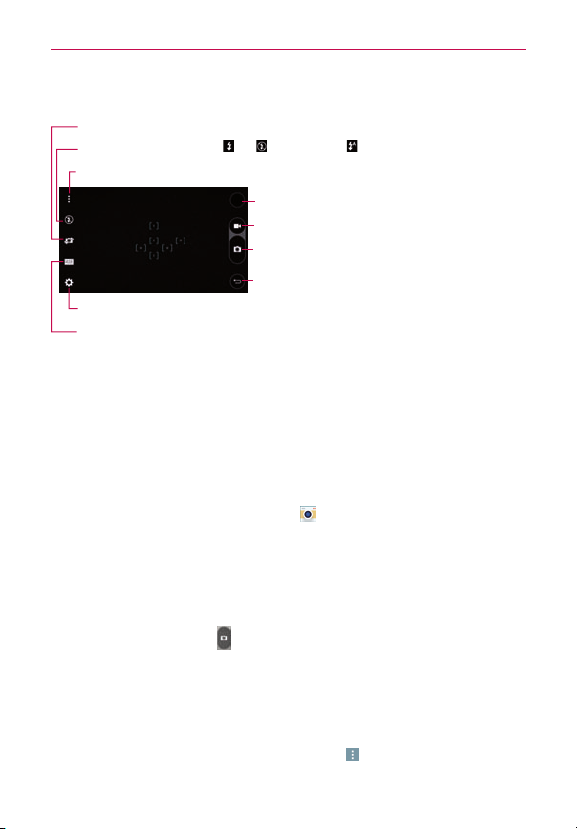
Getting to know the viewfinder
Lens Swap–Taptoswapbetweentherearcameralensandthefrontcameralens.
Record Button–Taptostartrecordingavideo.
Capture Button–Taptotakeaphoto.
Back–Taptoclosethecurrentmenuorexitthe
Cameraapp.
Gallery–TaptoaccessyourGallery.
Flash–TaptoturntheashOn ,Off ,orsetittoAuto .
Options–Taptodisplayandhidethecameraoptionsonthescreen.
Settings–Taptoadjustthecameraandvideosettings.
Mode–Taptosethowtheshotwillbetaken:Auto,Magic focus,Panorama,orDual.
Taking Pictures
Takingpictureswithyourphone’sbuilt-incameraisassimpleaschoosinga
subject,pointingthelens,andtappingabuttonicon.Whenyoutakea
picture,theMulti-pointAuto-focus(AF)functionoperatesautomaticallyto
allowyoutoseeaclearimage.
To take a picture:
1. FromtheHomescreen,tapCamera .
2. Frameyoursubjectonthescreen.
#
Asquarearoundthesubjectindicatesthatthecamerahasfocused.
#
Placetwongersonthescreenandspreadthemaparttozoomin(a
zoombarindicatesthezoomlevel)andpinchintozoombackout.
3. TaptheCapturebutton
.You canalsojusttaponthefocussquareson
thescreenortapthesubjecttotakethepicture.Yourpicturewillbe
automaticallysavedtotheGallery.
NOTE Thecapturedimageretainstheorientationinwhichitwastaken.Ifyouholdthephone
bothverticallyandhorizontallytotakepictures,you'llneedtorotatethephonetoview
fullscreenimagesintheGalleryapp.
TIP Whileviewingaphoto,youcantaptheMenuicon
(attheupper-rightcornerofthe
screen),thentapRotate right/lefttomanuallychangeitsorientation.

54
Camera and Video
Record Videos
Inadditiontotakingpictures,youcanrecord,view,andsendvideoswith
yourphone’sbuilt-invideocamera.
1. FromtheHomescreen,tapCamera
.
2. Frameyoursubjectonthescreen.
3. TaptheOptionsicon
,thentaptheRecordbutton tostart
recordingthevideo.
#
Thelengthoftherecordingisdisplayedattheupper-leftcornerofthe
screen.
#
Yo u cantaptheCapturebutton
totakepictureswhileyou’re
recordingvideo.
#
Yo u canusethepinchgesturetousethedynamiczoomfeaturewhile
you’rerecordingvideo.Spreadyourngersonthescreentozoomin
andpinchtozoombackout.
#
YoucantapthePausebutton
topauseyourvideorecording.Then,
resumeyourrecordingbytappingtheRecordbutton
.
4. TaptheStopbutton
tostoprecording.Yourvideowillbe
automaticallysavedtotheGallery.
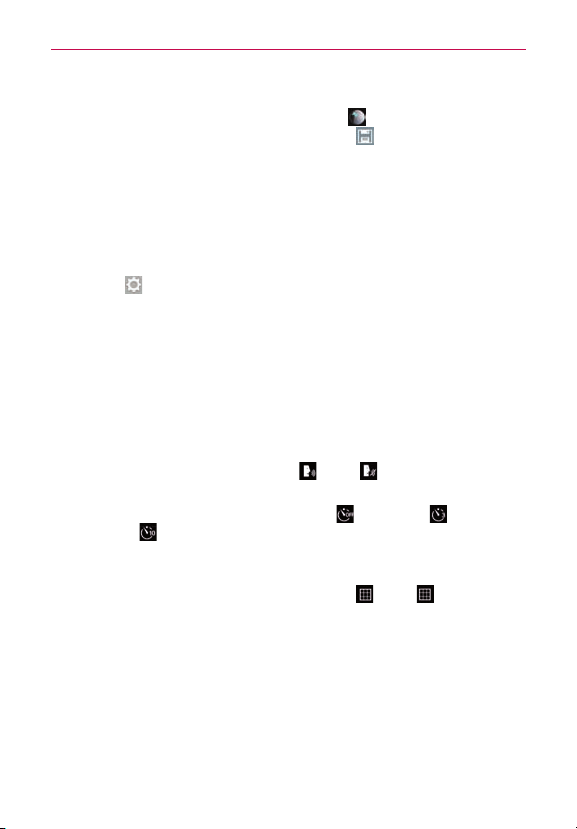
Camera and Video Settings
OpentheCameraapp,tap ,thentapeachofthefollowingiconsto
adjustthesettingstoyourpreferences.
NOTE Somesettingswilldisplayaninformationpop-upthersttimeyouselecticon.
#
Flash
:TaptoturntheashOn ,Off ,orsetittoAuto .
#
Lens swap
:Taptoswapbetweentherearcameralensandthefront
cameralens.
#
Mode
:Taptosetthecapturemode.ChoosefromAuto,Magic
focus,Panorama,andDual.
• Auto:Capturesanautophotoshot.
55
Camera and Video
• Magic focus:Allowsyoutochangethefocusaftertakingaphoto.
Aftertakingthephoto,taptheThumbnail ,tapanobjectoradjust
handlertochangefocus,thentaptheSave .
• Panorama:Createsawidephotoofapanoramicview.Holdthe
phone,taptheCapturebuttontostartandslowlysweepthecamera
acrossthescene.
• Dual:Capturesaphotoorrecordsavideousingboththefrontandrear
cameralensatthesametime.Touchandholdthesmallimage
windowtoresizeormoveit.
#
Settings
:Taptoadjustthefollowingcameraandvideosettings.
• Dynamic tone (HDR):Combinesphotostakenatmultipleexposures
intooneoptimalphototogetabetterphotointrickylightingsituations.
• Image/Video size:Setsthelesizeofyourpicturesandvideos.
Choosefrom13M 4160x3120,W10M 4160x2340,9M 3120x3120,and
3M 2048x1536 forpictures.ChoosefromUHD 3840x2160,FHD
1920x1080,HD 1280x720,and120HD Slow Motion forvideos.
• Cheese shutter:Allowsyoutotakepictureswithvoicecommands.
WhenOn,youjustsay"Cheese","Smile","Whiskey","Kimchi",or"LG"
totakeapicture.ChoosefromOn
orOff .
• Timer:Setsyourcamera'stimer.Thisisidealifyouwanttobeapart
ofthepictureorvideo.ChoosefromOff
,3 seconds ,or10
seconds .
• Grid:Setsanoverlaygridontheviewndertohelpyoutakebetter
picturesandvideosbyallowingyoutoalignyoursubjectwiththe
horizontalorverticallines.ChoosefromOn
orOff .
• Storage:Setsthestoragelocationforyourpicturesandvideos.
ChooseIN(internalmemory)orSD(memorycard).
NOTE ThisoptionwillbeshownwhenyouinsertamicroSDcardintothephone.
• Help:Displaysaquickguidesoyoucanlearnhoweachcamera
functionworks.
56
Camera and Video
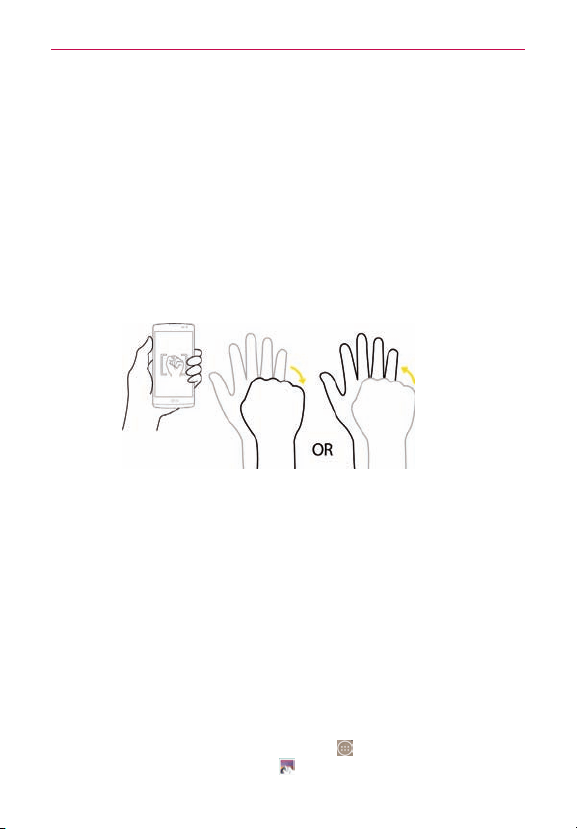
Gesture shot
TheGestureshotfeatureallowsyoutotakeapicturewithahandgesture
usingthefrontcamera.
To take a photo with a gesture
1. Activatethefrontcameralens.
2. Raiseyourhand,withanopenpalm,untilthefrontcameradetectsit(a
boxappearsonthescreen).
3. Makeasttostartacountdownbeforetheshotistaken(allowingyou
timetopositionyourself).
NOTE Yo u canalsotakeaphotobymakingast,thenopeningyourpalm.
8X Zooming
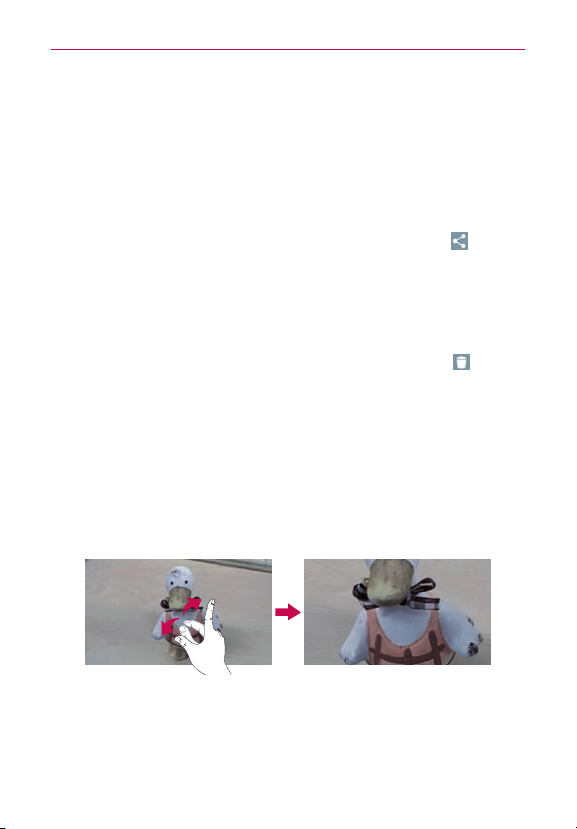
You canchangethezoomlevelforyourphotosusingthepinch-to-zoom
feature.Spreadyourngersonthescreentozoominandpinchintozoom
backout.
Thisfeaturegivesyoutheabilitytozoomupto8timesthenormalview.
NOTE Useasteadyhand.Thisfeaturedoesnotworkwithsomefunctions.Objectscanbe
overlappedwhentakingapictureoffast-movingsubjects.
View Your Pictures
TheGalleryiswhereyoucanaccessyourstoredcameraimages.Youcan
viewtheminaslideshow,sharethemwithyourfriends,aswellasdelete
andeditthem.
1. FromtheHomescreen,taptheApps icon
(intheQuickTapbar)>the
Appstab(ifnecessary)>Gallery .
2. Selectanalbumandtapanimagetoviewyourpicture.

57
Camera and Video
Gallery Options
TheGalleryapppresentsallofthepicturesandvideosstoredinyour
phone,includingthoseyou’vetakenwiththeCameraappandthoseyou
downloadedfromtheweborotherlocations.
1. FromtheHomescreen,taptheApps icon
(intheQuickTapbar)>the
Appstab(ifnecessary)>Gallery
toviewtheimagesstoredyour
phone’sinternalmemoryandonaMicroSDcard(externalstorage).
#
Dragleftorrighttoviewmorealbums.
2. Tapanalbumtoopenitandviewitscontents.(Thepicturesandvideos
inthealbumaredisplayedinchronologicalorder.)
3. Thefollowingoptionsareavailable.
•
Camera:OpenstheCamera.
•
Share:Allowsyoutoselectone(ormore)photostoshare.Tap
Share(atthebottomofthescreen)toopentheavailablesharing
options(suchasMessagingorBluetooth).
•
Delete:Allowsyoutoselectone(ormore)photostodelete.Tap
Delete(atthebottomofthescreen)todeletetheselected
picture(s).
•
Menu:OpensthealbumsOptionsmenuwhichincludesMove,
Copy, Make collage, Lock, Show locked files, Slideshow, Rotate
left,andRotate right.
#
Tap apictureinanalbumthentaptheMenuicon
(attheupper-
rightcornerofthescreen)toopenitsOptionsmenuwhichincludes
thefollowingoptions:SmartShare,Set image as,Move,Copy,Copy
to Clip Tray,Lock,Slideshow,Rotate left,Rotate right,Crop,Add
location,Rename,Print,andDetails.
#
Tap apictureinanalbum,thentaptheFavoriteicon
(atthetopleft
ofthepicture)tomarkitasafavorite.
#
Tap theBack Key
(intheTouchKeysbar)toreturntotheprevious
screen.

58
Camera and Video
Assign Pictures
Aftertakingapicture,assignitasapictureIDforaContactsentryorasthe
backgroundimage(wallpaper)foryourHomescreenorLockscreen.
1. FromtheHomescreen,taptheApps icon
(intheQuickTapbar)>the
Appstab(ifnecessary)>Gallery .
2. Tapanalbumandtapanimagetoviewit.
3. Withthepicturedisplayed,taptheMenuicon
(attheupper-right
cornerofthescreen)>Set image as.
4. Selectanoption.
#
Contact phototoassignthepicturetoaContactentryasapictureID.
TapanentryfromContacts,croptheimage,thentapOK(atthe
upper-leftcornerofthescreen)toassignthepicture.
#
Home screen wallpaper toassignthepictureasabackgroundimage,
croptheimageandtapOKtoassignthepicture.
#
Lock screen wallpapertoassignthepictureasabackgroundimage
foryourLockscreen.
#
Wallpapertoassignthepictureasabackgroundimage,cropthe
imageandtapSET WALLPAPERtoassignthepicture.
Dual Mode Feature
TheDualModefeatureallowsyoutotakeapictureorrecordvideowiththe
frontandrearcameralensatthesametime.Asmallerimagewindow
overlaysthemainimage(similartopicture-in-picture).Youcanresizeand
movetheoverlayimagewindow,aswellasswapthelensforeitherview.
1. FromtheHomescreen,tapCamera
.
2. TaptheModeicon
>theDualicon .
#
Dragtheoverlaywindowtomoveitwhereyouwantitonthescreen.
#
Touchandholdtheoverlaywindowtoresizeit.
#
Tap theoverlaywindowtoswitchitslens.
#
Tap theCapturebutton
totakeadualphoto.

59
Camera and Video
#
Tap theRecordbutton torecordvideo,thentaptheStopbutton
tostopdualrecording.
Video Options
TheGalleryiswhereyoucanaccessyourstoredvideoimages.Youcan
viewthem,sharethemwithyourfriends,aswellasdeleteandeditthem.
1. FromtheHomescreen,taptheApps icon
(intheQuickTapbar)>the
Appstab(ifnecessary)>Gallery toviewthevideosstoredinyour
phone’sinternalmemory,microSDcard(externalmemory).
#
Scrollleftorrighttoviewmorealbums.
2. Tapanalbumtoopenitandviewitscontents.(Thepicturesandvideos
inthealbumaredisplayedinchronologicalorder.)
3. Tapavideotoviewit.You canaccessthefollowingoptins:
#
QSlide
:Enablesanoverlayonyourphone'sdisplayforeasy
multitasking.
#
SmartShare
:SharesmedialeswithDLNAcertieddevices.
#
Menu
:TaptoaccessScreenratio,Subtitles,Share,Trim,Settings,
Details.
#
Screenshot
:Capturesascreenshotwhileplayingavideo.
NOTE:Tap >Settings>Screenshot>On.
#
Volume :Tap todisplaytheVolumesliderbar,thenadjustthe
playbackvolumeonthesliderbar.
#
Lock/Unlock
:Locksthetouchkeystopreventunintentional
touches.
NOTE Whileplayingavideo,slidetheleftsideofthescreenupordowntoadjustthescreen
brightness.Youcanalsoslidetherightsideofthescreenupordowntoadjustthe
60
Camera and Video
volume.PresstheVolumeButtons(onthebackofthephone)toadjustthevolume.
Whileplayingavideo,tapthetimelinepointtopreviewthatportionofthevideoviaa
smallscreen.Tap thesmallscreentojumptothatpartofthevideo.Whileplayinga
video,slideyourngerfromlefttoright(orviceversa)tofast-forwardandrewind.The
recordingretainstheorientationinwhichitwastaken.Ifyouholdthephoneboth
verticallyandhorizontallytotakepicturesandrecordvideo,you'llneedtorotatethe
phonetoviewfullscreenimagesintheGalleryapp.
To share a video
1. Openanalbumtoviewitscontents,thentaptheShareicon (atthe
topoftheGalleryscreen).
2. Checkmarkthevideo(s)youwanttoshare,tapShare(atthebottomof
thescreen),selecthowtosharethele(s),thencompleteasnecessary.
To delete a video
1. Openanalbumtoviewitscontents,thentaptheDeleteicon (atthe
topoftheGalleryscreen).
2. Checkmarkthevideo(s)youwanttodelete,tapDelete(atthebottomof
thescreen),thentapYes toconrm.
Live Zoom
LiveZoomallowsyoutozoominorzoomoutonaportionofavideowhile
it’sbeingplayedtomakethedesiredsectionappearlargerorsmaller.
Whileviewingavideo,useyourindexngerandthumbinapinchingor
spreadingmotiononthetouchscreentozoominorout.
NOTE Yo u don'tneedtopresstoohard;thetouchscreenissensitiveenoughtopickupalight,
butrmtouch.

61
Camera and Video
Dual Play
DualPlayconnectstwodevicesusingawired(Slimport-HDMI)cableora
wirelessconnection(Miracast)allowingyoutoviewcontentonadifferent
screen.TheconnectabledevicecanbeaTVoramonitorsupportedbyan
HDMIcableorMiracast.ViewablecontentcancomefromtheGalleryapp
howevernotallvideosaresupportedbyDualPlay.
TostartDualPlay,taptheHome Key
(intheTouchKeybar)oncewhen
thetwodevicesareconnectedandtheirdisplaysareadifferentstatus(i.e.
themonitorisplayingavideoandyourphone’svideoappisdisplayingan
emptyscreen).
NOTE DualPlayoperatesat1280X720orhigherdisplayresolution.
Gallery
OpentheGalleryapptoviewalbumsofyourpicturesandvideos.
To open the Gallery app
#
FromtheHomescreen,taptheApps icon
(intheQuickTapbar)>the
Appstab(ifnecessary)>Gallery .
Viewing your albums
TheGalleryapppresentsallofthepicturesandvideosstoredinyour
phone,includingthoseyou’vetakenwiththeCameraappandthoseyou
downloadedfromtheweborotherlocations.Whenanotherappsavesa
picture,itautomaticallycreatesadownloadfoldertocontainthepicture
(e.g.,capturingascreenshotcreatestheScreenshotfolder).
#
Tap analbumtoopenitandviewitscontents.
#
Tap apictureorvideoinanalbumtoviewit.
#
TaptheMenu icon
(attheupper-rightcornerofthescreen)toopen
theOptionsmenutoaccessNew album,Delete,Hide/Show album,
Settings,andHelp.
#
Tap theCameraicon
toreturntotheCameraapp.

62
Camera and Video
#
Tap Albums(intheupper-leftcornerofthescreen)toopentheGallery
menutoaccessAlbums, Favorites, Videos, All files,Nearby devices,
andCloud.
To share an album
You cansharetheentirecontentsofoneormorealbumsorindividual
imagesorvideosfromanalbum.
1. FromtheHomescreen,taptheApps icon
(intheQuickTapbar)>the
Appstab(ifnecessary)>Gallery .
2. Touchandholdthedesiredalbum,tapShare,selecttheapptouseto
shareyourimages,thencompletethesendingmethodasnecessary.

63
Multimedia
Play Store
PlayStoreallowsyoutobrowseandsearchforfreeandpaidapps.
To open the Play Store app
#
FromtheHomescreen,taptheApps icon
(intheQuickTapbar)>the
Appstab(ifnecessary)>Play Store ortapPlay Store onthe
Homescreen.
To get help with Play Store
PlayStoreHelpwebpagesareavailablefromallofthePlayStorescreens.
#
Tap
(attheupper-leftcornerofthescreen),thentapHelp &
Feedback.
TheChromeappopenstothePlayStoreHelppage,withlinkstomany
helptopics.
To open a screen with details about an app
#
AtanytimewhilebrowsinginPlayStore,tapanapptoopenitsdetails
screen.
TheAppdetailsscreensincludeadescription,ratings,reviews,
comments,andrelatedinformationabouttheapp.Fromthisscreen,you
candownload,install,uninstall,ratetheapp,andmore.
Music
Transferring Music Files to Your Phone
TheMusicappplaysaudiolesthatarestoredinyourphone’smemory.
Copyaudiolesfromyourcomputerontoyourphonebeforeyouopenthe
Musicapp.
NOTE TheLGUSBdriverneedstobeinstalledonyourPCbeforeconnectingyourphoneto
transfermusic.
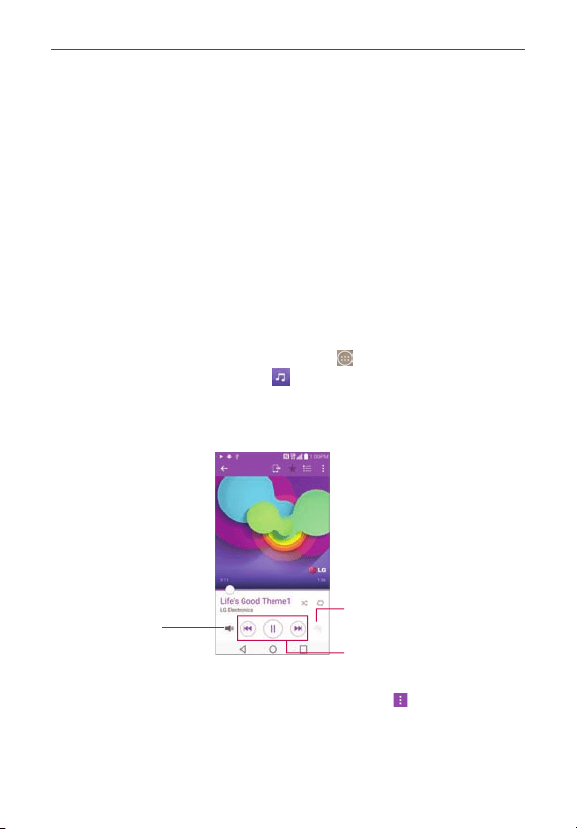
64
Multimedia
To copy music files into your phone
1. ConnectthephonetoyourcomputerwithaUSBCable.Ifthedefault
connectionmodeisnotsettoMediadevice(MTP),openthe
NotificationspanelandtaptheUSBconnectiontype,thentapMedia
device (MTP).Yourcomputerwillpromptyouwithdifferentactionsto
take.Choosetoopenthefoldertoviewles.
2. Usethecomputertocopymusicandotheraudiolesintothefolderthat
youcreatedonthephone.
3. Todisconnectyourphone,opentheNotifications panelandtapthe
USBconnectiontype,thentapCharge phone.ThendisconnecttheUSB
Cablefromthephone.
To play music
1. FromtheHomescreen,taptheApps icon (intheQuickTapbar)>the
Appstab(ifnecessary)>Music
.
2. SelectamusiccategorytabatthetopoftheMusicLibraryscreen.
3. Tapthesongyouwanttoplay.
Music Player Control Icons
Tap heretorestart,pause,
play,orskip.
Audio Effects Icon
Tap heretoapplyaudio
effectstothesong.
Volume Icon
Tap heretheadjustthe
MusicPlayervolume.
Playback Screen
NOTE Whileviewingalistoftracksinanalbum,taptheMenu icon
(attheupper-right
cornerofthescreen),thentapShuffle all toplayallofthesongsinthealbumina
shufedorder.
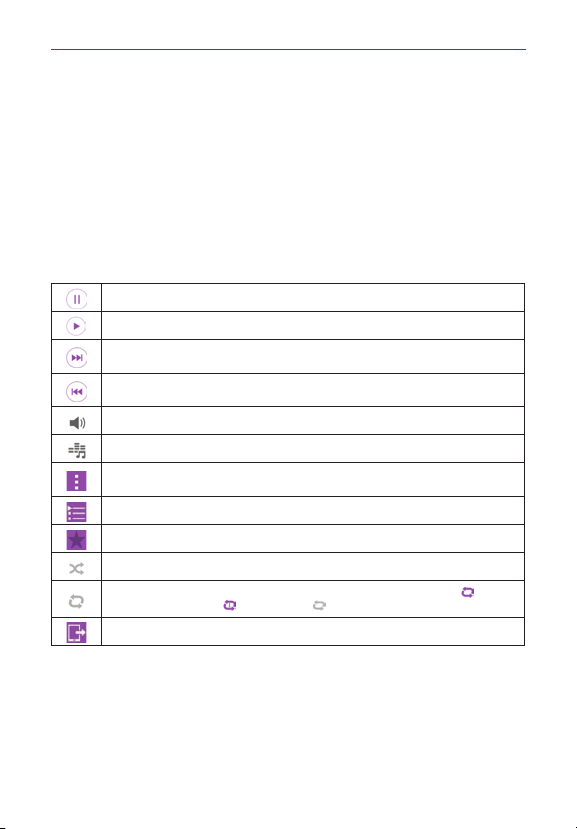
65
Multimedia
To return to the Playback screen
#
FromaMusicplaylistscreen,tapthecurrentlyplayingsongatthe
bottomofthescreen.
#
Fromanyotherapp,opentheNoticationspanelandtaptheongoing
musicnotication.
To control playback
ThePlaybackscreencontainsseveraliconsthatyoucantaptocontrolthe
playbackofsongs,albums,andplaylists:
Tap topauseplayback.
Tap toresumeplayback.
Tap toskiptothenexttrackinthealbum,playlist,orshufe.Touchandholdtofast
forward.
Tap torestartthecurrenttrackorskiptotheprevioustrackinthealbum,playlist,or
shufe.Touchandholdtorewind.
Tap todisplaytheVolumesliderbar,thenadjusttheplaybackvolumeonthebar.
Tap tosetaudioeffects.
Tap toopentheOptionsmenu.ChoosefromSearch,Add to playlist,Delete,Share,
Set as ringtone,Music video,Details, Settings,andHelp.
Tap toopenthecurrentplaylist.
Tap toaddthesongtoyourfavorites.
Tap toplaythecurrentplaylistinshufemode(tracksareplayedinrandomorder).
Tap totogglethroughtherepeatmodes.ChoosefromRepeating all songs ,
Repeating current song
,andRepeat off .
Tap toshareyourmusicviatheSmartSharefunction.
66
Multimedia
YouTube™
Opening YouTube and Watching Videos
You canbrowse,searchfor,view,upload,andrankYouTubevideosonyour
phonewiththeYouTubeapp.
To open the YouTube app
FromtheHomescreen,taptheApps icon (intheQuickTapbar)>the
Appstab(ifnecessary)>YouTube
.
#
Searchforandtapavideotowatchit.
#
Tap theMenu icon
(attheupper-rightcornerofthescreen)forthe
YouTubeOptionsmenu(Settings,Help & feedback,andSign in/out).
#
TaptheYouTubeicon
(attheupper-leftcornerofthescreen)to
accessotherYouTubeoptions.

67
Utilities
Dual window
TheDualwindowfeaturesplitsthescreentoenablemulti-tasking,dragand
dropinteraction,auto-linkingandrecentlyusedapps.
To activate the Dual window function
1.FromtheHomescreen,touchandholdtheRecent Apps Key (inthe
TouchKeysbar)>System settings>Generaltab>Dual window.
2.TaptheDual window switch
(atthetopofthescreen)totoggleitOn
orOff.
#
CheckmarktheSplit viewcheckboxtoautomaticallyopentheDual
windowfunctionwhenyoutapalinkonthefullscreenortapanemail
attachment.
Using the Dual window function
1. TouchandholdtheBack Key (intheTouchKeysbar)tosplitthe
screen.
2. Taptheappiconyouwanttouse.Therstappyoutapopensina
windowatthetopofthescreen.Thesecondappopensinthebottom
window.
3.Tapawindowtoselectanduseit.
#
Ablueboxappearsaroundtheselectedwindowwithabluesemi-
circlehandlebetweenthewindows.
#
Dragthebluehandletochangethewindowsizes(onelargerandone
smaller).
4.Tapthebluehandle
toaccesstheDualwindowoptions.
#
TaptheSwapicon
toswitch(ip)theapppositions.
#
TaptheView app listicon
toredisplaytheappslistsoyoucan
changetheappfortheselectedwindow.
#
TaptheOpen full screenicon
toopentheselectedappinfull
screen.Dragthebluehandle(upordowndependingontheselected
window)toreturntoDualwindow.
#
TaptheCloseicon
toclosetheselectedwindow.
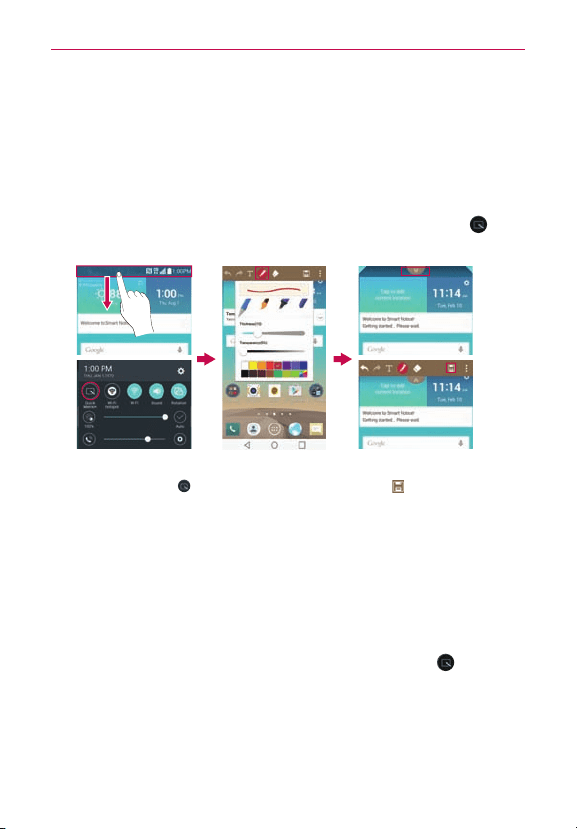
68
Utilities
QuickMemo+
TheQuickMemo+featureallowsyoutocreatememosandcapturescreen
shots.You canuseQuickMemo+toeasilyandefcientlycreatememos
duringacall,withasavedpicture,oronthecurrentphonescreen.
To create a QuickMemo+
#
DragtheStatusBardownward,thentaptheQuickMemo+icon
in
theQuickSettingsbar.
2.Usethememo
optionsatthetopof
thescreen(e.g.,pen
typeandcolor)to
createyourmemo.
3.Whenyourmemois
complete,taptheSave
icon
(inthetoolbarat
thetopofthescreen)to
saveittoyourGalleryor
QuickMemo+.
1.DragtheStatusBar
downwardthentapthe
QuickMemo+icon
.
NOTE Pleaseuseangertip(notyourngernailoranyotherrigidobject)whileusingthe
QuickMemo+featuretoavoidscratchingyourphone'stouchscreen.
Capturing a screen shot for your QuickMemo+
1.Accessthescreenyouwanttocapture(forexample,accesstheMaps
apptocaptureastreetlocationtohelpwithdirections).
2.DragtheStatusBardown,thentaptheQuickMemo+icon
onthe
QuickSettingsBar.
3.Usethetoolbaroptions(atthetopofthescreen)tocreateyourmemo
onthecapturedscreen.

69
Utilities
4.TaptheSaveicon (intheupper-rightcornerofthescreen),thenselect
tosaveitintheGalleryapporQuickMemo+app.
Using QuickMemo+ toolbar options
TheQuickMemo+toolbaroptions(atthetopofthescreen)allowyouto
easilycreatememos.Tap thememooptionsbartab
toaccessthe
QuickMemo+toolbaricons,andtapitagaintohidethem.
Undo:Taptoundothemostrecentaction.
Redo:Taptoredothemostrecentlydeletedaction.
Text:TaptotypetextinyourQuickMemo+.
Pen:Taptoselectthepentypeandcolor.Tapthememobackground
toclosethepenselection.
Erase:Taptousetheerasertoerasepenmarksfromthememo.
Save:Taptosavethememoyou’vecreatedtoyourGalleryor
QuickMemo+app.
Menu:Taptosharethememowithothersviaanyoftheavailable
appsorchangethebackgroundpaperstyle.
QuickMemo+ Menu Options
#
FromtheQuickMemo+screen,taptheMenuicon
(attheupper-right
cornerofthescreen)toaccessShareandPaper style.
#
TapShare,thencompetethesharingmethodasnecessarytoshareyour
QuickMemo+.
#
TapPaper styletosetthepaperbackgroundforyourmemo,thentap
OK.
To Exit the QuickMemo+ feature
TaptheBack Key (intheTouchKeysbar)toexittheQuickMemo+
feature.
Viewing saved QuickMemos
QuickMemosaresavedintheGalleryapporQuickMemo+app.

70
Utilities
#
FromtheHomescreen,taptheApps icon
(intheQuickTapbar)>the
Appstab(ifnecessary)>Gallery ,thentaptheQuickMemo+album.
#
FromtheHomescreen,taptheApps icon
(intheQuickTapbar)>the
Appstab(ifnecessary)>theQuickMemo+icon ,thentaptheyour
memo.
Capturing a screen shot without using QuickMemo+
TocaptureascreenshotwithouttheQuickMemofeature,pressboththe
Power/Lock Button
(onthebackofthephone)andtheVolume Down
Button(onthebackofthephone)atthesametime.Thecapturedimageis
automaticallysavedintheGalleryappintheScreenshotsfolder.
QSlide
TheQSlidefunctionenablesanoverlaywindowonyourphone’sdisplayfor
easymultitasking.QSlidedisplaysasmallappwindowonthescreenthat
canbemoved,resized,ormadetransparent.QSlidewindowscanbe
openedfromtheQSlideappsbarontheNoticationspanel,ordirectly
fromtheappsthatsupporttheQSlidefunction.
QSlide icons on the Notifications panel
QSlideappiconsaredisplayedinabarontheNoticationspanelbelowthe
Quicksettingsbar.Theseiconsprovideaquick,convenientwaytomulti-
taskonthesamescreen(similartopicture-in-pictureonaTV).
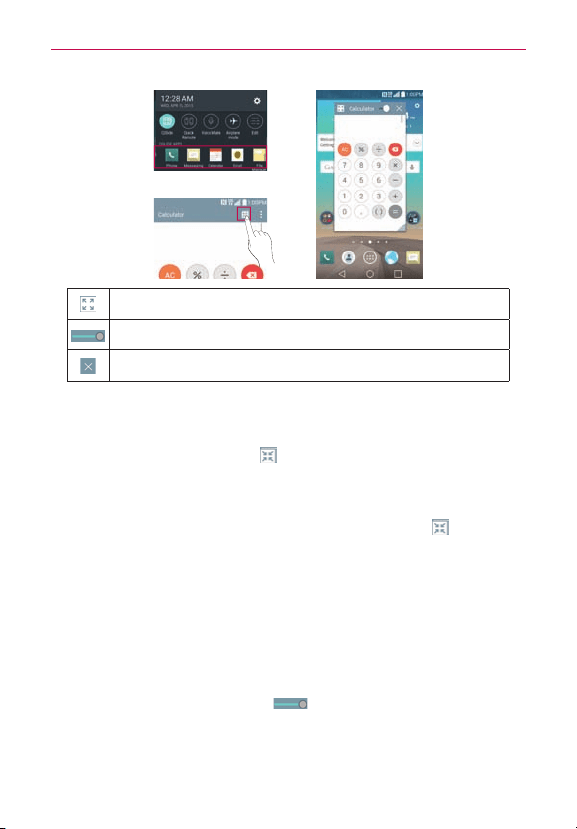
71
Utilities
OR
TaptoexittheQSlidefunctionandviewtheappinfullscreen.
Slidetoadjustthetransparency.
TaptoexittheQSlidefunction.
NOTE TheQSlidefunctioncansupportuptotwowindowsatthesametime.
To open a QSlide window
OpentheNoticationspanel,tap ,thentapthedesiredappintheQSlide
appsbar.
OR
WhileusinganappthatsupportsQSlide,taptheQSlideicon
.
Using QSlide
TheQSlidefunctionopenstheassociatedappinawindowinthe
foreground,allowingyoutoaccessotherappsinthebackground.It’s
displayedcontinuouslyonthescreenuntilyoucloseit.
#
DragtheQSlidetitlebartomoveitonthescreen.
#
DragthebottomrightcorneroftheQSlidewindowtoresizeit.
#
Movethecircleonthesliderbar
tothelefttomakeittransparent.
Thiswillallowyoutointeractwithitemsunderneaththetransparent
QSlidewindow.MovethesliderbacktotherighttousetheQSlide
windowagain.

72
Utilities
#
TaptheQSlideicon
(attheupper-leftcornerofthetitlebar)toopen
theappinfullscreenview.TogobacktoQSlideview,taptheQSlide
icon
(atthetopofthescreen).
#
Tap theCloseicon
(attheupper-rightcornerofthetitlebar)toclose
theQSlidewindow.
Customizing the QSlide apps bar icons
You cansettheorderoftheiconsdisplayedintheQSlideappsbar,aswell
aswhichiconsaredisplayed.
1. OpentheNoticationspanelandswipetotheleftontheQSlideapps
bar(ifnecessary),thentaptheEditicon
.
#
Dragoneoftheiconhandles
attherightsideofthescreento
moveitsicontoanotherpositionintheQSlideappsbar.
#
Checkmarktheiconsyouwanttodisplayandremovethecheckmark
fortheonesyouwanttoremove.
2. TaptheBack Key
(intheTouchKeysbar)toreturntotheNotications
panel.
QuickRemote
QuickRemoteturnsyourphoneintoaUniversalRemoteforyourhomeTV,
settopbox,andaudiosystem.
NOTE QuickRemotemaynotbeavailableforsomedevices.
To open the QuickRemote app and set up your QuickRemote
1. FromtheHomescreen,taptheAppsicon (intheQuickTapbar)>the
Appstab(ifnecessary)>QuickRemote
.
2. Taptheroomdisplayedattheupper-leftcornerofthescreentoselectits
location.ChoosefromLiving room, Bedroom, Kitchen, Den,andOffice.
3. TaptheAddicon
(atthetoprightofthescreen).
4. Tapthedeviceyouwanttosetfortheremote,thentapthenameofthe
device’smanufacturer.

73
Utilities
#
Usethelettersalongtherightsideofthescreentojumpdirectlyto
thatletterinthelist.
5. Continueyourremotesetupbyfollowingtheon-screeninstructionsto
congurethedevice.
NOTE It'simportanttopointtheIR(infrared)sensoronyourphonedirectlyatthedeviceyou
areconguring.
Set up from the Notifications panel
You canalsoperformtheinitialsetupofyourQuickRemotefromthe
Noticationspanel.SwipetheStatusBardownward,taptheQuickRemote
icon
(intheQuickSettingsbar,ifnecessary),tapADD REMOTEinthe
dialogbox,thencontinuesetupasnecessary.
Afterinitialsetup,tosetupadditionaldevicesfromtheNoticationspanel,
taptheFull-screenicon
(atthelower-rightcorneroftheremotedisplay),
thentaptheAddicon
(atthetoprightoftheQuickRemotescreen).
Using QuickRemote
1. SwipetheStatusBardownward,thentaptheQuickRemoteicon (in
theQuickSettingsbar,ifnecessary)toopenaQuickRemotebarwithall
oftheremotesyousetup.
2. Selecttheremoteyouwantbytappingtheremotenameatthetopof
theQuickRemotebar.
3. Tapthebuttonsonthedisplayedremote.
NOTES • TaptheFull-screenicon (atthelower-rightcorneroftheremotedisplay)toviewthe
QuickRemoteinfullscreen.
• WhenaddingaremotecontrolforaTV,QuickRemotecouldusetheINPUTbuttonto
conguretheappropriateremotecontrol.WhenconguringtheINPUTbutton,the
inputsourcefortheTVcouldbechanged.ToresettheinputsourceofyourTV, tapthe
INPUTbuttonontheQuickRemoteseveraltimes(dependingonthenumberofdevices
connectedtotheTV).
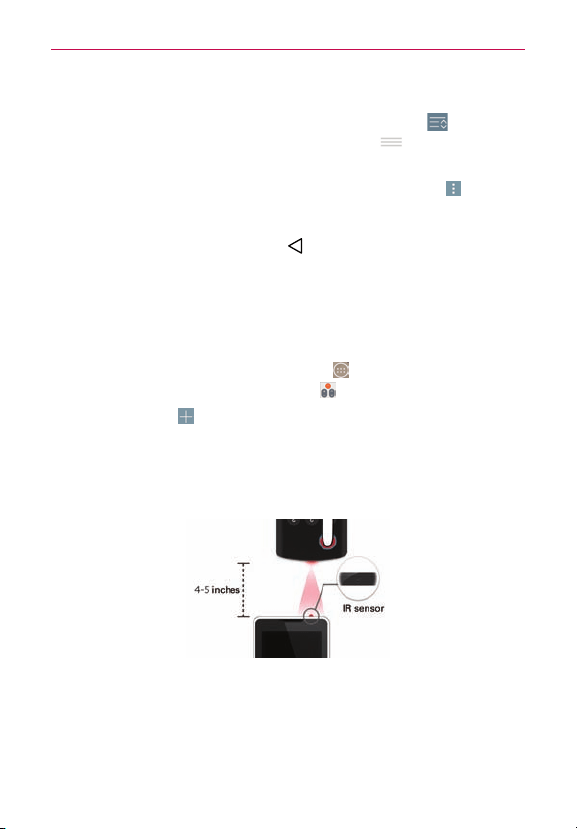
74
Utilities
QuickRemote options
You canedityourQuickRemotebarbytappingtheEditicon (atthetop
rightoftheQuickRemotebar.Dragaremotehandle
tomoveitto
anotherpositiononthebar.
ToaccesstheQuickRemoteOptionsmenu,taptheMenu icon
(atthe
upper-rightcornerofthescreen)toselectMagic Remote setting (onlyfor
LGTVs),Edit remote name,Learn remote,Move remote,Delete remote,
Settings,andHelp.TaptheBack Key
(intheTouchKeysbar)toexitthe
Optionsmenu.
Customizable remote
You cancreateyourownpersonalizeduniversalremoteandchoosewhere
toplaceallofthebuttons.
1. FromtheHomescreentaptheApps icon
(intheQuickTapbar)>the
Appstab(ifnecessary)>QuickRemote
.
2. TaptheAddicon
(atthetoprightofthescreen)>Universal remote.
3. EntertheRemotename,thentapOK.
4. Swipetotheleftandrightandplacethebuttonsyouwantonthe
remoteinthedesiredlocations,thentapNext(atthebottomofthe
screen).
5. Programyourcustomizedremoteusingyouroriginalremote.
#
FacetheIRsensorstowardeachother,about4inchesapart.
#
Tapthebutton(onyourcustomizedremote)tolearned.
#
Pressandholdthecorrespondingbutton(onyouroriginalremote)for
twoseconds.

75
Utilities
Using the Magic Remote feature
MagicRemotecontrolstheTVusingaTouchpadandSmartText(keyboard).
MagicRemoteiscompatibleonlywithLGSmartTVsreleasedin2012and
after.
1. Selecttheremoteyouwant,thentaptheMenu icon
(attheupper-
rightcornerofthescreen)>Magic Remote setting.
2. TaptheSupported modelsbuttonandcheckwhetheryourTVsupports
thisfeature.
3. ConnectyourphoneandLGSmartTVtothesameWi-Finetwork.
4. Selectthedeviceandenterthecerticatenumberinyourphone.
#
Touchpad:MovestheTVpointerwiththetouchpad.
#
Smart Text:Providesakeypadwhentypingtext.
Calendar
Viewing Your Calendar
TheCalendarappallowsyoutotrackyourscheduleofevents(thatyou
createdorthatyou’vebeeninvitedto),organizedbyday,week,month,
year,oragenda.
Whenyourstsetupyourphone,youconguredittouseanexisting
GoogleAccountoryoucreatedanewaccount.Thersttimeyouopenthe
Calendarapponyourphone,itdisplaysanyexistingcalendareventsfrom
yourGoogleAccountontheweb.
To open the Calendar app
#
FromtheHomescreen,taptheApps icon
(intheQuickTapbar)>the
Appstab(ifnecessary)>Calendar .
Eventsfromeachaccountyou’veaddedtoyourphoneandconguredto
synchronizecalendarsisdisplayedinyourCalendar.
Eventsfromeachcalendaraccountaredisplayedinadifferentcolor.
76
Utilities
To change your calendar view
NomatterwhereyouareintheCalendarapp,youcaneasilyswitch
calendarviews.SimplytaptheupperleftcorneroftheCalendartitlebarto
displayadrop-downmenuofcalendarviews.TapDay,Week,Month,Year,
orAgenda.
Calendar title bar icons
#
TaptheQSlideicon
toopentheMonthcalendarviewinaQSlide
window.
#
TaptheCurrent dateicon
toimmediatelyjumpbacktothecurrent
dateinthecalendaryou’reviewing.
#
TaptheAddicon
toaddaneweventtoanyofyouraccounts.
Calculator
TheCalculatorappallowsyoutoperformmathematicalcalculationsusinga
standardcalculatororascienticcalculator.
To open and use the Calculator
#
FromtheHomescreen,tap
theApps icon
(intheQuickTapbar)>the
Appstab(ifnecessary)>Calculator .
#
Tap thecalculatorkeystoenternumbersandarithmeticoperatorsonthe
calculator’sdisplay,justlikeyouwoulduseanormalcalculator.
#
Tap theDeleteKey
todeletethelastnumberoroperatoryouentered.
#
TaptheClearKey
toclearthecalculator’sdisplay.
#
Tapanywherewithinthecalculator’sdisplaytoplacethecursorwithin
thecalculation.
#
Touchandholdthecalculator’sdisplaytoopenaContextmenuwhere
youcancopywhatyou’veenteredtouseitinotherapps.Thecontext
menucaninclude:Selectall,Cut, Copy,Paste,Clip Tray,andText Link.
#
ToopentheScienticcalculator,taptheMenu icon
(attheupper-right
cornerofthescreen),thentapScientific calculator.Toreturntothe
Basiccalculator,taptheMenu icon (attheupper-rightcornerofthe
screen),thentapBasic calculator.

77
Utilities
#
Tap theMenu icon
(attheupper-rightcornerofthescreen)>
Calculation historytoviewyourpreviouscalculations.You cantapan
entrytocalculateitagainoreditit.
#
Tap theQSlideicon
(atthetoprightofthescreen)tousethe
CalculatorinaQSlidewindow.
Clock
You usetheClockapptoaccesstheAlarms,Timer,Worldclock,and
Stopwatchfunctions.Accessthesefunctionsbytappingthetabsacross
thetopofthescreen,orswipinghorizontallyacrossthescreen.
To open the Clock app
#
FromtheHomescreen,taptheApps icon
(intheQuickTapbar)>the
Appstab(ifnecessary)>Clock .
Setting and Activating Alarms
TheAlarmstaballowsyoutosetvaryingalarmclocks.You cansetanalarm
bymodifyinganexistingalarmorbyaddinganewone.Afteryou’ve
createdoneormorealarms,youcaneasilyactivateordeactivateanalarm
bytappingitsAlarmicon
totoggleiton(blue)oroff(gray).
1. FromtheHomescreen,taptheApps icon
(intheQuickTapbar)>the
Appstab(ifnecessary)>Clock
.
2. TaptheAlarmstab(atthetopofthescreen),ifnecessary.
3. TaptheNew alarmicon
(atthetopofthescreen)toaddanewalarm,
tapanalarmtimetomodifythatalarm,ortapacurrentalarmicon
(on
therightsideofthescreen)toactivateanexistingalarm(blueindicates
it’sset).
To set an alarm
1. OpentheClockapp,thenaccesstheAlarmstab.
NOTE Thersttimeyouaccessyouralarms(orwhentherearenoalarmscreated),analarm
imageisdisplayedinthemiddleofthescreen.Tapittosetupyourrstalarm.

78
Utilities
2. Tapthe New alarm icon (atthetoprightofthescreen)tocreatean
alarm,ortapanexistingalarmtomodifyandsetit.
3. Scrollthetimewheeltosetthealarmtime(HourandMinute)andthe
timeofday(AMorPM).
4. Taptheday(s)whenyouwantthealarmtosoundintheRepeateld.If
youdon’ttaptheRepeatsetting,thealarmsoundsonlytheonedayyou
setit.
5. TapSnooze durationtosettheamountoftimetowaitbeforesounding
thealarmagainifit'snotdismissed.Youcansetthealarmtoring
repeatedlyfrom5minutesupto1hour.
6. TapAlarm with vibrationtocheckmarkthesettingandhavethephone
vibrate,inadditiontoplayingthealarmsound.
7. TapAlarm soundtosetthesoundnotication.TapAlarm toneor
Music,selectthesoundforthealarm,thentapOK.Theringtoneplays
brieywhenyouselectit.
8. SlidethebuttonontheAlarm volume slidertotherighttoincreasethe
alarmvolumeandtothelefttodecreaseit.Thealarmsoundplaysto
helpyoudeterminethevolumeyouwant.
9. TapAuto app startertosettheappyouwanttoautomaticallyopen
whenyoustopthealarm,thentapOK.
10. TapPuzzle locktocheckmarkthesetting,whichrequiresyoutowake
upenoughtosolveasimplepuzzletodismissthealarm.
11. TapMemotoenterinformationaboutthealarm.Forexample,to
identifywhentouseit(e.g.,classday).
12. Whenyou’renished,tap
Save(atthebottomofthescreen)tosave
andactivatethealarm.
Alarm Settings
ToaccesstheAlarmsettings,fromtheAlarmstab,taptheMenu icon
(attheupper-rightcornerofthescreen),thentapSettings.TheAlarm
settingsincludeVolume key behaviorandPuzzle lock.

79
Utilities
When the alarm sounds
#
Tap Dismisstostopthealarm.
#
Tap Snoozetostopthealarmforthesnoozedurationyouset.Ifset,use
thegesturefeatureofsimplyturningthephoneovertostoporsnooze
thealarm.
Setting the Timer
TheTimertabcanbeusedtoalertyouwithanaudiblesignalwhenaset
amountoftimehaspassed.
1. OpentheClockapp,thenselecttheTimertab.
2. Setthetimeonthedigitaltimer.TaptheHour,Minute, and/orSecond
eld(s)thenenterthenumbersasnecessary.
NOTE Ifyoudon'tneedtochangetheTimersettings,justtapthegreenStartbuttononthe
timekeypadtostartthetimerimmediately.
3. TaptheMenuicon (attheupper-rightcornerofthescreen)>
SettingstosetAlarm with vibration,Alert sound,andAlert volumefor
thetimer.
4. Tap
thegreenStartbutton(atthebottomofthescreen)
tobeginthetime
countdown.
5. Oncethealarmsounds,tap
theredStopbutton
(atthebottomofthe
screen)tostopthetimer.
Setting the World clock
TheWorldclocktaballowsyoutosetupalistofcitiestoeasilycheck
currenttimesinothertimezoneswithaquickglance.
1. OpentheClockapp,thenselecttheWorld clocktab.
2. Tapthe New city icon
(attheupper-rightcornerofthescreen),search
throughtheavailablecities,thentaptheoneyouwant.
NOTE ThersttimeyouaccesstheWorld clocktab,aglobeimageisdisplayedinthemiddle
ofthescreen.Tapittoaddtherstcitytoyourlist.
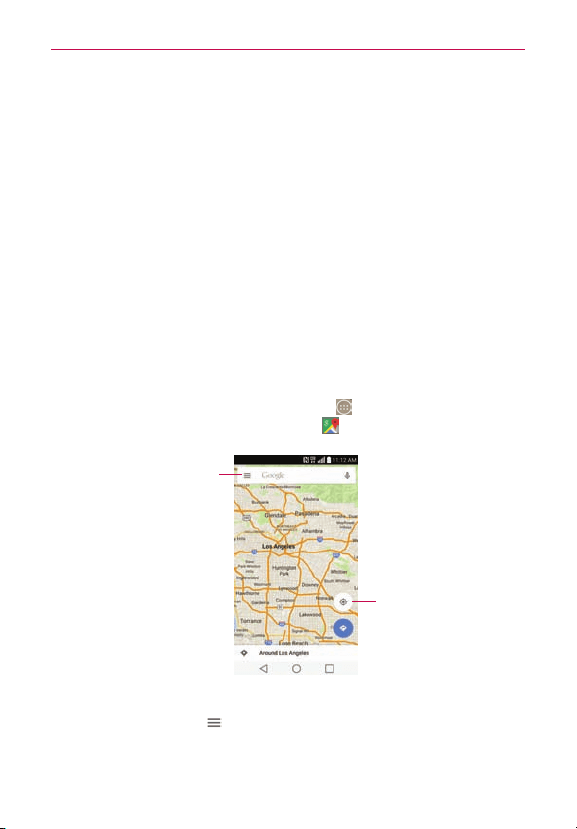
80
Utilities
Using the Stopwatch
TheStopwatchtaballowsyoutouseyourphoneasaStopwatch.
1. OpentheClockapp,thenselecttheStopwatchtab.
2. TapthegreenStartbutton(atthebottomofthescreen)tostarttiming
andtaptheredStopbuttontostopthetime.
You canusetheLapfunctionbytappingtheLapbuttontorecord
multiplemilestonetimeswithinthesametimingsession.
3. TaptheResetbuttontoresettheStopwatchortapthegreenResume
but
ton
tocontinuemonitoringtime.
Maps
TheMapsappallowsyoutondplacesandgetdirections.
To open the Maps app
#
FromtheHomescreen,taptheApps icon
(intheQuickTapbar)>the
Appstab(ifnecessary)>theMapsicon .
My Location
Tap toaccessvariousfeatures
onGoogleMaps.
Maps navigation
#
Tap the Maps menu
to access Your places, Traffic, Public transit,
Bicycling, Satellite, Terrain, Google Earth, Tips and Tricks, Settings,
Help, andSend feedback.

81
Utilities
#
Dragacrossthescreentomoveacrossadisplayedmap.
#
Pinch-to-zoomtozoominoroutofthemapview.
Maps icons
Taptoopenthekeyboardtoenteryoursearchrequest.
#
Redmarkersindicatesearchmatches.
#
Tapamarkertoopenadialogboxthatcontainsalabelandadditional
locationinformation.Youcansavethelocationasafavorite,sharethe
location,andsavethemaptouseofine.
Taptogetdirectionstoadestination.
#
UsethestartingpointtoinsertYour locationorselectfromrecentMap
history.
#
GetdirectionsbyCar
,Transit ,Walking ,orBiking .
#
Oncestartinganddestinationpointsareentered,youcantapthe
reverseicon
(ontherightsideofthescreen]toreversethe
directions.
Tap toaccessmaplayers,Settings,Help,Sendfeedback,andTipsand
Tricks.
Taptodisplayyourcurrentlocationonthemap.
Voice Mate
You canaskVoiceMatetoperformphonefunctionsusingyourvoice,such
ascallingacontact,settingalarms,orsearchingtheweb.Youcansay
“help”tohelpyougetstarted.
NOTE TheVoiceCommandappandtheVoiceSearchappwillalsoperformphonefunctions
fromyourverbalcommand.

82
Utilities
To open the Voice Mate app
#
Fromanyscreen,taptheAppsicon
(intheQuickTapbar)>theApps
tab(ifnecessary)>Voice Mate
OR
DragtheStatusBardownward,thentaptheVoice Mateicon inthe
QuickSettingsbar.
Using the Voice Mate app
1. OpentheVoice Mateapp.
2. TheSpeakicon
(atthebottomofthescreen)illuminates.Saywhat
youwantittodoforyou.
#
Ifyousay“CallRachel”,VoiceMatewillcallyourcontactRachel.
NOTE VoiceMateconrmsfoundmatchrequestsbeforeexecutingit.Toskipconrmationfor
exactmatches(nameornumber),accesstheVoiceMatesettingsandcheckmarkSkip
confirmation.
Voice Mate Icons
ThefollowingVoiceMateiconsaredisplayedatthebottomofthescreen:
#
TaptodisplaytheVoiceMateuserguidewithhelpandexamples.
#
Taptosayavoicecommandtoexecute.
#
Taptotypeacommandtoexecute.
Voice Mate settings
ToaccesstheVoiceMatesettings,activateVoiceMate,thentapthe
Settingsicon
(intheupper-rightcornerofthescreen).VoiceMate
settingsincludeSkip confirmation,Voice feedback,Save events to,Voice
activation,Button vibration,Voice launch command,Voice launch on
Lock screen, Skip secured Lock screen, and Voice launch when charging.
NOTES • WhenthelanguagesettingforVoiceMateisnotthesameasthedefaultlanguage
settingonyourphone,somecommandssuchaslaunchingappsmaynotwork.
•Whenenteringtext,youcanonlyuselettersornumbers.
•VoiceMaterecognizesyourspeechbetterwhenyouspeakslowly.

83
Utilities
Voice Command
You canusetheVoiceCommandapptoperformphonefunctionsusing
yourvoice.
To open the Voice Command app
#
FromtheHomescreen,taptheAppsicon
(intheQuickTapbar)>the
Appstab(ifnecessary)>Voice Command .
Voice Search
You canalsousetheVoiceSearchapptoperformphonefunctionsusing
yourvoice.
To open the Voice Command app
#
FromtheHomescreen,taptheAppsicon
(intheQuickTapbar)>the
Appstab(ifnecessary)>Googlefolder
>Voice Search .
Voice Recorder
TheVoiceRecorderapprecordsaudiblelesforyoutouseinavarietyof
ways.Usethemtosimplyremindyouaboutsomethingyoudon’twantto
forget(likeagrocerylist)orrecordsoundeffectsthatyoucanattachtoa
message.
Record a Voice Memo
1. FromtheHomescreen,taptheApps icon (intheQuickTapbar)>the
Appstab(ifnecessary)>Voice Recorder .
2. TaptheRecordbutton
(atthebottomcenterofthescreen)tostart
recording.
3. Speakintothemicrophone.
4. Whenyou’renished,taptheStopbutton
(atthebottomrightofthe
screen).
Therecordingisautomaticallysavedtoyourrecordingslist.

84
Utilities
File Manager
UsetheFileManagerapptomanageyourfoldersandlesstoredinyour
phone.
FileManagermakesiteasytoviewandmanageyourles.Simplytapale
type(Allles,Musicles,Imageles,Videoles,Documentles,orCloud
storage),thentaponthenecessaryfolderstondyourles.
To open the File Manager app
FromtheHomescreen,taptheApps icon (intheQuickTapbar)>the
Appstab(ifnecessary)>File Manager
.
File Manager Options
OpentheFile Managerapp,tapAll files,thentaptheInternalstorageor
SD cardfoldertoaccesstothefollowingFileManageroptions(atthe
bottomofthescreen):
#
:Allowsyoutocreateanewfolder.
#
:Allowsyoutomovelesandfolderstoanotherfolder.
#
:Allowsyoutocopylesandfolderstoanotherfolder.
#
:Allowsyoutodeletelesandfolders.
#
:Allowsyoutoaccessadditionaloptions.
Tasks
TheTasksappcanbesynchronizedwithyourMSExchangeaccount.You
cancreateatask,reviseit,anddeleteitusingyourphone,orfromMS
OutlookorMSOfceOutlookWebAccess.
To synchronize MS Exchange
1. FromtheHomescreen,touchandholdtheRecent Apps Key
(inthe
TouchKeysbar)>System settings>Generaltab>Accounts & sync
>Add account(undertheAccountssection).
2. TapMicrosoft Exchange,thensign-inusingyouremailaddressand
password.

85
Utilities
3. CheckmarktheSync Taskscheckbox.
To add Tasks
1. FromtheHomescreen,taptheApps icon (intheQuickTapbar)>the
Appstab(ifnecessary)>Tasks .
2. TaptheAdd new taskicon
(atthetopofthescreen).
3. EntertheSubject,START DATE, DUE DATE, DESCRIPTION, REPEAT
andREMINDER.
4. TapSave.
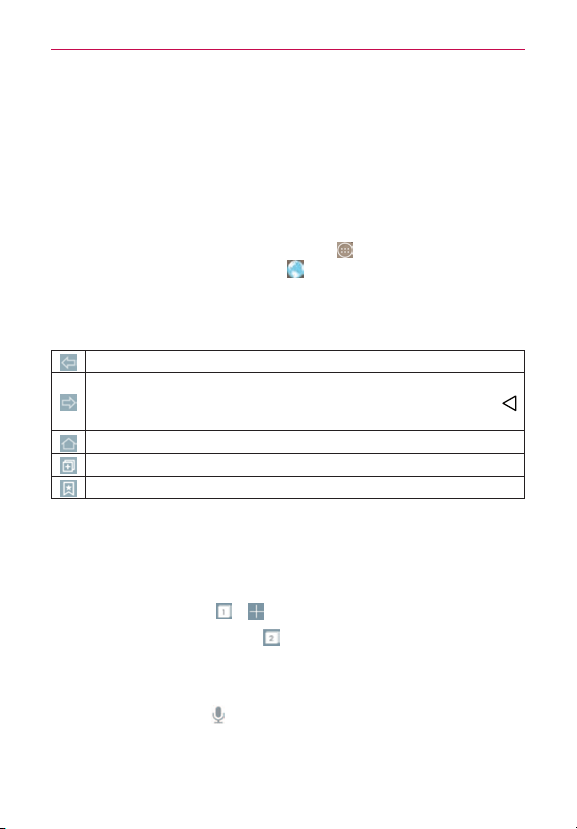
86
The web
Browser
UsethisapplicationtobrowsetheInternet.Browsergivesyouafast,
full-colorworldofgames,music,news,sports,entertainmentandmuch
more,rightonyourmobilephonewhereveryouareandwhateveryou
enjoy.
NOTE Additionalchargesapplywhenconnectingtotheseservicesanddownloadingcontent.
Checkdatachargeswithyournetworkprovider.
1. FromtheHomescreen,taptheApps icon (intheQuickTapbar)>the
Appstab(ifnecessary)>Browser
.
Using the Web toolbar
Ifthetoolbarisnotdisplayed,scrolltothetopofthepagetodisplayit.
Taptogobackonepage.
Taptogoforwardonepage,tothepageyouconnectedtoafterthe
currentone.Thisistheoppositeofwhathappenswhenyoutap ,
whichtakesyoutothepreviouspage.
TaptogototheHomepage.
Taptoaddanewwindow.
Taptoaccessbookmarks.
Viewing webpages
Taptheaddresseld,enterthewebaddressandtapGo.
Opening a page
1. Togotonewpage,tap > .
2. Togotoanotherwebpage,tap
,scrollupordown,andtapthepageto
selectit.
Searching the web by voice
Taptheaddresseld,tap ,speakakeyword,andthenselectoneofthe
suggestedkeywordsthatappear.
NOTE Thisfeaturemaynotbeavailabledependingontheregionorserviceprovider.

87
The web
Bookmarks
#
Tobookmarkthecurrentwebpage,tap
>Add to bookmarks>OK.
#
Toopenabookmarkedwebpage,tap
andselectone.
History
Tap
>Historytoopenawebpagefromthelistofrecently-visited
webpages.Toclearallhistory,tap
>
Yes .
Chrome
TheChromeappallowsyoutoaccesstheInternetfromyourphone.
Accessandselectionswithinthisfeaturearedependentuponyourservice
provider.ForspecicinformationonInternetaccessthroughyourphone,
contactyourserviceprovider.
NOTES • You mayincuradditionalchargesforaccessingthewebanddownloadingmedia.For
details,contactyourserviceprovider.
• ChromemaydifferfromthisuserguideduetoupdatesviaPlayStore.
Browse web pages
1. FromtheHomescreen,taptheApps icon (intheQuickTapbar)>the
Appstab(ifnecessary)>Chrome .
2. TaptheURLinputeldtoaccessaspecicwebpage.Entertheweb
address(URL)ofthewebpage,thentap
(ontheon-screenkeyboard).
3. TaptheMenuicon
(attheupper-rightcornerofthescreen)toaccess
theChromeOptionsmenu.

88
Settings
Settings
TheSettingsappcontainsmostofthetoolsforcustomizingandconguring
yourphone.AllofthesettingsintheSettingsapparedescribedinthis
section.
To open the Settings app
#
FromtheHomescreen,taptheApps icon
(intheQuickTapbar)>the
Appstab(ifnecessary)>theSettingsicon .
OR
#
FromtheHomescreen,touchandholdtheRecent Apps Key
(inthe
TouchKeysbar)>System settings.
Viewing Settings categories
Thesettingsaregroupedintocategories.
#
List viewdisplayseachcategory(4)incapitallettersfollowedbyits
relatedsettings.Scrollupanddownthroughthescreen.
#
Tab viewdisplayseachcategory(4)intabs(atthetopofthescreen)that
includeitsrelatedsettings.Swipetotheleftorrighttoswitchbetween
tabsortapatabtoselectit.
1. FromtheHomescreen,touchandholdtheRecent Apps Key
(inthe
TouchKeysbar)>System settings.
2. TaptheMenu icon
(attheupper-rightcornerofthescreen)>Switch
to tab view(orSwitch to list view).
NOTE InstructionstoperformtasksinthisguidearebasedonthedefaultTab viewsetting.
Networks
Airplane mode
TaptheAirplane mode switch totoggleitOnorOff.Ondisablesall
wirelessconnections.

89
Settings
Wi-Fi
TaptheWi-Fi switch totoggleitOnorOff.OnconnectstoaWi-Fi
network(fromyourlistofavailable,detectednetworks).TapWi-Fito
accessthefollowingsettingstomanageyourWi-Ficonnection(s):
WI-FI NETWORKS
ThelistofalloftheWi-Finetworksthatarewithinaccessrange.Taponeto
accessit.
TaptheMenu icon
(attheupper-rightcorneroftheWi-Fimenuscreen)
toaccessthefollowingoptions.
Add Wi-Fi:TaptoenteraWi-Fi name (SSID),choosetheSecurityand
enterthePasswordtomanuallyaddWi-Finetworks.
Saved Wi-Fi:TaptoshowtheWi-Finetworksyouhavesaved.
Advanced Wi-Fi:AccessesthefollowingadvancedWi-Fisettings.
Wi-Fi notification:CheckmarktonotifyifWi-Finetworksareavailable
nearbyorwhenyourdeviceisconnectedtoaWi-Finetwork.
Sort list by:SetshowyourWi-Finetworksarelisted.ChooseSignal
strengthorAlphabetical order.
Keep Wi-Fi on when screen is off:SetstheWi-Fistatuswhenthe
screenisoff.ChoosefromYes, Only when plugged in,andNo.
Allow Wi-Fi scanning:CheckmarktoletGoogle'slocationserviceand
otherappsscanfornetworks,evenwhenWi-Fiisoff.
Switch to mobile data:Checkmarktoswitchautomaticallytomobile
datawheninternetunavailableviaWi-Fi.
Wi-Fi Direct:AllowsdirectconnectionwithWi-Fideviceswithoutany
accesspoint.
Connect by WPS button:InformationtoconnecttoasecuredWi-Fi
networkwithaWPSbutton.
Connect by WPS PIN:InformationtoconnecttoasecuredWi-Fi
networkwithaWPSPIN.
Install certificates:Allowsyoutoinstallcerticatesfromstorage.

90
Settings
MAC address:Displaysyourphone'sMACaddress(whichmayneedto
beenteredintheroutertoconnecttosomewirelessnetworkswith
MAClters).
IP address:Displaysyourphone'sIPaddress.
Interactive tutorial:DisplaysinformationabouttheWi-Fifeaturesand
settingsinaninteractivetutorial.
NOTE Ta pSearch(atthebottomofthescreen)tosearchforin-rangeWi-Finetworks.
Bluetooth
TaptheBluetooth switch
totoggleitOnorOff.Onallowsyoutopair
andconnectwithotherBluetoothdevices.TurnitonandtapBluetoothto
useandmanageyourBluetoothdevices.
G3:CheckmarktoallowotherBluetoothdevicestoseeyourphonefor
pairingandconnection.
AVAILABLE DEVICES
Thelistofalloftheavailablein-rangeBluetoothdevices.
NOTE Ta pSearch for devices(atthebottomofthescreen)tosearchforin-rangeBluetooth
devices.
Mobile data
TaptheMobile data switch totoggleitOnorOff.Offdisconnectsyou
fromthemobilenetworksoyoucan'tusetheInternetunlessyouusea
Wi-Ficonnection.Thisallowsyoutomanageyourmobiledatausage.Tap
Mobile datatoaccessthefollowingsettingstomanageyourmobiledata
usage:
Limit mobile data usage Checkmarktolimityourmobiledata.Yourmobile
dataconnectionwillbedisabledwhenyoureachthelimityouset.Setyour
datausagelimitbydraggingtheredlineonthegraphprovided.
Data usage cycle:Displaysyourcurrentdatausagecycle.Tap thedate
tochangethecycledate.
Data usage graph:Displaysyourdatausageonagraph.

91
Settings
Data usage applications:Appsaredisplayedwiththeirdatausageona
bargraph.Taponetoseemoredetailedinformation.
Call
Voicemail:Setsupyourstandardvoicemailsettings.
Auto retry:Setstheamountoftimetowaitbeforeautomatically
redialingacallthatfailedtoconnect.ChoosefromOff,10sec,30sec,
and60sec.
Incoming voice call pop-up:Checkmarktodisplayananincomingcall
pop-upwhenanappisinuse.Usethepop-uptoAnswer,Decline,or
Declinewithmessage.
Decline with message:SetstheIgnore with messageicononthe
IncomingCallscreenwhichallowsyoutoignoreanincomingcalland
respondtothecallerwithaspeciedQuicktextmessageinstead.Tapto
manageyourQuicktextmessages.TaptheNewicon
tocreateanew
quickmessage,tapamessagetoeditit,ortaptheDeleteicon
to
deleteamessage.
Privacy keeper:Setswhetherthephonedisplaysthecaller's
informationwhenyoureceiveacall.ChoosefromHide all info.,Show
number only,andShow caller info.
Auto answer:Allowsyoutoanswercallsautomaticallywhenusing
hands-freemode.
TTY mode:SetstheTTYmodetocommunicatewithotherTTYdevices.
Hearing aids:Tap toplacethecheckmarktoturnonhearingaid
compatibility.
Voice enhancement:Checkmarktoenhancevoiceclarityinnoisy
environments,allowingyoutohearmoreclearly.
Save unknown numbers:Allowsyoutosaveunknownnumbersto
yourcontactsafteracall.
Power key ends call:Checkmarktoallowyoutoendvoicecallsby
pressingthePower/Lock Button
(onthebackofthephone)insteadof
returningtotheCallscreentoendthecall.

92
Settings
DTMF tones:SetsthelengthoftheDTMFtones.ChooseNormalor
Long.
Call restrictions:Allowsyoutorestrictincomingoroutgoingcalls.
Call duration:Taptocheckcallduration(s).
Voice privacy:Checkmarktoenableenhancedprivacymode.
Share & connect
NFC: TaptheNFCswitch totoggleitOnorOff.Onallowsyouto
sendorreceivelessimplybybringingyourphoneandanotherdata-
compatibledevicetogether(typicallywithin20mmofeachother)atthe
NFCtouchpoint.NFC(NearFieldCommunication)establishesradio
communicationbetweensmartphonesandsimilardevices.NFCwillbe
turnedoffautomaticallywhenairplanemodeactivated.Tap NFC to
accessthefollowingsettings:
Tap & pay:WhenNFCisturnedon,youcanusetheTap&pay
featuretopayforitemsjustbytouchingyourphonetoareaderata
register.
Tag reading:WhenreadingatagviaNFC,youcanhearthealert
sound.
Android Beam:TaptheAndroid Beam switch
totoggleitOnorOff.
Onallowsyoutobeamappcontentorlestoothermobiledevicesby
holdingthemclosetogether.Tap Android Beamtoviewinformationon
howtousethisfeature.
SmartShare Beam:Allowsyoutoreceivemultimediacontentvia
SmartShareBeamfromanotherLGphoneortablet.
Media server:TaptosharemediacontentwithnearbydeviceviaDLNA.
Miracast: TaptheMiracastswitch
totoggleitOnorOff.Onallows
youtowirelesslymirroryourphonescreenandsoundontoaMiracast
dongleorTV.TapMiracasttoaccessyourlistofavailabledevices.Tap
Search for devicesorHelp(atthebottomofthescreen)torefreshthe
devicelistorviewhelpinformation.

93
Settings
Tethering & networks
Tetheringallowsyoutoconnectotherdevicestoyourphone'sinternet
connectionandselectyourconnectionmethod.
USB tethering: TaptheUSB tetheringswitch
totoggleitOnorOff.
Onallowsyoutoshareyourphone'smobiledataconnectionusinga
USBconnection.Thissettingisgrayed-outifnotconnectedviaUSB.
Wi-Fi hotspot:TaptheWi-Fi hotspotswitch
totoggleitOnorOff.On
allowsyoutouseyourdeviceasaWi-Fihotspotforotherdevicestouse
yourmobilenetworkconnection.TapWi-Fi hotspottomanageaccessto
yourWi-Fihotspot.Connecteddevicesarelistedatthebottomofthe
screen.
Help:DisplaysinformationregardingUSBtetheringandWi-Fihotspot.
Mobile networks: Setsupoptionsformobiledata,dataroaming,
networkmode,andCDMAroamingmode.
VPN:SetsupandmanagesVirtualPrivateNetworks(VPNs).
NOTE Ta ptheMenuicon
(attheupper-rightcornerofthescreen)toaccessadditional
settings.FromtheVPNsetting,itaccessesAlways-on VPN.
Sound
Sound profile:SetstheSilentmodetoSound,Vibrate only,orDo not
disturb.
Volume:SetsindividualvolumelevelsforphoneRingtone,Notication
sound,Touchfeedback&system,andMusic,video,games&other
media.Movethesliderbuttononeachvolumebartosetitsvolume.
Vibration strength:Allowsyoutosetthevibrationstrengthforcalls,
notications,andtouchfeedback.
Ringtone:Setstheringtoneforcalls.You canalsoaddaringtoneby
tappingtheNewicon
(attheupper-rightcornerofthescreen).
Notification sound:Setsthesoundfornotications.You canalsoadda
noticationsoundbytappingtheNewicon
(attheupper-rightcorner
ofthescreen).
Sound with vibration:Checkmarktosetthephonetovibrateinaddition
totheringtonewhenyoureceivecalls.

94
Settings
Vibration type:Setstheincomingcallvibrationoptions.Choosefrom
Long Lasting,Rapid,Short repeated,Standard,andTicktock.Tapthe
Newicon (attheupper-rightcornerofthescreen)tocreateyourown
vibrationpattern.
Do not disturb:Allowsyoutosetaschedulewhentoprevent
interruptionsfromnotications.Youcansettoallowcertainfeaturesto
interruptwhenPriorityonlyisset.
Lock screen:Allowsyoutochooseifyouwanttoshoworhide
noticationsonthelockscreen.
Apps:Allowsyoutopreventappsfromdisplayingnoticationsorset
appstoshownoticationswithprioritywhenDonotdisturbissetto
Priorityonly.
Vibrate on tap:Checkmarktovibratewhenyoutouchthescreen(e.g.,
touchkeysandmakeselections).
Sound effects:Taptosetdialpadtouchtones,touchsounds,screen
locksound,oremergencytone.
Message/call voice notifications:TaptheMessage/call voice
notificationsswitch
totoggleitOnorOff.Onallowsyourphoneto
automaticallyreadyourincomingcallsand/ormessagesoutloud.
CheckmarkCallsforcallerinformation,Messagesforsenderinformation,
andRead messagesformessagecontent.You canalsosetthereadout
language.
Display
Home screen
Select Home:SetsthelayoutoftheHomescreen.ChooseHome
(standardAndroidlayout)orEasyHome(simpliedversionforusersless
familiarwithAndroidnavigation).
Smart Bulletin:TaptheSmart Bulletinswitch
totoggleitOnorOff.
OndisplaysanadditionalHomescreenpanelwithcustomized
information.ChooseifyouwanttodisplayLG HealthandSmart Tips.
Wallpaper:AllowsyoutosettheHomescreenwallpaper.Choosefrom
Wallpaper gallery,Gallery,Photos, Live wallpapers andMulti-photo.

95
Settings
Screen swipe effect:Allowsyoutosettheeffectusedwhenyouswipe
tochangetoanotherHomescreenpanel.ChoosefromSlide,Breeze,
Accordion,Panorama,Carousel,Layer,andDomino.
Allow Home screen looping:CheckmarktoallowcontinuousHome
screenscrolling(loopbacktotherstscreenafterthelastscreen).
Home backup & restore:AllowsyoutobackupandrestoreyourHome
screenapplayoutsandwallpapers.
Help:DisplayshelpinformationregardingtheHomescreen.
Lock screen
Select screen lock:Setshowtosecureyourphonefromunintentional
and/orunauthorizeduse.ChoosefromNone,Swipe,Knock Code,
Pattern,PIN,andPassword.
Smart Lock:Allowsyoutocongureyourphonetostayunlockedwhen
youhaveatrustedBluetoothdeviceconnectedtoit,whenit'sina
familiarlocation,likeyourhomeorwork,orwhenitrecognizesyour
face.
Screen swipe effect:Setsthescreenswipeeffectoptions.Choosefrom
Light particle,Vector circle,Mosaic,andSoda.
Wallpaper:SetsyourLockscreenwallpaper.SelectitfromGalleryor
Wallpaper gallery.
Shortcuts: Allowsyoutochangetheshortcutsatthebottomofthe
SwipeLockscreen.
Weather animation:Checkmarktoshowweatheranimationforyour
currentlocationorprimarycitysetinWeatherbasedonautomaticdata
updates.
Contact info for lost phone:TaptoshowcontactinfoontheLockscreen
intheeventthephoneislost.
Lock timer:Setstheamountoftimebeforethescreenautomatically
locksafterthescreenbacklightturnsoff(times-outduetoinactivity).
Power button instantly locks:Checkmarktoinstantlylockthescreen
whenthePower/Lock Buttonispressed.Thissettingoverridesthe
Securitylocktimersetting.

96
Settings
Home touch buttons
Button combination:Dragtheiconstorearrangethehometouch
buttons.
Color:Setsthecolorforthehometouchbuttons.
Hide Home touch buttons:Choosetoshoworhidethehometouch
buttonswhileusingapps.
Font type: Setsthetypeoffontusedforthephoneandmenus.
Font size: Setsthesizeofthefontdisplayedinthephoneandmenus.
Brightness:Adjustthescreenbrightnessbyusingtheslider.Tap Autoto
setthebrightnesstoautomaticallychange.
Notification LED:SelectwhichtypeofnoticationstodisplaytheLED
light.
Auto-rotate screen:Settoswitchorientationautomaticallywhenyou
rotatethephone.
Screen timeout:Setthetimedelaybeforethescreenautomatically
turnsoff.
Smart screen:Checkmarktokeepthescreenfromtiming-outwhenthe
phonedetectsyoureyeslookingatthescreen.
Screen-off effect:Setstheeffectseenwhenyouturnoffthescreen.
ChoosefromRetro TV,Black hole,andFade out.
Daydream:TaptheDaydreamswitch
totoggleitOnorOff.On
allowsthesetscreensavertobedisplayedwhenthephoneissleeping
whiledockedand/orcharging.ChooseClockorGoogle Photos.
General
Language & input
UsetheLanguage&inputmenutoselectthelanguageforthetextony
ourphoneandforconguringtheon-screenkeyboard.You canalso
manageyourlanguagedictionaryforpersonalwordsthatyou’veadded.
Language:Setsthelanguagetouseonyourdevice.

97
Settings
Default:Setsthedefaulton-screenkeyboardtousewhenenteringtext.
LG Keyboard: CheckmarktoselecttheLGKeyboardtoenterdata.
Google voice typing:CheckmarktoselectGooglevoicetypingtoenter
data.TaptheSettingsicon
tochangetheGooglevoicesettings.
Voice Search:Setsvoicesearchoptions.
Text-to-speech output:Setsthepreferredspeechengineandspeech
rate(veryslowtoveryfast).Alsoplaysashortdemonstrationofspeech
synthesisanddisplaysthelanguagestatus.
Pointer speed:Setsthepointerspeedonaslidebar.
Location
UsetheLocationaccessmenutosetyourpreferencesforusingand
sharingyourlocationwhenyousearchforinformationanduselocation-
basedapps,suchasMaps.
TaptheLocationswitch
(attheupper-rightcornerofthescreen)to
enablesharingofyourlocation.
Accounts & sync
UsetheAccounts&syncsettingsmenutoadd,remove,andmanageyour
Googleandothersupportedaccounts.You alsousethesesettingsto
controlhowandwhetherallapplicationssend,receive,andsyncdataon
theirownschedulesandwhetherallapplicationscansynchronizeuserdata
automatically.Gmail,Calendar,andotherapplicationsmayalsohavetheir
ownsettingstocontrolhowtheysynchronizedata;seethesectionson
thoseapplicationsfordetails.TapAdd accounttoaddnewaccount.

98
Settings
Cloud
Using Content from the Cloud
You canusecontentfromthecloud(i.e.,Dropbox)intheGalleryandMusic
apps.
Using the Cloud
NOTE ThesupportedfeaturesmayvarydependingonthecloudRetrievingdatamaytakesome
timedependingonthecloud.
1.SelectCloudintheGalleryandMusicapps.
2.Selectthecloudwhatyouwanttouseandlogin.
3.You canusethecontentofthecloudafterloggingin.
4.Setthecloudsettingstoselecttheappthusethecloud.
Accessibility
Improvesaccessibilityforuserswhohaveimpairedvision,hearing,or
reduceddexterity.
TalkBack:TaptheTalkBack switch
(attheupper-rightcornerofthe
screen)totoggleitOnorOff.OnallowsyoutosetuptheTalkBack
functionwhichassistspeoplewithimpairedvisionbyprovidingverbal
feedback.TapSettings(atthebottomofthescreen)toadjustthe
TalkBacksettings.
WhenTalkBackisturnedon,thetouchscreensettingsrequiretheuser
torsttapanitemtheywanttoselect,andthendoubletaptheitem
againinordertoaccessthisfeature.
NOTE Passwordscanbeheardastheyareenteredwhenheadsetsareconnectedtothephone
unlesssettingsarechangedtoreadpasswordsaloudwithoutaheadset.
Font size:Setsthefontsize.ChoosefromMinimum,Small,Medium,
Large,Very large,andMaximum.
Invert colors:Checkmarktoinvertthescreencolorcontrastforpeople
withdifcultyperceivingcolors.
Color adjustment:TaptheColor adjustmentswitch
(attheupper-
rightcornerofthescreen)totoggleitOnorOff.Onallowsyoutoadjust
contrastandhuebydraggingyourngeracrossthescreen.

99
Settings
Touch zoom:TaptheTouch zoomswitch (attheupper-rightcornerof
thescreen)totoggleitOnorOff.Onallowsyoutozoominandoutby
triple-tappingthescreen.
Message/call voice notifications:TaptheVoicenoticationsswitch
(attheupper-rightcornerofthescreen)totoggleitOnorOff.Onallows
youtohearautomaticspokenalertsforincomingcallsandmessages.
Calls:Checkmarktoreadcallerinformationoutloud.
Messages:Checkmarktoreadsenderinformationoutloud.
Read messages:Checkmarktoreadmessagesoutloud.
Message/call voice notifications language:TaptosetText-to-speech
output.
Screen shade:Checkmarktodimthescreen'sbacklightforadarker
contrast.
Accessibility shortcut:Openaccessibilityoptionsquicklyonanyscreen.
Text-to-speech output:Taptocustomizetext-to-speech(TTS)settings.
Audio type:Setstheaudiotype.ChooseMonoorStereo.
Sound balance:Routesthesoundthroughboththerightandleft
channelwhenaheadsetisconnected.Tomanuallysettheaudioroute,
movetheslideronthesoundbalanceslidebartosetit.
Notification LED:TaptheNotification LEDswitch
(attheupper-right
cornerofthescreen)totoggleitOnorOff.OnactivatestheLEDlight
forincomingcallsandnotications.
Flash alerts:Checkmarktoallowaashtoblinkforincomingcallsand
notications.
Call reject message:Checkmarktosendamessagecustomizedfor
thosewithhearingimpairmentswhenacallisrejected.
Turn off all sounds:Checkmarktoturnoffallsounds.
Captions:TaptheCaptionsswitch
(attheupper-rightcornerofthe
screen)totoggleitOnorOff.Oncustomizescaptionsettingsforthose
withhearingimpairments.SetLanguage,Font size,andCaption style.

100
Settings
Touch feedback time:Setsthetouchfeedback.ChoosefromShort,
Medium,andLong.
Touch assistant:Provideatouchboardwitheasyuseforgeneralbuttons
orgesturestoaccessinshort.TaptheTouch assistantswitch
to
toggleitOnorOff.Onallowsyoutoreplacethehardwarekeyswitha
Touchassistantboard
thatisdisplayedonthetouchscreen.Tap the
Touchassistanticon
tobeabletotapitsPowerbutton,Homebutton,
Volume downbutton,Volume upbutton,andthemorebutton(Screen
capturebutton,Accessibilitybutton,Voice Matebutton,andPinch
button).Drawa"C"("call")ontheboardtoautomaticallydisplaytheDial
tab.Drawan"M"ontheboardtoautomaticallydisplaytheMessaging
app.Drawa"W"("web")ontheboardtoautomaticallylaunchtheChrome
app.Drawan"S"("Settings")ontheboardtoautomaticallydisplaythe
settingsapp.Drawan"L"("Lockscreen")ontheboardtolockthescreen.
Screen timeout:Setsthescreentimeout.Choosefrom15 sec,30 sec,
1 min,2 min,5 min,10 min,15 min,andKeep screen turned on.
Touch control areas:TaptheTouch control areasswitch
(atthe
upper-rightcornerofthescreen)totoggleitOnorOff.Onallowsyouto
selectanareaofthescreentolimittouchcontrol.PresstheVolume
Down ButtonandtaptheHome Keyatthesametimetoactivateand
deactivatethisfeature.
Auto-rotate screen:Checkmarktoallowthephonetorotatethescreen
dependingonthephoneorientation(portraitorlandscape).
Password voice confimation:Checkmarksothatyourphonecanread
passwordsyouenter.
Power key ends call:Checkmarksothatyoucanendvoicecallsby
pressingthePower/Lock Button
(onthebackofthephone).When
enabled,pressingthePower/Lock Buttonduringacalldoesnotlockthe
screen.
Accessibility settings shortcut: Setsquick,easyaccesstoselected
featureswhenyoutriple-taptheHome Key
(intheTouchKeysbar).
ChoosefromOff,Show all,TalkBack,Invert colors,Touch assistant,
andAccessibility settings.

101
Settings
One-touch input:Checkmarktoenableone-touchinput.Itallowseach
ngertouchtoenterletterorcharacterontheLGkeyboard.
Switch Access:Settocontrolyourdeviceusingcongurablekey
combinations.
One-handed operation
Dial keypad:Checkmarktoenableyoutomovethedialkeypadtothe
rightorleftsideofthetouchscreen.Simplytapthearrowtomoveitto
onesideortheother.
LG keyboard:Checkmarktoenableyoutomovethekeyboardtothe
rightorleftsideofthetouchscreen.Simplytapthearrowtomoveitto
onesideortheother.
Lock screen:CheckmarktoenableyoutomovethePINLockscreen
keypadtotherightorleftsideofthetouchscreen.Simplytapthearrow
tomoveittoonesideortheother.
Help:Displaysinformationregardingone-handedoperation.
Shortcut key
TaptheShortcut keyswitch (attheupper-rightcornerofthescreen)to
toggleitOnorOff.Onallowsquickaccesstoappsbypressingandholding
theVolumeButtons(onthebackofthephone)whenthescreenisoffor
locked.PressandholdtheVolume Up ButtontoaccessQuickMemo+.
PressandholdtheVolume Down ButtonaccesstheCameraapp.
Security
UsetheSecuritymenutocongurehowtohelpsecureyourphoneandits
data.
Content lock:SelectlocktypestolocklesintheGalleryapp.Choose
PasswordorPattern.
Encrypt phone:Allowsyoutoencryptdataonthephoneforsecurity.
Eachtimeyouturnonyourphone,aPINorpasswordwillberequiredto
decryptyourdata.

102
Settings
Encrypt SD card storage:AllowsyoutoencryptofdecryptexternalSD
carddata.Encrypteddataisnotaccessibletootherdevices.
Password typing visible:Checkmarktobrieyshoweachcharacterof
thepasswordasyoutypesothatyoucanseewhatyouenter.
Phone administrators:Displaysthelistofadministrators,allowingyou
todeactivatedeviceadministrators.
Unknown sources:Checkmarktoallowinstallationofnon-PlayStore
apps.
Verify apps:Checkmarktodisalloworwarnbeforeinstallationofapps
thatmacauseharmtoyourphone.
Storage type:Displaysthecurrentstoragetypeforcredentials(e.g.,
Hardware-backed).
Trusted credentials:Allowsappstoaccessyourphone'sencrypted
storeofsecurecerticates,relatedpasswords,andothercredentials.
ThescreenhasaSystemtabandaUsertab.Credentialstorageisused
toestablishsomekindsofVPNandWi-Ficonnections.Thissettingis
dimmedifyouhaven'tsetapasswordtosecureyourcredentialstorage.
Install from storage:Allowsyoutoinstallasecurecerticatefrom
storage.
Clear credentials:Deletesallsecurecerticatesandrelatedcredentials
anderasesthesecurestorage'sownpassword.Your'repromptedto
conrmyouwanttoclearthisdata.
Trust agents:ViewordeactivateTrustagents,whichallowsyouto
selectwhichappstousewithouthavingtounlockthe
screen.
Screen pin:Thisfeatureallowsyoutolockyourdevicesothatthe
currentusercanonlyaccessthepinnedapp.Thisisusefulforuserswith
children.
Guest mode
UseGuestmodewhenyouletsomeoneelseuseyourphone.They’llonlybe
abletousetheappsthatyou’veselected.Onceyousetitup,youcaneasily
putyourphoneinGuestmodebydrawingaspeciedguestscreenlockonthe
Lockscreenthatyouset,whichisdifferentfromyournormalscreenlock.

103
Settings
Guest mode:Taptheswitch (attheupper-rightcornerofthescreen)
totoggleGuestmodeOnorOff.Onallowsyoutoputyourphonein
GuestmodefromtheLockscreen.
Allowed app:TaptoselecttheappsavailableinGuestmode.
Wallpaper:Setsthebackground(wallpaper)foryourGuestmodeLock
screen.
Lock screen type:TaptocreatethescreenlocksequenceforGuest
mode.
Help:DisplaysinformationregardingGuestmode.
Gestures
Answer an incoming call:Duringanincomingcall,bringthephoneto
youreartoanswerthecall.Iftheproximitysensoriscoveredbyanitem,
suchasaphonecase,itmaycauseincorrectaction.
Fade out ringtone:You cansetthephonetofadeouttheringtoneby
pickingupitfromtheatsurfaceduringtheincomingcall.Ifproximity
sensoriscoveredbyanything,suchasaphonecase,itmaycause
incorrectaction.
Silence incoming calls:You cansetthephonetosilenceincomingcalls
byjustippingthephone.
Snooze or stop alarm:You cansetthephonetosnoozeorstopthealarm
byjustippingthephone.
Pause video:You cansetthephonetopausethevideobyjustipping
thephone.
Help:Allowsyoutoviewhelpinformationfortheavailablegestures.
Motion sensor calibration:Improvestheaccuracyofthetiltandspeed
ofthesensor.
QuickCircle case
Select apps:Setstheappsthatcanbeuseddirectlyinthecase’swindow
withoutopeningthecase.

104
Settings
Auto-unlock:Checkmarktoautomaticallyunlockthescreenwhenyou
openthecaseandthescreenlockissettoswipe.
Help:DisplaysQuickCirclecaseinformation.
Dual window
Split view:CheckmarktoautomaticallyopentheDualwindowfeature
whenyoutapalinkonthefullscreenortapanemailattachment
(imagesonly).
Help:DisplayshelpinformationaboutusingtheDualwindowfeature.
Date & time
Auto-date & time:Checkmarktousethenetwork-provideddateandtime.
Auto-time zone:Checkmarktousethenetwork-providedtimezone.
Set date:Taptomanuallysetthedatetouseforyourphone.Thissettingis
grayed-outwhentheAuto-date & timesettingischeckmarked.
Set time:Taptomanuallysetthetimetouseforyourphone.This
settingisgrayed-outwhentheAuto-date & timesettingis
checkmarked.
Select time zone:Taptoselectselectatimezoneotherthantheone
providedbythenetwork.Thissettingisgrayed-outwhentheAuto-time
zonesettingischeckmarked.
Use 24-hour format:Checkmarktodisplaythetimeusingthe24-hour
timeformat(forexample,13:00insteadof1:00pm).
Select date format:Setstheformatfordisplayingdates.
Storage
UsetheStoragemenutomonitortheusedandavailablespaceinyour
phone.
INTERNAL STORAGE
Total space:Displaysthetotalamountofspaceinthephone’smemory.
It’slistedinGigabytesandalsoonacoloredbargraphwithacolor-
coordinatedlistoftheappsaswellastheamountofspacetheyuse.
Remainingmemoryspaceisgray-colored.

105
Settings
SD CARD
Total space:Displaysthetotalamountofyourexternalmemory.
Available:Displaystheamountofspaceavailableinyourexternal
memory.
Mount/Unmount SD card:Allowsyourphonetorecognizeyour
microSDcardandreleaseittosafelyremoveyourmicroSDcard.
Erase SD card:ErasesallofthedatastoredonyourmicroSDcard.
Battery
TheBatterychargeinformationisdisplayedonabatterygraphicalongwith
thepercentageoftheremainingchargeanditsstatus.
TouchtheBatterychargeicontodisplaytheBatteryusescreentoseethe
batteryusagelevelandbatteryusedetails.Itdisplayswhichcomponents
andappsareusingthemostbatterypower.Tap oneoftheentriestosee
moredetailedinformation.
Smart cleaning
Thismenushowsthespaceinuseandfreespaceinyourphone.Tap (at
theupper-rightcornerofthescreen),thentapSettingstosetthe
noticationintervalandidletimeperiod.Tap afolder,thentapClean(atthe
bottomofthescreen)toclearthelesinthatfoldertooptimizespace.
Apps
UsetheApplicationmanagermenutoviewdetailsabouttheappsinstalledon
yourphone,managetheirdata,andforcethemtostop.
Swipeleftandrighttoselectoneofthethreetabsacrossthetopofthescreen
toviewdetailedinformationforDOWNLOADED,ON SD CARD, RUNNING,
andALLapps.Tap anentrytoviewmoreinformation,tapStop(orForce stop),
thenYes tostopanappfromrunning.

106
Settings
Default message app
Thisfeatureallowsyoutochoosewhatapplicationtouseasyourdefault
messagingapplication.
Backup & reset
Thismenuallowsyoutobackupand/oreraseyourdata.
Back up my data:Checkmarktobackupappdata,Wi-Fipasswords,and
othersettingstoGoogleservers.
Backup account:Setstheaccounttobackup.
Automatic restore:Checkmarktoallowthephonetoautomaticallyrestore
backedupsettingsanddatawhenanappisreinstalledonthephone.
LG Backup service:Allowsyoutobackupandrestoreyourphone'sdata.
You canalsoschedulebackups.
Factory data reset:Allowsyoutoeraseallofthedataonthephone.Read
thewarning,thentapReset phoneatthebottomofthescreen,thentap
Delete alltoconrm.
Printing
Cloud Print:TaptheCloud Printswitch (atthetopofthescreen)to
toggleitOnorOff.Onsearchesforprintersandallowsyoutoselecta
printerviatheCloudfeature.
About phone
Thismenuallowsyoutomanageyoursoftwareupdatesandviewvarious
informationrelatingtoyourdevice.
Phone name:Taptoedityourphonename.
Update Center:CheckupdatesforappsandsoftwareprovidedbyLG
Electronics.
Network:DisplaysyourNetwork,Signalstrength,Mobilenetworktype,
Servicestate,Roaming,Mobilenetworkstate,IPaddress.

107
Settings
Status:Displaysyourphonenumber,MIN,ESN,MEIDHEX,MEIDDEC,
IMEI,PRLVersion,ICCID.
Battery: DisplaysBatterystatus,Batterylevel,andBatteryusage.
Hardware info:DisplayModelnumber,Hardwareversion,Uptime,Wi-Fi
MACaddress,Blutoothaddress.
Software info: DisplaysAndroidversion,Basebandversion,Kernelversion,
Buildnumber,andSoftwareversion.
Legal info: Displaysopensourcelicenses,Googlelegalinformation,and
LegalDocumentsforLGSoftware.
Patent information:DisplaysLGpatentinformation.
DivX HD
ABOUT DIVX VIDEO:DivX®isadigitalvideoformatcreatedbyDivX,LLC,
asubsidiaryofRoviCorporation.ThisisanofcialDivXCertied®device
thathaspassedrigoroustestingtoverifythatitplaysDivXvideo.Visitdivx.
comformoreinformationandsoftwaretoolstoconvertyourlesintoDivX
videos.
ABOUT DIVX VIDEO-ON-DEMAND:ThisDivXCertied®devicemustbe
registeredinordertoplaypurchasedDivXVideo-on-Demand(VOD)movies.
Toobtainyourregistrationcode,locatetheDivXVODsectioninyourdevice
setupmenu.Gotovod.divx.comformoreinformationonhowtocomplete
yourregistration.
DivX Certified
®
to play DivX
®
video up to HD 720p, including premium
content. DivX
®
, DivX Certified
®
and associated logos are trademarks of
Rovi Corporation or its subsidiaries and are used under license.
Dolby Digital Plus
Manufactured under license from Dolby Laboratories. Dolby, Dolby
Digital Plus, and the double-D symbol are trademarks of Dolby
Laboratories.

108
Settings
NOTICE Open Source Software
ToobtainthesourcecodeunderGPL,LGPL,MPL,andotheropensourcelicenses,that
iscontainedinthisproduct,pleasevisithttp://opensource.lge.com.
Inadditiontothesourcecode,allreferredlicenseterms,warrantydisclaimersand
copyrightnoticesareavailablefordownload.
LGElectronicswillalsoprovideopensourcecodetoyouonCD-ROMforacharge
coveringthecostofperformingsuchdistribution(suchasthecostofmedia,shipping,
Thisofferisvalidforthree(3)yearsfromthedateonwhichyoupurchasedtheproduct.

109
Troubleshooting
Pleasechecktoseeifanyissuesyou’veencounteredwithyourphoneare
describedinthissection,beforetakingthephoneinforserviceorcallinga
servicerepresentative.
CATEGORY
SUB-CATEGORY QUESTION ANSWER
Bluetooth BluetoothDevices
Whatarethe
functionsavailablevia
Bluetooth?
Stereo/MonoHeadset,CarKit,andFTP
connectionsareavailable.Whenyour
phoneisconnectedtoanotherphone
viaBluetooth,youcanreceiveContacts
data.
Bluetooth
Bluetooth
Headset
IfmyBluetooth
headsetisconnected,
canIlistentomy
musicthroughmy
3.5mmwired
headphones?
WhenaBluetoothheadsetis
connected,allsystemsoundsare
playedovertheheadset.Asaresult,
youwon'tbeabletolistentomusic
throughyourwiredheadphones.
Data ContactsBackup
HowcanIbackup
Contacts?
TheContactsdatacanbesynchronized
betweenyourphoneandGmail™.
Data Synchronization
Isitpossibletosetup
one-way-syncwith
Gmail?
Onlytwo-waysynchronizationis
available.
Data Synchronization
Isitpossibleto
synchronizeallofthe
Emailfolders?
AllofyourEmailfoldersare
synchronized.FromtheEmailapp,tap
theMenu icon
(atthetheupper-right
cornerofthescreen),thentapFolders
toviewthem.
Data Synchronization
Isitpossibleto
transferContactsdata
fromafeaturephone
toanAndroid™
phone?
Yes,ifyourcontactscanbeextracted
intoa.CSVle.
How to transfer:
1.Create“.CSV”lewiththecontacts
onyourcurrentphone(youmaybe
abletousethePCsuitesoftware
providedbyLGE).
2.LogintoGmailwithyourPC.
3.ClickContacts.
4.ClickImport.
5.Attachthe“.CSV”le.
6.Yourcontactswillthenbe
synchronizedbetweenyourAndroid
phoneandGmail.

110
Troubleshooting
CATEGORY
SUB-CATEGORY QUESTION ANSWER
Google™
Service
GmailLog-In
ShouldIhavetolog
intoGmailwheneverI
wanttoaccess
Gmail?
OnceyoulogintoGmail,youdon’t
needtologintoGmailagain.
Google
Service
GoogleAccount
Isitpossibletolter
emails?
No,emaillteringisnotsupportedvia
thephone.
Phone
Function
YouTube™
Isitpossibletoplay
YouTubevideos?
Yes,YouTubevideosaresupportedbut
mayhavetobeviewedthroughthe
YouTubeapp(insteadoftheChrome
app).
Phone
Function
Email
WhathappenswhenI
accessanotherapp
whilewritingan
email?
Youremailisautomaticallysavedasa
draftwhenyouaccessanotherapp.It's
stilldisplayedwhenyoureturntoEmail,
untilyouclosetheEmailapp.When
youopentheEmailappagain,from
yourInbox,taptheMenu icon
(at
thetheupper-rightcornerofthe
screen)>Folders>Draftstoaccessit.
Phone
Function
Ringtone
Istherealesize
limitationforwhenI
wanttousean.MP3
leasaringtone?
There'snolesizelimitation.
Phone
Function
Navigation
Isitpossibletoinstall
anothernavigation
apponmyphone?
Anyappthat'savailableonPlayStore
andiscompatiblewiththehardware
canbeinstalledandused.
Phone
Function
Synchronization
Isitpossibleto
synchronizemy
contactsfromallof
myemailaccounts?
OnlyGmailandMSExchangeserver
(CompanyEmailServer)contactscan
besynchronized.

111
Troubleshooting
CATEGORY
SUB-CATEGORY QUESTION ANSWER
Phone
Function
WaitandPause
Whydon'tmyphone
numberswithWait
andPausework?
Ifyoutransferredacontactwiththe
WaitandPausefunctionssavedinto
thenumber,you'llneedtore-saveeach
numbertousethesefeatures.
To re-save numbers with Wait and
Pause
1.FromtheHomescreen,tapthe
Phone icon
(intheQuickTapbar).
2.Dialthenumber,thentaptheMenu
icon
(atthetheupper-rightcorner
ofthescreen).
3.TapAdd 2-sec pauseorAdd wait,
entertheremainingnumbers,then
tapUpdate contacttosavethe
numberfortheContact.
Phone
Function
Security
Whatarethephone’s
securityfunctions?
You cansetthephonetorequirethe
entryofanunlocksequence(face
recognition,KnockCode,pattern,PIN,
orpassword)beforethephonecanbe
accessedorused.
Phone
Function
UnlockPattern
WhatshouldIdoifI
forgetmyUnlock
Pattern?
AfterattemptingtheUnlockPattern5
times,youcantaptheForgot button
(atthebottomofthescreen)anduse
yourGoogleAccountinformationor
BackupPINtounlockyourphone.
Phone
Function
UnlockPattern
HowdoIcreatethe
UnlockPattern?
1.FromtheHomescreen,touchand
holdtheRecent Apps Key
(inthe
TouchKeysbar).
2.TapLock screen settings.
3.TapSelect screen lock.
4.TapPattern.Thersttimeyoudo
this,ashorttutorialaboutcreatingan
unlockpatternappears.
5.Setupbydrawingyourpatternonce,
tapNext,drawitagain,thentap
Confirm.
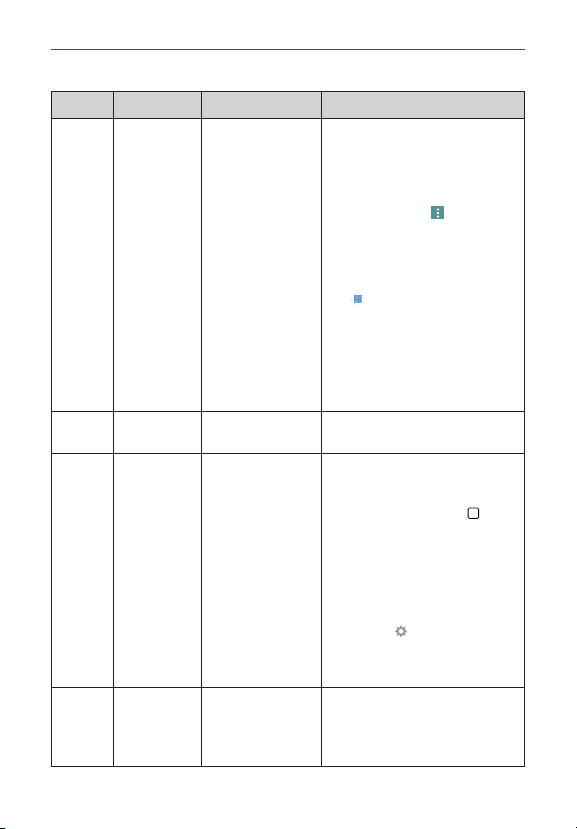
112
Troubleshooting
CATEGORY
SUB-CATEGORY QUESTION ANSWER
Phone
Function
SpeedDial
IsSpeedDialing
supported?
Yes.YoucansetSpeedDialsaswellas
saveacontactdirectlyonyourHome
screen.
To set a Speed Dial:
1.OpentheContactsapp.
2.TaptheMenu icon
(atthe
upper-rightcornerofthescreen)>
Speed dial.
3.Tapthespeeddiallocationandselect
thedesiredcontact.
NOTEYou canalsotaptheSpeeddial
icon
nexttothenumberwhenyou
createoreditthecontactentry.
To set a Direct Dial shortcut to your
Home screen:
1.Touchandholdanemptyareaon
yourHomescreen.
2.TaptheWidgetstab>Direct dial.
3.TapthecontactinyourContactslist.
Phone
Function
Memory
WillIknowwhenmy
memoryisfull?
Yes,you'llreceiveanotication.
Phone
Function
LanguageSupport
Isitpossibleto
changethelanguage?
Thephonehasmulti-lingualcapabilities.
To change the language:
1.FromtheHomescreen,touchand
holdtheRecent Apps Key
(inthe
TouchKeysbar)>System settings
>Generaltab.
2.TapLanguage & input > Language.
3.Tap thedesiredlanguage.
NOTETosetmultiplelanguagesfor
youron-screenkeyboard,fromthe
Language&inputscreen,tapthe
Settingsicon
(nexttoLGKeyboard),
tapInput language and keyboard
layout,thencheckmarkthelanguages
youwanttobeabletotype.
Phone
Function
LanguageSupport
Whichlanguagesare
supportedwhen
usingPlayStore?
ThePlay StoreappsupportsEnglish
andSpanish.Thirdpartyappsmaynot
supportalllanguages.

113
Troubleshooting
CATEGORY
SUB-CATEGORY QUESTION ANSWER
Phone
Function
VPN
HowdoIsetupa
VPN?
VPNaccesscongurationisdifferent
accordingtoeachcompany.To
congureVPNaccessfromyourphone,
youmustobtainthedetailsfromyour
company’snetworkadministrator.
Phone
Function
ScreenTimeOut
Myscreenturnsoff
afteronly30seconds.
HowcanIchangethe
amountoftimefor
thebacklighttoturn
off?
1.FromtheHomescreen,touchand
holdtheRecent Apps Key
(inthe
TouchKeysbar).
2.TapSystem settings>Displaytab>
Screen timeout.
3.Tapthepreferredscreenbacklight
timeouttime.
NOTEYou canalsoturnontheSmart
screenfeaturetokeepthescreenfrom
turningoffwhenthephonedetects
youreyeslookingatthescreen.From
theSettingsmenu,tapDisplay,then
checkmarkSmart screen.
Phone
Function
Wi-Fiand4G
WhenWi-Fiand4G
arebothavailable,
whichservicewillmy
phoneuse?
Whenusingdata,yourphonemay
defaulttotheWi-Ficonnection(ifWi-Fi
connectivityonyourphoneissetto
On).However,therewillbeno
noticationwhenyourphoneswitches
fromonetotheother.
Toknowwhichdataconnectionis
beingused,checkthe4G
orWi-Fi
icon
intheStatusBaratthetopof
yourscreen.
Phone
Function
HomeScreen
Isitpossibleto
removeanappfrom
theHomescreen?
Yes.Justtouchandholdtheiconuntil
theRemovebarappearsatthetopof
thescreen.Then,withoutliftingyour
nger,dragtheicontotheRemovebar,
thenliftyournger.

114
Troubleshooting
CATEGORY
SUB-CATEGORY QUESTION ANSWER
Phone
Function
Application
Idownloadedanapp
anditcausesalotof
errors.HowdoI
removeit?
1.FromtheHomescreen,touchand
holdtheRecent Apps Key
(inthe
TouchKeysbar).
2.TapSystem settings>Generaltab>
Apps.
3.Taptheapp>Uninstall.
Phone
Function
Ringtones
CanIusemusicles
formyringtones?
Yes.Aftersavingamusicleasa
ringtone,youcanuseitanywhereyou
cansetringtonesasanalert.
Touchandholdasonginalibrarylist.In
theContextmenuthatopens,tapSet
as ringtone.
Phone
Function
Alarm
Willmyalarmbe
audibleorwillitgooff
ifthephoneisturned
off?
No,thatfunctionalityisn'tsupported.
Phone
Function
Alarm
Ifmyringervolumeis
settoOfforVibrate,
willIhearmyalarm?
Youralarmisprogrammedtobeaudible
eveninthesescenarios.
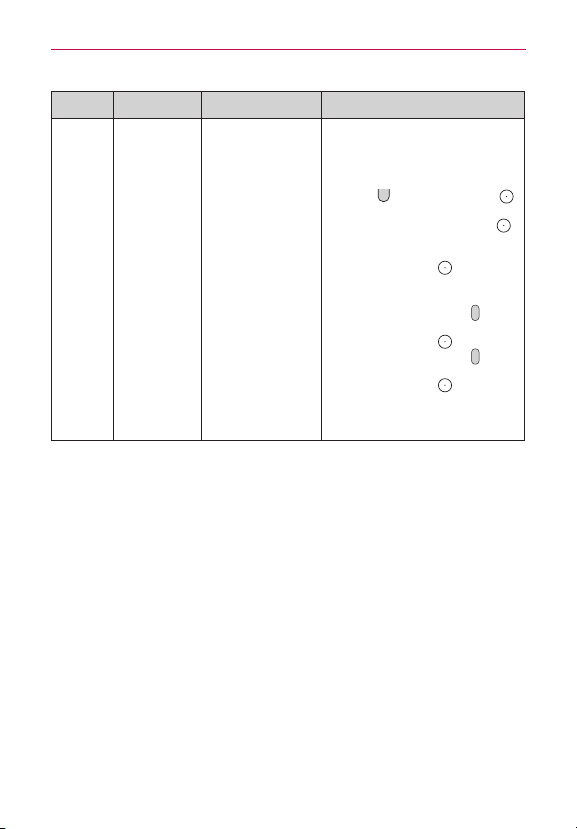
115
Troubleshooting
CATEGORY
SUB-CATEGORY QUESTION ANSWER
Recovery
Solution
FactoryReset
HowcanIperforma
factoryresetifIcan’t
accessthephone’s
Settingsmenu?
Read ALL steps before attempting:
1.Turnthephoneoff.
2.Pressandholdthefollowingkeysat
thesametime:Volume Down
Button
+Power/Lock Button
onthebackofthephone.
3.ReleasethePower/Lock Button
onlywhentheLGlogoisdisplayed,
thenimmediatelypressandholdthe
Power/Lock Button
again.
4.ReleaseallkeyswhentheFactory
dataresetisdisplayed.
5.PresstheVolume Buttons
to
highlightYes ingray,thenpressthe
Power/Lock Button
tocontinue.
6.PresstheVolume Buttons
to
highlightYesingray,thenpressthe
Power/Lock Button
oncemore
toconrm.
7.Yourdevicewillperformafactory
reset.

116
Safety
HAC disclosure statement
Thisphonehasbeentestedandratedforusewithhearingaidsforsomeof
thewirelesstechnologiesthatituses.However,theremaybesomenewer
wirelesstechnologiesusedinthisphonethathavenotbeentestedyetfor
usewithhearingaids.Itisimportanttotrythedifferentfeaturesofthis
phonethoroughlyandindifferentlocations,usingyourhearingaidor
cochlearimplant,todetermineifyouhearanyinterferingnoise.Consult
yourserviceproviderorthemanufacturerofthisphoneforinformationon
hearingaidcompatibility.Ifyouhavequestionsaboutreturnorexchange
policies,consultyourserviceproviderorphoneretailer.
FCC RF Exposure Information
WARNING! Read this information before operating the phone.
InAugust1996,theFederalCommunicationsCommission(FCC)ofthe
UnitedStates,withitsactioninReportandOrderFCC96-326,adoptedan
updatedsafetystandardforhumanexposuretoRadioFrequency(RF)
electromagneticenergyemittedbyFCCregulatedtransmitters.Those
guidelinesareconsistentwiththesafetystandardpreviouslysetbyboth
U.S.andinternationalstandardsbodies.Thedesignofthisphonecomplies
withtheFCCguidelinesandtheseinternationalstandards.
Bodily Contact During Operation
Thisdevicewastestedfortypicalusewiththebackofthephonekept0.39
inches(1.0cm)fromthebody.TocomplywithFCCRFexposure
requirements,aminimumseparationdistanceof0.39inches(1.0cm)must
bemaintainedbetweentheuser’sbodyandthebackofthephone,
includingtheantenna,whetherextendedorretracted.AnyPartybelt-clips,
holsters,andsimilaraccessoriescontainingmetalliccomponentsmaynot
beused.Avoidtheuseofaccessoriesthatcannotmaintain0.39inches(1.0
cm)distancebetweentheuser’sbodyandthebackofthephoneandhave
notbeentestedforcompliancewithFCCRFexposurelimits.
Caution
Useonlythesuppliedantenna.Useofunauthorizedantennas(or
modicationstotheantenna)couldimpaircallquality,damagethephone,

117
Safety
voidyourwarrantyand/orviolateFCCregulations.Don’tusethephonewith
adamagedantenna.Adamagedantennacouldcauseaminorskinburn.
Contactyourlocaldealerforareplacementantenna.
Wi-Fi Caution
Thisdeviceiscapableofoperatingin802.11a/n/acmode.
For802.11a/n/acdevicesoperatinginthefrequencyrangeof5.15-5.25
GHz,theyarerestrictedforindooroperationstoreduceanypotential
harmfulinterferenceforMobileSatelliteServices(MSS)intheUS.
Wi-FiAccessPointsthatarecapableofallowingyourdevicetooperatein
802.11a/n/acmode(5.15-5.25GHzband)areoptimizedforindooruseonly.
IfyourWi-Finetworkiscapableofoperatinginthismode,pleaserestrict
yourWi-FiuseindoorstonotviolatefederalregulationstoprotectMobile
SatelliteServices.
Consumer Information About Radio Frequency
Emissions
Your wireless phone, which contains a radio transmitter and receiver,
emits radio frequency energy during use. The following consumer
information addresses commonly asked questions about the health
effects of wireless phones.
Are wireless phones safe?
Scienticresearchonthesubjectofwirelessphonesandradiofrequency
(“RF”)energyhasbeenconductedworldwideformanyyears,and
continues.IntheUnitedStates,theFoodandDrugAdministration(“FDA”)
andtheFederalCommunicationsCommission(“FCC”)setpoliciesand
proceduresforwirelessphones.TheFDAissuedawebsitepublicationon
healthissuesrelatedtocellphoneusagewhereitstates,“Thescientic
communityatlarge…believesthattheweightofscienticevidencedoes
notshowanassociationbetweenexposuretoradiofrequency(RF)fromcell
phonesandadversehealthoutcomes.Stillthescienticcommunitydoes
recommendconductingadditionalresearchtoaddressgapsinknowledge.

118
Safety
ThatresearchisbeingconductedaroundtheworldandFDAcontinuesto
monitordevelopmentsinthiseld.You canaccessthejointFDA/FCC
websiteathttp://www.fda.gov(under“c”inthesubjectindex,selectCell
Phones>Research).You canalsocontacttheFDAtoll-freeat(888)
463-6332or(888)INFO-FDA.InJune2000,theFDAenteredintoa
cooperativeresearchanddevelopmentagreementthroughwhichadditional
scienticresearchisbeingconducted.TheFCCissueditsownwebsite
publicationstatingthat“thereisnoscienticevidencethatprovesthat
wirelessphoneusagecanleadtocanceroravarietyofotherproblems,
includingheadaches,dizzinessormemoryloss.”Thispublicationisavailable
athttp://www.fcc.gov/cgb/cellular.htmlorthroughtheFCCat(888)
225-5322or(888)CALL-FCC.
What does “SAR” mean?
In1996,theFCC,workingwiththeFDA,theU.S.EnvironmentalProtection
Agency,andotheragencies,establishedRFexposuresafetyguidelinesfor
wirelessphonesintheUnitedStates.Beforeawirelessphonemodelis
availableforsaletothepublic,itmustbetestedbythemanufacturerand
certiedtotheFCCthatitdoesnotexceedlimitsestablishedbytheFCC.
OneoftheselimitsisexpressedasaSpecicAbsorptionRate,or
“SAR.”SARisameasureoftherateofabsorptionofRFenergyinthe
body.TestsforSARareconductedwiththephonetransmittingatits
highestpowerlevelinalltestedfrequencybands.Since1996,theFCChas
requiredthattheSARofhandheldwirelessphonesnotexceed1.6watts
perkilogram,averagedoveronegramoftissue.AlthoughtheSARis
determinedatthehighestpowerlevel,theactualSARvalueofawireless
phonewhileoperatingcanbelessthanthereportedSARvalue.Thisis
becausetheSARvaluemayvaryfromcalltocall,dependingonfactors
suchasproximitytoacellsite,theproximityofthephonetothebody
whileinuse,andtheuseofhands-freedevices.Formoreinformationabout
SARs,seetheFCC’sOET
Bulletins56and65athttp://www.fcc.gov/Bureaus/Engineering_
Technology/Documents/bulletinsorvisittheCellularTelecommunications
IndustryAssociationwebsiteathttp://www.ctia.org/consumer_info/index.

119
Safety
cfm/AID/10371.You mayalsowishtocontactthemanufacturerofyour
phone.
Can I minimize my RF exposure?
IfyouareconcernedaboutR F, thereareseveralsimplestepsyoucantake
tominimizeyourRFexposure.You can,ofcourse,reduceyourtalktime.
You canplacemoredistancebetweenyourbodyandthesourceoftheR F,
astheexposureleveldropsoffdramaticallywithdistance.TheFDA/FCC
websitestatesthat“hands-freekitscanbeusedwithwirelessphonesfor
convenienceandcomfort.ThesesystemsreducetheabsorptionofRF
energyintheheadbecausethephone,whichisthesourceoftheRF
emissions,willnotbeplacedagainstthehead.Ontheotherhand,ifthe
phoneismountedagainstthewaistorotherpartofthebodyduringuse,
thenthatpartofthebodywillabsorbmoreRFenergy.Wirelessphones
marketedintheU.S.arerequiredtomeetsafetyrequirementsregardless
ofwhethertheyareusedagainsttheheadoragainstthebody.Either
congurationshouldresultincompliancewiththesafetylimit.”Also,ifyou
useyourwirelessphonewhileinacar,youcanuseaphonewithan
antennaontheoutsideofthevehicle.Youshouldalsoreadand
followyour
wirelessphonemanufacturer’sinstructionsforthesafeoperationofyour
phone.
Do wreless phones pose any special risks to children?
TheFDA/FCCwebsitestatesthat“thescienticevidencedoesnotshowa
dangertousersofwirelesscommunicationdevices,includingchildren.”The
FDA/FCCwebsitefurtherstatesthat“somegroupssponsoredbyother
nationalgovernmentshaveadvisedthatchildrenbediscouragedfromusing
wirelessphonesatall”.Forexample,theStewartReportfromtheUnited
Kingdom[“UK”]madesucharecommendationinDecember2000.Inthis
reportagroupofindependentexpertsnotedthatnoevidenceexiststhat
usingacellphonecausesbraintumorsorotherilleffects.[TheUK’s]
recommendationtolimitcellphoneusebychildrenwasstrictly
precautionary;itwasnotbasedonscienticevidencethatanyhealth
hazardexists.AcopyoftheUK’sleaetisavailableathttp://www.dh.gov.uk
(search“mobile”),oryoucanwriteto:NRPB,Chilton,Didcot,OxonOX11
ORQ,UnitedKingdom.CopiesoftheUK’sannualreportsonmobilephones

120
Safety
andRFareavailableonlineatwww.iegmp.org.ukandhttp://www.hpa.org.
uk/radiation/(search“mobile”).Parentswhowishtoreducetheirchildren’s
RFexposuremaychoosetorestricttheirchildren’swirelessphoneuse.
Where can I get further information about RF emissions?
Forfurtherinformation,seethefollowingadditionalresources(websites
currentasofApril2005):
U.S. Food and Drug Administration
FDAConsumermagazineNovember-December2000
Telephone:(888)INFO-FDA
http://www.fda.gov(Under“c”inthesubjectindex,selectCellPhones>
Research.)
U.S. Federal Communications Commission
44512thStreet,S.W.Washington,D.C.20554
Telephone:(888)225-5322
http://www.fcc.gov/oet/rfsafety
Independent Expert Group on Mobile Phones
http://www.iegmp.org.uk
Royal Society of Canada Expert Panels on Potential Health Risks of
Radio Frequency Fields from Wireless Telecommunication Devices
283SparksStreetOttawa,OntarioK1R7X9Canada
Telephone:(613)991-6990
http://www.rsc.ca/index.php?page=Expert_Panels_RF&Lang_id=120
World Health Organization
AvenueAppia201211Geneva27Switzerland
Telephone:01141227912111
http://www.who.int/mediacentre/factsheets/fs193/en/
International Commission on Non-Ionizing Radiation Protection
c/oBundesamtfurStrahlenschutz
IngolstaedterLandstr.1
85764OberschleissheimGermany

121
Safety
Telephone:0114918883332156
http://www.icnirp.de
American National Standards Institute
1819LStreet,N.W.,6thFloorWashington,D.C.20036
Telephone:(202)293-8020
http://www.ansi.org
National Council on Radiation Protection and Measurements
7910WoodmontAvenue,Suite800Bethesda,MD20814-3095
Telephone:(301)657-2652
http://www.ncrponline.org
Engineering in Medicine and Biology Society, Committee on Man
and Radiation (COMAR) of the Institute of Electrical and Electronics
Engineers
http://ewh.ieee.org/soc/embs/comar/
Consumer Information on SAR
(Specific Absorption Rate)
ThismodelphonemeetstheGovernment’srequirementsforexposureto
radiowaves.Yourwirelessphoneisaradiotransmitterandreceiver.Itis
designedandmanufacturednottoexceedtheemissionlimitsforexposure
toradiofrequency(RF)energysetbytheFederalCommunications
Commission(FCC)oftheU.S.Government.TheseFCCexposurelimitsare
derivedfromtherecommendationsoftwoexpertorganizations,the
NationalCounselonRadiationProtectionandMeasurement(NCRP)and
theInstituteofElectricalandElectronicsEngineers(IEEE).Inbothcases,
therecommendationsweredevelopedbyscienticandengineering
expertsdrawnfromindustry,government,andacademiaafterextensive
reviewsofthescienticliteraturerelatedtothebiologicaleffectsofRF
energy.Theexposurelimitforwirelessmobilephonesemploysaunitof
measurementknownastheSpecicAbsorptionRate,orSAR.TheSARis
ameasureoftherateofabsorptionofRFenergybythehumanbody
expressedinunitsofwattsperkilogram(W/kg).TheFCCrequireswireless

122
Safety
phonestocomplywithasafetylimitof1.6wattsperkilogram(1.6W/kg).
TheFCCexposurelimitincorporatesasubstantialmarginofsafetytogive
additionalprotectiontothepublicandtoaccountforanyvariationsin
measurements.TestsforSARareconductedusingstandardoperating
positionsspeciedbytheFCCwiththephonetransmittingatitshighest
certiedpowerlevelinalltestedfrequencybands.AlthoughSARis
determinedatthehighestcertiedpowerlevel,theactualSARlevelofthe
phonewhileoperatingcanbewellbelowthemaximumvalue.Becausethe
phoneisdesignedtooperateatmultiplepowerlevelstouseonlythe
powerrequiredtoreachthenetwork,ingeneral,thecloseryouaretoa
wirelessbasestationantenna,thelowerthepoweroutput.Beforeaphone
modelisavailableforsaletothepublic,itmustbetestedandcertiedto
theFCCthatitdoesnotexceedthelimitestablishedbythegovernment
adoptedrequirementforsafeexposure.Thetestsareperformedin
positionsandlocations(e.g.,attheearandwornonthebody)asrequired
bytheFCCforeachmodel.TheFCChasgrantedanEquipment
Authorizationforthismodelphone
withallreportedSARlevelsevaluated
asincompliancewiththeFCCRFemissionguidelines.
ThehighestSARvaluesare:
•HEADSAR:0.43W/kg(1g)
•BODY(Body-worn/Hotspot)SAR:0.85W/kg(1g)
(bodymeasurementsdifferamongphonemodels,dependingupon
availableaccessoriesandFCCrequirements).Whiletheremaybe
differencesbetweenSARlevelsofvariousphonesandatvariouspositions,
theyallmeetthegovernmentrequirementforsafeexposure.SAR
informationonthismodelphoneisonlewiththeFCCandcanbefound
undertheDisplayGrantsectionofhttp://www.fcc.gov/oet/ea/fccid/after
searchingonFCCIDZNFUS990.Tondinformationthatpertainstoa
particularmodelphone,thissiteusesthephoneFCCIDnumberwhichis
usuallyprintedsomewhereonthecaseofthephone.Sometimesitmaybe
necessarytoremovethebatterypacktondthenumber.Onceyouhave
theFCCIDnumberforaparticularphone,followtheinstructionsonthe
websiteanditshouldprovidevaluesfortypicalormaximumSARfora

123
Safety
particularphone.AdditionalinformationonSpecicAbsorptionRates(SAR)
canbefoundontheCellularTelecommunicationsIndustryAssociation
(CTIA)websiteathttp://www.ctia.org/
*IntheUnitedStatesandCanada,theSARlimitformobilephonesused
bythepublicis1.6watts/kg(W/kg)averagedoveronegramoftissue.
Thestandardincorporatesasubstantialmarginofsafetytogiveadditional
protectionforthepublicandtoaccountforanyvariationsin
measurements.
FCC Hearing-Aid Compatibility (HAC) Regulations
for Wireless Devices
OnJuly10,2003,theU.S.FederalCommunicationsCommission(FCC)
ReportandOrderinWTDocket01-309modiedtheexceptionofwireless
phonesundertheHearingAidCompatibilityActof1988(HACAct)to
requiredigitalwirelessphonesbecompatiblewithhearing-aids.Theintent
oftheHACActistoensurereasonableaccesstotelecommunications
servicesforpersonswithhearingdisabilities.Whilesomewirelessphones
areusednearsomehearingdevices(hearingaidsandcochlearimplants),
usersmaydetectabuzzing,humming,orwhiningnoise.Somehearing
devicesaremoreimmunethanotherstothisinterferencenoise,and
phonesalsovaryintheamountofinterferencetheygenerate.Thewireless
telephoneindustryhasdevelopedaratingsystemforwirelessphones,to
assisthearingdeviceuserstondphonesthatmaybecompatiblewith
theirhearingdevices.Notallphoneshavebeenrated.Phonesthatare
ratedhavetheratingontheirboxoralabellocatedonthebox.
Theratingsarenotguarantees.Resultswillvarydependingontheuser's
hearingdeviceandhearingloss.Ifyourhearingdevicehappenstobe
vulnerabletointerference,youmaynotbeabletousearatedphone
successfully.Tryingoutthephonewithyourhearingdeviceisthebestway
toevaluateitforyourpersonalneeds.
M-Ratings:PhonesratedM3orM4meetFCCrequirementsandarelikely
togeneratelessinterferencetohearingdevicesthanphonesthatarenot
labeled.M4isthebetter/higherofthetworatings.

124
Safety
T-Ratings:PhonesratedT3orT4meetFCCrequirementsandarelikelyto
generatelessinterferencetohearingdevicesthanphonesthatarenot
labeled.T4isthebetter/higherofthetworatings.
Hearingdevicesmayalsoberated.Yourhearingdevicemanufactureror
hearinghealthprofessionalmayhelpyoundthisrating.Higherratings
meanthatthehearingdeviceisrelativelyimmunetointerferencenoise.
Thehearingaidandwirelessphoneratingvaluesarethenaddedtogether.
Asumof5isconsideredacceptablefornormaluse.Asumof6is
consideredforbestuse.
Intheaboveexample,ifahearingaidmeetstheM2levelratingandthe
wirelessphonemeetstheM3levelrating,thesumofthetwovaluesequal
M5.Thisshouldprovidethehearingaiduserwith“normalusage”while
usingtheirhearingaidwiththeparticularwirelessphone.“Normal
usage”inthiscontextisdenedasasignalqualitythat’sacceptablefor
normaloperation.Whenyou’retalkingonacellphone,it’srecommended
thatyouturntheBTorWLANmodeoffforHAC.TheMmarkisintended
tobesynonymouswiththeUmark.TheTmarkisintendedtobe
synonymouswiththeUTmark.TheMandTmarksarerecommendedby
theAllianceforTelecommunicationsIndustriesSolutions(ATIS).TheUand
UTmarksarereferencedinSection20.19oftheFCCRules.TheHAC
ratingandmeasurementprocedurearedescribedintheAmericanNational
StandardsInstitute(ANSI)C63.19standard.ToensurethattheHearingAid
Compatibilityratingforyourphoneismaintained,secondarytransmitters
suchasBluetoothandWLANcomponentsmustbedisabledduringacall.
Whenyou'retalkingoverthecellphone,it'srecommendedyou'dturnthe
BT(Bluetooth)orWLANmodeoffforHAC.Thisphonehas
beentested
andratedforusewithhearingaidsforsomeofthewirelesstechnologies
thatituses.However,theremaybesomenewerwirelesstechnologies
usedinthisphonethathavenotbeentestedyetforusewithhearingaids.
Itisimportanttotrythedifferentfeaturesofthisphonethoroughlyandin

125
Safety
differentlocations,usingyourhearingaidorcochlearimplant,todetermine
ifyouhearanyinterferingnoise.Consultyourserviceproviderorthe
manufacturerofthisphoneforinformationonhearingaidcompatibility.If
youhavequestionsaboutreturnorexchangepolicies,consultyourservice
providerorphoneretailer.
For information about hearing aids and digital wireless phones
WirelessPhonesandHearingAidAccessibility
http://www.accesswireless.org/
GallaudetUniversity,RERC
http://tap.gallaudet.edu/Voice/
FCCHearingAidCompatibilityandVolumeControl
http://www.fcc.gov/cgb/dro/hearing.html
TheHearingAidCompatibilityFCCOrder
http://hraunfoss.fcc.gov/edocs_public/attachmatch/FCC-03-168A1.pdf
HearingLossAssociationofAmerica[HLAA]
http://hearingloss.org/content/telephones-and-mobile-devices
Caution: Avoid potential hearing loss.
Prolongedexposuretoloudsounds(includingmusic)isthemostcommon
causeofpreventablehearingloss.Somescienticresearchsuggeststhat
usingportableaudiodevices,suchasportablemusicplayersandcellular
telephones,athighvolumesettingsforlongdurationsmayleadto
permanentnoise-inducedhearingloss.Thisincludestheuseof
headphones(includingheadsets,earbudsandBluetooth
®
orotherwireless
devices).Exposuretoveryloudsoundhasalsobeenassociatedinsome
studieswithtinnitus(aringingintheear),hypersensitivitytosoundand
distortedhearing.Individualsusceptibilitytonoise-inducedhearinglossand
otherpotentialhearingproblemsvaries.
Theamountofsoundproducedbyaportableaudiodevicevariesdepending
onthenatureofthesound,thedevice,thedevicesettingsandthe
headphones.You shouldfollowsomecommonsenserecommendations
whenusinganyportableaudiodevice:

126
Safety
• Setthevolumeinaquietenvironmentandselectthelowestvolumeat
whichyoucanhearadequately.
• Whenusingheadphones,turnthevolumedownifyoucannothearthe
peoplespeakingnearyouorifthepersonsittingnexttoyoucanhear
whatyouarelisteningto.
• Donotturnthevolumeuptoblockoutnoisysurroundings.Ifyouchoose
tolistentoyourportabledeviceinanoisyenvironment,usenoise-
cancellingheadphonestoblockoutbackgroundenvironmentalnoise.
• Limittheamountoftimeyoulisten.Asthevolumeincreases,lesstime
isrequiredbeforeyourhearingcouldbeaffected.
• Avoidusingheadphonesafterexposuretoextremelyloudnoises,such
asrockconcerts,thatmightcausetemporaryhearingloss.Temporary
hearinglossmightcauseunsafevolumestosoundnormal.
• Donotlistenatanyvolumethatcausesyoudiscomfort.Ifyou
experienceringinginyourears,hearmufedspeechorexperienceany
temporaryhearingdifcultyafterlisteningtoyourportableaudiodevice,
discontinueuseandconsultyourdoctor.
TIA Safety Information
ThefollowingisthecompleteTIASafetyInformationforwirelesshandheld
phones.
Exposure to Radio Frequency Signal
Yourwirelesshandheldportablephoneisalowpowerradiotransmitterand
receiver.WhenON,itreceivesandsendsoutRadioFrequency(RF)signals.
InAugust,1996,theFederalCommunicationsCommissions(FCC)adopted
RFexposureguidelineswithsafetylevelsforhandheldwirelessphones.
Thoseguidelinesareconsistentwiththesafetystandardspreviouslysetby
bothU.S.andinternationalstandardsbodies:
ANSIC95.1(1992)*
NCRPReport86(1986)

127
Safety
ICNIRP(1996)
*AmericanNationalStandardsInstitute;NationalCouncilonRadiation
ProtectionandMeasurements;InternationalCommissiononNon-Ionizing
RadiationProtectionThosestandardswerebasedoncomprehensiveand
periodicevaluationsoftherelevantscienticliterature.Forexample,over
120scientists,engineers,andphysiciansfromuniversities,government
healthagencies,andindustryreviewedtheavailablebodyofresearchto
developtheANSIStandard(C95.1).Thedesignofyourphonecomplies
withtheFCCguidelines(andthosestandards).
Antenna Care
Useonlythesuppliedoranapprovedreplacementantenna.Unauthorized
antennas,modications,orattachmentscoulddamagethephoneandmay
violateFCCregulations.
Tips on Efficient Operation
Foryourphonetooperatemostefciently:
Don’ttouchtheantennaunnecessarilywhenthephoneisinuse.Contact
withtheantennaaffectscallqualityandmaycausethephonetooperateat
ahigherpowerlevelthanotherwiseneeded.
Electronic Devices
MostmodernelectronicequipmentisshieldedfromRFsignals.However,
certainelectronicequipmentmaynotbeshieldedagainsttheRFsignals
fromyourwirelessphone.
Pacemakers
TheHealthIndustryManufacturersAssociationrecommendsthata
minimumseparationofsix(6)inchesbemaintainedbetweenahandheld
wirelessphoneandapacemakertoavoidpotentialinterferencewiththe
pacemaker.Theserecommendationsareconsistentwiththeindependent
researchbyandrecommendationsofWirelessTechnologyResearch.
Personswithpacemakers.
• ShouldALWAYSkeepthephonemorethansix(6)inchesfromtheir
pacemakerwhenthephoneisturnedON;

128
Safety
• Shouldnotcarrythephoneinabreastpocket;
• Shouldusetheearoppositethepacemakertominimizethepotentialfor
interference;
• ShouldturnthephoneOFFimmediatelyifthereisanyreasontosuspect
thatinterferenceistakingplace.
Hearing Aids
Somedigitalwirelessphonesmayinterferewithsomehearingaids.Inthe
eventofsuchinterference,youmaywanttoconsultyourserviceprovider
(orcallthecustomerservicelinetodiscussalternatives).
Other Medical Devices
Ifyouuseanyotherpersonalmedicaldevice,consultthemanufacturerof
yourdevicetodetermineifitisadequatelyshieldedfromexternalRF
energy.Yourphysicianmaybeabletoassistyouinobtainingthis
information.
Health Care Facilities
TurnyourphoneOFFinhealthcarefacilitieswhenanyregulationspostedin
theseareasinstructyoutodoso.Hospitalsorhealthcarefacilitiesmayuse
equipmentthatcouldbesensitivetoexternalRFenergy.
Vehicles
RFsignalsmayaffectimproperlyinstalledorinadequatelyshielded
electronicsystemsinmotorvehicles.Checkwiththemanufacturerorits
representativeregardingyourvehicle.You shouldalsoconsultthe
manufacturerofanyequipmentthathasbeenaddedtoyourvehicle.
Posted Facilities
TurnyourphoneOFFinanyfacilitywherepostednoticessorequire.
Aircraft
FCCregulationsprohibitusingyourphonewhileintheair.SwitchOFFyour
phonebeforeboardinganaircraft.

129
Safety
Blasting Areas
Toavoidinterferingwithblastingoperations,turnyourphoneOFFwhenin
a“blastingarea”orinareasposted:“Turnofftwo-wayradio”.Obeyall
signsandinstructions.
Potentially Explosive Atmosphere
TurnyourphoneOFFwheninanyareawithapotentiallyexplosive
atmosphereandobeyallsignsandinstructions.Sparksinsuchareascould
causeanexplosionorreresultinginbodilyinjuryorevendeath.
Areaswithapotentiallyexplosiveatmosphereareoften,butnotalways
markedclearly.Potentialareasmayinclude:fuelingareas(suchasgasoline
stations);belowdeckonboats;fuelorchemicaltransferorstorage
facilities;vehiclesusingliqueedpetroleumgas(suchaspropaneor
butane);areaswheretheaircontainschemicalsorparticles(suchasgrain,
dust,ormetalpowders);andanyotherareawhereyouwouldnormallybe
advisedtoturnoffyourvehicleengine.
For Vehicles Equipped with an Air Bag
Anairbaginateswithgreatforce.DONOTplaceobjects,includingeither
installedorportablewirelessequipment,intheareaovertheairbagorin
theairbagdeploymentarea.Ifin-vehiclewirelessequipmentisimproperly
installedandtheairbaginates,seriousinjurycouldresult.
Part 15.19 statement
Thisdevicecomplieswithpart15ofFCCrules.Operationissubjecttothe
followingtwoconditions:
(1)Thisdevicemaynotcauseharmfulinterference.
(2)Thisdevicemustacceptanyinterferencereceived,including
interferencethatmaycauseundesiredoperation.
Part 15.105 statement
Thisequipmenthasbeentestedandfoundtocomplywiththelimitsfora
classBdigitaldevice,pursuanttoPart15oftheFCCrules.Theselimitsare
designedtoprovidereasonableprotectionagainstharmfulinterferenceina

130
Safety
residentialinstallation.Thisequipmentgenerates,uses,andcanradiateradio
frequencyenergyand,ifnotinstalledandusedinaccordancewiththe
instructions,maycauseharmfulinterferencetoradiocommunications.
However,thereisnoguaranteethatinterferencewillnotoccurinaparticular
installation.Ifyouexperienceinterferencewithreception(e.g.,television),
determineifthisequipmentiscausingtheharmfulinterferencebyturning
theequipmentoffandthenbackontoseeiftheinterferenceisaffected.If
necessary,trycorrectingtheinterferencebyoneormoreofthefollowing
measures:
-Reorientorrelocatethereceivingantenna.
-Increasetheseparationbetweentheequipmentandreceiver.
-Connecttheequipmentintoanoutletonacircuitdifferentfromthatto
whichthereceiverisconnected.
-Consultthedealeroranexperiencedradio/TVtechnicianforhelp.
Part 15.21 statement
ChangeorModicationsthatarenotexpresslyapprovedbythemanufacturer
couldvoidtheuser’sauthoritytooperatetheequipment.
Safety Information
Pleasereadandobservethefollowinginformationforsafeandproperuse
ofyourphoneandtopreventdamage.
Caution
Charger and Adapter Safety
• Thechargerandadapterareintendedforindooruseonly.
• Insertthebatterypackchargerverticallyintothewallpowersocket.
• OnlyusetheLG-approvedbatterycharger.Otherwise,youmaycause
seriousdamagetoyourphone.
• Usethecorrectadapterforyourphonewhenusingthebatterypack
chargerabroad.

131
Safety
Battery Information and Care
• Alwaysunplugthechargerfromthewallsocketafterthephoneisfully
chargedtosaveunnecessarypowerconsumptionofthecharger.
• Pleasereadthemanualofproperinstallationandremovalofthebattery.
• Pleasereadthemanualofspeciedchargeraboutchargingmethod.
• Donotdamagethepowercordbybending,twisting,orheating.Donot
usetheplugifitislooseasitmaycauseelectricshockorre.Donot
placeanyheavyitemsonthepowercord.
• Donotallowthepowercordtobecrimpedasitmaycauseelectric
shockorre.
• Unplugthepowercordpriortocleaningyourphone,andcleanthepower
plugpinwhenit’sdirty.Whenusingthepowerplug,ensurethatit’srmly
connected.Ifnot,itmaycauseexcessiveheatorre.Ifyouputyour
phoneinapocketorbagwithoutcoveringthereceptacleofthephone
(powerplugpin),metallicarticles(suchasacoin,papercliporpen)may
short-circuitthephone.Alwayscoverthereceptaclewhennotinuse.
• Rechargethebatteryafterlongperiodsofnon-usetomaximizebattery
life.Batterylifewillvaryduetousagepatternandenvironmental
conditions.
• Pleaseuseonly
anLG-approvedchargingaccessorytochargeyourLG
phone.Improperhandlingofthechargingport,aswellastheuseofan
incompatiblecharger,maycausedamagetoyourphoneandvoidthe
warranty.
• Chargingtemperaturerangeisregulatedbetween32°F(0°C)and113°F
(45°C).Donotchargethebatteryoutofrecommendedtemperature
range.Chargingoutofrecommendedrangemightcausethegenerating
heatorseriousdamageofbattery.Andalso,itmightcausethe
deteriorationofbattery'scharacteristicsandcyclelife.
• Donotuseorleavethebatteryundertheblazingsunorinheatedcarby
sunshine.Thebatterymaygenerateheat,smokeorame.Andalso,it
mightcausethedeteriorationofbattery’scharacteristicsorcyclelife.

132
Safety
• Thebatterypackhasprotectioncircuittoavoidthedanger.Donotuse
nearbytheplacewheregeneratesstaticelectricitymorethan100V
whichgivesdamagetotheprotectioncircuit.Iftheprotectioncircuit
werebroken,thebatterywouldgeneratesmoke,ruptureorame.
• Whenthebatteryhasrust,badsmellorsomethingabnormalatrst-
time-using,donotusetheequipmentandgotobringthebatterytothe
shopwhichitwasbought.
• Incaseyoungerchildrenusethebattery,theirparentsshouldteach
themhowtousebatteriesaccordingtothemanualwithcare.
• Iftheskinorclothissmearedwithliquidfromthebattery,washwith
freshwater.Itmaycausetheskininammation.Removeanddonotuse
thebattery.
• Donothandlethephonewithwethandswhileitisbeingcharged.It
maycauseanelectricshockorseriouslydamageyourphone.
• Donotplaceoranswercallswhilechargingthephoneasitmayshort-
circuitthephoneand/orcauseelectricshockorre.
• Thechargerandadapterareintendedforindooruseonly.
• Insertthebatterypackchargerverticallyintothewallpowersocket.
• OnlyusetheLG-approvedbatterycharger.Otherwise,youmaycause
seriousdamagetoyourphoneandriskofoverheating,reorexplosion
mayoccur.
• Usethecorrectadapterforyourphonewhenusingthebatterypack
chargerabroad.
• Talkingonyourphoneforalongperiodoftimemayreducecallquality
duetoheatgeneratedduringuse.
• Donotuseharshchemicals(suchasalcohol,benzene,thinners,etc.)or
detergentstocleanyourphone.Thiscouldcauseare.Donotplaceor
answercallswhilechargingthephoneasitmayshort-circuitthephone
and/orcauseelectricshockorre.Don’tshort-circuitthebattery.
Metallicarticlessuchasacoin,papercliporpeninyourpocketorbag
mayshort-circuitthe+and–terminalsofthebattery(metalstripsonthe

133
Safety
battery)uponmoving.Short-circuitoftheterminalmaydamagethe
batteryandcauseanexplosion.
• Neveruseandunapprovedbatterysincethiscoulddamagethephone
and/orbatteryandcouldcausethebatterytoexplode.Onlyusethe
batteriesandchargersprovidedbyLG.Thewarrantywillnotbeapplied
toproductsprovidedbyothersuppliers.Onlyauthorizedpersonnel
shouldservicethephoneanditsaccessories.Faultyinstallationor
servicemayresultinaccidentsandconsequentlyinvalidatethewarranty.
Explosion, Shock, and Fire Hazards
• Donotputyourphoneinaplacesubjecttoexcessivedustandkeepthe
minimumrequireddistancebetweenthepowercordandheatsources.
• Unplugthepowercordpriortocleaningyourphone,andcleanthe
powerplugpinwhenit’sdirty.
• Whenusingthepowerplug,ensurethatit’srmlyconnected.Ifnot,it
maycauseexcessiveheatorre.
• Ifyouputyourphoneinapocketorbagwithoutcoveringthereceptacle
ofthephone(powerplugpin),metallicarticles(suchasacoin,paperclip
orpen)mayshort-circuitthephoneandmaycauseanexplosion.Always
coverthereceptaclewhennotinuse.
• Don’tshort-circuitthebattery.Metallicarticlessuchasacoin,paperclip
orpeninyourpocketorbagorcontactwithsharpobjectsincluding
animalbitesmayshort-circuitthe+and–terminalsofthebattery(metal
stripsonthebattery)uponmoving.Shortcircuitoftheterminalmay
damagethebatteryandcauseanexplosion.
General Notice
• Usingadamagedbatteryorplacingabatteryinyourmouthoranimal's
mouthmaycauseseriousinjuryincludingareorexplosion.
• Donotplaceitemscontainingmagneticcomponentssuchasacredit
card,phonecard,bankbook,orsubwayticketnearyourphone.The
magnetismofthephonemaydamagethedatastoredinthemagnetic
strip.

134
Safety
• Talkingonyourphoneforalongperiodoftimemayreducecallquality
duetoheatgeneratedduringuse.
• Whenthephoneisnotusedforalongperiodtime,storeitinasafe
placewiththepowercordunplugged.
• Usingthephoneinproximitytoreceivingequipment(i.e.,TVorradio)
maycauseinterferencetothephone.
• Donotusethephoneiftheantennaisdamaged.Ifadamagedantenna
contactsskin,itmaycauseaslightburn.PleasecontactanLG
AuthorizedServiceCentertoreplacethedamagedantenna.
• Donotimmerseyourphoneinwater,liquid,orexposetohighhumidity.
Ifthishappens,turnitoffimmediatelyandremovethebattery.
Immediately,takeittoanLGAuthorizedServiceCenter.
• Donotpaintyourphone.
• Thedatasavedinyourphonemightbedeletedduetocarelessuse,
repairofthephone,orupgradeofthesoftware.Pleasebackupyour
importantphonenumbers.(Ringtones,textmessages,voicemessages,
pictures,andvideoscouldalsobedeleted.)Themanufacturerisnot
liablefordamageduetothelossofdata.
• Whenyouusethephoneinpublicplaces,settheringtonetovibrationso
youdon'tdisturbothers.
•
Donotturnyourphoneonoroffwhenputtingittoyourear.
• Useaccessories,suchasearphonesandheadsets,withcaution.Ensure
thatcablesaretuckedawaysafelyanddonottouchtheantenna
unnecessarily.
FDA Consumer Update
TheU.S.FoodandDrugAdministration’sCenterforDevicesand
RadiologicalHealthConsumerUpdateonMobilePhones
1. Do wireless phones pose a health hazard?

135
Safety
Theavailablescienticevidencedoesnotshowthatanyhealthproblemsare
associatedwithusingwirelessphones.Thereisnoproof,however,that
wirelessphonesareabsolutelysafe.WirelessphonesemitlowlevelsofRadio
Frequency(RF)energyinthemicrowaverangewhilebeingused.Theyalso
emitverylowlevelsofRFwheninstandbymode.WhereashighlevelsofRF
canproducehealtheffects(byheatingtissue),exposuretolowlevelRFthat
doesnotproduceheatingeffectscausesnoknownadversehealtheffects.
ManystudiesoflowlevelRFexposureshavenotfoundanybiologicaleffects.
Somestudieshavesuggestedthatsomebiologicaleffectsmayoccur,butsuch
ndingshavenotbeenconrmedbyadditionalresearch.Insomecases,other
researchershavehaddifcultyinreproducingthosestudies,orindetermining
thereasonsforinconsistentresults.
2. What is the FDA's role concerning the safety of wireless
phones?
Underthelaw,theFDAdoesnotreviewthesafetyofradiation-emitting
consumerproductssuchaswirelessphonesbeforetheycanbesold,asit
doeswithnewdrugsormedicaldevices.However,theagencyhas
authoritytotakeactionifwirelessphonesareshowntoemitRadio
Frequency(RF)energyatalevelthatishazardoustotheuser.Insucha
case,theFDAcouldrequirethemanufacturersofwirelessphonestonotify
usersofthehealthhazardandtorepair,replace,orrecallthephonesso
thatthehazardnolongerexists.
AlthoughtheexistingscienticdatadonotjustifyFDAregulatoryactions,
theFDAhasurgedthewirelessphoneindustrytotakeanumberofsteps,
includingthefollowing.
• SupportneededresearchintopossiblebiologicaleffectsofRFofthetype
emittedbywirelessphones;
• DesignwirelessphonesinawaythatminimizesanyRFexposuretothe
userthatisnotnecessaryfordevicefunction;and
• Cooperateinprovidingusersofwirelessphoneswiththebestpossible
informationonpossibleeffectsofwirelessphoneuseonhumanhealth.

136
Safety
TheFDAbelongstoaninteragencyworkinggroupofthefederalagencies
thathaveresponsibilityfordifferentaspectsofRFsafetytoensure
coordinatedeffortsatthefederallevel.Thefollowingagenciesbelongto
thisworkinggroup:
• NationalInstituteforOccupationalSafetyandHealth
• EnvironmentalProtectionAgency
• OccupationalSafetyandHealthAdministration
• NationalTelecommunicationsandInformationAdministration
TheNationalInstitutesofHealthparticipatesinsomeinteragencyworking
groupactivities,aswell.TheFDAsharesregulatoryresponsibilitiesfor
wirelessphoneswiththeFederalCommunicationsCommission(FCC).All
phonesthataresoldintheUnitedStatesmustcomplywithFCCsafety
guidelinesthatlimitRFexposure.
TheFCCreliesontheFDAandotherhealthagenciesforsafetyquestions
aboutwirelessphones.
TheFCCalsoregulatesthebasestationsthatthewirelessphonenetworks
relyupon.Whilethesebasestationsoperateathigherpowerthandothe
wirelessphonesthemselves,theRFexposuresthatpeoplegetfromthese
basestationsaretypicallythousandsoftimeslowerthanthosetheycan
getfromwirelessphones.Basestationsarethusnotthesubjectofthe
safetyquestionsdiscussedinthisdocument.
3. What kinds of phones are the subject of this update?
Theterm“wirelessphone”refersheretohandheldwirelessphoneswith
built-inantennas,oftencalled“cell”,“mobile”,or“PCS”phones.These
typesofwirelessphonescanexposetheusertomeasurableRadio
Frequency(RF)energybecauseoftheshortdistancebetweenthephone
andtheuser’shead.
TheseRFexposuresarelimitedbyFCCsafetyguidelinesthatwere
developedwiththeadviceoftheFDAandotherfederalhealthandsafety
agencies.Whenthephoneislocatedatgreaterdistancesfromtheuser,
theexposuretoRFisdrasticallylowerbecauseaperson'sRFexposure

137
Safety
decreasesrapidlywithincreasingdistancefromthesource.Theso-called
“cordlessphones,”whichhaveabaseunitconnectedtothetelephone
wiringinahouse,typicallyoperateatfarlowerpowerlevels,andthus
produceRFexposuresfarbelowtheFCCsafetylimits.
4. What are the results of the research done already?
Theresearchdonethusfarhasproducedconictingresults,andmany
studieshavesufferedfromawsintheirresearchmethods.Animal
experimentsinvestigatingtheeffectsofRadioFrequency(RF)energy
exposurescharacteristicofwirelessphoneshaveyieldedconictingresults
thatoftencannotberepeatedinotherlaboratories.Afewanimalstudies,
however,havesuggestedthatlowlevelsofRFcouldacceleratethe
developmentofcancerinlaboratoryanimals.However,manyofthestudies
thatshowedincreasedtumordevelopmentusedanimalsthathadbeen
geneticallyengineeredortreatedwithcancercausingchemicalssoastobe
pre-disposedtodevelopcancerintheabsenceofRFexposure.Other
studiesexposedtheanimalstoRFforupto22hoursperday.These
conditionsarenotsimilartotheconditionsunderwhichpeopleuse
wirelessphones,sowedonotknowwithcertaintywhattheresultsof
suchstudiesmeanforhumanhealth.Threelargeepidemiologystudies
havebeenpublishedsinceDecember2000.Betweenthem,
thestudies
investigatedanypossibleassociationbetweentheuseofwirelessphones
andprimarybraincancer,glioma,meningioma,oracousticneuroma,
tumorsofthebrainorsalivarygland,leukemia,orothercancers.Noneof
thestudiesdemonstratedtheexistenceofanyharmfulhealtheffectsfrom
wirelessphoneRFexposures.However,noneofthestudiescananswer
questionsaboutlong-termexposures,sincetheaverageperiodofphone
useinthesestudieswasaroundthreeyears.
5. What research is needed to decide whether RF exposure from
wireless phones poses a health risk?
Acombinationoflaboratorystudiesandepidemiologicalstudiesofpeople
actuallyusingwirelessphoneswouldprovidesomeofthedatathatare
needed.Lifetimeanimalexposurestudiescouldbecompletedinafew
years.However,verylargenumbersofanimalswouldbeneededtoprovide
reliableproofofacancerpromotingeffectifoneexists.Epidemiological

138
Safety
studiescanprovidedatathatisdirectlyapplicabletohumanpopulations,
buttenormoreyearsfollow-upmaybeneededtoprovideanswersabout
somehealtheffects,suchascancer.Thisisbecausetheintervalbetween
thetimeofexposuretoacancer-causingagentandthetimetumors
develop—iftheydo—maybemany,manyyears.Theinterpretationof
epidemiologicalstudiesishamperedbydifcultiesinmeasuringactualRF
exposureduringday-to-dayuseofwirelessphones.Manyfactorsaffect
thismeasurement,suchastheangleatwhichthephoneisheld,orwhich
modelofphoneisused.
6. What is the FDA doing to find out more about the possible
health effects of wireless phone RF?
TheFDAisworkingwiththeU.S.NationalToxicologyProgramandwith
groupsofinvestigatorsaroundtheworldtoensurethathighpriorityanimal
studiesareconductedtoaddressimportantquestionsabouttheeffectsof
exposuretoRadioFrequency(RF)energy.TheFDAhasbeenaleading
participantintheWorldHealthOrganizationInternationalElectroMagnetic
Fields(EMF)Projectsinceitsinceptionin1996.Aninuentialresultofthis
workhasbeenthedevelopmentofadetailedagendaofresearchneeds
thathasdriventheestablishmentofnewresearchprogramsaroundthe
world.Theprojecthasalsohelpeddevelopaseriesofpublicinformation
documentsonEMFissues.TheFDAandtheCellularTelecommunications
&InternetAssociation(CTIA)haveaformalCooperativeResearchAnd
DevelopmentAgreement(CRADA)todoresearchonwirelessphone
safety.TheFDAprovidesthescienticoversight,obtaininginputfrom
expertsingovernment,industry,andacademicorganizations.CTIA-funded
researchisconductedthroughcontractswithindependentinvestigators.
Theinitialresearchwillincludebothlaboratorystudiesandstudiesof
wirelessphoneusers.TheCRADAwillalsoincludeabroadassessmentof
additionalresearchneedsinthecontextofthelatestresearch
developmentsaroundtheworld.
7. How can I find out how much Radio Frequency energy exposure
I can get by using my wireless phone?
AllphonessoldintheUnitedStatesmustcomplywithFederal
CommunicationsCommission(FCC)guidelinesthatlimitRadioFrequency

139
Safety
(RF)energyexposures.TheFCCestablishedtheseguidelinesin
consultationwiththeFDAandtheotherfederalhealthandsafetyagencies.
TheFCClimitforRFexposurefromwirelessphonesissetataSpecic
AbsorptionRate(SAR)of1.6wattsperkilogram(1.6W/kg).TheFCClimit
isconsistentwiththesafetystandardsdevelopedbytheInstituteof
ElectricalandElectronicEngineering(IEEE)andtheNationalCouncilon
RadiationProtectionandMeasurement.Theexposurelimittakesinto
considerationthebody’sabilitytoremoveheatfromthetissuesthatabsorb
energyfromthewirelessphoneandissetwellbelowlevelsknowntohave
effects.ManufacturersofwirelessphonesmustreporttheRFexposure
levelforeachmodelofphonetotheFCC.TheFCCwebsite(http://www.
fcc.gov/oet/rfsafety)givesdirectionsforlocatingtheFCCidentication
numberonyourphonesoyoucanndyourphone’sRFexposurelevelin
theonlinelisting.
8. What has the FDA done to measure the Radio Frequency energy
coming from wireless phones?
TheInstituteofElectricalandElectronicEngineers(IEEE)isdevelopinga
technicalstandardformeasuringtheRadioFrequency(RF)energy
exposurefromwirelessphonesandotherwirelesshandsetswiththe
participationandleadershipofFDAscientistsandengineers.Thestandard,
“RecommendedPracticeforDeterminingtheSpatial-PeakSpecic
AbsorptionRate(SAR)intheHumanBodyDuetoWireless
CommunicationsDevices:ExperimentalTechniques”,setsforththerst
consistenttestmethodologyformeasuringtherateatwhichRFis
depositedintheheadsofwirelessphoneusers.Thetestmethodusesa
tissue-simulatingmodelofthehumanhead.StandardizedSARtest
methodologyisexpectedtogreatlyimprovetheconsistencyof
measurementsmadeatdifferentlaboratoriesonthesamephone.SARis
themeasurementoftheamountofenergyabsorbedintissue,eitherbythe
wholebodyorasmallpartofthebody.Itismeasuredinwatts/kg(or
milliwatts/g)ofmatter.Thismeasurementisusedtodeterminewhethera
wirelessphonecomplieswithsafetyguidelines.
9. What steps can I take to reduce my exposure to Radio
Frequency energy from my wireless phone?

140
Safety
Ifthereisariskfromtheseproducts—andatthispointwedonotknowthat
thereis—itisprobablyverysmall.Butifyouareconcernedaboutavoidingeven
potentialrisks,youcantakeafewsimplestepstominimizeyourexposureto
RadioFrequency(RF)energy.Sincetimeisakeyfactorinhowmuchexposurea
personreceives,reducingtheamountoftimespentusingawirelessphonewill
reduceRFexposure.Ifyoumustconductextendedconversationsbywireless
phoneeveryday,youcouldplacemoredistancebetweenyourbodyandthe
sourceoftheR F, sincetheexposureleveldropsoffdramaticallywithdistance.
Forexample,youcoulduseaheadsetandcarrythewirelessphoneawayfrom
yourbodyoruseawirelessphoneconnectedtoaremoteantenna.Again,the
scienticdatadoesnotdemonstratethatwirelessphonesareharmful.Butifyou
areconcernedabouttheRFexposurefromtheseproducts,youcanuse
measureslikethosedescribedabovetoreduceyourRFexposurefromwireless
phoneuse.
10. What about children using wireless phones?
Thescienticevidencedoesnotshowadangertousersofwireless
phones,includingchildrenandteenagers.Ifyouwanttotakestepsto
lowerexposuretoRadioFrequency(RF)energy,themeasuresdescribed
abovewouldapplytochildrenandteenagersusingwirelessphones.
Reducingthetimeofwirelessphoneuseandincreasingthedistance
betweentheuserandtheRFsourcewillreduceRFexposure.
Somegroupssponsoredbyothernationalgovernmentshaveadvisedthat
childrenbediscouragedfromusingwirelessphonesatall.Forexample,the
governmentintheUnitedKingdomdistributedleaetscontainingsucha
recommendationinDecember2000.Theynotedthatnoevidenceexists
thatusingawirelessphonecausesbraintumorsorotherilleffects.Their
recommendationtolimitwirelessphoneusebychildrenwasstrictly
precautionary;itwasnotbasedonscienticevidencethatanyhealth
hazardexists.
11. What about wireless phone interference with medical
equipment?
RadioFrequency(RF)energyfromwirelessphonescaninteractwithsome
electronicdevices.Forthisreason,theFDAhelpeddevelopadetailedtest

141
Safety
methodtomeasureElectroMagneticInterference(EMI)ofimplanted
cardiacpacemakersanddebrillatorsfromwirelesstelephones.Thistest
methodisnowpartofastandardsponsoredbytheAssociationforthe
AdvancementofMedicalInstrumentation(AAMI).Thenaldraft,ajoint
effortbytheFDA,medicaldevicemanufacturers,andmanyothergroups,
wascompletedinlate2000.Thisstandardwillallowmanufacturersto
ensurethatcardiacpacemakersanddebrillatorsaresafefromwireless
phoneEMI.TheFDAhastestedhearingaidsforinterferencefrom
handheldwirelessphonesandhelpeddevelopavoluntarystandard
sponsoredbytheInstituteofElectricalandElectronicEngineers(IEEE).
Thisstandardspeciestestmethodsandperformancerequirementsfor
hearingaidsandwirelessphonessothatnointerferenceoccurswhena
personusesa“compatible”phoneanda“compatible”hearingaidatthe
sametime.ThisstandardwasapprovedbytheIEEEin2000.
TheFDAcontinuestomonitortheuseofwirelessphonesforpossible
interactionswithothermedicaldevices.Shouldharmfulinterferencebe
foundtooccur,theFDAwillconducttestingtoassesstheinterferenceand
worktoresolvetheproblem.
12. Where can I find additional information?
Foradditionalinformation,pleaserefertothefollowingresources:
FDAwebpageonwirelessphones(http://www.fda.gov/cellphones/)
FederalCommunicationsCommission(FCC)RFSafetyProgram(http://
www.fcc.gov/oet/rfsafety)
InternationalCommissiononNon-lonizingRadiationProtection(http://www.
icnirp.de)
WorldHealthOrganization(WHO)InternationalEMFProject(http://www.
who.int/emf)
NationalRadiologicalProtectionBoard(UK)(http://www.hpa.org.uk/
radiation/)

142
Safety
Driving
Checkthelawsandregulationsontheuseofwirelessphonesintheareas
whereyoudriveandalwaysobeythem.Also,ifusingyourphonewhile
driving,pleaseobservethefollowing:
• Givefullattentiontodriving--drivingsafelyisyourrstresponsibility;
• Usehands-freeoperation,ifavailable;
• Pullofftheroadandparkbeforemakingoransweringacallifdriving
conditionsorthelawrequireit.
Driver Safety Tips
Yourwirelessphonegivesyouthepowerfulabilitytocommunicateby
voicealmostanywhere,anytime.Animportantresponsibilityaccompanies
thebenetsofwirelessphones,onethateveryusermustuphold.When
operatingacar,drivingisyourrstresponsibility.Whenusingyourwireless
phonebehindthewheelofacar,practicegoodcommonsenseand
rememberthefollowingtips:
1. Gettoknowyourwirelessphoneanditsfeaturessuchasspeeddialand
redial.Carefullyreadyourinstructionmanualandlearntotakeadvantage
ofvaluablefeaturesmostphonesoffer,includingautomaticredialand
memory.Also,worktomemorizethephonekeypadsoyoucanusethe
speeddialfunctionwithouttakingyourattentionofftheroad.
2. Whenavailable,useahands-freedevice.Anumberofhands-free
wirelessphoneaccessoriesarereadilyavailabletoday.Whetheryou
chooseaninstalledmounteddeviceforyourwirelessphoneora
speakerphoneaccessory,takeadvantageofthesedevicesifavailable
toyou.
3. Makesureyouplaceyourwirelessphonewithineasyreachandwhere
youcanreachitwithoutremovingyoureyesfromtheroad.Ifyouget
anincomingcallataninconvenienttime,ifpossible,letyourvoicemail
answeritforyou.
4. Suspendconversationsduringhazardousdrivingconditionsor
situations.Letthepersonyouarespeakingwithknowyouaredriving;

143
Safety
ifnecessary,suspendthecallinheavytrafcorhazardousweather
conditions.Rain,sleet,snow,andicecanbehazardous,butsoisheavy
trafc.Asadriver,yourrstresponsibilityistopayattentiontotheroad.
5. Don’ttakenotesorlookupphonenumberswhiledriving.Ifyouare
readinganaddressbookorbusinesscard,orwritinga“to-do”list
whiledrivingacar,youarenotwatchingwhereyouaregoing.Itis
commonsense.Donotgetcaughtinadangeroussituationbecause
youarereadingorwritingandnotpayingattentiontotheroadornearby
vehicles.
6. Dialsensiblyandassessthetrafc;ifpossible,placecallswhenyouare
notmovingorbeforepullingintotrafc.Try toplanyourcallsbeforeyou
beginyourtriporattempttocoincideyourcallswithtimesyoumaybe
stoppedatastopsign,redlight,orotherwisestationary.Butifyouneed
todialwhiledriving,followthissimpletip--dialonlyafewnumbers,
checktheroadandyourmirrors,thencontinue.
7. Donotengageinstressfuloremotionalconversationsthatmaybe
distracting.Stressfuloremotionalconversationsanddrivingdonot
mix;theyaredistractingandevendangerouswhenyouarebehindthe
wheelofacar.Makepeopleyouaretalkingwithawareyouaredriving
andifnecessary,suspendconversationswhichhavethepotentialto
divertyourattentionfromtheroad.
8. Useyourwirelessphonetocallforhelp.Yourwirelessphoneisoneof
thegreatesttoolsyoucanowntoprotectyourselfandyourfamilyin
dangeroussituations--withyourphoneatyourside,helpisonlythree
numbersaway.Dial911orotherlocalemergencynumberinthecaseof
re,trafcaccident,roadhazard,ormedicalemergency.Remember,it’s
afreecallonyourwirelessphone!
9. Useyourwirelessphonetohelpothersinemergencies.Yourwireless
phoneprovidesyouaperfectopportunitytobea“GoodSamaritan”in
yourcommunity.Ifyouseeanautoaccident,crimeinprogressorother
seriousemergencywherelivesareindanger,call911orotherlocal
emergencynumber,asyouwouldwantotherstodoforyou.
10.Callroadsideassistanceoraspecialwirelessnonemergencyassistance
numberwhennecessary.Certainsituationsyouencounterwhiledriving
mayrequireattention,butarenoturgentenoughtomeritacallfor
emergencyservices.Butyoucanstilluseyourwirelessphonetolend

144
Safety
ahand.Ifyouseeabroken-downvehicleposingnoserioushazard,
abrokentrafcsignal,aminortrafcaccidentwherenooneappears
injuredoravehicleyouknowtobestolen,callroadsideassistanceor
otherspecialnonemergencywirelessnumber.
Theabovetipsaremeantasgeneralguidelines.Beforedecidingtouse
yourmobiledevicewhileoperatingavehicle,itisrecommendedthatyou
consultyourapplicablejurisdiction’slocallawsorotherregulations
regardingsuchuse.Suchlawsorotherregulationsmayprohibitor
otherwiserestrictthemannerinwhichadrivermayusehisorherphone
whileoperatingavehicle.
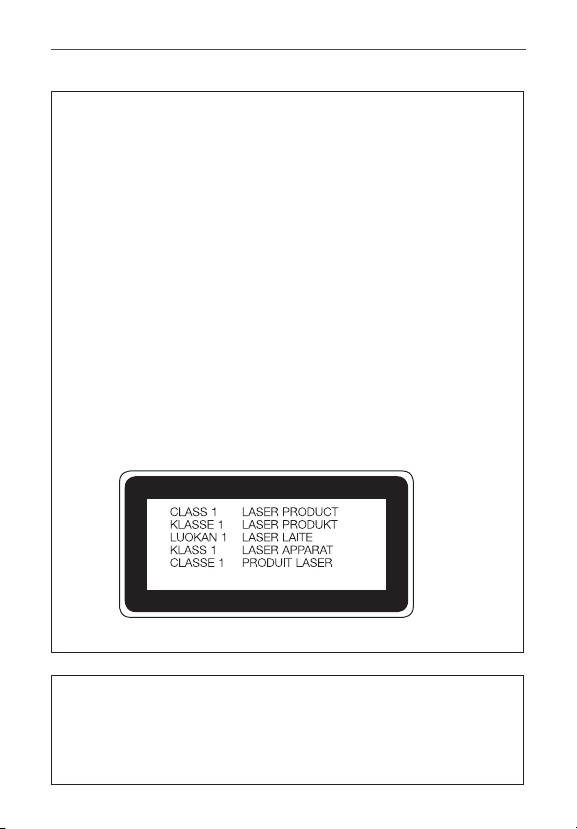
145
Safety
Laser Safety Statement
CDRH Compliance
THISPRODUCTCOMPLIESWITHAPPLICABLEREQUIREMENTOF
THEDHHSPERFORMANCESTANDARDFORLASERPRODUCT,21
CFRSUBCHAPTERJ.
Caution!
Thisproductemploysalasersystem.Toensureproperuseofthis
product,pleasereadthisowner’smanualcarefullyandretainfor
futurereference.Shouldtheunitrequiremaintenance,contactan
authorizedservicecenter.
Useofcontrols,adjustments,ortheperformanceofproceduresother
thanthosespeciedhereinmayresultinhazardousradiation
exposure.
Topreventdirectexposuretolaserbeam,donottrytoopenthe
enclosureormakedirectcontactwiththelaser.
Instructions for Wireless Charger
Besuretouseawirelesschargerthatisgenuineor
compatibilitycertied(byWPCQistandards).
(Wirelesschargerissoldseparately.)

146
Limited Warranty Statement
Limited Warranty Statement
1. WHAT THIS WARRANTY COVERS:
LGoffersyoualimitedwarrantythattheenclosedsubscriberunitandits
enclosedaccessorieswillbefreefromdefectsinmaterialand
workmanship,accordingtothefollowingtermsandconditions:
(1) ThelimitedwarrantyfortheproductextendsforTWELVE(12)
MONTHSbeginningonthedateofpurchaseoftheproductwithvalid
proofofpurchase,orabsentvalidproofofpurchase,FIFTEEN(15)
MONTHSfromdateofmanufactureasdeterminedbytheunit's
manufacturedatecode.
(2) Thelimitedwarrantyextendsonlytotheoriginalpurchaserofthe
productandisnotassignableortransferabletoanysubsequent
purchaser/enduser.
(3) Thiswarrantyisgoodonlytotheoriginalpurchaseroftheproduct
duringthewarrantyperiodaslongasitisintheU.S.,includingAlaska,
Hawaii,U.S.TerritoriesandCanada.
(4) Theexternalhousingandcosmeticpartsshallbefreeofdefectsatthe
timeofshipmentand,therefore,shallnotbecoveredunderthese
limitedwarrantyterms.
(5) UponrequestfromLG,theconsumermustprovideinformationto
reasonablyprovethedateofpurchase.
(6) Thecustomershallbearthecostofshippingtheproducttothe
CustomerServiceDepartmentofLG.LGshallbearthecostofshipping
the
productbacktotheconsumerafterthecompletionofservice
underthislimitedwarranty.
2. WHAT THIS WARRANTY DOES NOT COVER:
(1) Defectsordamagesresultingfromuseoftheproductinotherthanits
normalandcustomarymanner.
(2) Defectsordamagesfromabnormaluse,abnormalconditions,
improperstorage,exposuretomoistureordampness,unauthorized

147
Limited Warranty Statement
modications,unauthorizedconnections,unauthorizedrepair,misuse,
neglect,abuse,accident,alteration,improperinstallation,orotheracts
whicharenotthefaultofLG,includingdamagecausedbyshipping,
blownfuses,spillsoffoodorliquid.
(3) Breakageordamagetoantennasunlesscauseddirectlybydefectsin
materialorworkmanship.
(4) ThattheCustomerServiceDepartmentatLGwasnotnotiedby
consumeroftheallegeddefectormalfunctionoftheproductduring
theapplicablelimitedwarrantyperiod.
(5) Productswhichhavehadtheserialnumberremovedormadeillegible.
(6) Thislimitedwarrantyisinlieuofallotherwarranties,expressor
impliedeitherinfactorbyoperationsoflaw,statutoryorotherwise,
including,butnotlimitedtoanyimpliedwarrantyofmarketabilityor
tnessforaparticularuse.
(7) DamageresultingfromuseofnonLGapprovedaccessories.
(8) Allplasticsurfacesandallotherexternallyexposedpartsthatare
scratchedordamagedduetonormalcustomeruse.
(9) Productsoperatedoutsidepublishedmaximumratings.
(10)Productsusedorobtainedinarentalprogram.
(11)Consumables(suchasfuses).
3. WHAT LG WILL DO:
LGwill,atitssoleoption,eitherrepair,replaceorrefundthepurchaseprice
ofanyunitthatiscoveredunderthislimitedwarranty.LGmaychooseatits
optiontousefunctionallyequivalentre-conditioned,refurbishedornew
unitsorpartsoranyunits.Inaddition,LGwillnotre-installorback-upany
data,applicationsorsoftwarethatyouhaveaddedtoyourphone.Itis
thereforerecommendedthatyouback-upanysuchdataorinformation
priortosendingtheunittoLGtoavoidthepermanentlossofsuch
information.

148
Limited Warranty Statement
4. STATE LAW RIGHTS:
Nootherexpresswarrantyisapplicabletothisproduct.
Nootherexpresswarrantyisapplicabletothisproduct.THEDURATIONOF
ANYIMPLIEDWARRANTIES,INCLUDINGTHEIMPLIEDWARRANTYOF
MARKETABILITYORMERCHANTABILITYORFITNESSFORA
PARTICULARPURPOSE,ISLIMITEDTOTHEDURATIONOFTHE
EXPRESSWARRANTYHEREIN.LGSHALLNOTBELIABLEFORTHE
LOSSOFTHEUSEOFTHEPRODUCT,INCONVENIENCE,LOSSORANY
OTHERDAMAGES,DIRECTORCONSEQUENTIAL,ARISINGOUTOF
THEUSEO F, ORINABILITYTOUSE,THISPRODUCTORFORANY
BREACHOFANYEXPRESSORIMPLIEDWARRANTY,INCLUDINGTHE
IMPLIEDWARRANTYOFMARKETABILITYORMERCHANTABILITYOR
FITNESSFORAPARTICULARPURPOSEAPPLICABLETOTHIS
PRODUCT.
Somestatesdonotallowtheexclusivelimitationofincidentalor
consequentialdamagesorlimitationsonhowlonganimpliedwarranty
lasts;sotheselimitationsorexclusionsmaynotapplytoyou.Thiswarranty
givesyouspeciclegalrightsandyoumayalsohaveotherrightswhich
varyfromstatetostate.
5. HOW TO GET WARRANTY SERVICE:
Toobtainwarrantyservice,pleasecallorfaxtothefollowingtelephone
numbersfromanywhereinthecontinentalUnitedStates:
Tel. 1-800-793-8896 or Fax. 1-800-448-4026
Orvisithttp://us.lgservice.com.Correspondencemayalsobemailedto:
LGElectronicsService-MobileHandsets,P.O.Box240007,Huntsville,
AL
35824
DO NOT RETURN YOUR PRODUCT TO THE ABOVE ADDRESS.
PleasecallorwriteforthelocationoftheLGauthorizedservicecenter
nearestyouandfortheproceduresforobtainingwarrantyclaims.

149
Limited Warranty Statement
7.11 Warranty Laws
Thefollowinglawsgovernwarrantiesthatariseinretailsalesofconsumer
goods:
•TheCaliforniaSong-BeverlyConsumerWarrantyAct[CC§§1790etseq],
•TheCaliforniaUniformCommercialCode,DivisionTwo [ComC§§2101et
seq],and
•ThefederalMagnuson-MossWarrantyFederalTradeCommission
ImprovementAct[15USC§§2301etseq;16CFRParts701–703].A
typicalMagnuson-MossActwarrantyisawrittenpromisethatthe
productisfreeofdefectsorawrittenpromisetorefund,repair,orreplace
defectivegoods.[See15USC§2301(6).]Remediesincludedamagesfor
failingtohonorawrittenwarrantyorservicecontractorforviolating
disclosureprovisions.[See15USC§2310(d).]Exceptforsomelabeling
anddisclosurerequirements,thefederalActdoesnotpreemptstatelaw.
[See15USC§2311.]
TheConsumerWarrantyActdoesnotaffecttherightsandobligationsof
partiesunderthestateUniformCommercialCode,excepttheprovisionsof
theActprevailoverprovisionsoftheCommercialCodewhentheyconict.
[CC§1790.3.]
Forpurposesofsmallclaimsactions,thiscoursewillfocusonrightsand
dutiesunderthestatelaws.