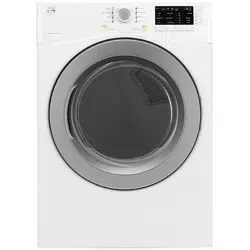
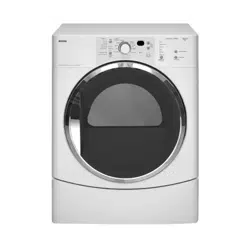
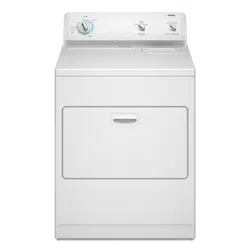
Kenmore 91182 7.3 cu. ft. Gas Dryer with Sensor Dry

Product's Documents

Below are documents related to this product, you can read online or download:
91182 photo
User manual Dryer

FEATURES AND BENEFITS

KEY PARTS AND COMPONENTS

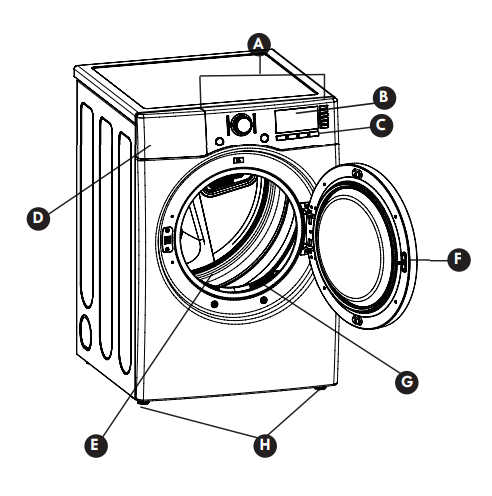
There are several important components that are referenced in this manual.

  • A. EASY-TO-USE CONTROL PANEL: Rotate the cycle selector knob to select the desired dry cycle. Add cycle options or adjust settings with the touch of a button.
  • B. TIME AND STATUS DISPLAY: The easy-to-read LED display shows cycle status and estimated time remaining.
  • C. CYCLE MODIFIERS: Adjust the cycle settings such as temperature and dry level with the touch of a button. NOTE: Not all settings are available for all cycles.
  • D. CHECK VENT (Duct Blockage Sensing System): The Check Vent (Duct Blockage Sensing System) detects and alerts you to blockages in the exhaust system that reduce airflow from the dryer. Maintaining clean exhaust system ducts improves operating efficiency and helps minimize service calls, saving you money.
  • E. ULTRA-CAPACITY DRUM: The ultra-large drum offers superior durability.
  • F. EASY-ACCESS REVERSIBLE DOOR: The wide-opening, see-through glass door provides easy access for loading and unloading. Door swing can be reversed to adjust for installation location.
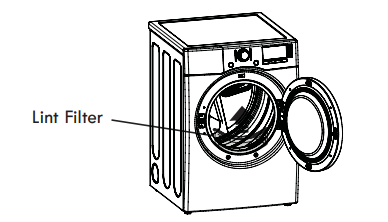
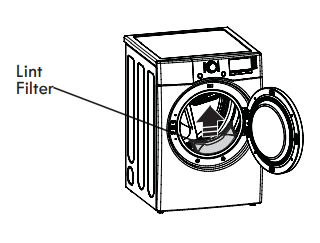
  • G. FRONT-MOUNT LINT FILTER: The front-mount lint filter allows for easy access and cleaning between loads.
  • H. LEVELING FEET: Four leveling feet (two in front, and two in back) adjust to improve dryer stability on uneven floors.

KEY DIMENSIONS AND SPECIFICATIONS

  • Description: Dryer (Gas and Electric)
  • Electrical Requirements: Refer to the rating label
  • Gas Requirements* NG: 4–10.5 inches WC (Water Column)
  • Gas Requirements* LP: 8–13 inches WC
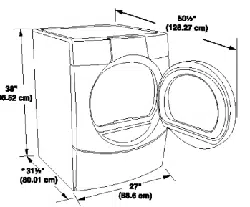
  • Dimensions: 27 in. (W) X 30 1/4 in. (D) X 38 in. (H), 51 3/16 in. (D with door open) 68.6 cm (W) X 76.7 cm (D) X 96.5 cm (H), 130 cm (D with door open)
  • Net Weight: Electric: 147 lb. (66.7 kg); Gas: 150.5 lb. (68.3 kg)
  • Drying Capacity: IEC 7.3 cu. ft.

HOW TO USE

WARNING: To reduce the risk of fire, electric shock, or injury to persons, read this entire manual, including the Important Safety Instructions, before operating this dryer.

CONTROL PANEL FEATURES

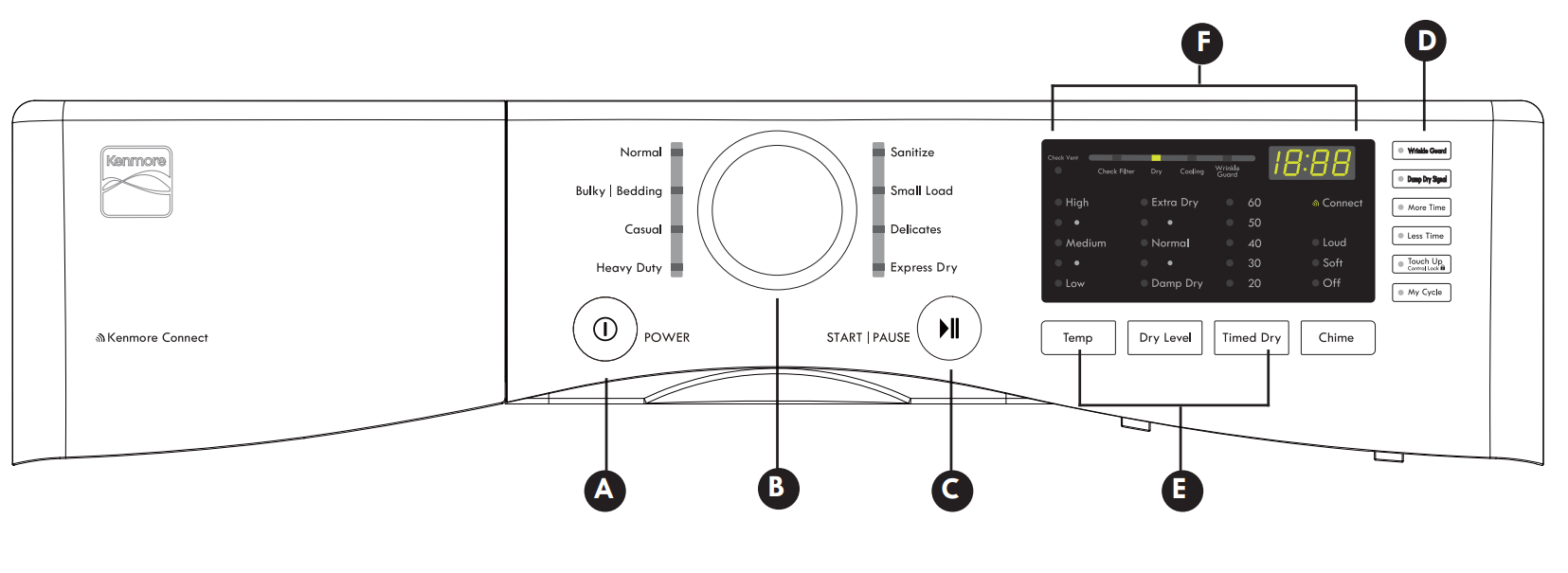
  • A. POWER (ON/OFF) BUTTON: Press to turn the dryer ON or OFF. Pressing the POWER button during a cycle will cancel that cycle and any settings will be lost.
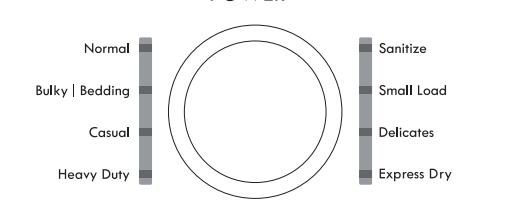
  • B. CYCLE SELECTOR KNOB: The cycle selector knob is used to select the desired dry cycle by rotating the knob in either direction until the desired cycle LED is illuminated. Once the desired cycle has been selected, the standard presets for that cycle will show in the display. These settings can be adjusted using the cycle modifi er or option buttons any time before starting the cycle.
  • C. START/PAUSE BUTTON: Press this button to start the selected cycle. The dryer will display the estimated time (AUTO DRY) or set time (TIMED DRY) remaining and start tumbling. To pause the cycle at any time, open the dryer door or press START/PAUSE. To resume the cycle where it was stopped, press START/PAUSE again. NOTE: If the dryer has been stopped for more than four minutes, the dryer will turn off automatically.
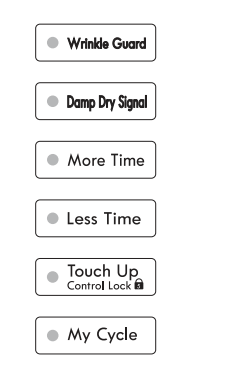
  • D. OPTION BUTTONS: These buttons allow you to select cycle options. Some of the option buttons have secondary functions. The controls can be locked or unlocked by pressing and holding the CONTROL LOCK button for fi ve seconds.
  • E. CYCLE MODIFIER BUTTONS: Use these buttons to adjust the settings for the selected cycle. The settings light up above the buttons to show the current selection. The default temperature setting cannot be changed in AUTO DRY cycles. AUTO DRY cycles are modifi ed using the DRY LEVEL button.
  • F. TIME AND STATUS DISPLAY: The display shows the estimated time remaining for auto cycles and actual time for timed cycles. The status of the cycle is also displayed. The CHECK VENT indicator will illuminate if there is a serious restriction in the exhaust system.

OPERATING THE DRYER

  • 1. CLEAN THE LINT FILTER: If the lint filter has not already been cleaned, lift out the filter and remove the lint from the last load. This will help ensure the fastest and most effi cient drying performance.
  • 2. LOAD THE DRYER: Load the dryer with the wet laundry from the washer. If the load is extra large, you may need to divide it into smaller loads for proper performance and fabric care.

  • 3. TURN ON THE DRYER: Press the POWER button to turn ON the dryer. The cycle LEDs will illuminate and a chime will sound.

  • 4. SELECT A CYCLE: Turn the cycle selector knob in either direction until the LED for the desired cycle is illuminated. The preset temperature, dry level, and option settings for that cycle will display.

  • 5. SELECT CYCLE MODIFIERS: Default settings for the selected cycle can now be changed, if desired. NOTE: Not all options or modifiers are available with all cycles. Temperature can only be adjusted on Timed Dry cycles; Dry Level is only available on Auto Dry cycles. A different chime will sound and the LED will not illuminate if the selection is not allowed.

  • 6. SELECT CYCLE OPTIONS: Cycle options can be added using the option buttons. NOTE: Not all options or modifiers are available with all cycles. A different chime will sound and the LED will not come on if the selection is not allowed.

  • 7. BEGIN CYCLE: Press the START/PAUSE button to begin the cycle. The cycle can be paused at any time by opening the door or by pressing the START/ PAUSE button. If the cycle is not restarted within four minutes of being paused, the dryer will shut off and the settings will be lost.

  • 8. END OF CYCLE: When the cycle is finished, a chime will sound. Immediately remove your clothing from the dryer to reduce wrinkling. If WRINKLE GUARD is selected, the dryer will tumble briefly every few minutes to help prevent wrinkles from setting in the clothes.

SORTING LOADS

Fabric Care Labels

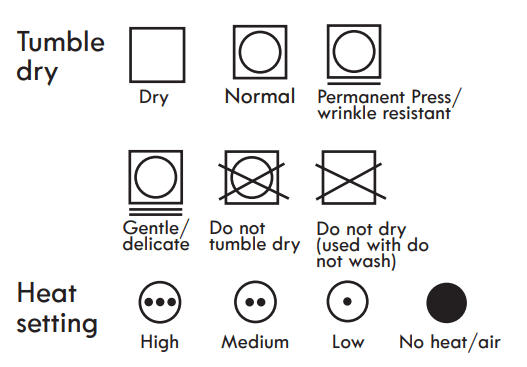
  • Most articles of clothing feature fabric care labels that include instructions for proper care.

Group Similar Items

  • For best results, sort clothes into loads that can be dried with the same drying cycle.
  • Different fabrics have different care requirements, and some fabrics will dry more quickly than others. For best fabric care results, always dry fabrics with similar care requirements together.

LOADING THE DRYER

WARNING: To reduce the risk of fire, electric shock, or injury to persons when using this appliance, follow basic precautions, including the following:

  • Check all pockets to make sure that they are empty. Items such as clips, pens, coins, and keys can damage both your dryer and your clothes. Flammable objects such as lighters or matches could ignite, causing a fire. Failure to follow this warning can result in fire, explosion, or death.
  • Never dry clothes that have been exposed to oil, gasoline, or other flammable substances. Washing clothes will not completely remove oil residues. Failure to obey this warning can result in fire, explosion, or death.

Loading Tips

  • Combine large and small items in the same load.
  • Damp clothes will expand as they dry. Do not overload the dryer; clothes require room to tumble and dry properly.
  • Close zippers, hooks, and drawstrings to prevent these items from snagging or tangling on other clothes.

CHECK THE LINT FILTER BEFORE EVERY LOAD

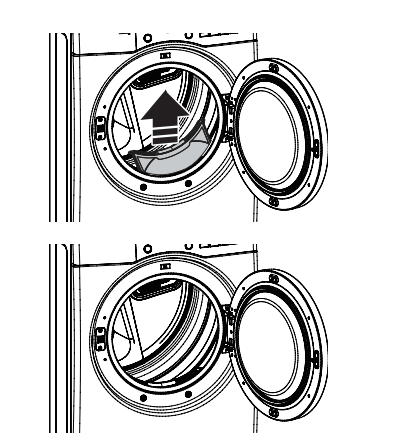
  • Every time the dryer is turned on, the CHECK FILTER light will blink as a reminder to make sure the filter is clean. Always make sure the lint filter is clean before starting a new load; a clogged lint filter will increase drying times. To clean, pull the lint filter straight up and roll any lint off the filter with your fingers. Do not rinse or wash the filter to remove lint. Push the lint filter firmly back into place.
  • Always ensure the lint filter is properly installed before running the dryer. Running the dryer with a loose or missing lint filter may damage the dryer and articles in the dryer.

TIME AND STATUS DISPLAY

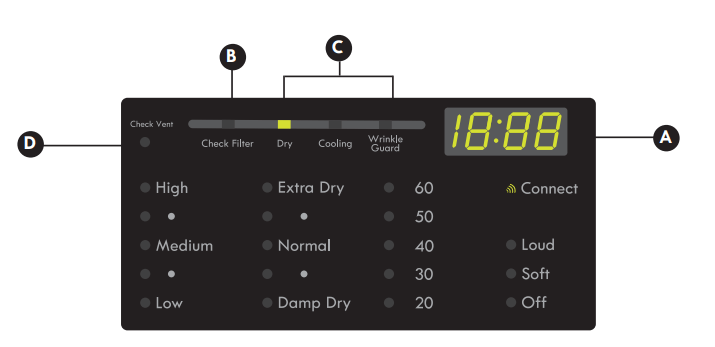
The Time and Status Display shows the cycle time, cycle progress, and vent status. When the dryer is turned on, the display will illuminate.

  • A. TIME DISPLAY: When a cycle is selected, the display will indicate the default time for that cycle including selected options or adjustments. In AUTO DRY cycles, the time remaining will be estimated and may change during the cycle, depending on the condition of the load. In TIMED DRY, the time displayed will be the actual time remaining.
  • B. CHECK FILTER LIGHT: The CHECK FILTER light will blink before each load, as a reminder to check the lint filter. Always clean the lint filter before every cycle.
  • C. CYCLE STATUS INDICATORS: This portion of the display shows which stage of the drying cycle is currently underway (DRY, COOLING, or WRINKLE GUARD).
  • D. CHECK VENT INDICATOR (DUCT BLOCKAGE SENSING SYSTEM): The CHECK VENT duct blockage sensing system detects and alerts you to blockages in the ductwork that reduce exhaust flow from the dryer. This light does not indicate any problems with your dryer. If this light blinks, it indicates that your home’s exhaust system has a serious restriction, which is not covered by your dryer’s warranty. Call 1-800-4-MY-HOME® for information regarding duct cleaning services offered through Sears.

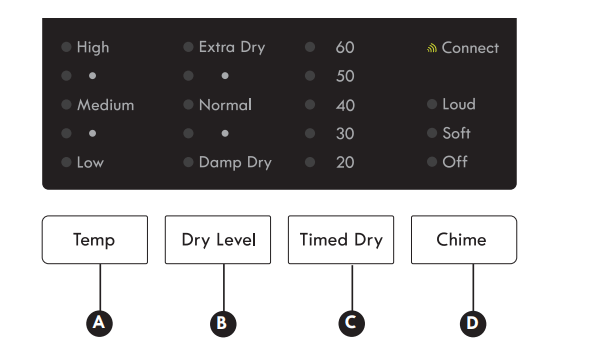
CYCLE MODIFIER BUTTONS

  • Each cycle has default settings that are selected automatically. You may also customize these settings using the cycle modifier buttons.
  • AUTO DRY cycles are designed to properly care for specific fabrics and loads. As a result, not all settings are available for each cycle selection.
  • TIMED DRY cycles have default settings, but you may also customize the temperature setting and add options.
  • Settings are not limited in most timed dry cycles. Use care when setting options and modifiers for these cycles to prevent damage to your clothing.
  • NOTE: To protect your garments, not every dry level, temperature, or option is available with every cycle.

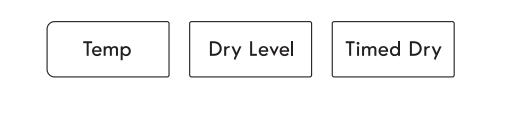
  • A. TEMP: Adjusts the temperature setting from LOW to HIGH. This allows precise care of your fabrics and garments. Press the TEMP button repeatedly to scroll through available settings. The temperature setting is not adjustable in AUTO DRY cycles.
  • B. DRY LEVEL: Sets the level of dryness for the selected AUTO DRY cycle. Press the DRY LEVEL button repeatedly to scroll through available settings. Use this button to adjust the dryness of the articles in the load to your preference.
    • This option is not available with TIMED DRY cycles.
    • The dryer will automatically adjust the cycle time. Selecting EXTRA DRY will increase the cycle time and dry level, while DAMP DRY will decrease the cycle time and dry level.
    • Use the DAMP DRY setting for items that you wish to iron or hang for final drying.
  • C. TIMED DRY: Allows you to manually select the drying time in 10-minute increments. Use this cycle for small loads or to remove wrinkles. Use the MORE TIME/LESS TIME buttons to increase or decrease the selected drying time in 1-minute increments. Press and hold the MORE TIME or LESS TIME buttons to rapidly change the time.
  • D. CHIME: Adjusts the volume of the chime or turns off the chime. Press the button repeatedly until the desired volume setting is illuminated.

CYCLE OPTIONS AND SPECIAL FEATURES

Your dryer features several additional cycle options and special features to meet your individual needs.

  • WRINKLE GUARD : Selecting this option will tumble the clothes after the cycle ends for a few seconds every few minutes without heat. This option is active for 150 minutes after the end of the cycle, or until the door is opened. This helps prevent wrinkles if the clothes are not removed immediately after the cycle has finished.

  • CONTROL LOCK : Use this option to disable the controls. The Control Lock can be activated any time the dryer is ON. When the controls are locked “CL” will display alternately with the estimated time remaining. Once set, the Control Lock must be turned off before the controls can be used. Press and hold the TOUCH UP button for five seconds to lock or unlock the controls.

  • MY CYCLE :
    • My Cycle allows you to store a customized dry cycle for future use. It allows you to save favorite temperature, dry level, and other options for a cycle, and then recall them at the touch of a button.
    • NOTE: Only one My Cycle can be saved at a time. Press and hold the MY CYCLE button to overwrite any previously saved cycle.
    • To save a MY CYCLE:
      1. Press the POWER button to turn on the dryer.
      2. Turn the cycle selector knob to select the desired cycle.
      3. Press the CYCLE MODIFIER button to change the desired setting.
      4. Press the CYCLE OPTION button to add the desired options.
      5. Press and hold the MY CYCLE button.
    • To recall a MY CYCLE:
      1. Press the POWER button to turn on the dryer.
      2. Press the MY CYCLE button. The stored settings will be displayed.
      3. Press the START/PAUSE button to start the cycle.
    • NOTE: My Cycle can be adjusted the same as any other cycle. However, once any other button is pressed, the LED will turn off, indicating that the settings are no longer those of your saved cycle.
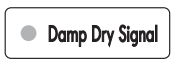
  • DAMP DRY SIGNA : If you press the Damp Dry Signal, the dryer will emit a chime when the clothes are just short of completely dry, in case you want to remove them for ironing or hang drying.
USER MAINTENANCE INSTRUCTIONS

WARNING: To reduce the risk of fire, electric shock, or injury to persons, read this entire manual, including the Important Safety Instructions, before operating this dryer.

  • Unplug the dryer or turn the power off before cleaning to avoid the risk of electric shock. Failure to follow this warning can cause serious injury, fire, electrical shock, or death.
  • Never use harsh chemicals, abrasive cleaners, or solvents to clean the dryer. They will damage the finish.

REGULAR CLEANING

Cleaning the Exterior

  • Proper care of your dryer can extend its life. The outside of the machine can be cleaned with warm water and a mild, nonabrasive household detergent. Immediately wipe off any spills with a soft, damp cloth.
  • IMPORTANT: Do not use cleaning alcohols, solvents, or similar products.
  • NEVER use steel wool or abrasive cleansers because they can damage the surface.

Cleaning the Interior

  • Wipe around the door opening and seal with a soft, damp cloth to prevent lint and dust buildup that could damage the door seal.
  • Clean the window with a soft cloth dampened with warm water and a mild, nonabrasive household detergent, then wipe dry.
  • NEVER use steel wool or abrasive cleansers; they can scratch or damage the surface.

Cleaning Around and Under the Dryer

  • Vacuum lint and dust from around the dryer and underneath it regularly

Cleaning the Lint Filter

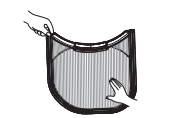
ALWAYS make sure the lint filter is clean before every cycle. The Check Lint Filter Light on the control panel will blink before every cycle to remind you.

NOTE: NEVER operate the dryer without the lint filter.

To remove lint between cycles:

  1. Open the dryer door.
  2. Pull the lint filter straight up.
  3. Roll any lint off the filter with your fingers.
  4. Insert the lint filter back into the dryer.

Periodic thorough cleaning:

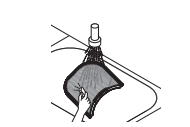
Some fabric softeners can build up on the lint filter over time. This buildup can restrict the airflow through the filter reducing dryer efficiency and lengthening drying times. After removing lint, if the filter looks dark or dirty when held up to the light, follow these steps to clean:

  1. Use hot soapy water and a stiff brush to clean the filter.
  2. Make sure the filter is completely dry before reinstalling it and using the dryer.

NOTE: NEVER operate the dryer with a wet lint filter.

Maintaining Ductwork

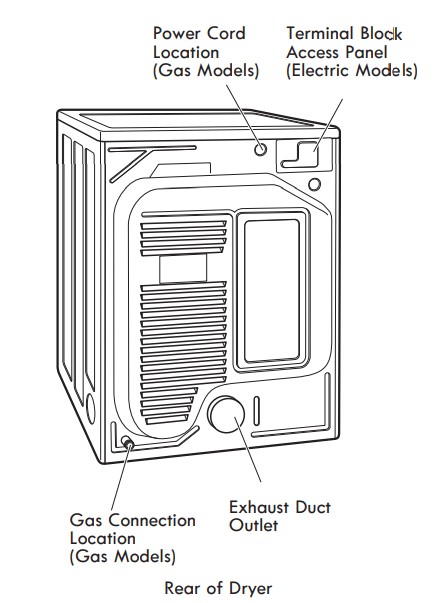
  • Vent ductwork should be checked for lint build up once per month and cleaned at least once per year. If any noticeable reduction in airflow or drying performance occurs, immediately check the ductwork for obstructions and blockages. Contact a qualified technician or service provider.

MAINTAINING THE EXHAUST SYSTEM

The most common cause of dryer problems is poor exhaust venting. Poor exhaust venting may result from the following conditions:

  • DIRTY OR DAMAGED EXHAUST DUCTS
  • WRONG VENT MATERIAL
  • RESTRICTED OR DAMAGED VENT HOOD
  • EXCESSIVELY LONG VENT
  • THE USE OF PLASTIC OR FOIL VENTING

Maintaining the Exhaust System

  • Vent ducts should be checked for lint buildup and cleaned at least once per year. If any noticeable reduction in drying performance occurs, check the ducts for obstructions and blockages.
  • If the CHECK VENT indicator illuminates, the exhaust system should be checked immediately for damage or obstructions. The CHECK VENT indicator signals a serious reduction in exhaust airflow which will greatly reduce energy efficiency and increase drying times. Damaged or restricted exhaust systems are not covered by the dryer warranty. Damage to the dryer that is caused by damaged, restricted, or otherwise inadequate exhaust systems is not covered by the dryer warranty

CHECK VENT Indicator

  • The CHECK VENT warning system is designed to help you avoid the reduced performance caused by restrictions in the household exhaust system. The CHECK VENT indicator illuminates to alert you when problems in the system occur, so you can have them repaired.
  • While you should always check and maintain your exhaust system regularly, the CHECK VENT warning system will detect and alert you if serious problems develop in your home’s exhaust system. This includes exhaust systems that are unsatisfactory for any reason including a blockage in the venting, crushed/kinked venting, or venting which exceeds the maximum recommended length requirement as described in the installation section.
  • NOTE: The total length includes the length from the back of the dryer to the outside vent hood, PLUS a factor for every 90° elbow in the exhaust system. For example, if the distance from the back of the dryer to the vent hood is 30 feet, and there are four elbows in the system, then it exceeds the 28 foot maximum length allowed for those conditions as specified in the Duct Length Chart.
  • The CHECK VENT indicator on the control panel will alert you that the exhaust system is not moving enough air from the dryer to the outside. This lack of airflow will lead to long dry times, poor drying and possibly dryer failure.
  • As a reminder, external dryer venting is considered part of your home and is not covered by the product warranty or protection agreements. There are services available for cleaning/maintaining the external venting. Sears provides this service via Sears Carpet, Upholstery, and Duct Cleaning. Call 1-800-661-6594 to schedule duct cleaning service from Sears (if it is available in your area).

CHECK VENT Operation

  • The CHECK VENT system uses components already in the dryer. By monitoring these components over the course of several cycles, the control is able to determine how much restriction there is in the exhaust system. If it detects a high level of restriction, it will turn on the CHECK VENT light to alert you to the condition. The dryer will continue to operate after the light comes on, but you should have the exhaust system cleaned or repaired immediately to avoid longer dry times and higher energy consumption.
  • IMPORTANT: In order for a dryer to properly and efficiently dry your clothes, it is extremely important that the exhaust system is as short and clean as possible. It MUST be less than the maximum length specifications as outlined in the installation section. It is also very important that you make sure that when the dryer is installed, the exhaust system is clean and clear of any restrictions and is not kinked or crushed.
  • Failure to meet these guidelines will result in long dry times, increased energy consumption and possibly even clothing damage or dryer failure. When exhaust system restrictions become extreme, the CHECK VENT light will blink to alert you to the condition so you can have the exhaust system cleaned or repaired.
    1. To prevent false alarms and for increased reliability, the dryer will monitor the exhaust condition for several loads. If multiple, consecutive cycles exceed the restriction limits, the control will blink the CHECK VENT indicator.
    2. A blinking CHECK VENT indicator means the external venting should be checked for potential restrictions as soon as possible.
    3. The CHECK VENT indicator will remain active (blinking) until the restriction is resolved AND the control has verified the improved airflow for several cycles.
    4. After the exhaust is cleaned or repaired, it will take several cycles for the CHECK VENT indicator to reset and turn off the light.
  • NOTE: The CHECK VENT indicator is designed to measure performance over several consecutive cycles before activating or deactivating, to avoid false alarms. A very large load, such as a large comforter, could cause the CHECK VENT system to sense that the exhaust system is restricted, but this would not cause the light to blink. However, if several large loads were to run back to back, the CHECK VENT indicator could be activated.

Kenmore Connect™ System

  • Should you experience any problems with your dryer, it has the capability of transmitting data via your telephone to the Kenmore Connect Team. This gives you the capability of speaking directly to our specially trained technicians. The technician records the data transmitted from your machine and uses it to analyze the issue, providing a fast and effective diagnosis.
  • If you experience problems with your dryer, call 1-800-4-MY-HOME®. Only use the Kenmore Connect System feature when instructed to do so by the Kenmore Connect Team. The transmission sounds that you will hear are normal and sound similar to a fax machine.
  • Kenmore Connect cannot be activated unless your dryer is turned on by pressing the POWER button. If your dryer is unable to turn on, then troubleshooting must be done without using Kenmore Connect.

Using the Kenmore Connect™ System

  • Follow the technician’s instructions and perform the following steps when requested.

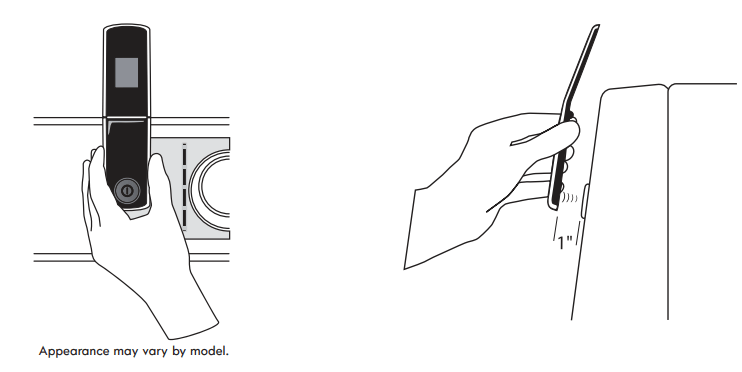
  • : HOLD the mouthpiece of your phone over the POWER button, when instructed to do so by the call center, no more than one inch from (but not touching) the machine. NOTE: Do not press any other buttons or turn the cycle selector knob.
  • : PUSH and hold the TEMP button while continuing to hold your phone to the POWER button.
  • : LISTEN for three beeps. After you hear the three beeps, release the TEMP button. Keep the phone in place until the tone transmission has finished. This takes about 6 seconds, and the display will count down the time. Once the countdown is over and the tones have stopped, resume your conversation with the technician, who will then be able to assist you in using the information transmitted for analysis.

NOTE:

  • For best results, do not move the phone while the tones are being transmitted.
  • If the call center agent is not able to get an accurate recording of the data, you may be asked to try again.
  • Pressing the POWER button during the transmission will shut off Kenmore Connect.

TROUBLESHOOTING GUIDE

BEFORE CALLING FOR SERVICE

Problem Possible Cause Solutions
*CHECK VENT is blinking Exhaust system is too long or has too many turns/restrictions. Install a shorter or straighter duct run. See the Installation Instructions for details.
Partial blockage of the ductwork due to lint buildup or other foreign object. Ductwork should be checked/cleaned immediately. Dryer can be used in this condition, but drying times will be longer and energy consumption will increase.
* This warning light does not indicate a dryer failure and is not covered by the dryer warranty. Contact a duct cleaning service to set up an appointment to have your exhaust system cleaned and inspected.
Dryer will not turn on Power cord is not properly plugged in. Make sure that the plug is securely plugged into a grounded outlet matching the dryer’s rating plate.
House fuse is blown, circuit breaker has tripped, or power outage has occurred. Reset circuit breaker or replace fuse. Do not increase fuse capacity. If the problem is a circuit overload, have it corrected by a qualified electrician.
Dryer does not heat House fuse is blown, circuit breaker has tripped, or power outage has occurred.

Reset circuit breaker or replace fuse. Do not increase fuse capacity. If the problem is a circuit overload, have it corrected by a qualified electrician.

NOTE: Due to the design of electric dryers, it is possible for a circuit problem to allow an electric dryer to run without heat.

Gas supply or service is turned off (gas models only). Confirm that the house gas shutoff and the dryer gas shutoff valves are both fully open. Even if gas is not supplied to the dryer, it will run and no error codes will display. Verify that other gas appliances in the home are working normally.
Greasy or dirty spots on clothes Clean and dirty clothes are being dried together. Only use your dryer to dry clean items. Soil from dirty clothes can transfer to the clean clothes in the same or later loads.
Clothes were not properly cleaned or rinsed before being placed in the dryer. Stains on dried clothes could be stains that weren’t removed during the washing process. Make sure that clothes are being completely cleaned or rinsed according to the instructions for your washer and detergent. Some difficult soils may require pre-treating prior to washing.
Excess static in clothes after drying Fabric softener is not used or used incorrectly. Use a fabric softener to reduce static electricity. Be sure to follow the fabric softener manufacturer’s instructions.
Clothes dried too long (over dried). Overdrying a load of laundry can cause a buildup of static electricity. Adjust settings and use a shorter drying time, or use AUTO DRY cycles.
Drying synthetics, permanent press, or synthetic blends. These fabrics are naturally more prone to static buildup. Try using fabric softener, or use DAMP DRY and/or shorter TIMED DRY time settings.
Drying time is not consistent Heat settings, load size, or dampness of clothing is not consistent. The drying time for a load will vary depending on the type of heat used (electric, natural gas, or LP gas), the size of the load, the type of fabrics, the wetness of the clothes, and the condition of the exhaust duct and lint filter. Even an unbalanced load in the washer can cause poor spinning, resulting in wetter clothes which will take longer to dry
Clothes take too long to dry Exhaust ducts are blocked, dirty, or duct run is too long. Confirm that the exhaust duct is properly configured and free of debris, lint, and obstructions. Make sure that outside wall dampers can open properly and are not blocked, jammed, or damaged.
Load is not properly sorted. Separate heavy items from lightweight items. Larger and heavier items take longer to dry. Light items in a load with heavy items can fool the sensor because the light items dry faster
Large load of heavy fabrics. Heavy fabrics take longer to dry because they tend to retain more moisture. To help reduce and maintain more consistent drying times for large and heavy fabrics, separate these items into smaller loads of a consistent size.
Dryer controls are not set properly. Use the appropriate control settings for the type of load you are drying. Some loads may require an adjustment of the DRY LEVEL setting for proper drying.
Lint filter needs to be cleaned. Remove the lint from the filter before every load. With the lint removed, hold the filter up to a light to see if it is dirty or clogged. If it looks dirty, follow the cleaning instructions in the Care and Cleaning section. With some loads that produce high amounts of lint, such as new bath towels, it may be necessary to pause the cycle and clean the filter during the cycle.
House fuse is blown, circuit breaker has tripped, or power outage has occurred.

Reset the circuit breaker or replace the fuse. Do not increase fuse capacity. If the problem is a circuit overload, have it corrected by a qualified electrician.

NOTE: Due to the design of electric dryers, it is possible for a circuit problem to allow an electric dryer to run without heat.

Dryer is overloaded. Divide extra large loads into smaller loads for better drying performance and efficiency.
Dryer is underloaded. If you are drying a very small load, add a few extra items to ensure proper tumbling action. If the load is very small and you are using AUTO DRY cycles, the electronic control cannot properly sense the dryness of the load and may shut off too soon. Use TIMED DRY or add some extra wet clothes to the load.
Clothes are wrinkled Clothes dried too long (overdried). Overdrying a load of laundry can lead to wrinkled clothes. Try a shorter drying time or DAMP DRY setting and remove items while they still retain a slight amount of moisture.
Clothes left in dryer too long after cycle ends. Use the WRINKLE GUARD option. This feature will tumble the clothes briefly every few minutes for up to 150 minutes to help prevent wrinkling.
Clothes are shrinking Garment care instructions are not being followed. To avoid shrinking your clothes, always consult and follow fabric care instructions. Some fabrics will naturally shrink when washed. Other fabrics can be washed but will shrink when dried in a dryer. Use a low or no heat setting.
Display shows error code: tE1 or tE2 Temperature sensor failure Turn off the dryer and call for service.
Lint on clothes Lint filter not cleaned properly Remove the lint from the filter before every load. With the lint removed, hold the filter up to a light to see if it is dirty or clogged. If it looks dirty, follow the cleaning instructions in the Care and Cleaning Section. With some loads that produce high amounts of lint, it may be necessary to clean the filter during the cycle.
Laundry not sorted properly. Some fabrics are lint producers (i.e., a fuzzy white cotton towel) and should be dried separately from clothes that are lint trappers (i.e., a pair of black linen pants).
Excess static in clothes

Use a fabric softener to reduce static electricity. Be sure to follow the manufacturer’s instructions.

Overdrying a load of laundry can cause a buildup of static electricity. Adjust settings and use a shorter drying time, or use AUTO DRY cycles.

Dryer is overloaded. Divide extra large loads into smaller loads for drying
Tissue, paper, etc., left in pockets. Check pockets thoroughly before washing and drying clothes.
Buttons are disabled or CL shows in display CONTROL LOCK function is engaged. Press and hold the TOUCH UP button for five seconds to activate or deactivate the function.
Light does not turn on when door is opened Dryer has been off for more than four minutes and the light is disabled. Press the POWER button to turn on the dryer, which will enable the drum light.

Reference file: Kenmore 91182 7.3 cu. ft. Gas Dryer with Sensor Dry

Additionally, the document applies to other Kenmore models: 796.8128#, 796.9128#, 796.8118#, 796.9118#

Specifications

Indexed Terms: Gas Dryer, Sensor Dry, Dry

Kenmore 91182 Questions and Answers

Questions and Answers

Related Products