User Guide
VERSION 1.2
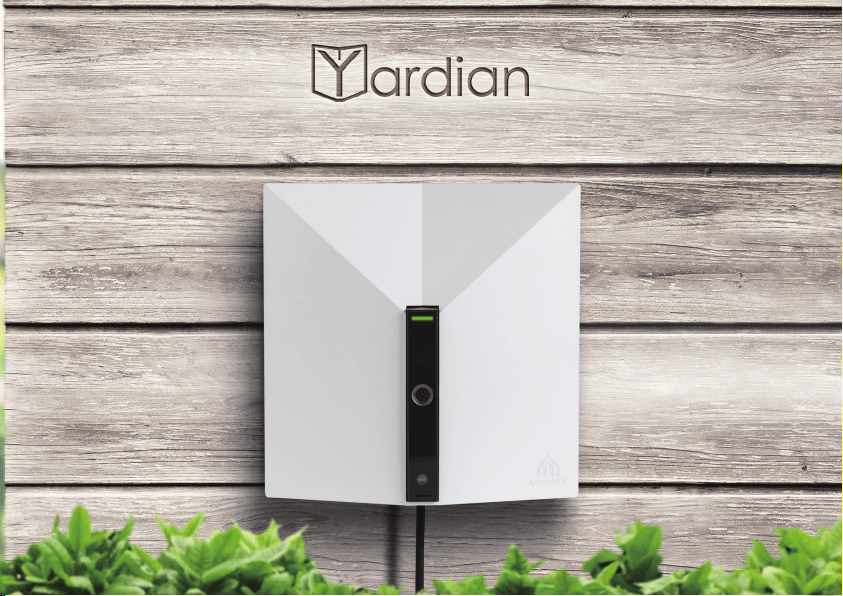
Your Smart Sprinkler & Security Guardian

The Yardian Installation
8
What’s in the Box
3
Overview
4
Yardian LED Indicator
5
Wi-Fi Reset Button
6
Understand Your Irrigation System
7
Step 1. Replace your old controller
10
Step 2. Install your Yardian controller
12
Step 3. Get the Yardian app
18
Step 4. Pair your Yardian to your profile
20
Step 5. Wi-Fi onboarding
22
Set-Up of the Yardian App
28
Table of Contents
2
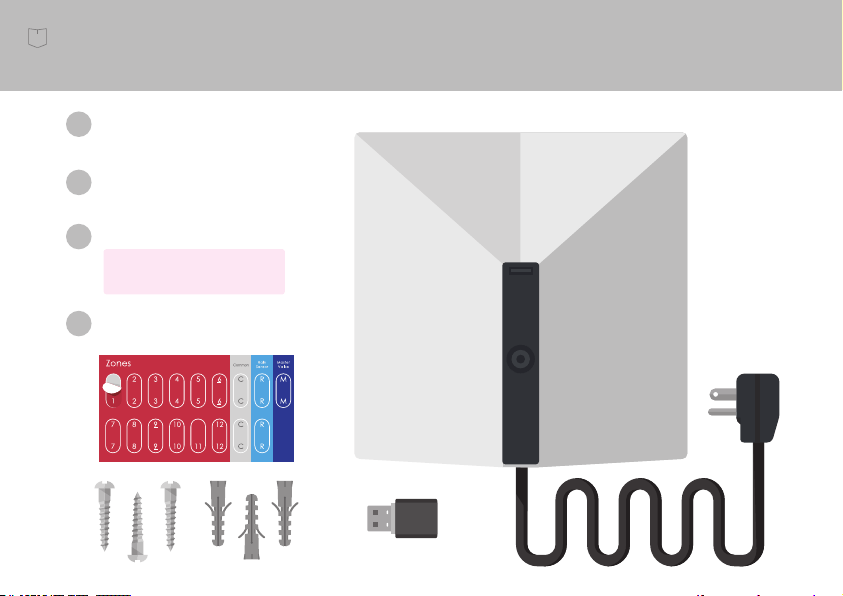
What’s in the Box
(adhere to original controller
wires for easy identification)
Yardian, the controller
Model: YDN1602
1
Wi-Fi dongle
2
Labeling stickers
3
3 wall screws and anchors
4
Model: WL-7200-V2
3
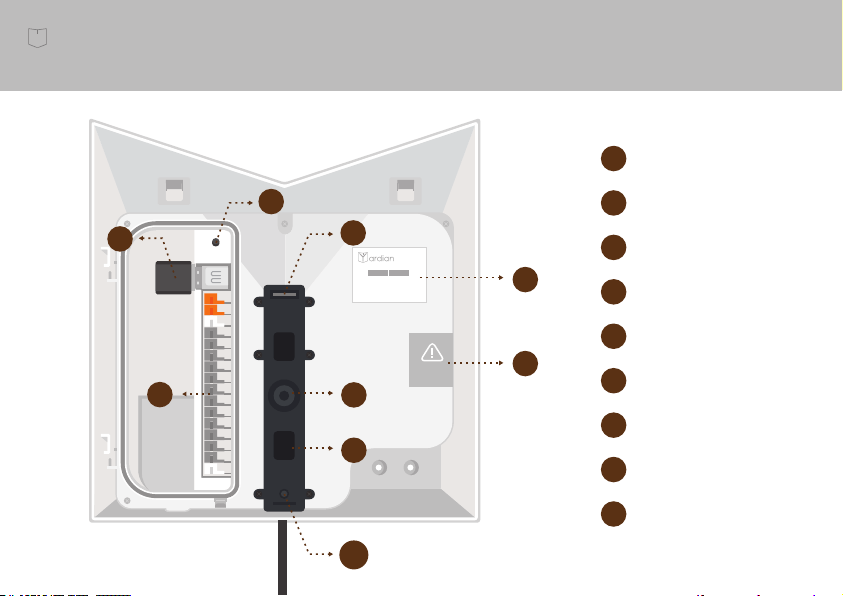
Wi-Fi dongle
Wi-Fi reset button
Terminal blocks
Product label
Warranty label
Light sensor
IR LED (night vision)
SN :
MAC :
YID :
AA00754F
<MAC Number>
<Serial Number>
H
H
G
G
A
A
B
B
C
C
D
D
E
E
F
F
I
I
LED indicator
Camera
Overview
4
1 second1 second
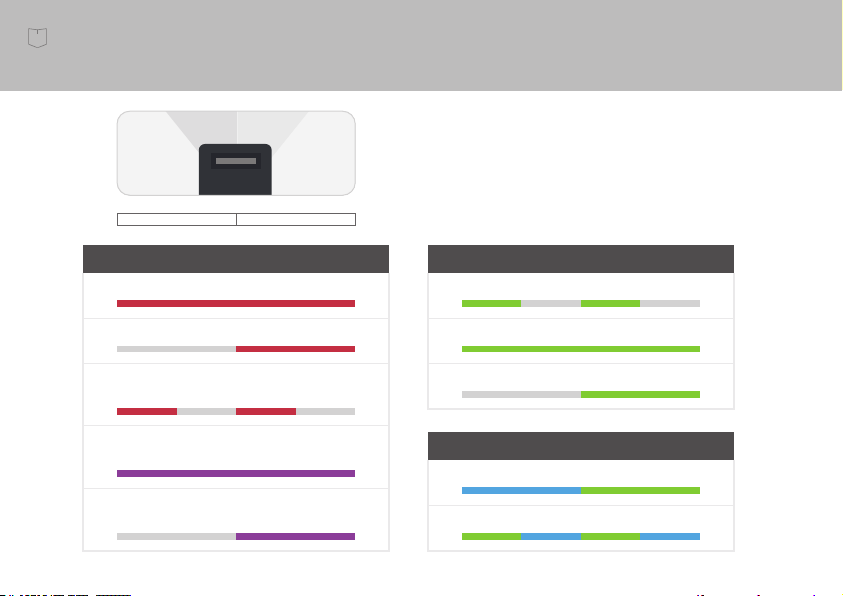
System
Booting Up
Initializing
Firmware Updating
(Do not turn off power)
Reboot Required
(Press Wi-Fi Reset Button until LED turns red)
Reboot Required - Action Failed
(Press Wi-Fi Reset Button until LED turns red)
Wi-Fi Station Mode
Connecting to Your Router
Connected to Your Router
Watering
Wi-Fi AP Mode (Direct Control)
Access Point Mode
Watering
Yardian LED Indicator
5
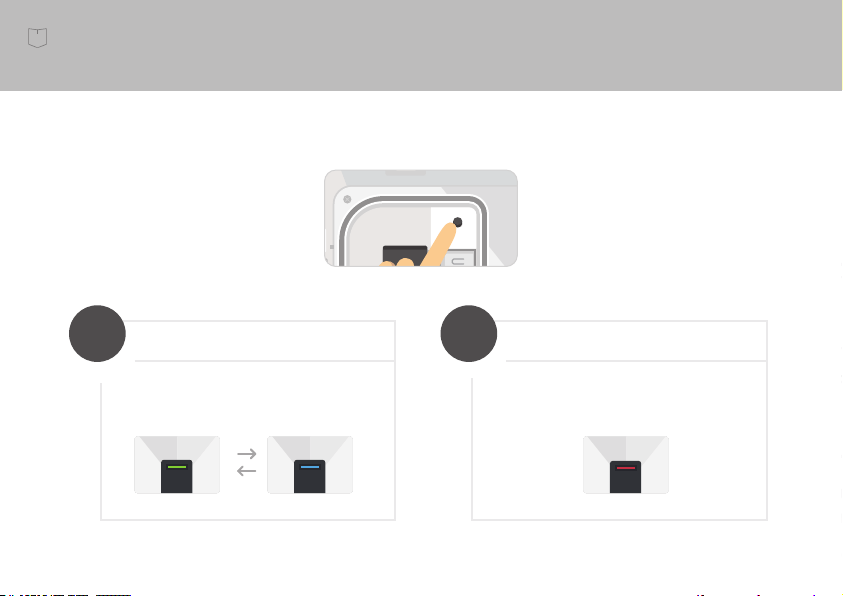
Reset Wi-Fi
Press and hold for around 5
seconds and release when the LED
is blinking green and blue.
>
5
sec
Reset to factory default
Press and hold for around 10
seconds and release when the LED
turns red.
>
10
sec
Wi-Fi Reset Button
SN :
MAC :
YID :
AA00754F
<MAC Number>
<Serial Number>
Press
6
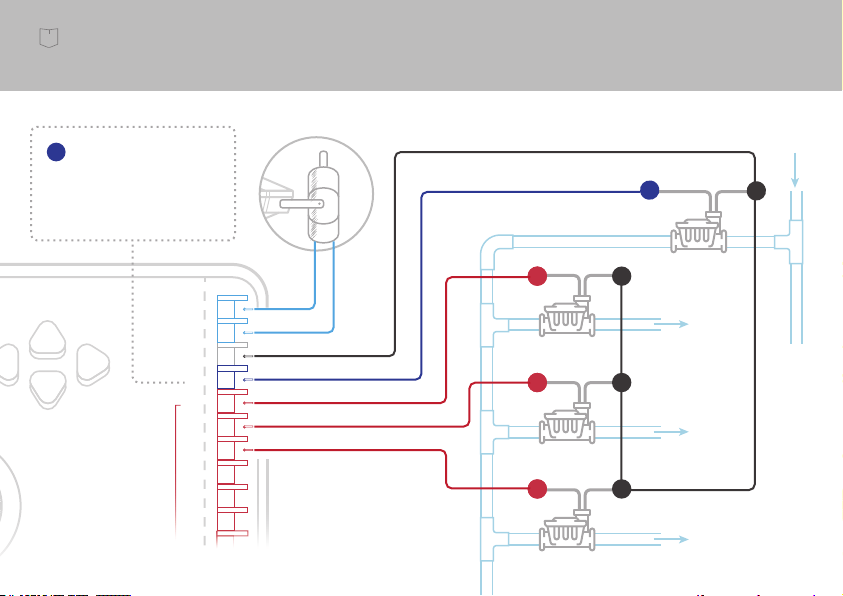
Understand Your Irrigation System
Common Wire
Common Wire
Valve
Valve
Valve
Water
Main
Sprinkler Wires
Wire from controller
to corresponding valve
Water to Zones
Master Valve
Z1
Z2
Z3
Z1
Z2
Z3
P
RAIN
SENSOR
COM
P
1
2
3
4
5
6
ZONES
C
C
C
C
If you have a master valve, we
suggest to connect it to the last
zone and specify it in Yardian
app.
Controller
P
7
8

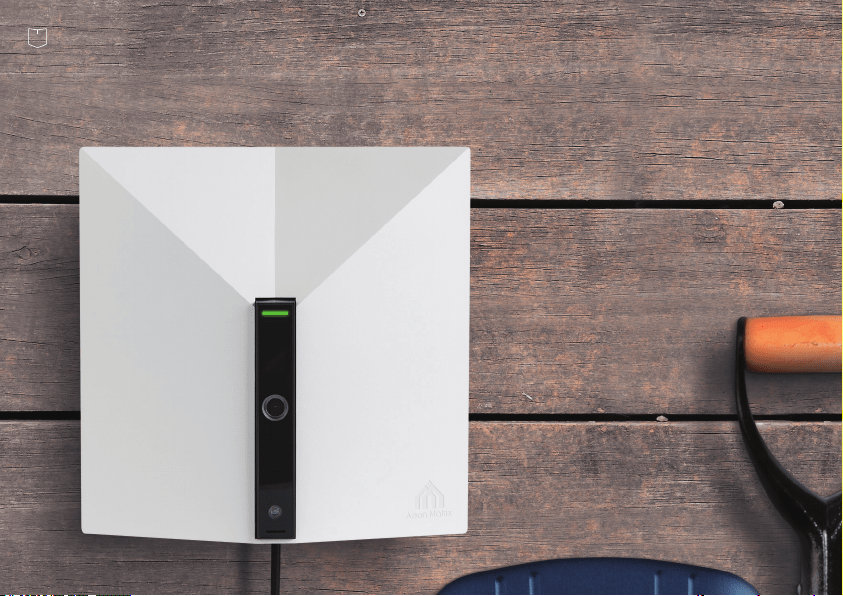
Set up your Yardian in a few easy steps.
The Installation
9
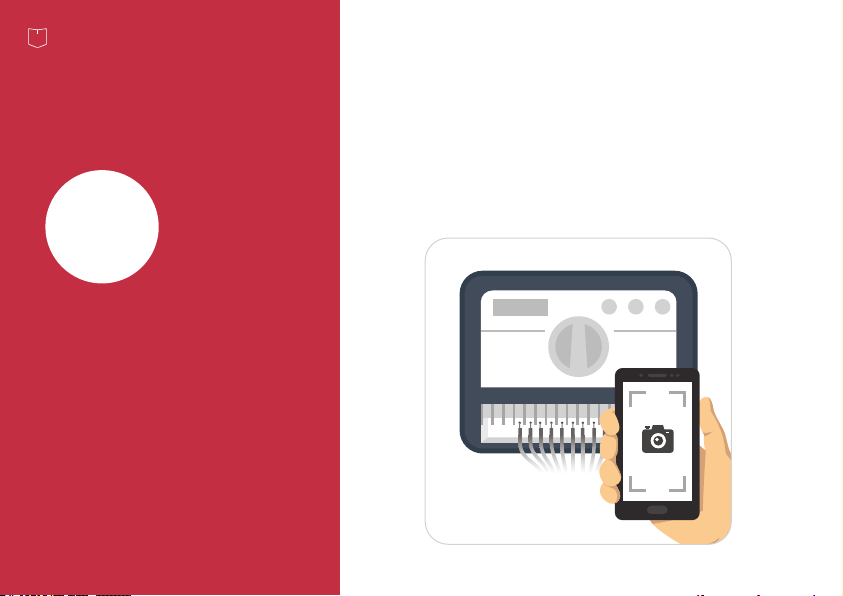
Take a picture of your current wiring. This will help
you identify the correct sequence of wires.
1
Step
Replace your
old controller
10

Disconnect your old controller and remove sprinkler wires. Adhere a numeric labeling
sticker to tag each associated wire.
Remove your old controller from the wall.
1
2
3
Zones
4
5
5
6
6
7
7
8
8
9
9
10
10
11
11
12
12
Exposed sprinkler wires with 24Vac could
generate an electric shock in wet location.
Please ask your retailer or contractor if
sprinkler accessories may be needed.
Electrical
Hazard
WARNING
11
Step 1.
2
Step
Install your
Yardian controller
Identify an appropriate spot to mount your Yardian
so that the camera is able to view your designated
location (e.g., inside the garage).
12
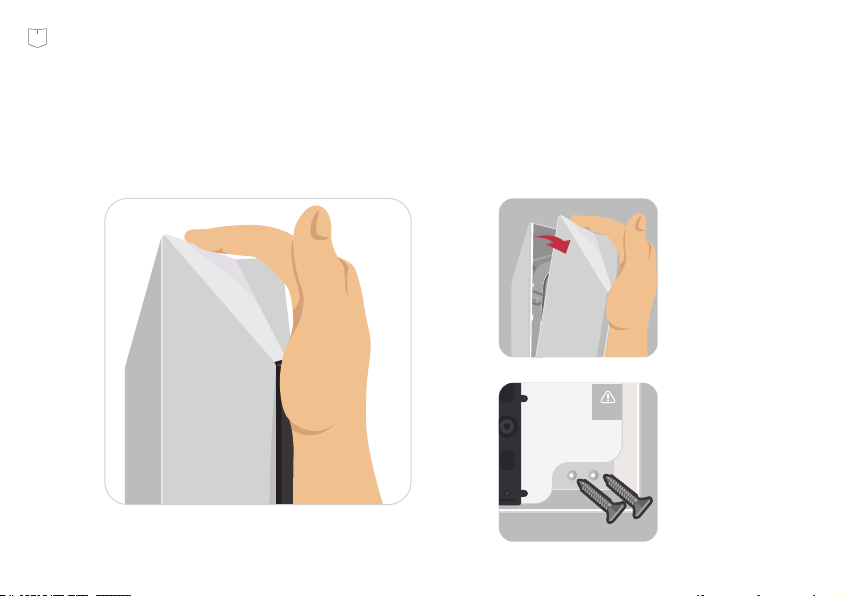
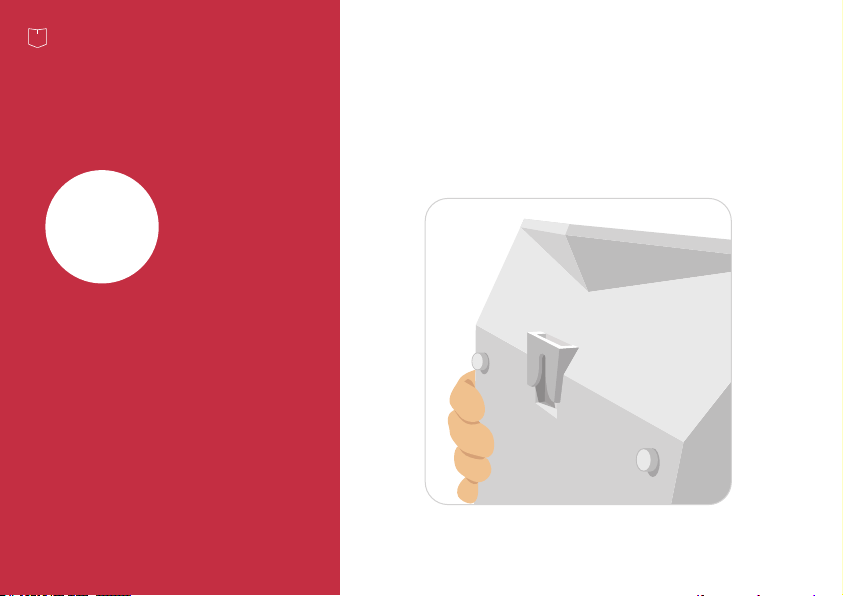
Open the top cover.
Mark the wall for the screws. Mount the Yardian with the screws.
13
Step 2.
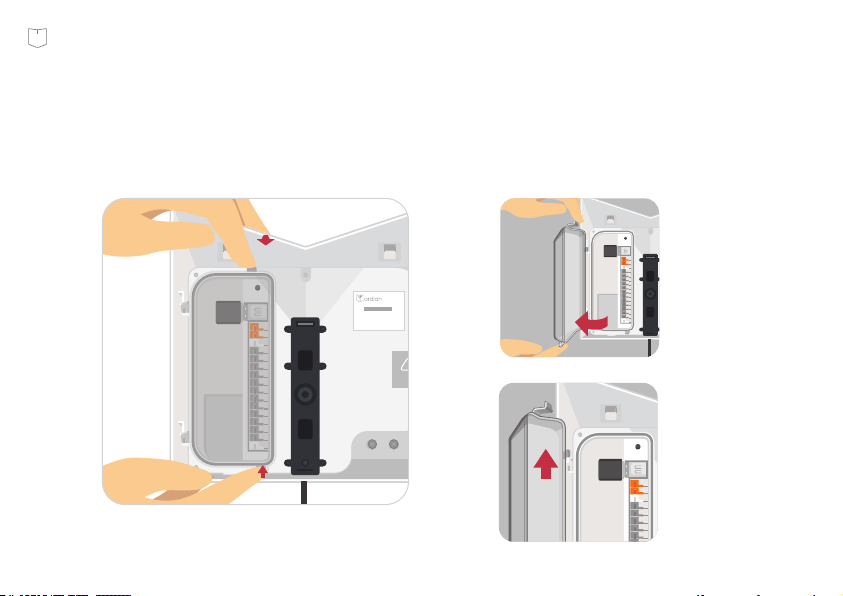
Open the inside cover.
SN :
MAC :
YID :
AA00754F
<MAC Number>
<Serial Number>
PULL
PUSH
SN :
MAC :
YID :
AA00754F
<MAC Number>
<Serial Number>
SN :
MAC :
YID :
AA00754F
<MAC Number>
<Serial Number>
14
Step 2.
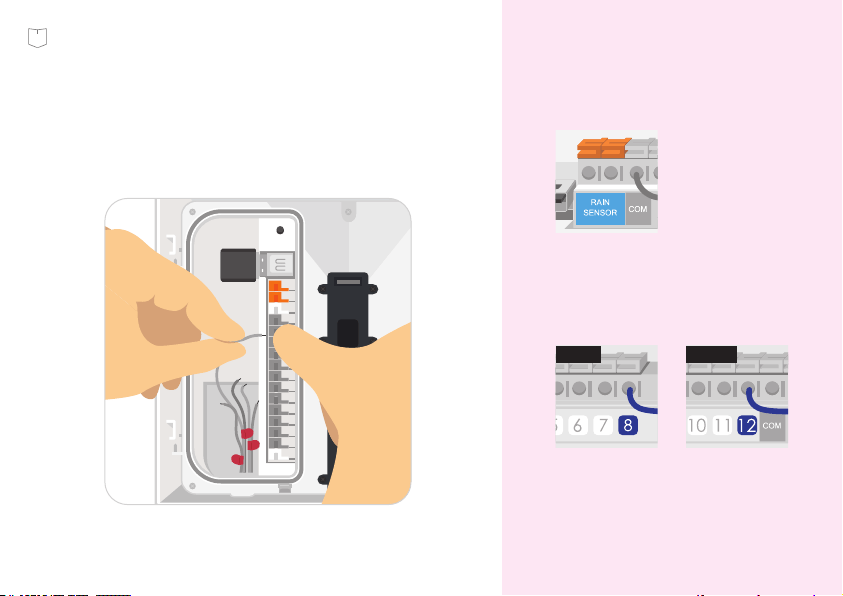
Connect sprinkler wires according to the
corresponding labels.
SN :
MAC :
YID :
AA00754F
<MAC Number>
<Serial Number>
Note: Please specify rain sensor
type (normally open or closed) in
the app if applicable.
Note: If you have a master valve,
we suggest to connect it to the last
zone and specify it in Yardian app.
12 Zones8 Zones
15
Step 2.
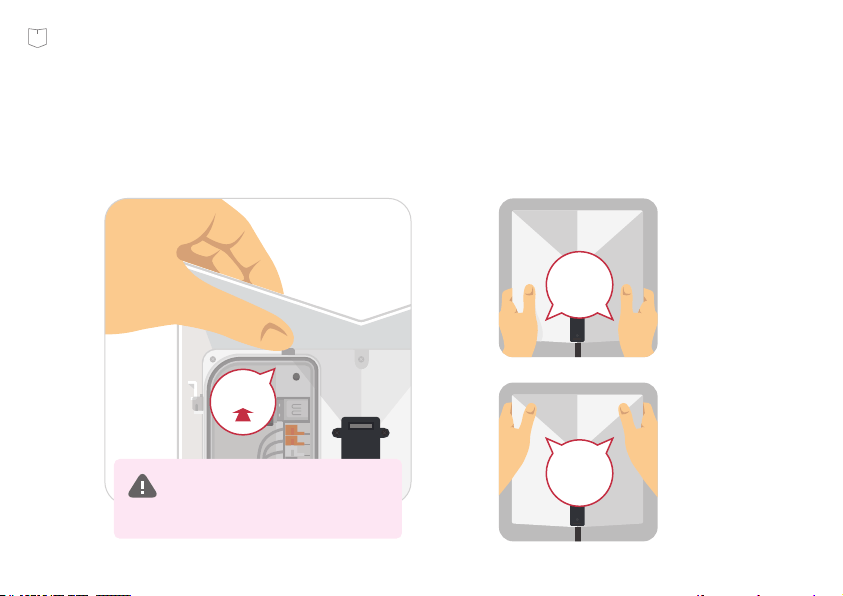
Close the inside cover and the top cover.
PRESS
HERE
PRESS
HERE
SN :
MAC :
YID :
AA00754F
<MAC Number>
<Serial Number>
CLICK
Note: Please make sure you hear
a click sound by pressing at the
top of the inside cover.
16
Step 2.
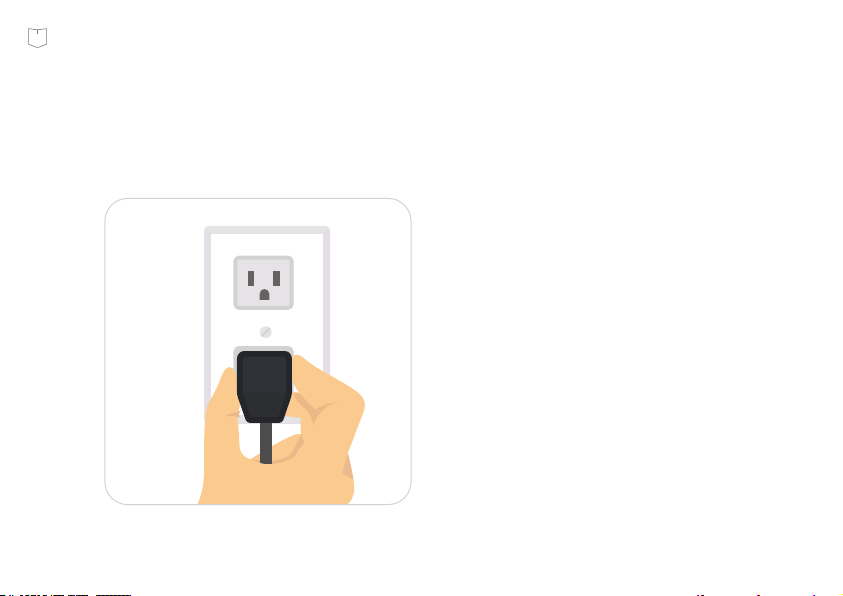
Plug the Yardian electrical cord into the home outlet.
17
Step 2.
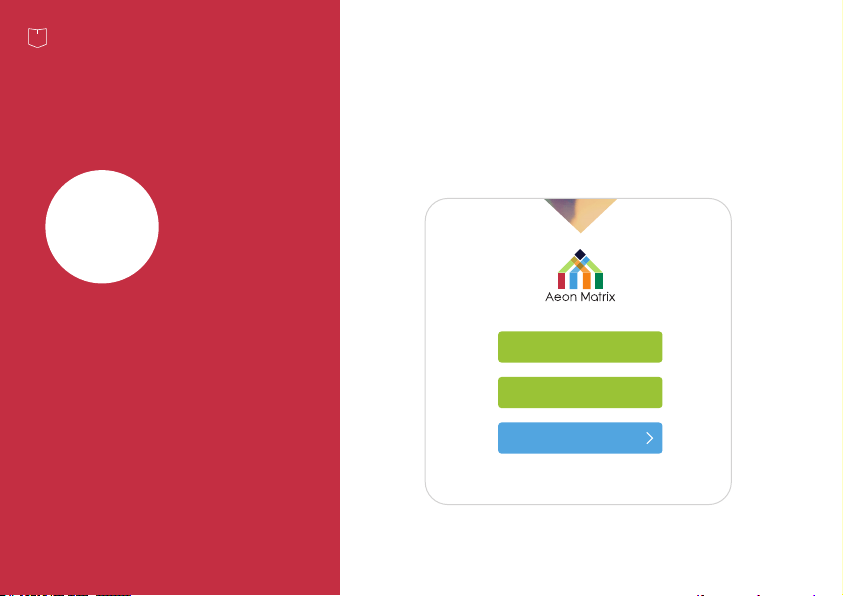
Download the
Yardian app
3
Step
Create an account and personal profile.
Sign in the Yardian app with your account.
My Account
Video
User Guide
Create Account
18
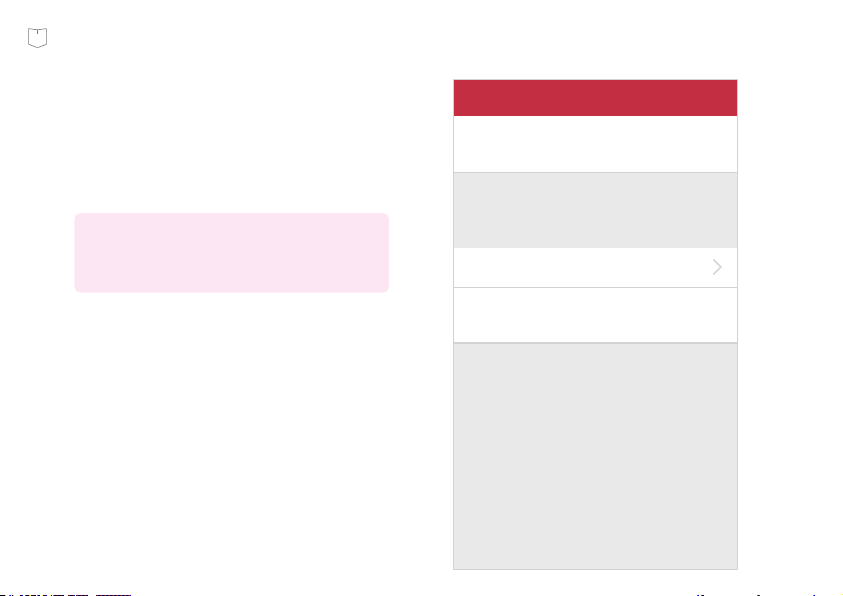
Enter your Profile Name and your Zip
Code (or click on the map to find your
location), then click the "Save" button
to proceed.
Note: The profile captures all the information
about your yard at a specific location (e.g.,
your home).
Add ProfileCancel Save
Profile Name
Using Zipcode
Using Map (US)
Locate Your Yardian (Country: US)
Please note that you can not change the
location more than 5 times per day.
19
Step 3.
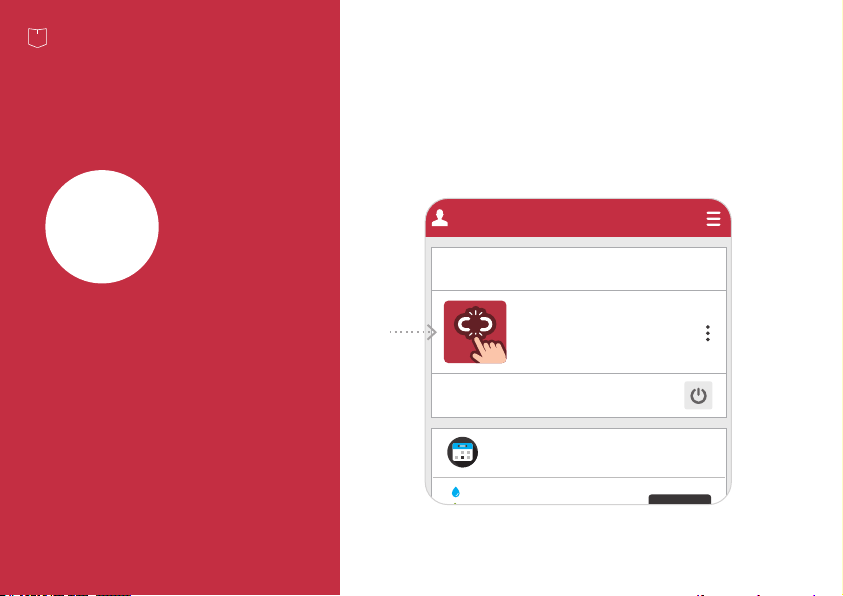
4
Step
Pair your Yardian
to your profile
Stop All Watering Activities
Unpaired
Please Cick To Pair.
Yardian Device Setting
°C | °F
Watering Schedule
: Smart Watering Day
: Manual Watering Day
: Skip Watering Day
F
81°
72°
W
79°
72°
T
81°
72°
S
81°
72°
M
82°
73°
S
81°
72°
T
82°
72°
My Yardian
Click the Yardian device setting card to
start pairing.
SN :
MAC :
YID :
AA00754F
<MAC Number>
<Serial Number>
20
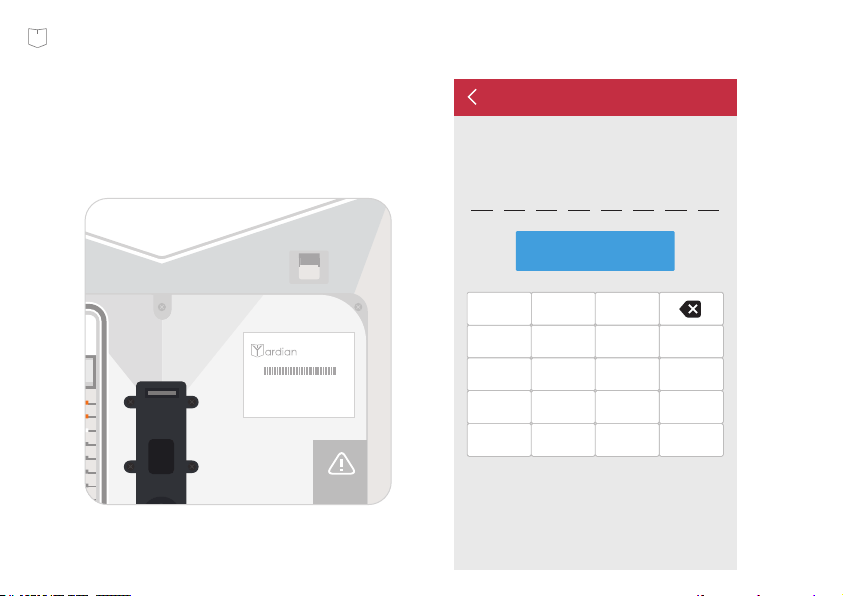
Enter the 8-digit Yardian ID number
(YID) on the device.
Please Enter Your YID:
Yardian Pairing
Next
1 2 3 A
4 5 6 B
7 8 9 C
0 F E D
SN :
MAC :
YID :
AA00754F
<MAC Number>
<Serial Number>
SN :
MAC :
YID :
AA00754F
<MAC Number>
<Serial Number>
21
Step 4.

5
Step
Wi-Fi onboarding
From the app, click the Yardian card
and go to "Wi-Fi onboarding":
Yardian will use historical ETo and rainfall
weather data for watering schedules when it is
offline.
P ai red
Offline
YID: AA00754F
Yardian Device Setting
°C | °F
Watering Schedule
: Smart Watering Day
: Manual Watering Day
: Skip Watering Day
Yardian is Offline
My Yardian
The Yardian is now paired to your
Profile. You can now set up Wi-Fi
connection for your Yardian.
22
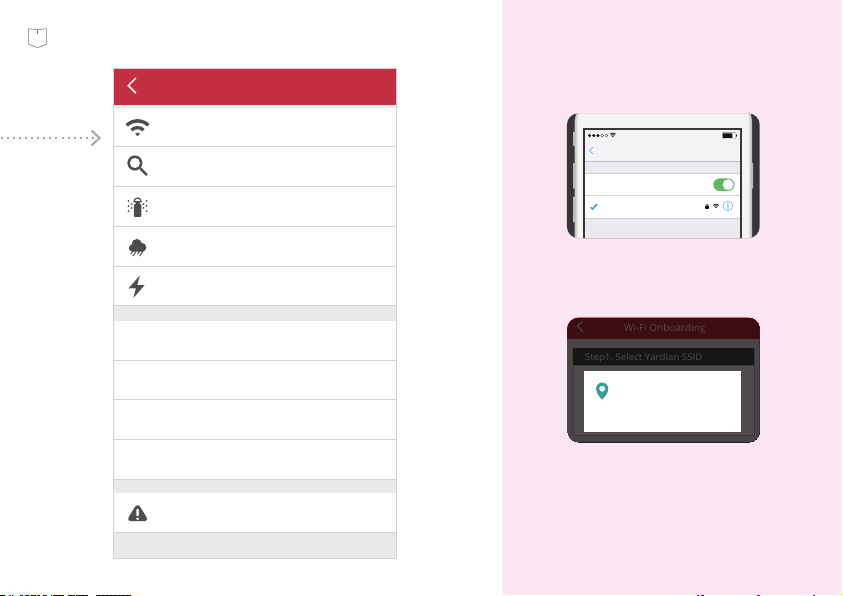
Device Settings
Wi-Fi Onboarding
Scan Sprinkler Valves
None
Master Valve
Rain Sensor None
24VAC Power Supply None
YID
Firmware
MAC
Local IP
Unpair Device
For iOS users, please turn on
Wi-Fi on your mobile device.
CHOOSE A NETWORK...
12:45 AM 90%
Settings
Wi-Fi
Wi-Fi
Other Router
My Wi-Fi Router
Step1. Select Yardian SSID
Select
Yardian - aa:00
Wi-Fi Onboarding
Allow Yardian to access
this device’s location?
DENY ALLOW
For Android users, please allow
the Yardian app to access the
device’s location to get a list of
available networks.
23
Step 5.
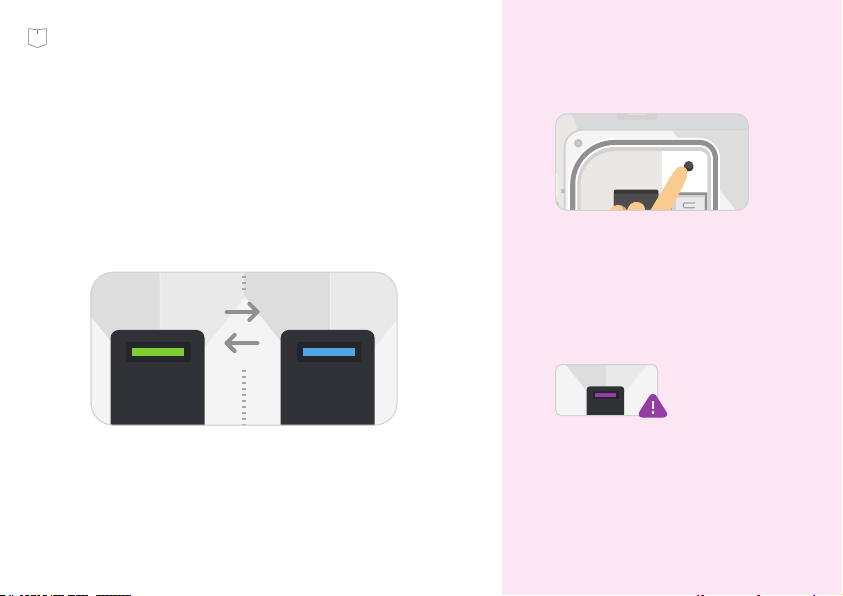
Please stay close to the Yardian device when
doing "Wi-Fi onboarding".
Check Yardian’s LED status. Yardian should
be in Wi-Fi AP mode to proceed (LED blinking
green and blue).
If Yardian is not blinking green and
blue, please press and hold the
Wi-Fi reset button for around 5
seconds and release when you see
the LED blinking green and blue.
If your Yardian is in Wi-Fi AP mode
for more than 15 minutes, you will
be asked to reboot Yardian (Press
Wi-Fi reset button until LED turns
red).
LED in purple!
SN :
MAC :
YID :
AA00754F
<MAC Number>
<Serial Number>
Press
24
Step 5.
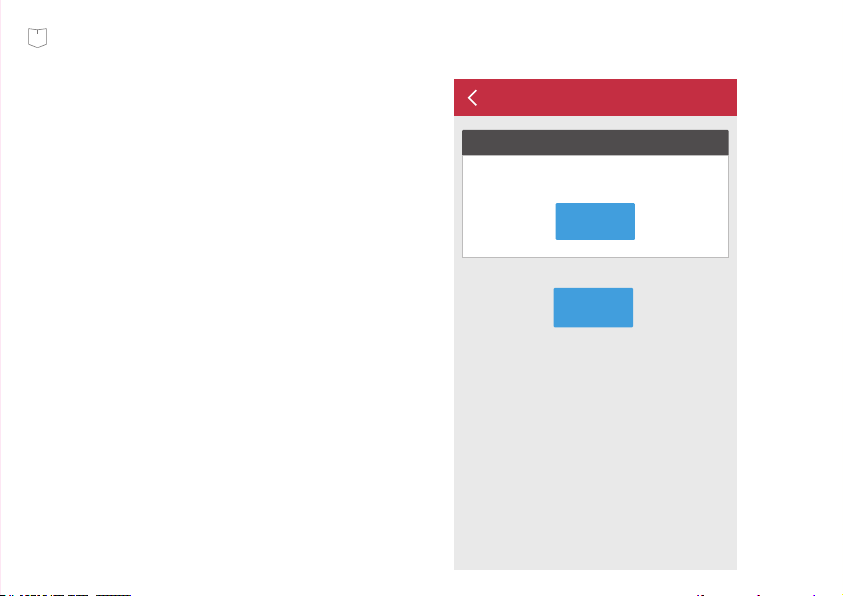
Select the Yardian SSID.
Next
Step1. Select Yardian SSID
Select
Yardian - aa:00
Can not find my Yardian?
Wi-Fi Onboarding
The Yardian app will scan for nearby
wireless signals to provide you with
a list of wireless networks to choose
from.
SN :
MAC :
YID :
AA00754F
<MAC Number>
<Serial Number>
25
Step 5.
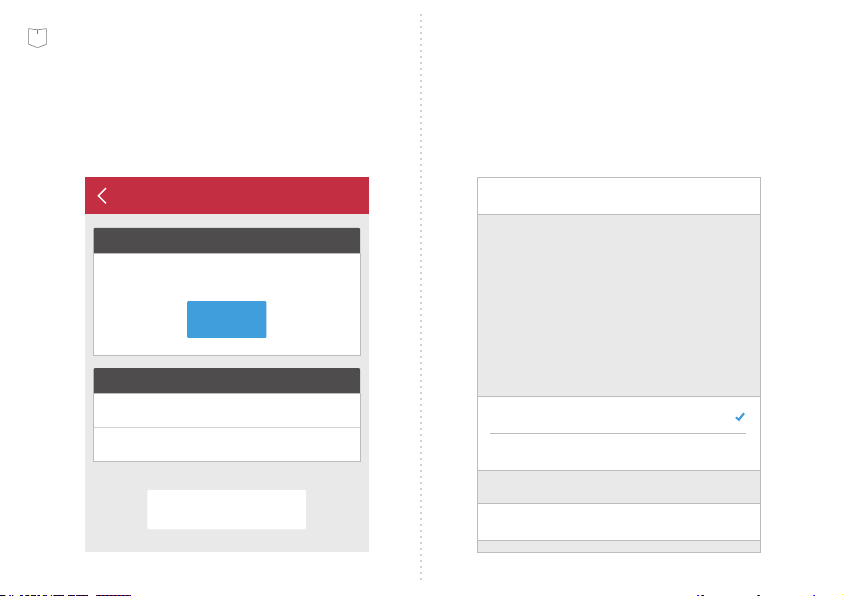
Specify your home Wi-Fi router SSID #
and password.
This step applies to Android.
Step 2.
Specify Your Wi-Fi Router SSID
Step 3.
Input Your Wi-Fi Router Password
PASSWORD
● ● ● ● ● ● ● ● ● ●
Wi-Fi Onboarding
Start Onboarding
My Wi-Fi Router
Select
NETWORK
This accessory will be set up to join
“My Wi-Fi Router“.
Accessory Name Yardian - aa:00
My Wi-Fi Router
Show Other Networks...
Accessory SetupCancel Next
This step applies to iOS.
Specify your home Wi-Fi router SSID #.
26
Step 5.
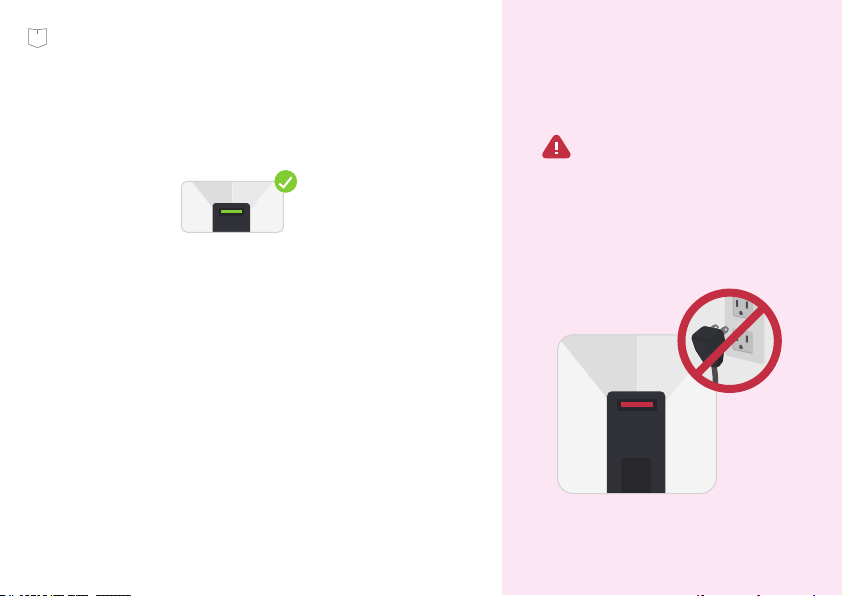
Check your Yaridan LED: if it turns into a
steady green light, it means that you have
successfully connected your Yardian to
your Wi-Fi network.
Congratulations! You have successfully set
up your Yardian.
WARNING!
Software may be updated when Yardian
is connected to the Internet. Please DO
NOT turn off the power when the LED is
blinking RED. Interrupting the software
update process may result in system
malfunction.
27
Step 5.
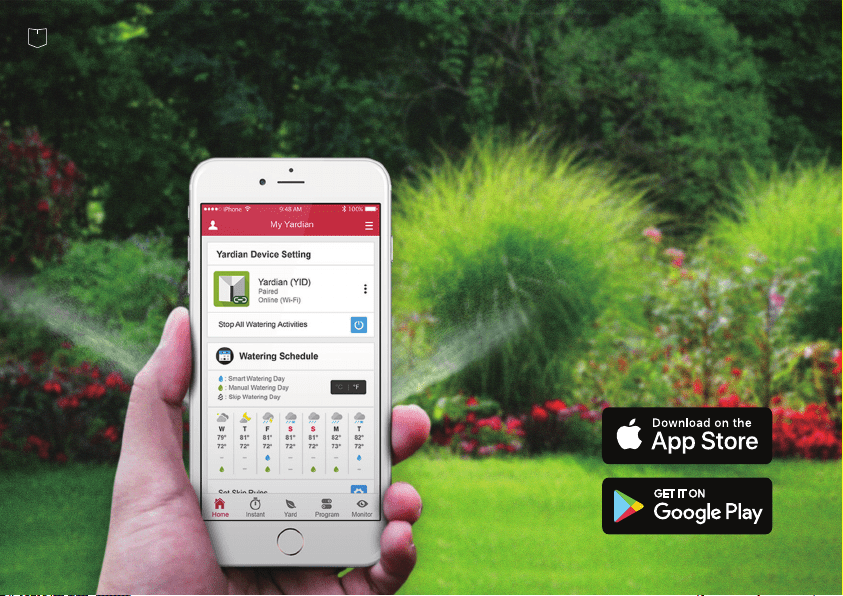
iOS 9.0+ and Android 4.4+
28
Easy access to the settings with 5 simple tabs
Setup of the App
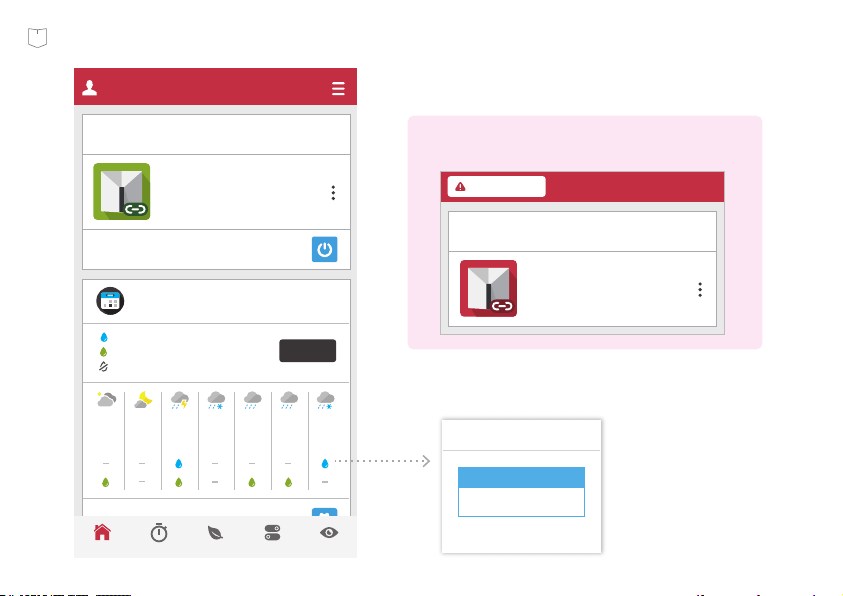
29

Home
You may review all
information here
Receive the latest information regarding
your watering schedule, Yardian
notifications, and more.
30
Stop All Watering Activities
Paired
Online (Wi-Fi)
YID: AA00754F
Yardian Device Setting
°C | °F
Watering Schedule
: Smart Watering Day
: Manual Watering Day
: Skip Watering Day
F
81°
72°
W
79°
72°
T
81°
72°
S
81°
72°
M
82°
73°
S
81°
72°
T
82°
72°
Set Skip Rules
My Yardian
YardHome Instant Program Monitor
09/23
MyZone 1
01:30~01:32
2
OK
Yardian will use historical ETo and rainfall weather
data for watering schedules when it is offline.
Paired
Offline
YID: AA00754F
Yardian Device Setting
Yardian is Offline
31

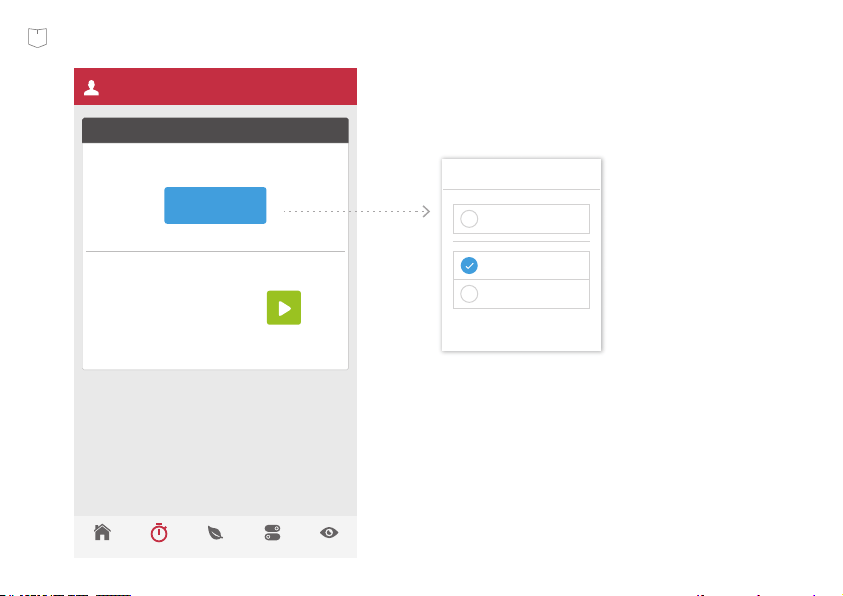
Instant
You get to control
all zones here
Control your zones to start watering at any
desired time with just a touch of the
button on your mobile device.
32
Instant Control
Start Zone(s)
02:00
YardHome Instant Program Monitor
Select Zone
MyZone1
Select Zone
SetCancel
Select All Zone
MyZone1
MyZone2
33

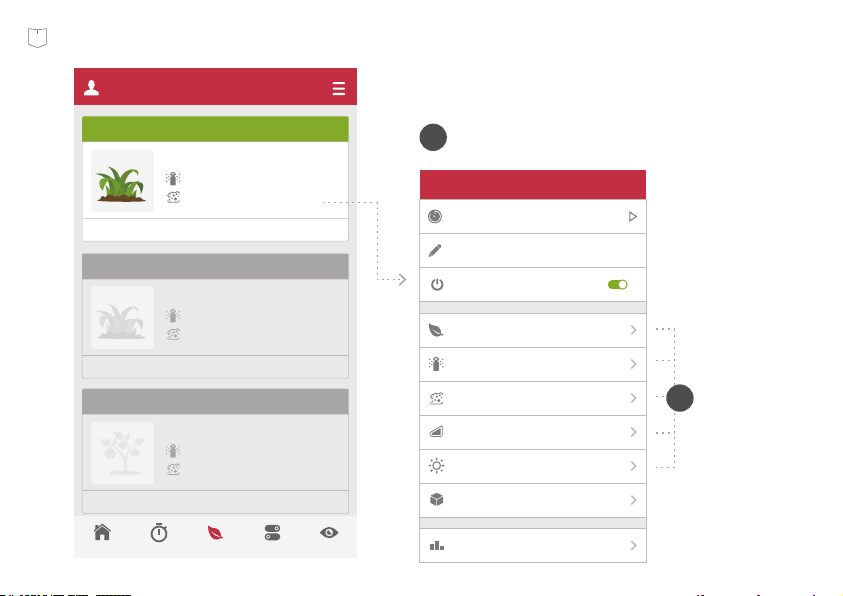
You may set up and manage all your
yard profile information here. Our app
can automatically detect the connected
zones and enable them.
Profile your yard
Yard
34
Tell us about
your garden.
Go to the “Yard” tab.
A
B
Zone2
Cancel Save
Watering For One Minute
Warm Grass
Plant
Sprinkler Heads
Spray Head
Loam
Soil Types
Flat
Slope
Lots of sun
Exposure
MyZone2
Name
Enable
1000 square feet
Zone Area
Watering History
My Yard
Zone 1
MyZone 1
Warm Season Grass
Spray Head
Loam
Smart Program /running at 100%
Zone 2
MyZone 2
Warm Season Grass
Spray Head
Loam
Manual Program
Fruit, Deciduous
Spray Head
Loam
Manual Program
Zone 3
MyZone 3
YardHome Instant Program Monitor
35

Program
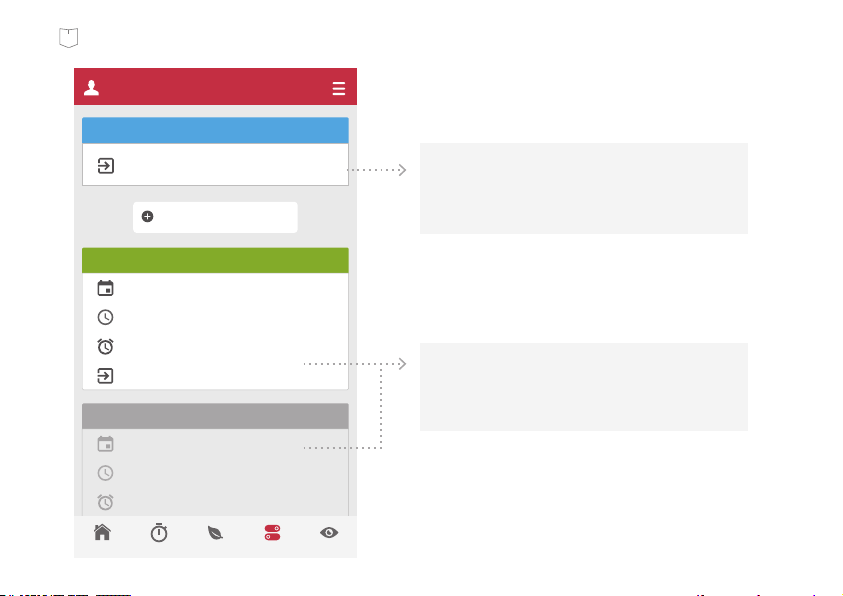
Program the
watering schedule
"Smart Program" covers all zones by
default. The Yardian may be up and
running without manual programming
once you specify your zone profiles.
36
My Program
MyZone 2
Smart Program
Program
Mon, Thr
06:30
MyZone 3
6mins (Adjust: 2 mins)
New Program
Mon, Thr
06:30 (5 mins)
MyZone 3
6mins (Adjust: 2 mins)
Add New Manual Program
YardHome Instant Program Monitor
Manual Program allows you to create your
own watering schedule. You have the choice
to apply “Seasonal Adjustment” in your
manual programs.
Smart Program designs automatic watering
schedules based on your zone profiles,
weather data, watering restrictions, and your
preferences for each zone.
37

Monitor
Watch live video
streaming and more
You can view live video streaming via your
Yardian camera here.
38
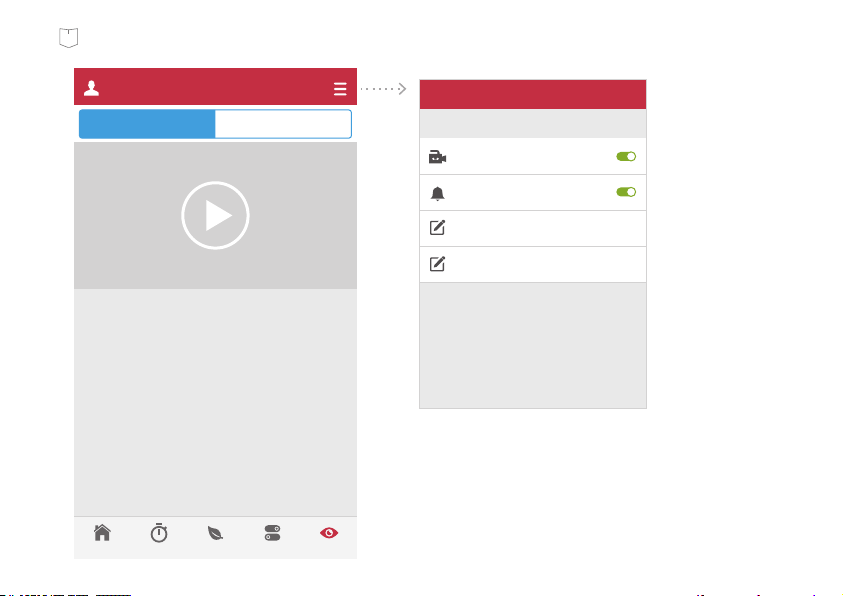
YardHome Instant Program Monitor
Video
Live History
SettingsCancel Save
Motion Detection
Alert
Video Cloud Recording
Sensitivity
55
Threshold
5
39

Smart Sprinkler Controller Limited Warranty
THIS LIMITED WARRANTY CONTAINS IMPORTANT INFORMATION ABOUT YOUR RIGHTS AND OBLIGATIONS, AS
WELL AS LIMITATIONS AND EXCLUSIONS THAT MAY APPLY TO YOU.
Aeon Matrix, Inc. may restrict this Limited Warranty service for the Product to the country where the Product or its authorized
distributors originally sold the Product. Aeon Matrix, Inc. (“Aeon Matrix”) warrants the enclosed product contained in this box
(“Product”) will be free from defects in materials and workmanship for a period of two (2) years from the date of delivery following
the original retail purchase by the end-user purchaser (the “Warranty Period”). If the Product fails to conform to this Limited
Warranty during the Warranty Period, Aeon Matrix will, at its sole discretion, either (a) repair or replace the defective Product or any
component thereof; or (b) accept the return of the Product and refund the money actually paid by the original retail purchaser for
the Product. Repair or replacement may be made with a new or refurbished Product or components thereof, at Aeon Matrix’ sole
discretion. If the Product or a component incorporated within it is no longer available, Aeon Matrix may replace the Product or
component in question with a similar product or component of similar function, at Aeon Matrix’ sole discretion. This is your sole and
exclusive remedy for Product covered under the limited warranty within the Warranty Period. Any Product or component thereof
that has been repaired or replaced under the Limited Warranty shall remain covered by the terms of this Limited Warranty for the
longer of (a) ninety (90) days from the date of delivery of the repaired or replaced product, or (b) the remainder of the Warranty
Period. This Limited Warranty is transferable from the original retail purchaser to subsequent owners or purchasers, but the
Warranty Period will not be extended in duration or expanded in coverage for any such transfer.
WHAT THIS LIMITED WARRANTY COVERS; PERIOD OF COVERAGE
If you are the original retail purchaser of the Product and you are not satisfied with this Product for any reason, you may return it
in its original condition within thirty (30) days of the original purchase and receive a full refund.
TOTAL SATISFACTION RETURN POLICY
Before making a claim under this Limited Warranty, the owner of the Product must (a) notify Aeon Matrix of the intention to claim
by visiting support.aeonmatrix.com during the Warranty Period and providing a reasonably adequate description of the alleged
non-conformity of Product or its component(s), and (b) comply with Aeon Matrix’s return shipping instructions. Aeon Matrix shall
have no warranty obligations with respect to a returned Product or component(s) thereof if it determines, in its reasonable
discretion after examination of the returned Product, that the Product is an Ineligible Product (defined below). Aeon Matrix will bear
all costs of return shipping to the owner and will reimburse any shipping costs incurred by the owner, except with respect to any
Ineligible Product, for which owner will bear all shipping costs.
WARRANTY CONDITIONS; HOW TO GET SERVICE IF YOU WANT TO CLAIM UNDER THIS LIMITED WARRANTY
41

This Limited Warranty does not cover the following (collectively “Ineligible Products”): Products or their components marked as
“sample” or sold “AS IS”; or Products or their components that have been subject to: (a) unauthorized modifications or alterations,
tampering, unauthorized or improper maintenance or repairs; (b) handling, storage, installation, testing or use not in accordance
with the User’s Guide or other instructions provided by Aeon Matrix; (c) abuse or misuse of the Product; (d) breakdowns,
fluctuations, or interruptions in electric power or the telecommunications network; (e) Acts of God, including but not limited to
lightning, flood, liquid contact, tornado, earthquake, hurricane, accident, or other external cause; (f) use with a third party
component or product that does not meet the Products specifications; (g) cosmetic damage, including but not limited to scratches,
dents and broken plastic on parts unless damage is due to defects in materials or workmanship of the Product; (h) defects caused
by normal wear and tear or otherwise due to the normal aging of the Product; or (i) if any serial number has been removed or
defaced from the Product. This Limited Warranty does not cover consumable parts, such as batteries or protective coatings that are
designed to diminish over time, unless damage is due to defects in materials or workmanship of the Product (even if such
consumable parts are packaged or sold with the product).
Unauthorized use of the Product or software can impair the Product’s performance and may invalidate this Limited Warranty. This
Limited Warranty does not apply to any hardware products or any software not provided or authorized by Aeon Matrix, even if
packaged or sold with Aeon Matrix Product or Aeon Matrix hardware. Software distributed by or not by Aeon Matrix is not covered
by this Limited. Aeon Matrix does not warrant that the operation of the Product will be uninterrupted or error-free.
WHAT THIS LIMITED WARRANTY DOES NOT COVER
EXCEPT AS STATED ABOVE IN THIS LIMITED WARRANTY, AND TO THE MAXIMUM EXTENT PERMITTED BY APPLICABLE LAW, AEON
MATRIX DISCLAIMS ALL EXPRESS, IMPLIED, AND STATUTORY WARRANTIES AND CONDITIONS WITH RESPECT TO THE PRODUCT AND
ITS COMPONENTS, INCLUDING BUT NOT LIMITED TO THE IMPLIED WARRANTIES OF MERCHANTABILITY, NON-INFRINGEMENT OF
INTELLECTUAL PROPERTY AND FITNESS FOR A PARTICULAR PURPOSE. TO THE MAXIMUM EXTENT PERMITTED BY APPLICABLE LAW,
IN SO FAR AS SUCH WARRANTIES CANNOT BE DISCLAIMED, AEON MATRIX LIMITS THE DURATION AND REMEDIES OF SUCH
WARRANTIES TO THE DURATION AND CONDITIONS OF THIS EXPRESS WARRANTY.
DISCLAIMER OF WARRANTIES
IN ADDITION TO THE ABOVE WARRANTY DISCLAIMERS AND TO THE MAXIMUM EXTENT PERMITTED BY APPLICABLE LAW, IN NO
EVENT SHALL AEON MATRIX BE LIABLE FOR ANY CONSEQUENTIAL, INCIDENTAL, EXEMPLARY, OR SPECIAL DAMAGES, INCLUDING
ANY DAMAGES FOR LOST DATA OR INFORMATION OR LOST PROFITS ARISING FROM OR RELATING TO THIS LIMITED WARRANTY OR
THE PRODUCT AND ITS COMPONENTS; AND AEON MATRIX’S TOTAL CUMULATIVE LIABILITY ARISING FROM OR RELATED TO THIS
LIMITED WARRANTY OR THE PRODUCT AND ITS COMPONENTS SHALL NOT EXCEED THE AMOUNT ACTUALLY PAID FOR THE
PRODUCT BY THE ORIGINAL RETAIL PURCHASER.
LIMITATION OF DAMAGES
42

THE AEON MATRIX ONLINE SERVICES (“SERVICES”) MAY PROVIDE YOU INFORMATION (“PRODUCT INFORMATION”) REGARDING
YOUR PRODUCT OR OTHER PERIPHERALS CONNECTED TO YOUR PRODUCT (“PRODUCT PERIPHERALS”). THE TYPE OF PRODUCT
PERIPHERALS THAT MAY BE CONNECTED TO YOUR PRODUCT MAY CHANGE FROM TIME TO TIME. WITHOUT LIMITING THE
GENERALITY OF THE DISCLAIMERS ABOVE, ALL PRODUCT INFORMATION IS PROVIDED FOR YOUR CONVENIENCE “AS IS” AND “AS
AVAILABLE”. AEON MATRIX DOES NOT REPRESENT, WARRANT, OR GUARANTEE THAT PRODUCT INFORMATION WILL BE AVAILABLE,
ACCURATE, OR RELIABLE OR THAT PRODUCT INFORMATION OR USE OF THE SERVICES OR PRODUCT WILL EFFECT YOUR TOTAL
WATER CONSUMPTION OR CONDITION OF YOUR PLANTS AND GARDEN. AEON NOR DOES AEON MATRIX REPRESENT, WARRANT,
OR GUARANTEE THAT PRODUCT INFORMATION OR USE OF THE SERVICES OR PRODUCT WILL PROVIDE SAFETY IN YOUR HOME. YOU
USE ALL PRODUCT INFORMATION, THE SERVICES, AND THE PRODUCT AT YOUR OWN DISCRETION AND RISK. YOU WILL BE SOLELY
RESPONSIBLE FOR (AND AEON MATRIX DISCLAIMS) ANY AND ALL LOSS, LIABILITY, OR DAMAGES, INCLUDING BUT NOT LIMITED TO
YOUR VALVES OF ANY KIND, PUMPS, PUMPS RELAYS, IRRIGATION EMITTERS OF ANY KIND, WIRING, FIXTURES, ELECTRICITY, HOME,
PRODUCT, PRODUCT PERIPHERALS, COMPUTER, MOBILE DEVICE, AND ALL OTHER ITEMS AND PETS IN YOUR HOME, RESULTING
FROM YOUR USE OF THE PRODUCT INFORMATION, SERVICES, OR PRODUCT. PRODUCT INFORMATION PROVIDED BY THE SERVICES
IS NOT INTENDED AS A SUBSTITUTE FOR DIRECT MEANS OF OBTAINING THE INFORMATION.
LIMITATION OF LIABILITY OF INFORMATION
This Limited Warranty gives you specific legal rights. You may also have other legal rights that vary by state, province, or jurisdiction.
Likewise, some of the limitations set out above may not apply to you. The terms of this Limited Warranty will apply to the extent
permitted by the applicable law.
VARIATIONS THAT MIGHT APPLY TO THIS LIMITED WARRANTY
This Limited Warranty and the purchase of the Product shall in all respects be construed, interpreted, and/or enforced in
accordance with and governed by the laws of the State of California. Other than as set forth above, you knowingly and irrevocably
waive the right to bring or maintain any action, claim or proceeding in any court of law arising out of or related to this Limited
Warranty or the Product. You further irrevocably waive any right to a jury trial of any non-waived action, claim or proceeding.
GOVERNING LAW, JURISDICTION, AND DISPUTE RESOLUTION
43

© 2018 Aeon Matrix Inc. All rights reserved.
www.yardian.com