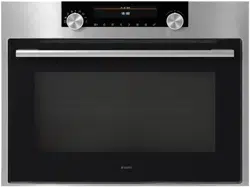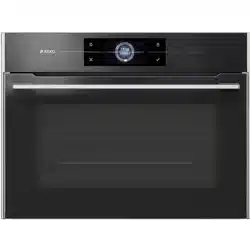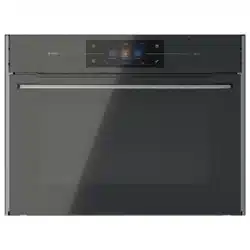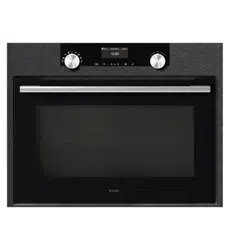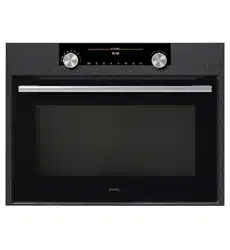
Dear customer!
Thank you for choosing this quality product from ASKO. We hope it will
meet your expectations and fulfi l your needs for many years to come.
Scandinavian design combines clean lines, everyday functionality and
high quality. These are key characteristics of all our products and the
reason they are greatly appreciated throughout the world.
Operating instructions
BO4CM4T1-42 OCM8476S

2
We thank you for your trust and the
purchase of our appliance.
This detailed instruction manual is supplied to make the
use of this product easier. The instructions should allow
you to learn about your new appliance as quickly as
possible.
Make sure you have received an undamaged appliance.
If you do fi nd transport damage, please contact the
seller from which you purchased the appliance, or the
regional warehouse from which it was supplied. The
telephone number can be found on the invoice or on the
delivery note.
Instructions for installation and connection are supplied
on a separate sheet.
Instructions for use are also available at our website:
www.asko.com / < http://www.asko.com />
Important information
Tip, note

3
COMBINED MICROWAVE OVEN 4
TECHNICAL SPECIFICATIONS 4
CONTROL UNIT 6
IMPORTANT SAFETY INSTRUCTIONS 7
BEFORE CONNECTING THE OVEN: 8
BEFORE USING THE APPLIANCE FOR
THE FIRST TIME 9
STEPS OF THE COOKING PROCESS (1–6) 10
STEP 1: SWITCHING ON THE APPLIANCE
FOR THE FIRST TIME 10
STEP 2: CHOOSING THE BASIC COOKING
MENUS AND SETTINGS 11
STEP 3: STARTING THE COOKING PROCESS 19
STEP 4: END OF COOKING AND SWITCHING
OFF THE OVEN 19
STEP 5: SELECTING ADDITIONAL FUNCTIONS/
EXTRAS 20
STEP 6: CHOOSING THE GENERAL SETTINGS 22
DESCRIPTIONS OF SYSTEMS (COOKING
MODES) AND COOKING TABLES 23
MAINTENANCE & CLEANING 40
CONVENTIONAL OVEN CLEANING 40
USING THE AQUA CLEAN FUNCTION
TO CLEAN THE OVEN 41
REMOVING AND CLEANING THE WIRE
GUIDES 42
REPLACING THE BULB 43
TROUBLESHOOTING TABLE 44
DISPOSAL 45
COOKING TEST 46
CONTENTS
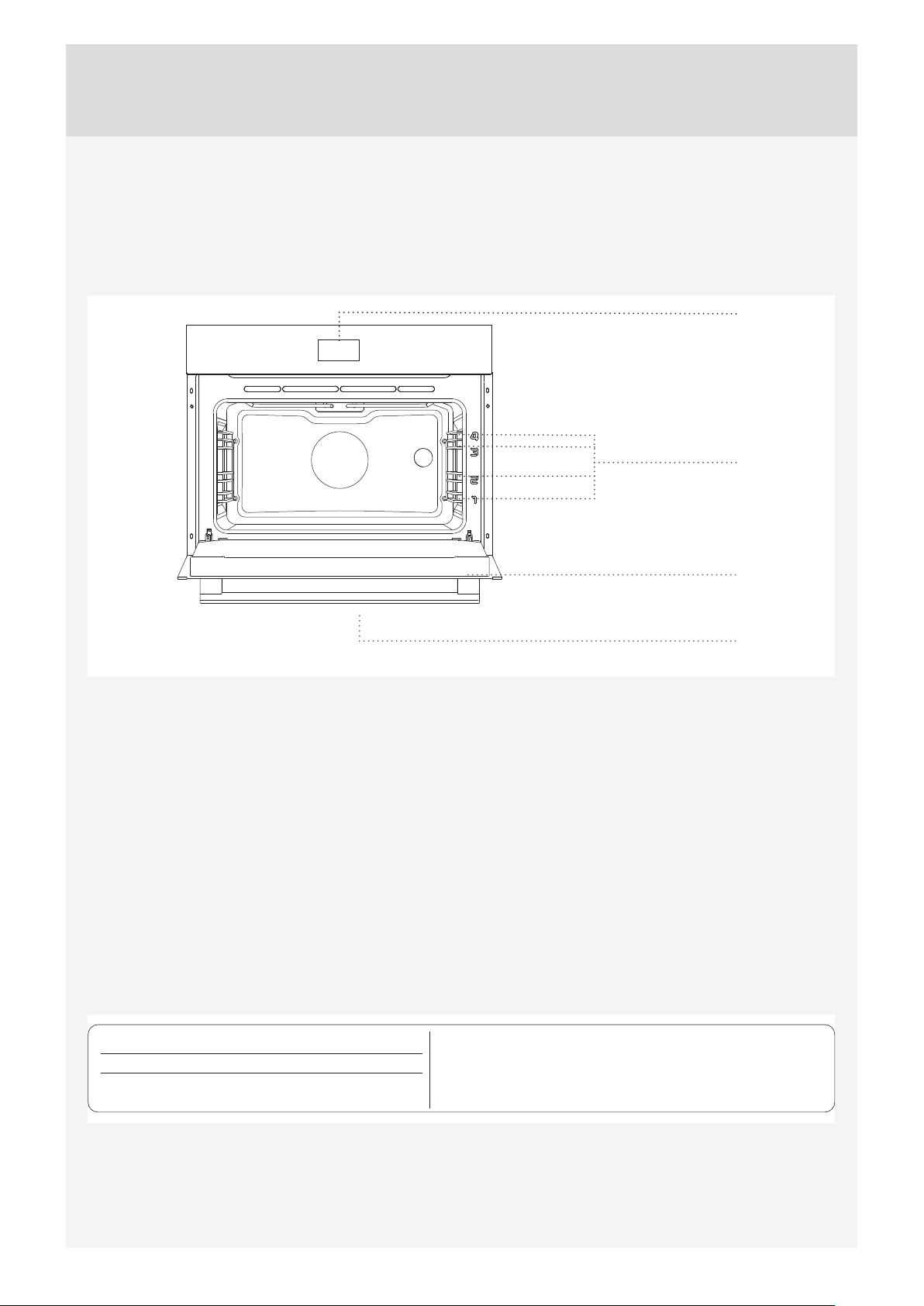
4
3.1 kW
XXXXXX
SER. Nr: XXXXXX
ART. Nr:
max
TN XXXXX
Pn :
TYPE:
XXXXXX
220-240V ~
220V-240V, 50/60Hz
Freq. : 2,45 GHz
4
3
2
1
Control unit
Oven door
Oven handle
Guides
- Cooking levels
(DESCRIPTION OF THE OVEN AND EQUIPMENT – DEPENDING ON THE MODEL)
The fi gure represents one of the built-in appliance models. Since the appliances for which these instructions were drawn
up may have diff erent equipment, some functions or equipment may be described in the manual that may not be present
in your appliances.
TECHNICAL SPECIFICATIONS
(DEPENDING ON THE MODEL)
The rating plate indicating the basic information about
the appliance is located at the edge of the oven and it is
visible when the oven door is opened.
COMBINED MICROWAVE OVEN
5
WIRE GUIDES
Wire guides allow preparation of the food on four levels
(please note that the levels/guides are counted from the
bottom up).
Guides 3 and 4 are intended for grilling, and guide 1 is
used with microwave systems when food is prepared in
a glass baking dish.
OVEN DOOR SWITCH
The switches deactivate oven heating, the fan, and the
microwaves when the oven door is opened during the
cooking process. When the door is closed, the switches
turn the heaters and microwaves back on.
COOLING FAN
The appliance is fi tted with a cooling fan that cools the
housing and the appliance control panel.
EXTENDED OPERATION OF THE COOLING FAN
After the oven is switched off , the cooling fan continues
to operate for a short while in order to provide additional
cooling for the oven. (Extended cooling fan operation
depends on the temperature in the center of the oven.)
OVEN EQUIPMENT AND ACCESSORIES
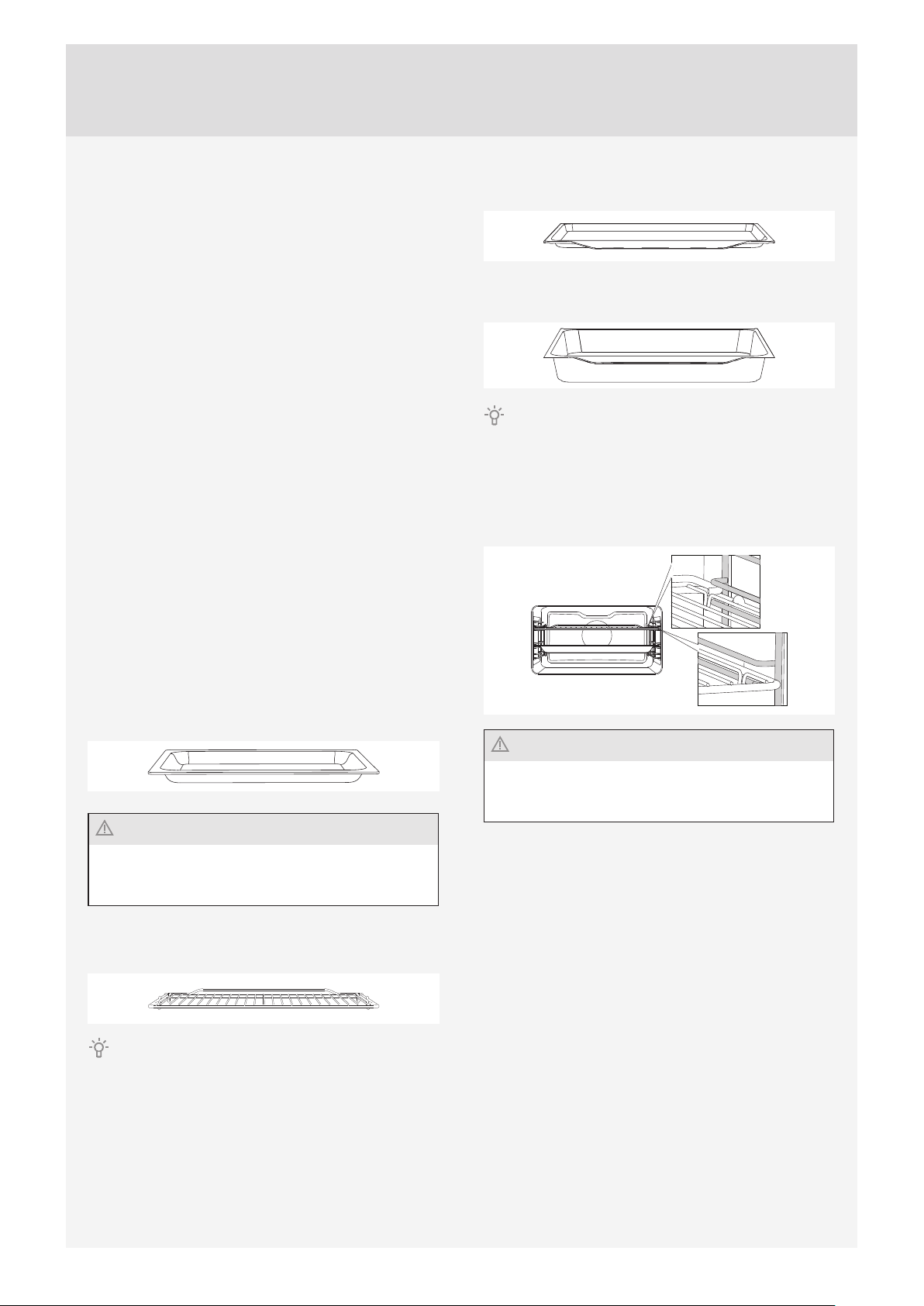
GLASS BAKING DISH is used for cooking with all oven
systems and for cooking with microwaves. It can also be
used as a serving tray.
Never use the grid, the shallow baking sheet or the
deep baking tray or any other metal part or accessory
when operating a system with microwaves!
The GRID is used for grilling or as support for a pan,
baking tray or baking dish with the food.
There is a safety latch on the grid. Therefore, the grid
has to be lifted slightly at the front when pulling it out from
the oven.
The SHALLOW BAKING SHEET is used for baking
pastry and cakes.
The DEEP BAKING TRAY is used for roasting meat and
baking moist pastry. It can also be used as a drip tray.
Never place the deep baking tray in the fi rst guide during
the cooking process, except when grilling food or using the
roasting spit and you are only using the deep tray as a drip
tray.
The grid or the tray should always be inserted into the
groove between the two wire profi les.
Never use the grid, the shallow baking sheet or the
deep baking tray or any other metal part or accessory
when operating a system with microwaves!
6
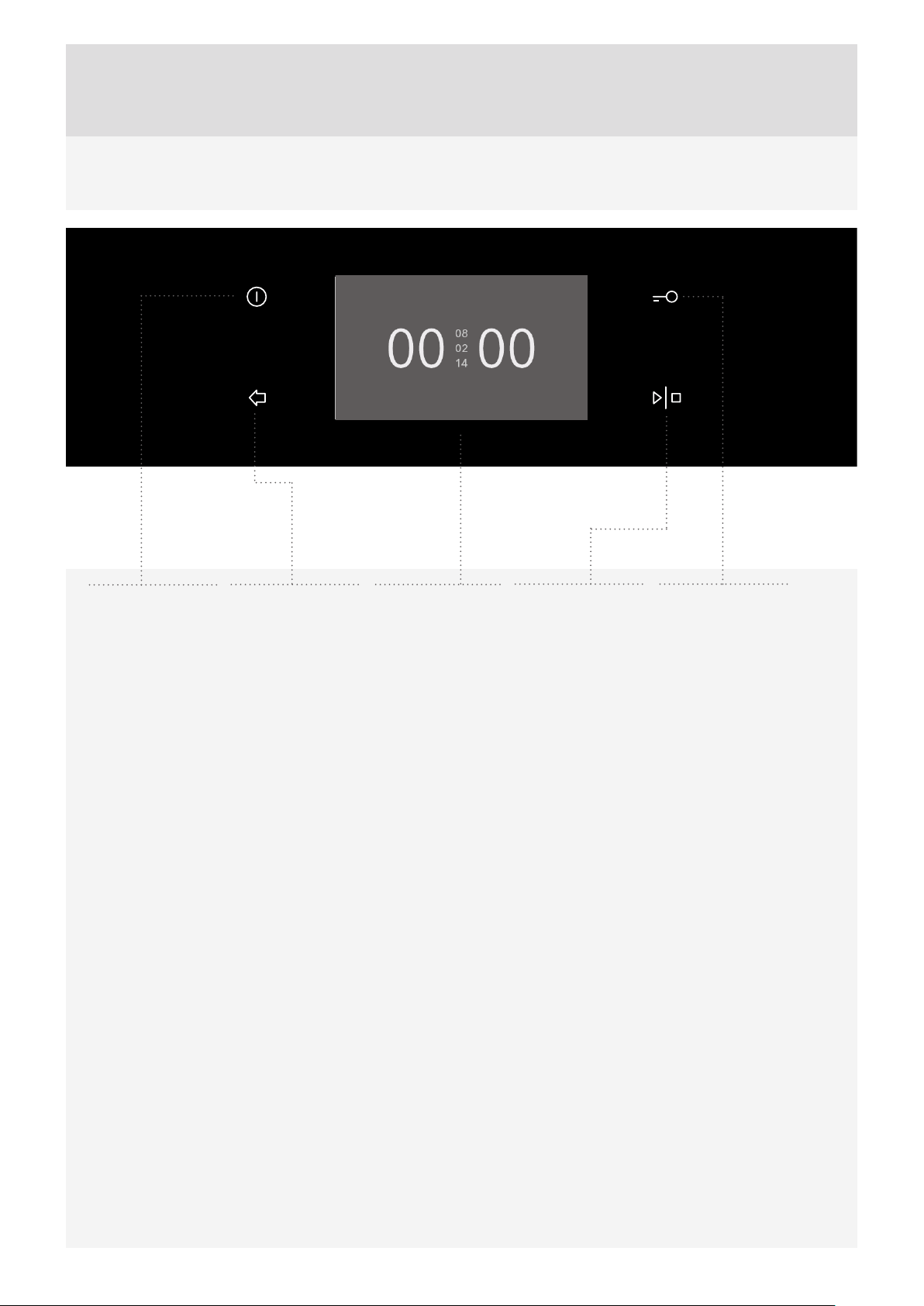
CONTROL UNIT
NOTE:
The keys will respond better if you touch them with a larger area of your fi ngertip. Each time you press a key, this will be
acknowledged by a short acoustic signal.
Navigate the menu by sliding your fi nger up and down or left and right. Confi rm your selection with a touch.
1
ON/OFF KEY
2
BACK KEY
Touch briefl y to
return to previous
menu.
Touch and hold
to return to main
menu.
3
DISPLAY – For
selection and
display of settings
4
START/STOP
KEY
5
CHILD LOCK
KEY

7
CAREFULLY READ THE INSTRUCTIONS AND SAVE THEM FOR FUTURE REFERENCE.
This appliance may only be used by children aged 8 years and above and persons with
reduced physical, sensory or mental capabilities or lack of experience and knowledge
if supervision or instructions are provided to them concerning use of the appliance in a
safe way and if they understand the hazards involved. Do not let the children play with
the appliance. Cleaning and user maintenance shall not be made by children without
supervision.
WARNING: The appliance and some of its accessible parts may become very hot during
use. Be careful not to touch the heaters. Children younger than 8 years should be constantly
supervised.
The appliance becomes very hot during use. Be careful not to touch the oven heaters.
WARNING: The accessible parts of the appliance may become hot during use. Children
should be kept away from the oven.
Only use the temperature probe recommended for use in this oven.
WARNING: Before replacing the light bulb, make sure the appliance has been disconnected
from the power mains, in order to prevent the hazard of an electric shock.
Do not use abrasive cleaners or sharp metal scrapers to clean the oven as they may damage the
fi nish or the protective enamel coating. Such damages may lead to cracking of the glass.
Do not use steam cleaners or high pressure cleaners to clean the appliance as this may result in an
electric shock.
The appliance is not intended to be controlled with external timers or special control systems.
The appliance is intended for household use. Do
not use it for any other purpose, such as room heating,
drying of pets or other animals, paper, fabrics, herbs etc.
as this may lead to injury or fi re hazard.
The appliance may only be connected to the power
mains by an authorized service technician or expert.
Tampering with the appliance or non-professional repair
thereof may result in risk of severe injury or damage to
the product.
If the power cords of other appliances located near
this appliance are caught in the oven door, they may
be damaged, which may in turn result in a short circuit.
Therefore, keep the power cords of other appliances at a
safe distance.
If the power cord is damaged, it should be replaced by
the manufacturer or an authorized service technician, in
order to avoid hazard.
Do not line the oven walls with aluminium foil and do
not place baking trays or other cookware on the oven
bottom. Aluminium foil would prevent air circulation
in the oven, hinder the cooking process, and ruin the
enamel coating.
Oven door become very hot during operation. A
third glass is installed for extra protection, reducing
the temperature of the outside surface (only with some
models).
Oven door hinges may be damaged when under
excessive load. Do not place heavy pans on open oven
door and do not lean against open oven door when
cleaning the oven cavity. Never stand on the open oven
door and do not let children to sit on it.
Make sure the vents are never covered or obstructed in
any other way.
IMPORTANT SAFETY INSTRUCTIONS

8
Safe use of the microwave oven
WARNING: If your oven allows combined operation (microwaves combined with other cooking
modes), do not allow the children to use the oven without supervision of an adult person since the
oven will reach very high temperatures in such operation modes.
WARNING: If the door or door sealing is damaged, do not use the oven until it is repaired by an
adequately trained service technician.
WARNING: It is hazardous for anyone other than a competent person to carry out any service or
repair operation which involves removal of the cover that protects against exposure to microwave
radiation.
WARNING: Liquids and other foods must not be heated in sealed containers since they are liable
to explode.
Heed the minimum distance between the upper edge of the
oven and the nearest object above it.
The appliance is intended for use in households and similar
environments, such as:
- staff pantries in stores and other working environments;
- family farms;
- accommodation units for guests at hotels, motels, and other
accommodation or lodging establishments;
- bed and breakfast establishments.
The microwave oven is intended for heating food and
beverages. Drying food or clothing and heating of hot packs
or pads, slippers, sponges, moist cloths etc. may result in
injury, ignition, or fi re.
Only use utensils suitable for use in microwave ovens.
When heating food in plastic or paper containers, keep an
eye on the oven as such packaging may ignite.
Microwave heating of beverages can result in delayed
eruptive boiling; therefore take care when handling the
container with the heated beverage.
The contents of baby bottles and baby food jars should
be shaken or stirred and their temperature checked before
feeding in order to avoid burns.
Eggs in their shell should not be heated in microwave ovens
since they may explode even after microwave heating has
ended.
If you observe smoke, switch off or unplug the appliance and
keep the oven door closed in order to stifl e any fl ames.
Always use oven mitts to remove dishes from the oven.
Some pots, pans, or trays absorb the heat of foods and
therefore become very hot.
Make sure to only use the cookware that is suitable for use
in a microwave oven. Do not use cookware made of steel or
cookware with golden or sliver rims.
Do not leave any accessories or utensils in your oven
when it is off . To avoid damage, do not switch on an empty
oven.
Do not use receptacles made of porcelain, ceramics, or clay,
if there are pores in the material or if the inside is not glazed.
Once heated up, the moisture that would penetrate these
pores could cause cracking. Only use the cookware intended
for use in a microwave oven.
Always read and observe the instructions for heating in a
microwave oven, specifi ed on the food packaging.
Be careful when heating alcohol-containing food, as a
combustible mixture of alcohol and air may form inside the
oven. Open the door carefully.
When using the microwave or the combined microwave
and convection functions, use of metallic cookware, forks,
spoons, knives or metal clips/fasteners for frozen food is not
recommended.
After heating, stir the food or leave it to rest until the heat is
evenly distributed.
Regularly clean the oven and remove any food residues.
Failure to maintain cleanliness in the oven may result in
deterioration of its surfaces. This can negatively aff ect the
useful life of the appliance and lead to potentially dangerous
situations.
BEFORE CONNECTING THE OVEN:
Carefully read the instructions for use before
connecting the appliance. Repair or any warranty
claim resulting from incorrect connection or use of the
appliance shall not be covered by the warranty.
9
Upon receiving the appliance, remove all parts, including
any transport equipment, from the oven.
Clean all accessories and utensils with warm water and
regular detergent. Do not use any abrasive cleaners.
When the oven heats up for the fi rst time, the
characteristic smell of a new appliance will be emitted.
Ventilate the room thoroughly during the fi rst use.
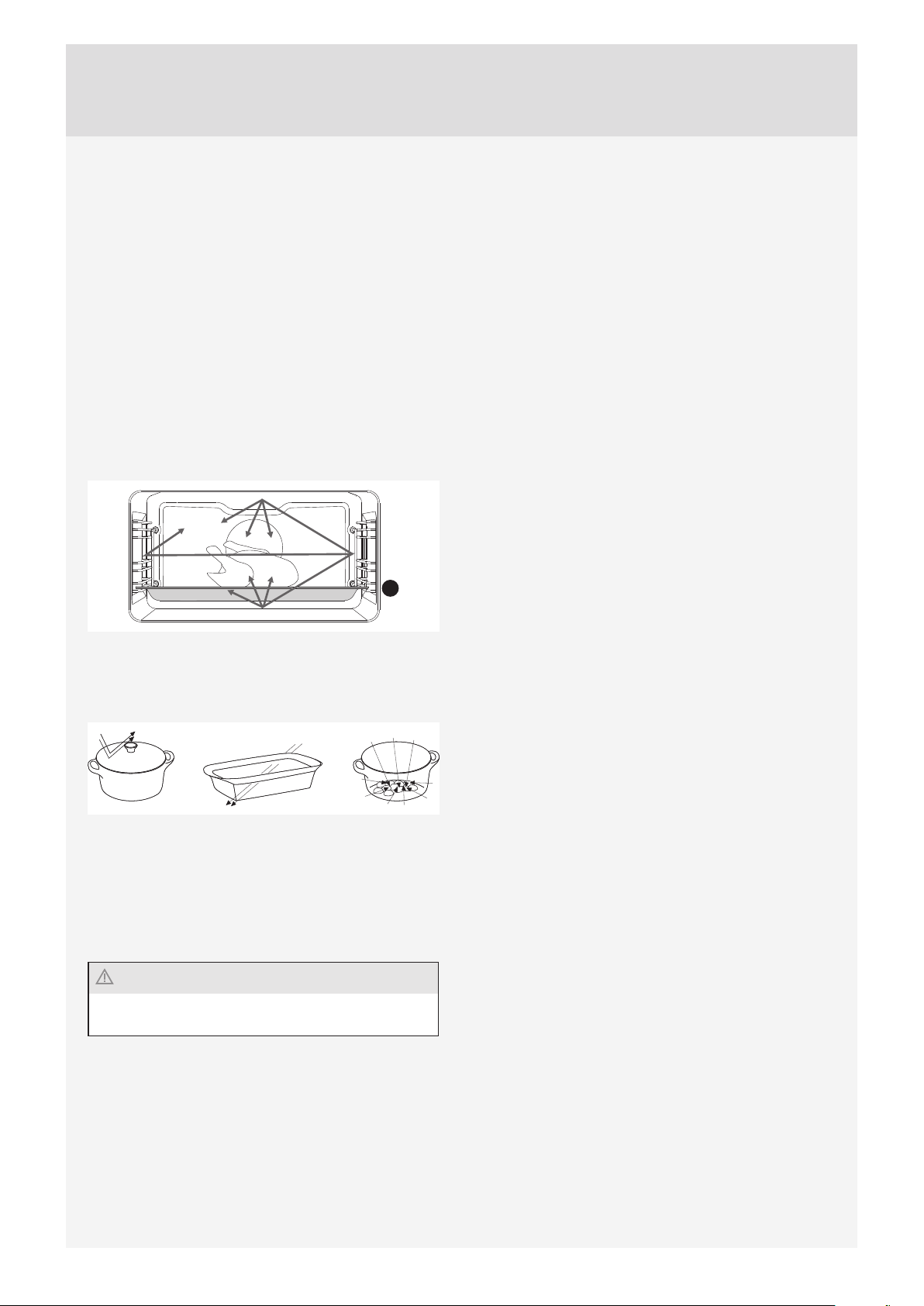
MICROWAVE FUNCTION
Microwaves are used for cooking, roasting, and
defrosting of food. They allow quick and effi cient cooking
without changing the colour or shape of the food.
Microwaves are used for cooking, roasting, and
defrosting of food. They allow quick and effi cient cooking
without changing the colour or shape of the food.
1
Their behaviour:
– They are refl ected by metals.
– They travel through all other materials.
– They are absorbed by water, fat and sugar molecules.
When food is exposed to microwaves, the molecules
begin to move rapidly, thereby generating heat.The
microwaves penetrate approximately 2.5 centimeters
deep into the food. If the food is thicker, the core of the
food will be cooked by conduction, as in conventional
cooking.
Never use or activate a microwave system if the oven
is empty.
BEFORE USING THE APPLIANCE FOR THE FIRST TIME
10
STEP 1: SWITCHING ON THE APPLIANCE FOR THE FIRST TIME
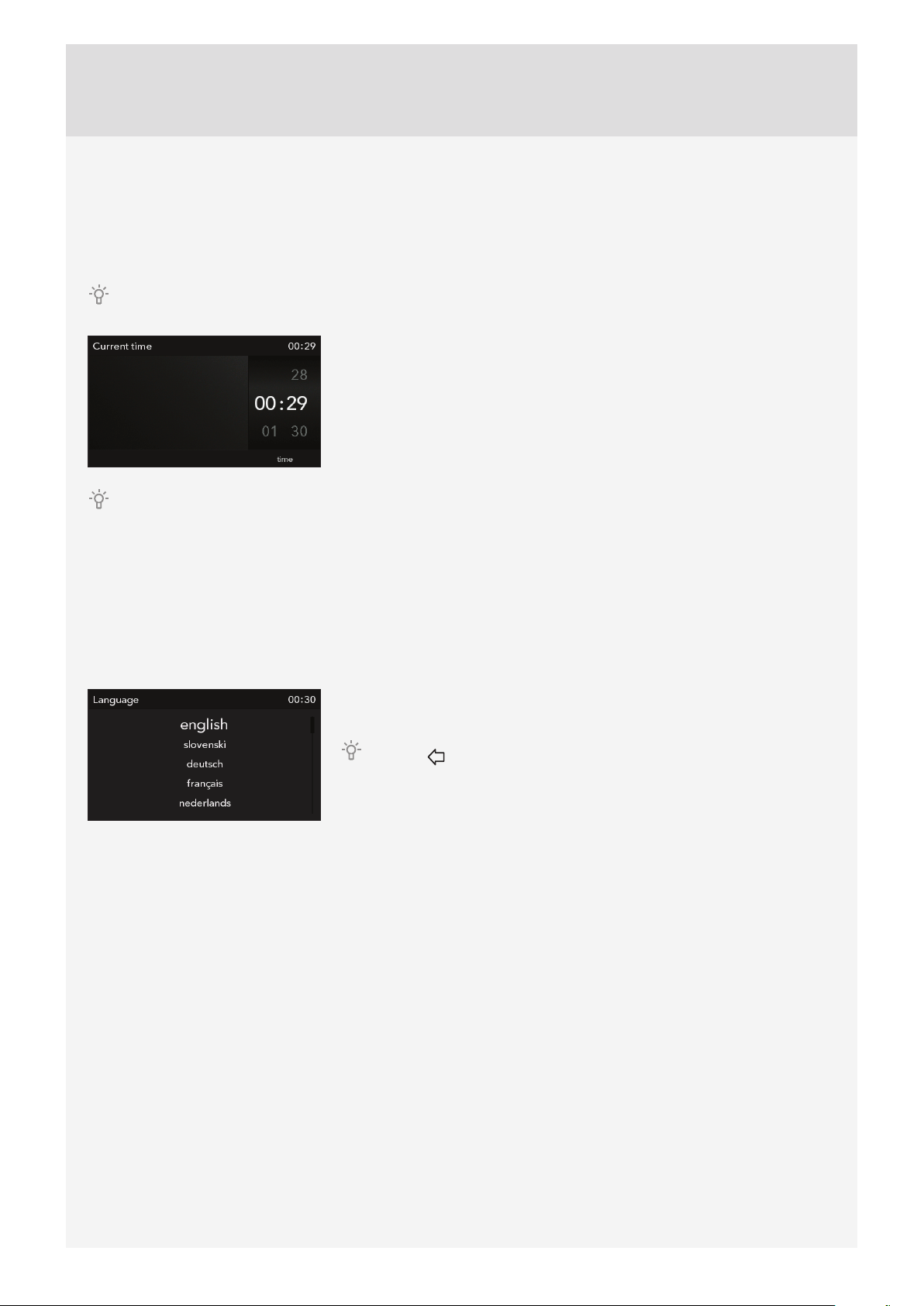
SETTING THE CLOCK
After connecting your appliance to the power mains or after an extended power outage, CLOCK settings will appear on
the display.
Navigate the menu by sliding your fi nger up and down.
Set the CLOCK by touching the display. Confi rm the setting with the START/
STOP key.
The oven will also work if the clock is not set. However, timer functions are not available in this case (see chapter
SETTING THE TIMER FUNCTIONS). After a few minutes of idling, the appliance will switch to standby mode.
CHANGING THE CLOCK SETTING
Clock settings may be changed when no timer function is activated (see chapter CHOOSING THE GENERAL
SETTINGS).
SELECTING THE LANGUAGE
If you are not happy with the language in which the messages on the display are presented, select another one. English
is the preset language.
When you touch the line with the desired language, the size of the letters in
that line will increase.
Press the key to return to MAIN MENU.
STEPS OF THE COOKING PROCESS (1–6)
11
STEP 2: CHOOSING THE BASIC COOKING MENUS AND SETTINGS
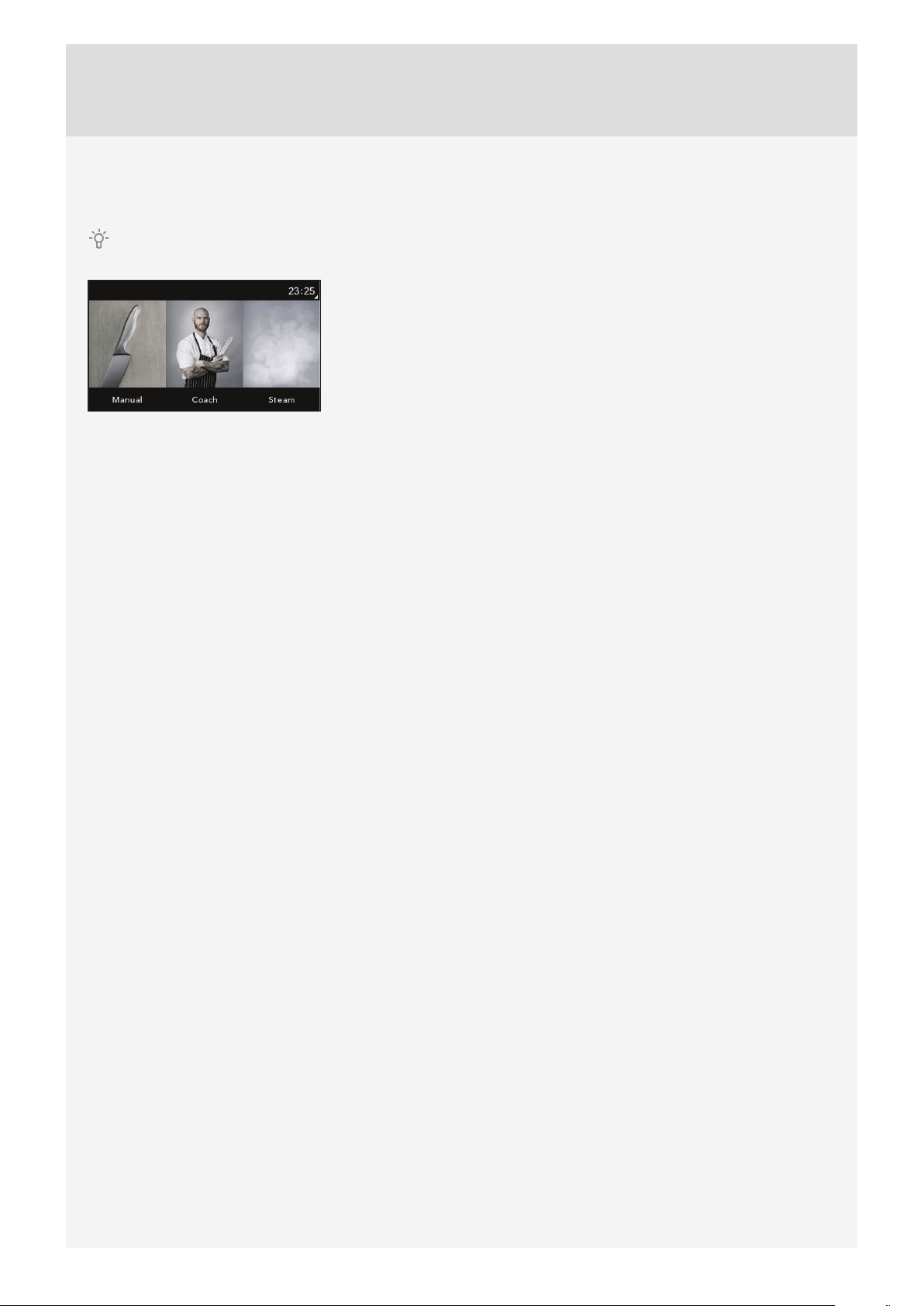
The process of preparing food in your oven can be controlled in several ways:
Navigate the menu by sliding your fi nger left and right.
Select the desired mode by touching the corresponding image. The name of
the selected menu will appear at the top.
Professional mode
Use this mode when you wish to prepare any type and amount of food. All settings are selected by the user.
Automatic mode
In this mode, fi rst select the type of food. This is followed by automatic setting of the quantity, level of doneness, and
cooking end time.The program off ers a broad choice of preset recipes reviewed by professional chefs and nutrition
experts.
My recipes
This mode allows you to prepare your food the way you like it, with the same steps and settings each time. Save your
favourite recipes to oven memory and retrieve them the next time you need them.
Microwaves
This mode is suitable for cooking, roasting and defrosting of food.
12
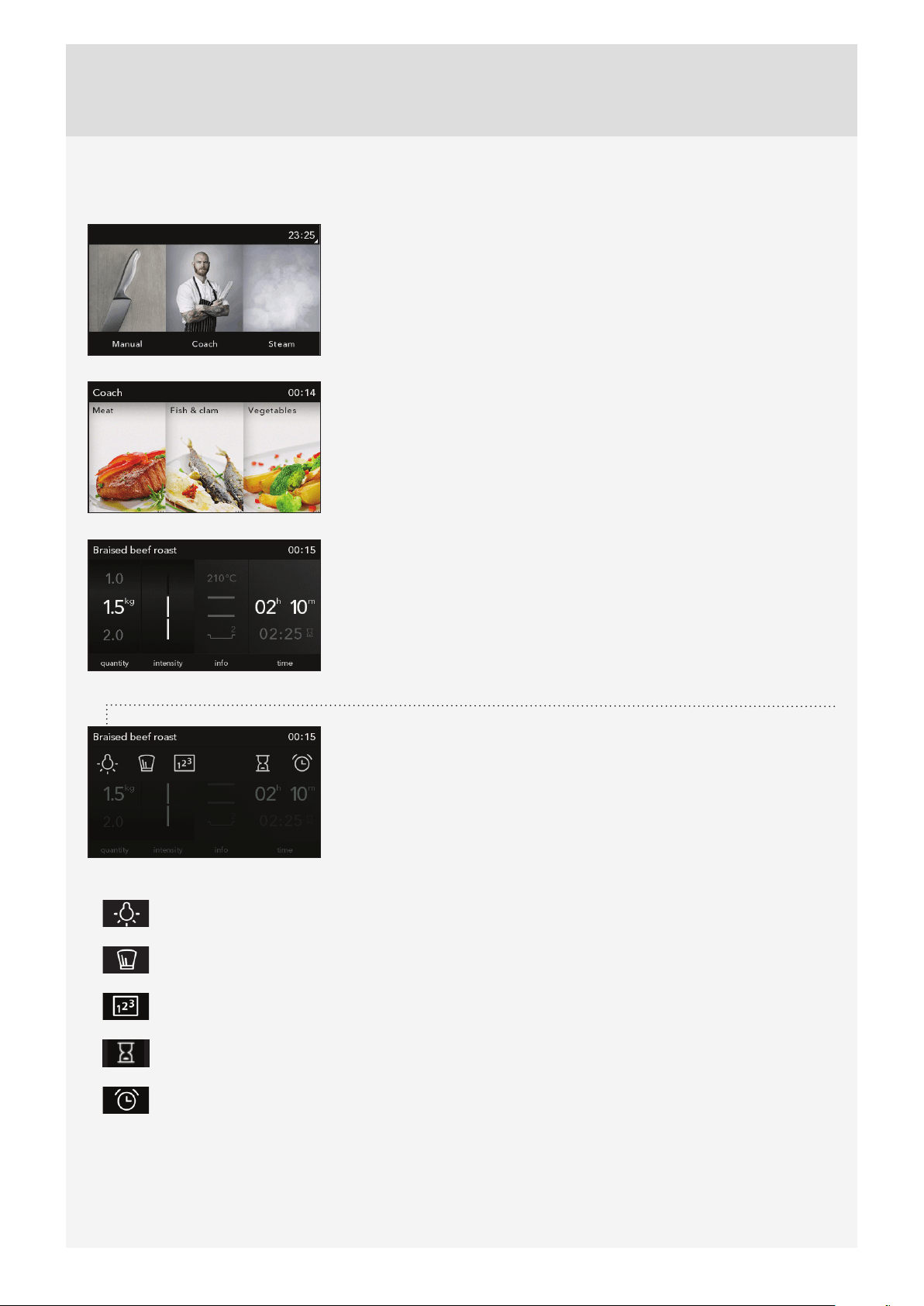
A) COOKING BY SELECTING THE TYPE OF FOOD (Auto mode)
Choose the Auto mode.
Select the type of food and the dish.
Preset values will be displayed:
- amount,
- doneness level (intensity),
- cooking time (cooking end time is displayed in grey).
Amount and doneness level can be adjusted. Selected values will appear.
EXTRA SETTINGS (EXTRAS)Choose them by touching the upper strip or the
corresponding sign.
- oven lighting
- method and ingredients for the selected recipe
- step mode (see chapter STEP COOKING)
- cooking end time setting (see chapter TIMER FUNCTIONS)
In microwave systems, the timer function – delayed start is not available.
- minute minder (see chapter EXTRA SETTINGS/EXTRAS)

13
PREHEAT
Some dishes in the Auto mode also include the preheat function
..
When you select the food, the following note will appear: »Selected program includes preheating.« Preheating
started. Do not insert the food yet. The symbol °C will fl ash on the display.
When the selected temperature is reached, the preheating process stops and an acoustic signal is emitted.
The following note will appear on the display: »Preheating complete«. Please insert the food. Open the door. The
program then resumes the cooking process with selected settings.
When the preheat function is set, delayed start function cannot be used.
14
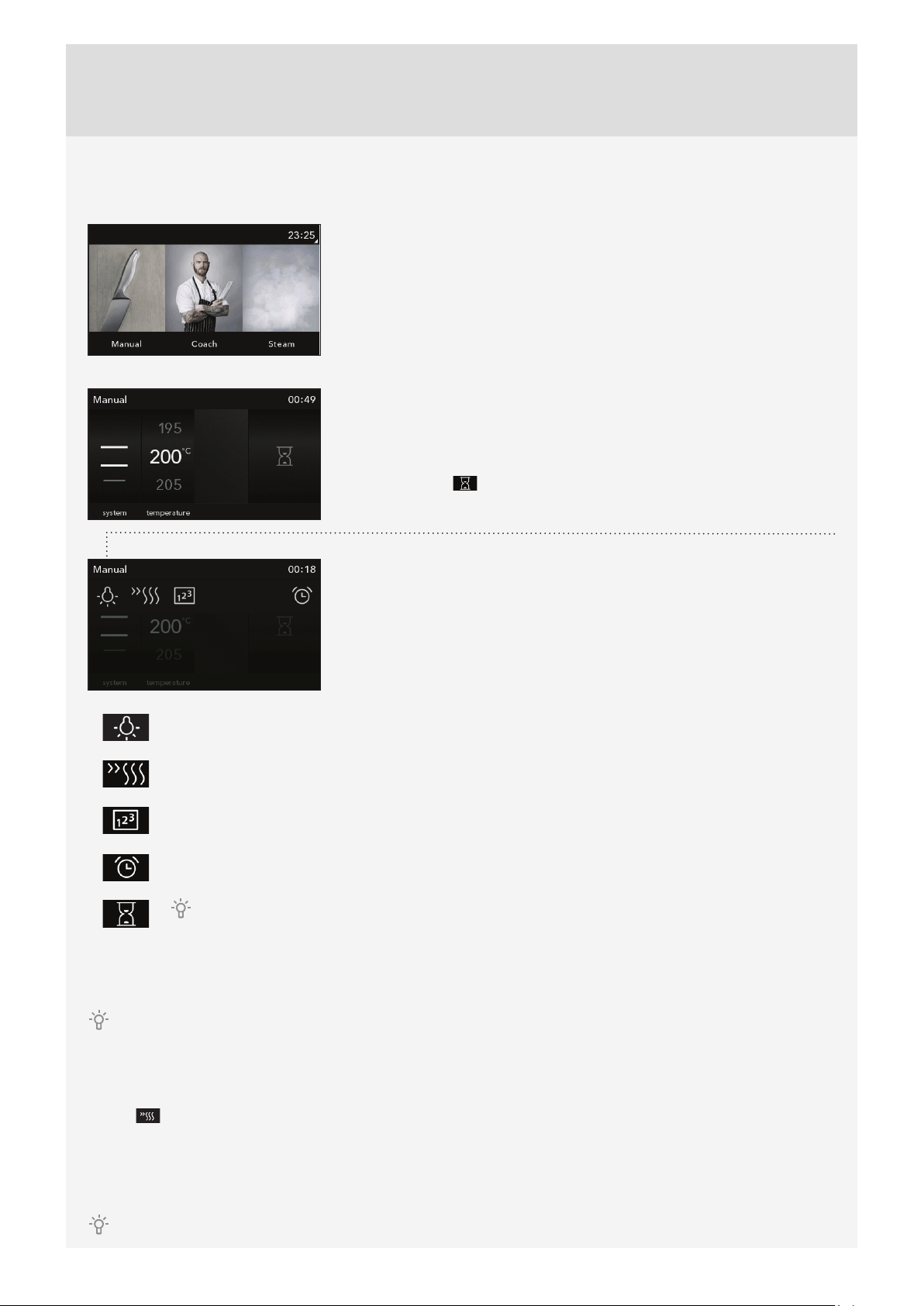
B) COOKING BY SELECTING THE OPERATING MODE (Professional mode and microwaves)
Choose the Professional (Pro) mode or cooking with microwaves.
Choose your own default settings:
- system
- oven temperature
Selected values will appear.
- operating power (in combined systems and systems with microwaves).
Touch the symbol
to select the cooking time.
- cooking time (cooking end time is displayed in grey).
EXTRA SETTINGS (EXTRAS):Choose them by touching the upper strip or the
corresponding sign.
- oven lighting
- preheating
In systems that include microwaves, preheat function is not available.
- step mode (see chapter STEP COOKING)
- minute minder (see chapter EXTRA SETTINGS/EXTRAS)
If you select Duration, extra settings will allow you to select delayed start (see chapter TIMER
FUNCTIONS) In systems that include microwaves, preheat function is not available.
Touch the START key.
All selected settings are indicated on the display.
Increasing temperature in the oven and elapsed cooking time are displayed, which can also be changed during the
cooking progress.
PREHEAT
Use the preheat function if you wish to heat the oven to the desired temperature as quickly as possible. When this
symbol
is selected, the preheat function will be switched on and a warning will appear. »Preheating started.« Do
not insert the food yet. The symbol °C will fl ash on the display.
When the selected temperature is reached, the preheating process stops and an acoustic signal is emitted. The
following note will appear on the display: »Preheating complete«. Please insert the food. The program then resumes
the cooking process with selected settings.
When the preheat function is set, delayed start function cannot be used.

15
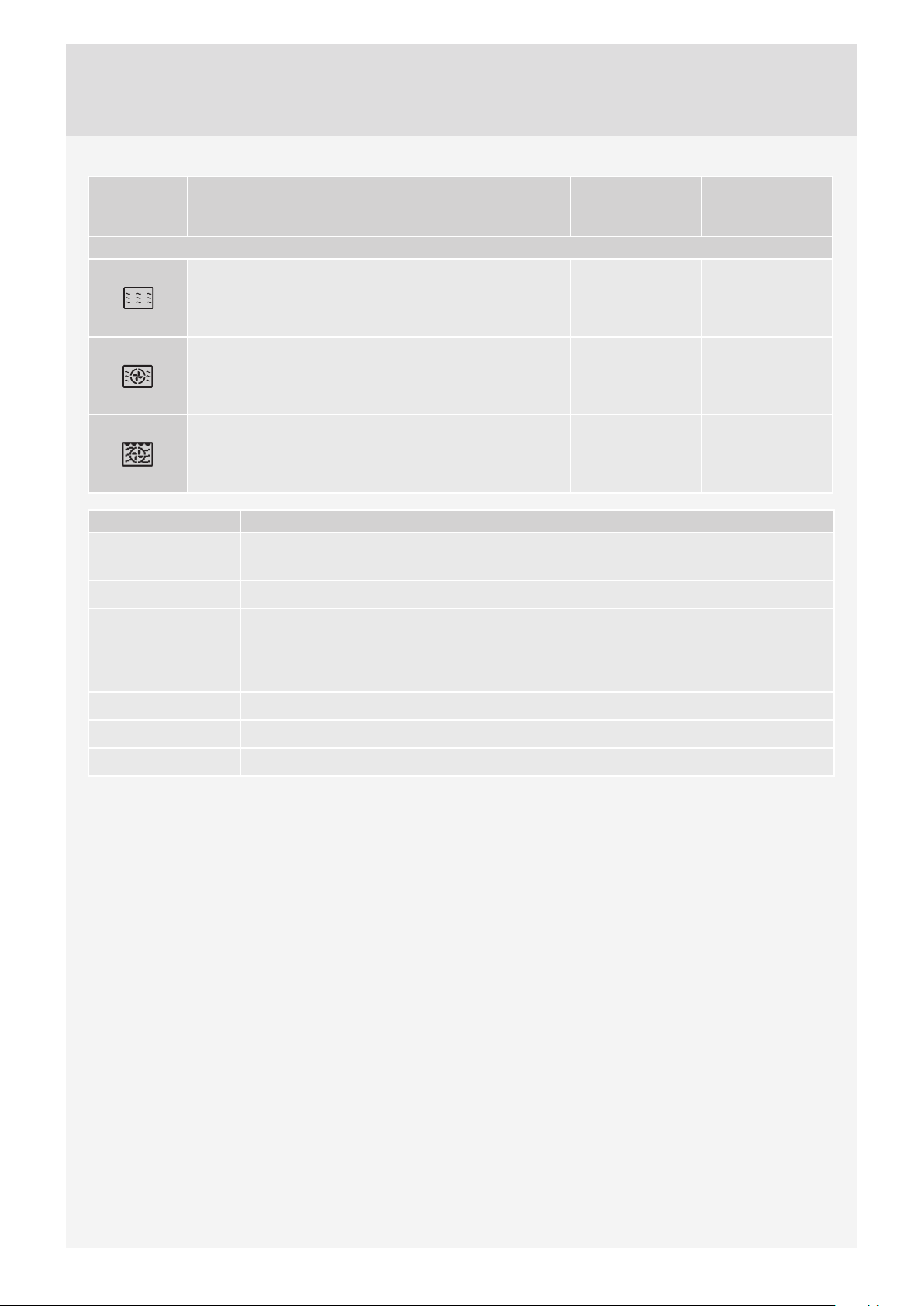
COOKING SYSTEMS (depending on the model)
SYSTEM DESCRIPTION
PRESET TEMPERATURE
(°C)
COOKING SYSTEMS
UPPER AND BOTTOM HEATER
The heaters in the bottom and in the ceiling of the oven cavity will radiate
heat evenly into the oven interior. Pastry or meat can only be baked/
roasted at a single height level.
200
UPPER HEATER
Only the heater on the oven cavity ceiling will radiate heat. Use this heater
to brown the upper side of the dish.
150
BOTTOM HEATER
Only the heater on the bottom of the oven cavity will radiate heat. Use this
heater to brown the lower side of the dish.
160
GRILL
Only grill heater, a part of the large grill set, will operate.
Use this heater to grill a few open sandwiches or beer sausages, or for
toasting bread.
240
LARGE GRILL
The upper heater and the grill heater will operate. The heat is radiated directly
by the grill heater installed in the oven ceiling. To boost the heating eff ect, the
upper heater is activated as well. This system is used for grilling a smaller
amount of open sandwiches or beer sausages, and for toasting bread.
240
GRILL WITH FAN
Grill heater and the fan will operate. This combination is used to grill meat
and to roast larger chunks of meat or poultry at a single height level. It is
also appropriate for dishes au gratin and for browning to a crispy crust.
170
HOT AIR AND BOTTOM HEATER
Bottom heater, round heater, and the fan will operate. This is used to bake
pizza, moist pastry, fruitcakes, leavened dough and shortcrust on several
levels simultaneously.
200
3D HOT AIR
Round heater and the fan will operate. The fan installed in the back wall
of the oven cavity makes sure the hot air constantly circulates around the
roast or pastry. This mode is used for roasting meat and baking pastry at
several levels simultaneously.
180
ECO COOKING
1)
In this mode, power consumption during the cooking process is optimized.
This mode is used for roasting meat and baking pastry.
180
BOTTOM HEATER AND FAN
This is used for baking leavened but low-rising pastry and for preserving
fruit and vegetables.
180
AUTOMATIC COOKING OF MEAT – AUTO ROAST MODE
In the Auto Roast mode/system, the upper heater will operate in
combination with the grill heater and the round heater. It is used for
roasting all types of meat.
180
1)
It is used for determining the energy effi ciency class pursuant to the EN 60350-1 standard.
In this mode, the actual temperature in the oven is not displayed due to a special appliance operation algorithm and use of
residual heat.
16
COOKING
SYSTEMS
DESCRIPTION
PRESET
TEMPERATURE
(°C)
POWER (W)
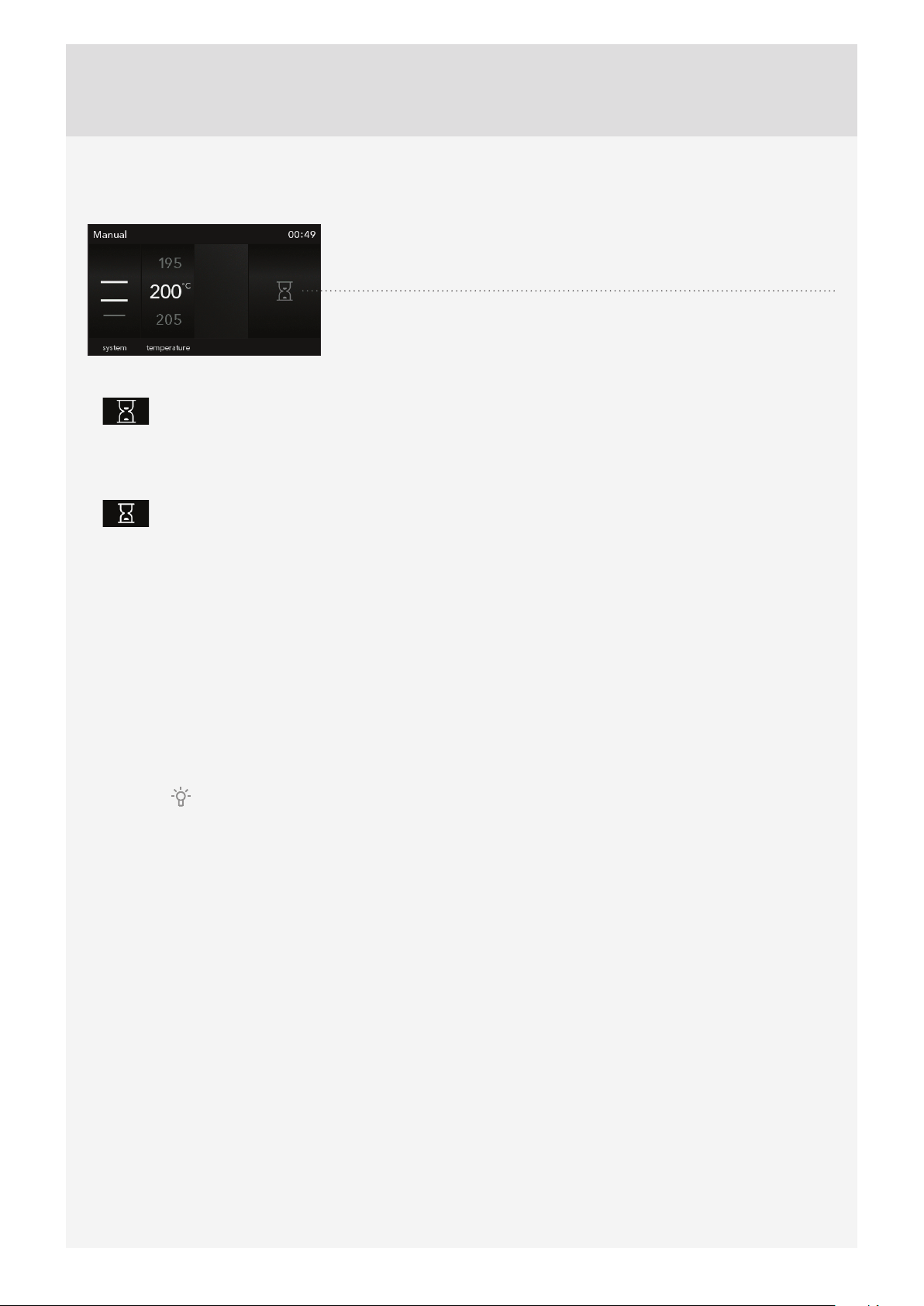
COMBINED SYSTEMS / MICROWAVE SYSTEMS
MICROWAVE SYSTEMS
Microwaves are used for cooking and defrosting. They allow
quick and effi cient cooking without changing the colour or
shape of the food.
- 1000
HOT AIR AND MICROWAVES
Use this for all types of meat, stews, vegetables, pies,
cakes, bread, and dishes au gratin (i.e. food that require
longer cooking time).
160 600
GRILL WITH FAN AND MICROWAVES
Use this combination for smaller chunks of meat, fi sh and
vegetables. It allows fast cooking and the food will have a
nicely browned crispy crust.
200 600
POWER LEVEL USE
1000 W
• Quickly reheating beverages, water and dishes containing a large volume of liquid.
• Cooking dishes with high water content (soups, sauces etc.).
750 W
• Cooking fresh or frozen vegetables.
600 W
• Melting chocolate.
• Cooking fi sh and seafood; reheating on two levels.
• Cooking dried beans at low heat.
• Reheating and cooking of delicate egg-based dishes.
360 W
• Low-heat cooking of dairy products or jams.
180 W
• Manual defrosting; softening butter or ice cream.
90 W • Defrosting cream-fi lled pastry.
17
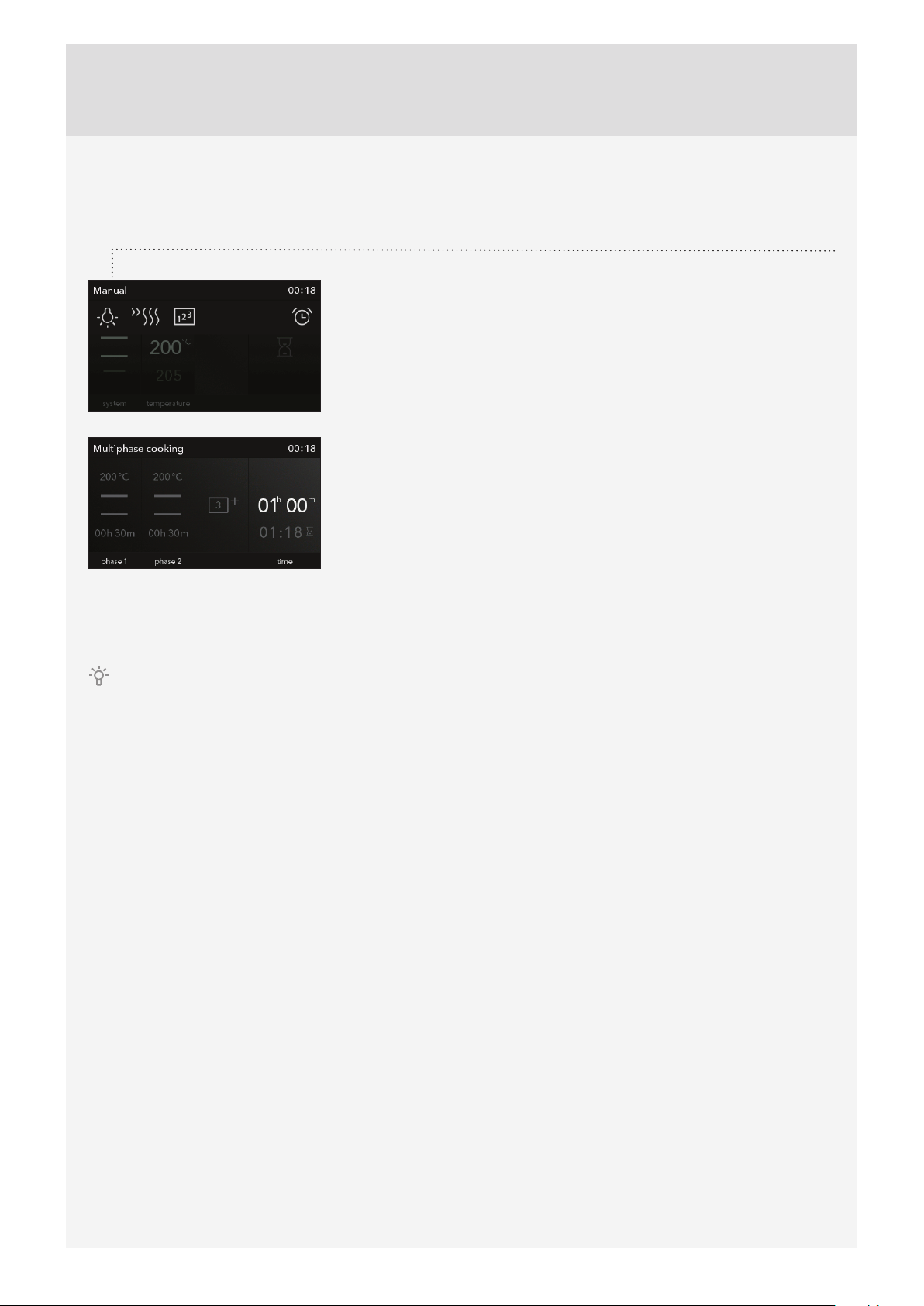
TIMER FUNCTIONS – DURATION
Timer functions can be selected in the basic Professional (Pro) mode, the
Auto mode, and in the Microwaves mode by choosing the corresponding
symbol.
Setting the cooking time
In this mode, you can defi ne the duration of oven operation (cooking time). Set the desired cooking time
and confi rm the setting. Cooking end time is adjusted accordingly.Press START to start the cooking
process. All selected settings are indicated on the display.All timer functions can be cancelled by setting
the time to ”0”.
Setting the delayed start
In this mode, you may specify the duration of the cooking process (cooking time) and the time when you
wish the cooking process to stop (end time). Make sure the clock is accurately set to current time.
Example:
Current time: noon
Cooking time: 2 hours
End of cooking: 6 pm
First, set the cooking time (cooking duration), i.e. 2 hours. The sum of the current time and cooking time is
automatically displayed (2 pm).
How, set the COOKING END TIME and set the time (6 PM). Press START to start the cooking process. The timer
will wait for the start of the cooking process. The following note will appear on the display: »Your program is
delayed. It will start at 4 pm.«
After the set time expires, the oven will automatically stop operating (end of cooking). An acoustic
signal will be heard which you may turn off by pressing the ALARM key. After one minute, the acoustic
signal will be switched off automatically.
After a few minutes of idling, the appliance will switch to standby mode. The time of day will appear.
18
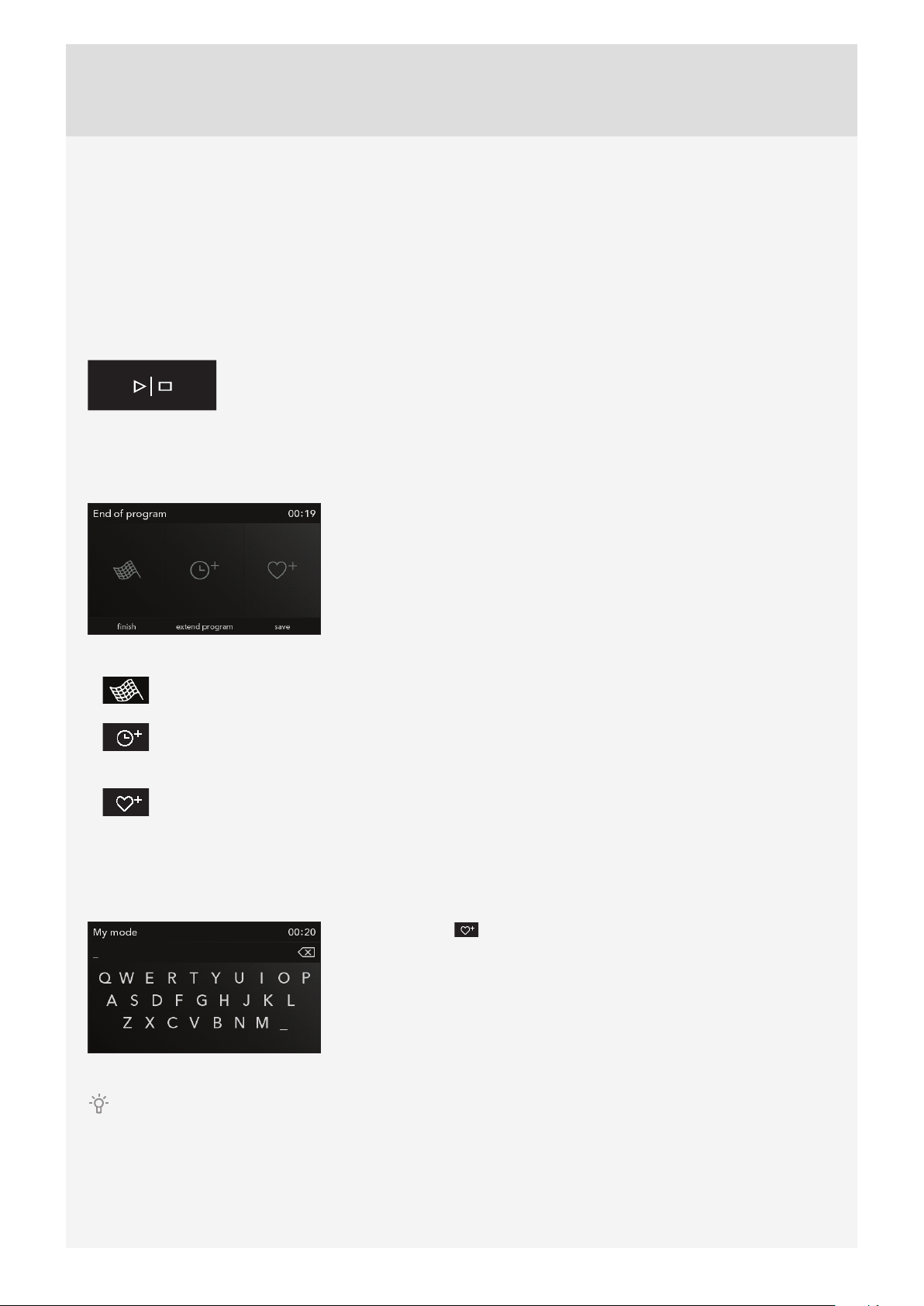
STEP COOKING
This mode allows you to combine three diff erent settings successively in a single cooking process.
Choose diff erent settings or cooking end time to cook your food just the way you want it.
Touch the corresponding sign to select the Step Cooking symbol in EXTRA
SETTINGS (EXTRAS).
Touch the display twice to select Step 2 and Step 3.Touch the corresponding
sign (step name) to confi rm or delete a step.
Touch the START symbol to turn on the oven. The oven starts operating immediately, with the settings defi ned in Step
1. (Selected step will be highlighted in red.)After the set cooking time elapses, Step 2 and then Step 3 are activated, if
specifi ed.
To delete a step during operation, select the step and select the cross symbol by touching its name. This can only be
done with steps that have not started yet.
19
STEP 3: STARTING THE COOKING PROCESS
The START/STOP key will fl ash before the start of the cooking process.
Start the cooking process by touching the START key.
Some settings can be changed during operation by touching the display unit (temperature, cooking duration, and step
mode/program).
Touch the START/STOP key to change other settings or to end the cooking process. The following warning will appear:
”Program paused. Do you wish to end it?”
STEP 4: END OF COOKING AND SWITCHING OFF THE OVEN
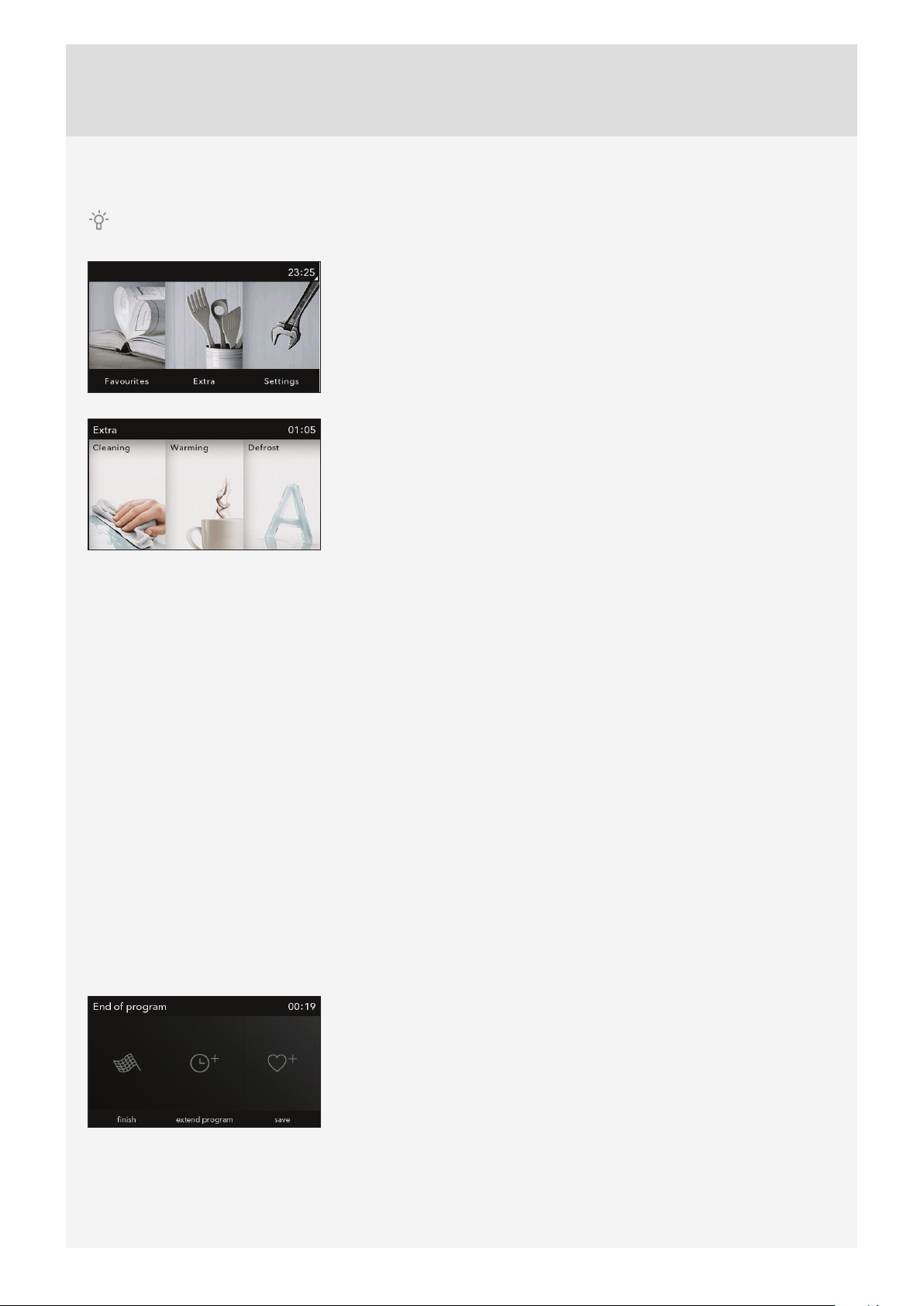
After the cooking process, menu with symbols will appear.
End!
Select the symbol and end the cooking process. Main menu will appear on the display.
Extend the cooking time
Cooking time can be extended by selecting the symbol. New cooking end time can be selected (see
chapter TIMER FUNCTIONS).
Add to my recipes – save
This mode allows you to save the selected settings into the oven memory and use them again at a later
time.
SAVING USER-DEFINED PROGRAMS (MY RECIPES)
Select the symbol and specify the name by touching the corresponding
letters. If required, delete a character using the arrow.
Touch the START/STOP key to save the settings.
Your favourite recipes that you have previously stored in the memory can be retrieved and used at any time. Choose
the process and the settings in the My Recipes main menu.
20
STEP 5: SELECTING ADDITIONAL FUNCTIONS/EXTRAS
Navigate the menu by sliding your fi nger left and right.
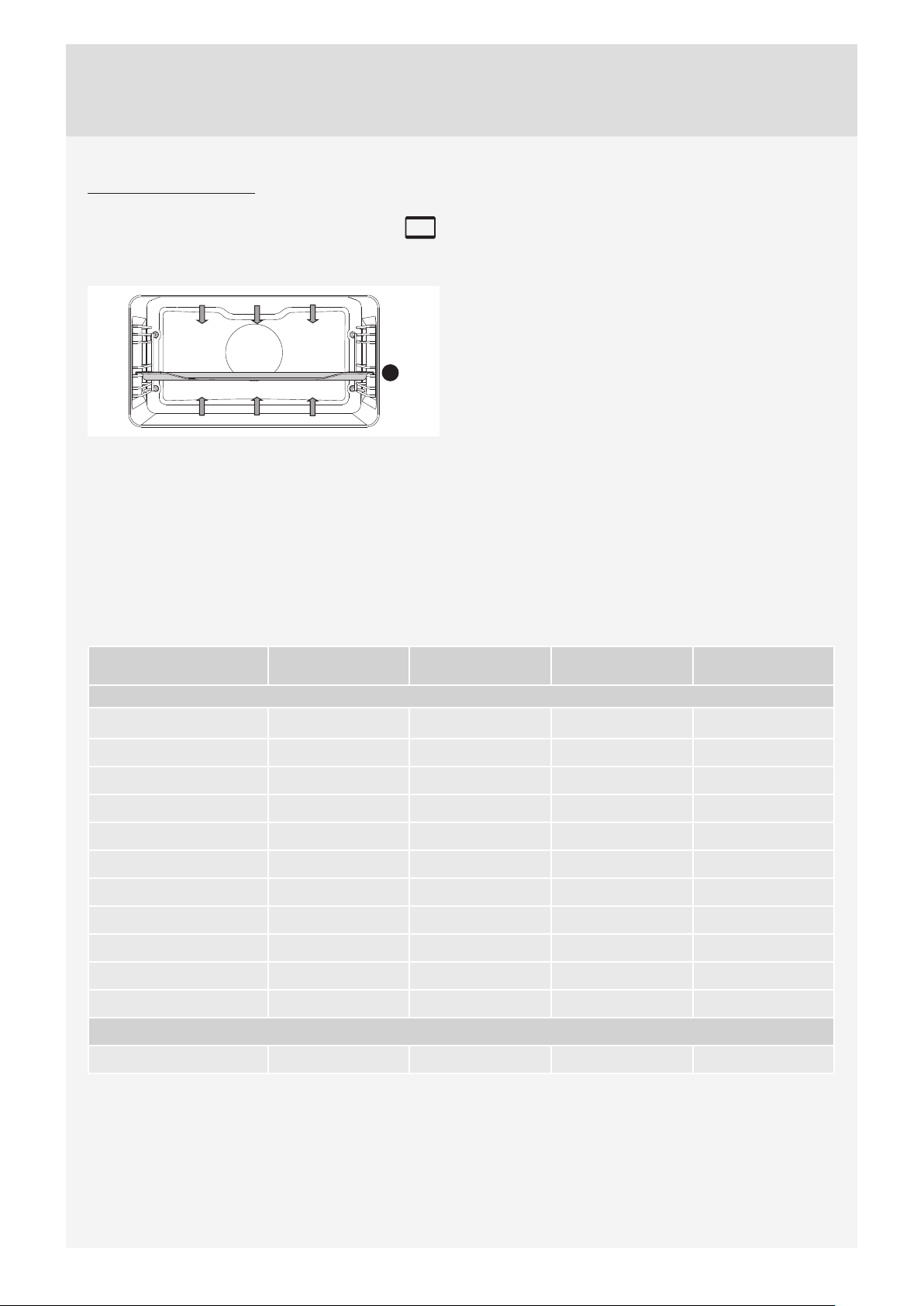
Select the EXTRAS menu by touching it. EXTRAS menu will appear.
Cleaning – Aqua Clean
Use this function to remove stains and food residues from the oven. Pour 0.6 l water into the glass tray and place it into the lower
guide. After 30 minutes, food residues on the oven enamel walls will have softened and they will be easy to clean with a damp
cloth.Use this function when the oven has fully cooled down! (See chapter CLEANING AND MAINTENANCE.)
Defrosting
In this mode, the air will circulate without any heaters operating. Only the fan will be activated. Use this function to slowly defrost
frozen food (cakes, pastry, bread, rolls, and deep-frozen fruit).By selecting the relevant symbol you may specify the type of food,
weight, or defrosting start and end time.Halfway through the defrost time, the pieces should be turned over, stirred and separated
if they were frozen together.
Quick preheat
Use the preheat function if you wish to heat the oven to the desired temperature as quickly as possible. This mode is not
appropriate for cooking. When the oven heats up to the selected temperature, the preheat process is completed and the oven is
ready for cooking with the selected cooking mode.
Reheating
Reheating can be used to keep the food that is already cooked warm. Select the symbol to set the temperature, and reheating
start and end time.
Plate heating
Use this function to reheat your dinnerware (plates, cups) before serving food in it to keep the food warm longer. Select the
symbol to set the temperature, and reheating start and end time.
Select the symbol and end the cooking process. Main menu will appear on the
display.

21
CHILD LOCK
Activate it by touching the LOCK key (key symbol). The following message will appear on the display:
»Child lock activated.« Touch the key again to deactivate the child lock.
If the child lock is activated with no timer function engaged (only clock is displayed), then the oven
will not operate.If the child lock is activated after a timer function has been set, then the oven will operate
normally; however, it will not be possible to change the settings.
When the child lock is activated, systems (cooking modes) or additional functions cannot be changed.
Only the cooking/baking/roasting process can be stopped or switched off .
Child lock remains active after the oven is switched off . To select a new system, the child lock must fi rst be
deactivated.
OVEN LIGHTING
Oven lighting is switched on automatically when the door is opened or when the oven is switched on.After
the end of the cooking process, the light will remain on for another minute.
SETTING THE MINUTE MINDER
The minute minder can be used independently of the oven operation. The longest possible setting is 10
hours. When the time expires, an acoustic signal will be heard which you may turn off by touching any key.
After one minute, the acoustic signal will be switched off automatically.
Lighting and minute minder can be selected at any time by touching the upper strip.

22
STEP 6: CHOOSING THE GENERAL SETTINGS
Navigate the menu by sliding your fi nger left and right.
Select the Settings menu by touching it.
When you touch the line with the desired setting, the size of the letters in that
line will increase.
Language
Select the language for the text on the display.
Time
Set the time of day after the appliance is connected to the power mains for the fi rst time or after being disconnected
from the power mains for a longer period of time (more than one week). Set the CLOCK – time. Then, clock display
mode can be selected in the ”TIME” fi eld: digital or analogue.
Sound
Loudness of the acoustic signal can be set when no timer function is activated (only the time of day is displayed). In this
menu, you choose between the following two options: sound loudness and duration of alarm.
Display
In this menu, you can set the following:
Display brightness/dimmer
Night mode - specify the time until which you wish the display to be off .
Other settings
Switch off oven lighting
Reset to factory defaults
After a power outage or after switching off the appliance, all extra
user settings are restored.

23
If your desired food cannot be found in the cooking
table, fi nd information for similar food. The information
displayed applies to cooking in a single level.
An interval of suggested temperature is indicated. Start
with a lower temperature setting and increase it if you
fi nd the food is not browned suffi ciently.
Cooking times are rough estimates and may vary subject
to some conditions.
The symbol * means that the oven should be preheated
using the selected cooking system.
Only preheat the oven if required by the recipe of in the
tables in this instruction manual. Heating an empty oven
consumes a lot of energy. Hence, baking several types
of pastry or several pizzas successively will save a lot of
energy as the oven will already have been preheated.
Use dark, black silicon-layered or enamel-coated baking
sheets and trays as they conduct the heat very well.
When using parchment paper, make sure it is resistant to
high temperatures.
When cooking larger chunks of meat or pastry, a lot
of steam will be generated inside the oven, which in
turn may condense on the oven door. This is a normal
phenomenon which will not aff ect the operation of the
appliance. After the cooking process, wipe the door and
the door glass dry.
Switch off the oven approximately 10 minutes before
the end of the cooking process to save energy by
making use of the accumulated heat (this does not apply
to systems with microwaves).
Do not cool the food in a closed oven to prevent
condensation (dew).
DESCRIPTIONS OF SYSTEMS (COOKING MODES) AND COOKING
TABLES
24
COOKING SYSTEMS
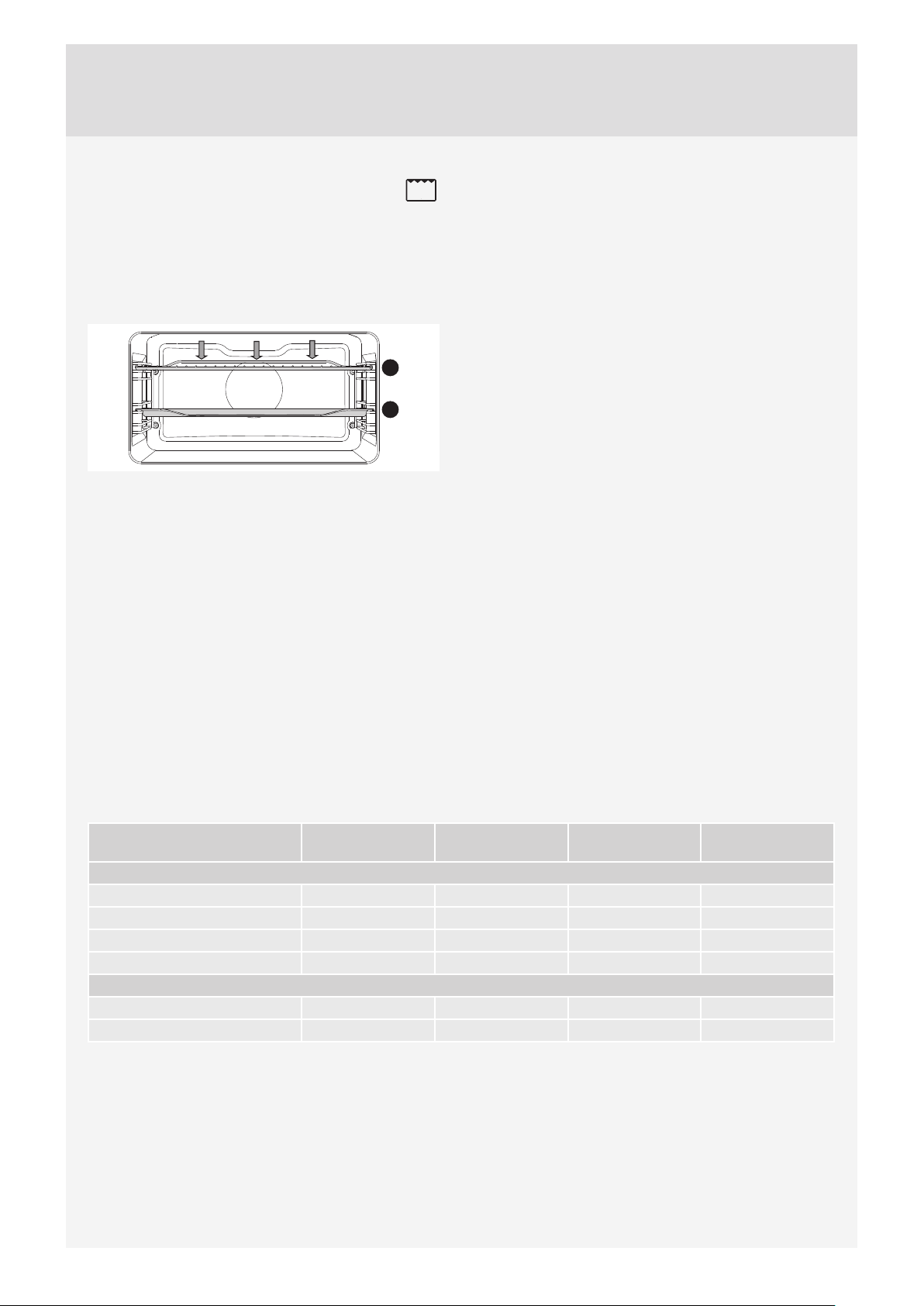
UPPER AND BOTTOM HEATER
The heaters in the bottom and in the ceiling of the oven
cavity will radiate heat evenly into the oven interior.
2
Roasting meat:
Use enamel coated, tempered glass, clay, or cast iron
pan or tray. Stainless steel trays are not suitable as they
strongly refl ect the heat.
Use enamel coated, tempered glass, clay, or cast iron
pan or tray. Stainless steel trays are not suitable as they
strongly refl ect the heat.
Type of food Weight
(g)
Guide (from the
bottom)
Temperature
(°C)
Cooking time
(min)
MEAT
Pork roast
1500 2 180-190 150
Pork shoulder
1500 2 190-200 120-140
Pork roulade
1500 2 190-200 120-140
Meat loaf
1500 2 200-210 60-70
Beef roast
1500 2 180-210 90-120
Roast beef, well done
1000 2 200-210 40-60
Veal roulade
1500 2 180-200 90-120
Lamb sirloin
1500 2 190-200 100-120
Rabbit loin
1500 2 190-200 100-120
Deer shank
1500 2 190-200 70-90
Meat rolls
1500 2 180-200 15-30
FISH
Braised fish
1000 1 190-210 60-80

25
Baking pastry
Only use one level and dark baking sheets or trays. In
light-coloured baking sheets or trays, the browning of
the pastry will be poorer, as such equipment will refl ect
the heat.Always place the baking trays on the grid. If you
are using the supplied baking sheet, remove the grid.
Cooking time will be shorter if the oven is preheated.
Type of food Guide level
(from the bottom)
Temperature
(°C)
Cooking time
(min)
PAST RY
White bread*
2180-19060
Buckwheat bread*
2180-19050
Whole grain bread*
2180-19050
Rye bread*
2180-19050
Spelt bread*
2180-19060
Sweet soufflé
1170-18035-45
Soufflé
1170-18035-45
Rolls *
2200-22030-40
Walnut cake
118055-60
Sponge cake*
2160-17020-30
Macarons (meringue pastry)
2120-14015-30
Vegetable rolls
2 190-200 15-20
Fruit rolls
2190-20025-30
Cheesecake
1170-18065-75
Cupcakes
2160-17020-30
Small pastries made with yeast dough
2 190-200 20-25
Cabbage pirozhki*
2180-19030-40
Fruitcake
2130120
Meringue cookies
290120
Tip Use
Is the cake done? • Pierce the cake at the top with a wooden toothpick or skewer. If there are no traces on the
pick or the skewer when pulled out, the cake is done.
Did the cake collapse? • Check the recipe.
• Next time, use less liquid.
• Note the mixing time when using small mixers, blenders etc.
The cake is too light at the
bottom?
• Use a dark-coloured baking sheet or tray.
• Place the baking sheet one guide lower and switch on the lower heater towards the end of
the cooking progress.
Cake with moist stuffing is
underdone?
• Increase temperature and extend baking time.
Do not insert the deep baking tray into the fi rst guide.
26
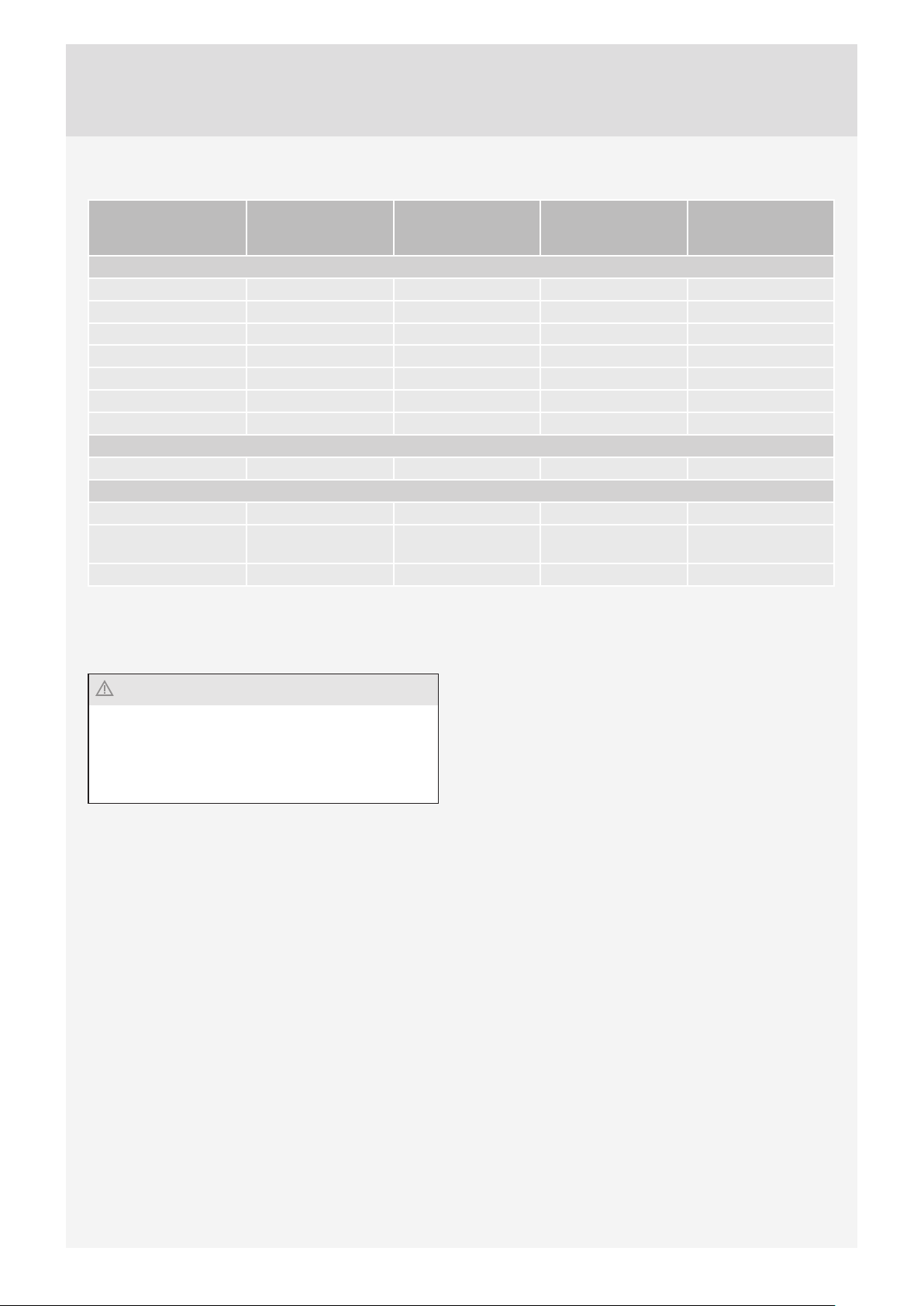
LARGE GRILL, GRILL
When grilling food with the large grill, the upper heater
and the grill heater fi tted on the ceiling of the oven cavity
will operate.
When grilling with normal (not large) grill, only grill
heater, a part of the large grill set, will operate.
2
4
Preheat the infrared (grill) heater for fi ve minutes.
Supervise the cooking process at all times. The meat
may burn quickly due to high temperature.Roasting with
the grill heater is suitable for crispy and low-fat cooking
of bratwurst, cuts of meat and fi sh (steaks, escalopes,
salmon steaks or fi llets etc.) or toasted bread.
When grilling directly on the grid, smear it with oil to
prevent the meat from sticking onto it and insert it into
the 4th guide. Insert the drip tray in to the 1st or 2nd
guide. When grilling in a baking tray, make sure there
is enough liquid in the tray to prevent burning. Turn the
meat during cooking.
After grilling, clean the oven, the accessories, and the
utensils.
Grilling table – small grill
Type of food Weight (g) Guide (from the
bottom)
Temperature (°C) Cooking time
(minutes)
MEAT
Beefsteak, rare 180g/piece 4 240 18-21
Pork neck fillet 180g/piece 4 240 18-22
Cutlets/chops 180g/piece 4 240 20-22
Grill sausages 100g/piece 4 240 11-14
PAST RY
Toast / 4 240 3-4
Open sandwiches / 4 240 5-7
27
Grilling table – large grill
Type of food Weight
(g)
Guide level
(from the bottom)
Temperature
(°C)
Cooking time
(min)
MEAT
Beefsteak, rare 180g/piece 4 220-240 14-16
Beefsteak, well done 180g/piece 4 220-240 18-21
Pork neck fillet 180g/piece 4 220-240 19-23
Cutlets/chops 180g/piece 4 220-240 20-24
Veal escalope 180g/piece 4 220-240 19-22
Grill sausages 100g/piece 4 220-240 11-14
Spam (Leberkäse) 200g/piece 4 220-240 9-15
FISH
Salmon steaks/fillets 600 3 220-240 19-22
TOASTED BREAD
6 slices of white bread* / 4 240 1,5-3
4 slices of mixed grain
bread*
/ 4 240 2-3
Open sandwiches* / 4 240 3,5-7
Always keep the oven door closed when using the grill (infrared) heater.
Grill heater, grid, and other oven accessories get very hot during grilling. Therefore, use oven mitts and meat tongs.
Always keep the oven door closed when using the grill
(infrared) heater.
Grill heater, grid, and other oven accessories get very
hot during grilling. Therefore, use oven mitts and meat
tongs.
28
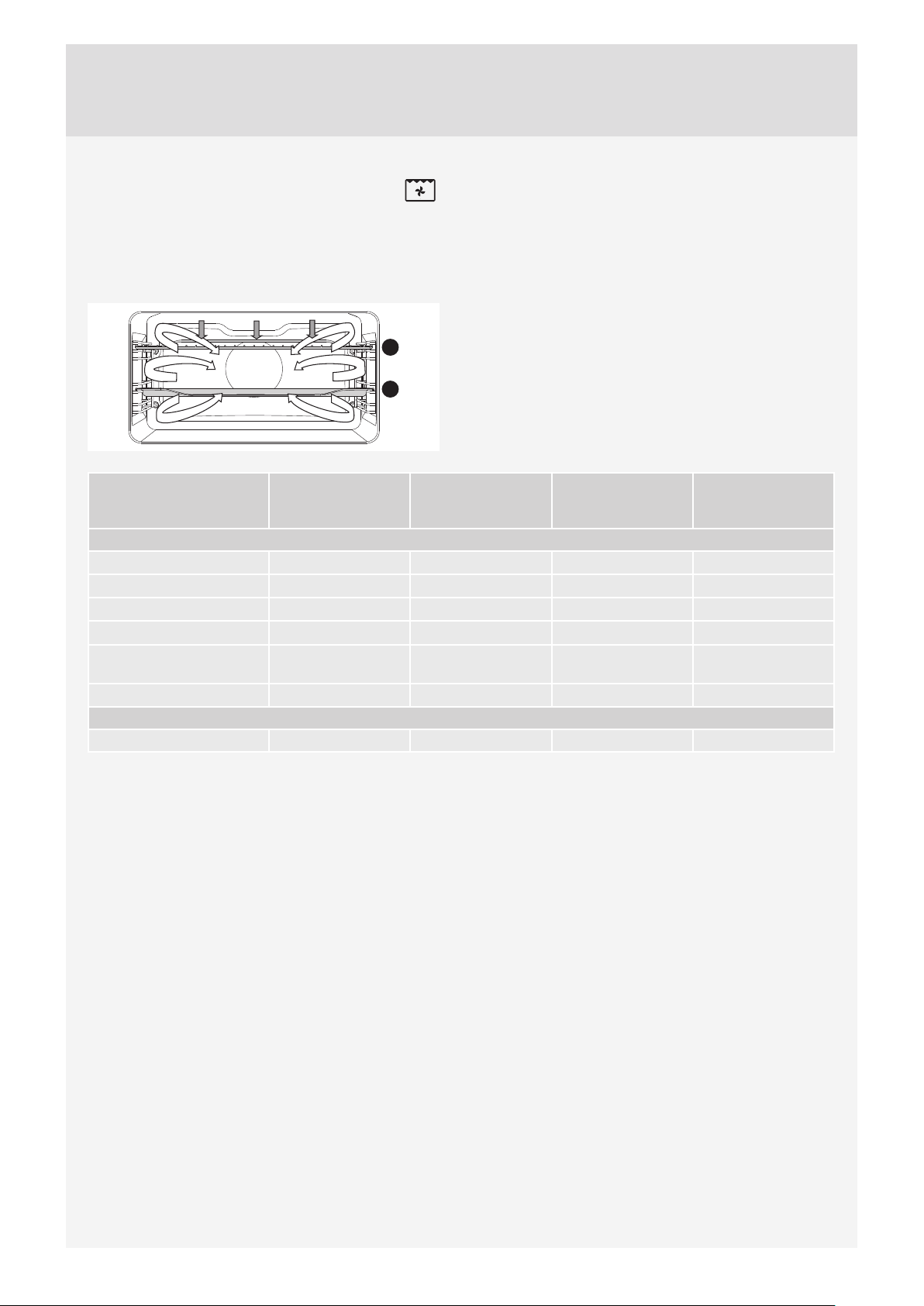
GRILL WITH FAN
In this operating mode, the grill heater and the fan
operate simultaneously. Suitable for grilling meat, fi sh,
and vegetables.
(See descriptions and tips for GRILL.)
2
4
Type of food Weight
(g)
Guide level
(from the bottom)
Temperature
(°C)
Cooking time
(min)
MEAT
Duck * 2000 1 150-170 80-100
Pork roast 1500 2 160-170 60-85
Pork shoulder 1500 2 150-160 120-160
Pork shank 1000 2 150-160 120-140
Half of chicken 600 2 180-190 25 (one side)
20 (other side)
Chicken* 100 1 210 60
FISH
Trout 200g/piece 2 170-180 45-50
29
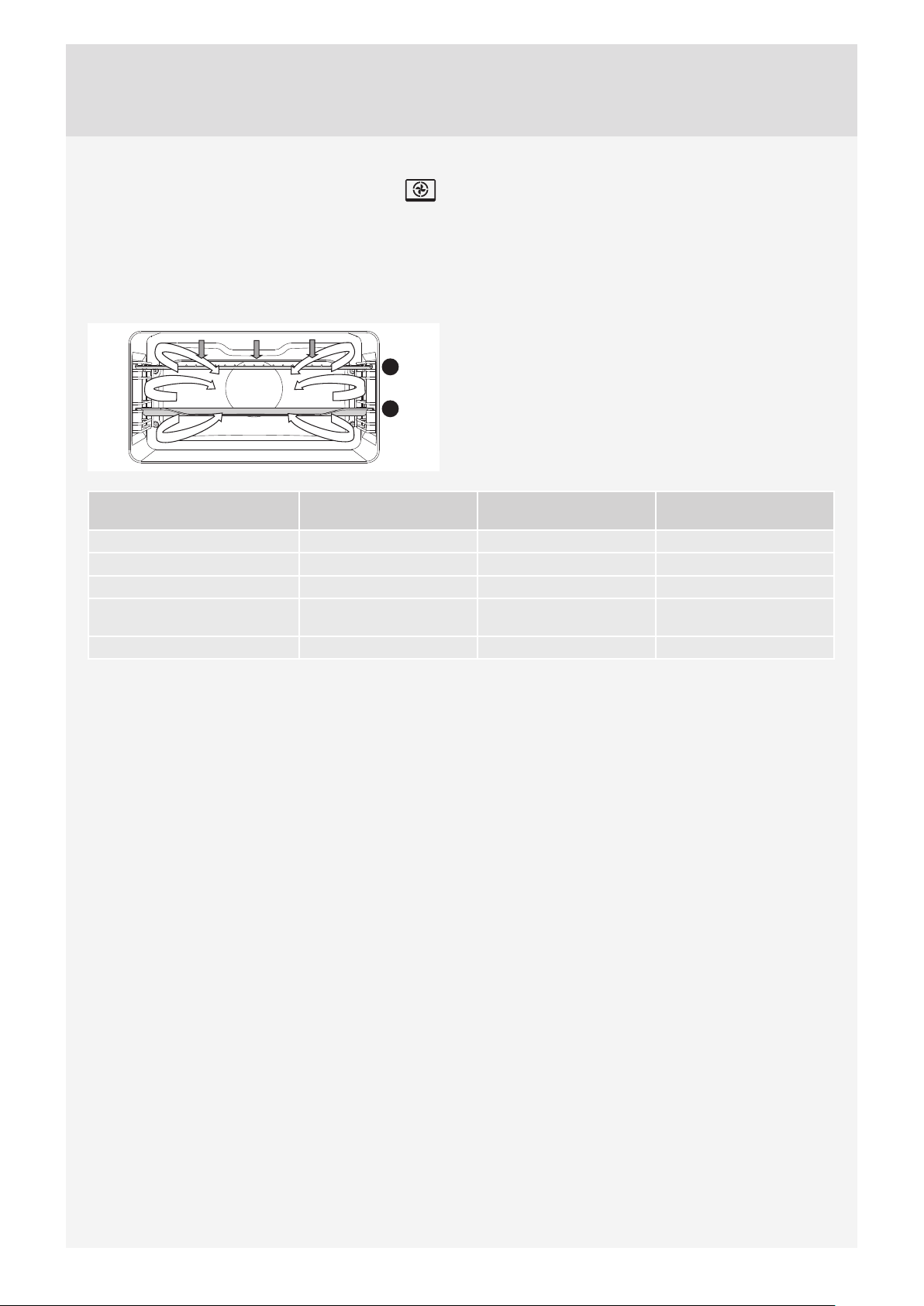
HOT AIR AND BOTTOM HEATER
The bottom heater, the round heater, and the hot air fan
will operate. Suitable for baking pizzas, apple pies, and
fruitcakes.
(See descriptions and tips for UPPER and BOTTOM
HEATER.)
2
4
Type of food Guide level
(from the bottom)
Temperature
(°C)
Cooking time
(min)
Cheesecake, short crust 2 150-160 65-75
Pizza * 2 200-210 15-20
Quiche Lorraine, shortcrust 2 180-200 35-40
Apple pie, leavened dough 2 150-160 35-40
Apple strudel, phyllo dough 2 170-180 45-65
30
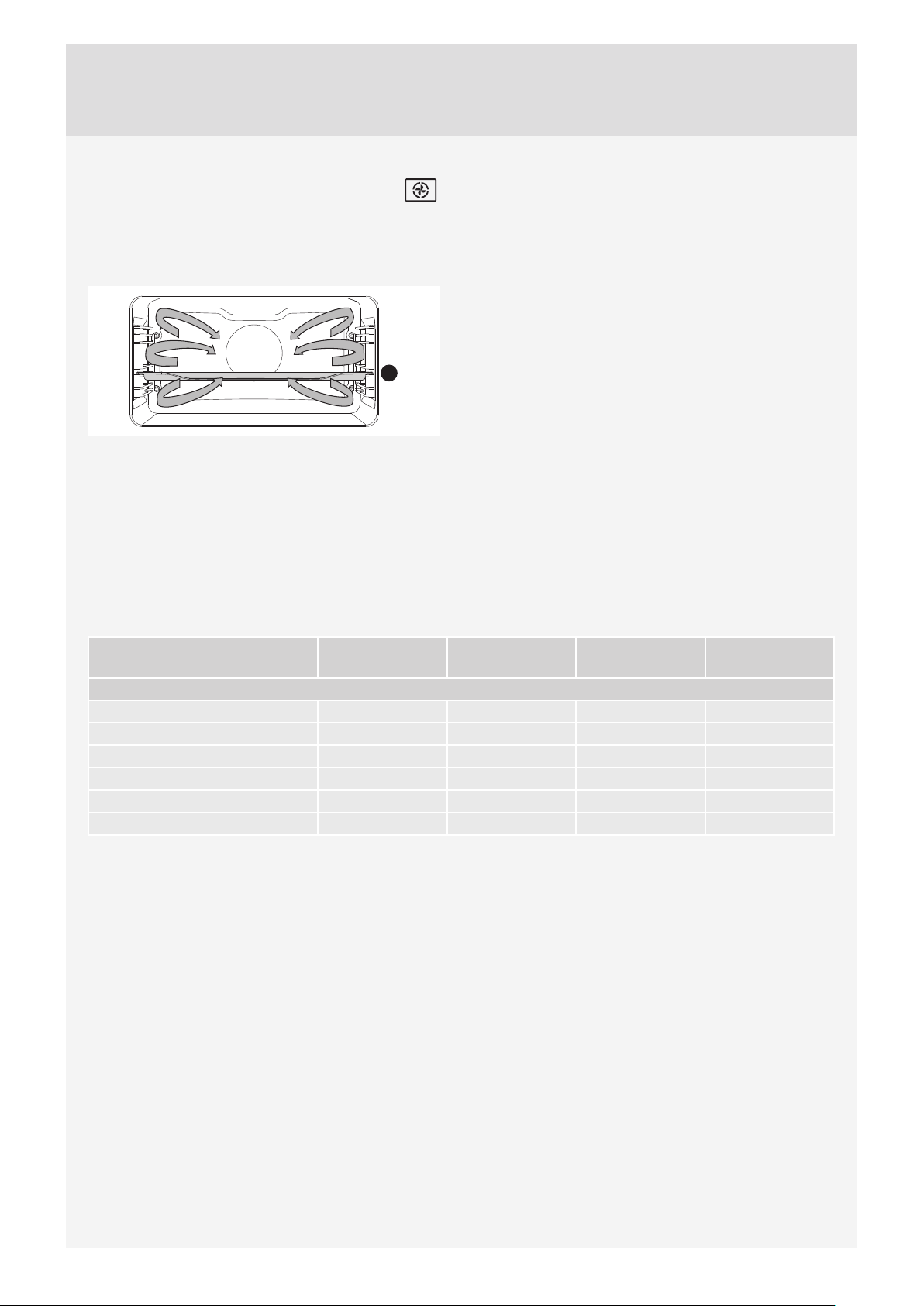
3D HOT AIR
Round heater and the fan will operate. The fan installed
in the back wall of the oven cavity makes sure the hot air
constantly circulates around the roast or pastry.
2
Roasting meat:
Use enamel coated, tempered glass, clay, or cast iron
pan or tray. Stainless steel trays are not suitable as they
strongly refl ect the heat.
Provide enough liquid during the cooking process to
prevent the meat from burning. Turn the meat during
roasting. The roast will remain juicier if you cover it.
Type of food Weight (g) Guide level (from
the bottom)
Temperature Cooking time
(min)
MEAT
Pork roast, including skin 1500 2 170-180 140-160
Pork belly 1500 2 170-180 120-150
Chicken, whole 1200 2 180-190 60-80
Duck 1700 2 160-170 120-150
Chicken breast 1000 2 180-190 60-70
Stuff ed chicken 1500 1 170-180 100-120

31
Baking pastry
Preheating is recommended.
Biscuits and cookies can be baked in shallow baking sheets on several levels simultaneously (2nd and 3rd).
Note that baking time can diff er even with if the baking sheets used are the same. The biscuits in the upper baking sheet
may be ready sooner than those in the lower one.
Always place the baking trays on the grid. If you are using the supplied baking sheet, remove the grid.
For even browning, make sure the biscuits are of the same thickness.
Type of food Guide level (from the
bottom)
Temperature (°C) Cooking time (min)
PASTRY
Cake 2 150-160 45-60
Sponge cake 2 150-160 25-35
Crumble cake 2 160-170 25-35
Fruit cake, sponge 2 150-160 45-65
Plum cake 2 150-160 35-60
Sponge roll* 2 160-170 15-25
Fruit cake, short crust 2 160-170 50-70
Challah (braided yeast bun) 2160-17035-50
Apple strudel 2 170-180 40-60
Jelly-fi lled rolls (Buchtel) 2170-18030-35
Pizza * 2 190-210 25-45
Biscuits, short crust 2 150-160 15-25
Biscuits, pressed 2 150-160 15-28
Cookies, leavened 2 170-180 20-35
Cookies, phyllo dough 2 170-180 20-30
Cream-fi lled pastry 2 180-190 25-45
PASTRY – FROZEN
Apple and cottage cheese strudel 2 170-180 50-70
Cheesecake 2 160-170 65-85
Pizza 2 170-180 20-30
Fried potatoes, oven-ready 2 170-180 20-35
Croquettes, oven-baked 2 170-180 20-35
Yoghurt 3 40 240
Do not insert the deep baking tray into the fi rst guide.
32
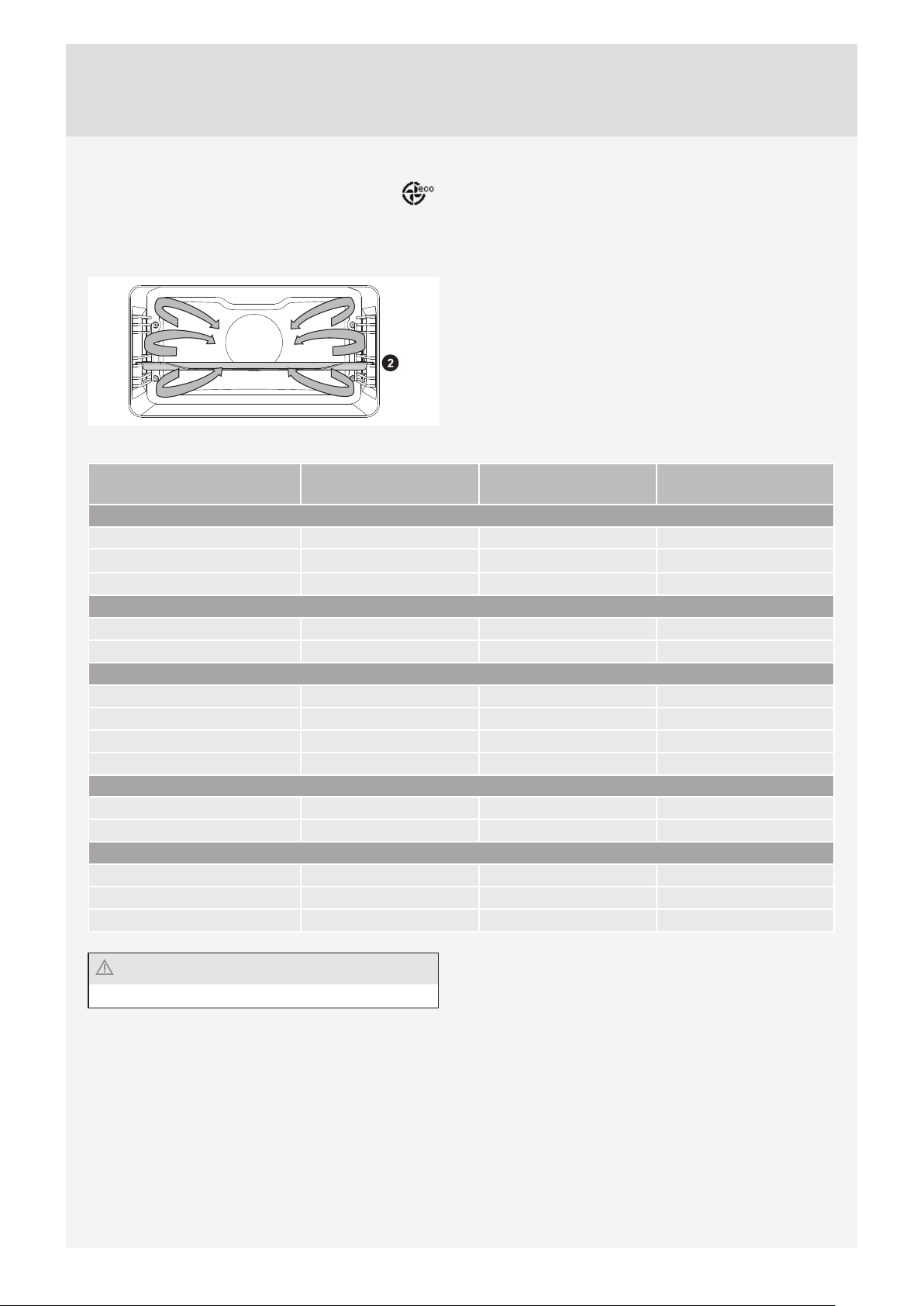
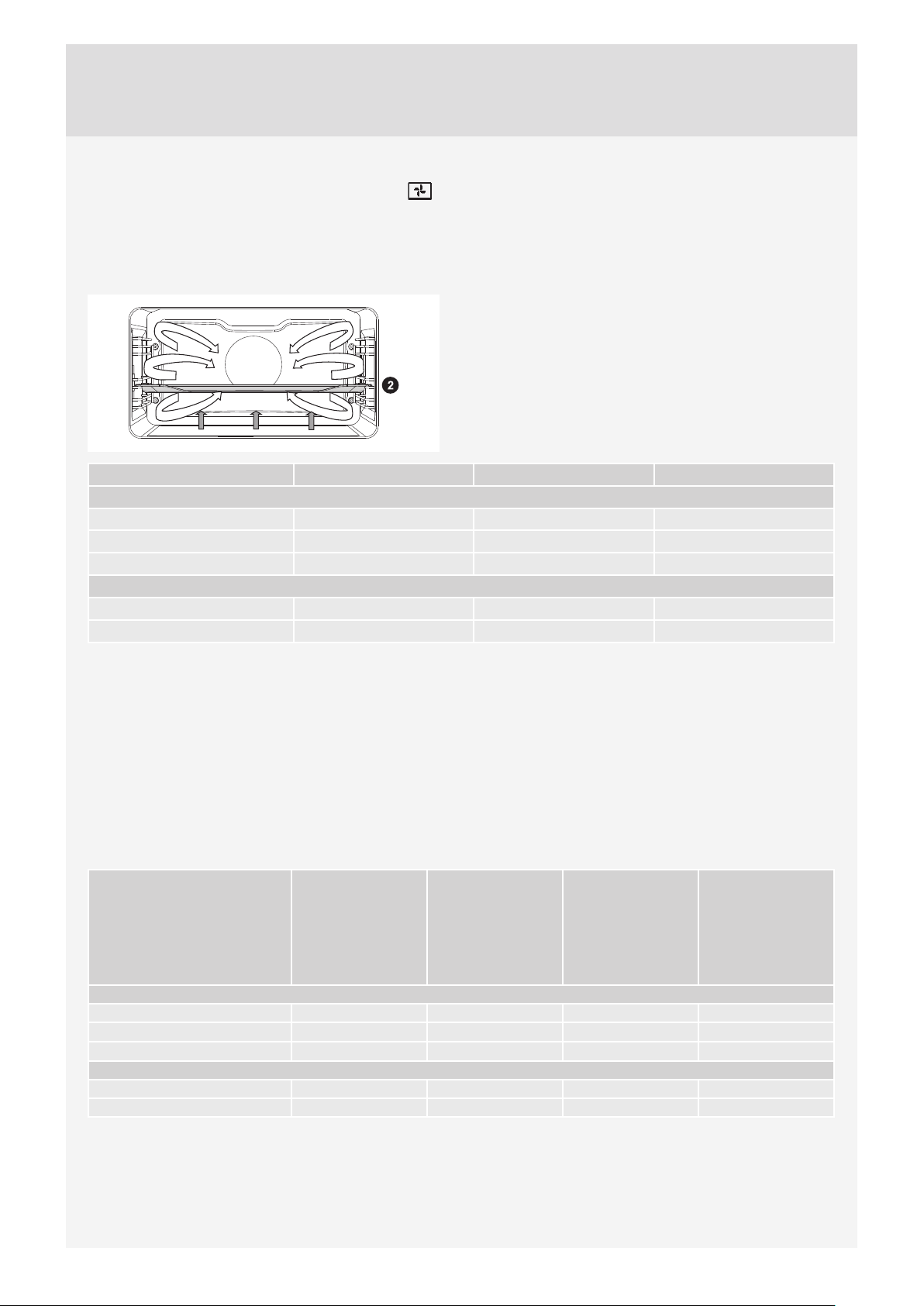
ECO COOKING
Round heater and the fan will operate. The fan installed
in the back wall of the oven cavity makes sure the hot air
constantly circulates around the roast or pastry.
Type of food Guide level (from the
bottom)
Temperature (°C) Cooking time (min)
MEAT
Pork roast, 1 kg 2 190 150-170
Pork roast, 2 kg 2 190 160-190
Beef roast, 1 kg 2 210 120-140
FISH
Whole fi sh, 200 g/piece 2 200 40-50
Fish fi llet, 100 g/piece 2 210 25-35
PASTRY
Pressed cookies* 2 180 25-30
Small cupcakes 2 190 30-35
Sponge roll 2 190 15-25
Fruit cake, short crust 2 190 55-65
VEGETABLES
Potatoes au gratin 2 190 40-50
Lasagne 2 200 40-50
FROZEN FOOD
Pommes frites, 1 kg 2 220 25-40
Chicken medallions, 0.7 kg 2 220 25-35
Fish sticks, 0.6 kg 2 220 20-30
Do not insert the deep baking tray into the fi rst guide.
33
BOTTOM HEATER AND FAN
This is used for baking leavened but low-rising pastry and
for preserving fruit and vegetables. Use the second guide
from the bottom and a rather shallow baking tray to allow
the hot air to circulate across the upper side of the dish.
Type of food Guide (from the bottom) Temperature (°C) Cooking time (minutes)
Fruit:
Strawberries 2 180 20-30
Stone fruits 2 180 25-40
Fruit mush 2 180 25-40
Vegetables:
Pickled gherkins 2 180 25-40
Beans/carrots 2 180 25-40
PRESERVATION
Prepare the food to be preserved and jars as usual. Use jars with a rubber sealing ring and a glass cover. Do not use jars
with threaded or metal caps or metal tins. Make sure the jars are of equal size, fi lled with the same contents, and tightly
sealed.
Pour 1 litre of hot water into the deep tray (approx. 70°C) and place 6 1-litre jars into the tray. Place the tray into the oven
on the second guide.
During preservation, observe the food and cook until the liquid in the jars starts to simmer – when bubbles appear in the
fi rst jar.
Food Amount (L) T = 170 °C –
180 °C until
bubbles appear
in the jars / until
liquid in the jars
starts to simmer
Temperature at the
start of simmering
– when bubbles
appeared
Resting time in the
oven (min)
FRUIT
Strawberries 6×1 l 40-55 switch off 25
Stone fruits 6×1 l 40-55 switch off 30
Fruit mush 6×1 l 40-55 switch off 35
VEGETABLES
Pickled gherkins 6×1 l 40-55 switch off 30
Beans, carrots 6×1 l 40-55 120°C, 60min 30
34
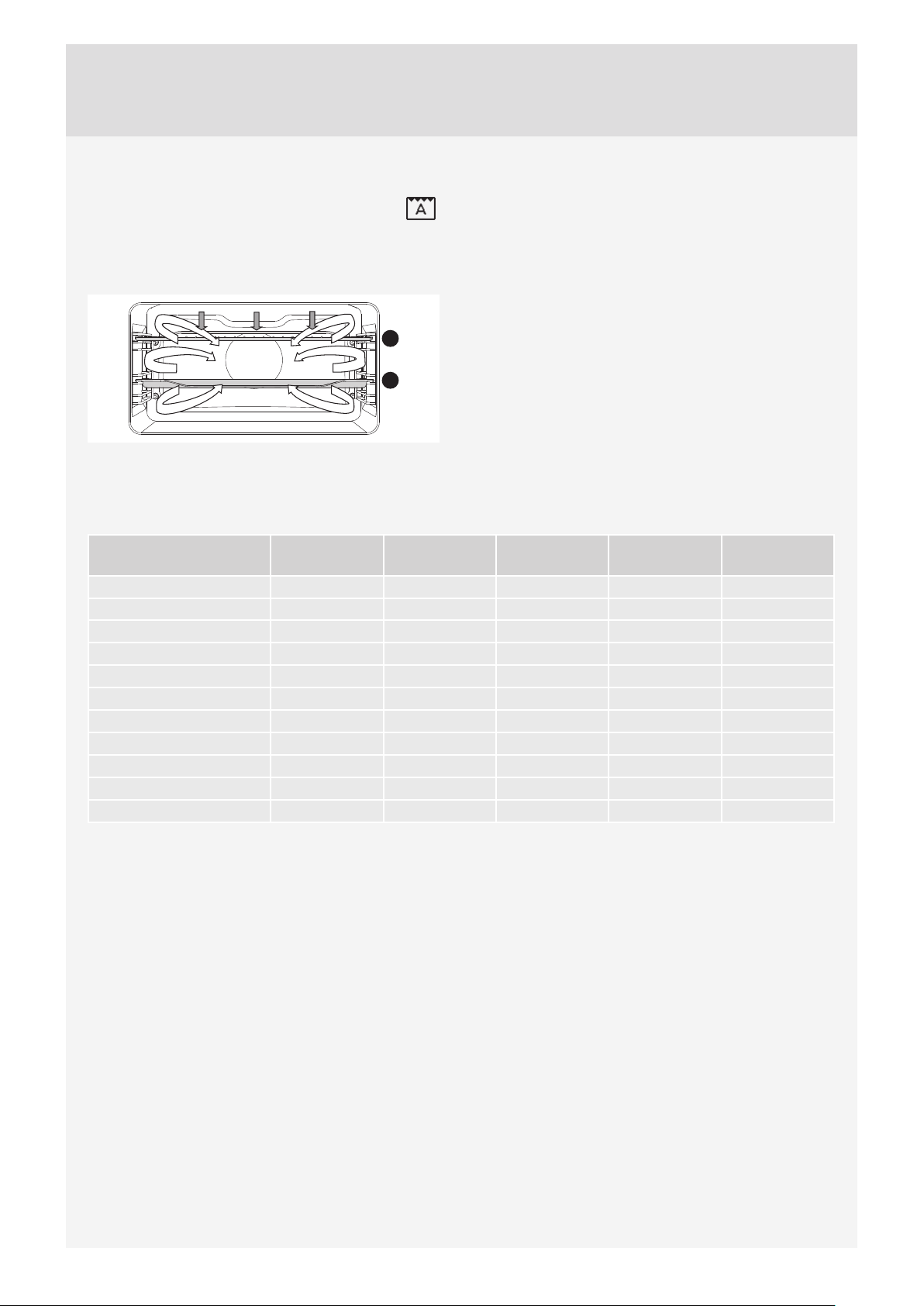
AUTOMATIC COOKING OF MEAT –
AUTO ROAST MODE
In the Auto Roast mode, the upper heater will operate in
combination with the grill heater and the round heater. It
is used for roasting all types of meat.
2
4
When grilling directly on the grid, smear it with oil to prevent the meat from sticking onto it and insert it into the 2nd guide.
Insert a drip tray into the 1st guide. When roasting meat in a baking tray, insert it into the 1st guide.
Type of food Weight (g) Guide (from
the bottom)
Tempera-ture
(°C)
Cooking time
(minutes)
Core tempera-
ture
Beef tenderloin 1000 2 190-210 50-70 55-75*
Chicken–whole 1500 2 170-190 60-75 85-90
Chicken–whole 2000 2 170-190 90-110 85-90
Turkey 4000 2 160-180 150-80 85-90
Pork roast 1000 2 150-170 100-120 70-85
Meat loaf 1000 2 160-180 70-80 75-80
Veal 1000 2 170-190 85-105 55-75
Lamb 1000 2 170-190 50-60 70-80
Venison 1000 2 170-190 50-65 70-80
Fish 1500 2 160-180 35-55 75-85
Chicken – thighs 1000 2 180-200 45-55 85-90
* rare = 55–60 °C; medium = 65–70 °C; well done = 70–75 °C
35
COMBINED SYSTEMS
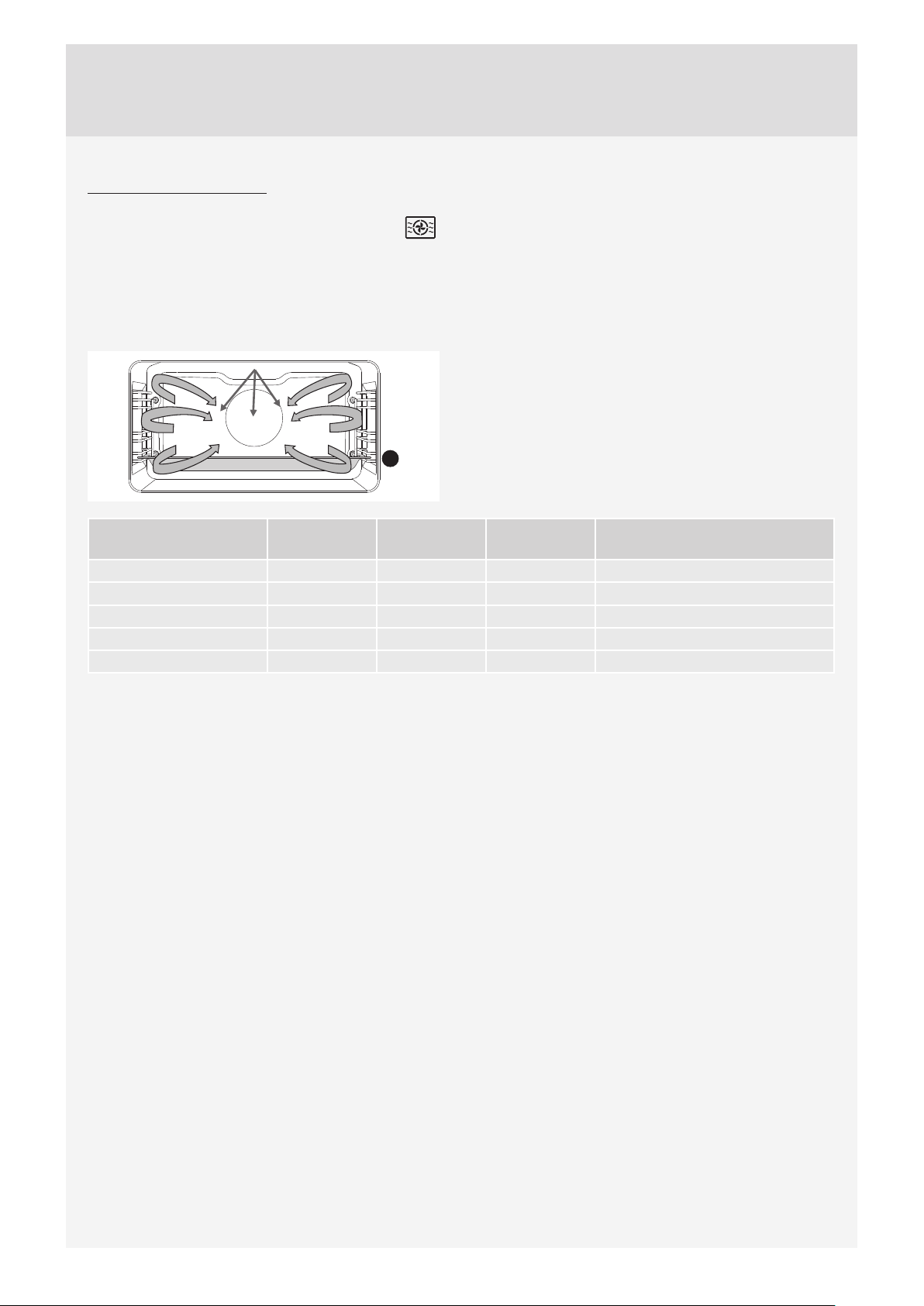
HOT AIR AND MICROWAVES
In this cooking mode, the food is cooked with a
combination of microwaves and grill.
Power levels: 90, 180, 360, 600 W
Place the glass baking dish into the 1st guide.
1
Type of food Weight (g) Power (W) Temperature
(°C)
Cooking time (min)
Poultry 1000 360 190-200 °C 30-40
Poultry
half 36 190-200 °C 25-35
Chicken – thighs 1000 180 190-200 °C 20-30
Duck 1500 360 190-200 °C 40-50
Poultry – wings 500 600 190-200 °C 15-20
36
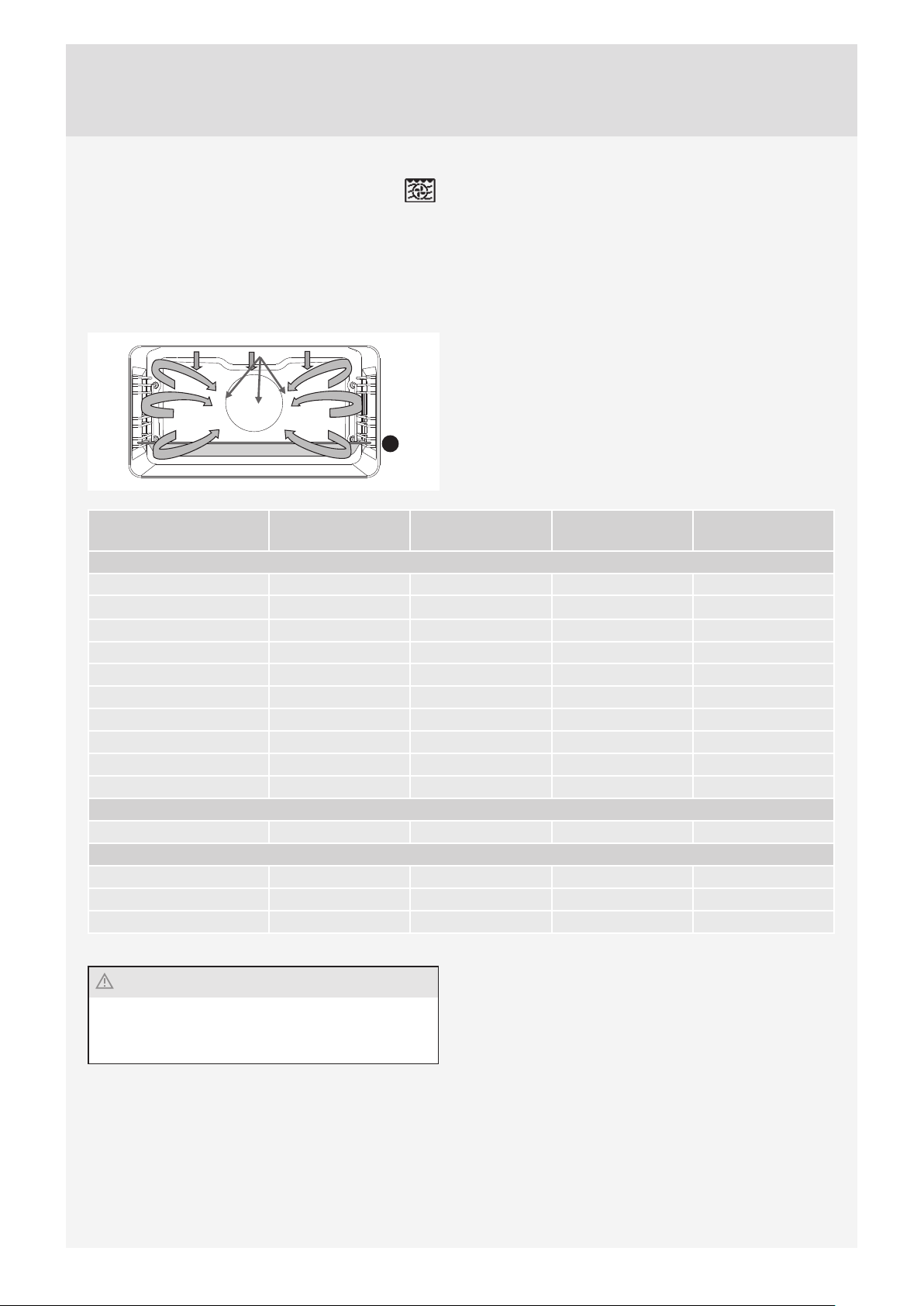
GRILL WITH FAN + MICROWAVES
This system uses a combination of microwaves and grill
with fan to cut the cooking time.
Power levels: 90, 180, 360, 600 W.
Place the baking tray into the 1st guide.
1
Food Weight (g) Power (W) Temperature (°C) Cooking time
(minutes)
MEAT
Veal roast 1500 360 170-190 70-90
Lamb – ribs 1500 360 170-190 70-90
Meat loaf 1000 360 180-190 30-40
Poultry – breast 500 360 180-200 25-35
Duck breast 1000 360 190-200 25-35
pork roast 1500 170-200 600 60-80
Roasted beef 1500 180-190 600 60-80
Chicken, whole 1500 190-200 360 30-35
Chicken, half 1500 190-200 360 25-30
Chicken thighs 1000 190-200 180 30-40
PASTRY
Strudel – sweet / 600 180-200 15-20
VEGETABLES
Cannelloni / 600 180-200 10-15
Ukrainian cabbage rolls / 750 180-200 25-35
Potatoes au gratin 0,8 kg 600 180-200 25-35
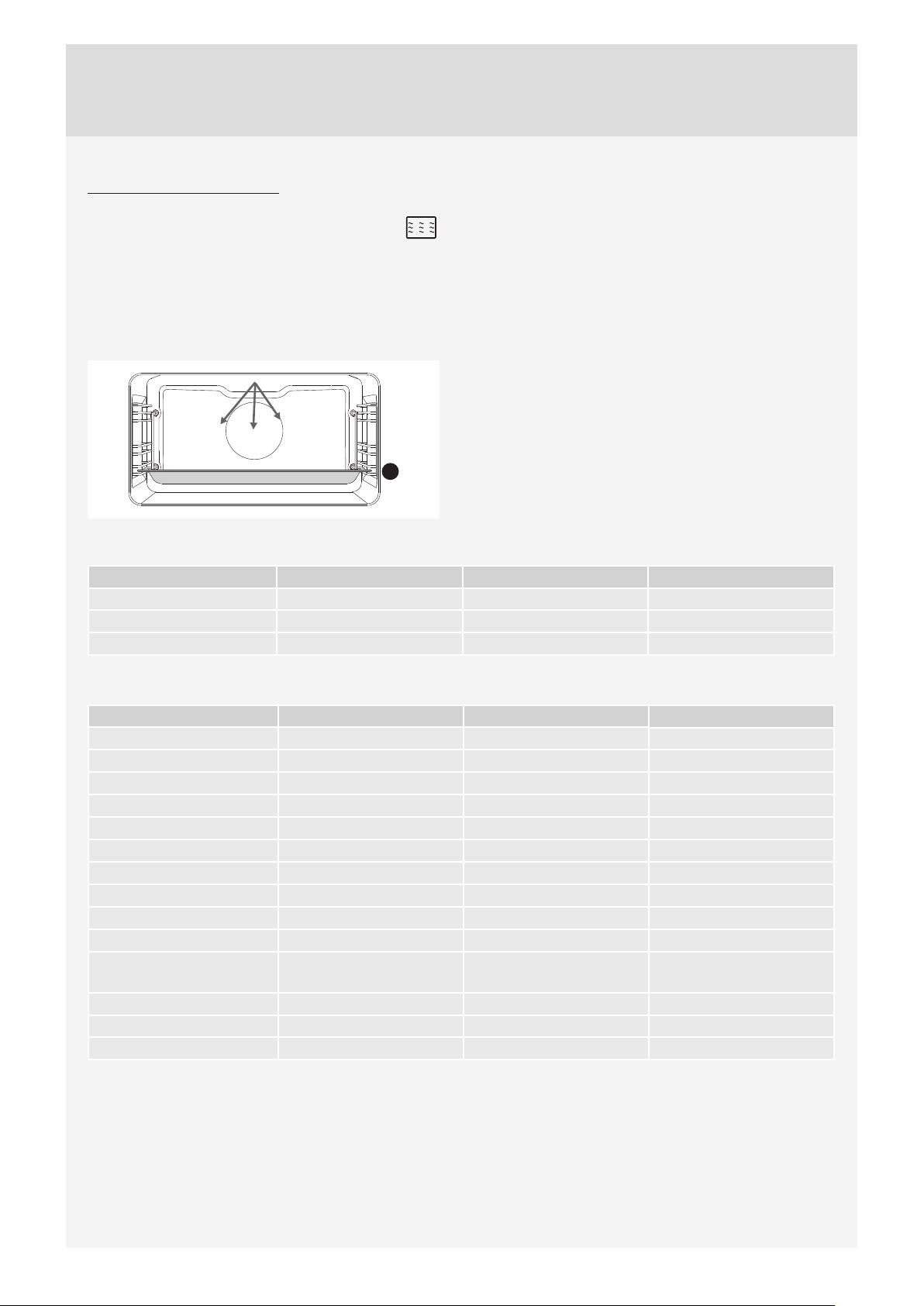
When using microwave systems, do not use metal
cookware or utensils.
Do not preheat the oven.
37
MICROWAVE SYSTEMS
MICROWAVES
Microwaves are used for cooking and defrosting.
Power levels: 90, 180, 360, 600, 750, 100 W.
Place the glass baking dish into the 1st guide.
1
Cooking frozen food
Food Weight (g) Power (W) Cooking time (min)
Meat loaf 1000 850 35-40
Chicken 1500 600 52-55
Pork roast 1000 600 50-55
Cooking fresh vegetables
Type of food Weight (g) Power (W) Cooking time (min)
Eggplant / aubergines 500 1000 5-8
Courgettes 500 1000 5-8
Carrots 500 1000 7-10
Onions 200 1000 2-4
String beans 500 750 10-15
Broccoli 1000 750 15-18
Bell peppers 500 1000 3-5
Caulifl ower 1000 750 17-20
Leeks 200 1000 9-12
Brussels sprout 500 1000 9-12
Button mushrooms /
Champignons
500 1000 10-14
Asparagus 500 750 5-8
Peas* 500 650 15-20
Cabbage 500 1000 10-14

38
Cooking rice and pasta
Type of food Weight (g) Power (W) Cooking time (min)
Rice* 250 1000 14-16
Pasta** 250 1000 11-13
Whole grain pasta* 250 1000 11-13
Oatmeal* 500 1000 7-9
Brown rice*** 200 750 31-33
Risotto ** 200 750 19-21
Couscous *** 200 1000 2-4
Polenta *** 200 1000 6-8
Millet *** 200 1000 9-11
** Add water in the ratio of 1:2.
*** Add water in the ratio of 1:3.
Reheating food and beverages
Type of food Amount (dl, g) Power (W) Cooking time (min)
Water 2 dl 1000 1-2
Coff ee 2 dl 1000 1-2
Mulled wine 2 dl 1000 1-2
Milk 2 dl 1000 1-1,5
Side dishes 500 g 600 1,5-2
Sauces 500 g 600 3-5
Soups/stews 5 dl 750 5-7
Popcorn 90 g 1000 5-7
Baby bottle 2dl 350 3-4
Baby food 4 dl 180 2
Meat
Type of food Weight (g) Power (W) Cooking time (min)
Chicken thighs 500 600 15-20
Chicken wings 500 600 15-20
Meatballs 1000 1000 10-15
Pork chops 500 750 30-35
Chicken braised in sauce 500 1000 8-13
Escalopes/steaks 500 1000 8-12
Chicken–whole 1500 600 50-55
Pork roast 1000 600 50-55
Meat loaf 700 750 35-40

39
Deserts
Type of food Cups Power (W) Cooking time (min)
Chocolate soufflé 6 360 7-9
Cheese soufflé glass baking dish 600-750 15-20
Fruit purée glass baking dish 750-850 10-15
Custard creams glass baking dish 600 20
40
Be sure to unplug the appliance from the power supply
and wait for the appliance to cool down.
Children should not clean the appliance or perform
maintenance tasks without proper supervision.
Aluminium fi nish
Clean the aluminium fi nish with non-abrasive liquid
cleaners intended for such surfaces. Apply the cleaner
onto a wet cloth and clean the surface. Then, rinse the
surface with water. Do not apply the cleaner directly onto
the aluminium fi nish.
Do not use abrasive cleaners or sponges.
Note: The surface should not come into contact with
oven cleaning sprays as this may result in visible and
permanent damage.
Stainless steel sheet front side of the
housing
(depending on the model)
Clean this surface only with a mild detergent (soapsuds)
and a soft sponge that will not scratch the fi nish. Do not
use abrasive cleaners or cleaners containing solvents as
they may damage the housing fi nish.
Lacquer-coated surfaces and plastic parts
(depending on the model)
Do not clean the knobs and buttons, door handles,
stickers, and rating/type plates with abrasive cleaners or
abrasive cleaning materials, alcohol-based cleaners, or
with alcohol.
Immediately remove any stains with a soft non-abrasive
cloth and some water, in order to avoid damaging the
surface.
You may also use cleaners and cleaning materials
intended for such surfaces as instructed by their
respective manufacturers.
The aluminium-coated surfaces should not come
into contact with oven cleaning sprays as this may result
in visible and permanent damage.
Appliance door
The door is attached to the appliance and may not be
removed. Also, the door may not be disassembled or
otherwise tapered with.
CONVENTIONAL OVEN CLEANING
You may use the standard cleaning procedure to clean
stubborn dirt in the oven (using cleaners or an oven
spray). After such cleaning, rinse the cleaner residues
thoroughly.
Clean the oven and the accessories after each use
to prevent the dirt from burning into the surface. The
easiest way to remove fat is by using warm soapsuds
while the oven is still warm.
With stubborn dirt and grime, use conventional oven
cleaners. Rinse the oven thoroughly with clean water to
remove all cleaner residue.
Never use aggressive cleaners, abrasive cleaners,
abrasive sponges, stain and rust removers etc.
Clean the accessories (baking sheets and trays, grids
etc.) with hot water and detergent.
The oven, the oven cavity and the baking trays are lined
with a special enamel coating for a smooth and resistant
surface. This special coating makes cleaning at room
temperature easier.
MAINTENANCE & CLEANING
41
USING THE AQUA CLEAN FUNCTION TO CLEAN THE OVEN
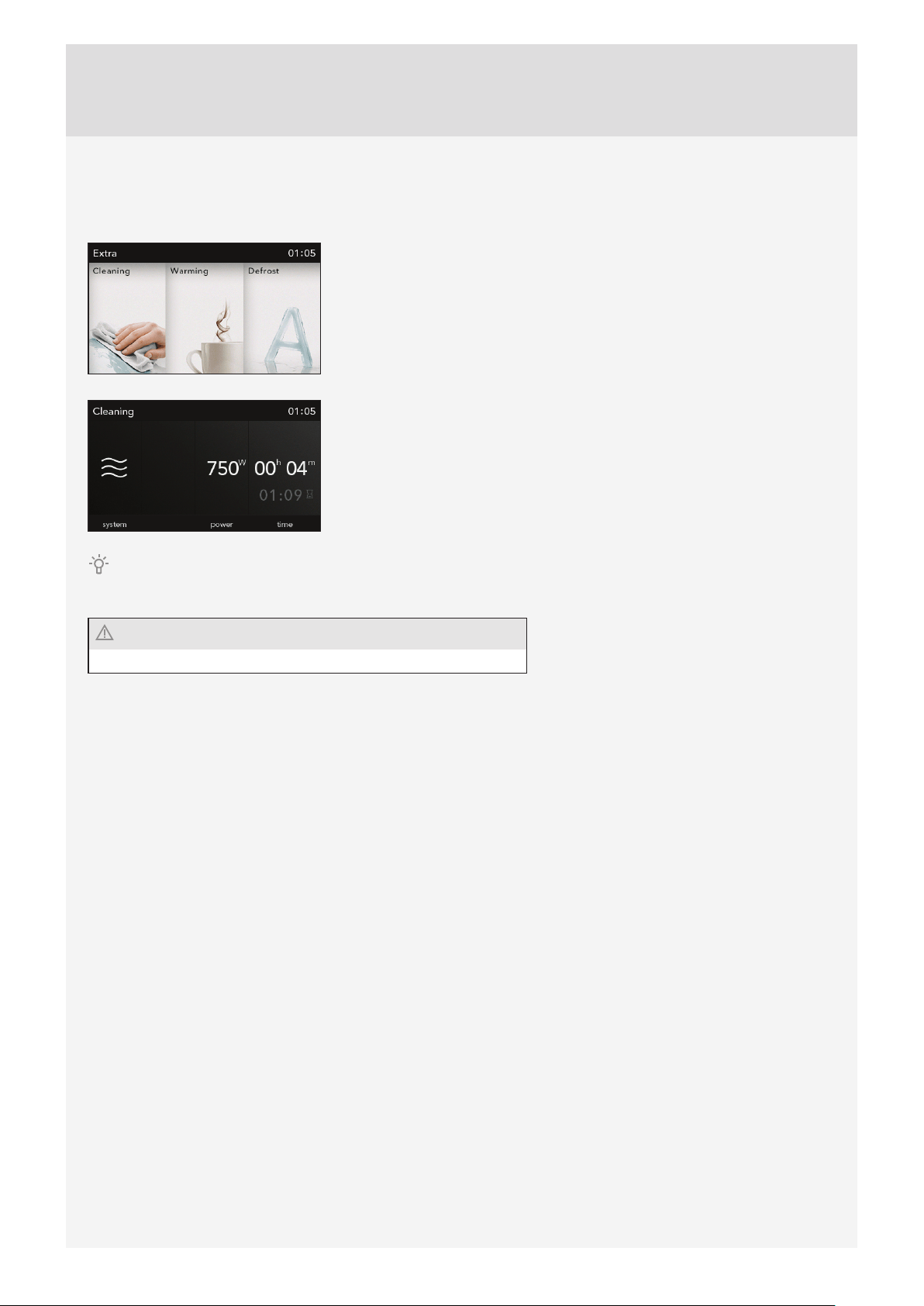
Pour 0.6 l water into the glass tray and place it into the lower guide.
Choose ”Extra/Additional Functions” in the main menu and select the Aqua
Clean symbol. Select Cleaning in the Extras menu.
Press the START key.
After 30 minutes, food residues on the oven enamel walls will have softened and they will be easy to clean with a
damp cloth.
Use the Aqua Clean function when the oven has fully cooled down.
42
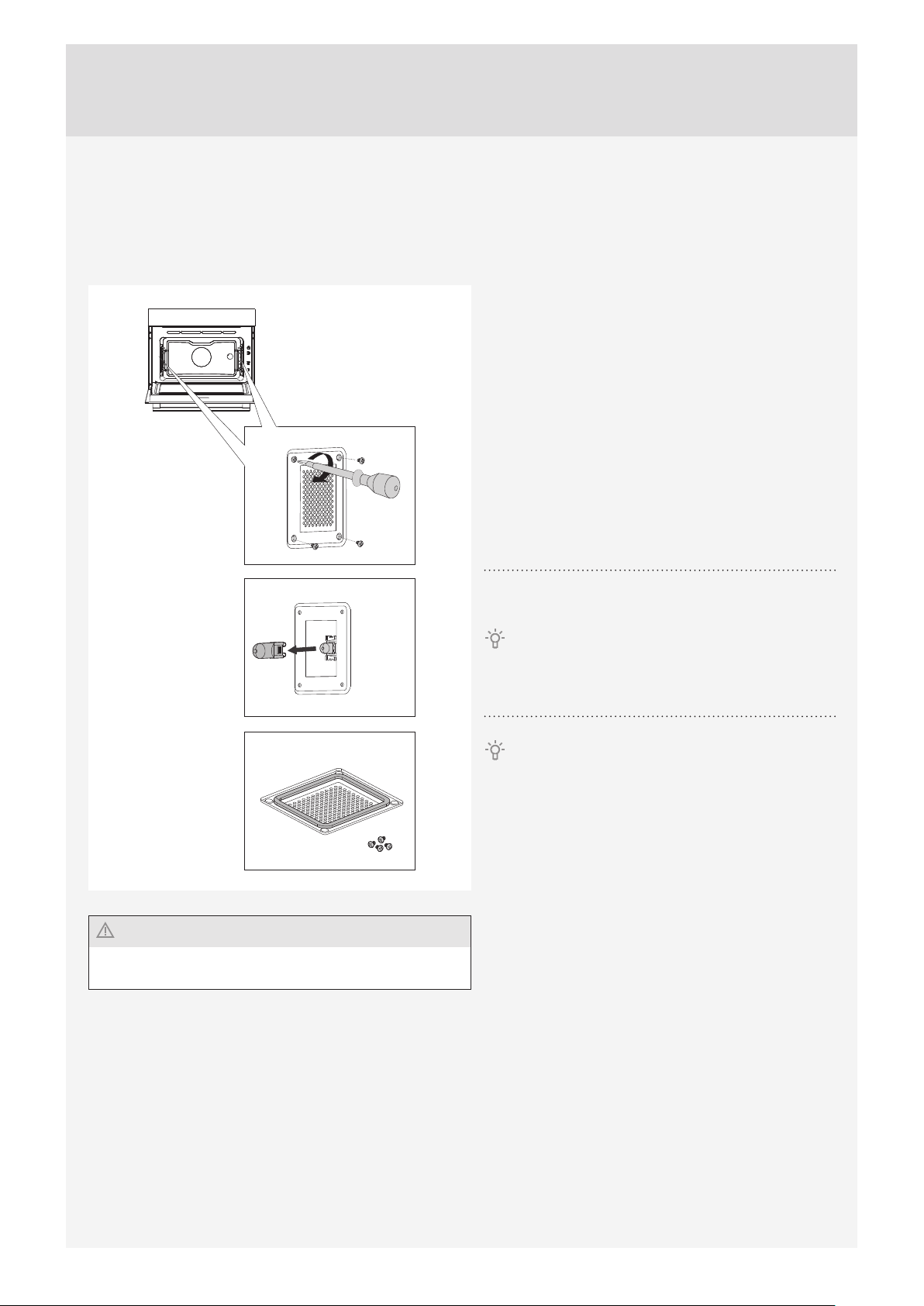
REMOVING AND CLEANING THE WIRE GUIDES
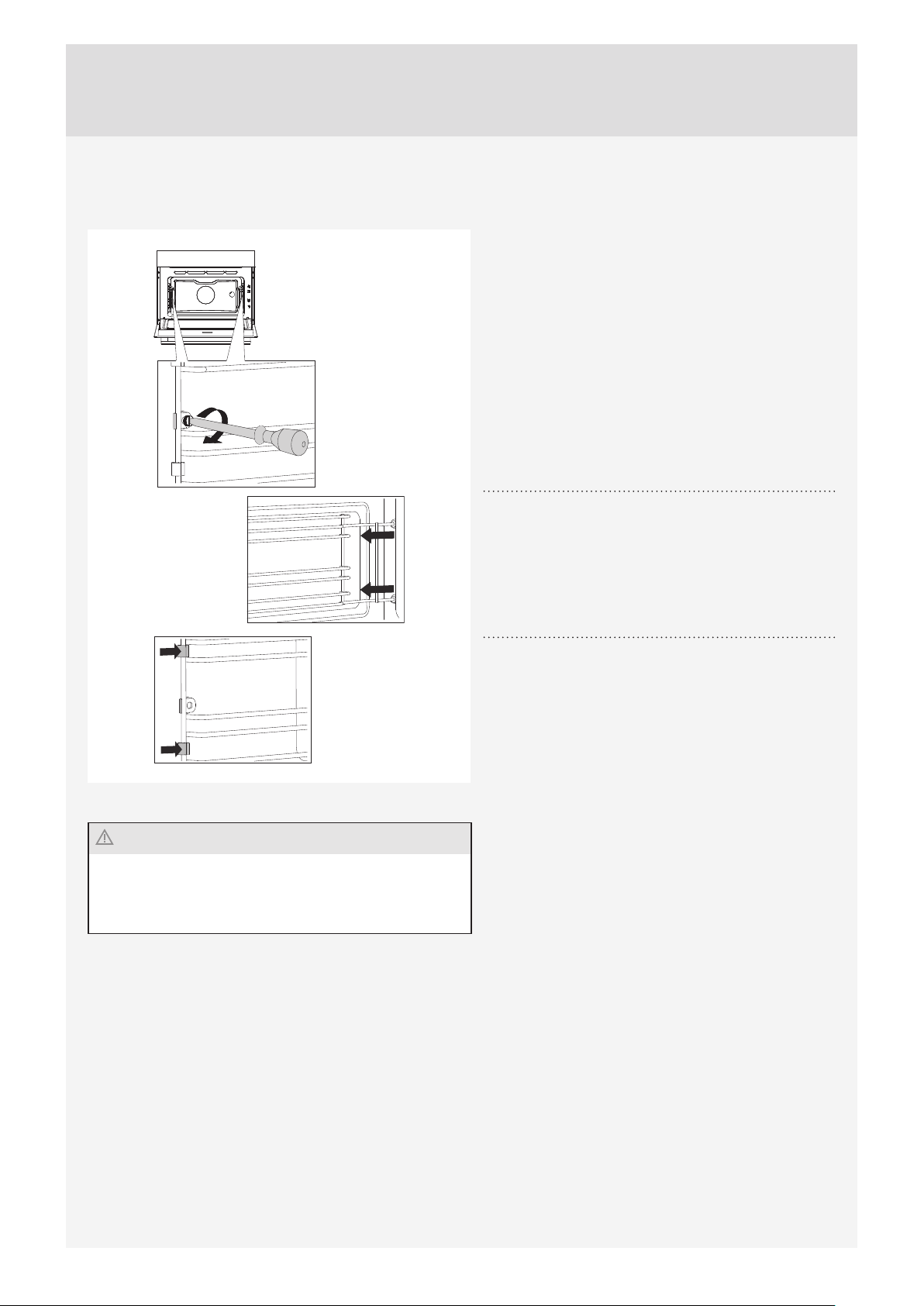
Only use conventional cleaners to clean the guides.
After cleaning, re-tighten the screws on the guides with a
screwdriver
When replacing the wire guides, make sure you mount them
on the same side they were installed on prior to removal.
1
Undo the screw. Use a screwdriver.
2
Remove the guides from the holes in the back wall.
Take care not to lose the spacers fi tted on the wire
guides. Replace the spacers after cleaning; otherwise,
sparks may appear.
43
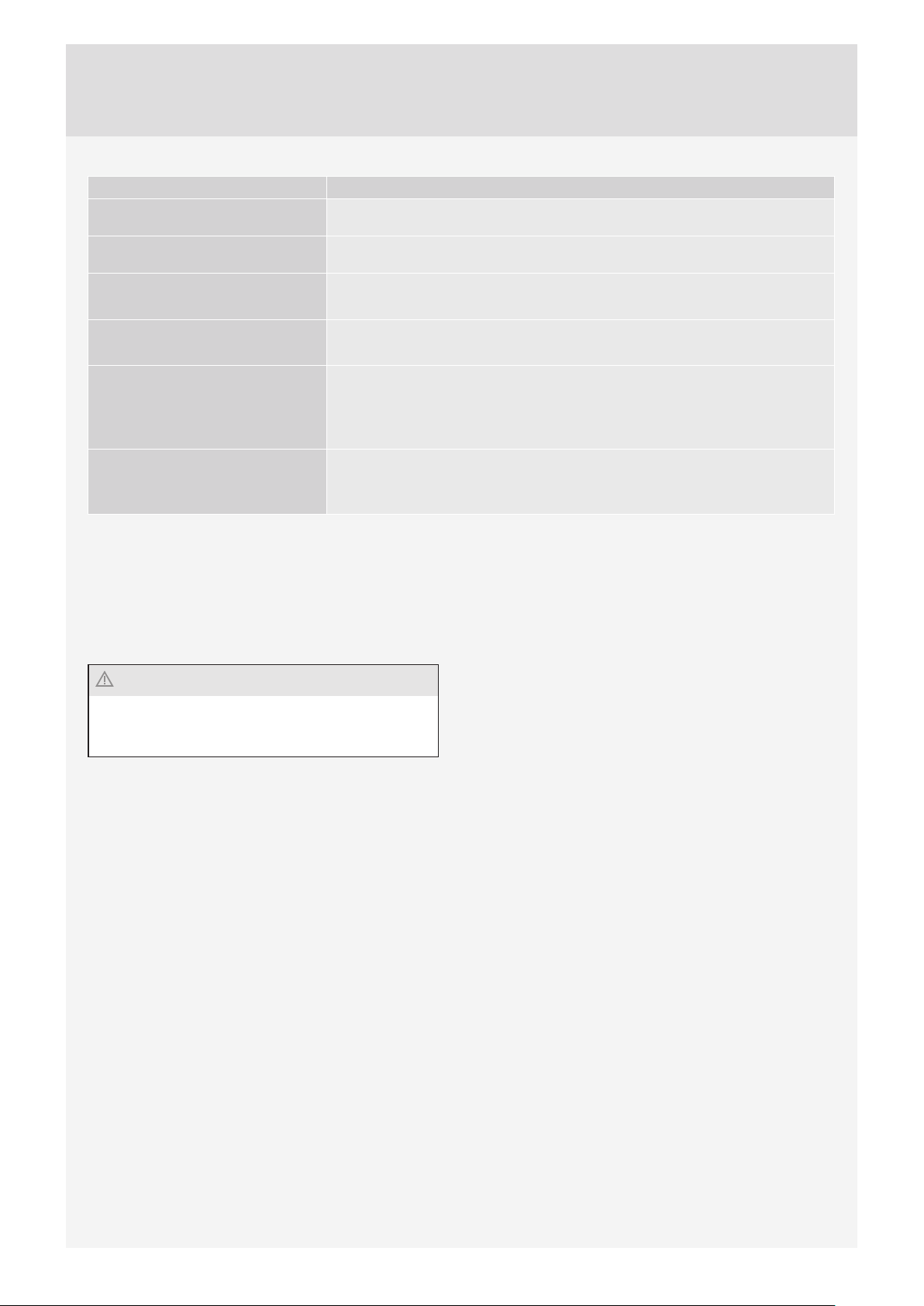
REPLACING THE BULB
The bulb is a consumable and therefore not covered by warranty. Before changing the bulb, remove the trays, the grid,
and the guides.
Use a Phillips (cross) screwdriver.
(Halogen lamp: G9, 230 V, 25 W)
Firmly re-tighten the screws on the cover using a
screwdriver; otherwise, sparks may appear.
1
Undo the four screws on the cover. Remove the cover
and the glass.
2
Remove the halogen light bulb and replace it with a
new one.
Use protection to avoid burs.
There is a gasket on the cover which should not be
removed. Do not allow the gasket to be detached from
the cover. The gasket should fi t correctly onto the oven
cavity wall.
44
If the problems persist despite observing the advice
above, call an authorized service technician. Repair or
any warranty claim resulting from incorrect connection
or use of the appliance shall not be covered by the
warranty. In this case, the user will cover the cost of
repair.
Before the repair, disconnect the appliance from the
power mains (by removing the fuse or by removing the
plug from the wall outlet).
Problem/error Cause
There is no response of the
sensors; the display is frozen.
Disconnect the appliance from the power mains for a few minutes (undo the fuse
or switch off the main switch); then, reconnect the appliance and switch it on.
The main fuse in your home trips
often.
Call a service technician.
The oven lighting does not work. The process of changing the light bulb is described in the chapter.
Cleaning and Maintenance.
The pastry is underdone. Did you choose the right temperature and heating system?
Is the oven door closed?
Error code is displayed: ERRXX ...
* XX denotes the number/code of
the error.
There is an error in the electronic module operation. Disconnect the appliance
from the power mains for a few minutes. Then, reconnect it and set the time of
day.
If the error is still indicated, call a service technician.
Sparks appear in the oven. Make sure all covers of the lights are fastened and that all spacers are fi tted on
the wire guides.
Make sure the guides are correctly placed in the appliance.
TROUBLESHOOTING TABLE

45
Packaging is made of environmentally
friendly materials that can be recycled,
disposed of, or destroyed without any
hazard to the environment. To this end,
packaging materials are labelled appropriately.
The symbol on the product or its packaging indicates
that the product should not be treated as normal
household waste. The product should be taken to an
authorized collection center for waste electric and
electronic equipment processing.
Correct disposal of the product will help prevent any
negative eff ects on the environment and health of people
which could occur in case of incorrect product removal.
For detailed information on removal and processing of
the product, please contact the relevant municipal body
in charge of waste management, your waste disposal
service, or the store where you bought the product.
We reserve the right to any changes and errors in the instructions for use.
DISPOSAL
46
Food tested in compliance with the EN 60350-1 standard.
Conventional baking
Dish Equipment Guide level
(from the
bottom)
System Tempera-ture
(°C)
Cooking time
(min)
Biscuits – single level*
Shallow enamel-coated
baking sheet
3
140-150 30-35
Cookies – two levels*
Shallow enamel-coated
baking sheet
2 and 3
140-150 30-40
Cupcakes – single level *
Shallow enamel-coated
baking sheet
3
150-160 30-35
Cupcakes – two levels
Shallow enamel-coated
baking sheet
2 and 3
140-150 30-35
Cake
Round metal mould/
Wire shelf (support grid)
2
160-170 15-20
Apple pie
Round metal mould/
Wire shelf (support grid)
2
180 45
* Preheat for 10 minutes.
Grill
Dish Equipment Guide (from
the bottom)
System Tempera-ture
(°C)
Cooking time
(minutes)
Toast* Wire shelf/grid 3
240 1:20-1:40
Minced meat patty
(pljeskavica)*
Wire shelf/grid + baking
sheet as drip tray
3
240 20-25
* Preheat for 10 minutes.
Microwaves
Dish Note Guide (from
the bottom)
Power (W) System Tempera-
ture (°C)
Time
(minutes)
Custard creams 1 600
20
Sponge cake 1 1000
5-6
Meat loaf 1 600
25
Potatoes au gratin 1 360
190 25-30
Cake 1 180
180 25
Chicken
Program: Grill
+ hot air +
microwaves
1360
200 30
Defrosting ground meat 1
90 W* (auto
program)
21:30
* Preheat for 10 minutes.
COOKING TEST


en (04-15)COMBI MW_TFT_45